GeistHaus
log in · sign up

absorptions

Part of blogger.com

a blog about sound & signals by windytan [oona räisänen]

stories
Passing planes and other whoosh sounds
acoustics
Show full content

I always assumed that the recognisable 'whoosh' sound a plane or helicopter makes when passing overhead simply comes from the famous Doppler effect. But when you listen closely, this explanation doesn't make complete sense.

#planepassingwave > div { word-wrap: break-word; word-break: normal; } const regions = WaveSurfer.Regions.create(); const wavesurfer_whoosh = WaveSurfer.create({ container: '#planepassingwave', waveColor: 'rgb(25, 100, 200)', progressColor: 'rgb(0, 100, 100)', mediaControls: true, plugins: [regions], }); wavesurfer_whoosh.load('https://oona.windytan.com/blogfiles/plane-chopper-passing.mp3'); wavesurfer_whoosh.on('decode', () => { // Regions regions.addRegion({ start: 6, content: 'Plane', drag: false, }) regions.addRegion({ start: 25, content: 'Helicopter', drag: false, }) }); <div class="audiodiv"><audio controls=""><source src="https://oona.windytan.com/blogfiles/plane-chopper-passing.mp3" id="planepassingaudio"></audio></div>

(Audio clipped from freesound - here and here)

A classic example of the Doppler effect is the sound of a passing ambulance constantly descending in pitch. When a plane flies overhead the roar of the engine sometimes does that as well. But you can also hear a wider, breathier noise that does something different: it's like the pitch goes down at first, but when the plane has passed us, the pitch goes up again. That's not how Doppler works! What's going on there?

Comb filtering.

Let's shed light on the mystery by taking a look at the sound in a time-frequency spectrogram. Here, time runs from left to right, frequencies from top (high) to bottom (low).

We can clearly see one part of the sound (the one starting at 2500 Hz) sweeping downwards, or from high to low frequencies; this should be the Doppler effect. But there's something else happening at the bottom of the image – another pattern is moving down at first, then up again...

This sound's frequency distribution seems to form a series of moving peaks and valleys. This resembles what audio engineers would call 'comb filtering', due to its appearance in the spectrogram. When the peaks and valleys move about it causes a 'whoosh' sound; this is the same principle as in the flanger effect used in music production. But these are just jargon for the electronically created version. We can call the acoustic phenomenon the whoosh.

The comb pattern is caused by two copies of the same exact sound arriving at a slightly different times, close enough that they form an interference pattern. It's closely related to what happens to light in the double slit experiment. In recordings this often means that the sound was captured by two microphones and then mixed together; you can sometimes hear this happen unintentionally in podcasts and radio shows. So my thought process is, are we hearing two copies of the plane's sound? How much later is the other one arriving, and why? And why does the 'whoosh' appear to go down in pitch at first, then up again?

Into the cepstral domain.

The cepstrum, which is the inverse Fourier transform of the estimated log spectrum, is a fascinating plot for looking at delays and echoes in complex (as in complicated) signals. While the spectrum separates frequencies, the cepstrum measures time, or quefrency – see what they did there? It reveals cyclicities in the sound's structure even if it interferes with itself, like in our case. In that it's similar to autocorrelation.

It's also useful for looking at sounds that, experientially, have a 'pitch' to them but that don't show any clear spectral peak in the Fourier transform. Just like the sound we're interested in.

Here's a time-quefrency cepstrogram of the same sound (to be accurate, I used the autocepstrum here for better clarity):

The Doppler effect is less prominent here. Instead, the plot shows a sweeping peak that seems to agree with the pitch change we hear. This delay time sweeps from around 4 milliseconds to 9 ms and back. Note that the scale: higher frequencies (shorter times) are on the bottom this time.

Now why would the sound be so correlated with itself with this sweeping delay time?

Ground echo?

Here's my hypothesis. We are hearing not only the direct sound from the plane but also a delayed echo from a nearby flat surface. These two sound get superimposed and interfere before they reach our ears. The effect would be especially prominent with planes and helicopters because there is little in the way of the sound either from above or from the large surface. And what could be a large reflective surface outdoors? Well, the ground below!

Let's think about the numbers. The ground is around one-and-a-half metres below our ears. When a plane is directly overhead, the reflected sound needs to take a path that's three metres longer (two-way) than the direct path. Since sound travels 343 metres per second this translates to a difference of 9 milliseconds – just what we saw in the correlogram!

Below, I used GeoGebra to calculate the time difference (between the yellow and green paths) in milliseconds.

When the plane is far away the angle is shallower, the two paths are more similar in distance, and the time difference is shorter.

It would follow that a taller person hears the sound differently than a shorter one, or someone in a tenth-floor window! If the ground is very soft, maybe in a mossy grove, you probably wouldn't hear the effect at all; just the Doppler effect. But this prediction needs to be tested out in a real forest.

Here's what a minimal acoustic simulation model renders. We'll just put a flying white noise source in the sky and a reflective surface as the ground. Let's only update the IR at 15 fps to prevent the Doppler phenomenon from emerging.

WaveSurfer.create({ container: '#simulatedwave', waveColor: 'rgb(25, 100, 200)', progressColor: 'rgb(0, 100, 100)', url: 'https://oona.windytan.com/blogfiles/simulation1.mp3', mediaControls: true, }) <div class="audiodiv"><audio controls=""><source src="https://oona.windytan.com/blogfiles/simulation1.mp3" id="simulatedaudio"></audio></div>

Whoosh!

Some everyday whooshes.

The whoosh isn't only associated with planes. When it occurs naturally it usually needs three things:

  • a sound with a lot of structure (preferably a hissy or breathy noise)
  • an unobstructed echo from a closeby surface
  • and some kind of physical movement.

I've heard this outdoors when the sound of a waterfall was reflecting off a brick wall (video); and next to a motorway when the sound barrier provided the reflection. You can hear it in some films – for instance, in the original Home Alone when Kevin puts down the pizza box after taking a whiff (video)!

You can even hear it in the sound of thunder when lightning hits quite close. Nothing is physically moving in this case; but it might be caused because a 'bang' is created simultaneously along a very long path but sound only travels so fast.

Try it yourself: move your head towards a wall – or a laptop screen – and back away from it, while making a continuous 'hhhh' or 'shhh' noise. Listen closely but don't close your eyes, you might bump your nose.

Where have you encountered the whoosh?

A simple little plot.

Finally, if you have JavaScript turned on you'll see (and hear) some more stuff in this blog post. In the interactive graph below you can move the aeroplane and listener around and see how the numbers change. The 'lag' or time difference we hear (orange arrow) comes from how much farther away the reflected virtual image is compared to the real aeroplane. For instance, when it's right above, the copied sound travels 3 meters longer. In the lower right corner, the 'filter' spectrum up to 4.5 kHz is also drawn. The circles are there to visualize the direct distance.

.jxgbox {background-color: #222; } .JXGtext { color: #ddd !important; fill: #666; } body { background-color: black; } #jxgbox_licenseText { fill: #eee !important; } FAQ

I get many questions that point out that planes have two of something: two engines, two ends in one engine, etc... I can see how this is an inviting chain of though, but it has two problems. 1) The sound is not just associated to jet engines or even planes at all; 2) The sounds would have to be nearly identical for interference to happen. Random wind noise wouldn't created phase-coherent sounds from two independent sources. Some discussion in the comments below.

tag:blogger.com,1999:blog-5096278891763426276.post-2080249921577037368
Extensions
Ultrasonic investigations in shopping centres
acoustics
Show full content

I can't remember how I first came across these near-ultrasonic 'beacons' ubiquitous in PA systems. I might have been scrolling through the audio spectrum while waiting for the underground train; or it might have been the screeching 'tinnitus-like' sensation I would often get near the loudspeakers at a local shopping centre.

Whatever the case, I learned that they are called pilot tones. Many multi-loudspeaker PA systems (like the Zenitel VPA and Axys End of Line detection unit) employ these roughly 20-kilohertz tones to continuously measure the system's health status: no pilot tone means no connection to a loudspeaker. It's usually set to a very high frequency, inaudible to humans, to avoid disturbing customers.

However, these tones are powerful and some people will still hear them, especially if the frequency gets below 20 kHz. There is one such system at an uncomfortable 19.595 kHz in my city; it's marked green in the graph above. I've heard of several other people that also hear the sound. I don't believe it to be a sonic weapon like The Mosquito; those use even lower frequencies, down to 17 kHz. It's probably just a misconfiguration that was never fixed because the people working on it couldn't experientially confirm any issue with it.

Hidden modulation.

Pretty quickly it became apparent that this sound is almost never a pure tone. Some kind of modulation can always be seen wiggling around it in the spectrogram. Is it caused by the background music being played through the PA system? Is it carrying some information? Or is it something else altogether?

I've found at least one place where the tone appears to be amplitude modulated by the lowest frequencies in the music or commercials playing. It's probably a side effect of some kind of distortion.

Here's a spectrogram plot of this amplitude modulation around the strong pilot tone. It's colour-coded so that the purple colour is coming from the right microphone channel and green from the left. I'm not quite sure what the other purple horizontal stripes are here.

But this kind of modulation is rare. It's more common to see the tone change in response to things happening around you, like people moving about. More on that in the following.

Doppler-shifted backscatter.

Look what happens to the pilot tone when a train arrives at an underground station:

The wideband screech in the beginning is followed by this interesting tornado-shaped pattern that seems to have a lot of structure inside of it. It lasts for 15 seconds, until the train comes to a stop.

It's my belief that this is backscatter, also known as reverb, from the pilot tone reflecting off the slowing train and getting Doppler-shifted on the way. The pilot tone works as a continuous-wave bistatic sonar. Here, the left microphone (green) hears a mostly negative Doppler shift whereas the right channel (purple) hears a positive one, as the train is passing us from right to left. An anti-aliasing filter has darkened the higher frequencies as I wasn't yet aware I would find something interesting up here when recording.

A zoomed-in view of this cone reveals these repeating sweeps from positive to negative and red to green. Are they reflections off of some repeating structure in the passing train? The short horizontal bursts of constant tone could then be surfaces that are angled in a different direction than the rest of the train. Or perhaps this repetition reflects the regular placement of loudspeakers around the station?

Moving the microphone.

Another interesting experiment: I took the lift to another floor and recorded the ride from inside the lift. It wasn't the metal box type, the walls were made of glass, so I thought the pilot tone should be at least somewhat audible inside. Here's what I got during the 10-second ride. It's a little buried in noise.

Skater calculation.

For the next experiment I went into the underground car park of a shopping centre. I stood right under a PA loudspeaker and recorded a skateboarder passing by. A lot of interesting stuff is happening in this stereo spectrogram!

First of all, there seems to be two pilot tones, one at 19,595 Hz and a much quieter one at 19,500 Hz. Are there two different PA systems in the car park?

Second, there's a clear Doppler shift in the reverb. The frequency shift goes from positive to negative at the same moment that the skater passes us, seen as the wideband wheel noise changing color. It looks like the pattern is also 'filled in' with noise under this Doppler curve. What all information can we find out just by looking at this image?

If we ignore the fact that this is actually a bistatic doppler shift we could try and estimate the speed using a formula on Wikipedia. It was pretty chilly in the car park, I would say 15 °C. The speed of sound at 15 °C is 340 m/s. The maximum Doppler shift here seems to be 350 Hz. Plugging all these into the equation we get 11 km/h, which sounds like a realistic speed for a skater.

Why is it filled in? My thought is these are reflections off different points on our test subject. There's variation in the reflection angles and, consequently, magnitudes of the velocity component that causes frequency shifting, down to nearly zero Hz.

What now?

What would you do with this ultrasonic beep all around you? I have some free ideas:

  • Automated speed trap in the car park
  • Detect when the escalators stop working
  • Modulate it with a positioning code to prevent people getting lost in the maze of commerce
  • Use it to deliver ads somehow
  • Use it to find your way to the quietest spots in a shopping centre
tag:blogger.com,1999:blog-5096278891763426276.post-3836983834587188524
Extensions
Smoother sailing: Studying audio imperfections in Steamboat Willie
audio mediamusic
Show full content

Steamboat Willie (1928) was one of the earliest cartoons with synchronized sound. That is, it had post-production sound effects; this was something new and exciting. Now that the cartoon has recently entered the public domain[bbc24] we can safely delve into its famous soundtrack. See, there's something interesting about how it sounds...

If you listen closely to the soundtrack on Youtube it sounds somehow distorted. You might be tempted to point out that it's 96 years old, yes. But you might also recognize that it is suffering from flutter, i.e. an unstable playback or recording speed.

In the spirit of this blog let's geek out for a bit and study this flutter distortion further. Can we learn something interesting? Could we perhaps learn enough to be able to reduce it?

Of course the flutter might be 100% authentic to how it sounded in theatres in the 1920s; we don't know when and why it appeared in the audio (more on that later!). It might have sounded even worse. But we can still hope to enjoy the sound effects in their original recorded form.

Prior work

I'm not the first one to notice this clip is 'fluttering' and to try and do something about it. I found videos of people's attempts to un-flutter it using Celemony Capstan, a professional tool made just for this purpose, with varying results. Capstan uses Melodyne's famous note detection engine to detect musical features and then controls a varispeed effect to cancel out any flutter.

But Capstan is expensive, and it's more fun to come up with a home-made solution anyway. And what about non-musical sounds? Besides, I had some code laying around in a forgotten desk drawer that just might fit the purpose.

Finding a high quality source

Why would I need a high-quality digital file of a poor-quality soundtrack from the 1920s? I guess it's the archivist in me hoping that it has been preserved with high level of detail. But also, if you're going to try and dig up some hidden details in the sound, you'd want minimal interference from any lossy psychoacoustic compression, right? These artifacts might become audible after varispeed effects and could also hinder frequency detection.

[Image: Two spectrograms labeled 'random Youtube video' and '4K version', the former showing compression artifacts.]

The high-quality source I found is in the Internet Archive. It might originally be coming from the 4K Blu-Ray release called Celebrating Mickey. The spectrogram doesn't show almost any compression artifacts that I can see, even in the quietest frequency ranges! Perfect!

[Image: A single film frame.]

But the Internet Archive delivers something even better. There's a (visually) lossless 4K scan of the movie with the optical soundtrack partially included (above)! The high-quality version is 34 GB, but there's a downscaled 480p MP4 one thousandth of the size.

I listened to the optical soundtrack from this low-resolution version with a little pixel-reader script. Turns out the flutter is already present on the film! (Edit: Note that we don't know where this particular film print came from. When was it created? Is there an original somewhere, without flutter?)

Hand-guiding a frequency tracker

Looking at the above spectrogram, we can see that the frequency of everything is zig-zagging as a function of time – that's flutter all right. But how to quantify these variations? We could zoom in on one of the frequency peaks and follow the course of its frequency in time. I'm using FFT peak interpolation to find more accurate frequency estimates[gasior04].

Take the sound of Pete's tobacco hitting the ship's bell around the 01'45'' mark. You'd think a bell is supposed to have a constant frequency, yet this one sounds quite unstable. We can follow any one of the harmonics and see how the playback speed (bell frequency) varies over the period of one second:

[Image: Spectrogram with fluctuating tones.]

To my eye, this oscillation looks periodic and not random at all. We can run another round of FFT on a longer stretch of samples to find the strongest period of these fluctuations: It turns out to be 15 Hz. (Why 15? I so hoped it would have been 24 Hz – it would have made a more interesting story! More on that later...)

[Image: Spectrum plot showing a peak at 15.0 Hz about 15 dB higher than background.]

Okay, so can we repeat this process for the whole movie? I don't think we can just automatically follow the frequency of every peak, since some sounds will naturally contain vibration and rises and drops in frequency. Not all of it is due to flutter. Some sort of a vetting process is needed. We could try a tedious manual route...

[Image: GUI of a software with spectrograms and oscillogram plots.]

I made a little software tool (above) where I could click and drag little boxes onto a spectrogram to search for peaks in. This wobbly line is then simply taken to be the speed variation (red graph in the top picture).

It became quite a chore to annotate longer sounds as this software didn't come with undo, edit, or save features for the longest time!

Now let's think about what to do with this speed information...

Desk drawer deep dive

Some time ago I had made a tool that could well come in handy now. It was for correcting wobbly wideband radio recordings stored on VHS tapes. These recordings contained some empty carriers that happened to work like seismographs, accurately recording the tape speed variations. The tool then used a Lagrange polynomial to interpolate new samples at a steady interval, so called 'digital varispeed'.

It was ultimately based on an interesting paper on de-fluttering magnetic tapes using the tape bias signal as reference[howarth04].

[Image: Buttons of an old device, one of them Varispeed, labeled 1981. Below, part of a GUI with the text Varispeed, labeled 2023.]

By the way, I keep mentioning varispeed and never explained it. This was a feature of old studio-grade reel-to-reel tape recorders where the playback speed could be freely varied by the operator; hence vari+speed. Audio people still use this word in the digital world to essentially refer to variable-rate resampling, which has the same effect, so I'm using them interchangeably. (Topmost photo: Ferdinando Traversa, CC BY, cropped to detail)

Here's what this digital varispeed sounds like when exaggerated. In the below example I'm doing it in a simpler way. Instead of the Lagrange method I first upsampled some music by 10x in an audio software; hand-drew a speed curve in Audacity; and then used that curve to pick samples out of the oversampled music:

[Image: A waveform in Audacity.] const wavesurfer = WaveSurfer.create({ container: '#varywave', waveColor: 'rgb(25, 100, 200)', progressColor: 'rgb(0, 100, 100)', url: 'https://oona.windytan.com/blogfiles/vary-out.mp3', mediaControls: true, }) <div class="audiodiv"><audio controls=""><source src="https://oona.windytan.com/blogfiles/vary-out.mp3"></audio></div>

Carefully controlled, this effect can be used to cancel out flutter. Here's how: If we knew exactly how the playback speed was fluctuating we could instantly vary the speed of our resampler in the opposite direction, thus canceling the variations. And with the above research we now have that knowledge!

Well, almost. I couldn't always see a clear frequency peak to follow, so the graph is patchy. But.. Maybe it could help to band-pass the speed signal at 15 Hz? This would help fill out small gaps and also preserve vibrato and other fluctuations that aren't part of the flutter distortion. We can at least try!

[Image: Two waveforms, one of them piecewise and noisy, the other one smooth and continuous.]

In the example above, I replaced empty parts with a constant value of 100% and then filtered the whole thing. This sews the disjointed parts together in a smooth way.

Can we hear some examples already?

This clip is from when the goat ate Minnie's sheet music and guitar – the apparent catalyst event that sent Mickey Mouse to seek revenge on the entire animal kingdom.

#scorehogwave > div { word-wrap: break-word; word-break: normal; } const regions_scorehog = WaveSurfer.Regions.create(); const wavesurfer_scorehog = WaveSurfer.create({ container: '#scorehogwave', waveColor: 'rgb(25, 100, 200)', progressColor: 'rgb(0, 100, 100)', mediaControls: true, plugins: [regions_scorehog], }); wavesurfer_scorehog.load('https://oona.windytan.com/blogfiles/scorehog-combined.mp3'); wavesurfer_scorehog.on('decode', () => { // Regions regions_scorehog.addRegion({ start: 0.8, content: 'Before', drag: false, }) regions_scorehog.addRegion({ start: 14.5, content: 'After', drag: false, }) }); <div class="audiodiv"><audio controls=""><source src="https://oona.windytan.com/blogfiles/scorehog-combined.mp3" id="scorehogaudio"></audio></div>

You can definitely hear the difference in the bell-like sounds coming from the goats insides. It even sounds like the little flute notes in the beginning are easier to tell apart in the corrected version.

Here's another musical example, with strings.

#jousiawave > div { word-wrap: break-word; word-break: normal; } const regions_jousia = WaveSurfer.Regions.create(); const wavesurfer_jousia = WaveSurfer.create({ container: '#jousiawave', waveColor: 'rgb(25, 100, 200)', progressColor: 'rgb(0, 100, 100)', mediaControls: true, plugins: [regions_jousia], }); wavesurfer_jousia.load('https://oona.windytan.com/blogfiles/jousia-combined.mp3'); wavesurfer_jousia.on('decode', () => { // Regions regions_jousia.addRegion({ start: 0.9, content: 'Before', drag: false, }) regions_jousia.addRegion({ start: 14.5, content: 'After', drag: false, }) }); <div class="audiodiv"><audio controls=""><source src="https://oona.windytan.com/blogfiles/jousia-combined.mp3" id="scorehogaudio"></audio></div>

The cow's moo. That's a hard one because it's so rich in harmonics, in the spectrogram it looks almost like a spaghetti bolognese. My algorithm is constrained to a box and can't stay with one harmonic when the 'moo' slides in frequency. You can hear some artifacts because of this, but still the result sounds less sheep-like than the original.

Before [Image: Movie screenshot] After

But Mickey whistling "Steamboat Bill" in the beginning of the film actually doesn't sound better when corrected... I preferred a bit of vibrato!

Before [Image: Movie screenshot] After Sidetrack 1: Anything else we can find?

Glad you're still reading! Let's step away from flutter for a while and take the raw audio track itself under the Fourier microscope. Zooming closer, is there anything interesting in the lower end?

[Image: Spectrogram showing a frequency range from 0 to 180 Hz.]

We can faintly see peaks at multiples of both 24 and 60 Hz. No surprises there, really... 24 Hz being the film framerate and 60 Hz the North American mains frequency. Was there a projector running in the recording studio? Or maybe it's an artifact of scanning the soundtrack one frame at a time? In any case, these sounds are pretty weak.

[Image: Spectrogram showing tones with apparent sidebands.]

In some places you can see some sort of modulation that seems to be generating sidebands, just like in radio signals. It's especially visible in Mickey's whistle when it's flutter-corrected, here at the 5-second mark. The sidebands peaks are 107 and 196 Hz away from the 'carrier' if you will. I'm not sure what this could be. Fluctuating amplitude?

Sidetrack 2: Playing sound-on-film frame by frame?

This is an experiment I did some time ago. It's just a silly thought - what would happen if the soundtrack was being read in the same way as the picture is – stopped 24 times per second? Would this be the ultimate flutter distortion?

In the olden days, sound was stored on the film next to the picture frames as analog information. Unlike the picture frames that had to be stopped momentarily for projection, the sound had to be played at a constant speed. There was a complicated mechanism in the projector to make this possible.

I found some speed curves for old-school movie projectors in [bickford72]. They describe the film's deceleration and acceleration during these stops. Let's emulate these speed curves in audio with the oversampling varispeed method.

The video below is a 3D animation where this same speed curve controls an animation of a moving film in an imaginary machine. The clip is from another 1920s animation, Alice in the Wooly West (1926).

~~ Now we know ~~

Conclusions
  • We found a 15 Hz speed fluctuation that was, to some extent, reversible.
  • This flutter signal is already present in the optical soundtrack of a film scan (of unknown origin).
  • With enough manual work, much of the soundtrack could probably be 'corrected'.
  • 'Hmm, that sounds odd' are sometimes the words of a white rabbit.
References
tag:blogger.com,1999:blog-5096278891763426276.post-128397700755784922
Extensions
Using HDMI EMI for fast wireless data transfer
communicationssecurityside channelsTEMPEST
Show full content

This story, too, begins with noise. I was browsing the radio waves with a software radio, looking for mysteries to accompany my ginger tea. I had started to notice a wide-band spiky signal on a number of frequencies that only seemed to appear indoors. Some sort of interference from electronic devices, probably. Spoiler alert, it eventually led me to broadcast a webcam picture over the radio waves... but how?

It sounds like video

The mystery deepened when I listened to how this interference sounded like as an AM signal. It reminded me of a time I mistakenly plugged our home stereo system to the Nintendo console's video output and heard a very similar buzz.

Am I possibly listening to video? Why would there be analog video transmitting on any frequency, let alone inside my home?

If we plot the signal's amplitude against time we can see that there is a strong pulse exactly 60 times per second. This could be the vertical synchronisation signal of 60 Hz video. A shorter pulse (pictured above) can be seen repeating more frequently; it could be the horizontal one. Between these pulses there is what appears to be noise. Maybe, if we use the strong pulses for synchronisation and plot the amplitude of that noise as a two-dimensional picture, we could see something?

And sure enough, when main screen turn on, we get signal:

(I've hidden the bright synchronisation signal from this picture.)

It seems to be my Raspberry Pi's desktop with weirdly distorted greyscale colours! Somehow, some part of the monitor setup is radiating it quite loudly into the aether. The frequency I'm listening to is a multiple of the monitor's pixel clock frequency.

As it turns out, this vulnerability of some monitors has been known for a long time. In 1985, van Eck demonstrated how CRT monitors can be spied on from a distance[1]; and in 2004, Markus Kuhn showed that the same still works on flat-screen monitors[2]. The image is heavily distorted, but some shapes and even bigger text can be recognisable. Sometimes this kind of eavesdropping is called "van Eck phreaking", in reference to phone phreaking.

The next thought was, could we get any more information out of these images? Is there any information about colour?

Mapping all the colours

HDMI is fully digital; there is no linear dependency between pixel values and greyscale brightness in this amplitude image. I believe the brightness in the above image is related to the number of bit transitions over my radio's sampling time (which is around 8 bit-lengths); and in HDMI, this is dependent on many things, not just the actual RGB value of the pixel. HDMI also uses multiple differential wires that all are transmitting their own picture channels side by side.

This is why I don't think it's possible easy to reconstruct a clear picture of what's being shown on the screen, let alone decode any colours.

But could the reverse be possible? Could we control this phenomenon to draw the greyscale pictures of our choice on the receiver's screen? How about sending binary data by displaying alternating pixel values on the monitor?

My monitor uses 16-bit colours. There are "only" 65,536 different colours, so it's possible to go through all of them and see how each appears in the receiver. But it's not that simple; the bit-pattern of a HDMI pixel can actually get modified based on what came before it. And my radio isn't fast enough to even tell the bits apart anyway. What we could do is fill entire lines with one colour and average the received signal strength. We would then get a mapping for single-colour horizontal streaks (above). Assuming a long run of the same colour always produces the same bitstream, this could be good enough.

Here's the map of all the colours and their intensity in the radio receiver. (Whatever happens between 16,128 and 16,384? I don't know.)

Now, we can resample a greyscale image so that its pixels become short horizontal lines. Then, for every greyscale value find the closest matching RGB565 color in the above map. When we display this psychedelic hodge-podge of colour on the screen (on the right), enough of the above mapping seems to be preserved to produce a recognizable picture of a movie[3] on the receiver side (on the left):

These colours are not constant in any way. If I move the antenna around, even if I turn it from vertical to horizontal, the greyscales will shift or even get inverted. If I tune the radio to another harmonic of the pixel clock frequency, the image seems to break down completely. (Are there more secrets to be unfolded in these variations?)

The binary exfiltration protocol

Now we should have enough information to be able to transmit bits. Maybe even big files and streaming data, depending on the bitrate we can achieve.

First of all, how should one bit be encoded? The absolute brightness will fluctuate depending on radio conditions. So I decided to encode bits as the brightness difference between two short horizontal lines. Positive difference means 1 and negative 0. This should stay fairly constant, unless the colours completely flip around that is.

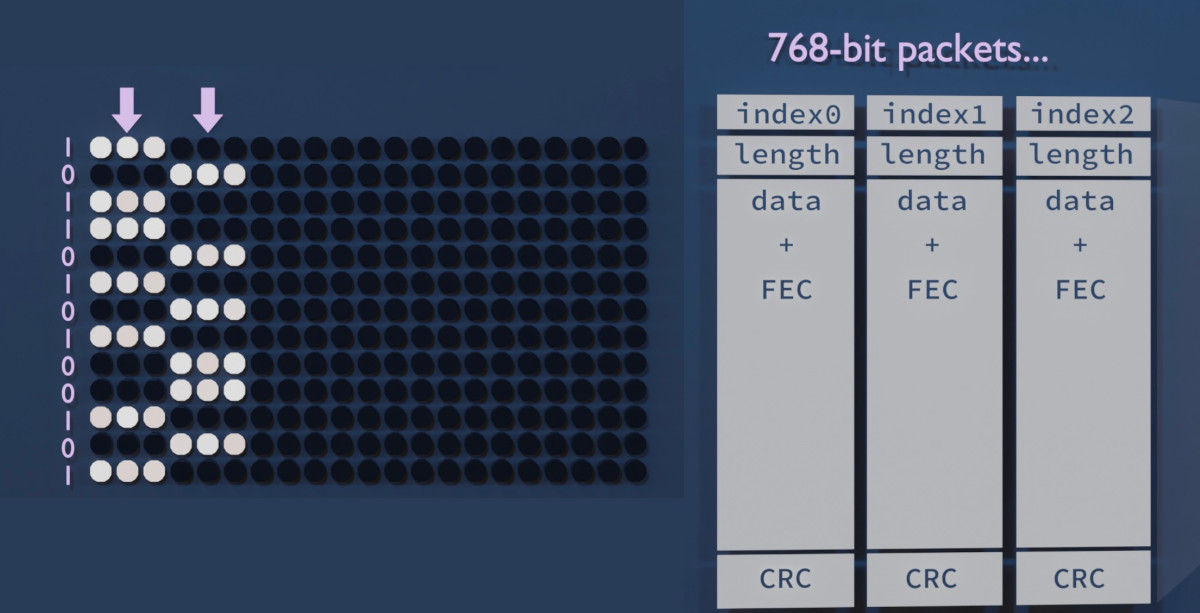
The monitor has 768 pixels vertically. This is a nice number so I designed a packet that runs vertically across the display. (This proved to be a bad decision, as we will later see.) We can stack as many packets side-by-side as the monitor width allows. A new batch of packets can be displayed in each frame, or we can repeat them over multiple frames to improve reliability.

These packets should have some metadata, at least a sequence number. Our medium is also quite noisy, so we need some kind of forward error correction. I'm using a Hamming(12,8) code which adds 4 error correction bits for every 8 bits of data. Finally, we need to add a CRC to each packet so we can make sure it arrived intact; I chose CRC16 with the polynomial 0x8005 (just because liquid-dsp provided it by default).

First results!

It was quite unbelievable, I was able to transmit a looping 64 kbps audio stream almost without any glitches, with the monitor and the receiver in the same room approximately 2 meters from each other.

Quick tip. Raw 8-bit PCM audio is a nice test format for these kinds of streaming experiments. It's straightforward to set an arbitrary bitrate by resampling the sound (with SoX for instance); there's no structure, headers, or byte order to deal with; and any packet loss, misorder, or buffer underrun is instantly audible. You can use a headerless companding algorithm like A-law to fit more dynamic range in 8 bits. Even stereo works; if you start from the wrong byte the channels will just get swapped. SoX can also play back the stream.

But can we get more? Slowly I added more samples per second, and a second audio channel. Suddenly we were at 256 kbps and still running smoothly. 200 kbps was even possible from the adjacent room, with a directional antenna 5 meters away, and with the door closed! In the same room, it worked up to around 512 kilobits per second but then hit a wall.

A tearful performance

The heavy error correction and framing adds around 60% of overhead, and we're left wit 480 bits of 'payload' per packet. If we have 39 packets per frame at 60 frames per second we should get more than a megabit per second, right? But for some reason it always caps at half a megabit.

The reason revealed itself when I noticed every other frame was often completely discarded at the CRC check. Of course; I should have thought of properly synchronising the screen update to the graphics adapter's frame update cycle (or VSYNC). This would prevent the picture information changing mid-frame, also known as tearing. But whatever options I tried with the SDL library I couldn't get the Raspberry Pi 4 to not introduce tearing.

Screen tearing appears to be an unsolved problem plaguing the Raspberry Pi 4 specifically (see this Google search). I tried another mini computer, the Asus Tinker Board R2.0, but I couldn't get the graphics drivers to work properly. I then realised it was a mistake to have the packets run from top to bottom; any horizontal tearing will cut every single packet in half! With a horizontal design only one packet per frame would suffer this fate.

A new design enables video-over-video

Packets that run horizontally across the screen indeed fix most of the packet loss. It may also help with CPU load as it improves memory access locality. I'm now able to get 1000 kbps from the monitor! What could this be used for? A live video stream, perhaps?

But the clock was ticking. I had a presentation coming up and I really wanted to amaze everyone with a video transfer demo. I quite literally got it working on the morning of the event. For simplicity, I decided to go with MJPEG, even though fancier schemes could compress way more efficiently. The packet loss issues are mostly kept at bay by repeating frames.

The data stream is "hidden" in a Windows desktop screenshot; I'm changing the colours in a way that both creates a readable bit and also looks inconspicuous when you look from far away.

Mitigations

This was a fun project but this kind of a vulnerability could, in the tinfoiliest of situations, be used for exfiltrating information out of a supposedly airgapped computer.

The issue has been alleviated in some modern display protocols. DisplayPort[4] makes use of scrambling: a pseudorandom sequence of bits is mixed with the bitstream to remove the strong clock oscillations that are so easily radiated out. This also randomizes the bitstream-to-amplitude correlation. I haven't personally tested whether it still has some kind of video in their radio interference, though. (Edit: Scrambling seems to be optionally supported by later versions of HDMI, too – but it might depend on which features exactly the two devices negotiate. How could you know if it's turned on?)

I've also tried wrapping the monitor in tinfoil (very impractical) and inside a cage made out of chicken wire (it had no effect - perhaps I should have grounded it?). I can't recommend either of these.

Software considerations

This project was made possible by at least C++, Perl, SoX, ImageMagick, liquid-dsp, Dear Imgui, GLFW, turbojpeg, and v4l2! If you're a library that feels left out, please leave a comment.

If you wish to play around with video emanations, I heard there is a project called TempestSDR. For generic analog video decoding via a software radio, there is TVSharp.

References
  1. Van Eck, Wim (1985): Electromagnetic radiation from video display units: An eavesdropping risk?
  2. Kuhn, Markus (2004): Electromagnetic Eavesdropping Risks of Flat-Panel Displays
  3. KUNG FURY Official Movie [HD] (2015)
  4. Video Electronics Standards Association (2006): DisplayPort Standard, version 1.
tag:blogger.com,1999:blog-5096278891763426276.post-5359688901110033558
Extensions
Spiral spectrograms and intonation illustrations
musicplotting
Show full content

I've been experimenting with methods for visualising harmony, intonation (tuning), and overtones in music. Ordinary spectrograms aren't very well suited for that as the harmonic relations are not intuitively visible. Let's see what could be done about this. I'll try to sprinkle the text with Wikipedia links in order to immerse (nerd snipe?) the reader in the subject.

Equal temperament cents against time

We can examine how tuning evolves during a recording by choosing a reference pitch and plotting all frequencies relative to it modulo 100 cents. This is similar to what an electronic tuner does, but instead of just showing the fundamental frequency, we'll plot the whole spectrum. Information about the absolute frequencies is lost. This "zoomed-in" plot visualises how the distribution of frequencies fits the 12-tone equal temperament system (12-TET) common in Western music.

Here's the first 20 seconds of Debussy's Clair De Lune as found on YouTube, played with a well-tuned (video) and an out-of-tune piano (video). The second piano sounds out of tune because there are relative differences in tuning between the strings. The first piano looks to be a few cents sharp as a whole, but consistently so, so it's not perceptible.

The vertical axis is the same that electronic tuners use. All the notes of a chord will appear in the middle, as long as they are well tuned against the reference pitch of, say, A = 440 Hz. The top edge of the graph is half a semitone sharp (quarter tone = 50c), and the bottom is half a semitone flat.

Overtones barely appear in the picture because the first three conveniently hit other notes in tune. But from f5 onwards the harmonic series starts deviating from 12-TET and the harmonics start to look out-of-tune (f5 = −14c, f7 = −31c, ...). These can be cut out by filtering, or hoping that they're lower in volume and setting the color range accordingly.

Six months later...

You know how you sometimes accidentally delete a project and have to rewrite it from scratch much later, and it's never exactly the same? That's what happened at this point. It's a little scuffed, but here's some piano music that utilises quarter tones (by Wyschnegradsky). I used the same scale on purpose, so the quarter tones wrap around from the top and bottom.

More examples of these "intonation plots" in a tweet.

This suits well for piano music. However, not even all western classical music is tuned to equal temperament; for instance, solo strings may be played with Pythagorean intonation[1], whereas vocal ensembles[2] and string quartets may tune some intervals closer to just intonation. Unlike the piano, these wouldn't look too good in the equal-note plot.

Octave spiral

If we instead plot the spectrum modulo 1200 cents (1 octave) we get an interesting interval view. We could even ditch the time scale and wind the spectrogram into a spiral to make it prettier and preserve the overtones and absolute frequency information. Now each note is represented by an angle in this spiral; in 12-TET, they're separated by 30 degrees. At any point in the spiral, going 1 turn outwards doubles the frequency.

Here's a C major chord on a piano. Note how the harmonic content adds several high-frequency notes on top of the C, E, and G of the triad chord, and how multiple notes can contribute to the same overtone:

I had actually hoped I would get an Ultimate Chord Viewer where any note, regardless of frequency, would have all its harmonics neatly stacked on top of it. But it's not what has happened here: the harmonic series is not a stack of octaves (2^n), but instead of integer multiples (n). Some harmonics appear at seemingly unrelated angles. But it's still a pretty interesting visualisation, and perhaps makes more sense musically.

This plot is also better at illustrating different tuning systems. Let's look at a major third interval F-A in equal temperament and just intonation, with a few more harmonics.

The intuition from this plot is that equal temperament aims for equal distances (angles) between notes and just intonation tries to make more of the harmonics match instead.

Even though the Ultimate Chord Viewer was not achieved I now have ideas for Christmas lights...

Live visualization

Here's what a cappella music with some reverb looks like on the spiral spectrogram.

A shader toy

This little real-time GLSL demo on shadertoy draws a spiral FFT from microphone audio. But don't get your hopes up: The spectrograms in this blog post were made with a 65536-point FFT. Shadertoy's 512px microphone texture offers a lot less in terms of frequency range and bins. This greatly blurs the frequency resolution, especially towars the low end. Could it be improved with the right colormap? Or a custom FFT with the waveform texture as its input?

References
tag:blogger.com,1999:blog-5096278891763426276.post-4869134420402865795
Extensions
Speech to birdsong conversion
acousticsartdreamsprogramming
Show full content

I had a dream one night where a blackbird was talking in human language. When I woke up there was actually a blackbird singing outside the window. Its inflections were curiously speech-like. The dreaming mind only needed to imagine a bunch of additional harmonics to form phonemes and words. One was left wondering if speech could be transformed into a blackbird song by isolating one of the harmonics...

One way to do this would be to:

  • Find the instantaneous fundamental frequency and amplitude of the speech. For example, filter the harmonics out and use an FM demodulator to find the frequency. Then find the signal envelope amplitude by AM demodulation.
  • Generate a new wave with similar amplitude variations but greatly multiplied in frequency.

A proof-of-concept script using the Perl-SoX-csdr command-line toolchain is available (source code here). The result sounds surprisingly blackbird-like. Even the little trills are there, probably as a result of FM noise or maybe vocal fry at the end of sentences. I got the best results by speaking slowly and using exaggerated inflection.

Someone hinted that the type of intonation used in certain automatic announcements is perfect for this kind of conversion. And it seems to be true! Here, a noise gate and reverb has been added to the result to improve it a little:

And finally, a piece of sound art where this synthetic blackbird song is mixed with a subtle chord and a forest ambience:

Think of the possibilities: A simultaneous interpreter for talking to birds. A tool for dubbing talking birds in animation or live theatre. Entertainment for cats.

What other birds could be done with a voice changer like this? What about croaky birds like a duck or a crow?

(I talked about this blog post a little on NPR: Here's What 'All Things Considered' Sounds Like — In Blackbird Song)

tag:blogger.com,1999:blog-5096278891763426276.post-263559673272528771
Extensions
Plotting patterns in music with a fantasy record player
artaudio mediablendermusicplottingshower thoughts
Show full content

Back in April I bought a vinyl record that had a weird wavy pattern near the outer edge. I though I may have broken it somehow but couldn't even test this because I don't own a record player. *) But when I took a closer look at the pattern it seemed to somehow follow changes in the music. That doesn't look like damage at all.

When I played the CD version it became clear: this was an artifact of the tempo of the electronic track (100 bpm) being a multiple of the rotational speed (33 1/3 rpm), and these were probably drum hits! My tweet sparked some interesting discussion and I've been pondering this ever since. Could we plot any song as a loop or grid based on its own tempo and see interesting patterns?

(*) I know, it's a little odd. But I have a few unplayed vinyl records waiting for the day that I finally have the proper equipment. By the way, the song was Black Pink by RinneRadio from their wonderful album staRRk.

I wrote a little script to do just this: to plot the amplitude of the FLAC into a grid with an adjustable width. The result looks very similar to the pattern on the vinyl surface! Note that this image is a "straightened out" version of the disc surface and it's showing three of those wavy patterns. The top edge corresponds to the outer edge of the vinyl.

[Image: A plot showing similar patterns that were on the disc surface.]

Later I wrote a little more ambitious plotter that shall be explained soon.

Computer-conducted music gives best patterns

After plotting several different songs against their own tempo like this it seemed that in addition to electronic music a lot of pop and rock has this type of a pattern, too. The most striking and clear patterns can be seen in music that makes use of drum samples in a quantized time base (aka. a drum machine): the same kick drum sample, for example, repeats four times in each bar, perfectly timed by a computer so that they align in phase.

Somewhat similar patterns can be seen in live music that is played to a "click track": each band member hears a common computer-generated time signal in their earplug so that they won't sway from an average tempo. But of course the live beats won't be perfectly phase-aligned in this case, because the musicians are humans and there's also physics involved.

3D rendered video experiment

To demonstrate how the patterns on vinyl records are born I made a video showing a fantasy record player that can play an "e-ink powered optical record" and morph it into any RPM. I say fantasy because it's just that: imagination, science fiction, rendered 3D art - it would be quite unfeasible in real life. You can't actually make e-ink displays that fast and accurate. But of course it would be possible to have a live display of a digitally sampled audio file as a spiral and use some kind of physical controllers to change the RPM value in real time, and just play the sound from a digital file.

Making the video was really fun and I think the end result is equal parts weird and illustrating.

Programming the disk surface and audio

The disc surface is based on a video texture: a different image was rendered for each changed frame using a purpose-written C++ program. The program uses an oversampled (8x) version of the original music that it then resamples at a variable rate based on the recorded RPM value (let's call it a morphing value). Oversampling and low-pass filtering beforehand makes variable-rate resampling simple: just take a sample at the appropriate time instant and don't worry about interpolation. It won't sound perfect but actually the artifact adds an interesting distortion, perhaps simulating pixel boundaries in the 'e-ink display'.

The amplitude sample at each time instant was projected into polar coordinates and plotted as an image. The image is fairly large - at least 2048 by 2048 pixels. I use this as a sort of image-space oversampling to get the polar projection to look a little better. I even tried 8192 x 8192 video but it was getting too heavy on my computer. But a new image must only be generated when the morphing value changes; the other frames can be copied.

[Image: A square image of the disc video texture.]

The sound track was made by continuously sampling the position of the "play head" 44100 times per second, whether the disk was moving or not. Which sample ends up in the audio depends on the current rotational angle and the morphing value of the disk surface. When either of those values change it moves the audio past the play head. A DC cancel filter was then applied because the play head would often stop on a non-zero sample, and it didn't look nice in the waveform. There's also a quiet hum in the background.

[Image: Screenshot of C++ code with a list of events.]

I made an event-based system where I could input events simulating the button presses and other controls. The system responds to speed change events with a smoothstep function so that the disc seems to have realistic inertia. Also, the slow startup and slowdown sounds kind of cool this way. Here's an extra-slow version of the effect -- you can hear the slight aliasing artifacts in the very beginning and end:

3D modeling, texturing, shading

The models were all made in Blender, a tool that I've slowly learned to use during the pandemic situation. Its modeling tools are pretty fun to use and once you learn it you can build pretty 3D models to look at that won't take up any room in your apartment.

[Image: A screenshot of Blender with the device without textures.]

I love the retro aesthetic of old reel-to-reel players and other studio equipment. So I looked for inspiration by searching "reel-to-reel" on Google Images. Try it out, it's worth it! Originally I wanted for the disc to be transparent with some type of movable particles inside, and the laser to be shone through it, but this was computationally very expensive to render. So I made it and 'e-ink' display instead. (I regret this choice a little bit since some people, at first glance, apparently thought the video depicted actual existing technology. But I tried to make it clear it's a photorealistic render :)

I made use of the boolean workflow and bevel modifiers to cut holes and other small details in the hard surfaces. The cables are Bezier curves with the round bevel setting enabled.

The little red LCD is also a video texture on an emission shader – each frame was an SVG that was changed a little in time to add flicker and then exported using Inkscape from a batch script.

The wood textures, fingerprints, and the room environment photo are from HDRi Haven, Texture Haven and CC0 Textures. I'm especially proud of all the details on the disc surface -- here's the shader setup I built for the surface:

[Image: A Blender texture node map.]

The video was rendered in Blender Eevee and it took maybe 10 hours at 720p60. It's sad that it's not in 1080p but I was impatient. I spent quite some time to make the little red LCD look realistic but it was completely spoiled by compression!

Here's a bigger still rendered in Cycles:

[Image: A render of the record player.] Mapping rotation to the disc

Rotation angles from the C++ program were sampled 60 times per second and output as CSV. These were then imported to Blender as keyframes for the rotating disc, using the Python API:

[Image: A screenshot of a Python script.]

Here you only need to print a new keyframe when the speed of rotation changes, or is about to change; Blender will interpolate the rest.

A Driver was set up to make the Y rotation slightly follow the Z rotation with a very small factor to make the disc 'wobble' a bit.

What's next?

It's endless fun to build and program functional fantasy electronics and I may need to do more of that. I'm currently also obsessed with 3D modeled dollhouses and who knows how those things will combine?

By the way, there is an actual device somewhat resembling this 3D model. It's called the Panoptigon, it's sort of an optical mellotrone (video).

tag:blogger.com,1999:blog-5096278891763426276.post-2669501989505458873
Extensions
Capturing PAL video with an SDR (and a few dead-ends)
programmingradio
Show full content

I play 1980s games, mostly Super Mario Bros., on the Nintendo NES console. It would be great to be able to capture live video from the console for recording speedrun attempts. Now, how to make the 1985 NES and the 2013 MacBook play together, preferably using hardware that I already have? This project diary documents my search for the answer.

Here's a spoiler – it did work:

[Image: A powered-on NES console and a MacBook on top of it, showing a Tetris title screen.] Things that I tried first A capture device

Video capture devices, or capture cards, are devices specially made for this purpose. There was only one cheap (~30€) capture device for composite video available locally, and I bought it, hopingly. But it wasn't readily recognized as a video device on the Mac, and there seemed to be no Mac drivers available. Having already almost capped my budget for this project I then ordered a 5€ EasyCap device from eBay, as there was some evidence of Mac drivers online. The EasyCap was still making its way to Finland as of this writing, so I continued to pursure other routes.

PS: When the device finally arrived, it sadly seemed that the EasyCapViewer-Fushicai software only supports opening this device in NTSC mode. There's PAL support in later commits in the GitHub repo, but the project is old and can't be compiled anymore as Apple has deprecated QuickTime.

Even when they do work, a downside to many cheap capture devices is that they can only capture at half the true framerate (that is, at 25 or 30 fps).

CRT TV + DSLR camera

The cathode-ray tube television that I use for gaming could be filmed with a digital camera. This posed interesting problems: The camera must be timed appropriately so that a full scan is captured in every frame, to prevent temporal aliasing (stripes). This is why I used a DSLR camera with a full manual mode (Canon EOS 550D in this case).

For the 50 Hz PAL television screen I used a camera frame rate of 25 fps and an exposure time of 1/50 seconds (set by camera limitations). The camera will miss every other frame of the original 50 fps video, but on the other hand, will get an evenly lit screen every time.

A Moiré pattern will also appear if the camera is focused on the CRT shadow mask. This is due to intererence between two regular 2D arrays, the shadow mask in the TV and the CCD array in the camera. I got rid of this by setting the camera on manual focus and defocusing the lense just a bit.

[Image: A screen showing Super Mario Bros., and a smaller picture with Oona in it.]

This produced surprisingly good quality video, save for the slight jerkiness caused by the low frame rate (video). This setup was good for one-off videos; However, I could not use this setup for live streaming, because the camera could only record on the SD card and not connect to the computer directly.

LCD TV + webcam

An old LCD TV that I have has significantly less flicker than the CRT, and I could have live video via the webcam. But the Microsoft LifeCam HD-3000 that I have had only a binary option for manual exposure (pretty much "none" and "lots"). Using the higher setting the video was quite washed out, with lots of motion blur. The lower setting was so fast that it looked like the LCD had visible vertical scanning. Brightness was also heavily dependent on viewing angle, which caused gradients over the image. I had to film at a slightly elevated angle so that the upper part of the image wouldn't go too dark, and this made the video look like a bootleg movie copy.

[Image: A somewhat blurry photo of an LCD TV showing Super Mario Bros.] Composite video

Now to capturing the actual video signal. The NES has two analog video outputs: one is composite video and the other an RF modulator, which has the same composite video signal modulated onto an AM carrier in the VHF television band plus a separate FM audio carrier. This is meant for televisions with no composite video input: the TV sees the NES as an analog TV station and can tune to it.

In composite video, information about brightness, colour, and synchronisation is encoded in the signal's instantaneous voltage. The bandwidth of this signal is at least 5 MHz, or 10 MHz when RF modulated, which would require a 10 MHz IQ sampling rate.

[Image: Oscillogram of one PAL scanline, showing hsync, colour burst, and YUV parts.]

I happen to have an Airspy R2 SDR receiver that can listen to VHF and take 10 million samples per second - could it be possible? I made a cable that can take the signal from the NES RCA connector to the Airspy SMA connector. And sure enough, when the NES RF channel selector is at position "3", a strong signal indeed appears on VHF television channel 3, at around 55 MHz.

Software choices

There's already an analog TV demodulator for SDRs - it's a plugin for SDR# called TVSharp. But SDR# is a Windows program and TVSharp doesn't seem to support colour. And it seemed like an interesting challenge to write a real-time PAL demodulator myself anyway.

I had been playing with analog video demodulation recently because of my HDMI Tempest project (video). So I had already written a C++ program that interprets a 10 Msps digitised signal as greyscale values and sync pulses and show it live on the screen. Perhaps this could be used as a basis to build on. (It was not published, but apparently there is a similar project written in Java, called TempestSDR)

Data transfer from the SDR is done using airspy_rx from airspy-tools. This is piped to my program that reads the data into a buffer, 256 ksamples at a time.

Automatic gain control is an important part of demodulating an AM signal. I used liquid-dsp's AGC by feeding it the maximum amplitude over every scanline period; this roughly corresponds to sync level. This is suboptimal, but it works in our high-SNR case. AM demodulation was done using std::abs() on the complex-valued samples. The resulting real value had to be flipped from 1, because TV is transmitted "inverse AM" to save on the power bill. I then scaled the signal so that black level was close to 0, white level close to 1, and sync level below 0.

I use SDL2 to display the video and OpenCV for pixel addressing, scaling, cropping, and YUV-RGB conversions. OpenCV is an overkill dependency inherited from the Tempest project and SDL2 could probably do all of those things by itself. This remains TODO.

Removing the audio

The captured AM carrier seems otherwise clean, but there's an interfering peak on the lower sideband side at about –4.5 MHz. I originally saw it in the demodulated signal and thought it would be related to colour, as it's very close to the PAL chroma subcarrier frequency of 4.43361875 MHz. But when it started changing frequency in triangle-wave shapes, I realized it's the audio FM carrier. Indeed, when it is FM demodulated, beautiful NES music can be heard.

[Image: A spectrogram showing the AM carrier centered in zero, with the sidebands, chroma subcarriers and audio alias annotated.]

The audio carrier is actually outside this 10 MHz sampled bandwidth. But it's so close to the edge (and so powerful) that the Airspy's anti-alias filter cannot sufficiently attenuate it, and it becomes folded, i.e. aliased, onto our signal. This caused visible banding in the greyscale image, and some synchronization problems.

I removed the audio using a narrow FIR notch filter from the liquid-dsp library. Now, the picture quality is very much acceptable. Minor artifacts are visible in narrow vertical lines because of a pixel rounding choice I made, but they can be ignored.

[Image: Black-and-white screen capture of NES Tetris being played.] Decoding colour

PAL colour is a bit complicated. It was designed in the 1960s to be backwards compatible with black-and-white TV receivers. It uses the YUV colourspace, the Y or "luminance" channel being a black-and-white sum signal that already looks good by itself. Even if the whole composite signal is interpreted as Y, the artifacts caused by colour information are bearable. Y also has a lot more bandwidth, and hence resolution, than the U and V (chrominance) channels.

U and V are encoded in a chrominance subcarrier in a way that I still haven't quite grasped. The carrier is suppressed, but a burst of carrier is transmitted just before every scanline for reference (so-called colour burst).

Turns out that much of the chroma information can be recovered by band-pass filtering the chrominance signal, mixing it down to baseband using a PLL locked to the colour burst, rotating it by a magic number (chroma *= std::polar(1.f, deg2rad(170.f))), and plotting the real and imaginary parts of this complex number as the U and V colour channels. This is similar to how NTSC colour is demodulated.

In PAL, every other scanline has its chrominance phase shifted (hence the name, Phase Alternating [by] Line). I couldn't get consistent results demodulating this, so I skipped the chrominance part of every other line and copied it from the line above. This doesn't even look too bad for my purposes. However, there seems to be a pre-echo in UV that's especially visible on a blue background (most of SMB1 sadly), and a faint stripe pattern on the Y channel, most probably crosstalk from the chroma subcarrier that I left intact for now.

[Image: The three chroma channels Y, U, and V shown separately as greyscale images, together with a coloured composite of Mario and two Goombas.]

I used liquid_firfilt to band-pass the chroma signal, and liquid_nco to lock onto the colour burst and shift the chroma to baseband.

Let's play Tetris! Latency

It's not my goal to use this system as a gaming display; I'm still planning to use the CRT. However, total buffer delays are quite small due to the 10 Msps sampling rate, so the latency from controller to screen is pretty good. The laptop can also easily decode and render at 50 fps, which is the native frame rate of the PAL NES. Tetris is playable up to level 12!

Using a slow-mo phone camera, I measured the time it takes for a button press to make Mario jump. The latency is similar to that of a NES emulator:

MethodFrames @240fpsLatency RetroArch emulator28117 ms PAL NES + Airspy SDR26108 ms PAL NES + LCD TV2083 ms

Maybe you now notice that the CRT is not listed here. That's because before I could make these measurements a funny sound was heard from inside the TV and a picture has never appeared since.

Performance considerations

A 2013 MacBook Pro is perhaps not the best choice for dealing with live video to begin with. But I want to be able to run the PAL decoder and a screencap / compositing / streaming client on the same laptop, so performance is even more crucial.

When colour is enabled, CPU usage on this quad-core laptop is 110% for palview and 32% for airspy_rx. The CPU temperature is somewhere around 85 °C. Black-and-white decoding lowers palview usage to 84% and CPU temps to 80 °C. I don't think there's enough cycles left for a streaming client just yet. Some CPU headroom would be nice as well; a resync after dropped samples looks quite nasty, and I wouldn't want that to happen very often.

[Image: htop screenshot show palview and airspy_rx on top, followed by some system processes.]

Profiling reveals that the most CPU-intensive tasks are those related to FIR filtering. FIR filters are based on convolution, which is of high computational complexity, unless done in hardware. FFT convolution can also be faster, but only when the kernel is relatively long.

[Image: Diagram shows the Audio notch FIR takes up 27 % and Chroma Bandpass FIR 12 % of CPU. Several smaller contributors mentioned.

I've thought of having another computer do the Airspy transfer, audio notch filtering, and AM demodulation, and then transmit this preprocessed signal to the laptop via Ethernet. But my other computers (Raspberry Pi 3B+ and a Core 2 Duo T7500 laptop) are not nearly as powerful as the MacBook.

Instead of a FIR bandpass filter, a so-called chrominance comb filter is often used to separate chrominance from luminance. This could be realized very efficiently as a linear-complexity delay line. This is a promising possibility, but so far my experiments have had mixed results.

There's no source code release for now (Why? FAQ), but if you want some real-time coverage of this project, I did a multi-threaded tweetstorm: one, two, three.

tag:blogger.com,1999:blog-5096278891763426276.post-4329815788254877404
Extensions
Beeps and melodies in two-way radio
programmingwalkie-talkie
Show full content

Lately my listening activities have focused on two-way FM radio. I'm interested in automatic monitoring and visualization of multiple channels simultaneously, and classifying transmitters. There's a lot of in-band signaling to be decoded! This post shall demonstrate this diversity and also explain how my listening station works.

Background: walkie-talkies are fun

The frequency band I've recently been listening to the most is called PMR446. It's a European band of radio frequencies for short-distance UHF walkie-talkies. Unlike ham radio, it doesn't require licenses or technical competence – anyone with 50€ to spare can get a pair of walkie-talkies at the department store. It's very similar to FRS in the US. It's quite popular where I live.

[Image: Photo of three different walkie-talkies.]

The short-distance nature of PMR446 is what I find perhaps most fascinating: in normal conditions, everything you hear has been transmitted from a 2-kilometer (1.3-mile) radius. Transmitter power is limited to 500 mW and directional antennas are not allowed on the transmitter side. But I have a receive-only system and a my only directional antenna is for 450 MHz, which is how I originally found these channels.

Roger beep

The roger beep is a short melody sent by many hand-held radios to indicate the end of transmission.

The end of transmission must be indicated, because two-way radio is 'half-duplex', which means only one person can transmit at a time. Some voice protocols solve the same problem by mandating the use of a specific word like 'over'; others rely on the short burst of static (squelch tail) that can be heard right after the carrier is lost. Roger beeps are especially common in consumer radios, but I've heard them in ham QSOs as well, especially if repeaters are involved.

Other signaling on PMR

PMR also differs from ham radio in that many of its users don't want to hear random people talking on the same frequency; indeed, many devices employ tones or digital codes designed to silence unwanted conversations, called CTCSS, DCS, or coded squelch. They are very low-frequency tones that can't usually be heard at all because of filtering. These won't prevent others from listening to you though; anyone can just disable coded squelch on their device and hear everyone else on the channel.

Many devices also use a tone-based system for preventing the short burst of static, that classic walkie-talkie sound, from sounding whenever a transmission ends. Baofeng calls these squelch tail elimination tones, or STE for short. The practice is not standardized and I've seen several different sub-audible frequencies being used in the wild, namely 55, 62, and 260 Hz. (Edit: As correctly pointed out by several people, another way to do this is to reverse the phase of the CTCSS tone in the end, called a 'reverse burst'. Not all radios use it though; many opt to send a 55 Hz tone instead, even when they are using CTCSS.)

Some radios have a button called 'alarm' that sends a long, repeating melody resembling a 90s mobile phone ring tone. These melodies also vary from one radio to the other.

My receiver

I have a system in place to alert me whenever there's a strong enough signal matching an interesting set of parameters on any of the eight PMR channels. It's based on a Raspberry Pi 3B+ and an Airspy R2 SDR receiver. The program can play the live audio of all channels simultaneously, or one could be selected for listening. It also has an annotated waterfall view that shows traffic on the band during the last couple of hours:

[Image: A user interface with text-mode graphics, showing eight vertical lanes of timestamped information. The lanes are mostly empty, but there's an occasional colored bar with annotations like 'a1' or '62'.]

The computer is a headless Raspberry Pi with only SSH connectivity; that's why it's in text mode. Also, text-mode waterfall plots are cool!

The coloured bars indicate signal strength (colour) and the duty factor (pattern). The numbers around the bars are decoded squelch codes, STEs and roger beeps. Uncertain detections are greyed out. In this view we've detected roger beeps of type 'a1' and 'a2'; a somewhat rare 62 Hz STE tone; and a ring tone, or alarm (RNG).

Because squelch codes are designed to be read by electronic circuits and their frequencies and codewords are specified exactly, writing a digital decoder for them was somewhat straightforward. Roger beeps and ring tones, on the other hand, are only meant for the human listener and detecting them amongst the noise took a bit more trial-and-error.

Melody detection algorithm

The melody detection algorithm in my receiver is based on a fast Fourier transform (FFT). When loss of carrier is detected, the last moments of the audio are searched for tones thusly:

[Image: A diagram illustrating how an FFT is used to search for a melody. The FFT in the image is noisy and some parts of the melody can not be measured.]
  1. The audio buffer is divided up into overlapping 60-millisecond Hann-windowed slices.
  2. Every slice is Fourier transformed and all peak frequencies (local maxima) are found. Their center frequencies are refined using Gaussian peak interpolation (Gasior & Gonzalez 2004). We need this, because we're only going to allow ±15 Hz of frequency error.
  3. The time series formed by the strongest maxima is compared to a list of pre-defined 'tone signatures'. Each candidate tone signature gets a score based on how many FFT slices match (+) corresponding slices of the tone signature. Slices with too much frequency error subtract from the score (–).
  4. Most tone signatures have one or more 'quiet zones', the quietness of which further contributes to the score. This is usually placed after the tone, but some tones may also have a pause in the middle.
  5. The algorithm allows second and third harmonics (with half the score), because some transmitters may distort the tones enough for these to momentarily overpower the fundamental frequency.
  6. Every possible time shift (starting position) inside the 1.5-second audio buffer is searched.
  7. The tone signature with the best score is returned, if this score exceeds a set threshold.

This algorithm works quite well. It's not always able to detect the tones, especially if part of the melody is completely lost in noise, but it's good enough to be used for waterfall annotation. False positives are rare; most of them are detections of very short tone signatures that only consist of one or two beeps. My test dataset of 92 recorded transmissions yields only 5 false negatives and no false positives.

For example, this noisy recording:

was succesfully recognized as having a ringtone (RNG), a roger beep of type a1, and CTCSS code XA:

Naming and classification

Because I love classifying stuff I've had to come up with a system for naming these roger tones as well. My current system uses a lower-case letter for classifying the tone into a category, followed by a number that differentiates similar but slightly different tones. This is a work in progress, because every now and then a new kind of tone appears.

My goal would be to map the melodies to specific manufacturers. I've only managed to map a few. Can you recognise any of these devices?

ClassIdentified modelRecording aCobra AM845 (a1) cMotorola TLKR T40 (c1) d? e? hBaofeng UV-5RC i?

I didn't list them all here, but there are even more samples. I've added some alarm tones there as well, and a list of all the tone signatures that I currently know of. (Why no full source code? FAQ)

In my rx log I also have an emoji classification system for CTCSS codes. This way I can recognize a familiar transmission faster. A few examples below (there are 38 different CTCSS codes in total):

[Image: Two-character codes grouped into categories and paired with emoji. Four categories, namely fruit, sound, mammals, and scary. The fruit category has codes beginning with an M, and emoji for different fruit, etc.] Future directions

There are mainly just minor bugs in my project trello at the moment, like adding the aforementioned emoji. But as the RasPi is not very powerful the DSP chain could be made more efficient. Sometimes a block of samples gets dropped. Currently it uses a bandpass-sampled filterbank to separate the channels, exploiting aliasing to avoid CPU-intensive frequency shifting altogether:

This is quite fast. But the 1:20 decimation from the Airspy IQ data is done with SoX's 1024-point FIR filter and could possibly be done with fewer coefficients. Also, the RasPi has four cores, so half of the channels could be demodulated in a second thread. Currently all concurrency is thanks to SoX and pmrsquash being different processes.

Related posts References
tag:blogger.com,1999:blog-5096278891763426276.post-1418493712353182225
Extensions
Animated line drawings with OpenCV
artmusicplottingprogramming
Show full content

OpenCV is a pretty versatile C++ computer vision library. Because I use it every day it has also become my go-to tool for creating simple animations at pixel level, for fun, and saving them as video files. This is not one of its core functions but happens to be possible using its GUI drawing tools.

Below we'll take a look at some video art I wrote for a music project. It goes a bit further than just line drawings but the rest is pretty much just flavouring. As you'll see, creating images in OpenCV has a lot in common with how you would work with layers and filters in an image editor like GIMP or Photoshop.

Setting it up

It doesn't take a lot of boilerplate to initialize an OpenCV project. Here's my minimal CMakeLists.txt:

cmake_minimum_required (VERSION 2.8)
project                (marmalade)
find_package           (OpenCV REQUIRED)
add_executable         (marmalade marmalade.cc)
target_link_libraries  (marmalade ${OpenCV_LIBS})

I also like to set compiler flags to enforce the C++11 standard, but this is not necessary.

In the main .cc file I have:

#include "opencv2/imgproc/imgproc.hpp"
#include "opencv2/highgui/highgui.hpp"

Now you can build the project by just typing cmake . && make in the terminal.

Basic shapes

First, we'll need an empty canvas. It will be a matrix (cv::Mat) with three unsigned char channels for RGB at Full HD resolution:

const cv::Size video_size(1920, 1080);
cv::Mat mat_frame = cv::Mat::zeros(video_size, CV_8UC3);

This will also initialize everything to zero, i.e. black.

Now we can draw our graphics!

I had an initial idea of an endless cascade of concentric rings each rotating at a different speed. There might be color and brightness variations as well but otherwise it would stay static the whole time. You can't see a circle's rotation around its center, so we'll add some features to them as well, maybe some kind of bars or spokes.

A simplified render method for a ring would look like this:

void Ring::RenderTo(cv::Mat& mat_output) const {
  cv::circle(mat_output, 8 * center_, 8 * radius_, color_, 1, CV_AA, 3);
  for (const Bar& bar : bars()) {
    cv::line(mat_output, 8 * (center_ + bar.start), 8 * (center_ + bar.end),
             color_, 1, CV_AA, 3);
  }
}

Drawing antialiased graphics at subpixel coordinates can make for some confusing OpenCV code. Here, all coordinates are multiplied by the magic number 8 and the drawing functions are instructed to do a bit shift of 3 bits (2^3 == 8). These three bits are used for the decimal part of the subpixel position.

The coordinates of the bars are generated for each frame based on the ring's current rotation angle.

Here are some rings at different phases of rotation. A bug leaves the innermost circle with no spokes, but it kind of looks better that way.

[Image: White concentric circles on a black background, with evenly separated lines connecting them.] Eye candy: Glow effect

I wanted a subtle vector display look to the graphics, even though I wasn't aiming for any sort of realism with it. So the brightest parts of the image would have to glow a little, or spread out in space. This can be done using Gaussian blur.

Gaussian blur requires convolution, which is very CPU-intensive. I think most of the rendering time was spent calculating blur convolution. It could be sped up using threads (cv::parallel_for_) or the GPU (cv::cuda routines) but there was no real-time requirement in this hobby project.

There are a couple of ways to only apply the blur to the brightest pixels. We could blur a copy of the image masked with its thresholded version, for example. But I like to use look-up tables (LUT). This is similar to the curves tool in Photoshop. A look-up table is just a 256-by-1 RGB matrix that maps an 8-bit index to a colour. In this look-up table I just have a linear ramp where everything under 127 maps to black.

cv::Mat mat_lut = GlowLUT();
cv::Mat mat_glow;
cv::LUT(mat_frame, mat_lut, mat_glow);

Now when blurring, if we add the original image on top of the blurred version, its sharpness is preserved:

cv::GaussianBlur(mat_glow, mat_glow, cv::Size(0,0), 3.0);
mat_frame += 2 * mat_glow;
[Image: A zoomed view of a circle, showing the glow effect.]

The effect works unevenly on antialiased lines which adds a nice pearl-stringy look.

Eye candy: Tinted glass and grid lines

I created a vignetted and dirty green-yellow tinted look by multiplying the image per-pixel by an overlay made in GIMP. This has the same effect as having a "Multiply" layer mode in an image editor. Perhaps I was thinking of an old glass display, or Vectrex overlays. The overlay also has black grid lines that will appear black in the result. Multiplication doesn't change the color of black areas in the original, but I also added a copy of the overlay at 10% brightness to make it dimly visible in the background.

cv::Mat mat_overlay = cv::imread("overlay.png");
  
cv::multiply(mat_frame, mat_overlay, mat_frame, 1.f/255);
mat_frame += mat_overlay * 0.1f;
[Image: A zoomed view of a circle, showing the color overlay effect.] Eye candy: Flicker

Some objects flicker slightly for an artistic effect. This can be headache-inducing if overdone, so I tried to use it in moderation. The rings have a per-frame probability for a decrease in brightness, which I think looks good at 60 fps.

if (randf(0.f, 1.f) < .0001f)
  color *= .5f;

The spokes will also sometimes blink upon encountering each other, and the whole ring flickers a bit when it first becomes visible.

Title text

An LCD matrix font was used for the title text. This was just a PNG image of 128 characters that was spliced up and rearranged. This can be done in OpenCV by using submatrices and rectangle ROIs:

cv::Mat mat_font = cv::imread("lcd_font.png");
const cv::Size letter_size(24, 32);
const std::string text("finally, the end of the "
                       "marmalade forest!");

int cursor_x = 0;
for (char code : text_) {
  int mx = code % 32;
  int my = code / 32;

  cv::Rect font_roi(cv::Point(mx * letter_size.width,
                              my * letter_size.height),
                    letter_size);
  cv::Mat mat_letter = mat_font(font_roi);

  cv::Rect target_roi(text_origin_.x + cursor_x,
                      text_origin_.y,
                      mat_letter.cols, mat_letter.rows)
  mat_letter.copyTo(mat_output(target_roi));

  cursor_x += letter_size.width;
}
[Image: A zoomed view of the text 'finally' with a glow and color overlay effect.] Encoding the video

Now we can save the frames as a video file. OpenCV has a VideoWriter class for just this purpose. But I like to do this a bit differently. I encoded the frame images individually as BMP and just concatenated them one after the other to stdout:

std::vector<uchar> outbuf;
cv::imencode(".bmp", mat_frame, outbuf);
fwrite(outbuf.data(), sizeof(uchar), outbuf.size(), stdout);

I then ran this program from a shell script that piped the output to ffmpeg for encoding. This way I could also combine it with the soundtrack in a single run.

make && \
 ./marmalade -p | \
 ffmpeg -y -i $AUDIOFILE -framerate $FPS -f image2pipe \
        -vcodec bmp -i - -s:v $VIDEOSIZE -c:v libx264 \
        -profile:v high -b:a 192k -crf 23 \
        -pix_fmt yuv420p -r $FPS -shortest -strict -2 \
        video.mp4 && \
 open video.mp4
Result

The 1080p/60 version can be viewed by clicking on the gear wheel menu.

tag:blogger.com,1999:blog-5096278891763426276.post-5809977339825271577
Extensions
In pursuit of Otama's tone
artgnireenignemusictoys
Show full content

It would be fun to use the Otamatone in a musical piece. But for someone used to keyboard instruments it's not so easy to play cleanly. It has a touch-sensitive (resistive) slider that spans roughly two octaves in just 14 centimeters, which makes it very sensitive to finger placement. And in any case, I'd just like to have a programmable virtual instrument that sounds like the Otamatone.

What options do we have, as hackers? Of course the slider could be replaced with a MIDI interface, so that we could use a piano keyboard to hit the correct frequencies. But what if we could synthesize a similar sound all in software?

Sampling via microphone

We'll have to take a look at the waveform first. The Otamatone has a piercing electronic-sounding tone to it. One is inclined to think the waveform is something quite simple, perhaps a sawtooth wave with some harmonic coloring. Such a primitive signal would be easy to synthesize.

[Image: A pink Otamatone in front of a microphone. Next to it a screenshot of Audacity with a periodic but complex waveform in it.]

A friend lended me her Otamatone for recording purposes. Turns out the wave is nothing that simple. It's not a sawtooth wave, nor a square wave, no matter how the microphone is placed. But it sounds like one! Why could that be?

I suspect this is because the combination of speaker and air interface filters out the lowest harmonics (and parts of the others as well) of square waves. But the human ear still recognizes the residual features of a more primitive kind of waveform.

We have to get to the source!

Sampling the input voltage to the Otamatone's speaker could reveal the original signal. Also, by recording both the speaker input and the audio recorded via microphone, we could perhaps devise a software filter to simulate the speaker and head resonance. Then our synthesizer would simplify into a simple generator and filter. But this would require opening up the instrument and soldering a couple of leads in, to make a Line Out connector. I'm not doing this to my friend's Otamatone, so I bought one of my own. I named it TÄMÄ.

[Image: A Black Otamatone with a cable coming out of its mouth into a USB sound card. A waveform with more binary nature is displayed on a screen.]

I soldered the left channel and ground to the same pads the speaker is connected to. I had no idea about the voltage range in advance, but fortunately it just happens to fit line level and not destroy my sound card. As you can see in the background, we've recorded a signal that seems to be a square wave with a low duty cycle.

[Image: Oscillogram of a square wave.]

This square wave seems to be superimposed with a much quieter sinusoidal "ring" at 584 Hz that gradually fades out in 30 milliseconds.

Next we need to map out the effect the finger position on the slider has on this signal. It seems to not only change the frequency but the duty cycle as well. This happens a bit differently depending on which one of the three octave settings (LO, MID, or HI) is selected.

The Otamatone has a huge musical range of over 6 octaves:

[Image: Musical notation showing a range from A1 to B7.]

In frequency terms this means roughly 55 to 3800 Hz.

The duty cycle changes according to where we are on the slider: from 33 % in the lowest notes to 5 % in the highest ones, on every octave setting. The frequency of the ring doesn't change, it's always at around 580 Hz, but it doesn't seem to appear at all on the HI setting.

So I had my Perl-based software synth generate a square wave whose duty cycle and frequency change according to given MIDI notes.

FIR filter 1: not so good

Raw audio generated this way doesn't sound right; it needs to be filtered to simulate the effects of the little speaker and other parts.

Ideally, I'd like to simulate the speaker and head resonances as an impulse response, by feeding well-known impulses into the speaker. The generated square wave could then be convolved with this response. But I thought a simpler way would be to create a custom FIR frequency response in REAPER, by visually comparing the speaker input and microphone capture spectra. When their spectra are laid on top of each other, we can read the required frequency response as the difference between harmonic powers, using the cursor in baudline. No problem, it's just 70 harmonics until we're outside hearing range!

[Image: Screenshot of Baudline showing lots of frequency spikes, and next to it a CSV list of dozens of frequencies and power readings in the Vim editor.]

I then subtracted one spectrum from another and manually created a ReaFir filter based on the extrema of the resulting graph.

[Image: Screenshot of REAPER's FIR filter editor, showing a frequency response made out of nodes and lines interpolated between them.]

Because the Otamatone's mouth can be twisted to make slightly different vowels I recorded two spectra, one with the mouth fully closed and the other one as open as possible.

But this method didn't quite give the sound the piercing nasalness I was hoping for.

FIR filter 2: better

After all that work I realized the line connection works in both directions! I can just feed any signal and the Otamatone will sound it via the speaker. So I generated a square wave in Audacity, set its frequency to 35 Hz to accommodate 30 milliseconds of response, played it via one sound card and recorded via another one:

[Image: Two waveforms, the top one of which is a square wave and the bottom one has a slowly decaying signal starting at every square transition.]

The waveform below is called the step response. One of the repetitions can readily be used as a FIR convolution kernel. Strictly, to get an impulse response would require us to sound a unit impulse, i.e. just a single sample at maximum amplitude, not a square wave. But I'm not redoing that since recording this was hard enough already. For instance, I had to turn off the fridge to minimize background noise. I forgot to turn it back on, and now I have a box of melted ice cream and a freezer that smells like salmon. The step response gives pretty good results.

One of my favorite audio tools, sox, can do FFT convolution with an impulse response. You'll have to save the impulse response as a whitespace-separated list of plaintext sample values, and then run sox original.wav convolved.wav fir response.csv.

Or one could use a VST plugin like FogConvolver:

[Image: A screenshot of Fog Convolver.] A little organic touch

There's more to an instrument's sound than its frequency spectrum. The way the note begins and ends, the so-called attack and release, are very important cues for the listener.

The width of a player's finger on the Otamatone causes the pressure to be distributed unevenly at first, resulting in a slight glide in frequency. This also happens at note-off. The exact amount of Hertz to glide depends on the octave, and by experimentation I stuck with a slide-up of 5 % of the target frequency in 0.1 seconds.

It is also very difficult to hit the correct note, so we could add some kind of random tuning error. But turns out this is would be too much; I want the music to at least be in tune.

Glides (glissando) are possible with the virtual instrument by playing a note before releasing the previous one. This glissando also happens in 100 milliseconds. I think it sounds pretty good when used in moderation.

I read somewhere (Wikipedia?) that vibrato is also possible with Otamatone. I didn't write a vibratio feature in the code itself, but it can be added using a VST plugin in REAPER (I use MVibrato from MAudioPlugins). I also added a slight flanger with inter-channel phase difference in the sample below, to make the sound just a little bit easier on the ears (but not too much).

Sometimes the Otamatone makes a short popping sound, perhaps when finger pressure is not firm enough. I added a few of these randomly after note-off.

Working with MIDI

We're getting on a side track, but anyway. Working with MIDI used to be straightforward on the Mac. But GarageBand, the tool I currently use to write music, amazingly doesn't have a MIDI export function. However, you can "File -> Add Region To Loop Library", then find the AIFF file in the loop library folder, and use a tool called GB2MIDI to extract MIDI data from it.

I used mididump from python-midi to read MIDI files.

Tyna Wind - lucid future vector

Here's TÄMÄ's beautiful synthesized voice singing us a song.

tag:blogger.com,1999:blog-5096278891763426276.post-3263486808318225207
Extensions
Descrambling split-band voice inversion with deinvert
communicationsradiosecuritysoftwarewalkie-talkie
Show full content

Voice inversion is a primitive method of rendering speech unintelligible to prevent eavesdropping of radio or telephone calls. I wrote about some simple ways to reverse it in a previous post. I've since written a software tool, deinvert (on Codeberg), that does all this for us. It can also descramble a slightly more advanced scrambling method called split-band inversion. Let's see how that happens behind the scenes.

Simple voice inversion

Voice inversion works by inverting the audio spectrum at a set maximum frequency called the inversion carrier. Frequencies near this carrier will thus become frequencies near zero Hz, and vice versa. The resulting audio is unintelligible, though familiar sentences can easily be recognized.

Deinvert comes with 8 preset carrier frequencies that can be activated with the -p option. These correspond to a list of carrier frequencies I found in an actual scrambler's manual, dubbed "the most commonly used inversion carriers".

The algorithm behind deinvert can be divided into three phases: 1) pre-filtering, 2) mixing, and 3) post-filtering. Mixing means multiplying the signal by an oscillation at the selected carrier frequency. This produces two sidebands, or mirrored copies of the signal, with the lower one frequency-inverted. Pre-filtering is necessary to prevent this lower sideband from aliasing when its highest components would go below zero Hertz. Post-filtering removes the upper sideband, leaving just the inverted audio. Both filters can be realized as low-pass FIR filters.

[Image: A spectrogram in four steps, where the signal is first cut at 3 kHz, then shifted up, producing two sidebands, the upper of which is then filtered out.]

This operation is its own inverse, like ROT13; by applying the same inversion again we get intelligible speech back. Indeed, deinvert can also be used as a scrambler by just running unscrambled audio through it. The same inversion carrier should be used in both directions.

Split-band inversion

The split-band scrambling method adds another carrier frequency that I call the split point. It divides the spectrum into two parts that are inverted separately and then combined, preventing ordinary inverters from fully descrambling it.

A single filter-inverter pair may already bring back the low end of the spectrum. Descrambling it fully amounts to running the inversion algorithm twice, with different settings for the filters and mixer, and adding the results together.

The problem here is to find these two frequencies. But let's take a look at an example from audio scrambled using the CML CMX264 split-band inverter (from a video by GBPPR2).

[Image: A spectrogram showing a narrow band of speech-like harmonics, but with a constant dip in the middle of the band.]

In this case the filter roll-off is clearly visible in the spectrogram and it's obvious where the split point is. The higher carrier is probably at the upper limit of the full band or slightly above it. Here the full bandwidth seems to be around 3200 Hz and the split point is at 1200 Hz. This could be initially descrambled using deinvert -f 3200 -s 1200; if the result sounds shifted up or down in frequency this could be refined accordingly.

Performance

On a single core of an i7-based laptop from 2013, deinvert processes a 44.1 kHz WAV file at 60x realtime speed (120x for simple inversion). Most of the CPU cycles are spent doing filter convolution, i.e. calculating the signal's vector dot product with the low-pass filter kernels:

[Image: A graph of the time spent in various parts of the call tree of the program, with the subtree leading to the dot product operation highlighted. It takes well over 80 % of the tree.]

For this reason deinvert has a quality setting (0 to 3) for controlling the number of samples in the convolution kernels. A filter with a shorter kernel is linearly faster to compute, but has a low roll-off and will leave more unwanted harmonics.

A quality setting of 0 turns filtering off completely, and is very fast. For simple inversion this should be fine, as long as the original doesn't contain much power above the inversion carrier. It's easy to ignore the upper sideband because of its high frequency. In split-band descrambling this leaves some nasty folded harmonics in the speech band though.

Here's a descramble of the above CMX264 split-band audio using all the different quality settings in deinvert. You will first hear it scrambled, and then descrambled with increasing quality setting.

#cmlwave > div { word-wrap: break-word; word-break: normal; } const regions_cml = WaveSurfer.Regions.create(); const wavesurfer_cml = WaveSurfer.create({ container: '#cmlwave', waveColor: 'rgb(25, 100, 200)', progressColor: 'rgb(0, 100, 100)', mediaControls: true, plugins: [regions_cml], }); wavesurfer_cml.load('https://oona.windytan.com/blogfiles/cml-filters.mp3'); wavesurfer_cml.on('decode', () => { regions_cml.addRegion({ start: 0.6, content: 'Original', drag: false, }) regions_cml.addRegion({ start: 5.3, content: 'q=0', drag: false, }) regions_cml.addRegion({ start: 10.2, content: 'q=1', drag: false, }) regions_cml.addRegion({ start: 15.1, content: 'q=2', drag: false, }) regions_cml.addRegion({ start: 20, content: 'q=3', drag: false, }) }); <div class="audiodiv"><audio controls=""><source src="https://oona.windytan.com/blogfiles/cml-filters.mp3" id="cmlaudio">(HTML5 audio: Inverted speech.)</audio></div>

The default quality level is 2. This should be enough for real-time descrambling of simple inversion on a Raspberry Pi 1, still leaving cycles for an FM receiver for instance:

(RasPi 1)Simple inversionSplit-band inversion -q 016x realtime5.8x realtime -q 16.5x realtime3.0x realtime -q 22.8x realtime1.3x realtime -q 31.2x realtime0.4x realtime

The memory footprint is less than four megabytes.

Future developments

There's a variant of split-band inversion where the inversion carrier changes constantly, called variable split-band. The transmitter informs the receiver about this sequence of frequencies via short bursts of data every couple of seconds or so. This data seems to be FSK, but it shall be left to another time.

I've also thought about ways to automatically estimate the inversion carrier frequency. Shifting speech up or down in frequency breaks the relationships of the harmonics. Perhaps this fact could be exploited to find a shift that would minimize this error?

Links
tag:blogger.com,1999:blog-5096278891763426276.post-9058513434720041728
Extensions
Gramophone audio from photograph, revisited
audio mediacomputer visiongnireenigneretrotoys
Show full content
"I am the atomic powered robot. Please give my best wishes to everybody!"

Those are the words uttered by Tommy, a childhood toy robot of mine. I've taken a look at his miniature vinyl record sound mechanism a few times before (#1, #2), in an attempt to recover the analog audio signal using only a digital camera. Results were noisy at best. The blog posts resurfaced in a recent IRC discussion which inspired me to try my luck with a slightly improved method.

Source photo

I will be using an old photo of Tommy's internal miniature record I already had from previous adventures in 2012. I don't want to perform another invasive operation on Tommy to take a new photograph, as I already broke a plastic tab last time I opened him. But it also means I don't have control over the photographing environment. It's part of the challenge.

The picture was taken with a DSLR and it's an uncompressed 8-bit color photo measuring 3000 by 3000 pixels. There's a fair amount of focus blur, chromatic aberration and similar distortions. But at this resolution, a clear pattern can be seen when zooming into the grooves.

[Image: Close-up shot of a miniature vinyl record, with a detail view of the grooves.]

This pattern superficially resembles a variable-area optical audio track seen in old film prints, and that's why I previously tried to decode it as such. But it didn't produce satisfactory results, and there is no physical reason it even should. In fact, I'm not even sure as to which physical parameter the audio is encoded in – does the needle move vertically or horizontally? How would this feature manifest itself in the photograph? Do the bright blobs represent crests in the groove, or just areas that happen to be oriented the right way in this particular lighting?

Unwrapping

To make the grooves a little easier to follow I first unwrapped the circular record into a linear image. I did this by remapping the image space from polar to 9000-wide Cartesian coordinates and then resampling it with a windowed sinc kernel:

[Image: The photo of the circular record unwrapped into a long linear strip.] Mapping the groove path

It's not easy to automatically follow the groove. As one would imagine, it's not a mathematically perfect spiral. Sometimes the groove disappears into darkness, or blurs into the adjacent track. But it wasn't overly tedious to draw a guiding path manually. Most of the work was just copy-pasting from a previous groove and making small adjustments.

I opened the unwrapped image in Inkscape and drew a colored polyline over all obvious grooves. I tried to make sure a polyline at the left image border would neatly continue where the previous one ended on the right side.

The grooves were alternatively labeled as 'a' and 'b', since I knew this record had two different sound effects on interleaved tracks.

[Image: A zoomed-in view of the unwrapped grooves labeled and highlighted with colored lines.]

This polyline was then exported from Inkscape and loaded by a script that extracted a 3-7 pixel high column from the unwrapped original, centered around the groove, for further processing.

Pixels to audio

I had noticed another information-carrying feature besides just the transverse area of the groove: its displacement from center. The white blobs sometimes appear below or above the imaginary center line.

[Image: Parts of a few grooves shown greatly magnified. They appear either as horizontal stripes, or horizontally organized groups of distinct blobs.]

I had my script calculate the brightness mass center (weighted y average) relative to the track polyline at all x positions along the groove. This position was then directly used as a PCM sample value, and the whole groove was written to a WAV file. A noise reduction algorithm was also applied, based on sample noise from the silent end of the groove.

The results are much better than what I previously obtained (see video below, or mp3 here):

Future ideas

Several factors limit the fidelity and dynamic range obtained by this method. For one, the relationship between the white blobs and needle movement is not known. The results could possibly still benefit from more pixel resolution and color bit depth. The blob central displacement (insofar as it is the most useful feature) could also be more accurately obtained using a Gaussian fit or similar algorithm.

The groove guide could be drawn more carefully, as some track slips can be heard in the recovered audio.

Opening up the robot for another photograph would be risky, since I already broke a plastic tab before. But other ways to optically capture the signal would be using a USB microscope or a flatbed scanner. These methods would still be only slightly more complicated that just using a microphone! The linear light source of the scanner would possibly cause problems with the circular groove. I would imagine the problem of the disappearing grooves would still be there, unless some sort of carefully controlled lighting was used.

tag:blogger.com,1999:blog-5096278891763426276.post-2720644313846660674
Extensions
Virtual music box
acousticsartmusictoys
Show full content

A little music project I was writing required a melody be played on a music box. However, the paper-programmable music box I had (pictured) could only play notes on the C major scale. I couldn't easily find a realistic-sounding synthesizer version either. They all seemed to be missing something. Maybe they were too perfectly tuned? I wasn't sure.

Perhaps, if I digitized the sound myself, I could build a flexible virtual instrument to generate just the perfect sample for the piece!

[Image: A paper programmable music box.]

I haven't really made a sampled instrument before, short of perhaps using Impulse Tracker clones with terrible single-sample ones. So I proceeded in an improvised manner. Below I'll post some interesting findings and sound samples of how the instrument developed along the way. There won't be any source code as for now.

By the way, there is a great explanatory video by engineerguy about the workings of music boxes that will explain some terminology ("pins" and "teeth") used in this post.

Recording samples [Image: A recording setup with a microphone.]

The first step was, obviously, to record the sound to be used as samples. I damped my room using towels and mattresses to minimize room echo; this could be added later if desired, but for now it would only make it harder to cleanly splice the audio. The microphone used was the Audio Technica AT2020, and I digitized it using the Behringer Xenyx 302 USB mixer.

I perforated a paper roll to play all the possible notes in succession, and rolled the paper through. The sound of the paper going through the mechanism posed a problem at first, but I soon learned to stop the paper at just the right moment to make way for the sound of the tooth.

Now I had pretty decent recordings of the whole two-octave range. I used Audacity to extract the notes from the recording, and named the files according to the actual playing MIDI pitch. (The music box actually plays a G# major scale, contrary to what's marked on the blank paper rolls.)

The missing notes

Next, we'll need to generate the missing notes that don't belong in the scale of this music box. Because pitch is proportional to the speed of vibration, this could be done by simply speeding up or slowing down an adjacent note by just the right factor. In equal temperament tuning, this factor would be the 12th root of 2, or roughly 1.05946. Such scaling is straightforward to do on the command line using SoX, for instance (sox c1.wav c_sharp1.wav speed 1.05946).

[Image: Musical notation explaining transposition by multiplication by the 12th root of 2.]

This method can also be used to generate whole new octaves; for example, a transposition of +8 semitones would have a ratio of (12√2)8 ≈ 1.5874. Inter-note variance could be retained by using a random source file for each resampled note. But large-interval transpositions would probably not sound very good due to coloring in the harmonic series.

Here's a table of some intervals and the corresponding speed ratios in equal temperament:

–3= (12√2)–3≈ 0.840896 –2= (12√2)–2≈ 0.890899 –1= (12√2)–1≈ 0.943874 +1= (12√2)1≈ 1.059463 +2= (12√2)2≈ 1.122462 +3= (12√2)3≈ 1.189207 First test!

Now I could finally write a script to play my melody!

It sounds pretty good already - there's no obvious noise and the samples line up seamlessly even though they were just naively glued together sample by sample. There's a lot of power in the lower harmonics, probably because of the big cardboard box I used, but this can easily be changed by EQ if we want to give the impression of a cute little music box.

Adding errors

The above sound still sounded quite artificial, I think mostly because simultaneous notes start on the same exact millisecond. There seems to be a small timing variance in music boxes that is an important contributor to their overall delicate sound. In the below sample I added a timing error from a normal distribution with a standard deviation of 11 milliseconds. It sounds a lot better already!

Other sounds from the teeth

If you listen to recordings of music boxes you can occasionally hear a high-pitched screech as well. It sounds a bit like stopping a tuning fork or guitar string with a metal object. That's why I thought it must be the sound of the pin stopping a vibrating tooth just before playing another note on the same tooth.

[Image: Spectrogram of the beginning of a note with the characteristic screech, centered around 12 kilohertz.]

Sure enough, this sound could always be heard by playing the same note twice in quick succession. I recorded this sound for each tooth and added it to my sound generator. The sound will be generated only if the previous note sample is still playing, and its volume will be scaled in proportion to the tooth's envelope amplitude at that moment. Also, it will silence the note. The amount of silence between the screech and the next note will depend on a tempo setting.

Adding this resonance definitely brings about a more organic feel:

The wind-up mechanism

For a final touch I recorded sounds from the wind-up mechanism of another music box, even though this one didn't have one. It's all stitched up from small pieces, so the number of wind-ups in the beginning and the speed of the whirring sound can all be adjusted. I was surprised at the smoothness of the background sound; it's a three-second loop with no cross-fading involved. You can also hear the box lid being closed in the end.

Notation [Image: VIM screenshot of a text file containing music box markup.]

The native notation of a music box is some kind of a perforated tape or drum, so I ended up using a similar format. There's a tempo marking and tuning information in the beginning, followed by notation one eighth per line. Arpeggios are indicated by a pointy bracket >. I also wrote a script to convert MIDI files into this format; but the number of notes in a music box loop is usually so small that it's not very hard to write manually.

This format could include additional information as well, perhaps controlling the motor sound or box size and shape (properties of the EQ filter).

This format could also potentially be useful when producing or transcribing music from music drums.


Future developments

Currently the music box generator has a hastily written "engineer's UI", which means I probably won't remember how to use it in a couple months' time. Perhaps it could it be integrated into some music software, as a plugin.

Possibilities for live performances are limited, I think. It wouldn't work exactly like a keyboard instrument usually does. At least there should be a way to turn on the background noise, and the player should take into account the 300-millisecond delay caused by the pin slowly rotating over the tooth. But it could be used to play a roll in an endless loop and the settings could be modified on the fly.

As such, the tool performs best at pre-rendering notated music. And I'm happy with the results!

tag:blogger.com,1999:blog-5096278891763426276.post-6592031198153579571
Extensions
CTCSS fingerprinting: a method for transmitter identification
communicationssecurityside channelswalkie-talkie
Show full content

Identifying unknown radio transmitters by their signals is called radio fingerprinting. It is usually based on rise-time signatures, i.e. characteristic differences in how the transmitter frequency fluctuates at carrier power-up. Here, instead, I investigate the fingerprintability of another feature in hand-held FM transceivers, known as CTCSS or Continuous Tone-Coded Squelch System.

Motivation & data

I came across a long, losslessly compressed recording of some walkie-talkie chatter and wanted to know more about it, things like the number of participants and who's talking with who. I started writing a transcript – a fun pastime – but some voices sounded so similar I wondered if there was a way to tell them apart automatically.

[Image: Screenshot of Audacity showing an audio file over eleven hours long.]

The file comprises several thousand short transmissions as FM demodulated audio lowpass filtered at 4500 Hz. Signal quality is variable; most transmissions are crisp and clear but some are buried under noise. Passages with no signal are squelched to zero.

I considered several potentially fingerprintable features, many of them unrealistic:

  • Carrier power-up; but many transmissions were missing the very beginning because of squelch
  • Voice identification; but it would probably require pretty sophisticated algorithms (too difficult!) and longer samples
  • Mean audio power; but it's not consistent enough, as it depends on text, tone of voice, etc.
  • Maximum audio power; but it's too sensitive to peaks in FM noise

I then noticed all transmissions had a very low tone at 88.5 Hz. It turned out to be CTCSS, an inaudible signal that enables handsets to silence unwanted transmissions on the same channel. This gave me an idea inspired by mains frequency analysis: Could this tone be measured to reveal minute differences in crystal frequencies and modulation depths? Also, knowing that these were recorded using a cheap DVB-T USB stick – would it have a stable enough oscillator to produce consistent measurements?

Measurements

I used the liquid-dsp library for signal processing. It has several methods for measuring frequencies. I decided to use a phase-locked loop, or PLL; I could have also used FFT with peak interpolation.

In my fingerprinting tool, the recording is first split into single transmissions. The CTCSS tone is bandpass filtered and a PLL starts tracking it. When the PLL frequency stops fluctuating, i.e. the standard deviation is small enough, it's considered locked and its frequency is averaged over this time. The average RMS power is measured similarly.

Here's one such transmission:

[Image: A graph showing frequency and power, first fluctuating but then both stabilize for a moment, where text says 'PLL locked'. Caption says 'No, I did not copy'.] Results

At least three clusters are clearly distinguishable by eye. Zooming in to one of the clusters reveals it's made up of several smaller clusters. Perhaps the larger clusters correspond to three different models of radios in use, and these smaller ones are the individual transmitters?

[Image: A plot of RMS power versus frequency, with dots scattered all over, but mostly concentrated in a few clusters.]

A heat map reveals even more structure:

[Image: The same clusters presented in a gradual color scheme and numbered from 1 to 12.]

It seems at least 12 clusters, i.e. potential individual transmitters, can be distinguished.

Even though most transmissions are part of some cluster, there are many outliers as well. These appear to correspond to a very noisy or very short transmission. (Could the FFT have produced better results with these?)

Use as transcription aid

My goal was to make these fingerprints useful as labels aiding transcription. This way, a human operator could easily distinguish parties of a conversation and add names or call signs accordingly.

I experimented with automated k-means clustering, but that didn't immediately produce appealing results. Then I manually assigned 12 anchor points at apparent cluster centers and had a script calculate the nearest anchor point for all transmissions. Prior to distance calculations the axes were scaled so that the data seemed uniformly distributed around these points.

This automatic labeling proved quite sensitive to errors. It could be useful when listing possible transmitters for an unknown transmission with no context; distances to previous transmissions positively mentioning call signs could be used. Instead I ended up printing the raw coordinates and colouring them with a continuous RGB scale:

[Image: A few lines from a conversation between Boa 1 and Cobra 1. Numbers in different colors are printed in front of each line.]

Here the colours make it obvious which party is talking. Call signs written in a darker shade are deduced from the context. One sentence, most probably by "Cobra 1", gets lost in noise and the RMS power measurement becomes inaccurate (463e-6). The PLL frequency is still consistent with the conversation flow, though.

Countermeasures

If CTCSS is not absolutely required in your network, i.e. there are no unwanted conversations on the frequency, then it can be disabled to prevent this type of fingerprinting. In Motorola radios this is done by setting the CTCSS code to 0. (In the menus it may also be called a PT code or Interference Eliminator code.) In many other consumer radios it's doesn't seem to be that easy.

Conclusions

CTCSS is a suitable signal for fingerprinting transmitters, reflecting minute differences in crystal frequencies and, possibly, FM modulation indices. Even a cheap receiver can recover these differences. It can be used when the signal is already FM demodulated or otherwise not suitable for more traditional rise-time fingerprinting.

tag:blogger.com,1999:blog-5096278891763426276.post-5807076314064390779
Extensions
Redsea 0.7, a lightweight RDS decoder
fm radiosoftware
Show full content

I've written about redsea, my RDS decoder project, many times before. It has changed a lot lately; it even has a version number, 0.7.6 as of this writing. What follows is a summary of its current state and possible future developments.

Input formats

Redsea can decode several types of data streams. The command-line switches to activate these can be found in the readme.

Its main use, perhaps, is to demodulate an FM multiplex carrier, as received using a cheap rtl-sdr radio dongle and demodulated using rtl_fm. The multiplex is an FM demodulated signal sampled at 171 kHz, a convenient multiple of the RDS data rate (1187.5 bps) and the subcarrier frequency (57 kHz). There's a convenience shell script that starts both redsea and the rtl_fm receiver. For example, ./rtl-rx.sh -f 88.0M would start reception on 88.0 MHz.

It can also decode an "ASCII binary" stream (--input-ascii):

0001100100111001000101110000101110011000010010110010011001000000100001
1010010000011010110100010000000100000001101110000100010111000010111001
1001000010110000111111011101101011001010101110100011111101000011100010
100000011010010001011100001

Or hex-encoded RDS groups one per line (--input-hex), which is the format used by RDS Spy:

6201 01D8 E704 594C
6201 01D9 2217 4520
6201 E1C1 594C 6202
6201 01DA 1139 594B
6201 21DC 2020 2020
Output formats

The default output has changed drastically. There used to be no strict format to it, rather it was just a human-readable terminal display. This sort of output format will probably return at some point, as an option. But currently redsea outputs line-delimited JSON, where every group is a JSON object on a separate line. It is quite verbose but machine readable and well-suited for post-processing:

{"pi":"0x6201","group":"0A","tp":false,"prog_type":"Serious classical","ta":tru
e,"is_music":true,"alt_freqs":[87.9,88.5,89.2,89.5,89.8,90.9,93.2],"ps":"YLE YK
SI"}
{"pi":"0x6201","group":"14A","tp":false,"prog_type":"Serious classical","other_
network":{"pi":"0x6205","tp":false,"has_linkage":false}}
{"pi":"0x6201","group":"0A","tp":false,"prog_type":"Serious classical","ta":tru
e,"is_music":true,"partial_ps":"YL      "}
{"pi":"0x6201","group":"2A","tp":false,"prog_type":"Serious classical","partial
_radiotext":"Yöklassinen."}
{"pi":"0x6201","group":"0A","tp":false,"prog_type":"Serious classical","ta":tru
e,"is_music":true,"partial_ps":"YLE     "}
{"pi":"0x6201","group":"0A","tp":false,"prog_type":"Serious classical","ta":tru
e,"is_music":true,"partial_ps":"YLE YK  "}
{"pi":"0x6201","group":"2A","tp":false,"prog_type":"Serious classical","partial
_radiotext":"Yöklassinen."}
{"pi":"0x6201","group":"0A","tp":false,"prog_type":"Serious classical","ta":tru
e,"is_music":true,"alt_freqs":[87.9,88.5,89.2,89.5,89.8,90.9,93.2],"ps":"YLE YK
SI"}

Someone on GitHub hinted about jq, a command-line tool that can color and filter JSON, among other things:

> ./rtl-rx.sh -f 87.9M | jq -c
{"pi":"0x6201","group":"0A","tp":false,"prog_type":"Serious classical","ta":tru
e,"is_music":true,"partial_ps":"YL      "}
{"pi":"0x6201","group":"14A","tp":false,"prog_type":"Serious classical","other_
network":{"pi":"0x6202","tp":false}}
{"pi":"0x6201","group":"0A","tp":false,"prog_type":"Serious classical","ta":tru
e,"is_music":true,"partial_ps":"YLE     "}
{"pi":"0x6201","group":"0A","tp":false,"prog_type":"Serious classical","ta":tru
e,"is_music":true,"partial_ps":"YLE YK  "}
{"pi":"0x6201","group":"1A","tp":false,"prog_type":"Serious classical","prog_it
em_started":{"day":9,"time":"23:10"},"has_linkage":false}
^C

> ./rtl-rx.sh -f 87.9M | grep "\"radiotext\"" | jq ".radiotext"
"Yöklassinen."
"Yöklassinen."
"Yöklassinen."
"Yöklassinen."
"Yöklassinen."
"Yöklassinen."
"Yöklassinen."

The output can be timestamped using the ts utility from moreutils.

Additionally, redsea can output hex-endoded groups, the same format mentioned above.

Fast and lightweight

I've made an effort to make redsea fast and lightweight, so that it could be run real-time on cheap single-board computers like the Raspberry Pi 1. I rewrote it in C++ and chose liquid-dsp as the DSP library, which seems to work very well for the purpose.

Redsea now uses around 40% CPU on the Pi 1. Enough cycles will be left for the FM receiver, rtl_fm, which has a similar CPU demand. On my laptop, redsea has negligible CPU usage (0.9% of a single core). Redsea only runs a single thread and takes up 1500 kilobytes of memory.

Sensitivity

I've gotten several reports that redsea requires a stronger signal than other RDS decoders. This has been improved in recent versions, but I think it still has problems with even many local stations.

Let's examine how a couple of test signals go through the demodulator in Subcarrier::​demodulateMoreBits() and list possible problems. The test signals shall be called the good one (blue) and the noisy one (magenta). They were recorded on different channels using different antenna setups. Here are their average demodulated power spectra:

[Image: Spectrum plots of the two signals superimposed.]

The noise floor around the RDS subcarrier is roughly 23 dB higher in the noisy signal. Redsea recovers 99.9 % of transmitted blocks from the good signal and 60.1 % from the noisy one.

Below, redsea locks onto our good-quality signal. Time is in seconds.

[Image: A graph of several signal properties against time.]

Out of the noisy signal, redsea could recover a majority of blocks as well, even though the PLL and constellations are all over the place:

[Image: A graph of several signal properties against time.] 1) PLL

There's some jitter in the 57 kHz PLL, especially pronounced when the signal is noisy. One would expect a PLL to slowly converge on a frequency, but instead it just fluctuates around it. The PLL is from the liquid-dsp library (internal PLL of the NCO object).

  • Is this an issue?
  • What could affect this? Loop filter bandwidth?
  • What about the gain, i.e. the multiplier applied to the phase error?
2) Symbol synchronizer
  • Is liquid's symbol synchronizer being used correctly?
  • What should be the correct values for bandwidth, delay, excess bandwidth factor?
  • Do we really need a separate PLL and symbol synchronizer? Couldn't they be combined somehow? Afterall, the PLL already gives us a multiple of the symbol speed (57,000 / 48 = 1187.5).
3) Pilot tone

The PLL could potentially be made to lock onto the pilot tone instead. It would yield a much higher SNR.

  • According to the specs, the RDS subcarrier is phase-locked to the pilot, but can we trust this? Also, the phase difference is not defined in the standard.
  • What about mono stations with no pilot tone?
  • Perhaps a command-line option?
See redsea wiki for discussion.

4) rtl_fm
  • Are the parameters for rtl_fm (gain, filter) optimal?
  • Is there a poor-quality resampling phase somewhere, such as the one mentioned in the rtl_fm guide? Probably not, since we don't specify -r
  • Is the bandwidth (171 kHz) right?
Other features (perhaps you can help!)

Besides the basic RDS features (program service name, radiotext, etc.) redsea can decode some Open Data applications as well. It receives traffic messages from the TMC service and prints them in English. These are partially encrypted in some areas. It can also decode RadioText+, a service used in some parts of Germany to transmit such information as artist/title tags, studio hotline numbers and web links.

If there's an interesting service in your area you'd like redsea to support, please tell me! I've heard eRT (Enhanced RadioText) being in use somewhere in the world, and RASANT is used to send DGPS corrections in Germany, but I haven't seen any good data on those.

A minute or two of example data would be helpful; you can get hex output by adding the -x switch to the redsea command in rtl-rx.sh.

tag:blogger.com,1999:blog-5096278891763426276.post-2639573648176576204
Extensions
Pea whistle steganography
acousticsshower thoughtssilly
Show full content
[Image: Acme Thunderer 60.5 whistle]

Would anyone notice if a referee's whistle transmitted a secret data burst?

I do really follow the game. But every time the pea whistle sounds to start the jam I can't help but think of the possibility of embedding data in the frequency fluctuation. I'm sure it's alternating between two distinct frequencies. Is it really that binary? How random is the fluctuation? Could it be synthesized to contain data, and could that be read back?

I found a staggeringly detailed Wikipedia article about the physics of whistles – but not a single word there about the effects of adding a pea inside, which is obviously the cause of the frequency modulation.

To investigate this I bought a metallic pea whistle, the Acme Thunderer 60.5, pictured here. Recording its sound wasn't straightforward as the laptop microphone couldn't record the sound without clipping. The sound is incredibly loud indeed – I borrowed a sound pressure meter and it showed a peak level of 106.3 dB(A) at a distance of 70 cm, which translates to 103 dB at the standard 1 m distance. (For some reason I suddenly didn't want to make another measurement to get the distance right.)

[Image: Display of a sound pressure meter showing 106.3 dB max.]

Later I found a microphone that was happy about the decibels and got this spectrogram of a 500-millisecond whistle.

[Image: Spectrogram showing a tone with frequency shifts.]

The whistle seems to contain a sliding beginning phase, a long steady phase with frequency shifts, and a short sliding end phase. The "tail" after the end slide is just a room reverb and I'm not going to need it just yet. A slight amplitude modulation can be seen in the oscillogram. There's also noise on somewhat narrow bands around the harmonics.

The FM content is most clearly visible in the second and third harmonics. And seems like it could very well fit FSK data!

Making it sound right

I'm no expert on synthesizers, so I decided to write everything from scratch (whistle-encode.pl). But I know the start phase of a sound, called the attack, is pretty important in identification. It's simple to write the rest of the fundamental tone as a simple FSK modulator; at every sample point, a data-dependent increment is added to a phase accumulator, and the signal is the cosine of the accumulator. I used a low-pass IIR filter before frequency modulation to make the transitions smoother and more "natural".

Adding the harmonics is just a matter of measuring their relative powers from the spectrogram, multiplying the fundamental phase angle by the index of the harmonic, and then multiplying the cosine of that phase angle by the relative power of that harmonic. SoX takes care of the WAV headers.

Getting the noise to sound right was trickier. I ended up generating white noise (a simple rand()), lowpass filtering it, and then mixing a copy of it around every harmonic frequency. I gave the noise harmonics a different set of relative powers than for the cosine harmonics. It still sounds a bit too much like digital quantization noise.

Embedding data

There's a limit to the amount of bits that can be sent before the result starts to sound unnatural; nobody has lungs that big. A data rate of 100 bps sounded similar to the Acme Thunderer, which is pretty much nevertheless. I preceded the burst with two bytes for bit and byte sync (0xAA 0xA7), and one byte for the packet size.

Here's "OHAI!":

Sounds legit to me! Here's a slightly longer one, encoding "Help me, I'm stuck inside a pea whistle":

Homework
  1. Write a receiver for the data. It should be as simple as receiving FSK. The frequency can be determined using atan2, a zero-crossing detector, or FFT, for instance. The synchronization bytes are meant to help decode such a short burst; the alternating 0s and 1s of 0xAA probably give us enough transitions to get a bit lock, and the 0xA7 serves as a recognizable pattern to lock the byte boundaries on.
  2. Build a physical whistle that does this! (Edit: example solution!)
tag:blogger.com,1999:blog-5096278891763426276.post-2415257910460371615
Extensions
The microphone bioamplifier
biohackelectronics
Show full content

As the in-ear microphone in the previous post couldn't detect a signal that would suggest objective tinnitus, the next step would be to examine EMG signals from facial muscles. This is usually done using a special-purpose device called a bioamplifier, special-purpose electrodes, and contact gel, none of which I have at hand. A perfect opportunity for home-baking, that is!

There's an Instructable called How to make ECG pads & conductive gel. Great! Aloe vera gel and table salt for the conductive gel are no problem, neither are the snap buttons for the electrodes. I don't have bottle caps, though, so instead I cut circular pieces out of some random plastic packaging.

[Image: An electrode made out of transparent plastic.]

As for the bioamplifier, why can't we just use the microphone preamplifier that was used for amplifying audio in the previous post? Both are weak low-frequency signals. There's no apparent reason for why it couldn't amplify EMG, if only a digital filter was used to suppress the mains hum.

It's a signal, but it's noise

First, a little disclaimer. It's unwise to just plug yourself into a random electric circuit, even if Oona survived. Mic preamps, for example, are not mere passive listeners; instead they will in some cases try to apply phantom power to the load. This can be up to 48 volts DC at 10 mA. There's anecdotal evidence of people getting palpitations from experiments like this. Or maybe not. But you wouldn't want to take the risk.

[Image: Photo of my cheek with an electrode attached to it.]

So I attached myself into some leads, soldered into a stereo miniplug, using the home-made pads that I taped on opposite sides of my face. I plugged the whole assembly into the USB sound card's mic preamp and recorded the signal at a pretty low sampling rate.

[Image: Spectrogram.]

The signal, shown here from 0 to 700 Hz, is dominated by a mains hum (colored red-brown), as I suspected. There is indeed a strong signal present during contraction of jaw muscles (large green area). Moving the jaw left and right produces a very low-frequency signal instead (bright green splatter at the bottom).

It's fun to watch but still a bit of a disappointment; I was really hoping for a clear narrow-band signal near the 65 Hz frequency of interest.

Einthoven's triangle

At this point I was almost ready to ditch the EMG thing as uninteresting, but decided to move the electrodes around and see what kind of signals I could get. When one of them was moved far enough, a pulsating low-frequency signal would appear:

[Image: Spectrogram with a regularly pulsating signal.]

Could this be what I think it is? To be sure about it I changed the positions of the electrodes to match Lead II in Einthoven's triangle, as used in electrocardiography. The signal from Lead II represents potential difference between my left leg and right arm, caused by the heart.

After I plugged the leads in the amp already did this:

[Image: Animation of the signal indicator LEDs of an amplifier blinking in a rhythmic manner.]

Looks promising! The mains hum was really irritating at this point, but I could get completely rid of it by rejecting all frequencies above 45 Hz, since the signal of interest was below that.

The result is a beautiful view of the iconic QRS complex, caused by ventricular depolarization in the heart:

[Image: Oscillogram with strong triple-pointed spikes at regular intervals.]

Quite a side product!

tag:blogger.com,1999:blog-5096278891763426276.post-2465868036412677183
Extensions
Case study: low-frequency tinnitus with distortion
acousticsbiohack
Show full content
[Image: A pure tone audiogram of both ears indicating no hearing loss.]

A periodically appearing low-frequency tinnitus is one of my least favorite signals. A doctor's visit only resulted in a WONTFIX and the audiogram shown here, which didn't really answer any questions. Also, the sound comes with some pecularities that warrant a deeper analysis. So it shall become one of my absorptions.

The possible subtype (Vielsmeier et al. 2012) of tinnitus I have, related to a joint problem, is apparently even more poorly understood than the classical case (Vielsmeier et al. 2011), which of course means I'm free to make wild speculations! And maybe throw a supporting citation here and there.

Here's a simulation of what it sounds like. The occasional frequency shifts are caused by head movements. (There's only low-frequency content, so headphones will be needed; otherwise it will sound like silence.)

It's nothing new, save for the somewhat uncommon frequency. Sounds a bit like a car left idling outside the house. Now to the weird stuff.

Real-life audio artifacts!

This analysis was originally sparked by a seemingly unrelated observation. I listen to podcasts and documentaries a lot, and sometimes I've noticed the voice sounding like it had shifted up in frequency, for just a small amount. It would resemble an across-the-spectrum linear shift that breaks the harmonic relationships, much like when listening to a SSB transmission. (Simulated sound sample from a podcast below.)

I always assumed this was a compression artifact of some kind. Or maybe broken headphones. But one day I also noticed it in real life, when a friend was talking to me! I had to ask her repeat, even though I had heard her well. Surely not a compression artifact. Of course I immediately associated it with the tinnitus that had been quite strong that day. But how could a pure tone alter the whole spectrum so drastically?

Amplitude modulation?

It's known that a signal gets frequency-shifted when amplitude-modulated, i.e. multiplied in the time domain, by a steady sine wave signal. This is a useful effect in the realm of radio, where it's known as heterodyning. My tinnitus happens to be a near-sinusoidal tone at 65 Hz; if this got somehow multiplied with part of the actual sound somewhere in the auditory pathway, it could explain the distortion.

[Image: Oscillograms of a wideband signal and a sinusoid tone, and a multiplication of the two.]

Where could such a multiplication take place physically? I'm guessing it should be someplace where the signal is still represented as a single waveform. The basilar membrane in the cochlea already mechanically filters the incoming sound into frequency bands one sixth of an octave wide for neural transmission (Schnupp et al. 2012). Modulating one of these narrow bands would likely not affect so many harmonics at the same time, so it should either happen before the filtering or at a later phase, where the signal is still being handled in a time-domain manner.

I've had several possibilities in mind:

  1. The low frequency tone could have its origins in actual physical vibration around the inner ear that would cause displacement of the basilar membrane. This is supported by a subjective physical sensation of pressure in the ear accompanying the sound. How it could cause amplitude modulation is discussed later on.
  2. A somatosensory neural signal can cause inhibitory modulation of the auditory nerves in the dorsal cochlear nucleus (Young et al. 1995). If this could happen fast enough, it could lead to amplitude modulation of the sound by modulating the amount of impulses transmitted; assuming the auditory nerves still carry direct information about the waveform at this point (they sort of do). Some believe the dorsal cochlear nucleus is exactly where the perceived sound in this type of tinnitus also originates (Sanchez & Rocha 2011).
Guinea pigs know the feeling

Already in the 1970s, it was demonstrated that human auditory thresholds are modulated by low frequency tones (Zwicker 1977). In a 1984 paper the mechanism was investigated further in Guinea pigs (Patuzzi et al. 1984). A low-frequency tone (anywhere from 33 up to 400 Hz) presented to the ear modulated the sensitivity of the cochlear hair cell voltage to higher frequency sounds. This modulation tracked the waveform of the low tone, such that the greatest amplitude suppression was during the peaks of the low tone amplitude, and there was no suppression at its zero crossings. In other words, a low tone was capable of amplitude-modulating the ear's response to higher tones.

This modulation was observed already in the mechanical velocity of the basilar membrane, even before conversion into neural voltages. Some kind of an electro-mechanical feedback process was thought to be involved.

Hints towards a muscular origin

So, probably a 65 Hz signal exists somewhere, whether physical vibration or neural impulses. Where does it come from? Tinnitus with vascular etiology is usually pulsatile in nature (Hofmann et al. 2013), so it can be ruled out. But what about muscle cramps? After all, I know there's a problem with the temporomandibular joint and nearby muscles might not be happy about that. We could get some hints by studying the frequencies related to a contracting muscle.

A 1974 study of EEG contamination caused by various muscles showed that the surface EMG signal from the masseter muscle during contraction has its peak between 50 and 70 Hz (O'Donnell et al. 1974); just what we're looking for. (The masseter is located very close to the temporomandibular joint and the ear.) Later, there has been initial evidence that central neural motor commands to small muscles may be rhythmic in nature and that this rhythm is also reflected in EMG and the synchronous vibration of the contracting muscle (McAuley et al. 1997).

Sure enough, in my case, applying firm pressure to the deep masseter or the posterior digastric muscle temporarily silences the sound.

Recording it

Tinnitus associated with a physical sound detectable by an outside observer, a rare occurrence, is described as objective (Hofmann et al. 2013). My next plan was to use a small in-ear microphone setup to try and find out if there was an objective sound present. This would shed light on the way the sound is transmitted from the muscles to the auditory system, as if it made any difference.

But before I could do that, I went to this loud open air trance party (with DJ Tristan) that, for some reason, eradicated the whole tinnitus that had been going on for a week or two. I had to wait for a week before it reappeared. (And I noted it being the result of a stressful situation, as people on Twitter and HN have also pointed out.)

[Image: Sennheiser earplugs connected to the microphone preamp input of a Xenyx 302 USB audio interface.]

Now I could do a measurement. I used my earplugs as a microphone by plugging them into a mic preamplifier using a plug adapter. It's a mono preamp, so I disconnected the left channel of the adapter using cellotape to just record from the right ear.

I set baudline for 2-minute spectral integration time and a 600 Hz decimated sample rate, and the preamp to its maximum gain. Even though the setup is quite sensitive and the earplug has very good isolation, I wasn't able to detect even the slightest peak at 65 Hz. So either recording outside the tympanic membrane was an absurd idea to begin with, or maybe the neural explanation is the more likely cause of the sound.

[Image: Screenshot of baudline with the result of spectral integration from 0 to 150 Hz, with nothing to note but a slight downward slope towards the higher frequencies.]

My next post, The microphone bioamplifier, starts by exploring this further.

References
tag:blogger.com,1999:blog-5096278891763426276.post-2566419698350597758
Extensions
Trackers leaking bank account data
encryptionprogrammingsecurity
Show full content

A Finnish online bank used to include a US-based third-party analytics and tracking script in all of its pages. Ospi first wrote about it (in Finnish) in February 2015, and this caused a bit of a fuss.

The bank responded to users' worries by claiming that all information is collected anonymously:

[Image: A tweet by the bank, in Finnish. Translation: Our customers' personal data will not be made available to Google under any circumstances. Thanks to everyone who participated in the discussion! (2/2)]

But is it true?

As Ospi notes, a plethora of information is sent along the HTTP request for the tracker script. This includes, of course, the IP address of the user; but also the full URL the user is browsing. The bank's URLs reveal quite a bit about what the user is doing; for instance, a user planning to start a continuous savings contract will send the url continuousSavingsContractStep1.do.

I logged in to the bank (using well-known demo credentials) to record one such tracking request. The URL sent to the third party tracker contains a cleartext transaction archive code that could easily be used to match a transaction between two bank accounts, since it's identical for both users. But there's also a hex string called accountId (highlighted in red).

Remote Address: 80.***.***.***:443
Request URL:    https://www.google-analytics.com/collect?v=1&_v=j33&a=870588619&t
                =pageview&_s=1&dl=https%3A%2F%2Fonline.********.fi%2Febank%2Facco
                unt%2FinitTransactionDetails.do%3FbackLink%3Dreset%26accountId%3D
                69af881eca98b7042f18e975e00f9d49d5d5ee64%26rowNo%3D0%26type%3Dtra
                ns%26archivecode%3D20150220123456780002&ul=en-us&de=windows-1252&
                dt=Tilit%C2%A0%7C%C2%A0Verkkopankki%20%7C%20S-Pankki&sd=24-bit&sr
                =1440x900&vp=1440x150&je=1&fl=16.0%20r0&_u=QACAAQQBI~&jid=&cid=18
                39557247.1424801770&uid=&tid=UA-37407484-1&cd1=&cd2=demo_accounts
                &cd3=%2Ffi%2F&z=2098846672
Request Method: GET
Status Code:    200 OK

It's 40 hex characters long, which is 160 bits. This happens to be the length of an SHA-1 hash.

Could it really be a simple hash of the user's bank account number? Surely they would at least salt it.

Let's try!

The demo account's IBAN code is FI96 3939 0001 0006 03, but this doesn't give us the above hash. However, if we remove the country code, IBAN checksum, and all whitespaces, it turns out we have a match!

$ echo -n "FI96 3939 0001 0006 03" | shasum
dcf04c4fd3b6e29b4b43a8bf43c2713ac9be1de2  -

$ echo -n "FI9639390001000603" | shasum
3e3658e4c2802dd5c21b1c6c1ed55fc1f39c8830  -

$ echo -n "39390001000603" | shasum
69af881eca98b7042f18e975e00f9d49d5d5ee64  -

$ █

This is a BBAN format bank account number. BBAN numbers are easy to brute-force, especially if the bank is already known. I wrote the following C program, ~25 lines of code, that reversed the above hash to the correct account number in 0.5 seconds.

#include <openssl/sha.h>
#include <stdlib.h>
#include <stdio.h>
#include <string.h>

#define BBAN_LENGTH 14

int main() {
  const char target_hash[SHA_DIGEST_LENGTH] = {
    "\x69\xaf\x88\x1e\xca\x98\xb7\x04\x2f\x18"
    "\xe9\x75\xe0\x0f\x9d\x49\xd5\xd5\xee\x64"
  };
  unsigned char try_accnum[BBAN_LENGTH+1];
  unsigned char try_hash[SHA_DIGEST_LENGTH];
 
  for (int bban_office=0; bban_office < 1e4; bban_office++) {
    for (int bban_id=0; bban_id < 1e6; bban_id++) {
      snprintf((char*)try_accnum, sizeof(try_accnum),
               "3939%04d%06d", bban_office, bban_id);
      SHA1(try_accnum, BBAN_LENGTH, try_hash);
      if (memcmp(try_hash, target_hash, SHA_DIGEST_LENGTH) == 0) {
        printf("found %s\n", try_accnum);
        return EXIT_SUCCESS;
      }
    }
  }
  return EXIT_FAILURE;
}
$ gcc -lcrypto -o bban_hash bban_hash.c

$ time ./bban_hash
found 39390001000603
./bban_hash  0.42s user 0.00s system 99% cpu 0.420 total

$ █

In conclusion, the third party is provided with the user's IP address, bank account number, addresses of subpages they visit, and account numbers associated with all transactions they make. The analytics company should also have no difficulty matching the user with its own database collected from other sites, including their full name and search history.

Incidentally, this is in breach of the Guidelines on bank secrecy (PDF) by the Federation of Finnish Financial Services; "In accordance with the secrecy obligation, third parties may not even be disclosed whether a certain person is a customer of the bank" (pg 4) (sama suomeksi: "Salassapitovelvollisuus sisältää myös sen, että sivullisille ei ilmoiteta edes sitä, onko tietty henkilö pankin asiakas vai ei").

Solution

The script was eventually removed from the site, leaving the bank regretful that such a useful tool was lost.

However, alternatives do exist (like Piwik) that can be run locally, not involving a third party. Edit: The Intercept, a news website, is using non-privacy-invading metrics.

External links
tag:blogger.com,1999:blog-5096278891763426276.post-463469657244976267
Extensions
Receiving RDS with the RTL-SDR
fm radioPerlsoftware
Show full content

redsea is a command-line RDS decoder. I originally wrote it as a script to decode RDS from demultiplexed FM stereo sound. Later I've experimented with other ways to read the bits, and the latest addition is to support the RTL-SDR television receiver via the rtl_fm tool.

Redsea is on GitHub. It has minimal dependencies (perl core modules, C standard library, rtl-sdr command-line tools) and has been tested to work on OSX and Linux with good enough FM reception. All test results, ideas, and pull requests are welcome.

Update 12/2016: Redsea has seen a lot of development since this post was written; see Redsea 0.7, a lightweight RDS decoder. What it says

The program prints out decoded RDS groups, one group per line. Each group will contain a PI code identifying the station plus varying other data, depending on the group type. The below picture explains the types of data you'll probably most often encounter.

[Image: Screenshot of textual output from redsea, with some parts explained.]

A more verbose output can be enabled with the -l option (it contains the same information though). The -t option prefixes all groups with an ISO timestamp.

How it works

The DSP side of my program, named rtl_redsea, is written in C99. It's a synchronous DBPSK receiver that first bandpass filters ① the multiplex signal. A PLL locks onto the 19 kHz stereo pilot tone; its third harmonic (57 kHz) is used to regenerate the RDS subcarrier. Dividing it by 16 also gives us the 1187.5 Hz clock frequency. Phase offsets of these derived signals are adjusted separately.

[Image: Oscillograms illustrating how the RDS subcarrier is gradually processed in redsea and finally reduced to a series of 1's and 0's.]

The local 57 kHz carrier is synchronized so that the constellation lines up on the real axis, so we can work on the real part only ②. Biphase symbols are multiplied by the square-wave clock and integrated ③ over a clock period, and then dumped into a delta decoder ④, which outputs the binary data as bit strings into stdout ⑤.

Signal quality is estimated a couple of times per second by counting the number of "suspicious" integrated biphase symbols, i.e. symbols with halves of opposite signs. The symbols are being sampled with a 180° phase shift as well, and we can switch to that stream if it seems to produce better results.

This low-throughput binary string data is then handled by redsea.pl via a pipe. Synchronization and error detection/correction happens there, as well as decoding. Group data is then displayed on the terminal, in semi-human-readable form.

Future

My ultimate goal is to have a tool useful for FM DX, i.e. pretty good noise resistance.

tag:blogger.com,1999:blog-5096278891763426276.post-816383728626550138
Extensions
My chip collection
electronics
Show full content

Old IC (integrated circuit) packages are fun and I collect them. This involves going to flea markets to look for cheap vintage electronics like telephones, answering machines, radios or toys, and then desoldering and salvaging all the ICs and other interesting parts. Selected packages from my disorganized pile of chips follow. Most are POTS-related.

Sony CXA1619BS [Image: Photo of package]

A "one-chip-wonder", this is an FM/AM radio in a small package. It takes an RF signal (from the antenna) and an IF oscillator frequency as inputs and outputs demodulated monaural audio.

Sanyo LA2805 [Image: Photo of package]

This chip does general answering machine related tasks. It has a tape preamp for recording and playback; voice detector logic; beep detection using zero-crossing comparation; power amplifier; line amplifier; and pins for interfacing with a microcontroller.

Unicorn Microelectronics UM91215C [Image: Photo of package]

The UM91215C is a tone/pulse dialer. A telephone keyboard matrix is connected to the input pins, and the chip outputs DTMF-encoded audio or pulsed digits, depending on the selected dialing mode. An external oscillator needs to be connected as well. It can do a one-key redial of the last dialed number, and it can also flash the phone line.

Holtek HT9170 [Image: Photo of package]

A DTMF receiver, reversing the operation of UM91215C above. The chip, employing filters and zero-crossing detectors, is fed an external oscillator frequency and telephone line audio, and it outputs a four-bit code corresponding to the DTMF digit present in the signal. The use of external components is minimal, but a crystal oscillator is needed in this case as well.

SGS-Thomson TDA1154 [Image: Photo of package]

A speed regulator for DC motors, this chip can keep a motor running at a very stable speed under varying load conditions. In an answering machine, it is needed to keep distortions in tape audio in the minimum.

Toshiba TC8835AN [Image: Photo of package]

This chip can store and play back a total of 16 audio recordings of 512 kilobits in size. It also contains a lot of command logic, explained in a 40-page datasheet. Type of audio encoding is not specified, but the bitrate can be chosen between 22kbps and 16kbps. The analog output must be filtered prior to playback.

Intel 8049 [Image: Photo of package]

This monster of a chip is a 6 MHz, 8-bit microcontroller with 17 registers, 2 kilobytes ROM, 128 bytes RAM, and an instruction set of 90 codes. It's used in many older devices, from telephones to digital multimeters.

tag:blogger.com,1999:blog-5096278891763426276.post-4516334154923618454
Extensions
Visualizing hex dumps with Unicode emoji
artPerlsilly
Show full content

Memorizing SSH public key fingerprints can be difficult; they're just long random numbers displayed in base 16. There are some terminal-friendly solutions, like OpenSSH's randomart. But because I use a Unicode terminal, I like to map the individual bytes into characters in the Miscellaneous Symbols and Pictographs block.

This Perl script does just that:


@emoji = qw( 🌀  🌂  🌅  🌈  🌙  🌞  🌟  🌠  🌰  🌱  🌲  🌳  🌴  🌵  🌷  🌸
             🌹  🌺  🌻  🌼  🌽  🌾  🌿  🍀  🍁  🍂  🍃  🍄  🍅  🍆  🍇  🍈
             🍉  🍊  🍋  🍌  🍍  🍎  🍏  🍐  🍑  🍒  🍓  🍔  🍕  🍖  🍗  🍘
             🍜  🍝  🍞  🍟  🍠  🍡  🍢  🍣  🍤  🍥  🍦  🍧  🍨  🍩  🍪  🍫
             🍬  🍭  🍮  🍯  🍰  🍱  🍲  🍳  🍴  🍵  🍶  🍷  🍸  🍹  🍺  🍻
             🍼  🎀  🎁  🎂  🎃  🎄  🎅  🎈  🎉  🎊  🎋  🎌  🎍  🎎  🎏  🎒
             🎓  🎠  🎡  🎢  🎣  🎤  🎥  🎦  🎧  🎨  🎩  🎪  🎫  🎬  🎭  🎮
             🎯  🎰  🎱  🎲  🎳  🎴  🎵  🎷  🎸  🎹  🎺  🎻  🎽  🎾  🎿  🏀
             🏁  🏂  🏃  🏄  🏆  🏇  🏈  🏉  🏊  🐀  🐁  🐂  🐃  🐄  🐅  🐆
             🐇  🐈  🐉  🐊  🐋  🐌  🐍  🐎  🐏  🐐  🐑  🐒  🐓  🐔  🐕  🐖
             🐗  🐘  🐙  🐚  🐛  🐜  🐝  🐞  🐟  🐠  🐡  🐢  🐣  🐤  🐥  🐦
             🐧  🐨  🐩  🐪  🐫  🐬  🐭  🐮  🐯  🐰  🐱  🐲  🐳  🐴  🐵  🐶
             🐷  🐸  🐹  🐺  🐻  🐼  🐽  🐾  👀  👂  👃  👄  👅  👆  👇  👈
             👉  👊  👋  👌  👍  👎  👏  👐  👑  👒  👓  👔  👕  👖  👗  👘
             👙  👚  👛  👜  👝  👞  👟  👠  👡  👢  👣  👤  👥  👦  👧  👨
             👩  👪  👮  👯  👺  👻  👼  👽  👾  👿  💀  💁  💂  💃  💄  💅 );

while (<>) {
  if (/[a-f0-9:]+:[a-f0-9:]+/) {
    ($b, $m, $a) = ($`, $&, $');
    print $b.join("  ", map { $emoji[$_] } map hex, split /:/, $m)." ".$a;
  }
}

What's happening here? First we create a 256-element array containing a hand-picked collection of emoji. Naturally, they're all assigned an index from 0x00 to 0xff. Then we'll loop through standard input and look for lines containing colon-separated hex bytes. Each hex value is replaced with an emoji from the array.

Here's the output:

[Image: Terminal screenshot showing a PGP key fingerprint and the same with all hex numbers replaced with emoji.]

The script could easily be extended to support output from other hex-formatted sources as well, such as xxd:

[Image: Terminal screenshot showing a hex dump of a poem and the same with all hex numbers replaced with emoji. kissofoni; tassun kynsi neulana / musa korvista kajahtaa]

Some additional methods for visualizing hex dumps and key fingerprints, from the comments section:

tag:blogger.com,1999:blog-5096278891763426276.post-7039745451118618656
Extensions
Mapping microwave relay links from video
communicationscomputer visionradio
Show full content

Radio networks are often at least partially based on microwave relay links. They're those little mushroom-like appendices growing out of cell towers and building-mounted base stations. Technically, they're carefully directed dish antennas linking such towers together over a line-of-sight connection. I'm collecting a little map of nearby link stations, trying to find out how they're interconnected and which network they belong to.

Circling around

We can find a rough direction for any link antenna by approximating a tangent for the dish shroud surface from position-stamped video footage taken while circling the tower. Optimally we would have a drone make a full circle around the tower at a constant distance and elevation to map all antennas at once; but if our DJI Phantom has run out of battery, a GPS positioned still camera at ground level will also do.

[Image: Five photos of the same directional microwave antenna, taken from different angles, and edge-detection and elliptical Hough transform results from each one, with a large and small circle for all ellipses.]

The rest can be done manually, or using Hough transform and centroid calculation from OpenCV. In these pictures, the ratio of the diameters of the concentric circles is a sinusoid function of the angle between the antenna direction and the camera direction. At its maximum, we're looking straight at the beam. (The ratio won't max out at unity in this case, because we're looking at the antenna slightly from below.) We can select the frame with the maximum ratio from high-speed footage, or we can interpolate a smooth sinusoid to get an even better value.

[Image: Diagram showing how the ratio of the diameters of the large and small circle is proportional to the angle of the antenna in relation to the camera.]

This particular antenna is pointing west-northwest with an azimuth of 290°.

What about distance?

Because of the line-of-sight requirement, we also know the maximum possible distance to the linked tower, using the formula 7140 × √(4 / 3 × h) where h is the height of the antenna from ground. If the beam happens to hit a previously mapped tower closer than this distance, we can assume they're connected!

This antenna is communicating to a tower not further away than 48 km. Judging from the building it's standing on, it belongs to a government trunked radio network.

tag:blogger.com,1999:blog-5096278891763426276.post-2006790626506027838
Extensions
Headerless train announcements
audio mediagnireenigne
Show full content
[Image: Information display onboard a Helsinki train, showing a transcript of an announcement along with the time of the day, current speed and other info.]

The Finnish state railway company just changed their automatic announcement voice, discarding old recordings from trains. It's a good time for some data dumpster diving for the old ones, don't you think?

A 67-megabyte ISO 9660 image is produced that once belonged to an older-type onboard announcement device. It contains a file system of 58 directories with five-digit names, and one called "yleis" (Finnish for "general").

Each directory contains files with three-digit file names. For each number, there's 001.inf, 001.txt and 001.snd. The .inf and .txt files seem to contain parts of announcements as ISO 8859 encoded strings, such as "InterCity train" and "to Helsinki". The .snd files obviously contain the corresponding audio announcements. There's a total of 1950 sound files.

Directory structure

The file system seems to be structurally pointless; there's nothing apparent that differentiates all files in /00104 from files in /00105. Announcements in different languages are numerically separated, though (/001xx = Finnish, /002xx = Swedish, /003xx = English). Track numbers and time readouts are stored sequentially, but there are out-of-place announcements and test files in between. The logic connecting numbers to their meanings is probably programmed into the device for every train route.

Everything can be spliced together from almost single words. But many common announcements are also recorded as whole sentences, probably to make them sound more natural.

Audio format

The audio files are headerless; there is no explicit information about the format, sample rate or sample size anywhere.

The byte histogram and Poincaré plot of the raw data suggest a 4-bit sample size; this, along with the fact that all files start with 0x80, is indicative of an adaptive differential PCM encoding scheme.

[Image: Byte histogram and Poincare plot of a raw audio file, characteristic of Gaussian-distributed data encoded as four-bit samples.]

Unfortunately there are as many variations to ADPCM as there are manufacturers of encoder chips. None of the decoders known by SoX produce clean results. But with the right settings for the OKI-ADPCM decoder we can already hear some garbled speech under heavy Brownian noise.

For unknown reasons, the output signal from SoX is spectrum-inverted. Luckily it's trivial to fix (see my previous post on frequency inversion). The pitch sounds roughly natural when a 19,000 Hz sampling rate is assumed. A test tone found in one file comes out as a 1000 Hz sine when the sampling rate is further refined to 18,930 Hz.

This is what we get after frequency inversion, spectral equalization, and low-pass filtering:

There's still a high noise floor due to the mismatch between OKI-ADPCM and the unknown algorithm used by the announcement device, but it's starting to sound alright!

Peculiarities

There seems to be an announcement for every thinkable situation, such as:

  • "Ladies and Gentlemen, as due to heavy snowfall, we are running slightly late. Please accept our apologies."
  • "Ladies and Gentlemen, an animal has been run over by the train. We have to wait a while before continuing the journey."
  • "Ladies and Gentlemen, the arrival track of the train having been changed, the platform is on your left hand side."
  • "Ladies and Gentlemen, we regret to inform you that today the restaurant-car is exceptionally closed."

Also, there is an English recording of most announcements, even though only Finnish and Swedish are usually heard on commuter trains.

One file contains a long instrumental country song.

In an eerily out-of-place sound file, a small child reads out a list of numbers.

Final words

This is something I've wanted to do with this almost melodically intonated announcement about ticket selling compartments.

tag:blogger.com,1999:blog-5096278891763426276.post-5151176713353659958
Extensions