GeistHaus
log in · sign up

holmdog

Part of blogger.com

Gaming, AI, and so forth

stories
AI agents: the most expensive way to check the weather
Show full content

In this post, I'm going to explain how a humble LLM can become an all-powerful weather-checking AI agent.

You're sitting in your office, rows of desks as far as the eye can see, when a wistful question crosses your mind: "What's the weather like outside?" Unfortunately, there isn't a window in sight and your corporate security policies don't allow distracting websites like weather.com, so you're seemingly out of luck. Then, you remember: you're an ML engineer with the latest and greatest LLM running on your machine. Surely, such sophisticated technology would be able to handle this problem with ease.
You pop open a terminal, hit your local model with a prompt like "What is the current weather in Seattle?", and watch in horror as the model outputs a hallucination like "The sun has, unfortunately, exploded," or quitter talk like "I don't have that information." The outside world seems to be a mystery to both you and your LLM.The "M" in "LLM" doesn't mean "meteorologist"You've come face-to-face with the crushing reality that your LLM is not, in fact, an omnipotent techno-deity. It consists not of divine aether but, rather, carefully-tuned matrices that transform some text that you prompt it with into some other text. Through the hard work of many GPUs training it to compress the near-entirety of the internet, the text the LLM spits out is often relevant to the text you put in. It can even be factually correct, assuming relevant information appeared in its training dataset. However, that training dataset was compiled months or years ago; the LLM could possibly output the correct weather from a day in 2023, but the present conditions are entirely unknown.
More generally, an LLM's "knowledge" — that is, the set of facts it might reasonably expound upon — comes from two sources:
  • The content of its training dataset
  • The content of its input prompt
We can take the training dataset as fixed in this case: we won't be retraining the model minute-to-minute on the latest weather data. This leaves the input prompt as the only way our LLM might understand the weather. Instead of simply asking "What is the current weather in Seattle?", we could prompt the model with "It is currently raining and 52 degrees in Seattle. What is the current weather in Seattle?" Then, the LLM would have all of the knowledge it needed: it could simply regurgitate the information in its prompt and present it as a novel answer. Perfect! All we have to do is know the current weather, pass that information into the model, and then the model can tell us the current weather.The weather is whatever you say it isJust as you're about to ask your LLM the weather so you can pass that info along to your LLM, you remember that the National Weather Service API exists and can return localized weather data. You query this API with curl and get back some text in JSON format containing all of the information you need. Since parsing data is for suckers without GPUs, you pass this raw JSON as part of the prompt to your LLM, along with your original question. Your model now has all of the information it needs to tell you the weather, attending to the relevant tokens in the prompt and outputting a nicely organized response.
You are now aware of two things: the weather (rainy and overcast) and a sense of disappointment in LLMs. Can we do better than using our model as a very expensive JSON parser? What if, when you ask your LLM for the weather, it could query the National Weather Service API itself and then produce a well-formatted response? The idea would be something like this:
  1. You prompt the LLM, asking it for the current weather.
  2. The LLM, acknowledging that you want to know the weather and that it doesn't have the answer in its weights, outputs a request to query the National Weather Service API.
  3. The request gets executed, and the resulting JSON is passed back into the model prompt.
  4. The LLM, with the JSON now in its prompt, outputs the nicely-formatted answer.
To do this, we'll need something more than an LLM: we'll need an AI agent.AI Agents: the future of weather checkingAn AI agent is a piece of software that bridges the gap between your eager-but-impotent LLM and the world it seeks to understand, manipulate, and eventually destroy. Some popular examples are Cursor's agent modeClaude Code, and OpenAI's Agent API. There are a few key functions the AI agent provides:Interface
The AI agent software serves as the point of contact between the human user and the LLM. Typically, this looks like a chat window where the user can ask questions and view responses.
In the weather example, you would type "What is the current weather in Seattle?" into a chat window provided by the agent, and the answer would (hopefully) be shown there.Tool library
The agent maintains a library of tools that the LLM may use to interact with the outside world. These might be API endpoints or local commands. Each tool also needs a text description of what it does and a unique signature for the LLM to output when it wants to use the tool.
In the weather example, the only tool we need in the library is one like:
  • Name: National Weather Service API
  • Action: curl ...
  • Description: Invoke the National Weather Service API and receive information about the current weather in a specified location.
  • Signature: nws_api [location]
Prompt enrichment
When the user asks the agent a question, that question doesn't get sent directly to the model. The agent first augments the question with information about any relevant tools from its library, then passes the augmented prompt to the model.
In the weather example, the prompt that gets sent to the model might look like:
The user is asking "What is the current weather in Seattle?" You can use the following tools to answer the question:
  • Name: National Weather Service API.
  • Description: ...
  • Signature: nws_api [location].
If you want to use a tool, enclose it in <tool></tool> tokens.Tool execution
When the LLM produces a response to this prompt, the agent scans it for any requests to use one of its tools. Typically, these will be written in some special format that can easily be detected (e.g., surrounded by special <tool></tool> tokens). When one is found, the agent executes the corresponding action.
In the weather example, the LLM might output something like:
The user wants to know the current weather in Seattle. I have access to a tool that can return information about the weather. Therefore, I'm going to use this tool. <tool>nws_api Seattle</tool>
When the agent detects the <tool></tool> tokens, it would use curl to query the National Weather Service API.Re-prompting
After the agent executes the tool, it appends some result text to the LLM's input context and resumes generation. This result text might be the data returned by an endpoint, a status code, the content of an edited file, etc. This allows the LLM to use the outcome of the tool to either make further requests or conclude its process.
In the weather example, the agent would pass the JSON object containing the weather data into the model context so the LLM could use that data to produce its final response.It's all clear nowAfter a few days of sleepless work, you've set up an AI agent wrapper around your local LLM. You ask it, "What is the current weather in Seattle?" The LLM, aware of the National Weather Service API at its disposal, outputs a request to query it. The agent does so, and passes the JSON blob back to the model. The model produces its final response: "It is sunny." Though the sun's rays are far away, you feel its warmth wash over you.
You can't help but wonder: is this all AI agents can do? In the sense of "are AI agents really just tool-using lackeys for LLMs," the answer is yes. In the sense of "can AI agents only use weather-related tools," the answer is no.
Writing code is currently the most prevalent use case for AI agents. This ranges from vibe coding, where the AI agent writes code with almost no human supervision, to human augmentation, where a software engineer is actively iterating with the AI agent to make incremental changes to a codebase. Code is a great first use case for AI agents: it's text-based, which LLMs happen to read and write quite well; there's a ton of public examples of code on the internet, which LLMs have trained on and learned from; and software engineers are nerds, who tend to get excited about fancy new tools.
I'm pretty optimistic about the potential for AI agents in other domains, like finance or law, though I'm also pretty convinced that there will be many carefully-crafted domain-specific AI agent tools rather than a single one used across all. To bring a useful agent into a domain, I see three problems to solve:
  1. Presenting a user experience that people in that domain actually like.
  2. Designing a shared data layer that both the AI agent and humans in that domain can understand and manipulate.
  3. Building a library of minimal, explainable, and low-risk tools for the AI agent to use.
I'll dive more into these challenges in a later post.

tag:blogger.com,1999:blog-6754224955757239491.post-6546160966837635724
Extensions
I yelled at Claude until it built a Unity game
Show full content

In this post, I explore vibecoding for game development.

Me, blissfully vibecoding

As I've been learning Unity and using it to develop games like Build + Brawl, I've found the Cursor IDE's AI coding tools to be quite helpful. Its composer feature is great for writing snippets where I know roughly what I want to do – for instance, "get the aspect ratio of the current screen" – but don't know the specific Unity idioms or API calls to do it. Instead of having to dig through Google results, I can ask the composer to help, which queries a large language model (LLM) like Claude and inserts (usually correct) code directly into the file.

But using AI tools to augment my human intuition felt so primitive, with every calorie-burning thought melting away the spherical dream body that WALL-E promised me. Could I instead achieve pure vibecoding for game development, and rant at the computer until something cool shows up on the screen?

The scene, unseen

AI-hostile architecture (via Unity)

I found one key blocker to my vibecoding goal: the Unity editor was foolishly designed for the outmoded eyes and appendages of human beings. Very roughly, a project in Unity consists of scripts, written in divine code, and scenes, rendered in the editor's profane GUI. Scripts define the behavior of objects, but the objects themselves are defined within the scene. An enemy that pursues a player and then explodes might be represented in the scene as an object with both "ChasesPlayer" and "BlowsUp" scripts attached. These two separate behaviors would be obvious in code, but there would be no indication that they might be combined in a single enemy.

Cursor's composer could read and edit my scripts, but had no way to read or edit the scene. My omnipotent AI savior was reduced to cheap parlor tricks, helping me tweak behaviors but remaining entirely unaware of the big picture. I needed (a) a way to serialize the scene contents as text, so they could be consumed by LLMs; and (b) a way for the LLM's text outputs to manifest changes to the scene itself.

Enter (and exit) MCP

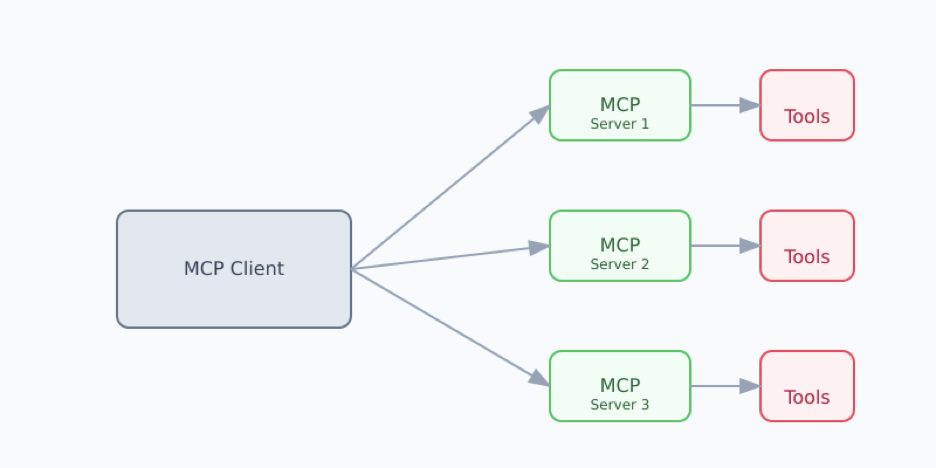
A client (i.e., an AI agent) interacts with MCP servers that use external tools (via Docker)

The wise (and Anthropic-sponsored) way to do this is with a Model Context Protocol (MCP) server. An MCP server exposes endpoints that AI agents like the Cursor composer can query to gather information and make changes to external systems. One could run an MCP server that sits between the Unity editor and the agent, passing editor state to the agent and agent-requested actions to the editor. In fact, this is exactly what Jack Richards built in his UnityMCP project.

I tried to be wise, but as I started to build what amounted to a UnityMCP knockoff, I came to a few opinions:

  1. In an ideal world, I wouldn't need to run a middleman server between the Unity editor and my AI agent. I could simply open the editor and get cracking.
  2. Agent models – at least, Cursor's composer agent with Claude 3.7 – seem really good at working with files. They have built in file system tools, and there's a lot of training data in existence showing how to interact with file systems. Meanwhile, barring time travel, the model would definitely not have seen my non-existent MCP server in its training data.
  3. It's hard to define an API for scene understanding without either dumping the entirety of the scene into the model context, which feels like information overload, or designing a query language for specific pieces of information, which feels like the kind of thing I shouldn't be doing.
  4. It's fun to try something new!
These opinions led me to a non-MCP approach.Enter vibe-gamedevvibe-gamedev is a package within Unity that interacts with agents via JSON
To bridge the gap between the Unity editor and my vibecoding servantbuddy, I wrote a Unity package called vibe-gamedev. Rather than use MCP, vibe-gamedev serializes the open scene as JSON files that the composer agent can peruse and edit, and automatically deserializes any edits back into the scene. For example, if our explosive enemy has a "damage" property of 10, an entry like {"damage": 10} would be written in the enemy's JSON file. If the agent edited that file and changed the 10 to 100, the "damage" property of the enemy in the scene would be changed to 100 as well.
vibe-gamedev seemed to satisfy my unwise opinions:
  1. No middleman server was required. The package runs entirely within the Unity editor, listening to editor changes (to trigger serializations) and JSON file changes (to trigger deserializations).
  2. The interface between agent and editor consisted entirely of JSON files. LLMs could grep and ls to the content of their cold mechanical hearts, just like they were trained to do.
  3. I did have to make some decisions about the layout of the JSON files, but the agent was free to peruse them in any way it decided. It could search for certain keywords, list the filesystem to any depth, and read in whichever JSON files would be most helpful.
  4. It was fun to build!
With vibe-gamedev up and running, no limits remained on my almighty AI. It was finally ready to develop my magnum opus.Look on my Snake implementation, ye mighty, and despair
Preorder on Steam for only $69.99
I kicked my feet up, cracked my knuckles, and created a new Unity project. With nothing but the default scene, I gave my first instructions to Cursor's composer:
"I want to build the game Snake in Unity. Specifically, I want a player character to collect a food pellet that moves to random locations after being captured. Each time it's eaten, the player's tail grows longer. The game ends when the player collides with its own tail."
The composer spits out a few scripts and JSON files, and confidently assured me that the game was ready. I don't bother to check any of its work. I'm feeling the vibes. I try to test the scene in Unity. It immediately fails. The main game script is looking for objects with a tag that doesn't exist. I turn back to the composer:
"I'm getting this error when I test the scene: ..."
The composer calmly makes some JSON file changes, adding the appropriate tag to the appropriate objects. I'm a bit offended by its lack of an apology, but the vibes are still flowing. I run the scene again, and again it fails, but with two new errors now. I don't stop to contemplate what the errors might mean; I simply slam them back into the composer chat:
"I'm getting two errors now. Error 1: ... Error 2: ..."
Turns out it never gave attached the "FoodController" component to the FoodPellet object. I don't know what a "FoodController" is, but it's not my job to know. It's my job to vibe. Some more JSON changes are made, I test the scene, and I receive no errors this time. Instead, I'm greeted by a log message saying "Game Over!" every frame. Back to the composer:
"When I run, it just says "Game Over!" repeatedly"
It identifies the issue as a premature collision check between the snake and its tail. I take its word for it, accept all code changes, and run the scene again. No more errors, no more "Game Over!" log. In fact, there's nothing at all except the blank scene background.
Here, I commit a vibecoding faux pas and look into the issue myself. I quickly realize none of the objects in the scene have sprites attached, so they are effectively invisible. My vibes temporarily non-copacetic, I add some basic sprites to them myself. I test the scene again, and find my snake's green square head motionless at the center of the screen. I inform the composer:
"The player doesn't move at all. It's just a green square at the center of the screen."
The composer realizes it never actually defined any movement logic. It writes some. I test the scene, and find everything is working surprisingly well: I have a moving snake with a tail that grows as it collects randomly-placed food. Now we're rolling.
"There's a weird gap between the snake's head and first tail segment." I tell the composer, and it fixes it. "The food is spawning off-screen." I tell the composer, and it adds tighter bounds and adjusts the camera size. "The snake is boringly slow." I tell the composer to double its speed, and it does. The vibes are immaculate.
All told, it took about ten minutes of harassing Claude to build a fully-functional Snake game. Besides pasting errors into the composer chat, I only intervened once (to add sprites). I never debugged anything or even looked at the generated code. Looking now, it's strange and poorly architected, and I expect would start to collapse in a project of greater complexity.
AI worship aside, I was actually pretty surprised how well this all worked. If I developed bare-bones Snake clones for a living, I'd be a bit nervous. If I were anyone else, I'd be excited. I'm optimistic about a future of game development that consists more of "what do I want to build?" and less of "how do I actually build it?" If you want to vibe your way to the top of the Steam bestsellers, you can download vibe-gamedev now!

tag:blogger.com,1999:blog-6754224955757239491.post-1408632747962319537
Extensions
Keep 'em (not) separated: detecting discontinuities in grid graphs
Show full content

In this post, I'm going to describe how I efficiently detected enclosed spaces in my browser game's map.As the player places obstacles, cells that would create an enclosed space are greyed-out.
In Build + Brawl, a free browser game I recently published, enemies march relentlessly towards the player character. To keep them at bay, the player can place impassable obstacles onto the battlefield, forcing enemies along longer paths and buying time to defeat them. Given free rein in placing these obstacles, the player could avoid the challenge of the game entirely by enclosing their character in an impenetrable box:
A very frustrated enemy, unable to reach the player.
A more sadistic player might instead enclose the enemies in a box, imprisoning them until they can be destroyed:A very sad enemy, unable to ever leave its prison.
These strategies would make the game trivial and boring, so I needed to prevent the player from using obstacles to create enclosed spaces.
Specifically, I needed to build a system that:
  • Detects all cells where placing an obstacle would create an enclosed space
  • Updates these results as the player adds or removes obstacles, possibly in rapid succession
  • Does so without causing lag while running single-threaded in the browser
The ultimate goal is to produce a grid that shows the player where they can legally place obstacles.Brute-force solution: flood fillThe map is divided into a grid of uniform cells. When there is no enclosed space, then every cell has a path to every other cell that does not require passing through an impassable obstacle. You can imagine if you turned on a faucet and water starts spreading from cell to cell, unable to pass through obstacles. If it floods every empty cell, then there is no enclosed space:

If some cells stay dry, then it must be because those cells were surrounded by obstacles that kept the water back:
This leads to the brute-force solution: a flood fill from every cell. Let's say we start with this map:

and we want to know whether it's legal to place an obstacle here:

We can pretend there's already an obstacle there, then turn on the (metaphorical) faucet. It doesn't matter from where, as long as the cell is empty. The water spreads to that cell's neighbors, then those cell's neighbors, and so on:

In this case, every empty cell gets flooded, so we can say it's legal to place an obstacle there:

However, if we considered a different cell, we might get a different answer:

In this case, when we start the faucet, it leaves one cell dry:

So we say that it's illegal to place an obstacle in that cell:

You can do this for every cell to get the full sets of legal and illegal placements:

Whenever the player adds or removes an obstacle, you can repeat the flood process again for every cell and get the new legal and illegal placements.
This approach works, but I found it to be too slow for my game. For every cell, we need to run a flood fill, which requires iterating over every other cell. This felt like more work than is necessary; is there a way to speed this up?Saving time with sandwichesWe're going to take advantage of two useful intuitions:
  • If every cell has a path to the boundary of the grid, then there are no enclosed spaces. Any enemy could move along the boundary to eventually get into any cell.
  • If placing an obstacle in a given cell would create an enclosed space, then one of that cell's neighbors must be in the enclosed space. Placing an obstacle won't magically create an enclosed space somewhere far away.
Using these intuitions, we can reframe the problem as "placing an obstacle in cell A is legal only if each of A's neighbors still have a path to the grid boundary."
At a high level, to determine the legality of placing an obstacle in a cell, we can run a flood fill from each of its neighbors and see if each reaches the boundary:
The three neighbors of the proposed space are each able to flood to the boundary.
But this alone probably doesn't save much compute, since the flood may reach almost every cell before reaching the boundary. Notice how the faucet to the right still floods a bunch of wasted space. Meanwhile, we're increased the number of flood fills from one per cell to one per neighbor. We're off to a bad start!
To try to salvage this, we'll introduce a third intuition:
  • If there is a path from cell A to cell B, and cell B has a path to the boundary, then cell A has a path to the boundary.
This means our flood fills don't need to make it all the way to the boundary -- they just need to make it to any cell that we know has a path to the boundary. Ideally, we can maintain a cache of known "escape routes" and stop flood fills when they reach one.
Of course, if we knew exactly which cells were escape routes, we'd be done; that's the whole problem we're trying to solve! Fortunately, there's one simpler statement we can make: if a cell isn't "sandwiched" by two obstacles, then that cell is definitely an escape route. A cell is sandwiched if you can draw through it a straight, cardinal-direction line that collides with an obstacle on either side of the cell, like this:
A map with three obstacles, and poorly drawn tomato-and-lettuce sandwiches indicating the "sandwiched" cells.
Not every sandwiched cell is necessarily in an enclosed space, as you can see in the example above. However, if a cell is not sandwiched, then it must be "open-faced", and have a direct path to the boundary. Using this heuristic doesn't give us every escape route, but it gives us enough to substantially prune the flood space.ImplementationLet's get into how this would be implemented. We'll create a cached set of "open-faced" cells, which will contain every cell that is not sandwiched between two obstacles. Since the grid starts with no obstacles, we can initialize this set to contain every cell.
To determine whether we can legally place an obstacle in a cell, we'll start by temporarily placing an obstacle there. This might create new sandwiches; to check, we can fire a ray in each of the four cardinal directions, starting from the new obstacle. If the ray collides with another obstacle, then any cells up that point are sandwiched, and should be temporarily removed from the open-faced set:
The two vertical rays collide with no obstacles, so the cells along them stay open-faced. The rightward ray collides with an obstacle, so everything in between is sandwiched.
Now, we can run our flood fills from the neighbors of the new obstacle. Let's call the first neighbor N. We loop over the empty neighbors of N, looking for any open-faced cells. If we find one, then we know that N has a path to the boundary, and can stop. If we don't find one, then we iterate over the neighbors of those cells.
The flood doesn't need to make it to the boundary; it only needs to make it to a cell that isn't sandwiched.
This continues, flooding outward, until either:
  • An open-faced cell is found, meaning that N has a path to the boundary; or
  • No unvisited connections remain, meaning that N does not have a path to the boundary.
It's legal to place an obstacle in a cell only if every one of that cell's neighbors find a path to the boundary. When we have our answer, we remove the temporary obstacle and revert the open-faced set. In this case, we found an open-faced cell before actually getting to the boundary, saving us some precious compute.
We can repeat this check for every cell to produce our full map of legalities. The worst-case compute complexity is still the same as with brute-force flood fills: if the potential enclosed space is very large, its entire volume might be flooded. However, in practice, I found these heuristics to reduce lag considerably for the obstacle arrangements players tended to make. Obstacles tended to be towards the center of the map, with large open-faced spaces around them.Adding and removing obstaclesWhen the player places a new obstacle, we repeat the same ray-firing process as during the legality check, but remove any newly-sandwiched cells permanently.
Removing an obstacle is a bit more complicated. If the player wants to remove an existing obstacle, we potentially need to add new cells to the open-faced set. We fire a ray to the left and to the right:
The two cells between obstacles start sandwiched.
If the ray to the right hits an obstacle, then we know the cells in between used to be sandwiched (between the hit obstacle and the obstacle-to-be-removed). If the ray to the left makes it to the boundary, then those cells are now open-faced, and can be added to the set:
The leftward ray hits no obstacles, so the cells to the right are no longer sandwiched.
Otherwise, those cells must still be sandwiched by whatever the left ray hit:
There is an obstacle to the left of the removed obstacle, so the cells to the right remain sandwiched.
Likewise, if the left ray hits but the right ray does not, then the cells to the left are no longer sandwiched. This is then repeated for up-down and down-up. We then need to recalculate placement legalities for all other cells, since they may now have new paths to the boundary. Other helpful tricks
  • Even with this approach, it was still too laggy to update the legality of the entire map in a single frame. Instead, I created a coroutine that iteratively updated cells, taking no more than a fixed number of milliseconds each frame. This spread the work over a few frames.
  • Not every cell needs to have its legality updated every time an obstacle is added or removed. For instance, only cells that are adjacent to at least two obstacles could possibly be illegal, so only those need to be checked.
A better option?My friend Pablo Aldape proposed what might be a faster and more straightforward solution. Instead of treating this as a grid connectivity problem, it could be solved as a cycle detection problem: look for any obstacle that can loop back to itself via a chain of obstacles. If one exists, then an enclosed space also exists. This has a runtime proportional to the number of obstacles, which might still approach the total grid size, but in practice would not.
The one special case needed here is for spaces filled entirely with obstacles, such as a 2x2 region of obstacles. Such spaces easily create a cycle, but for gameplay purposes should still be allowed: the player character or an enemy cannot be trapped in a solid block, and building them is helpful for dealing with certain enemies that have obstacle-penetrating attacks. I'm sure someone can find an easy solution here, but I am too stuck on my good-enough solution to be that someone.
tag:blogger.com,1999:blog-6754224955757239491.post-9111226845586285808
Extensions
Balancing games while staying (somewhat) sane
Show full content
In this post, I'm going to explain a framework for balancing games and how I applied this framework to my game Build + Brawl.


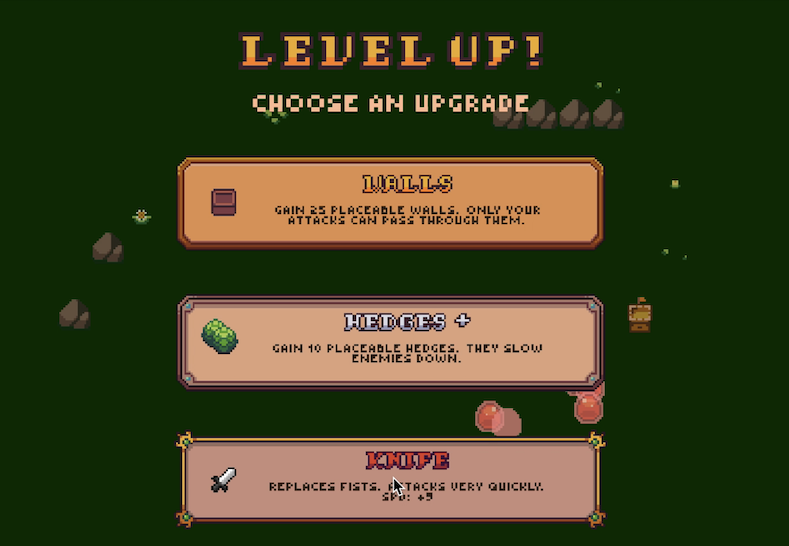
I recently published a free browser game, developed in Unity, called Build + Brawl. The player must battle increasingly-difficult waves of enemies using upgrades distributed throughout the game. Making the game fun required a careful balancing act: enemies needed to grow more dangerous, but not infuriatingly so; player upgrades needed to feel powerful, but not trivialize other options; the difficulty curve needed to be excitingly unpredictable, but not too spiky.
Every value that was set during development, from the strength of an upgrade to an enemy's movement speed, was a dial I could turn to achieve balance. But games are complicated, chaotic systems, and the impact of turning each dial was not clear. Maybe improving a particular upgrade is irrelevant because very few players choose it. Maybe making an enemy 2% faster means they can now reach the player before dying, causing massive damage.
For Build + Brawl, I needed to find some configuration of these hundreds of dials that made the game fun. It felt (and, honestly, still feels) like an impossible task. Eventually, I boiled the problem down to:
  • The game presents the player with a number of different paths they can follow: they can pick upgrade A or B; they can choose to focus their attacks on enemy 1 or 2; they can deftly avoid enemies or crash into them.
  • Each path is configured by a set of dials: the attack speed bestowed by upgrade A; the speed of enemy 1; the damage dealt per second by enemies.
  • The configuration of dials determines the outcome of following each path: if upgrade A is stronger than B, players will win more when choosing it; if enemy 1 is more deadly than enemy 2, players will win more when focusing fire on it; if enemies do a lot of damage very quickly, evasive players will win more than clumsy ones.
  • The distribution of outcomes experienced by players determines whether they have fun: a player might be bored by a game where winning is guaranteed, but frustrated by one where only a few paths can lead to victory.
Put another way:
In a well-balanced game, dials are tuned so that a player's possible paths produce outcomes matching a target distribution.
I used this intuition as the framework for balancing Build + Brawl.Diving in to the frameworkDial
A dial is any in-game property that can be tuned to impact the player experience. These impacts might not always be clear, and may be dependent on the values of other dials. Not every configurable value needs to be considered a dial: as designer Timothy Cain suggests, you could "put a pin in" some values, and take them as fixed while tuning everything else.
Dials also do not always need to be numerical values. For example, changing an enemy's behavior from "move towards the player" to "move randomly" would of course affect the balance of a game. There's a blurry line between a dial and a game mechanic, and any mechanic that you might change when balancing could be considered a dial containing categorical, rather than numerical, choices.Path
A path is the combination of a player's in-game choices and real-world competencies, where your goal is to introduce some sort of balance between different paths. A player's path in a turn-based RPG might include their character's class and their personal willingness to carefully optimize their equipment. The paths of a fighting game might be the different playable characters, crossed with the different fast-twitch reaction times a player might have.Outcome
An outcome is the result of a player's chosen path, given the configuration of the dials. For example, "player health lost" might be the outcome of a level in a roguelike game, or "score achieved" might be the outcome in a shoot-em-up game. An ideal outcome is:MeasurableYou can quantify the outcome for a particular path, and compare the outcome between paths and dial configurations. The outcome can meaningfully change between different paths and configurations.ContinuousChanges to dials produce a somewhat-smooth change in outcome, rather than large, discrete jumps or no changes at all. A scalar outcome that measures "player health lost" would be preferable to a binary one that measures "did player die." This allows you to see the relative importance of different tweaks to your dials.SingularThe outcome encapsulates every metric that you care about. While there may be many potential metrics in your game -- the score achieved, the time to completion, the number of lives remaining -- trying to balance all of these at once introduces complexity. It also introduces unclear tradeoffs: if a proposed buff to a path increases its score but reduces its lives remaining, is it actually a buff? Optimization problems are much easier when there is a single target to optimize.ChunkableYou should be able to measure the outcome not only across the entirety of a play session, but within smaller "chunks" of the game, like individual levels. This allows for finer-grained control of the difficulty curve throughout the game. If you can measure "player health lost" on a per-chunk basis, you can make certain chunks harder by adding more enemies or reducing player upgrades, creating a more interesting difficulty curve. Otherwise, you might estimate that the player loses a certain amount of health across an entire play session, but have no idea whether that health is lost too gradually, leading to boredom, or too suddenly, leading to frustration.EstimableFor a given path under a given configuration of dials, you have an efficient way to estimate the outcome it would achieve. Ideally, you have some function, in code or in a spreadsheet, that takes as input a path and a dial configuration and returns an estimated outcome. This makes it much faster to compare paths and test tweaks to dials.Target distribution
The target distribution is how you want the outcome metric to be balanced across different paths. This will set the tone for how impactful a player's choices and skills are, how many ways a player can win your game, and how difficult your game feels.
One (bad) target distribution would be a constant one: every path has the same outcome. This means no path is better or worse than another -- by some definition, "perfectly balanced" -- but also that the player's choices and skills are entirely irrelevant to the outcome of the game.
A harder game might have a distribution skewed towards failure: most paths result in a negative outcome, while only a few result in a positive one. This would mean that most of what the player tries will fail, and that they will have to work hard to find a successful one -- if they stick around long enough to do so.
Picking the target distribution requires a fair amount of intuition about the underlying distribution of paths. What skill level do you expect most players to have? If most will be low-skill, then your target distribution should probably skew positively so that paths in the hands of these players can succeed. Are there certain upgrade paths that are so non-obvious that players will never choose them? If these are the only winning paths, your game is unlikely to be fun for most. Accounting for these intuitions is challenging but might substantially change the shape of your distribution.
You will also need an intuition about what outcome distribution will be "fun" for your players. Do they want to search for a needle of success in a haystack of failures? Do they want to try a bunch of different options and usually have them work well? How often do they expect to win? How much time will they give your game? I don't know of a way to decide this outside of gut checks and playtesting.Putting the pieces togetherRevisiting that initial intuition: in a well-balanced game, dials are tuned so that a player's possible paths produce outcomes matching a target distribution. The key questions a designer must answer within this framework are then:
  • What are the dials I want to tune?
  • What paths might a player employ?
  • What outcome can I estimate from these paths?
  • How do I want these outcomes to be distributed across paths?
The answers to these questions will vary dramatically from game to game and audience to audience. This framework will not magically reveal exactly how to balance your game. Rather, my hope is that it can turn a nebulous, overwhelming challenge -- "make the game balanced" -- into a more concrete, actionable one. How I used this framework in Build + BrawlWe have our nice, clean framework. Now, let's see how it played out in practice.DialsA snippet from the spreadsheet where I set the enemy attribute dials.
The dials I tuned fell into four buckets:
  • Enemy attributes, like health, speed, and quantity. I set these attributes in a spreadsheet, and would translate them into Unity ScriptableObjects to keep the in-game enemy attributes aligned with the spreadsheet.
  • Upgrade attributes, like the attack speed granted by a particular upgrade or the frequency at which a certain upgrade drops. These were set directly in Unity ScriptableObjects, as the branching tree structure of the upgrades didn't lend themselves well to a spreadsheet.
  • Structure attributes, like the number of walls granted per upgrade or the damage dealt by a turret. These were set in a spreadsheet and translated into Unity ScriptableObjects.
  • The number of upgrades offered to the player in each stage. This was set in a spreadsheet.
PathsStructure and upgrade options offered to the player.
The paths through Build + Brawl consist of three parts:
  1. The weapon upgrades the player chooses. There are over 200,000 possible weapon upgrade paths, which I reduced to around 10,000 paths by filtering out the rarer, more powerful upgrades.
  2. The structures the player acquires, and how the player places them on the map. This was challenging to define because there are a nearly-infinite arrangement of structures, and structures are highly synergistic. For instance, walls can be very effective at routing enemies towards damage-dealing turrets, but are basically useless if placed haphazardly. I ended up assuming that players always used structures efficiently, routing enemies to turrets through mazes of walls. This was certainly not true, but I expected players to get pretty efficient after a few play sessions.
  3. The player's skill in aiming at enemies while avoiding damage. From playtests, I found most players quickly approached a similar level of skill in this, so I decided not to complicate balancing by accounting for different skill levels.
Ultimately, each path mapped to a different common-upgrade-only path, and assumed that the player used half of their levels to upgrade their weapon and half to acquire structures that would be efficiently placed.OutcomeThe goal of Build + Brawl is to defeat the enemies in all twenty stages without running out of health, so the outcome metric I decided to use was the amount of player health lost before killing all enemies. But was it...
Measurable?Yes; I can easily see how much health a player lost.Continuous?Yes; a player can lose more less health, and this will be somewhat smooth with respect to, say, the damage output by enemies.Singular?Yes; to beat the game, all enemies have to be killed before all of the player's health is lost. There weren't secondary metrics like a score or timer I was interested in balancing.Chunkable?Yes; I could chunk health loss per stage by looking at the player's potential upgrade paths up to that stage and enemies that appear at that stage.Estimable?Yes-ish. The broad idea to estimate player health lost was:
  1. Estimate the damage per second (DPS) the player would deal using each path on each stage.
  2. Determine how much damage the player would take on each stage, given the DPS they can deal.
The journey to a distribution of player damage taken.
For part (1), I downloaded the CSV containing the attributes of enemies and the number of upgrades available to the player at each of those stages. I passed this, along with the upgrade ScriptableObjects, into a Unity editor function that determines the possible upgrade paths at each stage, estimates the DPS a player with that weapon would achieve on that stage, and outputs a histogram of DPS values across paths for each stage.
For part (2), I pulled the histogram back into the spreadsheet. For each "bucket" in the histogram, I calculated a metric called "time to clear" for each enemy type. The "time to clear" for a given DPS value is the time it would take to defeat all enemies of that type when the player has that DPS. It assumes all enemies spawn at once, then the player kills enemies of one type first, then the next type, and so on. The damage the player takes from enemies is then a function of time to clear: if the time to clear is longer than the time it would take for an enemy to arrive at the player, the player would take damage proportional to the difference, the quantity of the enemies, and the damage each deals per second.Target distributionI used two types of charts to assess the outcome distribution:
Histograms for the distribution of player health lost on different stages.
The first was a histogram sparkline for the distribution of player health lost in each stage, across paths. This gave a view of the difference in effectiveness between different paths. 
The median and max trendlines for player health lost each stage.

The second was a line chart of player health lost over stages, for both the median DPS and the best DPS. This roughly illustrated the difficulty curve so that I could make sure it had the positive trendline and per-stage variability I was looking for.
I'm still not sure exactly what distributions I wanted these charts to show. I settled on a normal-ish distribution for path outcomes; a spiky, climbing difficulty curve for the median path across stages; and a fairly flat difficulty curve for the best path across stages.
More than checking whether the distributions matched an exact goal, I found these helpful in understanding potential problem areas. For example, stage 17 is clearly skewed towards a few particularly strong strategies, which could be problematic. However, the expected damage taken for that stage is 0, so it's not too worrisome. I can combine that with the qualitative knowledge I have about that stage -- namely, that it's a single high-health enemy rather than many small enemies, so there are a few upgrade paths that will be especially powerful -- and decide whether it needs any tweaks.What I learned
  • The two hardest parts of balancing were (1) building a useful outcome estimator and (2) determining whether the outcome distribution delivered the experience I wanted.
  • Regardless of the framework you apply, balancing is still largely a game of intuition. You need intuition to pick reasonable initial values; to choose an accurate but not overly-complex outcome estimation method; to determine whether an outcome distribution will be fun; and so on.
  • It was a mistake to not have a more formal estimation of the DPS of different structure selections and placements. Players expressed a wide range of different placement strategies, and many that were cool but not optimal were effectively infeasible. Meanwhile, certain structure upgrades were wildly overpowered in certain configurations and trivialized much of the game.
  • I should have solidified the game's mechanics and core gameplay loop before going too deep into balancing. I initially balanced around a set of mechanics that ended up changing dramatically before the final release, causing me to throw out a lot of the balance work.
  • I should have had a "test bench" of diverse stages for making sure the outcome estimator aligned well with the actual gameplay outcome.
  • I wished I had more insight into what kinds of paths fell on which side of the outcome distribution. A game where certain the feasibility of a path is essentially random is less fun than one where strategic paths succeed and ill-conceived ones fail, but I had no real way to compare feasible vs infeasible paths at scale.
Above all else, balancing is hard! I think it will always be daunting, but my goal is to tackle it more formally each time.
tag:blogger.com,1999:blog-6754224955757239491.post-7942178977816650228
Extensions
Pathfinding to a moving target in evolving terrain
Show full content

In this post, I'm going to describe how I used direction fields to introduce fast and dynamic pathfinding to a browser game.

I recently published a free browser game, developed in Unity, called Build + Brawl. In Build + Brawl, the player moves their character to avoid swarms of approaching enemies. The environment contains impassable obstacles — some generated at random, some placed by the player — that the enemies must route around as they approach the player. There are off-the-shelf solutions for pathfinding in general using algorithms like A* [1]; however, there were a few quirks to Build + Brawl that pushed me to roll my own solution:

  • There may be hundreds of enemies routing to the player at once.
  • The enemies all start from different, randomized positions.
  • The player character can move.
  • The player can add or remove obstacles during the game.
  • The game must run in realtime, without lag, single-threaded, in the browser.
Running A* worked fine in a high-resource desktop environment, but introduced noticeable lag in the browser. The next two parts detail how I fixed this.Part 1: hunting down a moving targetLet's first ignore the fact that the player can add or remove obstacles, and focus on the narrower problem: routing the enemies towards the player, even as the player moves around. There are a few attributes of the Build + Brawl scenario that A* does not fully leverage:
  1. The player can only move from one space to the next space. Paths are unlikely to change dramatically as the player moves, and most changes would be in the neighborhood of the player. Recomputing the whole path from start to finish every time the player moves would be inefficient.
  2. Every enemy is moving towards the same target. Two enemies that pass through the same cell, even at different times, should follow the same path thereafter (assuming the player has not moved). Treating each enemy as a separate pathfinding entity does not leverage this, since even enemies in similar positions would calculate their paths from scratch [2].
In general, it seemed like there was an opportunity to do some extensive path caching and make minimal updates as the player moves. The approach I settled on was inspired by a direction field [3]:
Direction Fields | Calculus IIA direction field, with two paths (in red) from different starting positions
https://courses.lumenlearning.com/calculus2/chapter/direction-fields/
A direction field shows the slope of a function — that is, the direction that function follows — at each point in a grid. What if we could compute something similar for the enemies in our game? What if we pre-computed which direction an enemy in position (x, y) should go, for every possible (x, y)? That way, the pathfinding cost is independent of the number of enemies on screen at a time, since all of them can just check against the same pre-computed direction field.
To build our pathfinding direction field, we'll start by dividing the map into a grid of equal-sized cells. Each cell is going to hold two pieces of data:
  • A pointer to one of its neighboring cells. A pointer from cell X to cell Y means "when an enemy is in cell X, its shortest path to the player goes through cell Y next." You can think of this as the "direction" of our direction field. The cell containing the player points to itself.
  • A distance value, representing how long the path is from the cell to the player. A distance value of N in cell X means "the shortest path to the player from cell X is N cells long." The cell containing the player has a distance value of 0.
If we have these values for every cell, then we've solved the pathfinding problem: enemies could just check the pointer of their current cell, move to that neighboring cell, and then repeat the process until reaching the player. We have two problems to solve to get these values:
  1. Calculating the pointers and distances for every cell at map initialization.
  2. Updating cell pointers and distances as the player moves.
We can make problem (1) simple by assuming there are no obstacles on the map (we'll cover how to add obstacles in Part 2 of this post). Here's our blank grid, with the player at the center:

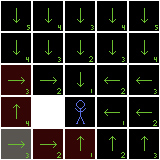
Because there are no obstacles, enemies can traverse any cell in the grid, meaning each cell should just point towards the player: if the cell is below the player, point to the neighbor above; if above, point below; if to the left, point right; and if to the right, point left [4]. The distance value for each cell would then equal 1 plus the distance value of the neighbor being pointed to.

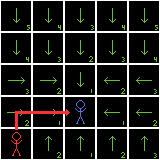
Unfortunately for us, we're not done yet, because the player won't stay in that cell forever. To handle player movement, we need to solve problem (2). Thankfully, the player can only move one cell at a time. This means that, when the player moves, every cell has a "default" option: take the same route as before, but when reaching the player's previous position, move from there to the player's new position. This default option gives every cell its same pointer, and a distance value 1 greater than before (since it must reach the previous player position, then move one more space). We'll start by updating every cell to use the default route and increment their distance values by 1:

But this default route will not always be the shortest route. For example, if an enemy is below the player and the player moves one cell down, it would be inefficient for the enemy to move up to the player's previous row, then back down to the player's new row:


We need to find all of the cells that have a new fastest route to the player. To start, all of the cells adjacent to the player's new position have a new route: just point to the player! We can update all of their pointers and set their distance values to 1:

We put each of these updated cells into a queue (marked in yellow). Let's call this queue the sellers, because our cells are going to be offering some deals. One at a time, we dequeue cells, and the dequeued cell offers a deal to its neighbors: "Point to me! Then your distance will be only 1 plus my distance!"
Let's say the cell to the right goes first:

That cell (in gray) announces to its neighbors (in purple), "if you point to me, your distance to the player will be only 2!" Each of those neighbor cells check against their current distance value. If the offered distance is shorter than their current distance, they take the deal: the neighbor cell points to the dequeued cell and sets its distance value to 1 plus the dequeued cell's distance.
In this case, the only cell to take the deal is the cell to the right, which previously pointed to the row above the player:
The updated neighbor now has a shiny new deal to offer its neighbors, so it joins the queue and waits its turn. This process continues until the sellers queue is empty; for now, the space below the player is up next. It offers its deal — a distance of 2 — to its neighbors, but no one is interested, since their distances are already equal to 2:

The space to the left gets dequeued next:

The cell to its left takes the deal and joins the queue:

The cell above the player makes its offer, but no takers:

After patiently waiting its turn, that updated cell on the far right gets dequeued. None of its neighbors are interested:

And finally, the updated cell on the far left gets dequeued. Likewise, no takers:

The queue is now empty, meaning every cell has no better pointer option than its current selection. At this point, the grid is fully updated, and every cell once again knows the shortest path from itself to the player. That enemy starting from the bottom corner now has a much more reasonable route:

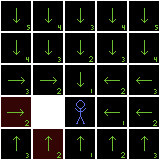
As we saw here, many cells will not need to be checked at all in this approach, which avoids a full grid update every time the player moves.Part 2: adding and removing obstaclesIn Part 1, we built a direction field that points towards the player as they move around the map. But we assumed there were no obstacles blocking enemy movement; if that were always the case, we could just have enemies always move in a straight line towards the player! In Build + Brawl, the player can add and remove obstacles throughout the game. As obstacles are added and removed, the shortest paths to the player might change, as routes open up or become blocked off. For instance, if we place an obstacle to the left of our player, the path we found in Part 1 no longer works:

We need to update our direction field to route around the obstacle:

Let's first figure out how to handle the addition of a new obstacle [5]. Naively, we could recompute the pointer and distance for every cell from scratch whenever an obstacle is placed. Intuitively, however, most cells shouldn't need to be updated: we should only need to update cells whose shortest path eventually led through the now-impassable one [6].
To do this, we can work backwards from the impassable cell: we find all cells that point to it, then find all cells that point to those, and so on, until we've found every cell that eventually routed through the impassable one. We then want to indicate that we no longer know the shortest path for those cells, so we unset their pointers and set their distance values to infinity.
In the above example, two cells point to the now-impassable one:

So we unset their pointers; one cell pointed to one of those:


So we unset its pointer as well:

Once that's done, we have a lot of cells pointing to nowhere. We need to find their new shortest paths to the player and reset their pointers. We start with a new queue, containing all of the unset cells. Where the queue in Part 1 was full of sellers offering sweet deals to their neighbors, this queue is full of buyers: each cell in the queue is going to look for the best offer among its neighbors.
As long as the queue is nonempty, we dequeue a cell from it. We'll start with the cell to the left of the obstacle:


That dequeued cell finds the neighboring cell with the shortest distance value. The dequeued cell can now decide: should I point to this neighbor? If so, the dequeued cell's distance would be 1 plus the neighbor's distance. If that's shorter than the dequeued cell's current distance, then it takes the deal and updates its pointer and distance value accordingly. In this case, the best deal is to go up, taking a distance of 4:

Whenever a cell updates, its neighbors catch wind of the sweet deal and join the buyers queue, in case they might get a shorter path by routing through their newly-updated neighbor:

Next, the cell below the obstacle is dequeued; it finds a path of length 2:

The cell in the bottom-right is dequeued. It has a choice between a path of length 3 and a path of length 5, so it chooses the shorter path:

There are a few cells remaining in the queue, but none find a better deal, so nothing else gets added as we iterate over them. At the end of the process, every cell whose path was ruined now has a new pointer, and all other cells have been given a chance to route through these new paths.

The last piece of our pathfinding puzzle is updating the distance field when an obstacle is removed. There are two problems to solve when this happens:
  1. To which neighbor the now-passable cell should point
  2. Whether any other cells should route through the now-passable cell
Problem (1) is simple: check the now-passable cell's neighbors, find the neighbor with the shortest distance value, and point to it. If we were to remove the obstacle added above, this is simple, as the neighbor with the shortest distance is the cell containing the player:

Problem (2) can be solved using a method very similar to the sellers queue in Part 1:
  • The now-passable cell "offers" itself as a route for all of its neighbors:
  • If the neighbor would get a shorter path by pointing to the now-passable cell, it does so:
  • Any updated neighbors offer themselves to their neighbors, and so on, until no cells are updated:

We end up with a direction field that once again contains the shortest routes to the player!
ResultThe direction field approach produced no noticeable lag in the browser, allowed the game to scale to more enemies, and most importantly, was really fun to figure out. Hopefully this can be helpful to anyone encountering a similar problem!

Footnotes[1] I tried Aron Granberg's A* Pathfinding Project. It's definitely a high-quality library, and was easy enough to use, but I couldn't get the lag down when running single-threaded in-browser.[2] I tried using A* Pathfinding Project's multi-target pathing, which was better than separately pathing every enemy, but this still caused a lag spike whenever it ran.[3] The approach I ended up using is very similar to a Dijkstra map, a pathfinding tool from roguelike games, which I discovered as I was writing this. As far as I could tell, my approach extends a Dijkstra map to handle minimal updates as the target moves and obstacles update.[4] In practice, I also allow diagonal connections. These connections are the same as cardinal direction connections, except they impose an additional distance value of sqrt(2) instead of 1. You also need to be careful that connections can't cut through obstacles placed kitty-corner to one another. Otherwise, the same algorithm works just as well, it's just a bit harder to walk through it that way.[5] This algorithm assumes that placing an obstacle does not created a disconnected component of the grid, meaning an enemy in any (non-obstacle) space can reach the player. Preventing that was a tricky problem I might cover in a future post.[6] If you're implementing diagonal movement, a route is also ruined if there's an obstacle orthogonal to the direction of the pointer, even if the start and end cells themselves are clear. This prevents clipping through obstacles diagonally.

tag:blogger.com,1999:blog-6754224955757239491.post-2440525117873833068
Extensions