GeistHaus
log in · sign up

Dodgy Coder

Part of blogger.com

"The cost of intelligence is hyper-deflating faster than Moore's Law; we are moving to a world of intelligence surplus" -Marc Andreessen, Jan 2026

stories
The Great AI Arbitrage: making a killing before your client wises up
aiai-agentgeneralistknowledge-asymmetryprogrammingspecialist
Show full content

There is a silent heist happening in the billable hours of every major software agency. We’ve entered a Golden Hour - a brief, high-stakes arbitrage window where the cost of production has cratered, but the price tag remains frozen in 2022.

History is littered with these windows. They are defined by Knowledge Asymmetry: the gap between what a client thinks it takes to build a product and the time it actually takes, using a magical new tech.

We are living through the Agentic AI version of this playbook. In the time it takes a client to finish a discovery meeting on Teams, an agent has already drafted, tested, and hallucinated its way through the first 40% of the codebase. The agency is billing for the month; the machine finished before the coffee got cold.

Here are the most iconic historical parallels to the Great AI Arbitrage:

1. The Gutenberg Gap: The Scribe vs The Printing Press

In the 1450s, a hand-copied Bible took a scribe about a year to complete. The price reflected 12 months of high-level professional labor.

The Tech: Johannes Gutenberg’s movable type press.

The Arbitrage: Early printers were notorious for trying to make their books look exactly like hand-copied manuscripts. They used the same ligatures, the same layouts, and sometimes even had artists hand-illuminate the first letters of a printed page. They charged scribe prices for a product that was essentially mass-produced. 


2. The Master Gunsmith vs Interchangeable Parts

In the early 1800s, if a part of your rifle broke, a master gunsmith had to hand-forge a unique replacement. You paid for that master craftsmanship.

The Tech: The transition to interchangeable parts (mass production); machines began stamping out identical components.

The Arbitrage: Government contractors and factory owners keep billing for "fitting and filing" (the manual labor of a master gunsmith) long after the parts were being stamped out by low-skill laborers using jigs. 


3. The Master Machinist vs CNC ProgrammingThe CNC (Computer Numerical Control) lathe transition of machine shops during the 1980s is the most direct ancestor to the Agentic AI shift in software development. It wasn't just a change in tools; it was a total transfer of power and a massive, hidden profit engine.


Here is the deeper breakdown of what happened:

The "De-skilling" of the Master Machinist

Before CNC, a master machinist was a craftsman with specific knowledge. They didn't just turn handles on the lathe; they had "the feel" for how metal reacted to heat and speed. This was deep, learned knowledgeit couldn't be easily written down or taught to someone else, and it gave those machinists immense leverage over shop owners.

  • The Tech: G-code and microprocessors made that deep knowledge redundant. The new machine could replay its tool-paths perfectly every time, regardless of whether the operator understood the physics of the cut.

  • The Arbitrage: Shop owners realized they could buy one $80,000 CNC lathe (the price of about 12 manual lathes in 1981) and hire a "button-pusher" CNC operator at 40% of the Master Machinist's wage to run it.

  • The AI Parallel: Today, an agency can use Claude Code to replace a team of senior developer SMEs on a complex legacy project with one AI "prompt-pusher" keeping a zombie legacy project on life support.

The "Ghost Labor" Billing Model

This is where the real money was made. In the 1980s, the market rate for precision machining was anchored to the labor of the machinist.

  • The Old Reality: If a complex aerospace part took 10 hours to hand-mill, the client was quoted for 10 hours of a senior machinist's time.

  • The CNC Reality: The machine could churn out that same valve in 45 minutes. Shop owners would literally hide the humming CNC machines out the back, and keep the master machinist hovering out the front for the clients to meet.

  • The Play: Shops didn't tell the clients. They continued to bill for the 10 hours.

  • The Result: Profit margins jumped from a standard 20% to a staggering 500% on certain parts, just by exploiting the client's ignorance of the new CNC speed increases.

The Knowledge Monopoly

Historian David Noble argued that CNC machines weren't better when they first came out - manual machinists were often faster for one-off parts. However, management pushed CNC primarily because it removed the knowledge monopoly from the workers.

  • With CNC, the knowledge moved from the shop floor to the office floor.

  • It allowed management to dictate the pace of work without the machinist ever needing to be consulted.

The End Game
The end of the CNC arbitrage window provides a brutal preview of what happens when a secret productivity leap becomes a baseline industry standard. When the knowledge asymmetry vanishes, the pricing floor doesn't just sag, it collapses.
Once CNC machines became affordable and CAD/CAM software became user-friendly, the secret weapon became a commodity. Job shops that once made a killing started undercutting each other just to keep the spindles turning. Prices for standard parts plummeted by 60-80% in a few years. The bespoke premium evaporated because precision was no longer a rare skill - it was a machine setting.
The ultimate price-killer was when the giants - the Boeings and Fords of the world - realized they didn't need the middleman anymore. As the tacit knowledge of the shop floor was codified into G-Code, the 'craft' became a 'file' ... and files are infinitely portable. Clients realized they could hire a CNC programmer/operator to run the same machines in-house for a fraction of the agency's markup.
External shops were forced to drop their prices to Cost + 10% just to prevent their clients from in-sourcing the work entirely. The only shops that kept their high margins were the ones that made a pivot.
  • The Pivot: If you were just "making parts", you were a commodity. If you were providing "Aerospace-Grade Quality Assurance and Material Traceability" you could still charge a premium. You stopped selling the shaping of metal and started selling the certainty of the result.

  • Master Machinists became Manufacturing Engineers. They traded their manual "feel" for process optimization. A shop might have 5 CNC machines, but they still needed someone who understood the physics of metallurgy to ensure those machines didn't destroy $50,000 worth of carbide tools in a single afternoon.

  • The AI Parallel: In 2027, writing code will be a commodity. The thing clients will pay for in the future is functional and architectural assurance... did you build the right thing, and build the thing right?

The Generalist Dev Pivot: Breadth Over Depth
Software developers focus will need to shift upwards, onto software architecture, business analysis and the AI tools themselves - using AI tools to drive more productivity for business.
With this shift comes the need for a breadth of knowledge rather than a depth of knowledge. Specialist developers who continue to focus narrowly on just one framework / platform will slowly lose their knowledge monopoly to a machine that never sleeps, doesn't take coffee breaks and doesn't charge for overtime. 


References and further reading
True Stuff: Monk vs. the Printing Press
Gunsmithing Career History
The Manual Machinist Facebook Group
Making the Plunge into CNC
Forces of production: A social history of industrial automation (By David Noble)
Should I be a specialist or a generalist?
Alternative to becoming a Full Stack Developer ... Become a Generalist
Reality check on "AI will replace software engineers in 12 months" claims
The AI Arbitrage Opportunity: Code Just Got Cheap
The Honest Math of Coding with AI Agents in Production


Follow @dodgy_coder on X
tag:blogger.com,1999:blog-5060551251465839575.post-4501635581025604498
Extensions
The Zombie App Apocalypse
aiapp-developmentsaasstartupszombie-apps
Show full content

"Talk is cheap. Show me the code."
- Linus Torvalds, 2000

"Code is cheap. Show me the users."
- Me, 2026


The Death of the Dev Moat

In 2023, if you had a bullshit idea (like a social media app for cats), you still had to find $50,000 or 6 months of your own life to build a prototype. 

That cost acted as a bullshit filter.

In 2026, that filter is gone. Code has become cheap, and the bullshit has become infinite. If you can’t find a single user before you hit 'Generate' you haven't built a tool; you've just automated the process of adding to the internet's infinite landfill.

We’ve been here before. In 2000, millions of bullshit apps came out of Microsoft Access and VB6. For the first time, a department manager could drag-and-drop a few components, click a wizard, and 'build' a billing system. It felt like magic, but it mostly resulted in a million fragile .MDB files on desktops and a nightmare to maintain. Today, we aren't dragging buttons; we're vibe-coding entire repos. The tech changed, but the delusion remains: just because you can build it doesn't mean you should.

Zombie Apps

With tools like Claude Code or DeepSeek-V4, a non-technical founder can go from napkin sketch to a hosted, functional web app in a single afternoon. Due to this, we're in a supply-side explosion of Zombie Apps - AI generated apps with no users - beautiful, functional, and completely hollow. Because the cost to maintain a web app with a negligible userbase is less than a cup of coffee per month, they can stay online forever, creating a graveyard of functional software that no one ever logs into.

We'll end up with a long tail of these apps that never get used. Think of it as the YouTube-ification of software. 90% of all uploaded videos on YouTube never break 1000 views, and 25% get exactly zero views. A vibe coded SaaS is the same... a perfectly rendered concert performed in an empty stadium. 

Building an app may be almost free, but getting someone to care about it has never been more expensive. The truth is that with a SaaS, the code has never been the most important part, it's always been "product/market fit", and the ability to grow an active community of users who need your product. There is still a massive market for a focused SaaS that solves a real problem, but in 2026 shipping it isn't the victory - growing a real user base is.


Follow @dodgy_coder on X

tag:blogger.com,1999:blog-5060551251465839575.post-1000107375967651805
Extensions
The Trash-to-Cash pipeline: monetizing your garbage
aidata-miningdumpster-divinggarbage-pull
Show full content

Oshkosh and their AI driven garbage trucks

At CES 2026, Oshkosh Corporation took the stage not just as a vehicle manufacturer, but as a data powerhouse. Their flagship innovation for the "Neighborhood of the Future" is an AI-Powered Contamination Detection system integrated into their refuse and recycling fleets.

The stated goal is noble of course - "Landfill Diversion" - by using advanced cameras and on-the-edge AI processing, these trucks scan every piece of waste as it falls into the hopper. The system identifies contaminants (like a plastic bag in the paper bin or a greasy pizza box) and uses onboard GPS to map that issue back to your home address. The city then sends you a friendly, automated SMS educating you on your recycling sins. It’s efficient, it’s green, and it’s powered by the same tech used in autonomous combat vehicles.

Dystopian twist via a software upgrade

As every developer knows, hardware is just a shell for the software running on it. While the truck currently only looks for plastic bags, theoretically a software update could turn it into a collector of household product consumption data.

Imagine a local cash-strapped city council realizing that their recycling program is a cost center, but their waste data collection program is a cash goldmine. With one firmware push, the AI models are updated to recognize not just cardboard or plastic but specific brand logos, product SKUs, and consumption volumes. Your bin is no longer just a waste dump; it’s a physical record of your household's consumption patterns ... sitting on a public curb with zero legal expectation of privacy.

Monetizing the data

Once the AI is brand and product aware, it becomes a tool for monetization via these potential goldmines of garbage:

  • Retail Data: Why spend millions on broadcast ads when you can buy a report from the local council showing exactly which households are throwing out competitor brand's packaging? A cereal company could target "Kellogg's households" with high-precision mailouts, product samples, or localized digital ads.

  • Health Profiling: By detecting medicine bottles and food packaging, AI can build a neighborhood health profile. It'd be highly valuable to insurance actuaries and pharmaceutical giants, who would love to know the "wellness score" of a specific zip code.

  • Health Insurance: The AI detects an above-average volume of beer cans at your address. Does your health insurance premium go up next year?

  • The Green Tax: Left-leaning councils could move beyond flat waste fees to "Environmental Impact Taxes" based on the volume of non-sustainable brands or products detected in your garbage. Did you buy a pack of ribeye beef steaks this week, you carnivorous bastard? Then you'll need to pay $10 towards reversing the deforestation of the Amazon.

  • Fast Food Giants: Mapping market share hotspots by suburb... "We only have a 20% market share in this zip code; let’s put a new billboard up."


Your bin is the new privacy battleground

AI powered garbage truck technology means that the contents of your bin are eventually going to be opened up to the local council. 

The next time you hear a garbage truck cruising by at 6:00 AM, don't get annoyed by the noise; think about the sensors scanning your bad habits, one pizza box at a time... ;-)


References
The 2025 Deepnest Report: What Waste Data Revealed About Recyclability
Turning Trash into Transparency: Nawa's AI-Driven Vision for Global Recycling
Robotic Collection and AI-Powered Contamination Detection Spotlighted at CES 2026
Dallas to install AI cameras on garbage trucks


Follow @dodgy_coder on X

tag:blogger.com,1999:blog-5060551251465839575.post-2074890287641098997
Extensions
United Airlines Chatbot Fail
aiai-agentbugschatbotui-design
Show full content

AI Agents hooked up directly to the customer over SMS text messaging are a disaster waiting to happen. 

A chatbot bug had real world consequences for a United Airlines customer last week - their booking got cancelled by mistake.

The United Airlines AI Agent gets it wrong over text message

The chatbot presented two options:

A) Yes, cancel & get a refund
B) No, not ready to cancel


Pretty simple you'd think, but when the customer replied B, it completely lost the context of the command and went ahead with A, the opposite option.

So the lesson here is don't trust a chatbot to know what its doing at all, and for anything important, just use the company's app or website directly. If its a complex issue, call them up and talk to an actual employee... it will probably save your time in the end.


The simple text based interface was used for many years before windows & mouse interfaces became dominant during the 1990s. Unfortunately some AI agents aren't capable of getting a basic text interface like this correct yet.

An old school text based menu interface


References:
https://www.reddit.com/r/unitedairlines/comments/1qrrvfd/am_i_stupid_for_did_i_just_get_screwed_by_the_ai/
https://www.slalom.com/au/en/customer-stories/united-airlines-gen-ai
https://www.cio.com/article/3969476/united-airlines-ai-strategy-the-airline-that-makes-decisions-fastest-wins.html


Follow @dodgy_coder on X

tag:blogger.com,1999:blog-5060551251465839575.post-8237876703743008507
Extensions
The iPhone Triple Zero Meltdown
applebugsemergencyiphoneoptustelstratriple-zero
Show full content

The iPhone Triple Zero Meltdown is a textbook example of a safety regression, where a software patch meant to fix a critical vulnerability ends up creating a larger disaster.

The incident sent shockwaves through the Australian telecommunications industry and resulted in tens of thousands of people not being able to call Triple Zero / 000 (the Aussie equivalent of US 911 or UK 999).

1. The Goal: fix camping on

Following an Optus network outage in late 2025, Aussie regulators discovered that older 4G phones had a lethal flaw: if their primary network (e.g. Telstra) went down, the phones couldn't always "camp on" to a backup alternative network (like Optus) to dial emergency services.

To address the problem, Apple proactively released an emergency patch (iOS 16.7.13) specifically to fix the emergency service failover logic on older devices (like the iPhone 8/8+ and iPhone X). That iOS update was released on Australia Day - Monday, January 26th, 2026.

2. The Result: bricked phones

On January 28th, 2026, the Telstra customers who had installed the iOS 16.7.13 patch woke up to find their iPhones had no connectivity.

  • The Bug: The update contained a flawed Carrier Settings profile that effectively mangled the handshake between the iPhone and Telstra’s towers.

  • The Irony: The software designed to ensure emergency calls always worked ended up preventing the phone from connecting to the network at all. Users couldn't call / text, or use data - and most importantly - couldn't reach the emergency number, 000.

3. The Recovery: the carrier fix

Apple and Telstra pushed out a hastily prepared "Carrier Settings Update" within 24 hours of the issue happening.

  • The Fix: Users were told to connect to Wi-Fi and navigate to Settings > General > About. A prompt would appear asking them to "Update to Telstra 54.1".

  • The Reality: For many regional Australians without a home Wi-Fi network, their only lifeline (their phone) was dead, and they had no way to download the fix that would bring it back to life. So they had to drive to the nearest public library or McDonald’s to get the patch, and restore their phone.


References:

Follow @dodgy_coder on X


tag:blogger.com,1999:blog-5060551251465839575.post-2428408094798116221
Extensions
The "Bucket Bumping" problem of airline tickets, and how to minimise your fare
historytechnical-debttravelui-design
Show full content


The problem

You're booking your next holiday and while checking prices you key in the search for one passenger. When it comes time to make the actual booking, you select the required four passengers for your family, but suddenly the price per ticket rises from $250 to $400! 


Why it happens

Airline booking systems (aka Global Distribution Systems / GDS) cannot split a single booking across "buckets" (fare classes). If there are two seats left at $250 and you need four, the system doesn't give you two at $250 and two at $400 (which would be common sense). It bumps the entire group into the higher bucket, which is $400 per ticket.

The UI rarely explains this. It just silently adjusts the price for everyone, hoping you'll just put it down to tickets selling out quickly right now, or some other cause like dynamic pricing.


The root cause

Its caused by a 50-year-old legacy backend design. Airlines use buckets, denoted by single letters (Y, B, M, K, L, etc.). The GDS treat a booking as an atomic unit, so if you search for a party of four, the system only tries to find four seats within the same fare bucket.

Example - when a booking engine sends a "Sell Request" to the backend, it sends a single message:

SELL 4 SEATS IN CLASS Q

The legacy backend that receives the request is pretty basic - it doesn't have the ability to apply the logic, "I only have 2 left in Q, so I'll give you those and put the remaining 2 in M." It instead just looks at the remaining seats in Class Q.

If Available < Requested, it returns:

ERROR CLASS UNAVAILABLE

The booking middleware is programmed to catch that error and retry the request for the next bucket letter, until it finds a bucket which has the required number of total seats available, which means the request succeeds.


How to minimise your group fare

Given this limitation, how can you ensure you always pay the minimum possible? Its a pretty simple method - the one-by-one search technique. Search for one passenger first. Keep incrementing the number of passengers you search for, until the price per ticket bumps up. Then you know how many seats remain in the cheapest bucket. So exhaust that cheapest bucket before going ahead with the the rest of your booking. 


Why don't Airlines fix it?

So why haven't they fixed this core issue - that's in fact a "group booking tax"? The answer is likely technical debt on a global scale combined with the lack of a financial incentive. To change it, you’d have to synchronize updates across tens of thousands of travel agencies, hundreds of airlines, and third-party aggregators. 

Rather than fixing the root issue, the industry just builds layers of shiny new wrapper APIs on top of the same legacy core. Another name for this is pig's lipstick code.


Follow @dodgy_coder on X

tag:blogger.com,1999:blog-5060551251465839575.post-301669389534196698
Extensions
Quick Fix Archaeology - 3 famous hacks that changed the world
game-developmenthistoryhumourprogramming
Show full content

We’ve all been there... it’s 2pm on a Friday and you’ve just found a bug that defies logic. You don't have time for a robust architectural solution. You have time for a few lines of code that will do the job.

You then tell yourself the biggest lie in software development: I’ll refactor this later. In reality, that temporary hack often ends up becoming the foundation of the entire system. 

If you feel guilty about the random spaghetti code currently holding your production environment together, take heart. Some of the most iconic features in tech history weren't the result of visionary genius or months of planning. They were accidents, hardware limitations, and temporary placeholders that refused to die.

From a core function of the Windows O/S, to the games that defined a generation, the software industry is built on a pile of good enough Friday afternoon hacks that accidentally changed the world.

Here's three famous examples of random hacks that became permanent legends.


1. The Windows Format Dialog's 30 Year Legacy

If you’ve used Windows at any point in the last thirty years, you’ve seen it: the utilitarian, grey format drive dialog box. It’s got a few dropdowns, a quick format checkbox, and a rigid refusal to format any drive larger than 32GB as FAT32.

You might assume a committee of Microsoft architects spent months weighing the trade-offs of cluster sizes and file system overhead to arrive at that 32GB limit.

How it went down: It was one guy, a rainy Thursday morning, and a massive case of this'll do for now.

In 1994, developer Dave Plummer was busy porting the user interface from Windows NT to Windows 95. He reached the Format tool and realized the existing UI wasn't going to cut it. So, he pulled out a piece of paper, noted down the features he thought a user might need (filesystem, cluster size, label), and whipped up a basic vertical stack of options.

He didn't like the look of it. It was meant to be a rough draft, a placeholder that someone else would prettify. To top it off, he had to decide on a maximum volume limit for the FAT32 format. He arbitrarily picked 32GB as the cap, thinking that would be plenty for the hardware of the mid-90s and that someone would eventually write a better tool to replace his placeholder.

The result: Microsoft never replaced it. Dave's Format dialog survived through Windows 98, XP, Vista, 7, 10, and its still there in Windows 11.

Because of that one quick fix, a generation of IT professionals grew up thinking 32GB was a fundamental limitation of the FAT32 architecture. In reality, it was just the limit of Dave's patience that morning. It is perhaps the longest term temporary UI in the history of computing.


2. Space Invaders: The Difficulty Curve Born from Lag

In modern game design, we talk about pacing and difficulty curves like they are sacred sciences. Designers spend hundreds of hours tweaking variables to ensure a game gets progressively harder as the player gets better.

But in 1978, Tomohiro Nishikado, the creator of the classic video game Space Invadersdidn’t have a difficulty setting variable. He had a much bigger problem: the CPU of the 8-bit Intel 8080 was struggling to keep up.

How it went down: The custom game hardware Nishikado built was, by today’s standards, incredibly underpowered. When the game started, the screen displayed 55 alien invaders and the processor was completely maxxed out. It could barely handle rendering all the sprites let alone moving them across the screen. As a result, the aliens moved in a sluggish, rhythmic crawl, left to right, down, right to left, etc.

But as the player started blasting the invaders, something unintended happened. With every alien removed from the screen, the CPU had one less thing to render. The lighter the load, the faster the processor could loop through the code.

The fewer enemies there were, the faster the remaining ones moved.

The result: Instead of trying to fix the timing (which would have been an engineering nightmare on that hardware), Nishikado realized the bug made the game incredibly tense. The frantic thump-thump-thump of the final few invaders zipping across the screen felt like a deliberate design choice to pressure the player.

He left it in.

In doing so, he accidentally invented the Difficulty Curve. It wasn't a line of code that made the game harder; it was the hardware finally being able to breathe. Next time your app slows down under heavy load, don't call it a performance bottleneck... call it Emergent Gameplay.


3. Street Fighter II: The Bug That Built eSports

If you’ve ever played a fighting game and pulled off a three-hit combo, you owe a debt of gratitude to a piece of code that was technically failing at its job.

In the early 90s, the concept of canceling one animation into another didn't exist. Fighting games were polite; you punched, the animation finished, and then you were allowed to punch again. But during the development of Capcom's Street Fighter II, lead designer Noritaka Funamizu noticed something strange while testing.

How it went down: Funamizu was checking the timing of the special moves (e.g. the Hadouken). To make these complex inputs easier for players to pull off, the developers had added a key input buffer... a small window of time where the game would accept a new input - even if the previous animation hadn't quite finished yet.

He discovered that if he timed hitting buttons perfectly, he could land a normal punch and then cancel the rest of that animation by triggering a special move. This allowed him to hit the opponent twice before they even had a chance to recover.

The result: Funamizu thought the timing was so incredibly difficult to get right that no one would ever be able to reproduce it reliably. He figured it was a hidden quirk that wasn't worth the effort to fix or re-code.

He was wrong.

Players discovered it almost immediately. What Funamizu dismissed as a timing bug became the Combo System. It transformed fighting games from slow, back-and-forth matches into high-speed, technical displays of skill. Today, canceling is a core mechanic in almost every fighting game on the market, all because a Capcom designer found a quirky bug and let it stay in.


In Defense of the Hack

So, what’s the lesson here - should we all start writing half baked quick fixes and hope for a miracle? Not exactly.

But there is a profound truth in these stories: Perfect is the enemy of shipped. The Windows format tool wasn't a masterpiece of UI design, but it solved a problem on a rainy Thursday. Space Invaders lagged because the code didn't take into account the hardware, but it created the sort of tense atmosphere that a clean engine never could. These devs weren't aiming for historical legacy; they were just trying to get the job done with the tools and time at hand.

The next time you’re coding a workaround, don't just see it as a hack. You might be looking at a future industry standard. Or at the least, the duct tape that keeps your company going for another 12 months. So, go forth and ship it - you can always refactor it... later.


Further Reading & Sources

- Dave Plummer’s YouTube Channel: The original Windows developer himself tells the story of the Format Dialog and the 32GB limit.

- A detailed look at how Tomohiro Nishikado invented the difficulty curve by accident, and the hardware limitations he faced.

- The Making of Street Fighter II: How the accidental combo system came about, and why Noritaka Funamizu decided to keep it.


Follow @dodgy_coder on X
tag:blogger.com,1999:blog-5060551251465839575.post-6616774629639103226
Extensions
Dark IT Patterns: The Rainy Day Server Pool
agilitycorporate-ethicsdark-it-patterns
Show full content


Scenario
A team finds themselves constantly being delayed due to lengthy internal requisition processes and bureaucracy.

Problem
Projects are delayed due to internal bureaucracy. Important pieces of hardware and software are waiting on another part of the organisation to requisition them and set them up.

How it works
Instead of requesting the resources at the point they are needed, the team requests them at the start of their project, or at the end of their previous project. In effect, the team maintains a pool of resources, ready to be used by their next project.

A cost is shifted forward to well before it is actually needed, but the advantage is in the agility of project delivery. There could also be some costs to being on standby (e.g. monthly license fees or server electricity costs).

Real life
Due to team size scale up and release date pressure, this practice is common in game development studios. Its also common in government departments and larger organisations. It can apply for any sort of hardware or software - desktop machines, tablets, mobile phones, licenses for design software, server hardware or database instances.

The migration to the cloud has meant that servers are now a lot quicker to spin up virtually. So due to cloud IaaS, there is less need for this, especially for server hardware and database instances.

Corporate ethics
Its not really a problem in terms of ethics - its more like an indication that some processes in the organisation are too slow and should be improved.


Follow @dodgy_coder on X

tag:blogger.com,1999:blog-5060551251465839575.post-7947008511640593217
Extensions
Dark IT Patterns: The Fall Guy
corporate-ethicsdark-it-patternstechnical-debt
Show full content


Scenario
A valuable customer is hit by a major intractable bug or a serious system limitation with your software.

Problem
Your company needs 6-8 weeks to resolve it, but the customer is demanding immediate action or else they'll walk away.

The plan
Get your company an initial 2-4 weeks of time with rounds of meetings and follow up meetings. At the same time, hire a business analyst (or project manager) who may potentially be out of their depth technically, but who can present well at a meeting. 

The new hire is given responsibility for representing the company's position to the customer, and asking for additional development time. At a final crunch meeting, put the new hire in the firing line to answer to the customer's main concern, e.g. exactly what is the technical plan going forward and exactly when and how will the issue be resolved?

Why it works
If they succeed, then you've got the required time you need to work on the solution, along with a truly useful new hire. If they fail, they are fired the next day, and now the customer knows you are serious about doing something. Due to the seriousness of someone being sacked, and the time needed to hire a replacement, the customer is willing to give you another month to complete the work.

Root causeThe root of the problem is just the reluctance of the company to end their relationship with a difficult customer - who they can't properly support. It can also be traced back to some out of control technical debt, resulting in an intractable bug.

Corporate ethics
No company should ever do this - it reflects badly on a company that they are willing to fire an employee for the sake of keeping one customer. This kind of behaviour is called corporate scapegoating, it needs to be called out for what it is and rejected by management.


Follow @dodgy_coder on X

tag:blogger.com,1999:blog-5060551251465839575.post-6961005350484062275
Extensions
Choosing between Flutter and React Native in 2026
cross-platformdartflutterjavascriptmobilereact-nativetypescript
Show full content

This article summarizes the important factors involved when deciding between the two leading cross platform mobile development frameworks of Google's Flutter and Facebook's React Native.

FlutterAdvantages

  • ✅ It can design complex UIs which are standardized across Android & iOS resulting in less platform dependent bugs.
  • ✅ Easier to learn for existing mobile developers. 
  • ✅ Dart is a fully object oriented language, so is great for large enterprise size codebases.
  • ✅ Good debugging ability and hot reload.
  • ✅ A self contained easy to use IDE (Android Studio).
  • ✅ Quick ramp up time.

Disadvantages

  • ❌ Dart is a new language to learn, and isn't used anywhere else except for Flutter.
  • ❌ Skills availability in the market is not as good as React Native, although it is growing.
  • ❌ All of the UI must be in Flutter - you can't mix native UI components with Flutter.

More suited to

  • 💡 Existing mobile development team.
  • 💡 Graphical or UI heavy apps.
  • 💡 Greenfield projects.
  • 💡 Minimum viable products / startups.

React NativeAdvantages

  • ✅ Large number of resources and libraries available.
  • ✅ OTA (Over The Air) updates; updates to the app outside of the app stores. 
  • ✅ Knowledge of React can be applied to web development. 
  • ✅ Easier to learn for web developers.
  • ✅ Very good skills availability in the market.
  • ✅ Can be integrated with existing native UI components.

Disadvantages

  • ❌ Command line JS-based toolchain.
  • ❌ Javascript / Typescript is not as suitable for very large codebases as is Dart.

More suited to
  • 💡 Existing web development team.
  • 💡 Migration of an existing app, with the ability to keep some native UI as is.

Follow @dodgy_coder on X

tag:blogger.com,1999:blog-5060551251465839575.post-4842735449598840561
Extensions
The Art of Developing Software
andy-hertzfeldapplebill-atkinsongrady-boochhistorymacmacintoshmacpaintquickdraw
Show full content

The below is taken from an interview conducted at the Computer History Museum in 2004 by Grady Booch. He interviewed early Apple developers Bill Atkinson and Andy Hertzfeld about the development of the original Apple Mac, and in particular MacPaint software.

On the art of developing software

Grady Booch: So what makes software beautiful for you? Do you care about the beauty of software?


Bill Atkinson: Oh yes, it’s an art form, like any other art form, and it’s not just practical, as in, does it do the job? Is it clean inside, does it look--? I would spend time rewriting whole sections of code to make them more cleanly organized, more clear. 

I’m a firm believer that the best way to prevent bugs is to make it so that you can read through the code and understand exactly what it’s doing, that there’s nothing tricky in it, that it’s all very straightforward. And maybe that was a little bit counter to what I ran into when I first came to Apple. 

There were a lot of people who prided themselves in how this little piece does something that I can’t for the life of me figure out what it is, but it’s magic that it does it. I would do things like deliberately assign something into a variable, and instead of putting ten operations concatenated onto one line, I’d use intermediate variables so I could understand the purpose of each of these. And I liked it. 

I found that if I spent time going over the code, cleaning it up, making it sometimes tighter – I did a lot of measurement and tried to make the performance good – but also making it so that it was straightforward so another person could follow in my footsteps, then I would feel proud of it.


Grady Booch: Don Knuth was telling me that he felt that MacPaint was perhaps one of the most beautiful programs he has ever seen, just in terms of its readability. 


On the MacPaint development process

Bill Atkinson: I had a different method of software developing than Randy Wiggington who was developing MacWrite. We had two different philosophies. Mine was you don’t get to add any new features until what you’ve got is working reliably, solidly; and his was, let’s add all the new features and then let’s debug them. I just think that that’s a bad way to do it because finding bugs is a very unlikely proposition. If you search really hard you might find half the bugs that are there, and the others are going to bite you and you just don’t know when. So I had a little more conservative approach to design.


Grady Booch: What you describe is very similar to what the Agile community speaks of these days; always have something executable through incremental development. And it’s very cool.


Andy Hertzfeld: Yes, yes, that’s really how the Mac was developed.


Grady Booch: You were the first Agiles. So by my count, or others, MacPaint was about 5,804 lines of Pascal and so on; 2,738 lines of assembly language.


Bill Atkinson: Plus all of the QuickDraw I’d built on top, because without QuickDraw you couldn’t do all that stuff.


Grady Booch: And pretty much everything had built upon QuickDraw.


Andy Hertzfeld: Yes.


Bill Atkinson: There were 70,000 lines of assembly language [in QuickDraw]. 


More reading

Computer History Museum: Oral History of Andy Hertzfeld and Bill Atkinson
Revolution in The Valley: The Insanely Great Story of How the Mac Was Made, by Andy Hertzfeld
Folklore: Anecdotes about the development of Apple's original Macintosh
BYTE Magazine (1984): An Interview: The Macintosh Design Team

Follow @dodgy_coder on X

tag:blogger.com,1999:blog-5060551251465839575.post-40653910816430551
Extensions
Alternative to becoming a Full Stack Developer ... Become a Generalist
careergeneralistlearningpolymathprogramming
Show full content

Starting out
When you're starting out your career as a software developer, you'll typically get a first role as either a backend or frontend dev, and after a couple of years, gain some experience on the other side to become a full stack developer.

Company specific lock in
Since every organisation has its own tech stack, a full stack developer in Company A will have a different set of skills than one in Company B. Those additional skills you learn are still useful to boost your knowledge - it can include: specific cloud services, CI/CD, containerization, DevOps processes, a domain specific library or framework, and the company's SDLC process. 

At this point many developers stay committed to their company's tech stack and remain working as a full stack developer for several more years. My advice - don't just coast as a full stack developer,  branch out!

Branching out
Don't limit yourself to web apps.. branch out as soon as you get the chance, by getting some experience with any of these (if possible as part of your day job)...

  • Native mobile app development (Swift or Kotlin)
  • Cross platform mobile app development (Flutter or React Native)
  • Desktop app development
  • A newer backend programming language (Golang, Rust or Elixir)
  • AI & ML
  • UI/UX design using a tool like Figma
Some other ideas (which might need to be in your own time)...
  • IoT (Arduino or Raspberry Pi)
  • Game development (Unity or Unreal)
  • Blockchain development 

Become a generalist
Your aim is to become a generalist - someone who has deep knowledge in two or more areas and maintains a broad knowledge across many platforms, languages and frameworks.

After becoming a generalist, you'll be able to switch up your job roles, stretching your capabilities a bit each time you move. You'll find that you can apply for a larger variety of roles, increasing the possibility to land your dream job. 

Adapt to new roles
Your varied knowledge will make it easier to apply your skills in new and unfamiliar areas, building up after some years to become a senior developer. Once there, its possible to remain at the senior level for an extended period - as long as you still enjoy it and are still learning, why not.

Career progression
Eventually you might try for a tech team lead or software architect role. Software architects often started out as generalist developers who gained enough varied experience to be able to apply their software design skills into any domain. Tech leads can have a similar background, but they maintain more of a hands on development focus as part of their role, getting involved especially with creating proof of concepts. 

More reading
Generalist vs Specialist - the difference
Bill Gates on the book "Range: Why Generalists Triumph in a Specialized World", by David Epstein 
"The Polymath: Unlocking the Power of Human Versatility", by Waqas Ahmed
"Polymath: Master Multiple Disciplines", by Peter Hollins
What It Means to Be a Software Architect — and Why It Matters
Following the Software Architecture Career Path

Follow @dodgy_coder on X


Thanks to reddit user -NewYork- for this meme
tag:blogger.com,1999:blog-5060551251465839575.post-2408696780568473111
Extensions
Which .NET ORM - Dapper or Entity Framework?
.netc#dapperentity-frameworkorm
Show full content

Within the .NET ecosystem, two ORMs dominate, the lightweight Dapper (open source) and the fully featured Entity Framework (EF) by Microsoft. 

Depending on your project's size and requirements, either of these should work well for you, but there are definitely some known cases where each is a better fit. That's what we're discussing in this post.

When to use Dapper?

  • Small to medium size projects. It has low overhead in terms of setup and configuration.
  • The database tables are in place already and you're calling existing stored procedures. This is known as a data first approach.
  • You prefer to hand code the SQL for speed, optimization or fine tuning.

When to use Entity Framework?

  • Its a large and/or enterprise type project.
  • The database hasn't been created yet and you'd like to use a code first approach. The framework will create the database for you after you code the data models.
  • You want the ORM to handle transactions for you in the background.
  • You need to use the power of C# LINQ (Language Integrated Query), whereby SQL joins and other queries are generated for you based on your C# code.

Other important factors

  • Is your project likely to change frameworks, or need to be adapted to other databases? If yes I'd favour Dapper, because there's just less to migrate and configure. Dapper tries to not get in the way. There are no  additional abstractions and class models that happens with EF.
  • Are you using .NET Core? Its probably a controversial opinion but I feel that .NET Core as a framework is still quite unstable compared to the original .NET Framework. So when a new version comes out, there's normally breaking changes within EF Core. For that reason I'd also favour Dapper over EF for .NET Core projects.

What's not a factor?

  • Speed and performance. There's no longer any significant performance difference between Dapper and EF. Issues with performance are more likely to be something else that's not being done correctly at the SQL level, such as a lack of indexing, or an incorrect query.
  • The origin of the framework. The first release EF for .NET which came out in the 2000s had terrible performance. Since that time, all the performance issues have been fixed.

Follow @dodgy_coder on X

tag:blogger.com,1999:blog-5060551251465839575.post-915945396975576406
Extensions
What the LUNA cryptocurrency has in common with a Thanksgiving Turkey and the LTCM hedge fund
black-swancryptocurrencyfinanceLTCMLUNAstable-coins
Show full content

A classic black swan event has just happened to the LUNA cryptocurrency.

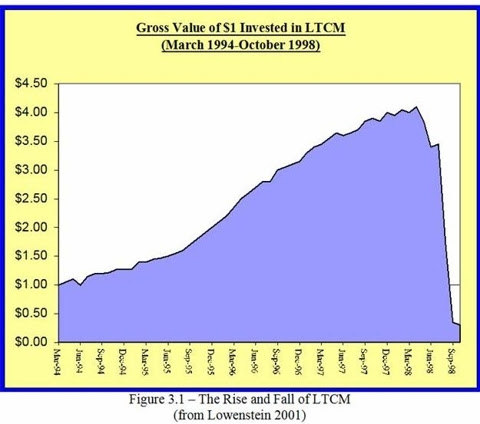
A black swan event is characterised by a spectacular run up in price, followed by the price falling off a cliff to near zero.

It famously happened to a hedge fund named LTCM (Long Term Capital Management) back in 1998. The resulting loss temporarily destabilised Wall Street, requiring a bail out to be organised by the US Federal Reserve.

For LUNA, as with LTCM, a group of the smartest people in the room had banded together based on the unstoppable winning formula of:

(new technology + maths + programmers + marketing + chutzpah) = profit

Then claimed they'd solved a previously hard and intractable problem, and that everyone who doesn't believe them can just STFU, or in the case of Do Kwon (the founder of LUNA), "enjoy being poor". Oh the karma.

The risk with crytocurrency in particular is that if there's a bug in the algorithm or protocol, the result can be both an immediate financial loss, and a catastrophic loss of confidence in the currency. The bug can go unnoticed for months or years, before someone finds it and then patiently sets things up to exploit it for maximum profit.


Follow @dodgy_coder on Twitter

More reading:
How Terra's UST and LUNA Imploded (Decrypt)
Roundup of theories on the LUNA crash (Fortune)
'Evil genius' may have caused Terra and Luna to crash in a 'death spiral' (ABC Australia)
Long-Term Capital Management Hedge Fund Crisis (The Balance)
The Black Swan by Nassim Nicholas Taleb - Summary and Analysis (Get Story Shots)
The Black Swan Theory (Wikipedia)


tag:blogger.com,1999:blog-5060551251465839575.post-4305955606991780181
Extensions
Cheaper alternatives to Mind Lab Pro, Alpha Brain and other Nootropics in Australia
nootropicssupplementsvitamins
Show full content

Nootropics are a popular new type of dietary supplement that claim to enhance brain function in a number of ways including better memory, sharper thinking, alertness, improved verbal ability, more clarity and the elimination of 'brain fog'.

I started looking into some options available that deliver to Australia and came across this brand called Mind Lab Pro. Their tablets contain some of the same ingredients to standard vitamin supplier Swisse's Ultiboost Memory+Focus or even a Swisse's men or women's multivitamin for ages 50+. The reason its in the 50+ and not their standard multivitamin product is that the 50+ age group are considered more in need of brain enhancing ingredients due to the age related decline.
 With the 50% discount offered by a popular chemist retail chain, the Swisse Ultiboost Memory+Focus tablets come down to AUD 32c each.. (AUD $16 for 50 tablets). Compare this to Mind Lab Pro at AUD $1.11 per tablet, working out to a 247% premium in price! And remember, you only get this price with Mind Lab Pro if you buy 4 bottles in your first order.
Another option with more herbal extracts than Swisse Memory+Focus, but with no B vitamins, is Oriental Botanicals Memory. This product comes in bottles of 60 tablets and after a standard chemist discount costs AUD $37, or 62c each tablet - about double the Swisse option, but still significantly cheaper than Mind Lab Pro.
 Many nootropic suppliers exploit a psychological effect known as the Sunk Cost Fallacy. Where the more you have invested in something (the sunk cost - effort, time or money) the less likely you are to stop doing it, even when there are no further benefits to you continuing to do it.

By supplying 4 months to you in your first order, the Nootropic company knows you’ll become invested in it and will not want to admit to yourself at the end of 4 months that you're not seeing the promised benefits.
Its likely many nootropic products are overhyped and overpriced. Famous US blogger Joe Rogan actually requested one popular US supplements brand (Onnit) to prepare a new product, called Alpha Brain. Check the list of all the other supplements Joe Rogan takes by the way - its pretty much a list of every supplement known to man, I'm surprised he has room left to eat any actual food! Final note, Alpha Brain here in Australia costs AUD$119.90 for 90 tablets, or $1.33 each tablet, so about 22c more per tablet than Mind Lab Pro.

Follow @dodgy_coder on Twitter


tag:blogger.com,1999:blog-5060551251465839575.post-3366020353194695872
Extensions
Review: InMotion S1 Electric Scooter (AUD$1299)
electric-scooterinmotion-s1micro-transportation
Show full content

The InMotion S1 electric scooter. At the front is my wife's scooter, the VSETT 8.

Electric kickscooters are really popular right now. Their sweet spot in terms of usefulness is probably for people living in urban and inner city areas, or in areas which have good bicycle paths. I live in an inner city suburb of Perth, Western Australia, and work near the Swan river - my reason for buying one was to have some fun while commuting to work. My commute on the scooter is about 14km (9 miles) and takes me 40 minutes.

Four weeks ago I bought the InMotion S1 scooter for AUD$1299 (~ USD$970). In my review here I compare the manufacturers promotional material and claimed specifications to my real life experience of the scooter.

Scooter model history
The S1 is InMotion's latest model scooter, launching in Australia in September 2021. It has been adapted from the InMotion L9 model, which was crowdfunded on IndieGogo successfully back in May 2020. The S1 seems to be targeted at markets outside of the US, such as Canada, Australia and Singapore. The L9 and S1 look very similar, they share the same controls and share the same smartphone application.

Smartphone app
First thing to do is to pair the smartphone app with the scooter. This was easy and I didn't run up against any problems. I used the iPhone app, and there's an Android app available too. There was only one tricky thing I found with the app - changing the distance units from the default (miles) to kilometres. To do this, you need to first change it under the vehicle settings - this will ensure the speedo on the scooter reads out in km/hr instead of miles/hr. But in the app itself, it still displays the battery's remaining range in miles. To get this into km too you need to press on the "ME" link at the bottom, then settings, then "metric/imperial" units.

Speed limiter
The speed of the S1 is by default limited to 25 km/h (15 miles/h), but its easy to go into the app and turn this limit off (under vehicle settings). Doing this lets your scooter achieve the max speed of 30 km/h (18 miles/h). Unlike other scooters, this is purely a software setting and doesn't require any wires to be disconnected or anything to remove the speed limiter.

Braking
The S1 has an automatic electric brake on the back wheel, which kicks in automatically if you are going downhill and picking up speed rapidly, or have exceeded 30 km/h. The maximum speed I've achieved on the scooter is around 30.9 km/h while going downhill. The automatic brake is kind of jerky and not really smooth - it feels weird the first time you experience it. There's a toggle setting in the app related to the automatic brake, so I tried turning it both on and off but couldn't feel any difference. There is only one manual brake lever - for your left hand - this is hooked up to the front wheel drum brake. Drum brakes are actually preferable to disk brakes on a scooter because it means no parts are exposed, and so there are less mechanical parts to maintain.

Control panel & display
One of the best things about this scooter is the easy to use control panel and the large display in the middle of the handlebars. There's only one button, and it can perform the functions of power on/off, headlights on/off and to toggle through the three riding modes (Eco, Drive, Sport). Long press is power on/off. Single click is headlights on/off and double click is to toggle the riding mode. Compared to other scooters (like the VSETT range), these controls are intuitive and easy to remember. The throttle is thumb based - you push downward with the thumb of your right hand. Compared to the VSETT scooter throttle which uses your forefinger in a trigger action, I find it to be more natural and better suited to long commutes.

Bling LED lighting and auto turn signals
The scooter has a strip of roadfacing LED lights down each side of the deck, these stay blue while riding and automatically flash red when you are turning to the left or right. This is a great idea, because when riding a scooter its not recommended to take one hand off the handlebars to indicate your turn manually (as per a bicycle) due to instability. The only downside to the auto turn lights is that they don't activate until you either tilt the scooter or turn the handlebars in the direction you are going, so in other words anyone behind you only sees the indication when you are actually turning. Other lights on the scooter are the dual headlights and rear light / brake light. The headlights are positioned at handlebar height, making them extremely visible at night to oncoming traffic. With the LED lights, the scooter really turns heads at nighttime.

Riding modes - Eco, Drive, Sport
The Eco mode is a beginner mode - you won't go faster than 12 km/h (7.5 miles/h) and the acceleration is really soft. The Drive mode is supposed to be a standard commute mode, which limits your top speed to about 20 km/h (12.5 miles/h) and also limits the acceleration responsiveness to about 80% of maximum. Sport mode means no limits, on a full charge you'll get up to the top speed of 30km/h (18 miles/h) with the fastest possible acceleration. I keep it on Sport mode all the time - once you get used to the speed and the handling of the scooter I think most riders will do the same. These modes of course will impact on the range you'll get out of your battery charge, Eco will use the least amount of battery and Sport will use the most.

Range
In the promotional material the claimed range on a full charge is 95 km (59 miles). But in the manual it lets you know that this was achieved on level ground, in Eco riding mode, with a 65 kg weight rider and zero wind. So in other words, nowhere near real world conditions. In real world riding - in Sport mode the entire time, hills, wind, myself being 80kg, I found that the range ended up being 55-60 km (34-37 miles). But this is still a really good range - it easily handles my 28km round trip daily commute, and leaves some spare for other short journeys nearby to work or home.

Score card

Good points
+ Large display, intuitive controls, comfortable throttle
+ The app tells you the estimated distance left on the battery charge
+ Cool underdeck LED lights, auto-turn signals, dual headlights
+ Large non-slip silicon deck
+ Big real world range
+ Front and back suspension

Bad points
- Its too big to take onto public transport like a bus or train
- Height of the handlebars is not adjustable and is high compared to other scooters
- A couple of poor quality fixtures like the bell and the charging port dust covers
- Jerky automatic electric brake kicks in when going downhill

Conclusion
A great long range commuter scooter with decent performance, cool LED lighting, a solid feel, easy to use controls and a large display. If you don't need to take it on public transport, then this scooter will be perfect for your medium to long distance commute, given its large 55km (34 miles) real world range.

Where to buy?
As of writing, this model scooter is sold out around most of Australia. Due to high demand and shipping delays I recommend contacting the shop where you intend to buy first to confirm when stock will arrive before paying anything upfront for a scooter.

Follow @dodgy_coder on Twitter


tag:blogger.com,1999:blog-5060551251465839575.post-1600343895017825281
Extensions
Does Xamarin owe its existence to Unity & Apple?
.netandroidapplec#historyiosiphonelinuxmicrosoftmonoosxprogrammingunityxamarin
Show full content


Yes, Xamarin owes its existence to two other bits of technology that were huge around 2008 - the Unity Game Engine and the iPhone. The reason is that a confluence of events around 2008 provided the push to get the Mono project into mobile app development. This resulted in MonoTouch (for iOS) and Mono for Android, which eventually became Xamarin as we know it today.

The Mono project was founded in 2001 as a free open source implementation of Microsoft's .NET framework on Linux. But Mono had struggled since its inception to find its reason for being. According to Mono's founder, Miguel De Icaza, the hardcore free open source community never fully got behind Mono. The FOSS community feared that Microsoft would eventually cause problems for Mono, due to Microsoft being the creator of .NET. 

Outside of the Linux world however were other more pragmatic people from the MacOSX world who had no problem with Mono. One of these people was Joachim Ante, from Unity. Around 2005 the Unity game engine was just starting out and had a performance problem - their original scripting language of Python was far too slow - they needed something that was an order of magnitude faster. So Unity decided to replace the Python scripting with Mono/C# and immediately got all the performance they needed. This was the early days when the Unity Game Engine ran on MacOSX only. Mono filled the need of being a free open source JIT compiler with the modern language of C#.

Fast forward to 2008 when the iPhone App Store launched; Unity quickly set their sights on being able to compile games for the iPhone. Unity wanted to use Mono, but the additional requirement was that it had to be statically compiled for iOS, because Apple had banned the use of JIT (Just In Time) compilers in iOS Apps.

Unity comes back to us and says “Hey, we have this product on iOS, we need .NET to be statically compiled. Can you do that?” We were like, “Oh, that’s kind of impossible. Well, let’s think about it.”

One of our guys, Zoltán Varga - they went and made a static compiler for .NET, and it was amazing. We gave it to Unity. At this point, Unity is probably four or five employees.
    
They were working at somebody’s garage. And they shipped their product for iOS, built games for iOS using this thing, this 3D tech. They were the kings of this space.
    
- Miguel De Icaza (Xamarin)

Within a year of the iPhone App Store launch, Unity went from 4-5 employees to 80 employees. The iPhone and the App Store had launched Unity's massive growth, and along with this the Mono project had finally found its reason for being - mobile apps. The Mono developers realised there was interest in using .NET for mobile apps - so using the same tech given to Unity, they built their own product - MonoTouch, which allowed developers build native iOS apps using C#. Soon afterward, Mono turned its attention to Android and created Mono for Android.

Mobile app development was new and there were many developers who wanted to get into mobile apps but didn't really want to have to learn Objective-C and Java. So Mono now had a C# based cross platform app development platform with truly native performance. This was the killer combination that ensured Mono would take off in popularity.

The developers behind Mono founded the Xamarin company in 2011, MonoTouch became Xamarin.iOS and Mono for Android became Xamarin.Android. Xamarin was acquired by Microsoft in February 2016 and became a subsidiary of Microsoft, fully focused on the development of Xamarin's open source projects.

Inspiration for this article:

The History of GNOME, Mono, and Xamarin
https://changelog.com/podcast/275


Follow @dodgy_coder on Twitter


tag:blogger.com,1999:blog-5060551251465839575.post-5918033379592555297
Extensions
Breakout: a Circuit Breaker implementation in C#
circuit-breakerdesign-patternsgang-of-fourmichael-nygardstability-patternsstate-machinestate-pattern
Show full content
A circuit breaker can help you improve the stability of your application by protecting calls to third party services; e.g. a web service, a network resource, a database, or any other component which can intermittently fail.

Its a fundamental pattern for protecting your system from all manner of integration point problems. It is a way to fail fast while there is a known problem with an integration point.

The circuit breaker pattern was first described in detail by Michael Nygard in the Stability Patterns chapter of his book "Release It!" Design and Deploy Production-Ready Software.

Breakout is a C# .NET implementation of Michael Nygard's Circuit Breaker state machine, using the Gang of Four's STATE design pattern. I've created a NuGet package for it here.

This implementation is thread safe, lightweight and easily adapted into your existing codebase. Unlike other circuit breaker implementations, it leaves the responsibility for calling the third party service with your client code. Your code only needs to inform the circuit breaker of the success or failure of every call to the third party service, via OperationSucceeded() and OperationFailed(). Check the README on github for example usage.


Breakout - State Machine Diagram State Machine Explanation
The state machine starts in the CLOSED state. While in the CLOSED state, calls flow through as normal to the third party service. If the operation succeeds, the failure count is reset. If the operation fails, the failure count is incremented. When the failure count threshold is reached, the trip breaker action is performed, which transitions the state to OPEN.

While in the OPEN state, no calls flow through to the third party service. The caller just returns immediately, without performing the service call. After the open timeout has passed, the attempt reset action is performed, which transitions the state to HALF OPEN.

While in the HALF OPEN state, only one call is let through to the third party service. If the operation succeeds, we reset the circuit breaker which transitions the state to CLOSED. If the operation fails, the trip breaker action is performed, which transitions the state to OPEN.

UML Design
The design uses the Gang of Four's STATE design pattern.

Breakout - UML diagram
Follow @dodgy_coder on Twitter
tag:blogger.com,1999:blog-5060551251465839575.post-8050173640394349423
Extensions
Programming an Ethereum Smart Contract with Vyper
blockchaincryptocurrencyethereummetamaskmewmy-ether-walletprogrammingpyenvpythonsmart-contractvyper
Show full content
and deploying it with MetaMask and MyEtherWallet (MEW)


Introduction

Ethereum has a vast amount of developer resources available, such that for a beginner its hard to know where to start.

If you go with the recommended approach you'd probably choose Solidity along with either JavaScript or golang. JavaScript and golang are traditionally the most well supported languages for the developer tooling around Ethereum. The original Ethereum node software, geth, is written in golang. There's a version of the Solidity smart contract compiler, solcjs, written in JavaScript, and available as a Node.js NPM package.

The other Smart Contract language that is supported by the Ethereum Foundation is Vyper. Vyper is a python-like language that was designed for security, simplicity and testability. In my view this makes Vyper ideal for a beginner. Vyper foregoes some of the power of Solidity (for example, class inheritance and function modifiers) in order to uphold the Vyper principles of being simple and secure.

In this article I'll be stepping you through creating a smart contract with the Vyper programming language, deploying it to the Ethereum test network, and then interacting with the contract - calling its two externally accessible functions. The contract deployment and contract interaction are achieved using two in-browser tools - MyEtherWallet (MEW) and MetaMask.


Background reading

Before you start I would highly recommend this article to get up to speed with the Ethereum ecosystem as a whole.
https://medium.com/@mattcondon/getting-up-to-speed-on-ethereum-63ed28821bbe
Its from 2017 but the content is still valid today.

Along with the Ethereum whitepaper, which is a must-read if you're a developer:
https://github.com/ethereum/wiki/wiki/White-Paper


Installing the Vyper compiler

There's a number of options available to you as documented here:
https://vyper.readthedocs.io/en/latest/installing-vyper.html

One of the simplest options is to install it using python's package manager (pip). I'll start by ensuring you have the python development environment setup correctly.


Installing a recent version of Python and Pip with Pyenv

If you don't have already have a recent version of Python installed, or don't even know, I would highly recommend that you start by installing pyenv. Pyenv is a tool for python version management.

I followed the Pyenv installation instructions for a MacOS installation via homebrew, but there are instructions for other OSes given.

After installing pyenv, you can install the latest version of python with

% pyenv install 3.8.0

You will now have an up to date version of both python and pip available from your terminal command prompt.

Check what version of python is installed:
% python -V

Output:
Python 3.8.0

Check what version of pip is installed:
% pip -V

Output:
pip 19.2.3 from /Users/hg/.pyenv/versions/3.8.0/lib/python3.8/site-packages/pip (python 3.8)


Installing the Vyper compiler

Once you have python and pip installed aready, you can install the Vyper compiler with:

% pip install vyper

Check what version of Vyper is installed:

% vyper --version

Output:
0.1.0b16+commit.5e4a94a


Writing a smart contract in Vyper

For the first contract, we're going to keep things very simple and go with a public storage contract.
All the contract does is stores a single number in its storage area, and implements two public accessor functions - a getter and a setter.

Use a text editor and open a new file named storage.vy

Note that vy is the file extension for Vyper source code.

Here's the Vyper code:

stored_data: uint256

@public
def set(new_value : uint256):
    self.stored_data = new_value

@public
@constant
def get() -> uint256:
    return self.stored_data

Line 1 declares a variable named 'stored_data' of type 'uint256'. This is the only thing that the contract will store on the blockchain.

Line 3 (def set...) declares the public set function, to update the 'stored_data' variable.

Line 9 (def get...) declares the public get function, to get the 'stored_data' variable.

Its important to note that these two functions get and set are marked public and so can be 'called' by anyone - by using Ethereum client software like MyEtherWallet, or programmatically via the web3 or by other library.

Calling a public function on a smart contract actually consists of sending a transaction to the deployed contract's address - but this is an implementation detail hidden that is hidden by client software or libraries.

Further reading about the structure of contracts in Vyper:
https://vyper.readthedocs.io/en/latest/structure-of-a-contract.html


Compiling the Vyper smart contract

To compile the contract into EVM bytecode:

% vyper -f bytecode storage.vy > storage.bin

To generate the ABI for the contract:

% vyper -f abi storage.vy > storage.abi

The ABI is a JSON format interface specification file, and it is needed to be able to interact with the smart contract (i.e. call its functions).


Deploy the smart contract to the Rinkeby test network

Install MetaMask

If you haven't already, now is a good time to install the MetaMask plugin/extension into your browser - https://metamask.io/
Setup MetaMask with a seed phrase and it will create an in-browser Ethereum wallet that you can use for real transactions, or in this case, test transactions.

When MetaMask is setup, at the top right you should see the network dropdown.

Change this to 'Rinkeby Test Network'. Press the DEPOSIT button, then press the GET ETHER button under the TEST FAUCET option.

After opening https://www.rinkeby.io/#stats use the 'Crypto Faucet' button on the left and follow the instructions. The minimum option (3 ETH) will be more than enough for test purposes and to deploy this contract.

The second thing you'll need to do is to setup MyEtherWallet (MEW). This will let you deploy and interact with your smart contract.


Setup MyEtherWallet (MEW)

Go to https://www.myetherwallet.com and setup the seed phrase.

Now you'll need to give MyEtherWallet (MEW) access to your MetaMask wallet, which contains the 3 ETH for testing.

Go to https://www.myetherwallet.com/access-my-wallet and press the browser extension option.

It should come up with a 'Access via MetaMask' window, and you'll need to grant it permission. Press the 'Access My Wallet' button.


Deploy the smart contract

Inside MyEtherWallet (MEW), press the left hand side option 'Contract' then 'Deploy Contract'.

From the terminal, issue this command:

% cat storage.bin

Output:
0x6100f456600436101561000d576100ea565b600035601c52740100000000000000000000000000000000000000006020526f7fffffffffffffffffffffffffffffff6040527fffffffffffffffffffffffffffffffff8000000000000000000000000000000060605274012a05f1fffffffffffffffffffffffffdabf41c006080527ffffffffffffffffffffffffed5fa0e000000000000000000000000000000000060a0526360fe47b160005114156100c25734156100ba57600080fd5b600435600055005b636d4ce63c60005114156100e95734156100db57600080fd5b60005460005260206000f350005b5b60006000fd5b6100046100f4036100046000396100046100f4036000f3

Using the mouse, copy the contents of the file from the terminal prompt.

Inside MEW, paste the copied text contents into the bytecode field.

On the terminal again, issue this command:

% cat storage.abi

Output:
[{"name": "set", "outputs": [], "inputs": [{"type": "uint256", "name": "new_value"}], "constant": false, "payable": false, "type": "function", "gas": 35315}, {"name": "get", "outputs": [{"type": "uint256", "name": "out"}], "inputs": [], "constant": true, "payable": false, "type": "function", "gas": 1181}]

Using the mouse, copy the contents of the file from the terminal prompt.

Inside MEW, paste the copied text contents into the ABI/JSON field.

Enter a name for your contract, e.g. 'storage1'.

Press the 'Sign Transaction' button.

MetaMask will open up a window where you'll be able to confirm the deployment of your contract.

You'll see the gas fee and total.
You can press on the data tab and you'll see the bytecode that you pasted earlier.

Press the Confirm button to proceed with the deployment of your contract.

You may need to wait several seconds for the transaction to be confirmed at this point.
MetaMask should give you a successful deployment popup and link you to the transaction on etherscan.io.
E.g.
https://rinkeby.etherscan.io/tx/0x36663b338ab0eaa7d7cdd91aa5abacdc273757ff56b81221d76a2ff0aedc9860

Here you can see the address of your newly deployed contract. In my case it is here:
https://rinkeby.etherscan.io/address/0x7baad2f634d6bde84916e7d6db40ca2e502eaff6


Side note on contract addresses

Contract addresses are calculated deterministically, based on the account that created it. They are based on the nonce value of your account. So it is possible to know in advance what the contract address will be, if necessary.

Details here: https://ethereum.stackexchange.com/questions/760/how-is-the-address-of-an-ethereum-contract-computed


Interacting with the smart contract

Now that your contract is deployed, its time to interact with it - call its get and set functions.

The get function can be called 'for free' - it doesn't cost any gas, because its just returning the current state of the blockchain.
Calling the 'set' fuction however must be paid for in gas, because by calling it you are actually changing the current state of the blockchain.

Go back to MEW and navigate to the left hand side 'Contract' option then 'Interact with Contract'.

Paste your newly created contract address into the 'Contract Address' field.

In the ABI/JSON field, past your ABI file contents.

Press the Continue button.

There's a dropdown which shows 'Select an item'. This lists all of the public functions on the smart contract. There's only two available - get and set.

Choose get first, it will execute immediately and show the result being 0. 0 is the default value for uninitialised storage in Ethereum.

Now choose 'set' from the dropdown.

Enter the required value into the new_value field, e.g. 88.

Leave the Value in ETH as 0.

Press the 'Write' button.

MetaMask will open up a window where you'll be able to confirm your contract interaction.
What you're actually doing here is sending a transaction to the contract with a value in the data field - the data specifies to the EVM which function is being called (set) and the value of the parameter to it (88).

Press the confirm button.

You may need to wait several seconds for the transaction to be confirmed.

MetaMask should give you a confirmed transaction popup and link you to the transaction on etherscan.io.
E.g.
https://rinkeby.etherscan.io/tx/0x42af3501fff6ddd67a97cc52c94565f149f4d7f985d223523cebae2efc693bbb

Press the "Press to see more" link at the bottom of this page on etherscan.io to see the detail of the function call you made.

Go back to MEW and this time select the 'get' from the dropdown.

Confirm that the value you set is now reflected by the get.

You have now successfully deployed an Ethereum smart contract written in Vyper, and interacted with it using MetaMask and MyEtherWallet (MEW).

Congratulations!


Final notes - can you modify a smart contract?

Note that once a smart contract is deployed, you can't modify it; it is immutable and exists on the Ethereum blockchain forever.

If you need to modify or update the contract, you'll need to deploy the updated code to a new contract address.

There are various techniques for handling contract "upgrades" including migrating the existing storage. There's a good article here on this topic: https://mixbytes.io/blog/storage-upgradable-ethereum-smart-contracts

Note also that a contract can destroy itself (along with its storage), via the selfdestruct() function, as documented here: https://vyper.readthedocs.io/en/v0.1.0-beta.15/built-in-functions.html#selfdestruct

Once destroyed, the contract and its storage are removed from that block onwards. After destruction, it is technically still possible to see the historical contract bytecode and storage, which exists on earlier blocks of the Ethereum blockchain.


Follow @dodgy_coder on Twitter
tag:blogger.com,1999:blog-5060551251465839575.post-784926767189063048
Extensions
Programming Bitcoin Cash (BCH) with the NBitcoin .NET library and C#
.netbchbitcoinbitcoin-cashblockchainbtcc#cryptocurrencydotnet-corenbitcoinprogramming
Show full content
The NBitcoin library is the most active and well supported library in .NET for working with Bitcoin and other similar cryptocurrencies.

NBitcoin fully supports Bitcoin Cash (BCH), however the ebook and programming guide examples focus solely on Bitcoin Core (BTC).

The problem you encounter when following the NBitcoin guide is firstly that the QBitNinja API only supports Bitcoin Core and secondly that broadcasting the transaction seems to require either running a full local node or using the QBitNinja API.

In this tutorial I'll show you how to spend your Bitcoin Cash using the NBitcoin library running under dotnet core, without the need for running a full local node or for accessing the QBitNinja API.

The program you write here will create a new transaction, sign it with your private key, and broadcast it to the Bitcoin Cash network.


Dotnet core
is the preferred programming environment for NBitcoin. Dotnet core is open source and runs under the Linux, MacOSX and Windows operating systems.

Bitcoin Cash is the ideal cryptocurrency for experimenting with programming APIs and libraries - you can send small transactions for very low fees, typically for a fraction of one US cent.


Step 1: Project Setup

Follow the setup guide as normal:
https://programmingblockchain.gitbook.io/programmingblockchain/introduction/project_setup

The rest of these steps 2-12 below loosely follow the "Spend Your Coin" guide:
https://programmingblockchain.gitbook.io/programmingblockchain/bitcoin_transfer/spend_your_coin

Its not absolutely required, but for a more complete and in depth understanding, I would recommend you read through the "Spend Your Coin" guide above (with the knowledge that it applies to Bitcoin Core) before proceeding with the rest of the below steps.


Step 2: Add support for Bitcoin Cash

On the command line:

dotnet add package NBitcoin.Altcoins

The code - add these using statements to the top of the C# source file.

using NBitcoin;
using NBitcoin.Altcoins;
using NBitcoin.Protocol;

And at the beginning of the program, add this:

// Important Note - this is not test code.
// It is going to run in production (called the "mainnet").
var network = NBitcoin.Altcoins.BCash.Instance.Mainnet;


Step 3: (Optional) Generate a new private key and address

The below code snippet generates a new BCH private key and BCH address using the NBitcoin library.
  
// Generate a random private key.
Key rawPrivateKey = new Key();

// The private key, also known as the Bitcoin secret or the WIF (Wallet Interchange Format).
// If you intend to use it, make sure you save the below somewhere safe!
BitcoinSecret privateKey = rawPrivateKey.GetBitcoinSecret(network);
Console.WriteLine("privateKey = " + privateKey);
Console.WriteLine("address (from privateKey) = " + privateKey.GetAddress(ScriptPubKeyType.Legacy));

Alternatively you can generate a new private key and address using BCH wallet software.


Step 4: Setup the variables for your private keys and addresses

To spend your Bitcoin Cash, you'll need to know the private keys of both the "destination" BCH address and the "from" BCH address.
The "from" BCH address is also known as the input address or the outpoint to spend.

Here's the code to setup the address and private keys of both the "destination" address and the "from" address.

// Destination - private key and address. The destination of the new transaction we are creating.
// Note: its not strictly necessary for creating the transaction to have the private key of the destination,
// but its better to add it here so that you know that you have access to it, and that the money won't be 'lost'.
var privateKey = new BitcoinSecret("PASTE_YOUR_DESTINATION_ADDRESS_PRIVATE_KEY_HERE", network);
Console.WriteLine("dest privateKey = " + privateKey);
var address = privateKey.GetAddress(ScriptPubKeyType.Legacy);
Console.WriteLine("dest address = " + address);
Console.WriteLine("dest address scriptPubKey= " + address.ScriptPubKey);

// Input Transaction - private key and address. The from address.
var inPrivateKey = new BitcoinSecret("PASTE_YOUR_FROM_ADDRESS_PRIVATE_KEY_HERE", network);
var inAddress = inPrivateKey.GetAddress(ScriptPubKeyType.Legacy);
Console.WriteLine("inPrivateKey = " + inPrivateKey);
Console.WriteLine("inAddress = " + inAddress);
Console.WriteLine("inAddress scriptPubKey= " + inAddress.ScriptPubKey);

You can run the program now to make sure its working - on the command line:

dotnet run


Step 5: Determine the Transaction ID of the "from" address

Now you need to determine the transaction ID and index number of your "from" address by looking at the transaction in a blockchain explorer and plugging in the correct TxId and index number below.

// Determine the previous output that will be spent, as the Input to our new transaction.
// For example:
// https://explorer.bitcoin.com/bch/tx/292f70e71f8bc2e94b7c0ac46c4e89371dc59b821639de67376f6f0b09544d92
string txInIdString = "292f70e71f8bc2e94b7c0ac46c4e89371dc59b821639de67376f6f0b09544d92";
uint txOutIndex = 0; // <== Ensure this index is correct!
OutPoint outPointToSpend = OutPoint.Parse(txInIdString + ":" + txOutIndex);


Step 6: Create the new transaction

var transaction = Transaction.Create(network);
transaction.Inputs.Add(new TxIn()
{
    PrevOut = outPointToSpend
});


Step 7: Setup the amount to spend and the miner fee

// Suggested miner fee for this transaction, as of February 2020,
// is 0.000003 BCH or around USD 0.001 (a tenth of a cent).
// Check recent blocks for guidance.
var minerFee = new Money(0.000003m, MoneyUnit.BTC);  

// Replace below with your amount.
// It is the total unspent amount of the "from" address.
var txInAmount = new Money(0.0021m, MoneyUnit.BTC);

// Move to the destination address.
var spendAmount = txInAmount - minerFee;
transaction.Outputs.Add(spendAmount, address.ScriptPubKey);


Step 8: Add a message to the transaction, using the OP_RETURN template (max 80 characters)

var message = "Test 1: using the NBitcoin library to move Bitcoin Cash. BCH Rocks!";
var bytes = Encoding.UTF8.GetBytes(message);
transaction.Outputs.Add(Money.Zero, TxNullDataTemplate.Instance.GenerateScriptPubKey(bytes));


Step 9: Sign the transaction

// Get the ScriptPubKey from the private key of the outPointToSpend.
transaction.Inputs[0].ScriptSig = inAddress.ScriptPubKey;

// Sign the transaction with the input private key.
var txInId = uint256.Parse(txInIdString);
var inCoin = new Coin(txInId, txOutIndex, txInAmount, inAddress.ScriptPubKey);
transaction.Sign(inPrivateKey, inCoin);


Step 10: Determine the TxId of your transaction, which is just its hash

Console.WriteLine("New TxId: " + transaction.GetHash());

Now is a good time to run the code and check its all working. From the command line:

dotnet run


Step 11: Broadcast your transaction to the Bitcoin Cash network

This is the final step and should only be attempted if your program runs fine up to step 10.

Before you run it, confirm your amount to spend is correct.

//
// Connect to a BCH node and broadcast the transaction.
// See here for the DNS Seed list:
// https://github.com/Bitcoin-ABC/bitcoin-abc/blob/master/src/chainparams.cpp
//
using (var node = Node.Connect(network, "seed.bchd.cash:8333"))
{
    // Say hello to the node.
    node.VersionHandshake();

    // Advertise your transaction (send just the hash).
    node.SendMessage(new InvPayload(InventoryType.MSG_TX, transaction.GetHash()));

    // Send the contents of the transaction.
    node.SendMessage(new TxPayload(transaction));

    // Wait for the message to be sent.
    Thread.Sleep(5000);
}

Run your program the command line:

dotnet run


Step 12: That's it, well done for making it to the end!!

If everything went well, your new transaction was accepted by the Bitcoin Cash network, and it will show up in a block explorer such as this one:

https://explorer.bitcoin.com/bch/tx/3ecf0f0dafd26e8d788b59a433bf00e1c3c079e82dada5111e899c87a75dadff

Replace the above TxId with yours from step 10.

Your new transaction will be listed initially as having 0 confirmations, which means its in the mempool.

Now you just need to wait for your transaction to be confirmed. This will happen as soon as the next block is mined and your transaction gets added to that block by the winning miner.

Follow @dodgy_coder on Twitter
tag:blogger.com,1999:blog-5060551251465839575.post-3916907781409538966
Extensions
Counter overflows and clock drift bugs in aircraft and missile defense systems
bugsdebuggingsafety-critical-systemstesting
Show full content
A counter overflow bug happens when an unsigned integer variable storing a counter reaches its maximum value; when its already at the maximum, as soon as one more value gets added to it, the variable will reset back to 0 and continue counting up from there. If the rest of the software is not expecting this counter reset, it can result in system failures. So the longer the system is running for, the nearer the system will get to a counter overflow event.

Clock drift bugs happen when an internal timer/clock gets calculated incorrectly, causing it to slowly drift out of sync with real time. The longer the system is running, the more the clock drifts and the bigger the error gets. When real time clocks are out of sync, all sorts of downstream calculations can become inaccurate.

Both of these types of bugs typically have a workaround that requires the operator to reboot the system every X hours or days.

Both counter overflows and clock drift bugs can occur in production systems when system testing didn't include a "soak test" - where you keep the system running for a very long period, typically measured in days rather than hours. The failure to pick up the bug during system testing means that a production system gets deployed with a bug, and the only workaround becomes a regular reboot of the system.

The kicker - these type of bugs have been happening in safety critical systems for at least the past 28 years

One of the most publicized cases was the failure of a Patriot missile defense system in 1991, in which the system failed to track an incoming Scud missile, due to a drifting and out of sync clock. Tragically, this particular failure resulted in the death of 28 U.S. soldiers based at a U.S. barracks near to Dhahran, Saudi Arabia. The workaround for this bug was to reboot the system every 8 hours, but unfortunately this had not been communicated to the base in time to avoid the disaster.

Another well known case was the counter overflow in the Boeing 787 Dreamliner firmware (2015), which meant the aircraft had to be rebooted once every 248 days to avoid a counter overflow bug.

The most recent case was an internal timer bug in the Airbus A350 firmware (2019), which requires that the aircraft be rebooted once every 149 hours. 

Avoiding bugs in safety critical systems  

Avionics systems are among the most complex things ever built by man. There's one leading example of a successful avionics project which was built from scratch targeting high quality and zero defects. Its the Boeing 777 - Boeing's first fly-by-wire aircraft.
For the 777, Boeing decided early on to standardize on the Ada programming language, at a time when using C was the norm. Compilers for Ada had been certified as correct, and the language itself included several safety features, such as design by contract and extremely strong typing.

Ada itself came about as a way to standardize all of the programming languages in use by the U.S. Department of Defense - before Ada they were using some 450 different programming languages. Ada was originally designed to be used for embedded and real time systems.

Ronald Ostrowski, Boeing's director of Engineering, claimed that the Boeing 777 was the most tested airplane of its time. For more than 12 months before its maiden flight, Boeing tested the 777's avionics and flight-control systems continuously - 24hrs - 7days - in laboratories simulating millions of flights. 

The 777 first entered commercial service with United Airlines on 7th June, 1995. It has since received more orders than any other wide-body airliner. The 777 is one of Boeing's best-selling models; by 2018 it had become the most-produced Boeing wide-body jet, surpassing the legendary Boeing 747.

Further reading - Boeing flies on 99% Ada

Follow @dodgy_coder
tag:blogger.com,1999:blog-5060551251465839575.post-5488508324126364020
Extensions
Review of Shopify - from a developer's point of view
online-retailsaasseoshopifyweb-development
Show full content
I setup this online shop over a couple of weekends - Chow Slow - Slow Feeder Dog Bowls. After launch I continued to make various improvements and optimisations to the presentation and content of the site. Since launch three months ago, the online shop has so far taken 72 orders.

The eCommerce SaaS product Shopify was used to build the site, on the Basic Shopify (monthly) plan.

Here below are my opinions on Shopify:

Shopify - Good points
  • Many payment options - I chose the Shopify Payments option. It accepts Apple Pay and Google Pay when on a mobile browser for example. You can tell that Shopify have extensive experience with taking payments - everything is really polished.
  • Test mode works well for putting through test credit card orders and seeing the customer experience end to end. Can also password protect the site while its under development.
  • The free themes are good and can be customised for most online shops. I used the free "Minimal" theme and then customised the layout of the home page, added several pages and added a blog.
  • Great optimisations and layouts which work well on mobile. More than 60% of the traffic for the site comes from a smartphone browser as opposed to a traditional desktop browser.
  • Really useful "Timeline" admin feature on the customer and order admin pages - see all the interactions that have happened with a customer in a simple timeline display, with a timestamp shown on each interaction.
  • Excellent "Conversion Summary" admin feature - see the site behaviour of your customer from when they first visited your site to when they bought something.
  • Comprehensive "Fraud Analysis" admin feature - for orders paid by Credit Card - recommendation of whether the transaction is likely fraudulent or not: probability shown as low, medium, or high.
  • Ability for customers to sign up with either their mobile phone number or email address. Shopify automatically sends communications to the customer using either mobile SMS or by email.
  • Easy to add social media accounts, which then automatically appear on the site footer.
  • Products are easy to configure and easy to change in terms of page title and content.
  • Ability to edit raw HTML in most places.
  • Easy to setup a custom domain, with TLS/SSL included (which just works).
  • There are SEO optimisations and settings available at a page level. You can change the page title, meta description and URL.
  • Integration with Google Analytics is excellent - the 'Advanced eCommerce' option should be turned on - it results in a data going straight into GA for your conversions and sales.
  • Page load time is good - bulk of the home page loads typically in 2-3 seconds.
  • A comprehensive API for writing custom integrations with other backend software and systems.
Shopify - Bad points
  • Marketing integrations - Facebook Ads for example - difficult and error prone to setup. Facebook Ads never worked for me after many headaches trying to setup. The marketing integrations seem like a quick way to lose money fast.
  • Inability to structure the Products, Pages and Blog sections to be within a custom sub-folders structure (as is typically recommended to silo a website for SEO purposes).
  • Checkout page customization is limited to Shopify Plus users.
  • Checkout script editor is limited to Shopify Plus, so any custom logic to apply discounts has to be done through plugins.
  • API is rate limited - will be fine for most users however ERP systems which run via batch processing or via polling may have issues. You need to implement everything as event driven webhooks rather than by polling the Shopify API.
Shopify - Areas for improvement
  • I'm not convinced of the need for many of the Shopify apps (plug-ins) that get automatically suggested. I have a feeling that they will result in bigger page sizes and slower load times. I have not needed to use any apps yet.
  • Its sometimes hard to find the relevant place for a setting - whether under preferences of the online shop or under settings of the account itself. I should probably make more use of the search bar at the top for this in the future.
Shopify - Conclusion

I highly recommend Shopify for setting up an online shop. When launching, your focus will be taken up with gaining your first customers, online marketing and the delivery process, so having a solid full featured website behind you is crucial.


A bit more about our online shop - Chow Slow - Slow Feeder Dog Bowls

I setup the site for my wife, who runs the business day to day. She handles the processing of orders and deliveries. We came up with the idea of selling to this niche market after finding out about this type of product in 2018. Our pet beagle (Ripley) had an issue of regular regurgitation due to eating too quickly. The slow feeder bowl product solved his problem and results in more relaxed meal times every day.


Follow @dodgy_coder
tag:blogger.com,1999:blog-5060551251465839575.post-2927953066156734248
Extensions
Inactive/Failing Mobile Apps: The Many Benefits of Regular App Updates
androidandroid-studioapp-developmentapp-storeapplegoogle-playiosmobileplay-storexcode
Show full content
This article applies mainly to mobile apps which are not in active development. It applies equally to mobile apps on the public app stores and also to enterprise mobile apps which get distributed via other means (such as MDM software).

Example scenario of an inactive/failing app:
  • The active marketing of your app that happened at launch has now stopped
  • Your app's last update was several months ago
  • The uninstallation rate has started rising above your installation rate month on month

A way to prevent this happening is to release regular app updates, even when there are no major changes to your app's code.


Benefits of releasing regular app updates:
  • Gain new users; many users look at the last release date on the app store page before downloading your app. Anything over a year old can be immediately rejected as out of date.
  • Prevent uninstalls; seeing your app has been updated on their phone keeps it in the user's mindshare, so they know you are still actively developing it.
  • Update the dependencies; you will likely have several dependencies on open source libraries and mobile SDKs. The more often you release, the more often these can be updated too.
  • Update the toolchain; Xcode / Android Studio / Visual Studio get updated once every month or two. Same applies to hybrid and cross platform toolchains such as Unity, Ionic and Xamarin.
  • Update the store listing; since you're doing a build, take the opportunity to review and tweak the store listing and screenshots. Apple's App Store Connect website and Android's Google Play Console get updated regularly with enhancements you can take advantage of.
  • Less build issues; there will be a lower chance of a major build issue if you regularly update your toolchain and its dependencies. In my experience, the longer you wait between app builds and releases, the greater the chance of a major build issue the next time.
  • Source control change visibility; the project is kept active in terms of source control history; especially relevant if its an open source project with other potential developers able to see the change history on github or bitbucket.
  • Developer benefits; you don't end up with a legacy mobile app that noone can get building anymore.

What if there are no significant changes to your code?
  • Have the dependencies or toolchain been updated? If yes, that means your app has gained some potential bug fixes and enhancements for free - just by doing a build.
  • There's always some minor refactoring you can do to make small improvements to your codebase. Just spend a couple of hours if that's all you can spare.
  • The release note; just use the standard "Bug fixes, performance and stability improvements" if you can't think of anything else.

How often to release?
  • The more often the better.
  • Aim for a regular release cycle of between 1-3 months.

Further reading

Distribution of Android apps per download range
https://www.statista.com/statistics/269884/android-app-downloads/

Download distribution of Android apps, and lifetime growth rates per download range
https://www.appbrain.com/stats/android-app-downloads

Statistics about the release schedule of apps on the Apple app store
https://stories.appbot.co/how-often-should-you-update-your-app-9405b85a967c

Best practices for Apple app store updates
https://developer.apple.com/app-store/app-updates/


Follow @dodgy_coder

Subscribe to posts via RSS


tag:blogger.com,1999:blog-5060551251465839575.post-873583209575867689
Extensions
Lightweight IoT Command and Control
androidAWSdesign-patternshome-automationIoTraspberry-pi
Show full content
Many hobbyist IoT projects running on the Raspberry Pi (RPi) require a webserver running on the RPi which receives requests from a browser, where the client using the browser is connected either to the local WiFi network, or possibly (via a port forwarding setup), connected to the public Internet.

An alternative that is easy to setup, lightweight and low cost is one that makes use of Amazon's SQS (Simple Queue Service) to setup two queues. One queue is for commands - from a mobile application to the RPi. Another queue is for responses - from the RPi back to the mobile application. It results in a simple and easy to secure solution available over the public Internet. It requires no port forwarding - both endpoints make use of a client connection to Amazon AWS. Given the small amount of messages needed for typical hobbyist project, the SQS component will be covered by the AWS free tier.

Here's the high level design of the system ...

Lightweight IoT Command and Control On the Raspberry Pi, a lightweight application is running that makes use of the excellent Python boto3 AWS SDK library. It is always waiting for a command to arrive in the command queue. As soon as it receives a command, it processes it and adds a response to the response queue.

On the mobile device an Android application is running that makes use of the AWS Mobile SDK for Android. When the user presses a command button, such as 'Open Garage Door', it adds a command to the command queue, and asynchronously waits for a response to arrive in the response queue. When it receives a response (e.g. the command's success or failure status), it updates the app's user interface.
tag:blogger.com,1999:blog-5060551251465839575.post-1468018196020700328
Extensions
Custom domain for Azure Web Apps using FreeDNS
azurednsfreednsnamecheapweb-appsweb-development
Show full content
The below steps go through setting up a custom domain name on your Azure Web App, using the FreeDNS service from NameCheap. Both the www subdomain www.yourdomainhere.com and the naked yourdomainhere.com will be setup.

I have an Azure S1 Small Instance App Service Plan on which I'm running 4 web apps. Originally I had planned to use Azure DNS, to keep everything within the same cloud service, but after some initial attempts formed the opinion that Azure DNS isn't mature enough yet to host production web sites. Azure DNS can currently only be administered from within Azure Powershell - that in itself was enough to put me off using it. If you need to make a quick change to a DNS record, you don't want to be having to run Powershell to do it. Microsoft are working on adding Azure DNS to the Azure Portal, but at the moment it's not available.

I have a couple of domains through NameCheap and for those and a couple of others (with CrazyDomains) I decided to use NameCheap's DNS service.  Even when your domain is not registered through NameCheap, they still offer a free DNS service, called FreeDNS.

Note that in the below steps, yourwebappname and yourdomainhere.com should of course be replaced with your specific names.


Step 1. Reduce the TTLs to 5 minutes

Note: you only need to perform this step if you're porting from an existing DNS provider. No need to do this if you're setting up a new web app on a new domain.

Within your current DNS service, setup all the TTL settings (Time To Live) on the DNS records to the minimum (typically 300 seconds, or 5 minutes). This may help in having the DNS changes propagate faster.

After this is done, try to get a full DNS zone file listing. When you port the DNS records to FreeDNS it will help ensure that you don't miss anything. My previous VPS and DNS provider was Linode and I was porting a few web apps from Linode over to Azure web apps.


Step 2. Ensure your Azure web app is running

Ensure your web app is published and running ok at http://yourwebappname.azurewebsites.net


Step 3. Find the IPv4 address of your Azure web app

From a windows cmd.exe prompt ...

C:\> nslookup yourwebappname.azurewebsites.net

Server:  UnKnown
Address:  192.168.1.1

Non-authoritative answer:
Name:    waws-prod-xxx-xxx.cloudapp.net
Address:  1.2.3.4
Aliases:  yourwebappname.azurewebsites.net
          waws-prod-xxx-xxx.vip.azurewebsites.windows.net

The nslookup command will provide you with your web app's IPv4 address. This is shown in the second Address field above, e.g. 1.2.3.4. I am running an Azure S1 Small Instance App Service Plan. I believe this method still applies to other plans including shared instance plans.

Note that if your web app is restarted or stopped this may result in it being assigned a different IP address. Be aware of this when using naked domain URLs (without the www prefix) since these rely on the A record being configured for the correct IP address of your web app (as per step 6).


Step 4. Setup FreeDNS

On the NameCheap FreeDNS page, enter yourdomainhere.com and click 'Get DNS'. If its eligible, then click 'Add to Cart', then click 'Set up DNS'.

You get this message from NameCheap :-

N.B. don't go ahead and set the nameservers just yet, that step will come later.

    yourdomainhere.com
    Congratulations! Your domain/ sub-domain is added to our DNS service.
    Please set the nameservers of your domain/ sub-domain to

        freedns1.registrar-servers.com
        freedns2.registrar-servers.com
        freedns3.registrar-servers.com
        freedns4.registrar-servers.com
        freedns5.registrar-servers.com

    Our system will periodically monitor your domain's DNS setting and will activate your domain once it is pointing to our servers.
   

Step 5. Verify ownership of your domain

In NameCheap, on the Domain List page, once the yourdomainhere.com is listed as active, then need to click on "Authorize DNS" link...

Select the required email, such as admin@yourdomainhere.com to use as the auth email.

On the domain page, the redirect domain setting will show "Your FreeDNS domain is waiting for Authorization or Verification by domain owner."

In the received email, click on the embedded hyperlink and then on the webpage, click the "I AUTHORIZE" hyperlink.

A message should display "Host has been successfully activated".


Step 6. Setup the FreeDNS records

At this step you'll setup all of the DNS records for your domain.
For all of these I left them with the default TTL setting of 'Automatic'.
In NameCheap, on the Domain List page, click the MANAGE button next to your domain, then click on the Advanced DNS tab.

In the Host records, add the A record with the IP that was returned in step 3.

Type  Host  Value            TTL
A     @     1.2.3.4          Automatic

Add any required TXT records (often used for verification).

Add the 3 CNAME records required to verify ownership of the domain to Azure.

1. Set HOST to awverify
    Set Target to awverify.yourwebappname.azurewebsites.net

2. Set HOST to awverify.www
    Set Target to awverify.yourwebappname.azurewebsites.net

3. Set HOST to www
    Set Target to yourwebappname.azurewebsites.net
  
If required, set the mail setting to Custom MX and add the MX server records...
For example if you have Gmail enabled on the domain you'd use these MX records...

Set Mail to Custom MX

Host        Type Priority      Mail server name
@            MX     20         ALT1.ASPMX.L.GOOGLE.COM.
@            MX     10         ASPMX.L.GOOGLE.COM.
@            MX     20         ALT2.ASPMX.L.GOOGLE.COM.
@            MX     30         ASPMX2.GOOGLEMAIL.COM.
@            MX     30         ASPMX3.GOOGLEMAIL.COM.
  
  
Step 7. Change the DNS nameservers using your registrar

For the case when your registrar is not NameCheap, you'll need to point the nameservers for the domain to the FreeDNS nameservers.

Log into your registrar's website and set the following nameservers, removing the existing nameservers if required ...

        freedns1.registrar-servers.com
        freedns2.registrar-servers.com
        freedns3.registrar-servers.com
        freedns4.registrar-servers.com
        freedns5.registrar-servers.com


Step 8. Wait for the DNS nameserver change to propagate

You can check whether the changes have propagated yet using nslookup from the windows command line ...

C:\> nslookup yourdomainhere.com
C:\> nslookup www.yourdomainhere.com
C:\> nslookup awverify.yourdomainhere.com
C:\> nslookup awverify.www.yourdomainhere.com

Use nslookup in interactive mode for MX and TXT record lookups ...

C:\> nslookup

set q=mx
yourdomainhere.com

set q=txt
yourdomainhere.com

exit

Or you can also use these great online tools for checking the DNS propagation ...

    http://www.whatsmydns.net
    https://www.ultratools.com/tools/dnsLookup

Or on Linux I believe the command is: dig yourdomainhere.com

   
Step 9. Bring the domains into your web app using the Azure Portal

In the Azure portal, go to yourwebappname Web App -> Settings -> Custom Domains and SSL -> Bring External Domains

Enter yourdomainhere.com into the field, and then press tab. Wait for it to verify your CNAME records.

In the next field, enter www.yourdomainhere.com and press tab again. Wait for it to verify your CNAME records.

It should succeed as you tab out of each field, and after you click the save button at the top, it should report "Updating hostname bindings".


Step 10. Test in a browser

Open both www.yourdomainhere.com and yourdomainhere.com in a browser and confirm that they load ok.

Turn on the browser's web developer tools (Network tab) to check that all the components of the web app are loading with HTTP 200 OK status, and are resolving to the new IP address.

Its normal to experience some issues for the first several hours after changing nameservers, for example you may see the domain resolve to the old name server settings or flipping back and forth from new to old. Usually this will settle down after a few hours. It can be caused by the browser caching DNS results, something I've noticed particularly bad in Firefox sometimes. You may also need to flush the DNS cache on the computer you are using.


Flush the DNS cache in windows via:

C:\> ipconfig /flushdns


Other references ...

There is some additional Azure related information in the below post about this subject:
https://azure.microsoft.com/en-us/documentation/articles/web-sites-custom-domain-name/


Follow @dodgy_coder


Subscribe to posts via RSS
tag:blogger.com,1999:blog-5060551251465839575.post-7361882802572319803
Extensions