GeistHaus
log in · sign up

Vaibhav Sagar's blog

Part of vaibhavsagar.com

stories primary
SATisfying Solutions to Difficult Problems!
Posted on 22 October 2025 Tags:

This post covers the same material as my !!Con 2024 talk, for which the slides are here.

What are SAT solvers, and how are they useful? Let’s start by briefly touching on NP-complete problems!

NP-complete problems

NP-complete problems are decision problems, i.e. the solution to them is “yes” or “no”. When these solutions exist, they can be verified in polynomial time, but we don’t know how to find solutions in polynomial time, or even if this is possible at all (this is the P versus NP problem). An important characteristic of NP-complete problems is that any NP-complete problem can be reduced to any other NP-complete problem. Examples of NP-complete problems include:

We’re specifically interested in the boolean satisfiability problem.

Boolean satisfiability problem

One definition of the boolean satisfiability problem is

Given a propositional logic formula, can we assign truth values to each variable such that the formula is satisfied?

When working with these formulas, we commonly express them in Conjunctive normal form as a conjunction (ANDed together) of clauses that consist of a series of disjunctions (ORed together) of literals, e.g.

\[(x \vee y \vee z) \wedge (x \vee \neg y) \wedge (\neg y \vee \neg x) \wedge (\neg z)\]

With this context, I can finally tell you what SAT solvers are!

SAT solvers

SAT solvers are programs that solve boolean satisfiability problems by providing satisfying assignments (when they exist)! In other words, they are programs for solving NP-complete problems expressed as instances of the boolean satisfiability problem(!!)

Sudoku

To demonstrate how this works in practice, let’s look at how to reduce Sudoku to a Boolean satisfiability problem.

The rules of Sudoku are as follows:

  • Each cell contains exactly one digit
  • Each digit occurs once per row
  • Each digit occurs once per column
  • Each digit occurs once per sub-grid
  • The solution must use the filled-in cells

A useful insight is that we can use \(n\) boolean variables to represent each digit when we add the constraint that at most one of those variables can be true.

Now we can express those rules in propositional logic:

Each cell has at least one value

\[\displaylines{ \definecolor{comment}{RGB}{161,161,180} {\color{comment}\textit{\small{row 1, column 1 is one of 1,2,...9}}} \\ (x_{1,1,1} \vee x_{1,1,2} \vee \dots \vee x_{1,1,9}) \wedge \\ {\color{comment}\textit{\small{row 1, column 2 is one of 1,2,...9}}} \\ (x_{1,2,1} \vee x_{1,2,2} \vee \dots \vee x_{1,2,9}) \wedge \\ \dots \\ {\color{comment}\textit{\small{row 9, column 9 is one of 1,2,...9}}} \\ (x_{9,9,1} \vee x_{9,9,2} \vee \dots \vee x_{9,9,9}) }\]

Each cell has at most one value

\[\displaylines{ \definecolor{comment}{RGB}{161,161,180} {\color{comment}\textit{\small{row 1, column 1 is not both 1 and 2}}} \\ (\neg x_{1,1,1} \vee \neg x_{1,1,2}) \wedge \\ {\color{comment}\textit{\small{row 1, column 1 is not both 1 and 3}}} \\ (\neg x_{1,1,1} \vee \neg x_{1,1,3}) \wedge \\ \dots \\ {\color{comment}\textit{\small{row 9, column 9 is not both 8 and 9}}} \\ (\neg x_{9,9,8} \vee \neg x_{9,9,9})}\]

Each row has all values

\[\displaylines{ \definecolor{comment}{RGB}{161,161,180} {\color{comment}\textit{\small{row 1 has a 1}}} \\ (x_{1,1,1} \vee x_{1,2,1} \vee \dots \vee x_{1,9,1}) \wedge \\ {\color{comment}\textit{\small{row 1 has a 2}}} \\ (x_{1,1,2} \vee x_{1,2,2} \vee \dots \vee x_{1,9,2}) \wedge \\ \dots \\ {\color{comment}\textit{\small{row 9 has a 9}}} \\ (x_{9,1,9} \vee x_{9,2,9} \vee \dots \vee x_{9,9,9})}\]

Each column has all values

\[\displaylines{ \definecolor{comment}{RGB}{161,161,180} {\color{comment}\textit{\small{column 1 has a 1}}} \\ (x_{1,1,1} \vee x_{2,1,1} \vee \dots \vee x_{9,1,1}) \wedge \\ {\color{comment}\textit{\small{column 1 has a 2}}} \\ (x_{1,1,2} \vee x_{2,1,2} \vee \dots \vee x_{9,1,2}) \wedge \\ \dots \\ {\color{comment}\textit{\small{column 9 has a 9}}} \\ (x_{1,9,9} \vee x_{2,9,9} \vee \dots \vee x_{9,9,9})}\]

Each sub-grid has all values

\[\displaylines{ \definecolor{comment}{RGB}{161,161,180} {\color{comment}\textit{\small{sub-grid 1 has a 1}}} \\ (x_{1,1,1} \vee x_{1,2,1} \vee \dots \vee x_{3,3,1}) \wedge \\ {\color{comment}\textit{\small{sub-grid 1 has a 2}}} \\ (x_{1,1,2} \vee x_{1,2,2} \vee \dots \vee x_{3,3,2}) \wedge \\ \dots \\ {\color{comment}\textit{\small{sub-grid 9 has a 9}}} \\ (x_{7,7,9} \vee x_{7,8,9} \vee \dots \vee x_{9,9,9})}\]

The solution must use the filled-in cells

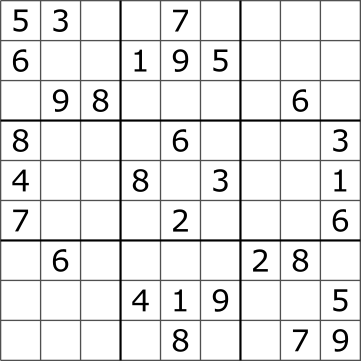
For a puzzle such as

Tim Stellmach, CC0, via Wikimedia Commons

This looks like

\[\displaylines{ x_{1,1,5} \wedge x_{1,2,3} \wedge x_{1,5,7} \wedge \\ x_{2,1,6} \wedge x_{2,4,1} \wedge x_{2,5,9} \wedge x_{2,6,5} \wedge \\ \dots \\ x_{9,5,8} \wedge x_{9,8,7} \wedge x_{9,9,9}}\]

Solving

To solve this Sudoku (or indeed any NP-complete problem that we have expressed as a Boolean satisfiability problem), all we need to do is provide the resulting propositional logic formula as input to a SAT solver!

How do these marvellous programs work?

DPLL

One algorithm is known as DPLL. To explain how it works, let’s look at an example. Not so coincidentally, this is the same propositional logic formula from earlier! At the beginning, we don’t know the values of \(x\), \(y\), or \(z\).

\[(x \vee y \vee z) \wedge (x \vee \neg y) \wedge (\neg y \vee \neg x) \wedge (\neg z)\]

\(x\): 🤷
\(y\): 🤷
\(z\): 🤷

We begin by picking a variable and assigning it a truth value, preferring unit clauses (clauses with a single literal). In this case, let’s set \(z\) to \(False\). Now we can perform unit propagation.

Unit propagation

When performing unit propagation, we assign the appropriate truth value to a literal, which is obvious when it occurs in a unit clause. Then we remove all clauses that are satisfied, since we don’t need to consider them going forward. Next we remove the literal where it is \(False\), since it cannot contribute to that clause being satisfied.

\[(x \vee y \vee \cancel{{\color{red} z}}) \wedge (x \vee \neg y) \wedge (\neg y \vee \neg x) \wedge \cancel{{\color{green} (\neg z)}}\]

\(x\): 🤷
\(y\): 🤷
\(z\): False

Next we pick another variable and continue. Let’s set \(y\) to \(True\).

\[\cancel{{\color{green}(x \vee y \vee z)}} \wedge (x \vee \cancel{{\color{red} \neg y}}) \wedge (\cancel{{\color{red} \neg y}} \vee \neg x) \wedge \cancel{{\color{green}(\neg z)}}\]

\(x\): 🤷
\(y\): True
\(z\): False

Unfortunately, we now have a conflict, since two of the remaining clauses are \(x\) and \(\neg x\).

\[\cancel{{\color{green}(x \vee y \vee z)}} \wedge ({\color{blue} x} \vee \cancel{{\color{red} \neg y}}) \wedge (\cancel{{\color{red} \neg y}} \vee {\color{blue}\neg x}) \wedge \cancel{{\color{green}(\neg z)}}\]

\(x\): 🤷
\(y\): True
\(z\): False

The only appropriate thing to do here is backtrack, so we undo our previous assignment and try the other truth value, setting \(y\) to \(False\).

\[(x \vee \cancel{{\color{red} y}} \vee \cancel{{\color{red} z}}) \wedge \cancel{{\color{green}(x \vee \neg y)}} \wedge \cancel{{\color{green} (\neg y \vee \neg x)}} \wedge \cancel{{\color{green} (\neg z)}}\]

\(x\): 🤷
\(y\): False
\(z\): False

Now we can perform pure literal elimination.

Pure literal elimination

When literals involving a variable in a propositional logic formula are either always \(True\) (\(x\)) or always \(False\) (\(\neg x\)), then these are called pure literals, and it’s obvious what truth value to assign to them. In this case we set \(x\) to \(True\).

\[\cancel{{\color{green}(x \vee y \vee z)}} \wedge \cancel{{\color{green}(x \vee \neg y)}} \wedge \cancel{{\color{green} (\neg y \vee \neg x)}} \wedge \cancel{{\color{green} (\neg z)}}\]

\(x\): True
\(y\): False
\(z\): False

And that’s DPLL (Davis-Putnam-Logemann-Loveland)!

Davis-Putnam-Logemann-Loveland

Davis-Putnam-Logemann-Loveland is exhaustive backtracking search with unit propagation and pure literal elimination. Although it works reasonably well for small numbers of clauses, it has a tendency to repeatedly run into the same conflicts, and when it does it only backtracks one level at a time. It would be great to somehow remember and learn from these conflicts when we encounter them, so we can scale up to more complex problems. Does such an algorithm exist? It does.

CDCL

CDCL starts out very similarly to DPLL in that it still features unit propagation and pure literal elimination. However it also involves additional bookkeeping, distinguishing between decisions (when we choose a truth value for a variable) and implications (truth values determined through unit propagation and pure literal elimination). It also keeps track of the implication graph created by decisions and implications.

Let’s look at a more complex example.

\[\begin{align} & (a \vee d) \wedge \\ & (a \vee \neg c \vee \neg f) \wedge \\ & (a \vee f \vee j) \wedge \\ & (b \vee i) \wedge \\ & (\neg e \vee \neg c \vee g) \wedge \\ & (\neg e \vee f \vee \neg g) \wedge \\ & (e \vee f \vee \neg h) \wedge \\ & (e \vee h \vee \neg j) \end{align}\]

We start by setting \(a\) to \(False\), which implies \(d\) through the clause \(a \vee d\).

\[\begin{align} & {\color{red} a} \vee {\color{green} d} \\ & {\color{red} a} \vee \neg c \vee \neg f \\ & {\color{red} a} \vee f \vee j \\ & b \vee i \\ & \neg e \vee \neg c \vee g \\ & \neg e \vee f \vee \neg g \\ & e \vee f \vee \neg h \\ & e \vee h \vee \neg j \end{align}\]

Next we set \(c\) to \(True\), which implies \(\neg f\) through the clause \(a \vee \neg c \vee \neg f\) and \(j\) through the clause \(a \vee f \vee j\).

\[\begin{align} & {\color{red} a} \vee {\color{green} d} \\ & {\color{red} a} \vee {\color{red}\neg c} \vee {\color{green} \neg f} \\ & {\color{red} a} \vee {\color{red} f} \vee {\color{green} j} \\ & b \vee i \\ & \neg e \vee {\color{red}\neg c} \vee g \\ & \neg e \vee {\color{red} f} \vee \neg g \\ & e \vee {\color{red} f} \vee \neg h \\ & e \vee h \vee {\color{red}\neg j} \end{align}\]

We continue by setting \(b\) to \(False\), which implies \(i\) through the clause \(b \vee i\).

\[\begin{align} & {\color{red} a} \vee {\color{green} d} \\ & {\color{red} a} \vee {\color{red}\neg c} \vee {\color{green} \neg f} \\ & {\color{red} a} \vee {\color{red} f} \vee {\color{green} j} \\ & {\color{red} b} \vee {\color{green} i} \\ & \neg e \vee {\color{red}\neg c} \vee g \\ & \neg e \vee {\color{red} f} \vee \neg g \\ & e \vee {\color{red} f} \vee \neg h \\ & e \vee h \vee {\color{red}\neg j} \end{align}\]

Then we set \(e\) to \(True\), which causes a conflict because \(g\) is implied to be both \(True\) (through the clause \(\neg e \vee \neg c \vee g\)) and \(False\) (through the clause \(\neg e \vee f \vee \neg g\)).

\[\begin{align} & {\color{red} a} \vee {\color{green} d} \\ & {\color{red} a} \vee {\color{red}\neg c} \vee {\color{green} \neg f} \\ & {\color{red} a} \vee {\color{red} f} \vee {\color{green} j} \\ & {\color{red} b} \vee {\color{green} i} \\ & {\color{red}\neg e} \vee {\color{red}\neg c} \vee {\color{blue} g} \\ & {\color{red}\neg e} \vee {\color{red} f} \vee {\color{blue}\neg g} \\ & {\color{green} e} \vee {\color{red} f} \vee \neg h \\ & {\color{green} e} \vee h \vee {\color{red}\neg j} \end{align}\]

Clause learning

Fortunately we can analyse the implication graph to determine a Unique Implication Point that all edges from the latest decision node to the conflict node pass through, and the corresponding UIP cut corresponding to a clause. In this case the UIP is the decision node \(e\) and the clause is \(\neg f \vee c \vee e\). We want to remove the possibility of reaching this state again, so we negate this clause (by De Morgan’s theorem).

\[\displaylines{\neg (\neg f \wedge c \wedge e) \\ \iff \\ (f \vee \neg c \vee \neg e)}\]

And this gives us our learned clause!

\[(f \vee \neg c \vee \neg e)\]

We can then add it to our formula.

\[\begin{align} \definecolor{comment}{RGB}{161,161,180} \definecolor{emphasis}{RGB}{88,110,117} & {\color{comment}(a \vee d) \wedge} \\ & {\color{comment}(a \vee \neg c \vee \neg f) \wedge} \\ & {\color{comment}(a \vee f \vee j) \wedge} \\ & {\color{comment}(b \vee i) \wedge} \\ & {\color{comment}(\neg e \vee \neg c \vee g) \wedge} \\ & {\color{comment}(\neg e \vee f \vee \neg g) \wedge} \\ & {\color{comment}(e \vee f \vee \neg h) \wedge} \\ & {\color{comment}(e \vee h \vee \neg j) \wedge} \\\ & (f \vee \neg c \vee \neg e) \end{align}\]

Non-chronological backjumping

Next we backjump non-chronologically to the second-highest decision level of the literals in our clause, which in this case is \(2\), and repeat.

That’s CDCL (Conflict-driven clause learning)!

Conflict-driven Clause Learning

Conflict-driven clause learning is an extension of DPLL with learned clauses and non-chronological backtracking, effectively addressing most of DPLL’s downsides. It forms the basis of most modern SAT solvers.

SLS

In contrast to the rigorous and structured approaches we’ve seen already, what if we tried something more ad-hoc? We could generate a random assignment of \(True\) and \(False\) values for each of our variables, pick a clause at random, and flip either the “best” variable (whose negation causes the fewest conflicts) or some other variable. We could loop this selection and flipping a number of times, and restart the whole assignment upon getting stuck, finishing after either finding a solution or after a predetermined number of tries.

Stochastic Local Search

This is known as stochastic local search and it’s surprisingly effective! The specific algorithm I described above is called WalkSAT and it’s possible to do it in parallel and use a form of clause learning. Unfortunately, this approach cannot conclusively determine unsatisfiability because an inconclusive result might be due to the solver running out of attempts. A more general technique that this family of algorithms reminds me of is called simulated annealing.

SMT

SAT solvers are great when it’s straightforward to express your problem as a boolean satisfiability problem, but what if we want to solve more complex problems where we might not have the ability or desire to do so?

\[ \begin{align} SEND &\\ + MORE &\\ \hline MONEY \end{align} \]

To solve this puzzle, we need to assign digit values to each of the letters such that the sum of the 4-digit number represented by \(SEND\) and the 4-digit number represented by \(MORE\) equals the 5-digit number \(MONEY\).

We’d have to essentially teach our SAT solver how to do enough arithmetic for it to solve the equation

\[ \begin{align} (1000 \cdot (S+M)) + (100 \cdot (E+O)) + (10 \cdot (N+R)) + (D+E) &\\ = (10000 \cdot M) + (1000 \cdot O) + (100 \cdot N) + (10 \cdot E) + Y \end{align} \]

Satisfiability Modulo Theories

This is what an SMT (Satisfiability Modulo Theories) solver is! A SAT solver can be extended to reason over bitvectors, fixed-length arrays, Presburger arithmetic, algebraic datatypes, and more. One way of doing this would be to pre-process a problem into a series of CNF clauses that can be fed to a normal SAT solver; this is known as bit-blasting, but deeper integrations are often more practical. Examples of SMT solvers include Z3, CVC5, Yices, and Bitwuzla.

That’s all!

I hope you have a basic understanding of what a SAT/SMT solver is, how they (broadly) work, and when it might be a good idea to use them!

Resources

Thanks to Alex Chen for multiple rounds of excellent feedback on my presentation.

https://vaibhavsagar.com/blog/2025/10/22/satisfying-solutions/index.html
GHCi in the Browser
Posted on 3 July 2024 Tags: ,

I’m happy to announce that you can now run GHCi entirely in your browser (if your browser supports WebAssembly and you’re willing to download approximately 220MB of compressed WASM).

Where?

Here or here.

How?

I used container2wasm to convert an OCI image containing GHC to a WASM blob that I could serve using a lightly modified container2wasm-demo. If you’re curious, the website repo is here and the chunks of WASM are here.

As of this writing, only images with an uncompressed size below 2GB can be used with container2wasm (tracked here) and my initial attempts using an OCI image generated by Nix were unsuccessful because of duplicate filenames (tracked here).

I also separately used WebVM which has the same file size limitation as container2wasm, only works on x86 binaries (which is why I used the i386 build of GHC), and is closed-source 😢, but potentially offers better performance depending on how well the JIT compiler performs on this workload.

Why?

I’ve wanted to do something like this for a long time. In my capacity as a maintainer of IHaskell, installation issues are the most common category of support request I receive. Wouldn’t it be great if a user could simply navigate to a webpage and have a correctly configured Jupyter notebook waiting for them? The Jupyter folks also seem to be thinking the same thing, based on the existence of JupyterLite. Unfortunately we’re a long way off from Haskell support1, but I hope my proof-of-concept shows that this is possible.

Even outside Jupyter-land, a fully-functional GHCi REPL in the browser would be generally useful. For example, currently Haskell.org has a “Try it!” section where you can enter expressions, which are currently passed to a backend server to execute. A client-side GHCi could provide a better experience and allow us to get rid of the backend entirely. Another wild idea: the Hackage documentation for a package could provide a REPL with that package pre-installed for users to try out immediately. Wouldn’t that be amazing?

Why not compile GHCi directly to JavaScript/WASM using the new backends?

I don’t think that would work/result in a usable Haskell interpreter with access to base or other GHC boot packages. As of this writing it is on the roadmap for GHC 9.12+ so hopefully that will eventually be possible (tracked here). If you get this working I’d love to know about it!


  1. It’s not something I’m working on and I don’t know how to go from this Goldbergian blob of WASM to a kernel that would work with JupyterLite. If you have ideas, please get in touch!↩︎

https://vaibhavsagar.com/blog/2024/07/03/ghci-in-the-browser/index.html
The Real Hash Was the Friends We Made along the Way
Posted on 14 February 2024 Tags:

When I lived in Singapore, I attended a fascinating talk at FOSSASIA 2018 about Indeed’s fast and compact immutable key-value stores that went almost completely over my head. In fact, if you listen carefully during the Q&A session at the end, you can hear me ask some not-very-good questions in an ill-advised and ultimately futile attempt to relate to the speaker.

This was my first encounter with the concept of minimal perfect hashing. Unfortunately for me, I found most of the existing literature so impenetrable that I gave up on learning more. Hash, displace, and compress? Hypergraph peeling? RecSplit? Eventually I found a suitable entry point: Fast and scalable minimal perfect hashing for massive key sets.

Minimal perfect hashing

Let’s start with what minimal perfect hashing is:

Hashing

One definition of hashing is a process that converts some key to a value of some fixed size (e.g. an integer). We can think of this in terms of a hash function that takes some input and produces an integer as output.

Perfect

In practice, sometimes these hash functions produce the same output for different inputs, known as a hash collision. This is pretty annoying and causes lots of problems, and it would be nice if we could guarantee that distinct inputs always hash to different values, i.e. that the function is injective. Hash functions with this useful property are known as perfect hash functions. This requires all possible inputs to be known in advance.

Injective function
Injective function
Minimal perfect hashing

Bringing it all together, a minimal perfect hash function is one that has no gaps in its outputs, i.e. it bijectively maps \(n\) different inputs to \(n\) consecutive integers, e.g. \([0..n)\) or \([1..n]\). It’s important to note that minimal does not imply anything about the space or time complexity of these functions, e.g. it would be totally valid to have an internal hashtable that maps each input to a distinct integer without gaps and then use that to implement our hash function. In practice, however, we want these functions to be as efficient as possible to construct, store, and use, and this is an active area of research.

Bijective function
Bijective function

You’d probably want to use a minimal perfect hash when

  • all possible keys are known in advance
  • the set of keys doesn’t change
  • space is at a premium

One attractive property of a minimal perfect hash function is that you can use it to create a minimal perfect hash table by associating it with an array where each value’s index is the hash of the corresponding key.

How it works

The approach used in the paper is based on cascading collisionless bitarrays, as illustrated below. I have a more detailed example later so if you aren’t able to follow this one that’s totally okay! It exists to give you a quick taste of the algorithm.

Cascading Collisionless Bitarrays

In the example, keys \(k_1\) to \(k_6\) are hashed and positions where there are no collisions are recorded. The keys that collide at each level are removed and retried at the next level until all the keys are used. For the first bitarray \(A_0\), \(k_3\) and \(k_6\) do not collide when using the hash function \(h_0\). For the next bitarray \(A_1\), \(k_1\) and \(k_5\) do not collide when using \(h_1\). Finally for \(A_2\), \(k_2\) and \(k_4\) do not collide using \(h_2\) and we have no more keys left. To compute the hash for a key, in this example \(k_2\), we find the position where \(A_n[h_n(k_2)] \equiv 1\) and count the number of 1s at or preceding this position, also known as the rank, which will always give us a number \([1..n]\). For \(k2\), the hash is \(5\).

Prerequisites

To implement this, we’ll need

For the hash functions, I used hashWithSalt from the hashable package, and for the bitvectors I used the bv-little package because past Vaibhav asked for rank and select support.

Construction

At a high level, this is what the construction algorithm looks like:

  1. Repeat the following steps until the maximum level is reached or we have no more keys:
    1. Hash each key to a number \(i \in [0..n)\)
    2. If \(bitvector[i]\) has not been set this iteration, set it to \(1\), otherwise unset it
    3. Remove all keys that have been set successfully
  2. If there are any leftover keys, store them separately
Hashing

As I mentioned previously, I used hashWithSalt:

value = hashWithSalt currentLevel key `mod` (gamma * currentLength)

The role of gamma is to control the amount of “slack” in the bitvector, since sometimes making it larger than strictly necessary can reduce the probability of collisions. More on this later.

Populating the bitvector

The approach described in the paper involves using an auxiliary bitvector \(C\) to keep track of collisions:

  1. Initialise two bitvectors \(B\) and \(C\) with \(0\)s
  2. When setting an index \(i\):
    1. If \(B[i] \equiv 0\) and \(C[i] \equiv 0\) then set \(B[i] = 1\)
    2. If \(B[i] \equiv 1\) then set \(B[i] = 0\) and \(C[i] = 1\)
    3. If \(B[i] \equiv 0\) and \(C[i] \equiv 1\) then do nothing
Lookup

To actually use our hash function, we can do the following:

  1. For each level:
    1. Hash the key and check if the corresponding index is set
    2. If so, find the rank
    3. If not, increment the level count and repeat
  2. Otherwise check the leftovers
Example

Let’s look at a small example. The Bondi to Coogee walk here in Sydney passes through the following beaches:

  • Bondi
  • Tamarama
  • Bronte
  • Clovelly
  • Gordons Bay
  • Coogee

and we can use these as keys for a minimal perfect hash function.

Construction

The results of the first iteration are

Level 0
┌─┐
│0│ <- ["Clovelly","Bronte"]
├─┤
│1│ <- ["Gordons Bay"]
├─┤
│0│
├─┤
│0│
├─┤
│0│ <- ["Coogee","Tamarama"]
├─┤
│1│ <- ["Bondi"]
└─┘

So far, so good.

Level 1
┌─┐
│0│
├─┤
│0│
├─┤
│0│
├─┤
│0│ <- ["Coogee","Clovelly","Bronte","Tamarama"]
└─┘

Hmm, that’s a little concerning.

Level 2
┌─┐
│0│ <- ["Coogee","Clovelly","Bronte","Tamarama"]
├─┤
│0│
├─┤
│0│
├─┤
│0│
└─┘

This is not going well.

Level 3
┌─┐
│0│
├─┤
│0│ <- ["Coogee","Clovelly","Bronte","Tamarama"]
├─┤
│0│
├─┤
│0│
└─┘

It’s like the algorithm is taunting me.

Level 4
┌─┐
│0│
├─┤
│0│
├─┤
│0│ <- ["Coogee","Clovelly","Bronte","Tamarama"]
├─┤
│0│
└─┘

I tried this for another 20 levels, and all 4 keys keep colliding.

If we take a step back, an easily-identifiable problem is that there are only 4 possible slots for each key to fit into, which increases the likelihood of a collision. This is where the gamma parameter from earlier comes into play. We can try again with a gamma of 1.5:

Level 0
┌─┐
│1│ <- ["Bronte"]
├─┤
│1│ <- ["Gordons Bay"]
├─┤
│0│
├─┤
│0│
├─┤
│0│ <- ["Coogee","Tamarama"]
├─┤
│0│
├─┤
│1│ <- ["Clovelly"]
├─┤
│0│
├─┤
│1│ <- ["Bondi"]
└─┘

Okay, this is already looking better.

Level 1
┌─┐
│0│ <- ["Coogee","Tamarama"]
├─┤
│0│
├─┤
│0│
└─┘

Maybe I spoke too soon?

Level 2
┌─┐
│1│ <- ["Tamarama"]
├─┤
│1│ <- ["Coogee"]
├─┤
│0│
└─┘

Phew.

Lookup

Suppose we wanted to hash Coogee. This is what the final bitarrays look like:

Bitarrays
 0 1 2 3 4 5 6 7 8
┌─┬─┬─┬─┬─┬─┬─┬─┬─┐
│1│1│0│0│0│0│1│0│1│ b0
└─┴─┴─┴─┴─┴─┴─┴─┴─┘
         └──────────── hashWithSalt 0 "Coogee" `mod` 9
┌─┬─┬─┐
│0│0│0│ b1
└─┴─┴─┘
 └──────────────────── hashWithSalt 1 "Coogee" `mod` 3
┌─┬─┬─┐
│1│1│0│ b2
└─┴─┴─┘
   └────────────────── hashWithSalt 2 "Coogee" `mod` 3

We try each bitarray in sequence until we find a \(1\) at our index, and we find the \(rank\) of that index:

> hashWithSalt 0 "Coogee" `mod` 9
4
> b0 ! 4 -- collision
0
> hashWithSalt 1 "Coogee" `mod` 3
0
> b1 ! 0 -- collision
0
> hashWithSalt 2 "Coogee" `mod` 3
1
> b2 ! 1 -- hit
1
> popCount b0 + popCount b1 + rank b2 1
6

Our hash is \(6\).

False positive

Unfortunately, we also get seemingly-valid output for a key that wasn’t in our input set, e.g. Shelly:

Bitarrays
 0 1 2 3 4 5 6 7 8
┌─┬─┬─┬─┬─┬─┬─┬─┬─┐
│1│1│0│0│0│0│1│0│1│ b0
└─┴─┴─┴─┴─┴─┴─┴─┴─┘
   └─────────────────  hashWithSalt 0 "Shelly" `mod` 9
┌─┬─┬─┐
│0│0│0│ b1
└─┴─┴─┘
┌─┬─┬─┐
│1│1│0│ b2
└─┴─┴─┘
> hashWithSalt 0 "Shelly" `mod` 9
1
> rank b0 1
2

This is a limitation of minimal perfect hash functions in general, and something to keep in mind while using them.

Minimal perfect hash table

All we have to do is create an array \(A\) such that \(A[hash(k_n)-1] = v_n\)!

Values
 ╭──────────── Bronte
 │ ╭────────── Gordons Bay
 │ │ ╭──────── Clovelly
 │ │ │ ╭────── Bondi
 │ │ │ │ ╭──── Tamarama
 │ │ │ │ │ ╭── Coogee
 0 1 2 3 4 5
┌─┬─┬─┬─┬─┬─┐
│ │ │ │ │ │ │
└─┴─┴─┴─┴─┴─┘

The authors point out that trying to save a few bits per key by tweaking \(gamma\) doesn’t make much sense in this case, since the values account for the vast majority of the space usage.

Code

The authors provide a library called BBHash, and I have a small implementation here.

That’s all!

An interesting thing I noticed was that after I was able to make sense of this implementation of minimal perfect hashing, the other approaches were easier to grasp. I wouldn’t go so far as to say I magically understood them when I didn’t before, but I definitely feel less lost now. Maybe you’ll have a similar experience?

More links
https://vaibhavsagar.com/blog/2024/02/14/minimal-perfect-hashing/index.html
Low-effort Dependency Pinning with Nix Flakes
Posted on 9 February 2024 Tags: ,

Back in 2018 I wrote a blog post about pinning nixpkgs which describes an approach I’ve used happily and successfully since then to manage dependencies (and not just nixpkgs) for small projects. In short, it involves

  1. versions.json, a JSON file storing dependency information
  2. updater, an updater script
  3. pkgs.nix, a Nix expression that makes each dependency available

Here’s what each of those files might look like:

versions.json
{
  "ihaskell": {
    "owner": "gibiansky",
    "repo": "IHaskell",
    "branch": "master",
    "rev": "575b2be1c25e8e7c5ed5048c8d7ead51bb9c67f0",
    "sha256": "148sdawqln2ys0s1rapwj2bwjzfq027dz5h49pa034nmyizyqs4a"
  },
  "nixpkgs": {
    "owner": "NixOS",
    "repo": "nixpkgs",
    "branch": "nixos-23.11",
    "rev": "9dd7699928e26c3c00d5d46811f1358524081062",
    "sha256": "0hmsw3qd3i13dp8jhr1d96xlpkmd78m8g6shw086f6sqhn2rrvv6"
  }
}
updater
#! /usr/bin/env nix-shell
#! nix-shell -i bash
#! nix-shell -p curl jq nix

set -eufo pipefail

FILE=$1
PROJECT=$2

OWNER=$(jq -r '.[$project].owner' --arg project "$PROJECT" < "$FILE")
REPO=$(jq -r '.[$project].repo' --arg project "$PROJECT" < "$FILE")
DEFAULT_BRANCH=$(jq -r '.[$project].branch // "master"' --arg project "$PROJECT" < "$FILE")

BRANCH=${3:-$DEFAULT_BRANCH}

REV=$(curl "https://api.github.com/repos/$OWNER/$REPO/branches/$BRANCH" | jq -r '.commit.sha')
SHA256=$(nix-prefetch-url --unpack "https://github.com/$OWNER/$REPO/archive/$REV.tar.gz")
TJQ=$(jq '.[$project] = {owner: $owner, repo: $repo, branch: $branch, rev: $rev, sha256: $sha256}' \
  --arg project "$PROJECT" \
  --arg owner "$OWNER" \
  --arg repo "$REPO" \
  --arg branch "$BRANCH" \
  --arg rev "$REV" \
  --arg sha256 "$SHA256" \
  < "$FILE")
[[ $? == 0 ]] && echo "${TJQ}" >| "$FILE"
pkgs.nix
let
  fetcher = { owner, repo, rev, sha256, ... }: builtins.fetchTarball {
    inherit sha256;
    url = "https://github.com/${owner}/${repo}/tarball/${rev}";
  };
  versions = builtins.mapAttrs
    (_: fetcher)
    (builtins.fromJSON (builtins.readFile ./versions.json));
in versions

This approach still works, but in the meantime Nix flakes have become the primary way to manage dependencies in Nix projects. Although they’re still listed as an experimental feature, the same is also true of the nix command, and I don’t think either is going away in the foreseeable future.

The fundamental insight

It turns out that you can replace pkgs.nix:

let
  fetcher = { owner, repo, rev, sha256, ... }: builtins.fetchTarball {
    inherit sha256;
    url = "https://github.com/${owner}/${repo}/tarball/${rev}";
  };
  versions = builtins.mapAttrs
    (_: fetcher)
    (builtins.fromJSON (builtins.readFile ./versions.json));
in versions

using the relatively new fetchTree builtin:

let
  lock = builtins.fromJSON (builtins.readFile ./flake.lock);
  versions = builtins.mapAttrs
    (_: node: (builtins.fetchTree node.locked).outPath)
    lock.nodes;
in versions

following which you can replace updater with nix flake update and versions.json with flake.lock.

Flakes griping

I’ve done my best to avoid flakes for as long as possible, since there are a couple of UI/UX issues that bother me:

A reliance on new-style nix commands

I’m pretty comfortable with nix-build and nix-shell, and it’s an adjustment to use the newer nix build and nix develop commands since they don’t work exactly the same (e.g. not printing build logs by default, having to use .# for packages).

Coupling dependency and systems concerns

The flakes position is that system is an impurity (which is reasonable enough) and so each output is parametrised by the system and there’s no built-in way to ignore or work around this. In practice I’ve seen most people use flake-utils and its provided eachSystem or eachDefaultSystem functions. For my purposes I haven’t run into any issues with eachDefaultSystem and if you are shaking your head at the screen thinking of all the ways this can go wrong then you probably don’t need to read this blog post. Unfortunately eachDefaultSystem doesn’t save you from having to supply system to nixpkgs everywhere you import it, which makes adapting existing non-flakes projects with multiple imports of nixpkgs tedious to migrate.

Surprising interactions with git

Strange and confusing things can happen when you try to use a file that’s currently untracked by git. Often it will tell you it can’t find a particular file, even though it’s right there, but at other times things will appear to work but your language-specific build tool will complain. The obvious solution is to always git add everything you care about, but that has the same energy as “I would simply write code with no bugs at all times” and is equally non-actionable advice. The only hint you get is the message

warning: Git tree '' is dirty

as your build commences which is more often than not innocuous. I foresee myself running into this issue over and over again when using flakes.

Why bother with flakes?

Although I’m still critical of certain aspects of flakes, they do provide one feature I was missing: the ability to manage and update dependencies without the use of IFD. I also get the impression that the vast majority of effort being put into Nix now is in and around the flakes ecosystem, e.g. FlakeHub and the update-flake-lock GitHub Action. Keeping all this in mind, I think there is a way to ignore most of the stuff I don’t care about for now while getting rid of my primitive shell script in favour of robust and better-supported dependency management code that’s built into Nix. That way I can gradually integrate flakes more deeply, and if I’m wrong about it being the future I still have the option to go back to what I was using before (or adopt whatever the new hotness is).

A minimal flake

The first hurdle to overcome is replacing default.nix with flake.nix. I’ve found that this is a good starting point for me:

{
  inputs.nixpkgs.url = "github:NixOS/nixpkgs/release-23.11";
  inputs.flake-utils.url = "github:numtide/flake-utils";
  inputs.flake-compat.url = "github:edolstra/flake-compat";
  outputs = {nixpkgs, flake-utils, ...}:
    flake-utils.lib.eachDefaultSystem (system: let
      pkgs = import nixpkgs { inherit system; };
      # ...
    in {
      defaultPackage = null;
      devShell = null;
    });
}

combined with this snippet in default.nix taken from the flake-compat README:

(import
  (
    let lock = builtins.fromJSON (builtins.readFile ./flake.lock); in
    fetchTarball {
      url = lock.nodes.flake-compat.locked.url or "https://github.com/edolstra/flake-compat/archive/${lock.nodes.flake-compat.locked.rev}.tar.gz";
      sha256 = lock.nodes.flake-compat.locked.narHash;
    }
  )
  { src = ./.; }
).defaultNix

A couple of things are worth pointing out:

  • I include flake-compat in my inputs but I don’t actually use it in flake.nix, it is declared solely so that it can be tracked in flake.lock.
  • I could include more dependencies here, as long as nix flake update knows how to fetch them, which is already a huge improvement over my GitHub-specific updater script.
  • If your input is a flake but you’re not using it in flake.nix, you probably want to set inpugs..flake = false so that it doesn’t pull in that flake’s dependencies too.
  • The default.nix snippet doesn’t have the old Nix behaviour of doing the right thing when used with nix-shell, but I could probably recover this by including (or reimplementing) lib.inNixShell and using it.
Migrating all the things

I recently went on a tear, moving a bunch of my repositories over to this workflow:

It was reasonably straightforward, except in the case of notebooks, where I have a bunch of expressions that each have their own overlays etc. that I wasn’t ready to unify just yet. This meant a lot of { system ? builtins.currentSystem } which I could have done without. It’s an anti-pattern to import nixpkgs in multiple places anyway, so this is probably a sign that there is a better way to organise my expressions.

Further reading

I was partly inspired to try this after reading Jade Lovelace’s excellent blog post about Nix flakes. Thank you Jade!

https://vaibhavsagar.com/blog/2024/02/09/low-effort-dependency-pinning-flakes/index.html
Binary Trees To Hash Array Mapped Tries, Step by Step
Posted on 7 October 2023 Tags: ,

Hash Array Mapped Tries (HAMTs) are a persistent data structure used to implement hashmaps. They’re heavily used in Clojure and used to be the backbone of Haskell’s aeson library until relatively recently. I’ve written about HAMTs before but wanted to try a different approach: starting with a binary tree (or something close to it) and then making a series of straightforward modifications until we end up with the implementation detailed there.

Let’s start with some language extensions and imports:

{-# LANGUAGE GeneralizedNewtypeDeriving #-}
{-# LANGUAGE TypeSynonymInstances #-}
{-# LANGUAGE FlexibleInstances #-}
{-# LANGUAGE RankNTypes #-}


import Data.Bits             (Bits (bit, complement, popCount, shiftR, (.&.), (.|.), testBit),
                              FiniteBits (finiteBitSize))
import Data.ByteArray.Hash   (FnvHash32 (..), fnv1Hash)
import Data.ByteString.Char8 (pack)
import Data.Char             (intToDigit)
import Data.Semigroup        ((<>))
import Data.Vector           (Vector, drop, singleton, take, replicate, (!), (//))
import Data.Word             (Word16, Word32)
import Numeric               (showIntAtBase)
import Prelude               hiding (drop, lookup, take, replicate)
import qualified             Prelude
import System.TimeIt         (timeIt)
import Text.Show.Pretty      (pPrint)

I think it’s useful to be able to visualise these structures, for which we need some more imports:

import IHaskell.Display.Graphviz
import Control.Monad.Trans.State.Strict
import Control.Monad.Trans.Writer.CPS
import Control.Monad.Trans.Class
import qualified Data.Vector as Vector
import Data.List (intercalate, intersperse, foldl')

I’m going to define some instances for pretty-printing hashes:

newtype Binary a = Binary a
    deriving (Enum, Ord, Real, Integral, Eq, Num, Bits, FiniteBits)

instance (FiniteBits a, Show a, Integral a) => Show (Binary a) where
    show (Binary n) = let
        str = showIntAtBase 2 intToDigit n ""
        size = finiteBitSize n
        in Prelude.replicate (size - length str) '0' <> str
type Hash = Binary Word32

class Hashable a where
    hash :: a -> Hash

One can think of hashing as mapping values of some type to fixed-size values of another type, and in this case I’ve decided to hash Ints to themselves for demonstration purposes. I would strongly recommend against doing this in production, but when explaining how these trees are constructed it’s handy to be able to immediately tell what the hash of some Int will be.

instance Hashable String where
    hash s = let
        FnvHash32 h = fnv1Hash (pack s)
        in Binary h

instance Hashable Int where
    hash int = Binary (fromIntegral int)
I’m also defining some helpers so that we can generate DOT representations and use ihaskell-graphviz to display each of the structures defined here: Graphviz helper functions
getFreshId :: State Int Int
getFreshId = do
    currentId <- get
    put (currentId+1)
    pure currentId

escape = concatMap escaper
    where
        escaper :: Char -> String
        escaper c = case c of
            '"'  -> "\\\""
            '\\' -> "\\\\"
            _    -> [c]

makeDotLines :: [String] -> String
makeDotLines = concatMap (++ ";\n")

preamble = unlines
    [ "digraph {"
    , "node [shape=record];"
    , "splines=false;"
    , "ranksep=2;"
    , "nodesep=1;"
    ]
postamble = unlines ["}"]

makeDot :: String -> String
makeDot str = preamble ++ str ++ postamble

Let’s define a typeclass to abstract over the details of our data structures. For our purposes we only care that for some Mapping, we can have an empty value, a way to insert key-value pairs, and a way to lookup a particular key:

class Mapping mapping where
    empty :: forall k v. mapping k v
    lookup :: forall k v. (Hashable k) => k -> mapping k v -> Maybe v
    insert :: forall k v. (Hashable k) => k -> v -> mapping k v -> mapping k v

As a way of exercising these Mappings, I’ve chosen to implement a simple memoised fib' function that stores intermediate results:

fib' :: (Mapping m) => m Int Integer -> Int -> (Integer, m Int Integer)
fib' table 0 = (1, insert 0 1 table)
fib' table 1 = (1, insert 1 1 table)
fib' table n = case lookup n table of
    Just i -> (i, table)
    Nothing -> let
        (i1, table')  = fib' table  (n-1)
        (i2, table'') = fib' table' (n-2)
        in (i1 + i2, insert n (i1 + i2) table'')

After that housekeeping, we can begin with our first data structure:

data HashBinaryMappedTrie key value
    = HashBinaryMappedTrieNone
    | HashBinaryMappedTrieLeaf Hash key value
    | HashBinaryMappedTrieNode
        (HashBinaryMappedTrie key value)
        (HashBinaryMappedTrie key value)
    deriving (Eq, Show)

This is a binary tree with key-value pairs stored at the leaves. It is also a bitwise trie because I plan to insert into it as follows:

  1. First, hash the key.
  2. If we find a HashBinaryMappedTrieNone, replace it with a HashBinaryMappedTrieLeaf and our hash, key, and value and stop. If we find a HashBinaryMappedTrieLeaf and it’s not the key-value pair we are inserting, replace it with a HashBinaryMappedTrieNode and insert both the old value and the new value into this node.
  3. Branch on the rightmost bit of the hash. If it is a 0, go left, otherwise go right.
  4. Remove the rightmost bit from the hash for the purposes of considering whether we go left or right.
  5. Repeat steps 2-5.

I’ve chosen to call it a Hash Binary Mapped Trie, since it is a binary (bitwise) trie storing a mapping based on hashes.

insertHashBinaryMappedTrie :: (Hashable key) => key -> value -> HashBinaryMappedTrie key value -> HashBinaryMappedTrie key value
insertHashBinaryMappedTrie key = insertHashBinaryMappedTrieHelper 0 (hash key) key

insertHashBinaryMappedTrieHelper :: Int -> Hash -> key -> value -> HashBinaryMappedTrie key value -> HashBinaryMappedTrie key value
insertHashBinaryMappedTrieHelper depth hash key value HashBinaryMappedTrieNone =
    HashBinaryMappedTrieLeaf hash key value
insertHashBinaryMappedTrieHelper depth hash key value (HashBinaryMappedTrieLeaf leafHash leafKey leafValue)
    | hash == leafHash = HashBinaryMappedTrieLeaf hash key value
    | otherwise = let
        emptyNode = HashBinaryMappedTrieNode HashBinaryMappedTrieNone HashBinaryMappedTrieNone
        leafInsertedNode = insertHashBinaryMappedTrieHelper depth leafHash leafKey leafValue emptyNode
        in insertHashBinaryMappedTrieHelper depth hash key value leafInsertedNode
insertHashBinaryMappedTrieHelper depth hash key value (HashBinaryMappedTrieNode left right) = let
    goRight = testBit hash depth
    depth' = depth + 1
    in if goRight
        then HashBinaryMappedTrieNode left (insertHashBinaryMappedTrieHelper depth' hash key value right)
        else HashBinaryMappedTrieNode (insertHashBinaryMappedTrieHelper depth' hash key value left) right

To look up a particular key, the process is similar:

  1. Hash the key.
  2. If we find a HashBinaryMappedTrieNone, return Nothing. If we find a HashBinaryMappedTrieLeaf, check that the hashes match (this ignores the possibility of hash collisions) and if so return the pair otherwise return Nothing.
  3. Branch on the rightmost bit of the hash, going left if it is 0 and right otherwise.
  4. Remove the rightmost bit from the hash for the purposes of considering whether to go left or right.
  5. Repeat steps 2-5.
lookupHashBinaryMappedTrie :: (Hashable key) => key -> HashBinaryMappedTrie key value -> Maybe value
lookupHashBinaryMappedTrie key = lookupHashBinaryMappedTrieHelper 0 (hash key) key

lookupHashBinaryMappedTrieHelper :: Int -> Hash -> key -> HashBinaryMappedTrie key value -> Maybe value
lookupHashBinaryMappedTrieHelper depth hash key HashBinaryMappedTrieNone = Nothing
lookupHashBinaryMappedTrieHelper depth hash key (HashBinaryMappedTrieLeaf leafHash leafKey leafValue)
    | hash == leafHash = Just leafValue
    | otherwise = Nothing
lookupHashBinaryMappedTrieHelper depth hash key (HashBinaryMappedTrieNode left right) = let
    goRight = testBit hash depth
    depth' = depth + 1
    in if goRight
        then lookupHashBinaryMappedTrieHelper depth' hash key right
        else lookupHashBinaryMappedTrieHelper depth' hash key left

An empty HashBinaryMappedTrie is HashBinaryMappedTrieNone:

emptyHashBinaryMappedTrie = HashBinaryMappedTrieNone

We can easily implement an instance of Mapping for HashBinaryMappedTrie:

instance Mapping HashBinaryMappedTrie where
    empty = emptyHashBinaryMappedTrie
    insert = insertHashBinaryMappedTrie
    lookup = lookupHashBinaryMappedTrie

Now we can build a tree to look at using fib', but before we can visualise it we need to convert it into DOT files for ihaskell-graphviz:

Graphviz helper functions for HashBinaryMappedTrie
data HashBinaryMappedTrieGraphvizNode
    = HashBinaryMappedTrieGraphvizNode
        { hashBinaryMappedTrieGraphvizNodeId :: Int
        , hashBinaryMappedTrieGraphvizLeftChildId :: Int
        , hashBinaryMappedTrieGraphvizRightChildId :: Int
        }
    | HashBinaryMappedTrieGraphvizLeafNode
        { hashBinaryMappedTrieGraphvizLeafNodeId :: Int
        , hashBinaryMappedTriGraphvizeLeafHash :: String
        , hashBinaryMappedTrieGraphvizLeafKey :: String
        , hashBinaryMappedTrieGraphvizLeafNodeValue :: String
        }
    deriving (Eq, Show)

numberHBMT :: (Show k, Show v) => HashBinaryMappedTrie k v -> WriterT [HashBinaryMappedTrieGraphvizNode] (State Int) Int
numberHBMT HashBinaryMappedTrieNone = do
    tell mempty
    pure 0
numberHBMT (HashBinaryMappedTrieLeaf h k v) = do
    i <- lift getFreshId
    tell [HashBinaryMappedTrieGraphvizLeafNode i (show h) (show k) (show v)]
    pure i
numberHBMT (HashBinaryMappedTrieNode l r) = do
    i <- lift getFreshId
    leftChildId <- numberHBMT l
    rightChildId <- numberHBMT r
    tell [HashBinaryMappedTrieGraphvizNode i leftChildId rightChildId]
    pure i

nodeLinesHBMT :: HashBinaryMappedTrieGraphvizNode -> [String]
nodeLinesHBMT (HashBinaryMappedTrieGraphvizLeafNode i h k v) = let
    label = intercalate "|" [h, k, v]
    line = ("n" ++ show i) ++ " " ++ "[label=\"" ++ escape label ++ "\"]"
    in [line]
nodeLinesHBMT (HashBinaryMappedTrieGraphvizNode i l r) = let
    edges = map (\index -> "n" ++ show i ++ " -> " ++ "n" ++ show index) [l, r]
    label = "n" ++ show i ++ " " ++ "[label=\"\"]"
    in label:edges

dotFromHBMT :: (Show k, Show v) => HashBinaryMappedTrie k v -> String
dotFromHBMT = makeDot . makeDotLines. concatMap nodeLinesHBMT . flip evalState 0 . execWriterT . numberHBMT
Here’s a visualisation of the tree created by fib' 8: Hash Binary Mapped Trie
dot $ dotFromHBMT $ snd $ fib' emptyHashBinaryMappedTrie 8
n4 00000000000000000000000000000000 0 1 n5 00000000000000000000000000001000 8 34 n3 n3->n4 n3->n5 n6 00000000000000000000000000000100 4 5 n2 n2->n3 n2->n6 n8 00000000000000000000000000000010 2 2 n9 00000000000000000000000000000110 6 13 n7 n7->n8 n7->n9 n1 n1->n2 n1->n7 n12 00000000000000000000000000000001 1 1 n13 00000000000000000000000000000101 5 8 n11 n11->n12 n11->n13 n15 00000000000000000000000000000011 3 3 n16 00000000000000000000000000000111 7 21 n14 n14->n15 n14->n16 n10 n10->n11 n10->n14 n0 n0->n1 n0->n10

As we can see, this data structure does actually work, and if that’s all we require, we could probably stop here. However, the most obvious issue is that the low branching factor of 2 means that our trees get too deep too quickly and that negatively impacts the time and space complexity of most operations. We will address this shortly, but first I would like to take a slight detour and do some prefactoring to make this possible: instead of having child nodes point directly to a parent node, let’s store a 2-element array in the parent node and have the children live there.

data Hash2ArrayMappedTrie key value
    = Hash2ArrayMappedTrieNone
    | Hash2ArrayMappedTrieLeaf Hash key value
    | Hash2ArrayMappedTrieNode (Vector (Hash2ArrayMappedTrie key value))
    deriving (Eq, Show)

We can reuse most of our existing code with only minor changes to account for the existence of the array, which will always have two elements.

insertHash2ArrayMappedTrie :: (Hashable key) => key -> value -> Hash2ArrayMappedTrie key value -> Hash2ArrayMappedTrie key value
insertHash2ArrayMappedTrie key = insertHash2ArrayMappedTrieHelper 0 (hash key) key

insertHash2ArrayMappedTrieHelper :: Int -> Hash -> key -> value -> Hash2ArrayMappedTrie key value -> Hash2ArrayMappedTrie key value
insertHash2ArrayMappedTrieHelper depth hash key value Hash2ArrayMappedTrieNone =
    Hash2ArrayMappedTrieLeaf hash key value
insertHash2ArrayMappedTrieHelper depth hash key value (Hash2ArrayMappedTrieLeaf leafHash leafKey leafValue)
    | hash == leafHash = Hash2ArrayMappedTrieLeaf hash key value
    | otherwise = let
        emptyNode = Hash2ArrayMappedTrieNode (replicate 2 Hash2ArrayMappedTrieNone)
        leafInsertedNode = insertHash2ArrayMappedTrieHelper depth leafHash leafKey leafValue emptyNode
        in insertHash2ArrayMappedTrieHelper depth hash key value leafInsertedNode
insertHash2ArrayMappedTrieHelper depth hash key value (Hash2ArrayMappedTrieNode children) = let
    goRight = testBit hash depth
    depth' = depth + 1
    in if goRight
        then Hash2ArrayMappedTrieNode $ children // [(1, insertHash2ArrayMappedTrieHelper depth' hash key value (children ! 1))]
        else Hash2ArrayMappedTrieNode $ children // [(0, insertHash2ArrayMappedTrieHelper depth' hash key value (children ! 0))]
lookupHash2ArrayMappedTrie :: (Hashable key) => key -> Hash2ArrayMappedTrie key value -> Maybe value
lookupHash2ArrayMappedTrie key = lookupHash2ArrayMappedTrieHelper 0 (hash key) key

lookupHash2ArrayMappedTrieHelper :: Int -> Hash -> key -> Hash2ArrayMappedTrie key value -> Maybe value
lookupHash2ArrayMappedTrieHelper depth hash key Hash2ArrayMappedTrieNone = Nothing
lookupHash2ArrayMappedTrieHelper depth hash key (Hash2ArrayMappedTrieLeaf leafHash leafKey leafValue)
    | hash == leafHash = Just leafValue
    | otherwise = Nothing
lookupHash2ArrayMappedTrieHelper depth hash key (Hash2ArrayMappedTrieNode children) = let
    goRight = testBit hash depth
    depth' = depth + 1
    in if goRight
        then lookupHash2ArrayMappedTrieHelper depth' hash key (children ! 1)
        else lookupHash2ArrayMappedTrieHelper depth' hash key (children ! 0)
emptyHash2ArrayMappedTrie = Hash2ArrayMappedTrieNone
instance Mapping Hash2ArrayMappedTrie where
    empty = emptyHash2ArrayMappedTrie
    insert = insertHash2ArrayMappedTrie
    lookup = lookupHash2ArrayMappedTrie
And as before we can define a function to render this tree using Graphviz: Hash 2-Array Mapped Trie
data Hash2ArrayMappedTrieGraphvizNode
    = Hash2ArrayMappedTrieGraphvizNode
        { hash2ArrayMappedTrieGraphvizNodeId :: Int
        , hash2ArrayMappedTrieGraphvizFields :: [Int]
        }
    | Hash2ArrayMappedTrieGraphvizLeafNode
        { hash2ArrayMappedTrieGraphvizLeafNodeId :: Int
        , hash2ArrayMappedTrieGraphvizLeafHash :: String
        , hash2ArrayMappedTrieGraphvizLeafKey :: String
        , hash2ArrayMappedTrieGraphvizLeafNodeValue :: String
        }
    deriving (Eq, Show)

numberH2AMT :: (Show k, Show v) => Hash2ArrayMappedTrie k v -> WriterT [Hash2ArrayMappedTrieGraphvizNode] (State Int) Int
numberH2AMT Hash2ArrayMappedTrieNone = do
    tell mempty
    pure 0
numberH2AMT (Hash2ArrayMappedTrieLeaf h k v) = do
    i <- lift getFreshId
    tell [Hash2ArrayMappedTrieGraphvizLeafNode i (show h) (show k) (show v)]
    pure i
numberH2AMT (Hash2ArrayMappedTrieNode hs) = do
    i <- lift getFreshId
    numbered <- Vector.toList <$> traverse numberH2AMT hs
    tell [Hash2ArrayMappedTrieGraphvizNode i numbered]
    pure i

nodeLinesH2AMT :: Hash2ArrayMappedTrieGraphvizNode -> [String]
nodeLinesH2AMT (Hash2ArrayMappedTrieGraphvizLeafNode i h k v) = let
    label = intercalate "|" [h, k, v]
    line = ("n" ++ show i) ++ " " ++ "[label=\"" ++ escape label ++ "\"]"
    in [line]
nodeLinesH2AMT (Hash2ArrayMappedTrieGraphvizNode i fs) = let
    indices = Prelude.take (length fs) [0..]
    pairs = zip indices fs
    edges = flip map pairs $ \(f,t) -> "n" ++ show i ++ ":" ++ "f" ++ show f ++ " -> " ++ "n" ++ show t
    fields = flip map indices $ \ix -> " ++ show ix ++ ">"
    label = intercalate "|" fields
    line = ("n" ++ show i) ++ " " ++ "[label=\"" ++ escape label ++ "\"]"
    in (line:edges)

dotFromH2AMT :: (Show k, Show v) => Hash2ArrayMappedTrie k v -> String
dotFromH2AMT = makeDot . makeDotLines. concatMap nodeLinesH2AMT . flip evalState 0 . execWriterT . numberH2AMT
The corresponding tree created by fib' 8 looks very similar: Hash 2-Array Mapped Trie
dot $ dotFromH2AMT $ snd $ fib' emptyHash2ArrayMappedTrie 8
n4 00000000000000000000000000000000 0 1 n5 00000000000000000000000000001000 8 34 n3 n3:f0->n4 n3:f1->n5 n6 00000000000000000000000000000100 4 5 n2 n2:f0->n3 n2:f1->n6 n8 00000000000000000000000000000010 2 2 n9 00000000000000000000000000000110 6 13 n7 n7:f0->n8 n7:f1->n9 n1 n1:f0->n2 n1:f1->n7 n12 00000000000000000000000000000001 1 1 n13 00000000000000000000000000000101 5 8 n11 n11:f0->n12 n11:f1->n13 n15 00000000000000000000000000000011 3 3 n16 00000000000000000000000000000111 7 21 n14 n14:f0->n15 n14:f1->n16 n10 n10:f0->n11 n10:f1->n14 n0 n0:f0->n1 n0:f1->n10

Now that we’re using arrays, we can fix our branching factor problem by recognising the relationship between the number of bits of the hash that we are plucking off and inspecting at each level and the children each node can have. So far we have only been inspecting one bit, which can have two values and therefore two children. If we were to inspect two bits at each level, we could have four possible children per fragment (corresponding to the values 00, 01, 10, and 11), 8 children for 3 bits, and so on. I’ve chosen to use 4 bits which means 16 children.

I’m going to call this iteration HashArrayMappedTrieSpacious because it’s space-inefficient in a way we’ll discuss and fix later.

data HashArrayMappedTrieSpacious key value
    = HashArrayMappedTrieSpaciousNone
    | HashArrayMappedTrieSpaciousLeaf Hash key value
    | HashArrayMappedTrieSpaciousNode (Vector (HashArrayMappedTrieSpacious key value))
    deriving (Eq, Show)

An important point is that we re-interpret the hash fragment as the index into our array, e.g. 0110 is the 6th index. We’ll need some bit-twiddling functions to make this easier.

hashFragmentLength :: Int
hashFragmentLength = 4

hashMask = bit hashFragmentLength - 1 -- 0b1111

To insert and lookup elements, we now need to:

  1. Mask off the correct 4 bits of the hash.
  2. Interpret the 4-bit hash fragment as an index from 0 to 15.
  3. Insert/lookup the element at the corresponding index of the array, recursively creating it if required.
insertHashArrayMappedTrieSpacious :: (Hashable key) => key -> value -> HashArrayMappedTrieSpacious key value -> HashArrayMappedTrieSpacious key value
insertHashArrayMappedTrieSpacious key = insertHashArrayMappedTrieSpaciousHelper 0 (hash key) key

insertHashArrayMappedTrieSpaciousHelper :: Int -> Hash -> key -> value -> HashArrayMappedTrieSpacious key value -> HashArrayMappedTrieSpacious key value
insertHashArrayMappedTrieSpaciousHelper depth hash key value HashArrayMappedTrieSpaciousNone =
    HashArrayMappedTrieSpaciousLeaf hash key value
insertHashArrayMappedTrieSpaciousHelper depth hash key value (HashArrayMappedTrieSpaciousLeaf leafHash leafKey leafValue)
    | hash == leafHash = HashArrayMappedTrieSpaciousLeaf hash key value
    | otherwise = let
        emptyNode = HashArrayMappedTrieSpaciousNode (replicate (2^hashFragmentLength) HashArrayMappedTrieSpaciousNone)
        leafInsertedNode = insertHashArrayMappedTrieSpaciousHelper depth leafHash leafKey leafValue emptyNode
        in insertHashArrayMappedTrieSpaciousHelper depth hash key value leafInsertedNode
insertHashArrayMappedTrieSpaciousHelper depth hash key value (HashArrayMappedTrieSpaciousNode children) = let
    hashFragment = (hash `shiftR` depth) .&. hashMask
    index = fromIntegral hashFragment
    depth' = depth + hashFragmentLength
    in HashArrayMappedTrieSpaciousNode
        (children // [(index, insertHashArrayMappedTrieSpaciousHelper depth' hash key value (children ! index))])
lookupHashArrayMappedTrieSpacious :: (Hashable key) => key -> HashArrayMappedTrieSpacious key value -> Maybe value
lookupHashArrayMappedTrieSpacious key = lookupHashArrayMappedTrieSpaciousHelper 0 (hash key) key

lookupHashArrayMappedTrieSpaciousHelper :: Int -> Hash -> key -> HashArrayMappedTrieSpacious key value -> Maybe value
lookupHashArrayMappedTrieSpaciousHelper depth hash key HashArrayMappedTrieSpaciousNone = Nothing
lookupHashArrayMappedTrieSpaciousHelper depth hash key (HashArrayMappedTrieSpaciousLeaf leafHash leafKey leafValue)
    | hash == leafHash = Just leafValue
    | otherwise = Nothing
lookupHashArrayMappedTrieSpaciousHelper depth hash key (HashArrayMappedTrieSpaciousNode children) = let
    hashFragment = (hash `shiftR` depth) .&. hashMask
    index = fromIntegral hashFragment
    depth' = depth + hashFragmentLength
    in lookupHashArrayMappedTrieSpaciousHelper depth' hash key (children ! index)
emptyHashArrayMappedTrieSpacious = HashArrayMappedTrieSpaciousNone
instance Mapping HashArrayMappedTrieSpacious where
    empty = emptyHashArrayMappedTrieSpacious
    insert = insertHashArrayMappedTrieSpacious
    lookup = lookupHashArrayMappedTrieSpacious

Once again we can define a rendering function:

Hash Array Mapped Trie (Spacious)
data HashArrayMappedTrieSpaciousGraphvizNode
    = HashArrayMappedTrieSpaciousGraphvizNode
        { hashArrayMappedTrieSpaciousGraphvizNodeId :: Int
        , hashArrayMappedTrieSpaciousGraphvizFields :: [Int]
        }
    | HashArrayMappedTrieSpaciousGraphvizLeafNode
        { hashArrayMappedTrieSpaciousGraphvizLeafNodeId :: Int
        , hashArrayMappedTrieSpaciousGraphvizLeafHash :: String
        , hashArrayMappedTrieSpaciousGraphvizLeafKey :: String
        , hashArrayMappedTrieSpaciousGraphvizLeafNodeValue :: String
        }
    deriving (Eq, Show)

numberHAMTS :: (Show k, Show v) => HashArrayMappedTrieSpacious k v -> WriterT [HashArrayMappedTrieSpaciousGraphvizNode] (State Int) Int
numberHAMTS HashArrayMappedTrieSpaciousNone = do
    tell mempty
    pure 0
numberHAMTS (HashArrayMappedTrieSpaciousLeaf h k v) = do
    i <- lift getFreshId
    tell [HashArrayMappedTrieSpaciousGraphvizLeafNode i (show h) (show k) (show v)]
    pure i
numberHAMTS (HashArrayMappedTrieSpaciousNode hs) = do
    i <- lift getFreshId
    numbered <- Vector.toList <$> traverse numberHAMTS hs
    tell [HashArrayMappedTrieSpaciousGraphvizNode i numbered]
    pure i

nodeLinesHAMTS :: HashArrayMappedTrieSpaciousGraphvizNode -> [String]
nodeLinesHAMTS (HashArrayMappedTrieSpaciousGraphvizLeafNode i h k v) = let
    label = intercalate "|" [h, k, v]
    line = ("n" ++ show i) ++ " " ++ "[label=\"" ++ escape label ++ "\"]"
    in [line]
nodeLinesHAMTS (HashArrayMappedTrieSpaciousGraphvizNode i fs) = let
    indices = Prelude.take (length fs) [0..]
    pairs = filter (\(_,i) -> i /= 0) $ zip indices fs
    edges = flip map pairs $ \(f,t) -> "n" ++ show i ++ ":" ++ "f" ++ show f ++ " -> " ++ "n" ++ show t
    fields = flip map indices $ \ix -> " ++ show ix ++ ">"
    label = intercalate "|" fields
    line = ("n" ++ show i) ++ " " ++ "[label=\"" ++ escape label ++ "\"]"
    in (line:edges)

dotFromHAMTS :: (Show k, Show v) => HashArrayMappedTrieSpacious k v -> String
dotFromHAMTS = makeDot . makeDotLines. concatMap nodeLinesHAMTS . flip evalState 0 . execWriterT . numberHAMTS
And inspect our handiwork: Hash Array Mapped Trie (Spacious)
dot $ dotFromHAMTS $ snd $ fib' emptyHashArrayMappedTrieSpacious 8
n1 00000000000000000000000000000000 0 1 n2 00000000000000000000000000000001 1 1 n3 00000000000000000000000000000010 2 2 n4 00000000000000000000000000000011 3 3 n5 00000000000000000000000000000100 4 5 n6 00000000000000000000000000000101 5 8 n7 00000000000000000000000000000110 6 13 n8 00000000000000000000000000000111 7 21 n9 00000000000000000000000000001000 8 34 n0 n0:f0->n1 n0:f1->n2 n0:f2->n3 n0:f3->n4 n0:f4->n5 n0:f5->n6 n0:f6->n7 n0:f7->n8 n0:f8->n9

This is much better from a time-complexity perspective because the branching factor is higher. However, there’s one new issue we have introduced: it might not be so obvious in our small 8-element tree above, but every parent node now stores a 16-element array regardless of how many children it has. This is unnecessarily wasteful, and we can improve here.

Ideally we’d want to store an array that’s just big enough to fit the correct number of children, which we would resize as necessary when inserting or deleting elements. To accomplish this, we’ll paradoxically need to store another mapping between hash fragments and array indices. We’ll of course want this mapping to have minimal overhead, otherwise it wouldn’t end up saving much (or any) space.

This impressive technical feat is made possible by the magic of bitmaps! The general idea is that we store an additional bitmap that is the same size as the maximum length of the array (16 in our case), and then we do some more bit-twiddling that uses a hash fragment together with this bitmap to determine the correct index. The algorithm is:

  1. Interpret the hash fragment as a number n.
  2. If inserting, set the nth bit of the bitmap.
  3. Mask off all bits n and above in the bitmap.
  4. The population count of the remaining bits is the index.

Let’s try an example. We start with an empty bitmap:

┌───┬───┬───┬───┬───┬───┬───┬───┬───┬───┬───┬───┬───┬───┬───┬───┐
│ 0 │ 0 │ 0 │ 0 │ 0 │ 0 │ 0 │ 0 │ 0 │ 0 │ 0 │ 0 │ 0 │ 0 │ 0 │ 0 │
└───┴───┴───┴───┴───┴───┴───┴───┴───┴───┴───┴───┴───┴───┴───┴───┘
  5   4   3   2   1   0   9   8   7   6   5   4   3   2   1   0
  1   1   1   1   1   1

And we want to insert an element x with a hash fragment of 0b0100. This is interpreted as 4, so we set that in the bitmap:

┌───┬───┬───┬───┬───┬───┬───┬───┬───┬───┬───┬───┬───┬───┬───┬───┐
│ 0 │ 0 │ 0 │ 0 │ 0 │ 0 │ 0 │ 0 │ 0 │ 0 │ 0 │ 1 │ 0 │ 0 │ 0 │ 0 │
└───┴───┴───┴───┴───┴───┴───┴───┴───┴───┴───┴───┴───┴───┴───┴───┘
  5   4   3   2   1   0   9   8   7   6   5   4   3   2   1   0
  1   1   1   1   1   1

Then we mask off all bits 4 and above:

┌───┬───┬───┬───┐
│ 0 │ 0 │ 0 │ 0 │
└───┴───┴───┴───┘
  3   2   1   0

And the population count of this bitmap is 0, which is our index.

The array looks like this:

┌───┐
│ x │
└───┘
  0

Let’s now insert an element y with a hash fragment of 0b1001. This is interpreted as 9, so we set that:

┌───┬───┬───┬───┬───┬───┬───┬───┬───┬───┬───┬───┬───┬───┬───┬───┐
│ 0 │ 0 │ 0 │ 0 │ 0 │ 0 │ 1 │ 0 │ 0 │ 0 │ 0 │ 1 │ 0 │ 0 │ 0 │ 0 │
└───┴───┴───┴───┴───┴───┴───┴───┴───┴───┴───┴───┴───┴───┴───┴───┘
  5   4   3   2   1   0   9   8   7   6   5   4   3   2   1   0
  1   1   1   1   1   1

Mask off all bits 9 and above:

┌───┬───┬───┬───┬───┬───┬───┬───┬───┐
│ 0 │ 0 │ 0 │ 0 │ 1 │ 0 │ 0 │ 0 │ 0 │
└───┴───┴───┴───┴───┴───┴───┴───┴───┘
  8   7   6   5   4   3   2   1   0

And the population count of this bitmap is 1, which is our index.

The array now looks like this:

┌───┬───┐
│ x │ y │
└───┴───┘
  0   1

Finally, let’s insert an element z with a hash fragment of 0b0010, or 2:

┌───┬───┬───┬───┬───┬───┬───┬───┬───┬───┬───┬───┬───┬───┬───┬───┐
│ 0 │ 0 │ 0 │ 0 │ 0 │ 0 │ 1 │ 0 │ 0 │ 0 │ 0 │ 1 │ 0 │ 1 │ 0 │ 0 │
└───┴───┴───┴───┴───┴───┴───┴───┴───┴───┴───┴───┴───┴───┴───┴───┘
  5   4   3   2   1   0   9   8   7   6   5   4   3   2   1   0
  1   1   1   1   1   1

We mask off bits 2 and above:

┌───┬───┐
│ 0 │ 0 │
└───┴───┘
  1   0

The population count of this bitmap is also 0, which means we need to insert this new element at the beginning of the array and shift the other elements to the right:

┌───┬───┬───┐
│ z │ x │ y │
└───┴───┴───┘
  0   1   2

The updated bitmap means that looking up our other elements will still work correctly.

With that taken care of, we arrive at our final data structure:

data HashArrayMappedTrie key value
    = HashArrayMappedTrieNone
    | HashArrayMappedTrieLeaf Hash key value
    | HashArrayMappedTrieNode (Binary Word16) (Vector (HashArrayMappedTrie key value))
    deriving (Eq, Show)

We modify our insert and lookup functions to use bitmaps as described above:

insertHashArrayMappedTrie :: (Hashable key) => key -> value -> HashArrayMappedTrie key value -> HashArrayMappedTrie key value
insertHashArrayMappedTrie key = insertHashArrayMappedTrieHelper 0 (hash key) key

insertHashArrayMappedTrieHelper :: Int -> Hash -> key -> value -> HashArrayMappedTrie key value -> HashArrayMappedTrie key value
insertHashArrayMappedTrieHelper depth hash key value HashArrayMappedTrieNone =
    HashArrayMappedTrieLeaf hash key value
insertHashArrayMappedTrieHelper depth hash key value leaf@(HashArrayMappedTrieLeaf leafHash leafKey leafValue)
    | hash == leafHash = HashArrayMappedTrieLeaf hash key value
    | otherwise = let
        leafHashFragment = (leafHash `shiftR` depth) .&. hashMask
        leafBitmap = bit (fromIntegral leafHashFragment)
        leafInsertedNode = HashArrayMappedTrieNode leafBitmap (singleton leaf)
        in insertHashArrayMappedTrieHelper depth hash key value leafInsertedNode
insertHashArrayMappedTrieHelper depth hash key value (HashArrayMappedTrieNode bitmap children) = let
    hashFragment = (hash `shiftR` depth) .&. hashMask
    elemBitmap = bit (fromIntegral hashFragment)
    index = popCount (bitmap .&. (elemBitmap - 1))
    depth' = depth + hashFragmentLength
    in if elemBitmap .&. bitmap == 0
        then let
            leaf = HashArrayMappedTrieLeaf hash key value
            bitmap' = bitmap .|. elemBitmap
            children' = take index children <> singleton leaf <> drop index children
            in HashArrayMappedTrieNode bitmap' children'
        else let
            subtree = children ! index
            subtree' = insertHashArrayMappedTrieHelper depth' hash key value subtree
            children' = children // [(index, subtree')]
            in HashArrayMappedTrieNode bitmap children'
lookupHashArrayMappedTrie :: (Hashable key) => key -> HashArrayMappedTrie key value -> Maybe value
lookupHashArrayMappedTrie key = lookupHashArrayMappedTrieHelper 0 (hash key) key

lookupHashArrayMappedTrieHelper :: Int -> Hash -> key -> HashArrayMappedTrie key value -> Maybe value
lookupHashArrayMappedTrieHelper depth hash key HashArrayMappedTrieNone = Nothing
lookupHashArrayMappedTrieHelper depth hash key (HashArrayMappedTrieLeaf leafHash leafKey leafValue)
    | hash == leafHash = Just leafValue
    | otherwise = Nothing
lookupHashArrayMappedTrieHelper depth hash key (HashArrayMappedTrieNode bitmap children) = let
    hashFragment = (hash `shiftR` depth) .&. hashMask
    elemBitmap = bit (fromIntegral hashFragment)
    index = popCount (bitmap .&. (elemBitmap - 1))
    depth' = depth + hashFragmentLength
    in if elemBitmap .&. bitmap == 0
        then Nothing
        else lookupHashArrayMappedTrieHelper depth' hash key (children ! index)
emptyHashArrayMappedTrie = HashArrayMappedTrieNone
instance Mapping HashArrayMappedTrie where
    empty = emptyHashArrayMappedTrie
    insert = insertHashArrayMappedTrie
    lookup = lookupHashArrayMappedTrie
And one last time, we can render these: Hash Array Mapped Trie
data HashArrayMappedTrieGraphvizNode
    = HashArrayMappedTrieGraphvizNode
        { hashArrayMappedTrieGraphvizNodeId :: Int
        , hashArrayMappedTrieGraphvizBitmap :: String
        , hashArrayMappedTrieGraphvizFields :: [Int]
        }
    | HashArrayMappedTrieGraphvizLeafNode
        { hashArrayMappedTrieGraphvizLeafNodeId :: Int
        , hashArrayMappedTrieGraphvizLeafHash :: String
        , hashArrayMappedTrieGraphvizLeafKey :: String
        , hashArrayMappedTrieGraphvizLeafNodeValue :: String
        }
    deriving (Eq, Show)

numberHAMT :: (Show k, Show v) => HashArrayMappedTrie k v -> WriterT [HashArrayMappedTrieGraphvizNode] (State Int) Int
numberHAMT HashArrayMappedTrieNone = do
    tell mempty
    pure 0
numberHAMT (HashArrayMappedTrieLeaf h k v) = do
    i <- lift getFreshId
    tell [HashArrayMappedTrieGraphvizLeafNode i (show h) (show k) (show v)]
    pure i
numberHAMT (HashArrayMappedTrieNode b hs) = do
    i <- lift getFreshId
    numbered <- Vector.toList <$> traverse numberHAMT hs
    tell [HashArrayMappedTrieGraphvizNode i (show b) numbered]
    pure i

nodeLinesHAMT :: HashArrayMappedTrieGraphvizNode -> [String]
nodeLinesHAMT (HashArrayMappedTrieGraphvizLeafNode i h k v) = let
    label = intercalate "|" [h, k, v]
    line = ("n" ++ show i) ++ " " ++ "[label=\"" ++ escape label ++ "\"]"
    in [line]
nodeLinesHAMT (HashArrayMappedTrieGraphvizNode i b fs) = let
    indices = Prelude.take (length fs) [0..]
    pairs = zip indices fs
    edges = flip map pairs $ \(f,t) -> "n" ++ show i ++ ":" ++ "f" ++ show f ++ " -> " ++ "n" ++ show t
    fields = flip map indices $ \ix -> " ++ show ix ++ ">"
    label = intercalate "|" $ b:fields
    line = ("n" ++ show i) ++ " " ++ "[label=\"" ++ escape label ++ "\"]"
    in (line:edges)

dotFromHAMT :: (Show k, Show v) => HashArrayMappedTrie k v -> String
dotFromHAMT = makeDot . makeDotLines. concatMap nodeLinesHAMT . flip evalState 0 . execWriterT . numberHAMT
Hash Array Mapped Trie
dot $ dotFromHAMT $ snd $ fib' emptyHashArrayMappedTrie 8
n1 00000000000000000000000000000000 0 1 n2 00000000000000000000000000000001 1 1 n3 00000000000000000000000000000010 2 2 n4 00000000000000000000000000000011 3 3 n5 00000000000000000000000000000100 4 5 n6 00000000000000000000000000000101 5 8 n7 00000000000000000000000000000110 6 13 n8 00000000000000000000000000000111 7 21 n9 00000000000000000000000000001000 8 34 n0 0000000111111111 n0:f0->n1 n0:f1->n2 n0:f2->n3 n0:f3->n4 n0:f4->n5 n0:f5->n6 n0:f6->n7 n0:f7->n8 n0:f8->n9

And we’re done! Here are a few more things to explore that I didn’t have space to cover here:

  • These data structures don’t handle collisions, but these could be added with a Collision node that stores a list of key-value pairs where the keys all share the same hash.

  • In the case where a node’s bitmap is full, we don’t need to do most of the bit-twiddling above, and in practice most implementations also have a special Full node for this purpose.

  • I’ve only looked at insert and lookup, but there are some intricacies to implementing delete etc.

  • All these data structures are persistent, by virtue of them being implemented with immutable vectors. The original paper uses mutable vectors and is not persistent.

  • Even in the case where we want a persistent data structure, we might want to do a series of updates to a “thawed” version of the structure and then “freeze” it afterwards like we do with vectors in Haskell. I don’t know of an implementation that has this capability.
https://vaibhavsagar.com/blog/2023/10/07/binary-trees-to-hamts/index.html
Using `ghc-syntax-highlighter` with Hakyll
Posted on 29 January 2023 Tags: ,

In 2018, Mark Karpov announced ghc-syntax-highlighter, a project which uses GHC’s own lexer to tokenise Haskell source code for the best possible syntax highlighting. I thought this was extremely cool, and really wanted to use it for this blog. Unfortunately, this is what the post had to say about pandoc, which Hakyll uses to process Markdown:

skylighting is what Pandoc uses btw. And from what I can tell it’s hardcoded to use only that library for highlighting, so some creativity may be necessary to get it work.

I briefly looked into this and reached the same conclusion (and as of this writing it is still the case) so, as a deeply uncreative individual, I sighed deeply and resigned myself to never knowing this particular joy.

Until, just a few days ago, I read this lovely blog post by Tony Zorman about customising Hakyll’s syntax highlighting which included this gem of a sentence in the very first paragraph:

Using pygmentize as an example, I will show you how you can swap out pandoc’s native syntax highlighting with pretty much any third party tool that can output HTML.

And in fact this is an accurate description of what follows. This sounds like exactly what I want to do, and between this and Mark’s mmark-ext (which implements ghc-syntax-highlighter support as an extension for mmark) I was able to successfully follow the instructions to get ghc-syntax-highlighter working with my blog. Let me walk you through what I did.

Here are the language extensions I will be using:

{-# LANGUAGE LambdaCase        #-}
{-# LANGUAGE OverloadedStrings #-}
{-# LANGUAGE ViewPatterns      #-}

and these additional imports:

import           GHC.SyntaxHighlighter (Token(..), tokenizeHaskell)
import           Text.Blaze.Html.Renderer.Text (renderHtml)
import           Text.Pandoc.Definition (Block (CodeBlock, RawBlock), Pandoc)
import           Text.Pandoc.Walk (walk)
import qualified Text.Blaze.Html5 as H
import qualified Text.Blaze.Html5.Attributes as A

I chose to use blaze-html since it is already a transitive dependency of pandoc and using it has no impact on our dependency tree.

Tony uses walkM since an external program (pygmentize) is involved, but since we are working with pure Haskell code we can get away with just walk:

ghcSyntaxHighlight :: Pandoc -> Pandoc
ghcSyntaxHighlight = walk $ \case
    CodeBlock (_, (isHaskell -> True):_, _) (tokenizeHaskell -> Just tokens) ->
        RawBlock "html" . L.toStrict . renderHtml $ formatHaskellTokens tokens
    block -> block
    where isHaskell = (== "haskell")

This only matches Haskell code blocks which tokenizeHaskell is able to successfully tokenise and otherwise falls back on existing pandoc behaviour.

formatHaskellTokens generates markup very similarly to what pandoc already does:

formatHaskellTokens :: [(Token, T.Text)] -> H.Html
formatHaskellTokens tokens =
    H.div H.! A.class_ "sourceCode" $
        H.pre H.! A.class_ "sourceCode haskell" $
            H.code H.! A.class_ "sourceCode haskell" $
                mapM_ tokenToHtml tokens

tokenizeHaskell produces a list of pairs of the token type (KeywordToken, VariableToken, etc.) and the matched text, and the tokenToHtml (adapted from mmark-ext) function creates a span element with the appropriate class name for our CSS to style:

tokenToHtml :: (Token, T.Text) -> H.Html
tokenToHtml (tokenClass -> className, text) =
    H.span H.!? (not $ T.null className, A.class_ (H.toValue className)) $
        H.toHtml text

tokenClass (also adapted from mmark-ext) outputs the appropriate class name for each token, and I made only minor changes for styling purposes:

tokenClass :: Token -> T.Text
tokenClass = \case
    KeywordTok -> "kw"
    PragmaTok -> "pp" -- Preprocessor
    SymbolTok -> "ot" -- Other
    VariableTok -> "va"
    ConstructorTok -> "dt" -- DataType
    OperatorTok -> "op"
    CharTok -> "ch"
    StringTok -> "st"
    IntegerTok -> "dv" -- DecVal
    RationalTok -> "dv" -- DecVal
    CommentTok -> "co"
    SpaceTok -> ""
    OtherTok -> "ot"

Finally we have to actually use ghcSyntaxHighlight, for which we define a replacement for pandocCompiler called (imaginatively) customPandocCompiler and use it everywhere:

customPandocCompiler :: Compiler (Item String)
customPandocCompiler =
    pandocCompilerWithTransform
        defaultHakyllReaderOptions
        defaultHakyllWriterOptions
        ghcSyntaxHighlight

Again, since we are using pure functions, we can get away with pandocCompilerWithTransform instead of pandocCompilerWithTransformM.

And we’re done! I also had to tweak my CSS slightly since pandoc was generating a span for each line of source code instead of each token like ghc-syntax-highlighter does. For the complete listing, see here.

https://vaibhavsagar.com/blog/2023/01/29/ghc-syntax-hakyll/index.html
Updating IHaskell to a Newer GHC
Posted on 2 May 2021 Tags: , ,

As the current maintainer of IHaskell, I see myself as having one primary responsibility: keeping it up-to-date with newer GHC releases. The chain of events that led to me becoming a maintainer started with the then-latest version of IHaskell not having support for GHC 8.0, and I still remember how frustrated I felt when dealing with this limitation.

Since then I’ve had the opportunity to add GHC 8.2, 8.4, 8.6, 8.8, 8.10, and now 9.0 support, but because I only have to do this every 6 months or so (at the earliest) I promptly forget the details of this work afterwards and have to spelunk through old, often heavily amended, commits to rediscover what past me (who is notoriously bad at documentation) did.

At the time of writing, GHC 9.2 is expected to be released soon and I don’t want to forget everything I’ve just (re)learned when that happens. Additionally, it is conceivable that at some point someone other than me would like to take a crack at updating IHaskell to the newest version of GHC. This blog post details the steps I took to make these tasks easier in the future.

Building IHaskell’s dependencies

I should start by saying that my current approach relies heavily on Nix and the infrastructure available in nixpkgs. If you don’t want to use Nix for whatever reason the general ideas might still translate to whatever method you use instead but the details will almost certainly vary widely.

The objective of this first step is to get us to the point where all of IHaskell’s dependencies are building, so that we can then focus on ghc-parser, ipython-kernel, and ihaskell exclusively.

I start with a version of Nixpkgs that has the necessary GHC version and package overrides to minimise work. As of this writing, the Nixpkgs maintainers base the Haskell package set they use on Stackage Nightlies with overrides added from head.hackage. Updates seem to go into the haskell-updates branch first and are then periodically merged into master. I started with this commit but it had issues with building alex that I sent pull requests for to Nixpkgs and to the project. In the meantime it’s very easy to make any required changes to a fork or a local copy of Nixpkgs. I start by copying release.nix from the IHaskell project root and changing the reference to Nixpkgs:

Changing Nixpkgs
let
  nixpkgs-src = builtins.fetchTarball {
    url = "https://github.com/NixOS/nixpkgs/tarball/8795d39ce70f04e3fd609422d522e5b2594f3a70";
    sha256 = "01w7q0nqydippj0ygbg77byb770snhc5rnqzc6isws58642l8z4s";
  };
in
{ compiler ? "ghc901"
, jupyterlabAppDir ? null
, nixpkgs ? import nixpkgs-src {}
, packages ? (_: [])
, pythonPackages ? (_: [])
, rtsopts ? "-M3g -N2"
, systemPackages ? (_: [])
}:

Then it’s possible to build this and see how many packages need changes:

$ nix-build release-9.0.nix --keep-going 2>&1 | wc -l

Fixing the affected packages might involve patching, jailbreaking it so that its dependency bounds are relaxed, using a newer version that is not included in the package set by default, or any number of other changes. Here’s what I ended up with this time:

Package set overrides
      cryptohash-md5    = nixpkgs.haskell.lib.doJailbreak super.cryptohash-md5;
      cryptohash-sha1   = nixpkgs.haskell.lib.doJailbreak super.cryptohash-sha1;
      basement          = super.basement_0_0_12;
      foundation        = super.foundation_0_0_26_1;
      memory            = nixpkgs.haskell.lib.appendPatch super.memory (nixpkgs.fetchpatch {
        url = "https://gitlab.haskell.org/ghc/head.hackage/-/raw/c89c1e27af8f180b3be476e102147557f922b224/patches/memory-0.15.0.patch";
        sha256 = "0mkjbrzi05h1xds8rf5wfky176hrl03q0d7ipklp9x4ls3yyqj5x";
      });
      cryptonite        = nixpkgs.haskell.lib.appendPatch super.cryptonite (nixpkgs.fetchpatch {
        url = "https://gitlab.haskell.org/ghc/head.hackage/-/raw/6a65307bbdc73c5eb4165a67ee97c7b9faa818e1/patches/cryptonite-0.28.patch";
        sha256 = "1wq9hw16qj2yqy7lyqbi7106lhk199hvnkj5xr7h0ip854gjsr5j";
      });
      profunctors       = self.callCabal2nix "profunctors" profunctors-src {}; # `profunctors-src` is defined above
      mono-traversable  = nixpkgs.haskell.lib.dontCheck super.mono-traversable;

After every few changes, I like to rerun nix-build and watch the number go down. It’s also possible to build an individual package, e.g. to build foundation (and any dependencies) one would run

$ nix-build release-9.0.nix -A passthru.haskellPackages.foundation

This is what the final release-9.0.nix looked like.

Eventually only ghc-parser, maybe ipython-kernel, and ihaskell should fail to build.

Updating ghc-parser

ghc-parser has the fewest dependencies of the three packages we are changing so it makes sense to start there. I’m relatively low-tech as far as development workflow goes and I prefer ghcid and a text editor, mostly because I haven’t yet figured out how to get anything more advanced to work. To get ghcid running, assuming you have it installed globally like I do, you relax the version bounds in ghc-parser.cabal and run

$ nix-shell release-9.0.nix -A passthru.haskellPackages.ghc-parser.env
$ cd ghc-parser
$ runhaskell Setup.hs configure
$ ghcid -c runhaskell Setup.hs repl lib:ghc-parser

Most of the compilation errors are related to this GHC module restructuring that started in GHC 8.10 and continued in GHC 9.0. If I had kept better notes from last time I would have looked at ghc-api-compat which offers a compatibility shim and whose .cabal file makes translating between old and new module names very easy. Instead I ended up looking at the GHC 9.0 API Haddocks and the GHC 8.10 API Haddocks. As an aside, I am irritated that the most recently released GHC API documentation isn’t available on Hackage. I also like to have a local checkout of the GHC source so that I can look at the code across different commits if required.

These are the changes I needed to make to ghc-parser.

Updating ipython-kernel

ipython-kernel doesn’t depend on the GHC API directly, so changes to it are usually related to breaking API changes in other dependencies. In this case, no changes were required!

Updating ihaskell

This is usually the most involved package to update, as its operation is intimately tied with the details of the GHC API. Most of the changes required were for three reasons:

  1. The aforementioned module hierarchy change

  2. Changing the terminology from “packages” to “units” as described in this commit

  3. Removing specialised gcatch, gtry, etc. functions in favour of the more general versions in exceptions, as detailed in this section of the release notes

As before, it’s possible to get ghcid running with

$ nix-shell release-9.0.nix -A passthru.haskellPackages.ghc-parser.env
$ runhaskell Setup.hs configure --enable-tests
$ ghcid -c runhaskell Setup.hs repl lib:ihaskell

After getting everything compiling, I like to build the ihaskell package by running

$ nix-build release-9.0.nix -A passthru.haskellPackages.ihaskell

because this sets up the test environment correctly (i.e. putting the built ihaskell executable in the $PATH) before running tests, although course you could do this manually. This usually catches any issues that have slipped through and small formatting changes in GHC output across versions.

Here are the changes I made to ihaskell.

Acceptance testing

Since IHaskell bridges the Jupyter and GHC ecosystems, we have an acceptance test that essentially runs an IHaskell notebook through nbconvert and ensures that the output is identical to the input. Because GHC output (amongst other things) differs across GHC versions, this acceptance test was frequently broken and/or a bad indicator of whether any changes were correct. Recently James Brock simplified and greatly improved the acceptance test to be more reliable. Unfortunately the latest releases of Jupyter now include additional metadata with each response including the time of reply, which cannot be expected to be the same across runs. In the past it’s been possible to filter the offending fields out using grep -e but a more sophisticated approach was required this time so I took the opportunity to learn a little more about jq and used that instead. This new approach should also be more flexible and better at accommodating future output changes.

Here are the changes I made to the acceptance tests.

Using the updated IHaskell

We’re done! I like to quickly try out a new notebook, as a quick test that everything works as expected (and also for the novelty of being the first person to try IHaskell on the newest GHC). To do this, I run

$ nix-build release-9.0.nix
$ result/bin/jupyter-notebook
https://vaibhavsagar.com/blog/2021/05/02/updating-ihaskell-newer-ghc/index.html
Writing GitHub Secrets to a Repository You Don't Own
Posted on 4 May 2020 Tags: ,

I’ve been having a lot of fun migrating the CI systems of my repositories to use GitHub Actions, but it’s been more difficult to do the same with projects that are owned by someone else because I don’t have access to the repository settings that would allow me to create secrets. This means that I can build and test those projects but not e.g. upload a Docker container as part of a successful build or upload artifacts somewhere else.

I’ve tried to work around this limitation by creating a separate repository that I own and using the cron functionality to do this on a schedule, but this is a poor substitute. I’ve been frustrated by this situation for a while, and while reading the documentation I noticed this interesting snippet:

If you are using the REST API to create secrets, anyone with write access to the repository can create secrets. For more information, see “GitHub Actions secrets API” in the GitHub Developer documentation.

Amazing! This makes it sound like it’s purely a UI issue. So emboldened, I was able to create and use my secrets only a couple of hours later by poking at the GitHub API.

I’m going to go ahead and write down the steps I took in order to make this happen, because this seems like the kind of thing I might have to do more than once and it’s just fiddly enough that I will quickly forget if I don’t.

The first thing I need is a GitHub Personal Access Token with the repo scope, which I can create from this page.

The next thing to do is to retrieve the public key for the relevant repository:

$ curl -H "Authorization: token $TOKEN" https://api.github.com/repos/gibiansky/IHaskell/actions/secrets/public-key
{
  "key_id": "$KEY_ID",
  "key": "$PUBLIC_KEY"
}

Then I can see what secrets are available:

$ curl -H "Authorization: token $TOKEN" https://api.github.com/repos/gibiansky/IHaskell/actions/secrets
{
  "total_count": 0,
  "secrets": [
  ]
}

The secrets need to be encrypted, and there is sample code for doing this in Python:

from base64 import b64encode
from nacl import encoding, public

def encrypt(public_key: str, secret_value: str) -> str:
    """Encrypt a Unicode string using the public key."""
    public_key = public.PublicKey(public_key.encode("utf-8"), encoding.Base64Encoder())
    sealed_box = public.SealedBox(public_key)
    encrypted = sealed_box.encrypt(secret_value.encode("utf-8"))
    return b64encode(encrypted).decode("utf-8")

I added a Nix shebang line and decided to generate all the encrypted secrets I needed:

secret.py

#! /usr/bin/env nix-shell
#! nix-shell -i python
#! nix-shell -p "python3.withPackages (p: [ p.pynacl ])"

from base64 import b64encode
from nacl import encoding, public

def encrypt(public_key: str, secret_value: str) -> str:
    """Encrypt a Unicode string using the public key."""
    public_key = public.PublicKey(public_key.encode("utf-8"), encoding.Base64Encoder())
    sealed_box = public.SealedBox(public_key)
    encrypted = sealed_box.encrypt(secret_value.encode("utf-8"))
    return b64encode(encrypted).decode("utf-8")

public_key = "$PUBLIC_KEY"

print("CACHIX_SIGNING_KEY=", encrypt(public_key, "$CACHIX_SIGNING_KEY"))
print("DOCKER_USERNAME=", encrypt(public_key, '$DOCKER_USERNAME'))
print("DOCKER_PASSWORD=", encrypt(public_key, '$DOCKER_PASSWORD'))

This was easy to run:

$ chmod +x secret.py
$ ./secret.py
CACHIX_SIGNING_KEY= $ENCRYPTED_CACHIX_SIGNING_KEY
DOCKER_USERNAME= $ENCRYPTED_DOCKER_USERNAME
DOCKER_PASSWORD= $ENCRYPTED_DOCKER_PASSWORD

And I chose to update the secrets manually with curl even though I could have automated it with requests or something similar (which I might if I have to do this again soon), for example:

$ curl -X PUT -H "Authorization: token $TOKEN" -H "Content-Type: application/json" -i https://api.github.com/repos/gibiansky/IHaskell/actions/secrets/CACHIX_SIGNING_KEY -d '{"key_id": "$KEY_ID", "encrypted_value": "$ENCRYPTED_CACHIX_SIGNING_KEY"}'

Finally I can check that the secrets were created correctly:

$ curl -H "Authorization: token $TOKEN" https://api.github.com/repos/gibiansky/IHaskell/actions/secrets
{
  "total_count": 3,
  "secrets": [
    {
      "name": "CACHIX_SIGNING_KEY",
      "created_at": "2020-05-03T04:45:07Z",
      "updated_at": "2020-05-03T04:45:07Z"
    },
    {
      "name": "DOCKER_PASSWORD",
      "created_at": "2020-05-03T04:49:59Z",
      "updated_at": "2020-05-03T04:49:59Z"
    },
    {
      "name": "DOCKER_USERNAME",
      "created_at": "2020-05-03T04:48:52Z",
      "updated_at": "2020-05-03T04:48:52Z"
    }
  ]
}

I hope these instructions are useful, future me!

https://vaibhavsagar.com/blog/2020/05/04/github-secrets-api/index.html
Getting Along with JavaScript
Posted on 29 October 2019 Tags: , ,

For the last couple of weeks, I’ve been obsessed with the idea of running Haskell in the browser. I know this is possible, because this is what I do at work every day, but the applications I work on professionally are complex beasts with Haskell backends and dedicated servers making them available to users. I’m looking for something lighter that I can serve statically using GitHub Pages or Glitch, so I can plop some code on a webpage and never worry about hosting ever again.

My first instinct was to reach for a tool like Obelisk, which bills itself as “an easy way to develop and deploy your Reflex project”. Although it does work as advertised(!), it is geared towards the needs of the large apps I mentioned above. It prerenders webpages where possible to make projects as snappy as possible, works best within the confines of the Obelisk libraries, and assumes at least one NixOS target that will host your website, all of which mean it doesn’t yet scale down to my comparatively modest needs. It is possible to use Obelisk anyway, but I found myself using too few of its features to justify the effort, and I decided to move down a level and use Reflex Platform directly, which is a set of changes and overrides to a revision of Nixpkgs to best support building full-stack and mobile Haskell applications.

If you’d like to follow along, I have the code available at this gist with each revision representing a step in the progression.

Setting up reflex-platform

I like to use the updater script described in a previous blog post, so I’ll start by copying that over and creating a versions.json with the following contents:

versions.json
{
  "reflex-platform": {
    "owner": "reflex-frp",
    "repo": "reflex-platform",
    "branch": "develop",
    "rev": "",
    "sha256": ""
  }
}

I can then update this by running:

$ ./updater versions.json reflex-platform

to get the latest reflex-platform. At the time of writing, this is the revision I used:

pinned versions.json
{
  "reflex-platform": {
    "owner": "reflex-frp",
    "repo": "reflex-platform",
    "branch": "develop",
    "rev": "8f4b8973a06f78c7aaf1a222f8f8443cd934569f",
    "sha256": "167smg7dyvg5yf1wn9bx6yxvazlk0qk64rzgm2kfzn9mx873s0vp"
  }
}

(revision)

Creating a project skeleton

The next step is to get a Haskell project skeleton in place. I used cabal init for this as follows:

$ nix-shell -p ghc cabal-install --run 'cabal init -lBSD3'

(revision)

which generated an executable-only project, just like I wanted. I named this project small-viz, because it’s a small project using the Viz.js library, but more on that later.

The next step is to actually use reflex-platform to develop this project, for which we need to write a little Nix. Here’s the default.nix I used:

default.nix
let
  # ./updater versions.json reflex-platform
  fetcher = { owner, repo, rev, sha256, ... }: builtins.fetchTarball {
    inherit sha256;
    url = "https://github.com/${owner}/${repo}/tarball/${rev}";
  };
  reflex-platform = fetcher (builtins.fromJSON (builtins.readFile ./versions.json)).reflex-platform;
in (import reflex-platform { system = builtins.currentSystem; }).project ({ pkgs, ... }: {
  useWarp = true;
  withHoogle = false;
  packages = {
    small-viz = ./.;
  };
  shells = {
    ghc = ["small-viz"];
    ghcjs = ["small-viz"];
  };
})

(revision)

This sets up our project to build with both GHC and GHCJS, because we want to develop with GHC but eventually use GHCJS to create our final artifact. I also set a few more options:

  1. useWarp = true changes the JSaddle backend to jsaddle-warp so we can develop using the browser, as described here.

  2. withHoogle = false means we don’t build a local Hoogle database every time our packages are updated, because this step is slow and I never used the local documentation anyway.

For the next step I’ll assume binary cache substitution has been set up as described here:

$ nix-shell -A shells.ghc

This should download a lot (and build almost nothing from source since we are pulling from the cache), and then enter a shell environment with our dependencies in scope.

Starting our Reflex app

Now we can start developing our Reflex app! We can start from the small example described here:

Main.hs
{-# LANGUAGE OverloadedStrings #-}
import Reflex.Dom

main = mainWidget $ el "div" $ do
  t <- inputElement def
  dynText $ _inputElement_value t

(revision)

We also have to add reflex-dom and reflex to our dependencies in our .cabal file, and then we can get a automatically-reloading development build with one command:

$ nix-shell -A shells.ghc --run 'ghcid -T "Main.main" --command "cabal new-repl"'

This allows a native Haskell process to control a web page, so we can navigate to it using our browser at http://localhost:3003 and have a fast feedback loop. In practice there is a lot of browser refreshing involved, but this is still much nicer than having to do a GHCJS build each time we want to look at our changes. Now we have an input box that repeats what we type into it, which is a good start. I should point out that this works a lot better on Google Chrome (or Chromium) than it does on Firefox, and that’s what I’ll be using for development. The final GHCJS output does not have this limitation.

So where are we going with this? My plan is to build a crude version of the Viz.js homepage, where you can write DOT and see it rendered instantly. Viz.js is the result of compiling the venerable Graphviz to JavaScript using Emscripten. It’s no longer maintained but still works fine as far as I can tell. In order to do this I want to use some kind of JavaScript FFI to call out to viz.js, but first I want to swap out our text input for a text area, and move the repeated output to just below the text area instead of beside it.

Main.hs
{-# LANGUAGE OverloadedStrings #-}
import Reflex.Dom

main = mainWidget $ el "div" $ do
  t <- textArea def
  el "div" $
    dynText $ _textArea_value t

(revision)

Integrating with Viz.js

The latest version of Viz.js is available here, and we can include it using mainWidgetWithHead:

Main.hs
{-# LANGUAGE OverloadedStrings #-}
import Reflex.Dom

main = mainWidgetWithHead widgetHead $ el "div" $ do
  t <- textArea def
  el "div" $
    dynText $ _textArea_value t
  where
    widgetHead :: DomBuilder t m => m ()
    widgetHead = do
      script "https://cdn.jsdelivr.net/npm/viz.js@2.1.2/viz.min.js"
      script "https://cdn.jsdelivr.net/npm/viz.js@2.1.2/full.render.min.js"
    script src = elAttr "script" ("type" =: "text/javascript" <> "src" =: src) blank

(revision)

Now we can poke around with our browser developer tools until we have a useful JavaScript function. Here’s what I came up with, based on the examples in the wiki:

function(e, string) {
  var viz = new Viz();
  viz.renderSVGElement(string)
  .then(function(element) {
    e.innerHTML = element.outerHTML;
  })
  .catch(function(error) {
    e.innerHTML = error;
  })
}

Then we can start thinking about how we want to do JavaScript interop! Although there is a GHCJS FFI as described in the wiki, this doesn’t seem to work at all with GHC, and that means we can’t use it during development. I don’t think that’s good enough, and fortunately we don’t have to settle for this and instead can use jsaddle, which describes itself as “an EDSL for calling JavaScript that can be used both from GHCJS and GHC”. We can add jsaddle to our dependencies, add Viz to the exposed-modules stanza in our .cabal file, and create a new module Viz, and then we can use the eval and call functions to call our JavaScript directly:

Viz.hs
module Viz where

import Language.Javascript.JSaddle

viz :: JSVal -> JSVal -> JSM ()
viz element string = do
  call vizJs vizJs [element, string]
  pure ()

vizJs :: JSM JSVal
vizJs = eval
  "(function(e, string) { \
  \  var viz = new Viz(); \
  \  viz.renderSVGElement(string) \
  \  .then(function(element) { \
  \    e.innerHTML = element.outerHTML; \
  \  }) \
  \  .catch(function(error) { \
  \    e.innerHTML = error; \
  \  }) \
  \})"

(revision)

JSaddle runs operations in JSM, which is similar to IO, and all functions take values of type JSVal that can be represented as JavaScript values. We pass vizJs to call twice because the second parameter represents the this keyword.

Wiring everything up together is just a few more lines of code:

Main.hs
{-# LANGUAGE OverloadedStrings #-}
import Reflex.Dom
import Language.Javascript.JSaddle (liftJSM, toJSVal)
import Viz (viz)

main = mainWidgetWithHead widgetHead $ el "div" $ do
  t <- textArea def
  e <- _element_raw . fst <$> el' "div" blank
  performEvent_ $ ffor (updated (_textArea_value t)) $ \text -> liftJSM $ do
    jsE <- toJSVal e
    jsT <- toJSVal text
    viz jsE jsT
  where
    widgetHead :: DomBuilder t m => m ()
    widgetHead = do
      script "https://cdn.jsdelivr.net/npm/viz.js@2.1.2/viz.min.js"
      script "https://cdn.jsdelivr.net/npm/viz.js@2.1.2/full.render.min.js"
    script src = elAttr "script" ("type" =: "text/javascript" <> "src" =: src) blank

(revision)

There’s a lot going on here, so I’ll explain in a little more detail.

Instead of an element which displays the textarea contents as they are updated, we just want a reference to a blank , so we use the el' function and pull out the raw element. performEvent_ mediates the interaction between Reflex and side-effecting actions, like our function that updates the DOM with a rendered graph, so we want to use it to render a new graph every time the textarea is updated.

An introduction to Reflex is out of scope for this blog post, but it’s worth mentioning that the textarea value is represented as a Dynamic, which can change over time and notify consumers when it has changed. This can be thought of as the combination of a related Behavior and Event. performEvent_ only takes an Event, and we can get the underlying Event out of a Dynamic with updated.

ffor is just flip fmap, and we use it to operate on the underlying Text value, convert both it and the reference to the element we want to update to JSVals, and then pass them as arguments to the viz function we defined earlier. Now we should have a working GraphViz renderer in our browser!

Using the FFI better

We could stop here, but I think we can do better than evaluating JavaScript strings directly. JSaddle is an EDSL, which means we can rewrite our JavaScript in Haskell:

Viz.hs
module Viz where

import Language.Javascript.JSaddle

viz :: JSVal -> JSVal -> JSM ()
viz element string = do
  viz <- new (jsg "Viz") ()
  render <- viz # "renderSVGElement" $ [string]
  result <- render # "then" $ [(fun $ \_ _ [e] -> do
    outer <- e ! "outerHTML"
    element <# "innerHTML" $ outer
  )]
  result # "catch" $ [(fun $ \_ _ [err] ->
    element <# "innerHTML" $ err
  )]
  pure ()

(revision)

This is recognisably the same logic as before, using some new JSaddle operators:

  • # is for calling a JavaScript function
  • ! is for property access
  • <# is a setter

Note also that all callables take a list of JSVals as arguments, since JSaddle doesn’t know how many arguments we intend to pass in advance.

This is an improvement, but we can do even better using the lensy API (after adding lens to our dependencies):

Viz.hs
module Viz where

import Language.Javascript.JSaddle
import Control.Lens ((^.))

viz :: JSVal -> JSVal -> JSM ()
viz element string = do
  viz <- new (jsg "Viz") ()
  render <- viz ^. js1 "renderSVGElement" string
  result <- render ^. js1 "then" (fun $ \_ _ [e] -> do
    outer <- e ! "outerHTML"
    element ^. jss "innerHTML" outer)
  result ^. js1 "catch" (fun $ \_ _ [err] ->
    element ^. jss "innerHTML" err)
  pure ()

(revision)

Again, not much has changed except that we can use convenience functions like js1 and jss.

I’m told that there is some overhead to using JSaddle which it’s possible to get rid of by using a library like ghcjs-dom, but I haven’t explored this approach and I will leave this as an exercise for the reader. If you learn how to do this, please teach me!

Now we are able to run Haskell on the frontend without having to write any JavaScript ourselves. The final step is to put this on the internet somewhere!

Deploying our app

Building with GHCJS is straightforward:

$ nix-build -A ghcjs.small-viz

I’m enamoured of the idea of deploying this to Glitch, so let’s look into doing that. The index.html created by the default GHCJS build is unnecessary, and we can simplify it:

index.html
 html>
<html>
  <head>
    <script language="javascript" src="all.js">script>
  head>
  <body>
  body>
html>

The only JavaScript file that needs to be copied over is then all.js. We can write a glitch.nix file to simplify this process:

glitch.nix
let
  # ./updater versions.json reflex-platform
  fetcher = { owner, repo, rev, sha256, ... }: builtins.fetchTarball {
    inherit sha256;
    url = "https://github.com/${owner}/${repo}/tarball/${rev}";
  };
  reflex-platform = fetcher (builtins.fromJSON (builtins.readFile ./versions.json)).reflex-platform;
  pkgs = (import reflex-platform {}).nixpkgs;
  project = import ./default.nix;
  html = pkgs.writeText "index.html" ''


  '';
in pkgs.runCommand "glitch" {} ''
  mkdir -p $out
  cp ${html} $out/index.html
  cp ${project.ghcjs.small-viz}/bin/small-viz.jsexe/all.js $out/all.js
''

(revision)

And then produce the files we need to copy over with:

$ nix-build glitch.nix

I’ve gone ahead and done this, and it’s up on small-viz.glitch.me/.

Now that everything’s working, it would be nice to reduce the size of all.js, which is currently over 5MB. Obelisk uses the Closure Compiler to minify JavaScript, and we can adapt what it does and another example by Tom Smalley that I found when I was looking into this to update glitch.nix:

glitch.nix
let
  # ./updater versions.json reflex-platform
  fetcher = { owner, repo, rev, sha256, ... }: builtins.fetchTarball {
    inherit sha256;
    url = "https://github.com/${owner}/${repo}/tarball/${rev}";
  };
  reflex-platform = fetcher (builtins.fromJSON (builtins.readFile ./versions.json)).reflex-platform;
  pkgs = (import reflex-platform {}).nixpkgs;
  project = import ./default.nix;
  html = pkgs.writeText "index.html" ''


  '';
in pkgs.runCommand "glitch" {} ''
  mkdir -p $out
  cp ${html} $out/index.html
  ${pkgs.closurecompiler}/bin/closure-compiler \
    --externs=${project.ghcjs.small-viz}/bin/small-viz.jsexe/all.js.externs \
    --jscomp_off=checkVars \
    --js_output_file="$out/all.js" \
    -O ADVANCED \
    -W QUIET \
    ${project.ghcjs.small-viz}/bin/small-viz.jsexe/all.js
''

(revision)

And this brings the size down to under 2MB.

Tom Smalley points out that there is even a -dedupe flag that GHCJS accepts, and although I couldn’t find good documentation for this (beyond a Reddit post), it does get the filesize down to 1MB:

small-viz.cabal
cabal-version:       >=1.10
-- Initial package description 'small-viz.cabal' generated by 'cabal init'.
--   For further documentation, see http://haskell.org/cabal/users-guide/

name:                small-viz
version:             0.1.0.0
-- synopsis:
-- description:
-- bug-reports:
license:             BSD3
license-file:        LICENSE
author:              Vaibhav Sagar
maintainer:          vaibhavsagar@gmail.com
-- copyright:
-- category:
build-type:          Simple
extra-source-files:  CHANGELOG.md

executable small-viz
  main-is:             Main.hs
  other-modules:       Viz
  -- other-extensions:
  build-depends:       base >=4.12 && <4.13
                     , lens
                     , jsaddle
                     , reflex
                     , reflex-dom
  -- hs-source-dirs:
  default-language:    Haskell2010
  if impl(ghcjs)
    ghc-options: -dedupe

(revision)

I think this is a good stopping point. We’ve:

  1. Built a frontend-only Reflex app
  2. Integrated with a JavaScript library
  3. Used the JSaddle FFI idiomatically
  4. Deployed to Glitch

and I hope I’ve convinced you to take a closer look at Haskell the next time you want to write something that runs in the browser.

Thanks to Ali Abrar, Farseen Abdul Salam, and Tom Smalley for comments and feedback.

https://vaibhavsagar.com/blog/2019/10/29/getting-along-with-javascript/index.html
You Won’t Believe This One Weird CPU Instruction!
Posted on 8 September 2019 Tags:

Translated to Russian by Babur Muradov and Uzbek by Leonid Popov.

This is a pseudo-transcript of a presentation I did at !!Con 2019.

Most CPU architectures in use today have an instruction called popcount, short for “population count”. Here’s what it does: it counts the number of set bits in a machine word. For example (assuming 8-bit words for simplicity), popcount(00100110) is 3 and popcount(01100000) is 2.

You might be wondering, like I was, if there’s more to this instruction, but that’s all it does! This doesn’t seem very useful, right?

I thought this might be a recent addition for some hyperspecialised use case, but it has in fact been present in CPU architectures since at least 1961:

So what’s going on?

The NSA Instruction

popcount is also known as “The NSA Instruction”, and a very entertaining thread on comp.arch discusses its uses inside and outside cryptography. It is rumoured that it was originally added to CPU instructions at the behest of the NSA. As this archived email thread puts it:

It was almost a tradition that one of the first of any new faster CDC machine was delivered to a “good customer” - picked up at the factory by an anonymous truck, and never heard from again.

This makes for a great story, but what were they using it for?

One measure of information content is the Hamming weight, which is the number of symbols in a string that are different from the zero-symbol of the alphabet. For a binary string, this is exactly popcount!

As explained here, the NSA wanted to do cryptanalysis on intercepted messages, and since the CDC 6000 had 60-bit words, one word was enough to store most alphabets they were interested in. They were able to:

  1. Split a message into lines
  2. Set a bit for each unique character they encountered per line
  3. Use popcount to count the distinct characters
  4. Use the count as a hash for further cryptanalysis

Curiously, popcount seems to have disappeared from instruction sets between the mid-1970s and the mid-2000s, so there has to be more to it than cryptographic applications to explain its return. What else can it be used for?

Error Correction

Related to the concept of Hamming weight is Hamming distance, which is the number of differing positions between two strings of identical length. For two binary strings x and y, this is just the popcount of them XORed together. For example:

00100110
01100000 ^
--------
01000110

popcount(01000110) = 3

For telecommunications applications, this helps us calculate the signal distance, where a known word is sent over the wire and the number of flipped bits are counted to provide an estimate of the error introduced by transmission.

We can then design an error-correcting code accordingly, e.g. if we want to be robust against up to 2 flipped bits, our code words need to differ in Hamming distance by at least 5.

Binary Convolutional Neural Networks

And now for something completely different: binary convolutional neural networks! But first, what are they?

  • Binary means that we’re using matrices consisting of only the values +1 (coded as 1) and -1 (coded as 0), as opposed to 32-bit floating-point values.
  • Convolutional means matrix multiplication is involved?
  • Neural networks are systems inspired by animal brains (I’m a bit hazy on this part).

In summary, we have to do binary matrix multiplication. But what’s special about binary matrices?

Ordinary matrix multiplication on 32-bit values is a good fit on desktop computers with powerful CPUs and GPUs, but increasingly we also want to do useful work on smaller and simpler devices, such as smartphones, routers, smartwatches, etc. We can decompose these more complex matrices into layers of binary matrices, and these resulting matrices are so much easier to store and operate on that we are better off even though there are more layers.

Where does popcount come into play? It’s used to calculate the dot product of two binary matrices:

a = xnor(x, y)
b = popcount(a)
c = len(a)
dot(x, y) = 2 × b − c

More details are available here and here.

Chess Programming

Many chess programs store data using a bitboard representation, which conveniently fits into a 64-bit word. Population Count has been used to perform meaningful operations with this representation, such as calculating the mobility of a piece.

Molecular Fingerprinting

This is related to the notion of Hamming distance above: molecules are hashed in some way and compared (with popcount) to determine how similar they are. More details on that here.

Hash Array Mapped Tries

This is where I first learned about popcount! The HAMT is a data structure (pioneered by Phil Bagwell) that can store a very large number of values (usually 32 or 64) in an array at each node of the trie. However, allocating memory for a 32 or 64-element array every time can be incredibly wasteful, especially if the array only actually contains a handful of elements. The solution is to add a bitmask in which the number of bits that are set corresponds to the number of elements in the array, which allows the array to grow and shrink as required. Calculating the index for a given element efficiently can then be done using popcount. You can learn more about how they work from this blog post, where I implement them myself.

Succinct Data Structures

This is an exciting new area of research that focuses on how to store data in as little space as possible, without having to decompress it in order to do useful work. One technique is to think in terms of arrays of bits (bitvectors), which can be queried using two operations:

  • rank(i) counts the number of bits set upto the ith index in the bitvector
  • select(i) finds the index where the ith ranked bit is set

Making these operations efficient on large bitvectors requires constructing an index and using it effectively, both involving popcount. There’s a good overview of the RRR index here, and as far as I can tell the current state-of-the-art approach is described in Space-Efficient, High-Performance Rank & Select Structures on Uncompressed Bit Sequences.

Compiler Optimisations

popcount has become so pervasive that both GCC and Clang will detect an implementation of popcount and replace it with the built-in instruction. Imagine Clippy going “I see you are trying to implement popcount, let me go ahead and fix that for you”! The relevant LLVM code is here. Daniel Lemire points to this as an example of the surprising cleverness of modern compilers.

Conclusion

From beginnings shrouded in mystery, popcount has emerged as a generally useful, if slightly unusual, CPU instruction. I love how it ties together such different fields of computing, and I wonder how many other similarly weird instructions are out there. If you have a favourite, I’d love to hear about it!

https://vaibhavsagar.com/blog/2019/09/08/popcount/index.html