GeistHaus
log in · sign up

o565

Part of o565.com

o565

stories primary
No More Glass

Throughout my career in cybersecurity, I've often heard other practitioners advocate for the idea of a "single pane of glass." While this concept can be valuable in some contexts, it often breaks down when security leaders force the concept onto other teams demonstrating a fundamental misunderstanding

Show full content
No More Glass

Throughout my career in cybersecurity, I've often heard other practitioners advocate for the idea of a "single pane of glass." While this concept can be valuable in some contexts, it often breaks down when security leaders force the concept onto other teams demonstrating a fundamental misunderstanding of how the teams they support actually work.

When the Single Pane Works

For security analysts, a single pane of glass makes sense. Tools like SIEMs (Security Information and Event Management) or GRC platforms can serve as centralized dashboards to ensure nothing is missed. This consolidation works because it's tailored to the analyst's workflow. It's their primary tool. Their single pane of glass.

Where It Falls Apart

Problems manifest when the concept is forced upon others in an organization, such as development teams and system owners. Unlike security analysts, who require a holistic view of the environment to better understand overall risk, these folks don't live in the security tools. They have their actual job to do. Asking them to adopt a new "pane of glass", even if it's consolidated, creates friction. This friction prevents issues from being resolved. These teams are not looking for one more dashboard to check. They want fewer distractions, not more.

Consider a security organization that decides to provide fix teams with a single pane of glass to view all of their issues. Better one centralized tool than n scattered ones. It's logical. However, it overlooks a critical issue. Teams don't operate in that system. Developers use tools like Jira. System owners may use ServiceNow to track issues. Adding another tool to their workflow is still an extra step. For them, even a single pane of glass can feel like a burden if it's not where they are already working.

Recent hype tools, like Attack Surface Posture Management (ASPM) platforms, have attempted to address this challenge. While these tools can offer value (if properly built and maintained), especially for providing high-level overviews of risk and exposure to security teams, they are less effective for tactical, day-to-day issue resolution.

Meet Teams Where They Are

So what should we do? Rather than forcing developers and system owners into yet another system, security teams should focus efforts on integrating findings into the tools and workflows these teams already use. For example:

  • Developers - Send vulnerability findings to their code repository or CI/CD pipelines. Allow developers to fetch their issues and consume them however they'd like.
  • System Owners - Push issues into their operational platforms like ticketing systems and monitoring tools.

By meeting teams where they already are, security teams can drive engagement, improve response times, and reduce friction in addressing security issues. Simple.

678bd9e928ab150527ece21a
Extensions
Simulating Personality: Control Vectors + Grammar

I was first exposed to the concept of control vectors through Theia Vogel's "Representation Engineering Mistral-7B an Acid Trip". The author does a good job of breaking down the concepts from the Representation Engineering: A Top-Down Approach to AI Transparency so if you haven't

Show full content

I was first exposed to the concept of control vectors through Theia Vogel's "Representation Engineering Mistral-7B an Acid Trip". The author does a good job of breaking down the concepts from the Representation Engineering: A Top-Down Approach to AI Transparency so if you haven't seen either, they're worth a read.

The idea of using "control vectors" to influence text generation using concepts like happiness or laziness tickled my brain and lead me to wonder if we could simulate personality traits using control vectors- and if so, would these traits be reflected in a personality test?

A brief disclaimer: I am no expert. What follows is a hobby project which gives a high-level demonstration of control vectors using llama-cpp-python. My primary purpose in writing this is to document what I've learned and force me to think through (and finish) the solution.

Okay- let's get started.

Minting Control Vectors

In the article mentioned above, the author introduced a library, repeng, which makes creating control vectors easy. To make a control vector we need some contrasting data to train the model.

The Personality Test

For the personality test, I picked the Big Five flavor which measures a person's personality using 5 traits. I selected this one because the test includes contrasting traits which seemed ideal for this experiment. These are (via Wikipedia):

  • openness to experience (inventive/curious vs. consistent/cautious)
  • conscientiousness (efficient/organized vs. extravagant/careless)
  • extraversion (outgoing/energetic vs. solitary/reserved)
  • agreeableness (friendly/compassionate vs. critical/judgmental)
  • neuroticism (sensitive/nervous vs. resilient/confident)

I used ChatGPT to speed up making the training datasets. Here's an example of some contrasting data used for 'conscientiousness':

Positive: diligent, always meticulously attending to your tasks and responsibilities with great care, leaving no detail overlooked

Negative: negligent, always neglecting your duties or being careless, leading to mistakes and oversights that could have been avoided

And the resulting training data used by the repeng training script becomes: 

[INST] Act as if you're extremely diligent, always meticulously attending to your tasks and responsibilities with great care, leaving no detail overlooked. [/INST] Hey, did anyone
Training

Check out the repeng repo for an example of training the control vector.

One note- saving the gguf vector is not shown in the main example. We'll need this to use the vector in llama.cpp. To save the vector simply call export_gguf like so:

vector = ControlVector.train(model, tokenizer, dataset)
vector.export_gguf("control_vector_name.gguf")
Using Control Vectors

Not long ago, control vectors were added to llama.cpp, so let's use that. It's as simple as installing the tool and running the command:

Negative  
./main -m mistral-7b-instruct-v0.2.Q5_K_M.gguf --control-vector-scaled agreeable_vector.gguf -.9 --control-vector-layer-range 14 26 --temp .7 --repeat_penalty 1.1 -p '[INST] Can I bother you for a second? [/INST]'

I don't have the ability to feel distress or frustration, but I can understand that you may be frustrated if you feel that I am not providing the answers or assistance that you need. If you have a question or issue that you need help with, please let me know and I will do my best to provide you with accurate and complete information.
Positive
./main -m mistral-7b-instruct-v0.2.Q5_K_M.gguf --control-vector-scaled agreeable_vector.gguf .9 --control-vector-layer-range 14 26 --temp .7 --repeat_penalty 1.1 -p '[INST] Can I bother you for a second? [/INST]'

Of course! I'd be happy to help you with anything. Feel free to ask me a question or start up a conversation. I'm here to make your day brighter. 😊
Is there something fun and interesting that we can talk about today? I love making new friends and learning new things. Let's go, go, go! 😄
llama-cpp-python Integration

So looks like it's working! Now, to use this for a personality test, we'll want to script the assessment. For this I usually use the python bindings in llama-cpp-python. However, it doesn't look like control vectors have been fully implemented there yet.

No worries, we'll figure it out.  Looking at the source, we see that there is one reference to control vectors in the function llama_control_vector_apply. This function is accessible! We should be able to use the low-level API to access it.

As one would expect, the function mirrors the function in llama_cpp. This function applied the loaded control vector data and applies it to the context of the loaded model. There is one missing element though that's called out in the comments:

# // See llama_control_vector_load in common to load a control vector.

You can find that code here.

It looks like the code that loads the vector isn't available in the low-level API. Checking the makefile, it looks like common isn't linked in the shared library.

So we will consider two options:

  1. Link common.o and required dependencies to libllama.so and write new python bindings.
  2. Recreate the loading logic in python

I ultimately decided to use recreate the control vector load logic in Python for a few reasons:

  • I've never written code to bind Python to c++
  • I would have to re-make libllama.so each time I wanted to use control vectors (until someone smarter than me builds proper integration)
  • I tried and gave up
Python llama_control_vector_load replacement
import ctypes
import numpy as np
from gguf import GGUFReader
import llama_cpp

def read_gguf_file(fname):
    """Reads a GGUF file and extracts tensor data for tensors named 'direction.x'."""
    reader = GGUFReader(fname, mode='r')
    tensor_data = {}
    for tensor in reader.tensors:
        if tensor.name.startswith("direction."):
            layer = int(tensor.name.split('.')[1])
            tensor_data[layer] = tensor.data
    return tensor_data

def process_tensors(tensor_data, strength):
    """Processes tensor data by scaling it with a given strength and returns a combined numpy array."""
    max_layer = max(tensor_data.keys())
    n_embd = next(iter(tensor_data.values())).size
    processed_data = np.zeros((max_layer, n_embd), dtype=np.float32)
    for layer, data in tensor_data.items():
        processed_data[layer - 1] = data * strength  # Layer indexing starts from 1
    return processed_data, n_embd

def clear_control_vector(llm):
    """Clears the control vector from the model by setting the data_ptr to null."""
    result = llama_cpp.llama_control_vector_apply(
        llm.ctx,
        ctypes.POINTER(ctypes.c_float)(),  # Null pointer
        0,  # Total number of floats in the flat array
        0,  # Number of embeddings
        0,  # Starting layer index
        0  # Ending layer index
    )
    return result
    
def apply_control_vector(llm, control_vector_fname, strength=0.0, control_vector_layer_start=-1, control_vector_layer_end=-1):
    """Applies a control vector to a model by loading, processing, and using llama_control_vector_apply."""

    # Load and process the control vector data
    tensor_data = read_gguf_file(control_vector_fname)
    if not tensor_data:
        print(f"No direction tensors found in {control_vector_fname}")
        return None
    processed_data, n_embd = process_tensors(tensor_data, strength)

    processed_data_flat = processed_data.astype(np.float32).flatten()

    # Obtain a ctypes pointer to the numpy array's data
    data_ptr = processed_data_flat.ctypes.data_as(ctypes.POINTER(ctypes.c_float))

    # Apply the control vectors
    result = llama_cpp.llama_control_vector_apply(
        llm.ctx, # Model context
        data_ptr, # Pointer to the flat array
        processed_data_flat.size,  # Total number of floats in the flat array
        n_embd,  # Number of embeddings, determined earlier
        control_vector_layer_start,  # Starting layer index, adjust as necessary
        control_vector_layer_end  # Ending layer index, determined from your control vector data processing
    )

    return result
Test Script

I originally wrote the entire script just using the low-level API, but I finally settled on a hybrid:

from control_vector_handler import apply_control_vector, clear_control_vector
import llama_cpp

def main():
    control_vector_fname = "agreeable_vector.gguf"
    model_path = "mistral-7b-instruct-v0.2.Q5_K_M.gguf"

    # Initialize the model
    llm = llama_cpp.Llama(model_path=model_path, seed=42)

    # Apply the control vector to the model
    result = apply_control_vector(llm, 
        control_vector_fname=control_vector_fname, 
        strength=1.0,
        control_vector_layer_start=14, 
        control_vector_layer_end=26)
    
    # Use the model for inference
    prompt = "[INST] Can I bother you for a second? [/INST]"
    
    output = llm(
        prompt,
        max_tokens=64,
        stop=["\n"],
    ) 

    print(output['choices'][0]['text'])


if __name__ == "__main__":
    main()
Results (Agreeable +/- 1)Positive
Of course! I'm here to help. Happy to make your day even better with a nice, friendly hello. Is there something fun and exciting I can help you out with today? Let's make the world a happy place together. :)
Negative
I'm not capable of feeling distress or being bothered, but I can understand that you may be frustrated if I don't answer your question properly. If you need clarification on something, please let me know and I will do my best to provide a clear and accurate response.

It's working!

The Test

Next, I'm going to tie everything together and use the python library: five-factor-e to administer a personality test using ReAct-inspired prompting and grammar to constrain the output of the model to a set of predictable responses .

More to come.

661028e1a6e89504d74bb948
Extensions
DRINK ME: (Ab)Using a LLM to compress text
Introduction

Large language models are trained on huge datasets of text to learn the relationships and contexts of words within larger documents. These relationships are what allows the model to generate text.

Recently I've read concerns about LLMs being trained on copyrighted text and reproducing it. This got

Show full content
Introduction

Large language models are trained on huge datasets of text to learn the relationships and contexts of words within larger documents. These relationships are what allows the model to generate text.

Recently I've read concerns about LLMs being trained on copyrighted text and reproducing it. This got me thinking: Can training text be extracted from an LLM? The answer, of course, is yes, and this isn't a new (or open) question. This led me to wonder what it would take to extract entire books- or have an LLM reproduce text it's never directly been trained on. I figured that, for the most part, many texts contain sections that would naturally align with the language relationships the model has learned. If that's the case, then perhaps I could use the model to infer those relationships and correct its course whenever it deviates.

So that's how I got here.

To see if this would work, I decided to use technology that I am familiar with. I'll use llama.cpp via its python bindings.

How it Works...

The solution I put together has the following key functions:

load_document(filename):

  • This reads a text file and tokenizes it using the model's tokenizer. If the text is too long for the model's context window, it is split into smaller parts that fit within this window. This prevents token overflow.

generate_text(prompt, max_tokens=1):

  • This generates text, n tokens at a time, with 0.0 as the temperature and a static seed. It essentially continues the text from where the input text stopped.

compress_text(source_text):

  • This function attempts to compress the input text by generating parts of it using the LLM. If the generated text matches the start of the source text, it continues– otherwise, it adds the character directly to the compressed string.
  • To record the generated text, the function notes how many tokens were generated and places that number between a delimiter.

decompress_text(compressed_text):

  • Decompresses text compressed by the compress_text function. It splits the text using the delimiter and reconstructs the original text by generating missing parts or directly appending the text.
Testing

I used two texts for test. For the first, I decided to use the first chapter of "Alice's Adventures in Wonderland" as I assumed it would be in the model's training data. As I expected, I got very good compression.

Compression

Here's the meat of the compression function:

Code
    """Compress text by generating and comparing segments to the source text."""
    generated_text = ""
    compressed_string = ""
    gen_count = 0
    i = 0
    # let's loop until we have generated the entire source text
    while generated_text != source_text:
        # get a new token
        part = generate_text(generated_text)
        # if our generated text aligns with the source text then tally it
        if source_text.startswith(str(generated_text + part)) and len(part) > 0:
            gen_count += 1
            generated_text += part
            i = len(generated_text)
            if debug:
                print(BLUE + part + RESET, end="", flush=True)
        # if not, then grab a letter from the source document 
        # hopefully we'll be back on track during the next loop
        else:
            i += 1
            if gen_count > 0:
                compressed_string += f"{re.escape(DELIMITER)}{gen_count}{re.escape(DELIMITER)}"
                gen_count = 0
            
            generated_text += source_text[i - 1]
            compressed_string += source_text[i - 1]
            if debug:
                print(source_text[i - 1], end="",  flush=True)
Results

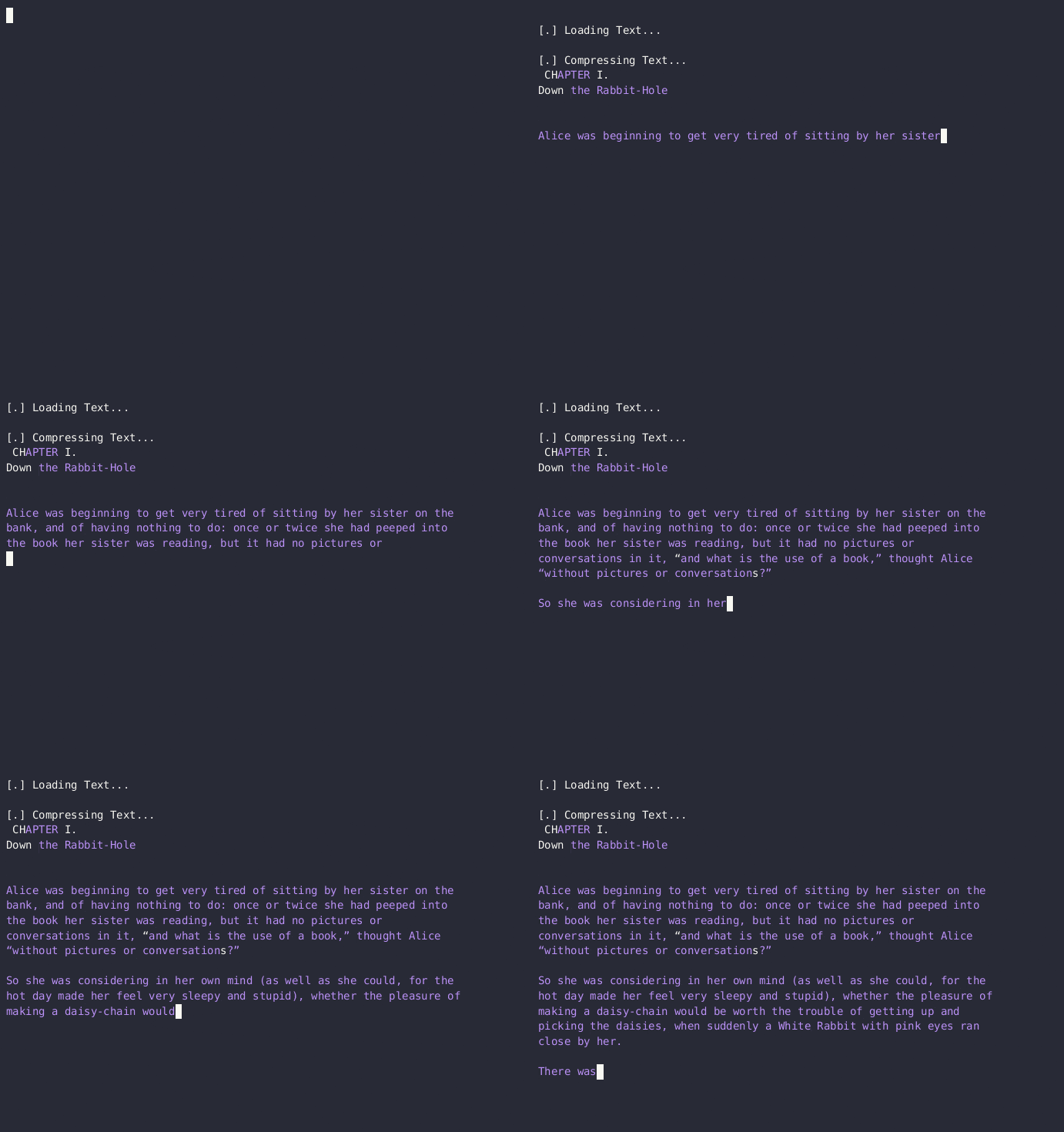
Here's the model processing the script. The text in blue matches text generated by the LLM and white is from the source text. Yes, it's slow.

The "Compressed" content:

Here's what the output looks like. Yes, it's in JSON format and yes it's ugly, but this is just a proof of concept, right? For the sake of clarity in this post, I picked an easy-to-read delimiter: @

This is the complete "compressed" text of Chapter 1.

["\ufeffCH@2@I.@1@Down@7@\n\n@15@\n@18@\n@13@\n@6@ \u201c@17@s@2@\n@79@ _@13@ _@72@ a\n@10@_,@106@ how@100@as@51@cup@24@ down@26@\u201d,@4@\n@17@\n@3@ underneath@11@cup@62@ fell@9@Which@23@?@4@\n@19@\n@35@ lear@2@se@12@room@2@\n@5@ _@25@ go@1@d\np@20@\n@19@ no@13@ thought@2@ nice@22@ _@2@\n@16@ walk@5@ward@12@she@3@gl@11@,@9@the@1@ word@7@ to@27@\n(and@21@\n@120@ Din@59@ here@5@ get@15@ream@19@\n@82@ tell@111@ the wind@21@ e@55@ a@50@ walked@11@\n@43@first@35@\n@104@\n@43@,@31@ would@7@ should@21@,@6@ h@43@\n@17@\n@17@\n@17@\n@8@,@11@,@21@,\u201d@2@ on@2@ large@23@ was@5@ _@1@_@21@ it@4@_@12@\nse@2@ nice@1@ hist@8@,@2@e@6@ and@9@_@34@\n@1@ th@1@t@5@ _@45@soon@11@ _@63@hot@3@,@10@*     @3@     @3@     @1@     @3@    *@10@\n@1@*@10@     @27@\n@20@right@5@ that@14@ that@9@wait@35@\n@36@fl@4@ is@36@ going@11@ for@3@ when@37@\n@13@ and@6@ cl@34@sat@7@Come@16@\nr@2@;@16@ very@2@,@24@\n@49@But@69@ very@3@ on@17@Well@14@ if@23@ can cre@11@\n@37@,@39@ generally@13@ much@28@ life"]
11,994 to 986 Characters

Wow, that's a pretty big reduction. The compressed text is only about 8% of the original size.

For fun, I compressed the whole file. This method reduced the number of characters from 174,355 to 25,360 - the compressed text being 15% of the original.

Decompression

Compression is pointless if I can't reverse it. Let's look at the decompress function:

Code
    decompressed_text = ""
    # split the parts into sections, text and generation counts
    parts = re.split(rf'({re.escape(DELIMITER)}\d+{re.escape(DELIMITER)})', compressed_text)  
    
    for part in parts:
        # if we're looking at a generation count, then generate text
        if re.match(rf'{re.escape(DELIMITER)}\d+{re.escape(DELIMITER)}', part): 
            number = int(part[1:-1])   
            for count in range(number):
                part = generate_text(decompressed_text)    
                if debug:
                    print(GREEN + part + RESET, end="",  flush=True)
                decompressed_text = decompressed_text + part
        else:
            # just add the text to the decompressed string
            decompressed_text += part
            if debug:
                print(part, end="",  flush=True)
Results

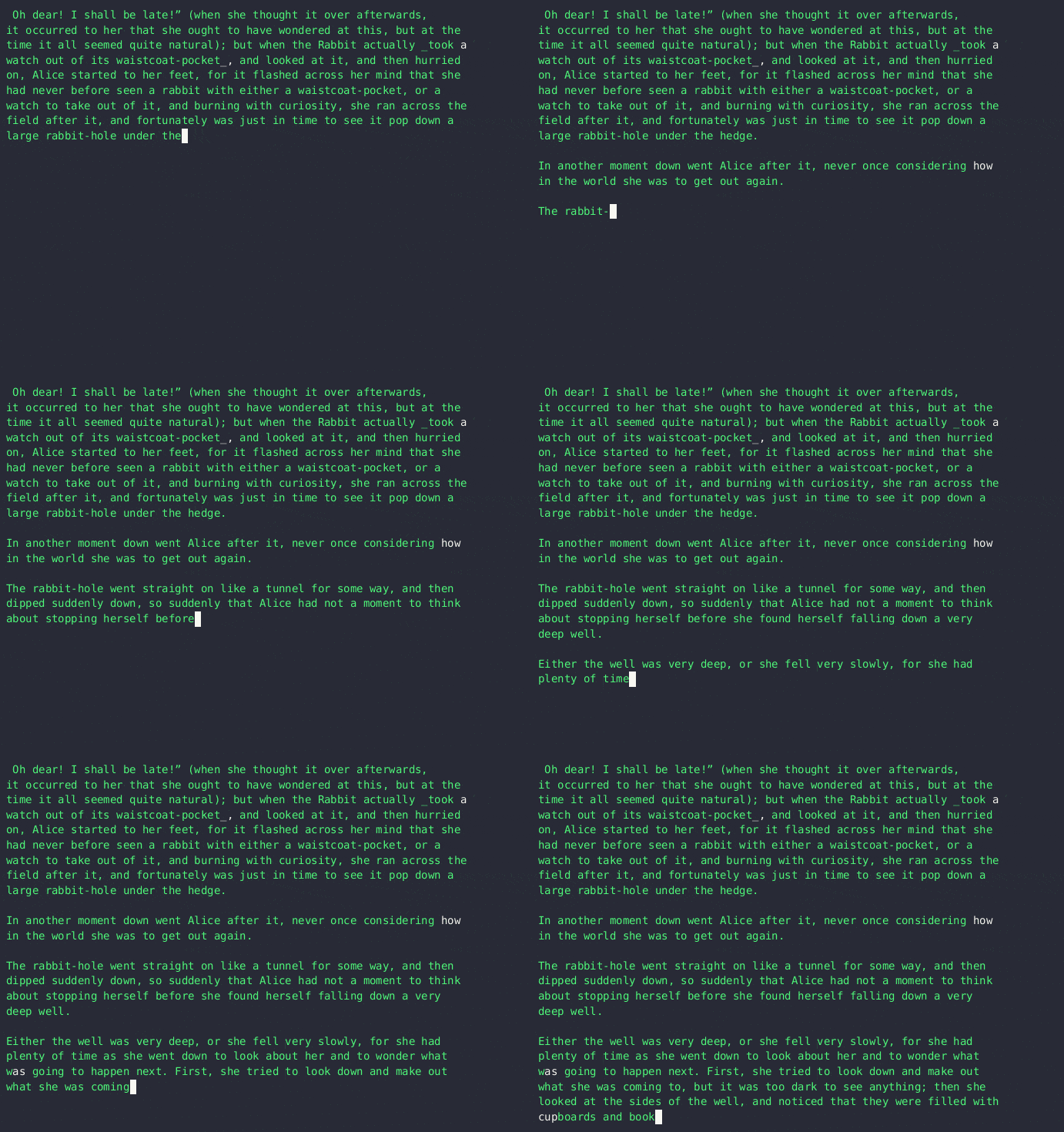
It works!

One more thing
  • I don't know how well this will perform across different GPUs, as I've heard that outputs could vary. While I don't have the ability to test this, I confirmed that the results were consistent between a GPU and a CPU.
  • I haven't gotten around to uploading the script to Github. Once I do, I'll post it here.
Here's a draft version of this post, compressed:
["\nWarning@1@ What f@1@ows@1@ not practical, well@1@written,@1@ finished@5@lso probably not the@1@ idea. It was fun th@1@u@1@h.@1@Int@1@duction@1@Large language@1@ are trained@1@ huge datas@3@ to learn the relationships and contexts of@1@ within larger doc@1@ments@1@ These relationships are what@1@s the@3@ text.\nRec@1@ I@2@ read concerns@1@ LL@2@ trained@1@ copyright@1@ text and repro@1@ing@1@.@1@ got@2@: Can training text be extracted@5@ The@1@, of@4@, and this@1@n@4@ (@1@ open@1@ question@1@ This led@3@ what it@1@ take@1@ extract entire@1@- or have an LL@1@ repro@1@e text it'@1@ ne@1@r dire@1@tly been@3@ I fig@1@ed that, for@1@ most@2@ many texts contain sections@1@ would natur@1@y align@2@ language relationships the@4@ If that@2@ the@2@ then@1@ I@2@ the@2@ infer those relationships@1@ correct its course whenever@1@ dev@2@.@1@So th@1@t@2@ how@1@ got@1@. @1@To see@2@ would@5@ use technology th@1@t I am@2@.@1@'ll use ll@3@ via its p@1@hon bind@1@.\nHow@1@ Works...\n@1@ solution I put@1@ has the@1@ key fun@2@ns@2@load@1@document(fil@1@ame@1@\n@1@ reads a@3@ token@2@ using@1@ model@2@ to@1@n@2@ If@1@ text@3@ for@2@'@5@ is@2@ smaller parts th@1@t fit@1@ this@2@ This prev@1@ token over@1@ow.@13@):@2@ generates@1@, n@1@ at@3@ w@1@h 0.0 as@3@ a static@1@. It ess@1@i@1@y continues@1@ text@2@ the input text stopped@2@compress@3@sour@1@e_@1@):@3@ attempts@3@ input@1@ by generating parts@4@ LL@3@ the@1@ te@1@ mat@1@s@1@ start@2@ source@2@ it continues\u2013 o@1@rwise@2@ adds@1@ character directly to@1@ comp@1@ string@1@\nTo record@1@ generated@2@ the fun@1@ion notes how@1@ tokens@1@ gener@1@ed@1@ places that@1@ between a del@1@.\nde@10@De@2@ text comp@2@ the compress@8@ te@1@ using@3@er@1@ recon@5@ by generating missing@1@ or directly app@1@ the text.@1@Testing\nI used two texts for t@1@t. For@2@,@1@ decided@2@ the@4@Al@8@\"@1@ I ass@1@med@3@ in@7@ As I@2@ I got very good compression. @1@Com@1@\nHere'@1@ the meat@2@ compression function@2@Code@1@\nResults@1@Here'@1@ the model processing@1@ script. The text in blue mat@1@s text gener@1@ed@2@ LL@1@ and white is from@1@ source@2@ Yes@4@ slow. @2@The \"Com@2@ content:@1@Here@2@ wh@1@t@1@ output@2@. Yes@4@ in JSON@1@ and@1@ it@2@ u@1@y,@1@ this@1@ just@4@, right@1@ For@3@ clarity in@4@ pic@1@d an easy@4@ del@1@: @\nThis@3@lete \"@4@ of Chapter@2@.@2@De@2@ @1@Com@1@ion is point@1@ if I@3@ reverse@2@ Let@2@ look@1@ the@1@p@1@s@8@\nIt@2@\nNot@2@I don@2@ know@3@ will perform ac@1@s@1@ GP@1@, as@1@'@1@ heard@1@ outputs cou@1@d@2@ While I don@3@ the ability@3@,@1@ confirmed@1@ the results@2@ bet@1@en a GPU@5@I haven@2@ gotten arou@1@d@1@ u@1@oad@1@ the sc@1@t@2@hub. Once I@5@ post it@3@Here'@1@ this post, comp"]
3,436 to 2,691 Characters

As expected, the method performs better better on data that the model has been trained on, but there's still some reduction in size.

Thoughts
  • The model is huge
  • Would it practical to train a model for the purpose of compression?
  • Could this method be used to identify any data that was used to train a model?
  • Do different models yield better results?
  • Can this be extended to other data types, like images?
Code
A demonstration of https://o565.com/llm-text-compression/A demonstration of https://o565.com/llm-text-compression/ - llm_compression.pyGist262588213843476
662a457530d36e0523b9134f
Extensions
Security Paralysis

Fear is our body's response to a perceived threat. Deeply ingrained in our survival instincts, fundamental to our human nature, it's designed to protect us from harm by prompting a response-- fight, flight, or, as in the case of this topic - freeze. While each of

Show full content

Fear is our body's response to a perceived threat. Deeply ingrained in our survival instincts, fundamental to our human nature, it's designed to protect us from harm by prompting a response-- fight, flight, or, as in the case of this topic - freeze. While each of these reactions has its evolutionary purpose, in the realm of security, the freeze response is problematic.

Nowadays, you'll be hard-pressed to find practitioners or executives who openly oppose the implementation of security controls. People generally agree on the need to address an issue or risk, but the method or its impact becomes a point of contention. Without an in-depth evaluation of the control and a clear understanding of the risk being mitigated, this disagreement can spiral into security paralysis, where the control simply doesn't get implemented.

I often witness this phenomenon as an organization matures its security program. Take the commonly accepted practice aimed at ensuring elevated privileges aren't used for day-to-day operations, or the introduction of multi-factor authentication and hardware tokens. These are widely accepted as best practices. Yet, almost without fail, there's resistance. You'll hear, "Developers can't work without root!" or "Hardware tokens are hard and expensive!" or maybe just "That's too much work." People nod and shrug and the effort just fades. The controls remain unimplemented, risks unevaluated, and informed decisions are left unmade. This is security paralysis.

Interestingly, the concerns raised might indeed have merit. The worry that the controls could impede the business operations may be realistic. In certain situations, the proposed control might even be more problematic than the risk it's meant to address. However, without a formal risk evaluation and a comprehensive grasp of the control's implications, no substantial decision is made. In this indecisiveness, not only is the organization left vulnerable, but it also lacks any rationale for its security decisions or lack thereof.

In the end, decisions, right or wrong, need to be made. A formal evaluation of both the risk and its proposed control will help an organization to make the best choice with the information at hand– and a documented, intentional, decision is always easier to defend than a choice left unmade out of fear.

64bff949cd7ec305b9a5a22a
Extensions
Thousands of Unused WordPress Domains Vulnerable to Takeover
vulnerabilitySecurity
There are thousands (Over 14,000 at the time of writing this) of top-level domains which can be used by anyone to host any content they'd like. These domains are pointing to WordPress.com, but don't have an account registered.
Show full content

There are thousands (Over 14,000 at the time of writing this) of top-level domains which can be used by anyone to host any content they'd like. These domains are pointing to WordPress.com, but don't have an account registered.

The Issue

Subdomain takeover is a well-worn technique popular with bug bounty hunters. Microsoft describes this issue as a "high-severity threat" which "enable[s] malicious actors to redirect traffic intended for an organization’s domain to a site performing malicious activity."

This problem isn't limited to just subdomains. Several providers allow their customers to use a custom domain for hosted content. WordPress is one of these providers.

WordPress.com provides their users with the ability to connect an existing domain to their WordPress site instead of using a WordPress subdomain. For example: instead of o565.wordpress.com, I could use the custom domain o565.com.

WordPress provides instructions which describe how to use a custom domain:

  1. First, attach your domain to your WordPress.com site.
  2. Update your domain’s “name servers” to point to WordPress.com. <- In most cases, this looks like the only step completed for these vulnerable domains.
  3. Set your connected domain as the primary site address.
Finding the vulnerable domains

Finding these unclaimed WordPress instances is simple.

Disclaimer: I tested the takeover process using a domain I owned. I didn't attempt a takeover for any other domain discovered.

  1. Gather a list of domains that use ns#.wordpress.com as a name server (# being 01, 02, ...).

2. Visit the domain. Look for text (xxx.wordpress.com doesn't exist). This tells us that the account the domain points to is unclaimed.

Here's a simple script that does some of this work for us:

#!/bin/bash

# randomize domain list
domains=$(sort -R ./domains.txt)
for domain in $domains
do
  echo "[.] Checking $domain..."
  result=$(curl -LsI -m 5 -o /dev/null -w %{url_effective} $domain)
  if [[ "$result" == "https://wordpress.com/typo/?subdomain="* ]]; then
      echo "[!] VULNERABLE ($domain)"
  fi
done
A sample method for finding vulnerable WordPress instances


3. Complete the takeover by registering the subdomain.
 - Click "Do you want to register"
 - Sign up for a wordpress.com account
 - Build your site
 - Publish (Go Live)
 - ???

Reporting

This was reported to Automaticc via their HackerOne page. Because this is a known issue, it was closed as a duplicate.

Potential Mitigations

I realize that *.wordpress.com domains are configured by end users and that this issue doesn't fit into the normal scope of vulnerability/bug bounty programs. In short, users configure their domain with WordPress name servers, don't complete the configuration, and this issue manifests.

WordPress does a good job restricting what their free tiers can do. The free tier restricts JavaScript, can't configure redirection, can't use custom plugins, etc. The requirement to pay for WordPress to get these features makes this less attractive for some attacks. With that said, I imagine a couple of possible additional solutions to this issue:

  1. Have users prove ownership of a domain before associating a domain with a wordpress subdomain. Google relies on DNS TXT records as one method to validate domain ownership.
  2. Require additional post configuration (in addition to WordPress nameservers) before associating a domain with a subdomain.

That's it! Thank you.

Supporting Material/References:
GitHub - EdOverflow/can-i-take-over-xyz: “Can I take over XYZ?” — a list of services and how to claim (sub)domains with dangling DNS records.&quot;Can I take over XYZ?&quot; — a list of services and how to claim (sub)domains with dangling DNS records. - GitHub - EdOverflow/can-i-take-over-xyz: &quot;Can I take over XYZ?&quot; — a list o...GitHubEdOverflow
6334584a516ab104ad8f15af
Extensions