life storyAIartificial-intelligencetechnologywriting
We are all using AI, marvelling at it one minute, scowling at it the next, but can we be passionate about something we didn't make?
Show full content
I am sure I am not alone with this. On a matter of fact this is just another voice adding to the cacophony from the clunky wheel of change. It may sound just like the others. Well, this is mine.
We are all using AI, marvelling at it one minute, scowling at it the next, but likely there is no going back. There are piles of projects and piles of tasks where AI tools are such a great improvement to the daily choirs of a software developer. Give it a crash dump without symbols to help you make sense of the issue, great! Summarise the work done to present a good concise summary for a pull request, really good. Implement an initial set of unit tests for this module, lucky I got that one down! Read this reference implementation and document it, ok now I get it. All the tasks that I don’t want to do, but I still have to, are nicely done. All the tasks I am not good at… So good, so good. But…
But, besides the abrasive, thankless part of the work, there is the work I like to do; there is the part I am already good at, where I don’t need a boost to catch the glimmer of light, high up where I do shine. Personally, I don’t find the spark in the productivity metrics. I dig it out of the problem solving, in the cunning design where many things fit. I find joy in coming up with ideas for polished tools and refined, expressive UX, disarming the user with simplicity.
It takes time though. Crafting good designs take time. Good solutions don’t appear on paper; markdown is not a fertile ground for ideas. Innovation comes from imagination. Imagination comes from tension and struggle, at least for me. I can’t come up with a novel idea while writing specs, I can only come up with what I have already done, and then some, but not that much more. To really imagine I need to feel the problem, be immersed in it. Feel what the user feels, while juggling the pieces, and realize how wrong I have been all along. I can’t solve a problem I don’t understand. I can’t truly understand a problem by just thinking about it.
Can AI do that? Can the AI imagine, solve the problem? Can the AI come up with something novel? I think it’s the wrong question! Maybe it can, maybe it will… But does it matter?
It might if the focus in on productivity. Getting KPI under check, closing tickets. AI tools *are* productivity tools. AI agents are thankless workers, digital subordinates, getting some work done, under the right management.
Management… outsourcing, actually. You are a manager, outsourcing the work to a swarm of helpfully, tireless developers in a faraway land of the 4-bit inference. Write detailed specs and you may get what you wanted. Your soft skills don’t matter here. What prompts in Vegas stays in Vegas. The go-to mentor vs the blame-thrower won’t win points with HR. Agents won’t seek opportunities to follow your charisma and vision on your next project.
Meanwhile, armed with these new skills you start to forget what you once knew, what you were good at. You are a manager now, you don’t work the problem, you don’t write code, you formulate your request, you work in logistic. The expectations change.
As agents’ manager, you don’t deliver for yourself, you barely keep up with what your agentic team produces. Spending six months to crack a problem becomes unthinkable, 1 month? What about a week, a day? Do you have the patience anymore? It’s faster; it’s easier. The agents do it for you, free from effort. But we know we don’t value what we get for free. You may climb a mountain, and the experience of standing on that peak top may shape who you become. It becomes just another picture in your camera roll if an elevator brought you there. Maybe what you’d tell your friends is how long the elevator took, the view forgotten. No, friends. With no effort there is no feeling of reward. There is only a job to do. You do it, you get paid. Productivity. The end!
I tried to use AI on my hobby project, where within me I stoke the flame of passion and curiosity, where I try to cover some ground on the many things I wanted to try. The “things” work, just too easy. But I feel nothing for what is made. How can I feel nothing about what is supposed to be my passion, my happy place? I am an outsourcing manager, expecting to see solution turned around at the speed of thought. Where do I find the patience, the time and energy to do the things the old way, you know… the right way, the way I used to enjoy. Will I still? Will… will power? It’s a finite resource, you know… will power. Borrow too much to find yourself out of it, burned out.
I don’t have an answer. Hopefully there is some angle yet to explore, something that will bring some sense to it all. Maybe coding by a human comes back to be a form of expression, a form of art. It’ll be even more niche than it already is. But I think I could refuel for passion in there.
I present algorithms to compute unique edges in a polygonal mesh.
Show full content
In this post I will present three equivalent algorithms to compute the edges of a polygonal mesh. The algorithms are subsequent optimization steps to produce the exact same result with progressively increased efficiency. In the first part of this text, I will describe the typical representation of a mesh topology, distinguish between different concepts of edges.
To better define the subject, picture the wireframe of a polygonal mesh. Assuming there is no overlapping geometry in the scene, if you’d have to draw each single segment once, you would be drawing edges. That would be different than drawing polygons outline, because in drawing adjacent polygons you would end up drawing some, if not most of the segments twice.
What this post is not
This post is not about topological acceleration structure, like half-edges, winged-mesh, corner table, vertex-vertex, or similar. I borrow some of the terms though. I will refer to half-edges throughout the text, to distinguish from unique edges, I describe the input mesh in the very common face-vertex mesh format.
Introduction
Most of 3D graphics revolves around polygons in one way or another. The cool kids today work with distance fields and Gaussian splats. But let’s forget about that, and NURBS and parametric surfaces for a moment. Chances are, if you’re working on a graphics project, you’re dealing with polygonal meshes.
The standard way to describe a mesh is through a set of points connected in a specific winding order, often referred to as the topology. The simplest possible representation is called triangle soup, where a set of point triplets is defined, with each triplet representing the vertices of a triangle. That’s it. It’s the simplest but also the most wasteful and impractical way to describe a mesh, so let’s skip a few history pages (forget about fans and strips). The next and more useful way to describe a mesh is via a set of points and indices referencing those points. Let’s define a square:
The indices define the connection order between points. In this case, assuming triangles, we have six indices forming two triangles. This gives us a square lying in the XZ plane.
Triangle meshes are the lowest common denominator—they are practical for rendering due to extensive hardware support, but they are not very convenient for modeling or manipulation. One way to improve this is to stop assuming that polygons are just triangles. In fact, the word polygon comes from Greek and means many corners. But how many? To define this explicitly, a third piece of information is added to specify how many polygons there are and how many sides each has. This data structure is called Face-Vertex Mesh. For example:
Here, we have an equivalent square with the same points as before, but this time, faceCount tells us there is a single polygon with four indices.
There are many other interesting properties to consider. For example, what is the winding order of the indices in relation to the position—do they rotate clockwise or counterclockwise? But let’s leave that for now. Instead, let’s add a second polygon, another square adjacent to the first, and see what we can observe.
We have two polygons, 6 points, 7 edges. Where do these come from? Each square has 4 sides, but the two squares are adjacent along one edge. The edge formed between point 1 and 4 is shared.
The vertical edge in the middle appears twice in the topology: first as the index pair (1, 4) and second as (4, 1). To distinguish between these, we refer to them as opposite half-edges. This term is borrowed from the widely used half-edge data structure in mesh processing. You can think of it as if each polygon owns half of the edge.
Opposite half-edges have the key property that their index order is swapped. In diagrams, they are often represented as half-arrows, following the winding order of the polygon indices. You can break this convention by inverting the winding order of one of the two polygons. When that happens, you create a type of mesh that most modeling applications—and many mesh-processing algorithms—struggle with. This class of meshes is called non-2-manifold, or simply non-manifold.
For the purpose of this text, I define a half-edge simply as a pair of indices, without assuming any connectivity properties. This distinction helps clarify the difference between an edge and a half-edge. So, the index pairs (1, 4) and (4, 1) represent two half-edges, but they still correspond to the same edge. Intuitively, half-edges are derived from the topology: they are determined by the indices, with each half-edge consisting of an index and the next one in the polygon’s winding order.
float3 points[] = ...
int   indices[] = ...
int faceCount[] = ...
int nFaces = N;

for (int faceIndex = 0, offset = 0; faceIndex < nFaces; ++faceIndex)
{
    const int sides = faceCount[faceIndex];
    const int* polygonIndices = indices + offset;
    offset += sides;

    for (int vertex = 0; vertex < sides; vertex++)
    {
        int nextVertex = (vertex + 1) % sides;
        int indicesPair[2] = { polygonIndices[vertex], polygonIndices[nextVertex] };

        // Store pair ...
    }
}
This listing doesn’t perform any operations—it simply illustrates how to interpret indices, faceCount, and winding order to construct index pairs, which serve as the base data for half-edges.
What else can we observe? Points 0, 2, 3, and 5 are each connected to a single face, while points 1 and 4 are connected to two faces. A similar observation applies to edges: points 0, 2, 3, and 5 are each connected to two edges, whereas points 1 and 4 are connected to three. These properties are known as point face-valence and point edge-valence.
Closely related is the concept of adjacency—for example, what is the list of faces connected to a point with valence N? Or what are the edges (or opposite indices) associated with a point of valence M? These properties will prove useful later on and will become key insights in designing efficient algorithms!
Unique Edges
Any given mesh has a number of half-edges equal to the number of indices. In the example mesh above, there are 8 indices, meaning there are 8 half-edges. However, there are only 7 edges—7 unique segments that a user can count.
Now, suppose I want to implement a modeling function in a 3D editor where users can click on edges to perform operations. Or perhaps, given a mesh, I need to generate edge indices for wireframe rendering. Or maybe I am implementing subdivision surfaces and I want the user to specify edge creases. How do I determine the number of unique edges? How do I construct that data?
Defining Unique Edges
The first key observation is that opposite half-edges have their index pairs swapped. For example, the polygons containing (1, 4) and (4, 1) both reference the same edge. If we sort each pair in ascending order, both representations become (1, 4). By consistently defining edges as sorted index pairs, we establish a definitive way to identify unique edges. I refer to the lower of the two values the minor index, the other the major index.
To efficiently store edges, we can define a supporting structure where each edge is represented as a sorted index pair. This allows for easy comparisons and lookups. Instead of a struct, I use a union to store the indices as a single 64-bit unsigned integer, making comparisons more efficient.
// An edge expressed as two indices to points in some geometry. The two indices are sorted
// in ascending order to allow to identify edges shared between faces.
union Edge
{
    inline Edge() {}
    inline Edge(uint32_t v0, uint32_t v1)
    {
        if (v0 < v1) v[0] = v0, v[1] = v1;
        else         v[0] = v1, v[1] = v0;
    }

    inline bool operator  < (const Edge& other) const { return code < other.code; }
    inline bool operator == (const Edge& other) const { return code == other.code; }
    inline bool operator != (const Edge& other) const { return code != other.code; }
    inline const Edge& operator = (const Edge& other) { code = other.code; return *this; }

    struct
    {
        uint32_t v[2];
    };
    uint64_t code;
};
Eliminating Duplicates & Enumerating Edges
Now, we need a way to create a unique set of edges to remove duplicates. Additionally, we might want to assign each edge a unique index—for example, which of these is edge 3?
A natural and principled way to establish a definite order is to count edges as we encounter them in the topology. This ensures consistency and makes edge indexing straightforward.
The map approach
Let’s start with the laziest possible approach—using an associative container such as a map or hash map. In this example, we use a map to detect duplicates and store the results in a vector called edges, without keeping the map afterward.
The initial algorithm constructs edges by iterating over pairs of point indices for each face. It inserts each edge into a map (of the unordered variety), ensuring only the first occurrence of each edge is retained while duplicates are discarded.
Since insertion into a map has a unit cost of O(log n), the overall complexity of this approach is O(n log n). This makes it relatively expensive compared to other possible methods.
// My initial algorithm makes edges by iterating faces point indices pairs, insert into a map
// (of the unordered variety) to keep only the first instances of those edges and discard duplicates.
// This makes the algorithm O(n log n) in complexity. The unit cost of inserting into the map is high.

// Prepare edges data. An edge is defined as the two indices of the two points forming the edge.
// Edges are unique and shared across faces.
std::vector<Edge> edges; //< The result

uint32_t nextEdge = 0;
std::map<Edge, int> edgesMap;
for (int fIndex = 0, offset = 0; fIndex < nFaces; ++fIndex)
{
    int count = faceCounts[fIndex];
    for (int vIndex = 0; vIndex < count; vIndex++)
    {
        uint32_t v0 = indices[offset + vIndex];
        uint32_t v1 = indices[offset + ((vIndex + 1) % count)];
        Edge edge(v0, v1);

        auto [iterator, newEntry] = edgesMap.insert({ edge, nextEdge });
        if (newEntry)
        {
            edges.push_back(edge);
            nextEdge++;
        }
        else
        {
            // If you need to associate the existing edge index to an half edge (or the topology)
            // that can be accessed as iterator->second.
        }
    }
    offset += count;
}
Why Use a Map Instead of a Set?
Technically, we could use a set instead of a map, but there are cases where we may need to retrieve the index of an edge associated with a half-edge. Using a map allows access to iterator->second, which can be useful when integrating edges with the topology.
For better performance, the map can be replaced with a hash-based container such as std::unordered_map. This would reduce the lookup time from O(log n) to O(1) on average, improving efficiency. I leave this as an exercise for the reader.
Flat vector + sort
Associative containers like map and unordered_map are often inefficient because they allocate memory in a granular way. Even if the insertion algorithm may be efficient in theory, the execution is often not due to memory management. The following algorithm retains the same core concept but implements it with a simpler memory layout. The code itself is longer, but the amount of executed code is smaller, leading to better performance.
// Similar to the algorithm using an unordered_map, but now using flat vectors.
// This approach requires more steps and a higher memory peak but achieves a 50% speed improvement.
// The overall complexity remains O(n log n).
struct EdgeEntry
{
    Edge e;
    uint32_t entryIndex;
    bool operator==(const EdgeEntry& other) const { return e.code == other.e.code; }
    bool operator!=(const EdgeEntry& other) const { return e.code != other.e.code; }
};


const int nIndices = indices.size();
const int nFaces   = faceCounts.size();

std::vector<EdgeEntry> halfEdges;
halfEdges.resize(nIndices);

for (int fIndex = 0, offset = 0; fIndex < nFaces; ++fIndex)
{
    const int count = faceCounts[fIndex];
    for (int vIndex = 0; vIndex < count; ++vIndex)
    {
        uint32_t v0 = indices[offset + vIndex];
        uint32_t v1 = indices[offset + ((vIndex + 1) % count)];
        Edge edge(v0, v1);

        halfEdges[offset + vIndex] = { edge, uint32_t(offset + vIndex) };
    }
    offset += count;
}

// Sort to coalesce consecutive entries of the same edge. Use stable sort to
// preserve the order in which edges were introduced. This allows us to remove
// duplicates and keep the first entries of such edges. This first sort step is the
// expensive portion as the list of edged with duplicates is typically twice as long.
std::stable_sort(halfEdges.begin(), halfEdges.end(),
    [](const EdgeEntry& a, const EdgeEntry& b) { return a.e.code < b.e.code; });

// Remove duplicates
halfEdges.erase(std::unique(halfEdges.begin(), halfEdges.end()), halfEdges.end());

// Sort again by entry index, this produces a list of edges in the topology visiting order,
// which is what we want.
std::sort(halfEdges.begin(), halfEdges.end(),
    [](const EdgeEntry& a, const EdgeEntry& b) { return a.entryIndex < b.entryIndex; });

std::vector<Edge> edges; //< The result
edges.resize(halfEdges.size());
for (size_t i = 0; i < halfEdges.size(); ++i)
    geo.edges[i] = halfEdges[i].e;
In this algorithm we initially produce a vector of Edges including any duplicate. We know the size of the vector upfront is exactly the number of indices (same as the number of half edges). We don’t store just edges, but edges along with the half edge index, which at this point takes the form of the sequence [0, n-1]. Such vector is allocated once, reducing the cost of memory allocation, however we know we allocate twice as many entries on average; hence this implementation will produce a higher memory utilization peak.
In the second block we use stable sort to group together duplicate edges. Stable sort guaranteed that the relative order among identical entries don’t change, so for each duplicate group, the first entry among the duplicates is the first that was encountered by visiting the topology.
In the third block we remove duplicates, so we are left only with unique edges and their insertion index. We sort once more, this time using the insertion index, which produce the final sequence of edges in the desired order.
Because we used sorting algorithms from the library, we have to copy the sorted EdgeEntry vector to the result vector of edges. One could consider implementing a tighter sorting algorithm where edges and inserting indices are separate so that this last copy wouldn’t be required… However, for memory compaction, if we need to keep edges around for numerous meshes, we probably want to consider the EdgeEntry as temporaries to release, while allocate a tight buffer for the exact number of unique edges, just like the code does.
The result of this version of the algorithm is identical to the original, but it runs about 50% faster when compared to a std::unordererd_map.
Minor Valence
Both algorithms so far performed a search/sort over the entire mesh, which is the naive take. But we know that points are connected to one another in a specific way. The point edge valence tends to be a small number, typically not much bigger than 3-4. If we find a way to leverage this property, we can design an algorithm with O(n) complexity, which will perform much better.
It is not possible to know upfront the vertex valence. Let’s enumerate what each point in the topology connects to:
// point index -> connected to
point 0 -> [1, 3]
point 1 -> [0, 2, 4]
point 2 -> [1, 5]
point 3 -> [0, 4]
point 4 -> [1, 3, 5]
point 5 -> [2, 4]
Apparently, to store the full vertex valence we need a vector for 14 entries. Which is twice the number of unique edges we expect, which is not a known quantity. We don’t know how many entries we have until we count them. We don’t know which edge is duplicate until we compare duplicates.
We can create a variant of the valence by reasoning with sorted indices pairs where we only need to observe the smallest of the two indices. Let’s call this the minor valence. Observe again this quantity:
The goal is to identify that the last entry in polygon 1 is duplicate. To do that we only need to know which other indices point 1 is paired with. Extrapolating: we need to know which major indices are paired with each minor index. Index 5 only appears as major index, we don’t need to construct valence for it. Let’s count again:
// minor index -> connected major indices
point 0 -> [1, 3]
point 1 -> [2, 4]
point 2 -> [5]
point 3 -> [4]
point 4 -> [5]
point 5 -> []
We only have 7 entries now, half as many as before. We can liberally allocate our scratch space with the size of the number of indices and our algorithm will stay well within. We also have even a smaller number of entries for each minor index where to search for duplicates. This is very good.
Building the minor valence table is done in three steps: first we count how many times the minor index appears in all non-unique edges, we can do that iterating over the topology. We sore those in a vector named valence. In this fist pass we don’t know where to store the major indices yet
std::vector<int> valence(geo.points.size(), 0);

// Count how many times the minor edge index appears. Differently from vertex valence,
// some points will be counted zero times.
for (int faceIndex = 0, faceOffset = 0; faceIndex < nFaces; ++faceIndex)
{
    const int sides      =  faceCounts[faceIndex ];
    const uint32_t* face = &indices   [faceOffset];

    // Here we loop over count-1 and extract the last iteration to avoid the modulo over
    // count
    for (int vertexIndex = 0; vertexIndex < sides; vertexIndex++)
    {
        const Edge edge(face[vertexIndex], face[(vertexIndex+1) % sides]);
        valence[edge.v[0]]++;
    }
    faceOffset += sides;
}
How many major indices we have per point is entirely derived from the topology. A way make space for that in a buffer is to compute the prefix sum of the minor valence. This gives us a table of offsets to the adjacency buffer for each major index list.
// Build a prefix-sum in offsets
std::vector<int> offsets(points .size(), 0);
for (int index = 0, offset = 0; index < points.size(); ++index)
{
    offsets[index] = offset;
    offset += valence[index];
    valence[index] = 0; //< reset valence to use it as a counter for the number of candidates
}
The third step is where we build the final minor adjacency table. However, we actually don’t need that table, we can produce the final edges as we fill the table. The table only serves us to check if we encountered a connected vertex or not. In a nutshell. We have an empty table of adjacency; we have offsets to space where to store major indices. We can iterate again, accumulate candidate major indices to compare against and produce the new edges.
Once more let’s iterate over the topology: every time we construct an edge, we read the for the minor index the offset into the adjacency table and the current number of major indices candidates. In the inner loop we go over the candidates. If we can’t find the major index of the current edge, then we have a new edge! As said, this inner loop is very short, 1.5 elements on average. This makes the algorithm linear in complexity!
// Prepare edges data. An edge is defined as the two indices of the two points forming the edge.
std::vector<int> adjacency(geo.indices.size(), 0);
for (int faceIndex = 0, faceOffset = 0; faceIndex < nFaces; ++faceIndex)
{
    const int sides      =  geo.faceCounts[faceIndex ];
    const uint32_t* face = &geo.indices   [faceOffset];

    // Here we loop over count-1 and extract the last iteration to avoid the modulo over count
    for (int vertexIndex = 0; vertexIndex < sides-1; vertexIndex++)
    {
        const Edge edge(face[vertexIndex], face[(vertexIndex + 1) % sides]);
        const int count  = valence[edge.v[0]];
        const int offset = offsets[edge.v[0]];
        int* candidates = &adjacency[offset];

        bool found = false;
        for (int i = 0; (!found) & (i < count); ++i)
            found = (edge.v[1] == candidates[i]);

        if (!found)                         //< Record a new edge:
        {
            valence[edge.v[0]]++;           //< increment the number of candidates
            candidates[count] = edge.v[1];  //< record the new candidate
            edges.push_back(edge);
        }
    }

    faceOffset += sides;
}
Profiling, it stands out that a not negligible portion of the time is spent in imul instruction because of the modulo operations… we are at that level of optimization. Without stepping into micro-optimization territory, I take one last step to unroll the loops over polygons size. Here is the final listing:
// Algorithm based on vertex valence. We leverage the mesh connectivity to eliminate
// the sorting step. The algorithm searches for duplicate edge in the vertex valence,
// which is very small set. This algorithm has O(n) complexity. It is over an order
// of magnitude faster than the original.
std::vector<int> valence(points.size(), 0);

// Count how many times the smallest point index in a edge appears. Some point indices
// will be counted zero times (as we only count the smallest of the two indices), which
// is a bit different from a vertex valence count.
for (int faceIndex = 0, faceOffset = 0; faceIndex < nFaces; ++faceIndex)
{
    const int sides      =  faceCounts[faceIndex ];
    const uint32_t* face = &indices   [faceOffset];

    // Here we loop over count-1 and extract the last iteration to avoid the modulo over
    // count
    for (int vertexIndex = 0; vertexIndex < (sides-1); vertexIndex++)
    {
        const Edge edge(face[vertexIndex], face[vertexIndex+1]);
        valence[edge.v[0]]++;
    }
    // Extracted last entry to avoid modulo over count
    {
        const Edge edge(face[sides-1], face[0]);
        valence[edge.v[0]]++;
    }
    faceOffset += sides;
}

// Build a prefix-sum in offsets
std::vector<int> offsets(points.size(), 0);
for (int index = 0, offset = 0; index < points.size(); ++index)
{
    offsets[index] = offset;
    offset += valence[index];
    valence[index] = 0; //< reset valence to use it as a counter for the number of candidates
}

// Prepare edges data. An edge is defined as the two indices of the two points forming the edge.
std::vector<int> adjacency(indices.size(), 0);
for (int faceIndex = 0, faceOffset = 0; faceIndex < nFaces; ++faceIndex)
{
    const int sides      =  faceCounts[faceIndex ];
    const uint32_t* face = &indices   [faceOffset];

    // The inner loop body is implemented as a lambda to not repeat it twice (to avoid the
    // modulo as we did in the for loop to produce the initial valence). This is the fastest
    // option I have testes so far.
    auto edgeIteration = [&](int vertexIndex, int vertexIndexNext)
    {
        const Edge edge(face[vertexIndex], face[vertexIndexNext]);
        const int count  = valence[edge.v[0]];
        const int offset = offsets[edge.v[0]];
        int* candidates  = &adjacency[offset];

        bool found = false;
        for (int i = 0; (!found) & (i < count); ++i)
            found = (edge.v[1] == candidates[i]);

        if (!found)                            //< Record a new edge:
        {
            valence   [edge.v[0]]++;           //< increment the number of candidates
            candidates[count    ] = edge.v[1]; //< record the new candidate
            geo.edges.push_back(edge);
        }
    };

    // Here we loop over count-1 and extract the last iteration to avoid the modulo over count
    for (int vertexIndex = 0; vertexIndex < (sides-1); vertexIndex++)
    {
        edgeIteration(vertexIndex, vertexIndex+1);
    }
    {
        edgeIteration(sides-1, 0);
    }

    faceOffset += sides;
}
Conclusions
I presented three different algorithms that produces the same deterministic result. An interesting new challenge would be to implement a parallel variant, perhaps to run on the GPU. The first two passes of the third algorithm “minor valence” algorithm are trivially parallel, but the last part isn’t unless one can discount the requirement of deterministic edges order in the output.
To the best of my knowledge, the minor valence algorithm I have introduced is novel. But as things go, it is not unlikely there are many GFX developers out there who implemented a similar algorithm. Likely I may have overlooked the literature too, it wouldn’t be the first time I think I invented something new, only to discover after the fact somebody else got there first. If you know this algorithm already has a name, please let me know and I will add a link to it.
[Correction] I have been contacted by other developers who created similar solutions to my minor valence algorithm, but no papers seem to have been published. Perhaps most notably:
Aytek Aman & Simon Fenney resorted on a technique similar to my flat vector + sort algorithm on their Fast Triangle Pairing for Raytracing HPG publication.
Stéphane Ginier described something in between traditional vertex valence with a fixed max count, supported by a fall back to a hash map for points exceeding the max valence.
If I’ll have the time, I will come back to this post to add a table of measurements in respect to some known mesh data. For now, I just say I observed speed improvements over an order of magnitude of my last solution compared to the initial map-based algorithm with std::unordered_map. I didn’t try to compare variants leveraging fast hash maps, mostly because I prefer specific minimalist algorithms over complex containers. If you try let me know that too!
In a path tracer, sampling a light source that is driven by a texture, such as a HDR map, requires mapping a 2d random number to texels of the map, with a probability that is proportional to the brightness of those texels. The mathematical tool in use to do that is called the Cumulative DistributionContinue reading "About fast 2D CDF construction"
Show full content
In a path tracer, sampling a light source that is driven by a texture, such as a HDR map, requires mapping a 2d random number to texels of the map, with a probability that is proportional to the brightness of those texels. The mathematical tool in use to do that is called the Cumulative Distribution Function, or CDF for short. Because a light map is not a function that can be analytically integrated and inverted, this involves building a table to lookup. This article describes my method to construct such a table on the GPU, with focus on performance.
In this text I will use CUDA as the programming language, but the same technique can be ported to traditional graphics pipelines, with as Slang, HLSL or Metal.
Example application. The dome light in this captured session is a 4k texture map dynamically generated by a plasma shader. The renderer computes the sampling CDF per frame, allowing the path-tracer renderer to importance sample the dynamic light map in real time.
As for the theory of light map sampling, the explanation in PBRT is as good as anyone else’s, and good chance is you already have the understanding of how importance sampling works. Sampling a light map according to such a technique involves sampling two probabilities, named the marginal and conditional CDFs. To keep this text simple, let’s just say this is a 2D CDF. Please refer to the related PBRT chapter as a refresher. As for good quality HDR texture maps, Poly Haven is an excellent resource.
Building a CDF table tends to involve a prefix-sum operation, also known as scan. Here is some simple C scalar code for reference:
Listing 1 implements what is also known as exclusive prefix-sum, notice how the first loop iteration stores zero in the first results element, while the last doesn’t include the ending input value. It derives that there is such thing as an inclusive variant of the algorithm, which start with the first value and ends with the summation result. The difference between the two variants is where they include or not the related input value.
The function scalar_prefix_sum returns the summation of the elements, which can be used to normalize the result and produce the tabulated CDF. Between the two calls, the input value is read from memory, an intermediate result is written back, then read again in the second function and stored once more. Two reads, two writes per-element. Jumping a bit ahead here, but when the input data is large, these memory reads and writes tend to become the bottleneck and the algorithm becomes memory bandwidth bound.
A 2D prefix-sum can be easily done by computing individual normalized prefix-sums over the rows of the table (the conditional probability), their sums fill an additional column for which one more normalized prefix-sum is computed (the marginal probability).
void cdf_2d(const float* input, const int sizeX, const int sizeY,
            // results:
            float* cdf_x, float* cdf_y)
{
    // Compute the normalized prefix-sum over each row
    float running_sum = 0;
    size_t offset = 0;
    for (int y=0; y<sizeY; ++y)
    {
        float row_sum = scalar_prefix_sum(input + offset, sizeX, cdf_x + offset);

        normalize(row_sum, sizeX, cdf_x + offset);

        cdf_y[y] = running_sum;
        running_sum += row_sum;
        offset += sizeX;
    }

    // Normalize the prefix-sum of the column
    normalize(running_sum, sizeY, cdf_y);
}
Listing 2 starts from a planar bitmap with floating point values expressing the luminosity of the map. To compute a correct CDF, some extra computation may be required depending on how the map is distorted: a light map applied to a rectangular area light doesn’t have any distortion to it; but the typical HDR light map is a latlong map (latitude-longitude texture map), in other words it maps to spherical coordinates. Since in a CDF we deal with probability distribution and we sample it with 2d cartesian distributions of random numbers, it is important that the change of variables is accounted for (scaling the map per- pixel brightness according to the Jacobian of the change of variable). I just mention this because I am omitting that from code listings so far, as I want to focus on the parallel computation of the table instead. Don’t worry, the final listing contains the full implementation.
Parallel algorithms
The parallel prefix-sum algorithm is one of the first parallel algorithm you may have studied. It’s not trivial, but simple enough to grok in one session. These have been considered staples since the 80s. Here is the original paper for your enjoyment. More “work efficient” versions of the algorithm followed, even though I have found to be mostly a distraction from implementing my own technique.
Parallel algorithms on the GPU builds on forms of inter-thread communication, such as atomics, wave-intrinsics, and the use of shared memory. Some primer can be found in this Siggraph course material. I borrowed my initial implementation of the BlockScan from there.
The basic concept in that course is to leverage the GPU warps or blocks parallelism to compute “local” prefix sums over ranges of elements, then synchronize across the device and update these to produce the final result. Say we have 1 million (220) values to scan, and the block size is 128, giving 8192 blocks; the GPU can compute very efficiently the local sums within each block. More expensive is the second step where global synchronization is required between the 8192 blocks.
One could store the blocks sums in a temporary buffer and run the same parallel algorithm to those partials, creating a hierarchy of summations; then reload the block local sums, and apply those offsets. This would require launching multiple kernels, which isn’t free. Also, given how small the workload is for some of the hierarchy levels, the GPU is likely to run underutilized.
One could use atomics to spin-lock blocks, have them wait until previous blocks completed and atomically increment a sum offset to then apply to the block prefix-sum. The advantage of this is that we don’t need to read and write the elements multiple times. The problem in this approach is that while the warp/block prefix-sums are very efficient to compute and in fact massively parallel; synchronizing to align each block to the sums of the previous parts is a serial algorithm, and any time there is a serial portion of computation in the middle of a parallel algorithm, Amdahl’s law kills scaling and the performance of it. Such tricks are explained in the course I linked above, although the authors don’t go much in the details on how the performance may be limited using each of those techniques.
Parallel 2d CDF
Our problem set is different than that in the parallel algorithm’s textbooks… We have a 2D prefix sum. There are millions of input elements, but each of the rows is an individual prefix sum in its own. So, we can scavenge opportunities for parallelism at multiple levels.
The typical light map range in resolution from 1024 x 512 up to 32k x 16k. It is difficult to find higher resolution images around, and even harder to find production cases in excess of that, even among the most hardcore offline rendering artists. So, let’s list our requirements and come up with something optimal:
The maximum number of elements in a single prefix sum is 32k.
The speed of light of any algorithm is going to be set by how fast we can read and write from and to memory.
We should aim at reading the input values once and store the results once. This is a challenge if we need to normalize the CDF, which can only be done after the prefix sum had been computed in full, which typically requires reading and writing to and from global memory twice.
Launching multiple kernels requires loading and writing partial results, with performance hits more severe than just the cost of an extra kernel launch. So, we should come up with an algorithm that delivers in a single kernel.
My intuition starts at the number 32k for the resolution: modern GPUs have a register file per SM with 64k 32 bits registers. The maximum number of registers per thread is 255… So, if we attempt at loading an entire row of texels per block, with 32k elements per row, and blocks of 1024, only 32 registers are needed to hold the data. It seems we should be able to stretch the algorithm to support textures of even higher resolution and have plenty of registers to keep SMs occupied.
By using blocks large enough, we can try to load an entire raw of texels into registers; compute a prefix-sum and normalize the CDF without ever leaving registers. The maximum block size may be 512 or 1024, depending on the GPU, which means that each block would have to loop over the row elements and carry forward the running sum. The number of iterations in such loops are given by row-resolution divided by the block size, thus the number of iterations should be in the single digits. Let’s not forget that we have thousands of individual rows to process, in fact more than a GPU can schedule concurrent blocks (or near that limit), so it seems that this approach has the potential to saturate the GPU.
Let’s begin with the implementation of the block prefix-sum (initial code inspired by the course material I linked above):
// Compute the parallel prefix-sum of a thread block
template<typename ScanMode, typename T> __device__
inline void PrefixSumBlock(T& val, volatile T* smem, T& total)
{
    const ScanMode scanMode(val);

    for (int i = 1; i < blockDim.x; i <<= 1)
    {
        smem[threadIdx.x] = GetLastFieldOf<Tn, T>(val);
        __syncthreads();

        // Add the value to the local variable
        if (threadIdx.x >= i)
        {
            const T offset = smem[threadIdx.x - i];
            val += offset;
        }
        __syncthreads();
    }

    // Apply prefix sum running total from the previous block
    val += total;
    __syncthreads();

    // Update the prefix sum running total using the last thread in the block
    if (threadIdx.x == blockDim.x - 1)
    {
        total = val;
    }
    __syncthreads();

    // Apply the final transformation (i.e. subtract the initial value for exclusive prefix sums)
    scanMode(val);
}
I use templates to configure the algorithm in a few ways, most notably a ScanMode functor let me choose between inclusive and exclusive variants of the algorithm. Here are the two implementations for it:
template<typename T>
struct PrefixSumInclusive
{
    __device__
    PrefixSumInclusive(const T&) {}

    __device__
    void operator()(T&) const
    {
        // The algorithm natively compute the inclusive sum. Nothing to do here.
    }
};

template<typename T>
struct PrefixSumExclusive
{
    const T originalValue;

    __device__
    PrefixSumExclusive(const T& value) : originalValue(value) {}

    __device__
    void operator()(T& value) const
    {
        // To obtain the exclusive prefix-sum from the inclusive one, we subtract the input value
        value -= originalValue;
    }
};
PrefixSumBlock natively produces an inclusive sum and PrefixSumInclusive is a no-op eliminated by the compiler. PrefixSumExclusive retains the value of the input element and subtracts it at the end of PrefixSumBlock; very simple!
Optimization
Before moving on to the remaining portion of the algorithm, it’s worth presenting some observations. By staying in registers, we may notice that the cost of the algorithm is limited in part by shared memory access in PrefixSumBlock. This parallel algorithm executes a number of shared memory reads/writes equivalent to the log2 of the block width. With blocks as wide as 1024 that is not negligible. One way to do it better is to let each thread operate on a float4 (4 components), 4 elements at a time for which we can compute a component-wise prefix-sum just after loading values. We can then compute the block prefix sum of every 4th element, and this cuts down to 1/4 the memory traffic from shared memory, and also the number of loop iterations for the block. Technically we may want to pay attention at shared memory bank conflicts, but from my measurement, or by going any wider (i.e. float8) it doesn’t seem to significantly improve performance (to justify the extra complexity). And this is mostly due to the cost of global memory reads and writes we already trimmed to the essential, which is as good as we could hope for. If you implement this algorithm, and measure any different, please let me know in the comments. Maybe there is something I missed.
Here is the revised PrefixSumBlock. A few extra template functions helps specialize how to compute the component-wise prefix sum and how to extract the last component of a wide element. The rest of the algorithm remains unchanged.
template<typename Tn, typename T> __device__ inline T GetLastFieldOf(const Tn& val);

template<> __device__
inline float GetLastFieldOf<float, float>(const float& val)
{
    return val;
}

template<> __device__
inline float GetLastFieldOf<float4, float>(const float4& val)
{
    return val.w;
}

template<typename Tn> __device__ inline void PrefixSumComponents(Tn& val);

template<> __device__
inline void PrefixSumComponents<float>(float& val)
{}

template<> __device__
inline void PrefixSumComponents<float4>(float4& val)
{
    val.y += val.x;
    val.z += val.y;
    val.w += val.z;
}

// Compute the parallel prefix-sum of a thread block
template<typename ScanMode, typename Tn, typename T> __device__
inline void PrefixSumBlock(Tn& val, volatile T* smem, T& total)
{
    const ScanMode scanMode(val);

    // Prepare the prefix sum within the n components in Tn. This let us compute the Hillis-Steele algorithm
    // only on the Nth elements and reduce the total amount of operations in shared memory.
    PrefixSumComponents(val);

    for (int i = 1; i < blockDim.x; i <<= 1)
    {
        smem[threadIdx.x] = GetLastFieldOf<Tn, T>(val);
        __syncthreads();

        // Add the value to the local variable
        if (threadIdx.x >= i)
        {
            const T offset = smem[threadIdx.x - i];
            val += offset;
        }
        __syncthreads();
    }

    // Apply prefix sum running total from the previous block
    val += total;
    __syncthreads();

    // Update the prefix sum running total using the last thread in the block
    if (threadIdx.x == blockDim.x - 1)
    {
        total = GetLastFieldOf<Tn, T>(val);
    }
    __syncthreads();

    // Apply the final transformation (i.e. subtract the initial value for exclusive prefix sums)
    scanMode(val);
}
The Kernel
In the first part of the kernel, we initialize shared memory for PrefixSumBlock, instantiate a static vector where to load a row of data into registers, and loop over the row length in chunks as wide as the block size, carrying forward the prefix sum running total. Lastly the CDF is normalized and written to the output buffer.
// Create a table to sample from a discrete 2d distribution, such as that of a hdr light map.
// @param w, h, the texture width and height
// @param input, the input texture data
// @param cdf_x, the buffer where to store the conditional CDFs, the buffer size is
//        expected to hold as many elements as there are texels in the texture.
// @param cdf_y, the buffer where to store the marginal CDFs, the buffer size is
//        expected to hold as many elements as there are rows in the texture.
template<typename ScanMode, typename Loader, typename Remap, int N > __device__
void makeCdf2d_kernel(int w, int h, const void* input, float* cdf_x, float* cdf_y, int* counter)
{
    const int index_y = blockIdx.y;

    // Init the CDF running total in shared memory. This is to carry forward to prefix sum
    // across the loop iterations and store the row final sum at the end.
    __shared__ float total;
    if (threadIdx.x == 0)
    {
        total = 0;
    }
    __syncthreads();

    // Memory for the block-wise prefix scan. The size for it is specified in the kernels launch params.
    extern __shared__ float smemf[];

    // Step 1: compute the conditional cumulative distribution over the rows in the image.
    {
        // Each block produces the CDF of a entire row and stores it into registers in valN.
        // This assumes 4 elements per thread and  blocks of 256, 1024 elements per iteration.
        // By doing this we load the values once, compute the CDF, normalize it and store the
        // result. 1 read, one write.
        // Don't consider this as a vector. The actual memory layout for this is:
        // - 4 consecutive elements per thread as the x, y, z, w components of the float4
        // - spread throught the number of threads per block across the SMs,
        // - times the number of iterations N.
        float4 valN[N] = {};

        constexpr int kNumFields = sizeof(float4) / sizeof(float);
        const int numElements = divRoundUp(w, kNumFields);

        // Consume a row, produce the prefix sum.
        #pragma unroll
        for (int blockN = 0, index_x = (threadIdx.x + blockDim.x * blockIdx.x); blockN < N;
            ++blockN, index_x += blockDim.x)
        {
            float4 val = float4(0);

            bool inRange = (index_x < numElements);
            if (inRange)
            {
                // Load 4 texels
                Loader::load(input, index_x + index_y * numElements, val);
                Remap::factorX(index_x, numElements, val);
            }

            // Block-wise prefix scan
            PrefixSumBlock<ScanMode>(val, smemf, total);

            // Write the result to registers
            valN[blockN] = val;
        }

        // Normalize the row CDF. Write data from registers to the CDF
        float normalization = (total != 0.0f ? 1.0f / total : 0.0f);
        #pragma unroll
        for (int blockN = 0, index_x = (threadIdx.x + blockDim.x * blockIdx.x); blockN < N;
            ++blockN, index_x += blockDim.x)
        {
            bool inRange = (index_x < numElements);
            if (inRange)
            {
                ((float4*)cdf_x)[index_x + index_y * numElements] = valN[blockN] * normalization;
            }
        }
    }
A few more template parameters are introduced:
Loader is a functor that provides the implementation of how to read and decode the input elements; for example, read an RGB texel and return its luminance, maybe clamp negative values and filter out inf/NaNs.
Remap is a functor that allows to scale the values of columns (X) and rows (Y), to apply any Jacobian due to change of variables.
N is the number of iterations for a block to process a row of texels. For the technique to work, this must be a template parameter. Consider the index to access to the array valN[] must be a constant known at compile time, any loop over it must unroll, otherwise the compiler is forced to produce pointer arithmetic and spill any load and store instead of using registers.
// Example Remaps /////////////////////////////////////////////////
// No remap, this works for light maps for rect area lights.
struct Cdf2dIdentity
{
    __device__
    static void factorX(int index, int w, float4& val)
    {}

    __device__
    static void factorY(int index, int h, float4& val)
    {}
};

// The Jacobian for the change of variables from cartesian to spherical coordinates. This is used
// for dome lights latlong maps. No scaling is required within the rows, we only weight the
// rows themselves.
struct Cdf2dSphericalCoordsJacobian
{
    __device__
    static void factorX(int index, int w, float4& val)
    {}

    __device__
    static void factorY(int index, int h, float4& val)
    {
        // Each index represents 4 latitudes in spherical coordinates. The desired angles
        // are that at the center of those 4 pixels:
        //
        //  Index: 0 -> .---.
        //              | x | <- +0.125
        //              |---|
        //              | y | <- +0.375
        //              |---|                      index + offset
        //              | z | <- +0.635      pi * ----------------
        //              |---|                            h
        //              | w | <- +0.875
        //         1 -> |---|
        //              | x | <- +0.125
        //         ...
        val.x *= sinf(float(wb::pi) * (float(index) + 0.125f) / float(h));
        val.y *= sinf(float(wb::pi) * (float(index) + 0.375f) / float(h));
        val.z *= sinf(float(wb::pi) * (float(index) + 0.625f) / float(h));
        val.w *= sinf(float(wb::pi) * (float(index) + 0.875f) / float(h));
    }
};


// Example Loaders /////////////////////////////////////////////////
struct CdfLoaderRgb
{
    __device__
    static void load(const void* input, uint32_t index, float4& val)
    {
        // Load 4 rgb texels in RGB AOS. This emits 3 128 bytes load.
        const float4 a = ((float4*)input)[index * 3 + 0];   // R
        const float4 b = ((float4*)input)[index * 3 + 1];   // G
        const float4 c = ((float4*)input)[index * 3 + 2];   // B

        // Shuffle the RGB values from AOS to 4-wide SOA, and
        // apply a clamp since negative values are not allowed.
        val.x = max(0.0f, luma(a.x, a.y, a.z));
        val.y = max(0.0f, luma(a.w, b.x, b.y));
        val.z = max(0.0f, luma(b.z, b.w, c.x));
        val.w = max(0.0f, luma(c.y, c.z, c.w));
    }
};

// Example of a 64 bits packed RGB loader
struct CdfLoaderRgb64
{
    __device__
    static void load(const void* input, uint32_t index, float4& val)
    {
        struct __builtin_align__(32) Loader
        {
            rgb64_t a, b, c, d;
        };

        // Load 4 packed RGB values using 2 128-bits load instructions.
        Loader load4 = ((Loader*)input)[index];

        // Shuffle/unpack from AOS to 4-wide SOA
        float3 a, b, c, d;
        rgb64_unpack(load4.a, a.x, a.y, a.z);
        rgb64_unpack(load4.b, b.x, b.y, b.z);
        rgb64_unpack(load4.c, c.x, c.y, c.z);
        rgb64_unpack(load4.d, d.x, d.y, d.z);

        / Clamp negative values
        val.x = max(0.0f, luma(a));
        val.y = max(0.0f, luma(b));
        val.z = max(0.0f, luma(c));
        val.w = max(0.0f, luma(d));
    }
};
The kernel continues with the second part where to process the conditional CDF, which is just one column. We can use a single atomic to determine which of the block completes step 1 last, then let that one proceed step 2.
    // Let the block store the row running total as the input value to compute the cdf_y (column)
    __shared__ bool done;
    if (threadIdx.x == 0)
    {
        cdf_y[index_y] = total;
        total = 0; //< reset the running total to use it for cdf_y

        __threadfence(); //< make sure the write to cdf_y is observed before moving on.

        // Are we done computing all rows CDFs? This atomic returns true only for the last block
        // completing the work.
        done = atomicAdd(counter, 1) == (h-1);
    }
    __syncthreads();

    // All blocks terminate here excepts for one
    if (!done) return;
The kernel ends with the code to compute the conditional probability. This is similar to the loop in step 1; however, this time without attempting to store everything in registers: no matter what we do on this second part, it’s a small number of elements in a single block, and the GPU will compute it quickly, using little memory bandwidth. Hence, we don’t need to reuse the same unrolled loop to load everything into registers, and that gives back the flexibility to handle arbitrary texture heights without requiring more template parameters (and combinatorial expansion of specializations).
    // Step 2: compute the conditional cumulative sampling distribution (cdf_y) starting
    // from the rows running totals.
    {
        constexpr int kNumFields = sizeof(float4) / sizeof(float);
        const int numElements = divRoundUp(h, kNumFields);

        // Step 1, compute the conditianl CDF in place. This is very similar to step 1. However:
        // - Don't assume the vertical resolution is lower or equal the horizontal
        // - Instead of unrolling the loop and store intermediate values in registers, loop over
        //   whatever number of iterations there are.
        // - Store the non-normalized prefix-sum to cache, read it back in the normalization step.
        // The performance hit of this generaliztion is small only because step two executes as a
        // single block, which is a tiny fraction of the workload in step 1.
        const uint32_t numBlocks = divRoundUp(numElements, blockDim.x);
        for (int blockN = 0, index = threadIdx.x; blockN < numBlocks; ++blockN, index += blockDim.x)
        {
            float4 val(0);

            bool inRange = (index < numElements);
            if (inRange)
            {
                val = ((float4*)cdf_y)[index];
                Remap::factorY(index, numElements, val);
            }

            // Block-wise prefix sum
            PrefixSumBlock<ScanMode>(val, smemf, total);

            // Write the not-normalized result to the output buffer
            if (inRange) ((float4*)cdf_y)[index] = val;
        }
        __syncthreads();

        // Step 2, read back the cdf_y and normalize it in place.
        float normalization = (total != 0.0f ? 1.0f / total : 0.0f);
        for (int blockN = 0, index = threadIdx.x; blockN < numBlocks; ++blockN, index += blockDim.x)
        {
            bool inRange = (index < numElements);
            if (inRange)
            {
                ((float4*)cdf_y)[index] *= normalization;
            }
        }
    }
}
The kernel implementation is complete. We only need to configure the kernel launch and instantiate its templates.
// Computes the 2D CDF of a lat-long dome light map
// @param w, h, the width and height of the texture.
// @param src, the RGB-F32 2d texture buffer on device memory
// @param cdf_x, a F32 2d texture where to store the conditional cdf over the rows
// @param cdf_y, a F32 1d texture where to store the marginal cdf
void makeCdf2d_rgb(uint32_t w, uint32_t h, const float* src,
                   // Results:
                   float* cdf_x, float* cdf_y)
{
    constexpr int numAtomics = 1;
    int* counter = nullptr;

    // Note: this allocation should be reused and amortized, otherwise it'll cost more time
    //       than the kernel execution itself...
    checkCudaErrors(cudaMalloc(counter, numAtomics * sizeof(int));
    checkCudaErrors(cudaMemsetAsync(counter, 0, numAtomics * sizeof(float)));

    GpuTimer gpuclock;
    {
        using Mode   = PrefixSumInclusive;
        using Loader = CdfLoaderRgb;
        using Remap  = Cdf2dSPhericalCoordsJacobian;

        gpuclock.Start();

        int* counter = (int*)atomics;
        int numElements = divRoundUp(w, 4);

        // Determine the best block size for the given texture width, the bigger the better...
        // Choosing a block wider than needed will end in slower than ideal computation for
        // small textures.
        const int kBlockSize = (numElements <= 256 ?  256 :
                               (numElements <= 512 ?  512 :
                                                     1024));

        dim3 blockSize(kBlockSize, 1);
        dim3 numBlocks(1, h);
        int blocksPerRaw = divRoundUp(numElements, kBlockSize);

    #define LAUNCH_PARAMS numBlocks, blockSize, kBlockSize*sizeof(float)
        if (blocksPerRaw == 1)
        {   // From 1k up to 4k
            makeCdf2d_kernel<Mode, Loader, Remap,  1><<<LAUNCH_PARAMS>>>(w, h, src, cdf, cdf_y, counter);
        }
        else if (blocksPerRaw == 2)
        {   // up to 8k
            makeCdf2d_kernel<Mode, Loader, Remap,  2><<<LAUNCH_PARAMS>>>(w, h, src, cdf, cdf_y, counter);
        }
        else if (blocksPerRaw <= 4)
        {   // up to 16k
            makeCdf2d_kernel<Mode, Loader, Remap,  4><<<LAUNCH_PARAMS>>>(w, h, src, cdf, cdf_y, counter);
        }
        else if (blocksPerRaw <= 8)
        {   // up to 32k
            makeCdf2d_kernel<Mode, Loader, Remap,  8><<<LAUNCH_PARAMS>>>(w, h, src, cdf, cdf_y, counter);
        }
        else
        {
            fprintf(stderr, "Error: Light map resolution exceeds limit of 32k: [%u %u]\n", w, h);
        }
    #undef LAUNCH_PARAMS

        gpuclock.Stop();
        double t = gpuclock.Elapsed();
        // printf("Light map CDF time: %.3fms\n", t * 1000.0);
    }

    checkCudaErrors(cudaFree(counter));
}
Conclusion
In conclusion, we achieved to produce an efficient algorithm to compute the 2d CDF needed to importance sample a light map, the algorithm loads and stores the majority of the data once, and in my measurements, it achieves 96% of memory throughput. The algorithm works as a single kernel, and it doesn’t require any device-wide synchronization that would impact scaling. Furthermore, from a register-use perspective, the technique alone can handle in excess the set requirement of 32k texture resolution (but we may hit the wall for how much memory the GPU has to load such massive textures, which is another story…).
One often unsung advantage of parallel prefix sum, when working with single precision floating point numbers, is the increased precision! In scalar code, the problem tends to manifest when many small numbers are added after a large number contributed to the running sum. The many small truncation can fail to add up, accumulating error. This tends to happen less often in parallel summation because numbers get added hierarchically in local groups. In my measurements, comparing to double precision scalar code, I only observed a maximum error of 4.2e-7 (about 4 ulps), compared to 1.9e-3 (~15,000 ulps) of the single precision naive scalar code. I may write more about the error analysis in another post. For now, it’s just to say that precision loss is not an issue.
Here are some numbers measured on a Nvidia RTX 6000 Ada, measured with the CdfLoaderRgb64 specialization. Texture resolution have the traditional 2:1 aspect ratio of latlong HDR maps. Performance is only a function of the texture resolution, not its content.
1k, 0.01ms
2k, 0.04ms
4k, 0.15ms
8k, 0.68ms
16k, 2.64ms
32k, 8.61ms
As usual, I hope you enjoyed this article, and this may serve as inspiration to make your own rendering tech, whatever that may be. Happy rendering, till next time.
Appendix
For each texel in the texture, the kernel presented loads an RGB triplet and saves out a float scalar value. There is a 3/1 ratio of input to output. Using a more compact/quantized representation for the RGB input data brings down that ratio, reduces the overall latency of loading the input values and helps with performance.
In my approach, I take a 64bit unsigned and divide the bits equally between R, G and B, giving 21 bits each. I load the 3 float components as int and truncate the lower mantissa bits with a shift instruction. 1 bit is left unutilized. I could use that bit on the green channel, to not let any go to waste, but I do favor the symmetry. I also favor the simplicity of the approach because a more pedantic implementation would consider rounding instead of truncation, denormals, NaNs, etc… and in this specific case, none of that really matters.
__device__
inline void rgb64_pack(float r, float g, float b, rgb64_t& rgb)
{
    constexpr int kBits = 21;
    constexpr int kShift = 32 - kBits;

#ifdef __CUDACC__
    uint64_t ri = __float_as_uint(r) >> kShift;
    uint64_t gi = __float_as_uint(g) >> kShift;
    uint64_t bi = __float_as_uint(b) >> kShift;
#else
    uint64_t ri = ((uint32_t&)r) >> kShift;
    uint64_t gi = ((uint32_t&)g) >> kShift;
    uint64_t bi = ((uint32_t&)b) >> kShift;
#endif

    rgb = ri | (gi << kBits) | (bi << (kBits * 2));
}

__device__
inline void rgb64_unpack(rgb64_t rgb, float& r, float& g, float& b)
{
    constexpr int kBits = 21;
    constexpr int kShift = 32 - kBits;
    constexpr uint32_t kMask = (1u << kBits) - 1;
#ifdef __CUDACC__
    r = __uint_as_float(((rgb             ) & kMask) << kShift);
    g = __uint_as_float(((rgb >>  kBits   ) & kMask) << kShift);
    b = __uint_as_float(((rgb >> (kBits*2)) & kMask) << kShift);
#else
    uint32_t ri = ((rgb             ) & kMask) << kShift;
    uint32_t gi = ((rgb >>  kBits   ) & kMask) << kShift;
    uint32_t bi = ((rgb >> (kBits*2)) & kMask) << kShift;

    r = (float&)ri;
    g = (float&)gi;
    b = (float&)bi;
#endif
}
To put this in perspective, IEEE float (fp32) uses 1 bit for sign, 8 bits for exponent, and 23 bits for mantissa. Fp16 uses 1 bit for sign, 5 bits for exponent, and 10 bits for mantissa. By shift-truncating fp32, I am left with the exact same sing and exponent, but 12 bits for mantissa, giving the same numerical extension as fp32 (the biggest and smallest representable numbers), but four times the resolution of fp16, which in my opinion is sufficient for the application.
A much better compromise between numerical extension and precision can be achieved by eliminating the sign bit, truncating the exponent, which requires more instructions to work. Best in this case would be no sign bit, 6 bits exponent and 15 bits mantissa. How exactly the number of exponent bits affects the range would require some in depth explanation. Perhaps I should explore the concept in a future post, where I also substantiate the tradeoffs in my choice.
This is episode three of a miniseries on the vast world of Deep Neural Networks. I start by exploring the Intel® Open Image Denoise open-source library (OIDN) and create a CUDA/CUDNN-based denoiser that produces high-quality results at real-time frame rates. Throughout the series, I narrate the story in first person. In episode two, I tookContinue reading "DNND 3: the U-Net Architecture"
Show full content
This is episode three of a miniseries on the vast world of Deep Neural Networks. I start by exploring the Intel® Open Image Denoise open-source library (OIDN) and create a CUDA/CUDNN-based denoiser that produces high-quality results at real-time frame rates. Throughout the series, I narrate the story in first person.
In episode two, I took a closer look at tensors and convolution. We saw how they are defined and introduced the notation commonly used in Deep Neural Network application to describe data layout, such as NCHW and OIHW. We explored how convolution can be seen as a neural network construct and how Convolutional Neural Networks play an important role in creating effective and efficient architectures. All this from the point of view of a novice who is merely coming to understand this vast field of computing.
In the first episode, I discovered a clue in OIDN codebase: a class named UNetFilter. In this episode, I dive deeper into the topic and begin to connect the dots. I am sure there is a lot more to ConvNets than just convolution. But before I can understand U-Nets, there are some concepts I need to study.
Compute Capability
If I look at a single neuron with a single weight, it can express a linear transformation of some input scalar value. The activation function may further transform the value, but ultimately, it is a simple remapping of a value. There is only so much that can be done with the little computation involved. I draw an analogy to a simple linear interpolation between two points. However, if I carefully structure a few layers of linear interpolations, I can achieve something more interesting. For example, consider the De Casteljau’s algorithm which recursively “linearly-interpolates linear-interpolations” to produce a much more interesting smooth Bézier curve:
A cubic Bezier curve obtained by a series of linear interpolations.
Extend the example to higher order curves and parametric surfaces. Other examples can be found by looking at frequency domain transformations, such a the Fourier series. This series is able to approximate just about any signal by merely summing sine functions.
Video from Grant Sanderson’s YouTube channel 3Blue1Brown explains Fourier series.
Neural Networks are fascinating constructs: they are generic and can do just about anything with the right topology and weights. This can be interpreted in two ways: many problems can be solved by a neural network, and some network topologies can be adapted to different purposes. The process of training discovers how the various neurons in the network can be allocated to compute the desired result. A small network can only fit a simple problem, or produce a coarse approximation of the desired result. Increasing the number of neurons and weights enhances the compute capability of a network. This is a simplification of a very complex topic, but it gives the idea.
In summary, a neural network has some intrinsic compute capability, and how the network employs this capability vastly depends on the training process. Good solutions to a problem are those that use the right amount of computing resources to solve a specific problem well. So, how does one control how much a convolutional network can do?
The Receptive Field
Picture a Gaussian Blur filter. It can be easily expressed as a convolution, where the coefficients of a 2D gaussian distribution are baked into a HW tensor. The width and height of the filter are derived from the radius of the blur. The bigger the radius, the blurrier the result. A larger filter increases the number of operations required to compute each of the pixels in the final result. Some call it the “number of taps”. Without any optimization, a Gaussian blur can be done in real time within small radii, but its performance falls quickly into despair as the radius grows. Luckily, there is a variety of optimization techniques available. However, for a moment, let’s pretend that a 2D gaussian is not the product of two 1D gaussians, and that the filter is not separable. Some other trick must be used to allow the filter blurs over a wide area. One such trick is to downsample the input image, convolve it with a smaller kernel, and then upsample the output to the original size. The result may not be numerically identical, but the compromise may be just good enough. In Machine Learning, the operation of downscaling is sometime referred as pooling.
Pooling
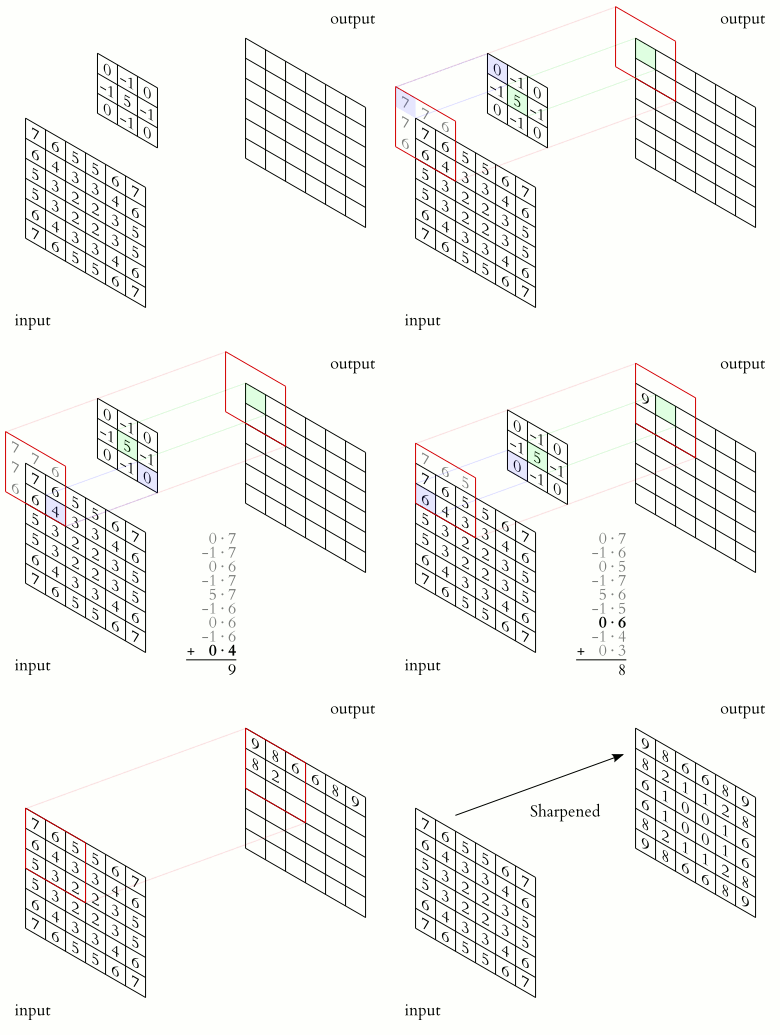
Pooling is different than some arbitrary image resampling in that the downsizing operation resembles more a process of convolution, albeit different. Pooling is the process of combining values within a convolution window by taking an average or maximum value (other aggregation strategies are possible, such as min, stochastic, and L2 pooling, but I don’t know that yet… remember?). Like convolution, pooling doesn’t need to slide across the tensor cell by cell; it can jump at a stride. With proper parametrization, a 2×2 window with a 2×2 stride has the effect of downsizing an image to half its resolution, and a 3×3 window with a 3×3 stride scales an image by 3. This seems clear enough. Although there may be some unusual ways to aggregate values through separate parameters, I have no intuition for when that may be useful. So, for now and until I develop a better understanding, when I see the term pooling, I mentally translate to “downsampling”.
Example of max-pooling with a window 2×2 and stride 2×2. The result tensor is halved in resolution.
To build an understanding of why max pooling is useful, I picture this: a neural network operates by propagating activations. By retaining the maximum activation across the pooled neurons, the important features are preserved.
Upsampling
The opposite of pooling can be achieved through resampling, which is no different than image resampling. Interpolation can be bilinear, or nearest neighbor… the usual suspects. These can be considered the opposite of average pooling and max pooling respectively, even though I am not so certain about this correlation. Either way, concatenating a resampling layer to a pooling layer is a lossy operation that only restores resolution, not the original data.
Be aware that resampling takes weird names in literature, such as “Up Convolution”, or “Convolution Backward Data”… which definitely doesn’t help chaps like me in the process!!
Encoding and Decoding
Comparing back to the initial example of a faster blur implementation, a neural network may deploy a succession of pooling + convolution layers. While pooling reduces the data, retaining important activations, convolution increments the number of channels. This lets the network aggregate data from the pixel neighbours and store it as separate channels of the pixel. This process is called encoding, and the information is transformed to some complex form called the latent space. In this space, tensors can be hundreds of channels deep, loaded with encoded information. What the information is, nobody knows for sure. It’s up to the training process to figure what is useful to store and how to encode it. This part is not very discernible form magic, but make no mistake, there is no magic involved. It’s still a data transformation, not dissimilar to the drawing with circles video above, just much more complex.
After the information is transformed to latent space, it must be decoded to become something useful again. Decoding can take different forms depending on the desired output. Say the denoised image is what I need, decoding may involve upsampling + convolution. As I understand it, the process is somehow reversed: low resolution tensors are scaled up, and the information contained in the many channels is used in the convolution to produce fewer channels with better local details. The process repeats until the image with the final resolution is achieved.
Determining the optimal number of encoding and decoding steps is a trial-and-error approach during network design. One experiments to build an intuition of what may work, stir the pile of tensors until things begin to work. I have zero experience at this. For now, I just try to understand a system that works.
The more the encoding layers, the wider the receptive field. The receptive field is only as good as the number of channels available to rearrange the gathered information. Conceptually, the purpose of a denoiser is to filter out noise from signal. To do so, it may have to filter across an area of thousands of pixels. Each 3×3 convolution layer widens the receptive field by 2 pixels each dimensions, 5×5 convolution widens it by 4, etc… Each 2×2 pooling layer multiplies by 2 the widening factor of any subsequent convolution layer. For example, a DNN made of [convolution 3×3 | pooling 2×2 | convolution 3×3 | convolution 5×5] has a receptive field of 2 + 2 * (2 + 4) = 14, square the result to account for H and W and the DNN has a receptive field of 196 square pixels.
I already mentioned that polling and upsampling are destructive transformations. I want the denoised result to be as sharp as possible. Giving a denoiser a perfectly clean image should result in a nearly identical image, but a lot of information is thrown away in the process of encoding. Pooling 2×2 throws away 3/4th of the pixels, and convolving to twice the number of channels may still result in a net loss of half of the data. Concatenating multiple of these steps may throw away most of the initial information. There must be more tricks, some sorcery at play!
U-Net
U-Net is a ConvNet architecture first introduced in the filed of medical computer vision by Ronneberger, Fischer, and Brox, in their paper “U-Net: Convolutional Networks for Biomedical Image Segmentation”. The paper proposes a new technique that improves over previous convolution segmentation methods. Segmentation is the process of identifying regions of an image that contain specific features the network is trained to isolate. In the case of medical imaging, this may involve labeling cell organelles, damaged tissues, inflammation, lesions, etc… For autonomous vehicles, features may be the road lines, signs, traffic lights, other cars, pedestrians, road obstructions, etc…
I recall the example of the classification of hand written numbers. In there, the DNN ends with an output layer with as many neurons as the possible answers. In image segmentation applications, the purpose of the network is to identify not just the “what”, but also the “where”. The concept of one neuron per possible answer is extended to have a tensor channel per possible answer! Here is the network diagram from the paper:
The diagram resembles a ‘U’ shape, giving the name to the architecture. In this diagram, tensors are visualized as light blue rectangles. HW dimensions are displayed with vertical labels; the taller the rectangle the higher the resolution. The number of channels are detailed with horizontal labels; the wider a rectangle, the more the channels.
There are 2 distinct phases, descending from the left, the input data undergoes a series of convolution and pooling layers, the encoding phase. Here, as tensors gets smaller, they become progressively deeper, aggregating spatial information throughout a widening receptive field. Information is rearranged, aggregated, transformed, acquiring localized context. In other words, each pixel encodes lot of information about its surrounding. There are 4 of such steps, but I assume variation of this architecture can be derived with a different number of steps as needed.
Re-emerging to the right, the decoding phase has a matching number of upsampling layers and more convolution to restore the tensor to the the original input resolution, transforming the depth of information back to spatial information.
Here is the trick: during decoding, upsampled tensors are concatenated with the tensors from the related pooling steps. In the diagram this is displayed as grey horizontal arrows, also referred as skip connections. Upscaled tensors bring spatially encoded information, the skip connections bring back high-resolution details for the network to reconstruct by convolution. This is brilliant!
Without skip connections, the architecture would be called an autoencoder. What I said earlier about latent space applies very clearly to autoencoders, where the deepest is called the latent layer. In such architectures it is possible to decouple the encoding and decoding phases. Given some information in latent space, the decoder can always reconstruct something. It is the case for techniques such as stable diffusion, the word on the street at the time I am writing this text.
Unlike autoencoders, U-Nets have no well defined latent space, the decoder cannot reconstruct directly from it without the information passed along from the encoding steps. Its encoding and decoding cannot be easily separated. But thanks to this, the U-Net can reconstruct more precise details about the original data. In the original paper, the result is sharp labeling, the contour of the identified features matches the contour in the input image. In the case I am studying, the result is an image that preserves sharpness and clarity, minus the noise.
Concatenation
U-Net gives us skip connections to add to the tool box. Another way to refer to this operation is tensors concatenation. The simplest way I can conceptualize this is to think about frame buffers in graphics. Say I have an RGB buffer and an alpha channel. I want to join them back together as an RGBA buffer. Remember the notation NHWC and NCHW from Episode 2? Depending on how the frame buffers are stored, for NHWC the operation may involve splicing the alpha values after each RGB triplet. Simple, but it requires copying memory around, which is not free! For NCHW tensors (and N=1), the concatenation can be as simple as allocating them one after the other in the same buffer, RGB first, then the Alpha. That works because the NCWH layout is a sequence of planar representations for each of the channels.
One question remains: concatenation is not commutative, which tensor goes first? The one from the skip connection or the one from the upscaling? The U-Net diagram seems to suggest the former, but that may be just because it is convenient to draw it that way. I feel this is going to be like any cross product I have ever typed: if it doesn’t look right, no worries, invert the terms!! Jokes apart, as I begin to understand how a DNN operates, the concatenation order may not matter during the network design phase. But once trained, the network used for inference must follow the same convention.
‘Padding’ the way to victory
In reading the paper and looking closer at the U-Net diagram, it seems that one of the authors’ decisions is to not use any padding in the convolution. As a result, each of the 3×3 convolution layers trims 1 pixel from each side of the image. Check the diagram to see how the input resolution shrinks from 572×572, to 570×570, to 568×568, etc… by the time it gets to the end, the final tensor is 388×388. This is rather inconvenient when it comes to concatenation because the skip connections carry tensors at higher resolution. Because of this the diagram label these skip connections as “copy and crop”.
In the case of denoising, I wouldn’t want the result to be a crop of the input. Precious resources are spent to path-trace each pixel. Extrapolating from the numbers in the diagram, 184 pixels are trimmed on each side. An input resolution of 1920×1080 would become 1552×712. That would be a huge loss! Throwing away 47% of the path-traced pixels is a no-no.
Luckily, this is easily fixed by configuring each of the convolution layers with 1×1 padding. With no cropping, by using NCWH tensors and by carefully arranging the tensors in memory, those concatenations turns into no-ops.
There is one last aspect to consider: with 4 layers of pooling 2×2, the input tensor is scaled to 1/16th of its resolution (1/256th of the input pixels). This means the input image must be a multiple of 16 pixels in resolution both in H and W. I hope this can be solved by leaving some black padding around the input image and rounding up to a multiple of 16. This won’t be a tax for the path-tracer.
Time for a break.
OIDN UNetFilter
Now that I have some understanding of the U-Net architecture, I should be able to make sense of what I see in the implementation of UNetFilter::buildNet(). Take a look at its source code in github.
Listing 1. A snippet of code from the OIDN library for reference. See the source code on github.
The first part of the function produces a list of tensor descriptors. The sequence begins by defining the dimensions of the input layer, inputDims. This is passed as argument to getInputReorderDesc, the result of which is passed to the next call, and so on and so forth. I checked the implementation of each of the methods. The logic here is simple:
Start from the input image resolution and number of channels
Each convolution is a 3×3 filter with padding 1×1. This means that convolution layers may change the number of channels but leave H and W the same. The number of input channels is defined by the tensor descriptor argument in the calls to getConvDesc. The number of ouput channels is retrieved by looking at the map of tensors decoded from the tza files.
A pooling layer scales H and W to a half, and leaves C unchanged.
An upsampling layer doubles the values of H and W, and leaves C unchanged.
Calls to getConcatDesc have two TensorDesc arguments to merge, which are supposed to have the same H and W, and the resulting tensor has the sum of the channels.
The next block in UNetFilter::buildNet() function seems to compute some memory offsets… at least this is what I get by reading the comments and seeing the name of the functions involved: alignedByteSize(). The logic of it is not described but I guess this is meant to allocate tensors memory in a contiguous buffer. I think it is going to be a fun exercise for me to derive the logic to arrange tensors in memory, and not use this code.
Listing 2. A snippet of code from the OIDN library for reference. See the source code on github.
UNetFilter::buildNet() then passes down the “recipe” to some lower level implementation of the DNN runtime, creating layers, connecting them. This block is a few pages long and it seems to mirror the same sequence from listing 1.
Listing 3. A snippet of code from the OIDN library for reference. See the source code on github.
Listing 3 shows some of the lines to give an idea. Each of these calls instantiates a class from some inheritance tree. Each instance holds a reference pointer to two tensors (source and destination), and implements calls to the lower level DNN library.
The Recipe
Before loosing myself in the OIDN implementation, perhaps it would be more productive if I drew a comparison between this U-Net and the original from the paper. The number of layers and the way they are connected doesn’t seem to be an exact match. By combining the information in buildNet() with the printout of the tensors decoded in the previous episode, the following diagram emerges:
OIDN U-Net architecture diagram.
The overall structure resembles the U-Net architecture, but there are differences. The number of encoding convolution layers is reduced. Overall, the number of tensor channels is smaller: at the deepest stage, there are 96 channels compared to 1024 reported in the paper. I guess these are performance optimizations to both limit the amount of tensor memory, and to control the overall performance of the network. Furthermore, the skip connections picks the result of the pooling, not the subsequent result from convolution. Most peculiarly, the input layer is what is concatenated with the last steps of decoding. I thought about this for a while and it makes sense: this network can reuse the input image in the last convolution layers to preserve as much of the details in it as possible, without having to spend compute capability to decode it from some intermediate latent space. What a nice trick!!
I believe I am very close to capturing the recipe to reproduce this system in another DNN framework, such as CUDNN. But, there is one last thing that catches my eye in listing 1 at line 371, something referred as InputReorder. A quick check to the library’s README.md reminds me that OIDN supports permutations of inputs: HDR/LDR is one dimension, the other is for the input channels: RGB, RGB + Albedo, RGB + Albedo + Normal, plus some other stuff…
To complete the recipe I’ll have to dig out the code for the InputReorder. I can guess how to feed the network: the input tensor has 3, 6, or 9 channels, depending on which tza file I load. Likely those are going to be concatenated RGB, Albledo, Normals to construct the NCHW input tensor. The fact that there are HDR and LDR versions of the weights may mean that some color space conversion may apply too… I have not discussed what albedo and normals may be used for in a denoiser. It can be guessed, “demodulation of some sort”… but it’s trickier than that and more rooted in signal reconstruction and Mote Carlo sampling. I feel I can leave this be for now, until I have the network reimplemented and ready to run. I’ll come back to this in a future episode, I promise!
Conclusion and next steps
I made some strides in the practical understanding of a non-trivial CNN architecture such as the U-Net. I understand that this type of network topology is quite versatile, and it can be used for a variety of applications, not just image segmentation and denoising. By seeing the difference between the classic U-Net and the one deployed in OIDN I learnt how these recipes have a lot of plasticity, giving plenty of freedom to try different variations. Having this in the tool bag is going to be very useful! I will have to learn how to train my own DNN to put this theory to practice, which is going to be an interesting journey in its own.
The next episode is where the real work begins. I am going to roll up my sleeves and look at the NVIDIA CUDNN inference library to begin to reassemble the pieces to create my own CUDA-based denoiser. Lots of work lays ahead before I achieve a fully functional solution, but I am confident it is going to be worth it!
Hopefully you enjoyed this third episode. I will attempt to publish one new episode per week for the duration of the series. Stay tuned!
This is the second episode of a miniseries in the vast world of Deep Neural Networks, where I start from Intel® Open Image Denoise open-source library (OIDN) and create a CUDA/CUDNN-based denoiser that produces high-quality results at real-time frame rates. In this series, I narrate the story in first person. The first episode was focusedContinue reading "DNND 2: Tensors and Convolution"
Show full content
This is the second episode of a miniseries in the vast world of Deep Neural Networks, where I start from Intel® Open Image Denoise open-source library (OIDN) and create a CUDA/CUDNN-based denoiser that produces high-quality results at real-time frame rates. In this series, I narrate the story in first person.
The first episode was focused on a quick dive into the OIDN library source code to determine if the Deep Neural Network it contains can be easily extracted and reproduced elsewhere. The library contains ‘tensor archive’ files that can be easily decoded, which provides the data necessary to construct a DNN. I identified the decoder source code and the procedure by which tensors are connected to form the network, but also accumulated many questions about some of the more nebulous concepts: what is a tensor? How do tensors relate to Neural Networks? What is a Convolutional Neural Network? What is a U-Net? And more… It is time to get some answers.
One thing first, I want to thank two people:
Attila Áfra, the architect behind the OIDN library, for publishing the library for anyone to study.
Marco Salvi, for the help and guidance on theoretical notions during my exploration.
Tensors
I let mathematicians explain what a tensor is. However, as correct as the following explanation may be, the universal generalization in it helps me only so much in understanding what I am dealing with here.
Tensors are simply mathematical objects that can be used to describe physical properties, just like scalars and vectors. In fact, tensors are merely a generalization of scalars and vectors; a scalar is a zero-rank tensor, and a vector is a first rank tensor.
In my own words, and for the purpose of this project, a tensor is often a 3D or 4D matrix, typically floating-point numbers; higher number of dimensions are possible, but I will not encounter those in this series. A 1080p RGB image is a 3D tensor with dimensions (W*H*C) 1920x1080x3, where W and H are for width and height in pixels, respectively; and C is for the number of channels: RGB. A sequence of 10 of such images can be seen as a 4D tensor. Such a tensor has 4 dimensions (N*W*H*C) 10x1920x1080x3, where N is the number of images. Generalizing this, one could say that a single image can still be considered a 4D tensor where N = 1. Dimensions here have nothing to do with Cartesian dimensions of course, they are purely relational.
When expressing the resolution of an image, we commonly say something on the line of “1920 by 1080”. However, if we consider how uncompressed image data is stored in memory, we will observe that images are stored line by line, pixel by pixel, and channel by channel. In the case of a sequence, we have N full images, each with H rows made of W columns of pixels, each pixel made of C channels. Thus, if one would have to come up with a notation to describe how images are commonly stored in memory, it could be NHWC. These letters are commonly used in Machine Learning to describe tensors, and when an image is loaded to be processed by a neural network, it is stored in a tensor with a “format” such as NHWC, even though I do prefer to use the term data layout.
Are there other data layouts? Sure, there are! My mind is quickly drawn to familiar similarity in concept of the SIMD programming model (Single Instruction Multiple Data), where there are different ways of storing data resulting in potentially significant difference in performance. In the context of SIMD one may have AOS (Array of Structs) or SOA (Struct of Arrays) layouts. For example:
struct color
{
    float r,g,b;
};

// An AOS data layout with 64 color elements
color aos[64];

template<int size>
struct color_soa
{
    float r[size];
    float g[size];
    float b[size];
};

// An SOA data layout with 64 color elements
color_soa<64> soa;
In the AOS case, the data as stored in memory contains a sequence of rgbrgbrgbrgb…, while in the SOA case, the data in memory appears as rrrrr…gggg…bbbb… SIMD instructions prefer reading SOA data because, with each individual load and store instructions, the processor can fill wide registers with several elements accessed consecutively and sequentially. This makes good use of the memory latency and bandwidth, resulting in faster processing speeds.
Representation of 3 RGB images stored in memory according to two different tensor data layouts. Both occupy the same amount of space.
Back from this direct analogy. Tensors may be organized in different data layouts depending on the operation we need to run on them, and how the available hardware may prefer to access the data. So, if NHWC is analog to AOS, NCHW is for SOA. In a NCHW data layout, you would have N images concatenated, each made of H*W planar representation of the red channel, followed by the planar representation of the green channel, then the blue…
The ‘N’ dimension is a bit of an impostor. More than a dimension to the data, it is a way to express a batch of identical elements. A notion for some algorithms where to apply the very same computation to many individual entries, without any of them to overlap or interfere.
Convolution
A graphics programmer is likely to be accustomed to the concept of convolution:
In mathematics (in particular, functional analysis), convolution is a mathematical operation on two functions (f and g) that produces a third function () that expresses how the shape of one is modified by the other. The term convolution refers to both the result function and to the process of computing it. It is defined as the integral of the product of the two functions after one is reflected about the y-axis and shifted. The choice of which function is reflected and shifted before the integral does not change the integral result (see commutativity). The integral is evaluated for all values of shift, producing the convolution function.
While convolution is an integral of the product of functions. In image processing, the term convolution is often improperly used, a pedantic person would say discrete convolution instead, which is achieved as a much simpler weighted summation.
Discrete convolution is the process of sliding a weighted window (kernel) on top of an image, pixel by pixel. As the kernel overlaps a region of pixels in the image, it provides wights to sum such pixels. The result obtained is then stored to the output image. Common use of convolution in image processing includes blur, sharpen, edge detection, etc…
During convolution, something happens at the edges and corners of the image. Say the kernel is a 3×3 window. When its center is aligned to the very first pixel of the input image, some of the kernel extends outside the image boundary. There are multiple ways to define how this case must be handled:
The values of the pixels at the border implicitly extends outside of the image.
Rings of values outside of the image are considered zeroes (this is called padding)
The convolution kernel never extends outside the borders of the input image (no padding). With a kernel 3×3, the output image has 1 pixel trimmed off each side.
Convolution of a filter without padding results in a final image smaller than the input image.
By controlling padding, one can produce an output that is equal or larger that the input image. A common configuration is to preserve the image resolution, which enables the application of multiple filters in succession without reducing the output resolution. For this configuration, the padding value should be half the kernel width rounded down to the nearest integer. For example, for a 3×3 kernel, the padding should be 1 pixel on each side, and for a 5×5 kernel, the padding should be 2 pixels on each side.
Proper use of padding allows convolution to preserve the image resolution throughout processing.
Convolution and Tensors
Up to now the diagrams have shown convolution being applied to single channel. Things become more interesting when multiple channels come into play. The simplest extension is to apply the same filter weights consistently to all channels, such as for an RGB image where the input rgb pixels are weighted by scalar weights to produce new rgb values. This is common in image processing, such as with blur filters that apply the same effects to all image channels. However, convolution filters can have channels too, allowing for a different set of weights to be applied per input channel. Furthermore, a filter can express a matrix multiplication between a set of input channels and a set of filter channels to produce a set of output channels that may differ in number from the input channels.
Say I have an RGB image, and the purpose of the convolution is to extract a variety of features from it, say vertical edges, horizontal edges, and two diagonal edges. To achieve this, a 4D tensor can be used as the filter. This tensor defines how to compute each of the 4 output features in respect of the 3 input channels. Each of the 12 combinations is a H*W filter. So, we have 4 outputs, times 3 inputs, times H*W filter weights. Following the NCHW notation for tensor, ‘O’ stands for output and ‘I’ stands for input. In our example, the filter is a tensor with data layout OIHW and dimensions [4, 3, 3, 3].
Visualization of 4D filter tensor convolving a 3-channels input tensor to produce a 4-channels output tensor.
The number of elements in a tensor is given by the products of the dimensions. In this example, the filter tensor has a total of 4*3*3*3 = 108 weights. These weights connect a region in the input tensor of 3*3 pixels, across its 3 channels, to a pixel of the output tensor across its 4 channels.
In the first episode we described Deep Neural Networks as a sequence of neural layers, interconnected by weights… And connecting the dots, a 4D convolution filter whose weights are produced by a ML training process is in fact a type of neural network!
Convolutional Neural Networks
Also referred as ConvNets, or CNN, Convolutional Neural Networks arises from the observation that certain type of processing is desired to be applied consistently across the input data. If I want to identify handwritten numbers on an image, I would like a Neural Network to identify the feature independently on where it may appear in the image, and independently on its resolution. If I want to denoise an image, I would like the noise to be consistently recognized as such, form the center of the image, to the corners. ConvNets are practical and effective at this, as they can be expressed as a sequence of convolution filters (plus a few more type of layers I will describe in a future episode), rather than rigid and more expensive fully-connected networks.
In a ConvNet, the input and output tensors of a convolution layer are the neurons, the filter tensor is the weights. The operation of convolution instantiates the same weights across the image as the convolution window slides across, connecting the many regions of neurons to the respective output neurons. The result can be seen as a massive, and very efficiently compressed, neural network. This is the answer to one of my naive initial questions: how can a neural network process images of arbitrary size. Now I know and this opens the door to me to a whole new universe previously ignored. I was blind and now I see!!
Time for a break.
Extraction
Armed with some new theoretical understanding, I feel positive about extracting the parseTZA function from the OIDN code base. Here is the function pseudocode from the first episode:
parseTZA(...):

    Parse the magic value

    Parse the version

    Parse the table offset and jump to the table

    Parse the number of tensors

    Parse the tensors in a loop:

        Parse the name of the tensor

        Parse the number of dimensions

        Parse the shape of the tensor (vector of dimensions)

        Parse the layout of the tensor, either "x" or "oihw"

        Parse the data type of the tensor, only float is supported

        Parse the offset to the tensor data

        Create a tensor using dimensions, layout, type, and pointer to data
        Add it to the map by its name

    Return map of tensor
I have a good understanding of what a tensor is, what “dimensions” means, what OIHW layout is, while the layout “x” remains mysterious… Appropriate label though! I am going to roll up my sleeves and begin copy-pasting code to a new header file. I begin with the function itself; the function requires types Tensor, Device, and Exception. Class Device seems to be involved…
I am not going to use any of it. Classes like this one tend to govern the computation in a complex heterogeneous system. Since I only need to read the tensors, I declare an impostor struct Device {} instead, and see if I can eliminate it later.
Looking at class Tensor I see bits I need and bits I don’t… Here is an example of the before and after, to give you a sense of the type of aggressive pruning: its 261 lines down to 21.
The whole point of what I keep is to retain the information decoded in parseTZA function only. Any dead code that comes with the copy-paste, I quickly identify and remove. The process is recursive: class Tensor requires class TensorDesc, copy paste the implementation, simplify, simplify, simplify. It would be too involved for me to show this process unfolding. And I don’t think it would be interesting to document such a process either, it’s merely an extraction refactoring.
This is what I am left with after a couple of hours with a machete.
// Note: this implementation is extracted from the OIDN library and simplified for the purpose
//       of just loading the OIDN tza weights blob files. For more, check:
//       https://github.com/OpenImageDenoise/oidn.git
//
// Copyright 2009-2021 Intel Corporation
// SPDX-License-Identifier: Apache-2.0
//
// Licensed under the Apache License, Version 2.0 (the "License");
// you may not use this file except in compliance with the License.
// You may obtain a copy of the License at
//
//   http://www.apache.org/licenses/LICENSE-2.0
//
// Unless required by applicable law or agreed to in writing, software
// distributed under the License is distributed on an "AS IS" BASIS,
// WITHOUT WARRANTIES OR CONDITIONS OF ANY KIND, either express or implied.
// See the License for the specific language governing permissions and
// limitations under the License.

#include <stdint.h>
#include <stdio.h>
#include <stdlib.h>
#include <string.h>
#include <algorithm>
#include <vector>
#include <map>
#include <string>
#include <memory>

#pragma once

namespace oidn
{

// Error codes
enum class Error
{
    None = 0,                 // no error occurred
    Unknown = 1,              // an unknown error occurred
    InvalidArgument = 2,      // an invalid argument was specified
    InvalidOperation = 3,     // the operation is not allowed
    OutOfMemory = 4,          // not enough memory to execute the operation
    UnsupportedHardware = 5,  // the hardware (e.g. CPU) is not supported
    Cancelled = 6,            // the operation was cancelled by the user
};

class Exception : public std::exception
{
private:
    Error error;
    const char* message;

public:
    Exception(Error error, const char* message)
        : error(error), message(message) {}

    Error code() const noexcept
    {
        return error;
    }

    const char* what() const noexcept override
    {
        return message;
    }
};

enum class DataType
{
    Float32,
    Float16,
    UInt8,
    Invalid
};

// Tensor dimensions
using TensorDims = std::vector<int64_t>;

// Tensor memory layout
enum class TensorLayout
{
    x,
    chw,
    oihw,
};

// Tensor descriptor
struct TensorDesc
{
    TensorDims   dims;
    TensorLayout layout;
    DataType     dataType;

    __forceinline TensorDesc() = default;

    __forceinline TensorDesc(TensorDims dims, TensorLayout layout, DataType dataType)
        : dims(dims), layout(layout), dataType(dataType) {}

    // Returns the number of elements in the tensor
    __forceinline size_t numElements() const
    {
        if (dims.empty())
            return 0;

        size_t num = 1;
        for (size_t i = 0; i < dims.size(); ++i)
            num *= dims[i];
        return num;
    }

    // Returns the size in bytes of an element in the tensor
    __forceinline size_t elementByteSize() const
    {
        switch (dataType)
        {
        case DataType::Float32: return 4;
        case DataType::Float16: return 2;
        case DataType::UInt8:   return 1;
        default:
            return 0;
        }
    }

    // Returns the size in bytes of the tensor
    __forceinline size_t byteSize() const
    {
        return numElements() * elementByteSize();
    }
};

// Tensor
class Tensor : public TensorDesc
{
public:
    const void* ptr; // Data is only temporarily referred, not owned

public:

    Tensor(const TensorDesc& desc, const void* data)
        : TensorDesc(desc),
        ptr(data)
    {}

    Tensor(TensorDims dims, TensorLayout layout, DataType dataType, const void* data)
        : TensorDesc(dims, layout, dataType),
        ptr(data)
    {}

    __forceinline const void* data() { return ptr; }
    __forceinline const void* data() const { return ptr; }
};

// Checks for buffer overrun
__forceinline void checkBounds(char* ptr, char* end, size_t size)
{
    if (end - ptr < (ptrdiff_t)size)
        throw Exception(Error::InvalidOperation, "invalid or corrupted weights blob");
}

// Reads a value from a buffer (with bounds checking) and advances the pointer
template<typename T>
__forceinline T read(char*& ptr, char* end)
{
    checkBounds(ptr, end, sizeof(T));
    T value;
    memcpy(&value, ptr, sizeof(T));
    ptr += sizeof(T);
    return value;
}

// Decode DNN weights from the binary blob loaded from .tza files
int parseTZA(void* buffer, size_t size,
             // results
             std::map<std::string, std::unique_ptr<Tensor>>& tensorMap)
{
    [...]
}

} // namespace oidn
This listing can be simplified further, by removing the use of inheritance, granular heap allocations, reliance of std::unique_ptr, and exceptions. These are a few among the things I could spend a few more minutes cleaning up. But for now, I don’t want to modify the body of the parseTZA function. I can always come back to it later. I am more curious about what it’s parsing from the files, so I add some logging code, and this is what I find:
The mysterious “x” tensor format is revealed: those the biases! Not surprisingly, all the decoded tensors come in pairs of weight and biases. The weight tensors seem all to be 3×3 convolution windows, while I expected to see larger sizes. Previous questions are replaced with new questions. This is progress!
Conclusion and next steps
I made some strides in the practical understanding of tensors, convolution and how that becomes the foundation of a variety of DNN architectures referred as Convolutional Neural Networks. I then bit the bullet and began extracting the minimal source code I need from the OIDN library. I know there will be more snippets to extract, but hopefully those will be more mathematical in nature, and less structural.
In the next episode I am going to study how the CNN is connected and discover some new type of layers that I currently ignore. Finally, I will build a theoretical understanding of the U-Net architecture and how these are easily portable to other problems and domains.
Hopefully you enjoyed this second episode. I will attempt to publish one new episode per week for the duration of the series. Stay tuned!
This is the first episode of a mini-series where I invite you to join me on a journey of discovery in the vast world of Deep Neural Networks. We will be exploring the Deep Neural Network in the Intel® Open Image Denoise open source library (OIDN) and learning some basic concepts of Convolutional Neural Networks.Continue reading "DNND 1: a Deep Neural Network Dive"
Show full content
This is the first episode of a mini-series where I invite you to join me on a journey of discovery in the vast world of Deep Neural Networks. We will be exploring the Deep Neural Network in the Intel® Open Image Denoise open source library (OIDN) and learning some basic concepts of Convolutional Neural Networks. We will use this understanding to put together a CUDA/CUDNN-based denoiser that produces high-quality results identical to the original implementation, all at real-time frame rates. I will be narrating this in the first person, as if I am telling a story as it unfolds, in an effort to make it more engaging than just another tutorial.
To follow along you don’t need any prior knowledge of Machine Learning. You need to be comfortable with very basic C++, but not much more than that. I expect you to know what a call stack is, what a debugger is and how to use it. Later in the series I will implement some compute kernels in CUDA. I will explain what I do along the way, but this won’t be a CUDA masterclass. I expect you to know some basic concept of path tracing, but really all you need to know about it is that it produces noisy images, and denoising is often required to obtain a final image.
Introduction
A good approach to learning is to take apart something that works and put it back together. When I was a child, a relative of mine was a clockmaker. I used to watch him work on mechanical watches, carefully opening them up, cleaning their gears of dust and residue, replacing damaged parts, and lubricating rubies. There is only one way to disassemble a mechanism, with each part taken out and placed in a compartment tray in the order of removal. There is also only one way to put it back together. The process is precise, and leaving a screw behind after reassembly is a sign of an amateur.
Good software has parallels to clocks, as they are both made up of many parts that work together to perform a precise job. The inner workings of a program may seem mysterious, like peering through the gaps between the layers of gears in a mechanical clock. Where does the motion originate, and how does it propagate? Why do some parts seem stale even when they serve a purpose?
However, there are also stark differences between software and clocks. Unlike clocks, it is not immediately obvious how to take software apart, and there is no one correct way to do it. Nonetheless, we do it all the time – when we study API examples, review our teammates’ work, or decipher an obscure function we wrote a year ago that only the man upstairs seems to understand.
This isn’t about clocks, nor about just any software; it’s about Artificial Neural Networks, which even the experts may not fully understand. As someone who has never taken on a Machine Learning project before, I am eager to make some strides. I have found that the beginner reading materials are not leaving a lasting impression on me, as abstract knowledge tends to fade quickly from my biological neurons without practical applications.
Why did I choose this specific project? I enjoy implementing path tracer renderers, I do like the challenge, and love the results. Path tracing is based on Monte Carlo integration, which it is known to produce noisy images in a short time frame. The more samples are taken per pixel, the more the image refines, until it converges to a smooth noise-free result. This process of convergence can take long time, minutes or even hours. The big innovation in the past few years to make path tracing possible in real time is due to three factors: advancement in hardware-accelerated raytracing, advancements in light transport and sampling techniques, and image denoising breakthroughs.
Denoising is the process of filtering an image to remove Monte Carlo sampling noise, while preserving as much of the detail in the image as possible. This tends to be achieved in a few different ways:
Filters and signal reconstruction techniques.
Machine Learning based techniques (what this series is about).
Machine Learning used to infer filter parameters for signal reconstruction.
Realtime path tracing would not be possible without denoising. Any real time raytracing demo we may have seen in the past few years is as much as denoising demo as it is a raytracing one.
The very basic
I believe some of the most common introductory Machine Learning tutorial is about classification of handwritten digits using the MNIST training set… in a nutshell, a relatively small neural network is constructed and trained to extract specific information from a set of fixed resolution images: which digit is presented in the image.
A digital neuron is comprised of a value that expresses its current state of activation. In biological neurons, connections are called synapses, which can either stimulate or inhibit the state of activation of other neurons. However, in artificial neural networks, the term synapse is not commonly used, and instead, the term weight is used instead. To evaluate a neuron, a weighted summation of its inputs is computed, where weights can be positive (stimulating) or negative (inhibiting). Additionally, a bias (linear shift in value) can be applied to the result of the summation, with the bias also being positive or negative and adjusting the threshold of activation. The activation function determines when a neuron is considered activated, and generally, a positive value is considered “active.” However, several functions are commonly used to remap the output produced by weights and biases, such as clamping negative values (ReLU) or providing a smooth transition (tanh, sigmoid, etc.).
I don’t know when to use one or another, but I remember reading somewhere that simpler activation functions are easier to “train”, since that relies on derivatives, and training is the most complex and expensive part of any ML project. In this series I am not going to make any attempt at understanding training, I am going to reuse the weights of an already trained network.
Back to the handwritten digits classification: there is an input neuron for each of the pixel in the source image. Conceptually these don’t have weights, they are seeded with the pixel values. This is called the input layer. A network made in layers is also called a Deep Neural Network. All neurons in a layer are connected to all neurons in the previous layer, the term Fully-Connected Network is used to refer to this type of topology. The network ends with an output layer with as many neurons as there are possible answers to the problem: the digits from 0 to 9. Any layer in between the input and the output layers are referred to as “hidden layers”. The process of training learns the weights for each of the neurons so that when the network is evaluated, starting from the pixel values, the last 10 neurons are updated with the classification likelihood: the number in the image is “3” with a 90% probability, 7% it’s an “8”, 1% a “9”, etc…
Cool, but what if the input images are varying in resolution? What then? Do we need to construct and train a different network? The learnt weights and biases are specific to the network topology. How do people create networks able to handle any image? This reminds me of the naive type of questions puzzling me at the beginning of my career, such as: how can an application display a GUI while waiting for a user action? Obvious to you all, but it wasn’t to me back then.
The best way for me to cement technical knowledge is to apply it to something I can appreciate, something I have a critical eye for, something I may understand from a user perspective. Most of the work I do is in graphics, and more specifically related to path-tracing. A project to study Machine Learning-based denoiser seems to be a natural progression and a great investment. It may seem daunting, but “we don’t do this because it’s easy, we do it because we thought it was going to be easy”, right?
I drop here a teaser of the result I get at the end of this journey! Now let’s find out how hard it has been.
The final result, the DNN denoiser running in 5.5ms in CUDA on an NVIDIA RTX 6000 Ada GPU.
First step
OIDN is an open source library released by Intel® under the permissive Apache 2.0 license. Here is the link to the GitHub repository. Because the purpose of this text is educational, that seems to be a great place to start. If you want to follow the steps, go on, clone the repository and check the README.md. There are some dependencies to install. It is not critical that you do, since we are not going to use the library as-is, we are going to pull it apart, learn from it, then put it back together in a much smaller form.
Typically what I do when looking at some new code, especially on a mid size project such as OIDN, I do tend to have the library compiled and any example that comes with it up and running. I want to verify that it works, but also in this specific case I do want to compare my results against the original, to make sure I didn’t miss something important; even more so on a Machine Learning project, where there is no equation, no traditional analytic implementation that can be followed one math operation at a time, as for most graphics papers. Here, if something goes sideways, the results will look psychedelic at best.
Here is my intuition to get started: the library comes with a command line tool to denoise an input image from a file. That is excellent, it means I have something to run without having to integrate the library within some other application.
oidnDenoise is a minimal working example demonstrating how to use Intel® Open Image Denoise, which can be found at apps/oidnDenoise.cpp. It uses the C++11 convenience wrappers of the C99 API. […]
Running oidnDenoise without any arguments or the -h argument will bring up a list of command-line options.
Also, the README.md file states that the library comes with a pre-trained high quality DNN, and the ability to train it from scratch using arbitrary datasets. This sentence is particularly interesting:
The training result produced by the train.py script cannot be immediately used by the main library. It has to be first exported to the runtime model weights format, a Tensor Archive (TZA) file.
If the library can import a “tensor archive” with the DNN weights and biases, maybe we can export the built-in DNN and start from there. I search for TZA in GitHub… and Bingo!
I don’t know if the function parseTZA is called for the builtin DNN, but it is worth a try. Without making much of an effort to understand what that does, I can place a breakpoint inside that function and run the oidnDenoise tool to see if that hits. I imagine a DNN such as this not to be small, perhaps having hundreds of thousands, or even millions of neurons. A tensor archive is probably MBytes in size, at least it is how I imagine it to be. There are a couple of possibilities: since the library can read user trained .tza files, maybe the builtin DNN is stored in such files too. Second possibility is we find some large source file with large C arrays of binary data. I guess the latter, but something makes me nervous about it: the argument is not a const void* and it may not be what we are looking for, it may be an input/output value or something else complex.
I run command in a debugger and it hits the breakpoint inside parseTZA. I can trace back to where that void* buffer argument comes from. I was able to locate where the void* buffer argument originated from. In my experience with various codebases, I’ve found that the clues to the origin of certain values are often buried in deep call stacks, with arguments passed through from function, to function, to function. In cases like these, using a debugger to initiate the exploration tends to proceed more quickly.
But that is not the case here. The callstack is short and the answer is easy to find in frame 1: variable weights is what carries the buffer and it is configured selecting from member variables in some symbol named defaultWeights.
It also reads that the function returns a map of tensor (weightsMap) and stores it as the member variable net of the current class. Listing the places referring defaultWeights I spot its initialization. It seems these are C arrays after all.
Searching for the definition of one of these blob::weights I have the confirmation. Yep, these are ~3.5MB binary blobs. But wait a second! Something is odd, look at the file path in the image here below…
The path leads to a source file in the build folder. These C arrays must be auto-generated! Let’s search for .tza files instead, and sure enough there is a folder in the project root with a very obvious name “weights” and tensor archives inside. There is a python script that is called in custom build command from CMake. Upon cross-checking in GitHub I see that the weights are cloned from the oidn-weights submodule, which has its own license agreement (also Apache 2.0). So I must list these licenses in my project if I end up reusing these tensor files.
The exploration so far have been productive! Lets summarize the findings:
There are .tza files ready to reuse.
Some logic inside UNetFilter::init() is telling me which one should be used, depending on the combination of input images and options (color, color + albedo + normal, ldf/hdr, and more… I will explain more on this in a post later in the series).
Function parseTZA decodes files and constructs a map with named tensors. I have no idea what these do yet, but I’ll find out.
UNetFilter… a quick web search reveals that “U-Net” is a specific DNN architecture, so I have reading material to understand how this may work.
Function UNetFilter::init() ends with a call named buildNet(), which suggests to me such a function contains some sequence of operations that will use the map of tensors, and assemble it somehow to construct a U-Net.
Time for a break.
A closer look
The plan so far is to rely on .tza files to load into my own program, and with that reassemble the DNN. To extract the parseTZA function I need all of its dependencies. It may result in a blob on unstructured types and functions. Likely these will come from a variety of source files, but feel I don’t need to keep the structure: whatever comes with it I don’t plan to reuse throughout my program. Probably I can make a single header library to read tza files and that’s it.
Here is the parseTZA function source, take a look at it. I don’t need to report it here in full, instead I summarize what it does in pseudocode.
parseTZA(...):

    Parse the magic value, throw on failure

    Parse the version, throw is version is not 2.x

    Parse the table offset and jump to the table

    Parse the number of tensors

    Parse the tensors in a loop:

        Parse the name of the tensor

        Parse the number of dimensions

        Parse the shape of the tensor (vector of dimensions)

        Parse the layout of the tensor, either "x" or "oihw"

        Parse the data type of the tensor, only float is supported

        Parse the offset to the tensor data

        Create a tensor using dimensions, layout, type, and pointer to data
        Add it to the map by its name.

    Return map of tensor
In this function am not seeing any information about how the layers of a DNN may be connected. Additionally, the fact that the tensor description is returned in lexicographic order doesn’t give me any reassurance that the tensor decoded are in execution order, or even if they are all defined: some may be implicit in the technique, so we have more digging to do and more questions to ask. What does it mean that a tensor has “oiwh” format? How many dimensions can a tensor have in practice? Up to now I only know a tensor is a matrix with two or more dimensions. So clearly there is a lot to it that I don’t know.
However, the idea is that a DNN is portable, I should be able to evaluate them verbatim across different DNN library implementations. For my purposes, I want to try to use NVIDIA CUDNN. Here I need to recreate the DNN topology, fill it with weights, and let the low level library do the compute heavy lifting: in theory I could implement all the compute kernels myself, but asking around and apparently few people really do that. Let’s take this one step at a time.
Function parseTZA is not enough, I need to look into buildNet(). This is what the beginning of the function looks like.
While the beginning of the buildNet() function seems more involved, if the tensors are the list of ingredients, this function seems to contain the recipe. I don’t need to understand this right now. I have confirmed that extracting the parseTZA function is the first step I need to take.
Conclusion and next step
After the initial exploration I am confident I should be able to understand how OIDN denoiser works, extract the recipe to recreate the same DNN elsewhere, and learn a lot in the process. I hope you feel the same about this.
In the next episode I am going to create a single header library to parse TZA files. I will familiarize myself with the applied notion of tensors and look at concepts of Convolutional Neural Networks, which are at the base of U-Nets.
Hopefully you enjoyed this first episode. I will attempt to publish one new episode per week for the duration of the series. Stay tuned!
In designing a task scheduler, it is fundamental to consider how it would impact your code. I find that some articles on tasking systems put emphasis on the innerworkings, how to achieve lightweight synchronization and context switches, while I offer a different perspective on the subject.
Show full content
Line after line, my program is taking shape. The core algorithms work, I am getting somewhere! But I know that no matter how polished my code looks like, how clever my math may be (it isn’t), any non trivial workload will be slow. The program I am working on is a raytracer renderer, not that it really matters. A couple hundred lines of code can produce a cool looking image, and common wisdom suggests that raytracing is an “embarrassingly parallel” problem. Duh, but a renderer is not only tracing rays. It’s worth nothing if you can throw threads at the cleanest loop in your program if the scene loading, geometry processing, BVH building, and everything else is sequential. If a raytracer is embarrassingly parallel, a renderer – as a whole – is probably not.
Raytracing on the CPU, powered by the task scheduler in this article.
Starting with Standard 11, the C++ std library gives some primitives that standardize creation and handling of threads. The standard falls a bit short for some common features that I would consider important, such as defining the size of a thread stack, or the name that would appear in the debugger and profiling tools… For those we still need to write platform dependent code, but at least it is a much smaller effort than it used to be. Here what the code to spawn a thread looks like:
std::thread t = new std::thread([]()
{
    // Thread does something...
};

// Program continues doing something else...
[...]

// Wait for the thread to complete.
t->join();
Threads are expensive to start. If you ever used a debugger, or a watchdog to capture crash core dumps on a server, you may have observed how a thread launch may take microseconds in normal conditions, but hundreds of milliseconds when some form of observer tool is attached to the process. Hopefully most of this doesn’t surprise you one bit. Task schedulers (or thread pools) are a common for a good reason.
In this article I assume the reader knows the basic concepts of multi-threading, the role the operating system has in governing threads execution and preemption, and the difference between hardware threads, kernel threads, and perhaps user threads and fibers. My implementation will be simple and will not touch the last two concepts, mostly because doing so takes a very long detour away from simplicity and in my case, productivity.
In my usual style, I describe how a non trivial task scheduler works. Part of the description is textual, part is in code snippets and the lines of comments in them. In the attempt to deliver a simple explanation, I leave out some tricks and details that would be needed to go to peak efficiency. Likely, I will be roasted alive because of it. Hopefully I’ll brush off the ashes from my shoulder with casual gesture of my hand.
The design is not the tip of the iceberg
In designing a task scheduler, it is fundamental to consider how it would impact your code. I find that some articles on tasking systems put emphasis on the innerworkings, how to achieve lightweight synchronization and context switches, while I offer a different perspective on the subject.
Parallel algorithms are notoriously more complex to implement and maintain compared to their serial equivalent, not only on paper. If a task scheduler is hard to use, or it adds overbearing complications, it is going to impact on the maintainability of you code. With the introduction of a high bar for deployment, you may be reluctant to parallelize some sections of your program where the benefit would be modest. This alone may negate the benefit of any exceptional fine tuning in the scheduler implementation. In other words, a not yet parallelized computation worth a few milliseconds is all that it takes to make completely irrelevant the microseconds shaved by fine-tuned user-space fibers somewhere else in the code… just to say.
After using a variety of libraries over the years, I matured a small set of guiding principles I apply here. I only want a few basic capabilities from a task scheduler to consider it viable:
Parallelize a workload over a controllable number of threads.
Launch asynchronous tasks.
Transparent support for nested parallelism.
No spinning.
No black boxes.
Parallelize a workload over a controllable number of threads
The most common case involves the parallelization of a hot loop where some significant amount of time is spent. A conceptually simple approach may offer a parallel_for construct. I have used libraries providing an extensive sets of such primitives,: parallel_for, parallel_while, parallel_for_for… etc. I am not sure if Intel’s TBB is the first library where these appeared, but I hope we can agree that it is one that popularized the approach. It is not what I want, I rather aim to balance between simplicity and convenience. A parallel_for that looks and smells like a for loop implies the scheduler is in charge of partitioning the workload. The scheduler would need to account for the execution overhead and devise strategies to partition the workload into coherent ranges, etc… It is a well studied subject, but it is far from simple to tune. I have used some of the best libraries out there and they tend to be tuned to partition uniform workload, which is not always the case. If prefer to leverage simple utilities that are trivial to compose to achieve efficiency. So, if a parallel_for doesn’t behave like a for loop, it is not something I want to implement.
In practice, it is key to good performance to have control over the number of threads each parallel execution can burst into. Sometimes I have numerical computation that scales well to any number of threads, while some other times I need to allocate large temporary buffers for each unit of work, where I need to throttle how wide the outer loop could go, to contain the peak memory utilization. Or the simplest of the examples: I may need to perform disk IO, which notoriously do not scale well to a large number of threads. Some libraries go to a great extent to hide how many threads I have access too. Introducing instead concepts of work groups, arenas, elastic pools, etc… There is nothing simple about those, not for the developer, nor for the user, and often those complex designs backfires, making any study on provable ideal efficiency almost irrelevant. Again, going back to TBB for example: it’s very hard to throttle an outer loop, while letting inner parallelization to scale to the the full capacity of the scheduler; the resulting incantation is complex and brittle, rising the bar of deployment far higher than I am willing to accept.
Launch asynchronous tasks
I want to be able to run a function asynchronously, let it compute and maybe even forget that I did so, or wait for its completion at a later point in time if I have to. This task may run some parallel workload, or just some serial code; both are desirable and have different use cases. A set and forget serial computation is conceptually simple enough: run a function, at some point it is going to complete… the end. If I want a set-and-forget parallel workload, it is likely I need to execute some serial epilogue when the parallel section completes.
Note: there are types of task that are meant to run at regular intervals, to sleep for some duration of time to set the interval. Such tasks may not be appropriate for all task scheduler. Any call to sleep put a thread on idle, and doing so with thread from a scheduler would reduce the capacity of the scheduler to run other work. I don’t have any such type of task in my application, if you do, you may want to read about the actor model to manage parallelism over many inexpensive tasks; fibers are also very good for that purpose. In both cases the goal is to return control instead of waiting, so that some other task can run. In the actor model, the state of the task is preserved in the task itself (a functor or some other struct) so that the work can be resumed at some later point. With fibers, the stack pointer (and registers) are swapped under the thread feet… which allows for some very cool trick and execution suspension in the middle of the algorithm. Fancy, but far from simple (you need to get your hands dirty with inline assembly because the functions offered by the operating systems are system calls, which are as expensive as context switches). This is not what I need, so it is not what I decided to implement.
Transparent support of nested parallelism
You may parallelize an outer loop where each of the elements can be of arbitrary complexity, some may have expensive inner loops of their own that could benefit from parallelization. Some algorithms are recursive, where the best we can do on the first level is to split the workload into two units or work for two threads to consume, and that logic continues recursively to grows in threads utilization. In writing and algorithm, or a system, I shouldn’t have to keep in mind if there is an outer parallel loop and an inner parallel loop, if the code I am writing sits in the middle or write special code for the different cases. I should simply call the parallel dispatch form wherever in the code, and the execution should run in parallel, waiting for completion of inner sections before wrapping up the outer loops. Conceptually not dissimilar to basic control flow, scopes and call stacks, where in the current scope you don’t need to account for where the call originated from.
No spinning
One of the biggest disappointments in some of the task schedulers I used in the past is in how much compute is wasted in spinning during work stealing. More or less, they work this way: each thread has a local task queue, when a thread launches a task, all threads wake up and begin visiting each other queues, seeking some work to steal. I picture those schedulers like a pond with hungry piranha. Maybe I submit work for just two threads, yet all threads start on swirling trying to steal each other bites… threads are not competing for food, but for memory bandwidth… it’s mayhem! Threads keep on doing that until the task scheduler is completely empty, which means that I am either able to structure the computation in ways that will keep all of my threads busy at all time (which is often not possible), or some threads will cause havoc by visiting queue after queue, running atomic operations, causing cache invalidation for the other threads. From a user perspective it looks like all cores are going at 100%, with perfect utilization. But profiling more than a inch deep reveals that a substantial portion of that computation is pure waste, and the threads that are actually doing something, are slowed down in the process. So, I let threads go idle, they wake them up if there is something to do. A performance monitor shows a more candid picture of the system at work. Turbo boost and other clock frequency governors will bring some rewards to me.
For the sake of simplicity, I do let some spinning to happen, but it is modest and performed occasionally by only a the few threads that are waiting on the work to complete.
Black boxes
I already spoke a few words about this, but it is worth repeating. Even if I have the full source code, I wouldn’t want a black box with built-in heuristics, which tends to work well with some workload, and poorly with others. Most of the thread schedulers I have used in the past have this problems. Highly engineered systems, maybe heavily tuned to the nanosecond with microbenchmarks at first, then massaged with workloads from early adopters and case studies, then left to settle with efficiency wildly drifting from those early tuning efforts. In multiple occasions I achieved very poor efficiency from some of these such highly tuned schedulers, and the workarounds to defeat the internal heuristics were ugly and brittle, when even possible at all. “But you are using it wrong”… Some designs make the simple trivial and the hard impossible, while I prefer to keep the simple simple, and the hard possible. Ultimately, I want to keep the implementation as simple as I can, and complex heuristics for the sake of encapsulation are not a step in that direction.
Not my cup of std::tea!
I knew it was unlikely I could have settle to use C++ std primitives other than the basic infrastructure for threading and synchronization. I knew that as soon as I realized that to deliver some viable implementation I would have had to include the <functional> header in each compilation unit where I want to leverage parallelization. This header file is among the slowest header to compile in the whole standard library, so to me it is a non starter. Still, I cannot complain about something without giving it a try.
The following example synchronizes execution between two threads using std::promise and std::future. The former is a container for a shared state that can be set and retrieved, it is held by the thread running the asynchronous operation and it can be used to communicate a result between threads. The latter is an accessor to the state value, it can be used to synchronize (wait) to the value being set. This example is concocted from the documentation I linked; this is how it works:
#include <stdint.h>
#include <stdio.h>
#include <thread>
#include <future>

// The thread function
void summation(int* data, size_t count, std::promise<int> accumulate_promise)
{
    int sum = 0;
    for (size_t i=0; i<count; ++i)
        sum += data[i];

    accumulate_promise.set_value(sum);  // Notify future
}

int main(int argc, char** argv)
{

    // Use promise<int> to obtain a result from a thread.
    size_t count = 8;
    int data[] = { 0, 1, 2, 3, 4, 5, 6, 7 };

    // A promise that a return value will be filled.
    std::promise<int> summation_promise;

    // The future for when the promise is fulfilled.
    std::future<int> summation_future = summation_promise.get_future();

    // Let a thread do the work
    std::thread work_thread(summation, data, count, std::move(summation_promise));

    // We can use std::future::wait() to synchronize to the completion of the work, and that is all
    // we needed in case of std::future<void>, but is we expect a value return then calling 'get'
    // will wait until the result is ready.
    int result = summation_future.get();
    printf("result is %d\n", result);

    // Wait for thread completion, don't assume the thread function returned and the thread got
    // destroyed. It is alwasy possible the thread got preempted right before returning and that
    // exiting the process here will cause a segfault. Don not leave that to chanses!
    work_thread.join();

    return 0;
}
In the next listing I implement a minimalist task scheduler based on these std primitives. It doesn’t check the boxes, it is just an introductory effort, an exploration. Here I use std::packaged_task, a container for a callable target (similar to std::function) and a std::promise. So we have a wrapper of a wrapper, of a wrapper, and a lot of guessing.
#include <stdint.h>
#include <stdio.h>
#include <assert.h>
#include <deque>
#include <thread>
#include <future>
#include <functional>

struct Scheduler
{
    // Let's define that all of our tasks are going to return an int value
    using Task = std::packaged_task<int()>;

    // This task scheduler only has one single thread, but it implements
    // a queue where to push more than one task.
    std::thread*             worker = nullptr;
    std::deque<Task>         work;
    std::mutex               workMutex;
    std::condition_variable  workSignal; //< Signal to wake up thread

    // The init function starts the thread and makes it run a loop to consume
    // any task pushed to the queue. When the queue is consumed, the thread
    // goes idle, waiting for more tasks to be added.
    void init()
    {
        worker = new std::thread([&]
        {
            while (true)
            {
                Task task;
                {
                    // Typical thread-safe queue code:
                    std::unique_lock<std::mutex> lock(workMutex);
                    workSignal.wait(lock, [&]
                        {
                            return !work.empty();
                        });

                    // Get the task
                    task = std::move(work.front());
                    work.pop_front();
                }

                // An invalid task as used to signal the worker thread to stop.
                if (!task.valid())
                    break;

                // otherwise, run the task:
                task();
            }
        });
    }

    // Wait for any task to complete and stop the threads.
    // Make sure this is called before ending the process.
    void stop()
    {
        // Enqueue and invalid tasks to signal a thread to exit.
        {
            std::unique_lock<std::mutex> lock(workMutex);
            work.push_back({});
        }

        workSignal.notify_one();
        worker->join();
    }

    // Enqueue a new task to the scheduler
    template<typename Closure>
    std::future<int> run(Closure&& fn)
    {
        assert(worker && "Is the scheduler running?");

        // This uses type-erasure to wrap the function object into a packaged task, it allocates
        // memory for any captured values and make accessible a future for the return value.
        Task task(std::forward<Closure>(fn));

        // Get the future return value before we move the task to the queue
        std::future<int> result = task.get_future();

        {
            std::unique_lock<std::mutex> lock(workMutex);
            work.emplace_back(std::move(task));
        }

        // Wake a thread to work on the task
        workSignal.notify_one();

        return result;
    }

};

int main(int argc, char** argv)
{
    Scheduler scheduler;
    scheduler.init();

    size_t count = 8;
    int data[] = { 0, 1, 2, 3, 4, 5, 6, 7 };

    // Run some work on the scheduler. The lambda is capturing data and count by reference,
    // so it is important that those symbols will not go out of scope before the task
    // completes.
    std::future<int> summation_future = scheduler.run([&]()->int
        {
            int sum = 0;
            for (size_t i = 0; i < count; ++i)
                sum += data[i];

            return sum;
        });

    // Run some more stuff
    std::future<int> aux_future = scheduler.run([]()->int
        {
            // Pretend we are doing some work... This is how you make your software looking slow
            // and professional... not?
            std::this_thread::sleep_for(std::chrono::seconds(1));
            printf("Auxiliary work done\n");

            return 0;
        });

    // Not for any particular reason, other than showing how to use the wait method,
    // let's wait for the second task to complete first.
    aux_future.wait();

    // Get the result of the first task.
    int result = summation_future.get();
    printf("result is %d\n", result);

    // Terminate scheduler
    scheduler.stop();

    return 0;
}
It is primordial and not without issues. The scheduler has a single thread, which is easy to fix: just add a vector for threads and a loop to create them; the thread lambda already features the required synchronization to run many threads. But how do I parallelize a packaged_task across multiple threads? The infrastructure in packaged_task doesn’t allow execution over more than one thread! For each task I would need to instantiate multiple packaged tasks, push as many entries to the work queue. Also, I would need to retrieve multiple futures from each of the entries… the return value from the run function would have to be something on the line of this:
    template <typename R>
    struct futures_batch
    {
        std::vector<std::future<R>> batch;

        void wait()
        {
            for (size_t i = 0; i < batch.size(); ++i)
                batch[i].wait();
        }
    };
Incrementally, it isn’t too hard to write, but I hope I don’t have to spend much time to express how this is not going in a direction towards simplicity and performance. I spent a few hours trying to replicate the functionality of a std::packaged_task to make it do what I need, without adding one more wrapper, but ended up with an untamable blob of template mess which is not worth posting. Maybe there is a simpler path through the “std::maze”, but I couldn’t find one in a limited time. I am not sure what that proves, maybe that the shark is fully jumped, if nothing else my incompetence… Either way I have the confirmation for how this is not the way I want to solve the problem.
One level down
Discarding the advanced standard library features, in a full pendulum swing, I aim to a low-tech start and see how much mileage I get with the approach. Let’s write the bare minimum that I need. In contrast with the previous exploration:
Each task needs to be run by an arbitrary number of threads; waiting on a task means waiting for its completion as a whole, not the individual executions. This can be done by adding to a struct a number for the total units of work and a counter for how many units are completed.
I find lambda capture readable and convenient, I could choose to implement some infrastructure for type erasure, paired with a ring buffer to manage memory allocation for captured symbols; however that is a step too far from the simplicity I am trying to maintain here. Therefore, I ditch lambda capture for now and force the task to run a traditional function pointer, which can still be fed by a lambda, but without any capture.
There is nothing wrong with a traditional function pointer. This will let me build up functionality and polish where I need in a realistic time budget.
// The task function prototype.
// @param unitIndex, the unit of work in the range [0, numThreads-1]
// @param threadIndex, a unique index for each thread in the scheduler
// @param data, an opaque pointer to arbitrary task data.
typedef void (*TaskFn)(int unitIndex, int threadIndex, void* data);
Task struct
A task is divided in units of work which will run the task function in parallel across as many threads, or sequentially in case all threads are busy computing something else. A task has a an epilogue function, it runs when all the units of work completes, it can be used to reduce partial results from the parallel computation, and in doing so consistently across tasks I want to wait for and tasks I want to fire and forget. The epilogue function can be used to launch new tasks, or delete any dynamically allocated storage for data in tasks we I am not going to wait for. The Task struct is 48 bytes, which allocates efficiently on the heap. Operating systems tends to have special sub allocators for small elements such as these.
struct Scheduler::Task
{
    inline Task(int numUnits, void* data, TaskFn fn, TaskFn epilogue = nullptr)
        :data(data), fn(fn), epilogue(epilogue), parent(nullptr), numUnits(numUnits)
    {}

    // These fields are read-only, they are defined on task creation and never change thereafter.
    void*      data;  //< The task data to be passed as argument to the task function.
    TaskFn       fn;  //< The task function, executed by as many threads as numUnits.
    TaskFn epilogue;  //< The optional task epilogue function, executed only once upon task completion.
    Task*    parent;  //< The parent task in case of nested parallelism.
    int    numUnits;  //< This is number of units of work. Ideally, this shouldn't exceed the width
                      //  of the hardware concurrency.

    // The following fields change value during the lifetime of the task.
    std::atomic<int> completed = 0;    //< How many units of work are completed.
    std::atomic<int> refcount = 0;     //< Traditional rafcounting to govern the task lifetime.
    std::atomic<int> dependencies = 1; //< How many nested tasks are still running. Set to one because
                                       //  each task is considered to depend on its own completion too.

    // The insertion of an invalid task in the scheduler queue causes one of its threads to terminate.
    // Besides that, tasks are never invalid by design.
    bool valid() const
    {
        return numUnits != 0;
    }
};
Task has three separate atomic counters. In an earlier implementation I was trying to get away with only two, but at a point I did find challenging to diagnose what was going on, so I preferred not to overlap semantics.
completed, is a counter for how many work units have completed, when the value reaches numUnits, the task is considered removed from the scheduler and the work done.
refcount, is a traditional reference counter and it is used to dictate the lifetime of the task memory allocation. I keep completed and refcount separated because a task may be complete but still referenced by its TaskTracker, or by a sub task still in progress.
dependencies, is a counter for how many nested tasks are still in progress. When waiting on a task completion, not only the caller has to wait on the task completion, but also on any of the nested tasks.
TaskTracker struct
As the result I replace the std::future with a task tracker (or identifier). I forego the formal mechanism to retrieve some arbitrary future return value. It may sound cool on paper but I feel it is an oddity for a task scheduler. The task has a pointer to arbitrary data, any return value can be conveniently stored in there. It’s explicit, predictable, and it doesn’t require extra memory allocations.
The bulk of the TaskTracker code deals with the Task reference counting (the bind/unbind calls). There is a single wait function to synchronize to the task completion. It can be useful to be also able to wait for some duration of time, it wouldn’t be hard to implement but it is not essential, so I didn’t include that.
    // The task scheduler returns a TaskTracker for any async launch. Use the method wait() to synchronize
    // on the task completion.
    struct TaskTracker
    {
        TaskTracker() :task(nullptr), scheduler(nullptr) { }
        TaskTracker(Task* task, Scheduler* scheduler) : task(task), scheduler(scheduler)
        {
            if (scheduler) scheduler->bind(task);
        }
        TaskTracker(const TaskTracker& other) : task(other.task), scheduler(other.scheduler)
        {
            if (scheduler) scheduler->bind(task);
        }
        TaskTracker(TaskTracker&& other) noexcept
            : task(std::exchange(other.task, nullptr)), scheduler(std::exchange(other.scheduler, nullptr))
        {}
        const TaskTracker& operator=(const TaskTracker& other)
        {
            if (scheduler) scheduler->unbind(task);
            task = other.task, scheduler = other.scheduler;
            if (scheduler) scheduler->bind(task);
            return *this;
        }
       ~TaskTracker()
        {
           if (scheduler) scheduler->unbind(task);
        }

        // Wait for the task to complete. Calling wait will make the calling thread to
        // temporarily enter the task scheduler and participate to the computation.
        void wait();

        Task*      task;
        Scheduler* scheduler;
    };
The TaskTracker uses reference counting in the Task struct to keep the task allocated past its completion. We can then query the status of the task, wait for it, or peek into its data if we really want to. The interface doesn’t prescribe how this shall work, so each task can implement its own hand-shakes. It is one of the benefits of leaving the data in plain sight.
Scheduler::parallelize()
The most important function in the scheduler is to enqueue parallel work. There are two of them, similarly looking actually: one to parallelize some workload while waiting for completion; another non-blocking call returns a TaskTracker instead. This is how it works:
    // Define and instantiate task data on the stack
    struct TaskData
    {
        [...]
    };
    TaskData data = {...};

    // Parallelize across all available threads.
    // This call will not return until the work is completed.
    scheduler.parallelize(Scheduler::k_all, &data, [](int unitIndex, int threadIndex, void* data)
    {
        TaskData& taskData = *(TaskData*)data;

        // computation
        [...]
    });
    // Example of some parallel workload with final reduction
    struct TaskData
    {
        [...]

        // Results:
        // Be mindful of false-sharing, if you store partials this way, try to access
        // them only once to write the final partial result.
        int partials[numThreads];
        int result;
    };
    TaskData data = {...};

    uint32_t numThreads = Scheduler::k_all;
    scheduler.parallelize(numThreads, &data, [](int unitIndex, int threadIndex, void* data)
    {
        TaskData& taskData = *(TaskData*)data;
        int partialResult = ...; //< compute over local symbols.

        // computation
        [...]

        taskData.partials[unitIndex] = partialResult; //< Store partials at the end.
    },
    // The epilogue, the final reduction, executes in the thread completing the last
    // work unit. The epilogue is optional.
    [](int numUnits, int threadIndex, void* data)      //
    {                                                  //
        TaskData& taskData = *(TaskData*)data;         //
        int result = taskData.partials[0];             //< Final reduction
        for (int i=1; i<numUnits; ++i)                 //
            taskData.result += taskData.partials[i];   //

        taskData.result = result;
    });
The TaskData struct feeds parameters to the task, it can be declared in the local scope and instantiated on the stack. By defining the TaskData in the local scope makes easy to copy-paste the same incantation and just modify what data fields are needed for the given task. Any partial result or final result is accessed through TaskData, via C array, pointer or reference to a container… it is completely arbitrary what we con do with it. Because parallelize is blocking, it is a guarantee the task data will remain in scope for the duration of the computation. In simplifying the concept a bit, this is not far off what the compiler would turn lambda captures into.
The call to scheduler.parallelize() waits for completion before returning. It also makes the current thread participate in the computation. This is absolutely key to implement nested parallelism. Let me explain: if the calling thread would lock while waiting for the results, a nested call to the scheduler would lock one of the thread; we would need only a handful of these to starve the scheduler, resulting in a deadlock. Conversely, by joining the computation, the nested parallelism can make progress on the local thread, potentially completing all of its own work in the likely event the scheduler is already busy.
Some schedulers leverage their ability to execute nested parallelism to split the workload: there is an array with many elements, the scheduler split the work in two, giving the two halves to two threads; the internal heuristic figures that each half is too much work still, and there are more threads available, so it splits each halves in quarters, involving more threads, and so on and so forth. Sometimes this is the very nature of the algorithm to parallelize (i.e. a BVH builder), but otherwise I dislike very much this recursive approach. It may slightly hedge on performance, but it creates messy call-stacks that are uncomfortable to profile in a top-down view. Besides when there is a natural affinity with the algorithm, this is not what nested parallelism should be about. Often I already have a natural separation between what the outer and the inner loop do.
With support for nested parallelism comes the question of which loop takes priority. Should the scheduler prioritize progress in the outer loop or in the inner loop? Picture this: In theory, best performance is achieved if each thread works on data that is as far apart as possible from one another. This is because individual cores are best at accessing and processing data sequentially, and because by maximizing the distance between the data there is less chance of data races and false sharing. According to this observation one may want to prioritize outer loop parallelization, which is what TBB does…
Say that the outer loop is over geometries in a scene, and the inner loop is over triangles in an object. Say that to process the triangles I need to allocate some hefty sized temporary buffer. If I prioritize parallelization over the inner loop, I get more threads to process over a limited set of temporary buffers, which can be more efficient and better use the cache hierarchy, which tends to have its last level (L3) shared across cores. The notion that computation is faster over coherent access is true, but it is not a linear progression that improves as the workload gets bigger. Sequential computation over a cache line is faster that for individual words. Processing KBs of data is faster than working over cache lines. But as we move up the scale, we get diminishing returns. For example, an x86 core will not automatically prefetch data outside the 4KB page boundary. Some envelope calculation is required to aim for best performance; tuning is needed for the execution granularity, and the quantity of temporary memory allocation required per elements in the outer loop may skew the reality of what you are able to obtain. Therefore my observation is: rarely trust heuristics built in a scheduler, instead take control of the logic, profile and tune at the different call sites.
In this scheduler I favor inner-loop parallelization. When the outer loop start, nothing else is in the scheduler, which means that each thread may initiate processing of individual elements from the outer loop. When one of these completes, threads will pick up existing inner loop workload before starting on new outer loop element. This tends to keep peak memory utilization lower, and in my experience, with the type of data and processing I tend to deal with (3d scenes, geometry, rendering), this has a direct benefit on performance over the alternative.
Parallel Binned SAH BVH construction on the CPU, leveraging nested parallelism.
Priority queue, simplified
A priority queue can give some flexibility and control over workload prioritization. The simplest form of a priority queue has two states, high priority and low priority. It can be done with a dequeue. The task loop pops the queue at the front, high priority tasks can be pushed at the front and low priority tasks at the back. Push front for inner parallelization, push back for outer parallelization. It is far from baroque, but it works well enough, and it is 5 lines of code inside the scheduler.
bool front = getNestingLevel() > 0; //< push nested parallelism to the front of the queue

if (front)
    work.push_front(task);
else
    work.push_back(task);
Scheduler::parallelizeAsync()
Asynchronous launch looks very similar to parallelize. In fact, parallelize can be seen as parallelizeAsync + wait. However, parallelize manages the number of work units by assuming at least one of them will run on the calling thread.
    // Similar to the previous example (same arguments, lambda, etc...)
    TaskTracker tracker = scheduler.parallelizeAsync(...);

    // Do other work
    [...]

    // Wait for completion.
    tracker.wait();
The same assumption about task data lifetime can be made only if the call to tracker.wait() is done within the same scope. If the call to wait is omitted, or if the task tracker is returned back the unwinding call stack, then the task data must live just as long! One way to achieve this is to allocate the TaskData on the heap and free it in the epilogue.
    // Example of some async task with dynamically allocated task data
    struct TaskData
    {
        // Some data:
        [...]

        // Some results:
        [...]
    };
    TaskData* data = new TaskData;

    // Initialize the data
    [...]

    // Launch async task without waiting for its completion.
    scheduler.parallelizeAsync(Scheduler::k_all, data, [](int unitIndex, int threadIndex, void* data)
    {
        TaskData& taskData = *(TaskData*)data;

        [...] //< The work
    },
    // Use the epilogue to delete the task data
    [](int numUnits, int threadIndex, void* data)
    {
        TaskData* taskData = (TaskData*)data;

        // Allocation and deallocation of task data are done in the same module.
        // This is important to prevent heap corruption across DSO boundaries.
        delete taskData;
    });

    // Execution proceeds past this point right away...
    [...]
Execution indexing
Taking a closer look, the scheduler uses the concepts of unitIndex and threadIndex. The value of unitIndex is in the range [0, numUnits-1], here using numUnits interchangeably with numThreads. To disambiguate, this is what is given to the the first argument in the parallelize function. Basically, I divide the workload in units of work to be run in parallel over as many threads. The task function is called once for each of the units of work. There is no advantage in producing more units of work than there are cores (or logical threads), there would be only overhead manifesting from popping from the work queue, the task function call, task atomics and any memory read at the beginning of the task function body. With the number of units of work reduced to the minimum necessary, the unitIndex is a good index to address storage for the partial results of the computation: it is as compact as it gets.
The threadIndex is different, it is the unique value permanently associated with a thread. This index can be used to access per-thread resources I don’t want to define as thread_local. Think memory pools, or scratch buffers, something expensive I want to persist for some duration of time and perhaps have some NUMA affinity. Threads in the scheduler pool will be numbered in the range [0, Scheduler::getNumThreads()-1], threads that are temporarily joining the scheduler will be incrementally numbered past that range. So, the two indices are both useful because while each task running in parallel will run with unitIndex 0, 1, 2…, which is a compact consecutive range; only one of the concurrently running task will execute on a specific threadIndex at any given time.
Some task schedulers assigns some unique 32-64 bits hash to each of the threads. Perhaps they use the memory address of the thread stack pointer, to guarantee uniqueness. I do prefer consecutive numbers, for debugging, for direct resource access.
To know the range of values threadIndex can have, look at Scheduler::getMaxThreadIndex(). There are some corner cases that I didn’t quite protect for, such as when some new auxiliary thread joins the scheduler by calling parallelize(), receiving a new threadIndex extending past the previous max thread index I may have queried. In my application I have not had the need to protect against this case, because the scheduler is only called by the main thread other than the scheduler threads themselves. One way to protect against this unlikely overrun would be to let the task retain the maximum thread index at the time of its launch, then disallow execution form any thread exceeding such index; this can be done inside Scheduler::pickWorkUnit() (see complete listing at the end of this article). It would be efficient enough because a) each additional thread momentarily joining the scheduler during a wait call is in fact “overscheduling”, and b) with any subsequent run (frame?) the maxThreadIndex will quickly level up.
Partitioning workload
To avoid churn in the scheduler, it is good practice to partition the workload in as fewer work units are required, not more not ness! Given some workload, it is possible that waking up too many threads will make things slower that the peak performance. To estimate peak performance involves evaluating a ratio of how much compute versus how much memory read and writes, cache misses, and the like… without getting too deep into the subject, a simpler practice is to benchmark different ranges and see where performance grows, plateau and degrades. The best value is right before performance begins to plateau. I follow this approach, unless the code I am working on is performance critical. Once a reasonable value is found for the unit size, I write a comment saying what I have done to determine such a value, report the measurements, leaving useful information to the next person who explore that code.
From the unit size and the workload size, I derive how many threads are appropriate for a given task. The following utility is convenient to do just that. It has two template arguments: one for the fixed unit size; the second is optional to limit the number if threads to fewer than available in the scheduler, for cases where we know the workload will not scale (i.e. concurrent file IO).
// Utility to estimate how many threads are appropriate to execute some parallel computation
// based on a workload size. Template argument k_unitSize is the number of elements/thread
// that are considered viable to mitigate scheduling overhead. k_maxThreads is an optional
// argument for the maximum number of threads (in case it is desirable to limit parallelism
// and control scaling). The function automatically caps the maximum number of threads to
// the count in the scheduler.
template<int k_unitSize, int k_maxThreads = 1<<16>
inline size_t estimateThreads(size_t workloadSize, const Scheduler& scheduler)
{
    size_t nChunks = (workloadSize + k_unitSize - 1) / k_unitSize;
    size_t numThreads = std::min<size_t>(nChunks, std::min<size_t>(k_maxThreads, scheduler.getNumThreads()));
    return numThreads;
}
Once I set how many threads are appropriate for some computation, I need to partition the workload using the unitIndex. This is the naïve way to do it:
    struct TaskData
    {
        const int     numElements;
        const int     numThreads;
        [...]
    };
    TaskData data = {size, numThreads, ...};

    scheduler.parallelize(numThreads, &data, [](int unitIndex, int threadIndex, void* data)
    {
        TaskData& taskData = *(TaskData*)data;

        // Partition the workload using the unitIndex.
        const int start = int(int64_t(unitIndex    ) * taskData.numElements / taskData.numThreads);
        const int end   = int(int64_t(unitIndex + 1) * taskData.numElements / taskData.numThreads);
        for (int i = start; i < end; ++i)
        {
            [...]
        }
    });
To optimally partition workload is never trivial. Even under the simplifying assumption that the workload is perfectly uniform in cost, a task scheduler that divides workloads in equal ranges is unlikely to be effective. Say that I have 60 milliseconds worth of work to divide between 6 threads under ideal scaling. You’d expect the computation to complete in 10 milliseconds, but that will rarely happen. One of the threads may proceed slower than another (hyperthreading, NUMA, cold cache) or begin with a delay (other active processes and preemption). One of the threads may never pick up the work, leaving another thread to execute two full work units, creating the classic profiler “L shape”.
Poor scheduling when work units are divided equally.
There are many reasons why execution drifts form the ideal measurement, many of which we cannot control. Instead of building heuristics inside the scheduler to load balance the workload, good results can be achieved with composable utilities I can call in the task function. This approach gives me flexibility in addressing special cases, without complicating the scheduler.
Load Balance
Looking at the picture above, what can we do better? Imagine to split each of the green rectangles (thread workload) into smaller units and let each thread to compute as many units as they can. Faster threads would compute more, slower threads less. Threads that begin later will compute less, threads that never start… well they never start. The smaller the units, the better the fit. Threads may not all start at the same time, but they will tend to finish together, lowering the overall latency of the computation. Technically, I could overload the task scheduler with more work units, and let the scheduler to distribute, but each of the smaller units would incur in the scheduling overhead. We can do better!
Improved load balancing by using AtomicLoadBalance utility.
Without adding any feature to the task scheduler, the AtomicLoadBalance utility implements a simple mechanism inspired from persistent-threads in GPGPU. I use an atomic counter to coordinate multiple threads to consume a workload. The workload is divided in smaller increments of work than what got previously determined. An increment is expressed as a number of consecutive elements that are intended to be computed at once, for any good reason (memory coherence, synchronization overhead, etc…). By keeping the computation in the task function, we don’t incur in the full scheduling overhead of a work unit, we can afford to proceed with smaller work increments and retain great efficiency. Example:
    struct TaskData
    {
        const int     numElements;
        [...]

        // Add an atomic workload counter to the data. This is used by threads to
        // steal increments of work and automatically load balance between each other
        std::atomic<int> workload = 0;
        [...]
    };
    TaskData data = {size, numThreads, ...};

    constexpr int k_unitSize = 8192;  //< The minimum size for a unit of work
    size_t numThreads = estimateThreads<k_unitSize>(data.numElements, scheduler);
    scheduler.parallelize(numThreads, &data, [](int unitIndex, int threadIndex, void* data)
    {
        TaskData& taskData = *(TaskData*)data;
        constexpr int k_workloadIncrement = 1024; //< The work increment size

        AtomicLoadBalance<k_workloadIncrement> workload(taskData.workload, taskData.numElements);

        // Progress computation in ranges of k_workloadIncrement. This inner loop allows
        // computation to amortize any initialization work done in this block, letting
        // data to stay in registers, reducing calls overhead, compared to hiding this
        // code in the scheduler.
        while (workload.advance()) for (int i = workload.start; i < workload.end; ++i)
        {
            [...]
        }
    })
I chose k_workloadIncrement to be a fraction fraction of k_unitSize used to determine the number of treads to parallelize over. This doesn’t change anything at the scheduler level while still allowing for work to be rebalanced between the active threads. I profile to find a suitable ratio. So far I have noticed that k_workloadIncrement/k_unitSize as 1:4 or 1:8 is a decent start. The ratio is indicative of the worse case overhead in the cases illustrated above: a ratio of 1:8 reduce the worse case overhead to approximatively 1/8. Well, it’s more complex that that. It depends on how many threads we are dispatching to, how big is the actual unitSize once the numEmements is divided by the number of threads… but I find that to be reasonable as a rule of thumb.
Here is the implementation for AtomicLoadBalance:
template<int k_workloadIncrement = 1024>
struct AtomicLoadBalance
{
    std::atomic<int>& workload;    //< An atomic counter for the progress made. Goes from 0 to workloadEnd;
    const int         workloadEnd;
    const int         numElements; //< the total number of elements to compute

    size_t start, end;             //< range of elements to process, updated with each call to advance()

    AtomicLoadBalance(std::atomic<int>& workload, const int numElements)
        :workload(workload), numElements(numElements),
         workloadEnd((numElements + k_workloadIncrement - 1) / k_workloadIncrement)
    {}

    // Threads call advance to obtain a new range of elements [start, end).
    // Returns false when the workload is consumed and nothing else is left to do.
    bool advance()
    {
        int packetIndex = workload++;
        start = packetIndex * k_workloadIncrement;
        end = std::min<size_t>(start + k_workloadIncrement, numElements);
        return (packetIndex < workloadEnd);
    }
};
Consider that this is likely to perform better than the average scheduler built-in work-stealing heuristic, for the same reason persistent-threads tends to be advantageous for compute on the GPU. I also find interesting how small utilities such as this can give a lot of control without complicating any of the scheduler implementation.
Scheduler Implementation and Conclusion
Here is the full implementation of my task scheduler. It’s 450 lines of code, discounting long blocks of documentation and examples. Hopefully I have given enough motivations to justify my design approach: giving value to simplicity, I observe that I can get a lot done with a rather small implementation that didn’t require a full time effort to implement and maintain.
If I would have to tip the scale towards a more refined user experience, I may have to implement a system for type erasure and a circular buffer to manage the extra memory allocations. This would reduce the boilerplate code due to the struct TaskData. However it may well double the amount of code in the scheduler implementation and it would open the door to silent performance/correctness issue caused by unsafe or inefficient lambda captures. I is not very likely I will have the time to revisit this balance any time soon, for now I am happy with the system as it is. But maybe you feel otherwise. Let me know if you start using my design and if you’ll take it a step further.
// Copyright (c) 2022 Max Liani
//
// Licensed under the Apache License, Version 2.0 (the "License");
// you may not use this file except in compliance with the License.
// You may obtain a copy of the License at
//
//   http://www.apache.org/licenses/LICENSE-2.0
//
// Unless required by applicable law or agreed to in writing, software
// distributed under the License is distributed on an "AS IS" BASIS,
// WITHOUT WARRANTIES OR CONDITIONS OF ANY KIND, either express or implied.
// See the License for the specific language governing permissions and
// limitations under the License.

// scheduler.h
#include <deque>
#include <vector>
#include <thread>
#include <mutex>
#include <atomic>

namespace wb {

// Implementation of a simple but versatile task scheduler. The scheduler allows to parallelize
// workload and gives full control over how many threads to burst compute to. Nested parallelism
// is fully supported, with priority to inner parallelism. Compared to a typical work stealing
// implementation, there is no spinning, and when there is not enough workload, some threads
// will go idle instead of spinning, making it obvious when the CPU runs underutilized.
// Launching a task incur into a small memory allocation of 48 bytes for the task itself, that
// is it. Lambda captures are not allowed to contain the overhead and the system implementation
// nimble. The scheduler can be instantiated multiple times, to create multiple isolated thread
// pools. There is no singleton that may prescribe how to access the scheduler. Schedulers can
// be instantiated on demand and destroyed if needed.
// Use start() and stop() methods to initialize and teardown a scheduler.
// For examples, look at the documentation of the parallelize() and parallelizeAsync() methods.
class Scheduler
{
public:
    // The task function prototype. The arguments are the same for the task function and epilogue,
    // however for the latter the first int argument is not a unitIndex, but the number of units.
    typedef void (*TaskFn)(int unitIndex, int threadIndex, void* data);

    // Opaque task type.
    struct Task;

    // The task scheduler returns a TaskTracker for any async launch. Use the method wait() to
    // synchronize on the task completion.
    struct TaskTracker
    {
        TaskTracker() :task(nullptr), scheduler(nullptr) { }
        TaskTracker(Task* task, Scheduler* scheduler) : task(task), scheduler(scheduler)
        {
            if (scheduler) scheduler->bind(task);
        }
        TaskTracker(const TaskTracker& other) : task(other.task), scheduler(other.scheduler)
        {
            if (scheduler) scheduler->bind(task);
        }
        TaskTracker(TaskTracker&& other) noexcept
            : task(std::exchange(other.task, nullptr)), scheduler(std::exchange(other.scheduler, nullptr))
        {}
        const TaskTracker& operator=(const TaskTracker& other)
        {
            if (scheduler) scheduler->unbind(task);
            task = other.task, scheduler = other.scheduler;
            if (scheduler) scheduler->bind(task);
            return *this;
        }
       ~TaskTracker()
        {
           if (scheduler) scheduler->unbind(task);
        }

        // Wait for the task to complete. Calling wait will make the calling thread to temporarily
        // enter the task scheduler and participate to the computation.
        void wait();

        Task*      task;
        Scheduler* scheduler;
    };

public:
    static constexpr uint32_t k_all = 0;
    static constexpr int      k_invalidThreadIndex = -1;

    Scheduler();
   ~Scheduler();
    Scheduler(const Scheduler&) = delete; // non construction-copyable
    Scheduler& operator=(const Scheduler&) = delete; // non copyable

    // Start a scheduler with a number of threads. k_all means use the full hardware
    // concurrency available.
    void start(uint32_t numThreads = k_all);

    // Wait for any pending tasks to complete and terminate all threads in the pool.
    void stop();

    // Get the number of threads in the scheduler pool.
    int getNumThreads() const
    {
        return (int)m_workers.size();
    }

    // Retrieve the maximum value for a thread index. The value can be used to reserve space
    // for parallel algorithms making use of per-thread resources. However, in the general
    // case it is more practical to allocate resources using the numThreads value you pass
    // to the parallelize calls and rely on the unitIndex as index into those resources. See
    // parallelize for more details.
    int getMaxThreadIndex(bool includeCaller = true) const
    {
        if (includeCaller)
        {
            // If this is one of the worker threads, it should have a valid threadIndex or
            // we may need to assign one to it. There is a change the caller thread never
            // entered the scheduler before.
            int threadIndex = m_threadIndex;
            if (threadIndex == k_invalidThreadIndex)
                threadIndex = m_threadIndex = m_nextGuestThreadIndex++;
        }

        return m_nextGuestThreadIndex - 1;
    }

    // In theory not necessary, threadIndex is passed as argument to the task function. This
    // can be used in the depth of a task callstack, in case you don't want to pass down the
    // argument. If you need to use some index to access per-thread partials in your parallel
    // algorithm, it is best to use the unitIndex argument to the task function.
    // That value is guaranteed to be within the task launch bounds, which tends to be smaller
    // in size than the number you may obtain with getMaxThreadIndex.
    static int getThreadIndex()
    {
        return m_threadIndex;
    }

    // To know the depth of task nested parallelism. If you are calling this you may be doing
    // something exotic, like attempting at throttling inner parallelism, but be careful because
    // such heuristics can easily backfire.
    static int getNestingLevel();

    // Parallelize a task over a number of threads and make the caller to participate in the
    // computation. The call only returns on task completion. If the task implementation will
    // make any nested calls to execute parallel workload, the task will wait on completion of
    // any related nested task. On completion, the task scheduler can executed an optional
    // epilogue function where you can wrap up the computation, for example to sum the thread
    // partials of a parallel reduction.
    // The scheduler doesn't make any assumption on the workload complexity or its uniformity.
    // It is up to you to partition the workload in reasonable units of work, or to use the
    // WorkloadController utility to load balance between threads.
    // @param numThreads, defines how many threads you would like to wake up to execute the
    //        parallel workload. Each of the threads will execute a "unit" of work whose index
    //        will be between 0 and numThreads-1. Different from a "parellel_for", you don't
    //        specify how many elements to iterate over, or expect the scheduler to guess how
    //        many threads it is appropriate to partition the work. It sounds more laborious
    //        but it gives more control over the execution.
    // @param data, a generic pointer over the task data, see example.
    // @param fn, the task function in the format void (*TaskFn)(int unitIndex, int threadIndex,
    //        void* data).
    // @param epilogue, optional ask wrap-up function, executed when all the unit of works are
    //        completed. The type is the same as the task function except that the first arg
    //        is "int numUnits" instead of the unitIndex.
    // Example, parallel reduction:
    //     struct TaskData
    //     {
    //         [...]
    //         // Be mindful of false-sharing, if you store partials this way, try to access
    //         // them only once.
    //         int partials[numThreads];
    //         int result;
    //     };
    //     TaskData data = {...};
    //     scheduler.parallelize(numThreads, &data, [](int unitIndex, int threadIndex, void* data)
    //     {
    //         TaskData& taskData = *(TaskData*)data;
    //         int partialResult = ...; //< compute over local symbols.
    //         [...]
    //         taskData.partials[unitIndex] = partialResult; //< Store partials at the end.
    //     },
    //     [](int numUnits, int threadIndex, void* data)      //
    //     {                                                  //
    //         TaskData& taskData = *(TaskData*)data;         //
    //         taskData.result = taskData.partials[0];        //< Final reduction example.
    //         for (int i=1; i<numUnits; ++i)                 //
    //             taskData.result += taskData.partials[i];   //
    //     });                                                //
    void parallelize(uint32_t numThreads, void* data, TaskFn fn, TaskFn epilogue = nullptr)
    {
        if (numThreads == k_all) numThreads = getNumThreads();
        if (numThreads == 0) return;

        int threadIndex = getOrAssignThreadIndex();

        bool front = getNestingLevel() > 0; //< push nested parallelism to the front of the queue

        constexpr int localRun = 1; //< reserve 1 chunk to run in the current thread
        TaskTracker result = async(numThreads, data, fn, epilogue, localRun, front);

        // Run the first unit of work on the calling thread.
        int chunkIndex = 0;
        runTask(result.task, chunkIndex, threadIndex);

        // While waiting for the workload to be consumed, the current thread may participate in
        // other tasks.
        result.wait();
    }

    // Similar to parallelize, but this call is non-blocking: it returns a TaskTracker on which
    // to call wait if needed. This call can be used for set-and-forget async task launches,
    // however some attention must be taken to make sure the task data persists for the duration
    // of the task. Typically, you want to wait on the task completion, in which case the use of
    // stack memory for the task data is all you need. Otherwise, allocate any task data on the
    // heap and use the epilogue function to free it. If you run parallelizeAsync from within
    // another task, make sure you call wait in the TaskTracker, unless the completion of the
    // parent task epilogue doesn't depend on the completion of this async task.
    // Example of set-and-forget lauch:
    //     struct TaskData
    //     {
    //         [...]
    //     };
    //     TaskData* data = new TaskData;
    //     scheduler.parallelizeAsync(numThreads, data, [](int unitIndex, int threadIndex,
    //                                                       void* data)
    //     {
    //         TaskData* taskData = (TaskData*)data;
    //         [...]
    //     },
    //     [](int numUnits, int threadIndex, void* data)
    //     {
    //         TaskData* taskData = (TaskData*)data;
    //         [...]
    //         delete taskData;
    //     });
    TaskTracker parallelizeAsync(int numThreads, void* data, TaskFn fn, TaskFn epilogue = nullptr)
    {
        if (numThreads == k_all) numThreads = getNumThreads();
        if (numThreads == 0) return TaskTracker();

        bool front = getNestingLevel() > 0; //< push nested parallelism to the front of the queue
        return async(numThreads, data, fn, epilogue, 0, front);
    }

private:
    // Run a task, if the task is complete, including any nested tasks, run the epilog function.
    void runTask(Task* task, int chunkIndex, int threadIndex);

    // Pick a workUnit from the queue. This is used internally for work stealing.
    void pickWorkUnit(int nestingLevel, int threadIndex);

    // Memory management functions: tasks are allocated and freed by the same module, to safeguard
    // from heap corruption across  dso boundaries.
    Task* newTask(void* data, TaskFn f, TaskFn epilogue = nullptr, int numUnits = 1);
    void deleteTask(Task* task);

    // Internal task ref-counting calls. Unbind may deallocate a task.
    void bind(Task* task);
    bool unbind(Task* task);

    static int getOrAssignThreadIndex()
    {
        // If this is one of the worker threads, it has a valid threadIndex. Otherwise, we may
        // need to assign one to it if this is the first time the thread enters the scheduler.
        // Note: there is a minor vulnerability if tasks are scheduler by many temporary threads
        //       which are spawned and let to terminate, such threads will waste threadIndices
        //       given there is no recycling policy. It is rather rare to mix the use of a task
        //       scheduler and temporary threads, typically it's one or the other, and for this
        //       reason I didn't implement protection for it.
        int threadIndex = m_threadIndex;
        if (threadIndex == k_invalidThreadIndex)
            threadIndex = m_threadIndex = m_nextGuestThreadIndex++;
        return threadIndex;
    }

    // Internal method to launch a task. Extra arguments over parallelize are:
    // @param reservedUnits, the number of units the task launch function may want to reserve
    //        to execute in the local thread. For example parallelize reserves one unit,
    //        parallelizeAsync reserves none.
    // @param front, insert new tasks to the front of the queue or at the back. Typically,
    //        nested parallelism inserts at the front to complete as soon as possible, before
    //        outer parallelism is exhausted; while new outer parallelization is pushes at the
    //        back of the queue, to let existing workload to complete first.
    TaskTracker async(int numUnits, void* data, TaskFn f, TaskFn epilogue = nullptr,
                      int reservedUnits = 0, bool front = false);

    struct TaskUnit
    {
        Task* task = nullptr;
        int   index = 0; //< the unitIndex
    };
    std::vector<std::thread*> m_workers;    //< Worker threads
    std::deque<TaskUnit>      m_work;       //< Work queue, consumed front to back
    std::mutex                m_workMutex;  //< Synchronization to access the work queue
    std::condition_variable   m_workSignal; //< Signal to wake up threads

    static thread_local int   m_threadIndex;
    static int                m_nextGuestThreadIndex;
    static thread_local Task* m_threadTask;
};

} // namespace wb
// Copyright (c) 2022 Max Liani
//
// Licensed under the Apache License, Version 2.0 (the "License");
// you may not use this file except in compliance with the License.
// You may obtain a copy of the License at
//
//   http://www.apache.org/licenses/LICENSE-2.0
//
// Unless required by applicable law or agreed to in writing, software
// distributed under the License is distributed on an "AS IS" BASIS,
// WITHOUT WARRANTIES OR CONDITIONS OF ANY KIND, either express or implied.
// See the License for the specific language governing permissions and
// limitations under the License.

// scheduler.cpp
#include <assert.h>
#include "scheduler.h"

namespace wb {

struct Scheduler::Task
{
    inline Task(int numUnits, void* data, TaskFn fn, TaskFn epilogue = nullptr)
        :data(data), fn(fn), epilogue(epilogue), parent(nullptr), numUnits(numUnits)
    {}

    // These fields are read-only, they are defined on task cretion and never change thereafter.
    void*      data;  //< The task data to be passed as argument to the task function.
    TaskFn       fn;  //< The task function, executed by as many threads as numUnits.
    TaskFn epilogue;  //< The optional task epilogue function, executed only once upon task completion.
    Task*    parent;  //< The parent task in case of nested parallelism.
    int    numUnits;  //< This is number of units of work. Ideally, this shouldn't exceed the widnth
                      //  of the hardware concurrency.

    // The following fields change value during the lifetime of the task.
    std::atomic<int> completed = 0;    //< How many units of work are completed.
    std::atomic<int> refcount = 0;     //< Traditional rafcounting to govern the taks lifetime.
    std::atomic<int> dependencies = 1; //< How many nested tasks are still running. Set to one because
                                       //  each task is considered to depend on its own completion too.

    // The insertion of an invalid task in the scheduler queue causes one of its threads to terminate.
    // Besides that, tasks are never invalid by design.
    bool valid() const
    {
        return numUnits != 0;
    }
};

/////////////////////////////////////////////////////////////////////////////////
// Scheduler static members and globals
thread_local int Scheduler::m_threadIndex = Scheduler::k_invalidThreadIndex;
int              Scheduler::m_nextGuestThreadIndex = 0;
thread_local     Scheduler::Task* Scheduler::m_threadTask = nullptr;

Scheduler::Scheduler()
{
}

Scheduler::~Scheduler()
{
}

static int getNestingLevel(const Scheduler::Task* task)
{
    int level = 0;
    while (task)
    {
        task = task->parent;
        level++;
    }
    return level;
}

int Scheduler::getNestingLevel()
{
    return wb::getNestingLevel(m_threadTask);
}

void Scheduler::bind(Task* task)
{
    if (!task) return;
    task->refcount++;
}

// Unbind is where tasks are deallocated
bool Scheduler::unbind(Task* task)
{
    if (!task) return false;
    int current = --task->refcount;
    assert(current >= 0);

    if (current == 0)
    {
        Task* parent = task->parent;
        deleteTask(task);

        // recursion
        if (parent) unbind(parent);
        return true;
    }

    return false;
}

// Memory management functions: tasks are allocated and freed by the same module, to safeguard
// from heap corruption across DOS boundaries.
Scheduler::Task* Scheduler::newTask(void* data, TaskFn fn, TaskFn epilogue, int numUnits)
{
    Task* task = new Task(numUnits, data, fn, epilogue);
    return task;
}

void Scheduler::deleteTask(Task* task)
{
    if (!task) return;
    assert(task->refcount.load() == 0);

    delete task;
}

// Internal function to track dependencies between nested tasks. By binding a parent task,
// we make it wait on the completion of nested task.
static void bindParents(Scheduler::Task* task)
{
    while (task)
    {
        task->dependencies++;
        task = task->parent;
    }
}
static void unbindParents(Scheduler::Task* task)
{
    while (task)
    {
        task->dependencies--;
        task = task->parent;
    }
}

void Scheduler::start(uint32_t nThreads)
{
    assert(m_workers.empty() && "Assure scheduler is not initialized twice!");
    {
        uint32_t nLogicalThreads = std::thread::hardware_concurrency();
        if (nThreads == k_all)
            nThreads = nLogicalThreads;
        else
            nThreads = std::min(nThreads, nLogicalThreads);
        // The reson we cap nThreads to the number of logical threads in the system is to avoid
        // any conflict in the threadIndex assignemnt for guest threads (calling threads) entering
        // the scheduler during calls to TaskTracker::wait().
        // If the thread index is above the hardware concurrency, it means it is a guest thread,
        // independently on how many threads a scheduler has. This is not important with just one
        // scheduler, but it becomes important when there are more, each with a different count of
        // threads.
    }

    m_nextGuestThreadIndex = nThreads;
    m_workers.resize(nThreads, nullptr);

    // Spawn worker threads
    for (int threadIndex = 0; threadIndex < nThreads; ++threadIndex)
    {
        m_workers[threadIndex] = new std::thread([&, threadIndex]
        {
            // Initialize thread index, worker threads have numbers in the range [0, nThreads-1]
            // Guest threads will get their own unique inidices.
            m_threadIndex = threadIndex;

            //printf("Spawn thread %d\n", threadIndex);
            while (true)
            {
                TaskUnit workUnit;
                bool removed = false;
                {
                    // usual thread-safe queue code:
                    std::unique_lock<std::mutex> lock(m_workMutex);
                    m_workSignal.wait(lock, [&] { return !m_work.empty(); });

                    // Trasfer ownerhip to this thread, unbind tasks after running
                    workUnit = m_work.front();
                    m_work.pop_front();
                }

                // if the task is invalid, it means we are asked to abort:
                if (unlikely(workUnit.task && !workUnit.task->valid()))
                {
                    unbind(workUnit.task);
                    break;
                }

                runTask(workUnit.task, workUnit.index, threadIndex);
                unbind(workUnit.task);
            }
        });
    }
}

void Scheduler::runTask(Task* task, int unitIndex, int threadIndex)
{
    Task* oldTask = m_threadTask;
    m_threadTask = task;

    task->fn(unitIndex, threadIndex, task->data);

    int done = ++task->completed;
    if (done == task->numUnits)
    {
        if (task->epilogue)
            task->epilogue(task->numUnits, threadIndex, task->data);

        unbindParents(task);
    }

    m_threadTask = oldTask;
}

void Scheduler::pickWorkUnit(int nestingLevel, int threadIndex)
{
    TaskUnit workUnit;
    {
        std::unique_lock<std::mutex> lock(m_workMutex);
        if (m_work.empty()) return;

        // Do not steal any work that is an outer loop compared to the calling context. Doing
        // so would have side effects, including:
        //  - deferring completion of the current workload, and larger memory peaks due to
        //    longer persistent of any temporary buffer.
        //  - risk of deadlocks in the calling user code
        //  - risk of misconfiguration of per-thread context objects pertaining the outer loop
        // These are examples of real problems I had to work around in past projects using TBB,
        // where there is no such protection in place.
        // Note: this mechanism is still simplistic, ideally we could use a dependency tree, and
        //       pick only workUnits that are in the current branch; recursively looking at the
        //       Task::parent should do the trick. We could also look ahead in the queue to
        //       search for such a workUnit. Up to now this proved not to be needed; I am post-
        //       poning any feature adding significant complexity to the system if not strictly
        //       required.
        workUnit = m_work.front();
        int workUnitNestingLevel = wb::getNestingLevel(workUnit.task);
        if (workUnitNestingLevel < nestingLevel) return;

        m_work.pop_front();
    }

    // if the task is invalid, it means we are asked to abort:
    if (workUnit.task && !workUnit.task->valid())
    {
        assert(false);
        unbind(workUnit.task);
        return;
    }

    runTask(workUnit.task, workUnit.index, threadIndex);
    unbind(workUnit.task);
}

void Scheduler::stop()
{
    // Push invalid tasks, one for each thread. The invalid task will make a thread to terminate
    {
        std::unique_lock<std::mutex> lock(m_workMutex);
        for (std::thread* thread : m_workers)
        {
            Task* task = new Task(0, nullptr, nullptr);
            bind(task);
            m_work.push_back({ task, 0 });
        }
    }
    m_workSignal.notify_all();

    // Wait for threads to terminate
    for (std::thread* thread : m_workers)
        thread->join();

    m_workers.clear();
    assert(m_work.empty() && "Work queue should be empty");
}

Scheduler::TaskTracker Scheduler::async(int numUnits, void* data, TaskFn f, TaskFn epilogue,
                                        int reservedUnits, bool front)
{
    Task* task = newTask(data, f, epilogue, numUnits);
    task->parent = m_threadTask;
    if (task->parent)
        bind(task->parent);
    bindParents(task->parent);

    // Get the future return value before we hand off the task
    TaskTracker result(task, this);

    numUnits -= reservedUnits;
    task->refcount += numUnits;
    // Store the task in the queue
    if (numUnits > 0)
    {
        std::unique_lock<std::mutex> lock(m_workMutex);
        if (front) while (--numUnits >= 0)
            m_work.push_front({ task, reservedUnits + numUnits });
        else       while (--numUnits >= 0)
            m_work.push_back({ task, reservedUnits + numUnits });
    }

    // Wake as many thread as we need to work on the task
    m_workSignal.notify_all();

    return result;
}

void Scheduler::TaskTracker::wait()
{
    if (!task) return;

    int threadIndex = getOrAssignThreadIndex();

    // It is not allowed
    int nestingLevel = getNestingLevel();

    while (true)
    {
        if (task->dependencies.load() == 0)
            break;

        // Work stealing
        scheduler->pickWorkUnit(nestingLevel, threadIndex);
    }
    scheduler->unbind(task);
    task = nullptr, scheduler = nullptr;
}

} // namespace wb
There are many ways to step out of your comfort zone. The comfort zone is not a 2d map with concentric circles!
Show full content
Lucy: how are you?
Mike: you know, same old, same old… I have been doing more or less the same thing throughout the duration of the project… you know?
Lucy: you should step out of your comfort zone a bit!
Mike: how? I cannot leave the project! I mean, should I? I don’t want to find another gig, I like it there, it’s just that I don’t find it challenging anymore…
Lucy: sure, there is something you can do about it.
Mike: the current project may run for another year at least. Things will change then, but a year is long to go by, and I feel I’ll be burned out, or plain bored, my motivation drained out by the time the new project will be casted…
Lucy: mine wasn’t a question. I mean, there is something you can do for sure. Do you know about the axis of comfort?
In this dialog, Lucy and Mike are fictional characters. Lucy is aware of something Mike instinctively knows, but he forgot. Mike represents the average person that progressively become dissatisfied with their tasks at work. Mike may have got this dream job years ago. Now the same workload appears mundane. Maybe Mike is not a “manager” type, or he doesn’t seek advancements in career that would bring increased responsibility and stress. Maybe Mike is just fine with his job… or well, he was.
Lucy is the introspective person, the one that actively looks at herself and asks is she is doing well enough. She questions what she can change in her life that would make it better. Instead of big transformation she sees small moves. When she was younger, her father regularly pushed her to try new things, to “step out of her comfort zone” so to speak. After university, after some time in the industry, she realized that big life changes are hard, and she figured that several small changes can be as rewarding as a single big one.
Comfort zone
The comfort zone is a behavioral construct that represents the familiar. To be in the comfort zone means to feel safe, to be confident about one’s abilities. When we think about the comfort zone, we tend to picture it as a 2d map of knowledge, or skills. These maps are often concentric rings, sometimes a dominant growth direction is illustrated. In the contest of work, stepping outside of the comfort zone is typically associated with learning something new. If you’d speak to a pastry chef, stepping out of their comfort zone may mean cooking something savory… For somebody working in tech it may mean becoming familiar with some other framework, or discipline.
There are disciplines however, in particular those where people are in the habit of measuring their performance, where the term “comfort zone” is more directly related to their results, rather than their choice of activity. For an athlete, stepping out of their comfort zone means pushing harder, or consider more strict nutrition regime, or anything else that may enhance their performance or recovery, still while training in the same discipline.
The depiction is lacking in depth, as the 2d map is. Most task and skills are defined by many aspects that do not fit into a typical map. For each aspect for which we could measure a quality, we could draw an axis in a high-dimensional space. The comfort zone is delimited by the hypervolume of where we feel adequate to complete a given task.
The axis of comfort
Most people picture the effort of stepping out of the comfort zone as the learning of something new, therefore creating a new hypervolume around some new skill, while gradually growing the volume until they feel confident to perform that new task. Sometimes the two hypervolumes are adjacent, and the ultimate purpose of the effort is to grow knowledge without leaving gaps in between.
Alternatively, you can identify the qualities in performing a task, and challenge yourself over one of them. It doesn’t necessarily involve studying something new. Ask yourself, is there a time component to the task? Typically, there is; the faster you can accomplish something, the more you can handle. Is there a focus component to the task? Can you do the same while also doing something else? What other qualities can be measured and appreciated? Look around and identify something you can do differently. Put your mind into solving that small puzzle and you will feel the reward in the new challenge you set for yourself, while keeping most of everything inside your comfort zone.
Conclusion
I decided to write this short post after a conversation with a dear friend. We talked about motivation and some lack of challenges at work they were feeling. If you feel borderline bored or unchallenged, if you start to question if what you are doing is good for you in the long term, in spite the fact that you like your job; you don’t necessarily need to reinvent yourself to find stimuli to make you feel better about your day and ultimately yourself. You can challenge yourself. Try first to see if anything that you do can be done better, faster, smarter.
By the way, if you read this and your name happens to be Mike, I know you are not like that. You are awesome!!
People seem to think that implementing a solid undo system in a program is hard work, and yes for the most part that can be true, but it doesn’t have to be. In this blog post I explore the design of undo/redo and provide some guidelines that simplify such a task. I’ll touch on theContinue reading "Undo, the art of – Part 1"
Show full content
People seem to think that implementing a solid undo system in a program is hard work, and yes for the most part that can be true, but it doesn’t have to be. In this blog post I explore the design of undo/redo and provide some guidelines that simplify such a task. I’ll touch on the fact that there is no right or wrong, that undo can be implemented in a variety of different ways and that the best practice strongly depends on the choice of data structures you designed for your application.
My current pet project from which I explore and take inspiration to write this blog is a growing 3d editor where documents are 3d scenes representing virtual worlds. The data I am architecting for is complex and granular, I expect the scenes to grow to the memory limit of what my machine can handle. This said, if I break a complex program into smaller bits, some of these may compare to a simpler program with a bounded data complexity. This opens opportunities to create reusable designs.
1. Undo is not a feature
People knows what undo is, so I gladly skip that part, but it may not be clear to everyone where undo fits in a software architecture. The first fact to discover is that undo is not a feature, it is a subsystem, a foundational service among others the program is built on top. If I’d draw a system diagram, I would put undo on the same level next to a thread scheduler and a math library.
When somebody thinks of undo as a feature, they log it on a list of things to do and they will triage priorities. When they start on a new project, it will be a while before anyone can use any of it; if nobody is using the program, nobody is going to complain if undo is not there. The lack in “functionality” will not affect any workflow, nor impact productivity. Undo is left on the oblivion of the backlog. At some point, testing begins, QA, early adopters, developers trying to make a demo, and all of a sudden undo is expected to be there and by that time it may be too late to avoid the struggle.
See, undo is like plumbing in a building… more like drain pipes and sewer lines actually. Nobody thinks of it and marvels. Not unless you are Ellis S. Chesbrough, drafting a plan to raise the city of Chicago by jack screws, to install drain pipes that weren’t a thing before.
The rising of Chicago, 1857
You see, sewer pipes pass through the foundation of a building. Pipes are laid before pouring the concrete. In this analogy, the concrete slab is made of the data structures, the memory model of your application, and pipes (the undo) are an integral part of it. When memory model and undo are designed together, undo is easy on the developer. When undo is an afterthought, it become intrusive and laborious, and in the worse case scenario, a substantial portion of an application need redesigning, making undo one of the single most expensive tasks you’ll ever do.
There is no single technique that would fit everything. If your application relies on a simple data model, with predictable and bounded complexity, undo can be centralized and automated. When you application is data driven, working on extensive, granular, dynamic data sets, the data complexity mandates for granular undo handling and a mix of a variety of techniques that best suite each case.
Here we will explore a range of possibilities, from a completely automatic undo, which may fit simple data models, to a completely manual undo that can adapt to any data and retrofit an existing app. We will see how different methods can be expressed on top of a very simple set of definitions and rules where a high degree of design freedom is possible.
1.1 Basics of Undo
At its essence, undo is a history of changes in the data within a program. Nowadays it is expected that undo handles a complete history of transformations since some seeding event that produced the initial data, such as launching the program, or loading a document.
Undo must record the sequence of edit events the user executes, and unwind or rewind the changes in the data. An intuitive way to conceptualize this is with 2 opposing stacks: the undo stack is at the bottom, the redo stack is on top of it, flipped upside down. Each change to the data is “recorded” by pushing an undo entry to the top of the undo stack. When the user invokes undo, the topmost entry is popped form the undo stack, executed to restore the previous state in the data, then pushed to the redo stack. As the user keeps on undoing, further undo events pop, execute, and are pushed to the redo stack. The undo stack shrinks, the redo stack grows.
At this point one of a few things can happen. The user decides to redo some of the undone operations. The process is the same but backwards: the flow of undo entries reverses, undo entries pop from the redo stack, they execute, and are pushed back to the undo stack. The quantity of entries across the two stacks remains unchanged, what changes is the “now” point where the two opposing stacks joins. If the user makes some further changes in the data instead, anything left in the redo stack is wiped clean. This is how a traditional undo system works.
1.2 What count as “data”
I did already mention a few time “data”, “transformation to the data” Data is too generic so a clarification is in order. Let’s define:
Principal data: fundamental, non-constant data in your program that cannot be derived or recomputed from some other data. For example any user defined value is principle data, a ray-tracing acceleration structure that is computed from points and topology in a mesh is not. A clock, a timer, threads and their stack, memory statistics, meta-data of various kind tend to fall out of this category.
Directly-reachable data: principal data that undoable actions can read or modify directly. In particular this refers to data and data structures that can be accessed by pointer or by index and modified in place. Any immutable or managed data hidden behind some API, which can be retrieved or modified only through some mapping is not considered directly-reachable data. Example, resources accessed by hash or name, and returned by value through setters and getters.
Later these definitions will become clearer.
1.3 Undo, not a command engine
Some designs implement undo following the command pattern. According to this pattern, any action that modifies principle data (and requires undo) is implemented as subclass of a command class. Such an object may look like this:
It is one way of doing things, but it’s not what I chose. What is the problem with this? First and foremost it imposes a rigid structure and redundant code. Say you have ten ways to modify a single numerical value… Think of a 4×4 transformation matrix. There is a simple “set identity” and a much more complex matrix inversion, SVDs etc… The math for each of the commands is a completely different implementation, each of them requires undo. However, because the ten commands changes the same value, by reasoning as data and algorithms as two separate entities, one could have ten algorithms and only one implementation of undo/redo to swap the data between “before and after”. I can make flexible patters to create editing commands, and I can make flexible undo patterns. A joined pattern for both loses in both fronts.
A different example of what can go wrong with Commands: say you need undo for the creation of some new data. One may think the undo should be the deletion of such data, and redo should be about creating it once more. Such a command should store all the parameters that were used for the construction of the object (the new data) in order to create it again. Deletion may sounds simple enough, and making redo() call doit() seems a win in terms of code simplicity. Now imagine the creation of the object is not a pure function, say that the object creation function reads some context or global variables (global options or environment variables), say you are not even aware of such a thing, or that tomorrow somebody decides to add all of that. Now your redo has a problem: by attempting to create a new object, it cannot guarantee it is going to create an identical one. Sure it can be fixed by making sure the program doesn’t do these things, but sometimes these changes are not easy, or possible, or in code you can control.
From this perspective, undo should not undo an action performed by the user: “an action performed by the user” is an high level concept: Undo should work at a lower level. Whatever that action is, it is a transformation of some principal data. To get rid of the complexity and ambiguity of the “action”, think that undo must restore the previous data, before the edit, while a redo must restore the data after the edit… which makes most undo/redo implementation relatively simple values swap.
Note: while some people firmly believe that computing is made easier by encapsulating and abstracting the data, such as in commands pattern, I firmly believe that computing is made easier by recognizing that data and transformations to it are (should be) distinct.
2. The Undo System
Listing 1 provides a simple, basic definition of the undo system. Depending on your program, you may have a single-document architecture with a global undo (a singleton perhaps), or multiple separate undo tracks, one per document, or one per independent system (more examples later…). Because of this, I don’t attempt to fit the undo system implementation to a specific pattern. You can use a singleton, or instantiate it as part of a context… or anything else that fits your case.
// Undo system
// This is a low-tech implementation of an undo/redo system. It leaves a lot
// of freedom to the developer to do whatever they want in the implementation
// of any undo and redo entry. By keeping it simple, and dependencies free,
// it simplifies the task of adding support of undo to just about anything within
// a program.
class Undo
{
public:
    // Undo::Entry is a base struct for a description of some data modification.
    // Derived structs are specialized with the implementation to undo and redo
    // such a modification. For example, some command implements a change of an
    // numerical value stored in some part of the system. The Undo entry subclass
    // may specialize to store the original value before the change, along with
    // just enough information of where the change was made. The implementation
    // will define how to swap such a value with that stored in the entry.
    // Entry is very generic and does not make any assumption of what is it that
    // is getting undone and redone.
    struct Entry
    {
        Entry();
        virtual ~Entry();

        // A method to return a string describing the undo entry, this can be
        // used to create a GUI listing the current undo/redo stacks and
        // let the user to jump between descriptive entries.
        virtual const char* getType() const;

        virtual void undo();
        virtual void redo();
    };

    // A Track is composed of two stacks, the bottom of which represents the very
    // beginning of a sequence of transformations and the very end. The top of the
    // stacks joins to the current point in time. Typically, the undone stack is
    // empty and everything the user does is pushed to the done stack. As soon as
    // the user undoes something, that entry is popped from the done stack and
    // pushed to the undone stack. When something is redone, it is popped from the
    // undone stack and pushed to the done stack...
    struct Track
    {
        std::vector<Entry*> done;   //< stack of entries that can be undone
        std::vector<Entry*> undone; //< stack of entries that can be redone
    };

    Undo();
    ~Undo();

    void clear();

    // Undo entries must be allocated and destroyed by the Undo subsystem for a safe
    // memory life cycle across modules boundaries. CreateEntry is used to allocate
    // a new entry subclass, variadic arguments are passed to the constructor of
    // the specific subclass of Entry, e.g.:
    //   MyUndoEntry* entry1 = Undo::createEntry<MyUndoEntry>();
    //   MyUndoEntry* entry2 = Undo::createEntry<MyUndoEntry>(arg1, arg2);
    template<typename EntryT, typename ...Args>
    static EntryT* createEntry(Args&&... params)
    {
        // There is no good way to implement a function that will call the new
        // new operator on subclass that is defined elsewhere. To do that we allocate
        // a generic memory block and use the placement new operator to construct
        // the specific entry.
        // To complete the picture see how memory is safely freed in the destroyEntry
        // implementation.
        void* block = allocateEntry(sizeof(EntryT), alignof(EntryT));
        return new (block) EntryT(params...);
    }

    // DestroyEntry is mostly used internally to destroy any undo entry. Other than
    // that, any entry allocated with createEntry and *not* passed to  done(...) method
    // must be explicitly destroyed with this method.
    static void destroyEntry(Entry* cmd);

    // Adds a new entry to the undo track. If any entry is in the redo stack,
    // adding a new done entry will flush that content.
    void done(Entry* cmd);

    // The main undo and redo methods
    void undo();
    void redo();

    bool hasUndo() const
    {
        return !m_track.undo.empty();
    }
    bool hasRedo() const
    {
        return !m_track.undone.empty();
    }
private:
    static void* allocateEntry(size_t size, size_t alignment);

    Track m_track;
};
And here is the implementation to punt in a cpp file.
// Implementation of empty methods for the base undo entry struct
Undo::Entry::Entry() {}

Undo::Entry::~Entry() {}

void Undo::Entry::undo() {}

void Undo::Entry::redo() {}

const char* Undo::Entry::getType() const
{
	return "base command";
}

void* Undo::allocateEntry(size_t size, size_t alignment)
{
    // Use aligned memory allocator for compatibility. This allow us to support any
    // struct alignment the developer may intentionally or inadvertently add to
    // their subclasses of Entry.
    // An alternative would be to implement a memory pool to let all of Entry memory
    // to be store contiguously and reduce pressure of many granular memory
    // allocations. Such an effort can be valuable but it is completely independent
    // from the implementation of undo system itself, as such it is  left out from this
    // listing.
	return _mm_malloc(size, alignment);
}

void Undo::destroyEntry(Undo::Entry* cmd)
{
	if (!cmd) return;

    // Mimic delete operator by calling the virtual destructor before freeing the memory
	cmd->~Entry();
	_mm_free(cmd);
}

Undo::Undo()
{
}

Undo::~Undo()
{
	clear();
}

void Undo::clear()
{
	for (Entry* cmd : m_track.done)
	{
		destroyEntry(cmd);
	}
	m_track.done.clear();

	for (Entry* cmd : m_track.undone)
	{
		destroyEntry(cmd);
	}
	m_track.undone.clear();
}

void Undo::done(Entry* cmd)
{
	m_track.done.push_back(cmd);

	// Erase redo stack when a new entry is added to the undo stack
	for (Entry* cmd : m_track.undone)
	{
		destroyEntry(cmd);
	}
	m_track.undone.clear();
}

bool Undo::undo()
{
	if (m_track.done.empty())
		return false;

	Entry* cmd = m_track.done.back();
	m_track.done.pop_back();

	cmd->undo();
	m_track.undone.push_back(cmd);
}

bool Undo::redo()
{
	if (m_track.undone.empty())
		return false;

	Entry* cmd = m_track.undone.back();
	m_track.undone.pop_back();

	cmd->redo();
	m_track.done.push_back(cmd);

	return true;
}
I keep this code simple for readability. I didn’t add any error handling for memory allocations and the like. There are different ways and styles to do that, all of it is orthogonal to the undo system design. Do what fits your programming guideline. Moreover, if a memory allocation for a tiny Undo::Entry fails, all bets are off and the process is doomed anyway.
For Undo::Entry I have chosen inheritance for a couple of reasons:
The undo entries can be considered plugins to the system. One can go out of their ways to avoid inheritance, but in this case it is arguably a good fit.
Undo and redo actions need to be memory efficient but not performance critical in their infrastructure. Undo and redo actions are typically executed at the beat of the user UI clicks… If one is worried about optimizing the virtual method calls, they are wasting their time here. And if one is instantiating hundreds of thousands of undo entries per second, their undo actions and data structures are probably wrong to begin with.
Differently than commands, Undo::Entry is simpler: it doesn’t have to know anything about how some data was changed, only that it had changed from A to B. For some type of programs you only need a single implementation of Undo:Entry.
Something I don’t want to leave untouched is how memory allocation need to be done carefully. Undo is a service, likely referred to by many parts of the program, which may be implemented in several dll/dso. Memory allocation across dynamic linked libraries is dirty business. Everything that is allocated from one library must be freed by that library. Failing to do so can result is cryptic heap corruption. For this reason, the undo system provides methods to allocate and destroy entries and these methods are implemented in a module and should never be inline.
An alternative would be to implement a factory for Undo:Entry subclasses, a technique I feel is much more involved, adding lots of boilerplate code for each and every type of undo entry. I tend to avoid that construct, and if you are like me, interested in alternative, flexible patterns, this may be one for you.
Note about “modern” C++
Some folks my react to some of my choices, such as “why not use use unique_ptr and stuff”. Ultimately, the Undo class is a custom container and it is safe to use like it is. If you’d manage to decipher the gobbledygook of a std::map, you’d see that the memory management of the internals of the container are done “be hand” and guaranteed safe by the implementation of the container. The only “issue” left on the table (if we want to call it an issue…) is that if something fails (e.g. throws) between a call to Undo::createEntry() and Undo::done(), you may have a few bytes of a memory leak. Is this possible to happen? Well, it depends on your implementation, but yes. It is likely to happen in practice? No, it is not. If something fails at this level all bets to maintain a functioning undo track are off and the user session is doomed to corrupt memory… a bomb ticking at the clicking sound of Ctrl+Z. By keeping the code simple I increase the chances I get it right to begin with, instead of opening cracks to unforeseen, hard to debug problems in the attempt to cover everything. What I care the most in this article is the concept of Undo, and pedantry is a distraction.
2.1 Wiring the system up
Connecting the undo system entry points to the rest of the program should be simple, beside the fact that this undo system doesn’t do anything yet… Depending on how your program works, and which platform conventions you follow, write the code to map the execution of Undo::undo() and Undo::redo() to the appropriate menu and hotkeys. If you need to gray-out buttons for it, Undo::hasUndo() and Undo::hasRedo() have you covered.
I didn’t add any, but it may be convenient to add methods to enumerate undo/redo entry and query their names/types, to create a drop down in the GUI for example. The Undo::Entry::getType() method is supposed to provide a descriptive string of what each entry does. It is up to the subclasses implementation to provide as much detail as needed, form “Move”, to “Move object abc to [0.5, 0.0, 0.0]” and beyond. As usual, I’d consider YAGNI (You Ain’t Gonna Need It).
3. Undo Patterns
Now that I have some infrastructure to implement undo entries, I can explore different ways this can be achieved. What I presented thus far is very basic and provides for many different techniques. Mix and match of different techniques is possible and I don’t need to pick one. Simplicity and flexibility go far.
To ground all the implementations to follow I define 10 simple rules. Some rules are strict, some are more of a suggestion, but following them as a whole helps to give a cohesive design. Some of the rules are more to guide the design of the data structures in your program than they are about the implementation of undo entries.
It is imperative that each undo entry must restore directly-reachable data to the exact same state as prior the change. Any principal data must be restored by the undo/redo implementation of an undo entry. Any other data may be updated by queueing/triggering the required recomputation. Undo entries are not supposed to validate the state of any directly reachable data or attempt to gracefully handle any state incongruence.
Undoable actions don’t mix with plain actions over the same principal data dependencies. Doing so will be against rule #1. Undo is a viral feature, once undo is implemented for some edits of some data, everything that is allowed to modify such data must support undo as well.
Pay attention to principal data allocation and deletion, instead of deleting, hold on to it by transferring ownership to the undo action. The undo of a “delete object” may not be a “create object”, and vice-versa. Memory persistency greatly simplifies the implementation of undo entries: undo to a value change may become as simple as storing the pointer to such a variable to overwrite its value.
Transferring data ownership to the undo system should not be a forcing factor to adopt reference counting. It must be clear if the data is owned by the application or by the undo system. Most of the time, undo actions refers to data in use (case A) and occasionally they retain data not in use since the user deleted something (case B). Case A shouldn’t use reference counting to the data. According to rule #1 there is no reason for the data to have been deallocated prior an undo event execution to change it, hence there should be no reasons for undo to attempt reference counting data to guaranteed its lifetime. To adopt reference counting as defensive-programming (to make sure data is “still around” when some undo/redo entry executes) is a poor practice that may make undo/redo bugs much harder to isolate: the undo may attempt to change data held by the undo entry but not in use by the system anymore, thus hiding the spot of some critical failure, and preventing memory debugging tools such as valgrind to provide any clue. For case B, the transfer of ownership from the active data set to the undo system make it clear data is not shared, not in use in the application anymore.
When designing a data structure, make strong demarcation between principal data and data that can be recomputed at any moment from it. Retaining data in the undo system adds to the app memory footprint. Design such that non principal data can be easily released and recreated. Release such data when transferring resources to it the undo system, make sure the redo action also releases non-principal data, and assure the undo action triggers/flags its recomputation.
Avoid accessing data by pointer that your never want to retain in the undo system because it is simpler to recreate than it is practical to retain. Deleting and reallocating data may invalidate pointers and cause memory corruption. Consider you will need to design systems to access such data by indices instead, or consider making such data not directly reachable. For such cases, question if the data should be considered principal and directly reachable, and design accordingly, otherwise bite the bullet and retain that data.
For indexed resources and data structure. It is important that any undo entry must preserve the ordering of the data in a container. For example, if an action consists in the deletion of the Nth element of a vector, undo must insert it back to the same index. This increases predictability even if the ordering within the container is not relied upon.
Try to implement simple, reusable undo entries. For example, instead of many specific subclasses to undo translation, rotation, and scale of an object, consider to handle transformation as a whole.
For long, consecutive chain of similar entries, consider undo actions that can be collapsed into one. This may be useful to implement compression of the undo stack.
Be conscious of how much memory your undo entries will use; try to design compact data structures where every byte counts.
3.1 Serialized data
This method is conceptually simple and works well in a variety of cases, including any program where the quantity of principal data is limited and can be easily and efficiently serialized to a contiguous memory block. Starting simple, say all you have in your program is a single struct with plain old data, no pointers to other memory blocks or containers. Say that such data is relatively small to the extent that making many copies of it is not a concern. Then undo is very easy!
// A template struct to undo change to any copyable struct
template<typename T>
struct UndoStruct : Undo::Entry
{
    UndoStruct(T* data)
        :dataRef(data), data(*data)
    {}
    virtual ~UndoStruct()
    {}

    virtual void undo()
    {
        std::swap(data, *dataRef)
    }
    virtual void redo()
    {
        std::swap(data, *dataRef);
    }

    T* dataRef; //< keep a pointer to the data we need to change
    T data;     //< the data before the change
};


Undo undoSystem; //< Instantiation of the undo system

// Suppose this is the data we need to add undo support:
struct AppData appData;

[...]

{
    // Usage: before making any change to the app data
    UndoStruct<AppData>* entry = undoSystem.createEntry<AppData>(&appData);

    // Edit values in the struct
    [...]

    undoSystem.done(entry);
}

[...]

// Later, to undo the change:
undoSystem.undo();

// Resync the app data if necessary
myAppDataResync();
If your app can comprehensively serialize all of its state, and such state is small. This undo pattern is all you need for a complete undo system. It becomes possible to hide the undo behind some beginEdit/endEdit calls in the system, and nobody will ever have to know undo is there… But, there is but! This only works if the data is small. Each new undo entry will carry a copy of the data and long undo queues will increase data usage in your program. Say the data at hand is 1MiB. One thousand undo entries will approach 1GiB.
There are several things you can consider to reduce the undo stack footprint. Undo compaction is one: because each undo caries the entire principal data in the application, it is possible to erase entries in the undo stack without breaking rule #1. What can be erased highly depends on what it is that is getting changed. Suppose it is a text editor that we are talking about. Undo entries may be inserted for each single keypress, but after a word typed in letters form the previous word may be collapsed to undo one word at a time. At some point entire sentences are undo at once… I don’t have code for this, but since the undo system have no idea what data is dealing with, some tagging of each undo entry is required to orchestrate what can be evicted and when.
3.2 Serialized delta
A refinement over the first approach is to compare the data before and after the change and extract only the bytes that changed. This could dramatically reduce the payload of an undo entry to just a few bytes, making seemingly “infinite” undo stacks possible. Here we begin to trade the simplicity of the concept with the complexity of the implementation and its efficiency.
I start simple, very simple… Here is a sample program that computes a binary delta of some struct. A very convenient way to do so is by xor. Do you remember that classic interview question: “How do you swap two variables without using a third one?” Doh! Who knew we could use that in practice!? Xor is convenient way to extract a bitwise difference between two operands. Let x = before ^ after; Undo is before = after ^ x; Redo is after = before ^ x;
// An utility to print a vector of values, just to support this example.
template<typename Line>
void printLine(const char* header, Line lineClosure)
{
    printf(header);
    lineClosure();
    printf("\n");
}

// For each byte in inout, compute: inout = inout ^ src
// Assumes src and inout points to buffers of same size.
void xorDelta(const void* src, size_t size,
              void* inout)
{
    const uint8_t* data = (const uint8_t*)src;
    uint8_t* target = (uint8_t*)inout;

    // Naive loop to xor each byte. In a real implementation we would do this using
    // 64 bits unsigned or wider vector registers to process as many bytes as we
    // can with each instruction.
    for (int i = 0; i < size; ++i)
        target[i] ^= data[i];
}

int main(int argc, char** argv)
{
    // Here is some arbitrary data as a starting point
    struct Data
    {
        int a[16];
    };

    Data x;
    for (int i = 0; i < 16; ++i) x.a[i] = i;

    // Print the initial values
    printLine("Data: ", [&]() { for (int i = 0; i < 16; ++i) printf(" %3d", x.a[i]); });

    // Copy data before change
    uint32_t* xor = (uint32_t*)malloc(sizeof(Data));
    memcpy(xor, &x, sizeof(Data));

    // Make a change to the data and print values again
    x.a[5] = 50;
    x.a[11] = 100;
    printLine("Edit: ", [&]() { for (int i = 0; i < 16; ++i) printf(" %3d", x.a[i]); });

    // Compute the xor delta and print, all values will be zeros but the one changed
    xorDelta(&x, sizeof(Data), xor);
    printLine("Xor:  ", [&]() { for (int i = 0; i < 16; ++i) printf(" %3u", xor [i]); });

    // Undo the change by re-applying the xor to the data.
    xorDelta(xor, sizeof(Data), &x);
    printLine("Undo: ", [&]() { for (int i = 0; i < 16; ++i) printf(" %3d", x.a[i]); });

    // Redo the change by re-applying the xor to the data.
    xorDelta(xor, sizeof(Data), &x);
    printLine("Redo: ", [&]() { for (int i = 0; i < 16; ++i) printf(" %3d", x.a[i]); });

    free(xor);
    return 0;
}


// Output produced by this listing:
Data:    0   1   2   3   4   5   6   7   8   9  10  11  12  13  14  15
Edit:    0   1   2   3   4  50   6   7   8   9  10 100  12  13  14  15
Xor:     0   0   0   0   0  55   0   0   0   0   0 111   0   0   0   0
Undo:    0   1   2   3   4   5   6   7   8   9  10  11  12  13  14  15
Redo:    0   1   2   3   4  50   6   7   8   9  10 100  12  13  14  15
A few things I like about this delta approach: a) the implementation is completely agnostic about the data, pointers, float values with NaNs, and comparison will work just fine; what matters is that it is a contiguous memory block; b) what I store in the undo entry don’t need to be updated to go from undo to redo; if we were swapping values instead, we would need to swap the content of the undo entry too, making compression tricky; c) Entry::undo and Entry::redo implementation is the same; d) what results is a easily compressible block of memory that contains a lot of zeros that are easy to eliminate. Content like this can be compressed in many different ways. RLE (Run Length Encoding) is simple to implement and can be rather effective. Here is a slightly naïve implementation of RLE specialized to eliminate zeroes. By keeping it simple I can present it as part of this post.
// Naive implementation of an RLE encoding to skip zeroes in the data. The compressed stream is
// divided in windows of values, each beginning with a header providing the length of the
// window. A template argument (UINT_T) defines the value entries in the compressed stream.
// Any unsigned int of any width is suitable, pick the widest unsigned that fits the
// alignment of the data to compress. Windows can be of two types:
//  - skip window represents zeroes in the xor data, the header is the number of zeroes.
//  - data window containing a number of consecutive elements of raw data.
// The stream terminates when a window header has a value of zero.
template<typename UINT_T>
std::vector<UINT_T> xorDeltaRleCompress(const void* src, size_t size, void* inout)
{
    static_assert(std::numeric_limits<UINT_T>::is_signed == false, "xorDeltaRleCompress only works with unsigned types");
    static_assert(sizeof(UINT_T) <= sizeof(uint64_t), "maximum unit size is 8 bytes");

    // Verify size is a multiple of sizeof(UINT_T)
    assert((size & (sizeof(UINT_T) - 1)) == 0);

    // Process the stream in sizeof(UINT_T) byte chunks
    size /= sizeof(UINT_T);
    const UINT_T* data = (const UINT_T*)src;
    UINT_T* target = (UINT_T*)inout;

    std::vector<UINT_T> resultStream;

    // Add k_dataWindowOffset counter to encode a data window
    constexpr UINT_T k_skipWindowLimit = std::numeric_limits<UINT_T>::max() >> 1;

    uint64_t counterSkip = 0;
    uint64_t counterData = 0;
    uint64_t counterDataPosition = 0;
    for (size_t i = 0; i < size; ++i)
    {
        UINT_T xor = target[i] ^ data[i];
        if (xor == 0)
        {
            // Begin or continue a skip window
            if (counterData)
            {
                // If we were in a data window, close it by storing the window lenght.
                resultStream[counterDataPosition] = k_skipWindowLimit + counterData;
                counterData = 0;
            }

            counterSkip++;
            if (counterSkip == k_skipWindowLimit)
            {
                // Store skip window when we overflow the max count of 127
                resultStream.push_back(counterSkip);
                counterSkip = 0;
            }
        }
        else
        {
            if (counterSkip)
            {
                // If we were in a skip window, close it by storing it to the stream.
                resultStream.push_back(counterSkip);
                counterSkip = 0;
            }

            if (counterData == 0)
            {
                // Start a new data window by reserving a spot for the window length
                counterDataPosition = resultStream.size();
                resultStream.push_back(0);
            }

            // Push one byte of data to the data window
            counterData++;
            resultStream.push_back(xor);

            if (counterData == (k_skipWindowLimit + 1))
            {
                // Don't make the window data overflow.
                resultStream[counterDataPosition] = k_skipWindowLimit + counterData;
                counterData = 0;
            }
        }
    }

    // Finalize any open window.
    if (counterData)
    {
        assert(counterSkip == 0); //< no way both windows should be open at once.
        resultStream[counterDataPosition] = k_skipWindowLimit + counterData;
    }
#ifndef NDEBUG
    // Don't need to store any trailing skip window unless we want to validate the stream
    // will decode to the exact length. Implementation should enforce correctness so
    // let's do this only in debug.
    else if (counterSkip)
    {
        resultStream.push_back(counterSkip);
    }
#endif

    // End the stream
    resultStream.push_back(0);

    return resultStream;
}

template<typename UINT_T>
void xorDeltaRleApply(const std::vector<UINT_T>& deltaStream, size_t size, void* inout)
{
    static_assert(std::numeric_limits<UINT_T>::is_signed == false, "xorDeltaRleCompress only works with unsigned types");
    static_assert(sizeof(UINT_T) <= sizeof(uint64_t), "maximum unit size is 8 bytes");

    UINT_T* target = (UINT_T*)inout;

    // Number to subtract from counter to decode data window length
    constexpr UINT_T k_skipWindowLimit = std::numeric_limits<UINT_T>::max() >> 1;

    // Decode the stream
    const UINT_T* stream = deltaStream.data();
    while (*stream)
    {
        uint64_t count = *(stream++);
        bool skip = count <= k_skipWindowLimit;
        if (skip)
        {
            // Skip window
            target += count;
        }
        else
        {
            // Data window
            count -= k_skipWindowLimit;
            while (count --> 0)
            {
                *(target++) ^= *(stream++);
            }
        }
    }

    // Debug validation the stream decoded to the correct length
    assert(size == sizeof(UINT_T) * (target - (UINT_T*)inout));
}
Data changes over a one variable at a time tends to be common, in which case the RLE stream will contain 2 blocks, one with how many zeroes to skip, one with data for some consecutive bytes. For versatility I have chosen a template over the xor data unit. The most generic possible specialization is for uint8_t, which is also the slowest and less compact. Each skip window can encode as many as 127 bytes, which means that the theoretical compression limit of a stream filled with zeros is 127:1. For a small struct this may be ideal, for larger data buffers, this may be limiting. At 1MiB, compression at its limit would produce a stream of at least 8KiB in size. By specializing the template for uint16_t the maximum compression would be 16,384:1, and the size of the compressed stream at the limit would be 64 bytes. For uint32_t, maximum compression of the same block would be 262,144:1 and the zeroed stream would encode in 4 bytes. Going wider means gaining efficiency in computation and may add some data footprint overhead in case the data change is spread every few bytes across the entire buffer, this may result in many windows and the for worse case scenario, compressed stream may end up 1/3 longer than the uncompressed buffer. How often can this happen? It depends on the data and the nature of the change. I could protect against that and store the uncompressed xor stream when it happens.
Here is an Undo::Entry implementation of the xor RLE compression technique, along with the modified example:
template<typename T, typename EncodingType = uint32_t>
struct UndoStruct : Undo::Entry
{
    UndoStruct(T* data)
        :dataRef(data)
    {
        stagingArea = (EncodingType*)_mm_malloc(sizeof(T), alignof(EncodingType));
        if (stagingArea)
            memcpy(stagingArea, data, sizeof(T));
    }
    virtual ~UndoStruct()
    {
        if (stagingArea)
        {
            _mm_free(stagingArea);
            stagingArea = nullptr;
        }
    }

    bool compress()
    {
        static_assert(alignof(T) >= sizeof(EncodingType), "Verify alignement");
        if (!stagingArea)
            return false;

        xorStream = xorDeltaRleCompress<EncodingType>(dataRef, sizeof(T), stagingArea);

        _mm_free(stagingArea);
        stagingArea = nullptr;
        return true;
    }

    virtual void undo()
    {
        assert(!xorStream.empty());
        xorDeltaRleApply(xorStream, sizeof(T), dataRef);
    }

    virtual void redo()
    {
        assert(!xorStream.empty());
        xorDeltaRleApply(xorStream, sizeof(T), dataRef);
    }

    T* dataRef; //< keep a pointer to the data we need to change

    std::vector<EncodingType> xorStream;

    // The data before the change, held temporarily is a staging memory block for the purpose
    // of computing compression.
    EncodingType* stagingArea = nullptr;
};


// Example
int main(int argc, char** argv)
{
    Undo undoSystem;

    constexpr int size = 16;
    // Here is some arbitrary data as a starting point
    struct Data
    {
        uint32_t a[size];
    };

    Data x;
    for (int i = 0; i < size; ++i) x.a[i] = i;

    // Print the initial values
    printLine("Data: ", [&]() { for (int i = 0; i < size; ++i) printf(" %3d", x.a[i]); });

    // Copy data before change
    UndoStruct<Data>* undo = undoSystem.createEntry<UndoStruct<Data>>(&x);

    // Make a change to the data and print values again
    x.a[5] = 50;
    x.a[11] = 100;
    printLine("Edit: ", [&]() { for (int i = 0; i < size; ++i) printf(" %3d", x.a[i]); });

    // Compute the xor delta and compress it using RLE
    undo->compress();
    undoSystem.done(undo);


    // Undo the change
    undoSystem.undo();
    printLine("Undo: ", [&]() { for (int i = 0; i < size; ++i) printf(" %3d", x.a[i]); });

    // Redo the change
    undoSystem.redo();
    printLine("Redo: ", [&]() { for (int i = 0; i < size; ++i) printf(" %3d", x.a[i]); });

    return 0;
}


// Output produced by this listing:
Data:    0   1   2   3   4   5   6   7   8   9  10  11  12  13  14  15
Edit:    0   1   2   3   4  50   6   7   8   9  10 100  12  13  14  15
Undo:    0   1   2   3   4   5   6   7   8   9  10  11  12  13  14  15
Redo:    0   1   2   3   4  50   6   7   8   9  10 100  12  13  14  15
Data compression is fun, but never completely trivial. A good alternative is to resort to a general purpose compression library, such as LZ4. Because the xor stream it is predominantly made of zeroes, it is ideal to compress even with the lowest compression setting, LZ4 is very fast and it does wonders. If you need more than my wacky xor RLE compression, this is an option.
To recap, the serialized delta so far described can be appropriate for any contiguous data block, serialization or not. Any struct that fits the criteria can be handled this way, even when it’s not the whole data set. This is the first step into the adoption of more granular undo events, where we step away from auto-magic and gain control and (hopefully) efficiency.
3.3 Targeted opaque data
What if instead of backing up a complete block of memory (with or without compression) I only target specific regions of it? If I know which member variable changed, I can implement an Undo::Entry that swaps just that precise value and nothing else. Picture this common scenario, I am in a 3d editor and I am typing 3d transformation values in a property panel. I move the object to coordinates [0, 10, 0], I focus the cursor to the “Translation” control and start typing: 0, tab, 10, tab, 0, enter. Then I proceed with Euler “Rotation”: 45, tab, 0, tab, 0, enter, and so on and so forth… Each time the cursor leaves a field after typing a value, that is likely considered a value change, at least this is the case in my program. The above sequence is 6 distinct undo events, each changing a single floating point value in some struct. I believe it is well worth to specialize for those changes.
An approach is to specialize an undo entry to store a pointer to some filed in a struct and the value of such a variable before a change. Just with this little information we can restore the change by swapping before and after.
// An Undo::Entry template struct to undo a single opaque value at some arbitrary memory
// location, typically a member variable of a struct. The struct retains a pointer to the
// variable to change along with its original value. Undo/redo will swap the value.
// For EncodingType favor integral types to floating point values, which makes simpler to
// compare any value including denormals and NaNs.
template<typename EncodingType = uint32_t>
struct UndoSingleOpaqueValue: Undo::Entry
{
    template<typename Type>
    UndoSingleOpaqueValue(Type* data)
        :dataRef((EncodingType*)data), data(*dataRef)
    {
        // Make sure we have the correct size, while maintaining flexibility with types
        static_assert(sizeof(Type) == sizeof(EncodingType), "check size");
    }
    virtual ~UndoSingleOpaqueValue()
    {}

    bool didChange() const
    {
        return *dataRef != data;
    }

    virtual void undo()
    {
        std::swap(*dataRef, data);
    }

    virtual void redo()
    {
        std::swap(*dataRef, data);
    }

    EncodingType* dataRef; //< keep a pointer to the data we need to change
    EncodingType data;     //< copy of the data before the change
};

// Example
int main(int argc, char** argv)
{
    Undo undoSystem;

    constexpr int size = 16;
    // Here is some arbitrary data as a starting point
    struct Data
    {
        uint32_t a[size];
    };

    Data x;
    for (int i = 0; i < size; ++i) x.a[i] = i;

    // Print the initial values
    printLine("Data: ", [&]() { for (int i = 0; i < size; ++i) printf(" %3d", x.a[i]); });

    // Copy data before change
    auto undo = undoSystem.createEntry<UndoSingleOpaqueValue<uint32_t>>(&(x.a[5]));

    // Make a change to the data and print values again
    x.a[5] = 53;
    printLine("Edit: ", [&]() { for (int i = 0; i < size; ++i) printf(" %3d", x.a[i]); });

    // We can destroy the undo entry if data didn't change.
    // Todo: should didChange be part of Undo::Entry virtual inteface?
    if (undo->didChange())
        undoSystem.done(undo);
    else
        undoSystem.destroyEntry(undo);

    undoSystem.undo();
    printLine("Undo: ", [&]() { for (int i = 0; i < size; ++i) printf(" %3d", x.a[i]); });

    undoSystem.redo();
    printLine("Redo: ", [&]() { for (int i = 0; i < size; ++i) printf(" %3d", x.a[i]); });

    return 0;
}


// Output produced by this listing:
Data:    0   1   2   3   4   5   6   7   8   9  10  11  12  13  14  15
Edit:    0   1   2   3   4  53   6   7   8   9  10  11  12  13  14  15
Undo:    0   1   2   3   4   5   6   7   8   9  10  11  12  13  14  15
Redo:    0   1   2   3   4  53   6   7   8   9  10  11  12  13  14  15
Sometimes it is not enough to swap some values, especially if some non-principal data need updating with each change, or if something else in the program need to be notified that something changed. Say we have a geometry and after moving one of its points, its bounding box need to be updated. According to my definitions, points are principal data and the bounding box is not: the bonding box is derived from the points and never modified directly. We would need the undo entry to know how to trigger that computation. For this we need a variant of UndoSingleOpaqueValue that can capture a lambda:
// An Undo::Entry template struct to undo a single opaque value at some arbitrary memory
// location, typically a member variable of a struct. The struct retains a pointer to the
// variable to change along with its original value. Undo/redo will swap the value and
// execute some update lambda to trigger recomputation of synchronization of associated
// non principal data.
// It is important than any data captured by the update lambda is captured explicitly and
// by value so that it remains embedded in the struct instantiation.
// To create this Undo::Entry use MakeUndoSingleOpaqueValue, example:
//     Data* dataPtr = [...];
//     Context* context = [...];
//     auto undo = MakeUndoSingleOpaqueValue(&(dataPtr->someField), [context, dataPtr]()
//     {
//         dataPtr->update(context); //< some arbitrary update
//     });
//
template<typename EncodingType, typename UpdateClosure>
struct UndoSingleOpaqueValueClosure : Undo::Entry
{
    UndoSingleOpaqueValueClosure(EncodingType* data, UpdateClosure& updateClosure)
        :dataRef((EncodingType*)data), data(*dataRef), updateClosure(updateClosure)
    {
    }
    virtual ~UndoSingleOpaqueValueClosure()
    {}

    bool didChange() const
    {
        return memcmp(dataRef, &data, sizeof(EncodingType)) != 0;
    }

    virtual void undo()
    {
        std::swap(*dataRef, data);

        updateClosure();
    }

    virtual void redo()
    {
        std::swap(*dataRef, data);

        updateClosure();
    }

    EncodingType* dataRef; //< keep a pointer to the data we need to change
    EncodingType data;     //< copy of the data before the change

    UpdateClosure updateClosure;
};

template<typename Type, typename UpdateClosure>
UndoSingleOpaqueValueClosure<Type, UpdateClosure>* MakeUndoSingleOpaqueValue(Type* data, UpdateClosure& updateClosure)
{
    return Undo::createEntry<UndoSingleOpaqueValueClosure<Type, UpdateClosure>>(data, updateClosure);
}

int main(int argc, char** argv)
{
    Undo undoSystem;

    constexpr int size = 16;
    // Here is some arbitrary data as a starting point
    struct Data
    {
        // Principal data the user can enter and change
        int a[size];

        // Non-principal data that is derived from principal data
        int lowerBound;
        int upperBound;

        void updateRange()
        {
            lowerBound = upperBound = a[0];
            for (int i = 1; i < size; ++i)
            {
                lowerBound = std::min(lowerBound, a[i]);
                upperBound = std::max(upperBound, a[i]);
            }
        }
    };

    Data x;
    for (int i = 0; i < size; ++i) x.a[i] = i;
    x.updateRange();

    // Print the initial values
    printLine("Data: ", [&]() { printf("Bounds[%3d, %3d] ", x.lowerBound, x.upperBound);  for (int i = 0; i < size; ++i) printf(" %3d", x.a[i]); });

    // Create undo entry before making changes to the data
    // Capture explicitly and only by values to pointers of objects that are persistent
    Data* xPtr = &x;
    auto undo = MakeUndoSingleOpaqueValue(&(x.a[5]), [xPtr]()
    {
        xPtr->updateRange();
    });

    // Make a change to the data, update non-principal data and print values again
    x.a[5] = 53;
    x.updateRange();
    printLine("Edit: ", [&]() { printf("Bounds[%3d, %3d] ", x.lowerBound, x.upperBound);  for (int i = 0; i < size; ++i) printf(" %3d", x.a[i]); });

    // We can destroy the undo entry if data didn't change.
    // Todo: should didChange be part of Undo::Entry virtual inteface?
    if (undo->didChange())
        undoSystem.done(undo);
    else
        undoSystem.destroyEntry(undo);

    undoSystem.undo();
    printLine("Undo: ", [&]() { printf("Bounds[%3d, %3d] ", x.lowerBound, x.upperBound);  for (int i = 0; i < size; ++i) printf(" %3d", x.a[i]); });

    undoSystem.redo();
    printLine("Redo: ", [&]() { printf("Bounds[%3d, %3d] ", x.lowerBound, x.upperBound);  for (int i = 0; i < size; ++i) printf(" %3d", x.a[i]); });

    return 0;
}


// Output produced by this listing. Notice the bounds getting updated:
Data: Renge[  0,  15]    0   1   2   3   4   5   6   7   8   9  10  11  12  13  14  15
Edit: Renge[  0,  53]    0   1   2   3   4  53   6   7   8   9  10  11  12  13  14  15
Undo: Renge[  0,  15]    0   1   2   3   4   5   6   7   8   9  10  11  12  13  14  15
Redo: Renge[  0,  53]    0   1   2   3   4  53   6   7   8   9  10  11  12  13  14  15
The implementation of the undo entry itself is very generic, but the lambda allows to trigger very specific update events, making this solution flexible.
A further extension to this pattern would be to allow multiple opaque values to be changed at once. It can be implemented in a variety of ways:
by adding a container for pairs of pointer and value
by allowing to specify a size of consecutive values following in memory the first
by using a vector of UndoSingleOpaqueValue instances and a wrapper Undo::Entry to execute them.
3.4 Wrapper entries
Method #3 in previous section introduces the idea of wrappers, which allow modularization and composition. For example, can the lambda in UndoSingleOpaqueValueClosure be a feature added to any of the Undo entry patterns described so far? Let’s give it a go:
// An Undo::Entry template struct to undo wrap the execution of another arbitrary Undo::Entry
// and execute some update lambda to trigger recomputation of synchronization of associated
// non principal data.
// It is important than any data captured by the update lambda is captured explicitly and
// by value so that it remains embedded in UndoClosure instantiation.
// To create this Undo::Entry use MakeUndoClosure, example:
//     Undo::Entry* undoEntry = Undo::createEntry(...);
//     auto undo = MakeUndoClosure(undoEntry, [context, dataPtr]()
//     {
//         dataPtr->update(context); //< some arbitrary update
//     });
//
template<typename UpdateClosure>
struct UndoClosure : Undo::Entry
{
    UndoClosure(Undo::Entry* entry, UpdateClosure& updateClosure)
        :entry(entry), updateClosure(updateClosure)
    {
    }
    virtual ~UndoClosure()
    {
        Undo::destroyEntry(entry);
    }

    virtual void undo()
    {
        entry->undo();

        updateClosure();
    }

    virtual void redo()
    {
        entry->redo();

        updateClosure();
    }

    Undo::Entry* entry;
    UpdateClosure updateClosure;
};

template<typename UpdateClosure>
UndoClosure<UpdateClosure>* MakeUndoClosure(Undo::Entry* entry, UpdateClosure& updateClosure)
{
    return Undo::createEntry<UndoClosure<UpdateClosure>>(entry, updateClosure);
}
To make this pattern widely useful I may have to formalize some optional virtual methods in Undo::Entry interface, such as didChange() or compress() or anything else useful. I decided not to add these in the description earlier on, this to develop infrastructure when it makes sense to do so. The example at the section 3.3 could be modified by constructing the undo entry this way instead:
    // Create undo entry before making changes to the data
    Undo::Entry* entryToWrap = Undo::createEntry<UndoSingleOpqaueValue<uint32_t>>(&(x.a[5]));

    // Wrap the undo entry with a lambda to update data bounds
    // Capture explicitly and only by values to pointers of objects that are persistent
    Data* xPtr = &x;
    Undo::Entry* undo = MakeUndoClosure(entryToWrap, [xPtr]()
    {
        xPtr->updateRange();
    });
I hope it is easy to see how I could create an undo entry container with a vector of entries that executes at once.
struct UndoVector : Undo::Entry
{
    UndoVector(std::vector<Undo::Entry*>&& entries)
        :entries(std::move(entries))
    {
    }
    virtual ~UndoVector()
    {
        for (size_t i = 0; i < entries.size(); ++i)
            Undo::destroyEntry(entries[i]);
        entries.clear();
    }

    virtual void undo()
    {
        // Undo in reverse order
        for (size_t i = entries.size(); i --> 0;)
            entries[i]->undo();
    }

    virtual void redo()
    {
        // Redo in forward order
        for (size_t i = 0; i < entries.size(); ++i)
            entries[i]->redo();
    }

    std::vector<Undo::Entry*> entries;
};


// Example


// Create undo entry before making changes to the data
std::vector<Undo::Entry*> entries;
entries.push_back(Undo::createEntry<UndoSingleOpqaueValue<uint32_t>
>(&object.width);
entries.push_back(Undo::createEntry<UndoSingleOpqaueValue<uint32_t>>(&object.depth);
entries.push_back(Undo::createEntry<UndoSingleOpqaueValue<uint64_t>>(&object.particlesCount);

// Transfer ownership of undo entries to an UndoVector to combine them as a single undo event.
Undo::Entry* undo = Undo::createEntry<UndoVector>(entries);

// Make changes to the data
[...]

undoSystem.done(undo);
3.5 Custom entries
Some times it is not possible to fit an exiting pattern into a specific case. This prompts for the creation of a variety of specific undo entries. Because I didn’t adopt the formalism of a factory to handle the creation of undo entries, it is easy to code in a simple solution to a specific data edit. This is particularly true with managed data and non reachable data, where we don’t have the luxury of altering the data in its plain form. For the times where we need to query objects and state from opaque interfaces, getters and setters we have two options:
embed the undo behind such interfaces. It may complicate the undo system, which may become a state machine with beginUndo/endUndo to group together a myriad of tiny undo events happening behind the API. This may also add a unwanted dependency between subsystems. You may not have such control over some APIs.
Code the exact undo action you need right on the spot.
// Some function in the guts if the program to edit some content...
void Editor::toggleVisibility(Context* ctx, int objectHandle)
{
    // Validation...
    [...]

    // Define a local entry to undo a specific set of calls only done in this function
    struct UndoObjectVisibility : Undo::Entry
    {
        UndoObjectVisibility(Context* ctx, int objectHandle)
            :ctx(ctx), objectHandle(objectHandle)
        {
            visibility = ctx->getObjectVisibility(objectHandle);
        }
        virtual ~UndoObjectVisibility()
        {}

        virtual void undo()
        {
            bool currentVisibility = ctx->getObjectVisibility(objectHandle);
            ctx->setObjectVisibility(objectHandle, visibility);
            visibility = currentVisibility;
        }

        virtual void redo()
        {
            bool currentVisibility = ctx->getObjectVisibility(objectHandle);
            ctx->setObjectVisibility(objectHandle, visibility);
            visibility = currentVisibility;
        }

        Context* ctx;
        int objectHandle;
        bool visibility;
    };

    Undo::Entry* undo = Undo::createEntry<UndoObjectVisibility>(ctx, objectHandle);

    // Make the change
    bool currentVisibility = ctx->getObjectVisibility(objectHandle);
    ctx->setObjectVisibility(objectHandle, !currentVisibility);

    m_undoSystem.done(undo);
}
Hopefully you can appreciate that data abstraction and encapsulation may look sleek at first, but it turns into a lot of complications when a program grows in complexity, and something like hiding everything behind setters and getters seems clean, it may turn into lots of code… If the API you are dealing with (and I say you, because I don’t have much of this in my program) has a consistent design, you may be able to pack the entire implementation of an entry like this behind a macro and make it look like this:
#define DELARE_UNDO_FOR_CONTEXT(type, method)                     \
struct Undo#method : Undo::Entry                                  \
{                                                                 \
    Undo#method(Context* ctx, int objectHandle)                   \
        :ctx(ctx), objectHandle(objectHandle)                     \
    {                                                             \
        visibility = ctx->get#method(objectHandle);               \
    }                                                             \
    virtual ~Undo#method()                                        \
    {}                                                            \
                                                                  \
    virtual void undo()                                           \
    {                                                             \
        bool currentVisibility = ctx->get#method(objectHandle);   \
        ctx->set#method(objectHandle, visibility);                \
        visibility = currentVisibility;                           \
    }                                                             \
                                                                  \
    virtual void redo()                                           \
    {                                                             \
        bool currentVisibility = ctx->get#method(objectHandle);   \
        ctx->set#method(objectHandle, visibility);                \
        visibility = currentVisibility;                           \
    }                                                             \
                                                                  \
    Context* ctx;                                                 \
    int objectHandle;                                             \
    type visibility;                                              \
}


// Some function in the guts if the program to edit some content...
void Editor::toggleVisibility(Context* ctx, int objectHandle)
{
    // Validation...
    [...]

    DELARE_UNDO_FOR_CONTEXT(bool, ObjectVisibility);
    Undo::Entry* undo = Undo::createEntry<UndoObjectVisibility>(ctx, objectHandle);

    // Make the change
    [...]

    m_undoSystem.done(undo);
}


void Editor::editSpeed(Context* ctx, int objectHandle, float speed)
{
    // Validation...
    [...]

    DELARE_UNDO_FOR_CONTEXT(float, Speed);
    Undo::Entry* undo = Undo::createEntry<UndoSpeed>(ctx, objectHandle);

    // Make the change
    [...]

    m_undoSystem.done(undo);
}
On the plus side, macros are easy to refactor and update. They eliminate a lot of boilerplate code. On the flip side they are a mess to debug, but for some cases like these they may be the appropriate tool to get yourself out of an abstract API mess you may have no control over. Hopefully you don’t need a lot of these. If you do it’s a sign your program grew without accounting for undo and now you are retrofitting.
4. Conclusion, for now…
Implementing undo can be a lot of work, but done the right way it doesn’t have to be. Here we explored my design of an undo system, which I find versatile. I have not completed this exploration, this is only part 1 and the length of this text is stretching what wordpress editor is able to handle. Each and every keystroke is getting slower… I wonder if they have a poor implementation of undo…
In part 2 I will elaborate on editing data in containers, creation and deletion of complex data structures and transfer of data ownership. As usual, I hope you enjoy this series.
In my new system design I allow to draw anything and give free range of what a manipulator may be and how it may behave. The infrastructure in Gesture::Input and Gesture::Graphics comes together to create the design.
Show full content
Manipulators are controls drawn on top of some content to perform some action. They typically show as handles, lines, disks, corners, harrow, icons, and buttons. Good manipulators are intuitive, standing out from the content and guiding the user in learning what the action will be when interacting with them. Even if the action is abstract and challenging to express in graphic form, a manipulator should be easy to recognize, allowing the user to associate appearance to purpose.
My take on the classic 3d manipulators to translate, rotate, and scale a 3d object in space.
Manipulators are an expression of the visual identity of a 3d editor, they are an integral part of the GUI, and a rather fundamental one, as the vast majority of pointer clicks in a 3d editor will be on them. Good applications tend to have polished manipulators. Poor manipulator design scream “cheap”.
This is the first time I challenge myself at manipulators design. I used plenty of them in my career, throughout a variety of applications, and I remember when the common design in 3d editors didn’t have any, input was through numeric keypad or a combination of keypress and pointer input; for example, to move an object I may have pressed the T key and the three mouse buttons would have been for movement along X, Y and Z. Some 3d editors, such as Blender, still provide hotkeys as an alternative to manipulators. Some users prefers that, and sometimes for a good reason. Good hot keys and good manipulators are not mutually exclusive, but hopefully we can agree that one cannot have a modern 3d editor without manipulators. For all these reasons I decided I’d give it a shot.
One way to implement a system of manipulators is to create a library of predefined building blocks to instantiate. A manipulator can be a container for a variety of handles such as disks, dots, sliders, buttons, splines… To create a manipulator then becomes a choice of aggregating the pieces and connect each with some action. To me this is the classic process of keeping control while delegating responsibility. The engine developer cannot be sure what may be useful, they do some study of how to modularize expressivity, and they offer a collection of primitives to the tool developer. The result can be a hodge-podge of factoring compromises nobody is really happy about. The one to suffer is the end user.
In my new system design I allow to draw anything and give free range of what a manipulator may be and how it may behave. The infrastructure in Gesture::Input and Gesture::Graphics comes together to create my design.
Manipulation Tools
I suppose am going to have a variety of manipulators at some point. Right now I have a monolithic executable with everything in it. But maybe in the future I may have to modularize the architecture and expose a plugin system for tools and actions. That could be a day that never come, hence for now I design around the “concept of few”. I will not have millions of manipulators, certainly not all active at the same time. Manipulators tends not to be feed by a data driven system where “if there is more than one, there will be many”. It is not a performance critical part of the system either. For this reason I chose an object oriented approach. If my predictions will turn out wrong, I will change the design based on the observations.
Next listing introduces a base struct for manipulation tools. It represents something that stays up on screen for some duration of time, something that may be visible or not, it may be active and respond to user input, or it may be passive and informative. This definition is so generic and versatile that it can express a lot of things. In a derived struct I may decide to implement the action method where the manipulator does something, or the draw method where draw geometry is generated, or both.
struct ManipulationTool
{
    // Define the inactive selection code.
    static constexpr int kInactive = -1;

    ManipulationTool(const uint32_t numReservedCodes = 0)
        :m_activeCode(kInactive), m_codesOffset(0),
         m_numReservedCodes(numReservedCodes)
    {}

    /////////////////////////////////////////////////////////////////////////////////
    // Runtime methods executed per-frame by the system
    //
    // Several manipulators can coexist on screen on a particular frame, we call them
    // "active manipulators". Each of them requests a range of selection codes for
    // their own use.
    // Codes are in a continuous range and regenerated per frame. Absolute codes
    // are turned into tool-specific action codes for a manipulator to use.
    // Action codes begins at zero, kInactive (-1) is reserved for "no interaction".
    void requestCodesRange(int* incrementalCode)
    {
        assert(incrementalCode);
        m_codesOffset = *incrementalCode;
        *incrementalCode += m_numReservedCodes;
    }

    // User pointer interaction may activate a selection code; for example if the user
    // overs with the mouse on top of one of the manipulator features, the
    // corresponding code is broadcasted to all active manipulators. Each manipulator
    // is free to decide if the activeCode is meaningful and act on it, or if to
    // ignore the event. Typically this is done by checking if the activeCode against
    // the internal codes range.
    void setActiveCode(int code)
    {
        m_activeCode = std::max(kInactive, code - m_codesOffset);
    }

    // Once manipulators are executed (even if this results in no action), the
    // activeCode is reset to a neutral state. New codes will be broadcasted at the
    // beginning of each frame.
    void clear() { m_activeCode = kInactive; }

    /////////////////////////////////////////////////////////////////////////////////
    // Virtual interface, executed per-frame by the system
    //
    // Tools do something here. They read user interaction from the Gesture API, such
    //  as pointer click or drag information, and perform some action based on the
    // activeCode.
    virtual void action(SceneView& scene, Gesture& gesture)
    {}

    // After action execution (across all active manipulators). Tools can generate
    // draw geometry. If the implementation need to send some state across the two
    // calls, such as the value of an action just executed, it uses member variables
    // to retain the data for the duration of the frame. No actual draw happens here.
    // Draw command are accumulated in buffers and executed before end of frame.
    virtual void draw(SceneView& scene, Gesture& gesture)
    {}

    // During action execution, an active manipulator can display some message to the
    // app info line.
    static void displayInfoLine(const char*);

    // API End                                                                     //
     /////////////////////////////////////////////////////////////////////////////////
protected:
    // Test if activeCode is in range for the valid codes for this manipulator.
    bool isCodeValid(int code) const
    {
        return (code > kInactive) & (code < m_numReservedCodes);
    }

    // The action code selected by the user interaction, typically the one in
    // proximity of the cursor.
    int m_activeCode;

    // Manipulators action codes are relative codes, action codes + codesOffset give
    // absolute action codes for the system to process.
    int m_codesOffset;

    // Number of action codes reserved by an instance of a manipulator.
    // This is set on construction, but the implementation if free to change
    // the value per frame (typically inside method action).
    uint32_t m_numReservedCodes;

public:
    // Global manipulator scaling factor.
    // Todo: this shouldn't be here, instead a reference should be passed to
    //       those manipulators that needs such a setting: 3d manipulators or
    //       toolbars are likely to have different user configurations.
    static float s_manipulatorSize;

private:

    // Todo: add some API to describe the tool purpose, context and controls.
    //       We may want to use the information to extract tooltips or feed
    //       some App info line.
    std::string m_identifier;
};
I don’t implement a factory for this quite yet. I don’t feel the need for it. In a monolithic executable I don’t need to worry about memory allocation across modules boundaries, and I can implement specific small manipulator tools in wherever cpp module I need to. I may need to do something about this at some point, but that day is not today.
System Integration
Somewhere in the application I have a container for instantiated ManipulationTools. Let’s call that “Engine” (or it could be per-viewport). For convenience I decided to partition tools in two bins. One is a container for tools that remain active for some duration of time not related the execution of one action. Here I may have viewport toolbars or other persistent view controllers or HUD-style information. If I want a new toolbar to show up, I add it to the container; if I want it to go away, I’ll remove it.
I have a space for an “active tool”. A tool that is instantiated for a duration of time typically bound to the execution of a command. Picture a polygon cut tool, where I want to augment the user action with a visual guide, snap controls etc… but as soon as the action is completed, I want the manipulator to go away and the Editor to go back to some neutral state.
Somewhere I need to instantiate manipulator tools, perhaps I’ll talk about that later, when I do have an implementation of one of them.
    // Provide a new active tool
    void setTool(ManipulationTool* tool)
    {
        if (m_activeTool != &m_defaultTool)
            ManipulationTool::destroyTool(m_activeTool);

        m_activeTool = (tool ? tool : &m_defaultTool);

        // Todo: this could be replaced with a push/pop mechanism to allow
        //       the completion of a tool to restore a previous state.
    }

    // A convenient template helper function to run all the instantiated
    // manipulator tools trough some computation (an arbitrary lambda function)
    template<typename Fn>void forEachTool(Fn fn)
    {
        for (ManipulationTool* tool : m_tools)
            fn(tool);
        fn(m_activeTool);
    }

[...]

    ManipulationTool               m_defaultTool; //< a null tool reppresenting selection
    ManipulationTool*              m_activeTool = &m_defaultTool;
    std::vector<ManipulationTool*> m_tools;

[...]

   // Somewhere in the destructor...
   if (m_activeTool != &m_defaultTool)
       ManipulationTool::destroyTool(m_activeTool);
   for (ManipulationTool* tool : m_tools)
       ManipulationTool::destroyTool(tool);
Remember you don’t have to take this code literally, I am not posting distracting details. Looking at memory allocation and containers, if you want to use “modern C++” for unique_ptr, and that kind of stuff… go for it. In my opinion when memory ownership and data lifetime is clearly defined, you don’t need any of the modern “smarts”. Maybe this could be another chapter of my mini series “it’s all about memory“.
Execution
The infrastructure is ready and in the next listing I show how manipulator tools execute per-frame (I say “per-frame”, it really means every time the viewport redraws for any reason). In order to justify how multiple manipulators can coexist on screen, I need to explain how they carve out for themselves ranges of selection codes.
The system is dynamic, every manipulator is regenerated at each frame, which means that each manipulator is free to change at that frequency. I could write a toolbar where the number of buttons change depending on which button I press or over to, to roll out option buttons for example. In order to make this happen, at each frame I ask each manipulator tool how many action codes they’ll need, thus redefining the continuous ranges of valid selection codes. Manipulator A may request 3 action codes and get codes from 1 to 3. Manipulator B may request 2 action codes and get 4 and 5. Contiguous ranges of selection codes make easy the mapping to each manipulator active codes. Each manipulator just need to store what is their first selection code (e.g. A: 1, B: 4) and by subtraction convert picking selection code to their internal range, which always begins at zero.
The system goes through a series of steps using the forEachTool I declared earlier:
Clear each tool. Clearing really means to reset any action code each manipulator tool may have retained.
Pick the selection buffer for selection codes. The implementation of selection codes picking was explained in my previous post.
If a valid selection code is retrieved, configure each manipulator tool by calling setActiveCode, which converts from selection code to active code. If no valid selection, then perhaps any pointer interaction can flow to some lower tier system (for example scene geometry selection).
Run each manipulator tool. Most of them will do nothing and return right away. The manipulator with a valid action code will do something; it may change the scene content, or the status of the manipulator itself.
Manipulators get their turn at asking new selection codes.
Now the system is ready to draw new manipulators on screen and their selection codes in the selection buffer, ready for next frame cycle.
SceneView Engine::update(const Viewport& viewport, const TimeSample& clock, Gesture& gesture)
{
    [...]

    // Reset all manipulators and tools
    forEachTool([&](ManipulationTool* tool)
    {
        tool->clear();
    });

    // Query Gesture::Graphics for selection codes
    uint32_t selectionCode = gesture.pick(m_selection, viewport);
    if (selectionCode != SelectionBuffer::k_noSelectionCode)
    {
        forEachTool([&](ManipulationTool* tool)
        {
            tool->setActiveCode(selectionCode);
        });
    }
    else
    {
        // User didn't click on a manipulator, run scene object selection
        [...]
    }

    // Run all manipulators and tools
    {
        // Ask manipulation tools to do something. Typically only one of them does
        // something, if anything at all
        forEachTool([&](ManipulationTool* tool)
        {
            tool->action(sceneView, gesture);
        });

        // Leave code 0 as neutral, we can startt at any number, this will not affect
        // anything else in the system... start at 1
        int selectionCodeOffset = 1;
        forEachTool([&](ManipulationTool* tool)
        {
            tool->requestCodesRange(&selectionCodeOffset);
        });

        // Ask tools to generate draw commands
        forEachTool([&](ManipulationTool* tool)
        {
            tool->draw(sceneView, gesture);
        });
    }

    // Manipulators may have changed the scene, update state, build BVH, etc...
    [...]
Move Manipulator
The infrastructure is complete! I can create my first manipulator. I feel it is not real-time graphics until I can move something… Let this be a manipulator to move objects! I start by deriving from ManipulatorTool. This listing show the base structure.
struct MoveTool : ManipulationTool
{
    // Selection codes, are used to identify which manipulator is under the cursor.
    // The values in this enum are important, lower values means higher picking priority.
    enum MoveCodes
    {
        kMove = 0,
        kMoveX = 1,
        kMoveY = 2,
        kMoveZ = 3,
        kMoveYZ = 4,
        kMoveXZ = 5,
        kMoveXY = 6,
        kLast = 7
    };

    MoveTool() : ManipulationTool(kLast) {}

    virtual void action(SceneView& scene, Gesture& gesture) final;
    virtual void draw(SceneView& scene, Gesture& gesture) final;

    // Some data structure to store the initial state of the objects
    // to move.
    Origins origins.
};
This is a static manipulator, in the sense that the number of active controls never change. Active codes are defined as an enumerator while the constructor at line 17 declares that the manipulator has 7 codes in total.
virtual void action(SceneView& scene, Gesture& gesture) final
{
    // Most of the time the manipulator is called without an active code set
    bool validCode = isCodeValid(m_activeCode);
    if (!validCode)
        return;

    // The move tool is only active if some movable object is selected
    if (!scene.anithingActive())
        return;

    // Viewport resolution is needed to compute perspective projection of
    // the cursor position.
    const Vec2f resolution = scene.viewport.region.size();

    // Move responds only to left pointer button click-drag.
    Gesture::Input::Button& button = gesture.input.mbs[Gesture::Input::kButtonLeft];
    if (button.action == Gesture::Input::Action::kDrag)
    {
        // If we have not initialized objects position when the gesture began,
        // do so now. We need to know the initial object(s) position to
        // register undo later.
        // Note: because I didn't explain any part of the scene geometry data
        // structure, consider this as some pseudocode to show the intent.
        if (origins.empty())
            origins.update(scene);

        // Need some position where the manipulator is drawn in space.
        // We assume this quantity did not change from the last time we
        // drew the manipulator.
        Vec3f targetPosition = origins.currentReference(scene).p;

        // Create an orthonormal frame of reference that is oriented towards
        // the camera position.
        // Compute the manipulator projective distance from the camera
        LinearSpace3f camFrame = scene.camera.getFrame();

        float v_len = scene.camera.getDistance(targetPosition);
        float aperture  = scene.camera.getHalfHorizongtalAperture();

        float dragScale = aperture * v_len / (resolution.x / 2);

        // Click in some proportional NDC: x [-1, 1] y [-aspect, aspect]
        Vec2f click0 = scene.viewport.toNDC(button.pressedPosition) * aperture;
        Vec2f click1 = scene.viewport.toNDC(button.pressedPosition + button.drag) * aperture;

        // Most of the math to get the manipulator to move will be about:
        // * line-line nearest point
        // * line-plane intersection
        // The equation of a line is expressed in parametric form as:
        //     P = l + l0 * t
        // The equation of a plane is expressed as a point and a normal.
        // Here we prepare some useful quantities:
        // p is the position of the manipulator where we may have a few planes
        // crossing, the normal of such planes may be the axis of the manipulator
        Vec3f p = targetPosition;

        // l is thee camera position, the same "l" in the line parametric eq.
        Vec3f l = scene.camera.position;

        // l0 is the same "l0" as in the line parametric eq. as the  direction of the
        // ray extending into the screen from the position of the initial click.
        // Let's call that "line 0"
        Vec3f l0 = normalize(xfmVector(camFrame, Vec3f(click0.x, click0.y, -1.0)));

        // l1 is same concept as l1 but for the current position of the drag.
        // Let's call that "line 1"
        Vec3f l1 = normalize(xfmVector(camFrame, Vec3f(click1.x, click1.y, -1.0)));

        LinearSpace3f ref(wb::one); //< motion in reference space (world for now)

        // Here we compute the effect of the cursor drag motion by projecting
        // the ray extending from the cursor position into the screen. We
        // project that along a line or onto a plane depending on what the user
        // clicks. We do it twice without an without the drag vector. The
        // difference is our motion in ref space.
        Vec3f motion(0);
        switch (m_activeCode)
        {
        case MoveTool::kMove:
            // Motion on the image plane is simpler than anything else here:
            // we simply scale the drag vector by the dragScale and transform
            // to the camera frame
            motion = xfmVector(camFrame, Vec3f(button.drag, 0)) * dragScale;
            break;

        case MoveTool::kMoveX:
            // To move along the X axis we need to compute two points along
            // the axis, the one that is closest to the line 0 and the one
            // for line 1.
            // The difference between those two points is the drag distance
            // along the axis. Neat right?
            motion = lineLineNearestPoint(p, ref.vx, l, l1) -
                     lineLineNearestPoint(p, ref.vx, l, l0);
            break;

        case MoveTool::kMoveY:
            motion = lineLineNearestPoint(p, ref.vy, l, l1) -
                     lineLineNearestPoint(p, ref.vy, l, l0);
            break;

        case MoveTool::kMoveZ:
            motion = lineLineNearestPoint(p, ref.vz, l, l1) -
                     lineLineNearestPoint(p, ref.vz, l, l0);
            break;

        case MoveTool::kMoveYZ:
            // To move on two axis we compute the distance between two line-plane
            // interections. The plane is that formed by the two axis.
            motion = linePlaneIsect(p, ref.vx, l, l1) -
                     linePlaneIsect(p, ref.vx, l, l0);
            break;

        case MoveTool::kMoveXZ:
            motion = linePlaneIsect(p, ref.vy, l, l1) -
                     linePlaneIsect(p, ref.vy, l, l0);
            break;

        case MoveTool::kMoveXY:
            motion = linePlaneIsect(p, ref.vz, l, l1) -
                     linePlaneIsect(p, ref.vz, l, l0);
            break;
        }

        // The variable motion is a world space vector of how much we moved the
        // manipulator. Here we execute the action of applying motion to
        // whatever is that we are moving...
        [...]
    }
    if (button.action == Gesture::Input::Action::kRelease)
    {
        if (!origins.empty())
        {
            // Make the edit final, for example by creating an undo action...
            [...]
        }

        // Consume the gesture.
        gesture.input.reset(Gesture::Input::kButtonLeft);
        origins.clear();
    }
}
Most of the complexity is due to the 7 possible actions in the manipulator, while each of the individual actions is simple. In a nutshell, it is all about closest point between lines, or line-plane intersections. The initial click on a manipulator and the pointer drag are two positions on screen. Lines can be formed between the camera origin and these click positions extending from the frame buffer into the scene. Picture this as moving the manipulator with a chopstick dipping into the screen… The math is simple, here is my implementation as a reference.
/// @brief Intersect a line with a plane and return the parametric distance along the
/// line. The plane is expressed in vector form such as for any point P on the plane
/// this condition is true:
///     dot((P - planeP), planeN) = 0
/// The line is epressed in parametric form:
///     P = lineP + lineV * lineT
///
/// This function solves for distance lineT.
inline float linePlaneIsectT(const Vec3f& planeP, const Vec3f& planeN,
                             const Vec3f& lineP, const Vec3f& lineV)
{
    float det = dot(lineV, planeN);
    float lineT = (abs(det) < 1e-19f ? 0.0f : dot(planeP - lineP, planeN) / det);

    return lineT;
}

/// @brief Compute the intersection point of a line and a plane
inline Vec3f linePlaneIsect(const Vec3f& planeP, const Vec3f& planeN,
                            const Vec3f& lineP, const Vec3f& lineV)
{
    float lineT = linePlaneIsectT(planeP, planeN, lineP, lineV);
    Vec3f isectP = lineP + lineV * lineT;
    return isectP;
}

/// @brief Compute the nearest point to line B along line A.
inline Vec3f lineLineNearestPoint(const Vec3f& lineA_P, const Vec3f lineA_V,
                                  const Vec3f& lineB_P, const Vec3f lineB_V)
{
    // Compute direction of the line perpendicular to the two lines.
    Vec3f perpV = cross(lineA_V, lineB_V);

    // Compute the normal of the plane formed between lineB and the perpendicular.
    Vec3f N = cross(perpV, lineB_V);

    // The point on lineA is at the intersection between the line and plane
    // lineB_P -> N
    return linePlaneIsect(lineB_P, N, lineA_P, lineA_V);
}
Draw the Move Manipulator
The implementation to draw the manipulator is more straightforward, however there are more lines of code in it compared to the action. The complexity of the implementation highly depends on how rich is the geometry of the gizmo you want to draw. In my case it is relatively involved due to amount of polish I did. I here post the code as-is, without explaining too much. I leave it with these notes:
It is part of draw to define the color of each element of the manipulator. Chose good colors that are easy to recognize, and be mindful of color blind people.
Prefer to implement a centralized color palette that can be customized, over hardcoded values (some of my values are still hardcoded and needing cleanup).
The color of active handle should change from their normal state. It is important to give the user feedback of the action: change color when a code is activated by pointer proximity. During an action give further feedback by temporarily changing all other handles in the manipulator but the one active, the meaning of this is to show the user that the manipulator is responding to their choice.
Selection code of each active handle of a manipulator are given by adding the value of the MoveCodes enumerator to the ManipulationTool::m_codesOffset (which had been set earlier by ManipulationTool::requestCodesRange(…)
Manipulators such as this are scale invariant: they are drawn at the same resolution in pixels, independently of how far the object is into the scene. This made me question the correctness of my implementation when I saw how moving the manipulator around doesn’t always remain exactly constrained to the pointer position… The incongruence is visible when pulling by one of the axis to move the manipulator closer to the camera, or further away: in order to retain its size in screen space, the manipulator is getting smaller in world space, or bigger respectively. This will make the manipulator shift slightly from the clicked position, if the clicked position is not the origin of the manipulator. Beware that rabbit hole leads nowhere, it may not be an error… and by the way, the math I posted earlier is correct.
virtual void draw(SceneView& scene, Gesture& gesture) final
{
    const Vec2f resolution = scene.viewport.region.size();
    // Move tool is only active if something is selected
    if (!scene.anithingActive())
        return;

    // Re-read targetPosition because object may have moved by the manipulator action,
    // or animation. Target 3x3 linear space is a orthonormal frame. Target
    // position is where the manipulator should be drawn in space
    const AffineSpace3f target = origins.currentReference(scene, Origins::kNormalize);

    Vec3f viewDir = (scene.camera.position - target.p);
    LinearSpace3f camFrame = scene.camera.getFrame();

    // Draw the manipulator to be at some constant size on screen
    float scale = length(viewDir) * scene.camera.getHalfHorizongtalAperture() * (s_manipulatorSize / resolution.x);

    AffineSpace3f axis(wb::identity);
    axis.p = target.p;

    // Lambda to draw one axis of the manipulator, a wire-frame arrow.
    auto drawAxis = [&](const Vec3f& dir, const Vec3f& dirX, const Vec3f& dirY, const uint32_t selectionCode,
                        const bool forceActive, Vec3f color, float opacity)
    {
        bool drawAsActive = (m_activeCode == selectionCode) || forceActive;
        bool fullDraw = (drawAsActive || !isCodeValid(m_activeCode));
        if (drawAsActive)
            color = Vec3f(1, 1, 0);

        uint32_t code = manipulatorCode(selectionCode, m_codesOffset);

        // Arrow line
        gesture.graphics.addLine(VertsCode(axis.p + dir * scale * 0.05, color, opacity, code),
                                    VertsCode(axis.p + dir * scale, color, opacity, code));

        // Circle at the base of the arrow
        float diskScale = scale * (fullDraw ? 0.06f : 0.03f);
        drawCircle(gesture, axis.p + dir * scale, dirX * diskScale, dirY * diskScale, 12, color, code);
        if (fullDraw)
        {
            // Arrow
            Vec3f ve = camFrame.vz - dir * dot(dir, camFrame.vz);
            Vec3f vd = normalize(cross(ve, dir)) * scale * 0.06;
            gesture.graphics.addLine(VertsCode(axis.p + dir * scale + vd , color, opacity, code),
                                        VertsCode(axis.p + dir * scale * 1.2, color, opacity, code));
            gesture.graphics.extLine(VertsCode(axis.p + dir * scale - vd , color, opacity, code));
        }

        // Extension to arrow line at the opposite end
        gesture.graphics.addLine(VertsCode(axis.p - dir * scale * 0.05 , color, opacity, code),
                                    VertsCode(axis.p - dir * scale * 0.25f, color, opacity, code));

        drawCircle(gesture, axis.p - dir * scale * 0.25f, dirX * scale * 0.03f, dirY * scale * 0.03f, 12, color, opacity, code);
    };

    // Complete the axis with a transparent surface for the tip of the arrow
    auto drawSolidArrow = [&](const Vec3f& dir, const Vec3f& dirX, const Vec3f& dirY, const uint32_t selectionCode,
                                const bool forceActive, Vec3f color, float opacity)
    {
        bool drawAsActive = (m_activeCode == selectionCode) || forceActive;
        bool fullDraw = (drawAsActive || !isCodeValid(m_activeCode));
        if (drawAsActive)
            color = Vec3f(1, 1, 0);

        uint32_t code = manipulatorCode(selectionCode, m_codesOffset);

        if (fullDraw)
        {
            float diskScale = scale * 0.06;

            // The cone
            drawCone(gesture, axis.p + dir * scale, dirX * diskScale, dirY * diskScale, dir * scale * 0.2,
                        12, color, opacity, code);

            // The base of the cone (as a flat cone)
            drawCone(gesture, axis.p + dir * scale, dirX * diskScale, dirY * diskScale, Vec3f(wb::zero),
                        12, color, opacity, code);
        }
    };

    // The control to move a plane spanning between two axis
    auto drawDiag = [&](const Vec3f& dir, const Vec3f& dirX, const Vec3f& dirY, const float facingScale,
                        const uint32_t selectionCode, Vec3f color, float opacity)
    {
        if (facingScale < 0.1f) return;

        bool fullDraw = (m_activeCode == selectionCode || !isCodeValid(m_activeCode));

        Vec3f arrowsColor = Vec3f(0.6);
        if (m_activeCode == selectionCode)
            arrowsColor = Vec3f(1, 1, 0);

        uint32_t code = manipulatorCode(selectionCode, m_codesOffset);

        Vec3f p = axis.p + (dirX + dirY) * scale * 0.7;
        if (fullDraw)
        {
            Vec3f v0 = (dirX + dirY) * scale * 0.06 * facingScale;
            Vec3f v1 = (dirX - dirY) * scale * 0.06 * facingScale;
            float li = lerp(1.0, 0.5, facingScale);
            float lo = lerp(1.0, 0.7, facingScale);

            // Draw a bunch of 2d arrows
            float diskScale = scale * 0.17;
            gesture.graphics.addLine(VertsCode(p + dirX * diskScale * li, arrowsColor, opacity, code),
                                     VertsCode(p + dirX * diskScale * lo, arrowsColor, opacity, code));
            gesture.graphics.addLine(VertsCode(p + dirX * diskScale - v1, arrowsColor, opacity, code),
                                     VertsCode(p + dirX * diskScale     , arrowsColor, opacity, code));
            gesture.graphics.extLine(VertsCode(p + dirX * diskScale - v0, arrowsColor, opacity, code));
            gesture.graphics.addLine(VertsCode(p + dirY * diskScale * li, arrowsColor, opacity, code),
                                     VertsCode(p + dirY * diskScale * lo, arrowsColor, opacity, code));
            gesture.graphics.addLine(VertsCode(p + dirY * diskScale + v1, arrowsColor, opacity, code),
                                     VertsCode(p + dirY * diskScale     , arrowsColor, opacity, code));
            gesture.graphics.extLine(VertsCode(p + dirY * diskScale - v0, arrowsColor, opacity, code));
            gesture.graphics.addLine(VertsCode(p - dirX * diskScale * li, arrowsColor, opacity, code),
                                     VertsCode(p - dirX * diskScale * lo, arrowsColor, opacity, code));
            gesture.graphics.addLine(VertsCode(p - dirX * diskScale + v1, arrowsColor, opacity, code),
                                     VertsCode(p - dirX * diskScale     , arrowsColor, opacity, code));
            gesture.graphics.extLine(VertsCode(p - dirX * diskScale + v0, arrowsColor, opacity, code));
            gesture.graphics.addLine(VertsCode(p - dirY * diskScale * li, arrowsColor, opacity, code),
                                     VertsCode(p - dirY * diskScale * lo, arrowsColor, opacity, code));
            gesture.graphics.addLine(VertsCode(p - dirY * diskScale - v1, arrowsColor, opacity, code),
                                     VertsCode(p - dirY * diskScale     , arrowsColor, opacity, code));
            gesture.graphics.extLine(VertsCode(p - dirY * diskScale + v0, arrowsColor, opacity, code));
        }

        float diskScale = scale * 0.04 * facingScale;
        drawCircle(gesture, p, dirX * diskScale, dirY * diskScale, 8, color, opacity, code);
    };

    bool forceActiveX = (m_activeCode == MoveTool::kMoveXZ) || (m_activeCode == MoveTool::kMoveXY) || (m_activeCode == MoveTool::kMove);
    bool forceActiveY = (m_activeCode == MoveTool::kMoveYZ) || (m_activeCode == MoveTool::kMoveXY) || (m_activeCode == MoveTool::kMove);
    bool forceActiveZ = (m_activeCode == MoveTool::kMoveYZ) || (m_activeCode == MoveTool::kMoveXZ) || (m_activeCode == MoveTool::kMove);

    gesture.graphics.addCommand(GL_TRIANGLES);
    drawSolidArrow(axis.l.vx, axis.l.vy, axis.l.vz, MoveTool::kMoveX, forceActiveX, ManipColors::xAxis, 0.3f);
    drawSolidArrow(axis.l.vy, axis.l.vz, axis.l.vx, MoveTool::kMoveY, forceActiveY, ManipColors::yAxis, 0.3f);
    drawSolidArrow(axis.l.vz, axis.l.vx, axis.l.vy, MoveTool::kMoveZ, forceActiveZ, ManipColors::zAxis, 0.3f);

    gesture.graphics.addCommand(GL_LINES);
    drawAxis(axis.l.vx, axis.l.vy, axis.l.vz, MoveTool::kMoveX, forceActiveX, ManipColors::xAxis, 1);
    drawAxis(axis.l.vy, axis.l.vz, axis.l.vx, MoveTool::kMoveY, forceActiveY, ManipColors::yAxis, 1);
    drawAxis(axis.l.vz, axis.l.vx, axis.l.vy, MoveTool::kMoveZ, forceActiveZ, ManipColors::zAxis, 1);

    // Draw planar move controls, only if facing angle makes them usable
    Vec3f vn = normalize(axis.p - scene.camera.position);
    float facingScale = smoothstep(0.05f, 0.3f, abs(dot(vn, axis.l.vx)));

    drawDiag(axis.l.vx, axis.l.vy, axis.l.vz, facingScale, MoveTool::kMoveYZ, ManipColors::xAxis, 1);
    facingScale = smoothstep(0.05f, 0.3f, abs(dot(vn, axis.l.vy)));
    drawDiag(axis.l.vy, axis.l.vz, axis.l.vx, facingScale, MoveTool::kMoveXZ, ManipColors::yAxis, 1);
    facingScale = smoothstep(0.05f, 0.3f, abs(dot(vn, axis.l.vz)));
    drawDiag(axis.l.vz, axis.l.vx, axis.l.vy, facingScale, MoveTool::kMoveXY, ManipColors::zAxis, 1);

    // Draw the origin of the manipulator as a circle always facing the view
    {
        uint32_t code = manipulatorCode(MoveTool::kMove, m_codesOffset);
        Vec3f color = ManipColors::bright;
        if (m_activeCode == MoveTool::kMove)
            color = Vec3f(1, 1, 0);

        float diskScale = scale * 0.09;
        drawCircle(gesture, axis.p, camFrame.vx * diskScale, camFrame.vy * diskScale, 24, color, 1, code);
        diskScale = scale * 0.02;
        drawCircle(gesture, axis.p, camFrame.vx * diskScale, camFrame.vy * diskScale, 24, color, 1, code);
    }
}
I am not going to post the code for all the manipulators I have, it is quite a bit and it would take time to explain it all. The complex part that was worth showing is the system architecture I designed. The exact geometry of a manipulator is the fun part and if you are exploring that for your editor, give it your best shot! If you are out of ideas and you want to try to replicate my design, look at the videos I posted.
Toolbars
A toolbar is a whole different type of gizmo. Nonetheless my viewport toolbars are implemented on this very same API.
struct ButtonsTool : ManipulationTool
{
    // Selection codes, are used to identify which manipulator is under the cursor.

    // Differently from ma traditional manipulator with a fixed number
    // of handles, a toolbar can have many buttons, their code is
    // kClick + buttonIndex.
    enum Codes
    {
        kClick = 0,
    };

    /// @brief Buttons callback
    /// @param callbackData
    /// @param actionCode
    /// @param queryMode, if true the callback is supposed to set what is the current active code
    /// @return true if any is code in the button range is active.
    typedef bool (*buttonCB)(void*, int&, bool);

    ButtonsTool(int nButtons, int iconOffset, buttonCB fn, void* fnData)
        : ManipulationTool(nButtons), nButtons(nButtons), iconOffset(iconOffset),
          actionCallback(fn), fnData(fnData)
    {
        retainHighlight.resize(nButtons, false);
    }

    void reset()
    {
        clickedCode = ManipulationTool::kInactive;
    }

    virtual void action(SceneView& scene, Gesture& gesture) final;
    virtual void draw(SceneView& scene, Gesture& gesture) final;

    int  nButtons;
    int  iconOffset;
    Vec2f offset = Vec2f(wb::zero);
    Vec2f size = Vec2f(24);
    float spacing = 4;
    double timeout = 0;

private:
    buttonCB actionCallback;
    void* fnData;

    // Buttons may need to preserve a enabled/disabled state
    std::vector<double> buttonsTimeouts;
};
A toolbar is created and added to the vector of tools to remain persistent in viewport. In order to get the buttons to do something I pass a callback to it. This callback can be both used to query if there is a button I need to highlight, other than to execute the button action.
void ButtonsTool::action(SceneView& scene, Gesture& gesture)
{
    // Most of the time the tool does nothing
    bool validCode = isCodeValid(m_activeCode);
    if (validCode)
    {
        Gesture::Input::Button& button = gesture.input.mbs[Gesture::Input::kButtonLeft];
        if (button.action == Gesture::Input::Action::kPress)
        {
            // Register a click on one of the buttons, but do not execute anything yet until
            // button release, and if the cursor remained withing the button region.
            if (clickedCode == ManipulationTool::kInactive)
            {
                clickedCode = m_activeCode;
            }
        }
        if (button.action == Gesture::Input::Action::kRelease)
        {
            // If clickedCode == activeCode it means the cursor did not move outside of the
            // clicked button. Moving outside is interpreted as cancelling the action.
            if (clickedCode == m_activeCode && actionCallback != nullptr)
            {
                if (actionCallback(fnData, clickedCode, /*query*/ false))
                    retainedCode = clickedCode;
            }

            this->reset();
            gesture.input.reset(Gesture::Input::kButtonLeft);
        }
    }
    else
    {
        // When the tool does nothing I use the callback to query the state
        // of the buttons.
        actionCallback(fnData, retainedCode, /*query*/ true);
    }
}
Draw of a tool bar tends to be much simpler of that of a normal manipulator, after all it’s mostly a bunch of rectangles with some texture and opacity. Here I want to show some animation feature! To Gesture is given the time increment of a frame. When some action happens I start a time countdown in the manipulator, which is as simple as setting a floating point value as one or more member variables. When the action (or pointer focus) terminates, I subtract from the countdown the time of a frame and use the countdown to apply the animation. It is very primordial but also very effective. In the past I have seen people doing stuff like this using threads… hum… no, no! Here is a screen capture ButtonsTool in action.
Animated soft interaction is ButtonTools. The debug control panel is generated using dear imgui.
Here I omit some of the code to compute the exact placement on screen of the tool bar. It is quite a few conditionals to handle 9 alignment combinations, nothing fun, nothing challenging either. However, note how the Gesture commands are CommandSequence::k2dScreen. In my system this is the key setting to draw over anything else and in pixel coordinates.
void ButtonsTool::draw(SceneView& scene, Gesture& gesture)
{
    const BBox<Vec2i> region = scene.viewport.region;
    // Compute the position of the buttons in screen space
    [...]

    // Buttons are just a bunch of rectangles.
    float opacity = 0.82f;
    gesture.graphics.addCommand(GL_TRIANGLES, Gesture::Graphics::CommandSequence::k2dScreen);

    // Draw toolbar backdrop
    {
        float frame = spacing;
        Vec3f color = ManipColors::guiPannels;
        Vec3f p, x, y;

        // Compute the size of the buttons backdrop
        [...]
        drawRect(gesture, p, x, y, color, opacity);

        // Animate a highlight line on one side of the toolbar it appears when
        // the cursor enters the toolbar and faded out after the pointer leaves
        constexpr double duration = 0.5f; //< fade duration in seconds
        bool validCode = isCodeValid(m_activeCode);
        if (validCode) timeout = duration;
        if (timeout > 0.0)
        {
            // Border
            if (layout == kHorizontal)
            {
                if (alignmentV == kTop) p += y;
                y = Vec3f(0, alignmentV == kTop ? -1 : 1, 0);
            }
            else
            {
                if (alignmentH == kRight) p += x;
                x = Vec3f(alignmentH == kRight ? -1 : 1, 0, 0);
            }

            drawRect(gesture, p, x, y, lerp(ManipColors::guiPannels, ManipColors::activeButton,
                     (float)(timeout/duration)), opacity);
        }

        // Consume frame by frame the time left in the animation.
        timeout -= gesture.graphics.timeDelta;
    }

    // Add each button, each of them has a quick animation, similar to the backdrop.
    // Button highlights when the points overs it, and fades quickly after
    // the pointer leaves its area.
    constexpr double buttonDuration = 0.15f; //< in seconds
    buttonsTimeouts.resize(nButtons, 0);
    retainHighlight.resize(nButtons, false);

    for (int i=0; i<nButtons; ++i)
    {
        double& timeout = buttonsTimeouts[i];
        bool retainHl = (retainHighlight[i] && (retainedCode == ButtonsTool::kClick + i));
        Vec3f color = (retainHl ? ManipColors::activeButton : ManipColors::gray);

        if ((m_activeCode == ButtonsTool::kClick + i))
        {
            timeout = buttonDuration;
            if (clickedCode == m_activeCode || (retainedCode == ButtonsTool::kClick + i))
                color = ManipColors::activeButton;
            else
                color = ManipColors::white;
        }
        else if (timeout > 0.0)
        {
            Vec3f otherColor = (retainedCode == ButtonsTool::kClick + i ? ManipColors::activeButton : ManipColors::white);
            color = lerp(color, otherColor, (float)(timeout / buttonDuration));
        }

        timeout -= gesture.graphics.timeDelta;
        uint32_t code = manipulatorCode(ButtonsTool::kClick + i, m_codesOffset);

        int iconIndex = iconOffset + i;
        Vec3f p;
        Vec2f pUV;
        // Determine button position and size, as well as texture coordinate into
        // some texture atlas.
        [...]
        drawRect(gesture, p, vW, vH, pUV, vU, vV, color, opacity, code);
    }
}
Conclusion
Creating a system for manipulators and viewport controls was a lot of fun. The system I described is a work in progress, far from complete. I miss a text primitive that would come in very useful to produce measurements feedback of the actions. I also miss the ability to change the pointer cursor to further display the intent of an action. All of which is possible, simply not done yet.
Gesture::Graphics is not just useful for drawing what is supposed to go on screen, but with it I can quickly generate visual debugging information, simply by adding more lines than I would normally draw. This makes a rather pleasant experience debugging manipulators’ implementation. Once you have a system for immediate state visualization, you have a paved road in front of you where to experiment quickly. Of course this is nothing new to anyone working in real-time graphics, but it is refreshing for those like me who have spend their lives in offline rendering, where a convenient infrastructure to augment the rendered content is not always there.
Example of some debug view implemented with Gesture::Graphics
As usual, I hope I kept you company and you have found this content useful. Leave comments if you have suggestions or you want to see more of the details I glossed over.


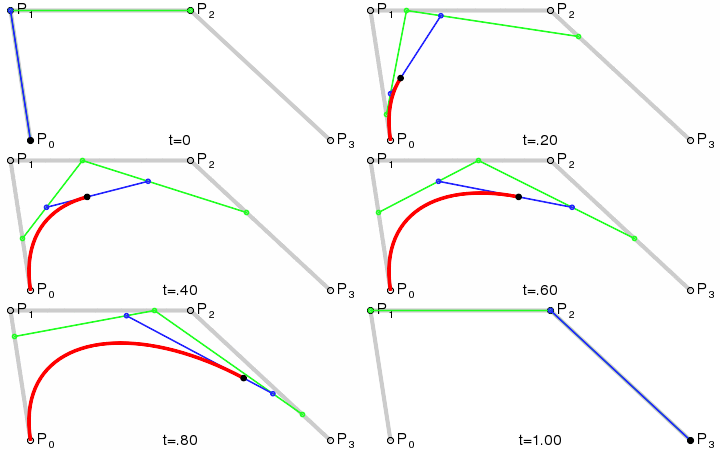

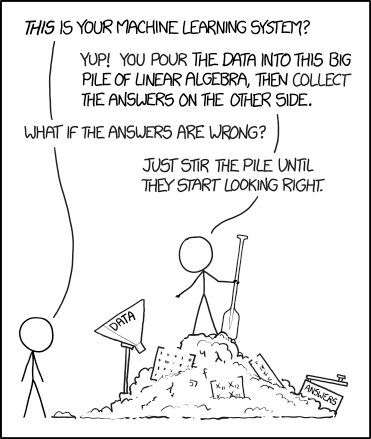


 ) that expresses how the shape of one is modified by the other. The term convolution refers to both the result function and to the process of computing it. It is defined as the