GeistHaus
log in · sign up

Code, code and more code.

Part of feedburner.com

stories
Unusual optimizations; ref foreach and ref returns
Show full content

A really interesting feature quietly slipped into C# 7.3 - interesting to me, at least - but which I’ve seen almost no noise about. As I’ve said many times before: I have niche interests - I spend a lot of time in library code, or acting in a consulting capacity on performance tuning application code - so in both capacities, I tend to look at performance tweaks that aren’t usually needed, but when they are: they’re glorious. As I say: I haven’t seen this discussed a lot, so: “be the change you want to see” - here’s my attempt to sell you on the glory of ref foreach.

Because I know folks have a short attention span, I’ll start with the money shot:

Method Mean Gen 0 Allocated ListForEachLoop 2,724.7 ns - - ArrayForEachLoop 972.2 ns - - CustomForEachLoop 987.2 ns - - ListForLoop 1,201.3 ns - - ArrayForLoop 593.0 ns - - CustomForLoop 596.2 ns - - ListLinqSum 7,057.1 ns 0.0076 80 B ArrayLinqSum 4,832.7 ns - 32 B ListForEachMethod 2,070.6 ns 0.0114 88 B ListRefForeachLoop 586.2 ns - - ListSpanForLoop 590.3 ns - - ArrayRefForeachLoop 574.1 ns - - CustomRefForeachLoop 581.0 ns - - CustomSpanForeachLoop 816.1 ns - - CustomSpanRefForeachLoop 592.2 ns - -

With the point being: I want to sell you on those sub-600 nanosecond versions, rather than the multi-microsecond versions of the same operation.

What the hell is ref foreach?

First, simple recap: let’s consider:

foreach (var someValue in someSequence)
{
    someValue.DoSomething();
}

The details here may vary depending on what someSequence is, but conceptually, what this is doing is reading each value from someSequence into a local variable someValue, and calling the DoSomething() method on each. If the type of someValue is a reference-type (i.e. a class or interface), then each “value” in the sequence is just that: a reference - so we’re not really moving much data around here, just a pointer.

When this gets interesting is: what if the type of someValue is a struct? And in particular, what if it is a heckin’ chonka of a struct? (and yes, there are some interesting scenarios where struct is useful outside of simple data types, especially if we enforce readonly struct to prevent ourselves from shooting our own feet off) In that case, copying the value out of the sequence can be a singificant operation (if we do it often enough to care). Historically, the foreach syntax has an inbuilt implementation for some types (arrays, etc), falling back to a duck-typed pattern that relies on a bool MoveNext() and SomeType Current {get;} pair (often, but not exclusively, provided via IEnumerator<T>) - so the “return the entire value” is baked into the old signature (via the Current property).

What if we could avoid that?

For arrays: we already can!

Let’s consider that someSequence is explicitly typed as an array. It is very tempting to think that foreach and for over the array work the same - i.e. the same foreach as above, compared to for:

for(int i = 0 ; i < someArray.Length ; i++)
{
    someArray[i].DoSomething();
}

But: if we run both of those through sharplab, we can see that they compile differently; in C#, the difference is that foreach is basically:

SomeType someType = someArray[index];
someType.DoSomething();

which fetches the entire value out of the array, where as for is:

someArray[index].DoSomething();

Now, you might be looking at that and thinking “aren’t they the same thing?”, and the simple answer is: “no, no they are not”. You see, there are two ways of accessing values inside an array; you can copy the data out (ldelem in IL, which returns the value at the index), or you can access the data directly inside the array (ldelema in IL, which returns the address at the index). Ironically, we need an address to call the DoSomething() method, so for the foreach version, this actually becomes three steps: “copy out the value from the index, store the value to a local, get the address of a local” - instead of just “get the address of the index”; or in IL:

IL_0006: ldloc.0 // the array
IL_0007: ldloc.1 // the index
IL_0008: ldelem SomeType // read value out from array:index
IL_000d: stloc.2 // store in local
IL_000e: ldloca.s 2 // get address of local
IL_0010: call instance void SomeType::DoSomething() // invoke method

vs

IL_0004: ldarg.0 // the array
IL_0005: ldloc.0 // the index
IL_0006: ldelema SomeType // get address of array:index
IL_000b: call instance void SomeType::DoSomething() // invoke method

So by using for here, not only have we avoided copying the entire value, but we’ve dodged a few extra operations too! Nice. Depending on the size of the value being iterated (again, think “chunky struct” here), using for rather than foreach on an array (making sure you snapshot the value to elide bounds checks) can make a significant difference!

But: that’s arrays, and we aren’t always interested in arrays.

But how does that help me outside arrays?

You might reasonably be thinking “great, but I don’t want to just hand arrays around” - after all, they give me no ability to protect the data, and they’re inconvenient for sizing - you can’t add/remove, short of creating a second array and copying all the data. This is where C# 7.3 takes a huge flex; it introduces a few key things here:

  • C# 7.0 adds ref return values from custom methods including indexers, and ref local values (so you don’t need to use them immediately as a return value)
  • C# 7.2 adds ref readonly to most places where ref might be used (and readonly struct, which often applies here)
  • C# 7.3 adds ref (and ref readonly) as foreach L-values (i.e. the iterator value corresponding to .Current)

Note that with ref, the caller can mutate the data in-place, which is not always wanted; ref readonly signals that we don’t want that to happen, hence why it is so often matched with readonly struct (to avoid having to make defensive copies of data), but as a warning: readonly is always a guideline, not a rule; a suitably motivated caller can convert a ref readonly to a ref, and can convert a ReadOnlySpan<T> to a Span<T>, and convert any of the above to an unmanaged T* pointer (at which point you can forget about all safety); this is not a bug, but a simple reality: everything is mutable if you try hard enough.

These languages features provide the building blocks - especially, but not exclusively, when combined with Span<T>; Span<T> (and the twin, ReadOnlySpan<T>) provide unified access to arbitrary data, which could be a slice of an array, but could be anything else - with the usual .Length, indexer (this[int index]) and foreach support you’d expect, with some additional compiler and JIT tricks (much like with arrays) to make them fly. Since spans are naturally optimized, one of the first things we can do - if we don’t want to deal with arrays - is: deal with spans instead! This is sometimes a little hard to fit into existing systems without drastically refactoring the code, but more recently (.NET 5+), we get helper methods like CollectionsMarshal.AsSpan, which gives us the sized span of the data underpinning a List<T>. This is only useful transiently (as any Add/Remove on the list will render the span broken - the length will be wrong, and it may now even point to the wrong array instance, if the list had to re-size the underlying data), but when used correctly, it allows us to access the data in situ rather than having to go via the indexer or iterator (both of which copy out the entire value at each position). For example:

foreach (ref var tmp in CollectionsMarshal.AsSpan(someList))
{   // also works identically with "ref readonly var", since this is
    // a readonly struct
    tmp.DoSomething();
}

Our use of ref var tmp with foreach here means that the L-value (tmp) is a managed pointer to the data - not the data itself; we have avoided copying the overweight value-type, and called the method in-place.

If you look carefully, the indexer on a span is not T this[int index], but rather: ref T this[int index] (or ref readonly T this[int index] for ReadOnlySpan<T>), so we can also use a for loop, and avoid copying the data at any point:

var span = CollectionsMarshal.AsSpan(someList);
for (int i = 0; i < span.Length; i++) { span[i].DoSomething(); }
Generalizing this

Sometimes, spans aren’t viable either - for whatever reason. The good news is: we can do the exact same thing with our own types, in two ways:

  1. we can write our own types with an indexer that returns a ref or ref readonly managed pointer to the real data
  2. we can write our own iterator types with a ref or ref readonly return value on Current; this won’t satisfy IEnumerator<T>, but the compiler isn’t limited to IEnumerator<T>, and if you’re writing a custom iterator (rather than using a yield return iterator block): you’re probably using a custom value-type iterator and avoiding the interface to make sure it never gets boxed accidentally, so: nothing is lost!

Purely for illustration (you wouldn’t do this - you’d just use ReadOnlySpan<T>), a very simple custom iterator could be something like:

public struct Enumerator
{
    private readonly SomeStruct[] _array;
    private int _index;

    internal Enumerator(SomeStruct[] array)
    {
        _array = array;
        _index = -1;
    }

    public bool MoveNext()
        => ++_index < _array.Length;

    public ref readonly SomeStruct Current
        => ref _array[_index];
}

which would provide foreach access almost as good as a direct span. If the caller uses foreach (var tmp in ...) rather than foreach(ref readonly var tmp in ...), then the compiler will simply de-reference the value for the caller, which it would have done anyway in the old-style foreach, so: once again: no harm.

Summary

In modern C#, we have a range of tricks that can help in certain niche scenarios relating to sequences of - in particular - value types. These scenarios don’t apply to everyone, and that’s fine. If you never need to use any of the above: that’s great, and good luck to you. But when you do need them, they are incredibly powerful and versatile, and a valuable tool in the optimizer’s toolbox.

The benchamrk code used for the table at the start of the post is included here.

tag:blogger.com,1999:blog-8184237816669520763.post-6407530942783187183
Migrating from Redis-64 to Memurai
Show full content

or alternatively:

How did updating to .NET 6 break asp-net redis cache for some users?

Whereby I present the history of Redis-64, along with options and motivations for Redis-64 users on Windows to consider updating their redis via Memurai.

Running Redis on Windows, 2022 edition; replacing Redis-64

A funny thing happened recently; after updating to .NET 6, some StackExchange.Redis users started reporting that redis was not working from their web applications. A relatively small number, so: not an endemic fail - but also far from zero. As you might hope, we took a look, and pieced together that what was actually happening here was:

  • a part of ASP.NET allows using redis as a cache
  • historically, this used the HMSET redis command (which sets multiple hash fields, contrast to HSET which sets a single hash field)
  • in redis 4.0 (July 2014), HSET was made variadic and thus functionally identical to HMSET - and so HMSET was marked “deprecated” (although it still works)
  • respecting the “deprecated” marker, .NET 6 (Nov 2021) included a change to switch from HMSET to HSET, thinking that the number of people below redis 4.0 should be negligible
  • and it turned out not to be!

This problem was reported and the relevant code has now been fixed to support both variants, but we need to take a step further and understand why a non-trivial number of users are more than 7 years behind on servicing. After a bit more probing, it is my understanding that for a lot of the affected users, the answer is simple: they are using Redis-64.

What is (was) Redis-64?

Historically, the main redis project has only supported linux usage. There are some particular nuances of how redis is implemented (using fork-based replication and persistance with copy-on-write semantics, for example) that don’t make for a direct “just recompile the code and it works the same” nirvana. Way back around the redis 2.6 era (2013), Microsoft (in the guise of MSOpenTech) released a viable Windows-compatible fork, under the name Redis-64 (May 2013). This fork was kept up to date through redis 2.8 and some 3.0 releases, but the development was ultimately dropped some time in 2016, leaving redis 3.0 as the last MSOpenTech redis implementation. There was also a Redis-32 variant for x86 usage, although this was even more short-lived, staying at 2.6.

I’m all in favor of a wide variety of good quality tools and options. If you want to run a redis server as part of a Windows installation, you should be able to do that! This could be because you already have Windows servers and administrative experience, and want a single OS deployment; it could be because you don’t want the additional overheads/complications of virtualization/container technologies. It could be because you’re primarily doing development on a Windows machine, and it is convenient. Clearly, Redis-64 was an attractive option to many people who want to run redis natively on Windows; I know we used it (in addition to redis on linux) when I worked with Stack Overflow.

Running outdated software is a risk

Ultimately, being stuck with a server that is based on 2015/2016 starts to present a few problems:

  1. you need to live with long-known and long-fixed bugs and other problems (including any well-known security vulnerabilities)
  2. you don’t get to use up-to-date features and capabilities
  3. you might start dropping off the support horizon of 3rd party libraries and tools

This 3rd option is what happened with ASP.NET in .NET 6, but the other points also stand; the “modules” (redis 4.x) and “streams” (redis 5.x) features come to mind immediately - both have huge utility.

So: if you’re currently using Redis-64, how can we resolve this, without completely changing our infrastructure?

Shout-out: Memurai

The simplest way out of this corner is, in my opinion: Memurai, by Janea Systems. So: what is Memurai? To put it simply: Memurai is a redis 5 compatible fork of redis that runs natively on Windows. That means you get a wide range of more recent redis fixes and features. Fortunately, it is a breeze to install, with options for nuget, choco/cinst, winget, winstall and an installer. This means that you can get started with a Memurai development installation immediately.

The obsolete Redis-64 nuget package also now carries a link to Memurai in the “Suggested Alternatives”, which is encouraging. To be transparent: I need to emphasize - Memurai is a commercial offering with a free developer edition. If we look at how Redis-64 ultimately stagnated, I view this as a strength: it means that someone has a vested interest in making sure that the product continues to evolve and be supported, now and into the future.

Working with Memurai

As previously noted: installation is quick and simple, but so is working with it. The command-line tools change nominally; instead of redis-cli, we have memurai-cli; instead of redis-server we have memurai. However, they work exactly as you expect and will be immediately familar to anyone who has used redis. At the server level, Memurai surfaces the exact same protocol and API surface as a vanilla redis server, meaning any existing redis-compatible tools and clients should work without problem:

c:\Code>memurai-cli
127.0.0.1:6379> get foo
(nil)
127.0.0.1:6379> set foo bar
OK
127.0.0.1:6379> get bar
(nil)
127.0.0.1:6379>

(note that redis-cli would have worked identically)

At the metadata level, you may notice that info server reports some additional antries:

127.0.0.1:6379> info server
# Server
memurai_edition:Memurai Developer
memurai_version:2.0.5
redis-version:5.0.14
...

The redis_version entry is present so that client libraries and applications expecting this entry can understand the features available, so this is effectively the redis API compatibility level; the memurai_version and memurai_edition give specific Memurai information, if you need it - but other than those additions (and extra rows are expected here), everything works as you would expect. For example, we can use any pre-existing redis client to talk to the server:

using StackExchange.Redis;

// connect to local redis, default port
using var conn = await ConnectionMultiplexer.ConnectAsync("127.0.0.1");
var db = conn.GetDatabase();

// reset and populate some data
await db.KeyDeleteAsync("mykey");
for (int i = 1; i <= 20; i++)
{
    await db.StringIncrementAsync("mykey", i);
}

// fetch and display
var sum = (int)await db.StringGetAsync("mykey");
Console.WriteLine(sum); // writes: 210

Configuring the server works exactly like it does for redis - the config file works the same, although the example template is named differently:

c:\Code>where memurai
C:\Program Files\Memurai\memurai.exe

c:\Code>dir "C:\Program Files\Memurai\*.conf" /B
memurai.conf
Summary

Putting this all together: if you’re currently choosing Redis-64 to run a redis server natively on Windows, then Memurai might make a very appealing option - certainly more appealing than remaining on the long-obsolete Redis-64. All of your existing redis knowledge continues to apply, but you get a wide range of features that were added to redis after Redis-64 was last maintained. Are there other ways of running redis on Windows? Absolutely. But for people in the Redis-64 zone, it looks like a good option.

tag:blogger.com,1999:blog-8184237816669520763.post-1085574781927848649
Is the era of reflection-heavy C# libraries at an end?
Show full content

I’m going to talk about reflection-heavy libraries; I will describe the scenario I’m talking about - as it is commonly used today, the status quo, giving a brief overview of the pros and cons of this, and then present the case that times have changed, and with new language and runtime features: it may be time to challenge our way of thinking about this kind of library.


I’m a code-first kind of developer; I love the inner-loop experience of being able to tweak some C# types and immediately have everything work, and I hate having to mess in external DSLs or configuration files (protobuf/xml/json/yaml/etc). Over the last almost-two-decades, I’ve selected or written libraries that allow me to work that way. And, to be fair, this seems to be a pretty common way of working in .NET.

What this means in reality is that we tend to have libraries where a lot of magic happens at runtime, based either on the various <T> for generic APIs, or via GetType() on objects that are passed in. Consider the following examples:

Json.NET
// from  https://www.newtonsoft.com/json
Product product = new Product();
product.Name = "Apple";
product.Expiry = new DateTime(2008, 12, 28);
product.Sizes = new string[] { "Small" };

string json = JsonConvert.SerializeObject(product);
Dapper
var producer = "Megacorp, Inc.";
var products = connection.Query<Product>(@"
    select Id, Name, Expiry
    from Products
    where Producer = producer",
    new { producer }).AsList();

I won’t try to give an exhaustive list, but there are a myriad of libraries - both by Microsoft, or 3rd-party, for a myriad of purposes, that fundamentally fall into the camp of:

At runtime, given some Type: check the local library type cache; if we haven’t seen that Type before: perform a ton of reflection code to understand the model, produce a strategy to implement the library features on that model, and then expose some simplified API that invokes that strategy.

Behind the scenes, this might be “simple” naive reflection (PropertyInfo.GetValue(), etc), or it might use the Expression API or the ref-emit API (mainly: ILGenerator) to write runtime methods directly, or it might generate C# that it then runs through the compiler (XmlSerializer used to work this way, and may well still do so).

This provides a pretty reasonable experience for the consumer; their code just works, and - sure, the library does a lot of work behind the scenes, but the library authors usually invest a decent amount of time into trying to minimize that so you aren’t paying the reflection costs every time.

So what is the problem?

For many cases: this is fine - we’ve certainly lived well-enough with it for the last however-many years; but: times change. In particular, a few things have become increasingly significant in the last few years:

  • async/await

    Increasing demands of highly performant massively parallel code (think: “web servers”, for example) has made async/await hugely important; from the consumer perspective, it is easy to think that this is mostly a “sprinkle in some async/await keywords” (OK, I’m glossing over a lot of nuance here), but behind the scenes, the compiler is doing a lot - like a real lot of work for us. If you’re in the Expression or ILGenerator mind-set, switching fully to async/await is virtually impossible - it is just too much. At best, you can end up with some async shell library codes that calls into some generated Func<...>/Action<...> code, but that assumes that the context-switch points (i.e. the places where you’d want to await etc) can be conveniently mapped to that split. It isn’t assumed that a reflection-heavy library can even be carved up in this way.

  • AOT platforms

    At the other end of the spectrum, we have AOT devices - think “Xamarin”, “Unity”, etc. Running on a small device can mean that you have reduced computational power, so you start noticing the time it takes to inspect models at runtime - but they also often have deliberately restricted runtimes that prevent runtime code generation. This means that you can probably get away with the naive reflection approach (which is relatively slow), but you won’t be able to emit optimized code via ILGenerator; the Expression approach is a nice compromise here, in that it will optimize when it can, but use naive reflection when that isn’t possible - but you still end up paying the performance cost.

  • Linkers

    Another feature of AOT device scenarios is that they often involve trimmed deployments via a pruning linker, but “Single file deployment and executable” deployments are now a “thing” for regular .NET Core 5 / .NET 6+. This brings two problems:

    1. we need to work very hard to convince the linker not to remove things that our library is going to need to use at runtime, despite the fact that they aren’t used if you scan the assembly in isolation
    2. our reflection-heavy library often needs to consider all the possible problematic edge scenarios that could exist, ever, which means it might appear to touch a lot more things than it does, when in reality for the majority of runs it is just going to be asking “do I need to consider this? oh, nope, that’s fine” - because the library appears to touch it
    3. we thus find ourselves fighting the linker’s tendency to remove everything we need while simultaneously retaining everything that doesn’t apply to our scenario
  • Cold start

    It is easy to think of applications as having a relatively long duration, so: cold-start performance doesn’t matter. Now consider things like “Azure functions”, or other environments where our code is invoked for a very brief time, as-needed (often on massively shared infrastructure); in this scenario, cold-start performance translates directly (almost linearly) to throughput, and thus real money

  • Runtime error discovery

    One of the problems with having the library do all the model analysis at runtime is that you don’t get feedback on your code until you run it; and sure, you can (and should) write unit/integration tests that push your model through the library in every way you can think of, but: things get missed. This means that code that compiled blows up at runtime, for reasons that should be knowable - an “obvious” attribute misconfiguration, for example.

  • Magic code

    Magic is bad. By which I mean: if I said to you “there’s going to be some code running in your application, that doesn’t exist anywhere - it can’t be seen on GitHub, or in your source-code, or in the IDE, or in the assembly IL, or anywhere, and by the way it probably uses lots of really gnarly unusual IL, but trust me it is totally legit” - you might get a little worried; but that is exactly what all of these libraries do. I’m not being hyperbolic here; I’ve personally received bug-reports from the JIT god (AndyAyersMS) because my generated IL used ever so slightly the wrong pointer type in one place, which worked fine almost always, except when it didn’t and exploded the runtime.

There is a different way we can do all of this

Everything above is a side-effect of the tools that have been available to us - when the only tool you’ve had for years has been a hammer, you get used to thinking in terms of nails. For “code first”, that really meant “reflection”, which meant “runtime”. Reflection-based library authors aren’t ignorant of these problems, and for a long time now have been talking to the framework and language teams about options. As the above problem scenarios have become increasingly important, we’ve recently been graced with new features in Roslyn (the C# / VB compiler engine), i.e. “generators”. So: what are generators?

Imagine you could take your reflection-based analysis code, and inject it way earlier - in the build pipe, so when your library consumer is building their code (whether they’re using Visual Studio, or dotnet build or whatever else), you get given the compiler’s view of the code (the types, the methods, etc), and at that point you had the chance to add your own code (note: purely additive - you aren’t allowed to change the existing code), and have our additional code included in the build. That: would be a generator. This solves most of the problems we’ve discussed:

  • async: our generated code can use async/await, and we can just let the regular compiler worry about what that means - we don’t need to get our hands dirty
  • AOT: all of the actual code needed at runtime exists in the assemblies we ship - nothing needs to be generated at runtime
  • linkers: the required code is now much more obvious, because: it exists in the assembly; conversely, because we can consider all the problematic edge scenarios during build, the workarounds needed for those niche scenarios don’t get included when they’re not needed, and nor do their dependency chains
  • cold start: we now don’t need to do any model inspection or generation at runtime: it is already done during build
  • error discovery: our generator doubles as a Roslyn analyzer; it can emit warnings and errors during build if it finds something suspicious in our model
  • magic code: the consumer can see the generated code in the IDE, or the final IL in the assembly

If you’re thinking “this sounds great!”, you’d be right. It is a huge step towards addressing the problems described above.

What does a generator look like for a consumer?

From the “I’m an application developer, just make things work for me” perspective, using a generator firstly means adding a build-time package; for example, to add DapperAOT (which is purely experimental at this point, don’t get too excited), we would add (to our csproj):

<ItemGroup>
    <PackageReference Include="Dapper.AOT"
                      Version="0.0.8" PrivateAssets="all"
                      IncludeAssets="runtime;build;native;contentfiles;analyzers;buildtransitive" />
</ItemGroup>

This package isn’t part of what gets shipped in our application - it just gets hooked into the build pipe. Then we need to follow the library’s instructions on what is needed! In many cases, I would expect the library to self-discover scenarios where it needs to get involved, but as with any library, there might be special methods we need to call, or attributes we need to add, to make the magic happen. For example, with DapperAOT I’m thinking of having the consumer declare their intent via partial methods in a partial type:

[Command(@"select * from Customers where Id=@id and Region=@region")]
[SingleRow(SingleRowKind.FirstOrDefault)] // entirely optional; this is
    // to influence what happens when zero/multiple rows returned
public static partial Customer GetCustomer(
    DbConnection connection, int id, string region);

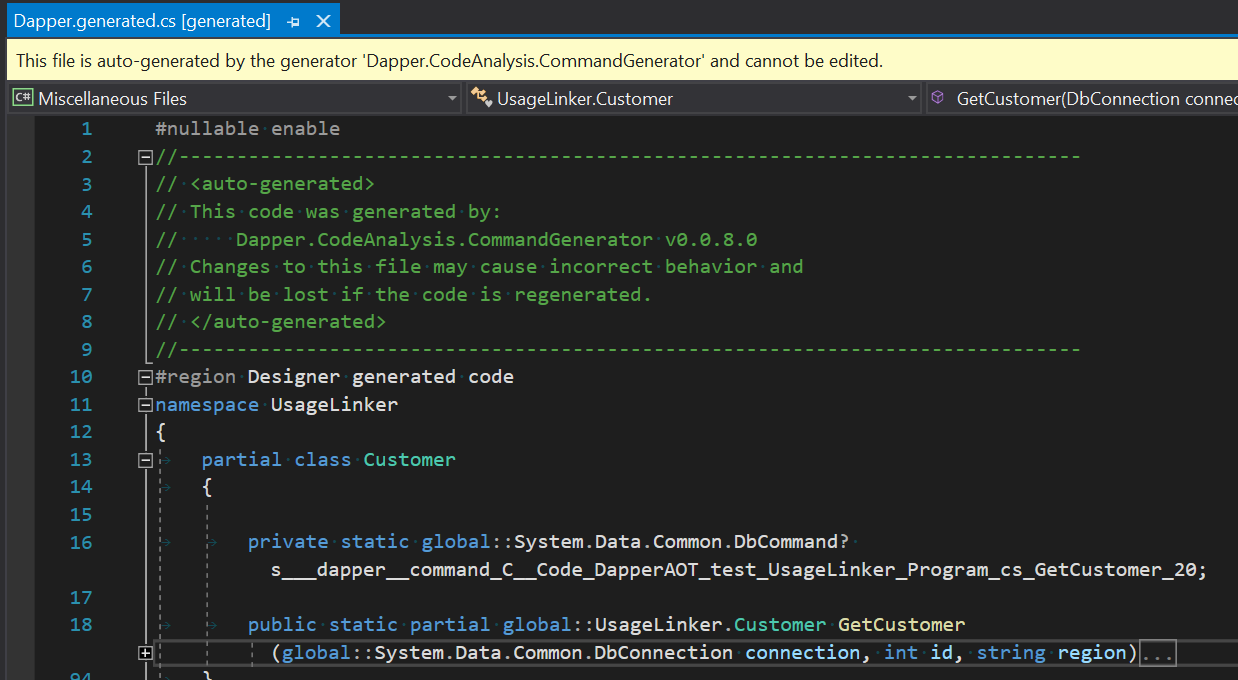
If you haven’t seen this partial usage before, this is an “extended partial method” in C# 9, which basically means partial methods can now be accessible, have return values, out parameters, etc - the caveat is that somewhere the compiler expects to find another matching half of the partial method that provides an implementation. Our generator can detect the above dangling partial method, and add the implementation in the generated code. This generated code is then available in the IDE, either by stepping into the code as usual, or in the solution explorer:

Showing the solution explorer, expanding: (the project), Dependencies, Analyzers, Dapper.AOT, Dapper.CoreAnalysis.CommandGenerator, Dapper.generated.cs

and as a code file:

The generated code file Dapper.generated.cs, declaring the GetCustomer method

Other libraries may choose other approaches, perhaps using module initializers to register some specific type handlers into a lightweight library, that handle expected known types (as discovered during build); or it could detect API calls that don’t resolve, and add them (either via partial types, or extension methods) - like a custom dynamic type, but where the convention-based APIs are very real, but generated automatically during build. But the theme remains: from the consumer perspective, everything just works, and is now more discoverable.

What does a generator look like for a library author?

Things are a little more complicated for the library author; the Roslyn semantic tree is similar to the kind of model you get at runtime - but it isn’t the same model; in particular, you’re not working with Type any more, you’re working with ITypeSymbol or (perhaps more commonly) INamedTypeSymbol. That’s because the type system that you’re inspecting is not the same as the type system that you’re running on - it could be for an entirely different framework, for example. But if you’re already used to complex reflection analysis, most things are pretty obvious. It isn’t very hard, honest. Mostly, this involves:

  1. implementing ISourceGenerator (and marking that type with [Generator])
  2. implementing ISyntaxReceiver to capture candidate nodes you might want to look at later
  3. implementing ISourceGenerator.Initialize to register your ISyntaxReceiver
  4. implementing ISourceGenerator.Execute to perform whatever logic you need against the nodes you captured
  5. calling context.AddSource some number of times to add whatever file(s) you need

I’m not going to give a full lesson on “how to write a generator” - I’m mostly trying to set the scene for why you might want to consider this, but there is a Source Generators Cookbook that covers a lot, or I humbly submit that the DapperAOT code might be interesting (I am not suggesting that it does everything the best way, but: it kinda works, and shows input-source-file-based unit testing etc).

This all sounds too good to be true? What is the catch?

Nothing is free. There’s a few gotchas here.

  1. It is a lot of re-work; if you have an existing non-trivial library, this represents a lot of effort
  2. You may also need to re-work your main library, perhaps splitting the “reflection aware” code and “making things work” code into two separate pieces, with the generator-based approach only needing the latter half
  3. Some scenarios may be hard to detect reliably during code analysis - where your code is seven layers down in generic types and methods, for example, it may be hard to discover all of the original types that are passed into your library; and if it is just object: even harder; we may need to consider this when designing APIs, or provide fallback mechanisms to educate the generator (for example, [model:GenerateJsonSerializerFor(typeof(Customer))])
  4. There are some things we can’t do in C# that we can do in IL; change readonly fields, call init/get-only properties, bypass accessibility, etc; in some cases, we might be able to generate internal constructors in another partial class (for example), that allows us to sneak past those boundaries, but in some other cases (where the type being used isn’t part of the current compilation, because it comes from a package reference) it might simply be that we can’t offer the exact same features (or need to use a fallback reflection scenario)
  5. It is C# specific (edit: C# and VB, my mistake!); this is a huuuuuge “but”, and I can hear the F#, VB, etc developers gnashing their teeth already; there’s a very nuanced conversation here about whether the advantages I’ve covered outweigh the disadvantages of not being able to offer the same features on all .NET platforms
  6. It needs up-to-date build tools, which may limit adoption (note: this does not mean we can only use generators when building against .NET 6 etc)
  7. We have less flexibility to configure things at runtime; in practice, this isn’t usually a problem as long as we can actually configure it, which can be done at build-time using attributes (and by using [Conditional(...)] on our configuration attributes, we don’t even need to include them in the final assembly - they can be used by the generator and then discarded by the compiler)

That said, there’s also some great upsides - during build we have access to information that doesn’t exist in the reflection model, for example the name parts of value-tuples (which are exposed outwards via attributes, but not inwards; libraries are inwards, from this perspective), and more reliable nullability annotation data when calling generic APIs with nullability.

Summary

I genuinely think we should be embracing generators and reducing or removing completely our reliance on runtime reflection emit code. I say this as someone who has built a pretty successful niche as an expert in those areas, and would have to start again with the new tools - I see the benefits, despite the work and wrinkles. Not only that, I think there is an opportunity here (with things like “extended partial methods” etc) to make our application code even more expressive, rather than having than having to worry about dancing around library implementation details.

But I welcome competing thoughts!

tag:blogger.com,1999:blog-8184237816669520763.post-5657511219012614757
Multi-path cancellation; a tale of two codependent async enumerators
Show full content

Disclaimer: I'll be honest: many of the concepts in this post are a bit more advanced - some viewer caution is advised! It touches on concurrent linked async enumerators that share a termination condition by combining multiple CancellationToken.


Something that I've been looking at recently - in the context of gRPC (and protobuf-net.Grpc in particular) - is the complex story of duplex data pipes. A full-duplex connection is a connection between two nodes, but instead of being request-response, either node can send messages at any time. There's still a notional "client" and "server", but that is purely a feature of which node was sat listening for connection attempts vs which node reached out and established a connection. Shaping a duplex API is much more complex than shaping a request-response API, and frankly: a lot of the details around timing are hard.

So: I had the idea that maybe we can reshape everything at the library level, and offer the consumer something more familiar. It makes an interesting (to me, at least) worked example of cancellation in practice. So; let's start with an imaginary transport API (the thing that is happening underneath) - let's say that we have:

  • a client establishes a connection (we're not going to worry about how)
  • there is a SendAsync message that sends a message from the client to the server
  • there is a TryReceiveAsync message that attempts to await a message from the server (this will also report true if a message could be fetched, and false if the server has indicated that it won't ever be sending any more)
  • additionally, the server controls data flow termination; if the server indicates that it has sent the last message, the client should not send any more

something like (where TRequest is the data-type being sent from the client to the server, and TResponse is the data-type expected from the server to the client):

interface ITransport<TRequest, TResponse> : IAsyncDisposable
{
    ValueTask SendAsync(TRequest request,
        CancellationToken cancellationToken);

    ValueTask<(bool Success, TResponse Message)> TryReceiveAsync(
        CancellationToken cancellationToken);
}

This API doesn't look all that complicated - it looks like (if we ignore connection etc for the moment) we can just create a couple of loops, and expose the data via enumerators - presumably starting the SendAsync via Task.Run or similar so it is on a parallel flow:

ITransport<TRequest, TResponse> transport;
public async IAsyncEnumerable<TResponse> ReceiveAsync(
    [EnumeratorCancellation] CancellationToken cancellationToken)
{
    while (true)
    {
        var (success, message) =
            await transport.TryReceiveAsync(cancellationToken);
        if (!success) break;
        yield return message;
    }
}

public async ValueTask SendAsync(
    IAsyncEnumerable<TRequest> data,
    CancellationToken cancellationToken)
{
    await foreach (var message in data
        .WithCancellation(cancellationToken))
    {
        await transport.SendAsync(message, cancellationToken);
    }
}

and it looks like we're all set for cancellation - we can pass in an external cancellation-token to both methods, and we're set. Right?

Well, it is a bit more complex than that, and the above doesn't take into consideration that these two flows are codependent. In particular, a big concern is that we don't want to leave the producer (the thing pumping SendAsync) still running in any scenario where the connection is doomed. There are actually many more cancellation paths than we might think:

  1. we might have supplied an external cancellation-token to both methods, and this token may have triggered
  2. the consumer of ReceiveAsync (the thing iterating it) might have supplied a cancellation-token to GetAsyncEnumerator (via WithCancellation), and this token may have been triggered (we looked at this last time)
  3. we could have faulted in our send/receive code
  4. the consumer of ReceiveAsync may have decided not to take all the data - that might be because of some async simile of Enumerable.Take(), or it could be because they faulted when processing a message they had received
  5. the producer in SendAsync may have faulted

All of these scenarios essentially signify termination of the connection, so we need to be able to encompass all of these scenarios in some way that allows us to communicate the problem between the send and receive path. In a word, we want our own CancellationTokenSource.

There's a lot going on here; more than we can reasonably expect consumers to do each and every time they use the API, so this is a perfect scenario for a library method. Let's imagine that we want to encompass all this complexity in a simple single library API that the consumer can access - something like:

public IAsyncEnumerable<TResponse> Duplex(
    IAsyncEnumerable<TRequest> request,
    CancellationToken cancellationToken = default);

This:

  • allows them to pass in a producer
  • optionally allows them to pass in an external cancellation-token
  • makes an async feed of responses available to them

Their usage might be something like:

await foreach (MyResponse item in client.Duplex(ProducerAsync()))
{
    Console.WriteLine(item);
}

where their ProducerAsync() method is (just "because"):

async IAsyncEnumerable<MyRequest> ProducerAsync(
    [EnumeratorCancellation] CancellationToken cancellationToken = default)
{
    for (int i = 0; i < 100; i++)
    {
        yield return new MyRequest(i);
        await Task.Delay(100, cancellationToken);
    }
}

As I discussed in The anatomy of async iterators (aka await, foreach, yield), our call to ProducerAsync() doesn't actually do much yet - this just hands a place-holder that can be enumerated later, and it is the act of enumerating it that actually invokes the code. Very important point, that.

So; what can our Duplex code do? It already needs to think about at least 2 different kinds of cancellation:

  • the external token that was passed into cancellationToken
  • the potentially different token that could be passed into GetAsyncEnumerator() when it is consumed

but we know from our thoughts earler that we also have a bunch of other ways of cancelling. We can do something clever here. Recall how the compiler usually combines the above two tokens for us? Well, if we do that ourselves, then instead of getting just a CancellationToken, we find ourselves with a CancellationTokenSource, which gives us lots of control:

public IAsyncEnumerable<TResponse> Duplex(
    IAsyncEnumerable<TRequest> request,
    CancellationToken cancellationToken = default)
    => DuplexImpl(transport, request, cancellationToken);

private async static IAsyncEnumerable<TResponse> DuplexImpl(
    ITransport<TRequest, TResponse> transport,
    IAsyncEnumerable<TRequest> request,
    CancellationToken externalToken,
    [EnumeratorCancellation] CancellationToken enumeratorToken = default)
{
    using var allDone = CancellationTokenSource.CreateLinkedTokenSource(
            externalToken, enumeratorToken);
    // ... todo
}

Our DuplexImpl method here allows the enumerator cancellation to be provided, but (importantly) kept separate from the original external token; this means that it won't yet be combined, and we can do that ourselves using CancellationTokenSource.CreateLinkedTokenSource - much like the compiler would have done for us, but: now we have a CancellationTokenSource that we can cancel when we choose. This means that we can use allDone.Token in all the places we want to ask "are we done yet?", and we're considering everything.

For starters, let's handle the scenario where the consumer doesn't take all the data (out of choice, or because of a fault). We want to trigger allDone however we exit DuplexImpl. Fortunately, the way that iterator blocks are implemented makes this simple (and we're already using it here, via using): recall (from the previous blog post) that foreach and await foreach both (usually) include a using block that invokes Dispose/DisposeAsync on the enumerator instance? Well: anything we put in a finally essentially relocates to that Dispose/DisposeAsync. The upshot of this is that triggering the cancellation token when the consumer is done with us is trivial:

using var allDone = CancellationTokenSource.CreateLinkedTokenSource(
        externalToken, enumeratorToken);
try
{
    // ... todo
}
finally
{   // cancel allDone however we exit
    allDone.Cancel();
}

The next step is to get our producer working - that's our SendAsync code. Because this is duplex, it doesn't have any bearing on the incoming messages, so we'll start that as a completely separate code-path via Task.Run, but we can make it such that if the producer or send faults, it stops the entire show; so if we look just at our // ... todo code, we can add:

var send = Task.Run(async () =>
{
    try
    {
        await foreach (var message in
            request.WithCancellation(allDone.Token))
        {
            await transport.SendAsync(message, allDone.Token);
        }
    }
    catch
    {   // trigger cancellation if send faults
        allDone.Cancel();
        throw;
    }
}, allDone.Token);

// ... todo: receive

await send; // observe send outcome

This starts a parallel operation that consumes the data from our producer, but notice that we're using allDone.Token to pass our combined cancellation knowledge to the producer. This is very subtle, because it represents a cancellation state that didn't even conceptually exist at the time ProducerAsync() was originall invoked. The fact that GetAsyncEnumerator is deferred has allowed us to give it something much more useful, and as long as ProducerAsync() uses the cancellation-token appropriately, it can now be fully aware of the life-cycle of the composite duplex operation.

This just leaves our receive code, which is more or less like it was originally, but again: using allDone.Token:

while (true)
{
    var (success, message) = await transport.TryReceiveAsync(allDone.Token);
    if (!success) break;
    yield return message;
}

// the server's last message stops everything
allDone.Cancel();

Putting all this together gives us a non-trivial libray function:

private async static IAsyncEnumerable<TResponse> DuplexImpl(
    ITransport<TRequest, TResponse> transport,
    IAsyncEnumerable<TRequest> request,
    CancellationToken externalToken,
    [EnumeratorCancellation] CancellationToken enumeratorToken = default)
{
    using var allDone = CancellationTokenSource.CreateLinkedTokenSource(
        externalToken, enumeratorToken);
    try
    {
        var send = Task.Run(async () =>
        {
            try
            {
                await foreach (var message in
                    request.WithCancellation(allDone.Token))
                {
                    await transport.SendAsync(message, allDone.Token);
                }
            }
            catch
            {   // trigger cancellation if send faults
                allDone.Cancel();
                throw;
            }
        }, allDone.Token);

        while (true)
        {
            var (success, message) = await transport.TryReceiveAsync(allDone.Token);
            if (!success) break;
            yield return message;
        }

        // the server's last message stops everything
        allDone.Cancel();

        await send; // observe send outcome
    }
    finally
    {   // cancel allDone however we exit
        allDone.Cancel();
    }
}

The key points here being:

  • both the external token and the enumerator token contribute to allDone
  • the transport-level send and receive code uses allDone.Token
  • the producer enumeration uses allDone.Token
  • however we exit our enumerator, allDone is cancelled
    • if transport-receive faults, allDone is cancelled
    • if the consumer terminates early, allDone is cancelled
  • when we receive the last message from the server, allDone is cancelled
  • if the producer or transport-send faults, allDone is cancelled

The one thing it doesn't support well is people using GetAsyncEnumerator() directly and not disposing it. That comes under the heading of "using the API incorrectly", and is self-inflicted.

A side note on ConfigureAwait(false); by default await includes a check on SynchronizationContext.Current; in addition to meaning an extra context-switch, in the case of UI applications this may mean running code on the UI thread that does not need to run on the UI thread. Library code usually does not require this (it isn't as though we're updating form controls here, so we don't need thread-affinity). As such, in library code, it is common to use .ConfigureAwait(false) basically everywhere that you see an await - which bypasses this mechanism. I have not included that in the code above, for readability, but: you should imagine it being there :) By contrast, in application code, you should usually default to just using await without ConfigureAwait, unless you know you're writing something that doesn't need sync-context.

I hope this has been a useful delve into some of the more complex things you can do with cancellation-tokens, and how you can combine them to represent codependent exit conditions.

tag:blogger.com,1999:blog-8184237816669520763.post-6984565970026557093
The anatomy of async iterators (aka await, foreach, yield)
Show full content

Here I'm going to discuss the mechanisms and concepts relating to async iterators in C# - with the hope of both demystifying them a bit, and also showing how we can use some of the more advanced (but slightly hidden) features. I'm going to give some illustrations of what happens under the hood, but note: these are illustrations, not the literal generated expansion - this is deliberately to help show what is conceptually happening, so if I ignore some sublte implementation detail: that's not accidental. As always, if you want to see the actual code, tools like https://sharplab.io/ are awesome (just change the "Results" view to "C#" and paste the code you're interested in onto the left).

Iterators in the sync world

Before we discuss async iterators, let's start by recapping iterators. Many folks may already be familiar with all of this, but hey: it helps to set the scene. More importantly, it is useful to allow us to compare and contrast later when we look at how async changes things. So: we know that we can write a foreach loop (over a sequence) of the form:

foreach (var item in SomeSource(42))
{
    Console.WriteLine(item);
}

and for each item that SomeSource returns, we'll get a line in the console. SomeSource could be returning a fully buffered set of data (like a List<string>):

IEnumerable<string> SomeSource(int x)
{
    var list = new List<string>();
    for (int i = 0; i < 5; i++)
        list.Add($"result from SomeSource, x={x}, result {i}");
    return list;
}

but a problem here is that this requires SomeSource to run to completion before we get even the first result, which could take a lot of time and memory - and is just generally restrictive. Often, when we're trying to represent a sequence, it may be unbounded, or at least: open-ended - for example, we could be pulling data from a remote work queue, where a: we only want to be holding one pending item at a time, and b: it may not have a logical "end". It turns out that C#'s definition of a "sequence" (for the purposes of foreach) is fine with this. Instead of returning a list, we can write an iterator block:

IEnumerable<string> SomeSource(int x)
{
    for (int i = 0; i < 5; i++)
        yield return $"result from SomeSource, x={x}, result {i}";
}

This works similarly, but there are some fundamental differences - most noticeably: we don't ever have a buffer - we just make one element available at a time. To understand how this can work, it is useful to take another look at our foreach; the compiler interprets foreach as something like the following:

using (var iter = SomeSource(42).GetEnumerator())
{
    while (iter.MoveNext())
    {
        var item = iter.Current;
        Console.WriteLine(item);
    }
}

We have to be a little loose in our phrasing here, because foreach isn't actually tied to IEnumerable<T> - it is duck-typed against an API shape instead; the using may or may not be there, for example. But fundamentally, the compiler calls GetEnumerator() on the expression passed to foreach, then creates a while loop checking MoveNext() (which defines "is there more data?" and advances the mechanism in the success case), then accesses the Current property (which exposes the element we advanced to). As an aside, historically (prior to C# 5) the compiler used to scope item outside of the while loop, which might sound innocent, but it was the source of absolutely no end of confusion, code erros, and questions on Stack Overflow (think "captured variables").

So; hopefully you can see in the above how the consumer can access an unbounded forwards-only sequence via this MoveNext() / Current approach; but how does that get implemented? Iterator blocks (anything involving the yield keyword) are actually incredibly complex, so I'm going to take a lot of liberties here, but what is going on is similar to:

IEnumerable<string> SomeSource(int x)
    => new GeneratedEnumerable(x);

class GeneratedEnumerable : IEnumerable<string>
{
    private int x;
    public GeneratedEnumerable(int x)
        => this.x = x;

    public IEnumerator<string> GetEnumerator()
        => new GeneratedEnumerator(x);

    // non-generic fallback
    IEnumerator IEnumerable.GetEnumerator()
        => GetEnumerator();
}

class GeneratedEnumerator : IEnumerator<string>
{
    private int x, i;
    public GeneratedEnumerator(int x)
        => this.x = x;

    public string Current { get; private set; }

    // non-generic fallback
    object IEnumerator.Current => Current;

    // if we had "finally" code, it would go here
    public void Dispose() { }

    // our "advance" logic
    public bool MoveNext()
    {
        if (i < 5)
        {
            Current = $"result from SomeSource, x={x}, result {i}";
            i++;
            return true;
        }
        else
        {
            return false;
        }
    }

    // this API is essentially deprecated and never used
    void IEnumerator.Reset() => throw new NotSupportedException();
}

Let's tear this apart:

  • firstly, we need some object to represent IEnumerable<T>, but we also need to understand that IEnumerable<T> and IEnumerator<T> (as returned from GetEnumerator()) are different APIs; in the generated version there is a lot of overlap and they can share an instance, but to help discuss it, I've kept the two concepts separate.
  • when we call SomeSource, we create our GeneratedEnumerable which stores the state (x) that was passed to SomeSource, and exposes the required IEnumerable<T> API
  • later (and it could be much later), when the caller iterates (foreach) the data, GetEnumerator() is invoked, which calls into our GeneratedEnumerator to act as the cursor over the data
  • our MoveNext() logic implements the same for loop conceptually, but one step per call to MoveNext(); if there is more data, Current is assigned with the thing we would have passed to yield return
  • note that there is also a yield break C# keyword, which terminates iteration; this would essentially be return false in the generated expansion
  • note that there are some nuanced differences in my hand-written version that the C# compiler needs to deal with; for example, what happens if I change x in my enumerator code (MoveNext()), and then later iterate the data a second time - what is the value of x? emphasis: I don't care about this nuance for this discussion!

Hopefully this gives enough of a flavor to understand foreach and iterators (yield) - now let's get onto the more interesting bit: async.

Why do we need async iterators?

The above works great in a synchronous world, but a lot of .NET work is now favoring async/await, in particular to improve server scalability. The big problem in the above code is the bool MoveNext(). This is explicitly synchronous. If the thing it is doing takes some time, we'll be blocking a thread, and blocking a thread is increasingly anathema to us. In the context of our earlier "remote work queue" example, there might not be anything there for seconds, minutes, hours. We really don't want to block threads for that kind of time! The closest we can do without async iterators is to fetch the data asynchronously, but buffered - for example:

async Task<List<string>> SomeSource(int x) {...}

But this is not the same semantics - and is getting back into buffering. Assuming we don't want to fetch everything in one go, to get around this we'd eventually end up implementing some kind of "async batch loop" monstrosity that effectily re-implements foreach using manual ugly code, negating the reasons that foreach even exists. To address this, C# and the BCL have recently added support for async iterators, yay! The new APIs (which are available down to net461 and netstandard20 via NuGet) are:

public interface IAsyncEnumerable<out T>
{
    IAsyncEnumerator<T> GetAsyncEnumerator(CancellationToken cancellationToken = default);
}
public interface IAsyncEnumerator<out T> : IAsyncDisposable
{
    T Current { get; }
    ValueTask<bool> MoveNextAsync();
}
public interface IAsyncDisposable
{
    ValueTask DisposeAsync();
}

Let's look at our example again, this time: with added async; we'll look at the consumer first (the code doing the foreach), so for now, let's imagine that we have:

IAsyncEnumerable<string> SomeSourceAsync(int x)
    => throw new NotImplementedException();

and focus on the loop; C# now has the await foreach concept, so we can do:

await foreach (var item in SomeSourceAsync(42))
{
    Console.WriteLine(item);
}

and the compiler interprets this as something similar to:

await using (var iter = SomeSourceAsync(42).GetAsyncEnumerator())
{
    while (await iter.MoveNextAsync())
    {
        var item = iter.Current;
        Console.WriteLine(item);
    }
}

(note that await using is similar to using, but DisposeAsync() is called and awaited, instead of Dispose() - even cleanup code can be asynchronous!)

The key point here is that this is actually pretty similar to our sync version, just with added await. Ultimately, however, the moment we add await the entire body is ripped apart by the compiler and rewritten as an asynchronous state machine. That isn't the topic of this article, so I'm not even going to try and cover how await is implemented behind the scenes. For today "a miracle happens" will suffice for that. The observant might also be wondering "wait, but what about cancellation?" - don't worry, we'll get there!

So what about our enumerator? Along with await foreach, we can also now write async iterators with yield; for example, we could do:

async IAsyncEnumerable<string> SomeSourceAsync(int x)
{
    for (int i = 0; i < 5; i++)
    {
        await Task.Delay(100); // simulate async something
        yield return $"result from SomeSource, x={x}, result {i}";
    }
}

In real code, we could now be consuming data from a remote source asynchronously, and we have a very effective mechanism for expressing open sequences of asynchronous data. In particular, remember that the await iter.MoveNextAsync() might complete synchronously, so if data is available immediately, there is no context switch. We can imagine, for example, an iterator block that requests data from a remote server in pages, and yield return each record of the data in the current page (making it available immediately), only doing an await when it needs to fetch the next page.

Behind the scenes, the compiler generates types to implement the IAsyncEnumerable<T> and IAsyncEnumerator<T> pieces, but this time they are even more obtuse, owing to the async/await restructuring. I do not intend to try and cover those here - it is my hope instead that we wave a hand and say "you know that expansion we wrote by hand earlier? like that, but with more async". However, there is a very important topic that we have overlooked, and that we should cover: cancellation.

But what about cancellation?

Most async APIs support cancellation via a CancellationToken, and this is no exception; look back up to IAsyncEnumerable<T> and you'll see that it can be passed into the GetAsyncEnumerator() method. But if we're not writing the loop by hand, how do we do this? This is achieved via WithCancellation, similarly do how ConfigureAwait can be used to configure await - and indeed, there's even a ConfigureAwait we can use too! For example, we could do (showing both config options in action here):

await foreach (var item in SomeSourceAsync(42)
    .WithCancellation(cancellationToken).ConfigureAwait(false))
{
    Console.WriteLine(item);
}

which would be semantically equivalent to:

var iter = SomeSourceAsync(42).GetAsyncEnumerator(cancellationToken);
await using (iter.ConfigureAwait(false))
{
    while (await iter.MoveNextAsync().ConfigureAwait(false))
    {
        var item = iter.Current;
        Console.WriteLine(item);
    }
}

(I've had to split the iter local out to illustrate that the ConfigureAwait applies to the DisposeAsync() too - via await iter.DisposeAsync().ConfigureAwait(false) in a finally)

So; now we can pass a CancellationToken into our iterator... but - how can we use it? That's where things get even more fun! The naive way to do this would be to think along the lines of "I can't take a CancellationToken until GetAsyncEnumerator is called, so... perhaps I can create a type to hold the state until I get to that point, and create an iterator block on the GetAsyncEnumerator method" - something like:

// this is unnecessary; do not copy this!
IAsyncEnumerable<string> SomeSourceAsync(int x)
    => new SomeSourceEnumerable(x);
class SomeSourceEnumerable : IAsyncEnumerable<string>
{
    private int x;
    public SomeSourceEnumerable(int x)
        => this.x = x;

    public async IAsyncEnumerator<string> GetAsyncEnumerator(
        CancellationToken cancellationToken = default)
    {
        for (int i = 0; i < 5; i++)
        {
            await Task.Delay(100, cancellationToken); // simulate async something
            yield return $"result from SomeSource, x={x}, result {i}";
        }
    }
}

The above works. If a CancellationToken is passed in via WithCancellation, our iterator will be cancelled at the correct time - including during the Task.Delay; we could also check IsCancellationRequested or call ThrowIfCancellationRequested() at any point in our iterator block, and all the right things would happen. But; we're making life hard for ourselves - the compiler can do this for us, via [EnumeratorCancellation]. We could also just have:

async IAsyncEnumerable<string> SomeSourceAsync(int x,
    [EnumeratorCancellation] CancellationToken cancellationToken = default)
{
    for (int i = 0; i < 5; i++)
    {
        await Task.Delay(100, cancellationToken); // simulate async something
        yield return $"result from SomeSource, x={x}, result {i}";
    }
}

This works similarly to our approach above - our cancellationToken parameter makes the token from GetAsyncEnumerator() (via WithCancellation) available to our iterator block, and we haven't had to create any dummy types. There is one slight nuance, though... we've changed the signature of SomeSourceAsync by adding a parameter. The code we had above still compiles because the parameter is optional. But this prompts the question: what happens if I passed one in? For example, what are the differences between:

// option A - no cancellation
await foreach (var item in SomeSourceAsync(42))

// option B - cancellation via WithCancellation
await foreach (var item in SomeSourceAsync(42).WithCancellation(cancellationToken))

// option C - cancellation via SomeSourceAsync
await foreach (var item in SomeSourceAsync(42, cancellationToken))

// option D - cancellation via both
await foreach (var item in SomeSourceAsync(42, cancellationToken).WithCancellation(cancellationToken))

// option E - cancellation via both with different tokens
await foreach (var item in SomeSourceAsync(42, tokenA).WithCancellation(tokenB))

The answer is that the right thing happens: it doesn't matter which API you use - if a cancellation token is provided, it will be respected. If you pass two different tokens, then when either token is cancelled, it will be considered cancelled. What happens is that the original token passed via the parameter is stored as a field on the generated enumerable type, and when GetAsyncEnumerator is called, the parameter to GetAsyncEnumerator and the field are inspected. If they are both genuine but different cancellable tokens, CancellationTokenSource.CreateLinkedTokenSource is used to create a combined token (you can think of CreateLinkedTokenSource as the cancellation version of Task.WhenAny); otherwise, if either is genuine and cancellable, it is used. The result is that when you write an async cancellable iterator, you don't need to worry too much about whether the caller used the API directly vs indirectly.

You might be more concerned by the fact that we've changed the signature, however; in that case, a neat trick is to use two methods - one without the token that is for consumers, and one with the token for the actual implementation:

public IAsyncEnumerable<string> SomeSourceAsync(int x)
    => SomeSourceImplAsync(x);

private async IAsyncEnumerable<string> SomeSourceImplAsync(int x,
    [EnumeratorCancellation] CancellationToken cancellationToken = default)
{
    for (int i = 0; i < 5; i++)
    {
        await Task.Delay(100, cancellationToken); // simulate async something
        yield return $"result from SomeSource, x={x}, result {i}";
    }
}

This would seem an ideal candidate for a "local function", but unfortunately at the current time, parameters on local functions are not allowed to be decorated with attributes. It is my hope that the language / compiler folks take pity on us, and allow us to do (in the future) something more like:

public IAsyncEnumerable<string> SomeSourceAsync(int x)
{
    return Impl();

    // this does not compile today
    async IAsyncEnumerable<string> Impl(
        [EnumeratorCancellation] CancellationToken cancellationToken = default)
    {
        for (int i = 0; i < 5; i++)
        {
            await Task.Delay(100, cancellationToken); // simulate async something
            yield return $"result from SomeSource, x={x}, result {i}";
        }
    }
}

or the equivalent using static local functions, which is usually my preference to avoid any surprises in how capture works. The good news is that this works in the preview language versions, but that is not a guarantee that it will "land".

Summary

So; that's how you can implement and use async iterators in C# now. We've looked at both the consumer and producer versions of iterators, for both synchronous and asynchronous code paths, and looked at various ways of accessing cancellation of asynchronous iterators. There is a lot going on here, but: hopefully it is useful and meaningful.

tag:blogger.com,1999:blog-8184237816669520763.post-5530875515992171480
Why do I rag on BinaryFormatter?
Show full content

tl;dr: seriously, stop using BinaryFormatter

The other evening, in the context of protobuf-net.Grpc, someone asked me whether it was possible to use BinaryFormatter as the marshaller. This isn't an unreasonable question, especially as protobuf-net.Grpc is designed to allow you to swap out the marshaller (gRPC is usually used with protobuf, but it isn't restricted to that as long as both ends understand what they're dealing with).

This made me realise that while I've spent over a decade telling people variants of "don't use BinaryFormatter", I don't think I've ever collated the reasons in one place. I suspect that many people think I'm being self-serving by saying this - after all it is so easy to use BinaryFormatter, and I'm not exactly a disinterested observer when it comes to serialization tools.

So! I thought I'd take this opportunity to put together my thoughts and reasons in one place, while also providing a "custom marshaller" example for protobuf-net.Grpc. Because "reasons", I've done this as comments in the example, but I present them below. There are four sections, but if you aren't sold by the time you've finished the first ("Security") section, then frankly: I give up. Everything beyond that first section is just decoration!

So; if you're still using BinaryFormatter, I implore you: please just stop.

And without further embellishment, I present my thesis. If I missed anything, please let me know and we can add more. But again, no more should be needed.

tag:blogger.com,1999:blog-8184237816669520763.post-3718411357583907383
.NET Core, .NET 5; the exodus of .NET Framework?
Show full content

tl,dr; opinion: ongoing .NET Framework support for F/OSS libraries may quickly start evaporating, and this should be a consideration in migration planning.


First, a clarification of terms, because they matter:

  • .NET Framework - the original .NET, the one that ships on Windows and only on Windows; the current (and probably final) version of .NET Framework is 4.8
  • .NET Core - the evolution of .NET, that is not tied to the OS as much, with slightly different feature sets, and where most of the Microsoft .NET effort has been for the last few years; .NET Core 3.1 shipped recently
  • .NET Standard - an API definition (not implementation - akin to an interface) that allows a library to target a range of platforms in a single build, i.e. by targeting .NET Standard 2.0 a library can in theory run equivalently on .NET Core 3 and .NET Framework 4.6.2 (ish...) and others (Mono, Unity, etc), without needing to target each individually
  • .NET 5 - the next version of .NET Core; the naming deliberately emphasizes that there isn't a two-pronged development future consisting of "Framework" and "Core", but just one - this one - which isn't "Core" in the "minimal" sense, but is in fact now a very rich and powerful runtime; .NET 4 was avoided to prevent versioning confusion between .NET 4.* and .NET Framework 4.* (and again, to emphasize that this is the future direction of .NET, including if you are currently on .NET Framework)

The first thing we must be clear about, in case it isn't 100% clear from the above, is that .NET Framework is legacy completed. There isn't going to be a .NET Framework 4.9 or a .NET Framework 5. There might be some critical security fixes, but there aren't going to be feature additions, unless those additions come from out-of-band NuGet (etc) packages that just happened to work on .NET Framework on the first (or maybe second) try.

I commented on Twitter yesterday about my perceptions on the status of this, and how we (the .NET community) should look at the landscape; it goes without saying that I'm merely opining here - I'm not a spokesperson for Microsoft, but I am a library author and consumer, and I work extensively in the .NET space. Other views and conclusions are possible! But: I wanted to take the time to write up a more long-form version of what I see, with space to give reasons and discuss consequences.

What I said yesterday

The short version is: I expect that 2020 will see a lot of library authors giving serious consideration as to whether to continue shipping .NET Framework support on new library versions. There are lots of reasons for this, including:

  • increasing feature gaps making it increasingly expensive to support multiple frameworks, either via compatibility shims or framework-dependent feature sets
  • as more and more library authors complete their own migrations to .NET Core, the effort required to support a framework that they aren't using increases:
    • bugs don't get spotted until they've shipped to consumers
    • a lot of knowledge of "the old framework" needs to be retained and kept in mind - a particular issue with new contributors who might never have used that framework (and yes, there are some huge gotchas)
    • there are often two (or more) code implementations to support
    • builds are more complicated than necessary (requiring either Windows or the build-pack), and take longer
    • tests take longer and require Windows
    • packages and dependency trees are larger than necessary
  • not all new language features are equal citizens on down-level frameworks
    • some features, such as default interface methods, will not work on down-level frameworks
    • some important features like C# 8 nullability are in a weird middle ground where some bits kinda work sometimes most of the time except when it doesn't
    • some, like IAsyncEnumerable<T> may have compatibility shims, but that only allows minimal support on library surfaces, since of course many framework level pieces to produce or consume such will be missing
  • some APIs are fundamentally brittle on .NET Framework, especially when multi-targeting, with the breaks happening only at run-time (they are not obvious at build, and may not be obvious until a very specific code-path is hit, which might be a long time after initial deployment); a lot of this comes does to the assembly loader and assembly-binding-redirects (a problem that simply does not exist in .NET Core / .NET 5)
    • if you want to see a library author cry, mention System.ValueTuple, System.Numerics.Vectors, or System.Runtime.CompilerServices.Unsafe. Why? Because they are deployment nightmares if you are targeting multiple platforms, because .NET Framework makes a complete pig's ear of them; you can just about fix it up with assembly-binding-redirects some of the time, but the tooling will not and can not do this for you, which is pure pain for a library author
    • recall that .NET Framework is "complete"; the loader isn't going to be fixed (also, nobody wants to touch it); alternatively, it could be said that the loader has already been fixed; the fix is called .NET Core / .NET 5
  • a lot of recent performance-focused APIs are not available on .NET Framework, or perform very differently (which is almost the worst possible outcome for performance-focused APIs!); for example:
    • concurrency: a lot of async APIs designed for highly concurrent systems (servers, in particular) will be simply missing on .NET Framework, or may be implemented via async-over-sync / sync-over-async, which significantly changes the characteristics
    • allocations: ther are a lot of new APIs designed to avoid allocations, typically in library code related to IO, data-processing etc - things like Span<T>; the APIs to interact with the framework with these directly with these won't exist on .NET Framework, forcing dual code paths, but even when they do, .NET Framework uses a different (and less optimal) Span<T> implementation, and the JIT lacks the knowledge to make Span<T> be magical; you can hack over some of the API gaps using pointer-based APIs when they exist, but then you might be tempted to use Unsafe.*, which as already mentioned: wants to kill you
    • processing: one of the most powerful new toolkits in .NET for CPU-focused work is access to SIMD and CPU intrinsics; both of these work especially well when mixed with spans, due to the ability to coerce between spans and vectors - but we just saw how Span<T> is problematic; full CPU intrinsics are only available on .NET Core / .NET 5, but you can still get a lot done by using Vector<T> which allows SIMD on .NET Framework... except I already mentioned that System.Numerics.Vectors is one of the trifecta of doom - so yes, you can use it, but: brace yourself.
    • now consider that a lot of libraries - including Microsoft libraries on NuGet, and F/OSS libraries - are starting to make more and more use of these features for performance, and you start to see how brittle things get, and it often won't be the library author that sees the problem.
  • as .NET Core / .NET 5 expand our ability to reach more OSes, we already have enough permutations of configurations to worry about.
  • often, the issues here may not be just down to a library, but may be due to interactions of multiple libraries (or indeed, conflicting dependencies of multiple libraries), so the issues may be unique to specific deployments.

How about just offering patch support, not feature support?

So the theory here is that we can throw our hands in the air, and declare "no new features in the .NET Framework version - but we'll bugfix". This sounds great to the consumer, but... it isn't really very enticing to the maintainer. In reality, this means branching at some point, and now ... what happens? We still retain all of the build, test, deploy problems (although now we might need completely different build/CI tools for each), but now we have two versions of the code that are drifting apart; we need to keep all the old things in our mind for support, and when we bugfix the current code, we might also need to backport that bug into a branch that uses very different code, and test that. On a platform that the library maintainers aren't using.

F/OSS isn't free; it is paid for by the maintainers. When proposing something like the above, we need to be very clear about whose time we are committing, and why we feel entitled to commit it. Fundamentally, I don't think that option scales very well. At some point, I think it becomes increasingly necessary to think of .NET Framework in the same way that we have thought of .NET 1.* for a very long time - it is interesting to know that it exists, but the longer you stay stuck on that island, the harder life is going to become for you.

In particular, to spell it out explicitly; I expect a number of libraries will start rebasing to .NET Standard 2.1 and .NET Core 3.0 or 3.1 as their minimum versions, carving off .NET Framework. The choice of .NET Standard 2.1 here isn't necessarily "because we want to use APIs only available in 2.1", but is instead: "because we actively don't want .NET Framework trying to run this, and .NET Framework thinks, often mistakenly, that it works with .NET Standard 2.0" (again, emphasis here is that .NET Framework 4.6.2 only sort of implements .NET Standard 2.0, and even when it does, it drags in a large dependency graph; this is partly resolved if you also target .NET Framework 4.7.2, but your list of TFMs is now growing even further).

So what happens to .NET Framework folks?

I totally get that a lot of people will be stuck on .NET Framework for the foreseeable future. Hell, a lot of our code at Stack Overflow is still .NET Framework (we're working through migration). I completely understand and empathize with all the familiar topics of service lifetimes, SLAs, budgets, clients, contracts/legals, and all of those things.

Just like nobody is coming to take .NET Framework off your machine, nobody is coming to take F/OSS libraries either. What I'm saying is that a time may come - and it is getting closer on the horizon - when you just won't get updates. The library you have today will continue working, and will still be on NuGet, but there won't be feature updates, and very few (for the reasons above) bug fixes.

I know I've spoken about open source funding before, but: at some point, if your business genuinely needs additional support on .NET Framework where it is going to create significant extra work (see: everything above) for the maintainers, perhaps at some point this is simply a supply-chain issue, and one solution is to sponsor that work and the ongoing support. Another option may be to fork the project yourself at the point where you're stuck, and maintain all the changes there, perhaps even supporting the other folks using that level. If you're thinking "but that sounds like a lot of effort": congratulations, you're right - it is! That's why it isn't already being done. All such work is zero sum; time spent on the additional work needed to support .NET Framework is time not being spent actually developing the library for what the maintainer wants and needs, and: it is their time being spent.

Conclusion

A lot of what I've discussed here is opinion; I can't say for sure how it will play out, but I think it is a very real (and IMO likely) possibility. As such, I think it is just one facet of the matrix you should be considering in terms of "should we, or when should we, look to migrate to .NET Core / .NET 5"; key point: .NET Core 3.1 is a LTS release, so frankly, there's absolutely no better time than now. Is migrating work? Yes, it is. But staying put also presents challenges, and I do not believe that .NET Framework consumers can reasonably expect the status-quo of F/OSS support (for .NET Framework) to continue.

(the Twitter thread)

tag:blogger.com,1999:blog-8184237816669520763.post-365378217111748810
Prefer ValueTask to Task, always; and don't await twice
Show full content
Preamble - not a part 2

A little while ago I blogged here and I set it up to be a "continues..." style post. I haven't had the energy to continue it in that context, and this fact was putting me off concluding the post. I then realised: the thing that matters isn't some overarching narrative structure, but that I get my ideas down. So: I'm aborting any attempt at making this post a continuation, and just focusing on the content!

Prefer ValueTask[<T>] to Task[<T>], always.

There's been a lot of confusion over when to use Task[<T>] vs ValueTask[<T>] (note: I'm going to drop the [<T>] from now on; just pretend they're there when you see Task / ValueTask etc).

Context: what are Task and ValueTask?

In case you don't know, Task and ValueTask are the two primary implementations of "awaitable" types in .NET; "awaitable" here means that there is a duck-typed signature that allows the compiler to turn this:

int i = await obj.SomeMethodAsync();

into something like this:

var awaiter = obj.SomeMethodAsync().GetAwaiter();
if (!awaiter.IsCompleted)
{
    // voodoo here that schedules a
    // continuation that resumes here
    // once the result becomes available
}
int i = awaiter.GetResult();

Task is the original and most well known API, since it shipped with the TPL, but it means that an object allocation is necessary even for scenarios where it turns out that it was already available, i.e. awaiter.IsCompleted returned true. The ValueTask value-type (struct) acts as a hybrid result that can represent an already completed result without allocating or an incomplete pending operation. You can implement your own custom awaitables, but it isn't common.

When to choose each, the incorrect version

If you'd asked me a while back about when to choose each, I might have incorrectly said something like:

Use Task when something is usually or always going to be genuinely asynchronous, i.e. not immediately complete; use ValueTask when something is usually or always going to be synchronous, i.e. the value will be known inline; also use ValueTask in a polymorphic scenario (virtual, interface) where you can't know the answer.

The logic behind this incorrect statement is that if something is incomplete, your ValueTask is going to end up being backed by a Task anyway, but without the extra indirection and false promise of ValueTask. This is incorrect, though, because it is based on the premise that a ValueTask is a composite of "known result (T)" and "Task". In fact, ValueTask is also a composite of a third thing: IValueTaskSource[<T>].

What is IValueTaskSource[<T>]?

IValueTaskSource is an abstraction that allows you to represent the logical behaviour of a task separately to the result itself. That's a little vague, so an example:

IValueTaskSource<int> someSource = // ...
short token = // ...
var vt = new ValueTask<int>(someSource, token);
// ...
int i = await vt;

This now functions like you'd expect from an awaitable, but even in the incomplete/asynchronous case the logic about how everything works is now down to whatever implements the interface - it does not need to be backed by a Task. You might be thinking:

ah, but we still need an instance of whatever is implementing the interface, and we're treating it as a reference, so: we're still going to allocate; what's the point? what have you gained?

And that's when I need to point out the short token. This little gem allows us to use the same interface instance with multiple value-tasks, and have them know the difference. There are two ways you could use this:

  • keep the state for multiple asynchronous operations concurrently, using the token to pick the correct state (presumably from a vector)
  • keep a single piece of state for multiple consecutive operations, using the token to guarantee that we're talking about the correct one

The second is actually by far the more common implementation, and in fact is now included in the BCL for you to make direct use of - see ManualResetValueTaskSourceCore<T>.

So what? How does this help me?

OK; so - we've seen that this alternative exists. There are two ways that people commonly author awaitable APIs today:

  • using TaskCompletionSource<T> and handing the caller the .Task (perhaps wrapped in a ValueTask), and calling TrySetResult etc when we want to trigger completion
  • using async and await, having the compiler generate all the machinery behind the scenes - noting that this currently involves creating a Task in the incomplete case, even for ValueTask methods (because it has to come from somewhere)

Hopefully you can see that if we have ValueTask available to us it is relatively easy to substitute in a ManualResetValueTaskSourceCore backer, allowing us to reuse the same IValueTaskSource instance multiple times, avoiding lots of allocations. But: there's an important caveat - it changes the API. No, really. Let's take a stroll to discuss how...

Don't await twice

Right now, the following code works - assuming the result is backed by either a fixed T or a Task<T>:

var pending = obj.SomeMethodAsync();
int i = await pending;
// ...
int j = await pending;

You'll get the same answer from each await, unsurprisingly - but the actual operation (the method) is only performed once. But: if we switch to ManualResetValueTaskSourceCore, we should only assume that each token is valid exactly once; once we've awaited the result, the entire point is that the backing implementation is free to re-use that IValueTaskSource with a different token for another consumer. That means that the code shown above is no longer legal, and we should expect that the second await can now throw an exception about the token being incorrect.

This is a pretty rare thing to see in code, so personally I'm OK with saying "tough; await once only". Think of it in human terms; this is like a manager going to someone's desk and saying:

Hi, I need the answer to (some topical question); do you know that now? if so, tell me now; otherwise, when you have the answer, bring it (somewhere) and nudge me.

All fine and reasonable so far; our office hero didn't know the answer right away, so they went away and got it, took it where instructed and handed the answer to the manager.

20 minutes later (or 2 days later), the manager stops by their desk again:

Hey, give me that answer

At this point, our hero might reasonably say

Boss, I already gave it you; I only printed it out once - you have the copy; I deal with lots of requests each day, and I can't even remember what you asked about, let alone what the answer was; if you've forgotten the answer, that's on you - feel free to ask again, it's all billable

This is kinda how I anthropomorphize ValueTask, especially in the context of IValueTaskSource. So key point: don't await twice. Treat the results of awaitables exactly the same as you would the result of any other expression: if you are going to need the value twice, store it in a local when you first fetch it.

How else can we benefit from IValueTaskSource?

So; we've seen how we can manually use an IValueTaskSource to efficiently issue ValueTask awaitable results; but if we use async/await, in the incomplete / asynchronous case the compiler is still going to be generating a Task - and also generating a bunch of other state boxes associated with the continuation voodoo. But.. it doesn't have to! A while ago I did some playing in this area that resulted in "Pooled Await"; I'm not going to go into details about this here, and for reasons that will become clear in a moment, I don't recommend switching to this, but the short version is: you can write a method that behaves exactly like a ValueTask awaitable method (including async), but the library makes the compiler generate different code that using IValueTaskSource to avoid the Task allocation, and uses state machine boxing to reduce the other allocations. It works pretty well, but as you might expect, it has the above caveat about awaiting things more than once

So; why am I saying don't leap at this? That because the BCL folks are also now playing in this space, as evidenced by this PR, which has pretty much the exact same feature set, but the advantages of:

  • being written by people who really, really understand async
  • it not adding any dependencies - it would just work out of the box for ValueTask awaitables

If that happens, then a lot of asynchronous code will magically get less allocatey all at once. I know this is something they've discussed in the past, so maybe my "Pooled Await" stuff gave them the metaphorical kick to go and take another look at implementing it for real; or maybe it was just a timing coincidence.

For both my own implementation and the BCL version, it can't do all the magic if you return Task - for best results, a ValueTask is needed (although "Pooled Await" still reuses the state-machine boxes for Task APIs)

Conclusion

So, going back to the earlier question of when to use Task vs ValueTask, IMO the answer is now obvious:

Use ValueTask[<T>], unless you absolutely can't because the existing API is Task[<T>], and even then: at least consider an API break

And also keep in mind:

Only await any single awaitable expression once

If we put those two things together, libraries and the BCL are free to work miracles in the background to improve performance without the caller needing to care.

tag:blogger.com,1999:blog-8184237816669520763.post-6027107030529378347
Fun with the Spiral of Death
Show full content

Subtitled: "a cautionary tale of SemaphoreSlim", an adventure in two parts:

  • In part 1 I want to discuss a very fun series of problems we had in some asynchronous code - where "fun" here means "I took Stack Overflow offline, again". Partly because it is a fun story, but mostly because I think there's some really useful learning points in there for general adventures in asynchronicity
  • In part 2 I want to look at some of the implementation details of our eventual fix, which covers some slightly more advanced themes around how to implement awaitable code in non-trivial scenarios
I took Stack Overflow offline, again

As a side note: many of the themes here run hand-in-hand with David and Damian's recent presentation "Why your ASP.NET Core application won't scale" at NDC; if you haven't seen it yet: go watch it - in particular everything around "the application works fine until it suddenly doesn't" and "don't sync-over-async or async-over-sync".

A lot of this journey relates to our migration of StackExchange.Redis to use "pipelines", the new IO layer in .NET (previously discussed here, here, here, and here - I love me some pipelines). One of the key design choices in StackExchange.Redis is for the library to implement multiplexing to allow multiple concurrent calling threads to communicate over the same underlying socket to the server; this keeps the socket count low while also helping to reduce packet fragmentation, but it means that we need to do some synchronization around how the many caller threads access the underlying socket.

Before the pipeline migration, this code was basically synchronous (it was a bit more complex, but… that's close enough), and the "write an actual command" code could be expressed (if we take some liberties for readability) as below:

readonly object syncLock = new object(); // single writer

void WriteMessage(Message message)
{
    bool haveLock = false;
    try
    {
        Monitor.TryEnter(syncLock, timeout, ref haveLock);
        if (!haveLock) ThrowTimeout();

        ActuallyWriteTheThing(message);
        Flush();
    }
    finally
    {
        if (haveLock) Monitor.Exit(syncLock);
    }
}

This is a fairly normal style of coding - the try/finally/Monitor/haveLock code here is just a standard implementation of "lock with a timeout", so all this really does is:

  • try to acquire exclusive access to the socket, guarded by syncLock
  • if successful, write and flush

All reasonable. But then we moved to pipelines, and one of the defining features of the pipelines implementation is that key steps in it are async. You might assume that it is the write that is async - but since you write to a buffer pool, this isn't actually the case - it's the flush that is async. The flush in pipelines achieves a few different things:

  • if necessary, it activates the consumer that is pulling work from the pipe and sending it to the next step (a socket in our case)
  • it provides back-pressure to the provider (WriteMessage in this case), so that if the consumer is falling behind and there's too much backlog, we can slow down the provider (in an asynchronous way) so we don't get unbounded buffer growth

All very neat.

But switching from synchronous code to an API that uses async is not always trivial - async begets async, and once you start going async, it all goes async. So… I did a bad thing; I was lazy, and figured "hey, flush will almost always complete synchronously anyway; we can probably get away with a sync-over-async here" (narrator: they didn't get away with it).

So; what I did was something like:

readonly object syncLock = new object(); // single writer

void WriteMessage(Message message)
{
    bool haveLock = false;
    try
    {
        Monitor.TryEnter(syncLock, timeout, ref haveLock);
        if (!haveLock) ThrowTimeout();

        ActuallyWriteTheThing(message);
        FlushSync();
    }
    finally
    {
        if (haveLock) Monitor.Exit(syncLock);
    }
}

void FlushSync() // evil hack, DO NOT USE
{
    var flush = FlushAsync();
    if (!flush.IsCompletedSuccessfully)
    {
        flush.Wait();
    }
}

The IsCompletedSuccessfully here is a check you can use on many task-like (awaitable) results to see if it completed synchronously and without faulting; if it did, you're safe to access the .Result (etc.) and it will all be available already - a good trick for avoiding the async state-machine complications in high-throughput code (typically library code, not application code). The bad bit is the .Wait(…) when it isn't already completed - this is a sync-over-async.

What happened next?

A key thing to keep in mind is that StackExchange.Redis exposes both synchronous and asynchronous APIs - i.e. there are twin methods, for example:

  • RedisValue StringGet(RedisKey key)
  • Task<RedisValue> StringGetAsync(RedisKey key)

Internally they are implemented very differently so that they both get the job done with the minimum of fuss and overhead, but they were both calling into the same WriteMessage at some point. Actually, never afraid to double-down on the anti-patterns, this means that for the async callers, they were effectively doing async-over-sync-over-async; ouch.

The WriteMessage code above is used from both the synchronous and asynchronous call paths. As it happens, much of our internal existing application codebase mostly uses the synchronous paths (we're gradually adding more async, but we need to complete our in-progress transition from .NET Framework to .NET Core to be able to do it more extensively), and on the synchronous paths you were always going to be blocked anyway, so from the perspective of synchronous callers, there's not really that much wrong with the above. It does what it promises: execute synchronously.

The problem here comes from asynchronous callers, who thought they were calling StringGetAsync, and their thread got blocked. The golden rule of async is: don't block an async caller unless you really, really have to. We broke this rule, and we had reports from users about big thread-jams with async call paths all stuck at WriteMessage, because one thread had paused for the flush, and all the other threads were trying to obtain the lock.

Note: the problem here isn't that "a backlog happened, and we had to delay" - that's just business as normal. That happens, especially when you need mutex-like semantics. The problem is that we blocked the worker threads (although we did at least have the good grace to include a timeout), which under heavy load caused thread-pool starvation and a cascading failure (again: watch the video above).

So what should we have done in theory?

Given that we have both synchronous and asynchronous call-paths, what we should do is have two versions of the write code:

  • void WriteMessage(Message message)
  • ValueTask WriteMessageAsync(Message message)

but we get into immediate problems when we talk about our locking mechanism. We can see this more clearly if we use a simple lock rather than the more complex Monitor usage above - the following does not compile:

async ValueTask Foo()
{
    lock (syncLock)
    {
        // CS1996 - Cannot await in the body of a lock statement
        await Task.Delay(SomeAmount);
    }
}

The reason this doesn't work is that lock (aka Monitor) is thread-oriented. You need to [Try]Enter (take the lock) and Exit (release the lock) the constrained region from the same thread. But the moment you await, you're saying "this might continue synchronously, or it might resume later on a different thread". This actually has two consequences:

  • it would mean that when we try to release the lock, it will fail because the resuming thread probably won't actually have it
  • when we await, we're releasing the current thread back to do whatever else needs doing… which could actually end up calling back into Foo… and Monitor is "re-entrant", meaning: if you have the lock once, you can actually lock again successfully (it maintains a counter internally), which means that code in a completely unrelated execution context could incorrectly end up inside the lock, before we've resumed from the await and logically released it

As a side note, it is worth knowing that the compiler only spots this (CS1996) if you use lock; if you use manual Monitor code (because of timeouts), it won't warn you - you just need to know not to do this (which perhaps by itself is good motivation for "lock with timeout" as a language feature). Fortunately, I did know not to do this - and I moved to the next most obvious locking primitive: SemaphoreSlim. A semaphore is like Monitor, but instead of being thread-based, it is purely counter-based. Theoretically you can use a semaphore to say "no more than 5 in here", but in reality it is often used as a mutex by saying "no more than 1". SemaphoreSlim is particularly enticing because it has both synchronous and asynchronous APIs, allowing us to split our code in two fairly neatly:

readonly SemaphoreSlim singleWriter
    = new SemaphoreSlim(1); // single writer

void WriteMessage(Message message)
{
    if (!singleWriter.Wait(timeout))
        ThrowTimeout();
    try
    {
        ActuallyWriteTheThing(message);
        FlushSync(); // our hack from before
    }
    finally
    {
        singleWriter.Release();
    }
}

async ValueTask WriteMessageAsync(Message message)
{
    if (!await singleWriter.WaitAsync(timeout))
        ThrowTimeout();
    try
    {
        ActuallyWriteTheThing(message);
        await FlushAsync();
    }
    finally
    {
        singleWriter.Release();
    }
}

This looks broadly similar to what we had before; the new SemaphoreSlim(1) initializes the semaphore with a limit of 1, i.e. a mutex. In the synchronous path, it works mostly like it always did, but the asynchronous path (now used by the asynchronous callers) now correctly releases worker threads back to wherever worker threads go - when either they can't get the lock yet, or when they are waiting (or rather: awaiting) on the flush. We still have the sync-over-async in the sync path, but that's not really a problem in this case - but we've completely fixed the async path. Short of removing or optionally disabling the sync path (which is an idea I'm putting serious thought into doing, as an opt-in thing), that's probably about as good as we can get.

This looks like it should work, and the chances are that this would have completely solved the problems being seen by our consumers with heavily asynchronous workloads. But one of the nice things about working at Stack Overflow is that I have an opportunity to dogfood library releases under Stack Overflow load (which isn't "big big" by any stretch, but it is comfortably big enough to give me confidence that the library isn't pathologically broken). So, we dropped the above changes into production (after testing etc.), and: BOOM!

We went down.

What happened there?

Fortunately, we were lucky enough to manage to grab some process dumps from the production servers in their death-throes before we stood them back up (with the older version of the library), and the stack-traces in the doomed processes were very interesting; they are pretty verbose, but something that kept recurring (note: I've inverted and summarised this trace for readability):

WriteMessage
…
System.Threading.SemaphoreSlim.Wait
…
System.Threading.SemaphoreSlim.WaitAsync
…
KERNELBASE!WaitForMultipleObjectsEx

This was the case for 650+ threads - almost all of them; and critically, no-one actually had the lock - nobody was doing anything useful. The semaphore had, in an edge case, failed to activate the lucky winner of the conch.

What actually went wrong?

Looking at it, our synchronous WriteMessage implementation, when calling Wait on the semaphore, was calling into WaitAsync, and then blocking at the kernel for the object. Despite looking odd, this by itself isn't actually a terrible idea. It turns out that SemaphoreSlim has different strategies that it uses internally:

  • if you're just using synchronous Wait calls, it can handle everything using regular synchronous code and syncronous blocks
  • if you're just using WaitAsync, because it wants to release the caller promptly, it needs to maintain a queue (actually a linked-list) of waiting callers as Task<bool>; when you release something, it takes the next item from one end of the list, and reactivates (TrySetResult) that caller
  • if you're using a mixture of Wait and WaitAsync, if it can't get access immediately, then it uses the WaitAsync approach so that the Wait and WaitAsync consumers are in the same queue - otherwise you'd have two separate queues and it gets very confusing and unpredictable

Now this seems fine, but it turns out that the way it was using TrySetResult was… problematic. It wasn't using TrySetResult directly, but instead was enqueuing a work item to do the TrySetResult. There's actually a good - albeit now legacy - reason for this: thread stealing, another problem I've had to contend with many times.

When you call TrySetResult etc. on a Task<T> (usually via TaskCompletionSource<T>), it is possible (likely, even) that the async continuation is going to run immediately and inline on the thread that called TrySetResult. This is something you need to be really careful about - it can lead to dedicated IO threads somehow ending up serving web requests; or more generally: just … not doing what you expected. But in the scenario presented we got into a "spiral of death": due to a very brief blip from the FlushAsync, our workers had got stuck in the Wait->WaitAsync path, and the very thing that was meant to unblock everything: needed a worker. To release (resource) you need more of (resource), and (resource) is currently exhausted. It is almost impossible to recover from that situation due to the growth limits on workers, and the servers became increasingly unstable until they stopped working completely.

This is clearly a dangerous scenario, so we reported it as an issue, and amazingly within a day Stephen Toub had a surprisingly minimal and elegant fix for SemaphoreSlim. The commit message (and code changes themselves) explain it in more depth, but by configuring the queued tasks with the TaskCreationOptions.RunContinuationsAsynchronously flag, it means the "release" code can call TrySetResult directly, without needing an extra worker as an intermediary. In the specific case where the only thing waiting on the task is a synchronous Wait, the task code already has specific detection to unblock that scenario directly without needing a worker at all, and in the genuine async/await case, we just end up with the actual work going to the queue, rather than the "call TrySetResult" going to the queue. Tidy!

But that isn't the end of the story

It would be nice to say "all's well that ends well; bug in SemaphoreSlim fixed", but it isn't as easy as that. The fix for SemaphoreSlim has been merged, but a) that won't help "us" until the next .NET Framework service release, and b) as library authors, we can't rely on which service releases are on our consumers' machines. We need a fix that works reliably everywhere. So whilst it is great to know that our pain has improved things for future users of SemaphoreSlim, we needed something more immediate and framework-independent. So that's when I went away and created a bespoke synchronous/asynchronous MutexSlim that we are now using in StackExchange.Redis.

It is amazing how much simpler things become if you limit yourself to "0 or 1 people in the pool", so it wasn't actually that much work; but: I thought I knew a lot about async/await, yet in writing MutexSlim I dove deeper into that topic than I have usually had to; and in the second part I'll talk about some of what I learned.

tag:blogger.com,1999:blog-8184237816669520763.post-8908076159438940521
A Thanksgiving Carol
Show full content

Normally I write about programming topics (usually .NET); today I'm going to veer very far from that track - and talk about society, mental health, individual and corporate responsibility, and personal relationships. I genuinely hope you hear me out, but if that isn't your thing ... well, then you probably need to read it more than most. I could try a clever reverse psychology trick to oblige you to see it through, but you'd see straight through it... or would you?

My apologies in advance if I seem to be on a negative tone through much of this - I'm pulling no punches in something that has been a quite deep - and painful - personal journey and realisation. I assure you that it ends much more positively than the body might suggest. Maybe for me this is mostly cathartic self-indulgence and rambling, but.. it's my personal blog and I get to do that if I want. But if it makes even one person think for a few minutes, it has been well worth my time.

So; on with the real title:

Technology is Outpacing our Individual and Societal Health

This week, I've identified hugely with that famous (infamous?) festive favorite: Ebenezer Scrooge (humbug!). Not the usury part - but instead:

  • the familiar story of spending a long time making choices that cause harm
  • having some catastrophic event or events bring everything into focus
  • having a genuine yet painful inspection of those past (and present) choices
  • consideration of what those choices mean for the future
  • undergoing a fundamental transformation, a realignment of priorities and thinking, that should lead to a much happier future
  • actively walking that path with actions, not just hollow words

See, I got heavy and personal! Let's see how deep this rabbit hole goes. How to start...


Recently I nearly destroyed my marriage and a relationship of nearly 25 years.

As opening lines go, it isn't quite up there with "Marley was dead: to begin with.", but it's all I've got. It wasn't anything huge and obvious like an affair or a huge violent argument. What I did was to make - over an extended period of time - a series of bad choices about my relationship with technology.

The reality of the era is that we are absolutely surrounded by technology - it encroaches and invades on every aspect of our lives, and it has progressed so fast that we haven't really had time to figure out where "healthy" lies. I must immediately stress that I don't say this to absolve myself of responsibility; we're adults, and we must own the choices that we make, even if we make those choices in an environment that normalises them. So what do I mean?

Ultimately, the heart of my personal failings here stem from how easy - and tempting - it can be to lose ourselves in a digital world. We live in such a hyper-connected time, surrounded by flashing instant updates at every turn. It is alarmingly easy to confuse the signals that this electronic phantom universe provides, prioritising them over the real world in front of us. I'm sure we can all relate to seeing a group of people out together, whether at a bar, a meal, or some other social gathering - and seeing the mobile phones come out regularly. Don't get me started on the idiots who think they can drive while distracted by a phone. I'm certainly guilty of occasionally "parenting" by observing the digitial-tablet-infused face of one of my children, by half-watching them over the top of a mobile. And I'd be lying if I said I'd never treated my marriage with the same over-familiarity bordering on contempt.

The digital world is so easy and tempting. Everything is immediate and easy. The real world takes effort, work, and time. When I was growing up, "allow 28 days for delivery" was a mantra; today, if something physical won't arrive within 28 hours we look at alternative vendors; for purely virtual items, we'd get twitchy and worried if it took 28 minutes.

I've reached the conclusion that among other things, I was - for want of a better word - in an addictive and unhealthy relationship with the internet. The internet is amazing and brilliant - and I'm not proposing we need to nuke it from orbit, but it is at our great peril that we think that it is always (or ever) without harm. We have grown complacent, when we should be treating it with respect and, yes, at times: fear - or at least concern.

We build a global platform for communicating data - all the shared collective knowledge and wisdom of the world past and present, and how do we choose to use it? If only it was "sharing cat pics", maybe the world would be a better place. Instead, as people, we mostly seem to use it for either validating ourselves in echo chambers (tip: nothing useful is ever achieved by listening to people you already agree with), or getting into angry anonymous rows with strangers. Either triggers a spurt of rewarding chemicals to the brain, but they're both usually entirely empty of any real achievement. If only that was the only mine to avoid.

Perverse Incentives and Eroded Psychological Walls

Again, I want to keep emphasizing that no personal responsibility is voided, but we haven't arrived at this place in isolation. At risk of sounding like a radical anti-capitalist (I'm not - really), corporate interests are actively averse to us having a healthy relationship with the internet. One way this materializes is in the notion of "engagement". Now; "engagement" by itself isn't an unreasonable measure, but as with most measures: the moment that we start treating it as a target, all hell breaks loose.

Because all genuine inspections should start at home, I'll start by talking about Stack Overflow. We have a measure there, on a user's profile page: consecutive days visited. We're not monsters, so we only display this on your own profile, but: I can only see negative things about this number. On its own, it adds nothing (not least: you can't compare it to anything), but: I know that at some point in history I cared about that number. I would try to do something, anything to not lose this number, including checking in while on family holidays. And here's the thing: the more you maintain it, the more it feels to lose. It is purely a psychological thing, but... when thinking about it, I can't think of a single positive use of this number. The only thing it does is encourage wholly harmful behaviours. I love our users, and I want them to be happy, rested, and healthy. Making users not want to go even 24 hours without checking in with us - well, that doesn't seem good to me. If anything, it sounds like a great way to cause burnout and frustration. I would love to start a conversation internally about whether we should just nuke that number entirely - or if anything, use it to prompt a user "hey, we really love you, but ... maybe take a day off? we'll see you next week!". As a counterpoint to that: we actively enforce a daily "rep cap", which I think is hugely positive thing towards sensible and healthy usage; I just want to call that out for balance and fairness.

Now consider: in the grand scheme of things: we're cuddly kittens. Just think what the Facebooks, Googles, etc are doing with psychological factors to drive "engagement". We've already seen the disclosures about Facebook's manipulation of feeds to drive specific responses. Corporations are often perversely incentivized to be at odds with healthy engagement. We can see this most clearly in sectors like gambling, pornography, gaming (especially in-game/in-app purchases, "pay to win"), drugs (whether legal or illicit), "psychics" (deal with the air-quotes) etc. Healthy customers are all well and good, but you make most of your money from the customers with unhealthy relationships. The idea of fast-eroding virtual "credit" is rife. If I can pick another example: I used to play quite a bit of Elite: Dangerous; I stopped playing around the time of the "Powerplay" update, which involved a mechanic around "merits" with a steep decay cycle: if you didn't play significant amounts of grind every week (without fail): you'd basically always have zero merits. This is far from unusual in today's games, especially where an online component exists. I've seen YouTube content creators talking about how they strongly feel that if they don't publish on a hard schedule, their channel tanks - and it doesn't even matter whether they're right: their behaviour is driven by the perception, not cold reality (whatever it may be).

I now accept that I had developed some unhealthy relationships with the internet. It hugely impacted my relationships at home, both in quality and quantity. I would either be unavailable, or when I was available, I would be... distracted. Checking my phone way too often - essentially not really present, except in the "meat" sense. Over time, this eroded things. Important things.

And yet as a society we've normalized it.

Let's look at some of the worst examples from above - gambling, pornography, drugs, etc: it used to be that if you had a proclivity in those directions, there would be some psychological or physical barrier: you'd need to go to the book-maker or casino, or that seedy corner-shop, or find a dealer. Now we have all of those things in our pocket, 24/7, offering anonymous instant access to the best and worst of everything the world has to offer. How would you know that your colleague has a gambling problem, when placing a bet looks identical to responding to a work email? As if that wasn't enough, we've even invented new ways of paying - "crypto-currency" - the key purposes of which are (in no particular order) "to ensure we don't get caught" and "to burn electricity pointlessly". There is possibly some third option about "decentralization" (is that just another word for "crowd-sourced money-laundering"? I can't decide), but I think we all know that in reality for most regular crypto-currency users this is a very far third option; it is probably more important for the organised criminals using it, but... that's another topic.

We Need to Maintain Vigilance

I wouldn't be saying all this if I thought it was all doom. I do think we've reached a fundamentally unhealthy place with technology; maybe we've been over-indulging in an initial excited binge, but: we really need to get over it and see where we're harming and being harmed. We don't need to obsess over our phones - those little notifications mean almost nothing. I'm absolutely not saying that I'm detaching myself from the internet, but I am treating it with a lot more respect - and caution. I'm actively limiting the times that I engage to times that I am comfortable with. There are very few things that are important enough to need your constant attention; things can wait. For most things: if it is genuinely urgent, someone will simply call you. I've completely and irrevocably blocked my access to a range of locations that (upon introspection) I found myself over-using, but which weren't helping me as a person - again, hollow validation like echo-chambers and empty arguments. I can limit my usage of things like "twitter" to useful professional interactions, not the uglier side of twitter politics. And I can ensure that in the time I spend with my family: I'm actually there. In mind and person, not just body. I've completely removed technology from the bedroom - and no, I'm not being crude there - there is a lot of important and useful discussion and just closeness time to be had there, without touching on more ... "intimate" topics. You really, really don't need to check your inbox while on the toilet - nobody deserves that; just leave the phone outside.

I got lucky; whatever problems I had, I was able to identify, isolate, and work through before they caused total destruction - and I need to be thankful for the support and patience of my wife. But it was genuinely close, and I need to acknowledge that. I'm happier today - and closer to my wife - than I have been in a long long time, mostly through my own casual fault. I'm cautious that the next person might not be so lucky. I'm also terrified about the upcoming generation of children who have very little baseline to compare to. What, for them, is "normal"? How much time at school and home are we dedicating to teaching these impressionable youths successful tactics for navigating the internet, and what that means for their "real" life? I think we can agree that when we hear of "Fortnite", "kids" and "rehab" being used in the same sentence: something is wrong somewhere.

Maybe somewhere along the line we (culture) threw the baby out with the bathwater. I'm not at all a religious person, but if I look at most established religions with that atheistic lens, I have to acknowledge that among the superstition: there are some good wisdoms about leading a good and healthy life - whether by way of moral codes (that vary hugely by religion), or by instilling a sense of personal accountability and responsibility, or by the simple act of finding time to sit quietly - regularly - and be honestly contemplative. To consider the consequences of our actions, even - perhaps especially - when we haven't had to do so directly. Humility, patience, empathy. I know in the past I've been somewhat dismissive of even non-theistic meditation, but: I suspect that it is something that I might now be in a position to appreciate.

To re-state: I'm OK; I am (and in terms of my marriage: we are) in a much better, stronger, healthier place than I (we) have been in a long time. I've had my Thanksgiving Miracle, and I've come out the other side with a renewed energy, and some fundamentally altered opinions. I'm interested in your thoughts here, but I'm not opening comments; again - we've made it too easy and anonymous! If you want to email me on this, please do (marc.gravell at gmail.com - if you could use "Thanksgiving Carol" in the subject, that'd really help me organize my inbox); I may respond, but I won't guarantee it, and I certainly won't guarantee an immediate response. I'm also deliciously conscious of the apparent irony of my blogging about the harms of the internet. But: if - as Joel assures me - "Developers are Writing the Script for the Future" - we need to start being a bit more outspoken about what that script says, and calling out when some measure of "success" of a product or service is likely impactful to healthy usage.

Closing: technology is great, the internet is great; but: we need to treat them with respect, and use them in sensible moderation. And pay lots more attention to the real world.

tag:blogger.com,1999:blog-8184237816669520763.post-2436815592271301061
Monotoolism
Show full content
One Tool To Rule Them All

A recent twitter thread reminded me of a trope that I see frequently as a library author (and just as a general observer) - let’s call it “monotoolism”.

Examples of this might be examples like:

  • “wait, you’re still using ‘LINQ to SQL’? I thought you were using ‘Dapper’?”
  • “Google’s protobuf impementation provides opinionated JSON parsing, but my JSON doesn’t fit that layout - how do I get the library to parse my layout?”
  • “how do I parse HTML with a regular expression?”
  • etc

The common theme here being the expectation that once you have one tool in a codebase that fits a particular category: that’s it - there is one and only one tool against each category; one “data access tool”, one “string parsing tool”, etc.

This has always irked me. I understand where people are coming from - they don’t want an explosion of different tools to have to worry about:

  • they don’t want an overly complex dependency tree
  • they don’t want to have to check licensing / compliance etc against a huge number of libraries
  • they don’t want to have to train everyone to use a plethora of tools
  • etc

It absolutely makes sense to minimize the dependency count, and to remove unnecessary library overlap. But the key word in that sentence: “unnecessary” - and I mean that in a fairly loose sense: you can use the handle of a screwdriver to drive in a nail if you try hard enough, but it is much easier (and you get a better outcome) if you use a hammer. I think I’d include a hammer as a “necessary” tool alongside a set of screwdrivers if you’re doing any form of construction (but is that a metric or imperial hammer?).

I often see people either expressing frustration that their chosen “one tool to rule them all” can’t do tangentially-related-feature-X, or bending their code massively out of shape to try to make it do it; sometimes they even succeed, which is even scarier as a library author - because now there’s some completely undesigned-for, unspecified, undocumented and just unknown usage in the wild (quite possibly abusing reflection to push buttons that aren’t exposed) that the library author is going to get yelled at when it breaks.

XKCD: Workflow

It is OK to use more than one tool!

Yes, it is desirable to minimize the number of unnecessary tools. But: it is OK to use more than one tool. Expected, even. You absolutely should be wary of uncontrolled tool propogation, but I strongly advocate against being too aggressive with rebukes along the lines of:

We already have a tool that does something kinda like that; can you just torture the tool and the domain model a bit and see if it works well enough to just about work?

Remember, the options here are:

  1. two (or more) different tools, each used in their intended way, closely following their respective documented examples in ways that are “obviously right” and which it is easy to ask questions of the library authors or the community
  2. one single tool, tortured and warped beyond recognition, looking nothing like… anything, where even the tool’s authors can’t understand what you’re doing (let alone why, and they’re probably too afraid to ask), where you’re the only usage like that, ever, and where your “elegant hack” might stop working in the next minor revision, because it wasn’t a tested scenario

I prefer “1”. It’ll keep your model cleaner. It’ll keep you relationship with the tool more successful. Yes, it will mean that you occasionally need more than one tool listed in a particular box. Deal with it! If the tool really is complex enough that this is problematic, just move the ugly complexity behind some abstraction, then only a limited number of people need to worry about how it works.

Always use the right tool for the job.

tag:blogger.com,1999:blog-8184237816669520763.post-7083353498073719636
protobuf-net, August 2018 update
protobuf-net
Show full content
An update on what's happening with protobuf-net

Headline: .proto processing now works directly from dotnet build and MSBuild, without any need for DSL processing steps; and - new shiny things in the future.


I haven't spoken about protobuf-net for quite a while, but: it is very much alive and active. However, I really should do a catch-up, and I'm really excited about where we are.

Level 100 primer, if you don't know what "protobuf" is

"protobuf" is Protocol Buffers, Google's cross-platform/language/OS/etc serialization format (and associated tools). It is primarily a dense binary format, but a JSON variant also exists. A lot of Google's public and private APIs are protobuf, but it is used widely outside of Google too.

The data/schema is often described via a custom DSL, .proto - which comes in 2 versions (proto2 and proto3). They both describe the same binary format.

Google provide implementations for a range of platforms including C# (note: "proto3" only), but ... I kinda find the "DSL first, always" approach limiting (I like the flexibility of "code first"), and ... the Google implementation is "Google-idiomatic", rather than ".NET idiomatic".

Hence protobuf-net exists; it is a fast/dense binary serializer that implements the protobuf specifiction, but which is .NET-idiomatic, and allows either code-first or DSL-first. I use it a lot.

Historically, it was biased towards "code first", with the "DSL first" tools a viable but more awkward option.

What's changed lately? Bespoke managed DSL parser

Just over a year ago now, back in 2.3.0, I released a new set of DSL parsing tools. In the past, protobuf-net's tooling (protogen) made use of Google's protoc tool - a binary executable that processes .proto files, but this was incredibly akward to deploy between platforms. Essentially, the tools would probably work on Windows, but that was about it. This wasn't a great option going forward, so I implemented a completely bespoke 100% managed-code parser and code-generator that didn't depend on protoc at all. protogen was reborn (and it works with both "proto2" and "proto3"), but it lacked a good deployment route.

Playground website

Next, I threw together protogen.marcgravell.com. This is an ASP.NET Core web app that uses the same library code as protogen, but in an interactive web app. This makes for a pretty easy way to play with .proto files, including a code-editor and code generator. It also hosts protoc, if you prefer that - and includes a wide range of Google's API definitions available as imports. This is a very easy way of working with casual .proto usage, and it provides a download location for the standalone protogen tools. It isn't going to win any UI awards, but it works. It even includes a decoder, if you want to understand serialized protobuf data.

Global tools

Having a download for the command-line tools is a great step forward, but ... it is still a lot of hassle. If only there were a way of installing managed-code developer tools in a convenient way. Well, there is: .NET "global tools"; so, a few months ago I added protobuf-net.Protogen. As a "global tool", this can be installed once via

dotnet tool install --global protobuf-net.Protogen

and then protogen will be available anywhere, as a development tool. Impressively, "global tools" work between operating systems, so the exact same package will also work on linux (and presumably Mac). This starts to make .proto very friendly to work with, as a developer.

Build tools

I'm going to be frank and honest: MSBuild scares the bejeezus out of me. I don't understand .targets files, etc. It is a huge blind-spot of mine, but I've made my peace with that reality. So... I was genuinely delighted to receive a pull request from Mark Pflug that fills in the gaps! What this adds is protobuf-net.MSBuild - tools that tweak that build process from dotnet build and MSBuild. What this means is that you can just install protobuf-net.MSBuild into a project, and it automatically runs the .proto → C# code-generation steps as part of build. This means you can just maintain your .proto files without any need to generate the C# as a separate step. You can still extend the partial types in the usualy way. All you need to do is make sure the .proto files are in the project. It even includes the common Google import additions for free (without any extra files required), so: if you know what a .google.protobuf.timestamp.Timestamp is - know that it'll work without you having to add the relevant .proto file manually (although you still need the import statement).

I can't understate how awesome I think these tools are, and how much friendlier it makes the "DSL first" scenario. Finally, protobuf-net can use .proto as a truly first class experience. Thanks again, Mark Pflug!

What next?

That's where we are today, but : to give an update on my plans and priorities going forwards...

Spans and Pipelines

You might have noticed me talking about these a little lately; I've done lots of research to look at what protobuf-net might do with these, but it is probably time to start looking at doing it "for real". The first step there is getting some real timings on the performance difference between a few different approaches

AOT

In particular, platforms that don't allow IL-emit. This helps consumers like UWP, Unity, iOS, etc. They usually currently work with protobuf-net, but via huge compromises. To do better, we need radically overhaul how we approach those platforms. I see two viable avenues to explore there.

  1. we can enhance the .proto codegen (the bits that protobuf-net.MSBuild just made tons better), to include generation of the actual serialization code

  2. we can implement Roslyn-based tools that pull apart code-first usage to understand the model, and emit the serialization code at build time

All of these are going to keep me busy into the foreseeable!

tag:blogger.com,1999:blog-8184237816669520763.post-209000833784182537
Pipe Dreams, part 3.1
pipelines
Show full content
Pipelines - a guided tour of the new IO API in .NET, part 3.1

(part 1, part 2, part 3)

After part 3, I got some great feedback - mostly requests to clarify things that I touched on, but could do with further explanation. Rather than make part 3 even longer, I want to address those here! Yay, more words!


Isn't ArrayPoolOwner<T> doing the same thing as MemoryPool<T>? Why don't you just use MemoryPool<T> ?

Great question! I didn't actually mention MemoryPool<T>, so I'd better introduce it.

MemoryPool<T> is an abstract base type that offers an API of the form:

public abstract class MemoryPool<T> : IDisposable
{
    public abstract IMemoryOwner<T> Rent(int minBufferSize = -1);
    // not shown: a few unrelated details
}

As you can see, this Rent() method looks exactly like what we were looking for before - it takes a size and returns an IMemoryOwner<T> (to provide a Memory<T>), with it being returned from whence it came upon disposal.

MemoryPool<T> also has a default implementation (public static MemoryPool<T> Shared { get; }), which returns a MemoryPool<T> that is based on the ArrayPool<T> (i.e. ArrayMemoryPool<T>). The Rent() method returns an ArrayMemoryPoolBuffer, which looks remarkably like the thing that I called ArrayPoolOwner<T>.

So: a very valid question would be: "Marc, didn't you just re-invent the default memory pool?". The answer is "no", but it is for a very subtle reason that I probably should have expounded upon at the time.

The problem is in the name minBufferSize; well... not really the name, but the consequence. What this means is: when you Rent() from the default MemoryPool<T>.Shared, the .Memory that you get back will be over-sized. Often this isn't a problem, but in our case we really want the .Memory to represent the actual number of bytes that were sent (even if we are, behind the scenes, using a larger array from the pool to contain it).

We could use an extension method on arbitrary memory pools to wrap potentially oversized memory, i.e.

public static IMemoryOwner<T> RentRightSized<T>(
    this MemoryPool<T> pool, int size)
{
    var leased = pool.Rent(size);
    if (leased.Memory.Length == size)
        return leased; // already OK
    return new RightSizeWrapper<T>(leased, size);
}
class RightSizeWrapper<T> : IMemoryOwner<T>
{
    public RightSizeWrapper(
        IMemoryOwner<T> inner, int length)
    {
        _inner = inner;
        _length = length;
    } 
    IMemoryOwner<T> _inner;
    int _length;
    public void Dispose() => _inner.Dispose();
    public Memory<T> Memory
        => _inner.Memory.Slice(0, _length);
}

but... this would mean allocating two objects for most leases - one for the actual lease, and one for the thing that fixes the length. So, since we only really care about the array-pool here, it is preferable IMO to cut out the extra layer, and write our own right-sized implementation from scratch.

So: that's the difference in the reasoning and implementation. As a side note, though: it prompts the question as to whether I should refactor my API to actually implement the MemoryPool<T> API.


You might not want to complete with success if the cancellation token is cancelled

This is in relation to the while in the read loop:

while (!cancellationToken.IsCancellationRequested)
{...}

The more typical expectation for cancellation is for it to throw with a cancellation exception of some kind; therefore, if it is cancelled, I might want to reflect that.

This is very valid feedback! Perhaps the most practical fix here is simply to use while (true) and let the subsequent await reader.ReadAsync(cancellationToken) worry about what cancellation should look like.


You should clarify about testing the result in async "sync path" scenarios

In my aside about async uglification (optimizing when we expect it to be synchronous in most cases), I ommitted to talk about getting results from the pseudo-awaited operation. Usually, this comes down to calling .Result on an awaitable (something like a Task<T>, ValueTask<T>, or .GetResult() on an awaiter (the thing you get from .GetAwaiter()). I haven't done it in the example because in async terms this would simply have been an await theThing; usage, not a var local = await theThing; usage; but you can if you need that.

I must, however, clarify a few points that perhaps weren't clear:

  • you should not (usually) try to access the .Result of a task unless you know that it has already completed
  • knowing that it has completed isn't enough to know that it has completed successfully; if you only test "is completed", you can use .GetResult() on the awaiter to check for exceptions while also fetching the result (which you can then discard if you like)
  • in my case, I'm taking a shortcut by checking IsCompletedSuccessfully; this exists on ValueTask[<T>] (and on Task[<T>] in .NET Core 2.0, else you can check .Status == TaskStatus.RanToCompletion) - which is only true in the "completed without an exception" case
  • because of expectations around how exceptions on async operations are wrapped and surfaced, it is almost always preferable to just switch into the async flow if you know a task has faulted, and just await it; the compiler knows how to get the exception out in the most suitable way, so: let it do the hard work

You should explain more about ValueTask[<T>] vs Task[<T>] - not many people understand them well

OK! Many moons ago, Task<T> became a thing, and all was well. Task<T> actually happened long before C# had any kind of support for async/await, and the main scenarios it was concerned about were genuinely asynchronous - it was expected that the answer would not be immediately available. So, the ovehead of allocating a placeholder object was fine and dandy, dandy and fine.

As the usage of Task<T> grew, and the language support came into effect, it started to become clear that there were many cases where:

  • the operation would often be available immediately (think: caches, buffered data, uncontested locking primitives, etc)
  • it was being used inside a tight loop, or just at high frequency - i.e. something that happens thousands of times a second (file IO, network IO, synchronization over a collection, etc)

When you put those two things together, you find yourself allocating large numbers of objects for something that was only rarely actually asynchronous (so: when there wasn't data available in the socket, or the file buffer was empty, or the lock was contested). For some scenarios, there are pre-completed reusable task instances available (such as Task.CompletedTask, and inbuilt handling for some low integers), but this doesn't help if the return value is outside this very limited set. To help avoid the allocations in the general case, ValueTask[<T>] was born. A ValueTask[<T>] is a struct that implements the "awaitable" pattern (a duck-typed pattern, like foreach, but that's a story for another day), that essentially contains two fields:

  • a T if the value was known immediately (obviously not needed for the untyped ValueTask case)
  • a Task<T> if the value is pending and the answer depends on the result of the incomplete operation

That means that if the value is known now, no Task[<T>] (and no corresponding TaskCompletionSource<T>) ever needs to be allocated - we just throw back the struct, it gets unwrapped by the async pattern, and life is good. Only in the case where the operation is actually asynchronous does an object need to be allocated.

Now, there are three common views on what we should do with this:

  1. always expose Task[<T>], regardless of whether it is likely to be synchronous
  2. expose Task[<T>] if we know it will be async, expose ValueTask[<T>] if we think it may be synchronous
  3. always expose ValueTask[<T>]

Frankly, the only valid reason to use 1 is because your API surface was baked and fixed back before ValueTask[<T>] existed.

The choice between 2 and 3 is interesting; what we're actually talking about there is an implementation detail, so a good case could be argued for 3, allowing you to amaze yourself later if you find a way of doing something synchronously (where it was previously asynchronous), without breaking the API. I went for 2 in the code shown, but it would be something I'd be willing to change without much prodding.

You should also note that there is actually a fourth option: use custom awaitables (meaning: a custom type that implements the "awaitable" duck-typed pattern). This is an advanced topic, and needs very careful consideration. I'm not even going to give examples of how to do that, but it is worth noting that ReadAsync and FlushAsync ("pipelines" methods that we've used extensively here) do return custom awaitables. You'd need to really, really understand your reasons before going down that path, though.


I spotted a bug in your "next message number" code

Yes, the code shown in the post can generate two messages with id 1, after 4-billion-something messages:

messageId = ++_nextMessageId;
if (messageId == 0) messageId = 1;

Note that I didn't increment _nextMessageId when I dodged the sentinel (zero). There's also a very small chance that a previous message from 4-billion-ago still hasn't been replied to. Both of these are fixed in the "real" code.


You might be leaking your lease around the TrySetResult

In the original blog code, I had

tcs?.TrySetResult(payload.Lease());

If tcs is not null (via the "Elvis operator"), this allocates a lease and then invokes TrySetResult. However, TrySetResult can return false - meaning: it couldn't do that, because the underlying task was already completed in some other way (perhaps we added timeout code). The only time we should consider that we have successfully transferred ownership of the lease to the task is if it returns true. The real code fixes this, ensuring that it is disposed in all cases except where TrySetResult returns true.


What about incremental frame parsers?

In my discussion of handling the frame, I was using an approach that processed a frame either in it's entirety, or not at all. This is not the only option, and you can consume any amount of the frame that you want, as long as you write code to track the internal state. For example, if you are parsing http, you could parse the http headers into some container as long as you have at least one entire http header name/value pair (without requiring all the headers to start parsing). Similarly, you could consume some of the payload (perhaps writing what you have so far to disk). In both cases, you would simply need to Advance past the bit that you consider consumed, and update your own state object.

So yes, that is absolutely possible - even highly desirable in some cases. In some cases it is highly desirable not to start until you've got everything. Remember that parsing often means taking the data from a streamed representation, and pushing it into a model representation - you might actually need more memory for the model representation (especially if the source data is compressed or simply stored in a dense binary format). An advantage of incremental parsing is that when the last few bytes dribble in, you might already have done most of the parsing work - allowing you to overlap pre-processing the data with data receive - rather than "buffer, buffer, buffer; right - now start parsing it".

However, in the case I was discussing: the header was 8 bytes, so there's not much point trying to over-optimize; if we don't have an entire header now, we'll mostly likely have a complete header when the next packet arrives, or we'll never have an entire header. Likewise, because we want to hand the entire payload to the consumer as a single chunk, we need all the data. We could actually lease the target array as soon as we know the size, and start copying data into that buffer and releasing the source buffers. We're not actually gaining much by this - we're simply exchanging data in one buffer for the same amount of data in another buffer; but we're actually exposing ourselves to an attack vector: a malicious (or buggy) client can sent a message-header that claims to be sending a large amount of data (maybe 1GiB), then just ... keeps the socket open and doesn't send anything more. In this scenario, the client has sent almost nothing (maybe just 8 bytes!), but they've chewed up a lot of server memory. Now imagine they do this from 10, 100, or 1000 parallel connections - and you can see how they've achieved disproportionate harm to our server, for almost zero cost at the client. There are two pragmatic fixes for this:

  • Put an upper limit on the message size, and put an upper limit on the connections from a single endpoint
  • Make the client pay their dues: if they claim to be sending a large message (which may indeed have legitimate uses): don't lease any expensive resources until they've actually sent that much (which is what the code as-implemented achieves)

Emphasis: your choice of frame parsing strategy is entirely contextual, and you can play with other implementations.


So; that's the amendments. I hope they are useful. A huge "thanks" to the people who are keeping me honest here, including Shane Grüling, David Fowler, and Nick Craver.

tag:blogger.com,1999:blog-8184237816669520763.post-6419206115684687947
Pipe Dreams, part 3
pipelines
Show full content
Pipelines - a guided tour of the new IO API in .NET, part 3

Update: please also see part 3.1 for further clarifications on this post

Sorry, it has been longer than anticipated since part 2 (also: part 1). A large part of the reason for that is that I've been trying to think how best to explain some of the inner guts of StackExchange.Redis in a way that makes it easy to understand, and is useful for someone trying to learn about "pipelines", not StackExchange.Redis. I've also been thinking on ways to feed more practical "pipelines" usage guidance into the mix, which was something that came up a lot in feedback to parts 1/2.

In the end, I decided that the best thing to do was to step back from StackExchange.Redis, and use a completely different example, but one that faces almost all of the same challenges.

So, with your kind permission, I'd like to deviate from our previously advertised agenda, and instead talk about a library by my colleague David Haney - SimplSockets. What I hope to convey is a range of both the reasoning behind prefering pipelines, but also practical guidance that the reader can directly transfer to their own IO-based needs. In particular, I hope to discuss:

  • different ways to pass chunks of data between APIs
  • working effectively with the array-pool
  • async/await optimization in the context of libraries
  • practical real-world examples of writing to and reading from pipelines
  • how to connect pipelines client and server types to the network
  • performance comparisons from pipelines, and tips on measuring performance

I'll be walking through a lot of code here, but I'll also be making the "real" code available for further exploration; this also includes some things I dodn't have time to cover here, such as how to host a pipelines server inside the Kestrel server.

Sound good?

What is SimplSockets?

This is a network helper library designed to make it easier to implement basic client/server network comms over a socket:

  • it implements a simple framing protocol to separate messages
  • it allows for concurrent usage over a single client, with a message queuing mechanism
  • it embeds additional data in the framing data to allow responses to be tied back to requests, to complete operations
  • out-of-order and out-of-band replies are allowed - you might send requests A, B, C - and get the responses A, C, D, B - i.e. two of the responses came in the opposite order (presumably B took longer to execute), and D came from the server unsolicited (broadcasts, etc)
  • individual messages are always complete in a single frame - there is no frame splitting
  • in terms of API surface: everything is synchronous and byte[] based; for example the client has a byte[] SendReceive(byte[]) method that sends a payload and blocks until the corresponding response is received, and there is a MessageReceived event for unsolicited messages that exposes a byte[]
  • the server takes incoming requests via the same MessageReceived event, and can (if required, not always) post replies via a Reply(byte[], ...) method that also takes the incoming message (for pairing) - and has a Broadcast(byte[]) method for sending a message to all clients
  • there are some other nuances like heartbeats, but; that's probably enough

So; we've probably got enough there to start talking about real-world - and very common - scenarios in network code, and we can use that to start thinking about how "pipelines" makes our life easier.

Also an important point: anything I say below is not meant to be critical of SimplSockets - rather, it is to acknowledge that it was written when a lot of pieces like "pipelines" and async/await didn't exist - so it is more an exploration into how we could implement this differently with today's tools.

First things first: we need to think about our exchange types

The first question I have here is - for received messages in particular: "how should we expose this data to consumers?". By this I mean: SimplSockets went with byte[] as the exchange type; can we improve on that? Unsurprisingly: yes. There are many approaches we can use here.

  1. at one extreme, we can stick with byte[] - i.e. allocate a standalone copy of the data, that we can hand to the user; simple to work with, and very safe (nobody else sees that array - no risk of confusion), but it comes at the cost of allocations and copy time.
  2. at the other extreme, we can use zero-copy - and stick with ReadOnlySequence<byte> - this means we're consuming the non-contiguous buffers in the pipe itself; this is fast, but somewhat limiting - we can't hand that out, because once we Advance the pipe: that data is going to be recycled. This might be a good option for strictly controlled server-side processing (where the data never escapes the request context)
  3. as an extension of 2, we could move the payload parsing code into the library (based on the live ReadOnlySequence<byte>), just exposing the deconstructed data, perhaps using custom structs that map to the scenario; efficient, but requires lots more knowledge of the contents than a general message-passing API allows; this might be a good option if you can pair the library with a serializer that accepts input as ReadOnlySequence<byte>, though - allowing the serializer to work on the data without any copies
  4. we could return a Memory<byte> to a copy of the data, perhaps using an oversized byte[] from the ArrayPool<byte>.Shared pool; but it isn't necessarily obvious to the consumer that they should return it to the pool (and indeed: getting a T[] array back from a Memory<T> is an advanced and "unsafe" operation - not all Memory<T> is based on T[] - so we really shouldn't encourage users to try)
  5. we could compromise by returning something that provides a Memory<byte> (or Span<byte> etc), but which makes it very obvious via a well-known API that the user is meant to do something when they're done with it - i.e. IDisposable / using - and have the exchange-type itself return things to the pool when Dispose() is called

In the context of a general purpose messaging API, I think that 5 is a reasonable option - it means the caller can store the data for some period while they work with it, without jamming the pipe, while still allowing us to make good use of the array pool. And if someone forgets the using, it is less efficient, but nothing will actually explode - it just means it'll tend to run a bit more like option 1. But: this decision of exchange types needs careful consideration for your scenario. The StackExchange.Redis client uses option 3, handing out deconstructed data; I also have a fake redis server using the StackExchange.Redis framing code, which uses option 2 - never allowing live escape a request context. You need to take time in considering your exchange types, because it is basically impossible to change this later!

As a pro tip for option 2 (using live ReadOnlySequence<byte> data and not letting it escape the context - zero-copy for maxiumum efficiency), one way to guarantee this is to wrap the buffer in a domain-specific ref struct before handing it to the code that needs to consume it. It is impossible to store a ref struct, which includes holding onto it in an async/await context, and includes basic reflection (since that requires "boxing", and you cannot "box" a ref struct) - so you have confidence that when the method completes, they no longer have indirect access to the data.

But, let's assume we're happy with option 5 (for this specific scenario - there is no general "here's the option you should use", except: not 1 if you can help it). What might that look like? It turns out that this intent is already desribed in the framework, as System.Buffers.IMemoryOwner<T>:

public interface IMemoryOwner<T> : IDisposable
{
    Memory<T> Memory { get; }
}

We can then implement this to put our leased arrays back into the array-pool when disposed, taking care to be thread-safe so that if it is disposed twice, we don't put the array into the pool twice (very bad):

private sealed class ArrayPoolOwner<T> : IMemoryOwner<T>
{
    private readonly int _length;
    private T[] _oversized;

    internal ArrayPoolOwner(T[] oversized, int length)
    {
        _length = length;
        _oversized = oversized;                
    }

    public Memory<T> Memory => new Memory<T>(GetArray(), 0, _length);

    private T[] GetArray() =>
        Interlocked.CompareExchange(ref _oversized, null, null)
        ?? throw new ObjectDisposedException(ToString());

    public void Dispose()
    {
        var arr = Interlocked.Exchange(ref _oversized, null);
        if (arr != null) ArrayPool<T>.Shared.Return(arr);
    }
}

The key point here is in Dispose(), where it swaps out the array field (using Interlocked.Exchange), and puts the array back into the pool. Once we've done this, subsequent calls to .Memory will fail, and calls to Dispose() will do nothing.

Some important things to know about the array pool:

  1. the arrays it gives you are often oversized (so that it can give you a larger array if it doesn't have one in exactly your size, but it has a larger one ready to go). This means we need to track the expected length (_length), and use that when constructing .Memory.
  2. the array is not zeroed upon fetch - it can contain garbage. In our case, this isn't a problem because (below) we are immediately going to overwrite it with the data we want to represent, so the external caller will never see this, but in the general case, you might want to consider a: should I zero the contents on behalf of the receiver before giving it to them?, and b: is my data sensitive such that I don't want to accidentally leak it into the pool? (there is an existing "zero when returning to the pool" option in the array-pool, for this reason)

As a side note, I wonder whether the above concept might be a worthy addition inside the framework itself, for usage directly from ArrayPool<T> - i.e. a method like IMemoryOwner<T> RentOwned(int length) alongside T[] Rent(int minimumLength) - perhaps with the additions of flags for "zero upon fetch" and "zero upon return".

The idea here is that passing an IMemoryOwner<T> expresses a transfer of ownership, so a typical usage might be:

void DoSomethingWith(IMemoryOwner<byte> data)
{
    using (data)
    {
        // ... other things here ...
        DoTheThing(data.Memory);
    }
    // ... more things here ...
}

The caller doesn't need to know about the implementation details (array-pool, etc). Note that we still have to allocate a small object to represent this, but this is still hugely preferable to allocating a large byte[] buffer each time, for our safety.

As a caveat, we should note that a badly written consumer could store the .Memory somewhere, which would lead to undefined behaviour after it has been disposed; or they could use MemoryMarshal to get an array from the memory. If we really needed to prevent these problems, we could do so by implementing a custom MemoryManager<T> (most likely, by making ArrayPoolOwner<T> : MemoryManager<T>, since MemoryManager<T> : IMemoryOwner<T>). We could then make .Span fail just like .Memory does above, and we could prevent MemoryMarshal from being able to obtain the underlying array. It is almost certainly overkill here, but it is useful to know that this option exists, for more extreme scenarios.

At this point you're probably thinking "wow, Marc, you're really over-thinking this - just give them the data", but: getting the exchange types right is probably the single most important design decision you have to make, so: this bit matters!

OK, so how would we populate this? Fortunately, that is pretty simple, as ReadOnlySequence<T> has a very handy CopyTo method that does all the heavy lifting:

public static IMemoryOwner<T> Lease<T>(
    this ReadOnlySequence<T> source)
{
    if (source.IsEmpty) return Empty<T>();

    int len = checked((int)source.Length);
    var arr = ArrayPool<T>.Shared.Rent(len);
    source.CopyTo(arr);
    return new ArrayPoolOwner<T>(arr, len);
}

This shows how we can use ArrayPool<T> to obtain a (possibly oversized) array that we can use to hold a copy of the data; once we've copied it, we can hand the copy to a consumer to use however they need (and being a flat vector here makes it simple to consume), while the network code can advance the pipe and discard / re-use the buffers. When they Dispose() it, it goes back in the pool, and everyone is happy.

Starting the base API

There is a lot of overlap in the code between a client and server; both need thread-safe mechanisms to write data, and both need some kind of read-loop to check for received data; but what happens is different. So - it sounds like a a base-class might be useful; let's start with a skeleton API that let's us hand in a pipe (or two: recall that an IDuplexPipe is actually the ends of two different pipes - .Input and .Output):

public abstract class SimplPipeline : IDisposable
{
    private IDuplexPipe _pipe;
    protected SimplPipeline(IDuplexPipe pipe)
        => _pipe = pipe;

    public void Dispose() => Close();
    public void Close() {/* burn the pipe*/}
}

The first thing we need after this is some mechanism to send a message in a thread-safe way that doesn't block the caller unduly. The way SimplSockets handles this (and also how StackExchange.Redis v1 works) is to have a message queue of messages that have not yet been written. When the caller calls Send, the messages is added to the queue (synchronized, etc), and will at some point be dequeued and written to the socket. This helps with perceived performance and can help avoid packet fragmentation in some scenarios, but:

  • it has a lot of moving parts
  • it duplicates something that "pipelines" already provides

For the latter, specifically: the pipe is the queue; meaning: we already have a buffer of data between the actual output. Adding a second queue is just duplicating this and retaining complexity, so: the second major design change we can make is: throw away the unsent queue; just write to the pipe (synchronized, etc), and let the pipe worry about the rest. One slight consequence of this is that the v1 code had a concept of prioritising messages that are expecting a reply - essentially queue-jumping. By treating the pipe as the outbound queue we lose this ability, but in reality this is unlikely to make a huge difference, so I'm happy to lose it. For very similar reasons, StackExchange.Redis v2 loses the concept of CommandFlags.HighPriority, which is this exact same queue-jumping idea. I'm not concerned by this.

We also need to consider the shape of this API, to allow a server or client to add a messagee

  • we don't necessarily want to be synchronous; we don't need to block while waiting to access to write to the pipe, or while waiting for a response from the server
  • we might want to expose alternate APIs for whether the caller is simply giving us memory to write (ReadOnlyMember<byte>), or giving us owneship of the data, for us to clean up when we've written it (IMemoryOwner<byte>)
  • let's assume that write and read are decoupled - we don't want to worry about the issues of response messages here

So; putting that together, I quite like:

protected async ValueTask WriteAsync(
    IMemoryOwner<byte> payload, int messageId)
{
    using (payload)
    {
        await WriteAsync(payload.Memory, messageId);
    }
}
protected ValueTask WriteAsync(
    ReadOnlyMemory<byte> payload, int messageId);

Here we're giving the caller the conveninence of passing us either an IMemoryOwner<byte> (which we then dispose correctly), or a ReadOnlyMemory<byte> if they don't need to convery ownership.

The ValueTask makes sense because a write to a pipe is often synchronous; we probably won't be contested for the single-writer access, and the only async part of writing to a pipe is flushing if the pipe is backed up (flushing is very often always synchronous). The messageId is the additional metadata in the frame header that lets us pair replies later. We'll worry about what it is in a bit.

Writes and wrongs

So; let's implement that. The first thing we need is guaranteed single-writer access. It would be tempting to use a lock, but lock doesn't play well with async (even if you don't screw it up). Because the flush may be async, the continuation could come back on another thread, so we need an async-compatible locking primitive; SemaphoreSlim should suffice.

Next, I'm going to go off on one of my wild tangents. Premise:

In general, application code should be optimized for readability; library code should be optimized for performance.

You may or may not agree with this, but it is the general guidance that I code by. What I mean by this is that library code tends to have a single focused purpose, often being maintained by someone whose experience may be "deep but not necessarily wide"; your mind is focusing on that one area, and it is OK to go to bizarre lengths to optimize the code. Conversely, application code tends to involve a lot more plumbing of different concepts - "wide but not necessarily deep" (the depth being hidden in the various libraries). Application code often has more complex and unpredictable interactions, so the focus should be on maintainable and "obviously right".

Basically, my point here is that I tend to focus a lot on optimizations that you wouldn't normally put into application code, because I know from experience and extensive benchmarking that they really matter. So... I'm going to do some things that might look odd, and I want you to take that journey with me.

Let's start with the "obviously right" implementation:

private readonly SemaphoreSlim _singleWriter
    = new SemaphoreSlim(1);
protected async ValueTask WriteAsync(
    ReadOnlyMemory<byte> payload, int messageId)
{
    await _singleWriter.WaitAsync();
    try
    {
        WriteFrameHeader(writer, payload.Length, messageId);
        await writer.WriteAsync(payload);
    }
    finally
    {
        _singleWriter.Release();
    }
}

This awaits single-writer access to the pipe, writes the frame header using WriteFrameHeader (which we'll show in a bit), then drops the payload using the framework-provided WriteAsync method, noting that this includes the FlushAsync as well. There's nothing wrong with this code, but... it does involve unnecessary state machine plumbing in the most likely case - i.e. where everything completes synchronously (the writer is not contested, and the pipe is not backed up). We can tweak this code by asking:

  • can I get the single-writer access uncontested?
  • was the flush synchronous?

Consider, instead - making the method we just wrote private and renaming it to WriteAsyncSlowPath, and adding a non-async method instead:

protected ValueTask WriteAsync(
    ReadOnlyMemory<byte> payload, int messageId)
{
    // try to get the conch; if not, switch to async
    if (!_singleWriter.Wait(0))
        return WriteAsyncSlowPath(payload, messageId);
    bool release = true;
    try
    {
        WriteFrameHeader(writer, payload.Length, messageId);
        var write = writer.WriteAsync(payload);
        if (write.IsCompletedSuccessfully) return default;
        release = false;
        return AwaitFlushAndRelease(write);
    }
    finally
    {
        if (release) _singleWriter.Release();
    }
}
async ValueTask AwaitFlushAndRelease(
    ValueTask<FlushResult> flush)
{
    try { await flush; }
    finally { _singleWriter.Release(); }
}

The Wait(0) returns true if and only if we can take the semaphore synchronously without delay. If we can't: all bets are off, just switch to the async version. Note once you've gone async, there's no point doing any more of these "hot path" checks - you've already built a state machine (and probably boxed it): the meal is already paid for, so you might as well sit and eat.

However, if we do get the semaphore for free, we can continue and do our writing for free. The header is synchronous anyway, so our next decision is: did the flush complete synchronously? If it did (IsCompletedSuccessfully), we're done - away we go (return default;). Otherwise, we'll need to await the flush. Now, we can't do that from our non-async method, but we can write a separate method (AwaitFlushAndRelease) that takes our incomplete flush, and awaits it. In particular, note that we only want the semaphore to be released after the flush has completed, hence the Release() in our helper method. This is also why we set release to false in the calling method, so it doesn't get released prematurely.

We can apply similar techniques to most async operations if we know they're going to often be synchronous, and it is a pattern you may wish to consider. Emphasis: it doesn't help you at all if the result is usually or always genuinely asynchronous - so: don't over-apply it.


Right; so - how do we write the header? What is the header? SimplSockets defines the header to be 8 bytes composed of two little-endian 32-bit integers. The first 4 bytes contains the payload length in bytes; the second 4 bytes is the messageId used to correlate requests and responses. Writing this is remarkably simple:

void WriteFrameHeader(PipeWriter writer, int length, int messageId)
{
    var span = writer.GetSpan(8);
    BinaryPrimitives.WriteInt32LittleEndian(
        span, length);
    BinaryPrimitives.WriteInt32LittleEndian(
        span.Slice(4), messageId);
    writer.Advance(8);
}

You can ask a PipeWriter for "reasonable" sized buffers with confidence, and 8 bytes is certainly a reasonable size. The helpful framework-provided BinaryPrimitives type provides explicit-endian tools, perfect for network code. The first call writes length to the first 4 bytes of the span. After that, we need to Slice the span so that the second call writes to the next 4 bytes - and finally we call Advance(8) which commits our header to the pipe without flushing it. Normally, you might have to write lots of pieces manually, then call FlushAsync explicitly, but this particular protocol is a good fit for simply calling WriteAsync on the pipe to attach the payload, which includes the flush. So; putting those pieces together, we've successfully written our message to the pipe.

Using that from a client

We have a WriteAsync method in the base class; now let's add a concrete client class and start hooking pieces together. Consider:

public class SimplPipelineClient : SimplPipeline
{
    public async Task<IMemoryOwner<byte>> SendReceiveAsync(ReadOnlyMemory<byte> message)
    {
        var tcs = new TaskCompletionSource<IMemoryOwner<byte>>();
        int messageId;
        lock (_awaitingResponses)
        {
            messageId = ++_nextMessageId;
            if (messageId == 0) messageId = 1;
            _awaitingResponses.Add(messageId, tcs);
        }
        await WriteAsync(message, messageId);
        return await tcs.Task;
    }
    public async Task<IMemoryOwner<byte>> SendReceiveAsync(IMemoryOwner<byte> message)
    {
        using (message)
        {
            return await SendReceiveAsync(message.Memory);
        }
    }
}

where _awaitingResponses is a dictionary of int message-ids to TaskCompletionSource<IMemoryOwner<byte>>. This code invents a new messageId (avoiding zero, which we'll use as a sentinel value), and creates a TaskCompletionSource<T> to represent our in-progress operation. Since this definitely will involve network access, there's no benefit in exposing it as ValueTask<T>, so this works well. Once we've added our placeholder for catching the reply we write our message (always do book-keeping first, to avoid race conditions). Finally, expose the incomplete task to the caller.

Note that I've implemented this the "obvious" way, but we can optimize this like we did previously, by checking if WriteAsync completed synchronously and simply returning the tcs.Task without awaiting it. Note also that SimplSockets used the calling thread-id as the message-id; this works fine in a blocking scenario, but it isn't viable when we're using async - but: the number is opaque to the "other end" anyway - all it has to do is return the same number.

Programmed to receive

That's pretty-much it for write; next we need to think about receive. As mentioned in the previous posts, there's almost always a receive loop - especially if we need to support out-of-band and out-of-order messages (so: we can't just read one frame immediately after writing). A basic read loop can be approximated by:

protected async Task StartReceiveLoopAsync(
   CancellationToken cancellationToken = default)
{
   try
   {
       while (!cancellationToken.IsCancellationRequested)
       {
           var readResult = await reader.ReadAsync(cancellationToken);
           if (readResult.IsCanceled) break;

           var buffer = readResult.Buffer;

           var makingProgress = false;
           while (TryParseFrame(ref buffer, out var payload, out var messageId))
           {
               makingProgress = true;
               await OnReceiveAsync(payload, messageId);
           }
           reader.AdvanceTo(buffer.Start, buffer.End);
           if (!makingProgress && readResult.IsCompleted) break;
       }
       try { reader.Complete(); } catch { }
   }
   catch (Exception ex)
   {
       try { reader.Complete(ex); } catch { }
   }
}
protected abstract ValueTask OnReceiveAsync(
   ReadOnlySequence<byte> payload, int messageId);

Note: since we are bound to have an async delay at some point (probably immediately), we might as well just jump straight to an "obvoious" async implementation - we'll gain nothing from trying to be clever here. Key points to observe:

  • we get data from the pipe (note that we might want to also consider TryRead here, but only if we are making progress - otherwise we could find ourselves in a hot loop)
  • read (TryParseFrame) and process (OnReceiveAsync) as many frames as we can
  • advance the reader to report our progress, noting that TryParseFrame will have updated buffer.Start, and since we're actively reading as many frames as we can, it is true to say that we've "inspected" to buffer.End
  • keep in mind that the pipelines code is dealing with all the back-buffer concerns re data that we haven't consumed yet (usually a significant amount of code repeated in lots of libraries)
  • check for exit conditions - if we aren't progressing and the pipe won't get any more data, we're done
  • report when we've finished reading - through success or failure

Unsurprisingly, TryParseFrame is largely the reverse of WriteAsync:

private bool TryParseFrame(
    ref ReadOnlySequence<byte> input,
    out ReadOnlySequence<byte> payload, out int messageId)
{
    if (input.Length < 8)
    {   // not enough data for the header
        payload = default;
        messageId = default;
        return false;
    }

    int length;
    if (input.First.Length >= 8)
    {   // already 8 bytes in the first segment
        length = ParseFrameHeader(
            input.First.Span, out messageId);
    }
    else
    {   // copy 8 bytes into a local span
        Span<byte> local = stackalloc byte[8];
        input.Slice(0, 8).CopyTo(local);
        length = ParseFrameHeader(
            local, out messageId);
    }

    // do we have the "length" bytes?
    if (input.Length < length + 8)
    {
        payload = default;
        return false;
    }

    // success!
    payload = input.Slice(8, length);
    input = input.Slice(payload.End);
    return true;
}

First we check whether we have enough data for the frame header (8 bytes); if we don't have that - we certainly don't have a frame. Once we know we have enough bytes for the frame header, we can parse it out to find the payload length. This is a little subtle, because we need to recall that ReadOnlySequence<byte> can be discontiguous multiple buffers. Since we're only talking about 8 bytes, the simplest thing to do is:

  • check whether the first segment has 8 bytes; if so, parse from that
  • otherwise, stackalloc a span (note that this doesn't need unsafe), copy 8 bytes from input into that, and parse from there.

Once we know how much payload we're expecting, we can check whether we have that too; if we don't: cede back to the read loop. But if we do:

  • our actual payload is the length bytes after the header - i.e. input.Slice(8, length)
  • we want to update input by cutting off everything up to the end of the frame, i.e. input = input.Slice(payload.End)

This means that when we return true, payload now contains the bytes that were sent to us, as a discontiguous buffer.

We should also take a look at ParseFrameHeader, which is a close cousin to WriteFrameHeader:

static int ParseFrameHeader(
    ReadOnlySpan<byte> input, out int messageId)
{
    var length = BinaryPrimitives
            .ReadInt32LittleEndian(input);
    messageId = BinaryPrimitives
            .ReadInt32LittleEndian(input.Slice(4));
    return length;
}

Once again, BinaryPrimitives is helping us out, and we are slicing the input in exactly the same way as before to get the two halves.


So; we can parse frames; now we need to act upon them; here's our client implementation:

protected override ValueTask OnReceiveAsync(
    ReadOnlySequence<byte> payload, int messageId)
{
    if (messageId != 0)
    {   // request/response
        TaskCompletionSource<IMemoryOwner<byte>> tcs;
        lock (_awaitingResponses)
        {
            if (_awaitingResponses.TryGetValue(messageId, out tcs))
            {
                _awaitingResponses.Remove(messageId);
            }
        }
        tcs?.TrySetResult(payload.Lease());
    }
    else
    {   // unsolicited
        MessageReceived?.Invoke(payload.Lease());
    }
    return default;
}

This code has two paths; it can be the request/response scenario, or it can be an out-of-band response message with no request. So; if we have a non-zero messageId, we check (synchronized) in our _awaitingResponses dictionary to see if we have a message awaiting completion. If we do, we use TrySetResult to complete the task (after exiting the lock), giving it a lease with the data from the message. Otherwise, we check whether the MessageReceived event is subscribed, and invoke that similarly. In both cases, the use of ?. here means that we don't populate a leased array if nobody is listening. It will be the receiver's job to ensure the lease is disposed, as only they can know the lifetime.

Service, please

We need to think a little about how we orchestrate this at the server. The SimplPipeline base type above relates to a single connection - it is essentially a proxy to a socket. But servers usually have many clients. Because of that, we'll create a server type that does the actual processing, that internally has a client-type that is our SimplPipeline, and a set of connected clients; so:

public abstract class SimplPipelineServer : IDisposable
{
    protected abstract ValueTask<IMemoryOwner<byte>> 
        OnReceiveForReplyAsync(IMemoryOwner<byte> message);
    
    public int ClientCount => _clients.Count;
    public Task RunClientAsync(IDuplexPipe pipe,
        CancellationToken cancellationToken = default)
        => new Client(pipe, this).RunAsync(cancellationToken);
    
    private class Client : SimplPipeline
    {
        public Task RunAsync(CancellationToken cancellationToken)
            => StartReceiveLoopAsync(cancellationToken);

        private readonly SimplPipelineServer _server;
        public Client(IDuplexPipe pipe, SimplPipelineServer server)
            : base(pipe) => _server = server;

        protected override async ValueTask OnReceiveAsync(
            ReadOnlySequence<byte> payload, int messageId)
        {
            using (var msg = payload.Lease())
            {
                var response = await _server.OnReceiveForReplyAsync(msg);
                await WriteAsync(response, messageId);
            }
        }
    }
}

So; our publicly visible server type, SimplPipelineServer has an abstract method for providing the implementation for what we want to do with messages: OnReceiveForReplyAsync - that takes a payload, and returns the response. Behind the scenes we have a set of clients, _clients, although the details of that aren't interesting.

We accept new clients via the RunClientAsync method; this might seem counter-intuitive, but the emerging architecture for pipelines servers (especially considering "Kestrel" hosts) is to let an external host deal with listening and accepting connections, and all we need to do is have something that accepts an IDuplexPipe and returns a Task. In this case, what that does is create a new Client and start the client's read loop, StartReceiveLoopAsync. When the client receives a message (OnReceiveAsync), it asks the server for a response (_server.OnReceiveForReplyAsync), and then writes that response back via WriteAsync. Note that the version of OnReceiveAsync shown has the consequence of meaning that we can't handle multiple overlapped messages on the same connection at the same time; the "real" version has been aggressively uglified, to check whether _server.OnReceiveForReplyAsync(msg) has completed synchronously; if it hasn't, then it schedules a continuation to perform the WriteAsync (also handling the disposal of msg), and yields to the caller. It also optimizes for the "everything is synchronous" case.

The only other server API we need is a broadcast:

public async ValueTask<int> BroadcastAsync(
    ReadOnlyMemory<byte> message)
{
    int count = 0;
    foreach (var client in _clients)
    {
        try
        {
            await client.Key.SendAsync(message);
            count++;
        }
        catch { } // ignore failures on specific clients
    }
    return count;
}

(again, possibly with an overload that takes IMemoryOwner<byte>)

where SendAsync is simply:

public ValueTask SendAsync(ReadOnlyMemory<byte> message)
    => WriteAsync(message, 0);
Putting it all together; implementing a client and server

So how can we use all of this? How can we get a working client and server? Let's start with the simpler of the two, the client:

using (var client = await SimplPipelineClient.ConnectAsync(
    new IPEndPoint(IPAddress.Loopback, 5000)))
{
    // subscribe to broadcasts
    client.MessageReceived += async msg => {
        if (!msg.Memory.IsEmpty)
            await WriteLineAsync('*', msg);
    };

    string line;
    while ((line = await Console.In.ReadLineAsync()) != null)
    {
        if (line == "q") break;

        using (var leased = line.Encode())
        {
            var response = await client.SendReceiveAsync(leased.Memory);
            await WriteLineAsync('<', response);
        }     
    }
}

SimplPipelineClient.ConnectAsync here just uses Pipelines.Sockets.Unofficial to spin up a client socket pipeline, and starts the StartReceiveLoopAsync() method. Taking an additional dependency on Pipelines.Sockets.Unofficial is vexing, but right now there is no framework-supplied client-socket API for pipelines, so: it'll do the job.

This code sets up a simple console client that takes keyboard input; if it receives a "q" it quits; otherwise it sends the message to the server (Encode, not shown, is just a simple text-encode into a leased buffer), and writes the response. The WriteLineAsync method here takes a leased buffer, decodes it, and writes the output to the console - then disposes the buffer. We also listen for unsolicited messages via MessageReceived, and write those to the console with a different prefix.

The server is a little more involved; first we need to implement a server; in this case let's simply reverse the bytes we get:

class ReverseServer : SimplPipelineServer
{
    protected override ValueTask<IMemoryOwner<byte>>
        OnReceiveForReplyAsync(IMemoryOwner<byte> message)
    {
        // since the "message" outlives the response write,
        // we can do an in-place reverse and hand
        // the same buffer back
        var memory = message.Memory;
        Reverse(memory.Span); // details not shown
        return new ValueTask<IMemoryOwner<byte>>(memory);
    }
}

All this does is respond to messages by returning the same payload, but backwards. And yes, I realize that since we're dealing with text, this could go horribly wrong for grapheme-clusters and/or multi-byte code-points! I never said it was a useful server...

Next up, we need a host. Kestrel (the "ASP.NET Core" server) is an excellent choice there, but implementing a Kestrel host requires introducing quite a few more concepts. But... since we already took a dependency on Pipelines.Sockets.Unofficial for the client, we can use that for the server host with a few lines of code:

class SimplPipelineSocketServer : SocketServer
{
    public SimplPipelineServer Server { get; }

    public SimplPipelineSocketServer(SimplPipelineServer server)
        => Server = server;

    protected override Task OnClientConnectedAsync(
        in ClientConnection client)
        => Server.RunClientAsync(client.Transport);

    public static SimplPipelineSocketServer For<T>()
        where T : SimplPipelineServer, new()
        => new SimplPipelineSocketServer(new T());

    protected override void Dispose(bool disposing)
    {
        if (disposing) Server.Dispose();
    }
}

The key line in here is our OnClientConnectedAsync method, which is how we accept new connections, simply by passing down the client.Transport (an IDuplexPipe). Hosting in Kestrel works very similarly, except you subclass ConnectionHandler instead of SocketServer, and override the OnConnectedAsync method - but there are a few more steps involved in plumbing everything together. Kestrel, however, has advantages such as supporting exotic socket APIs.

So, let's whack together a console that interacts with the server:

using (var socket =
    SimplPipelineSocketServer.For<ReverseServer>())
{
    socket.Listen(new IPEndPoint(IPAddress.Loopback, 5000));
    
    string line;
    while ((line = await Console.In.ReadLineAsync()) != null)
    {
        if (line == "q") break;

        int clientCount, len;
        using (var leased = line.Encode())
        {
            len = leased.Memory.Length;
            clientCount = await socket.Server.BroadcastAsync(leased.Memory);
        }
        await Console.Out.WriteLineAsync(
            $"Broadcast {len} bytes to {clientCount} clients");
    }
}

This works much like the client, except any input other than "q" is broadcast to all the clients.

Now race your horses

We're not just doing this for fun! The key obective of things like pipelines and the array-pool is that it makes it much simpler to write IO code that makes efficient use of memory; reducing allocations (and especially reducing large object allocations) signficantly reduces garbage collection overhead, allowing our code to be much more scalable (useful for both servers, and high-throughput client scenarios). Our use of async/await makes it much simpler to make effective use of the CPU: instead of blocking for a while, we can make the thread available to do other useful work - increasing throughput, and once again: reducing memory usage (having lots of threads is not cheap - each thread has a quite significant stack space reserved for it).

Note that this isn't entirely free; fetching arrays from the pool (and remembering to return them) by itself has some overhead - but the general expectation is that the cost of checking the pool is, overall, lower than the cost associated from constant allocations and collections. Similarly, async: the hope is that the increased scalability afforded by freeing up threads more-than-offsets the cost of the additional work required by the plumbing involved.

But: there's only one way to find out. As Eric Lippert puts it:

If you have two horses and you want to know which of the two is the faster then race your horses

Setting up a good race-track for code can be awkward, because we need to try to reproduce a meaningful scenario. And it is amazingly easy to write bad performnce tests. Rather than reinvent bad code, it is hugely adviseable to lean on tools like BenchmarkDotNet. If you are even remotely performance minded, and you haven't used BenchmarkDotNet: sorry, but you're doing it wrong.

There are 4 combinations we can check here:

  • SimplSocketClient against SimplSocketServer
  • SimplSocketClient against SimplPipelineServer
  • SimplPipelineClient against SimplSocketServer
  • SimplPipelineClient against SimplPipelineServer

I won't list all of these, but for these tests I'll use a [GlobalSetup] method (a BenchmarkDotNet concept) to spin up both servers (on different ports), then we can test clients against each. Here's our "SimplSocketClient against SimplSocketServer" test (remembering that SimplSocketClient is synchronous):

[Benchmark(OperationsPerInvoke = Ops)]
public long c1_s1()
{
    long x = 0;
    using (var client = new SimplSocketClient(CreateSocket))
    {
        client.Connect(s1);
        for (int i = 0; i < Ops; i++)
        {
            var response = client.SendReceive(_data);
            x += response.Length;
        }
    }
    return AssertResult(x);
}

and here's our "SimplPipelineClient against SimplPipelineServer" test (using a Task this time, as SimplPipelineClient uses an async API):

[Benchmark(OperationsPerInvoke = Ops)]
public async Task<long> c2_s2()
{
    long x = 0;
    using (var client =
        await SimplPipelineClient.ConnectAsync(s2))
    {
        for (int i = 0; i < Ops; i++)
        {
            using (var response =
                await client.SendReceiveAsync(_data))
            {
                x += response.Memory.Length;
            }
        }
    }
    return AssertResult(x);
}

Note that we're performing multiple operations (Ops) per run here, so we're not just measing overheads like connect. Other than that, we'll just let BenchmarkDotNet do the hard work. We run our tests, and we get (after some time; benchmarking isn't always fast, although you can make suggestions on the iterations etc to speed it up if you want):

Method Runtime Mean Error StdDev Gen 0 Gen 1 c1_s1 Clr NA NA NA N/A N/A c1_s2 Clr NA NA NA N/A N/A c2_s1 Clr NA NA NA N/A N/A c2_s2 Clr 45.99us 0.4275us 0.2544us 0.3636 0.0909 c1_s1 Core NA NA NA N/A N/A c1_s2 Core NA NA NA N/A N/A c2_s1 Core NA NA NA N/A N/A c2_s2 Core 29.87us 0.2294us 0.1518us 0.1250 -

Now, you're probaly looking at that table and thinking "huh? most of the data is missing - how can interpret that?" - and: you wouldn't be wrong! It turns out that the c1 (SimplSocketClient) and s1 (SimplSocketServer) implementations are simply unreliable. Ultimately, it was painfully hard to write reliable socket code before pipelines, and it looks like the legacy implementation simply has bugs and race conditions that don't show up in casual usage (it works fine in the REPL client), but which manifest pretty quickly when BenchmarkDotNet runs it aggressively. Our "pipelines" implementation simply used the "obvious" thing, and it works reliably first time. All of the complex pieces that IO authors previously had to worry about have now moved to the framework code, which enables programmers to focus on the interesting thing that they're trying to do (rather than spending most of their time fighting with IO intrinsics), and benefit from a reliable well-tested implementation of the ugly IO code.

A major advantage of moving to pipelines is getting rid of the gnarly IO bugs that you didn't even know you had.

I will be more than happy to update this table with updated numbers if SimplSockets can find the things that are stalling it.

Of the numbers that we do have, we can see that it behaves well on Clr (.NET Framework) but works much better on Core (.NET Core). .NET Core 2.1 is frankly amazing (and 3.0 looks even better) - with lots of advantages. If you're serious about performance, migrating to .NET Core should definitely be on your roadmap.

Summary

This has been a long read, but I hope I've conveyed some useful practical advice and tips for working with pipelines in real systems, in a way that is directly translatable to your own requirements. If you want to play with the code in more depth, or see it in action, you can see my fork here.

Update: please also see part 3.1 for further clarifications on this post

Enjoy!
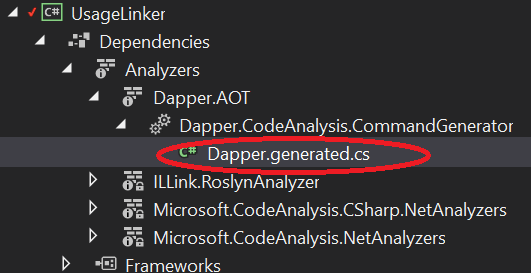
tag:blogger.com,1999:blog-8184237816669520763.post-6007133552883736143
Pipe Dreams, part 2
pipelines
Show full content
Pipelines - a guided tour of the new IO API in .NET, part 2

In part 1, we discussed some of the problems that exist in the familiar Stream API, and we had an introduction to the Pipe, PipeWriter and PipeReader APIs, looking at how to write to a single Pipe and then consume the data from that Pipe; we also discussed how FlushAsync() and ReadAsync() work together to keep both sides of the machinery working, dealing with "empty" and "full" scenarios - suspending the reader when there is nothing to do, and resuming it when data arrives; and suspending the writer when it is out-pacing the reader (over-filling the pipe), and resuming when the reader has caught up; and we discussed what it means to "resume" here, in terms of the threading model.

In this part, we're going to discuss the memory model of pipelines: where does the data actually live?. We'll also start looking at how we can use pipelines in realistic scenarios to fulfil real needs.

The memory model: where are all my datas?

In part 1, we spoke about how the pipe owns all the buffers, allowing the writer to request a buffer via GetMemory() and GetSpan(), with the committed data later being exposed to the reader via the .Buffer on ReadAsync() - which is a ReadOnlySequence<byte>, i.e some number of segments of data.

So what actually happens?

Each Pipe instance has a reference to a MemoryPool<byte> - a new device in System.Memory for, unsurprisingly, creating a memory pool. You can specify a specific MemoryPool<byte> in the options when creating a Pipe, but by default (and, I imagine, almost always) - a shared application-wide pool (MemoryPool<byte>.Shared) is used.

The MemoryPool<byte> concept is very open-ended. The default implementation simply makes use of ArrayPool<byte>.Shared (the application wide array-pool), renting arrays as needed, and returning them when done. This ArrayPool<T> is implemented using WeakReference, so pooled arrays are collectible if memory pressure demands it. However, when you ask GetMemory(someSize) or GetSpan(someSize), it doesn't simply ask the memory pool for that amount; instead, it tracks a "segment" internally. A new "segment" will be (by default, configurable) the larger of someSize or 2048 bytes. Requesting a non-trivial amount of memory means that we aren't filling the system with tiny arrays, which would significantly impact garbage collection. When you Advance(bytesWritten) in the writer, it:

  • moves an internal counter that is how much of the current segment has been used
  • updates the end of the "available to be read" chain for the reader; if we've just written the first bytes of an empty segment, this will mean adding a new segment to the chain, otherwise it'll mean increasing the end marker of the final segment of the existing chain

It is this "available to be read" chain that we fetch in ReadAsync(); and as we AdvanceTo in the reader - when entire segments are consumed, the pipe hands those segments back to the memory pool. From there, they can be reused many times. And as a direct consequence of the two points above, we can see that most of the time, even with multiple calls to Advance in the writer, we may end up with a single segment in the reader, with multiple segments happening either at segment boundaries, or where the reader is falling behind the writer, and data is starting to accumulate.

What this achieves just using the default pool is:

  • we don't need to keep allocating every time we call GetMemory() / GetSpan()
  • we don't need a separate array per GetMemory() / GetSpan() - we'll often just get a different range of the same "segment"
  • a relatively small number of non-trivial buffer arrays are used
  • they are automatically recycled without needing lots of library code
  • when not being used, they are available for garbage collection

This also explains why the approach of requesting a very small amount in GetMemory() / GetSpan() and then checking the size can be so successful: we have access to the rest of the unused part of the current segment. Meaning: with a segment size of 2048, of which 200 bytes were already used by previous writes - even if we only ask for 5 bytes, we'll probably find we have 1848 bytes available to play with. Or possibly more - remember that obtaining an array from ArrayPool<T>.Shared is also an "at least this big" operation.

Zero copy buffers

Something else to notice in this setup is that we get data buffering without any data copying. The writer asked for a buffer, and wrote the data to where it needed to be the first time, on the way in. This then acted as a buffer between the writer and the reader without any need to copy data around. And if the reader couldn't process all the data yet, it was able to push data back into the pipe simply by saying explicitly what it did consume. There was no need to maintain a separate backlog of data for the reader, something that is very common in protocol processing code using Stream.

It is this combination of features that makes the memory aspect of pipeline code so friendly. You could do all of this with Stream, but it is an excruciating amount of error-prone code to do it, and even more if you want to do it well - and you'd pretty much have to implement it separately for each scenario. Pipelines makes good memory handling the default simple path - the pit of success.

More exotic memory pools

You aren't limited to the memory model discussed; you can implement your own custom memory pool! The advantage of the default pool is that it is simple. In particular, it doesn't really matter if we aren't 100% perfect about returning every segment - if we somehow drop a pipe on the floor, the worst that can happen is that the garbage collector collects the abandoned segments at some point. They won't go back into the pool, but that's fine.

You can, however, do much more interesting things. Imagine, for example, a MemoryPool<byte> that takes huge slabs of memory - either managed memory via a number of very large arrays, or unmanaged memory via Marshal.AllocHGlobal (note that Memory<T> and Span<T> are not limited to arrays - all they require is some kind of contiguous memory), leasing blocks of this larger chunk as required. This has great potential, but it becomes increasingly important to ensure that segments are reliably returned. Most systems shouldn't need this, but it is good that the flexibility is offered.

Useful pipes in real systems

The example that we used in part 1 was of a single Pipe that was written and read by the same code. That's clearly not a realistic scenario (unless we're trying to mock an "echo" server), so what can we do for more realistic scenarios? First, we need to connect our pipelines to something. We don't usually want a Pipe in isolation; we want a pipe that integrates with a common system or API. So; let's start by seeng what this would look like.

Here we need a bit of caveat and disclaimer: the pipelines released in .NET Core 2.1 do not include any endpoint implementations. Meaning: the Pipe machinery is there, but nothing is shipped inside the box that actually connects pipes with any other existing systems - like shipping the abstract Stream base-type, but without shipping FileStream, NetworkStream, etc. Yes, that sounds frustrating, but it was a pragmatic reality of time constraints. Don't panic! There are... "lively" conversations going on right now about which bindings to implement with which priority; and there are few community offerings to bridge the most obvious gaps for today.

Since we find ourselves in that position, we might naturally ask: "what does it take to connect pipelines to another data backend?".

Perhaps a good place to start would be connecting a pipe to a Stream. I know what you're thinking: "Marc, but in part 1 you went out of your way to say how terrible Stream is!". I haven't changed my mind; it isn't necessarily ideal - for any scenario-specific Stream implementation (such as NetworkStream or FileStream) we could have a dedicated pipelines-based endpoint that talked directly to that service with minimal indirection; but it is a useful first step:

  • it gives us immediate access to a huge range of API surfaces - anything that can expose data via Stream, and anything that can act as a middle-layer via wrapped streams (encryption, compression, etc)
  • it hides all the wrinkly bits of the Stream API behind a clear unambiguous surface
  • it gives us almost all of the advantages that we have mentioned so far

So, let's get started! The first thing we need to think about is: what is the direction here? As previously mentioned, a Stream is ambiguous - and could be read-only, write-only, or read-write. Let's assume we want to deal with the most general case: a read-write stream that acts in a duplex manner - this will give us access to things like sockets (via NetworkStream). This means we're actually going to want two pipes - one for the input, one for the output. Pipelines helps clear this up for us, by declaring an interface expressly for this: IDuplexPipe. This is a very simple interface, and being handed an IDuplexPipe is analogous to being handed the ends of two pipes - one marked "in", one marked "out":

interface IDuplexPipe
{
    PipeReader Input { get; }
    PipeWriter Output { get; }
}

What we want to do, then, is create a type that implements IDuplexPipe, but using 2 Pipe instances internally:

  • one Pipe will be the output buffer (from the consumer's perspective), which will be filled by caller-code writing to Output - and we'll have a loop that consumes this Pipe and pushes the data into the underlying Stream (to be written to the network, or whatever the stream does)
  • one Pipe will be the input buffer (from the consumer's perspective); we'll have a loop that reads data from the underlying Stream (from the network, etc) and pushes it into the Pipe, where it will be drained by caller-code reading from Input

This approach immediately solves a wide range of problems that commonly affect people using Stream:

  • we now have input/output buffers that decouple stream access from the read/write caller-code, without having to add BufferedStream or similar to prevent packet fragmentation (for the writing code), and to make it very easy to continue receiving more data while we process it (for the reading code especially, so we don't have to keep pausing while we ask for more data)
  • if the caller-code is writing faster than the stream Write can process, the back-pressure feature will kick in, throttling the caller-code so we don't end up with a huge buffer of unsent data
  • if the stream Read is out-pacing the caller-code that is consuming the data, the back-pressure will kick in here too, throttling our stream read loop so we don't end up with a huge buffer of unprocessed data
  • both the read and write implementations benefit from all the memory pool goodness that we discussed above
  • the caller-code doesn't ever need to worry about backlog of data (incomplete frames), etc - the pipe deals with it
So what might that look like?

Essentially, all we need to do, is something like:

class StreamDuplexPipe : IDuplexPipe
{
    Stream _stream;
    Pipe _readPipe, _writePipe;

    public PipeReader Input => _readPipe.Reader;
    public PipeWriter Output => _writePipe.Writer;
    
    // ... more here
}

Note that we have two different pipes; the caller gets one end of each pipe - and our code will act on the other end of each pipe.

Pumping the pipe

So what does the code look like to interact with the stream? We need two methods, as disccused above. The first - and simplest - has a loop that reads data from the _stream and pushes it to _readPipe, to be consumed by the calling code; the core of this method could be something like

while (true)
{
    // note we'll usually get *much* more than we ask for
    var buffer = _readPipe.Writer.GetMemory(1);
    int bytes = await _stream.ReadAsync(buffer);
    _readPipe.Writer.Advance(bytes);
    if (bytes == 0) break; // source EOF
    var flush = await _readPipe.Writer.FlushAsync();
    if (flush.IsCompleted || flush.IsCanceled) break;
}

This loop asks the pipe for a buffer, then uses the new netcoreapp2.1 overload of Stream.ReadAsync that accepts a Memory<byte> to populate that buffer - we'll discuss what to do if you don't have an API that takes Memory<byte> shortly. When the read is complete, it commits that-many bytes to the pipe using Advance, then it invokes FlushAsync() on the pipe to (if needed) awaken the reader, or pause the write loop while the back-pressure eases. Note we should also check the outcome of the Pipe's FlushAsync() - it could tell us that the pipe's consumer has signalled that they've finished reading the data they want (IsCompleted), or that the pipe itself was shut down (IsCanceled).

Note that in both cases, we want to ensure that we tell the pipe when this loop has exited - however it exits - so that we don't end up with the calling code awaiting forever on data that will never come. Accidents happen, and sometimes the call to _stream.ReadAsync (or any other method) might throw an exception, so a good way to do this is with a try/finally block:

Exception error = null;
try
{
    // our loop from the previous sample
}
catch(Exception ex) { error = ex; }
finally { _readPipe.Writer.Complete(error); }

If you prefer, you could also use two calls to Complete - one at the end of the try (for success) and one inside the catch (for failure).

The second method we need is a bit more complex; we need a loop that consumes data from _writePipe and pushes it to _stream. The core of this could be something like:

while (true)
{
    var read = await _writePipe.Reader.ReadAsync();
    var buffer = read.Buffer;
    if (buffer.IsCanceled) break;
    if (buffer.IsEmpty && read.IsCompleted) break;

    // write everything we got to the stream
    foreach (var segment in buffer)
    {
        await _stream.WriteAsync(segment);
    }
    _writePipe.AdvanceTo(buffer.End);
    await _stream.FlushAsync();    
}

This awaits some data (which could be in multiple buffers), and checks some exit conditions; as before, we can give up if IsCanceled, but the next check is more subtle: we don't want to stop writing just because the producer indicated that they've written everything they wanted to (IsCompleted), or we might not write the last few segments of their data - we need to continue until we've written all their data, so buffer.IsEmpty. This is simplified in this case because we're always writing everything - we'll see a more complex example shortly. Once we have data, we write each of the non-contiguous buffers to the stream sequentially - because Stream can only write one buffer at a time (again, I'm using the netcoreapp2.1 overload here that accepts ReadOnlyMemory<byte>, but we aren't restricted to this). Once it has written the buffers, it tells the pipe that we have consumed the data, and flushes the underlying Stream.

In "real" code we might want to be a bit more aggressive about optimizing to reduce flushing the underlying stream until we know there is no more data readily available, perhaps using the _writePipe.Reader.TryRead(...) method in addition to _writePipe.Reader.ReadAsync() method; this method works similarly to ReadAsync() but is guaranteed to always return synchronously - useful for testing "did the writer append something while I was busy?". But the above illustrates the point.

Additionally, like before we would want to add a try/finally, so that we always call _writePipe.Reader.Complete(); when we exit.

We can use the PipeScheduler to start these two pumps, which will ensure that they run in the intended context, and our loops start pumping data. We'd have a little more house-keeping to add (we'd probably want a mechanism to Close()/Dispose() the underlying stream, etc) - but as you can see, it doesn't have to be a huge task to connect an IDuplexPipe to a source that wasn't designed with pipelines in mind.

Here's one I made earlier...

I've simplified the above a little (not too much, honest) to make it consise for discussion, but you still probably don't want to start copying/pasting chunks from here to try and get it to work. I'm not claiming they are the perfect solution for all situations, but as part of the 2.0 work for StackExchange.Redis, we have implemented a range of bindings for pipelines that we are making available on nuget - unimaginatively titled Pipelines.Sockets.Unofficial (nuget, github); this includes:

  • converting a duplex Stream to an IDuplexPipe (like the above)
  • converting a read-only Stream to a PipeReader
  • converting a write-only Stream to a PipeWriter
  • converting an IDuplexPipe to a duplex Stream
  • converting a PipeReader to a read-only Stream
  • converting a PipeWriter to a writer-only Stream
  • converting a Socket to an IDuplexPipe directly (without going via NetworkStream)

The first six are all available via static methods on StreamConnection; the last is available via SocketConnection.

StackExchange.Redis is very involved in Socket work, so we are very interested in how to connect pipelines to sockets; for redis connections without TLS, we can connect our Socket direct to the pipeline:

  • SocketSocketConnection

For redis connections with TLS (in particular: cloud redis providers), we can connect the pieces thusly:

  • SocketNetworkStreamSslStreamStreamConnection

Both of these configurations give us a Socket at one end, and an IDuplexPipe at the other, and it begins to show how we can orchcestrate pipelines as part of a more complex system. Perhaps more importantly, it gives us room in the future to change the implementation. As examples of future possibilities:

  • Tim Seaward has been working on Leto, which provides TLS capability as an IDuplexPipe directly, without requiring SslStream (and thus: no stream inverters)
  • between Tim Seaward, David Fowler and Ben Adams, there are a range of experimental or in-progress network layers directly implementing pipelines without using managed sockets, including "libuv", "RIO" (Registered IO), and most recently, "magma" - which pushes the entire TCP stack into user code to reduce syscalls.

It'll be interesting to see how this space develops!

But my existing API doesn't talk in Span<byte> or Memory<byte>!

When writing code to pump data from a pipe to another system (such as a Socket), it is very likely you'll bump into APIs that don't take Memory<byte> or Span<byte>. Don't panic, all is not lost! You still have multiple ways of breaking out of that world into something more ... traditional.

The first trick, for when you have a Memory<T> or ReadOnlyMemory<T>, is MemoryMarshal.TryGetArray(...). This takes in a memory and attempts to get an ArraySegment<T> that describes the same data in terms of a T[] vector and an int offset/count pair. Obviously this can only work if the memory was based on a vector, which is not always the case. So this can fail on exotic memory pools. Our second escape hatch is MemoryMarshal.GetReference(...). This takes in a span and returns a reference (actually a "managed pointer", aka ref T) to the start of the data. Once we have a ref T, we can use unsafe C# to get an unmanaged pointer to the data, useful for APIs that talk in such:

Span<byte> span = ...
fixed(byte* ptr = &MemoryMarshal.GetReference(span))
{
    // ...
}

It can still do this if the length of the span is zero, returning a reference to where the zeroth item would have been, and it even works for a default span where there never was any backing memory. This last one requires a slight word of caution because a ref T is not usually expected to be null, but that's exactly what you get here. Essentially, as long as you don't ever try to dereference this kind of null reference: you'll be fine. If you use fixed to convert it to an unmanaged pointer, you get back a null (zero) pointer, which is more expected (and can be useful in some P/Invoke scenarios). MemoryMarshal is essentially synonymous with unsafe code, even if the method you're calling doesn't require the unsafe keyword. It is perfectly valid to use it, but if you use it incorrectly, it reserves the right to hurt you - so just be careful.

What about the app-code end of the pipe?

OK, we've got our IDuplexPipe, and we've seen how to connect the "business end" of both pipes to your backend data service of choice. Now; how do we use it in our app code?

As in our example from part 1, we're going to hand the PipeWriter from IDuplexPipe.Output to our outbound code, and the PipeReader from IDuplexPipe.Input to our inbound code.

The outbound code is typically very simple, and is usually a very direct port to get from Stream-based code to PipeWriter-based. The key difference, once again, is that you don't control the buffers. A typical implementation might look something like:

ValueTask<bool> Write(SomeMessageType message, PipeWriter writer)
{
    // (this may be multiple GetSpan/Advance calls, or a loop,
    // depending on what makes sense for the message/protocol)
    var span = writer.GetSpan(...);
    // TODO: ... actually write the message
    int bytesWritten = ... // from writing
    writer.Advance(bytesWritten);

    return FlushAsync(writer);
}

private static async ValueTask<bool> FlushAsync(PipeWriter writer)
{
    // apply back-pressure etc
    var flush = await writer.FlushAsync();
    // tell the calling code whether any more messages
    // should be written
    return !(flush.IsCanceled || flush.IsCompleted);
}

The first part of Write is our business code - we do whatever we need to write the data to the buffers from writer; typically this will include multiple calls to GetSpan(...) and Advance(). When we've written our message, we can flush it to ensure the pump is active, and apply back-pressure. For very large messages we could also flush at intermediate points, but for most simple scenarios: flushing once per message is fine.

If you're wondering why I split the FlushAsync code into a separate method: that's because I want to await the result of FlushAsync to check the exit conditions, so it needs to be in an async method. The most efficient way to access memory here is via the Span<byte> API, and Span<byte> is a ref struct type; as a consequence we cannot use a Span<byte> local variable in an async method. A pragmatic solution is to simply split the methods, so one method deals with the Span<byte> work, and another method deals with the async aspect.

Random aside: async code, hot synchronous paths, and async machinery overhead

The machinery involved in async / await is pretty good, but it can still be a surprising amount stack work - you can see this on sharplab.io - take a look at the generated machinery for the OurCode.FlushAsync method - and the entirety of struct <FlushAsync>d__0. Now, this code is not terrible - it tries hard to avoid allocations in the synchronous path - but it is unnecessary. There are two ways to signficantly improve this; one is to not await at all, which is often possible if the await is the last line in a method and we don't need to process the results: don't await - just remove the async and return the task - complete or incomplete. We can't do that here, because we need to check the state of the result, but we can optimize for success by checking whether the task is already complete (via .IsCompletedSuccessfully - if it has completed but faulted, we still want to use the await to make sure the exception behaves correctly). If it is successfully completed, we're allowed to access the .Result; so we could also write our FlushAsync method as:

private static ValueTask<bool> Flush(PipeWriter writer)
{
    bool GetResult(FlushResult flush)
        // tell the calling code whether any more messages
        // should be written
        => !(flush.IsCanceled || flush.IsCompleted);

    async ValueTask<bool> Awaited(ValueTask<FlushResult> incomplete)
        => GetResult(await incomplete);

    // apply back-pressure etc
    var flushTask = writer.FlushAsync();

    return flushTask.IsCompletedSuccessfully
        ? new ValueTask<bool>(GetResult(flushTask.Result))
        : Awaited(flushTask);
}

This completely avoids the async/await machinery in the most common case: synchronous completion - as we can see again on sharplab.io. I should emphasize: there's absolutely no point doing this if the code is usually (or exclusively) going to actually be asynchronous; it only helps when the result is usually (or exclusively) going to be available synchronously.

And what about the reader?

As we've seen many times, the reader is often slightly more complicated - we can't know that a single "read" operation will contain exactly one inbound message. We may need to loop until we have all the data we need, and we may have additional data that we need to push back. So let's assume we want to consume a single message of some kind:

async ValueTask<SomeMessageType> GetNextMessage(
    PipeReader reader,
    CancellationToken cancellationToken = default)
{
    while (true)
    {
        var read = await reader.ReadAsync(cancellationToken);
        if (read.IsCanceled) ThrowCanceled();

        // can we find a complete frame?
        var buffer = read.Buffer;
        if (TryParseFrame(
            buffer,
            out SomeMessageType nextMessage,
            out SequencePosition consumedTo))
        {
            reader.AdvanceTo(consumedTo);
            return nextMessage;
        }
        reader.AdvanceTo(buffer.Start, buffer.End);
        if (read.IsCompleted) ThrowEOF();        
    }
}

Here we obtain some data from the pipe, checking exit conditions like cancelation. Next, we try to find a message; what this means depends on your exact code - this could mean:

  • looking through the buffer for some sentinel value such as an ASCII line-ending, then treating everything up to that point as a message (discarding the line ending)
  • parsing a well-defined binary frame header, obtaining the payload length, checking that we have that much data, and processing it
  • or anything else you want!

If we do manage to find a message, we can tell the pipe to discard the data that we've consumed - by AdvanceTo(consumedTo), which uses whatever our own frame-parsing code told us that we consumed. If we don't manage to find a message, the first thing to do is tell the pipe that we consumed nothing despite trying to read everything - by reader.AdvanceTo(buffer.Start, buffer.End). At this point, there are two possibilities:

  • we haven't got enough data yet
  • the pipe is dead and there will never be enough data

Our check on read.IsCompleted tests this, reporting failure in the latter case; otherwise we continue the loop, and await more data. What is left, then, is our frame parsing - we've reduced complex IO management down to simple operations; for example, if our messages are separated by line-feed sentinels:

private static bool TryParseFrame(
    ReadOnlySequence<byte> buffer,
    out SomeMessageType nextMessage,
    out SequencePosition consumedTo)
{
    // find the end-of-line marker
    var eol = buffer.PositionOf((byte)'\n');
    if (eol == null)
    {
        nextMessage = default;
        consumedTo = default;
        return false;
    }

    // read past the line-ending
    consumedTo = buffer.GetPosition(1, eol.Value);
    // consume the data
    var payload = buffer.Slice(0, eol.Value);
    nextMessage = ReadSomeMessageType(payload);
    return true;
}

Here PositionOf tries to find the first location of a line-feed. If it can't find one, we give up. Otherwise, we set consumedTo to be "the line-feed plus one" (so we consume the line-feed), and we slice our buffer to create a sub-range that represents the payload without the line-feed, which we can then parse (however). Finally, we report success, and can rejoice at the simplicity of parsing linux-style line-endings.

What's the point here?

With minimal code that is very similar to the most naïve and simple Stream version (without any nice features) our app code now has a reader and writer chain that automatically exploits a wide range of capabilities to ensure efficient and effective processing. Again, you can do all these things with Stream, but it is really, really hard to do well and reliably. By pushing all theses features into the framework, multiple code-bases can benefit from a single implementation. It also gives future scope for interesting custom pipeline endpoints and decorators that work directly on the pipeline API.

Summary

In this section, we looked at the memory model used by pipelines, and how it helps us avoid allocations. Then we looked at how we might integrate pipelines into existing APIs and systems such a Stream - and we introduced Pipelines.Sockets.Unofficial as an available utility library. We looked at the options available for integrating span/memory code with APIs that don't offer those options, and finally we looked at what the actual calling code might look like when talking to pipelines (taking a brief side step into how to optimize async code that is usually synchronous) - showing what our application code might look like. In the third and final part, we'll look at how we combine all these learning points when looking at a real-world library such at StackExchange.Redis - discussing what complications the code needed to solve, and how pipelines made it simple to do so.

tag:blogger.com,1999:blog-8184237816669520763.post-5187891784616191510
Pipe Dreams, part 1
pipelines
Show full content
Pipelines - a guided tour of the new IO API in .NET, part 1

(part 2 here)

About two years ago I blogged about an upcoming experimental IO API in the .NET world - at the time provisionally called "Channels"; at the end of May 2018, this finally shipped - under the name System.IO.Pipelines. I am hugely interested in the API, and over the last few weeks I'm been consumed with converting StackExchange.Redis to use "pipelines", as part of our 2.0 library update.

My hope in this series, then, is to discuss:

  • what "pipelines" are
  • how to use them in terms of code
  • when you might want to use them

To help put this in concrete terms, after introducing "pipelines" I intend to draw heavily on the StackExchange.Redis conversion - and in particular by discussing which problems it solves for us in each scenario. Spoiler: in virtually all cases, the answer can be summarized as:

It perfectly fits a complex but common stumbling point in IO code; allowing us to replace an ugly kludge, workaround or compromise in our code - with a purpose-designed elegant solution that is in framework code.

I'm pretty sure that the pain points I'm going to cover below will be familiar to anyone who works at "data protocol" levels, and I'm equally sure that the hacks and messes that we'll be replacing with pipelines will be duplicated in a lot of code-bases.

What do pipelines replace / complement?

The starting point here has to be: what is the closest analogue in existing framework code? And that is simple: Stream. The Stream API will be familiar to anyone who has worked with serialization or data protocols. As an aside: Stream is actually a very ambiguous API - it works very differently in different scenarios:

  • some streams are read-only, some are write-only, some are read-write
  • the same concrete type can sometimes be read-only, and sometimes write-only (DeflateStream, for example)
  • when a stream is read-write, sometimes it works like a cassette tape, where read and write are operating on the same underlying data (FileStream, MemoryStream); and sometimes it works like two separate streams, where read and write are essentially completely separate streams (NetworkStream, SslStream) - a duplex stream
  • in many of the duplex cases, it is hard or impossible to express "no more data will be arriving, but you should continue to read the data to the end" - there's just Close(), which usually kills both halves of the duplex
  • sometimes streams are seekable and support concepts like Position and Length; often they're not
  • because of the progression of APIs over time, there are often multiple ways of performing the same operation - for example, we could use Read (synchronous), BeginRead/EndRead (asynchronous using the IAsyncResult pattern), or ReadAsync (asynchronous using the async/await pattern); calling code has no way in the general case of knowing which of these is the "intended" (optimal) API
  • if you use either of the asynchronous APIs, it is often unclear what the threading model is; will it always actually be synchronous? if not, what thread will be calling me back? does it use sync-context? thread-pool? IO completion-port threads?
  • and more recently, there are also extensions to allow Span<byte> / Memory<byte> to be used in place of byte[] - again, the caller has no way of knowing which is the "preferred" API
  • the nature of the API encourages copying data; need a buffer? that's a block-copy into another chunk of memory; need a backlog of data you haven't processed yet? block-copy into another chunk of memory; etc

So even before we start talking about real-world Stream examples and the problems that happen when using it, it is clear that there are a lot of problems in the Stream API itself. The first unsurprising news, then, is that pipelines sorts this mess out!

What are pipelines?

By "pipelines", I mean a set of 4 key APIs that between them implement decoupled and overlapped reader/writer access to a binary stream (not Stream), including buffer management (pooling, recycling), threading awareness, rich backlog control, and over-fill protection via back-pressure - all based around an API designed around non-contiguous memory. That's a heck of a word salad - but don't worry, I'll be talking about each element to explain what I mean.

Starting out simple: writing to, and reading from, a single pipe

Let's start with a Stream analogue, and write sometthing simple to a stream, and read it back - sticking to just the Stream API. We'll use ASCII text so we don't need to worry about any complex encoding concerns, and our read/write code shouldn't assume anything about the underlying stream. We'll just write the data, and then read to the end of the stream to consume it.

We'll do this with Stream first - familiar territory. Then we'll re-implement it with pipelines, to see where the similarities and differences lie. After that, we'll investigate what is actually happening under the hood, so we understand why this is interesting to us!

Also, before you say it: yes, I'm aware of TextReader/TextWriter; I'm not using them intentionally - because I'm trying to talk about the Stream API here, so that the example extends to a wide range of data protocols and scenarios.

using (MemoryStream ms = new MemoryStream())
{
    // write something
    WriteSomeData(ms);
    // rewind - MemoryStream works like a tape
    ms.Position = 0;
    // consume it
    ReadSomeData(ms);
}

Now, to write to a Stream the caller needs to obtain and populate a buffer which they then pass to the Stream. We'll keep it simple for now by using the synchronous API and simply allocating a byte[]:

void WriteSomeData(Stream stream)
{
    byte[] bytes = Encoding.ASCII.GetBytes("hello, world!");
    stream.Write(bytes, 0, bytes.Length);
    stream.Flush();
}

Note: there are tons of things in the above I could do for efficiency; but that isn't the point yet. So if you're familiar with this type of code and are twitching at the above... don't panic; we'll make it uglier - er, I mean more efficient - later.

The reading code is typically more complex than the writing code, because the reading code can't assume that it will get everything in a single call to Read. A read operation on a Stream can return nothing (which indicates the end of the data), or it could fill our buffer, or it could return a single byte despite being offered a huge buffer. So read code on a Stream is almost always a loop:

void ReadSomeData(Stream stream)
{
    int bytesRead;
    // note that the caller usually can't know much about
    // the size; .Length is not usually usable
    byte[] buffer = new byte[256];
    do
    {
        bytesRead = stream.Read(buffer, 0, buffer.Length);
        if (bytesRead > 0)
        {   // note this only works for single-byte encodings
            string s = Encoding.ASCII.GetString(
                buffer, 0, bytesRead);
            Console.Write(s);
        }
    } while (bytesRead > 0);
}

Now let's translate that to pipelines. A Pipe is broadly comparable to a MemoryStream, except instead of being able to rewind it many times, the data is more simply a "first in first out" queue. We have a writer API that can push data in at one end, and a reader API that can pull the data out at the other. The Pipe is the buffer that sits between the two. Let's reproduce our previous scenario, but using a single Pipe instead of the MemoryStream (again not something we'd usually do in practice, but it is simple to illustrate):

Pipe pipe = new Pipe();
// write something
await WriteSomeDataAsync(pipe.Writer);
// signal that there won't be anything else written
pipe.Writer.Complete();
// consume it
await ReadSomeDataAsync(pipe.Reader);

First we create a pipe using the default options, then we write to it. Note that IO operations on pipes are usually asynchronous, so we'll need to await our two helper methods. Note also that we don't pass the Pipe to them - unlike Stream, pipelines have separate API surfaces for read and write operations, so we pass a PipeWriter to the helper method that does our writing, and a PipeReader to the helper method that does our reading. After writing the data, we call Complete() on the PipeWriter. We didn't have to do this with the MemoryStream because it automatically EOFs when it reaches the end of the buffered data - but on some other Stream implementations - especially one-way streams - we might have had to call Close after writing the data.

OK, so what does WriteSomeDataAsync look like? Note, I've deliberately over-annotated here:

async ValueTask WriteSomeDataAsync(PipeWriter writer)
{
    // use an oversized size guess
    Memory<byte> workspace = writer.GetMemory(20);
    // write the data to the workspace
    int bytes = Encoding.ASCII.GetBytes(
        "hello, world!", workspace.Span);
    // tell the pipe how much of the workspace
    // we actually want to commit
    writer.Advance(bytes);
    // this is **not** the same as Stream.Flush!
    await writer.FlushAsync();
}

The first thing to note is that when dealing with pipelines: you don't control the buffers: the Pipe does. Recall how in our Stream code, both the read and write code created a local byte[], but we don't have that here. Instead, we ask the Pipe for a buffer (workspace), via the GetMemory method (or it's twin - GetSpan). As you might expect from the name, this gives us either a Memory<byte> or a Span<byte> - of size at least twenty bytes.

Having obtained this buffer, we encode our string into it. This means that we're writing directly into the pipe's memory, and keep track of how many bytes we actually used, so we can tell it in Advance. We are under no obligation to use the twenty that we asked for: we could write zero, one, twenty, or even fifty bytes. The last one may seem surprising, but it is actually actively encouraged! The emphasis previously was on "at least" - the writer can actually give us a much bigger buffer than we ask for. When dealing with larger data, it is common to make modest requests but expect greatness: ask for the minumum we can usefully utilize, but then check the size of the memory/span that it gives us before deciding how much to actually write.

The call to Advance is important; this completes a single write operation, making the data available in the pipe to be consumed by a reader. The call to FlushAsync is equally important, but much more nuanced. However, before we can adequately describe what it does, we need to take a look at the reader. So; here's our ReadSomeDataAsync method:

async ValueTask ReadSomeDataAsync(PipeReader reader)
{
    while (true)
    {
        // await some data being available
        ReadResult read = await reader.ReadAsync();
        ReadOnlySequence<byte> buffer = read.Buffer;
        // check whether we've reached the end
        // and processed everything
        if (buffer.IsEmpty && read.IsCompleted)
            break; // exit loop

        // process what we received
        foreach (Memory<byte> segment in buffer)
        {
            string s = Encoding.ASCII.GetString(
                segment.Span);
            Console.Write(s);
        }
        // tell the pipe that we used everything
        reader.AdvanceTo(buffer.End);
    }
}

Just like with the Stream example, we have a loop that continues until we've reached the end of the data. With Stream, that is defined as being when Read returns a non-positive result, but with pipelines there are two things to check:

  • read.IsCompleted tells us whether the write pipe has been signalled as completed and therefore no more data will be written (pipe.Writer.Complete(); in our earlier code did this)
  • buffer.IsEmpty tells us whether there is any data left to proces in this iteration

If there's nothing in the pipe now and the writer has been completed, then there will never be anything in the pipe, and we can exit.

If we do have data, then we can look at buffer. So first - let's talk about buffer; in the code it is a ReadOnlySequence<byte>, which is a new type - this concept combines a few roles:

  • describing non-contiguous memory, speficially a sequence of zero, one or many ReadOnlyMemory<byte> chunks
  • describing a logical position (SequencePosition) in such a data-stream - in particular via buffer.Start and buffer.End

The non-contiguous is very important here. We'll look at where the data is actually going shortly, but in terms of reading: we need to be prepared to handle data that could be spread accross multiple segments. In this case, we do this by a simple foreach over the buffer, decoding each segment in turn. Note that even though the API is designed to be able to describe multiple non-contiguous buffers, it is frequently the case that the data received is contiguous in a single buffer; and in that case, it is often possible to write an optimized implementation for a single buffer. You can do that by checking buffer.IsSingleSegment and accessing buffer.First.

Finally, we call AdvanceTo, which tells the pipe how much data we actually used.

Key point: you don't need to take everything you are given!

Contrast to Stream: when you call Read on a Stream, it puts data into the buffer you gave it. In most real-world scenarios, it isn't always possible to consume all the data yet - maybe it only makes sense to consider "commands" as "entire text lines", and you haven't yet seen a cr/lf in the data. With Stream: this is tough - once you've been given the data, it is your problem; if you can't use it yet, you need to store the backlog somewhere. However, with pipelines, you can tell it what you've consumed. In our case, we're telling it that we consumed everything we were given, which we do by passing buffer.End to AdvanceTo. That means we'll never see that data again, just like with Stream. However, we could also have passed buffer.Start, which would mean "we didn't use anything" - and even though we had chance to inspect the data, it would remain in the pipe for subsequent reads. We can also get arbitrary SequencePosition values inside the buffer - if we read 20 bytes, for example - so we have full control over how much data is dropped from the pipe. There are two ways of getting a SequencePosition:

  • you can Slice(...) a ReadOnlySequence<byte> in the same way that you Slice(...) a Span<T> or Memory<T> - and access the .Start or .End of the resulting sub-range
  • you can use the .GetPosition(...) method of the ReadOnlySequence<byte>, which returns a relative position without actually slicing

Even more subtle: we can tell it separetely that we consumed some amount, but that we inspected a different amount. The most common example here is to express "you can drop this much - I'm done with that; but I looked at everything, I can't make any more progress at the moment - I need more data" - specifically:

reader.AdvanceTo(consumedToPosition, buffer.End);

This is where the subtle interplay of PipeWriter.FlushAsync() and PipeReader.ReadAsync() starts to come into play. I skipped over FlushAsync earlier, but it actually serves two different functions in one call:

  • if there is a ReadAsync call that is outstanding because it needs data, then it awakens the reader, allowing the read loop to continue
  • if the writer is out-pacing the reader, such that the pipe is filling up with data that isn't being cleared by the reader, it can suspend the writer (by not completing synchronously) - to be reactivated when there is more space in the pipe (the thresholds for writer suspend/resume can be optionally specified when creating the Pipe instance)

Obviously these concepts don't come into play in our example, but they are central ideas to how pipelines works. The ability to push data back into the pipe hugely simplifies a vast range of IO scenarios. Virtually every piece of protocol handling code I've seen before pipelines has masses of code related to handling the backlog of incomplete data - it is such a repeated piece of logic that I am incredibly happy to see it handled well in a framework library instead.

What does "awaken" or "reactivate" mean here?

You might have observed that I didn't really define what I meant here. At the obvious level, I mean that: an await operation of ReadAsync or FlushAsync had previously returned as incomplete, so now the asynchronous continuation gets invoked, allowing our async method to resume execution. Yeah, OK, but that's just re-stating what async/await mean. It is bug-bear of mine that I care deeply (really, it is alarming how deep) about which threads code runs on - for reasons that I'll talk about later in this series. So saying "the asynchronous continuation gets invoked" isn't enough for me. I want to understand who is invoking it, in terms of threads. The most common answers to this are:

  • it delegates via the SynchronizationContext (note: many systems do not have a SynchronizationContext)
  • the thread that triggered the state change gets used, at the point of the state change, to invoke the continuation
  • the global thread-pool is used to invoke the continuation

All of these can be fine in some cases, and all of these can be terrible in some cases! Sync-context is a well-established mechanism for getting from worker threads back to primary application threads (epecially: the UI thread in desktop applications). However, it isn't necessarily the case that just because we've finished one IO operation, we're ready to jump back to an application thread; and doing so can effectively push a lot of IO code and data processing code onto an application thread - usually the one thing we explicitly want to avoid. Additionally, it can be prone to deadlocks if the application code has used Wait() or .Result on an asynchronous call (which, to be fair, you're not meant to do). The second option (performing the callback "inline" on the thread that triggered it) can be problematic because it can steal a thread that you expected to be doing something else (and can lead to deadlocks as a consequence); and in some extreme cases it can lead to a stack-dive (and eventually a stack-overflow) when two asynchronous methods are essentially functioning as co-routines. The final option (global thread-pool) is immune to the problems of the other two - but can run into severe problems under some load conditions - something again that I'll discuss in a later part in this series.

However, the good news is that pipelines gives you control here. When creating the Pipe instance, we can supply PipeScheduler instances to use for the reader and writer (separately). The PipeScheduler is used to perform these activations. If not specified, then it defaults first to checking for SynchronizationContext, then using the global thread-pool, with "inline" continuations (i.e. intionally using the thread that caused the state change) as another option readily available. But: you can provide your own implementation of a PipeScheduler, giving you full control of the threading model.

Summary

So: we've looked at what a Pipe is when considered individually, and how we can write to a pipe with a PipeWriter, and read from a pipe with a PipeReader - and how to "advance" both reader and writer. We've looked at the similarity and differences with Stream, and we've discussed how ReadAsync() and FlushAsync() can interact to control how the writer and reader pieces execute. We looked at how responsibility for buffers is reversed, with the pipe providing all buffers - and how the pipe can simplify backlog management. Finally, we discussed the threading model that is active for continuations in the await operations.

That's probably enough for step 1; next, we'll look at how the memory model for pipelines works - i.e. where does the data live. We'll also look at how we can use pipelines in real scenarios to start doing interesting things.

tag:blogger.com,1999:blog-8184237816669520763.post-292482151459961908
Having a serious conversation about open source
Show full content
Having a serious conversation about open source

A certain topic has been surfacing a lot lately on places like twitter; one that I've quietly tried to ignore, but which has been gnawing away at me slowly. It is seemingly the most taboo, dirty and avoided topics.

Open source and money

See, I said it was taboo and dirty

Talking openly about money is always hard, but when you combine money and open source, it very quickly devolves into a metaphorical warzone, complete with entrenched camps, propaganda, etc.

This is a complex area, and if I mis-speak I hope that you'll afford me some generosity in interpreting my words as meant constructively and positively. This is largely a bit of a brain-dump; I don't intend it to be too ranty or preachy, but I'm probably not the best judge of that.

I absolutely love open source and the open source community. I love sharing ideas, being challenged by requirements and perspectives outside of my own horizon, benefitting from the contributions and wisdom of like-minded folks etc. I love that packages I've created (usually originally because I needed to solve a problem that vexed me) have been downloaded and used to help people tens of millions of times - that's a greate feeling! I love that I have benefitted indirectly from community recognition (including things like an MVP award), and professionally (I doubt I'd have got my job at Stack Overflow if the team hadn't been using protobuf-net from a very early date).

But: the consumers of open source (and I very much include myself in this) have become... for want of a better word: entitled. We've essentially reinforced that software is free (edit: I mean in the "beer" sense, not in the "Stallman" sense). That our efforts - as an open source community: have no value beyond the occasional pat on a back. Perhaps worse, it undermines the efforts of those developers trying to earn an honest buck by offering professional products in the same area... or maybe it just forces them to offer very clear advantages and extra features, which perhaps is a good thing for them? Or is that just me trying to suppress a sense of guilt at cutting off someone else's customer base?

Yes it is true that some open source projects get great community backing from companies benefitting from the technology, but that seems to be the minority. Most open source projects... just don't.

  • maybe this is because the project isn't popular
  • maybe it is popular, but not in a way that helps "enterprise" customers (the people most likely to pay)
  • maybe the project team simply haven't made a pay option available, which could be lack of confidence, or lack or know-how, or legal issues - or it could be the expectation that the software is completely free
  • maybe people like it, but not enough to pay anything towards it
  • maybe anything other than the "free to use and open licensing" is massively disruptive to the dominant tool-chain for accessing libraries in a particular ecosytem (npm, nuget, etc)
  • maybe with multiple contributors of different-sized efforts, it would become massively confusing as to who receives what money, if any was made
  • (added) does your daytime employment contract prohibit taking payment for additional work

But whatever the reason; most open source libraries don't get financially supported. Sometimes this might not be a problem; maybe a library is sponsored internally by a company that has then made that software available for other people to benefit from. But: the moment a library hits the public, it has to deal with all the scenarios and problems and edge cases that the originating company didn't need to worry about. For example, you'd be amazed at how much trouble SQLite causes dapper due to the data types, or how much complexity things like "sentinel", "cluster" and "modules" make for redis clients. But: the originating company (Stack Overflow in the case of dapper, etc) doesn't use those features, so they don't get fixed on company time. This is a recurring theme in many such projects - and now you're in an even more complex place where the people maintaining and advancing something are doing a lot of that work on their own time, but it is now even more awkward to ask the simple question: "this thing that I'm doing to benefit real users: am I getting paid for this? can I even accept contributions other than PRs?".

Is this a problem?

Perhaps, perhaps not. I'm certainly not bitter; I love working on this stuff - I do it for hobby and pleasure reasons too (I love solving challenging problems), and it has hugely advanced my knowledge, but I have to be honest and admit that there's a peice of me that thinks an opportunity has been missed. Take protobuf-net: if I sat down and added up the hours that I've spent on that, it would be horrifying. And I know people are succeding with it, and using it for commercial gain - I get the support emails from people using it in incredibly interesting ways.

Quite a while back I tried adding small and discreet contribution options for protobuf-net (think: "buy me a beer"). It wasn't entirely unsuccessful: to date I've received a little over (edit: incorrectly stated USD) GBP 100 in direct contributions; most of that was in one very much appreciated donation - that I can't find the details of because "pledgie" closed down. But overall, almost all of the work done has been completely for free. Again, I don't resent this, but it feels that there's a huge imbalance in terms of who is doing the work, versus who is benefiting from the work. There is very little motivation for companies benefiting from open source to contribute back to it - even when they're using it in commercial ways that are helping them create profits from successful products or services.

In my view, this is just as bad for the consuming company as it is for the author: if the developer isn't motivated to improve and maintain a library that you depend on for your successful product, then: that sounds a lot like a supply-chain risk. But then, I guess you can just move onto the next competing free tool if one author burns out.

I'm not sure I have a solution here, but I do think there's a very real conversation that we shouldn't be afraid of having, about how we - as an industry - avoid open source being treated simply as free contractors.

I'm toying with ideas

For protobuf-net, I'm aware that a good number of my users are doing things like games, which tend to run on limited runtimes that don't tend to have runtime-emit support (they are "AOT" runtimes). This really hurts the performance of reflection-based libraries. I've been toying for ages with new ideas to make protobuf-net work much better on those platforms by having much richer build tooling that does all of the emit code up-front as part of the build, and one of the ideas I'm playing with is to:

  • keep the core protobuf-net runtime library "as is" (and continue to make it available for free)
  • add an additional separate package that adds the AOT features
  • but make this package dual licencesed: GPL or purchase non-GPL

But I'm very very unsure about this. Philosophically, I kinda hate the GPL. I just do. But the stickiness of the GPL might be the thing that actually gets some customers - the ones who care about compliance - to pay a little for it. It doesn't have to be much; just enough to make it feel justified to spend such a vast amount of time developing these complex features. As for the people that don't care about compliance: they weren't going to pay anything anyway, so frankly it isn't worth worrying about what they do.

Is this a terrible idea? Is this just me exploiting the fact that I know some users have AOT requirements? Am I just being greedy in my middle-age? Is this just going to make a nightmare of accounting and legal problems? Am I just being grumpy? Should I just accept that open source is free work? I genuinely don't know, and I haven't made my mind up on what to do. I'm genuinely interested in what people think though; comments should be open below (edit: comments were open, but... blog spam, so much blog span; maybe tweet me @marcgravell).

tag:blogger.com,1999:blog-8184237816669520763.post-6368326545347137725
Sorting myself out, extreme edition
Show full content
...where I go silly with optimization

Yes, I’m still talking about sorting... ish. I love going deep on problems - it isn’t enough to just have a solution - I like knowing that I have the best solution that I am capable of. This isn’t always possible in a business setting - deadlines etc - but this is my own time.

In part 1, we introduced the scenario - and discussed how to build a composite unsigned value that we could use to sort multiple properties as a single key.

In part 2, we looked a little at radix sort, and found that it was a very compelling candidate.

In this episode, we’re going to look at some ways to signficantly improve what we’ve done so far. In particular, we’ll look at:

  • using knowledge of how signed data works to avoid having to transform between them
  • performing operations in blocks rather than per value to reduce calls
  • using Span<T> as a replacemment for unsafe code and unmanaged pointers, allowing you to get very high performance even in 100% managed/safe code
  • investigating branch removal as a performance optimization of critical loops
  • vectorizing critical loops to do the same work with significantly fewer CPU operations

Hopefully, as a follow up after this one, I’ll look at pratical guidance on parallelizing this same work to spread the load over available cores.

Key point: the main purpose of these words is not to discuss how to implement a radix sort - in fact, we don’t even do that. Instead, it uses one small part of radix sort as an example problem with which to discuss much broader concepts of performance optimization in C# / .NET.

Obviously I can’t cover the entire of radix sort for these, so I’m going to focus on one simple part: composing the radix for sorting. To recall, a naive implementation of radix sort requires unsigned keys, so that the data is naturally sortable in their binary representation. Signed integers and floating point numbers don’t follow this layout, so in part 1 we introduced some basic tools to change between them:

uint Sortable(int value)
{
    // re-base eveything upwards, so anything
    // that was the min-value is now 0, etc
    var val = unchecked((uint)(value - int.MinValue));
    return val;
}
unsafe uint Sortable (float value)
{
    const int MSB = 1 << 31;
    int raw = *(int*)(&value);
    if ((raw & MSB) != 0) // IEEE first bit is the sign bit
    {
        // is negative; shoult interpret as -(the value without the MSB) - not the same as just
        // dropping the bit, since integer math is twos-complement
        raw = -(raw & ~MSB);
    }
    return Sortable(raw);
}

These two simple transformation - applied to our target values - will form the central theme of this entry.

To measure performance, I’ll be using the inimitable BenchmarkDotNet, looking at multiple iterations of transforming 2 million random float values taken from a seeded Random(), with varying signs etc. The method above will be our baseline, and at each step we’ll add a new row to our table at the bottom:

Method Mean Scaled SortablePerValue 10,483.8 us 1.00

This gives us a good starting point.

A negative sign of the times

What’s faster than performing a fast operation? Not performing a fast operation. The way radix sort works is by looking at the sort values r bits at a time (commonly 4, 8, 10, but any number is valid) and for that block of bits: counting how many candidates are in each of the 1 << r possible buckets. So if r is 3, we have 8 possible buckets. From that it computes target offsets for each group: if there are 27 values in bucket 0, 12 in bucket 1, 3 in bucket 2, etc - then when sorted bucket 0 will start at offset 0, bucket 1 at offset 27, bucket 2 at offset 39, bucket 3 at offset 41, and so on - just by accumulating the counts. But this breaks if we have signed numbers.

Why?

First, let’s remind ourselves of the various ways that signed and unsigned data can be represented in binary, using a 4 bit number system and integer representations:

Binary Unsigned 2s-complement 1s-complement Sign bit 0000 0 0 +0 +0 0001 1 1 1 1 0010 2 2 2 2 0011 3 3 3 3 0100 4 4 4 4 0101 5 5 5 5 0110 6 6 6 6 0111 7 7 7 7 1000 8 -8 -7 -0 1001 9 -7 -6 -1 1010 10 -6 -5 -2 1011 11 -5 -4 -3 1100 12 -4 -3 -4 1101 13 -3 -2 -5 1110 14 -2 -1 -6 1111 15 -1 -0 -7

We’re usually most familiar with unsigned and 2s-complement representations, because that is what most modern processors use to represent integers. 1s-complement is where -x ≡ ~x - i.e. to negate something we simply invert all the bits. This works fine but has two zeros, which is one more than we usually need - hence we usually use 2s-complement which simply adds an off-by-one step; this makes zero unambiguous (very useful for false as we’ll see later) and (perhaps less important) gives us an extra negative value to play with.

The final option is to use a sign bit; to negate a number we flip the most significant bit, so -x ≡ x ^ 0b1000. IEEE754 floating point numbers (float and double) are implemented using a sign bit, which is why floating point numbers have +0 and -0. Due to clever construction, the rest of the value can be treated as naturally/bitwise sortable - even without needing to understand about the “mantissa”, “exponent” and “bias”. This means that to convert a negative float (or any other sign-bit number) to a 1s-complement representation, we simply flip all the bits except the most significant bit. Or we flip all the bits and put the most significant bit back again, since we know it should be a 1.


So: armed with this knowledge, we can see that signed data in 1s-complement or 2s-complement is almost “naturally sortable” in binary, but simply: the negative values are sorted in increasing numerical value, but come after the positive values (we can happily assert that -0 < +0). This means that we can educate radix sort about 1s-complement and 2s-complement signed data simply by being clever when processing the final left-most chunk: based on r and the bit-width, calculate which bit is the most-signficant bit (which indicates sign), and simply process the negative buckets first (still in the same order) when calculating the offsets; then calculate the offsets of the non-negative buckets. If we were using the 4-bit system above and r=4, we would have 16 buckets, and would calculate offsets in the order (of unsigned buckets) 8-15 then 0-7.

By doing this, we can completely remove any need to do any pre-processing when dealing with values like int. We could perhaps wish that the IEEE754 committee had preferred 1s-complement so we could skip all of this for float too, but a: I think it is fair to assume that there are good technical reasons for the choice (presumably relating to fast negation, and fast access to the mantissa/exponent), and b: it is moot: IEEE754 is implemented in CPU architectures and is here to stay.

So we’re still left with an issue for float: we can’t use the same trick for values with a sign bit, because the sign bit changes the order throughout the data - making grouping impossible. We can make our lives easier though: since the algorithm can now cope with 1s-complement and 2s-complement data, we can switch to 1s-complement rather than to fully unsigned, which as discussed above: is pretty easy:

(Aside: actually, there is a related trick we can do to avoid having to pre-process floating point data, but: it would make this entire blog redundant! So for the purposes of a problem to investigate, we’re going to assume that we need to do this transformation.)

unsafe int ToRadix (float value)
{
    const int MSB = 1 << 31;
    int raw = *(int*)(&value);
    // if sign bit set: flip all bits except the MSB
    return (raw & MSB) == 0 ? raw : ~raw | MSB;
}

A nice side-effect of this is that it is self-reversing: we can apply the exact same bit operations to convert from 1s-complement back to a sign bit.

Method Mean Scaled SortablePerValue 10,483.8 us 1.00 ToRadixPerValue 10,120.5 us 0.97

We’ve made a slight but measurable improvment - nothing drastic, but the code is nicer.

Blocking ourselves out

We have a large chunk of data, and we want to perform a transformation on each value. So far, we’ve looked at a per-value transformation function (Sortable), but that means the overhead of a call per-value (which may or may not get inlined, depending on the complexity, and how we resolve the method - i.e. does it involve a virtual call to a type that isn’t reliably known). Additioanlly, it makes it very hard for us to apply more advanced optimizations! Blocks good.

So; let’s say we have our existing loop:

float[] values = ...
int[] radix = ...
for(int i = 0 ; i < values.Length; i++)
{
    radix = someHelper.Sortable(values[i]);
}

and we want to retain the ability to swap in per-type implementations of someHelper.Sortable; we can significantly reduce the call overhead by performing a block-based transformation. Consider:

float[] values = ...
int[] radix = ...
someHelper.ToRadix(values, radix);
...
unsafe void ToRadix(float[] source, int[] destination)
{
    const int MSB = 1 << 31;
    for(int i = 0 ; i < source.Length; i++)
    {
        var val = source[i];
        int raw = *(int*)(&val);
        // if sign bit set: flip all bits except the MSB
        destination[i] = (raw & MSB) == 0 ? raw : ~raw | MSB;
    }
}

How much of a speed improvement this makes depends a lot on whether the JIT managed to inline the IL from the original version. It is usually a good win by itself, but more importantly: it is a key stepping stone to further optimizations.

Method Mean Scaled SortablePerValue 10,483.8 us 1.00 ToRadixPerValue 10,120.5 us 0.97 ToRadixBlock 10,080.0 us 0.96

Another small improvement; I was hoping for more, but I suspect that the JIT was already doing a good job of inlining the method we're calling, making it almost the same loop at runtime. This is not always the case, though - especially if you have multiple different transformations to apply through a single API.

Safely spanning the performance chasm

You’ll notice that in the code above I’ve made use of unsafe code. There are a few things that make unsafe appealing, but one of the things it does exceptionally well is allow us to reintrepret chunks of data as other types, which is what this line does:

int raw = *(int*)(&val);

Actually, there are some methods on BitConverter to do exactly this, but only the 64-bit (double/long) versions exist in the “.NET Framework” (“.NET Core” has both 32-bit and 64-bit) - and that only helps us with this single example, rather than the general case.

For example, if we are talking in pointers, we can tell the compiler to treat a float* as though it were an int*. One way we might be tempted to rewrite our ToRadix method could be to move this coercison earlier:

unsafe void ToRadix(float[] source, int[] destination)
{
    const int MSB = 1 << 31;
    fixed(float* fPtr = source)
    {
        int* ptr = (int*)fPtr;
        for(int i = 0 ; i < values.Length; i++)
        {
            int raw = *ptr++;
            destination[i] = (raw & MSB) == 0 ? raw : ~raw | MSB;
        }
    }
}

Now we’re naturally reading values out as int, rather than performing any reinterpretation per value. This is useful, but it requires us to use unsafe code (always a great way to get hurt), and it doesn’t work with generics - you cannot use T* for some <T>, even with the where T : struct constraint.

I’ve spoken more than a few times about Span<T>; quite simply: it rocks. To recap, Span<T> (and it’s heap-friendly cousin, Memory<T>) is a general purpose, efficient, and versatile representation of contiguous memory - which includes things like arrays (float[]), but more exotic things too.

One of the most powerful (but simple) features of Span<T> is that it allows us to do type coercison in fully safe managed code. For example, instead of a float[], let’s say that we have a Span<float>. We can reinterpet that as int very simply:

Span<float> values = ...
var asIntegers = values.NonPortableCast<float, int>();

Note: this API is likely to change - by the time it hits general availablity, it’ll probably be:

var asIntegers = values.Cast<int>();

What this does is:

  • look at the sizes of the original and target type
  • calculate how many of the target type fit into the original data
  • round down (so we never go out of range)
  • hand us back a span of the target type, of that (possibly reduced) length

Since float and int are the same size, we’ll find that asIntegers has the same length as values.

What is especially powerful here is that this trick works with generics. It does something that unsafe code will not do for us. Note that a lot of love has been shown to Span<T> in the runtime and JIT - essentially all of the same tricks that make T[] array performance largely indistinguishable from pointer T* performance.

This means we could simplify a lot of things by converting from our generic T even earlier (so we only do it once for the entire scope of our radix code), and having our radix converter just talk in terms of the raw bits (usually: uint).

// our original data
float[] values = ...
// recall that radix sort needs some extra space to work in
float[] workspace = ... 
// implicit <float> and implicit conversion to Span<float>
RadixSort32(values, workspace); 

...
RadixSort32<TSource>(Span<T> typedSource, Span<T> typedWorkspace)
    where T : struct
{
    // note that the JIT can inline this *completely* and remove impossible
    //  code paths, because for struct T, the JIT is per-T
    if (Unsafe.SizeOf<T>() != Unsafe.SizeOf<uint>()) .. throw an error

    var source = typedSource.NonPortableCast<T, uint>();
    var workspace = typedWorkspace.NonPortableCast<T, uint>();

    // convert the radix if needed (into the workspace)
    var converter = GetConverter<T>();
    converter?.ToRadix(source, workspace);

    // ... more radix sort details not shown
}
...
// our float converter
public void ToRadix(Span<uint> values, Span<uint> destination)
{
    const uint MSB = 1U << 31;
    for(int i = 0 ; i < values.Length; i++)
    {
        uint raw = values[i];
        destination[i] = (raw & MSB) == 0 ? raw : ~raw | MSB;
    }
}

The code is getting simpler, while retaining performance and becoming more generic-friendly; and we haven’t needed to use a single unsafe. You’ll have to excuse me an Unsafe.SizeOf<T>() - despite the name, this isn’t really an “unsafe” operation in the usual sense - this is simply a wrapper to the sizeof IL instruction that is perfectly well defined for all T that are usable in generics. It just isn’t directly available in safe C#.

Method Mean Scaled SortablePerValue 10,483.8 us 1.00 ToRadixPerValue 10,120.5 us 0.97 ToRadixBlock 10,080.0 us 0.96 ToRadixSpan 7,976.3 us 0.76

Now we’re starting to make decent improvements - Span<T> is really useful for large operations where type coercion is necessary.

Taking up tree surgery: prune those branches

Something that gnaws at my soul in where we’ve got to is that it includes a branch - an if test, essentially - in the inner part of the loop. Actually, there’s two and they’re both hidden. The first is in the for loop, but the one I’m talking about here is the one hidden in the ternary conditional operation, a ? b : c. CPUs are very clever about branching, with branch prediction and other fancy things - but it can still stall the instruction pipeline, especially if the prediction is wrong. If only there was a way to rewrite that operation to not need a branch. I’m sure you can see where this is going.

Branching: bad. Bit operations: good. A common trick we can use to remove branches is to obtain a bit-mask that is either all 0s (000…000) or all 1s (111…111) - so: 0 and -1 in 2s-complement terms. There are various ways we can do that (although it also depends on the actual value of true in your target system, which is a surprisingly complex question). Obviously one way to do that would be:

// -1 if negative, 0 otherwise
var mask = (raw & MSB) == 0 ? 0 : ~0;

but that just adds another branch. If we were using C, we could use the knowledge that the equality test returns an integer of either 0 or 1, and just negate that to get 0 or -1:

// -1 if negative, 0 otherwise
var mask = -((raw & MSB) == 0);

But no such trick is available in C#. What we can do, though, is use knowledge of arithmetic shift. Left-shift (<<) is simple; we shift our bits n places to the left, filling in with 0s on the right. So binary 11001101 << 3 becomes 01101000 (we lose the 110 from the left).

Right-shift is more subtle, as there are two of them: logical and arithmetic, which are essentially unsigned and signed. The logical shift (used with uint etc) moves our bits n places to the right, filling in with 0s on the left, so 11001101 >> 3 gives 00011001 (we lose the 101 from the right). The arithmetic shift behaves differently depending on whether the most significant bit (which tells us the sign of the value) is 0 or 1. If it is 0, it behaves exactly like the logical shift; however, if it is 1, it fills in with 1s on the left; so 11001101 >> 3 gives 11111001. Using this, we can use >> 31 (or >> 63 for 64-bit data) to create a mask that matches the sign of the original data:

// -1 if negative, 0 otherwise
var mask = (uint)(((int)raw) >> 31);

Don’t worry about the extra conversions: as long as we’re in an unchecked context (which we are by default), they simply don’t exist. All they do is tell the compiler which shift operation to emit. If you’re curious, you can see this here, but in IL terms, this is just:

(push the value onto the stack)
ldc.i4.s 31 // push 31 onto the stack
shr         // arithmetic right shift

In IL terms, there’s really no difference between signed and unsigned integers, other than whether the compiler emites the signed or unsigned opcodes for operations. In this case we’ve told it to emit shr - the signed/arithmetic opcode, instead of shr.un - the unsigned/logical opcode.

OK; so we’ve got a mask that is either all zeros or all ones. Now we need to use it to avoid a branch, but how? Consider:

var condition = // all zeros or all ones
var result = (condition & trueValue) | (~condition & falseValue);

If condition is all zeros, then the condition & trueValue gives us zero; the ~condition becomes all ones, and therefore ~condition & falseValue gives us falseValue. When we “or” (|) those together, we get falseValue.

Likewise, if condition is all ones, then condition & trueValue gives us trueValue; the ~condition becomes all zeros, and therefore ~condition & falseValue gives us zero. When we “or” (|) those together, we get trueValue.

So our branchless operation becomes:

public void ToRadix(Span<uint> values, Span<uint> destination)
{
    const uint MSB = 1U << 31;
    for(int i = 0 ; i < values.Length; i++)
    {
        uint raw = values[i];
        var ifNeg = (uint)(((int)raw) >> 31);
        destination[i] =
            (ifNeg & (~raw | MSB)) // true
            | (~ifNeg & raw);      // false
    }
}

This might look more complicated, but it is very CPU-friendly: it pipelines very well, and doesn’t involve any branches for it to worry about. Doing a few extra bit operations is nothing to a CPU - especially if they can be pipelined. Long instruction pipelines are actually a good thing to a CPU - compared to a branch or something that might involve a cache miss, at least.

Method Mean Scaled SortablePerValue 10,483.8 us 1.00 ToRadixPerValue 10,120.5 us 0.97 ToRadixBlock 10,080.0 us 0.96 ToRadixSpan 7,976.3 us 0.76 Branchless 2,507.0 us 0.24

By removing the branches, we’re down to less than a quarter of the original run-time; that’s a huge win, even if the code is slightly more complex.

Why do one thing at a time?

OK, so we’ve got a nice branchless version, and the world looks great. We’ve made significant improvements. But we can still get much better. At the moment we’re processing each value one at a time, but as it happens, this is a perfect scenario for vectorization via SIMD (“Single instruction, multiple data”).

We have a pipelineable operation without any branches; if we can execute it for one value, we can probably execute it for multiple values at the same time - magic, right? Many modern CPUs include support for performing basic operations like the above on multiple values at a time, using super-wide registers. Right now we’re using 32-bit values, but most current CPUs will have support for AVX (mostly: 128-bit) or AVX2 (mostly: 256-bit) operations. If you’re on a very expensive server, you might have more (AVX512). But let’s assume AVX2: that means we can handle 8 32-bit values at a time. That means 1/8th of the main operations, and also 1/8th of the if branches hidden in the for loop.

Some languages have automatic vectorization during compilation; C# doesn’t have that, and neither does the JIT. But, we still have access to a range of vectorized operations (with support for the more exotic intrinsics being added soon). Until recently, one of the most awkward things about working with vectorization has been loading the values. This might sound silly, but it is surprisingly difficult to pull the values in efficiently when you don’t know how wide the vector registers are on the target CPU. Fortunately, our amazing new friend Span<T> jumps to the rescue here - making it almost embarrassingly easy!

First, let’s look at what the shell loop might look like, without actually doing the real work in the middle:

public void ToRadix(Span<uint> values, Span<uint> destination)
{
    const uint MSB = 1U << 31;

    int i = 0;
    if (Vector.IsHardwareAccelerated)
    {                               
        var vSource = values.NonPortableCast<uint, Vector<uint>>();
        var vDest = destination.NonPortableCast<uint, Vector<uint>>();
        
        for (int j = 0; j < vSource.Length; j++)
        {
            var vec = vSource[j];
            vDest[j] = // TODO
        }
        // change our root offset for the remainder of the values
        i = vSource.Length * Vector<uint>.Count;
    }
    for( ; i < values.Length; i++)
    {
        uint raw = values[i];
        var ifNeg = (uint)(((int)raw) >> 31);
        destination[i] =
            (ifNeg & (~raw | MSB)) // true
            | (~ifNeg & raw);      // false
    }
}

First, look at the bottom of the code; here we see that our regular branchless code still persists. This is for two reasons:

  • the target CPU might not be capable of vectorization
  • our input data might not be a nice multiple of the register-width, so we might need to process a final few items the old way

Note that we’ve changed the for loop so that it doesn’t reset the position of i - we don’t necessarily start at 0.

Now look at the if (Vector.IsHardwareAccelerated); this checks that suitable vectorization support is available. Note that the JIT can optimize this check away completely (and remove all of the inner code if it won’t be reached). If we do have support, we cast the span from a Span<uint> to a Span<Vector<uint>>. Note that Vector<T> is recognized by the JIT, and will be reshaped by the JIT to match the size of the available vectorization support on the running computer. That means that when using Vector<T> we don’t need to worry about whether the target computer has SSE vs AVX vs AVX2 etc - or what the available widths are; simply: “give me what you can”, and the JIT worries about the details.

We can now loop over the vectors available in the cast spans - loading an entire vector at a time simply using our familiar: var vec = vSource[j];. This is a huge difference to what loading vectors used to look like. We then do some operation (not shown) on vec, and assign the result again as an entire vector to vDest[j]. On my machine with AVX2 support, vec is block of 8 32-bit values.

Next, we need to think about that // TODO - what are we actually going to do here? If you’ve already re-written your inner logic to be branchless, there’s actually a very good chance that it will be a like-for-like translation of your branchless code. In fact, it turns out that the ternary conditional scenario we’re looking at here is so common that there are vectorized operations precisely to do it; the “conditional select” vectorized CPU instruction can essentially be stated as:

// result conditionalSelect(condition, left, right)
result = (condition & left) | (~condition & right);

Where condition is usually either all-zeros or all-ones (but it doesn’t have to be; if you want to pull different bits from each value, you can do that too).

This intrinsic is exposed directly on Vector, so our missing code becomes simply:

var vMSB = new Vector<uint>(MSB);
var vNOMSB = ~vMSB;
for (int j = 0; j < vSource.Length; j++)
{
    var vec = vSource[j];
    vDest[j] = Vector.ConditionalSelect(
        condition: Vector.GreaterThan(vec, vNOMSB),
        left: ~vec | vMSB, // when true
        right: vec // when false
    );
}

Note that I’ve pre-loaded a vector with the MSB value (which creates a vector with that value in every cell), and I’ve switched to using a > test instead of a bit test and shift. Partly, this is because the vectorized equality / inequality operations expect this kind of usage, and very kindly return -1 as their true value - using the result to directly feed “conditional select”.

Method Mean Scaled SortablePerValue 10,483.8 us 1.00 ToRadixPerValue 10,120.5 us 0.97 ToRadixBlock 10,080.0 us 0.96 ToRadixSpan 7,976.3 us 0.76 Branchless 2,507.0 us 0.24 Vectorized 930.0 us 0.09

As you can see, the effect of vectorization on this type of code is just amazing - with us now getting more than an order-of-magnitude improvement on the original data. That’s why I’m so excited about how easy (relatively speaking) Span<T> makes vectorization, and why I can’t wait for Span<T> to hit production.

A reasonable range of common operations are available on Vector and Vector<T>. If you need exotic operations like “gather”, you might need to wait until System.Runtime.Intrinsics lands. One key difference here is that Vector<T> exposes the common intersection of operations that might be available (with different widths) against different CPU instruction sets, where as System.Runtime.Intrinsics aims to expose the underlying intrinsics - giving access to the full range of instructions, but forcing you to code specifically to a chosen instruction set (or possibly having two implementations - one for AVX and one for AVX2). This is simply because there isn’t a uniform API surface between generatons and vendors - it isn’t simply that you get the same operations with different widths: you get different operations too. So you’d typically be checking Aes.IsSupported, Avx2.IsSupported, etc. Being realistic: Vector<T> is what we have today, and it worked damned well.

Summary

We’ve looked at a range of advanced techniques for improving performance of critical loops of C# code, including (to repeat the list from the start):

  • using knowledge of how signed data works to avoid having to transform between them
  • performing operations in blocks rather than per value to reduce calls
  • using Span<T> as a replacemment for unsafe code and unmanaged pointers, allowing you to get very high performance even in 100% managed/safe code
  • investigating branch removal as a performance optimization of critical loops
  • vectorizing critical loops to do the same work with significantly fewer CPU operations

And we’ve seen dramatic improvements to the performance. Hopefully, some or all of these techniques will be applicable to your own code. Either way, I hope it has been an interesting diversion.

Next time: practical parallelization

Addendum

For completeness: yes I also tried a val ^ ~MSB approach for both branchless and vectorized; it wasn't an improvement.

And for the real implementation (the "aside" mentioned above): what the code actually does for sign-bit data (IEEE754) is: sort just on the sign bit first, use the count data to find where the sign changes (without scanning over the data an extra time), and then sort the two halves separately ignoring the MSB, with the first chunk in descending order and the second chunk in ascending order. By doing this, we avoid the need for the transform - again, by using knowledge of the bit layout of the data.

tag:blogger.com,1999:blog-8184237816669520763.post-935361126186292502
More Of A Sort Of Problem
Show full content

(part 1 here)

(part 3 here)

So last time I talked about a range of ways of performing a sort, ranging from the simple thru to hijacking .NET source code. Very quickly, some folks pointed out that I should have looked at “radix sort”, and they’re absoltely right - I should have. In fact, in the GPU version of this same code, we do exactly that via the CUB library.

The great thing is, radix sort is relatively simple, so:

Attempt 9: radix sort

The key point about radix sort is that it works by grouping the data by groups of bits in the data, using the same “bitwise sortable” idea that we used previously. We’ve already done the hard work to get a radix compliant representation of our sort data.

We can get a basic radix sort implementation from wikibooks, but this version has a few things we need to fix:

  • this is a single-array version; we want a dual array
  • we can use unsafe code to get rid of a lot of array range checks (and just: don’t be wrong!)
  • radix sort needs a workspace the same same as the input values as a scratch area; in the version shown, it allocates this internally, but in “real” code we’ll want to manage that externally and pass it in
  • we can make r (the number of bits to consider at a time) configurable
  • the shown code copies the workspace over the real data each cycle, but we can avoid this by simply swapping what we consider “real” and “workspace” each cycle, and copying once at the end if required

I’m not going to try and describe how or why radix sort works (wikipedia covers much of that here); the key thing that will be relevant in a moment is: for the group size r, it loops through all the data looking r bits at a time, to see how many values there are with each possible value for those r bits. So if r=4, there are 16 possible values over each 4 bits. Once it has that, it iterates a second time, writing the values into the corresponding places for the group it is in.

Once we have an implementation, our code basically consists of preparing the bit-sortable keys just like we did before, then simply invoking the algoritm, passing in our reusable workspace:

Helpers.RadixSort(sortKeys, index, keysWorkspace, valuesWorkspace, r);

(where keysWorkspace and valuesWorkspace are scratch areas of the required size, shared between sort cycles).

One consideration here is: what value of r (the number of bits to consider at a time) to choose. 4 is a reasonably safe default, but you can experiment with different values for your data to see what works well.

I get:

  • r=2: 3800ms
  • r=4: 1900ms
  • r=8: 1200ms
  • r=16: 2113ms

This r=8 is very tempting that is a significant improvement on our previous best.

Attempt 10: radix sort with parellelization

Remember the “that will be relevant in a moment” from a few paragraphs ago? Recall: a key point of radix sort is that for each group of bits (of size r), it needs to iterate the entire key-set to count the frequencies of each possible group value. This count operation is something that is embarrasingly parallelizable, since counting chunks can be done independently over the entire data.

To do that, we can create a number of workers, divide the key-space into that many chunks, and tell each worker to perform the counts for that chunk. Fire these workers in parallel via Parallel.Invoke or similar, and reap the rewards. This creates a slight complexity that we need to combine the counts, and there will be thread races. A naive but thread-safe implementation would be to use Interlocked.Increment to do all the counts, but that would have severe collision penalties - it is far preferable to count each chunk in complete isolation, and only worry about the combination at the end. At that point, either lock or Interlocked would be fine, as it is going to happen very minimally. We should also be careful to hoist everything we want into a local, to avoid a lot of ldarg.0, ldfld overhead:

public void Invoke()
{
    var len = Length;
    var mask = Mask;
    var keys = Keys + Offset;
    var shift = Shift;
    int* count = stackalloc int[CountLength];

    // count into a local buffer
    for (int i = 0; i < len; i++)
        count[(*keys++ >> shift) & mask]++;

    // now update the origin data, synchronized
    lock (SyncLock)
    {
        for (int i = 0; i < CountLength; i++)
            Counts[i] += count[i];
    }
}

Here we’re also using stackalloc to do all our counting in the stack space, rather than allocating a count buffer per worker. This is fine, since we’ll typically be dealing with values like r=4 (CountLength=16). Even for larger reasonable r, the stack space is fine. We could very reasonably put an upper bound on r of 16 if we wanted to be sure.

Our calling code is virtually idental - all we’re doing is changing the internal implementation:

Helpers.RadixSortParallel(sortKeys, index, keysWorkspace, valuesWorkspace, r);

So what does this do for performance? Note: I’m using Environment.ProcessorCount * 2 workers, but we could play with other values.

I get

  • r=2: 3600ms
  • r=4: 1800ms
  • r=8: 1200ms
  • r=16: 2000ms

So; we don’t get a vast improvement really - our key benefit comes from simply choosing a suitable r for our data, like r=8.

Throws down gauntlet

So; so far we’ve gone from 17s (LINQ) to 1.2s (radix sort, single-threaded or parallel). What more can we do? Can we parallelize the second half of radix sort? Can we try a completely different sort? Can we combine our index and keys so we are performing a single array sort? Can we make use of some obscure CPU instructions to perform 128-bit (or wider) operations to combine our existing 64-bit key and 32-bit value? Vectorize a key part of one of the existing algorithms with SIMD?

If you have more ideas, please feel free to fork and PR from here.

tag:blogger.com,1999:blog-8184237816669520763.post-9054553060030033587
A Sort Of Problem
Show full content

(part 2 here)

(part 3 here)

I love interesting questions, especially when they directly relate to things I need to do. A great question came up on Stack Overflow today about how to efficiently sort large data. I gave an answer, but there’s so much more we can say on the topic, so I thought I’d turn it into a blog entry, exploring pragmatic ways to improve sort performance when dealing with non-trivial amounts of data. In particular, this is remarkably similar to time I’ve spent trying to make our “tag engine” faster.

The problem

So, the premise is this:

  • we have a complex entity, SomeType, with multiple properties
  • we have a large number of these entities - lets say 16M+
  • we want to sort this data using a sort that considers multiple properties - “this, then that”
  • and we want it to be fast

Note that sorting data when it is already sorted or nearly-sorted is usually cheap under most common algorithms, so I’m going to be focusing only on the initial painful sort when the data is not at all sorted.

Because we’re going to have so many of them, and they are going to be basic storage types only, this is a good scenario to consider a struct, and I was delighted to see that the OP in the question had already done this. We’ll play with a few of the properties (for sorting, etc), but to simulate the usual context, there will be extra stuff that isn’t relevant to the question, so we’ll pad the size of the struct with some dummy fields up to 64 bytes. So, something like:

readonly partial struct SomeType
{
    public int Id { get; }
    public DateTime ReleaseDate { get; }
    public double Price { get; }

    public SomeType(int id, DateTime releaseDate, double price)
    {
        Id = id;
        ReleaseDate = releaseDate;
        Price = price;
        _some = _other = _stuff = _not = _shown = 0;
    }

#pragma warning disable CS0414 // suppress "assigned, never used"
    private readonly long _some, _other, _stuff, _not, _shown;
#pragma warning restore CS0414
}

Note: yes, I know that double is a terrible choice for something that describes money.

Note: readonly struct is a new C# feature, described in more detail here - this is a good fit, and might help us avoid some large “load” costs.

For something interesting to do, we’ll try sorting things “most recent, then cheapest”.

Inventing some data

The first thing we need is some data; a very basic seeded random data script might be something like:

var rand = new Random(data.Length);
for (int i = 0; i < data.Length; i++)
{
    int id = rand.Next();
    var releaseDate = Epoch
        .AddYears(rand.Next(50))
        .AddDays(rand.Next(365))
        .AddSeconds(rand.Next(24 * 60 * 60));
    var price = rand.NextDouble() * 50000;
    data[i] = new SomeType(
        id, releaseDate, price);
}
Attempt 1: LINQ

LINQ is great; I love LINQ, and it makes some code very expressive. So let’s try the most obvious thing first:

sorted = (from item in data
        orderby item.ReleaseDate descending,
                item.Price
        select item).ToArray();

This LINQ expression performs the sort we want, creating a copy of the data - but on my machine this takes about 17 seconds to run - not ideal. So that’s the target to beat. The key thing about LINQ is that it is designed for your efficiency, i.e. the size and complexity of the code that you need to write, on the assumption that you’ll only use it on reasonable data. We do not have reasonable data here.

Attempt 2: IComparable<T>

Since we’re talking about arrays, another obvious thing to do is Array.Sort; for the simplest version of that, we need to implement IComparable<T> on our type:

partial struct SomeType : IComparable<SomeType>
{
    int IComparable<SomeType>.CompareTo(SomeType other)
    {
        var delta = other.ReleaseDate
            .CompareTo(this.ReleaseDate);
        if (delta == 0) // second property
            delta = this.Price.CompareTo(other.Price);
        return delta;
    }
}

And then we can use:

Array.Sort<SomeType>(data);

to perform an in-place sort. The generic <SomeType> here is actually redundant, but I’ve included it to make it obious that I am using the generic API.

This takes just over 6 seconds for me, so: a huge improvement! Note that for the purpose of our tests, we will re-populate the data after this, to oensure that all tests start with randomized data. For brevity, assume we’re doing this whenever necessary - I won’t keep calling it out.

Attempt 3: IComparer<T>

There’s a second common sort API: IComparer<T> custom comparers. This has the advantages that a: you don’t need to edit the target type, and b: you can support multiple different sorts against the same type via different custom comparers. For this, we add or own comparer:

sealed class SomeTypeComparer : IComparer<SomeType>
{
    private SomeTypeComparer() { }
    public static SomeTypeComparer Default { get; } = new SomeTypeComparer();
    int IComparer<SomeType>.Compare(SomeType x, SomeType y)
    {
        var delta = y.ReleaseDate
                .CompareTo(x.ReleaseDate);
        if (delta == 0) // second property
            delta = x.Price.CompareTo(y.Price);
        return delta;
    }
}

using it via:

Array.Sort<SomeType>(data, SomeTypeComparer.Default);

This takes around 8 seconds; we’re not going in the right direction here!

Attempt 4: Comparison<T>

Why stop at two ways to do the same thing, when we can have 3? For completeness, there’s yet another primary Array.Sort<T> variant that takes a delegate, for example:

Array.Sort<SomeType>(data, (x, y) =>
{
    var delta = y.ReleaseDate
            .CompareTo(x.ReleaseDate);
    if (delta == 0) // second property
        delta = x.Price.CompareTo(y.Price);
    return delta;
});

This keeps the “do a sort” and “like this” code all in the same place, which is nice; but: it performs virtually identically to the previous attempt, at around 8 seconds.

First intermission: what is going wrong?

We’re doing a lot of work here, that much is true; but there are things that are exacerbating the situation:

  • we have a large struct, which means we need to copy that data on the stack whenever we do anything
  • because it needs to compare values to their neighbours, there are a lot of virtual calls going on

These costs are fine for reasonable data, but for larger volumes the costs start building up.

We need an alternative.

It happens that Array.Sort also has overloads that accept two arrays - the keys and the values. What this does is: perform the sort logic on the first array, but whenever it swaps data around: it swaps the corresponding items in both arrays. This has the effect of sorting the second array by the values of the first. In visual terms, it is like selecting two columns of a spreadsheet and clicking sort.

If we only had a single value, this would be great! For example…

Attempt 5: dual arrays, single property

Let’s pretend for a moment that we only want to sort by the date, in ascending order. Which isn’t what we want, but: humour me.

What we could do is keep a CreationDate[] hanging around (reuse it between operations), and when we want to sort: populate the data we want to sort by into this array:

for (int i = 0; i < data.Length; i++)
    releaseDates[i] = data[i].ReleaseDate;

and then to sort:

Array.Sort(releaseDates, data);

For me, this takes about 150ms to prepare the keys, and 4.5s to execute the sort. Promising, although hard to tell if that is useful until we can handle the complex dual sort.

Second intermission: how can we compose the sort?

We have two properties that we want to sort by, and a Sort method that only takes a single value. We could start looking at tuple types, but that is just making things even more complex. What we want is a way to simplify the complex sort into a single value. What if we could use something simple like an integer to represent our combined sort? Well, we can!

Many basic values can - either directly, or via a hack - be treated as a bitwise-sortable value. By bitwise sortable, I essentially mean: “sorts like the samme bits expressed as an unsigned integer would sort”. Consider a 32-bit integer: obviously an unsigned integer sorts just like an unsigned integer, but a signed integer does not - negative numbers are problematic. What would be great is if int.MinValue was treated as 0, with int.MinValue + 1 treated as 1, etc; we can do that by subtraction:

protected static ulong Sortable(int value)
{
    // re-base eveything upwards, so anything
    // that was the min-value is now 0, etc
    var val = unchecked((uint)(value - int.MinValue));
    return val;
}

The result of this is that Sortable will return 32-bits worth of data (the same as the input), but with 000...000 as the minimum expected value, and 111...111 as the maximum expected value.

Now; notice that we’re only talking about 32 bits here, but we’ve returne a ulong; that’s because we’re going to pack 2 values into a single token.

For our actual data, we hae two pieces:

  • a DateTime
  • a Double

Now, that’s 16 bytes worth of data, and we only have 8 to play with. This sounds like a dilemma, but usually: we can cheat by fudging the precision.

For many common applications - and especially things like a ReleaseDate, most of the bits in a DateTime are not useful. We probably don’t need to handle every tick in a 10,000-year range. We can almost certainly use per-second precision - perhaps even per-day for a release date. Unix time in seconds using 32 bits has us covered until January 19, 2038. If we need less precision than seconds, we can extend that hugely; and we can often use a different epoch that fits our minimum expected data. Heck, starting at the year 2000 instead of 1970 buys 30 years even in per-second precision. Time in an epoch is bitwise-sortable.

Likewise, an obvious way of approximating a double in 32 bits would be to cast it as a float. This doesn’t have the same range or precision, but will usually be just fine for sorting purposes. Floating point data in .NET has a complex internal structure, but fortunately making it bitwise-sortable can be achieved through some simple well-known bit hacks:

protected static unsafe ulong Sortable (float value)
{
    const int MSB = 1 << 31;
    int raw = *(int*)(&value);
    if ((raw & MSB) != 0) // IEEE first bit is the sign bit
    {
        // is negative; shoult interpret as -(the value without the MSB) - not the same as just
        // dropping the bit, since integer math is twos-complement
        raw = -(raw & ~MSB);
    }
    return Sortable(raw);
}

Putting these together, we havev all the tools we need to create a single composite value that is totally meanningless for all ordinary purposes, but which represents our sort perfectly.

Attempt 6: dual arrays, dual property

We can create a method that composes our two properties:

static ulong Sortable(in SomeType item)
{
    return (~(ulong)item.ReleaseDate.ToMillenialTime()) << 32
                | Sortable((float)item.Price);
}

This might look complex, but what it does is:

  • compute the time in seconds since 2000 as a 32-bit unsigned integer
  • extends it to 64-bits
  • inverts it; this has the same effect as “descending”, since it reverses the order
  • left shifts it by 32 bits, to place those 32 bits in the upper half of our 64 bits (padding on the right with zero)
  • compute the bitwise-sortable representation of the price as a 32-bit unsigned integer
  • throws that value into the lower 32 bits

We can prepare our data into a ulong[] that we keep around between sort operations:

for (int i = 0; i < data.Length; i++)
    sortKeys[i] = Sortable(in data[i]);

and finally sort:

Array.Sort(sortKeys, data);

The prepare operation is more complex now - and has gone up to 300ms, but the sort is faster at just over 4 seconds. We’re moving in the right direction. Note that the prepare operation is embarrassingly parallelizable, so we can trivially divide that over a number of cores (say: 16 blocks of 1M records per block) - and can often be further reduced by storing the data in the struct in similar terms to the sortable version (so: the same representation of time, and the same floating-point scale) - thus I’m not going to worry about the prepare cost here.

But we’re still paying a lot of overhead from having to move around those big structs. We can avoid that by… just not doing that!

Attempt 7: indexed

Rather than sorting our SomeType[] array, we could instead leave that data alone, forever. Never move the items around (although it is usually fine to replace them with updates). This has multiple advantages, but the one we’re keen on is the reduction of cost copying the data.

So; we can declare an int[] index that is our index - it just tells us the offsets to look in the actual data. We can sort that index as though it were the actual data, and just make sure we go through the index. We need to initialize the index as well as the composite sortable value (although we can re-use the positions if we are re-sorting the data, as usually the data doesn’t move much between cycles - we’ll get another huge boost on re-sorts when the data hasn’t drifted much; we do not need to reset the index when re-sorting the same data):

for (int i = 0; i < data.Length; i++)
{
    index[i] = i;
    sortKeys[i] = Sortable(in data[i]);
}

and sort:

Array.Sort(sortKeys, index);

The only complication is that now, to access the sorted data - instead of looking at data[i] we need to look at data[index[i]], i.e. find the i’th item in the index, and use that value as the offset in the actual data.

This takes the time down to 3 seconds - we’re getting there.

Attempt 8: indexed, direct compare, no range checks

The introspective sort that Array.Sort does is great, but it is still going to be talking via the general CompareTo API on our key type (ulong), and using the array indexers extensively. The JIT in .NET is good, but we can help it out a little bit more by … “borrowing” (ahem) the IntroSort code, and:

  • replacing the CompareTo usage on the keys with direct integer operations
  • replacing the array access with unsafe code that uses ulong* (for the keys) and int* (for the index)

(as an aside, it’ll be interesting to see how this behaves with Span<T>, but that’s not complete yet).

I’m not going to show the implementation here, but it is available in the source project. Our code for consuming this doesn’t change much, except to call our butchered sort API:

Helpers.Sort(sortKeys, index);

For me this now takes just over 2.5 seconds.

Conclusion

So there we go; I’ve explored some common approaches to improrving sort performance; we’ve looked at LINQ; we’ve looked at basic sorts using comparables, comparers and comparisons (which are all different, obviously); we’ve looked at keyed dual-array sorts; we’ve looked at indexed sorts (where the source data remains unsorted); and finally we’ve hacked the introspective sort to squeeze a tiny bit more from it.

We’ve seen performance range from 17 seconds for LINQ, 8 seconds for the 3 basic sort APIs, then 4 seconds for our dual array sorts, 3 seconds for the indexed sort, and finally 2.5 seconds with our hacked and debased version.

Not bad for a night’s work!

All the code discussed here is available on github.

(part 2 here)

tag:blogger.com,1999:blog-8184237816669520763.post-1179063524440025033
Dapper, Prepared Statements, and Car Tyres
Show full content
Why Doesn't Dapper Use Prepared Statements?

I had a very interesting email in my inbox this week from a Dapper user; I'm not going to duplicate the email here, but it can be boiled down to:

My external security consultant is telling me that Dapper is insecure because it doesn't use prepared statements, and is therefore susceptible to SQL injection. What are your thoughts on this?

with a Dapper-specific example of something comparable to:

List<Order> GetOpenOrders(int customerId) => _connection.Query<Order>(
        "select * from Orders where CustomerId=@customerId and Status=@Open",
        new { customerId, OrderStatus.Open }).AsList();

Now this is a fun topic for me, because in my head I'm reading it in the same way that I would read:

My car mechanic is telling me my car is dangerous because it doesn't use anti-smear formula screen-wash, and is therefore susceptible to skidding in icy weather. What are your thoughts on this?

Basically, these are two completely unrelated topics. You can have a perfectly good and constructive conversation about either in isolation. There are merits to both discussions. But when you smash them together, it might suggest that the person raising the issue (the "security consultant" in this case, not the person sending me the email) has misunderstood something fundamental.

My initial response - while in my opinion valid - probably needs to be expanded upon:

Hi! No problem at all. If your security consultant is telling you that a correctly parameterized SQL query is prone to SQL injection, then your security consultant is a fucking idiot with no clue what they're talking about, and you can quote me on that.

So; let's take this moment to discuss the two topics and try to put this beast to bed!

Part The First: What is SQL injection?

Most folks will be very familiar with this, so I'm not going to cover every nuance, but: SQL injection is the major error made by concatenating inputs into SQL strings. It could be typified by the bad example:

string customerName = customerNameTextBox.Value; // or a http request input; whatever
var badOptionOne = connection.Query<Customer>(
    "select * from Customers where Name='" + customerName + "'");
var badOptionTwo = connection.Query<Customer>(
    string.Format("select * from Customers where Name='{0}'", customerName));
var badOptionThree = connection.Query<Customer>(
    $"select * from Customers where Name='{customerName}'");

As an aside on badOptionThree, it really frustrates me that C# overloading prefers string to FormattableString (interpolated $"..." strings can be assigned to either, but only FormattableString retains the semantics). I would really have loved to be able to add a method to Dapper like:

[Obsolete("No! Bad developer! Bobby Tables will find you in the dark", error: true)]
public static IEnumerable<T> Query<T>(FormattableString query, /* other args not shown */)
    => throw new InvalidOperation(...);

This category of coding error is perpetually on the OWASP "top 10" list, and is now infamously associated with xkcd's "Bobby Tables":

Did you really name your son Robert'); DROP TABLE Students;-- ?

The problem, as the cartoon shows us, is that this allows malicious input to do unexpected and dangerous things. In this case the hack was to use a quote to end a SQL literal (');... - in this case with the attacker guessing that the clause was inside parentheses), then issue a separate command (DROP TABLE ...), then discard anything at the end of the original query using a comment (-- ...). But the issue is not limited to quotes, and frankly any attempt to play "replace/escape the risky tokens" is an arms race where you need to win every time, but the attacker only needs to win once. Don't play that game.

It can also be a huge internationalization problem, familiar to every developer who has received bug reports about the search not working for some people of Irish or Scottish descent. This (SQL injection - not Irish or Scottish people) is such an exploitable problem that readily available tools exist that can trivially seach a site for exploitable inputs and give free access to the database with a friendly UI. So... yeah, you really don't want to have SQL injection bugs. No argument there.

So how do we prevent SQL injection?

The solution to SQL injection is parameters. One complaint I have about the xkcd comic - and a range of other discussions on the topic - is the suggestion that you should "sanitize" your inputs to prevent SQL injection. Nope! Wrong. You "sanitize" your inputs to check that they are within what your logic allows - for example, if the only permitted options from a drop-down are 1, 2 and 3 - then you might want to check that they haven't entered 42. Sanitizing the inputs is not the right solution to SQL injection: parameters are. We already showed an example of parameters in my SQL example at the top, but to take our search example:

string customerName = customerNameTextBox.Value; // or a http request input; whatever
var customers = connection.Query<Customer>(
    "select * from Customers where Name=@customerName",
    new { customerName });

What this does is add a parameter called "customerName" with the chosen value, passing that alongside and separate to the command text, in a raw form that doesn't need it to be encoded to work inside a SQL string. At no point does the parameter value get written into the SQL as a literal. Well, except perhaps on some DB backends that don't support parameters at all, in which case frankly it is up to the DB provider to get the handling right (and: virtually all RDBMS have first-class support for parameters).

Note that parameters solve other problems too:

  • the formatting of things like dates and numbers: if you use injection you need to know the format that the RDBMS expects, which is usually not the format that the "current culture" is going to specify, making it awkward; but by using a parameter, the value doesn't need to be formatted as text at all - with things like numbers and dates usually being sent in a raw binary format - some-defined-endian-fixed-width for integers (including dates), or something like IEEE754 for floating point.
  • query-plan re-use: the RDBMS can cache our ...Name=@customerName query and re-use the same plan automatically and trivially (without saturating the cache with a different plan for every unique name searched), with different values of the parameter @customerName - this can provide a great performance boost (side note: this can be double-edged, so you should also probably learn about OPTIMIZE FOR ... UNKNOWN (or the equivalent on your chosen RDBMS) if you're serious about SQL performance - note this should only be added reactively based on actual performance investigations)
Dapper loves parameters

Parameterization is great; Dapper loves parameterization, and does everything it can to make it easy for you to parameterize your queries. So: whatever criticism you want to throw at Dapper: SQL injection isn't really a fair one. The only time Dapper will be complicit in SQL injection is when you feed it a query that already has an injection bug before Dapper ever sees it. We can't fix stupid.

For full disclosure: there is actually one case where Dapper allows literal injection. Consider our GetOpenOrders query from above. This can also be written:

List<Order> GetOpenOrders(int customerId) => _connection.Query<Order>(
        "select * from Orders where CustomerId=@customerId and Status={=Open}",
        new { customerId, OrderStatus.Open }).AsList();

Note that instead of @Open we're now using {=Open}. This is not SQL syntax - it is telling Dapper to do an injection of a literal value. This is intended for things that don't change per query such as status codes - and can result in some cases in performance improvements. Dapper doesn't want to make it easy to blow your own feet off, so it STRICTLY only allows this for integers (including enum values, which are fundamentally integers), since integers are a: very common for this scenario, and b: follow predictable rules as literals.

Part The Second: What are prepared statements?

There's often a slight confusion here with "stored procedures", so we'll have to touch on that too...

It is pretty common to issue commands to a RDBMS, where the SQL for those commands is contained in the calling application. This isn't universal - some applications are written with all the SQL in "stored procedures" that are deployed separately to the server, so the only SQL in the application is the names to invoke. There are merits of both approaches, which might include discussions around:

  • isolation - the ability to deploy and manage the SQL separately to the application (which might be desirable in client applications in particlar, where re-deploying all the client installations to fix a small SQL bug is hard or expensive)
  • performance - historically stored procedures tended to out-perform ad-hoc commands; in most modern RDBMS this simply isn't a real concern, with the query-plan-cache working virtually identically regardless of the mechanism
  • granular security - in a high security application you might not want users (even if the "user" is a central app-server) to have direct SELECT permission on the tables or views - instead preferring to wrap the allowed queries in stored procedures that the calling user can be granted EXEC permission; of course a counter-argument there is that a blind EXEC can hide what a stored procedure is doing (so it does something the caller didn't expect), but ultimately if someone has pwned your RDBMS server, you're already toast
  • flexibility - being able to construct SQL to match a specific scenario (for example: the exact combination of 17 search options) can be important to improving performance (compared, in our search example, to 17 and (@someArg is null or row.SomeCol=@someArg) clauses). Tools like LINQ and ORMs rely extensively on runtime query generation to match the queries and model known at runtime, so allowing them to execute ad-hoc parameterized commands is required; it should also be noted that most RDBMS can also execute ad-hoc parameterzied commands from within SQL - via things like sp_executesql from inside a stored procedure

You'll notice that SQL injection is not part of that discussion on the merits of "ad-hoc commands" vs "stored procedures", because parameterization makes it a non-topic.

So: let's assume that we've had the conversation about stored procedures and we've decided to use ad-hoc statements.

What does it mean to "prepare" a statement?

"Preparing a statement" is a sometimes-optional / sometimes-mandatory (depending on the RDBMS) step required to issue ad-hoc SQL commands. Conceptually, it takes our "select * from Orders where CustomerId=@customerId and Status=@Open" query - along with the defined parameters - and says "I'm going to want to run this in a moment; kindly figure out what that means to you and get everything in place". In terms of ADO.NET, this means calling the DbCommand.Prepare() method. There are 3 possible outcomes of a Prepare() call (ignoring errors):

  • it does literally nothing - a no-op; this might commonly be the case if you've told it that you're running a stored procedure (it is already as prepared as it will ever be), or if your chosen RDBMS isn't interested in the concept of prepared statements
  • it runs an additional optional operation that it wouldn't have done otherwise - adding a round trip
  • it runs a required operation that it was otherwise going to do automatically when we executed the query

So on the surface, the best case is that we achieve no benefit (the first and third options). The worst case is that we've added a round trip. You might be thinking "so why does Prepare() exist, if it is only ever harmful?" - and the reason is: I've only talked about running the operation once.

The main scenario in which Prepare() helps us is when you're going to be issuing exactly the same command (including the parameter definition, but not values), on exactly the same connection, many many times, and especially when your RDBMS requires command preparation. In that scenario, preparing a statement can be a very important performance tweak.

You'll notice - similarly to stored procedures - that SQL injection is not part of that discussion on the merits of "prepared statements".

It is entirely true to say that Dapper does not currently call Prepare().

Why doesn't Dapper Prepare() statements?

There are various reasons for this, but the most important one is: on most providers, a prepared statement is scoped to the connection and is stored as part of the DbCommand. To actually provide a useful prepared statement story, Dapper would need to store and re-use every DbCommand for every DbConnection. Dapper really, really doesn't want to store your connections. It is designed with high concurrency in mind, and typically works in scenarios where the DbConnection is short-lived - perhaps scoped to the context of a single web-request. Note that connection pooling doesn't mean that the underlying connection is short-lived, but Dapper only gets to see the managed DbConnection, so anything else is opaque to it.

Without tracking every DbConnection / DbCommand and without a new abstraction, the best Dapper could do would be to call .Prepare() on every DbCommand immediately before executing it - but this is exactly the situation we discussed previously where the only two options are "has no effect" and "makes things worse".

Actually, there is one scenario using the current API in which Dapper could usefully consider doing this, which is the scenario:

connection.Execute(someSql, someListOfObjects);

In this case, Dapper unrolls someListOfObjects, executing someSql with the parameters from each object in turn - on the same connection. I will acknowledge that a case could be made for Dapper to call .Prepare() in anticipation of the loop here, although it would require some changes to implement.

But fundamentally, the main objection that dapper has to prepared statements is that typically, the connections that Dapper works with are transient and short-lived.

Could Dapper usefully offer a Prepare() API for systems with long-lived connections?

Hypothetically, yes: there is something that Dapper could do here, specifically targeted at the scenario:

I have a long-lived connection and an RDBMS that needs statements to be prepared, and I want the best possible performance when issuing repeated ad-hoc parameterized commands.

We could conceptualize an API that pins a command to a single connection:

var getOrders = connection.Prepare<Order>(
        "select * from Orders where CustomerId=@customerId",
        new { customerId = 123 }); // dummy args, for type inference
// ...
var orders = getOrders.Query(new { customerId }).AsList();

Note that in this imaginary API the connection is trapped and pinned inside the object that we stored in getOrders. There are some things that would need to be considered - for example, how does this work for literal injection and Dapper's fancy "in" support. A trivial answer might be: just don't support those features when used with .Prepare().

I think there's plenty of merit to have this kind of discussion, and I'm 100% open to discussing API features and additions. As long as we are discussing the right thing - i.e. the "I have a long-lived..." discussion from above.

If, however, we start that conversation (via a security consultant) via:

I want to use prepared statements to avoid SQL injection

then: that is not a useful discussion.

Tl;dr:

If you want to avoid your car skidding in icy weather, you fit appropriate tyres. You don't change the screen-wash.

tag:blogger.com,1999:blog-8184237816669520763.post-5061648232667716643
protobuf-net gets proto3 support
Show full content
protobuf-net gets proto3

For quite a little while, protobuf-net hasn't seen any major changes. Sure, I've been pottering along with ongoing maintenance and things like .NET Core support, but it hasn't had any step changes in behavior. Until recently.

2.3.0 Released

I'm pleased to say that 2.3.0 has finally dropped. The most significant part of this is "proto3", which ties into the 3.0.0 version of Protocol Buffers - released by Google at the end of July 2016. There are a few reasons why I haven't looked at this for protobuf-net before now, including:

  • zero binary format changes; so ultimately, even without any library or tooling changes: everything that can be done in proto2 can be done in proto3, interchangeably; I didn't feel under immense pressure to rush out a release
  • significant DSL changes for "proto3" syntax, coupled with the fact protobuf-net's existing DSL tools were in bad shape; not least, they were tied into some technologies with a bad cross-platform story. Since I knew I needed a new answer for DSL tooling, it seemed a poor investment to hack the new features into the end-of-life tooling. A significant portion of protobuf-net's usage is from code-first users who don't even have a DSL version of their schema, hence why this wasn't at the top of my list of priorities
  • some new data contracts targeting commonly exchanged types, but this is tied into the DSL changes
  • I misunderstood the nature of the "proto3" syntax changes; I assumed it would be *adding features and complexity, when in fact it removes a lot of the more awkward features. The few pieces that it did actually add were backported into "proto2" anyway
  • I've been busy with lots of other things, including a lot of .NET Core work for multiple libraries

But; I've finally managed to get enough time together to look at things properly.

First, some notes on proto3:

proto3 is simpler than proto2

This genuinely surprised me, but it was a very pleasant surprise. When writing protobuf-net, I made a conscious decision to make it easy and natural to implement the most common scenarios. I supported the full range of protobuf features, but some of them were more awkward to use. As such, I made some random decisions towards making it simple and obvious to use:

  • implicit zero defaults: most people don't have complex default values, where-as this makes it simple and efficient to store "empty" data (in zero bytes) without any configuration
  • don't worry about implicitly set vs explicitly set values: values are value are values; the library supports a few common .NET patterns for explicit assignment (ShouldSerialize* / *Specified / Nullable<T> + null), but it doesn't demand them and is perfectly fine without them
  • extensions and unknown data entirely optional: the question here is what to do if the serialized data contains unexpected / unknown values - which could be from external "extensions", or could just be new fields that the code doesn't know about. protobuf-net supports this type of usage, but accepts that it isn't something that most folks need or even want - they just want to get the expected data in and out

It turns out that proto3 makes some striking omissions from proto2:

  • default values are gone - implicit zero values are assumed and are the only permitted defaults
  • explicit assignment is gone - if something has a value other than the zero default, it is serialized, and that's it
  • extensions are largely missing

A part of me feels that these changes totally validate the decisions I made when making protobuf-net as simple to use as possible. Note that protobuf-net still retains full support for the wider set of protobuf features (including all the proto2 features) - they're not going anywhere.

what about protobuf JSON?

protobuf 3.0.0 added a well-defined JSON encoding for protobuf data. I confess that I'm deeply conflicted on this. In the .NET world, JSON is a solved problem. If I want my data serialized as JSON, I'm probably going to look at JIL (if I want raw performance) or Json.NET (if I want greater flexibility and range of features, or just want to use the de-facto platform serializer). Since protobuf-net targets idiomatic .NET types that would already serialize just fine with either of these, it seems to me of very little benefit to spend a large amount of time writing JSON support directly for protobuf-net. As such, protobuf-net still does not support this. If there is a genuine need for this, the first thing I would do would be to look at JIL or Json.NET to see if there is some combination of configuration options that I can specify that would conveninetly be compatible with the expected JSON encoding. At the very worst case, I could see either some PRs to JIL or a fork of JIL to support it, but frankly I'm going to defer on touching the JSON option until I understand the use-case. On the surface, it seems like the JSON option here takes all the main reasons for using protobuf and throws them out the window. My reservations here are probably because I'm spoiled by working in a platform where I can take virtually any object, and both JIL and Json.NET will be able to serialize and deserialize it for me.

So what do we get in protobuf-net 2.3.0? Brand new protogen tooling for both proto2 and proto3

This release completely replaces the protogen DSL parsing tool; it has been 100% rewritten from scratch using pure managed code. The old version used to:

  • shell execute to call Google's "protoc" tool to emit a compiled schema (in the protobuf serialization format, naturally) as a file
  • then deserialize that file into the corresponding type model using protobuf-net
  • serialize that same object as xml
  • run the xml through an xslt 1.0 engine to generate C#

This worked, but is a cross-platform nightmare as well as being a maintenance nightmare. I doubt that xslt was a good choice for codegen even when it was written, but today... just painful. I looked at a range of parsing engines, but ultimately decided on a manual tokenizer and imperative forwards-only parser. It turned out to not be anything like as much work as I had feared, which was nice. In order to have confidence in the parser, I have tested it on every .proto schema I can find, including about 220 schemas that describe a good portion of Google's public API surface. I've tested these against protoc's binary output to ensure that not only does it parse the files meaningfully, but it produces the exact same bytes (as a compiled / serialized schema) that protoc produces.

This parser is then tied into a relatively basic codegen system. At the moment this is relatively crude, and is subject to significant change. The good thing is that now that everything is in place, this can be reworked relatively easily - perhaps to use one of the many templating systems that are available in .NET.

As an illustration of how the parser and codegen are neatly decoupled, Roger Johansson has also independently converted his Proto Actor code to use protobuf-net's parser rather than protoc, which is great! https://twitter.com/RogerAlsing/status/871829162218184704. If you want to use the parser and code-generation tools outside of the tools I provide, protobuf-net.Reflection may be useful to you.

How do I use it?

OK, you have a .proto schema (proto2 or proto3). At the moment, you have 2 options for codegen from protobuf-net:

  1. compile, build and execute the protogen command line tool (which deliberately shares command-line switches with Google's protoc tool)
  2. use https://protogen.marcgravell.com/ to do it online

(as a 2.1 option you could also clone that same website from git and host it locally; that's totally fine)

I want to introduce much better tooling options, including something that ties into msbuild and dotnet CLI, and (optionally) devenv, but so far this is looking like hard work, so I wanted to ship 2.3.0 before tackling it. It is my opinion that https://protogen.marcgravell.com/ is now perhaps the easiest way to play with .proto schemas - and to show willing, it also includes support for all official protoc output languages, and includes the entire public Google API surface as readily avaialble imports (those same 220 schemas from before).

Support for maps

Maps (map<key_type, value_type>) in .proto are the equivalent of dictionaries in .NET. If you're familiar with protobuf-net, you'll know that it has offered dictionary support for many years. Fortunately, Google's idea of how this should be implemented matches perfectly with the arbitrary and unilateral decisions I stumbled into, so maps are 99.95% interchangeable with how protobuf-net already handles dictionaries. The 0.05% relates to what happens with duplicate keys. Basically: historically, protobuf-net used theData.Add(key, value), which would throw if a key was duplicated. However, maps are defined such as the last value replaces previous values - so: theData[key] = value;. This is a very small difference, and doesn't impact any data that would currently successfully deserialize, so I've made the executive decision that from 2.3.0 all dictionaries should follow the "map" rules by default (when appropriate). To allow full control, protobuf-net has a new ProtoMapAttribute ([ProtoMap]). This has options to use the old .Add behavior, and also has options to control the sub-format used for the key and value. The protogen tool will always include the appropriate [ProtoMap] options for your data.

Support for Timestamp and Duration

Timestamp and Duration refer to a point in time (think: DateTime) and an amount of time (think: TimeSpan). Again, protobuf-net has had support for DateTime and TimeSpan for many years, but this time my arbitrary interpretation and Google's differs significantly. I have added native support for these formats, but because it is different to (and fundamentally incompattible with) what protobuf-net has done historically, this has to be done on an opt-in basis. I've added a new DataFormat.WellKnown option that indicates that you want to use these formats. For example:

[ProtoMember(7, DataFormat = DataFormat.WellKnown)]
pubic DateTime CreationDate {get; set;}

will be serialized as a Timestamp. The protogen tool recognises Timestamp and Duration and will emit the appropriate options.

Simpler enum handling

Historically, enums in .proto were a bit awkward when it came to unknown values, and protobuf-net defaulted to the most paranoid options of panicking if it saw a value it didn't explicitly expect. However, the guidance now includes the new remark:

During deserialization, unrecognized enum values will be preserved in the message, though how this is represented when the message is deserialized is language-dependent. In languages that support open enum types with values outside the range of specified symbols, such as C++ and Go, the unknown enum value is simply stored as its underlying integer representation.

Enums in .NET are open enum types, so it makes sense to relax the handling here. Additionally, historically protobuf-net didn't really properly implelemt the older "make it available as an extension value" approach from proto2 (it would throw an exception instead) - far from ideal. So: from 2.3.0 onwards, all enums will be (by default) interpreted directly and without checking against expected values, with the exception of the unusual scenario where [ProtoEnum(Value=...)] has been used to re-map any enum such that the serialized value is different to the natural value. In this case, it can't assume that a direct interpretation will be valid, so the legacy checks will remain. Emphasis: this is a very rare scenario, and probably won't impact anyone except me (and my test suite). Because of this, the [ProtoContract(EnumPassthru = ...)] option is now mostly redundant: the only time it is useful is to explicitly set this to false to revert to the previous "throw an exception" behaviour.

Discriminated unions, aka one-of

One of the features introduced in proto3 (and back-ported to proto2) is the ability for multiple fields to overlap such that only one of them can contain a value at a time. The ideal in-memory representation of this is a discriminated union, which C# can't really represent directly, but which can be simulated via a struct with explicit layout; so that's exactly what we now do! A family of discriminated union structs have been introduced for this purpose, and are mainly intended to be used with generated code. But if you want to use them directly: have fun!

proto3 schema generation

Since the DSL tools accept proto2 or proto3 syntax, it makes sense that we should be able to emit both proto2 and proto3 syntax, so there are now overloads of GetSchema / GetProto<T> that allow this. These tools have also been updated to be aware of maps, Timestamp, Duration etc.

New custom option DSL support

The new DSL tooling makes use of the "extensions" feature to add custom syntax options to your .proto files. At the moment the options here are pretty limited, allowing you to control the accessibility and naming of elements, but as new controls becomes necessary: that's where they will go.

General bug fixes

This build also includes a range of more general fixes for specific scenarios, as covered by the release notes

What next?

I'm keeping a basic future roadmap on the release notes. There are some significant pieces of work ahead, including (almost certainly) a major rework of the core serializer to support async IO, "Pipelines", etc. I also want to improve the buid-time tooling. My work here is very much not done.

tag:blogger.com,1999:blog-8184237816669520763.post-213552646711780746
protobuf-net: large data, and the future
Show full content
protobuf-net was born into a different world

On Jul 17, 2008 I pushed the first commits of protobuf-net. It is easy to forget, but back then, most machines had access to a lot less memory than they do today, with x86 still being a common choice, meaning that 2GB user space (or maybe a little more if you fancied fighting with /3GB+LAA) was a hard upper limit. In reality, your usable memory was much less. Processors were much less powerful - user desktops were doing well if their single core had hyper-threading support (dual and quad cores existed, but were much rarer).

Thanks for the 2GB memories

It is in this context that protobuf-net was born, and in which many of the early design decisions were made. Although to be fair, even Google (who designed the thing) suggested an upper bound in the low hundreds of MB. Here's the original author (Kenton Varda) saying on Stack Overflow that 10MB is "pushing it" - although he does also note that 1GB works, but that 2GB is a hard limit.

protobuf-net took these limitations on board, and many aspects of the code could only work inside these borders. In particular, one of the key design questions in protobuf-net was how, when serializing general purpose objects, to handle the length prefix.

protobuf strings

Protobuf is actually a relatively simple binary format; it has few primitives, one of which is the length-prefixed string (where "string" means "arbitrary payload", not just text). The encoding of this is a variable length "varint" that tells it how many bytes are involved, then that many bytes of the payload:

[field x, "string"]
[n, 1-10 bytes]
[payload, n bytes]

The requirement to know the length in advance is fine for the Google implementation - as I understand it, the "builder" approach means that the length is calculated when the "builder" creates the actual object, which is long before serialization happens (note: I'm happy to be corrected here if I've misunderstood). But protobuf-net doesn't work with "builder" types; it works against gereral every-day POCOs - usually written without any DSL schema ("code-first"). We can't rely on any construction-time calculations. So: how to write the length?

Essentially, there's two ways of doing this:

  • serialize the data first (perhaps hoping that the length prefix will fit in a single byte, and leaving a space for it); when you've finished serializing, you know the length - so now backfill that into the original space, which might mean nudging the data over a bit if the prefix took more space than expected
  • compute the actual required length, write the prefix, then serialize the data

Both have advantages and disadvantages. The first requires you to buffer all the data in the payload (you can't flush something that you might need to update later), and might need us to move a lot of data. The second requires us to do more thinking without actually writing anything - which might mean doing a lot of work twice.

At the current time, protobuf-net chooses the first approach. For quite a lot of small leaf types, this doesn't actually mean much more than backfilling a single byte of length data, but it becomes progressively more expensive as the payload size increases.

I hate limits

Over the time since then, I have seen many, many requests from people asking for protobuf-net to support larger data sizes - at least an order of magnitude above what has previously been usable, tens of GB or more, which makes perfect sense when you consider the data that some apps load into the plentiful RAM available on even a mid-range server. In principle this is simple (mostly making sure that the reader and writer use 64-bit tracking internally), but there are 2 stumbling blocks:

  • the need to buffer vast quantities of data would demand excessive amounts of RAM
  • the current buffer implementation woud be prohibitively hard to refactor to go above 2GB
  • even if we did, it would then take a loooong time to output the buffered data after backfilling

I've recently pushed some commits intended to address the 64-bit reader/writer issue - unblocking some users, but the other factors are much harder to solve in the current implementation.

Wait... how does that unblock anyone?

Good catch; indeed, simply enabling 64-bit readers and writers doesn't fix the buffering problem - but: there is a workaround. A long time in protobuf's past, there were two ways of encoding sub-messages. One was the length-prefixed string that we've discussed; the other was the "group". At the binary level, the difference is that "groups" don't have a length prefix - instead a sentinel value suffix is used to denote the end of the message:

[field x, "start group"]
[payload]
[field x, "end group"]

(the protocol itself means that "end group" could not occur as an immediate child of the payload, so this is unambiguous)

As with most things, this has various advantages and disadvantages - but most significantly in our case here, it means we don't need to know the length in advance. And if we don't need to know the length, then we don't need to buffer anything - we can write the data in a purely forwards direction without any need to backfill data. There's just one problem: it is out of favor with the protobuf specification owners - it was marked as deprecated but supported in the proto2 DSL, and there is no syntax for it at all in the proto3 DSL (these all just describe data against the same binary format).

But: I really, really like groups, at least at the binary format level. Essentially, the current 2GB+ unblocking in an upcoming deploy of protobuf-net is limited to scenarios where it is possible to use groups extensively. The closer something is to being a leaf, the more it'll be OK to use length-prefixed strings; the closer something is to the root object, the more it will benefit from being treated as a "group". With this removing the need to buffer+backfill, arbitrarily large files can be produced. The cost, however, is that you won't be able to interop with data that is expressed as proto3 schemas.

Historically, you have been able to indicate that a member should be treated as a group via:

// for field number "n"
[ProtoMember(n, DataFormat = DataFormat.Group)]
public SomeType MemberName { get; set; }

However, this is hard to express in some cases (such as dictionaries), so this has been extended to allow declaration at the type-level:

[ProtoContract(IsGroup = true)]
public class SomeType {...}

(both of which can also be expressed via the RuntimeTypeModel API for runtime configuration)

These changes move us forward, at least - but are mainly appropriate when using protobuf-net as the only piece of the puzzle, since it simply cannot be expressed in the proto3 DSL.

The future

This is all great, but isn't ideal. So in parallel with that, I have some work-in-progress early-stages work that is taking a much more aggressive look at the future of protobuf-net and what it needs to move forward. I have many lofty aims on the list:

  • true 2GB+ support including length-prefix, achieved by a redesign of the writer API, including switching to precalculation of lengths as required
  • optimized support for heterogeneous backend targets, including in-memory serialization, Streams, "Channels" (the experimental redesign of the .NET IO stack), memory-mapped-files, etc
  • making use of new concepts like Utf8String, Span<T> where appropriate
  • full support for async backend targets, making optimal use of ValueTask<T> as appropriate so that performance is retained in the case where it is possible to complete entirely synchronously
  • rework of the codegen / meta-programming layer, reducing or removing the dependency on IL-emit, and moving more towards compile-time code-gen (ideally fully automated and silent) using Roslyn
  • in doing so, greatly improve the experience for AOT scenarios, where meta-programming is restricted or impossible
  • improve the performance of a range of common scenarios by every mechanism imaginable
  • and maybe, just maybe: getting around to implementing updated DSL parsing tooling (but realistically: that isn't the key selling-point of protobuf-net)

As counterpoints, I also imagine that I'll be dropping support for everything that isn't either ".NET Framework recent-enough to build via dotnet build" (4.0 and avove, IIRC) or ".NET Standard (something)". The reality is that I'm not in a position to support some obscure PCL configuration or an ancient version of Silverlight. If you can make it compile: great! I'm also entirely open to including targets for things like Xamarin or Unity as long as somebody else can make them work in the build - I'm simply not a user of those tools, and it would be artificial to say that I've seen it work. I'm also moving away from my historic aim of being able to compile on down-level compiler versions. These days, with NuGet as the de-facto package manager, and dotnet build readily available, and the free Visual Studio Community edition, I'm not sure it makes sense to worry about old compilers.

As you can see, there's a lot in the planning. I've been experimenting with various pieces of it to see how it fits together, and I'm confident that I see a viable route forward. Now all I need is to make it happen.

The first step there is to get the "longification" changes shipped; this has now seen real-world usage, so it is just some packaging work to do. I hope to have that available on NuGet before next week.

Fun times!

tag:blogger.com,1999:blog-8184237816669520763.post-1083904238598386013
StackExchange.Redis and Redis 4.0 Modules
Show full content
StackExchange.Redis and Redis Modules

This is largely a brain-dump of my plans for Redis 4.0 Modules and the StackExchange.Redis client library.

Redis 4.0 is in RC 3, which is great for folks interested in Redis. As the primary maintainer of StackExchange.Redis, new releases also bring me some extra work in terms of checking whether there are new features that I need to incorporate into the client library. Some client libraries expose a very raw API surface, leaving the individual commands etc to the caller - this has the advantagee of simplicity, but it has disadvantages too:

  • it presents a higher barrier to entry, as users need to learn the redis command semantics
  • it prevents the library offering any special-case optimizations or guidance
  • it makes it hard to ensure that key-based sharding is being implemented correctly (as to do that you need to know with certainty which tokens are keys vs values vs command semantics)
  • it is hard to optimize the API

For all these reasons, StackExchange.Redis has historically offered a more method-per-command experience, allowing full intellisense, identification of keys, helper enums for options, santity checking of operands, and various scenario-specific optimizations / fallback strategies. And ... if that isn't enough, you can always use hack by using Lua to do things at the server directly.

Along comes Modules

A key feature in Redis 4.0 is the introduction of modules. This allows anyone to write a module that does something interesting and useful that they want to run inside Redis, and load that module into their Redis server - then invoke it using whatever exotic commands they choose. If you're interested in Redis, you should go check it out! There's already a gallery of useful modules started by Redis Labs - things like JSON support, Machine Learning, or Search - with an option to submit your own modules to the community.

Clearly, my old approach of "manually update the API when new releases come out" doesn't scale to the advent of modules, and saying "use Lua to run them" is ... ungainly. We need a different approach.

Adding Execute / ExecuteAsync

As a result, in an upcoming (not yet released) version, the plan is to add some new methods to StackExchange.Redis to allow more direct and raw access to the pipe; for example the rejson module adds a JSON.GET command that takes a key to an existing JSON value, and a path inside that json - we can invoke this via:

string foo = (string)db.Execute(
    "JSON.GET", key, "[1].foo");

(there's a similar ExecuteAsync method)

The return value of these methods is the flexible RedisResult type that the Lua API already exposes, which handles all the expected scenarios of primitives, arrays, etc. The parameters are simply a string command name, and a params object[] of everything else - with appropriate handling of the types you're likely to use with redis commands (string, int, double, etc). It also recognises parameters typed as RedisKey and uses them for routing / sharding purposes as necessary.

The key from all of this is that it should be easy to quickly hook into any modules that you write or want to consume.

What about more graceful handling for well-known modules?

My hope here is that or well-known but non-trivial modules, "someone" (maybe me, maybe the wider community) will be able to write helper methods as C# extension methods against the client library, and package them as module-specific NuGet packages; for example, a package could add:

public static RedisValue JsonGet(this IDatabase db, RedisKey key,
    string path = ".", CommandFlags flags = CommandFlags.None)
{
    return (RedisValue)db.Execute("JSON.GET",
        new object[] { key, path }, flags);
}

to expose raw json functionality, or could choose to add serialization / deserialization into the mix too:

public static T JsonGet<T>(this IDatabase db, RedisKey key,
    string path = ".", CommandFlags flags = CommandFlags.None)
{
    byte[] bytes = (byte[])db.Execute("JSON.GET",
        new object[] { key, path }, flags);
    using (var ms = new MemoryStream(bytes))
    {
        return SomeJsonSerializer.Deserialize<T>(ms);
    }
}

The slight wrinkle here is that it is still using the Execute[Async] API; as a general-purpose API it is very convenient and flexible, but slightly more expensive than it absolutely needs to be. But being realistic, it is probably fine for 95% of use-cases, so: let's get that shipped and iterate from there.

I'd like to add a second API specifically intended for extensions like this (more direct, less allocations, etc), but a: ideally I'd want to ensure that I can subsequently tie it cleanly into the "pipelines" concept (which is currently just a corefxlab dream, without a known ETA for "real" .NET), and b: it would be good to gauge interest and uptake before spending any time doing this.

But what should consumers target?

This also makes "strong naming" rear it's ugly head. I'm not going to opine on strong naming here - the discussion is not very interesting and has been done to death. Tl,dr: currently, there are two packages for the client library - strong named and not strong named. It would be sucky if there was a mix of external extensions targeting one, the other, or both. The mid range plan is to make a breaking package change and re-deploy StackExchange.Redis (which currently is not strong-named) as: strong-named. The StackExchange.Redis.StrongName would be essentially retired, although I guess it could be an empty package with a StackExchange.Redis dependency for convenience purposes, possibly populated entirely by [assembly:TypeForwardedTo(...)] markers. I'm open to better ideas, of course!

So that's "The Plan"

If you have strong views, hit me on twitter (@marcgravell), or log an issue and we can discuss it.

tag:blogger.com,1999:blog-8184237816669520763.post-6080378115277241886
Spans and ref part 2 : spans
Show full content
Spans and ref part 2 : spans

In part 1, we looked at ref locals and ref return, and hinted at a connection to “spans”; this time we’re going to take a deeper look at what this connection might be, and how we can use make use of it.

Disclaimer

I’m mostly on the outside of this - looking in at the public artefacts, playing with the API etc - maybe the odd PR or issue report. It is entirely possible that I’ve misunderstood some things, and it is possible that things will change between now and general availability.

What are spans?

By spans, I mean System.Span<T>, which is part of .NET Core, living in the System.Memory assembly. It is also available for .NET via the System.Memory package. But please note: it is a loaded gun to use at the moment - you can currently compile code that has undefined behavior, and which may not compile at some point in the future. Although to be fair, to get into any of the terrible scenarios you need to use the unsafe keyword, at which point you already said “I take full responsibility for everything that goes wrong here”. I’ll discuss this more below, but I wanted to mention that at the top in case you stop reading and don’t get to that important point.

Note that some of the code in this post uses unreleased features; I’m using:

<PackageReference Include="System.Memory"
    Version="4.4.0-preview1-25219-04" />
<PackageReference Include="System.Runtime.CompilerServices.Unsafe"
    Version="4.4.0-preview1-25219-04" />

Obviously all bets are off with preview code; things may change.

Why do spans need to exist?

We saw previously how ref T can be used similarly to pointers (T*) to represent a reference to a single value. Basically, anything that allows us to talk about complex scenarios without needing pointers is a good thing. But: representing a single value is not the only use-case of pointers. The much more common scenario for pointers is for talking about a range of contiguous data, usually when paired with a count of the elements.

At the most basic level, a Span<T> represents a strongly typed contiguous chunk of elements of type T with a known and enforced length. In many ways, very comparable to an array (T[]) or segment ArraySegment<T>) - but… more. They also provide safe (by which I mean: not unsafe in the C# sense) access to features that would previously have required pointers (T*).

I’m probably missing a few things here, but the most immediate features are:

  • provide a unified type system over all contiguous memory, including: arrays, unmanaged pointers, stack pointers, fixed / pinned pointers to managed data, and references into the interior of values
  • allow type coercion for primitives and value-types
  • work with generics (unlike pointers, which don’t)
  • respect garbage collection (GC) semantics by using references instead of pointers (the GC only walks references)

Now: if none of the above sounds like things you ever need to do, then great: you probably won’t ever need to use Span<T> - and that’s perfectly OK. Most application code will never need to use these features. Ultimately, these tools are designed for lower level code (usually: library code) that is performance critical. That said, there are some great uses in regular code, that we’ll get onto.

But… what is a span?

OK, OK. Conceptually, a Span<T> can be thought of as a reference and a length:

public struct Span<T> {
    ref T _reference;
    int _length;
    public ref T this[int index] { get {...} }
}

with a cousin:

public struct ReadOnlySpan<T> {
    ref T _reference;
    int _length;
    public T this[int index] { get {...} }
}

You would be perfectly correct to complain “but… but… in the last part you said no ref fields!”. That’s fair, but I did say conceptually. At least… for now!

Spans as ranges of an array

As a completely trivial (and rather pointless) example, we can see how we can use a Span<T> very similarly to how we might have used a T[]:

void ArrayExample() {
    byte[] data = new byte[1024];
    // not shown: populate data
    ProcessData(data);
}
void ProcessData(Span<byte> span) {
    for (int i = 0; i < span.Length; i++) {
        DoSomething(span[i]);
    }
}

Here we implicitly convert the byte[] to Span<byte> when calling the method, but at this point you would still be justified in being underwhelmed - we could have done everything here with just an array.

Similarly, we can talk about just a portion of the array:

void ArrayExample() {
    byte[] data = new byte[1024];
    // not shown: populate data
    ProcessData(new Span<byte>(data, 10, 512));
}
void ProcessData(Span<byte> span) {
    for (int i = 0; i < span.Length; i++) {
        DoSomething(span[i]);
    }
}

And again you could observe that we could have just used ArraySegment<T>. Actually, let’s be realistic: very few people use ArraySegment<T> - but we could have just passed int offset and int count as additional parameters, it would have worked fine. But I mentioned pointers earlier…

Spans as ranges of pointers

The second way we can use Span<T> is over a pointer; which could be any of:

  • a stackalloc pointer for a small value that we want to work on without allocating an array
  • a managed array that we previously fixed
  • a managed array that we previously pinned with GCHandle.Alloc
  • a fixed-sized buffer that we previously fixed
  • the contents of a string that we previously fixed
  • a coerced pointer from any of the above (I’ll explain what this means below)
  • a chunk of unmanaged memory obtained with Marshal.AllocHGlobal or any other unmanaged memory API
  • etc

All of these will necessarily involve unsafe, but: we’ll tread carefully! Let’s have a look at a stackalloc example (stackalloc is where you obtain a chunk of data directly on the call-stack):

void StackAllocExample() {
    unsafe {
        byte* data = stackalloc byte[128];
        var span = new Span<byte>(data, 128);
        // not shown: populate data / span
        ProcessData(span);
    }
}
void ProcessData(Span<byte> span) {
    for (int i = 0; i < span.Length; i++) {
        DoSomething(span[i]);
    }
}

That’s… actually pretty huge! We just used the exact same processing code to handle an array and a pointer, and we didn’t need to use unsafe (except in the code that initially obtained the pointer). This opens up a huge range of possibilities, especially for things like network IO and serialization. Even better, it means that we can do all of the above with a “zero copy” mentality: rather than having managed code writing to a byte[] that later gets copied to some unmanaged chunk (for whatever IO we need), we can write directly to the unmanaged memory via a Span<T>.

Slice and dice

A very common scenario when working with buffers and buffer segments is the need to sub-divide the buffer. Span<T> makes this easy via the Slice() method, best illustrated by an example:

void ProcessData(Span<byte> span) {
    while(span.Length > 0) {
        // first byte is single-byte length-prefix
        int len = span[0];

        // process the next "len" bytes
        ProcessChunk(span.Slice(1, len));

        // move forward len+1 bytes
        span = span.Slice(len + 1);
    }
}

This isn’t something we couldn’t do other ways, but it is very convenient here. Importantly, we haven’t allocated anything here - there’s no “new array” or similar - we just have a reference to a different part of the existing range, and / or a different length.

Coercion

A more interesting example is coercion; this is something that you can do with pointers, but is very hard to do with arrays. A classic scenario here would be IO / serialization: you have a chunk of bytes, and at some point in that data you need to treat the data as fixed-size int, float, double, etc data. In the world of pointers, you just… do that:

byte* raw = ...
float* floats = (float*)raw;
float x = floats[0], y = floats[1]; // consume 8 bytes

With arrays, there is no direct way to do this; you’d either need to use unsafe hacks, or you can use BitConverter if the types you need are supported. But this is easy with Span<T>:

Span<byte> raw = ...
var floats = raw.NonPortableCast<byte, float>();
float x = floats[0], y = floats[1]; // consume 8 bytes

Not only can we do it, but we have the added advantage that it has correctly tracked the end range for us during the conversion - we will find that floats.Length is equal to raw.Length / 4 (since each float requires 4 bytes). The important thing to realise here is that we haven’t copied any data - we’re still looking at the exact same place in memory - but instead of treating it as a ref byte, we’re treating it as a ref float.

Except… better!

We observed that with pointers we could coerce from byte* to float*. That’s fine, but you can’t use pointers with all types. Span<T> has much stronger support here. A particularly interesting illustration is SIMD, which is exposed in .NET via Vector<T>. A vexing limitation of pointers is that we cannot talk about a Vector<float>* pointer (for example). This means that we can’t use pointer coercion as a convenient way of reading and writing SIMD vectors (you’ll usually have to use Unsafe.Read<T> and Unsafe.Write<T> instead). But we can coerce directly to Vector<T> from a span! Here’s an example that might come up in things like applying the web-sockets xor mask to a received frame’s payload:

void ApplyXor(Span<byte> span, uint mask) {
    if(Vector.IsHardwareAccelerated) {
        // apply the mask to SIMD-width bytes at a time
        var vectorMask = new Vector<uint>(mask);
        var typed = span.NonPortableCast<byte, Vector<uint>>();
        for (int i = 0; i < typed.Length; i++) {
            typed[i] ^= vectorMask;
        }
        // move past that data (might be a few bytes left)
        span = span.Slice(Vector<uint>.Count * typed.Length);
    }
    // not shown - finish any remaining data 
}

That’s pretty minimal code for vectorizing something; it is especially nice that we didn’t even need to do the math to figure out the vectorizable range - typed.Length did everything we wanted. It would be premature for me to know for sure, but I’m also hopeful that these 0-Span<T>.Length loops will also elide the bounds check in the same way that array access from 0-T[].Length elides the bounds check.

And readonly too!

Pointers are notoriously permissive; if you have a pointer: you can do anything. You can use fixed to obtain the char* pointer inside a string: if you change the data via the pointer, the string now has different contents. string is not immutable if you allow unsafe: nothing is immutable if you allow unsafe. But just as we can obtain a Span<T>, we can also get a ReadOnlySpan<T>. If you only expect a method to read the data, you can give them a ReadOnlySpan<T>.

Zero-cost substrings

In the “corefxlab” preview code, there’s a method-group with signatures along the lines of:

 public static  ReadOnlySpan<char> Slice(this string text, ...)

(where the overloads allow an initial range to be specified). This gives us a ReadOnlySpan<char> that points directly at a range inside the string. If we want a substring, we can just Slice() again and again - with zero allocations and zero string copying - we just have different spans over the same data. A rich set of APIs already exists in the corefxlab code for working with this type of string-like data. If you do a lot of text processing, this could have some really interesting aspects.

This all sounds too good to be true - what’s the catch?

Here’s the gotcha: in order to have the appropriate correctness guarantees when discussing something that could be a managed object, could be data on the stack, or could be unmanaged data, we run into very similar problems that make it impossible to store a ref T local as a field. Remember that a Span<T> is conceptually a ref T (reference) and int (length) - well: we still need to obey the rules imposed by that “conceptually”. For a trivial example of how we can get in a mess, we can tweak our stackalloc example:

private Span<byte> _span;
unsafe void StackAllocExample() {
    byte* data = stackalloc byte[128];
    _span = new Span<byte>(data, 128);
    ...
}
void SomeWhileLater() {
    ProcessData(_span);
}

Where does _span refer to in SomeWhileLater? I can’t tell you. We get into similar problems with anything that used fixed to get a pointer - the pointer is only guaranteed to make sense inside the fixed. Conceptually the issue is not restricted to pointers - it would apply equally if we could initialize Span<T> directly with a ref T constuctor:

private Span<SomeStruct> _span;
void StackRefExample() {
    var val = new SomeStruct(123, 456);
    _span = new Span<SomeStruct>(ref val);
    // ^^^ hypothetical span of length 1
}

We didn’t even need unsafe to break things this time. No such constructor currently exists, very wisely!

We should be OK if we only ever use managed heap objects (arrays, etc) to initialize a Span<T>, but the entire point of Span<T> is to provide feature parity between things like arrays and pointers while making it hard to shoot yourself in the foot.

In addition to this, we also need to worry about atomicity. The runtime and language guarantee that a single reference can be read atomically (in one CPU instruction), but it makes no guarantees about anything larger. If we have a reference and a length, we start getting into very complex issues around “torn” values (an invalid pair of the reference and length that didn’t actually exist, due to two threads squabbling). A torn value is vexing at the best of times, but in this case it would lead to valid-looking code accessing unexpected memory - a very bad thing.

The stackalloc example above is a perfect example of code that will compile without complaint today, but will end very very badly - although we used unsafe, so: self-inflicted. But this and the atomicity issue are both illustrations of why we have…

The Important Big Rule Of Spans

Span<T> has undefined behavior off the stack. And in the future: may not be allowed off the stack at all - this means no fields, no arrays, no boxing, etc. In the same way that ref T only has defined behavior on the stack (locals, parameters, return values) - so Span<T> only has defined behavior on the stack. You are not meant to ever put a Span<T> in a field (including all those times when things look like locals but are actually fields, that I touched on last time). An immediate consequence of this is that atomicity is no longer an issue: each stack is specific to a single thread; if our value can’t escape the stack, then two threads can’t have competing reads and writes.

There’s some in-progress discussion on how the rules for this requirement should work, but it looks like the concept of a “ref-like” stack-only type is being introduced. ref T as a field would be ref-like, and Span<T> would be ref-like. Any ref-like type would only be valid directly on the stack, or as an instance field (not a static field) on a ref-like type. If I had to speculate at syntax, I’d expect this to look something like:

public ref struct Span<T> {
    ref T _reference;
    int _length;
    public ref T this[int index] { get {...} }
}

Emphasis: this syntax is pure speculation based on the historic reluctance to introduce new keywords, but the ref struct here denotes a ref-like type. It could also be done via attributes or a range of other ideas, but note that we’re now allowed to embed the ref-like ref T field. Additionally, the compiler and runtime would verify that Span<T> is never used illegally as a field or in an array etc. Notionally, we could also do this for our own types that shouldn’t escape the stack, if we have similar semantics but Span<T> doesn’t represent our scenario.

Thinking back to the StackRefExample, if we wanted to safely support usage like:

var val = new SomeStruct(123, 456);
var span = new Span<SomeStruct>(ref val); // local, not field

then presumably it could work, but we’d have to have similar logic about returning ref-like types as currently exists for ref return, further complicated by the fact that we don’t have the single-assignment guarantee - we can reassign a Span<T>. If ref-like types work in the general case, then the logic about passing and returning such a value needs ironing out. And that’s complex. I’m very happy to defer to Vladimir Sadov on this!

EDIT: to clarify - it is only the pair of ref T and length (together known as a span, Span<T> or ReadOnlySpan<T>) that need to stay on the stack; the memory that we're spanning can be anywhere - and will often be part of a regular array (T[]) on the managed heap. It could also be a reference to the unmanaged heap, or to a separate part of the current stack.

So how am I meant to work with spans?

Sure, not everything is on the stack.

This isn’t as much of a limitation as it sounds. Instead of storing the Span<T> itself, you just need to store something that can manifest a span. For example, if you’re actually using arrays you might have a type that contains an ArraySegment<T>, but which has a property:

public Span<T> Span { get { ... } }

As long as you can switch into Span<T> mode when you’re inside an appropriate method, all is good.

For a more unified model, the corefxlab code contains the Buffer<T> concept, but it is still very much a work in progress. We’ll have to see how it shakes out in time.

Wait… why so much ref previously?

We covered a lot of ref details - you might feel cheated. Well, partly we needed that information to understand the stack-only semantics of Span<T>. But there’s more! Span<T> also exposes the ref T directly via the aptly named DangerousGetPinnableReference() method. This is a ref return, and allows us to do any of:

  • store the ref return into a ref local and work with it
  • pass the ref return as a ref or out parameter to another method
  • use fixed to convert the ref to a pointer (preventing GC movement at the same time)

The latter option means that not only can we get from unsafe to Span<T>, but we can go the other direction if we need:

fixed(byte* ptr = &span.DangerousGetPinnableReference())
{ ... }
If I can get a ref, can I escape the bounds?

The DangerousGetPinnableReference() method give us back a ref to the start of the range, comparable to how a T* pointer refers to the start of a range in pointer terms. So: can we use this to get around the range constraints? Well… yes… ish:

ref int somewhere = ref Unsafe.Add(
    ref span.DangerousGetPinnableReference(), 5000);

This cheeky duo gives us a reference to whatever is 5000-integers ahead of the span we were thinking of. It might still be part of our data (if we have a large array, for example), or it might be something completely random. But the sharp eyed might have noticed some key words in that expression… “Unsafe...” and “Dangerous...”. If you keep sprinting past signs with words like that on: expect to hit rocks. There’s nothing here that you couldn’t already do with unsafe code, note.

Doing crazy things with unmanaged memory

Sometimes you need to use unmanaged memory - this could be because of memory / collection issues, or could be because of interfacing with unmanaged systems - I use it in CUDA work, for example, where the CUDA driver has to allocate the memory in a special way to get optimal performance. Historically, working with unmanaged memory is hard - you will be using pointers all the time. But we can simplify everything by using spans. Here’s our dummy type that we will store in unmanaged memory:

// could be explict layout to match external definition
struct SomeType
{
    public SomeType(int id, DateTime creationDate)
    {
        Id = id;
        _creationDate = creationDate.ToEpochTime();
        // ...
    }
    public int Id { get; }
    private long _creationDate;
    public DateTime CreationDate => _creationDate.FromEpochTime();
    // ...
    public override string ToString()
        => $"{Id}: {CreationDate}, ...";
}

We’ll need to allocate some memory and ensure it is collected, usually via a finalizer in a wrapper class:

unsafe class UnmanagedStuff : IDisposable
{
    private SomeType* ptr;
    public UnmanagedStuff(int count)
    {
        ptr = (SomeType*) Marshal.AllocHGlobal(
            sizeof(SomeType) * count).ToPointer();
    }
    ~UnmanagedStuff() { Dispose(false); }
    public void Dispose() => Dispose(true);
    private void Dispose(bool disposing)
    {
        if(disposing) GC.SuppressFinalize(this);
        var ip = new IntPtr(ptr);
        if (ip != IntPtr.Zero) Marshal.Release(ip);
        ptr = default(SomeType*);
    }
}

The wrapper type needs to know about the pointers, so is going to be unsafe - but does the rest of the code need to? Sure, we could add an indexer that uses Unsafe.Read / Unsafe.Write to access individual elements, but that means copying the data constantly, which is probably not what we want - and it doesn’t help us represent ranges. But spans do: we can return a span of the data (perhaps via a Slice() API):

public Span<SomeType> Slice(int offset, int count)
    => new Span<SomeType>(ptr + offset, count);
// ^^^ not shown: validate range first

And we can consume this pretty naturally without unsafe:

// "stuff" is our UnmanagedStuff object
// easily talk about a slice of unmanaged data
var slice = stuff.Slice(5, 10);
slice[0] = new SomeType(123, DateTime.Now);                

// (separate slices work)
slice = stuff.Slice(0, 25);
Console.WriteLine(slice[5]); // 123: 23/04/2017 09:09:51, ...

If we want to talk about individual elements (rather than a range), then a ref local (via a ref return) is what we want; we could use the DangerousGetPinnableReference() API on a Span<T> for this, but in this case it is probably easier just to use Unsafe directly:

public ref SomeType this[int index]
    => ref Unsafe.AsRef<SomeType>(ptr + index);
// ^^^ not shown: validate range first 

We can consume this with similar ease:

// talk about a *reference* to unmanaged data
ref SomeType item = ref stuff[5];
Console.WriteLine(item); // 123: 23/04/2017 09:09:51, ...
item = new SomeType(42, new DateTime(2016, 1, 8));

// prove that updated *inside* the slice
Console.WriteLine(slice[5]); // 42: 08/01/2016 00:00:00, ...

And now from any code, we can talk directly to the unmanaged memory simply by passing it in as a ref parameter - it will never be copied, just dereferenced. If you want to talk about an isolated copy or store a copy as a field, then you can dereference, but that is easy:

SomeType isolated = item;

If you’ve ever worked with unmanaged memory from C#, this is a huge difference - and opens up a whole range of interesting scenarios for allocation-free systems without requiring the entire codebase to be unsafe. For context, in an allocation-free system, the lifetime of a set of data is strictly defined by some unit of work - processing an inbound request, for example. This means we don’t need reference tracking and garbage collection (and GC pauses can hurt high performance systems), so instead we simply take some slabs of memory, work from them (incrementing counters as we consume space), and then when we’ve finished the request we just set all the counters back to zero and we’re ready for the next request, no mess. Spans and ref locals and ref return make this friendly, even in the unmanaged memory scenario. The only caveat being - once again: Span<T> and ref T cannot legally escape the stack. But as we’ve seen, we can expose on-demand a Span<T> or ref T - so it isn’t a burden.

Summary

Spans; they’re very powerful if you need that kind of thing. And they force a range of new concepts into C#, giving us all the combined strong points of arrays, pointers, references and generics - with very few of the pain points. If you don’t care about pointers, buffers, etc - you probably won’t need to learn about spans. But if you do, they’re awesome. The amount of effort the .NET folks (and the community, but mostly Microsoft) have made making this span concept so rich and powerful is huge - it impacts the compiler, the JIT, the runtime, and multiple libraries both pre-existing and brand new. And it impacts both .NET and .NET Core. As someone who works a lot in the areas affected by spans and ref - it is also hugely appreciated. Good things are coming.

tag:blogger.com,1999:blog-8184237816669520763.post-7250378045006547475