GeistHaus
log in · sign up

Thomas LaRock

Part of feedburner.com

Thomas LaRock is an author, speaker, data expert, and SQLRockstar. He helps people connect, learn, and share. Along the way he solves data problems, too.

stories
Microsoft Fabric is the New Office
AzureData AnalyticsSQL MVP

At Microsoft Build in 2023 the world first heard about a new offering from Microsoft called Microsoft Fabric. Reactions to the announcement ranged from “meh” to “what is this?” To be fair, this is the typical reaction most people have when you talk data with them. Many of us had no idea what to make ... Read more

The post Microsoft Fabric is the New Office appeared first on Thomas LaRock.

Show full content

At Microsoft Build in 2023 the world first heard about a new offering from Microsoft called Microsoft Fabric. Reactions to the announcement ranged from “meh” to “what is this?” To be fair, this is the typical reaction most people have when you talk data with them.

Many of us had no idea what to make of Fabric. To me, it seemed as if Microsoft were doing a rebranding of sorts. They changed the name of Azure Synapse Analytics, also called a Dedicated SQL Pool, and previously known as Azure SQL Data Warehouse. Microsoft excels (ha!) at renaming products every 18 months, keeping customers guessing if anyone is leading product marketing.

Microsoft Fabric also came with this thing called OneLake, a place for all your company data. Folks with an eye on data security, privacy, and governance thought the idea of OneLake was madness. The idea of combining all your company data into one big bucket seemed like a lot of administrative overhead. But OneLake also offers a way to separate storage and compute, allowing for greater scalability. This is a must-have when you are competing with companies like Databricks and Snowflake, and other cloud service providers such as AWS and Google.

After Some Thought…

After the dust had settled and time passed, the launch and concept of Fabric started to make more sense. For the past 15+ years, Microsoft has been building the individual pieces of Fabric. Here’s a handful of features and services Fabric contains:

  • Data Warehouse/Lakehouse – the storing of large volumes of structured and unstructured data in OneLake, which separates storage and compute
  • Real-time analytics – the ability to stream data into OneLake, or pull data from external sources such as SnowFlake
  • Data Engineering – the ability to extract, load, and transform data including the use of notebooks
  • Data Science – leverage machine learning to gain insights from your data
  • PowerBI – create interactive reports and dashboards

Many of these services were built to support traditional data storage, retrieval, and analytical processing. This type of data processing focuses on data at rest, as opposed to streaming event data. This is not to say you couldn’t use these services for streaming, you could try if you wanted. After all, the building blocks for real-time analytics go back to SQL Server 2008, with the release of StreamInsight, a fancy way to build pipelines for refreshing dashboards with up to date data.

Streaming event data is where the real data race is taking place today. According to the IDC, by 2025 nearly 30% of data will need real-time processing. This is the market Microsoft, among others, is targeting, which is roughly 54 ZB in size.
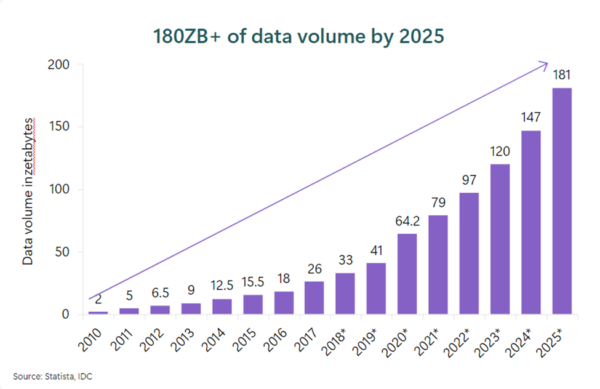
So, it seems the more data collected, the more likely it is used for real-time processing. Therefore, if you are a cloud company, it is rather important to your bottom line to find a way to make it easy for your customers to store their data in your cloud. The next best thing, of course, is making it easy for your customers to use your tools and services to work with data stored elsewhere. This is part of the brilliance of Fabric, as it allows ease of access to real time data you are already using in places like Databricks, Confluent, and Snowflake.

The Bundle

Now, if you are Microsoft, with a handful of data services ready to meet the needs of a growing market, you have some choices to make. You could continue to do what you have done for 15+ years and keep selling individual products and services and hope you earn some of the market going forward. Or you could bundle the products and services, unifying them into one platform, and make it easy for users to ingest, transform, analyze, and report on their data.

Well, if you want to gain market share, bundling makes the most sense. And Microsoft is uniquely positioned to pull this off for two reasons. First, they have a comprehensive data platform which is second to none. Sure, you can point to other companies who might do one of those services better, but there is no company on Earth, or in the Cloud, which offers a complete end-to-end data platform like Fabric.

Second, bundling software is something Microsoft has a history of doing, and doing it quite well in some cases. People reading this post in 2024 may not be old enough to recall a time when you purchased individual software products like Excel and Word. But I do recall the time before Microsoft Office existed. Bundling everything into Fabric allows users to work with their data anywhere and, most importantly to Microsoft’s bottom line, the result is more data flowing to Azure servers.

I am not here to tell you everything is perfect with Fabric. In the past year I have seen a handful of negative comments about Fabric, most of them nitpicking about things like brand names, data type support, and file formats. There is always going to be a person upset about how Widget X isn’t the Most Perfect Thing For Them at This Moment and They Need to Tell the World. I think most people believe when a product is released, even if it is marked as “Preview”, it should be able to meet the demands of every possible user. It is just not practical.

Summary

Microsoft Fabric was announced at Build this year to be GA, which also makes users believe it should meet the demands of every possible user. The fastest way for Microsoft to grab as much market share as possible is to focus on the customer experience and remove those barriers. You can find roadmap details here, giving you an idea about the effort going on behind the scenes with Fabric today. For example, for everyone who has raised issues with security and governance, you can see the list of what has shipped and what is planned here.

It is clear Microsoft is investing in Fabric, much like they invested in Office 30+ years ago. If there is one thing Microsoft knows how to do, it is creating value for shareholders:
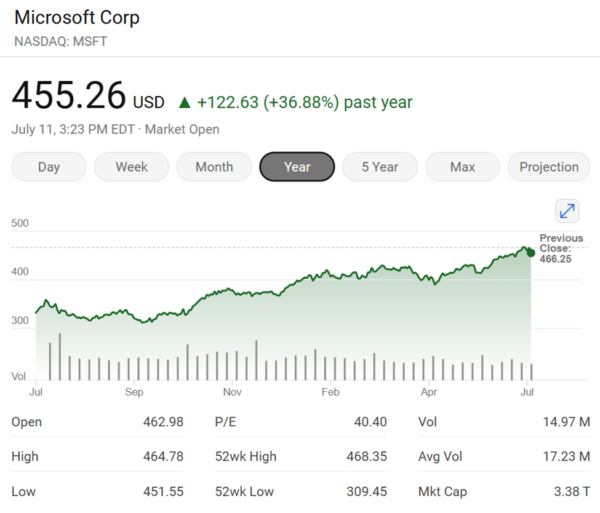
Since the announcement of Fabric last May, Microsoft is up over 25%. I am not going to say the increase is the direct result of Fabric. What I am saying is Microsoft might have an idea about what they are doing, and why.

Microsoft Fabric is the new Office – it is a bundle of data products, meant to boost productivity for data professionals and dominate the data analytics landscape. Much in the same way Office dominates the business world.

The post Microsoft Fabric is the New Office appeared first on Thomas LaRock.
https://thomaslarock.com/?p=29269
Extensions
Book Review: The AI Playbook
Book ReviewsData AnalyticsProfessional Development

Imagine you conceive an idea which will save your company millions of dollars, reduce workplace injuries, and increase sales. Now imagine company executives dislike the idea because it seems difficult to implement, and the implementation details are not well understood. Despite the stated benefits of saving money, reducing injuries, and increasing sales your idea hits ... Read more

The post Book Review: The AI Playbook appeared first on Thomas LaRock.
Show full content

Imagine you conceive an idea which will save your company millions of dollars, reduce workplace injuries, and increase sales. Now imagine company executives dislike the idea because it seems difficult to implement, and the implementation details are not well understood. Despite the stated benefits of saving money, reducing injuries, and increasing sales your idea hits a brick wall and falls flat.

Welcome to the world of artificial intelligence (AI) and machine learning (ML), where the struggle is real.

At some point in your career, you have experienced a failed project. If not, don’t worry, you will. Projects fail for all sorts of reasons. Unclear objectives. Unrealistic expectations. Poor planning. Lack of resources. Scope creep. Just to name a few of the more common reasons.

When it comes to projects with AI/ML at the core, all those same reasons apply, plus a few new ones. AI/ML is perhaps the most important piece of general-purpose technology today, which means we are bombarded with AI/ML solutions to solve random or ill-defined problems in much the same way we are bombarded by blockchain solutions for tracking fruit trucks or visiting the dentist.

The overhype of AI/ML has left people skeptical regarding the promises made through project proposals. Even if you manage to get a project funded, the initial results produced by your model may be difficult to explain, leading to apprehension about deploying solutions which cannot be understood. Nobody wants to blindly follow the decisions and predictions produced by machine learning models no one understands.

It is clear the business world needs a way to build, deploy, and maintain AI/ML models in a consistent manner, with a higher rate of success than failure, and completed on time and within budget.

bizML

Thankfully, there exists a modern approach to AI/ML projects. It is called bizML, and it is the core subject inside the new book by Dr. Eric Siegel – The AI Playbook.

For any project, not just AI/ML projects, to succeed there must be a rigorous and systematic approach for real-world deployments. Every successful project has similar characteristics – measurable goals, stakeholder involvement, risk management, resource allocation, fighting scope creep, effective communication, and monitoring project progress before, during, and after deployment.

The AI Playbook breaks this down into digestible sections for anyone with business experience to understand. It outlines bizML as a six-step process for guiding AI/ML projects from conception to deployment: define, measure, act, learn, iterate, and deploy. Using stories from familiar companies such as UPS, FICO, and various dot-coms, Dr. Siegel leans on his experience to help the reader understand how and why even the best ideas often fail.

I don’t want to give away the surprise ending, so I will just say the real secret behind bizML is starting with the end state in mind. Many projects fail due to stakeholders not aligned with the reality of deployment versus expectations. bizML attempts to remove this roadblock by getting everyone aligned with what the end state will look like, and then build towards the agreed upon state.

I read through the book in less than a couple of days, absorbing the material as fast as possible. The use of personal stories was easier to read as opposed to a purely technical book focusing on code and examples. I cannot emphasize enough how this book is not a technical manual, but a business guide for business professionals, executives, managers, consultants, and anyone else wanting to learn how to capitalize on AI/ML tech and collaborate with data professionals.

Summary

As AI/ML solutions continue to gain traction in the market, this book provides the right framework (bizML) for successful AI/ML deployments at the right time. Anyone, or any company, looking to deploy (or has deployed) AI/ML projects should buy copies of this book for all stakeholders.

I’m putting this onto my bookshelf and 15/10 would recommend.

The post Book Review: The AI Playbook appeared first on Thomas LaRock.
https://thomaslarock.com/?p=28750
Extensions
Export to CSV in Azure ML Studio
AzureData Analytics

The most popular feature in any application is an easy-to-find button saying “Export to CSV.” If this button is not visibly available, a simple right-click of your mouse should present such an option. You really should not be forced to spend any additional time on this Earth looking for a way to export your data ... Read more

The post Export to CSV in Azure ML Studio appeared first on Thomas LaRock.
Show full content

The most popular feature in any application is an easy-to-find button saying “Export to CSV.” If this button is not visibly available, a simple right-click of your mouse should present such an option. You really should not be forced to spend any additional time on this Earth looking for a way to export your data to a CSV file.

Well, in Azure ML Studio, exporting to a CSV file should be simple, but is not, unless you already know what you are doing and where to look. I was reminded of this recently, and decided to write a quick post in case a person new to ML Studio was wondering how to export data to a CSV file.

When you are working inside the ML Studio designer, it is likely you will want to export data or outputs from time to time. If you are starting from a blank template, the designer does not make it easy for you to know what module you need (similar to my last post on finding sample data). Would be great if CoPilot was available!

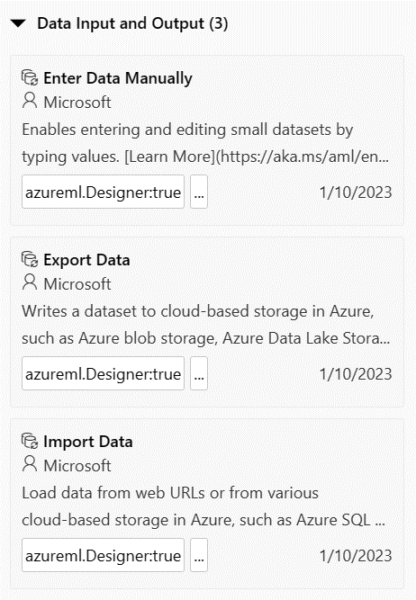
Now, if you are similar to 99% of data professionals in the world, you will navigate to the section named Data Input and Output, because that’s what you are trying to do, export data from the designer. It even says in the description “Writes a dataset to…”, very clear what will happen.

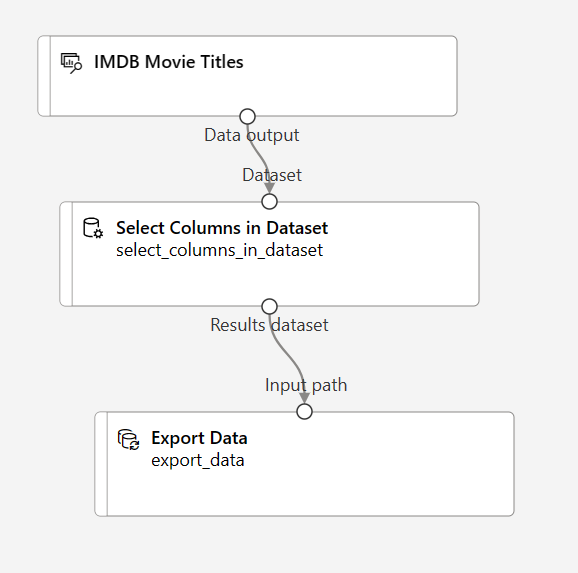
So, using the imdb sample data, we add a module to select all columns, then attach the module to the Export Data model. So easy!

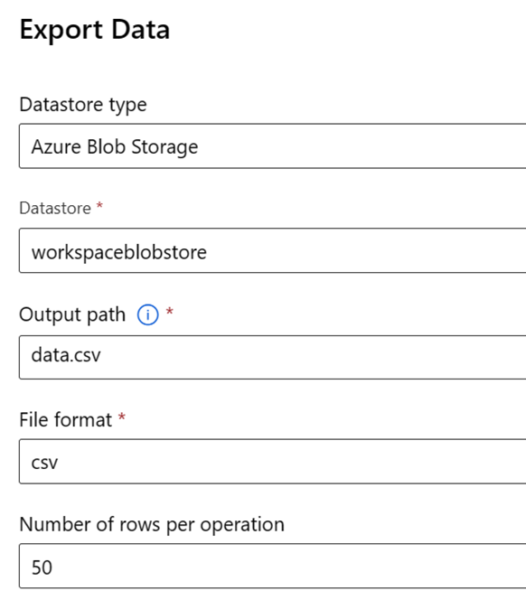
When you attach you need to configure some details for the module. Again, so easy!

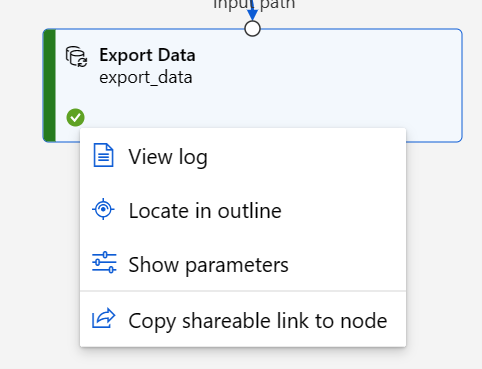
We save our configuration options and submit the job to run. When the job is complete, we navigate to view the dataset.

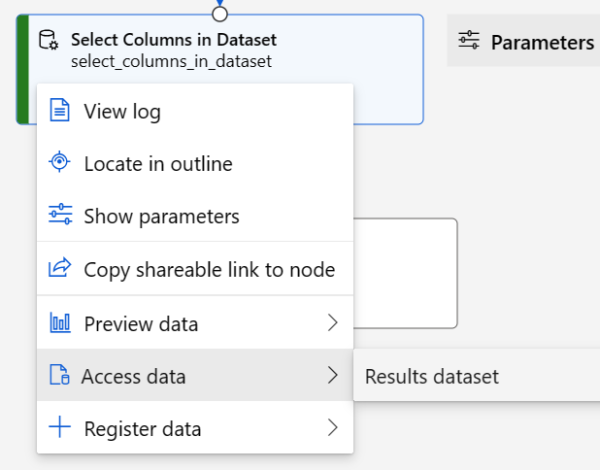
Uh-oh, I was expecting a different set of options here. Viewing the log and various outputs does not reveal any CSV file either. Maybe I need to choose the select columns module:

Ah, that’s better.

Except it isn’t. Instead of showing me the location of the expected CSV file, what I find is this:

I can preview the data from the select columns module, but there isn’t a way to access the CSV file I was expecting. I suspect this export module is really meant to pass data between pipelines or services. But the purpose and description of the export module is not clear, and a novice user would be unhappy to head down this path only to be disappointed and frustrated.

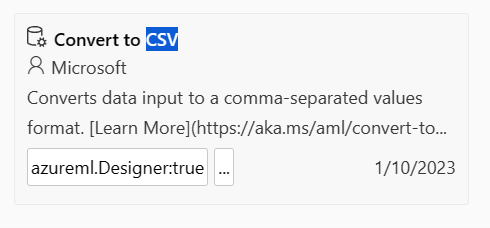
What we really want to use here is the Convert to CSV module:

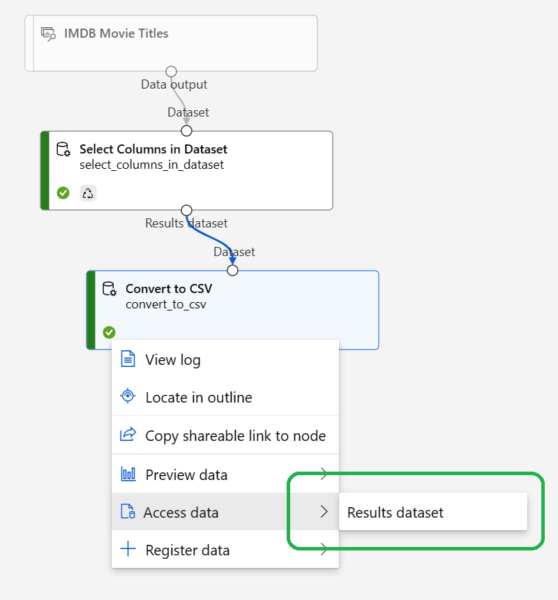
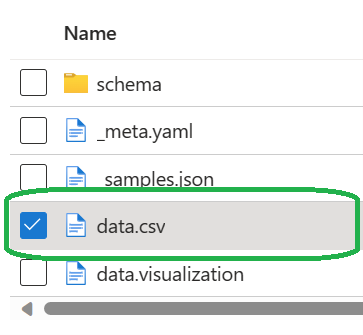
Viewing the results will display this:

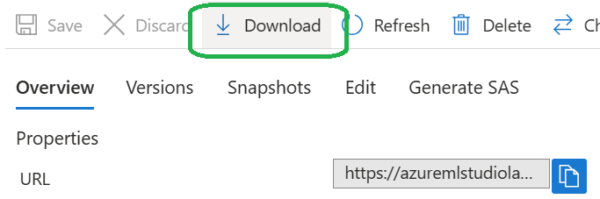
Which has what we are looking for, a download button:

Selecting Download will either default to your browser settings, or you can do a Save As.

As I wrote at the beginning of this post, exporting to a CSV file from within Azure ML Studio is easy to do, if you already know what you are doing. If you are new to Azure ML Studio, you may find yourself frustrated if you expect the Export Data module to produce a CSV file. You will want to use the Convert to CSV module instead.

The post Export to CSV in Azure ML Studio appeared first on Thomas LaRock.
https://thomaslarock.com/?p=28511
Extensions
Azure ML Studio Sample Data
Azure

This is one of those posts you write as a note to “future you”, when you’ll forget something, do a search, and find your own post. Recently I was working inside of Azure ML Studio and wanted to browse the sample datasets provided. Except I could not find them. I *knew* they existed, having used ... Read more

The post Azure ML Studio Sample Data appeared first on Thomas LaRock.
Show full content

This is one of those posts you write as a note to “future you”, when you’ll forget something, do a search, and find your own post.

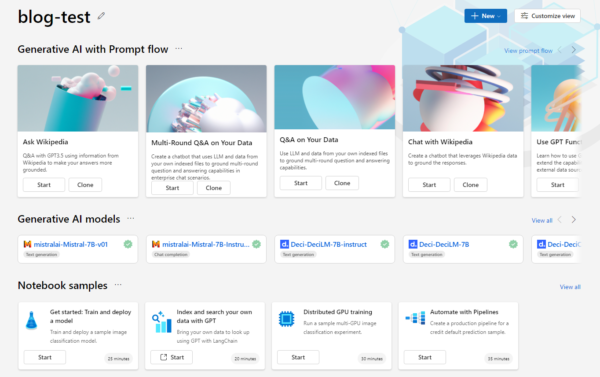
Recently I was working inside of Azure ML Studio and wanted to browse the sample datasets provided. Except I could not find them. I *knew* they existed, having used them previously, but could not remember if that was in the original ML Studio (classic) or not.

After some trial and error, I found them and decided to write this post in case anyone else is wondering where to find the sample datasets. You’re welcome, future Tom!

First, you need to login to Azure ML Studio: https://ml.azure.com/. Once logged in, you will create a workspace. Once the workspace is ready, open it and you will see a splash screen with a lot of interesting widgets, but alas no sample datasets to select.

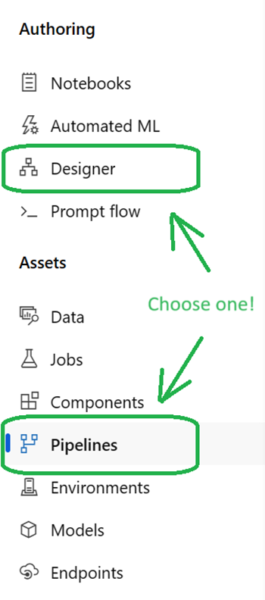
To locate the sample datasets you must create a Pipeline. You create a Pipeline either through the designer or the Pipeline menu on the left of the workspace screen, as selecting Pipeline | New Pipeline opens the Designer.

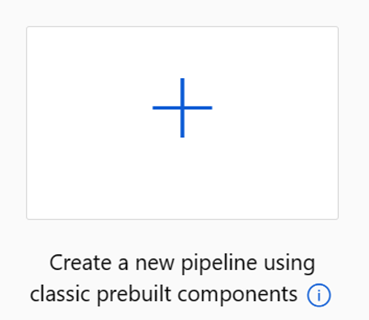
Once inside the Designer, create a Pipeline either by selecting the pre-defined samples or by selecting the upper-left tile:

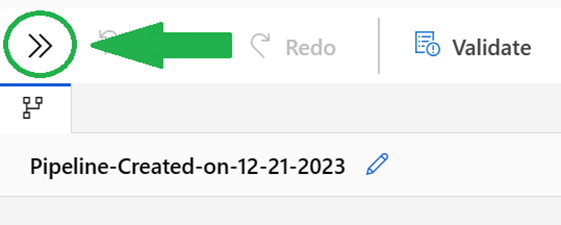
Now you are in the Authoring screen, and here is where you will find the sample data. However, your default portal experience could have the left-hand menu collapsed. You can expand the menu by clicking on the two brackets (WTH is this really called, a vertical chevron? No idea.) This was not intuitive for me, it took me a bit of time to understand I needed to click on this to view a menu.

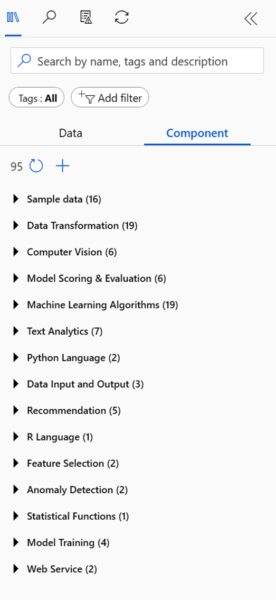
Once opened, you’ll find sample data as well as some other goodies.

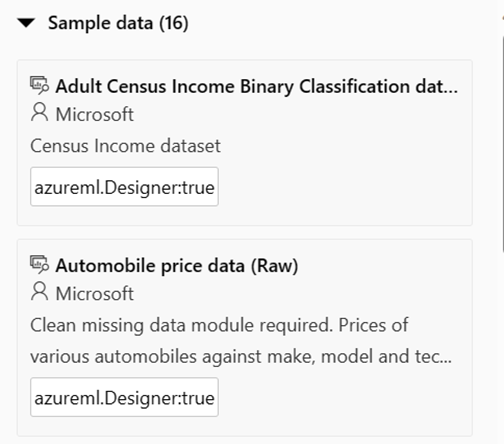
Expand the Sample data option and view the full list of datasets.

I don’t know how often the sample data is refreshed, and the answer is “likely never”. So, if you are looking for up to date census data, or iMDB movie data, you should consider a different source than the sample datasets provided through Azure ML Studio.

The post Azure ML Studio Sample Data appeared first on Thomas LaRock.
https://thomaslarock.com/?p=28471
Extensions
Microsoft Data Platform MVP – Fifteen Years
AzureSQL MVP

I am happy, honored, and humbled to receive the Microsoft Data Platform MVP award for the fifteenth (15th) straight year. Receiving the MVP award during my unforced sabbatical this summer was a bright spot, no question. It reinforced the belief I have in myself – my contributions have value. Microsoft puts this front and center ... Read more

The post Microsoft Data Platform MVP – Fifteen Years appeared first on Thomas LaRock.
Show full content

I am happy, honored, and humbled to receive the Microsoft Data Platform MVP award for the fifteenth (15th) straight year.

Receiving the MVP award during my unforced sabbatical this summer was a bright spot, no question. It reinforced the belief I have in myself – my contributions have value. Microsoft puts this front and center on the award by stating (emphasis mine):

“We recognize and value your exceptional contributions to technical communities worldwide.”

I’m running out of room.

I recall the aftermath of my first award, when I was told I was the “least technical SQL Server MVP ever awarded”. Talk about feeling you have no value! And that was certainly the feeling I had two months ago.

It’s amazing how something as simple as being recognized by your peers can go so far in making a person feel valued. We should all strive to go out of our way daily to help another human feel valued.

There are plenty of people in the world who are recognized as experts in the Microsoft Data Platform. I’d like to think I am one of them. I also happen to be fortunate enough to know Microsoft recognizes me as one as well.

But MVPs advocate for Microsoft because we want to, not because we want an award. After all these years I’m still crazy for Microsoft, and I am happy to help promote the best data platform on the planet.

For my fellow MVPs renewed this year, I offer this suggestion – say thank you. Then say it again. Email the person on the product team who made the widget you enjoy using over and over and tell them how much you appreciate their effort. Email your MVP lead(s) and thank them for all their hard work as well.

A little kindness goes a long way. You never know how much reaching out could mean to that person at that moment.

The post Microsoft Data Platform MVP – Fifteen Years appeared first on Thomas LaRock.
https://thomaslarock.com/?p=27668
Extensions
Pro SQL Server 2022 Wait Statistics Book
AzureSQL Server 2022SQL Server Performance

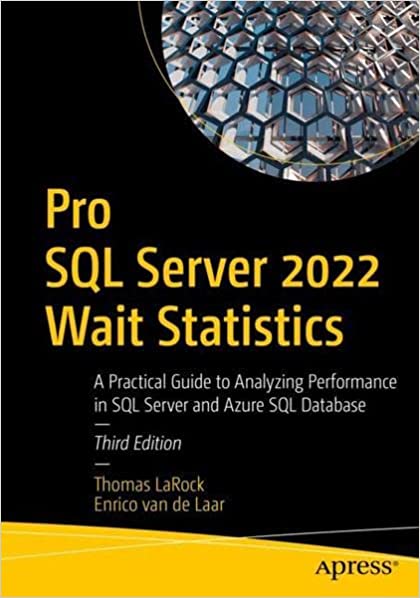
After many months of editing, revising, and writing, my new book Pro SQL Server 2022 Wait Statistics is ready for print!

The post Pro SQL Server 2022 Wait Statistics Book appeared first on Thomas LaRock.
Show full content

After many months of editing, revising, and writing, my new book Pro SQL Server 2022 Wait Statistics: A Practical Guide to Analyzing Performance in SQL Server and Azure SQL Database is ready for print!

Pro SQL Server 2022 Wait Statistics

You can pre-order here: https://amzn.to/3fQr7hz

I thoroughly enjoyed this project, and I want to thank Apress and Jonathan Gennick for giving me the opportunity to update the previous edition. It felt good to be writing again, something I have not been doing enough of lately. And many thanks to Enrico van de Laar (@evdlaar) for giving me amazing content to start with.

The book is an effort to help explain how, why, and when wait events happen. Of course, I also want to show how to solve issues when they arise. Specific wait events are broken down into parts: definition, remediation, and an example. There are plenty of code examples, allowing the reader to duplicate the scenarios to help understand the wait events better.

It is my understanding we will have a GitHub repository for the sample code. This will make it easy for a reader to access the code for their use. I am hoping to keep the repo up to date and expand upon the example as I look towards the next version.

Pro SQL Server 2022 Wait Statistics at Live 360!

I will be presenting material from the book at SQL Server Live! this November where I have the following sessions, panel discussion, and workshop:

  • Fast Focus: SQL Server Data Types and Performance
  • Locking, Blocking, and Deadlocks
  • Performance Tuning SQL Server using Wait Statistics
  • SQL Server Live! Panel Discussion: Azure Cloud Migration Discussion
  • Workshop: Introduction to Azure Data Platform for Data Professionals

The workshop is a full day training session delivered with Karen Lopez (@DataChick), and you can register for Live 360 here: Live 360 Orlando 2022 – Choose Registration

I am hopeful to have copies of Pro SQL Server 2022 Wait Statistics at SQL Server Live!. At the time of this post, I do not know of a publish date. Amazon shows the book as pre-order right now.

The post Pro SQL Server 2022 Wait Statistics Book appeared first on Thomas LaRock.
https://thomaslarock.com/?p=24908
Extensions
Stop Using Production Data For Development
Data Security and PrivacySQL MVP

A common software development practice is to take data from a production system and restore it to a different environment, often called “test”, “development”, “staging”, or even “QA”. This allows for support teams to troubleshoot issues without making changes to the true production environment. It also allows for development teams to build new versions and ... Read more

The post Stop Using Production Data For Development appeared first on Thomas LaRock.

Show full content

A common software development practice is to take data from a production system and restore it to a different environment, often called “test”, “development”, “staging”, or even “QA”. This allows for support teams to troubleshoot issues without making changes to the true production environment. It also allows for development teams to build new versions and features of existing products in a non-production environment. Using production to refresh development is just one of those things everyone accepts and does, without question.

Of course the idea of testing in a non-production environment isn’t anything new. Consider Haggis. No way someone thought to themselves “let me just shove everything I can into this sheep’s stomach, boil it, and serve it for dinner tonight.” You know they first fed it to the neighbor nobody liked. Probably right after they shoved a carton of milk in their face and asked “does this smell bad to you?”

For decades software development has made it a standard practice to create copies of production data and restore it to other non-production environments. It was not without issues, however. For example, as data sizes grew so did the length of time to do a restore. This also clogged network bandwidth, not to mention the costs associated with storage.

And then there is this:

If you restore a production database to a development environment and don’t cleanse or mask the data, it’s still production data.

— Henge Witch (@HengeWitch) January 18, 2022

If you read that tweet and thought “yeah, what’s your point?” then you are part of the problem.

As an industry we focus on access to specific environments, but not the assets in the environments. This is wrong. The royal family knows where the Crown Jewels are stored but if they are moved to another location you know the Jewels are heavily guarded at all times. Access to the jewels is important no matter where the jewels are located. The same should be true of your production data.

Use production to refresh development.
Then again, that stick might be pointy enough to fend off any attacker.

Data is the most critical asset your company owns. If you make efforts to lock down production but allow production data to flow to less-secure environments, then you haven’t locked down production.

It is ludicrous to think about the billions of dollars spent to lock down physical access to data centers only to allow junior developers to stuff customer data on a laptop they will then leave behind on a bus. Or senior developers leaving S3 buckets open. Or forgetting they pushed credentials to a GitHub repo.

If you are still moving production data between environments you are a data breach waiting to happen. I don’t care what the auditors say, you are at an elevated and unnecessary risk. Like when Obi-Wan decides to protect baby Luke by keeping his name and taking him to Darth Vader’s home planet. Nice job, Ben, no way this ends up with you dying, naked, in front a few dozen onlookers.

I think what frustrates me most is this entire system is unnecessary. You have options when moving production data. You can use data masking, obfuscation, and encryption in order to reduce your risk. But the best method is to not move your data at all.

After years of being told “don’t test in production” it’s time to think about testing in production. Continuous integration and continuous delivery/deployment (CI/CD) allow for you to achieve this miracle. And for those that say “No, you dummy, CI/CD is what you do in test before you push to production,” I offer the following.

Use dummy data.

You don’t need production data, you need data that looks like production data. You don’t need actual customer names and address, you need similar names and address. And there are ways to simulate the statistics in your database, too, so your query plans have the same shape as production without the actual volume of data.

It’s possible for you to develop software code against simulated production data, as opposed to actual production data. But doing so requires more work, and nobody likes more work.

Until you are breached, of course. Then the extra work won’t be optional.

The post Stop Using Production Data For Development appeared first on Thomas LaRock.
https://thomaslarock.com/?p=21592
Extensions