GeistHaus
log in · sign up

Pragmateek

Part of feedburner.com

A geek on his way to IT pragmatism

stories
Why C# structs do no support inheritance
.Net DevelopmentC#C++Developmentc#inheritanceobject-oriented-programmingstruct
Introduction A common question asked by C# developers is why structs (the representation of .NET value types in the C# language) do not support inheritance whereas classes (.NET reference types) do? I see three reasons: Design choice Conflict with array … Continue reading →
Show full content
Introduction

A common question asked by C# developers is why structs (the representation of .NET value types in the C# language) do not support inheritance whereas classes (.NET reference types) do?

I see three reasons:

  • Design choice
  • Conflict with array covariance
  • Memory management

As C# is the main language of the .NET platform I’ll use the term struct in this article instead of value type.

#1 Design

The first reason is that structs have been designed to be lightweight, and one of their primary uses is to represent simple data structures like points or colours which are basically a set of primitive data.

Preventing inheritance has not only conceptual implications by guiding the usage, but also technical as no inheritance means no need for a vtable to store the pointers to virtual methods that may be overridden further down the types hierarchy.

In the same way instances of structs do not have an object header which stores metadata like type information along with a sync-block used to take a lock on the object in multi-threaded programs.

So in memory structs instances are merely a sequence of fields storage.

Of course if any operation, like calling a virtual methods inherited from System.Object like ToString, imply the usage of these “missing” parts a reference-type box wrapping a copy of the instance is used instead.

#2 Array covariance

The second reason is a technical arbitrage: you cannot have both struct inheritance and array covariance.

In a type-system context, covariance is the fact that if a type inherits from another, this relation exists also between types derived from these types.
As an example if B inherits from A, then references to B are also considered references to A, and can be substituted by them, which allows dynamic polymorphism.

In C# the vectorization of references is also covariant: if B inherits from A and can be substituted to A, then an array B[] of references to B instances can be substituted to an array A[] of references to A instances.
This is possible because all references have the same memory representation.

Here is an illustration:

using static System.Console;
using System.Linq;

long F(A[] a) => a.Sum(x => x.n);

A[] a = { new B { n = 1 }, new B { n = 2 }, new B { n = 3 } };

WriteLine(F(a));

class A
{
	public int n;
}

class B : A
{
}

Compilation and run:

>csc Test.cs
 Compilateur Microsoft (R) Visual C# version 4.4.0-3.22518.13 (7856a68c)
 Copyright (C) Microsoft Corporation. Tous droits réservés.
>Test.exe
 6
What could go wrong?

So what could go wrong if we also had structs inheritance?
We could end with arrays of instances of derived struct B used where an array of instances of the base struct A is expected, and as more often than not the instances of B will occupy more memory than instances of A, as more fields are added, the memory address calculation to reach the ith element of the array will be wrong.

Here is an illustration in C++:

#include <iostream>

struct A {
	int na;
};

struct B : A {
	int nb;
};

void f(A as[]) {
	std::cout << as[0].na << "|" << as[1].na << "|" << as[2].na << std::endl;
}

int main() {
	B bs[] = { B{ A{1}, 2}, B{ A{3}, 4}, B{ A{5}, 6}};

	f(bs);

	return 0;
}

Note: in C++ structs have not at all the same semantics as in C#: it only impacts the default visibility of members (public) and the default inheritance type (public).

Compilation:

>cl /std:c++latest /EHsc test.cpp
   Microsoft (R) C/C++ Optimizing Compiler Version 19.34.31933 for x64
   Copyright (C) Microsoft Corporation.  All rights reserved. 
 /std:c++latest is provided as a preview of language features from the latest C++
 working draft, and we're eager to hear about bugs and suggestions for improvements.
 However, note that these features are provided as-is without support, and subject
 to changes or removal as the working draft evolves. See
 https://go.microsoft.com/fwlink/?linkid=2045807 for details.
 test.cpp
 Microsoft (R) Incremental Linker Version 14.34.31933.0
 Copyright (C) Microsoft Corporation.  All rights reserved.
 /out:test.exe
 test.obj

Run:

>test.exe
1|2|3

So we get 1|2|3 instead of 1|3|5, so what happened?
The issue is that the memory representation of instances of A and B are not the same: B ones are twice as big as A ones, so the pointer arithmetic to get to the ith instance in the array is not the same with an array of A or B.

Here is a representation of the array bs:

+----------+---------+----------+
|     0    |    1    |    2     |
|+----+----+----+----+----+----+|
||    B    |    B    |    B    ||
|+----+----+----+----+----+----+|
||  1 |  2 |  3 |  4 |  5 |  6 ||
|+----+----+----+----+----+----+|
+-------------------------------+

It contains 3 instances of B stored side by side at indices 0, 1, and 2.
But the function f interprets it as:

+----------+---------+----------+
|   0 |  1 |  2 |  3 |  4 |  5  |
|+----+----+----+----+----+----+|
||  A |  A |  A |  A |  A |  A ||
|+----+----+----+----+----+----+|
||  1 |  2 |  3 |  4 |  5 |  6 ||
|+----+----+----+----+----+----+|
+-------------------------------+

And mechanically goes from one item in the array to the next by incrementing the address by the size of an instance of A and not the size of an instance of B.

The solution is to make a copy of the bs array to another with the expected memory layout:

#include <iostream>
#include <algorithm>

struct A {
	int na;
};

struct B : A {
	int nb;
};

void f(A as[]) {
	std::cout << as[0].na << "|" << as[1].na << "|" << as[2].na << std::endl;
}

int main() {
	B bs[] = { B{ A{1}, 2}, B{ A{3}, 4}, B{ A{5}, 6}};
	
	A as[3];
	std::copy(std::begin(bs), std::end(bs), std::begin(as));

	f(as);

	return 0;
}

During the copy process, each instance of B is mapped (sliced, see #3) to an instance of A, and we get this array:

+-----+----+----++
|   0 |  1 |  2  |
|+----+----+----+|
||  A |  A |  A ||
|+----+----+----+|
||  1 |  3 |  5 ||
|+----+----+----+|
+----------------+

Same compilation.
Run:

>test.exe
1|3|5 

As expected we get the values of the na fields of the B instances which have been copied to the new A instances.

But wait!

But we have inheritance for structs as they inherit from System.ValueType which itself inherits from System.Object as all .NET types.

So we could trick this restriction further up the inheritance hierarchy if we can’t further down:

A[] a = { new A() };

object[] o = a;

struct A
{
}

Compilation:

>csc Test.cs
 Compilateur Microsoft (R) Visual C# version 4.4.0-3.22518.13 (7856a68c)
 Copyright (C) Microsoft Corporation. Tous droits réservés.
 Test.cs(3,14): error CS0029: Cannot implicitly convert type 'A[]' to 'object[]'

So all is safe: when we have inheritance we cannot have covariance.
The reason is that the memory representation of items in object[], references pointing to objects themselves, has nothing to do with those of instances of A directly stored side by side into the array.

As in C++, the solution is to copy the array to another array with the correct memory layout:

A[] a = { new A() };

object[] o = new object[a.Length];

System.Array.Copy(a, o, a.Length);

During the copy from the array a to the array o, the instances of A are boxed and the references to these boxes are stored in the array o, so as statically declared o is an array of references to objects.

So in conclusion:

  • if we don’t have covariance inheritance is safe because a B[] could not be substituted where an A[] is expected, this is C++ choice,
  • if we don’t have inheritance covariance is safe because A[] cannot reference a B[] as not B can exist, this is C# choice.
#3 Memory management

And finally memory management, a debatable reason, as we’ll see, which is often invoked: what would happen if an instance of a derived struct is copied to a variable hosting an instance of a base struct?

Here is an illustration:

struct A
{
    public int NA;
}

struct B : A
{
    public int NB;
}

A a = new B();

Indeed with a naive implementation that would copy the whole B instance into a memory, you might end up breaking the memory safety, corrupting neighbouring memory as B instances are larger than A instances.

But there exists a well-known solution, implemented by C++: slicing.
The idea is to only copy the part of the B instance which is inherited from A (and makes it an A).
Here is an illustration in C++, along with a demonstration of what happens if we dodge it:

#include <iostream>

struct A {
	int64_t na;
};

struct B : A {
	int64_t nb;
};

int main() {
	B b { A{1}, 1 };
	A a1 = {2};
	A a2 = {3};
	
	a1 = b;
	std::cout << "With slicing: " << a1.na << "|" << a2.na << std::endl;
	
	*(B*)&amp;a1 = b;
	std::cout << "Without slicing: " << a1.na << "|" << a2.na << std::endl;

	return 0;
}

The first assignment a1 = b uses the default C++ behaviour, leveraging slicing.

The second one *(B*)&a1 = b bypasses slicing by artificially creating a B left-value to reproduce what would happen without slicing:

  • &a1 gets an A* pointer to a1,
  • (B*) casts it to a B* pointer, breaking type-safety by the way,
  • and finally * dereferences it to present a B instance.

Note: I’ve used int64_t as the code was compiled and run on a 64-bit machine and for performance reasons the compiler aligns the structs’ instances memory to 8 bytes memory boundaries, hence preventing the demonstration of the issue as the corrupted memory is not used anyway.

Compilation:

>cl /std:c++latest /EHsc test.cpp
   Microsoft (R) C/C++ Optimizing Compiler Version 19.34.31933 for x64
   Copyright (C) Microsoft Corporation.  All rights reserved. 
 /std:c++latest is provided as a preview of language features from the latest C++
 working draft, and we're eager to hear about bugs and suggestions for improvements.
 However, note that these features are provided as-is without support, and subject
 to changes or removal as the working draft evolves. See
 https://go.microsoft.com/fwlink/?linkid=2045807 for details.
 test.cpp
 test.cpp(19) : warning C4789: buffer 'a1' of size 8 bytes will be overrun; 16 bytes will be written starting at offset 0
 Microsoft (R) Incremental Linker Version 14.34.31933.0
 Copyright (C) Microsoft Corporation.  All rights reserved.
 /out:test.exe
 test.obj

Note that the compiler has spotted the issue with the second assignment.

Run:

  >test.exe
   With slicing: 1|3
   Without slicing: 1|1

So the first assignment, with slicing, is perfectly memory-safe: only a1 has been affected.
But the second assignment, without slicing, also affects a2, a sign that memory has been corrupted.

Let’s explain what happened in detail.
Here is a representation of the memory before the first assignment:

+--------+--------+--------+--------+
|        b        |   a1   |   a2   |
+--------+--------+--------+--------+
|   na   |   nb   |   na   |   na   |
+--------+--------+--------+--------+
|   1    |   1    |   2    |   3    |
+--------+--------+--------+----+---+

The 3 instances memory slots are contiguous.
Then after the first assignment:

+--------+--------+--------+--------+
|        b        |   a1   |   a2   |
+--------+--------+--------+--------+
|   na   |   nb   |   na   |   na   |
+--------+--------+--------+--------+
|   1    |   1    |   1    |   3    |
+--------+--------+--------+----+---+

Thanks to slicing only b.na has been copied to a1, only setting a1.na.

But without slicing, the entire b is copied to a1 overflowing on a2 which is stored right behind
So after the second assignment, we get:

+--------+--------+--------+--------+
|        b        |   a1   |   a2   |
+--------+--------+--------+--------+
|   na   |   nb   |   na   |   na   |
+--------+--------+--------+--------+
|   1    |   1    |   1    |   1    |
+--------+--------+--------+----+---+

As expected not only a1.n but also a2.n was set.

So while it is a real technical issue it has a well-known solution implemented by C++ for decades, but most C# programmers, myself included, are not fluent in C++, so it is largely unknown.

But while slicing probably could have been implemented since the inception of .NET and C#, it would imply more complexity in the C# compiler and/or .NET CLR.

Conclusion

So we have presented 3 good reasons for .NET/C# not to support value-types/struct inheritance.

If you know about any other reasons please share.

http://pragmateek.com/?p=3698
Extensions
Objects creation in C# vs C++
.Net DevelopmentC#C++Development.netc#dotnetmemory
Introduction Sometimes the way two languages implement a feature can significantly differ in surprising ways, and even the keywords can be misleading.This is the case of instantiation of C++ classes and C# structs a.k.a. .NET value types. In this article, … Continue reading →
Show full content
Introduction

Sometimes the way two languages implement a feature can significantly differ in surprising ways, and even the keywords can be misleading.
This is the case of instantiation of C++ classes and C# structs a.k.a. .NET value types.

In this article, we will see the differences between the two languages in the way they handle the creation of objects: their memory allocation and their initialization.

.NET and C#

First a quick introduction to the main difference between C++ and the pair .NET/C#.

With C++ source code is directly compiled to machine binary code and run by the OS.

.NET is an object-oriented (OO) managed platform with a runtime, the Common Language Runtime a.k.a. CLR, much like the Java Virtual Machine a.k.a. JVM, which is running its own binary code, a bytecode called the Common Intermediate Language a.k.a. CIL a.k.a MSIL, that it compiles to native code that is run by the OS.
The CLR is also responsible for managing the memory by allocating it, tracking it, and freeing it.

.NET supports many languages, C# being the main one, whose source code is compiled to this binary code which is stored to specific binary files called assemblies with the same typology and roles as native ones: .exe executables and .dll libraries.

Note that there is a version of C++ compiled to .NET CIL: C++/CLI whose you can see a concrete use-case in this other article: Using C# from native C++ with the help of C++/CLI.

Classes typology C++

In C++ there is only one type of class, the only difference between declaring them with the keyword class or struct is the default visibility of members: private for class, public for struct.

Moreover, in C++ the way an object’s memory is allocated does not depend on the object’s type.
Especially any class instance can be stored on the stack by simply declaring it, or the heap via the new operator.

.NET and C#

In .NET this is a different story, there is still a single concept of class (declared with the .class directive in CIL) but there are two distinct hierarchies:

  • Reference types: classes directly inheriting from System.Object
  • Value types: classes inheriting from System.ValueType (which itself inherits from System.Object)

Their semantics differs:

  • Reference types are intended to represent full-blown OO classes with most of the features you can expect from an OO platform (except multiple inheritance),
  • Value types are intended to represent data structures, a bit like C structs, though they support many more OO features like methods and can be used polymorphically through interfaces, but they have some limitations like no support for inheritance.

Their memory is managed differently by the CLR:

  • Reference types instances are always allocated on the heap and are accessed through typed references (themselves allocated “in place”),
  • Value types instances are allocated “in place” and hence can never be allocated by themselves on the heap but only as a part of another reference type instance (an array, an object).

In this article, we only use value types as their instances can live both on the stack and the heap, so we’ll be able to reproduce the same scenarios as C++.

At the language level in C# we can define a reference type by introducing it with the class keyword, and a value type with the struct keyword, which is greatly misleading for C++ developers as in C++ the two keywords are technically almost synonymous.

Objects initialization C++

C++ is quite permissive with regard to memory initialization so you can end up with objects containing “random” data left there by previous objects’ allocations and bugs whose root cause is harder to find as the effects can appear far from the buggy code.
It’s not an issue by itself, just a design choice.

Here is an illustration:

#include <iostream>

struct A {
	int N;	
};

struct B {
	int N;
	
	B() {
	}
};

void f() {
	std::cout << "Write data to the stack" << std::endl;
	
	A a;
	a.N = 123;
	
	B b;
	b.N = 456;
	
	std::cout << "a.N: " << a.N << std::endl;
	std::cout << "b.N: " << b.N << std::endl;
}

void g() {
	std::cout << "Without explicit constructor call" << std::endl;
	
	A a;
	B b;
	
	std::cout << "a.N: " << a.N << std::endl;
	std::cout << "b.N: " << b.N << std::endl;
}

void h() {
	std::cout << "With explicit constructor call" << std::endl;
	
	A a = A();
	B b = B();
	
	std::cout << "a.N: " << a.N << std::endl;
	std::cout << "b.N: " << b.N << std::endl;
}

int main() {
	f();
	g();
	h();

	return 0;
}

Compilation:

>cl /EHsc test.cpp
 Microsoft (R) C/C++ Optimizing Compiler Version 19.34.31933 for x64
 Copyright (C) Microsoft Corporation.  All rights reserved.
 test.cpp
 test.cpp(28) : warning C4700: uninitialized local variable 'a' used
 Microsoft (R) Incremental Linker Version 14.34.31933.0
 Copyright (C) Microsoft Corporation.  All rights reserved.
 /out:test.exe
 test.obj

Note that the compiler detects the potential issue and emits a warning.

Run:

>test.exe
 Write data to the stack
 a.N: 123
 b.N: 456
 Without explicit constructor call
 a.N: 123
 b.N: 456
 With explicit constructor call
 a.N: 0
 b.N: 123

So by default, the memory is not zeroed and you end up with objects filled up with the state of the previously allocated objects in the same place on the stack.

And you can see the different semantics of zero-initialization with an explicit call to the default constructor when it is explicitly defined or not.

C#

C# takes the opposite tack by forcing the developer to ensure the memory is fully initialized before using it, either by:

  • Initializing all the fields after full object allocation
  • Calling a constructor that will do that (by default one that initializes all the fields to their default value is created)


Here is the illustration with the equivalent code:

using static System.Console;

void f() {
	WriteLine("Write data to the stack");
	
	A a;
	a.N = 123;
	
	B b;
	b.N = 456;
	
	WriteLine($"a.N: {a.N}");
	WriteLine($"b.N: {b.N}");
}

void g() {
	WriteLine("Without explicit constructor call");
	
	A a;
	B b;
	
	WriteLine($"a.N: {a.N}");
	WriteLine($"b.N: {b.N}");
}

void h() {
	WriteLine("With explicit constructor call");
	
	A a = new A();
	B b = new B();
	
	WriteLine($"a.N: {a.N}");
	WriteLine($"b.N: {b.N}");
}

f();
g();
h();

struct A {
	public int N;	
}

struct B {
	public int N;
	
	public B() {
	}
}

It’s OK for method f as the fields are initialized right after allocation of the instances.
But not for method g which won’t compile:

>csc Test.cs
 Compilateur Microsoft (R) Visual C# version 4.4.0-3.22518.13 (7856a68c)
 Copyright (C) Microsoft Corporation. Tous droits réservés.
 Test.cs(17,20): error CS0170:  Use of possibly unassigned field 'N'
 Test.cs(18,20): error CS0170:  Use of possibly unassigned field 'N'

And without the g method:

>csc Test.cs
 Compilateur Microsoft (R) Visual C# version 4.4.0-3.22518.13 (7856a68c)
 Copyright (C) Microsoft Corporation. Tous droits réservés.
>Test.exe
 Write data to the stack
 a.N: 123
 b.N: 456
 With explicit constructor call
 a.N: 0
 b.N: 0

All the memory has been zeroed out, nothing falling through any crack.

Default constructor invocation C++

In C++ the default constructor is called after the memory to store the object has been allocated, be it inside an array, for each one of its elements, or inside another object:

#include <iostream>

struct A {
	A()	{
		std::cout << "\tA()" << std::endl;
	}
};

struct B {
	A a;
};

int main() {
	std::cout << "1. Allocation on the stack without call to constructor" << std::endl;
	A a;
	
	std::cout << "2. Allocation in an array allocated on the stack" << std::endl;
	A as[3];
	
	std::cout << "3. Allocation in an array allocated on the heap" << std::endl;
	A* ash = new A[3];
	
	std::cout << "4. Allocation in a class instance allocated on the stack" << std::endl;
	B bs;
	
	std::cout << "5. Allocation in a class instance allocated on the heap" << std::endl;
	B* bh = new B();
	
	std::cout << "6. Allocation in an array allocated on the heap with default instanciation"  << std::endl;
	A ase[] = { {}, {}, {} };
	
	std::cout << "7. Allocation on the stack with call to constructor" << std::endl;
	A ac = A();

	std::cout << "8. Allocation in an array allocated on the heap with call to constructor" << std::endl;
	A asc[] = { A(), A(), A() };
	
	return 0;
}

Compilation:

>cl /EHsc test.cpp

Run:

>test.exe
1. Allocation on the stack without call to constructor
     A()
2. Allocation in an array allocated on the stack
     A()
     A()
     A()
3. Allocation in an array allocated on the heap
     A()
     A()
     A()
4. Allocation in a class instance allocated on the stack
     A()
5. Allocation in a class instance allocated on the heap
     A()
6. Allocation in an array allocated on the heap with default instanciation
     A()
     A()
     A()
7. Allocation on the stack with call to constructor
     A()
8. Allocation in an array allocated on the heap with call to constructor
     A()
     A()
     A()

The default constructor is called every time.

As for case #6 not sure this is a perfect equivalent of the C# default operator which returns the default value for any type, e.g. 0 for int, and a zeroed instance for structs.

C#

In C# again things are different, the default constructor is never called implicitly if the object is allocated inside another, it must be called explicitly :

using System;
using static System.Console;

WriteLine("1. Allocation on the stack without call to constructor");
A a;
	
WriteLine("2. Allocation in an array allocated on the stack");
Span<A> @as = stackalloc A[3];
	
WriteLine("3. Allocation in an array allocated on the heap");
A[] ash = new A[3];
	
WriteLine("4. XXX");
	
WriteLine("5. Allocation in a class instance allocated on the heap");
B bh = new B();

WriteLine("6. Allocation in an array allocated on the heap with default instanciation");
A[] ase = { default(A), default(A), default(A) };

WriteLine("7. Allocation on the stack with call to constructor");
A ac = new A();

WriteLine("8. Allocation in an array allocated on the heap with call to constructor");
A[] asc = { new A(), new A(), new A() };

struct A
{
	public A() => WriteLine("\tA()");
}

class B
{
	A a;
}

Some remarks:

  • for .NET Framework (should be transparent in .NET Core) to get and use the Span<> type you must use NuGet package System.Memory (I’ve used version 4.5.5) and System.Runtime.CompilerServices.Unsafe (version 4.5.3 which is the one expected by the version of System.Memory)
  • Case #4 is not possible as B is a reference type so its instances can’t be allocated on the stack

Compilation:

>csc /reference:System.Memory.dll Test.cs
 Compilateur Microsoft (R) Visual C# version 4.4.0-3.22518.13 (7856a68c)
 Copyright (C) Microsoft Corporation. Tous droits réservés.
 Test.cs(9,3): warning CS0168: The variable 'a' is declared, but never used
 Test.cs(39,4): warning CS0169: Field 'B.a' is never used

Run:

>Test.exe
1. Allocation on the stack without call to constructor
2. Allocation in an array allocated on the stack
3. Allocation in an array allocated on the heap
4. XXX
5. Allocation in a class instance allocated on the heap
6. Allocation in an array allocated on the heap with default instanciation
7. Allocation on the stack with call to constructor
     A()
8. Allocation in an array allocated on the heap with call to constructor
     A()
     A()
     A() 

The default constructor is only called when explicitly called.

And previous to C# 10.0 it was even prohibited to define a default constructor for structs:

>csc /reference:System.Memory.dll -langversion:9.0 Test.cs
 Compilateur Microsoft (R) Visual C# version 4.4.0-3.22518.13 (7856a68c)
 Copyright (C) Microsoft Corporation. Tous droits réservés.
 Test.cs(34,9): error CS8773: Feature 'parameterless struct constructors' is not available in C# 9.0. Please use language version 10.0 or greater. 

It was by design to avoid wrong expectations like it being called when allocating an array of instances.

Conclusion

This article has illustrated the different design choices made for C++ and .NET/C# regarding objects creation.

There is far more to say concerning the differences between C++ and .NET/C# but objects creation is a tricky topic which can get in the way if not well understood.

Comparing the languages allows putting into perspective some behaviours to understand that they are not due to technical limitations but merely to deliberate choices at the inception of the language.
And that these behaviours can change as the language gets more mature like C# now supporting default constructors for structs.

http://pragmateek.com/?p=3662
Extensions
Beware of too concise code
.Net DevelopmentC#Development.netasyncc#
Introduction As developers we often strive to build concise code in order to avoid useless ceremony that would distract from its purpose. We do that by leveraging the syntactic sugar offered by the languages to reduce code verbosity and increase … Continue reading →
Show full content
Introduction

As developers we often strive to build concise code in order to avoid useless ceremony that would distract from its purpose.

We do that by leveraging the syntactic sugar offered by the languages to reduce code verbosity and increase its expressiveness but it can become a trap and lead to code that does not do what is expected.

In this article, I’ll illustrate this point with a powerful C# feature: async methods.

An async parsing method

Here is an async method that parses integers:

static async Task<int> ParseInt(string s)
{
    Console.WriteLine($"Start parsing '{s}'.");
    await Task.Delay(1);
    Console.WriteLine($"End parsing '{s}'.");
    return int.Parse(s);
}

As it is a “pure” function, calls are independent and can be executed in parallel.

A (too) concise code

And here is a naive usage of it:

static async Task TestParallelismKO()
{
    int sum = await ParseInt("1") + await ParseInt("2") + await ParseInt("3");

    Console.WriteLine($"Sum is {sum}");
}

The output is disappointing:

Start parsing '1'.
End parsing '1'.
Start parsing '2'.
End parsing '2'.
Start parsing '3'.
End parsing '3'.
Sum is 6

The result is correct but the calls are sequential!

More verbosity to understand

Here is a longer version that makes the root cause clear:

static async Task TestParallelismKO_Verbose()
{
    var i1 = await ParseInt("1");
    var i2 = await ParseInt("2");
    var i3 = await ParseInt("3");

    int sum = i1 + i2 + i3;

    Console.WriteLine($"Sum is {sum}");
}

So we are waiting for each parsing operation to be completed before jumping to the next.

The fix

Instead, we should:
1. First, run all the parsing tasks,
2. Then, wait for them to complete (whatever the order)

Here is an implementation of this:

static async Task TestParallelismOK()
{
    var t1 = ParseInt("1");
    var t2 = ParseInt("2");
    var t3 = ParseInt("3");

    int sum = await t1 + await t2 + await t3;

    Console.WriteLine($"Sum is {sum}");
}

And here is the output:

Start parsing '1'.
Start parsing '2'.
Start parsing '3'.
End parsing '3'.
End parsing '1'.
End parsing '2'.
Sum is 6

The calls are executed in parallel as expected.

Conclusion

Using syntactic sugar is great for readability and productivity but we must understand what is happening under the hood at the risk of writing incorrect code whose misbehaviour might be spotted later or even never.

http://pragmateek.com/?p=3617
Extensions
When semicolons matter
JavaScriptNode
Introduction Younger I was a dogmatic developer blindly enforcing the IT gurus’ dogma, later I’ve become more pragmatic preferring code readability and maintainability.In JavaScript, it means omitting the semicolons to lighten the code and remove useless ceremony. But in some … Continue reading →
Show full content
Introduction

Younger I was a dogmatic developer blindly enforcing the IT gurus’ dogma, later I’ve become more pragmatic preferring code readability and maintainability.
In JavaScript, it means omitting the semicolons to lighten the code and remove useless ceremony.

But in some rare corner cases omitting a semicolon can completely change the way the compiler interprets the code.
Hopefully, it will cause a compilation error, and in the worst case a hidden bug hard to track.

In this article, I describe one of these corner cases.

A simple code

Here is a basic JavaScript code snippet whose meaning is quite obvious for a human developer:

var evens = [], odds = []

var n = 123

console.log("n is %s", n % 2 === 0 ? 'even' : 'odd')

(n % 2 === 0 ? evens : odds).push(n)

If n is even it is added to the evens array, otherwise to the odds array.

A strange error

But compiling it raise a TypeError:

(n % 2 === 0 ? evens : odds).push(n)
^
TypeError: console.log(…) is not a function
at Object. (C:\Temp\test.js:7:1)
at Module._compile (internal/modules/cjs/loader.js:701:30)
at Object.Module._extensions..js (internal/modules/cjs/loader.js:712:10)
at Module.load (internal/modules/cjs/loader.js:600:32)
at tryModuleLoad (internal/modules/cjs/loader.js:539:12)
at Function.Module._load (internal/modules/cjs/loader.js:531:3)
at Function.Module.runMain (internal/modules/cjs/loader.js:754:12)
at startup (internal/bootstrap/node.js:283:19)
at bootstrapNodeJSCore (internal/bootstrap/node.js:622:3)

The error is telling that we cannot call the return value of console.log as it is not a function!

Apparently, the compiler has misunderstood our intent.

What the compiler sees

Indeed here is how the compiler interprets the last lines:

console.log("n is %s", n % 2 === 0 ? 'even' : 'odd')(n % 2 === 0 ? evens : odds).push(n)

Not the same meaning at all, here the call to the return value of console.log is obvious.

Clarifying our intent

To help the compiler understand that we have two separate instructions we must separate them with a semicolon:

console.log("n is %s", n % 2 === 0 ? 'even' : 'odd');

(n % 2 === 0 ? evens : odds).push(n)

Now the code runs as expected pushing n to the relevant array.

Conclusion

Even after years of practice JavaScript can still surprise you with subtle errors you would not get in other languages.

Let’s say this is what makes it somehow flavorful. 😉

http://pragmateek.com/?p=3601
Extensions
A basic use-case for Task Unwrap
.Net DevelopmentC#JavaScriptPromise.netc#dotnetTaskTPLUnwrap
Introduction Recently, after months without using .Net/C#, I was enhancing an existing .Net/C# WPF application leveraging the .Net Task Parallel Library (TPL). But naively applying the JavaScript Promises patterns I had used in the previous months I was bitten by … Continue reading →
Show full content
Introduction

Recently, after months without using .Net/C#, I was enhancing an existing .Net/C# WPF application leveraging the .Net Task Parallel Library (TPL).

But naively applying the JavaScript Promises patterns I had used in the previous months I was bitten by a strange issue which forced me to use the quite exotic Unwrap extension method.

This article describes the issue, explains its cause, provides a fix with Unwrap, and finally provides a more modern version with the C# 5.0 async/await paradigm.

A simple workflow in JavaScript with Promises

Here is a JavaScript implementation of a simple workflow with 3 steps, the second one simulating a delayed processing with setTimeout, using the Promise API:

function doFirstThing() {
	return new Promise(resolve => {
		console.log("First thing done")
		resolve()
	})
}

function doSecondThing() {
	return new Promise(resolve => {
		setTimeout(() => {
			console.log("Second thing done")
			resolve()
		}, 1000)
	})
}

function doThirdThing() {
	return new Promise(resolve => {
		console.log("Third thing done")
		resolve()
	})
}

doFirstThing().then(doSecondThing).then(doThirdThing)

Here is the result once run with Node:

$ node test.js
First thing done
Second thing done
Third thing done
A C# implementation with Tasks

Here is the same workflow implemented with C# using .Net TPL:

using System;
using System.Threading.Tasks;

namespace Test
{
    class Program
    {
        static Task DoFirstThing()
        {
            return Task.Run(() => Console.WriteLine("First thing done"));
        }

        static Task DoSecondThing()
        {
            return Task.Delay(1000).ContinueWith(_ => Console.WriteLine("Second thing done"));
        }

        static Task DoThirdThing()
        {
            return Task.Run(() => Console.WriteLine("Third thing done"));
        }

        static void Main(string[] args)
        {
            DoFirstThing().ContinueWith(_ => DoSecondThing()).ContinueWith(_ => DoThirdThing());

            Console.ReadLine();
        }
    }
}

Note that contrary to JavaScript Promises .Net Tasks are not started/scheduled automatically when created, hence the need to explicitly call Run.

Here is the result:

First thing done
Third thing done
Second thing done

As you see the third step is executed before the second one!

This is because ContinueWith creates a new Task wrapping the provided treatment which only consists in calling DoSecondThing (which itself creates the second task) which returns immediately.

ContinueWith won’t consider the resulting Task, contrary to Promise.then which handles the case of returning a Promise in a specific manner: the Promise returned by then will be resolved only when the underlying Promise will.

Unwrap to the rescue

To retrieve the JavaScript Promises behavior we need to explicitly tell the TPL we want to consider the underlying Task using Unwrap (implemented as an extension method provided by the TaskExtensions class):

DoFirstThing().ContinueWith(_ => DoSecondThing()).Unwrap().ContinueWith(_ => DoThirdThing());

Result is now consistent with JavaScript:

First thing done
Second thing done
Third thing done
A more modern way with await

C# 5.0 adds some syntactic sugar to ease the use of the TPL with the await operator:

await DoFirstThing();
await DoSecondThing();
await DoThirdThing();

await internally calls Unwrap and waits on the underlying Task as expected, and yields the same result.

Note that await can only be used in an async method.

Conclusion

Mapping between languages and frameworks is not always obvious but fortunately nowadays all seem to copycat each other and they end offering the same paradigms and APIs like the async/await duo you use almost in the same manner in both C# and JavaScript.

http://pragmateek.com/?p=3564
Extensions
Optional passed by reference parameters with C# for VBA COM APIs
.Net DevelopmentC#CodeProjectDevelopmentExcel developmentVBA.netaddinsAPIc#COMExcelOfficepatternvbaVisual Studio
Introduction If you’ve already developed COM APIs with .Net, typically in C# with VBA as the consuming language, you’ve probably leveraged two powerful features: by-reference parameter passing that allows the API to change the input object itself, not only its … Continue reading →
Show full content

Introduction

If you’ve already developed COM APIs with .Net, typically in C# with VBA as the consuming language, you’ve probably leveraged two powerful features:

  • by-reference parameter passing that allows the API to change the input object itself, not only its content.
    This is marked with ref in C#:

    void LoadData(ref string data)
  • optional parameters that allow the caller to omit them when calling into the API:
    void SaveData(string data = "DEFAULT")

Sometimes you want to have both for a parameter: the ability to omit it and to change it.
This is something COM supports but unfortunately this is not supported by C#.
Recently one of my customer needed precisely that for a COM API developed in C# migrated from VB6 where it was plug-and-play.
The original developers of the API had done a quick study and concluded that it was not possible with the new C# API and indeed it was not documented at all.
From experience I know that COM is not used a lot today and that resources are scarce, so, to be sure, I’ve done my due diligence and reexamined the issue, digging a little deeper and testing undocumented stuff.
I’ve finally found a solution that I would describe as a “trick”, because it’s not documented, and that I’ll present in detail in this article.

Some background From source languages to .Net

When you develop on the .Net platform all your source code (be it C#, VB.Net, C++/CLI, F#…) is compiled by your language compiler to a common binary intermediate language, a byte-code, called CIL, which is itself compiled at runtime (or before but that’s another story) to native binary code by the virtual machine, the CLR (more precisely by its own native compiler the JITter).
So each language structure, like optional parameters, is mapped to a common format.
So when you use C# as your source language and define optional parameters with a default value, the C# compiler (CSC) will translate them into something usable from other .Net components that may not have been developed in C#: some metadata expressed as what is called .Net attributes.
More concretely when you write this in C#:

void SaveData(string data = "DEFAULT")

the C# compiler will generate this:

.method public hidebysig instance void
        SaveData([opt] string data) cil managed
{
  .param [1] = "DEFAULT"

(more exactly the binary form of this)
The nature of the data parameter is specified through 2 metadata:
[opt] that marks the parameter as optional,
.param that stores the default value used when the parameter is not provided
These metadata can be interpreted by many tools, like compilers.

Directly specifying the metadata into the source code

The .Net class library allows us to directly specify these metadata without using specific language construct:
[opt] via the [OptionalAttribute] attribute
.param via the [DefaultParameterValueAttribute] attribute
Both these attributes are in the System.Runtime.InteropServices namespace.
Using them we can obtain exactly the same .Net CIL code as before without using C# constructs:

void SaveData2([Optional] [DefaultParameterValue("DEFAULT")] string data)

The result is the same as above:

.method public hidebysig instance void
        SaveData2([opt] string data) cil managed
{
  .param [1] = "DEFAULT"

This is more verbose and less readable so you would not use it in standard situations where your source language provides syntactic sugar like C# does.

Tricking C#

Where it becomes interesting is that as you don’t use the C# language constructs you are no more constrained by them.
In our case we can get rid of the C# limitation concerning optional passed by reference parameters and write something like:

public static string MirrorOrDefault([Optional] [DefaultParameterValue("DEFAULT")] ref string data)
{
    return data;
}

which is equivalent to:

public static string MirrorOrDefault(ref string data = "DEFAULT")

which is illegal in C# (at least in current versions).
If this method is called from C# you’ll always have to pass the parameter explicitly, defeating the purpose of the trick.
But if called from another environment it will allow you to have optional passed-by-reference parameters.
Here is a sample in VB.Net that illustrates this ability:

Imports System

Class Program
	Shared Sub Main()
		Dim result As String
		result = OptionalByRefInCS.MirrorOrDefault()
		
		Console.WriteLine(result)
	End Sub
End Class

The calling code doesn’t specify the data parameter.
Executing this produces this output:

DEFAULT

So the once C# code has been called with the default parameter value, “DEFAULT”, it has returned to the caller.
We’ve bypassed the C# limitations by working directly at the .Net level with attributes.

Application to VBA COM APIs COM and .Net

The above paragraph has illustrated a direct .Net component (written in VB.Net) to .Net component (written in C#) communication that only used the .Net plumbing.
So the .Net metadata generated by the C# compiler were consumed by the VB.Net compiler.
But when calling into .Net from outside .Net, like from VBA with a shared addin, we have another layer of infrastructure to consider: COM.
Ans as COM comes with its own way of representing types, their methods and their parameters, including optional ones, we need to speak its language.
Fortunately the tools provided by .Net to work with COM, like RegAsm and TLBExp, are able to interpret the .Net metadata to convert them into COM metadata that will themselves be consumed by the VBA infrastructure.
All these COM metadata are stored in dedicated files: type libraries a.k.a. TLBs.

A C# COM API

To illustrate all these points we’ll build a simple C# API that will be consumed by VBA through COM.

For a detailed introduction to COM addins in .Net read this article: Extend your VBA code with C#, VB.Net or C++/CLI.

Here is the C# source code:

using System; // Random
using System.Runtime.InteropServices; // Guid, ClassInterface, ClassInterfaceType

[Guid("88FF845D-5283-4612-9F4B-1B8C5286A5DF")]
public interface IRainbowSource
{
    string NextColor([Optional] [DefaultParameterValue("Red")] ref string color);
	
    int CodeOf(string color);
}

[Guid("891CCD91-00F6-4C7C-86C0-8B8AF6C599B0")]
[ClassInterface(ClassInterfaceType.None)]
public class RainbowSource : IRainbowSource
{
	private static string[] colors = { "Red", "Orange", "Yellow", "Green", "Blue", "Indigo", "Violet" };
	
	private static int[] codes = { 3, 45, 6, 10, 41, 55, 13 };
	
	public string NextColor(ref string color)
	{
		string originalColor = color;
		
		int currentColorIndex = Array.IndexOf(colors, color);
		
		int nextColorIndex = (currentColorIndex + 1) % colors.Length;
		
		color = colors[nextColorIndex];
		
		return originalColor;
	}
	
	public int CodeOf(string color)
	{
		int colorIndex = Array.IndexOf(colors, color);
		
		return codes[colorIndex];
	}
}

Don’t be distracted by the COM metadata and refer to the article mentioned above to fully understand them.
The important part concerning our point is this method:

string NextColor([Optional] [DefaultParameterValue("Red")] ref string color);

It uses the trick demonstrated above, but this time in an interface instead of a class.

Let’s compile it:

csc /target:library UnicornAPI.cs
Microsoft (R) Visual C# Compiler version 4.0.30319.34209
for Microsoft (R) .NET Framework 4.5
Copyright (C) Microsoft Corporation. All rights reserved.

And register it for COM interop:

regasm /tlb /codebase UnicornAPI.dll
Microsoft .NET Framework Assembly Registration Utility version 4.0.30319.34209
for Microsoft .NET Framework version 4.0.30319.34209
Copyright (C) Microsoft Corporation.  All rights reserved.
...

Now let’s check the COM metadata generated by RegAsm (I’ve used OleView):

[id(0x60020000)]
HRESULT NextColor([in, out, optional, defaultvalue("Red")] BSTR* color, [out, retval] BSTR* pRetVal);

A bit verbose but we can see the essential for the color parameter:

  • it is optional,
  • its default value is “Red”.
Using the API from VBA

Here is what the VBE object browser has to say about the NextColor method:

Function NextColor([color As String = "Red"]) As String
    Member of UnicornAPI.RainbowSource

So the color parameter is correctly identified as optional with a default value of “Red” which is the value VBA will pass if we don’t provide any.
And this is confirmed by VBE auto-completion if we start to write the code to call it:
VBA completion

VBE completion


Finally here is a VBA sample code that leverages the API to demonstrate the behavior of the NextColor method:

Sub MakeRainbows()
 Dim color As String
 Dim source As New UnicornAPI.RainbowSource
 color = source.NextColor
 Dim i As Long
 For i = 1 To 20
   Range("A1").Offset(i - 1).Interior.ColorIndex = source.CodeOf(color)
   Call source.NextColor(color)
 Next i
End Sub

We get the expected behavior:

  • color = source.NextColor: if we don’t specify the parameter we get the default color “Red”,
  • Call source.NextColor(color): if we pass a color it is updated with the next color.
Some words of caution

Be cautious when your code relies on the default value of the type.
Indeed the default value you get if not specified in your C# source code through the [DefaultParameterValue] attribute may not be what you expect.
e.g. with a DateTime you won’t get the .Net DateTime default value 0001-01-01 but the VBA default value 1899-12-30 because, as in C#, this is the caller that sends the default value.
And AFAIK there is no way to get around it because you can’t specify the default value for a DateTime and can’t use a nullable DateTime (a.k.a. DateTime? in C#, a.k.a. Nullable<DateTime> in .Net) because it is a generic type, which is not supported by COM.
So you must take care of mapping the VBA default value to a meaningful value for the rest of your code down the pipeline:

public DateTime NextDate(ref DateTime date)
{
    DateTime originalDate = date != new DateTime(1899, 12, 30) ? (DateTime)date : DateTime.Today;
		
    date = originalDate.AddDays(+1);
		
    return originalDate;
}

The problem is if the default VBA value can be a meaningful value for your function, so that you are not able to tell if the user has not passed anything or has passed the VBA default.
AFAIK there is only one simple solution (without tweaking the IDL): using a Variant/Object instead of a DateTime.
In the function you can check for the special value provided when the user has not provided the value: Type.Missing (a.k.a System.Reflection.Missing.Value):

public DateTime NextDate(ref object date)
{
    DateTime originalDate = date != Type.Missing ? (DateTime)date : DateTime.Today;
		
    date = originalDate.AddDays(+1);
		
    return originalDate;
}

This makes the API less self-documenting because the expected type is not explicit but the name of the parameter should be enough to make clear what is expected.

Conclusion

As demonstrated in the last section this solution is not perfect but even if it’s not documented it does the job and is robust.
You just have to be cautious and to do your due diligence by testing it with your real use-case to ensure it works seamlessly.

Recently I’ve again done my due diligence and shared this with the community on StackOverflow: Possible nasty side effects of tricking .Net to have optional ref parameters for COM.
I was pleased to get an answer from a COM guru, Hans Passant which I’ve found comforting as it did not point any nasty possible side effect but confirmed that default values may not be obvious.

As always if you catch any typo or mistake, encounter any issue or have additional questions feel free to let a comment, I’ll do my best to answer in a timely manner.

http://pragmateek.com/?p=3443
Extensions
[FRENCH] Est-ce la fin de WPF: présent et futur de WPF
.Net DevelopmentDevelopmentWinRTWPF.netAPIc#certificationCOMmobileMVVMpatternVisual StudiowinrtXAML
Introduction En tant que développeur et formateur WPF depuis plusieurs années les nouvelles orientations de Microsoft pour les plateformes clientes, avec la montée en puissance du tout nouveau WinRT, m’ont quelque peu inquiétées. Et pour cause : j’ai directement subi … Continue reading →
Show full content

Introduction

En tant que développeur et formateur WPF depuis plusieurs années les nouvelles orientations de Microsoft pour les plateformes clientes, avec la montée en puissance du tout nouveau WinRT, m’ont quelque peu inquiétées.

Et pour cause : j’ai directement subi l’échec et l’abandon de Silverlight et comme dit le proverbe “chat échaudé craint l’eau froide”.
Depuis 2009 j’ai beaucoup investi, personnellement et professionnellement, dans WPF, l’utilisant pour développer des applications LOB dans le secteur financier, et désormais je dispense même des formations sur le sujet.
Par conséquent le futur de WPF est critique pour moi, c’est pourquoi j’ai étudié cette question de l’avenir de WPF plus en détails, mettant en oeuvre mon expertise sur le sujet et ma récente découverte de WinRT.

Dans cet article je partagerai avec vous les résultats de cette “étude” en toute objectivité et transparence, afin de vous aider en tant que partie prenante dans votre veille technologique.
J’espère que vous fournirez vos propres informations, afin que la communauté toute entière puisse avoir une meilleure vision des perspectives pour WPF.
Dans la dernière partie de l’article je fournis des stratégies pour les entreprises et les développeurs utilisant WPF.

Des raisons de s’inquiéter

Je commence par vous présenter les signes qui m’inquiètent, et devraient également vous inquiéter si vous êtes partie prenante WPF.

Le blog de l’équipe WPF est inactif

Comme toute équipe technique Microsoft, l’équipe responsable du développement de WPF possède un blog où ses membres partagent avec la communauté leur expertise WPF.
Le dernier article de ce blog a été publié en mai 2011 soit il y a plus de 3 ans, précisément au moment où WinRT commençait à apparaître comme le prochain projet majeur de Microsoft.
Un blog inactif peut signifier beaucoup de choses mais à mon avis rien de bon : très probablement l’équipe a été dégraissée au strict minimum et l’animation du blog n’est plus une priorité, peut être que les meilleurs éléments ont été affectés à d’autres projets comme WinRT, et peut être est-ce intentionnel pour envoyer un signal à la communauté…

En termes de communication un blog actif est essentiel car il montre que la technologie évolue et est développée par des développeurs enthousiastes et fiers de leur travail souhaitant partager avec la communauté.
Il faut noter que souvent les blogs MSDN ne sont pas des plus actifs, celui d’Entity Framework faisant exception, grâce à Rowan Miller qui publie régulièrement de nouveaux articles, et c’est l’une des raisons pour lesquelles j’apprécie cette technologie : elle est développée par des gens brillants et investis.

Le toolkit officiel n’est plus développé

Le Toolkit WPF est un projet gratuit et open-source développé par les équipes de Microsoft et conçu pour servir d’antichambre aux versions officielles de WPF.
Par exemple la DataGrid ne faisait pas partie de la version initiale de WPF (3.0 + 3.5) mais était disponible via le toolkit, et elle ne fût ajoutée officiellement qu’à partir de WPF 4.
Le toolkit a fait son office jusqu’en 2010, mais depuis le projet est inactif, donc il semblerait qu’il n’y ait plus grand chose en magasin pour une éventuelle prochaine version de WPF.
Signe de cette inactivité : la recherche “WPF Toolkit” sur Google classe le toolkit officiel second après un non-officiel (je reviendrai sur celui-ci dans la seconde partie de l’article).

Plus de certification

La certification WPF officiel (70-511) ne sera pas prolongée et arrivera à expiration à l’été 2015.
C’est sans doute l’un des signes les plus forts envoyés aux développeurs WPF : ils ne devraient pas investir plus de temps dans cette technologie et au contraire devraient consacrer du temps à WinRT qui lui bénéficie d’un nouveau cycle de certification.
Peut-être que Microsoft renoncera et repoussera un peu ce retrait comme cela a été le cas pour d’autres certifications après que les développeurs se soient plaints, mais cela ne changera rien au fait que WPF n’est plus la priorité.

Personnellement j’hésite encore à la passer tout simplement parce que j’ai peu de garantie que le temps et l’argent (oui en tant qu’entrepreneur c’est bibi qui paye) dépensés valent le coup.
Pour le moment je préfère monter en compétences sur WinRT et préparer les certifications qui y sont dédiées et qui devraient être valables encore de nombreuses années.

Pas d’intégration Windows 8

Pour ceux qui se souviennent de la sortie de WPF 4, une grande partie des nouvelles fonctionnalités étaient dédiées à l’intégration Windows 7 comme la personnalisation des éléments de la barre des tâches (jump-lists, progression, overlay…).
Ce ne fût pas le cas avec WPF 4.5 qui ne bénéficie pas d’un tel effort d’intégration avec les nouvelles fonctions de Windows 8+ comme la charm-bar et les nombreux contrats applicatifs, bien qu’il y ait des interfaces d’interopérabilité.
Si Microsoft n’a pas investit dans cette intégration cela démontre clairement que WPF n’est plus une technologie de 1er ordre au sein de Windows et que tout l’effort de développement est concentré sur WinRT, ce qui à mon avis est une décision sensée.

Pas de support Windows RT

Microsoft, historiquement un vendeur de logiciel, diversifie ses activités en devenant un vendeur de matériel, imitant ainsi ses concurrents Apple et Samsung.
A cette fin Microsoft a acquis Nokia afin de bénéficier de sa présence historique sur le marché de la téléphonie mobile.
Côté tablettes et ordinateurs portables, pour concurrencer les tablettes Apple iPad ainsi que ses ordinateurs portables MacBook Pros, Microsoft a lancé la gamme Surface.
Il y a 2 déclinaisons des Surface 1 et 2 en fonction de l’architecture matérielle : x86 et ARM, ce dernier bénéficiant d’une verison dédiée de Windows : Windows RT (à ne pas confondre avec WinRT qui est une couche logicielle commune).
Mais Windows RT ne supporte pas (du moins officiellement) les anciennes APIs comme le bon vieux Win32, et donc ne supporte pas toutes ses “surcouches” comme WinForms et … WPF, donc il n’est pas possible d’exécuter des applications WPF sur toutes les versions de la Surface.
Et si Microsoft n’a pas investit dans cette compatibilité c’est aussi parce qu’il tente de se débarrasser de Win32 qui doit être remplacé par WinRT qui est spécialement conçu pour répondre aux nouveaux besoins.

La nouvelle stratégie de Microsoft

En février 2014 Microsoft nomma un nouveau CEO, Satya Nadella, qui est issu du département cloud de Microsoft.
Il a remplacé Steve Ballmer, qui n’avait pas pris la mesure du marché du mobile (d’abord l’iPhone puis Android) ce qui est probablement l’une des raisons pour lesquelles Microsoft a complètement raté le coche et doit désormais se battre pour se faire une place en grapillant pourcent après pourcent des parts de marché à la concurrence (Apple, Samsung).
En opposition avec son prédécesseur la nouvelle stratégie globale pour Microsoft de Satya Nadella est “cloud first and mobile first“, mettant donc de côté le modèle traditionnel PC de bureau, et de nouveau c’est une stratégie des plus sensée.
Mais WPF a précisément été conçu pour le “vieux” modèle : celui des applications de bureau dites “lourdes”, alors que WinRT répond à un modèle totalement différent, prenant en compte les nouveaux besoins mobiles.
Bien sûr le marché du PC est loin d’être mort, mais il n’est plus désormais le modèle exclusif et prédominant.

Le Windows Store

Afin de capturer une part des revenus des vendeurs d’applications la plupart des propriétaires de plateformes logicielles comme Apple et Microsoft ont créé des “stores” par lesquels il faut passer pour publier et acheter les applications.
Et malheureusement à ce que je sache les applications Windows Store doivent reposer sur WinRT, donc les applications WPF ne peuvent y être distribuées.
Notez que ce n’est pas un souci pour les entreprises qui déploient leurs applications en interne et n’ont aucun besoin d’un store, ni pour les éditeurs de grosses applications professionnelles comme les ERPs qui utilisent leurs propres réseaux commerciaux pour vendre et déployer leurs applications, mais c’est un vrai problème pour les petits éditeurs, souvent individuels, qui ont besoin de la visibilité du store et ne pas l’utiliser c’est prendre le risque de se faire manger des parts de marchés par un concurrent.
Désormais de plus en plus de personnes utilisent mécaniquement les stores pour rechercher de nouvelles applications donc il est impossible de passer à côté.
Par conséquent si vous planifier de développer votre prochaine application en WPF vous risquez d’avoir de grandes difficultés à la distribuer, d’autant plus si vous comptez la vendre, donc vous devriez plutôt utiliser WinRT.

La mobilité

Vous consommez probablement une grosse partie des contenus digitaux via votre téléphone mobile en utilisant des applications web ou natives donc vous comprenez à quel point il est important aujourd’hui d’être présent sur le marché du mobile : il est quasi obligatoire de fournir une version mobile de vos applications.
WPF n’a jamais été destiné au développement mobile et il n’est donc pas un acteur de ce marché, et pendant des années l’alternative mobile fût Silverlight for Windows Phone qui a été le support de référence jusqu’à Windows Phone 7.
Mais utiliser un outil différent par plateforme est loin d’être idéal, bien qu’il était possible de partager la plupart du code procédural (C#) et de balisage (XAML).
WinRT est une réponse à ce problème car il constitue un outil commun conçu pour faciliter le développement sur toutes les plateformes Windows qui sont elles-mêmes de plus en plus uniformisées au niveau même de l’OS avec Windows 8+.

A noter que pour un véritable développement multi-plateforme visant en plus Android et iOS Microsoft ne fournit aucun outil, et il faut se tourner vers Xamarin qui est un projet très prometteur.

Les coûts de maintenance

Si vous travaillez avec les technologies Microsoft depuis quelques années vous savez que Microsoft dépense son argent avec parcimonie, et pour de bonnes raisons : premièrement en tant qu’entreprise elle doit gagner de l’argent pour survivre, sans compter que de nos jours les actionnaires sont plus gourmands, donc un sou est un sou ; de plus la moindre petite fonctionnalité peut vite devenir très coûteuse parce que le processus de développement est très strict ; Eric Lippert en donne un aperçu dans cet article : How many Microsoft employees does it take to change a lightbulb?
Donc quand la communauté réclame une correction de bug ou une nouvelle fonctionnalité, l’implémentation n’en sera faite que si l’impact est conséquent :
– soit d’une grande criticité comme une faille de sécurité, où même un nombre réduit de clients impactés justifie le développement
– ou bien mineur mais gênant un grand nombre de personnes.
Déveloper à la fois WPF et WinRT impliquerait de répondre à toutes les demandes de fonctionnalités et correction de bug des deux outils, ce qui n’est clairement pas envisageable, particulièrement en cette période de dégraissage chez Microsoft.

Portabilité

Ce qui aurait pu “sauver” WPF serait d’éventuels cas d’utilisation de niche, par exemple en tant qu’outil multiplateforme de développement d’applications client, mais ce n’est malheureusement pas le cas.
Il y a bien une version multiplateforme de .Net (de la CLI pour être pointilleux) : Mono, qui tourne sous Windows bien sûr mais aussi sur Linux, Unix et Mac OS.
Et Mono est loin d’être un jouet, il fonctionne réellement, je l’ai moi-même utilisé pour monter un serveur d’intégration continue Jenkins sur Ubuntu Server.
Mono supporte la plupart des fonctionnalités du framework .Net mais un des rares composants manquant est WPF ; si je me souviens bien il a existé un projet d’implémentation nommé “Olive” mais il n’a jamais vraiment été démarré en raison de la quantité de travail que cela représente, notamment au niveau des couches basses de rendu.
La seule technologie pour le développement d’interfaces graphiques implémentée par Mono est WinForms qui ironiquement grâce à cette portabilité pourrait survivre à WPF.

Le syndrome Silverlight

En tant qu’ex-développeur Silverlight j’ai appris à mes dépends que les technologies peuvent disparaitre beaucoup plus rapidement que prévu.
Retour en 2008/2009 : RIA est un buzz-word, Microsoft fait la promotion de son propre framework, Silverlight, présenté lors des différents évènements Microsoft comme le futur, et tout logiquement les décideurs IT se mettent à l’intégrer à leurs écosystèmes.
Donc de 2010 à début 2011 nous aussi commençâmes à développer des applications Silverlight.
Mais très vite, dès 2011 donc, lors d’un évènement technique, à propos du web, étrangement Silverlight n’était plus sur le devant de la scène, et au contraire on nous faisait la promotion de l’écosystème HTML5 (avec CSS et JS) en totale contradiction avec le discours des années précédentes.
Officiellement toutefois rien n’avait changé pour Silverlight, mais étant un peu suspicieux, et malgré les propos officiels lénifiants, nous avons décidé d’arrêter les développements Silverlight, qui de toute façon n’avaient pas apportés les bénéfices escomptés (par exemple le déploiement n’étaient pas plug-and-play, et il fallait être administrateur pour installer le plugin Silverlight :/), pour nous concentrer sur WPF.
Heureusement la majorité (peut être 85%) du code XAML et C# était partagée avec WPF, donc de ce côté peu fût perdu, et nous avons stoppé alors que nous n’étions pas encore complètement engagé.
Ce fût la bonne décision car en 2013 la fin de Silverlight fût officiellement annoncée, et plus d’un responsable IT furent surpris par ce revirement car ils n’avaient pas vu les signes avant-coureurs.
Je ne pense pas que cela sera aussi violent pour WPF, loin de là, mais quand vous avez vécu une telle déception vous arrêter de tout croire naïvement et devenez même méfiant, ce qui à mon avis est une qualité dans le contexte informatique actuel.

Des raisons de ne pas paniquer

A la lecture de la première partie de cet article vous avez peut être commencé à flipper, mais comme souvent les choses ne sont pas complètement noires, elles sont d’un gris plus ou moins foncé.
La seconde partie va vous aider à diluer en grande partie ce noir avec du blanc, donc n’arrêter pas votre lecture ici…

Toujours une équipe active

Si l’on en croit Greg Levenhagen (Is WPF Dead? – NO!) il y a toujours une équipe de développement activé dédiée à WPF.
Greg ne fournit pas de chiffres donc il est difficile de mesurer l’effort de développement effectif.
Bien qu’à mon avis il est évident que Microsoft n’abandonnera pas une technologie utilisée par des millions de personnes, y consacrer des développeurs dédiés, non mélangés à d’autres équipes, est une bonne chose.
Et toujours selon Greg cette équipe ne serait pas seulement dédiée à la maintenance des versions existantes mais serait aussi en train d’en préparer une nouvelle (WPF 5?).
Cependant sans prendre connaissance du change-log de cette version il est difficile d’être totalement optimiste : sans doute une version corrigeant des bugs et améliorant les performances, sans nouvelle fonctionnalité majeure.

Toujours un effort de développement [MAJ 2014-11]

En novembre 2014 l’équipe WPF a publié un article, The Roadmap for WPF, montrant que WPF était toujours activement développé.
L’équipe travaille principalement sur des questions importantes comme les performances, qui ont été améliorées continuellement depuis les débuts de WPF, et les outils de debug complètement intégrés dans Visual Studio.
Sans doute l’amélioration la plus importante est le support complet du tactile et des affichages haute-densité.
Pourquoi est-ce si significatif ? Parce que ce sont des fonctionnalités des périphériques comme les tablettes et les téléphones mobiles, et WPF a été délaissé au profit de WinRT précisément parce que ce dernier avait été conçu spécialement pour ces périphériques.
Ce n’est peut-être pas un revirement complet de la part de Microsoft en faveur de WPF, mais cela montre que Microsoft a entendu et pris en compte les demandes de la communauté.
Pour plus d’informations regardez cette vidéo avec 2 des développeurs de WPF : The Future of WPF on Channel 9.

De nouvelles version des outils

Du côté de l’outillage officiel on peut noter un signe positif : Prism, un ensemble d’outils et de bonnes pratiques pour développer des applications XAML, a été mis à jour à la version 5, et au côté de la version dédiée à WinRT on trouve une nouvelle version pour WPF.

Comme indiqué dans la première partie le toolkit WPF officiel n’est plus développé, mais un autre projet a pris le relai : l’Extended WPF Toolkit.
Il est fourni par un vendeur bien connu d’extensions, Xceed, donc par des experts WPF (et d’autres technologies Microsoft au passage), il est très riche fournissant notamment de nombreux composants additionnels, et surtout le projet est toujours activement développé, la dernière version actuellement (septembre 2014) datant de juin 2014, donc d’il y a moins de 3 mois.

Enfin, les deux frameworks MVVM de référence, MVVM Light Toolkit et Caliburn.Micro, sont également actifs, les dernières versions ayant aussi moins de 3 mois.

Donc l’écosystème WPF est toujours bien vivant et même en évolution, ce qui est particulièrement rassurant pour les entreprises qui ainsi ne se retrouvent pas avec un tas de dépendances non maintenues.

Des changements de management

A la fin de 2012 Steven Sinofsky, alors Président de la Division Windows, quitta Microsoft.
En quoi cela pourrait-il être un bon signe pour WPF ? Parce que Steven Sinofsky était connu pour sa haine de .Net et sa mauvaise volonté quand il s’agissait de travailler avec d’autres équipes (peut-être la raison première de son départ).
C’est ce qui expliquerait partiellement, avec de véritables raisons techniques, pourquoi .Net ne fût pas utilisé comme pierre angulaire des nouvelles versions de Windows alors que c’est l’un des meilleurs outils logiciels jamais développé par Microsoft.
Mais de l’extérieur il est difficile de distinguer la part de potins des véritables sentiments de Steven Sinofsky et leur impact effectif sur la conception de Windows 8+.

L’inertie du marché des OS

Un autre bon point pour WPF est le fait que les entreprises et les particuliers ne migrent pas immédiatement vers chaque nouvelle version de leur OS, et pour beaucoup de bonnes raisons : ça coûte de l’argent, ça prend du temps, c’est risqué, et c’est souvent tout simplement inutile.
Changer d’OS est une tâche très lourde notamment en raison de la nécessité d’assurer la compatibilité des applications : celles fournies par des tiers comme Microsoft avec Office et celles développées par les équipes internes, et de mon expérience c’est un processus qui peut facilement prendre 2 ans.
Actuellement (mi-2014) les parts de marché de WinRT sur le marché du PC sont plutôt réduites :
– Windows 8 + 8.1 : ~15%
– Windows 7 : ~55%
– Windows Vista : ~5%
– Windows XP : ~25%
Donc sur plus de 80% des postes PCs il est impossible d’utiliser WinRT et le seul choix reste WPF.
Et dans certains environnement c’est encore pire pour Windows 8+ : dans les entreprises que je connais dans le secteur financier la part de marché est simplement 0%, la migration vers Windows 7 n’étant même pas finie partout, certains continuant même à tourner sous XP notamment parce que le setup des applications de production n’est pas trivial.

En considérant que le cycle de renouvellement est d’environ 5 ans WPF devrait rester l’unique alternative pour de nombreuses entreprises d’ici la fin de la décennie.

L’inertie de l’ALM

Comme vous le savez probablement décommissionner les applications est coûteux: d’abord il faut organiser tout un tas de réunions et d’études préliminaires pour évaluer l’impact sur le métier, et vous devez souvent travailler dur pour convaincre certains utilisateurs qui vont quelquefois dégainer le joker du “risque opérationnel” ; puis il faut les remplacer par de nouvelles applications et s’assurer qu’il n’y a aucune régression, souvent en exécutant les deux versions côte à côte pendant une période tampon avant de complètement migrer ; de plus il faut éventuellement faire appel aux équipes BDD pour migrer les données, aux équipes réseau pour adapter les règles de firewalling…

C’est pourquoi les entreprises ne migrent leurs applications que quand il y a une véritable justification métier, et une toute nouvelle couche technique n’en est pas une, donc les applications WPF existantes, et il y en a énormément, sont là pour encore quelques temps, ce qui implique que les compétences WPF seront toujours nécessaires à court et moyen terme, et pour s’en convaincre il suffit de compter le nombre d’applications WinForms toujours en production, de nouvelles étant même créées chaque jour, et ce alors que WPF est sensé le remplacer depuis 2006.

De plus, d’un point de vue technique, bien que WPF et WinRT soient très similaires, il ne sont pas complètement compatibles : il y a toujours des fonctionnalités manquantes en WinRT 8.1 et des petites surprises : pour projeter un namespace vers XAML on utilise clr-namespace en WPF et using en WinRT, ce qui est suffisant pour casser la compatibilité du XAML et décourager toute velléité de sauter le pas !

WPF est mature

La réduction importante de l’effort de développement de WPF est évidente et peut être inquiétante, mais IMHO le développement ne fait que suivre un processus naturel que chaque développeur a déjà expérimenté : un gros effort de développement initial pour la première version, puis un effort toujours soutenu pour la version suivante qui bénéficie du feedback de la communauté, et finalement un effort minimal pour maintenir l’application.

C’est exactement le chemin suivi par WPF dont les premières versions (WPF 3.0 (à mon avis en réalité une bêta) et 3.5) qui apportèrent une nouvelle façon de développer des applications Windows, puis WPF 4 apporta de nouveau composants majeurs venant du toolkit, comme la DataGrid, et améliora les performances, et finalement WPF 4.5 introduisit seulement le Ribbon et continua à améliorer les performances.

Plus une technologie est mature moins elle nécessite un effort de développement important, et après 8 ans WPF est vraiment une technologie mature, donc les besoins de nouvelles fonctionnalité et de correction de bugs sont bien moindre.
WPF est très probablement désormais entré dans la phase de maintenance de son cycle de vie donc il ne faut pas s’attendre à un développement frénétique.

La niche du LOB

S’il y a bien un domaine dans lequel WPF peut survivre et même continuer à briller c’est celui des applications LOB (Line Of Business).
Tout d’abord parce que l’expertise requise pour les développer repose en grande partie sur .Net qui est une plateforme mature que de nombreuses entreprises utilisent pour développer leurs applications LOB sur Windows, et elle ne vont pas faire une croix sur cette expertise, et bien au contraire essayer de la rentabiliser au maximum.

Certains outils .Net essentiels au développement LOB ne sont pas encore disponibles pour WinRT, comme les ORMs tels NHibernate ou Entity Framework, que la plupart des applications LOB utilisent pour accéder à leurs données relationnelles.

De plus pour certaines applications LOB importantes comme les plateformes de trading il n’y a aucun intérêt à utiliser WinRT parce qu’on n’a pas besoin de la mobilité et même parfois on ne la veut tout simplement pas pour des raisons de sécurité.
Et ce type d’applications va même à l’encontre des directives officielles de Microsoft pour la conception des applications WinRT : elles devraient ne cibler que peu de fonctionnalités et n’afficher qu’un jeu de données minimal.

L’intégration de Windows Forms

Depuis plus de 10 ans les entreprises ont développé de nombreuses applications WinForms, et même les nouvelles applications utilisent souvent WinForms, malgré la disponibilité de son remplaçant WPF depuis 8 ans.
Bien sûr les entreprises ne vont pas jeter toutes ces applications, composants et expertise juste pour utiliser de nouveaux jouets, elles veulent rentabiliser cet investissement au maximum.

Et à ma connaissance WinRT n’est pas encore capable d’intégrer des composants WinForms, donc WinRT n’est pas une option si vous voulez bénéficier de votre investissement WinForms.

Au contraire WPF a lui été conçu dès le départ pour permettre l’intégration avec WinForms : grâce au WindowsFormsHost il est possible d’embarquer des composants WinForms dans les applications WPF.
Et mieux encore, on peut même intégrer des composants WPF dans les applications WinForms grâce à l’ElementHost.
Tout cela permet de migrer en douceur vers WPF en évitant l’effet big-bang.

La courbe d’apprentissage

Si vous êtes un développeur WPF expérimenté sans le savoir vous êtes probablement déjà un développeur WinRT à environ 80%, et si vous êtes une entreprise vous possédez déjà 80% de l’expertise nécessaire au développement d’applications WinRT.
En effet la plupart des outils fondamentaux pour développer des applications WPF sont les mêmes en WinRT :
– mêmes langages procéduraux : C#, VB.Net…
– même langage de balisage : XAML,
– même façon de connecter vue et données : liaison de données, DataTemplates…
– architecture applicative similaire : structuration générale, ressources…
– mêmes design-patterns et implémentations : MVVM, INotifyPropertyChanged, INotifyCollectionChanged, ICommand…
Donc tout investissement dans d’autres plateformes XAML comme WPF et Silverlight peut être en grande partie rentabilisé pour WinRT, réduisant ainsi la pente de la courbe d’apprentissage (vous souvenez-vous de celle de WPF quand vous étiez débutant ? ;))

WPF est riche

WinRT n’est pas un clone de WPF et certaines fonctionnalités n’y sont pas encore implémentées, donc si vous développez des applications seulement pour les clients lourds alors d’un point de vue technique WPF a toujours le dessus.
Cependant, et c’est pourquoi j’en parle en dernier, pour de nombreuses applications cet écart n’est pas rédhibitoire, et à mesure que WinRT évoluera il se réduira d’autant, mais il est probable que même à long terme certains développements avec des besoins très spécifiques ne puissent être faits qu’avec WPF.

Mais il faut bien garder en tête que la valeur ajoutée de WinRT n’est pas dans sa richesse technique intrinsèque mais plutôt dans son modèle de développement qui donne accès aux plateformes mobiles et au Windows store.

Stratégie pour le futur

Que vous soyez une entreprise ou un développeur individuel vous devriez sérieusement penser à ralentir votre investissement dans WPF, et commencer à monter en compétence sur WinRT.

Pour les entreprises

En tant qu’entreprise vous ne pouvez arrêter vos développements WPF tant que vous devez supporter d’anciennes versions de Windows, y compris Windows 7.
Concernant vos applications existantes il n’y a pas d’inquiétude à avoir, il n’est pas nécessaire de les migrer vers WinRT, sauf si vous souhaitez bénéficier de ses nouvelles capacité de déploiement via le Windows Store.
En effet Microsoft devrait continuer à assurer le support de WPF pour les années à venir ; la rétrocompatibilité est quelque chose que Microsoft prend très au sérieux.
Par exemple bien qu’il soit plus difficile de mettre en place un environnement VB6 dans les nouvelles versions de Windows cela reste possible, et une fois installées les applications continuent à s’exécuter sans problème.

Selon votre main d’oeuvre IT, vous devriez consacrer un peu de temps à la veille technique et avoir des développeurs qui commencent sérieusement à étudier WinRT : comment votre entreprise pourrait en profiter, typiquement en élargissant son audience, comment les nouvelles applications devraient être développées, comment les outils et codes existants peuvent-ils être réutilisés, quels sont les obstacles éventuels à anticiper…
Pour les applications qui pourraient bénéficier de WinRT pour le mobile et les tablettes vous pouvez commencer à élaborer des plans de migration, ce qui n’est pas évident car WinRT ne possède pas encore de nombreuses fonctionnalités de WPF sur lesquelles vos applications pourraient reposer.
Commencez à développer des applications prototypes pour valider la nouvelle technologie dans votre environnement particulier et voyez par vous même si cela apporte un quelconque bénéfice.

Pour les développeurs

Nous autres développeurs ne souhaitons pas investir dans des compétences techniques dont personne n’a besoin, et nous essayons souvent de nous construire un portefeuille de connaissances assez large afin de répondre aux besoins du plus grand nombre d’entreprises et de projets possibles, afin de réduire le risque d’être laissé au bord de la route.
Donc si vous êtes un développeur WPF expérimenté et que vous hésitez entre renforcer et étendre votre savoir-faire WPF pour devenir un expert, et commencer à monter en compétence sur WinRT, je vous conseille plutôt la seconde option.
Bien sûr vous aurez sans doute l’opportunité de faire les deux comme j’essaye, mais WinRT devrait être quelque part sur votre TODO-list sans toutefois être une priorité.

Ou bien encore vous pourriez continuer à investir dans WPF dans l’attente que le marché soit en manque de développeurs WPF, comme c’est le cas avec d’anciennes technologies comme COBOL et VB6, mais j’ai bien peur qu’il vous faille attendre une bonne décennie avant que cela n’arrive, car avec la croissance importante de l’IT au sein des entreprises, pour quasiment toute les technologies on trouve de nombreux développeurs sur le marché, et c’est particulièrement vrai pour les technologies mainstreams comme WPF, donc je ne compterais pas trop dessus.

Ne soyez pas abattu ou fâché par cette nième toute nouvelle technologie, c’est le business-model de notre secteur : il a besoin de créer de nouveaux produits à vendre à ses clients tout le temps (rappelez-vous le SOA qui déversa énormément d’argent directement dans les poches des entreprises informatiques, de leurs employés, de leurs actionnaires et des développeurs), de la même façon qu’Apple le fait avec ses iPhone 1, 2, 3, … maintenant 6 et bientôt 42.
C’est comme ça que ça fonctionne et nous avons la chance, en tant que développeurs, d’être du bon côté de la barrière, en faisant de cette entropie notre gagne pain, et en toute objectivité la plupart de ces technologies améliore la vie des entreprises et des particuliers.

Conclusion

Je pense que la somme de tous ces faits est plutôt claire : WPF est le passé et le présent, dans le future proche il sera en concurrence direct avec WinRT, mais plus tard quand Windows 8+ aura acquis plus de parts de marché alors WPF deviendra plus ou moins obsolète comme le sont aujourd’hui, à des degrés divers, d’anciennes technologies Microsoft telles que VB6 ou WinForms.

Surtout il ne faut pas tomber dans le déni, et rester lucide sur les changements en cours, et ne pas ignorer les faits pessimistes de son esprit.
Il ne faut pas espérer une renaissance de WPF, il n’existe rien te tel en informatique (bon il est vrai que COM est plus ou moins de retour avec WinRT), WPF n’est de toute évidence pas taillé pour les nouvelles tendances, les nouveaux outils comme WinRT le sont.

Bien sûr tout n’est pas sombre: WPF n’est ni mort et obsolète ni mourant et obsolescent, il a juste atteint son apogée et risque de doucement disparaître à mesure que les entreprises migrent leur infrastructure vers Windows 8+ leur permettant de choisir WinRT pour leurs futurs développements.

Soyez pragmatique et transparent: utilisez WPF tant qu’il apporte de la valeur à vos clients et portez ces faits à leur connaissance, et aidez les à préparer l’avenir.
J’ai moi même commencé à mettre à jour mes supports de formation en y intégrant des morceaux de WinRT, et en ajoutant une page résumant ces faits, les mettant en évidence selon leur importance.

Cependant IMHO vous ne devriez pas non plus trop investir dans WinRT.
Pourquoi ? Parce que plus je joue avec WinRT et y réfléchis moins je le trouve pertinent :

  • si vous développez une application LOB, votre seule plateforme cible est sans doute le PC Windows, et vous avez besoin d’être rétro-compatible avec les “anciennes” versions de Windows, au moins Windows 7, donc WinRT n’est clairement pas une option et vous devez utiliser WPF,
  • si vous souhaitez cibler les tablettes et les téléphones vous ne pouvez faire l’impasse sur 90% du marché, iOS et Android, donc WinRT n’est pas une option, et vous devez utiliser soit la stack web (JavaScript/HTML/CSS) soit des frameworks natifs cross-plateformes comme Xamarin (C#) ou QT (C++).

Donc pour la plupart des cas d’utilisation WinRT n’est tout simplement pas une option.

De plus notez que Microsoft investit lourdement dans les technologies sus-citées.

Il est sans doute trop tôt pour vous demandez “Est-ce la fin de WinRT (en tant que plateforme de développement finale) ?” mais je serais relativement surpris si WinRT arrivait à décoller et à devenir une plateforme de développement majeure.

IMHO WinRT est une bonne plateforme seulement pour les équipes Microsoft qui peuvent ainsi partager plus de code entre les différentes versions de l’OS Windows, imitant l’effort d’Apple ; mais pour le développeur final les cas d’utilisation de WinRT sont bien trop limités : partager du code entre PC, tablettes et téléphones mais seulement pour les périphériques Windows.
Sans doute que certaines entreprises n’ont que ce besoin mais je doute qu’elles soient nombreuses car désormais les application sont souvent utilisées depuis les appareils personnels des employés (BYOD) qui peuvent être n’importe quoi et le plus souvent de l’iOS ou de l’Android.

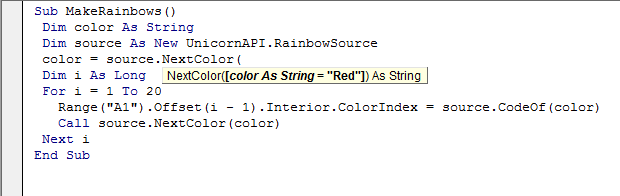
http://pragmateek.com/?p=3403
Extensions
Is WPF dead: the present and future of WPF
.Net DevelopmentC#CodeProjectDevelopmentWPF.netAPIc#certificationmobileMVVMpatternVisual StudiowinrtXAML
Introduction As a WPF developer for years I was recently concerned by the new direction chosen by Microsoft on its client platforms with the rise of the brand new WinRT framework. I was concerned for good reasons: I’ve suffered from … Continue reading →
Show full content

Introduction

As a WPF developer for years I was recently concerned by the new direction chosen by Microsoft on its client platforms with the rise of the brand new WinRT framework.

I was concerned for good reasons: I’ve suffered from the collateral damages of the Silverlight failure, and as the proverb says “once bitten, twice shy”.
Since 2009 I have put a huge personal and professional investment in WPF, using it to develop LOB applications in the financial industry, and now I’m even providing training on this topic.
So as a professional developer and trainer the future of WPF is critical for me so I’ve studied this issue more thoroughly.

In this article I’ll share my findings with you, in a completely objective and transparent manner, and I hope you’ll provide your own facts, so that the community can have a better vision of the future of WPF.
In the last part of this article I provide some strategies for businesses and individual developers.

Some reasons to worry

First I’ll start by presenting the signs that are worrying me, and should worry you too if you are a WPF stakeholder.

WPF team’s blog is idle

As every Microsoft technical team the WPF development team owns a blog where the team’s members share their expertise on WPF with the community.
The last article of this blog is dated from may 2011 so more than 3 years ago, precisely when WinRT was starting to emerge as the next big thing.
An idle blog could mean a lot of things but IMHO nothing good: probably the team was reduced to the bare minimum and animating this blog is not a priority, maybe the best members of the team have been moved to other projects like WinRT, and maybe this is intentional to send a signal to the community…
In terms of public relations an active blog is essential because it shows the technology is evolving and is developed by enthusiast developers proud of their work and willing to share it with the community.
Note that often the MSDN blogs are not very active, the Entity Framework team’s blog being one of the exceptions, thanks to Rowan Miller who regularly publishes new posts, and this is one of the main reason I like this technology: it is being developed by brilliant and committed people.

The official WPF toolkit is idle

The WPF Toolkit is a free and open source project developped by the Microsoft team and designed as the anteroom of the official WPF releases.
As an example the DataGrid was not present in the initial release (WPF 3.0 and 3.5) but was available in the toolkit, and was finally added to WPF 4.0.
The official toolkit played this role till 2010, but since then the project is idle, so seems like there is no more stuff in stock for a next release.
Sign of this inactivity: for the “WPF Toolkit” search Google ranks the official WPF toolkit second after a non official one (more on this one in the second part).

No more certification

The official WPF certification (70-511) will not be continued and it will expire at summer 2015.
This is a strong explicit sign given to developers that they should not invest more time in this technology and instead devote their time to WinRT which benefits from new dedicated certification paths.
Maybe Microsoft will step back and postpone this removal like it did with other certifications after the developers community complained, but that won’t change the fact WPF is no more the priority.
Personally I’m still hesitating to pass it because I have no guarantee the time and money (yes as an entrepreneur I pay my certifications myself) are worth it.
Instead I prefer to prepare for the WinRT certifications which should be there for some years.

No Windows 8+ integration

If you remember the release of WPF 4, a large part of the enhancements were dedicated to Windows 7 integration like taskbar items customization (jump-lists, progress, overlay…).
There is no such things in WPF 4.5 to allow full integration to Windows 8+ features like the charm bar and the numerous application contracts though there is some interop capabilities.
So if Microsoft has not invested in this integration it clearly demonstrates that WPF is no more a first-class citizen in Windows and it prefers to dedicate all its workforce to WinRT, and I think this is a reasonable decision.

No support for Windows RT

Microsoft, historically a softwares vendor, is diversifying its business by becoming an hardware vendor, mimicking its competitors Apple and Samsung.
To this end Microsoft has acquired Nokia to benefit from its long time presence in the mobile phone market.
On the tablets and laptops side, to compete with iPad tablets and MacBook Pros laptops, Microsoft has launched the Surface series.
There were 2 versions of the Surface 1 and 2 depending on the hardware architecture: x86 and ARM, the later benefiting from a dedicated version of Windows: Windows RT (not to be confused with WinRT which is a software layer).
But Windows RT does not support (at least officially) the older APIs like the good old Win32, hence does not support all the “wrappers” like WinForms and … WPF, so you can’t run your WPF applications on all the Surface versions.
And if Microsoft did not invest in this it’s simply because it tries to get rid of Win32 to replace it with WinRT which is specially tailored for the new IT trends.

The new Microsoft’s strategy

In february 2014 Microsoft named a new CEO, Satya Nadella, who comes from the cloud division of Microsoft.
He is replacing Steve Ballmer, who did not understood the new mobile market (first iPhone and Android) and is probably one of the reasons Microsoft completely missed the boat and is now fighting hard to get a place taking market shares to competitors (Apple, Samsung) percent after percent.
Contrary to his predecessor Satya Nadella’s global strategy for Microsoft is “cloud first and mobile first“, so exit the traditional desktop model, and again this is a very sane strategy.
But precisely WPF was designed for the “old” model: fat desktop applications, whereas WinRT uses a totally different model, taking into account the new mobile needs.
Of course the desktop and PC market is not dead, far from it, but it is not the predominant model anymore.
And Microsoft has taken this into account when building WinRT because you can now use the whole HTML/CSS/JS stack, including frameworks like Angular and Knockout, to develop desktop applications; a strong sign confirming that web technologies are really becoming ubiquitous (after Node on the server).

The Windows Store

In order to capture a part of the applications vendors revenues most of the platforms’ owners like Apple and Microsoft have created “stores” you must use to publish and buy applications.
And unfortunately AFAIK the Windows Store applications must be based on WinRT, so your WPF applications can’t be deployed through the store.
Note that this is not an issue for businesses that deploy their applications internally and don’t need a store, nor for big applications vendors like ERP who use their own commercial channels to sell their applications, but this is an issue if you are a small vendor who need the visibility of the store, before a competitor eats your market shares.
More and more people are using the stores instinctively to search for new applications so there is almost no way around them.
So if you intend to develop your brand new application in WPF you will have a hard time distributing it and even harder if you intend to sell it, so you should instead use WinRT.

Mobility

You probably consume a big part of your daily content through your mobile phone using web or native applications so you understand how important it is nowadays to be present on this market: you must provide a mobile version of your applications.
WPF has never been a platform for mobile development and is not a player in this market, and for years the answer was Silverlight for Windows Phone and it was the reference toolkit up to Windows Phone 7.
But using one toolkit per platform was not ideal, even though you could share most of the procedural and markup code.
WinRT is an answer to this issue because it is a common toolkit designed to ease development on all the Windows platforms which are more and more unified at the OS level with Windows 8+.

Note that for a really cross-platform development that also targets Android et iOS Microsoft does not provide any tool, so you have to turn to Xamarin which is a really promising project.

Costs of maintenance

If you’ve worked with Microsoft technologies for years you know that Microsoft spends its money sparingly, and for good reasons: first, as a company, it must make money to survive and nowadays shareholders ask more, so a penny is a penny, second implementing even a small feature is costly because there is a lot of steps involved; Eric Lippert gives an overview in this blog post: How many Microsoft employees does it take to change a lightbulb?.
So when the community asks for a bug fix or a new feature, it is implemented only if it’s really a big one:
– either critical like security breaches, so even a few numbers of impacted users will trigger the implementation
– or minor but annoying a lot of people
Developing both WPF and WinRT would imply answering to both toolkits’ feature requests and fixing both toolkits’ bugs, this is clearly not an option, especially as Microsoft is currently reducing its workforce.

Portability

What could have “saved” WPF would be some niches, e.g. as a portable technology to develop client applications, but unfortunately this is not the case.
There is a portable version of .Net (to be pedantic, of the CLI): Mono, which runs on Windows of course but also on Linux, Unix and Mac.
And Mono is not a toy technology, it really works, with it I’ve myself already built a Jenkins integration server on Ubuntu Server.
Mono supports most of the .Net framework stack but one of the few missing parts is WPF; if I remember well there was a project named “Olive” to implement it but it was never really started due to the huge work it represents, especially at the low level rendering layers.
The only UI technology Mono has implemented is WinForms, so ironically WinForms could survive WPF thanks to its portability.

The Silverlight syndrome

I once was a Silverlight developer and I’ve discovered that technologies can vanish quicker than I once expected.
Back in 2008/2009: RIA is a buzz word, Microsoft is branding its own framework, Silverlight, in businesses managers see it in Microsoft events and want it in their IT ecosystem.
So in 2010 and first quarter of 2011 we started developing Silverlight applications.
But somewhere in 2011 at one of the technical events, concerning the web, Microsoft stopped putting Silverlight in the spotlight, and instead started promoting the HTML5 ecosystem (with CSS and JS).
Officially the story had not changed for Silverlight, but I was quite suspicious, reported it, and our team decided to stop Silverlight developments, which by the way had not delivered the expected benefits (e.g. Silverlight was not plug-and-play because you needed to be administrator to install the Silverlight player :/), to instead concentrate on “traditional” WPF.
Hopefully most (maybe 85%) of the XAML and C# code was shared with WPF, so not too much was really lost, and we stopped while we were not too much committed.
And this was the right choice because in 2013 the death of Silverlight was officially announced, and more than one IT stakeholder were surprised because they had not seen the forewarning signs.
I don’t think things will be that violent for WPF, but when you’ve lived such a disappointment you stop being naive and tend to become distrustful, which in my opinion is a quality in the current IT context.

Some reasons not to panic

After reading the first part you may be starting to freak out but as often things are not completely black, they are gray, a more or less dark gray.
This second part will help you mix the white with the black, so keep reading…

Still an active team

According to Greg Levenhagen (Is WPF Dead? – NO!) there is still an active development team dedicated to WPF.
Greg does not provide any hard numbers so it’s hard to measure the development effort.
While it’s obvious Microsoft wouldn’t abandon a technology used by millions of people, having dedicated developers, not merged in other teams, is a good thing.
And still according to Greg this team is not only dedicated to maintenance of existing versions but is also preparing at least a next release (WPF 5?).
Without having the change-log of this version it’s hard to be too optimistic: probably this will be only a bug-fixes and performance enhancement version without any major features.

Still a development effort [Update 2014-11]

In november 2014 the WPF team published an article, The Roadmap for WPF, showing that WPF was still actively developed.
The team is mainly working on important issues like performances, which have been continuously enhanced since the inception of WPF, and tooling fully integrated into Visual Studio.
Maybe the more important enhancement is the full support of touch and high-density display.
Why is it so significant ? Because these are features of devices like tablets and phones, and WPF was dropped in favor of WinRT precisely because the later has been specifically designed for such devices.
This may not be a complete u-turn from Microsoft in favor of WPF but it shows that Microsoft has heard and taken into account the claims of the community.
For more information check this nice video with two of the WPF developers: The Future of WPF on Channel 9.

New tools versions

I’ve noticed a positive sign on the official tooling side of things: Prism, a set of tools and best practices for developing XAML applications, has been updated to version 5 and along with the WinRT version it does provide a new version for WPF.

As said in the first part, the official WPF toolkit is idle but another project picked up the torch: the Extended WPF Toolkit.
It is being developed by a well known extensions’ vendor, Xceed, so by WPF experts (and other Windows technologies by the way), and it is very rich with a bunch of additional controls, and most importantly the project is actively developed, latest version being from june 2014, so less than 3 months ago as of this writing.

Finally the two top MVVM frameworks, MVVM Light Toolkit and Caliburn.Micro, are active, new versions are 3 months old.

So the WPF tools ecosystem is still living and evolving which is especially reassuring for businesses because they are not left with a bunch of unmaintained projects.

Change in management

At the end of 2012 Steven Sinofsky, at this time President of the Windows Division, left Microsoft.
Why would it be a positive sign for WPF? Because Steven Sinofsky was famed for being a .Net hater and not playing well with the other teams (maybe the primary reason of his departure).
And this would partially explain, along with some real technical reasons, why .Net was not used as the foundation block of the next Windows versions whereas it is one of the best piece of software ever made by Microsoft.
From the outside it’s hard to evaluate the part of gossip and the real feelings of Steven Sinofsky and their impact on the design decisions for Windows 8+.

The OS market inertia

Another good point for WPF is the fact businesses and individuals don’t migrate immediately to each brand new OS version, and for a lot of good reasons: it costs money, it takes some time, it’s risky, and often it’s simply useless.
Migrating to a new OS is a really daunting task due to the need of ensuring compatibility of the applications: those provided by an external vendor like Microsoft with Office and those developed by the internal teams, and from my experience it’s a process that can easily take 2 years.
Currently (mid-2014) the market shares of WinRT on the PC market are quite reduced:
– Windows 8 + 8.1 : ~15%
– Windows 7 : ~55%
– Windows Vista : ~5%
– Windows XP : ~25%
So for more than 80% of PCs you can’t use WinRT and have no other choice than WPF.
And in some context this is worst for Windows 8+: in the companies I know in the financial sector in France this is simply 0%, the migration to Windows 7 is not even completed everywhere, and I know some still running with Windows XP because setup of applications is not trivial.
Considering the renewal cycle is about 5 years WPF should be the unique choice for a lot of businesses till the end of the decades.

The ALM inertia

As you probably know retiring applications is costly: first you have preliminary studies with a bunch of meetings to assess the impact it will have on the business, and you have to work hard to convince some users who will sometimes put the “operational risk” joker on the table; then you have to replace them with brand new application and you must ensure there is no regression, often running both the old and new versions side by side during a certain period of time before completely switching; moreover you may have to call up your DB teams to migrate the data, the network teams to adapt the firewall rules…
It’s why businesses migrate applications only when there is a valid business reason, and a brand new technical layer is not one, so the existing WPF applications, and there is a bunch, are here to stay, and it means WPF skills will be needed in the foreseeable future, just have a look at the number of WinForms applications still in the wild, and new ones are being developed every day, whereas WPF is available to replace it since 2006.
And from a technical point of view, while WPF and WinRT are really similar, they are not fully compatible: there are still missing features in WinRT 8.1 and some quirks: to map a namespace to XAML you use clr-namespace in WPF and using in WinRT, this is enough to break XAML compatibility and discourage any flimsy will to jump!

WPF is mature

The obvious important decrease of the development effort for WPF can be worrying but IMHO it is only following a natural path every developer has experimented: a huge effort to develop the first release, then still a sustained effort for the following release that benefits from the feedback of the community, and finally a minimal effort to maintain the application.
This is exactly the path followed by WPF with a first versions (WPF 3.0 (for me was more of a beta version) and 3.5) bringing a new way of developing Windows applications, then WPF 4 introduced some new controls moved from the toolkit, like the DataGrid, and performance enhancements, and finally WPF 4.5 introduced the Ribbon and still some performance enhancements.
So the more mature a technology is the less development effort it needs, and after 8 years WPF is a really mature technology, so the needs for new features and bug fixes are reduced.
And probably WPF has now entered the maintenance phase of its life-cycle so don’t expect frenetic development of it.

The LOB niche

If there is a domain where WPF can survive and even continue to shine this is LOB (Line Of Business) applications.
First because most of the expertise to develop them is based on .Net which is a mature platform that a lot of companies running Windows use to develop their LOB applications and won’t throw away but instead leverage as much as they can.
And some central .Net tools are not yet available for WinRT, e.g. ORMs like NHibernate or Entity Framework, which are necessary to most LOB applications to access their relational data.
Second for some big LOB applications like trading platforms there is no benefit to use WinRT because you don’t need and even don’t want, for security reasons, mobility.
And this kind of big applications even go against the official guidelines of Microsoft for designing WinRT applications: they should be focused with a minimal set of data on the screen.

Windows Forms integration

For more than 10 years a lot of businesses have created many WinForms applications, and new applications are still being developed with WinForms, despite WPF being there for 8 years as its replacement.
Of course businesses don’t want to throw away all these applications, components and expertise just to use new toys, they want to leverage their investment as much as possible.
And AFAIK WinRT is not yet able to integrate WinForms components, so using WinRT is not an option if you want to profit from your WinForms investment.
On the contrary WPF has been designed from the start to allow integration of WinForms: using the WindowsFormsHost you can embed WinForms components inside your WPF applications.
And better, you can even integrate WPF components inside a WinForms application using the ElementHost, so that you can migrate slowly to WPF avoiding the big-bang effect.

The learning curve

If you are a seasoned WPF developer without knowing it you are probably already a WinRT developers at say 80%, and if you are a business you already have 80% of the expertise to develop WinRT applications in stock.
The reason is that most of the fundamentals tools for developing WPF applications are the same for WinRT:
– same procedural languages: C#, VB.Net…
– same markup language: XAML,
– same way to link view to data: data binding, DataTemplates…
– similar architecture of applications: global structuring, resources…
– same design patterns and implementations: MVVM, INotifyPropertyChanged, INotifyCollectionChanged, ICommand…
So most of your investment in other XAML platforms like WPF and Silverlight can be leveraged for WinRT, reducing the steepness of the learning curve (remember the one of WPF when you were a newbie? ;))

WPF is rich

WinRT is not a clone of WPF and some features are not yet implemented, so if you are only developing desktop applications from a technical capabilities point of view WPF is still better.
But I put it as the last one because IMHO it is not really significant, and as WinRT will continue its evolution the gap will become smaller and smaller, but I guess some developers with really specific needs won’t be able to develop with WinRT and will need WPF.
But again the added value of WinRT is not in its intrinsic technical richness but more in the development model it offers with access to mobile platforms and the Windows store.

Strategy for the future

Whether you are a business or an individual developer you should seriously consider slowing down your technical investment in WPF, and start to build your expertise on WinRT.

Businesses

As a business you can’t stop your WPF developments as long as you have some older versions of Windows, including Windows 7.
As for your existing applications, don’t worry, you don’t need to migrate them to WinRT, unless you want to benefit from its new capabilities as deployment through the Windows store.
Indeed Microsoft should ensure support for WPF for the foreseeable future; backward compatibility is something Microsoft takes really seriously.
As an example while it may be harder to setup VB6 environments in new versions of Windows it is still possible and, hence setup, your applications should continue to work seamlessly.

Depending on your available IT workforce, you should devote time to technology intelligence and have some developers starting to think about WinRT: how you could benefit from it, typically to broaden your audience, how new applications should be developed, how the existing tools and code can be reused, what are the potential issues to anticipate…
For the applications that could benefit from WinRT for mobile and tablet you can start building some migration path, which is not that obvious because WinRT is missing many features from WPF.
Start to develop proof-of-concept applications to validate the new technology in your particular context and see for yourself if it delivers.

Developers

As developers we don’t want to have technical skills nobody needs, and instead we generally must build a large enough portfolio of skills to accommodate the more businesses and projects we can to reduce the risk of being left behind.
So if you are an experienced WPF developer and you have to choose between extending your WPF skills to become an expert or starting to gain new skills for WinRT development then IMHO you should choose the second option.
Of course you’ll probably be able to do both like me, but WinRT should be somewhere on your TODO list but not your priority either.

Or you could continue in WPF waiting for the market to lack WPF developers, like is the case for older technologies like COBOL and VB6, but I fear you’ll have to wait a decade before it happens, because, with the important development of IT in businesses, for any technology there is a lot of developers on the market, particularly for mainstream technologies like WPF, so I wouldn’t count on it.

Don’t be demoralized or upset by this nth brand new technology, this is the business model of our industry: it needs to create new things all the time (remember SOA that poured a ton of money from businesses to the pockets of IT companies, their employees, their shareholders and contractors) to sell them to customers just as Apple does with its iPhone 1, 2, 3, … and now 6 and soon 42, this is how it works and fortunately we, as developers, are on the good side of the barrier, we can make a living from this entropy, and objectively all these new technologies enhance the life of businesses and individuals.

Conclusion

I think that the sum of all these facts is pretty clear: WPF is past and present, in the near future it will be in direct competition with WinRT, but later if WinRT gets some traction and enough market shares then WPF may become kind of deprecated like VB6 or WinForms.

Above all don’t be in denial, and have a clear picture of what happens, do not eliminate the pessimistic facts from your mind.
Do not expect a revival of WPF, there is no such thing in IT (well OK COM is kind of back in WinRT ;)), WPF is objectively not tailored for the new trends, the brand new stuff is.

Of course the picture is not all black: WPF is not dead and obsolete nor dying and obsolescent, it has just reached its peak and might slowly fade as the businesses migrate their infrastructure to Windows 8+ allowing them to choose WinRT for their future developments.

Be pragmatic and transparent: use WPF while it brings value to your clients and warn them about these facts, and help them prepare for the future.
I’ve myself updated my training material by interleaving WinRT chunks in my WPF training, and adding a slide with a summary of these facts, highlighting them depending on their significance.

But IMHO you should not invest too much in WinRT either.
Why? Because the more I play with WinRT and think about it the more I see it less and less useful:

  • if you develop a LOB application, your only target is probably Windows PC, and you need to be compatible with pre Windows 8 systems, at least Windows 7, so WinRT is clearly not an option, and you must use WPF,
  • if you want to target tablets and phones you can’t forget about 90% of the market, iOS and Android, so WinRT is not an option, and you must use either the web stack (JavaScript/HTML/CSS) or native cross-platform frameworks like Xamarin (C#) or QT (C++).

So for most use-cases WinRT is not an option.

Moreover you should note that Microsoft is heavily investing in the later technologies.

It’s probably too early to ask yourself “Is WinRT (as a final developer platform) dead ?” but I would be quite surprised if WinRT manages to get some traction and becomes a major development platform.

IMHO WinRT is only a good platform for the Microsoft teams because it allows them to share code between the different flavors of the Windows OS, mimicking the effort of Apple; but for the final developer the use-cases for WinRT are way too limited: sharing some code between PC, tablets and phones but only for Windows devices.
Probably some businesses may need only that but I doubt there is many because nowadays applications are often accessed from personal employees’ devices (BYOD) which can be anything and probably some iOS or Android.

http://pragmateek.com/?p=3265
Extensions
Book review : “MCSD Certification Toolkit (Exam 70-483): Programming in C#”
.Net DevelopmentC#CodeProjectDevelopmentWinRT.net70-483APIbookc#certificationdebugLINQmulti-threadingpatternreviewsecurityVisual Studio
Introduction I’ve recently passed the Microsoft 70-483 “Programming in C#” certification which is one of the entry point into the .Net and WinRT developers certification cycles. To be well prepared I’ve read the two books entirely dedicated to this certification … Continue reading →
Show full content

Introduction

I’ve recently passed the Microsoft 70-483 “Programming in C#” certification which is one of the entry point into the .Net and WinRT developers certification cycles.
To be well prepared I’ve read the two books entirely dedicated to this certification : MCSD Certification Toolkit (Exam 70-483): Programming in C# and Exam Ref 70-483: Programming in C#.
I strongly recommend you read both of them if you intend to pass the certification.
Indeed both have been my main material to prepare for the certification and they have perfectly done the job.

This article is a complete review of MCSD Certification Toolkit (Exam 70-483): Programming in C#.
This is the first book you should read because I think this is the one that will best prepare you to get the certification, but paradoxically the worst from a technical point of view, and you will quickly understand why.

It’s unfortunately the biggest flaw of this book: it contains a lot of technical errors, ranging from the basic misuse of words that only experts will spot and innocuous for neophyte, to bad practices, including wrong affirmations, and this is more annoying. And sometimes inside a section you have both some really good content along with really bad content.

This article is not a complete errata, because I’ve not taken note of every single error, but I’ll try to illustrate the main issues in order to establish a typology without being exhaustive.

I’ve chosen to present the worst content first, the bad practices, to go to the best, the good practices, because this book is equally full of really good technical content that is perfect for the certification and in your daily job as a developer.

The bad parts Some bad practices

Teaching bad practices, especially when a big part of your audience is made of non experienced developers, is probably the worst thing a technical book can do.

However, let’s be honest, fortunately there is few bad practices in this book and as it does not pretend to be a technical reference this is not unacceptable.

As an example naming conventions are often not respected, so we have methods named displayName, concatenateName or square, which would imply that the author of this code is a recent Java defector. I won’t judge it as I’ve myself followed the same path and it took me some time before I completely accept and apply these conventions.

Less innocuous is the modification of the state of a value type instance which demonstrates an unfamiliarity with the subtleties of this category of types. But in the author(s) defense a minority of C#/.Net/WinRT developers are aware of this “issue”.

Still concerning value types the book states it’s better to use arrays of references than arrays of values because values would be copied. It’s completely wrong because arrays are themselves reference types so are manipulated through references, hence in both cases there is no copy involved. Then this is not a good reason to use the “by reference” semantics, though by default this is the one we should choose.

As for the design of classes the book mixes business data with purely technical treatments, like accessing a database, instead of decoupling them.
Decoupling is yet the ABC, and would has cost nothing there, so there is no reason not to demonstrate it to beginners.
But in the book’s defense the certification’s questions are far from being exemplary in this regard.

Finally when demonstrating ADO.Net most of the examples don’t leverage the using block to control the range of the connections and commands objects, though this best practice is discussed later in a dedicated sidebar.

Some errors

A little less serious are purely technical errors like the affirmation that the current element in a foreach loop must have the correct type, which is wrong, and it’s kind of “dangerous” and the source of a lot of bugs: foreach implicitly converts the value if the type is not correct: e.g. double to int.

Some illustrations are wrong: e.g. for extension methods the book speaks of extending the Math class which is useless because it can’t be instantiated because it is a static class, and it’s really no luck for the authors because this class is more an exception than the rule, so a really bad draw.

partial” classes are described as generating many files inside the same assembly whereas they are all aggregated by the C# compiler in a single class whose byte-code is integrated as a whole to the assembly.

We also “learn” that we can set an instance of a value type to null which is completely wrong: null makes sense only for a reference to an instance of a reference type (and nullable types).

The book states that instances of value types are always stored on the stack: wrong, they can be inlined inside instances of reference types in the heap, but this is a popular belief in the community so we can’t blame the authors.

More anecdotal we are taught that the int type can store values up to 4 294 967 286 whereas the limit is half of that.

More annoying, but again a popular belief, the book states there is 2 ways to pass parameters: by copy for value types and by reference for reference types, sounds good but wrong, all is done by copy, including copy of reference for reference types, and if you want to pass by reference you must use dedicated ref and out markers.

But more original is the fact that “abstractmethods would be referred to with the synonym “virtualmethods whereas they are two concepts related but distinct: an abstract method can be considered as virtual, but not in the other direction. So maybe an issue with the understanding of fundamental concepts of object oriented programming concepts which would confirm my hypothesis of a strong Java bias: Java developers are those who use the more virtual methods but also those who less understand what they are and how they differ from abstract methods (relatively to C++ and C# developers). Paradoxal? No when we know that by default all the instance methods are virtual in Java so a Java developer will never have to write the word “virtual” whereas C++ and C# developers must be explicit.

Some approximations

While I agree that some simplifications are harmless for the novice and can avoid throwing too many information at once or making them doubt, I consider that ideally one should not prepare a certification only for the sticker but above all to confirm a real expertise, and to learn new things, and this requires some technical accuracy.

Here is an example of this kind of harmless error that demonstrates a lack of full understanding of the language: the last part of the for loop is described as carrying on an instruction expressing counting (++, *=, -=…) which is wrong, it can even be missing.
Of course a lot of talented developers can have a brilliant professional career by believing that without any consequence on the quality of their work and their productivity.

Another example of the same type is the description of the while and do-while loops as two completely distinct entities whereas they are the two faces of the same coin.

Similarly when presenting for the first time the extension methods it is said that their purpose is to extend classes without recompiling them, which is only a relatively anecdotal point.
Fortunately in this case the correct definition is given in another section, hence the importance of reading the book entirely.

Comparing the for loop and the foreach loop the book states the latter is there when we don’t know the number of elements whereas this is more the lack of an indexer that will decide of the use of foreach, and indeed some collections expose their length but don’t provide an indexer so are best iterated with foreach.

It’s a pity that developers with this amount of experience uses such approximations as confusing the IDE and the platform: it is said that Visual Studio calls the constructors whereas of course this is the role of the CLR, Visual Studio does not even compile the code.

Unfortunately developers who are not curious and have never developed outside Visual Studio don’t understand that when we develop this kind of applications we have 3 actors:
.Net or WinRT which is the underlying platform that provides the types library and the runtime environment (for .Net)
C# that is the programming language using a compiler that generates some binary code, like byte-code running on the .Net platform
Visual Studio which is a productivity tool (IMHO the best) which interfaces with C# and .Net/WinRT using tools like MSBuild.

According to the book the “volatile” marker is there to indicate that the data could be modified by other components that our code, it’s only partially true, because it shines outside of this context (see another of my articles: Synchronization, memory visibility and leaky abstractions)
There again the authors are forgiven because it’s the kind of subtleties you understand by practicing a little parallel programming and the majority of .Net and WinRT developers can develop completely ignoring it, and that’s a good thing.

Similarly seems like the authors are not aware that & is also a valid boolean operator, the difference with && being that it does not bypass. Unfortunately one of the test question is dedicated to this issue so the test is wrong, which is ironic because at the start of the book there is a long introduction to how tests are designed for the certifications, and one of the prerequisites is they must be non ambiguous.

Some topics seems not well understood like ORMs which are described as graphical tools whereas this is not at all their primary use case, as is demonstrated by Entity Framework which took a U-turn with the “Code First” workflow.
As for NHibernate it is said to be an ORM dedicated to other databases and languages whereas its first use-case is the interaction with SQL Server from C#

Some word misuses

Usually words misuses are not serious, except once again for novices who need to remember rigorous definitions, in order to have points of reference helping them in their learning and the consolidation of their knowledge.

As an example System.Int32 (alias int in C#) is referred to as a class instead of simply a type (to avoid speaking about value types), probably a reminiscence of Java and its Integer type which indeed is a reference type.

Concerning C# structs some fields are defined but are referred to as “properties” which will confuse beginners because later in the book the properties themselves are of course referred to with this same term.

Often the book uses the term “class file” instead of just “class”, probably another reminiscence of Java which indeed only allows a single public class per source file, but even in Java this is not an accurate term.

Similarly the book speaks of interface instances instead of interface references, but an interface cannot be instantiated, so again confusing for beginners.

Another not completely mastered topics is the BackgroundWorker: the Invoke method is used in the events handlers ProgressChanged and WorkerCompleted whereas the purpose of the BackgroundWorker is precisely to avoid that by automatically capturing the context, and invoking the handlers on the UI thread itself.

Some minor issues

As you would expect the book suffers from a blatant lack of proofreading: there is a lot of typos and grammatical errors, but fortunately they never affect the understanding, the context always helping to grasp the content.

Towards the end of the book there is a big bunch of code to demonstrate validation and Windows Forms.
First I don’t understand the purpose of dumping such a quantity of code, secondly it concentrates a lot of bad practices: playing with flying values instead of consolidating them in dedicated types, business code directly in the UI event handlers instead of being isolated in dedicated components, background color of controls used to store business data, the validation state of the form, which is a strange practice.

There again the danger is for novices that might learn a lot of bad practices and apply them in their professional context and even teach them to their colleagues.

Some technical terms are defined in the glossaries of some chapters but are never addressed which may mean that some sections have been simply “forgotten”.

Some topics are repeated: the section on delegates, anonymous functions and lambdas appears 2 times, with two different texts, so probably 2 authors have worked on it without coordination.

Too much time is dedicated to obsolete components like ArrayList now replaced by their equivalent generics classes.

The good parts

Listing only errors would be really unfair because this book is full of very good content, some sections are of high quality, worthy of the best technical reference books.

Some good introductions

First off the book offers a panorama of the tools used for developing with C# in .Net or WinRT, and many sections are small introductions that allows the reader to quickly understand the ins and outs of a given tool.

The introduction to parallel programming is really correct, including a small rundown on the thread-pool and its limitations like the inability to make a join, and another on the asynchronous methods in C# 5.0.

The part on monitors is perfect to revise but a little too short for a beginner discovering the topics who will probably not understand some concepts like the “ready-queue“.

The book also has a good introduction to Entity Framework and illustrates its use with the “Database Firstworkflow which is one of the 3 workflows supported by EF.

LINQ is also well covered and the two syntaxes for building queries are presented: via the mini-language integrated to C# or directly via chaining of methods provided by the Enumerable static class.

The introduction to security is really broad while being quite compact and addresses various topics like hashing, symmetric and asymmetric cryptography, and, amongst other topics, certificates.
It’s perfect for developers who like me “know” these topics but are not completely aware of how to implement them using .Net/WinRT.
And by the way I had one question on this section during the certification exam.

Some good illustrations

As an example the use of the do-while loop is illustrated with a relevant and recurrent use-case: the reading of input from the console.

Similarly the book provides a non-trivial example for the use of an enumerator which helps the reader to understand how the foreach loop works under the hood.

There is also good examples on object oriented programming, particularly on the use of abstract classes and virtual methods, as well as the notions of contract and interface (e.g. with explicit implementations).

To illustrate the importance of reflection the book uses the context of object relational mapping which, besides being a relevant use-case, is a great technical demonstration for novices because in 20 lines of code we have a mini ORM, whereas at first sight we would expect a far heavier implementation.

Some topics really well covered

Some topics benefit from a better attention with some really comprehensive technical elements.

This is the case for strings, their immutability and storage management by the CLR ((interning) being well addressed.

The introduction to the inner workings of garbage-collection is short and of high quality, and especially insists on the non-determinism, illustrating it with the use of files.
This example helps the reader to get a natural understanding of the goal of finalizers/destructors and the disposable pattern.
The explanations are balanced: enough technical depth to correctly understand the inner workings and acquire some knowledge going beyond the certification, without bogging down the novice with too many subtleties, while exposing the rationales and use-cases.
It’s one of the best description of this topic I’ve ever read.

Another example where the content is better and richer than expected for the certification is CodeDOM which benefits from a complete and rich demonstration using C# and VB.Net that goes beyond the canonical example, copy pasted everywhere on the web and books, consisting in compiling an “Hello world” program in C#.

Some contextualization and good practices

To finish you have to know that the book gives a lot of information that help the reader putting things in perspective, along with some good practices
Even if this is not really useful for the certification which primarily evaluates your capacity to use the tools, not to talk about them, this will help every developer to better understand some tools he uses without a real understanding of them.

For example the rationales of enumerated types are really well explained, insisting on the enhancement of readability hence maintainability of code.

Similarly for generic types and methods the book insists on all their benefits like code reusability, type safety and performances.

The introduction of the encapsulation concept is really good, invoking validation and the use of transformations to avoid SQL injections as relevant use-cases, the latter being less realistic but interesting.

The book puts emphasis on good practices like the systematic use of curly braces even when there is only one instruction, typically for the if block.

Often there is good advices like the importance of not exposing sensitive information through exceptions, and making them serializable if they must cross the boundaries of an app-domain

Finally the book refers to good additional resources like pinvoke.net which is almost essential when working with native interop via P/Invoke (DllImport).

Global assessment

The principal interest of this book is that it presents a large spectrum of topics, and IMHO it is complete with regards to the certification official program.
During the certification I’ve not encountered a question whose topic was not discussed in this book.

Depending on the reader current skills in C#/.Net/WinRT this book will profit him more or less:
– if you are really strong, senior with at least 5 years of experience, then you’ll be able to sort the wheat from the chaff (the nugget from the errors), and this book will be one of your best ally to pass the certification
– if you have an intermediate level, with strong basis this book may help you to reach the next level, because it lists the important technical topics you have to work on,
– but if you are a beginner, ignoring the fact it may be too soon to pass the certification, this book might be dangerous if you naively learn some errors and bad practices, so you must double your vigilance and in case of doubt do not hesitate to ask to experimented developers.

As for me I could divide the content of this book as follow:

  • 75% was made of stuff I knew the book helped me to revise,
  • 15% was about topics I had forgotten and I was happy to have taken the time to read this book entirely because missing 15% of the program is a lot, it represents half the error margin you have for this exam (you must have at least 700/1000),
  • 10% were topic I didn’t know, I may have heard of, but that I had never used like WCF Data Service or the possibility to inline options inside regular expressions, or some best practices I had missed like using labels with #endregion directives

So I’ve really learnt a lot by reading this book, some things less important than others, but every piece of knowledge is good to take when you aim at expertise.

Conclusion

As you’ve seen the content of “MCSD Certification Toolkit (Exam 70-483): Programming in C#” is very uneven.
What I don’t understand is why the ebook version has still so much errors despite the many strong reactions, IMHO often a little disproportioned, of offended and disappointed readers.

So should you read this book?
If you are willing to pass the 70-483 certification the answer is a strong “yes” because this book correctly summarizes all the technical points you’ll need to know to success, and it will help you find where you have some weaknesses you should work on.
This is also a choice by default because there is not really any alternative.

However if you need a technical book to develop you current skills and gain new ones then I don’t recommend this book as you might learn some bad practices, and reading a book being suspicious is really not good for memorization because we tend to not believe anything.

Above all don’t do as other readers who have stopped to read it after a few pages or chapters upset by the accumulation of errors, and for two reasons:
– the quality of this book really enhances chapter after chapter, and while I’ve found a bunch of errors in the first part, I’ve found almost nothing towards the end, as if the first part was written by a novice developer, the middle by a more experimented one, and the final part by an expert.
– even in the parts full of errors there are some important informations and even some nuggets.
So even if you are considered an expert this book will learn you something and it would be a pity to not read it to pass the certification.

What is sure is that this book is the result of a huge work that deserves a lot of respect, and better to have imperfect resources than no resource at all.

My final rating
Rating this book is quite difficult because on one side I consider the accumulation of technical errors and approximations really harmful for the novice readers who probably represent an important part of this book’s audience, but on the other side this book perfectly does the job of preparing the reader for the certification.

If it was a book with the pretention of being a technical reference I would note it quite severely: 5/10.
But for a reader only willing to obtain the certification it is well worth 9/10.
So I’ve finally rated it 8/10, 4 out of 5 stars on Amazon, because I’ve considered that passing the certification is really the point of this book which is not a technical reference, and so I’ve overweighted this aspect.

http://pragmateek.com/?p=3218
Extensions
[FRENCH] Revue du livre “MCSD Certification Toolkit (Exam 70-483): Programming in C#”
.Net DevelopmentC#DevelopmentWinRT.netbookc#certificationfrenchreviewVisual Studiowinrt
Introduction J’ai tout récemment passé et obtenu la certification Microsoft 70-483 “Programming in C#” qui est l’un des points d’entrée des cycles de certification développeur .Net et WinRT. Pour m’y préparer j’ai notamment lu les 2 livres qui y sont … Continue reading →
Show full content

Book cover

Introduction

J’ai tout récemment passé et obtenu la certification Microsoft 70-483 “Programming in C#” qui est l’un des points d’entrée des cycles de certification développeur .Net et WinRT.
Pour m’y préparer j’ai notamment lu les 2 livres qui y sont dédiés (en anglais) : MCSD Certification Toolkit (Exam 70-483): Programming in C# et Programming in C#: Exam Ref 70-483 dont je vous conseille vivement la lecture.
Ils ont en effet constitué mon support principal pour la préparation de la certification et ont bien remplis leur office.

Cet article est une revue complète de MCSD Certification Toolkit (Exam 70-483): Programming in C#.
C’est le 1er livre que vous devriez lire, je pense celui qui prépare le mieux à la certification, mais paradoxalement le moins bon techniquement, et vous allez vite comprendre pourquoi.

C’est malheureusement le gros point noir de ce livre : il est parsemé d’erreurs techniques, allant du simple abus de langage que seuls les experts remarqueront et sans conséquence pour les néophytes, aux  mauvaises pratiques, en passant par les affirmations contraires à la réalité, et là c’est plus embêtant. Parfois au sein d’une même section se côtoient le pire et le meilleur.

Ce post ne se veut pas un errata complet puisque je n’ai pas pris note de toutes les erreurs mais des principales le but étant surtout d’en faire la typologie sans être exhaustif.

J’ai choisi de partir du pire, les mauvaises pratiques, pour aller vers le meilleur, les bonnes pratiques, car ce livre reste en grande majorité rempli de très bons éléments techniques.

Des défauts Des mauvaises pratiques

Dispenser de mauvaises pratiques, surtout quand une bonne partie de l’audience est constituée de développeurs non expérimentés, est sûrement ce qu’il y a de pire pour un livre technique.

Cependant soyons honnête il y en a heureusement très peu dans ce livre et comme il ne se prétend pas être une référence technique ce n’est pas du tout rédhibitoire.

Par exemple les conventions de nommage sont souvent oubliées ainsi on se retrouve avec des méthodes displayName, concatenateName ou encore square, ce qui semblerait indiquer que l’auteur ayant écrit ces codes est un récent transfuge de Java vers .Net. Je ne vais pas jeter la pierre ayant moi même suivi ce chemin et ayant eu un petit temps d’adaptation à ces conventions.

Un peu plus grave est la modification de l’état d’une instance de type valeur ce qui démontre une méconnaissance des subtilités de cette catégorie de type. Mais à la décharge du/des auteurs une minorité de développeurs C#/.Net/WinRT en a conscience.

Toujours à propos des types valeurs il est affirmé qu’il vaut mieux utiliser des tableaux de références plutôt que des tableaux de valeurs car les valeurs sont copiées. C’est tout simplement faux puisque les tableaux eux-mêmes sont manipulés par référence donc dans les deux cas il n’y a pas de copie. Ce n’est donc pas une bonne raison d’utiliser la sémantique de référence pour un type même si par défaut c’est celle-ci qu’il faut choisir.

Au niveau de la conception des classes le livre mélange allègrement données métiers et traitements technico-techniques, comme l’accès à une base de données, au lieu de les découpler.
Le découplage est pourtant le b.a.-ba et n’aurait rien coûté dans ce cas, donc pas de raison de ne pas le démontrer à des débutants.
Mais à la décharge du livre les questions de la certification officielle ne sont pas exemplaires à cet égard.

Enfin lors de la démonstration d’ADO.Net la plupart des exemple n’explicitent pas la portée des connexions et des commandes à l’aide du bloc using, bien que cette bonne pratique soit abordée plus loin dans un encart.

Des erreurs

Un peu moins graves sont les erreurs technico-techniques comme l’affirmation que l’élément courant de la boucle foreach doit avoir le bon type, ce qui est faux, et c’est d’ailleurs “dangereux” et source de nombreux bugs : foreach convertit implicitement si le type n’est pas correct : par exemple de double en int.

Certaines illustrations sont fausses : e.g. pour les méthodes d’extension le livre parle d’étendre la classe Math ce qui est inutile car elle ne peut être instanciée car elle est static, et là c’est vraiment pas de chance pour les auteurs parce que c’est une exception plutôt que la règle, mauvaise pioche comme on dit.

Une classe “partial” est décrite comme générant plusieurs fichiers au sein du même assembly alors qu’ils sont tous agrégés par le compilateur C# en une classe unique intégrée à l’assembly.

On nous apprend également que l’on peut setter une instance de type valeur à null ce qui est complètement faux : null n’a de sens que pour une référence vers une instance de type référence.

Le livre affirme que les instances de type valeur sont systématiquement stockées sur la pile : c’est faux, elles peuvent aussi être inlinées au sein d’instances de type référence sur le tas, mais c’est une croyance malheureusement très répandue dans la communauté donc difficile de les blâmer.

Plus anecdotique on nous dit que le type int peut stocker des valeurs allant jusqu’à 4 294 967 286 alors que ce n’est que la moitié.

Plus embêtant mais très répandu on apprend qu’il y a 2 types de passage de paramètre : par copie pour les types valeur et par référence pour les types référence, ça sonne bien mais c’est faux, tout se fait par copie, y compris donc copie de référence pour les types référence.

Complètement original par contre est le fait que les méthodesabstraites” seraient également désignées sous le terme synonyme de méthodesvirtuelles” alors que ce sont 2 concepts liés mais distincts : une méthode abstraite peut être considérée comme virtuelle, mais pas l’inverse. Donc là un souci de compréhension des concepts de programmation orientée objet ce qui semble aussi confirmer mon hypothèse quant à un fort biais Java : les développeurs Java sont ceux qui écrivent le plus de méthodes virtuelles mais sont ceux qui savent le moins ce qu’elles sont (par rapport aux développeurs C++ et C#). Paradoxal ? Non quand on sait que par défaut toutes les méthodes d’instance en Java sont virtuelles donc jamais un développeur Java n’aura a écrire “virtual“.

Des approximations

Certaines simplifications sont sans dangers pour les débutants car cela peut éviter de leur donner trop d’informations d’un coup ou les faire douter mais idéalement on ne prépare pas une certification seulement pour le macaron mais avant tout pour asseoir une véritable expertise et également apprendre de nouvelles choses, ce qui nécessite un peu de précision.

Voici un exemple d’erreur qui est sans gravité mais démontre une méconnaissance du langage : la dernière partie de la boucle for est décrite comme ne pouvant servir qu’à l’expression d’instruction de comptage (++, *=, -=…) ce qui est faux, elle peut même être absente.
Je vous rassure de nombreux développeurs talentueux peuvent passer toute leur carrière en le croyant sans incidence sur la qualité de leur travail et leur productivité.

Un autre exemple de ce type est la description des boucles while et do-while comme deux entités bien distinctes alors qu’elles ne sont que les deux faces d’une même médaille.

De même en présentant la 1ère fois les méthodes d’extension il est dit que leur objet est l’extension d’une classe sans la recompiler, ce qui n’est qu’un aspect plutôt anecdotique.
Heureusement dans ce cas, la bonne définition est donnée dans une autre section, d’où l’importance de tout lire.

De même il est avancé que l’objet de foreach par rapport à la boucle for est la possibilité d’itérer quand on ne connait pas le nombre d’éléments de la collection, alors que c’est surtout l’absence d’un indexeur qui conditionne son utilisation, et en effet d’autres collections nous indiquent bien leur longueur mais ne fournissent pas d’indexeur donc sont mieux exploitées par un foreach.

D’autres approximations sont dommages pour des développeurs ayant une certaine expérience comme affirmer que c’est Visual Studio qui appelle les constructeurs alors que c’est bien sûr le CLR.
Malheureusement les développeurs non curieux qui n’ont jamais mis le nez hors de Visual Studio ont du mal à comprendre que quand on développe ce type d’applications on a 3 acteurs :
.Net ou WinRT qui est la plateforme sous-jacente et fournit notamment la bibliothèque de types et l’environnement d’exécution
C# qui est un langage possédant un compilateur capable de générer du code s’exécutant sur la plateforme .Net
Visual Studio qui est un outil de productivité (le meilleur à mon avis) qui s’interface avec C# et .Net/WinRT via MSBuild notamment.

Le marqueur “volatile” est sensé indiquer que le code peut être modifié par d’autres composants que notre code, c’est partiellement vrai, mais il est aussi très utile en dehors de ce contexte (cf un autre de mes articles : Synchronization, memory visibility and leaky abstractions).
Là encore les auteurs sont pardonnés parce que c’est une subtilité qu’on ne voit qu’en pratiquant un peu la programmation parallèle et la majorité des développeurs .Net passe à travers et c’est très bien comme ça.

De même les auteurs n’ont pas conscience que & est aussi un opérateur booléen valide mais ne court-circuitant pas contrairement à &&. Et malheureusement une des questions d’un test est consacrée à ce sujet, donc le test est faux, ce qui ironiquement est contraire à la façon dont sont décrits les tests au début du livre comme devant être non ambigus notamment.

Certains sujets semblent non maîtrisés comme les ORMs qui sont décrits comme des outils graphiques alors que ce n’est pas du tout le 1er cas d’utilisation, comme le démondre le virage “Code First” d’Entity Framework. NHibernate est quant à lui désigné comme faisant partie des ORMs dédiés aux autres bases de données et langages alors que son 1er cas d’utilisation est l’interaction avec SQL Server depuis C#.

Des abus de langage

Les abus de langage sont généralement peu graves, sauf là encore pour les débutants qui ont besoin de retenir des définitions rigoureuses, afin d’établir des repères les aidant dans l’apprentissage et la consolidation des connaissances.

Par exemple System.Int32 (alias int en C#) est désigné comme une classe plutôt que simplement un type (pour éviter de parler de type valeur), là encore sûrement une réminiscence de Java et son type Integer qui en effet est un type référence.

Pour les structs C# des champs sont définis mais sont désignés par le terme “propriété” ce qui sera source de confusion pour un lecteur débutant puisque plus loin dans le livre les propriétés sont bien sûr désignées par ce même terme.

Souvent le livre utilise le terme de “fichier de classe” au lieu de “classe” tout court, sûrement une autre réminiscence de Java où en effet un fichier source ne peut contenir qu’une classe publique mais même là ça serait un abus de langage.

Dans le même genre le livre parle d’instance d’interface au lieu de référence d’interface, une interface ne pouvant bien sûr pas être instanciée.

Autre sujet mal maîtrisé, le BackgroundWorker : la méthode Invoke est utilisée dans les gestionnaires des évènements ProgressChanged et WorkerCompleted alors que justement l’objet du BackgroundWorker est de capturer automatiquement le contexte et donc de les invoquer sur le thread UI lui-même.

Des soucis mineurs

Accessoirement et comme on pouvait s’y attendre le livre souffre d’un manque de relecture, il y a en effet beaucoup de fautes d’orthographe et de grammaire mais cela n’affecte pas la compréhension, le contexte permettant toujours de comprendre le propos.

Vers la fin du livre il y a un énorme pâté de code pour démontrer la validation en Windows Forms. D’une part je ne comprends pas l’utilité de dumper un volume aussi gros de code, d’autre part il est un concentré de mauvaise pratiques comme jongler avec des valeurs volantes au lieu de les consolider dans des types dédiés, placer le code de validation au sein même de l’UI alors qu’il aurait sa place dans des composants dédiés ou encore utiliser la couleur de fond d’un contrôle pour vérifier la validité du formulaire, c’est un mode de communication plutôt … amateur!

Là encore le danger est pour les débutants qui risquent de faire le plein de mauvaises pratiques et de les appliquer dans leur environnement professionnel voire les transmettre à leurs collègues.

Des termes techniques sont définis dans le lexique de certains chapitres mais jamais abordés ce qui peut laisser penser que certaines sections ont été “oubliées”.

Des sujets sont répétés : la section sur les délégués, les méthodes anonymes et les lambdas apparaît 2 fois, avec deux textes différents, donc sans doute que 2 auteurs ont travaillé dessus sans se coordonner.

Trop de temps est consacré à des composants obsolètes comme les ArrayList remplacés depuis par des équivalents génériques.

Des qualités

Ne lister que les erreurs serait vraiment injuste car ce livre regorge également de très bons éléments, certaines sections d’une qualité digne des meilleures références techniques.

De bonnes introductions

Tout d’abord le livre offre un panorama des outils utilisés dans le développement avec C# sous .Net ou WinRT, et de nombreuses sections sont des petites introductions qui permettent au lecteur de rapidement comprendre les tenants et aboutissants d’un outil.

L’introduction à la programmation parallèle est très correcte avec notamment un petit topo sur le thread-pool et ses limitations comme l’impossibilité d’effectuer un join, et sur les méthodes asynchrones de C# 5.0.

La partie sur les moniteurs est très bien pour réviser mais juste un peu courte pour un débutant découvrant le sujet qui ne saisira pas certains concepts comme la “ready-queue”.

Le livre possède aussi une bonne introduction à Entity Framework et illustre son utilisation avec le workflowDatabase First“.

LINQ est également bien présenté et aborde les deux syntaxes de construction des requêtes : via le mini-langage intégré à C# ou directement via le chaînage des méthodes fournies par Enumerable.

L’introduction à la sécurité est très complète tout en étant très compacte et aborde des sujets aussi variés que le hachage, le chiffrement symétrique et asymétrique, ou encore les certificats.
C’est parfait pour les développeurs qui comme moi connaissent ces sujet mais ne sont pas complètement au fait de leur implémentation concrète au sein de .Net/WinRT.
Et j’ai d’ailleurs eu une question sur cette section lors du passage de la certification.

De bonnes illustrations

Par exemple l’illustration de l’usage de la boucle do-while avec la lecture d’entrées utilisateur est très pertinente et est un cas d’utilisation réel et récurrent.

De même un exemple non trivial d’utilisation des énumérateurs est fourni ce qui permet de bien comprendre comment les choses fonctionnent sous le capot.

Il y a également de bons exemples sur la programmation orientée objet, notamment sur l’utilisation des classes abstraites et des méthodes virtuelles, ainsi que la notion de contrat et d’interface, e.g. avec les implémentations explicites.

Pour illustrer l’importance de la réflexion le livre utilise la problématique du mapping objet-relationnel ce qui en plus d’être très pertinent est une bonne démonstration technique pour les débutants puisqu’en 20 lignes de code on se retrouve avec un mini ORM, alors qu’au 1er abord on pourrait penser à une implémentation bien plus lourde.

Des sujets bien traités

Certains sujets bénéficient d’un traitement plus en profondeur avec des éléments techniques pointus.

C’est le cas des chaines de caractères, leur immutabilité et la gestion de leur stockage par le CLR (interning) étant bien abordés.

L’introduction au fonctionnement de la garbage-collection est concise et de qualité, et insiste notamment sur le non-déterminisme, en l’illustrant avec l’utilisation de fichiers.
Ce qui amène à la compréhension instinctive de la finalité des finaliseurs/destructeurs et du pattern disposable.
Les explications sont équilibrées : assez de profondeur technique pour bien comprendre le fonctionnement et acquérir des connaissances allant au delà de la certification, sans noyer le débutant sous trop de subtilités, tout en exposant bien les raisons d’être et les cas d’utilisation.
C’est franchement une des meilleures descriptions que j’ai vu de ce sujet.

Un autre exemple où le contenu est plus fournis que nécessaire pour la certification est CodeDOM qui bénéficie d’une démonstration riche et complète utilisant C# et VB.Net, qui va au delà de l’exemple canonique copié et recopié partout consistant en la compilation d’un “Hello world” utilisant C#.

De la contextualisation et des bonnes pratiques

Pour finir il faut savoir que le livre distille pas mal d’informations qui permettent de mettre les concepts en perspectives, ainsi que des bonne pratiques.
Même si ce n’est pas vraiment utile pour la certification qui évalue avant tout votre capacité à utiliser les outils et pas à en parler, cela permettra à tout développeur de mieux comprendre les outils qu’il utilise sans s’être forcément posé trop de questions.

Par exemple la raison d’être des types énumérés est très bien expliquée en insistant sur l’amélioration de la lisibilité et donc de la maintenabilité du code.

De même pour les types et méthodes generics où le livre insiste bien sur tous leurs bienfaits comme la réutilisation du code, la sécurité de typage et les performances.

L’introduction au principe d’encapsulation est très bonne, évoquant notamment la validation comme un cas d’utilisation pertinent et l’application de transformations pour par exemple éviter les injections SQL, moins réaliste je pense mais intéressant quand même.

L’accent est souvent mis sur des bonnes pratiques comme l’utilisation systématique d’accolades même quand il n’y a qu’une seule instruction, pour les blocs if notamment.

Il y a souvent des bon conseils comme l’importance de ne pas véhiculer d’information sensible via les exceptions, et de les rendre sérialisables si elles doivent passer les limites d’un app-domain.

Enfin le livre fait référence à de bonnes ressources complémentaires comme pinvoke.net qui est incontournable quand on fait de l’interop native via P/Invoke (DllImport).

Le bilan

L’intérêt principal de ce livre est qu’il présente une large gamme de sujets, et je pense qu’il est exhaustif par rapport au programme officiel.

Ce livre profitera plus ou moins au lecteur selon son niveau en C#/.Net/WinRT :
– si vous avez un très bon niveau, senior avec 5 ans d’expérience, alors vous serez capable de faire la part des choses entre les bonnes informations et les erreurs, et ce livre sera un de vos meilleurs alliés pour passer la certification,
– si vous avez un niveau junior confirmé avec des bases solides ce livre pourra vous aider à passer au niveau intermédiaire ne serait-ce que par l’énumération de sujets importants et de bons points techniques à travailler,
– par contre si vous êtes débutant, outre le fait qu’il est sans doute un peu tôt pour passer la certification, ce livre est dangereux si vous assimilez les erreurs et mauvaises pratiques naïvement, donc il faut redoubler de prudence et ne pas hésiter à demander à des développeurs expérimentés en cas de doute.

Me concernant, je pourrais diviser à la louche le contenu comme suit :

  • 75% était constitué d’acquis que le livre m’a permis de réviser,
  • 15% concernait des sujets que j’avais oubliés et donc j’étais bien content d’avoir pris le temps de lire le livre en entier parce que “faire l’impasse” sur 15% du programme ça fait beaucoup, ça représente en effet la moitié de la marge de manœuvre accordée pour cet examen (il faut avoir 700/1000),
  • 10% concernait des sujets que je ne connaissais pas, dont j’avais pu entendre parler mais que je n’avais jamais utilisés comme WCF Data Service ou bien la possibilité d’utiliser des options inlinées dans les expressions rationnelles, ou encore des bonnes pratiques que j’avais ratées comme l’utilisation de labels aux directives #endregion

J’ai donc beaucoup appris à la lecture de ce livre, des choses plus ou moins importantes certes, mais toute connaissance est bonne à prendre quand on recherche l’expertise.

Conclusion

Comme vous l’avez constaté “MCSD Certification Toolkit (Exam 70-483): Programming in C#” est un livre très inégal.
Ce que je ne comprends pas c’est pourquoi la version électronique a toujours autant d’erreurs malgré les réactions offusquées, et souvent un peu disproportionnées, des lecteurs déçus.

Donc devriez-vous lire ce livre ?
Si vous passez la certification 70-483 la réponse est un “oui” sans détour parce qu’il résume bien tous les points qu’il vous faudra connaitre pour réussir la certification et il vous aidera à déterminer où vous êtes un peu faible.
C’est aussi un choix par défaut, il n’y a pas vraiment d’alternatives.

Par contre si vous avez besoin d’un livre technique pour monter en compétence alors je le déconseille car vous risqueriez d’apprendre de mauvaises pratiques, et lire un livre en étant suspicieux n’est pas bon pour la mémorisation puisqu’on a tendance à ne plus rien croire.

Surtout ne faites pas comme certains lecteurs qui ont arrêté la lecture après les 1ères pages constatant l’accumulation d’erreurs, et cela pour deux raisons :
– la qualité du livre s’améliore au fil des chapitres et autant j’ai trouvé énormément d’erreurs dans le 1er quart, autant vers la fin c’était beaucoup plus rare, c’est comme si la 1ère partie sur les bases avait été confiée à un développeur débutant, le milieu à un développeur un peu plus expérimenté et la dernière partie à un développeur confirmé.
– même dans les portions truffées d’erreurs il y a des informations importantes voire même des petites pépites.
Donc même si vous êtes considéré comme un expert ce livre vous apportera quelque chose et il serait dommage de faire l’impasse dessus pour passer la certification.

Ce qui est certains c’est que ce livre est le résultat d’un travail énorme qui mérite beaucoup de respect, et il vaut mieux des ressources imparfaites que pas de ressources du tout.

Ma note finale
Noter ce livre est pour moi assez difficile puisque d’un côté je trouve l’accumulation d’erreurs et d’approximations techniques dommageables pour les lecteurs non avertis qui doivent constituer une bonne partie de l’audience, mais d’un autre côté il remplit parfaitement son office de préparation à la certification.

Si c’était un livre se voulant une référence technique je lui aurais mis 5/10.
Pour un lecteur souhaitant simplement d’obtenir la certification alors il vaut 9/10.
Par conséquent je lui donne une note de 8/10, soit 4 étoiles sur 5 sur Amazon, parce que j’ai surpondéré l’aspect passage de la certification qui est le propos officiel de ce livre qui n’a pas l’ambition d’être une référence technique.

http://pragmateek.com/?p=3129
Extensions