GeistHaus
log in · sign up

Blog - Lacey Henschel

Part of feedburner.com

<p>Read articles on Django, Python, tech, gardening, and other fun topics on Lacey's blog</p>

stories
Weeknotes -- critiquing my own pull request

This week, I let a PR get too big. Everything in the PR relates to one another, but it could have been broken up into more manageable pieces. I just kept having one little thing to fix! And now, it’s at 400+ lines of code changes across 16 files. Yikes!

Instead of beating myself up about it, I thought I would talk about what makes this PR so unwieldy.

What’s wrong with it?

In short: it does too much.

  • It adds several new URLs and changes the behavior of existing URLs across two apps.

  • It adds a manager method to a totally different app.

  • It adds a new field and overrides some default model behavior.

  • It makes minor changes to several template files.

In a code review, all of this is cognitive overhead. For whoever reviews this PR, they have to jump around a lot to check my work. It’s extra work to make sure they are reviewing the right view for the right URL for the right test. It’s extra work to make sure everything has tests. It’s difficult for me to even explain my own changes, because there are so many.

This would work better as several PRs. It would be easier for me to explain my changes, and easier for a reviewer to understand them.

It got this way because I was adding a ManyToMany relationship where one didn’t exist before, and trying to change the existing functionality to accommodate this all in one PR.

When I began, I didn’t think it would get so hairy. But along the way requirements got clarified that added some work, and my own focus was disrupted by household illness and then jury duty. It wasn’t even a case of scope creep. All of this would have needed to be done for the feature to have been considered “complete.” But it didn’t need to be done in one PR.

It was just one of those weeks where I felt behind all week, and by the time things felt clearer, I’d dug myself into a little hole.

The PRs I should have opened
  • Adding the new manager method. It’s a perfect little PR — a few lines of code in managers.py, then a test, and you’re good to go.

  • Adding the SlugField to a model, and then using the slug in the URL instead of the PK. This could have been two PRs, but I probably would have done it in one. This would have kept a database change and its side effects in their own PR. It’s a very straightforward enhancement, and is perfect for its own PR (or two).

  • Adding each new URL and its corresponding view in their own PRs. Each view had to override some default behavior. I think if I had done them to completeness, including tests, one at a time, it would have made the opportunities to make the code DRY-er more apparent. As it was, I was jumping around a lot and I think the code is a bit repetitive.

  • Making the changes to the behavior of the existing views in their own PRs, for similar reasons as above. Since I changed existing behavior, having those changes in small PRs makes it very clear what changed.

  • Cleaning up the breadcrumbs and links in the templates. I tried to do this as I went, but it involved a lot of context switching. Especially since this project is still in dev, merging in changes that meant breadcrumbs needed some TLC wouldn’t have been the end of the world. And it would have been faster to get the other changes done, so I wouldn’t have had to do so much back-and-forth.

Each of these would be easier for me to explain in a pull request description, and easier for a reviewer to review accurately.

… I might just re-do them.

Learn from my mistakes, friends.

In other news…
  • My cat is doing awesome at going in his crate.

  • My current professional development project is learning about docs in a more official way. I’ve bought some books, I’m helping a friend revamp the docs for a project he maintains, and I’m planning to write about it! Let’s learn what we’re supposed to be doing with our docs together.

  • I’m finishing up another quilt. It’s all sandwiched and basted. I’m planning to free-motion quilt it. It already has a recipient and I’m excited to complete it!

  • I’m trying to write more. It’s hard! So I’m going to try to write more about why it’s hard.

  • Despite feeling a bit behind all week, it’s been a good week! I feel generally energized at work. We have some new projects coming up that I’m excited about. I think I’m going to get to stretch my wings in new directions a bit this year, and I am ready for it.

5897f186d482e95fd8760b8b:58a21ab31b10e3be5b09e8b3:63e6b6032c669a0a19833ba2
Extensions
Weeknotes - Daily art, cat saga, and a redesigned office
Daily Art 

Thanks to the recommendation of a friend who knew I was trying to do more art, I’ve been following @andrea.nelson.art on Instagram and trying out some of her art projects for myself. I took two weeks off at the end of 2022, and I spent most of it making art, and it was delightful. 

I’ve never really done much art. I’m “not good at it.” But then eight years ago I became a Big Sister to a seven-year-old girl, and since then I have been collecting art supplies. Today, I am still a Big Sister (though my Little Sis is now a teenager), and I’m a mom to a three-year-old. Art is a huge part of my life, but I’d still mentally shunted it to the side as a “kids” activity. 

And I’m just… not doing that anymore. Making art is fun! It’s relaxing. I’m giving myself permission to have fun and have no expectations of myself. I’m feeling the same joy my little sister and my daughter do when they create art and not judging myself. 

So most days, I start off with 15-30 minutes of watercolor, or collage, or painting on a paper plate (I’ll write more on this another time), or doodling, or just fussy cutting pretty pictures out of magazines. It relaxes my mind and gives me a chance to get into a more focused, “work” mindset. A nice bonus is the gift I am giving myself of permission to use the many art supplies I’ve hoarded over the years! 

Cat Saga 

(I’m going to jump into the middle of the story without providing background. Sorry about that.)

My 14-year-old cat, Baxter, has been confined to one of the rooms in my house for most of the last year, for his own health and for a lot of reasons that I won’t go into. It’s been wonderful! He’s very happy having his own space, and the rest of us (including the 17-year-old cat) are happy that things are generally calmer. 

But we’re not thrilled with losing access to what is, frankly, the best room in the house because the senior cat needs an excessive level of alone time. So the cat is moving in with me, into my home office! 

This will be a long transition, measured in months and not weeks, because this is a very tough cat. (This is also where I just skip the backstory and ask you to trust me.) I’ve officially crossed over into cat-lady-dome, but whatever keeps the peace. 

New Office 

Well, same office, new layout. 

I’ve been working from home almost exclusively for nearly nine years, and I’ve never really loved my office. I love working from home — the benefits of this arrangement are so numerous for me and I joke a lot about how I could never go back to an office — and my office has always been fine, but it’s never really worked the way I wanted it to. 

Deciding to move my cat into my office with me has prompted a redesign of basically the rest of the house. Long story short, if the cat lives in here, then things that the rest of the family needs to access cannot live in here. So the gift wrapping supplies can no longer be stored in mom’s office, the basket of laundry that no one will fold can’t go in there with this particular cat, etc.  

Also, my office needs to be very cat-friendly, so it needs a comfortable place to nap, and a place to look out the window, and space for a litter box, and an eating space, etc. There wasn’t the space for this with my old layout, or with all the extra stuff I’d been storing in my office. 

This is an amazing opportunity, so on my two-week vacation, I really went through my office. My focus was on storing things more securely (Baxter can be destructive in some specific ways that I know how to cat-proof for), identifying things that needed a new home, and making zones for his various needs while still providing a place for my desk. An unexpected bonus was that I love how I reoriented my desk! I redesigned my bookshelves to exactly my taste, and my desk now faces them. My webcam no longer faces the door, which means that if my toddler comes running into a meeting covered in syrup, my colleagues won’t immediately know! I hadn’t identified this as a thing that made me anxious, but I actually felt relieved when I realized that someone being able to crack open my office door and know they won’t be on camera is a huge benefit. 

Journaling 

I’m a chronic journaler, and I go through different journal phases where I write more or less. I am in a very, very strong journaling place right now. It’s overlapping with the art practice in fun ways, too – I watercolored on the pages in my work journal and now I am writing over them. I’m taking notes in my pretty felt pens in forest-y tones, using pastel highlighters, it’s all very soothing and nice. 

Reading 

- Engineering Management for the Rest of Us. I saw people on Twitter raving about this and picked up a copy for myself, even though I am not an engineering manager and don’t know if I plan to become one. I’m only a few chapters in, but I really like it so far. I’m keeping a list of takeaways as a non-manager in my work journal as I read. 

- Writing calls to action from Grammarly 

- This helpful issue thread for django-allauth: GitHub The redirect_uri MUST match the registered callback URL for this application

- This article on productivity strategies for people with ADHD. I don’t have ADHD, but I did find it helpful.

5897f186d482e95fd8760b8b:58a21ab31b10e3be5b09e8b3:63c1ad93ce69d7285115965c
Extensions
Weeknotes: Week ending 11-18-2022: Ficography progress and Django Admin TILs
TILs ficography

Ficography is my attempt to build a better system for tracking the fanfiction I want to read. I spent some time this week creating sample data, making the Django admin work, and getting it set up to work with HTMX using django-htmx and Tailwind using pytailwindcss.

I'm trying to use Simon's tips on documenting stuff in issues, but I find it easier to document things in PRs and just commit/push frequently. That may change as I write up more issues; we'll see. I love adding a ton of screenshots and context to my work, though, and I tend to write TILs on a lot of the things I do lately.

I'm also experimenting with using a 30-minutes label for my issues. I'm a busy person -- I have a job, I help with a conference, I'm a mentor, I have a small child, I have other hobbies that I like to spend time on, and it's coming up on peak baking season. I want to split my side-project work into very easily-managed chunks, something I can fit in before my first meeting or right before going to pick up the kiddo from daycare. It's worked well so far.

It's freeing to have a side project where I am letting myself be a little messy. There is test coverage, for sure! But I don't have coverage installed yet, and I know that stuff like the sample data command is a bit brittle. But at the moment, the audience for this project is just me. So I'm doing what I want. YOLO and all that.

Client work

My work with the client I have had for the last two-plus years is coming to a close, and I'm embarking on a new adventure with a new client this week. I'm sad to leave my old client and I am really proud of the work I did there. As I prepped to separate from them, I wrote up transition notes based on Jacob's post on maintaining a transition file. His post is specific to keeping the file personal for yourself, but I adpated it for public (within the organization) sharing. I included:

  • My main development responsibilities for the last year
  • Anything I was currently working on
  • An intro to the services that I was more of a "core" maintainer on that other engineers might not have a lot of context on
  • A list of the people I worked with on those services, including people from other areas of the company
  • Any errors that I'd been trying to debug
  • A short explanation for where I felt the code could use improvement, or areas I was watching, especially since I'm leaving right after having shipped a couple brand-new features that haven't gotten a ton of use yet
Reading Personal accomplishments
  • ✅ Went to the dentist for a cleaning
  • ✅ Cleared off the sewing table to make room to actually sew
  • ✅ Dragged out a WIP quilt, got it sandwiched, and quilted about 20% of it.
  • ✅ Made the first batch of Christmas cookies and royal icing for decorating. I'm happy with my icing consistency this year, which I put down to Quick and Easy Royal Icing Recipe on YouTube.
  • ✅ Put away Halloween decorations
  • ✅ Called the cat behaviorist back to give an update on my cat with complex behavioral issues
  • ✅ Clipped about 5 of said cat's nails, which might potentially be my biggest accomplishment of the week
  • ✅ Booked hotels for travel
Miscellaneous
5897f186d482e95fd8760b8b:58a21ab31b10e3be5b09e8b3:6377d208e3e3ba29c2c6360d
Extensions
Weeknotes: GitHub Actions, switching gears on my fanfiction tracker
Week ending 11-4-22 New TILs:

I'm trying to work in public more, and break up the things I learn into smaller chunks, and practice more writing, so this week I distilled wha I learned from GH Actions into some TILs.

ao3-tracker

I'm going in a different direction with this. I honestly don't want to build a UI. I like using GH on my phone, but you can't directly edit files on mobile.

Current plan is this workflow to manage TBRs:

  • Submit a new issue with a template
  • GH action will auto-tag the issue with tbr
  • GH action will look at issues tagged tbr and find the link
  • Link gets passed to Python script that:
    • Goes to AO3 to get data
    • Parses data into JSON
    • Uses JSON to generate YAML
    • Writes the YAML to a new file
  • GH action that commits the resulting new file to main
  • GH action that re-writes a TBR table in the style of my TIL readmes
  • Will prove the concept in a public repo, then fork it to a private one to keep my TBRs private

Since I was doing a lot of testing of GH actions, my commits and PRs are all over the place. But here is what I worked on, broadly speaking. (Though almost every PR had a follow-up series of commits directly to main as I debugged what was wrong in the action.)

I really need a CI step that validates my YAML. So many syntax errors.

media
  • 📺 Severance season 1: Too dark for me. Didn't make it past the pilot.
  • 📺 Jane the Virgin season 1: Rewatch and loving it.
5897f186d482e95fd8760b8b:58a21ab31b10e3be5b09e8b3:63697c3533241a02e37a4b01
Extensions
7 things I learned about GitHub Actions

I’m working on a way to track my fanfiction reading, and using that as an excuse to learn GitHub Actions. I’ve posted 7 new TILs on small things you can do with GitHub Actions and wanted to share those.

My personal experience with learning GitHub Actions has been… interesting. The syntax is very different than what I am expecting, and I don’t always predict correctly whether to use the ${{ }} braces around a variable. I bet if I learned some bash that it would be a bit easier? Maybe? Not sure. But once I muddled through a few of these, I got the hang of the syntax and things are going a little faster now. I still have a ton of questions, and none of it is easy for me, but I also feel like I’ve been bitten by the “automate all the things!” bug, and that’s fun.

Side note: Thanks to Simon Willison’s excellent post about What to blog about, which inspired me to write this!

5897f186d482e95fd8760b8b:58a21ab31b10e3be5b09e8b3:636975cc05b9fe46d41838f7
Extensions
Weeknotes: ao3-tracker and DjangoCon US
DjangoCon US 2022

I just got back from my first in-person conference in more than three years! DjangoCon US 2022 in San Diego, CA accomplished everything a conference is supposed to — I feel inspired, energized, and motivated. I’m planning on doing a longer DjangoCon US post once the talks come out on YouTube so I can link to the ones that spoke the loudest to me, but suffice it to say, the talks were top-tier this year and it was incredible.

Pull Requests: REVSYS offsite

Or hackathon or get-together or whatever we call it — most of REVSYS attended DjangoCon US and got there a couple of days early to code together! It was mostly on an internal project in a private repo, but it’s been a while since I worked on anything “from scratch,” and I really enjoyed the feeling of making a brand-new set of endpoints work for the first time.

Pull Requests:
  • Add users with a custom user model

  • Add basic Django models, serializers, and endpoints

  • Add some placeholder JSON in the serializer so that the frontend could start working with it

  • Re-learn how to use django-filters and allow an endpoint to do some filtering

ao3-tracker

During the pandemic, I got into fanfiction. Like, really into fanfiction. Specifially on the site Archive of Our Own, abbreviated as AO3.

AO3 has an awesome filtering system, making it easy to find fics that fit your preferred fandom, ships, tropes, etc. And they provide a way to save fics to read later, and to recommend fics to friends. But they don’t have the same filtering options on the works you’ve saved to read later, or that you’ve recommended to others, as they do for the more general search.

They also don’t have a REST API (or any other kind of API).

And there is a LOT of fanfiction, y’all. My TBR (“to be read”) is hundreds of works long. And without a good way to filter them, it’s really hard to find the next thing I want to read. I’m not the only one with this problem. In the fandom communities I’m part of, people maintain complex Notion board and Google spreadsheets, or they comment in Reddit threads or keep notebooks, all so they can track their reading.

Enter ao3-tracker, my first idea for a personal project that I need. It’s really simple so far. It uses the Python library ao3_api, and my hope is to turn it into something I can use to track my reading, which will pull data from AO3. No idea where it’s going to go. Maybe I’ll abandon it after this week and no one will hear about it again. Who knows.

Pull Requests:

5897f186d482e95fd8760b8b:58a21ab31b10e3be5b09e8b3:6356b886f4abcb7927a6f20f
Extensions
Weeknotes: WYSKADRF and why is my API slow today?
In which I talk about super-slow API endpoints and how I fixed them, why it’s okay that a pie chart can add up to more than 100% (spoiler: it’s not really a pie chart and dealing with money is hard), and link you to my 3-part series on What You Should Know About DRF.
Show full content
Client Work Why is this endpoint so slow?

At the end of the last sprint, my client shipped a new feature that had the side effect of slowing down one of the endpoints significantly (think 25-30 seconds). This endpoint was returning a list of something — let’s say it was Games — and prior to this release we’d only had 3 Games in the system. The endpoint had never been “snappy,” but once we added 7 more Games (for a total of 10 Games), depending on how many games you had played, the endpoint was taking forever.

As I have mentioned before, this client uses a microservice architecture. This means that, for many endpoints, we need to make at least one call to another microservice to get some data. I realized that we were calling the microservice that held the info we needed once per game. 3 calls to that microservice was one thing, but 10 calls was quite another and resulted in significant slowdown.

The calls being made to the other service were also inefficient. What we needed was some summary data: your total score for all the games you’ve played in the last 3 months, plus the average number of games you play per week. What we were doing was requesting the record of every single game you played for that time period, then doing the math ourselves to add up the score and the number of games played. Yikes!

I spent about a week on a pretty significant refactor of this endpoint. Since this Games endpoint initially shipped — well over a year ago — we’d added some features to the other microservice that enabled us to get this summary data without returning all the objects.

I’ve simplified this explanation a lot — we actually need make 3 separate API calls to other services, and we were doing 2 of those calls inefficiently, resulting in at least 1 API call per Game object. Basically, I replaced 10 calls (1 call per type of Game to get all instances of the user playing that game) with a single call that returns the list of Game types with the summary data needed.

How can this pie chart add up to more than 100%?

I wrote a feature that looks at all your spending for a period of time, divides it up into categories, and tells you how much you spent weekly on average in each category. Theoretically, the percentages should add up to 100% (or close to it — some rounding means it might be off a bit).

But in dev, a tester was getting some very strange results, like 414% for one category. WTF?

I am still working on this one, but I actually don’t think it’s a bug (although it did result in some clarification discussions with the product team). First, I wasn’t filtering the transactions the way Product was expecting, so some transactions (like your monthly paycheck) were getting included in “spending.” This can significantly throw off the numbers. If you spent $400 last month on ice cream (represented with a negative number -400) but you also made $2,000 via a paycheck and that $2,000 is counted with your “spending,” that’s going to throw your numbers off.

But you can’t just look at transactions that have a negative amount. People return things, and the refund they get shouldn’t be treated as income in this case. It should be treated as spending. And returning very expensive items (like cancelling an order for a fridge) or returning things well after the initial purchase date (like you can with REI) can throw off your numbers as well. 
 So I changed the queryset for the Transactions to filter the way that product was expecting, and we also talked about some edge cases where the percent you spent in a specific category might be negative (like if you returned something that got you a refund larger than everything else you spent) or even over 100% (if the total amount you spent was technically $100 because of a large return, but you spent $200 dining out, it looks like the Dining Out category represented 200% of your spending).

I am reasonably sure that there is not actually a bug in my math, but if it turns out there is, I will update next week.

PyCascades

I presented “What You Should Know About Django REST Framework” last Saturday at PyCascades Remote (link to video)! PyCascades was an awesome conference and I’m so glad they allowed me to present. You can access all the videos from the conference on their YouTube channel.

This website

I added a Colophon to my site. I also changed some of the fonts I was using.

Writing

I wrote a 3-part series, “What You Should Know About DRF,” based on the talk I gave at PyCascades.

I didn’t write any new TILs this week.

5897f186d482e95fd8760b8b:58a21ab31b10e3be5b09e8b3:60392872f3eca176e415b621
Extensions
What You Should Know About DRF, Part 3: Adding custom endpoints
Sometimes the endpoints you get when you use a ModelViewSet aren't enough and you need to add extra endpoints for custom functions. To do this, you could use the APIView class and add a custom route to your `urls.py` file, and that would work fine. But if you have a viewset already, and you feel like this new endpoint belongs with the other endpoints in your viewset, you can use DRF's @action decorator to add a custom endpoint. This means you don't have to change your urls.py -- the method you decorate with your @action decorator will automatically be rendered along with the other enpdoints.
Show full content

This is Part 3 of a 3-part series on Django REST Framework viewsets. Read Part 1: ModelViewSet attributes and methods and Part 2: Customizing built-in methods.

I gave this talk at PyCascades 2021 and decided to turn it into a series of blog posts so it's available to folks who didn't attend the conference or don't like to watch videos. Here are the slides and the video if you want to see them.


Sometimes the endpoints you get when you use a ModelViewSet aren't enough and you need to add extra endpoints for custom functions. To do this, you could use the APIView class and add a custom route to your urls.py file, and that would work fine.

But if you have a viewset already, and you feel like this new endpoint belongs with the other endpoints in your viewset, you can use DRF's @action decorator to add a custom endpoint. This means you don't have to change your urls.py -- the method you decorate with your @action decorator will automatically be rendered along with the other enpdoints.

Let's continue with the library example from Part 1. Now we need a new endpoint just for featured books, books with featured = True on the Book model. To do this, we'll add a featured() method to our BookViewSet and decorate with DRF's @action decorator.

from rest_framework import status
from rest_framework.decorators import action
from rest_framework.response import Response
from rest_framework.viewsets import ModelViewSet

from .models import Book
from .serializers import BookDetailSerializer, BookListSerializer


class BookViewSet(ModelViewSet):
    queryset = Book.objects.all()
    serializer_class = BookDetailSerializer

    def get_serializer_class(self):
        if self.action in ["list", "featured"]:
            return BookListSerializer
        return super().get_serializer_class()

    @action(detail=False, methods=["get"])
    def featured(self, request):
        books = self.get_queryset().filter(featured=True)
        serializer = self.get_serializer(books, many=True)
        return Response(serializer.data, status=status.HTTP_200_OK)

This code will result in this endpoint:

GET /books/featured/

Let's start with the @action decorator.

The @action decorator takes a couple of required arguments:

  • detail: True or False, depending on whether this endpoint is expected to deal with a single object or a group of objects. Since we want to return a group of featured books, we have set detail=False.
  • methods: A list of the HTTP methods that are valid to call this endpoint. We set ours to ["get"], so if someone tries to call our endpoint with a POST request, they will receive an error. This argument is actually optional and will default to ["get"], but actions are frequently used for POST requests so I wanted to make sure to mention it.

Once we are in our featured() method, we create the queryset by calling get_queryset() and then filtering for featured=True books. Then we get the right serializer from get_serializer(), which will call get_serializer_class().

Notice that I added "featured" to the list of actions that will return BookListSerializer in get_serializer_class(). The name of the action will share the name of the method.

I pass the books queryset into the serializer, then return the data in the Response object along with the correct HTTP status code. (The status will default to HTTP_200_OK if you don't set it, but I set it explicitly to show you that you can.)


In Part 1: ModelViewSet attributes and methods, I covered the attributes and methods that ship with ModelViewSet, what they do, and why you need to know about them.

In Part 2: Customizing built-in methods, I went through some real-world examples for when you might want to override some of ModelViewSet's built-in methods.

5897f186d482e95fd8760b8b:58a21ab31b10e3be5b09e8b3:603581382157a83e8e84c5de
Extensions
What You Should Know About DRF, Part 2: Customizing built-in methods
If you came here from Part 1 of What You Should Know About Django REST Framework, you may be wondering why I just walked you through a bunch of source code. We stepped through that code because if you know what the main methods of the ModelViewSet do and how they work, you know where to go when you want to tweak the behavior of your viewset. You can pull out the method that contains what you want to change, override it with your own custom behavior, and put it back in. In Part 1, we were writing a BookViewSet. So let's go through a few cases where we might want to customize the behavior of our endpoints and walk through how we would do that.
Show full content

This is Part 2 of a 3-part series on Django REST Framework viewsets. Read Part 1: ModelViewSet attributes and methods and Part 3: Adding custom endpoints.

I gave this talk at PyCascades 2021 and decided to turn it into a series of blog posts so it's available to folks who didn't attend the conference or don't like to watch videos. Here are the slides and the video if you want to see them.


If you came here from Part 1 of What You Should Know About Django REST Framework, you may be wondering why I just walked you through a bunch of source code.

We stepped through that code because if you know what the main methods of the ModelViewSet do and how they work, you know where to go when you want to tweak the behavior of your viewset. You can pull out the method that contains what you want to change, override it with your own custom behavior, and put it back in.

In Part 1, we were writing a BookViewSet. So let's go through a few cases where we might want to customize the behavior of our endpoints and walk through how we would do that.

How do I return different serializers for list and detail endpoints?

When I hit GET /books/ (so I'm seeing a list of books), I only want some of the book data. Maybe I want the cover image, the title, the author, and whether there are books available. For this, I want to use my BookListSerializer.

But when I hit GET /books/{id}/ (so I'm on the page for a specific book), I want all that data and more. I want links to other books the author has written, reviews for the book, the number of copies, and the year it was published. For this data, I want to use my BookDetailSerializer.

Remember the method that DRF uses to return the serializer class, get_serializer_class()? That's the method we want to override.

from rest_framework.permissions import AllowAny
from rest_framework.viewsets import ModelViewSet 

from .models import Book
from .serializers import BookDetailSerializer, BookListSerializer

class BookViewSet(ModelViewSet):
    queryset = Book.objects.all()
    serializer_class = BookDetailSerializer
    permission_classes = [AllowAny]

    def get_serializer_class(self):
        if self.action in ["list"]:
            return BookListSerializer
        return super().get_serializer_class()

In line 5, we import both serializers.

Then on line 9, we set the serializer_class attribute to whichever serializer we want to be the default. I'm going to set the default serializer to BookDetailSerializer, because there is only one case where I want to use the list serializer.

Then, I create my own get_serializer_class() method.

The self.action attribute is set by the the DRF ModelViewSet and is set to the name of the request method (see the source code). Remember that ModelViewSet doesn't use HTTP methods like get() and post(). It uses action-based method names, so the /books/ list endpoint uses the list() method.

Since we know this, we can check the value of self.action to decide which serializer to return.

if self.action in ["list"]:
    return BookListSerializer

If action is "something from this list", then we return the list serializer. The only thing in the list is "list", but I like the if value in [list of things] syntax so I can add more actions later if I need to.

If the action is not in the list of actions we define, then we want DRF to return whatever it was going to if we hadn't done anything. To do that, we call super():

if self.action in ["list"]:
    return BookListSerializer
return super().get_serializer_class()
How do I create things with one serializer, but return them with another serializer?

Our API includes an endpoint that allows the creation of new books. Maybe our serializer performs some post-processing and we want to be able to return the results of that post-processing in the response using a different serializer than the one we use to create the book.

This is another common use case where you want to use more than one serializer, but in this case, it would be much harder to accomplish this by just overriding get_serializer_class() because you want to change serializers while you're performing your action.

The easiest way to do this is by overriding the action method itself. First, let's review the create() and perform_create() methods from CreateModelMixin:

class CreateModelMixin:
    def create(self, request, *args, **kwargs):
        serializer = self.get_serializer(data=request.data)
        serializer.is_valid(raise_exception=True)
        self.perform_create(serializer)
        headers = self.get_success_headers(serializer.data)
        return Response(
            serializer.data, status=status.HTTP_201_CREATED, headers=headers
        )

    def perform_create(self, serializer):
        serializer.save()

The create() method of the ModelViewSet does a few things:

  1. Retrieves the serializer using self.get_serializer() and passes in the data from the request
  2. Checks that the serializer is valid, and raises an error if it isn't
  3. Calls perform_create() with the serializer, which calls save() on the serializer but doesn't return anything
  4. Calls get_success_headers()
  5. Returns the serializer data with the Response object

What we want to do is start with one serializer (first line of the create() method), but after we've created our instance (by calling perform_create()), we want to switch to a different serializer.

For this to work, we need to be able to access the instance we just created. Luckily, the instance is returned from the serializer's save() method -- it's just that RF's perform_create() method doesn't use it.

We can override the create() method and replace the line that calls perform_create().

from .serializers import BookSerializer, BookCreatedSerializer

class BookViewSet(ModelViewSet):
    ...

    def create(self, request, *args, **kwargs):
        serializer = self.get_serializer(data=request.data)
        serializer.is_valid(raise_exception=True)
        instance = serializer.save()
        return_serializer = BookCreatedSerializer(instance)
        headers = self.get_success_headers(return_serializer.data)
        return Response(
            return_serializer.data, status=status.HTTP_201_CREATED, headers=headers
        )

In the code above, I've basically copied DRF's create() method into my own BookViewSet. My create() method and theirs are almost identical. But I've replaced where DRF calls perform_create() with my own call to serializer.save() so I can save the instance that method returns in my own variable.

Then, I can instantiate my BookCreatedSerializer with the new book instance (and give this serializer the variable return_serializer), call get_success_headers(), and return the return_serializer data in the Response.

How can I remove endpoints from ModelViewSet?

Like we talked about in Part 1, using ModelViewSet gives you 6 endpoints from 5 mixins:

  • CreateModelMixin gives you POST /books/
  • RetrieveModelMixin gives you GET /books/{id}/
  • UpdateModelMixin gives you PUT /books/{id}/ and PATCH /books/{id}/ (full update and partial update)
  • ListModelMixin gives you GET /books/
  • DestroyModelMixin gives you DELETE /books/{id}/

But what if you don't need all those endpoints? Maybe you want your API to include the ability to perform all these actions except deleting books.

In that case, you can create your own ModelViewSet using only the mixins that give you the endpoints you want. To do everything but delete, your viewset would look like this:

from rest_framework.generics import GenericAPIView 
from rest_framework.mixins import CreateModelMixin, RetrieveModelMixin,
    UpdateModelMixin, ListModelMixin

# import models and serializers...

class BookViewSet(
    CreateModelMixin,
    RetrieveModelMixin,
    UpdateModelMixin,
    ListModelMixin,
    GenericAPIView
):
    ...

But DRF is smart! It knows that you might want to use only a few endpoints at a time, so DRF includes several convenience classes for you with different combinations of the GenericAPIView and the action mixins. You can see them on the ClassyDRF website under the Generics heading.

  • CreateAPIView = GenericAPIView + CreateModelMixin
  • ListAPIView = GenericAPIView + ListModelMixin
  • DestroyAPIView = GenericAPIView + DestroyModelMixin
  • UpdateAPIView = GenericAPIView + UpdateModelMixin
  • RetrieveAPIView = GenericAPIView + RetrieveModelMixin
  • ListCreateAPIView
  • RetrieveDestoryAPIView
  • RetrieveUpdateAPIView
  • RetrieveUpdateDestroyAPIView

You can use any of these convenience view classes to create the set of API endpoints you need for your project, or use the GenericAPIView class plus the mixins you need to create your own.


In Part 1: ModelViewSet attributes and methods, I covered the attributes and methods that ship with ModelViewSet, what they do, and why you need to know about them.

In Part 3: Adding custom endpoints, I tell you how to add your own custom endpoints to your viewset without having to write a whole new view or add anything new to your urls.py.

5897f186d482e95fd8760b8b:58a21ab31b10e3be5b09e8b3:603545828644cd5acf6e5831
Extensions
What You Should Know About DRF, Part 1: ModelViewSet attributes and methods
One of the things I hear people say about Django is that it's a "batteries included" framework, and Django REST Framework is no different. One of the most powerful of these "batteries" is the ModelViewSet class, which is more of a "battery pack," in that it contains several different batteries. If you have any experience with Django's class-based views, then DRF's viewsets will hopefully look familiar to you.
Show full content

I gave this talk at PyCascades 2021 and decided to turn it into a series of blog posts so it's available to folks who didn't attend the conference or don't like to watch videos. Here are the slides and the video if you want to see them.


One of the things I hear people say about Django is that it's a "batteries included" framework, and Django REST Framework is no different. One of the most powerful of these "batteries" is the ModelViewSet class, which is more of a "battery pack," in that it contains several different batteries. If you have any experience with Django's class-based views, then DRF's viewsets will hopefully look familiar to you.

The ModelViewSet is what it sounds like: a set of views that lets you take a series of actions on model objects. The DRF docs define it as "a type of class-based View, that does not provide any method handlers such as .get() or .post(), and instead provides actions such as .list() and .create()."

class ModelViewSet(mixins.CreateModelMixin,
                   mixins.RetrieveModelMixin,
                   mixins.UpdateModelMixin,
                   mixins.DestroyModelMixin,
                   mixins.ListModelMixin,
                   GenericViewSet):
    """
    A viewset that provides default `create()`, 
    `retrieve()`, `update()`, `partial_update()`, 
    `destroy()` and `list()` actions.
    """
    pass

You can see how the ModelViewSet is constructed: it includes a class called GenericViewSet, and then 5 mixins with names like CreateModelMixin. Each *ModelMixin class has its own methods that perform actions related to the name of the mixin. For example, CreateModelMixin has a create() method. It does not, however, have a post() method. This is what DRF means when the docs said above that it "does not provide method handlers such as .get() or .post()." If you've used Django's CBVs, you have probably dealt with the .get() and .post() methods there. But DRF's ModelViewSet skips these methods and replaces them with more specific methods related to actions.

For the CreateModelMixin, which is a set of methods that helps you create new objects, you would expect to deal with a .post() method since creating new stuff for your database is generally dealt with in an HTTP POST request. But CreateModelMixin instead gives you a .create() method. This comes in handy later on, because handling cases where you're adding new objects versus cases updating existing objects is easier. You don't need any conditional logic in a .post() method to tell the difference -- they are already in their respective .create() and .update() methods.

Example

Let's say you're building a library app, and you want to create a set of endpoints to deal with books. Using a ModelViewSet means that creating endpoints to add, update, delete, retrieve, and list all books requires just 6 lines of code in your views.py.

# views.py 
from rest_framework.viewsets import ModelViewSet 

from .models import Book
from .serializers import BookSerializer

class BookViewSet(ModelViewSet):
    queryset = Book.objects.all()
    serializer_class = BookSerializer

This gets you these endpoints:

  • List all books: GET /books/
  • Retrieve a specific book: GET /books/{id}/
  • Add a new book: POST /books/
  • Update an existing books: PUT /books/{id}/
  • Update part of an existing book: PATCH /books/{id}/
  • Remove a book: DELETE /books/{id}/

You would also need to write the BookSerializer and hook these endpoints up in your urls.py, but you can see how to do that in the docs.

Six lines of code and you're done!

Except that most of the time, your project requirements are a little more complex than "write 6 lines of code and let DRF take it from there." That's where this talk (and set of blog posts) comes in. You can do a lot to customize DRF's functionality while still using the convenience methods that DRF includes for you. This can save you time, lines of code, testing, and headaches.

ModelViewSet Attributes

There are three attributes on your ModelViewSet that you should set.

The queryset attribute answers the question, "What objects are you working with?" It takes a (you guessed it) queryset. Below, I've set mine to Book.objects.all(), but you can set yours to a model manager or a queryset with some filtering.

The serializer_class attribute addresses the question, "How should the data you are dealing with be serialized?" I've set mine to BookSerializer. A serializer is the class that defines how the data should be formatted. If you're not super familiar with APIs at this point, the basic idea is that an API sends data back as JSON blobs. Your serializer defines how you want to transform your model objects into JSON and which fields you want to include.

The permission_classes attribute defines who is allowed to access the endpoints created by this viewset, and it takes a list or tuple of permission classes. I've set mine to [AllowAny] using a built-in permission class from DRF. If you don't set this attribute, DRF provides a default or you can define your own default in settings. I always prefer to set mine explicitly, though.

from rest_framework.permissions import AllowAny
from rest_framework.viewsets import ModelViewSet 

from .models import Book
from .serializers import BookSerializer

class BookViewSet(ModelViewSet):
    queryset = Book.objects.all()
    serializer_class = BookSerializer
    permission_classes = [AllowAny]
ModelViewSet methods that come from GenericViewSet get_queryset()

The get_queryset() method mostly just returns whatever you set in your queryset attribute.

def get_queryset(self):
    assert self.queryset is not None, (
        "'%s' should either include a `queryset` attribute, "
        "or override the `get_queryset()` method."
        % self.__class__.__name__
    )

    queryset = self.queryset
    if isinstance(queryset, QuerySet):
        queryset = queryset.all()
    return queryset

Why it's useful: Knowing about this method is useful for when you want to make some changes to your queryset using some data you don't have until the time of the request to your API. I often override this method in my own viewsets so I can filter the queryset based on the user.

class BookViewSet(ModelViewSet):
    def get_queryset(self):
        queryset = super().get_queryset() 
        return queryset.filter(owner=self.request.user)
get_object()

The get_object() method is used in endpoints that deal with a specific object, so any endpoint that uses an identifier (PUT /books/{id}/, for example).

def get_object(self):
    queryset = self.filter_queryset(self.get_queryset())

    lookup_url_kwarg = self.lookup_url_kwarg or self.lookup_field

    assert lookup_url_kwarg in self.kwargs, (
        'Expected view %s to be called with a URL keyword argument '
        'named "%s". Fix your URL conf, or set the `.lookup_field` '
        'attribute on the view correctly.' %
        (self.__class__.__name__, lookup_url_kwarg)
    )
    # Uses the lookup_field attribute, which defaults to `pk`
    filter_kwargs = {self.lookup_field: self.kwargs[lookup_url_kwarg]}
    obj = get_object_or_404(queryset, **filter_kwargs)

    # May raise a permission denied
    self.check_object_permissions(self.request, obj)
    return obj

Why it's useful: I don't need to override this method very often, but it's really useful to know about because of all the steps it takes for you.

  • First, it filters the queryset for you.
  • Then, it makes sure it's able to look up your object with the lookup_url_kwarg. (This will default to id or pk but you can set it to something else if you need to.)
  • Then, it tries to retrieve your object for you and will raise a 404 error on your behalf if it can't find it in your queryset using get_object_or_404().
  • Finally, before it returns the object, it checks to make sure that the user who made this request has adequate permissions for this object.

This is a lot of tedious work. If you write custom endpoints for your viewset, or you're in the update() method doing some special work for your project's requirements, you will probably need the object itself at some point. If you grab the id from the request and try to get the object from there, you then have to worry about permissions, what to do if the object doesn't exist, etc.

Instead, you can run

obj = self.get_object()

from inside your method and let DRF take care of those important steps for you!

The serializer methods

There are three methods that deal with the serializer:

  • get_serializer_class()
  • get_serializer_context()
  • get_serializer()

These three methods work together to return a serializer that's ready for you to work with.

get_serializer_class returns whatever you set in your serializer_class attribute.

def get_serializer_class(self):
    assert self.serializer_class is not None, (
        "'%s' should either include a `serializer_class` attribute, "
        "or override the `get_serializer_class()` method."
        % self.__class__.__name__
    )

    return self.serializer_class

Why it's useful: If you want to use a different serializer in different situations, you can override get_serializer_class() to add that logic. You might want to use different serializers for list requests and detail requests, for example. We'll go over that in the next post.

get_serializer() calls get_serializer_class() and returns it.

def get_serializer(self, *args, **kwargs):
    serializer_class = self.get_serializer_class()

    # The context is where the request is added 
    # to the serializer
    kwargs['context'] = self.get_serializer_context()

    return serializer_class(*args, **kwargs)

But first, it calls get_serializer_context() and adds what that returns to the serializer, before getting it back to you.

def get_serializer_context(self):
    return {
        'request': self.request,
        'format': self.format_kwarg,
        'view': self
    }

Why it's useful: You can override get_serializer_context() to add more information to your serializer if you need to. If you've ever been in one of your serializer methods and used self.context["request"].user, the reason you're able to access the user from the request in your serializer is because of get_serializer_context().

I recently had a situation where I needed to do a lot of math calculations in my serializer for each object. It was more effecient to get some of the values I needed up front and pass them into the serializer context by overriding this method, rather than getting those values new for each object I was dealing with.

I don't often need to override get_serializer(), but knowing what it does (get your serializer class and pass your serializer context into it, before giving your serializer to you) means that you can run

serializer = self.get_serializer()

in your viewset methods as a shortcut. Like with get_object(), this ensures that you're getting the serializer you want, with the data you want in it, without having to do any extra or duplicate work. If you construct your serializer manually in your methods, like serializer = BookSerializer(instance=obj), then you skip that context and lose the chance to have access to the request (and therefore the user) in your serializer.

ModelViewSet methods that come from the action mixins

I'm not going to go into the methods that come with all five of the mixins that are included with ModelViewSet, but I'll go through the ones that come with CreateModelMixin as an example, and hopefully you can extrapolate from there.

CreateModelMixin comes with three methods: create(), perform_create(), and get_success_headers(). I won't go over get_success_headers() because I never need to mess with it, but you can explore what it does on your own.

The create() method does several things:

  • Gets the serializer from get_serializer() and passes the data from the request into it
  • Checks that the serializer is valid, and raises an exception for you if it isn't
  • Calls perform_create()
  • Gets the success headers from get_success_headers()
  • Returns the serializer data in the response with those headers and an HTTP status code
class CreateModelMixin:
    def create(self, request, *args, **kwargs):
      serializer = self.get_serializer(data=request.data)
      serializer.is_valid(raise_exception=True)
      self.perform_create(serializer)
      headers = self.get_success_headers(serializer.data)
      return Response(
        serializer.data, status=status.HTTP_201_CREATED, headers=headers
      )

The perform_create() method calls the save() method from the serializer, but doesn't return anything.

class CreateModelMixin:
    def perform_create(self, serializer):
        serializer.save()

Why it's useful: It's useful to know about these because sometimes, you need to do some custom processing either before or after you have performed the action in the request. For creating a new object, maybe you need to call a task that does some other processing, or you need to send a message to a message or event bus so another system can take some action.

Knowing where the action is happening, so to speak, lets you override the method you want to inject your custom behavior. For example, to fire off a special task after you've created a new object, you could override the perform_create() method:

from .tasks import special_new_book_task 

class BookViewSet(ModelViewSet):
    def perform_create(self, serializer):
        super().perform_create(serializer)
        special_new_book_task.delay(serializer.instance.id)

This lets you fire off the task after the new obejct has been saved without having to manually retool the whole create() method to make it happen.


In Part 2: Customizing built-in methods, I'll go through some real-world examples for when you might want to override some of these built-in methods.

In Part 3: Adding custom endpoints, I tell you how to add your own custom endpoints to your viewset without having to write a whole new view or add anything new to your urls.py.
5897f186d482e95fd8760b8b:58a21ab31b10e3be5b09e8b3:6033e2c57838b72471625c31
Extensions
Weeknotes: Squish all the bugs
In looking back over the PRs I submitted this week for my main client, who has a microservice architecture, I see that I was fixing a lot of small, annoying bugs. These bugs were introduced as part of a rewrite I’m working on to improve the performance of a few API endpoints in one of the microservices. These endpoints depend on getting a lot of data from another microservice and we made some other changes recently that had the unexpected side effect of slowing these endpoints down quite a bit. I wound up making some pretty significant changes to how these endpoints get their data that involved also making some changes to the endpoints in the microservice it was calling, so it’s not surprising that there were some bugs to work out.
Show full content
Client Work

In looking back over the PRs I submitted this week for my main client, who has a microservice architecture, I see that I was fixing a lot of small, annoying bugs.

These bugs were introduced as part of a rewrite I’m working on to improve the performance of a few API endpoints in one of the microservices. These endpoints depend on getting a lot of data from another microservice and we made some other changes recently that had the unexpected side effect of slowing these endpoints down quite a bit. I wound up making some pretty significant changes to how these endpoints get their data that involved also making some changes to the endpoints in the microservice it was calling, so it’s not surprising that there were some bugs to work out.

What was surprising was how much I appreciated having a user in the dev environment that had lots of weird data in it.

I have a useful habit: Every time a bug pops up in production or staging that’s due to some unexpected or weird data in someone’s account, I create a record attached to my dev user that shares those qualities. You never know when something like a field being null and not 0 will trigger a bug in the system. It’s hard to account for everything, and it’s easy to make assumptions about how you think a service you’re calling will return null data to you. What this meant was that I caught a lot of bugs before they even hit the staging environment! It also meant I spent the week playing whack-a-mole with bugs. Here are some of the bugs I fixed.

Arrays in query parameters

These were some bugs that I have encountered before, but I always forget.

When you’re calling an API and passing an array as one of the query parameters, you need to stringify it.

$ ids = [123, 456, 789]
$ ids_query_param = “,”.join([str(id) for id in ids])
$ print(ids_query_param)
“123,456,789”

This means you don’t wind up accidentally constructing an API call that looks like this:

localhost:8000/api/my-stuff/?ids=[123, 456, 789]

Which won’t work. Instead, your call will look like this:

localhost:8000/api/my-stuff/?ids=123,456,789

# or 

localhost:8000/api/my-stuff/?ids=123%2C456%2C789

Depending on whether you’re endcoding the commas in your URLs.

I also remembered that retrieving an array query parameter in your view isn’t as simple as request.query_params.get(). That will get you only the first item in your array. To retrieve an array query parameter, you must use .getlist.

ids = request.query_params.getlist(“ids”)
Null values where you expect zeros

The microservice I was working in was making a call to another microservice that returned a numeric total. It did this in this format:

{“total”: {“amount”: 100}}

There were some other fields in the total dictionary, but the one I cared about was amount. I knew that the service I was calling was getting this total by actually performing an aggregate query using Sum, so I assumed that if the fields it was totaling were null, it would return {“total”: {“amount”: 0}}.

This was a bad assumption.

I found this out when this code resulted in an AttributeError:

return response.json()[“total”].get(“amount”, 0)

I thought I was being so clever, including a default value for amount! Alas, the AttributeError was due to the response actually looking like this:

{“total”: null}

So I changed my code to this instead:

return response.json()[“total”].get(“amount”, 0) if response.json()[“total”] else 0

It’s maybe not the most elegant solution, but there you go.

Why is my custom DRF serializer context not in my serializer?

I am giving a talk tomorrow about Django REST Framework that includes a section on customizing your serializer context and I still introduced this bug this week. (This code is paraphrased.)

# views.py 
context = self.get_serializer_context()
context[“my_field”] = value 

serializer = self.get_serializer(data, context=context)
return serializer.data

# serializers.py 
my_field = self.context[“my_field”] # Error!!

This is because get_serializer() already calls get_serializer_context() and passes it into the serializer. Me passing another kwarg called context didn’t override this behavior.

The better practice is to call get_serializer_class instead.

# views.py 
context = self.get_serializer_context()
context[“my_field”] = value 

serializer = self.get_serializer_class()(data, context=context)
return serializer.data

# serializers.py 
my_field = self.context[“my_field”] # No error!
PyCascades

I’m presenting tomorrow at PyCascades! My talk, What You Should Know About Django REST Framework, is tomorrow at 11:05 AM. Next week, I’ll be posting a couple blog posts that summarize the talk. I’ll also make my slides available once the talk is over. I recorded the talk a couple of weeks ago and it’s my first virtual conference talk (and first conference talk in some time, and first talk on DRF), so I’m excited!

TIL

I posted a new TIL to that repo, Using Coalesce to provide a default value for aggregate queries. It doesn’t have a ton of data in it that isn’t in the Django docs, but the Coalesce function was entirely new to me and I wanted to make sure I remember it!

This website

I redesigned my website this week. Simplified it, made the home page more of a “resume” that includes my articles and talks, and removed those as individual pages. It just felt like it made more sense.

I still like Squarespace for my main site, but I do think I would like to move the blog to something like Jekyll or Datasette with GitHub actions. I am finding it so much easier to push a markdown file to my TIL repo than to create a post on Squarespace. In fact, Squarespace froze in a way that made me lose all my work on this blog post, so I’m actually writing this in Apple Notes so I can copy and paste it.

GitHub Profile

I finally added a README to my GitHub profile! I feel like I am the last one to do this, but it was time.

5897f186d482e95fd8760b8b:58a21ab31b10e3be5b09e8b3:602ff0ce32b4c41bbd19eb1d
Extensions
Weeknotes: Dipping a toe into Amazon S3

I’ll be honest: I was incredibly distracted at work this week. I had a lot of goals for this week that just did not happen. But I was able to solve a couple problems and make some progress!

One of my goals for 2021 is to share what I’m working on more frequently, and I really like seeing Simon Willison’s Weeknotes posts as well as his TILs, so I’m going to try to copycat those this year.

Amazon S3 and Django

This week (really should be “for the last month” but this is a weeknote and not a monthnote) I made my first foray into configuring Amazon S3 for file storage in a Django project, and it brought me a lot of headaches! I wrote about my problem (unsigned URLs that I expected to be signed) in my first TIL post of 2021. Part of the problem was probably that I was adding to existing S3 configuration — I was adding the capability to do private storage as well as public storage — and since I don’t have prior S3 experience and I hadn’t been the one to set it up in the first place, I just wasn’t very familiar with the settings so even diagnosing the problem was a challenge for me. Luckily, a colleague with more S3 experience knew what was wrong immediately and everything is working now.

Pumpkin Py

This week’s Pumpkin Py newsletter was all about easy meals. If you like food newsletters, check out Pumpkin Py.

5897f186d482e95fd8760b8b:58a21ab31b10e3be5b09e8b3:5ff8ae1715099227a91b1493
Extensions
Django Tips: Custom Model Managers
Every Django model comes with its own model manager. The manager is how you interact with your Django models to do database queries. In this post, learn how to override the built-in model manager to create your own custom manager.
Show full content

Every Django model comes with its own model manager. The manager is how you interact with your Django models to do database queries. Whenever you call your model with Model.objects.all(), for example, you're using the built-in manager for your model.

You might have a query that you run in more than one place in your codebase. If you run a pizza parlor, for example, you might want to get the "special" pizzas:

return Pizza.objects.filter(special=True)

But at some point your models might change. Maybe you add an active field to the model so you can store seasonal pizzas and mark them as "inactive" when it's not the right season for them anymore. Then your query needs to change:

return Pizza.objects.filter(special=True, active=True)

You have to make this change every place you make this query for pizza specials, which might be in several places.

Enter custom model managers! You can create your own custom model managers to deal with queries that occur frequently in your code. Then you can change the query in one place when your conditions change. You do this by overriding the built-in model manager and adding methods to it.

from django.db import models 

class PizzaManager(models.Manager):
    def specials(self):
        return self.get_queryset().filter(special=True, active=True)

Then tell your Django model to use this new, custom manager instead of the default manager.

from django.db import models

from .managers import PizzaManager 

class Pizza(models.Model):
    ….
    objects = PizzaManager()

Now you can call Pizza.objects.specials() to get your specials!

This article uses Django 2.1. Thanks Jeff for proofreading this article.

Django Tips: Custom Model Managers
5897f186d482e95fd8760b8b:58a21ab31b10e3be5b09e8b3:5c1928040e2e724de170c1b4
Extensions
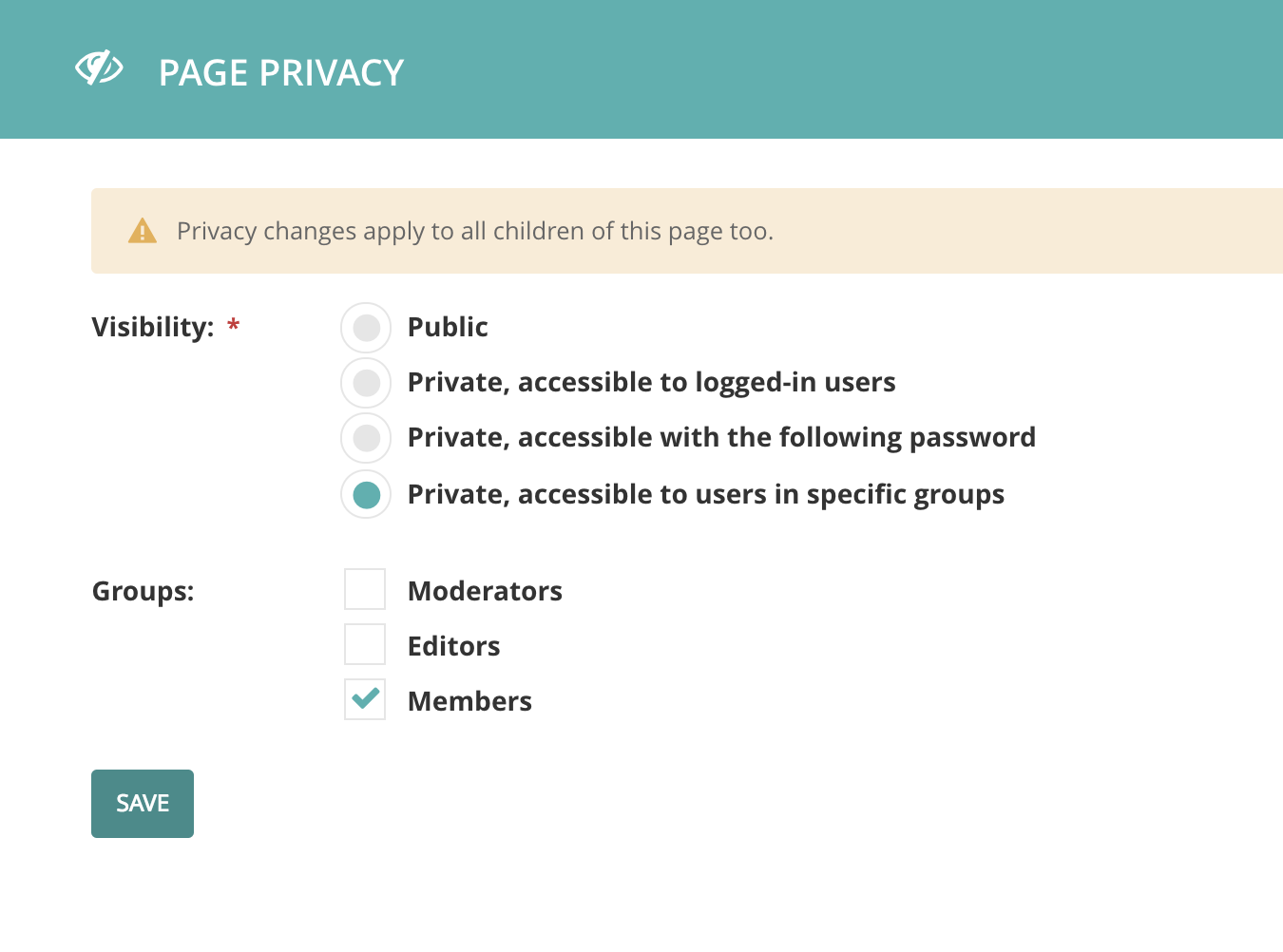
Search History: Adding Page Privacy in Wagtail Programmatically
This week I needed to manipulate the privacy of a Wagtail page programmatically. The Wagtail docs show you how to edit page privacy in the admin UI, but it doesn't peek behind the curtain to show you the code. The example here is a result of my Google searching.
Show full content

Versions:

  • Wagtail 2.1.1
  • Django 1.11
  • Python 3.6

This week I needed to manipulate the privacy of a Wagtail page programmatically. The Wagtail docs show you how to edit page privacy in the admin UI, but it doesn't peek behind the curtain to show you the code. The example here is a result of my Google searching.

For this example, assume we have a group called "members," and we need to restrict a page to be seen only by members of that group. This code assumes you have a page instance from a model that inherits from Wagtail's Page model, and that you have already defined your group.

from django.contrib.auth.models import Group
from wagtail.core.models import PageViewRestriction
from app.models import MyPage

members_group = Group.objects.get(name='members')
my_page = MyPage.objects.get(slug='my-slug')

Once you have retrieved the group and the page you want to restrict, create a new PageViewRestriction object. Because the groups attribute on the PageViewRestriction model is a ManyToMany field, you must create the restriction instance before you add the group.

restriction = PageViewRestriction.objects.create(
    page=my_page, 
    restriction_type=PageViewRestriction.GROUPS,
)

Now add the group that is allowed to see the page.

restriction.groups.add(members_group)

See the code for the PageViewRestriction class, and the available RESTRICTION_CHOICES (where I got PageViewRestriction.GROUPS) in the BaseViewRestriction class.

Thanks to Jeff Triplett for proofreading a draft of this article.

Search History: Adding Page Privacy in Wagtail Programmatically
5897f186d482e95fd8760b8b:58a21ab31b10e3be5b09e8b3:5b620a281ae6cfe2d5e344ba
Extensions
5 Reasons to Keep a Work Notebook
Notebooks aren’t just for journaling and to-do lists. They can also be valuable tools for learning, personal organization, and professional development.
Show full content

Earlier this week I posted on Twitter about filling up my most recent work notebook. 

Took six months to fill my most recent work notebook. Learned about celery, async, wagtail, AWS S3, and django-rest-auth in these pages.

The notebook is dead. Long live the notebook. 📒 pic.twitter.com/MOR9gDWL8W

— Lacey Williams Henschel (@laceynwilliams) June 4, 2018

Someone asked to learn more about this practice, so here you go! I've kept a work notebook for years. I stole the strategy from my friend and former colleague Rebecca, who attended all of our team meetings with a small notebook that proved invaluable for reminding us all what we'd decided on the week before, or how to solve a particularly weird bug that only came up once a year. My notebook started out primarily as a place to keep track of personal meeting notes, but over time it has grown to serve several other purposes.

1. Personal meeting notes

These notes aren't shared — I'm not taking minutes. Taking notes in meetings helps me identify questions I have and clarify priorities. Many meetings aren't super formal and so might not include a follow-up email of what was discussed or decided on; because I take my own notes, I can be pretty confident of action items and relevant decisions.

2. Retain new information

When I write things down I tend to remember them better. I take notes when reading docs on topics that are new to me, focusing on new terms or clarifying a process that was hard to make sense of.

3. Draw pictures

I'm a big fan of flowcharting for helping me understand model relationships (like an informal Entity Relationship Diagram) and complex processes. A good flowchart can pinpoint parts of lengthy functions that can be broken out into smaller, easier-to-understand pieces. But it's generally not worth my time to use a tool to create a formal flowchart. Most of the time, I can get what I need with a few minutes and a couple of pages in my notebook.

4. Make to-do lists

I like to spend a few minutes at the end of my day thinking about what I need to get done the next day. By writing a to-do list in the notebook I use for work, it will be the first thing I see the next morning.

5. Remember questions

I work remotely full-time and in a slightly different time zone than most of my colleagues. Sometimes they're all gone but I'm confused about something. My work journal helps me keep track of questions to ask the next morning, without needing to Slack people in their off-hours, send unnecessary email, or otherwise do something to remember what it was I was confused about.

Is this just bullet journaling?

Not really. I've tried bullet journaling in a more formal way in the past, and I know it works for some people. I also bought a Passion Planner at the beginning of this year in the hopes of taking my work notebook habit to new and more impressive heights. But I've discovered that the formality of a planner or a specific journal method doesn't suit me. I don't really keep track of my to-do lists from day to day; I might not even cross things off. I generally need my work notebook to help me keep track of things I've learned and things I need to do, and to organize my thoughts, so keeping things simple works better for me.

My work notebook also isn't a journal. I don't tend to write personal thoughts in my work notebook — I have a separate journal for that. (I do a lot of journaling about work, and I highly recommend developing a journaling habit, especially if you tend to be a little anxious.)

Tools

Use what works for you; these are the tools that have worked for me.

  • Moleskine Large Dotted Soft Cover Notebook — I like this notebook because of the soft cover, thin pages, and dots. The soft cover makes it easy to open, and it has an elastic strap to keep it closed. The thin pages still don't bleed with most pens. The dots, as opposed to lines or just blank pages, give me flexibility: I have dots to keep my writing lined up, but they are faint enough that I can still draw diagrams without getting distracted by lines. The notebook lays flat when open.
  • Sharpie Fine-Point Pens — Honestly, I could use a pen recommendation. I like felt-tip pens because they're easy to write with and they treat the paper better. I write sort of "hard," so ballpoint pens tend to dig into the paper and leave little depressions, but felt-tip pens don't do that. These Sharpie pens also don't bleed. But they don't last as long as I want them to, so if you have a felt-tip pen you like, let me know!

I don't really use rulers or anything else. If I need a straight edge, for example, I generally just grab a book or a piece of mail and use that. I also don't index, but I do dog-ear pages that I think I'll need to refer to. I keep my notebooks and still refer back to them for how to do things.

5 Reasons to Keep a Work Notebook
5897f186d482e95fd8760b8b:58a21ab31b10e3be5b09e8b3:5b1743070e2e7265c1833e77
Extensions
Free Talk Ideas for DjangoCon US 2018
Every year for DjangoCon US, the organizers get asked about what kinds of talks we're looking for. I've got a list of free ideas for you! 
Show full content

Every year for DjangoCon US, the organizers get asked about what kinds of talks we're looking for. I can't speak for the rest of the organizing team, but for me it's been a wild year of learning new things. I've got a long list of topics I'd like to learn more about.

The wish list below is heavily influenced by the work I've been doing at my new job. What topics would you like to see onstage at DjangoCon US this year? Tweet us @djangocon! Then go submit your proposal.

Django

I can always use a refresher on things like Django's built-in security features and other security stuff I should be enabling. Reminders about how to customize the admin are also helpful. Also, tell me what style rules I'm breaking! Is there an order my model methods should be in? Is it bad to name things utils.py? Help me organize my code, people.

Channels

I'd love to see a Channels tutorial, as well as some talks on Channels. A beginners' talk would be fantastic, and I would welcome talks on Channels and testing or Channels with an app that scrapes an external API, or really any other "Channels and [topic]" talk.

Django REST Framework

Intermediate/advanced talks, especially that go into Viewsets and actions (formerly list_route and detail_route). Using DRF with a frontend like React. Testing DRF. Serializers for users with different permissions and why you might want that, securing your serializer, etc.

Testing

All the testing talks you can think of! But especially a talk that goes into deciding what to test, and a talk to teach me about mocking.

Containers

I'm using a lot of Docker these days, so talks that get me beyond-the-basics would be welcome. I'd also like to learn some Kubernetes, and if someone could give a talk that got me started with that, I'd be grateful! Talks that touch on using other things — Celery, Pipenv, etc. — with Docker would be rad too.

Professional Skills

Topics like tips on debugging, how to write technical documentation (especially blog posts and tutorials), onboarding new team members, and code review tips for both the coder and the reviewer.

Wagtail

I've just started using Wagtail, and I wound up in the not-shallow end. A talk that covered the basics (and the basic "gotchas"), and a talk that went into more advanced topics, would be the bee's knees.


For other talk ideas, see:

Free Talk Ideas for DjangoCon US 2018
5897f186d482e95fd8760b8b:58a21ab31b10e3be5b09e8b3:5ad91901575d1f4a47b95500
Extensions
Five for Friyay: Useful Python and Django Libraries
Every day is a new adventure in a new job. I came into my job at REVSYS with not much production Python experience and my colleagues have been kind enough to share some time-saving and frustration-reducing libraries with me as I've been learning. This Friday, I'm sharing five libraries (technically, four libraries and a repo) that I've learned about in the last three months and fallen pretty much in love with. Enjoy!
Show full content

Every day is a new adventure in a new job. I came into my job at REVSYS with not much production Python experience and my colleagues have been kind enough to share some time-saving and frustration-reducing libraries with me as I've been learning. This Friday, I'm sharing five libraries (technically, four libraries and a repo) that I've learned about in the last three months and fallen pretty much in love with. Enjoy!

1. python-dateutil

I shared python-dateutil with a Slack channel of software engineers whose first programming language is not Python and the response was 🙌 and exclamations of "You mean I didn't need to spend hours fussing with strptime?!?"

This library does a lot of handy things, but the most important thing it does it take a string that contains some sort of date/time data and just poof make it into a DateTime object.

Using strptime to parse a DateTime string from an API, I had to slice the string because there was data I couldn't figure out how to get strptime to account for. Just getting this far took me more than an hour, and it still wasn't perfect:

>> from datetime import datetime
>> date = datetime.strptime('2013-08-28T23:59:00-06:00'[:19], '%Y-%m-%dT%H:%M:%S')
>> date
datetime.datetime(2013, 8, 28, 23, 59)

Using python-dateutil for the same thing:

>> from dateutil.parser import parse
>> date = parse('2013-08-28T23:59:00-06:00')
>> date
datetime.datetime(2013, 8, 28, 23, 59, tzinfo=tzoffset(None, -21600))

I get a much more accurate DateTime object! I wish I'd known about it a month ago, because strptime isn't that fun to use.

2. django-test-plus

I'm pitching a REVSYS product here, but I really like it. django-test-plus makes writing Django REST Framework tests a little bit easier. I turned this:

class MyModelTestCase(TestCase):
   def test_list(self):        
       url = reverse('mymodel-list')

       # Non-logged-in users should not be able to see models
       response = self.client.get(url)
       self.assertEqual(response.status_code, 401)

       # Superusers can view models
       superuser = SuperUserFactory()
       with self.login(superuser):
           response = self.client.get(url)
           self.assertEqual(response.status_code, 200)

into this:

class MyModelTestCase(TestCase):
   def test_list(self):
       # Non-logged-in users should not be able to see models
       self.get('my-model-list')
       self.response_401()

       # Superusers can view models
       superuser = SuperUserFactory()
       with self.login(superuser):
           self.get_check_200('my-model-list')

The library contains built-in methods for checking the major HTTP status codes using the standard HTTP methods (GET, POST, PUT, DELETE, etc.) and can save you a lot of keystrokes. Frank Wiles's blog post about using django-test-plus is pretty helpful, too.

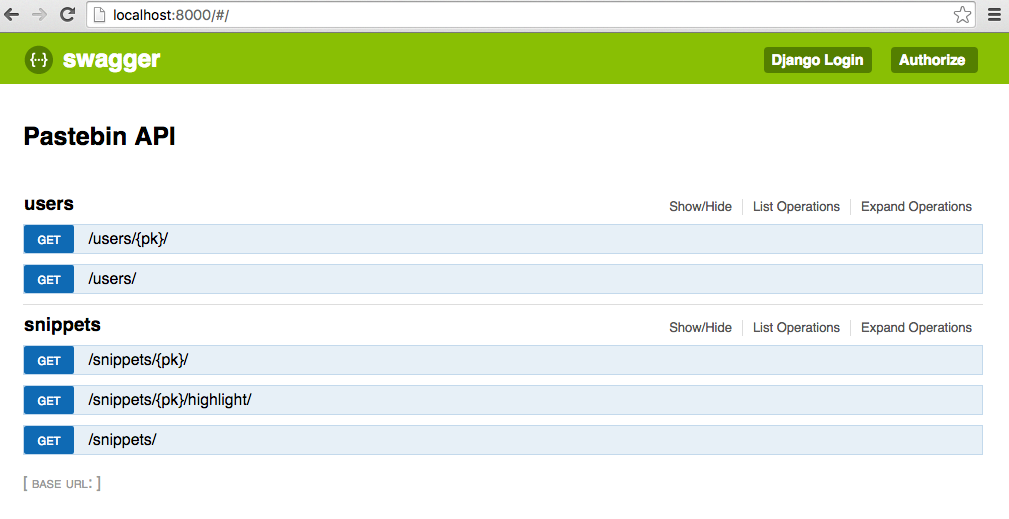
3. django-rest-swagger

django-rest-swagger puts a prettier UI on your Django REST Framework APIs. The project ships with an example based on the Django REST Framework tutorial so you can see it in action right out of the box. It integrates your docstrings into the UI so your API's documentation is right there in the browser.

Screeshot of django-rest-swagger in the browser

4. django-click

Write management commands for fun and profit with django-click! The documentation for this library is solid and it makes writing management commands really easy. I wind up using it a lot to generate and mess with test data in development. Here's a silly example management command that takes in your name and greets you:

# greeting.py
import djclick as click


@click.command()
@click.option('--name', help="Pass in your name", default='')
def command(name):
    print('Hi there', name)

Now I can run python manage.py greeting and see "Hi there" in my console. Or, I can run python manage.py greeting --name=Lacey and see "Hi there Lacey." Let your imagination run wild with possibilities!

Thanks to Jeff Triplett for letting me know this library existed!

5. styleguide-git-commit-message

I'm cheating. The Git Commit Message StyleGuide isn't a library and it isn't Django. It IS a style guide for writing commit messages that use semantic emoji. I've been integrating this style guide into my own Git workflow and not only do my commits feel more whimsical, I can also tell at a glance what I was doing in my commit history.

Thanks to Jeff Triplett for his advice on this post.

Five for Friyay: Useful Python and Django Libraries
5897f186d482e95fd8760b8b:58a21ab31b10e3be5b09e8b3:5a4fe881419202379417a734
Extensions
2017 Reviewed
In the spirit of starting 2018 off with a more confident step, however, I kept the focus on the results of the year, which were often beautiful, inspiring, funny, and joyful. Here's to a new year and a new 365 days of memories. 
Show full content

When writing this post, it was a challenge to focus on the things I accomplished and not the stresses and anxieties I felt along the way. In the spirit of starting 2018 off with a more confident step, however, I kept the focus on the results of the year, which were often beautiful, inspiring, funny, and joyful. Here's to a new year and a new 365 days of memories. 

Photo by Adam Gregory, Atom Images

Chaired DjangoCon US 

Last year, I served as conference chair of DjangoCon US. I and more than a dozen other people spent months prepping, fundraising, reviewing proposals, making schedules, approving menus, and doing a million other small and large tasks so that more than 300 people could come together in Spokane to talk about Django for a week. Every conference has its fires that must be put out, but I'm so proud of this team and this conference. I know 2018 will be even better! 

Photo by my aunt, Elaina.

Rode in a bike race

In July, I joined my mom, my sister, and my cousins in Buffalo Gap, Texas for the Tour de Gap. All I can say about my performance is that I finished those 27 miles. Feel free to google my race results; I'm not ashamed! 

In all seriousness, this was an awesome experience. I prepped by attending a spinning class a couple times a week for a few weeks, I borrowed my cousin's old bike that came with the festive pink water bottle holder you see here, and I had a blast with my family. Hope I get to do it again this year! 

Photo by me. 

Started a new job

While at DjangoCon US, I accepted a job offer from REVSYS. I started there in October and have absorbed so much new information in the last three months that every day it feels like there is not room in my brain to learn more, and yet somehow I do. Leaving the University of Texas after six years was incredibly hard; my colleagues there are amazing people and very talented developers. Luckily, I recruited several of them to work on DjangoCon US, so I still get to work with them! This photo is the celebration selfie I took with my husband after I accepted the offer. 

By some numbers 
  • 32: Outings with my Little through Big Brothers Big Sisters 
  • 6: Blog posts. Four published here, and two on the REVSYS blog
  • 2: Conference presentations. I spoke about networking at ACT-W Portland and gave the closing remarks at DjangoCon US. 
  • 8: Round-trip flights taken. I went to New York for a wedding; Texas for the bike race; Spokane, WA for DjangoCon US; Bismarck, ND for a family reunion; Texas to see family; Oklahoma for Thanksgiving; Lawrence, KS to visit REVSYS; and back to Texas for Christmas. 
  • 39: Books read. Favorites include Kindred by Octavia Butler, The Nightingale by Kristin Hannah, and Heart of Malice by Lisa Edmonds. 
  • 1: Homes purchased. We bought a house! It's very cute and has a large yard and will feature heavily in my 2018 goals. 
  • 2: Jobs held. I started the year only a month into a new job at the University of Texas, and ended the year three months into my new job at REVSYS. 
  • 1,407: Tweets sent. Busiest month was August with 182 sent tweets, unsurprising since that was the month DjangoCon US happened. Slowest month was September with 26, when I took a post-conference social media break. 
2018 Goals 

I hate to call these "resolutions," but I do have some personal and professional goals for this year. 

Speaking: Give a Docker talk at a conference. I've submitted this talk to a couple of conferences already, and have a couple more conferences I will submit it to once their CFPs open. 

Growing: Vegetables, that is. Plant a vegetable, grow it, and eat it. Now that I have a house with a yard, I want to garden again. 

Writing: I wrote and published 6 blog posts last year, so let's make it 12 this year. I'm part of a couple of different writing projects this year, so hopefully I will be able to keep pace. I also developed a journaling habit in 2017, and I'd like to keep that going. 

Reading: Read more. My goal for 2017 was a book a week, which I did not hit. Mostly this year I would like to be reading consistently, so my Goodreads goal is 40 books for 2018. 

2017 Reviewed
5897f186d482e95fd8760b8b:58a21ab31b10e3be5b09e8b3:5a4bcf0e71c10b82b8b555cf
Extensions
TIL: How to configure SublimeText for prettier code
This week I added a Python linter and an automatic editor configurator (configurer?) to SublimeText and I'm a lot happier.
Show full content

This week I added a Python linter and an automatic editor configurator (configurer?) to SublimeText and I'm a lot happier.

Step 1: Install Package Control

You will need to install Package Control. The instructions in that link are very clear.

Once Package Control is installed, you can get to it by typing cmd + shift + P when in SublimeText.

Step 2: Add a linter

A linter is a tool that checks for small mistakes in your code. Flake8, a Python linter, checks for PEP 8 violations (like trailing whitespace), unused imports, syntax errors, and other helpful stuff. (You might find Eldarion's post about clean code helpful.)

Follow the steps in Three steps to lint Python 3.6 in Sublime Text to get started. The linked post will walk you through the following:

  • Installing Flake8 (pip install flake8)

  • Installing the SublimeLinter plugin (more detailed instructions in the docs)

  • Installing the SublimeLinter-flake8 plugin

  • Configuring the linter

Once you have done that, open a Python file and make a mistake on purpose. Save the file, and you will see your linter yell at you helpfully.

You can customize the ways your linter alerts you to code violations. See the docs if you would prefer your linter to be a little less obnoxious than mine is.

Step 3: Install EditorConfig

My Python sin is that I'm overly attached to whitespace at the end of lines. I blame the English degrees. It's ingrained in me to type the spacebar at the end of anything I do, and it's a habit that's so hard to break.

Within a few days of installing a linter plugin for SublimeText, I was getting pretty sick of the linter pointing out my love of trailing whitespace and I joked about it to my colleague Jeff. That's when he told me about EditorConfig. You install the EditorConfig plugin for SublimeText, create an .editorconfig file, and your editor will automatically correct certain kinds of errors for you.

  1. In SublimeText, use Package Control to search for "Install" and select "Package Control: Install Package."

  2. In the next modal that opens, search for "EditorConfig." Click on it.

  3. Nothing will happen, but EditorConfig is now installed.

  4. At the top level of a project, create a file called .editorconfig.

  5. Tell the file what you want your editor to do. There are a ton of properties you can set. Here's the DjangoCon 2017 .editorconfig for reference:

# http://editorconfig.org
root = true

[*]
indent_style = space // Converts tabs to spaces
indent_size = 4 // 4 spaces per tab 
end_of_line = lf // Helps keep Windows, Mac, Linux on the same page since they handle end of line differently
charset = utf-8
trim_trailing_whitespace = true // Auto-trims trailing whitespace
insert_final_newline = true // Auto-adds a blank newline to the end of a file

[*.scss]
indent_size = 2 // More common to see 2 spaces in SCSS, HTML, and JS 

[*.html]
indent_size = 2

[*.js]
indent_size = 2

As soon as you save that file, test it out. Add a whole bunch of trailing whitespace to a line of code, save the file, and watch your whitespace disappear without your linter ever knowing it was there.

Final notes

There are other linters out there. My colleagues mentioned Anaconda (turns SublimeText into a Python IDE and comes with linting), SublimeLinter without Flake8, and PyLinter. I'm not overly attached to the one I'm using because it's about a week old for me. Feel free to experiment.

Huge thanks to Jeff Triplett for proofreading this post, introducing me to these tools, and making my day job a little easier.

TIL: How to configure SublimeText for prettier code
5897f186d482e95fd8760b8b:58a21ab31b10e3be5b09e8b3:59ea129edc2b4a46cf949b67
Extensions
How does working remotely work?
Because I have worked remotely full-time for the past three years and it suits me pretty well, people ask me a lot about how working remotely works in practice. How did you get your boss on board? Do you really wear pajamas all day? What about loneliness? Read on.
Show full content

Because I have worked remotely full-time for the past three years and it suits me pretty well, people ask me a lot about how working remotely works in practice. All of the advice here is just that: advice. These things have worked for me or been true for me, but they might not work for you. Take what works and leave what doesn't, just like in the cafeteria.

How did you get your boss on board?

When I first started telecommuting full-time, I was in a situation where I was moving no matter what (so my spouse could go to grad school), so my company was faced with either letting me quit or letting me be remote. 

A couple of things helped:

  • I gave my organization a lot of notice that I would be moving and would like to work remotely. Several months of lead time helped us all get answers to questions and make a solid plan.
  • I agreed to a trial period of six months. If after six months things weren't working out, then we'd go from there. (But I was pretty sure things would work out.)
  • While I was the first person on my team to go remote, I was not the first person in my whole company. I was able to give my supervisor the names of some other people who worked remotely so he could do his own research.
Has working remotely stalled your career?

Not at all. I've been promoted, transitioned to a new department, and accepted a job with a new company all while working remotely.  

I was initially concerned that working remotely, especially as the only person on my team who was remote full-time, would mean I would get left behind professionally because I would be out of sight and thus out of mind. I assumed that I would only work remotely for a year or two, and then I would need to get an in-person job in order to progress professionally. None of that happened, and now I'm so attached to remote work that I don't want to be back in an office full-time again.

Do you wear pajamas and watch Netflix all day?

Pajamas: Yes. Netflix: No.

Truth be told, the first couple of weeks that I was remote I had also just moved, so I was unpacking boxes and settling into a new routine in a new part of the country. So yes, there was more Netflix during the workday than I generally recommend. "My office is my sofa and I won't be distracted with a little Grey's Anatomy in the background!" I thought. But I quickly, quickly discovered that I need more structure than that.

So work happens in my "office," which is really just a little space off the dining room, and Netflix stays off until after work. But I don't have to wear headphones when I listen to Spotify because the cats don't care!

But there is no reason to wear pants that are not pajamas ever again if you work from home. Embrace the comfort.

Don't you get lonely?

Not really. I'm in a lot of Slacks, I schedule weekly Skype sessions or Hangouts with my colleagues, and I pair program pretty regularly. My non-work social life is healthier, too; since I'm not commuting, I'm not too tired in the evenings to catch a movie with a friend or go to happy hour!

I've always been the only person who was remote full-time on my team, but most of my teammates have worked from home at least one or two days a week. Still, being the only remote person on the team can result in some FOMO. Your colleagues can Skype you in to happy hour, for example, but it's not the same. Especially in those moments where work is emotionally difficult (layoffs, an emergency, bad news), it can feel extra isolating to not be able to have those water-cooler conversations.

But active Slack channels (with coworkers, people in your organization but on other teams, people in your profession, people who love cats as much as you do) can help you fill the gap left by the absence of the work water cooler.

What do you do for lunch?

I cook for myself or pour a bowl of cereal or walk to Subway. I generally spend less money on eating out for lunch than I did when I was in the office.

What is your day like?

I wake up around 7, have coffee, and take a shower. I'm usually online by 8:30, but I check Slack and email before then to make sure there are no fires to put out. If I have any meetings, they are generally between 10-1 my time (but I do have a rule that if it isn't at least 9 a.m. in Oregon, I don't have to turn my video camera on).

I take about a half hour for lunch sometime between 12 and 2, and then keep working until 5 or 6 in the evening. I generally hit my most productive "stride" from 2-5. Since I'm in Oregon and my colleagues are on central time, by 2 p.m. most of the emails have stopped and the meetings are over, so I'm no longer getting interrupted.

Depending on the day's schedule, I might take small breaks to pick up the house, make more coffee, or check the mail. When I was in an office, I took breaks to take walks, hit the vending machine, or see if a colleague wanted to get a Frosty with me, so this works out to about the same amount of time. I might also take a longer lunch to work out.

What about traveling or when someone else is home?

I am generally a fan of "vacation time is vacation time and work time is work time," but I've worked from Texas, New Mexico, Mississippi, Oklahoma, and California before! Once, for example, I was giving two conference talks in Texas a week apart, so flying back to Oregon in between didn't make much sense. But I also didn't want to take extra vacation time, so I worked from my mom's dining room for the week in between. I do know people who combine remote work with vacation time and that works really well for them. My one caveat is to make sure your team knows where you are (specifically what timezone you're in) and whether you'll be working half-time that week. Setting expectations is important.

Speaking of setting expectations, if you share your house with roommates, family members, or a significant other, it's important to let them know that your work time needs to be respected. What that means will depend on the situation, but it's always good to have an extra pair of headphones.

What about when your internet goes down?

Have a backup plan--a nearby coffee shop or library--if you lose your connection at home.

What else should I know?

There have been times I have felt pressure to be available on Slack, email, Skype, or phone. I have felt guilty for turning off those services so I could focus, and then having missed a call or message from a colleague with a question. I don't have a great answer for that except… don't feel that way!

One of the most common pieces of productivity advice is to limit the amount of time per day you spend in your email and Slack, and then close your email entirely outside of those times. Being constantly available can have a very negative effect on what you can accomplish, and in turn negatively impact how you feel about yourself. So if you missed a phone call because you silenced your phone so you could finally squish that bug, don't worry about it.

Some colleagues of mine also follow the pomodoro technique (25 minutes on, 5 minutes off) and let their teams know when they're starting a pomodoro and closing all their chat windows. That way everyone knows they'll be slower to respond to things.

Working remotely is also great for your wallet and the environment! 

Thank you to Rebecca Kindschi for her help with this post! Photo from Unsplash.

How does working remotely work?
5897f186d482e95fd8760b8b:58a21ab31b10e3be5b09e8b3:59a7507803596eb951d22f71
Extensions