GeistHaus
log in · sign up

Sam Foreman

Part of Sam Foreman

Sam Foreman's personal website

stories primary
🎉 Happy New Year!
<iframe src="https://www.googletagmanager.com/ns.html?id=GTM-TC329HJ" height="0" width="0" style="display:none;visibility:hidden"></iframe>

I’d like to try and post more this year.

Ideally these would be less-polished, more-frequent updates on what I’m thinking about / working on.

Ongoing Projects
  • AuroraGPT: Large Language Models for Scientific Applications on leadership-class supercomputers1.

    Additional details can be found in some of my recent talks:

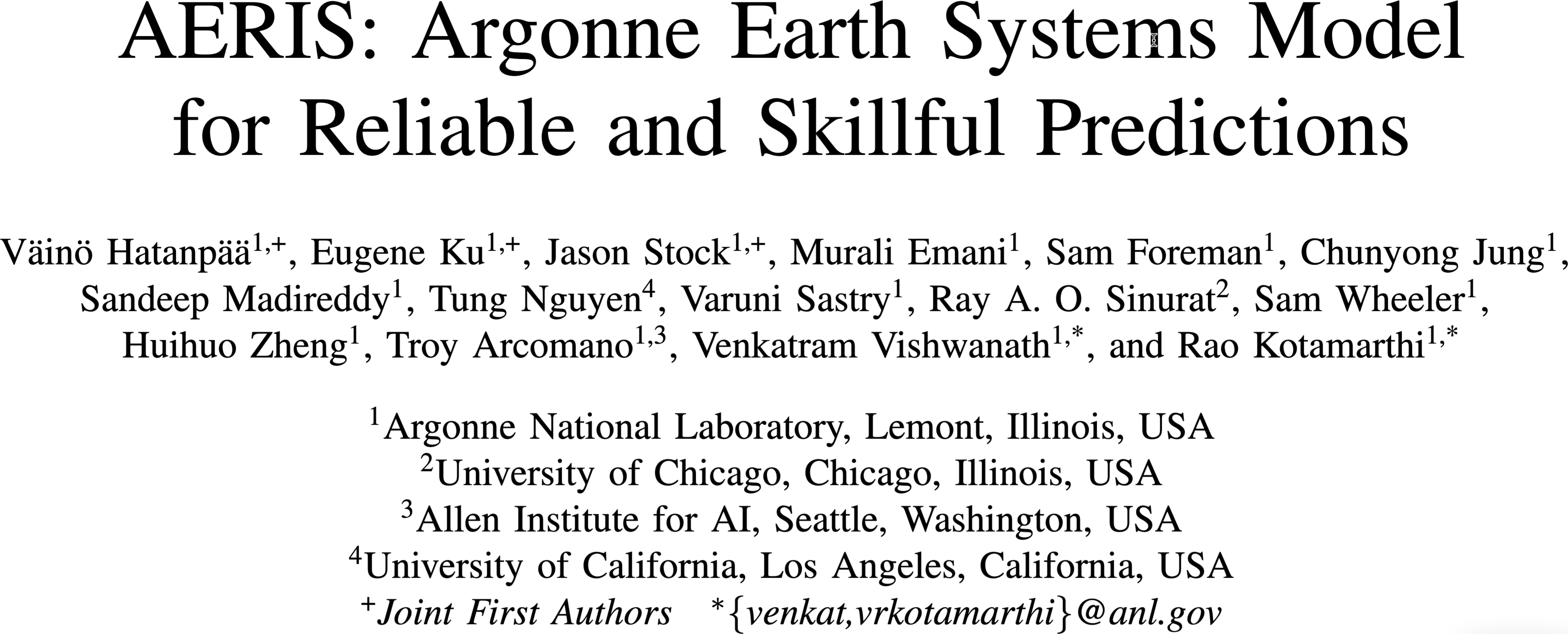
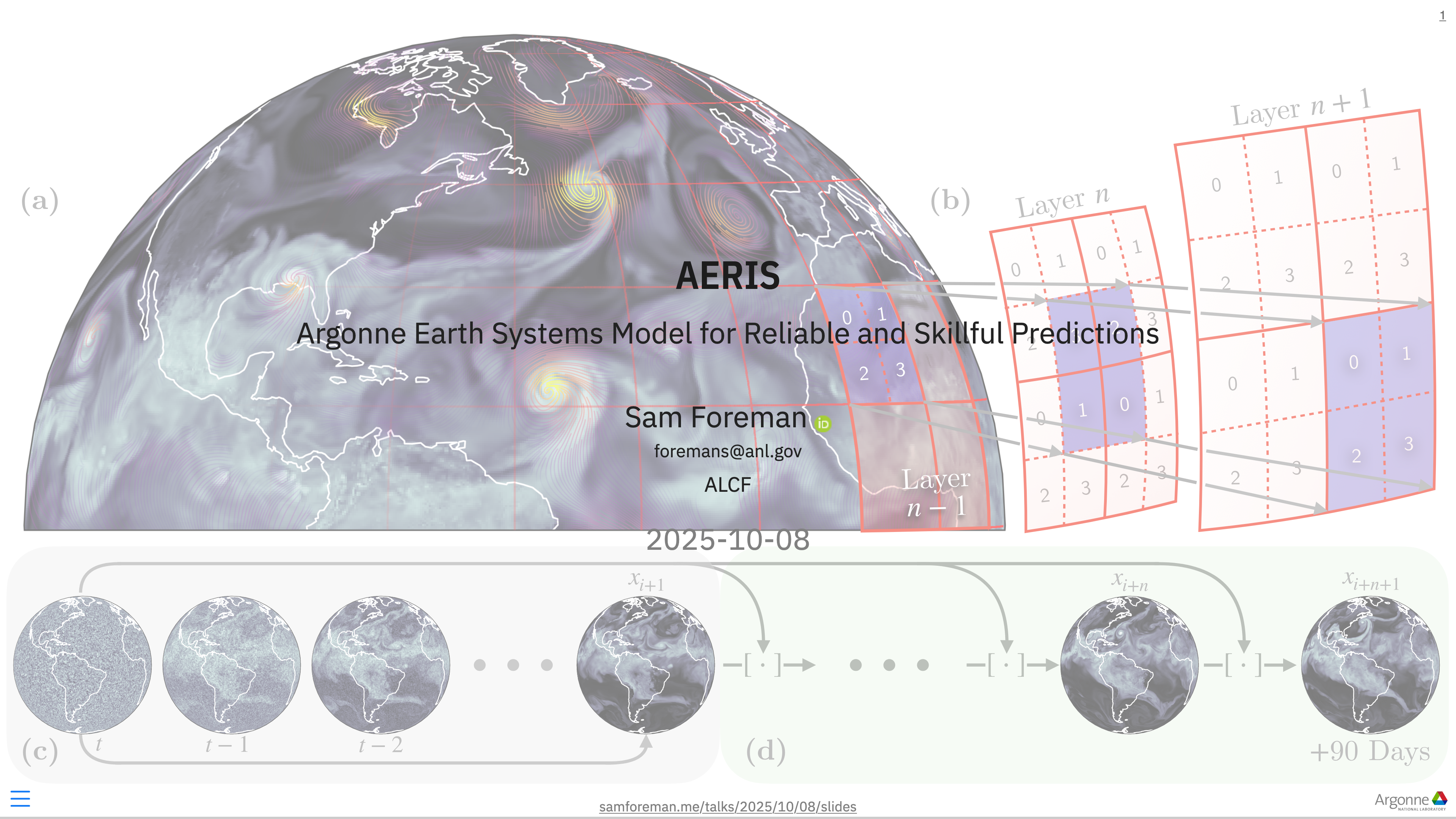
  • AERIS: Argonne Earth Systems Model for Reliable and Skillful Predictions (Hatanpää et al. (2025)).

    Foundation models for Earth system science, pushing on coupled modeling, uncertainty, and long-horizon prediction. Additional details can be found in some of my recent talks:

  • 🍋 ezpz: A growing collection of utilities for launching, instrumenting, and debugging distributed jobs on real HPC systems.
    This started as glue code and turned into infrastructure. A dedicated post is coming.

  • Genesis Project

    • The American Science Cloud (AmSC): A Platform for Transformative Science

      More info

      Cornerstone of the Genesis Mission’s Platform infrastructure, hosting and distributing AI models and scientific data to the broader research community. AmSC will enable the National Labs, industry, and research partners to curate and apply DOE’s extensive AI-ready scientific data.

    • The Transformational AI Models Consortium (ModCon): Cornerstone of the Genesis Mission’s AI models and data efforts,

      More info

      Cornerstone of the Genesis Mission’s AI models and data efforts, will build and deploy self-improving AI models that advance science, engineering, and energy missions by harnessing DOE’s unique data, facilities, and expertise. Selected teams will develop foundational capabilities needed across multiple scientific and engineering domains.

Additional Involvements
  • DeepSpeed Technical Steering Committee2

  • CPSC: Member of the Coordinating Panel for Software and Computing

    More info

    The Coordinating Panel for Software and Computing (CPSC) serves as a forum for the U.S. high energy physics (HEP) community to address shared challenges in scientific computing.

    Hosted by the Division of Particles and Fields (DPF) of the American Physical Society(APS), the panel brings together researchers, developers, institutions, and industry partners to strengthen the software and computing ecosystem that underpins modern HEP research. Through coordination, advocacy, and community-building, CPSC works to foster innovation, support career development, and ensure the computing infrastructure evolves to meet the demands of current and future experiments.

References Hatanpää, Väinö, Eugene Ku, Jason Stock, Murali Emani, Sam Foreman, Chunyong Jung, Sandeep Madireddy, et al. 2025. “AERIS: Argonne Earth Systems Model for Reliable and Skillful Predictions.” https://arxiv.org/abs/2509.13523. Footnotes
  1. More on this soon!↩︎

  2. Roadmap discussion↩︎

CitationBibTeX citation:
@online{foreman2026,
  author = {Foreman, Sam},
  title = {🎉 {Happy} {New} {Year!}},
  date = {2026-01-07},
  url = {https://samforeman.me/posts/2026/01/07/},
  langid = {en}
}
For attribution, please cite this work as: Foreman, Sam. 2026. “🎉 Happy New Year!” January 7, 2026. https://samforeman.me/posts/2026/01/07/.
https://samforeman.me/posts/2026/01/07/
Extensions
AuroraGPT: Training Foundation Models on Supercomputers
AIMachine LearningSupercomputing
<iframe src="https://www.googletagmanager.com/ns.html?id=GTM-TC329HJ" height="0" width="0" style="display:none;visibility:hidden"></iframe> 🧰 AuroraGPT: Toolbox
  • Datasets and data pipelines (how do we deal with scientific data?)
  • Software infrastructure and workflows (scalable, robust, extensible)
  • Evaluation of state-of-the-art LLM Models (how do they perform on scientific tasks?)
Tip🍋 ezpz

saforem2/ezpz
Write once, run anywhere

Note🚂 Training

argonne-lcf/Megatron-DeepSpeed
For the largest of large language models

Important🏃‍♂️ Running

argonne-lcf/inference-endpoints
Inference endpoints for LLMs, hosted @ ALCF

👥 Team Leads

Planning

Rick Stevens

Rick Stevens1

Ian Foster

Ian Foster

Rinku Gupta

Rinku Gupta

Mike Papka

Mike Papka

Arvind Ramanathan

Arvind Ramanathan

Fangfang Xia

Fangfang Xia

Data

Ian Foster

Ian Foster

Robert Underwood

Robert Underwood

Training

Venkat Vishwanath

Venkat Vishwanath

Sam Foreman

Sam Foreman

Evaluation

Franck Cappello

Franck Cappello

Sandeep Madireddy

Sandeep Madireddy

Bo Li

Bo Li

Post

Eliu Huerta

Eliu Huerta

Azton Wells

Azton Wells

Inference

Rajeev Thakur

Rajeev Thakur

Comms

Charlie Catlett

Charlie Catlett

David Martin

David Martin

Distribution

Brad Ullrich

Brad Ullrich
🤝 Teams
  • Planning
  • Data Prep
    • Accumulate 20+ T tokens of high-quality scientific text and structured data
  • Models / Training2
    • Train (entirely from scratch) a series of models on publicly available data
  • Evaluation
    • Skills, trustworthiness, safety, robustness, privacy, machine ethics
  • Post-Training
    • Fine-tuning, alignment
  • Inference
    • Model serving, API development / public-facing web services
  • Distribution
    • Licensing, generating and distributing artifacts for public consumption
  • Communication
🏋️ Challenges

This is incredibly difficult in practice, due in part to:

  • Brand new {hardware, architecture, software}
  • Lack of native support in existing frameworks (though getting better!)
  • General system stability
    +10k Nodes +100k XPUs
    • network performance
    • file system stability (impacted by other users !)
    • many unexpected difficulties occur at increasingly large scales
  • Combinatorial explosion of possible configurations and experiments
    • {hyperparameters, architectures, tokenizers, learning rates, …}
💾 AuroraGPT: Training
  • To train a fixed model on trillions of tokens requires:
    1. Aggregating data from multiple different corpora
      (e.g. ArXiv, Reddit, StackExchange, GitHub, Wikipedia, etc.)
    2. Sampling each training batch according to a fixed distribution across corpora
    3. Building indices that map batches of tokens into these files (indexing)

    The original implementation was slow:

    • Designed to run serially on a single device
    • Major bottleneck when debugging data pipeline at scale
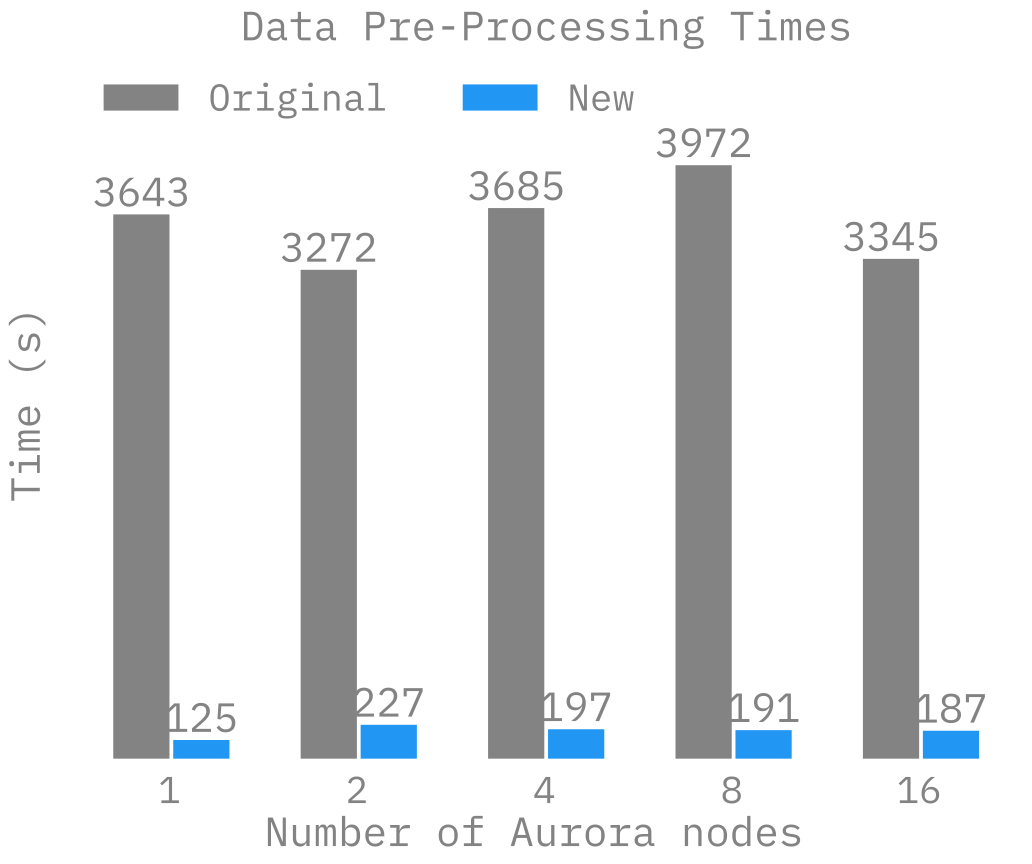
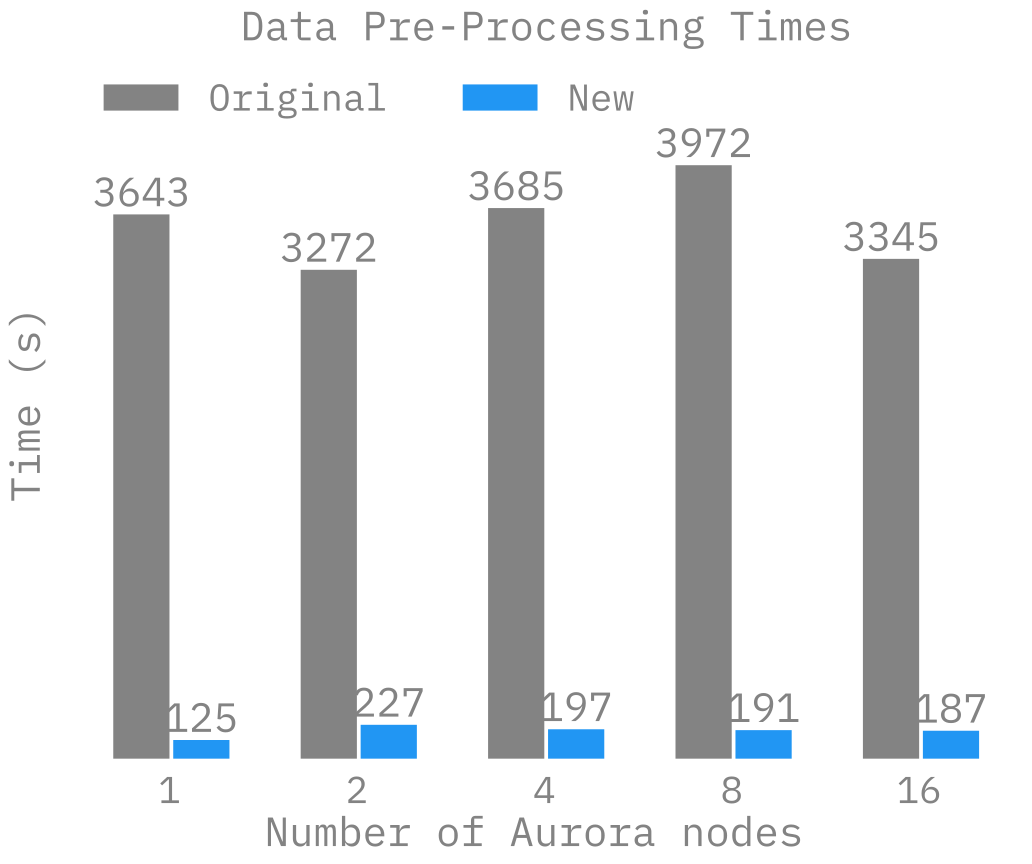
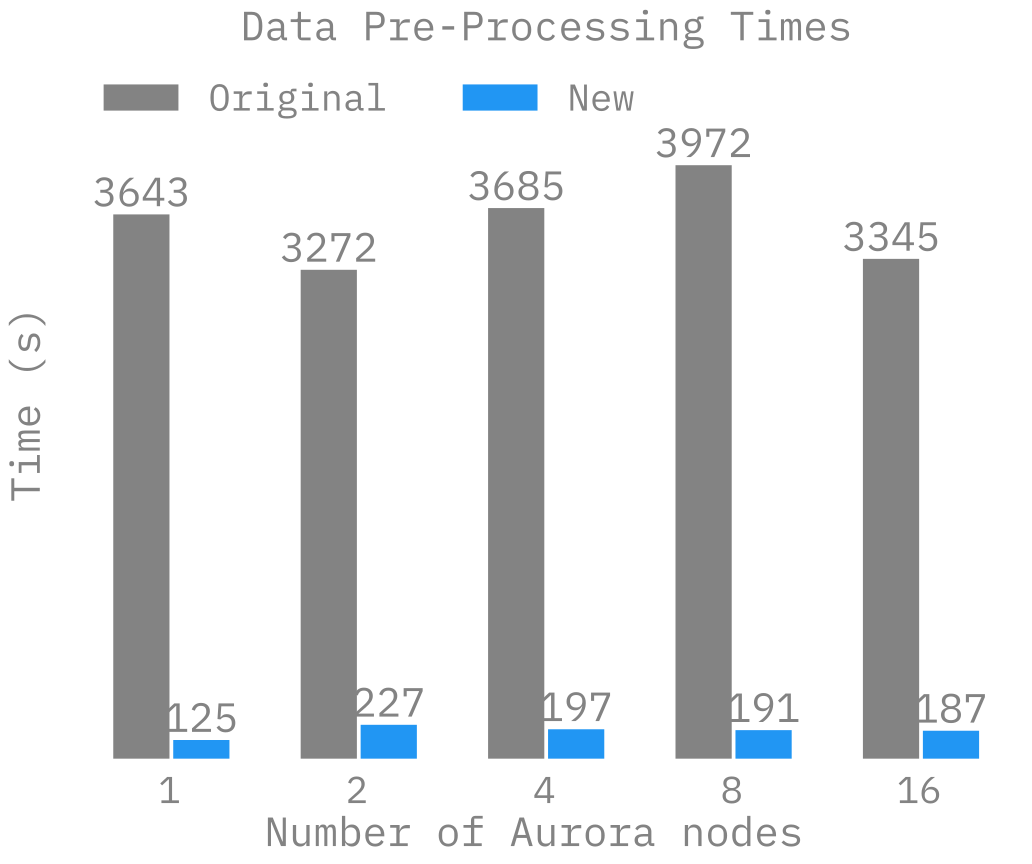
🍹 AuroraGPT: Blending Data, Efficiently
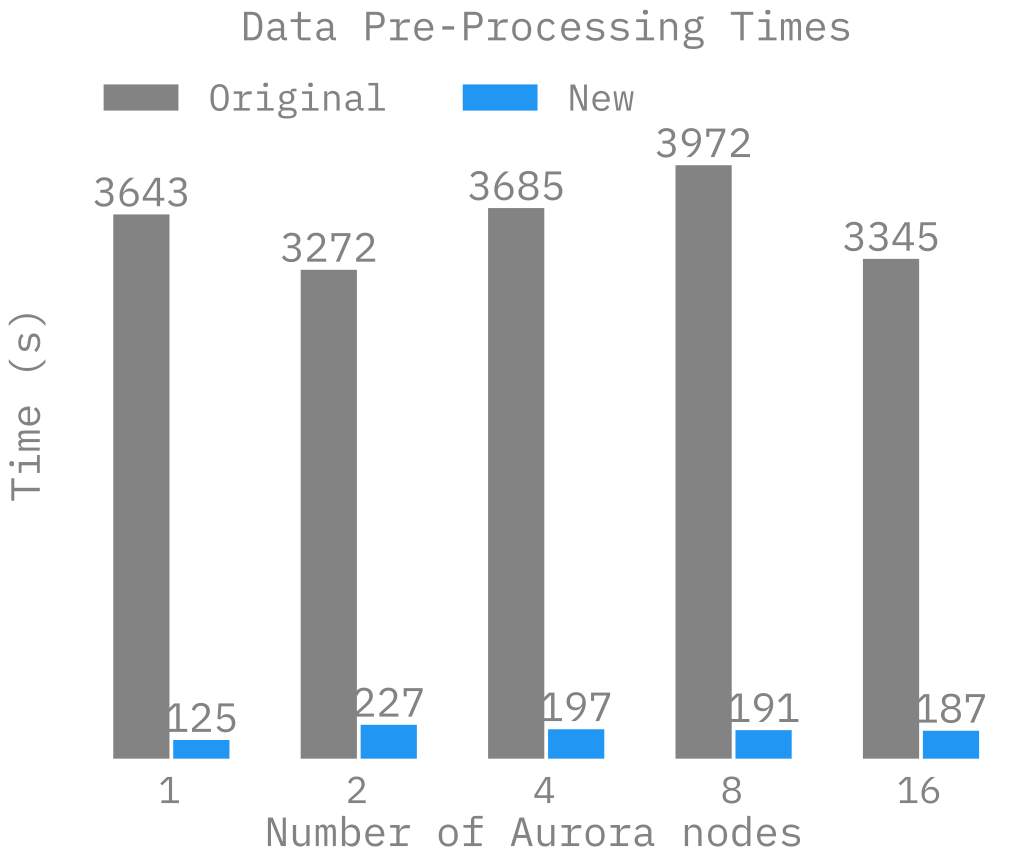
  • 🐢 Original implementation:
    • Slow (serial, single device)
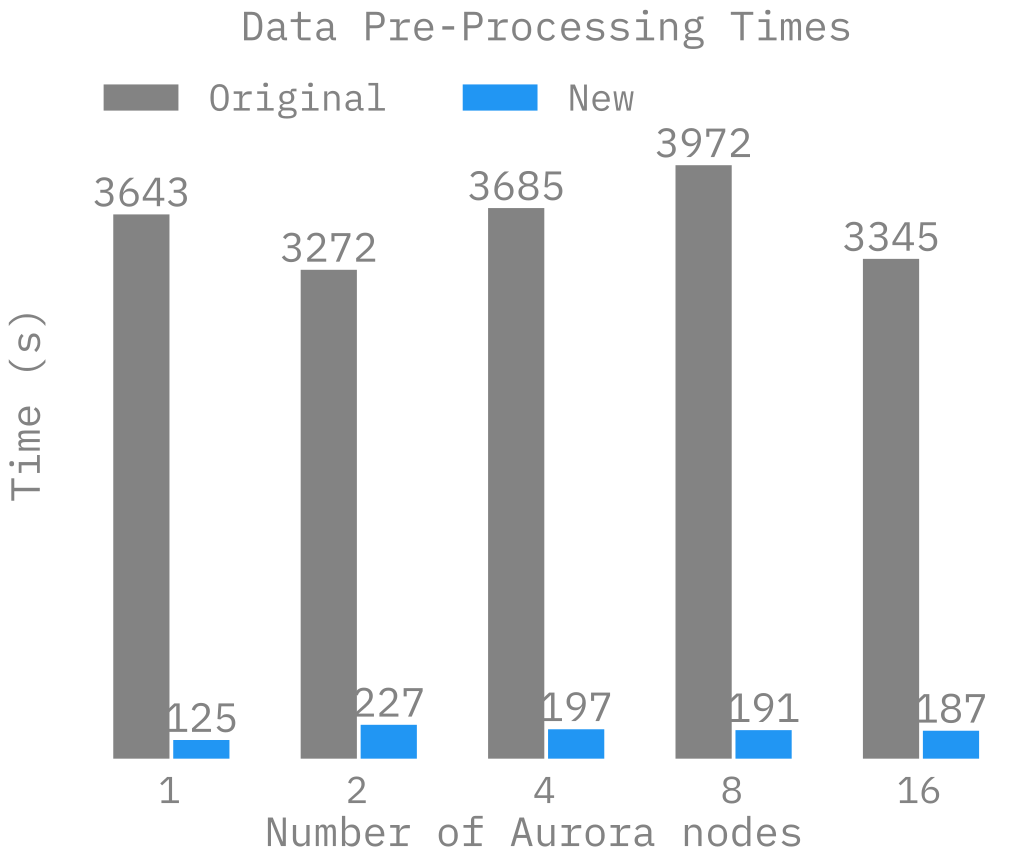
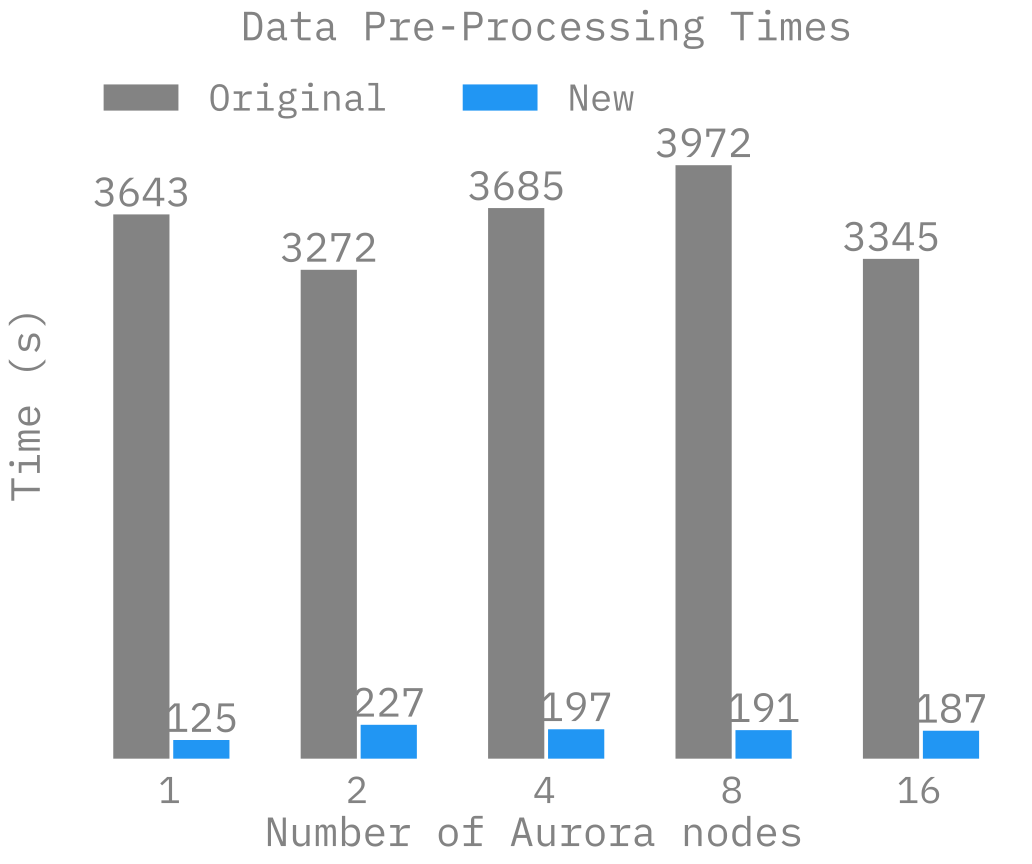
    • ~ 1 hr/2T tokens
  • 🐇 New implementation:
    • Fast! (distributed, asynchronous)
    • ~ 2 min/2T tokens
      (30x faster !!)
Figure 1: Time spent preparing 2T tokens
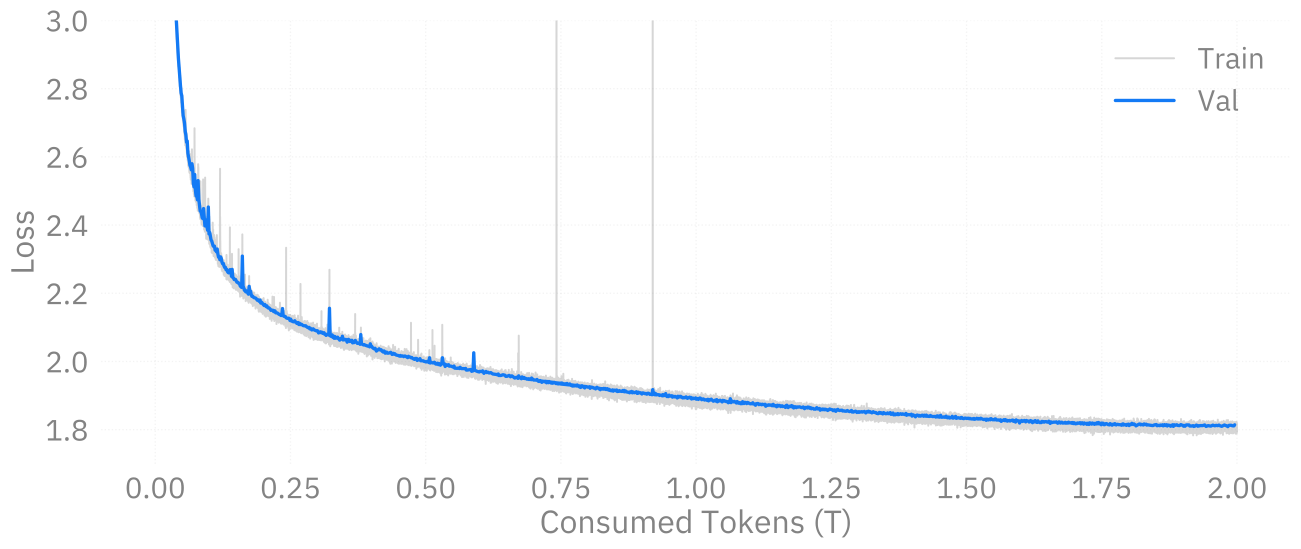
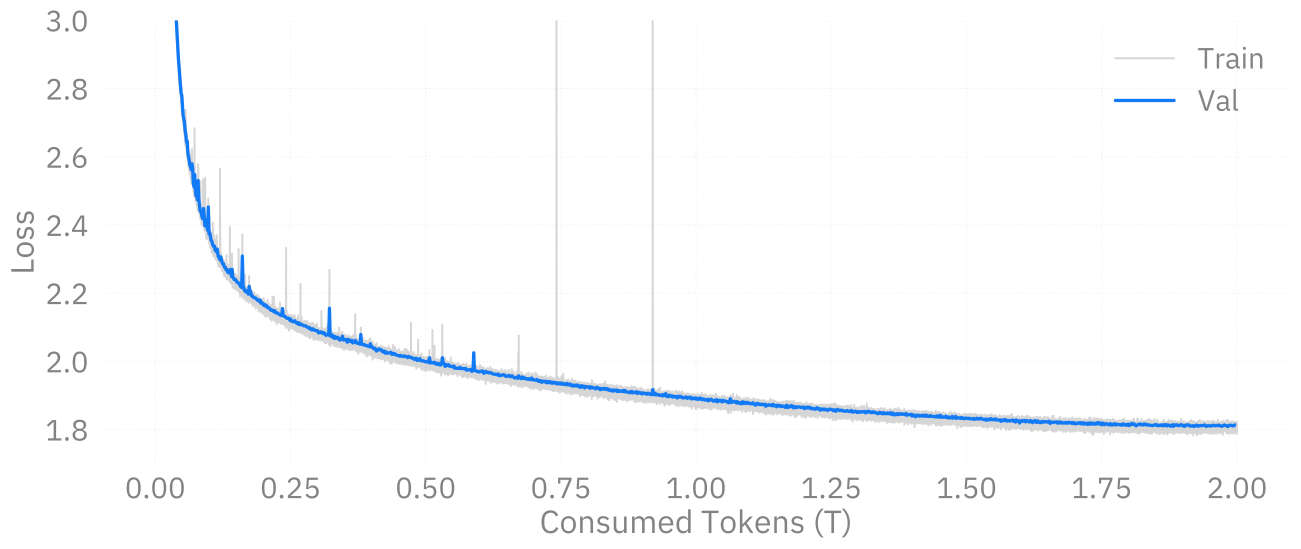
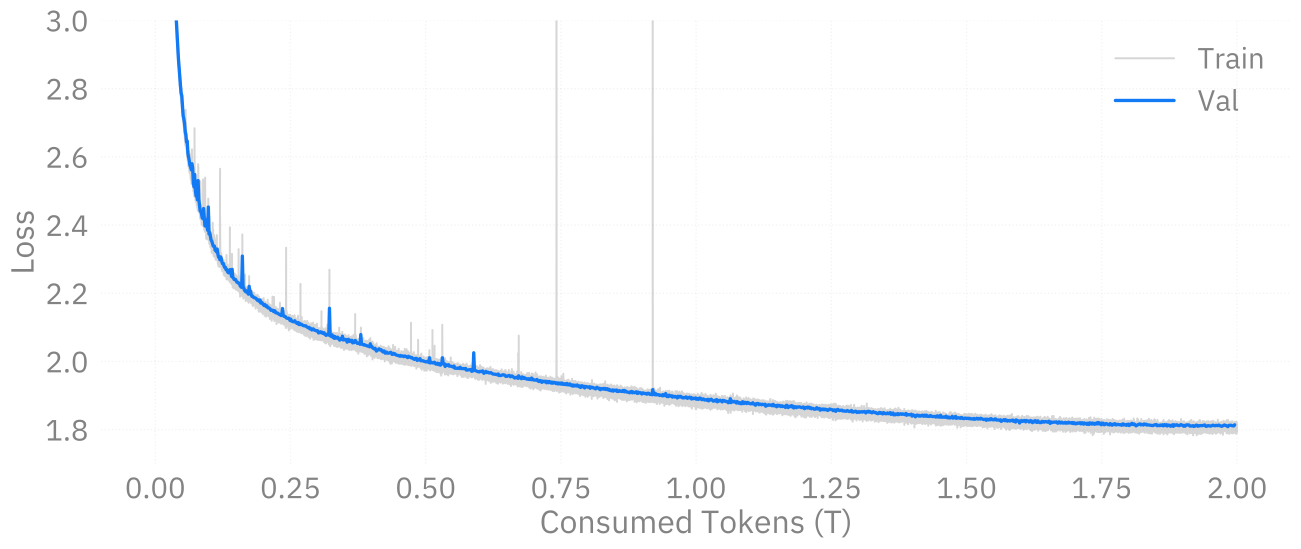
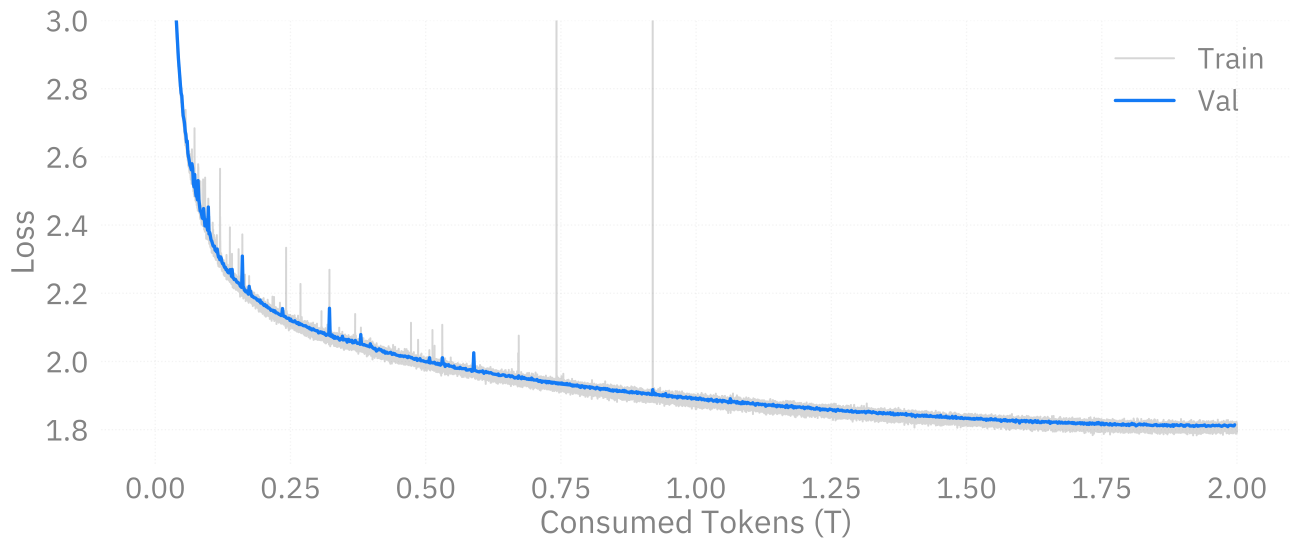
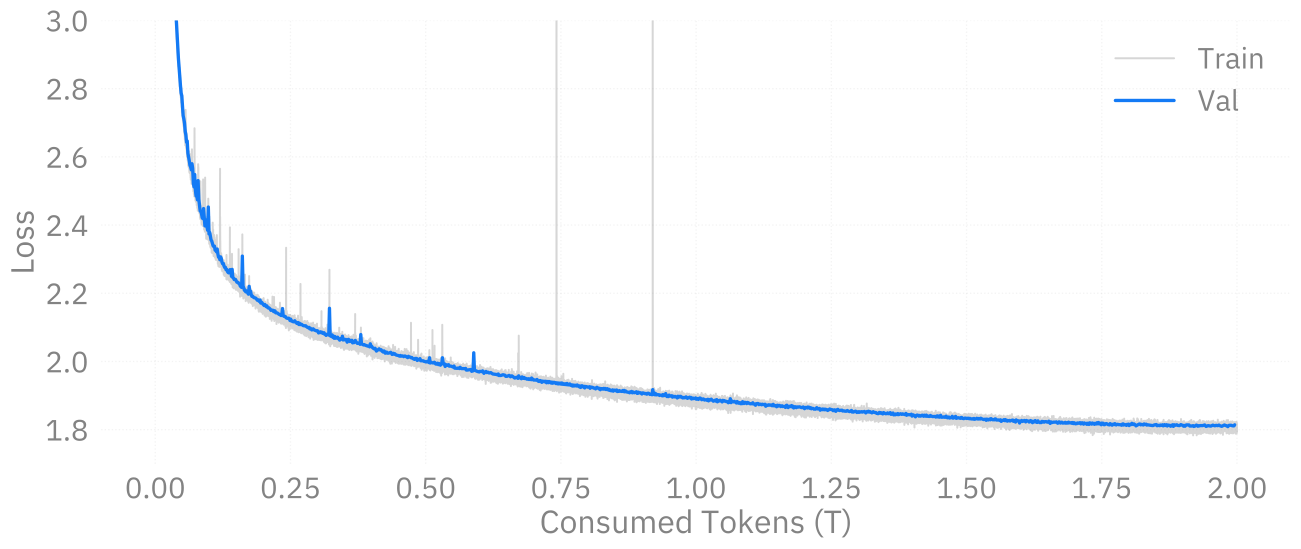
📉 Training AuroraGPT-7B on 2T Tokens
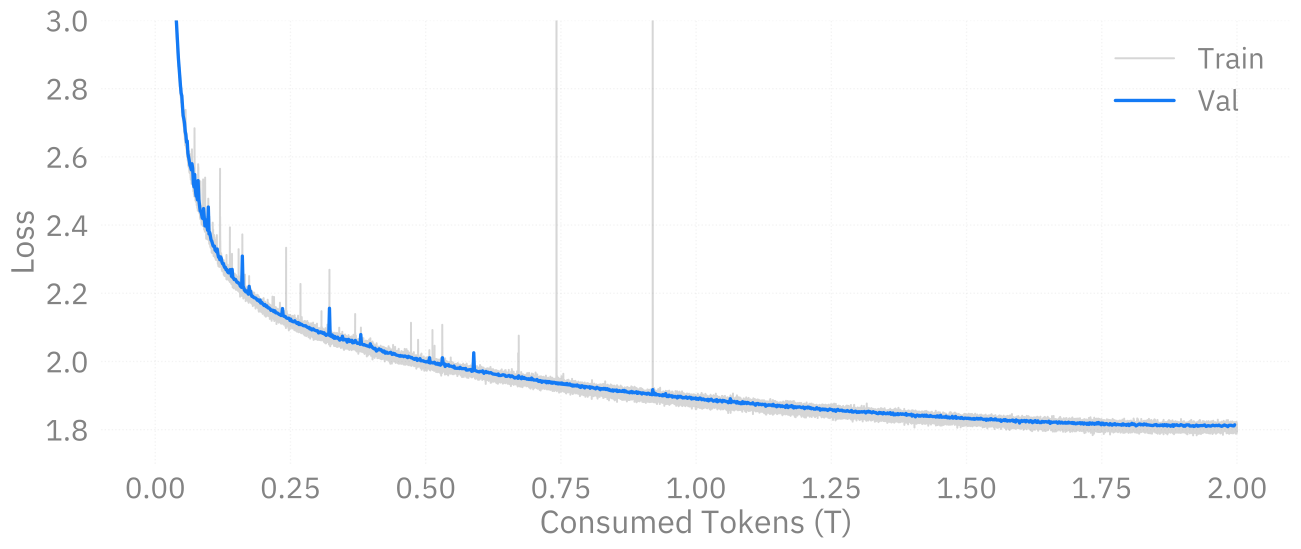
Figure 2: Loss curve during training on 2T tokens.
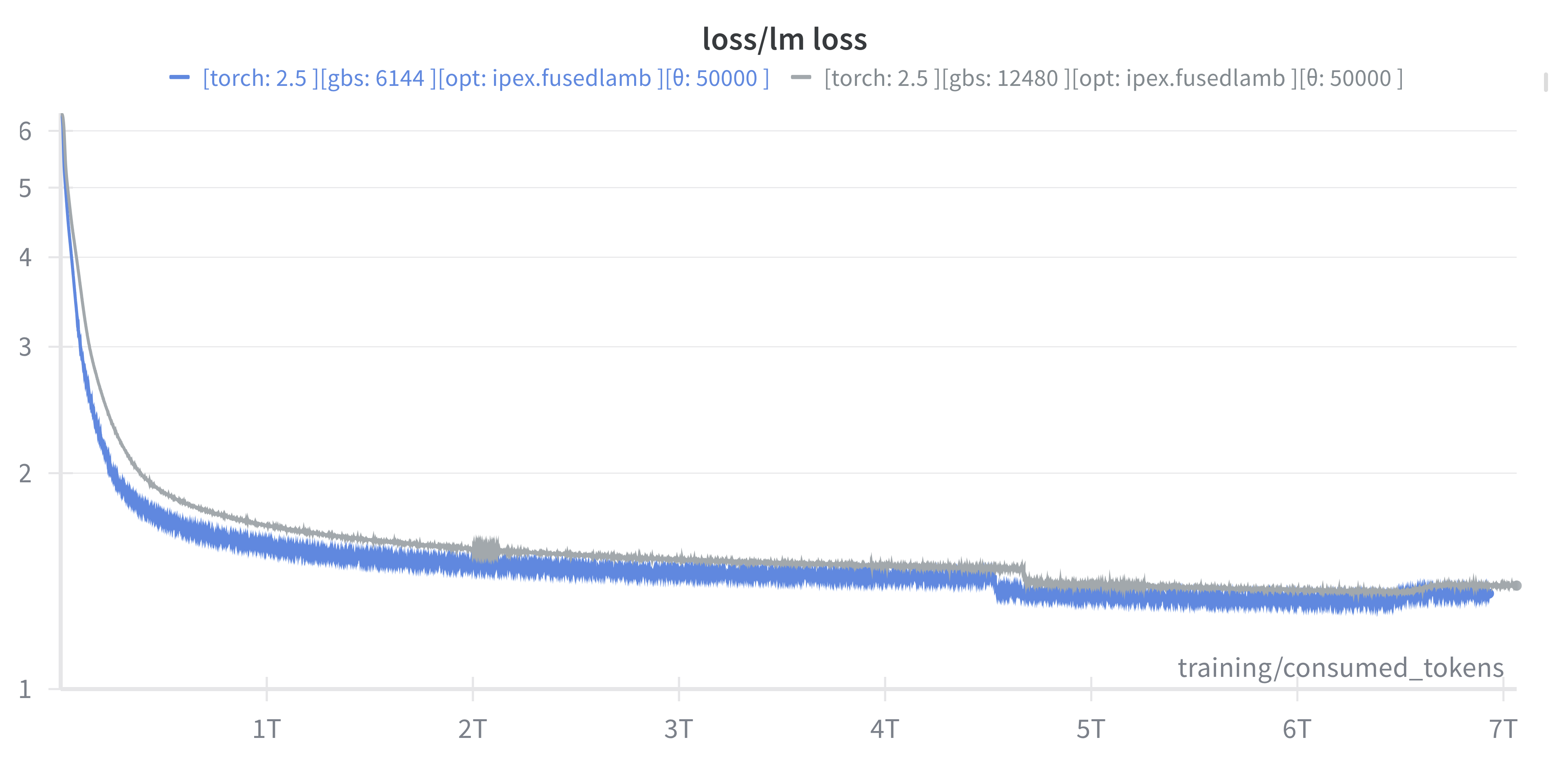
📉 Training AuroraGPT-2B on 7T Tokens
Figure 3: (new) Loss vs number of consumed training tokens for AuroraGPT-2B on 256 (blue) and 520 nodes (grey) of Aurora. Both runs show stability through 7T tokens.
✨ Features

argonne-lcf/Megatron-DeepSpeed

  • 🕸️ Parallelism:
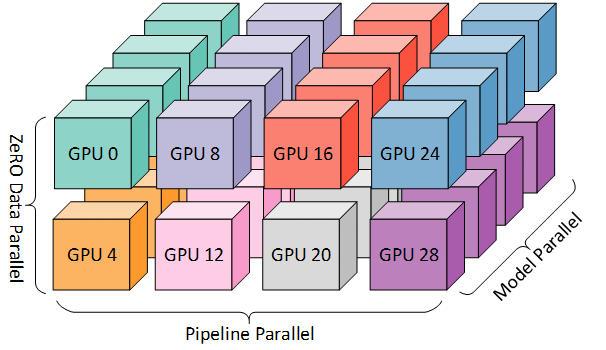
    • {data, tensor, pipeline, sequence, …}
  • ♻️ Checkpoint Converters:
    • Megatron ⇄ 🤗 HF ⇄ ZeRO ⇄ Universal
  • 🔀 DeepSpeed Integration:
    • ZeRO Offloading
    • Activation checkpointing
    • AutoTP (WIP)
    • ability to leverage features from DeepSpeed community
✨ Features (even more!)
  • 🧗 Optimizers3:
    • Support for many different optimizers:
      • Distributed Shampoo, Muon, Adopt, Sophia, Lamb, GaLORE, ScheduleFree, …
    • See full list
    • Large batch training
  • 📊 Experiment Tracking:
    • Automatic experiment and metric tracking with Weights & Biases
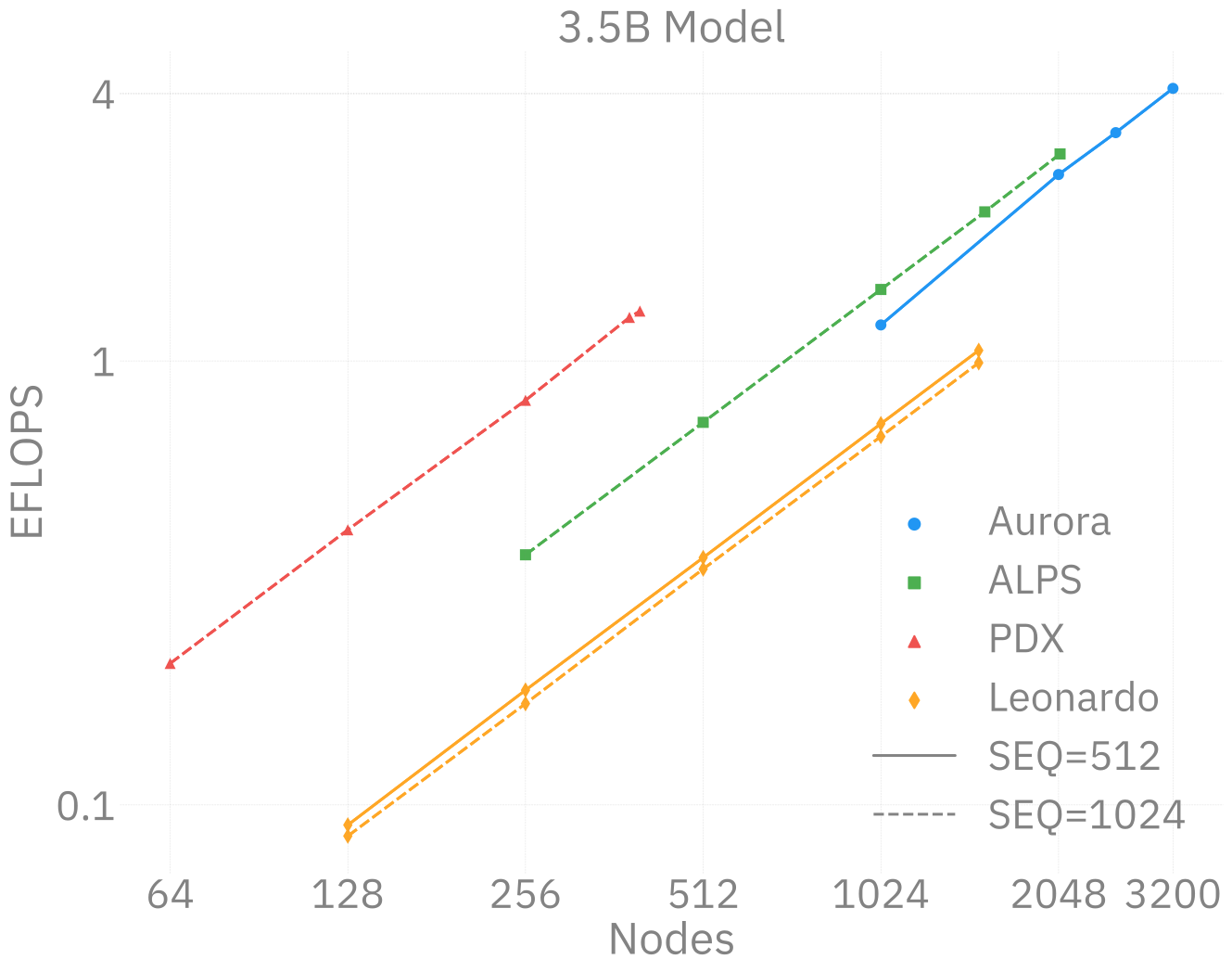
🧬 MProt-DPO 🧬 Scaling Results (2024)
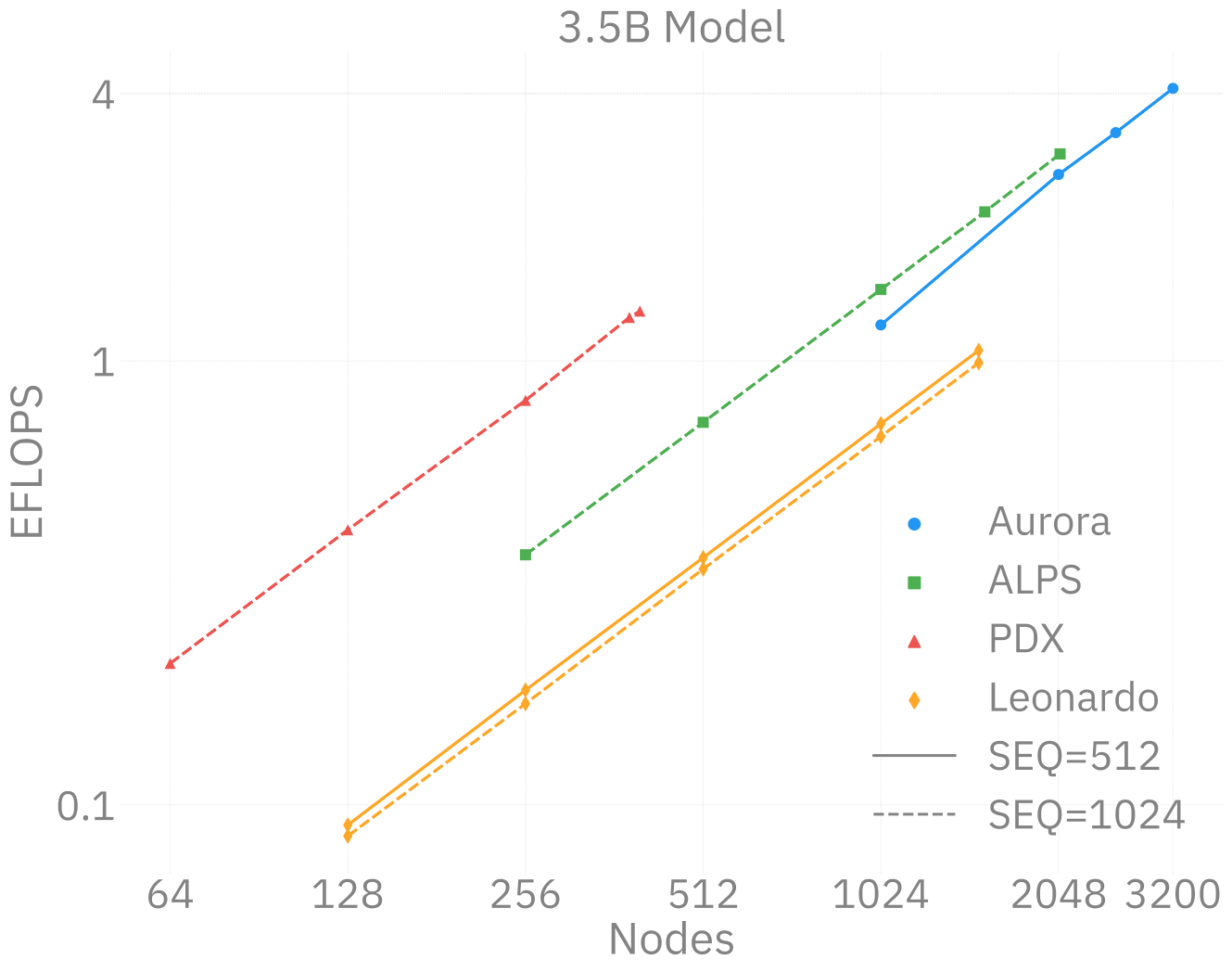
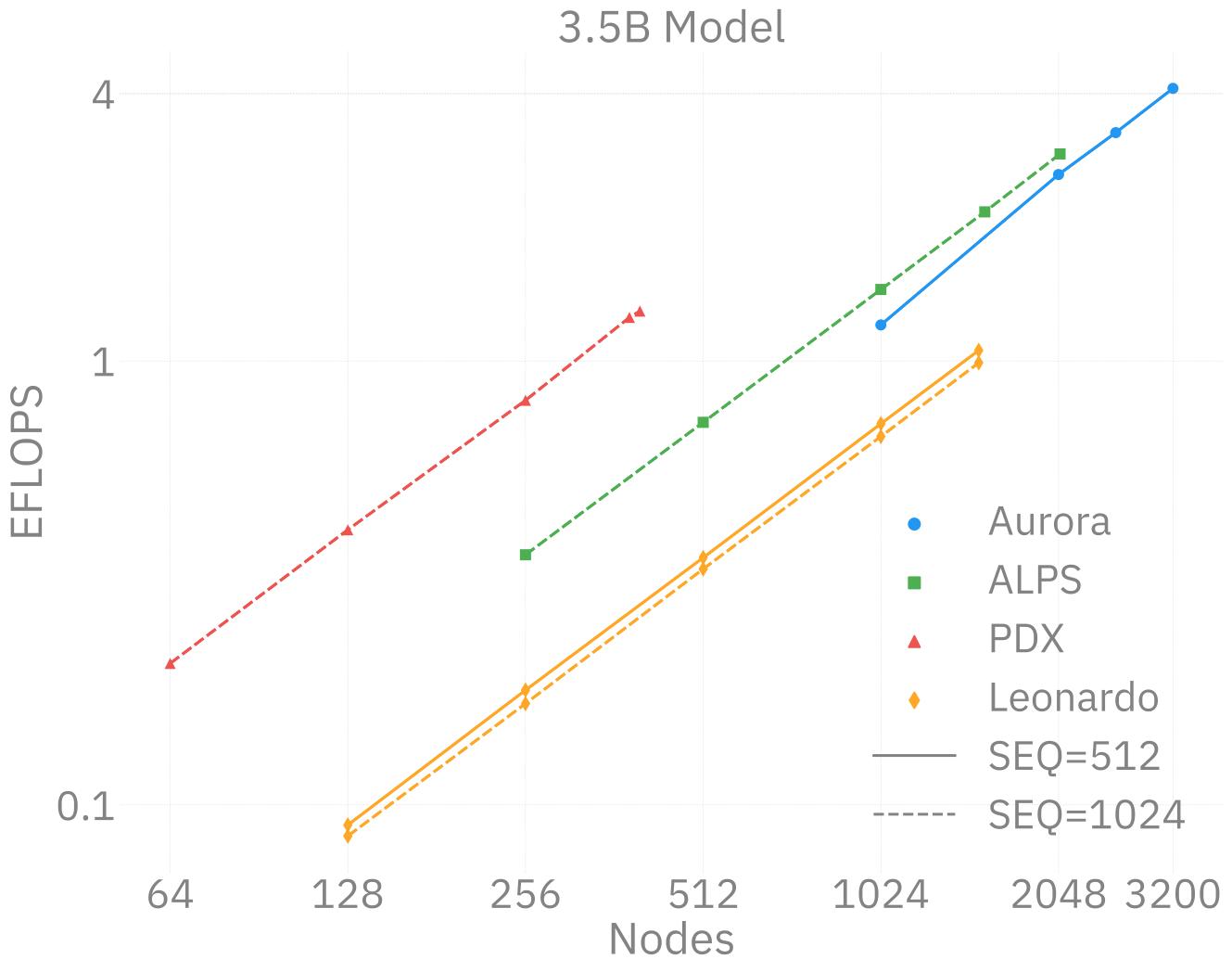
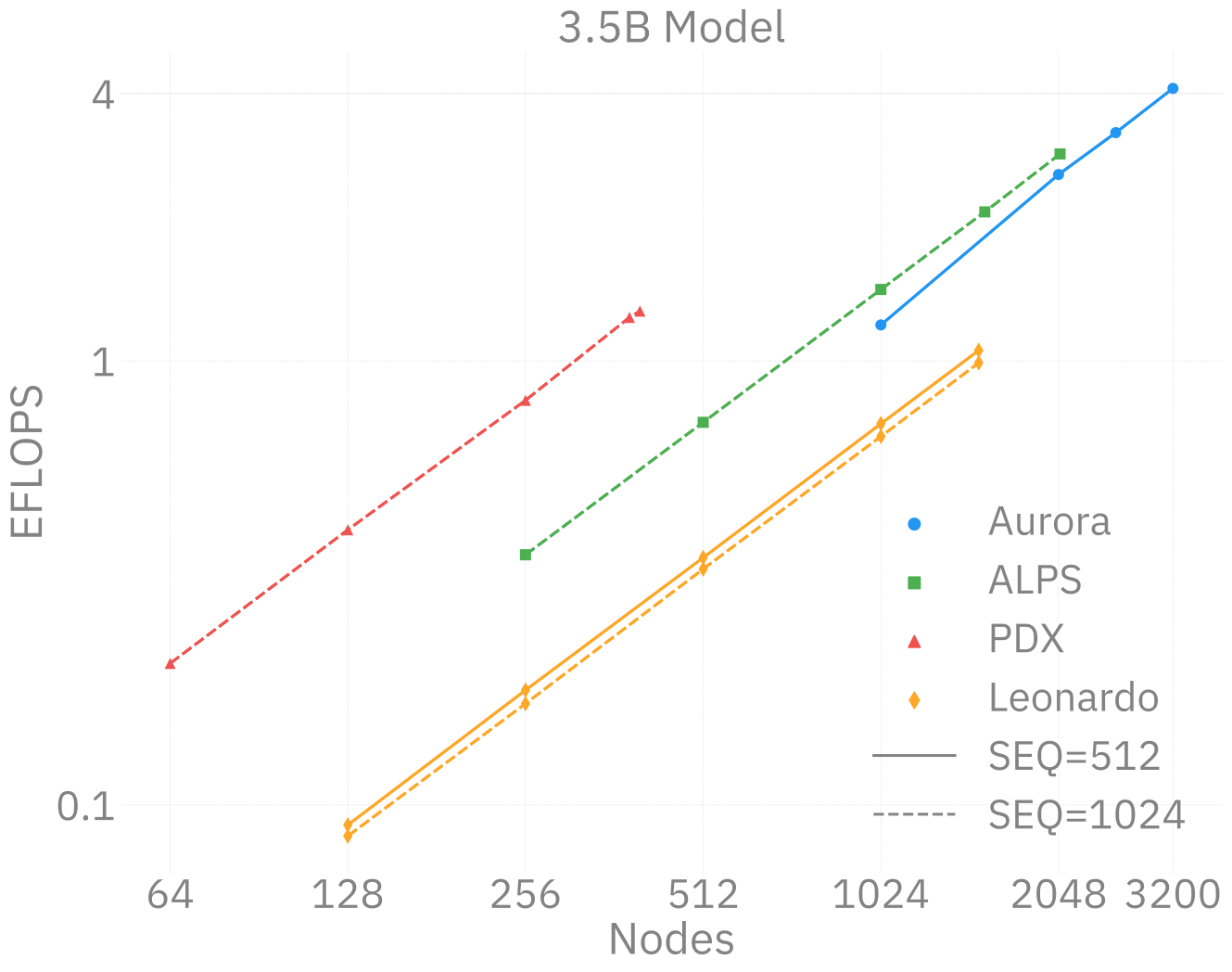
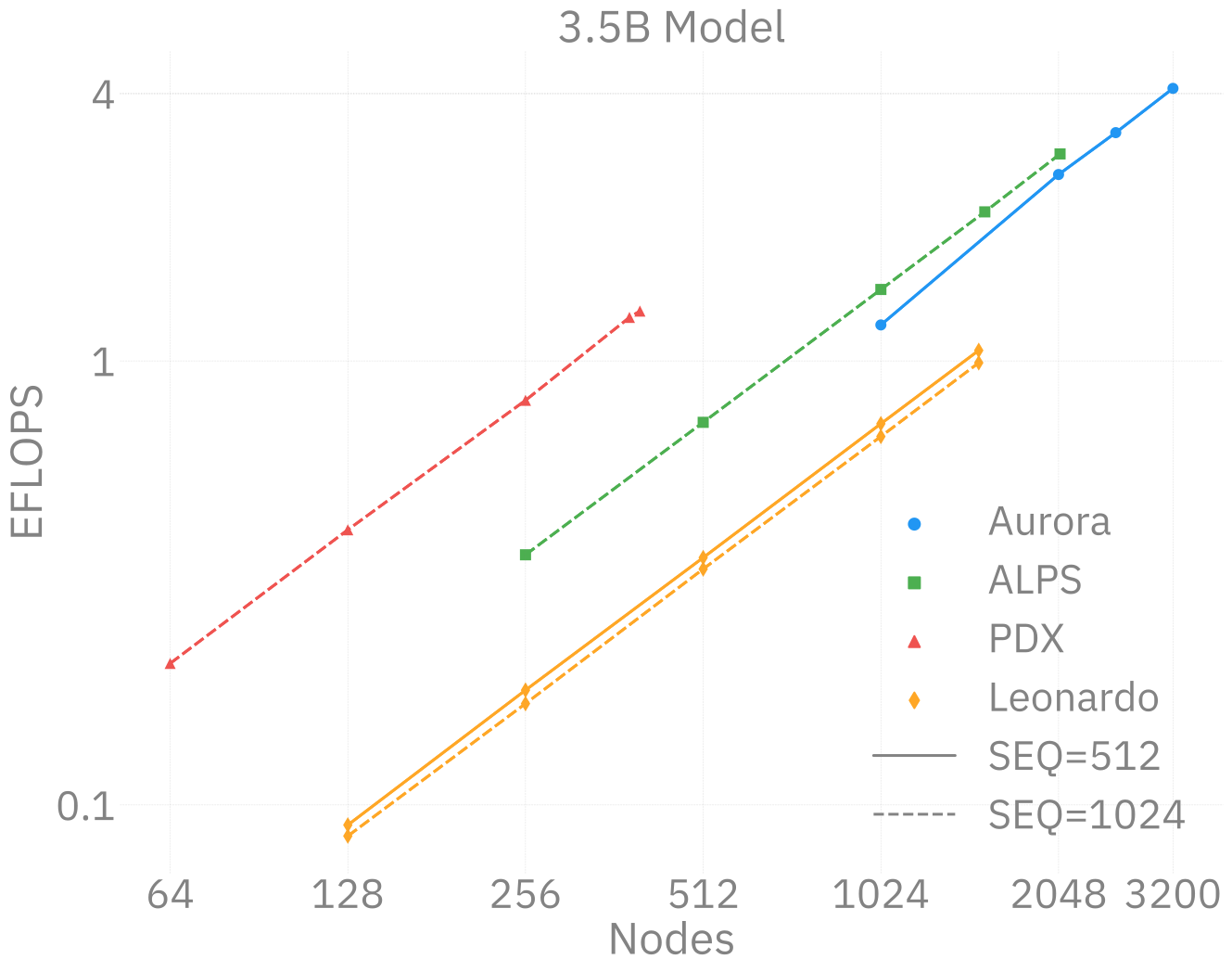
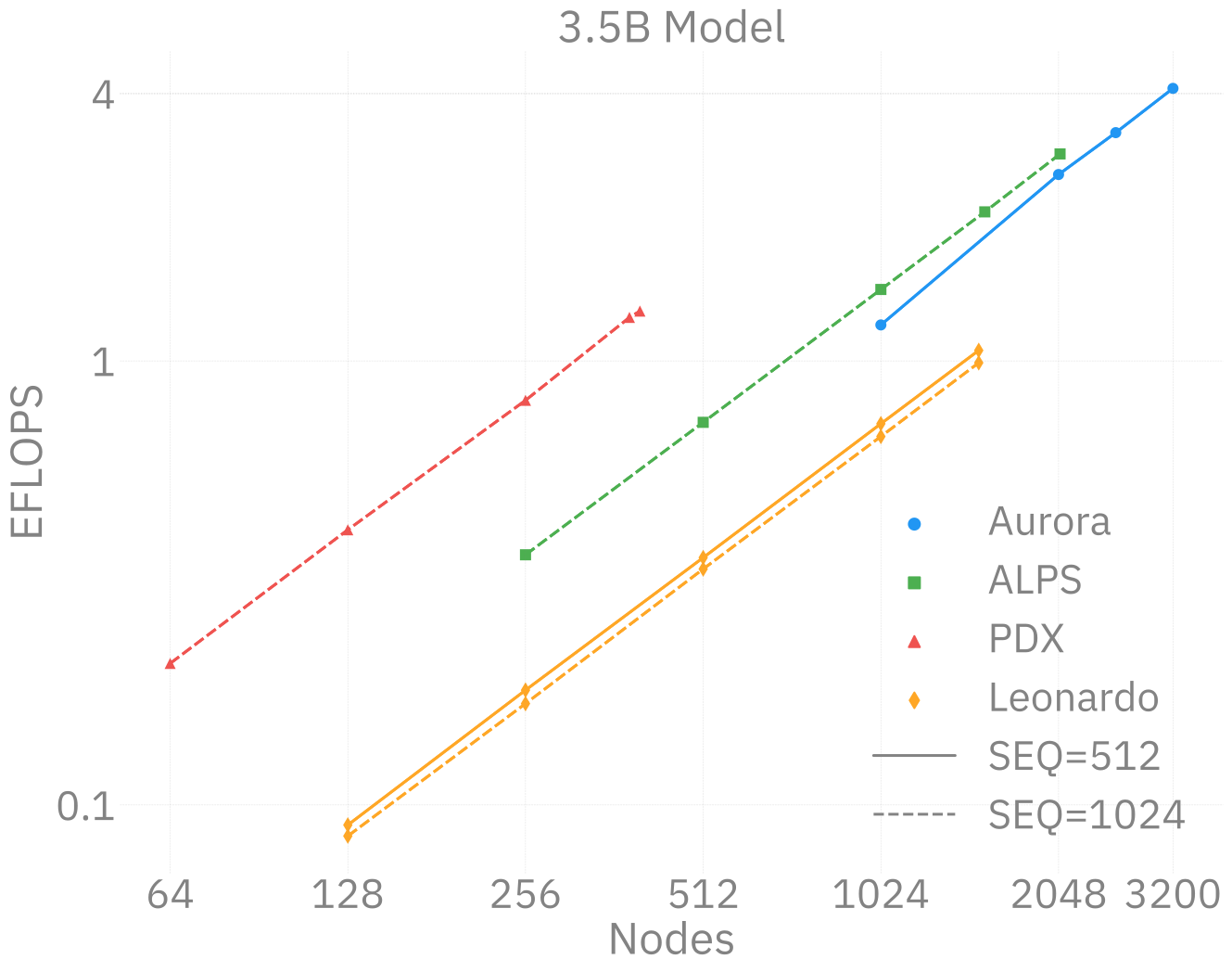
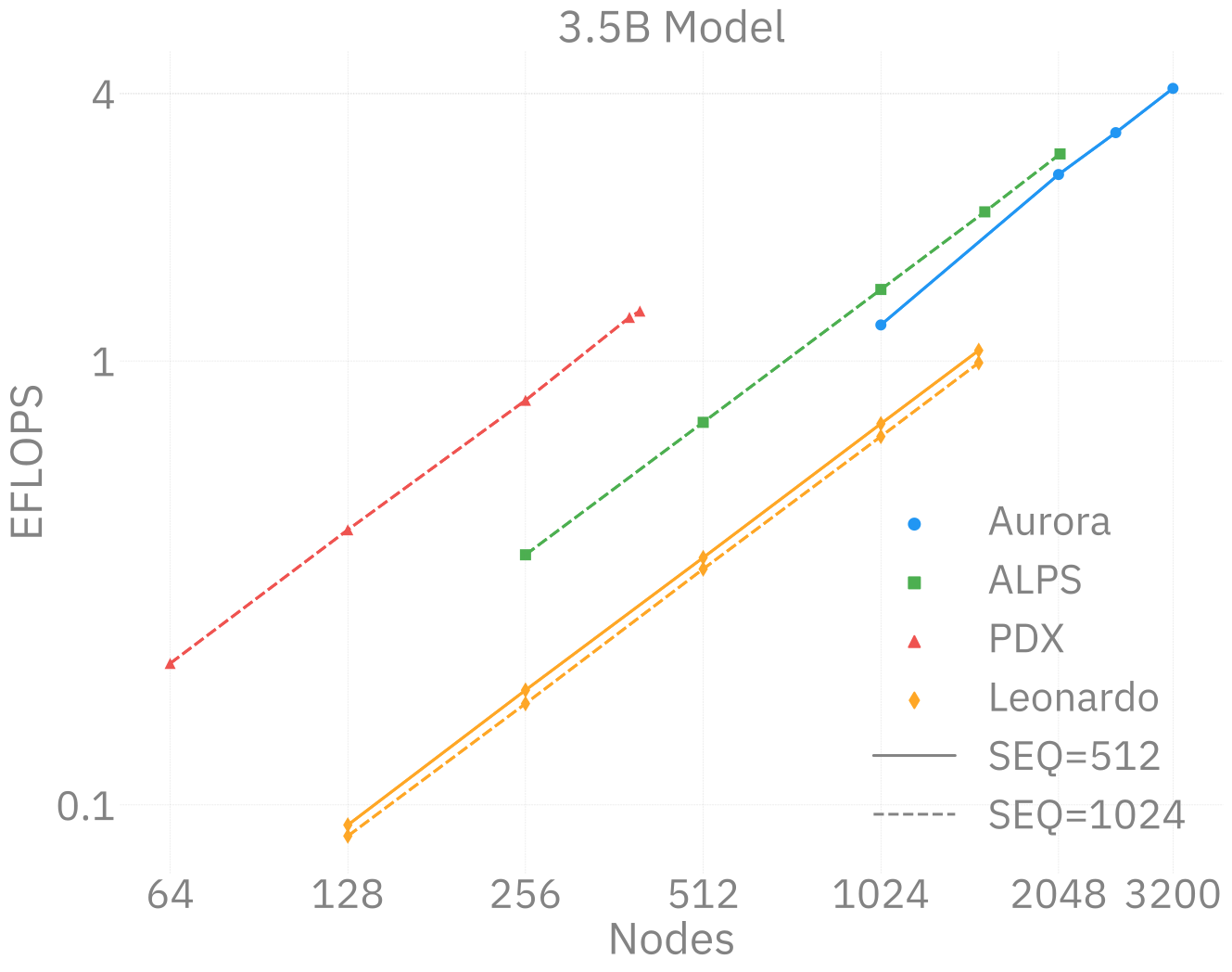
Figure 4: Scaling results for 3.5B model across ~38,400 GPUs

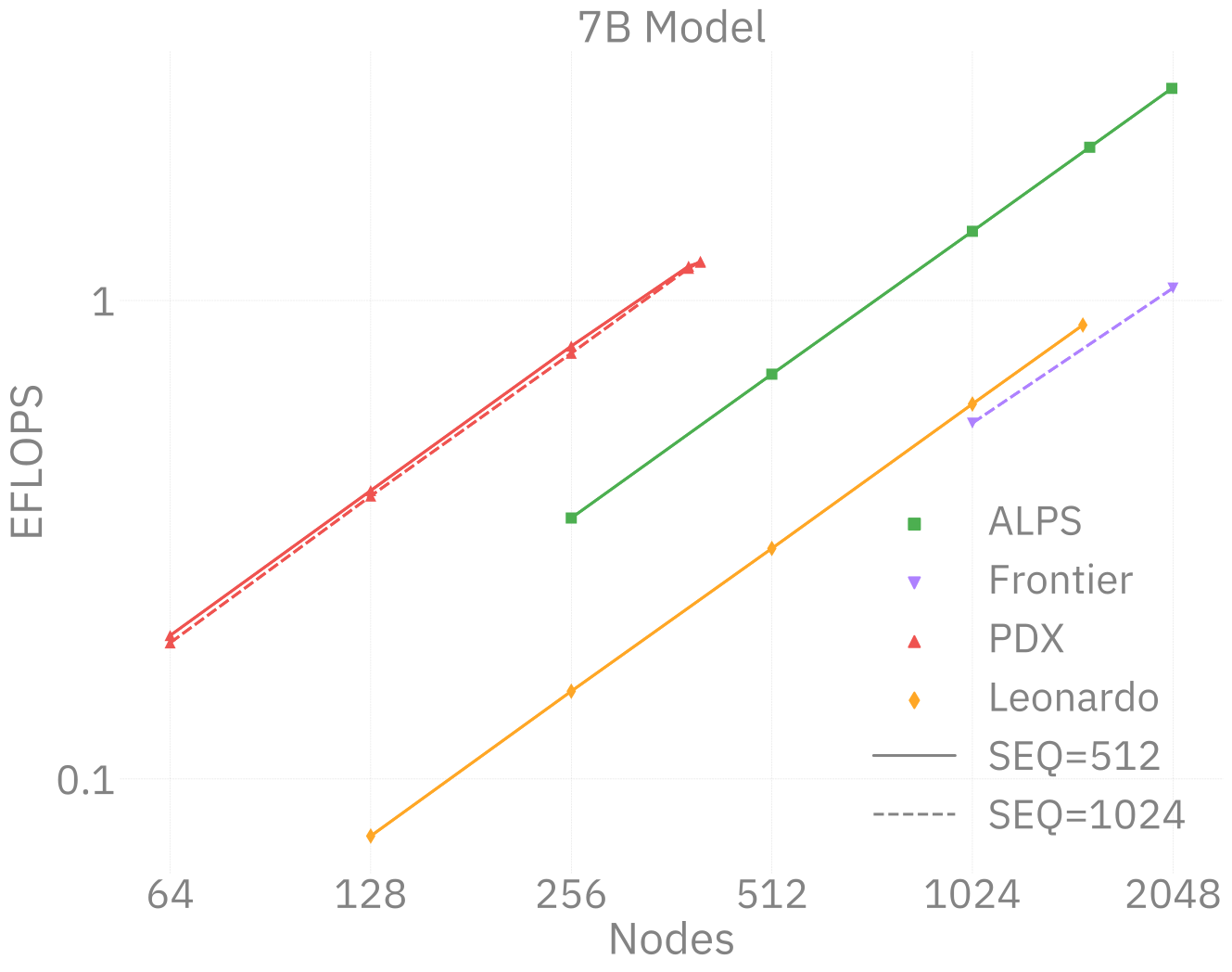
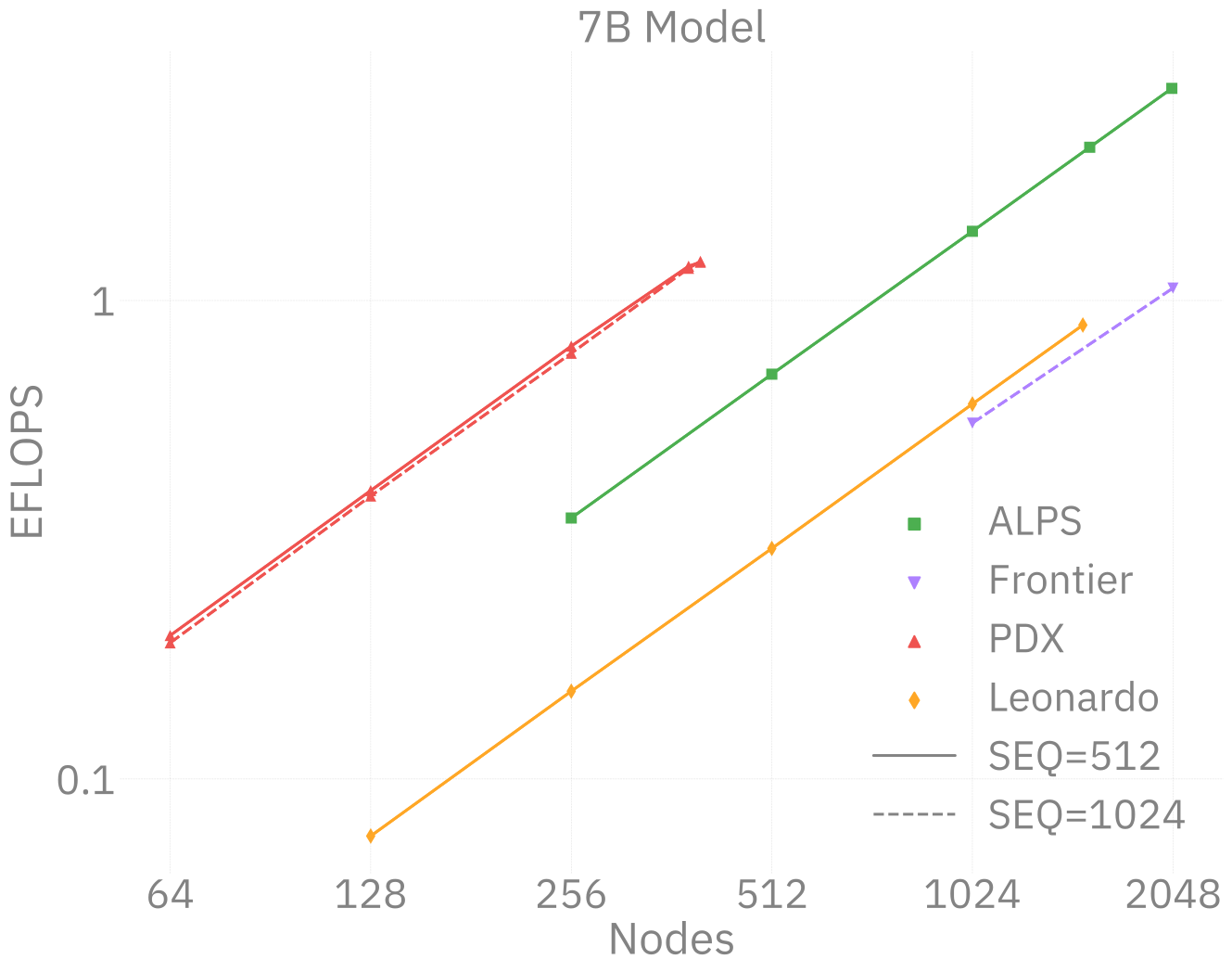
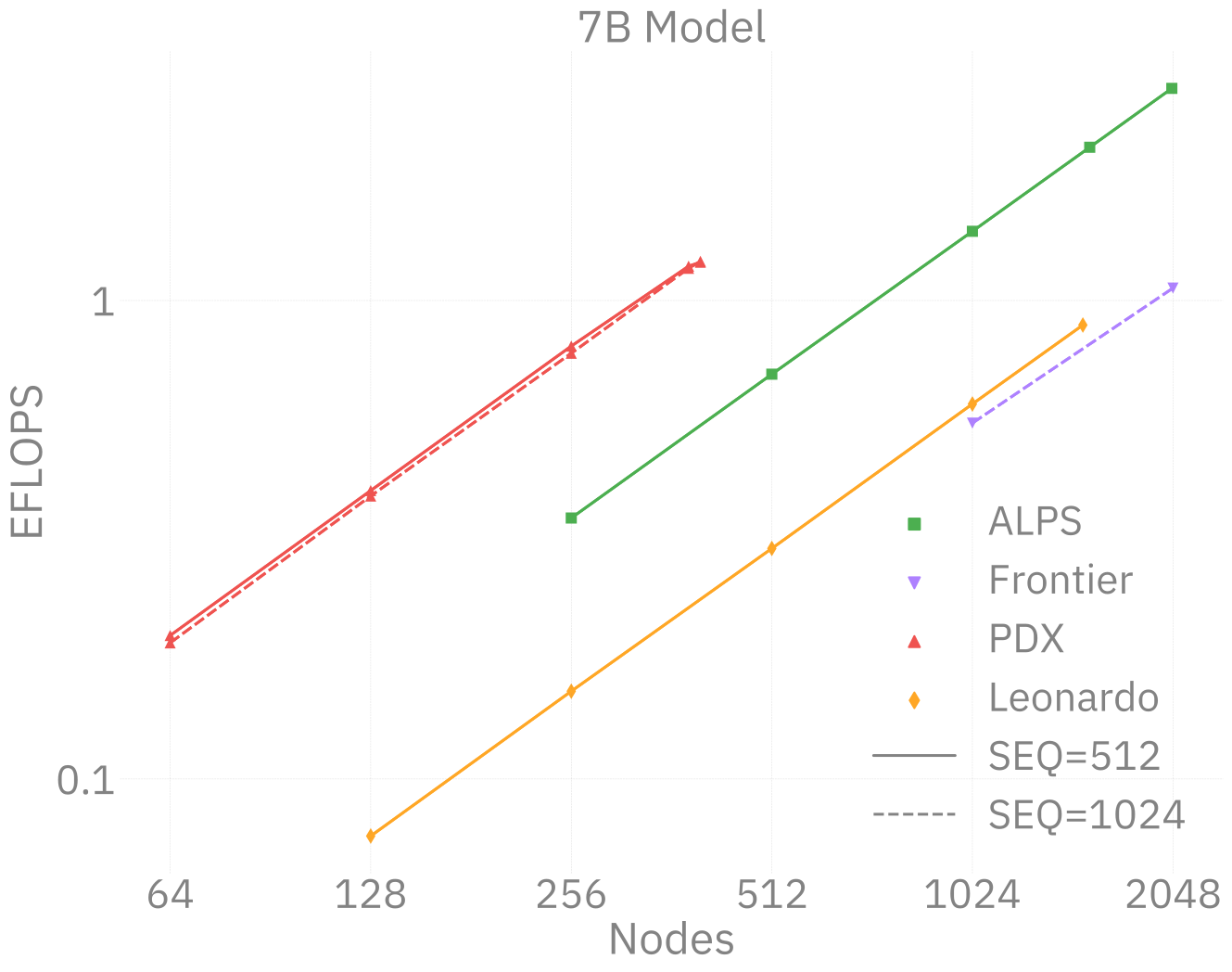
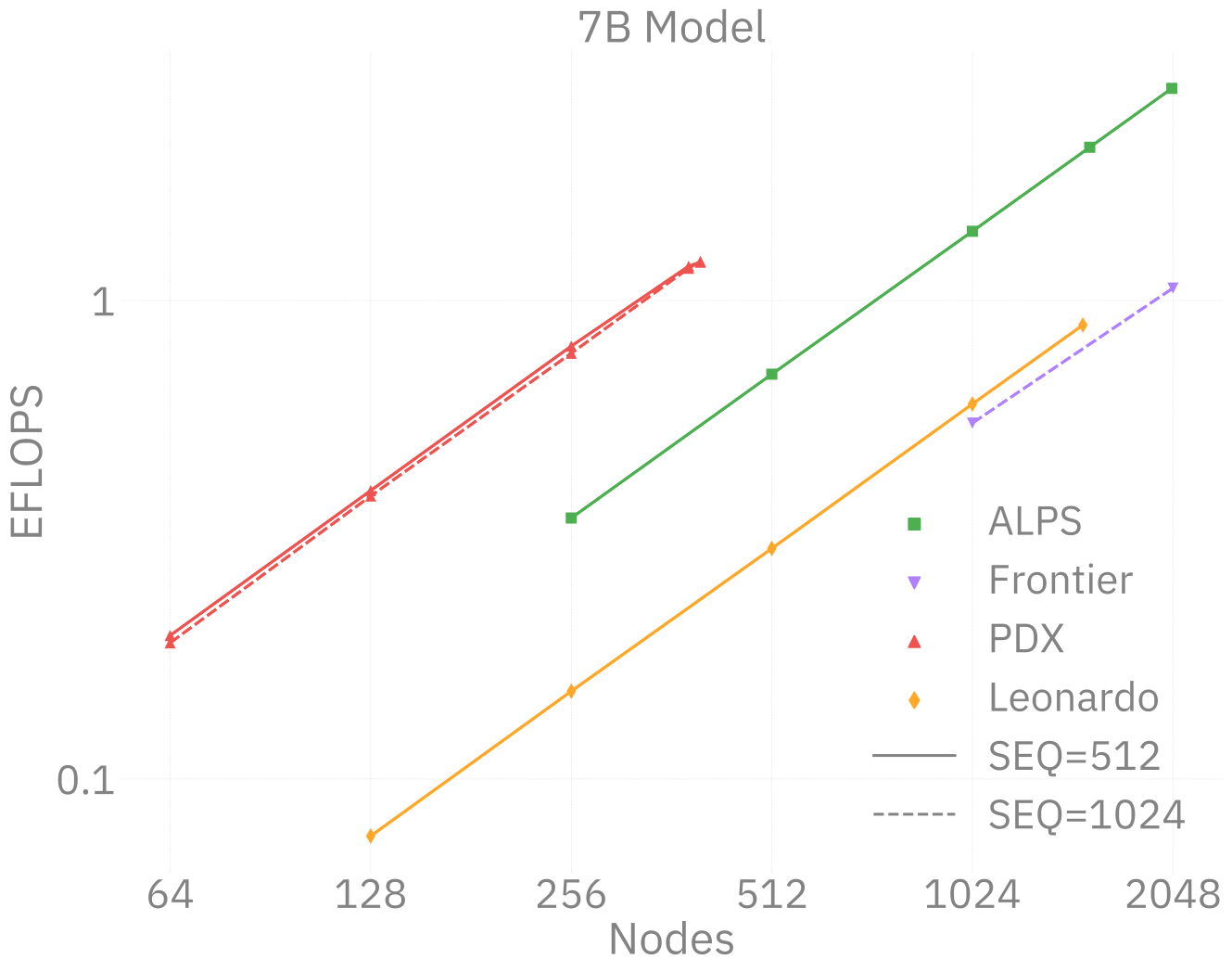
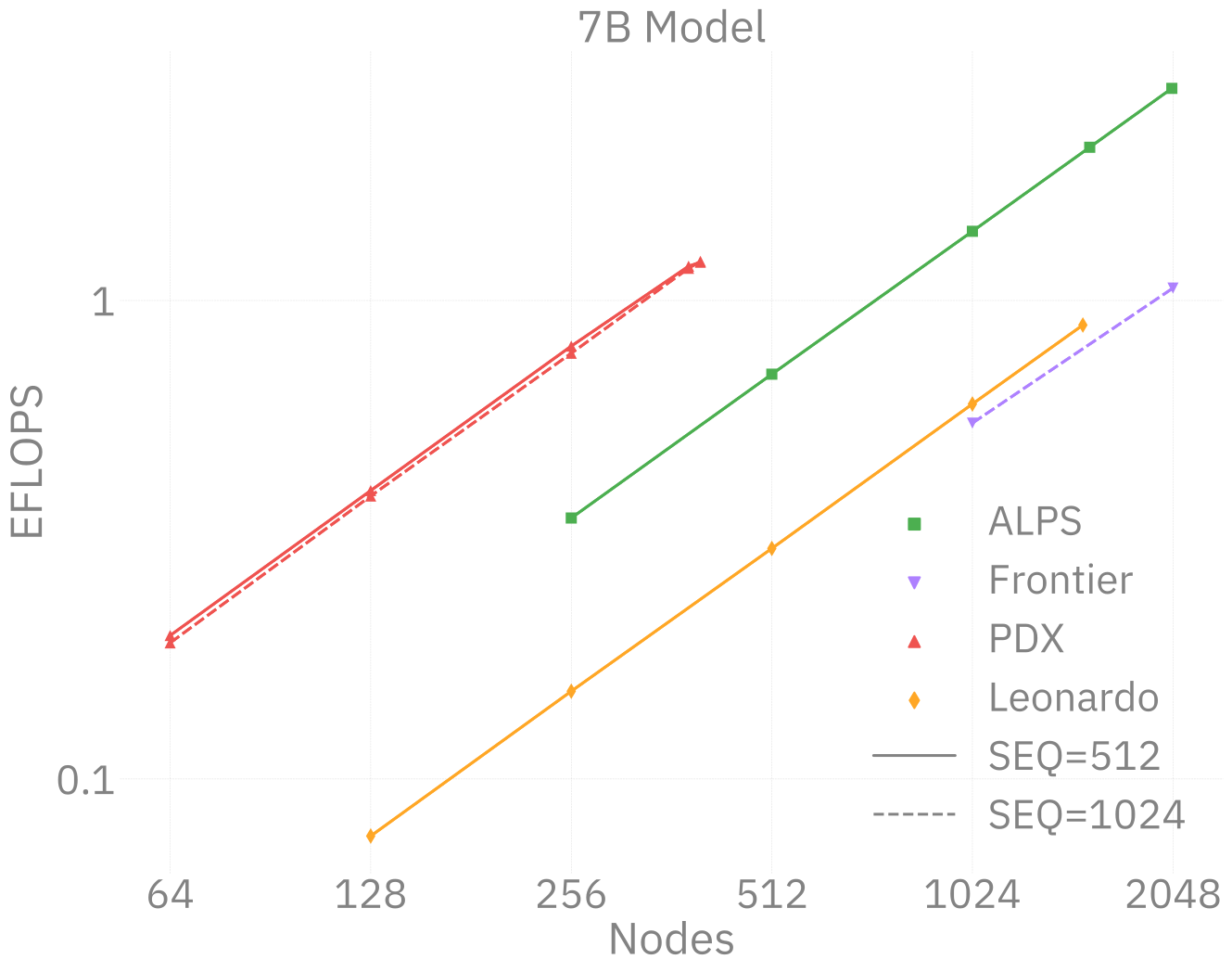
This novel work presents a scalable, multimodal workflow for protein design that trains an LLM to generate protein sequences, computationally evaluates the generated sequences, and then exploits them to fine-tune the model.

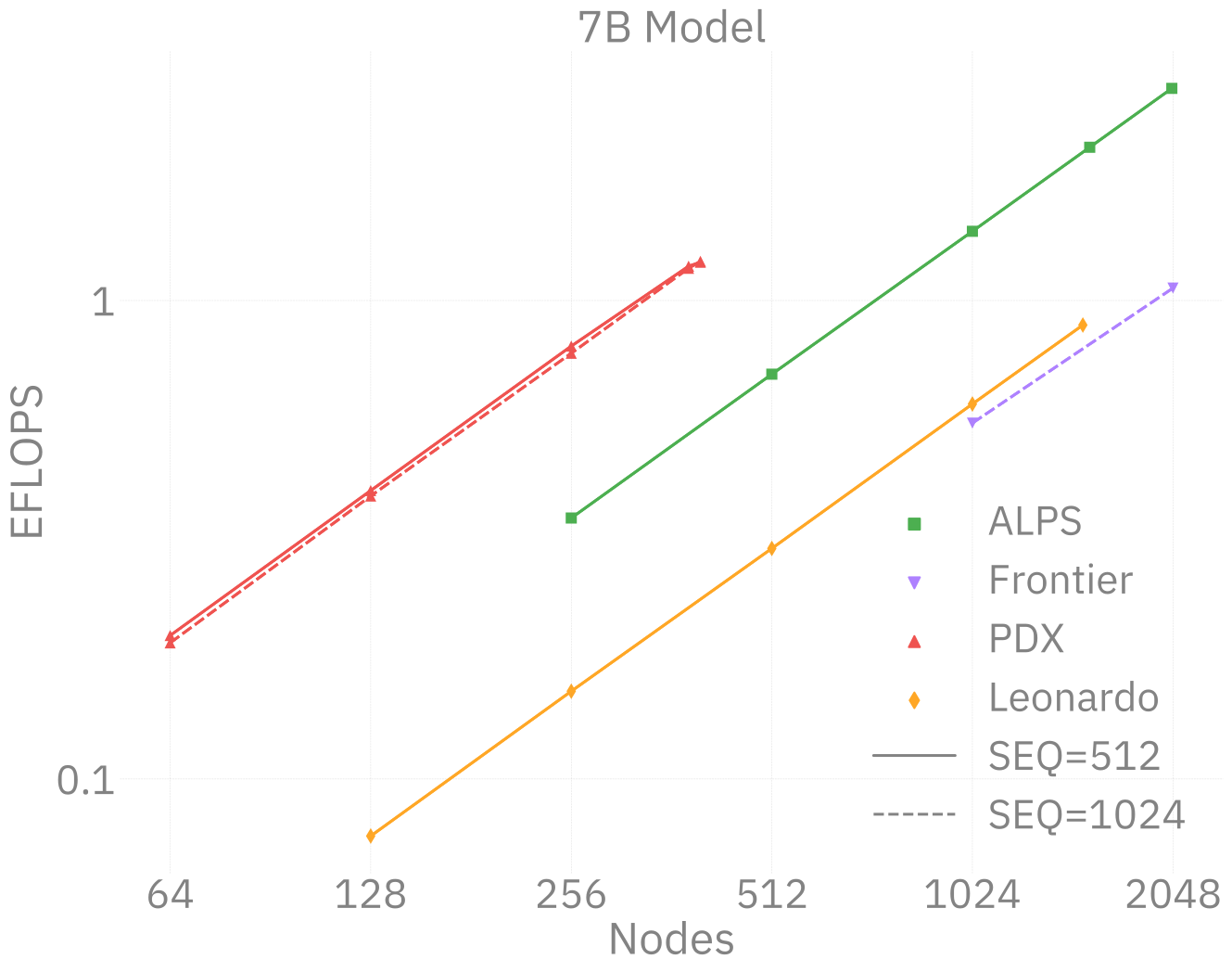
Direct Preference Optimization steers the LLM toward the generation of preferred sequences, and enhanced workflow technology enables its efficient execution. A 3.5B and a 7B model demonstrate scalability and exceptional mixed precision performance of the full workflow on ALPS, Aurora, Frontier, Leonardo and PDX.

🧬 MProt-DPO: Scaling Results
Figure 5: 3.5B model
Figure 6: 7B model
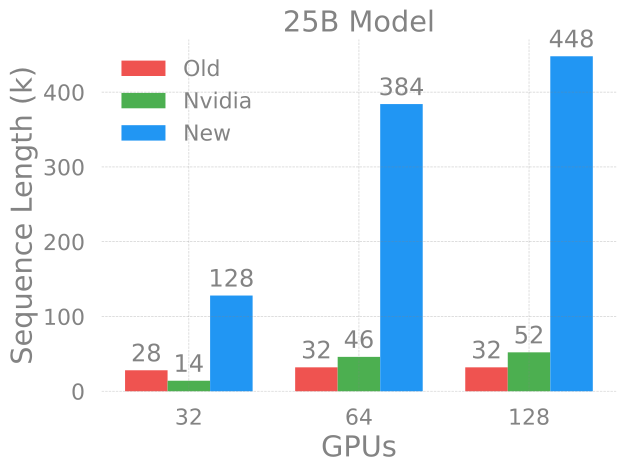
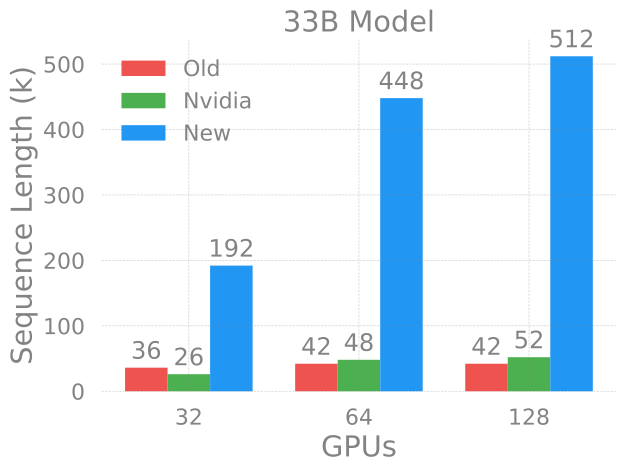
🚂 Loooooooooong Sequence Lengths

25B

33B
Figure 7: Maximum (achievable) SEQ_LEN for both 25B and 33B models (See: Song et al. (2023))

scaling4science
Megatron-DS-Benchmarking

🌎 AERIS (2025)
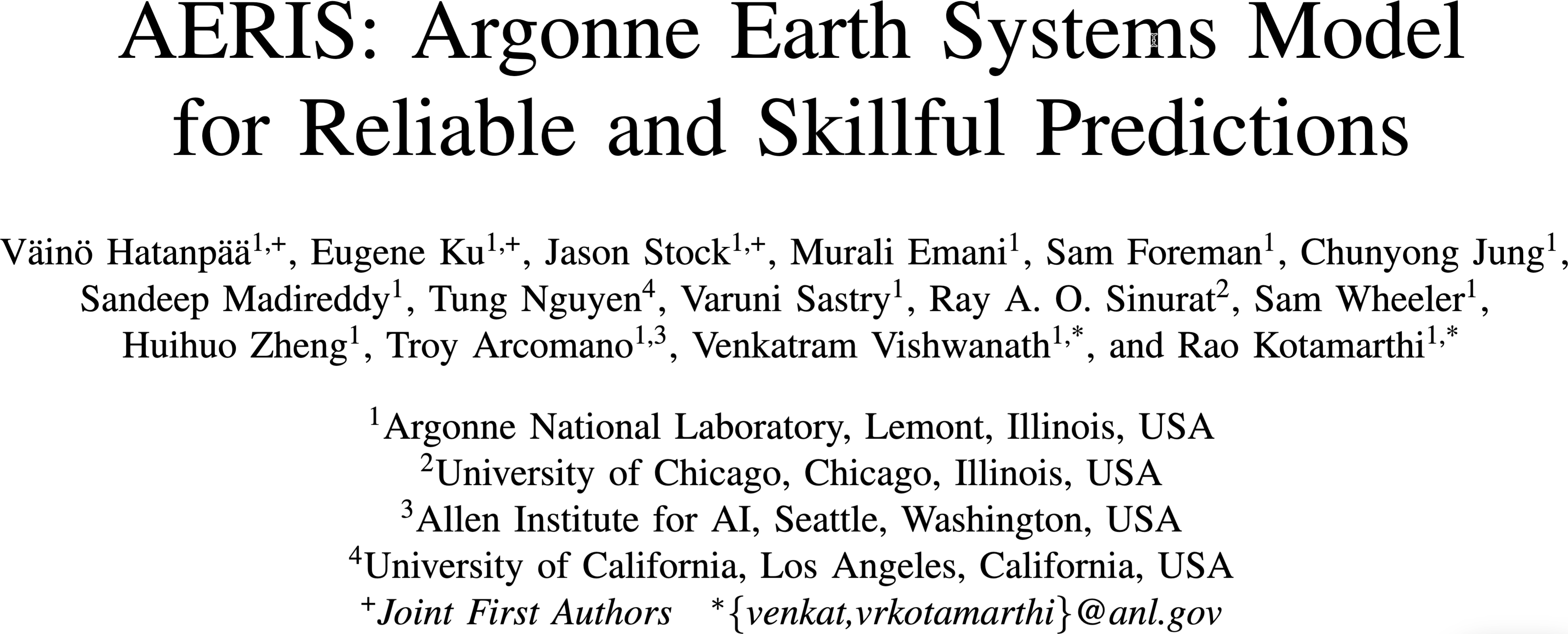
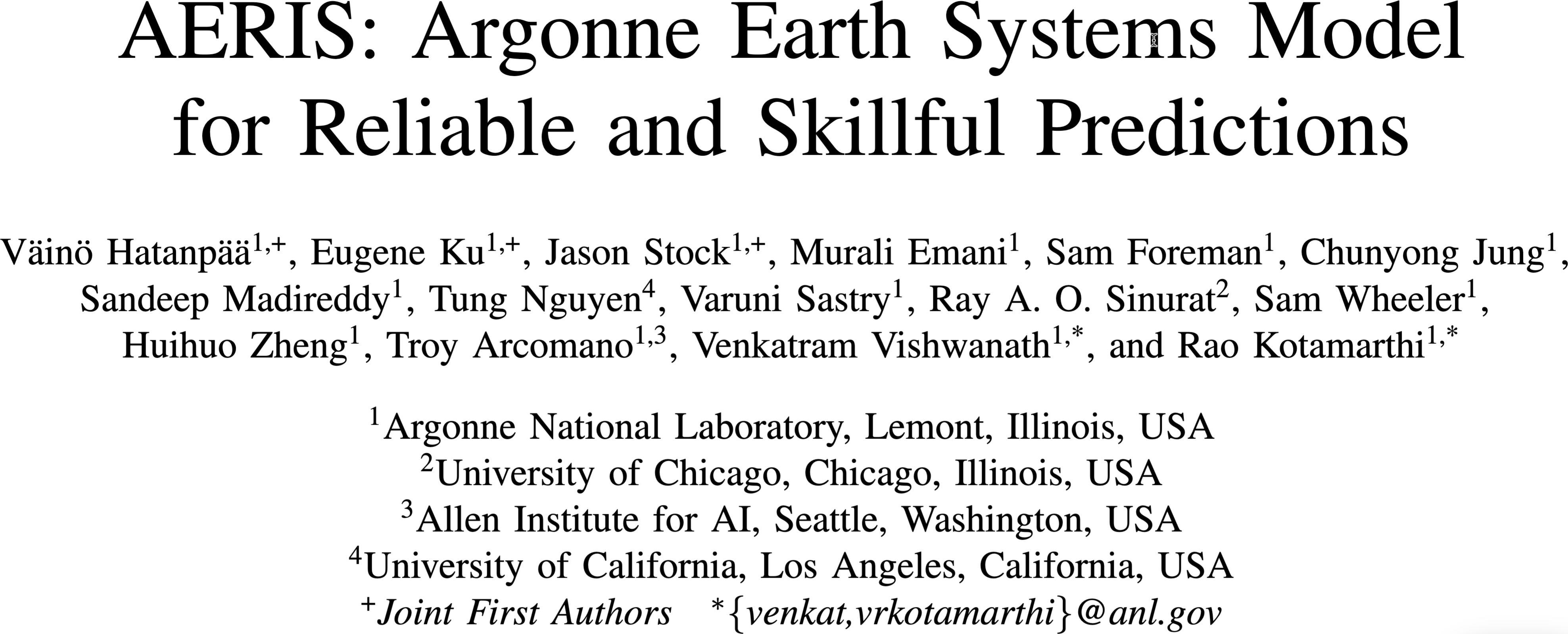
Figure 8: arXiv:2509.13523

ACM Gordon Bell Prize for Climate Modeling Finalist @ SC’25

ACM Gordon Bell Prize for Climate Modeling Finalist @ SC’25

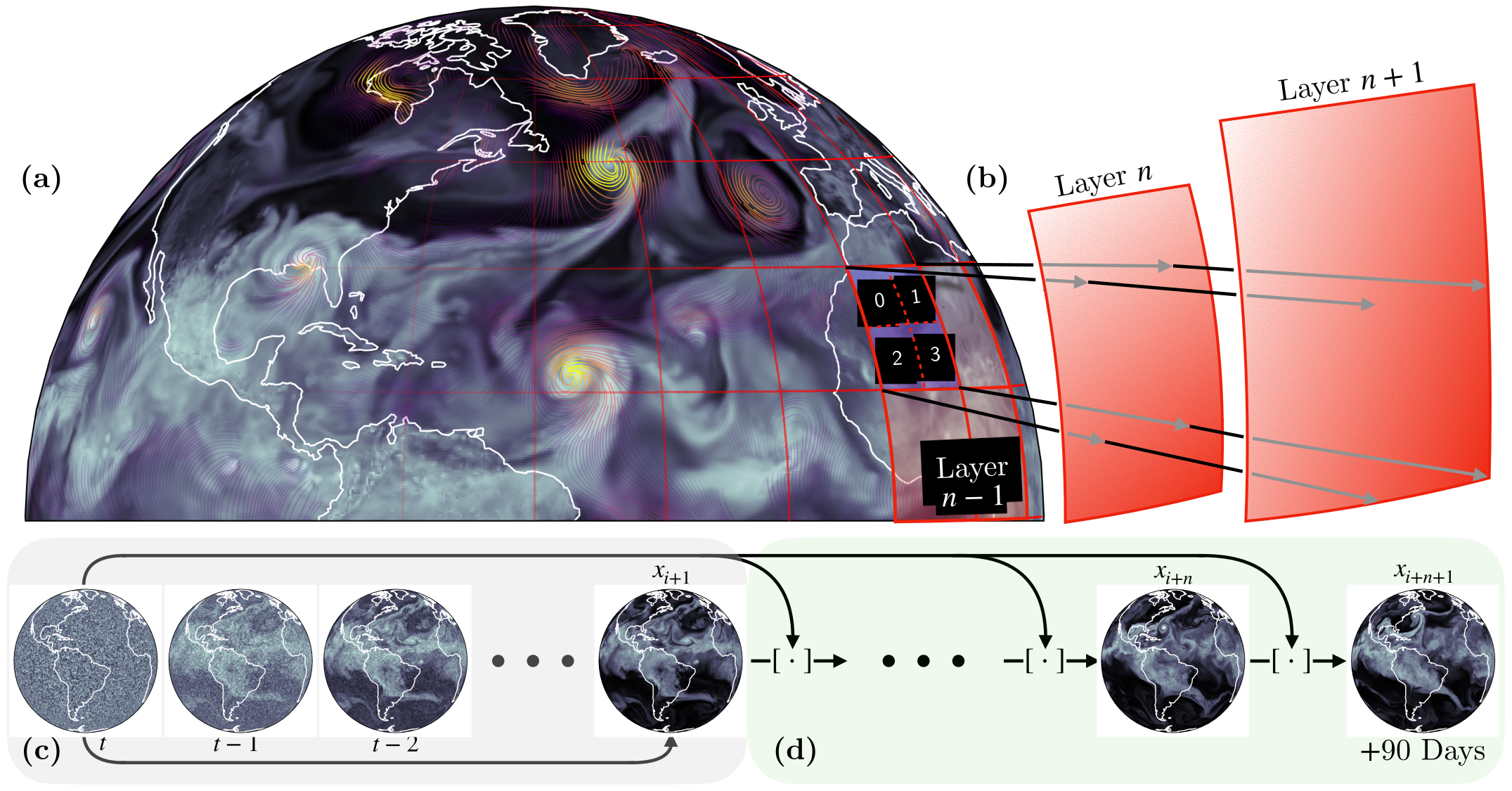
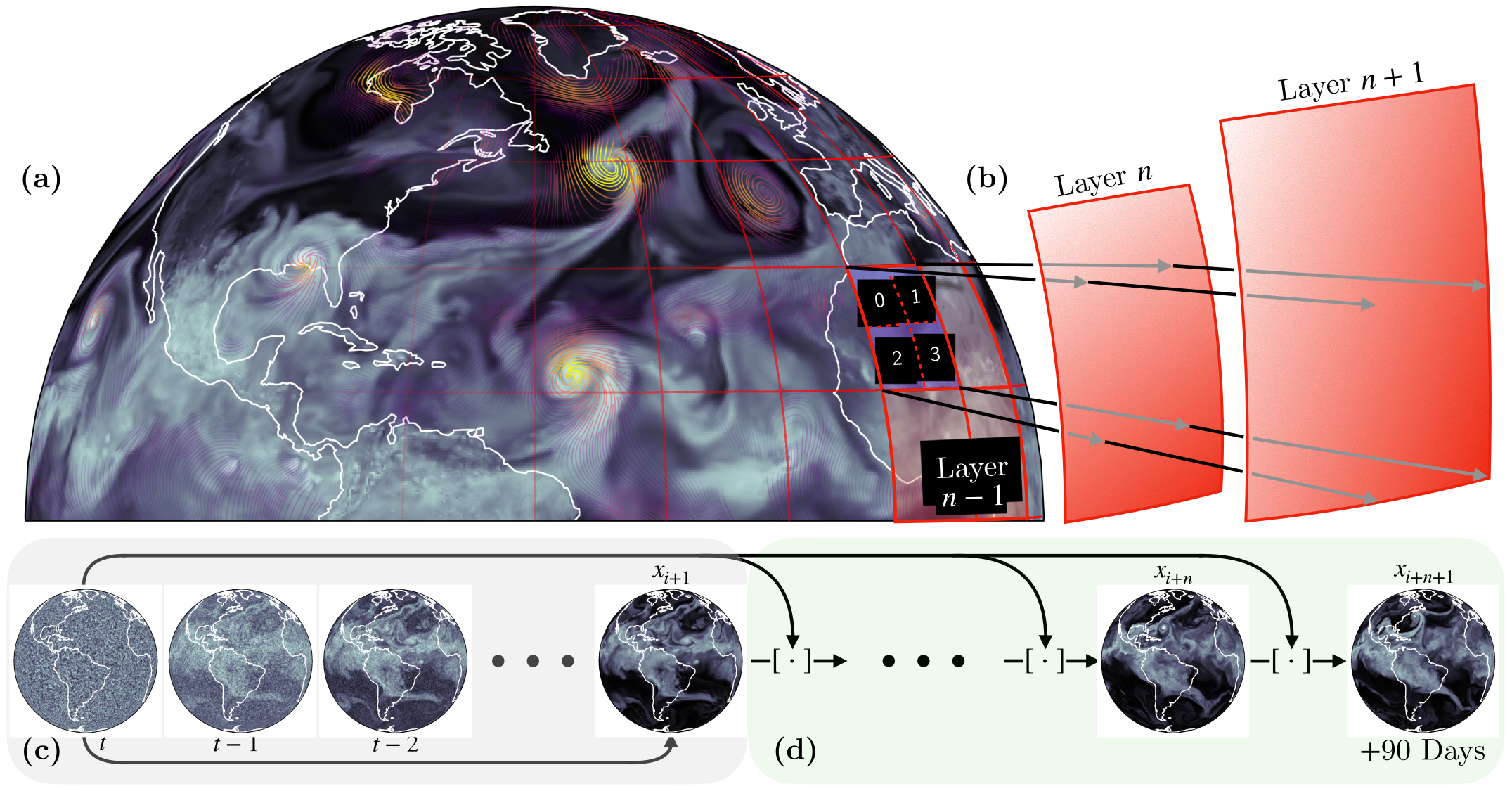
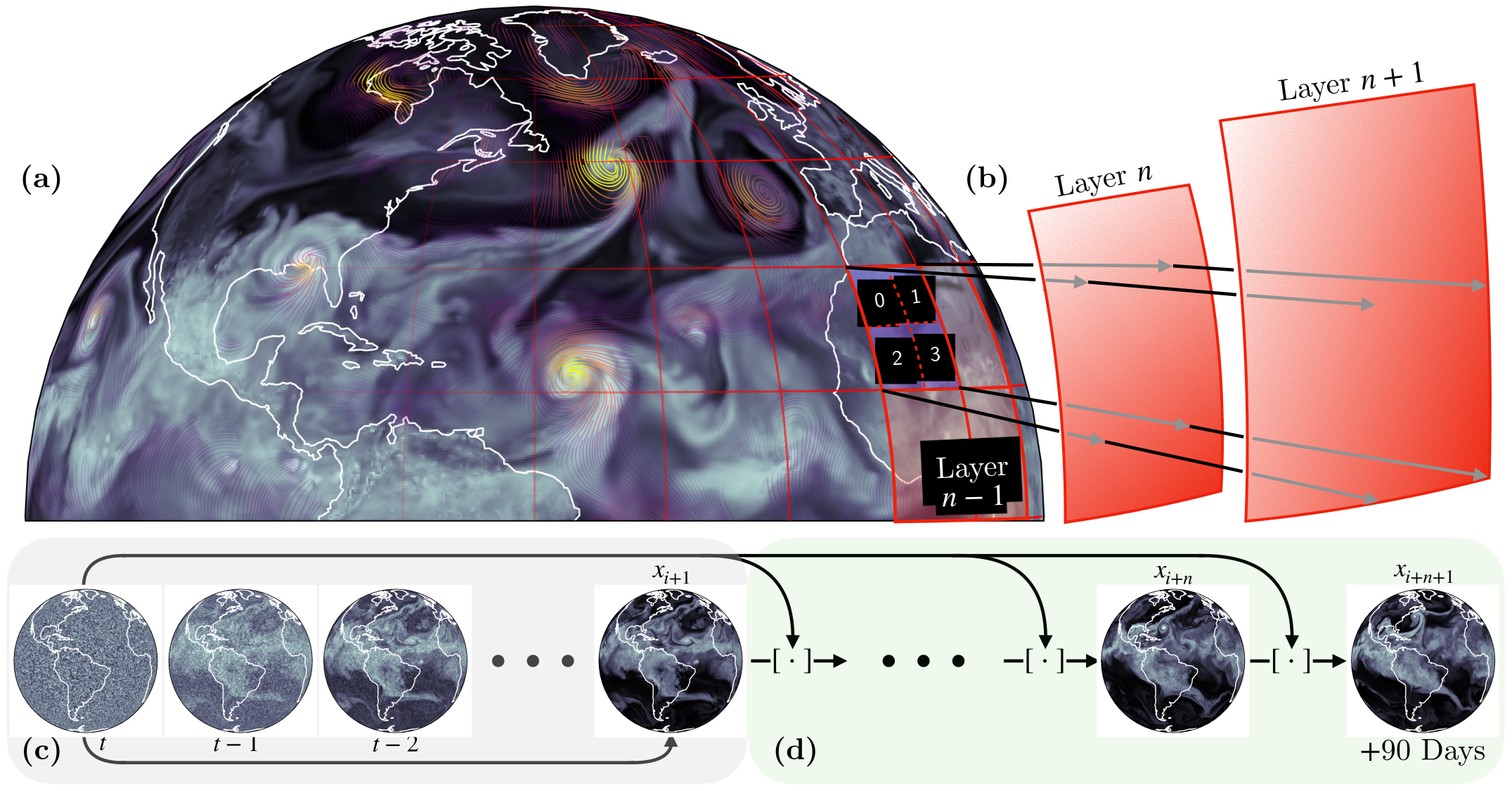
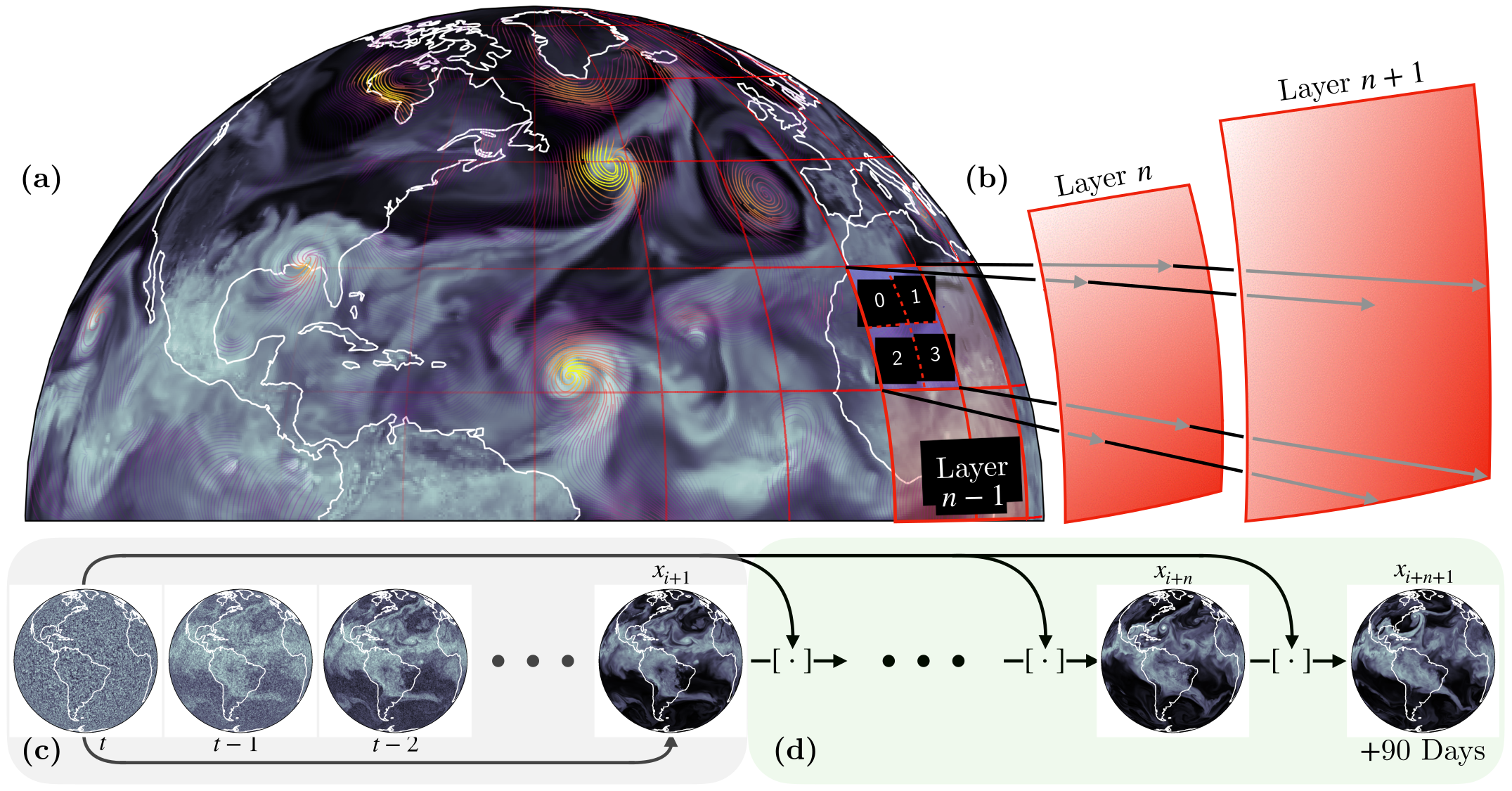
We demonstrate a significant advancement in AI weather and climate modeling with AERIS by efficient scaling of window-based transformer models. We have performed global medium-range forecasts with performance competitive with GenCast and surpassing the IFS ENS model, with longer, 90- day rollouts showing our ability to learn atmospheric dynamics on seasonal scales without collapsing, becoming the first diffusion-based model that can work across forecast scales from 6 hours all the way to 3 months with remarkably accurate out of distribution predictions of extreme events.

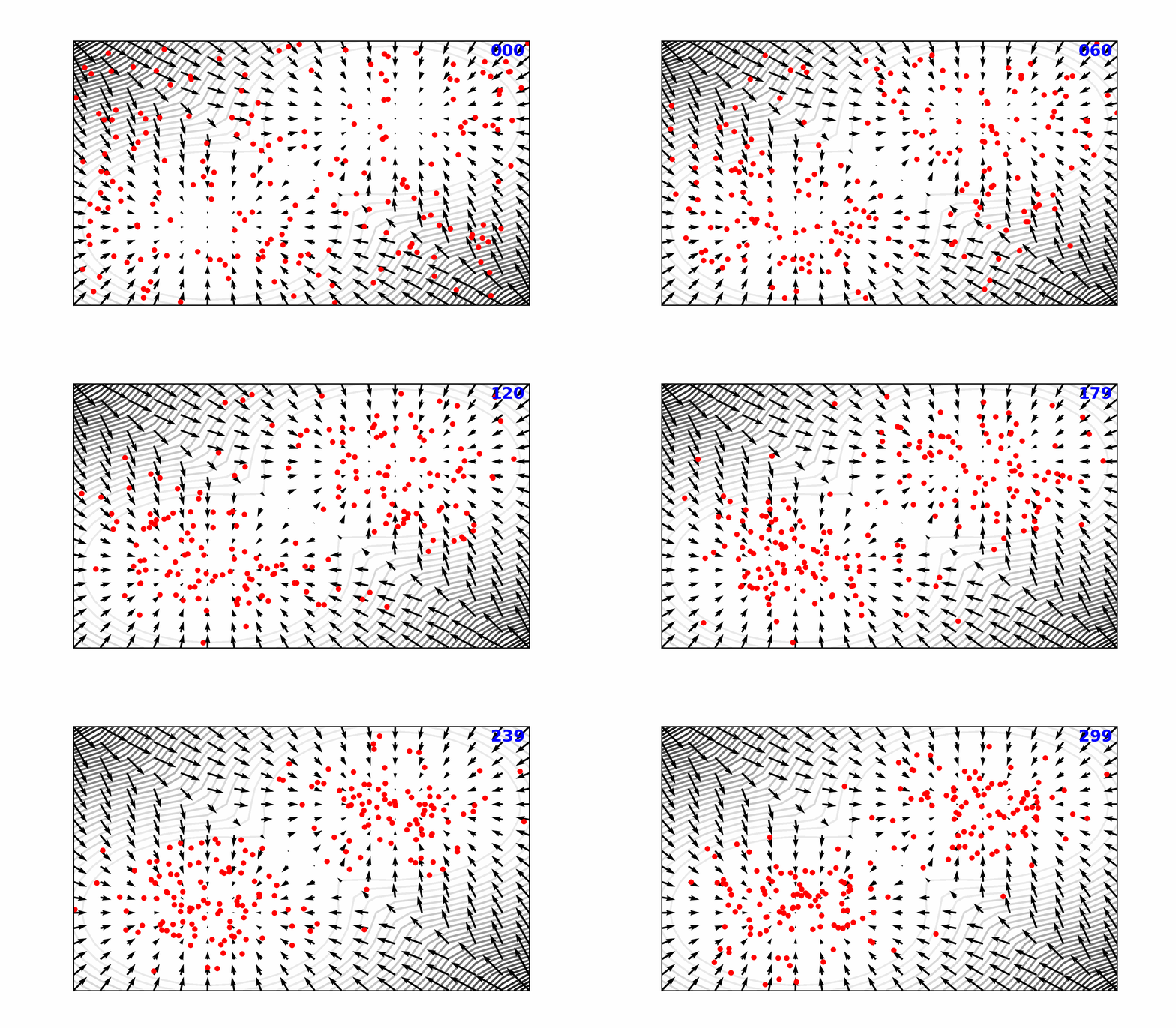
👀 High-Level Overview of AERIS
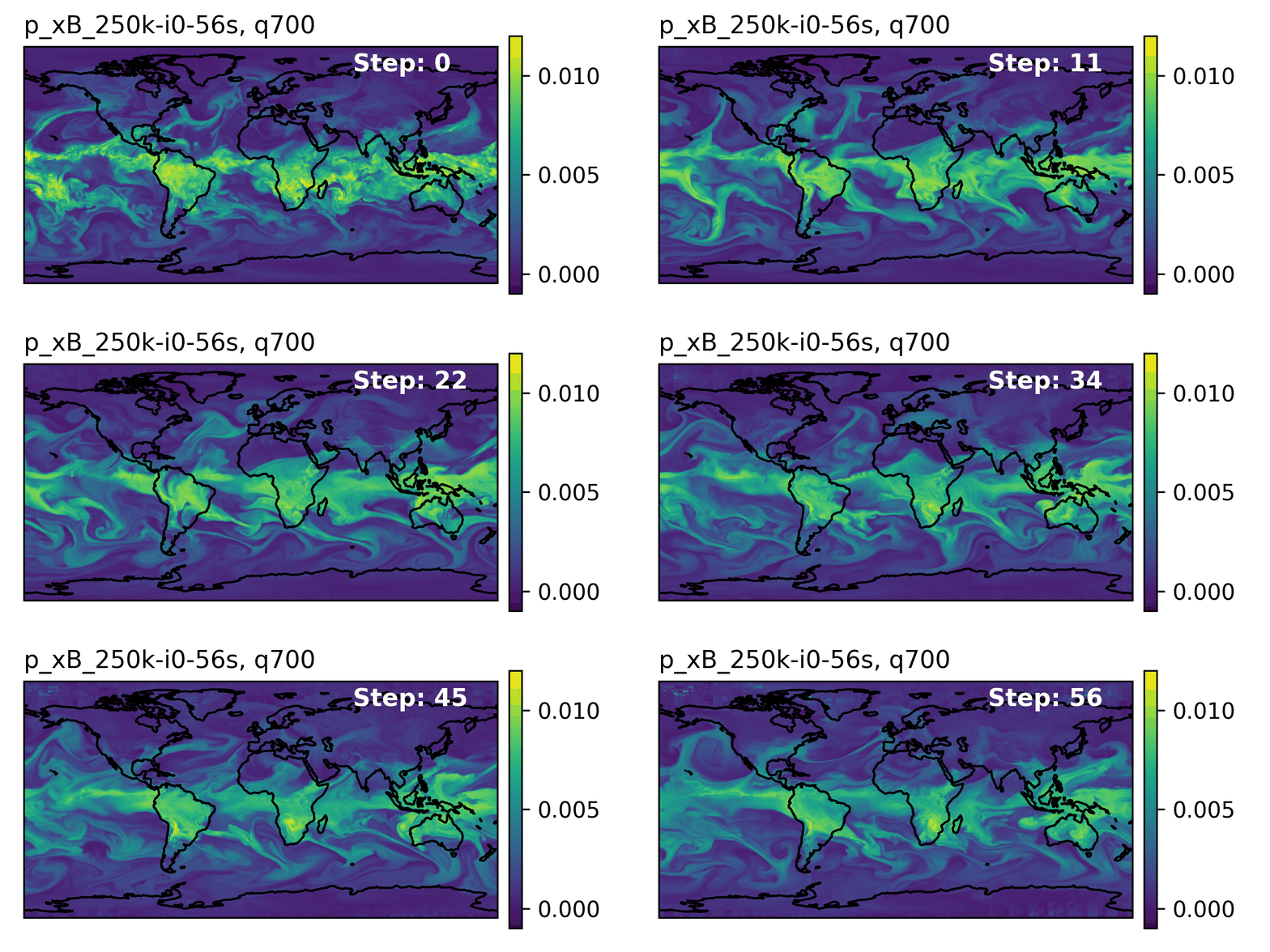
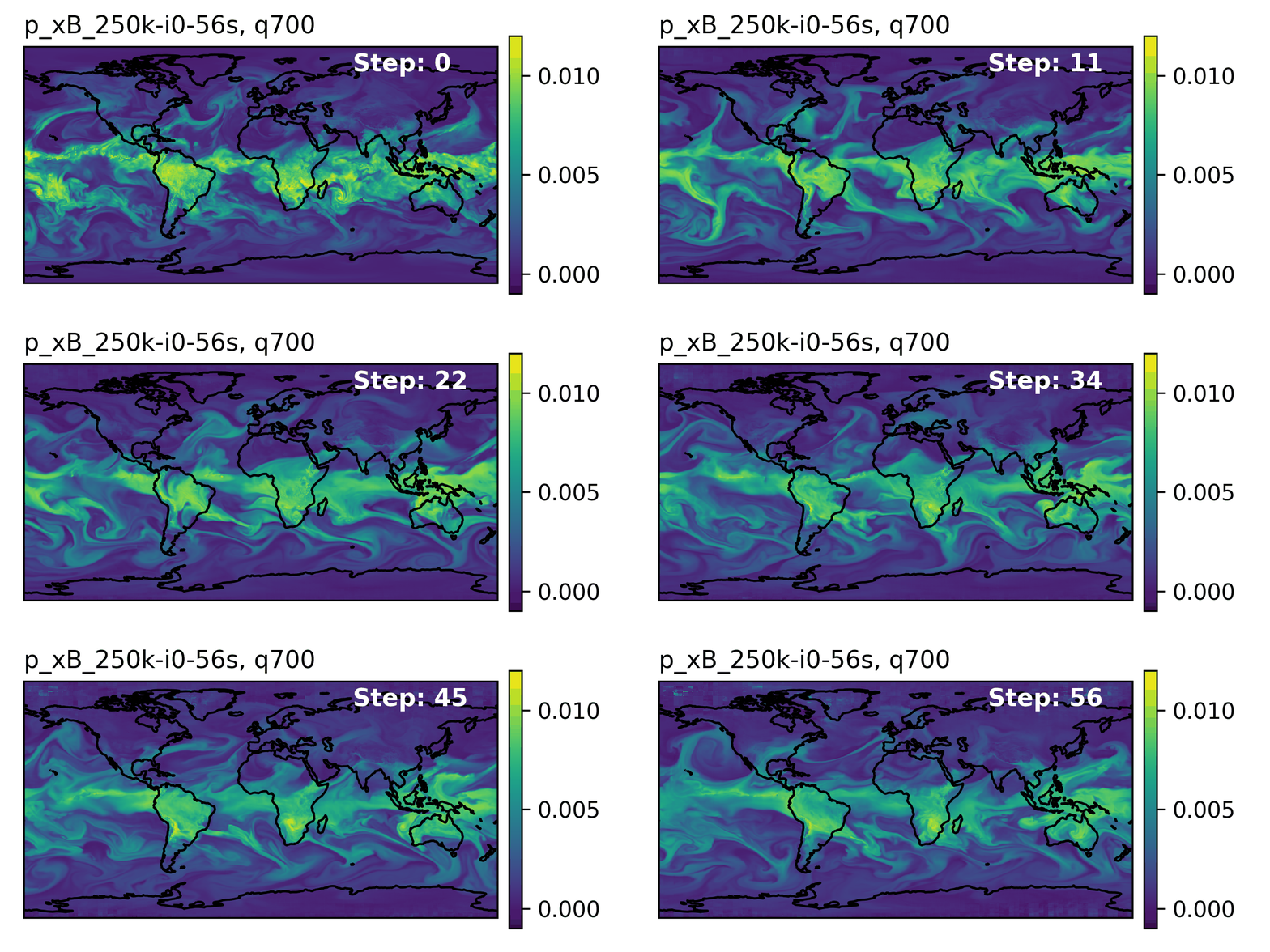
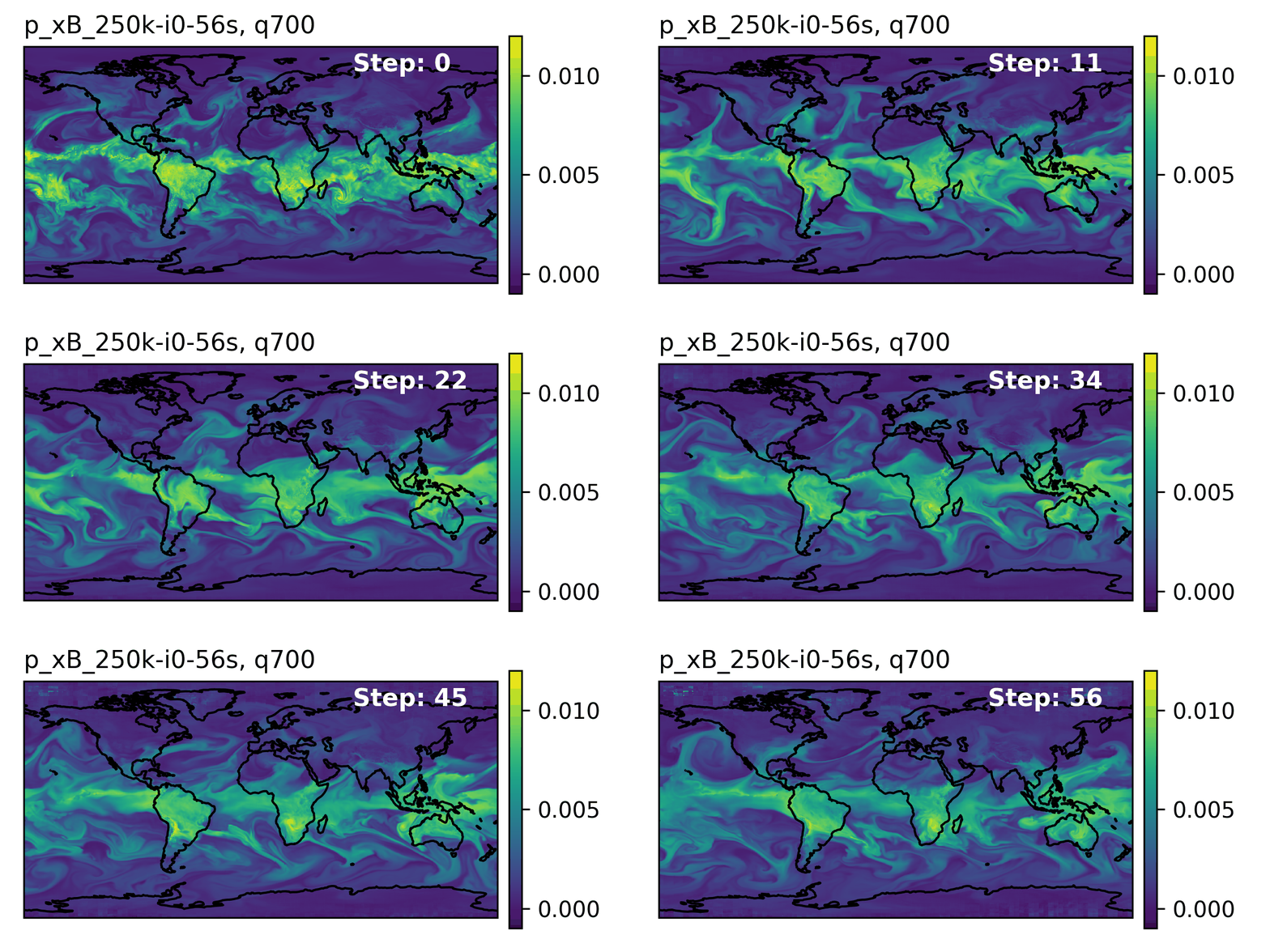
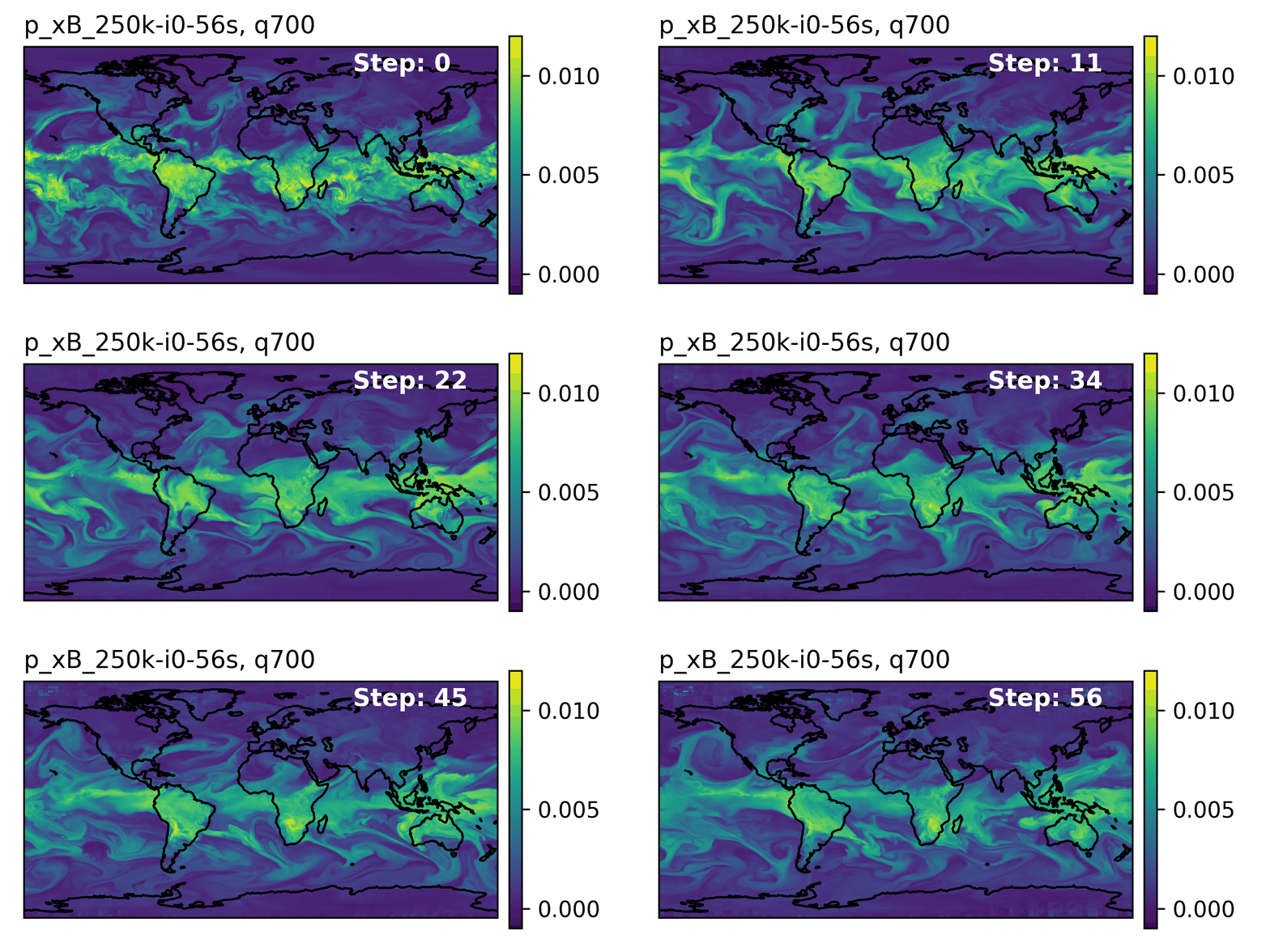
Figure 9: Rollout of AERIS model, specific humidity at 700m.
Table 1: Overview of AERIS model and training setup
Property Description Domain Global Resolution 0.25° & 1.4° Training Data ERA5 (1979–2018) Model Architecture Swin Transformer Speedup4 O(10k–100k)
➕ Contributions Caution☔ AERIS

First billion-parameter diffusion model for weather + climate

  • Operates at the pixel level (1 × 1 patch size), guided by physical priors
  • Medium-range forecast skill:
    • Surpasses IFS ENS, competitive with GenCast5
    • Uniquely stable on seasonal scales to 90 days
Note🌀 SWiPe

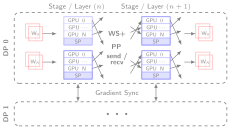
A novel 3D (sequence-window-pipeline) parallelism strategy for training transformers across high-resolution inputs

  • Enables scalable small-batch training on large supercomputers6
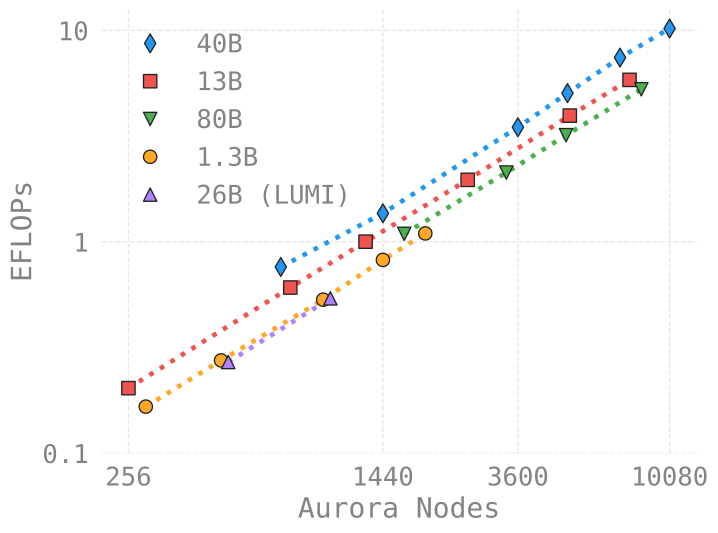
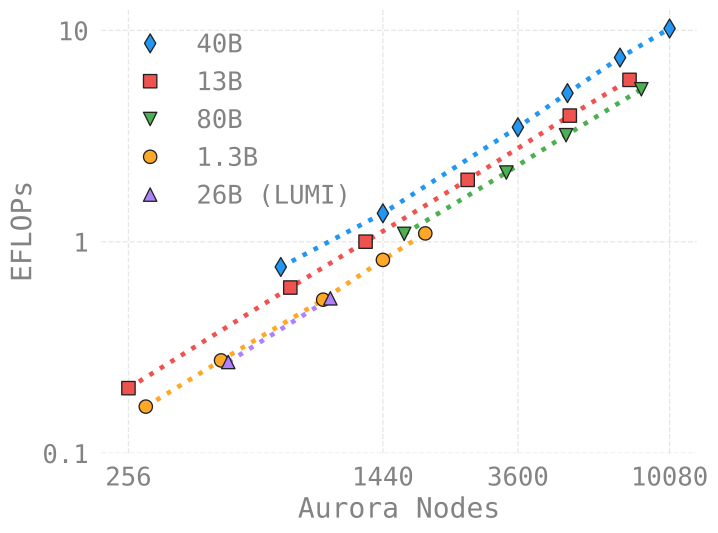
    • 10.21 ExaFLOPS
    • @ 121,000 Intel XPUs (Aurora)
⚠️ Issues with the Deterministic Approach
  • Transformers:
    • Deterministic
    • Single input → single forecast
  • Diffusion:
    • Probabilistic
    • Single input → ensemble of forecasts
    • Captures uncertainty and variability in weather predictions
    • Enables ensemble forecasting for better risk assessment
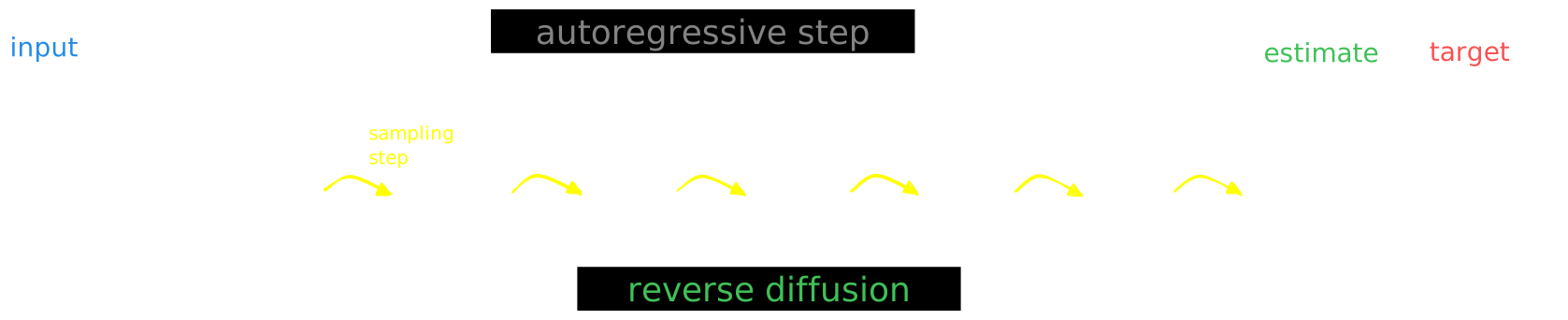
🎲 Transitioning to a Probabilistic Model
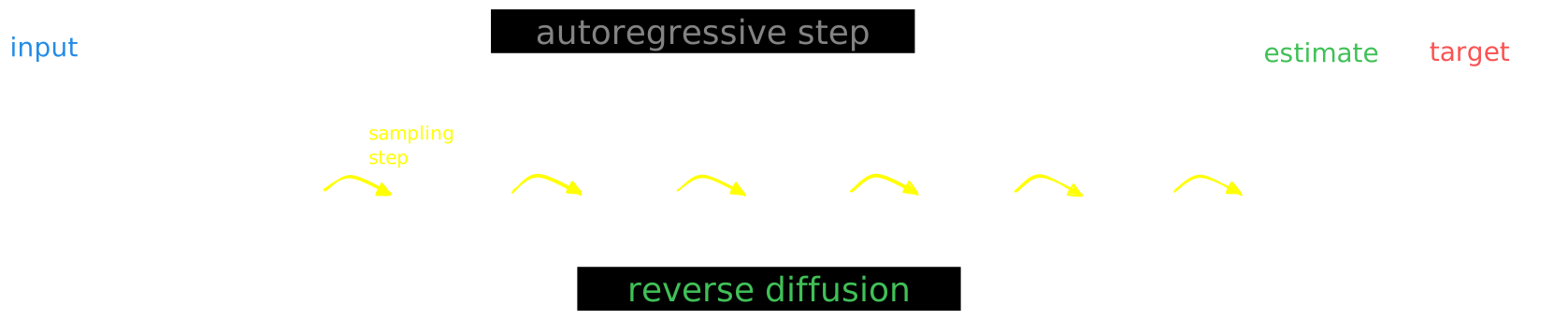
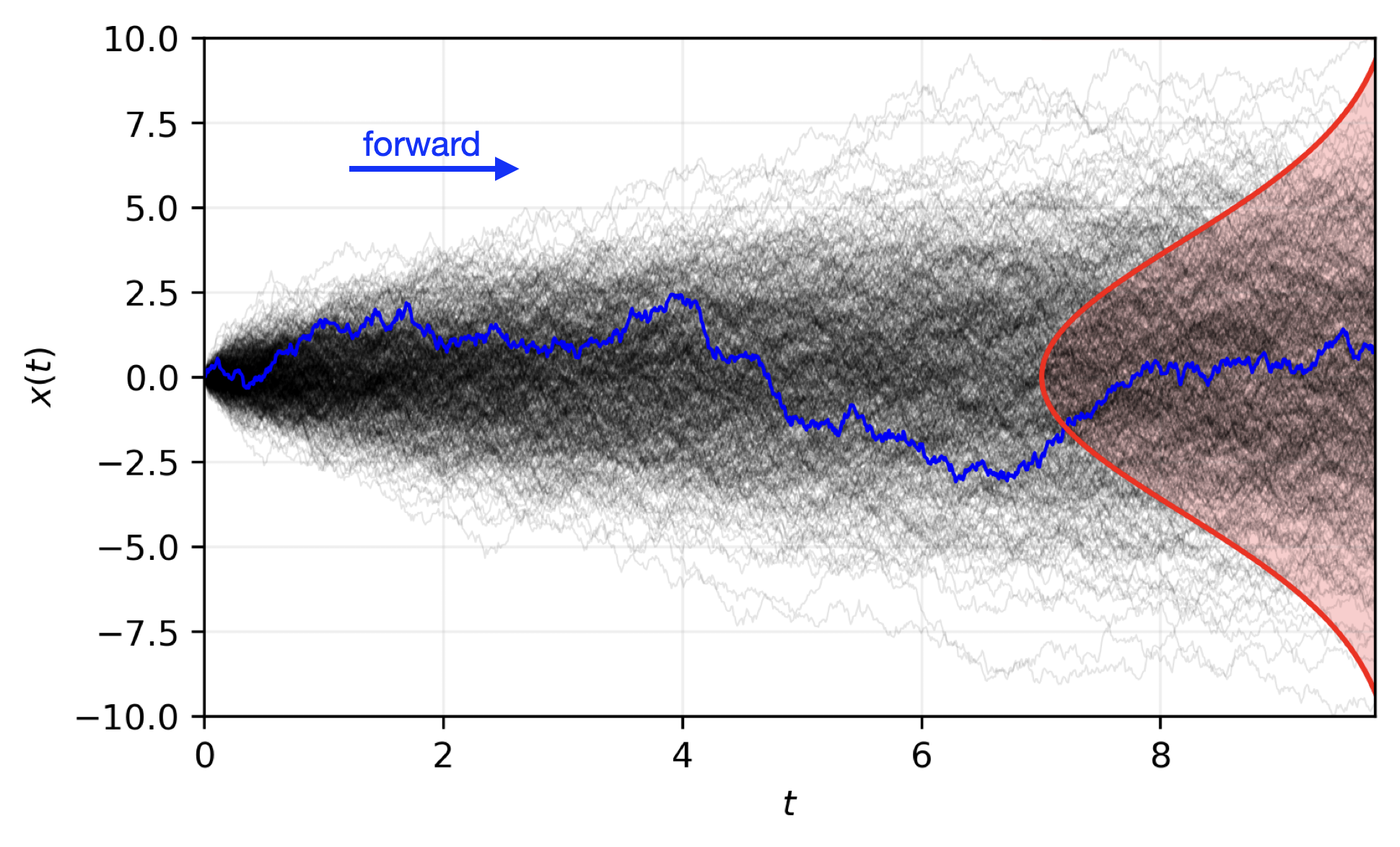
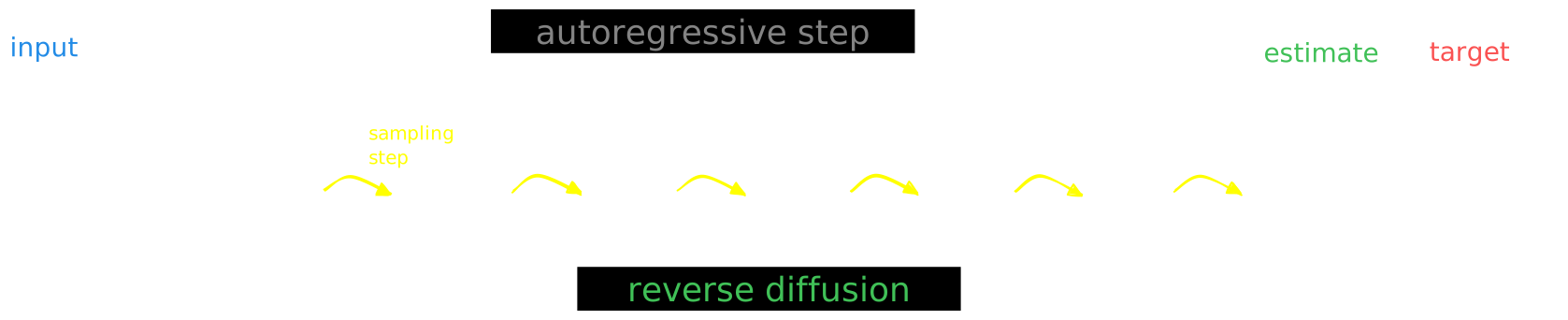
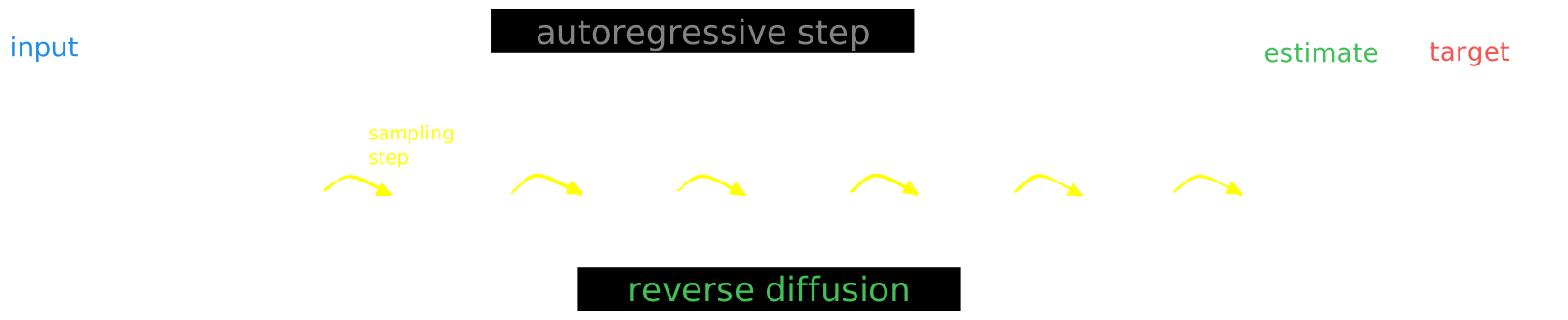
Figure 10: Reverse diffusion with the input condition, individual sampling steps , the next time step estimate and the target output.

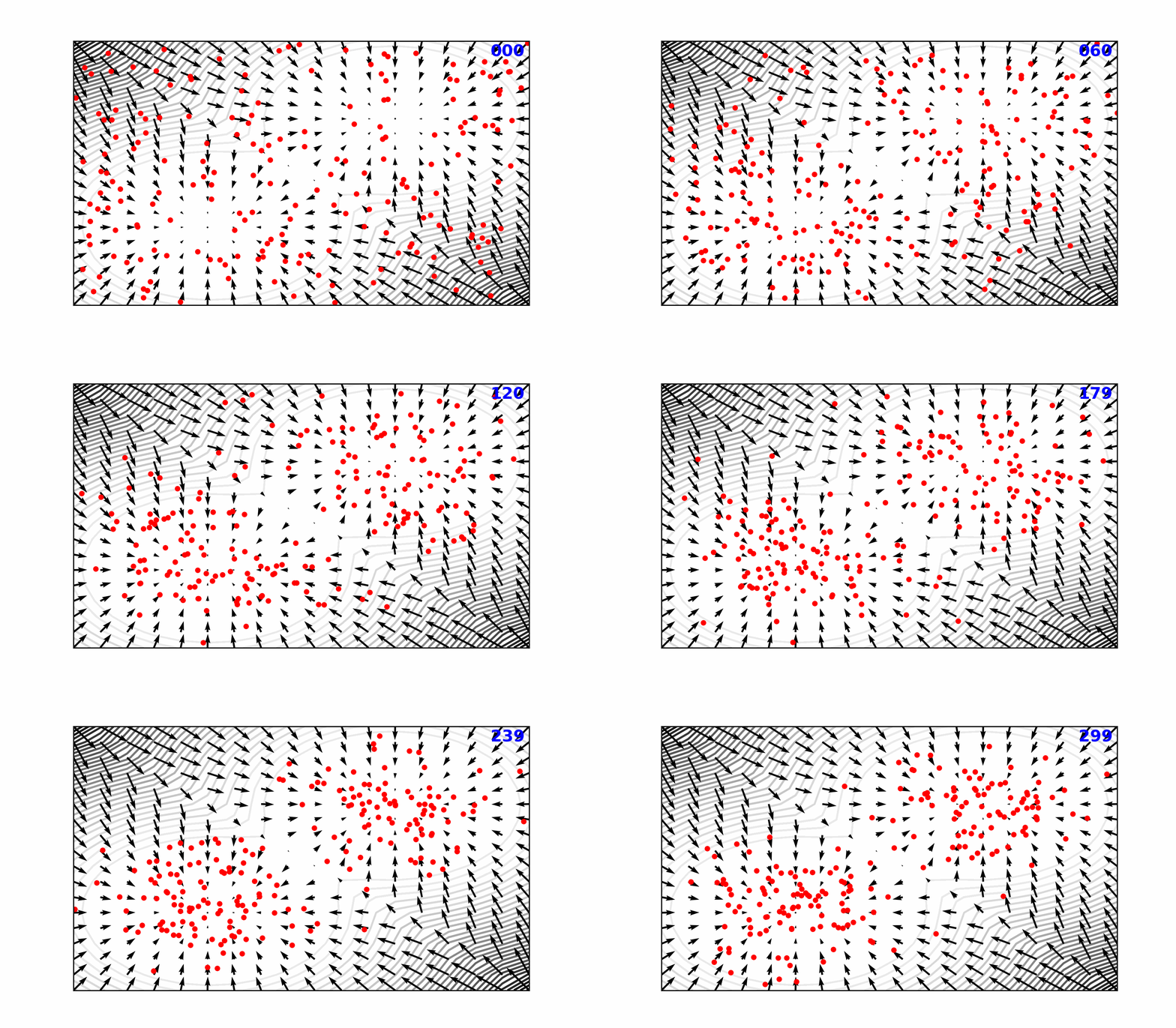
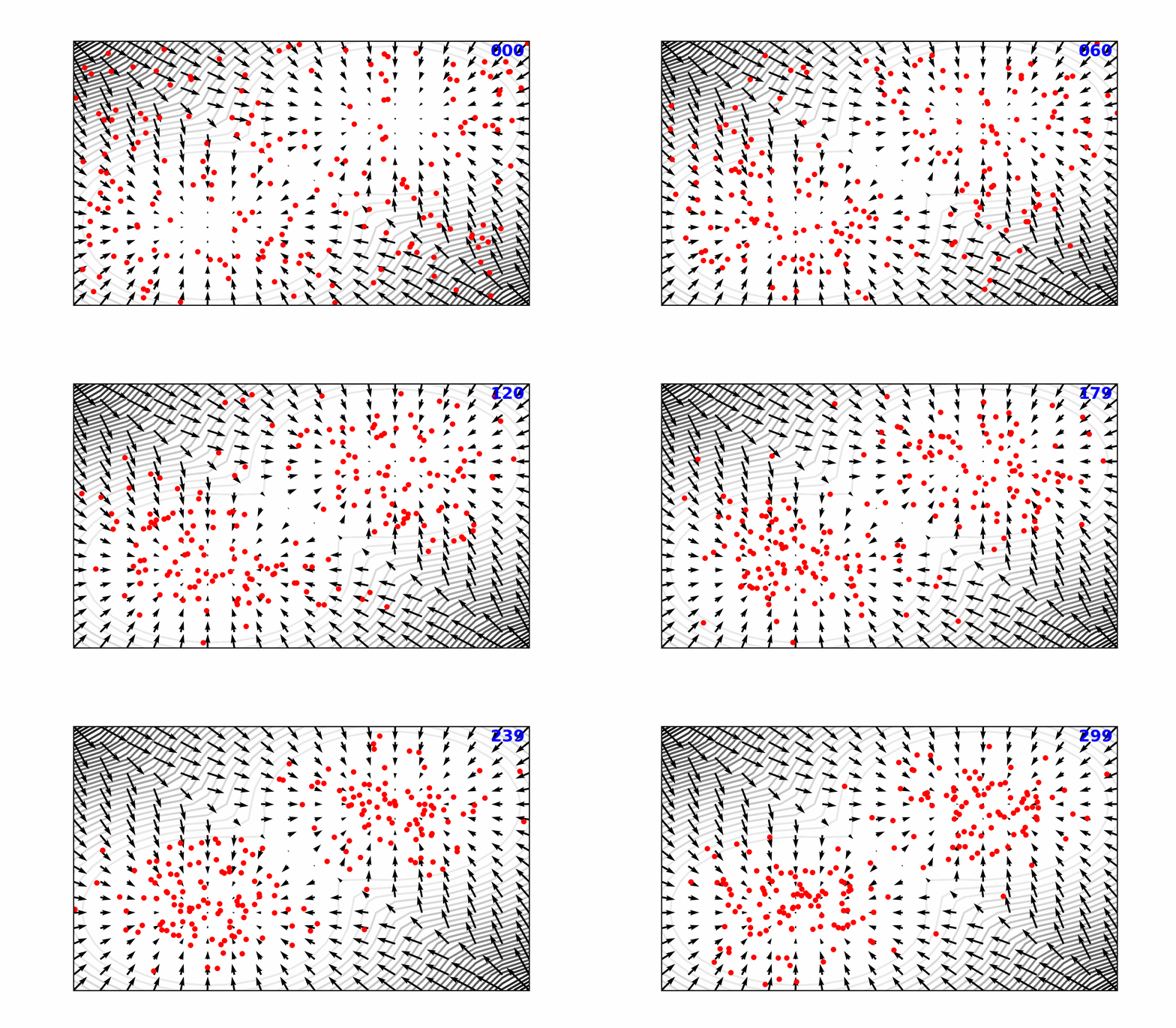
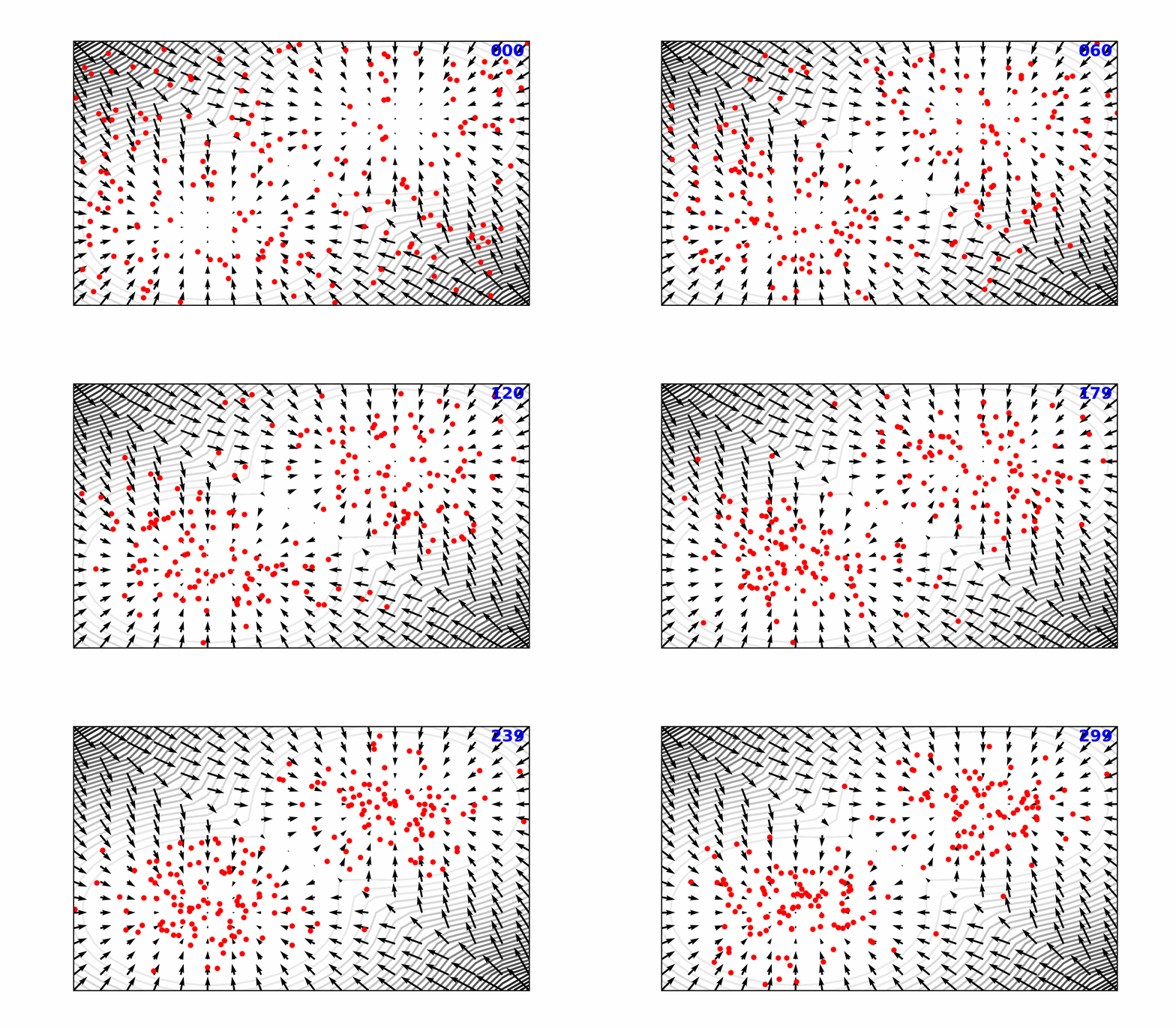
Reverse Diffusion Process (\mathcal{N}\rightarrow \pi)

Reverse Diffusion Process ()

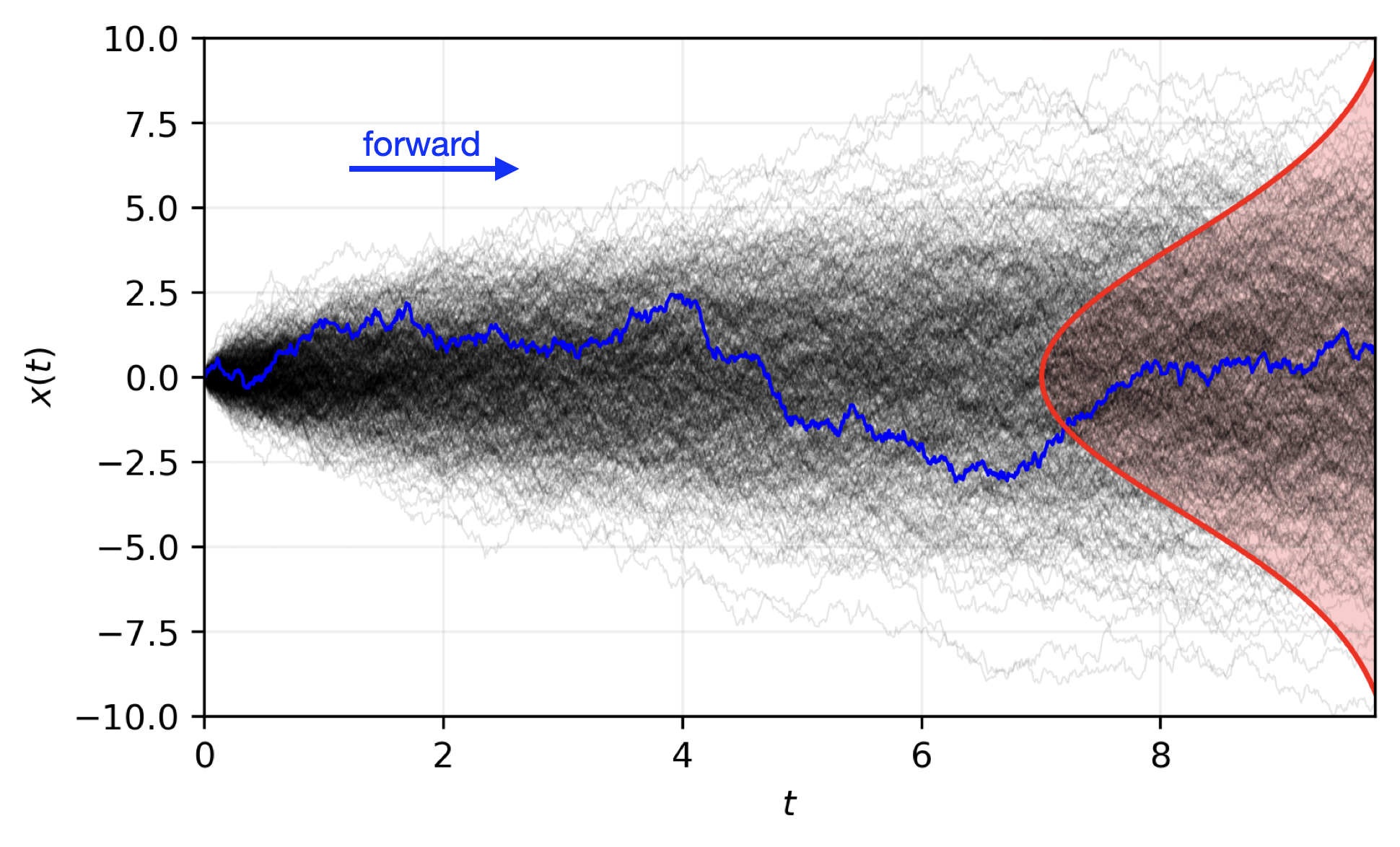
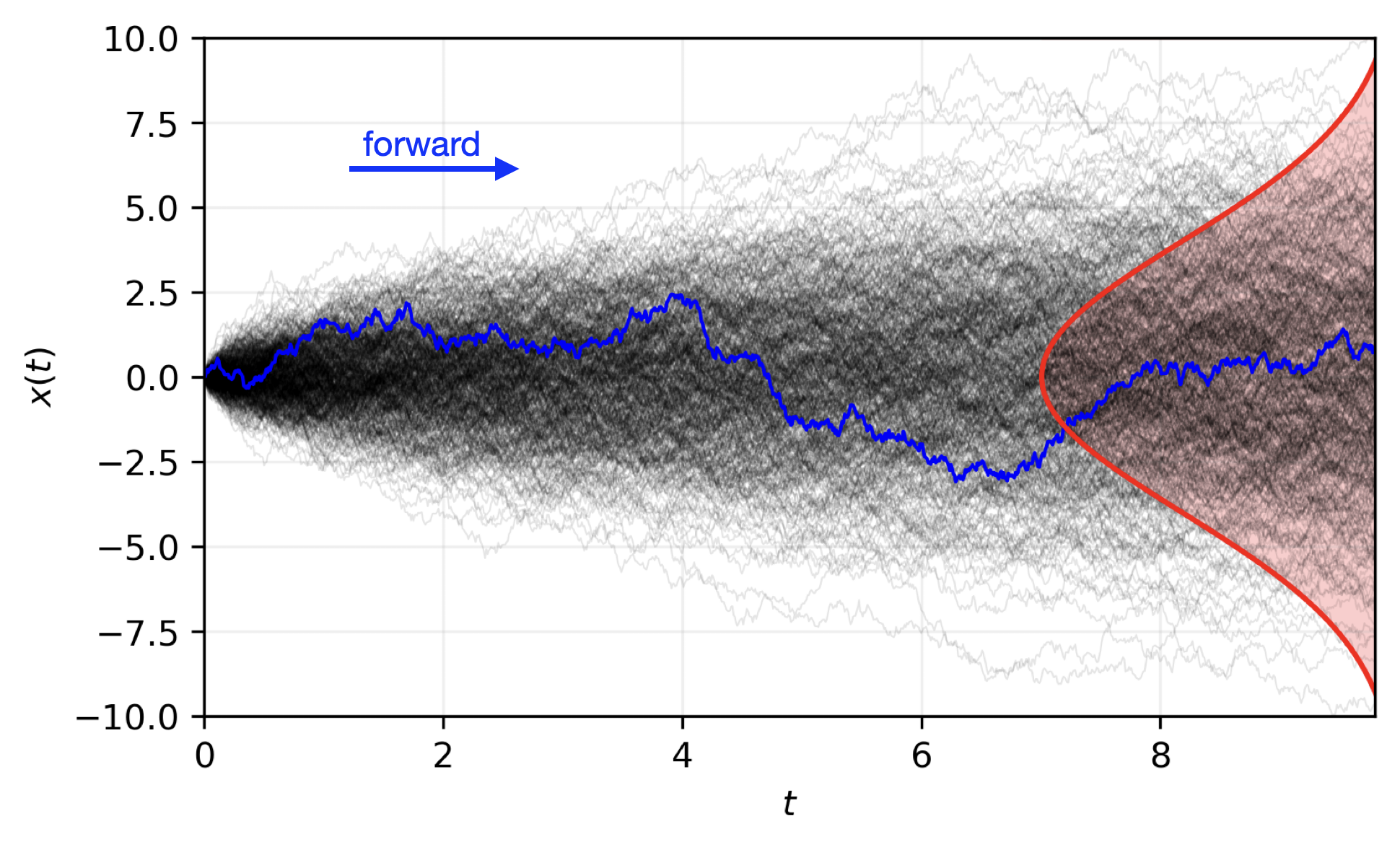
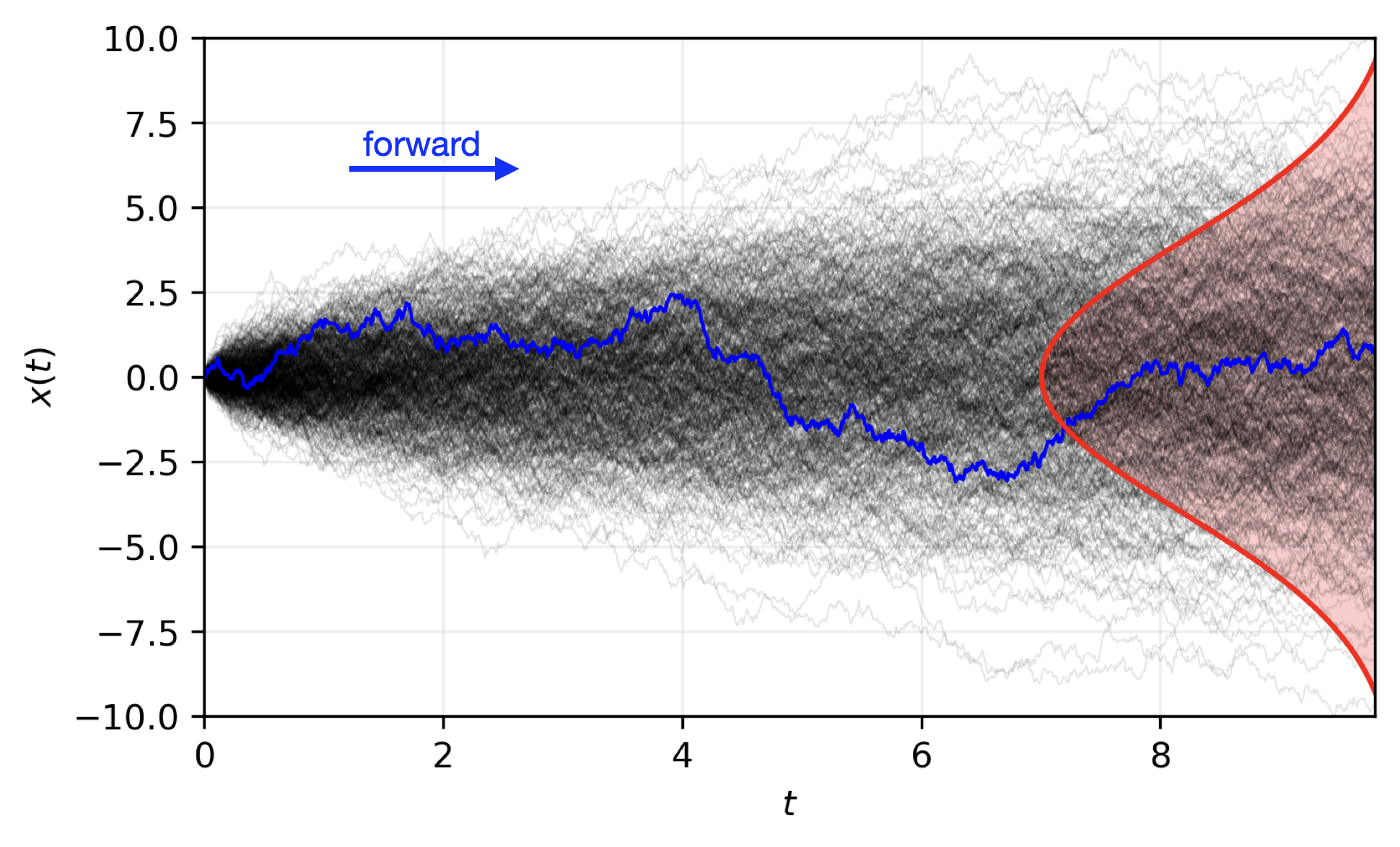
Forward Diffusion Process (\pi\rightarrow \mathcal{N})

Forward Diffusion Process ()
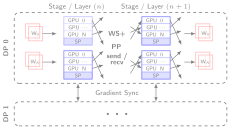
🌀 Sequence-Window-Pipeline Parallelism SWiPe
  • SWiPe is a novel parallelism strategy for Swin-based Transformers
  • Hybrid 3D Parallelism strategy, combining:
    • Sequence parallelism (SP)
    • Window parallelism (WP)
    • Pipeline parallelism (PP)
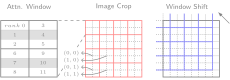
Figure 11
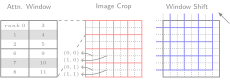
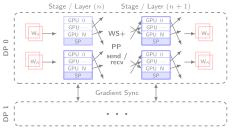
Figure 12: SWiPe Communication Patterns
🚀 AERIS: Scaling Results
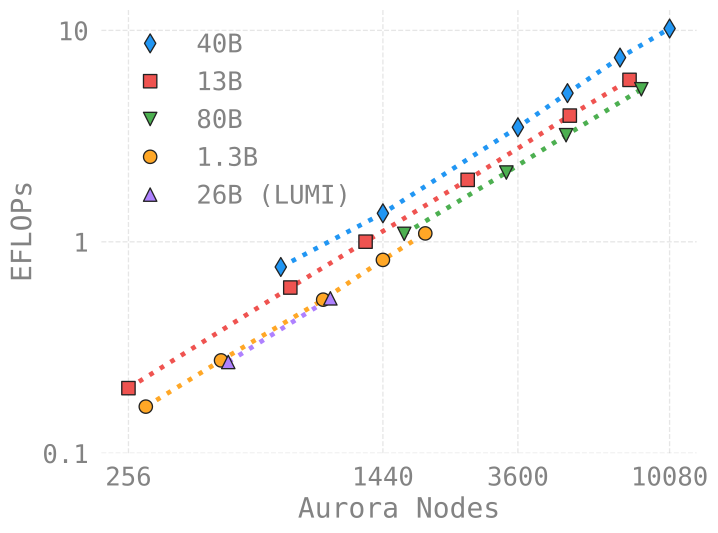
Figure 13: AERIS: Scaling Results
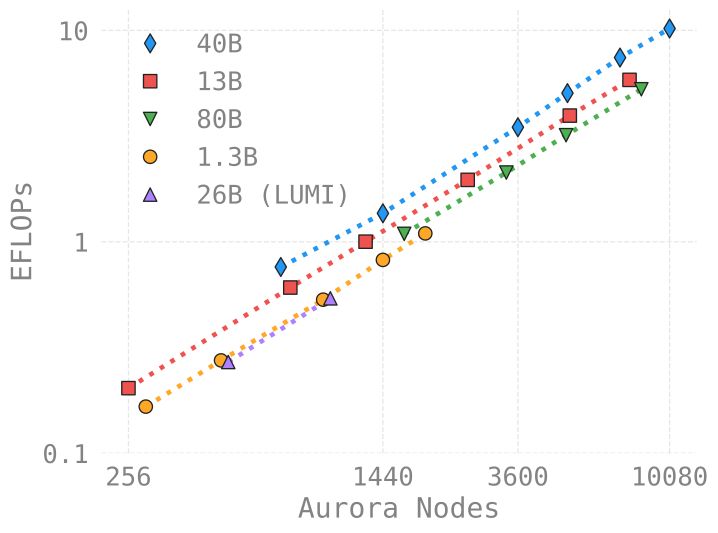
  • 10 EFLOPs (sustained) @ 120,960 GPUs
  • See (Hatanpää et al. (2025)) for additional details
  • arXiv:2509.13523
🌪️ Hurricane Laura
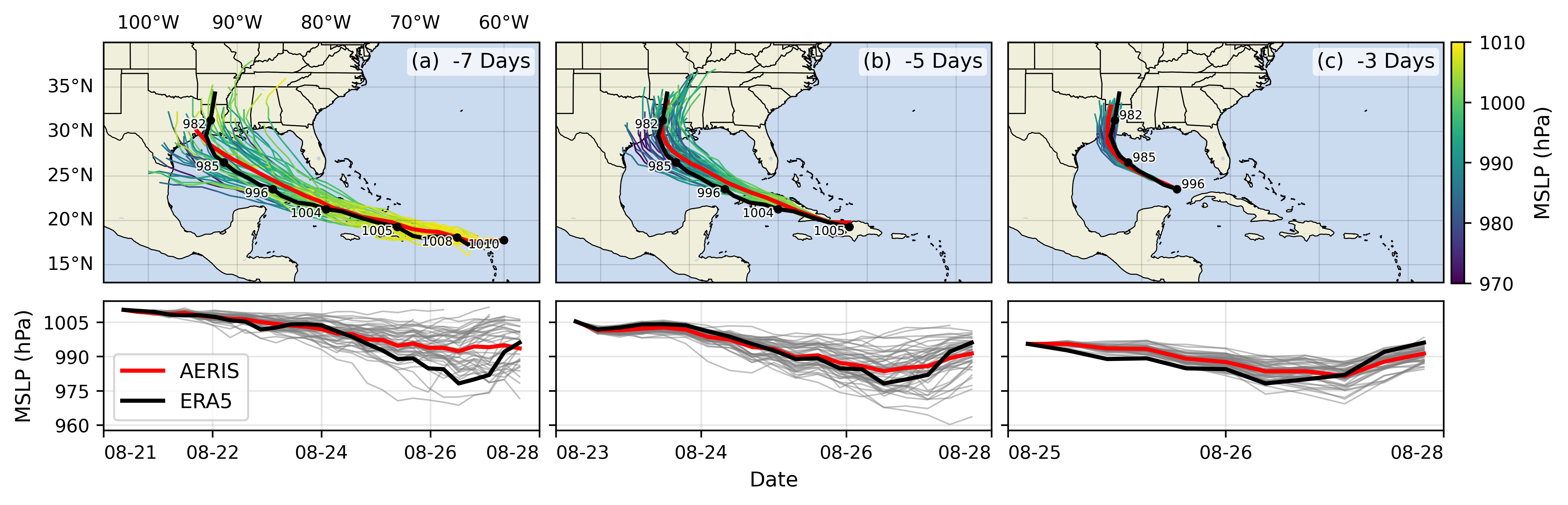
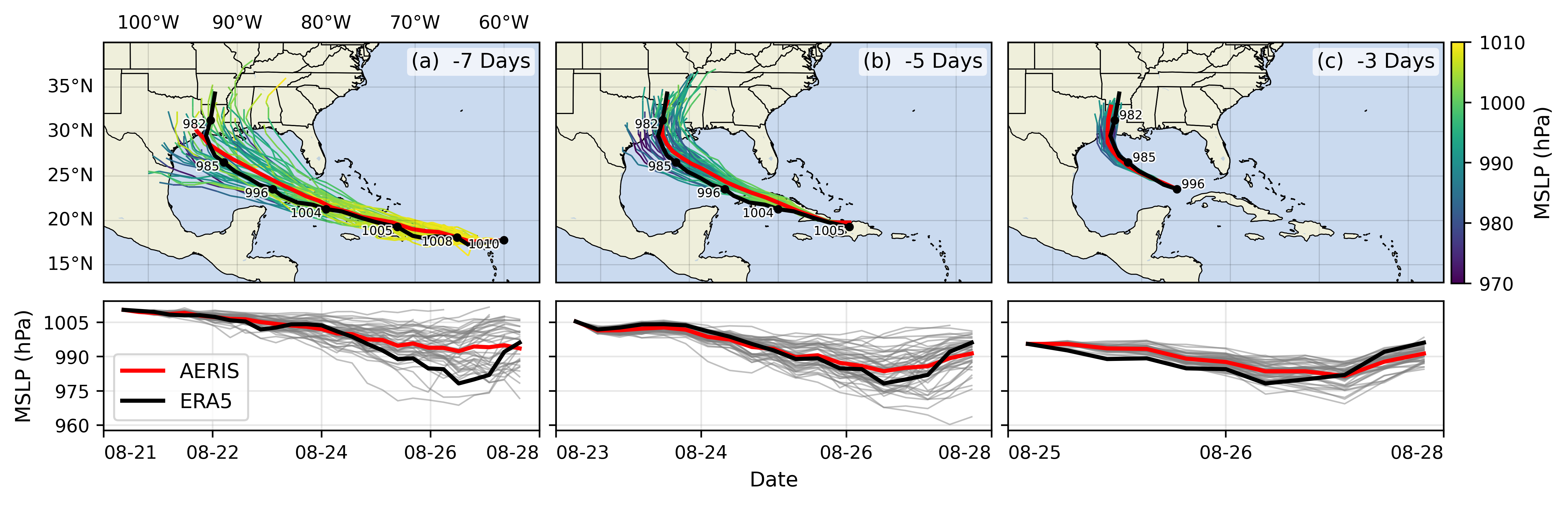
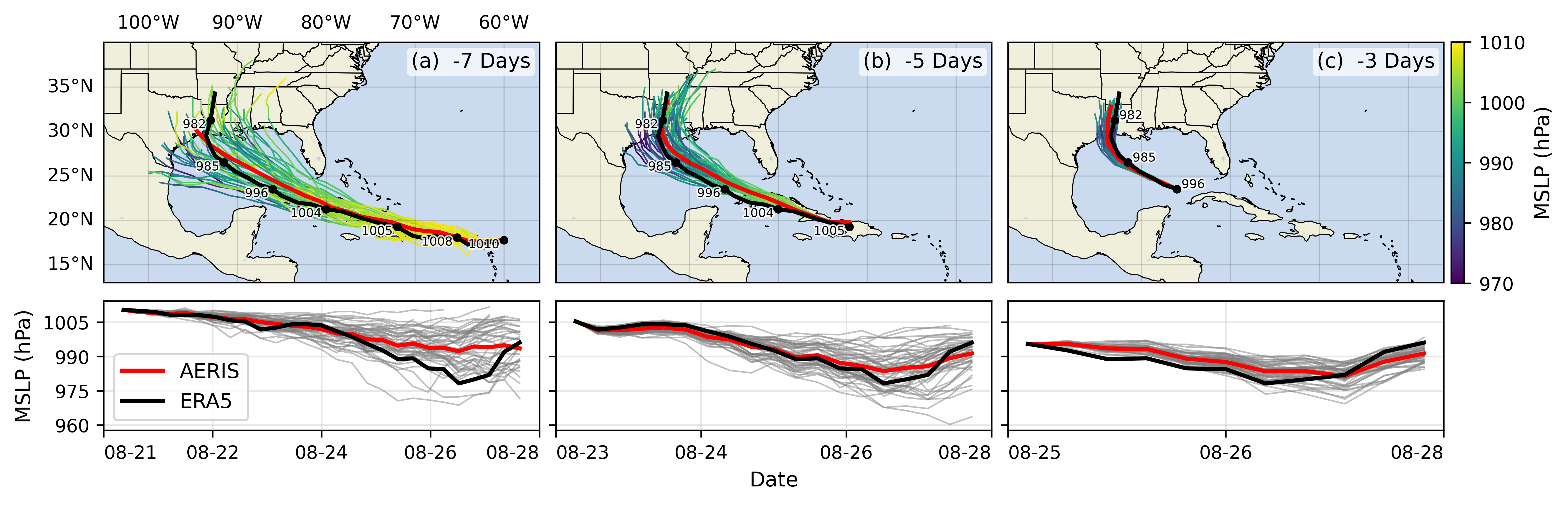
Figure 14: Hurricane Laura tracks (top) and intensity (bottom). Initialized 7(a), 5(b) and 3(c) days prior to 2020-08-28T00z.
📓 References Dharuman, Gautham, Kyle Hippe, Alexander Brace, Sam Foreman, Väinö Hatanpää, Varuni K. Sastry, Huihuo Zheng, et al. 2024. “MProt-DPO: Breaking the ExaFLOPS Barrier for Multimodal Protein Design Workflows with Direct Preference Optimization.” In Proceedings of the International Conference for High Performance Computing, Networking, Storage, and Analysis. SC ’24. Atlanta, GA, USA: IEEE Press. https://doi.org/10.1109/SC41406.2024.00013. Hatanpää, Väinö, Eugene Ku, Jason Stock, Murali Emani, Sam Foreman, Chunyong Jung, Sandeep Madireddy, et al. 2025. “AERIS: Argonne Earth Systems Model for Reliable and Skillful Predictions.” https://arxiv.org/abs/2509.13523. Price, Ilan, Alvaro Sanchez-Gonzalez, Ferran Alet, Tom R. Andersson, Andrew El-Kadi, Dominic Masters, Timo Ewalds, et al. 2024. “GenCast: Diffusion-Based Ensemble Forecasting for Medium-Range Weather.” https://arxiv.org/abs/2312.15796. Song, Shuaiwen Leon, Bonnie Kruft, Minjia Zhang, Conglong Li, Shiyang Chen, Chengming Zhang, Masahiro Tanaka, et al. 2023. “DeepSpeed4Science Initiative: Enabling Large-Scale Scientific Discovery Through Sophisticated AI System Technologies.” https://arxiv.org/abs/2310.04610. ❤️ Acknowledgements

This research used resources of the Argonne Leadership Computing Facility, which is a DOE Office of Science User Facility supported under Contract DE-AC02-06CH11357.

Extras Footnotes
  1. Lead↩︎

  2. Co-led by: Venkat Vishwanath, Sam Foreman↩︎

  3. Implemented by Marieme Ngom↩︎

  4. Relative to PDE-based models, e.g.: GFS↩︎

  5. GenCast: A Generative Model for Medium-Range Global Weather Forecasting (Price et al. (2024))↩︎

  6. Demonstrated on up to 120,960 GPUs on Aurora and 8,064 GPUs on LUMI.↩︎

CitationBibTeX citation:
@unpublished{foreman2025,
  author = {Foreman, Sam},
  title = {AuroraGPT: {Training} {Foundation} {Models} on
    {Supercomputers}},
  date = {2025-12-16},
  url = {https://samforeman.me/talks/2025/12/16/slides.html},
  langid = {en}
}
For attribution, please cite this work as: Foreman, Sam. 2025. “AuroraGPT: Training Foundation Models on Supercomputers.” December 16. https://samforeman.me/talks/2025/12/16/slides.html.
https://samforeman.me/talks/2025/12/16/
Extensions
🧊 Cooling Down Checkpoints: Best Practices for Model Evaluation
machine-learningmodel-evaluationcheckpointsbest-practices
<iframe src="https://www.googletagmanager.com/ns.html?id=GTM-TC329HJ" height="0" width="0" style="display:none;visibility:hidden"></iframe> 📉 Simple Experiment to Compare Validation Loss

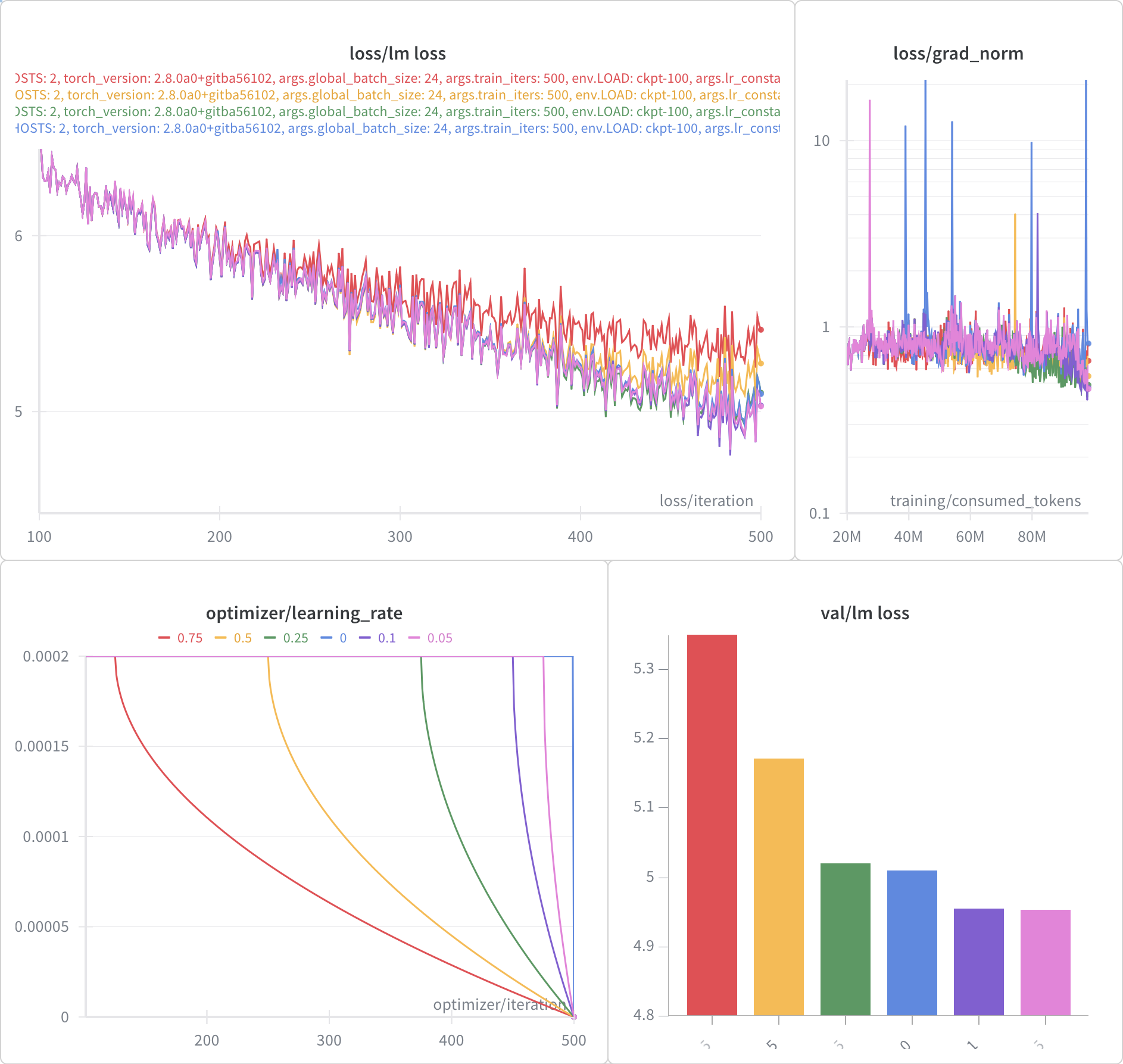
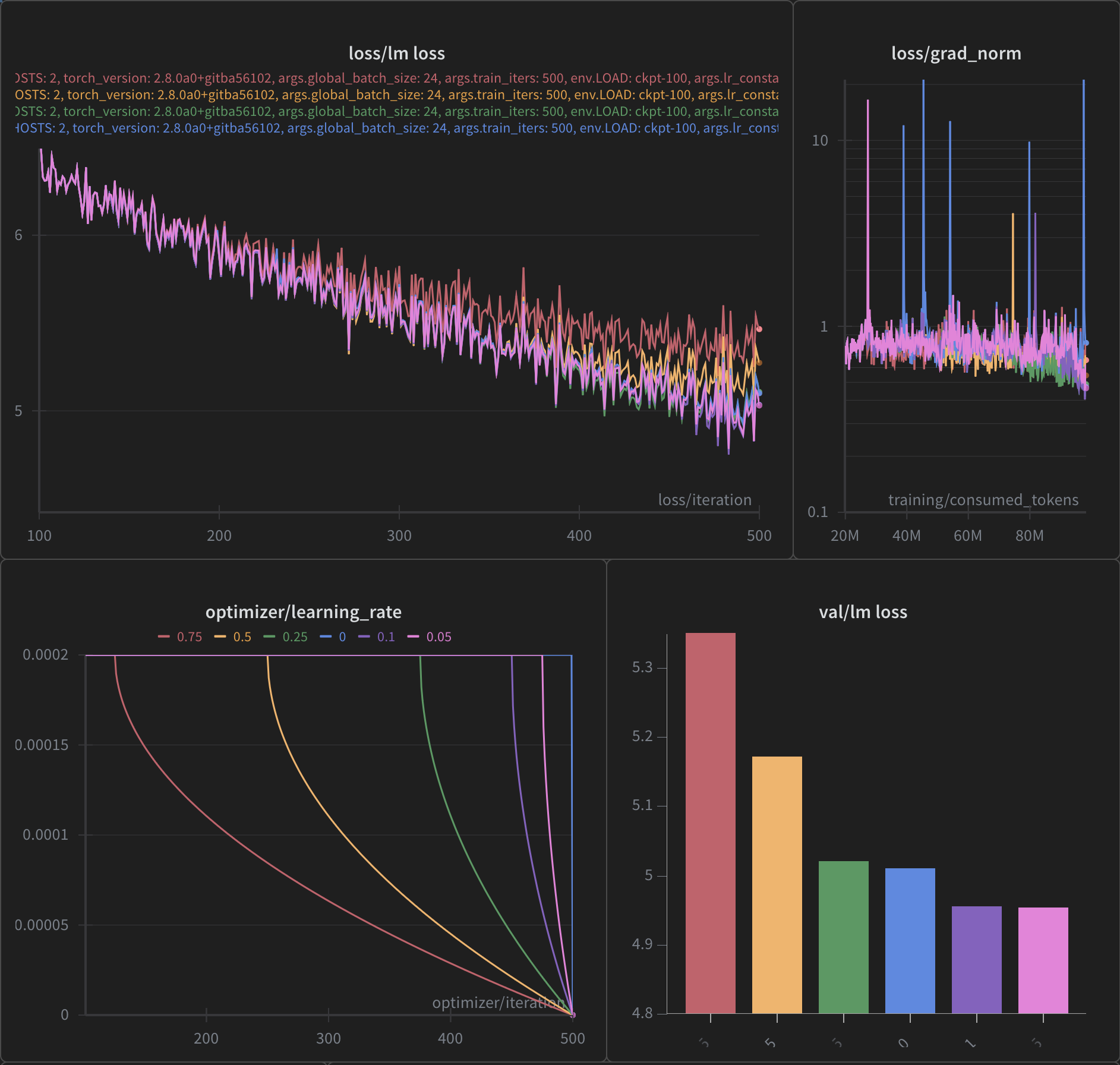
Cool Down Comparison

Cool Down Comparison

Cool Down Comparison

Cool Down Comparison
☃️ Cooling Down
  • 256 Nodes of Aurora:

    • Cooled down over last 10%:

    • Explicit command:

      ROPE_THETA=50000 \
        GRAD_ACC_STEPS=2 \
        MICRO_BATCH=1 \
        USE_ACTIVATION_CHECKPOINTING=0 \
        ZERO_STAGE=0 \
        TRAIN_TOKENS=4673780159710 \
        OPT=sophiag \
        DATA_FILE_LIST=ALCF/data-lists/aurora/olmo-mix-1124.txt \
        LR_DECAY_STYLE=constant \
        LOAD=cooldown-checkpoints/sophiag-global-step-73500/global_step73500 \
        bash train_alcf.sh \
          --no-load-lr-state \
          --lr_constant_plus_cooldown \
          --lr_constant_plus_cooldown_frac 0.10
♻️ Convert to Universal (Optional)
TORCH_FORCE_NO_WEIGHTS_ONLY_LOAD=1 python3 ALCF/ds_to_universal.py \
    --input_folder test_rollback/global_step136000 \
    --output_folder test_rollback/global_step136000_universal
📄 W&B Report CitationBibTeX citation:
@online{foreman2025,
  author = {Foreman, Sam},
  title = {🧊 {Cooling} {Down} {Checkpoints:} {Best} {Practices} for
    {Model} {Evaluation}},
  date = {2025-11-12},
  url = {https://samforeman.me/posts/2025/11/12/},
  langid = {en}
}
For attribution, please cite this work as: Foreman, Sam. 2025. “🧊 Cooling Down Checkpoints: Best Practices for Model Evaluation.” November 12, 2025. https://samforeman.me/posts/2025/11/12/.
https://samforeman.me/posts/2025/11/12/
Extensions
Training Foundation Models on Supercomputers
AIMachine LearningSupercomputing
<iframe src="https://www.googletagmanager.com/ns.html?id=GTM-TC329HJ" height="0" width="0" style="display:none;visibility:hidden"></iframe> 🧑🏻‍💻 About Me
  • 🏡 samforeman.me
  • UIUC (2015):
    • Engineering Physics + Applied Mathematics
  • University of Iowa (2015–2019):
    • PhD. Physics1
  • ANL (2019–2022): Postdoctoral Researcher
  • ANL (2022–Present): Assistant Computational Scientist

Current Research:

Argonne Leadership Computing Facility (ALCF)

The ALCF enables breakthroughs in science and engineering by providing supercomputing resources and expertise to the research community.
alcf.anl.gov

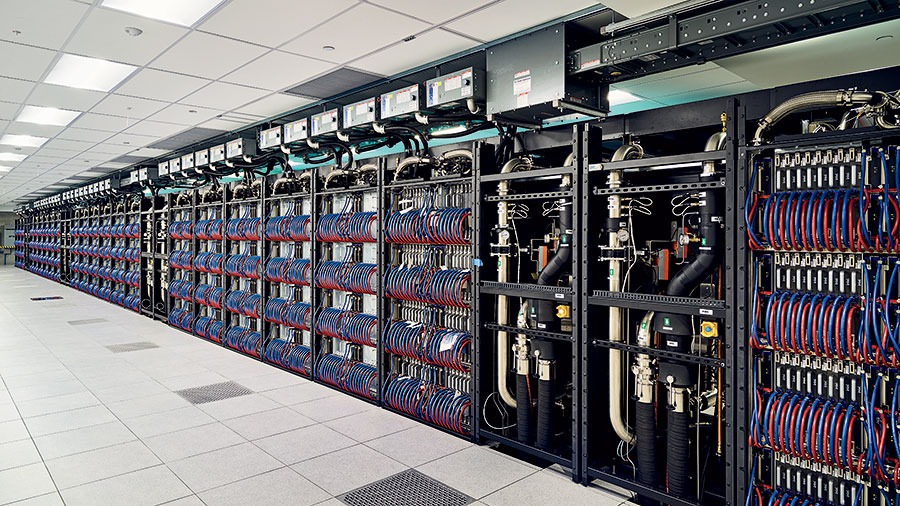
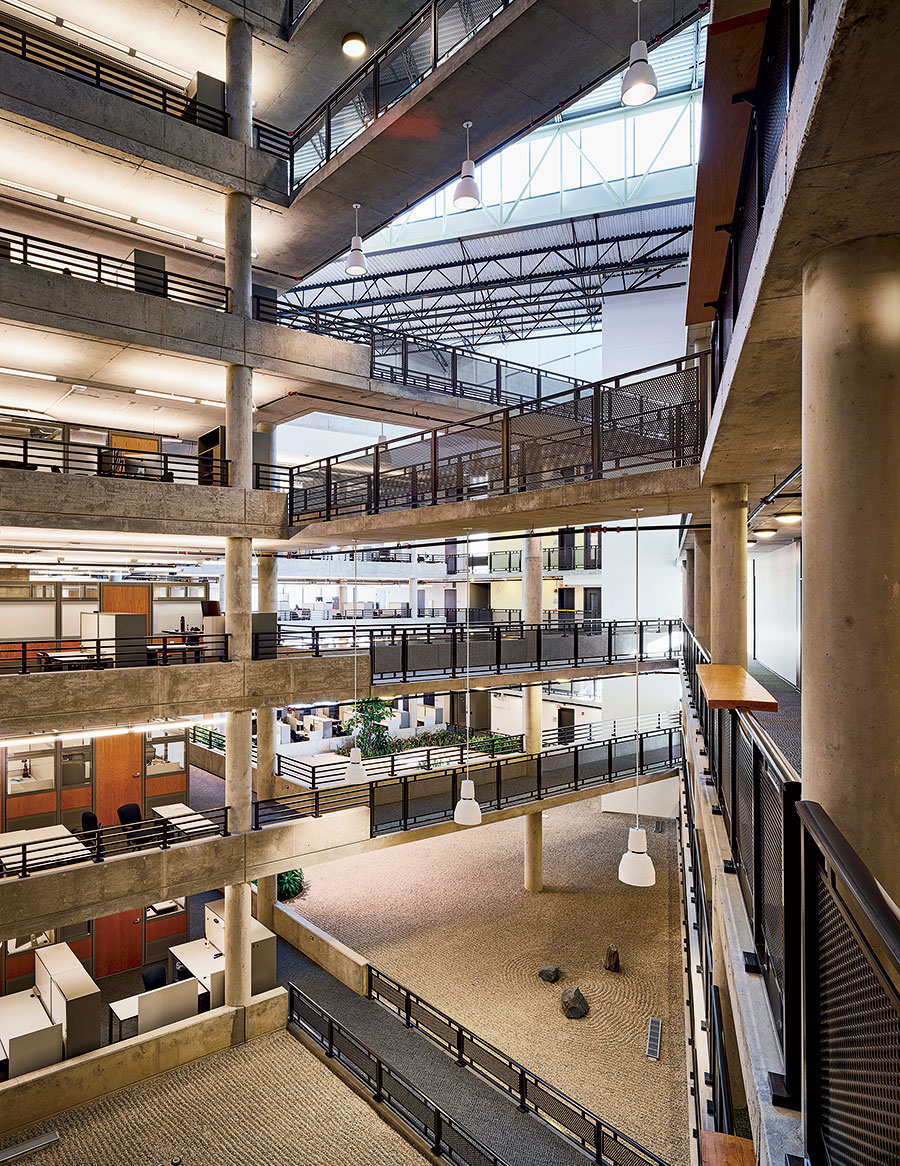
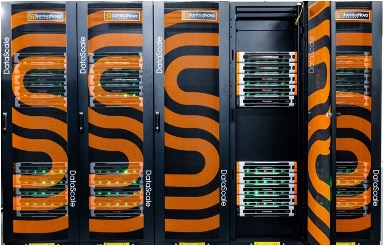
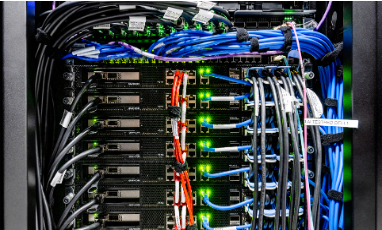
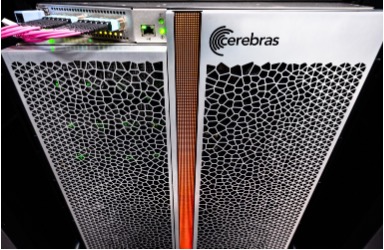
Images from The Computer That Will Change Everything – Chicago Magazine

🏗️ Aurora
Table 1: Aurora2 Specs
Property Value Racks 166 Nodes 10,624 XPUs3 127,488 CPUs 21,248 NICs 84,992 HBM 8 PB DDR5c 10 PB

Figure 1: Aurora: Fact Sheet.
🤖 ALCF AI Testbed
  • ALCF AI Testbed Systems are in production and available for allocations to the research community
  • Significant improvement in time-to-solution and energy-efficiency for diverse AI for science applications.
  • NAIRR Pilot

Up to 25 improvement for genomic foundation models with 6.5 energy efficiency

Figure 2: SambaNova SN-30: 2nd Gen, 8 nodes with 64 AI Accelerators
Figure 3: Graphcore Bow: generation accelerators: Pod-64 configuration with 64 accelerators
Figure 4: Cerebras: 2x CS-2 WSE with Memory-X and Swarm-X technologies
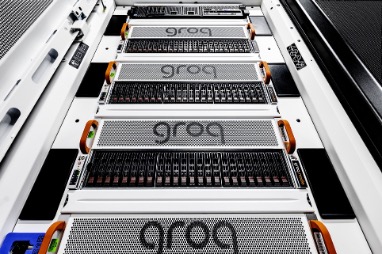
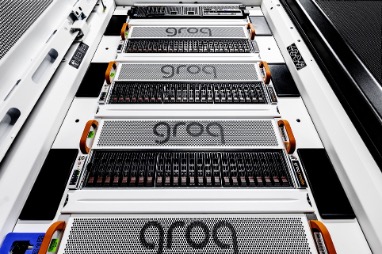
Figure 5: GroqRack: 9 nodes, 8 GroqChip v1.5 Tensor streaming processors accelerators per node

🔭 AI-for-Science
source (@tenderizzation)
 

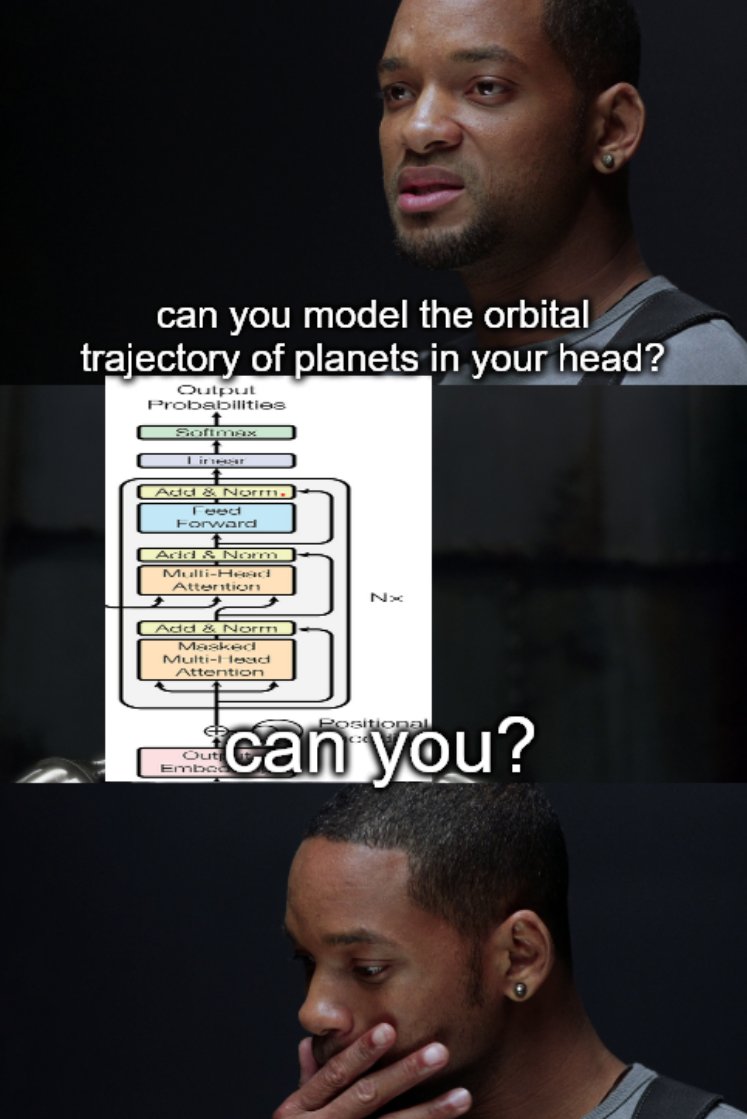
ChatGPT: explain this image

🌌 AuroraGPT (2024–)

AuroraGPT: General purpose scientific LLM Broadly trained on a general corpora plus scientific {papers, texts, data}

  • Explore pathways towards a “Scientific Assistant” model
  • Build with international partners (RIKEN, BSC, others)
  • Multimodal: images, tables, equations, proofs, time series, graphs, fields, sequences, etc
Figure 6: Image from Hannibal046 / Awesome-LLM
🧪 AuroraGPT: Open Science Foundation Model
Figure 7: High-level overview of AuroraGPT project
🧰 AuroraGPT: Toolbox
  • Datasets and data pipelines (how do we deal with scientific data?)
  • Software infrastructure and workflows (scalable, robust, extensible)
  • Evaluation of state-of-the-art LLM Models (how do they perform on scientific tasks?)
Note🚂 Training

argonne-lcf/Megatron-DeepSpeed
Large Model Training: Any Scale, Any Accelerator

Important🏃‍♂️ Running

argonne-lcf/inference-endpoints
Inference endpoints for LLMs, hosted @ ALCF

👥 Team Leads

Planning

Rick Stevens

Rick Stevens4

Ian Foster

Ian Foster

Rinku Gupta

Rinku Gupta

Mike Papka

Mike Papka

Arvind Ramanathan

Arvind Ramanathan

Fangfang Xia

Fangfang Xia

Data

Ian Foster

Ian Foster

Robert Underwood

Robert Underwood

Training

Venkat Vishwanath

Venkat Vishwanath

Sam Foreman

Sam Foreman

Evaluation

Franck Cappello

Franck Cappello

Sandeep Madireddy

Sandeep Madireddy

Bo Li

Bo Li

Post

Eliu Huerta

Eliu Huerta

Azton Wells

Azton Wells

Inference

Rajeev Thakur

Rajeev Thakur

Comms

Charlie Catlett

Charlie Catlett

David Martin

David Martin

Distribution

Brad Ullrich

Brad Ullrich
🤝 Teams
  • Planning
  • Data Prep
    • Accumulate 20+ T tokens of high-quality scientific text and structured data
  • Models / Training5
    • Train (entirely from scratch) a series of models on publicly available data
  • Evaluation
    • Skills, trustworthiness, safety, robustness, privacy, machine ethics
  • Post-Training
    • Fine-tuning, alignment
  • Inference
    • Model serving, API development / public-facing web services
  • Distribution
    • Licensing, generating and distributing artifacts for public consumption
  • Communication
🏋️ Challenges: In Practice

This is incredibly difficult in practice, due in part to:

  • Brand new {hardware, architecture, software}
  • Lack of native support in existing frameworks (though getting better!)
  • General system stability
    +10k Nodes +100k XPUs
    • network performance
    • file system stability (impacted by other users !)
    • many unexpected difficulties occur at increasingly large scales
  • Combinatorial explosion of possible configurations and experiments
    • {hyperparameters, architectures, tokenizers, learning rates, …}
💾 AuroraGPT: Training
  • To train a fixed model on trillions of tokens requires:
    1. Aggregating data from multiple different corpora
      (e.g. ArXiv, Reddit, StackExchange, GitHub, Wikipedia, etc.)
    2. Sampling each training batch according to a fixed distribution across corpora
    3. Building indices that map batches of tokens into these files (indexing)

    The original implementation was slow:

    • Designed to run serially on a single device
    • Major bottleneck when debugging data pipeline at scale
🍹 AuroraGPT: Blending Data, Efficiently
  • 🐢 Original implementation:
    • Slow (serial, single device)
    • ~ 1 hr/2T tokens
  • 🐇 New implementation:
    • Fast! (distributed, asynchronous)
    • ~ 2 min/2T tokens
      (30x faster !!)
Figure 8: Time spent preparing 2T tokens
📉 Training AuroraGPT-7B on 2T Tokens
Figure 9: Loss curve during training on 2T tokens.
📉 Training AuroraGPT-2B on 7T Tokens
Figure 10: (new) Loss vs number of consumed training tokens for AuroraGPT-2B on 256 (blue) and 520 nodes (grey) of Aurora. Both runs show stability through 7T tokens.
✨ Features

argonne-lcf/Megatron-DeepSpeed

  • 🕸️ Parallelism:
    • {data, tensor, pipeline, sequence, …}
  • ♻️ Checkpoint Converters:
    • Megatron ⇄ 🤗 HF ⇄ ZeRO ⇄ Universal
  • 🔀 DeepSpeed Integration:
    • ZeRO Offloading
    • Activation checkpointing
    • AutoTP (WIP)
    • ability to leverage features from DeepSpeed community
✨ Features (even more!)
  • 🧗 Optimizers6:
    • Support for many different optimizers:
      • Distributed Shampoo, Muon, Adopt, Sophia, Lamb, GaLORE, ScheduleFree, …
    • See full list
    • Large batch training
  • 📊 Experiment Tracking:
    • Automatic experiment and metric tracking with Weights & Biases
🧬 MProt-DPO 🧬 Scaling Results (2024)
Figure 11: Scaling results for 3.5B model across ~38,400 GPUs

This novel work presents a scalable, multimodal workflow for protein design that trains an LLM to generate protein sequences, computationally evaluates the generated sequences, and then exploits them to fine-tune the model.

Direct Preference Optimization steers the LLM toward the generation of preferred sequences, and enhanced workflow technology enables its efficient execution. A 3.5B and a 7B model demonstrate scalability and exceptional mixed precision performance of the full workflow on ALPS, Aurora, Frontier, Leonardo and PDX.

🧬 MProt-DPO: Scaling Results
Figure 12: 3.5B model
Figure 13: 7B model
🚂 Loooooooooong Sequence Lengths

25B

33B
Figure 14: Maximum (achievable) SEQ_LEN for both 25B and 33B models (See: Song et al. (2023))

scaling4science
Megatron-DS-Benchmarking

🌎 AERIS (2025)
Figure 15: arXiv:2509.13523

ACM Gordon Bell Prize for Climate Modeling Finalist @ SC’25

ACM Gordon Bell Prize for Climate Modeling Finalist @ SC’25

We demonstrate a significant advancement in AI weather and climate modeling with AERIS by efficient scaling of window-based transformer models. We have performed global medium-range forecasts with performance competitive with GenCast and surpassing the IFS ENS model, with longer, 90- day rollouts showing our ability to learn atmospheric dynamics on seasonal scales without collapsing, becoming the first diffusion-based model that can work across forecast scales from 6 hours all the way to 3 months with remarkably accurate out of distribution predictions of extreme events.

👀 High-Level Overview of AERIS
Figure 16: Rollout of AERIS model, specific humidity at 700m.
Table 2: Overview of AERIS model and training setup
Property Description Domain Global Resolution 0.25° & 1.4° Training Data ERA5 (1979–2018) Model Architecture Swin Transformer Speedup7 O(10k–100k)
➕ Contributions Caution☔ AERIS

First billion-parameter diffusion model for weather + climate

  • Operates at the pixel level (1 × 1 patch size), guided by physical priors
  • Medium-range forecast skill:
    • Surpasses IFS ENS, competitive with GenCast8
    • Uniquely stable on seasonal scales to 90 days
Note🌀 SWiPe

A novel 3D (sequence-window-pipeline) parallelism strategy for training transformers across high-resolution inputs

  • Enables scalable small-batch training on large supercomputers9
    • 10.21 ExaFLOPS
    • @ 121,000 Intel XPUs (Aurora)
⚠️ Issues with the Deterministic Approach
  • Transformers:
    • Deterministic
    • Single input → single forecast
  • Diffusion:
    • Probabilistic
    • Single input → ensemble of forecasts
    • Captures uncertainty and variability in weather predictions
    • Enables ensemble forecasting for better risk assessment
🎲 Transitioning to a Probabilistic Model
Figure 17: Reverse diffusion with the input condition, individual sampling steps , the next time step estimate and the target output.

Reverse Diffusion Process (\mathcal{N}\rightarrow \pi)

Reverse Diffusion Process ()

Forward Diffusion Process (\pi\rightarrow \mathcal{N})

Forward Diffusion Process ()
🌀 Sequence-Window-Pipeline Parallelism SWiPe
  • SWiPe is a novel parallelism strategy for Swin-based Transformers
  • Hybrid 3D Parallelism strategy, combining:
    • Sequence parallelism (SP)
    • Window parallelism (WP)
    • Pipeline parallelism (PP)
Figure 18
Figure 19: SWiPe Communication Patterns
🚀 AERIS: Scaling Results
Figure 20: AERIS: Scaling Results
  • 10 EFLOPs (sustained) @ 120,960 GPUs
  • See (Hatanpää et al. (2025)) for additional details
  • arXiv:2509.13523
🌪️ Hurricane Laura
Figure 21: Hurricane Laura tracks (top) and intensity (bottom). Initialized 7(a), 5(b) and 3(c) days prior to 2020-08-28T00z.
📓 References Dharuman, Gautham, Kyle Hippe, Alexander Brace, Sam Foreman, Väinö Hatanpää, Varuni K. Sastry, Huihuo Zheng, et al. 2024. “MProt-DPO: Breaking the ExaFLOPS Barrier for Multimodal Protein Design Workflows with Direct Preference Optimization.” In Proceedings of the International Conference for High Performance Computing, Networking, Storage, and Analysis. SC ’24. Atlanta, GA, USA: IEEE Press. https://doi.org/10.1109/SC41406.2024.00013. Hatanpää, Väinö, Eugene Ku, Jason Stock, Murali Emani, Sam Foreman, Chunyong Jung, Sandeep Madireddy, et al. 2025. “AERIS: Argonne Earth Systems Model for Reliable and Skillful Predictions.” https://arxiv.org/abs/2509.13523. Price, Ilan, Alvaro Sanchez-Gonzalez, Ferran Alet, Tom R. Andersson, Andrew El-Kadi, Dominic Masters, Timo Ewalds, et al. 2024. “GenCast: Diffusion-Based Ensemble Forecasting for Medium-Range Weather.” https://arxiv.org/abs/2312.15796. Song, Shuaiwen Leon, Bonnie Kruft, Minjia Zhang, Conglong Li, Shiyang Chen, Chengming Zhang, Masahiro Tanaka, et al. 2023. “DeepSpeed4Science Initiative: Enabling Large-Scale Scientific Discovery Through Sophisticated AI System Technologies.” https://arxiv.org/abs/2310.04610. ❤️ Acknowledgements

This research used resources of the Argonne Leadership Computing Facility, which is a DOE Office of Science User Facility supported under Contract DE-AC02-06CH11357.

Extras Footnotes
  1. A Machine Learning Approach to Lattice Gauge Theory↩︎

  2. 🏆 Aurora Supercomputer Ranks Fastest for AI↩︎

  3. Each node has 6 Intel Data Center GPU Max 1550 (code-named “Ponte Vecchio”) tiles, with 2 XPUs per tile.↩︎

  4. Lead↩︎

  5. Co-led by: Venkat Vishwanath, Sam Foreman↩︎

  6. Implemented by Marieme Ngom↩︎

  7. Relative to PDE-based models, e.g.: GFS↩︎

  8. GenCast: A Generative Model for Medium-Range Global Weather Forecasting (Price et al. (2024))↩︎

  9. Demonstrated on up to 120,960 GPUs on Aurora and 8,064 GPUs on LUMI.↩︎

CitationBibTeX citation:
@unpublished{foreman2025,
  author = {Foreman, Sam},
  title = {Training {Foundation} {Models} on {Supercomputers}},
  date = {2025-10-24},
  url = {https://samforeman.me/talks/2025/10/24/slides.html},
  langid = {en}
}
For attribution, please cite this work as: Foreman, Sam. 2025. “Training Foundation Models on Supercomputers.” October 24. https://samforeman.me/talks/2025/10/24/slides.html.
https://samforeman.me/talks/2025/10/24/
Extensions
Training Foundation Models on Supercomputers
AIMachine LearningSupercomputing
<iframe src="https://www.googletagmanager.com/ns.html?id=GTM-TC329HJ" height="0" width="0" style="display:none;visibility:hidden"></iframe> 🌐 Distributed Training 🚀 Scaling: Overview

In this talk, we will explore the intricacies of training foundation models on supercomputers. We will discuss the architecture of these models, the computational requirements, and the strategies employed to optimize training processes. Attendees will gain insights into the latest advancements in hardware and software that facilitate efficient model training at scale.

🐢 Training on a Single Device

flowchart LR
    subgraph G0["`GPU0`"]
        subgraph N0["`Network`"]
        end
        L0("`Loss`")
    end
    subgraph D["`Data`"]
        x("`x0`")
        x1("`x1`")
        x2("`x2`")
    end
    x --> N0
    N0 --> L0
    L0 --> N0
classDef block fill:#CCCCCC02,stroke:#838383,stroke-width:1px,color:#838383
classDef eblock fill:#CCCCCC02,stroke:#838383,stroke-width:0px,color:#838383
classDef red fill:#ff8181,stroke:#333,stroke-width:1px,color:#000
classDef green fill:#98E6A5,stroke:#333,stroke-width:1px,color:#000
classDef blue fill:#7DCAFF,stroke:#333,stroke-width:1px,color:#000
classDef grey fill:#cccccc,stroke:#333,stroke-width:1px,color:#000
class x,L0 red
class x1 green
class x2 blue
class x3 grey
class N0,G0,n0 block
class D eblock

Figure 1: SLOW !! model size limited by GPU memory
🕸️ Parallelism Strategies
  • Data Parallelism
    • Split data across workers
    • Easiest to implement
    • No changes to model
  • Model Parallelism
    • Split model across workers
  • Hybrid Parallelism
    • Combine data + model parallelism
    • More complex to implement
    • Requires changes to model
👬 Training on Multiple GPUs: Data Parallelism

flowchart LR
    subgraph D["`Data`"]
        direction TB
        x2("`x2`")
        x1("`x1`")
        x("`x0`")
    end
    direction LR
    subgraph G0["`GPU0`"]
        direction LR
        subgraph N0["`NN`"]
        end
        %%y0("`y₀`")
        L0["`Loss`"]
    end
    subgraph G1["`GPU1`"]
        direction LR
        subgraph N1["`NN`"]
        end
        L1["`Loss`"]
    end
    subgraph G2["`GPU2`"]
        direction LR
        subgraph N2["`NN`"]
        end
        L2["`Loss`"]
    end
    x --> N0
    x1 --> N1
    x2 --> N2
    N0 --> L0
    N1 --> L1
    N2 --> L2
classDef block fill:#CCCCCC02,stroke:#838383,stroke-width:1px,color:#838383
classDef eblock fill:#CCCCCC02,stroke:#838383,stroke-width:0px,color:#838383
classDef text fill:#CCCCCC02,stroke:#838383,stroke-width:0px,color:#838383
classDef grey fill:#cccccc,stroke:#333,stroke-width:1px,color:#000
classDef red fill:#ff8181,stroke:#333,stroke-width:1px,color:#000
classDef orange fill:#FFC47F,stroke:#333,stroke-width:1px,color:#000
classDef yellow fill:#FFFF7F,stroke:#333,stroke-width:1px,color:#000
classDef green fill:#98E6A5,stroke:#333,stroke-width:1px,color:#000
classDef blue fill:#7DCAFF,stroke:#333,stroke-width:1px,color:#000
classDef purple fill:#FFCBE6,stroke:#333,stroke-width:1px,color:#000
classDef eblock fill:#CCCCCC02,stroke:#838383,stroke-width:0px,color:#838383
class x,y0,L0 red
class x1,L1 green
class x2,L2 blue
class x3,ar grey
class N0,N1,N2,G0,G1,G2,GU block
class D eblock
class AR block
class bc text

Figure 2: Each GPU receives unique data at each step
▶️ Data Parallel: Forward Pass

flowchart LR
    subgraph D["`Data`"]
        direction TB
        x("`x0`")
        x1("`x1`")
        x2("`x2`")
    end
    direction LR
    subgraph G0["`GPU0`"]
        direction LR
        subgraph N0["`NN`"]
        end
        L0["`Loss`"]
    end
    subgraph G1["`GPU1`"]
        direction LR
        subgraph N1["`NN`"]
        end
        L1["`Loss`"]
    end
    subgraph G2["`GPU2`"]
        direction LR
        subgraph N2["`NN`"]
        end
        L2["`Loss`"]
    end
    ar("`Avg. Grads<br>(∑ₙgₙ)/N`")
    x --> G0
    x1 --> G1
    x2 --> G2
    N0 --> L0
    N1 --> L1
    N2 --> L2
    L0 -.-> ar
    L1 -.-> ar
    L2 -.-> ar
classDef eblock fill:#CCCCCC02,stroke:#838383,stroke-width:0px,color:#838383
classDef block fill:#CCCCCC02,stroke:#838383,stroke-width:1px,color:#838383
classDef grey fill:#cccccc,stroke:#333,stroke-width:1px,color:#000
classDef red fill:#ff8181,stroke:#333,stroke-width:1px,color:#000
classDef orange fill:#FFC47F,stroke:#333,stroke-width:1px,color:#000
classDef yellow fill:#FFFF7F,stroke:#333,stroke-width:1px,color:#000
classDef green fill:#98E6A5,stroke:#333,stroke-width:1px,color:#000
classDef blue fill:#7DCAFF,stroke:#333,stroke-width:1px,color:#000
classDef purple fill:#FFCBE6,stroke:#333,stroke-width:1px,color:#000
classDef text fill:#CCCCCC02,stroke:#838383,stroke-width:0px,color:#838383
class x,y0,L0 red
class x1,L1 green
class x2,L2 blue
class x3,ar grey
class N0,N1,N2,G0,G1,G2,GU block
class D eblock
class AR block
class bc text

Figure 3: Average gradients across all GPUs
◀️ Data Parallel: Backward Pass

flowchart RL
    subgraph D["`Data`"]
        direction TB
        x("`x0`")
        x1("`x1`")
        x2("`x1`")
    end
    subgraph G0["`GPU0`"]
        direction RL
        subgraph N0["`NN`"]
        end
        L0["`Loss`"]
    end
    subgraph G1["`GPU1`"]
        direction RL
        subgraph N1["`NN`"]
        end
        L1["`Loss`"]
    end
    subgraph G2["`GPU2`"]
        direction RL
        subgraph N2["`NN`"]
        end
        L2["`Loss`"]
    end
    subgraph BC["`Send Updates`"]
        direction TB
    end
    BC -.-> G0
    BC -.-> G1
    BC -.-> G2
    L0 ~~~ N0
    L1 ~~~ N1
    L2 ~~~ N2
    G0 ~~~ x
    G1 ~~~ x1
    G2 ~~~ x2
classDef grey fill:#cccccc,stroke:#333,stroke-width:1px,color:#000
classDef eblock fill:#CCCCCC02,stroke:#838383,stroke-width:0px,color:#838383
classDef block fill:#CCCCCC02,stroke:#838383,stroke-width:1px,color:#838383
classDef red fill:#ff8181,stroke:#333,stroke-width:1px,color:#000
classDef orange fill:#FFC47F,stroke:#333,stroke-width:1px,color:#000
classDef yellow fill:#FFFF7F,stroke:#333,stroke-width:1px,color:#000
classDef green fill:#98E6A5,stroke:#333,stroke-width:1px,color:#000
classDef blue fill:#7DCAFF,stroke:#333,stroke-width:1px,color:#000
classDef purple fill:#FFCBE6,stroke:#333,stroke-width:1px,color:#000
classDef text fill:#CCCCCC02,stroke:#838383,stroke-width:0px,color:#838383
class x,y0,L0 red
class x1,L1 green
class x2,L2 blue
class x3,ar grey
class N0,N1,N2,G0,G1,G2,GU block
class BC block
class bc text
class D eblock

Figure 4: Send global updates back to each GPU. See: PyTorch / Distributed Data Parallel
🔄 Collective Communication
  • Broadcast: Send data from one node to all other nodes
  • Reduce: Aggregate data from all nodes to one node
    • AllReduce: Aggregate data from all nodes to all nodes
  • Gather: Collect data from all nodes to one node
    • AllGather: Collect data from all nodes to all nodes
  • Scatter: Distribute data from one node to all other nodes
Reduce
  • Perform a reduction on data across ranks, send to individual

flowchart TD
  subgraph R0["`0`"]
    x0("`x0`")
  end
  subgraph R1["`1`"]
    x1("`x1`")
  end
  subgraph R2["`2`"]
    x2("`x2`")
  end
  subgraph R3["`3`"]
    x3("`x3`")
  end
  subgraph AR["`Reduce`"]
    xp["`z=reduce(x, 2, SUM)`"]
  end
  subgraph AR3["`3`"]
  end
  subgraph AR2["`2`"]
    xp2("`z`")
  end
  subgraph AR1["`1`"]
  end
  subgraph AR0["`0`"]
  end
  x0 --> AR
  x1 --> AR
  x2 --> AR
  x3 --> AR
  AR --> AR3
  AR --> xp2
  AR --> AR1
  AR --> AR0
classDef block fill:#CCCCCC02,stroke:#838383,stroke-width:1px,color:#838383
classDef red fill:#ff8181,stroke:#333,stroke-width:1px,color:#000
classDef orange fill:#FFC47F,stroke:#333,stroke-width:1px,color:#000
classDef green fill:#98E6A5,stroke:#333,stroke-width:1px,color:#000
classDef yellow fill:#FFFF7F,stroke:#333,stroke-width:1px,color:#000
classDef blue fill:#7DCAFF,stroke:#333,stroke-width:1px,color:#000
classDef purple fill:#FFCBE6,stroke:#333,stroke-width:1px,color:#000
classDef pink fill:#E599F7,stroke:#333,stroke-width:1px,color:#000
class R0,R1,R2,R3,AR,AR0,AR1,AR2,AR3 block
class xp,xp2 purple
class x0 red
class x1 green
class x2 blue
class x3 yellow

Figure 5: Reduce operation: one rank receives the reduction of input values across ranks
🐣 Getting Started: In Practice
  • 🧠 Memory Management:
    • FSDP vs. ZeRO
    • Activation Checkpointing
    • Mixed Precision Training
    • Gradient Accumulation
    • Offloading to CPU/NVMe
Important🔄 Keeping things in Sync

Computation stalls during communication !!

Keeping the communication to computation ratio small is important for effective scaling.

📝 Plan of Attack

flowchart TB
    A{"Model Perfect?"}
    A -- no --> M{"Available Memory?"}
    A -- yes --> AD["Done"]
    M -- yes --> MY["Make Model Larger"]
    M -- no --> ZMP["<b>Free Up Memory</b>"]
    MY --> A
    ZMP --> MY
    A:::block
    M:::block
    AD:::block
    MY:::block
    ZMP:::sblock
    classDef text fill:#CCCCCC02,stroke:#838383,stroke-width:0px,color:#838383
    classDef sblock fill:#CCCCCC02,stroke:#838383,stroke-width:1px,color:#838383,white-space:collapse
    classDef block fill:#CCCCCC02,stroke:#838383,stroke-width:1px,color:#838383

Figure 6: General strategy for scaling model training
🚀 Going Beyond Data Parallelism
  • ✅ Useful when model fits on single GPU:
    • ultimately limited by GPU memory
    • model performance limited by size
  • ⚠️ When model does not fit on a single GPU:
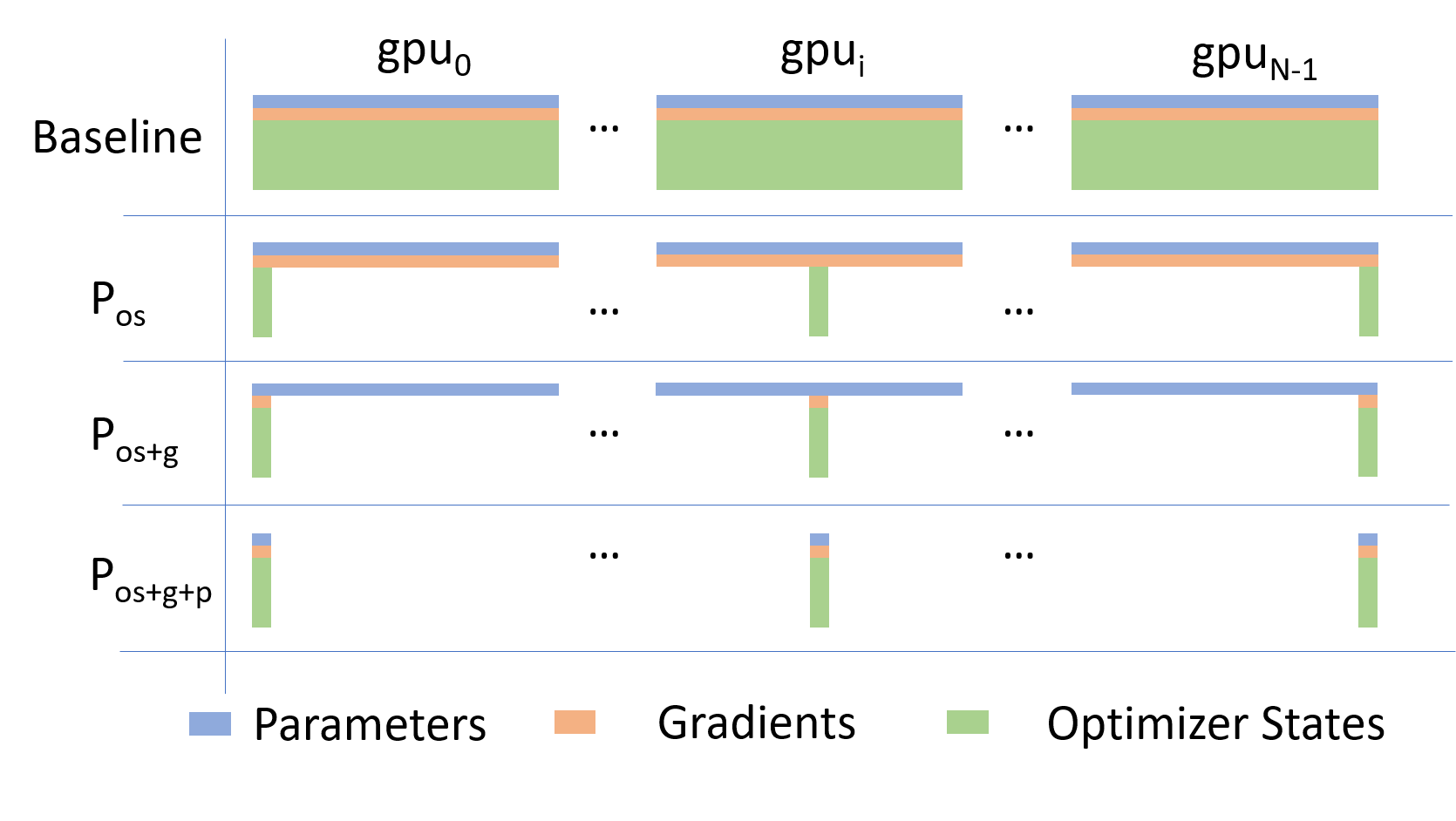
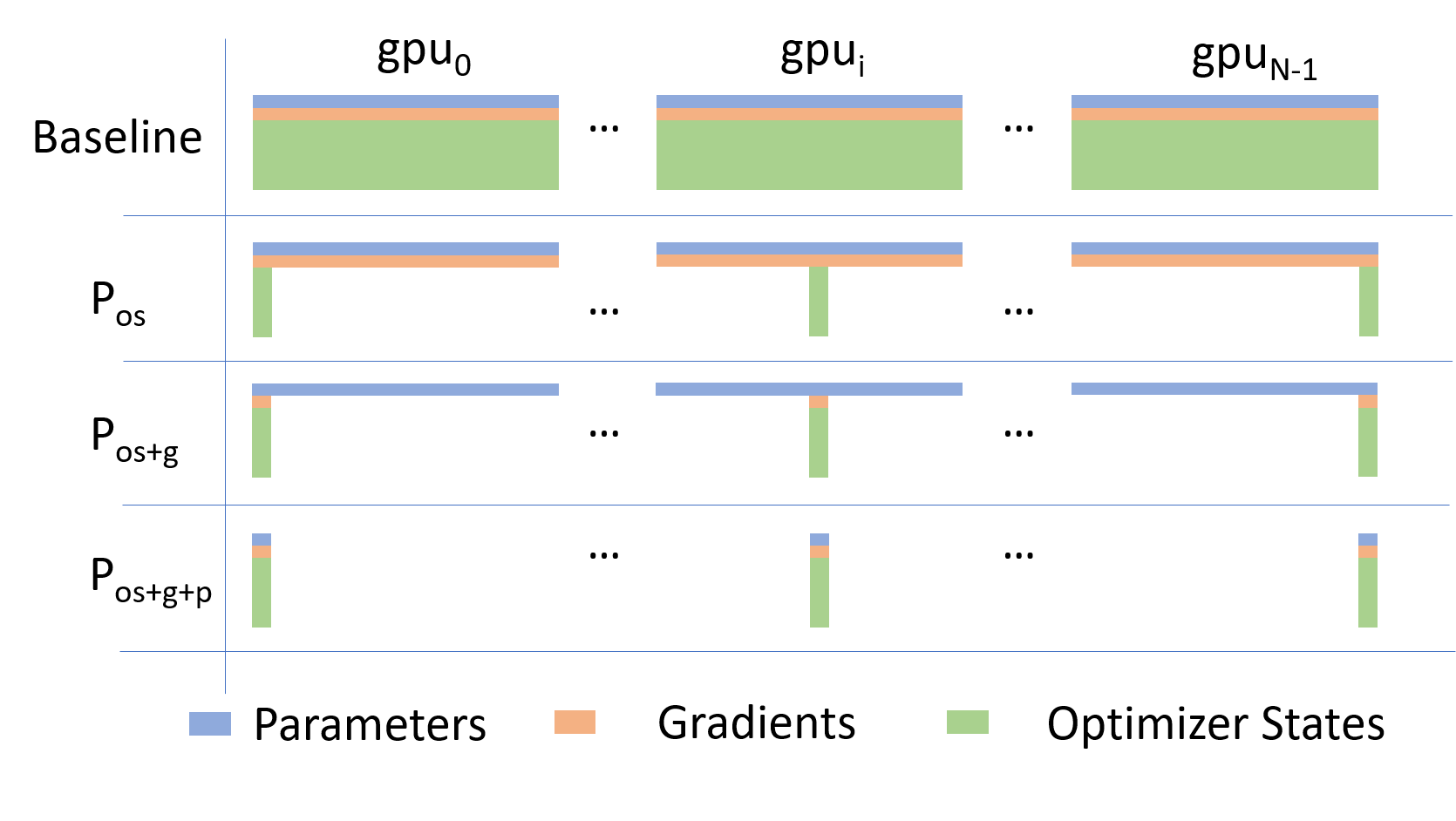
Going beyond Data Parallelism: DeepSpeed + ZeRO
  • Depending on the ZeRO stage (1, 2, 3), we can offload:
    1. Stage 1: optimizer states
    2. Stage 2: gradients + opt. states
    3. Stage 3: model params + grads + opt. states
Figure 7: DeepSpeed + ZeRO
🕸️ Additional Parallelism Strategies Pipeline Parallelism (PP)

flowchart TB
    subgraph G0["`GPU 0`"]
        direction LR
        a0("`Layer 0`")
        b0("`Layer 1`")
    end
    subgraph G1["`GPU 1`"]
        direction LR
        a1("`Layer 2`")
        b1("`Layer 3`")
    end
    a0 -.-> b0
    b0 --> a1
    a1 -.-> b1
classDef block fill:#CCCCCC02,stroke:#838383,stroke-width:1px,color:#838383
classDef red fill:#ff8181,stroke:#333,stroke-width:1px,color:#000
classDef orange fill:#FFC47F,stroke:#333,stroke-width:1px,color:#000
classDef yellow fill:#FFFF7F,stroke:#333,stroke-width:1px,color:#000
classDef green fill:#98E6A5,stroke:#333,stroke-width:1px,color:#000
classDef blue fill:#7DCAFF,stroke:#333,stroke-width:1px,color:#000
classDef purple fill:#FFCBE6,stroke:#333,stroke-width:1px,color:#000
class G0,G1 block
class a0 red
class b0 green
class a1 blue
class b1 yellow

Figure 8: Pipeline Parallelism
Tensor Parallel (TP)
  • Each tensor is split up into multiple chunks
  • Each shard of the tensor resides on its designated GPU
  • During processing each shard gets processed separately (and in parallel) on different GPUs
    • synced at the end of the step
  • See: 🤗 Model Parallelism for additional details

flowchart LR
   subgraph G0["`GPU0`"]
    direction TB
    a0("`Layer 0`")
    b0("`Layer 1`")
    c0("`Layer 2`")
    d0("`Layer 3`")
   end
   subgraph G1["`GPU1`"]
    direction TB
    a1("`Layer 0`")
    b1("`Layer 1`")
    c1("`Layer 2`")
    d1("`Layer 3`")
   end
   a0 <-.-> a1
   b0 <-.-> b1
   c0 <-.-> c1
   d0 <-.-> d1
classDef red fill:#ff8181,stroke:#333,stroke-width:1px,color:#000
classDef orange fill:#FFC47F,stroke:#333,stroke-width:1px,color:#000
classDef yellow fill:#FFFF7F,stroke:#333,stroke-width:1px,color:#000
classDef green fill:#98E6A5,stroke:#333,stroke-width:1px,color:#000
classDef blue fill:#7DCAFF,stroke:#333,stroke-width:1px,color:#000
classDef purple fill:#FFCBE6,stroke:#333,stroke-width:1px,color:#000
classDef block fill:#CCCCCC02,stroke:#838383,stroke-width:1px,color:#838383
class G0,G1 block
class a0,a1 red
class b0,b1 green
class c0,c1 blue
class d0,d1 yellow

Figure 9: Tensor Parallel Training
Tensor Parallel (TP)
  • Suitable when the model is too large to fit onto a single device (CPU / GPU)
  • Typically more complicated to implement than data parallel training
    • This is what one may call horizontal parallelism
    • Communication whenever dataflow between two subsets
  • argonne-lcf/Megatron-DeepSpeed
  • 🤗 huggingface/nanotron

flowchart LR
   subgraph G0["`GPU0`"]
    direction TB
    a0("`Layer 0`")
    b0("`Layer 1`")
    c0("`Layer 2`")
    d0("`Layer 3`")
   end
   subgraph G1["`GPU1`"]
    direction TB
    a1("`Layer 0`")
    b1("`Layer 1`")
    c1("`Layer 2`")
    d1("`Layer 3`")
   end
   a0 <-.-> a1
   b0 <-.-> b1
   c0 <-.-> c1
   d0 <-.-> d1
classDef red fill:#ff8181,stroke:#333,stroke-width:1px,color:#000
classDef orange fill:#FFC47F,stroke:#333,stroke-width:1px,color:#000
classDef yellow fill:#FFFF7F,stroke:#333,stroke-width:1px,color:#000
classDef green fill:#98E6A5,stroke:#333,stroke-width:1px,color:#000
classDef blue fill:#7DCAFF,stroke:#333,stroke-width:1px,color:#000
classDef purple fill:#FFCBE6,stroke:#333,stroke-width:1px,color:#000
classDef block fill:#CCCCCC02,stroke:#838383,stroke-width:1px,color:#838383
class G0,G1 block
class a0,a1 red
class b0,b1 green
class c0,c1 blue
class d0,d1 yellow

Figure 10: Tensor Parallel Training
  • Split up network over multiple workers
  • Each receives disjoint subset
  • All communication associated with subsets are distributed
  • Communication whenever dataflow between two subsets
  • Typically more complicated to implement than data parallel training
  • Suitable when the model is too large to fit onto a single device (CPU / GPU)
Tensor (/ Model) Parallel Training: Example

Want to compute:
where each GPU has only its portion of the full weights as shown below

  1. Compute: GPU1
  2. Compute: GPU2
  3. Compute:

flowchart LR
    subgraph X0["`GPU0`"]
        direction LR
        a("`W0`")
    end
    subgraph X1["`GPU1`"]
        direction LR
        b("`W1`")
    end
    subgraph X2["`GPU2`"]
        direction LR
        c("`W2`")
    end
  t0("`x0`")-->X0
  X0 -->|"`x0 W0`"|X1
  X1 -->|"`x0 W0 <br>+ x1 W1`"|X2
  t1("`x1`") --> X1
  t2("`x1`") --> X2

Figure 11

🔭 AI-for-Science
source (@tenderizzation)
 

ChatGPT: explain this image

🏗️ Aurora
Table 1: Aurora1 Specs
Property Value Racks 166 Nodes 10,624 XPUs2 127,488 CPUs 21,248 NICs 84,992 HBM 8 PB DDR5c 10 PB
Figure 12: Aurora: Fact Sheet.
🌌 AuroraGPT (2024–)

AuroraGPT: General purpose scientific LLM Broadly trained on a general corpora plus scientific {papers, texts, data}

  • Explore pathways towards a “Scientific Assistant” model
  • Build with international partners (RIKEN, BSC, others)
  • Multilingual English, 日本語, French, German, Spanish
  • Multimodal: images, tables, equations, proofs, time series, graphs, fields, sequences, etc
Figure 13: Image from Hannibal046 / Awesome-LLM
🧪 AuroraGPT: Open Science Foundation Model
Figure 14: High-level overview of AuroraGPT project
🧰 AuroraGPT: Toolbox
  • Datasets and data pipelines (how do we deal with scientific data?)
  • Software infrastructure and workflows (scalable, robust, extensible)
  • Evaluation of state-of-the-art LLM Models (how do they perform on scientific tasks?)
Note🚂 Training

argonne-lcf/Megatron-DeepSpeed
Large Model Training: Any Scale, Any Accelerator

Important🏃‍♂️ Running

argonne-lcf/inference-endpoints
Inference endpoints for LLMs, hosted @ ALCF

🏋️ Challenges: In Practice

This is incredibly difficult in practice, due in part to:

  • Brand new {hardware, architecture, software}
  • Lack of native support in existing frameworks (though getting better!)
  • General system stability
    +10k Nodes +100k XPUs
    • network performance
    • file system stability (impacted by other users !)
    • many unexpected difficulties occur at increasingly large scales
  • Combinatorial explosion of possible configurations and experiments
    • {hyperparameters, architectures, tokenizers, learning rates, …}
💾 AuroraGPT: Training
  • To train a fixed model on trillions of tokens requires:
    1. Aggregating data from multiple different corpora
      (e.g. ArXiv, Reddit, StackExchange, GitHub, Wikipedia, etc.)
    2. Sampling each training batch according to a fixed distribution across corpora
    3. Building indices that map batches of tokens into these files (indexing)

    The original implementation was slow:

    • Designed to run serially on a single device
    • Major bottleneck when debugging data pipeline at scale
🍹 AuroraGPT: Blending Data, Efficiently
  • 🐢 Original implementation:
    • Slow (serial, single device)
    • ~ 1 hr/2T tokens
  • 🐇 New implementation:
    • Fast! (distributed, asynchronous)
    • ~ 2 min/2T tokens
      (30x faster !!)
Figure 15: Time spent preparing 2T tokens
📉 Loss Curve: Training AuroraGPT-7B on 2T Tokens
Figure 16: Loss curve during training on 2T tokens.
✨ Features
  • 🕸️ Parallelism:
    • {data, tensor, pipeline, sequence, …}
  • ♻️ Checkpoint Converters:
    • Megatron ⇄ 🤗 HF ⇄ ZeRO ⇄ Universal
  • 🔀 DeepSpeed Integration:
    • ZeRO Offloading
    • Activation checkpointing
    • AutoTP (WIP)
    • ability to leverage features from DeepSpeed community
✨ Features (even more!)
  • 🧗 Optimizers3:
    • Support for many different optimizers:
      • Distributed Shampoo, Muon, Adopt, Sophia, Lamb, GaLORE, ScheduleFree, …
    • See full list
    • Large batch training
  • 📊 Experiment Tracking:
    • Automatic experiment and metric tracking with Weights & Biases
🧬 MProt-DPO 🧬 Scaling Results (2024)
Figure 17: Scaling results for 3.5B model across ~38,400 GPUs

This novel work presents a scalable, multimodal workflow for protein design that trains an LLM to generate protein sequences, computationally evaluates the generated sequences, and then exploits them to fine-tune the model.

Direct Preference Optimization steers the LLM toward the generation of preferred sequences, and enhanced workflow technology enables its efficient execution. A 3.5B and a 7B model demonstrate scalability and exceptional mixed precision performance of the full workflow on ALPS, Aurora, Frontier, Leonardo and PDX.

🧬 MProt-DPO: Scaling Results
Figure 18: 3.5B model
Figure 19: 7B model
🚂 Loooooooooong Sequence Lengths

25B

33B
Figure 20: Maximum (achievable) SEQ_LEN for both 25B and 33B models (See: Song et al. (2023))

scaling4science
Megatron-DS-Benchmarking

🌎 AERIS (2025)
Figure 21: arXiv:2509.13523

ACM Gordon Bell Prize for Climate Modeling Finalist @ SC’25

ACM Gordon Bell Prize for Climate Modeling Finalist @ SC’25

We demonstrate a significant advancement in AI weather and climate modeling with AERIS by efficient scaling of window-based transformer models. We have performed global medium-range forecasts with performance competitive with GenCast and surpassing the IFS ENS model, with longer, 90- day rollouts showing our ability to learn atmospheric dynamics on seasonal scales without collapsing, becoming the first diffusion-based model that can work across forecast scales from 6 hours all the way to 3 months with remarkably accurate out of distribution predictions of extreme events.

👀 High-Level Overview of AERIS
Figure 22: Rollout of AERIS model, specific humidity at 700m.
Table 2: Overview of AERIS model and training setup
Property Description Domain Global Resolution 0.25° & 1.4° Training Data ERA5 (1979–2018) Model Architecture Swin Transformer Speedup4 O(10k–100k)
➕ Contributions Caution☔ AERIS

First billion-parameter diffusion model for weather + climate

  • Operates at the pixel level (1 × 1 patch size), guided by physical priors
  • Medium-range forecast skill:
    • Surpasses IFS ENS, competitive with GenCast5
    • Uniquely stable on seasonal scales to 90 days
Note🌀 SWiPe

A novel 3D (sequence-window-pipeline) parallelism strategy for training transformers across high-resolution inputs

  • Enables scalable small-batch training on large supercomputers6
    • 10.21 ExaFLOPS
    • @ 121,000 Intel XPUs (Aurora)
⚠️ Issues with the Deterministic Approach
  • Transformers:
    • Deterministic
    • Single input → single forecast
  • Diffusion:
    • Probabilistic
    • Single input → ensemble of forecasts
    • Captures uncertainty and variability in weather predictions
    • Enables ensemble forecasting for better risk assessment
🎲 Transitioning to a Probabilistic Model
Figure 23: Reverse diffusion with the input condition, individual sampling steps , the next time step estimate and the target output.

Reverse Diffusion Process (\mathcal{N}\rightarrow \pi)

Reverse Diffusion Process ()

Forward Diffusion Process (\pi\rightarrow \mathcal{N})

Forward Diffusion Process ()
🌀 Sequence-Window-Pipeline Parallelism SWiPe
  • SWiPe is a novel parallelism strategy for Swin-based Transformers
  • Hybrid 3D Parallelism strategy, combining:
    • Sequence parallelism (SP)
    • Window parallelism (WP)
    • Pipeline parallelism (PP)
Figure 24
Figure 25: SWiPe Communication Patterns
🚀 AERIS: Scaling Results
Figure 26: AERIS: Scaling Results
  • 10 EFLOPs (sustained) @ 120,960 GPUs
  • See (Hatanpää et al. (2025)) for additional details
  • arXiv:2509.13523
🌪️ Hurricane Laura
Figure 27: Hurricane Laura tracks (top) and intensity (bottom). Initialized 7(a), 5(b) and 3(c) days prior to 2020-08-28T00z.
📓 References Hatanpää, Väinö, Eugene Ku, Jason Stock, Murali Emani, Sam Foreman, Chunyong Jung, Sandeep Madireddy, et al. 2025. “AERIS: Argonne Earth Systems Model for Reliable and Skillful Predictions.” https://arxiv.org/abs/2509.13523. Price, Ilan, Alvaro Sanchez-Gonzalez, Ferran Alet, Tom R. Andersson, Andrew El-Kadi, Dominic Masters, Timo Ewalds, et al. 2024. “GenCast: Diffusion-Based Ensemble Forecasting for Medium-Range Weather.” https://arxiv.org/abs/2312.15796. Song, Shuaiwen Leon, Bonnie Kruft, Minjia Zhang, Conglong Li, Shiyang Chen, Chengming Zhang, Masahiro Tanaka, et al. 2023. “DeepSpeed4Science Initiative: Enabling Large-Scale Scientific Discovery Through Sophisticated AI System Technologies.” https://arxiv.org/abs/2310.04610. ❤️ Acknowledgements

This research used resources of the Argonne Leadership Computing Facility, which is a DOE Office of Science User Facility supported under Contract DE-AC02-06CH11357.

Footnotes
  1. 🏆 Aurora Supercomputer Ranks Fastest for AI↩︎

  2. Each node has 6 Intel Data Center GPU Max 1550 (code-named “Ponte Vecchio”) tiles, with 2 XPUs per tile.↩︎

  3. Implemented by Marieme Ngom↩︎

  4. Relative to PDE-based models, e.g.: GFS↩︎

  5. GenCast: A Generative Model for Medium-Range Global Weather Forecasting (Price et al. (2024))↩︎

  6. Demonstrated on up to 120,960 GPUs on Aurora and 8,064 GPUs on LUMI.↩︎

CitationBibTeX citation:
@unpublished{foreman2025,
  author = {Foreman, Sam},
  title = {Training {Foundation} {Models} on {Supercomputers}},
  date = {2025-10-15},
  url = {https://samforeman.me/talks/2025/10/15/slides.html},
  langid = {en}
}
For attribution, please cite this work as: Foreman, Sam. 2025. “Training Foundation Models on Supercomputers.” October 15. https://samforeman.me/talks/2025/10/15/slides.html.
https://samforeman.me/talks/2025/10/15/
Extensions
AERIS: Argonne’s Earth Systems Model
<iframe src="https://www.googletagmanager.com/ns.html?id=GTM-TC329HJ" height="0" width="0" style="display:none;visibility:hidden"></iframe> 🌎 AERIS
Figure 1: arXiv:2509.13523

ACM Gordon Bell Prize for Climate Modeling Finalist @ SC’25

ACM Gordon Bell Prize for Climate Modeling Finalist @ SC’25

We demonstrate a significant advancement in AI weather and climate modeling with AERIS by efficient scaling of window-based transformer models. We have performed global medium-range forecasts with performance competitive with GenCast and surpassing the IFS ENS model, with longer, 90- day rollouts showing our ability to learn atmospheric dynamics on seasonal scales without collapsing, becoming the first diffusion-based model that can work across forecast scales from 6 hours all the way to 3 months with remarkably accurate out of distribution predictions of extreme events.

High-Level Overview of AERIS
Figure 2: Rollout of AERIS model, specific humidity at 700m.
Table 1: Overview of AERIS model and training setup
Property Description Domain Global Resolution 0.25° & 1.4° Training Data ERA5 (1979–2018) Model Architecture Swin Transformer Speedup1 O(10k–100k)
Contributions Caution☔ AERIS

First billion-parameter diffusion model for weather + climate

  • Operates at the pixel level (1 × 1 patch size)
  • Guided by physical priors
  • Medium-range forecast skill
    • Surpasses IFS ENS, competitive with GenCast (Price et al. (2024))
    • Uniquely stable on seasonal scales to 90 days
Note🌀 SWiPe
  • SWiPe, novel 3D (sequence-window-pipeline) parallelism strategy for training transformers across high-resolution inputs
    • Enables scalable small-batch training on large supercomputers2
      • 10.21 ExaFLOPS @ 121,000 Intel XPUs (Aurora)
Model Overview
Table 2: Variables used in AERIS training and prediction
Variable Description t2m 2m Temperature X u(v) () wind component @ Xm q Specific Humidity z Geopotential msl Mean Sea Level Pressure sst Sea Surface Temperature lsm Land-sea mask
  • Dataset: ECMWF Reanalysis v5 (ERA5)
  • Variables: Surface and pressure levels
  • Usage: Medium-range weather forecasting
  • Partition:
    • Train: 1979–20183
    • Val: 2019
    • Test: 2020
  • Data Size: 100GB at 5.6° to 31TB at 0.25°
Windowed Self-Attention
  • Benefits for weather modeling:
    • Shifted windows capture both local patterns and long-range context
    • Constant scale, windowed self-attention provides high-resolution forecasts
    • Designed (currently) for fixed, 2D grids
  • Inspiration from SOTA LLMs:
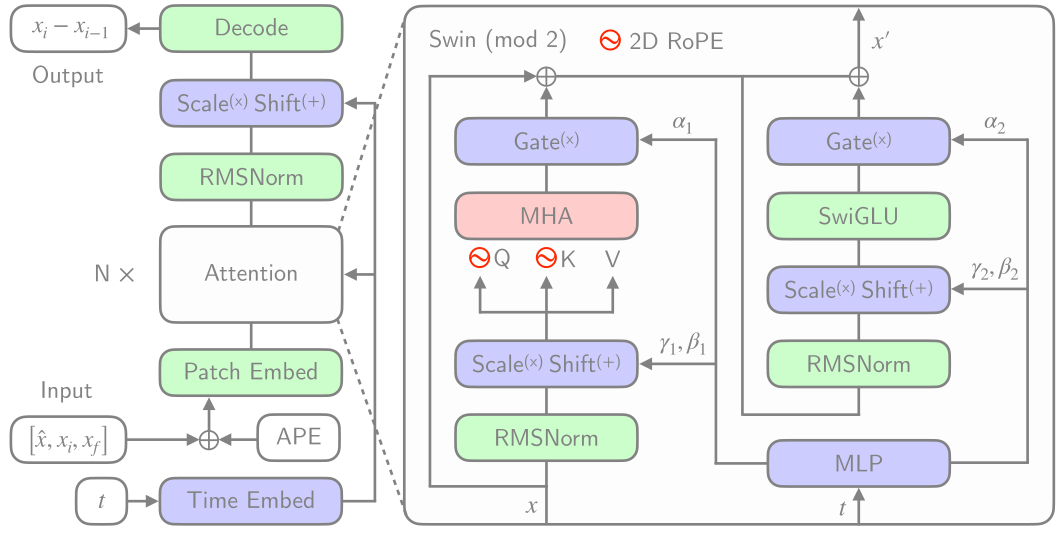
    • RMSNorm, SwiGLU, 2D RoPE
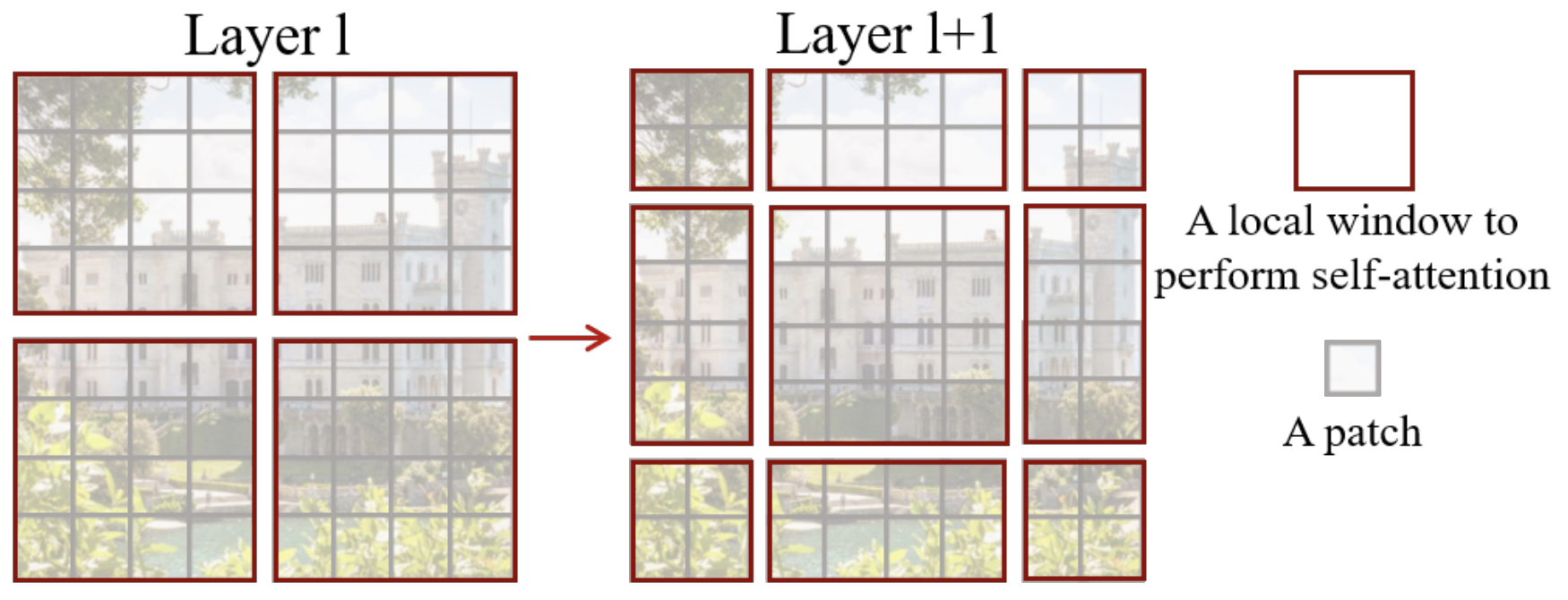
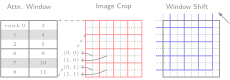
Figure 3: Windowed Self-Attention
Model Architecture: Details
Figure 4: Model Architecture
Issues with the Deterministic Approach
  • Transformers:
    • Deterministic
    • Single input → single forecast
  • Diffusion:
    • Probabilistic
    • Single input → ensemble of forecasts
    • Captures uncertainty and variability in weather predictions
    • Enables ensemble forecasting for better risk assessment
Transitioning to a Probabilistic Model
Figure 5: Reverse diffusion with the input condition, individual sampling steps , the next time step estimate and the target output.

Reverse Diffusion Process (\mathcal{N}\rightarrow \pi)

Reverse Diffusion Process ()

Forward Diffusion Process (\pi\rightarrow \mathcal{N})

Forward Diffusion Process ()
Sequence-Window-Pipeline Parallelism SWiPe
  • SWiPe is a novel parallelism strategy for Swin-based Transformers
  • Hybrid 3D Parallelism strategy, combining:
    • Sequence parallelism (SP)
    • Window parallelism (WP)
    • Pipeline parallelism (PP)
Figure 6
Figure 7: SWiPe Communication Patterns
Aurora
Table 3: Aurora4 Specs
Property Value Racks 166 Nodes 10,624 XPUs5 127,488 CPUs 21,248 NICs 84,992 HBM 8 PB DDR5c 10 PB
Figure 8: Aurora: Fact Sheet.
AERIS: Scaling Results
Figure 9: AERIS: Scaling Results
  • 10 EFLOPs (sustained) @ 120,960 GPUs
  • See (Hatanpää et al. (2025)) for additional details
  • arXiv:2509.13523
Hurricane Laura
Figure 10: Hurricane Laura tracks (top) and intensity (bottom). Initialized 7(a), 5(b) and 3(c) days prior to 2020-08-28T00z.
S2S: Subsseasonal-to-Seasonal Forecasts Important🌡️ S2S Forecasts

We demonstrate for the first time, the ability of a generative, high resolution (native ERA5) diffusion model to produce skillful forecasts on the S2S timescales with realistic evolutions of the Earth system (atmosphere + ocean).

  • To assess trends that extend beyond that of our medium-range weather forecasts (beyond 14-days) and evaluate the stability of our model, we made 3,000 forecasts (60 initial conditions each with 50 ensembles) out to 90 days.
  • AERIS was found to be stable during these 90-day forecasts
    • Realistic atmospheric states
    • Correct power spectra even at the smallest scales
Seasonal Forecast Stability
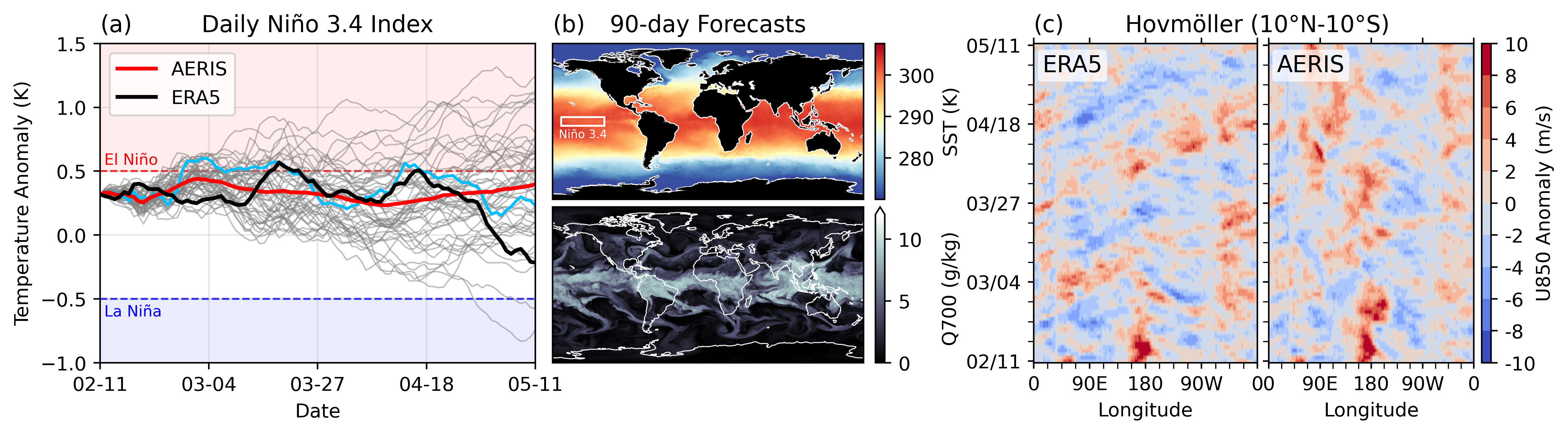
Figure 11: S2S Stability: (a) Spring barrier El Niño with realistic ensemble spread in the ocean; (b) qualitatively sharp fields of SST and Q700 predicted 90 days in the future from the closest ensemble member to the ERA5 in (a); and (c) stable Hovmöller diagrams of U850 anomalies (climatology removed; m/s), averaged between 10°S and 10°N, for a 90-day rollout.
Next Steps
  • Swift: Swift, a single-step consistency model that, for the first time, enables autoregressive finetuning of a probability flow model with a continuous ranked probability score (CRPS) objective
References
  1. What are Diffusion Models? | Lil’Log
  2. Step by Step visual introduction to Diffusion Models. - Blog by Kemal Erdem
  3. Understanding Diffusion Models: A Unified Perspective
Hatanpää, Väinö, Eugene Ku, Jason Stock, Murali Emani, Sam Foreman, Chunyong Jung, Sandeep Madireddy, et al. 2025. “AERIS: Argonne Earth Systems Model for Reliable and Skillful Predictions.” https://arxiv.org/abs/2509.13523. Price, Ilan, Alvaro Sanchez-Gonzalez, Ferran Alet, Tom R. Andersson, Andrew El-Kadi, Dominic Masters, Timo Ewalds, et al. 2024. “GenCast: Diffusion-Based Ensemble Forecasting for Medium-Range Weather.” https://arxiv.org/abs/2312.15796. Extras Overview of Diffusion Models

Goal: We would like to (efficiently) draw samples from a (potentially unknown) target distribution .

  • Given , we can construct a forward diffusion process by gradually adding noise to over steps: .

    • Step sizes controlled by a variance schedule , with:

Diffusion Model: Forward Process
  • Introduce:

    We can write the forward process as:

  • We see that the mean

Acknowledgements

This research used resources of the Argonne Leadership Computing Facility, which is a DOE Office of Science User Facility supported under Contract DE-AC02-06CH11357.

Footnotes
  1. Relative to PDE-based models, e.g.: GFS↩︎

  2. Demonstrated on up to 120,960 GPUs on Aurora and 8,064 GPUs on LUMI.↩︎

  3. ~ 14,000 days of data↩︎

  4. 🏆 Aurora Supercomputer Ranks Fastest for AI↩︎

  5. Each node has 6 Intel Data Center GPU Max 1550 (code-named “Ponte Vecchio”) tiles, with 2 XPUs per tile.↩︎

CitationBibTeX citation:
@unpublished{foreman2025,
  author = {Foreman, Sam},
  title = {AERIS: {Argonne’s} {Earth} {Systems} {Model}},
  date = {2025-10-08},
  url = {https://samforeman.me/talks/2025/10/08/slides.html},
  langid = {en}
}
For attribution, please cite this work as: Foreman, Sam. 2025. “AERIS: Argonne’s Earth Systems Model.” October 8. https://samforeman.me/talks/2025/10/08/slides.html.
https://samforeman.me/talks/2025/10/08/
Extensions
🎨 Mixing Between Distributions While Training
machine-learningdeep-learningoptimization
<iframe src="https://www.googletagmanager.com/ns.html?id=GTM-TC329HJ" height="0" width="0" style="display:none;visibility:hidden"></iframe> Motivation

When training on multiple data sources or domains, it is often desirable to smoothly interpolate between two distributions rather than switching abruptly. This ensures stable optimization and avoids sudden shifts in gradient statistics.

We can achieve this with an annealing schedule that gradually shifts probability mass from one distribution to another.

Mathematical Framework

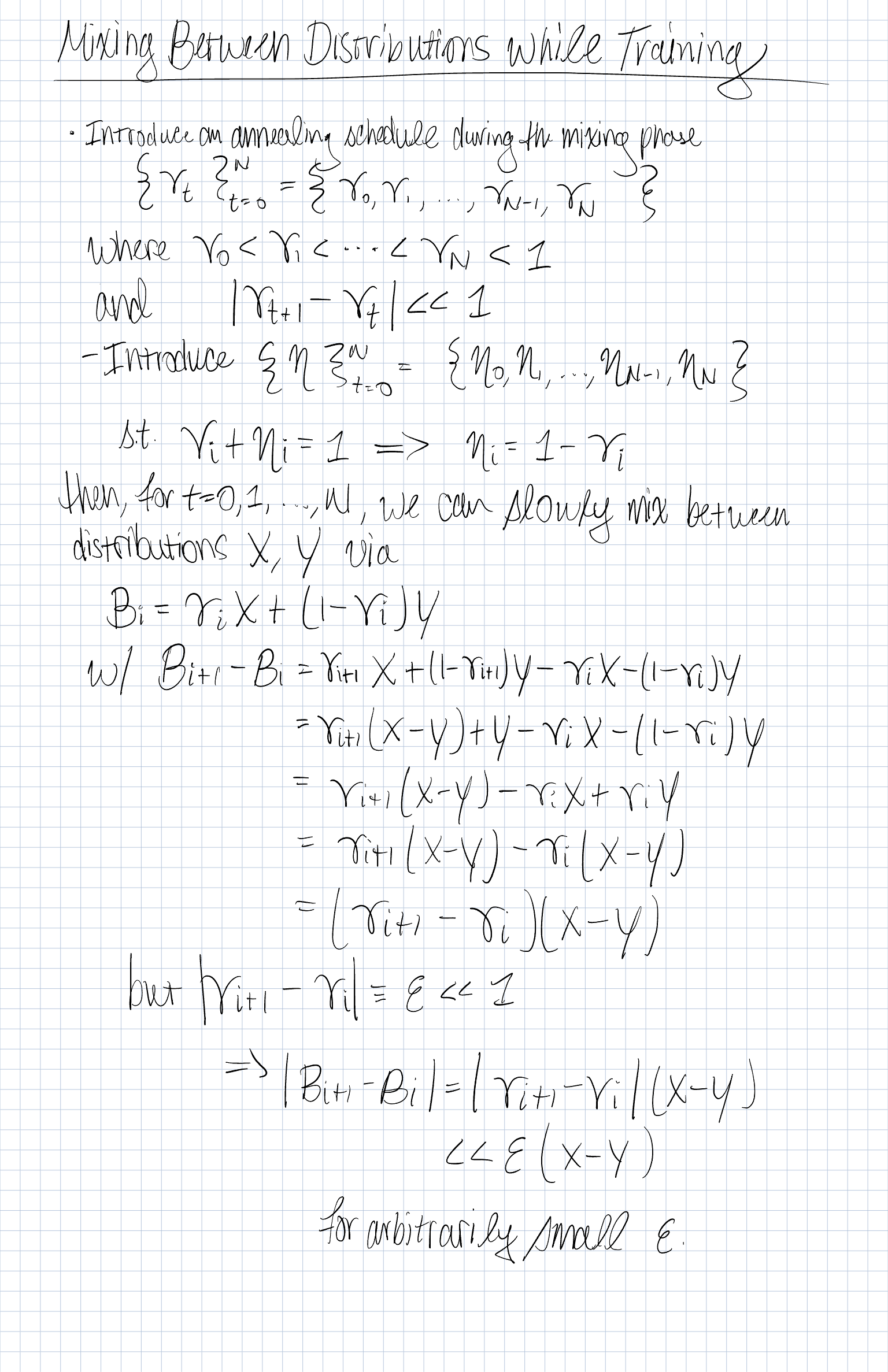
We introduce an annealing schedule during the mixing phase:

where

We also define a complementary schedule:

Mixing Definition

For (t = 0, 1, , N), define the interpolated distribution

where (X) and (Y) are two underlying distributions (or datasets, or losses).

Incremental Difference

The change between successive mixtures is:

Thus,

If we set , then

meaning the transition between (X) and (Y) is arbitrarily smooth.

Interpretation
  • This is a linear interpolation (convex combination) between two distributions.
  • The annealing schedule ensures that the interpolation is smooth in small increments.
  • Useful in:
    • Curriculum learning: start from an easier distribution and anneal to a harder one.
    • Domain adaptation: gradually shift from source domain (X) to target domain (Y).
    • Robust training: maintain a mixture for diversity and stability.
Implementation

Below is a simple Python implementation of such a schedule and a sampler that mixes between two datasets.

import math, random
from typing import List, Sequence, Any, Iterator, Tuple

def make_schedule(n_steps: int, start: float = 0.0, end: float = 1.0, kind: str = "linear") -> List[float]:
    """Generate an annealing schedule."""
    if kind == "linear":
        return [start + (end - start) * (t / (n_steps - 1)) for t in range(n_steps)]
    elif kind == "cosine":
        return [
            start + (end - start) * (1 - math.cos(math.pi * t / (n_steps - 1))) / 2
            for t in range(n_steps)
        ]
    else:
        raise ValueError(f"Unknown schedule kind: {kind}")

class MixtureSampler:
    """Probabilistic mixture of two datasets using gamma_t schedule."""
    def __init__(self, X: Sequence[Any], Y: Sequence[Any], schedule: Sequence[float]):
        self.X, self.Y = X, Y
        self.schedule = schedule
        self.rng = random.Random(0)

    def __iter__(self) -> Iterator[Tuple[int, Any]]:
        for t, gamma_t in enumerate(self.schedule):
            if self.rng.random() < gamma_t:
                yield t, self.X[self.rng.randrange(len(self.X))]
            else:
                yield t, self.Y[self.rng.randrange(len(self.Y))]

# Example usage
if __name__ == "__main__":
    X = [("X", i) for i in range(5)]
    Y = [("Y", i) for i in range(5)]
    sched = make_schedule(10, start=0.1, end=0.9, kind="cosine")
    mix = MixtureSampler(X, Y, sched)

    for t, ex in mix:
        print(f"t={t:02d}, gamma={sched[t]:.2f}, sample={ex}")
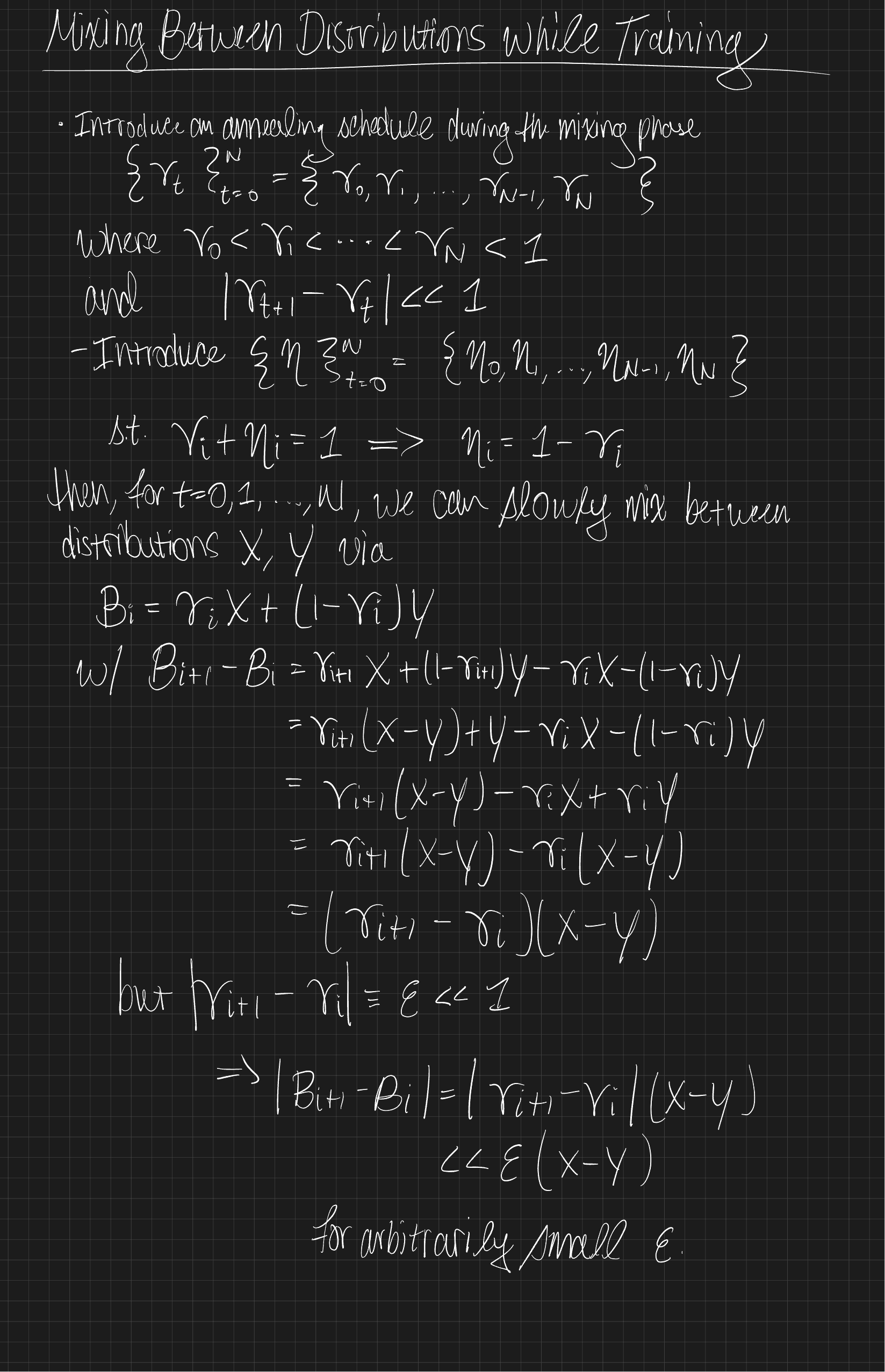
Original Notes

Figure 1: Original Notes
CitationBibTeX citation:
@online{foreman2025,
  author = {Foreman, Sam},
  title = {🎨 {Mixing} {Between} {Distributions} {While} {Training}},
  date = {2025-10-06},
  url = {https://samforeman.me/posts/2025/10/06/},
  langid = {en}
}
For attribution, please cite this work as: Foreman, Sam. 2025. “🎨 Mixing Between Distributions While Training.” October 6, 2025. https://samforeman.me/posts/2025/10/06/.
https://samforeman.me/posts/2025/10/06/
Extensions
Training Foundation Models on Supercomputers
<iframe src="https://www.googletagmanager.com/ns.html?id=GTM-TC329HJ" height="0" width="0" style="display:none;visibility:hidden"></iframe> 👀 Scaling: Overview 🐢 Training on a Single Device

flowchart LR
    subgraph G0["`GPU0`"]
        subgraph N0["`Network`"]
        end
        L0("`Loss`")
    end
    subgraph D["`Data`"]
        x("`x0`")
        x1("`x1`")
        x2("`x2`")
    end
    x --> N0
    N0 --> L0
    L0 --> N0
classDef block fill:#CCCCCC02,stroke:#838383,stroke-width:1px,color:#838383
classDef red fill:#ff8181,stroke:#333,stroke-width:1px,color:#000
classDef green fill:#98E6A5,stroke:#333,stroke-width:1px,color:#000
classDef blue fill:#7DCAFF,stroke:#333,stroke-width:1px,color:#000
classDef grey fill:#cccccc,stroke:#333,stroke-width:1px,color:#000
class x,L0 red
class x1 green
class x2 blue
class x3 grey
class N0,D,G0,n0 block

Figure 1: SLOW !! model size limited by GPU memory
👬 Training on Multiple GPUS: Data Parallelism

flowchart LR
    subgraph D["`Data`"]
        direction TB
        x("`x₀`")
        x1("`x₁`")
        x2("`x₂`")
    end
    direction LR
    subgraph G0["`GPU0`"]
        direction LR
        subgraph N0["`NN`"]
        end
        %%y0("`y₀`")
        L0["`Loss`"]
    end
    subgraph G1["`GPU1`"]
        direction LR
        subgraph N1["`NN`"]
        end
        L1["`Loss`"]
    end
    subgraph G2["`GPU2`"]
        direction LR
        subgraph N2["`NN`"]
        end
        L2["`Loss`"]
    end
    x --> G0
    x1 --> G1
    x2 --> G2
    N0 --> L0
    N1 --> L1
    N2 --> L2
classDef block fill:#CCCCCC02,stroke:#838383,stroke-width:1px,color:#838383
classDef text fill:#CCCCCC02,stroke:#838383,stroke-width:0px,color:#838383
classDef grey fill:#cccccc,stroke:#333,stroke-width:1px,color:#000
classDef red fill:#ff8181,stroke:#333,stroke-width:1px,color:#000
classDef orange fill:#FFC47F,stroke:#333,stroke-width:1px,color:#000
classDef yellow fill:#FFFF7F,stroke:#333,stroke-width:1px,color:#000
classDef green fill:#98E6A5,stroke:#333,stroke-width:1px,color:#000
classDef blue fill:#7DCAFF,stroke:#333,stroke-width:1px,color:#000
classDef purple fill:#FFCBE6,stroke:#333,stroke-width:1px,color:#000
class x,y0,L0 red
class x1,L1 green
class x2,L2 blue
class x3,ar grey
class D,N0,N1,N2,G0,G1,G2,GU block
class AR block
class bc text

Figure 2: Each GPU receives unique data at each step
➡️ Data Parallel: Forward Pass

flowchart LR
    subgraph D["`Data`"]
        direction TB
        x("`x₀`")
        x1("`x₁`")
        x2("`x₂`")
    end
    direction LR
    subgraph G0["`GPU0`"]
        direction LR
        subgraph N0["`NN`"]
        end
        L0["`Loss`"]
    end
    subgraph G1["`GPU1`"]
        direction LR
        subgraph N1["`NN`"]
        end
        L1["`Loss`"]
    end
    subgraph G2["`GPU2`"]
        direction LR
        subgraph N2["`NN`"]
        end
        L2["`Loss`"]
    end
    ar("`Avg. Grads<br>(∑ₙgₙ)/N`")
    x --> G0
    x1 --> G1
    x2 --> G2
    N0 --> L0
    N1 --> L1
    N2 --> L2
    L0 -.-> ar
    L1 -.-> ar
    L2 -.-> ar
classDef block fill:#CCCCCC02,stroke:#838383,stroke-width:1px,color:#838383
classDef grey fill:#cccccc,stroke:#333,stroke-width:1px,color:#000
classDef red fill:#ff8181,stroke:#333,stroke-width:1px,color:#000
classDef orange fill:#FFC47F,stroke:#333,stroke-width:1px,color:#000
classDef yellow fill:#FFFF7F,stroke:#333,stroke-width:1px,color:#000
classDef green fill:#98E6A5,stroke:#333,stroke-width:1px,color:#000
classDef blue fill:#7DCAFF,stroke:#333,stroke-width:1px,color:#000
classDef purple fill:#FFCBE6,stroke:#333,stroke-width:1px,color:#000
classDef text fill:#CCCCCC02,stroke:#838383,stroke-width:0px,color:#838383
class x,y0,L0 red
class x1,L1 green
class x2,L2 blue
class x3,ar grey
class D,N0,N1,N2,G0,G1,G2,GU block
class AR block
class bc text

Figure 3: Average gradients across all GPUs
⬅️ Data Parallel: Backward Pass

flowchart RL
    subgraph D["`Data`"]
        direction TB
        x("`x₀`")
        x1("`x₁`")
        x2("`x₂`")
    end
    subgraph G0["`GPU0`"]
        direction RL
        subgraph N0["`NN`"]
        end
        L0["`Loss`"]
    end
    subgraph G1["`GPU1`"]
        direction RL
        subgraph N1["`NN`"]
        end
        L1["`Loss`"]
    end
    subgraph G2["`GPU2`"]
        direction RL
        subgraph N2["`NN`"]
        end
        L2["`Loss`"]
    end
    subgraph BC["`Send Updates`"]
        direction TB
    end
    BC -.-> G0
    BC -.-> G1
    BC -.-> G2
    L0 ~~~ N0
    L1 ~~~ N1
    L2 ~~~ N2
    G0 ~~~ x
    G1 ~~~ x1
    G2 ~~~ x2
classDef grey fill:#cccccc,stroke:#333,stroke-width:1px,color:#000
classDef block fill:#CCCCCC02,stroke:#838383,stroke-width:1px,color:#838383
classDef red fill:#ff8181,stroke:#333,stroke-width:1px,color:#000
classDef orange fill:#FFC47F,stroke:#333,stroke-width:1px,color:#000
classDef yellow fill:#FFFF7F,stroke:#333,stroke-width:1px,color:#000
classDef green fill:#98E6A5,stroke:#333,stroke-width:1px,color:#000
classDef blue fill:#7DCAFF,stroke:#333,stroke-width:1px,color:#000
classDef purple fill:#FFCBE6,stroke:#333,stroke-width:1px,color:#000
classDef text fill:#CCCCCC02,stroke:#838383,stroke-width:0px,color:#838383
class x,y0,L0 red
class x1,L1 green
class x2,L2 blue
class x3,ar grey
class D,N0,N1,N2,G0,G1,G2,GU block
class BC block
class bc text

Figure 4: Send global updates back to each GPU. See: PyTorch / Distributed Data Parallel
🔄 Data Parallel: Training 📡 Communication
  • Requires global communication
    • every rank must participate (collective communication) !!
  • Need mechanism(s) for communicating across GPUs:
Warning⌛ Timeouts
  • Collective operations have to be called for each rank to form a complete collective operation.
    • Failure to do so will result in other ranks waiting indefinitely
🚧 Common Pitfalls
  • Each worker needs to be fed a unique batch of data at each step
  • Only perform File I/O on one worker (i.e. rank==0)
    • When loading from a checkpoint, read in on one worker and broadcast to others
  • Collective operations must be called by all workers
    • Ensure that all workers are using the same version of code / libraries

flowchart LR
  g0["GPU0"] --> g1["GPU 1"]
  CKPT --> g0
  g0 --> g2["GPU 2"]
  g0 --Model + Optim. State--> g3["GPU 3"]
  g0 --> X["`...`"]
  g0 --> N["GPU N"]
classDef text fill:#CCCCCC02,stroke:#838383,stroke-width:0px,color:#838383,font-weight:500
classDef block fill:#CCCCCC02,stroke:#838383,stroke-width:1px,font-weight:500,color:#838383
class g0,g1,g2,g3,N,X,CKPT block

Figure 5: To ensure all workers have the same copies, we load on RANK==0 and broadcast
🎀 Best Practices
  • Use parallel IO whenever possible
    • Feed each rank from different files
    • Use MPI IO to have each rank read its own batch from a file
    • Use several ranks to read data, MPI to scatter to remaining ranks
      • Most practical in big at-scale training
  • Take advantage of data storage
  • Use the right optimizations for Aurora, Polaris, etc.
  • Preload data when possible
    • Offloading to a GPU frees CPU cycles for loading the next batch of data
      • minimize IO latency this way
Important⏰ Keeping things in Sync

Computation stalls during communication !!

Keeping the communication to computation ratio small is important for effective scaling.

🤔 Plan of Attack

flowchart TB
    A{"Model Perfect?"}
    A -- no --> M{"Available Memory?"}
    A -- yes --> AD["Done"]
    M -- yes --> MY["Make Model Larger"]
    M -- no --> ZMP["Free Up Memory"]
    MY --> A
    ZMP --> MP["TP (or) ZeRO (or) Act. Ckpt."]
    MP --> MY
    A:::block
    M:::block
    AD:::block
    MY:::block
    ZMP:::block
    MP:::block
    classDef text fill:#CCCCCC02,stroke:#838383,stroke-width:0px,color:#838383
    classDef block fill:#CCCCCC02,stroke:#838383,stroke-width:1px,color:#838383

Figure 6: General strategy for scaling model training
🚀 Going Beyond Data Parallelism
  • ✅ Useful when model fits on single GPU:
    • ultimately limited by GPU memory
    • model performance limited by size
  • ⚠️ When model does not fit on a single GPU:
Going beyond Data Parallelism: DeepSpeed + ZeRO
  • Depending on the ZeRO stage (1, 2, 3), we can offload:
    1. Stage 1: optimizer states
    2. Stage 2: gradients + opt. states
    3. Stage 3: model params + grads + opt. states
Figure 7: DeepSpeed + ZeRO
🕸️ Additional Parallelism Strategies Pipeline Parallelism (PP)

flowchart TB
    subgraph G0["`GPU 0`"]
        direction LR
        a0("`Layer 0`")
        b0("`Layer 1`")
    end
    subgraph G1["`GPU 1`"]
        direction LR
        a1("`Layer 2`")
        b1("`Layer 3`")
    end
    a0 -.-> b0
    b0 --> a1
    a1 -.-> b1
classDef block fill:#CCCCCC02,stroke:#838383,stroke-width:1px,color:#838383
classDef red fill:#ff8181,stroke:#333,stroke-width:1px,color:#000
classDef orange fill:#FFC47F,stroke:#333,stroke-width:1px,color:#000
classDef yellow fill:#FFFF7F,stroke:#333,stroke-width:1px,color:#000
classDef green fill:#98E6A5,stroke:#333,stroke-width:1px,color:#000
classDef blue fill:#7DCAFF,stroke:#333,stroke-width:1px,color:#000
classDef purple fill:#FFCBE6,stroke:#333,stroke-width:1px,color:#000
class G0,G1 block
class a0 red
class b0 green
class a1 blue
class b1 yellow

Figure 8: Pipeline Parallelism
Tensor Parallel (TP)
  • Each tensor is split up into multiple chunks
  • Each shard of the tensor resides on its designated GPU
  • During processing each shard gets processed separately (and in parallel) on different GPUs
    • synced at the end of the step
  • See: 🤗 Model Parallelism for additional details

flowchart LR
   subgraph G0["`GPU0`"]
    direction TB
    a0("`Layer 0`")
    b0("`Layer 1`")
    c0("`Layer 2`")
    d0("`Layer 3`")
   end
   subgraph G1["`GPU1`"]
    direction TB
    a1("`Layer 0`")
    b1("`Layer 1`")
    c1("`Layer 2`")
    d1("`Layer 3`")
   end
   a0 <-.-> a1
   b0 <-.-> b1
   c0 <-.-> c1
   d0 <-.-> d1
classDef red fill:#ff8181,stroke:#333,stroke-width:1px,color:#000
classDef orange fill:#FFC47F,stroke:#333,stroke-width:1px,color:#000
classDef yellow fill:#FFFF7F,stroke:#333,stroke-width:1px,color:#000
classDef green fill:#98E6A5,stroke:#333,stroke-width:1px,color:#000
classDef blue fill:#7DCAFF,stroke:#333,stroke-width:1px,color:#000
classDef purple fill:#FFCBE6,stroke:#333,stroke-width:1px,color:#000
classDef block fill:#CCCCCC02,stroke:#838383,stroke-width:1px,color:#838383
class G0,G1 block
class a0,a1 red
class b0,b1 green
class c0,c1 blue
class d0,d1 yellow

Figure 9: Tensor Parallel Training
Tensor Parallel (TP)
  • Suitable when the model is too large to fit onto a single device (CPU / GPU)
  • Typically more complicated to implement than data parallel training
    • This is what one may call horizontal parallelism
    • Communication whenever dataflow between two subsets
  • argonne-lcf/Megatron-DeepSpeed
  • 🤗 huggingface/nanotron

flowchart LR
   subgraph G0["`GPU0`"]
    direction TB
    a0("`Layer 0`")
    b0("`Layer 1`")
    c0("`Layer 2`")
    d0("`Layer 3`")
   end
   subgraph G1["`GPU1`"]
    direction TB
    a1("`Layer 0`")
    b1("`Layer 1`")
    c1("`Layer 2`")
    d1("`Layer 3`")
   end
   a0 <-.-> a1
   b0 <-.-> b1
   c0 <-.-> c1
   d0 <-.-> d1
classDef red fill:#ff8181,stroke:#333,stroke-width:1px,color:#000
classDef orange fill:#FFC47F,stroke:#333,stroke-width:1px,color:#000
classDef yellow fill:#FFFF7F,stroke:#333,stroke-width:1px,color:#000
classDef green fill:#98E6A5,stroke:#333,stroke-width:1px,color:#000
classDef blue fill:#7DCAFF,stroke:#333,stroke-width:1px,color:#000
classDef purple fill:#FFCBE6,stroke:#333,stroke-width:1px,color:#000
classDef block fill:#CCCCCC02,stroke:#838383,stroke-width:1px,color:#838383
class G0,G1 block
class a0,a1 red
class b0,b1 green
class c0,c1 blue
class d0,d1 yellow

Figure 10: Tensor Parallel Training
  • Split up network over multiple workers
  • Each receives disjoint subset
  • All communication associated with subsets are distributed
  • Communication whenever dataflow between two subsets
  • Typically more complicated to implement than data parallel training
  • Suitable when the model is too large to fit onto a single device (CPU / GPU)
Tensor (/ Model) Parallel Training: Example

Want to compute:
where each GPU only has only its portion of the full weights as shown below

  1. Compute: GPU1
  2. Compute: GPU2
  3. Compute:

flowchart LR
    subgraph X0["`GPU0`"]
        direction LR
        a("`W0`")
    end
    subgraph X1["`GPU1`"]
        direction LR
        b("`W1`")
    end
    subgraph X2["`GPU2`"]
        direction LR
        c("`W2`")
    end
  t0("`x₀`")-->X0
  X0 -->|"`x₀ W₀`"|X1
  X1 -->|"`x₀ W₀ <br>+ x₁ W₁`"|X2
  t1("`x₁`") --> X1
  t2("`x₂`") --> X2

Figure 11
🧬 MProt-DPO: Scaling Results
Figure 12: Scaling results for 3.5B model across ~38,400 GPUs
🌎 AERIS: Scaling Results
Figure 13

AERIS: Scaling Results

  • 10 EFLOPs (sustained) @ 120,960 GPUs
  • See (Hatanpää et al. (2025)) for additional details
  • arXiv:2509.13523
🍋 ezpz

Write once, run anywhere

🍋 ezpz @ ALCF
  • Polaris:

    uv venv --python=3.12
    source .venv/bin/activate
    module use /soft/modulefiles
    module load gcc-native cudatoolkit/12.8.1
    uv pip install
    uv pip install --no-cache --link-mode=copy torch torchvision torchaudio transformers deepspeed datasets accelerate torchinfo
    CC=mpicc CXX=mpicxx uv pip install --no-cache --link-mode=copy --no-binary=mpi4py mpi4py
    uv run --with "git+https://github.com/saforem2/ezpz@saforem2/tests" --with "numpy<2" ezpz-test
🐣 Getting Started
  1. Submit interactive job:

    qsub -I -l select=2 -l walltime=01:00:00 \
        -l filesystems=home:flare \
        -A gpu_hack \
        -q gpu_hack_prio
  2. Source2 the ezpz/bin/utils.sh script (using curl to download it3):

    source <(curl -L https://bit.ly/ezpz-utils)
🏖️ Shell Environment
  1. Setup environment:

    ezpz_setup_env
  • Output:
    ; source <(curl -L https://bit.ly/ezpz-utils) && ezpz_setup_env
    [2025-05-05-072645][W] PBS_O_WORKDIR is not set! Setting it to current working directory
    [2025-05-05-072645][I] Exporting PBS_O_WORKDIR=/lus/flare/projects/datascience/foremans/projects/saforem2/ezpz
    [2025-05-05-072645][I]  ===== Running Full Environment Setup =====
    [2025-05-05-072645][I] [PYTHON]
    [2025-05-05-072645][I]   - No conda_prefix OR virtual_env found in environment. Setting up conda...
    [2025-05-05-072645][I] Setting up conda on aurora
    [2025-05-05-072647][I] List of active modules:
    
    Currently Loaded Modules:
        1) gcc-runtime/13.3.0-ghotoln (H)   7) libiconv/1.17-jjpb4sl         (H)  13) cray-pals/1.4.0
        2) gmp/6.3.0-mtokfaw          (H)   8) libxml2/2.13.5                     14) cray-libpals/1.4.0
        3) mpfr/4.2.1-gkcdl5w         (H)   9) hwloc/2.11.3-mpich-level-zero      15) pti-gpu/0.11.0
        4) mpc/1.3.1-rdrlvsl          (H)  10) yaksa/0.3-7ks5f26             (H)  16) frameworks/2025.0.0
        5) gcc/13.3.0                      11) mpich/opt/develop-git.6037a7a
        6) oneapi/release/2025.0.5         12) libfabric/1.22.0
    
        Where:
        H:  Hidden Module
    
    [2025-05-05-072647][I]   - Setting up venv from conda=/opt/aurora/24.347.0/frameworks/aurora_nre_models_frameworks-2025.0.0...
    [2025-05-05-072647][I]   - Found conda at /opt/aurora/24.347.0/frameworks/aurora_nre_models_frameworks-2025.0.0
    [2025-05-05-072647][I]   - No VIRTUAL_ENV found in environment!
    [2025-05-05-072647][I]   - Looking for venv in VENV_DIR=./venvs/aurora_nre_models_frameworks-2025.0.0...
    [2025-05-05-072647][I]   - Activating existing venv in VENV_DIR=venvs/aurora_nre_models_frameworks-2025.0.0
    [2025-05-05-072647][I]   - Using python from: /lus/flare/projects/datascience/foremans/projects/saforem2/ezpz/venvs/aurora_nre_models_frameworks-2025.0.0/bin/python3
    [2025-05-05-072647][I] [JOB]
    [2025-05-05-072647][I]   - Setting up job for foremans
    [2025-05-05-072647][I]   - Machine: aurora
    [2025-05-05-072647][I]   - Hostname: x4318c6s6b0n0
    [2025-05-05-072647][I] [ezpz_get_pbs_env]
    [2025-05-05-072647][I]   - hostfile=/var/spool/pbs/aux/4671985.aurora-pbs-0001.hostmgmt.cm.aurora.alcf.anl.gov
    [2025-05-05-072647][I]   - jobenv_file=/home/foremans/.pbsenv
    [2025-05-05-072648][I] [HOSTS]
    [2025-05-05-072648][I]   - HOSTFILE=/var/spool/pbs/aux/4671985.aurora-pbs-0001.hostmgmt.cm.aurora.alcf.anl.gov
    [2025-05-05-072648][I]   - NHOSTS=2
    [2025-05-05-072648][I]   - HOSTS:
    [2025-05-05-072648][I]     - [host:0] - x4318c6s5b0n0.hostmgmt2318.cm.aurora.alcf.anl.gov
    [2025-05-05-072648][I]     - [host:1] - x4318c6s6b0n0.hostmgmt2318.cm.aurora.alcf.anl.gov
    [2025-05-05-072648][I] [DIST_INFO]
    [2025-05-05-072648][I]   - HOSTFILE=/var/spool/pbs/aux/4671985.aurora-pbs-0001.hostmgmt.cm.aurora.alcf.anl.gov
    [2025-05-05-072648][I]   - NHOSTS=2
    [2025-05-05-072648][I]   - NGPU_PER_HOST=12
    [2025-05-05-072648][I]   - NGPUS=24
    [2025-05-05-072648][I] [LAUNCH]
    [2025-05-05-072648][I]   - To launch across all available GPUs, use: 'launch'
    [2025-05-05-072648][I]     launch = mpiexec --verbose --envall -n 24 -ppn 12 --hostfile /var/spool/pbs/aux/4671985.aurora-pbs-0001.hostmgmt.cm.aurora.alcf.anl.gov --cpu-bind depth -d 8 --no-vni
    [2025-05-05-072648][I]   - Run 'which launch' to ensure that the alias is set correctly
    [2025-05-05-072648][I] ===== Environment Setup Complete =====
    took: 0h:00m:03s
🔍 Environment Setup with ezpz_setup_env
  • Wrapper around ezpz_setup_job && ezpz_setup_python
  1. ezpz_setup_job: Determine the specifics of our active (PBS, SLURM) job4

  2. ezpz_setup_python:

    • if @ ALCF:
      • Load the appropriate modules and activate base conda env
    • else:
      • Look for an active conda environment
        • If found, use it to build a new virtual environment
    • Activate the newly created venvs/$(basename ${CONDA_PREFIX}) environment
⏱️ Working with Job Scheduler(s)
  • ezpz integrates directly with your favorite job scheduler (PBS, slurm)
    • has mechanisms for getting information about our currently running jobs
  • 🪄 Automagically:
    • Determine the specifics of our active (PBS, SLURM) job
      (e.g. ${NHOSTS}, ${NGPU_PER_HOST}, ${NGPUS}, …)
    • Load the appropriate modules5
    • Create (or activate) a virtual environment on top of a base conda environment
🐍 Python Environments
  • ALWAYS work inside a virtual environment
    • best practice is to maintain separate virtual environments for:
      • each project you work on
      • different versions of a specific package you’re working with
        e.g you would want different envs for torch==2.X vs torch==2.Y
    • Mangled python environments are one of the most common issues faced by users
🧪 Simple Distributed Test
  1. Run distributed test:

    ezpz-test
  2. Launch any python from python

    • Launch a module:

      ezpz-launch -m ezpz.test_dist
    • Launch a python string:

      ezpz-launch -c "'import ezpz; ezpz.setup_torch()'"
➕ How to Modify Existing Code
+ import ezpz
+ _ = ezpz.setup_torch()

- model.to('cuda')
+ model.to(ezpz.get_torch_device_type())
✨ Features
  • Initializing PyTorch across multiple processes

    import ezpz
    _ = ezpz.setup_torch()
    rank = ezpz.get_rank()
    world_size = ezpz.get_world_size()
    local_rank = ezpz.get_local_rank()
  • Automatic device detection (xpu, cuda, mps, cpu, …)

    x = torch.rand((10, 10)).to(ezpz.get_torch_device_type())
  • Automatic (single-process) logging

    logger = ezpz.get_logger(__name__)
  • Distributed debugger:

    try:
        buggy_code()
    except Exception:
        ezpz.breakpoint(0)
🧪 Experiment Tracking
import ezpz
rank = ezpz.setup_torch()
logger = ezpz.get_logger(__name__)
if rank == 0:                   # -- [1.] --
    try:
        _ = ezpz.setup_wandb(
            "ezpz.examples.minimal"
        )
    except Exception:
        logger.exception(
            "Failed to initialize wandb, continuing without it"
        )

# ...build {model, optimizer}, etc...

for i in range(train_iters):
    metrics = train_step(...)
    logger.info(                 # -- [2.] --
        history.update(metrics)  # -- [3.] --
    )

if rank == 0:
    history.finalize()
  1. Initialize W&B (if WANDB_DISABLED is not set)
  2. Log summary of metrics to stdout
  3. Update history.history with metrics6
🤏 Minimal Example
import os
import time
import ezpz
import torch

logger = ezpz.get_logger(__name__)


class Network(torch.nn.Module):
    def __init__(
        self,
        input_dim: int,
        output_dim: int,
        sizes: list[int] | None,
    ):
        super(Network, self).__init__()
        nh = output_dim if sizes is None else sizes[0]
        layers = [torch.nn.Linear(input_dim, nh), torch.nn.ReLU()]
        if sizes is not None and len(sizes) > 1:
            for idx, size in enumerate(sizes[1:]):
                layers.extend(
                    [torch.nn.Linear(sizes[idx], size), torch.nn.ReLU()]
                )
            layers.append(torch.nn.Linear(sizes[-1], output_dim))
        self.layers = torch.nn.Sequential(*layers)

    def forward(self, x: torch.Tensor) -> torch.Tensor:
        return self.layers(x)


@ezpz.timeitlogit(rank=ezpz.get_rank())
def train(
    model: torch.nn.Module, optimizer: torch.optim.Optimizer
) -> ezpz.History:
    unwrapped_model = (
        model.module
        if isinstance(model, torch.nn.parallel.DistributedDataParallel)
        else model
    )
    history = ezpz.History()
    device_type = ezpz.get_torch_device_type()
    dtype = unwrapped_model.layers[0].weight.dtype
    bsize = int(os.environ.get("BATCH_SIZE", 64))
    isize = unwrapped_model.layers[0].in_features
    warmup = int(os.environ.get("WARMUP_ITERS", 10))
    log_freq = int(os.environ.get("LOG_FREQ", 1))
    model.train()
    for step in range(int(os.environ.get("TRAIN_ITERS", 500))):
        with torch.autocast(
            device_type=device_type,
            dtype=dtype,
        ):
            t0 = time.perf_counter()
            x = torch.rand((bsize, isize), dtype=dtype).to(device_type)
            y = model(x)
            loss = ((y - x) ** 2).sum()
            dtf = (t1 := time.perf_counter()) - t0
            loss.backward()
            optimizer.step()
            optimizer.zero_grad()
            dtb = time.perf_counter() - t1
            if step % log_freq == 0 and step > warmup:
                logger.info(
                    history.update(
                        {
                            "iter": step,
                            "loss": loss.item(),
                            "dt": dtf + dtb,
                            "dtf": dtf,
                            "dtb": dtb,
                        }
                    )
                )
    return history


@ezpz.timeitlogit(rank=ezpz.get_rank())
def setup():
    rank = ezpz.setup_torch()
    if os.environ.get("WANDB_DISABLED", False):
        logger.info("WANDB_DISABLED is set, not initializing wandb")
    elif rank == 0:
        try:
            _ = ezpz.setup_wandb(
                project_name=os.environ.get(
                    "PROJECT_NAME", "ezpz.examples.minimal"
                )
            )
        except Exception:
            logger.exception(
                "Failed to initialize wandb, continuing without it"
            )
    device_type = ezpz.get_torch_device_type()
    model = Network(
        input_dim=int((os.environ.get("INPUT_SIZE", 128))),
        output_dim=int(os.environ.get("OUTPUT_SIZE", 128)),
        sizes=[
            int(x)
            for x in os.environ.get("LAYER_SIZES", "1024,512,256,128").split(
                ","
            )
        ],
    )
    model.to(device_type)
    model.to((os.environ.get("DTYPE", torch.bfloat16)))
    logger.info(f"{model=}")
    optimizer = torch.optim.Adam(model.parameters())
    if ezpz.get_world_size() > 1:
        from torch.nn.parallel import DistributedDataParallel as DDP

        model = DDP(model, device_ids=[ezpz.get_local_rank()])

    return model, optimizer


def main():
    model, optimizer = setup()
    history = train(model, optimizer)
    if ezpz.get_rank() == 0:
        dataset = history.finalize()
        logger.info(f"{dataset=}")


if __name__ == "__main__":
    main()
🏃‍♂️ Running the Minimal Example

To run the previous example we:

  1. Source the ezpz utils script:

    source <(curl -L https://bit.ly/ezpz-utils)
  2. Setup our environment:

    ezpz_setup_env
  3. Run the example:

    ezpz-launch -m ezpz.examples.minimal
  1. Output:
    #[🐍 aurora_nre_models_frameworks-2025.0.0](👻 aurora_nre_models_frameworks-2025.0.0)
    #[/f/d/f/p/s/ezpz][🌱 update-utils][📦📝🤷✓] [⏱️ 5m23s]
    #[05/06/25 @ 09:06:04][x4000c2s6b0n0]
    ; ezpz-launch -m ezpz.examples.minimal
    [W506 09:06:14.877537382 OperatorEntry.cpp:155] Warning: Warning only once for all operators,  other operators may also be overridden.
    Overriding a previously registered kernel for the same operator and the same dispatch key
    operator: aten::_cummax_helper(Tensor self, Tensor(a!) values, Tensor(b!) indices, int dim) -> ()
        registered at /build/pytorch/build/aten/src/ATen/RegisterSchema.cpp:6
    dispatch key: XPU
    previous kernel: registered at /build/pytorch/build/aten/src/ATen/RegisterCPU.cpp:30476
        new kernel: registered at /build/intel-pytorch-extension/build/Release/csrc/gpu/csrc/aten/generated/ATen/RegisterXPU.cpp:2971 (function operator())
    [2025-05-06 09:06:18,965] [INFO] [real_accelerator.py:239:get_accelerator] Setting ds_accelerator to xpu (auto detect)
    [2025-05-06 09:06:21][I][ezpz/launch:157] Job ID: 4673761
    [2025-05-06 09:06:21][I][ezpz/launch:163] Node file: /var/spool/pbs/aux/4673761.aurora-pbs-0001.hostmgmt.cm.aurora.alcf.anl.gov
    [2025-05-06 09:06:21][I][ezpz/launch:178] Building command to execute by piecing together:(1.) ['launch_cmd'] + (2.) ['python'] + (3.) ['cmd_to_launch']
    [2025-05-06 09:06:21][I][ezpz/launch:182] (1.) ['launch_cmd']: mpiexec --verbose --envall --np=24 --ppn=12 --hostfile=/var/spool/pbs/aux/4673761.aurora-pbs-0001.hostmgmt.cm.aurora.alcf.anl.gov --cpu-bind=depth --depth=8
    [2025-05-06 09:06:21][I][ezpz/launch:183] (2.) ['python']: /lus/flare/projects/datascience/foremans/projects/saforem2/ezpz/venvs/aurora_nre_models_frameworks-2025.0.0/bin/python3
    [2025-05-06 09:06:21][I][ezpz/launch:184] (3.) ['cmd_to_launch']:  -m ezpz.examples.minimal
    [2025-05-06 09:06:21][I][ezpz/launch:189] Took: 0.43 seconds to build command.
    [2025-05-06 09:06:21][I][ezpz/launch:192] Executing: mpiexec --verbose --envall --np=24 --ppn=12 --hostfile=/var/spool/pbs/aux/4673761.aurora-pbs-0001.hostmgmt.cm.aurora.alcf.anl.gov --cpu-bind=depth --depth=8 /lus/flare/projects/datascience/foremans/projects/saforem2/ezpz/venvs/aurora_nre_models_frameworks-2025.0.0/bin/python3 -m ezpz.examples.minimal
    [2025-05-06 09:06:21][I][ezpz/launch:119] Filtering for Aurora-specific messages. To view list of filters, run with `EZPZ_LOG_LEVEL=DEBUG`
    [2025-05-06 09:06:21][I][ezpz/launch:199] Execution started @ 2025-05-06-090621...
    
    Disabling local launch: multi-node application
    Connected to tcp://x4000c2s6b0n0.hostmgmt2000.cm.aurora.alcf.anl.gov:7919
    Launching application 9237e362-f53a-4401-8cab-78cc0b54ab87
    [2025-05-06 09:06:45][I][ezpz/dist:567] Using get_torch_device_type()='xpu' with backend='ccl'
    [2025-05-06 09:06:45][I][ezpz/dist:994] ['x4000c2s6b0n0'][ 4/23]
    [2025-05-06 09:06:45][I][ezpz/dist:994] ['x4000c2s6b0n0'][ 8/23]
    [2025-05-06 09:06:45][I][ezpz/dist:994] ['x4000c2s6b0n0'][ 9/23]
    [2025-05-06 09:06:45][I][ezpz/dist:994] ['x4000c2s6b0n0'][10/23]
    [2025-05-06 09:06:45][I][ezpz/dist:994] ['x4000c2s6b0n0'][11/23]
    [2025-05-06 09:06:45][I][ezpz/dist:994] ['x4000c2s6b0n0'][ 5/23]
    [2025-05-06 09:06:45][I][ezpz/dist:994] ['x4000c2s6b0n0'][ 1/23]
    [2025-05-06 09:06:45][I][ezpz/dist:994] ['x4000c2s6b0n0'][ 2/23]
    [2025-05-06 09:06:45][I][ezpz/dist:994] ['x4000c2s6b0n0'][ 3/23]
    [2025-05-06 09:06:45][I][ezpz/dist:994] ['x4000c2s6b0n0'][ 6/23]
    [2025-05-06 09:06:45][I][ezpz/dist:994] ['x4000c2s6b0n0'][ 7/23]
    [2025-05-06 09:06:46][I][ezpz/dist:994] ['x4000c2s7b0n0'][12/23]
    [2025-05-06 09:06:46][I][ezpz/dist:994] ['x4000c2s7b0n0'][13/23]
    [2025-05-06 09:06:46][I][ezpz/dist:994] ['x4000c2s7b0n0'][16/23]
    [2025-05-06 09:06:46][I][ezpz/dist:994] ['x4000c2s7b0n0'][17/23]
    [2025-05-06 09:06:46][I][ezpz/dist:994] ['x4000c2s7b0n0'][14/23]
    [2025-05-06 09:06:46][I][ezpz/dist:994] ['x4000c2s7b0n0'][15/23]
    [2025-05-06 09:06:46][I][ezpz/dist:994] ['x4000c2s7b0n0'][21/23]
    [2025-05-06 09:06:46][I][ezpz/dist:994] ['x4000c2s7b0n0'][20/23]
    [2025-05-06 09:06:46][I][ezpz/dist:994] ['x4000c2s7b0n0'][23/23]
    [2025-05-06 09:06:46][I][ezpz/dist:994] ['x4000c2s7b0n0'][22/23]
    [2025-05-06 09:06:46][I][ezpz/dist:994] ['x4000c2s7b0n0'][19/23]
    [2025-05-06 09:06:46][I][ezpz/dist:994] ['x4000c2s7b0n0'][18/23]
    [2025-05-06 09:06:46][I][ezpz/dist:947] Using device='xpu' with backend='ddp' + 'ccl' for distributed training.
    [2025-05-06 09:06:46][I][ezpz/dist:994] ['x4000c2s6b0n0'][ 0/23]
    2025:05:06-09:06:46:(19763) |CCL_WARN| value of CCL_LOG_LEVEL changed to be error (default:warn)
    [2025-05-06 09:06:47][I][ezpz/dist:1217] Setting up wandb from rank=0
    [2025-05-06 09:06:47][I][ezpz/dist:1218] Using WB_PROJECT=ezpz.examples.minimal
    wandb: Currently logged in as: foremans (aurora_gpt) to https://api.wandb.ai. Use `wandb login --relogin` to force relogin
    wandb: Tracking run with wandb version 0.19.10
    wandb: Run data is saved locally in /lus/flare/projects/datascience/foremans/projects/saforem2/ezpz/wandb/run-20250506_090647-q9u196rq
    wandb: Run `wandb offline` to turn off syncing.
    wandb: Syncing run pretty-paper-29
    wandb: ⭐️ View project at https://wandb.ai/aurora_gpt/ezpz.examples.minimal
    wandb: 🚀 View run at https://wandb.ai/aurora_gpt/ezpz.examples.minimal/runs/q9u196rq
    [2025-05-06 09:06:47][I][ezpz/dist:1246] wandb.run=[pretty-paper-29](https://wandb.ai/aurora_gpt/ezpz.examples.minimal/runs/q9u196rq)
    [2025-05-06 09:06:47][I][ezpz/dist:1286] Running on machine='Aurora'
    [2025-05-06 09:06:47][I][examples/minimal:104:__main__] model=Network(
    (layers): Sequential(
        (0): Linear(in_features=128, out_features=1024, bias=True)
        (1): ReLU()
        (2): Linear(in_features=1024, out_features=512, bias=True)
        (3): ReLU()
        (4): Linear(in_features=512, out_features=256, bias=True)
        (5): ReLU()
        (6): Linear(in_features=256, out_features=128, bias=True)
        (7): ReLU()
        (8): Linear(in_features=128, out_features=128, bias=True)
    )
    )
    [2025-05-06 09:06:58][I][ezpz/dist:143] `setup` took: dt=13.7828s
    [2025-05-06 09:06:59][I][examples/minimal:61:__main__] iter=0 loss=2701.321045 dt=0.623345 dtf=0.381410 dtb=0.241935
    [2025-05-06 09:06:59][I][examples/minimal:61:__main__] iter=1 loss=2527.130371 dt=0.151625 dtf=0.002179 dtb=0.149447
    [2025-05-06 09:06:59][I][examples/minimal:61:__main__] iter=2 loss=2318.325195 dt=0.003961 dtf=0.000944 dtb=0.003016
    [2025-05-06 09:06:59][I][examples/minimal:61:__main__] iter=3 loss=1952.584473 dt=0.003688 dtf=0.000970 dtb=0.002718
    [2025-05-06 09:06:59][I][examples/minimal:61:__main__] iter=4 loss=1793.388062 dt=0.003742 dtf=0.001064 dtb=0.002677
    [2025-05-06 09:06:59][I][examples/minimal:61:__main__] iter=5 loss=1555.838867 dt=0.003606 dtf=0.000944 dtb=0.002662
    [2025-05-06 09:06:59][I][examples/minimal:61:__main__] iter=6 loss=1234.822510 dt=0.003723 dtf=0.000970 dtb=0.002753
    [2025-05-06 09:06:59][I][examples/minimal:61:__main__] iter=7 loss=1117.542969 dt=0.003695 dtf=0.000956 dtb=0.002739
    [2025-05-06 09:06:59][I][examples/minimal:61:__main__] iter=8 loss=1010.627075 dt=0.003899 dtf=0.000984 dtb=0.002915
    [2025-05-06 09:06:59][I][examples/minimal:61:__main__] iter=9 loss=907.192017 dt=0.003738 dtf=0.000963 dtb=0.002775
    [2025-05-06 09:06:59][I][examples/minimal:61:__main__] iter=10 loss=911.176147 dt=0.003876 dtf=0.000940 dtb=0.002936
    [2025-05-06 09:06:59][I][examples/minimal:61:__main__] iter=11 loss=826.104065 dt=0.003670 dtf=0.000904 dtb=0.002766
    [2025-05-06 09:06:59][I][examples/minimal:61:__main__] iter=12 loss=768.030396 dt=0.003839 dtf=0.000900 dtb=0.002940
    [2025-05-06 09:06:59][I][examples/minimal:61:__main__] iter=13 loss=754.958557 dt=0.003710 dtf=0.000906 dtb=0.002804
    [2025-05-06 09:06:59][I][examples/minimal:61:__main__] iter=14 loss=750.200745 dt=0.003722 dtf=0.000885 dtb=0.002837
    [2025-05-06 09:06:59][I][examples/minimal:61:__main__] iter=15 loss=727.392395 dt=0.003824 dtf=0.000897 dtb=0.002928
    [2025-05-06 09:06:59][I][examples/minimal:61:__main__] iter=16 loss=721.139099 dt=0.003677 dtf=0.000923 dtb=0.002754
    [2025-05-06 09:06:59][I][examples/minimal:61:__main__] iter=17 loss=715.588501 dt=0.003681 dtf=0.000923 dtb=0.002758
    [2025-05-06 09:06:59][I][examples/minimal:61:__main__] iter=18 loss=711.832520 dt=0.004013 dtf=0.000902 dtb=0.003110
    [2025-05-06 09:06:59][I][examples/minimal:61:__main__] iter=19 loss=712.932617 dt=0.003716 dtf=0.000922 dtb=0.002794
    [2025-05-06 09:06:59][I][examples/minimal:61:__main__] iter=20 loss=702.517212 dt=0.003796 dtf=0.000895 dtb=0.002901
    [2025-05-06 09:06:59][I][examples/minimal:61:__main__] iter=21 loss=698.924438 dt=0.003716 dtf=0.000901 dtb=0.002815
    [2025-05-06 09:06:59][I][examples/minimal:61:__main__] iter=22 loss=697.166931 dt=0.003972 dtf=0.001139 dtb=0.002832
    [2025-05-06 09:06:59][I][examples/minimal:61:__main__] iter=23 loss=706.649780 dt=0.003700 dtf=0.000909 dtb=0.002791
    [2025-05-06 09:06:59][I][examples/minimal:61:__main__] iter=24 loss=703.272400 dt=0.003783 dtf=0.000901 dtb=0.002882
    [2025-05-06 09:06:59][I][examples/minimal:61:__main__] iter=25 loss=709.477356 dt=0.003557 dtf=0.000896 dtb=0.002661
    [2025-05-06 09:06:59][I][examples/minimal:61:__main__] iter=26 loss=722.453125 dt=0.003578 dtf=0.000899 dtb=0.002679
    [2025-05-06 09:06:59][I][examples/minimal:61:__main__] iter=27 loss=708.771179 dt=0.003554 dtf=0.000886 dtb=0.002668
    [2025-05-06 09:06:59][I][examples/minimal:61:__main__] iter=28 loss=702.787598 dt=0.003620 dtf=0.000922 dtb=0.002698
    [2025-05-06 09:06:59][I][examples/minimal:61:__main__] iter=29 loss=688.691895 dt=0.003543 dtf=0.000890 dtb=0.002653
    [2025-05-06 09:06:59][I][examples/minimal:61:__main__] iter=30 loss=677.675781 dt=0.003570 dtf=0.000887 dtb=0.002683
    [2025-05-06 09:06:59][I][examples/minimal:61:__main__] iter=31 loss=705.331299 dt=0.003538 dtf=0.000896 dtb=0.002643
    [2025-05-06 09:06:59][I][examples/minimal:61:__main__] iter=32 loss=686.603394 dt=0.003586 dtf=0.000915 dtb=0.002671
    [2025-05-06 09:06:59][I][examples/minimal:61:__main__] iter=33 loss=686.867798 dt=0.003723 dtf=0.000902 dtb=0.002821
    [2025-05-06 09:06:59][I][examples/minimal:61:__main__] iter=34 loss=691.201904 dt=0.004015 dtf=0.000893 dtb=0.003122
    [2025-05-06 09:06:59][I][examples/minimal:61:__main__] iter=35 loss=689.949707 dt=0.003646 dtf=0.000904 dtb=0.002741
    [2025-05-06 09:06:59][I][examples/minimal:61:__main__] iter=36 loss=668.631348 dt=0.003907 dtf=0.000918 dtb=0.002989
    [2025-05-06 09:06:59][I][examples/minimal:61:__main__] iter=37 loss=684.760254 dt=0.003613 dtf=0.000895 dtb=0.002718
    [2025-05-06 09:06:59][I][examples/minimal:61:__main__] iter=38 loss=666.486328 dt=0.003729 dtf=0.000903 dtb=0.002826
    [2025-05-06 09:06:59][I][examples/minimal:61:__main__] iter=39 loss=680.438721 dt=0.003700 dtf=0.000890 dtb=0.002810
    [2025-05-06 09:06:59][I][examples/minimal:61:__main__] iter=40 loss=668.775513 dt=0.003776 dtf=0.000916 dtb=0.002860
    [2025-05-06 09:06:59][I][examples/minimal:61:__main__] iter=41 loss=673.034912 dt=0.003967 dtf=0.000952 dtb=0.003015
    [2025-05-06 09:06:59][I][examples/minimal:61:__main__] iter=42 loss=674.066772 dt=0.003890 dtf=0.000963 dtb=0.002927
    [2025-05-06 09:06:59][I][examples/minimal:61:__main__] iter=43 loss=673.859985 dt=0.003640 dtf=0.000909 dtb=0.002730
    [2025-05-06 09:06:59][I][examples/minimal:61:__main__] iter=44 loss=667.940552 dt=0.003580 dtf=0.000901 dtb=0.002679
    [2025-05-06 09:06:59][I][examples/minimal:61:__main__] iter=45 loss=678.843750 dt=0.003621 dtf=0.000913 dtb=0.002708
    [2025-05-06 09:06:59][I][examples/minimal:61:__main__] iter=46 loss=687.354187 dt=0.003796 dtf=0.000898 dtb=0.002898
    [2025-05-06 09:06:59][I][examples/minimal:61:__main__] iter=47 loss=685.980774 dt=0.003620 dtf=0.000911 dtb=0.002708
    [2025-05-06 09:06:59][I][examples/minimal:61:__main__] iter=48 loss=669.822632 dt=0.003582 dtf=0.000905 dtb=0.002677
    [2025-05-06 09:06:59][I][examples/minimal:61:__main__] iter=49 loss=681.426880 dt=0.003730 dtf=0.000945 dtb=0.002785
    [2025-05-06 09:06:59][I][examples/minimal:61:__main__] iter=50 loss=682.930542 dt=0.003701 dtf=0.000946 dtb=0.002756
    [2025-05-06 09:06:59][I][examples/minimal:61:__main__] iter=51 loss=676.441895 dt=0.003657 dtf=0.000931 dtb=0.002726
    [2025-05-06 09:06:59][I][examples/minimal:61:__main__] iter=52 loss=664.631531 dt=0.003676 dtf=0.000946 dtb=0.002730
    [2025-05-06 09:06:59][I][examples/minimal:61:__main__] iter=53 loss=669.697571 dt=0.003805 dtf=0.000913 dtb=0.002892
    [2025-05-06 09:06:59][I][examples/minimal:61:__main__] iter=54 loss=665.016602 dt=0.003814 dtf=0.000946 dtb=0.002867
    [2025-05-06 09:06:59][I][examples/minimal:61:__main__] iter=55 loss=672.755981 dt=0.003617 dtf=0.000912 dtb=0.002705
    [2025-05-06 09:06:59][I][examples/minimal:61:__main__] iter=56 loss=676.824341 dt=0.003804 dtf=0.000924 dtb=0.002880
    [2025-05-06 09:06:59][I][examples/minimal:61:__main__] iter=57 loss=676.435181 dt=0.003807 dtf=0.000937 dtb=0.002870
    [2025-05-06 09:06:59][I][examples/minimal:61:__main__] iter=58 loss=680.153992 dt=0.003991 dtf=0.000937 dtb=0.003054
    [2025-05-06 09:06:59][I][examples/minimal:61:__main__] iter=59 loss=675.248108 dt=0.003597 dtf=0.000892 dtb=0.002705
    [2025-05-06 09:06:59][I][examples/minimal:61:__main__] iter=60 loss=673.595093 dt=0.003694 dtf=0.000911 dtb=0.002783
    [2025-05-06 09:06:59][I][examples/minimal:61:__main__] iter=61 loss=686.233032 dt=0.003583 dtf=0.000900 dtb=0.002683
    [2025-05-06 09:06:59][I][examples/minimal:61:__main__] iter=62 loss=682.671265 dt=0.003702 dtf=0.000908 dtb=0.002793
    [2025-05-06 09:06:59][I][examples/minimal:61:__main__] iter=63 loss=673.332092 dt=0.003626 dtf=0.000896 dtb=0.002731
    [2025-05-06 09:06:59][I][examples/minimal:61:__main__] iter=64 loss=678.947998 dt=0.003721 dtf=0.000903 dtb=0.002818
    [2025-05-06 09:06:59][I][examples/minimal:61:__main__] iter=65 loss=664.849792 dt=0.003625 dtf=0.000912 dtb=0.002713
    [2025-05-06 09:06:59][I][examples/minimal:61:__main__] iter=66 loss=671.088013 dt=0.003731 dtf=0.000893 dtb=0.002837
    [2025-05-06 09:06:59][I][examples/minimal:61:__main__] iter=67 loss=676.324768 dt=0.003726 dtf=0.000937 dtb=0.002789
    [2025-05-06 09:06:59][I][examples/minimal:61:__main__] iter=68 loss=664.155518 dt=0.003764 dtf=0.000973 dtb=0.002791
    [2025-05-06 09:06:59][I][examples/minimal:61:__main__] iter=69 loss=674.292114 dt=0.003703 dtf=0.000935 dtb=0.002769
    [2025-05-06 09:06:59][I][examples/minimal:61:__main__] iter=70 loss=668.928772 dt=0.003908 dtf=0.000936 dtb=0.002972
    [2025-05-06 09:06:59][I][examples/minimal:61:__main__] iter=71 loss=675.064697 dt=0.003670 dtf=0.000921 dtb=0.002748
    [2025-05-06 09:06:59][I][examples/minimal:61:__main__] iter=72 loss=677.371338 dt=0.003632 dtf=0.000964 dtb=0.002667
    [2025-05-06 09:06:59][I][examples/minimal:61:__main__] iter=73 loss=685.282959 dt=0.003582 dtf=0.000894 dtb=0.002688
    [2025-05-06 09:06:59][I][examples/minimal:61:__main__] iter=74 loss=669.304443 dt=0.003767 dtf=0.000908 dtb=0.002859
    [2025-05-06 09:06:59][I][examples/minimal:61:__main__] iter=75 loss=676.679932 dt=0.003779 dtf=0.000904 dtb=0.002875
    [2025-05-06 09:06:59][I][examples/minimal:61:__main__] iter=76 loss=678.548462 dt=0.004022 dtf=0.000921 dtb=0.003101
    [2025-05-06 09:06:59][I][examples/minimal:61:__main__] iter=77 loss=673.683105 dt=0.003715 dtf=0.000910 dtb=0.002805
    [2025-05-06 09:07:00][I][examples/minimal:61:__main__] iter=78 loss=676.570129 dt=0.003722 dtf=0.000921 dtb=0.002801
    [2025-05-06 09:07:00][I][examples/minimal:61:__main__] iter=79 loss=681.414795 dt=0.003569 dtf=0.000907 dtb=0.002662
    [2025-05-06 09:07:00][I][examples/minimal:61:__main__] iter=80 loss=680.041992 dt=0.003691 dtf=0.000918 dtb=0.002773
    [2025-05-06 09:07:00][I][examples/minimal:61:__main__] iter=81 loss=675.775024 dt=0.003611 dtf=0.000897 dtb=0.002714
    [2025-05-06 09:07:00][I][examples/minimal:61:__main__] iter=82 loss=670.443359 dt=0.003796 dtf=0.000910 dtb=0.002886
    [2025-05-06 09:07:00][I][examples/minimal:61:__main__] iter=83 loss=660.718018 dt=0.003568 dtf=0.000900 dtb=0.002669
    [2025-05-06 09:07:00][I][examples/minimal:61:__main__] iter=84 loss=672.146912 dt=0.003607 dtf=0.000923 dtb=0.002684
    [2025-05-06 09:07:00][I][examples/minimal:61:__main__] iter=85 loss=676.868896 dt=0.003542 dtf=0.000918 dtb=0.002624
    [2025-05-06 09:07:00][I][examples/minimal:61:__main__] iter=86 loss=678.217529 dt=0.003735 dtf=0.000898 dtb=0.002838
    [2025-05-06 09:07:00][I][examples/minimal:61:__main__] iter=87 loss=665.618103 dt=0.003579 dtf=0.000909 dtb=0.002670
    [2025-05-06 09:07:00][I][examples/minimal:61:__main__] iter=88 loss=668.519287 dt=0.003574 dtf=0.000903 dtb=0.002671
    [2025-05-06 09:07:00][I][examples/minimal:61:__main__] iter=89 loss=664.486694 dt=0.003928 dtf=0.000942 dtb=0.002985
    [2025-05-06 09:07:00][I][examples/minimal:61:__main__] iter=90 loss=677.690918 dt=0.003746 dtf=0.000966 dtb=0.002780
    [2025-05-06 09:07:00][I][examples/minimal:61:__main__] iter=91 loss=668.240601 dt=0.003564 dtf=0.000894 dtb=0.002670
    [2025-05-06 09:07:00][I][examples/minimal:61:__main__] iter=92 loss=660.485474 dt=0.003608 dtf=0.000909 dtb=0.002700
    [2025-05-06 09:07:00][I][examples/minimal:61:__main__] iter=93 loss=664.691772 dt=0.003570 dtf=0.000913 dtb=0.002657
    [2025-05-06 09:07:00][I][examples/minimal:61:__main__] iter=94 loss=656.607910 dt=0.003601 dtf=0.000910 dtb=0.002691
    [2025-05-06 09:07:00][I][examples/minimal:61:__main__] iter=95 loss=670.816650 dt=0.003555 dtf=0.000904 dtb=0.002652
    [2025-05-06 09:07:00][I][examples/minimal:61:__main__] iter=96 loss=663.897339 dt=0.003560 dtf=0.000895 dtb=0.002665
    [2025-05-06 09:07:00][I][examples/minimal:61:__main__] iter=97 loss=659.260620 dt=0.003908 dtf=0.000941 dtb=0.002967
    [2025-05-06 09:07:00][I][examples/minimal:61:__main__] iter=98 loss=660.536499 dt=0.003615 dtf=0.000897 dtb=0.002718
    [2025-05-06 09:07:00][I][examples/minimal:61:__main__] iter=99 loss=661.475586 dt=0.003756 dtf=0.000946 dtb=0.002809
    [2025-05-06 09:07:00][I][ezpz/dist:143] `train`((DistributedDataParallel(
    (module): Network(
        (layers): Sequential(
        (0): Linear(in_features=128, out_features=1024, bias=True)
        (1): ReLU()
        (2): Linear(in_features=1024, out_features=512, bias=True)
        (3): ReLU()
        (4): Linear(in_features=512, out_features=256, bias=True)
        (5): ReLU()
        (6): Linear(in_features=256, out_features=128, bias=True)
        (7): ReLU()
        (8): Linear(in_features=128, out_features=128, bias=True)
        )
    )
    ), Adam (
    Parameter Group 0
        amsgrad: False
        betas: (0.9, 0.999)
        capturable: False
        differentiable: False
        eps: 1e-08
        foreach: None
        fused: None
        lr: 0.001
        maximize: False
        weight_decay: 0
    ))) took: dt=1.2669s
    [2025-05-06 09:07:02][I][ezpz/history:721] Saving iter plot to: /lus/flare/projects/datascience/foremans/projects/saforem2/ezpz/outputs/History-2025-05-06-090700/2025-05-06-090700/History-2025-05-06-090700/plots/mplot
    [2025-05-06 09:07:02][I][ezpz/history:721] Saving loss plot to: /lus/flare/projects/datascience/foremans/projects/saforem2/ezpz/outputs/History-2025-05-06-090700/2025-05-06-090700/History-2025-05-06-090700/plots/mplot
    [2025-05-06 09:07:02][I][ezpz/history:721] Saving dt plot to: /lus/flare/projects/datascience/foremans/projects/saforem2/ezpz/outputs/History-2025-05-06-090700/2025-05-06-090700/History-2025-05-06-090700/plots/mplot
    [2025-05-06 09:07:02][I][ezpz/history:721] Saving dtf plot to: /lus/flare/projects/datascience/foremans/projects/saforem2/ezpz/outputs/History-2025-05-06-090700/2025-05-06-090700/History-2025-05-06-090700/plots/mplot
    [2025-05-06 09:07:03][I][ezpz/history:721] Saving dtb plot to: /lus/flare/projects/datascience/foremans/projects/saforem2/ezpz/outputs/History-2025-05-06-090700/2025-05-06-090700/History-2025-05-06-090700/plots/mplot
    [2025-05-06 09:07:03][I][ezpz/history:618] Saving tplots to /lus/flare/projects/datascience/foremans/projects/saforem2/ezpz/outputs/History-2025-05-06-090700/2025-05-06-090700/History-2025-05-06-090700/plots/tplot
                        loss [2025-05-06-090703]
          ┌────────────────────────────────────────────────────┐
    2701.3┤▌                                                   │
          │▐                                                   │
    2360.5┤▝▖                                                  │
          │ ▌                                                  │
          │ ▌                                                  │
    2019.8┤ ▚                                                  │
          │ ▝▖                                                 │
    1679.0┤  ▌                                                 │
          │  ▐                                                 │
    1338.2┤  ▐                                                 │
          │  ▝▖                                                │
          │   ▐                                                │
     997.4┤    ▚▖                                              │
          │     ▚▖                                             │
     656.6┤      ▝▀▀▀▀▀▀▀▀▄▚▄▄▄▄▄▄▄▄▄▄▄▄▄▄▄▄▄▄▄▄▄▄▄▄▄▄▄▄▄▄▄▄▄▄▄│
          └─┬─┬──┬──┬───┬──┬──┬────┬────┬──┬───┬──┬───┬──┬───┬─┘
          0 3 7 13 19  27 33 37   47   57 64  70 77  84 91  98
    loss                           iter
    text saved in /lus/flare/projects/datascience/foremans/projects/saforem2/ezpz/outputs/History-2025-05-06-090700/2025-05-06-090700/History-2025-05-06-090700/plots/tplot/loss.txt
                        dt [2025-05-06-090703]
        ┌──────────────────────────────────────────────────────┐
    0.62┤▌                                                     │
        │▌                                                     │
    0.52┤▌                                                     │
        │▌                                                     │
        │▌                                                     │
    0.42┤▌                                                     │
        │▌                                                     │
    0.31┤▌                                                     │
        │▌                                                     │
    0.21┤▌                                                     │
        │▌                                                     │
        │▐                                                     │
    0.11┤▐                                                     │
        │▐                                                     │
    0.00┤▝▄▄▄▄▄▄▄▄▄▄▄▄▄▄▄▄▄▄▄▄▄▄▄▄▄▄▄▄▄▄▄▄▄▄▄▄▄▄▄▄▄▄▄▄▄▄▄▄▄▄▄▄▄│
        └─┬─┬──┬───┬───┬──┬────┬──┬────┬──┬───┬───┬──┬───┬───┬─┘
        0 3 7 13  19  27 33   42 47   57 62  70  77 84  91  98
    dt                            iter
    text saved in /lus/flare/projects/datascience/foremans/projects/saforem2/ezpz/outputs/History-2025-05-06-090700/2025-05-06-090700/History-2025-05-06-090700/plots/tplot/dt.txt
                        dt [2025-05-06-090703]
        ┌──────────────────────────────────────────────────────┐
    98.0┤█████                                                 │
        │█████                                                 │
    81.7┤█████                                                 │
        │█████                                                 │
        │█████                                                 │
    65.3┤█████                                                 │
        │█████                                                 │
    49.0┤█████                                                 │
        │█████                                                 │
    32.7┤█████                                                 │
        │█████                                                 │
        │█████                                                 │
    16.3┤█████                                                 │
        │█████                                                 │
     0.0┤█████      █████                                 █████│
        └┬────────────┬─────────────┬────────────┬────────────┬┘
    -0.02        0.14          0.31         0.48        0.65
    freq                           dt
    text saved in /lus/flare/projects/datascience/foremans/projects/saforem2/ezpz/outputs/History-2025-05-06-090700/2025-05-06-090700/History-2025-05-06-090700/plots/tplot/dt-hist.txt
                        dtf [2025-05-06-090703]
         ┌─────────────────────────────────────────────────────┐
    0.381┤▌                                                    │
         │▌                                                    │
    0.318┤▌                                                    │
         │▌                                                    │
         │▌                                                    │
    0.255┤▌                                                    │
         │▌                                                    │
    0.191┤▌                                                    │
         │▌                                                    │
    0.128┤▌                                                    │
         │▌                                                    │
         │▌                                                    │
    0.064┤▌                                                    │
         │▌                                                    │
    0.001┤▚▄▄▄▄▄▄▄▄▄▄▄▄▄▄▄▄▄▄▄▄▄▄▄▄▄▄▄▄▄▄▄▄▄▄▄▄▄▄▄▄▄▄▄▄▄▄▄▄▄▄▄▄│
         └─┬─┬──┬──┬────┬──┬──┬───┬────┬──┬───┬───┬───┬──┬───┬─┘
        0 3 7 13 19   27 33 39  47   57 62  70  77  84 91  98
    dtf                           iter
    text saved in /lus/flare/projects/datascience/foremans/projects/saforem2/ezpz/outputs/History-2025-05-06-090700/2025-05-06-090700/History-2025-05-06-090700/plots/tplot/dtf.txt
                        dtf [2025-05-06-090703]
        ┌──────────────────────────────────────────────────────┐
    99.0┤█████                                                 │
        │█████                                                 │
    82.5┤█████                                                 │
        │█████                                                 │
        │█████                                                 │
    66.0┤█████                                                 │
        │█████                                                 │
    49.5┤█████                                                 │
        │█████                                                 │
    33.0┤█████                                                 │
        │█████                                                 │
        │█████                                                 │
    16.5┤█████                                                 │
        │█████                                                 │
     0.0┤█████                                            █████│
        └┬────────────┬─────────────┬────────────┬────────────┬┘
     -0.02        0.09          0.19         0.29        0.40
    freq                           dtf
    text saved in /lus/flare/projects/datascience/foremans/projects/saforem2/ezpz/outputs/History-2025-05-06-090700/2025-05-06-090700/History-2025-05-06-090700/plots/tplot/dtf-hist.txt
                        dtb [2025-05-06-090703]
         ┌─────────────────────────────────────────────────────┐
    0.242┤▌                                                    │
         │▌                                                    │
    0.202┤▌                                                    │
         │▌                                                    │
         │▌                                                    │
    0.162┤▚                                                    │
         │▐                                                    │
    0.122┤▐                                                    │
         │▐                                                    │
    0.082┤▐                                                    │
         │▐                                                    │
         │▐                                                    │
    0.043┤▐                                                    │
         │▐                                                    │
    0.003┤▝▄▄▄▄▄▄▄▄▄▄▄▄▄▄▄▄▄▄▄▄▄▄▄▄▄▄▄▄▄▄▄▄▄▄▄▄▄▄▄▄▄▄▄▄▄▄▄▄▄▄▄▄│
         └─┬─┬──┬──┬────┬──┬──┬───┬────┬──┬───┬───┬───┬──┬───┬─┘
         0 3 7 13 19   27 33 39  47   57 62  70  77  84 91  98
    dtb                           iter
    text saved in /lus/flare/projects/datascience/foremans/projects/saforem2/ezpz/outputs/History-2025-05-06-090700/2025-05-06-090700/History-2025-05-06-090700/plots/tplot/dtb.txt
                        dtb [2025-05-06-090703]
        ┌──────────────────────────────────────────────────────┐
    98.0┤█████                                                 │
        │█████                                                 │
    81.7┤█████                                                 │
        │█████                                                 │
        │█████                                                 │
    65.3┤█████                                                 │
        │█████                                                 │
    49.0┤█████                                                 │
        │█████                                                 │
    32.7┤█████                                                 │
        │█████                                                 │
        │█████                                                 │
    16.3┤█████                                                 │
        │█████                                                 │
     0.0┤█████                           ██████           █████│
        └┬────────────┬─────────────┬────────────┬────────────┬┘
    -0.008        0.057         0.122        0.187      0.253
    freq                           dtb
    text saved in /lus/flare/projects/datascience/foremans/projects/saforem2/ezpz/outputs/History-2025-05-06-090700/2025-05-06-090700/History-2025-05-06-090700/plots/tplot/dtb-hist.txt
    [2025-05-06 09:07:03][I][ezpz/utils:198] Saving dataset to: /lus/flare/projects/datascience/foremans/projects/saforem2/ezpz/outputs/History-2025-05-06-090700/2025-05-06-090700/History-2025-05-06-090700/dataset_dataset.h5
    wandb:
    wandb: 🚀 View run pretty-paper-29 at: https://wandb.ai/aurora_gpt/ezpz.examples.minimal/runs/q9u196rq
    wandb: Find logs at: ../../../../../../lus/flare/projects/datascience/foremans/projects/saforem2/ezpz/wandb/run-20250506_090647-q9u196rq/logs
    Application 9237e362 resources: utime=843s stime=176s maxrss=4006656KB inblock=668002 oublock=1640 minflt=11466255 majflt=45004 nvcsw=498142 nivcsw=5295709
    [2025-05-06 09:07:06][I][ezpz/launch:201] Execution finished @ 2025-05-06-090706
    [2025-05-06 09:07:06][I][ezpz/launch:202] Command took 44.95 seconds to run. Exiting.
    took: 0h:00m:56s
📝 ezpz-test
  • ezpz-test is a simple test script that trains a small model using DDP across all available GPUs

    • It will automatically detect the number of GPUs and launch an appropriate mpiexec command to run the training script across all GPUs
  • See: ezpz/test.py

  • Command:

    #[🐍 aurora_nre_models_frameworks-2025.0.0](👻 aurora_nre_models_frameworks-2025.0.0)
    #[05/05/25 @ 07:41:35][x4520c1s0b0n0][/f/d/f/p/s/ezpz][🌱 update-utils][📦🤷✓] [⏱️ 54s]
    ; ezpz-test
🦜 Generate Text
  • See: ezpz/generate.py

  • Command:

    python3 -m ezpz.generate --model_name meta-llama/Llama-3.1-8B
  • Output
    ```bash
    #[🐍 aurora_nre_models_frameworks-2025.0.0](👻 aurora_nre_models_frameworks-2025.0.
    #[05/05/25 @ 08:00:04][x4520c1s0b0n0][/f/d/f/p/s/ezpz][🌱 update-utils][📦🤷
    ; python3 -m ezpz.generate --model_name meta-llama/Llama-3.1-8B
    [W505 08:00:08.677116983 OperatorEntry.cpp:155] Warning: Warning only once for all operators,  other operators may also be overridden.
    Overriding a previously registered kernel for the same operator and the same dispatch key
    operator: aten::_cummax_helper(Tensor self, Tensor(a!) values, Tensor(b!) indices, int dim) -> ()
        registered at /build/pytorch/build/aten/src/ATen/RegisterSchema.cpp:6
    dispatch key: XPU
    previous kernel: registered at /build/pytorch/build/aten/src/ATen/RegisterCPU.cpp:30476
        new kernel: registered at /build/intel-pytorch-extension/build/Release/csrc/gpu/csrc/aten/generated/ATen/RegisterXPU.cpp:2971 (function operator())
    [2025-05-05 08:00:13,430] [INFO] [real_accelerator.py:239:get_accelerator] Setting ds_accelerator to xpu (auto detect)
    config.json: 100%|███████████████████████████| 826/826 [00:00<00:00, 8.31MB/s]
    model.safetensors.index.json: 100%|██████████| 23.9k/23.9k [00:00<00:00, 171MB/s]
    Fetching 4 files:   0%|                      | 0/4 [00:00<?, ?it/s]
    model-00004-of-00004.safetensors:  52%|██████| 608M/1.17G [00:29<00:27, 20.2MB/s]
    model-00003-of-00004.safetensors:  12%|██████| 598M/4.92G [00:29<03:20, 21.5MB/s]
    model-00002-of-00004.safetensors:  34%|██████| 1.72G/5.00G [00:30<00:57, 57.0MB/s]
    model-00004-of-00004.safetensors: 100%|██████| 1.17G/1.17G [00:57<00:00, 20.4MB/s]
    model-00002-of-00004.safetensors: 100%|██████| 5.00G/5.00G [01:27<00:00, 57.1MB/s]
    model-00001-of-00004.safetensors: 100%|██████| 4.98G/4.98G [02:14<00:00, 37.0MB/s]
    model-00003-of-00004.safetensors: 100%|██████| 4.92G/4.92G [02:16<00:00, 35.9MB/s]
    Fetching 4 files: 100%|██████████████████████| 4/4 [02:16<00:00, 34.23s/it]
    Loading checkpoint shards: 100%|█████████████| 4/4 [00:06<00:00,  1.67s/it]
    generation_config.json: 100%|████████████████| 185/185 [00:00<00:00, 2.06MB/s]
    Enter a prompt: What day is it?
    Enter max length: 64
    [
        '<|begin_of_text|>What day is it? It’s Friday, which means it’s time to look at the top five most read stories on the site this week.\n5. The 10 Most 
    Expensive Homes in America\nWith the average home price in the U.S. rising above $300,000 for the first time ever,'
    ]
    Enter a prompt: Who are you? 
    Enter max length: 64
    [
        '<|begin_of_text|>Who are you? What do you do? What is your purpose in life? What is your mission? How do you measure success? What is the meaning of 
    life? What is the meaning of your life?\nI’m a student of life. I’m a student of the human condition. I’m a student of'
    ]
    Enter a prompt: What is it like in there?
    Enter max length: 64
    [
        '<|begin_of_text|>What is it like in there? The question is asked by many, but the answer is often hard to find. It is not just the physical conditions 
    that make the experience of prison a difficult one. It is also the psychological and emotional impact that it has on the prisoners themselves. In this blog 
    post, we will'
    ]
    Enter a prompt: 
🤗 Huggingface Trainer
  • See ezpz/hf_trainer.py

  • Command:

    ezpz-launch -m ezpz.hf_trainer \
        --dataset_name=eliplutchok/fineweb-small-sample \
        --streaming \
        --model_name_or_path=meta-llama/Llama-3.2-1B \
        --bf16=true \
        --do_train=true \
        --do_eval=true \
        --report-to=wandb \
        --logging-steps=1 \
        --include-tokens-per-second=true \
        --block-size=128 \
        --max-steps=10 \
        --include-num-input-tokens-seen=true \
        --auto_find_batch_size=true \
        --gradient_checkpointing=true \
        --optim=adamw_torch \
        --overwrite-output-dir=true \
        --logging-first-step \
        --include-for-metrics='inputs,loss' \
        --max-eval-samples=50 \
        --ddp-backend=ccl
  • Output:
    
    #[🐍 aurora_nre_models_frameworks-2025.0.0](👻 aurora_nre_models_frameworks-2025.0.0)
    #[/f/d/f/p/s/ezpz][🌱 update-utils][📦📝🤷✓] [⏱️ 1m54s]
    #[05/06/25 @ 22:25:54][x4505c5s7b0n0]
    ; ezpz-launch -m ezpz.hf_trainer --dataset_name=eliplutchok/fineweb-small-sample --streaming --model_name_or_path=meta-llama/Llama-3.2-1B --bf16=true --do_train=true --do_eval=true --report-to=wandb --logging-steps=1 --include-tokens-per-second=true --block-size=128 --max-steps=10 --include-num-input-tokens-seen=true --auto_find_batch_size=true --gradient_checkpointing=true --optim=adamw_torch --overwrite-output-dir=true --logging-first-step --include-for-metrics='inputs,loss' --max-eval-samples=50 --ddp-backend=ccl # --fsdp=shard_grad_op
    [W506 22:25:56.901078167 OperatorEntry.cpp:155] Warning: Warning only once for all operators,  other operators may also be overridden.
    Overriding a previously registered kernel for the same operator and the same dispatch key
    operator: aten::_cummax_helper(Tensor self, Tensor(a!) values, Tensor(b!) indices, int dim) -> ()
        registered at /build/pytorch/build/aten/src/ATen/RegisterSchema.cpp:6
    dispatch key: XPU
    previous kernel: registered at /build/pytorch/build/aten/src/ATen/RegisterCPU.cpp:30476
        new kernel: registered at /build/intel-pytorch-extension/build/Release/csrc/gpu/csrc/aten/generated/ATen/RegisterXPU.cpp:2971 (function operator())
    [2025-05-06 22:26:00,816] [INFO] [real_accelerator.py:239:get_accelerator] Setting ds_accelerator to xpu (auto detect)
    [2025-05-06 22:26:02][I][ezpz/__init__:278:ezpz] Setting logging level to 'INFO' on 'RANK == 0'
    [2025-05-06 22:26:02][I][ezpz/__init__:279:ezpz] Setting logging level to 'CRITICAL' on all others 'RANK != 0'
    [2025-05-06 22:26:03][I][ezpz/launch:157] Job ID: 4675836
    [2025-05-06 22:26:03][I][ezpz/launch:163] Node file: /var/spool/pbs/aux/4675836.aurora-pbs-0001.hostmgmt.cm.aurora.alcf.anl.gov
    [2025-05-06 22:26:03][I][ezpz/launch:178] Building command to execute by piecing together:(1.) ['launch_cmd'] + (2.) ['python'] + (3.) ['cmd_to_launch']
    [2025-05-06 22:26:03][I][ezpz/launch:182] (1.) ['launch_cmd']: mpiexec --verbose --envall --np=24 --ppn=12 --hostfile=/var/spool/pbs/aux/4675836.aurora-pbs-0001.hostmgmt.cm.aurora.alcf.anl.gov --cpu-bind=depth --depth=8
    [2025-05-06 22:26:03][I][ezpz/launch:183] (2.) ['python']: /lus/flare/projects/datascience/foremans/projects/saforem2/ezpz/venvs/aurora_nre_models_frameworks-2025.0.0/bin/python3
    [2025-05-06 22:26:03][I][ezpz/launch:184] (3.) ['cmd_to_launch']:  -m ezpz.hf_trainer --dataset_name=eliplutchok/fineweb-small-sample --streaming --model_name_or_path=meta-llama/Llama-3.2-1B --bf16=true --do_train=true --do_eval=true --report-to=wandb --logging-steps=1 --include-tokens-per-second=true --block-size=128 --max-steps=10 --include-num-input-tokens-seen=true --auto_find_batch_size=true --gradient_checkpointing=true --optim=adamw_torch --overwrite-output-dir=true --logging-first-step --include-for-metrics=inputs,loss --max-eval-samples=50 --ddp-backend=ccl
    [2025-05-06 22:26:03][I][ezpz/launch:189] Took: 0.45 seconds to build command.
    [2025-05-06 22:26:03][I][ezpz/launch:192] Executing: mpiexec --verbose --envall --np=24 --ppn=12 --hostfile=/var/spool/pbs/aux/4675836.aurora-pbs-0001.hostmgmt.cm.aurora.alcf.anl.gov --cpu-bind=depth --depth=8 /lus/flare/projects/datascience/foremans/projects/saforem2/ezpz/venvs/aurora_nre_models_frameworks-2025.0.0/bin/python3 -m ezpz.hf_trainer --dataset_name=eliplutchok/fineweb-small-sample --streaming --model_name_or_path=meta-llama/Llama-3.2-1B --bf16=true --do_train=true --do_eval=true --report-to=wandb --logging-steps=1 --include-tokens-per-second=true --block-size=128 --max-steps=10 --include-num-input-tokens-seen=true --auto_find_batch_size=true --gradient_checkpointing=true --optim=adamw_torch --overwrite-output-dir=true --logging-first-step --include-for-metrics=inputs,loss --max-eval-samples=50 --ddp-backend=ccl
    [2025-05-06 22:26:03][I][ezpz/launch:119] Filtering for Aurora-specific messages. To view list of filters, run with `EZPZ_LOG_LEVEL=DEBUG`
    [2025-05-06 22:26:03][I][ezpz/launch:199] Execution started @ 2025-05-06-222603...
    
    Disabling local launch: multi-node application
    Connected to tcp://x4505c5s6b0n0.hostmgmt2505.cm.aurora.alcf.anl.gov:7919
    Launching application 3917764c-4dd9-4d75-bed1-dd671fc83cba
    [2025-05-06 22:26:18][I][ezpz/__init__:278:ezpz] Setting logging level to 'INFO' on 'RANK == 0'
    [2025-05-06 22:26:18][I][ezpz/__init__:279:ezpz] Setting logging level to 'CRITICAL' on all others 'RANK != 0'
    [2025-05-06 22:26:19][I][ezpz/dist:567] Using get_torch_device_type()='xpu' with backend='ccl'
    [2025-05-06 22:26:19][I][ezpz/dist:994] ['x4505c5s6b0n0'][ 4/23]
    [2025-05-06 22:26:19][I][ezpz/dist:994] ['x4505c5s6b0n0'][ 5/23]
    [2025-05-06 22:26:19][I][ezpz/dist:994] ['x4505c5s6b0n0'][ 6/23]
    [2025-05-06 22:26:19][I][ezpz/dist:994] ['x4505c5s6b0n0'][ 7/23]
    [2025-05-06 22:26:19][I][ezpz/dist:994] ['x4505c5s7b0n0'][12/23]
    [2025-05-06 22:26:19][I][ezpz/dist:994] ['x4505c5s7b0n0'][13/23]
    [2025-05-06 22:26:19][I][ezpz/dist:994] ['x4505c5s7b0n0'][15/23]
    [2025-05-06 22:26:19][I][ezpz/dist:994] ['x4505c5s7b0n0'][16/23]
    [2025-05-06 22:26:19][I][ezpz/dist:994] ['x4505c5s7b0n0'][18/23]
    [2025-05-06 22:26:19][I][ezpz/dist:994] ['x4505c5s7b0n0'][19/23]
    [2025-05-06 22:26:19][I][ezpz/dist:994] ['x4505c5s7b0n0'][22/23]
    [2025-05-06 22:26:19][I][ezpz/dist:994] ['x4505c5s7b0n0'][20/23]
    [2025-05-06 22:26:19][I][ezpz/dist:994] ['x4505c5s6b0n0'][ 3/23]
    [2025-05-06 22:26:19][I][ezpz/dist:994] ['x4505c5s6b0n0'][11/23]
    [2025-05-06 22:26:19][I][ezpz/dist:994] ['x4505c5s7b0n0'][14/23]
    [2025-05-06 22:26:19][I][ezpz/dist:994] ['x4505c5s7b0n0'][23/23]
    [2025-05-06 22:26:19][I][ezpz/dist:994] ['x4505c5s6b0n0'][ 1/23]
    [2025-05-06 22:26:19][I][ezpz/dist:994] ['x4505c5s6b0n0'][ 8/23]
    [2025-05-06 22:26:19][I][ezpz/dist:994] ['x4505c5s6b0n0'][ 2/23]
    [2025-05-06 22:26:19][I][ezpz/dist:994] ['x4505c5s7b0n0'][17/23]
    [2025-05-06 22:26:19][I][ezpz/dist:994] ['x4505c5s6b0n0'][10/23]
    [2025-05-06 22:26:19][I][ezpz/dist:994] ['x4505c5s7b0n0'][21/23]
    [2025-05-06 22:26:19][I][ezpz/dist:994] ['x4505c5s6b0n0'][ 9/23]
    [2025-05-06 22:26:19][I][ezpz/dist:947] Using device='xpu' with backend='ddp' + 'ccl' for distributed training.
    [2025-05-06 22:26:19][I][ezpz/dist:994] ['x4505c5s6b0n0'][ 0/23]
    2025:05:06-22:26:19:(191240) |CCL_WARN| value of CCL_LOG_LEVEL changed to be error (default:warn)
    [2025-05-06 22:26:20][I][ezpz/dist:1217] Setting up wandb from rank=0
    [2025-05-06 22:26:20][I][ezpz/dist:1218] Using WB_PROJECT=ezpz-hf_trainer-meta-llama-Llama-3.2-1B
    wandb: Currently logged in as: foremans (aurora_gpt) to https://api.wandb.ai. Use `wandb login --relogin` to force relogin
    wandb: Tracking run with wandb version 0.19.10
    wandb: Run data is saved locally in /lus/flare/projects/datascience/foremans/projects/saforem2/ezpz/wandb/run-20250506_222620-6yl6uks0
    wandb: Run `wandb offline` to turn off syncing.
    wandb: Syncing run cosmic-meadow-38
    wandb: ⭐️ View project at https://wandb.ai/aurora_gpt/ezpz-hf_trainer-meta-llama-Llama-3.2-1B
    wandb: 🚀 View run at https://wandb.ai/aurora_gpt/ezpz-hf_trainer-meta-llama-Llama-3.2-1B/runs/6yl6uks0
    [2025-05-06 22:26:21][I][ezpz/dist:1246] wandb.run=[cosmic-meadow-38](https://wandb.ai/aurora_gpt/ezpz-hf_trainer-meta-llama-Llama-3.2-1B/runs/6yl6uks0)
    [2025-05-06 22:26:21][I][ezpz/dist:1286] Running on machine='Aurora'
    [2025-05-06 22:26:21][W][utils/_logger:68:__main__] Process rank: 0, device: xpu:0, n_gpu: 1, distributed training: True
    [2025-05-06 22:26:21][I][ezpz/hf_trainer:437:__main__] Training/evaluation parameters TrainingArguments(
        _n_gpu=1,
        accelerator_config={'split_batches': False, 'dispatch_batches': None, 'even_batches': True, 'use_seedable_sampler': True, 'non_blocking': False, 'gradient_accumulation_kwargs': None, 'use_configured_state': False},
        adafactor=False,
        adam_beta1=0.9,
        adam_beta2=0.999,
        adam_epsilon=1e-08,
        auto_find_batch_size=True,
        average_tokens_across_devices=False,
        batch_eval_metrics=False,
        bf16=True,
        bf16_full_eval=False,
        data_seed=None,
        dataloader_drop_last=False,
        dataloader_num_workers=0,
        dataloader_persistent_workers=False,
        dataloader_pin_memory=True,
        dataloader_prefetch_factor=None,
        ddp_backend=ccl,
        ddp_broadcast_buffers=None,
        ddp_bucket_cap_mb=None,
        ddp_find_unused_parameters=None,
        ddp_timeout=1800,
        debug=[],
        deepspeed=None,
        disable_tqdm=True,
        do_eval=True,
        do_predict=False,
        do_train=True,
        eval_accumulation_steps=None,
        eval_delay=0,
        eval_do_concat_batches=True,
        eval_on_start=False,
        eval_steps=None,
        eval_strategy=no,
        eval_use_gather_object=False,
        fp16=False,
        fp16_backend=auto,
        fp16_full_eval=False,
        fp16_opt_level=O1,
        fsdp=[],
        fsdp_config={'min_num_params': 0, 'xla': False, 'xla_fsdp_v2': False, 'xla_fsdp_grad_ckpt': False},
        fsdp_min_num_params=0,
        fsdp_transformer_layer_cls_to_wrap=None,
        full_determinism=False,
        gradient_accumulation_steps=1,
        gradient_checkpointing=True,
        gradient_checkpointing_kwargs=None,
        greater_is_better=None,
        group_by_length=False,
        half_precision_backend=auto,
        hub_always_push=False,
        hub_model_id=None,
        hub_private_repo=None,
        hub_strategy=every_save,
        hub_token=<HUB_TOKEN>,
        ignore_data_skip=False,
        include_for_metrics=['inputs,loss'],
        include_inputs_for_metrics=False,
        include_num_input_tokens_seen=True,
        include_tokens_per_second=True,
        jit_mode_eval=False,
        label_names=None,
        label_smoothing_factor=0.0,
        learning_rate=5e-05,
        length_column_name=length,
        load_best_model_at_end=False,
        local_rank=0,
        log_level=passive,
        log_level_replica=warning,
        log_on_each_node=True,
        logging_dir=trainer_output/runs/May06_22-26-20_x4505c5s6b0n0,
        logging_first_step=True,
        logging_nan_inf_filter=True,
        logging_steps=1.0,
        logging_strategy=steps,
        lr_scheduler_kwargs={},
        lr_scheduler_type=linear,
        max_grad_norm=1.0,
        max_steps=10,
        metric_for_best_model=None,
        mp_parameters=,
        neftune_noise_alpha=None,
        num_train_epochs=3.0,
        optim=adamw_torch,
        optim_args=None,
        optim_target_modules=None,
        output_dir=trainer_output,
        overwrite_output_dir=True,
        past_index=-1,
        per_device_eval_batch_size=8,
        per_device_train_batch_size=8,
        prediction_loss_only=False,
        push_to_hub=False,
        push_to_hub_model_id=None,
        push_to_hub_organization=None,
        push_to_hub_token=<PUSH_TO_HUB_TOKEN>,
        ray_scope=last,
        remove_unused_columns=True,
        report_to=['wandb'],
        restore_callback_states_from_checkpoint=False,
        resume_from_checkpoint=None,
        run_name=trainer_output,
        save_on_each_node=False,
        save_only_model=False,
        save_safetensors=True,
        save_steps=500,
        save_strategy=steps,
        save_total_limit=None,
        seed=42,
        skip_memory_metrics=True,
        tf32=None,
        torch_compile=False,
        torch_compile_backend=None,
        torch_compile_mode=None,
        torch_empty_cache_steps=None,
        torchdynamo=None,
        tp_size=0,
        tpu_metrics_debug=False,
        tpu_num_cores=None,
        use_cpu=False,
        use_ipex=False,
        use_legacy_prediction_loop=False,
        use_liger_kernel=False,
        use_mps_device=False,
        warmup_ratio=0.0,
        warmup_steps=0,
        weight_decay=0.0,
    )
    [INFO|configuration_utils.py:693] 2025-05-06 22:26:24,266 >> loading configuration file config.json from cache at /home/foremans/.cache/huggingface/hub/models--meta-llama--Llama-3.2-1B/snapshots/4e20de362430cd3b72f300e6b0f18e50e7166e08/config.json
    [INFO|configuration_utils.py:765] 2025-05-06 22:26:24,267 >> Model config LlamaConfig {
    "architectures": [
        "LlamaForCausalLM"
    ],
    "attention_bias": false,
    "attention_dropout": 0.0,
    "bos_token_id": 128000,
    "eos_token_id": 128001,
    "head_dim": 64,
    "hidden_act": "silu",
    "hidden_size": 2048,
    "initializer_range": 0.02,
    "intermediate_size": 8192,
    "max_position_embeddings": 131072,
    "mlp_bias": false,
    "model_type": "llama",
    "num_attention_heads": 32,
    "num_hidden_layers": 16,
    "num_key_value_heads": 8,
    "pretraining_tp": 1,
    "rms_norm_eps": 1e-05,
    "rope_scaling": {
        "factor": 32.0,
        "high_freq_factor": 4.0,
        "low_freq_factor": 1.0,
        "original_max_position_embeddings": 8192,
        "rope_type": "llama3"
    },
    "rope_theta": 500000.0,
    "tie_word_embeddings": true,
    "torch_dtype": "bfloat16",
    "transformers_version": "4.51.3",
    "use_cache": true,
    "vocab_size": 128256
    }
    
    [INFO|tokenization_utils_base.py:2060] 2025-05-06 22:26:24,312 >> loading file added_tokens.json from cache at None
    [INFO|tokenization_utils_base.py:2060] 2025-05-06 22:26:24,312 >> loading file tokenizer.json from cache at /home/foremans/.cache/huggingface/hub/models--meta-llama--Llama-3.2-1B/snapshots/4e20de362430cd3b72f300e6b0f18e50e7166e08/tokenizer.json
    [INFO|tokenization_utils_base.py:2060] 2025-05-06 22:26:24,312 >> loading file tokenizer_config.json from cache at /home/foremans/.cache/huggingface/hub/models--meta-llama--Llama-3.2-1B/snapshots/4e20de362430cd3b72f300e6b0f18e50e7166e08/tokenizer_config.json
    [INFO|tokenization_utils_base.py:2060] 2025-05-06 22:26:24,312 >> loading file chat_template.jinja from cache at None
    [INFO|tokenization_utils_base.py:2323] 2025-05-06 22:26:24,692 >> Special tokens have been added in the vocabulary, make sure the associated word embeddings are fine-tuned or trained.
    [INFO|modeling_utils.py:1124] 2025-05-06 22:26:24,704 >> loading weights file model.safetensors from cache at /home/foremans/.cache/huggingface/hub/models--meta-llama--Llama-3.2-1B/snapshots/4e20de362430cd3b72f300e6b0f18e50e7166e08/model.safetensors
    [INFO|configuration_utils.py:1142] 2025-05-06 22:26:24,708 >> Generate config GenerationConfig {
    "bos_token_id": 128000,
    "eos_token_id": 128001
    }
    
    [INFO|modeling_utils.py:4930] 2025-05-06 22:26:32,810 >> All model checkpoint weights were used when initializing LlamaForCausalLM.
    
    [INFO|modeling_utils.py:4938] 2025-05-06 22:26:32,810 >> All the weights of LlamaForCausalLM were initialized from the model checkpoint at meta-llama/Llama-3.2-1B.
    If your task is similar to the task the model of the checkpoint was trained on, you can already use LlamaForCausalLM for predictions without further training.
    [INFO|configuration_utils.py:1097] 2025-05-06 22:26:32,860 >> loading configuration file generation_config.json from cache at /home/foremans/.cache/huggingface/hub/models--meta-llama--Llama-3.2-1B/snapshots/4e20de362430cd3b72f300e6b0f18e50e7166e08/generation_config.json
    [INFO|configuration_utils.py:1142] 2025-05-06 22:26:32,860 >> Generate config GenerationConfig {
    "bos_token_id": 128000,
    "do_sample": true,
    "eos_token_id": 128001,
    "temperature": 0.6,
    "top_p": 0.9
    }
    
    [INFO|trainer.py:698] 2025-05-06 22:26:33,878 >> max_steps is given, it will override any value given in num_train_epochs
    [INFO|trainer.py:748] 2025-05-06 22:26:33,879 >> Using auto half precision backend
    [INFO|trainer.py:2414] 2025-05-06 22:26:52,889 >> ***** Running training *****
    [INFO|trainer.py:2415] 2025-05-06 22:26:52,889 >>   Num examples = 1,920
    [INFO|trainer.py:2416] 2025-05-06 22:26:52,889 >>   Num Epochs = 9,223,372,036,854,775,807
    [INFO|trainer.py:2417] 2025-05-06 22:26:52,889 >>   Instantaneous batch size per device = 8
    [INFO|trainer.py:2420] 2025-05-06 22:26:52,889 >>   Total train batch size (w. parallel, distributed & accumulation) = 192
    [INFO|trainer.py:2421] 2025-05-06 22:26:52,889 >>   Gradient Accumulation steps = 1
    [INFO|trainer.py:2422] 2025-05-06 22:26:52,890 >>   Total optimization steps = 10
    [INFO|trainer.py:2423] 2025-05-06 22:26:52,890 >>   Number of trainable parameters = 1,235,814,400
    [INFO|integration_utils.py:831] 2025-05-06 22:26:52,890 >> Automatic Weights & Biases logging enabled, to disable set os.environ["WANDB_DISABLED"] = "true"
    wandb: WARNING The `run_name` is currently set to the same value as `TrainingArguments.output_dir`. If this was not intended, please specify a different run name by setting the `TrainingArguments.run_name` parameter.
    [WARNING|_logger.py:68] 2025-05-06 22:26:54,122 >> `use_cache=True` is incompatible with gradient checkpointing. Setting `use_cache=False`.
    [INFO|trainer.py:3984] 2025-05-06 22:27:05,127 >> Saving model checkpoint to trainer_output/checkpoint-10
    [INFO|configuration_utils.py:419] 2025-05-06 22:27:05,143 >> Configuration saved in trainer_output/checkpoint-10/config.json
    [INFO|configuration_utils.py:911] 2025-05-06 22:27:05,150 >> Configuration saved in trainer_output/checkpoint-10/generation_config.json
    [INFO|modeling_utils.py:3572] 2025-05-06 22:27:10,292 >> Model weights saved in trainer_output/checkpoint-10/model.safetensors
    [INFO|tokenization_utils_base.py:2510] 2025-05-06 22:27:10,304 >> tokenizer config file saved in trainer_output/checkpoint-10/tokenizer_config.json
    [INFO|tokenization_utils_base.py:2519] 2025-05-06 22:27:10,312 >> Special tokens file saved in trainer_output/checkpoint-10/special_tokens_map.json
    [INFO|trainer.py:2681] 2025-05-06 22:27:20,107 >>
    
    Training completed. Do not forget to share your model on huggingface.co/models =)
    
    
    [INFO|trainer.py:3984] 2025-05-06 22:27:20,141 >> Saving model checkpoint to trainer_output
    [INFO|configuration_utils.py:419] 2025-05-06 22:27:20,149 >> Configuration saved in trainer_output/config.json
    [INFO|configuration_utils.py:911] 2025-05-06 22:27:20,155 >> Configuration saved in trainer_output/generation_config.json
    [INFO|modeling_utils.py:3572] 2025-05-06 22:27:25,182 >> Model weights saved in trainer_output/model.safetensors
    [INFO|tokenization_utils_base.py:2510] 2025-05-06 22:27:25,191 >> tokenizer config file saved in trainer_output/tokenizer_config.json
    [INFO|tokenization_utils_base.py:2519] 2025-05-06 22:27:25,197 >> Special tokens file saved in trainer_output/special_tokens_map.json
    [INFO|trainer.py:4307] 2025-05-06 22:27:25,394 >>
    ***** Running Evaluation *****
    [INFO|trainer.py:4311] 2025-05-06 22:27:25,395 >>   Num examples: Unknown
    [INFO|trainer.py:4312] 2025-05-06 22:27:25,395 >>   Batch size = 8
    {'loss': 2.847, 'grad_norm': 3.8245272636413574, 'learning_rate': 5e-05, 'epoch': 0.1, 'num_input_tokens_seen': 24576}
    {'loss': 2.9574, 'grad_norm': 7.945530414581299, 'learning_rate': 4.5e-05, 'epoch': 0.2, 'num_input_tokens_seen': 49152}
    {'loss': 3.1086, 'grad_norm': 7.155135631561279, 'learning_rate': 4e-05, 'epoch': 0.3, 'num_input_tokens_seen': 73728}
    {'loss': 2.9751, 'grad_norm': 4.435009956359863, 'learning_rate': 3.5e-05, 'epoch': 0.4, 'num_input_tokens_seen': 98304}
    {'loss': 3.0095, 'grad_norm': 4.177059173583984, 'learning_rate': 3e-05, 'epoch': 0.5, 'num_input_tokens_seen': 122880}
    {'loss': 2.9153, 'grad_norm': 4.262296676635742, 'learning_rate': 2.5e-05, 'epoch': 0.6, 'num_input_tokens_seen': 147456}
    {'loss': 2.8742, 'grad_norm': 6.913131237030029, 'learning_rate': 2e-05, 'epoch': 0.7, 'num_input_tokens_seen': 172032}
    {'loss': 3.2855, 'grad_norm': 5.904435157775879, 'learning_rate': 1.5e-05, 'epoch': 0.8, 'num_input_tokens_seen': 196608}
    {'loss': 2.9934, 'grad_norm': 4.500864028930664, 'learning_rate': 1e-05, 'epoch': 0.9, 'num_input_tokens_seen': 221184}
    {'loss': 2.8064, 'grad_norm': 6.904043197631836, 'learning_rate': 5e-06, 'epoch': 1.0, 'num_input_tokens_seen': 245760}
    {'train_runtime': 12.4474, 'train_samples_per_second': 154.249, 'train_steps_per_second': 0.803, 'train_tokens_per_second': 822.661, 'train_loss': 2.977239990234375, 'epoch': 1.0, 'num_input_tokens_seen': 245760}
    {'eval_loss': 1.6778849363327026, 'eval_accuracy': 0.6173228346456693, 'eval_runtime': 13.2043, 'eval_samples_per_second': 0.227, 'eval_steps_per_second': 0.076, 'epoch': 1.0, 'num_input_tokens_seen': 245760}
    wandb:
    wandb: 🚀 View run cosmic-meadow-38 at: https://wandb.ai/aurora_gpt/ezpz-hf_trainer-meta-llama-Llama-3.2-1B/runs/6yl6uks0
    wandb: Find logs at: ../../../../../../lus/flare/projects/datascience/foremans/projects/saforem2/ezpz/wandb/run-20250506_222620-6yl6uks0/logs
    {'loss': 2.847, 'grad_norm': 3.8245272636413574, 'learning_rate': 5e-05, 'epoch': 0.1, 'num_input_tokens_seen': 24576}
    {'loss': 2.9574, 'grad_norm': 7.945530414581299, 'learning_rate': 4.5e-05, 'epoch': 0.2, 'num_input_tokens_seen': 49152}
    {'loss': 3.1086, 'grad_norm': 7.155135631561279, 'learning_rate': 4e-05, 'epoch': 0.3, 'num_input_tokens_seen': 73728}
    {'loss': 2.9751, 'grad_norm': 4.435009956359863, 'learning_rate': 3.5e-05, 'epoch': 0.4, 'num_input_tokens_seen': 98304}
    {'loss': 3.0095, 'grad_norm': 4.177059173583984, 'learning_rate': 3e-05, 'epoch': 0.5, 'num_input_tokens_seen': 122880}
    {'loss': 2.9153, 'grad_norm': 4.262296676635742, 'learning_rate': 2.5e-05, 'epoch': 0.6, 'num_input_tokens_seen': 147456}
    {'loss': 2.8742, 'grad_norm': 6.913131237030029, 'learning_rate': 2e-05, 'epoch': 0.7, 'num_input_tokens_seen': 172032}
    {'loss': 3.2855, 'grad_norm': 5.904435157775879, 'learning_rate': 1.5e-05, 'epoch': 0.8, 'num_input_tokens_seen': 196608}
    {'loss': 2.9934, 'grad_norm': 4.500864028930664, 'learning_rate': 1e-05, 'epoch': 0.9, 'num_input_tokens_seen': 221184}
    {'loss': 2.8064, 'grad_norm': 6.904043197631836, 'learning_rate': 5e-06, 'epoch': 1.0, 'num_input_tokens_seen': 245760}
    {'train_runtime': 27.2171, 'train_samples_per_second': 70.544, 'train_steps_per_second': 0.367, 'train_tokens_per_second': 376.234, 'train_loss': 2.977239990234375, 'epoch': 1.0, 'num_input_tokens_seen': 245760}
    ***** train metrics *****
    epoch                    =        1.0
    num_input_tokens_seen    =     245760
    train_loss               =     2.9772
    train_runtime            = 0:00:27.21
    train_samples            =     726000
    train_samples_per_second =     70.544
    train_steps_per_second   =      0.367
    train_tokens_per_second  =    376.234
    {'eval_loss': 1.6778849363327026, 'eval_accuracy': 0.6173228346456693, 'eval_runtime': 7.9617, 'eval_samples_per_second': 0.377, 'eval_steps_per_second': 0.126, 'epoch': 1.0, 'num_input_tokens_seen': 245760}
    ***** eval metrics *****
    epoch                   =        1.0
    eval_accuracy           =     0.6173
    eval_loss               =     1.6779
    eval_runtime            = 0:00:07.96
    eval_samples            =         50
    eval_samples_per_second =      0.377
    eval_steps_per_second   =      0.126
    num_input_tokens_seen   =     245760
    perplexity              =     5.3542
    Application 3917764c resources: utime=2709s stime=1798s maxrss=15499424KB inblock=959040 oublock=38691080 minflt=31555618 majflt=73083 nvcsw=1288306 nivcsw=2040486
    [2025-05-06 22:27:37][I][ezpz/launch:201] Execution finished @ 2025-05-06-222737
    [2025-05-06 22:27:37][I][ezpz/launch:202] Command took 93.85 seconds to run. Exiting.
    took: 0h:01m:45s
🏎️ Megatron-DeepSpeed
git clone https://github.com/argonne-lcf/Megatron-DeepSpeed
cd Megatron-DeepSpeed
source <(curl -L https://bit.ly/ezpz-utils)
python3 -m pip install -e \
    deepspeed \
    "git+https://github.com/saforem2/ezpz"
bash train_alcf.sh
🙌 Acknowledgements

This research used resources of the Argonne Leadership Computing Facility, which is a DOE Office of Science User Facility supported under Contract DE-AC02-06CH11357.

📓 References Dharuman, Gautham, Kyle Hippe, Alexander Brace, Sam Foreman, Väinö Hatanpää, Varuni K. Sastry, Huihuo Zheng, et al. 2024. “MProt-DPO: Breaking the ExaFLOPS Barrier for Multimodal Protein Design Workflows with Direct Preference Optimization.” In Proceedings of the International Conference for High Performance Computing, Networking, Storage, and Analysis. SC ’24. Atlanta, GA, USA: IEEE Press. https://doi.org/10.1109/SC41406.2024.00013. Hatanpää, Väinö, Eugene Ku, Jason Stock, Murali Emani, Sam Foreman, Chunyong Jung, Sandeep Madireddy, et al. 2025. “AERIS: Argonne Earth Systems Model for Reliable and Skillful Predictions.” https://arxiv.org/abs/2509.13523. Footnotes
  1. Can be skipped if you already have an environment with torch + mpi4py↩︎

  2. In general, you should be wary of running random scripts from the internet.↩︎

  3. https://bit.ly/ezpz-utils, since https://raw.githubusercontent.com/saforem2/ezpz/main/bin/utils.sh is a bit of a pain↩︎

  4. e.g. ${NHOSTS}, ${NGPU_PER_HOST}, ${NGPUS}, …↩︎

  5. On any of the ALCF systems, including: Aurora, Polaris, …, etc.↩︎

  6. Will automatically be reported to W&B if a run is detected↩︎

CitationBibTeX citation:
@unpublished{foreman2025,
  author = {Foreman, Sam},
  title = {Training {Foundation} {Models} on {Supercomputers}},
  date = {2025-09-24},
  url = {https://samforeman.me/talks/2025/09/24/slides.html},
  langid = {en}
}
For attribution, please cite this work as: Foreman, Sam. 2025. “Training Foundation Models on Supercomputers.” September 24. https://samforeman.me/talks/2025/09/24/slides.html.
https://samforeman.me/talks/2025/09/24/
Extensions
📊 pbs-tui: TUI for PBS Job Scheduler Monitoring
pytorchPBSALCFtextualterminalTUI
<iframe src="https://www.googletagmanager.com/ns.html?id=GTM-TC329HJ" height="0" width="0" style="display:none;visibility:hidden"></iframe>

pbs-tui

pbs-tui
Figure 1: A terminal dashboard for monitoring PBS Pro schedulers
👀 Overview

A terminal user interface built with Textual for monitoring PBS Pro schedulers at the Argonne Leadership Computing Facility.

The dashboard surfaces job, queue, and node activity in a single view and refreshes itself automatically so operators can track workload health in real time.

🐣 Getting Started
  • Try it with uv:

    # install uv if necessary
    # curl -LsSf https://astral.sh/uv/install.sh | sh
    uv run --with pbs-tui pbs-tui
  • Or install and run:

    python3 -m pip install pbs-tui
    pbs-tui
✨ Features
  • Live PBS data – prefers the JSON (-F json) output of qstat/pbsnodes and falls back to XML or text parsing so schedulers without newer flags continue to work.

    • Automatic refresh – updates every 30 seconds by default with a manual refresh binding (r).
    • Summary cards – quick totals for job states, node states, and queue health.
  • Inline snapshot – render the current queue as a Rich table with pbs-tui --inline

    • Save to file – write the snapshot to a Markdown file with pbs-tui --inline --file snapshot.md
  • Fallback sample data – optional bundled data makes it easy to demo the interface without connecting to a production scheduler (PBS_TUI_SAMPLE_DATA=1).

🎹 Key bindings
Table 1: Use the arrow keys/PageUp/PageDown to move through rows once a table has focus.
Key Action q Quit the application r Refresh immediately j Focus the jobs table n Focus the nodes table u Focus the queues table ^-p Open the command palette
🧪 Sample mode

If you want to explore the UI without a live PBS cluster, export PBS_TUI_SAMPLE_DATA=1 (or pass force_sample=True to PBSDataFetcher). The application will display bundled example jobs, nodes, and queues along with a warning banner indicating that the data is synthetic.

Headless / automated runs

For automated testing or CI environments without an interactive terminal you can run the TUI in headless mode by exporting PBS_TUI_HEADLESS=1. Pairing this with PBS_TUI_AUTOPILOT=quit presses the q binding automatically after startup so pbs-tui exits cleanly once the interface has rendered its first update.

Inline snapshot mode

When running non-interactively you can emit a Rich-rendered table summarising the active PBS jobs instead of starting the Textual interface:

PBS_TUI_SAMPLE_DATA=1 pbs-tui --inline

The command prints a table that can be pasted into terminals that support Unicode box drawing. Pass --file snapshot.md alongside --inline to also write an aligned Markdown table to snapshot.md for sharing in chat or documentation systems. Any warnings raised while collecting data are written to standard error so they remain visible in logs.

Architecture
  • pbs_tui.fetcher.PBSDataFetcher orchestrates qstat/pbsnodes calls, preferring JSON output and falling back to XML/text before converting everything into structured dataclasses (Job, Node, Queue).
  • pbs_tui.app.PBSTUI is the Textual application that renders the dashboard, periodically asks the fetcher for new data, and updates the widgets.
  • pbs_tui.samples.sample_snapshot provides the demonstration snapshot used when PBS commands cannot be executed.

The UI styles are defined in pbs_tui/app.tcss. Adjust the CSS to change layout or theme attributes.

Development notes
  • The application refresh interval defaults to 30 seconds. Pass a different value to PBSTUI(refresh_interval=...) if desired.
  • Errors encountered while running PBS commands are surfaced in the status bar so operators can quickly see when data is stale.
  • When both PBS utilities are unavailable and the fallback is disabled, the UI will show an empty dashboard with an error message in the status bar.
Screenshots
  • pbs-tui:

    <code>pbs-tui</code>” src=“https://github.com/user-attachments/assets/419cecb6-25a1-4007-8456-38bd80fb4ae7” /></p></li>
<li><p>Keys and Help Panel:</p>
<p><img loading=

  • Command palette:

    Command palette

  • theme support:

    theme support

CitationBibTeX citation:
@online{foreman2025,
  author = {Foreman, Sam},
  title = {📊 `Pbs-Tui`: {TUI} for {PBS} {Job} {Scheduler} {Monitoring}},
  date = {2025-09-17},
  url = {https://samforeman.me/posts/2025/09/17/},
  langid = {en}
}
For attribution, please cite this work as: Foreman, Sam. 2025. “📊 `Pbs-Tui`: TUI for PBS Job Scheduler Monitoring.” September 17, 2025. https://samforeman.me/posts/2025/09/17/.
https://samforeman.me/posts/2025/09/17/
Extensions
🍹 BlendCorpus + TorchTitan @ ALCF
pytorchAuroraALCFtorchtitanblendcorpus
<iframe src="https://www.googletagmanager.com/ns.html?id=GTM-TC329HJ" height="0" width="0" style="display:none;visibility:hidden"></iframe> 📌 Source Repositories

Things are changing quickly, so to avoid confusion, here are the exact branches used for this demo:

🏃‍♂️ Running
  • Clone repo:

    git clone https://github.com/auroraGPT-ANL/torchtitan
    cd torchtitan
    checkout saforem2/blendcorpus
  • Setup env:

    source <(curl -L https://bit.ly/ezpz-utils)
    ezpz_setup_env
    • 2025-09-11, on Aurora @ ALCF:

      output:

      ; ssh x4112c1s0b0n0
      
      #[🐍 aurora_nre_models_frameworks-2025.2.0]
      #[/f/A/A/E/A/t/a/torchtitan][🌱 saforem2/blendcorpus][📝🤷✓] 
      #[09/11/25 @ 14:08:35][x4112c1s0b0n0]
      ; source <(curl -L https://bit.ly/ezpz-utils)
      
      #[🐍 aurora_nre_models_frameworks-2025.2.0]
      #[/f/A/A/E/A/t/a/torchtitan][🌱 saforem2/blendcorpus][📝🤷✓] 
      #[09/11/25 @ 14:08:37][x4112c1s0b0n0]
      ; ezpz_setup_env                                                                                                                                                                      
      [2025-09-11-140838][I][/home/foremans/ezpz/src/ezpz/bin/utils.sh:2720] Detected PBS scheduler environment.
      [2025-09-11-140838][W][/home/foremans/ezpz/src/ezpz/bin/utils.sh:2756] Current working directory does not match PBS_O_WORKDIR! This may cause issues with the job submission.
      [2025-09-11-140838][W][/home/foremans/ezpz/src/ezpz/bin/utils.sh:2757] PBS_O_WORKDIR /lus/flare/projects/AuroraGPT/AuroraGPT-v1/Experiments/AuroraGPT-2B/tt/zhenghh04/torchtitan
      [2025-09-11-140838][W][/home/foremans/ezpz/src/ezpz/bin/utils.sh:2758] WORKING_DIR /lus/flare/projects/AuroraGPT/AuroraGPT-v1/Experiments/AuroraGPT-2B/tt/auroraGPT-ANL/torchtitan
      [2025-09-11-140838][W][/home/foremans/ezpz/src/ezpz/bin/utils.sh:2759] Exporting PBS_O_WORKDIR=WORKING_DIR=/lus/flare/projects/AuroraGPT/AuroraGPT-v1/Experiments/AuroraGPT-2B/tt/auroraGPT-ANL/torchtitan and continuing...
      [2025-09-11-140839][I][/home/foremans/ezpz/src/ezpz/bin/utils.sh:2486] running [ezpz_setup_env]...
      [2025-09-11-140839][I][/home/foremans/ezpz/src/ezpz/bin/utils.sh:1298] [PYTHON]
      [2025-09-11-140839][I][/home/foremans/ezpz/src/ezpz/bin/utils.sh:1327]   - Conda active, conda=/opt/aurora/25.190.0/frameworks/aurora_nre_models_frameworks-2025.2.0...
      [2025-09-11-140839][I][/home/foremans/ezpz/src/ezpz/bin/utils.sh:1328]   - No virtual_env found in environment
      [2025-09-11-140839][I][/home/foremans/ezpz/src/ezpz/bin/utils.sh:1142]   - Found python root at /opt/aurora/25.190.0/frameworks/aurora_nre_models_frameworks-2025.2.0
      [2025-09-11-140839][I][/home/foremans/ezpz/src/ezpz/bin/utils.sh:1157]   - No VIRTUAL_ENV found in environment!
      [2025-09-11-140839][I][/home/foremans/ezpz/src/ezpz/bin/utils.sh:1160]   - Looking for venv in venvs/aurora/torchtitan-aurora_nre_models_frameworks-2025.2.0...
      [2025-09-11-140839][I][/home/foremans/ezpz/src/ezpz/bin/utils.sh:1182]   - Activating existing venv in VENV_DIR=venvs/torchtitan-aurora_nre_models_frameworks-2025.2.0
      [2025-09-11-140839][I][/home/foremans/ezpz/src/ezpz/bin/utils.sh:1184]   - Found /lus/flare/projects/AuroraGPT/AuroraGPT-v1/Experiments/AuroraGPT-2B/tt/auroraGPT-ANL/torchtitan/venvs/aurora/torchtitan-aurora_nre_models_frameworks-2025.2.0/bin/activate
      [2025-09-11-140839][I][/home/foremans/ezpz/src/ezpz/bin/utils.sh:1353]   - Using python from: /lus/flare/projects/AuroraGPT/AuroraGPT-v1/Experiments/AuroraGPT-2B/tt/auroraGPT-ANL/torchtitan/venvs/aurora/torchtitan-aurora_nre_models_frameworks-2025.2.0/bin/python3
      [2025-09-11-140839][I][/home/foremans/ezpz/src/ezpz/bin/utils.sh:2335] [JOB]
      [2025-09-11-140839][I][/home/foremans/ezpz/src/ezpz/bin/utils.sh:2336]   - Setting up env for foremans
      [2025-09-11-140839][I][/home/foremans/ezpz/src/ezpz/bin/utils.sh:2337]   - Detected pbs scheduler
      [2025-09-11-140839][I][/home/foremans/ezpz/src/ezpz/bin/utils.sh:2338]   - Machine: aurora
      [2025-09-11-140839][I][/home/foremans/ezpz/src/ezpz/bin/utils.sh:2339]   - Hostname: x4112c1s0b0n0
      [2025-09-11-140842][I][/home/foremans/ezpz/src/ezpz/bin/utils.sh:2249]   - PBS_JOBID=7559761.aurora-pbs-0001.hostmgmt.cm.aurora.alcf.anl.gov
          to calculate:
            - num_hosts: 2
            - num_cores_per_host: 208
            - num_cpus_per_host: 104
            - num_gpus_per_host: 12
            - depth: 8
            - num_gpus: 24
      [2025-09-11-140842][I][/home/foremans/ezpz/src/ezpz/bin/utils.sh:1754] [HOSTS] - ezpz_print_hosts
      [2025-09-11-140842][I][/home/foremans/ezpz/src/ezpz/bin/utils.sh:1756]   - Detected PBS Scheduler
      [2025-09-11-140842][I][/home/foremans/ezpz/src/ezpz/bin/utils.sh:1774] [HOSTS]
      [2025-09-11-140842][I][/home/foremans/ezpz/src/ezpz/bin/utils.sh:1775]   - HOSTFILE=/var/spool/pbs/aux/7559761.aurora-pbs-0001.hostmgmt.cm.aurora.alcf.anl.gov
      [2025-09-11-140842][I][/home/foremans/ezpz/src/ezpz/bin/utils.sh:1776]   - NHOSTS=2
      [2025-09-11-140842][I][/home/foremans/ezpz/src/ezpz/bin/utils.sh:1777]   - HOSTS:
      [2025-09-11-140842][I][/home/foremans/ezpz/src/ezpz/bin/utils.sh:1780]     - [host:0] - x4112c1s0b0n0.hsn.cm.aurora.alcf.anl.gov
      [2025-09-11-140842][I][/home/foremans/ezpz/src/ezpz/bin/utils.sh:1780]     - [host:1] - x4112c1s1b0n0.hsn.cm.aurora.alcf.anl.gov
      [2025-09-11-140842][I][/home/foremans/ezpz/src/ezpz/bin/utils.sh:1941] [DIST_INFO]
      [2025-09-11-140842][I][/home/foremans/ezpz/src/ezpz/bin/utils.sh:1942]   - HOSTFILE=/var/spool/pbs/aux/7559761.aurora-pbs-0001.hostmgmt.cm.aurora.alcf.anl.gov
      [2025-09-11-140842][I][/home/foremans/ezpz/src/ezpz/bin/utils.sh:1943]   - NHOSTS=2
      [2025-09-11-140842][I][/home/foremans/ezpz/src/ezpz/bin/utils.sh:1944]   - NGPU_PER_HOST=12
      [2025-09-11-140842][I][/home/foremans/ezpz/src/ezpz/bin/utils.sh:1945]   - NGPUS=24
      [2025-09-11-140842][I][/home/foremans/ezpz/src/ezpz/bin/utils.sh:1947] [LAUNCH]
      [2025-09-11-140842][I][/home/foremans/ezpz/src/ezpz/bin/utils.sh:1948]   - To launch across all available GPUs, use: 'launch'
      [2025-09-11-140842][I][/home/foremans/ezpz/src/ezpz/bin/utils.sh:1949]     launch = mpiexec --verbose --envall -n 24 -ppn 12 --hostfile /var/spool/pbs/aux/7559761.aurora-pbs-0001.hostmgmt.cm.aurora.alcf.anl.gov --no-vni --cpu-bind=verbose,list:2-4:10-12:18-20:26-28:34-36:42-44:54-56:62-64:70-72:78-8
      0:86-88:94-96
      [2025-09-11-140842][I][/home/foremans/ezpz/src/ezpz/bin/utils.sh:1950]   - Run 'which launch' to ensure that the alias is set correctly
      [2025-09-11-140842][I][/home/foremans/ezpz/src/ezpz/bin/utils.sh:2495] [✓] Finished [ezpz_setup_env]
      took: 0h:00m:04s
  • Install dependencies. From inside your clone of torchtitan:

    • 🍋 ezpz:

      # uv not required, but useful!
      # to download: curl -LsSf https://astral.sh/uv/install.sh | sh
      uv pip install "git+https://github.com/saforem2/ezpz"
    • 🍹 BlendCorpus:

      git clone https://github.com/saforem2/blendcorpus deps/blendcorpus
      cd deps/blendcorpus
      git checkout reorg-imports
      uv pip install -e "."
    • 🔥 TorchTitan:

      python3 -m pip install "git+https://github.com/saforem2/blendcorpus@saforem2/reorg-imports"
      # from inside auroraGPT-ANL/torchtitan @ saforem2/blendcorpus
      python3 -m pip install -e "."
  • Download Artifacts:

    • AuroraGPT-2B:

      python3 scripts/download_hf_assets.py --repo_id google/gemma-7b --assets tokenizer
      mkdir assets/hf/AuroraGPT-2B
      cp assets/hf/gemma-7b/tokenizer.model assets/hf/AuroraGPT-2B
    • AuroraGPT-7B:

      python3 scripts/download_hf_assets.py --repo_id meta-llama/llama-2-7b-hf --assets tokenizer
      mkdir assets/hf/AuroraGPT-7B
      cp assets/hf/gemma-7b/tokenizer.model assets/hf/AuroraGPT-7B
  • Launch:

    ; ezpz-launch -m torchtitan.experiments.blendcorpus.train --job.config_file torchtitan/experiments/blendcorpus/train_configs/auroraGPT_7B.toml

    output:

    #[09/12/25 @ 11:33:56][x4117c4s2b0n0]
    ; ezpz-launch -m torchtitan.experiments.blendcorpus.train --job.config_file torchtitan/experiments/blendcorpus/train_configs/auroraGPT_7B.toml
    
    [2025-09-12-113711][I][-zsh:91] Using torchtitan/experiments/blendcorpus/train_configs/auroraGPT_7B.toml
    [2025-09-12-113711][I][-zsh:91] Logs will be saved to: logs/auroraGPT_7B-2025-09-12-113711.log
    [W912 11:37:15.852098275 OperatorEntry.cpp:219] Warning: Warning only once for all operators,  other operators may also be overridden.
      Overriding a previously registered kernel for the same operator and the same dispatch key
      operator: aten::geometric_(Tensor(a!) self, float p, *, Generator? generator=None) -> Tensor(a!)
        registered at /lus/tegu/projects/datasets/software/wheelforge/repositories/pytorch_2p8_rel_07_18_2025/pytorch/build/aten/src/ATen/RegisterSchema.cpp:6
      dispatch key: XPU
      previous kernel: registered at /lus/tegu/projects/datasets/software/wheelforge/repositories/pytorch_2p8_rel_07_18_2025/pytorch/aten/src/ATen/VmapModeRegistrations.cpp:37
          new kernel: registered at /lus/tegu/projects/datasets/software/wheelforge/repositories/ipex_2.8.10_xpu_rel_08_18_2025/intel-extension-for-pytorch/build/Release/csrc/gpu/csrc/gpu/xpu/ATen/RegisterXPU_0.cpp:172 (function operator())
    [2025-09-12 11:37:16,879] [INFO] [real_accelerator.py:260:get_accelerator] Setting ds_accelerator to xpu (auto detect)
    /opt/aurora/25.190.0/frameworks/aurora_nre_models_frameworks-2025.2.0/lib/python3.10/site-packages/neural_compressor/utils/utility.py:44: UserWarning: pkg_resources is deprecated as an API. See https://setuptools.pypa.io/en/latest/pkg_resources.html. The pkg_resources package is slated for removal as early as 2025-11-30. Refrain from using this package or pin to Setuptools<81.
      from pkg_resources import parse_version
    [2025-09-12 11:37:30,939] [INFO] [logging.py:107:log_dist] [Rank -1] [TorchCheckpointEngine] Initialized with serialization = False
    [2025-09-12 11:37:43,263749][I][ezpz/__init__:266:<module>] Setting logging level to 'INFO' on 'RANK == 0'
    [2025-09-12 11:37:43,266470][I][ezpz/__init__:267:<module>] Setting logging level to 'CRITICAL' on all others 'RANK != 0'
    
    
    [2025-09-12 11:37:43,273704][I][ezpz/launch:340:launch] ----[🍋 ezpz.launch][started][2025-09-12-113743]----
    [2025-09-12 11:37:47,537879][I][ezpz/launch:345:launch] Job ID: 7591191
    [2025-09-12 11:37:47,538702][I][ezpz/launch:346:launch] nodelist: ['x4117c4s2b0n0', 'x4117c4s6b0n0']
    [2025-09-12 11:37:47,539093][I][ezpz/launch:347:launch] hostfile: /var/spool/pbs/aux/7591191.aurora-pbs-0001.hostmgmt.cm.aurora.alcf.anl.gov
    [2025-09-12 11:37:47,540277][I][ezpz/pbs:188:get_pbs_launch_cmd] ✅ Using [24/24] GPUs [2 hosts] x [12 GPU/host]
    [2025-09-12 11:37:47,541233][I][ezpz/launch:316:build_executable] Building command to execute by piecing together:
    [2025-09-12 11:37:47,541638][I][ezpz/launch:317:build_executable] (1.) launch_cmd: mpiexec --verbose --envall --np=24 --ppn=12 --hostfile=/var/spool/pbs/aux/7591191.aurora-pbs-0001.hostmgmt.cm.aurora.alcf.anl.gov --no-vni --cpu-bind=verbose,list:2-4:10-12:18-20:26-28:34-36:42-44:54-56:62-64:70-72:78-80:86-88:94-96
    [2025-09-12 11:37:47,542413][I][ezpz/launch:318:build_executable] (2.) cmd_to_launch: /lus/flare/projects/AuroraGPT/AuroraGPT-v1/Experiments/AuroraGPT-2B/tt/auroraGPT-ANL/torchtitan/venvs/aurora/torchtitan-aurora_nre_models_frameworks-2025.2.0/bin/python3 -m torchtitan.experiments.blendcorpus.train --job.config_file torchtitan/experiments /blendcorpus/train_configs/auroraGPT_7B.toml
    [2025-09-12 11:37:47,543429][I][ezpz/launch:360:launch] Took: 4.27 seconds to build command.
    [2025-09-12 11:37:47,543810][I][ezpz/launch:363:launch] Executing:
    mpiexec
      --verbose
      --envall
      --np=24
      --ppn=12
      --hostfile=/var/spool/pbs/aux/7591191.aurora-pbs-0001.hostmgmt.cm.aurora.alcf.anl.gov
      --no-vni
      --cpu-bind=verbose,list:2-4:10-12:18-20:26-28:34-36:42-44:54-56:62-64:70-72:78-80:86-88:94-96
      /lus/flare/projects/AuroraGPT/AuroraGPT-v1/Experiments/AuroraGPT-2B/tt/auroraGPT-ANL/torchtitan/venvs/aurora/torchtitan-aurora_nre_models_frameworks-2025.2.0/bin/python3
      -m
      torchtitan.experiments.blendcorpus.train
      --job.config_file
      torchtitan/experiments/blendcorpus/train_configs/auroraGPT_7B.toml
    [2025-09-12 11:37:47,545251][I][ezpz/launch:179:get_aurora_filters] Filtering for Aurora-specific messages. To view list of filters, run with EZPZ_LOG_LEVEL=DEBUG
    [2025-09-12 11:37:47,545756][I][ezpz/launch:370:launch] Execution started @ 2025-09-12-113747...
    [2025-09-12 11:37:47,546182][I][ezpz/launch:371:launch] ----[🍋 ezpz.launch][stop][2025-09-12-113747]----
    [2025-09-12 11:37:47,546634][I][ezpz/launch:99:run_command] Caught 24 filters
    [2025-09-12 11:37:47,547002][I][ezpz/launch:100:run_command] Running command:
    mpiexec --verbose --envall --np=24 --ppn=12 --hostfile=/var/spool/pbs/aux/7591191.aurora-pbs-0001.hostmgmt.cm.aurora.alcf.anl.gov --no-vni --cpu-bind=verbose,list:2-4:10-12:18-20:26-28:34-36:42-44:54-56:62-64:70-72:78-80:86-88:94-96 /lus/flare/projects/AuroraGPT/AuroraGPT-v1/Experiments/AuroraGPT-2B/tt/auroraGPT-ANL/torchtitan/venvs/aurora/torchtitan-aurora_nre_models_frameworks-2025.2.0/bin/python3 -m torchtitan.experiments.blendcorpus.train --job.config_file torchtitan/experiments/blendcorpus/train_configs/auroraGPT_7B.toml
    Disabling local launch: multi-node application
    Connected to tcp://x4117c4s2b0n0.hsn.cm.aurora.alcf.anl.gov:7919
    Launching application 422e0368-f389-4475-8131-3de313723140
    cpubind:list x4117c4s2b0n0 pid 35392 rank 0 0: mask 0x1c
    cpubind:list x4117c4s2b0n0 pid 35393 rank 1 1: mask 0x1c00
    cpubind:list x4117c4s2b0n0 pid 35394 rank 2 2: mask 0x1c0000
    cpubind:list x4117c4s2b0n0 pid 35395 rank 3 3: mask 0x1c000000
    cpubind:list x4117c4s2b0n0 pid 35396 rank 4 4: mask 0x1c00000000
    cpubind:list x4117c4s2b0n0 pid 35397 rank 5 5: mask 0x1c0000000000
    cpubind:list x4117c4s2b0n0 pid 35398 rank 6 6: mask 0x1c0000000000000
    cpubind:list x4117c4s2b0n0 pid 35399 rank 7 7: mask 0x1c000000000000000
    cpubind:list x4117c4s2b0n0 pid 35400 rank 8 8: mask 0x1c00000000000000000
    cpubind:list x4117c4s2b0n0 pid 35401 rank 9 9: mask 0x1c0000000000000000000
    cpubind:list x4117c4s2b0n0 pid 35402 rank 10 10: mask 0x1c000000000000000000000
    cpubind:list x4117c4s2b0n0 pid 35403 rank 11 11: mask 0x1c00000000000000000000000
    Application 422e0368-f389-4475-8131-3de313723140 started execution
    cpubind:list x4117c4s6b0n0 pid 111063 rank 12 0: mask 0x1c
    cpubind:list x4117c4s6b0n0 pid 111064 rank 13 1: mask 0x1c00
    cpubind:list x4117c4s6b0n0 pid 111065 rank 14 2: mask 0x1c0000
    cpubind:list x4117c4s6b0n0 pid 111066 rank 15 3: mask 0x1c000000
    cpubind:list x4117c4s6b0n0 pid 111067 rank 16 4: mask 0x1c00000000
    cpubind:list x4117c4s6b0n0 pid 111068 rank 17 5: mask 0x1c0000000000
    cpubind:list x4117c4s6b0n0 pid 111069 rank 18 6: mask 0x1c0000000000000
    cpubind:list x4117c4s6b0n0 pid 111070 rank 19 7: mask 0x1c000000000000000
    cpubind:list x4117c4s6b0n0 pid 111071 rank 20 8: mask 0x1c00000000000000000
    cpubind:list x4117c4s6b0n0 pid 111072 rank 21 9: mask 0x1c0000000000000000000
    cpubind:list x4117c4s6b0n0 pid 111073 rank 22 10: mask 0x1c000000000000000000000
    cpubind:list x4117c4s6b0n0 pid 111074 rank 23 11: mask 0x1c00000000000000000000000
      operator: aten::geometric_(Tensor(a!) self, float p, *, Generator? generator=None) -> Tensor(a!)
        registered at /lus/tegu/projects/datasets/software/wheelforge/repositories/pytorch_2p8_rel_07_18_2025/pytorch/build/aten/src/ATen/RegisterSchema.cpp:6
      operator: aten::geometric_(Tensor(a!) self, float p, *, Generator? generator=None) -> Tensor(a!)
        registered at /lus/tegu/projects/datasets/software/wheelforge/repositories/pytorch_2p8_rel_07_18_2025/pytorch/build/aten/src/ATen/RegisterSchema.cpp:6
      operator: aten::geometric_(Tensor(a!) self, float p, *, Generator? generator=None) -> Tensor(a!)
        registered at /lus/tegu/projects/datasets/software/wheelforge/repositories/pytorch_2p8_rel_07_18_2025/pytorch/build/aten/src/ATen/RegisterSchema.cpp:6
      operator: aten::geometric_(Tensor(a!) self, float p, *, Generator? generator=None) -> Tensor(a!)
        registered at /lus/tegu/projects/datasets/software/wheelforge/repositories/pytorch_2p8_rel_07_18_2025/pytorch/build/aten/src/ATen/RegisterSchema.cpp:6
      operator: aten::geometric_(Tensor(a!) self, float p, *, Generator? generator=None) -> Tensor(a!)
        registered at /lus/tegu/projects/datasets/software/wheelforge/repositories/pytorch_2p8_rel_07_18_2025/pytorch/build/aten/src/ATen/RegisterSchema.cpp:6
      operator: aten::geometric_(Tensor(a!) self, float p, *, Generator? generator=None) -> Tensor(a!)
        registered at /lus/tegu/projects/datasets/software/wheelforge/repositories/pytorch_2p8_rel_07_18_2025/pytorch/build/aten/src/ATen/RegisterSchema.cpp:6
      operator: aten::geometric_(Tensor(a!) self, float p, *, Generator? generator=None) -> Tensor(a!)
        registered at /lus/tegu/projects/datasets/software/wheelforge/repositories/pytorch_2p8_rel_07_18_2025/pytorch/build/aten/src/ATen/RegisterSchema.cpp:6
      operator: aten::geometric_(Tensor(a!) self, float p, *, Generator? generator=None) -> Tensor(a!)
        registered at /lus/tegu/projects/datasets/software/wheelforge/repositories/pytorch_2p8_rel_07_18_2025/pytorch/build/aten/src/ATen/RegisterSchema.cpp:6
      operator: aten::geometric_(Tensor(a!) self, float p, *, Generator? generator=None) -> Tensor(a!)
        registered at /lus/tegu/projects/datasets/software/wheelforge/repositories/pytorch_2p8_rel_07_18_2025/pytorch/build/aten/src/ATen/RegisterSchema.cpp:6
      operator: aten::geometric_(Tensor(a!) self, float p, *, Generator? generator=None) -> Tensor(a!)
        registered at /lus/tegu/projects/datasets/software/wheelforge/repositories/pytorch_2p8_rel_07_18_2025/pytorch/build/aten/src/ATen/RegisterSchema.cpp:6
      operator: aten::geometric_(Tensor(a!) self, float p, *, Generator? generator=None) -> Tensor(a!)
        registered at /lus/tegu/projects/datasets/software/wheelforge/repositories/pytorch_2p8_rel_07_18_2025/pytorch/build/aten/src/ATen/RegisterSchema.cpp:6
      operator: aten::geometric_(Tensor(a!) self, float p, *, Generator? generator=None) -> Tensor(a!)
        registered at /lus/tegu/projects/datasets/software/wheelforge/repositories/pytorch_2p8_rel_07_18_2025/pytorch/build/aten/src/ATen/RegisterSchema.cpp:6
      operator: aten::geometric_(Tensor(a!) self, float p, *, Generator? generator=None) -> Tensor(a!)
        registered at /lus/tegu/projects/datasets/software/wheelforge/repositories/pytorch_2p8_rel_07_18_2025/pytorch/build/aten/src/ATen/RegisterSchema.cpp:6
      operator: aten::geometric_(Tensor(a!) self, float p, *, Generator? generator=None) -> Tensor(a!)
        registered at /lus/tegu/projects/datasets/software/wheelforge/repositories/pytorch_2p8_rel_07_18_2025/pytorch/build/aten/src/ATen/RegisterSchema.cpp:6
      operator: aten::geometric_(Tensor(a!) self, float p, *, Generator? generator=None) -> Tensor(a!)
        registered at /lus/tegu/projects/datasets/software/wheelforge/repositories/pytorch_2p8_rel_07_18_2025/pytorch/build/aten/src/ATen/RegisterSchema.cpp:6
      operator: aten::geometric_(Tensor(a!) self, float p, *, Generator? generator=None) -> Tensor(a!)
        registered at /lus/tegu/projects/datasets/software/wheelforge/repositories/pytorch_2p8_rel_07_18_2025/pytorch/build/aten/src/ATen/RegisterSchema.cpp:6
      operator: aten::geometric_(Tensor(a!) self, float p, *, Generator? generator=None) -> Tensor(a!)
        registered at /lus/tegu/projects/datasets/software/wheelforge/repositories/pytorch_2p8_rel_07_18_2025/pytorch/build/aten/src/ATen/RegisterSchema.cpp:6
      operator: aten::geometric_(Tensor(a!) self, float p, *, Generator? generator=None) -> Tensor(a!)
        registered at /lus/tegu/projects/datasets/software/wheelforge/repositories/pytorch_2p8_rel_07_18_2025/pytorch/build/aten/src/ATen/RegisterSchema.cpp:6
      operator: aten::geometric_(Tensor(a!) self, float p, *, Generator? generator=None) -> Tensor(a!)
        registered at /lus/tegu/projects/datasets/software/wheelforge/repositories/pytorch_2p8_rel_07_18_2025/pytorch/build/aten/src/ATen/RegisterSchema.cpp:6
      operator: aten::geometric_(Tensor(a!) self, float p, *, Generator? generator=None) -> Tensor(a!)
        registered at /lus/tegu/projects/datasets/software/wheelforge/repositories/pytorch_2p8_rel_07_18_2025/pytorch/build/aten/src/ATen/RegisterSchema.cpp:6
      operator: aten::geometric_(Tensor(a!) self, float p, *, Generator? generator=None) -> Tensor(a!)
        registered at /lus/tegu/projects/datasets/software/wheelforge/repositories/pytorch_2p8_rel_07_18_2025/pytorch/build/aten/src/ATen/RegisterSchema.cpp:6
      operator: aten::geometric_(Tensor(a!) self, float p, *, Generator? generator=None) -> Tensor(a!)
        registered at /lus/tegu/projects/datasets/software/wheelforge/repositories/pytorch_2p8_rel_07_18_2025/pytorch/build/aten/src/ATen/RegisterSchema.cpp:6
      operator: aten::geometric_(Tensor(a!) self, float p, *, Generator? generator=None) -> Tensor(a!)
        registered at /lus/tegu/projects/datasets/software/wheelforge/repositories/pytorch_2p8_rel_07_18_2025/pytorch/build/aten/src/ATen/RegisterSchema.cpp:6
      operator: aten::geometric_(Tensor(a!) self, float p, *, Generator? generator=None) -> Tensor(a!)
        registered at /lus/tegu/projects/datasets/software/wheelforge/repositories/pytorch_2p8_rel_07_18_2025/pytorch/build/aten/src/ATen/RegisterSchema.cpp:6
      from pkg_resources import parse_version
    # [...repeated...]: TODO: Add this to the list of filters in ezpz
      from pkg_resources import parse_version
    [2025-09-12 11:38:05,512552][I][ezpz/__init__:266:<module>] Setting logging level to 'INFO' on 'RANK == 0'
    [2025-09-12 11:38:05,515164][I][ezpz/__init__:267:<module>] Setting logging level to 'CRITICAL' on all others 'RANK != 0'
    [2025-09-12 11:38:07,293955][I][ezpz/dist:1181:setup_torch_distributed] Using fw='ddp' with torch_{device,backend}= {xpu, xccl}
    [2025-09-12 11:38:07,295126][I][ezpz/dist:1039:setup_torch_DDP] Caught MASTER_PORT=44635 from environment!
    [2025-09-12 11:38:07,295968][I][ezpz/dist:1055:setup_torch_DDP] Using torch.distributed.init_process_group with
    - master_addr='x4117c4s2b0n0.hsn.cm.aurora.alcf.anl.gov'
    - master_port='44635'
    - world_size=24
    - rank=0
    - local_rank=0
    - timeout=datetime.timedelta(seconds=3600)
    - backend='xccl'
    [2025-09-12 11:38:07,297280][I][ezpz/dist:772:init_process_group] Calling torch.distributed.init_process_group_with: rank=0 world_size=24 backend=xccl
    [2025-09-12 11:38:21,344380][I][ezpz/pbs:188:get_pbs_launch_cmd] ✅ Using [24/24] GPUs [2 hosts] x [12 GPU/host]
    [2025-09-12 11:38:21,346401][I][ezpz/dist:450:print_dist_setup] [device='xpu'][rank=0/23][local_rank=0/11][node=0/1]
    [2025-09-12 11:38:21,347018][W][utils/_logger:68:warning] Using [24 / 24] available "xpu" devices !!
    2025:09:12-11:38:21:(35392) |CCL_WARN| value of CCL_LOG_LEVEL changed to be error (default:warn)
    [2025-09-12 11:38:22,154201][I][ezpz/dist:1401:setup_torch] Using device='xpu' with backend='xccl' + 'xccl' for distributed training.
    [2025-09-12 11:38:22,155050][I][ezpz/dist:1448:setup_torch] ['x4117c4s2b0n0'][ 0/23]
    [2025-09-12 11:38:22,154185][I][ezpz/dist:1448:setup_torch] ['x4117c4s2b0n0'][ 6/23]
    [2025-09-12 11:38:22,154353][I][ezpz/dist:1448:setup_torch] ['x4117c4s2b0n0'][ 7/23]
    [2025-09-12 11:38:22,154299][I][ezpz/dist:1448:setup_torch] ['x4117c4s2b0n0'][ 9/23]
    [2025-09-12 11:38:22,154355][I][ezpz/dist:1448:setup_torch] ['x4117c4s2b0n0'][11/23]
    [2025-09-12 11:38:22,154185][I][ezpz/dist:1448:setup_torch] ['x4117c4s2b0n0'][ 1/23]
    [2025-09-12 11:38:22,154184][I][ezpz/dist:1448:setup_torch] ['x4117c4s2b0n0'][ 5/23]
    [2025-09-12 11:38:22,154350][I][ezpz/dist:1448:setup_torch] ['x4117c4s2b0n0'][ 8/23]
    [2025-09-12 11:38:22,154312][I][ezpz/dist:1448:setup_torch] ['x4117c4s6b0n0'][12/23]
    [2025-09-12 11:38:22,154495][I][ezpz/dist:1448:setup_torch] ['x4117c4s2b0n0'][10/23]
    [2025-09-12 11:38:22,154339][I][ezpz/dist:1448:setup_torch] ['x4117c4s2b0n0'][ 4/23]
    [2025-09-12 11:38:22,154312][I][ezpz/dist:1448:setup_torch] ['x4117c4s6b0n0'][13/23]
    [2025-09-12 11:38:22,154312][I][ezpz/dist:1448:setup_torch] ['x4117c4s6b0n0'][15/23]
    [2025-09-12 11:38:22,154312][I][ezpz/dist:1448:setup_torch] ['x4117c4s6b0n0'][16/23]
    [2025-09-12 11:38:22,154379][I][ezpz/dist:1448:setup_torch] ['x4117c4s6b0n0'][17/23]
    [2025-09-12 11:38:22,154398][I][ezpz/dist:1448:setup_torch] ['x4117c4s2b0n0'][ 2/23]
    [2025-09-12 11:38:22,154319][I][ezpz/dist:1448:setup_torch] ['x4117c4s6b0n0'][18/23]
    [2025-09-12 11:38:22,154284][I][ezpz/dist:1448:setup_torch] ['x4117c4s6b0n0'][19/23]
    [2025-09-12 11:38:22,154325][I][ezpz/dist:1448:setup_torch] ['x4117c4s6b0n0'][20/23]
    [2025-09-12 11:38:22,154382][I][ezpz/dist:1448:setup_torch] ['x4117c4s6b0n0'][22/23]
    [2025-09-12 11:38:22,154502][I][ezpz/dist:1448:setup_torch] ['x4117c4s6b0n0'][14/23]
    [2025-09-12 11:38:22,154391][I][ezpz/dist:1448:setup_torch] ['x4117c4s6b0n0'][21/23]
    [2025-09-12 11:38:22,154451][I][ezpz/dist:1448:setup_torch] ['x4117c4s6b0n0'][23/23]
    [2025-09-12 11:38:22,154411][I][ezpz/dist:1448:setup_torch] ['x4117c4s2b0n0'][ 3/23]
    [2025-09-12 11:38:22,694566][I][blendcorpus/train:85:__init__] Starting job: AuroraGPT-7B Training
    [2025-09-12 11:38:22,695590][I][blendcorpus/train:93:__init__] Running with args: {
      "activation_checkpoint": {
        "early_stop": false,
        "mode": "none",
        "per_op_sac_force_recompute_mm_shapes_by_fqns": [
          "moe.router.gate"
        ],
        "selective_ac_option": "op"
      },
      "blendcorpus": {
        "append_eod": true,
        "blend_sample_in_corpus": false,
        "data_cache_path": "./.cache/data/auroraGPT-7B/olmo-mix-1124/",
        "data_file_list": null,
        "dataloader_type": "single",
        "eod_token_id": 2,
        "micro_batch_size": null,
        "num_workers": 2,
        "provide_attention_mask": false,
        "seq_length": null,
        "shuffle": true,
        "shuffle_sample_in_corpus": true,
        "split": "98,1,1"
      },
      "checkpoint": {
        "async_mode": "disabled",
        "create_seed_checkpoint": false,
        "enable": false,
        "enable_first_step_checkpoint": false,
        "exclude_from_loading": [],
        "export_dtype": "float32",
        "folder": "checkpoint",
        "initial_load_in_hf": false,
        "initial_load_model_only": true,
        "initial_load_path": null,
        "interval": 10,
        "keep_latest_k": 10,
        "last_save_in_hf": false,
        "last_save_model_only": false,
        "load_step": -1
      },
      "comm": {
        "init_timeout_seconds": 300,
        "save_traces_folder": "comm_traces",
        "trace_buf_size": 20000,
        "train_timeout_seconds": 100
      },
      "compile": {
        "components": [
          "model",
          "loss"
        ],
        "enable": true
      },
      "experimental": {
        "custom_args_module": "torchtitan.experiments.blendcorpus.job_config",
        "custom_import": ""
      },
      "fault_tolerance": {
        "enable": false,
        "group_size": 0,
        "min_replica_size": 1,
        "process_group": "gloo",
        "process_group_timeout_ms": 10000,
        "replica_id": 0,
        "semi_sync_method": null
      },
      "float8": {
        "emulate": false,
        "enable_fsdp_float8_all_gather": false,
        "filter_fqns": [
          "output"
        ],
        "moe_fqns_prototype": [],
        "precompute_float8_dynamic_scale_for_fsdp": false,
        "recipe_name": null
      },
      "job": {
        "config_file": "torchtitan/experiments/blendcorpus/train_configs/auroraGPT_7B.toml",
        "description": "AuroraGPT-7B Training",
        "dump_folder": "./outputs/AuroraGPT-7B",
        "print_args": true,
        "use_for_integration_test": true
      },
      "lr_scheduler": {
        "decay_ratio": 0.8,
        "decay_type": "linear",
        "min_lr_factor": 0.0,
        "warmup_steps": 2
      },
      "memory_estimation": {
        "disable_fake_mode": false,
        "enable": false
      },
      "metrics": {
        "disable_color_printing": false,
        "enable_tensorboard": true,
        "enable_wandb": true,
        "log_freq": 1,
        "save_for_all_ranks": false,
        "save_tb_folder": "tb"
      },
      "model": {
        "converters": [],
        "flavor": "AuroraGPT-7B",
        "hf_assets_path": "./assets/hf/AuroraGPT-7B",
        "name": "blendcorpus",
        "print_after_conversion": false,
        "tokenizer_backend": "sptoken",
        "tokenizer_path": null
      },
      "mx": {
        "filter_fqns": [
          "output"
        ],
        "moe_fqns_prototype": [],
        "mxfp8_dim1_cast_kernel_choice": "triton",
        "recipe_name": "mxfp8_cublas"
      },
      "optimizer": {
        "beta1": 0.9,
        "beta2": 0.95,
        "early_step_in_backward": false,
        "eps": 1e-08,
        "implementation": "fused",
        "lr": 0.0002,
        "name": "AdamW",
        "weight_decay": 0.1
      },
      "parallelism": {
        "context_parallel_degree": 1,
        "context_parallel_rotate_method": "allgather",
        "data_parallel_replicate_degree": 1,
        "data_parallel_shard_degree": -1,
        "disable_loss_parallel": false,
        "enable_async_tensor_parallel": false,
        "enable_compiled_autograd": false,
        "expert_parallel_degree": 1,
        "expert_tensor_parallel_degree": 1,
        "fsdp_reshard_after_forward": "default",
        "module_fqns_per_model_part": null,
        "pipeline_parallel_degree": 1,
        "pipeline_parallel_first_stage_less_layers": 1,
        "pipeline_parallel_last_stage_less_layers": 1,
        "pipeline_parallel_layers_per_stage": null,
        "pipeline_parallel_microbatch_size": 1,
        "pipeline_parallel_schedule": "1F1B",
        "pipeline_parallel_schedule_csv": "",
        "pipeline_parallel_split_points": [],
        "tensor_parallel_degree": 1
      },
      "profiling": {
        "enable_memory_snapshot": false,
        "enable_profiling": false,
        "profile_freq": 10,
        "save_memory_snapshot_folder": "memory_snapshot",
        "save_traces_folder": "profile_trace"
      },
      "training": {
        "dataset": "blendcorpus",
        "dataset_path": "/flare/Aurora_deployment/AuroraGPT/datasets/dolma/dolma_v1_7_file_list_mini.txt",
        "deterministic": false,
        "enable_cpu_offload": false,
        "gc_debug": false,
        "gc_freq": 50,
        "global_batch_size": -1,
        "local_batch_size": 1,
        "max_norm": 1.0,
        "mixed_precision_param": "bfloat16",
        "mixed_precision_reduce": "float32",
        "seed": null,
        "seq_len": 4096,
        "steps": 1000
      },
      "validation": {
        "dataset": "c4_validation",
        "dataset_path": null,
        "enable": false,
        "freq": 5,
        "local_batch_size": 8,
        "seq_len": 2048,
        "steps": 10
      }
    }
    Number of ranks per node: 12
    Is initialized already
    [2025-09-12 11:38:22,781763][I][distributed/parallel_dims:158:_build_mesh_without_ep] Building 1-D device mesh with ['dp_shard'], [24]
    [2025-09-12 11:38:22,783219][I][tools/utils:65:collect] [GC] Initial GC collection 0.00 seconds
    [Tokenizer] Using backend: sptoken (SentencePiece)
    [Tokenizer] Using backend: sptoken (SentencePiece)
    [Tokenizer] Using backend: sptoken (SentencePiece)
    [Tokenizer] Using backend: sptoken (SentencePiece)
    [Tokenizer] Using backend: sptoken (SentencePiece)
    [Tokenizer] Using backend: sptoken (SentencePiece)
    [2025-09-12 11:38:22,795599][I][dataset/sptoken:75:build_sentencepiece_tokenizer] [SPTokenizer] Using model path: ./assets/hf/AuroraGPT-7B
    [Tokenizer] Using backend: sptoken (SentencePiece)
    [Tokenizer] Using backend: sptoken (SentencePiece)
    [Tokenizer] Using backend: sptoken (SentencePiece)
    [Tokenizer] Using backend: sptoken (SentencePiece)
    [Tokenizer] Using backend: sptoken (SentencePiece)
    [Tokenizer] Using backend: sptoken (SentencePiece)
    [Tokenizer] Using backend: sptoken (SentencePiece)
    [Tokenizer] Using backend: sptoken (SentencePiece)
    [Tokenizer] Using backend: sptoken (SentencePiece)
    [Tokenizer] Using backend: sptoken (SentencePiece)
    [Tokenizer] Using backend: sptoken (SentencePiece)
    [Tokenizer] Using backend: sptoken (SentencePiece)
    [Tokenizer] Using backend: sptoken (SentencePiece)
    [Tokenizer] Using backend: sptoken (SentencePiece)
    [Tokenizer] Using backend: sptoken (SentencePiece)
    [Tokenizer] Using backend: sptoken (SentencePiece)
    [Tokenizer] Using backend: sptoken (SentencePiece)
    [Tokenizer] Using backend: sptoken (SentencePiece)
    [2025-09-12 11:38:22,806079][I][dataset/sptoken:36:__init__] [SPTokenizer] Loaded model: ./assets/hf/AuroraGPT-7B/tokenizer.model, vocab size: 32000
    [INFO][2025-09-12 11:38:22.811010] Reading data from /flare/Aurora_deployment/AuroraGPT/datasets/dolma/dolma_v1_7_file_list_mini.txt
    [INFO][2025-09-12 11:38:22.811281] Number of datasets: 9
    [INFO][2025-09-12 11:38:22.811427] Global batch size: 24
    [INFO][2025-09-12 11:38:22.811559] Training iterations: 1000
    [INFO][2025-09-12 11:38:22.811682] Evaluation iterations: 0
    [INFO][2025-09-12 11:38:22.811805] Total number of training samples: 24000
    [INFO][2025-09-12 11:38:22.811932] Total number of evaluation samples: 0
    [INFO][2025-09-12 11:38:22.812052] Total number of testing samples: 0
    [2025-09-12 11:38:23,388839][I][data/gpt_dataset:263:_cache_indices] > loading algebraic corpus dataset index: ./.cache/data/auroraGPT-7B/olmo-mix-1124/eaaf4239bf399fe90985648264fc597b_index.npy
    [2025-09-12 11:38:23,400289][I][data/gpt_dataset:270:_cache_indices] > loading algebraic corpus dataset sample index: ./.cache/data/auroraGPT-7B/olmo-mix-1124/eaaf4239bf399fe90985648264fc597b_sample_index.npy
    [2025-09-12 11:38:23,401313][I][data/gpt_dataset:277:_cache_indices] > finished loading in 0.01251498400233686 seconds
    [2025-09-12 11:38:23,402526][I][data/gpt_dataset:291:__init__] [BuildCorpusDataset] Caught args.shuffle_sample_in_corpus=True across 19984 samples
    [2025-09-12 11:38:23,498032][I][data/gpt_dataset:263:_cache_indices] > loading arxiv corpus dataset index: ./.cache/data/auroraGPT-7B/olmo-mix-1124/9958f3591de484302ca17a2f1feeafaf_index.npy
    [2025-09-12 11:38:23,502674][I][data/gpt_dataset:270:_cache_indices] > loading arxiv corpus dataset sample index: ./.cache/data/auroraGPT-7B/olmo-mix-1124/9958f3591de484302ca17a2f1feeafaf_sample_index.npy
    [2025-09-12 11:38:23,506868][I][data/gpt_dataset:277:_cache_indices] > finished loading in 0.008856782980728894 seconds
    [2025-09-12 11:38:23,507665][I][data/gpt_dataset:291:__init__] [BuildCorpusDataset] Caught args.shuffle_sample_in_corpus=True across 4140 samples
    [2025-09-12 11:38:23,520625][I][data/blendable_dataset:131:__init__] > loading blendable dataset index: ./.cache/data/auroraGPT-7B/olmo-mix-1124/212cf8a136a93b7bc9cd575fa4c82f21_index.npy
    [2025-09-12 11:38:23,527379][I][data/blendable_dataset:134:__init__] > loading blendable dataset sample index: ./.cache/data/auroraGPT-7B/olmo-mix-1124/212cf8a136a93b7bc9cd575fa4c82f21_sample_index.npy
    [2025-09-12 11:38:23,532038][I][data/blendable_dataset:139:__init__] > finished loading in 0.011423073010519147 seconds
    [2025-09-12 11:38:23,543427][I][data/blendable_dataset:152:__init__] > size of blendable dataset: 24124 samples
    [2025-09-12 11:38:23,544235][I][blendcorpus/train:177:__init__] Using BlendCorpus dataloader.
    [2025-09-12 11:38:23,544713][I][blendcorpus/train:185:__init__] Building blendcorpus AuroraGPT-7B with TransformerModelArgs(_enforced='This field is used to enforce all fields have defaults.', dim=4096, n_layers=32, n_heads=32, n_kv_heads=8, vocab_size=32000, multiple_of=256, ffn_dim_multiplier=None, norm_eps=1e-05, rope_theta=10000, max_seq_len=4096, depth_init=True, use_flex_attn=False, attn_mask_type='causal', eos_id=0)
    wandb: Currently logged in as: foremans (aurora_gpt) to https://api.wandb.ai. Use `wandb login --relogin` to force relogin
    wandb: Tracking run with wandb version 0.21.3
    wandb: Run data is saved locally in ./outputs/AuroraGPT-7B/tb/20250912-1138/wandb/run-20250912_113823-qzle9mdw
    wandb: Run `wandb offline` to turn off syncing.
    wandb: Syncing run snowy-sunset-14
    wandb:  View project at https://wandb.ai/aurora_gpt/torchtitan
    wandb:  View run at https://wandb.ai/aurora_gpt/torchtitan/runs/qzle9mdw
    [2025-09-12 11:38:24,703889][W][protocols/state_dict_adapter:76:__init__] model.safetensors.index.json not found at hf_assets_path: ./assets/hf/AuroraGPT-7B/model.safetensors.index.json. Defaulting to saving a single safetensors file if checkpoint is saved in HF format
    [2025-09-12 11:38:24,750784][W][protocols/state_dict_adapter:76:__init__] model.safetensors.index.json not found at hf_assets_path: ./assets/hf/AuroraGPT-7B/model.safetensors.index.json. Defaulting to saving a single safetensors file if checkpoint is saved in HF format
    [2025-09-12 11:38:24,776002][W][protocols/state_dict_adapter:76:__init__] model.safetensors.index.json not found at hf_assets_path: ./assets/hf/AuroraGPT-7B/model.safetensors.index.json. Defaulting to saving a single safetensors file if checkpoint is saved in HF format
    [2025-09-12 11:38:24,848549][W][protocols/state_dict_adapter:76:__init__] model.safetensors.index.json not found at hf_assets_path: ./assets/hf/AuroraGPT-7B/model.safetensors.index.json. Defaulting to saving a single safetensors file if checkpoint is saved in HF format
    [2025-09-12 11:38:24,864781][W][protocols/state_dict_adapter:76:__init__] model.safetensors.index.json not found at hf_assets_path: ./assets/hf/AuroraGPT-7B/model.safeten sors.index.json. Defaulting to saving a single safetensors file if checkpoint is saved in HF format
    [2025-09-12 11:38:24,964752][W][protocols/state_dict_adapter:76:__init__] model.safetensors.index.json not found at hf_assets_path: ./assets/hf/AuroraGPT-7B/model.safetensors.index.json. Defaulting to saving a single safetensors file if checkpoint is saved in HF format
    [2025-09-12 11:38:25,005897][I][components/metrics:155:__init__] WandB logging enabled
    [2025-09-12 11:38:25,012474][I][components/metrics:124:__init__] TensorBoard logging enabled. Logs will be saved at ./outputs/AuroraGPT-7B/tb/20250912-1138
    [2025-09-12 11:38:25,017569][I][components/metrics:101:build_device_memory_monitor] XPU capacity: Intel(R) Data Center GPU Max 1550 with 63.98GiB memory
    [2025-09-12 11:38:25,044275][W][protocols/state_dict_adapter:76:__init__] model.safetensors.index.json not found at hf_assets_path: ./assets/hf/AuroraGPT-7B/model.safetensors.index.json. Defaulting to saving a single safetensors file if checkpoint is saved in HF format
    [2025-09-12 11:38:25,093814][W][protocols/state_dict_adapter:76:__init__] model.safetensors.index.json not found at hf_assets_path: ./assets/hf/AuroraGPT-7B/model.safetensors.index.json. Defaulting to saving a single safetensors file if checkpoint is saved in HF format
    [2025-09-12 11:38:25,126732][W][protocols/state_dict_adapter:76:__init__] model.safetensors.index.json not found at hf_assets_path: ./assets/hf/AuroraGPT-7B/model.safetensors.index.json. Defaulting to saving a single safetensors file if checkpoint is saved in HF format
    [2025-09-12 11:38:25,146946][W][protocols/state_dict_adapter:76:__init__] model.safetensors.index.json not found at hf_assets_path: ./assets/hf/AuroraGPT-7B/model.safetensors.index.json. Defaulting to saving a single safetensors file if checkpoint is saved in HF format
    [2025-09-12 11:38:25,146998][W][protocols/state_dict_adapter:76:__init__] model.safetensors.index.json not found at hf_assets_path: ./assets/hf/AuroraGPT-7B/model.safetensors.index.json. Defaulting to saving a single safetensors file if checkpoint is saved in HF format
    [2025-09-12 11:38:25,147707][W][protocols/state_dict_adapter:76:__init__] model.safetensors.index.json not found at hf_assets_path: ./assets/hf/AuroraGPT-7B/model.safetensors.index.json. Defaulting to saving a single safetensors file if checkpoint is saved in HF format
    [2025-09-12 11:38:25,148411][W][protocols/state_dict_adapter:76:__init__] model.safetensors.index.json not found at hf_assets_path: ./assets/hf/AuroraGPT-7B/model.safetensors.index.json. Defaulting to saving a single safetensors file if checkpoint is saved in HF format
    [2025-09-12 11:38:25,149299][I][blendcorpus/train:212:__init__] Model blendcorpus AuroraGPT-7B size: 5,933,109,248 total parameters
    [2025-09-12 11:38:25,150242][I][components/loss:28:build_cross_entropy_loss] Compiling the loss function with torch.compile
    [2025-09-12 11:38:25,190998][I][infra/parallelize:357:apply_compile] Compiling each TransformerBlock with torch.compile
    [2025-09-12 11:38:25,220312][W][protocols/state_dict_adapter:76:__init__] model.safetensors.index.json not found at hf_assets_path: ./assets/hf/AuroraGPT-7B/model.safetensors.index.json. Defaulting to saving a single safetensors file if checkpoint is saved in HF format
    [2025-09-12 11:38:25,245422][W][protocols/state_dict_adapter:76:__init__] model.safetensors.index.json not found at hf_assets_path: ./assets/hf/AuroraGPT-7B/model.safetensors.index.json. Defaulting to saving a single safetensors file if checkpoint is saved in HF format
    [2025-09-12 11:38:25,262857][W][protocols/state_dict_adapter:76:__init__] model.safetensors.index.json not found at hf_assets_path: ./assets/hf/AuroraGPT-7B/model.safetensors.index.json. Defaulting to saving a single safetensors file if checkpoint is saved in HF format
    [2025-09-12 11:38:25,271332][I][infra/parallelize:122:parallelize_llama] Applied FSDP to the model
    [2025-09-12 11:38:25,289336][W][protocols/state_dict_adapter:76:__init__] model.safetensors.index.json not found at hf_assets_path: ./assets/hf/AuroraGPT-7B/model.safetensors.index.json. Defaulting to saving a single safetensors file if checkpoint is saved in HF format
    [2025-09-12 11:38:25,296201][W][protocols/state_dict_adapter:76:__init__] model.safetensors.index.json not found at hf_assets_path: ./assets/hf/AuroraGPT-7B/model.safeten sors.index.json. Defaulting to saving a single safetensors file if checkpoint is saved in HF format
    [2025-09-12 11:38:25,296289][W][protocols/state_dict_adapter:76:__init__] model.safetensors.index.json not found at hf_assets_path: ./assets/hf/AuroraGPT-7B/model.safeten sors.index.json. Defaulting to saving a single safetensors file if checkpoint is saved in HF format
    [2025-09-12 11:38:25,298835][W][protocols/state_dict_adapter:76:__init__] model.safetensors.index.json not found at hf_assets_path: ./assets/hf/AuroraGPT-7B/model.safeten sors.index.json. Defaulting to saving a single safetensors file if checkpoint is saved in HF format
    [2025-09-12 11:38:25,299750][W][protocols/state_dict_adapter:76:__init__] model.safetensors.index.json not found at hf_assets_path: ./assets/hf/AuroraGPT-7B/model.safeten sors.index.json. Defaulting to saving a single safetensors file if checkpoint is saved in HF format
    [2025-09-12 11:38:25,299754][W][protocols/state_dict_adapter:76:__init__] model.safetensors.index.json not found at hf_assets_path: ./assets/hf/AuroraGPT-7B/model.safeten sors.index.json. Defaulting to saving a single safetensors file if checkpoint is saved in HF format
    [2025-09-12 11:38:25,299888][W][protocols/state_dict_adapter:76:__init__] model.safetensors.index.json not found at hf_assets_path: ./assets/hf/AuroraGPT-7B/model.safeten sors.index.json. Defaulting to saving a single safetensors file if checkpoint is saved in HF format
    [2025-09-12 11:38:25,770147][I][blendcorpus/train:290:__init__] Peak FLOPS used for computing MFU: 2.982e+14
    [2025-09-12 11:38:25,771316][I][blendcorpus/train:292:__init__] XPU memory usage for model: 1.04GiB(1.63%)
    [2025-09-12 11:38:25,773314][W][protocols/state_dict_adapter:76:__init__] model.safetensors.index.json not found at hf_assets_path: ./assets/hf/AuroraGPT-7B/model.safeten sors.index.json. Defaulting to saving a single safetensors file if checkpoint is saved in HF format
    [2025-09-12 11:38:25,774216][I][distributed/utils:225:maybe_enable_amp] Mixed precision training is handled by fully_shard
    [2025-09-12 11:38:25,774808][I][blendcorpus/train:381:__init__] Trainer is initialized with local batch size 1, global batch size 24, gradient accumulation steps 1, sequence length 4096, total steps 1000 (warmup 2)
    [2025-09-12 11:38:25,775505][I][blendcorpus/train:695:<module>] Using SDPBackend.FLASH_ATTENTION backend for SDPA
    [2025-09-12 11:38:25,776216][I][blendcorpus/train:569:train] BlendCorpus dataloader advanced to consumed =0 samples (step={self.step}).
    [2025-09-12 11:38:25,776915][I][blendcorpus/train:581:train] Training starts at step 1.
    [2025-09-12 11:39:11,844905][I][components/metrics:442:log] step:  1  loss: 10.8919  grad_norm:  5.7773  memory: 21.74GiB(33.98%)  tps: 88  tflops: 3.62  mfu: 1.21%
    [2025-09-12 11:39:11,847254][I][distributed/utils:299:set_pg_timeouts] Synchronizing and adjusting timeout for all ProcessGroups to 0:01:40
    [2025-09-12 11:39:13,996720][I][components/metrics:442:log] step:  2  loss: 15.4482  grad_norm: 95.7768  memory: 23.63GiB(36.93%)  tps: 1,906  tflops: 78.63  mfu: 26.37%
    [2025-09-12 11:39:16,148721][I][components/metrics:442:log] step:  3  loss: 18.1145  grad_norm: 177.2544  memory: 23.63GiB(36.93%)  tps: 1,905  tflops: 78.60  mfu: 26.36%
    [2025-09-12 11:39:18,293594][I][components/metrics:442:log] step:  4  loss: 12.2966  grad_norm: 47.6269  memory: 23.63GiB(36.93%)  tps: 1,912  tflops: 78.86  mfu: 26.45%
    [2025-09-12 11:39:20,423330][I][components/metrics:442:log] step:  5  loss: 12.4196  grad_norm: 55.3153  memory: 23.63GiB(36.93%)  tps: 1,925  tflops: 79.42  mfu: 26.63%
    [2025-09-12 11:39:22,550981][I][components/metrics:442:log] step:  6  loss: 10.8771  grad_norm:  5.3124  memory: 23.63GiB(36.93%)  tps: 1,927  tflops: 79.50  mfu: 26.66%
    [2025-09-12 11:39:24,670689][I][components/metrics:442:log] step:  7  loss: 10.9488  grad_norm: 41.6404  memory: 23.63GiB(36.93%)  tps: 1,934  tflops: 79.80  mfu: 26.76%
    [2025-09-12 11:39:26,791101][I][components/metrics:442:log] step:  8  loss:  9.9818  grad_norm: 18.3422  memory: 23.63GiB(36.93%)  tps: 1,934  tflops: 79.77  mfu: 26.75%
    [2025-09-12 11:39:28,911059][I][components/metrics:442:log] step:  9  loss:  9.0792  grad_norm:  9.5251  memory: 23.63GiB(36.93%)  tps: 1,934  tflops: 79.79  mfu: 26.76%
    [2025-09-12 11:39:31,025851][I][components/metrics:442:log] step: 10  loss:  8.4230  grad_norm:  4.9722  memory: 23.63GiB(36.93%)  tps: 1,939  tflops: 79.98  mfu: 26.82%
    [2025-09-12 11:39:33,138436][I][components/metrics:442:log] step: 11  loss:  8.0111  grad_norm:  4.7603  memory: 23.63GiB(36.93%)  tps: 1,941  tflops: 80.07  mfu: 26.85%
    [2025-09-12 11:39:35,250642][I][components/metrics:442:log] step: 12  loss:  7.8059  grad_norm:  9.0702  memory: 23.63GiB(36.93%)  tps: 1,941  tflops: 80.08  mfu: 26.85%
    [2025-09-12 11:39:37,361018][I][components/metrics:442:log] step: 13  loss:  7.3035  grad_norm:  5.1540  memory: 23.63GiB(36.93%)  tps: 1,943  tflops: 80.15  mfu: 26.88%
    [2025-09-12 11:39:39,472014][I][components/metrics:442:log] step: 14  loss:  7.1419  grad_norm:  4.1700  memory: 23.63GiB(36.93%)  tps: 1,942  tflops: 80.13  mfu: 26.87%
    [2025-09-12 11:39:41,584217][I][components/metrics:442:log] step: 15  loss:  6.9347  grad_norm:  4.9882  memory: 23.63GiB(36.93%)  tps: 1,941  tflops: 80.08  mfu: 26.86%
    [2025-09-12 11:39:43,690898][I][components/metrics:442:log] step: 16  loss:  7.3633  grad_norm: 31.0589  memory: 23.63GiB(36.93%)  tps: 1,946  tflops: 80.29  mfu: 26.93%
    [2025-09-12 11:39:45,799715][I][components/metrics:442:log] step: 17  loss:  7.1793  grad_norm: 13.7271  memory: 23.63GiB(36.93%)  tps: 1,944  tflops: 80.21  mfu: 26.90%
    [2025-09-12 11:39:47,907438][I][components/metrics:442:log] step: 18  loss:  7.2268  grad_norm: 10.9098  memory: 23.63GiB(36.93%)  tps: 1,945  tflops: 80.25  mfu: 26.91%
    [2025-09-12 11:39:50,018253][I][components/metrics:442:log] step: 19  loss:  6.9895  grad_norm:  6.6582  memory: 23.63GiB(36.93%)  tps: 1,942  tflops: 80.13  mfu: 26.87%
    [2025-09-12 11:39:52,127309][I][components/metrics:442:log] step: 20  loss:  6.7515  grad_norm:  3.5633  memory: 23.63GiB(36.93%)  tps: 1,944  tflops: 80.20  mfu: 26.90%
    [2025-09-12 11:39:54,237784][I][components/metrics:442:log] step: 21  loss:  6.7755  grad_norm:  3.6999  memory: 23.63GiB(36.93%)  tps: 1,943  tflops: 80.15  mfu: 26.88%
    [2025-09-12 11:39:56,348825][I][components/metrics:442:log] step: 22  loss:  6.9412  grad_norm:  3.5428  memory: 23.63GiB(36.93%)  tps: 1,942  tflops: 80.13  mfu: 26.87%
    [2025-09-12 11:39:58,460931][I][components/metrics:442:log] step: 23  loss:  6.8696  grad_norm:  2.8968  memory: 23.63GiB(36.93%)  tps: 1,941  tflops: 80.08  mfu: 26.86%
    [2025-09-12 11:40:00,572489][I][components/metrics:442:log] step: 24  loss:  6.6327  grad_norm:  5.1677  memory: 23.63GiB(36.93%)  tps: 1,942  tflops: 80.11  mfu: 26.86%
    [2025-09-12 11:40:02,683070][I][components/metrics:442:log] step: 25  loss:  6.7134  grad_norm:  3.7672  memory: 23.63GiB(36.93%)  tps: 1,943  tflops: 80.14  mfu: 26.88%
    [2025-09-12 11:40:04,793520][I][components/metrics:442:log] step: 26  loss:  6.5521  grad_norm:  3.4081  memory: 23.63GiB(36.93%)  tps: 1,943  tflops: 80.15  mfu: 26.88%
    [2025-09-12 11:40:06,906933][I][components/metrics:442:log] step: 27  loss:  6.6118  grad_norm:  2.8971  memory: 23.63GiB(36.93%)  tps: 1,940  tflops: 80.04  mfu: 26.84%
    [2025-09-12 11:40:09,019771][I][components/metrics:442:log] step: 28  loss:  6.7229  grad_norm:  2.6085  memory: 23.63GiB(36.93%)  tps: 1,941  tflops: 80.06  mfu: 26.85%
    [2025-09-12 11:40:11,135250][I][components/metrics:442:log] step: 29  loss:  6.5777  grad_norm:  2.8184  memory: 23.63GiB(36.93%)  tps: 1,938  tflops: 79.96  mfu: 26.81%
    [2025-09-12 11:40:13,249416][I][components/metrics:442:log] step: 30  loss:  6.5954  grad_norm:  2.7959  memory: 23.63GiB(36.93%)  tps: 1,939  tflops: 80.00  mfu: 26.83%
    [2025-09-12 11:40:15,364869][I][components/metrics:442:log] step: 31  loss:  6.4546  grad_norm:  3.2096  memory: 23.63GiB(36.93%)  tps: 1,938  tflops: 79.96  mfu: 26.82%
    [2025-09-12 11:40:17,476265][I][components/metrics:442:log] step: 32  loss:  6.6677  grad_norm:  2.1374  memory: 23.63GiB(36.93%)  tps: 1,942  tflops: 80.11  mfu: 26.87%
    [2025-09-12 11:40:19,590038][I][components/metrics:442:log] step: 33  loss:  6.5451  grad_norm:  2.0738  memory: 23.63GiB(36.93%)  tps: 1,940  tflops: 80.02  mfu: 26.84%
    [2025-09-12 11:40:21,706964][I][components/metrics:442:log] step: 34  loss:  6.7087  grad_norm:  2.5267  memory: 23.63GiB(36.93%)  tps: 1,937  tflops: 79.91  mfu: 26.80%
    [2025-09-12 11:40:23,826393][I][components/metrics:442:log] step: 35  loss:  6.3955  grad_norm:  1.9991  memory: 23.63GiB(36.93%)  tps: 1,935  tflops: 79.81  mfu: 26.76%
    [2025-09-12 11:40:25,943121][I][components/metrics:442:log] step: 36  loss:  6.4686  grad_norm:  1.5817  memory: 23.63GiB(36.93%)  tps: 1,937  tflops: 79.91  mfu: 26.80%
    [2025-09-12 11:40:28,062842][I][components/metrics:442:log] step: 37  loss:  6.3481  grad_norm:  2.6166  memory: 23.63GiB(36.93%)  tps: 1,934  tflops: 79.79  mfu: 26.76%
    [2025-09-12 11:40:30,184717][I][components/metrics:442:log] step: 38  loss:  6.4443  grad_norm:  2.5323  memory: 23.63GiB(36.93%)  tps: 1,932  tflops: 79.71  mfu: 26.73%
    [2025-09-12 11:40:32,305122][I][components/metrics:442:log] step: 39  loss:  6.2732  grad_norm:  2.1087  memory: 23.63GiB(36.93%)  tps: 1,934  tflops: 79.77  mfu: 26.75%
    [2025-09-12 11:40:34,431400][I][components/metrics:442:log] step: 40  loss:  6.1638  grad_norm:  1.6096  memory: 23.63GiB(36.93%)  tps: 1,928  tflops: 79.55  mfu: 26.68%
    [2025-09-12 11:40:36,558993][I][components/metrics:442:log] step: 41  loss:  6.2434  grad_norm:  2.1429  memory: 23.63GiB(36.93%)  tps: 1,927  tflops: 79.50  mfu: 26.66%
    [2025-09-12 11:40:38,684159][I][components/metrics:442:log] step: 42  loss:  6.2472  grad_norm:  1.9758  memory: 23.63GiB(36.93%)  tps: 1,929  tflops: 79.59  mfu: 26.69%
    [2025-09-12 11:40:40,811350][I][components/metrics:442:log] step: 43  loss:  6.0686  grad_norm:  2.0387  memory: 23.63GiB(36.93%)  tps: 1,927  tflops: 79.52  mfu: 26.67%
    [2025-09-12 11:40:42,942820][I][components/metrics:442:log] step: 44  loss:  6.0512  grad_norm:  1.7659  memory: 23.63GiB(36.93%)  tps: 1,924  tflops: 79.36  mfu: 26.61%
    [2025-09-12 11:40:45,071924][I][components/metrics:442:log] step: 45  loss:  5.9693  grad_norm:  3.0356  memory: 23.63GiB(36.93%)  tps: 1,926  tflops: 79.44  mfu: 26.64%
    [2025-09-12 11:40:47,202347][I][components/metrics:442:log] step: 46  loss:  6.1370  grad_norm:  2.2346  memory: 23.63GiB(36.93%)  tps: 1,924  tflops: 79.39  mfu: 26.62%
    [2025-09-12 11:40:49,335707][I][components/metrics:442:log] step: 47  loss:  6.0951  grad_norm:  2.2721  memory: 23.63GiB(36.93%)  tps: 1,922  tflops: 79.29  mfu: 26.59%
    [2025-09-12 11:40:51,472182][I][components/metrics:442:log] step: 48  loss:  6.1080  grad_norm:  2.3427  memory: 23.63GiB(36.93%)  tps: 1,919  tflops: 79.17  mfu: 26.55%
    [2025-09-12 11:40:53,607441][I][components/metrics:442:log] step: 49  loss:  5.8213  grad_norm:  2.4015  memory: 23.63GiB(36.93%)  tps: 1,920  tflops: 79.22  mfu: 26.57%
    [2025-09-12 11:40:53,644423][I][tools/utils:65:collect] [GC] Performing periodical GC collection 0.04 seconds
    [2025-09-12 11:40:55,782338][I][components/metrics:442:log] step: 50  loss:  6.0710  grad_norm:  2.2237  memory: 23.63GiB(36.93%)  tps: 1,885  tflops: 77.77  mfu: 26.08%
    [2025-09-12 11:40:57,921332][I][components/metrics:442:log] step: 51  loss:  5.6129  grad_norm:  1.8282  memory: 23.63GiB(36.93%)  tps: 1,917  tflops: 79.07  mfu: 26.52%
    [2025-09-12 11:41:00,060512][I][components/metrics:442:log] step: 52  loss:  5.8381  grad_norm:  2.2276  memory: 23.63GiB(36.93%)  tps: 1,917  tflops: 79.07  mfu: 26.52%
    [2025-09-12 11:41:02,201596][I][components/metrics:442:log] step: 53  loss:  5.5789  grad_norm:  1.8904  memory: 23.63GiB(36.93%)  tps: 1,915  tflops: 79.00  mfu: 26.49%
    [2025-09-12 11:41:04,338853][I][components/metrics:442:log] step: 54  loss:  5.5972  grad_norm:  1.9285  memory: 23.63GiB(36.93%)  tps: 1,918  tflops: 79.14  mfu: 26.54%
    [2025-09-12 11:41:06,483940][I][components/metrics:442:log] step: 55  loss:  5.5264  grad_norm:  2.1031  memory: 23.63GiB(36.93%)  tps: 1,911  tflops: 78.86  mfu: 26.45%
    [2025-09-12 11:41:08,626486][I][components/metrics:442:log] step: 56  loss:  5.6756  grad_norm:  1.8958  memory: 23.63GiB(36.93%)  tps: 1,914  tflops: 78.95  mfu: 26.48%
    [2025-09-12 11:41:10,768986][I][components/metrics:442:log] step: 57  loss:  5.5827  grad_norm:  1.9008  memory: 23.63GiB(36.93%)  tps: 1,914  tflops: 78.95  mfu: 26.48%
    [2025-09-12 11:41:12,915983][I][components/metrics:442:log] step: 58  loss:  6.1343  grad_norm:  2.2042  memory: 23.63GiB(36.93%)  tps: 1,910  tflops: 78.78  mfu: 26.42%
    [2025-09-12 11:41:15,057467][I][components/metrics:442:log] step: 59  loss:  5.7517  grad_norm:  1.7251  memory: 23.63GiB(36.93%)  tps: 1,914  tflops: 78.98  mfu: 26.49%
    [2025-09-12 11:41:17,195890][I][components/metrics:442:log] step: 60  loss:  5.5449  grad_norm:  1.7781  memory: 23.63GiB(36.93%)  tps: 1,917  tflops: 79.10  mfu: 26.53%
    [2025-09-12 11:41:19,340106][I][components/metrics:442:log] step: 61  loss:  5.5037  grad_norm:  1.8137  memory: 23.63GiB(36.93%)  tps: 1,912  tflops: 78.88  mfu: 26.45%
    [2025-09-12 11:41:21,479998][I][components/metrics:442:log] step: 62  loss:  5.5703  grad_norm:  2.2754  memory: 23.63GiB(36.93%)  tps: 1,916  tflops: 79.04  mfu: 26.51%
    [2025-09-12 11:41:23,619646][I][components/metrics:442:log] step: 63  loss:  5.3396  grad_norm:  1.9820  memory: 23.63GiB(36.93%)  tps: 1,916  tflops: 79.06  mfu: 26.51%
    [2025-09-12 11:41:25,758931][I][components/metrics:442:log] step: 64  loss:  5.2862  grad_norm:  2.1926  memory: 23.63GiB(36.93%)  tps: 1,917  tflops: 79.07  mfu: 26.52%
    [2025-09-12 11:41:27,902443][I][components/metrics:442:log] step: 65  loss:  5.3883  grad_norm:  1.8266  memory: 23.63GiB(36.93%)  tps: 1,913  tflops: 78.91  mfu: 26.46%
    [2025-09-12 11:41:30,047189][I][components/metrics:442:log] step: 66  loss:  5.3715  grad_norm:  1.8546  memory: 23.63GiB(36.93%)  tps: 1,912  tflops: 78.86  mfu: 26.45%
    [2025-09-12 11:41:32,191202][I][components/metrics:442:log] step: 67  loss:  5.3473  grad_norm:  1.8945  memory: 23.63GiB(36.93%)  tps: 1,912  tflops: 78.88  mfu: 26.45%
    [2025-09-12 11:41:34,336648][I][components/metrics:442:log] step: 68  loss:  5.4083  grad_norm:  1.6982  memory: 23.63GiB(36.93%)  tps: 1,911  tflops: 78.83  mfu: 26.44%
    [2025-09-12 11:41:36,480695][I][components/metrics:442:log] step: 69  loss:  5.2105  grad_norm:  1.5840  memory: 23.63GiB(36.93%)  tps: 1,912  tflops: 78.89  mfu: 26.45%
    [2025-09-12 11:41:38,625671][I][components/metrics:442:log] step: 70  loss:  5.2483  grad_norm:  1.8750  memory: 23.63GiB(36.93%)  tps: 1,911  tflops: 78.85  mfu: 26.44%
    [2025-09-12 11:41:40,772186][I][components/metrics:442:log] step: 71  loss:  5.1239  grad_norm:  1.9717  memory: 23.63GiB(36.93%)  tps: 1,910  tflops: 78.80  mfu: 26.43%
    [2025-09-12 11:41:42,918729][I][components/metrics:442:log] step: 72  loss:  5.3355  grad_norm:  1.8882  memory: 23.63GiB(36.93%)  tps: 1,910  tflops: 78.79  mfu: 26.42%
    [2025-09-12 11:41:45,066384][I][components/metrics:442:log] step: 73  loss:  5.0560  grad_norm:  1.6971  memory: 23.63GiB(36.93%)  tps: 1,909  tflops: 78.76  mfu: 26.41%
    [2025-09-12 11:41:47,209176][I][components/metrics:442:log] step: 74  loss:  5.0859  grad_norm:  2.6819  memory: 23.63GiB(36.93%)  tps: 1,913  tflops: 78.93  mfu: 26.47%
    [2025-09-12 11:41:49,355442][I][components/metrics:442:log] step: 75  loss:  5.2856  grad_norm:  1.8572  memory: 23.63GiB(36.93%)  tps: 1,910  tflops: 78.81  mfu: 26.43%
    [2025-09-12 11:41:51,499099][I][components/metrics:442:log] step: 76  loss:  5.2415  grad_norm:  1.4722  memory: 23.63GiB(36.93%)  tps: 1,913  tflops: 78.90  mfu: 26.46%
    [2025-09-12 11:41:53,642872][I][components/metrics:442:log] step: 77  loss:  5.1465  grad_norm:  1.6991  memory: 23.63GiB(36.93%)  tps: 1,913  tflops: 78.90  mfu: 26.46%
    [2025-09-12 11:41:55,790222][I][components/metrics:442:log] step: 78  loss:  4.9042  grad_norm:  2.5348  memory: 23.63GiB(36.93%)  tps: 1,909  tflops: 78.77  mfu: 26.41%
    [2025-09-12 11:41:57,938398][I][components/metrics:442:log] step: 79  loss:  5.1845  grad_norm:  2.1790  memory: 23.63GiB(36.93%)  tps: 1,908  tflops: 78.73  mfu: 26.40%
    [2025-09-12 11:42:00,085052][I][components/metrics:442:log] step: 80  loss:  5.0380  grad_norm:  1.8122  memory: 23.63GiB(36.93%)  tps: 1,910  tflops: 78.79  mfu: 26.42%
    [2025-09-12 11:42:02,229187][I][components/metrics:442:log] step: 81  loss:  5.1028  grad_norm:  2.3178  memory: 23.63GiB(36.93%)  tps: 1,912  tflops: 78.89  mfu: 26.46%
    [2025-09-12 11:42:04,376585][I][components/metrics:442:log] step: 82  loss:  4.9639  grad_norm:  1.7682  memory: 23.63GiB(36.93%)  tps: 1,909  tflops: 78.77  mfu: 26.42%
    [2025-09-12 11:42:06,522266][I][components/metrics:442:log] step: 83  loss:  5.1079  grad_norm:  2.0751  memory: 23.63GiB(36.93%)  tps: 1,911  tflops: 78.83  mfu: 26.44%
    [2025-09-12 11:42:08,668032][I][components/metrics:442:log] step: 84  loss:  5.0744  grad_norm:  1.4189  memory: 23.63GiB(36.93%)  tps: 1,911  tflops: 78.82  mfu: 26.43%

Footnotes
  1. Submitted PR #2↩︎

CitationBibTeX citation:
@online{foreman2025,
  author = {Foreman, Sam},
  title = {🍹 {BlendCorpus} + {TorchTitan} @ {ALCF}},
  date = {2025-09-12},
  url = {https://samforeman.me/posts/2025/09/12/},
  langid = {en}
}
For attribution, please cite this work as: Foreman, Sam. 2025. “🍹 BlendCorpus + TorchTitan @ ALCF.” September 12, 2025. https://samforeman.me/posts/2025/09/12/.
https://samforeman.me/posts/2025/09/12/
Extensions
Scientific AI at Scale: Distributed Training
<iframe src="https://www.googletagmanager.com/ns.html?id=GTM-TC329HJ" height="0" width="0" style="display:none;visibility:hidden"></iframe> 👀 Overview 📑 Outline
  1. Scaling: Overview
  2. Data Parallel Training
    1. Communication
    2. Why Distributed Training?
  3. Beyond Data Parallelism
    1. Additional Parallelism Strategies
  4. Large Language Models
  5. Hands On
🚀 Scaling: Overview 🐢 Training on a Single Device

flowchart LR
    subgraph G0["`GPU0`"]
        subgraph N0["`Network`"]
        end
        L0("`Loss`")
    end
    subgraph D["`Data`"]
        x("`x0`")
        x1("`x1`")
        x2("`x2`")
    end
    x --> N0
    N0 --> L0
    L0 --> N0
classDef block fill:#CCCCCC02,stroke:#838383,stroke-width:1px,color:#838383
classDef red fill:#ff8181,stroke:#333,stroke-width:1px,color:#000
classDef green fill:#98E6A5,stroke:#333,stroke-width:1px,color:#000
classDef blue fill:#7DCAFF,stroke:#333,stroke-width:1px,color:#000
classDef grey fill:#cccccc,stroke:#333,stroke-width:1px,color:#000
class x,L0 red
class x1 green
class x2 blue
class x3 grey
class N0,D,G0,n0 block

Figure 1: SLOW !! model size limited by GPU memory
🐢 Training on a Single Device

flowchart LR
    subgraph G0["`GPU0`"]
        subgraph N0["`Network`"]
        end
        L0("`Loss`")
    end
    subgraph D["`Data`"]
        x("`x1`")
        x1("`x2`")
        x2("`x3`")
    end
    x --> N0
    N0 --> L0
    L0 --> N0
classDef block fill:#CCCCCC02,stroke:#838383,stroke-width:1px,color:#838383
classDef red fill:#ff8181,stroke:#333,stroke-width:1px,color:#000
classDef grey fill:#cccccc,stroke:#333,stroke-width:1px,color:#000
classDef orange fill:#FFC47F,stroke:#333,stroke-width:1px,color:#000
classDef yellow fill:#FFFF7F,stroke:#333,stroke-width:1px,color:#000
classDef green fill:#98E6A5,stroke:#333,stroke-width:1px,color:#000
classDef blue fill:#7DCAFF,stroke:#333,stroke-width:1px,color:#000
classDef purple fill:#FFCBE6,stroke:#333,stroke-width:1px,color:#000
classDef text fill:#CCCCCC02,stroke:#838383,stroke-width:0px,color:#838383
class x,L0 green
class x1 blue
class x2 yellow
class x3 grey
class N0,D,G0,n0 block

Figure 2: SLOW !! model size limited by GPU memory
🐢 Training on a Single Device

flowchart LR
    subgraph G0["`GPU0`"]
        subgraph N0["`Network`"]
        end
        L0("`Loss`")
    end
    subgraph D["`Data`"]
        x("`x2`")
        x1("`x3`")
        x2("`x4`")
    end
    x --> N0
    N0 --> L0
    L0 --> N0
classDef block fill:#CCCCCC02,stroke:#838383,stroke-width:1px,color:#838383
classDef red fill:#ff8181,stroke:#333,stroke-width:1px,color:#000
classDef grey fill:#cccccc,stroke:#333,stroke-width:1px,color:#000
classDef orange fill:#FFC47F,stroke:#333,stroke-width:1px,color:#000
classDef yellow fill:#FFFF7F,stroke:#333,stroke-width:1px,color:#000
classDef green fill:#98E6A5,stroke:#333,stroke-width:1px,color:#000
classDef blue fill:#7DCAFF,stroke:#333,stroke-width:1px,color:#000
classDef purple fill:#FFCBE6,stroke:#333,stroke-width:1px,color:#000
classDef text fill:#CCCCCC02,stroke:#838383,stroke-width:0px,color:#838383
class x,L0 blue
class x1 yellow
class x2 purple
class x3 grey
class N0,D,G0,n0 block

Figure 3: SLOW !! model size limited by GPU memory
Training on Multiple GPUs: Data Parallelism

flowchart LR
    subgraph D["`Data`"]
        direction TB
        x("`x₀`")
        x1("`x₁`")
        x2("`x₂`")
    end
    direction LR
    subgraph G0["`GPU0`"]
        direction LR
        subgraph N0["`NN`"]
        end
        %%y0("`y₀`")
        L0["`Loss`"]
    end
    subgraph G1["`GPU1`"]
        direction LR
        subgraph N1["`NN`"]
        end
        L1["`Loss`"]
    end
    subgraph G2["`GPU2`"]
        direction LR
        subgraph N2["`NN`"]
        end
        L2["`Loss`"]
    end
    x --> G0
    x1 --> G1
    x2 --> G2
    N0 --> L0
    N1 --> L1
    N2 --> L2
classDef block fill:#CCCCCC02,stroke:#838383,stroke-width:1px,color:#838383
classDef text fill:#CCCCCC02,stroke:#838383,stroke-width:0px,color:#838383
classDef grey fill:#cccccc,stroke:#333,stroke-width:1px,color:#000
classDef red fill:#ff8181,stroke:#333,stroke-width:1px,color:#000
classDef orange fill:#FFC47F,stroke:#333,stroke-width:1px,color:#000
classDef yellow fill:#FFFF7F,stroke:#333,stroke-width:1px,color:#000
classDef green fill:#98E6A5,stroke:#333,stroke-width:1px,color:#000
classDef blue fill:#7DCAFF,stroke:#333,stroke-width:1px,color:#000
classDef purple fill:#FFCBE6,stroke:#333,stroke-width:1px,color:#000
class x,y0,L0 red
class x1,L1 green
class x2,L2 blue
class x3,ar grey
class D,N0,N1,N2,G0,G1,G2,GU block
class AR block
class bc text

Figure 4: Each GPU receives unique data at each step
Data Parallel: Forward Pass

flowchart LR
    subgraph D["`Data`"]
        direction TB
        x("`x₀`")
        x1("`x₁`")
        x2("`x₂`")
    end
    direction LR
    subgraph G0["`GPU0`"]
        direction LR
        subgraph N0["`NN`"]
        end
        L0["`Loss`"]
    end
    subgraph G1["`GPU1`"]
        direction LR
        subgraph N1["`NN`"]
        end
        L1["`Loss`"]
    end
    subgraph G2["`GPU2`"]
        direction LR
        subgraph N2["`NN`"]
        end
        L2["`Loss`"]
    end
    ar("`Avg. Grads<br>(∑ₙgₙ)/N`")
    x --> G0
    x1 --> G1
    x2 --> G2
    N0 --> L0
    N1 --> L1
    N2 --> L2
    L0 -.-> ar
    L1 -.-> ar
    L2 -.-> ar
classDef block fill:#CCCCCC02,stroke:#838383,stroke-width:1px,color:#838383
classDef grey fill:#cccccc,stroke:#333,stroke-width:1px,color:#000
classDef red fill:#ff8181,stroke:#333,stroke-width:1px,color:#000
classDef orange fill:#FFC47F,stroke:#333,stroke-width:1px,color:#000
classDef yellow fill:#FFFF7F,stroke:#333,stroke-width:1px,color:#000
classDef green fill:#98E6A5,stroke:#333,stroke-width:1px,color:#000
classDef blue fill:#7DCAFF,stroke:#333,stroke-width:1px,color:#000
classDef purple fill:#FFCBE6,stroke:#333,stroke-width:1px,color:#000
classDef text fill:#CCCCCC02,stroke:#838383,stroke-width:0px,color:#838383
class x,y0,L0 red
class x1,L1 green
class x2,L2 blue
class x3,ar grey
class D,N0,N1,N2,G0,G1,G2,GU block
class AR block
class bc text

Figure 5: Average gradients across all GPUs
Data Parallel: Backward Pass

flowchart RL
    subgraph D["`Data`"]
        direction TB
        x("`x₀`")
        x1("`x₁`")
        x2("`x₂`")
    end
    subgraph G0["`GPU0`"]
        direction RL
        subgraph N0["`NN`"]
        end
        L0["`Loss`"]
    end
    subgraph G1["`GPU1`"]
        direction RL
        subgraph N1["`NN`"]
        end
        L1["`Loss`"]
    end
    subgraph G2["`GPU2`"]
        direction RL
        subgraph N2["`NN`"]
        end
        L2["`Loss`"]
    end
    subgraph BC["`Send Updates`"]
        direction TB
    end
    BC -.-> G0
    BC -.-> G1
    BC -.-> G2
    L0 ~~~ N0
    L1 ~~~ N1
    L2 ~~~ N2
    G0 ~~~ x
    G1 ~~~ x1
    G2 ~~~ x2
classDef grey fill:#cccccc,stroke:#333,stroke-width:1px,color:#000
classDef block fill:#CCCCCC02,stroke:#838383,stroke-width:1px,color:#838383
classDef red fill:#ff8181,stroke:#333,stroke-width:1px,color:#000
classDef orange fill:#FFC47F,stroke:#333,stroke-width:1px,color:#000
classDef yellow fill:#FFFF7F,stroke:#333,stroke-width:1px,color:#000
classDef green fill:#98E6A5,stroke:#333,stroke-width:1px,color:#000
classDef blue fill:#7DCAFF,stroke:#333,stroke-width:1px,color:#000
classDef purple fill:#FFCBE6,stroke:#333,stroke-width:1px,color:#000
classDef text fill:#CCCCCC02,stroke:#838383,stroke-width:0px,color:#838383
class x,y0,L0 red
class x1,L1 green
class x2,L2 blue
class x3,ar grey
class D,N0,N1,N2,G0,G1,G2,GU block
class BC block
class bc text

Figure 6: Send global updates back to each GPU. See: PyTorch / Distributed Data Parallel
Data Parallel: Training 🗣️ Communication AllReduce

Perform reductions on data (e.g. sum, min, max) across ranks, send result back to everyone.

flowchart TD
  subgraph R0["`0`"]
    x0("`x0`")
  end
  subgraph R1["`1`"]
    x1("`x1`")
  end
  subgraph R2["`2`"]
    x2("`x2`")
  end
  subgraph R3["`3`"]
    x3("`x3`")
  end
  subgraph AR["`Allreduce`"]
    xp["`x' = ∑ xₙ `"]
  end
  subgraph AR3["`3`"]
    xp3("`x'`")
  end
  subgraph AR2["`2`"]
    xp2("`x'`")
  end
  subgraph AR1["`1`"]
    xp1("`x'`")
  end
  subgraph AR0["`0`"]
    xp0("`x'`")
  end
  x0 --> AR
  x1 --> AR
  x2 --> AR
  x3 --> AR
  AR --> xp0
  AR --> xp1
  AR --> xp2
  AR --> xp3
classDef block fill:#CCCCCC02,stroke:#838383,stroke-width:1px,color:#838383
classDef red fill:#ff8181,stroke:#333,stroke-width:1px,color:#000
classDef orange fill:#FFC47F,stroke:#333,stroke-width:1px,color:#000
classDef yellow fill:#FFFF7F,stroke:#333,stroke-width:1px,color:#000
classDef green fill:#98E6A5,stroke:#333,stroke-width:1px,color:#000
classDef pink fill:#E599F7,stroke:#333,stroke-width:1px,color:#000
classDef blue fill:#7DCAFF,stroke:#333,stroke-width:1px,color:#000
classDef purple fill:#FFCBE6,stroke:#333,stroke-width:1px,color:#000
class R0,R1,R2,R3,AR,AR0,AR1,AR2,AR3 block
class xp,xp0,xp1,xp2,xp3 purple
class x0 red
class x1 green
class x2 blue
class x3 yellow

Figure 7: All-Reduce operation: each rank receives the reduction of input values across ranks.
Reduce
  • Perform a reduction on data across ranks, send to individual

flowchart TD
  subgraph R0["`0`"]
    x0("`x0`")
  end
  subgraph R1["`1`"]
    x1("`x1`")
  end
  subgraph R2["`2`"]
    x2("`x2`")
  end
  subgraph R3["`3`"]
    x3("`x3`")
  end
  subgraph AR["`Reduce`"]
    xp["`x'=reduce(x, 2, SUM)`"]
  end
  subgraph AR3["`3`"]
  end
  subgraph AR2["`2`"]
    xp2("`x'`")
  end
  subgraph AR1["`1`"]
  end
  subgraph AR0["`0`"]
  end
  x0 --> AR
  x1 --> AR
  x2 --> AR
  x3 --> AR
  AR --> AR3
  AR --> xp2
  AR --> AR1
  AR --> AR0
classDef block fill:#CCCCCC02,stroke:#838383,stroke-width:1px,color:#838383
classDef red fill:#ff8181,stroke:#333,stroke-width:1px,color:#000
classDef orange fill:#FFC47F,stroke:#333,stroke-width:1px,color:#000
classDef green fill:#98E6A5,stroke:#333,stroke-width:1px,color:#000
classDef yellow fill:#FFFF7F,stroke:#333,stroke-width:1px,color:#000
classDef blue fill:#7DCAFF,stroke:#333,stroke-width:1px,color:#000
classDef purple fill:#FFCBE6,stroke:#333,stroke-width:1px,color:#000
classDef pink fill:#E599F7,stroke:#333,stroke-width:1px,color:#000
class R0,R1,R2,R3,AR,AR0,AR1,AR2,AR3 block
class xp,xp2 purple
class x0 red
class x1 green
class x2 blue
class x3 yellow

Figure 8: Reduce operation: one rank receives the reduction of input values across ranks
Broadcast

flowchart TD
  subgraph R3["`3`"]
  end
  subgraph R2["`2`"]
    x2("`x2`")
  end
  subgraph R1["`1`"]
  end
  subgraph R0["`0`"]
  end
  subgraph AR["` `"]
    xp["`broadcast(x2, 2)`"]
  end
  subgraph AR0["`0`"]
    xp0("`x2`")
  end
  subgraph AR1["`1`"]
    xp1("`x2`")
  end
  subgraph AR2["`2`"]
    xp2("`x2`")
  end
  subgraph AR3["`3`"]
    xp3("`x2`")
  end
  x2 --> AR
  AR --> AR0
  AR --> AR1
  AR --> AR2
  AR --> AR3
classDef text fill:#CCCCCC02,stroke:#838383,stroke-width:0px,color:#838383,font-weight:500
classDef block fill:#CCCCCC02,stroke:#838383,stroke-width:1px,font-weight:500,color:#838383
classDef blue fill:#7DCAFF,stroke:#333,stroke-width:1px,color:#000
classDef yellow fill:#FFFF7F,stroke:#333,stroke-width:1px,color:#000
class R0,R1,R2,R3,AR0,AR1,AR2,AR3,AR block
class x2,xp0,xp1,xp2,xp3 blue
class xp text

Figure 9: broadcast (send) a tensor from one rank to all ranks
AllGather

flowchart LR
  subgraph R0["`0`"]
    x0("`x0`")
  end
  subgraph R1["`1`"]
    x1("`x1`")
  end
  subgraph R2["`2`"]
    x2("`x2`")
  end
  subgraph AG["`Allgather`"]
    %%xp0["`z=[empty_like(x) for _ in range(4)]`"]
    %%xp1["`dist.all_gather(z, x)`"]
  end
  subgraph AG2["`2`"]
    direction TB
    xp02("`x0`")
    xp12("`x1`")
    xp22("`x2`")
  end
  subgraph AG1["`1`"]
    direction TB
    xp01("`x0`")
    xp11("`x1`")
    xp21("`x2`")
  end
  subgraph AG0["`0`"]
    direction TB
    xp00("`x0`")
    xp10("`x1`")
    xp20("`x2`")
  end
  x0 --> AG
  x1 --> AG
  x2 --> AG
  AG --> AG0
  AG --> AG1
  AG --> AG2
classDef red fill:#ff8181,stroke:#333,stroke-width:1px,color:#000
classDef orange fill:#FFC47F,stroke:#333,stroke-width:1px,color:#000
classDef yellow fill:#FFFF7F,stroke:#333,stroke-width:1px,color:#000
classDef green fill:#98E6A5,stroke:#333,stroke-width:1px,color:#000
classDef blue fill:#7DCAFF,stroke:#333,stroke-width:1px,color:#000
classDef purple fill:#FFCBE6,stroke:#333,stroke-width:1px,color:#000
classDef block fill:#CCCCCC02,stroke:#838383,stroke-width:1px,font-weight:500,color:#838383
classDef text fill:#CCCCCC02,stroke:#838383,stroke-width:0px,color:#838383
class xp0,xp1 text
class AG0,AG1,AG2,AG3,AG,R0,R1,R2,R3 block
class xp00,xp01,xp02,xp03 red
class xp10,xp11,xp12,xp13 green
class xp20,xp21,xp22,xp23 blue
class xp30,xp31,xp32,xp33 yellow
class x0 red
class x1 green
class x2 blue
class x3 yellow

Figure 10: Gathers tensors from the whole group in a list.
Scatter

flowchart TD
  subgraph R3["`3`"]
  end
  subgraph R2["`2`"]
  end
  subgraph R1["`1`"]
    direction TB
    xp0("`x0`")
    xp1("`x1`")
    xp2("`x2`")
    xp3("`x3`")
  end
  subgraph R0["`0`"]
  end
  subgraph S["`Scatter`"]
  end
  subgraph S3["`3`"]
    x3("`x3`")
  end
  subgraph S2["`2`"]
    x2("`x2`")
  end
  subgraph S1["`1`"]
    x1("`x1`")
  end
  subgraph S0["`0`"]
    x0("`x0`")
  end
  R1 --> S
  S --> S0
  S --> S1
  S --> S2
  S --> S3
classDef red fill:#ff8181,stroke:#333,stroke-width:1px,color:#000
classDef orange fill:#FFC47F,stroke:#333,stroke-width:1px,color:#000
classDef yellow fill:#FFFF7F,stroke:#333,stroke-width:1px,color:#000
classDef green fill:#98E6A5,stroke:#333,stroke-width:1px,color:#000
classDef blue fill:#7DCAFF,stroke:#333,stroke-width:1px,color:#000
classDef purple fill:#FFCBE6,stroke:#333,stroke-width:1px,color:#000
classDef block fill:#CCCCCC02,stroke:#838383,stroke-width:1px,font-weight:500,color:#838383
class AG0,AG1,AG2,AG3,S,R0,R1,R2,R3,S0,S1,S2,S3 block
class x0,xp0 red
class x1,xp1 green
class x2,xp2 blue
class x3,xp3 yellow

Figure 11: Scatters a list of tensors to the whole group
Why Distributed Training?
  • N workers each processing unique batch1 of data:
    • [micro_batch_size = 1] [N GPUs] [global_batch_size = N]
  • Improved gradient estimators
    • Smooth loss landscape
    • Less iterations needed for same number of epochs
      • common to scale learning rate lr *= sqrt(N)
  • See: Large Batch Training of Convolutional Networks
Why Distributed Training? Speedup!
Table 1: Recent progress
Year Author GPU Batch Size # GPU TIME (s) ACC 2016 He P100 256 8 104,400 75.30% 2019 Yamazaki V100 81,920 2048 72 75.08%
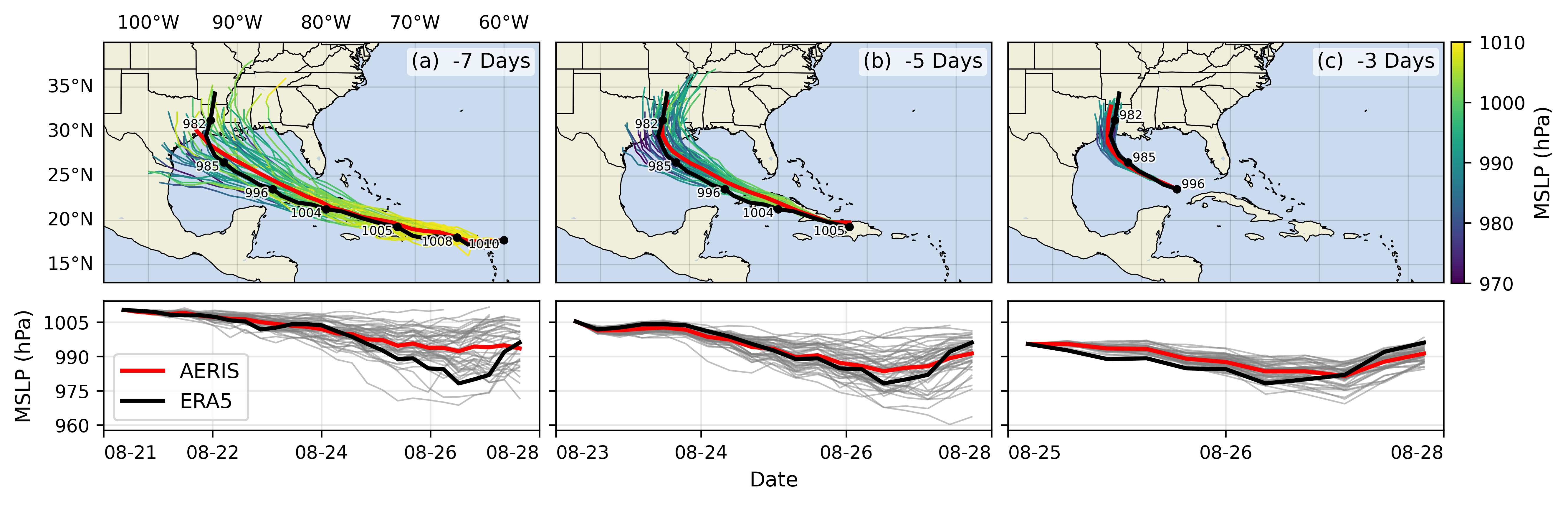
Dealing with Data
  • At each training step, we want to ensure that each worker receives unique data
  • This can be done in one of two ways:
    1. Manually partition data (ahead of time)
      • Assign unique subsets to each worker
      • Each worker can only see their local portion of the data
      • Most common approach
    2. From each worker, randomly select a mini-batch
      • Each worker can see the full dataset
      • ⚠️ When randomly selecting, it is important that each worker uses different seeds to ensure they receive unique data
Broadcast Initial State
  • At the start of training (or when loading from a checkpoint), we want all of our workers to be initialized consistently
    • Broadcast the model and optimizer states from rank() == 0 worker

flowchart TD
  0["GPU0"] --> 1["GPU 1"]
  CKPT --> 0
  0 --> 2["GPU 2"]
  0 --Model + Optim. State-->3["GPU 3"]
  0 --> X["`...`"]
  0 --> N["GPU N"]
classDef text fill:#CCCCCC02,stroke:#838383,stroke-width:0px,color:#838383,font-weight:500
classDef block fill:#CCCCCC02,stroke:#838383,stroke-width:1px,font-weight:500,color:#838383
class 0,1,2,3,N,X,CKPT block

Figure 12: To ensure all workers have the same copies, we load on RANK==0 and broadcast
Best Practices Important⏰ Keeping things in Sync

Computation stalls during communication !!

Keeping the communication to computation ratio small is important for effective scaling.

  • Use parallel IO whenever possible
    • Feed each rank from different files
    • Use MPI IO to have each rank read its own batch from a file
    • Use several ranks to read data, MPI to scatter to remaining ranks
      • Most practical in big at-scale training
  • Take advantage of data storage
  • Use the right optimizations for Aurora, Polaris, etc.
  • Preload data when possible
    • Offloading to a GPU frees CPU cycles for loading the next batch of data
      • minimize IO latency this way
Going Beyond Data Parallelism
  • ✅ Useful when model fits on single GPU:
    • ultimately limited by GPU memory
    • model performance limited by size
  • ⚠️ When model does not fit on a single GPU:
Going beyond Data Parallelism: DeepSpeed + ZeRO
  • Depending on the ZeRO stage (1, 2, 3), we can offload:
    1. Stage 1: optimizer states
    2. Stage 2: gradients + opt. states
    3. Stage 3: model params + grads + opt. states
Figure 13: DeepSpeed + ZeRO
Fully Sharded Data Parallel: 🔥 PyTorch + FSDP
Figure 14: FSDP Workflow. Source
🕸️ Additional Parallelism Strategies Pipeline Parallelism (PP)

flowchart TB
    subgraph G0["`GPU 0`"]
        direction LR
        a0("`Layer 0`")
        b0("`Layer 1`")
    end
    subgraph G1["`GPU 1`"]
        direction LR
        a1("`Layer 2`")
        b1("`Layer 3`")
    end
    a0 -.-> b0
    b0 --> a1
    a1 -.-> b1
classDef block fill:#CCCCCC02,stroke:#838383,stroke-width:1px,color:#838383
classDef red fill:#ff8181,stroke:#333,stroke-width:1px,color:#000
classDef orange fill:#FFC47F,stroke:#333,stroke-width:1px,color:#000
classDef yellow fill:#FFFF7F,stroke:#333,stroke-width:1px,color:#000
classDef green fill:#98E6A5,stroke:#333,stroke-width:1px,color:#000
classDef blue fill:#7DCAFF,stroke:#333,stroke-width:1px,color:#000
classDef purple fill:#FFCBE6,stroke:#333,stroke-width:1px,color:#000
class G0,G1 block
class a0 red
class b0 green
class a1 blue
class b1 yellow

Figure 15: Pipeline Parallelism
Tensor Parallel (TP)
  • Each tensor is split up into multiple chunks
  • Each shard of the tensor resides on its designated GPU
  • During processing each shard gets processed separately (and in parallel) on different GPUs
    • synced at the end of the step
  • See: 🤗 Model Parallelism for additional details

flowchart LR
   subgraph G0["`GPU0`"]
    direction TB
    a0("`Layer 0`")
    b0("`Layer 1`")
    c0("`Layer 2`")
    d0("`Layer 3`")
   end
   subgraph G1["`GPU1`"]
    direction TB
    a1("`Layer 0`")
    b1("`Layer 1`")
    c1("`Layer 2`")
    d1("`Layer 3`")
   end
   a0 <-.-> a1
   b0 <-.-> b1
   c0 <-.-> c1
   d0 <-.-> d1
classDef red fill:#ff8181,stroke:#333,stroke-width:1px,color:#000
classDef orange fill:#FFC47F,stroke:#333,stroke-width:1px,color:#000
classDef yellow fill:#FFFF7F,stroke:#333,stroke-width:1px,color:#000
classDef green fill:#98E6A5,stroke:#333,stroke-width:1px,color:#000
classDef blue fill:#7DCAFF,stroke:#333,stroke-width:1px,color:#000
classDef purple fill:#FFCBE6,stroke:#333,stroke-width:1px,color:#000
classDef block fill:#CCCCCC02,stroke:#838383,stroke-width:1px,color:#838383
class G0,G1 block
class a0,a1 red
class b0,b1 green
class c0,c1 blue
class d0,d1 yellow

Figure 16: Tensor Parallel Training
Tensor Parallel (TP)
  • Suitable when the model is too large to fit onto a single device (CPU / GPU)
  • Typically more complicated to implement than data parallel training
    • This is what one may call horizontal parallelism
    • Communication whenever dataflow between two subsets
  • argonne-lcf/Megatron-DeepSpeed
  • 🤗 huggingface/nanotron

flowchart LR
   subgraph G0["`GPU0`"]
    direction TB
    a0("`Layer 0`")
    b0("`Layer 1`")
    c0("`Layer 2`")
    d0("`Layer 3`")
   end
   subgraph G1["`GPU1`"]
    direction TB
    a1("`Layer 0`")
    b1("`Layer 1`")
    c1("`Layer 2`")
    d1("`Layer 3`")
   end
   a0 <-.-> a1
   b0 <-.-> b1
   c0 <-.-> c1
   d0 <-.-> d1
classDef red fill:#ff8181,stroke:#333,stroke-width:1px,color:#000
classDef orange fill:#FFC47F,stroke:#333,stroke-width:1px,color:#000
classDef yellow fill:#FFFF7F,stroke:#333,stroke-width:1px,color:#000
classDef green fill:#98E6A5,stroke:#333,stroke-width:1px,color:#000
classDef blue fill:#7DCAFF,stroke:#333,stroke-width:1px,color:#000
classDef purple fill:#FFCBE6,stroke:#333,stroke-width:1px,color:#000
classDef block fill:#CCCCCC02,stroke:#838383,stroke-width:1px,color:#838383
class G0,G1 block
class a0,a1 red
class b0,b1 green
class c0,c1 blue
class d0,d1 yellow

Figure 17: Tensor Parallel Training
  • Split up network over multiple workers
  • Each receives disjoint subset
  • All communication associated with subsets are distributed
  • Communication whenever dataflow between two subsets
  • Typically more complicated to implement than data parallel training
  • Suitable when the model is too large to fit onto a single device (CPU / GPU)
Tensor (/ Model) Parallel Training: Example

Want to compute:
where each GPU only has only its portion of the full weights as shown below

  1. Compute: GPU1
  2. Compute: GPU2
  3. Compute:

flowchart LR
    subgraph X0["`GPU0`"]
        direction LR
        a("`W0`")
    end
    subgraph X1["`GPU1`"]
        direction LR
        b("`W1`")
    end
    subgraph X2["`GPU2`"]
        direction LR
        c("`W2`")
    end
  t0("`x₀`")-->X0
  X0 -->|"`x₀ W₀`"|X1
  X1 -->|"`x₀ W₀ <br>+ x₁ W₁`"|X2
  t1("`x₁`") --> X1
  t2("`x₂`") --> X2

Figure 18
Tensor (Model) Parallelism2
  • In Tensor Paralleism each GPU processes only a slice of a tensor and only aggregates the full tensor for operations that require the whole thing.
    • The main building block of any transformer is a fully connected nn.Linear followed by a nonlinear activation GeLU.
      • Y = GeLU(XA), where X and Y are the input and output vectors, and A is the weight matrix.
    • If we look at the computation in matrix form, it’s easy to see how the matrix multiplication can be split between multiple GPUs:
Tensor Parallelism
Figure 19: Tensor Parallel GEMM. This information is based on (the much more in-depth) TP Overview by @anton-l
3D Parallelism
  • DP + TP + PP (3D) Parallelism
Figure 20: Figure taken from 3D parallelism: Scaling to trillion-parameter models
Deciding on a Parallelism Strategy
  • Model fits onto a single GPU:
    • Normal use
  • Model DOES NOT fit on a single GPU:
    • ZeRO + Offload CPU (or, optionally, NVMe)
  • Largest layer DOES NOT fit on a single GPU:
    • ZeRO + Enable Memory Centric Tiling (MCT)
      • MCT Allows running of arbitrarily large layers by automatically splitting them and executing them sequentially.
  • Model fits onto a single GPU
  • With sufficiently fast connectivity between nodes, these three strategies should be comparable.
    • Otherwise, PP > ZeRO TP.
  • When you have fast inter-node connectivity:

    • ZeRO (virtually NO modifications)
    • PP + ZeRO + TP + DP (less communication, at the cost of MAJOR modifications)
      • when you have slow inter-node connectivity and still low on GPU memory:

        DP + PP + TP + ZeRO-1
    • NOTE: TP is almost always used within a single node, e.g.
      TP <= GPUS_PER_NODE
🦙 Large Language Models
Figure 21: Large Language Models have (LLM)s have taken the NLP community world by storm3.
🔮 Emergent Abilities
Figure 22: See Wei et al. (2022), Yao et al. (2023)
🚂 Training LLMs

Visualization from Hannibal046/Awesome-LLM

Visualization from Hannibal046/Awesome-LLM


♻️ Life-Cycle of the LLM
  1. Data collection + preprocessing
  2. Pre-training
    • Architecture decisions, model size, etc.
  3. Supervised Fine-Tuning
    • Instruction Tuning
    • Alignment
  4. Deploy (+ monitor, re-evaluate, etc.)
Figure 23: Pre-training: Virtually all of the compute used during pre-training4.
🎀 Life-Cycle of the LLM
  1. Data collection + preprocessing
  2. Pre-training
    • Architecture decisions, model size, etc.
  3. Supervised Fine-Tuning
    • Instruction Tuning
    • Alignment
  4. Deploy (+ monitor, re-evaluate, etc.)
Figure 24: Fine-tuning: Fine-tuning actually updates the model’s weights to make the model better at a certain task5.
⏩ Forward Pass
Video
Figure 25: Language Model trained for causal language modeling6.
💬 Generating Text
Video
Figure 26: Language Model trained for causal language modeling7.
👋 Hands On

ShakespeareGPT

ai-science-training-series / 06_parallel_training

🧑‍💻 Hands On: Getting Started
  1. 🌱 Clone Repo(s):

  2. 🐍 Setup Python:

    export PBS_O_WORKDIR=$(pwd) && source deps/ezpz/src/ezpz/bin/utils.sh
    ezpz_setup_python
    ezpz_setup_job
📦 Install {ezpz, wordplay}
  1. Install Python packages:

    1. saforem2/ezpz:

      python3 -m pip install -e "./deps/ezpz" --require-virtualenv
    2. saforem2/wordplay:

      # from inside `wordplay/`
      python3 -m pip install -e . --require-virtualenv
  2. Test distributed setup:

    mpirun -n "${NGPUS}" python3 -m ezpz.test_dist

    See: 🍋 ezpz/test_dist.py

ezpz: Example [video]
Figure 27: Example: using 🍋 ezpz.test_dist to train a small model using DDP
Install wordplay 🎮💬
Figure 28: The simplest, fastest repository for training / finetuning GPT based models. Figure from karpathy/nanoGPT
Prepare Data
$ python3 wordplay/data/shakespeare_char/prepare.py
Using HF_DATASETS_CACHE=/home/foremans/tmp/polaris-talk/2024-07-17-073327/wordplay/data/shakespeare_char/.cache/huggingface
length of dataset in characters: 1,115,394
all the unique characters:
 !$&\',-.3:;?ABCDEFGHIJKLMNOPQRSTUVWXYZabcdefghijklmnopqrstuvwxyz
vocab size: 65
train has 1,003,854 tokens
val has 111,540 tokens
Launch Training (DDP)
launch python3 -m wordplay \
    train.backend=DDP \
    train.eval_interval=100 \
    data=shakespeare \
    train.dtype=bf16 \
    model.batch_size=64 \
    model.block_size=1024 \
    train.max_iters=1000 \
    train.log_interval=10 \
    train.compile=false \
    | tee wordplay-gpt2-DDP.log
Training: Example Output
$ launch python3 -m wordplay \
    train.backend=DDP \
    train.eval_interval=100 \
    data=shakespeare \
    train.dtype=bf16 \
    model.batch_size=64 \
    model.block_size=1024 \
    train.max_iters=1000 \
    train.log_interval=10 \
    train.compile=false \
    | tee wordplay-gpt2-DDP.log
[2024-07-17 07:42:11.746540][INFO][__init__:156] - Setting logging level to 'INFO' on 'RANK == 0'
[2024-07-17 07:42:11.748763][INFO][__init__:157] - Setting logging level to 'CRITICAL' on all others 'RANK != 0'
[2024-07-17 07:42:11.749453][INFO][__init__:160] - To disable this behavior, and log from ALL ranks (not recommended), set: 'export LOG_FROM_ALL_RANKS=1'  in your environment, and re-run.
[2024-07-17 07:42:11.772718][INFO][configs:81] - Setting HF_DATASETS_CACHE to /home/foremans/tmp/polaris-talk/2024-07-17-073327/wordplay/.cache/huggingface/datasets
[2024-07-17 07:42:15.341532][INFO][dist:358] - [device='cuda'][rank=2/3][local_rank=2/3][node=0/0]
[2024-07-17 07:42:15.342381][INFO][dist:358] - [device='cuda'][rank=1/3][local_rank=1/3][node=0/0]
[2024-07-17 07:42:15.342430][INFO][dist:358] - [device='cuda'][rank=3/3][local_rank=3/3][node=0/0]
[2024-07-17 07:42:15.348657][INFO][dist:95] -

[dist_info]:
  • DEVICE=cuda
  • DEVICE_ID=cuda:0
  • DISTRIBUTED_BACKEND=nccl
  • GPUS_PER_NODE=4
  • HOSTS=['x3101c0s13b0n0.hsn.cm.polaris.alcf.anl.gov']
  • HOSTFILE=/var/spool/pbs/aux/2024084.polaris-pbs-01.hsn.cm.polaris.alcf.anl.gov
  • HOSTNAME=x3101c0s13b0n0.hsn.cm.polaris.alcf.anl.gov
  • LOCAL_RANK=0
  • MACHINE=Polaris
  • NUM_NODES=1
  • NGPUS=4
  • NGPUS_AVAILABLE=4
  • NODE_ID=0
  • RANK=0
  • SCHEDULER=PBS
  • WORLD_SIZE_TOTAL=4
  • WORLD_SIZE_IN_USE=4
  • LAUNCH_CMD=mpiexec --verbose --envall -n 4 -ppn 4 --hostfile /var/spool/pbs/aux/2024084.polaris-pbs-01.hsn.cm.polaris.alcf.anl.gov --cpu-bind depth -d 16

[2024-07-17 07:42:15.351446][INFO][dist:725] - [0/4] Using device='cuda' with backend='DDP' + 'nccl' for distributed training.
[2024-07-17 07:42:15.356169][INFO][dist:358] - [device='cuda'][rank=0/3][local_rank=0/3][node=0/0]
[2024-07-17 07:42:15.356692][WARNING][dist:364] - Using [4 / 4] available "cuda" devices !!
[2024-07-17 07:42:15.359571][INFO][configs:317] - Loading val from /home/foremans/tmp/polaris-talk/2024-07-17-073327/wordplay/data/shakespeare_char/val.bin
[2024-07-17 07:42:15.360138][INFO][configs:317] - Loading train from /home/foremans/tmp/polaris-talk/2024-07-17-073327/wordplay/data/shakespeare_char/train.bin
[2024-07-17 07:42:15.361154][INFO][configs:442] - Tokens per iteration: 262,144
[2024-07-17 07:42:15.361574][INFO][configs:465] - Using self.ptdtype=torch.float16 on self.device_type='cuda'
[2024-07-17 07:42:15.362002][INFO][configs:471] - Initializing a new model from scratch
[2024-07-17 07:42:15.362529][INFO][dist:874] - Setting up wandb from rank: 0
[2024-07-17 07:42:15.362896][INFO][dist:875] - Using: WB PROJECT: WordPlay
[2024-07-17 07:42:16.451786][INFO][dist:905] - W&B RUN: [still-frog-17](https://wandb.ai/aurora_gpt/WordPlay/runs/6by9vpcj)
[2024-07-17 07:42:16.464106][INFO][dist:312] - Updating wandb.run: still-frog-17 config with "DIST_INFO"
[2024-07-17 07:42:16.469424][INFO][dist:938] - Running on machine='Polaris'
[2024-07-17 07:42:16.471151][WARNING][__main__:89] - {
    "train": {
        "framework": "pytorch",
        "backend": "DDP",
        "device": null,
        "seed": null,
        "port": null,
        "ds_config_path": null,
        "precision": null,
        "ngpus": null,
        "use_wandb": true,
        "eval_interval": 100,
        "log_interval": 10,
        "eval_iters": 200,
        "eval_only": false,
        "always_save_checkpoint": false,
        "init_from": "scratch",
        "wandb_project": "WordPlay",
        "max_iters": 1000,
        "warmup_iters": 100,
        "dtype": "bf16",
        "compile": false
    },
    "model": {
        "n_layer": 12,
        "n_head": 12,
        "n_embd": 768,
        "batch_size": 64,
        "block_size": 1024,
        "activation": "gelu",
        "dropout": 0.0,
        "bias": false,
        "vocab_size": 65
    },
    "data": {
        "dataset": "shakespeare_char",
        "out_dir": "out-shakespeare-char",
        "root_path": null
    },
    "optimizer": {
        "gas": 1,
        "name": "AdamW",
        "learning_rate": 0.0006,
        "weight_decay": 0.1,
        "beta1": 0.9,
        "beta2": 0.95,
        "grad_clip": 1.0,
        "decay_lr": true,
        "lr_decay_iters": 600000,
        "min_lr": 6e-05
    }
}
[2024-07-17 07:42:16.474305][WARNING][__main__:90] - Output dir: /home/foremans/tmp/polaris-talk/outputs/runs/pytorch/DDP/2024-07-17/07-42-13
[2024-07-17 07:42:16.474922][INFO][trainer:246] - Initializing a new model from scratch
[2024-07-17 07:42:17.258904][INFO][model:255] - number of parameters: 85.00M
[2024-07-17 07:42:17.290004][INFO][trainer:264] - Model size: num_params=85003776
[2024-07-17 07:42:17.292626][INFO][model:445] - num decayed parameter tensors: 50, with 85,771,008 parameters
[2024-07-17 07:42:17.293296][INFO][model:449] - num non-decayed parameter tensors: 25, with 19,200 parameters
[2024-07-17 07:42:17.515324][CRITICAL][trainer:316] - "devid='cuda:1'"
[2024-07-17 07:42:17.515340][CRITICAL][trainer:316] - "devid='cuda:2'"
[2024-07-17 07:42:17.515465][CRITICAL][trainer:316] - "devid='cuda:3'"
[2024-07-17 07:42:18.431814][INFO][model:465] - using fused AdamW: True
[2024-07-17 07:42:18.432620][CRITICAL][trainer:316] - "devid='cuda:0'"
[2024-07-17 07:42:19.951020][INFO][trainer:356] - • self.model=GPT(
  (transformer): ModuleDict(
    (wte): Embedding(65, 768)
    (wpe): Embedding(1024, 768)
    (drop): Dropout(p=0.0, inplace=False)
    (h): ModuleList(
      (0-11): 12 x Block(
        (ln_1): LayerNorm()
        (attn): CausalSelfAttention(
          (c_attn): Linear(in_features=768, out_features=2304, bias=False)
          (c_proj): Linear(in_features=768, out_features=768, bias=False)
          (attn_dropout): Dropout(p=0.0, inplace=False)
          (resid_dropout): Dropout(p=0.0, inplace=False)
        )
        (ln_2): LayerNorm()
        (mlp): MLP(
          (c_fc): Linear(in_features=768, out_features=3072, bias=False)
          (act_fn): GELU(approximate='none')
          (c_proj): Linear(in_features=3072, out_features=768, bias=False)
          (dropout): Dropout(p=0.0, inplace=False)
        )
      )
    )
    (ln_f): LayerNorm()
  )
  (lm_head): Linear(in_features=768, out_features=65, bias=False)
)
[2024-07-17 07:42:19.955340][INFO][trainer:357] - • self.grad_scaler=<torch.cuda.amp.grad_scaler.GradScaler object at 0x145a38f0f090>
[2024-07-17 07:42:19.956897][INFO][trainer:358] - • self.model_engine=DistributedDataParallel(
  (module): GPT(
    (transformer): ModuleDict(
      (wte): Embedding(65, 768)
      (wpe): Embedding(1024, 768)
      (drop): Dropout(p=0.0, inplace=False)
      (h): ModuleList(
        (0-11): 12 x Block(
          (ln_1): LayerNorm()
          (attn): CausalSelfAttention(
            (c_attn): Linear(in_features=768, out_features=2304, bias=False)
            (c_proj): Linear(in_features=768, out_features=768, bias=False)
            (attn_dropout): Dropout(p=0.0, inplace=False)
            (resid_dropout): Dropout(p=0.0, inplace=False)
          )
          (ln_2): LayerNorm()
          (mlp): MLP(
            (c_fc): Linear(in_features=768, out_features=3072, bias=False)
            (act_fn): GELU(approximate='none')
            (c_proj): Linear(in_features=3072, out_features=768, bias=False)
            (dropout): Dropout(p=0.0, inplace=False)
          )
        )
      )
      (ln_f): LayerNorm()
    )
    (lm_head): Linear(in_features=768, out_features=65, bias=False)
  )
)
[2024-07-17 07:42:19.961066][INFO][trainer:359] - • self.optimizer=AdamW (
Parameter Group 0
    amsgrad: False
    betas: (0.9, 0.95)
    capturable: False
    differentiable: False
    eps: 1e-08
    foreach: None
    fused: True
    lr: 0.0006
    maximize: False
    weight_decay: 0.1

Parameter Group 1
    amsgrad: False
    betas: (0.9, 0.95)
    capturable: False
    differentiable: False
    eps: 1e-08
    foreach: None
    fused: True
    lr: 0.0006
    maximize: False
    weight_decay: 0.0
)
[2024-07-17 07:42:19.988827][INFO][trainer:802] - Startup time: 6.7125
                Training Legend
┏━━━━━━━━━━━━━┳━━━━━━━━━━━━━━━━━━━━━━━━━━━━━━━━┓
┃    abbr     ┃ desc                           ┃
┡━━━━━━━━━━━━━╇━━━━━━━━━━━━━━━━━━━━━━━━━━━━━━━━┩
│    step     │ Current training iteration     │
│    loss     │ Loss value                     │
│     dt      │ Elapsed time per training step │
│     dtf     │ Elapsed time per forward step  │
│     dtb     │ Elapsed time per backward step │
│     sps     │ Samples per second             │
│ sps_per_gpu │ Samples per second (per GPU)   │
│     tps     │ Tokens per second              │
│ tps_per_gpu │ Tokens per second (per GPU)    │
│     mfu     │ Model flops utilization        │
│ train_loss  │ Training loss value            │
│  val_loss   │ Validation loss value          │
└─────────────┴────────────────────────────────┘
[2024-07-17 07:42:21.451865][INFO][trainer:820] - ['prompt']: 'What is an LLM?'
[2024-07-17 07:42:21.452667][INFO][trainer:824] - ['response']:
What is an LLM?eelEl\'$nltPwBSWal,;PWw bbu\'HiyP\'FWwF &AhW:ygrn kk-\'\'KFlMwnlEfflkc,elpWaWtgml$Pgglhllw lglhFllzczPAFHpeAAPPSltgkrWPPhlEMgcrN ggPWt-WPSSzHSkkrzzk.FFrtSSkgMll&gFXr,hghaueaVPW-pHFF-gg,,,FF,,kbApgg gg\'aWWzzkk\'a\'CggHl$bGeA,FFk,,SF;UF,,aZ ;gglee$,k.US&kg:S,,zVzzc
[2024-07-17 07:43:01.573073][INFO][trainer:885] - step=10 loss=3.154310 dt=0.282833 dtf=0.005247 dtb=0.011417 sps=14.142633 sps_per_gpu=3.535658 tps=926851.609409 tps_per_gpu=231712.902352 mfu=46.288281 train_loss=4.125778 val_loss=4.128809
[2024-07-17 07:43:04.402750][INFO][trainer:885] - step=20 loss=2.660851 dt=0.306263 dtf=0.005233 dtb=0.011419 sps=13.060678 sps_per_gpu=3.265170 tps=855944.613638 tps_per_gpu=213986.153409 mfu=45.934162 train_loss=4.125778 val_loss=4.128809
[2024-07-17 07:43:07.237507][INFO][trainer:885] - step=30 loss=2.543283 dt=0.283021 dtf=0.005238 dtb=0.011245 sps=14.133211 sps_per_gpu=3.533303 tps=926234.088226 tps_per_gpu=231558.522057 mfu=45.966490 train_loss=4.125778 val_loss=4.128809
[2024-07-17 07:43:10.077248][INFO][trainer:885] - step=40 loss=2.503963 dt=0.285001 dtf=0.005213 dtb=0.011471 sps=14.035061 sps_per_gpu=3.508765 tps=919801.749941 tps_per_gpu=229950.437485 mfu=45.963461 train_loss=4.125778 val_loss=4.128809
[2024-07-17 07:43:12.917039][INFO][trainer:885] - step=50 loss=2.477469 dt=0.283532 dtf=0.005166 dtb=0.011294 sps=14.107763 sps_per_gpu=3.526941 tps=924566.380009 tps_per_gpu=231141.595002 mfu=45.984530 train_loss=4.125778 val_loss=4.128809
[2024-07-17 07:43:15.760749][INFO][trainer:885] - step=60 loss=2.471083 dt=0.284630 dtf=0.005140 dtb=0.011224 sps=14.053326 sps_per_gpu=3.513332 tps=920998.786204 tps_per_gpu=230249.696551 mfu=45.985675 train_loss=4.125778 val_loss=4.128809
[2024-07-17 07:43:18.602785][INFO][trainer:885] - step=70 loss=2.458894 dt=0.283926 dtf=0.005219 dtb=0.010383 sps=14.088155 sps_per_gpu=3.522039 tps=923281.352698 tps_per_gpu=230820.338174 mfu=45.998106 train_loss=4.125778 val_loss=4.128809
[2024-07-17 07:43:21.451433][INFO][trainer:885] - step=80 loss=2.489088 dt=0.285537 dtf=0.005183 dtb=0.011373 sps=14.008683 sps_per_gpu=3.502171 tps=918073.060430 tps_per_gpu=229518.265108 mfu=45.983282 train_loss=4.125778 val_loss=4.128809
[2024-07-17 07:43:24.302241][INFO][trainer:885] - step=90 loss=2.471990 dt=0.300767 dtf=0.005445 dtb=0.010290 sps=13.299337 sps_per_gpu=3.324834 tps=871585.359388 tps_per_gpu=217896.339847 mfu=45.737774 train_loss=4.125778 val_loss=4.128809
[2024-07-17 07:43:27.153275][INFO][trainer:885] - step=100 loss=2.445556 dt=0.285869 dtf=0.005182 dtb=0.011251 sps=13.992403 sps_per_gpu=3.498101 tps=917006.151328 tps_per_gpu=229251.537832 mfu=45.743655 train_loss=4.125778 val_loss=4.128809
[2024-07-17 07:43:28.182553][INFO][trainer:820] - ['prompt']: 'What is an LLM?'
[2024-07-17 07:43:28.183179][INFO][trainer:824] - ['response']:

What is an LLM?

Goupay my winghimithell bls ger t bon sinthard ht omind be,
And lereind h py balithand frd oforondof wimon me hageas thinero mand,
Thacanes,
An frift ghik med d herthecke ntore thack couthen ale, t thit ang d m t h chy me fache ag, wit my hathan glat ng
[2024-07-17 07:44:06.025837][INFO][trainer:760] - Saving checkpoint to: /home/foremans/tmp/polaris-talk/outputs/runs/pytorch/DDP/2024-07-17/07-42-13
[2024-07-17 07:44:06.026607][INFO][trainer:761] - Saving model to: /home/foremans/tmp/polaris-talk/outputs/runs/pytorch/DDP/2024-07-17/07-42-13/model.pth
[2024-07-17 07:44:07.682968][INFO][configs:141] - Appending /home/foremans/tmp/polaris-talk/outputs/runs/pytorch/DDP/2024-07-17/07-42-13 to /home/foremans/tmp/polaris-talk/2024-07-17-073327/wordplay/src/ckpts/checkpoints.log
[2024-07-17 07:44:10.519506][INFO][trainer:885] - step=110 loss=2.433923 dt=0.285038 dtf=0.005757 dtb=0.011762 sps=14.033209 sps_per_gpu=3.508302 tps=919680.367894 tps_per_gpu=229920.091974 mfu=45.762304 train_loss=2.439494 val_loss=2.478951
[2024-07-17 07:44:13.362148][INFO][trainer:885] - step=120 loss=2.429014 dt=0.284445 dtf=0.005222 dtb=0.011486 sps=14.062460 sps_per_gpu=3.515615 tps=921597.361532 tps_per_gpu=230399.340383 mfu=45.788661 train_loss=2.439494 val_loss=2.478951
[2024-07-17 07:44:16.210694][INFO][trainer:885] - step=130 loss=2.402059 dt=0.285559 dtf=0.005199 dtb=0.011765 sps=14.007633 sps_per_gpu=3.501908 tps=918004.211586 tps_per_gpu=229501.052897 mfu=45.794438 train_loss=2.439494 val_loss=2.478951
[2024-07-17 07:44:19.061546][INFO][trainer:885] - step=140 loss=2.374062 dt=0.285476 dtf=0.005239 dtb=0.011453 sps=14.011662 sps_per_gpu=3.502916 tps=918268.297093 tps_per_gpu=229567.074273 mfu=45.800956 train_loss=2.439494 val_loss=2.478951
[2024-07-17 07:44:21.917283][INFO][trainer:885] - step=150 loss=2.365385 dt=0.285846 dtf=0.005125 dtb=0.011320 sps=13.993568 sps_per_gpu=3.498392 tps=917082.475791 tps_per_gpu=229270.618948 mfu=45.800900 train_loss=2.439494 val_loss=2.478951
[2024-07-17 07:44:24.771924][INFO][trainer:885] - step=160 loss=2.317337 dt=0.280788 dtf=0.005173 dtb=0.011249 sps=14.245602 sps_per_gpu=3.561401 tps=933599.792506 tps_per_gpu=233399.948127 mfu=45.883340 train_loss=2.439494 val_loss=2.478951
[2024-07-17 07:44:27.626812][INFO][trainer:885] - step=170 loss=2.256231 dt=0.284973 dtf=0.005141 dtb=0.011299 sps=14.036416 sps_per_gpu=3.509104 tps=919890.544506 tps_per_gpu=229972.636126 mfu=45.889069 train_loss=2.439494 val_loss=2.478951
[2024-07-17 07:44:30.480952][INFO][trainer:885] - step=180 loss=2.216419 dt=0.286555 dtf=0.005180 dtb=0.011402 sps=13.958906 sps_per_gpu=3.489726 tps=914810.852170 tps_per_gpu=228702.713043 mfu=45.868857 train_loss=2.439494 val_loss=2.478951
[2024-07-17 07:44:33.337342][INFO][trainer:885] - step=190 loss=2.145123 dt=0.291456 dtf=0.005409 dtb=0.019347 sps=13.724205 sps_per_gpu=3.431051 tps=899429.467247 tps_per_gpu=224857.366812 mfu=45.773849 train_loss=2.439494 val_loss=2.478951
[2024-07-17 07:44:36.194584][INFO][trainer:885] - step=200 loss=2.068149 dt=0.285703 dtf=0.005153 dtb=0.011286 sps=14.000555 sps_per_gpu=3.500139 tps=917540.393411 tps_per_gpu=229385.098353 mfu=45.778791 train_loss=2.439494 val_loss=2.478951
[2024-07-17 07:44:37.224149][INFO][trainer:820] - ['prompt']: 'What is an LLM?'
[2024-07-17 07:44:37.224745][INFO][trainer:824] - ['response']:

What is an LLM?

LORTESS LA:
No, sighappat selace? don downd sourciceans note cancen up sof liond
This and my man, werame, of re thee
Thise not will I on land brond sul me a fingore?

FLER:
Tisint your not nare lame o igen,-to brorst.

SamERS:
Sin:
I\'l hell she lor hen w
[2024-07-17 07:45:14.409129][INFO][trainer:760] - Saving checkpoint to: /home/foremans/tmp/polaris-talk/outputs/runs/pytorch/DDP/2024-07-17/07-42-13
[2024-07-17 07:45:14.409820][INFO][trainer:761] - Saving model to: /home/foremans/tmp/polaris-talk/outputs/runs/pytorch/DDP/2024-07-17/07-42-13/model.pth
[2024-07-17 07:45:16.366935][INFO][configs:141] - Appending /home/foremans/tmp/polaris-talk/outputs/runs/pytorch/DDP/2024-07-17/07-42-13 to /home/foremans/tmp/polaris-talk/2024-07-17-073327/wordplay/src/ckpts/checkpoints.log
[2024-07-17 07:45:19.245061][INFO][trainer:885] - step=210 loss=1.982169 dt=0.283305 dtf=0.005223 dtb=0.011284 sps=14.119042 sps_per_gpu=3.529760 tps=925305.515083 tps_per_gpu=231326.378771 mfu=45.822019 train_loss=2.045786 val_loss=2.148510
[2024-07-17 07:45:22.092430][INFO][trainer:885] - step=220 loss=1.897731 dt=0.284759 dtf=0.005217 dtb=0.011187 sps=14.046945 sps_per_gpu=3.511736 tps=920580.608106 tps_per_gpu=230145.152026 mfu=45.837327 train_loss=2.045786 val_loss=2.148510
[2024-07-17 07:45:24.942639][INFO][trainer:885] - step=230 loss=1.817213 dt=0.285266 dtf=0.005208 dtb=0.011446 sps=14.022003 sps_per_gpu=3.505501 tps=918945.985503 tps_per_gpu=229736.496376 mfu=45.842940 train_loss=2.045786 val_loss=2.148510
[2024-07-17 07:45:27.797910][INFO][trainer:885] - step=240 loss=1.779287 dt=0.285465 dtf=0.005189 dtb=0.011220 sps=14.012250 sps_per_gpu=3.503062 tps=918306.793546 tps_per_gpu=229576.698387 mfu=45.844800 train_loss=2.045786 val_loss=2.148510
[2024-07-17 07:45:30.653597][INFO][trainer:885] - step=250 loss=1.704220 dt=0.289284 dtf=0.005471 dtb=0.010346 sps=13.827253 sps_per_gpu=3.456813 tps=906182.836379 tps_per_gpu=226545.709095 mfu=45.785926 train_loss=2.045786 val_loss=2.148510
[2024-07-17 07:45:33.512769][INFO][trainer:885] - step=260 loss=1.671318 dt=0.287679 dtf=0.005125 dtb=0.011250 sps=13.904380 sps_per_gpu=3.476095 tps=911237.442617 tps_per_gpu=227809.360654 mfu=45.758182 train_loss=2.045786 val_loss=2.148510
[2024-07-17 07:45:36.373461][INFO][trainer:885] - step=270 loss=1.650952 dt=0.298661 dtf=0.005118 dtb=0.011520 sps=13.393107 sps_per_gpu=3.348277 tps=877730.651421 tps_per_gpu=219432.662855 mfu=45.565875 train_loss=2.045786 val_loss=2.148510
[2024-07-17 07:45:39.236930][INFO][trainer:885] - step=280 loss=1.573242 dt=0.285970 dtf=0.005171 dtb=0.011290 sps=13.987477 sps_per_gpu=3.496869 tps=916683.279847 tps_per_gpu=229170.819962 mfu=45.587333 train_loss=2.045786 val_loss=2.148510
[2024-07-17 07:45:42.100605][INFO][trainer:885] - step=290 loss=1.533265 dt=0.286487 dtf=0.005432 dtb=0.011288 sps=13.962259 sps_per_gpu=3.490565 tps=915030.617828 tps_per_gpu=228757.654457 mfu=45.598392 train_loss=2.045786 val_loss=2.148510
[2024-07-17 07:45:44.964424][INFO][trainer:885] - step=300 loss=1.492064 dt=0.288480 dtf=0.005355 dtb=0.011480 sps=13.865774 sps_per_gpu=3.466443 tps=908707.340870 tps_per_gpu=227176.835218 mfu=45.576766 train_loss=2.045786 val_loss=2.148510
[2024-07-17 07:45:45.995833][INFO][trainer:820] - ['prompt']: 'What is an LLM?'
[2024-07-17 07:45:45.996497][INFO][trainer:824] - ['response']:

What is an LLM?

RICHMORD:
Char stire? how in those are name the range hone.

GLOUCESTER:
Nay, in lond's time the palt are worder more
That wilt in the purpose be a pey
And thou thine onter hands, and the which broth.

ELBOWINCA:
At lie my lord with the me an arms be a s
[2024-07-17 07:46:23.549987][INFO][trainer:760] - Saving checkpoint to: /home/foremans/tmp/polaris-talk/outputs/runs/pytorch/DDP/2024-07-17/07-42-13
[2024-07-17 07:46:23.550696][INFO][trainer:761] - Saving model to: /home/foremans/tmp/polaris-talk/outputs/runs/pytorch/DDP/2024-07-17/07-42-13/model.pth
[2024-07-17 07:46:25.496559][INFO][configs:141] - Appending /home/foremans/tmp/polaris-talk/outputs/runs/pytorch/DDP/2024-07-17/07-42-13 to /home/foremans/tmp/polaris-talk/2024-07-17-073327/wordplay/src/ckpts/checkpoints.log
[2024-07-17 07:46:28.374854][INFO][trainer:885] - step=310 loss=1.444200 dt=0.299907 dtf=0.005333 dtb=0.010637 sps=13.337481 sps_per_gpu=3.334370 tps=874085.133345 tps_per_gpu=218521.283336 mfu=45.384395 train_loss=1.495372 val_loss=1.713714
[2024-07-17 07:46:31.223079][INFO][trainer:885] - step=320 loss=1.429350 dt=0.285238 dtf=0.005245 dtb=0.011485 sps=14.023353 sps_per_gpu=3.505838 tps=919034.479880 tps_per_gpu=229758.619970 mfu=45.435743 train_loss=1.495372 val_loss=1.713714
[2024-07-17 07:46:34.074957][INFO][trainer:885] - step=330 loss=1.362220 dt=0.285027 dtf=0.005165 dtb=0.011407 sps=14.033736 sps_per_gpu=3.508434 tps=919714.904826 tps_per_gpu=229928.726207 mfu=45.485355 train_loss=1.495372 val_loss=1.713714
[2024-07-17 07:46:36.929464][INFO][trainer:885] - step=340 loss=1.350888 dt=0.284436 dtf=0.005199 dtb=0.011287 sps=14.062893 sps_per_gpu=3.515723 tps=921625.744709 tps_per_gpu=230406.436177 mfu=45.539549 train_loss=1.495372 val_loss=1.713714
wordplay: Example [video]
Figure 29: Training a LLM to talk like Shakespeare using saforem2/wordplay 🎮💬
❤️ Thank you!
  • Organizers

  • Feel free to reach out!

NoteAcknowledgements

This research used resources of the Argonne Leadership Computing Facility, which is a DOE Office of Science User Facility supported under Contract DE-AC02-06CH11357

📓 References References Wei, Jason, Yi Tay, Rishi Bommasani, Colin Raffel, Barret Zoph, Sebastian Borgeaud, Dani Yogatama, et al. 2022. “Emergent Abilities of Large Language Models.” https://arxiv.org/abs/2206.07682. Yao, Shunyu, Dian Yu, Jeffrey Zhao, Izhak Shafran, Thomas L. Griffiths, Yuan Cao, and Karthik Narasimhan. 2023. “Tree of Thoughts: Deliberate Problem Solving with Large Language Models.” https://arxiv.org/abs/2305.10601. Footnotes
  1. micro_batch_size = batch_size per GPU↩︎

  2. Efficient Large-Scale Language Model Training on GPU Clusters↩︎

  3. Source: Hannibal046/Awesome-LLM↩︎

  4. Figure from The Illustrated Transformer↩︎

  5. Figure from The Illustrated Transformer↩︎

  6. Video from: 🤗 Generation with LLMs↩︎

  7. Video from: 🤗 Generation with LLMs↩︎

CitationBibTeX citation:
@unpublished{foreman2025,
  author = {Foreman, Sam},
  title = {Scientific {AI} at {Scale:} {Distributed} {Training}},
  date = {2025-09-02},
  url = {https://samforeman.me/talks/openskai25/training/slides},
  langid = {en}
}
For attribution, please cite this work as: Foreman, Sam. 2025. “Scientific AI at Scale: Distributed Training.” September 2. https://samforeman.me/talks/openskai25/training/slides.
https://samforeman.me/talks/openskai25/training/
Extensions
Scientific AI at Scale: AuroraGPT
<iframe src="https://www.googletagmanager.com/ns.html?id=GTM-TC329HJ" height="0" width="0" style="display:none;visibility:hidden"></iframe> 🎯 AuroraGPT: Goals

AuroraGPT: General purpose scientific LLM Broadly trained on a general corpora plus scientific {papers, texts, data}

  • Explore pathways towards a “Scientific Assistant” model
  • Build with international partners (RIKEN, BSC, others)
  • Multilingual English, 日本語, French, German, Spanish
  • Multimodal: images, tables, equations, proofs, time series, graphs, fields, sequences, etc
Figure 1: Image from Hannibal046 / Awesome-LLM
  • Here to talk about AuroraGPT, Argonne’s internal effort to build a general purpose scientific LLM, broadly trained on a general corpora of text + scientific {papers, text, data}

  • As part of this effort, we plan to…

    • Explore pathways, build with international partners, multi-{lingual, modal}
  • Rough timeline of the project and deliverables:

    • 202{3,4}: text-only models, plan to release a series of {7B, 70B, 1T} models
    • 202{4,5}: Basic multi-modal models
    • 202{5,6}: Advanced scientific multimodal models
  • AuroraGPT: Exascale Pre-Training of Large Language Models on Diverse Accelerators > argonne-lcf/Megatron-DeepSpeed > Large Model Training: any scale, any accelerator

  • Thoughts:

    • yeah okay so I’ll probably try and include then like:
      • {tensor, pipeline, sequence}-parallelism
      • DeepSpeed integration (ZeRO offloading, activation checkpointing, …)
      • Robust mechanisms for automatic experiment {configuration, tracking, …}
      • Support for modern (and experimental!) optimizers
      • Large batch training
  • Goals

  • Issues with existing models

  • AuroraGPT

    • Project Details
    • Teams, Ongoing Efforts
    • Scientific Evaluations
  • Scaling Results

    • MProt-DPO
    • aeris (??)
🧪 AuroraGPT: Open Science Foundation Model
Figure 2: High-level overview of AuroraGPT project
  • AuroraGPT will be a publicly distributed, open source foundation model for open science
  • Is being trained on:
    • Scientific / engineering structured data
    • General text, media, news, etc.
    • Large amounts of low to medium quality data
    • Much less high quality data (that is publicly available for use)
  • This data is then cleaned, processed, de-duplicated and used for the initial pre-training phase of the model
  • The vast majority of the overall compute is spent during this initial pre-training phase
    • This is the group I help to lead and will be talking a bit about today
  • The initial pre-training phase is currently underway
    • Eventually, given a bit of time, effort and magic, the model will be ready for fine-tuning and additional training for a variety of downstream tasks
  • The pretrained model will then be handed off for additional fine-tuning on a variety of downstream tasks
    • Scientific discovery
    • Accelerate scientific tasks
    • Digital twins
    • Inverse design
    • Code optimization
    • Accelerated simulations
    • Autonomous experiments
    • Co-design
  • Becoming increasingly clear that LLMs have the potential to drastically accelerate computational science
    • We’ve seen this already for {GenSLMs, Weather / Climate / Earth Systems Modeling, Particle Physics, etc.}
🧰 AuroraGPT: Toolbox
  • Datasets and data pipelines (how do we deal with scientific data?)
  • Software infrastructure and workflows (scalable, robust, extensible)
  • Evaluation of state-of-the-art LLM Models (how do they perform on scientific tasks?)
Note🚂 Training

argonne-lcf/Megatron-DeepSpeed
Large Model Training: Any Scale, Any Acclerator

Important🏃‍♂️ Running

argonne-lcf/inference-endpoints
Inference endpoints for LLMs, hosted @ ALCF

🌌 Aurora
Table 1: Aurora Specs
Racks 166 Nodes 10,624 CPUs 21,248 GPUs 63,744 NICs 84,992 HBM 8 PB DDR5c 10 PB
Figure 3: Aurora1: Fact Sheet.
🤝 Teams
  • Planning
  • Data
    • Aggregate existing data and generate new (synthetic) data
  • Models / Training2
    • Pre-train a series of models on publicly available data
  • Post-Training
    • Fine-tuning, alignment, reinforcement learning
  • Evaluation
    • Skills, trustworthiness, safety, robustness, privacy, machine ethics
  • Inference
    • Model serving, API development / public-facing web services
  • Distribution
    • Licensing, generating and distributing artifacts for public consumption
  • Communication

generating curating / aggregating cleaning / understanding new data for training including: MCQ’s + scientific narratives new scientific data modalities (gene sequences, geospatial data, …)

🦜 Training Large Models 🍎 Training LLMs
  • Want to minimize cost of training
    • Maximize throughput (?)
      • Data parallelism takes us only so far (McCandlish et al. 2018)…
  • Possible directions:
    • Large batch training (?)
      • new (second order?) optimizers
    • Better tokenization schemes (no tokenizers ?)
      • Better data (?)
    • Alternative architecture(s) (?)
      • Diffusion / flow-matching
      • Sub-quadratic attention (state space models, …)

argonne-lcf/Megatron-DeepSpeed

🎯 Goals

We need our implementation3 to be:

  • 💯 Correct
    • Consistent across systems
    • Requires being able to run the same code on multiple different machines
    • Independent of hardware and communication library (e.g. CUDA, ROCm, XPU, CPU, MPS, …)
  • 🚀 Scalable
    • Performant across thousands of GPUs
    • Highly configurable and extensible
    • Parallelizable across (tensor, pipeline, sequence) dimension(s)
    • Robust against {hardware, network, filesystem, transient} failures4
🏋️ Challenges: In Practice

This is incredibly difficult in practice, due in part to:

  • Brand new {hardware, architecture, software}
  • Lack of native support in existing frameworks (though getting better!)
  • General system stability
    +10k Nodes +100k XPUs
    • network performance
    • file system stability (impacted by other users !)
    • many unexpected difficulties occur at increasingly large scales
  • Combinatorial explosion of possible configurations and experiments
    • {hyperparameters, architectures, tokenizers, learning rates, …}
💾 Training: 2T Tokens
  • To train a fixed model on trillions of tokens requires:
    1. Aggregating data from multiple different corpora
      (e.g. ArXiv, Reddit, StackExchange, GitHub, Wikipedia, etc.)
    2. Sampling each training batch according to a fixed distribution across corpora
    3. Building indices that map batches of tokens into these files (indexing)

    The original implementation was slow:

    • Designed to run serially on a single device
    • Major bottleneck when debugging data pipeline at scale
🍹 Blending Data, Efficiently
  • 🐢 Original implementation:
    • Slow (serial, single device)
    • ~ 1 hr/2T tokens
  • 🐇 New implementation:
    • Fast! (distributed, asynchronous)
    • ~ 2 min/2T tokens
      (30x faster !!)
Figure 4: Time spent preparing 2T tokens
📉 Loss Curve: Training AuroraGPT-7B on 2T Tokens
Figure 5: Loss curve during training on 2T tokens.
✨ Features
  • 🕸️ Parallelism:
    • {data, tensor, pipeline, sequence, …}
  • ♻️ Checkpoint Converters:
    • Megatron ⇄ 🤗 HF ⇄ ZeRO ⇄ Universal
  • 🔀 DeepSpeed Integration:
    • ZeRO Offloading
    • Activation checkpointing
    • AutoTP (WIP)
    • ability to leverage features from DeepSpeed community
✨ Features (even more!)
  • 🧗 Optimizers5:
    • Support for many different optimizers:
      • Distributed Shampoo, Muon, Adopt, Sophia, Lamb, GaLORE, ScheduleFree, …
    • See full list
    • Large batch training
  • 📊 Experiment Tracking:
    • Automatic experiment and metric tracking with Weights & Biases

🔭 LLMs for Science
source (@tenderizzation)
ChatGPT: explain this image

🤔 Evaluating Models on Scientific Applications
  • What to measure?
    • Knowledge Extraction, Retrieval, Distillation, Synthesis: LLM is provided a question or instruction and a truthful answer is expected
    • Text Grounded: Answers are expected to be fully grounded on peer-reviewed references to support responses
    • Reasoning: LLMs are expected to solve deductive (prove a theory or hypothesis from formal logic and observations), inductive (validate / explain observations from theories) problems
    • Creativity: A creative answer is expected from a question or instruction
      • thoughtful dialogue, coding, etc.
⚖️ Evaluating FM Skills for Science: Criteria
  • Criteria for all of the above:
    • Correctness of facts
    • Accuracy of solutions and inferences
    • Reliability consistently good in quality or performance
    • Speed how fast to produce a response
    • # shots how many examples are needed for good quality
      • Extent of prompt engineering
🧬 MProt-DPO: Scaling Results
Figure 6: Scaling results for 3.5B model across ~38,400 GPUs
🧬 MProt-DPO: Scaling Results
Figure 7: 3.5B model
Figure 8: 7B model
🚂 Loooooooooong Sequence Lengths

25B

33B
Figure 9: Maximum (achievable) SEQ_LEN for both 25B and 33B models (See: Song et al. (2023))

scaling4science
Megatron-DS-Benchmarking

📓 References ❤️ Thank you!
  • Organizers

  • Feel free to reach out!

Note🙏 Acknowledgements

This research used resources of the Argonne Leadership Computing Facility, which is a DOE Office of Science User Facility supported under Contract DE-AC02-06CH11357.

📑 Bibliography Dharuman, Gautham, Kyle Hippe, Alexander Brace, Sam Foreman, Väinö Hatanpää, Varuni K. Sastry, Huihuo Zheng, et al. 2024. “MProt-DPO: Breaking the ExaFLOPS Barrier for Multimodal Protein Design Workflows with Direct Preference Optimization.” In Proceedings of the International Conference for High Performance Computing, Networking, Storage, and Analysis. SC ’24. Atlanta, GA, USA: IEEE Press. https://doi.org/10.1109/SC41406.2024.00013. Hosseini, Ryien, Filippo Simini, Venkatram Vishwanath, Rebecca Willett, and Henry Hoffmann. 2025. “Quality Measures for Dynamic Graph Generative Models.” In The Thirteenth International Conference on Learning Representations. https://openreview.net/forum?id=8bjspmAMBk. McCandlish, Sam, Jared Kaplan, Dario Amodei, and OpenAI Dota Team. 2018. “An Empirical Model of Large-Batch Training.” https://arxiv.org/abs/1812.06162. Song, Shuaiwen Leon, Bonnie Kruft, Minjia Zhang, Conglong Li, Shiyang Chen, Chengming Zhang, Masahiro Tanaka, et al. 2023. “DeepSpeed4Science Initiative: Enabling Large-Scale Scientific Discovery Through Sophisticated AI System Technologies.” https://arxiv.org/abs/2310.04610. Wei, Jason, Yi Tay, Rishi Bommasani, Colin Raffel, Barret Zoph, Sebastian Borgeaud, Dani Yogatama, et al. 2022. “Emergent Abilities of Large Language Models.” https://arxiv.org/abs/2206.07682. Footnotes
  1. 🏆 Aurora Supercomputer Ranks Fastest for AI↩︎

  2. Sam Foreman (co-lead), Varuni Sastry, Marieme Ngom, …↩︎

  3. argonne-lcf/Megatron-DeepSpeed↩︎

  4. Very much a WIP↩︎

  5. Implemented by Marieme Ngom↩︎

  6. (Dharuman et al. 2024)↩︎

CitationBibTeX citation:
@unpublished{foreman2025,
  author = {Foreman, Sam},
  title = {Scientific {AI} at {Scale:} {AuroraGPT}},
  date = {2025-09-02},
  url = {https://samforeman.me/talks/openskai25/ai4science/slides.html},
  langid = {en}
}
For attribution, please cite this work as: Foreman, Sam. 2025. “Scientific AI at Scale: AuroraGPT.” September 2. https://samforeman.me/talks/openskai25/ai4science/slides.html.
https://samforeman.me/talks/openskai25/ai4science/
Extensions
AuroraGPT
<iframe src="https://www.googletagmanager.com/ns.html?id=GTM-TC329HJ" height="0" width="0" style="display:none;visibility:hidden"></iframe> 🎯 AuroraGPT: Goals

AuroraGPT: General purpose scientific LLM Broadly trained on a general corpora plus scientific {papers, texts, data}

  • Explore pathways towards a “Scientific Assistant” model
  • Build with international partners (RIKEN, BSC, others)
  • Multilingual English, 日本語, French, German, Spanish
  • Multimodal: images, tables, equations, proofs, time series, graphs, fields, sequences, etc
Figure 1: Image from Hannibal046 / Awesome-LLM
  • Here to talk about AuroraGPT, Argonne’s internal effort to build a general purpose scientific LLM, broadly trained on a general corpora of text + scientific {papers, text, data}

  • As part of this effort, we plan to…

    • Explore pathways, build with international partners, multi-{lingual, modal}
  • Rough timeline of the project and deliverables:

    • 202{3,4}: text-only models, plan to release a series of {7B, 70B, 1T} models
    • 202{4,5}: Basic multi-modal models
    • 202{5,6}: Advanced scientific multimodal models
  • AuroraGPT: Exascale Pre-Training of Large Language Models on Diverse Accelerators > argonne-lcf/Megatron-DeepSpeed > Large Model Training: any scale, any accelerator

  • Thoughts:

    • yeah okay so I’ll probably try and include then like:
      • {tensor, pipeline, sequence}-parallelism
      • DeepSpeed integration (ZeRO offloading, activation checkpointing, …)
      • Robust mechanisms for automatic experiment {configuration, tracking, …}
      • Support for modern (and experimental!) optimizers
      • Large batch training
  • Goals

  • Issues with existing models

  • AuroraGPT

    • Project Details
    • Teams, Ongoing Efforts
    • Scientific Evaluations
  • Scaling Results

    • MProt-DPO
    • aeris (??)
🧪 AuroraGPT: Open Science Foundation Model
Figure 2: High-level overview of AuroraGPT project
  • AuroraGPT will be a publicly distributed, open source foundation model for open science
  • Is being trained on:
    • Scientific / engineering structured data
    • General text, media, news, etc.
    • Large amounts of low to medium quality data
    • Much less high quality data (that is publicly available for use)
  • This data is then cleaned, processed, de-duplicated and used for the initial pre-training phase of the model
  • The vast majority of the overall compute is spent during this initial pre-training phase
    • This is the group I help to lead and will be talking a bit about today
  • The initial pre-training phase is currently underway
    • Eventually, given a bit of time, effort and magic, the model will be ready for fine-tuning and additional training for a variety of downstream tasks
  • The pretrained model will then be handed off for additional fine-tuning on a variety of downstream tasks
    • Scientific discovery
    • Accelerate scientific tasks
    • Digital twins
    • Inverse design
    • Code optimization
    • Accelerated simulations
    • Autonomous experiments
    • Co-design
  • Becoming increasingly clear that LLMs have the potential to drastically accelerate computational science
    • We’ve seen this already for {GenSLMs, Weather / Climate / Earth Systems Modeling, Particle Physics, etc.}
🧰 AuroraGPT: Toolbox
  • Datasets and data pipelines (how do we deal with scientific data?)
  • Software infrastructure and workflows (scalable, robust, extensible)
  • Evaluation of state-of-the-art LLM Models (how do they perform on scientific tasks?)
Note🚂 Training

argonne-lcf/Megatron-DeepSpeed
Large Model Training: Any Scale, Any Acclerator

Important🏃‍♂️ Running

argonne-lcf/inference-endpoints
Inference endpoints for LLMs, hosted @ ALCF

🌌 Aurora
Table 1: Aurora Specs
Racks 166 Nodes 10,624 CPUs 21,248 GPUs 63,744 NICs 84,992 HBM 8 PB DDR5c 10 PB
Figure 3: Aurora1: Fact Sheet.
🤝 Teams
  • Planning
  • Data
    • Aggregate existing data and generate new (synthetic) data
  • Models / Training2
    • Pre-train a series of models on publicly available data
  • Post-Training
    • Fine-tuning, alignment, reinforcement learning
  • Evaluation
    • Skills, trustworthiness, safety, robustness, privacy, machine ethics
  • Inference
    • Model serving, API development / public-facing web services
  • Distribution
    • Licensing, generating and distributing artifacts for public consumption
  • Communication

generating curating / aggregating cleaning / understanding new data for training including: MCQ’s + scientific narratives new scientific data modalities (gene sequences, geospatial data, …)

🦜 Training Large Models 🍎 Training LLMs
  • Want to minimize cost of training
    • Maximize throughput (?)
      • Data parallelism takes us only so far (McCandlish et al. 2018)…
  • Possible directions:
    • Large batch training (?)
      • new (second order?) optimizers
    • Better tokenization schemes (no tokenizers ?)
      • Better data (?)
    • Alternative architecture(s) (?)
      • Diffusion / flow-matching
      • Sub-quadratic attention (state space models, …)

argonne-lcf/Megatron-DeepSpeed

🎯 Goals

We need our implementation3 to be:

  • 💯 Correct
    • Consistent across systems
    • Requires being able to run the same code on multiple different machines
    • Independent of hardware and communication library (e.g. CUDA, ROCm, XPU, CPU, MPS, …)
  • 🚀 Scalable
    • Performant across thousands of GPUs
    • Highly configurable and extensible
    • Parallelizable across (tensor, pipeline, sequence) dimension(s)
    • Robust against {hardware, network, filesystem, transient} failures4
🏋️ Challenges: In Practice

This is incredibly difficult in practice, due in part to:

  • Brand new {hardware, architecture, software}
  • Lack of native support in existing frameworks (though getting better!)
  • General system stability
    +10k Nodes +100k XPUs
    • network performance
    • file system stability (impacted by other users !)
    • many unexpected difficulties occur at increasingly large scales
  • Combinatorial explosion of possible configurations and experiments
    • {hyperparameters, architectures, tokenizers, learning rates, …}
💾 Training: 2T Tokens
  • To train a fixed model on trillions of tokens requires:
    1. Aggregating data from multiple different corpora
      (e.g. ArXiv, Reddit, StackExchange, GitHub, Wikipedia, etc.)
    2. Sampling each training batch according to a fixed distribution across corpora
    3. Building indices that map batches of tokens into these files (indexing)

    The original implementation was slow:

    • Designed to run serially on a single device
    • Major bottleneck when debugging data pipeline at scale
🍹 Blending Data, Efficiently
  • 🐢 Original implementation:
    • Slow (serial, single device)
    • ~ 1 hr/2T tokens
  • 🐇 New implementation:
    • Fast! (distributed, asynchronous)
    • ~ 2 min/2T tokens
      (30x faster !!)
Figure 4: Time spent preparing 2T tokens
📉 Loss Curve: Training AuroraGPT-7B on 2T Tokens
Figure 5: Loss curve during training on 2T tokens.
✨ Features
  • 🕸️ Parallelism:
    • {data, tensor, pipeline, sequence, …}
  • ♻️ Checkpoint Converters:
    • Megatron ⇄ 🤗 HF ⇄ ZeRO ⇄ Universal
  • 🔀 DeepSpeed Integration:
    • ZeRO Offloading
    • Activation checkpointing
    • AutoTP (WIP)
    • ability to leverage features from DeepSpeed community
✨ Features (even more!)
  • 🧗 Optimizers5:
    • Support for many different optimizers:
      • Distributed Shampoo, Muon, Adopt, Sophia, Lamb, GaLORE, ScheduleFree, …
    • See full list
    • Large batch training
  • 📊 Experiment Tracking:
    • Automatic experiment and metric tracking with Weights & Biases

🔭 LLMs for Science
source (@tenderizzation)
ChatGPT: explain this image

🤔 Evaluating Models on Scientific Applications
  • What to measure?
    • Knowledge Extraction, Retrieval, Distillation, Synthesis: LLM is provided a question or instruction and a truthful answer is expected
    • Text Grounded: Answers are expected to be fully grounded on peer-reviewed references to support responses
    • Reasoning: LLMs are expected to solve deductive (prove a theory or hypothesis from formal logic and observations), inductive (validate / explain observations from theories) problems
    • Creativity: A creative answer is expected from a question or instruction
      • thoughtful dialogue, coding, etc.
⚖️ Evaluating FM Skills for Science: Criteria
  • Criteria for all of the above:
    • Correctness of facts
    • Accuracy of solutions and inferences
    • Reliability consistently good in quality or performance
    • Speed how fast to produce a response
    • # shots how many examples are needed for good quality
      • Extent of prompt engineering
🧬 MProt-DPO: Scaling Results
Figure 6: Scaling results for 3.5B model across ~38,400 GPUs
🧬 MProt-DPO: Scaling Results
Figure 7: 3.5B model
Figure 8: 7B model
🚂 Loooooooooong Sequence Lengths

25B

33B
Figure 9: Maximum (achievable) SEQ_LEN for both 25B and 33B models (See: Song et al. (2023))

scaling4science
Megatron-DS-Benchmarking

📓 References ❤️ Thank you!
  • Organizers

  • Feel free to reach out!

Note🙏 Acknowledgements

This research used resources of the Argonne Leadership Computing Facility, which is a DOE Office of Science User Facility supported under Contract DE-AC02-06CH11357.

📑 Bibliography Dharuman, Gautham, Kyle Hippe, Alexander Brace, Sam Foreman, Väinö Hatanpää, Varuni K. Sastry, Huihuo Zheng, et al. 2024. “MProt-DPO: Breaking the ExaFLOPS Barrier for Multimodal Protein Design Workflows with Direct Preference Optimization.” In Proceedings of the International Conference for High Performance Computing, Networking, Storage, and Analysis. SC ’24. Atlanta, GA, USA: IEEE Press. https://doi.org/10.1109/SC41406.2024.00013. Hosseini, Ryien, Filippo Simini, Venkatram Vishwanath, Rebecca Willett, and Henry Hoffmann. 2025. “Quality Measures for Dynamic Graph Generative Models.” In The Thirteenth International Conference on Learning Representations. https://openreview.net/forum?id=8bjspmAMBk. McCandlish, Sam, Jared Kaplan, Dario Amodei, and OpenAI Dota Team. 2018. “An Empirical Model of Large-Batch Training.” https://arxiv.org/abs/1812.06162. Song, Shuaiwen Leon, Bonnie Kruft, Minjia Zhang, Conglong Li, Shiyang Chen, Chengming Zhang, Masahiro Tanaka, et al. 2023. “DeepSpeed4Science Initiative: Enabling Large-Scale Scientific Discovery Through Sophisticated AI System Technologies.” https://arxiv.org/abs/2310.04610. Wei, Jason, Yi Tay, Rishi Bommasani, Colin Raffel, Barret Zoph, Sebastian Borgeaud, Dani Yogatama, et al. 2022. “Emergent Abilities of Large Language Models.” https://arxiv.org/abs/2206.07682. Footnotes
  1. 🏆 Aurora Supercomputer Ranks Fastest for AI↩︎

  2. Sam Foreman (co-lead), Varuni Sastry, Marieme Ngom, …↩︎

  3. argonne-lcf/Megatron-DeepSpeed↩︎

  4. Very much a WIP↩︎

  5. Implemented by Marieme Ngom↩︎

  6. (Dharuman et al. 2024)↩︎

CitationBibTeX citation:
@unpublished{foreman2025,
  author = {Foreman, Sam},
  title = {AuroraGPT},
  date = {2025-07-31},
  url = {https://samforeman.me/talks/AuroraGPT-SIAM25/slides.html},
  langid = {en}
}
For attribution, please cite this work as: Foreman, Sam. 2025. “AuroraGPT.” July 31. https://samforeman.me/talks/AuroraGPT-SIAM25/slides.html.
https://samforeman.me/talks/AuroraGPT-SIAM25/
Extensions
📆 2025
<iframe src="https://www.googletagmanager.com/ns.html?id=GTM-TC329HJ" height="0" width="0" style="display:none;visibility:hidden"></iframe> What When 🧊 Cooling Down Checkpoints: Best Practices for Model Evaluation 2025-11-12 🎨 Mixing Between Distributions While Training 2025-10-06 📊 pbs-tui: TUI for PBS Job Scheduler Monitoring 2025-09-17 🍹 BlendCorpus + TorchTitan @ ALCF 2025-09-12 🏗️ Building PyTorch 2.8 from Source on Aurora 2025-06-14 🧜‍♀️ Mermaid 2025-06-02 📰 Nice Headings 2025-06-01 🚧 Frameworks Issue with numpy > 2 2025-05-03 🔥 Building PyTorch 2.6 from Source on Aurora 2025-04-28 No matching items CitationBibTeX citation:
@online{foreman2025,
  author = {Foreman, Sam},
  title = {📆 2025},
  date = {2025-06-14},
  url = {https://samforeman.me/posts/2025/},
  langid = {en}
}
For attribution, please cite this work as: Foreman, Sam. 2025. “📆 2025.” June 14, 2025. https://samforeman.me/posts/2025/.
https://samforeman.me/posts/2025/
Extensions
🏗️ Building PyTorch 2.8 from Source on Aurora
pytorchAurora
<iframe src="https://www.googletagmanager.com/ns.html?id=GTM-TC329HJ" height="0" width="0" style="display:none;visibility:hidden"></iframe> 📦 GitHub Project

See:

🏖️ Shell Environment
  1. Helper function to get timestamp:

    tstamp() {
         date +"%Y-%m-%d-%H%M%S"
    }
  2. Load frameworks module:

    module load frameworks
  3. Deactivate conda environment:

    conda deactivate
  4. Create new conda environment:

    ENV_PATH="/flare/datascience/foremans/miniconda/2025-06-15"
    conda create --prefix "${ENV_PATH}" --y --solver=libmamba --verbose python=3.12
    conda activate "${ENV_PATH}"
🔨 Build Libraries PyTorch
  1. Clone pytorch/pytorch

    git clone https://github.com/pytorch/pytorch
    cd pytorch
    git submodule sync
    git submodule update --init --recursive
  2. Install dependencies:

    python3 -m pip install cmake ninja
    python3 -m pip install -r requirements.txt
    python3 -m pip install mkl-static mkl-include
  3. Make triton:

    export USE_XPU=1  # for Intel GPU support
    make triton
  4. Set environment variables for PyTorch build:

    CC=$(which gcc); export CC
    CXX=$(which g++); export CXX
    export REL_WITH_DEB_INFO=1
    export USE_CUDA=0
    export USE_ROCM=0
    export USE_MKLDNN=1
    export USE_MKL=1
    export USE_ROCM=0
    export USE_CUDNN=0
    export USE_FBGEMM=1
    export USE_NNPACK=1
    export USE_QNNPACK=1
    export USE_NCCL=0
    export USE_CUDA=0
    export BUILD_CAFFE2_OPS=0
    export BUILD_TEST=0
    export USE_DISTRIBUTED=1
    export USE_NUMA=0
    export USE_MPI=1
    export USE_XPU=1
    export USE_XCCL=1
    export INTEL_MKL_DIR=$MKLROOT
    export USE_AOT_DEVLIST='pvc'
    export TORCH_XPU_ARCH_LIST='pvc'
    export OCLOC_VERSION=24.39.1
    which -a gcc
    which -a g++
  5. Build PyTorch (takes ~ 30 mins):

    python3 setup.py bdist_wheel 2>&1 | tee "torch-build-whl-$(tstamp).log"
    python3 -m pip install dist/*.whl
    cd ..
  6. [Optional] Install {torchvision, torchaudio, torchdata} with no dependencies:

    python3 -m pip install torchvision torchaudio --no-deps --index-url https://download.pytorch.org/whl/xpu
    python3 -m pip install torchdata --no-deps
Intel Libraries
  1. intel/intel-extension-for-pytorch

    git clone https://github.com/intel/intel-extension-for-pytorch
    cd intel-extension-for-pytorch
    git checkout xpu-main
    git submodule sync
    git submodule update --init --recursive
    python3 -m pip install -r requirements.txt
    python3 -m pip install --upgrade pip setuptools wheel build black flake8
    MAX_JOBS=48 CC=$(which gcc) CXX=$(which g++) INTELONEAPIROOT="${ONEAPI_ROOT}" python3 setup.py bdist_wheel 2>&1 | tee "ipex-build-whl-$(tstamp).log"
    python3 -m pip install dist/*.whl
    cd ..
  2. intel/torch-ccl

    git clone https://github.com/intel/torch-ccl
    cd torch-ccl
    git checkout c27ded5
    git submodule sync
    git submodule update --init --recursive
    python3 -m pip install -r requirements.txt
    # see:
    # https://github.com/intel/torch-ccl/blob/c27ded5190a6b115ec68c7a8c28f40cfe7f0a32a/version.txt
    ONECCL_BINDINGS_FOR_PYTORCH_BACKEND=xpu INTELONEAPIROOT="${ONEAPI_ROOT}" USE_SYSTEM_ONECCL=ON COMPUTE_BACKEND=dpcpp python3 setup.py bdist_wheel 2>&1 | tee "torch-ccl-build-whl-$(tstamp).log"
    
    python3 -m pip install dist/*.whl
    cd ..
mpi4py
git clone https://github.com/mpi4py/mpi4py
cd mpi4py
CC=mpicc CXX=mpicxx python3 setup.py build |& tee build.log
CC=mpicc CXX=mpicxx python3 setup.py install |& tee install.log
cd ..
h5py
module load hdf5
git clone https://github.com/h5py/h5py
cd h5py
CC=mpicc CXX=mpicxx HDF5_MPI="ON" python3 -m pip install --no-binary=h5py .
h5cc -showconfig
torch / ao
git clone https://github.com/pytorch/ao
cd ao
USE_CUDA=0 USE_XPU=1 USE_XCCL=1 python3 setup.py bdist_wheel 2>&1 | tee "torchao-build-whl-$(tstamp).log"
python3 -m pip install dist/*.whl
cd ../
TorchTune
git clone https://github.com/pytorch/torchtune
cd torchtune
python3 -m pip install -e "." --require-virtualenv --verbose
tune download meta-llama/Meta-Llama-3.1-8B-Instruct --output-dir ~/torchtune_anl2/out_dir --ignore-patterns "original/consolidated.00.pth" --hf-token <hf-token>
cd ../
✅ Verify Installation
  • Command:

    python3 -c 'import torch; print(torch.__file__); print(*torch.__config__.show().split("\n"), sep="\n") ; print(f"{torch.__version__=}"); print(f"{torch.xpu.is_available()=}"); print(f"{torch.xpu.device_count()=}") ; import torch.distributed; print(f"{torch.distributed.is_xccl_available()=}"); import torch; import intel_extension_for_pytorch as ipex; print(f"{torch.__version__=}"); print(f"{ipex.__version__=}"); import oneccl_bindings_for_pytorch as oneccl_bpt; print(f"{oneccl_bpt.__version__=}") ; [print(f"[{i}]: {torch.xpu.get_device_properties(i)}") for i in range(torch.xpu.device_count())]'
  • Output:

    $ python3 -c 'import torch; print(torch.__file__); print(*torch.__config__.show().split("\n"), sep="\n") ; print(f"{torch.__version__=}"); print(f"{torch.xpu.is_available()=}"); print(f"{torch.xpu.device_count()=}") ; import torch.distributed; print(f"{torch.distributed.is_xccl_available()=}"); import torch; import intel_extension_for_pytorch as ipex; print(f"{torch.__version__=}"); print(f"{ipex.__version__=}"); import oneccl_bindings_for_pytorch as oneccl_bpt; print(f"{oneccl_bpt.__version__=}") ; [print(f"[{i}]: {torch.xpu.get_device_properties(i)}") for i in range(torch.xpu.device_count())]'
    /flare/datascience/foremans/miniconda/2025-06-15/lib/python3.12/site-packages/torch/__init__.py
    PyTorch built with:
      - GCC 13.3
      - C++ Version: 201703
      - Intel(R) oneAPI Math Kernel Library Version 2025.0.1-Product Build 20241031 for Intel(R) 64 architecture applications
      - Intel(R) MKL-DNN v3.7.1 (Git Hash 8d263e693366ef8db40acc569cc7d8edf644556d)
      - OpenMP 201511 (a.k.a. OpenMP 4.5)
      - LAPACK is enabled (usually provided by MKL)
      - NNPACK is enabled
      - CPU capability usage: AVX512
    XPU backend  - Build settings: BLAS_INFO=mkl, BUILD_TYPE=Debug, COMMIT_SHA=655b3b14ffba4ae73e26a63b4289329e8d160a6f, CXX_COMPILER=/opt/aurora/24.347.0/spack/unified/0.9.2/install/linux-sles15-x86_64/gcc-13.3.0/gcc-13.3.0-4enwbrb/bin/g++, CXX_FLAGS= -fvisibility-inlines-hidden -DUSE_PTHREADPOOL -DUSE_KINETO -DLIBKINETO_NOCUPTI -DLIBKINETO_NOROCTRACER -DLIBKINETO_NOXPUPTI=OFF -DUSE_FBGEMM -DUSE_PYTORCH_QNNPACK -DUSE_XNNPACK -DSYMBOLICATE_MOBILE_DEBUG_HANDLE -O2 -fPIC -DC10_NODEPRECATED -Wall -Wextra -Werror=return-type -Werror=non-virtual-dtor -Werror=range-loop-construct -Werror=bool-operation -Wnarrowing -Wno-missing-field-initializers -Wno-unknown-pragmas -Wno-unused-parameter -Wno-strict-overflow -Wno-strict-aliasing -Wno-stringop-overflow -Wsuggest-override -Wno-psabi -Wno-error=old-style-cast -fdiagnostics-color=always -faligned-new -Wno-maybe-uninitialized -fno-math-errno -fno-trapping-math -Werror=format -Wno-dangling-reference -Wno-error=dangling-reference -DUSE_XPU -Wno-stringop-overflow, LAPACK_INFO=mkl, PERF_WITH_AVX=1, PERF_WITH_AVX2=1, TORCH_VERSION=2.8.0, USE_CUDA=0, USE_CUDNN=OFF, USE_CUSPARSELT=OFF, USE_GFLAGS=OFF, USE_GLOG=OFF, USE_GLOO=ON, USE_MKL=ON, USE_MKLDNN=1, USE_MPI=1, USE_NCCL=OFF, USE_NNPACK=1,USE_OPENMP=ON, USE_ROCM=0, USE_ROCM_KERNEL_ASSERT=OFF, USE_XCCL=1, USE_XPU=1,
    
    torch.__version__='2.8.0a0+git655b3b1'
    torch.xpu.is_available()=True
    torch.xpu.device_count()=12
    torch.distributed.is_xccl_available()=True
    [W615 14:52:10.420018164 OperatorEntry.cpp:217] Warning: Warning only once for all operators,  other operators may also be overridden.
      Overriding a previously registered kernel for the same operator and the same dispatch key
      operator: aten::geometric_(Tensor(a!) self, float p, *, Generator? generator=None) -> Tensor(a!)
        registered at /lus/flare/projects/datascience/foremans/AuroraBuilds/2025-06-15/pytorch/build/aten/src/ATen/RegisterSchema.cpp:6
      dispatch key: XPU
      previous kernel: registered at /lus/flare/projects/datascience/foremans/AuroraBuilds/2025-06-15/pytorch/aten/src/ATen/VmapModeRegistrations.cpp:37
           new kernel: registered at /lus/flare/projects/datascience/foremans/AuroraBuilds/2025-06-15/intel-extension-for-pytorch/build/Release/csrc/gpu/csrc/gpu/xpu/ATen/RegisterXPU_0.cpp:186 (function operator())
    torch.__version__='2.8.0a0+git655b3b1'
    ipex.__version__='2.8.10+git57bb68a'
    oneccl_bpt.__version__='2.8.0+xpu'
    [0]: _XpuDeviceProperties(name='Intel(R) Data Center GPU Max 1550', platform_name='Intel(R) oneAPI Unified Runtime over Level-Zero', type='gpu', driver_version='1.6.32567+18', total_memory=65536MB, max_compute_units=448, gpu_eu_count=448, gpu_subslice_count=56, max_work_group_size=1024, max_num_sub_groups=64, sub_group_sizes=[16 32], has_fp16=1, has_fp64=1, has_atomic64=1)
    [1]: _XpuDeviceProperties(name='Intel(R) Data Center GPU Max 1550', platform_name='Intel(R) oneAPI Unified Runtime over Level-Zero', type='gpu', driver_version='1.6.32567+18', total_memory=65536MB, max_compute_units=448, gpu_eu_count=448, gpu_subslice_count=56, max_work_group_size=1024, max_num_sub_groups=64, sub_group_sizes=[16 32], has_fp16=1, has_fp64=1, has_atomic64=1)
    [2]: _XpuDeviceProperties(name='Intel(R) Data Center GPU Max 1550', platform_name='Intel(R) oneAPI Unified Runtime over Level-Zero', type='gpu', driver_version='1.6.32567+18', total_memory=65536MB, max_compute_units=448, gpu_eu_count=448, gpu_subslice_count=56, max_work_group_size=1024, max_num_sub_groups=64, sub_group_sizes=[16 32], has_fp16=1, has_fp64=1, has_atomic64=1)
    [3]: _XpuDeviceProperties(name='Intel(R) Data Center GPU Max 1550', platform_name='Intel(R) oneAPI Unified Runtime over Level-Zero', type='gpu', driver_version='1.6.32567+18', total_memory=65536MB, max_compute_units=448, gpu_eu_count=448, gpu_subslice_count=56, max_work_group_size=1024, max_num_sub_groups=64, sub_group_sizes=[16 32], has_fp16=1, has_fp64=1, has_atomic64=1)
    [4]: _XpuDeviceProperties(name='Intel(R) Data Center GPU Max 1550', platform_name='Intel(R) oneAPI Unified Runtime over Level-Zero', type='gpu', driver_version='1.6.32567+18', total_memory=65536MB, max_compute_units=448, gpu_eu_count=448, gpu_subslice_count=56, max_work_group_size=1024, max_num_sub_groups=64, sub_group_sizes=[16 32], has_fp16=1, has_fp64=1, has_atomic64=1)
    [5]: _XpuDeviceProperties(name='Intel(R) Data Center GPU Max 1550', platform_name='Intel(R) oneAPI Unified Runtime over Level-Zero', type='gpu', driver_version='1.6.32567+18', total_memory=65536MB, max_compute_units=448, gpu_eu_count=448, gpu_subslice_count=56, max_work_group_size=1024, max_num_sub_groups=64, sub_group_sizes=[16 32], has_fp16=1, has_fp64=1, has_atomic64=1)
    [6]: _XpuDeviceProperties(name='Intel(R) Data Center GPU Max 1550', platform_name='Intel(R) oneAPI Unified Runtime over Level-Zero', type='gpu', driver_version='1.6.32567+18', total_memory=65536MB, max_compute_units=448, gpu_eu_count=448, gpu_subslice_count=56, max_work_group_size=1024, max_num_sub_groups=64, sub_group_sizes=[16 32], has_fp16=1, has_fp64=1, has_atomic64=1)
    [7]: _XpuDeviceProperties(name='Intel(R) Data Center GPU Max 1550', platform_name='Intel(R) oneAPI Unified Runtime over Level-Zero', type='gpu', driver_version='1.6.32567+18', total_memory=65536MB, max_compute_units=448, gpu_eu_count=448, gpu_subslice_count=56, max_work_group_size=1024, max_num_sub_groups=64, sub_group_sizes=[16 32], has_fp16=1, has_fp64=1, has_atomic64=1)
    [8]: _XpuDeviceProperties(name='Intel(R) Data Center GPU Max 1550', platform_name='Intel(R) oneAPI Unified Runtime over Level-Zero', type='gpu', driver_version='1.6.32567+18', total_memory=65536MB, max_compute_units=448, gpu_eu_count=448, gpu_subslice_count=56, max_work_group_size=1024, max_num_sub_groups=64, sub_group_sizes=[16 32], has_fp16=1, has_fp64=1, has_atomic64=1)
    [9]: _XpuDeviceProperties(name='Intel(R) Data Center GPU Max 1550', platform_name='Intel(R) oneAPI Unified Runtime over Level-Zero', type='gpu', driver_version='1.6.32567+18', total_memory=65536MB, max_compute_units=448, gpu_eu_count=448, gpu_subslice_count=56, max_work_group_size=1024, max_num_sub_groups=64, sub_group_sizes=[16 32], has_fp16=1, has_fp64=1, has_atomic64=1)
    [10]: _XpuDeviceProperties(name='Intel(R) Data Center GPU Max 1550', platform_name='Intel(R) oneAPI Unified Runtime over Level-Zero', type='gpu', driver_version='1.6.32567+18', total_memory=65536MB, max_compute_units=448, gpu_eu_count=448, gpu_subslice_count=56, max_work_group_size=1024, max_num_sub_groups=64, sub_group_sizes=[16 32], has_fp16=1, has_fp64=1, has_atomic64=1)
    [11]: _XpuDeviceProperties(name='Intel(R) Data Center GPU Max 1550', platform_name='Intel(R) oneAPI Unified Runtime over Level-Zero', type='gpu', driver_version='1.6.32567+18', total_memory=65536MB, max_compute_units=448, gpu_eu_count=448, gpu_subslice_count=56, max_work_group_size=1024, max_num_sub_groups=64, sub_group_sizes=[16 32], has_fp16=1, has_fp64=1, has_atomic64=1)
    took: 0h:00m:21s
CitationBibTeX citation:
@online{foreman2025,
  author = {Foreman, Sam},
  title = {🏗️ {Building} {PyTorch} 2.8 from {Source} on {Aurora}},
  date = {2025-06-14},
  url = {https://samforeman.me/posts/2025/06/14/},
  langid = {en}
}
For attribution, please cite this work as: Foreman, Sam. 2025. “🏗️ Building PyTorch 2.8 from Source on Aurora.” June 14, 2025. https://samforeman.me/posts/2025/06/14/.
https://samforeman.me/posts/2025/06/14/
Extensions
🧜‍♀️ Mermaid
stylepersonal
<iframe src="https://www.googletagmanager.com/ns.html?id=GTM-TC329HJ" height="0" width="0" style="display:none;visibility:hidden"></iframe>

flowchart LR
    subgraph D["`Data`"]
        direction TB
        x("`x₀`")
        x1("`x₁`")
        x2("`x₂`")
    end
    direction LR
    subgraph G0["`GPU0`"]
        direction LR
        subgraph N0["`NN`"]
        end
        L0["`L0`"]
    end
    subgraph G1["`GPU1`"]
        direction LR
        subgraph N1["`NN`"]
        end
        L1["`L1`"]
    end
    subgraph G2["`GPU2`"]
        direction LR
        subgraph N2["`NN`"]
        end
        L2["`L2`"]
    end
    %%subgraph AR["`Average Grads`"]
    %%    direction LR
    %%    ar("`(1/N) ∑ gₙ`")
    %%    %%ar --> bc
    %%end
    subgraph AR["`&nbsp;`"]
        direction TB
        ar("`Avg Grads<br>(1/N) ∑ gₙ`")
        %% bc("`Update Weights`")
    end
    %%subgraph UW["Update Weights"]
    %%    bc("`Update Weights`")
    %%end
    x --> G0
    x1 --> G1
    x2 --> G2
    N0 --> L0
    N1 --> L1
    N2 --> L2
    L0 -.-> ar
    L1 -.-> ar
    L2 -.-> ar
    %% ar -.-> bc
    %% bc -.-> 
    %%bc -.-> G1
    %%bc -.-> G2
    %%G0 -.-> ar
    %%G1 -.-> ar
    %%G2 -.-> ar
    %%G0 <-.- bc
    %%bc -.-> G0
    %%bc -.-> G1
    %%bc -.-> G2
    %%G2 -.-> ar
    %%X1 -->|"`x₀ W₀ <br>+ x₁ W₁`"|X2

classDef block fill:#CCCCCC02,stroke:#838383,stroke-width:1px,color:#838383
classDef grey fill:#cccccc,stroke:#333,stroke-width:1px,color:#000
classDef red fill:#ff8181,stroke:#333,stroke-width:1px,color:#000
classDef orange fill:#FFC47F,stroke:#333,stroke-width:1px,color:#000
classDef yellow fill:#FFFF7F,stroke:#333,stroke-width:1px,color:#000
classDef green fill:#98E6A5,stroke:#333,stroke-width:1px,color:#000
classDef blue fill:#7DCAFF,stroke:#333,stroke-width:1px,color:#000
classDef purple fill:#FFCBE6,stroke:#333,stroke-width:1px,color:#000
classDef text fill:#CCCCCC02,stroke:#838383,stroke-width:0px,color:#838383
class x,y0,L0 red
class x1,L1 green
class x2,L2 blue
class x3,ar grey
class D,N0,N1,N2,G0,G1,G2,GU block
class AR block
class bc text

CitationBibTeX citation:
@online{foreman2025,
  author = {Foreman, Sam},
  title = {🧜‍♀️ {Mermaid}},
  date = {2025-06-02},
  url = {https://samforeman.me/posts/2025/06/02/},
  langid = {en}
}
For attribution, please cite this work as: Foreman, Sam. 2025. “🧜‍♀️ Mermaid.” June 2, 2025. https://samforeman.me/posts/2025/06/02/.
https://samforeman.me/posts/2025/06/02/
Extensions
06
<iframe src="https://www.googletagmanager.com/ns.html?id=GTM-TC329HJ" height="0" width="0" style="display:none;visibility:hidden"></iframe> What When 🏗️ Building PyTorch 2.8 from Source on Aurora 2025-06-14 🧜‍♀️ Mermaid 2025-06-02 📰 Nice Headings 2025-06-01 No matching items CitationBibTeX citation:
@online{foreman2025,
  author = {Foreman, Sam},
  title = {06},
  date = {2025-06-01},
  url = {https://samforeman.me/posts/2025/06/},
  langid = {en}
}
For attribution, please cite this work as: Foreman, Sam. 2025. “06.” June 1, 2025. https://samforeman.me/posts/2025/06/.
https://samforeman.me/posts/2025/06/
Extensions
📰 Nice Headings
stylepersonal
<iframe src="https://www.googletagmanager.com/ns.html?id=GTM-TC329HJ" height="0" width="0" style="display:none;visibility:hidden"></iframe>

I like headings. They help organize content and make it easier to read.

Inspired by my neovim config, I wanted to recreate a similar style for headings in my website.

Light Theme

Dark Theme
Figure 1: My neovim headings in light and dark themes.

I think they turned out pretty well!

Heading 1 Heading 2 Heading 3 Heading 4 Heading 5 Heading 6 CitationBibTeX citation:
@online{foreman2025,
  author = {Foreman, Sam},
  title = {📰 {Nice} {Headings}},
  date = {2025-06-01},
  url = {https://samforeman.me/posts/2025/06/01/},
  langid = {en}
}
For attribution, please cite this work as: Foreman, Sam. 2025. “📰 Nice Headings.” June 1, 2025. https://samforeman.me/posts/2025/06/01/.
https://samforeman.me/posts/2025/06/01/
Extensions
LLMs on Aurora: Overview
<iframe src="https://www.googletagmanager.com/ns.html?id=GTM-TC329HJ" height="0" width="0" style="display:none;visibility:hidden"></iframe> ALCF Incite Hackathon 2025 🎯 AuroraGPT: Goals

AuroraGPT: General purpose scientific LLM
Broadly trained on a general corpora plus scientific
{papers, texts, data}

  • Explore pathways towards a “Scientific Assistant” model
  • Build with international partners (RIKEN, BSC, others)
  • Multilingual English, 日本語, French, German, Spanish
  • Multimodal: images, tables, equations, proofs, time series, graphs, fields, sequences, etc
Figure 1: Image from Hannibal046 / Awesome-LLM
Figure 2: Credit to the entire AuroraGPT team for slides.
  • Here to talk about AuroraGPT, Argonne’s internal effort to build a general purpose scientific LLM, broadly trained on a general corpora of text + scientific {papers, text, data}
  • As part of this effort, we plan to…
    • Explore pathways, build with international partners, multi-{lingual, modal}
  • Rough timeline of the project and deliverables:
    • 202{3,4}: text-only models, plan to release a series of {7B, 70B, 1T} models
    • 202{4,5}: Basic multi-modal models
    • 202{5,6}: Advanced scientific multimodal models
🦙 Issues with “Publicly Available” LLMs
  • Trust and Safety:
    • Skepticism about deployment in critical infrastructure
    • Correctness and reliability of model outputs
  • Transparency:
    • Data governance, what was used for pre-training? fine-tuning?
      • generally unknown
    • What is open source?
      • Model weights?
      • Pre-training {code, logs, metrics} ?
  • Why are we doing this?
  • What is the issue with current LLMs?
    • Trust and safety
      • Hallucinations, false confidence
      • Can this be reliably mitigated?
      • Scaling up inference compute seems to help
        • reasoning models, TTT, etc.
    • Transparency
      • Different frontier labs have different definitions of “open source”
      • e.g. Llama no longer releases base models
        • Libgen ??
      • AllenAI institute, olmo models good example
🧪 AuroraGPT: Open Science Foundation Model
Figure 3: High-level overview of AuroraGPT project
  • AuroraGPT will be a publicly distributed, open source foundation model for open science
  • Is being trained on:
    • Scientific / engineering structured data
    • General text, media, news, etc.
    • Large amounts of low to medium quality data
    • Much less high quality data (that is publicly available for use)
  • This data is then cleaned, processed, de-duplicated and used for the initial pre-training phase of the model
  • The vast majority of the overall compute is spent during this initial pre-training phase
    • This is the group I help to lead and will be talking a bit about today
  • The initial pre-training phase is currently underway
    • Eventually, given a bit of time, effort and magic, the model will be ready for fine-tuning and additional training for a variety of downstream tasks
  • The pretrained model will then be handed off for additional fine-tuning on a variety of downstream tasks
    • Scientific discovery
    • Accelerate scientific tasks
    • Digital twins
    • Inverse design
    • Code optimization
    • Accelerated simulations
    • Autonomous experiments
    • Co-design
  • Becoming increasingly clear that LLMs have the potential to drastically accelerate computational science
    • We’ve seen this already for {GenSLMs, Weather / Climate / Earth Systems Modeling, Particle Physics, etc.}
📊 AuroraGPT: Outcomes
  • Datasets and data pipelines for preparing science training data

  • Software infrastructure and workflows to train, evaluate and deploy LLMs at scale for scientific resarch purposes

  • Evaluation of state-of-the-art LLM Models:

    • Determine where they fall short in deep scientific tasks
    • Where deep data may have an impact
📚 What do we hope to get?
  • Assessment of the approach of augmenting web training data with two forms of data specific to science:
    • Full text scientific papers
    • Structured scientific datasets (suitably mapped to narrative form)
  • Research grade artifacts (models) for scientific community for adaptation for downstream uses2
  • Promotion of responsible AI best practices where we can figure them out
  • International Collaborations around the long term goal of AGI for science
  • Deliverables:
    • datasets, pipelines
    • software infrastructure, workflows to interface with science applications
    • checkpoints, models, logs, workbook, insights, etc.
  • Hope to understand:
    • How different state-of-the-art models perform at different scientific tasks
    • where deep data may have an impact
    • feasibility of generically augmenting text with scientific structured data
  • Huge undertaking that will require large international collaborations around long term goal of AGI for science
  • Extra points:
    • Well known that LLMs are good for non-consequential tasks
    • Known to “hallucinate” and create false information
    • Can this be mitigated reliably ??
🌌 Aurora
Table 1: Aurora Specs
Racks 166 Nodes 10,624 CPUs 21,248 GPUs 63,744 NICs 84,992 HBM 8 PB DDR5c 10 PB
Figure 4: Aurora: Fact Sheet.

🏆 Fastest AI system in the world

🤖 ALCF AI Testbed
  • ALCF AI Testbed Systems are in production and available for allocations to the research community
  • Significant improvement in time-to-solution and energy-efficiency for diverse AI for science applications.
  • NAIRR Pilot

Up to 25 throughput improvement for genomic FMs with 6.5 energy efficiency

Figure 5: SambaNova SN-30 2nd Gen, 8 nodes with 64 AI Accelerators
Figure 6: Graphcore Bow: Pod-64 configuration with 64 accelerators
Figure 7: Cerebras: 2x CS-2 WSE with Memory-X and Swarm-X technologies
Figure 8: GroqRack: 9 nodes, 8 GroqChip v1.5 Tensor streaming processors accelerators per node
👥 Team Leads

Planning

Rick Stevens

Rick Stevens3

Ian Foster

Ian Foster

Rinku Gupta

Rinku Gupta

Mike Papka

Mike Papka

Arvind Ramanathan

Arvind Ramanathan

Fangfang Xia

Fangfang Xia

Data

Ian Foster

Ian Foster

Robert Underwood

Robert Underwood

Training

Venkat Vishwanath

Venkat Vishwanath

Sam Foreman

Sam Foreman

Evaluation

Franck Cappello

Franck Cappello

Sandeep Madireddy

Sandeep Madireddy

Bo Li

Bo Li

Post

Eliu Huerta

Eliu Huerta

Azton Wells

Azton Wells

Inference

Rajeev Thakur

Rajeev Thakur

Comms

Charlie Catlett

Charlie Catlett

David Martin

David Martin

Distribution

Brad Ullrich

Brad Ullrich
🤝 Teams
  • Planning
  • Data Prep
    • Accumulate 20+ T tokens of high-quality scientific text and structured data
  • Models / Training4
    • Train (entirely from scratch) a series of models on publicly available data
  • Evaluation
    • Skills, trustworthiness, safety, robustness, privacy, machine ethics
  • Post-Training
    • Fine-tuning, alignment
  • Inference
    • Model serving, API development / public-facing web services
  • Distribution
    • Licensing, generating and distributing artifacts for public consumption
  • Communication
📚 Data

Goal: Assemble a large corpus of documents (general and scientific) to train and fine-tune AuroraGPT models

  • Challenges: Avoid / detect contamination with benchmarks
    • Respect copyright (ACM Digital Library), privacy, and ethical considerations
  • Performance Challenges: High throughput data processing
    • Converting PDF text (math formula, figures)
    • Convert science information (data) into text (narratives)
    • De-duplication (syntactic and semantic) of scientific documents (to avoid memorization, bias)
  • Quantity: Considering 20+ Trillion tokens 100M papers
  • Domains: All (long-term) scientific domains, starting with:
    • Material science, Physics, Biology, Computer Science, Climate Science
⏱️ Dataset Processing
  • To train a fixed model on trillions of tokens requires:
    1. Aggregating data from multiple different corpora
      (e.g. ArXiv, Reddit, StackExchange, GitHub, Wikipedia, etc.)
    2. Sampling each training batch according to a fixed distribution across corpora
    3. Building indices that map batches of tokens into these files (indexing)

    The original implementation was slow:

    • Designed to run serially on a single device
    • Major bottleneck when debugging data pipeline at scale
🚀 Accelerating Dataset Processing: Results
  • Original implementation:
    • Slow!
    • 🐌 ~ 1 hr/2T tokens
  • Fix:
    • Wrote asynchronous, distributed implementation
    • significantly improves performance (30x !!)
    • 🏎️💨 ~ 2 min/2T tokens
Figure 9: Time spent preparing 2T tokens
🦜 Model Training

Goals

  • Want training runs at scale to be:
    • efficient
    • stable
    • reproducible
  • This requires:
    • robust data pipelines / file IO
    • effectively overlapping compute with communication
    • stability across {network, filesystem, machine}
  • 3D / Multi-dimensional Parallelism strategies
  • Large batch training
  • Second order optimizers
  • Sub-quadratic attention
  • State space models
  • Highly optimized GPU kernels

Challenges

  • Looong time to train, can be:
    • weeks (even months) of continuous training
    • order of magnitude longer than typical NN training jobs
  • Stability issues:
    • failures are expensive (but inevitable)
    • stragglers common at scale
  • Individual jobs are:
    • fragile
    • only as good as the worst rank
    • one hang or bad worker can crash job
    • network / filesystem / other-user(s) dependent
  • Cost / benefits of different collective communication algorithms
    • depend on optimized / efficient implementations
  • Network performance
  • Highly optimized GPU kernels

argonne-lcf / Megatron-DeepSpeed

📉 Loss Curve: Training AuroraGPT-7B on 2T Tokens
Figure 10: Loss curve during training on 2T tokens.
🤔 Evaluating FM Skills for Science
  • What to measure?
    • Knowledge Extraction, Retrieval, Distillation, Synthesis: LLM is provided a question or instruction and a truthful answer is expected
    • Text Grounded: Answers are expected to be fully grounded on peer-reviewed references to support responses
    • Reasoning: LLMs are expected to solve deductive (prove a theory or hypothesis from formal logic and observations), inductive (validate / explain observations from theories) problems
    • Creativity: A creative answer is expected from a question or instruction
      • thoughtful dialogue, coding, etc.
⚖️ Evaluating FM Skills for Science: Criteria
  • Criteria for all of the above:
    • Correctness of facts
    • Accuracy of solutions and inferences
    • Reliability consistently good in quality or performance
    • Speed how fast to produce a response
    • # shots how many examples are needed for good quality
      • Extent of prompt engineering
🧬 MProt-DPO: Scaling Results
Figure 11: Scaling results for 3.5B model across ~38,400 GPUs
📓 References ❤️ Thank you!
  • Organizers

  • Feel free to reach out!

Note🙏 Acknowledgements

This research used resources of the Argonne Leadership Computing Facility, which is a DOE Office of Science User Facility supported under Contract DE-AC02-06CH11357.

📑 Bibliography Dharuman, Gautham, Kyle Hippe, Alexander Brace, Sam Foreman, Väinö Hatanpää, Varuni K. Sastry, Huihuo Zheng, et al. 2024. “MProt-DPO: Breaking the ExaFLOPS Barrier for Multimodal Protein Design Workflows with Direct Preference Optimization.” In Proceedings of the International Conference for High Performance Computing, Networking, Storage, and Analysis. SC ’24. Atlanta, GA, USA: IEEE Press. https://doi.org/10.1109/SC41406.2024.00013. Hosseini, Ryien, Filippo Simini, Venkatram Vishwanath, Rebecca Willett, and Henry Hoffmann. 2025. “Quality Measures for Dynamic Graph Generative Models.” In The Thirteenth International Conference on Learning Representations. https://openreview.net/forum?id=8bjspmAMBk. Song, Shuaiwen Leon, Bonnie Kruft, Minjia Zhang, Conglong Li, Shiyang Chen, Chengming Zhang, Masahiro Tanaka, et al. 2023. “DeepSpeed4Science Initiative: Enabling Large-Scale Scientific Discovery Through Sophisticated AI System Technologies.” https://arxiv.org/abs/2310.04610. Wei, Jason, Yi Tay, Rishi Bommasani, Colin Raffel, Barret Zoph, Sebastian Borgeaud, Dani Yogatama, et al. 2022. “Emergent Abilities of Large Language Models.” https://arxiv.org/abs/2206.07682. Yang, Jingfeng, Hongye Jin, Ruixiang Tang, Xiaotian Han, Qizhang Feng, Haoming Jiang, Bing Yin, and Xia Hu. 2023. “Harnessing the Power of LLMs in Practice: A Survey on ChatGPT and Beyond.” https://arxiv.org/abs/2304.13712. 🧬 MProt-DPO: Scaling Results
Figure 12: 3.5B model
Figure 13: 7B model
🚂 Loooooooooong Sequence Lengths

25B

33B
Figure 14: Maximum (achievable) SEQ_LEN for both 25B and 33B models (See: Song et al. (2023))

scaling4science
Megatron-DS-Benchmarking

♻️ Life Cycle of the LLM
Figure 15: Pre-training: Virtually all of the compute used during pretraining phase
Figure 16: Fine-tuning: Fine-tuning actually updates the model’s weights to make the model better at a certain task.
🍎 Training LLMs
Figure 17: It’s hungry!
Figure 18: Visualization from Yang et al. (2023)
Footnotes
  1. my talks can be found at: https://samforeman.me/talks/incite-hackathon-2025↩︎

  2. (Dharuman et al. 2024)↩︎

  3. Lead↩︎

  4. Co-led by: Venkat Vishwanath, Sam Foreman↩︎

  5. (Dharuman et al. 2024)↩︎

CitationBibTeX citation:
@unpublished{foreman2025,
  author = {Foreman, Sam},
  title = {LLMs on {Aurora:} {Overview}},
  date = {2025-05-21},
  url = {https://samforeman.me/talks/incite-hackathon-2025/AuroraGPT/slides.html},
  langid = {en}
}
For attribution, please cite this work as: Foreman, Sam. 2025. “LLMs on Aurora: Overview.” May 21. https://samforeman.me/talks/incite-hackathon-2025/AuroraGPT/slides.html.
https://samforeman.me/talks/incite-hackathon-2025/AuroraGPT/
Extensions
LLMs on Aurora: Hands-On
<iframe src="https://www.googletagmanager.com/ns.html?id=GTM-TC329HJ" height="0" width="0" style="display:none;visibility:hidden"></iframe> 📍 Currently
Figure 1: Current state of LLM Pretraining. [Source]
💬 LLMs on Aurora 🍋 ezpz

Write once, run anywhere

🐣 Getting Started
  1. Submit interactive job:

    qsub -I -l select=2 -l walltime=01:00:00 \
        -l filesystems=home:flare \
        -A gpu_hack \
        -q gpu_hack_prio
  2. Source1 the ezpz/bin/utils.sh script (using curl to download it2):

    source <(curl -L https://bit.ly/ezpz-utils)
🏖️ Shell Environment
  1. Setup environment:

    ezpz_setup_env
    • Output:
      ; source <(curl -L https://bit.ly/ezpz-utils) && ezpz_setup_env
      [2025-05-05-072645][W] PBS_O_WORKDIR is not set! Setting it to current working directory
      [2025-05-05-072645][I] Exporting PBS_O_WORKDIR=/lus/flare/projects/datascience/foremans/projects/saforem2/ezpz
      [2025-05-05-072645][I]  ===== Running Full Environment Setup =====
      [2025-05-05-072645][I] [PYTHON]
      [2025-05-05-072645][I]   - No conda_prefix OR virtual_env found in environment. Setting up conda...
      [2025-05-05-072645][I] Setting up conda on aurora
      [2025-05-05-072647][I] List of active modules:
      
      Currently Loaded Modules:
          1) gcc-runtime/13.3.0-ghotoln (H)   7) libiconv/1.17-jjpb4sl         (H)  13) cray-pals/1.4.0
          2) gmp/6.3.0-mtokfaw          (H)   8) libxml2/2.13.5                     14) cray-libpals/1.4.0
          3) mpfr/4.2.1-gkcdl5w         (H)   9) hwloc/2.11.3-mpich-level-zero      15) pti-gpu/0.11.0
          4) mpc/1.3.1-rdrlvsl          (H)  10) yaksa/0.3-7ks5f26             (H)  16) frameworks/2025.0.0
          5) gcc/13.3.0                      11) mpich/opt/develop-git.6037a7a
          6) oneapi/release/2025.0.5         12) libfabric/1.22.0
      
          Where:
          H:  Hidden Module
      
      [2025-05-05-072647][I]   - Setting up venv from conda=/opt/aurora/24.347.0/frameworks/aurora_nre_models_frameworks-2025.0.0...
      [2025-05-05-072647][I]   - Found conda at /opt/aurora/24.347.0/frameworks/aurora_nre_models_frameworks-2025.0.0
      [2025-05-05-072647][I]   - No VIRTUAL_ENV found in environment!
      [2025-05-05-072647][I]   - Looking for venv in VENV_DIR=./venvs/aurora_nre_models_frameworks-2025.0.0...
      [2025-05-05-072647][I]   - Activating existing venv in VENV_DIR=venvs/aurora_nre_models_frameworks-2025.0.0
      [2025-05-05-072647][I]   - Using python from: /lus/flare/projects/datascience/foremans/projects/saforem2/ezpz/venvs/aurora_nre_models_frameworks-2025.0.0/bin/python3
      [2025-05-05-072647][I] [JOB]
      [2025-05-05-072647][I]   - Setting up job for foremans
      [2025-05-05-072647][I]   - Machine: aurora
      [2025-05-05-072647][I]   - Hostname: x4318c6s6b0n0
      [2025-05-05-072647][I] [ezpz_get_pbs_env]
      [2025-05-05-072647][I]   - hostfile=/var/spool/pbs/aux/4671985.aurora-pbs-0001.hostmgmt.cm.aurora.alcf.anl.gov
      [2025-05-05-072647][I]   - jobenv_file=/home/foremans/.pbsenv
      [2025-05-05-072648][I] [HOSTS]
      [2025-05-05-072648][I]   - HOSTFILE=/var/spool/pbs/aux/4671985.aurora-pbs-0001.hostmgmt.cm.aurora.alcf.anl.gov
      [2025-05-05-072648][I]   - NHOSTS=2
      [2025-05-05-072648][I]   - HOSTS:
      [2025-05-05-072648][I]     - [host:0] - x4318c6s5b0n0.hostmgmt2318.cm.aurora.alcf.anl.gov
      [2025-05-05-072648][I]     - [host:1] - x4318c6s6b0n0.hostmgmt2318.cm.aurora.alcf.anl.gov
      [2025-05-05-072648][I] [DIST_INFO]
      [2025-05-05-072648][I]   - HOSTFILE=/var/spool/pbs/aux/4671985.aurora-pbs-0001.hostmgmt.cm.aurora.alcf.anl.gov
      [2025-05-05-072648][I]   - NHOSTS=2
      [2025-05-05-072648][I]   - NGPU_PER_HOST=12
      [2025-05-05-072648][I]   - NGPUS=24
      [2025-05-05-072648][I] [LAUNCH]
      [2025-05-05-072648][I]   - To launch across all available GPUs, use: 'launch'
      [2025-05-05-072648][I]     launch = mpiexec --verbose --envall -n 24 -ppn 12 --hostfile /var/spool/pbs/aux/4671985.aurora-pbs-0001.hostmgmt.cm.aurora.alcf.anl.gov --cpu-bind depth -d 8 --no-vni
      [2025-05-05-072648][I]   - Run 'which launch' to ensure that the alias is set correctly
      [2025-05-05-072648][I] ===== Environment Setup Complete =====
      took: 0h:00m:03s


🔍 Environment Setup with ezpz_setup_env
  • Wrapper around ezpz_setup_job && ezpz_setup_python
  1. ezpz_setup_job: Determine the specifics of our active (PBS, SLURM) job3

  2. ezpz_setup_python:

    • if @ ALCF:
      • Load the appropriate modules and activate base conda env
    • else:
      • Look for an active conda environment
        • If found, use it to build a new virtual environment
    • Activate the newly created venvs/$(basename ${CONDA_PREFIX}) environment
⏱️ Working with Job Scheduler(s)
  • ezpz integrates directly with the ALCF job scheduler4
    • has mechanisms for getting information about our currently running jobs
  • 🪄 Automagically:
    • Determine the specifics of our active (PBS, SLURM) job
      (e.g. ${NHOSTS}, ${NGPU_PER_HOST}, ${NGPUS}, …)
    • Load the appropriate modules5
    • Create (or activate) a virtual environment on top of a base conda environment
🔄 Use Custom Node Lists
  • Experiment6 with custom hostfile(s), e.g.:

    source <(curl -L https://bit.ly/ezpz-utils)
    # 1. If no `hostfile` specified, find and use `$PBS_NODEFILE` 
    ezpz_setup_job
    # 2. Grab a subset of nodes:
    head -n 2 $PBS_NODEFILE > nodefile-0-1
    # 3. Pass custom `nodefile-0-1`:
    ezpz_setup_job nodefile-0-1  # will use `nodefile-0-1`
🐍 Python Environments
  • ALWAYS work inside a virtual environment
    • best practice is to maintain separate virtual environments for:
      • each project you work on
      • different versions of a specific package you’re working with
        e.g you would want different envs for torch==2.X vs torch==2.Y
    • Mangled python environments are one of the most common issues faced by users
📦 Install ezpz
  1. Install7:

    python3 -m pip install "git+https://github.com/saforem2/ezpz"
  2. Run distributed test:

    ezpz-test
  3. Launch any python from python

    • Launch a module:

      ezpz-launch -m ezpz.test_dist
    • Launch a python string:

      ezpz-launch -c "'import ezpz; ezpz.setup_torch()'"
➕ How to Modify Existing Code
+ import ezpz
+ _ = ezpz.setup_torch()

- model.to('cuda')
+ model.to(ezpz.get_torch_device_type())
✨ Features
  • Initializing PyTorch across multiple processes

    import ezpz
    _ = ezpz.setup_torch()
    rank = ezpz.get_rank()
    world_size = ezpz.get_world_size()
    local_rank = ezpz.get_local_rank()
  • Automatic device detection (xpu, cuda, mps, cpu, …)

    x = torch.rand((10, 10)).to(ezpz.get_torch_device_type())
  • Automatic (single-process) logging

    logger = ezpz.get_logger(__name__)
  • Distributed debugger:

    try:
        buggy_code()
    except Exception:
        ezpz.breakpoint(0)
🧪 Experiment Tracking
import ezpz
rank = ezpz.setup_torch()
logger = ezpz.get_logger(__name__)
if rank == 0:                   # -- [1.] --
    try:
        _ = ezpz.setup_wandb(
            "ezpz.examples.minimal"
        )
    except Exception:
        logger.exception(
            "Failed to initialize wandb, continuing without it"
        )

# ...build {model, optimizer}, etc...

for i in range(train_iters):
    metrics = train_step(...)
    logger.info(                 # -- [2.] --
        history.update(metrics)  # -- [3.] --
    )

if rank == 0:
    history.finalize()
  1. Initialize W&B (if WANDB_DISABLED is not set)
  2. Log summary of metrics to stdout
  3. Update history.history with metrics8
🤏 Minimal Example
import os
import time
import ezpz
import torch

logger = ezpz.get_logger(__name__)


class Network(torch.nn.Module):
    def __init__(
        self,
        input_dim: int,
        output_dim: int,
        sizes: list[int] | None,
    ):
        super(Network, self).__init__()
        nh = output_dim if sizes is None else sizes[0]
        layers = [torch.nn.Linear(input_dim, nh), torch.nn.ReLU()]
        if sizes is not None and len(sizes) > 1:
            for idx, size in enumerate(sizes[1:]):
                layers.extend(
                    [torch.nn.Linear(sizes[idx], size), torch.nn.ReLU()]
                )
            layers.append(torch.nn.Linear(sizes[-1], output_dim))
        self.layers = torch.nn.Sequential(*layers)

    def forward(self, x: torch.Tensor) -> torch.Tensor:
        return self.layers(x)


@ezpz.timeitlogit(rank=ezpz.get_rank())
def train(
    model: torch.nn.Module, optimizer: torch.optim.Optimizer
) -> ezpz.History:
    unwrapped_model = (
        model.module
        if isinstance(model, torch.nn.parallel.DistributedDataParallel)
        else model
    )
    history = ezpz.History()
    device_type = ezpz.get_torch_device_type()
    dtype = unwrapped_model.layers[0].weight.dtype
    bsize = int(os.environ.get("BATCH_SIZE", 64))
    isize = unwrapped_model.layers[0].in_features
    warmup = int(os.environ.get("WARMUP_ITERS", 10))
    log_freq = int(os.environ.get("LOG_FREQ", 1))
    model.train()
    for step in range(int(os.environ.get("TRAIN_ITERS", 500))):
        with torch.autocast(
            device_type=device_type,
            dtype=dtype,
        ):
            t0 = time.perf_counter()
            x = torch.rand((bsize, isize), dtype=dtype).to(device_type)
            y = model(x)
            loss = ((y - x) ** 2).sum()
            dtf = (t1 := time.perf_counter()) - t0
            loss.backward()
            optimizer.step()
            optimizer.zero_grad()
            dtb = time.perf_counter() - t1
            if step % log_freq == 0 and step > warmup:
                logger.info(
                    history.update(
                        {
                            "iter": step,
                            "loss": loss.item(),
                            "dt": dtf + dtb,
                            "dtf": dtf,
                            "dtb": dtb,
                        }
                    )
                )
    return history


@ezpz.timeitlogit(rank=ezpz.get_rank())
def setup():
    rank = ezpz.setup_torch()
    if os.environ.get("WANDB_DISABLED", False):
        logger.info("WANDB_DISABLED is set, not initializing wandb")
    elif rank == 0:
        try:
            _ = ezpz.setup_wandb(
                project_name=os.environ.get(
                    "PROJECT_NAME", "ezpz.examples.minimal"
                )
            )
        except Exception:
            logger.exception(
                "Failed to initialize wandb, continuing without it"
            )
    device_type = ezpz.get_torch_device_type()
    model = Network(
        input_dim=int((os.environ.get("INPUT_SIZE", 128))),
        output_dim=int(os.environ.get("OUTPUT_SIZE", 128)),
        sizes=[
            int(x)
            for x in os.environ.get("LAYER_SIZES", "1024,512,256,128").split(
                ","
            )
        ],
    )
    model.to(device_type)
    model.to((os.environ.get("DTYPE", torch.bfloat16)))
    logger.info(f"{model=}")
    optimizer = torch.optim.Adam(model.parameters())
    if ezpz.get_world_size() > 1:
        from torch.nn.parallel import DistributedDataParallel as DDP

        model = DDP(model, device_ids=[ezpz.get_local_rank()])

    return model, optimizer


def main():
    model, optimizer = setup()
    history = train(model, optimizer)
    if ezpz.get_rank() == 0:
        dataset = history.finalize()
        logger.info(f"{dataset=}")


if __name__ == "__main__":
    main()
🏃‍♂️ Running the Minimal Example

To run the previous example we:

  1. Source the ezpz utils script:

    source <(curl -L https://bit.ly/ezpz-utils)
  2. Setup our environment:

    ezpz_setup_env
  3. Run the example:

    ezpz-launch -m ezpz.examples.minimal
  1. Output:
    #[🐍 aurora_nre_models_frameworks-2025.0.0](👻 aurora_nre_models_frameworks-2025.0.0)
    #[/f/d/f/p/s/ezpz][🌱 update-utils][📦📝🤷✓] [⏱️ 5m23s]
    #[05/06/25 @ 09:06:04][x4000c2s6b0n0]
    ; ezpz-launch -m ezpz.examples.minimal
    [W506 09:06:14.877537382 OperatorEntry.cpp:155] Warning: Warning only once for all operators,  other operators may also be overridden.
    Overriding a previously registered kernel for the same operator and the same dispatch key
    operator: aten::_cummax_helper(Tensor self, Tensor(a!) values, Tensor(b!) indices, int dim) -> ()
        registered at /build/pytorch/build/aten/src/ATen/RegisterSchema.cpp:6
    dispatch key: XPU
    previous kernel: registered at /build/pytorch/build/aten/src/ATen/RegisterCPU.cpp:30476
        new kernel: registered at /build/intel-pytorch-extension/build/Release/csrc/gpu/csrc/aten/generated/ATen/RegisterXPU.cpp:2971 (function operator())
    [2025-05-06 09:06:18,965] [INFO] [real_accelerator.py:239:get_accelerator] Setting ds_accelerator to xpu (auto detect)
    [2025-05-06 09:06:21][I][ezpz/launch:157] Job ID: 4673761
    [2025-05-06 09:06:21][I][ezpz/launch:163] Node file: /var/spool/pbs/aux/4673761.aurora-pbs-0001.hostmgmt.cm.aurora.alcf.anl.gov
    [2025-05-06 09:06:21][I][ezpz/launch:178] Building command to execute by piecing together:(1.) ['launch_cmd'] + (2.) ['python'] + (3.) ['cmd_to_launch']
    [2025-05-06 09:06:21][I][ezpz/launch:182] (1.) ['launch_cmd']: mpiexec --verbose --envall --np=24 --ppn=12 --hostfile=/var/spool/pbs/aux/4673761.aurora-pbs-0001.hostmgmt.cm.aurora.alcf.anl.gov --cpu-bind=depth --depth=8
    [2025-05-06 09:06:21][I][ezpz/launch:183] (2.) ['python']: /lus/flare/projects/datascience/foremans/projects/saforem2/ezpz/venvs/aurora_nre_models_frameworks-2025.0.0/bin/python3
    [2025-05-06 09:06:21][I][ezpz/launch:184] (3.) ['cmd_to_launch']:  -m ezpz.examples.minimal
    [2025-05-06 09:06:21][I][ezpz/launch:189] Took: 0.43 seconds to build command.
    [2025-05-06 09:06:21][I][ezpz/launch:192] Executing: mpiexec --verbose --envall --np=24 --ppn=12 --hostfile=/var/spool/pbs/aux/4673761.aurora-pbs-0001.hostmgmt.cm.aurora.alcf.anl.gov --cpu-bind=depth --depth=8 /lus/flare/projects/datascience/foremans/projects/saforem2/ezpz/venvs/aurora_nre_models_frameworks-2025.0.0/bin/python3 -m ezpz.examples.minimal
    [2025-05-06 09:06:21][I][ezpz/launch:119] Filtering for Aurora-specific messages. To view list of filters, run with `EZPZ_LOG_LEVEL=DEBUG`
    [2025-05-06 09:06:21][I][ezpz/launch:199] Execution started @ 2025-05-06-090621...
    
    Disabling local launch: multi-node application
    Connected to tcp://x4000c2s6b0n0.hostmgmt2000.cm.aurora.alcf.anl.gov:7919
    Launching application 9237e362-f53a-4401-8cab-78cc0b54ab87
    [2025-05-06 09:06:45][I][ezpz/dist:567] Using get_torch_device_type()='xpu' with backend='ccl'
    [2025-05-06 09:06:45][I][ezpz/dist:994] ['x4000c2s6b0n0'][ 4/23]
    [2025-05-06 09:06:45][I][ezpz/dist:994] ['x4000c2s6b0n0'][ 8/23]
    [2025-05-06 09:06:45][I][ezpz/dist:994] ['x4000c2s6b0n0'][ 9/23]
    [2025-05-06 09:06:45][I][ezpz/dist:994] ['x4000c2s6b0n0'][10/23]
    [2025-05-06 09:06:45][I][ezpz/dist:994] ['x4000c2s6b0n0'][11/23]
    [2025-05-06 09:06:45][I][ezpz/dist:994] ['x4000c2s6b0n0'][ 5/23]
    [2025-05-06 09:06:45][I][ezpz/dist:994] ['x4000c2s6b0n0'][ 1/23]
    [2025-05-06 09:06:45][I][ezpz/dist:994] ['x4000c2s6b0n0'][ 2/23]
    [2025-05-06 09:06:45][I][ezpz/dist:994] ['x4000c2s6b0n0'][ 3/23]
    [2025-05-06 09:06:45][I][ezpz/dist:994] ['x4000c2s6b0n0'][ 6/23]
    [2025-05-06 09:06:45][I][ezpz/dist:994] ['x4000c2s6b0n0'][ 7/23]
    [2025-05-06 09:06:46][I][ezpz/dist:994] ['x4000c2s7b0n0'][12/23]
    [2025-05-06 09:06:46][I][ezpz/dist:994] ['x4000c2s7b0n0'][13/23]
    [2025-05-06 09:06:46][I][ezpz/dist:994] ['x4000c2s7b0n0'][16/23]
    [2025-05-06 09:06:46][I][ezpz/dist:994] ['x4000c2s7b0n0'][17/23]
    [2025-05-06 09:06:46][I][ezpz/dist:994] ['x4000c2s7b0n0'][14/23]
    [2025-05-06 09:06:46][I][ezpz/dist:994] ['x4000c2s7b0n0'][15/23]
    [2025-05-06 09:06:46][I][ezpz/dist:994] ['x4000c2s7b0n0'][21/23]
    [2025-05-06 09:06:46][I][ezpz/dist:994] ['x4000c2s7b0n0'][20/23]
    [2025-05-06 09:06:46][I][ezpz/dist:994] ['x4000c2s7b0n0'][23/23]
    [2025-05-06 09:06:46][I][ezpz/dist:994] ['x4000c2s7b0n0'][22/23]
    [2025-05-06 09:06:46][I][ezpz/dist:994] ['x4000c2s7b0n0'][19/23]
    [2025-05-06 09:06:46][I][ezpz/dist:994] ['x4000c2s7b0n0'][18/23]
    [2025-05-06 09:06:46][I][ezpz/dist:947] Using device='xpu' with backend='ddp' + 'ccl' for distributed training.
    [2025-05-06 09:06:46][I][ezpz/dist:994] ['x4000c2s6b0n0'][ 0/23]
    2025:05:06-09:06:46:(19763) |CCL_WARN| value of CCL_LOG_LEVEL changed to be error (default:warn)
    [2025-05-06 09:06:47][I][ezpz/dist:1217] Setting up wandb from rank=0
    [2025-05-06 09:06:47][I][ezpz/dist:1218] Using WB_PROJECT=ezpz.examples.minimal
    wandb: Currently logged in as: foremans (aurora_gpt) to https://api.wandb.ai. Use `wandb login --relogin` to force relogin
    wandb: Tracking run with wandb version 0.19.10
    wandb: Run data is saved locally in /lus/flare/projects/datascience/foremans/projects/saforem2/ezpz/wandb/run-20250506_090647-q9u196rq
    wandb: Run `wandb offline` to turn off syncing.
    wandb: Syncing run pretty-paper-29
    wandb: ⭐️ View project at https://wandb.ai/aurora_gpt/ezpz.examples.minimal
    wandb: 🚀 View run at https://wandb.ai/aurora_gpt/ezpz.examples.minimal/runs/q9u196rq
    [2025-05-06 09:06:47][I][ezpz/dist:1246] wandb.run=[pretty-paper-29](https://wandb.ai/aurora_gpt/ezpz.examples.minimal/runs/q9u196rq)
    [2025-05-06 09:06:47][I][ezpz/dist:1286] Running on machine='Aurora'
    [2025-05-06 09:06:47][I][examples/minimal:104:__main__] model=Network(
    (layers): Sequential(
        (0): Linear(in_features=128, out_features=1024, bias=True)
        (1): ReLU()
        (2): Linear(in_features=1024, out_features=512, bias=True)
        (3): ReLU()
        (4): Linear(in_features=512, out_features=256, bias=True)
        (5): ReLU()
        (6): Linear(in_features=256, out_features=128, bias=True)
        (7): ReLU()
        (8): Linear(in_features=128, out_features=128, bias=True)
    )
    )
    [2025-05-06 09:06:58][I][ezpz/dist:143] `setup` took: dt=13.7828s
    [2025-05-06 09:06:59][I][examples/minimal:61:__main__] iter=0 loss=2701.321045 dt=0.623345 dtf=0.381410 dtb=0.241935
    [2025-05-06 09:06:59][I][examples/minimal:61:__main__] iter=1 loss=2527.130371 dt=0.151625 dtf=0.002179 dtb=0.149447
    [2025-05-06 09:06:59][I][examples/minimal:61:__main__] iter=2 loss=2318.325195 dt=0.003961 dtf=0.000944 dtb=0.003016
    [2025-05-06 09:06:59][I][examples/minimal:61:__main__] iter=3 loss=1952.584473 dt=0.003688 dtf=0.000970 dtb=0.002718
    [2025-05-06 09:06:59][I][examples/minimal:61:__main__] iter=4 loss=1793.388062 dt=0.003742 dtf=0.001064 dtb=0.002677
    [2025-05-06 09:06:59][I][examples/minimal:61:__main__] iter=5 loss=1555.838867 dt=0.003606 dtf=0.000944 dtb=0.002662
    [2025-05-06 09:06:59][I][examples/minimal:61:__main__] iter=6 loss=1234.822510 dt=0.003723 dtf=0.000970 dtb=0.002753
    [2025-05-06 09:06:59][I][examples/minimal:61:__main__] iter=7 loss=1117.542969 dt=0.003695 dtf=0.000956 dtb=0.002739
    [2025-05-06 09:06:59][I][examples/minimal:61:__main__] iter=8 loss=1010.627075 dt=0.003899 dtf=0.000984 dtb=0.002915
    [2025-05-06 09:06:59][I][examples/minimal:61:__main__] iter=9 loss=907.192017 dt=0.003738 dtf=0.000963 dtb=0.002775
    [2025-05-06 09:06:59][I][examples/minimal:61:__main__] iter=10 loss=911.176147 dt=0.003876 dtf=0.000940 dtb=0.002936
    [2025-05-06 09:06:59][I][examples/minimal:61:__main__] iter=11 loss=826.104065 dt=0.003670 dtf=0.000904 dtb=0.002766
    [2025-05-06 09:06:59][I][examples/minimal:61:__main__] iter=12 loss=768.030396 dt=0.003839 dtf=0.000900 dtb=0.002940
    [2025-05-06 09:06:59][I][examples/minimal:61:__main__] iter=13 loss=754.958557 dt=0.003710 dtf=0.000906 dtb=0.002804
    [2025-05-06 09:06:59][I][examples/minimal:61:__main__] iter=14 loss=750.200745 dt=0.003722 dtf=0.000885 dtb=0.002837
    [2025-05-06 09:06:59][I][examples/minimal:61:__main__] iter=15 loss=727.392395 dt=0.003824 dtf=0.000897 dtb=0.002928
    [2025-05-06 09:06:59][I][examples/minimal:61:__main__] iter=16 loss=721.139099 dt=0.003677 dtf=0.000923 dtb=0.002754
    [2025-05-06 09:06:59][I][examples/minimal:61:__main__] iter=17 loss=715.588501 dt=0.003681 dtf=0.000923 dtb=0.002758
    [2025-05-06 09:06:59][I][examples/minimal:61:__main__] iter=18 loss=711.832520 dt=0.004013 dtf=0.000902 dtb=0.003110
    [2025-05-06 09:06:59][I][examples/minimal:61:__main__] iter=19 loss=712.932617 dt=0.003716 dtf=0.000922 dtb=0.002794
    [2025-05-06 09:06:59][I][examples/minimal:61:__main__] iter=20 loss=702.517212 dt=0.003796 dtf=0.000895 dtb=0.002901
    [2025-05-06 09:06:59][I][examples/minimal:61:__main__] iter=21 loss=698.924438 dt=0.003716 dtf=0.000901 dtb=0.002815
    [2025-05-06 09:06:59][I][examples/minimal:61:__main__] iter=22 loss=697.166931 dt=0.003972 dtf=0.001139 dtb=0.002832
    [2025-05-06 09:06:59][I][examples/minimal:61:__main__] iter=23 loss=706.649780 dt=0.003700 dtf=0.000909 dtb=0.002791
    [2025-05-06 09:06:59][I][examples/minimal:61:__main__] iter=24 loss=703.272400 dt=0.003783 dtf=0.000901 dtb=0.002882
    [2025-05-06 09:06:59][I][examples/minimal:61:__main__] iter=25 loss=709.477356 dt=0.003557 dtf=0.000896 dtb=0.002661
    [2025-05-06 09:06:59][I][examples/minimal:61:__main__] iter=26 loss=722.453125 dt=0.003578 dtf=0.000899 dtb=0.002679
    [2025-05-06 09:06:59][I][examples/minimal:61:__main__] iter=27 loss=708.771179 dt=0.003554 dtf=0.000886 dtb=0.002668
    [2025-05-06 09:06:59][I][examples/minimal:61:__main__] iter=28 loss=702.787598 dt=0.003620 dtf=0.000922 dtb=0.002698
    [2025-05-06 09:06:59][I][examples/minimal:61:__main__] iter=29 loss=688.691895 dt=0.003543 dtf=0.000890 dtb=0.002653
    [2025-05-06 09:06:59][I][examples/minimal:61:__main__] iter=30 loss=677.675781 dt=0.003570 dtf=0.000887 dtb=0.002683
    [2025-05-06 09:06:59][I][examples/minimal:61:__main__] iter=31 loss=705.331299 dt=0.003538 dtf=0.000896 dtb=0.002643
    [2025-05-06 09:06:59][I][examples/minimal:61:__main__] iter=32 loss=686.603394 dt=0.003586 dtf=0.000915 dtb=0.002671
    [2025-05-06 09:06:59][I][examples/minimal:61:__main__] iter=33 loss=686.867798 dt=0.003723 dtf=0.000902 dtb=0.002821
    [2025-05-06 09:06:59][I][examples/minimal:61:__main__] iter=34 loss=691.201904 dt=0.004015 dtf=0.000893 dtb=0.003122
    [2025-05-06 09:06:59][I][examples/minimal:61:__main__] iter=35 loss=689.949707 dt=0.003646 dtf=0.000904 dtb=0.002741
    [2025-05-06 09:06:59][I][examples/minimal:61:__main__] iter=36 loss=668.631348 dt=0.003907 dtf=0.000918 dtb=0.002989
    [2025-05-06 09:06:59][I][examples/minimal:61:__main__] iter=37 loss=684.760254 dt=0.003613 dtf=0.000895 dtb=0.002718
    [2025-05-06 09:06:59][I][examples/minimal:61:__main__] iter=38 loss=666.486328 dt=0.003729 dtf=0.000903 dtb=0.002826
    [2025-05-06 09:06:59][I][examples/minimal:61:__main__] iter=39 loss=680.438721 dt=0.003700 dtf=0.000890 dtb=0.002810
    [2025-05-06 09:06:59][I][examples/minimal:61:__main__] iter=40 loss=668.775513 dt=0.003776 dtf=0.000916 dtb=0.002860
    [2025-05-06 09:06:59][I][examples/minimal:61:__main__] iter=41 loss=673.034912 dt=0.003967 dtf=0.000952 dtb=0.003015
    [2025-05-06 09:06:59][I][examples/minimal:61:__main__] iter=42 loss=674.066772 dt=0.003890 dtf=0.000963 dtb=0.002927
    [2025-05-06 09:06:59][I][examples/minimal:61:__main__] iter=43 loss=673.859985 dt=0.003640 dtf=0.000909 dtb=0.002730
    [2025-05-06 09:06:59][I][examples/minimal:61:__main__] iter=44 loss=667.940552 dt=0.003580 dtf=0.000901 dtb=0.002679
    [2025-05-06 09:06:59][I][examples/minimal:61:__main__] iter=45 loss=678.843750 dt=0.003621 dtf=0.000913 dtb=0.002708
    [2025-05-06 09:06:59][I][examples/minimal:61:__main__] iter=46 loss=687.354187 dt=0.003796 dtf=0.000898 dtb=0.002898
    [2025-05-06 09:06:59][I][examples/minimal:61:__main__] iter=47 loss=685.980774 dt=0.003620 dtf=0.000911 dtb=0.002708
    [2025-05-06 09:06:59][I][examples/minimal:61:__main__] iter=48 loss=669.822632 dt=0.003582 dtf=0.000905 dtb=0.002677
    [2025-05-06 09:06:59][I][examples/minimal:61:__main__] iter=49 loss=681.426880 dt=0.003730 dtf=0.000945 dtb=0.002785
    [2025-05-06 09:06:59][I][examples/minimal:61:__main__] iter=50 loss=682.930542 dt=0.003701 dtf=0.000946 dtb=0.002756
    [2025-05-06 09:06:59][I][examples/minimal:61:__main__] iter=51 loss=676.441895 dt=0.003657 dtf=0.000931 dtb=0.002726
    [2025-05-06 09:06:59][I][examples/minimal:61:__main__] iter=52 loss=664.631531 dt=0.003676 dtf=0.000946 dtb=0.002730
    [2025-05-06 09:06:59][I][examples/minimal:61:__main__] iter=53 loss=669.697571 dt=0.003805 dtf=0.000913 dtb=0.002892
    [2025-05-06 09:06:59][I][examples/minimal:61:__main__] iter=54 loss=665.016602 dt=0.003814 dtf=0.000946 dtb=0.002867
    [2025-05-06 09:06:59][I][examples/minimal:61:__main__] iter=55 loss=672.755981 dt=0.003617 dtf=0.000912 dtb=0.002705
    [2025-05-06 09:06:59][I][examples/minimal:61:__main__] iter=56 loss=676.824341 dt=0.003804 dtf=0.000924 dtb=0.002880
    [2025-05-06 09:06:59][I][examples/minimal:61:__main__] iter=57 loss=676.435181 dt=0.003807 dtf=0.000937 dtb=0.002870
    [2025-05-06 09:06:59][I][examples/minimal:61:__main__] iter=58 loss=680.153992 dt=0.003991 dtf=0.000937 dtb=0.003054
    [2025-05-06 09:06:59][I][examples/minimal:61:__main__] iter=59 loss=675.248108 dt=0.003597 dtf=0.000892 dtb=0.002705
    [2025-05-06 09:06:59][I][examples/minimal:61:__main__] iter=60 loss=673.595093 dt=0.003694 dtf=0.000911 dtb=0.002783
    [2025-05-06 09:06:59][I][examples/minimal:61:__main__] iter=61 loss=686.233032 dt=0.003583 dtf=0.000900 dtb=0.002683
    [2025-05-06 09:06:59][I][examples/minimal:61:__main__] iter=62 loss=682.671265 dt=0.003702 dtf=0.000908 dtb=0.002793
    [2025-05-06 09:06:59][I][examples/minimal:61:__main__] iter=63 loss=673.332092 dt=0.003626 dtf=0.000896 dtb=0.002731
    [2025-05-06 09:06:59][I][examples/minimal:61:__main__] iter=64 loss=678.947998 dt=0.003721 dtf=0.000903 dtb=0.002818
    [2025-05-06 09:06:59][I][examples/minimal:61:__main__] iter=65 loss=664.849792 dt=0.003625 dtf=0.000912 dtb=0.002713
    [2025-05-06 09:06:59][I][examples/minimal:61:__main__] iter=66 loss=671.088013 dt=0.003731 dtf=0.000893 dtb=0.002837
    [2025-05-06 09:06:59][I][examples/minimal:61:__main__] iter=67 loss=676.324768 dt=0.003726 dtf=0.000937 dtb=0.002789
    [2025-05-06 09:06:59][I][examples/minimal:61:__main__] iter=68 loss=664.155518 dt=0.003764 dtf=0.000973 dtb=0.002791
    [2025-05-06 09:06:59][I][examples/minimal:61:__main__] iter=69 loss=674.292114 dt=0.003703 dtf=0.000935 dtb=0.002769
    [2025-05-06 09:06:59][I][examples/minimal:61:__main__] iter=70 loss=668.928772 dt=0.003908 dtf=0.000936 dtb=0.002972
    [2025-05-06 09:06:59][I][examples/minimal:61:__main__] iter=71 loss=675.064697 dt=0.003670 dtf=0.000921 dtb=0.002748
    [2025-05-06 09:06:59][I][examples/minimal:61:__main__] iter=72 loss=677.371338 dt=0.003632 dtf=0.000964 dtb=0.002667
    [2025-05-06 09:06:59][I][examples/minimal:61:__main__] iter=73 loss=685.282959 dt=0.003582 dtf=0.000894 dtb=0.002688
    [2025-05-06 09:06:59][I][examples/minimal:61:__main__] iter=74 loss=669.304443 dt=0.003767 dtf=0.000908 dtb=0.002859
    [2025-05-06 09:06:59][I][examples/minimal:61:__main__] iter=75 loss=676.679932 dt=0.003779 dtf=0.000904 dtb=0.002875
    [2025-05-06 09:06:59][I][examples/minimal:61:__main__] iter=76 loss=678.548462 dt=0.004022 dtf=0.000921 dtb=0.003101
    [2025-05-06 09:06:59][I][examples/minimal:61:__main__] iter=77 loss=673.683105 dt=0.003715 dtf=0.000910 dtb=0.002805
    [2025-05-06 09:07:00][I][examples/minimal:61:__main__] iter=78 loss=676.570129 dt=0.003722 dtf=0.000921 dtb=0.002801
    [2025-05-06 09:07:00][I][examples/minimal:61:__main__] iter=79 loss=681.414795 dt=0.003569 dtf=0.000907 dtb=0.002662
    [2025-05-06 09:07:00][I][examples/minimal:61:__main__] iter=80 loss=680.041992 dt=0.003691 dtf=0.000918 dtb=0.002773
    [2025-05-06 09:07:00][I][examples/minimal:61:__main__] iter=81 loss=675.775024 dt=0.003611 dtf=0.000897 dtb=0.002714
    [2025-05-06 09:07:00][I][examples/minimal:61:__main__] iter=82 loss=670.443359 dt=0.003796 dtf=0.000910 dtb=0.002886
    [2025-05-06 09:07:00][I][examples/minimal:61:__main__] iter=83 loss=660.718018 dt=0.003568 dtf=0.000900 dtb=0.002669
    [2025-05-06 09:07:00][I][examples/minimal:61:__main__] iter=84 loss=672.146912 dt=0.003607 dtf=0.000923 dtb=0.002684
    [2025-05-06 09:07:00][I][examples/minimal:61:__main__] iter=85 loss=676.868896 dt=0.003542 dtf=0.000918 dtb=0.002624
    [2025-05-06 09:07:00][I][examples/minimal:61:__main__] iter=86 loss=678.217529 dt=0.003735 dtf=0.000898 dtb=0.002838
    [2025-05-06 09:07:00][I][examples/minimal:61:__main__] iter=87 loss=665.618103 dt=0.003579 dtf=0.000909 dtb=0.002670
    [2025-05-06 09:07:00][I][examples/minimal:61:__main__] iter=88 loss=668.519287 dt=0.003574 dtf=0.000903 dtb=0.002671
    [2025-05-06 09:07:00][I][examples/minimal:61:__main__] iter=89 loss=664.486694 dt=0.003928 dtf=0.000942 dtb=0.002985
    [2025-05-06 09:07:00][I][examples/minimal:61:__main__] iter=90 loss=677.690918 dt=0.003746 dtf=0.000966 dtb=0.002780
    [2025-05-06 09:07:00][I][examples/minimal:61:__main__] iter=91 loss=668.240601 dt=0.003564 dtf=0.000894 dtb=0.002670
    [2025-05-06 09:07:00][I][examples/minimal:61:__main__] iter=92 loss=660.485474 dt=0.003608 dtf=0.000909 dtb=0.002700
    [2025-05-06 09:07:00][I][examples/minimal:61:__main__] iter=93 loss=664.691772 dt=0.003570 dtf=0.000913 dtb=0.002657
    [2025-05-06 09:07:00][I][examples/minimal:61:__main__] iter=94 loss=656.607910 dt=0.003601 dtf=0.000910 dtb=0.002691
    [2025-05-06 09:07:00][I][examples/minimal:61:__main__] iter=95 loss=670.816650 dt=0.003555 dtf=0.000904 dtb=0.002652
    [2025-05-06 09:07:00][I][examples/minimal:61:__main__] iter=96 loss=663.897339 dt=0.003560 dtf=0.000895 dtb=0.002665
    [2025-05-06 09:07:00][I][examples/minimal:61:__main__] iter=97 loss=659.260620 dt=0.003908 dtf=0.000941 dtb=0.002967
    [2025-05-06 09:07:00][I][examples/minimal:61:__main__] iter=98 loss=660.536499 dt=0.003615 dtf=0.000897 dtb=0.002718
    [2025-05-06 09:07:00][I][examples/minimal:61:__main__] iter=99 loss=661.475586 dt=0.003756 dtf=0.000946 dtb=0.002809
    [2025-05-06 09:07:00][I][ezpz/dist:143] `train`((DistributedDataParallel(
    (module): Network(
        (layers): Sequential(
        (0): Linear(in_features=128, out_features=1024, bias=True)
        (1): ReLU()
        (2): Linear(in_features=1024, out_features=512, bias=True)
        (3): ReLU()
        (4): Linear(in_features=512, out_features=256, bias=True)
        (5): ReLU()
        (6): Linear(in_features=256, out_features=128, bias=True)
        (7): ReLU()
        (8): Linear(in_features=128, out_features=128, bias=True)
        )
    )
    ), Adam (
    Parameter Group 0
        amsgrad: False
        betas: (0.9, 0.999)
        capturable: False
        differentiable: False
        eps: 1e-08
        foreach: None
        fused: None
        lr: 0.001
        maximize: False
        weight_decay: 0
    ))) took: dt=1.2669s
    [2025-05-06 09:07:02][I][ezpz/history:721] Saving iter plot to: /lus/flare/projects/datascience/foremans/projects/saforem2/ezpz/outputs/History-2025-05-06-090700/2025-05-06-090700/History-2025-05-06-090700/plots/mplot
    [2025-05-06 09:07:02][I][ezpz/history:721] Saving loss plot to: /lus/flare/projects/datascience/foremans/projects/saforem2/ezpz/outputs/History-2025-05-06-090700/2025-05-06-090700/History-2025-05-06-090700/plots/mplot
    [2025-05-06 09:07:02][I][ezpz/history:721] Saving dt plot to: /lus/flare/projects/datascience/foremans/projects/saforem2/ezpz/outputs/History-2025-05-06-090700/2025-05-06-090700/History-2025-05-06-090700/plots/mplot
    [2025-05-06 09:07:02][I][ezpz/history:721] Saving dtf plot to: /lus/flare/projects/datascience/foremans/projects/saforem2/ezpz/outputs/History-2025-05-06-090700/2025-05-06-090700/History-2025-05-06-090700/plots/mplot
    [2025-05-06 09:07:03][I][ezpz/history:721] Saving dtb plot to: /lus/flare/projects/datascience/foremans/projects/saforem2/ezpz/outputs/History-2025-05-06-090700/2025-05-06-090700/History-2025-05-06-090700/plots/mplot
    [2025-05-06 09:07:03][I][ezpz/history:618] Saving tplots to /lus/flare/projects/datascience/foremans/projects/saforem2/ezpz/outputs/History-2025-05-06-090700/2025-05-06-090700/History-2025-05-06-090700/plots/tplot
                        loss [2025-05-06-090703]
          ┌────────────────────────────────────────────────────┐
    2701.3┤▌                                                   │
          │▐                                                   │
    2360.5┤▝▖                                                  │
          │ ▌                                                  │
          │ ▌                                                  │
    2019.8┤ ▚                                                  │
          │ ▝▖                                                 │
    1679.0┤  ▌                                                 │
          │  ▐                                                 │
    1338.2┤  ▐                                                 │
          │  ▝▖                                                │
          │   ▐                                                │
     997.4┤    ▚▖                                              │
          │     ▚▖                                             │
     656.6┤      ▝▀▀▀▀▀▀▀▀▄▚▄▄▄▄▄▄▄▄▄▄▄▄▄▄▄▄▄▄▄▄▄▄▄▄▄▄▄▄▄▄▄▄▄▄▄│
          └─┬─┬──┬──┬───┬──┬──┬────┬────┬──┬───┬──┬───┬──┬───┬─┘
          0 3 7 13 19  27 33 37   47   57 64  70 77  84 91  98
    loss                           iter
    text saved in /lus/flare/projects/datascience/foremans/projects/saforem2/ezpz/outputs/History-2025-05-06-090700/2025-05-06-090700/History-2025-05-06-090700/plots/tplot/loss.txt
                        dt [2025-05-06-090703]
        ┌──────────────────────────────────────────────────────┐
    0.62┤▌                                                     │
        │▌                                                     │
    0.52┤▌                                                     │
        │▌                                                     │
        │▌                                                     │
    0.42┤▌                                                     │
        │▌                                                     │
    0.31┤▌                                                     │
        │▌                                                     │
    0.21┤▌                                                     │
        │▌                                                     │
        │▐                                                     │
    0.11┤▐                                                     │
        │▐                                                     │
    0.00┤▝▄▄▄▄▄▄▄▄▄▄▄▄▄▄▄▄▄▄▄▄▄▄▄▄▄▄▄▄▄▄▄▄▄▄▄▄▄▄▄▄▄▄▄▄▄▄▄▄▄▄▄▄▄│
        └─┬─┬──┬───┬───┬──┬────┬──┬────┬──┬───┬───┬──┬───┬───┬─┘
        0 3 7 13  19  27 33   42 47   57 62  70  77 84  91  98
    dt                            iter
    text saved in /lus/flare/projects/datascience/foremans/projects/saforem2/ezpz/outputs/History-2025-05-06-090700/2025-05-06-090700/History-2025-05-06-090700/plots/tplot/dt.txt
                        dt [2025-05-06-090703]
        ┌──────────────────────────────────────────────────────┐
    98.0┤█████                                                 │
        │█████                                                 │
    81.7┤█████                                                 │
        │█████                                                 │
        │█████                                                 │
    65.3┤█████                                                 │
        │█████                                                 │
    49.0┤█████                                                 │
        │█████                                                 │
    32.7┤█████                                                 │
        │█████                                                 │
        │█████                                                 │
    16.3┤█████                                                 │
        │█████                                                 │
     0.0┤█████      █████                                 █████│
        └┬────────────┬─────────────┬────────────┬────────────┬┘
    -0.02        0.14          0.31         0.48        0.65
    freq                           dt
    text saved in /lus/flare/projects/datascience/foremans/projects/saforem2/ezpz/outputs/History-2025-05-06-090700/2025-05-06-090700/History-2025-05-06-090700/plots/tplot/dt-hist.txt
                        dtf [2025-05-06-090703]
         ┌─────────────────────────────────────────────────────┐
    0.381┤▌                                                    │
         │▌                                                    │
    0.318┤▌                                                    │
         │▌                                                    │
         │▌                                                    │
    0.255┤▌                                                    │
         │▌                                                    │
    0.191┤▌                                                    │
         │▌                                                    │
    0.128┤▌                                                    │
         │▌                                                    │
         │▌                                                    │
    0.064┤▌                                                    │
         │▌                                                    │
    0.001┤▚▄▄▄▄▄▄▄▄▄▄▄▄▄▄▄▄▄▄▄▄▄▄▄▄▄▄▄▄▄▄▄▄▄▄▄▄▄▄▄▄▄▄▄▄▄▄▄▄▄▄▄▄│
         └─┬─┬──┬──┬────┬──┬──┬───┬────┬──┬───┬───┬───┬──┬───┬─┘
        0 3 7 13 19   27 33 39  47   57 62  70  77  84 91  98
    dtf                           iter
    text saved in /lus/flare/projects/datascience/foremans/projects/saforem2/ezpz/outputs/History-2025-05-06-090700/2025-05-06-090700/History-2025-05-06-090700/plots/tplot/dtf.txt
                        dtf [2025-05-06-090703]
        ┌──────────────────────────────────────────────────────┐
    99.0┤█████                                                 │
        │█████                                                 │
    82.5┤█████                                                 │
        │█████                                                 │
        │█████                                                 │
    66.0┤█████                                                 │
        │█████                                                 │
    49.5┤█████                                                 │
        │█████                                                 │
    33.0┤█████                                                 │
        │█████                                                 │
        │█████                                                 │
    16.5┤█████                                                 │
        │█████                                                 │
     0.0┤█████                                            █████│
        └┬────────────┬─────────────┬────────────┬────────────┬┘
     -0.02        0.09          0.19         0.29        0.40
    freq                           dtf
    text saved in /lus/flare/projects/datascience/foremans/projects/saforem2/ezpz/outputs/History-2025-05-06-090700/2025-05-06-090700/History-2025-05-06-090700/plots/tplot/dtf-hist.txt
                        dtb [2025-05-06-090703]
         ┌─────────────────────────────────────────────────────┐
    0.242┤▌                                                    │
         │▌                                                    │
    0.202┤▌                                                    │
         │▌                                                    │
         │▌                                                    │
    0.162┤▚                                                    │
         │▐                                                    │
    0.122┤▐                                                    │
         │▐                                                    │
    0.082┤▐                                                    │
         │▐                                                    │
         │▐                                                    │
    0.043┤▐                                                    │
         │▐                                                    │
    0.003┤▝▄▄▄▄▄▄▄▄▄▄▄▄▄▄▄▄▄▄▄▄▄▄▄▄▄▄▄▄▄▄▄▄▄▄▄▄▄▄▄▄▄▄▄▄▄▄▄▄▄▄▄▄│
         └─┬─┬──┬──┬────┬──┬──┬───┬────┬──┬───┬───┬───┬──┬───┬─┘
         0 3 7 13 19   27 33 39  47   57 62  70  77  84 91  98
    dtb                           iter
    text saved in /lus/flare/projects/datascience/foremans/projects/saforem2/ezpz/outputs/History-2025-05-06-090700/2025-05-06-090700/History-2025-05-06-090700/plots/tplot/dtb.txt
                        dtb [2025-05-06-090703]
        ┌──────────────────────────────────────────────────────┐
    98.0┤█████                                                 │
        │█████                                                 │
    81.7┤█████                                                 │
        │█████                                                 │
        │█████                                                 │
    65.3┤█████                                                 │
        │█████                                                 │
    49.0┤█████                                                 │
        │█████                                                 │
    32.7┤█████                                                 │
        │█████                                                 │
        │█████                                                 │
    16.3┤█████                                                 │
        │█████                                                 │
     0.0┤█████                           ██████           █████│
        └┬────────────┬─────────────┬────────────┬────────────┬┘
    -0.008        0.057         0.122        0.187      0.253
    freq                           dtb
    text saved in /lus/flare/projects/datascience/foremans/projects/saforem2/ezpz/outputs/History-2025-05-06-090700/2025-05-06-090700/History-2025-05-06-090700/plots/tplot/dtb-hist.txt
    [2025-05-06 09:07:03][I][ezpz/utils:198] Saving dataset to: /lus/flare/projects/datascience/foremans/projects/saforem2/ezpz/outputs/History-2025-05-06-090700/2025-05-06-090700/History-2025-05-06-090700/dataset_dataset.h5
    wandb:
    wandb: 🚀 View run pretty-paper-29 at: https://wandb.ai/aurora_gpt/ezpz.examples.minimal/runs/q9u196rq
    wandb: Find logs at: ../../../../../../lus/flare/projects/datascience/foremans/projects/saforem2/ezpz/wandb/run-20250506_090647-q9u196rq/logs
    Application 9237e362 resources: utime=843s stime=176s maxrss=4006656KB inblock=668002 oublock=1640 minflt=11466255 majflt=45004 nvcsw=498142 nivcsw=5295709
    [2025-05-06 09:07:06][I][ezpz/launch:201] Execution finished @ 2025-05-06-090706
    [2025-05-06 09:07:06][I][ezpz/launch:202] Command took 44.95 seconds to run. Exiting.
    took: 0h:00m:56s
📝 ezpz-test
  • ezpz-test is a simple test script that trains a small model using DDP across all available GPUs

    • It will automatically detect the number of GPUs and launch an appropriate mpiexec command to run the training script across all GPUs
  • See: ezpz/test.py

  • Command:

    #[🐍 aurora_nre_models_frameworks-2025.0.0](👻 aurora_nre_models_frameworks-2025.0.0)
    #[05/05/25 @ 07:41:35][x4520c1s0b0n0][/f/d/f/p/s/ezpz][🌱 update-utils][📦🤷✓] [⏱️ 54s]
    ; ezpz-test
🦜 Generate Text
  • See: ezpz/generate.py

  • Command:

    python3 -m ezpz.generate --model_name meta-llama/Llama-3.1-8B
  • Output
    ```bash
    #[🐍 aurora_nre_models_frameworks-2025.0.0](👻 aurora_nre_models_frameworks-2025.0.
    #[05/05/25 @ 08:00:04][x4520c1s0b0n0][/f/d/f/p/s/ezpz][🌱 update-utils][📦🤷
    ; python3 -m ezpz.generate --model_name meta-llama/Llama-3.1-8B
    [W505 08:00:08.677116983 OperatorEntry.cpp:155] Warning: Warning only once for all operators,  other operators may also be overridden.
    Overriding a previously registered kernel for the same operator and the same dispatch key
    operator: aten::_cummax_helper(Tensor self, Tensor(a!) values, Tensor(b!) indices, int dim) -> ()
        registered at /build/pytorch/build/aten/src/ATen/RegisterSchema.cpp:6
    dispatch key: XPU
    previous kernel: registered at /build/pytorch/build/aten/src/ATen/RegisterCPU.cpp:30476
        new kernel: registered at /build/intel-pytorch-extension/build/Release/csrc/gpu/csrc/aten/generated/ATen/RegisterXPU.cpp:2971 (function operator())
    [2025-05-05 08:00:13,430] [INFO] [real_accelerator.py:239:get_accelerator] Setting ds_accelerator to xpu (auto detect)
    config.json: 100%|███████████████████████████| 826/826 [00:00<00:00, 8.31MB/s]
    model.safetensors.index.json: 100%|██████████| 23.9k/23.9k [00:00<00:00, 171MB/s]
    Fetching 4 files:   0%|                      | 0/4 [00:00<?, ?it/s]
    model-00004-of-00004.safetensors:  52%|██████| 608M/1.17G [00:29<00:27, 20.2MB/s]
    model-00003-of-00004.safetensors:  12%|██████| 598M/4.92G [00:29<03:20, 21.5MB/s]
    model-00002-of-00004.safetensors:  34%|██████| 1.72G/5.00G [00:30<00:57, 57.0MB/s]
    model-00004-of-00004.safetensors: 100%|██████| 1.17G/1.17G [00:57<00:00, 20.4MB/s]
    model-00002-of-00004.safetensors: 100%|██████| 5.00G/5.00G [01:27<00:00, 57.1MB/s]
    model-00001-of-00004.safetensors: 100%|██████| 4.98G/4.98G [02:14<00:00, 37.0MB/s]
    model-00003-of-00004.safetensors: 100%|██████| 4.92G/4.92G [02:16<00:00, 35.9MB/s]
    Fetching 4 files: 100%|██████████████████████| 4/4 [02:16<00:00, 34.23s/it]
    Loading checkpoint shards: 100%|█████████████| 4/4 [00:06<00:00,  1.67s/it]
    generation_config.json: 100%|████████████████| 185/185 [00:00<00:00, 2.06MB/s]
    Enter a prompt: What day is it?
    Enter max length: 64
    [
        '<|begin_of_text|>What day is it? It’s Friday, which means it’s time to look at the top five most read stories on the site this week.\n5. The 10 Most 
    Expensive Homes in America\nWith the average home price in the U.S. rising above $300,000 for the first time ever,'
    ]
    Enter a prompt: Who are you? 
    Enter max length: 64
    [
        '<|begin_of_text|>Who are you? What do you do? What is your purpose in life? What is your mission? How do you measure success? What is the meaning of 
    life? What is the meaning of your life?\nI’m a student of life. I’m a student of the human condition. I’m a student of'
    ]
    Enter a prompt: What is it like in there?
    Enter max length: 64
    [
        '<|begin_of_text|>What is it like in there? The question is asked by many, but the answer is often hard to find. It is not just the physical conditions 
    that make the experience of prison a difficult one. It is also the psychological and emotional impact that it has on the prisoners themselves. In this blog 
    post, we will'
    ]
    Enter a prompt: 
🤗 Huggingface Trainer
  • See ezpz/hf_trainer.py

  • Command:

    ezpz-launch -m ezpz.hf_trainer \
        --dataset_name=eliplutchok/fineweb-small-sample \
        --streaming \
        --model_name_or_path=meta-llama/Llama-3.2-1B \
        --bf16=true \
        --do_train=true \
        --do_eval=true \
        --report-to=wandb \
        --logging-steps=1 \
        --include-tokens-per-second=true \
        --block-size=128 \
        --max-steps=10 \
        --include-num-input-tokens-seen=true \
        --auto_find_batch_size=true \
        --gradient_checkpointing=true \
        --optim=adamw_torch \
        --overwrite-output-dir=true \
        --logging-first-step \
        --include-for-metrics='inputs,loss' \
        --max-eval-samples=50 \
        --ddp-backend=ccl
  • Output:
    
    #[🐍 aurora_nre_models_frameworks-2025.0.0](👻 aurora_nre_models_frameworks-2025.0.0)
    #[/f/d/f/p/s/ezpz][🌱 update-utils][📦📝🤷✓] [⏱️ 1m54s]
    #[05/06/25 @ 22:25:54][x4505c5s7b0n0]
    ; ezpz-launch -m ezpz.hf_trainer --dataset_name=eliplutchok/fineweb-small-sample --streaming --model_name_or_path=meta-llama/Llama-3.2-1B --bf16=true --do_train=true --do_eval=true --report-to=wandb --logging-steps=1 --include-tokens-per-second=true --block-size=128 --max-steps=10 --include-num-input-tokens-seen=true --auto_find_batch_size=true --gradient_checkpointing=true --optim=adamw_torch --overwrite-output-dir=true --logging-first-step --include-for-metrics='inputs,loss' --max-eval-samples=50 --ddp-backend=ccl # --fsdp=shard_grad_op
    [W506 22:25:56.901078167 OperatorEntry.cpp:155] Warning: Warning only once for all operators,  other operators may also be overridden.
    Overriding a previously registered kernel for the same operator and the same dispatch key
    operator: aten::_cummax_helper(Tensor self, Tensor(a!) values, Tensor(b!) indices, int dim) -> ()
        registered at /build/pytorch/build/aten/src/ATen/RegisterSchema.cpp:6
    dispatch key: XPU
    previous kernel: registered at /build/pytorch/build/aten/src/ATen/RegisterCPU.cpp:30476
        new kernel: registered at /build/intel-pytorch-extension/build/Release/csrc/gpu/csrc/aten/generated/ATen/RegisterXPU.cpp:2971 (function operator())
    [2025-05-06 22:26:00,816] [INFO] [real_accelerator.py:239:get_accelerator] Setting ds_accelerator to xpu (auto detect)
    [2025-05-06 22:26:02][I][ezpz/__init__:278:ezpz] Setting logging level to 'INFO' on 'RANK == 0'
    [2025-05-06 22:26:02][I][ezpz/__init__:279:ezpz] Setting logging level to 'CRITICAL' on all others 'RANK != 0'
    [2025-05-06 22:26:03][I][ezpz/launch:157] Job ID: 4675836
    [2025-05-06 22:26:03][I][ezpz/launch:163] Node file: /var/spool/pbs/aux/4675836.aurora-pbs-0001.hostmgmt.cm.aurora.alcf.anl.gov
    [2025-05-06 22:26:03][I][ezpz/launch:178] Building command to execute by piecing together:(1.) ['launch_cmd'] + (2.) ['python'] + (3.) ['cmd_to_launch']
    [2025-05-06 22:26:03][I][ezpz/launch:182] (1.) ['launch_cmd']: mpiexec --verbose --envall --np=24 --ppn=12 --hostfile=/var/spool/pbs/aux/4675836.aurora-pbs-0001.hostmgmt.cm.aurora.alcf.anl.gov --cpu-bind=depth --depth=8
    [2025-05-06 22:26:03][I][ezpz/launch:183] (2.) ['python']: /lus/flare/projects/datascience/foremans/projects/saforem2/ezpz/venvs/aurora_nre_models_frameworks-2025.0.0/bin/python3
    [2025-05-06 22:26:03][I][ezpz/launch:184] (3.) ['cmd_to_launch']:  -m ezpz.hf_trainer --dataset_name=eliplutchok/fineweb-small-sample --streaming --model_name_or_path=meta-llama/Llama-3.2-1B --bf16=true --do_train=true --do_eval=true --report-to=wandb --logging-steps=1 --include-tokens-per-second=true --block-size=128 --max-steps=10 --include-num-input-tokens-seen=true --auto_find_batch_size=true --gradient_checkpointing=true --optim=adamw_torch --overwrite-output-dir=true --logging-first-step --include-for-metrics=inputs,loss --max-eval-samples=50 --ddp-backend=ccl
    [2025-05-06 22:26:03][I][ezpz/launch:189] Took: 0.45 seconds to build command.
    [2025-05-06 22:26:03][I][ezpz/launch:192] Executing: mpiexec --verbose --envall --np=24 --ppn=12 --hostfile=/var/spool/pbs/aux/4675836.aurora-pbs-0001.hostmgmt.cm.aurora.alcf.anl.gov --cpu-bind=depth --depth=8 /lus/flare/projects/datascience/foremans/projects/saforem2/ezpz/venvs/aurora_nre_models_frameworks-2025.0.0/bin/python3 -m ezpz.hf_trainer --dataset_name=eliplutchok/fineweb-small-sample --streaming --model_name_or_path=meta-llama/Llama-3.2-1B --bf16=true --do_train=true --do_eval=true --report-to=wandb --logging-steps=1 --include-tokens-per-second=true --block-size=128 --max-steps=10 --include-num-input-tokens-seen=true --auto_find_batch_size=true --gradient_checkpointing=true --optim=adamw_torch --overwrite-output-dir=true --logging-first-step --include-for-metrics=inputs,loss --max-eval-samples=50 --ddp-backend=ccl
    [2025-05-06 22:26:03][I][ezpz/launch:119] Filtering for Aurora-specific messages. To view list of filters, run with `EZPZ_LOG_LEVEL=DEBUG`
    [2025-05-06 22:26:03][I][ezpz/launch:199] Execution started @ 2025-05-06-222603...
    
    Disabling local launch: multi-node application
    Connected to tcp://x4505c5s6b0n0.hostmgmt2505.cm.aurora.alcf.anl.gov:7919
    Launching application 3917764c-4dd9-4d75-bed1-dd671fc83cba
    [2025-05-06 22:26:18][I][ezpz/__init__:278:ezpz] Setting logging level to 'INFO' on 'RANK == 0'
    [2025-05-06 22:26:18][I][ezpz/__init__:279:ezpz] Setting logging level to 'CRITICAL' on all others 'RANK != 0'
    [2025-05-06 22:26:19][I][ezpz/dist:567] Using get_torch_device_type()='xpu' with backend='ccl'
    [2025-05-06 22:26:19][I][ezpz/dist:994] ['x4505c5s6b0n0'][ 4/23]
    [2025-05-06 22:26:19][I][ezpz/dist:994] ['x4505c5s6b0n0'][ 5/23]
    [2025-05-06 22:26:19][I][ezpz/dist:994] ['x4505c5s6b0n0'][ 6/23]
    [2025-05-06 22:26:19][I][ezpz/dist:994] ['x4505c5s6b0n0'][ 7/23]
    [2025-05-06 22:26:19][I][ezpz/dist:994] ['x4505c5s7b0n0'][12/23]
    [2025-05-06 22:26:19][I][ezpz/dist:994] ['x4505c5s7b0n0'][13/23]
    [2025-05-06 22:26:19][I][ezpz/dist:994] ['x4505c5s7b0n0'][15/23]
    [2025-05-06 22:26:19][I][ezpz/dist:994] ['x4505c5s7b0n0'][16/23]
    [2025-05-06 22:26:19][I][ezpz/dist:994] ['x4505c5s7b0n0'][18/23]
    [2025-05-06 22:26:19][I][ezpz/dist:994] ['x4505c5s7b0n0'][19/23]
    [2025-05-06 22:26:19][I][ezpz/dist:994] ['x4505c5s7b0n0'][22/23]
    [2025-05-06 22:26:19][I][ezpz/dist:994] ['x4505c5s7b0n0'][20/23]
    [2025-05-06 22:26:19][I][ezpz/dist:994] ['x4505c5s6b0n0'][ 3/23]
    [2025-05-06 22:26:19][I][ezpz/dist:994] ['x4505c5s6b0n0'][11/23]
    [2025-05-06 22:26:19][I][ezpz/dist:994] ['x4505c5s7b0n0'][14/23]
    [2025-05-06 22:26:19][I][ezpz/dist:994] ['x4505c5s7b0n0'][23/23]
    [2025-05-06 22:26:19][I][ezpz/dist:994] ['x4505c5s6b0n0'][ 1/23]
    [2025-05-06 22:26:19][I][ezpz/dist:994] ['x4505c5s6b0n0'][ 8/23]
    [2025-05-06 22:26:19][I][ezpz/dist:994] ['x4505c5s6b0n0'][ 2/23]
    [2025-05-06 22:26:19][I][ezpz/dist:994] ['x4505c5s7b0n0'][17/23]
    [2025-05-06 22:26:19][I][ezpz/dist:994] ['x4505c5s6b0n0'][10/23]
    [2025-05-06 22:26:19][I][ezpz/dist:994] ['x4505c5s7b0n0'][21/23]
    [2025-05-06 22:26:19][I][ezpz/dist:994] ['x4505c5s6b0n0'][ 9/23]
    [2025-05-06 22:26:19][I][ezpz/dist:947] Using device='xpu' with backend='ddp' + 'ccl' for distributed training.
    [2025-05-06 22:26:19][I][ezpz/dist:994] ['x4505c5s6b0n0'][ 0/23]
    2025:05:06-22:26:19:(191240) |CCL_WARN| value of CCL_LOG_LEVEL changed to be error (default:warn)
    [2025-05-06 22:26:20][I][ezpz/dist:1217] Setting up wandb from rank=0
    [2025-05-06 22:26:20][I][ezpz/dist:1218] Using WB_PROJECT=ezpz-hf_trainer-meta-llama-Llama-3.2-1B
    wandb: Currently logged in as: foremans (aurora_gpt) to https://api.wandb.ai. Use `wandb login --relogin` to force relogin
    wandb: Tracking run with wandb version 0.19.10
    wandb: Run data is saved locally in /lus/flare/projects/datascience/foremans/projects/saforem2/ezpz/wandb/run-20250506_222620-6yl6uks0
    wandb: Run `wandb offline` to turn off syncing.
    wandb: Syncing run cosmic-meadow-38
    wandb: ⭐️ View project at https://wandb.ai/aurora_gpt/ezpz-hf_trainer-meta-llama-Llama-3.2-1B
    wandb: 🚀 View run at https://wandb.ai/aurora_gpt/ezpz-hf_trainer-meta-llama-Llama-3.2-1B/runs/6yl6uks0
    [2025-05-06 22:26:21][I][ezpz/dist:1246] wandb.run=[cosmic-meadow-38](https://wandb.ai/aurora_gpt/ezpz-hf_trainer-meta-llama-Llama-3.2-1B/runs/6yl6uks0)
    [2025-05-06 22:26:21][I][ezpz/dist:1286] Running on machine='Aurora'
    [2025-05-06 22:26:21][W][utils/_logger:68:__main__] Process rank: 0, device: xpu:0, n_gpu: 1, distributed training: True
    [2025-05-06 22:26:21][I][ezpz/hf_trainer:437:__main__] Training/evaluation parameters TrainingArguments(
        _n_gpu=1,
        accelerator_config={'split_batches': False, 'dispatch_batches': None, 'even_batches': True, 'use_seedable_sampler': True, 'non_blocking': False, 'gradient_accumulation_kwargs': None, 'use_configured_state': False},
        adafactor=False,
        adam_beta1=0.9,
        adam_beta2=0.999,
        adam_epsilon=1e-08,
        auto_find_batch_size=True,
        average_tokens_across_devices=False,
        batch_eval_metrics=False,
        bf16=True,
        bf16_full_eval=False,
        data_seed=None,
        dataloader_drop_last=False,
        dataloader_num_workers=0,
        dataloader_persistent_workers=False,
        dataloader_pin_memory=True,
        dataloader_prefetch_factor=None,
        ddp_backend=ccl,
        ddp_broadcast_buffers=None,
        ddp_bucket_cap_mb=None,
        ddp_find_unused_parameters=None,
        ddp_timeout=1800,
        debug=[],
        deepspeed=None,
        disable_tqdm=True,
        do_eval=True,
        do_predict=False,
        do_train=True,
        eval_accumulation_steps=None,
        eval_delay=0,
        eval_do_concat_batches=True,
        eval_on_start=False,
        eval_steps=None,
        eval_strategy=no,
        eval_use_gather_object=False,
        fp16=False,
        fp16_backend=auto,
        fp16_full_eval=False,
        fp16_opt_level=O1,
        fsdp=[],
        fsdp_config={'min_num_params': 0, 'xla': False, 'xla_fsdp_v2': False, 'xla_fsdp_grad_ckpt': False},
        fsdp_min_num_params=0,
        fsdp_transformer_layer_cls_to_wrap=None,
        full_determinism=False,
        gradient_accumulation_steps=1,
        gradient_checkpointing=True,
        gradient_checkpointing_kwargs=None,
        greater_is_better=None,
        group_by_length=False,
        half_precision_backend=auto,
        hub_always_push=False,
        hub_model_id=None,
        hub_private_repo=None,
        hub_strategy=every_save,
        hub_token=<HUB_TOKEN>,
        ignore_data_skip=False,
        include_for_metrics=['inputs,loss'],
        include_inputs_for_metrics=False,
        include_num_input_tokens_seen=True,
        include_tokens_per_second=True,
        jit_mode_eval=False,
        label_names=None,
        label_smoothing_factor=0.0,
        learning_rate=5e-05,
        length_column_name=length,
        load_best_model_at_end=False,
        local_rank=0,
        log_level=passive,
        log_level_replica=warning,
        log_on_each_node=True,
        logging_dir=trainer_output/runs/May06_22-26-20_x4505c5s6b0n0,
        logging_first_step=True,
        logging_nan_inf_filter=True,
        logging_steps=1.0,
        logging_strategy=steps,
        lr_scheduler_kwargs={},
        lr_scheduler_type=linear,
        max_grad_norm=1.0,
        max_steps=10,
        metric_for_best_model=None,
        mp_parameters=,
        neftune_noise_alpha=None,
        num_train_epochs=3.0,
        optim=adamw_torch,
        optim_args=None,
        optim_target_modules=None,
        output_dir=trainer_output,
        overwrite_output_dir=True,
        past_index=-1,
        per_device_eval_batch_size=8,
        per_device_train_batch_size=8,
        prediction_loss_only=False,
        push_to_hub=False,
        push_to_hub_model_id=None,
        push_to_hub_organization=None,
        push_to_hub_token=<PUSH_TO_HUB_TOKEN>,
        ray_scope=last,
        remove_unused_columns=True,
        report_to=['wandb'],
        restore_callback_states_from_checkpoint=False,
        resume_from_checkpoint=None,
        run_name=trainer_output,
        save_on_each_node=False,
        save_only_model=False,
        save_safetensors=True,
        save_steps=500,
        save_strategy=steps,
        save_total_limit=None,
        seed=42,
        skip_memory_metrics=True,
        tf32=None,
        torch_compile=False,
        torch_compile_backend=None,
        torch_compile_mode=None,
        torch_empty_cache_steps=None,
        torchdynamo=None,
        tp_size=0,
        tpu_metrics_debug=False,
        tpu_num_cores=None,
        use_cpu=False,
        use_ipex=False,
        use_legacy_prediction_loop=False,
        use_liger_kernel=False,
        use_mps_device=False,
        warmup_ratio=0.0,
        warmup_steps=0,
        weight_decay=0.0,
    )
    [INFO|configuration_utils.py:693] 2025-05-06 22:26:24,266 >> loading configuration file config.json from cache at /home/foremans/.cache/huggingface/hub/models--meta-llama--Llama-3.2-1B/snapshots/4e20de362430cd3b72f300e6b0f18e50e7166e08/config.json
    [INFO|configuration_utils.py:765] 2025-05-06 22:26:24,267 >> Model config LlamaConfig {
    "architectures": [
        "LlamaForCausalLM"
    ],
    "attention_bias": false,
    "attention_dropout": 0.0,
    "bos_token_id": 128000,
    "eos_token_id": 128001,
    "head_dim": 64,
    "hidden_act": "silu",
    "hidden_size": 2048,
    "initializer_range": 0.02,
    "intermediate_size": 8192,
    "max_position_embeddings": 131072,
    "mlp_bias": false,
    "model_type": "llama",
    "num_attention_heads": 32,
    "num_hidden_layers": 16,
    "num_key_value_heads": 8,
    "pretraining_tp": 1,
    "rms_norm_eps": 1e-05,
    "rope_scaling": {
        "factor": 32.0,
        "high_freq_factor": 4.0,
        "low_freq_factor": 1.0,
        "original_max_position_embeddings": 8192,
        "rope_type": "llama3"
    },
    "rope_theta": 500000.0,
    "tie_word_embeddings": true,
    "torch_dtype": "bfloat16",
    "transformers_version": "4.51.3",
    "use_cache": true,
    "vocab_size": 128256
    }
    
    [INFO|tokenization_utils_base.py:2060] 2025-05-06 22:26:24,312 >> loading file tokenizer.json from cache at /home/foremans/.cache/huggingface/hub/models--meta-llama--Llama-3.2-1B/snapshots/4e20de362430cd3b72f300e6b0f18e50e7166e08/tokenizer.json
    [INFO|tokenization_utils_base.py:2060] 2025-05-06 22:26:24,312 >> loading file tokenizer.model from cache at None
    [INFO|tokenization_utils_base.py:2060] 2025-05-06 22:26:24,312 >> loading file added_tokens.json from cache at None
    [INFO|tokenization_utils_base.py:2060] 2025-05-06 22:26:24,312 >> loading file special_tokens_map.json from cache at /home/foremans/.cache/huggingface/hub/models--meta-llama--Llama-3.2-1B/snapshots/4e20de362430cd3b72f300e6b0f18e50e7166e08/special_tokens_map.json
    [INFO|tokenization_utils_base.py:2060] 2025-05-06 22:26:24,312 >> loading file tokenizer_config.json from cache at /home/foremans/.cache/huggingface/hub/models--meta-llama--Llama-3.2-1B/snapshots/4e20de362430cd3b72f300e6b0f18e50e7166e08/tokenizer_config.json
    [INFO|tokenization_utils_base.py:2060] 2025-05-06 22:26:24,312 >> loading file chat_template.jinja from cache at None
    [INFO|tokenization_utils_base.py:2323] 2025-05-06 22:26:24,692 >> Special tokens have been added in the vocabulary, make sure the associated word embeddings are fine-tuned or trained.
    [INFO|modeling_utils.py:1124] 2025-05-06 22:26:24,704 >> loading weights file model.safetensors from cache at /home/foremans/.cache/huggingface/hub/models--meta-llama--Llama-3.2-1B/snapshots/4e20de362430cd3b72f300e6b0f18e50e7166e08/model.safetensors
    [INFO|configuration_utils.py:1142] 2025-05-06 22:26:24,708 >> Generate config GenerationConfig {
    "bos_token_id": 128000,
    "eos_token_id": 128001
    }
    
    [INFO|modeling_utils.py:4930] 2025-05-06 22:26:32,810 >> All model checkpoint weights were used when initializing LlamaForCausalLM.
    
    [INFO|modeling_utils.py:4938] 2025-05-06 22:26:32,810 >> All the weights of LlamaForCausalLM were initialized from the model checkpoint at meta-llama/Llama-3.2-1B.
    If your task is similar to the task the model of the checkpoint was trained on, you can already use LlamaForCausalLM for predictions without further training.
    [INFO|configuration_utils.py:1097] 2025-05-06 22:26:32,860 >> loading configuration file generation_config.json from cache at /home/foremans/.cache/huggingface/hub/models--meta-llama--Llama-3.2-1B/snapshots/4e20de362430cd3b72f300e6b0f18e50e7166e08/generation_config.json
    [INFO|configuration_utils.py:1142] 2025-05-06 22:26:32,860 >> Generate config GenerationConfig {
    "bos_token_id": 128000,
    "do_sample": true,
    "eos_token_id": 128001,
    "temperature": 0.6,
    "top_p": 0.9
    }
    
    [INFO|trainer.py:698] 2025-05-06 22:26:33,878 >> max_steps is given, it will override any value given in num_train_epochs
    [INFO|trainer.py:748] 2025-05-06 22:26:33,879 >> Using auto half precision backend
    [INFO|trainer.py:2414] 2025-05-06 22:26:52,889 >> ***** Running training *****
    [INFO|trainer.py:2415] 2025-05-06 22:26:52,889 >>   Num examples = 1,920
    [INFO|trainer.py:2416] 2025-05-06 22:26:52,889 >>   Num Epochs = 9,223,372,036,854,775,807
    [INFO|trainer.py:2417] 2025-05-06 22:26:52,889 >>   Instantaneous batch size per device = 8
    [INFO|trainer.py:2420] 2025-05-06 22:26:52,889 >>   Total train batch size (w. parallel, distributed & accumulation) = 192
    [INFO|trainer.py:2421] 2025-05-06 22:26:52,889 >>   Gradient Accumulation steps = 1
    [INFO|trainer.py:2422] 2025-05-06 22:26:52,890 >>   Total optimization steps = 10
    [INFO|trainer.py:2423] 2025-05-06 22:26:52,890 >>   Number of trainable parameters = 1,235,814,400
    [INFO|integration_utils.py:831] 2025-05-06 22:26:52,890 >> Automatic Weights & Biases logging enabled, to disable set os.environ["WANDB_DISABLED"] = "true"
    wandb: WARNING The `run_name` is currently set to the same value as `TrainingArguments.output_dir`. If this was not intended, please specify a different run name by setting the `TrainingArguments.run_name` parameter.
    [WARNING|_logger.py:68] 2025-05-06 22:26:54,122 >> `use_cache=True` is incompatible with gradient checkpointing. Setting `use_cache=False`.
    [WARNING|_logger.py:68] 2025-05-06 22:26:54,122 >> `use_cache=True` is incompatible with gradient checkpointing. Setting `use_cache=False`.
    [WARNING|_logger.py:68] 2025-05-06 22:26:54,121 >> `use_cache=True` is incompatible with gradient checkpointing. Setting `use_cache=False`.
    [WARNING|_logger.py:68] 2025-05-06 22:26:54,121 >> `use_cache=True` is incompatible with gradient checkpointing. Setting `use_cache=False`.
    [WARNING|_logger.py:68] 2025-05-06 22:26:54,122 >> `use_cache=True` is incompatible with gradient checkpointing. Setting `use_cache=False`.
    [WARNING|_logger.py:68] 2025-05-06 22:26:54,122 >> `use_cache=True` is incompatible with gradient checkpointing. Setting `use_cache=False`.
    [WARNING|_logger.py:68] 2025-05-06 22:26:54,122 >> `use_cache=True` is incompatible with gradient checkpointing. Setting `use_cache=False`.
    [WARNING|_logger.py:68] 2025-05-06 22:26:54,122 >> `use_cache=True` is incompatible with gradient checkpointing. Setting `use_cache=False`.
    [WARNING|_logger.py:68] 2025-05-06 22:26:54,122 >> `use_cache=True` is incompatible with gradient checkpointing. Setting `use_cache=False`.
    [WARNING|_logger.py:68] 2025-05-06 22:26:54,122 >> `use_cache=True` is incompatible with gradient checkpointing. Setting `use_cache=False`.
    [WARNING|_logger.py:68] 2025-05-06 22:26:54,122 >> `use_cache=True` is incompatible with gradient checkpointing. Setting `use_cache=False`.
    [WARNING|_logger.py:68] 2025-05-06 22:26:54,122 >> `use_cache=True` is incompatible with gradient checkpointing. Setting `use_cache=False`.
    [WARNING|_logger.py:68] 2025-05-06 22:26:54,122 >> `use_cache=True` is incompatible with gradient checkpointing. Setting `use_cache=False`.
    [WARNING|_logger.py:68] 2025-05-06 22:26:54,122 >> `use_cache=True` is incompatible with gradient checkpointing. Setting `use_cache=False`.
    [WARNING|_logger.py:68] 2025-05-06 22:26:54,122 >> `use_cache=True` is incompatible with gradient checkpointing. Setting `use_cache=False`.
    [WARNING|_logger.py:68] 2025-05-06 22:26:54,122 >> `use_cache=True` is incompatible with gradient checkpointing. Setting `use_cache=False`.
    [WARNING|_logger.py:68] 2025-05-06 22:26:54,122 >> `use_cache=True` is incompatible with gradient checkpointing. Setting `use_cache=False`.
    [WARNING|_logger.py:68] 2025-05-06 22:26:54,122 >> `use_cache=True` is incompatible with gradient checkpointing. Setting `use_cache=False`.
    [WARNING|_logger.py:68] 2025-05-06 22:26:54,122 >> `use_cache=True` is incompatible with gradient checkpointing. Setting `use_cache=False`.
    [WARNING|_logger.py:68] 2025-05-06 22:26:54,122 >> `use_cache=True` is incompatible with gradient checkpointing. Setting `use_cache=False`.
    [WARNING|_logger.py:68] 2025-05-06 22:26:54,122 >> `use_cache=True` is incompatible with gradient checkpointing. Setting `use_cache=False`.
    [WARNING|_logger.py:68] 2025-05-06 22:26:54,122 >> `use_cache=True` is incompatible with gradient checkpointing. Setting `use_cache=False`.
    [WARNING|_logger.py:68] 2025-05-06 22:26:54,122 >> `use_cache=True` is incompatible with gradient checkpointing. Setting `use_cache=False`.
    [INFO|trainer.py:3984] 2025-05-06 22:27:05,127 >> Saving model checkpoint to trainer_output/checkpoint-10
    [INFO|configuration_utils.py:419] 2025-05-06 22:27:05,143 >> Configuration saved in trainer_output/checkpoint-10/config.json
    [INFO|configuration_utils.py:911] 2025-05-06 22:27:05,150 >> Configuration saved in trainer_output/checkpoint-10/generation_config.json
    [INFO|modeling_utils.py:3572] 2025-05-06 22:27:10,292 >> Model weights saved in trainer_output/checkpoint-10/model.safetensors
    [INFO|tokenization_utils_base.py:2510] 2025-05-06 22:27:10,304 >> tokenizer config file saved in trainer_output/checkpoint-10/tokenizer_config.json
    [INFO|tokenization_utils_base.py:2519] 2025-05-06 22:27:10,312 >> Special tokens file saved in trainer_output/checkpoint-10/special_tokens_map.json
    [INFO|trainer.py:2681] 2025-05-06 22:27:20,107 >>
    
    Training completed. Do not forget to share your model on huggingface.co/models =)
    
    
    [INFO|trainer.py:3984] 2025-05-06 22:27:20,141 >> Saving model checkpoint to trainer_output
    [INFO|configuration_utils.py:419] 2025-05-06 22:27:20,149 >> Configuration saved in trainer_output/config.json
    [INFO|configuration_utils.py:911] 2025-05-06 22:27:20,155 >> Configuration saved in trainer_output/generation_config.json
    [INFO|modeling_utils.py:3572] 2025-05-06 22:27:25,182 >> Model weights saved in trainer_output/model.safetensors
    [INFO|tokenization_utils_base.py:2510] 2025-05-06 22:27:25,191 >> tokenizer config file saved in trainer_output/tokenizer_config.json
    [INFO|tokenization_utils_base.py:2519] 2025-05-06 22:27:25,197 >> Special tokens file saved in trainer_output/special_tokens_map.json
    [INFO|trainer.py:4307] 2025-05-06 22:27:25,394 >>
    ***** Running Evaluation *****
    [INFO|trainer.py:4311] 2025-05-06 22:27:25,395 >>   Num examples: Unknown
    [INFO|trainer.py:4312] 2025-05-06 22:27:25,395 >>   Batch size = 8
    {'loss': 2.847, 'grad_norm': 3.8245272636413574, 'learning_rate': 5e-05, 'epoch': 0.1, 'num_input_tokens_seen': 24576}
    {'loss': 2.9574, 'grad_norm': 7.945530414581299, 'learning_rate': 4.5e-05, 'epoch': 0.2, 'num_input_tokens_seen': 49152}
    {'loss': 3.1086, 'grad_norm': 7.155135631561279, 'learning_rate': 4e-05, 'epoch': 0.3, 'num_input_tokens_seen': 73728}
    {'loss': 2.9751, 'grad_norm': 4.435009956359863, 'learning_rate': 3.5e-05, 'epoch': 0.4, 'num_input_tokens_seen': 98304}
    {'loss': 3.0095, 'grad_norm': 4.177059173583984, 'learning_rate': 3e-05, 'epoch': 0.5, 'num_input_tokens_seen': 122880}
    {'loss': 2.9153, 'grad_norm': 4.262296676635742, 'learning_rate': 2.5e-05, 'epoch': 0.6, 'num_input_tokens_seen': 147456}
    {'loss': 2.8742, 'grad_norm': 6.913131237030029, 'learning_rate': 2e-05, 'epoch': 0.7, 'num_input_tokens_seen': 172032}
    {'loss': 3.2855, 'grad_norm': 5.904435157775879, 'learning_rate': 1.5e-05, 'epoch': 0.8, 'num_input_tokens_seen': 196608}
    {'loss': 2.9934, 'grad_norm': 4.500864028930664, 'learning_rate': 1e-05, 'epoch': 0.9, 'num_input_tokens_seen': 221184}
    {'loss': 2.8064, 'grad_norm': 6.904043197631836, 'learning_rate': 5e-06, 'epoch': 1.0, 'num_input_tokens_seen': 245760}
    {'train_runtime': 12.4474, 'train_samples_per_second': 154.249, 'train_steps_per_second': 0.803, 'train_tokens_per_second': 822.661, 'train_loss': 2.977239990234375, 'epoch': 1.0, 'num_input_tokens_seen': 245760}
    {'eval_loss': 1.6778849363327026, 'eval_accuracy': 0.6173228346456693, 'eval_runtime': 13.2043, 'eval_samples_per_second': 0.227, 'eval_steps_per_second': 0.076, 'epoch': 1.0, 'num_input_tokens_seen': 245760}
    wandb:
    wandb: 🚀 View run cosmic-meadow-38 at: https://wandb.ai/aurora_gpt/ezpz-hf_trainer-meta-llama-Llama-3.2-1B/runs/6yl6uks0
    wandb: Find logs at: ../../../../../../lus/flare/projects/datascience/foremans/projects/saforem2/ezpz/wandb/run-20250506_222620-6yl6uks0/logs
    {'loss': 2.847, 'grad_norm': 3.8245272636413574, 'learning_rate': 5e-05, 'epoch': 0.1, 'num_input_tokens_seen': 24576}
    {'loss': 2.9574, 'grad_norm': 7.945530414581299, 'learning_rate': 4.5e-05, 'epoch': 0.2, 'num_input_tokens_seen': 49152}
    {'loss': 3.1086, 'grad_norm': 7.155135631561279, 'learning_rate': 4e-05, 'epoch': 0.3, 'num_input_tokens_seen': 73728}
    {'loss': 2.9751, 'grad_norm': 4.435009956359863, 'learning_rate': 3.5e-05, 'epoch': 0.4, 'num_input_tokens_seen': 98304}
    {'loss': 3.0095, 'grad_norm': 4.177059173583984, 'learning_rate': 3e-05, 'epoch': 0.5, 'num_input_tokens_seen': 122880}
    {'loss': 2.9153, 'grad_norm': 4.262296676635742, 'learning_rate': 2.5e-05, 'epoch': 0.6, 'num_input_tokens_seen': 147456}
    {'loss': 2.8742, 'grad_norm': 6.913131237030029, 'learning_rate': 2e-05, 'epoch': 0.7, 'num_input_tokens_seen': 172032}
    {'loss': 3.2855, 'grad_norm': 5.904435157775879, 'learning_rate': 1.5e-05, 'epoch': 0.8, 'num_input_tokens_seen': 196608}
    {'loss': 2.9934, 'grad_norm': 4.500864028930664, 'learning_rate': 1e-05, 'epoch': 0.9, 'num_input_tokens_seen': 221184}
    {'loss': 2.8064, 'grad_norm': 6.904043197631836, 'learning_rate': 5e-06, 'epoch': 1.0, 'num_input_tokens_seen': 245760}
    {'train_runtime': 27.2171, 'train_samples_per_second': 70.544, 'train_steps_per_second': 0.367, 'train_tokens_per_second': 376.234, 'train_loss': 2.977239990234375, 'epoch': 1.0, 'num_input_tokens_seen': 245760}
    ***** train metrics *****
    epoch                    =        1.0
    num_input_tokens_seen    =     245760
    train_loss               =     2.9772
    train_runtime            = 0:00:27.21
    train_samples            =     726000
    train_samples_per_second =     70.544
    train_steps_per_second   =      0.367
    train_tokens_per_second  =    376.234
    {'eval_loss': 1.6778849363327026, 'eval_accuracy': 0.6173228346456693, 'eval_runtime': 7.9617, 'eval_samples_per_second': 0.377, 'eval_steps_per_second': 0.126, 'epoch': 1.0, 'num_input_tokens_seen': 245760}
    ***** eval metrics *****
    epoch                   =        1.0
    eval_accuracy           =     0.6173
    eval_loss               =     1.6779
    eval_runtime            = 0:00:07.96
    eval_samples            =         50
    eval_samples_per_second =      0.377
    eval_steps_per_second   =      0.126
    num_input_tokens_seen   =     245760
    perplexity              =     5.3542
    Application 3917764c resources: utime=2709s stime=1798s maxrss=15499424KB inblock=959040 oublock=38691080 minflt=31555618 majflt=73083 nvcsw=1288306 nivcsw=2040486
    [2025-05-06 22:27:37][I][ezpz/launch:201] Execution finished @ 2025-05-06-222737
    [2025-05-06 22:27:37][I][ezpz/launch:202] Command took 93.85 seconds to run. Exiting.
    took: 0h:01m:45s
🏎️ Megatron-DeepSpeed
git clone https://github.com/argonne-lcf/Megatron-DeepSpeed
cd Megatron-DeepSpeed
source <(curl -L https://bit.ly/ezpz-utils)
python3 -m pip install -e \
    deepspeed \
    "git+https://github.com/saforem2/ezpz"
bash train_alcf.sh
🙌 Acknowledgements

This research used resources of the Argonne Leadership Computing Facility, which is a DOE Office of Science User Facility supported under Contract DE-AC02-06CH11357.

Footnotes
  1. In general, you should be wary of running random scripts from the internet.↩︎

  2. https://bit.ly/ezpz-utils, since https://raw.githubusercontent.com/saforem2/ezpz/main/bin/utils.sh is a bit of a pain↩︎

  3. e.g. ${NHOSTS}, ${NGPU_PER_HOST}, ${NGPUS}, …↩︎

  4. Should also work with SLURM (needs further testing)↩︎

  5. On any of the ALCF systems, including: Aurora, Polaris, …, etc.↩︎

  6. Or, for example, if you would like to exclude a node you suspect is having issues↩︎

  7. You should always be working in a virtual environment. See: 🏖️ Shell Environment↩︎

  8. Will automatically be reported to W&B if a run is detected↩︎

CitationBibTeX citation:
@unpublished{foreman2025,
  author = {Foreman, Sam},
  title = {LLMs on {Aurora:} {Hands-On}},
  date = {2025-05-07},
  url = {https://samforeman.me/talks/incite-hackathon-2025/ezpz/slides},
  langid = {en}
}
For attribution, please cite this work as: Foreman, Sam. 2025. “LLMs on Aurora: Hands-On.” May 7. https://samforeman.me/talks/incite-hackathon-2025/ezpz/slides.
https://samforeman.me/talks/incite-hackathon-2025/ezpz/
Extensions