I’m realizing apples marketing problem in real time at home when it comes to AirPods. My wife’s coworker is convinced that the AirPods 4 are better than the AirPods Pro 3 because of the numbering scheme. She said her coworker wanted the language translation of the AirPods 4 which I had to scratch my head for a second because they are available on the AirPods Pro 3.
Reese M. via email
The executives running Apple have a fiduciary obligation to grow revenue and profit. If Apple could double in size over the next five years without shipping a single new product, that’s the choice they’d be obligated to make. The same logic applies to the pricing decisions you (rightly) call outrageous on memory and storage upgrades — if that pricing maximizes profit, they’re legally obligated to charge it. It’s worth keeping that frame in mind when grading them on “new products” or “fair pricing.”
John F. via email
My friend, who is 27, informed me a lot of people in his generation are tired of paying for streaming services like Spotify or Apple Music. They want to own their music and not rent their albums. I own at three 40GB iPods and a 4GB Nano. He encouraged me to hang on to them because they are worth a lot, assuming they are still working. Have any of you heard of this iPod revival? Younger people want to disconnect from the internet to enjoy their music and enjoy the feeling of owning the music not tied to a streaming service.
The Apple Watch is by far the most popular smartwatch on the planet. It offers a wide range of health sensors, integration with other Apple products, and advanced features that replicate a basic iPhone. Today, users can rely on the cellular-enabled model to independently call and text others, stream music, record workouts, view notes, and much more. While the technology packed in this tiny form factor is undoubtedly impressive, it can feel overwhelming.
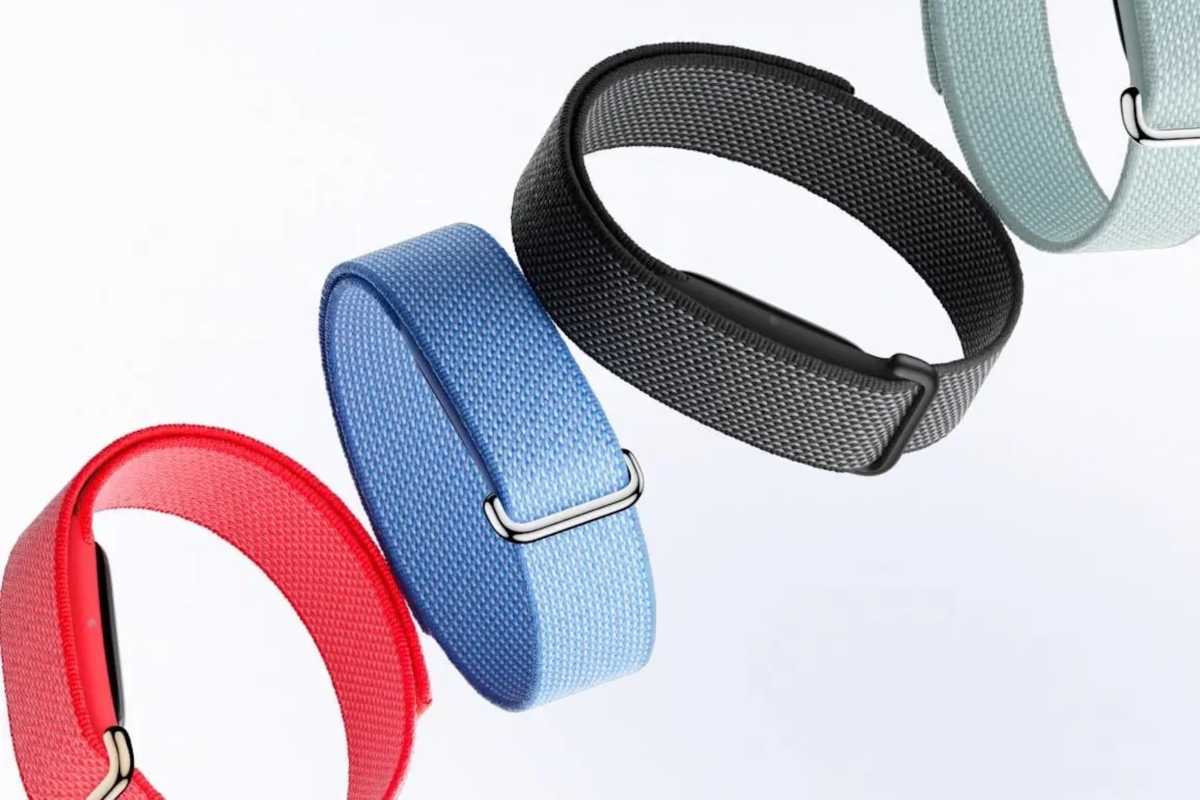
Fitness trackers are a solid smartwatch replacement for users interested in collecting health data and nothing else. Google just launched the Fitbit Air, featuring stress-free battery life, support for various data types, and an alluring $99.99 price tag. Products like Whoop and Oura have been growing in popularity. Meanwhile, Apple’s cheapest alternative is the Apple Watch SE, which requires daily charging and starts at $249. A screen-less “Apple Watch Neo” would complement the company’s lineup, compete directly against Fitbit and Whoop, and act as a gateway to the higher-end smartwatches.
Always-off display
Every few years, the Apple Watch’s display just a little bit bigger, adapting to the increasing complexity of watchOS and its on-screen elements. It’s time to think differently and offer a completely screen-less model for users opposed to the regular evolution.
The always-on display technology has become standard on Apple’s flagship iPhones, letting users easily glance at the date, time, notifications, and widgets. For many of us, that’s sufficient to stay up to date throughout the day. And given that your iPhone and Mac can show all that information as well, there’s little need to have them duplicated on our wrists.
No screen means smaller, lighter, more comfortable, and longer battery life.
Google
That’s not to say that Apple should completely eliminate the watch’s display. Many users appreciate the Apple Watch’s advanced utility, including the constant notification buzzing. But a simpler, standalone screen-less variant would cater to customers suffering from screen fatigue.
Charging forward
Users typically need to charge their Apple Watches daily—a recurring stressor that the Mindfulness app does little to alleviate. It’s particularly problematic for those tracking their sleep, who can’t just charge their watches overnight. Instead, they have to dedicate time during the day to ensure that the watch is sufficiently charged before bed.
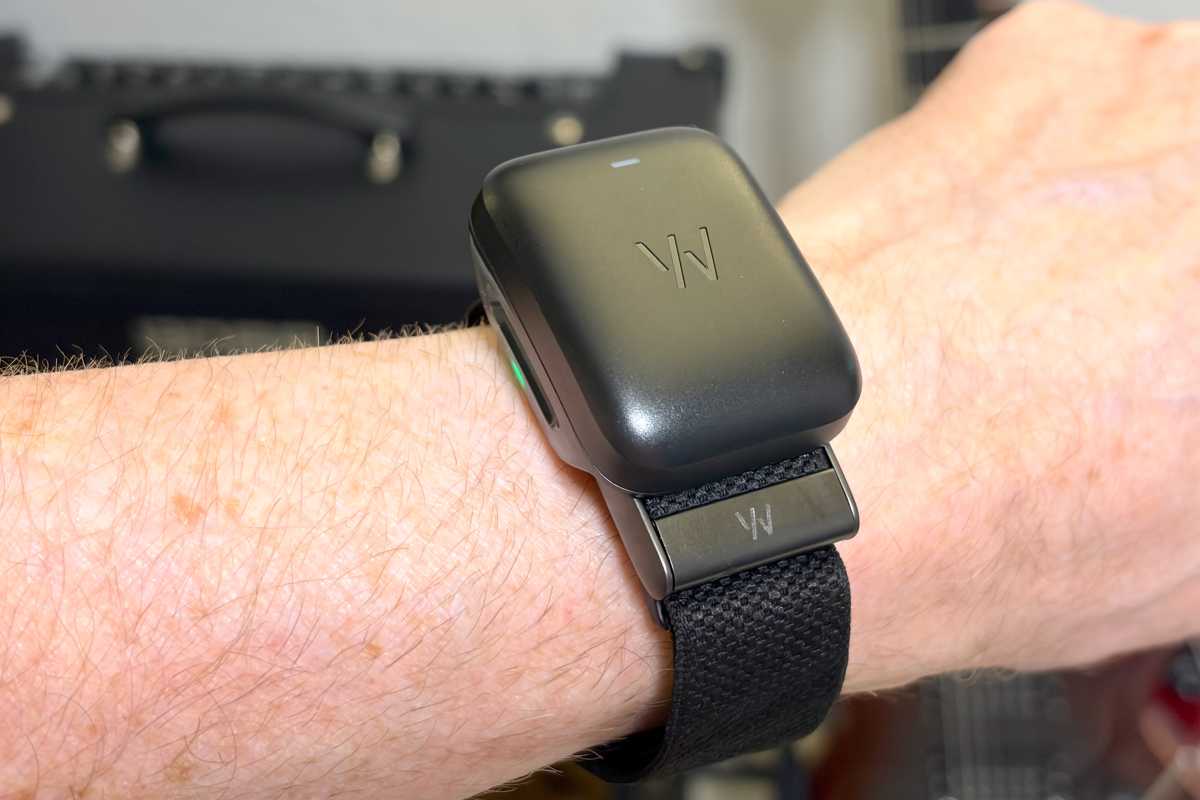
Without a screen, you can charge a Whoop while you wear it. And only once a week!
Foundry
In contrast, the new Fitbit Air and Whoop last for a full week, eliminating a daily task from your routine. And if by any chance you forget about charging it once a week, a 5-minute top-up can provide power for a full day of use—making it effortless to avoid tracking interruptions.
Monitor-less monitoring
One would assume that the Apple Watch—considering its bulk—would collect more health and fitness data types. While, yes, there are certain smartwatch exclusives, such as the ECG sensor, Google’s Fitbit Air supports most of the relevant metrics users need.
Google
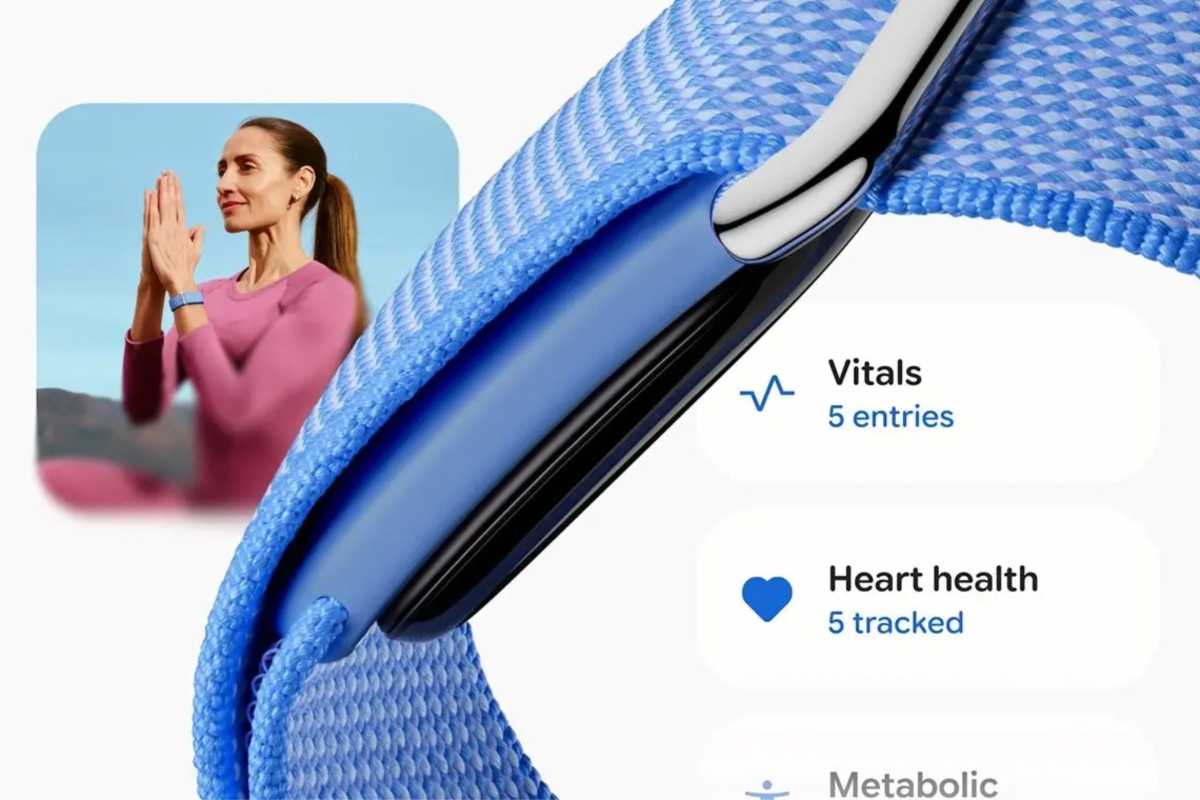
These include activity tracking, exercise modes, daily readiness score, cardio load, active zone minutes, calorie burn, goals, heart rate (including irregularities), stress management, skin temperature, sleep insights, and the (long) list goes on… Despite its sleek design, the Fitbit Air is a comprehensive fitness tracker that monitors more values than you’d expect.
Wrist rest
Another smartwatch annoyance is the above-mentioned bulk. Many users find it awkward to sleep while wearing their Apple Watches but are pushed to do so for overnight data collection. Plus, you’ve got to stay aware of your wrist’s movements throughout the day to avoid smashing its display against a rough surface. In general, the Apple Watch requires more care and is less durable, comfortable, and practical than wristbands like Fitbit. Fitness trackers are liberating in comparison.
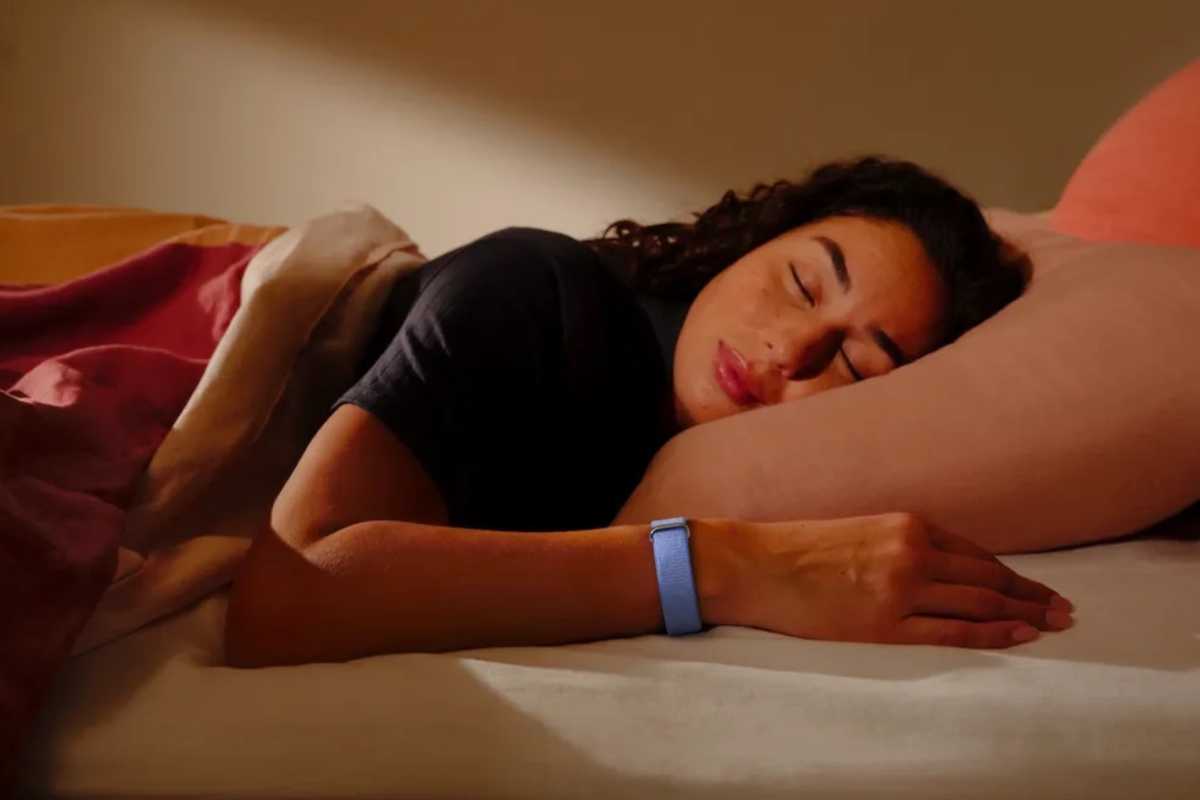
Smaller, lighter, thinner fitness trackers are easier to wear while you sleep.
Google
A new Neo
One could argue that uninterested users can turn off most of the Apple Watch’s smart features to preserve battery, minimize distractions, and treat it as a basic fitness tracker. That doesn’t address its price tag, which starts at $249 for the SE model or $399 for the regular one. Given that the Fitbit Air costs just $100 and works with iOS, Google could attract budget-conscious iPhone users who can’t justify buying an Apple Watch SE.
An “Apple Watch Neo” that drops the display wouldn’t cannibalize standard Watch sales, as it’ll miss out on a ton of handy perks that power users depend on. Some of the watchOS features it would miss out on include music playback via AirPods, Maps, iMessage, and of course notification mirroring. A basic Neo fitness tracker would attract those currently seeking third-party options and potentially convert them to flagship Apple Watch users when they’re ready to unlock the wearable’s full potential.
Regardless of its exact specs and price, there’s no denying that a dedicated fitness tracker is missing from Apple’s product line. This is particularly surprising, as Apple has long been invested in personal health and continues to expand upon its established foundation. With its main rivals, Google and Samsung, offering simpler form factors through wristbands and smart rings, Apple is ignoring a significant, untapped market. A heart rate sensor in AirPods Pro 3 is not a sufficient substitute.
Apple has unveiled its 2026 Pride Collection, and as always, it includes a new Apple Watch band and matching wallpaper. To round out the theme, arriving alongside the Pride Edition Sport Loop and matching watch face, iOS 26.5 also introduces a new Pride-themed wallpaper for iPhone and iPad.
Unlike previous iterations of the Pride Wallpaper, this year’s version is highly customizable, so you can make it look exactly the way you want.
Apple’s 2026 Pride Luminance wallpaper
Apple’s new Pride Luminance wallpaper features colorful moving shapes that shift as you interact with your device. Apple says the design was inspired by “the vibrancy, spirit, and individuality of LGBTQ+ communities,” but its colorful, animated style will appeal to a wide array of users. The wallpaper also changes dynamically when users move, lock, or unlock their iPhone.
Like many of Apple’s newer wallpapers, this one was clearly designed with iOS 26’s Liquid Glass interface in mind. The translucent layers and vibrant colors blend nicely with the updated interface introduced last year.
By default, the wallpaper comes with 11 different color presets, all inspired by the flags of the LGBTQ+ community. However, you can also create your own color combination.
Be sure to update your iPhone or iPad first
First of all, make sure your device is updated with the latest software, because the Pride Luminance wallpaper comes with iOS 26.5. To do this, follow the steps below:
Open the Settings app.
Go to the General menu.
Tap Software Update.
If your iPhone or iPad is running the latest software, you’ll see a message saying “iOS is up to date.” If not, you’ll be prompted to install iOS 26.5 (or the latest version available). You must update your device before continuing.
How to enable the new Pride wallpaper in iOS 26.5
Foundry
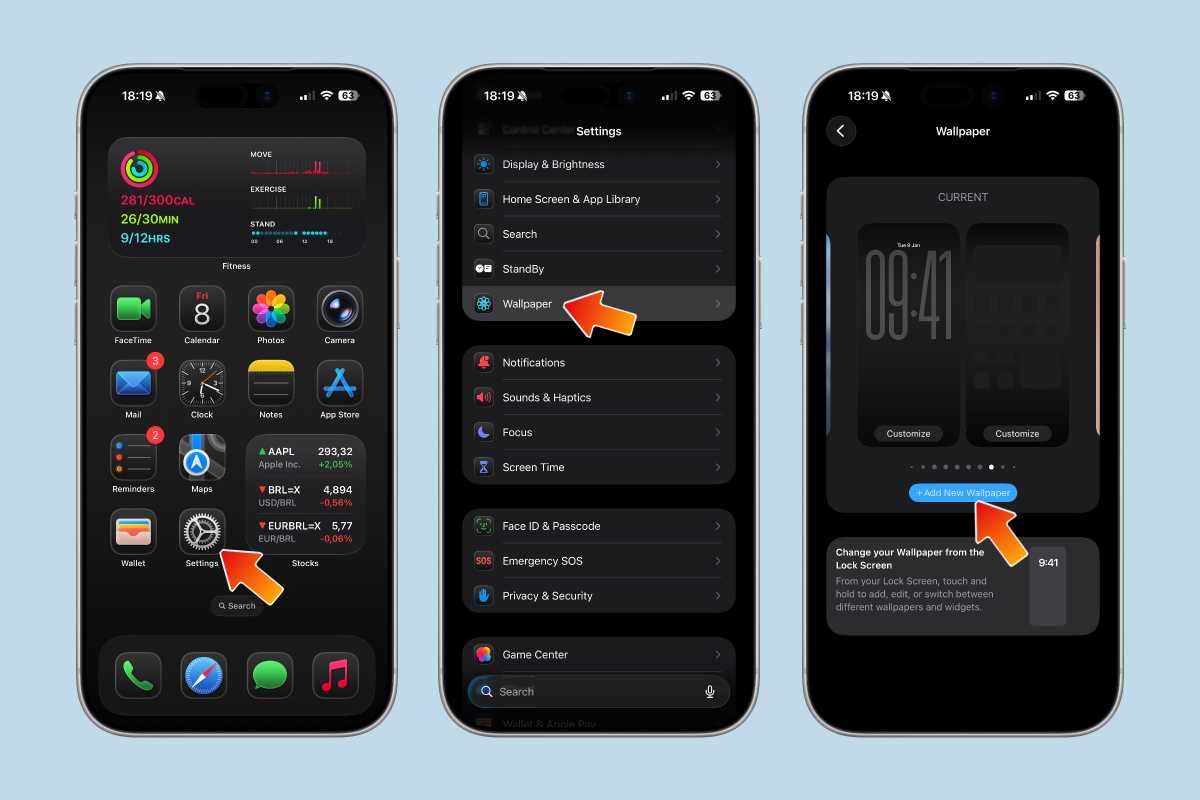
Once your iPhone or iPad is updated to iOS 26.5, here’s how to find the new wallpaper:
Open the Settings app.
Tap Wallpaper.
Choose Add New Wallpaper.
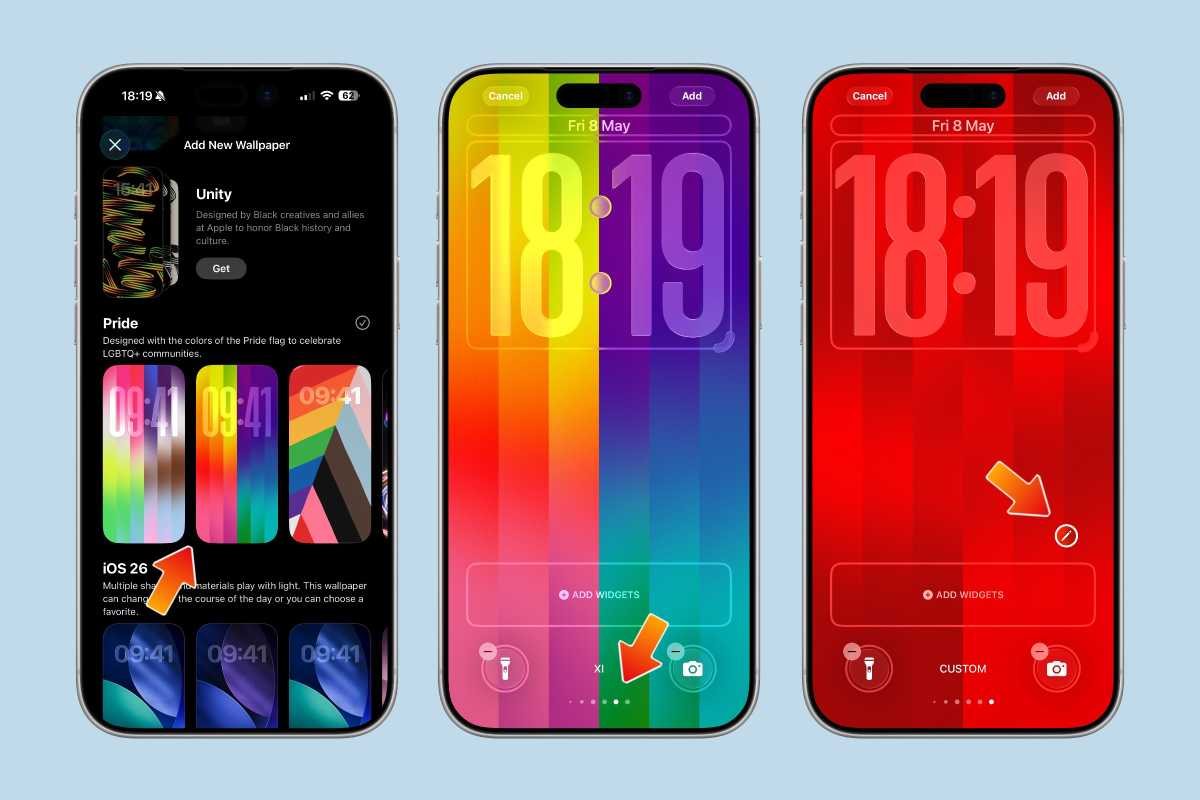
Scroll down to the Pride section.
Select the new Pride Luminance wallpaper.
Then, you can choose your favorite style. Swipe left or right to see all the available presets. And if you want to customize it with your own color options, swipe until you find “Custom” at the bottom of the list.
Foundry
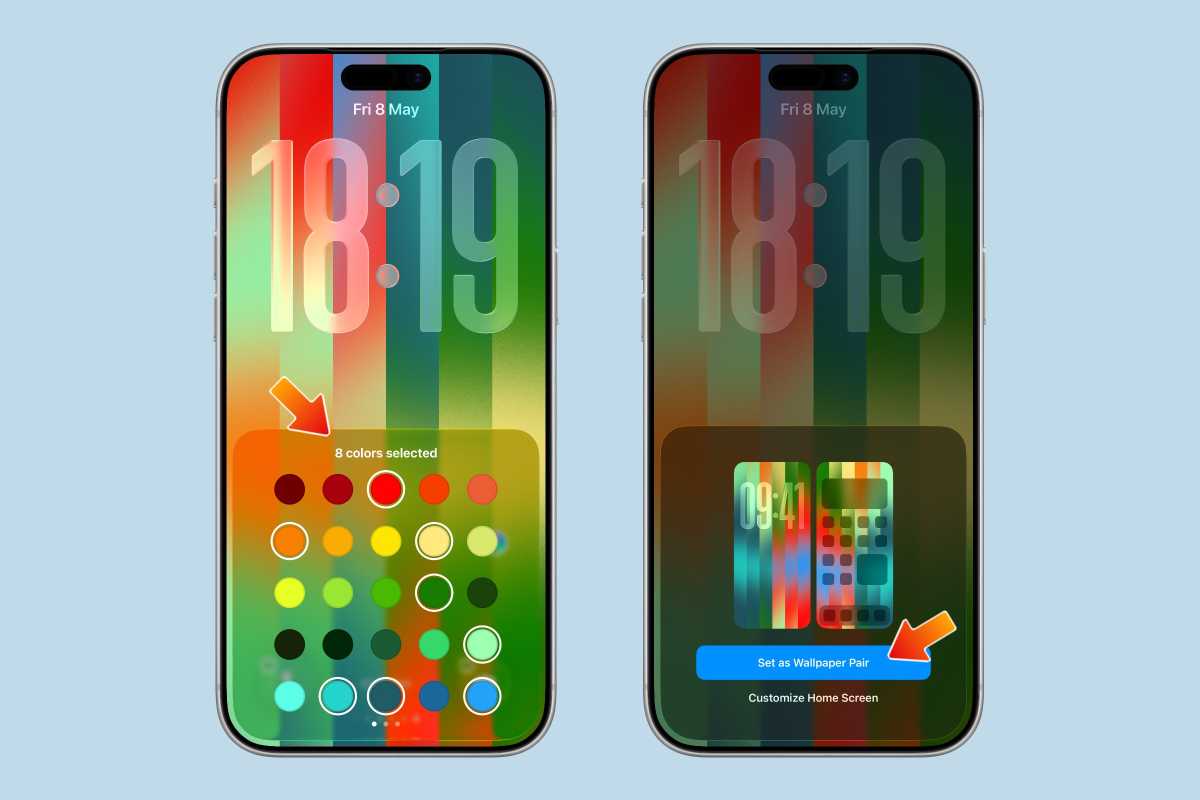
After that, tap the “Edit” icon that looks like a pencil to choose the colors you want. You can select up to 12 different colors.
Once you’re done customizing it, swipe down to close the color picker. Then tap “Add” and “Set as Wallpaper Pair” to make it your current wallpaper.
Foundry
Add it to your Apple Watch too
If you also have an Apple Watch, you can use the new Pride Luminance watch face to match your iPhone’s wallpaper. Here’s how to do it:
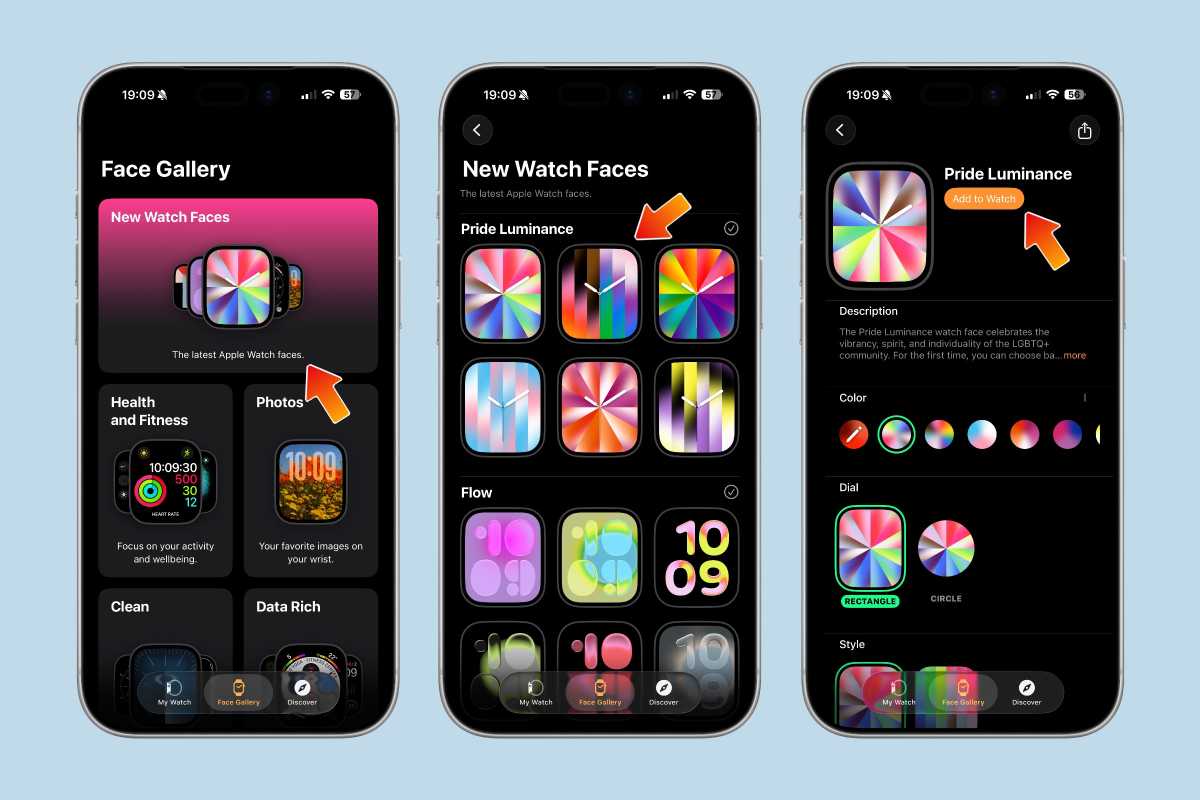
Open the Watch app on your iPhone.
Go to the Face Gallery tab.
Tap New Watch Faces or scroll until you find Pride Collection.
Choose your favorite style.
Customize it, then tap “Add to Watch”.
Once you’ve done that, you’ll find Pride Luminance among your favorite watch faces. Make sure to update your Apple Watch to watchOS 26.5 first.
Foundry
Apple has made a lot of wallpapers and watch faces over the years, but Pride Luminance is easily one of the most fun and customizable ones yet. Between the animated effects, vibrant colors, and support for fully custom palettes, it’s a nice way to give your iPhone, iPad, or Apple Watch a fresh new look with iOS 26.5.
And even if you’re not interested in the yearly Pride Collection itself, the new wallpaper is worth checking out just because of how well it shows off Apple’s Liquid Glass design language.
The rumored arrival of fingerprint recognition on the Apple Watch may have to wait, if a new report from a prolific leaker is accurate. In fact the leaker’s latest public comment strongly hints that it might never happen at all.
In a post to Weibo on Monday, the leaker known as Instant Digital poured scorn on the theory that Touch ID will feature on the new Apple Watch models coming later this year: “The current rumors about adding biometric authentication to Apple Watch and other wearable devices are completely false,” they write (via Google Translate). “Apple’s current strategy is still to have users unlock their devices via their phones.”
For full disclosure, those “current rumors” actually originated here on Macworld. Last August our eagle-eyed expert Felipe Esposito found that Apple developer code for what was evidently the 2026 Apple Watch models mentioned “AppleMesa,” an internal codename for Touch ID. That term does not appear in the code for any current or previous Apple Watches, and strongly suggested that Apple was looking into the possibility of adding fingerprint recognition to what is now its next generation of smartwatches.
Instant Digital doesn’t dispute the presence of the telltale references in the code, but does offer a rationale for why Touch ID isn’t happening. The issue is that Apple doesn’t want to accept the compromises that the fingerprint sensor would require (whether it’s under the display or concealed in the Digital Crown), and would rather devote its resources to increasing the capacity of the battery and adding more advanced health sensors.
“Integrating fingerprint sensors would only increase costs for now and directly reduce battery space, which is extremely uneconomical from a product planning perspective,” the leaker writes.
Putting the two factors together, it seems plausible that Apple has explored the idea of Touch ID on the watch but has concluded that it doesn’t make sense. It certainly wouldn’t be the first time such a thing happened; Steve Jobs famously said that “Innovation is saying no to 1,000 things.” Of the other products referenced or hinted at in the code we looked at last August, only the new Studio Display has actually launched. There’s still no sign of either the 5G MacBook Pro or the M4 Ultra chip, while the Mac Pro, which the M4 Ultra was expected to appear in, has been discontinued.
That doesn’t mean the products weren’t in development when we found those clues, nor does it mean they won’t appear in the future (with the exception of the Mac Pro). It just means Apple sometimes changes its mind, or delays or cancels projects which seemed promising at an early stage of development.
So fingerprint recognition may have been pushed back to the 2027 Apple Watch refresh, or it may not be practical for it to happen at all. But it is also possible that Instant Digital is mistaken. The account posts a lot of leaks to social media but doesn’t have much of a track record to speak of, and doesn’t provide a source for this latest claim.
Whether it doesn’t look its best anymore or you just want a style change, a new band can make your old Apple Watch feel new again. Buying a new one can be pricey, and Apple’s official bands don’t go on sale very often, so you should jump at today’s Woot sale, which has some excellent options for as little as $15.
The classic Apple Watch Sport Band is the most affordable of all, dropping 70 percent from $49 to $15. Available in multiple colors, including midnight, red, elderberry, White, and starlight, and sizes, you’re sure to find something perfect for whichever watch you own. The Apple Nike Sport Band in Spruce Aura and Vapor Green is also on sale for $20.
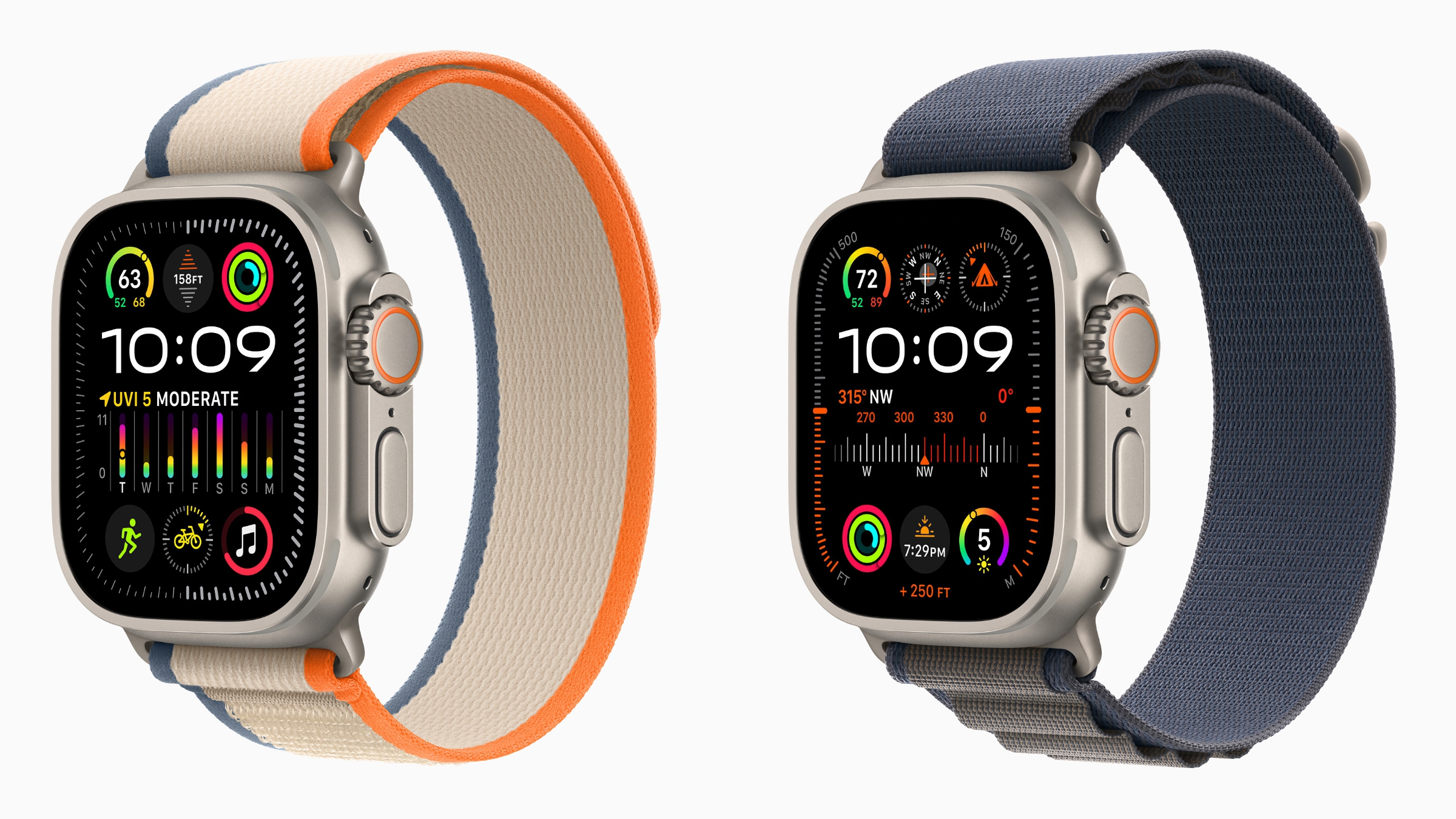
If you want something a bit more sophisticated, Apple’s $99 Alpine Loop model is down to $35. Woot has this model available in orange or starlight, depending on the size you want. Other models, including the Trail Look and Alpine Loop for the Apple Watch Ultra are also on sale
These are all original Apple bands and come with a 1-year limited warranty. Woot deals only last until stock runs out, and several combinations are already gone. Since Woot is an Amazon company, if you have a Prime subscription, your free shipping perks apply here, too.
Some pundits have wondered if Apple is running out of ideas for watchOS development, with major new features seemingly in short supply for the upcoming watchOS 27 demo at WWDC. But it will still be important to keep your Apple Watch’s software up to date, if only to keep on top of security patches and bug fixes.
Take the watchOS 26.5 software update, for example. The point update, which is expected to roll out to the public next week, contains fixes for two bugs, according to the release notes (via MacRumors). Neither of them is disastrous, but given that OS updates are free, there’s no reason to suffer without the fix.
Apple describes the bugs as follows:
Fixes an issue where Messages on Apple Watch may use SMS instead of iMessage when paired with a dual SIM iPhone
Fixes an issue where Workout app audio alerts could fail to play if the phone was not nearby Apple Watch
If that isn’t enough incentive to install watchOS 26.5, Apple has also announced it will contain a new Pride Luminance watch face for Pride month.
Apple rolled out the release candidate (RC) of watchOS 26.5, as well as the 26.5 RCs for the iPhone, iPad, Apple TV, and Vision Pro, on May 4. The RC is a late beta version that in principle is ready to launch, unless a problem is spotted, so the final version is likely to roll out next week.
To update watchOS on your Apple Watch, open the Settings app and tap General > Software Update. If an update is available, tap Install and follow the onscreen instructions.
As it does every year, Apple has announced a new Apple Watch collection to celebrate Pride month that includes a new Apple Watch face and a special-edition Apple Watch band to buy. There’s also a matchinfg Pride Luminance wallpaper for iPhones and iPads.
The 2026 Pride Collection this year includes a Sport Loop band ($49) with bright rainbow stripes along the length, along with a matching Pride Luminance watch face designed in “two geometric patterns: radial, featuring rays of color that align with the hour marks, and vertical, reflecting the colorful linear stripes of the weaving pattern.” iPhone and iPad users can also download a matching Pride Luminance wallpaper for their devices.
The new watch face and wallpapers will be available for everyone in iOS/iPadOS/watchOS 26.5, which will be available in May. The Sport Loop band is available for purchase now online or in the Apple Store app, and will be in retail locations later this week.
In just about a month, Apple will unveil the newest version of its operating systems at WWDC, and we’ll get a look at the new features and functionality Apple has cooked up over the past 12 months. But while iOS and macOS are sure to be packed with new stuff, watchOS 27 might not be all that different.
It’s no secret that Apple’s smartwatch has hit something of an innovation roadblock. Ever since the Apple Watch Ultra arrived in 2022, Apple’s annual updates have been more iterative than innovative, with watchOS only bringing minor upgrades and underwhelming new features. According to a new report by Bloomberg’s Mark Gurman, this year looks to be more of the same.
In his latest Power On newsletter, Gurman reports that one of watchOS 27’s signature features will be a take on the Apple Watch Ultra’s Modular watch face that’s “simplified” for smaller screens. Gurman describes the face:
It has the same large clock as the Ultra face but removes the option for a big complication in the center, the row of three smaller complications above the time, and information placed around the bezel. The result is a large clock that fills the top two-thirds of the display, with a row of three smaller complications beneath it.
Adding new faces to watchOS updates isn’t a new development—last year’s watchOS 26 update brought Flow, Exactograph, and WayPoint—but Gurman makes it sound like this will get a bit more attention. Apple was so proud of the Modular Ultra face that it got its own section in the Apple Watch Ultra 2 press release.
Apple introduced the Modular Ultra watch face in 2023 with the Apple Watch Ultra 2 to take advantage of the watch’s larger display, “using the outermost edge to present real-time data, including seconds, altitude, or depth,” and offering “the most complications of any Apple digital watch face to customize for sports, outdoor adventures, and ocean and water activities.”
Gurman reports that the new face is ”aimed at bringing a version of the Modular Ultra experience to standard Series watches, offering something less dense and more approachable while still giving customers useful information at a glance.” But for many Apple Watch users, it’ll just be a recycled face and another year of waiting for something new worth using.
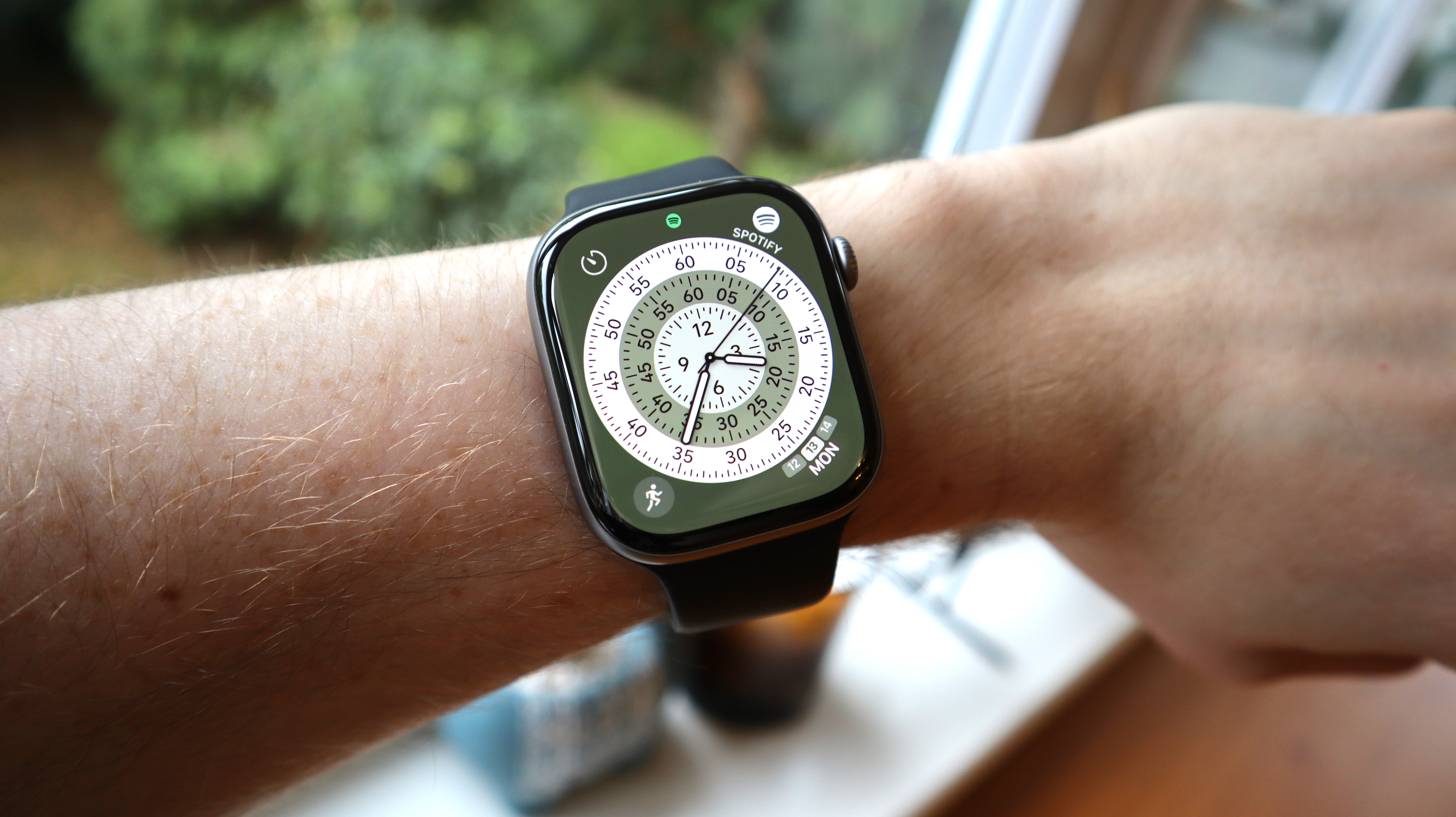
Well, well, well, if it isn’t the decked-out Apple Watch Series 11 down to its very best price! You can get your hands on Apple’s smartwatch in the sleek Jet Black color way for $399, a savings of $130 off its $529 retail price, and matching the best price we’ve ever seen.
This Apple Watch doesn’t just connect to your phone. It also comes with its own built-in cellular connection, so you don’t even need your phone to send off messages, if need be, or make calls and stream music. Just note, you’ll need a separate plan from your wireless carrier, which generally costs about $10 a month.
The best thing about the Apple Watch Series 11, however, is just how great it will be for keeping you healthy and fit. It has an array of sensors that actively track your workouts, keep an eye on your blood pressure, can run ECGs, and will even create a sleep score so you can get up more rested. It also comes with built-in safety features, like Crash or Fall detection, calling for help when in trouble. Plus this year’s model ups the battery life from 18 hours to 24 hours, so you’ll be able to get through a full day with sleep tracking before you need to worry about charging it.
So go grab this watch for just $399 before this deal runs out.
It’s already shaping up to be a huge year for Apple, with a wave of new products launching in the first three months of 2026 – including the MacBook Neo and iPhone 17e. And the momentum isn’t slowing. Rumors suggest dozens more devices are on the way, ranging from updated iPhones and Macs to smart home technology and even the long-awaited foldable iPhone.
In this article, we explore the products Apple is expected to release next. Drawing on the latest rumors and industry trends, we break down what could be coming – and why it matters.
What to expect from Apple in 2026
Biggest launches: iPhone Fold, iPhone 18 Pro redesign
Most meaningful upgrades: Under-display Face ID, OLED iPad mini
Big leadership shift: It has been confirmed that John Ternus will replace Tim Cook as CEO in September 2026
Apple’s roadmap for 2026: At a glance
In the fall of 2026, Apple’s roadmap will come under the direction of incoming CEO John Ternus. Current CEO Tim Cook will remain as executive chairman, but the shift from an operations-focused leader to one with deep hardware engineering roots could signal a more product-driven approach – and a renewed emphasis on standout hardware. Ternus will take over as CEO just as Apple is reportedly preparing a major Siri overhaul, alongside potential launches including its first touchscreen MacBook and the iPhone 18 Pro.
ProductExpected releaseKey rumoursShould you wait?iPad miniMid 2026Larger OLED screenYesiPadMid 2026Apple Intelligence supportYesMac miniMid 2026M5 & M5 Pro chip YesMac StudioMid 2026M5 Pro & Max chip YesiPhone 18 Pro & MaxSeptember 2026No notch, under-display Face IDMaybeiPhone FoldSeptember 2026The first foldable iPhoneMaybeApple Watch Series 12September 2026Blood pressure monitoring unlikely NoMacBook Pro M6Late 2026-2027Touch screenNoApple Smart GlassesPreview in late 2026Heads-up displayYesiPhone 18Spring 2027To launch with iPhone 18eNo
Last updated March 27, 2026.
Every New Apple Product Launched in 2026… so far
Here is what Apple has already announced in 2026:
AirPods Max 2: Improved audio and the H2 chip. Find out more here: AirPods Max 2 guide.
MacBook Neo: Apple’s brand new, low-cost Mac laptop. Find out more here: MacBook Neo guide.
MacBook Air M5: Now with the M5 chip. Read about the 2026 MacBook Air here: MacBook Air M5 guide.
Studio Display: Finally gets Thunderbolt 5 and a better webcam.
Studio Display XDR: With mini-LED technology and ProMotion up to 120Hz.
iPhone 17e: The new, entry-level, iPhone replaces the iPhone 16e. Read more here: iPhone 17e guide.
iPad Air M4: The iPad Air now has an M4 chip. Read more here: iPad Air M4 guide.
AirTag 2: Four years on Apple updated the AirTag, read our review here: AirTag 2nd gen review.
And… RIP Mac Pro: Apple has confirmed that it is discontinuing its tower workstation.
Read on to find out what new products to expect at Apple’s next event and throughout 2026.
Every New Apple Product Launching in 2026
In the sections below we’ve split the upcoming new products into categories including Mac, iPad, iPhone, Apple Watch, Home, AirPods, and some new product categories.
What’s happening with AI?
Big changes are coming in 2026 relating to AI, which Apple brands as Apple Intelligence. These changes will be core to iPhone, iPad, and Mac roadmap, and beyond.
Apple’s plans to do more on-device AI powered processing, rather than rely on cloud processing. This will protect user privacy, but will require hardware to have adequate neural processing power and memory to support these local AI features. New hardware coming from Apple in 2026 will be designed with this purpose in mind.
On the software side, Apple has been promising an ovarhaul of Siri for a couple of years now, but 2026 should be the year it comes to fruition. Siri will be transformed from a voice assistant into a AI chatbot-style interface with deeper app integration and contextual awareness.
Apple’s AI push is also expected to expand into new product categories including AI-powered smart glasses and an expanded range of HomePod devices with more advanced home hub functionality.
What new iPhones are coming in 2026 (and should you wait)?
There’s new iPhones coming.
Foundry
Based on current industry analysis and supply chain information, Apple has some significant changes planned for the iPhone in 2026, with updates centered around the iPhone 18 series, the introduction of a foldable iPhone, and the release of iOS 27.
iPhone 18 Pro & Pro Max
September 2026 update expected
The iPhone 18 Pro is expected to launch in September 2026. The iPhone 18 Pro is rumored to be the first to use Apple’s own C1 modem instead of Qualcomm’s. The base model may see a RAM increase to 12GB to better support on-device AI functions. A major redesign is expected, which could include under-display Face ID, a completely hidden notch and the front camera could move to the upper-left corner of the display. Read about the iPhone 18 Pro here: iPhone 18 Pro rumors.
Foldable iPhone
September 2026 introduction possible
This is a wild card! After years of rumors, Apple’s first foldable phone, potentially named the iPhone Fold, is projected to debut in September 2026 alongside the iPhone 18 Pro models. It is expected to be a book-style foldable with a 7.8-inch inner display. Read more here: Apple’s folding iPhone rumors.
iPhone 18
Spring 2027 launch possible
Apple could delay the iPhone 18 and release that handset alongside the iPhone 18e in the spring of 2027, according to some reports.
What new iPads are coming in 2026 (and should you wait)?
Apple doesn’t update the iPads every 12 months, but aside from the iPad Pro, which gained an M5 chip in October 2024, all the remaining iPads could see an update in 2026.
Apple’s 2026 iPad lineup is likely to feature incremental upgrades focused on internal performance improvements rather than major design overhauls. Here’s what to expect:
The iPad Air could get a update soon.
Britta O’Boyle
iPad mini
May 2026 update possible
The current iPad mini (A17 Pro) was released in October 2024, and Apple’s update cycle for this model is generally infrequent. Based on current reports and analysis, the next significant update to the iPad mini is not expected until mid-to-late 2026 at the earliest, with some speculation pointing toward 2027.
One rumored upgrade for the 2026 iPad mini is the transition to an OLED display, which could reduce manufacturing costs and improve battery life. There is also the possibility of a slightly larger screen, with a move from the current 8.3- to 8.7-inches suggested. There is also speculation that a future foldable Apple device could potentially replace the iPad mini line entirely, though this remains uncertain.
Internal code leaks suggest the future iPad mini could be upgraded to an A19 Pro chip, which would provide a significant performance boost over the current A17 Pro. A A18 Pro chip upgrade is also possible. Read our round up of iPad mini rumors.
iPad
May 2026 update possible
When the standard iPad was updated in March 11, 2025, the biggest disappointment was that it featured a A16 chip and therefore didn’t support Apple Intelligence. Apple looks set to rectify that in 2026 with an upgrade to the A18 or A19 chip, with the latter offering 50% better performance. The release timeline for an iPad with an A18 or A19 chip is anticipated for sometime in 2026, in fact, Apple code suggest the company may be planning an update sooner-rather-than-later.
Read more about the 2026 iPad in our rumor round up.
Which Macs are worth waiting for in 2026?
2026 is expected to be a significant year for the Mac, with Apple’s first touchscreen Mac rumored as part of a MacBook Pro redesign. March 3 saw the launch of the M5 MacBook Air and M5 Pro/M5 Max MacBook Pro and March 4 saw Apple introduce the a new entry-level laptop – the $599 MacBook Neo.
Updates to the Mac Studio and Mac mini are expected in 2026. These Macs have become popular for running AI models locally; however, global RAM shortages – driven by AI companies purchasing large amounts of memory for data centres – are having a knock-on effect on availability. Current models are constrained and, in some cases, unavailable, while the release of new models may also be delayed due to ongoing DRAM supply shortages.
The next update for the Mac mini is expected to feature the M5 and M5 Pro chips, with a possible release in June 2026, although this may be pushed back to the end of the year depending on global RAM shortages. Regarding features, there isn’t much specific information about the M5 Mac mini itself, but it’s not expected to be a major departure from the current model, which was released in October 2024, and introduced a significant redesign, shrinking the case to just 5 by 5 inches and upgrading the base RAM to 16GB. Read more here: Mac mini M5 rumors.
Mac Studio
Early-mid 2026 update expected
The current Mac Studio comes in two flavors: the Mac Studio M4 Max and the Mac Studio M3 Ultra. The M3 Ultra is a faster chip than the M4 Max, but just how much faster would an M4 Ultra, or even an M5 Ultra be. Hopefully we won’t have to wait long to find out. Apple is expected to release a new Mac Studio with an M5-series chip, likely in mid-2026, but that date may be pushed further into the future if global RAM shortages continue. Read more here: M5 Mac Studio rumors.
iMac
Possible 2026 update
The current M4 iMac was released in October 2024, so an M5 update might seems timely and could be released in June 2026, alongside other potential M5 Mac updates.
The current iMac design was introduced in 2021 and is not expected to change soon. It is still considered fresh, and its components are not outdated. However, there are calls for Apple to introduce a larger screened iMac, something that has been missed since Apple discontinued the 27-inch model. Many feel that the 24-inch screen is too small. Read about the larger iMac rumors.
Touchscreen MacBook Pro M6
Possible late 2026 introduction
Foundry
There are rumors that the M6 MacBook Pro will get a redesign including a thinner body and a notch-free OLED touchscreen, read the rumors about the M6 MacBook Pro with a touch screen.
Upcoming Apple Watches in 2026
Like clockwork, expect a new Apple Watch in September.
Mahmoud Itani / Foundry
Apple updated all the Apple Watches in September 2025. Launching the Apple Watch Series 11 a new Apple Watch Ultra and a new Apple Watch SE. In 2026 the Apple Watch Series 12 and a new Apple Watch Ultra 4 are expected.
With the Apple Watch rather than hardware changes the real interest tends to be the health and fitness related features. The following capabilities are expected in future iterations:
Non-invasive blood glucose monitoring: This has been a long-rumored feature for the Apple Watch, but it is still considered to be a few years away with the technology unlikely to be ready for a 2026 release.
AI-Powered Health and Fitness Coach: Apple has long been rumored to be working on a sophisticated AI coach. Recent reports from early 2026 suggest this project was “scaled back” to allow individual AI-driven features to ship sooner rather than waiting for a complete overhaul.
Health+ Service Overhaul: There are ongoing rumors regarding a new service tier called “Health+” that would expand upon Fitness+. This service might integrate new AI-powered health features into a single subscription, potentially bundled with hardware purchases.
Daily Readiness and Stress Tracking: Unlike competitors such as the Oura Ring 4 or Garmin, the Apple Watch currently lacks a “daily readiness” score or native stress tracking. Experts suggest these are obvious areas for future software or hardware updates.
Other new features could include Touch ID integration and microLED displays reaching 4,000 nits brightness. A thinner case, magnetic bands, and enhanced AI capabilities could also be on the cards.
Apple Watch Ultra 4
September 2026 update possible
Rumors indicate that the Ultra 4 could have a fingerprint scanner. There may be new sensors coming, but details are sparse.
Apple Watch Series 12
September 2026 update likely
A chip update is likely, but beyond that little is known.
Upcoming Apple Home devices
Mahmoud Itani / Foundry
Apple is expected to significantly expand its smart home ecosystem in 2026 with four major product categories including new devices beyond traditional Apple TV and HomePods.
Key rumored products include a HomeKit security camera with audio monitoring, a HomePad smart hub with 7-inch touchscreen, updated HomePod mini 2, and next-generation Apple TV 4K with A17 Pro chip.
This strategic push aims to help Apple catch up with competitors like Amazon and Google in the smart home market.
We expect Apple’s major push into the smart home market to start around March or April 2026. This initiative will be heavily reliant on a significantly improved Siri, powered by a new large language model, reportedly based on Google’s Gemini AI.
New and updated products are said to include:
New Smart Hub
Possible 2026 introduction
Multiple reports have suggested Apple will launch a smart home hub. Apple is said to be working on a number of HomeHub related products including a device said to mount a camera on a robot arm that can follow you around!
New Smart Display
Possible 2026 introduction
Also rumored is an iPad like smart display that allow you to control your home devices via HomeOS software. This may come with both a speaker base and a wall mount.
HomePod Touch
Possible 2026 introduction
A new HomePod smart speaker with a screen is said to be coming. Read more here: New HomePod rumors.
HomePod mini 2
Probable 2026 introduction
Foundry
A new HomePod mini is also said to be on the way.
Apple TV
Probable 2026 update
Apple TV leaks indicate a rumoured Apple TV is on Apple’s roadmap and that the update will bring Apple Intelligence to the set top box.
Upcoming Vision devices, AR and spatial computing
Apple Smart Glasses
Possible 2026 introduction, 2027 launch
Unlike the bulky Vision Pro headset, the upcoming smart glasses from Apple are expected to follow a form factor similar to the Ray-Ban Meta glasses. This will be Apple’s first product built specifically for “Visual Intelligence.” It will likely handle tasks such as live translations, music playback, phone calls, and turn-by-turn directions. Apple could provide a first glimpse or “preview” of the glasses by the end of 2026.
Vision Pro
Possible 2027 update
Prior to 2026, Apple’s spatial computing strategy has focused on the high-end market, but reports indicate a more affordable version of the headset is in development. Apple has reportedly paused work on a successor to the high-end Vision Pro and will instead release a cheaper Vision Pro.
What Apple launched in 2025
Here’s a quick look at what Apple released in 2025:
February2025: iPhone 16E – the replacement for the iPhone SE and iPhone 14 brought Apple Intelligence support to the entry-level iPhone.
Around three weeks ago, Apple released watchOS 26.4 alongside iOS 26.4 and macOS 26.4. At the same time, the company quietly released updates for watchOS 5 and watchOS 8, two older versions of the Apple Watch’s operating system. These renewed security certificates and enabled iMessage and FaceTime to carry on working.
Unfortunately, users are now reporting across various channels that the watchOS 8.8.2 update is causing problems with their Apple Watches. The most common issue appears to be an inability to install apps. Even Apple’s own apps, such as Maps and Weather, are not immune.
Other users report random crashing and pairing errors. One affected Apple Watch shut down despite being almost fully charged; after a forced restart, it showed a battery level of 80%. A common tip for problems with the Apple Watch is to unpair it from the companion iPhone and then pair them again, but even during this step, affected users report that the connection sometimes fails.
So far, there appears to be no permanent solution to either the crashes or the app installation problem. Several commenters on Reddit and Apple Community say they’ve already contacted Apple Support, but this hasn’t yet led to a fix, or even an explanation of what’s going on. To make matters worse, there is no easy way to revert to the previous version of watchOS. And while watchOS 8 might sound like an ancient OS, it’s compatible with some Apple Watch models which remain popular, such as the Series 6 and SE.
If you’ve been affected by the issues with watchOS 8.8.2, please get in touch with us using the form below. The more user feedback Apple receives, the more likely it is that the developers in Cupertino will investigate the issue and (potentially) find a fix.
Achievement badges are a funny thing. You know they’re just a simple little bit of visual flair, they don’t even do anything, and yet for some reason you just have to collect them. Gamification can be a great motivator, and the achievement badges for the activity tracking on the Apple Watch have inspired many users to get more exercise.
If you want to maximize your badge count, you’re going to want to chase down as many activity achievements as you can. Most are available year-round, but there are also some time-limited special events to grab, too. Here’s a list of all the activity achievements for the Apple Watch and how to unlock them.
Updated April 14, 2026: Earth Day is coming on April 22, and International Dance Day will be here on April 29.
Most of the achievements can be earned year-round. If you open the Activity app on your iPhone, then head over to the Achievements tab, you’ll see some of them listed even before you earn them (in which case they will be represented by a grey outline).
However, there are some achievements that are not shown until you earn them. Past and future monthly challenges, for example, won’t show up, nor do all the various individual exercise workouts.
Here is a list of all the standard badges you can get.
First [exercise] Workout
The first time you perform a new exercise for at least 5 minutes, you’ll get a achievement badge. Every workout type that does not fall under the “Other” category is eligible for this badge: from walking to yoga to HIIT to hiking and more.
Activities with both indoor and outdoor variants, like Cycling and Walking, are bundled together; you can do either activity to get the badge, and can only get it once.
[exercise] Workout Record
Every time you beat your previous best record for calories burned in any of the exercises listed above, you get this badge.
There is one caveat: You must complete five workouts of that type first. If you want to game the system, make sure your first four workouts of each type are short and easy, so it won’t take much effort to beat them.
You get a badge the first time you do each major exercise type, and when you break a record.
7-Workout Week
Simply complete any workout of at least 15 minutes every day of the week. Note that the week is Monday-Sunday, and you have to do a workout on each of those days (you can’t simply do any seven days in a row). If you start a walking workout whenever you walk outside, you can achieve this easily.
New Move Record
Any day that your Move ring goes further than ever before (meaning you burned more calories in a day), you’ll earn this award. There’s one catch: you have to use your Apple Watch for 10 days before you can complete this.
New Exercise Record
This is just like the Move Record achievement, only for the green ring. This one is based on minutes of exercise, not calories burned, so it’s really easy to get. Just like the Move Record achievement, you have to use your Apple Watch for 10 days first.
Move Goal 200%, 300%, 400%
You earn this when you exceed your calorie target (the red Move ring) by 2x, 3x, or 4x, respectively. In other words, it’s given for making the red activity ring go around two, three, or four times in a day. It’s easy to get if you just set your Move goal very low.
Double, triple, and quadruple your Move ring goal. Reduce your goal if you’re having trouble.
New Move Goal
Every time you change your daily Move goal, and then exceed that new goal, you get this achievement. You can change your Move goal by opening the Activity app on your Apple Watch and force-pressing the screen.
Longest Move Streak
When you hit your Move goal (close the red ring) several days in a row, that’s a “streak.” You get this award when your streak finally ends, if it’s longer than your previous best streak.
Perfect Week
This is given out for four categories: Move, Exercise, Stand, and All Activity. For the first three, simply close the rings (red, green, or blue) every day of the week. To get the Perfect Week (All Activity) badge, close all three rings every day for an entire week. You can earn this multiple times, though it only shows one badge.
Remember, one week in the Activity app is from Monday-Sunday!
Close those rings every day from Monday to Sunday to earn a handful of badges.
Perfect Month
Unlike Perfect Week, there are not multiple different Perfect Month badges for the different color rings. The lone Perfect Month achievement is for closing the red Move ring every day of the month.
There’s a separate Perfect Month badge for every month and every year, though. So you can earn this in February and again in March, and again in February in the next year.
Monthly Challenge
Each month has its own unique fitness challenge. If you have notifications set for the Activity app on our Apple Watch, you’ll see the goal presented at the beginning of the month, but you’ll also see the current month’s challenge in the Achievements tab of the Activity app on your iPhone. It will be a grey outline before it’s completed, but you can tap on it to see what the challenge entails.
The monthly challenge may task you with burning a specific number of calories, working out a number of times, or traveling a certain distance. There’s no telling what each new month will bring, you just have to look!
There’s a different challenge every month, so check your Activity app.
100, 365, 500, 1,000 Move Goals
When you hit your daily Move goal (close the red ring) 100 times, you get an achievement badge. You get another for hitting it 365 times, 500 times, and 1,000 times. These do not need to be in a row; it’s just the total number of times you’ve ever hit the goal.
Close the Move ring often to unlock a series of badges. Set the Move goal low if you want to make it easier.
Apple offers multiple one-off challenges per year that are only available for a limited time. Often, they’re only around for one day or one weekend. Some are limited to the U.S. because they’re based on U.S. holidays.
You’ll get a notification on your Apple Watch when one of them is coming up (make sure you have notifications enabled for the Activity app, using the Watch app on your iPhone).
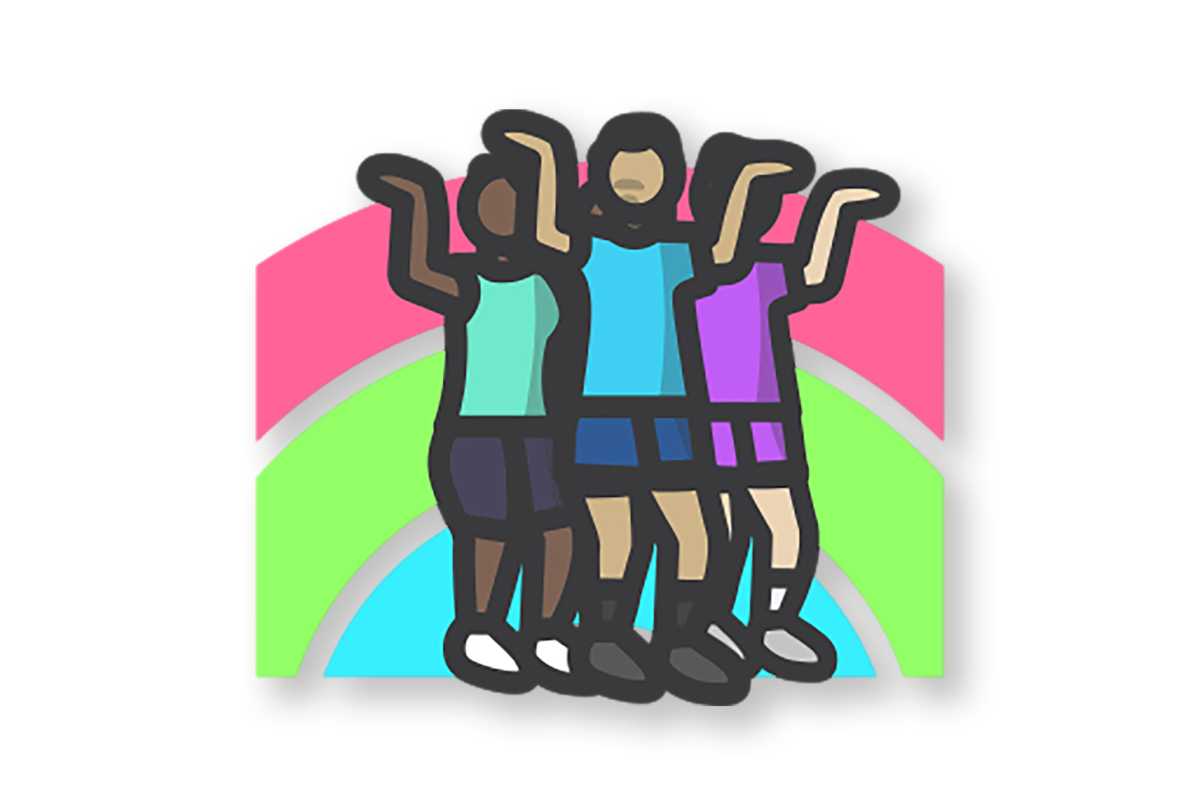
International Dance Day (April 29, 2026)
Apple
Show off your dance moves for International Dance Day. Earn this award by recording a Dance workout of 20 minutes or more on April 29. Record it with the Workout app or any app that adds workouts to Health.
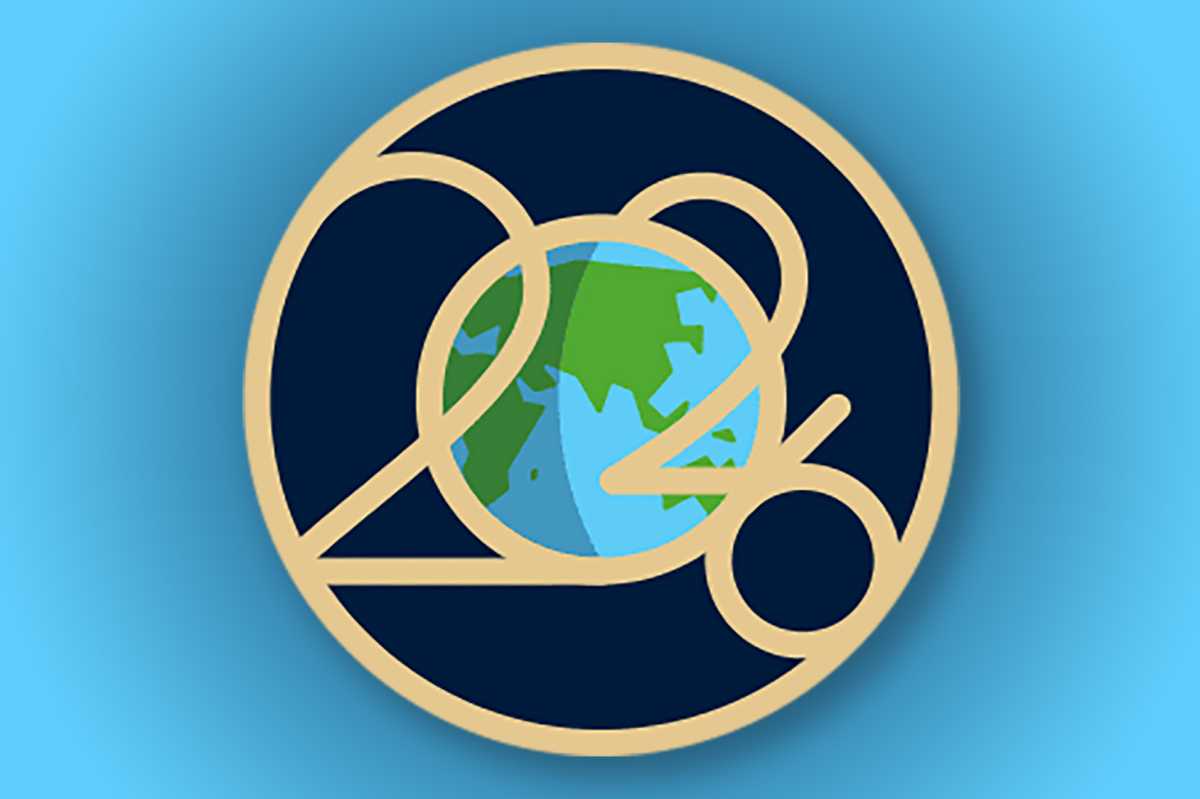
Earth Day (April 22, 2026)
Apple
This Earth Day, April 22, record any 30 minute workout with the Workout app or any app that records workouts to Health to earn this award. The earth will think the world of you.
Heart Month challenge (February 14, 2026)
Foundry
Close your exercise ring on Valentine’s Day, February 14, to earn this award. Your heart will love you for it.
New Year 2026 (January 2026)
Foundry
Start the year strong and stay active! Earn this award by closing all three Activity rings for seven days in a row in January.
World Meditation Day (December 21, 2025)
Foundry
Time to celebrate World Meditation Day! On December 21, record five mindful minutes or more with the Mindfulness app or any app that adds mindful minutes to Health to earn this special badge.
Veteran’s Day (November 11, 2025)
Foundry
Earn this award on November 11 by doing any workout for 11 minutes or more. Record your time with the Workout app or any app that adds workouts to Health.
World Mental Health Day Challenge (October 10, 2025)
Foundry
Record 10 minutes of mindfulness or meditation with any app that adds mindful minutes to Health to get this award.
National Parks Challenge (August 24, 2025)
Foundry
The anniversary of the founding of the U.S. National Parks is on August 25. Every year, Apple celebrates this is a global National Parks badge (on the 24th this year, since the 25th is a Monday).
Just do a workout of 20 minutes or more on August 24 with any app that records workouts the the Health app to earn this badge.
Global Running Day (June 4, 2025)
Apple
Apple’s description says: “Let’s run this one together. On June 4, record a running workout and go at least 5K (3.1 mi) to earn this special badge. Record it with any app that adds workouts to Health.”
If you were waiting for the right time to get an Apple Watch Series 11, then now’s the time to add it to your cart. This one’s a fantastic smartwatch, and it can be yours for $299, which is a substantial $100 under its regular price and the best deal we’ve seen for this model.
While we didn’t love the fact that the Series 11 only brought minor upgrades, we can’t deny that it’s a lot better at health monitoring. If you get any hypertension spikes, it’ll send you a notification, or even tell you if you have sleep apnea, while also creating a nightly sleep score complete with tips on how to improve your rest. The watch also features plenty of sensors that will help track your heart rate, pulse, temperature, blood-oxygen levels, and so on.
The watch also comes with the safety features we’ve come to love, namely Crash Detection and Fall Detection, which you can use to alert others in the event of an accident. Battery life won’t disappoint, either, as you get up to 24 hours on a single charge, which is more than we can say about any previous model outside of the pricey Ultra line. This was easily one of our favorite things about the Series 11 when we reviewed it (and gave it a 4-star rating).
Unless you want to wait until mid-summer for a better deal (I expect to see a better price around Prime Day), now’s the time to get the Apple Watch Series 11 for $100 off.
Since taking over the Health and Fitness areas last year with the departure of Jeff Williams, services chief Eddy Cue has apparently decided that Apple needs to “move faster and be more competitive,” pointing to devices like the Oura ring and Whoop band as popular rivals that do more exciting and useful health tracking.
Earlier this year, we wrote about a rumor that Apple’s upcoming health services overhaul, dubbed Health+, was being scaled back. But in this case, “scaled back” could mean more features, sooner. Apple has also been rumored to be working on an AI-powered health and fitness coach for a long time, but that was still a long way off. It, too, has been allegedly scaled back to move faster with individual features that can ship as soon as this year.
I don’t know what Apple’s current plans are, but I’ve now used a Whoop 5.0 band all day, every day for two months, and there are some great ideas here that Apple should definitely steal—and a few terrible ones they should absolutely avoid.
A band you never take off
Whoop is a very different product from what Apple users are used to wearing. It’s a pure health and fitness band that doesn’t tell the time or show notifications. It doesn’t run apps. It has no microphone, speaker, buttons, dials, or display. Rather, it gathers data through a variety of sensors that it sends via Bluetooth to the Whoop app, where it is processed via a cloud service.
The main advantage of Whoop’s limited functionality is its extremely long battery life. Despite being smaller and lighter than the Apple Watch (26 grams including band, vs 30 grams for a 42mm Apple Watch without a band), the Whoop battery lasts for a good 10 days or so. It’s charged with a little clip-on battery pack that slides over the top, as there is no display to block. It’s awkward to wear while charging, but only for an hour or so once every 10 days.
You charge your Whoop without ever taking it off.
Foundry
In other words, Whoop is designed to be worn all the time, day and night, even while being charged. That’s a challenge for the current Apple Watch for a number of reasons. But any future Apple Watch should be engineered around a few fundamental requirements: multi-day battery life, the ability to charge without taking it off, and superior comfort in touchy situations like sleeping.
Strain and recovery
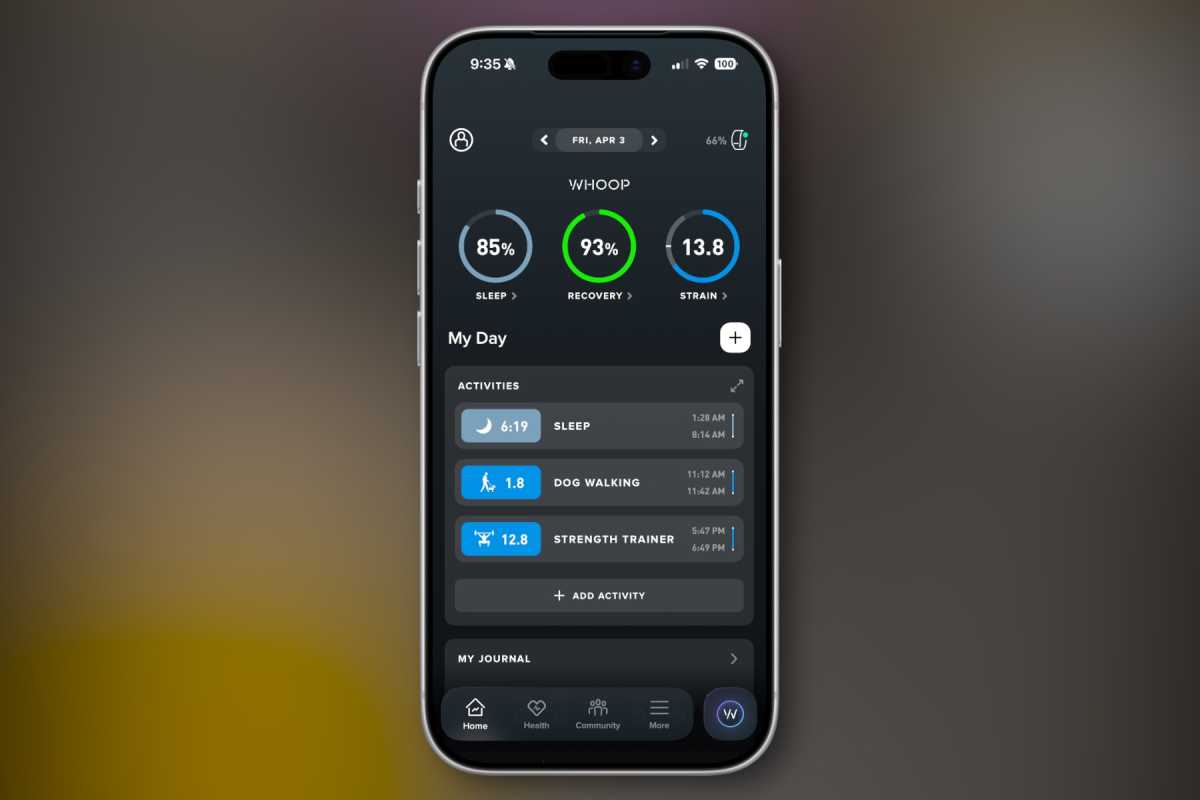
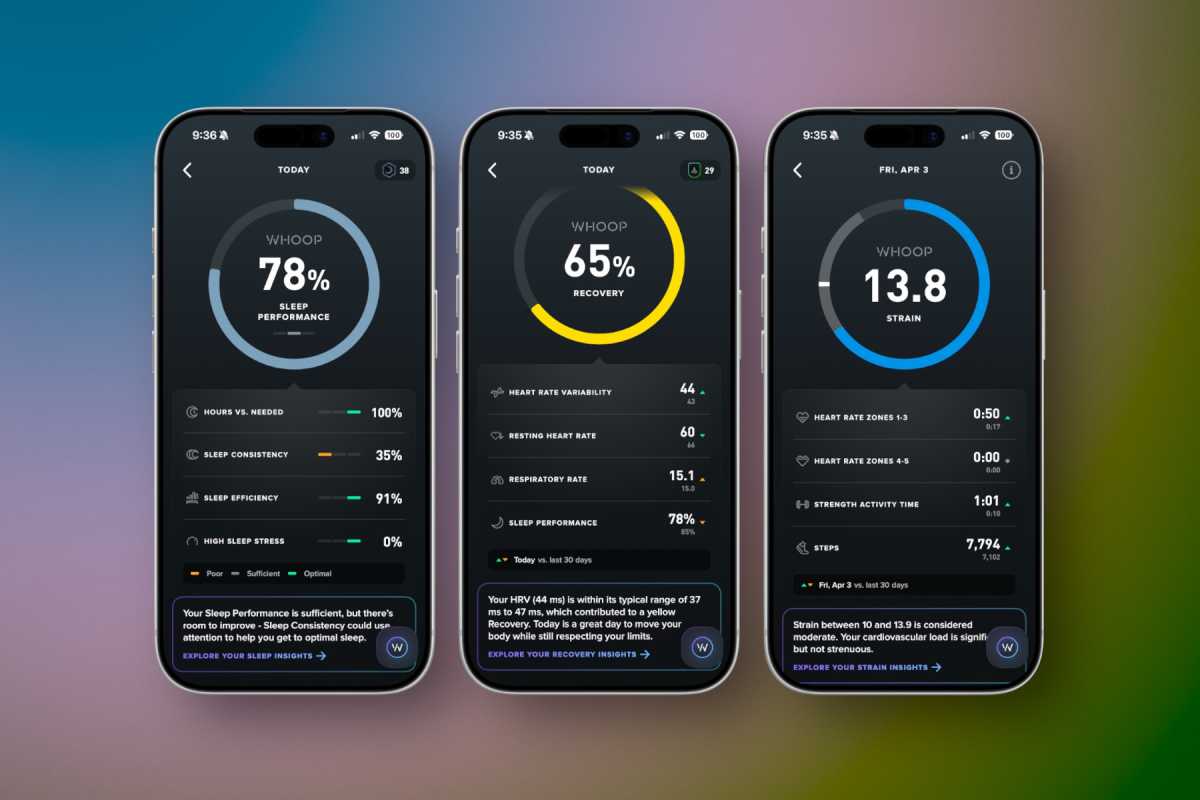
Whoop’s health tracking is built around two fundamental metrics: strain and recovery. Both are metrics of Whoop’s own design, and perhaps not fully defensible from a scientific perspective, but as a user, it’s a nice, easy way to think about day-to-day fitness and health.
Strain is a logarithmic score that tries to measure how much you’re putting your body through. Higher cardio rates or heavier muscular load make you build up strain faster. Each activity you track is given a “Strain” value, and it all adds up to a “Day Strain” number.
Foundry
Is it a medically accurate way to measure how hard you push yourself? It’s hard to say. But the concept is sound: give users a simple number that lets them see how much they put their body through during the day. This is a lot more useful than Apple’s activity rings, and it’s the natural companion to recovery, the other big Whoop metric.
Like the Apple Watch, the Whoop band auto-detects sleep (and naps) while using your movement, heart rate, temperature, and other metrics to determine when you are in different sleep phases. It then takes your sleep duration in various sleep phases to determine how well you slept, similar to Apple’s Sleep Score. That, combined with your resting heart rate and heart rate variability, produces a “Recovery Score.” It’s a simple 0-100 percent number computed each morning that lets you know how much your body has recovered from the strain you put on it.
That’s the ebb and flow of Whoop: work and rest. It’s obviously more complicated behind the scenes, but for users, it’s a very simple and effective way to make health decisions. If you have a great recovery day, Whoop will suggest a higher “Day Strain” target—you can push yourself at the gym or go for a longer run. If you had a terrible recovery, you’ll know to take it easy today.
Apple Watch has all the technology it needs to do something similar, but it needs to compute and present health data in a more intuitive way. How hard am I working? Did all that yard work mean I should skip the gym? Should I relax today since the dog woke me up three times last night to bark at ghosts? Apple’s activity rings don’t tell me this. Whoop’s simple metrics do.
An insightful Journal
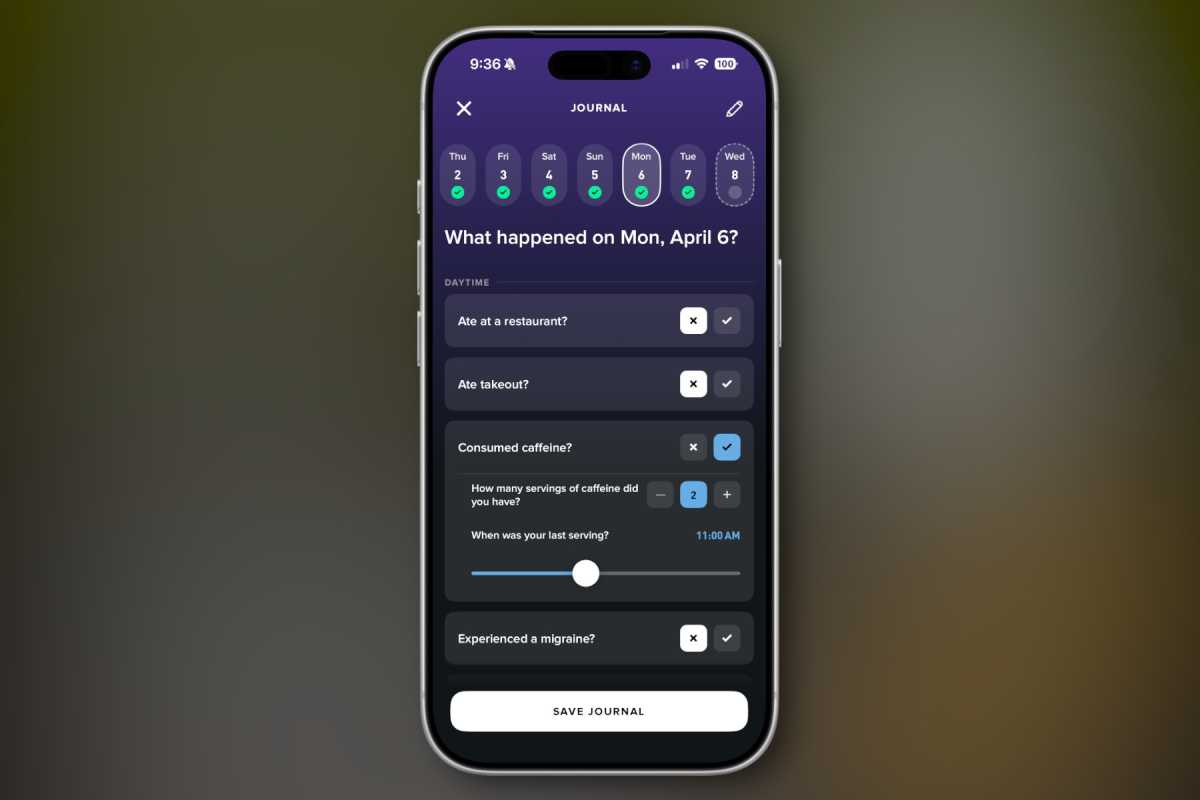
Perhaps my favorite feature of Whoop is the Journal. Every day, you answer a series of yes/no questions about your behavior that day.
Did you consume alcohol? (How much, and when?)
Drink caffeine?
Get a migraine?
Eat breakfast?
Consume dairy?
Wear earplugs to bed?
Take melatonin?
Use tobacco?
Take a vacation day?
There are hundreds of behaviors on the list from which you select whichever ones you want to be a part of your daily journal. Every day, you spend 30 seconds or so tapping yes or no or dragging a slider or two to fill out your custom journal.
Foundry
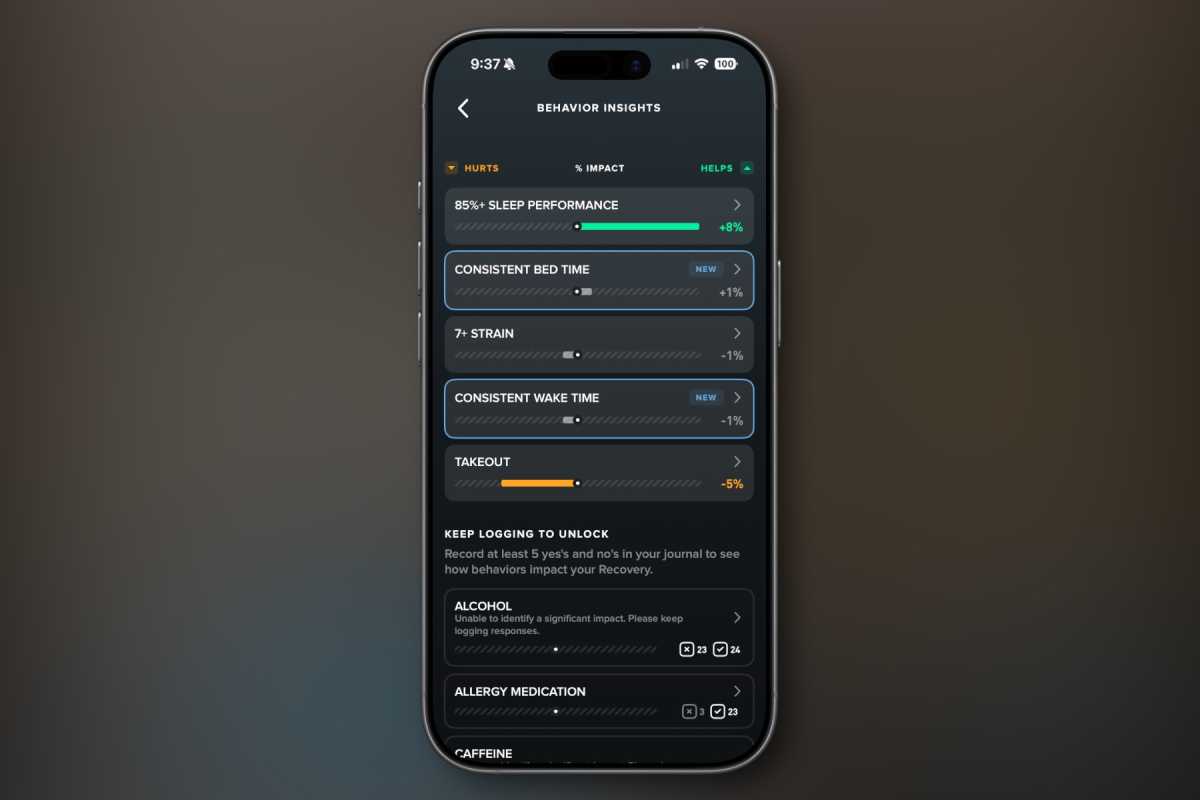
The magic comes in the way Whoop looks at your health metrics and recovery in relation to your answers to these questions. Once it gets enough data to build strong correlations, it can tell you how your behaviors affect your recovery.
When I have a drink at night, my recovery suffers. When I read in bed (not on a screen), my recovery is better. Maybe late workouts are bad for you and early workouts are better. Maybe you sleep badly when you have caffeine after 3 pm. Maybe you have a bad night when you forget to take your allergy medication. Whoop will tell you.
By keeping a journal, the app lets you know how your behaviors affect your recovery.
Foundry
More than anything else, I really want Apple to provide a feature like this. I’d love to keep a simple daily habits journal, all encrypted on-device in my Health app, and let Apple Intelligence find associations between the things I do and the health outcomes this suite of sensors on my wrist measures.
This is the kind of thing Apple Intelligence would be perfect for—processing complex data sets and distilling them down to simple insights. Keeping personal details private is what Apple is good at, and providing quantifiable insights into how our daily choices and habits affect our health is the missing link from most fitness services.
A terrible assistant
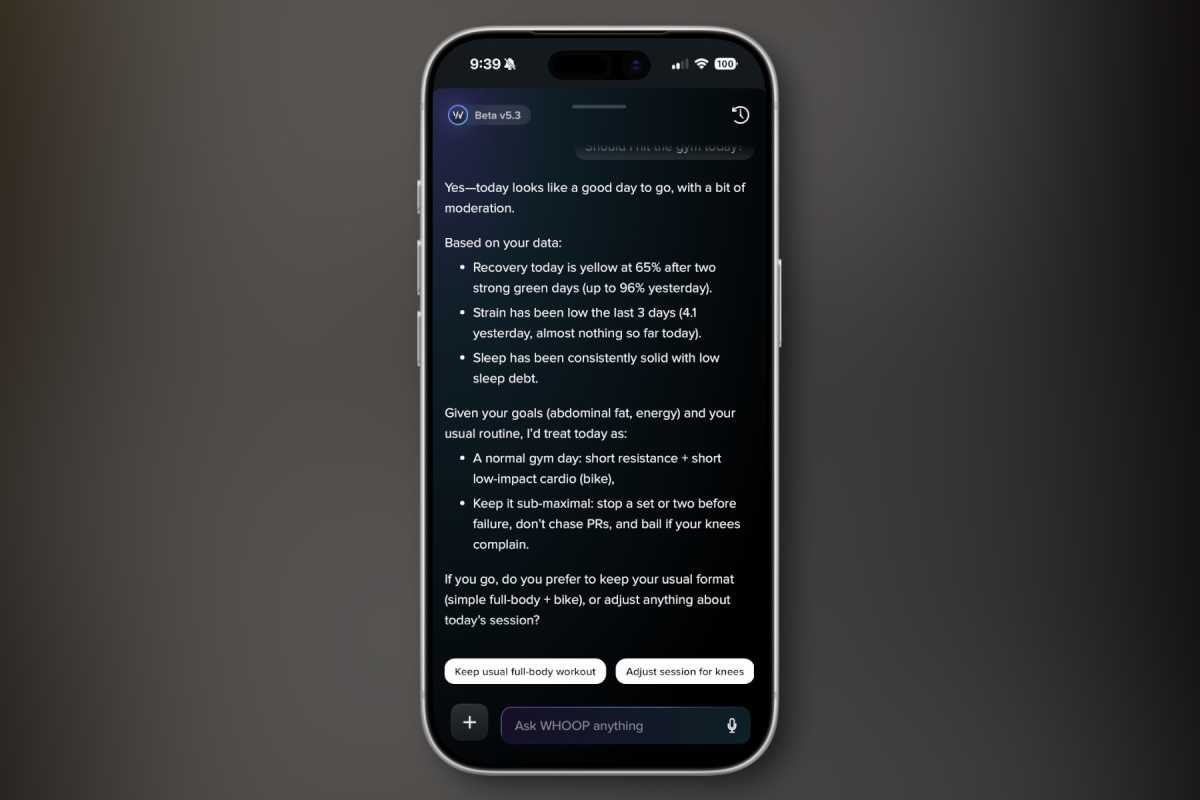
Speaking of AI, Whoop is proud of its AI health coach, but it’s nothing more than an awful LLM chatbot. The Whoop AI assistant, still somehow in “beta” at version 5.3, has a bad case of LLM fever. You know, the basic structure of just about every LLM chatbot:
Compliment or agree with the user.
Show your expertise with a data dump, usually using bullet points.
Offer a fairly obvious suggestion or hallucinate a wrong result.
Finish with a question that prompts to user to choose a new thing for the LLM to do, in order to maximize engagement.
The Whoop chatbot can do things like make workouts or give you “insights” based on all the data in the Whoop app, but it’s all kind of suspect, as if you just asked ChatGPT to do the same thing instead of a real fitness coach. And it’s all stuck in the chatbot interface, instead of making real graphics, graphs, or using the rest of the app.
Whoop puts its AI fitness chatbot front-and-center, and it’s just as bad as every chatbot.
Foundry
AI-generated workouts are about the only place the AI really meshes with the rest of the app, and there’s nothing particularly special about it. You could ask any popular chatbot to make a workout with the same input (timeframe and favorite or avoided exercises or muscle groups) and get something just like what Whoop does.
It’s time for the rings to go
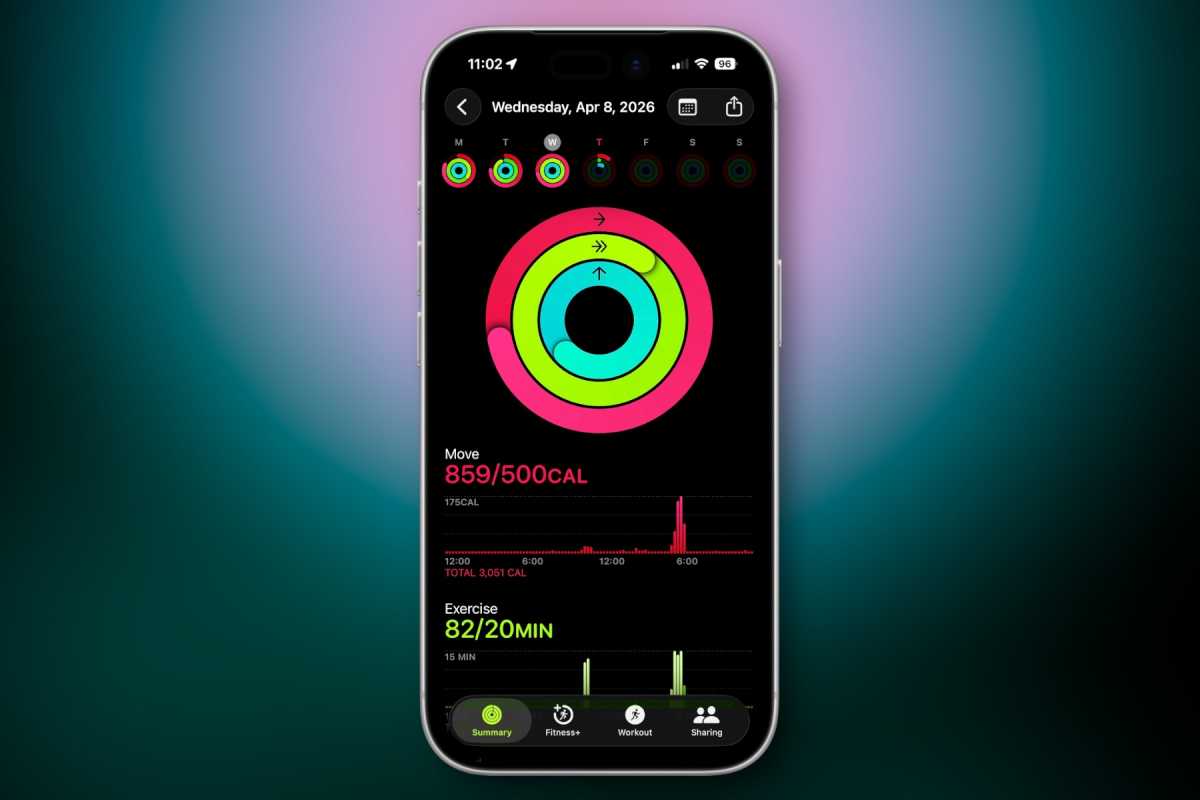
If I learned anything from my two months with Whoop, it’s this: Apple Watch activity rings have got to go. “Close your rings” is not a meaningful measure of anything that people really need to change their fitness.
“Close your rings” just isn’t a good way to manage your health.
Foundry
Useful metrics are not a linear number that always goes up. Standing for a few minutes eight times a day is not such an important fitness metric that it should be measured alongside active minutes. An exercise ring based on time rather than intensity isn’t all that useful either, and it doesn’t account for whether or not a particular day is an intense exercise day or a recovery day.
Sleep, Recovery, and Strain are much more useful than Stand, Move, and Exercise minutes.
Foundry
As Apple rethinks its Fitness+ service and Apple Watch as a whole, it needs to start from a foundation similar to what Whoop does: using intelligence to combine the data from the device and the data supplied by the user to understand what actions you should take. Take a sea of variables and make it simple: Are you well-rested, or do you need to take a break? Should today be a heavy day at the gym, or should you just go for a walk? Do you need a nap? Which of your habits are helpful or harmful, and why?
Whoop doesn’t fully deliver on this promise, but at least it is built around these concepts. As Apple Watch and the services it feeds evolve into the AI era, it needs to be built around these ideas as well.
A new way to sell Apple Watch?
Perhaps one of the most interesting features of the Whoop is the way it is sold. You can’t use Whoop without a subscription, as all of its data processing is in the cloud. There are three subscription tiers: One for $149 a year ($199 renewal), Peak for $239 a year, and Lifetime for $359. The trick is that the hardware is included.
So you could see it as paying $250 or so for the tracker and getting the first year of service for free, or getting the tracker for free when you sign up for a year of service. Either way, it’s the kind of thing Apple should explore (though with a single subscription tier). There have been rumors of Apple expanding Fitness+ and new AI-powered Health features into a single service called Health+. Imagine if this service is $15.99 a month, but they give you two free years if you buy a new Apple Watch (or give you a free Apple Watch when you sign up for two years of service).
This is just the kind of creative way to tie the hardware and software together so that it looks like you get hundreds of dollars of value, while getting users invested in the ecosystem for a long enough period of time that they won’t quit.
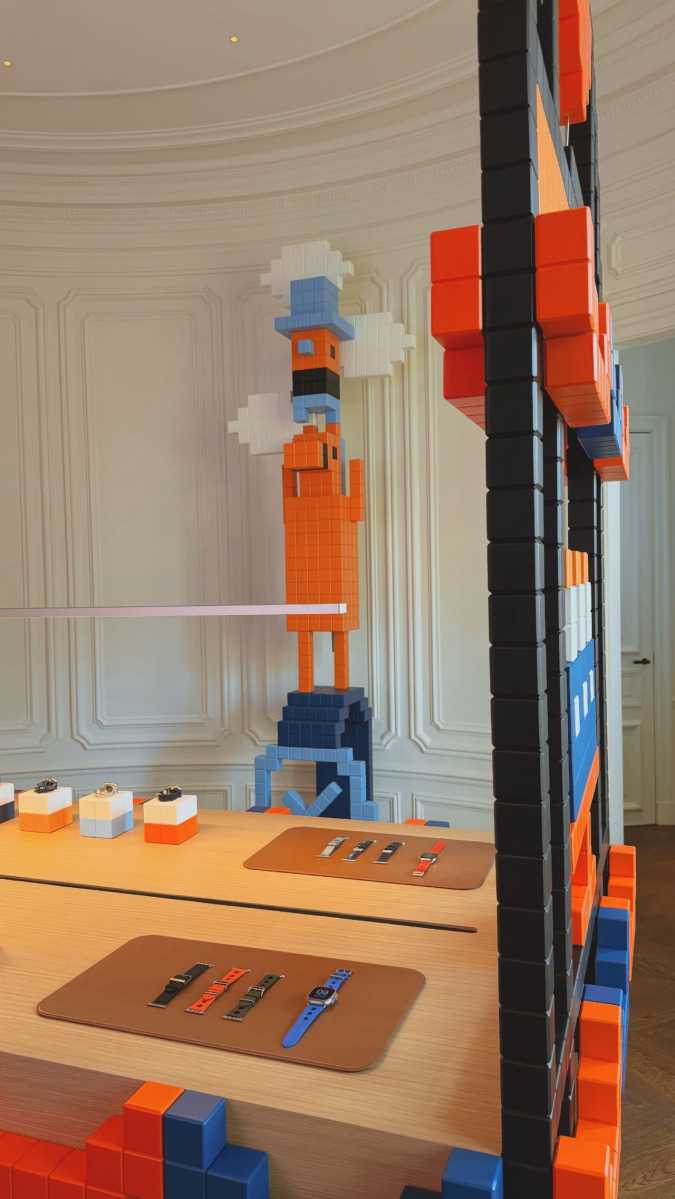
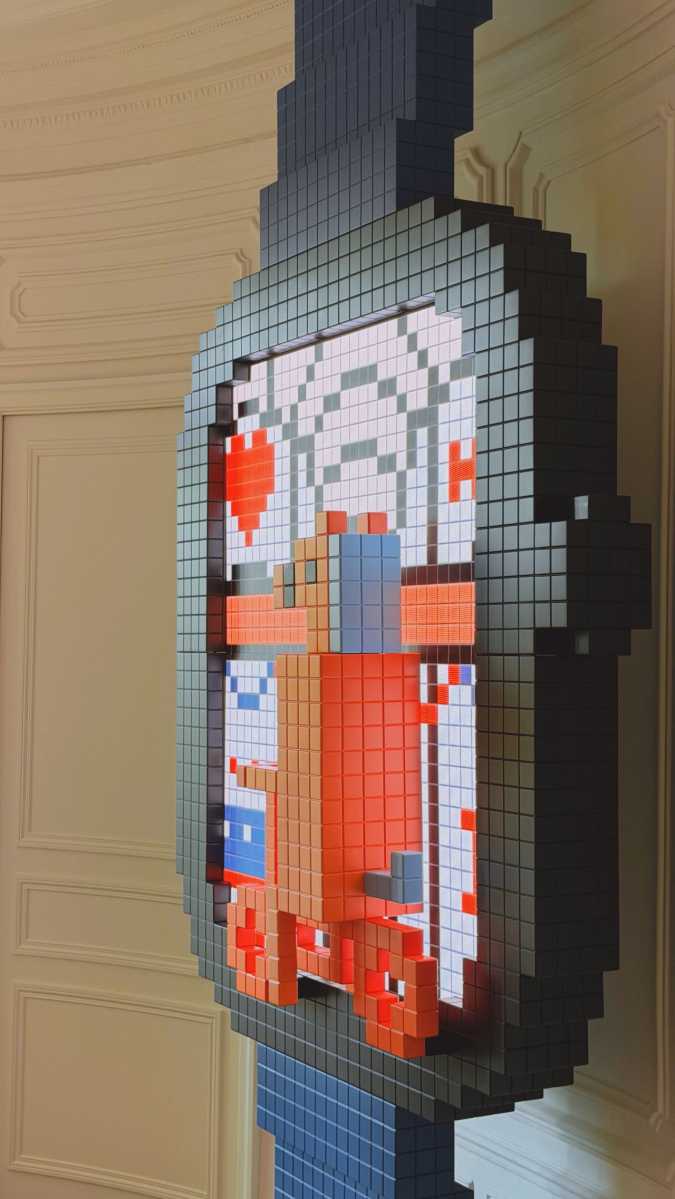
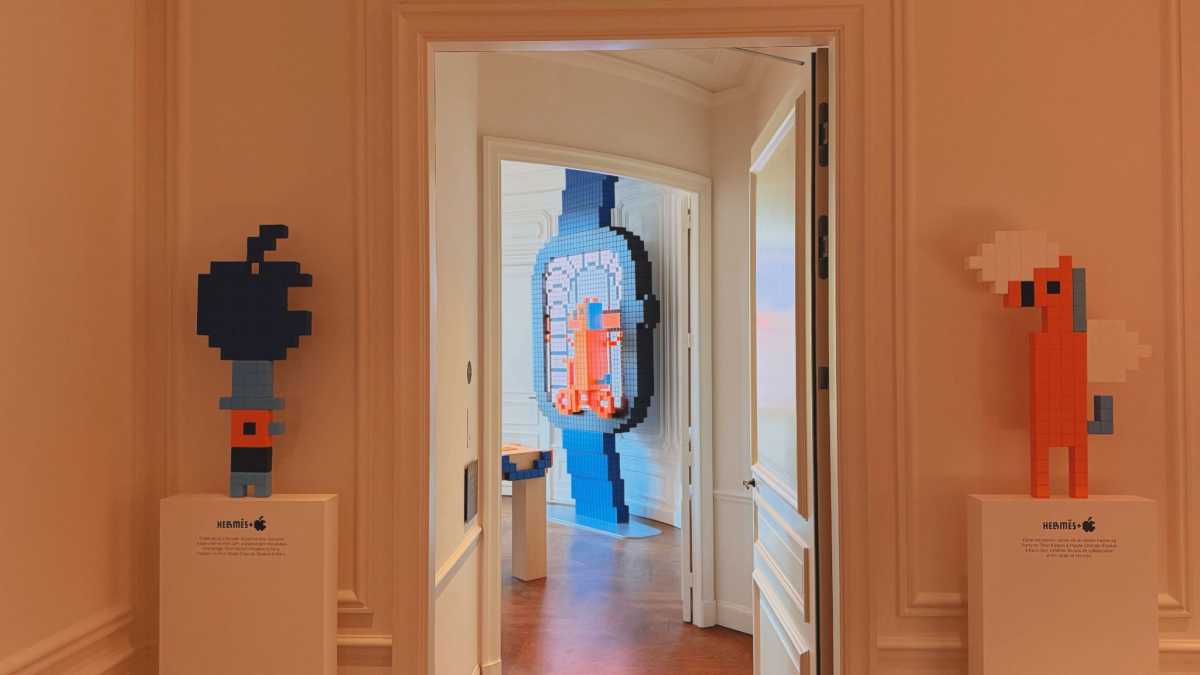
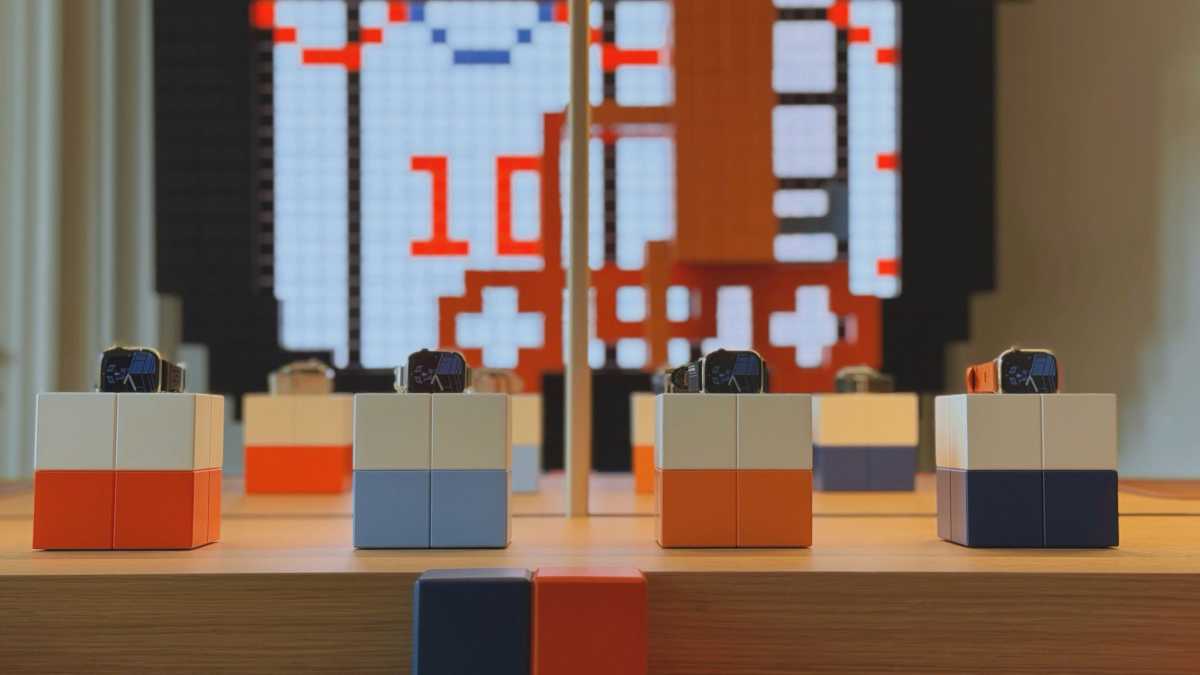
If you happen to be in Paris, France, you should stop by the Champs-Élysées Apple Store. There you’ll find a unique art installation by artist Tibor Kárpáti, who has applied his unique bitmapped styling to the Apple Watch section of the store.
On LinkedIn, Alexis Filipe, Event Production and Artist Liaison at Apple, posted several pictures of the installation that celebrates two years of collaboration between Apple and Kárpáti. The installation includes bitmapped artwork throughout the store, as well as special stands for the Apple Watch. A few of the pics are below, but check out Filipe’s post to see all the images.
Last September, Apple released a special Apple Watch Hermès watch face featuring Clarus the Dogcow. It was part of the Faubourg Party theme for the Apple Watch Hermès Series 11, commemorating 10 years of Apple and Hermès collaboration on the Apple Watch.
In case you were looking to save some money on a smartwatch that looks just like an Apple Watch, here’s a reason to be very careful about what you spend your money on. Because while the outside might be similar, you’re definitely not getting the same experience.
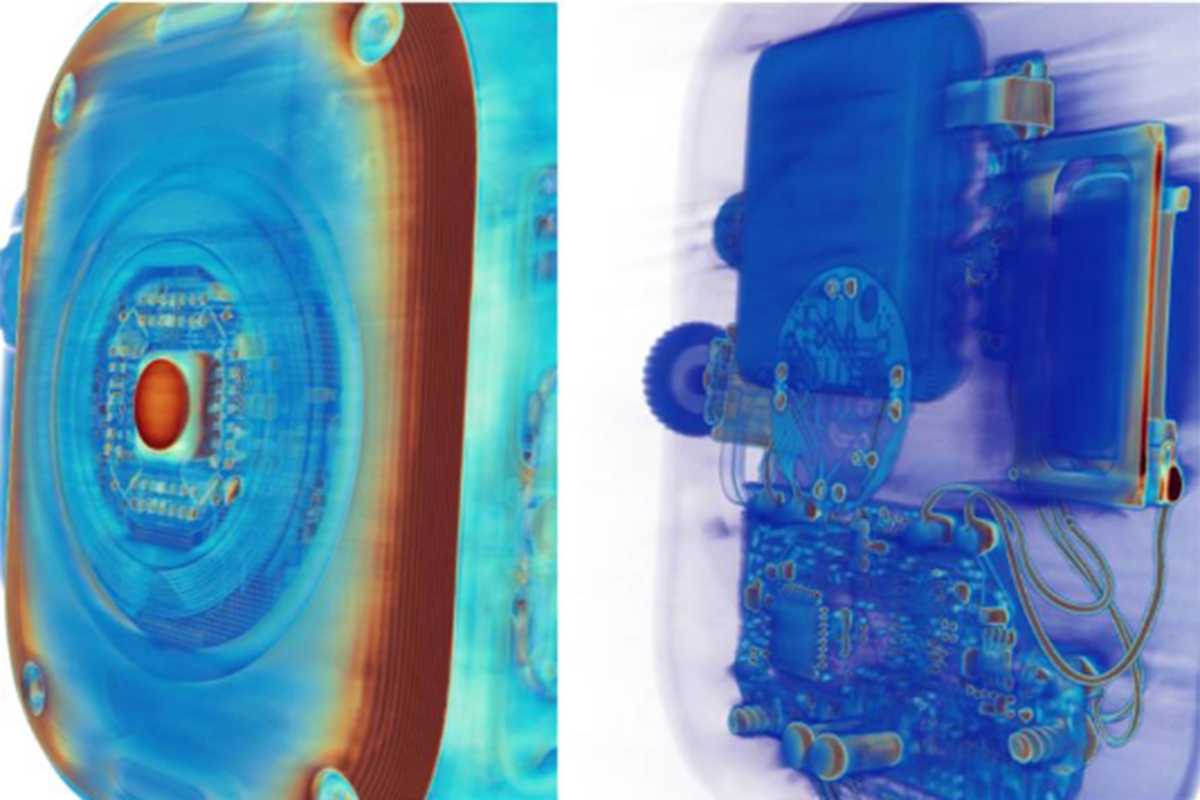
Lumafield’s First Article blog has an interesting article about the differences between knock-off products and their real counterparts. They used an industrial CT scanner to see inside each product and point out the differences in construction, components, and features. And one set of products that Lumafield looks at is an $799 Apple Watch Ultra 3 and a smartwatch from Oiciido, which ranges in price from $15 to $40.
You don’t have to look hard to see the differences between the Apple Watch (left) and a cheap imitator.
Lumafield
And to no one’s surprise, you get what you pay for. The Ultra 3 is packed with components (indicative of a feature-rich device), while the Oiciido watch, “looks almost empty next to it.” The scans also show how the Ultra 3’s parts are sophistically integrated, while you can see loose wires in the Oiciido watch “that would not survive the mechanical and thermal demands of a legitimate wearable.”
One of Lumafield’s most interesting scans is of the Ultra 3’s optical heart rate sensor and its photodiodes for heart rate and blood oxygen monitoring. The Oiciido watch has a “basic” LED heart rate sensor, and no hardware for multi-wavelength SpO2 measurement.
Lumafield’s findings are a good reminder that knockoffs often make big promises and take huge shortcuts to deliver prices that are too good to be true. I do recommend checking out Oiciido’s Amazon store, because its AI-generated images are so bad that they’re funny.
Getting the absolute best smartwatch out there can be quite costly, but for what you get, the Apple Watch Ultra 3 isn’t a bad value—especially when it’s on sale. Like today: Amazon is selling the Apple Watch Ultra 3 for $700 right now, a savings of $100 and the best price we’ve ever seen.
Apple’s latest flagship smartwatch is a big upgrade over previous models, featuring a larger and more vibrant display, as well as better battery life. With up to 42 hours of battery on a single charge, you won’t have to worry about always recharging this thing, especially if you plan on going off the beaten path.
With a rugged titanium build, the sleek and sophisticated watch is perfect for outdoor adventures, featuring satellite SOS, 5G connectivity, and a whole list of health and fitness tools. When we reviewed it, we gave the Ultra 3 a glowing 4.5-star rating, loving just how versatile it is. The best thing about it is that it’s not just a smartwatch, it’s basically a small iPhone on your wrist, letting you text, make calls, and stream music without needing your phone. (Note: You’ll need a smartwatch plan from your wireless carrier, which should be around $10.)
At $100 off, this is a fantastic opportunity to upgrade to the Apple Watch Ultra 3. Don’t miss out on this deal because it’s such a rare find!
With the Apple Watch Ultra 2 on your wrist, you can go anywhere you want, and you’ll find your way back home, whether you’re hiking, mountain climbing, or just out for a stroll, as the watch will know your location at all times and show you the right map. Even better, with built-in cellular, you don’t even need to have your phone on you.
Back when this model came out, we reviewed it and gave it a 4-star rating, appreciating the bright screen, great operating system, and just how great it was for tracking sports and workouts. This model comes with 36 hours of battery life during normal use, so it’s going to be great during any outdoor trip you want This device comes with a ton of features, including accurate location tracking, advanced health metrics, custom workouts, as well as automated fall detection, emergency SOS, and vital sign monitoring. If anything happens, your watch has your back.
There’s a newer model out, but other than better battery life and satellite connectivity, it’s not all that different than this one. And you won’t get it for anywhere near this cheap. So grab the Apple Watch Ultra 2 for $499 before the spring sale ends.
The Apple Watch SE 3 might be Apple’s cheapest wearable, but it’s no less capable. It can help keep an eye on your health by monitoring your sleep, heart rate, body temperature, and alerting you to any irregularities. You’ll also get a ton of metrics monitoring your daily physical activity, keeping you motivated to reach your exercise goals. All that and you’ll still get through a full day of use with 18-hour battery life.
Should anything happen when you’re out and about, the Apple Watch SE3 comes with crash and fall detection and can automatically connect you to emergency services. On top of this, it will also keep you connected to your notifications and music, and you won’t even need to keep your phone around since this is the model with cellular connection, you won’t even need to have your phone around to answer messages. Plus, this model is great for kids, as you can stay in touch even if they don’t have an iPhone.
So go ahead and order your very own Apple Watch SE3 from Amazon for its best price of $249.
The Apple Watch is the best smartwatch you can buy, but it’s not cheap. Luckily, you don’t have to pay full price for an Apple Watch. Resellers frequently offer fantastic deals on all models, and in this article we are tracking deals for the new Apple Watch 11, SE 3 and Ultra 3 which were introduced in September 2025, as well as the older Apple Watch 10, SE 2 and Ultra 2.
How we find the best Apple Watch deals
To find the best Apple Watch deals we continuously monitor the market to spot the most worthwhile bargains, but, ultimately, our recommendations are based on our own in-experience with the full range of Apple Watches, which we have reviewed and use daily. Our editors’ selections are guided by a simple principle: we won’t recommend buying something that we wouldn’t buy ourselves. We focus on products at prices we believe are fair, ensuring our recommendations steer you toward genuine savings.
Price is just one factor we consider. A significant part of our methodology is evaluating the overall value of a deal, especially when comparing different generations of the Apple Watch. When Apple launches new models, such as the Series 11, SE 3, and Ultra 3, we see resellers clear out stock of previous-generation models at lower prices. We highlight these opportunities, as older models like the Series 10 or Ultra 2 can become excellent alternatives to the latest releases.
It isn’t always the case that an older Watch is a good option though: we’ve previously advised readers to avoid what seemed like an all-time-low price on an older Apple Watch SE 2 because the newer Apple Watch SE 3, available for just $40 more, offered a vastly superior feature set, including an always-on display, a faster chip, and better battery life.
We also recommend checking the Apple Refurbished Store as a source for year-round discounts. Products from this store are revamped by Apple and include a one-year warranty, often providing substantial savings on recent models like the Apple Watch Series 10 or Ultra 2.
Is now a good time to buy a new Apple Watch?
David Price / Foundry
Now is an excellent time to buy a new Apple Watch. The latest models, the Series 11, SE 3, and Ultra 3, were released in September 2025, so the product line is fresh, and you won’t have to worry about a new model arriving just weeks after your purchase. Additionally, despite Black Friday having passed, holiday deals are still abundant, offering significant savings on both the newest and previous-generation watches.
That said, the best time to buy is during the major sales events: Amazon’s Prime Day in July and October, or Black Friday in November. There may also be deals during Amazon’s spring sale. The worst time to buy is in the summer, just before Apple’s usual September hardware update, as you risk purchasing a device that will soon be outdated.
When choosing which Apple Watch to buy you should consider various factors. If you need advanced health sensors, like ECG and blood oxygen monitoring, then you need to choose the Series 11 and Ultra 3 (or the Series 10 and Ultra 2) because the SE doesn’t offer those options. But if you are on a budget the Apple Watch SE 3 offers importtant features like Fall Detection and heart rate monitoring, and comes at an affordable price. The best battery life is offered by the Apple Watch Ultra 3, but the SEries 11 offers a solid 24 hours, and even the 18 hour SE 3 will be sufficient for most people, plus charging can be done in less than an hour.
Apple Watch Series 11: This model features a 24-hour battery life, 5G connectivity on cellular models, and a more scratch-resistant display. While it shares the same S10 chip and many health features with the Series 10, its improved battery is a key advantage. Deals have been spotted offering up to $100 off, bringing the price down to as low as $299.
Apple Watch SE 3: This Apple Watch is the best value option for most people. The SE 3 received a major upgrade, including an always-on display, a faster chip, temperature sensing, fast charging, and 5G on cellular models. It offers most of the essential features of the Series 11 at a much lower price, starting at $249. It has been on sale for as low as $199.
Apple Watch Ultra 3: Designed for adventurers and sports enthusiasts, the Ultra 3 boasts a 42-hour battery life, a larger and brighter screen, satellite connectivity for emergencies, and a rugged design. It’s the most expensive model, but we have seen discounts of up to $100.
Apple Watch Series 10: You can find significant clearance deals on last-generation models. The Series 10 is very similar to the 11, with the main difference being its 18-hour battery life. It has been seen for as low as $279, a $150 discount.
Apple Watch Ultra 2: This is also a great option, with deals dropping its price by as much as $200.
Apple Watch SE 2: We advise to avoid the Apple Watch SE 2 unless the price is exceptionally low (around $100), as the SE 3 is a far superior and more future-proof device.
If you’re still not sure which Apple Watch is right for your needs, take a look at our Best Apple Watch buying guide.
Best refurbished Apple Watch deals
One of the best places to look for Apple Watch deals all year round is the Apple Refurbished Store. There, you’ll find huge Apple Watch discounts, sometimes even on the latest models. These Apple Watches have been returned to Apple for various reasons, and then completely revamped for resale. One of the major benefits of buying a refurbished Watch from Apple is that it will come with a one-year warranty so Apple may fix or replace it for free should anything happen to it in that first year.
In the U.S. you can get an Apple Watch Series 10, 9, 2nd generation Ultra for less. You can, for example, get a 44mm Apple Watch SE with cellular for $239, compared to $279 for the SE 3. It’s a saving, but we’d still recommend the new SE3 which is leaps ahead of the much older SE.
In the U.K. you can save money on an Apple Watch Series 9 and 10 at the moment.
However, the deals aren’t great here. You can get a refurbished Apple Watch Series 10 with Cellular for £479, which is £10 more than the price of the same Apple Watch Series 11 with Cellular new (£469).
Below you will find price comparison tables that show the best prices right now for each Apple Watch model from various stockists. You will also find deals on Apple Watch models that Apple has now discontinued, as long as stockists still have them available.
Best Apple Watch Series 11 deals
The Apple Watch 11 (2025 model) starts at $399/£369 (that’s a price drop in the U.K.) for the aluminum 41mm version and $429/£399 for the 44mm model. It’s an extra $100/£100 for cellular. It costs the same as the Series 9 did.
Apple Watch Series 11, 42mm, from $399/£369
Retailer
Price
$375.93
View Deal
$399.99
View Deal
Price comparison from over 24,000 stores worldwide
Product
Price
Price comparison from Backmarket
Apple Watch Series 11, 46mm, from $429/£399
Retailer
Price
$359
View Deal
$429.99
View Deal
Price comparison from over 24,000 stores worldwide
Product
Price
Price comparison from Backmarket
Best Apple Watch Ultra 3 deals
The Apple Watch Ultra 3 (2025 model) starts at $799/£749. It comes with cellular. The original Ultra previously sold for $799/£849, so the U.K. then was reduced to $799 in 2025, and is now even cheaper at $749.
Apple Watch Ultra 3, from $799/£749
Retailer
Price
$779
View Deal
$899
View Deal
Price comparison from over 24,000 stores worldwide
Product
Price
Price comparison from Backmarket
Apple Watch SE 3, 40mm, from $249/£219
Retailer
Price
$239.99
View Deal
$249.99
View Deal
Price comparison from over 24,000 stores worldwide
Product
Price
Price comparison from Backmarket
Apple Watch SE 3, 44mm, from $279/£249
Retailer
Price
$199.24
View Deal
$269
View Deal
$279.99
View Deal
Price comparison from over 24,000 stores worldwide
Product
Price
Price comparison from Backmarket
Clearance Apple Watch discounts and deals – discontinued models
Apple Watch Series 10, 42mm, was $399/£399
Retailer
Price
$329
View Deal
$385.99
View Deal
$395.77
View Deal
$399
View Deal
$399
View Deal
$399.99
View Deal
Price comparison from over 24,000 stores worldwide
View more prices
Product
Price
Price comparison from Backmarket
Apple Watch Series 10, 46mm, was $429/£429
New
Refurbished
Retailer
Price
$349
View Deal
$359
View Deal
$366.12
View Deal
$429
View Deal
$429.99
View Deal
Price comparison from over 24,000 stores worldwide
View more prices
Product
Price
Apple Watch Series SE 1 (2020) GPS + Cellular 44 mm – Aluminium Gold – Sport loop Red
$Not Available
View Deal
Apple Watch Series 10 (2024) GPS + Cellular 42 mm – Aluminium Rose Gold – Sport band Starlight
$Not Available
View Deal
Apple Watch Series 10 (2024) GPS + Cellular 46 mm – Aluminium Rose Gold – Sport band Starlight
$Not Available
View Deal
Apple Watch Series 10 (2024) GPS + Cellular 46 mm – Aluminium Rose Gold – Sport loop Red
$Not Available
View Deal
Price comparison from Backmarket
Apple Watch Ultra 2, was $799/£799
New
Refurbished
Retailer
Price
$579.99
View Deal
$799
View Deal
$799.99
View Deal
Price comparison from over 24,000 stores worldwide
Product
Price
Apple Watch Ultra 2 (2023) GPS + Cellular 49 mm – Titanium Natural Titanium – Ocean band Blue
$Not Available
View Deal
Apple Watch Ultra 2 (2023) GPS + Cellular 49 mm – Titanium Natural Titanium – Alpine loop Blue
$Not Available
View Deal
Apple Watch Ultra 2 (2023) GPS + Cellular 49 mm – Titanium Black – Alpine loop Green
$Not Available
View Deal
Price comparison from Backmarket
Apple Watch SE 2, 40mm, was $249/£219
New
Refurbished
Retailer
Price
$229.99
View Deal
$249.99
View Deal
Price comparison from over 24,000 stores worldwide
Product
Price
Apple Watch Series SE 2 (2022) GPS + Cellular 40 mm – Aluminium Starlight – Sport band Starlight
$Not Available
View Deal
Apple Watch Series SE 2 (2022) GPS 40 mm – Aluminium Starlight – Sport band Starlight
$Not Available
View Deal
Apple Watch Series SE 2 (2022) GPS + Cellular 40 mm – Aluminium Silver – Sport band White
$Not Available
View Deal
Apple Watch Series SE 2 (2022) GPS 40 mm – Aluminium Midnight – Sport band Black
$Not Available
View Deal
Apple Watch Series SE 2 (2022) GPS + Cellular 40 mm – Aluminium Starlight – Sport band White
$Not Available
View Deal
Apple Watch Series SE 2 (2022) GPS 40 mm – Aluminium Silver – Sport band White
$Not Available
View Deal
Apple Watch Series SE 2 (2022) GPS 40 mm – Aluminium Starlight – Sport loop Starlight
$Not Available
View Deal
Price comparison from Backmarket
View more prices
Apple Watch SE 2, 44mm, was $279/£249
New
Refurbished
Retailer
Price
$229
View Deal
$279.99
View Deal
Price comparison from over 24,000 stores worldwide
Product
Price
Apple Watch Series SE 2 (2022) GPS 44 mm – Aluminium Midnight – Sport band Black
$Not Available
View Deal
Apple Watch Series SE 2 (2022) GPS 44 mm – Aluminium Silver – Sport band White
$Not Available
View Deal
Apple Watch Series SE 2 (2022) GPS + Cellular 44 mm – Aluminium Starlight – Sport band Starlight
$Not Available
View Deal
Apple Watch Series SE 2 (2022) GPS 44 mm – Aluminium Starlight – Sport band Starlight
$Not Available
View Deal
Price comparison from Backmarket
Where to buy an Apple Watch
If you’re simply looking to pick up an Apple Watch regardless of price, there are plenty of stores that sell not only the latest Apple Watch Series, but older variants of the Apple Watch that aren’t available from Apple any more—some at significant savings, too.
Apple Watch buyers in the U.S. can check out the following stores:
You’ve also got the option of picking up an Apple Watch with a cellular contract, allowing it to function as a standalone device that doesn’t need to be tethered to your phone to make calls and send texts. Amazon and other retailers sell the Apple Watch with cellular and you can usually find discounts on most models, though not as deep as the GPS versions. Here are the sales we’re tracking this month:
All of the major U.S. carriers sell the Apple Watch and offer trade-in deals:







 Price When Reviewed:
From $399
Best Prices Today:
Price When Reviewed:
From $399
Best Prices Today:









 $375.93
 $399.99
 $359
$359
 $899
$899
 $329
$329
 $399
$399
 $399
$399
