GeistHaus
log in · sign up

https://xd1.dev/atom.xml

atom
7 posts
Polling state
Status active
Last polled May 19, 2026 00:45 UTC
Next poll May 19, 2026 22:55 UTC
Poll interval 86400s

Posts

Not buying American anymore
Show full content
Not buying American anymore

I feel like I need to first defuse any idea of antagonizing Americans themselves. The people are never to blame. This isn't a post criticizing the American people, it's criticizing the state of things that makes it impractical to have any sort of economical relation with the country if you are an average Joe like me.

Where do I come from

I come from a place where I believe regulation needs to be employed to protect the weaker party in any economic relation. If you don't agree with this probably this rant isn't for you.

I also come from Brazil, a country that, for better or worse, is arguably a strongly regulated market. For worse I guess because it makes all transactions that bit more bureaucratic, for better because I am sure to be able to buy something and have it too, without fear that corporations will swoop in and take away my rights after purchase.

The Consumer Defense Code is strong and mostly works, at least insofar as I needed to use it, and many issues can be resolved directly with companies via reclameaqui, which is a website that streamlines the communication with sellers to resolve problems without having to go to court.

So here are my biases laid out in advance.

Why am I writing this

I've been following Louis Rossmann's youtube channel for a while now, mostly because their tech repair videos are really interesting. And I really love cats. But lately I've seen many worrying videos in the channel about anti-consumer practices and I felt like I needed to vent.

You can ask why do I even care about these videos if I don't live in the US. Well, in a globalized world where we are steadily blurrying the lines that separate countries and nations (also for better and worse), there is really no such distinction. Sure when I buy services and pay for them in my local currency, I'm likely protected by local laws, and also in the case of Netflix I'm also restricted by geographical limitations, but that's not always the case, specially when purchasing software.

I've just came across this video where Louis explains what Reason studios did to screw over their customers by removing the option to activate older products that still work fine. I am also a musician in my spare time, mostly hobbyist, but I did purchase music production software before and I could just as easily have been a victim of such customer-hostile practices. I find it quire unsettling when laws, or lack thereof, of foreign country directly affects me.

Current state of things

All this points to a very clear trend, at least for me, that the US is openly an oligarchy. And this explains very well this trend of consumer-hostile practices.

If a country and its laws serve the nobility and the extremely wealthy, it'll work in favor of those, of maintaining their status and wealth. An oligarchy isn't a regime that is characterized by actively screwing over the common people. It doesn't need to be. All it needs is to give a free pass for those that maintain power and influence to do whatever they want in order to maximize their profits and expand their influence.

This is why all these anti-consumer practices are happening out in the open. Really... what are the chances that in the current administration a profitable company will be prosecuted by anti-consumer practices?

Given time, a liberal capitalist democracy with excessively weak regulations will eventually devolve into a plutocracy just because companies need to make money to appease investors at all costs. When they are out of ideas for innovation, or when innovation is just too risky, they will make their services worse, violate consumer protection laws if it makes them more competitive and make the consumer pay more for it, just because it looks good in a quarterly report -- which I guess won't be quarterly anymore because it's not looking too good lately.

A counter argument

There is a point to be made that all these changes were made recently and that there was no reason not to buy American ten, fifteen years ago. And therefore this logic of not buying American isn't going to work because the same can happen anywhere else.

But I'd disagree. We can't and we don't need to be able to see the future to make informed decisions. Ten years ago there was no reason not to buy American. There is now and that's the end of it. If I start buying European and they start behaving like the US does now, then this rant will just as easily apply to them.

A good, informed decision doesn't require knowledge of the future. It just need to be grounded in solid contemporary facts, and the fact is there is no reason we can trust American companies anymore.

This rant also isn't to say that all American companies are trying to make the largest possible profit at the expense of their customers. There surely are legit businesses trying to be profitable at the same time as they care and protect their customers. Unfortunately these same theoretical companies are subjective to the current US economical ethos that exposes them to hostile takeovers and pressure from investors. This is why in an unregulated market that makes it that easy to screw customers over, even those that are honest good-working citizens can't really be trusted to run stable and responsible companies in the long run.

A moral imperative

The TLDR is: if you can, don't buy American. I'm not buying it anymore if I can. There is little innovation to be had there, little protection to rely upon and to be honest little incentive to keep buying it, because the rest of the world is picking up relatively quickly, since all the wealth has had a negative impact in the incentive for the US industry to keep itself up to date.

Choosing not to buy American is a message. The message is simple. I don't need it. I would like to keep improving on things, keep working together and be part of flourishing global community. But I don't have to. I can make do with less feature-packed alternatives that will serve me longer term. I can do without all the wealth and shiny things, because honestly in a couple of decades time nobody will even remember it if the US keeps not paying attention to those that generate actual value to the world, the people. If you change your laws, if you can show that you are not out there to get my money at all costs, then we are back in business. Until them I'm not buying American anymore.

Nothing is too big that it can't be replaced.

Comments

If you want to comment on this blog post, I invite you to follow the dicussions on Hackernews.

Responses

Since the publication of this rant yesterday, it got quite a bit of traction in HN that I honestly wasn't expecting. Some very interesting debates, but I'd like to address two recurring themes that I feel wasn't properly developed in the first iteration of this publication.

Reason isn't an American company

I should have done a better job researching the company as it's a Swedish company. I am changing the wording in the paragraph that cites the company. It was intended to be just an anecdote of what prompted me to write this article, but I shouldn't have used it as an example of the current situation for consumer protection in America.

Reason is the sole example in the publication

It isn't. It's just the only one that is directly mentioned here. There are several links to other articles that do a better job that I could ever do in cataloguing US companies that illustrate the points in the article. I suggest everyone reading this to open the articles linked in this publication.

Other companies in the world also apply anti-consumer practices

Yes, and the point o this publication isn't to advocate for an all-out digital veganism. The rationale -- which I should have developed better, because now it feels like shooting an arrow and drawing a target afterwards -- is that if by choosing not to buy American products the US would be pressured to change it's laws in favor of protecting the consumer, this would ripple across the free world and actually change things.

Some examples cited include Samsung, Brother and Epson. I'd say if you don't want to buy from them, go for it. I'm ditching Samsung next time I'm buying a smartphone because they make it purposefully complicated to disable notifications for they built-in bloatware.

However I think the best you can achieve with ditching a company is making this specific company change its policies. It does very little with the widespread consumer-hostile stance companies have adopted.

Targeting instead the cultural and economic leader of the west has better chances of promoting changes that will ripple across all the markets that are influenced by the US. The US is undisputedly the wealthiest country. It has therefore the responsibility of setting the example for the rest of the world.

And in all seriousness, what is it that America can't take a little bit of hopefully constructive criticism? If it can't, I'm sorry to say, it's already doomed to fail, since this is in part of why empires fall.

Change history
https://xd1.dev/2025/09/not-buying-american-anymore
Installing ReShade for the Steam version of Chrono Trigger on Linux
Show full content
Installing ReShade for the Steam version of Chrono Trigger on Linux

This blog entry is also posted to the Steam community forums, if you want to take a look there and comment, while I build up the motivation to implement and actual comment system for this blog LOL.

Introduction

The title is quite the mouthful huh... but I didn't seem to find a good guide to do that easily on linux, so here I am consolidating this knowledge for future reference.

The steam version of Chrono Trigger is supposed to be the most feature complete if you don't count the DS version, that you can buy today. So I snatched it for what would translate to 4 US bucks and started playing.

Out of the box, the experience is reasonable enough. You get a very stable working game on linux with proton 9.

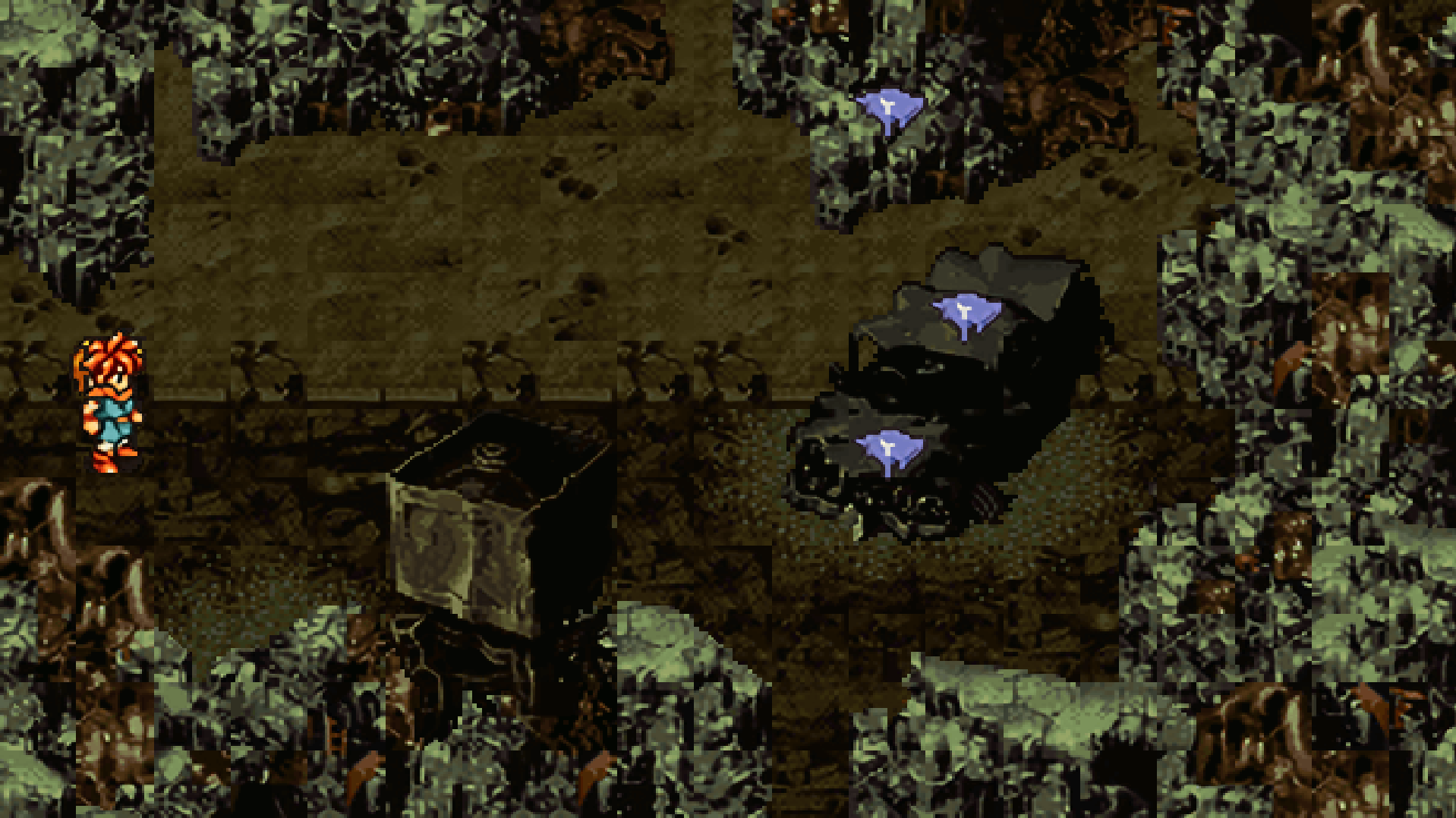
However those that are a little more... for a lack of a better word, discerning when it comes to pixel art and CRT, will find the steam version troublingly lacking in what it delivers for a "high resolution" experience. It's basically what looks like 2xSal or Super Eagle... it's a mess. And it's either that or the original pixelated experience.

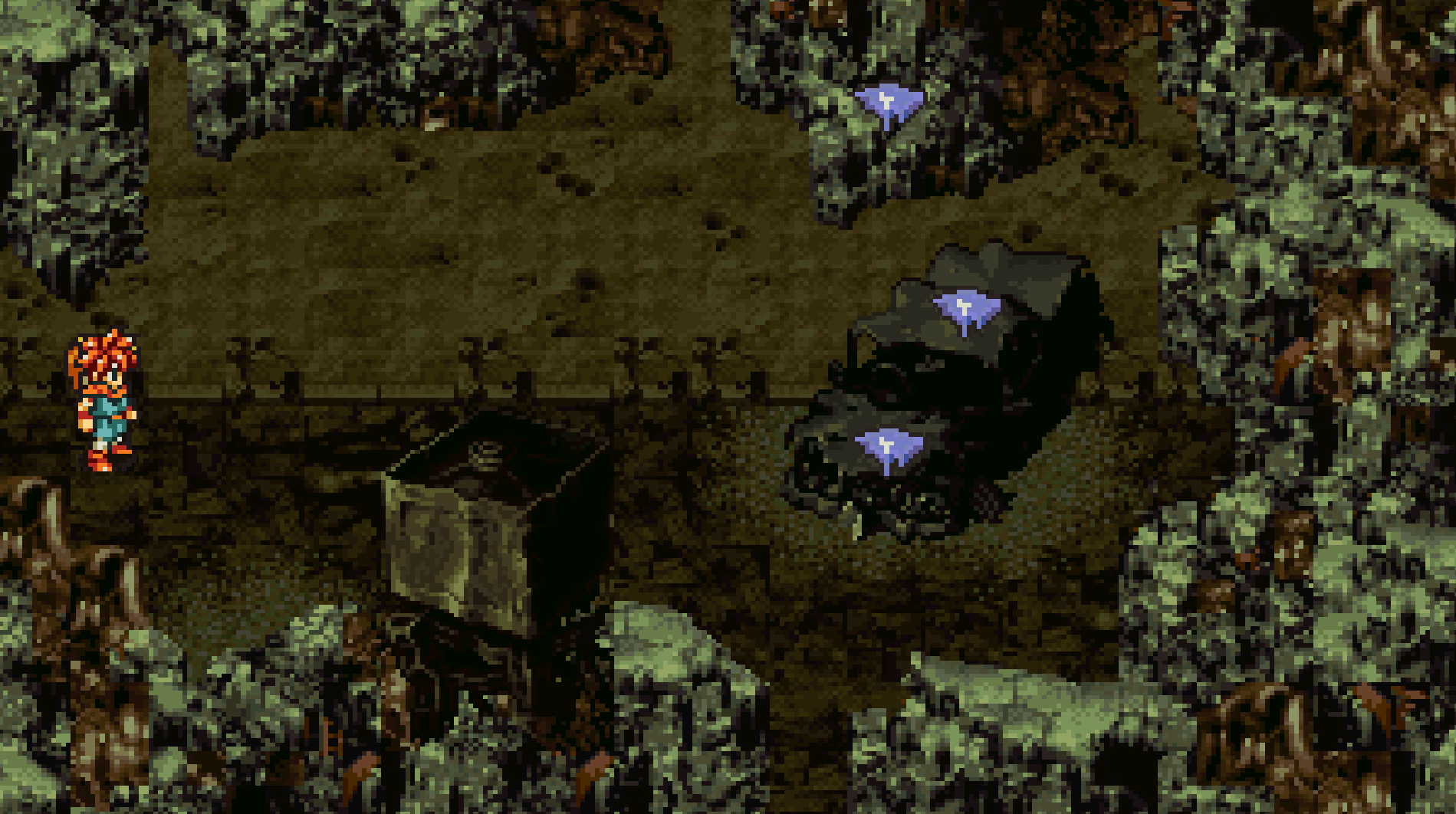
If you don't believe me, this is the original graphics:

original

And this is with the "high resolution" option activated:

high-res

That does no justice to how complex and interesting pixel art designed for CRT monitors actually is. If you want more info about the art behind pixel art and CRT monitors, I belive this post is really interesting. There is a comparison of different scaling algorithms on Wikipedia that also is worth taking a look.

This post tries to at least enable linux users looking to play this game and do its amazing pixel art some justice. It's not a definitive guide, and I don't claim to enable a playing experience that is comparable to the original one on CRT monitors, but it's arguably better than the stock experience.

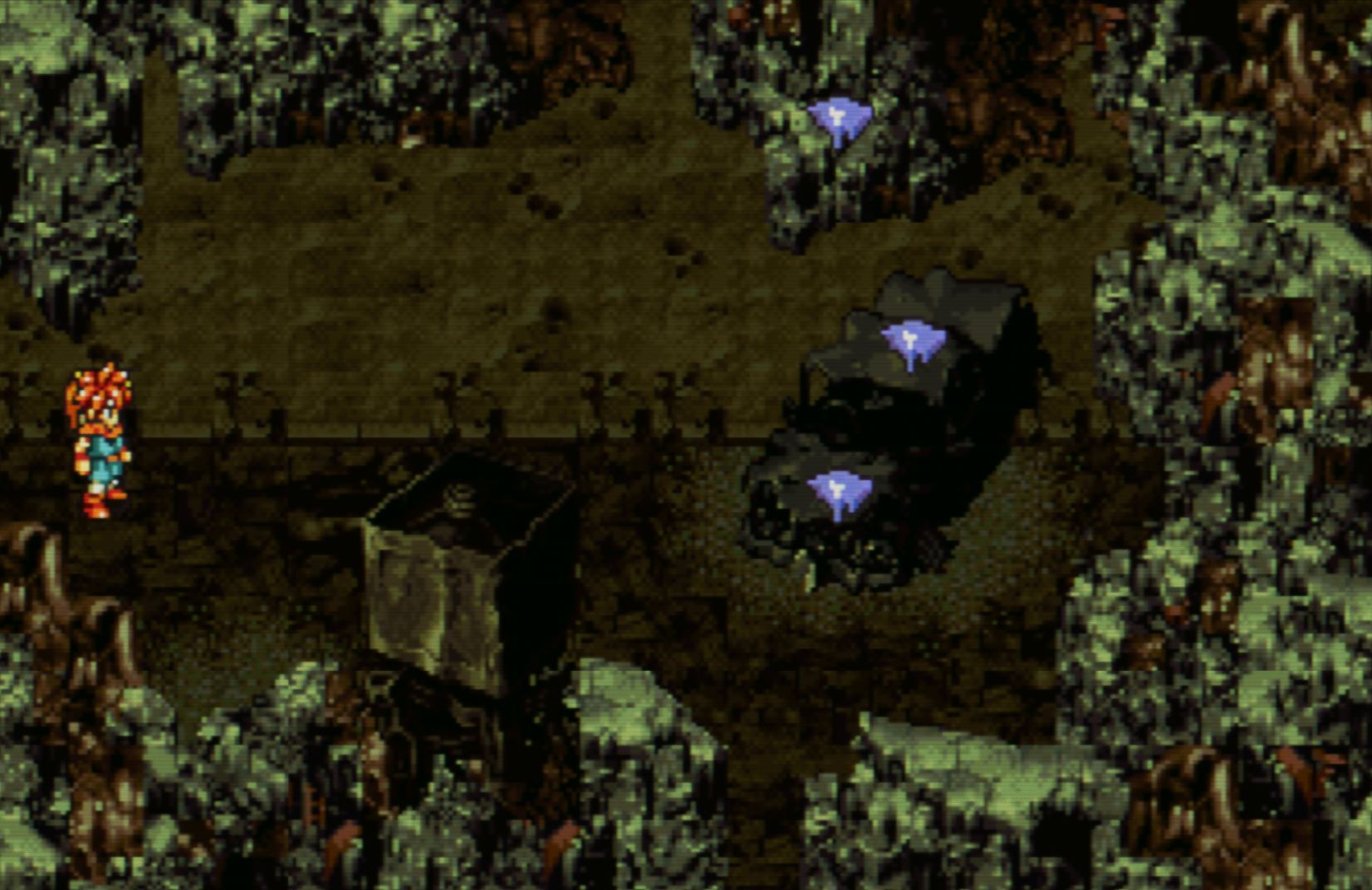
This is the end-result you should expect:

with-reshade

Installing reshade

So, ReShade and Windows is an unfortunate but understandable marriage. ReShade works on linux through compatibility layers, though. However the installation is delegated to third party heroes, and the one go-to script for that is kevinlekiller/reshade-steam-proton.

Installing it automatically for Chrono Trigger won't work though. It correctly identifies the architecture of the build, but fails to derive the graphics API.

Having that said, Chrono Trigger runs with a 32bit executable and uses the OpenGL api, so when you run reshade-linux.sh you need to pass this information to the script:

$ reshade-linux.sh
Do you want to (i)nstall or (u)ninstall ReShade for a DirectX or OpenGL game?
(i/u): i
Supply the folder path where the main executable (exe file) for the game is.
(Control+c to exit)
Game path: /home/gchamon/.local/share/Steam/steamapps/common/Chrono Trigger
Is this path correct? "/home/gchamon/.local/share/Steam/steamapps/common/Chrono Trigger"
(y/n) y
Do you want /usr/bin/reshade-linux.sh to attempt to automatically detect the right dll files to use for ReShade?
(y/n) n
Specify if the game's EXE file architecture is 32 or 64 bits:
(32/64) 32
Manually enter the dll override for ReShade, common values are one of: d3d8 d3d9 d3d11 ddraw dinput8 dxgi opengl32
Override: opengl32
You have entered 'opengl32', is this correct?
(y/n): y
Linking ReShade files to game directory.
Linking ReShade32.dll to opengl32.dll.
ln: replace '/home/gchamon/.local/share/Steam/steamapps/common/Chrono Trigger/ReShade.ini'? N
------------------------------------------------------------------------------------------------
Done.
If you're using Steam, right click the game, click properties, set the 'LAUNCH OPTIONS' to: WINEDLLOVERRIDES="d3dcompiler_47=n;opengl32=n,b" %command%
If not, run the game with this environment variable set: WINEDLLOVERRIDES="d3dcompiler_47=n;opengl32=n,b"
The next time you start the game, open the ReShade settings, go to the 'Settings' tab, if they are missing, add the Shaders folder location to the 'Effect Search Paths', add the Textures folder to the 'Texture Search Paths', these folders are located inside the ReShade_shaders folder, finally go to the 'Home' tab, click 'Reload'.

After that, you add WINEDLLOVERRIDES="d3dcompiler_47=n;opengl32=n,b" %command% to steam command and you are done.

Reshading

There is a good starting point for ReShade presets in Chrono Trigger Retro Reshade from Nexus Mods.

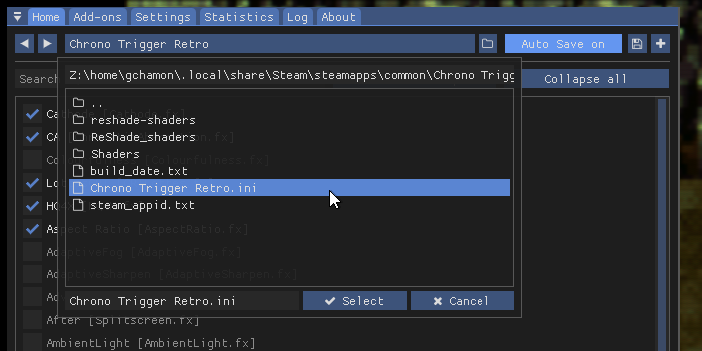
You just download the 7zip archive, decompress it in the Chrono Trigger folder and when launching the game, bring up the ReShade menu with the Home button, use the dropdown list on the top and select the preset.

select-ini

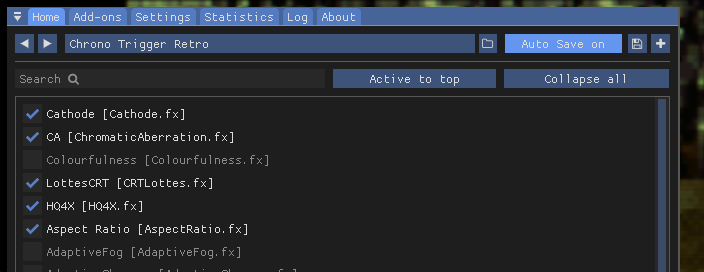
I found that it's reasonably good out of the box. I just disable Colorfulness because I think it adds a little green tint I don't quite like.

effect-selection

https://xd1.dev/2024/08/installing-reshade-for-the-steam-version-of-chrono-trigger-on-linux
Against political realism
Show full content
Against political realism

With the recent developments in US politics, following the attempt on candidate Donald Trump's life there is renewed heated and polarised debate, if there wasn't such heat before. With this, something struck me as odd when talking to other people online, which is, nothing seems to be changing.

We seem to be forever locked into this very narrow, very sanitized scope of political debate where we only consider the two most outstanding political candidates and their respective parties. Why I say this, is because the answer from the progressive agenda, insofar as I have contact with it, is to just... keep doing what it is doing, whatever it is.

This strikes me as a form of political realism, which is not to be mistaken by the Political Realism definition from the Internet Encyclopedia of Philosophy. I am talking about a concept which can be seen as an extraploation of the concept of Capitalist Realism by Mark Fisher.

In it, and I am not making much effort into putting this into my own words, "it is easier to imagine an end to the world than an end to capitalism". In the same sense, it is easier to imagine a fascist dictator taking hold of the United States to fight some form of communist phantom menace than it is to imagine a third candidate might win over Trump or whoever might replace Biden. And I am very comfortable in saying that this might extend to all other countries.

What I believe is lost in this form of political realism is the chance to have actual meaningful debate across the society, to discuss bringing about the actual project of cultural and social legacy that we want to design for our successors. And for good reason. Why would we waste valuable time from our lives, that we have to divide between all activities that a modern person imersed in this meritocratic warfare needs to attend to, to discuss ideas that are never going to be taken seriously in the macro sphere of the social debate?

However, what follows from that is the kind of fracture in political discourse that is reproduced by us average citizen that just reinforces the status quo that arguably is the very thing that produces the necessary conditions for extremist political positions to flourish. And while I lean to talk a lot about fascism, any sort of extremist totalitarian political organization is equally as detrimental to the long term welfare of the average individual, which is not saying that they are all the same.

Look, I am not claiming to know what the way out of it is. Far from it. I am far from a political theorist, or a philosophical genious. I am just your regular friendly neighbourhood tech guy that is, quite honestly, very affraid to bring new life, kids, into this mess we have created for ourselves and called it civilization.

What I am trying to say here is that we should honestly try to find immediate ways in our own lives that would increase the chances of us having meaningful debates about the changes we want to see happening that would prevent the rise of the next dictator, the next Hitler or Stalin, the next Khan. Because the human world might not be able to survive that.

And for that I believe we could start by paying less attention to the political spectacle that is taking form today and more to the person next to you that is in dear need of help. I am talking about charity, sure, but also that friend that you haven't talked in a while, some relative that you think would make good conversation, anyone in need of attention.

Because while actual change isn't something that is convenient, pleasurable or even desirable, starting with caring about others in your immediate vicinity instead of distant and big events, could at least increase the chances that, once you get the chance to actually talk to them about important stuff, that they might be less defensive and more open to debate.

And if you think this resonates somehow with you, do this before it's too late, because if there is something that the fascist right or the stalinist left is very good at is snatching those hearts in search of a quick and easy solution, which will turn out to be everyone's demise.

After word

I am writing in a very polarised way. Talking about left and right, fascist and stalinist, conservative and progressive, while the actual problem is much broader in scope and complex in nature. I know this and this is intentional.

One because, honestly, I am not educated enough to be delving into more details about the current political strucutre. Sorry about that.

But also, because if I would otherwise attempt a much deeper analysis, I'd risk making this quick article much harder to get into and also would steer away from the central point, which is to say let's trust ourselves. Quoting Ralph Waldo Emerson, “Trust thyself: every heart vibrates to that iron string.”. Lets voice the change we want to see, that it might resonate with the hearts of those close to us, in a sea of constructive human interference, against that which will ultimately be our doom.

https://xd1.dev/2024/07/against-political-realism
Backups and bitrot
Show full content
Backups and bitrot

Last night I killed my linux installation. It refused to come back to life even after chrooting and reinstalling everything. Something broke irreparably, to the best of my knowledge.

And a backup, that should have prevented it, was the culprit. It was also what saved it.

Context

The issue started showing its head about two weeks ago, when KDE decided it was time to push Plasma 6 and make my life miserable. That made me switch to Gnome, and shortly after to Hyprland.

You can read more about this in my previous post: Hyprland crash course.

At that time, while switching to these different environments, SDDM stopped working with a login loop, but I didn't give it much thought because GDM worked fine and I had work to do. However I did some investigating and it turned out that SDDM and Hyprland would work OK if I had a fresh user. I couldn't look into it further, however odd it was.

Fast forward to yesterday, and having totally forgotten about this brief hickup I decided to give SDDM a try because I was purging Gnome from my system, having now a very stable Hyprland setup.

And it worked! Well, it appeared to do so, because I installed SDDM, experimented with some themes, logging in and out...

All was well in Roswell.

Until I rebooted.

Induced to error

Looking back with the benefit of foresight I should have remembered that ocasion where SDDM wasn't working, but I honestly thought it was something I did recently, not a long running issue.

To add insult to injury, if I would login to another TTY and restart SDDM, the graphical login would start working again, which reinforced this false assumption.

So I started crippling my system, removing traces from X11 configuration files, looking for a culprit...

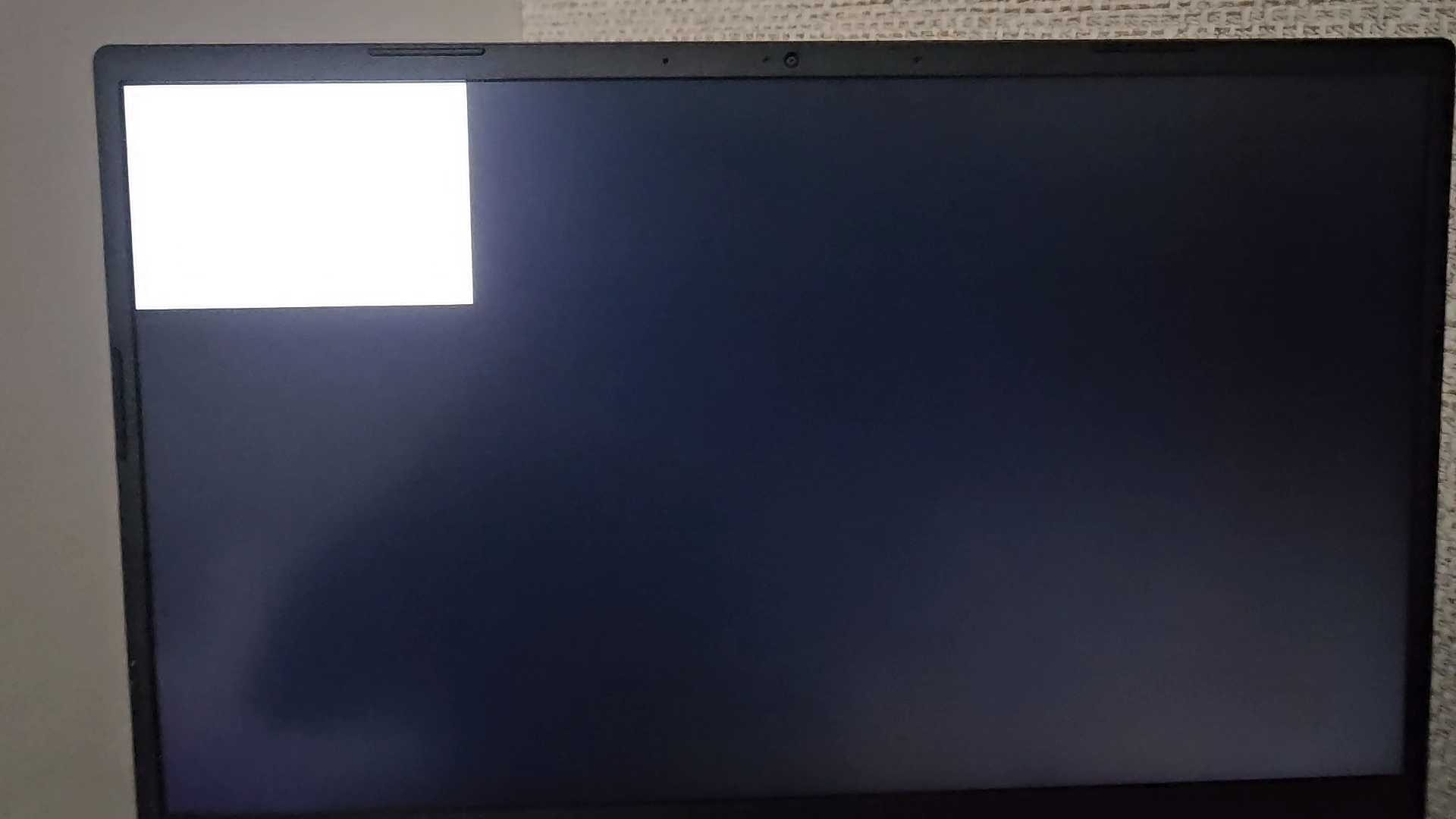
At one point, the login loop turned into this:

tty1

That bad image is a frame from a video I took to try to debug the fast vanishing logs that the tty was producing. It's a very small terminal with a white background. I haven't figured out what exactly resulted in this symptom, only what was causing it. But not before killing my system.

This image was taken before my installation died on me. I think it was when I removed /usr/share/X11. You have to understand, at that time I thought it was a calculated mangling of the system, because /usr is a folder I backup in its entirety to my separated storage system. But after that nothing could make the graphics system go back online again.

I had to reinstall and restore the backup yet again.

The issue crops up

So I pulled my Ventoy USB containing the Archlinux install image and proceded with yet another system installation. Sure now with archinstall it has never been easier to install it, it feels like an eternity when you are already past midnight and just want to go to bed...

So the installation went through without issues and booted fine, Hyprland + SDDM and all. There I thought all was well again... "I guess I really only had misconfigured something recently..."

That was before restoring my /home and /etc/ folder...

I still need to lay out in details of how I backup my files, but the gist of it is I use borg with some automation scripts and this public gist for restoration instructions.

So after restoring my files and rebooting, there was it again, the nasty little white screen of pain and hopelessness.

My backups were tainted... Years of it.

They were not big, ~8GB for the home folder, but they were old... Maybe over 6 years of accumulating undocumented configurations. This is a side effect from backups. They do exactly what they set out to do. To stand the test of time. And with that comes bitrot.

Arriving at the solution

At this point I remembered the time when I tested with a fresh user, and sure enough logging in with the test user, untainted by the cursed backup, I could login to my graphical system.

Now I turn to my many dotfiles... first to the main ones. Removing .local, .cache and .config. They did nothing to the issue, which persisted.

That was actually a relief. The main configurations or data are in those folders (no not you .cache you could go away for all I care).

So I nuked all the other dot folders appart from some I knew couldn't be related and the issue went away.

But what was it? What caused it?

To figure it out, I listed the dot files/folders that remained and compared them against the inventory of dot files I extracted from my borg archive. These were the files that were deleted:

.aws
.bash_logout
.bash_profile
.cargo
.codetogether
.ctsystem
.dmrc
.docker
.exult
.gnupg
.helm
.helm-synth
.hyprland
.icons
.ideavimrc
.ipython
.jackdrc
.java
.mackup
.npm
.nv
.nvidia-settings-rc
.pki
.profile
.pulse-cookie
.python_history
.qt
.rnd
.steam
.steampath
.steampid
.subversion
.themes
.viminfo
.vscode-oss
.wget-hsts
.Xauthority
.zoom
.zprofile

So I did what every sane person would do and ~added one by one until the issue came back~ asked ChatGPT which files were more likely to be associated with the issue.

It produced a list of five files, from which I reduced to two, .dmrc and .zprofile.

The issue

So...

What carried over years of neglect was .zprofile. It had these three nasty lines in it, from a time past memory, when things were simpler and the world was still young:

if [[ ! $DISPLAY && $XDG_VTNR -eq 1 ]]; then
  exec startx
fi

Why it was there, I will never know, the need for it being lost to time and buried in sand. But one lesson will remain, which is to clean your HOME folder.

https://xd1.dev/2024/03/backups-and-bitrot
Hyprland crash course
Show full content
Hyprland crash course

EDIT I made my config files available here: gchamon/.config.

For the past week I have been configuring hyprland and using it as my daily driver. Coming from major Desktop Environments like KDE or Gnome, this was definitely quite challanging, specially when implementing features that we take it for granted on these DEs, like screen sharing or screenshot annotating.

In this post I will be going through all the tools and scripts I have been creating to configure this amazing Window Manager to my liking.

Introduction

First things first, the system I daily drive is Archlinux, and it comes with its own set of pros and cons. However specially for hyprland, everything is available from the package manager. Apparently nix configurations are also very well supported. Other system architectures might not have such a thorough support from the distro.

All of this to say, I am going to assume you are using arch.

Hyprland itself has a nice Master tutorial which I recommend you to follow. I believe this gets you 90% of the way there. This post aims to polish the rough edges after installing it successfully.

Your mileage may vary, but it took me maybe two days to get a functional installation and maybe four more days of polishing until I felt I could just ditch GNOME.

Things I'll cover here

So what I really aim to do after you have a working hyprland setup is the following:

  • My scripts;
  • How to screenshot;
  • Some tips and tricks I came across;
The master tutorial

So basically after installing hyprland with:

sudo pacman -S hyprland kitty

You get to a nice window manager environment. For a quick introduction about the difference between Desktop environments and Window managers, try this blog post by the nice folks from linuxfordevices.com.

Launching hyprland from GDM worked flawlessly for me, so you can try that. Now you can boot into it and start configuring it.

After the master tutorial you should take a look at:

You would probably also need nm-applet and blueman-applet.

My scripts

These scripts aim to extend functionality and work around problems of hyprland and its applications.

Rofi

Rofi is nice in that it presents you with a couple of options. You can install it from the AUR. You can configure hyprland to use it by setting $menu = rofi -show drun and running it with SUPER+R.

What was missing for me is the ability to launch programs in a shell, in or outside a terminal emulator, using rofi.

This can be easily achieved with a command like kitty bash -c $(rofi -dmenu -p terminal). However Rofi won't remember the commands. I found frece from this issue and used the example scripts as a reference to add history to rofi commands:

#!/bin/bash
set -euo pipefail

# this adds frequency sorted history to rofi -dmenu

if [[ -z "$1" ]]; then
    echo Usage ./launch-rofi-frece.sh {ROFI_TYPE}
    echo Rofi type can be anything describing the rofi usage, for instance shell or terminal
fi

ROFI_TYPE="$1"
DB_FILE="$HOME/.cache/rofi.$ROFI_TYPE.db"
if ! [[ -f "$DB_FILE" ]]; then
    frece init "$DB_FILE" /dev/null
fi

item=$(frece print "$DB_FILE" | rofi "$@" -dmenu -p $ROFI_TYPE)
[[ -z $item ]] && exit 1

if ! frece increment "$DB_FILE" "$item" >/dev/null 2>&1; then
    frece add "$DB_FILE" "$item"
fi

echo "$item"

This will initialize an empty frece database with the context type I am using rofi (either shell or terminal). Then I can use this script from hyprland:

$shellMenu = bash -c "$(~/.config/hypr/scripts/launch-rofi-frece.sh shell)"
$terminalMenu = kitty bash -c "$(~/.config/hypr/scripts/launch-rofi-frece.sh terminal)"
bind = $mainMod SHIFT, R, exec, $shellMenu
bind = $mainMod CTRL SHIFT, R, exec, $terminalMenu

This way you can have a separate history with frequency tracking for rofi:

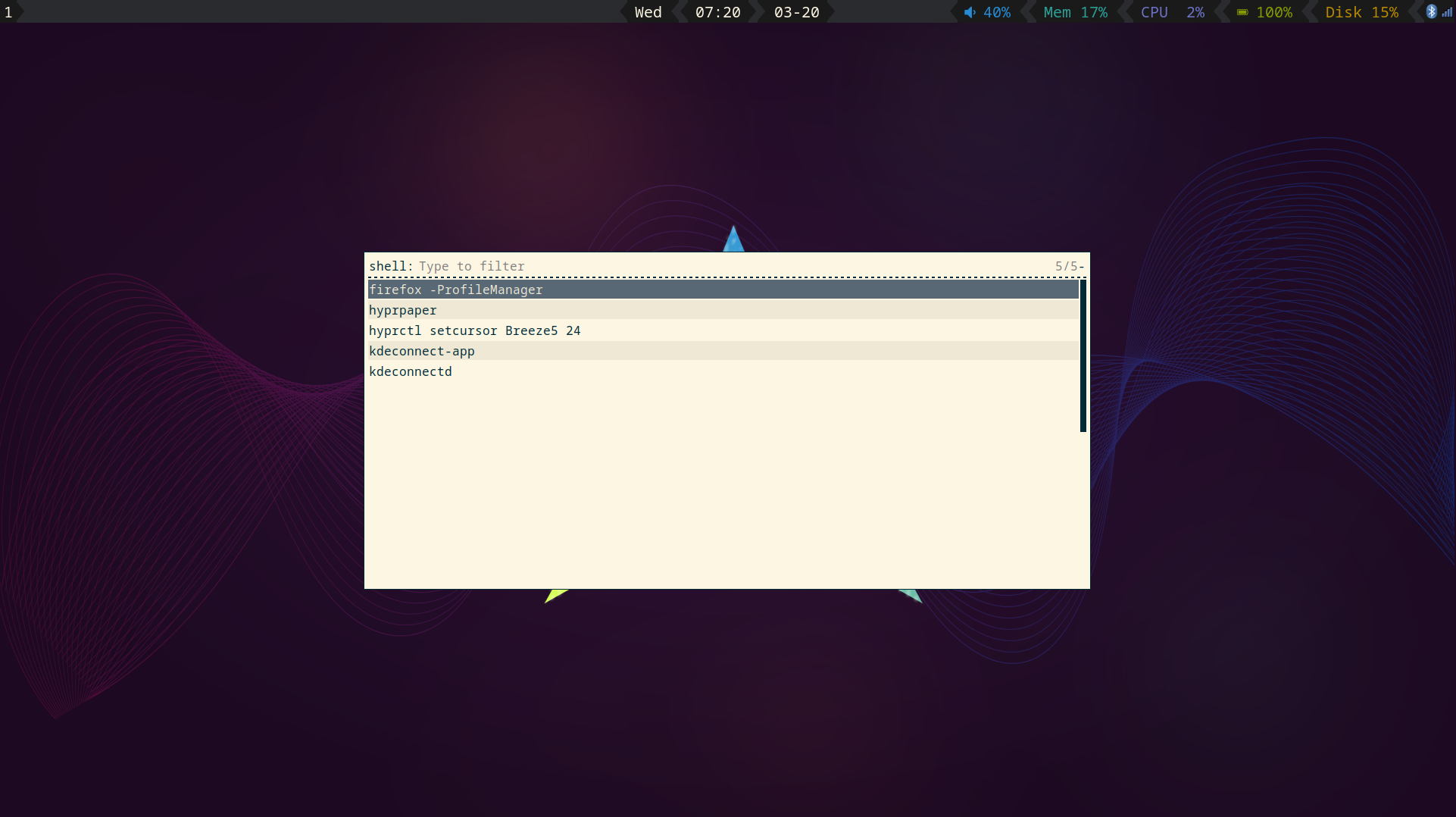
rofi-shell-history

Waybar

You can just start using waybar, but if you want to customize it, it won't reload by itself. I use this script to reload waybar whenever I want to change the theme:

#!/bin/bash

CONFIG_FILES="$HOME/.config/waybar/config $HOME/.config/waybar/style.css"

trap "killall waybar" EXIT

while true; do
    waybar &
    inotifywait -e create,modify $CONFIG_FILES
    killall waybar
done

Which you can launch by changing how you launch waybar with hyprland to exec-once = ~/.config/hypr/scripts/launch-waybar.sh.

Dunst notification sounds

You can configure dunst to play notification sounds by following this comment on github. However powersaving policies, most likely from the bluetooth protocol, prevents my headphones to play music straight away. It would only play the end of the audio from A link to the past. To work around this I use this 500ms silent mp3 file to warm up my device. Needless to say it introduces a half-second latency to every notification sound, but it does the job. The script will then look like this:

#!/bin/bash
SCRIPT_DIR=$( cd -- "$( dirname -- "${BASH_SOURCE[0]}" )" &> /dev/null && pwd )

source "$HOME/.zshenv"

if [[ "$DUNST_QUIET" != "true" ]]; then
    # warm up audio device in case of powersave policies (like bluetooth)
    pw-play $SCRIPT_DIR/../assets/500-milliseconds-of-silence.mp3
    pw-play $SCRIPT_DIR/../assets/link.mp3
fi

As you can see I also implemented a quiet mode by setting DUNST_QUIET=true in .zshenv. Yes, bash and zsh shouldn't mix but let this slide, please :D

Wayland lock screen

I use sawlock-effects for locking my screen. The script looks like this (just so that it doesn't clutter the hyprland config file):

#!/usr/bin/env bash

swaylock \
    --image /usr/share/backgrounds/archlinux/split.png \
    --clock \
    --indicator \
    --indicator-radius 100 \
    --indicator-thickness 7 \
    --effect-blur 7x5 \
    --effect-vignette 0.5:0.5 \
    --ring-color bb00cc \
    --key-hl-color 880033 \
    --line-color 00000000 \
    --inside-color 00000088 \
    --separator-color 00000000 \
    --fade-in 1

And I invoke it with bind = $mainMod, L, exec, ~/.config/hypr/scripts/wayland-lock.sh.

Screenshot with editor

I use grimblast from aur together with ksnip, which is available from the extra packages.

There is a captureArea.sh script:

#!/bin/bash

export GRIMBLAST_EDITOR=ksnip
grimblast --cursor edit area

And a captureAll.sh script:

#!/bin/bash
set -euo pipefail

SCREENSHOT_FILENAME=$(date +'%Y-%m-%dT%H:%M:%S%z_grim.png')
SCREENSHOT_FILENAME_ABSOLUTE=$HOME/Pictures/Screenshots/$SCREENSHOT_FILENAME

notify-send --app-name=grim --urgency=normal --category=screenshot "Capturing entire screen to $SCREENSHOT_FILENAME_ABSOLUTE"
grim $SCREENSHOT_FILENAME_ABSOLUTE

Which I launch with

bind = SHIFT, 107, exec, ~/.config/hypr/scripts/screenshot/captureAll.sh
bind = , 107, exec, ~/.config/hypr/scripts/screenshot/captureArea.sh

The number 107 being the PrintScreen key. It can also be referenced by Print, but for some reason I left it with the code.

BTW you can use wev and get codes from keys you press and just use them in hyprland config.

Kill hyprland if stuck on exit

Hyprland, at least for me, will randomly freeze on a blackscreen upon exit. This issue covers the problem and also offers a workaround by using this script:

echo "Hyprland exit" | systemd-cat -t coffebar -p info
hyprctl dispatch exit &
sleep 10
echo "Hyprland failed to exit" | systemd-cat -t coffebar -p err
killall -9 Hyprland

You can then just call it with SUPER+M instead of dispatching exit directly. It won't solve the problem, but at least you don't need to reboot everytime it happens.

Quick tips

These are some quick references to tips and tricks I came across during this last few days.

Multiple keyboard layouts

Since I have two keyboards with two different layouts (a us mx-keys and a br-abnt2 built-in keyboard on my notebook) it wasn't clear for me how I should configure hyprland. At first I was looking for a way to display the current keyboard and maybe toggle it with waybar, but I quickly realised that hyprland toggle will work only for the keyboard which pressed the toggle key.

However you can set different layouts for different devices in hyprland.conf. My configuration looks like this:

input {
    kb_layout = br
    kb_variant = abnt2
    # ...
}

device {
    name = logitech-mx-keys
    kb_layout = us
    kb_variant = intl
}

This is nice because I get consistent layout configuration with whatever keyboard I use. You can find which input devices you have with hyprctl devices.

Waybar on-click actions

After applying cjbassi's theme I wanted more functionality for my bar. BTW you can find more themes here.

First, you should install pamixer so that clicking on the volume to mute works. Oh, and install otf-font-awesome, otherwise the nice icons won't render.

Then I mapped:

  • pulseaudio
    • Right click: pavucontrol
  • memory
    • Left click: gnome-system-monitor --show-processes-tab
  • cpu
    • Right click: kitty top
    • Left click: gnome-system-motnitor --show-resources-tab
  • battery
    • Left click: tlpui
  • disk
    • Left click: kitty ncdu ~
    • Right click: gnome-system-monitor --show-file-systems-tab

I thought about leaving right-click on disk to open ncdu on root, but it takes an ungodly amount of time to go through the files in my NAS, but you could do that if this isn't a problem for you.

gnome-keyring

Just a headsup: if you enter a wrong password for your ssh keys, it won't complain, there won't be a warning, ssh-add will just gobble 100% cpu and ssh or git clone will just hang there. You will have to kill it with pkill ssh-add. To fix this, open seahorse, go to Login and remove the offending ssh key password there. Just don't remove it from OpenSSH Keys tab as it will delete the keys themselves.

Also, either use this or keychain, never both.

https://xd1.dev/2024/03/hyprland-crash-course
Test post
Show full content
Test post

This is a post to test features like code highlight and such.

Code highlight testing

From https://dev.to/renegadecoder94/fibonacci-in-every-language-1l46.

fib :: Integer -> Integer
fib 0 = 0
fib 1 = 1
fib n = fib (n-1) + fib (n-2)
import math
from decimal import Decimal, getcontext

getcontext().prec = 1000
ONE = Decimal(1)
SQRT_FIVE = Decimal(5).sqrt()
HALF = Decimal(0.5)
PHI = (ONE + SQRT_FIVE) * HALF


def fibonacci(n):
    if n == 0:
        return 0
    return math.floor((PHI ** n) / SQRT_FIVE + HALF)
package main

import (
    "fmt"
    "os"
    "strconv"
)

func fib(n int) {
    a, b := 0, 1
    for i := 0; i < n; i++ {
        a, b = b, a+b
        fmt.Printf("%d: %d\n", i+1, a)
    }
}

const msg = "Usage: please input the count of fibonacci numbers to output"

func main() {
    if len(os.Args) == 1 {
        fmt.Println(msg)
        return
    }
    if os.Args[1] == "" {
        fmt.Println(msg)
        return
    }
    n, err := strconv.Atoi(os.Args[1])
    if err != nil {
        fmt.Println(msg)
        return
    }
    fib(n)
}
function fib(i){ 
    if (i<=0) return -1;
    else if (i==1) return 1;
    else if (i==2) return 1;
    else return fib(i-1)+fib(i-2)
}

// some examples
//fib(3) returns 2
//fib(5) returns 5
Bash double bracket fix

Currently, weblog has issues rendering [[ inside code blocks. The issue is described here: https://discourse.lol/t/page-link-markdown-rendering-inside-code-block/780/2.

# ...
if ! [[ -f "$DB_FILE" ]]; then
# ...
fi
Mermaid

Mermaid graphs should be rendered instead of highlighting the mermaid code itself

%%{init: {"flowchart": {"htmlLabels": false}} }%%
flowchart LR
    markdown["`This **is** _Markdown_`"]
    newLines["`Line1
    Line 2
    Line 3`"]
    markdown --> newLines
sequenceDiagram
    Alice->>John: Hello John, how are you?
    John-->>Alice: Great!
    Alice-)John: See you later!
---
title: Animal example
---
classDiagram
    note "From Duck till Zebra"
    Animal <|-- Duck
    note for Duck "can fly\ncan swim\ncan dive\ncan help in debugging"
    Animal <|-- Fish
    Animal <|-- Zebra
    Animal : +int age
    Animal : +String gender
    Animal: +isMammal()
    Animal: +mate()
    class Duck{
        +String beakColor
        +swim()
        +quack()
    }
    class Fish{
        -int sizeInFeet
        -canEat()
    }
    class Zebra{
        +bool is_wild
        +run()
    }
Easier images from github

This feature should rewrite image tags when synchronizing articles to weblog. I should only have to write relative paths to github, but when sending to weblog they should be rewritten with the full URL, thus working on both platforms without me having to commit the full URL.

I write therefore:

![test-image](/images/test-image.jpg)<!--- this comment disables the rewrite feature -->

And weblog should see:

![test-image](https://raw.githubusercontent.com/gchamon/xd1.dev/images/test-image.jpg)

The following is the test image:

test-image

https://xd1.dev/2024/02/test-post
I am
Show full content
I am

Hey you, nice to have you here.

This is a quick entry, nothing of substance, just to test my interface, check if everything is setup correctly.

You should be able to access this through xd1.dev, my nicer-on-the-eyes-hopefully domain, and also xd1.weblog.lol, which is also cute I guess.

More to come.

https://xd1.dev/2023/12/i-am