After analyzing my network setup in a previous post, I decided it was time to dig deeper and optimize my network setup, both at home and at my office. With data-intensive workflows becoming more demanding - especially in areas like deep learning and computer vision - every millisecond and megabit counts.
Show full content
After analyzing my network setup in a previous post, I decided it was time to
dig deeper and optimize my network setup, both at home and at my office. With
data-intensive workflows becoming more demanding - especially in areas like
deep learning and computer vision - every millisecond and megabit counts.
Following is a detailed breakdown of the changes I made, the tools I used and
the performance gains I achieved.
Baseline Measurements
At home I am using a less powerful network setup for obvious reasons:
Home Network
ISP: DSL 250
Router: FritzBox 7590 AX
Ethernet: Directly connected to the router or
Wi-Fi: FritzBox mesh network via a Fritz!Repeater 3000
Speed test:
Ethernet: 183 Mbps download, 39 Mbps upload, 6.5 ms latency
Wi-Fi: 181 Mbps download, 37 Mbps upload, 9.8 ms latency
Work Network
At work I am running a bit more sophisticated setup:
ISP: Vodafone Cable 1000
Setup: 2.5 GBit Ethernet via CalDigit TS4 hub connected to my MacBook
Server Rack: Includes a 1 GBit switch and a Proxmox application server
Baseline Results (NetworkQuality):
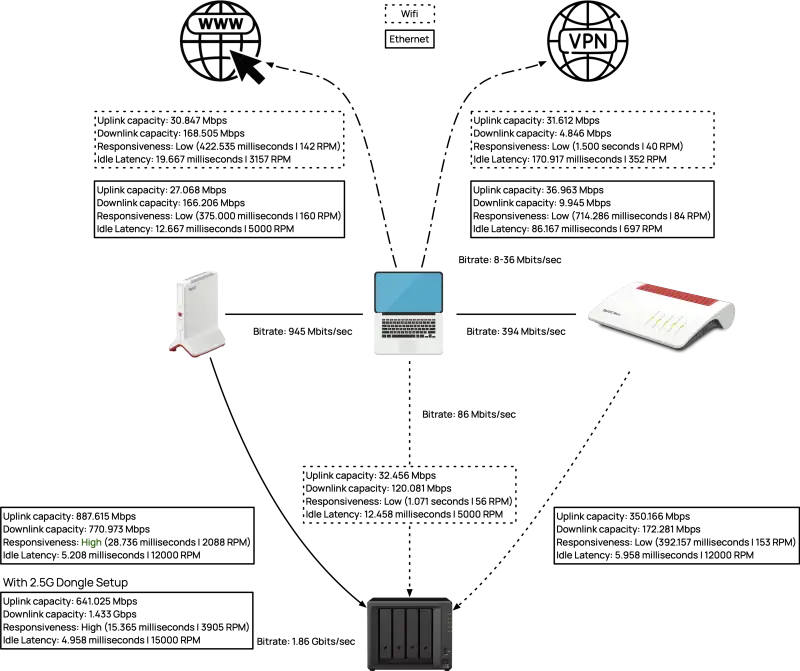
Uplink: 889 Mbps
Downlink: 746 Mbps
Responsiveness (RPM): Medium, 487 RPM
Idle Latency: ~6 ms
Improvements and Their Impact
I did upgrade my server rack with a second-hand used 10G Ethernet switch from
Netgear that I’ve bought for cheap online but first I did some experiments using
the old (managed) switch first.
Leveraging Link Aggregation (LAG) at Work
I configured two Ethernet ports to share the
network load (LAG) with the following results:
While the uplink showed significant improvement, the downlink remained largely
unchanged. Responsiveness slightly dipped, likely due to increased protocol
overhead.
Upgrading to 10G Ethernet for Synology and Proxmox
At work, I added:
A 10G module (E10G22-T1-Mini) network expansion module to my Synology RS422+
A cheap 10G PCIe card for the Proxmox hypervisor
With these changes I got the following results:
Results (iperf3, Proxmox)
Transfer: 2.74 GBytes
Bitrate: 2.35 Gbits/sec
Reults (NetworkQuality, Proxmox)
Uplink: 2 Gbps (+125%)
Downlink:1 Gbps (+33.9%)
Responsiveness: Medium, 942 RPM (+93.4%)
Idle Latency: 6 ms (unchanged)
Optimizing MTU for Jumbo Frames
Adjusting the MTU from 1500 to 9000 allowed jumbo frames, increasing efficiency.
Impact on Responsiveness
Before: 942 RPM
After: 1778 RPM (+88.8%)
While throughput stayed constant, responsiveness doubled, indicating a
significant reduction in network packet overhead.
Introducing the OWC 10G Thunderbilt 3 Ethernet Adapter
Upgrading my connection to the Proxmox server and Synology rack with the OWC
adapter yielded dramatic results.
Results (iperf3)
Proxmox:
Transfer: 9.64 GBytes
Bitrate: 8.288 Gbits/sec
Synology:
Transfer: 9.54 GBytes
Bitrate: 8.19 Gbits/sec
Results (NetworkQuality)
Proxmox:
Uplink: 1.3 Gbps
Downlink: 4.6 Gbps (+360%)
Responsiveness: Medium, 421 RPM
Idle Latency: 5.2 ms
Synology:
Uplink: 4.2 Gbps (+373%)
Downlink: 1.7 Gbps (+70%)
Responsiveness: Medium, 360 RPM
Idle Latency: 4.8 ms
Home Network Upgrades with 2.5G Dongles
For my home setup, I added:
A 2.5G USB Ethernet dongle for the Synology DS923+ and the CalDigit TS3 hub
Adjusted internal PCI sharing for stable performance
Results (iperf3)
Transfer: 2.28 GBytes
Bitrate: 1.96 Gbits/sec
Results (NetworkQuality)
Uplink: 641 Mbps
Downlink: 1.433 Gbps
Responsiveness: High, 3905 RPM (+>7x)
Idle Latency: 4.9 ms
The dongle upgrade transformed my basement rack’s performance, especially for
responsiveness and latency, despite hitting the throughout ceiling of the
2.5G connection.
Jumbo Frames: Enabling an MTU of 9000 dramatically improves responsiveness
without impacting throughput.
10G Ethernet: Investments in 10G hardware pays of, especially for
workloads like backups and Proxmox hypervisor.
PCI Optimization: Understanding internal bus sharing is crucial for
stable performance.
Next, I plan to investiage further fine-tuning options, including QoS settings
for prioritizing critical traffic and potential upgrades to fiber internal at
home.
Since I am doing more data intensive work lately (Deep Learning, Computer Vision models with hundreds of terabytes of data), I needed to analyze my current network setup both at home and at work and identify the bottlenecks.
Show full content
Since I am doing more data intensive work lately (Deep Learning, Computer Vision
models with hundreds of terabytes of data), I needed to analyze my current network
setup both at home and at work and identify the bottlenecks.
Ideally, I wanted to use iperf3 to measure throughput and a more recent
tool developed by Apple called networkQuality that uses a more
actionable metric about the current state of the network called RPM
(Round-trips Per Minute) as this should better measure user experience specifically
when the network is under working conditions.
I also wanted to have these running as background services and since I am using
Synology for backup both at home and at work and the setup of these won’t change
all too often due to being critical infrastructure, they were perfect candidates.
Installing iperf3 on Synology NAS (DSM 7.2+)
In order to install iperf3 on the Synology NAS we have to add another package
repository called SynoCommunity. For this we have to log into
the DSM, Package Center -> Add the repository there and then install the package
SynoCli Monitor Tools from the newly added repository. This also installs
the iperf3 commandline tool. We want this to start and run automatically even
after rebooting the DSM. For this we can add another systemd service containing
the following
$ sudo vi /etc/systemd/system/iperf3.service
[Unit]
Description=Run iperf3 at startup
[Service]
Type=simple
ExecStart=/usr/local/bin/iperf3 -s

[Install]
WantedBy=multi-user.target

$ sudo systemctl start iperf3.service
$ sudo systemctl status iperf3.service
$ sudo systemctl enable iperf3.service
The -s is for running in server mode, listening to new connections. We can now
test against this backend from another machine by specifying the endpoint:
$ iperf3 -c wolf-synology.fritz.box
Connecting to host wolf-synology.fritz.box, port 5201
[  7] local 192.168.178.53 port 55961 connected to 192.168.178.23 port 5201
[ ID] Interval           Transfer     Bitrate
[  7]   0.00-1.00   sec  18.0 MBytes   151 Mbits/sec
[  7]   1.00-2.00   sec  15.3 MBytes   128 Mbits/sec
[  7]   2.00-3.00   sec  20.6 MBytes   172 Mbits/sec
[  7]   3.00-4.00   sec  15.0 MBytes   126 Mbits/sec
[  7]   4.00-5.00   sec  18.6 MBytes   156 Mbits/sec
Installing networkQuality server
NetworkQuality is a tool that comes preinstalled with recent
macOS versions and uses a configuration provided by Apple everytime it is called
without any additional options
This is fine for measuring the up and downlinks from the localhost to an endpoint
in the world wide web, but for my purposes I needed to measure the performance
between to endpoints in the same network (and also respecting parallel connections
which most other tools do not bother with).
There exist at least two reference implementations (in Swift and Go). I used the
latter which can be found here. Since I wanted this to be running
in the background on my NAS, I needed to cross compile the networkqualityd binary
using a GCC cross compile toolchain:
Liquid is an open-source template language created by the company Shopify, written in Ruby and used by this websites static site generator Jekyll. This language is mainly used to create small logical units that spit out markup. For instance, imagine that we want to display a collection of products on a website which we have saved in a yaml file, we could express this as follows:
Show full content
Liquid is an open-source template language created by the company
Shopify, written in Ruby and used by this websites static site generator Jekyll.
This language is mainly used to create small logical units that spit out markup.
For instance, imagine that we want to display a collection of products on a
website which we have saved in a yaml file, we could express this as follows:
<ul>
  {% for product in collection.products %}
    <li>{{ product.title }}</li>
  {% endfor %}
</ul>
Besides loops, it also supports a minimally required set of operations such as
if/else statements and variables. Just as in CMake there are no proper
types. Essentially everything is of type string. Arrays are comma separated
strings and strings may have a truthy or falsy meaning based on the content.
Liquid also ships with some convenience API functions to alter text,
which does come in handy for the case at hand. The following example converts
a given string to lowercase letters:
{{ "FooBar" | downcase }}
This will output ‘foobar’ as a result.
Different operations can also be stacked together via so called pipes that
should be very familiar when working in a UNIX environment:
{{ "Just the first word will be printed" | split: " " | first }}
Again, this will output ‘Just’ only.
Advanced example
When I was in the midst of redesigning my website, I came across a slightly
more interesting use case for Liquid: As part of my portfolio I do maintain
a yaml file that contains all of my previous projects for the last decade or so.
Every entry in this file consists of the project name, an image, a short
description and one or more categories that this project is classified into.
As part of my consulting services that I provide, I wanted to create a list
of relevant projects that I have been working on in the past. For this I had
to select all projects that to fall into the same category.
In other words I wanted to create the intersection from two arrays: Namely,
the array with the given project categories and the array with the current
page category (which can be one or more).
As it turns out, Liquids limited support for types and arrays for that matter
has no operational support to create an intersection of two arrays. So I had
to come up with another approach. A brute-force method to achieve this would
consist of two concatenated loops, iterating over both arrays and remembering
which elements were already visited and removing them from the array.
However, this would have been way to many lines of code for my taste and didn’t
seem appropriate. Hence, I came up with the following:
First, this creates another array all_cats that consists of both the project
and page categories. Secondly, filtered_cats consists of all unique elements
from the first array. All that is left to do now is to check, if the original
array is larger than the filtered one. As an interesting side note, the actual
category isn’t even necessary anymore, as we are only interested in uniqueness.
On the one hand this solution looks admittedly a bit of a stretch. On the
other hand, given the constraints of the API this is actually a sufficient
elegant solution. For instance, the negation for the case above (the disjoint
set in other words) requires to only change the larger then operator to be less
then.
I’m available for software consultancy, training and mentoring. Please
contact me, if you are interested in my services.
I was giving an (online) talk last week at the C++ Meetup in Karlsruhe. The title of my talk was Signal Processing and ML Inference on the Edge where I talk a bit about the constraints and requirements for on-device online computing and some interesting approaches on how to implement a given algorithm using either the (already deprecated) RenderScript as well as Halide.
Show full content
I was giving an (online) talk last week at the C++ Meetup in Karlsruhe. The
title of my talk was Signal Processing and ML Inference on the Edge where I
talk a bit about the constraints and requirements for on-device online computing
and some interesting approaches on how to implement a given algorithm using
either the (already deprecated) RenderScript as well as Halide.
At the beginning of this talk I did recapitulate some essential audio processing
basics and also introduced some typical ML related computations before
discussing different approaches using Halide for my main example. There was even
a live stream on YouTube available for this event (which is a first for me) that
you can find here:
Following is the Agenda of this talk used for the announcement:
Agenda
The recent decade has been revolutionary regarding many technical aspects of our
daily lives. We have experienced the transition from simplistic feature phones
to fully featured little supercomputers carried along in our pockets, capable of
performing uttermost computationally heavy tasks directly on the device.
Moreover, we are currently already in the midst of what some may call the third
AI renaissance, and are now able to solve pattern recognition problems with
relatively little effort that in the past could only be solved by humans. The
latter development has been a game changer for a variety of applications
including anomaly detection, classification or speech recognition.
Despite the advanced computational resources of modern mobile devices, it is
still challenging to obtain optimal throughput and minimal latency with signal
processing implementations, which typically involves exploiting device specific
acceleration techniques, such as vector intrinsics. However, this is not always
feasible, especially when targeting a large variety of different architectures
and target devices.
We will look at heterogeneous computing frameworks to accelerate the processing
of otherwise performance intensive tasks which will get optimized across
multi-core CPUs, GPUs or DPSs on the target device. Since Androids RenderScript
is deprecated, we will focus on alternatives namely Halide.
I’m also available for software consultancy, training and mentoring. Please
contact me, if you are interested in my services.
Google released an open-source version of its internal build system named Bazel already six years ago. This system is advertised (and used effectively) to build billions of lines of code. My fundamental interest in this tool was fueled by two key promises according to their release notes for the 1.0 version: Hermetic and reproducible builds. Hermetic build in this context means that everything depends on a known set of inputs, which is essential for ensuring that builds are reproducible. This is achieved through several techniques such as sandboxing. For instance, Bazel tries hard to not be dependent on anything on the host system.
Show full content
Google released an open-source version of its internal build system named
Bazel already six years ago. This system is advertised (and used
effectively) to build billions of lines of code. My fundamental interest in
this tool was fueled by two key promises according to their
release notes for the 1.0 version: Hermetic and reproducible
builds. Hermetic build in this context means that everything depends on
a known set of inputs, which is essential for ensuring that builds are
reproducible. This is achieved through several techniques such as sandboxing.
For instance, Bazel tries hard to not be dependent on anything on the host
system.
Reproducibility for builds on the other hand is also a must for any serious
software system used by real customers. Without it, there is no way to go
back in time and reproduce the state of the software to any previous
version in time. However, there are actually few shops out there I’ve come
to known personally where this is really achieved. Frankly, this is not too
easy to setup in the first place.
I did port some internal projects as well as a customer project from CMake
to Bazel in the last year. All those projects were of reasonable size (meaning
lines of code) and had several external dependencies. I think this is mandatory
to really get to know a new tool and push its boundaries quite a bit.
Build time benchmarks
One of the things I was most interested in are the build times. Suffice to say
that large C++ projects have a strong tendency to build very slowly, due to
tooling and certain language features (templates) that have never really got
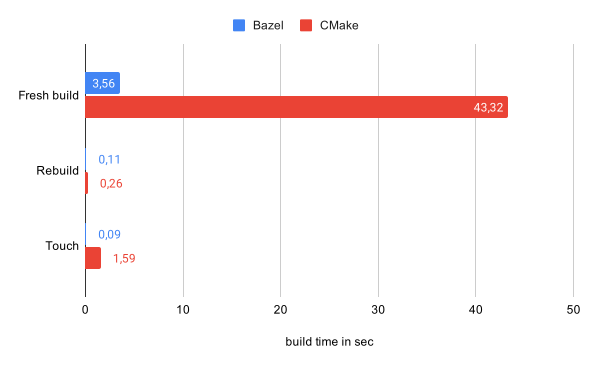
up to speed since the 80s. For a build time benchmark there are three different
use-cases I’ve looked into: Fresh builds from scratch, rebuilds without any
changes and finally rebuilds with one file touched:
For testing I’ve used the most recent versions of both Bazel (3.7.2) and
CMake (3.19). This code base in particular made heavy use of Eigen
included as an external dependency and CMake spent some time configuring
this header-only library. Hence, this benchmark is arguably a bit skewed.
However, this is a software project I’ve had at hand and at the end of the
day these numbers count. Even if a fresh build is not considered here, Bazel
still wins in terms of performance by being twice as fast for a rebuild and
as fast as factor 17 for detecting a change (touch) and rebuilding again.
This looks promising.
I’m also available for software consultancy, training and mentoring. Please
contact me, if you are interested in my services.
Last week I gave a talk for the C++ User group Frankfurt regarding (Advanced) C++ Design Patterns. Due to the pandemic this talk was given remotely. While I still have to get used to talking to my monitor, I think overall it went pretty smooth. There were a lot of participants which I didn’t expect (and didn’t see for the most part). However, the Q&A session after the talk was pretty decent as well. I do hope though that I will be able to give regular talks again once this Corona thing will eventually be over.
Show full content
Last week I gave a talk for the C++ User group Frankfurt regarding (Advanced)
C++ Design Patterns. Due to the pandemic this talk was given remotely. While I
still have to get used to talking to my monitor, I think overall it went pretty
smooth. There were a lot of participants which I didn’t expect (and didn’t see
for the most part). However, the Q&A session after the talk was pretty decent
as well. I do hope though that I will be able to give regular talks again once
this Corona thing will eventually be over.
Concerning the contents of the talk, I tried to motivate using specific C++
related techniques over traditional (GoF) Design Patterns due to the typical
system memory and runtime constraints we’re facing when using C++ for the job
anyways. More specifically I was discussing how to use static polymorphism
to model the software system at hand to achieve basically the same with
dynamic polymorphism but without paying for the overhead in memory/runtime.
You can find the link to the slides
here.
I’m also available for software consultancy, training and mentoring. Please
contact me, if you are interested in my services.
For a current client project I need to get a thorough understanding of the performance bottlenecks for several target architectures, including ARM64. For this, I’ve already ordered an ODROID-C2 development board. This is currently the only ARM64 development board available that also supports Android as far as I am aware.
Show full content
For a current client project I need to get a thorough understanding of the
performance bottlenecks for several target architectures, including ARM64.
For this, I’ve already ordered an ODROID-C2 development board. This
is currently the only ARM64 development board available that also supports
Android as far as I am aware.
When doing a performance analysis (especially under Linux) I really like using
perf as it supports a wide range of options such as hw/sw performance
counters and has several useful subcommands. However, getting perf to run on a
host system also requires the kernel sources as perf will emit a warning in any
other case. Usually this can be achieved by simply fetching the sources for the
current kernel by using a package manager such as apt:
In the case of ODROID-C2 things are a bit more complicated, which is the main
motivation for this blog post. First of all, the kernel for this board is quite
old (August 2014). Hence, we probably won’t find the kernel sources from within
the package sources of our distribution, which turned out to be the case.
In this case, we need to fetch the original sources provided by ODROID and also
checkout the correct branch for the current version of this dev board:
If we change into the subdirectory of perf from within the kernel sources and
try to compile the correct version ourselves, we receive another error though:
In file included from util/event.c:3:0:
util/event.h:95:17: error: ‘PERF_REGS_MAX’ undeclared here (not in a function); \
did you mean ‘PERF_REGS_MASK’?
  u64 cache_regs[PERF_REGS_MAX];
                 ^~~~~~~~~~~~~
                 PERF_REGS_MASK
  CC       util/evsel.o
As already mentioned, this board is using a rather old kernel version. Thus, we
need to fix this error ourselves by adding another define
I’m happy to announce that I’ll be giving a talk in March at the ConanDays conference in Madrid, Spain. I think this is also the first time that JFrog is holding this conference. Thus, I’m curious and excited that I get a change being there. The title of my talk will be Dependency Management with CMake and Conan. Following is my submitted proposal for this talk:
Show full content
I’m happy to announce that I’ll be giving a talk in March at the
ConanDays conference in Madrid, Spain. I think this is also
the first time that JFrog is holding this conference. Thus, I’m curious and
excited that I get a change being there. The title of my talk will be
Dependency Management with CMake and Conan. Following is my submitted
proposal for this talk:
The story of (thirdparty) package dependency management for C and C++ based
projects is a story full of misunderstandings, shortcomings and dead-ends. This
becomes most noticeable in the fact that many software projects explicitly
advertise that they do not depend on any other thirdparty software packages.
This is particularly interesting as this doesn’t seem to be an issue in many
other programming languages.
On the other hand, maintaining a large chain of dependencies in a C or C++
based project is typically quite cumbersome and has always been this way due to
ABI compatibility reasons and the large number of different factors that
influence the binary outcome of a compilation process.
Historically, CMake’s answer to this is to either use ExternalProject (or more
recently FetchContent) and gather all dependencies in what is called a superbuild
strategy. However, ultimatively this approach is brittle and hard to maintain
for unexperienced CMake users.
Conan has made a tremendous progress in the last months and years and is finally
usable in CMake based projects in what is typically called a modern CMake-y
way as packages distributed with Conan can now be consumed cleanly without the
need to adjust the build configuration of a project.
This talk will give a short historic overview of former dependency management
strategies, explain best practices for integrating Conan in CMake-based projects
and outline what is technically now feasible once a project has been adapted to
this new standard.
I’m also available for software consultancy, training and mentoring. Please
contact me, if you are interested in my services.
Back when I looked into Conan the first time in 2017 the state-of-the-art for dependency management in the C and C++ software development world consisted of building everything from scratch and checking all binary artifacts into version control or something similar along the line. Fortunately, this seems to be changing now with the raise of a proper package dependency management solution for C and C++.
Show full content
Back when I looked into Conan the first time in 2017 the
state-of-the-art for dependency management in the C and C++ software development
world consisted of building everything from scratch and checking all
binary artifacts into version control or something similar along the line.
Fortunately, this seems to be changing now with the raise of a proper package
dependency management solution for C and C++.
However, no software is free of bugs and the same holds true for Conan as well.
Back then, when I’ve tried to model a
simple, single dependency for a project, this tool has
failed me as it wasn’t able to resolve transitive dependencies.
This issue in particular has since been resolved, but managing
several, inter-depending software packages in a given project using Conan and
CMake still challenging.
I’ve recently produced and published a specially configured VTK package
for a medical project I’ve worked on for a client. For this I’ve setup VTK
that it uses another (Conan) package, published by me. Thus, both dependencies
(VTK and TBB in this case) were both distributed using Conan and the
first one was depending on the second one. Both dependencies are using CMake
for managing their build system. However, in VTK’s CMake configuration there
is a slight imperfection as it doesn’t simply link against TBB as yet another
logical build target, but it tries to resolve this dependency in a dedicated
FindTBB.cmake script file. This eventually leads to hard coded paths in the
VTK package as-is when it gets build on a dedicated server. Obviously, this
will not work when this package gets consumed by a client due to the hard
coded path references that will most certainly be different on any other
machine.
The fix for this is either trying to patch VTK’s CMake configuration file,
which may takes a while or won’t even be accepted upstream, or swapping
the hard coded paths to TBB with a reference to where Conan put the TBB
dependency. This can be done as follows:
def cmake_fix_tbb_dependency_path(self, file_path):
    with open(file_path, 'r') as file:
        file_data = file.read()

    if file_data:
        # Replace the target string
        tbb_root = self.deps_cpp_info["tbb"].rootpath.replace('\\', '/')
        file_data = re.sub(tbb_root, r"${CONAN_TBB_ROOT}", file_data, re.M)

        with open(file_path, 'w') as file:
            file.write(file_data)
This fix will be sufficient for my use case, as I can ensure that both
packages will be consumed from Conan. That being said, this is far from
a common solution for these types of problems. Furthermore, In my experience
these types of issues will come up from time to time and fortunately in this
case it happened for a rather simple transitive dependency chain that wasn’t
that hard to debug and fix. I can imagine though, that things do look a
bit different as soon as the number of (inter connected) dependencies do
increase.
There will be a Conan conference in March this year that
I’m planning to attend. I really appreciate the patience and effort of
the people that are actively working on Conan and hopefully and I’ll be
able to address a few open issues I have with this tool as well.
I’m available for software consultancy, training and mentoring. Please
contact me, if you are interested in my services.
In today’s technical world with all its different devices, ranging from small, intelligent wristwatches, smartphones, tablets and laptops up to large, powerful servers, there exists a wide variety of CPUs, GPUs and DPSs. All those computing elements obviously differ in their hardware capabilities. For instance, a CPU typically has much less cores than a GPU. There are different level of caches, cache sizes, instruction sets or in the case of any modern GPU, there exist specific computing units for special tasks such as shaders or TMUs.
Show full content
In today’s technical world with all its different devices, ranging from small,
intelligent wristwatches, smartphones, tablets and laptops up to large, powerful
servers, there exists a wide variety of CPUs, GPUs and DPSs. All those computing
elements obviously differ in their hardware capabilities. For instance, a CPU
typically has much less cores than a GPU. There are different level of caches,
cache sizes, instruction sets or in the case of any modern GPU, there exist
specific computing units for special tasks such as shaders or TMUs.
By now, it should have become apparent that writing highly efficient code that
makes use of all those various computing capabilities quickly becomes cumbersome,
if at all possible. One common solution to this problem is to make use of so
called heterogeneous computing frameworks such as OpenCL, CUDA, OpenMP, MPI
or in the case of Android: RenderScript.
These frameworks build an abstraction to the underlying hardware and are
typically programmed in a dialect of the C programming language. Using one of
these frameworks, code can be written in a somewhat device- and architecture
independent manner and the framework takes care of executing the code on
multiple cores using either shared or non-shared memory or in the case of MPI,
it can even run on a distributed cluster of several servers. Hence, choosing a
heterogeneous computing framework highly depends on the type of task as well as
the target platform as there is no common solution that fits all.
When it comes to Android the variety of different hardware devices is equally
complex and manifold. Google’s solution to address this problem is called
RenderScript and got first introduced with version 3.0 (Honeycomb). Today,
RenderScript consists of a so called compute API, written in a C99-derived
language, targeting as well CPUs, GPUs and DSPs. RenderScript is designed to
run on all Android devices, independent of the installed hardware. The actual
portability depends upon specific device drivers as only the vendor of any
device in particular knows exactly how to talk to a specific chip used in that
same device. However, Android is distributed with a basic CPU-only driver for
RenderScript to ensure a basic compatibility for all devices.
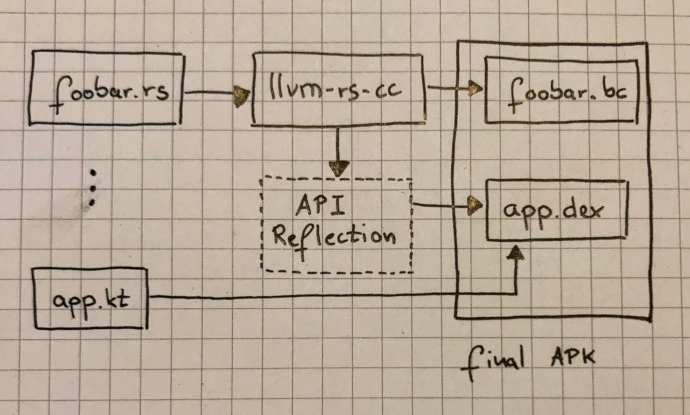
The build process for a given RenderScript kernels happens in two phases: There
exists a LLVM-based compiler called slang (llvm-rs-cc) that comes pre-shipped
with the Android NDK. This compiler consumes any RenderScript based script
containing kernels and emits highly optimized and portable code in IR format
(IR stands for intermediate representation) that gets pushed to the device.
This pipeline has the advantage of performing aggressive, machine-independent
optimizations on the developer host machine before the portable bitcode gets
pushed to device in order to save both battery and CPU power. Hence, the second
phase of the build process can be somewhat more light-weight:
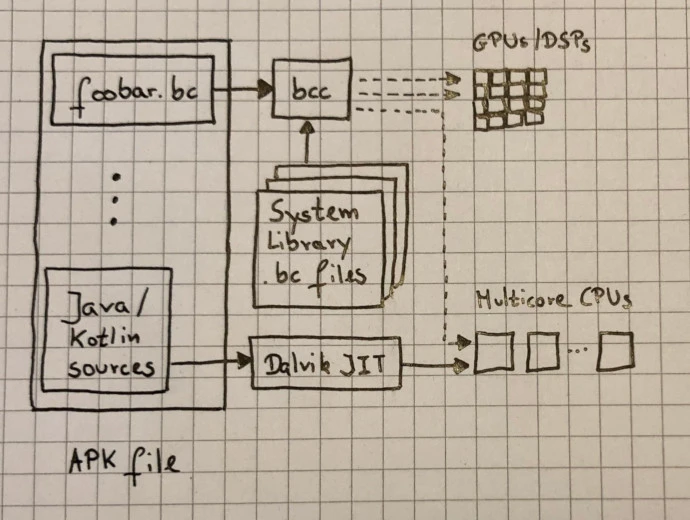
Here, either the online JIT compiler (bcc) takes care of performing
target-specific optimizations and code generation that either gets vectorized
on a multicore CPU or, if the vendor of that device provided its own RS specific
compiler can be ported to an installed GPU or DSP here.
The reasoning behind this design was to provide a generic runtime library while
allowing Android device manufactures to provide their specialized .bc library.
The implementation makes heavy use of LLVM and provides a lightweight JIT that
enables a fast launch time as well as on-device linking.
I’m available for software consultancy, training and mentoring. Please
contact me, if you are interested in my services.