GeistHaus
log in · sign up

Ken Shirriff's blog

Part of blogger.com

Computer history, restoring vintage computers, IC reverse engineering, and whatever

stories
The electromechanical angle computer inside the B-52 bomber's star tracker
aerospaceanalog
Show full content

Before GPS, how did aircraft navigate? One important technique was celestial navigation: navigating from the positions of the stars, planets, or the sun. While celestial navigation is accurate, cannot be jammed, and doesn't require any broadcast infrastructure, it is a difficult and time-consuming process to perform manually. In the early 1960s, an automated system was developed for the B-52 bomber to automatically track stars and compute navigation information. Digital computers weren't suitable at the time, so the star tracking system performed trigonometric calculations with an electromechanical analog computer called the Angle Computer.1

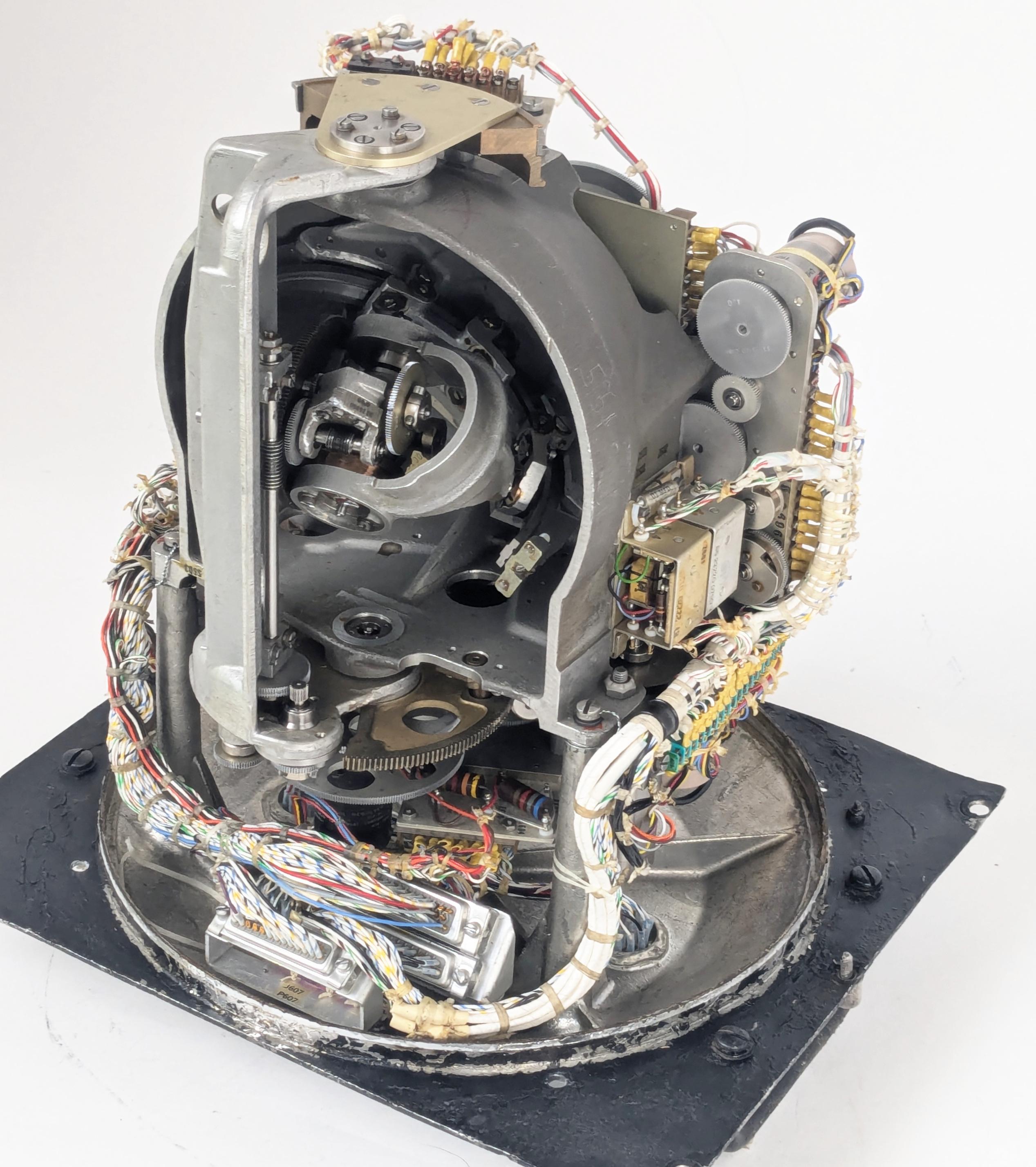
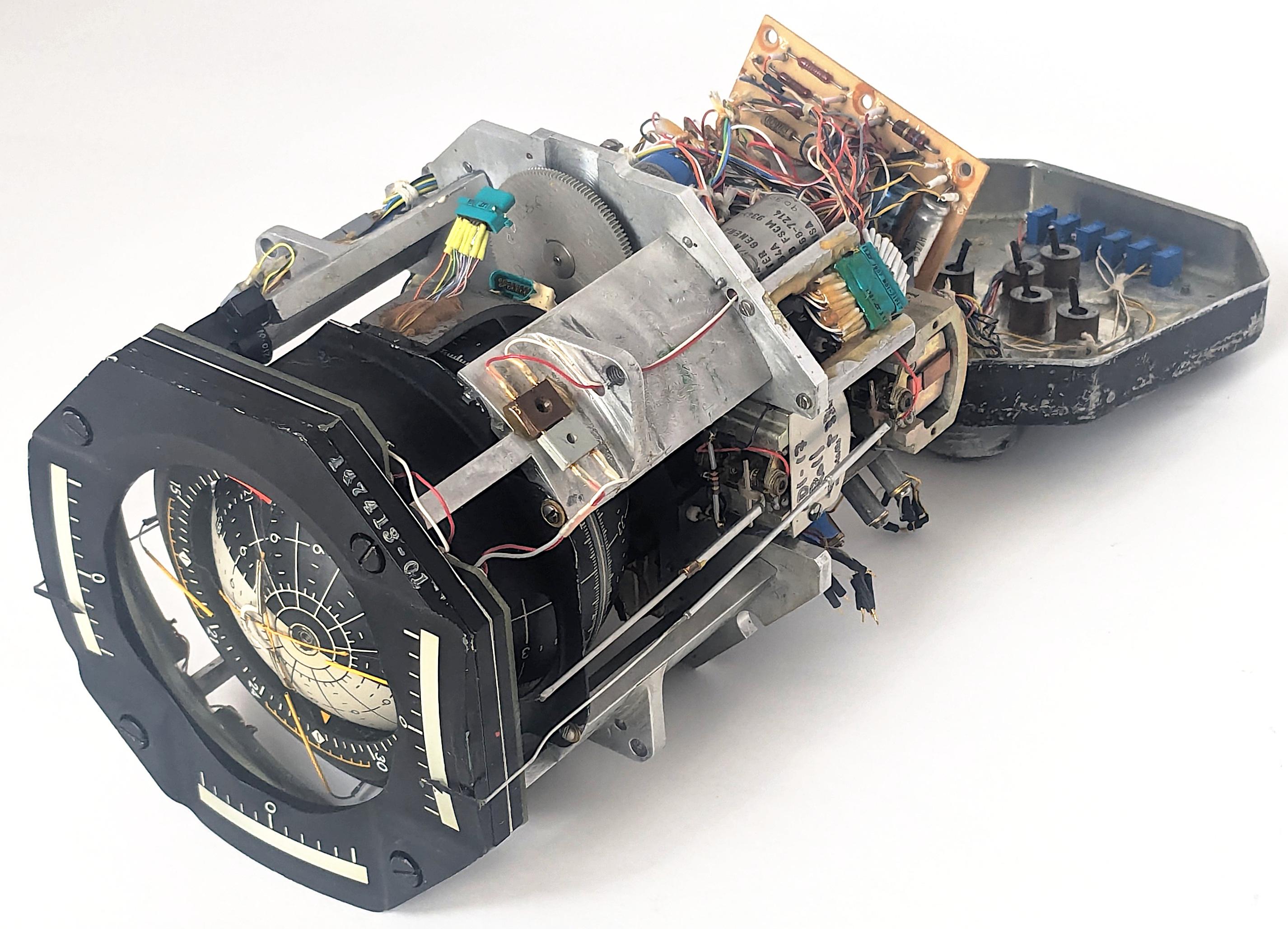
The Angle Computer contains complex electromechanical systems. Click this image (or any other) for a larger image.The Angle Computer contains complex electromechanical systems. Click this image (or any other) for a larger image.

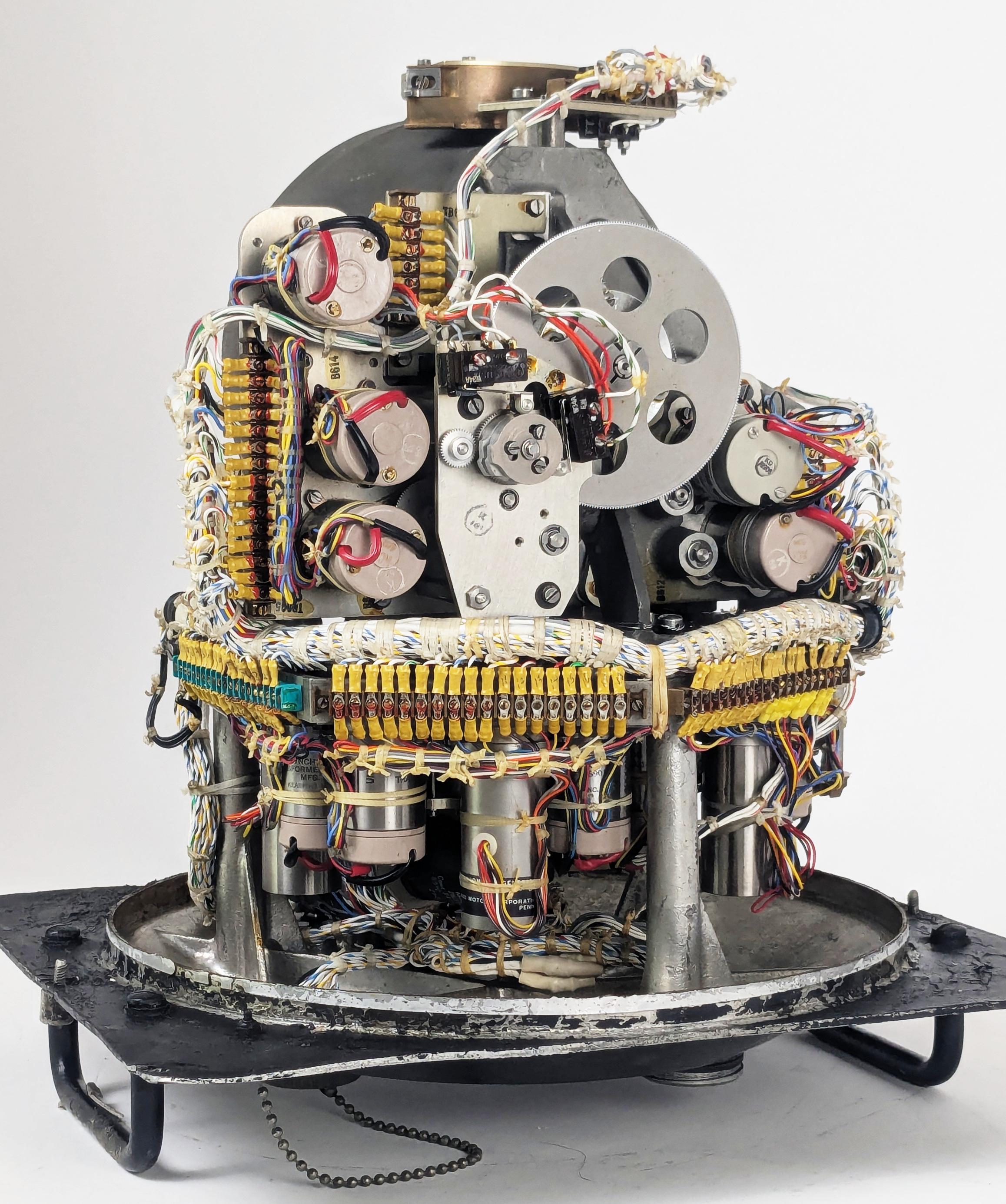
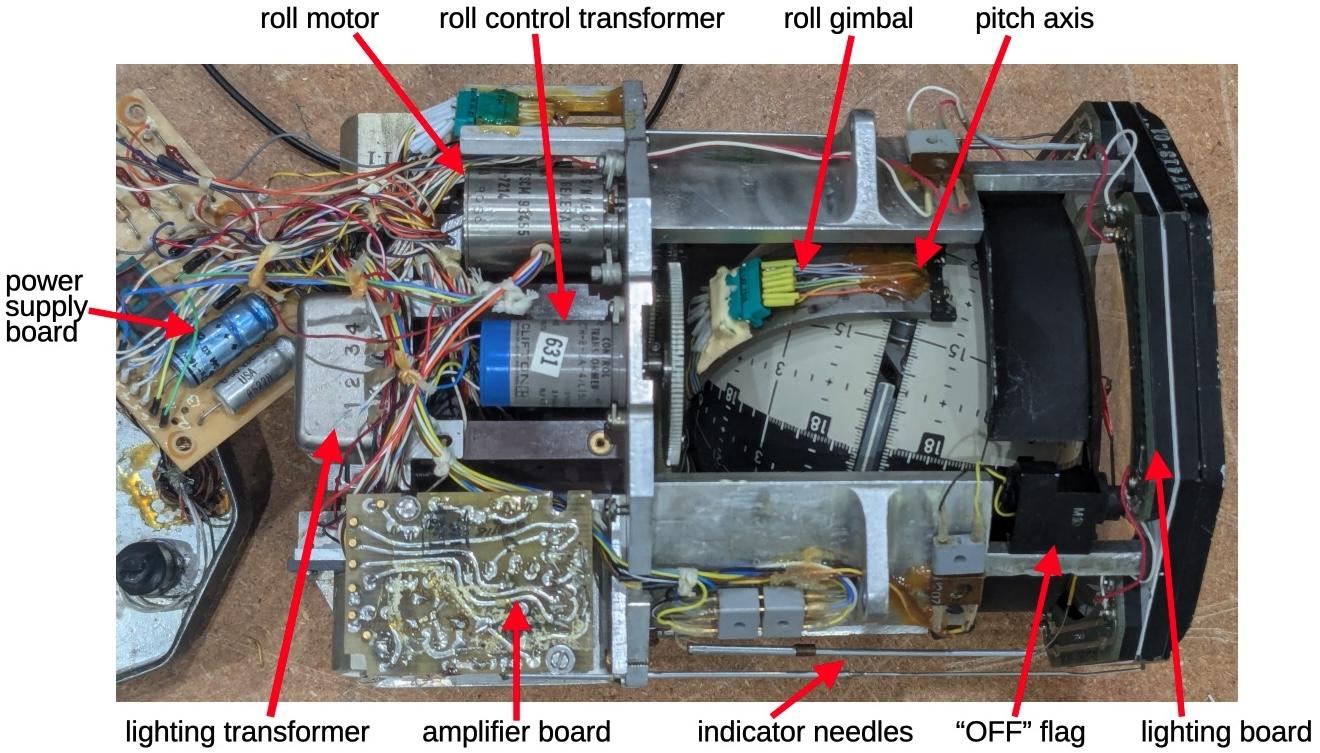
The photo above shows the mechanism inside the Angle Computer.2 Although it may look like a gyroscope or IMU (Inertial Measurement Unit), it is completely different and nothing is spinning. The Angle Computer physically models the "celestial sphere", with a complicated mechanism inside that moves a pointer that represents the position of a star. The corresponding angles (the azimuth and altitude) are read out electrically through devices called synchros, providing information to the navigation system through bundles of wires. In this article, I'll give an overview of how celestial navigation works and explain how the Angle Computer performs its calculations.

The Astro Compass system

The Angle Computer is one piece of the Astro Compass, a system that locked onto a star and produced a highly accurate heading (i.e., compass direction), accurate to a tenth of a degree. While the heading is the main output from the Astro Compass, the navigator can also use it to determine position, using the "lines of position" technique described later.

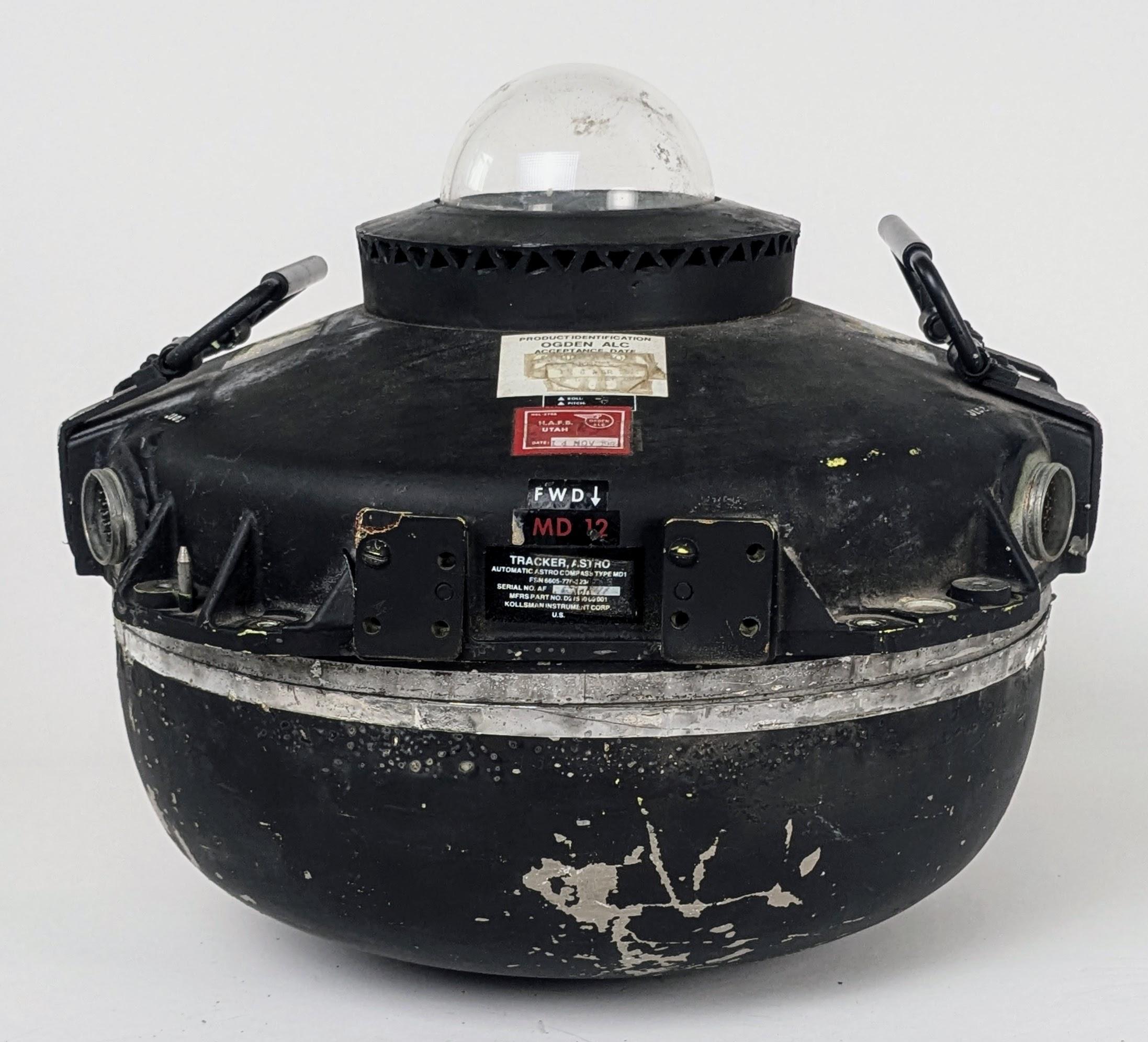
The Astro Tracker was mounted on top of the aircraft with the plastic bubble sticking out.The Astro Tracker was mounted on top of the aircraft with the plastic bubble sticking out.

The Astro Compass navigation system was built around the "Astro Tracker" (above), the optical system that tracks a star. The Astro Tracker was mounted on the aircraft with the 4-inch glass dome protruding from the top of the fuselage. This unit contains a tracking telescope, which used a photomultiplier tube to detect the light from a star. A gyroscope and a complicated system of motors provided a "stable platform", keeping the telescope precisely vertical even as the aircraft tilted and moved. A prism rotated and tilted to aim the telescope at a particular star.3

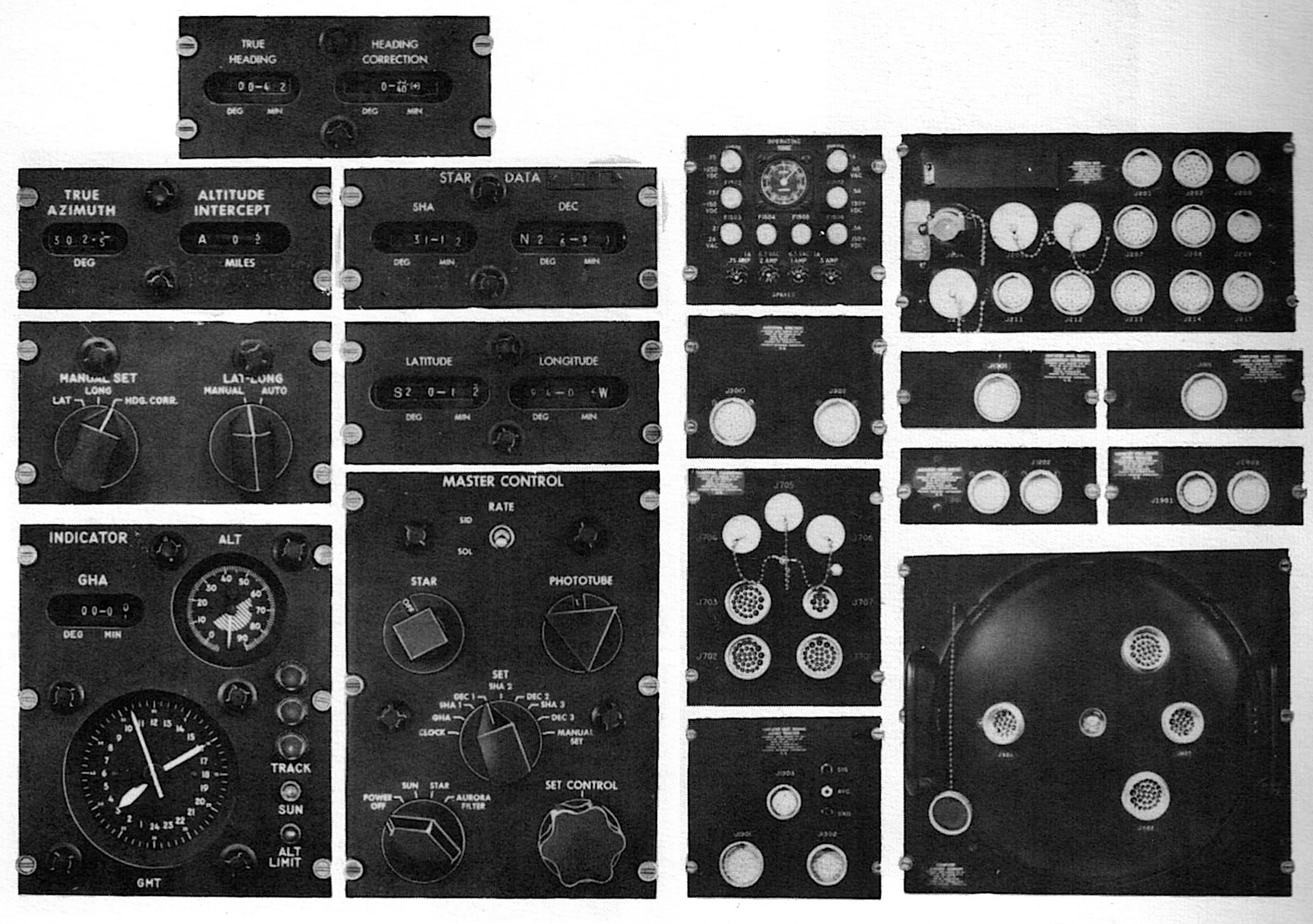
Star tracker instruments in the B-52 navigator's instrument panel: Line of Position display, Master Control panel, Heading Display panel, and Indicator Display panel.  From Kollsman MD-1 Automatic Astro Compass Manual.Star tracker instruments in the B-52 navigator's instrument panel: Line of Position display, Master Control panel, Heading Display panel, and Indicator Display panel. From Kollsman MD-1 Automatic Astro Compass Manual.

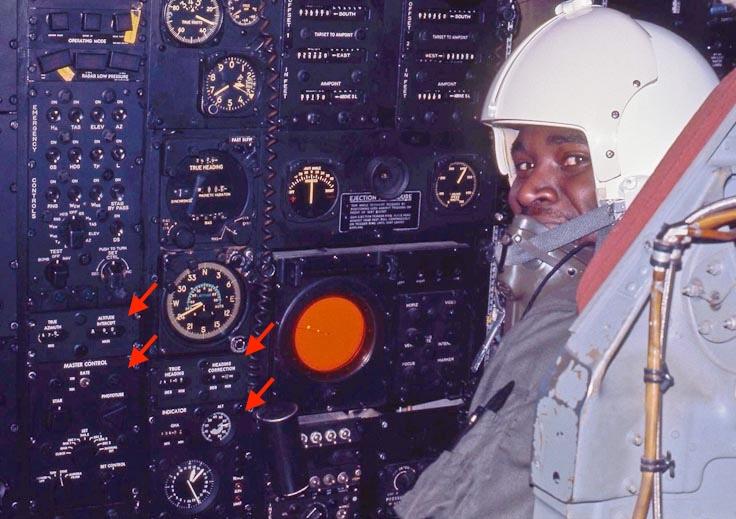
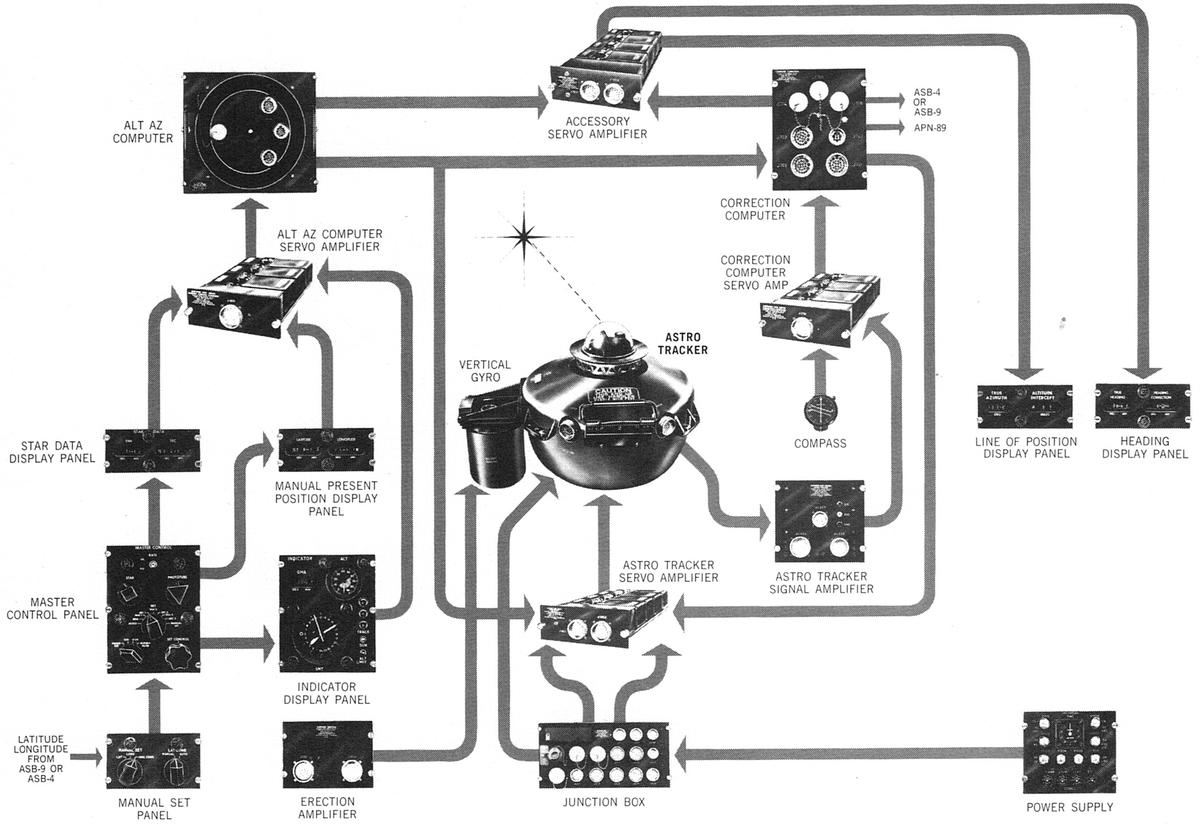
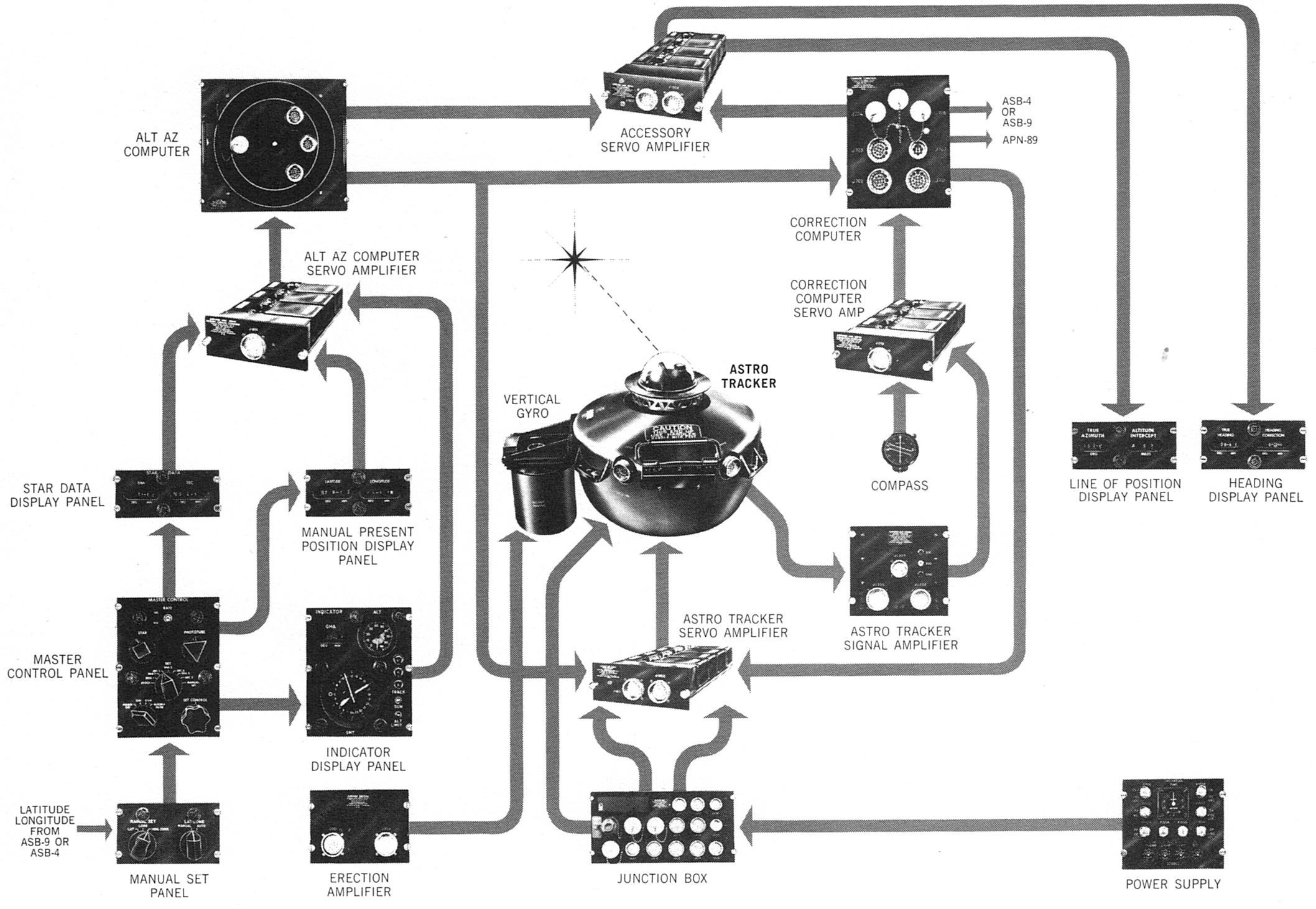
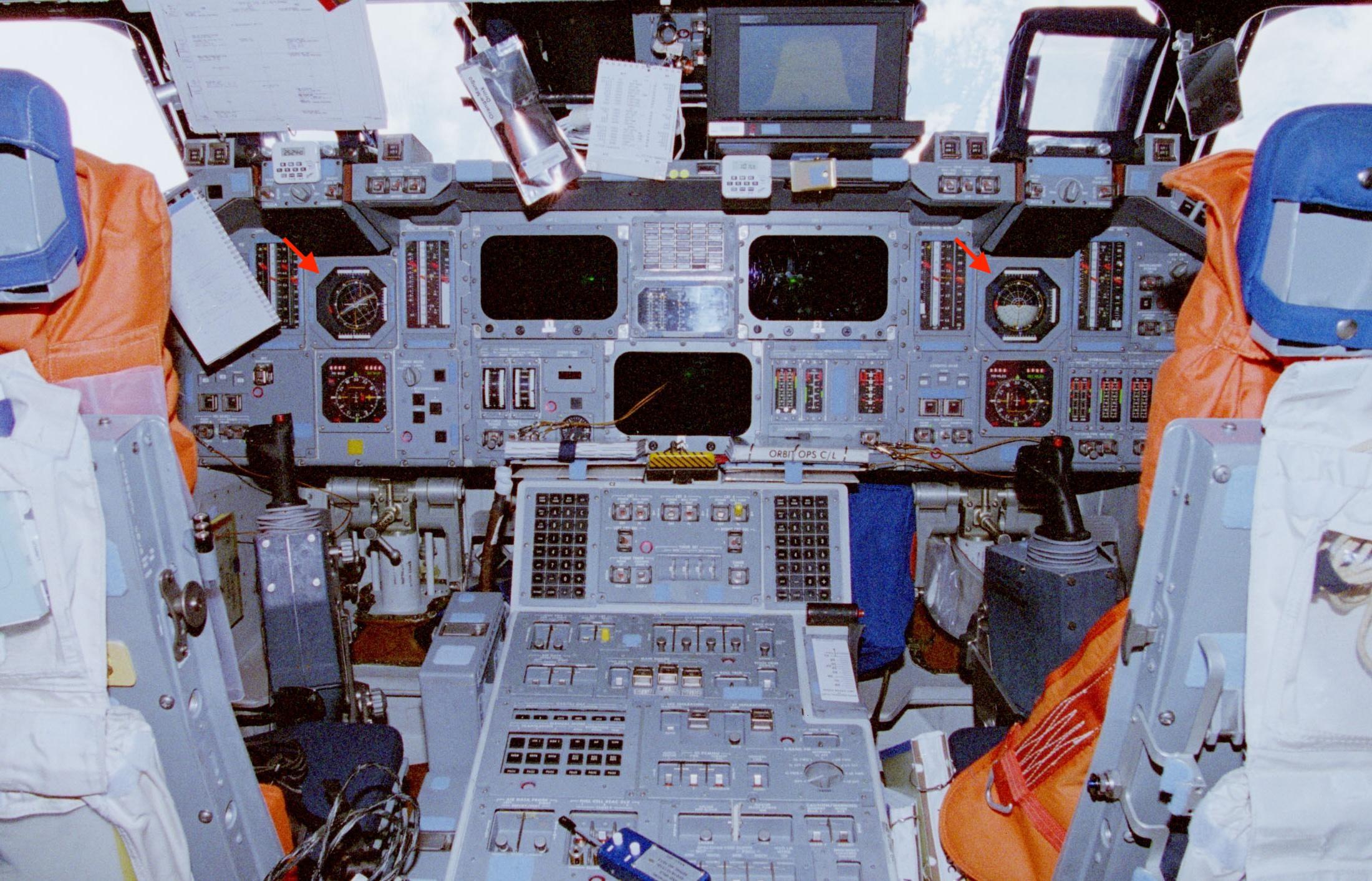
The Astro Compass system is bewilderingly complicated, consisting of 19 components (above) to support the Astro Tracker.4 On the right are the ten amplifier and computer components that controlled the system; the Angle Computer is in the lower right. On the left are the nine control and indicator panels that were used by the B-52's navigator. The photo below shows four of these panels in use in a B-52 in 1972.

The navigator's station in a B-52. Some of the Astro Compass controls are indicated with arrows: the Line of Position display and the Master Control on the left, and the Heading display and Indicator display to the right. The navigator in this photo is Carl Hanson-Carnethon. From Rob Bogash's B-52 photo album. This specific B-52 (#2584) is now at The Museum of Flight, Seattle, but the Astro Compass is no longer present.The navigator's station in a B-52. Some of the Astro Compass controls are indicated with arrows: the Line of Position display and the Master Control on the left, and the Heading display and Indicator display to the right. The navigator in this photo is Carl Hanson-Carnethon. From Rob Bogash's B-52 photo album. This specific B-52 (#2584) is now at The Museum of Flight, Seattle, but the Astro Compass is no longer present.

Controlling the Astro Compass

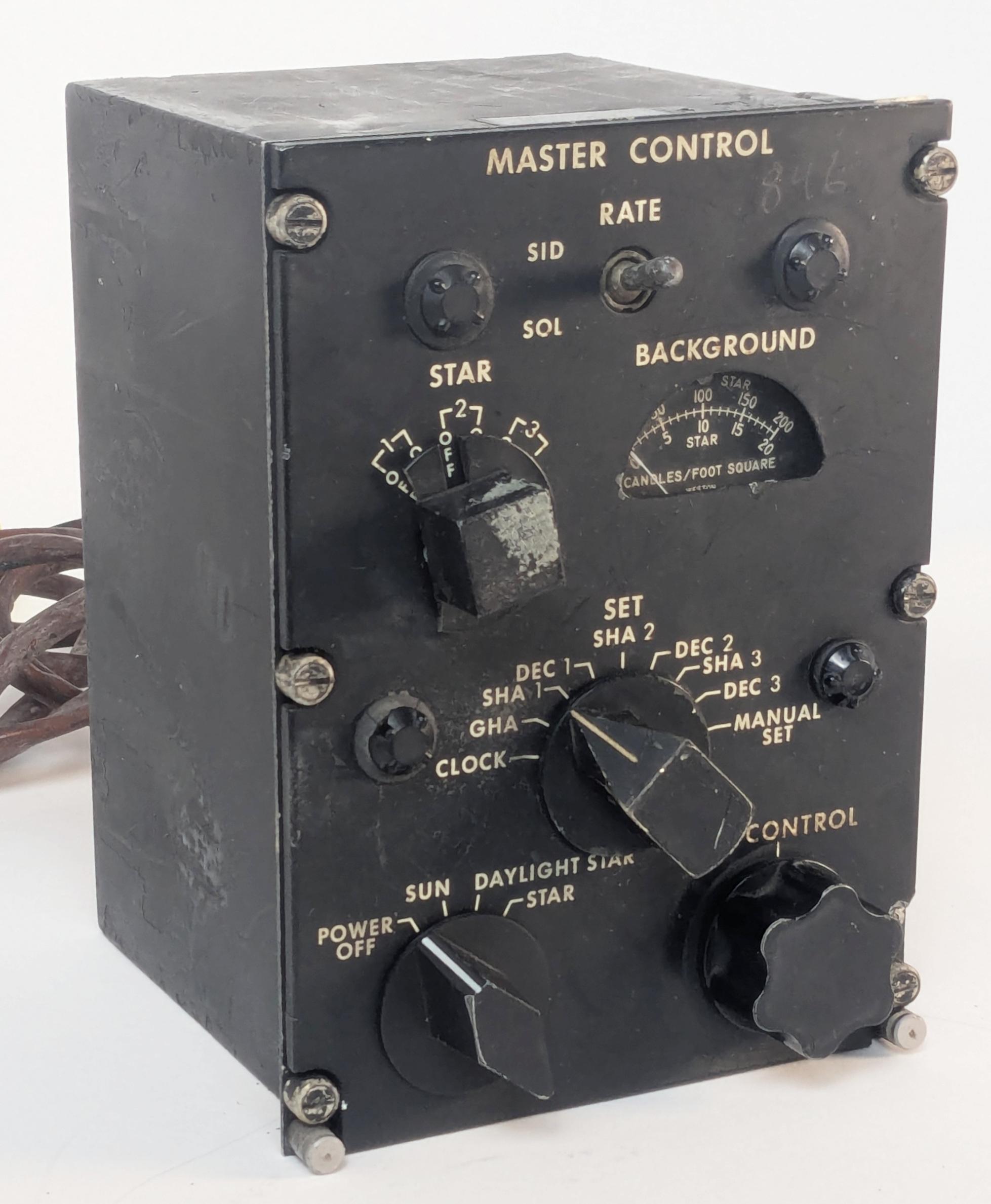
The Astro Compass has an interesting user interface, letting you input one value at a time by rotating a knob. First, you use the Master Control Panel to select a data value such as the clock time, SHA (Sidereal Hour Angle) for star #1, or Declination for star #3. Then you turn the "Set Control" knob clockwise or counterclockwise to scroll through the data values until the proper value is reached. Each knob on the Master Control Panel has a different geometrical shape, allowing the user to distinguish the knobs by feel. The Master Control Panel is visible in the lower left corner of the photo above, within easy reach of the navigator.

The Master Control Panel is the main interface to the Astro Compass.The Master Control Panel is the main interface to the Astro Compass.

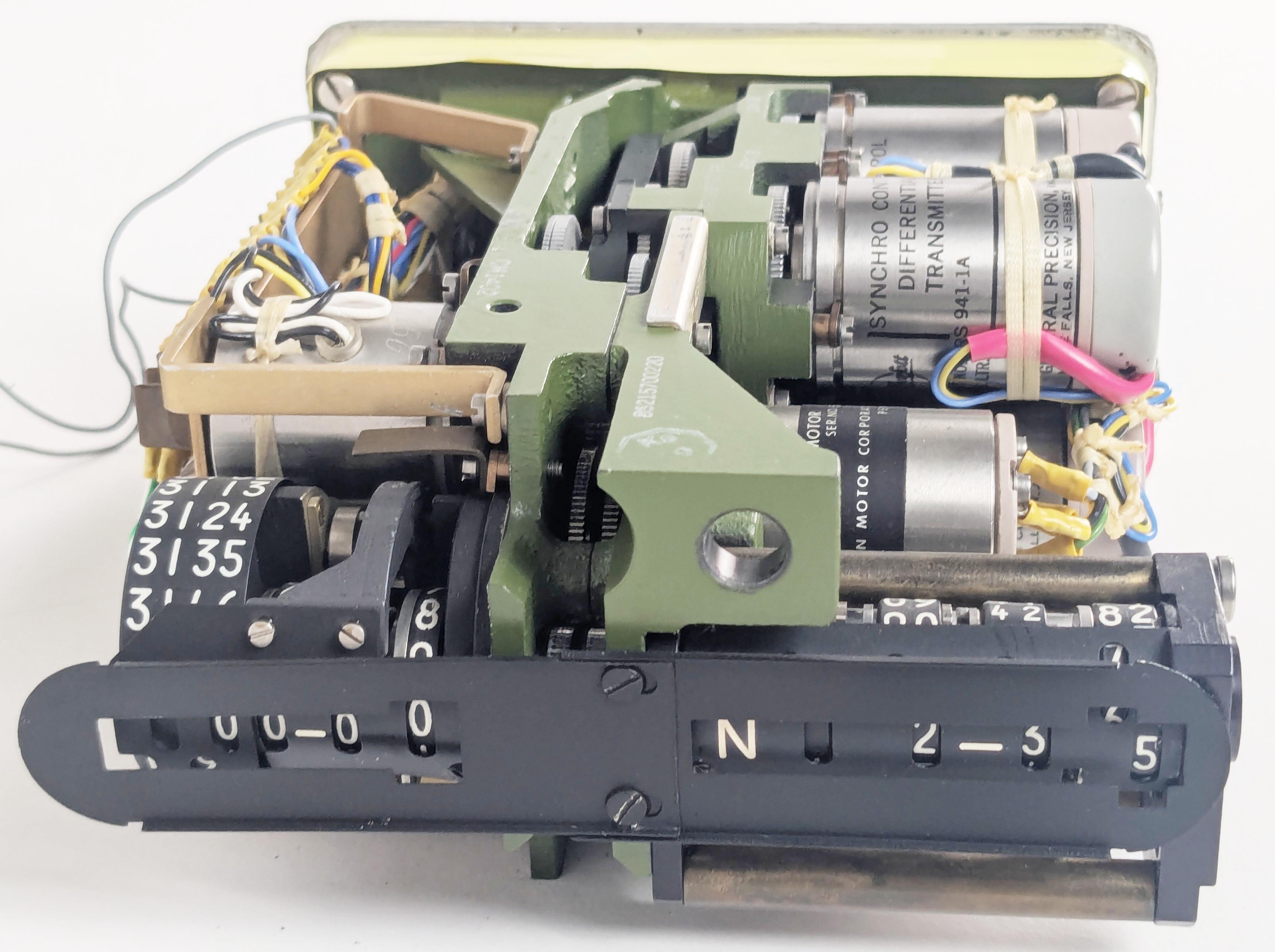
Each data value has a separate electromechanical display. The photo below shows a Star Data display, indicating the sidereal hour angle and the declination for a star. I removed the cover so you can see how the digital display actually consists of analog dials rotated by motors under synchro control. The system has three Star Data displays, so it can hold the positions of three stars at a time. Getting fixes from three different stars is useful when computing lines of position. The system uses one star at a time, but you can quickly change stars by flipping the Star switch on the Master Control Panel.

A Star Data display with the cover removed.A Star Data display with the cover removed.

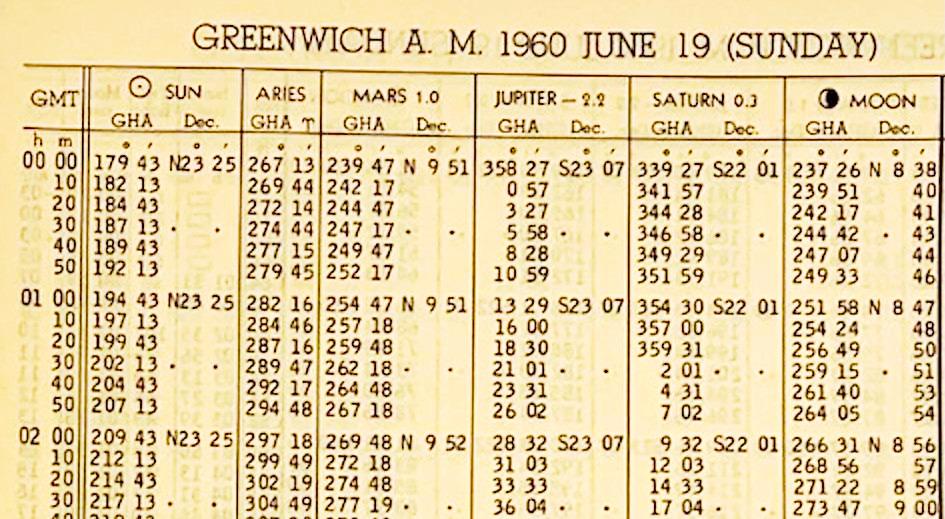
But how did the navigator obtain the information to put into the Astro Compass, since the sun, moon, stars, and planets are in constant motion?5 The necessary celestial information is published in a book called the Air Almanac. The US Government started publishing the Air Almanac in 1941, issuing a new volume every four months. The Almanac had a sheet for each day, providing celestial data on 10-minute intervals. The first column has the time (GMT, Greenwich Mean Time)6 while the other columns give the position of the sun, an important value called the First Point of Aries (symbol ♈︎), the positions of the visible planets, and the position of the moon. A separate table and chart provided the locations of stars; the stars don't have daily updates since they are almost stationary.7 (The Air Almanac is now online; you can download the 2026 Air Almanac here.)

An excerpt from the 1960 Air Almanac. Photo used with permission from tanasa2022, who is selling the Almanac on eBay.An excerpt from the 1960 Air Almanac. Photo used with permission from tanasa2022, who is selling the Almanac on eBay.

The navigational triangle: Computing a star's position

The Air Almanac provides star coordinates in a global coordinate system, but the Astro Compass needed to know star coordinates in the aircraft's local coordinate system. Determining the star's position requires changing the coordinate system by using spherical trigonometry and something called the navigational triangle. There's a fair bit of terminology involved, which I'll explain in this section.

The Astro Tracker, like many telescopes, is aimed by using azimuth and altitude. Suppose you go into your yard, point at the horizon, and turn 360° in a circle; the direction you're pointing is called the azimuth. The point directly overhead is called the zenith. Now swing your arm upwards 90° from the horizon to the zenith. That angle is called the altitude. (Confusingly, the term "altitude" is used both for the angle of a star and the height of an aircraft.) Thus, if you point at a particular star, you can describe its position with two angles: your horizontal rotation from north gives the azimuth, and the angle up from the horizon gives the altitude.8 This system is called the horizontal coordinate system, as it is based on the horizon. (The word "horizontal" comes from "horizon", by the way.) This is a local coordinate system since other locations will have a different azimuth and altitude for the star. The azimuth and altitude constantly vary with time because the Earth's rotation makes the star appear to move.

The equations for the altitude and azimuth are complicated, with sines, cosines, arcsine, and arctangent. To see why the equations are complicated, consider a time-exposure photo of star trails. As the Earth rotates, each star forms a circle around Polaris, the North Star. To trace out this circular path, the altitude and azimuth vary in a trigonometric way. This computation is performed electromechanically by the Angle Computer, as will be explained later.

Kitt Peak National Observatory beneath star trail. Credit: DESI Collaboration/DOE/KPNO/NOIRLab/NSF/AURA/L. Tyas, CC BY 4.0.Kitt Peak National Observatory beneath star trail. Credit: DESI Collaboration/DOE/KPNO/NOIRLab/NSF/AURA/L. Tyas, CC BY 4.0.

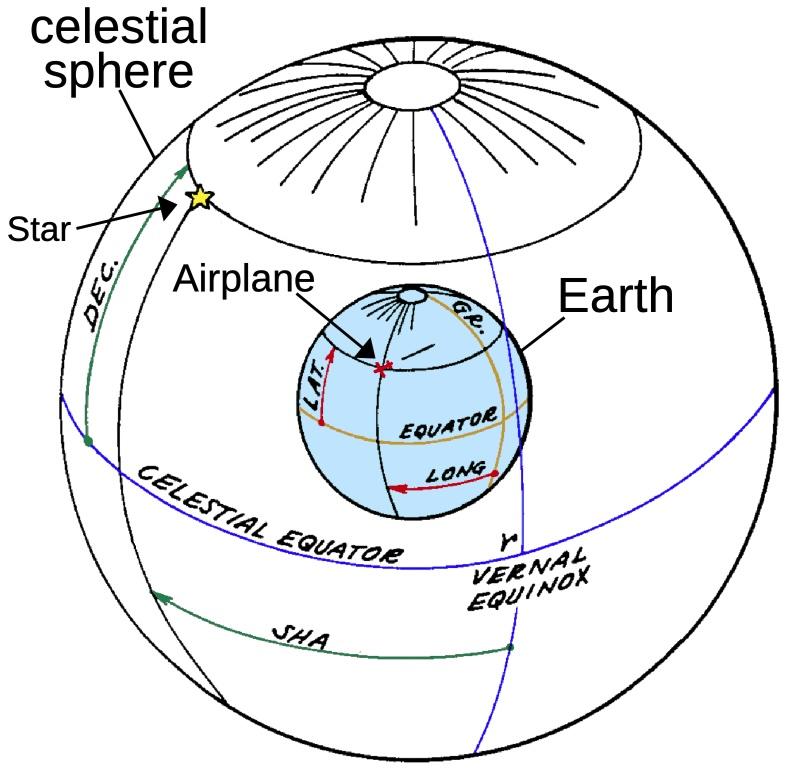
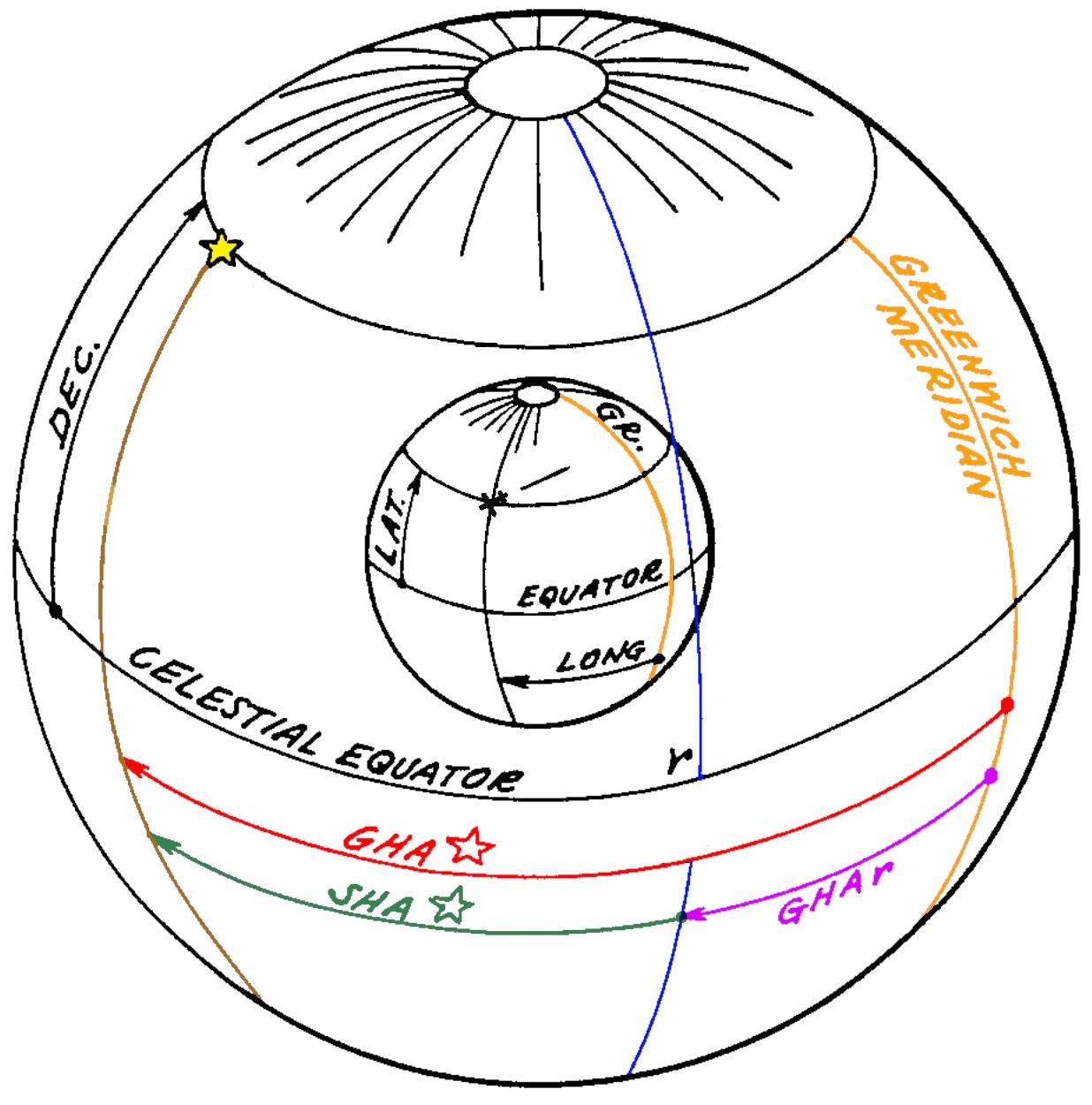
Now let's switch to how the position of a star is defined in the Air Almanac (for example), independently of your local position. Pretend that the stars are on the surface of a large sphere that surrounds the Earth, called the celestial sphere. The stars are stationary on the surface of the celestial sphere, while the Earth rotates once a (sidereal)9 day in the middle. Thus, as you look up at the celestial sphere, you see the stars moving. You can extend the Earth's equator out to the celestial sphere, defining the celestial equator. Likewise, the celestial sphere has celestial poles, matching the Earth's poles. On the Earth, you specify a location (such as the airplane's location) with latitude and longitude (red). Latitude is measured from the equator, and longitude is measured from a fixed meridian (orange). The 0° meridian is arbitrarily defined to pass through Greenwich (England, not Connecticut). Similarly, the position of a star is specified by the angle from the celestial equator (called declination instead of latitude) and the angle from the meridian (called the sidereal hour angle or SHA instead of longitude).10

The celestial sphere, with the Earth at the center. The position of a star is described by Sidereal Hour Angle and declination, analogous to longitude and latitude describing the position of, say, an airplane on the Earth. The diagram is based on patent 2998529, "Automatic astrocompass".The celestial sphere, with the Earth at the center. The position of a star is described by Sidereal Hour Angle and declination, analogous to longitude and latitude describing the position of, say, an airplane on the Earth. The diagram is based on patent 2998529, "Automatic astrocompass".

But what meridian is the starting point—0°—when measuring a star's Sidereal Hour Angle? The celestial equator matches the Earth's equator, but this won't work for the Greenwich meridian because it is constantly in motion. Instead, the 0° celestial meridian is arbitrarily defined as the position where the sun crosses the equator at the vernal equinox (the start of spring). If you consider the position of the sun on the celestial sphere, the sun will travel around the sphere once a year. Because the Earth's axis is tilted, the sun will be above the equator half the year and below the equator half the year, crossing the equator at the vernal equinox (March) and the autumnal equinox (September).

This reference point on the celestial sphere is called the First Point of Aries, represented by the symbol ♈︎ (horns of a ram); you might remember this symbol from the Air Almanac. At this point, the sun is in the constellation Pisces. So why is this point called the First Point of Aries and not Pisces? Back in 130 BCE, the ancient Greek astronomer Hipparchus defined the First Point of Aries as the starting point for the sun's motion. In that distant era, the sun was in the constellation Aries at the equinox, not in Pisces as it is today. It turns out that the direction of the Earth's axis isn't fixed, but moves in a 26,000-year cycle called the precession of the equinoxes.11 A 26,000-year cycle may seem irrelevant, but it's fast enough that the sun has moved from Aries to Pisces since Hipparchus's time. (And the equinox has moved 1° more since the B-52 was first produced!)

(All this talk of Aries and Pisces may sound like astrology, and, yes, there is a direct connection. Aries is the first zodiac sign, starting at the vernal equinox, typically March 21. The equinox's precession is "backwards", so the equinox has moved to Pisces, the last zodiac sign. Astronomically, the equinox will move into the constellation Aquarius around 2600 CE, but astrologers disagree on whether the Age of Aquarius has started; perhaps the 1960s was the dawning of the Age of Aquarius.)

How do you convert the star's fixed coordinate to the Earth's rotating coordinate? First, you look up the angle between the Greenwich meridian and the celestial meridian of Aries at a particular time. This angle (purple) is called the Greenwich Hour Angle of Aries (GHA ♈︎). Next, you look up the star's Sidereal Hour Angle (SHA). Adding them gives you the star's Greenwich Hour Angle (red), the angle between the Greenwich meridian and the star. Subtracting the aircraft's longitude gives you the Local Hour Angle (LHA, not shown), the angle between the aircraft's meridian and the star. (Note that these steps are simply addition and subtraction, so a mechanical system can easily do them with differential gears.)

Computing the Greenwich Hour Angle of the start on the sphere.Computing the Greenwich Hour Angle of the start on the sphere.

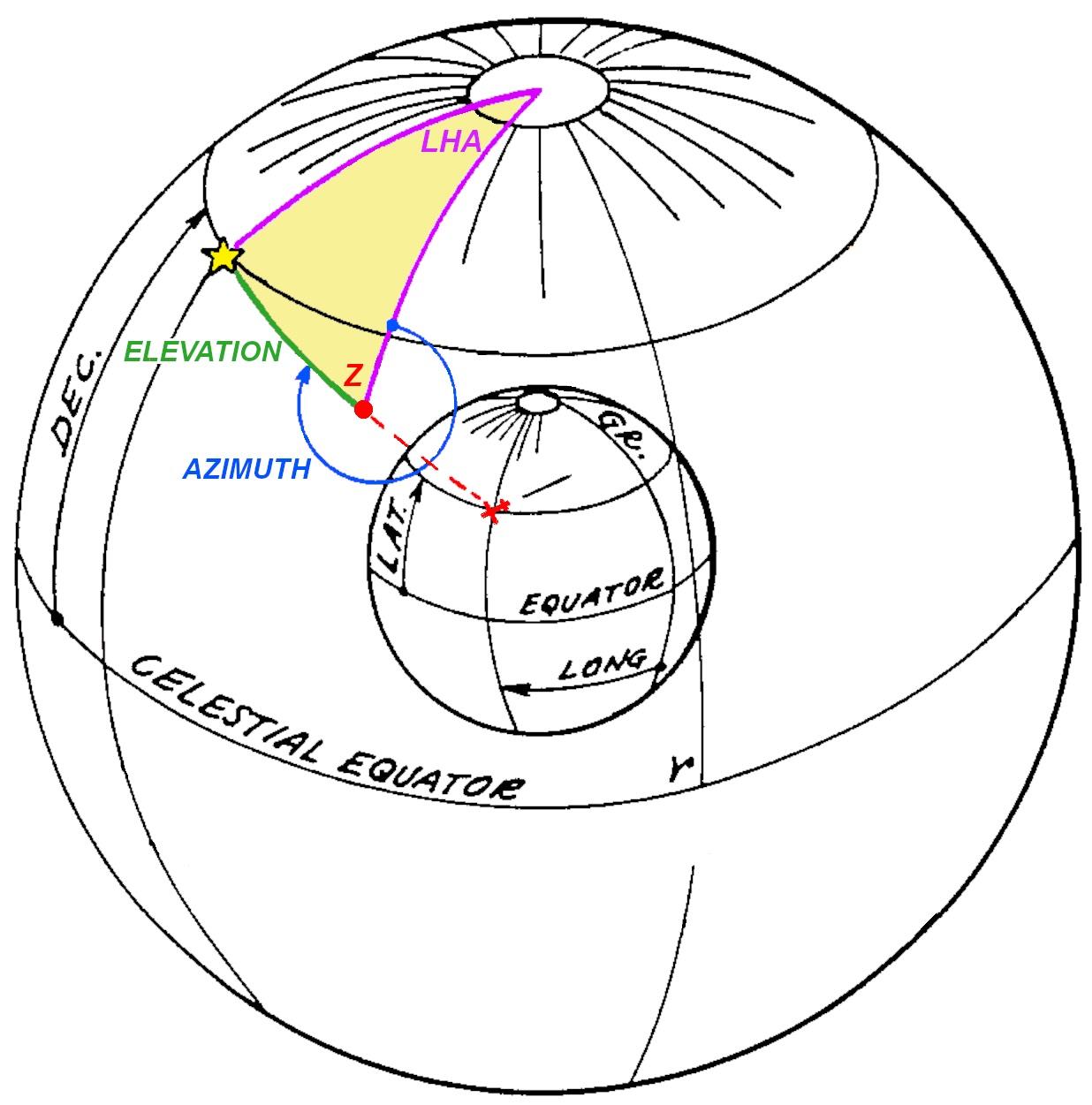
The final step, obtaining the azimuth and altitude, requires tricky spherical trigonometry. The yellow triangle is the navigational triangle, a spherical triangle on the surface of the celestial sphere. The upper vertex is the North Pole, the red vertex is the airplane's zenith (i.e., directly above the airplane), and the final vertex is the star. Two sides of the triangle and an angle (purple) are known, so the remaining angles and sides can be solved with spherical trigonometry. Specifically, the first side (purple) is 90°-declination, the second side is 90°-latitude,12 and the angle between is the LHA (Local Hour Angle). Solving for the angle at the zenith gives the azimuth (blue), while solving for the third side gives 90°-altitude (green, the angle down from the zenith to the star).

By solving the navigational triangle, the altitude and azimuth can be obtained.By solving the navigational triangle, the altitude and azimuth can be obtained.

Thus, the key problem is solving the navigational triangle. Navigators could solve the navigational triangle by looking up angles in a thick book of "sight reduction" tables and performing some math. But how could the process be automated? That was the purpose of the Angle Computer.

The Angle Computer

The job of the Angle Computer was to solve the navigational triangle mechanically. Its inputs were the star's declination, altitude, and local hour angle. From these, it computed the star's altitude and azimuth at the aircraft's current position.13

The concept behind the Angle Computer is that it physically modeled the celestial sphere with a half-sphere, 2 5/8" in radius. A star pointer was mechanically positioned on the surface of this sphere, using the star's declination and local hour angle, adjusted by the latitude of the viewer. The star pointer moved a readout mechanism that translated the star's position into the azimuth and altitude at the specified location. Thus, the Angle Computer mechanically converted between the coordinate systems by using a physical representation, solving the navigational triangle.

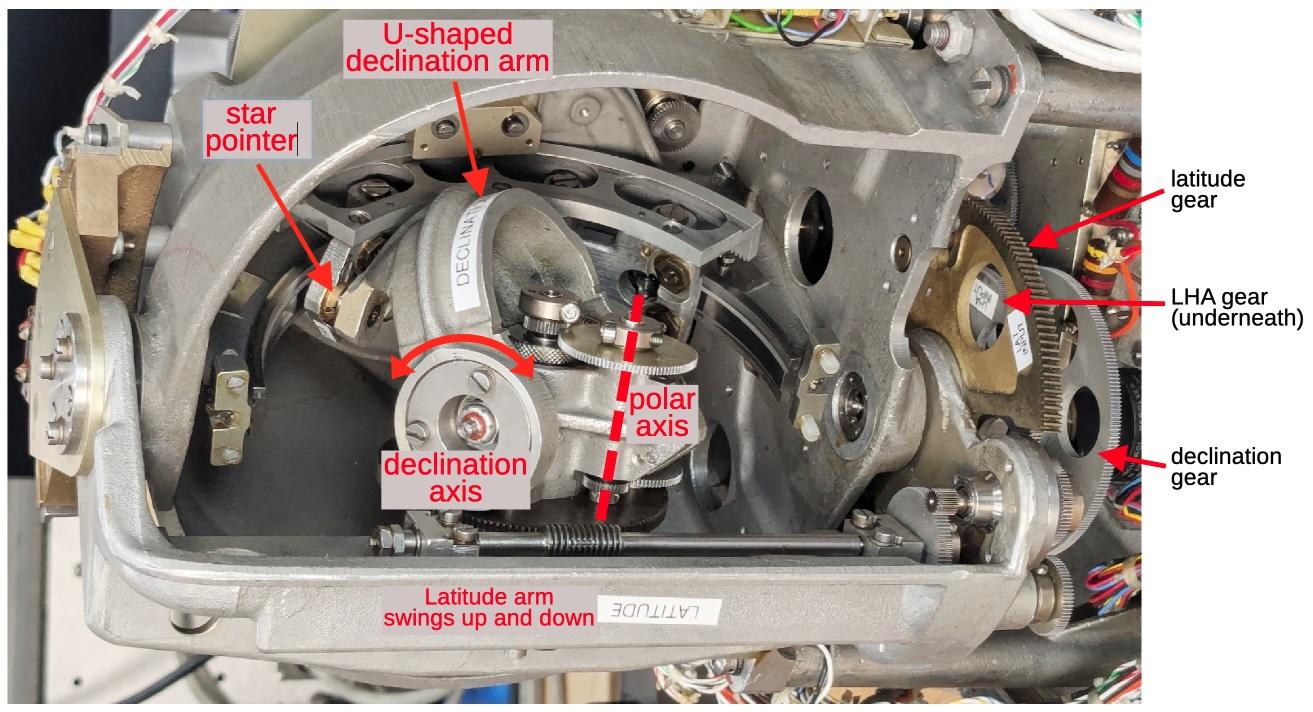
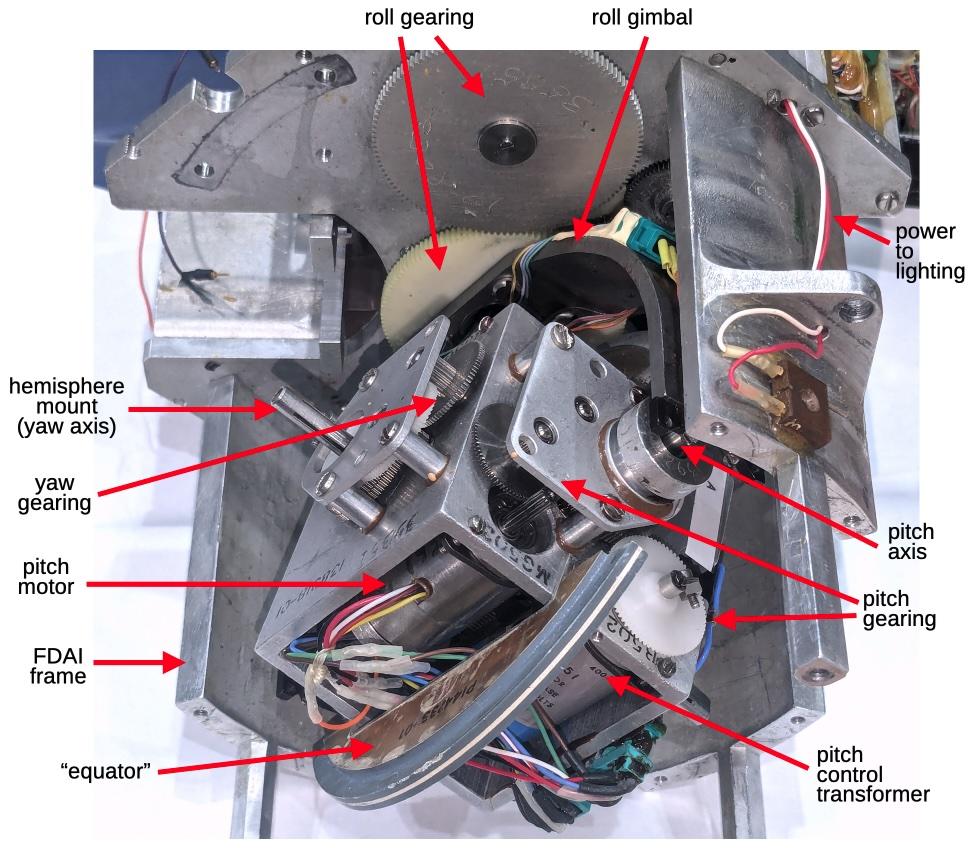
The diagram below shows how the star pointer is positioned on the two-dimensional surface of the sphere, using a complicated mechanism inside the sphere. The U-shaped declination arm swings up and down, corresponding to the star's declination (angle above the celestial equator). Meanwhile, the declination arm constantly rotates around the polar axis, as specified by the LHA (Local Hour Angle). In one (sidereal) day, the mechanism will make a full cycle, corresponding to the Earth's spin. Finally, the latitude arm moves the mechanism up or down, corresponding to the viewer's latitude. On the right, three gears provide the inputs for latitude, LHA, and declination.

The input mechanism for the Angle Computer. The photo has been rotated 90° to better match the
Earth's rotation. Rotation around the polar axis corresponds to the Earth's daily rotation. Note that the star pointer will hit the end of the semicircular azimuth arc at some point; this corresponds to the star moving to the horizon and setting.The input mechanism for the Angle Computer. The photo has been rotated 90° to better match the Earth's rotation. Rotation around the polar axis corresponds to the Earth's daily rotation. Note that the star pointer will hit the end of the semicircular azimuth arc at some point; this corresponds to the star moving to the horizon and setting.

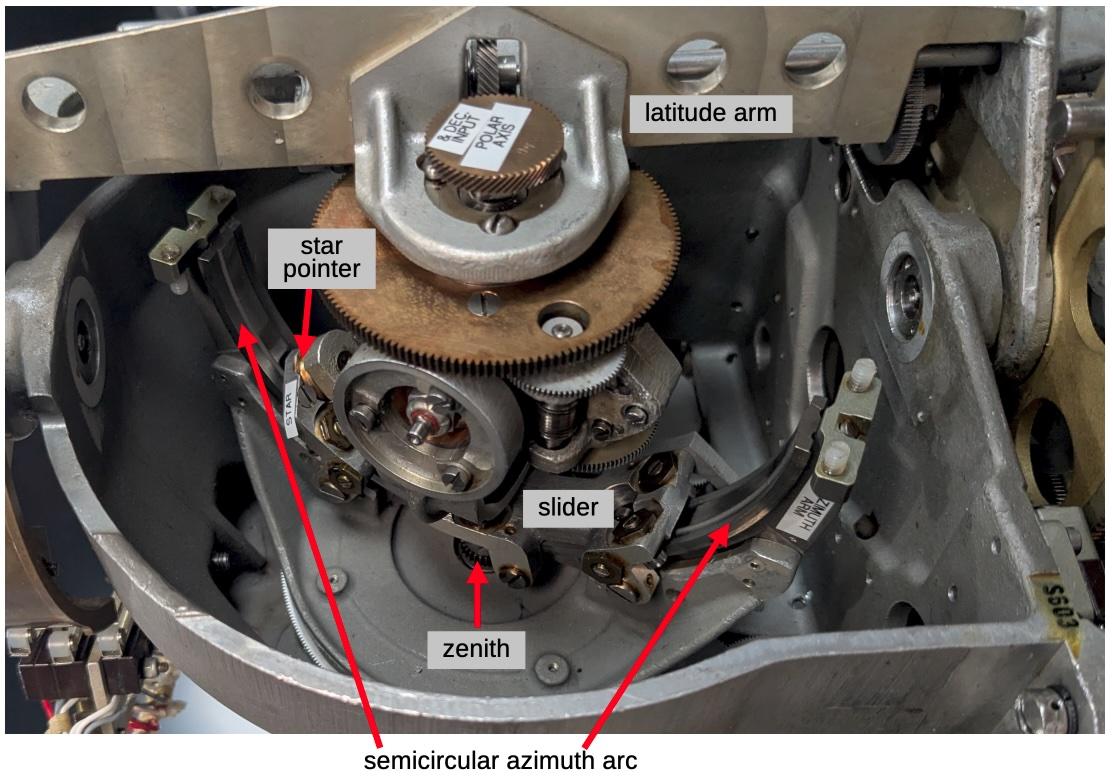
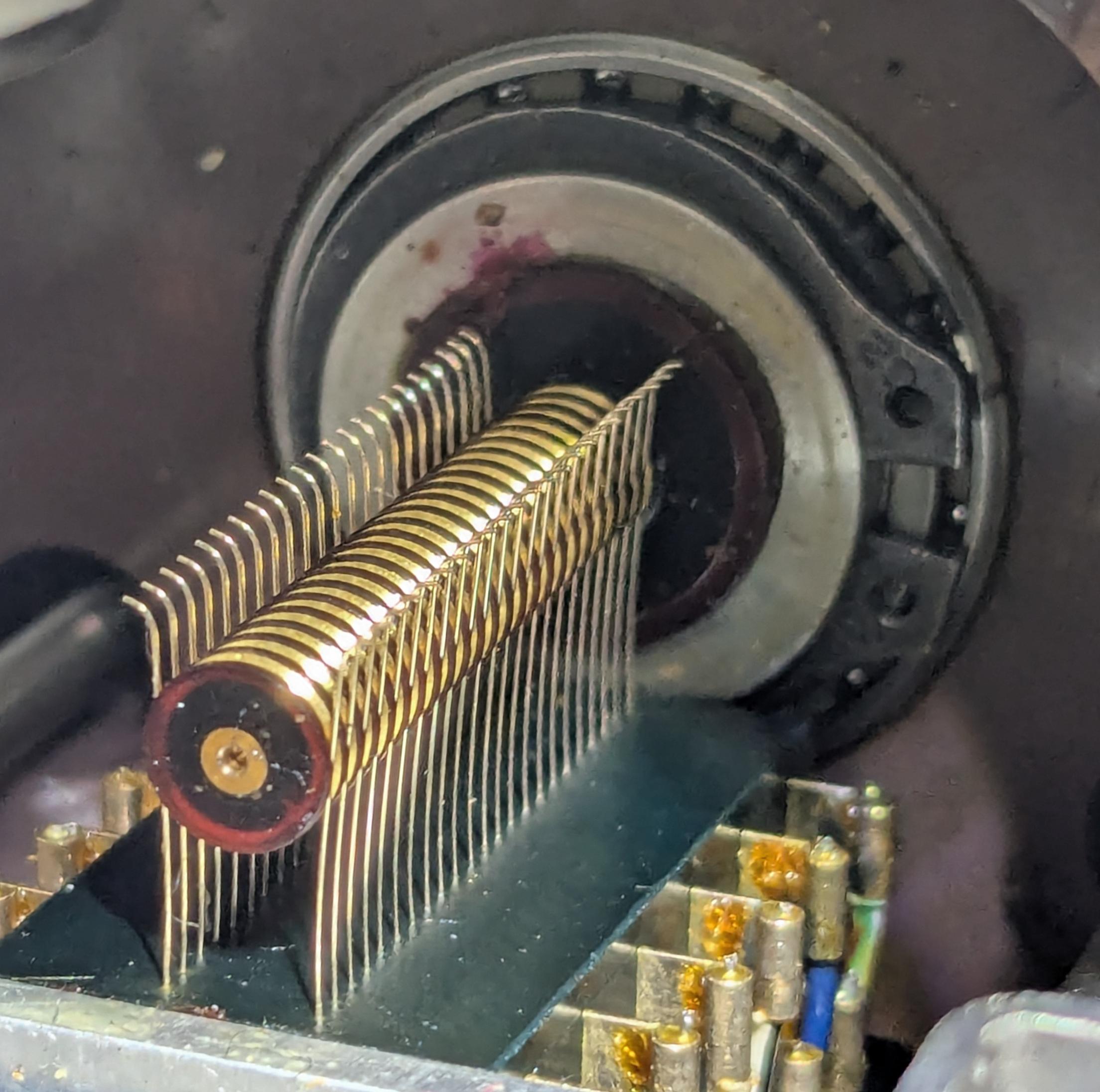
A separate mechanism provides the altitude and azimuth outputs, driven by the star pointer. The key is the semicircular azimuth arc, which represents the arc from the viewer's horizon to the zenith, oriented to a particular azimuth. The star pointer is attached to the azimuth arc through a slider, so as the star pointer moves, it moves the slider along the azimuth arc and also rotates the azimuth arc. Specifically, the azimuth arc represents the line from the horizon to the zenith at a particular azimuth. The position of the slider on the azimuth arc corresponds to the altitude, from 0° at the horizon to 90° at the zenith.14. The azimuth arc rotates around the zenith point, which is at the back of the azimuth arc; this rotation indicates the azimuth value. As the azimuth arc rotates, it turns a gear at the zenith, providing the azimuth output. The slider arc has teeth on it; as the slider moves, these teeth rotate a second gear, providing the altitude output.

The output mechanism for the Angle Computer. The mechanism is in a different position from the
previous diagram. In particular, the latitude arm has been raised to a near-polar latitude and the photograph is from
the other side of the latitude arm. At this latitude, the polar axis is almost lined up with the zenith. As the LHA changes, the star will move in a circle, rotating the azimuth arc but causing little change in altitude. This corresponds to the real world situation of stars moving in a cirle around the zenith, if you're near the pole.The output mechanism for the Angle Computer. The mechanism is in a different position from the previous diagram. In particular, the latitude arm has been raised to a near-polar latitude and the photograph is from the other side of the latitude arm. At this latitude, the polar axis is almost lined up with the zenith. As the LHA changes, the star will move in a circle, rotating the azimuth arc but causing little change in altitude. This corresponds to the real world situation of stars moving in a cirle around the zenith, if you're near the pole.

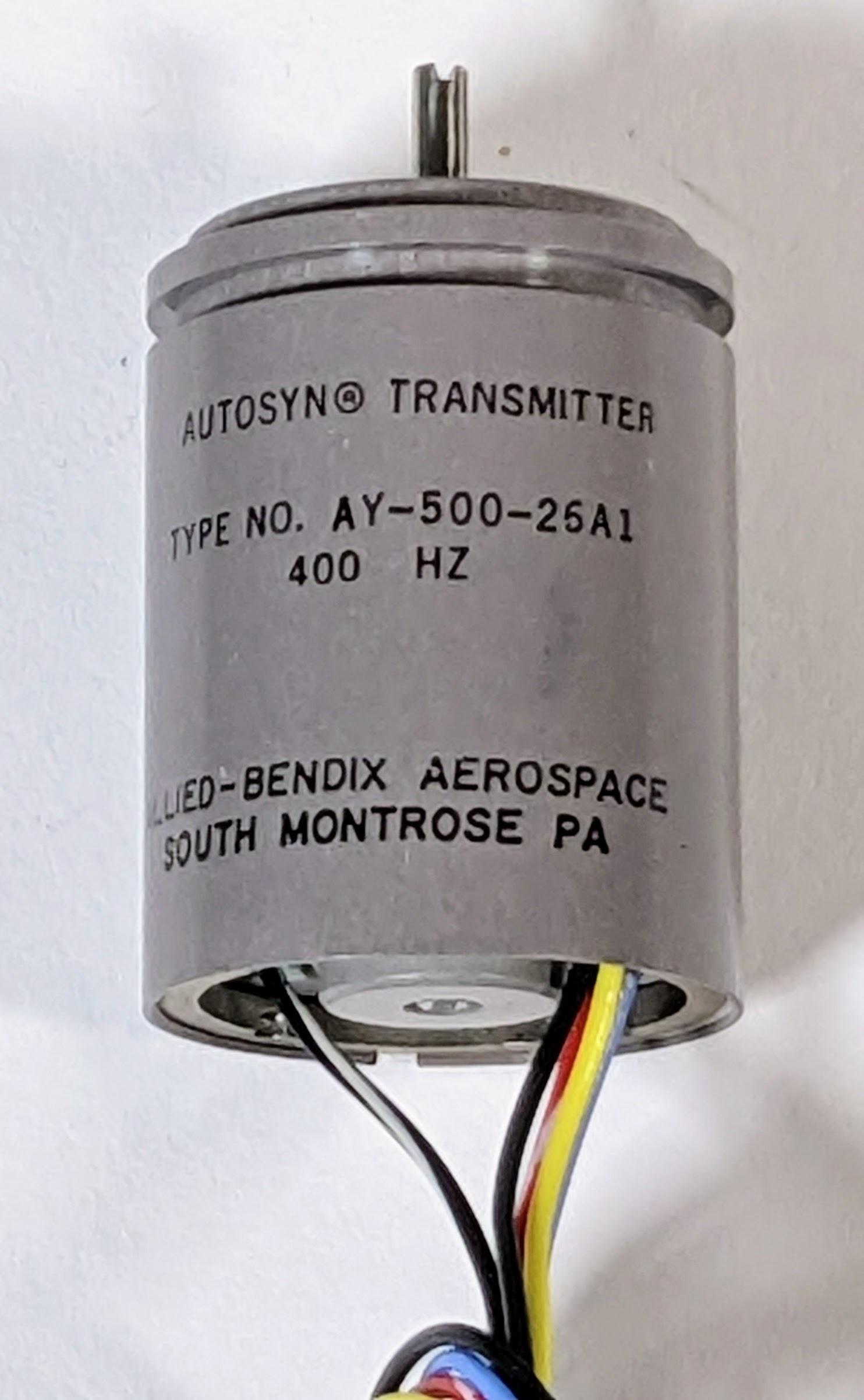
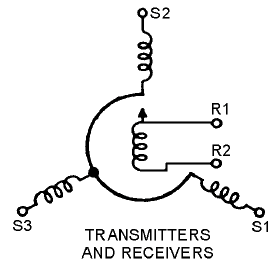
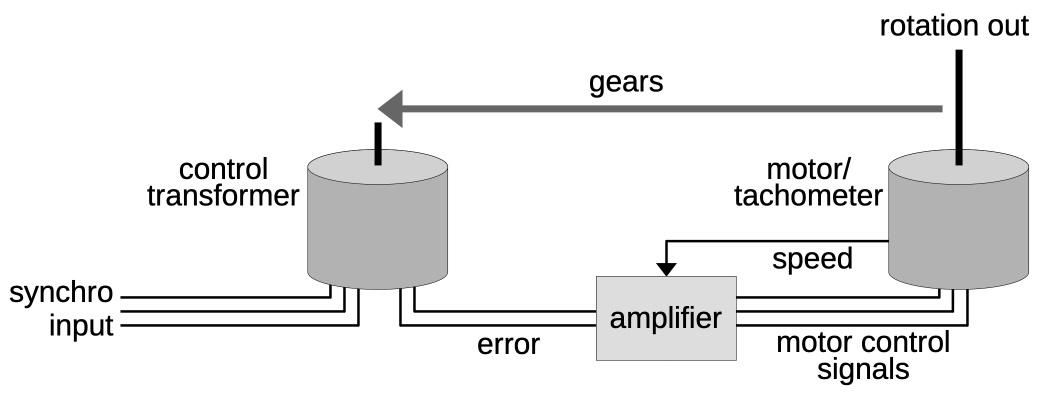
From the back, the numerous synchro transmitters, synchro control transformers, and motors are visible. Even though the computation itself is mechanical, the Angle Computer has numerous electrical components. In the top half, the synchro transmitters provide electrical outputs of the azimuth and altitude. (A synchro transmitter uses fixed and moving coils to convert a shaft rotation angle into a three-wire electrical signal.) The large gear provides the altitude output. In the lower half, the longer cylinders are motors that move the Angle Computer's mechanisms. The motors are directed to rotate to a particular position through a feedback loop: synchro control transformers provide feedback to the external servo amplifiers that power the motors.

The back of the Angle Computer.The back of the Angle Computer.

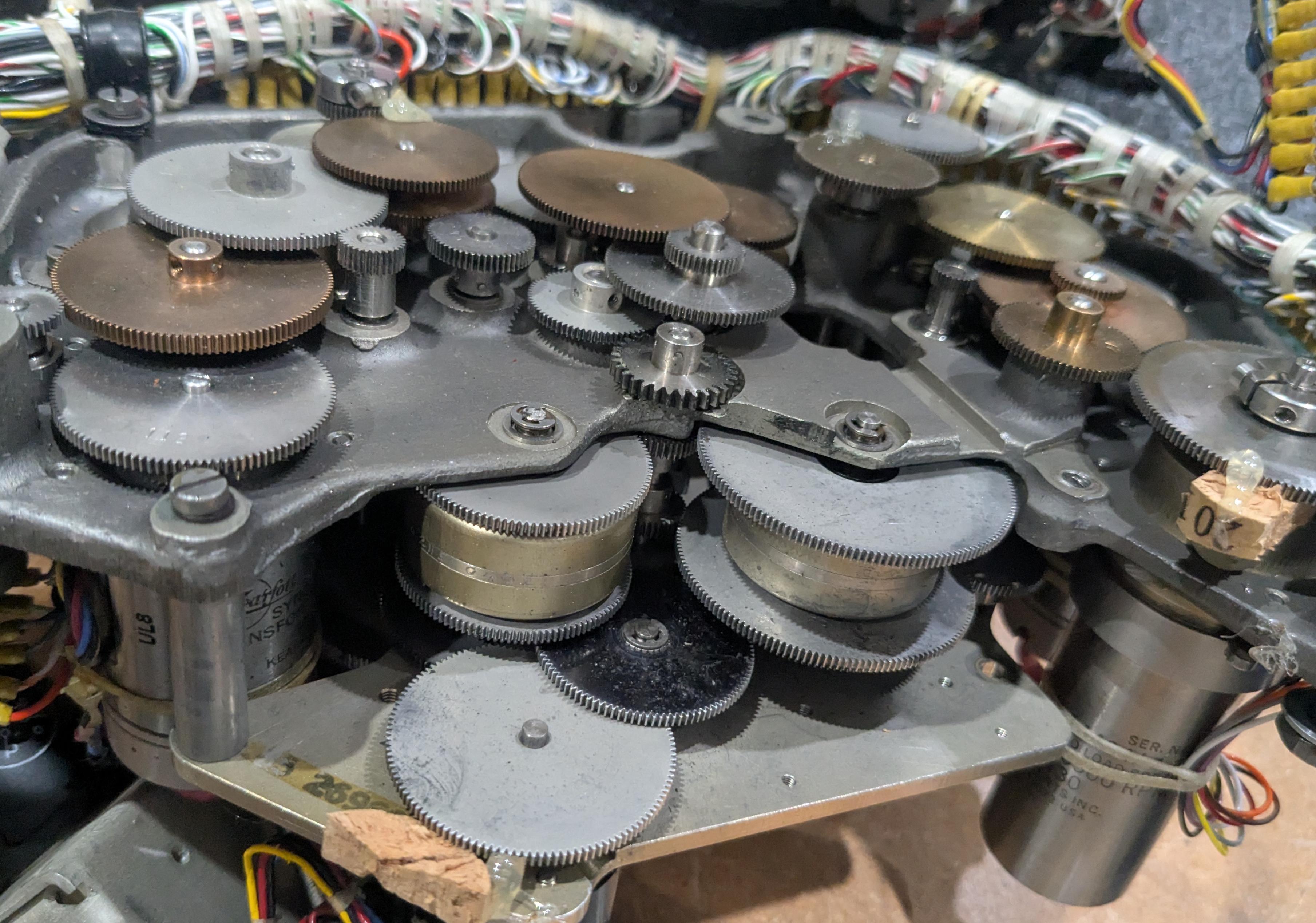
Partially disassembling the Angle Computer shows the complex gear trains inside, linking the synchros, motors, and the physical mechanism. The squat brass-colored units in the lower center are differential assemblies to add or subtract signals.15 One of the drive motors, a long cylinder, is visible in the lower right.

Gear trains inside the Angle Computer.Gear trains inside the Angle Computer.

The Line of Position

Although the heading was the primary output from the Astro Compass, the Astro Compass could also help determine the location of the aircraft, using a technique called the celestial line of position. This technique was discovered in 1837 and became heavily used for navigating ships with a sextant. It could also be used onboard an aircraft.

To understand the line of position, suppose you go outside and find a star directly overhead. If you measure the altitude—the angle from the horizon to the star—with a sextant, the angle will be 90°, since it is overhead. Now, suppose you teleport 60 nautical miles away in any direction. The sextant will now show an altitude of 89° to the star, since a nautical mile is conveniently defined to match one minute of angle (one-sixtieth of a degree). Alternatively, if you measure an altitude of 89° to the star, you know you are 60 miles away from the original point under the star (called the sub-stellar point). Likewise, if you measure 88° to the star, you're on a circle with radius of 120 nautical miles around the sub-stellar point. If you measure, say, an altitude of 40°, you know you're on a very large circle with radius of 3000 miles around the sub-stellar point. So how does this help with navigation?

Suppose you're on a boat in the middle of the Pacific and you have a rough idea of where you are, say within 100 miles, but you want to find your exact position. Put a dot on the map where you think you are. Next, pick a star and work out what the angle to the star should be from your position. Measure the altitude with your sextant. Suppose you expected 50° but measured 51°. You now know that you're somewhere on a circle with radius of 2340 miles around the distant sub-stellar point. This doesn't seem very useful. However, since the angle was 1° more than expected, you know that the circle is 60 miles closer to that distant point than your estimated position. Moreover, since you have some idea of where you are, you know that you're on the part of this circle near your estimated location. And since you're looking at a small part of a big circle, you can approximate it by a line. So you can go back to your map, move 60 miles closer to the star from your estimated point, and draw a perpendicular line. This is your line of position, and you know that you're on this line (more or less).

Knowing that you're on a line isn't too useful, but you can repeat the process with a star in a different part of the sky. Maybe this time the angle is 2° smaller than expected, so you can draw a line of position 120 miles further away from your estimated position, in a different direction. The two lines cross, indicating a position where you (probably) are.16 Normally, you repeat the process with a third star, giving you three lines of position, providing a position and an idea of its accuracy.

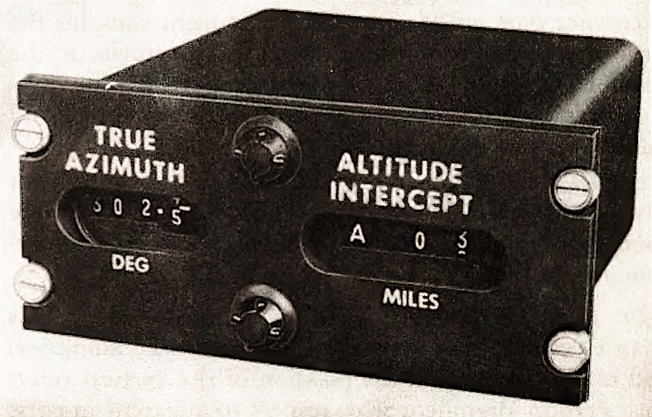
The Line of Position display panel. Remember that the altitude here has nothing to do with the aircraft's altitude. From Kollsman MD-1 Automatic Astro Compass Manual.The Line of Position display panel. Remember that the altitude here has nothing to do with the aircraft's altitude. From Kollsman MD-1 Automatic Astro Compass Manual.

The Astro Compass used the display above to show the star's azimuth and the distance in miles from the assumed location to the line of position, called the Altitude Intercept. With this information, the navigator could draw a line of position on the map. The navigator repeated the process with two more stars to get a location fix.17

Conclusion

The Angle Computer is a relic from a time when a mechanical analog computer was the best way to solve a problem, but the computer was also electrical. Although a mechanical apparatus solved the navigational triangle, it was moved into position by motors, and the output was transmitted electrically through wires. Moreover, the Angle Computer was driven by electronic amplifiers and feedback circuits that used both vacuum tubes and transistors.

The designers of the Astro Compass considered multiple approaches to computing the navigational triangle (details). The first was to use small electromechanical devices called resolvers that convert a physical rotation into sine and cosine values. By combining six resolvers with amplifiers, the altitude and azimuth could be obtained. The resolver solution was rejected as being too large and requiring a precision power supply. The second approach was to use a digital computer to determine the solution. This solution was rejected because in 1963, a digital computer was expensive, slow, and less reliable. The final approach, which was adopted, was to build a mechanical, physical model of the celestial sphere. Thus, the Angle Computer resided at the uneasy intersection of physical mechanisms, electrical circuits, vacuum tubes, and solid-state electronics, soon to be obsoleted by digital computers.

I plan to write more about the Astro Compass system. For updates, follow me on Bluesky (@righto.com), Mastodon (@kenshirriff@oldbytes.space), or RSS. Thanks to Richard for supplying the Astro Compass hardware.

AI statement: I didn't use AI to write this article (details).

Notes and references
  1. The Angle computer is labeled "Computer, Altitude-Azimuth, Automatic Astro Compass Type MD-1" and also has an "MD-3" sticker. Presumably, MD-3 is an upgrade of the MD-1. The system is also known as the "Kollsman KS-50-03 Astro Tracking System" (or maybe 50-08).

    There are a few documents available on the system, including Operating Instructions Handbook, Operating Instructions Pocket Manual, a technical article The Celestial Tracker as an Astro Compass, and a patent Celestial Data Computer. The web page PRC68: Automatic Astro Compass Type MD-1 has an extensive collection of links. CuriousMarc has a YouTube series on the Astro Tracker, starting with part 1. If you want to learn more about celestial navigation, this World War II training film describes the process in detail. 

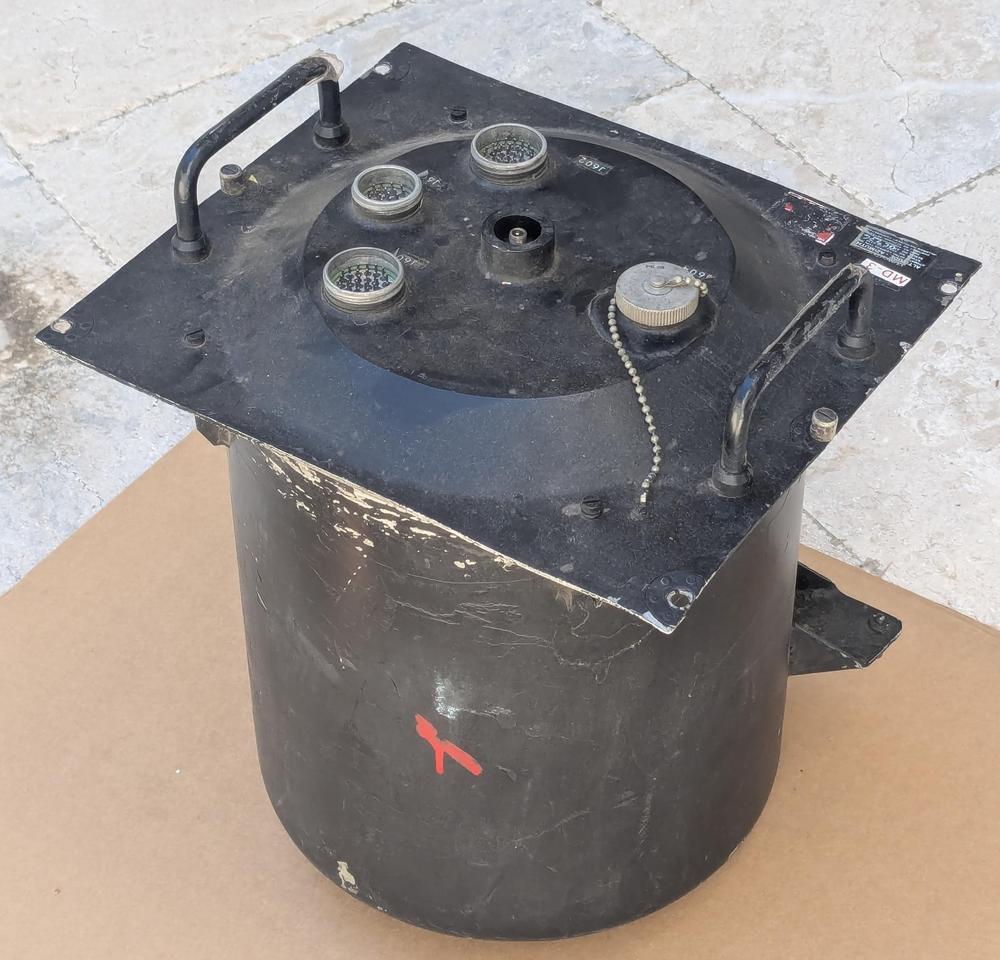
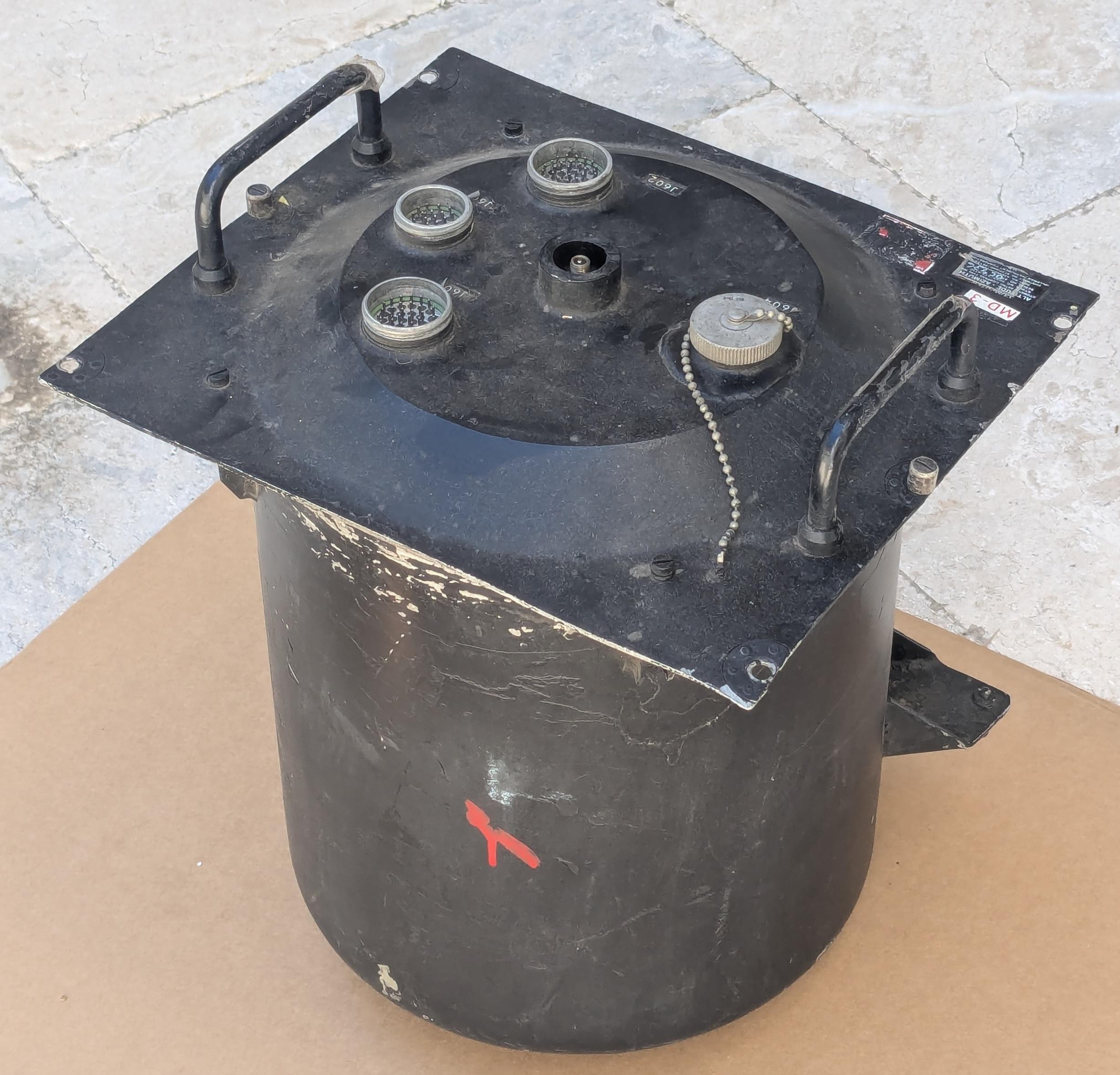
  2. From the outside, the Angle Computer is an uninteresting black cylinder with connectors on the end. The cylinder was sealed with a soldered metal band that we removed with a blowtorch. It was pressurized with dry nitrogen through the fill valve in the center, a Schrader valve just like you'd find on a tire.

    The Angle Computer is packaged in a nondescript black cylinder.The Angle Computer is packaged in a nondescript black cylinder.


  3. The Astro Compass needed to know approximately where in the sky to find the star, in order to point its sensor in the right direction. The direction didn't need to be exact because the Astro Compass performed a spiral search pattern to find the star. This search pattern covered ±4° in bearing and ±2.5° in altitude. In comparison, the Moon is 0.5° wide, so it's a fairly large target area. 

  4. The diagram below shows the physical connections of the components of the Astro Compass.

    A physical diagram of the Astro Compass. The Angle Computer is called the Alt Az Computer in this diagram. Click this image (or any other) for a larger version.A physical diagram of the Astro Compass. The Angle Computer is called the Alt Az Computer in this diagram. Click this image (or any other) for a larger version.

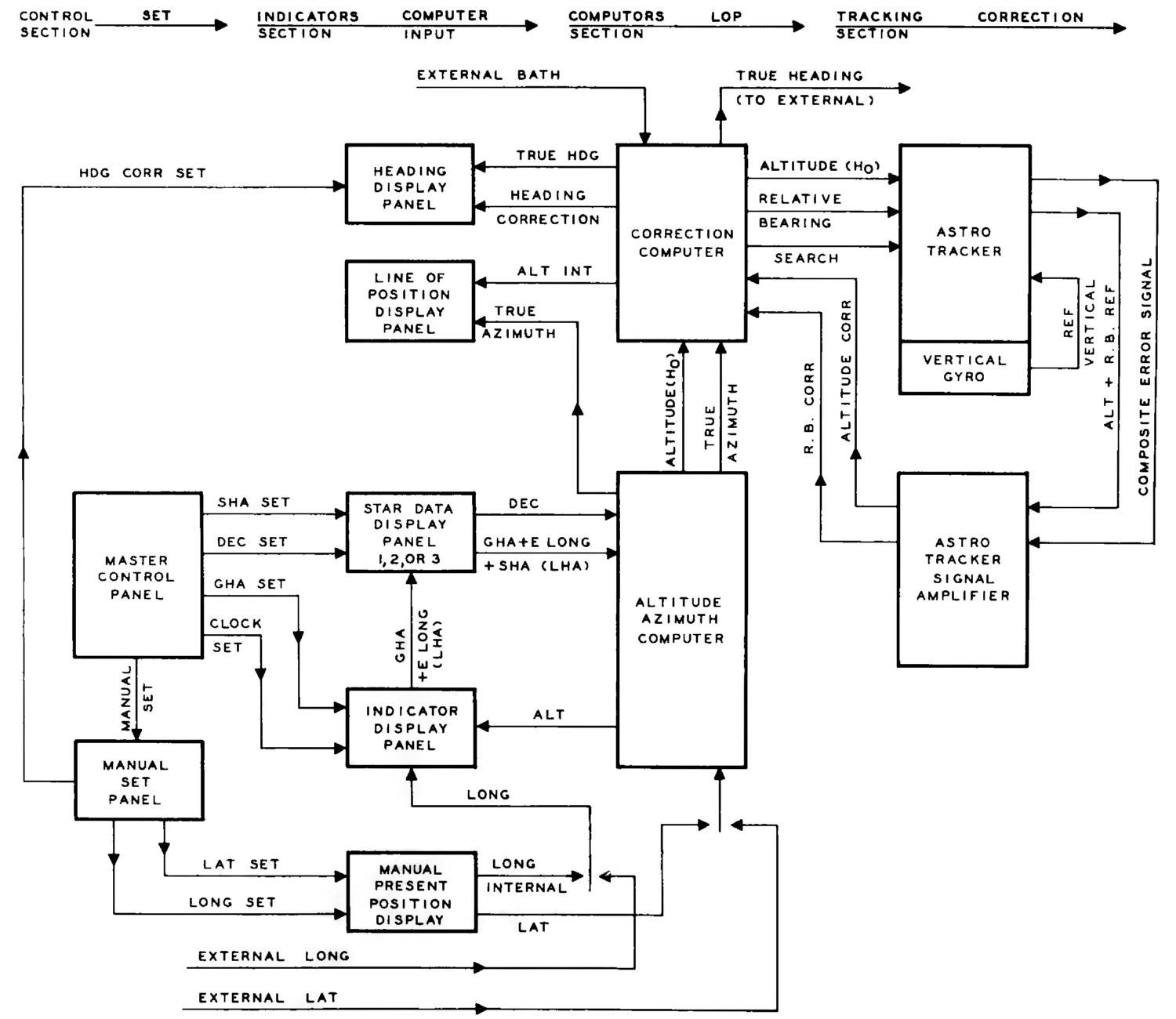
    For a slightly different perspective, the diagram below shows the flow of data in the Astro Compass.

    A block diagram of the Astro Compass. The Angle Computer is called the Altitude Azimuth Computer in this diagram. From Automatic Astro Compass, Operating Instructions HandbookA block diagram of the Astro Compass. The Angle Computer is called the Altitude Azimuth Computer in this diagram. From Automatic Astro Compass, Operating Instructions Handbook


  5. The Astro Compass normally gets the latitude and longitude from the bombing computer. It normally gets the approximate heading (called the BATH, Best Available True Heading) from the magnetic compass. These values can all be entered manually if necessary. 

  6. Greenwich Mean Time is now mostly obsolete, replaced by UTC (Coordinated Universal Time). Greenwich Mean Time is based on when the sun reaches its highest point over Greenwich, England (longitude 0°). In solar time, the sun reaches its highest point at exactly noon. Unfortunately, the Earth's orbit is elliptical, so the length of a solar day varies throughout the year, by almost a minute. Since it's nice to have a constant 24-hour day, Mean Time was introduced. The idea is to average out the length of the day throughout the year, so each day is exactly 24 hours, even though the sun is no longer overhead exactly at noon. UTC is essentially the same as GMT, but defined by atomic clocks rather than the position of the sun over Greenwich. They can vary by up to 0.9 seconds, with a leap second added to UTC to keep them in sync. 

  7. The stars are all moving in different directions, but for most stars, the visible change in position (the proper motion) is very small. However, comparing the 1960 Air Almanac with the 2026 Air Almanac shows many of the listed stars have moved a degree or more due to the precession of the equinox. The change varies from star to star, both because the angular change depends on the star's location and because the SHA is exaggerated as you get closer to the poles (details). 

  8. Note that the azimuth is discontinuous at the zenith. To see this, imagine a star passing directly overhead: point your arm at the horizon and then swing it up until it is pointing straight up. To continue, you need to instantaneously spin around 180° and then lower your arm.

    The discontinuity in azimuth is important for the Angle Tracker, since it can't instantaneously change the azimuth by 180°. To avoid this problem, the Angle Computer has cams and microswitches to keep the altitude below 85°. (Otherwise, the azimuth arc will jam up instead of rotating smoothly.) The Astro Tracker also has declination limits of +90° and -47° and a lower altitude limit of -6°. The latitude is limited to the range between -2° and +90°; the system automatically switches hemispheres so both the North and South latitudes are usable. 

  9. One annoyance is that the length of a day is slightly different if you look at the sun (a solar day) versus looking at the stars (a sidereal day). A solar day is the standard 24-hour day, where the Earth rotates once and the sun returns to its previous position (approximately). But if you look at the stars, it takes a bit less time (23 hours, 56 minutes, and 4 seconds) for the stars to return to their previous position. The problem is that during one year, the Earth swings from one side of the sun to the other side and then back to the first side. From the perspective of the stars, this is an "extra" revolution, so there are 366.25 sidereal days in a year, compared to 365.25 solar days in a year. (I.e., it's an "off-by-one" error.) This makes each sidereal day slightly shorter. You can also think of this as the sun moving around the celestial sphere once per year, with the sun's position against the stars constantly changing. 

  10. Celestial navigation usually uses the sidereal hour angle (SHA) to measure the star's position relative to the meridian. Astronomers often use the right ascension instead. The right ascension is measured in the opposite direction and is measured in hours instead of degrees. They are related by the formula RA = (360° - SHA) / 15°

  11. The Earth's axis also wobbles on a cycle of 18.6 years because the Earth isn't exactly spherical. For many purposes, this wobble is averaged out and the "mean equinox" is used. The physical equinox is called the "apparent equinox". Greenwich Mean Sidereal Time (GMST) is measured with respect to the mean equinox, while Greenwich Apparent Sidereal Time (GAST) is measured with respect to the apparent equinox. The difference between the mean equinox and the apparent equinox is called the "equation of the equinoxes". The difference between the two equinoxes is small, less than about 1.1 seconds. 

  12. The angle of 90°-declination is sometimes called co-declination, the complement of declination, i.e., the angle down from the pole. Similarly, 90°-latitude is sometimes called co-latitude.

    The triangle can be solved using the spherical law of sines and the spherical law of cosines. An alternative, which makes more sense to me, is to find the answer by applying rotation matrices to change the coordinate system. Details are here, and Wikipedia has a convenient summary. 

  13. It may seem like there is a chicken-and-egg situation with navigation since you need to know your position in order to compute the star's altitude and azimuth, and you need to know the aircraft's heading to know which direction to point the telescope. In fact, you just need to know the approximate latitude, longitude, and heading (within 4°), and then the system generates a more accurate latitude, longitude, and heading. The process can be repeated until the values converge.

    Moreover, the Astro Compass is just one of the instruments that the navigator uses. The magnetic compass can provide an approximate heading, and dead reckoning or inertial navigation can provide an approximate location. The Astro Compass can use these to generate more accurate information, which in turn can improve the accuracy of the dead reckoning or inertial navigation. 

  14. Since the azimuth arc is a semicircle (180°), it might seem that the star pointer could move 180° in altitude along the azimuth arc. This wouldn't make sense, since the altitude ranges from 0° (horizon) to 90° (zenith). The explanation is that the slider is a quarter-circle (90°). Thus, the star position can only move 90° before the other end of the slider hits the end of the azimuth arc. 

  15. The differential gears are necessary because the axes aren't mechanically independent. For instance, as the latitude arm swings up and down, it also moves the declination and LHA drive shafts, causing unwanted rotation along these axes. The differentials subtract out the latitude motion from the declination and LHA inputs, so the resulting movements on each axis are independent. 

  16. Technically, two different circles on a sphere can cross at 0, 1, or 2 points. In practice, there will be two intersections, but one intersection is very far away and can be ignored. 

  17. Several factors complicated the navigator's job. By the time the navigator completed a measurement, the aircraft could have moved dozens of miles, so the navigator needed to adjust the lines of position based on this movement. But the navigator didn't know exactly how much the aircraft had moved, due to wind and other factors. Thus, even with the Astro Compass, the navigator needed to deal with uncertainty, cross-checking between different measurements to try to get the best results despite constant sources of error. 

tag:blogger.com,1999:blog-6264947694886887540.post-8382904110431912671
Extensions
The rise and fall of IBM's 4 Pi aerospace computers: an illustrated history
aerospaceibmspace
Show full content

The morning of April 12, 1981, 20 years to the day after Yuri Gagarin became the first person in space, the Space Shuttle thundered into the Florida sky. Commander Young and Pilot Crippen were at the controls as the Shuttle ascended on its first flight. But the launch, like much of the flight, was really under the control of four computers in the avionics bays one deck below the crew. A fifth computer stood ready to take over in case of a catastrophic computer malfunction. These computers, Model AP-101B, were part of IBM's System/4 Pi family.
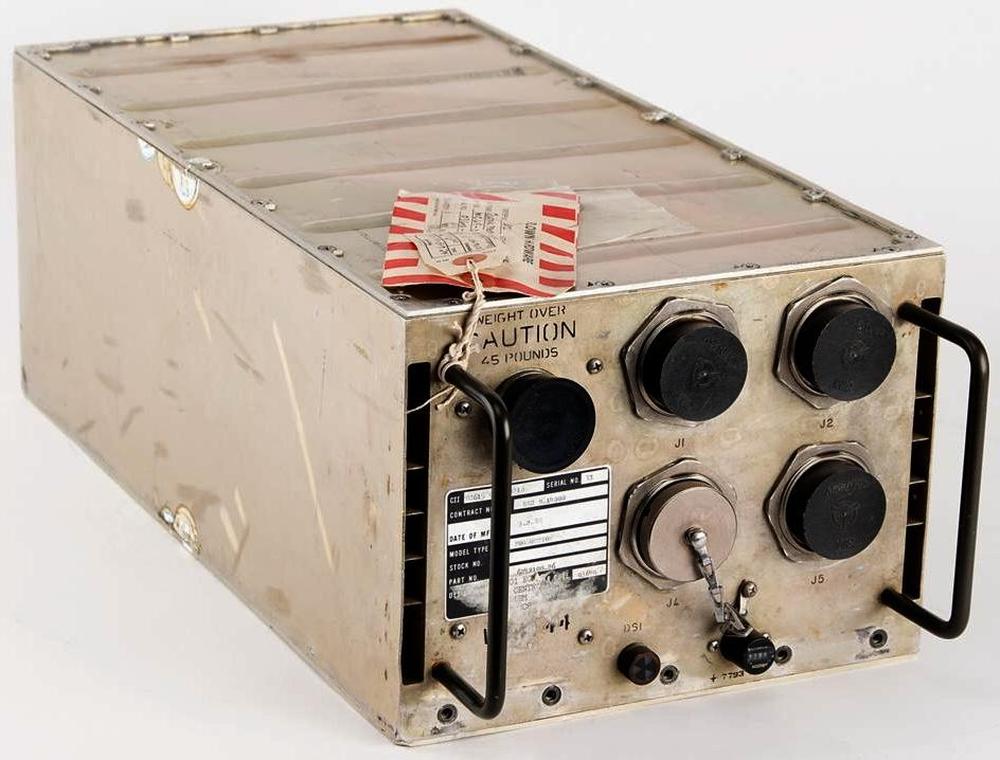
The Space Shuttle AP-101B computer. This unit flew on multiple flights, including STS-38 (1990) and STS-40 (1991). Photo courtesy of RR Auction.The Space Shuttle AP-101B computer. This unit flew on multiple flights, including STS-38 (1990) and STS-40 (1991). Photo courtesy of RR Auction.

Introduced around 1967, the System/4 Pi family was a line of compact, powerful computers designed for avionics roles. The military used these computers in everything from the F-4 fighter and B-52 bomber to submarine sonar systems and the Harpoon anti-ship missile. Other computers in the System/4 Pi family played more peaceful roles in the development of GPS and fly-by-wire flight controls. In space, System/4 Pi computers controlled Skylab, the first American space station, as well as Spacelab, the reusable laboratory flown by the Space Shuttle.

Despite the important roles of System/4 Pi computers, information on them is hard to obtain—Wikipedia entirely omits the CC, SP, and ML models.1 However, I received a stack of 4 Pi marketing brochures and articles, so I can now fill in many gaps in the history of System/4 Pi.

The first generation

The IBM System/360 line of mainframes was introduced in 1964. System/360 revolutionized the computer industry with the concept of one family of computers for all applications: business and scientific. The name symbolized that System/360 covered the full 360º of applications. The 4 Pi name extended this idea to applications in the 3-dimensional world: 4π is the number of steradians making up a full sphere. As IBM put it, "System/4 Pi also fills a sphere—the full spectrum of military computer needs—for airborne, space, or shipboard use."

Initially, the System/4 Pi family had three models: "Model TC (tactical computer) for satellites, tactical missiles, helicopters, and other applications requiring a very small, lightweight computer; Model CP (customized processor) for real-time computing applications; and Model EP (extended performance) for applications that require real-time calculation of very large amounts of data."2

The TC Tactical Computer

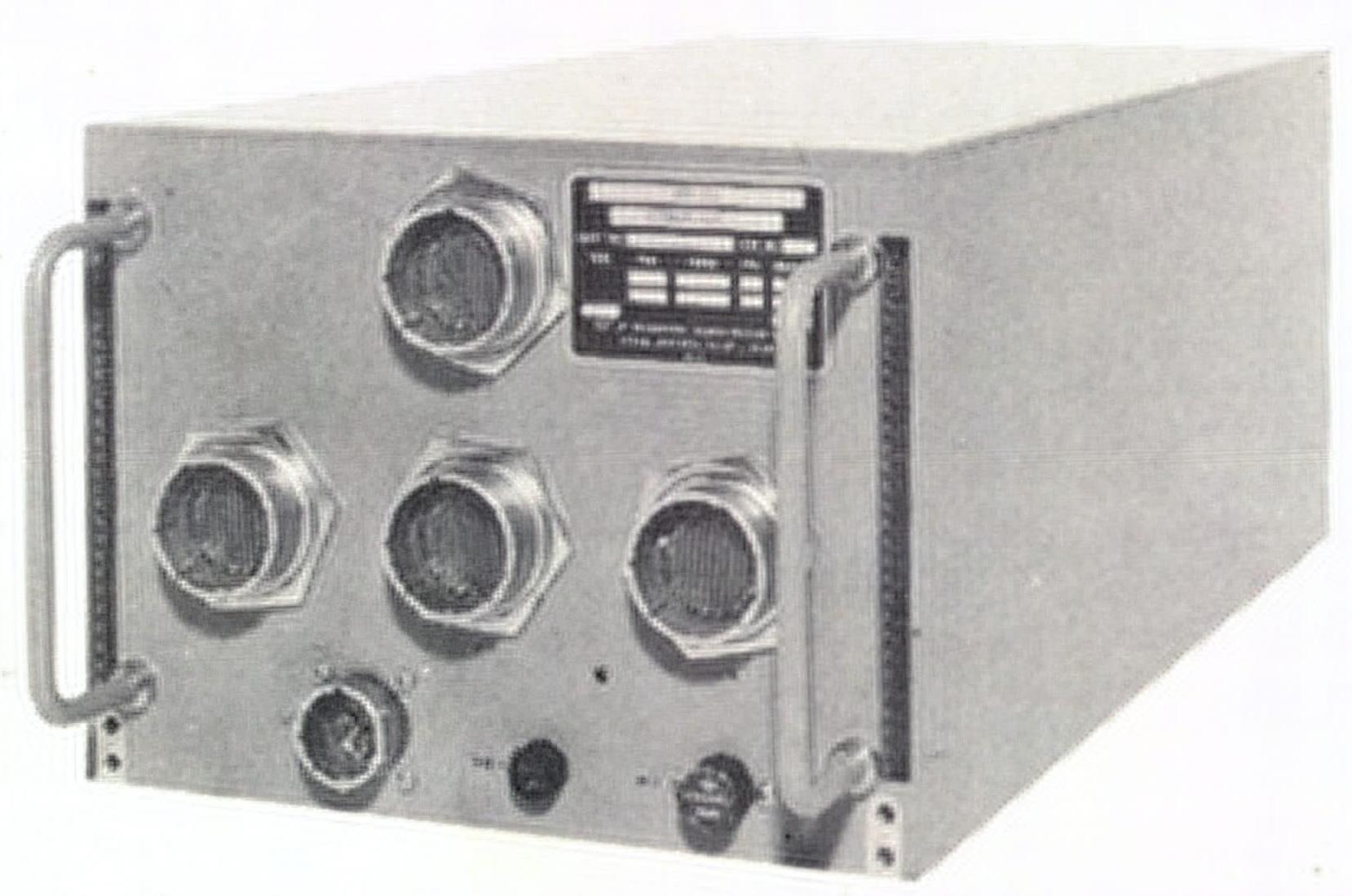
The TC Tactical Computer was a general-purpose digital computer, designed for low cost and medium-range performance (details). The TC had a 16- or 32-bit word, but used an 8-bit bus to reduce cost. It supported from 8 KB to 64 KB of magnetic core memory. It has a straightforward instruction set with 54 instructions in total, including multiply and divide. As was common at the time, it didn't have a stack for subroutine calls, but had a branch-and-store instruction instead. The original model ran 48,500 instructions per second. While this is appallingly slow by modern standards, it was mainframe-level performance at the time, comparable to a mid-range IBM 360/40 mainframe.
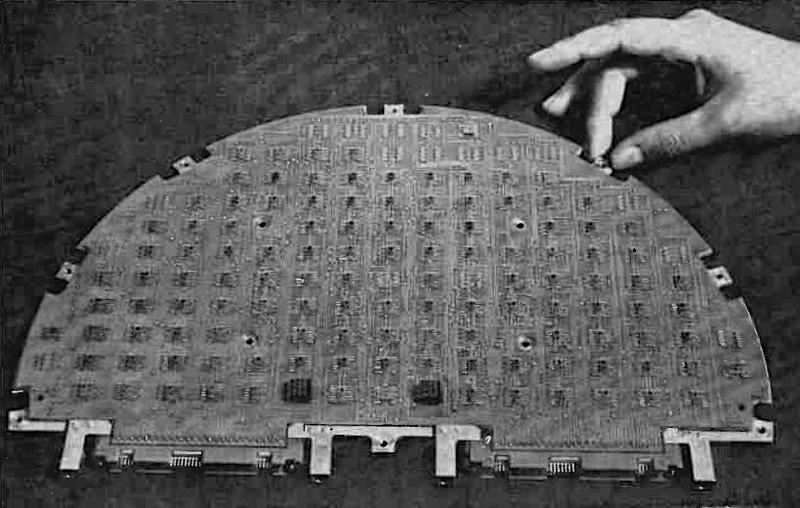
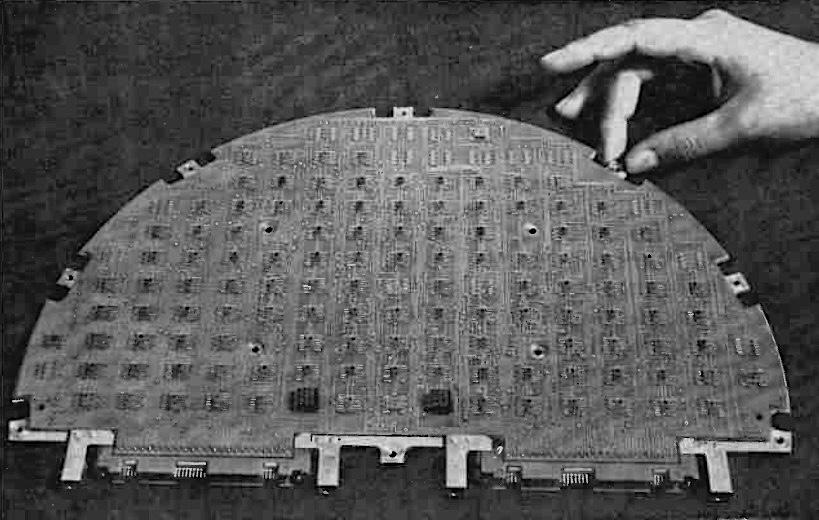
The arithmetic and control subassembly of a TC computer, configured for a tactical missile. From Electronics, March 6, 1967. Also see Electronics, Oct. 31, 1966.The arithmetic and control subassembly of a TC computer, configured for a tactical missile. From Electronics, March 6, 1967. Also see Electronics, Oct. 31, 1966.

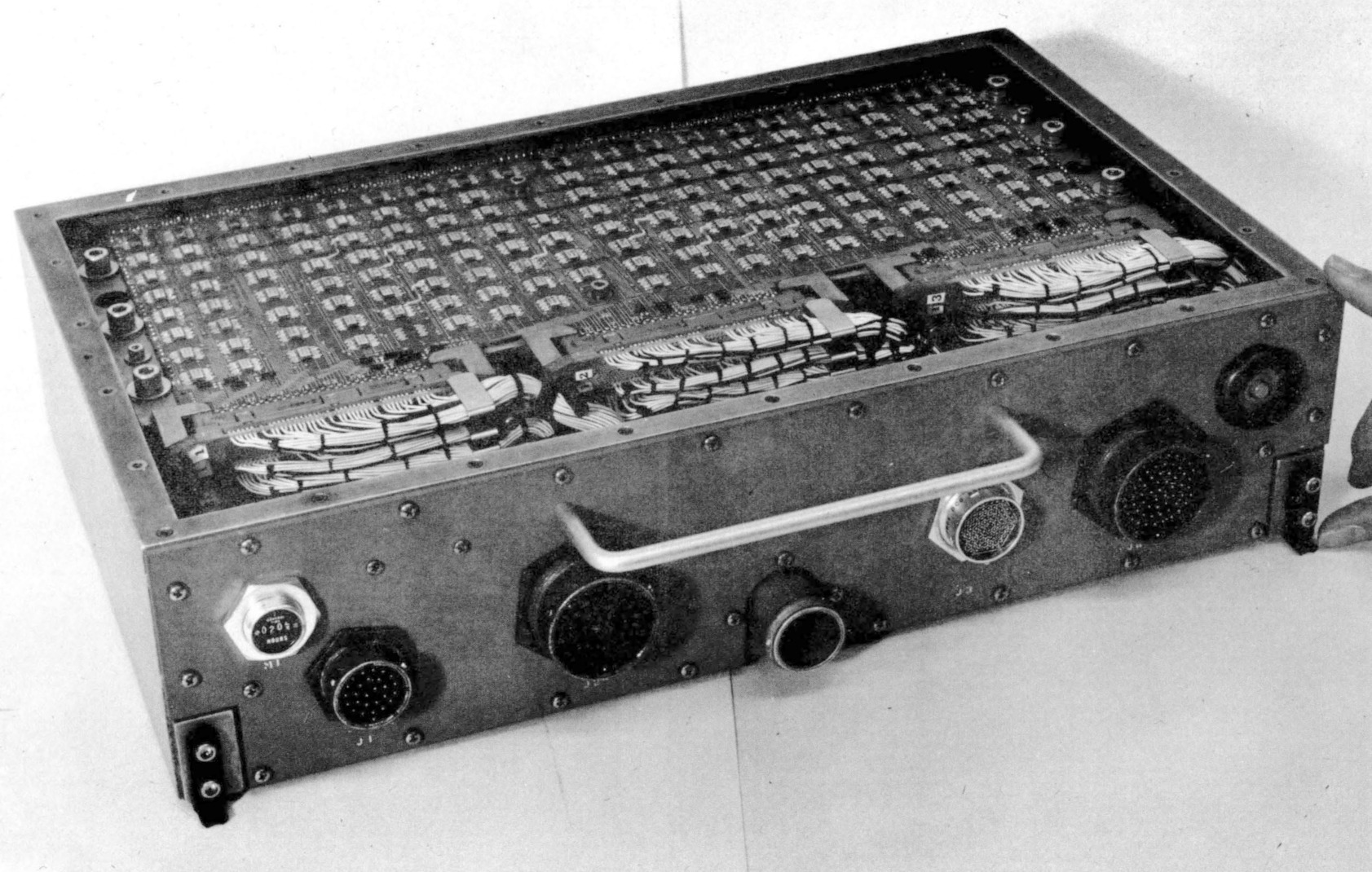
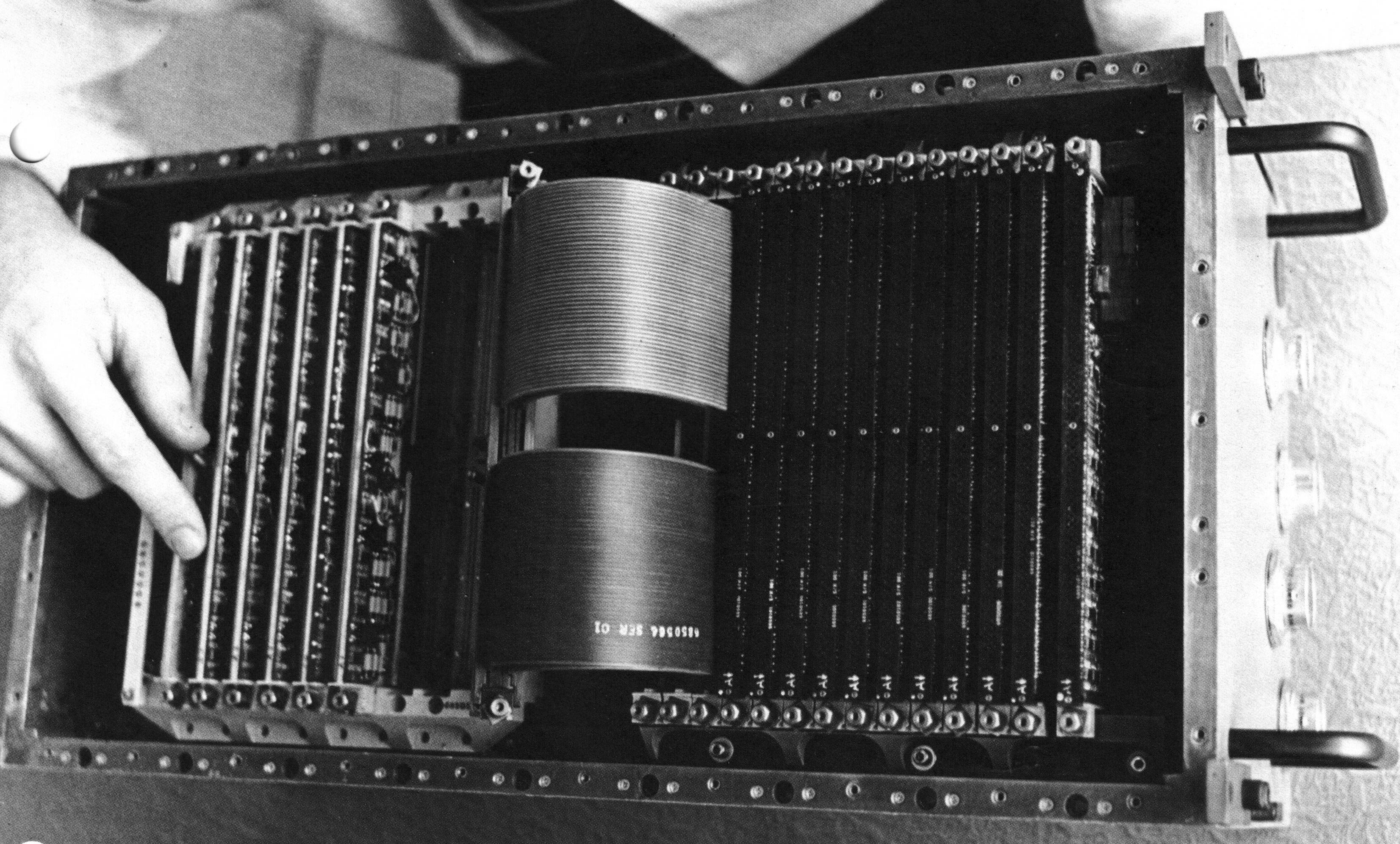
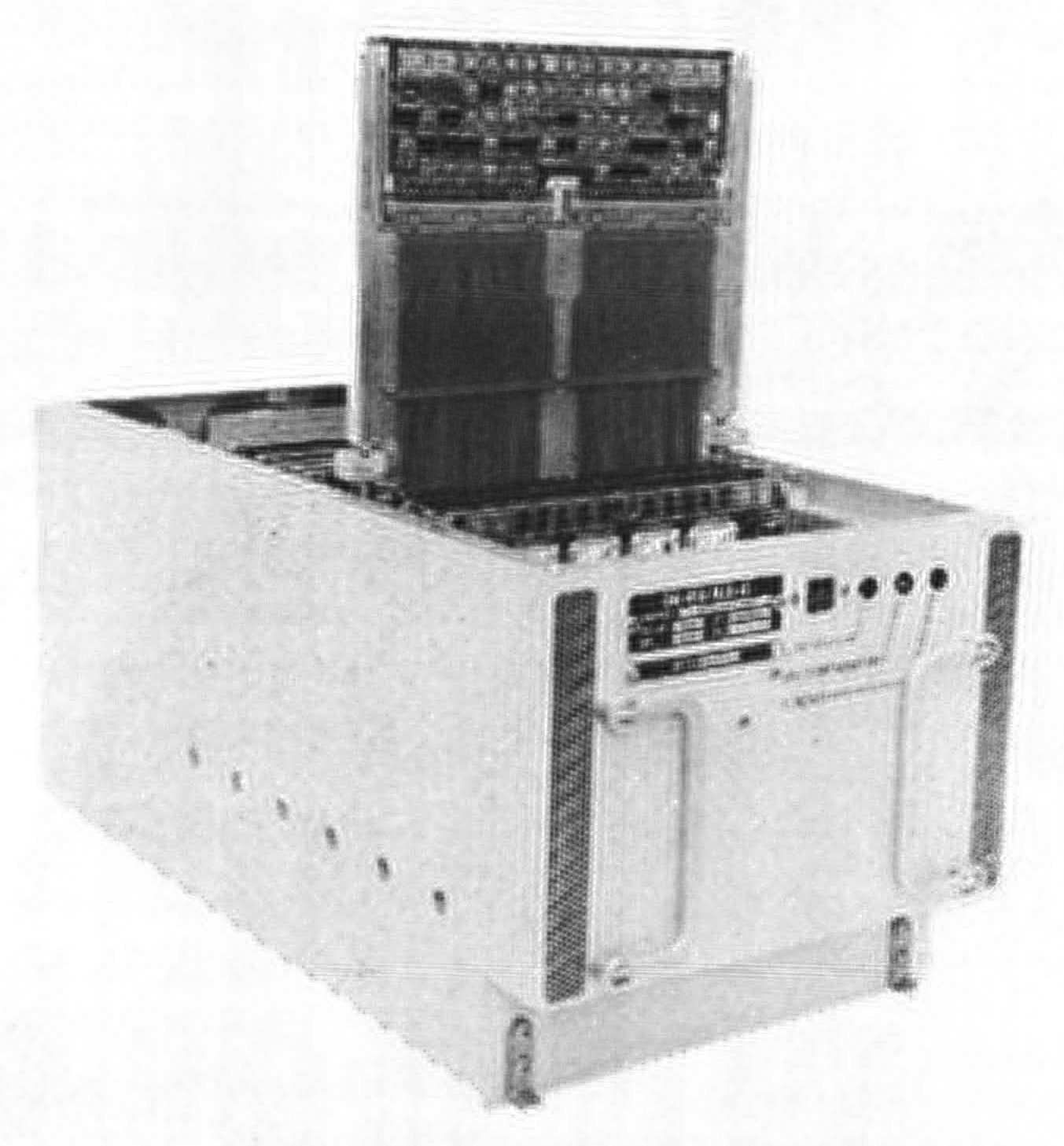
The TC was originally packaged in a briefcase-sized box (9.75" × 17.12" × 4.0") (below) that weighed 17.3 pounds, but it could be repackaged for different applications. For a tactical missile, the computer was implemented on semicircular circuit boards as shown above. The computer was constructed from TTL (Transistor-Transistor Logic)3 flatpack integrated circuits mounted on four-layer circuit boards. Two circuit boards made a sandwich around a metal structure that provided support and cooling; this three-layer assembly was called a "page". A page could hold about 300 integrated circuits, so the computer was very dense.
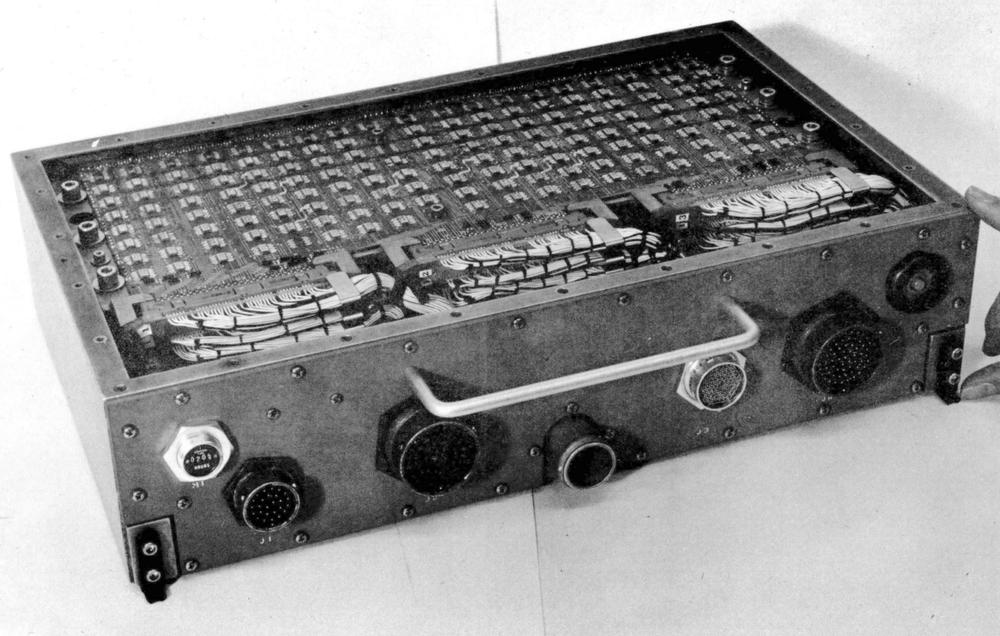
The IBM 4 Pi TC system. From Technical Description of IBM System 4 Pi Computers.The IBM 4 Pi TC system. From Technical Description of IBM System 4 Pi Computers.

TC-1 computers played a critical role in Skylab, America's first space station, which was launched in 1973.4 The orientation of Skylab needed to be precisely controlled to aim its multiple telescopes. To avoid consuming propellant, Skylab was rotated by changing the speed of three massive gyroscopes, 155 pounds each. Two TC-1 computers controlled these gyroscopes, with one computer active and one computer as a backup. Each 16-bit computer had 16K words of storage that could be reloaded from magnetic tape or radio, and executed 60,000 operations per second. Each Skylab computer occupied 2.2 cubic feet (much larger than the briefcase-sized TC) and weighed 97.5 pounds. The Skylab computers are notable as the first fully digital control system on a crewed spacecraft.

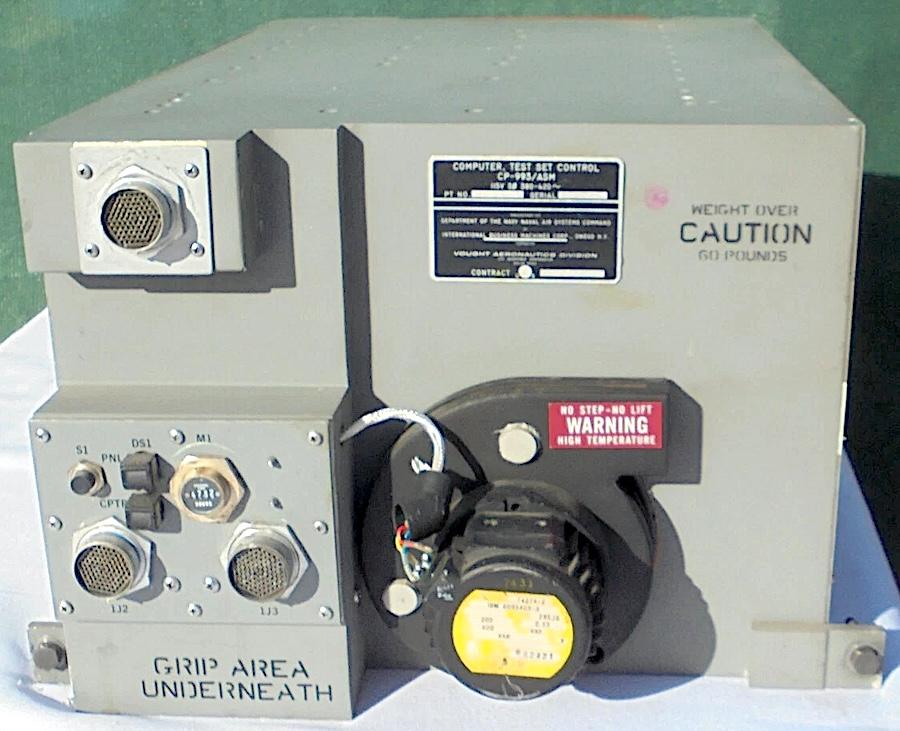
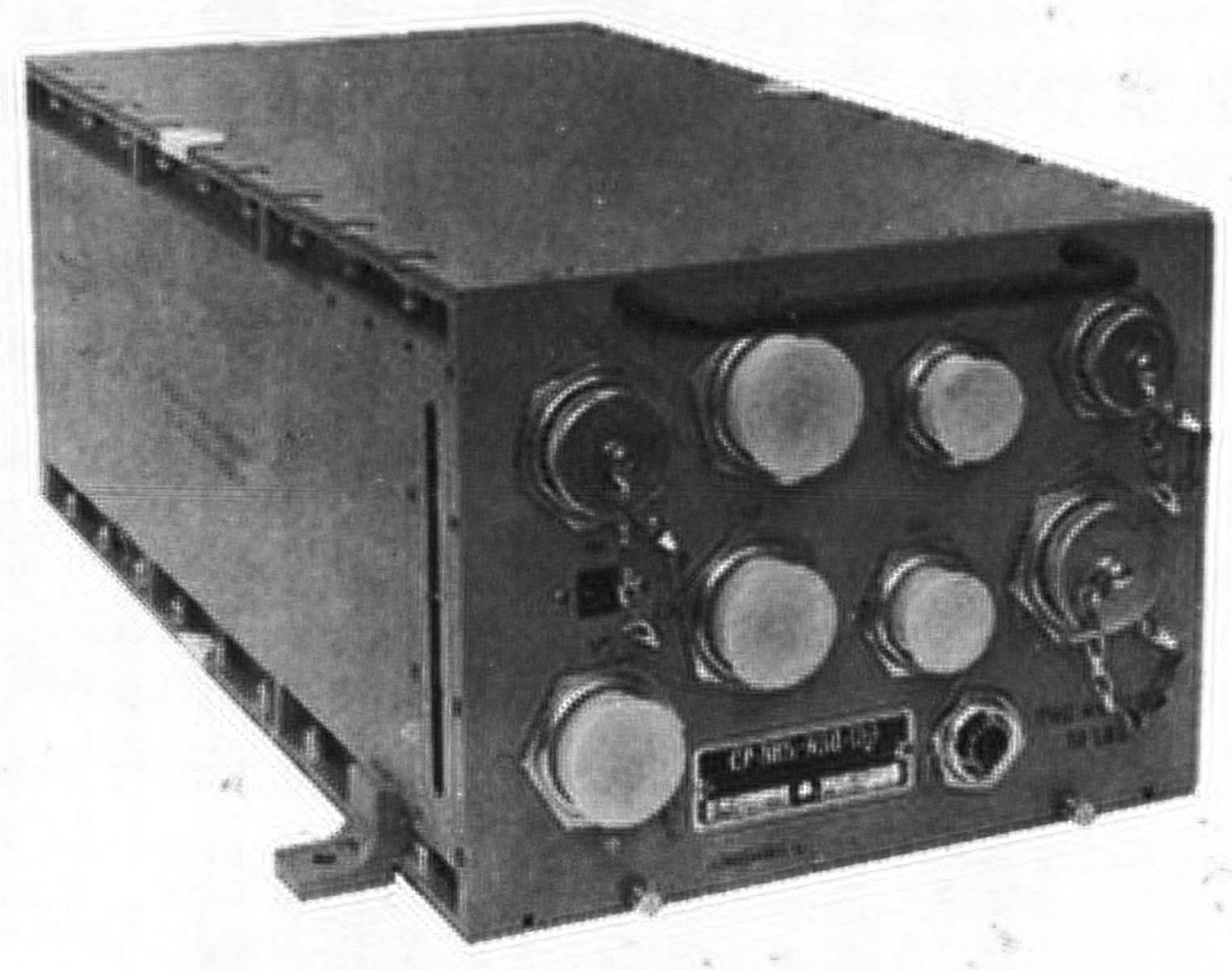
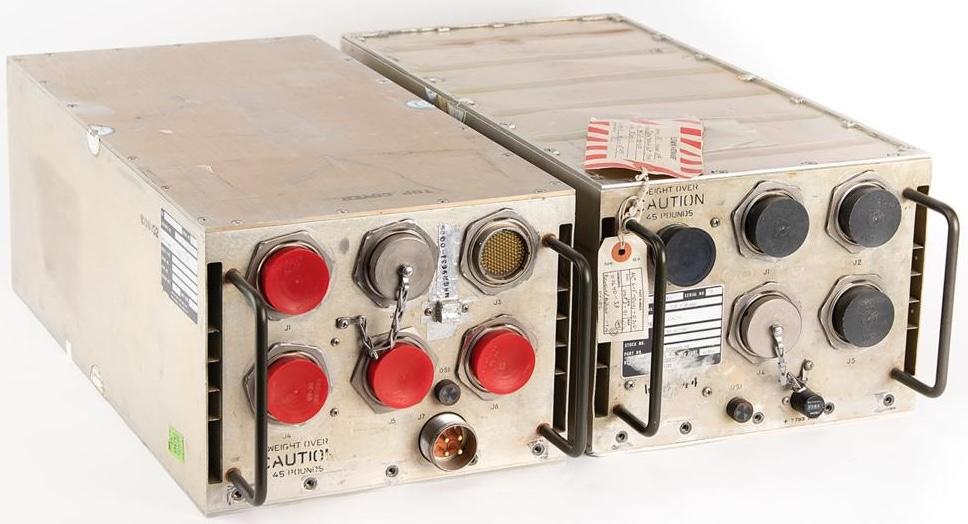
The TC-2 model (below) was much faster (125,000 operations per second) and weighed 80 pounds. It was used for Navigation/Weapons Delivery in the A-7D/E attack fighter. In 1976, it was upgraded to the TC-2A, which was still faster (454,000 operations per second), supported more memory, and added 12 more instructions.
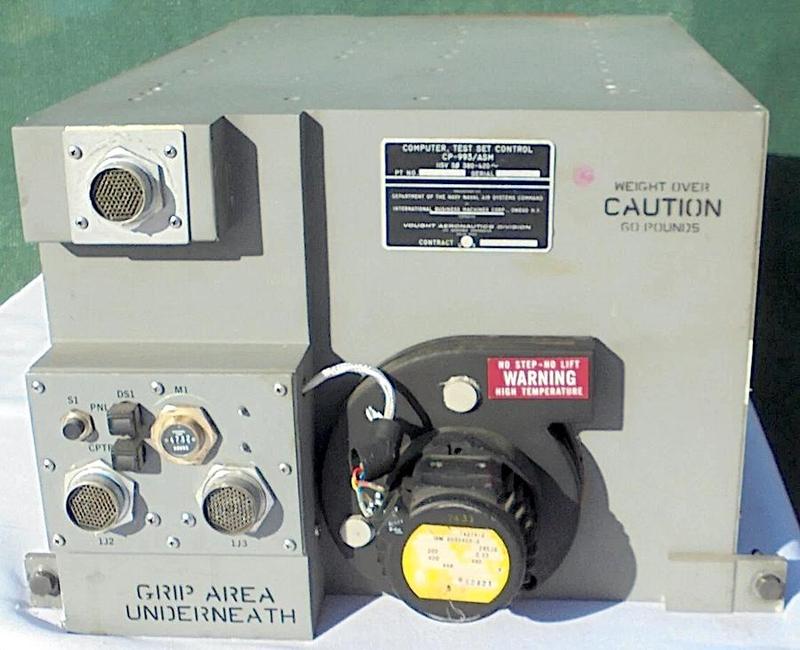
A TC-2 computer, specifically the Test Set Control Computer CP-993/ASM. It looks the same as the A-7 aircraft's CP-952/ASN-91(V) computer.
Photo courtesy of Alex1970-14;
this computer is currently on eBay if you want it.A TC-2 computer, specifically the Test Set Control Computer CP-993/ASM. It looks the same as the A-7 aircraft's CP-952/ASN-91(V) computer. Photo courtesy of Alex1970-14; this computer is currently on eBay if you want it.

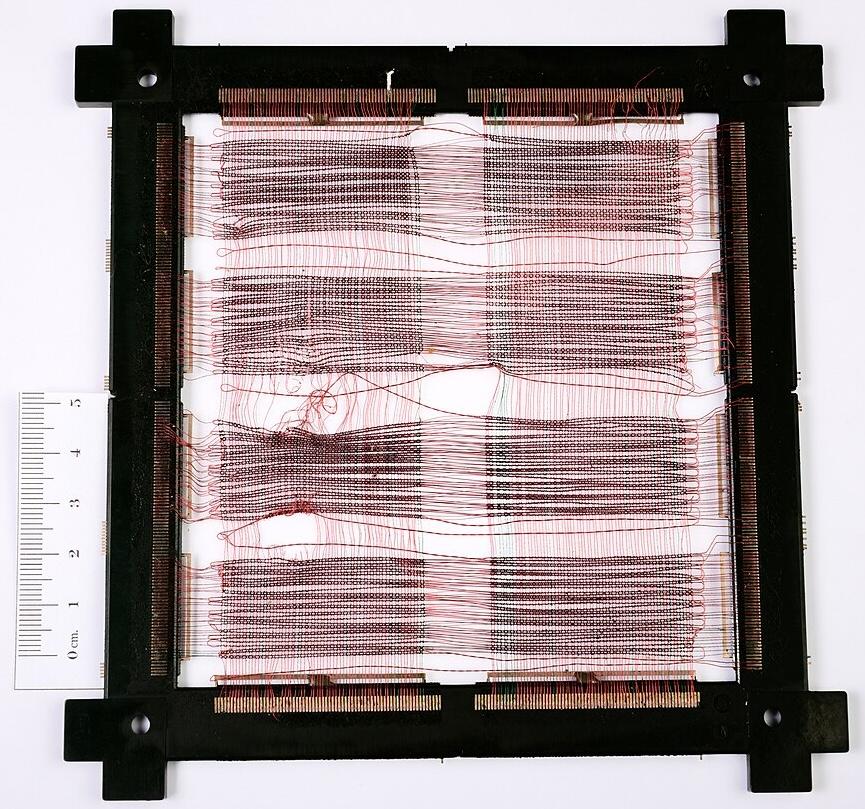
Like most computers in its era, the TC used magnetic core memory; each bit was stored in a tiny toroidal core of lithium nickel ferrite, strung onto a grid.5 The core planes in the TC and other first-generation 4 Pi computers were about 6 inches on a side. With 16,384 cores in a plane, each plane held 16 Kbits. Thus, the 8-kilobyte memory in the TC required a stack of four core planes. A significant advantage of core memory was that, because it was magnetic, the data was preserved even when the memory was not powered. It was also highly resistant to radiation.
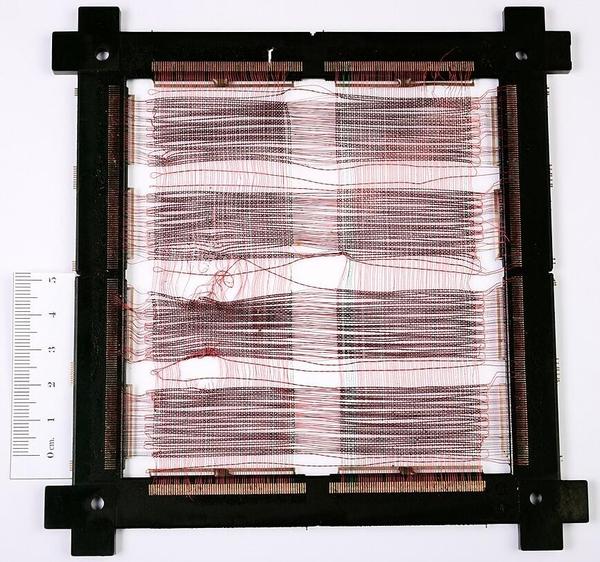
This (somewhat damaged) core memory plane is the commercial version of the planes in the first-generation System/4 Pi computers.
Photo by José Luis Briz Velasco, CC BY-SA 4.0, cropped.This (somewhat damaged) core memory plane is the commercial version of the planes in the first-generation System/4 Pi computers. Photo by José Luis Briz Velasco, CC BY-SA 4.0, cropped.

The CP Customized Processor

One step up from the TC series was the CP Customized Processor (briefly called Cost Performance).6 It used a 16-bit CPU, but had a wide 36-bit bus to memory for higher performance (including two parity bits and two storage protection 7 bits). Unlike the TC series, the CP series was (optionally) microcoded internally, so the instruction set could be easily customized.8 The CP system had completely different instruction formats from the TC system.10 The base model had 36 instructions and executed 91,000 instructions per second. The CP supported multiple addressing modes, more advanced than the simple addressing of the TC system. While the TC ran at 330 kHz, the CP ran at 2.4 megahertz. The CP's performance didn't improve as much as the faster clock would suggest, since both systems used slow core memory.
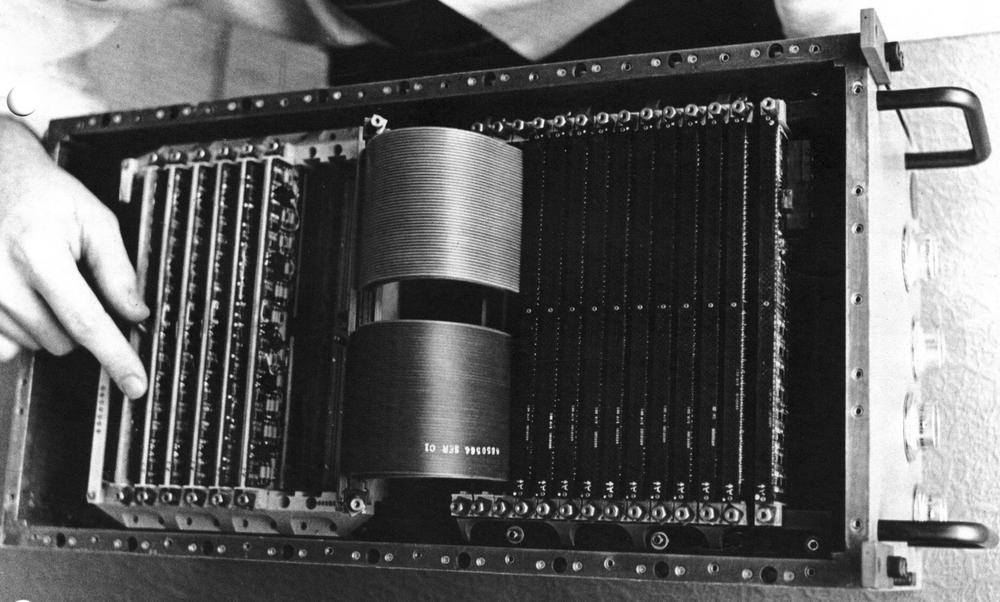
The IBM CP computer. from "IBM System/4 Pi Model CP" brochure, 1967.The IBM CP computer. from "IBM System/4 Pi Model CP" brochure, 1967.

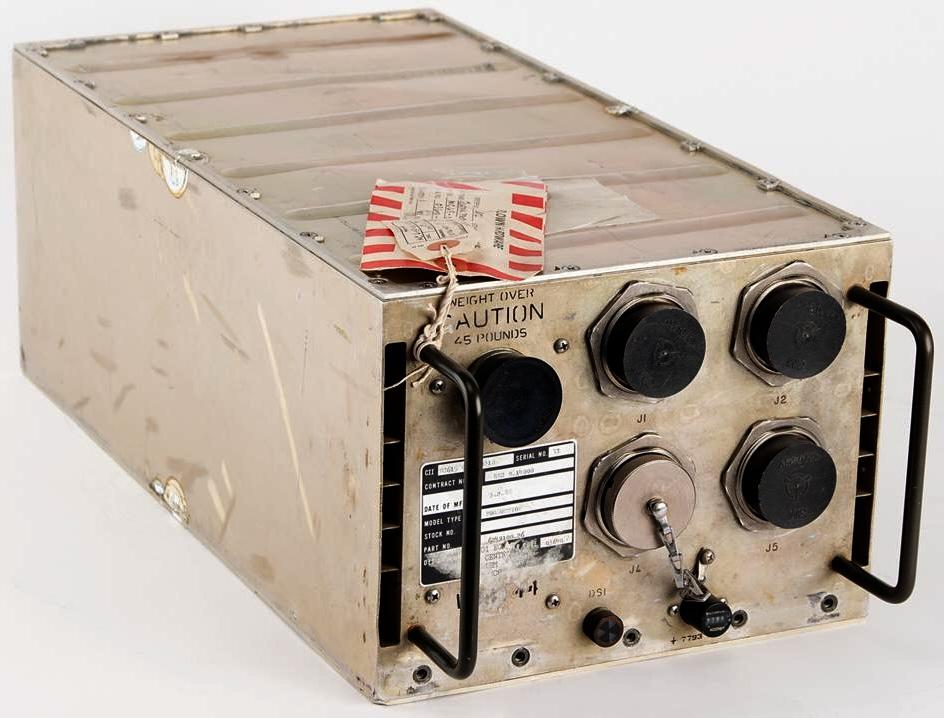
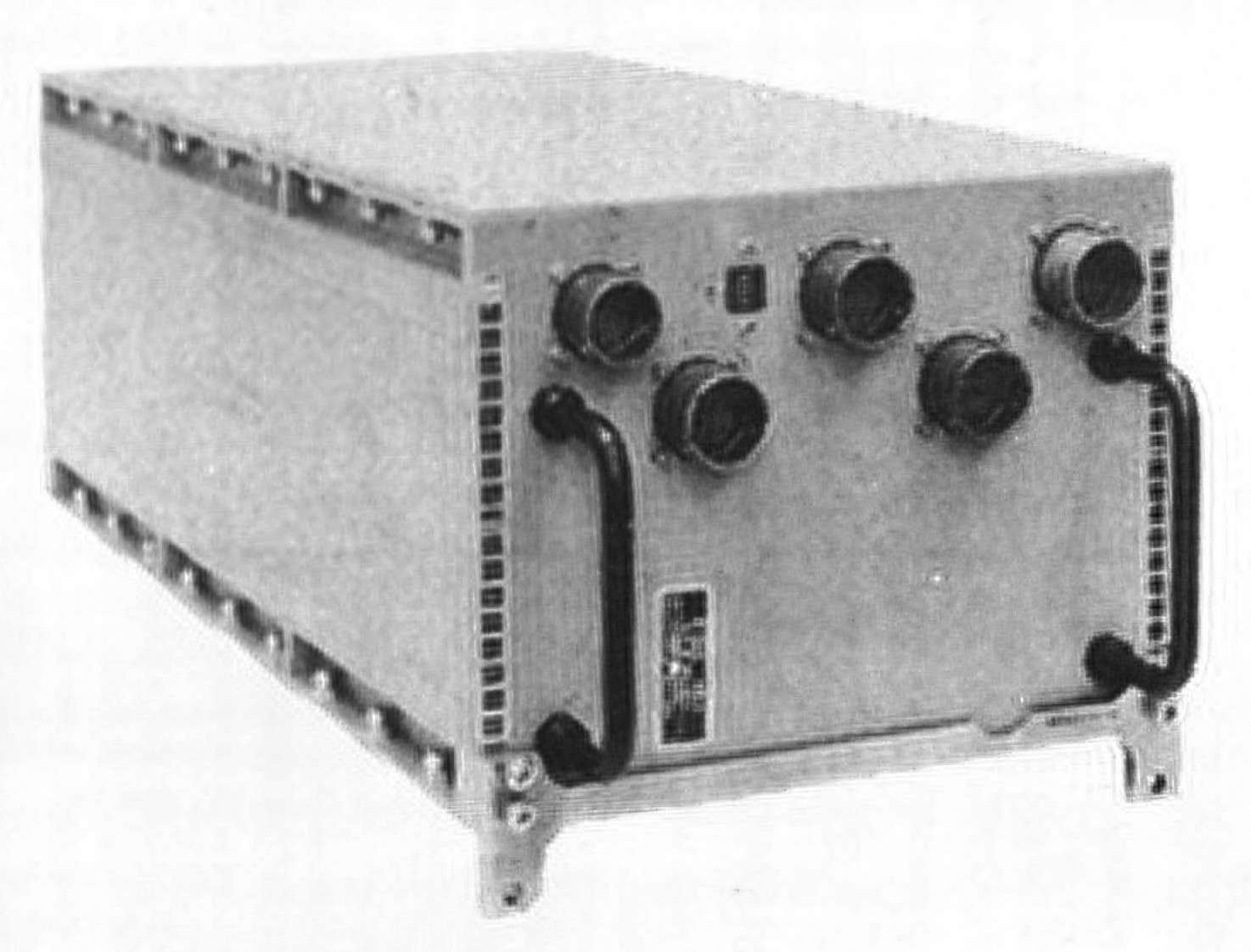
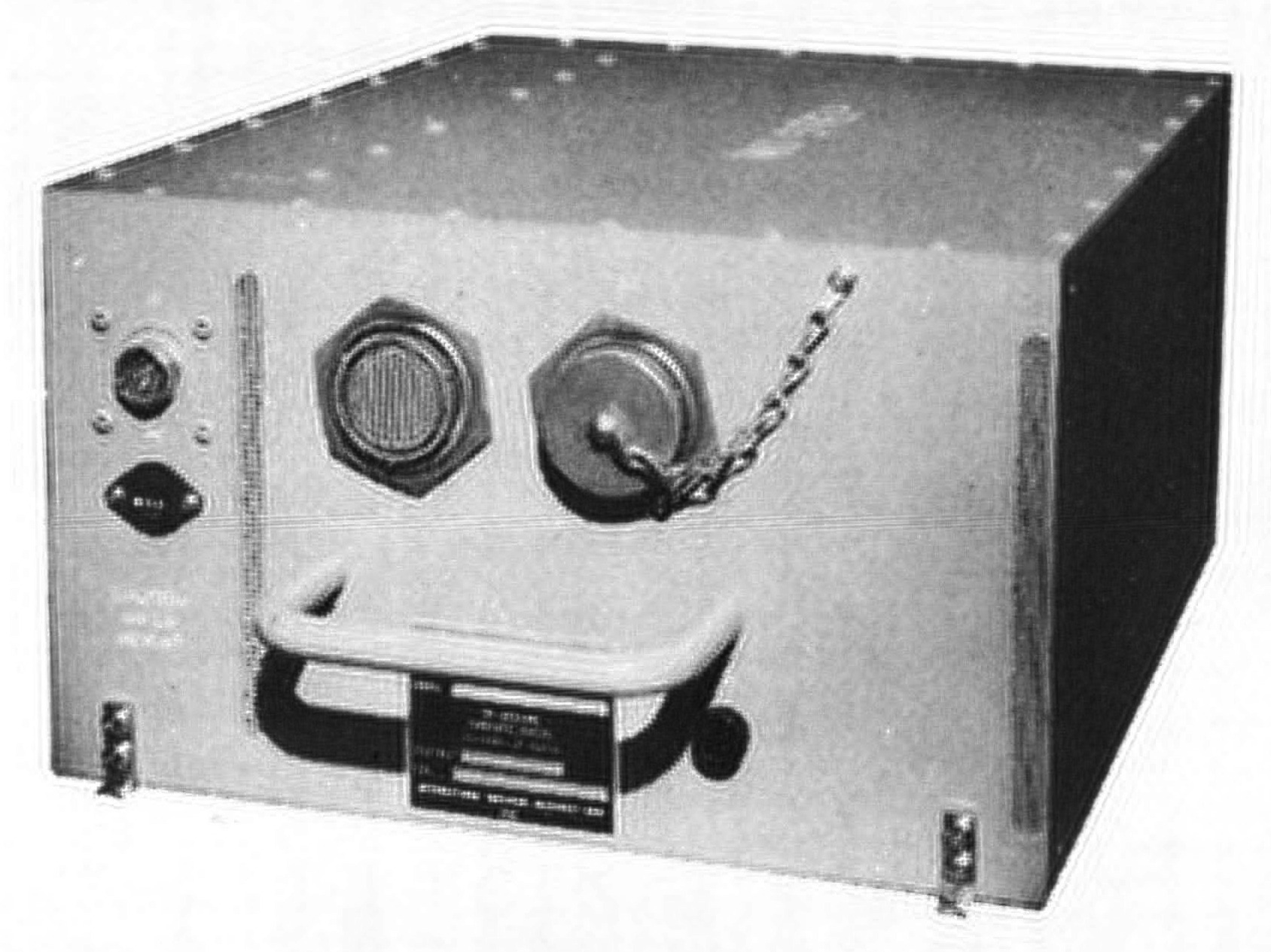
One of the strengths of System/4 Pi was input/output, allowing it to communicate with external devices in real time. The CP-1 had extensive I/O capabilities: three high-speed parallel inputs, a high-speed parallel output, a serial output, 24 discrete input lines, 144 discrete output lines, and 24 interrupt lines. To support all these I/O signals, the CP-1 was packaged in two boxes: one for the computer itself, and one for the I/O interface. The CPU box is shown below; the I/O coupler box was similar, but the front sported over a dozen connectors for I/O lines. The CP-1 was used in the navigation/threat analysis system in the EA-6B Prowler electronic-warfare aircraft.9
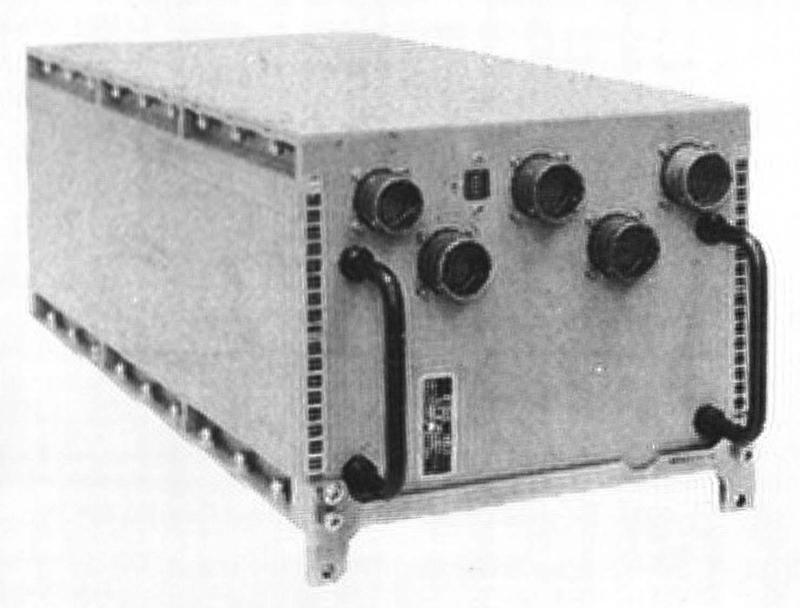
The CP-1 computer, designated the CP-926/AYA-6. From "IBM System/4 Pi and Advanced System/4 Pi Computers" brochure, August 1973.The CP-1 computer, designated the CP-926/AYA-6. From "IBM System/4 Pi and Advanced System/4 Pi Computers" brochure, August 1973.

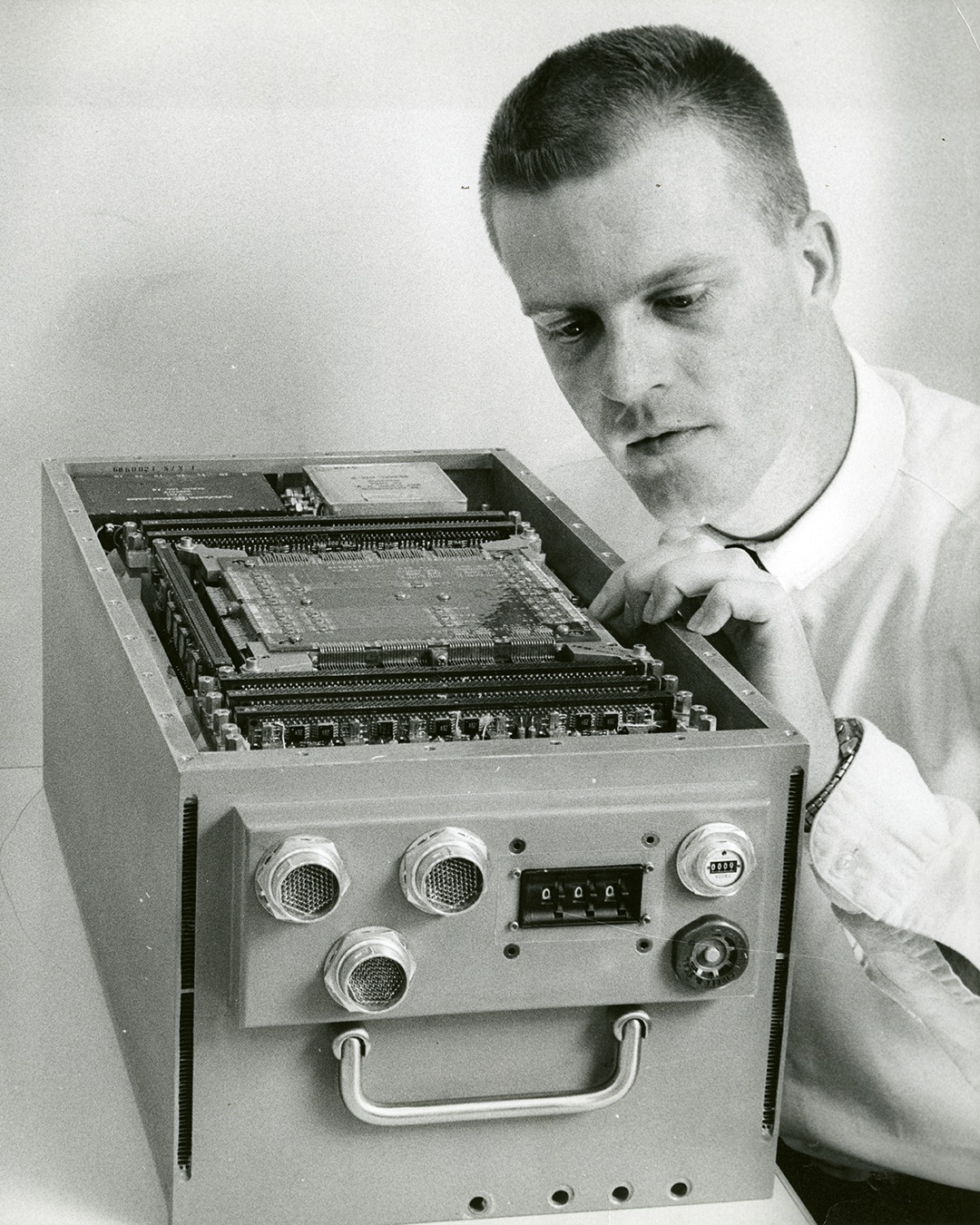
The CP-2 was the navigation/weapons delivery computer in the F-111 fighter plane, integrating radar and weapons. It was faster than the CP-1, perhaps because it was not microprogrammed, executing 150,000 instructions per second. It was also smaller, occupying one 47-pound box, although it had less I/O support. Unfortunately, this F-111 computer was said to be a disaster operationally because the computer had reliability problems and limited performance. The CP-2 was later replaced by the enhanced CP-2EX.
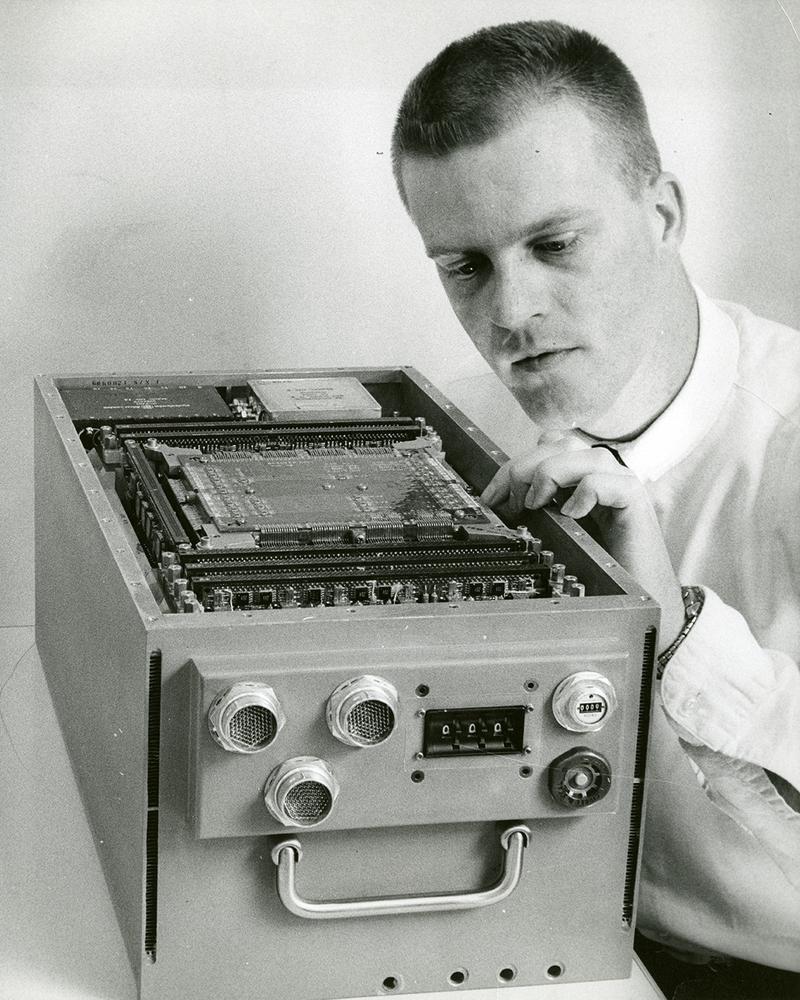
The CP-2 computer, designated the AN/AYK-6. The three-digit dial on the front was covered and fastened with security wire before use, so it must have been important. The core memory stack is in the middle of the computer, with 8K to 16K words of storage. The circuit pages are in front. Photo from an IBM Thread, which also shows a disassembled TC-2 computer.The CP-2 computer, designated the AN/AYK-6. The three-digit dial on the front was covered and fastened with security wire before use, so it must have been important. The core memory stack is in the middle of the computer, with 8K to 16K words of storage. The circuit pages are in front. Photo from an IBM Thread, which also shows a disassembled TC-2 computer.

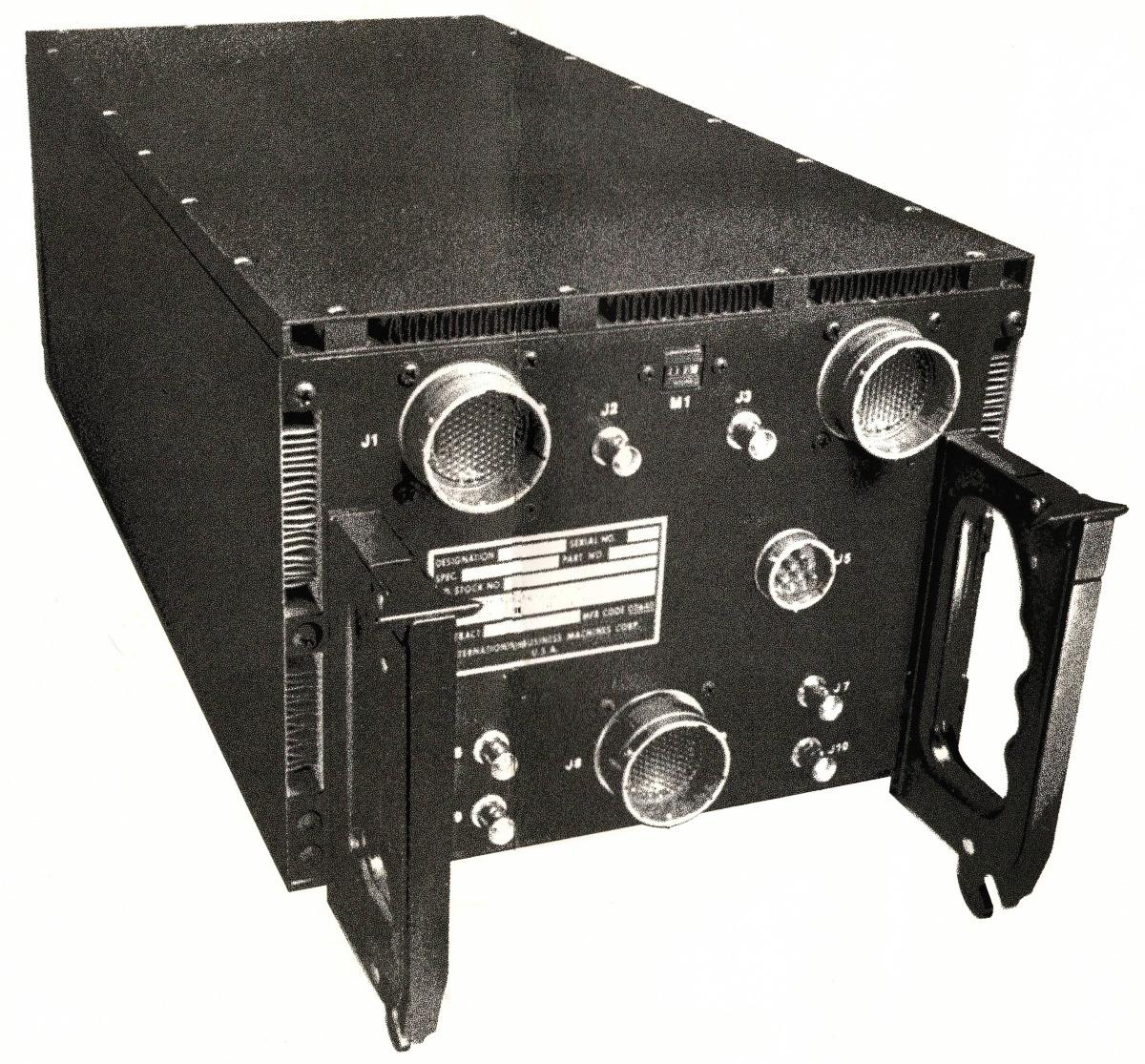
The CP-3 computer (below) was used for navigation and weapons delivery in the A-6E Intruder (1970) and other aircraft, replacing an earlier Litton computer with an unreliable drum memory. This computer could be integrated with laser-guided "smart" bombs. It was similar to the CP-2 and had the same performance, but had different I/O functions.
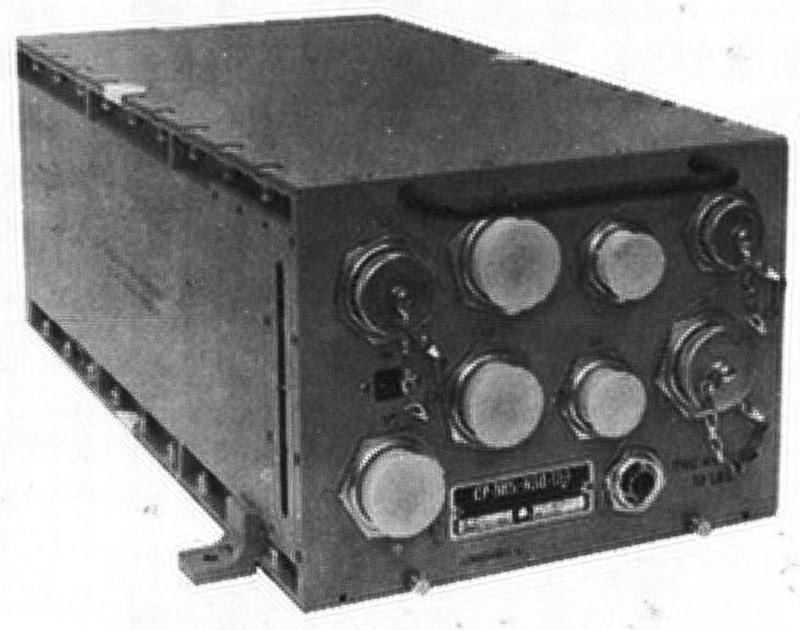
The CP-3 computer, designated the CP-985/ASQ-133. From "IBM System/4 Pi and Advanced System/4 Pi Computers" brochure, August 1973.The CP-3 computer, designated the CP-985/ASQ-133. From "IBM System/4 Pi and Advanced System/4 Pi Computers" brochure, August 1973.

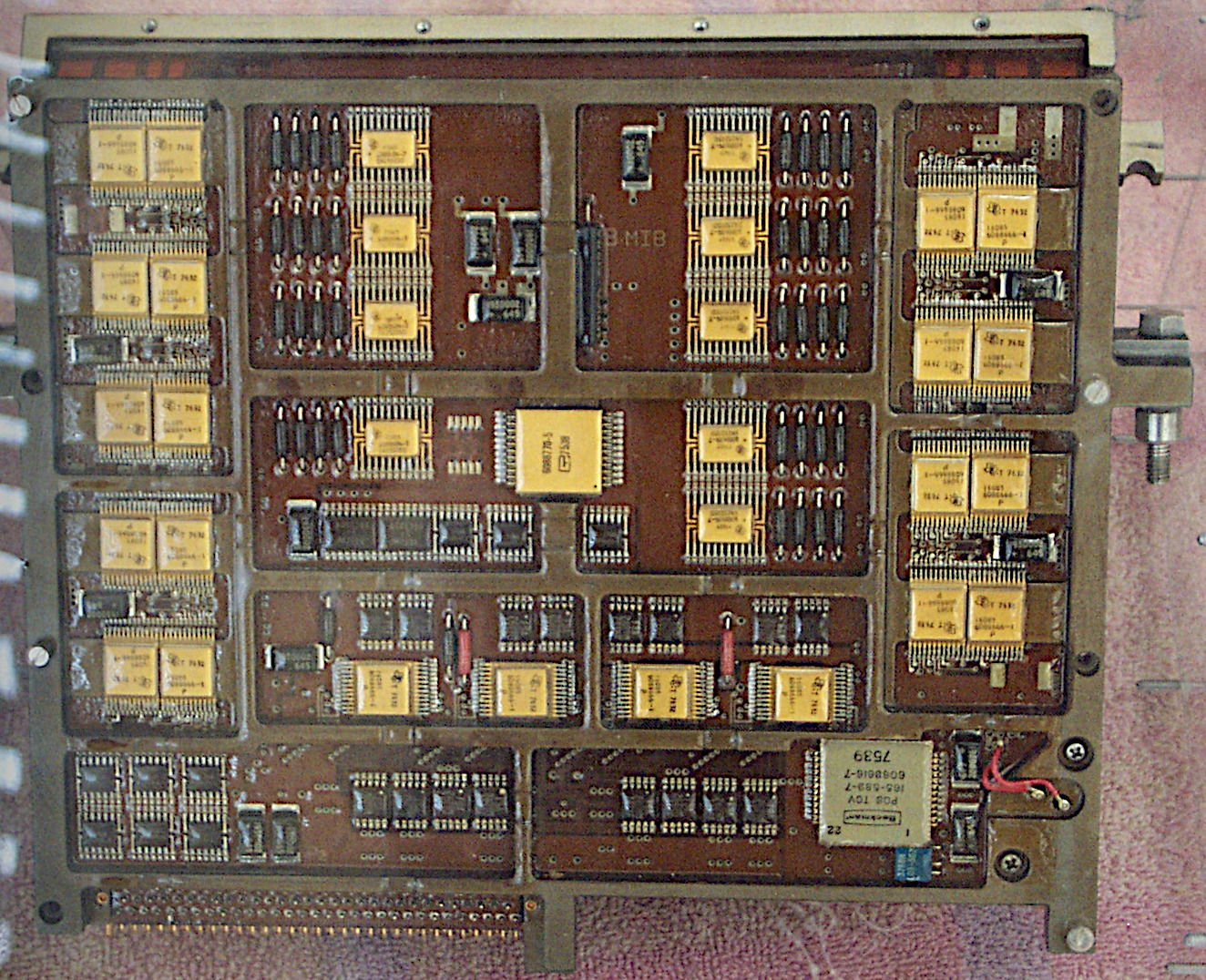
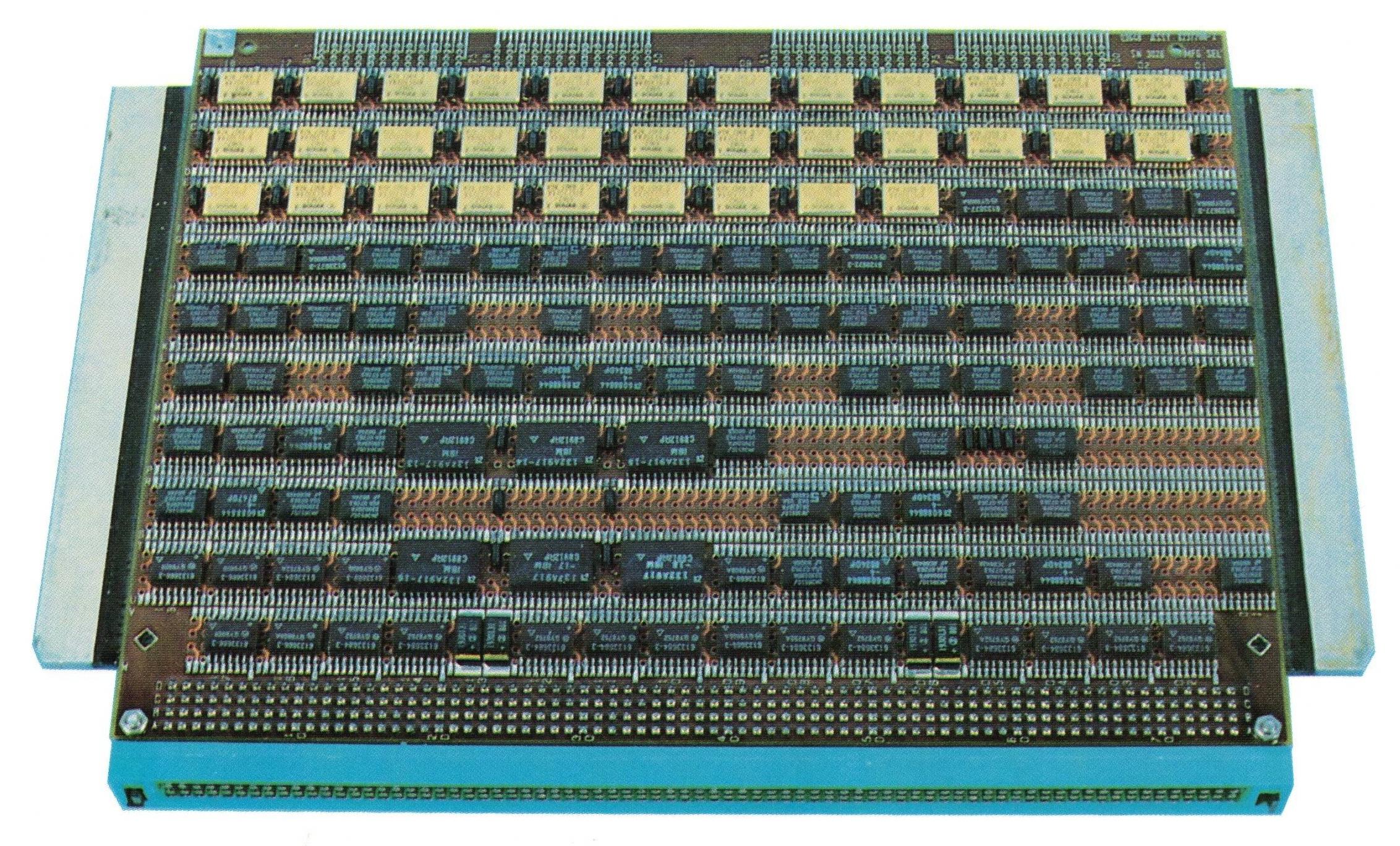
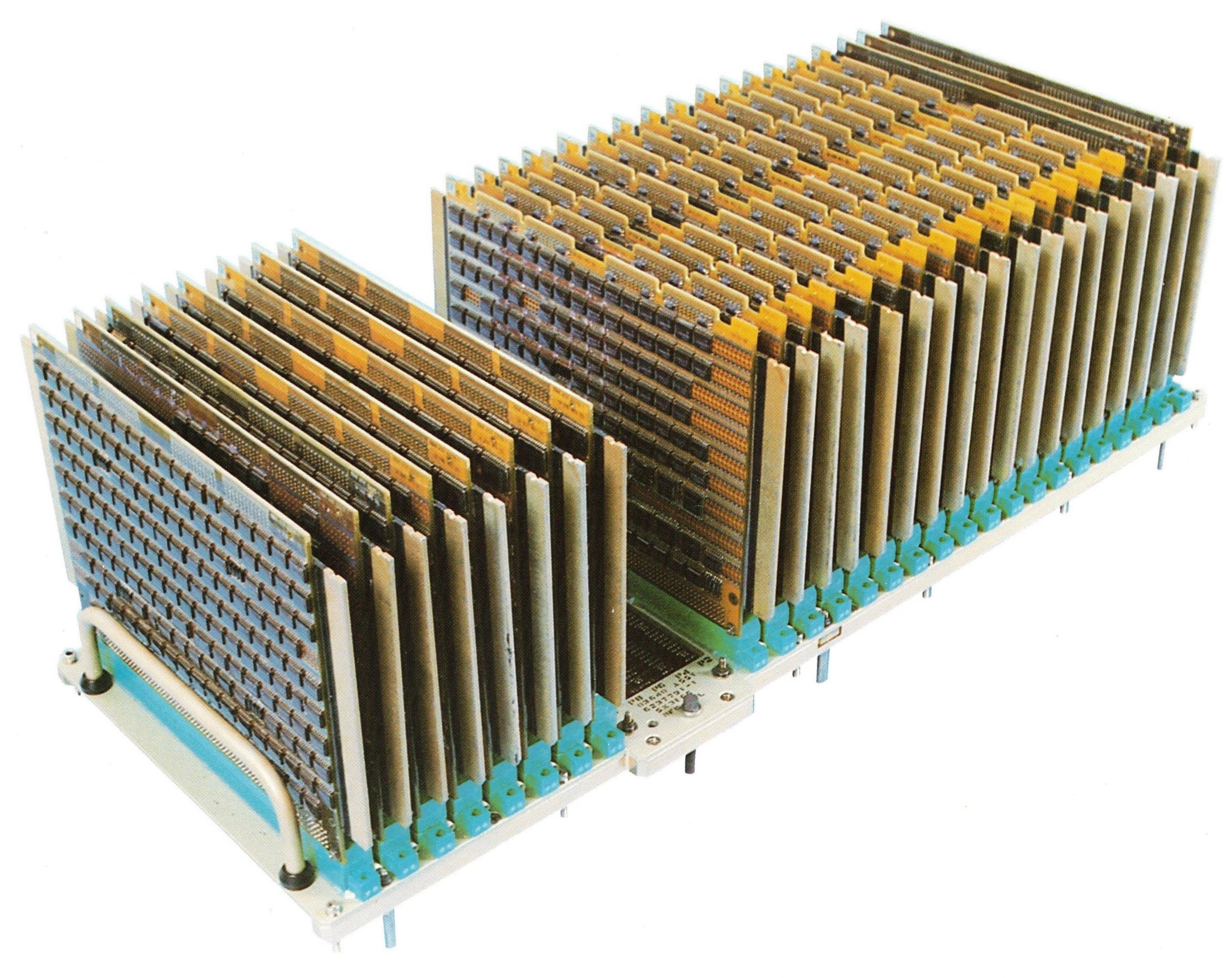
Like the TC, the CP was constructed from flat-pack TTL chips mounted on circuit boards called "pages". However, the CP used smaller pages with six layers instead of four; each double-sided page could hold up to 156 integrated circuits. Each page had two 98-pin connectors, reusing the style of connector that IBM used in Apollo for the Saturn V rocket's Launch Vehicle Digital Computer (LVDC). IBM standardized on this type of page for decades; the page below was used in the AWACS computer (1991) and is almost identical to the pages in the CP computer in 1967.
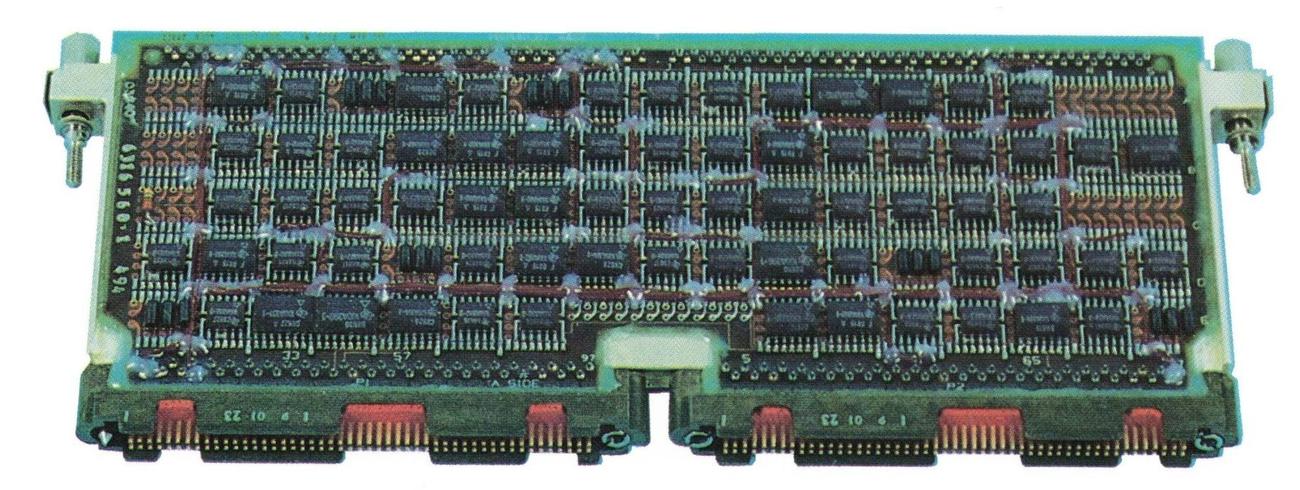
A standard IBM System/4 Pi page assembly. From "AWACS Data Processing Subsystem" brochure, 1991.A standard IBM System/4 Pi page assembly. From "AWACS Data Processing Subsystem" brochure, 1991.

The EP (Extended Performance) computer

The EP was the most powerful of the original System/4 Pi computers. It was a 32-bit computer compatible with IBM System/360 mainframes, specifically the 360 Model 44.11 For input/output, the EP used the same I/O channel architecture as the System/360 mainframes. To support the complicated 360 instruction set, the EP was microcoded. It executed 190,000 instructions per second and weighed 75 pounds. Floating-point support was available as an option.
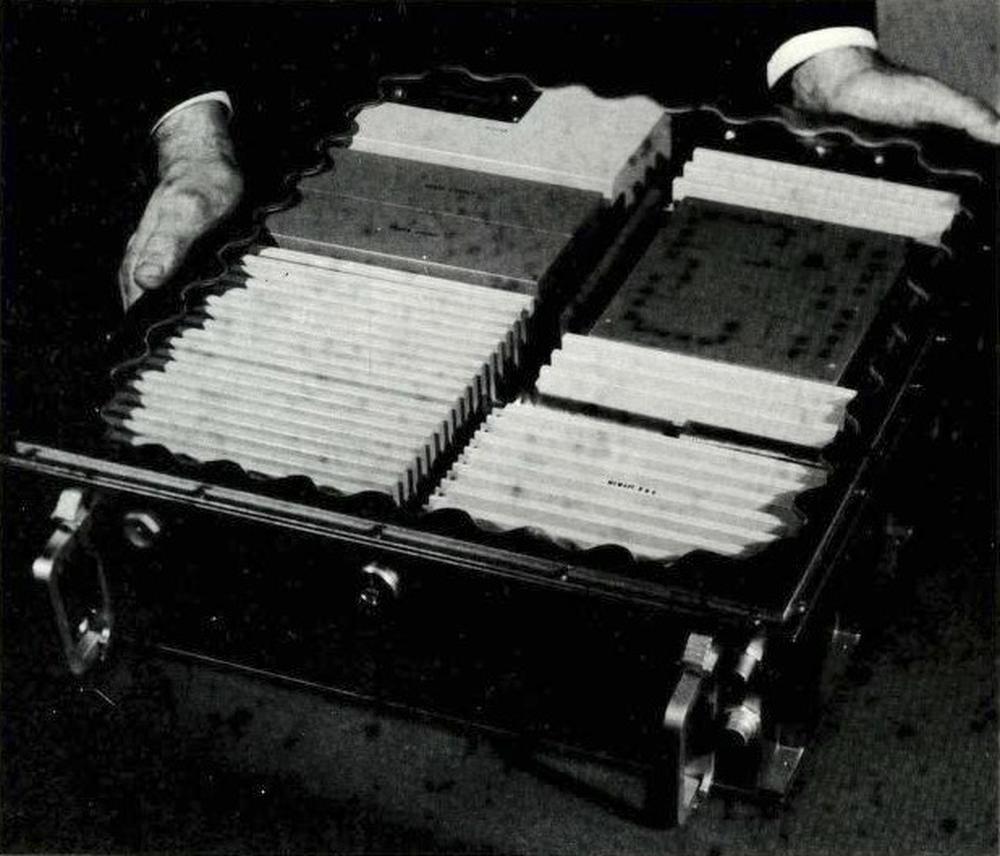
A mockup of the EP computer. The core memory is the dark box in the in the upper right, From Technical Description of IBM System 4 Pi Computers.A mockup of the EP computer. The core memory is the dark box in the in the upper right, From Technical Description of IBM System 4 Pi Computers.

A multiprocessor version of EP, the EP/MP, supported up to three CPUs sharing memory. It was delivered for the Air Force's Manned Orbiting Laboratory (MOL), but the MOL project was canceled (details). The multiprocessor system was also used for the VS ANEW anti-submarine research project, part of the VSX program that led to the Lockheed S-3 Viking, an aircraft that used the System/4 Pi SP-0A computer instead of the EP.

The next generation: Advanced System/4 Pi

Early in 1970, IBM created the Advanced System/4 Pi family.12 These 32-bit systems were significantly faster, smaller, and more advanced than the previous System/4 Pi computers. These computers took advantage of improved integrated circuits, called Medium-Scale Integration (MSI). These integrated circuits held 10 to 100 gates per chip, compared to the earlier Small-Scale Integration (SSI) chips with 1 to 10 gates per chip, allowing a chip to implement a more complex function, such as a shift register, counter, or adder.) Moreover, these computers used faster core memory, reducing the memory cycle time from 2.5 µs to 1 µs.

This series originally consisted of three lines: Advanced Processor (AP), Subsystem Processor (SP), and Command and Control (CC). The AP line is the largest and most famous, powering the Space Shuttle as well as numerous aircraft. A few years later, IBM introduced the ML line. Although the SP, CC, and ML lines are obscure, they have some interesting features.

Advanced Processor (AP)

For the most part, the AP computers used an instruction set and architecture that was derived from the System/360, called MMP (Multipurpose Midline Processor).13 Unlike the EP computers, the AP computers were incompatible with System/360: the instruction format, the registers, the addressing modes, and the condition codes were different. Some AP computers used a 16-bit instruction set that was an Air Force Standard, called MIL-STD-1750A.

The Advanced Processor line started with the AP-1, a 32-bit processor that performed 450,000 instructions per second and weighed 36 pounds. It could be programmed in assembler or the military's JOVIAL language. It supported 16K halfwords to 64K halfwords of storage internally, and more could be added in an external box. It had four high-speed I/O channels, handling up to 15 devices per channel. Floating point was available as an option. The AP-1 is described in detail here.
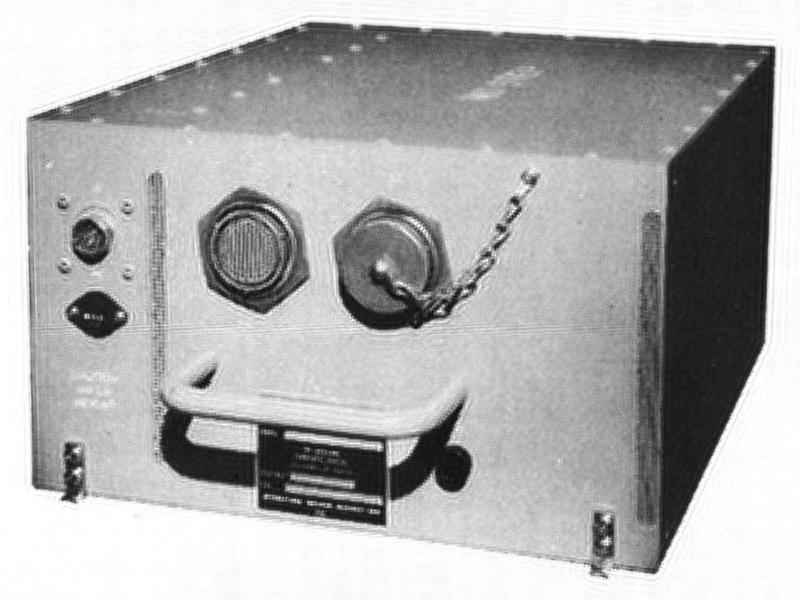
The AP-1 computer, designated CP-1075/AYK. From "IBM System/4 Pi and Advanced System/4 Pi Computers" brochure, August 1973.The AP-1 computer, designated CP-1075/AYK. From "IBM System/4 Pi and Advanced System/4 Pi Computers" brochure, August 1973.

The AP-1 computer was used in the F-15 fighter for navigation/weapon delivery and data management. It was also used by Japan in the F-4 fighter. An upgraded computer, the AP-1R, had 256K of core memory and performed over 1 million instructions per second; it was used in the F-15E aircraft in 1983. The AP-1A was used in the development of the AWACS Seek Bus tactical communication system and the Joint Tactical Information Distribution System (JTIDS).

The AP-2 computer was almost identical to the AP-1 in appearance and functionality, with some changes to its I/O capabilities. It was used in the Central Integrated Test System (CITS) on the B-1 bomber to provide real-time testing and troubleshooting (details).

The AP-101 computer expanded the AP-1's instruction set from 83 instructions to 151, as well as having slightly faster core memory. The first nine AP-101 computers were used in NASA's digital fly-by-wire research program that used the F-8 fighter (link). The AP-101 was also used for GPS development.
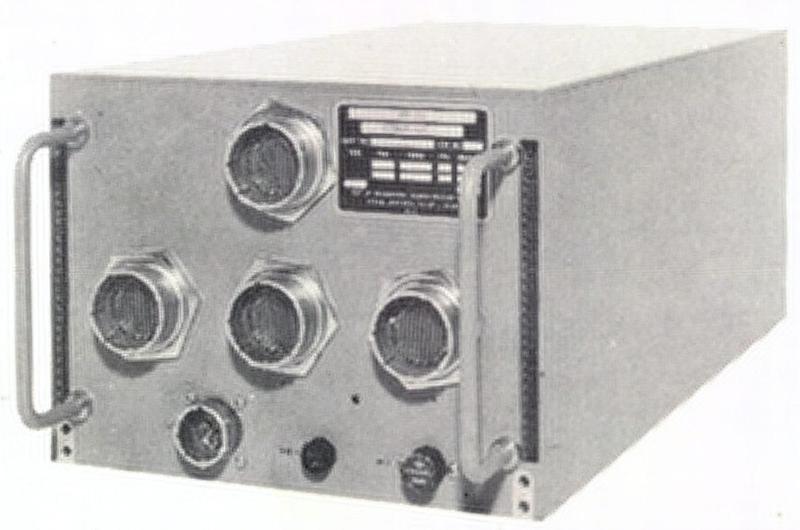
The AP-101 computer. From "IBM System/4 Pi and Advanced System/4 Pi Computers" brochure, August 1973.The AP-101 computer. From "IBM System/4 Pi and Advanced System/4 Pi Computers" brochure, August 1973.

Around 1975, the AP-101B computer was developed for the Space Shuttle.14 The first step was improving the instruction set to support "high order languages" better, resulting in the AP-101A. Next, double-density core memory was used, creating the AP-101B that the Space Shuttle used for many years. The AP-101B computer was partnered with the IOP (I/O Processor), essentially a second computer that handled I/O, providing 24 data buses to the rest of the Space Shuttle. For reliability, the Space Shuttle had four redundant AP-101B computers that ran in parallel and voted on each output, so a faulty computer could be excluded. Moreover, a fifth computer was ready as a backup, using independently programmed software in case a software fault caused all four primary computers to fail.15
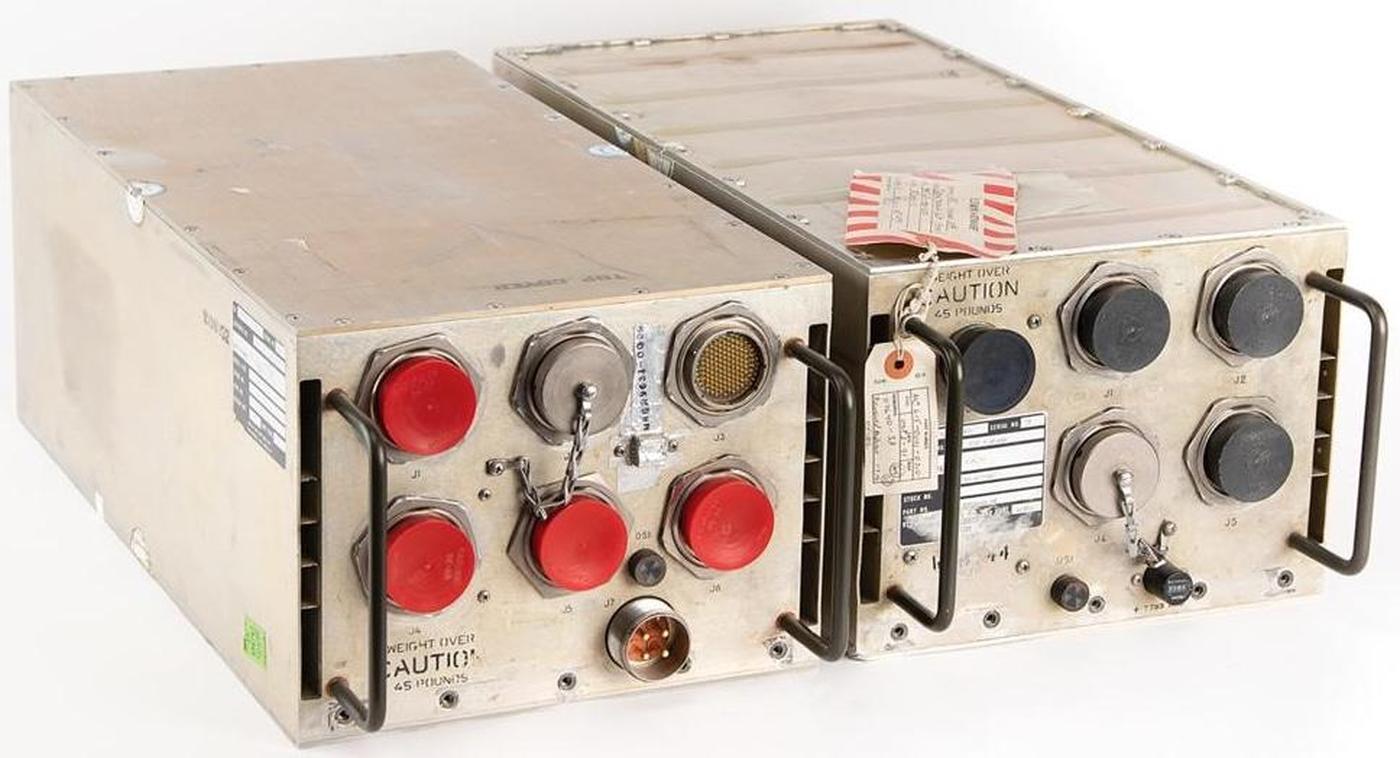
The Space Shuttle I/O Processor (IOP, left) and AP-101B computer (right). Photo courtesy of RR Auction.The Space Shuttle I/O Processor (IOP, left) and AP-101B computer (right). Photo courtesy of RR Auction.

The Space Shuttle computer had 104K 32-bit words of memory. The AP-101B held ten memory pages (i.e., circuit boards), each holding 16K×18 bits, while the IOP held six pages, each holding 8K×18 bits.16 Although the memory was physically split between the two boxes, it acted as a unified shared memory.
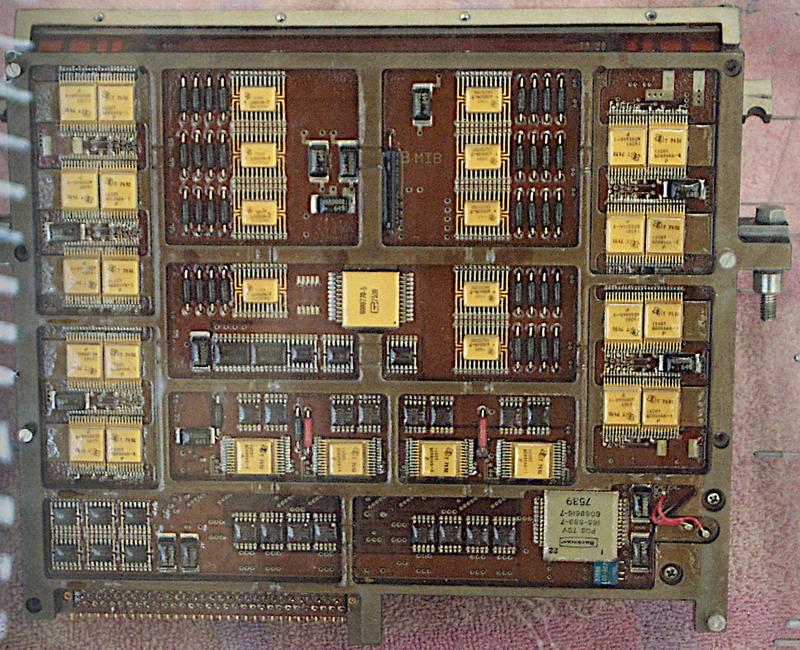
The Space Shuttle's EP/MCM (Extended Performance/Modular Core Memory) module stores 8K by 18 bits (details). This is a lower-capacity page, either from the IOP or from an early version of the AP-101. The page unfolds, with the core planes inside. Photo from klabs.The Space Shuttle's EP/MCM (Extended Performance/Modular Core Memory) module stores 8K by 18 bits (details). This is a lower-capacity page, either from the IOP or from an early version of the AP-101. The page unfolds, with the core planes inside. Photo from klabs.

The AP-101C computer (1977) had multiple improvements: quadruple-density modular core memory, upgraded logic technology, and repackaging to reduce cost.17 The AP-101C had 32K words of storage and ran at over 500,000 operations per second.18 The AP-101C was used in the B-52D Digital Bombing and Navigation System. It was also installed in the B-52G/H bomber as part of the Offensive Avionics System. The AP-101C was designed to survive radiation and electromagnetic pulse (EMP) hazards, with radiation-hardened circuits and parity in memory. Its "nuclear circumvention" feature resumed operation 50 milliseconds after a nuclear event, probably detecting a nuclear blast and quickly rebooting to avoid harmful effects such as latchup.
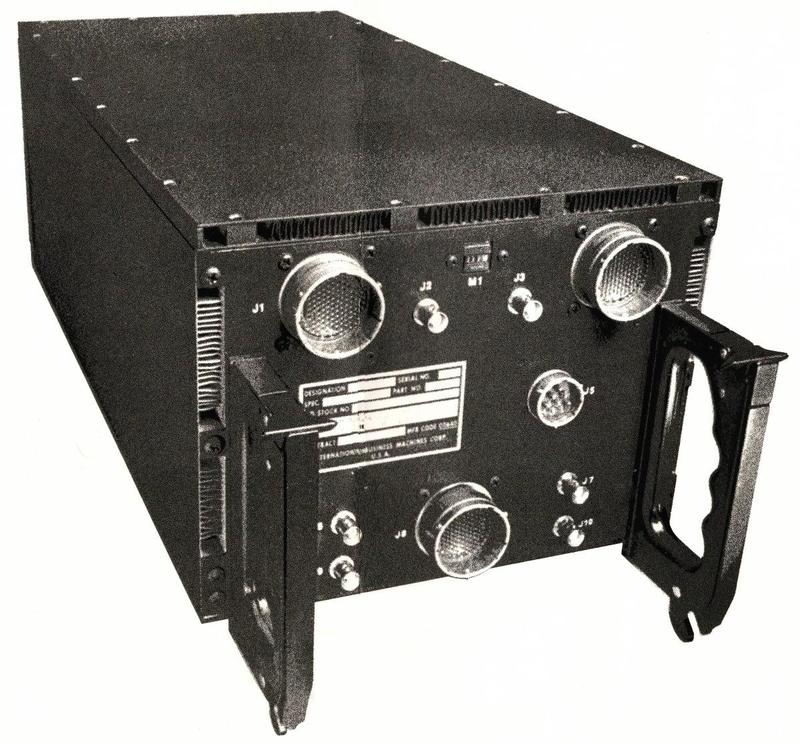
The AP-101C computer. From "IBM Model AP-101C" brochure, September 1978, retouched.The AP-101C computer. From "IBM Model AP-101C" brochure, September 1978, retouched.

The AP-101C started the Modular Computer Series,19 which used 9"×6.4" pages, much larger than the previous pages. The MCS pages were modularized, supporting standard modules for CPU, memory, timing, power supply, testing, and a new military serial bus called MIL-STD-1553A. While previous computers were customized by changing the microcode in core-based Read Only Store (ROS), the AP-101C could be customized by changing PROMs (Programmable Read-Only Memories) and PLAs (Programmable Logic Arrays).
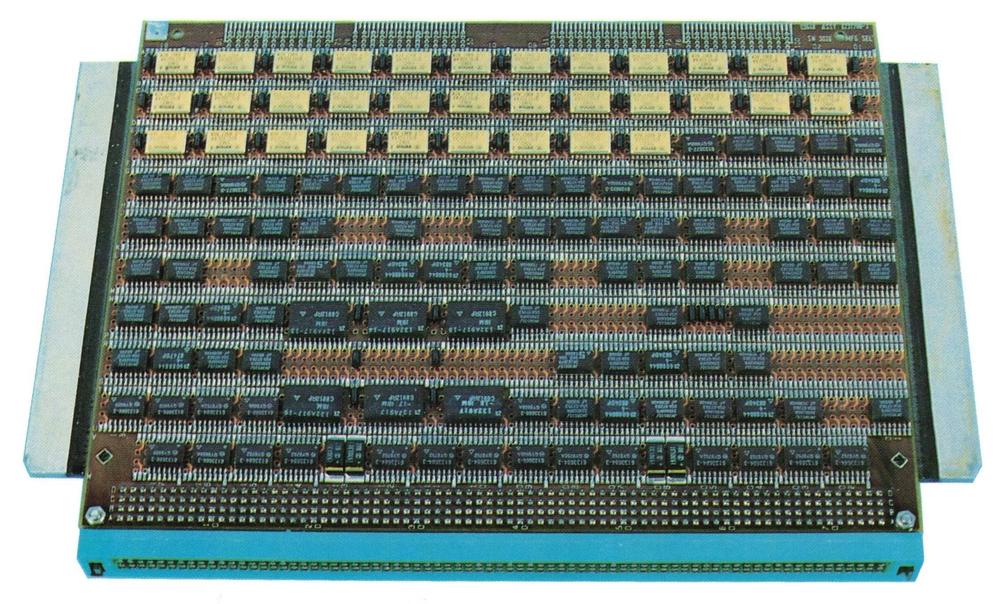
A Modular Computer Series (MCS) page assembly. This page is from an AWACS computer, From "AWACS Data Processing Subsystem" brochure, 1991.A Modular Computer Series (MCS) page assembly. This page is from an AWACS computer, From "AWACS Data Processing Subsystem" brochure, 1991.

In the mid-1970s, the Air Force realized that the cost of developing software for complex military systems was a problem, partially because different computers had incompatible instruction sets. To solve this problem, the Air Force developed a standard 16-bit architecture and instruction set, releasing a standard called MIL-STD-1750A in July 1980. The Air Force made 1750A mandatory for future projects (unless there was a compelling reason not to use it), so many companies implemented computers that were compatible with 1750A. IBM developed a version of the AP-101 that ran the 1750A instruction set and called it the AP-101E.

The AP-101F (1982) was innovative in several ways. It was a dual-architecture computer that could support both the existing AP-101 instruction set (MMP) and the 1750A standard instruction set, providing a low-risk upgrade path. It was much faster, using a pipelined architecture that ran over 1 million instructions per second (MIPS). The AP-101F also used DRAM (Dynamic RAM) semiconductor memory, which was faster, denser, and used less power than core memory.20

Choosing semiconductor memory over core memory may seem like an obvious choice, but magnetic core memory had two significant advantages. First, core memory is nonvolatile: it keeps its contents when the power is off, so programs don't need to be loaded at boot. Second, core memory is resistant to nuclear radiation and cosmic rays, dangers that can easily flip bits in semiconductor memory. The volatility problem was solved by providing battery backup for the semiconductor memory. The AP-101F solved the radiation problem by using semiconductor memory backed up by "shadow" core memory. Later computers used semiconductor memory with error-correcting codes that could recover from flipped bits: each 16-bit word in memory had 6 additional bits for error correction.21 Because of the tradeoffs, some computers (such as the ML-1 discussed below) could use either core memory or semiconductor memory, depending on the application.

The B-1B bomber used eight AP-101F computers: one each for guidance and navigation, weapons delivery, controls and displays, critical task redundancy, preprocessor, and system test (CITS), while two computers provided terrain following (see Standards Application to B-1B Avionics Program). To minimize schedule risk, the B-1B initially used the AP-101C from the B-52, then transitioned to the AP-101D. Because of the need for a more powerful processor and pressure to use the standard 1750A instruction set, the B-1B moved to the dual-architecture AP-101F, gradually rewriting software from assembly to the standard JOVIAL language.

Shuttle redesign: the AP-101S

The most unrelenting enemy of a military computer is Moore's Law. Even if you start with a cutting-edge computer, it can take a decade for an aircraft to enter service, and then the plane may be flown for decades. Meanwhile, commercial computers become more than an order of magnitude more powerful every decade. The result is that military computers are constantly fighting obsolescence.

Space computers have the same problem: the Shuttle's AP-101 computer was developed in 1972 but the Shuttle didn't fly until 1981, making the Shuttle computers obsolete from the start. To improve performance, IBM started redesigning the computer the next year, creating the AP-101S. It executed 1.27 million instructions per second (MIPS), three times as fast as the AP-101B. However, this performance increase was nothing compared to the improvements in microprocessors. In 1991, when the AP-101S first flew, a Motorola 68040 microprocessor executed 44 MIPS, leaving the AP-101S in the dust. By the time the Shuttle program ended in 2011, an Intel Core i7 processor provided a blistering 100,000 MIPS. Astronauts had to use laptops to make up for the lack of computational power in the main computers; one flight carried 18 Thinkpad laptops.
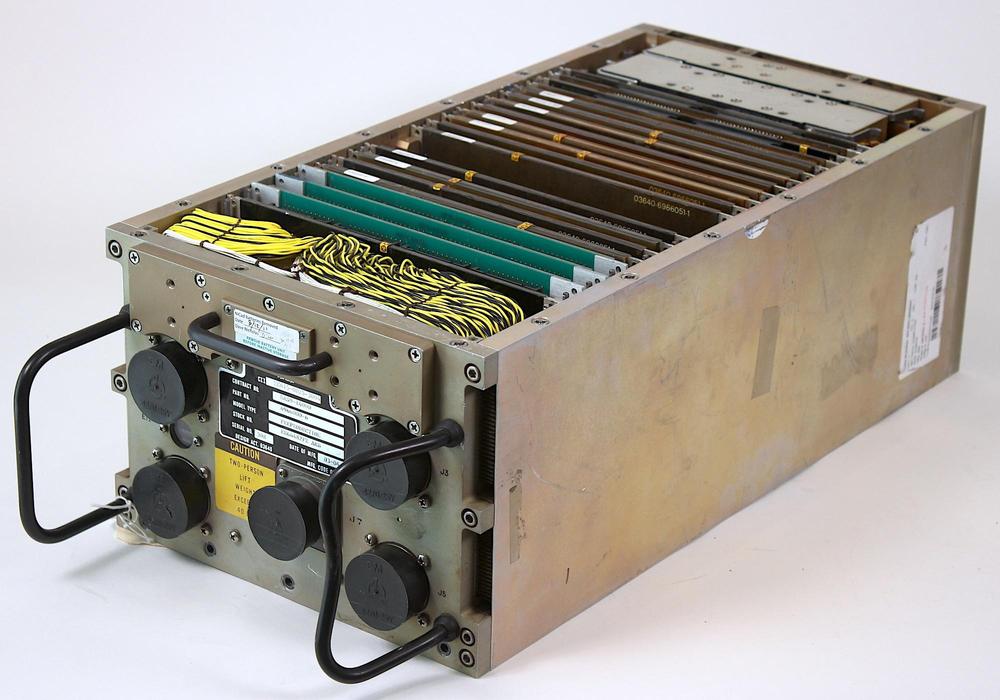
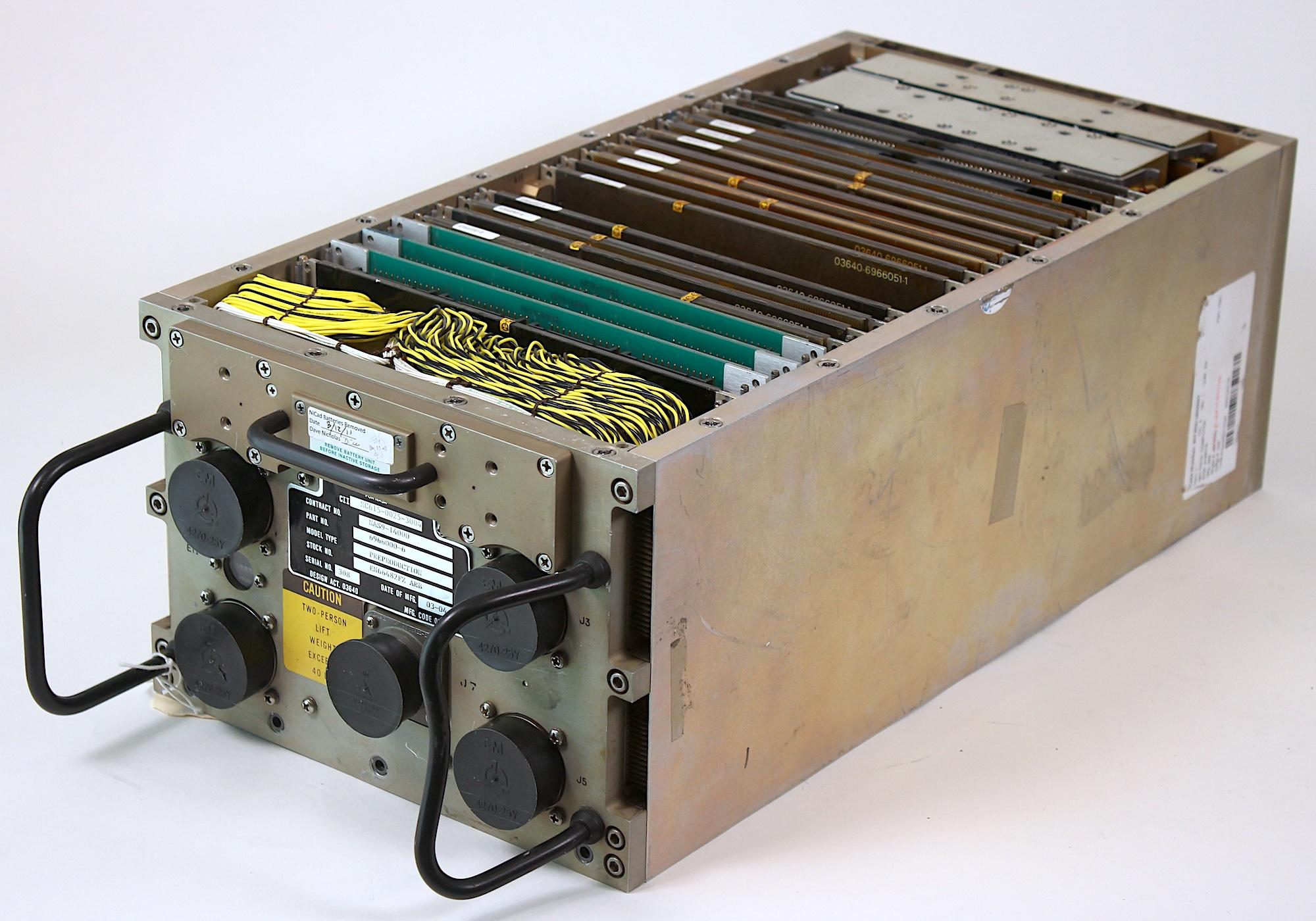
The AP-101S with its cover removed. This is a prototype; the green boards on the left are likely development boards instead of the I/O boards that are normally in these positions.The AP-101S with its cover removed. This is a prototype; the green boards on the left are likely development boards instead of the I/O boards that are normally in these positions.

Despite its lack of absolute performance, the AP-101S was a substantial improvement over the earlier Shuttle computer. The AP-101S fit the functionality of the AP-101B computer and the IOP (I/O Processor) into one box instead of two, saving 60 pounds. With five computers on the Shuttle, this change freed up 300 pounds for payload. As well as tripling the speed, the AP-101S was more reliable, had 256K words of memory instead of 104K, and used 100 watts less of the Shuttle's limited power. The AP-101S remained plug-compatible with the old computer and could run the same software, making upgrading straightforward.
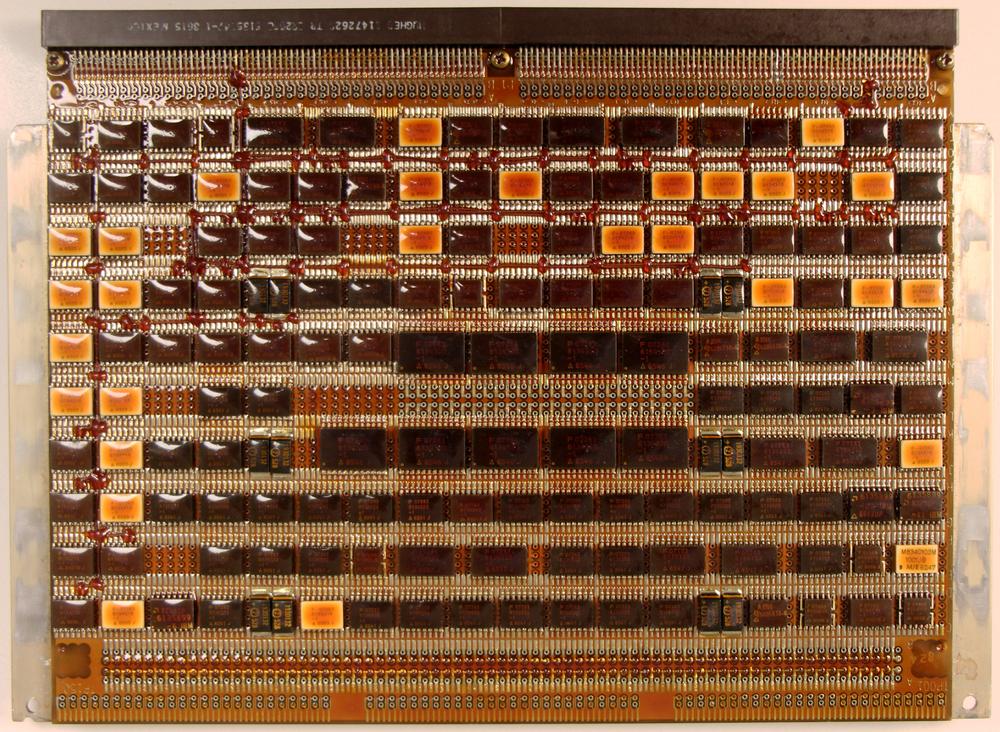
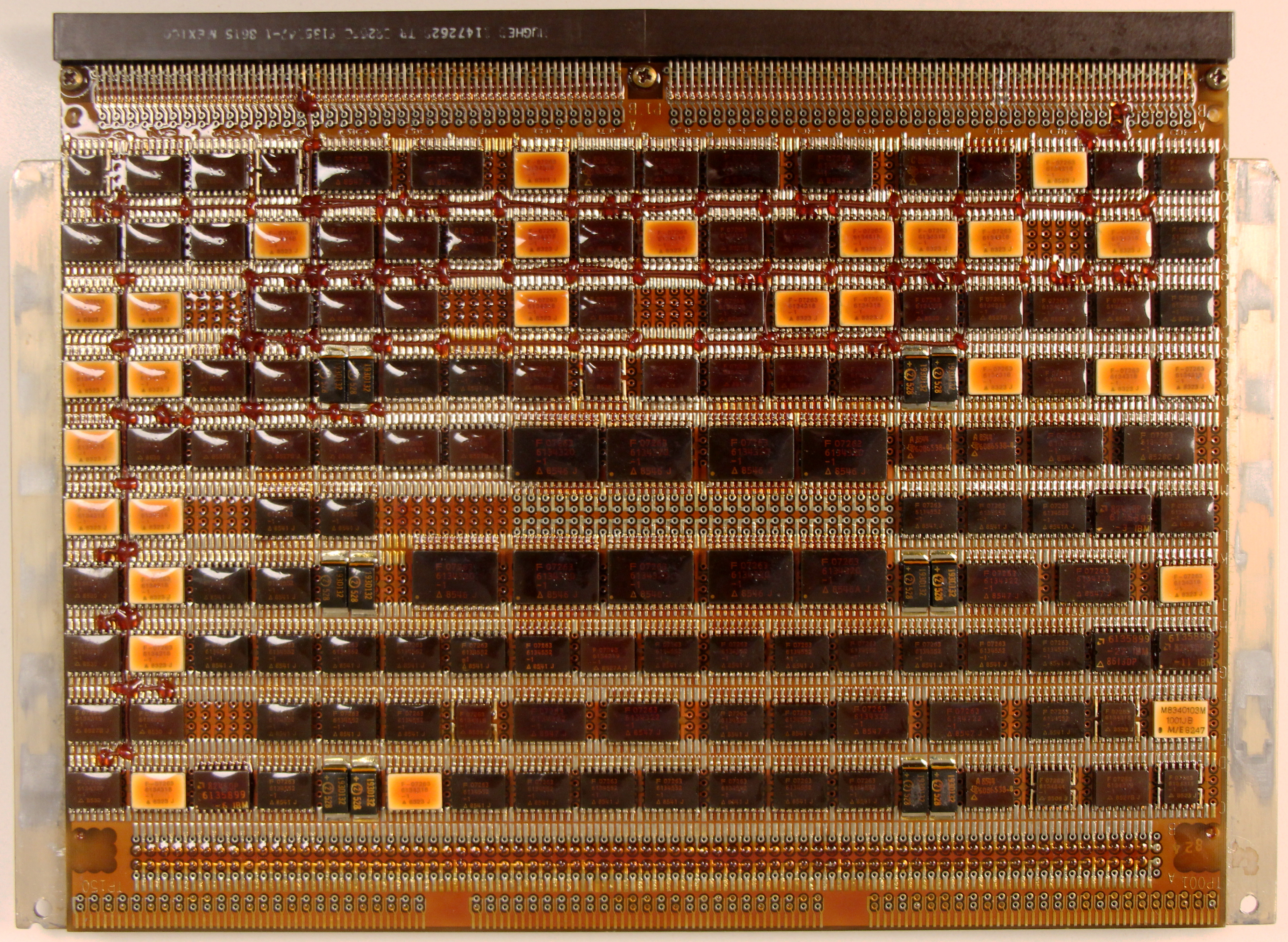
One of the CPU boards from the AP-101S, specifically the CPU1 board. If you look closely, you can see "bodge wires" that correct errors on the board. The nine large ICs in the center are four-bit arithmetic-logic unit chips (74F181) for the 36-bit "fraction" ALU. Much of the logic uses FAST (Fairchild Advanced Schottky Technology) TTL chips for improved performance. The board is covered with brown conformal coating to protect it from the environment. Click this image (or any other) for a larger version.One of the CPU boards from the AP-101S, specifically the CPU1 board. If you look closely, you can see "bodge wires" that correct errors on the board. The nine large ICs in the center are four-bit arithmetic-logic unit chips (74F181) for the 36-bit "fraction" ALU. Much of the logic uses FAST (Fairchild Advanced Schottky Technology) TTL chips for improved performance. The board is covered with brown conformal coating to protect it from the environment. Click this image (or any other) for a larger version.

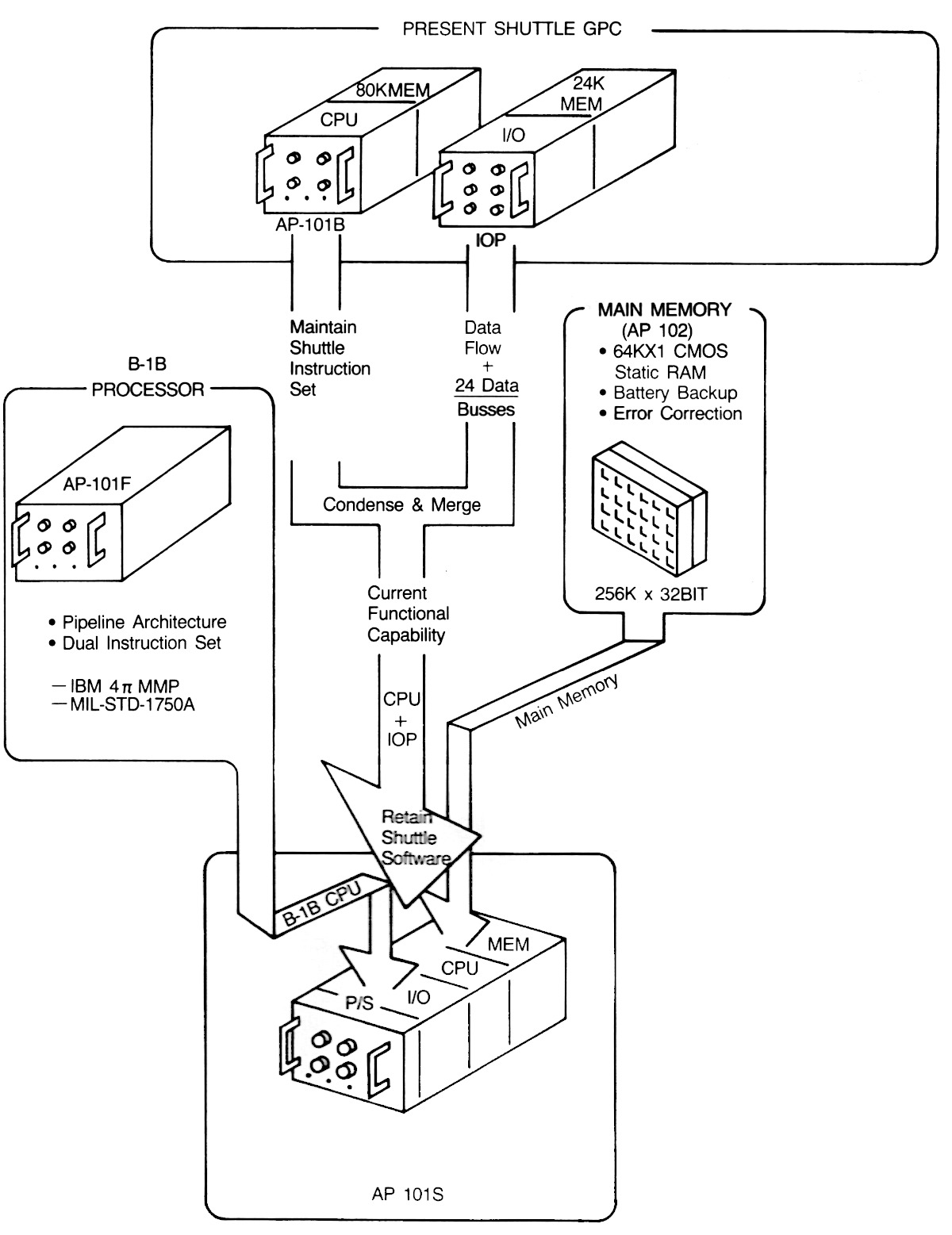
Like the previous processors, the CPU of the AP-101S was constructed from multiple pages of TTL chips. Unlike the earlier AP-101B, the AP-101S used large "MCS" pages, as shown above. The diagram below illustrates how the upgraded AP-101S computer was formed by combining the pipelined CPU22 from the high-performance AP-101F, the I/O Processor from the original Shuttle computer, and the semiconductor memory from the AP-102 (discussed in the next section).23
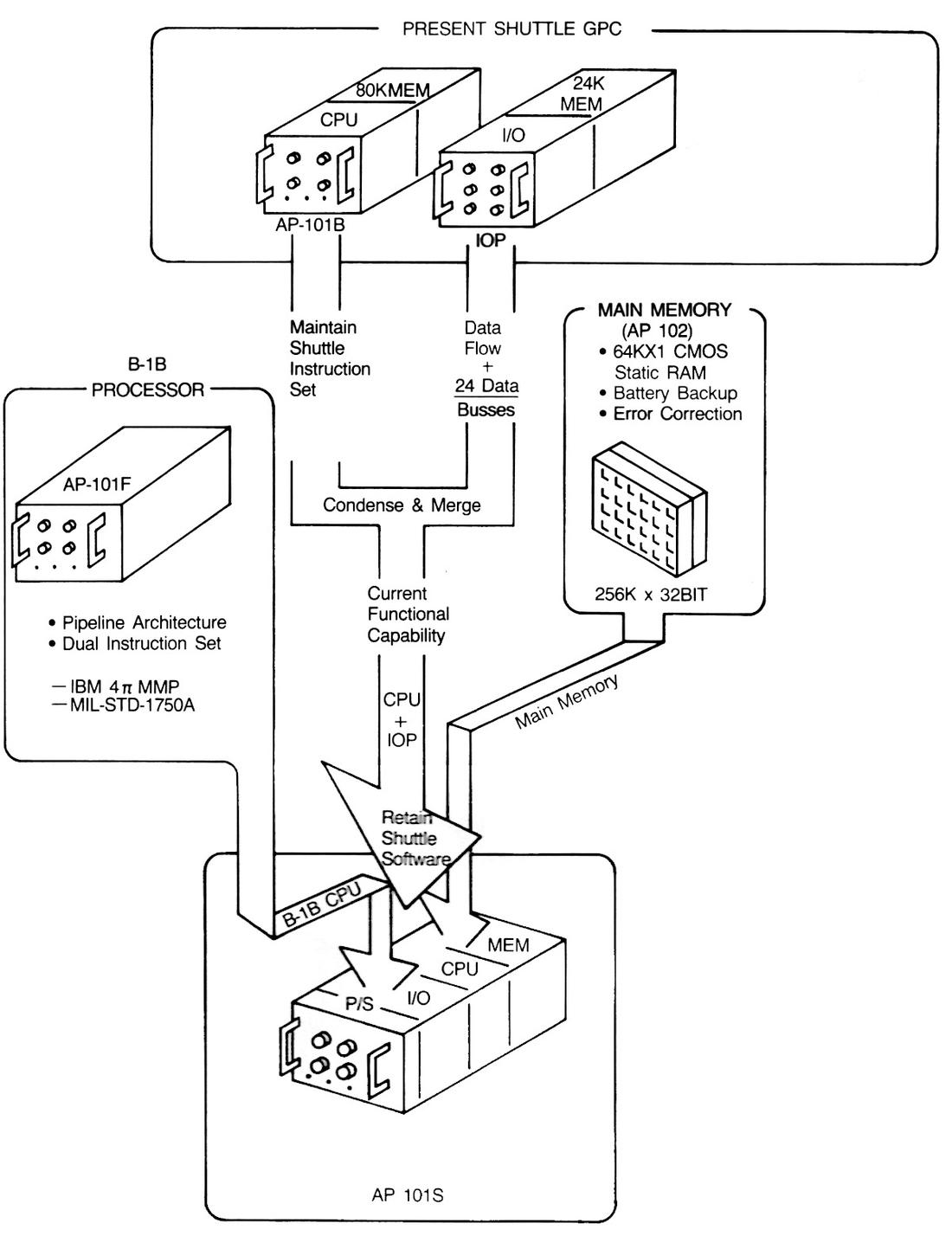
The upgrade path for the Space Shuttle computer. (Click this image (or any other) for a larger version.) From "A New Computer for the Space Shuttle: The AP-101S General Purpose Computer (GPC) Upgrade", IBM Technical Directions, 1986.The upgrade path for the Space Shuttle computer. (Click this image (or any other) for a larger version.) From "A New Computer for the Space Shuttle: The AP-101S General Purpose Computer (GPC) Upgrade", IBM Technical Directions, 1986.

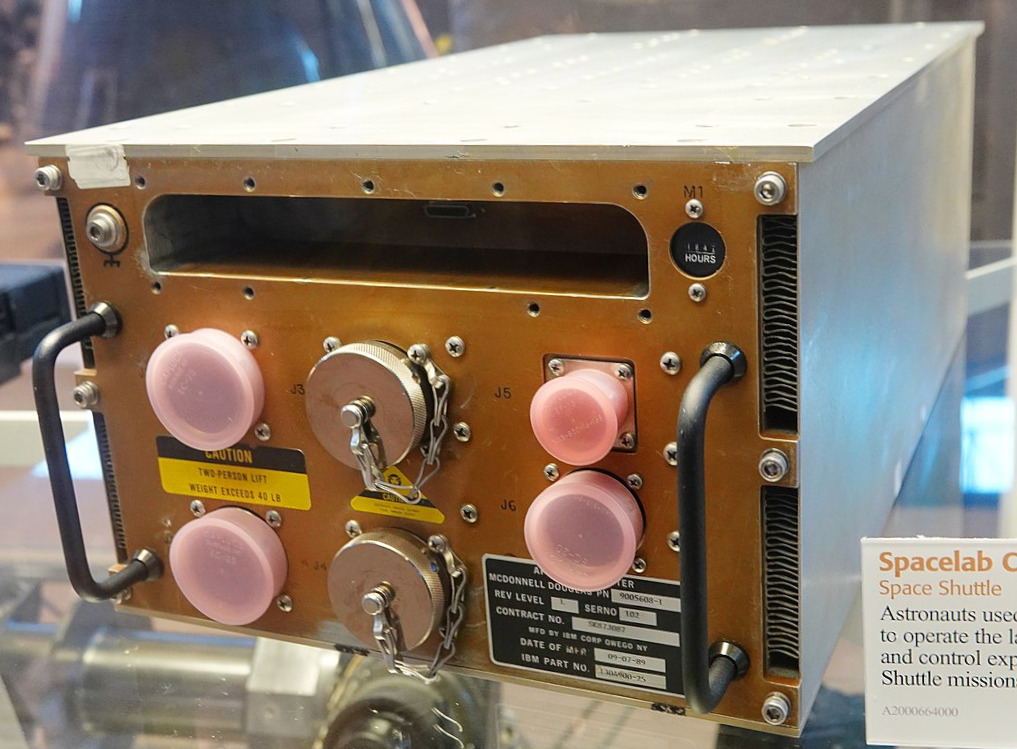
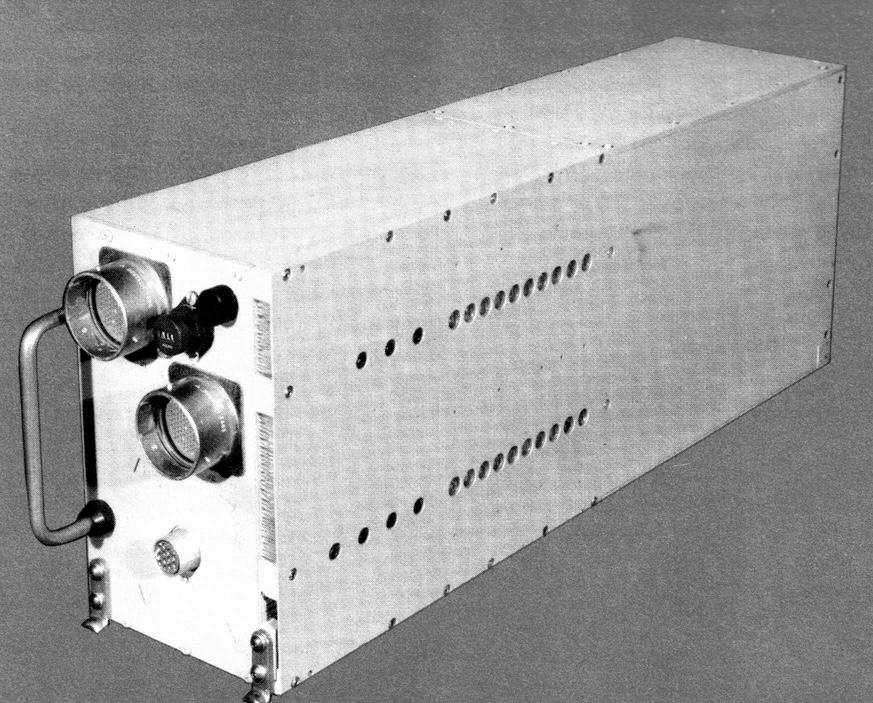
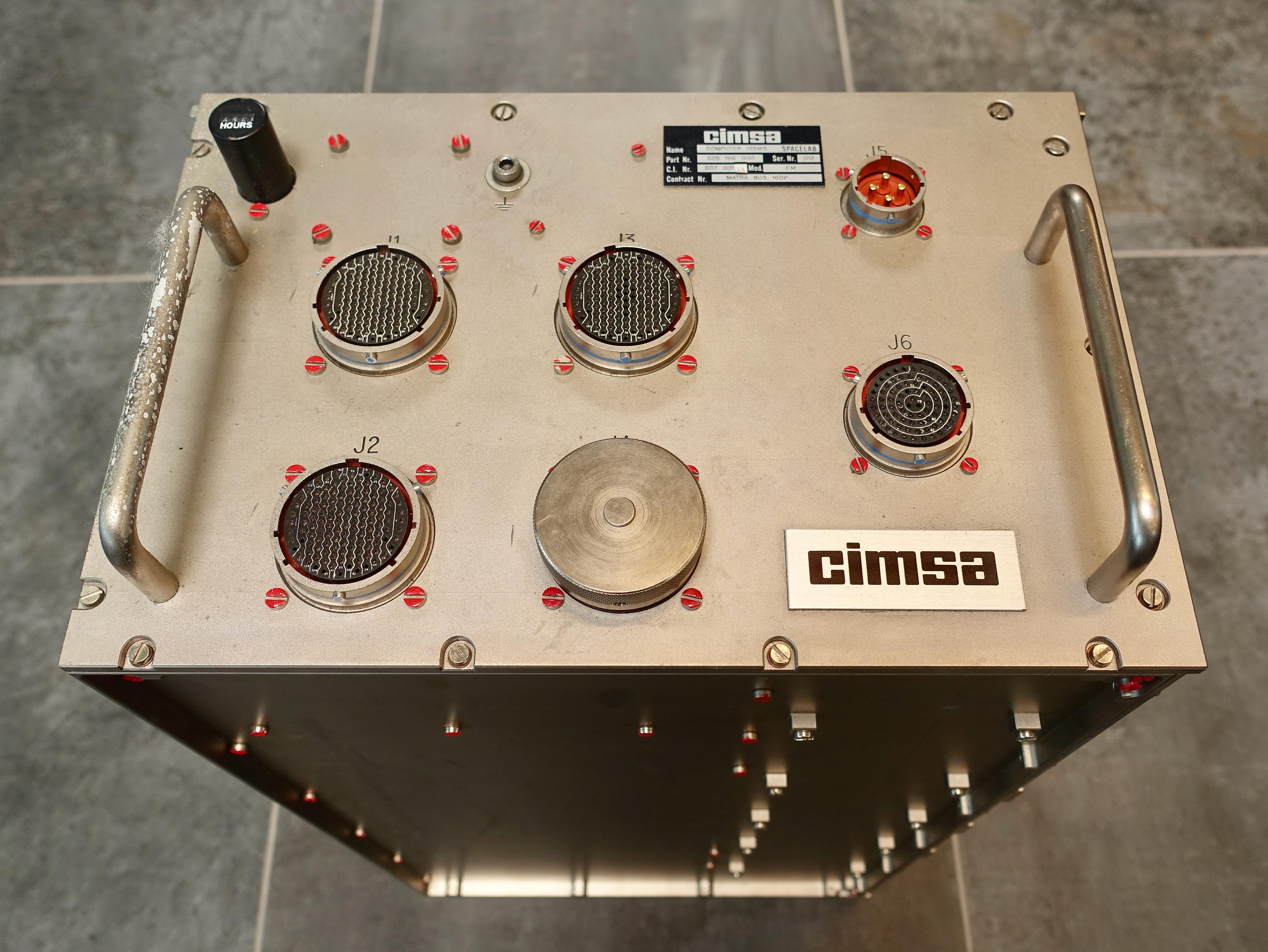
The Shuttle could carry a space laboratory called Spacelab (completely different from Skylab) in the cargo bay to provide a spacious research environment. Spacelab had independent computers from the Space Shuttle, originally French-built CIMSA 125 MS computers.24 In 1991, these Spacelab computers were replaced with IBM AP-101SL computers.25 The AP-101SL was compatible with the 16-bit CIMSA computer, so it could run "Experiment Computer Operating System" and other Spacelab software without change.
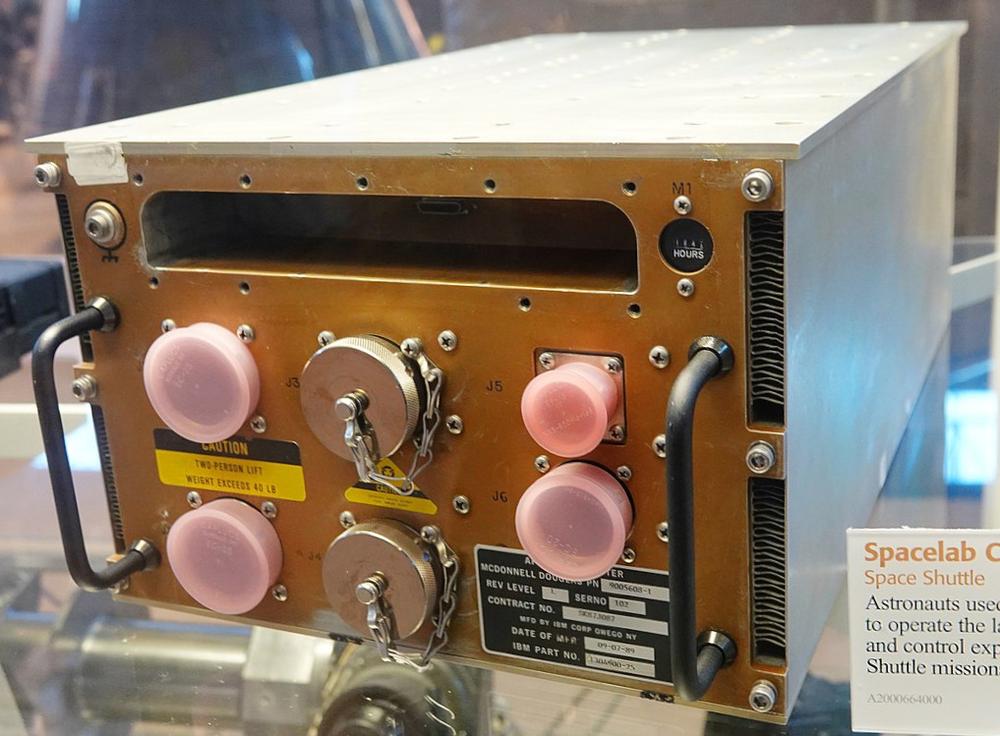
An AP-101SL computer at the National Air and Space Museum, VA. The slot at the top held nickel-cadmium batteries to preserve the contents of the CMOS memory, but the batteries were removed for safety during storage.
Photo by Sanjay Acharya, CC BY-SA 4.0, cropped.An AP-101SL computer at the National Air and Space Museum, VA. The slot at the top held nickel-cadmium batteries to preserve the contents of the CMOS memory, but the batteries were removed for safety during storage. Photo by Sanjay Acharya, CC BY-SA 4.0, cropped.

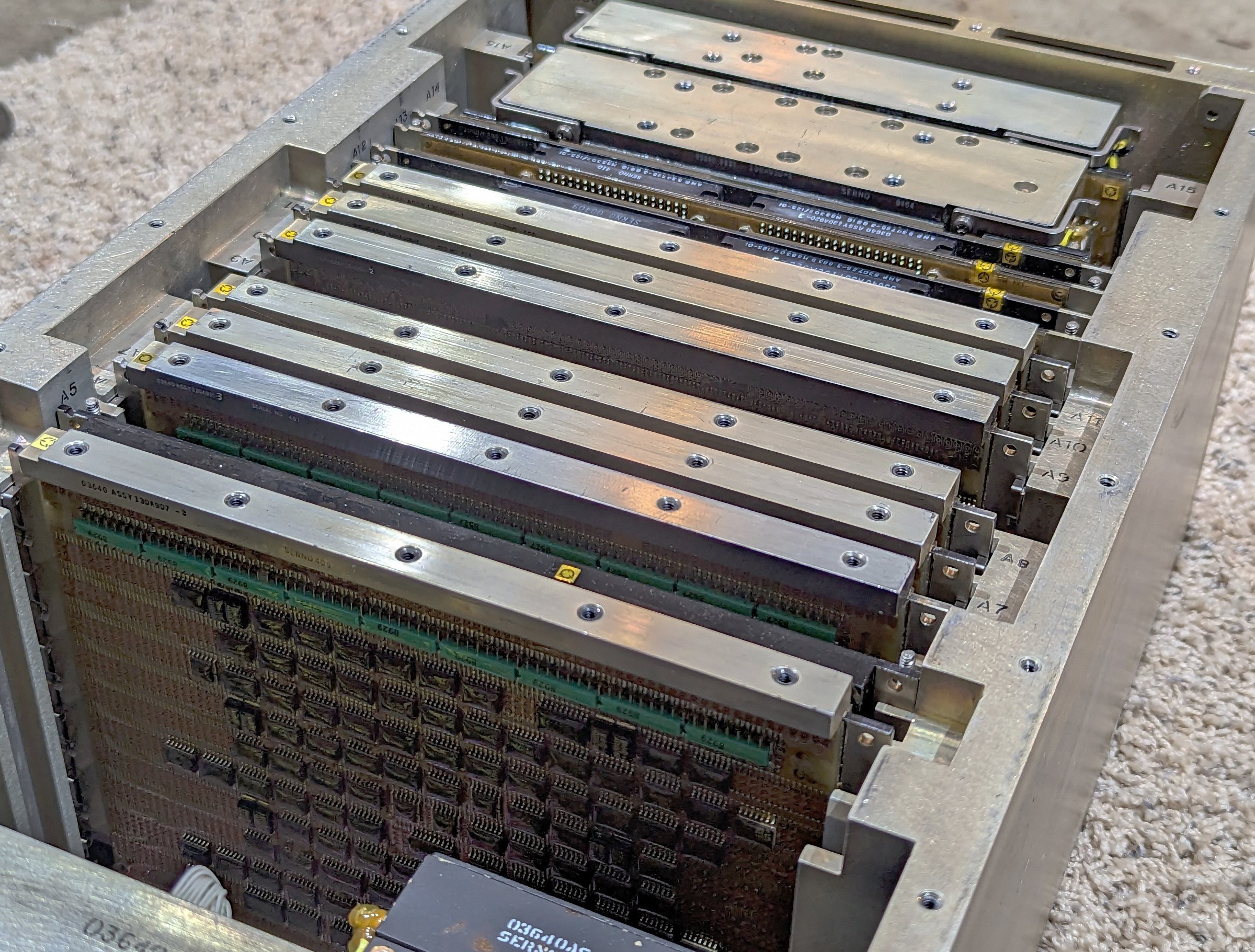
Internally, the Spacelab AP-101SL computer is very similar to the Shuttle's AP-101S. It has fewer boards than the AP-101S, since it doesn't include the Shuttle's IOP (I/O Processor). The processor boards, the semiconductor memory,26 and the power supplies are nearly identical to the Shuttle computer, while the I/O boards are different.27
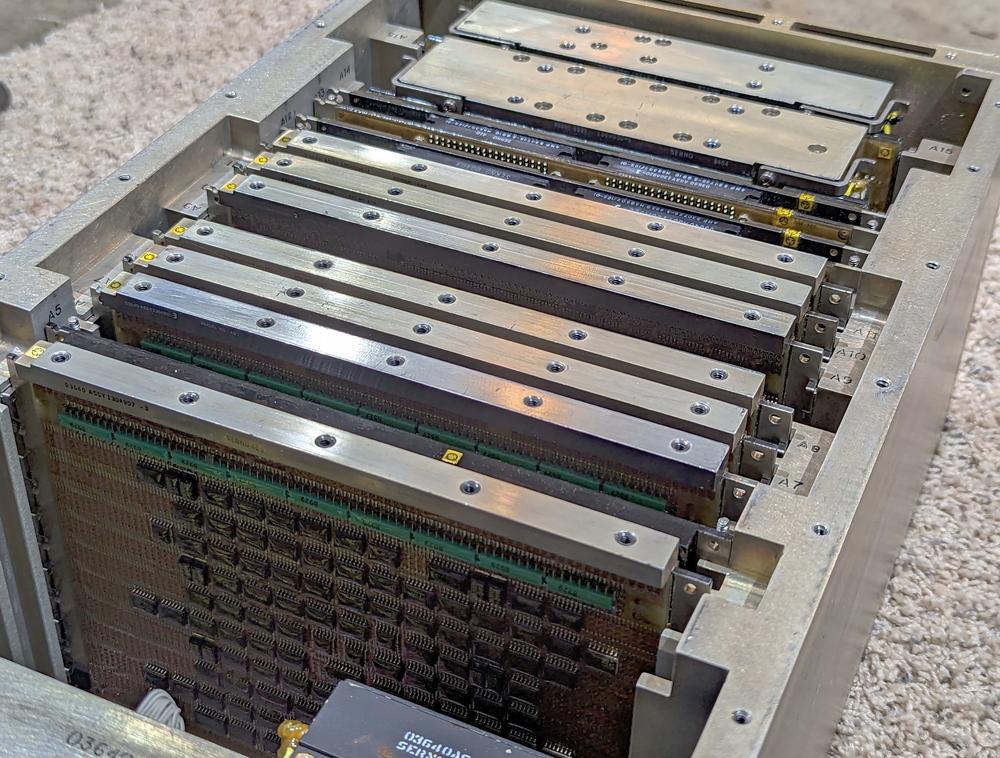
The AP-101SL with the cover removed. Photo courtesy of Kyle Owen.The AP-101SL with the cover removed. Photo courtesy of Kyle Owen.

AP-102 and VHSIC

Going back to the mid-1980s, IBM introduced the AP-102 computer. By 1992, it had become the most popular of IBM's avionics processors, with 1000 units sold. The AP-102 was a technological jump compared to the AP-101 since it used two VLSI (Very Large Scale Integration) chips, each containing 12,000 gates: one chip implemented the Instruction Processing Unit and the other chip implemented the Extended Arithmetic Unit (fixed and floating-point multiplies and divides). These chips were implemented with 2 µm NMOS technology. The AP-102 used CMOS static RAM for storage, which was much denser than core memory and used a tenth of the power. Because CMOS RAM loses its contents without electricity, the AP-102 used battery backup, lithium thionyl chloride cells that could power memory for up to seven years.
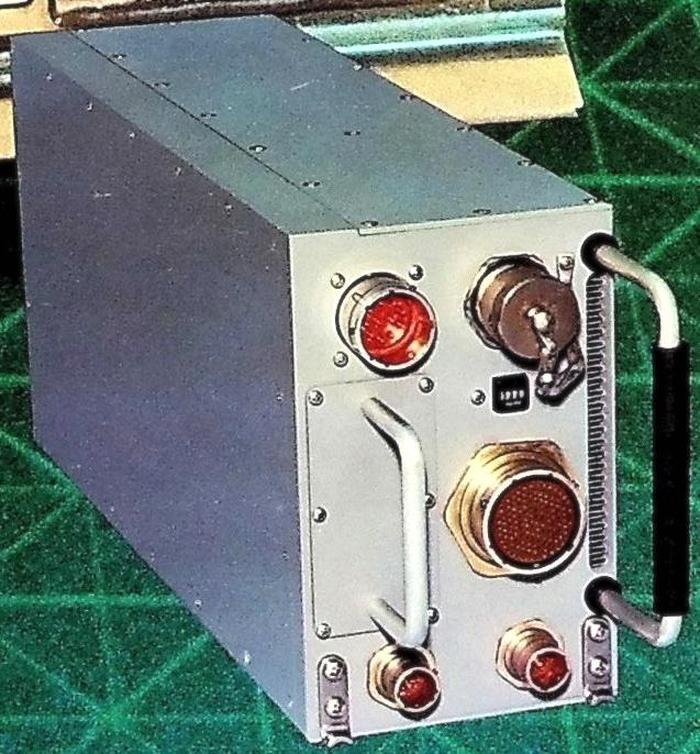
The AP-102 computer. From IBM Technical Directions, 1985 (cover).The AP-102 computer. From IBM Technical Directions, 1985 (cover).

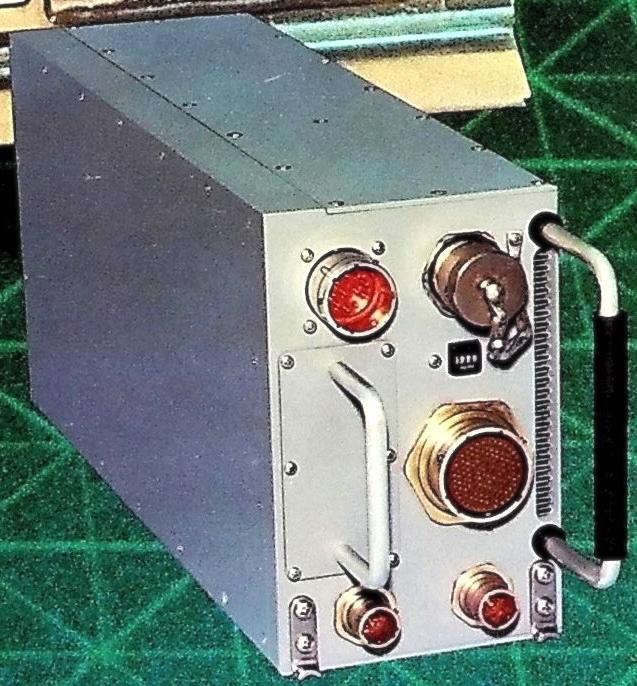
The AP-102 was compact, half the width of an AP-101.28 It weighed 20.8 pounds and used 95 watts. It ran the Air Force's standard 1750A instruction set, executing over 1 million instructions per second. The AP-102 was used in many aircraft in the late 1980s, including the stealth F-117A Nighthawk fighter, the MH-53J Special Operations helicopter, the F-4's Navigation & Weapon Delivery System (AN/ASQ-203), an "unspecified gunship", and a classified application.

A few years later, the AP-102 was upgraded with a new technology called VHSIC. If you've programmed an FPGA (Field-Programmable Gate Array), you've probably used the Verilog or VHDL languages. VHDL turns out to be a nested acronym, standing for VHSIC Hardware Description Language, where VHSIC stands for Very High Speed Integrated Circuit. But why this strange name?

In 1980, the Department of Defense started a billion-dollar program to help the US military keep its technological lead over the Soviet Union. This program, the Very High Speed Integrated Circuit program, was intended to get advanced, state-of-the-art integrated circuits into military usage faster. IBM was one of the contractors that developed these VHSIC "superchips." IBM created the V1750 processor, a radiation-hardened chip that ran the standardized Air Force instruction set, 1750A.29 This CMOS chip was built with 1 µm features, advanced for the time, and ran at 3 MIPS (million instructions per second).

The AP-102 mission computer was upgraded around 1992 to use the V1750 processor, resulting in the AP-102A. With the V1750 processor, IBM fit the CPU and memory onto a single card, a drop-in replacement for six cards in the existing AP-102. The result was up to 16 times as much memory and a factor of 3 improvement in performance, along with improvements in reliability, weight, and power consumption.

Subsystem Processor (SP)

The next member of the Advanced System line is the SP Subsystem Processor, intended to be a subsystem in a larger system. Compared to the AP series, the SP computers have a 16-bit word instead of a 32-bit word, and are generally smaller and slower but use less power. The SP computers are architecturally simpler, with just two or three registers.

On the Space Shuttle, the astronauts received flight and control information through four screens 30 These monochrome green CRTs displayed text and primitive graphics using vectors—lines drawn on the CRT—rather than pixels. Each screen was controlled by a Display Electronics Unit (DEU).
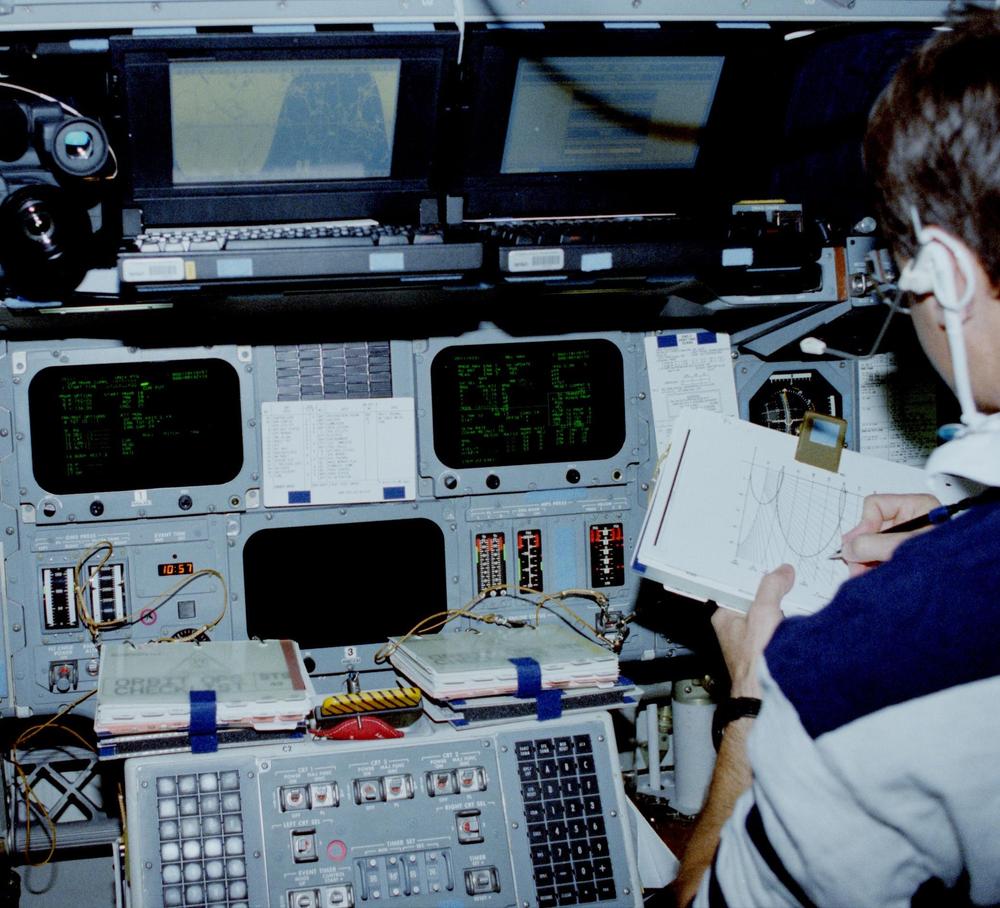
Three of the Shuttle's CRT displays. (Click for a larger image.) The left screen shows the
Universal Pointing attitude display.
The right screen shows the Relative Navigation screen for rendezvous operations.
At the bottom of the photo are the two grid-style keyboards for communication with the computer, with the CRT controls in between.
Two laptops are sitting on top of the console. Mission Pilot Kevin Chilton is in the pilot's seat. From National Archives.Three of the Shuttle's CRT displays. (Click for a larger image.) The left screen shows the Universal Pointing attitude display. The right screen shows the Relative Navigation screen for rendezvous operations. At the bottom of the photo are the two grid-style keyboards for communication with the computer, with the CRT controls in between. Two laptops are sitting on top of the console. Mission Pilot Kevin Chilton is in the pilot's seat. From National Archives.

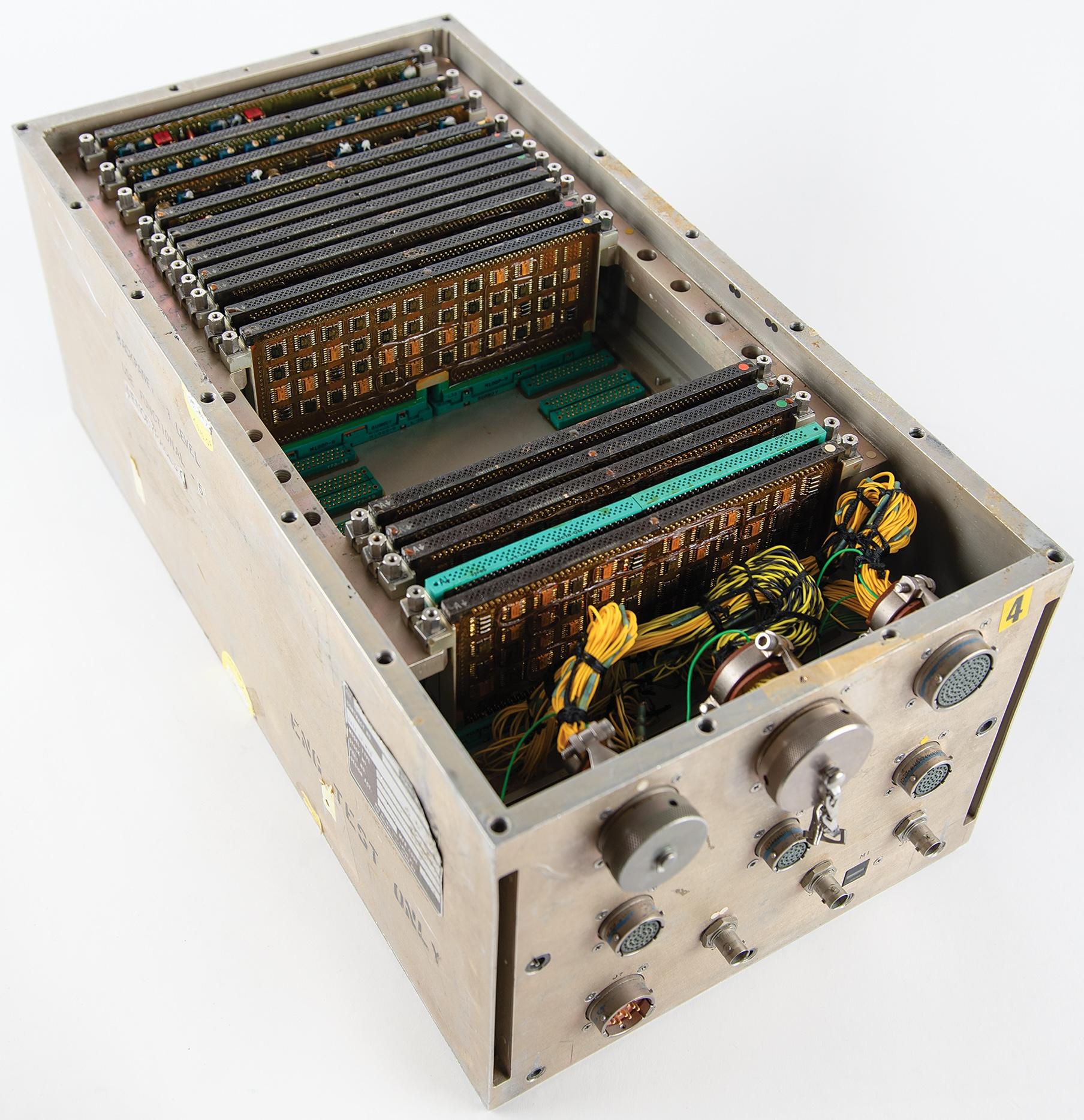
Internally, the DEU looks very much like the Shuttle's AP-101B computer, a large box filled with squat pages. One of the pages is the CPU of an SP-0 computer, while other pages provided 32K words of memory, interfaced to the main computers, and drove the CRT. The SP-0 handled filtering of keyboard data, time maintenance, and health monitoring. The SP-0 received dynamic data from the Shuttle's main computers and formatted the data for the CRT display.
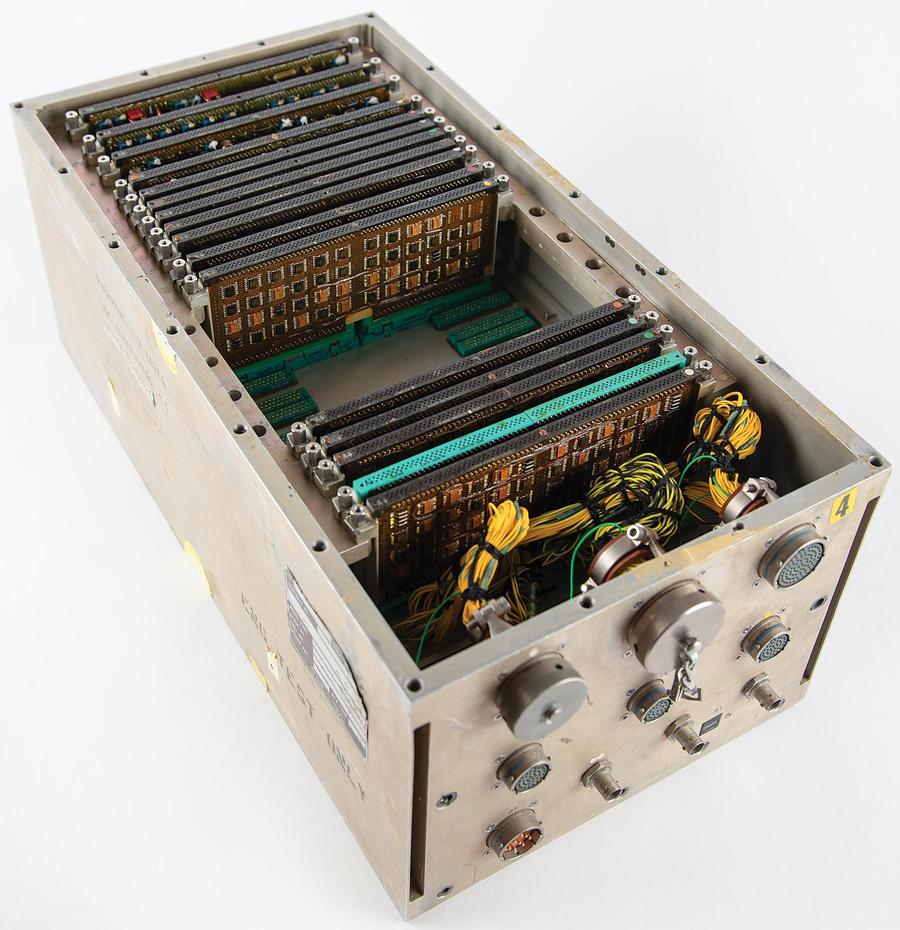
The Space Shuttle Display Electronics Unit (DEU). This is an engineering prototype. Photo courtesy of RR Auction.The Space Shuttle Display Electronics Unit (DEU). This is an engineering prototype. Photo courtesy of RR Auction.

The SP-0A computer below was used in the Lockheed S-3 Viking anti-submarine aircraft, probably to detect enemy radar and communication signals in the AN/ALR-47 Electronic Support Measures system.
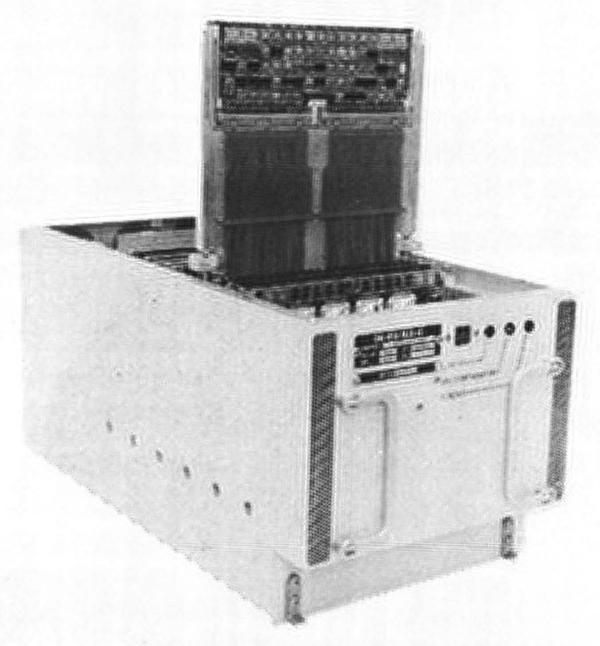
The SP-0A computer. From "IBM System/4 Pi and Advanced System/4 Pi Computers" brochure, August 1973.The SP-0A computer. From "IBM System/4 Pi and Advanced System/4 Pi Computers" brochure, August 1973.

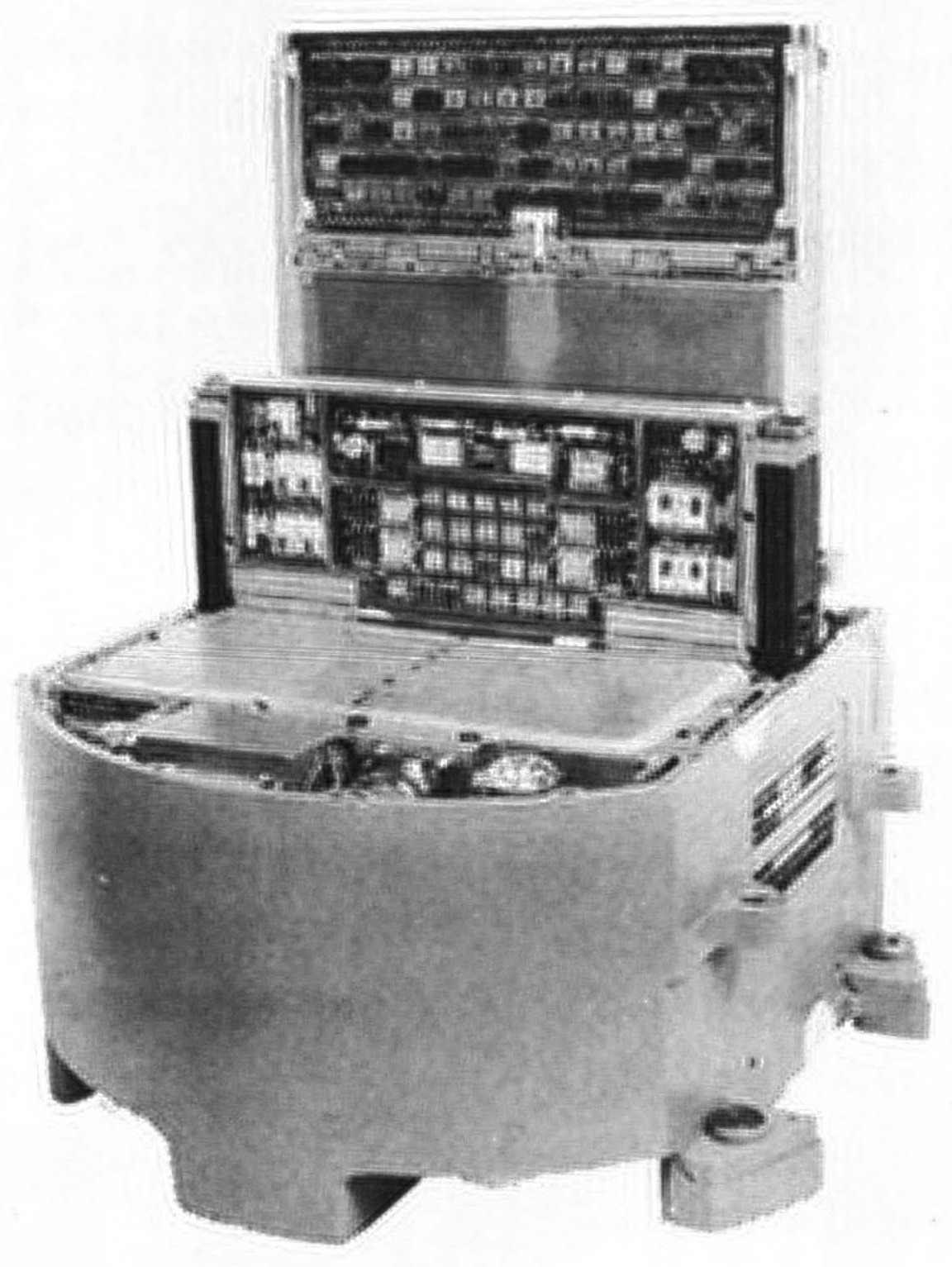
The SP-0B computer was used in the Midcourse Guidance Unit for the Harpoon anti-ship missile.31 It originally had magnetic core memory, upgraded to semiconductor memory in 1974. Note the curved packaging for the SP-0B that helps it fit inside the missile.
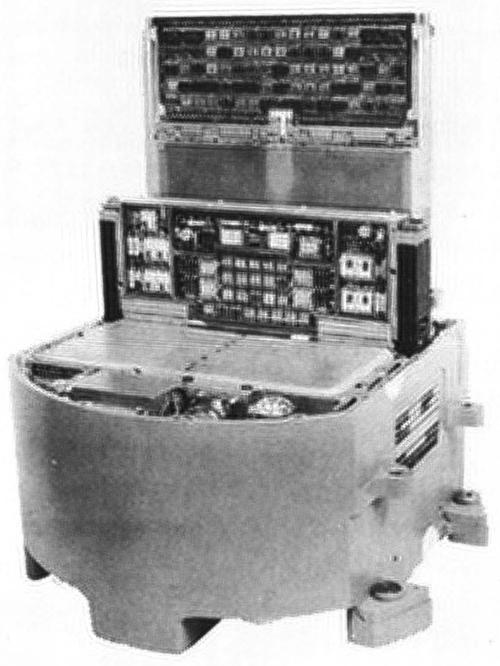
The SP-0B computer. From "IBM System/4 Pi and Advanced System/4 Pi Computers" brochure, August 1973.The SP-0B computer. From "IBM System/4 Pi and Advanced System/4 Pi Computers" brochure, August 1973.

The SP-1, below, had one more register than the SP-0, as well as higher performance, running 342,500 operations per second. It was also available as the unpackaged SP-1A, weighing just 3.6 pounds. The SP-1M added a few instructions to improve performance. The much larger SP-1B weighed 200 pounds and was designed for ground usage. IBM gives a long list of applications for the SP-1: "F-4 ATIS, navigation, missile and drone stabilization and control, communications processor, torpedo stabilization and control."
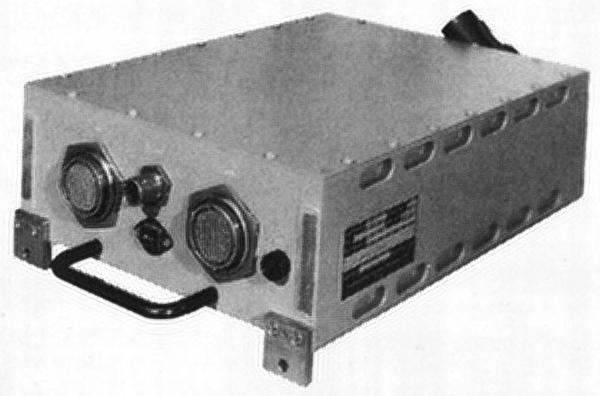
The SP-1 computer. From "IBM System/4 Pi and Advanced System/4 Pi Computers" brochure, August 1973.The SP-1 computer. From "IBM System/4 Pi and Advanced System/4 Pi Computers" brochure, August 1973.

The bulky SP-201 computer was an outlier from the rest of the SP series, since it weighed 660 pounds. Its performance was higher than the other SP models, running 450,000 instructions per second. This computer was part of the sonar system used on Los Angeles and Ohio class submarines. The bow of the submarine contained a giant sphere, 15 feet in diameter, studded with over a thousand transducers to detect underwater sounds. The SP-201 was a "post-classification signal processor"32 in the AN/BQQ-5, analyzing these sonar signals and driving scrolling "waterfall" displays with green lines indicating the presence of ships (or sometimes whales). This computer was carefully designed to be lowered through a submarine's standard 25-inch hatch.
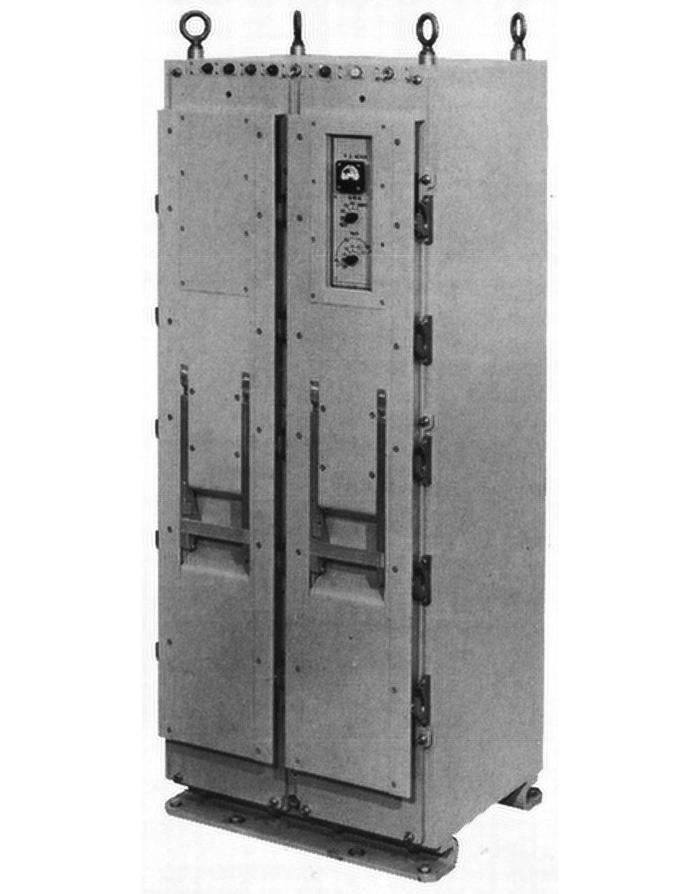
The SP-201 computer, designated CP-1125/BQQ-5. From "IBM System/4 Pi and Advanced System/4 Pi Computers" brochure, August 1973.The SP-201 computer, designated CP-1125/BQQ-5. From "IBM System/4 Pi and Advanced System/4 Pi Computers" brochure, August 1973.

Command and Control (CC)

Although the AP series was the star of the Advanced System/4 Pi line, massive CC computers ran the Boeing E-3A Sentry AWACS (Airborne Warning and Control System) aircraft. The AWACS is a Boeing 707 with a rotating 30-foot radar dome on top, appearing as if a giant mushroom sprouted from the fuselage. This radar tracked activity over 250 miles away, providing a comprehensive view of the battlefield. Inside the AWACS, the CC was the central mission computer, processing radar data and sending it to 14 display terminals, as well as providing command-and-control functions.

The CC-1 was developed in 1971 as the top performer of the System/4 Pi line at 740,000 operations per second. It supported the System/360 architecture—including System/360 peripherals—but also supported the optimized "CC-1 architecture".33 The CC-1 was followed by the CC-2 (1980), which boosted performance to 2 million instructions per second through the use of Super Schottky TTL.

The CC-2E computer with Memory Enhancement provided four times the main storage and eight times the bulk storage. The CC-2E was massive compared to the rest of the 4 Pi line, weighing 1826 pounds and standing almost 6 feet tall. It ran over 2.7 MIPS (Million Instructions Per Second), over twice the speed of the Space Shuttle's upgraded computer. The computer was redundant to ensure reliability. It also included "nuclear event detection and survivability".
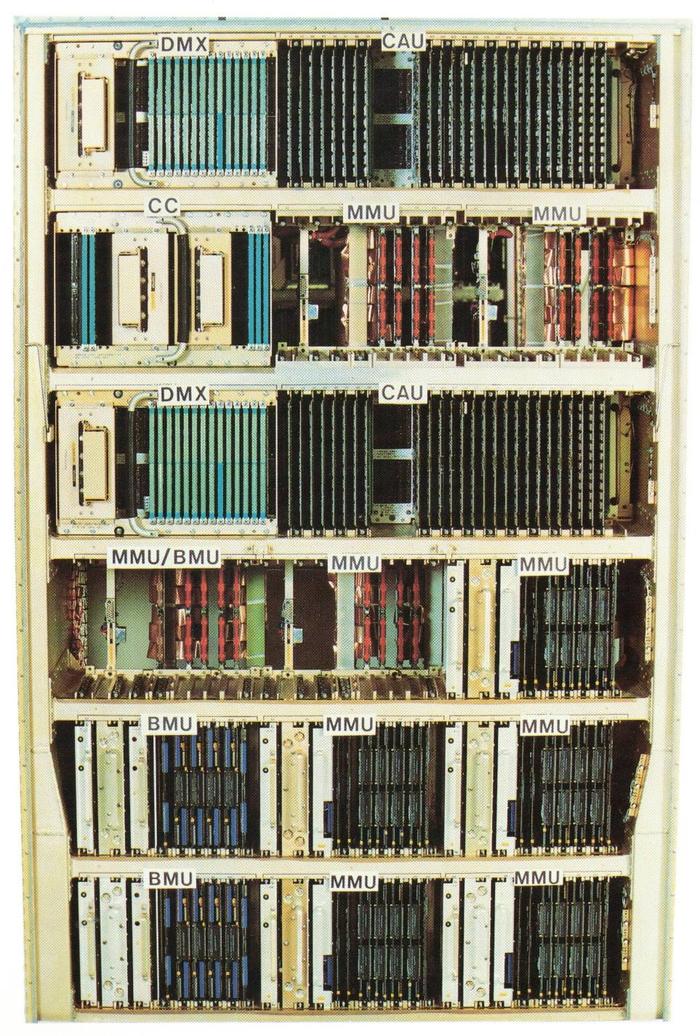
The baseline configuration for the AWACS CC-2E digital computer.
Components are Digital Multiplexer (DMX), Computer Arithmetic Unit (CAU),
Computer Control (CC),
Monolithic Memory Unit (MMU),
and Bubble Memory Unit (BMU).
From "AWACS Data Processing Subsystem" brochure, 1991.The baseline configuration for the AWACS CC-2E digital computer. Components are Digital Multiplexer (DMX), Computer Arithmetic Unit (CAU), Computer Control (CC), Monolithic Memory Unit (MMU), and Bubble Memory Unit (BMU). From "AWACS Data Processing Subsystem" brochure, 1991.

The photo above shows the refrigerator-sized cabinet of the CC-2E. The computer is constructed from two types of boards: most of the system used the large MCS pages, while the DMX and Computer Control units used the squat pages of earlier 4 Pi systems.

The CC-2E made use of an unusual technology for mass nonvolatile storage: bubble memory. In the 1970s, bubble memory was the storage technology of the future, providing hard disk capacity at core memory speeds. It used tiny magnetic "bubbles" moving along tracks by magnetic fields. However, improvements in semiconductor memory made bubble memory uncompetitive; by 1981, the New York Times snarkily referred to The Computer Bubble that Burst. Bubble memory was popular with the military because it was insensitive to vibrations, unlike hard disks. Each bubble memory unit (BMU in the photo) in the CC-2E stored 8 megabytes, four times as much as a similarly-sized semiconductor-based monolithic memory unit (MMU). These replaced four rotating magnetic drums in the original CC-1, each storing 400,000 words. To safeguard information from falling into the wrong hands, the bubble memory modules had a "data destruct" feature.
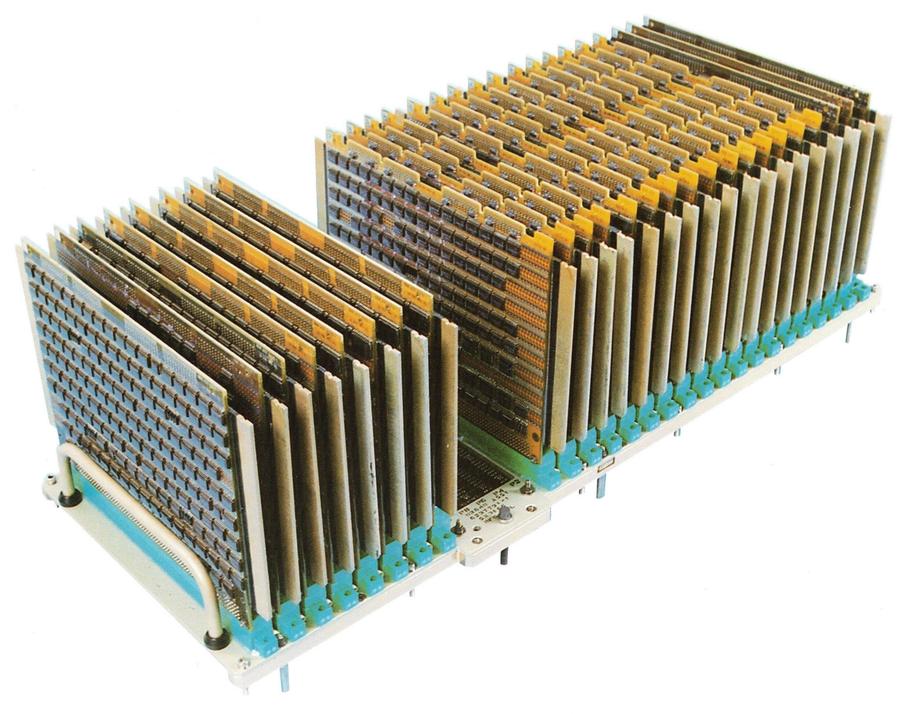
The Computer Arithmetic Unit Assembly, one of two in the AWACS computer. From "AWACS Data Processing Subsystem" brochure, 1991.The Computer Arithmetic Unit Assembly, one of two in the AWACS computer. From "AWACS Data Processing Subsystem" brochure, 1991.

The CC-2E had two arithmetic units, each constructed from about 26 MCS pages (above). Each arithmetic unit was a 32-bit computer that implemented 182 fixed-point and floating-point instructions and had an 8K-word cache for performance. It was compatible with the System/360 mainframe and had extensions such as support for arbitrary-length bit fields.

ML-1

Around 1974, IBM introduced the compact ML-1 computer,34 half the width of the AP-101. The technological advance in the ML-1 was LSI (Large Scale Integration) chips, averaging 110 logic gates per chip. (LSI is typically defined as having 100-1000 gates, so these chips are on the very low end of LSI.) Each chip was mounted on a square ceramic substrate, 1 inch on a side, with 48 pins on the underside.35
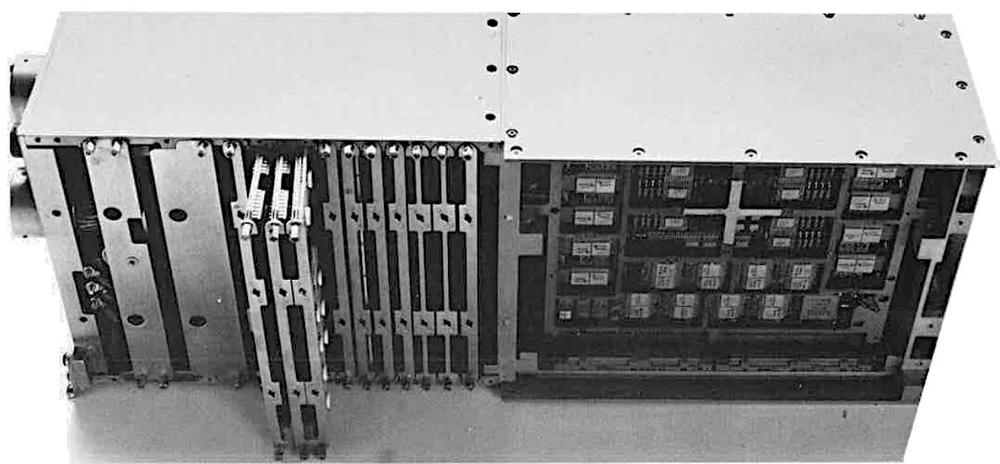
The IBM ML-1 computer. The core memory stack is visible on the right. From an ad in Air Force Magazine, April 1975.The IBM ML-1 computer. The core memory stack is visible on the right. From an ad in Air Force Magazine, April 1975.

The ML-1 computer used the same modular core memory as the AP-101, CC-1, and other systems. The ML-1 also supported semiconductor memory, which was volatile (i.e., lost its contents without electricity), but cost "significantly less" than magnetic core memory, was faster, weighed 8 pounds less (for a 32K-word computer), used slightly less power, and reduced the length of the computer by 7 inches.
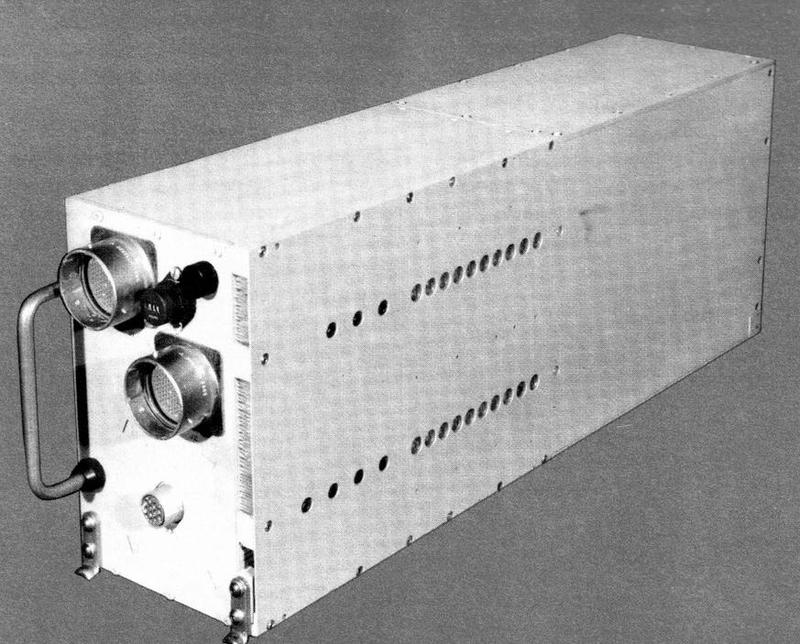
The IBM ML-1 computer. From "Advanced System/4 Pi Model ML-1 General Purpose Computer" brochure, Dec. 1974.The IBM ML-1 computer. From "Advanced System/4 Pi Model ML-1 General Purpose Computer" brochure, Dec. 1974.

The ML-1 had a similar architecture to the AP-101, except it used a 16-bit datapath instead of 32. It performed 550,000 operations per second, the same as the AP-101. IBM said that the ML-1 was "adaptable to a wide variety of applications such as guidance and navigation weapons delivery, digital flight control and communications." To support communication applications, the ML-1 had optional byte-handling instructions. The ML-1 was used in a terminal for the Joint Tactical Information Distribution System (JTIDS), as a bus controller in an IBM test facility, and in an airplane landing simulator.
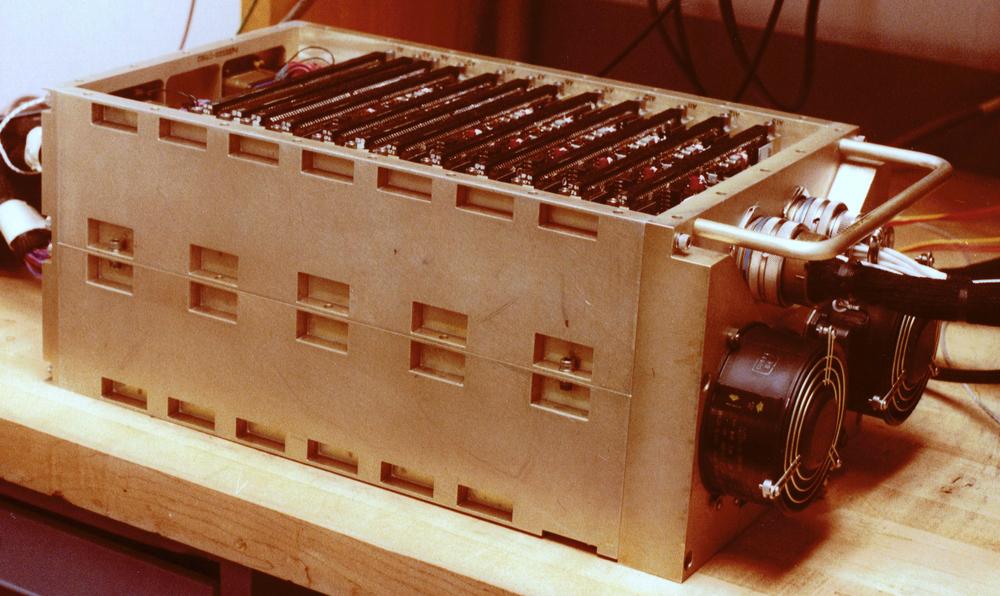
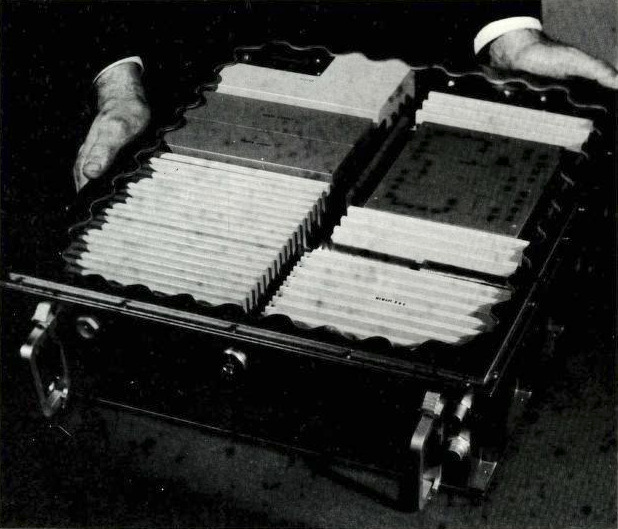
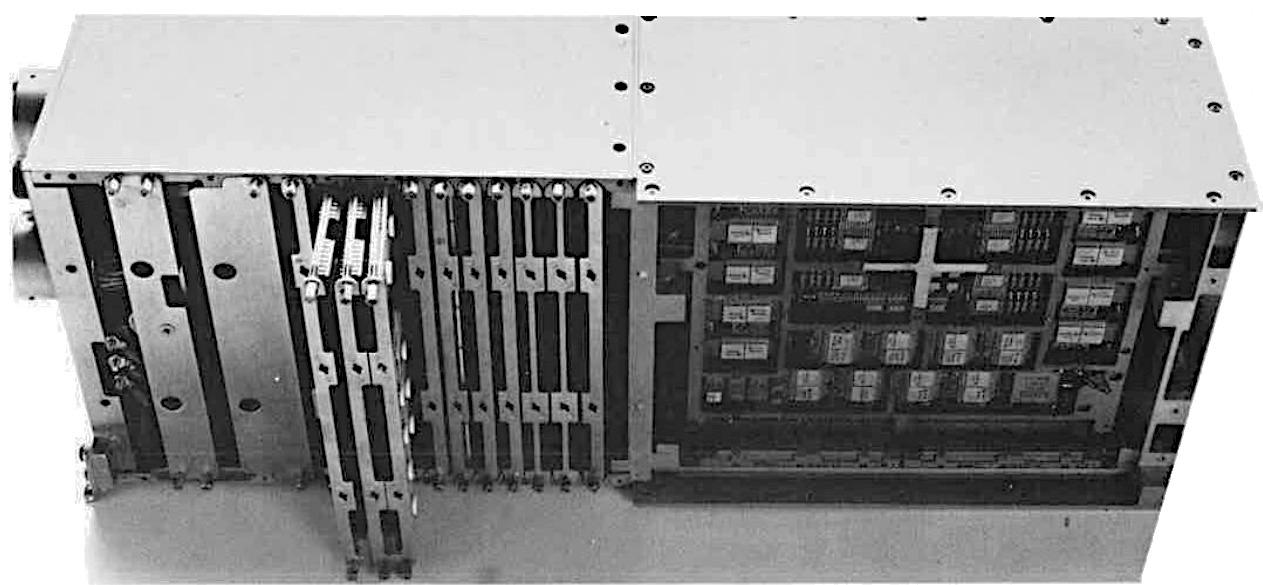
An ML-0 enclosure with the cover removed, showing the boards inside. Photo courtesy of Henry Brandt.An ML-0 enclosure with the cover removed, showing the boards inside. Photo courtesy of Henry Brandt.

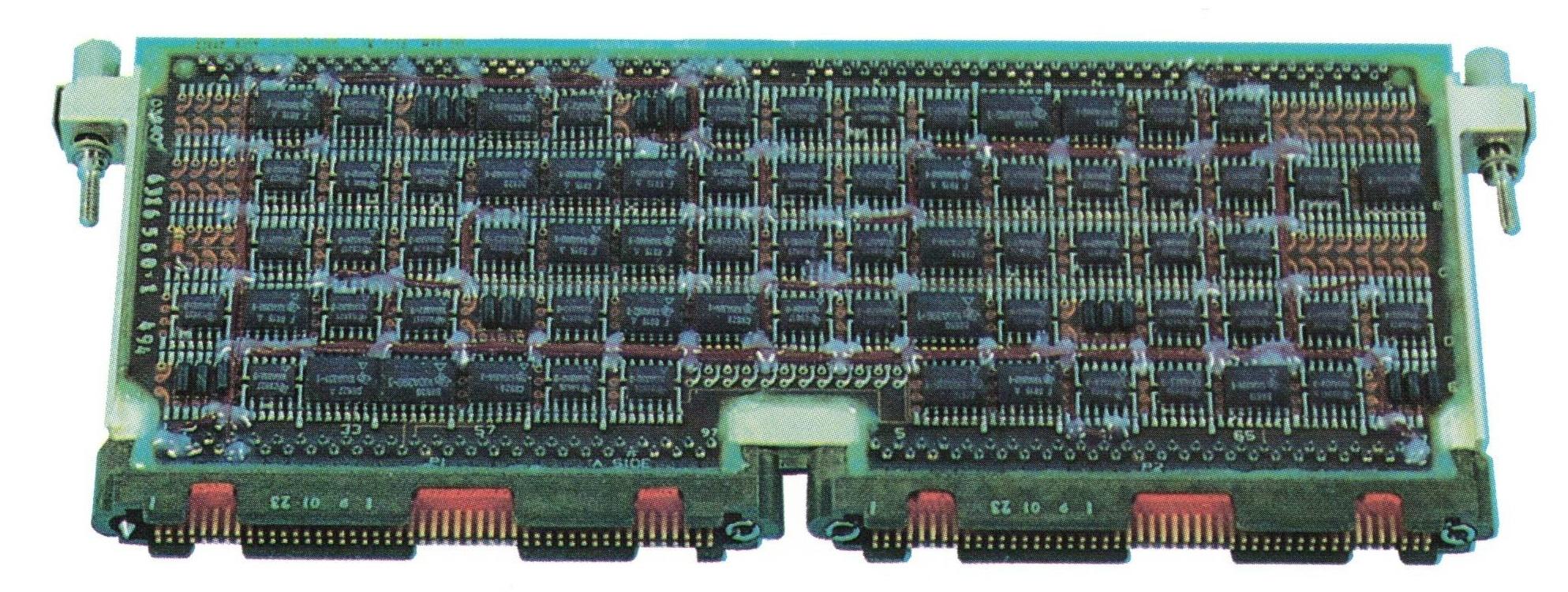
Two years later, IBM designed the less powerful ML-0 (above), briefly mentioned here. This computer was built for the Navy and Air Force's TASES and APMS systems, but the projects were canceled. Rather than the LSI chips of the ML-1, the ML-0 used simpler 5400-series TTL flatpack chips. A ML-0 board (below) is slightly different from the MCS boards in other 4 Pi computers because the ML-0 used air cooling. The back side of the board has machined metal cooling fins; two boards formed a sandwich, linked at the top by two 84-pin connectors, with air blown between the boards across the fins.
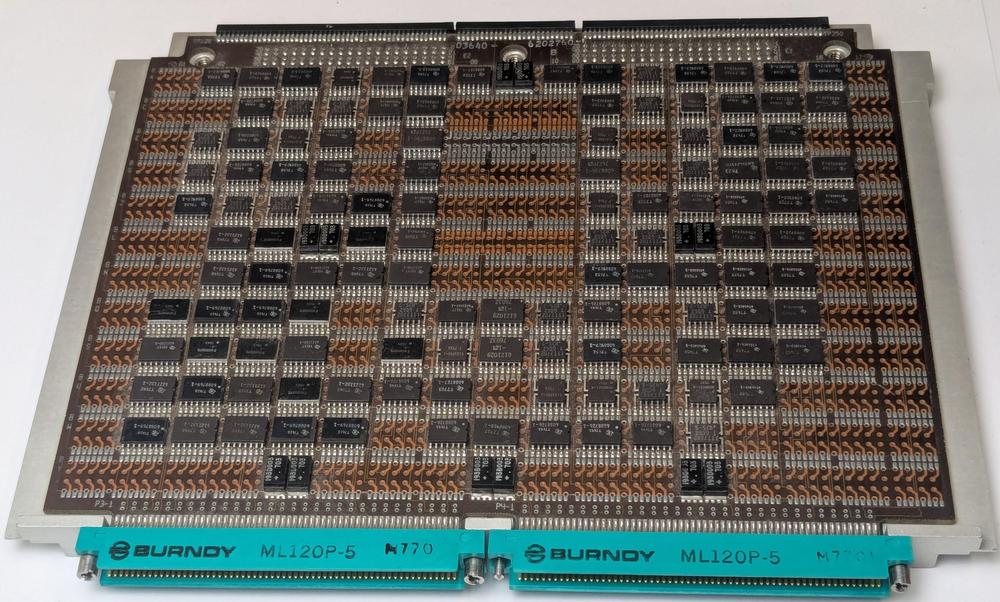
An ML-0 interface board, courtesy of Henry Brandt. This is an interface board with flip-flops, multiplexers,
and other TTL chips. The board has different edge connectors from the standard MCS boards and is a slightly different size.An ML-0 interface board, courtesy of Henry Brandt. This is an interface board with flip-flops, multiplexers, and other TTL chips. The board has different edge connectors from the standard MCS boards and is a slightly different size.

Conclusions

The IBM System/4 Pi family of computers is best known for the Space Shuttle computers, but the family contained many lesser-known computers, ranging from the 3.6-pound SP-1A to the 1826-pound CC-2E. The 4 Pi computers illustrate the rapid progress of computer technology, from simple TTL integrated circuits, magnetic core memory, and thousands of instructions per second in the late 1960s to complex CMOS chips, dense semiconductor memory, and millions of instructions per second in the 1980s.

The 4 Pi series came to an abrupt end in 1994. IBM's best-selling avionics computer had been the AP-102, with a thousand units sold. This was a rounding error compared to the millions of PCs and PS/2 computers that IBM sold. In December 1994, IBM decided to focus on its main business and announced that it was selling the Federal Systems Division—home of the System/4 Pi—to the defense contractor Loral for $1.58 billion. Less than two years later, Loral decided to focus on satellites and sold its defense electronics business to Lockheed Martin. Nonetheless, a remnant of System/4 Pi history lives on: the low-slung brick buildings in Owego, NY36 where IBM developed the System/4 Pi are still in use by Lockheed Martin, just off a road named IBM Parkway.

For updates, follow me on Bluesky (@righto.com), Mastodon (@kenshirriff@oldbytes.space), or RSS.

Credits: Many thanks to W. Tracz for providing extensive documents. Thanks to Henry Brandt for providing an ML-0 board. Thanks to Kyle Owen, RR Auction, Marcel, Alex1970-14, Steve Jurvetson, Sanjay Acharya, José Luis Briz Velasco, Rich Katz, and bitsavers for photos.37

Notes and references
  1. AI notice: Despite the presence of the em dash, no AI was used in the writing of this article. Google Search had a few useful papers in its AI Overview, though, mixed with highly questionable conclusions. 

  2. This description of System/4 Pi is from Aircraft Yearbook, 1970. 

  3. If you're an electronics hobbyist of a certain age, you've probably used the popular 7400-series of TTL integrated circuits. The 5400 series is the military version of the 7400 series, handling a wider temperature range of -55 to 125 °C. The original System/4 Pi systems used Texas Instruments Series 2400 integrated circuits, a variant of the 5400 series built to IBM's specifications specifically for the 4 Pi family. 

  4. Skylab used numerous acronyms. The telescope observatory was called the Apollo Telescope Mount (ATM). The computers controlled the Skylab Attitude Pointing and Control System (APCS). Each TC-1 computer, with its supporting power supply and I/O interfaces, was called an Apollo Telescope Mount Digital Computer (ATMDC). For details on Skylab's computers and their software, see Computers in Spaceflight: The NASA Experience and Development of On-board Space Computer Systems

  5. The first generation of System/4 Pi computers used IBM's 13/21 toroidal cores (13 mils inner diameter and 21 mils outer diameter) made of lithium nickel ferrite. These cores operated over a wide temperature range (-55 to 100 ºC), important for a military computer. (In comparison, some IBM mainframes, such as the 7090, kept the cores in a bath of heated oil to keep the temperature constant.) These core planes were a militarized version of the core planes used in the high-end System/360 models 65, 75, and 95. One core plane held 16,384 bits and took 2.5 µs for an access cycle. (Some IBM core planes had 512 extra bits, called "bump" storage. As a result, the EP series had 8448 words of storage rather than the expected 8192.)  

  6. What does CP stand for? An early IBM document states that CP stands for "Cost Performance" but most other sources use "Customized Processor". A 1966 Electronics article gives both names. 

  7. The storage protection bits allow a word in core memory to be marked as read-only. Because core memory preserved its contents even without power, software was typically written to the core memory when the system was set up, and then the data persisted. However, if the software got corrupted in core memory, there was no easy way to reload it. Thus, the storage protect bits had the important role of protecting the software from accidental writes. 

  8. The microcode was stored in a ROM, called Read Only Storage (ROS) in IBM terminology. Read Only Storage was implemented by core memory planes where a core was present for a 1 bit and omitted for a 0 bit. This is different from the Apollo Guidance Computer's core rope memory, which stored 192 bits per core by passing wires through a core or around a core. The ROS cores were much smaller than the main memory cores, 7/12 versus 13/21 (inner diameter and outer diameter in mils). 

  9. The "AN" designation system was formerly known as the Joint Army-Navy Nomenclature System, but is now the Joint Electronics Type Designation System (details). For instance, in the TC-2 computer designation, "CP-952" indicates that the unit is a computer, model 952. The computer is part of the "ASN-91(V)" navigation/weapon delivery computer system, where "A" is for Piloted Aircraft, "S" for Special, "N" for Navigation Aid, and "V" for variable. Thus, the cryptic three-letter codes specify the type of system in detail. 

  10. It's curious that the original 4 Pi systems (TC, CP, and EP) had completely different instruction sets and hardware implementations. Having worked at Sun Microsystems, my suspicion is that competing groups inside IBM produced different products for political reasons, leaving it up to marketing to pretend that the products formed a coherent plan. 

  11. The computers in the IBM System/360 line have rational model numbers: as the model number increases, the computers are more powerful and more expensive. The Model 20 is at the low end, then model numbers increase (roughly in steps of 10) to the Model 91, with a jump in numbering to the Model 195.

    For the scientific computation market, the Model 44 was "a computer with near 360/50 performance at a 360/30 price" (ref). To achieve this, IBM made some changes to the standard 360 architecture. Specifically, the Model 44 dropped nineteen business-oriented instructions and added features such as variable-precision floating point. The Model 44 also added instructions and priority interrupts to support real-time data acquisition for scientific applications. The System/4 Pi EP system also handled real-time data—albeit for military rather than scientific applications—so basing the EP on the Model 44 was a sensible choice. 

  12. The following table summarizes IBM's AP line of computers.

    table#ap {border-collapse: collapse; border; border: 1px solid #ccc; padding: 15px;} table#ap td {vertical-align: top; normal; padding: 0 5px;} table#ap td:nth-of-type(3) {white-space: nowrap;} table#ap tr:nth-of-type(1) td {padding-top: 10px; margin-top: 10px;} table#ap td {padding-bottom: 10px; margin-bottom: 10px;}

    1970 AP-1 F-15 • 8K word core memory
    • Fixed point ISA 1972 AP-101 Shuttle • Microprogrammed
    • Hexadecimal floating point
    • 16K word core memory 1976 AP-101B B-52D • 32k word core memory
    • Binary floating point 1978 AP-101C B-52G/H • Microcoded special functions
    • MIL-STD-1553A
    • MSI and LSI technology 1981 AP-101D B-1B • 64K word core memory
    • MIL-STD- 1553B 1981 AP-101E SEAFAC • MIL-STD-1750A ISA
    • SEAFAC certification 1982 AP-101F B- 1B • Dual architecture (IBM, and MIL-STD-1750)
    • Quad 1553B
    • DRAM memory
    • > 1 MIPS performance 1983 AP-1R F-15 • Fixed point ISA, convertible to MIL-STD- 1750A
    • > 1 MIPS performance 1985 AP-102 Multiple programs • ½ ATR
    • Single SRU CPU
    • MIL-STD-1750A
    • > 1 MIPS performance
    • VLSI technology

    This table is from The AP-102: Applying VLSI to the Air Force standard instruction set architecture, IBM Technical Directions 1985. I don't entirely trust this table since other sources say that the Shuttle used the AP-101B and the B-52D used the AP-101C. This table also says that the AP-101B used binary floating point, which doesn't match other sources. SEAFAC refers to the Air Force's SEAFAC (Systems Engineering Avionics Facility) Laboratory, which certified computers as meeting the 1750A standard. 

  13. The instruction set used in the AP-101 is called MMP, which stands for Multipurpose Midline Processor. Except IBM's brochure "Advanced System/4 Pi Model ML-1 General Purpose Computer" (1974) says that it stands for "microprogrammed multiprocessor." And the article "A new computer for the Space Shuttle" in IBM's Technical Directions (1986) says that it stands for Medium Multi-Purpose. I believe these are errors.

    The MMP instruction set is very close to the System/360 instruction set at the assembly code level; the instructions are mostly the same with the same mnemonics. Not surprisingly, MMP dropped the business-oriented instructions such as variable-length strings and decimal arithmetic. MMP also provided more advanced addressing modes than the System/360, including indirect addressing.

    However, there are many implementation changes that make the computers completely incompatible at the machine code level. The most surprising change is that MMP does not use bytes at all; a memory address accesses a 16-bit "halfword". In comparison, it was the System/360 that made the byte popular. The registers are incompatible: the System/360 has 16 general-purpose 32-bit registers, while MMP has two sets of eight registers. Moreover, the System/360 uses 24-bit addresses, supporting 16 megabytes of memory. MMP uses 16-bit addresses, extended to 19 bits through bank selection, supporting just 512K halfwords.
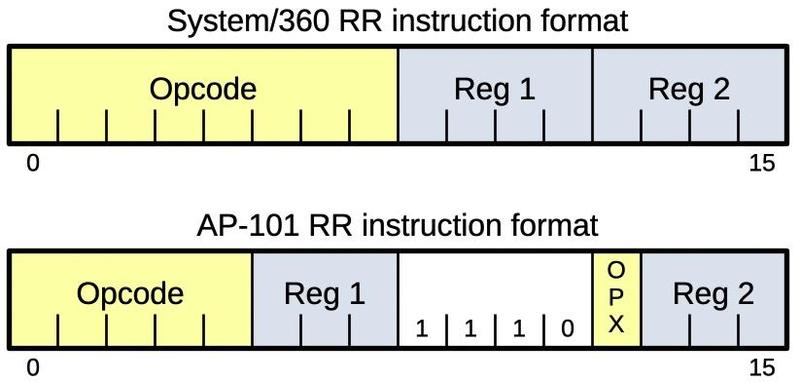
    A comparison of System/360 and MMP instruction formats for register-to-register instructions.A comparison of System/360 and MMP instruction formats for register-to-register instructions.

    The diagram above shows how the System/360 and MMP encoded instructions in completely different ways. Both systems use an "RR" instruction format, for example, to add two registers. But the 16-bit instructions are encoded with a completely different structure. In particular, MMP uses three bits instead of four to specify a register, along with a shortened opcode field.

    Because of the similar instruction sets, it was very easy for a System/360 assembly-language programmer to start programming the AP series. However, due to the incompatibilities, MMP programs could not run directly on a System/360 but needed to execute through a functional simulator program. In contrast, the earlier System/4 Pi EP was compatible with System/360, so programs could run directly on either machine. 

  14. The drawing below shows an exploded view of the Space Shuttle AP-101B CPU (i.e., the earlier version). Half the box is occupied by large storage pages. The logic is implemented with the standard squat System/4 Pi pages, with the power supply underneath. The round connectors on the front are connected to pages through flexible polyimide printed circuits, an impressive technology for the 1970s. The function of each page is described in Space Shuttle Advanced System/4 Pi Model AP-101 Central Processor Unit, page 131 (6-11).
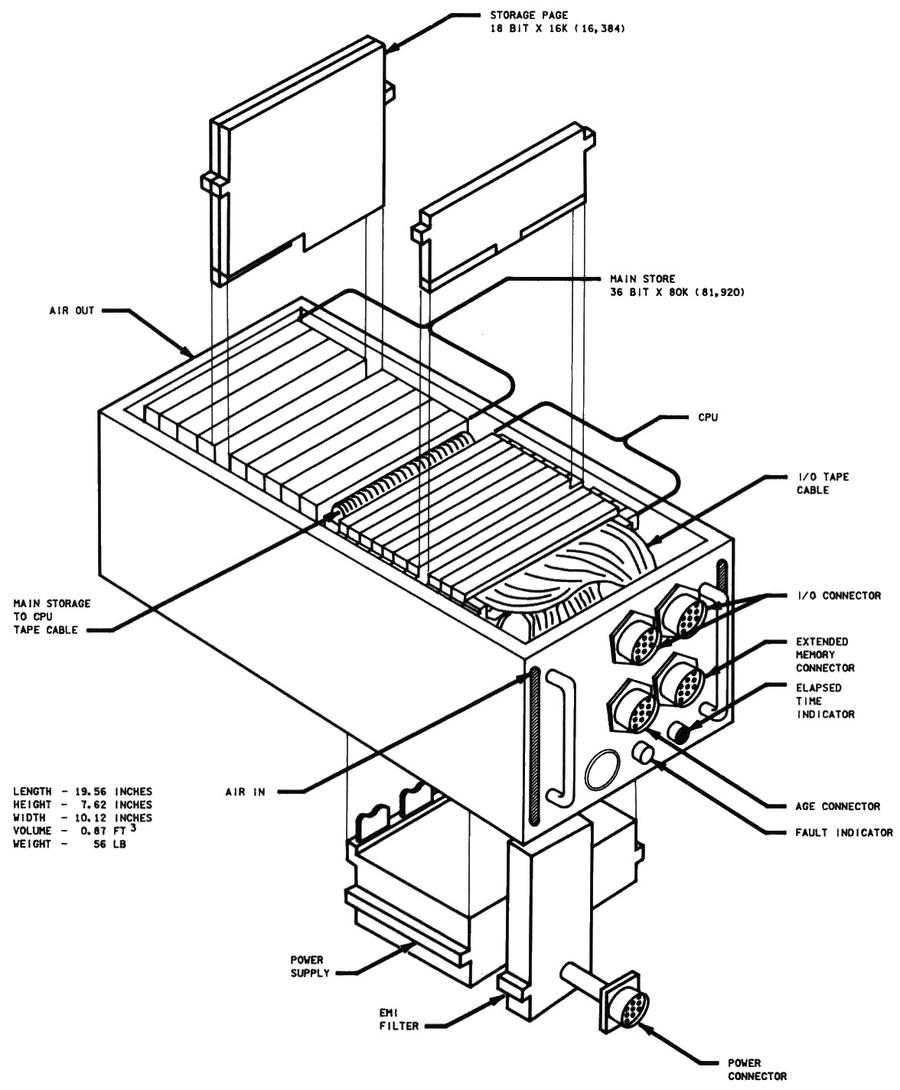
    Space Shuttle CPU—Exploded View. (Click for a larger version.) From Space Shuttle Systems Handbook.Space Shuttle CPU—Exploded View. (Click for a larger version.) From Space Shuttle Systems Handbook.


  15. The redundancy of the Space Shuttle computers was important during flight STS-9A (1983). The Space Shuttle encountered two computer failures about five hours before the flight was scheduled to land. GPC-1 (General Purpose Computer 1) failed and could not be brought back online. Six minutes later, GPC-2 also failed, but was successfully brought back online (STS-9 Mission Report, Spacelab 1 factsheet). The failure was attributed to a loose piece of solder. Commander John Young described the situation: "My knees started shaking. When the next computer failed, I turned to jelly. Our eyes opened a lot wider than they were before!" Despite the computer problems, an IMU (inertial measurement unit) failure, and two APUs (auxiliary power units) on fire, the Shuttle landed successfully.

    In response to this double computer failure, starting with flight STS-11 (1984), the Shuttle carried a sixth computer as a spare. The spare was kept in a locker and could be physically swapped with a malfunctioning computer in orbit. The spare was put into use on flight STS-30 (1989) after computer #4 encountered a "data parity external storage error", indicating a hardware problem. 

  16. Curiously, the Shuttle's AP-101B and the IOP used different storage pages: the computer used 16K×18 storage pages, while the IOP used 8K×18 storage pages. Originally, the system was designed for 64K words in total, using sixteen 8K pages (source, details). The computer ended up using the higher-density 16K pages, but for some reason, the IOP stayed with the lower-density 8K pages, resulting in 102K words total from sixteen pages, rather than the 128K words you might expect. (See Space Shuttle System Handbook diagrams.) 

  17. Most of the AP-101C information is from an IBM brochure: "IBM Advanced System/4 Pi Modular Computer Series Model AP-101C". The AP-101C instruction set and architecture are described in a 1979 document with the title Space Shuttle - Model AP-101 C/M Principles of Operation. This title is puzzling because the Shuttle used the AP-101B, and the B-52 used the AP-101C. The document opaquely says that it describes the "AP-101C and AP-101, monolithic version". Then, a 1987 document, AP-101S with Shuttle Instruction Set, says that the AP-101S (the upgraded Shuttle computer) is software compatible with the AP-101C/M. My hypothesis is that IBM prototyped the AP-101C with semiconductor (monolithic) memory for a Shuttle upgrade, but abandoned this approach. 

  18. System/4 Pi computers flip-flopped on the floating-point number representations. Modern computers use base-2 (binary) exponents for floating-point, but System/360 used base-16 (hexadecimal) exponents. (The difference is whether you raise 2 to the exponent or 16 to the exponent.) The EP systems copied the System/360 representation, but then AP-1 switched to binary exponents. Then AP-101 switched back to base-16 exponents (although one probably-wrong source says that the AP-101B used binary exponents). Support for the 1750A instruction set required binary exponents, so dual-architecture machines supported both types of exponent. 

  19. The later System/4 Pi computers were known as MCS (variously Modular Computer Series, Modular Computer System, or Military Computer Series). They used larger boards, called MCS pages, measuring 9"×6.4". An MCS page consisted of two printed-circuit boards (called a MIB, multilayer interconnection board) bonded to a metal thermal plate between the boards. The thermal plate made contact with the computer's heat exchanger through fasteners called wedgelocks that provided a thermal path for heat to escape. This system allowed the computer to be air-cooled while isolating the cooling air from the components. 

  20. I couldn't find a photo of the AP-101F, but line drawings show that it looked just like the AP-101C, with the same connector layout. This makes sense if the AP-101F were built as a plug-compatible upgrade. 

  21. The shadow core memory in the AP-101F is mentioned in Standards Application to B-1B Avionics Program. It had 128K words of high-density modular core memory (HMCM) shadowing 128K words of active semiconductor memory (SCM). This combined the speed and low power consumption of semiconductor memory with the radiation resistance of magnetic core memory.

    The Shuttle's AP-101S computer used an error correcting code (ECC) to recover from flipped bits in memory. Each 16-bit halfword had an additional six ECC (Error Correcting Code) bits, which allowed a bitflip in a word to be corrected, while two bitflips could be detected but not repaired. Error correction was performed by AMD's Am2960 chips. A memory "scrubber" scanned memory every 1.6789 seconds to fix any flipped bits. Bit flips from cosmic rays were not uncommon: over 100 bit flips could be experienced on a flight, but they were corrected before causing problems (details). In one case, a single cosmic ray caused 14 bit errors; the structure of the memory system ensured that these errors affected one bit in 14 different words, so there were no double-bit errors and the errors were all correctable. The register memory in the CPU, however, was not protected against errors; two computer malfunctions are thought to be due to radiation.

    Shuttle memory had "storage protection" bits to ensure that code wasn't overwritten (as well as ensuring that data wasn't executed). A different technique was used to avoid corruption of the storage protection bits: Each word had three storage protection bits and a voting algorithm determined the value. 

  22. The pipelined architecture of the AP-101S executed an instruction in six steps: instruction address translation, fetching the instruction, decoding the instruction and computing the memory address of the operand, data address translation, fetching the operand from memory, and executing the instruction. Without pipelining, an instruction would take six cycles to go through all these stages. With pipelining, as soon as an instruction completes a stage, the next instruction can start that stage, so six instructions can be active at the same time.

    Pipelining made the processor considerably more complicated. Moreover, various factors reduce the performance benefit, so the speedup is less than the theoretical factor of six. For instance, a branch to a new address requires the pipeline to be restarted with the new instruction, wasting three clock cycles. If two instructions in the pipeline modify the same register, a "hazard" can occur, requiring a delay in the pipeline so each instruction gets the correct register value. Some instructions take more than one cycle for the execution phase, delaying the pipeline. Self-modifying code can also cause hazards, if the program modifies instructions that have already been prefetched. In this case, the pipeline needs to be restarted so the correct instruction is executed. The AP-101S pipelining is described in detail in Space Shuttle Model AP-101S Principles of Operation with Shuttle Instruction Set

  23. The formation of the AP-101S is also described in AP-101S with Shuttle Instruction Set, section 4. "The elements utilized from the AP-101F are the CPU, MMU (Memory Management Unit), and Interrupt sections. The microcode has been modified so that existing shuttle software can be used on the AP-101S. The Timing page, SDI (Software Development Interface) page and the SIB bus have been eliminated. The unused circuitry in the MMU has been removed to permit integration of the timing and SDI functions into the MMU. The IOP has been repackaged using medium scale integration to reduce the number of pages from fourteen to seven." A more detailed diagram of the AP-101S evolution is in The new AP101S general-purpose computer (GPC) for the space shuttle. Curiously, that source claims the memory in the AP-101S came from the AP-101F, not the AP-102. This source also explains the AP-101S/G, an interim version that was used on the ground during development. The AP-101S/G was essentially the AP-101S with the Shuttle's IOP (I/O Processor) as a separate box.

    Did the Shuttle's AP-101S support the Air Force's standard 1705A instruction set as well as the MMP instruction set? Sources are contradictory. The B-1B's AP-101F supported both instruction sets and the AP-101S inherited this architecture: "The AP-101S central processor unit is optimized for both MMP and MIL=-STD-1750A" (source). According to The new AP101S general-purpose computer (GPC) for the Space Shuttle, the internal controls and microcode of the AP-101S support both architectures and the AP-101S could readily be configured for either architecture by a control signal on the interface. The obscure AP-101SG/1750 ground computer is said to have run 1750A. Other sources say that the AP-101S did not support 1750. My interpretation is that although the hardware for the AP-101S supported both instruction sets, the flight version of the AP-101S did not have the microcode for 1750A, due to the limited microcode space. 

  24. Spacelab originally used CIMSA 125 MS computers. The naming of this computer is very confusing. Starting in 1971, a French company called CII produced a popular line of 16-bit minicomputers called Mitra 15. In 1975, CII produced a successor called the Mitra 125. In the mid-1970s, CII and Honeywell merged and the computer division was spun off to form SEMS, with majority shareholder Thomson. Thomson's subsidiary CIMSA produced the computer for Spacelab, the 125 MS computer, part of the CIMSA militarized 15 M computer line. This computer was functionally identical to the Mitra 125 S that the Spacelab project used on the ground (details). Meanwhile, MATRA (different from Mitra) was the contractor for Spacelab command and data management. To summarize, Spacelab used CIMSA 125 MS computers, as can be verified from the label below. This is a militarized version of the Mitra 125, produced under contract from MATRA. People sometimes call this computer the MATRA 125, but that's an error.
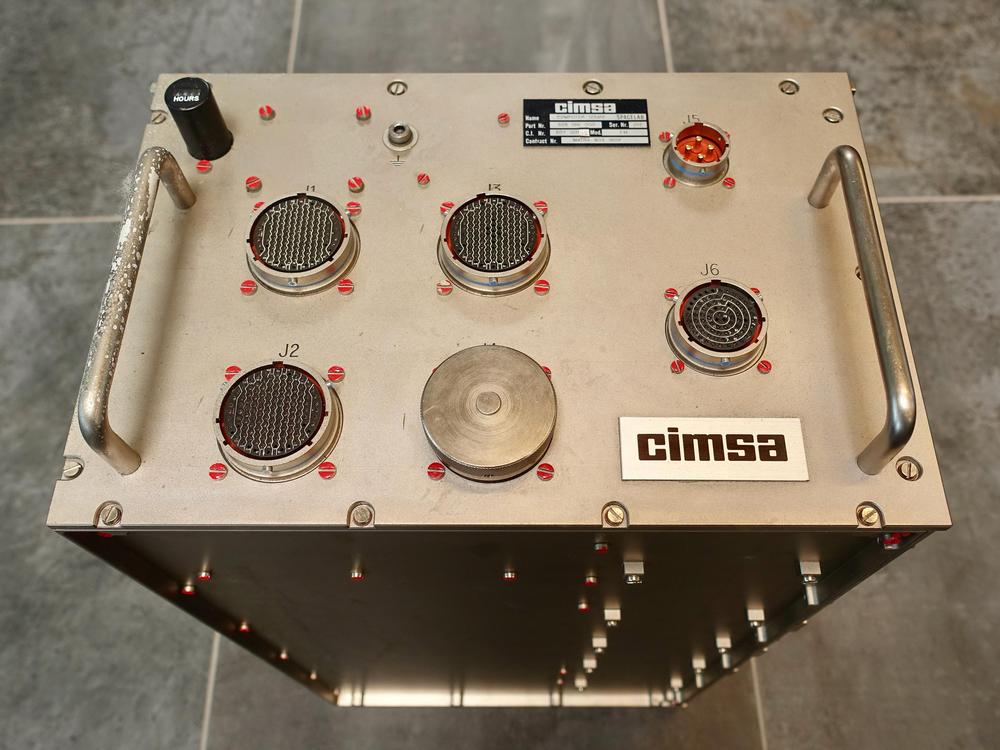
    CIMSA 125 MS computer. Click this photo (or any other) for a larger version. Photo by Steve Jurvetson, CC BY 2.0.CIMSA 125 MS computer. Click this photo (or any other) for a larger version. Photo by Steve Jurvetson, CC BY 2.0.


  25. In 1990, lint caused computer failures that almost ruined observations by the Astro ultraviolet imaging telescope on a Columbia flight (see Shuttle Lands in Good Shape, But Puzzle of Lint Remains and STS-35 Space Shuttle Mission Report). Both of Spacelab's Data Display System terminals overheated and failed, accompanied by a burning odor and high carbon monoxide readings (although the carbon monoxide readings were later determined to be invalid). The failed terminals were part of the French-built computer system in Spacelab; I don't know how much this problem influenced the decision to replace Spacelab's computers with IBM's AP-101SL.

    IBM's computers weren't immune to lint-induced cooling problems, though. One of Challenger's computers overheated and failed during ground testing in 1984 after its air passages got clogged by lint (details).  

  26. The AP-101S had a Memory Management Unit (MMU), implemented on two pages. In most computers, a Memory Management Unit implements virtual memory by translating virtual addresses to physical addresses, but the MMU in the AP-101S is not as advanced: its MMU enlarged the memory address space through bank switching.

    The AP-101 line of computers originally used 16-bit addresses that accessed 16-bit halfwords (not bytes), so they could directly access 64K halfwords (equivalent to 128 KB). This wasn't enough address space for constantly-growing software, so the AP-101B used a bank-switching technique that allowed access to 512K halfwords, albeit in 32K chunks. (The AP-101B could not hold this much memory internally, but external memory boxes could be added.) Specifically, the Processor Status Word held a 4-bit bank select field for code access and another 4-bit bank select field for data access. These fields could be substituted for the top bit, enlarging the address space from 16 bits to 19 bits. The AP-101S extended this approach with a complicated scheme of "Expanded Addressing". In this approach, each index register had a separate 4-bit bank select field. This allowed multiple banks of 32K to be used at the same time.

    The main purpose of the Memory Management Unit was to convert a 16-bit memory address to a 19-bit physical memory address by substituting the appropriate bank select bits. The MMU also detected and handled memory faults. Finally, the MMU included seemingly random functions such as the processor's 40 MHz system clock.

    (Don't confuse the MMU (Memory Management Unit) in the computer with the MMU (Mass Memory Unit), one of two tape drives on the Shuttle; the MMU (Manned Maneuvering Unit), a propulsion backpack for spacewalks; or the MMU (Monolithic Memory Unit), the CC-2E's semiconductor memory.) 

  27. From front to back, the boards in the AP-101SL are: A4, A5, A6 (CPU3), A7 (CPU2), A8 (CPU1), A9 (interrupt), A10, A11, A12 (RAM), A13 (RAM), A14 (12V power supply), and A15 (5V power supply). A10 contains the 40 MHz oscillator, which was on the MMU2 board in the AP-101S. Perhaps A10 and A11 are the equivalent of the MMU boards, but without the peculiar memory block scheme of the AP-101S. A4 may be a digital I/O board. A5 has optoisolators and analog components, so it is presumably an I/O board. The power supplies and memory boards look identical between the Shuttle's AP-101S and Spacelab's AP-101SL. The CPU and interrupt pages are very similar, perhaps just bug fixes during development. The exception is that one side of the CPU3 page is substantially different. (The boards in the AP-101S are listed in AP-101S with Shuttle instruction set page 18, so I won't repeat the list here.) 

  28. You may have noticed that System/4 Pi computers mostly look the same, rectangular boxes with handles and connectors on the front. It's not a coincidence. Many System/4 Pi computers have cases that fit the ATR (Air Transport Rack) standard, commonly used for avionics. A standard ATR box is approximately 10.12" wide and 7.62" tall (source). Depth is 12.62" for a short box and 19.62" for a long box. A standard 1/2 ATR box is 4.88" wide (slightly less than half the width of a full box due to the thickness of the rack that holds the box). The CP-1, CP-2, CP-3, and AP-101 have an ATR long case, while the ML-1, SP-1, and AP-102 are 1/2 ATR. Other systems, such as the TC-2 and AP-1, don't match a standard size. 

  29. The VHSIC chips were expected to operate in environments with "nuclear and space radiation threats" so they were hardened against radiation and electromagnetic pulse damage (source).

    IBM's V1750 processor was also used in the F-15 aircraft's central computer (the VCC, VHSIC Central Computer), which replaced the earlier AP-1R computer around 1992. A VHSIC Signal Conditioner chip was used to improve the Advanced Signal Processor in the mid-1980s, doubling its performance. The VHSIC program also funded IBM's "Generic VHSIC Spaceborne Computer" (GVSC), used in the Cassini space probe to Saturn and other space missions. (Confusingly, the Department of Defense funded both Honeywell and IBM to build Generic VHSIC Spaceborne Computers, so there were two different computers with the same name.) By this point, IBM had apparently dropped the System/4 Pi branding, viewing VHSIC as a more exciting label. 

  30. The Space Shuttle display screens are heavy on text, but include vector graphics, advanced for the time. The display below shows the Shuttle coming in for landing. The small circles predict the Shuttle's location in 20, 40, and 60 seconds. The large circle indicates the runway.
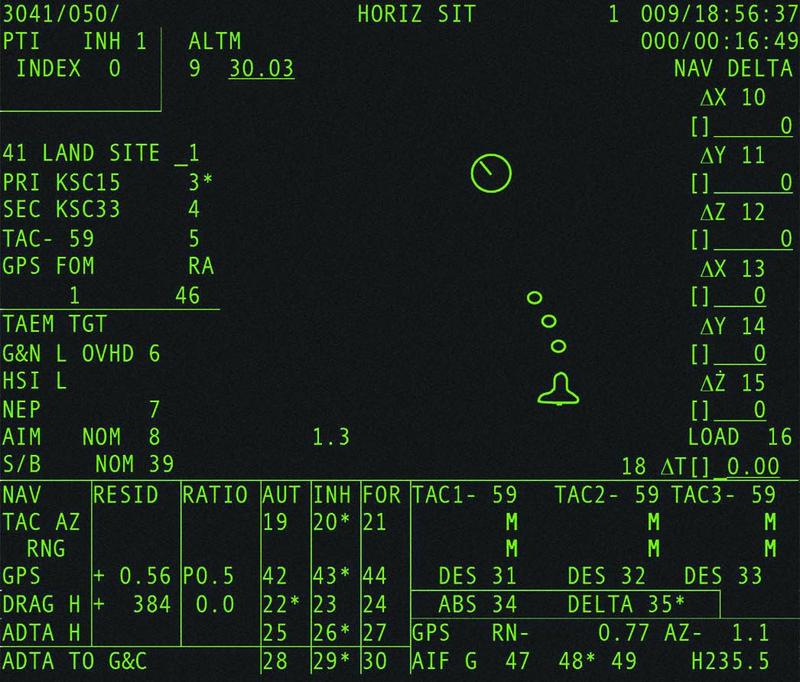
    The Horizontal Situation Display. From New Displays for the Space Shuttle Cockpit.The Horizontal Situation Display. From New Displays for the Space Shuttle Cockpit.

    The Space Shuttle's displays are described by a jumble of acronyms. A CRT screen was a Display Unit (DU), part of the Multifunction CRT Display System (MCDS). The screen was controlled by a Display Electronic Unit (DEU), which contained the SP-0 processor. The SP-0 created Format Control Words (FCWs) in memory that controlled the characters and vectors on the display. In 2000, the MCDS was upgraded to eleven color LCD screens (MEDS). For details, see Space Shuttle Avionics Upgrade: Issues and Opportunities, Entry, TAEM, and Approach/Landing Guidance Workbook, Space Shuttle Flight Software, Space Shuttle Avionics Systems, and The Space Shuttle Orbiter's Advanced Display Designs and an Analysis of its Growth Capabilities

  31. Some sources say that the Harpoon missile used the SP-0A computer, while IBM's brochure says that the missile used the SP-0B computer. Maybe there was an upgrade? 

  32. One IBM article includes several other signal processors in a discussion of the IBM System/4 Pi family. These specialized systems performed tens of millions of operations per second, orders of magnitude faster than contemporary general-purpose computers. I'm not sure if they are categorized as "real" System/4 Pi systems, so I'll describe them briefly in this footnote.

    The Advanced Signal Processor (AN/UYS-1 "Proteus") was a large, cabinet-sized system that processed sonar signals in numerous Navy aircraft, ships, and submarines. It has up to four arithmetic elements with a pipelined multiplier and adder, as well as a sine-cosine generator for FFTs (fast Fourier transforms), allowing it to perform up to 60 million operations per second. More details on the ASP are here.

    The ASP array processor led to the development of the IBM 3838 Array Processor. The IBM 3838 was connected to a mainframe and provided vector operations such as add, multiply, FFT, trigonometry, and polynomials. It had the codename "Gusher" since it was originally intended for seismic analysis for the petroleum industry, but it could also be used for applications from weather modeling to plasma computation.

    The third signal processor mentioned in the article is called ARP, but I couldn't find more information, not even what ARP stands for.

    (On the topic of mysterious System/4 Pi computers, IBM was scheduled to deliver a paper on the FS-4 computer in 1972, but withdrew the paper without explanation, see IBM Plugs, Unplugs a '4th Generation'.)

    A later signal processor from IBM was the Common Signal Processor from 1986, a VLSI-based signal processor that was part of the PAVE PILLAR combat avionics system for advanced tactical fighters. 

  33. According to a 1971 brochure, "System/4 Pi Command and Control (Model CC)", the CC-1 instruction set "has been specifically designed to optimize instruction bit efficiency for large real-time problems. Features include short format (16-bit) register-to-storage instructions, three-address instructions, multiple (four) general register sets, automatic index register incrementing, and a CALL program interrupt."

    Many of these features are similar to how the AP-101 diverged from System/360: the AP-101 had 16-bit register-to-storage instructions, multiple (two) general register sets, automatic indirect address incrementing, and a stack call instruction. 

  34. For the ML-1 computer, IBM doesn't explicitly explain the ML name. It's referred to as "IBM's militarized LSI computer", so I presume that ML stands for "militarized LSI". 

  35. IBM's name for these chips in the ML-1 is "Dutchess", as they were made in IBM's East Fishkill plant in Dutchess County, New York. More information on Dutchess chips is available on an IBM 5100 page and a post on alt.folklore.computers. Each chip is said to contain 134 TTL-compatible gates: 60 three-input NAND gates, 40 four-input NAND gates, and 34 two-input NOR drivers. The chips had a fixed arrangement of gates in silicon that could be wired as needed for a particular purpose; IBM called this a "masterslice" but it's more typically called a gate array. (Chips didn't always use all the available gates, averaging 110 gates used.) The advantage of a masterslice is that it is faster to design and cheaper to manufacture than a fully custom chip.

    A few years later, the IBM System/38 used a bipolar masterslice that contained 704 gates, mounted on a 116-pin ceramic carrier; it is described in Customized Metal Layers Vary Standard Gate-Array Chip. A later IBM masterslice chip with 1300 gates per chip is described in A High-Density Bipolar Logic Masterslice for Small Systems

  36. Owego is often confused with Oswego. IBM's Federal Systems Division was in Owego, NY. This town is 100 miles south of Oswego, NY, but everyone from the New York Times to NASA to the EPA to IBM itself mixes up Owego and Oswego. The latter is home to the State University of New York at Oswego. 

  37. Many of the photos in this article are from a brochure, "IBM System/4 Pi and Advanced System/4 Pi Computers", August 1973, which has detailed information on many of the computers in the 4 Pi family. Because this document is so informative, I've scanned and uploaded it here

tag:blogger.com,1999:blog-6264947694886887540.post-542341856603240438
Extensions
Instruction decoding in the Intel 8087 floating-point chip
8087chipsintelreverse-engineering
Show full content
pre {border:none;} In the 1980s, if you wanted your IBM PC to run faster, you could buy the Intel 8087 floating-point coprocessor chip. With this chip, CAD software, spreadsheets, flight simulators, and other programs were much speedier. The 8087 chip could add, subtract, multiply, and divide, of course, but it could also compute transcendental functions such as tangent and logarithms, as well as provide constants such as π. In total, the 8087 added 62 new instructions to the computer.

But how does a PC decide if an instruction was a floating-point instruction for the 8087 or a regular instruction for the 8086 or 8088 CPU? And how does the 8087 chip interpret instructions to determine what they mean? It turns out that decoding an instruction inside the 8087 is more complicated than you might expect. The 8087 uses multiple techniques, with decoding circuitry spread across the chip. In this blog post, I'll explain how these decoding circuits work.

To reverse-engineer the 8087, I chiseled open the ceramic package of an 8087 chip and took numerous photos of the silicon die with a microscope. The complex patterns on the die are formed by its metal wiring, as well as the polysilicon and silicon underneath. The bottom half of the chip is the "datapath", the circuitry that performs calculations on 80-bit floating point values. At the left of the datapath, a constant ROM holds important constants such as π. At the right are the eight registers that the programmer uses to hold floating-point values; in an unusual design decision, these registers are arranged as a stack. Floating-point numbers cover a huge range by representing numbers with a fractional part and an exponent; the 8087 has separate circuitry to process the fractional part and the exponent.

Die of the Intel 8087 floating point unit chip, with main functional blocks labeled. The die is 5 mm×6 mm. Click this image (or any others) for a larger image.Die of the Intel 8087 floating point unit chip, with main functional blocks labeled. The die is 5 mm×6 mm. Click this image (or any others) for a larger image.

The chip's instructions are defined by the large microcode ROM in the middle.1 To execute an instruction, the 8087 decodes the instruction and the microcode engine starts executing the appropriate micro-instructions from the microcode ROM. In the upper right part of the chip, the Bus Interface Unit (BIU) communicates with the main processor and memory over the computer's bus. For the most part, the BIU and the rest of the chip operate independently, but as we will see, the BIU plays important roles in instruction decoding and execution.

Cooperation with the main 8086/8088 processor

The 8087 chip acted as a coprocessor with the main 8086 (or 8088) processor. When a floating-point instruction was encountered, the 8086 would let the 8087 floating-point chip carry out the floating-point instruction. But how do the 8086 and the 8087 determine which chip executes a particular instruction? You might expect the 8086 to tell the 8087 when it should execute an instruction, but this cooperation turns out to be more complicated.

The 8086 has eight opcodes that are assigned to the coprocessor, called ESCAPE opcodes. The 8087 determines what instruction the 8086 is executing by watching the bus, a task performed by the BIU (Bus Interface Unit).2 If the instruction is an ESCAPE, the instruction is intended for the 8087. However, there's a problem. The 8087 doesn't have any access to the 8086's registers (and vice versa), so the only way that they can exchange data is through memory. But the 8086 addresses memory through a complicated scheme involving offsest registers and segment registers. How can the 8087 determine what memory address to use when it doesn't have access to the registers?

The trick is that when an ESCAPE instruction is encountered, the 8086 processor starts executing the instruction, even though it is intended for the 8087. The 8086 computes the memory address that the instruction references and reads that memory address, but ignores the result. Meanwhile, the 8087 watches the memory bus to see what address is accessed and stores this address internally in a BIU register. When the 8087 starts executing the instruction, it uses the address from the 8086 to read and write memory. In effect, the 8087 offloads address computation to the 8086 processor.

The structure of 8087 instructions

To understand the 8087's instructions, we need to take a closer look at the structure of 8086 instructions. In particular, something called the ModR/M byte is important since all 8087 instructions use it.

The 8086 uses a complex system of opcodes with a mixture of single-byte opcodes, prefix bytes, and longer instructions. About a quarter of the opcodes use a second byte, called ModR/M, that specifies the registers and/or memory address to use through a complicated encoding. For instance, the memory address can be computed by adding the BX and SI registers, or from the BP register plus a two-byte offset. The first two bits of the ModR/M byte are the "MOD" bits. For a memory access, the MOD bits indicate how many address displacement bytes follow the ModR/M byte (0, 1, or 2), while the "R/M" bits specify how the address is computed. A MOD value of 3, however, indicates that the instruction operates on registers and does not access memory.

Structure of an 8087 instructionStructure of an 8087 instruction

The diagram above shows how an 8087 instruction consists of an ESCAPE opcode, followed by a ModR/M byte. An ESCAPE opcode is indicated by the special bit pattern 11011, leaving three bits (green) available in the first byte to specify the type of 8087 instruction. As mentioned above, the ModR/M byte has two forms. The first form performs a memory access; it has MOD bits of 00,01, or 10 and the R/M bits specify how the memory address is computed. This leaves three bits (green) to specify the address. The second form operates internally, without a memory access; it has MOD bits of 11. Since the R/M bits aren't used in the second form, six bits (green) are available in the R/M byte to specify the instruction.

The challenge for the designers of the 8087 was to fit all the instructions into the available bits in such a way that decoding is straightforward. The diagram below shows a few 8087 instructions, illustrating how they achieve this. The first three instructions operate internally, so they have MOD bits of 11; the green bits specify the particular instruction. Addition is more complicated because it can act on memory (first format) or registers (second format), depending on the MOD bits. The four bits highlighted in bright green (0000) are the same for all ADD instructions; the subtract, multiplication, and division instructions use the same structure but have different values for the dark green bits. For instance, 0001 indicates multiplication and 0100 indicates subtraction. The other green bits (MF, d, and P) select variants of the addition instruction, changing the data format, direction, and popping the stack at the end. The last three bits select the R/M addressing mode for a memory operation, or the stack register ST(i) for a register operation.

The bit patterns for some 8087 instructions. Based on the datasheet.The bit patterns for some 8087 instructions. Based on the datasheet.

Selecting a microcode routine

Most of the 8087's instructions are implemented in microcode, implementing each step of an instruction in low-level "micro-instructions". The 8087 chip contains a microcode engine; you can think of it as the mini-CPU that controls the 8087 by executing a microcode routine, one micro-instruction at a time. The microcode engine provides an 11-bit micro-address to the ROM, specifying the micro-instruction to execute. Normally, the microcode engine steps through the microcode sequentially, but it also supports conditional jumps and subroutine calls.

But how does the microcode engine know where to start executing the microcode for a particular machine instruction? Conceptually, you could feed the instruction opcode into a ROM that would provide the starting micro-address. However, this would be impractical since you'd need a 2048-word ROM to decode an 11-bit opcode.3 (While a 2K ROM is small nowadays, it was large at the time; the 8087's microcode ROM was a tight fit at just 1648 words.) Instead, the 8087 uses a more efficient (but complicated) instruction decode system constructed from a combination of logic gates and PLAs (Programmable Logic Arrays). This system holds 22 microcode entry points, much more practical than 2048.

Processors often use a circuit called a PLA (Programmable Logic Array) as part of instruction decoding. The idea of a PLA is to provide a dense and flexible way of implementing arbitrary logic functions. Any Boolean logic function can be expressed as a "sum-of-products", a collection of AND terms (products) that are OR'd together (summed). A PLA has a block of circuitry called the AND plane that generates the desired sum terms. The outputs of the AND plane are fed into a second block, the OR plane, which ORs the terms together. Physically, a PLA is implemented as a grid, where each spot in the grid can either have a transistor or not. By changing the transistor pattern, the PLA implements the desired function.

A simplified diagram of a PLA.A simplified diagram of a PLA.

A PLA can implement arbitrary logic, but in the 8087, PLAs often act as optimized ROMs.4 The AND plane matches bit patterns,5 selecting an entry from the OR plane, which holds the output values, the micro-address for each routine. The advantage of the PLA over a standard ROM is that one output column can be used for many different inputs, reducing the size.

The image below shows part of the instruction decoding PLA.6 The horizontal input lines are polysilicon wires on top of the silicon. The pinkish regions are doped silicon. When polysilicon crosses doped silicon, it creates a transistor (green). Where there is a gap in the doped silicon, there is no transistor (red). (The output wires run vertically, but are not visible here; I dissolved the metal layer to show the silicon underneath.) If a polysilicon line is energized, it turns on all the transistors in its row, pulling the associated output columns to ground. (If no transistors are turned on, the pull-up transistor pulls the output high.) Thus, the pattern of doped silicon regions creates a grid of transistors in the PLA that implements the desired logic function.7

Part of the PLA for instruction decoding.Part of the PLA for instruction decoding.

The standard way to decode instructions with a PLA is to take the instruction bits (and their complements) as inputs. The PLA can then pattern-match against bit patterns in the instruction. However, the 8087 also uses some pre-processing to reduce the size of the PLA. For instance, the MOD bits are processed to generate a signal if the bits are 0, 1, or 2 (i.e. a memory operation) and a second signal if the bits are 3 (i.e. a register operation). This allows the 0, 1, and 2 cases to be handled by a single PLA pattern. Another signal indicates that the top bits are 001 111xxxxx; this indicates that the R/M field takes part in instruction selection.8 Sometimes a PLA output is fed back in as an input, so a decoded group of instructions can be excluded from another group. These techniques all reduce the size of the PLA at the cost of some additional logic gates.

The result of the instruction decoding PLA's AND plane is 22 signals, where each signal corresponds to an instruction or group of instructions with a shared microcode entry point. The lower part of the instruction decoding PLA acts as a ROM that holds the 22 microcode entry points and provides the selected one.9

Instruction decoding inside the microcode

Many 8087 instructions share the same microcode routines. For instance, the addition, subtraction, multiplication, division, reverse subtraction, and reverse division instructions all go to the same microcode routine. This reduces the size of the microcode since these instructions share the microcode that sets up the instruction and handles the result. However, the microcode obviously needs to diverge at some point to perform the specific operation. Moreover, some arithmetic opcodes access the top of the stack, some access an arbitrary location in the stack, some access memory, and some reverse the operands, requiring different microcode actions. How does the microcode do different things for different opcodes while sharing code?

The trick is that the 8087's microcode engine supports conditional subroutine calls, returns, and jumps, based on 49 different conditions (details). In particular, fifteen conditions examine the instruction. Some conditions test specific bit patterns, such as branching if the lowest bit is set, or more complex patterns such as an opcode matching 0xx 11xxxxxx. Other conditions detect specific instructions such as FMUL. The result is that the microcode can take different paths for different instructions. For instance, a reverse subtraction or reverse division is implemented in the microcode by testing the instruction and reversing the arguments if necessary, while sharing the rest of the code.

The microcode also has a special jump target that performs a three-way jump depending on the current machine instruction that is being executed. The microcode engine has a jump ROM that holds 22 entry points for jumps or subroutine calls.10 However, a jump to target 0 uses special circuitry so it will instead jump to target 1 for a multiplication instruction, target 2 for an addition/subtraction, or target 3 for division. This special jump is implemented by gates in the upper right corner of the jump decoder.

The jump decoder and ROM. Note that the rows are not in numerical order; presumably, this made the layout slightly more compact. Click this image (or any other) for a larger version.The jump decoder and ROM. Note that the rows are not in numerical order; presumably, this made the layout slightly more compact. Click this image (or any other) for a larger version.
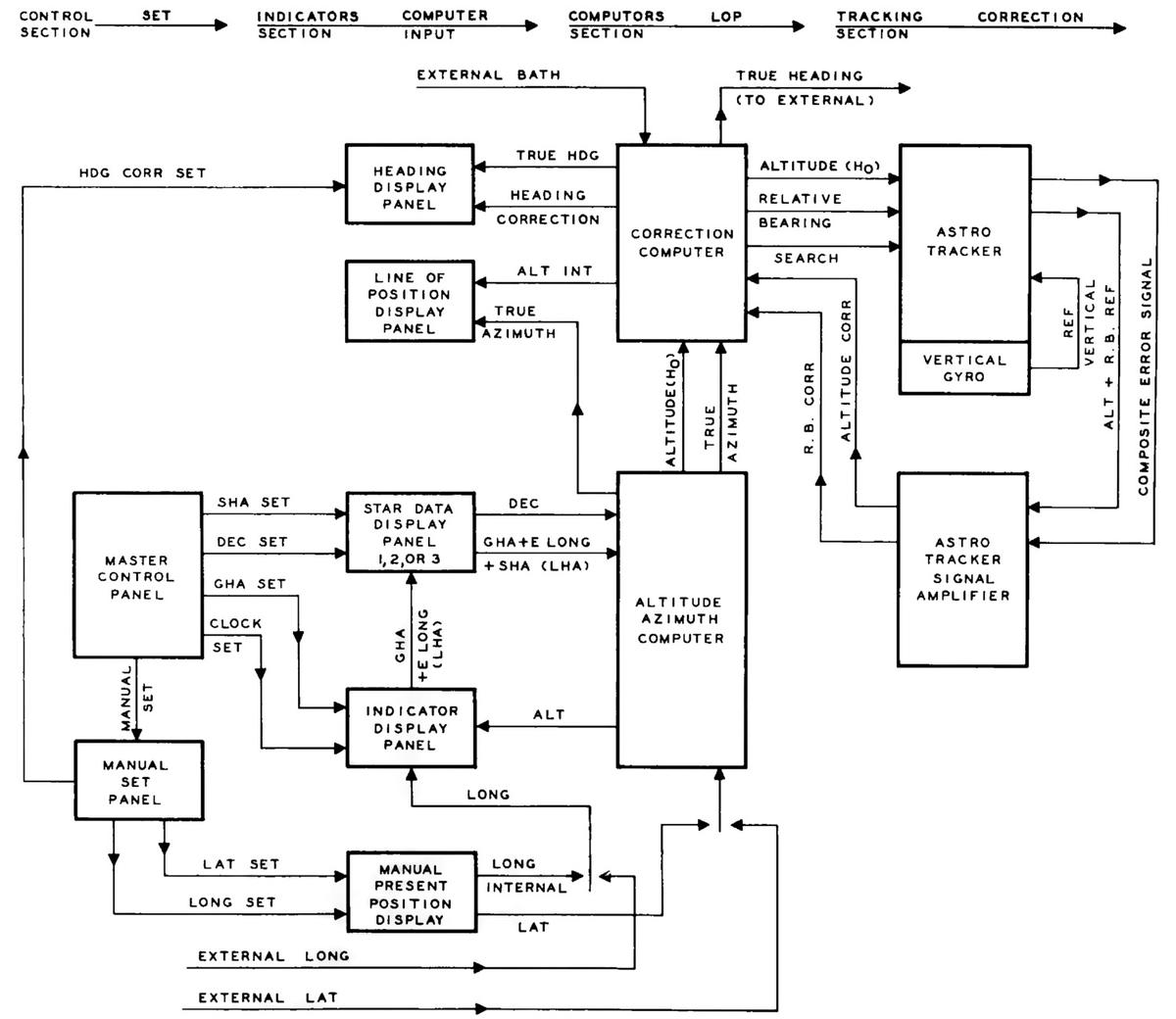
Hardwired instruction handling

Some of the 8087's instructions are implemented directly by hardware in the Bus Interface Unit (BIU), rather than using microcode. For example, instructions to enable or disable interrupts, or to save or restore state are implemented in hardware. The decoding for these instructions is performed by separate circuitry from the instruction decoder described above.

In the first step, a small PLA decodes the top 5 bits of the instruction. Most importantly, if these bits are 11011, it indicates an ESCAPE instruction, the start of an 8087 operation. This causes the 8087 to start interpreting the instruction and stores the opcode in a BIU register for use by the instruction decoder. A second small PLA takes the outputs from the top-5 PLA and combines them with the lower three bits. It decodes specific instruction values: D9, DB, DD, E0, E1, E2, or E3. The first three values correspond to specific ESCAPE instructions, and are recorded in latches.

The two PLAs decode the second byte in the same way. Logic gates combine the PLA outputs from the second byte with the latched values from the first byte, detecting eleven hardwired instructions.11 Some of these instructions operate directly on registers, such as clearing exceptions; the decoded instruction signal goes to the relevant register and modifies it in an ad hoc way. 12. Other hardwired instructions are more complicated, writing chip state to memory or reading chip state from memory. These instructions require multiple memory operations, controlled by the Bus Interface Unit's state machine. Each of these instructions has a flip-flop that is triggered by the decoded instruction to keep track of which instruction is active.

For the instructions that save and restore the 8087's state (FSAVE and FRSTOR), there's one more complication. These instructions are partially implemented in the BIU, which moves the relevant BIU registers to or from memory. But then, instruction processing switches to microcode, where a microcode routine saves or loads the floating-point registers. Jumping to the microcode routine is not implemented through the regular microcode jump circuitry. Instead, two hardcoded values force the microcode address to the save or restore routine.13

Constants

The 8087 has seven instructions to load floating-point constants such as π, 1, or log10(2). The 8087 has a constant ROM that holds these constants, as well as constants for transcendental operations. You might expect that the 8087 simply loads the specified constant from the constant ROM, using the instruction to select the desired constant. However, the process is much more complicated.14

Looking at the instruction decode ROM shows that different constants are implemented with different microcode routines: the constant-loading instructions FLDLG2 and FLDLN2 have one entry point; FLD1, FLD2E, FLDL2T, and FLDPI have a second entry point, and FLDZ (zero) has a third entry point. It's understandable that zero is a special case, but why are there two routines for the other constants?

The explanation is that the fraction part of each constant is stored in the constant ROM, but the exponent is stored in a separate, smaller ROM. To reduce the size of the exponent ROM, only some of the necessary exponents are stored. If a constant needs an exponent one larger than a value in the ROM, the microcode adds one to the exponent ROM value, computing the exponent on the fly.

Thus, the load-constant instructions use three separate instruction decoding mechanisms. First, the instruction decode ROM determines the appropriate microcode routine for the constant instruction, as before. Then, the constant PLA decodes the instruction to select the appropriate constant. Finally, the microcode routine tests the bottom bit of the instruction and increments the exponent if necessary.

Conclusions

To wrap up the discussion of the decoding circuitry, the diagram below shows how the different circuits are arranged on the die. This image shows the upper-right part of the die; the microcode engine is at the left and part of the ROM is at the bottom.

The upper-left portion of the 8087 die, with functional blocks labeled.The upper-left portion of the 8087 die, with functional blocks labeled.

The 8087 doesn't have a clean architecture, but instead is full of ad hoc circuits and corner cases. The 8087's instruction decoding is an example of this. Decoding is complicated to start with due to the 8086's convoluted instruction formats and the ModR/M byte. On top of that, the 8087's instruction decoding has multiple layers: the instruction decode PLA, microcode conditional jumps that depend on the instruction, a special jump target that depends on the instruction, constants selected based on the instruction, and instructions decoded by the BIU.

The 8087 has a reason for this complicated architecture: at the time, the chip was on the edge of what was possible, so the designers needed to use whatever techniques they could to reduce the size of the chip. If implementing a corner case could shave a few transistors off the chip or make the microcode ROM slightly smaller, the corner case was worthwhile. Even so, the 8087 was barely manufacturable at first; early yield was just two working chips per silicon wafer. Despite this difficult start, a floating-point standard based on the 8087 is now part of almost every processor.

Thanks to the members of the "Opcode Collective" for their contributions, especially Smartest Blob and Gloriouscow.

For updates, follow me on Bluesky (@righto.com), Mastodon (@kenshirriff@oldbytes.space), or RSS.

Notes and references
  1. The contents of the microcode ROM are available here, partially decoded thanks to Smartest Blob. 

  2. It is difficult for the 8087 to determine what the 8086 is doing because the 8086 prefetches instructions. Thus, when an instruction is seen on the bus, the 8086 may execute it at some point in the future, or it may end up discarded.

    In order to tell what instruction is being executed, the 8087 floating-point chip internally duplicates the 8086 processor's queue. The 8087 watches the memory bus and copies any instructions that are prefetched. Since the 8087 can't tell from the bus when the 8086 starts a new instruction or when the 8086 empties the queue when jumping to a new address, the 8086 processor provides two queue status signals to the 8087. With the help of these signals, the 8087 knows exactly what the 8086 is executing.

    The 8087's instruction queue has six 8-bit registers, the same as the 8086. Surprisingly, the last two queue registers in the 8087 are tied together, so there are only five usable queue registers. My hypothesis is that since the 8087 copies the active instruction into separate registers (unlike the 8086), only five queue registers are needed. This raises the question of why the excess register wasn't removed from the die, rather than wasting valuable space.

    The 8088 processor, used in the IBM PC, has a four-byte queue instead of a six-byte queue. The 8088 is almost identical to the 8086 except it has an 8-bit memory bus instead of a 16-bit memory bus. With the narrower memory bus, prefetching is more likely to get in the way of other memory accesses, so a smaller prefetch queue was implemented.

    Knowing the queue size is essential to the 8087 floating-point chip. To indicate this, when the processor boots, a signal lets the 8087 determine if the attached processor is an 8086 or an 8088. 

  3. The relevant part of the opcode is 11 bits: the top 5 bits are always 11011 for an ESCAPE opcode, so they can be ignored during decoding. The Bus Interface Unit has a 3-bit register to hold the first byte of the instruction and an 8-bit register to hold the second byte. The BIU registers have an irregular appearance because there are 3-bit registers, 8-bit registers, and 10-bit registers (holding half of a 20-bit address). 

  4. What's the difference between a PLA and a ROM? There is a lot of overlap: a ROM can replace a PLA, while a PLA can implement a ROM. A ROM is essentially a PLA where the first stage is a binary decoder, so the ROM has a separate row for each input value. However, the first stage of a ROM can be optimized so multiple inputs share the same output value; is this a ROM or a PLA?

    The "official" difference is that in a ROM, one row is activated at a time, while in a PLA, multiple rows can be activated at once, so the output values are combined. (Thus, it is straightforward to read the values out of a ROM, but more difficult to read the values out of a PLA.)

    I consider the instruction decoding PLA to be best described as a PLA first stage with the second stage acting as a ROM. You could also call it a partially-decoded ROM, or just a PLA. Hopefully my terminology isn't too confusing. 

  5. To match a bit pattern in an instruction, the bits of the instruction are fed into the PLA, along with the complements of these bits; this allows the PLA to match against a 0 bit or a 1 bit. Each row of a PLA will match a particular bit pattern in the instruction: bits that must be 1, bits that must be 0, and bits that don't matter. If the instruction opcodes are assigned rationally, a small number of bit patterns will match all the opcodes, reducing the size of the decoder.

    I may be going too far with this analogy, but a PLA is a lot like a neural net. Each column in the AND plane is like a neuron that fires when it recognizes a particular input pattern. The OR plane is like a second layer in a neural net, combining signals from the first layer. The PLA's "weights", however, are fixed at 0 or 1, so it's not as flexible as a "real" neural net. 

  6. The instruction decoding PLA has an unusual layout, where the second plane is rotated 90°. In a regular PLA (left), the inputs (red) go into the first plane, the perpendicular outputs from the first plane (purple) go into the second plane, and the PLA outputs (blue) exit parallel to the inputs. In the address PLA, however, the second plane is rotated 90°, so the outputs are perpendicular to the inputs. This approach requires additional wiring (horizontal purple lines), but presumably, this layout worked better in the 8087 since the outputs are lined up with the rest of the microcode engine.

    Conceptual diagram of a regular PLA on the left and a rotated PLA on the right.Conceptual diagram of a regular PLA on the left and a rotated PLA on the right.


  7. To describe the implementation of a PLA in more detail, the transistors in each row of the AND plane form a NOR gate, since if any transistor is turned on, it pulls the output low. Likewise, the transistors in each column of the OR plane form a NOR gate. So why is the PLA described as having an AND plane and an OR plane, rather than two NOR planes? By using De Morgan's law, you can treat the NOR-NOR Boolean equations as equivalent to AND-OR Boolean equations (with the inputs and outputs inverted). It's usually much easier to understand the logic as AND terms OR'd together.

    The converse question is why don't they build the PLA from AND and OR gates instead of NOR gates? The reason is that AND and OR gates are harder to build with NMOS transistors, since you need to add explicit inverter circuits. Moreover, NMOS NOR gates are typically faster than NAND gates because the transistors are in parallel. (CMOS is the opposite; NAND gates are faster because the weaker PMOS transistors are in parallel.) 

  8. table#op8087 {border-collapse: collapse; font-family: sans-serif;} table#op8087 td {border: 1px solid white;}

    The 8087's opcodes can be organized into tables, showing the underlying structure. (In each table, the row (Y) coordinate is the bottom 3 bits of the first byte and the column (X) coordinate is the 3 bits after the MOD bits in the second byte.)

    Memory operations use the following encoding with MOD = 0, 1, or 2. Each box represents 8 different addressing modes.

      0 1 2 3 4 5 6 7 0 FADD FMUL FCOM FCOMP FSUB FSUBR FDIV FDIVR 1 FLD   FST FSTP FLDENV FLDCW FSTENV FSTCW 2 FIADD FIMUL FICOM FICOMP FISUB FISUBR FIDIV FIDIVR 3 FILD   FIST FISTP   FLD   FSTP 4 FADD FMUL FCOM FCOMP FSUB FSUBR FDIV FDIVR 5 FLD   FST FSTP FRSTOR   FSAVE FSTSW 6 FIADD FIMUL FICOM FICOMP FISUB FISUBR FIDIV FIDIVR 7 FILD   FIST FISTP FBLD FILD FBSTP FISTP

    The important point is that the instruction encoding has a lot of regularity, making the decoding process easier. For instance, the basic arithmetic operations (FADD through FDIVR) are repeated on alternating rows. However, the table also has significant irregularities, which complicate the decoding process.

    The register operations (MOD = 3) have a related layout, but there are even more irregularities.

    table#op8087 {border-collapse: collapse; font-family: sans-serif;} table#op8087 td {border: 1px solid white;}

      0 1 2 3 4 5 6 7 0 FADD FMUL FCOM FCOMP FSUB FSUBR FDIV FDIVR 1 FLD FXCH FNOP   misc1 misc2 misc3 misc4 2                 3         misc5       4 FADD FMUL     FSUB FSUBR FDIV FDIVR 5 FFREE   FST FSTP         6 FADDP FMULP   FCOMPP FSUBP FSUBRP FDIVP FDIVRP 7                

    In most cases, each box indicates 8 different values for the stack register, but there are exceptions. The NOP and FCOMPP instructions each have a single opcode, "wasting" the rest of the box.

    Five of the boxes in the table encode multiple instructions instead of the register number. The first four (red) are miscellaneous instructions handled by the decoding PLA:
    misc1 = FCHS, FABS, FTST, FXAM
    misc2 = FLD1, FLDL2T, FLDL2E, FLDPI, FLDLG2, FLDLN2, FLDZ (the constant-loading instructions)
    misc3 = F2XM1, FYL2X, FPTAN, FPATAN, FXTRACT, FDECSTP, FINCSTP
    misc4 = FPREM, FYL2XP1, FSQRT, FRNDINT, FSCALE

    The last miscellaneous box (yellow) holds instructions that are handled by the BIU.
    misc5 = FENI, FDISI, FCLEX, FINIT

    Curiously, the 8087's opcodes (like the 8086's) make much more sense in octal than in hexadecimal. In octal, an 8087 opcode is simply 33Y MXR, where X and Y are the table coordinates above, M is the MOD value (0, 1, 2, or 3), and R is the R/M field or the stack register number. 

  9. The 22 outputs from the instruction decoder PLA correspond to the following groups of instructions, activating one row of ROM and producing the corresponding microcode address. From this table, you can see which instructions are grouped together in the microcode.

     0 #0200 FXCH
     1 #0597 FSTP (BCD)
     2 #0808 FCOM FCOMP FCOMPP
     3 #1008 FLDLG2 FLDLN2
     4 #1527 FSQRT
     5 #1586 FPREM
     6 #1138 FPATAN
     7 #1039 FPTAN
     8 #0900 F2XM1
     9 #1020 FLDZ
    10 #0710 FRNDINT
    11 #1463 FDECSTP FINCSTP
    12 #0812 FTST
    13 #0892 FABS FCHS
    14 #0065 FFREE FLD
    15 #0217 FNOP FST FSTP (not BCD)
    16 #0001 FADD FDIV FDIVR FMUL FSUB FSUBR
    17 #0748 FSCALE
    18 #1028 FXTRACT
    19 #1257 FYL2X FYL2XP1
    20 #1003 FLD1 FLDL2E FLDL2T FLDPI
    21 #1468 FXAM


  10. The instruction decoding PLA has 22 entries, and the jump table also has 22 entries. It's a coincidence that these values are the same.

    An entry in the jump table ROM is selected by five bits of the micro-instruction. The ROM is structured with two 11-bit words per row, interleaved. (It's also a coincidence that there are 22 bits.) The upper four bits of the jump number select a row in the ROM, while the bottom bit selects one of the two rows.

    This implementation is modified for target 0, the three-way jump. The first ROM row is selected for target 0 if the current instruction is multiplication, or for target 1. The second row is selected for target 0 if the current instruction is addition or subtraction, or for target 2. The third row is selected for target 0 if the current instruction is division, or for target 3. Thus, target 0 ends up selecting rows 1, 2, or 3. However, remember that there are two words per row, selected by the low bit of the target number. The problem is that target 0 with multiplication will access the left word of row 1, while target 1 will access the right word of row 1, but both should provide the same address. The solution is that rows 1, 2, and 3 have the same address stored twice in the row, so these rows each "waste" a value.

    For reference, the contents of the jump table are:

     0: Jumps to target 1 for FMUL, 2 for FADD/FSUB/FSUBR, 3 for FDIV/FDIVR
     1: #0359
     2: #0232
     3: #0410
     4: #0083
     5: #1484
     6: #0122
     7: #0173
     8: #0439
     9: #0655
    10: #0534
    11: #0299
    12: #1572
    13: #1446
    14: #0859
    15: #0396
    16: #0318
    17: #0380
    18: #0779
    19: #0868
    20: #0522
    21: #0801


  11. Eleven instructions are implemented in the BIU hardware. Four of these are relatively simple, setting or clearing bits: FINIT (initialize), FENI (enable interrupts), FDISI (disable interrupts), and FCLEX (clear exceptions). Six of these are more complicated, storing state to memory or loading state from memory: FLDCW (load control word), FSTCW (store control word), FSTSW (store status word), FSTENV (store environment), FLDENV (load environment), FSAVE (save state), and FRSTOR (restore state). As explained elsewhere, the last two instructions are partially implemented in microcode. 

  12. Even a seemingly trivial instruction uses more circuitry than you might expect. For instance, after the FCLEX (clear exception) instruction is decoded, the signal goes through nine gates before it clears the exception bits in the status register. Along the way, it goes through a flip-flop to synchronize the timing, a gate to combine it with the reset signal, and various inverters and drivers. Even though these instructions seem like they should complete immediately, they typically take 5 clock cycles due to overhead in the 8087. 

  13. I'll give more details here on the circuit that jumps to the save or restore microcode. The BIU sends two signals to the microcode engine, one to jump to the save code and one to jump to the restore code. These signals are buffered and delayed by a capacitor, probably to adjust the timing of the signal.

    In the microcode engine, there are two hardcoded constants for the routines, just above the jump table; the BIU signal causes the appropriate constant to go onto the micro-address lines. Each bit in the address has a pull-up transistor to +5V or a pull-down transistor to ground. This approach is somewhat inefficient since it requires two transistor sites per bit. In comparison, the jump address ROM and the instruction address ROM use one transistor site per bit. (As in a PLA, each transistor is present or absent as needed, so the number of physical transistors is less than the number of transistor sites.)

    Two capacitors in the 8087. This photo shows the metal layer with the silicon and polysilicon underneath.Two capacitors in the 8087. This photo shows the metal layer with the silicon and polysilicon underneath.

    Since capacitors are somewhat unusual in NMOS circuits, I'll show them in the photo above. If a polysilicon line crosses over doped silicon, it creates a transistor. However, if a polysilicon region sits on top of the doped silicon without crossing it, it forms a capacitor instead. (The capacitance exists for a transistor, too, but the gate capacitance is generally unwanted.) 

  14. The documentation provides a hint that the microcode to load constants is complicated. Specifically, the documentation shows that different constants take different amounts of time to load. For instance, log2(e) takes 18 cycles while log2(10) takes 19 cycles and log10(2) takes 21 cycles. You'd expect that pre-computed constants would all take the same time, so the varying times show that more is happening behind the scenes. 

tag:blogger.com,1999:blog-6264947694886887540.post-8201340188892833254
Extensions
Notes on the Intel 8086 processor's arithmetic-logic unit
Show full content

In 1978, Intel introduced the 8086 processor, a revolutionary chip that led to the modern x86 architecture. Unlike modern 64-bit processors, however, the 8086 is a 16-bit chip. Its arithmetic/logic unit (ALU) operates on 16-bit values, performing arithmetic operations such as addition and subtraction, as well as logic operations including bitwise AND, OR, and XOR. The 8086's ALU is a complicated part of the chip, performing 28 operations in total.1

In this post, I discuss the circuitry that controls the ALU, generating the appropriate control signals for a particular operation. The process is more complicated than you might expect. First, a machine code instruction results in the execution of multiple microcode instructions. Using the ALU is a two-step process: one microcode instruction (micro-instruction) configures the ALU for the desired operation, while a second micro-instruction gets the results from the ALU. Moreover, based on both the microcode micro-instruction and the machine code instruction, the control circuitry sends control signals to the ALU, reconfiguring it for the desired operation. Thus, this circuitry provides the "glue" between the micro-instructions and the ALU.

The die photo below shows the 8086 processor under a microscope. I've labeled the key functional blocks. Architecturally, the chip is partitioned into a Bus Interface Unit (BIU) at the top and an Execution Unit (EU) below. The BIU handles bus and memory activity as well as instruction prefetching, while the Execution Unit (EU) executes the instructions. In the lower right corner, the microcode ROM holds the micro-instructions. The ALU is in the lower left corner, with bits 7-0 above and bits 15-8 below, sandwiching the status flag circuitry. The ALU control circuitry, highlighted in red at the bottom of the chip, is the focus of this article.

The die of the 8086 with the metal layer removed to show the silicon and polysilicon underneath. Click this image (or any other) for a larger version.The die of the 8086. Click this image (or any other) for a larger version.

Microcode

The 8086 processor implements most machine instructions in microcode, with a micro-instruction for each step of the machine instruction. (I discuss the 8086's microcode in detail here.) The 8086 uses an interesting architecture for microcode: each micro-instruction performs two unrelated operations. The first operation moves data between a source and a destination. The second operation can range from a jump or subroutine call to a memory read/write or an ALU operation. An ALU operation has a five-bit field to specify a particular operation and a two-bit field to specify which temporary register provides the input. As you'll see below, these two fields play an important role in the ALU circuitry.

In many cases, the 8086's micro-instruction doesn't specify the ALU operation, leaving the details to be substituted from the machine instruction opcode. For instance, the ADD, SUB, ADC, SBB, AND, OR, XOR, and CMP machine instructions share the same microcode, while the hardware selects the ALU operation from the instruction opcode. Likewise, the increment and decrement instructions use the same microcode, as do the decimal adjust instructions DAA and DAS, and the ASCII adjust instructions AAA and AAS. Inside the micro-instruction, all these operations are performed with a "pseudo" ALU operation called XI (for some reason). If the microcode specifies an XI ALU operation, the hardware replaces it with the ALU operation specified in the instruction. Another important feature of the microcode is that you need to perform one ALU micro-instruction to configure the ALU's operation, but the result isn't available until a later micro-instruction, which moves the result to a destination. This has the consequence that the hardware must remember the ALU operation.

To make this concrete, here is the microcode that implements a typical arithmetic instruction such as ADD AL, BL or XOR [BX+DI], CX. This microcode consists of three micro-instructions. The left half of each micro-instruction specifies a data movement, first moving the two arguments to ALU temporary registers and then storing the ALU result (called Σ). The right half of each micro-instruction performs the second task. First, the ALU is configured to perform an XI operation using temporary register A. Recall that XI indicates the ALU operation is filled in from the machine instruction; this is how the same microcode handles eight different types of machine instructions. In the second micro-instruction, the next machine instruction is started unless a memory writeback is required (WB). The last micro-instruction is RNI (Run Next Instruction) to start a new machine instruction. It also indicates that the processor status flags (F) should be updated to indicate if the ALU result is zero, positive, overflow, and so forth.2

pre.microcode {font-family: courier, fixed; padding: 10px; background-color: #f5f5f5; display:inline-block;border:none;} pre.microcode span {color: green; font-style:italic; font-family: sans-serif; font-size: 90%;}
M → tmpa   XI   tmpa  Load first argument, configure ALU.
R → tmpb   WB,NXT     Load second argument, start Next instruction if no memory writeback
Σ → M      RNI  F     Store ALU result, Run Next Instruction, update status Flags
The ALU circuit

The ALU is the heart of a processor, performing arithmetic and logic operations. Microprocessors of the 1970s typically supported addition and subtraction; logical AND, OR, and XOR; and various bit shift operations. (Although the 8086 had multiply and divide instructions, these were implemented in microcode, not in the ALU.) Since an ALU is both large and critical to performance, chip architects try to optimize its design. As a result, different microprocessors have widely different ALU designs. For instance, the 6502 microprocessor has separate circuits for addition and each logic operation; a multiplexer selects the appropriate output. The Intel 8085, on the other hand, uses an optimized clump of gates that performs the desired operation based on control signals (details), while the Z80's 4-bit ALU uses a different clump of gates (details).

The 8086 takes a different approach, using two lookup tables (along with other gates) to generate the carry and output signals for each bit in the ALU. By setting the lookup tables appropriately, the ALU can be configured to perform the desired operation. (This is similar to how an FPGA implements arbitrary functions through lookup tables.) The schematic below shows the circuit for one bit of the ALU. I won't explain this circuit in detail since I explained it in an earlier article.3 The relevant part of this circuit is the six control signals at the left. The two multiplexers (trapezoidal symbols) implement the lookup tables by using the two input argument bits to select outputs from the control signals to control carry generation and carry propagation. Thus, by feeding appropriate control signals into the ALU, the 8086 can reconfigure the ALU to perform the desired operation. For instance, with one set of control signals, this circuit will add. Other sets of control signals will cause the circuit to subtract or compute a logical operation, such as AND or XOR. The 8086 has 16 copies of this circuit, so it operates on 16-bit values.

The circuit that implements one bit in the 8086's ALU.The circuit that implements one bit in the 8086's ALU.

The 8086 is a complicated processor, and its instructions have many special cases, so controlling the ALU is more complex than described above. For instance, the compare operation is the same as a subtraction, except the numerical result of a compare is discarded; just the status flags are updated. The add versus add-with-carry instructions require different values for the carry into bit 0, while subtraction requires the carry flag to be inverted since it is treated as a borrow. The 8086's ALU supports increment and decrement operations, but also increment and decrement by 2, which requires an increment signal into bit 1 instead of bit 0. The bit-shift operations all require special treatment. For instance, a rotate can use the carry bit or exclude the carry bit, while and arithmetic shift right requires the top bit to be duplicated. As a result, along with the six lookup table (LUT) control signals, the ALU also requires numerous control signals to adjust its behavior for specific instructions. In the next section, I'll explain how these control signals are generated.

ALU control circuitry on the die

The diagram below shows the components of the ALU control logic as they appear on the die. The information from the micro-instruction enters at the right and is stored in the latches. The PLAs (Programmable Logic Arrays) decode the instruction and generate the control signals. These signals flow to the left, where they control the ALU.

The ALU control logic as it appears on the die. I removed the metal layer to show the underlying polysilicon and silicon. The reddish lines are remnants of the metal.The ALU control logic as it appears on the die. I removed the metal layer to show the underlying polysilicon and silicon. The reddish lines are remnants of the metal.

As explained earlier, if the microcode specifies the XI operation, the operation field is replaced with a value based on the machine instruction opcode. This substitution is performed by the XI multiplexer before the value is stored in the operation latch. Because of the complexity of the 8086 instruction set, the XI operation is not as straightforward as you might expect. This multiplexer gets three instruction bits from a special register called the "X" register, another instruction bit from the instruction register, and the final bit from a decoding circuit called the Group Decode ROM.4

Recall that one micro-instruction specifies the ALU operation, and a later micro-instruction accesses the result. Thus, the ALU control circuitry must remember the specified operation so it can be used later. In particular, the control circuitry must keep track of the ALU operation to perform and the temporary register specified. The control circuitry uses three flip-flops to keep track of the specified temporary register, one flip-flop for each register. The micro-instruction contains a two-bit field that specifies the temporary register. The control circuitry decodes this field and activates the associated flip-flop. The outputs from these flip-flops go to the ALU and enable the associated temporary register. At the start of each machine instruction,5 the flip-flops are reset, so temporary register A is selected by default.

The control circuitry uses five flip-flops to store the five-bit operation field from the micro-instruction. At the start of each machine instruction, the flip-flops are reset so operation 0 (ADD) is specified by default. One important consequence is that an add operation can potentially be performed without a micro-instruction to configure the ALU, shortening the microcode by one micro-instruction and thus shortening the instruction time by one cycle.

The five-bit output from the operation flip-flops goes to the operation PLA (Programmable Logic Array)7, which decodes the operation into 27 control signals.6 Many of these signals go to the ALU, where they control the behavior of the ALU for special cases. About 15 of these signals go to the Lookup Table (LUT) PLA, which generates the six lookup table signals for the ALU. At the left side of the LUT PLA, special high-current driver circuits amplify the control signals before they are sent to the ALU. Details on these drivers are in the footnotes.8

Conclusions

Whenever I look at the circuitry of the 8086 processor, I see the differences between a RISC chip and a CISC chip. In a RISC (Reduced Instruction Set Computer) processor such as ARM, instruction decoding is straightforward, as is the processor circuitry. But in the 8086, a CISC (Complex Instruction Set Computer) processor, there are corner cases and complications everywhere. For instance, an 8086 machine instruction sometimes specifies the ALU operation in the first byte and sometimes in the second byte, and sometimes elsewhere, so the X register latch, the XI multiplexer, and the Group Decode ROM are needed. The 8086's ALU includes obscure operations including four types of BCD adjustments and seven types of shifts, making the ALU more complicated. Of course, the continuing success of x86 shows that this complexity also has benefits.

This article has been a deep dive into the details of the 8086's ALU, but I hope you have found it interesting. If it's too much detail for you, you might prefer my overview of the 8086 ALU.

For updates, follow me on Bluesky (@righto.com), Mastodon (@kenshirriff@oldbytes.space), or RSS.

Credits: Thanks to Marcin Peczarski for discussion. My microcode analysis is based on Andrew Jenner's 8086 microcode disassembly.

Notes and references
  1. table#aluops {border-collapse: collapse;} table#aluops td {border: 1px solid #ccc; padding: 0 10px;}

    The operations implemented by the ALU are:

    00ADDAdd 01ORLogical OR 02ADCAdd with carry in 03SBBSubtract with borrow in 04ANDLogical AND 05SUBTSubtract 06XORLogical XOR 07CMPComparison 08ROLRotate left 09RORRotate right 0aLRCYLeft rotate through carry 0bRRCYRight rotate through carry 0cSHLShift left 0dSHRShift right 0eSETMOSet to minus one (questionable) 0fSARArithmetic shift right 10PASSPass argument unchanged 11XIInstruction specifies ALU op 14DAADecimal adjust after addition 15DASDecimal adjust after subtraction 16AAAASCII adjust after addition 17AASASCII adjust after subtraction 18INCIncrement 19DECDecrement 1aCOM11's complement 1bNEGNegate 1cINC2Increment by 2 1dDEC2Decrement by 2

    Also see Andrew Jenner's code

  2. You might wonder how this microcode handles the 8086's complicated addressing modes such as [BX+DI]. The trick is that microcode subroutines implement the addressing modes. For details, see my article on 8086 addressing microcode

  3. The 8086's ALU has a separate circuit to implement shift-right. The problem is that data in an ALU normally flows right-to-left as carries flow from lower bits to higher bits. Shifting data to the right goes against this direction, so it requires a special path. (Shifting to the left is straightforward; you can add a number to itself.)

    The adjust operations (DAA, DAS, AAA, AAS) also use completely separate circuitry. These operations generate correction factors for BCD (binary-coded decimal) arithmetic based on the value and flags. The circuitry for these operations is located with the flags circuitry, separate from the rest of the ALU circuitry. 

  4. In more detail, the 8086 stores bits 5-3 of the machine instruction in the "X" register. For an XI operation, the X register bits become bits 2-0 of the ALU operation specification, while bit 3 comes from bit 6 of the instruction, and bit 4 comes from the Group Decode ROM for certain instructions. The point of this is that the instruction set is designed so bits of the instruction correspond to bits of the ALU operation specifier, but the mapping is more complicated than you might expect. The eight basic arithmetic/logic operations (ADD, SUB, OR, etc) have a straightforward mapping that is visible from the 8086 opcode table, but the mapping for other instructions isn't as obvious. Moreover, sometimes the operation is specified in the first byte of the machine instruction, but sometimes it is specified in the second byte, which is why the X register needs to store the relevant bits. 

  5. The flip-flops are reset by a signal in the 8086, called "Second Clock". When a new machine instruction is started, the "First Clock" signal is generated on the instruction's first byte and the "Second Clock" signal is generated on the instruction's second byte. (Note that these signals are not necessarily on consecutive clock cycles, because a memory fetch may be required if the instruction queue is empty.) Why are the flip-flops reset on Second Clock and not First Clock? The 8086 has a small degree of pipelining, so the previous micro-instruction may still be finishing up during First Clock of the next instruction. By Second Clock, it is safe to reset the ALU state. 

  6. For reference, the 27 outputs from the PLA are triggered by the following ALU micro-operations:

    Output 0: RRCY (right rotate through carry)
    Output 1: ROR (Rotate Right)
    Output 2: BCD Adjustments: DAA (Decimal Adjust after Addition), DAS (Decimal Adjust after Subtraction), AAA (ASCII Adjust after Subtraction), or AAS (ASCII Adjust after Subtraction)
    Output 3: SAR (Shift Arithmetic Right)
    Output 4: Left shift: ROL (Rotate Left), RCL (Rotate through Carry Left), SHL (Shift Left), or SETMO (Set Minus One)
    Output 5: Right shift: ROR (Rotate Right), RCR (Rotate through Carry Right), SHR (Shift Right), or SAR (Shift Arithmetic Right)
    Output 6: INC2 (increment by 2)
    Output 7: ROL (Rotate Left)
    Output 8: RCL (Rotate through Carry Left)
    Output 9: ADC (add with carry)
    Output 10: DEC2 (decrement by 2)
    Output 11: INC (increment)
    Output 12: NEG (negate)
    Output 13: ALU operation 12 (unused?)
    Output 14: SUB (Subtract), CMP (Compare), DAS (Decimal Adjust after Subtraction), AAS (ASCII Adjust after Subtraction)
    Output 15: SBB (Subtract with Borrow)
    Output 16: ROL (Rotate Left) or RCL (Rotate through Carry Left)
    Output 17: ADD or ADC (Add with Carry)
    Output 18: DEC or DEC2 (Decrement by 1 or 2)
    Output 19: PASS (pass-through) or INC (Increment)
    Output 20: COM1 (1's Complement) or NEG (Negate)
    Output 21: XOR
    Output 22: OR
    Output 23: AND
    Output 24: SHL (Shift Left)
    Output 25: DAA or AAA (Decimal/ASCII Adjust after Addition)
    Output 26: CMP (Compare) 

  7. A Programmable Logic Array is a way of implementing logic gates in a structured grid. PLAs are often used in microprocessors because they provide a dense way of implementing logic. A PLA normally consists of two layers: an "OR" layer and an "AND" layer. Together, the layers produce "sum-of-products" outputs, consisting of multiple terms OR'd together. The ALU's PLA is a bit unusual because many outputs are taken directly from the OR layer, while only about 15 outputs from the first layer are fed into the second layer. 

  8. The control signals pass through the driver circuit below. The operation of this circuit puzzled me for years, since the transistor with its gate at +5V seems to be stuck on. But I was looking at the book DRAM Circuit Design and spotted the same circuit, called the "Bootstrap Wordline Driver". The purpose of this circuit is to boost the output to a higher voltage than a regular NMOS circuit, providing better performance. The problem with NMOS circuitry is that NMOS transistors aren't very good at pulling a signal high: due to the properties of the transistor, the output voltage is less than the gate voltage, lower by the threshold voltage VTH, half a volt or more.

    The drive signals to the ALU gates are generated with this dynamic circuit.The drive signals to the ALU gates are generated with this dynamic circuit.

    The bootstrap circuit takes advantage of capacitance to get more voltage out of the circuit. Specifically, suppose the input is +5V, while the clock is high. Point A will be about 4.5V, losing half a volt due to the threshold. Now, suppose the clock goes low, so the inverted clock driving the upper transistor goes high. Due to capacitance in the second transistor, as the source and drain go high, the gate will be pulled above its previous voltage, maybe gaining a couple of volts. The high voltage on the gate produces a full-voltage output, avoiding the drop due to VTH. But why the transistor with its gate at +5V? This transistor acts somewhat like a diode, preventing the boosted voltage from flowing backward through the input and dissipating.

    The bootstrap circuit is used on the ALU's lookup table control signals for two reasons. First, these control signals drive pass transistors. A pass transistor suffers from a voltage drop due to the threshold voltage, so you want to start with a control signal with as high a voltage as possible. Second, each control signal is connected to 16 transistors (one for each bit). This is a large number of transistors to drive from one signal, since each transistor has gate capacitance. Increasing the voltage helps overcome the R-C (resistor-capacitor) delay, improving performance.

    A close-up of the bootstrap drive circuits, in the left half of the LUT PLA.A close-up of the bootstrap drive circuits, in the left half of the LUT PLA.

    The diagram above shows six bootstrap drivers on the die. At the left are the transistors that ground the signals when clock is high. The +5V transistors are scattered around the image; two of them are labeled. The six large transistors provide the output signal, controlled by clock'. Note that these transistors are much larger than the other transistors because they must produce the high-current output, while the other transistors have more of a supporting role.

    (Bootstrap circuits go way back; Federico Faggin designed a bootstrap circuit for the Intel 8008 that he claimed "proved essential to the microprocessor realization.") 

tag:blogger.com,1999:blog-6264947694886887540.post-7538688365288775324
Extensions
Conditions in the Intel 8087 floating-point chip's microcode
8087chipselectronicsintelreverse-engineering
Show full content

In the 1980s, if you wanted your computer to do floating-point calculations faster, you could buy the Intel 8087 floating-point coprocessor chip. Plugging it into your IBM PC would make operations up to 100 times faster, a big boost for spreadsheets and other number-crunching applications. The 8087 uses complicated algorithms to compute trigonometric, logarithmic, and exponential functions. These algorithms are implemented inside the chip in microcode. I'm part of a group that is reverse-engineering this microcode. In this post, I examine the 49 types of conditional tests that the 8087's microcode uses inside its algorithms. Some conditions are simple, such as checking if a number is zero or negative, while others are specialized, such as determining what direction to round a number.

To explore the 8087's circuitry, I opened up an 8087 chip and took numerous photos of the silicon die with a microscope. Around the edges of the die, you can see the hair-thin bond wires that connect the chip to its 40 external pins. The complex patterns on the die are formed by its metal wiring, as well as the polysilicon and silicon underneath. The bottom half of the chip is the "datapath", the circuitry that performs calculations on 80-bit floating point values. At the left of the datapath, a constant ROM holds important constants such as π. At the right are the eight registers that the programmer uses to hold floating-point values; in an unusual design decision, these registers are arranged as a stack.

Die of the Intel 8087 floating point unit chip, with main functional blocks labeled. The die is 5mm×6mm.  Click for a larger image.Die of the Intel 8087 floating point unit chip, with main functional blocks labeled. The die is 5mm×6mm. Click for a larger image.

The chip's instructions are defined by the large microcode ROM in the middle. To execute a floating-point instruction, the 8087 decodes the instruction and the microcode engine starts executing the appropriate micro-instructions from the microcode ROM. The microcode decode circuitry to the right of the ROM generates the appropriate control signals from each micro-instruction.1 The bus registers and control circuitry handle interactions with the main 8086 processor and the rest of the system.

The 8087's microcode

Executing an 8087 instruction such as arctan requires hundreds of internal steps to compute the result. These steps are implemented in microcode with micro-instructions specifying each step of the algorithm. (Keep in mind the difference between the assembly language instructions used by a programmer and the undocumented low-level micro-instructions used internally by the chip.) The microcode ROM holds 1648 micro-instructions, implementing the 8087's instruction set. Each micro-instruction is 16 bits long and performs a simple operation such as moving data inside the chip, adding two values, or shifting data. I'm working with the "Opcode Collective" to reverse engineer the micro-instructions and fully understand the microcode (link).

The microcode engine (below) controls the execution of micro-instructions, acting as the mini-CPU inside the 8087. Specifically, it generates an 11-bit micro-address, the address of a micro-instruction in the ROM. The microcode engine implements jumps, subroutine calls, and returns within the microcode. These jumps, subroutine calls, and returns are all conditional; the microcode engine will either perform the operation or skip it, depending on the value of a specified condition.

The microcode engine. In this image, the metal is removed, showing the underlying silicon and polysilicon.The microcode engine. In this image, the metal is removed, showing the underlying silicon and polysilicon.

I'll write more about the microcode engine later, but I'll give an overview here. At the top, the Instruction Decode PLA2 decodes an 8087 instruction to determine the starting address in microcode. Below that, the Jump PLA holds microcode addresses for jumps and subroutine calls. Below this, six 11-bit registers implement the microcode stack, allowing six levels of subroutine calls inside the microcode. (Note that this stack is completely different from the 8087's register stack that holds eight floating-point values.) The stack registers have associated read/write circuitry. The incrementer adds one to the micro-address to step through the code. The engine also implements relative jumps, using an adder to add an offset to the current location. At the bottom, the address latch and drivers boost the 11-bit address output and send it to the microcode ROM.

Selecting a condition

A micro-instruction can say "jump ahead 5 micro-instructions if a register is zero" and the microcode engine will either perform the jump or ignore it, based on the register value. In the circuitry, the condition causes the microcode engine to either perform the jump or block the jump. But how does the hardware select one condition out of the large set of conditions?

Six bits of the micro-instruction can specify one of 64 conditions. A circuit similar to the idealized diagram below selects the specified condition. The key component is a multiplexer, represented by a trapezoid below. A multiplexer is a simple circuit that selects one of its four inputs. By arranging multiplexers in a tree, one of the 64 conditions on the left is selected and becomes the output, passed to the microcode engine.

A tree of multiplexers selects one of the conditions. This diagram is simplified.A tree of multiplexers selects one of the conditions. This diagram is simplified.

For example, if bits J and K of the microcode are 00, the rightmost multiplexer will select the first input. If bits LM are 01, the middle multiplexer will select the second input, and if bits NO are 10, the left multiplexer will select its third input. The result is that condition 06 will pass through the tree and become the output.3 By changing the bits that control the multiplexers, any of the inputs can be used. (We've arbitrarily given the 16 microcode bits the letter names A through P.)

Physically, the conditions come from locations scattered across the die. For instance, conditions involving the opcode come from the instruction decoding part of the chip, while conditions involving a register are evaluated next to the register. It would be inefficient to run 64 wires for all the conditions to the microcode engine. The tree-based approach reduces the wiring since the "leaf" multiplexers can be located near the associated condition circuitry. Thus, only one wire needs to travel a long distance rather than multiple wires. In other words, the condition selection circuitry is distributed across the chip instead of being implemented as a centralized module.

Because the conditions don't always fall into groups of four, the actual implementation is slightly different from the idealized diagram above. In particular, the top-level multiplexer has five inputs, rather than four.4 Other multiplexers don't use all four inputs. This provides a better match between the physical locations of the condition circuits and the multiplexers. In total, 49 of the possible 64 conditions are implemented in the 8087.

The circuit that selects one of the four conditions is called a multiplexer. It is constructed from pass transistors, transistors that are configured to either pass a signal through or block it. To operate the multiplexer, one of the select lines is energized, turning on the corresponding pass transistor. This allows the selected input to pass through the transistor to the output, while the other inputs are blocked.

A 4-1 multiplexer, constructed from four pass transistors.A 4-1 multiplexer, constructed from four pass transistors.

The diagram below shows how a multiplexer appears on the die. The pinkish regions are doped silicon. The white lines are polysilicon wires. When polysilicon crosses over doped silicon, a transistor is formed. On the left is a four-way multiplexer, constructed from four pass transistors. It takes inputs (black) for four conditions, numbered 38, 39, 3a, and 3b. There are four control signals (red) corresponding to the four combinations of bits N and O. One of the inputs will pass through a transistor to the output, selected by the active control signal. The right half contains the logic (four NOR gates and two inverters) to generate the control signals from the microcode bits. (Metal lines run horizontally from the logic to the control signal contacts, but I dissolved the metal for this photo.) Each multiplexer in the 8087 has a completely different layout, manually optimized based on the location of the signals and surrounding circuitry. Although the circuit for a multiplexer is regular (four transistors in parallel), the physical layout looks somewhat chaotic.

Multiplexers as they appear on the die. The metal layer has been removed to show the polysilicon and silicon. The "tie-die" patterns are due to thin-film effects where the oxide layer wasn't completely removed.Multiplexers as they appear on the die. The metal layer has been removed to show the polysilicon and silicon. The "tie-die" patterns are due to thin-film effects where the oxide layer wasn't completely removed.

The 8087 uses pass transistors for many circuits, not just multiplexers. Circuits with pass transistors are different from regular logic gates because the pass transistors provide no amplification. Instead, signals get weaker as they go through pass transistors. To solve this problem, inverters or buffers are inserted into the condition tree to boost signals; they are omitted from the diagram above.

The conditions

Of the 8087's 49 different conditions, some are widely used in the microcode, while others are designed for a specific purpose and are only used once. The full set of conditions is described in a footnote7 but I'll give some highlights here.

Fifteen conditions examine the bits of the current instruction's opcode. This allows one microcode routine to handle a group of similar instructions and then change behavior based on the specific instruction. For example, conditions test if the instruction is multiplication, if the instruction is an FILD/FIST (integer load or store), or if the bottom bit of the opcode is set.5

The 8087 has three temporary registers—tmpA, tmpB, and tmpC—that hold values during computation. Various conditions examine the values in the tmpA and tmpB registers.6 In particular, the 8087 uses an interesting way to store numbers internally: each 80-bit floating-point value also has two "tag" bits. These bits are mostly invisible to the programmer and can be thought of as metadata. The tag bits indicate if a register is empty, contains zero, contains a "normal" number, or contains a special value such as NaN (Not a Number) or infinity. The 8087 uses the tag bits to optimize operations. The tags also detect stack overflow (storing to a non-empty stack register) or stack underflow (reading from an empty stack register).

Other conditions are highly specialized. For instance, one condition looks at the rounding mode setting and the sign of the value to determine if the value should be rounded up or down. Other conditions deal with exceptions such as numbers that are too small (i.e. denormalized) or numbers that lose precision. Another condition tests if two values have the same sign or not. Yet another condition tests if two values have the same sign or not, but inverts the result if the current instruction is subtraction. The simplest condition is simply "true", allowing an unconditional branch.

For flexibility, conditions can be "flipped", either jumping if the condition is true or jumping if the condition is false. This is controlled by bit P of the microcode. In the circuitry, this is implemented by a gate that XORs the P bit with the condition. The result is that the state of the condition is flipped if bit P is set.

For a concrete example of how conditions are used, consider the microcode routine that implements FCHS and FABS, the instructions to change the sign and compute the absolute value, respectively. These operations are almost the same (toggling the sign bit versus clearing the sign bit), so the same microcode routine handles both instructions, with a jump instruction to handle the difference. The FABS and FCHS instructions were designed with identical opcodes, except that the bottom bit is set for FABS. Thus, the microcode routine uses a condition that tests the bottom bit, allowing the routine to branch and change its behavior for FABS vs FCHS.

Looking at the relevant micro-instruction, it has the hex value 0xc094, or in binary 110 000001 001010 0. The first three bits (ABC=110) specify the relative jump operation (100 would jump to a fixed target and 101 would perform a subroutine call.) Bits D through I (000010) indicate the amount of the jump (+`). Bits J through O (001010, hex 0a) specify the condition to test, in this case, the last bit of the instruction opcode. The final bit (P) would toggle the condition if set, (i.e. jump if false). Thus, for FABS, the jump instruction will jump ahead one micro-instruction. This has the effect of skipping the next micro-instruction, which sets the appropriate sign bit for FCHS.

Conclusions

The 8087 performs floating-point operations much faster than the 8086 by using special hardware, optimized for floating-point. The condition code circuitry is one example of this: the 8087 can test a complicated condition in a single operation. However, these complicated conditions make it much harder to understand the microcode. But by a combination of examining the circuitry and looking at the micocode, we're making progress. Thanks to the members of the "Opcode Collective" for their hard work, especially Smartest Blob and Gloriouscow.

For updates, follow me on Bluesky (@righto.com), Mastodon (@kenshirriff@oldbytes.space), or RSS.

Notes and references
  1. The section of the die that I've labeled "Microcode decode" performs some of the microcode decoding, but large parts of the decoding are scattered across the chip, close to the circuitry that needs the signals. This makes reverse-engineering the microcode much more difficult. I thought that understanding the microcode would be straightforward, just examining a block of decode circuitry. But this project turned out to be much more complicated and I need to reverse-engineer the entire chip. 

  2. A PLA is a "Programmable Logic Array". It is a technique to implement logic functions with grids of transistors. A PLA can be used as a compressed ROM, holding data in a more compact representation. (Saving space was very important in chips of this era.) In the 8087, PLAs are used to hold tables of microcode addresses. 

  3. Note that the multiplexer circuit selects the condition corresponding to the binary value of the bits. In the example, bits 000110 (0x06) select condition 06. 

  4. The five top-level multiplexer inputs correspond to bit patterns 00, 011, 10, 110, and 111. That is, two inputs depend on bits J and K, while three inputs depend on bits J, K, and L. The bit pattern 010 is unused, corresponding to conditions 0x10 through 0x17, which aren't implemented. 

  5. The 8087 acts as a co-processor with the 8086 processor. The 8086 instruction set is designed so instructions with a special "ESCAPE" sequence in the top 5 bits are processed by the co-processor, in this case the 8087. Thus, the 8087 receives a 16-bit instruction, but only the bottom 11 bits are usable. For a memory operation, the second byte of the instruction is an 8086-style ModR/M byte. For instructions that don't access memory, the second byte specifies more of the instruction and sometimes specifies the stack register to use for the instruction.

    The relevance of this is that the 8087's microcode engine uses the 11 bits of the instruction to determine which microcode routine to execute. The microcode also uses various condition codes to change behavior depending on different bits of the instruction. 

  6. There is a complication with the tmpA and tmpB registers: they can be swapped with the micro-instruction "ABC.EF". The motivation behind this is that if you have two arguments, you can use a micro-subroutine to load an argument into tmpA, swap the registers, and then use the same subroutine to load the second argument into tmpA. The result is that the two arguments end up in tmpB and tmpA without any special coding in the subroutine.

    The implementation doesn't physically swap the registers, but renames them internally, which is much more efficient. A flip-flop is toggled every time the registers are swapped. If the flip-flop is set, a request goes to one register, while if the flip-flop is clear, a request goes to the other register. (Many processors use the same trick. For instance, the Intel 8080 has an instruction to exchange the DE and HL registers. The Z80 has an instruction to swap register banks. In both cases, a flip-flop renames the registers, so the data doesn't need to move.) 

  7. The table below is the real meat of this post, the result of much circuit analysis. These details probably aren't interesting to most people, so I've relegated the table to a footnote. Descriptions in italics are provided by Smartest Blob based on examination of the microcode. Grayed-out lines are unused conditions.

    The table has five sections, corresponding to the 5 inputs to the top-level condition multiplexer. These inputs come from different parts of the chip, so the sections correspond to different categories of conditions.

    The first section consists of instruction parsing, with circuitry near the microcode engine. The description shows the 11-bit opcode pattern that triggers the condition, with 0 bits and 1 bits as specified, and X indicating a "don't care" bit that can be 0 or 1. Where simpler, I list the relevant instructions instead.

    The next section indicates conditions on the exponent. I am still investigating these conditions, so the descriptions are incomplete. The third section is conditions on the temporary registers or conditions related to the control register. These circuits are to the right of the microcode ROM.

    Conditions in the fourth section examine the floating-point bus, with circuitry near the bottom of the chip. Conditions 34 and 35 use a special 16-bit bidirectional shift register, at the far right of the chip. The top bit from the floating-point bus is shifted in. Maybe this shift register is used for CORDIC calculations? The conditions in the final block are miscellaneous, including the always-true condition 3e, which is used for unconditional jumps.

    table.cond {border: 1px solid #ccc; border-collapse: collapse;} table.cond th {border-bottom: 2px solid #888; border-collapse: collapse;} table.cond th:nth-of-type(1), td:nth-of-type(1) {border-right: 2px solid #ccc} table.cond tr.unused {background: #eee} table.cond tr.topborder {border-top: 2px solid #888;} table.cond td {border-bottom: 1px solid #ccc; font-size: 90%; font-family: math;} table.cond td:nth-of-type(1) {text-align: center;} Cond.Description

    00not XXX 11XXXXXX 011XX 11XXXXXX 020XX 11XXXXXX 03X0X XXXXXXXX 04not cond 07 or 1XX XXXXXXXX 05not FLD/FSTP temp-real or BCD 06110 xxxxxxxx or 111 xx0xxxxx 07FLD/FSTP temp-real 08FBLD/FBSTP 09 0aXXX XXXXXXX1 0bXXX XXXX1XXX 0cFMUL 0dFDIV FDIVR 0eFADD FCOM FCOMP FCOMPP FDIV FDIVR FFREE FLD FMUL FST FSTP FSUB FSUBR FXCH 0fFCOM FCOMP FCOMPP FTST 10 11 12 13 14 15 16 17 18exponent condition 19exponent condition 1aexponent condition 1bexponent condition 1cexponent condition 1dexponent condition 1eeight exponent zero bits 1fexponent condition 20tmpA tag ZERO 21tmpA tag SPECIAL 22tmpA tag VALID 23stack overflow 24tmpB tag ZERO 25tmpB tag SPECIAL 26tmpB tag VALID 27st(i) doesn't exist (A)? 28tmpA sign 29tmpB top bit 2atmpA zero 2btmpA top bit 2cControl Reg bit 12: infinity control 2dround up/down 2eunmasked interrupt 2fDE (denormalized) interrupt 30top reg bit 31 32reg bit 64 33reg bit 63 34Shifted top bits, all zero 35Shifted top bits, one out 36 37 38const latch zero 39tmpA vs tmpB sign, flipped for subtraction 3aprecision exception 3btmpA vs tmpB sign 3c 3d 3eunconditional 3f

    This table is under development and undoubtedly has errors. 

tag:blogger.com,1999:blog-6264947694886887540.post-52646111832574839
Extensions
The stack circuitry of the Intel 8087 floating point chip, reverse-engineered
8087electronicsintelreverse-engineering
Show full content

Early microprocessors were very slow when operating with floating-point numbers. But in 1980, Intel introduced the 8087 floating-point coprocessor, performing floating-point operations up to 100 times faster. This was a huge benefit for IBM PC applications such as AutoCAD, spreadsheets, and flight simulators. The 8087 was so effective that today's computers still use a floating-point system based on the 8087.1

The 8087 was an extremely complex chip for its time, containing somewhere between 40,000 and 75,000 transistors, depending on the source.2 To explore how the 8087 works, I opened up a chip and took numerous photos of the silicon die with a microscope. Around the edges of the die, you can see the hair-thin bond wires that connect the chip to its 40 external pins. The complex patterns on the die are formed by its metal wiring, as well as the polysilicon and silicon underneath. The bottom half of the chip is the "datapath", the circuitry that performs calculations on 80-bit floating point values. At the left of the datapath, a constant ROM holds important constants such as π. At the right are the eight registers that form the stack, along with the stack control circuitry.

Die of the Intel 8087 floating point unit chip, with main functional blocks labeled. The die is 5mm×6mm.  Click for a larger image.Die of the Intel 8087 floating point unit chip, with main functional blocks labeled. The die is 5mm×6mm. Click for a larger image.

The chip's instructions are defined by the large microcode ROM in the middle. This ROM is very unusual; it is semi-analog, storing two bits per transistor by using four transistor sizes. To execute a floating-point instruction, the 8087 decodes the instruction and the microcode engine starts executing the appropriate micro-instructions from the microcode ROM. The decode circuitry to the right of the ROM generates the appropriate control signals from each micro-instruction. The bus registers and control circuitry handle interactions with the main 8086 processor and the rest of the system. Finally, the bias generator uses a charge pump to create a negative voltage to bias the chip's substrate, the underlying silicon.

The stack registers and control circuitry (in red above) are the subject of this blog post. Unlike most processors, the 8087 organizes its registers in a stack, with instructions operating on the top of the stack. For instance, the square root instruction replaces the value on the top of the stack with its square root. You can also access a register relative to the top of the stack, for instance, adding the top value to the value two positions down from the top. The stack-based architecture was intended to improve the instruction set, simplify compiler design, and make function calls more efficient, although it didn't work as well as hoped.

The stack on the 8087. From The 8087 Primer, page 60.The stack on the 8087. From The 8087 Primer, page 60.

The diagram above shows how the stack operates. The stack consists of eight registers, with the Stack Top (ST) indicating the current top of the stack. To push a floating-point value onto the stack, the Stack Top is decremented and then the value is stored in the new top register. A pop is performed by copying the value from the stack top and then incrementing the Stack Top. In comparison, most processors specify registers directly, so register 2 is always the same register.

The registers

The stack registers occupy a substantial area on the die of the 8087 because floating-point numbers take many bits. A floating-point number consists of a fractional part (sometimes called the mantissa or significand), along with the exponent part; the exponent allows floating-point numbers to cover a range from extremely small to extremely large. In the 8087, floating-point numbers are 80 bits: 64 bits of significand, 15 bits of exponent, and a sign bit. An 80-bit register was very large in the era of 8-bit or 16-bit computers; the eight registers in the 8087 would be equivalent to 40 registers in the 8086 processor.

The registers in the 8087 form an 8×80 grid of cells. The close-up shows an 8×8 block. I removed the metal layer with acid to reveal the underlying silicon circuitry.The registers in the 8087 form an 8×80 grid of cells. The close-up shows an 8×8 block. I removed the metal layer with acid to reveal the underlying silicon circuitry.

The registers store each bit in a static RAM cell. Each cell has two inverters connected in a loop. This circuit forms a stable feedback loop, with one inverter on and one inverter off. Depending on which inverter is on, the circuit stores a 0 or a 1. To write a new value into the circuit, one of the lines is pulled low, flipping the loop into the desired state. The trick is that each inverter uses a very weak transistor to pull the output high, so its output is easily overpowered to change the state.

Two inverters in a loop can store a 0 or a 1.Two inverters in a loop can store a 0 or a 1.

These inverter pairs are arranged in an 8 × 80 grid that implements eight words of 80 bits. Each of the 80 rows has two bitlines that provide access to a bit. The bitlines provide both read and write access to a bit; the pair of bitlines allows either inverter to be pulled low to store the desired bit value. Eight vertical wordlines enable access to one word, one column of 80 bits. Each wordline turns on 160 pass transistors, connecting the bitlines to the inverters in the selected column. Thus, when a wordline is enabled, the bitlines can be used to read or write that word.

Although the chip looks two-dimensional, it actually consists of multiple layers. The bottom layer is silicon. The pinkish regions below are where the silicon has been "doped" to change its electrical properties, making it an active part of the circuit. The doped silicon forms a grid of horizontal and vertical wiring, with larger doped regions in the middle. On top of the silicon, polysilicon wiring provides two functions. First, it provides a layer of wiring to connect the circuit. But more importantly, when polysilicon crosses doped silicon, it forms a transistor. The polysilicon provides the gate, turning the transistor on and off. In this photo, the polysilicon is barely visible, so I've highlighted part of it in red. Finally, horizontal metal wires provide a third layer of interconnecting wiring. Normally, the metal hides the underlying circuitry, so I removed the metal with acid for this photo. I've drawn blue lines to represent the metal layer. Contacts provide connections between the various layers.

A close-up of a storage cell in the registers. The metal layer and most of the polysilicon have been removed to show the underlying silicon.A close-up of a storage cell in the registers. The metal layer and most of the polysilicon have been removed to show the underlying silicon.

The layers combine to form the inverters and selection transistors of a memory cell, indicated with the dotted line below. There are six transistors (yellow), where polysilicon crosses doped silicon. Each inverter has a transistor that pulls the output low and a weak transistor to pull the output high. When the word line (vertical polysilicon) is active, it connects the selected inverters to the bit lines (horizontal metal) through the two selection transistors. This allows the bit to be read or written.

The function of the circuitry in a storage cell.The function of the circuitry in a storage cell.

Each register has two tag bits associated with it, an unusual form of metadata to indicate if the register is empty, contains zero, contains a valid value, or contains a special value such as infinity. The tag bits are used to optimize performance internally and are mostly irrelevant to the programmer. As well as being accessed with a register, the tag bits can be accessed in parallel as a 16-bit "Tag Word". This allows the tags to be saved or loaded as part of the 8087's state, for instance, during interrupt handling.

The decoder

The decoder circuit, wedged into the middle of the register file, selects one of the registers. A register is specified internally with a 3-bit value. The decoder circuit energizes one of the eight register select lines based on this value.

The decoder circuitry is straightforward: it has eight 3-input NOR gates to match one of the eight bit patterns. The select line is then powered through a high-current driver that uses large transistors. (In the photo below, you can compare the large serpentine driver transistors to the small transistors in a bit cell.)

The decoder circuitry has eight similar blocks to drive the eight select lines.The decoder circuitry has eight similar blocks to drive the eight select lines.

The decoder has an interesting electrical optimization. As shown earlier, the register select lines are eight polysilicon lines running vertically, the length of the register file. Unfortunately, polysilicon has fairly high resistance, better than silicon but much worse than metal. The problem is that the resistance of a long polysilicon line will slow down the system. That is, the capacitance of transistor gates in combination with high resistance causes an RC (resistive-capacitive) delay in the signal.

The solution is that the register select lines also run in the metal layer, a second set of lines immediately to the right of the register file. These lines branch off from the register file about 1/3 of the way down, run to the bottom, and then connect back to the polysilicon select lines at the bottom. This reduces the maximum resistance through a select line, increasing the speed.

A diagram showing how 8 metal lines run parallel to the main select lines. The register file is much taller than shown; the middle has been removed to make the diagram fit.A diagram showing how 8 metal lines run parallel to the main select lines. The register file is much taller than shown; the middle has been removed to make the diagram fit.

The stack control circuitry

A stack needs more control circuitry than a regular register file, since the circuitry must keep track of the position of the top of the stack.3 The control circuitry increments and decrements the top of stack (TOS) pointer as values are pushed or popped (purple).4 Moreover, an 8087 instruction can access a register based on its offset, for instance the third register from the top. To support this, the control circuitry can temporarily add an offset to the top of stack position (green). A multiplexer (red) selects either the top of stack or the adder output, and feeds it to the decoder (blue), which selects one of the eight stack registers in the register file (yellow), as described earlier.

The register stack in the 8087. Adapted from Patent USRE33629E. I don't know what the GRX field is. I also don't know why this shows a subtractor and not an adder.The register stack in the 8087. Adapted from Patent USRE33629E. I don't know what the GRX field is. I also don't know why this shows a subtractor and not an adder.

The physical implementation of the stack circuitry is shown below. The logic at the top selects the stack operation based on the 16-bit micro-instruction.5 Below that are the three latches that hold the top of stack value. (The large white squares look important, but they are simply "jumpers" from the ground line to the circuitry, passing under metal wires.)

The stack control circuitry. The blue regions on the right are oxide residue that remained when I dissolved the metal rail for the 5V power.

The three-bit adder is at the bottom, along with the multiplexer. You might expect the adder to use a simple "full adder" circuit. Instead, it is a faster carry-lookahead adder. I won't go into details here, but the summary is that at each bit position, an AND gate produces a Carry Generate signal while an XOR gate produces a Carry Propagate signal. Logic gates combine these signals to produce the output bits in parallel, avoiding the slowdown of the carry rippling through the bits.

The incrementer/decrementer uses a completely different approach. Each of the three bits uses a toggle flip-flop. A few logic gates determine if each bit should be toggled or should keep its previous value. For instance, when incrementing, the top bit is toggled if the lower bits are 11 (e.g. incrementing from 011 to 100). For decrementing, the top bit is toggled if the lower bits are 00 (e.g. 100 to 011). Simpler logic determines if the middle bit should be toggled. The bottom bit is easier, toggling every time whether incrementing or decrementing.

The schematic below shows the circuitry for one bit of the stack. Each bit is implemented with a moderately complicated flip-flop that can be cleared, loaded with a value, or toggled, based on control signals from the microcode. The flip-flop is constructed from two set-reset (SR) latches. Note that the flip-flop outputs are crossed when fed back to the input, providing the inversion for the toggle action. At the right, the multiplexer selects either the register value or the sum from the adder (not shown), generating the signals to the decoder.

Schematic of one bit of the stack.Schematic of one bit of the stack.

Drawbacks of the stack approach

According to the designers of the 8087,7 the main motivation for using a stack rather than a flat register set was that instructions didn't have enough bits to address multiple register operands. In addition, a stack has "advantages over general registers for expression parsing and nested function calls." That is, a stack works well for a mathematical expression since sub-expressions can be evaluated on the top of the stack. And for function calls, you avoid the cost of saving registers to memory, since the subroutine can use the stack without disturbing the values underneath. At least that was the idea.

The main problem is "stack overflow". The 8087's stack has eight entries, so if you push a ninth value onto the stack, the stack will overflow. Specifically, the top-of-stack pointer will wrap around, obliterating the bottom value on the stack. The 8087 is designed to detect a stack overflow using the register tags: pushing a value to a non-empty register triggers an invalid operation exception.6

The designers expected that stack overflow would be rare and could be handled by the operating system (or library code). After detecting a stack overflow, the software should dump the existing stack to memory to provide the illusion of an infinite stack. Unfortunately, bad design decisions made it difficult "both technically and commercially" to handle stack overflow.

One of the 8087's designers (Kahan) attributes the 8087's stack problems to the time difference between California, where the designers lived, and Israel, where the 8087 was implemented. Due to a lack of communication, each team thought the other was implementing the overflow software. It wasn't until the 8087 was in production that they realized that "it might not be possible to handle 8087 stack underflow/overflow in a reasonable way. It's not impossible, just impossible to do it in a reasonable way."

As a result, the stack was largely a problem rather than a solution. Most 8087 software saved the full stack to memory before performing a function call, creating more memory traffic. Moreover, compilers turned out to work better with regular registers than a stack, so compiler writers awkwardly used the stack to emulate regular registers. The GCC compiler reportedly needs 3000 lines of extra code to support the x87 stack.

In the 1990s, Intel introduced a new floating-point system called SSE, followed by AVX in 2011. These systems use regular (non-stack) registers and provide parallel operations for higher performance, making the 8087's stack instructions largely obsolete.

The success of the 8087

At the start, Intel was unenthusiastic about producing the 8087, viewing it as unlikely to be a success. John Palmar, a principal architect of the chip, had little success convincing skeptical Intel management that the market for the 8087 was enormous. Eventually, he said, "I'll tell you what. I'll relinquish my salary, provided you'll write down your number of how many you expect to sell, then give me a dollar for every one you sell beyond that."7 Intel didn't agree to the deal—which would have made a fortune for Palmer—but they reluctantly agreed to produce the chip.

Intel's Santa Clara engineers shunned the 8087, considering it unlikely to work: the 8087 would be two to three times more complex than the 8086, with a die so large that a wafer might not have a single working die. Instead, Rafi Nave, at Intel's Israel site, took on the risky project: “Listen, everybody knows it's not going to work, so if it won't work, I would just fulfill their expectations or their assessment. If, by chance, it works, okay, then we'll gain tremendous respect and tremendous breakthrough on our abilities.”

A small team of seven engineers developed the 8087 in Israel. They designed the chip on Mylar sheets: a millimeter on Mylar represented a micron on the physical chip. The drawings were then digitized on a Calma system by clicking on each polygon to create the layout. When the chip was moved into production, the yield was very low but better than feared: two working dies per four-inch wafer.

The 8087 ended up being a large success, said to have been Intel's most profitable product line at times. The success of the 8087 (along with the 8088) cemented the reputation of Intel Israel, which eventually became Israel's largest tech employer. The benefits of floating-point hardware proved to be so great that Intel integrated the floating-point unit into later processors starting with the 80486 (1989). Nowadays, most modern computers, from cellphones to mainframes, provide floating point based on the 8087, so I consider the 8087 one of the most influential chips ever created.

For more, follow me on Bluesky (@righto.com), Mastodon (@kenshirriff@oldbytes.space), or RSS. I wrote some articles about the 8087 a few years ago, including the die, the ROM, the bit shifter, and the constants, so you may have seen some of this material before.

Notes and references
  1. Most computers now use the IEEE 754 floating-point standard, which is based on the 8087. This standard has been awarded a milestone in computation. 

  2. Curiously, reliable sources differ on the number of transistors in the 8087 by almost a factor of 2. Intel says 40,000, as does designer William Kahan (link). But in A Numeric Data Processor, designers Rafi Nave and John Palmer wrote that the chip contains "the equivalent of over 65,000 devices" (whatever "equivalent" means). This number is echoed by a contemporary article in Electronics (1980) that says "over 65,000 H-MOS transistors on a 78,000-mil2 die." Many other sources, such as Upgrading & Repairing PCs, specify 45,000 transistors. Designer Rafi Nave stated that the 8087 has 63,000 or 64,000 transistors if you count the ROM transistors directly, but if you count ROM transistors as equivalent to two transistors, then you get about 75,000 transistors. 

  3. The 8087 has a 16-bit Status Word that contains the stack top pointer, exception flags, the four-bit condition code, and other values. Although the Status Word appears to be a 16-bit register, it is not implemented as a register. Instead, parts of the Status Word are stored in various places around the chip: the stack top pointer is in the stack circuitry, the exception flags are part of the interrupt circuitry, the condition code bits are next to the datapath, and so on. When the Status Word is read or written, these various circuits are connected to the 8087's internal data bus, making the Status Word appear to be a monolithic entity. Thus, the stack circuitry includes support for reading and writing it. 

  4. Intel filed several patents on the 8087, including Numeric data processor, another Numeric data processor, Programmable bidirectional shifter, Fraction bus for use in a numeric data processor, and System bus arbitration, circuitry and methodology

  5. I started looking at the stack in detail to reverse engineer the micro-instruction format and determine how the 8087's microcode works. I'm working with the "Opcode Collective" on Discord on this project, but progress is slow due to the complexity of the micro-instructions. 

  6. The 8087 detects stack underflow in a similar manner. If you pop more values from the stack than are present, the tag will indicate that the register is empty and shouldn't be accessed. This triggers an invalid operation exception. 

  7. The 8087 is described in detail in The 8086 Family User's Manual, Numerics Supplement. An overview of the stack is on page 60 of The 8087 Primer by Palmer and Morse. More details are in Kahan's On the Advantages of the 8087's Stack, an unpublished course note (maybe for CS 279?) with a date of Nov 2, 1990 or perhaps August 23, 1994. Kahan discusses why the 8087's design makes it hard to handle stack overflow in How important is numerical accuracy, Dr. Dobbs, Nov. 1997. Another information source is the Oral History of Rafi Nave 

tag:blogger.com,1999:blog-6264947694886887540.post-1883798277085402615
Extensions
Unusual circuits in the Intel 386's standard cell logic
386chipsintelreverse-engineering
Show full content

I've been studying the standard cell circuitry in the Intel 386 processor recently. The 386, introduced in 1985, was Intel's most complex processor at the time, containing 285,000 transistors. Intel's existing design techniques couldn't handle this complexity and the chip began to fall behind schedule. To meet the schedule, the 386 team started using a technique called standard cell logic. Instead of laying out each transistor manually, the layout process was performed by a computer.

The idea behind standard cell logic is to create standardized circuits (standard cells) for each type of logic element, such as an inverter, NAND gate, or latch. You feed your circuit description into software that selects the necessary cells, positions these cells into columns, and then routes the wiring between the cells. This "automatic place and route" process creates the chip layout much faster than manual layout. However, switching to standard cells was a risky decision since if the software couldn't create a dense enough layout, the chip couldn't be manufactured. But in the end, the 386 finished ahead of schedule, an almost unheard-of accomplishment.1

The 386's standard cell circuitry contains a few circuits that I didn't expect. In this blog post, I'll take a quick look at some of these circuits: surprisingly large multiplexers, a transistor that doesn't fit into the standard cell layout, and inverters that turned out not to be inverters. (If you want more background on standard cells in the 386, see my earlier post, "Reverse engineering standard cell logic in the Intel 386 processor".)

The photo below shows the 386 die with the automatic-place-and-route regions highlighted; I'm focusing on the red region in the lower right. These blocks of logic have cells arranged in rows, giving them a characteristic striped appearance. The dark stripes are the transistors that make up the logic gates, while the lighter regions between the stripes are the "routing channels" that hold the wiring that connects the cells. In comparison, functional blocks such as the datapath on the left and the microcode ROM in the lower right were designed manually to optimize density and performance, giving them a more solid appearance.

The 386 die with the standard-cell regions highlighted.The 386 die with the standard-cell regions highlighted.

As for other features on the chip, the black circles around the border are bond wire connections that go to the chip's external pins. The chip has two metal layers, a small number by modern standards, but a jump from the single metal layer of earlier processors such as the 286. (Providing two layers of metal made automated routing practical: one layer can hold horizontal wires while the other layer can hold vertical wires.) The metal appears white in larger areas, but purplish where circuitry underneath roughens its surface. The underlying silicon and the polysilicon wiring are obscured by the metal layers.

The giant multiplexers

The standard cell circuitry that I'm examining (red box above) is part of the control logic that selects registers while executing an instruction. You might think that it is easy to select which registers take part in an instruction, but due to the complexity of the x86 architecture, it is more difficult. One problem is that a 32-bit register such as EAX can also be treated as the 16-bit register AX, or two 8-bit registers AH and AL. A second problem is that some instructions include a "direction" bit that switches the source and destination registers. Moreover, sometimes the register is specified by bits in the instruction, but in other cases, the register is specified by the microcode. Due to these factors, selecting the registers for an operation is a complicated process with many cases, using control bits from the instruction, from the microcode, and from other sources.

Three registers need to be selected for an operation—two source registers and a destination register—and there are about 17 cases that need to be handled. Registers are specified with 7-bit control signals that select one of the 30 registers and control which part of the register is accessed. With three control signals, each 7 bits wide, and about 17 cases for each, you can see that the register control logic is large and complicated. (I wrote more about the 386's registers here.)

I'm still reverse engineering the register control logic, so I won't go into details. Instead, I'll discuss how the register control circuit uses multiplexers, implemented with standard cells. A multiplexer is a circuit that combines multiple input signals into a single output by selecting one of the inputs.2 A multiplexer can be implemented with logic gates, for instance, by ANDing each input with the corresponding control line, and then ORing the results together. However, the 386 uses a different approach—CMOS switches—that avoids a large AND/OR gate.

Schematic of a CMOS switch.Schematic of a CMOS switch.

The schematic above shows how a CMOS switch is constructed from two MOS transistors. When the two transistors are on, the output is connected to the input, but when the two transistors are off, the output is isolated. An NMOS transistor is turned on when its input is high, but a PMOS transistor is turned on when its input is low. Thus, the switch uses two control inputs, one inverted. The motivation for using two transistors is that an NMOS transistor is better at pulling the output low, while a PMOS transistor is better at pulling the output high, so combining them yields the best performance.3 Unlike a logic gate, the CMOS switch has no amplification, so a signal is weakened as it passes through the switch. As will be seen below, inverters can be used to amplify the signal.

The image below shows how CMOS switches appear under the microscope. This image is very hard to interpret because the two layers of metal on the 386 are packed together densely, but you can see that some wires run horizontally and others run vertically. The bottom layer of metal (called M1) runs vertically in the routing area, as well as providing internal wiring for a cell. The top layer of metal (M2) runs horizontally; unlike M1, the M2 wires can cross a cell. The large circles are vias that connect the M1 and M2 layers, while the small circles are connections between M1 and polysilicon or M1 and silicon. The central third of the image is a column of standard cells with two CMOS switches outlined in green. The cells are bordered by the vertical ground rail and +5V rail that power the cells. The routing areas are on either side of the cells, holding the wiring that connects the cells.

Two CMOS switches, highlighted in green. The lower switch is flipped vertically compared to the upper switch.Two CMOS switches, highlighted in green. The lower switch is flipped vertically compared to the upper switch.

Removing the metal layers reveals the underlying silicon with a layer of polysilicon wiring on top. The doped silicon regions show up as dark outlines. I've drawn the polysilicon in green; it forms a transistor (brighter green) when it crosses doped silicon. The metal ground and power lines are shown in blue and red, respectively, with other metal wiring in purple. The black dots are vias between layers. Note how metal wiring (purple) and polysilicon wiring (green) are combined to route signals within the cell. Although this standard cell is complicated, the important thing is that it only needs to be designed once. The standard cells for different functions are all designed to have the same width, so the cells can be arranged in columns, snapped together like Lego bricks.

A diagram showing the silicon for a standard-cell switch. The polysilicon is shown in green. The bottom metal is shown in blue, red, and purple.A diagram showing the silicon for a standard-cell switch. The polysilicon is shown in green. The bottom metal is shown in blue, red, and purple.

To summarize, this switch circuit allows the input to be connected to the output or disconnected, controlled by the select signal. This switch is more complicated than the earlier schematic because it includes two inverters to amplify the signal. The data input and the two select lines are connected to the polysilicon (green); the cell is designed so these connections can be made on either side. At the top, the input goes through a standard two-transistor inverter. The lower left has two transistors, combining the NMOS half of an inverter with the NMOS half of the switch. A similar circuit on the right combines the PMOS part of an inverter and switch. However, because PMOS transistors are weaker, this part of the circuit is duplicated.

A multiplexer is constructed by combining multiple switches, one for each input. Turning on one switch will select the corresponding input. For instance, a four-to-one multiplexer has four switches, so it can select one of the four inputs.

A four-way multiplexer constructed from CMOS switches and individual transistors.A four-way multiplexer constructed from CMOS switches and individual transistors.

The schematic above shows a hypothetical multiplexer with four inputs. One optimization is that if an input is always 0, the PMOS transistor can be omitted. Likewise, if an input is always 1, the NMOS transistor can be omitted. One set of select lines is activated at a time to select the corresponding input. The pink circuit selects 1, green selects input A, yellow selects input B, and blue selects 0. The multiplexers in the 386 are similar, but have more inputs.

The diagram below shows how much circuitry is devoted to multiplexers in this block of standard cells. The green, purple, and red cells correspond to the multiplexers driving the three register control outputs. The yellow cells are inverters that generate the inverted control signals for the CMOS switches. This diagram also shows how the automatic layout of cells results in a layout that appears random.

A block of standard-cell logic with multiplexers highlighted. The metal and polysilicon layers were removed for this photo, revealing the silicon transistors.A block of standard-cell logic with multiplexers highlighted. The metal and polysilicon layers were removed for this photo, revealing the silicon transistors.

The misplaced transistor

The idea of standard-cell logic is that standardized cells are arranged in columns. The space between the cells is the "routing channel", holding the wiring that links the cells. The 386 circuitry follows this layout, except for one single transistor, sitting between two columns of cells.

The "misplaced" transistor, indicated by the arrow. The irregular green regions are oxide that was incompletely removed.The "misplaced" transistor, indicated by the arrow. The irregular green regions are oxide that was incompletely removed.

I wrote some software tools to help me analyze the standard cells. Unfortunately, my tools assumed that all the cells were in columns, so this one wayward transistor caused me considerable inconvenience.

The transistor turns out to be a PMOS transistor, pulling a signal high as part of a multiplexer. But why is this transistor out of place? My hypothesis is that the transistor is a bug fix. Regenerating the cell layout was very costly, taking many hours on an IBM mainframe computer. Presumably, someone found that they could just stick the necessary transistor into an unused spot in the routing channel, manually add the necessary wiring, and avoid the delay of regenerating all the cells.

The fake inverter

The simplest CMOS gate is the inverter, with an NMOS transistor to pull the output low and a PMOS transistor to pull the output high. The standard cell circuitry that I examined contains over a hundred inverters of various sizes. (Performance is improved by using inverters that aren't too small but also aren't larger than necessary for a particular circuit. Thus, the standard cell library includes inverters of multiple sizes.)

The image below shows a medium-sized standard-cell inverter under the microscope. For this image, I removed the two metal layers with acid to show the underlying polysilicon (bright green) and silicon (gray). The quality of this image is poor—it is difficult to remove the metal without destroying the polysilicon—but the diagram below should clarify the circuit. The inverter has two transistors: a PMOS transistor connected to +5 volts to pull the output high when the input is 0, and an NMOS transistor connected to ground to pull the output low when the input is 1. (The PMOS transistor needs to be larger because PMOS transistors don't function as well as NMOS transistors due to silicon physics.)

An inverter as seen on the die. The corresponding standard cell is shown below.An inverter as seen on the die. The corresponding standard cell is shown below.

The polysilicon input line plays a key role: where it crosses the doped silicon, a transistor gate is formed. To make the standard cell more flexible, the input to the inverter can be connected on either the left or the right; in this case, the input is connected on the right and there is no connection on the left. The inverter's output can be taken from the polysilicon on the upper left or the right, but in this case, it is taken from the upper metal layer (not shown). The power, ground, and output lines are in the lower metal layer, which I have represented by the thin red, blue, and yellow lines. The black circles are connections between the metal layer and the underlying silicon.

This inverter appears dozens of times in the circuitry. However, I came across a few inverters that didn't make sense. The problem was that the inverter's output was connected to the output of a multiplexer. Since an inverter is either on or off, its value would clobber the output of the multiplexer.4 This didn't make any sense. I double- and triple-checked the wiring to make sure I hadn't messed up. After more investigation, I found another problem: the input to a "bad" inverter didn't make sense either. The input consisted of two signals shorted together, which doesn't work.

Finally, I realized what was going on. A "bad inverter" has the exact silicon layout of an inverter, but it wasn't an inverter: it was independent NMOS and PMOS transistors with separate inputs. Now it all made sense. With two inputs, the input signals were independent, not shorted together. And since the transistors were controlled separately, the NMOS transistor could pull the output low in some circumstances, the PMOS transistor could pull the output high in other circumstances, or both transistors could be off, allowing the multiplexer's output to be used undisturbed. In other words, the "inverter" was just two more cases for the multiplexer.

The "bad" inverter. (Image is flipped vertically for comparison with the previous inverter.)The "bad" inverter. (Image is flipped vertically for comparison with the previous inverter.)

If you compare the "bad inverter" cell below with the previous cell, they look almost the same, but there are subtle differences. First, the gates of the two transistors are connected in the real inverter, but disconnected by a small gap in the transistor pair. I've indicated this gap in the photo above; it is hard to tell if the gap is real or just an imaging artifact, so I didn't spot it. The second difference is that the "fake" inverter has two input connections, one to each transistor, while the inverter has a single input connection. Unfortunately, I assumed that the two connections were just a trick to route the signal across the inverter without requiring an extra wire. In total, this cell was used 32 times as a real inverter and 9 times as independent transistors.

Conclusions

Standard cell logic and automatic place and route have a long history before the 386, back to the early 1970s, so this isn't an Intel invention.5 Nonetheless, the 386 team deserves the credit for deciding to use this technology at a time when it was a risky decision. They needed to develop custom software for their placing and routing needs, so this wasn't a trivial undertaking. This choice paid off and they completed the 386 ahead of schedule. The 386 ended up being a huge success for Intel, moving the x86 architecture to 32 bits and defining the dominant computer architecture for the rest of the 20th century.

If you're interested in standard cell logic, I also wrote about standard cell logic in an IBM chip. I plan to write more about the 386, so follow me on Mastodon, Bluesky, or RSS for updates. Thanks to Pat Gelsinger and Roxanne Koester for providing helpful papers.

For more on the 386 and other chips, follow me on Mastodon (@kenshirriff@oldbytes.space), Bluesky (@righto.com), or RSS. (I've given up on Twitter.) If you want to read more about the 386, I've written about the clock pin, prefetch queue, die versions, packaging, and I/O circuits.

Notes and references
  1. The decision to use automatic place and route is described on page 13 of the Intel 386 Microprocessor Design and Development Oral History Panel, a very interesting document on the 386 with discussion from some of the people involved in its development. 

  2. Multiplexers often take a binary control signal to select the desired input. For instance, an 8-to-1 multiplexer selects one of 8 inputs, so a 3-bit control signal can specify the desired input. The 386's multiplexers use a different approach with one control signal per input. One of the 8 control signals is activated to select the desired input. This approach is called a "one-hot encoding" since one control line is activated (hot) at a time. 

  3. Some chips, such as the MOS Technology 6502 processor, are built with NMOS technology, without PMOS transistors. Multiplexers in the 6502 use a single NMOS transistor, rather than the two transistors in the CMOS switch. However, the performance of the switch is worse. 

  4. One very common circuit in the 386 is a latch constructed from an inverter loop and a switch/multiplexer. The inverter's output and the switch's output are connected together. The trick, however, is that the inverter is constructed from special weak transistors. When the switch is disabled, the inverter's weak output is sufficient to drive the loop. But to write a value into the latch, the switch is enabled and its output overpowers the weak inverter.

    The point of this is that there are circuits where an inverter and a multiplexer have their outputs connected. However, the inverter must be constructed with special weak transistors, which is not the situation that I'm discussing. 

  5. I'll provide more history on standard cells in this footnote. RCA patented a bipolar standard cell in 1971, but this was a fixed arrangement of transistors and resistors, more of a gate array than a modern standard cell. Bell Labs researched standard cell layout techniques in the early 1970s, calling them Polycells, including a 1973 paper by Brian Kernighan. By 1979, A Guide to LSI Implementation discussed the standard cell approach and it was described as well-known in this patent application. Even so, Electronics called these design methods "futuristic" in 1980.

    Standard cells became popular in the mid-1980s as faster computers and improved design software made it practical to produce semi-custom designs that used standard cells. Standard cells made it to the cover of Digital Design in August 1985, and the article inside described numerous vendors and products. Companies like Zymos and VLSI Technology (VTI) focused on standard cells. Traditional companies such as Texas Instruments, NCR, GE/RCA, Fairchild, Harris, ITT, and Thomson introduced lines of standard cell products in the mid-1980s.  

tag:blogger.com,1999:blog-6264947694886887540.post-3467012800646079318
Extensions
Solving the NYTimes Pips puzzle with a constraint solver
mathrandom
Show full content
pre { background: #f4f4f4; border: 1px solid #ddd; border-left: 3px solid #a03; border-radius: 2px; color: #666; display: block; font-family: monospace; line-height: 1.3; margin-bottom: 1.6em; max-width: 60em; overflow: auto; padding: 1em 1.5em; page-break-inside: avoid; white-space: pre-wrap; word-wrap: break-word; }

The New York Times recently introduced a new daily puzzle called Pips. You place a set of dominoes on a grid, satisfying various conditions. For instance, in the puzzle below, the pips (dots) in the purple squares must sum to 8, there must be fewer than 5 pips in the red square, and the pips in the three green squares must be equal. (It doesn't take much thought to solve this "easy" puzzle, but the "medium" and "hard" puzzles are more challenging.)

The New York Times Pips puzzle from Oct 5, 2025 (easy). Hint: What value must go in the three green squares?The New York Times Pips puzzle from Oct 5, 2025 (easy). Hint: What value must go in the three green squares?

I was wondering about how to solve these puzzles with a computer. Recently, I saw an article on Hacker News—"Many hard LeetCode problems are easy constraint problems"—that described the benefits and flexibility of a system called a constraint solver. A constraint solver takes a set of constraints and finds solutions that satisfy the constraints: exactly what Pips requires.

I figured that solving Pips with a constraint solver would be a good way to learn more about these solvers, but I had several questions. Did constraint solvers require incomprehensible mathematics? How hard was it to express a problem? Would the solver quickly solve the problem, or would it get caught in an exponential search?

It turns out that using a constraint solver was straightforward; it took me under two hours from knowing nothing about constraint solvers to solving the problem. The solver found solutions in milliseconds (for the most part). However, there were a few bumps along the way. In this blog post, I'll discuss my experience with the MiniZinc1 constraint modeling system and show how it can solve Pips.

Approaching the problem

Writing a program for a constraint solver is very different from writing a regular program. Instead of telling the computer how to solve the problem, you tell it what you want: the conditions that must be satisfied. The solver then "magically" finds solutions that satisfy the problem.

To solve the problem, I created an array called pips that holds the number of domino pips at each position in the grid. Then, the three constraints for the above problem can be expressed as follows. You can see how the constraints directly express the conditions in the puzzle.

constraint pips[1,1] + pips[2,1] == 8;
constraint pips[2,3] < 5;
constraint all_equal([pips[3,1], pips[3,2], pips[3,3]]);

Next, I needed to specify where dominoes could be placed for the puzzle. To do this, I defined an array called grid that indicated the allowable positions: 1 indicates a valid position and 0 indicates an invalid position. (If you compare with the puzzle at the top of the article, you can see that the grid below matches its shape.)

grid = [|
1,1,0|
1,1,1|
1,1,1|];

I also defined the set of dominoes for the problem above, specifying the number of spots in each half:

spots = [|5,1| 1,4| 4,2| 1,3|];

So far, the constraints directly match the problem. However, I needed to write some more code to specify how these pieces interact. But before I describe that code, I'll show a solution. I wasn't sure what to expect: would the constraint solver give me a solution or would it spin forever? It turned out to find the unique solution in 109 milliseconds, printing out the solution arrays. The pips array shows the number of pips in each position, while the dominogrid array shows which domino (1 through 4) is in each position.

pips = 
[| 4, 2, 0
 | 4, 5, 3
 | 1, 1, 1
 |];
dominogrid = 
[| 3, 3, 0
 | 2, 1, 4
 | 2, 1, 4
 |];

The text-based solution above is a bit ugly. But it is easy to create graphical output. MiniZinc provides a JavaScript API, so you can easily display solutions on a web page. I wrote a few lines of JavaScript to draw the solution, as shown below. (I just display the numbers since I was too lazy to draw the dots.) Solving this puzzle is not too impressive—it's an "easy" puzzle after all—but I'll show below that the solver can also handle considerably more difficult puzzles.

Graphical display of the solution.Graphical display of the solution.

Details of the code

While the above code specifies a particular puzzle, a bit more code is required to define how dominoes and the grid interact. This code may appear strange because it is implemented as constraints, rather than the procedural operations in a normal program.

My main design decision was how to specify the locations of dominoes. I considered assigning a grid position and orientation to each domino, but it seemed inconvenient to deal with multiple orientations. Instead, I decided to position each half of the domino independently, with an x and y coordinate in the grid.2 I added a constraint that the two halves of each domino had to be in neighboring cells, that is, either the X or Y coordinates had to differ by 1.

constraint forall(i in DOMINO) (abs(x[i, 1] - x[i, 2]) + abs(y[i, 1] - y[i, 2]) == 1);

It took a bit of thought to fill in the pips array with the number of spots on each domino. In a normal programming language, one would loop over the dominoes and store the values into pips. However, here it is done with a constraint so the solver makes sure the values are assigned. Specifically, for each half-domino, the pips array entry at the domino's x/y coordinate must equal the corresponding spots on the domino:

constraint forall(i in DOMINO, j in HALF) (pips[y[i,j], x[i, j]] == spots[i, j]);

I decided to add another array to keep track of which domino is in which position. This array is useful to see the domino locations in the output, but it also keeps dominoes from overlapping. I used a constraint to put each domino's number (1, 2, 3, etc.) into the occupied position of dominogrid:

constraint forall(i in DOMINO, j in HALF) (dominogrid[y[i,j], x[i, j]] == i);

Next, how do we make sure that dominoes only go into positions allowed by grid? I used a constraint that a square in dominogrid must be empty or the corresponding grid must allow a domino.3 This uses the "or" condition, which is expressed as \/, an unusual stylistic choice. (Likewise, "and" is expressed as /\. These correspond to the logical symbols ∨ and ∧.)

constraint forall(i in 1..H, j in 1..W) (dominogrid[i, j] == 0 \/ grid[i, j] != 0);

Honestly, I was worried that I had too many arrays and the solver would end up in a rathole ensuring that the arrays were consistent. But I figured I'd try this brute-force approach and see if it worked. It turns out that it worked for the most part, so I didn't need to do anything more clever.

Finally, the program requires a few lines to define some constants and variables. The constants below define the number of dominoes and the size of the grid for a particular problem:

int: NDOMINO = 4; % Number of dominoes in the puzzle
int: W = 3; % Width of the grid in this puzzle
int: H = 3; % Height of the grid in this puzzle

Next, datatypes are defined to specify the allowable values. This is very important for the solver; it is a "finite domain" solver, so limiting the size of the domains reduces the size of the problem. For this problem, the values are integers in a particular range, called a set:

set of int: DOMINO = 1..NDOMINO; % Dominoes are numbered 1 to NDOMINO
set of int: HALF = 1..2; % The domino half is 1 or 2
set of int: xcoord = 1..W; % Coordinate into the grid
set of int: ycoord = 1..H;

At last, I define the sizes and types of the various arrays that I use. One very important syntax is var, which indicates variables that the solver must determine. Note that the first two arrays, grid and spots do not have var since they are constant, initialized to specify the problem.

array[1..H,1..W] of 0..1: grid; % The grid defining where dominoes can go
array[DOMINO, HALF] of int: spots; % The number of spots on each half of each domino
array[DOMINO, HALF] of var xcoord: x; % X coordinate of each domino half
array[DOMINO, HALF] of var ycoord: y; % Y coordinate of each domino half
array[1..H,1..W] of var 0..6: pips; % The number of pips (0 to 6) at each location.
array[1..H,1..W] of var 0..NDOMINO: dominogrid; % The domino sequence number at each location

You can find all the code on GitHub. One weird thing is that because the code is not procedural, the lines can be in any order. You can use arrays or constants before you use them. You can even move include statements to the end of the file if you want!

Complications

Overall, the solver was much easier to use than I expected. However, there were a few complications.

By changing a setting, the solver can find multiple solutions instead of stopping after the first. However, when I tried this, the solver generated thousands of meaningless solutions. A closer look showed that the problem was that the solver was putting arbitrary numbers into the "empty" cells, creating valid but pointlessly different solutions. It turns out that I didn't explicitly forbid this, so the sneaky constraint solver went ahead and generated tons of solutions that I didn't want. Adding another constraint fixed the problem. The moral is that even if you think your constraints are clear, solvers are very good at finding unwanted solutions that technically satisfy the constraints. 4

A second problem is that if you do something wrong, the solver simply says that the problem is unsatisfiable. Maybe there's a clever way of debugging, but I ended up removing constraints until the problem can be satisfied, and then see what I did wrong with that constraint. (For instance, I got the array indices backward at one point, making the problem insoluble.)

The most concerning issue is the unpredictability of the solver: maybe it will take milliseconds or maybe it will take hours. For instance, the Oct 5 hard Pips puzzle (below) caused the solver to take minutes for no apparent reason. However, the MiniZinc IDE supports different solver backends. I switched from the default Gecode solver to Chuffed, and it immediately found numerous solutions, 384 to be precise. (Sometimes the Pips puzzles sometimes have multiple solutions, which players find controversial.) I suspect that the multiple solutions messed up the Gecode solver somehow, perhaps because it couldn't narrow down a "good" branch in the search tree. For a benchmark of the different solvers, see the footnote.5

Two of the 384 solutions to the NYT Pips puzzle from Oct 5, 2025 (hard difficulty).Two of the 384 solutions to the NYT Pips puzzle from Oct 5, 2025 (hard difficulty).

How does a constraint solver work?

If you were writing a program to solve Pips from scratch, you'd probably have a loop to try assigning dominoes to positions. The problem is that the problem grows exponentially. If you have 16 dominoes, there are 16 choices for the first domino, 15 choices for the second, and so forth, so about 16! combinations in total, and that's ignoring orientations. You can think of this as a search tree: at the first step, you have 16 branches. For the next step, each branch has 15 sub-branches. Each sub-branch has 14 sub-sub-branches, and so forth.

An easy optimization is to check the constraints after each domino is added. For instance, as soon as the "less than 5" constraint is violated, you can backtrack and skip that entire section of the tree. In this way, only a subset of the tree needs to be searched; the number of branches will be large, but hopefully manageable.

A constraint solver works similarly, but in a more abstract way. The constraint solver assigns values to the variables, backtracking when a conflict is detected. Since the underlying problem is typically NP-complete, the solver uses heuristics to attempt to improve performance. For instance, variables can be assigned in different orders. The solver attempts to generate conflicts as soon as possible so large pieces of the search tree can be pruned sooner rather than later. (In the domino case, this corresponds to placing dominoes in places with the tightest constraints, rather than scattering them around the puzzle in "easy" spots.)

Another technique is constraint propagation. The idea is that you can derive new constraints and catch conflicts earlier. For instance, suppose you have a problem with the constraints "a equals c" and "b equals c". If you assign "a=1" and "b=2", you won't find a conflict until later, when you try to find a value for "c". But with constraint propagation, you can derive a new constraint "a equals b", and the problem will turn up immediately. (Solvers handle more complicated constraint propagation, such as inequalities.) The tradeoff is that generating new constraints takes time and makes the problem larger, so constraint propagation can make the solver slower. Thus, heuristics are used to decide when to apply constraint propagation.

Researchers are actively developing new algorithms, heuristics, and optimizations6 such as backtracking more aggressively (called "backjumping"), keeping track of failing variable assignments (called "nogoods"), and leveraging Boolean SAT (satisfiability) solvers. Solvers compete in annual challenges to test these techniques against each other. The nice thing about a constraint solver is that you don't need to know anything about these techniques; they are applied automatically.

Conclusions

I hope this has convinced you that constraint solvers are interesting, not too scary, and can solve real problems with little effort. Even as a beginner, I was able to get started with MiniZinc quickly. (I read half the tutorial and then jumped into programming.)

One reason to look at constraint solvers is that they are a completely different programming paradigm. Using a constraint solver is like programming on a higher level, not worrying about how the problem gets solved or what algorithm gets used. Moreover, analyzing a problem in terms of constraints is a different way of thinking about algorithms. Some of the time it's frustrating when you can't use familiar constructs such as loops and assignments, but it expands your horizons.

Finally, writing code to solve Pips is more fun than solving the problems by hand, at least in my opinion, so give it a try!

For more, follow me on Bluesky (@righto.com), Mastodon (@kenshirriff@oldbytes.space), RSS, or subscribe here.

Solution to the Pips puzzle, September 21, 2005 (hard). This puzzle has regions that must all be equal (=) and regions that must all be different (≠). Conveniently, MiniZinc has all_equal and alldifferent constraint functions.Solution to the Pips puzzle, September 21, 2005 (hard). This puzzle has regions that must all be equal (=) and regions that must all be different (≠). Conveniently, MiniZinc has all_equal and alldifferent constraint functions.

Notes and references
  1. I started by downloading the MiniZinc IDE and reading the MiniZinc tutorial. The MiniZinc IDE is straightforward, with an editor window at the top and an output window at the bottom. Clicking the "Run" button causes it to generate a solution.

    Screenshot of the MiniZinc IDE. Click for a larger view.Screenshot of the MiniZinc IDE. Click for a larger view.


  2. It might be cleaner to combine the X and Y coordinates into a single Point type, using a MiniZinc record type

  3. I later decided that it made more sense to enforce that dominogrid is empty if and only if grid is 0 at that point, although it doesn't affect the solution. This constraint uses the "if and only if" operator <->.

    constraint forall(i in 1..H, j in 1..W) (dominogrid[i, j] == 0 <-> grid[i, j] == 0);


  4. To prevent the solver from putting arbitrary numbers in the unused positions of pips, I added a constraint to force these values to be zero:

    constraint forall(i in 1..H, j in 1..W) (grid[i, j] == 0 -> pips[i, j] == 0);
    

    Generating multiple solutions had a second issue, which I expected: A symmetric domino can be placed in two redundant ways. For instance, a double-six domino can be flipped to produce a solution that is technically different but looks the same. I fixed this by adding constraints for each symmetric domino to allow only one of the two redundant positions. The constraint below forces a preferred orientation for symmetric dominoes.

    constraint forall(i in DOMINO) (spots[i,1] != spots[i,2] \/ x[i,1] > x[i,2] \/ (x[i,1] == x[i,2] /\ y[i,1] > y[i,2]));
    

    To enable multiple solutions in MiniZinc, the setting is under Show Configuration Editor > User Defined Behavior > Satisfaction Problems or the --all flag from the command line. 

  5. MiniZinc has five solvers that can solve this sort of integer problem: Chuffed, OR Tools CP-SAT, Gecode, HiGHS, and Coin-OR BC. I measured the performance of the five solvers against 20 different Pips puzzles. Most of the solvers found solutions in under a second, most of the time, but there is a lot of variation.

    Timings for different solvers on 20 Pip puzzles.Timings for different solvers on 20 Pip puzzles.

    Overall, Chuffed had the best performance on the puzzles that I tested, taking well under a second. Google's OR-Tools won all the categories in the 2025 MiniZinc challenge, but it was considerably slower than Chuffed for my Pips programs. The default Gecode solver performed very well most of the time, but it did terribly on a few problems, taking over 15 minutes. HiGHs was slower in general, taking a few minutes on the hardest problems, but it didn't fail as badly as Gecode. (Curiously, Gecode and HiGHS sometimes found different problems to be difficult.) Finally, Coin-OR BC was uniformly bad; at best it took a few seconds, but one puzzle took almost two hours and others weren't solved before I gave up after two hours. (I left Coin-OR BC off the graph because it messed up the scale.)

    Don't treat these results too seriously because different solvers are optimized for different purposes. (In particular, Coin-OR BC is designed for linear problems.) But the results demonstrate the unpredictability of solvers: maybe you get a solution in a second and maybe you get a solution in hours. 

  6. If you want to read more about solvers, Constraint Satisfaction Problems is an overview presentation. The Gecode algorithms are described in a nice technical report: Constraint Programming Algorithms used in Gecode. Chuffed is more complicated: "Chuffed is a state of the art lazy clause solver designed from the ground up with lazy clause generation in mind. Lazy clause generation is a hybrid approach to constraint solving that combines features of finite domain propagation and Boolean satisfiability." The Chuffed paper Lazy clause generation reengineered and slides are more of a challenge.  

tag:blogger.com,1999:blog-6264947694886887540.post-983202427505631074
Extensions
A Navajo weaving of an integrated circuit: the 555 timer
analogchipselectronics
Show full content

The noted Diné (Navajo) weaver Marilou Schultz recently completed an intricate weaving composed of thick white lines on a black background, punctuated with reddish-orange diamonds. Although this striking rug may appear abstract, it shows the internal circuitry of a tiny silicon chip known as the 555 timer. This chip has hundreds of applications in everything from a sound generator to a windshield wiper controller. At one point, the 555 was the world's best-selling integrated circuit with billions sold. But how did the chip get turned into a rug?

"Popular Chip" by Marilou Schultz.
 Photo courtesy of First American Art Magazine."Popular Chip" by Marilou Schultz. Photo courtesy of First American Art Magazine.

The 555 chip is constructed from a tiny flake of silicon with a layer of metallic wiring on top. In the rug, this wiring is visible as the thick white lines, while the silicon forms the black background. One conspicuous feature of the rug is the reddish-orange diamonds around the perimeter. These correspond to the connections between the silicon chip and its eight pins. Tiny golden bond wires—thinner than a human hair—are attached to the square bond pads to provide these connections. The circuitry of the 555 chip contains 25 transistors, silicon devices that can switch on and off. The rug is dominated by three large transistors, the filled squares with a 王 pattern inside, while the remaining transistors are represented by small dots.

The weaving was inspired by a photo of the 555 timer die taken by Antoine Bercovici (Siliconinsider); I suggested this photo to Schultz as a possible subject for a rug. The diagram below compares the weaving (left) with the die photo (right). As you can see, the weaving closely follows the actual chip, but there are a few artistic differences. For instance, two of the bond pads have been removed, the circuitry at the top has been simplified, and the part number at the bottom has been removed.

A comparison of the rug (left) and the original photograph (right).
Dark-field image of the 555 timer is courtesy of Antoine Bercovici.A comparison of the rug (left) and the original photograph (right). Dark-field image of the 555 timer is courtesy of Antoine Bercovici.

Antoine took the die photo with a dark field microscope, a special type of microscope that produces an image on a black background. This image emphasizes the metal layer on the top of the die. In comparison, a standard bright-field microscope produced the image below. When a chip is manufactured, regions of silicon are "doped" with impurities to create transistors and resistors. These regions are visible in the image below as subtle changes in the color of the silicon.

The RCA CA555 chip. Photo courtesy of Tiny Transistors.The RCA CA555 chip. Photo courtesy of Tiny Transistors.

In the weaving, the chip's design appears almost monumental, making it easy to forget that the actual chip is microscopic. For the photo below, I obtained a version of the chip packaged in a metal can, rather than the typical rectangle of black plastic. Cutting the top off the metal can reveals the tiny chip inside, with eight gold bond wires connecting the die to the pins of the package. If you zoom in on the photo, you may recognize the three large transistors that dominate the rug.

The 555 timer die inside a metal-can package, with a penny for comparison. Click this image (or any other) for a larger version.The 555 timer die inside a metal-can package, with a penny for comparison. Click this image (or any other) for a larger version.

The artist, Marilou Schultz, has been creating chip rugs since 1994, when Intel commissioned a rug based on the Pentium as a gift to AISES (American Indian Science & Engineering Society). Although Schultz learned weaving as a child, the Pentium rug was a challenge due to its complex pattern and lack of symmetry; a day's work might add just an inch to the rug. This dramatic weaving was created with wool from the long-horned Navajo-Churro sheep, colored with traditional plant dyes.

"Replica of a Chip", created by Marilou Schultz, 1994. Wool. Photo taken at the National Gallery of Art, 2024."Replica of a Chip", created by Marilou Schultz, 1994. Wool. Photo taken at the National Gallery of Art, 2024.

For the 555 timer weaving, Schultz experimented with different materials. Silver and gold metallic threads represent the aluminum and copper in the chip. The artist explains that "it took a lot more time to incorporate the metallic threads," but it was worth the effort because "it is spectacular to see the rug with the metallics in the dark with a little light hitting it." Aniline dyes provided the black and lavender colors. Although natural logwood dye produces a beautiful purple, it fades over time, so Schultz used an aniline dye instead. The lavender colors are dedicated to the weaver's mother, who passed away in February; purple was her favorite color.

Inside the chip

How does the 555 chip produce a particular time delay? You add external components—resistors and a capacitor—to select the time. The capacitor is filled (charged) at a speed controlled by the resistor. When the capacitor get "full", the 555 chip switches operation and starts emptying (discharging) the capacitor. It's like filling a sink: if you have a large sink (capacitor) and a trickle of water (large resistor), the sink fills slowly. But if you have a small sink (capacitor) and a lot of water (small resistor), the sink fills quickly. By using different resistors and capacitors, the 555 timer can provide time intervals from microseconds to hours.

I've constructed an interactive chip browser that shows how the regions of the rug correspond to specific electronic components in the physical chip. Click on any part of the rug to learn the function of the corresponding component in the chip.

Click the die or schematic for details... .chiptext { border: 2px solid gray; margin-bottom:7px; min-height: 2.5em; padding: 5px; font-family:sans-serif; width: 536px; } .chipcanvasholder { display: inline-block; height: 600px; position: relative; width: 100%; max-width: 600px; } .chipcanvasholder canvas { position: absolute; top: 0; left: 0; } $(document).ready(function() { let width = $("#die555canvasholder").width(); $(".chiptext").width(width - 14); var controller = { hilite: function(id) { $("#schematic555canvasholder").show(); if (notes[id]) { $('#chiptext555').html(notes[id]); } else { $('#chiptext555').html(''); } view1.unhilite(); view1.ctx2.strokeStyle = 'rgba(0,0,0,0)'; if (view1.data[id].type == 'NPN') { view1.ctx2.fillStyle = 'rgba(0,0,255,0.2)'; } else if (view1.data[id].type == 'PNP') { view1.ctx2.fillStyle = 'rgba(255,0,0,0.2)'; } else { view1.ctx2.fillStyle = 'rgba(0,255,0,0.2)'; } view2.ctx2.fillStyle = view1.ctx2.fillStyle; view1.drawDataBox(id, view1.ctx2); view1.ctx2.fillStyle = 'rgba(255,0,255,0.8)'; view1.drawDataFeature(id, view1.ctx2, false); view1.hilite(); view2.unhilite(); view2.ctx2.strokeStyle = 'rgba(0,0,0,0)'; view2.drawDataBox(id, view2.ctx2); view2.hilite(); }, unhilite: function(id) { $("#schematic555canvasholder").show(); $('#chiptext555').html('Nothing in particular here.'); view1.unhilite(id); view2.unhilite(id); }, loaded: function(view) { $("#die555canvasholder").height($("#die555can1").height()); $("#schematic555canvasholder").height($("#die555can1").height()); view.ctx1.font = 'bold 18px arial'; view.ctx1.fillStyle = 'rgba(0,0,100,1)'; view1.pinColor = 'white'; view1.componentColor = '#0cc'; view.ctx2.font = 'bold 16px arial'; if (view == view1) { view1.drawDataFeatures(view1.ctx1, true); } }, }; console.log($("#die555can1").width()); var view1 = new View(die555Data, "die555", "https://static.righto.com/images/navajo-555/rug-browsable.jpg", controller, width); var view2 = new View(schematic555Data, "schematic555", "https://static.righto.com/images/navajo-555/schematic-philips.png", controller, width) });

For instance, two of the large square transistors turn the chip's output on or off, while the third large transistor discharges the capacitor when it is full. (To be precise, the capacitor goes between 1/3 full and 2/3 full to avoid issues near "empty" and "full".) The chip has circuits called comparators that detect when the capacitor's voltage reaches 1/3 or 2/3, switching between emptying and filling at those points. If you want more technical details about the 555 chip, see my previous articles: an early 555 chip, a 555 timer similar to the rug, and a more modern CMOS version of the 555.

Conclusions

The similarities between Navajo weavings and the patterns in integrated circuits have long been recognized. Marilou Schultz's weavings of integrated circuits make these visual metaphors into concrete works of art. This connection is not just metaphorical, however; in the 1960s, the semiconductor company Fairchild employed numerous Navajo workers to assemble chips in Shiprock, New Mexico. I wrote about this complicated history in The Pentium as a Navajo Weaving.

This work is being shown at SITE Santa Fe's Once Within a Time exhibition (running until January 2026). I haven't seen the exhibition in person, so let me know if you visit it. For more about Marilou Schultz's art, see The Diné Weaver Who Turns Microchips Into Art, or A Conversation with Marilou Schultz on YouTube.

Many thanks to Marilou Schultz for discussing her art with me. Thanks to First American Art Magazine for providing the photo of her 555 rug. Follow me on Mastodon (@kenshirriff@oldbytes.space), Bluesky (@righto.com), or RSS for updates.

tag:blogger.com,1999:blog-6264947694886887540.post-2507101691857573991
Extensions
Why do people keep writing about the imaginary compound Cr2Gr2Te6?
random
Show full content

I was reading the latest issue of the journal Science, and a paper mentioned the compound Cr2Gr2Te6. For a moment, I thought my knowledge of the periodic table was slipping, since I couldn't remember the element Gr. It turns out that Gr was supposed to be Ge, germanium, but that raises two issues. First, shouldn't the peer reviewers and proofreaders at a top journal catch this error? But more curiously, it appears that this formula is a mistake that has been copied around several times.

The Science paper [1] states, "Intrinsic ferromagnetism in these materials was discovered in Cr2Gr2Te6 and CrI3 down to the bilayer and monolayer thickness limit in 2017." I checked the referenced paper [2] and verified that the correct compound is Cr2Ge2Te6, with Ge for germanium.

But in the process, I found more publications that specifically mention the 2017 discovery of intrinsic ferromagnetism in both Cr2Gr2Te6 and CrI3. A 2021 paper in Nanoscale [3] says, "Since the discovery of intrinsic ferromagnetism in atomically thin Cr2Gr2Te6 and CrI3 in 2017, research on two-dimensional (2D) magnetic materials has become a highlighted topic." Then, a 2023 book chaper [4] opens with the abstract: "Since the discovery of intrinsic long-range magnetic order in two-dimensional (2D) layered magnets, e.g., Cr2Gr2Te6 and CrI3 in 2017, [...]"

This illustrates how easy it is for a random phrase to get copied around with nobody checking it. (Earlier, I found a bogus computer definition that has persisted for over 50 years.) To be sure, these could all be independent typos—it's an easy typo to make since Ge and Gr are neighbors on the keyboard and Cr2Gr2 scans better than Cr2Ge2. A few other papers [5, 6, 7] have the same typo, but in different contexts. My bigger concern is that once AI picks up the erroneous formula, it will propagate as misinformation forever. I hope that by calling out this error, I can bring an end to it. In any case, if anyone ends up here after a web search, I can at least confirm that there isn't a new element Gr and the real compound is Cr2Ge2Te6, chromium germanium telluride.

A shiny crystal of Cr2Ge2Te6, about 5mm across. Photo courtesy of 2D Semiconductors, a supplier of quantum materials.A shiny crystal of Cr2Ge2Te6 about 5mm across. Photo courtesy of 2D Semiconductors, a supplier of quantum materials.

References

[1] He, B. et al. (2025) ‘Strain-coupled, crystalline polymer-inorganic interfaces for efficient magnetoelectric sensing’, Science, 389(6760), pp 623-631. (link)

[2] Gong, C. et al. (2017) ‘Discovery of intrinsic ferromagnetism in two-dimensional van der Waals crystals’, Nature, 546(7657), pp. 265–269. (link)

[3] Zhang, S. et al. (2021) ‘Two-dimensional magnetic materials: structures, properties and external controls’, Nanoscale, 13(3), pp. 1398–1424. (link)

[4] Yin, T. (2024) ‘Novel Light-Matter Interactions in 2D Magnets’, in D. Ranjan Sahu (ed.) Modern Permanent Magnets - Fundamentals and Applications. (link)

[5] Zhao, B. et al. (2023) ‘Strong perpendicular anisotropic ferromagnet Fe3GeTe2/graphene van der Waals heterostructure’, Journal of Physics D: Applied Physics, 56(9) 094001. (link)

[6] Ren, H. and Lan, M. (2023) ‘Progress and Prospects in Metallic FexGeTe2 (3≤x≤7) Ferromagnets’, Molecules, 28(21), p. 7244. (link)

[7] Hu, S. et al. (2019) 'Anomalous Hall effect in Cr2Gr2Te6/Pt hybride structure', Taiwan-Japan Joint Workshop on Condensed Matter Physics for Young Researchers, Saga, Japan. (link)

tag:blogger.com,1999:blog-6264947694886887540.post-8645973081022379120
Extensions
Here be dragons: Preventing static damage, latchup, and metastability in the 386
386analogchipselectronicsintelreverse-engineering
Show full content

I've been reverse-engineering the Intel 386 processor (from 1985), and I've come across some interesting circuits for the chip's input/output (I/O) pins. Since these pins communicate with the outside world, they face special dangers: static electricity and latchup can destroy the chip, while metastability can cause serious malfunctions. These I/O circuits are completely different from the logic circuits in the 386, and I've come across a previously-undescribed flip-flop circuit, so I'm venturing into uncharted territory. In this article, I take a close look at how the I/O circuitry protects the 386 from the "dragons" that can destroy it.

The 386 die, zooming in on some of the bond pad circuits. The colors change due to the effects of different microscope lenses. Click this image (or any other) for a larger version.The 386 die, zooming in on some of the bond pad circuits. The colors change due to the effects of different microscope lenses. Click this image (or any other) for a larger version.

The photo above shows the die of the 386 under a microscope. The dark, complex patterns arranged in rectangular regions arise from the two layers of metal that connect the circuits on the 386 chip. Not visible are the transistors, formed from silicon and polysilicon and hidden beneath the metal. Around the perimeter of this fingernail-sized silicon die, 141 square bond pads provide the connections between the chip and the outside world; tiny gold bond wires connect the bond pads to the package. Next to each I/O pad, specialized circuitry provides the electrical interface between the chip and the external components while protecting the chip. I've zoomed in on three groups of these bond pads along with the associated I/O circuits. The circuits at the top (for data pins) and the left (for address pins) are completely different from the control pin circuits at the bottom, showing how the circuitry varies with the pin's function.

Static electricity

The first dragon that threatens the 386 is static electricity, able to burn a hole in the chip. MOS transistors are constructed with a thin insulating oxide layer underneath the transistor's gate. In the 386, this fragile, glass-like oxide layer is just 250 nm thick, the thickness of a virus. Static electricity, even a small amount, can blow a hole through this oxide layer and destroy the chip. If you've ever walked across a carpet and felt a spark when you touch a doorknob, you've generated at least 3000 volts of chip-destroying static electricity. Intel recommends an anti-static mat and a grounding wrist strap when installing a processor to avoid the danger of static electricity, also known as Electrostatic Discharge or ESD.1

To reduce the risk of ESD damage, chips have protection diodes and other components in their I/O circuitry. The schematic below shows the circuit for a typical 386 input. The goal is to prevent static discharge from reaching the inverter, where it could destroy the inverter's transistors. The diodes next to the pad provide the first layer of protection; they redirect excess voltage to the +5 rail or ground. Next, the resistor reduces the current that can reach the inverter. The third diode provides a final layer of protection. (One unusual feature of this input—unrelated to ESD—is that the input has a pull-up, which is implemented with a transistor that acts like a 20kΩ resistor.2)

Schematic for the BS16# pad circuit. The BS16# signal indicates to the 386 if the external bus is 16 bits or 32 bits.Schematic for the BS16# pad circuit. The BS16# signal indicates to the 386 if the external bus is 16 bits or 32 bits.

The image below shows how this circuit appears on the die. For this photo, I dissolved the metal layers with acids, stripping the die down to the silicon to make the transistors visible. The diodes and pull-up resistor are implemented with transistors.3 Large grids of transistors form the pad-side diodes, while the third diode is above. The current-limiting protection resistor is implemented with polysilicon, which provides higher resistance than metal wiring. The capacitor is implemented with a plate of polysilicon over silicon, separated by a thin oxide layer. As you can see, the protection circuitry occupies much more area than the inverters that process the signal.

The circuit for BS16# on the die. The green areas are where the oxide layer was incompletely removed.The circuit for BS16# on the die. The green areas are where the oxide layer was incompletely removed.

Latchup

The transistors in the 386 are created by doping silicon with impurities to change its properties, creating regions of "N-type" and "P-type" silicon. The 386 chip, like most processors, is built from CMOS technology, so it uses two types of transistors: NMOS and PMOS. The 386 starts from a wafer of N-type silicon and PMOS transistors are formed by doping tiny regions to form P-type silicon embedded in the underlying N-type silicon. NMOS transistors are the opposite, with N-type silicon embedded in P-type silicon. To hold the NMOS transistors, "wells" of P-type silicon are formed, as shown in the cross-section diagram below. Thus, the 386 chip contains complex patterns of P-type and N-type silicon that form its 285,000 transistors.

The structure of NMOS and PMOS transistors in the 386 forms parasitic NPN and PNP transistors. This diagram is the opposite of other latchup diagrams because the 386 uses N substrate, the opposite of modern chips with P substrate.The structure of NMOS and PMOS transistors in the 386 forms parasitic NPN and PNP transistors. This diagram is the opposite of other latchup diagrams because the 386 uses N substrate, the opposite of modern chips with P substrate.

But something dangerous lurks below the surface, the fire-breathing dragon of latchup waiting to burn up the chip. The problem is that these regions of N-type and P-type silicon form unwanted, "parasitic" transistors underneath the desired transistors. In normal circumstances, these parasitic NPN and PNP transistors are inactive and can be ignored. But if a current flows beneath the surface, through the silicon substrate, it can turn on a parasitic transistor and awaken the dreaded latchup.4 The parasitic transistors form a feedback loop, so if one transistor starts to turn on, it turns on the other transistor, and so forth, until both transistors are fully on, a state called latchup.5 Moreover, the feedback loop will maintain latchup until the chip's power is removed.6 During latchup, the chip's power and ground are shorted through the parasitic transistors, causing high current flow that can destroy the chip by overheating it or even melting bond wires.

Latchup can be triggered in many ways, from power supply overvoltage to radiation, but a chip's I/O pins are the primary risk because signals from the outside world are unpredictable. For instance, suppose a floppy drive is connected to the 386 and the drive sends a signal with a voltage higher than the 386's 5-volt supply. (This could happen due to a voltage surge in the drive, reflection in a signal line, or even connecting a cable.) Current will flow through the 386's protection diodes, the diodes that were described in the previous section.7 If this current flows through the chip's silicon substrate, it can trigger latchup and destroy the processor.

Because of this danger, the 386's I/O pads are designed to prevent latchup. One solution is to block the unwanted currents through the substrate, essentially putting fences around the transistors to keep malicious currents from escaping into the substrate. In the 386, this fence consists of "guard rings" around the I/O transistors and diodes. These rings prevent latchup by blocking unwanted current flow and safely redirecting it to power or ground.

The circuitry for the W/R# output pad. (The W/R# signal tells the computer's memory and I/O if the 386 is performing a write operation or a read operation.) I removed the metal and polysilicon to show the underlying silicon.The circuitry for the W/R# output pad. (The W/R# signal tells the computer's memory and I/O if the 386 is performing a write operation or a read operation.) I removed the metal and polysilicon to show the underlying silicon.

The diagram above shows the double guard rings for a typical I/O pad.8 Separate guard rings protect the NMOS transistors and the PMOS transistors. The NMOS transistors have an inner guard ring of P-type silicon connected to ground (blue) and an outer guard ring of N-type silicon connected to +5 (red). The rings are reversed for the PMOS transistors. The guard rings take up significant space on the die, but this space isn't wasted since the rings protect the chip from latchup.

Metastability

The final dragon is metastability: it (probably) won't destroy the chip, but it can cause serious malfunctions.9 Metastability is a peculiar problem where a digital signal can take an unbounded amount of time to settle into a zero or a one. In other words, the circuit temporarily refuses to act digitally and shows its underlying analog nature.10 Metastability was controversial in the 1960s and the 1970s, with many electrical engineers not believing it existed or considering it irrelevant. Nowadays, metastability is well understood, with special circuits to prevent it, but metastability can never be completely eliminated.

In a processor, everything is synchronized to its clock. While a modern processor has a clock speed of several gigahertz, the 386's clock ran at 12 to 33 megahertz. Inside the processor, signals are carefully organized to change according to the clock—that's why your computer runs faster with a higher clock speed. The problem is that external signals may be independent of the CPU's clock. For instance, a disk drive could send an interrupt to the computer when data is ready, which depends on the timing of the spinning disk. If this interrupt arrives at just the wrong time, it can trigger metastability.

A metastable signal settling to a high or low signal after an indefinite time. This image was used to promote a class on metastability in 1974. From My Work on All Things Metastable by Thomas Chaney.A metastable signal settling to a high or low signal after an indefinite time. This image was used to promote a class on metastability in 1974. From My Work on All Things Metastable by Thomas Chaney.

In more detail, processors use flip-flops to hold signals under the control of the clock. An "edge-triggered" flip-flop grabs its input at the moment the clock goes high (the "rising edge") and holds this value until the next clock cycle. Everything is fine if the value is stable when the clock changes: if the input signal switches from low to high before the clock edge, the flip-flop will hold this high value. And if the input signal switches from low to high after the clock edge, the flip-flop will hold the low value, since the input was low at the clock edge. But what happens if the input changes from low to high at the exact time that the clock switches? Usually, the flip-flop will pick either low or high. But very rarely, maybe a few times out of a billion, the flip-flop will hesitate in between, neither low nor high. The flip-flop may take a few nanoseconds before it "decides" on a low or high value, and the value will be intermediate until then.

The photo above illustrates a metastable signal, spending an unpredictable time between zero and one before settling on a value. The situation is similar to a ball balanced on top of a hill, a point of unstable equilibrium.11 The smallest perturbation will knock the ball down one of the two stable positions at the bottom of the hill, but you don't know which way it will go or how long it will take.

A metaphorical view of metastability as a ball on a hill, able to roll down either side.A metaphorical view of metastability as a ball on a hill, able to roll down either side.

Metastability is serious because if a digital signal has a value that is neither 0 nor 1 then downstream circuitry may get confused. For instance, if part of the processor thinks that it received an interrupt and other parts of the processor think that no interrupt happened, chaos will reign as the processor takes contradictory actions. Moreover, waiting a few nanoseconds isn't a cure because the duration of metastability can be arbitrarily long. Waiting helps, since the chance of metastability decreases exponentially with time, but there is no guarantee.12

The obvious solution is to never change an input exactly when the clock changes. The processor is designed so that internal signals are stable when the clock changes, avoiding metastability. Specifically, the designer of a flip-flop specifies the setup time—how long the signal must be stable before the clock edge—and the hold time—how long the signal must be stable after the clock edge. As long as the input satisfies these conditions, typically a few picoseconds long, the flip-flop will function without metastability.

Unfortunately, the setup and hold times can't be guaranteed when the processor receives an external signal that isn't synchronized to its clock, known as an asynchronous signal. For instance, a processor receives interrupt signals when an I/O device has data, but the timing is unpredictable because it depends on mechanical factors such as a keypress or a spinning floppy disk. Most of the time, everything will work fine, but what about the one-in-a-billion case where the timing of the signal is unlucky? (Since modern processors run at multi-gigahertz, one-in-a-billion events are not rare; they can happen multiple times per second.)

One solution is a circuit called a synchronizer that takes an asynchronous signal and synchronizes it to the clock. A synchronizer can be implemented with two flip-flops in series: even if the first flip-flop has a metastable output, chances are that it will resolve to 0 or 1 before the second flip-flop stores the value. Each flip-flop provides an exponential reduction in the chance of metastability, so using two flip-flops drastically reduces the risk. In other words, the circuit will still fail occasionally, but if the mean time between failures (MTBF) is long enough (say, decades instead of seconds), then the risk is acceptable.

The schematic for the BUSY# pin, showing the flip-flops that synchronize the input signal.The schematic for the BUSY# pin, showing the flip-flops that synchronize the input signal.

The schematic above shows how the 386 uses two flip-flops to minimize metastability. The first flip-flop is a special flip-flop that is based on a sense amplifier. It is much more complicated than a regular flip-flop, but it responds faster, reducing the chance of metastability. It is built from two of the sense-amplifier latches below, which I haven't seen described anywhere. In a DRAM memory chip, a sense amplifier takes a weak signal from a memory cell and rapidly amplifies it into a solid 0 or 1. In this flip-flop, the sense amplifier takes a potentially ambiguous signal and rapidly amplifies it into a 0 or 1. By amplifying the signal quickly, the flip-flop reduces metastability. (See the footnote for details.14)

The sense amplifier latch circuit.The sense amplifier latch circuit.

The die photo below shows how this circuitry looks on the die. Each flip-flop is built from two latches; note that the sense-amp latches are larger than the standard latches. As before, the pad has protection diodes inside guard rings. For some reason, however, these diodes have a different structure from the transistor-based diodes described earlier. The 386 has five inputs that use this circuitry to protect against metastability.13 These inputs are all located together at the bottom of the die—it probably makes the layout more compact when neighboring pad circuits are all the same size.

The circuitry for the BUSY# pin, showing the special sense-amplifier latches that reduce metastability.The circuitry for the BUSY# pin, showing the special sense-amplifier latches that reduce metastability.

In summary, the 386's I/O circuits are interesting because they are completely different from the chip's regular logic circuitry. In these circuits, the border between digital and analog breaks down; these circuits handle binary signals, but analog issues dominate the design. Moreover, hidden parasitic transistors play key roles; what you don't see can be more important than what you see. These circuits defend against three dangerous "dragons": static electricity, latchup, and metastability. Intel succeeded in warding off these dragons and the 386 was a success.

For more on the 386 and other chips, follow me on Mastodon (@kenshirriff@oldbytes.space), Bluesky (@righto.com), or RSS. (I've given up on Twitter.) If you want to read more about 386 input circuits, I wrote about the clock pin here

Notes and references
  1. Anti-static precautions are specified in Intel's processor installation instructions. Also see Intel's Electrostatic Discharge and Electrical Overstress Guide. I couldn't find ESD ratings for the 386, but a modern Intel chip is tested to withstand 500 volts or 2000 volts, depending on the test procedure. 

  2. The BS16# pin is slightly unusual because it has an internal pull-up resistor. If you look at the datasheet (9.2.3 and Table 9-3 footnotes), a few input pins (ERROR#, BUSY#, and BS16#) have internal pull-up resistors of 20 kΩ, while the PEREQ input pin has an internal pull-down resistor of 20 kΩ. 

  3. The protection diode is probably a grounded-gate NMOS (ggNMOS), an NMOS transistor with the gate, source, and body (but not the drain) tied to ground. This forms a parasitic NPN transistor under the MOSFET that dissipates the ESD. (I think that the PMOS protection is the same, except the gate is pulled high, not grounded.) For output pins, the output driver MOSFETs have parasitic transistors that make the output driver "self-protected". One consequence is that the input pads and the output pads look similar (both have large MOS transistors), unlike other chips where the presence of large transistors indicates an output. (Even so, 386 outputs and inputs can be distinguished because outputs have large inverters inside the guard rings to drive the MOSFETs, while inputs do not.) Also see Practical ESD Protection Design

  4. The 386 uses P-wells in an N-doped substrate. The substrate is heavily doped with antimony, with a lightly doped N epitaxial layer on top. This doping helped provide immunity to latchup. (See "High performance technology, circuits and packaging for the 80386", ICCD 1986.) For the most part, modern chips use the opposite: N-wells with a P-doped substrate. Why the substrate change?

    In the earlier days of CMOS, P-well was standard due to the available doping technology, see N-well and P-well performance comparison. During the 1980s, there was controversy over which was better: P-well or N-well: "It is commonly agreed that P-well technology has a proven reliability record, reduced alpha-particle sensitivity, closer matched p- and n- channel devices, and high gain NPN structures. N-well proponents acknowledge better compatibility and performance with NMOS processing and designs, good substrate quality, availability, and cost, lower junction capacitance, and reduced body effects." (See Design of a CMOS Standard Cell Library.)

    As wafer sizes increased in the 1990s, technology shifted to P-doped substrates because it is difficult to make large N-doped wafers due to the characteristics of the dopants (link). Some chips optimize transistor characteristics by using both types of wells, called a twin-well process. For instance, the Pentium used P-doped wafers and implanted both N and P wells. (See Intel's 0.25 micron, 2.0 volts logic process technology.) 

  5. You can also view the parasitic transistors as forming an SCR (Silicon Controlled Rectifier), a four-layer semiconductor device. SCRs were popular in the 1970s because they could handle higher currents and voltages than transistors. But as high-power transistors were developed, SCRs fell out of favor. In particular, once an SCR is turned on, it stays on until power is removed or reversed; this makes SCRs harder to use than transistors. (This is the same characteristic that makes latchup so dangerous.) 

  6. Satellites and nuclear missiles have a high risk of latchup due to radiation. Since radiation-induced latchup cannot always be prevented, one technique for dealing with latchup is to detect the excessive current from latchup and then power-cycle the chip. For instance, you can buy a radiation-hardened current limiter chip that will detect excessive current due to latchup and temporarily remove power; this chip sells for the remarkable price of $1780.

    For more on latchup, see the Texas Instruments Latch-Up white paper, as well as Latch-Up, ESD, and Other Phenomena

  7. The 80386 Hardware Reference Manual discusses how a computer designer can prevent latchup in the 386. The designer is assured that Intel's "CHMOS III" process prevents latchup under normal operating conditions. However, exceeding the voltage limits on I/O pins can cause current surges and latchup. Intel provides three guidelines: observe the maximum ratings for input voltages, never apply power to a 386 pin before the chip is powered up, and terminate I/O signals properly to avoid overshoot and undershoot. 

  8. The circuit for the WR# pin is similar to many other output pins. The basic idea is that a large PMOS transistor pulls the output high, while a large NMOS transistor pulls the output low. If the enable input is low, both transistors are turned off and the output floats. (This allows other devices to take over the bus in the HOLD state.)

    Schematic for the WR# pin driver.Schematic for the WR# pin driver.

    The inverters that control the drive transistors have an unusual layout. These inverters are inside the guard rings, meaning that the inverters are split apart, with the NMOS transistors in one ring and PMOS transistors in the other. The extra wiring adds capacitance to the output which probably makes the inverters slightly slower.

    These inverters have a special design: one inverter is faster to go high than to go low, while the other inverter is the opposite. The motivation is that if both drive transistors are on at the same time, a large current will flow through the transistors from power to ground, producing an unwanted current spike (and potentially latchup). To avoid this, the inverters are designed to turn one drive transistor off faster than turning the other one on. Specifically, the high-side inverter has an extra transistor to quickly pull its output high, while the low-side inverter has an extra transistor to pull the output low. Moreover, the inverter's extra transistor is connected directly to the drive transistors, while the inverter's main output connects through a longer polysilicon path with more resistance, providing an RC delay. I found this layout very puzzling until I realized that the designers were carefully controlling the turn-on and turn-off speeds of these inverters. 

  9. In Metastability and Synchronizers: A Tutorial, there's a story of a spacecraft power supply being destroyed by metastability. Supposedly, metastability caused the logic to turn on too many units, overloading and destroying the power supply. I suspect that this is a fictional cautionary tale, rather than an actual incident.

    For more on metastability, see this presentation and this writeup by Tom Chaney, one of the early investigators of metastability. 

  10. One of Vonada's Engineering Maxims is "Digital circuits are made from analog parts." Another maxim is "Synchronizing circuits may take forever to make a decision." These maxims and a dozen others are from Don Vonada in DEC's 1978 book Computer Engineering

  11. Curiously, the definition of metastability in electronics doesn't match the definition in physics and chemistry. In electronics, a metastable state is an unstable equilibrium. In physics and chemistry, however, a metastable state is a stable state, just not the most stable ground state, so a moderate perturbation will knock it from the metastable state to the ground state. (In the hill analogy, it's as if the ball is caught in a small basin partway down the hill.) 

  12. In case you're wondering what's going on with metastability at the circuit level, I'll give a brief explanation. A typical flip-flop is based on a latch circuit like the one below, which consists of two inverters and an electronic switch controlled by the clock. When the clock goes high, the inverters are configured into a loop, latching the prior input value. If the input was high, the output from the first inverter is low and the output from the second inverter is high. The loop feeds this output back into the first inverter, so the circuit is stable. Likewise, the circuit can be stable with a low input.

    A latch circuit.A latch circuit.

    But what happens if the clock flips the switch as the input is changing, so the input to the first inverter is somewhere between zero and one? We need to consider that an inverter is really an analog device, not a binary device. You can describe it by a "voltage transfer curve" (purple line) that specifies the output voltage for a particular input voltage. For example, if you put in a low input, you get a high output, and vice versa. But there is an equilibrium point where the output voltage is the same as the input voltage. This is where metastability happens.

    The voltage transfer curve for a hypothetical inverter.The voltage transfer curve for a hypothetical inverter.

    Suppose the input voltage to the inverter is the equilibrium voltage. It's not going to be precisely the equilibrium voltage (because of noise if nothing else), so suppose, for example, that it is 1µV above equilibrium. Note that the transfer curve is very steep around equilibrium, say a slope of 100, so it will greatly amplify the signal away from equilibrium. Thus, if the input is 1µV above equilibrium, the output will be 100µV below equilibrium. Then the next inverter will amplify again, sending a signal 10mV above equilibrium back to the first inverter. The distance will be amplified again, now 1000mV below equilibrium. At this point, you're on the flat part of the curve, so the second inverter will output +5V and the first inverter will output 0V, and the circuit is now stable.

    The point of this is that the equilibrium voltage is an unstable equilibrium, so the circuit will eventually settle into the +5V or 0V states. But it may take an arbitrary number of loops through the inverters, depending on how close the starting point was to equilibrium. (The signal is continuous, so referring to "loops" is a simplification.) Also note that the distance from equilibrium is amplified exponentially with time. This is why the chance of metastability decreases exponentially with time. 

  13. Looking at the die shows that the pins with metastability protection are INTR, NMI, PEREQ, ERROR#, and BUSY#. The 80386 Hardware Reference Manual lists these same five pins as asynchronous—I like it when I spot something unusual on the die and then discover that it matches an obscure statement in the documentation. The interrupt pins INTR and NMI are asynchronous because they come from external sources that may not be using the 386's clock. But what about PEREQ, ERROR#, and BUSY#? These pins are part of the interface with an external math coprocessor (the 287 or 387 chip). In most cases, the coprocessor uses the 386's clock. However, the 387 supported a little-used asynchronous mode where the processor and the coprocessor could run at different speeds. 

  14. The 386's metastability flip-flop is constructed with an unusual circuit. It has two latch stages (which is normal), but instead of using two inverters in a loop, it uses a sense-amplifier circuit. The idea of the sense amplifier is that it takes a differential input. When the clock enables the sense amplifier, it drives the higher input high and the lower input low (the inputs are also the outputs). (Sense amplifiers are used in dynamic RAM chips to amplify the tiny signals from a RAM cell to form a 0 or 1. At the same time, the amplifier refreshes the DRAM cell by generating full voltages.) Note that the sense amplifier's inputs also act as outputs; inputs during clock phase 1 and outputs during phase 2.

    The schematic shows one of the latch stages; the complete flip-flop has a second stage, identical except that the clock phases are switched. This latch is much more complex than the typical 386 latch; 14 transistors versus 6 or 8. The sense amplifier is similar to two inverters in a loop, except they share a limited power current and a limited ground current. As one inverter starts to go high, it "steals" the supply current from the other. Meanwhile, the other inverter "steals" the ground current. Thus, a small difference in inputs is amplified, just as in a differential amplifier. Thus, by combining the amplification of a differential amplifier with the amplification of the inverter loop, this circuit reaches its final state faster than a regular inverter loop.

    In more detail, during the first clock phase, the two inverters at the top generate the inverted and non-inverted signals. (In a metastable situation, these will be close to the midpoint, not binary.) During the second clock phase, the sense amplifier is activated. You can think of it as a differential amplifier with cross-coupling. If one input is slightly higher than the other, the amplifier pulls that input higher and the input lower, amplifying the difference. (The point is to quickly make the difference large enough to resolve the metastability.)

    I couldn't find any latches like this in the literature. Comparative Analysis and Study of Metastability on High-Performance Flip-Flops describes eleven high-performance flip-flops. It includes two flip-flops that are based on sense amplifiers, but their circuits are very different from the 386 circuit. Perhaps the 386 circuit is an Intel design that was never publicized. In any case, let me know if this circuit has an official name. 

tag:blogger.com,1999:blog-6264947694886887540.post-3975009420599472603
Extensions
A CT scanner reveals surprises inside the 386 processor's ceramic package
386chipsintelreverse-engineering
Show full content

Intel released the 386 processor in 1985, the first 32-bit chip in the x86 line. This chip was packaged in a ceramic square with 132 gold-plated pins protruding from the underside, fitting into a socket on the motherboard. While this package may seem boring, a lot more is going on inside it than you might expect. Lumafield performed a 3-D CT scan of the chip for me, revealing six layers of complex wiring hidden inside the ceramic package. Moreover, the chip has nearly invisible metal wires connected to the sides of the package, the spikes below. The scan also revealed that the 386 has two separate power and ground networks: one for I/O and one for the CPU's logic.

A CT scan of the 386 package. The ceramic package doesn't show up in this image, but it encloses the spiky wires.A CT scan of the 386 package. The ceramic package doesn't show up in this image, but it encloses the spiky wires.

The package, below, provides no hint of the complex wiring embedded inside the ceramic. The silicon die is normally not visible, but I removed the square metal lid that covers it.1 As a result, you can also see the two tiers of gold contacts that surround the silicon die.

The 386 package with the lid over the die removed.The 386 package with the lid over the die removed.

Intel selected the 132-pin ceramic package to meet the requirements of a high pin count, good thermal characteristics, and low-noise power to the die.2: However, standard packages didn't provide sufficient power, so Intel designed a custom package with "single-row double shelf bonding to two signal layers and four power and ground planes." In other words, the die's bond wires are connected to the two shelves (or tiers) of pads surrounding the die. Internally, the package is like a 6-layer printed-circuit board made from ceramic.

Package cross-section. Redrawn from "High Performance Technology, Circuits and Packaging for the 80386".Package cross-section. Redrawn from "High Performance Technology, Circuits and Packaging for the 80386".

The photo below shows the two tiers of pads with tiny gold bond wires attached: I measured the bond wires at 35 µm in diameter, thinner than a typical human hair. Some pads have up to five wires attached to support more current for the power and ground pads. You can consider the package to be a hierarchical interface from the tiny circuits on the die to the much larger features of the computer's motherboard. Specifically, the die has a feature size of 1 µm, while the metal wiring on top of the die has 6 µm spacing. The chip's wiring connects to the chip's bond pads, which have 0.01" spacing (.25 mm). The bond wires connect to the package's pads, which have 0.02" spacing (.5 mm); double the spacing because there are two tiers. The package connects these pads to the pin grid with 0.1" spacing (2.54 mm). Thus, the scale expands by about a factor of 2500 from the die's microscopic circuitry to the chip's pins. `

Close-up of the bond wires.Close-up of the bond wires.

The ceramic package is manufactured through a complicated process.4 The process starts with flexible ceramic "green sheets", consisting of ceramic powder mixed with a binding agent. After holes for vias are created in the sheet, tungsten paste is silk-screened onto the sheet to form the wiring. The sheets are stacked, laminated under pressure, and then sintered at high temperature (1500ºC to 1600ºC) to create the rigid ceramic. The pins are brazed onto the bottom of the chip. Next, the pins and the inner contacts for the die are electroplated with gold.3 The die is mounted, gold bond wires are attached, and a metal cap is soldered over the die to encapsulate it. Finally, the packaged chip is tested, the package is labeled, and the chip is ready to be sold.

The diagram below shows a close-up of a signal layer inside the package. The pins are connected to the package's shelf pads through metal traces, spectacularly colored in the CT scan. (These traces are surprisingly wide and free-form; I expected narrower traces to reduce capacitance.) Bond wires connect the shelf pads to the bond pads on the silicon die. (The die image is added to the diagram; it is not part of the CT scan.) The large red circles are vias from the pins. Some vias connect to this signal layer, while other vias pass through to other layers. The smaller red circles are connections to a power layer; because the shelf pads are only on the two signal layers, the six power planes have connections to the signal layers for bonding. Since bond wires are only connected on the signal layers, the power layers need connections to pads on the signal layers.

A close-up of a signal layer. The die image is pasted in.A close-up of a signal layer. The die image is pasted in.

The diagram below shows the corresponding portion of a power layer. A power layer looks completely different from a signal layer; it is a single conductive plane with holes. The grid of smaller holes allows the ceramic above and below this layer to bond, forming a solid piece of ceramic. The larger holes surround pin vias (red dots), allowing pin connections to pass through to a different layer. The red dots that contact the sheet are where power pins connect to this layer. Because the only connections to the die are from the signal layers, the power layers have connections to the signal layers; these are the smaller dots near the bond wires, either power vias passing through or vias connected to this layer.

A close-up of a power layer, specifically I/O Vss. The wavy blue regions are artifacts from neighboring layers. The die image is pasted in.A close-up of a power layer, specifically I/O Vss. The wavy blue regions are artifacts from neighboring layers. The die image is pasted in.

With the JavaScript tool below, you can look at the package, layer by layer. Click on a radio button to select a layer. By observing the path of a pin through the layers, you can see where it ends up. For instance, the upper left pin passes through multiple layers until the upper signals layer connects it to the die. The pin to its right passes through all the layers until it reaches the logic Vcc plane on top. (Vcc is the 5-volt supply that powers the chip, called Vcc for historical reasons.)

function show(file) { prefix = ""; document.getElementById("stack").src = prefix + file; }

Pins I/O Vcc Signals I/O gnd Signals Logic gnd Logic Vcc

If you select the logic Vcc plane above, you'll see a bright blotchy square in the center. This is not the die itself, I think, but the adhesive that attaches the die to the package, epoxy filled with silver to provide thermal and electrical conductivity. Since silver blocks X-rays, it is highly visible in the image.

Side contacts for electroplating

What surprised me most about the scans was seeing wires that stick out to the sides of the package. These wires are used during manufacturing when the pins are electroplated with gold.5 In order to electroplate the pins, each pin must be connected to a negative voltage so it can function as a cathode. This is accomplished by giving each pin a separate wire that goes to the edge of the package.

This diagram below compares the CT scan (above) to a visual side view of the package (below). The wires are almost invisible, but can be seen as darker spots. The arrows show how three of these spots match with the CT scan; you can match up the other spots.6

A close-up of the side of the package compared to the CT scan, showing the edge contacts. I lightly sanded the edge of the package to make the contacts more visible. Even so, they are almost invisible.A close-up of the side of the package compared to the CT scan, showing the edge contacts. I lightly sanded the edge of the package to make the contacts more visible. Even so, they are almost invisible.

Two power networks

According to the datasheet, the 386 has 20 pins connected to +5V power (Vcc) and 21 pins connected to ground (Vss). Studying the die, I noticed that the I/O circuitry in the 386 has separate power and ground connections from the logic circuitry. The motivation is that the output pins require high-current driver circuits. When a pin switches from 0 to 1 or vice versa, this can cause a spike on the power and ground wiring. If this spike is too large, it can interfere with the processor's logic, causing malfunctions. The solution is to use separate power wiring inside the chip for the I/O circuitry and for the logic circuitry, connected to separate pins. On the motherboard, these pins are all connected to the same power and ground, but decoupling capacitors absorb the I/O spikes before they can flow into the chip's logic.

The diagram below shows how the two power and ground networks look on the die, with separate pads and wiring. The square bond pads are at the top, with dark bond wires attached. The white lines are the two layers of metal wiring, and the darker regions are circuitry. Each I/O pin has a driver circuit below it, consisting of relatively large transistors to pull the pin high or low. This circuitry is powered by the horizontal lines for I/O Vcc (light red) and I/O ground (Vss, light blue). Underneath each I/O driver is a small logic circuit, powered by thinner Vcc (dark red) and Vss (dark blue). Thicker Vss and Vcc wiring goes to the logic in the rest of the chip. Thus, if the I/O circuitry causes power fluctuations, the logic circuit remains undisturbed, protected by its separate power wiring.

A close-up of the top of the die, showing the power wiring and the circuitry for seven data pins.A close-up of the top of the die, showing the power wiring and the circuitry for seven data pins.

The datasheet doesn't mention the separate I/O and logic power networks, but by using the CT scans, I determined which pins power I/O, and which pins power logic. In the diagram below, the light red and blue pins are power and ground for I/O, while the dark red and blue pins are power and ground for logic. The pins are scattered across the package, allowing power to be supplied to all four sides of the die.

The pinout from the Intel386DX Microprocessor Datasheet. This is the view from the pin side.The pinout from the Intel386DX Microprocessor Datasheet. This is the view from the pin side.

"No Connect" pins

As the diagram above shows, the 386 has eight pins labeled "NC" (No Connect)—when the chip is installed in a computer, the motherboard must leave these pins unconnected. You might think that the 132-pin package simply has eight extra, unneeded pins, but it's more complicated than that. The photo below shows five bond pads at the bottom of the 386 die. Three of these pads have bond wires attached, but two have no bond wires: these correspond to No Connect pins. Note the black marks in the middle of the pads: the marks are from test probes that were applied to the die during testing.7 The No Connect pads presumably have a function during this testing process, providing access to an important internal signal.

A close-up of the die showing three bond pads with bond wires and two bond pads without bond wires.A close-up of the die showing three bond pads with bond wires and two bond pads without bond wires.

Seven of the eight No Connect pads are almost connected: the package has a spot for a bond wire in the die cavity and the package has internal wiring to a No Connect pin. The only thing missing is the bond wire between the pad and the die cavity. Thus, by adding bond wires, Intel could easily create special chips with these pins connected, perhaps for debugging the test process itself.

The surprising thing is that one of the No Connect pads does have the bond wire in place, completing the connection to the external pin. (I marked this pin in green in the pinout diagram earlier.) From the circuitry on the die, this pin appears to be an output. If someone with a 386 chip hooks this pin to an oscilloscope, maybe they will see something interesting.

Labeling the pads on the die

The earlier 8086 processor, for example, is packaged in a DIP (Dual-Inline Package) with two rows of pins. This makes it straightforward to figure out which pin (and thus which function) is connected to each pad on the die. However, since the 386 has a two-dimensional grid of pins, the mapping to the pads is unclear. You can guess that pins are connected to a nearby pad, but ambiguity remains. Without knowing the function of each pad, I have a harder time reverse-engineering the die.

In fact, my primary motivation for scanning the 386 package was to determine the pin-to-pad mapping and thus the function of each pad.8 Once I had the CT data, I was able to trace out each hidden connection between the pad and the external pin. The image below shows some of the labels; click here for the full, completely labeled image. As far as I know, this information hasn't been available outside Intel until now.

A close-up of the 386 die showing the labels for some of the pins.A close-up of the 386 die showing the labels for some of the pins.

Conclusions

Intel's early processors were hampered by inferior packages, but by the time of the 386, Intel had realized the importance of packaging. In Intel's early days, management held the bizarre belief that chips should never have more than 16 pins, even though other companies used 40-pin packages. Thus, Intel's first microprocessor, the 4004 (1971), was crammed into a 16-pin package, limiting its performance. By 1972, larger memory chips forced Intel to move to 18-pin packages, extremely reluctantly.9 The eight-bit 8008 processor (1972) took advantage of this slightly larger package, but performance still suffered because signals were forced to share pins. Finally, Intel moved to the standard 40-pin package for the 8080 processor (1974), contributing to the chip's success. In the 1980s, pin-grid arrays became popular in the industry as chips required more and more pins. Intel used a ceramic pin grid array (PGA) with 68 pins for the 186 and 286 processors (1982), followed by the 132-pin package for the 386 (1985).

The main drawback of the ceramic package was its cost. According to the 386 oral history, the cost of the 386 die decreased over time to the point where the chip's package cost as much as the die. To counteract this, Intel introduced a low-cost plastic package for the 386 that cost just a dollar to manufacture, the Plastic Quad Flat Package (PQFP) (details).

In later Intel processors, the number of connections exponentially increased. A typical modern laptop processor uses a Ball Grid Array with 2049 solder balls; the chip is soldered directly onto the circuit board. Other Intel processors use a Land Grid Array (LGA): the chip has flat contacts called lands, while the socket has the pins. Some Xeon processors have 7529 contacts, a remarkable growth from the 16 pins of the Intel 4004.

From the outside, the 386's package looks like a plain chunk of ceramic. But the CT scan revealed surprising complexity inside, from numerous contacts for electroplating to six layers of wiring. Perhaps even more secrets lurk in the packages of modern processors.

Follow me on Bluesky (@righto.com), Mastodon (@kenshirriff@oldbytes.space), or RSS. (I've given up on Twitter.) Thanks to Jon Bruner and Lumafield for scanning the chip. Lumafield's interactive CT scan of the 386 package is available here if you to want to examine it yourself. Lumafield also scanned a 1960s cordwood flip-flop and the Soviet Globus spacecraft navigation instrument for us. Thanks to John McMaster for taking 2D X-rays.

Notes and references
  1. I removed the metal lid with a chisel, as hot air failed to desolder the lid. A few pins were bent in the process, but I straightened them out, more or less. 

  2. The 386 package is described in "High Performance Technology, Circuits and Packaging for the 80386", Proceedings, ICCD Conference, Oct. 1986. (Also see Design and Test of the 80386 by Pat Gelsinger, former Intel CEO.)

    The paper gives the following requirements for the 386 package:

    1. Large pin count to handle separate 32-bit data and address buses.
    2. Thermal characteristics resulting in junction temperatures under 110°.
    3. Power supply to the chip and I/O able to supply 600mA/ns with noise levels less than 0.4V (chip) and less than 0.8V (I/O).

    The first and second criteria motivated the selection of a 132-pin ceramic pin grid array (PGA). The custom six-layer package was designed to achieve the third objective. The power network is claimed to have an inductance of 4.5 nH per power pad on the device, compared to 12-14 nH for a standard package, about a factor of 3 better.

    The paper states that logic Vcc, logic Vss, I/O Vcc, and I/O Vss each have 10 pins assigned. Curiously, the datasheet states that the 386 has 20 Vcc pins and 21 Vss pins, which doesn't add up. From my investigation, the "extra" pin is assigned to logic Vss, which has 11 pins. 

  3. I estimate that the 386 package contains roughly 0.16 grams of gold, currently worth about $16. It's hard to find out how much gold is in a processor since online numbers are all over the place. Many people recover the gold from chips, but the amount of gold one can recover depends on the process used. Moreover, people tend to keep accurate numbers to themselves so they can profit. But I made some estimates after searching around a bit. One person reports 9.69g of gold per kilogram of chips, and other sources seem roughly consistent. A ceramic 386 reportedly weighs 16g. This works out to 160 mg of gold per 386. 

  4. I don't have information on Intel's package manufacturing process specifically. This description is based on other descriptions of ceramic packages, so I don't guarantee that the details are correct for the 386. A Fujitsu patent, Package for enclosing semiconductor elements, describes in detail how ceramic packages for LSI chips are manufactured. IBM's process for ceramic multi-chip modules is described in Multi-Layer Ceramics Manufacturing, but it is probably less similar. 

  5. An IBM patent, Method for shorting pin grid array pins for plating, describes the prior art of electroplating pins with nickel and/or gold. In particular, it describes using leads to connect all input/output pins to a common bus at the edge of the package, leaving the long leads in the structure. This is exactly what I see in the 386 chip. The patent mentions that a drawback of this approach is that the leads can act as antennas and produce signal cross-talk. Fujitsu patent Package for enclosing semiconductor elements also describes wires that are exposed at side surfaces. This patent covers methods to avoid static electricity damage through these wires. (Picking up a 386 by the sides seems safe, but I guess there is a risk of static damage.)

    Note that each input/output pin requires a separate wire to the edge. However, the multiple pins for each power or ground plane are connected inside the package, so they do not require individual edge connections; one or two suffice. 

  6. To verify that the wires from pins to the edges of the chip exist and are exposed, I used a multimeter and found connectivity between pins and tiny spots on the sides of the chip. 

  7. To reduce costs, each die is tested while it is still part of the silicon wafer and each faulty die is marked with an ink spot. The wafer is "diced", cutting it apart into individual dies, and only the functional, unmarked dies are packaged, avoiding the cost of packaging a faulty die. Additional testing takes place after packaging, of course. 

  8. I tried several approaches to determine the mapping between pads and pins before using the CT scan. I tried to beep out the connections between the pins and the pads with a multimeter, but because the pads are so tiny, the process was difficult, error-prone, and caused damage to the package.

    I also looked at the pinout of the 386 in a plastic package (datasheet). Since the plastic package has the pins in a single ring around the border, the mapping to the die is straightforward. Unfortunately, the 386 die was slightly redesigned at this time, so some pads were moved around and new pins were added, such as FLT#. It turns out that the pinout for the plastic chip almost matches the die I examined, but not quite. 

  9. In his oral history, Federico Faggin, a designer of the 4004, 8008, and Z80 processors, describes Intel's fixation on 16-pin packages. When a memory chip required 18 pins instead of 16, it was "like the sky had dropped from heaven. I never seen so [many] long faces at Intel, over this issue, because it was a religion in Intel; everything had to be 16 pins, in those days. It was a completely silly requirements [sic] to have 16 pins." At the time, other manufacturers were using 40- and 48-pin packages, so there was no technical limitation, just a minor cost saving from the smaller package. 

tag:blogger.com,1999:blog-6264947694886887540.post-4351020075475457068
Extensions
How to reverse engineer an analog chip: the TDA7000 FM radio receiver
analogchipselectronicsreverse-engineering
Show full content

Have you ever wanted to reverse engineer an analog chip from a die photo? Wanted to understand what's inside the "black box" of an integrated circuit? In this article, I explain my reverse engineering process, using the Philips TDA7000 FM radio receiver chip as an example. This chip was the first FM radio receiver on a chip.1 It was designed in 1977—an era of large transistors and a single layer of metal—so it is much easier to examine than modern chips. Nonetheless, the TDA7000 is a non-trivial chip with over 100 transistors. It includes common analog circuits such as differential amplifiers and current mirrors, along with more obscure circuits such as Gilbert cell mixers.

Die photo of the TDA7000 with the main functional blocks labeled. Click this image (or any other) for a larger version. Die photo from IEEE's Microchips that Shook the World exhibit page.Die photo of the TDA7000 with the main functional blocks labeled. Click this image (or any other) for a larger version. Die photo from IEEE's Microchips that Shook the World exhibit page.

The die photo above shows the silicon die of the TDA7000; I've labeled the main functional blocks and some interesting components. Arranged around the border of the chip are 18 bond pads: the pads are connected by thin gold bond wires to the pins of the integrated circuit package. In this chip, the silicon appears greenish, with slightly different colors—gray, pink, and yellow-green—where the silicon has been "doped" with impurities to change its properties. Carefully examining the doping patterns will reveal the transistors, resistors, and other microscopic components that make up the chip.

The most visible part of the die is the metal wiring, the speckled white lines that connect the silicon structures. The metal layer is separated from the silicon underneath by an insulating oxide layer, allowing metal lines to pass over other circuitry without problem. Where a metal wire connects to the underlying silicon, a small white square is visible; this square is a hole in the oxide layer, allowing the metal to contact the silicon.

A close-up of the TDA7000 die, showing metal wiring above circuitry.A close-up of the TDA7000 die, showing metal wiring above circuitry.

This chip has a single layer of metal, so it is much easier to examine than modern chips with a dozen or more layers of metal. However, the single layer of metal made it much more difficult for the designers to route the wiring while avoiding crossing wires. In the die photo above, you can see how the wiring meanders around the circuitry in the middle, going the long way since the direct route is blocked. Later, I'll discuss some of the tricks that the designers used to make the layout successful.

NPN transistors

Transistors are the key components in a chip, acting as switches, amplifiers, and other active devices. While modern integrated circuits are fabricated from MOS transistors, earlier chips such as the TDA7000 were constructed from bipolar transistors: NPN and PNP transistors. The photo below shows an NPN transistor in the TDA7000 as it appears on the chip. The different shades are regions of silicon that have been doped with various impurities, forming N and P regions with different electrical properties. The white lines are the metal wiring connected to the transistor's collector (C), emitter (E), and base (B). Below the die photo, the cross-section diagram shows how the transistor is constructed. The region underneath the emitter forms the N-P-N sandwich that defines the NPN transistor.

An NPN transistor and cross-section, adapted from the die photo. The N+ and P+ regions have more doping than the N and P regions.An NPN transistor and cross-section, adapted from the die photo. The N+ and P+ regions have more doping than the N and P regions.

The parts of an NPN transistor can be identified by their appearance. The emitter is a compact spot, surrounded by the gray silicon of the base region. The collector is larger and separated from the emitter and base, sometimes separated by a significant distance. The colors may appear different in other chips, but the physical structures are similar. Note that although the base is in the middle conceptually, it is often not in the middle of the physical layout.

The transistor is surrounded by a yellowish-green border of P+ silicon; this border is an important part of the structure because it isolates the transistor from neighboring transistors.2 The isolation border is helpful for reverse-engineering because it indicates the boundaries between transistors.

PNP transistors

You might expect PNP transistors to be similar to NPN transistors, just swapping the roles of N and P silicon. But for a variety of reasons, PNP transistors have an entirely different construction. They consist of a circular emitter (P), surrounded by a ring-shaped base (N), which is surrounded by the collector (P). This forms a P-N-P sandwich horizontally (laterally), unlike the vertical structure of an NPN transistor. In most chips, distinguishing NPN and PNP transistors is straightforward because NPN transistors are rectangular while PNP transistors are circular.

A PNP transistor and cross-section, adapted from the die photo.A PNP transistor and cross-section, adapted from the die photo.

The diagram above shows one of the PNP transistors in the TDA7000. As with the NPN transistor, the emitter is a compact spot. The collector consists of gray P-type silicon; in contrast, the base of an NPN transistor consists of gray P-type silicon. Moreover, unlike the NPN transistor, the base contact of the PNP transistor is at a distance, while the collector contact is closer. (This is because most of the silicon inside the isolation boundary is N-type silicon. In a PNP transistor, this region is connected to the base, while in an NPN transistor, this region is connected to the collector.)

It turns out that PNP transistors have poorer performance than NPN transistors for semiconductor reasons3, so most analog circuits use NPN transistors except when PNP transistors are necessary. For instance, the TDA7000 has over 100 NPN transistors but just nine PNP transistors. Accordingly, I'll focus my discussion on NPN transistors.

Resistors

Resistors are a key component of analog chips. The photo below shows a zig-zagging resistor in the TDA7000, formed from gray P-type silicon. The resistance is proportional to the length,4 so large-valued resistors snake back and forth to fit into the available space. The two red arrows indicate the contacts between the ends of the resistor and the metal wiring. Note the isolation region around the resistor, the yellowish border. Without this isolation, two resistors (formed of P-silicon) embedded in N-silicon could form an unintentional PNP transistor.

A resistor on the die of the TDA7000.A resistor on the die of the TDA7000.

Unfortunately, resistors in ICs are very inaccurate; the resistances can vary by 50% from chip to chip. As a result, analog circuits are typically designed to depend on the ratio of resistor values, which is fairly constant within a chip. Moreover, high-value resistors are inconveniently large. We'll see below some techniques to reduce the need for large resistances.

Capacitors

Capacitors are another important component in analog circuits. The capacitor below is a "junction capacitor", which uses a very large reverse-biased diode as a capacitor. The pink "fingers" are N-doped regions, embedded in the gray P-doped silicon. The fingers form a "comb capacitor"; this layout maximizes the perimeter area and thus increases the capacitance. To produce the reverse bias, the N-silicon fingers are connected to the positive voltage supply through the upper metal strip. The P silicon is connected to the circuit through the lower metal strip.

A capacitor in the TDA7000. I've blurred the unrelated circuitry.A capacitor in the TDA7000. I've blurred the unrelated circuitry.

How does a diode junction form a capacitor? When a diode is reverse-biased, the contact region between N and P silicon becomes "depleted", forming a thin insulating region between the two conductive silicon regions. Since an insulator between two conducting surfaces forms a capacitor, the diode acts as a capacitor. One problem with a diode capacitor is that the capacitance varies with the voltage because the thickness of the depletion region changes with voltage. But as we'll see later, the TDA7000's tuning circuit turns this disadvantage into a feature.

Other chips often create a capacitor with a plate of metal over silicon, separated by a thin layer of oxide or other dielectric. However, the manufacturing process for bipolar chips generally doesn't provide thin oxide, so junction capacitors are a common alternative.5 On-chip capacitors take up a lot of space and have relatively small capacitance, so IC designers try to avoid capacitors. The TDA7000 has seven on-chip capacitors but most of the capacitors in this design are larger, external capacitors: the chip uses 12 of its 18 pins just to connect external capacitors to the necessary points in the internal circuitry.

Important analog circuits

A few circuits are very common in analog chips. In this section, I'll explain some of these circuits, but first, I'll give a highly simplified explanation of an NPN transistor, the minimum you should know for reverse engineering. (PNP transistors are similar, except the polarities of the voltages and currents are reversed. Since PNP transistors are rare in the TDA7000, I won't go into details.)

In a transistor, the base controls the current between the collector and the emitter, allowing the transistor to operate as a switch or an amplifier. Specifically, if a small current flows from the base of an NPN transistor to the emitter, a much larger current can flow from the collector to the emitter, larger, perhaps, by a factor of 100.6 To get a current to flow, the base must be about 0.6 volts higher than the emitter. As the base voltage continues to increase, the base-emitter current increases exponentially, causing the collector-emitter current to increase. (Normally, a resistor will ensure that the base doesn't get much more than 0.6V above the emitter, so the currents stay reasonable.)

A comparison of the behavior of NPN transistors and PNP transistors.A comparison of the behavior of NPN transistors and PNP transistors.

NPN transistor circuits have some general characteristics. When there is no base current, the transistor is off: the collector is high and the emitter is low. When the transistor turns on, the current through the transistor pulls the collector voltage lower and the emitter voltage higher. Thus, in a rough sense, the emitter is the non-inverting output and the collector is the inverting output.

The complete behavior of transistors is much more complicated. The nice thing about reverse engineering is that I can assume that the circuit works: the designers needed to consider factors such as the Early effect, capacitance, and beta, but I can ignore them.

Emitter follower

One of the simplest transistor circuits is the emitter follower. In this circuit, the emitter voltage follows the base voltage, staying about 0.6 volts below the base. (The 0.6 volt drop is also called a "diode drop" because the base-emitter junction acts like a diode.)

An emitter follower circuit.An emitter follower circuit.

This behavior can be explained by a feedback loop. If the emitter voltage is too high, the current from the base to the emitter drops, so the current through the collector drops due to the transistor's amplification. Less current through the resistor reduces the voltage across the resistor (from Ohm's Law), so the emitter voltage goes down. Conversely, if the emitter voltage is too low, the base-emitter current increases, increasing the collector current. This increases the voltage across the resistor, and the emitter voltage goes up. Thus, the emitter voltage adjusts until the circuit is stable; at this point, the emitter is 0.6 volts below the base.

You might wonder why an emitter follower is useful. Although the output voltage is lower, the transistor can supply a much higher current. That is, the emitter follower amplifies a weak input current into a stronger output current. Moreover, the circuitry on the input side is isolated from the circuitry on the output side, preventing distortion or feedback.

Current mirror

Most analog chips make extensive use of a circuit called a current mirror. The idea is you start with one known current, and then you can "clone" multiple copies of the current with a simple transistor circuit, the current mirror.

In the following circuit, a current mirror is implemented with two identical PNP transistors. A reference current passes through the transistor on the right. (In this case, the current is set by the resistor.) Since both transistors have the same emitter voltage and base voltage, they source the same current, so the current on the left matches the reference current (more or less).7

A current mirror circuit using PNP transistors.A current mirror circuit using PNP transistors.

A common use of a current mirror is to replace resistors. As mentioned earlier, resistors inside ICs are inconveniently large. It saves space to use a current mirror instead of multiple resistors whenever possible. Moreover, the current mirror is relatively insensitive to the voltages on the different branches, unlike resistors. Finally, by changing the size of the transistors (or using multiple collectors of different sizes), a current mirror can provide different currents.

A current mirror on the TDA7000 die.A current mirror on the TDA7000 die.

The TDA7000 doesn't use current mirrors as much as I'd expect, but it has a few. The die photo above shows one of its current mirrors, constructed from PNP transistors with their distinctive round appearance. Two important features will help you recognize a current mirror. First, one transistor has its base and collector connected; this is the transistor that controls the current. In the photo, the transistor on the right has this connection. Second, the bases of the two transistors are connected. This isn't obvious above because the connection is through the silicon, rather than in the metal. The trick is that these PNP transistors are inside the same isolation region. If you look at the earlier cross-section of a PNP transistor, the whole N-silicon region is connected to the base. Thus, two PNP transistors in the same isolation region have their bases invisibly linked, even though there is just one base contact from the metal layer.

Current sources and sinks

Analog circuits frequently need a constant current. A straightforward approach is to use a resistor; if a constant voltage is applied, the resistor will produce a constant current. One disadvantage is that circuits can cause the voltage to vary, generating unwanted current fluctuations. Moreover, to produce a small current (and minimize power consumption), the resistor may need to be inconveniently large. Instead, chips often use a simple circuit to control the current: this circuit is called a "current sink" if the current flows into it and a "current source" if the current flows out of it.

Many chips use a current mirror as a current source or sink instead. However, the TDA7000 uses a different approach: a transistor, a resistor, and a reference voltage.8 The transistor acts like an emitter follower, causing a fixed voltage across the resistor. By Ohm's Law, this yields a fixed current. Thus, the circuit sinks a fixed current, controlled by the reference voltage and the size of the resistor. By using a low reference voltage, the resistor can be kept small.

The current sink circuit used in the TDA7000.The current sink circuit used in the TDA7000.

Differential pair amplifier

If you see two transistors with the emitters connected, chances are that it is a differential amplifier: the most common two-transistor subcircuit used in analog ICs.9 The idea of a differential amplifier is that it takes the difference of two inputs and amplifies the result. The differential amplifier is the basis of the operational amplifier (op amp), the comparator, and other circuits. The TDA7000 uses multiple differential pairs for amplification. For filtering, the TDA7000 uses op-amps, formed from differential amplifiers.10

The schematic below shows a simple differential pair. The current sink at the bottom provides a fixed current I, which is split between the two input transistors. If the input voltages are equal, the current will be split equally into the two branches (I1 and I2). But if one of the input voltages is a bit higher than the other, the corresponding transistor will conduct more current, so that branch gets more current and the other branch gets less. The resistors in each branch convert the current to a voltage; either side can provide the output. A small difference in the input voltages results in a large output voltage, providing the amplification. (Alternatively, both sides can be used as a differential output, which can be fed into a second differential amplifier stage to provide more amplification. Note that the two branches have opposite polarity: when one goes up, the other goes down.)

Schematic of a simple differential pair circuit.  The current sink sends a fixed current I through the differential pair.  If the two inputs are equal, the current is split equally between the two branches.  Otherwise, the branch with the higher input voltage gets most of the current.Schematic of a simple differential pair circuit. The current sink sends a fixed current I through the differential pair. If the two inputs are equal, the current is split equally between the two branches. Otherwise, the branch with the higher input voltage gets most of the current.

The diagram below shows the locations of differential amps, voltage references, mixers, and current mirrors. As you can see, these circuits are extensively used in the TDA7000.

The die with key circuits labeled.The die with key circuits labeled.

Tips on tracing out circuitry

Over the years, I've found various techniques helpful for tracing out the circuitry in an IC. In this section, I'll describe some of those techniques.

First, take a look at the datasheet if available. In the case of the TDA7000, the datasheet and application note provide a detailed block diagram and a description of the functionality.21 Sometimes datasheets include a schematic of the chip, but don't be too trusting: datasheet schematics are often simplified. Moreover, different manufacturers may use wildly different implementations for the same part number. Patents can also be helpful, but they may be significantly different from the product.

Mapping the pinout in the datasheet to the pads on the die will make reverse engineering much easier. The power and ground pads are usually distinctive, with thick traces that go to all parts of the chip, as shown in the photo below. Once you have identified the power and ground pads, you can assign the other pads in sequence from the datasheet. Make sure that these pad assignments make sense. For instance, the TDA7000 datasheet shows special circuitry between pads 5 and 6 and between pads 13 and 14; the corresponding tuning diodes and RF transistors are visible on the die. In most chips, you can distinguish output pins by the large driver transistors next to the pad, but this turns out not to help with the TDA7000. Finally, note that chips sometimes have test pads that don't show up in the datasheet. For instance, the TDA7000 has a test pad, shown below; you can tell that it is a test pad because it doesn't have a bond wire.

Ground, power, and test pads in the TDA7000.Ground, power, and test pads in the TDA7000.

Once I've determined the power and ground pads, I trace out all the power and ground connections on the die. This makes it much easier to understand the circuits and also avoids the annoyance of following a highly-used signal around the chip only to discover that it is simply ground. Note that NPN transistors will have many collectors connected to power and emitters connected to ground, perhaps through resistors. If you find the opposite situation, you probably have power and ground reversed.

For a small chip, a sheet of paper works fine for sketching out the transistors and their connections. But with a larger chip, I find that more structure is necessary to avoid getting mixed up in a maze of twisty little wires, all alike. My solution is to number each component and color each wire as I trace it out, as shown below. I use the program KiCad to draw the schematic, using the same transistor numbering. (The big advantage of KiCad over paper is that I can move circuits around to get a nicer layout.)

This image shows how I color the wires and number the components as I work on it. I use GIMP for drawing on the die, but any drawing program should work fine.This image shows how I color the wires and number the components as I work on it. I use GIMP for drawing on the die, but any drawing program should work fine.

It works better to trace out the circuitry one area at a time, rather than chasing signals all over the chip. Chips are usually designed with locality, so try to avoid following signals for long distances until you've finished up one block. A transistor circuit normally needs to be connected to power (if you follow the collectors) and ground (if you follow the emitters).11 Completing the circuit between power and ground is more likely to give you a useful functional block than randomly tracing out a chain of transistors. (In other words, follow the bases last.)

Finally, I find that a circuit simulator such as LTspice is handy when trying to understand the behavior of mysterious transistor circuits. I'll often whip up a simulation of a small sub-circuit if its behavior is unclear.

How FM radio and the TDA7000 work

Before I explain how the TDA7000 chip works, I'll give some background on FM (Frequency Modulation). Suppose you're listening to a rock song on 97.3 FM. The number means that the radio station is transmitting at a carrier frequency of 97.3 megahertz. The signal, perhaps a Beyoncé song, is encoded by slightly varying the frequency, increasing the frequency when the signal is positive and decreasing the frequency when the signal is negative. The diagram below illustrates frequency modulation; the input signal (red) modulates the output. Keep in mind that the modulation is highly exaggerated in the diagram; the modulation would be invisible in an accurate diagram since a radio broadcast changes the frequency by at most ±75 kHz, less than 0.1% of the carrier frequency.

A diagram showing how a signal (red) modulates the carrier (green), yielding the frequency-modulated output (blue). Created by Gregors, CC BY-SA 2.0.A diagram showing how a signal (red) modulates the carrier (green), yielding the frequency-modulated output (blue). Created by Gregors, CC BY-SA 2.0.

FM radio's historical competitor is AM (Amplitude Modulation), which varies the height of the signal (the amplitude) rather than the frequency.12 One advantage of FM is that it is more resistant to noise than AM; an event such as lightning will interfere with the signal amplitude but will not change the frequency. Moreover, FM radio provides stereo, while AM radio is mono, but this is due to the implementation of radio stations, not a fundamental characteristic of FM versus AM. (The TDA7000 chip doesn't implement stereo.13) Due to various factors, FM stations require more bandwidth than AM, so FM stations are spaced 200 kHz apart while AM stations are just 10 kHz apart.

An FM receiver such as the TDA7000 must demodulate the radio signal to recover the transmitted audio, converting the changing frequency into a changing signal level. FM is more difficult to demodulate than AM, which can literally be done with a piece of rock: lead sulfide in a crystal detector. There are several ways to implement an FM demodulator; this chip uses a technique called a quadrature detector. The key to a quadrature detector is a circuit that shifts the phase, with the amount of phase shift depending on the frequency. The detector shifts the signal by approximately 90º, multiplies it by the original signal, and then smooths it out with a low-pass filter. If you do this with a sine wave and a 90º phase shift, the result turns out to be 0. But since the phase shift depends on the frequency, a higher frequency gets shifted by more than 90º while a lower frequency gets shifted by less than 90º. The final result turns out to be approximately linear with the frequency, positive for higher frequencies and negative for lower frequencies. Thus, the FM signal is converted into the desired audio signal.

Like most radios, the TDA7000 uses a technique called superheterodyning that was invented around 1917. The problem is that FM radio stations use frequencies from 88.0 MHz to 108.0 MHz. These frequencies are too high to conveniently handle on a chip. Moreover, it is difficult to design a system that can process a wide range of frequencies. The solution is to shift the desired radio station's signal to a frequency that is fixed and much lower. This frequency is called the intermediate frequency. Although FM radios commonly use an intermediate frequency of 10.7 MHz, this was still too high for the TDA7000, so the designers used an intermediate frequency of just 70 kilohertz. This frequency shift is accomplished through superheterodyning.

For example, suppose you want to listen to the radio station at 97.3 MHz. When you tune to this station, you are actually tuning the local oscillator to a frequency that is 70 kHz lower, 97.23 MHz in this case. The local oscillator signal and the radio signal are mixed by multiplying them. If you multiply two sine waves, you get one sine wave at the difference of the frequencies and another sine wave at the sum of the frequencies. In this case, the two signals are at 70 kHz and 194.53 MHz. A low-pass filter (the IF filter) discards everything above 70 kHz, leaving just the desired radio station, now at a fixed and conveniently low frequency. The rest of the radio can then be optimized to work at 70 kHz.

The Gilbert cell multiplier

But how do you multiply two signals? This is accomplished with a circuit called a Gilbert cell.14 This circuit takes two differential inputs, multiplies them, and produces a differential output. The Gilbert cell is a bit tricky to understand,15 but you can think of it as a stack of differential amplifiers, with the current directed along one of four paths, depending on which transistors turn on. For instance, if the A and B inputs are both positive, current will flow through the leftmost transistor, labeled "pos×pos". Likewise, if the A and B inputs are both negative, current flows through the rightmost transistor, labeled "neg×neg". The outputs from both transistors are connected, so both cases produce a positive output. Conversely, if one input is positive and the other is negative, current flows through one of the middle transistors, producing a negative output. Since the multiplier handles all four cases of positive and negative inputs, it is called a "four-quadrant" multiplier.

Schematic of a Gilbert cell.Schematic of a Gilbert cell.

Although the Gilbert cell is an uncommon circuit in general, the TDA7000 uses it in multiple places. The first mixer implements the superheterodyning. A second mixer provides the FM demodulation, multiplying signals in the quadrature detector described earlier. The TDA7000 also uses a mixer for its correlator, which determines if the chip is tuned to a station or not.16 Finally, a Gilbert cell switches the audio off when the radio is not properly tuned. On the die, the Gilbert cell has a nice symmetry that reflects the schematic.

This is the Gilbert cell for the first mixer. It has capacitors on either side.This is the Gilbert cell for the first mixer. It has capacitors on either side.

The voltage-controlled oscillator

One of the trickiest parts of the TDA7000 design is how it manages to use an intermediate frequency of just 70 kilohertz. The problem is that broadcast FM has a "modulation frequency deviation" of 75 kHz, which means that the broadcast frequency varies by up to ±75 kHz. The mixer shifts the broadcast frequency down to 70 kHz, but the shifted frequency will vary by the same amount as the received signal. How can you have a 70 kilohertz signal that varies by 75 kilohertz? What happens when the frequency goes negative?

The solution is that the local oscillator frequency (i.e., the frequency that the radio is tuned to) is continuously modified to track the variation in the broadcast frequency. Specifically, a change in the received frequency causes the local oscillator frequency to change, but only by 80% as much. For instance, if the received frequency decreases by 5 hertz, the local oscillator frequency is decreased by 4 hertz. Recall that the intermediate frequency is the difference between the two frequencies, generated by the mixer, so the intermediate frequency will decrease by just 1 hertz, not 5 hertz. The result is that as the broadcast frequency changes by ±75 kHz, the local oscillator frequency changes by just ±15 kHz, so it never goes negative.

How does the radio constantly adjust the frequency? The fundamental idea of FM is that the frequency shift corresponds to the output audio signal. Since the output signal tracks the frequency change, the output signal can be used to modify the local oscillator's frequency, using a voltage-controlled oscillator.17 Specifically, the circuit uses special "varicap" diodes that vary their capacitance based on the voltage that is applied. As described earlier, the thickness of a diode's "depletion region" depends on the voltage applied, so the diode's capacitance will vary with voltage. It's not a great capacitor, but it is good enough to adjust the frequency.

The varicap diodes allow the local oscillator frequency to be adjusted.The varicap diodes allow the local oscillator frequency to be adjusted.

The image above shows how these diodes appear on the die. The diodes are relatively large and located between two bond pads. The two diodes have interdigitated "fingers"; this increases the capacitance as described earlier with the "comb capacitor". The slightly grayish "background" region is the P-type silicon, with a silicon control line extending to the right. (Changing the voltage on this line changes the capacitance.) Regions of N-type silicon are underneath the metal fingers, forming the PN junctions of the diodes.

Keep in mind that most of the radio tuning is performed with a variable capacitor that is external to the chip and adjusts the frequency from 88 MHz to 108 MHz. The capacitance of the diodes provides the much smaller adjustment of ±60 kHz. Thus, the diodes only need to provide a small capacitance shift.

The VCO and diodes will also adjust the frequency to lock onto the station if the tuning is off by a moderate amount, say, 100 kHz. However, if the tuning is off by a large amount, say, 200 kHz, the FM detector has a "sideband" and the VCO can erroneously lock onto this sideband. This is a problem because the sideband is weak and nonlinear so reception will be bad and will have harmonic distortion. To avoid this problem, the correlator will detect that the tuning is too far off (i.e. the local oscillator is way off from 70 kHz) and will replace the audio with white noise. Thus, the user will realize that they aren't on the station and adjust the tuning, rather than listening to distorted audio and blaming the radio.

Noise source

Where does the radio get the noise signal to replace distorted audio? The noise is generated from the circuit below, which uses the thermal noise from diodes, amplified by a differential amplifier. Specifically, each side of the differential amplifier is connected to two transistors that are wired as diodes (using the base-emitter junction). Random thermal fluctuations in the transistors will produce small voltage changes on either side of the amplifier. The amplifier boosts these fluctuations, creating the white noise output.

The circuit to generate white noise.The circuit to generate white noise.

Layout tricks and unusual transistors

Because this chip has just one layer of metal, the designers had to go to considerable effort to connect all the components without wires crossing. One common technique to make routing easier is to separate a transistor's emitter, collector, and base, allowing wires to pass over the transistor. The transistor below is an example. Note that the collector, base, and emitter have been stretched apart, allowing one wire to pass between the collector and the base, while two more pass between the base and the emitter. Moreover, the transistor layout is flexible: this one has the base in the middle, while many others have the emitter in the middle. (Putting the collector in the middle won't work since the base needs to be next to the emitter.)

A transistor with gaps between the collector, base, and emitter.A transistor with gaps between the collector, base, and emitter.

The die photo below illustrates a few more routing tricks. This photo shows one collector, three emitters, and four bases, but there are three transistors. How does that work? First, these three transistors are in the same isolation region, so they share the same "tub" of N-silicon. If you look back at the cross-section of an NPN transistor, you'll see that this tub is connected to the collector contact. Thus, all three transistors share the same collector.18 Next, the two bases on the left are connected to the same gray P-silicon. Thus, the two base contacts are connected and function as a single base. In other words, this is a trick to connect the two base wires together through the silicon, passing under the four other metal wires in the way. Finally, the two transistors on the right have the emitter and base slightly separated so a wire can pass between them. When reverse-engineering a chip, be on the lookout for unusual transistor layouts such as these.

Three transistors with an unusual layout.Three transistors with an unusual layout.

When all else failed, the designers could use a "cross-under" to let a wire pass under other wires. The cross-under is essentially a resistor with a relatively low resistance, formed from N-type silicon (pink in the die photo below). Because silicon has much higher resistance than metal, cross-unders are avoided unless necessary. I see just two cross-unders in the TDA7000.

A cross-under in the TDA7000.A cross-under in the TDA7000.

The circuit that caused me the most difficulty is the noise generator below. The transistor highlighted in red below looks straightforward: a resistor is connected to the collector, which is connected to the base. However, the transistor turned out to be completely different: the collector (red arrow) is on the other side of the circuit and this collector is shared with five other transistors. The structure that I thought was the collector is simply the contact at the end of the resistor, connected to the base.

The transistors in the noise generator, with a tricky transistor highlighted.The transistors in the noise generator, with a tricky transistor highlighted.

Conclusions

The TDA7000 almost didn't become a product. It was invented in 1977 by two engineers at the Philips research labs in the Netherlands. Although Philips was an innovative consumer electronics company in the 1970s, the Philips radio group wasn't interested in an FM radio chip. However, a rogue factory manager built a few radios with the chips and sent them to Japanese companies. The Japanese companies loved the chip and ordered a million of them, convincing Philips to sell the chips.

The TDA7000 became a product in 1983—six years after its creation—and reportedly more than 5 billion have now been sold.19 Among other things, the chip allowed an FM radio to be built into a wristwatch, with the headphone serving as an antenna. Since the TDA7000 vastly simplified the construction of a radio, the chip was also popular with electronics hobbyists. Hobbyist magazines provided plans and the chip could be obtained from Radio Shack.20

A wristwatch using the TDA7010T, the Small Outline package version of the TDA7000.
From FM receivers for mono and stereo on a single chip, Philips Technical Review.A wristwatch using the TDA7010T, the Small Outline package version of the TDA7000. From FM receivers for mono and stereo on a single chip, Philips Technical Review.

Why reverse engineer a chip such as the TDA7000? In this case, I was answering some questions for the IEEE microchips exhibit, but even when reverse engineering isn't particularly useful, I enjoy discovering the logic behind the mysterious patterns on the die. Moreover, the TDA7000 is a nice chip for reverse engineering because it has large features that are easy to follow, but it also has many different circuits. Since the chip has over 100 transistors, you might want to start with a simpler chip, but the TDA7000 is a good exercise if you want to increase your reverse-engineering skills. If you want to check your results, my schematic of the TDA7000 is here; I don't guarantee 100% accuracy :-) In any case, I hope you have enjoyed this look at reverse engineering.

Follow me on Bluesky (@righto.com), Mastodon (@kenshirriff@oldbytes.space), or RSS. (I've given up on Twitter.) Thanks to Daniel Mitchell for asking me about the TDA7000 and providing the die photo; be sure to check out the IEEE Chip Hall of Fame's TDA7000 article.

Notes and references
  1. The first "radio-on-a-chip" was probably the Ferranti ZN414 from 1973, which implemented an AM radio. An AM radio receiver is much simpler than an FM receiver (you really just need a diode), explaining why the AM radio ZN414 was a decade earlier than the FM radio TDA7000. As a 1973 article stated, "There are so few transistors in most AM radios that set manufacturers see little profit in developing new designs around integrated circuits merely to shave already low semiconductor costs." The ZN414 has just three pins and comes in a plastic package resembling a transistor. The ZN414 contains only 10 transistors, compared to about 132 in the TDA7000. 

  2. The transistors are isolated by the P+ band that surrounds them. Because this band is tied to ground, it is at a lower voltage than the neighboring N regions. As a result, the PN border between transistor regions acts as a reverse-biased diode PN junction and current can't flow. (For current to flow, the P region must be positive and the N region must be negative.)

    The invention of this isolation technique was a key step in making integrated circuits practical. In earlier integrated circuits, the regions were physically separated and the gaps were filled with non-conductive epoxy. This manufacturing process was both difficult and unreliable. 

  3. NPN transistors perform better than PNP transistors due to semiconductor physics. Specifically, current in NPN transistors is primarily carried by electrons, while current in PNP transistors is primarily carried by "holes", the positively-charged absence of an electron. It turns out that electrons travel better in silicon than holes—their "mobility" is higher.

    Moreover, the lateral construction of a PNP transistor results in a worse transistor than the vertical construction of an NPN transistor. Why can't you just swap the P and N domains to make a vertical PNP transistor? The problem is that the doping elements aren't interchangeable: boron is used to create P-type silicon, but it diffuses too rapidly and isn't soluble enough in silicon to make a good vertical PNP transistor. (See page 280 of The Art of Analog Layout for details). Thus, ICs are designed to use NPN transistors instead of PNP transistors as much as possible. 

  4. The resistance of a silicon resistor is proportional to its length divided by its width. (This makes sense since increasing the length is like putting resistors in series, while increasing the width is like putting resistors in parallel.) When you divide length by width, the units cancel out, so the resistance of silicon is described with the curious unit ohms per square (Ω/□). (If a resistor is 5 mm long and 1 mm wide, you can think of it as five squares in a chain; the same if it is 5 µm by 1 µm. It has the same resistance in both cases.)

    A few resistances are mentioned on the TDA7000 schematic in the datasheet. By measuring the corresponding resistors on the die, I calculate that the resistance on the die is about 200 ohms per square (Ω/□). 

  5. See The Art of Analog Layout page 197 for more information on junction capacitors. 

  6. You might wonder about the names "emitter" and "collector"; it seems backward that current flows from the collector to the emitter. The reason is that in an NPN transistor, the emitter emits electrons, they flow to the collector, and the collector collects them. The confusion arises because Benjamin Franklin arbitrarily stated that current flows from positive to negative. Unfortunately this "conventional current" flows in the opposite direction from the actual electrons. On the other hand, a PNP transistor uses holes—the absence of electrons—to transmit current. Positively-charged holes flow from the PNP transistor's emitter to the collector, so the flow of charge carriers matches the "conventional current" and the names "emitter" and "collector" make more sense. 

  7. The basic current mirror circuit isn't always accurate enough. The TDA7000's current mirrors improve the accuracy by adding emitter degeneration resistors. Other chips use additional transistors for accuracy; some circuits are here

  8. The reference voltages are produced with versions of the circuit below, with the output voltage controlled by the resistor values. In more detail, the bottom transistor is wired as a diode, providing a voltage drop of 0.6V. Since the upper transistor acts as an emitter follower, its base "should" be at 1.2V. The resistors form a feedback loop with the base: the current (I) will adjust until the voltage drop across R1 yields a base voltage of 1.2V. The fixed current (I) through the circuit produces a voltage drop across R1 and R2, determining the output voltage. (This circuit isn't a voltage regulator; it assumes that the supply voltage is stable.)

    The voltage reference circuit.The voltage reference circuit.

    Note that this circuit will produce a reference voltage between 0.6V and 1.2V. Without the lower transistor, the voltage would be below 0.6V, which is too low for the current sink circuit. A closer examination of the circuit shows that the output voltage depends on the ratio between the resistances, not the absolute resistances. This is beneficial since, as explained earlier, resistors on integrated circuits have inaccurate absolute resistances, but the ratios are much more constant. 

  9. Differential pairs are also called long-tailed pairs. According to Analysis and Design of Analog Integrated Circuits, differential pairs are "perhaps the most widely used two-transistor subcircuits in monolithic analog circuits." (p214)

    Note that the transistors in the differential pair act like an emitter follower controlled by the higher input. That is, the emitters will be 0.6 volts below the higher base voltage. This is important since it shuts off the transistor with the lower base. (For example, if you put 2.1 volts in one base and 2.0 volts in the other base, you might expect that the base voltages would turn both transistors on. But the emitters are forced to 1.5 volts (2.1 - 0.6). The base-emitter voltage of the second transistor is now 0.5 volts (2.0 - 1.5), which is not enough to turn the transistor on.) 

  10. Filters are very important to the TDA7000 and these filters are implemented by op-amps. If you want details, take a look at the application note, which describes the "second-order low-pass Sallen-Key" filter, first-order high-pass filter, active all-pass filter, and other filters. 

  11. Most transistor circuits connect (eventually) to power and ground. One exception is open-collector outputs or other circuits with a pull-up resistor outside the chip. 

  12. Nowadays, satellite radio such as SiriusXM provides another competitor to FM radio. SiriusXM uses QPSK (Quadrature Phase-Shift Keying), which encodes a digital signal by encoding pairs of bits using one of four different phase shifts. 

  13. FM stereo is broadcast in a clever way that allows it to be backward-compatible with mono FM receivers. Specifically, the mono signal consists of the sum of the left and right channels, so you hear both channels combined. For stereo, the difference between the channels is also transmitted: the left channel minus the right channel. Adding this to the mono signal gives you the desired left channel, while subtracting this from the mono signal gives you the desired right channel. This stereo signal is shifted up in frequency using a somewhat tricky modulation scheme, occupying the audio frequency range from 23 kHz to 53 kHz, while the mono signal occupies the range 0 kHz to 15 kHz. (Note: these channels are combined to make an audio-frequency signal before the frequency modulation.) A mono FM receiver uses a low-pass filter to strip out the stereo signal so you hear the mono channel, while a stereo FM receiver has the circuitry to shift the stereo signal down and then add or subtract it. A later chip, the TDA7021T, supported a stereo signal, although it required a separate stereo decoder chip (TDA7040T)to generate the left and right channels. 

  14. A while ago, I wrote about the Rockwell RC4200 analog multiplier chip. It uses a completely different technique from the Gilbert cell, essentially adding logarithms to perform multiplication. 

  15. For a detailed explanation of the Gilbert cell, see Gilbert cell mixers

  16. The TDA7000's correlator determines if the radio is correctly tuned or not. The idea is to multiply the signal by the signal delayed by half a cycle (180º) and inverted. If the signal is valid, the two signals match, giving a uniformly positive product. But if the frequency is off, the delay will be off, the signals won't match, and the product will be lower. Likewise, if the signal is full of noise, the signals won't match.

    If the radio is mistuned, the audio is muted: the correlator provides the mute control signal. Specifically, when tuned properly, you hear the audio output, but when not tuned, the audio is replaced with a white noise signal, providing an indication that the tuning is wrong. The muting is accomplished with a Gilbert cell, but in a slightly unusual way. Instead of using differential inputs, the output audio is fed into one input branch and a white noise signal is fed into the other input branch. The mute control signal is fed into the upper transistors, selecting either the audio or the white noise. You can think of it as multiplying by +1 to get the audio and multiplying by -1 to get the noise. 

  17. The circuit to track the frequency is called a Frequency-Locked Loop; it is analogous to a Phase-Locked Loop, except that the phase is not tracked. 

  18. Some chips genuinely have transistors with multiple collectors, typically PNP transistors in current mirrors to produce multiple currents. Often these collectors have different sizes to generate different currents. NPN transistors with multiple emitters are used in TTL logic gates, while NPN transistors with multiple collectors are used in Integrated Injection Logic, a short-lived logic family from the 1970s. 

  19. The history of the TDA7000 is based on the IEEE Spectrum article Chip Hall of Fame: Philips TDA7000 FM Receiver. Although the article claims that "more than 5 billion TDA7000s and variants have been sold", I'm a bit skeptical since that is more than the world's population at the time. Moreover, this detailed page on the TDA7000 states that the TDA7000 "found its way into a very few commercially made products". 

  20. The TDA7000 was sold at stores such as Radio Shack; the listing below is from the 1988 catalog.

    The TDA7000 was listed in the 1988 Radio Shack Catalog.The TDA7000 was listed in the 1988 Radio Shack Catalog.


  21. The TDA7000 is well documented, including the datasheet, application note, a technical review, an article, and Netherlands and US patents.

    The die photo is from IEEE Microchips that Shook the World and the history is from IEEE Chip Hall of Fame: Philips TDA7000 FM Receiver. The Cool386 page on the TDA7000 has collected a large amount of information and is a useful resource.

    The application note has a detailed block diagram, which makes reverse engineering easier:

    Block diagram of the TDA7000 with external components. From the TDA7000 application note 192Block diagram of the TDA7000 with external components. From the TDA7000 application note 192

    If you're interested in analog chips, I highly recommend the book Designing Analog Chips, written by Hans Camenzind, the inventor of the famous 555 timer. The free PDF is here or get the book.


tag:blogger.com,1999:blog-6264947694886887540.post-2494871487466089942
Extensions
Reverse engineering the mysterious Up-Data Link Test Set from Apollo
aerospaceApolloelectronicsreverse-engineering
Show full content

Back in 2021, a collector friend of ours was visiting a dusty warehouse in search of Apollo-era communications equipment. A box with NASA-style lights caught his eye—the "AGC Confirm" light suggested a connection with the Apollo Guidance Computer. Disappointingly, the box was just an empty chassis and the circuit boards were all missing. He continued to poke around the warehouse when, to his surprise, he found a bag on the other side of the warehouse that contained the missing boards! After reuniting the box with its wayward circuit cards, he brought it to us: could we make this undocumented unit work?

The Up-Data Link Confidence Test Set, powered up.The Up-Data Link Confidence Test Set, powered up.

A label on the back indicated that it is an "Up-Data Link Confidence Test Set", built by Motorola. As the name suggests, the box was designed to test Apollo's Up-Data Link (UDL), a system that allowed digital commands to be sent up to the spacecraft. As I'll explain in detail below, these commands allowed ground stations to switch spacecraft circuits on or off, interact with the Apollo Guidance Computer, or set the spacecraft's clock. The Up-Data Link needed to be tested on the ground to ensure that its functions operated correctly. Generating the test signals for the Up-Data Link and verifying its outputs was the responsibility of the Up-Data Link Confidence Test Set (which I'll call the Test Set for short)

The Test Set illustrates how, before integrated circuits, complicated devices could be constructed from thumb-sized encapsulated modules. Since I couldn't uncover any documentation on these modules, I had to reverse-engineer them, discovering that different modules implemented everything from flip-flops and logic gates to opto-isolators and analog circuits. With the help of a Lumafield 3-dimensional X-ray scanner, we looked inside the modules and examined the discrete transistors, resistors, diodes, and other components mounted inside.

Four of the 13-pin Motorola modules. These implement logic gates (2/2G & 2/1G), lamp drivers (LD), more logic gates (2P/3G), and a flip-flop (LP FF). The modules have 13 staggered pins, ensuring that they can't be plugged in backward.Four of the 13-pin Motorola modules. These implement logic gates (2/2G & 2/1G), lamp drivers (LD), more logic gates (2P/3G), and a flip-flop (LP FF). The modules have 13 staggered pins, ensuring that they can't be plugged in backward.

Reverse-engineering this system—from the undocumented modules to the mess of wiring—was a challenge. Mike found one NASA document that mentioned the Test Set, but the document was remarkably uninformative.1 Moreover, key components of the box were missing, probably removed for salvage years ago. In this article, I'll describe how we learned the system's functionality, uncovered the secrets of the encapsulated modules, built a system to automatically trace the wiring, and used the UDL Test Set in a large-scale re-creation of the Apollo communications system.

The Apollo Up-Data Link

Before describing the Up-Data Link Test Set, I'll explain the Up-Data Link (UDL) itself. The Up-Data Link provided a mechanism for the Apollo spacecraft to receive digital commands from ground stations. These commands allowed ground stations to control the Apollo Guidance Computer, turn equipment on or off, or update the spacecraft's clock. Physically, the Up-Data Link is a light blue metal box with an irregular L shape, weighing almost 20 pounds.

The Up-Data Link box.The Up-Data Link box.

The Apollo Command Module was crammed with boxes of electronics, from communication and navigation to power and sequencing. The Up-Data Link was mounted above the AC power inverters, below the Apollo Guidance Computer, and to the left of the waste management system and urine bags.

The lower equipment bay of the Apollo Command Module. The Up-Data Link is highlighted in yellow. Click this image (or any other) for a larger version. From Command/Service Module Systems Handbook p212.The lower equipment bay of the Apollo Command Module. The Up-Data Link is highlighted in yellow. Click this image (or any other) for a larger version. From Command/Service Module Systems Handbook p212.

Up-Data Link Messages

The Up-Data Link supported four types of messages:

  • Mission Control had direct access to the Apollo Guidance Computer (AGC) through the UDL, controlling the computer, keypress by keypress. That is, each message caused the UDL to simulate a keypress on the Display/Keyboard (DSKY), the astronaut's interface to the computer.

  • The spacecraft had a clock, called the Central Timing Equipment or CTE, that tracked the elapsed time of the mission, from days to seconds. A CTE message could set the clock to a specified time.

  • A system called Real Time Control (RTC) allowed the UDL to turn relays on or off, so some spacecraft systems to be controlled from the ground.2 These 32 relays, mounted inside the Up-Data Link box, could do everything from illuminating an Abort light—indicating that Mission Control says to abort—to controlling the data tape recorder or the S-band radio.

  • Finally, the UDL supported two test messages to "exercise all process, transfer and program control logic" in the UDL.

The diagram below shows the format of messages to the Up-Data Link. Each message consisted of 12 to 30 bits, depending on the message type. The first three bits, the Vehicle Address, selected which spacecraft should receive the message. (This allowed messages to be directed to the Saturn V booster, the Command Module, or the Lunar Module.3) Next, three System Address bits specified the spacecraft system to receive the message, corresponding to the four message types above. The remaining bits supplied the message text.

Format of the messages to the Up-Data Link. From Telecommunication Systems Study Guide.
Note that the vehicle access code uses a different sub-bit pattern from the rest of the message.
This diagram shows an earlier sub-bit encoding, not the encoding used by the Test Set.Format of the messages to the Up-Data Link. From Telecommunication Systems Study Guide. Note that the vehicle access code uses a different sub-bit pattern from the rest of the message. This diagram shows an earlier sub-bit encoding, not the encoding used by the Test Set.

The contents of the message text depended on the message type. A Real Time Control (RTC) message had a six-bit value specifying the relay number as well as whether it should be turned off or on. An Apollo Guidance Computer (AGC) message had a five-bit value specifying a key on the Display/Keyboard (DSKY). For reliability, the message was encoded in 16 bits: the message, the message inverted, the message again, and a padding bit; any mismatching bits would trigger an error. A CTE message set the clock using four 6-bit values indicating seconds, minutes, hours, and days. The UDL processed the message by resetting the clock and then advancing the time by issuing the specified number of pulses to the CTE to advance the seconds, minutes, hours, and days. (This is similar to setting a digital alarm clock by advancing the digits one at a time.) Finally, the two self test messages consisted of 24-bit patterns that would exercise the UDL's internal circuitry. The results of the test were sent back to Earth via Apollo's telemetry system.

For reliability, each bit transmitted to the UDL was replaced by five "sub-bits": each "1" bit was replaced with the sub-bit sequence "01011", and each "0" bit was replaced with the complement, "10100".4 The purpose of the sub-bits was that any corrupted data would result in an invalid sub-bit code so corrupted messages could be rejected. The Up-Data Link performed this validation by matching the input data stream against "01011" or "10100". (The vehicle address at the start of a message used a different sub-bit code, ensuring that the start of the message was properly identified.) By modern standards, sub-bits are an inefficient way of providing redundancy, since the message becomes five times larger. As a consequence, the effective transmission rate was low: 200 bits per second.

There was no security in the Up-Data Link messages, apart from the need for a large transmitter. Of the systems on Apollo, only the rocket destruct system—euphemistically called the Propellant Dispersion System—was cryptographically secure.5

Since the Apollo radio system was analog, the digital sub-bits couldn't be transmitted from ground to space directly. Instead, a technique called phase-shift keying (PSK) converted the data into an audio signal. This audio signal consists of a sine wave that is inverted to indicate a 0 bit versus a 1 bit; in other words, its phase is shifted by 180 degrees for a 0 bit. The Up-Data Link box takes this audio signal as input and demodulates it to extract the digital message data. (Transmitting this audio signal from ground to the Up-Data Link required more steps that aren't relevant to the Test Set, so I'll describe them in a footnote.6)

The Up-Data Link Test Set

Now that I've explained the Up-Data Link, I can describe the Test Set in more detail. The purpose of the UDL Test Set is to test the Up-Data Link system. It sends a message—as an audio signal—to the Up-Data Link box, implementing the message formatting, sub-bit encoding, and phase shift keying described above. Then it verifies the outputs from the UDL to ensure that the UDL performed the correct action.

Perhaps the most visible feature of the Test Set is the paper tape reader on the front panel: this reader is how the Test Set obtains messages to transmit. Messages are punched onto strips of paper tape, encoded as a sequence of 13 octal digits.7 After a message is read from paper tape, it is shown on the 13-digit display. The first three digits are an arbitrary message number, while the remaining 10 octal digits denote the 30-bit message to send to the UDL. Based on the type of message, specified by the System Address digit, the Test Set validates the UDL's response and indicates success or errors on the panel lights.

I created the block diagram below to explain the architecture and construction of the Test Set (click for a larger view). The system has 25 circuit boards, labeled A1 through A25;8 for the most part, they correspond to functional blocks in the diagram.

My block diagram of the Up-Data Link Test Set. (Click for a larger image.)My block diagram of the Up-Data Link Test Set. (Click for a larger image.)

The Test Set's front panel is dominated by its display of 13 large digits. It turns out that the storage of these digits is the heart of the Test Set. This storage (A3-A9) assembles the digits as they are read from the paper tape, circulates the bits for transmission, and provides digits to the other circuits to select the message type and validate the results. To accomplish this, the 13 digit circuits are configured as a 39-bit shift register. As the message is read from the paper tape, its bits are shifted into the digit storage, right to left, and the message is shown on the display. To send the message, the shift register is reconfigured so the 10 digits form a loop, excluding the message number. As the bits cycle through the loop, the leftmost bit is encoded and transmitted. At the end of the transmission, the digits have cycled back to their original positions, so the message can be transmitted again if desired. Thus, the shift-register mechanism both deserializes the message when it is read and serializes the message for transmission.

The Test Set uses three boards (A15, A2, and A1) to expand the message with sub-bits and to encode the message into audio. The first board converts each bit into five sub-bits. The second board applies phase-shift keying (PSK) modulation, and the third board has filters to produce clean sine waves from the digital signals.

On the input side, the Test Set receives signals from the Up-Data Link (UDL) box through round military-style connectors. These input signals are buffered by boards A25, A22, A23, A10, and A24. Board 15 verifies the input sub-bits by comparing them with the transmitted sub-bits. For an AGC message, the computer signals are verified by board A14. The timing (CTE) signals are verified by boards A20 and A21. The UDL status (validity) signals are processed by board A12. Board A11 implements a switching power supply to power the interface boards.

You can see from the block diagram that the Test Set is complex and implements multiple functions. On the other hand, the block diagram also shows that it takes a lot of 1960s circuitry to implement anything. For instance, one board can only handle two digits, so the digit display alone requires seven boards. Another example is the inputs, requiring a full board for two or three input bits.

Encapsulated modules

The box is built from modules that are somewhat like integrated circuits but contain discrete components. Modules like these were used in the early 1960s before ICs caught on. Each module implements a simple function such as a flip-flop or buffer. They were more convenient than individual components, since a module provided a ready-made function. They were also compact, since the components were tightly packaged inside the module.

Physically, each module has 13 pins: a row of 7 on one side and a row of 6 offset on the other side. This arrangement ensures that a module cannot be plugged in backward.

A Motorola "LP FF" module. This module implements a J-K flip-flop. "LP" could indicate low performance, low power, or low propagation; the system also uses "HP FF" modules, which could be high performance.A Motorola "LP FF" module. This module implements a J-K flip-flop. "LP" could indicate low performance, low power, or low propagation; the system also uses "HP FF" modules, which could be high performance.

Reverse engineering these modules was difficult since they were encapsulated in plastic and the components were inaccessible. The text printed on each module hinted at its function. For example, the J-K flip-flop module above is labeled "LP FF". The "2/2G & 2/1G" module turned out to contain two NAND gates and two inverters (the 2G and 1G gates). A "2P/3G" module contains two pull-up resistors and two three-input NAND gates. Other modules provided special-purpose analog functions for the PSK modulation.

I reverse-engineered the functions of the modules by applying signals and observing the results. Conveniently, the pins are on 0.200" spacing so I could plug modules into a standard breadboard. The functions of the logic modules were generally straightforward to determine. The analog modules were more difficult; for instance, the "-3.9V" module contains a -3.9-volt Zener diode, six resistors, and three capacitors in complicated arrangements.

To determine how the modules are constructed internally, we had a module X-rayed by John McMaster and another module X-rayed in three dimensions by Lumafield. The X-rays revealed that modules were built with "cordwood construction", a common technique in the 1960s. That is, cylindrical components were mounted between two boards, stacked parallel similar to a pile of wood logs. Instead of using printed-circuit boards, the leads of the components were welded to metal strips to provide the interconnections.

A 3-D scan of the module showing the circuitry inside the compact package, courtesy of Lumafield. Two transistors are visible near the center.A 3-D scan of the module showing the circuitry inside the compact package, courtesy of Lumafield. Two transistors are visible near the center.

For more information on these modules, see my articles Reverse-engineering a 1960s cordwood flip-flop module with X-ray CT scans and X-ray reverse-engineering a hybrid module. You can interact with the scan here.

The boards

In this section, I'll describe some of the circuit boards and point out their interesting features. A typical board has up to 15 modules, arranged as five rows of three. The modules are carefully spaced so that two boards can be meshed with the components on one board fitting into the gaps on the other board. Thus, a pair of boards forms a dense block.

This photo shows how the modules of the two circuit boards are arranged so the boards can be packed together tightly.This photo shows how the modules of the two circuit boards are arranged so the boards can be packed together tightly.

Each pair of boards is attached to side rails and a mounting bracket, forming a unit.8 The bracket has ejectors to remove the board unit, since the backplane connectors grip the boards tightly. Finally, each bracket is labeled with the board numbers, the test point numbers, and the Motorola logo. The complexity of this mechanical assembly suggests that Motorola had developed an integrated prototyping system around the circuit modules, prior to the Test Set.

Digit driver boards

The photo below shows a typical board, the digit driver board. At the left, a 47-pin plug provides the connection between the board and the Test Set's backplane. At the right, 15 test connections allow the board to be probed and tested while it is installed. The board itself is a two-sided printed circuit board with gold plating. Boards are powered with +6V, -6V, and ground; the two red capacitors in the lower left filter the two voltages.

Boards A4 through A9 are identical digit driver boards.Boards A4 through A9 are identical digit driver boards.

The digit driver is the most common board in the system, appearing six times.9 Each board stores two octal digits in a shift register and drives two digit displays on the front panel. Since the digits are octal, each digit requires three bits of storage, implemented with three flip-flop modules connected as a shift register. If you look closely, you can spot the six flip-flop modules, labeled "LP FF".

The digits are displayed through an unusual technology: an edge-lit lightguide display.10 From a distance, it resembles a Nixie tube, but it uses 10 lightbulbs, one for each number value, with a plastic layer for each digit. Each plastic sheet has numerous dots etched in the shape of the corresponding number. One sheet is illuminated from the edge, causing the dots in the sheet to light up and display that number. In the photo below, you can see both the illuminated and the unilluminated dots. The displays take 14 volts, but the box runs at 28 volts, so a board full of resistors on the front panel drops the voltage from 28 to 14, giving off noticeable heat in the process.

A close-up of a digit in the Test Set, showing the structure of the edge-lit lightguide display.A close-up of a digit in the Test Set, showing the structure of the edge-lit lightguide display.

For each digit position, the driver board provides eight drive signals, one for each bulb. The drivers are implemented in "LD" modules. Since each LD module contains two drive transistors controlled by 4-input AND gates, a module supports two bulbs. Thus, a driver board holds eight LD modules in total. The LD modules are also used on other boards to drive the lights on the front panel.

Ring counters

The Test Set contains multiple counters to count bits, sub-bits, digits, states, and so forth. While a modern design would use binary counters, the Test Set is implemented with a circuit called a ring counter that optimizes the hardware.

For instance, to count to ten, five flip-flops are arranged as a shift register so each flip-flop sends its output to the next one. However, the last flip-flop sends its inverted output to the first. The result is that the counter will proceed: 10000, 11000, 11100, 11110, 11111 as 1 bits are shifted in at the left. But after a 1 reaches the last bit, 0 bits will be shifted in at the left: 01111, 00111, 00011, 00001, and finally 0000. Thus, the counter moves through ten states.

Why not use a 4-bit binary counter and save a flip-flop? First, the binary counter requires additional logic to go from 9 back to 0. Moreover, acting on a particular binary value requires a 4-input gate to check the four bits. But a particular value of a ring counter can be detected with a smaller 2-input gate by checking the bits on either side of the 0/1 boundary. For instance, to detect a count of 3 (11100), only the two highlighted bits need to be tested. Thus, the decoding logic is much simpler for a ring counter, which is important when each gate comes in an expensive module.

Another use of the ring counter is in the sub-state generator, counting out the five states. Since this ring counter uses three flip-flops, you might expect it to count to six. However, the first flip-flop gets one of its inputs from the second flip-flop, resulting in five states: 000, 100, 110, 011, and 001, with the 111 state skipped.11 This illustrates the flexibility of ring counters to generate arbitrary numbers of states.

The PSK boards

Digital data could not be broadcast directly to the spacecraft, so the data was turned into an audio signal using phase-shift keying (PSK). The Test Set uses two boards (A1 and A2) to produce this signal. These boards are interesting and unusual because they are analog, unlike the other boards in the Test Set.

The idea behind phase-shift keying is to change the phase of a sine wave depending on the bit (i.e., sub-bit) value. Specifically, a 2 kHz sine wave indicated a one bit, while the sine wave was inverted for a zero bit. That is, a phase shift of 180º indicated a 0 bit. But how do you tell which sine wave is original and which is flipped? The solution was to combine the information signal with a 1 kHz reference signal that indicates the start and phase of each bit. The diagram below shows how the bits 1-0-1 are encoded into the composite audio signal that is decoded by the Up-Data Link box.

The phase-shift keying modulation process. This encoded digital data into an audio signal for transmission to the Up-DataLink. Note that "1 kc" is 1 kilocycle, or 1 kilohertz in modern usage. From Apollo Digital Up-Data Link Description.The phase-shift keying modulation process. This encoded digital data into an audio signal for transmission to the Up-DataLink. Note that "1 kc" is 1 kilocycle, or 1 kilohertz in modern usage. From Apollo Digital Up-Data Link Description.

The core of the PSK modulation circuit is a transformer with a split input winding. The 2 kHz sine wave is applied to the winding's center tap. One side of the winding is grounded (by the "ø DET" module) for a 0 bit, but the other side of the winding is grounded for a 1 bit. This causes the signal to go through the winding in one direction for a 1 bit and the opposite direction for a 0 bit. The transformer's output winding thus receives an inverted signal for a 0 bit, giving the 180º phase shift seen in the second waveform above. Finally, the board produces the composite audio signal by mixing in the reference signal through a potentiometer and the "SUM" module.12

Board A2 is the heart of the PSK encoding. The black transformer selects the phase shift, controlled by the "ø DET" and "ø DET D" modules in front of it. The two central potentiometers  balance the components of the output signal.Board A2 is the heart of the PSK encoding. The black transformer selects the phase shift, controlled by the "ø DET" and "ø DET D" modules in front of it. The two central potentiometers balance the components of the output signal.

Inconveniently, some key components of the Test Set were missing; probably the most valuable components were salvaged when the box was scrapped. The missing components included the power supplies and amplifiers on the back of the box, as well as parts from PSK board A1. This board had ten white wires that had been cut, going to missing components labeled MP1, R2, L1, and L2. By studying the circuitry, I determined that MP1 had been a 4-kHz oscillator that provided the master clock for the Test Set. R2 was simply a potentiometer to adjust signal levels.

Marc added circuitry to board A1 to replace the two missing filters and the missing oscillator. (The oscillator was used earlier to drive a clock from Soyuz.)Marc added circuitry to board A1 to replace the two missing filters and the missing oscillator. (The oscillator was used earlier to drive a clock from Soyuz.)

But L1 and L2 were more difficult. It took a lot of reverse-engineering before we determined that L1 and L2 were resonant filters to convert the digital waveforms to the sine waves needed for the PSK output. Marc used a combination of theory and trial-and-error to determine the inductor and capacitor values that produced a clean signal. The photo above shows our substitute filters, along with a replacement oscillator.

Input boards

The Test Set receives signals from the Up-Data Link box under test and verifies that these signals are correct. The Test Set has five input boards (A22 through A25) to buffer the input signals and convert them to digital levels. The input boards also provide electrical isolation between the input signals and the Test Set, avoiding problems caused by ground loops or different voltage levels.

A typical input board is A22, which receives two input signals, supplied through coaxial cables. The board buffers the signals with op-amps, and then produces a digital signal for use by the box. The op-amp outputs go into "1 SS" isolation modules that pass the signal through to the box while ensuring isolation. These modules are optocouplers, using an LED and a phototransistor to provide isolation.13 The op-amps are powered by an isolated power supply.

Board A22 handles two input signals. It has two op-amps and associated circuitry. Note the empty module positions; board A23 has these positions populated so it supports three inputs.Board A22 handles two input signals. It has two op-amps and associated circuitry. Note the empty module positions; board A23 has these positions populated so it supports three inputs.

Each op-amp module is a Burr-Brown Model 1506 module,14 encapsulating a transistorized op-amp into a convenient 8-pin module. The module is similar to an integrated-circuit op-amp, except it has discrete components inside and is considerably larger than an integrated circuit. Burr-Brown is said to have created the first solid-state op-amp in 1957, and started making op-amp modules around 1962.

Board A24 is also an isolated input board, but uses different circuitry. It has two modules that each contain four Schmitt triggers, circuits to sharpen up a noisy input. These modules have the puzzling label "-12+6LC". Each output goes through a "1 SS" isolation module, as with the previous input boards. This board receives the 8-bit "validity" signal from the Up-Data Link.

The switching power supply board

Board A11 is interesting: instead of sealed modules, it has a large green cube with numerous wires attached. This board turned out to be a switching power supply that implements six dual-voltage power supplies. The green cube is a transformer with 14 center-tapped windings connected to 42 pins. The transformer ensures that the power supply's outputs are isolated. This allows the op-amps on the input boards to remain electrically isolated from the rest of the Test Set.

The switching power supply board is dominated by a large green transformer with many windings. The two black power transistors are at the front.The switching power supply board is dominated by a large green transformer with many windings. The two black power transistors are at the front.

The power supply uses a design known as a Royer Converter; the two transistors drive the transformer in a push-pull configuration. The transistors are turned on alternately at high frequency, driven by a feedback winding. The transformer has multiple windings, one for each output. Each center-tapped winding uses two diodes to produce a DC output, filtered by the large capacitors. In total, the power supply has four ±7V outputs and two ±14V outputs to supply the input boards.

This switching power supply is independent from the power supplies for the rest of the Test Set. On the back of the box, we could see where power supplies and amplifiers had been removed. Determining the voltages of the missing power supplies would have been a challenge. Fortunately, the front of the box had test points with labels for the various voltages: -6, +6, and +28, so we knew what voltages were required.

The front panel

The front panel reveals many of the features of the Test Set. At the top, lights indicate the success or failure of various tests. "Sub-bit agree/error" indicates if the sub-bits read back into the Test Set match the values sent. "AGC confirm/error" shows the results of an Apollo Guidance Computer message, while "CTE confirm/error" shows the results of a Central Timing Equipment message. "Verif confirm/error" indicates if the verification message from the UDL matches the expected value for a test message. At the right, lights indicate the status of the UDL: standby, active, or powered off.

A close-up of the Test Set's front panel.A close-up of the Test Set's front panel.

In the middle, toggle switches control the UDL operation. The "Sub-bit spoil" switch causes sub-bits to be occasionally corrupted for testing purposes. "Sub-bit compare/override" enables or disables sub-bit verification. The four switches on the right control the paper tape reader. The "Program start" switch is the important one: it causes the UDL to send one message (in "Single" mode) or multiple messages (in "Serial" mode). The Test Set can stop or continue when an error occurs ("Stop on error" / "Bypass error"). Finally, "Tape advance" causes messages to be read from paper tape, while "Tape stop" causes the UDL to re-use the current message rather than loading a new one.

The UDL provides a verification code that indicates its status. The "Verification Return" knob selects the source of this verification code: the "Direct" position uses a 4-bit verification code, while "Remote" uses an 8-bit verification code.15

At the bottom, "PSK high/low" selects the output level for the PSK signal from the Test Set. (Since the amplifier was removed from our Test Set, this switch has no effect. Likewise, the "Power On / Off" switch has no effect since the power supplies were removed. We power the Test Set with an external lab supply.) In the middle, 15 test points allow access to various signals inside the Test Set. The round elapsed time indicator shows how many hours the Test Set has been running (apparently over 12 months of continuous operation).

Reverse-engineering the backplane

Once I figured out the circuitry on each board, the next problem was determining how the boards were connected. The backplane consists of rows of 47-pin sockets, one for each board. Dense white wiring runs between the sockets as well as to switches, displays, and connectors. I started beeping out the connections with a multimeter, picking a wire and then trying to find the other end. Some wires were easy since I could see both ends, but many wires disappeared into a bundle. I soon realized that manually tracing the wiring was impractically slow: with 25 boards and 47 connections per board, brute-force testing of every pair of connections would require hundreds of thousands of checks.

The backplane wiring of the Test Set consisted of bundles of white wires, as shown in this view of the underside of the Test Set.The backplane wiring of the Test Set consisted of bundles of white wires, as shown in this view of the underside of the Test Set.

To automate the beeping-out of connections, I built a system that I call Beep-o-matic. The idea behind Beep-o-matic is to automatically find all the connections between two motherboard slots by plugging two special boards into the slots. By energizing all the pins on the first board in sequence, a microcontroller can detect connected pins on the second board, revealing the wiring between the two slots.

This system worked better than I expected, rapidly generating a list of connections. I still had to plug the Beep-o-matic boards into each pair of slots (about 300 combinations in total), but each scan took just a few seconds, so a full scan was practical. To find the wiring to the switches and connectors, I used a variant of the process. I plugged a board into a slot and used a program to continuously monitor the pins for changes. I went through the various switch positions and applied signals to the connectors to find the associated connections.

Conclusions

I started reverse-engineering the Test Set out of curiosity: given an undocumented box made from mystery modules and missing key components, could we understand it? Could we at least get the paper tape reader to run and the lights to flash? It was a tricky puzzle to figure out the modules and the circuitry, but eventually we could read a paper tape and see the results on the display.

But the box turned out to be useful. Marc has amassed a large and operational collection of Apollo communications hardware. We use the UDL Test Set to generate realistic signals that we feed into Apollo's S-band communication system. We haven't transmitted these signals to the Moon, but we have transmitted signals between antennas a few feet apart, receiving them with a box called the S-band Transponder. Moreover, we have used the Test Set to control an Up-Data Link box, a CTE clock, and a simulated Apollo Guidance Computer, reading commands from the paper tape and sending them through the complete communication path. Ironically, the one thing we haven't done with the Test Set is use it to test the Up-Data Link in the way it is intended: connecting the UDL's outputs to the Test Set and checking the panel lights.

From a wider perspective, the Test Set provides a glimpse of the vast scope of the Apollo program. This complicated box was just one part of the test apparatus for one small part of Apollo's electronics. Think of the many different electronic systems in the Apollo spacecraft, and consider the enormous effort to test them all. And electronics was just a small part of Apollo alongside the engines, mechanical structures, fuel cells, and life support systems. With all this complexity, it's not surprising that the Apollo program employed 400,000 people.

For more information, the footnotes include a list of UDL documentation16 and CuriousMarc's videos17. Follow me on Bluesky (@righto.com), Mastodon (@kenshirriff@oldbytes.space), or RSS. (I've given up on Twitter.) I worked on this project with CuriousMarc, Mike Stewart, and Eric Schlapfer. Thanks to John McMaster for X-rays, thanks to Lumafield for the CT scans, and thanks to Marcel for providing the box.

Notes and references
  1. Mike found a NASA document Functional Integrated System Schematics that includes "Up Data Link GSE/SC Integrated Schematic Diagram". Unfortunately, this was not very helpful since the diagram merely shows the Test Set as a rectangle with one wire in and one wire out. The remainder of the diagram (omitted) shows that the output line passes through a dozen boxes (modulators, switches, amplifiers, and so forth) and then enters the UDL onboard the Spacecraft Command Module. At least we could confirm that the Test Set was part of the functional integrated testing of the UDL.

    Detail from "Up Data Link GSE/SC Integrated Schematic Diagram", page GT3.Detail from "Up Data Link GSE/SC Integrated Schematic Diagram", page GT3.

    Notably, this diagram has the Up-Data Link Confidence Test Set denoted with "2A17". If you examine the photo of the Test Set at the top of the article, you can see that the physical box has a Dymo label "2A17", confirming that this is the same box. 

  2. The table below lists the functions that could be performed by sending a "realtime command" to the Up-Data Link to activate a relay. The crew could reset any of the relays except for K1-K5 (Abort Light A and Crew Alarm).

    The functions controlled by the relays. Adapted from Command/Service Module Systems Handbook.The functions controlled by the relays. Adapted from Command/Service Module Systems Handbook.

    A message selected one of 32 relays and specified if the relay should be turned on or off. The relays were magnetic latching relays, so they stayed in the selected position even when de-energized. The relay control also supported "salvo reset": four commands to reset a bank of relays at once. 

  3. The Saturn V booster had a system for receiving commands from the ground, closely related to the Up-Data Link, but with some differences. The Saturn V system used the same Phase-Shift Keying (PSK) and 70 kHz subcarrier as the Up-Data Link, but the frequency of the S-band signal was different for Saturn V (2101.8 MHz). (Since the Command Module and the booster use separate frequencies, the use of different addresses in the up-data messages was somewhat redundant.) Both systems used sub-bit encoding. Both systems used three bits for the vehicle address, but the remainder of the Saturn message was different, consisting of 14 bits for the decoder address, and 18 bits for message data. A typical message for the Launch Vehicle Digital Computer (LVDC) includes a 7-bit command followed by the 7 bits inverted for error detection. The command system for the Saturn V was located in the Instrument Unit, the ring containing most of the electronic systems that was mounted at the top of the rocket, below the Lunar Module. The command system is described in Astrionics System Handbook section 6.2.

    The Saturn Command Decoder. From Saturn IB/V Instrument Unit System Description and Component Data.The Saturn Command Decoder. From Saturn IB/V Instrument Unit System Description and Component Data.

    The Lunar Module also had an Up-Data system, called the Digital Up-link Assembly (DUA) and built with integrated circuits. The Digital Up-link Assembly was similar to the Command Module's Up-Data Link and allowed ground stations to control the Lunar Guidance Computer. The DUA also controlled relays to arm the ascent engine. The DUA messages consisted of three vehicle address bits, three system address bits, and 16 information bits. Unlike the Command Module's UDL, the DUA includes the 70-kHz discriminator to demodulate the sub-band. The DUA also provided a redundant up-link voice path, using the data subcarrier to transmit audio. (The Command Module had a similar redundant voice path, but the demodulation was performed in the Premodulation Processor.) The DUA was based on the Digital-Command Assembly (DCA) that received up-link commands on the development vehicles. See Lunar Module Communication System and LM10 Handbook 2.7.4.2.2. 

  4. Unexpectedly, we found three different sets of sub-bit codes in different documents. The Telecommunications Study Guide says that the first digit (the Vehicle Address) encodes a one bit with the sub-bits 11011; for the remaining digits, a one bit is encoded by 10101. Apollo Digital Command System says that the first digit uses 11001 and the remainder use 10001. The schematic in Apollo Digital Up-Data Link Description shows that the first digit uses 11000 and the remainder use 01011. This encoding matches our Up-Data Link and the Test Set, although the Test Set flipped the phase in the PSK signal. (In all cases, a zero bit is encoded by inverting all five sub-bits.) 

  5. To provide range safety if the rocket went off course, the Saturn V booster had a destruct system. This system used detonating fuses along the RP-1 and LOX tanks to split the tanks open. As this happened, the escape tower at the top of the rocket would pull the astronauts to safety, away from the booster. The destruct system was controlled by the Digital Range Safety Command System (DRSCS), which used a cryptographic plug to prevent a malevolent actor from blowing up the rocket.

    The DRSCS—used on both the Saturn and Skylab programs—received a message consisting of a 9-character "Address" word and a 2-character "Command" word. Each character was composed of two audio-frequency tones from an "alphabet" of seven tones, reminiscent of the Dual-Tone Multi-Frequency (DTMF) signals used by Touch-Tone phones. The commands could arm the destruct circuitry, shut off propellants, disperse propellants, or switch the DRSCS off.

    To make this system secure, a "code plug" was carefully installed in the rocket shortly before launch. This code plug provided the "key-of-the-day" by shuffling the mapping between tone pairs and characters. With 21 characters, there were 21! (factorial) possible keys, so the chances of spoofing a message were astronomically small. Moreover, as the System Handbook writes with understatement: "Much attention has been given to preventing execution of a catastrophic command should one component fail during flight."

    For details of the range safety system, see Saturn Launch Vehicle Systems Handbook, Astrionics System Handbook (schematic in section 6.3), Apollo Spacecraft & Saturn V Launch Vehicle Pyrotechnics / Explosive Devices, The Evolution of Electronic Tracking, Optical, Telemetry, and Command Systems at the Kennedy Space Center, and Saturn V Stage I (S-IC) Overview

  6. I explained above how the Up-Data Link message was encoded into an audio signal using phase-shift keying. However, more steps were required before this signal could be transmitted over Apollo's complicated S-band radio system. Rather than using a separate communication link for each subsystem, Apollo unified most communication over a high-frequency S-band link, calling this the "Unified S-Band". Apollo had many communication streams—voice, control data, scientific data, ranging, telemetry, television—so cramming them onto a single radio link required multiple layers of modulation, like nested Russian Matryoshka dolls with a message inside.

    For the Up-Data Link, the analog PSK signal was modulated onto a subcarrier using frequency modulation. It was combined with the voice signal from ground and the pseudo-random ranging signal, and the combined signal was phase-modulated at 2106.40625 MHz and transmitted to the spacecraft through an enormous dish antenna at a ground station.

    The spectrum of the S-band signal to the Command Module. The Up-Data is transmitted on the 70 kHz subcarrier. Note the very wide spectrum of the pseudo-random ranging signal.The spectrum of the S-band signal to the Command Module. The Up-Data is transmitted on the 70 kHz subcarrier. Note the very wide spectrum of the pseudo-random ranging signal.

    Thus, the initial message was wrapped in several layers of modulation before transmission: the binary message was expanded to five times its length by the sub-bits, modulated with Phase-Shift Keying, modulated with frequency modulation, and modulated with phase modulation.

    On the spacecraft, the signal went through corresponding layers of demodulation to extract the message. A box called the Unified S-band Transceiver demodulated the phase-modulated signal and sent the data and voice signals to the pre-modulation processor (PMP). The PMP split out the voice and data subcarriers and demodulated the signals with FM discriminators. It sent the data signal (now a 2-kHz audio signal) to the Up-Data Link, where a phase-shift keying demodulator produced a binary output. Finally, each group of five sub-bits was converted to a single bit, revealing the message. 

  7. The Test Set uses eight-bit paper tape, but the encoding is unusual. Each character of the paper tape consists of a three-bit octal digit, the same digit inverted, and two control bits. Because of this redundancy, the Test Set could detect errors while reading the tape.

    One puzzling aspect of the paper tape reader was that we got it working, but when we tilted the Test Set on its side, the reader completely stopped working. It turned out that the reader's motor was controlled by a mercury-wetted relay, a high-current relay that uses mercury for the switch. Since mercury is a liquid, the relay would only work in the proper orientation; when we tilted the box, the mercury rolled away from the contacts. 

  8. This view of the Test Set from the top shows the positions of the 25 circuit boards, A1 through A25. Most of the boards are mounted in pairs, although A1, A2, and A15 are mounted singly. Because boards A1 and A11 have larger components, they have empty slots next to them; these are not missing boards. Each board unit has two ejector levers to remove it, along with two metal tabs to lock the unit into position. The 15 numbered holes allow access to the test points for each board. (I don't know the meaning of the text "CTS" on each board unit.) The thirteen digit display modules are at the bottom, with their dropping resistors at the bottom right.

    Top view of the Test Set.Top view of the Test Set.


  9. There are seven driver boards: A3 through A9. Board A3 is different from the others because it implements one digit instead of two. Instead, board A3 includes validation logic for the paper tape data. 

  10. Here is the datasheet for the digit displays in the Test Set: "Numerik Indicator IND-0300". In current dollars, they cost over $200 each! The cutaway diagram shows how the bent plastic sheets are stacked and illuminated.

    Datasheet from General Radio Catalog, 1963.Datasheet from General Radio Catalog, 1963.

    For amazing photos that show the internal structure of the displays, see this article. Fran Blanche's video discusses a similar display. Wikipedia has a page on lightguide displays.

    While restoring the Test Set, we discovered that a few of the light bulbs were burnt out. Since displaying an octal digit only uses eight of the ten bulbs, we figured that we could swap the failed bulbs with unused bulbs from "8" or "9". It turned out that we weren't the first people to think of this—many of the "unused" bulbs were burnt out. 

  11. I'll give more details on the count-to-five ring counter. The first flip-flop gets its J input from the Q' output of the last flip-flop as expected, but it gets its K input from the Q output of the second flip-flop, not the last flip-flop. If you examine the states, this causes the transition from 110 to 011 (a toggle instead of a set to 111), resulting in five states instead of six. 

  12. To explain the phase-shift keying circuitry in a bit more detail, board A1 produces a 4 kHz clock signal. Board A2 divides the clock, producing a 2 kHz signal and a 1 kHz signal. The 2 kHz signal is fed into the transformer to be phase-shifted. Then the 1 kHz reference signal is mixed in to form the PSK output. Resonant filters on board A1 convert the square-wave clock signals to smooth sine waves. 

  13. I was surprised to find LED opto-isolators in a device from the mid-1960s. I expected that the Test Set isolator used a light bulb, but testing showed that it switches on at 550 mV (like a diode) and operated successfully at over 100 kHz, impossible with a light bulb or photoresistor. It turns out that Texas Instruments filed a patent for an LED-based opto-isolator in 1963 and turned this into a product in 1964. The "PEX 3002" used a gallium-arsenide LED and a silicon phototransistor. Strangely, TI called this product a "molecular multiplex switch/chopper". Nowadays, an opto-isolator costs pennies, but at the time, these devices were absurdly expensive: TI's device sold for $275 (almost $3000 in current dollars). For more, see The Optical Link: A New Circuit Tool, 1965. 

  14. For more information on the Burr-Brown 1506 op amp module, see Burr-Brown Handbook of Operational Amplifier RC Networks. Other documents are Burr-Brown Handbook of Operational Amplifier Applications, Op-Amp History, Operational Amplifier Milestones, and an ad for the Burr-Brown 130 op amp. 

  15. I'm not sure of the meaning of the Direct versus Remote verification codes. The Block I (earlier) UDL had an 8-bit code, while the Block II (flight) UDL had a 4-bit code. The Direct code presumably comes from the UDL itself, while the Remote code is perhaps supplied through telemetry? 

  16. The block diagram below shows the structure of the Up-Data Link (UDL). It uses the sub-bit decoder and a 24-stage register to deserialize the message. Based on the message, the UDL triggers relays (RTC), outputs data to the Apollo Guidance Computer (called the CMC, Command Module Computer here), sends pulses to the CTE clock, or sends validity signals back to Earth.

    UDL block diagram, from Apollo Operations Handbook, page 31UDL block diagram, from Apollo Operations Handbook, page 31

    For details of the Apollo Up-Data system, see the diagram below (click it for a very large image). This diagram is from the Command/Service Module Systems Handbook (PDF page 64); see page 80 for written specifications of the UDL.

    This diagram of the Apollo Updata system specifies the message formats, relay usages, and internal structure of the UDL.This diagram of the Apollo Updata system specifies the message formats, relay usages, and internal structure of the UDL.

    Other important sources of information: Apollo Digital Up-Data Link Description contains schematics and a detailed description of the UDL. Telecommunication Systems Study Guide describes the earlier UDL that included a 450 MHz FM receiver. 

  17. The following CuriousMarc videos describe the Up-Data Link and the Test Set, so smash that Like button and subscribe :-)


tag:blogger.com,1999:blog-6264947694886887540.post-3876610068863399947
Extensions
Inside the Apollo "8-Ball" FDAI (Flight Director / Attitude Indicator)
aerospaceelectronicsteardown
Show full content

During the Apollo flights to the Moon, the astronauts observed the spacecraft's orientation on a special instrument called the FDAI (Flight Director / Attitude Indicator). This instrument showed the spacecraft's attitude—its orientation—by rotating a ball. This ball was nicknamed the "8-ball" because it was black (albeit only on one side). The instrument also acted as a flight director, using three yellow needles to indicate how the astronauts should maneuver the spacecraft. Three more pointers showed how fast the spacecraft was rotating.

An Apollo FDAI (Flight Director/Attitude Indicator) with the case removed. This FDAI is on its side to avoid crushing the needles.An Apollo FDAI (Flight Director/Attitude Indicator) with the case removed. This FDAI is on its side to avoid crushing the needles.

Since the spacecraft rotates along three axes (roll, pitch, and yaw), the ball also rotates along three axes. It's not obvious how the ball can rotate to an arbitrary orientation while remaining attached. In this article, I look inside an FDAI from Apollo that was repurposed for a Space Shuttle simulator1 and explain how it operates. (Spoiler: the ball mechanism is firmly attached at the "equator" and rotates in two axes. What you see is two hollow shells around the ball mechanism that spin around the third axis.)

The FDAI in Apollo

For the missions to the Moon, the Lunar Module had two FDAIs, as shown below: one on the left for the Commander (Neil Armstrong in Apollo 11) and one on the right for the Lunar Module Pilot (Buzz Aldrin in Apollo 11). With their size and central positions, the FDAIs dominate the instrument panel, a sign of their importance. (The Command Module for Apollo also had two FDAIs, but with a different design; I won't discuss them here.2)

The instrument panel in the Lunar Module. From Apollo 15 Lunar Module, NASA, S71-40761. If you're looking for the DSKY, it is in the bottom center, just out of the picture.The instrument panel in the Lunar Module. From Apollo 15 Lunar Module, NASA, S71-40761. If you're looking for the DSKY, it is in the bottom center, just out of the picture.

Each Lunar Module FDAI could display inputs from multiple sources, selected by switches on the panel.3 The ball could display attitude from either the Inertial Measurement Unit or from the backup Abort Guidance System, selected by the "ATTITUDE MON" toggle switch next to either FDAI. The pitch attitude could also be supplied by an electromechanical unit called ORDEAL (Orbital Rate Display Earth And Lunar) that simulates a circular orbit. The error indications came from the Apollo Guidance Computer, the Abort Guidance System, the landing radar, or the rendezvous radar (controlled by the "RATE/ERROR MON" switches). The pitch, roll, and yaw rate displays were driven by the Rate Gyro Assembly (RGA). The rate indications were scaled by a switch below the FDAI, selecting 25°/sec or 5°/sec.

The FDAI mechanism

The ball inside the indicator shows rotation around three axes. I'll first explain these axes in the context of an aircraft, since the axes of a spacecraft are more arbitrary.4 The roll axis indicates the aircraft's angle if it rolls side-to-side along its axis of flight, raising one wing and lowering the other. Thus, the indicator shows the tilt of the horizon as the aircraft rolls. The pitch axis indicates the aircraft's angle if it pitches up or down, with the indicator showing the horizon moving down or up in response. Finally, the yaw axis indicates the compass direction that the aircraft is heading, changing as the aircraft turns left or right. (A typical aircraft attitude indicator omits yaw.)

I'll illustrate how the FDAI rotates the ball in three axes, using an orange as an example. Imagine pinching the horizontal axis between two fingers with your arm extended. Rotating your arm will roll the ball counter-clockwise or clockwise (red arrow). In the FDAI, this rotation is accomplished by a motor turning the frame that holds the ball. For pitch, the ball rotates forward or backward around the horizontal axis (yellow arrow). The FDAI has a motor inside the ball to produce this rotation. Yaw is a bit more difficult to envision: imagine hemisphere-shaped shells attached to the top and bottom shafts. When a motor rotates these shells (green arrow), the hemispheres will rotate, even though the ball mechanism (the orange) remains stationary.

A sphere, showing the three axes.A sphere, showing the three axes.

The diagram below shows the mechanism inside the FDAI. The indicator uses three motors to move the ball. The roll motor is attached to the FDAI's frame, while the pitch and yaw motors are inside the ball. The roll motor rotates the roll gimbal through gears, causing the ball to rotate clockwise or counterclockwise. The roll gimbal is attached to the ball mechanism at two points along the "equator"; these two points define the pitch axis. Numerous wires on the roll gimbal enter the ball along the pitch axis. The roll control transformer provides position feedback, as will be explained below.

The main components inside the FDAI.The main components inside the FDAI.

Removing the hemispherical shells reveals the mechanism inside the ball. When the roll gimbal is rotated, this mechanism rotates with it. The pitch motor causes the ball mechanism to rotate around the pitch axis. The yaw motor and control transformer are not visible in this photo; they are behind the pitch components, oriented perpendicularly. The yaw motor turns the vertical shaft, with the two hemisphere shells attached to the top and bottom of the shaft. Thus, the yaw motor rotates the ball shells around the yaw axis, while the mechanism itself remains stationary. The control transformers for pitch and yaw provide position feedback.

The components inside the ball of the FDAI.The components inside the ball of the FDAI.

Why doesn't the wiring get tangled up as the ball rotates? The solution is two sets of slip rings to implement the electrical connections. The photo below shows the first slip ring assembly, which handles rotation around the roll axis. These slip rings connect the stationary part of the FDAI to the rotating roll gimbal. The vertical metal brushes are stationary; there are 23 pairs of brushes, one for each connection to the ball mechanism. Each pair of brushes contacts one metal ring on the striped shaft, maintaining contact as the shaft rotates. Inside the shaft, 23 wires connect the circular metal contacts to the roll gimbal.

The slip ring assembly in the FDAI.The slip ring assembly in the FDAI.

A second set of slip rings inside the ball handles rotation around the pitch axis. These rings provide the electrical connection between the wiring on the roll gimbal and the ball mechanism. The yaw axis does not use slip rings since only the hemisphere shells rotate around the yaw axis; no wires are involved.

Synchros and the servo loop

In this section, I'll explain how the FDAI is controlled by synchros and servo loops. In the 1950s and 1960s, the standard technique for transmitting a rotational signal electrically was through a synchro. Synchros were used for everything from rotating an instrument indicator in avionics to rotating the gun on a navy battleship. A synchro produces an output that depends on the shaft's rotational position, and transmits this output signal on three wires. If you connect these wires to a second synchro, you can use the first synchro to control the second one: the shaft of the second synchro will rotate to the same angle as the first shaft. Thus, synchros are a convenient way to send a control signal electrically.

The photo below shows a typical synchro, with the input shaft on the top and five wires at the bottom: two for power and three for the output.

A synchro transmitter.A synchro transmitter.

Internally, the synchro has a rotating winding called the rotor that is driven with 400 Hz AC. Three fixed stator windings provide the three AC output signals. As the shaft rotates, the voltages of the output signals change, indicating the angle. (A synchro resembles a transformer with three variable secondary windings.) If two connected synchros have different angles, the magnetic fields create a torque that rotates the shafts into alignment.

The schematic symbol for a synchro transmitter or receiver.The schematic symbol for a synchro transmitter or receiver.

The downside of synchros is that they don't produce a lot of torque. The solution is to use a more powerful motor, controlled by the synchro and a feedback loop called a servo loop. The servo loop drives the motor in the appropriate direction to eliminate the error between the desired position and the current position.

The diagram below shows how the servo loop is constructed from a combination of electronics and mechanical components. The goal is to rotate the output shaft to an angle that exactly matches the input angle, specified by the three synchro wires. The control transformer compares the input angle and the output shaft position, producing an error signal. The amplifier uses this error signal to drive the motor in the appropriate direction until the error signal drops to zero. To improve the dynamic response of the servo loop, the tachometer signal is used as a negative feedback voltage. The feedback slows the motor as the system gets closer to the right position, so the motor doesn't overshoot the position and oscillate. (This is sort of like a PID controller.)

This diagram shows the structure of the servo loop, with a feedback loop ensuring that the rotation angle of the output shaft matches the input angle.This diagram shows the structure of the servo loop, with a feedback loop ensuring that the rotation angle of the output shaft matches the input angle.

A control transformer is similar to a synchro in appearance and construction, but the rotating shaft operates as an input, not the output. In a control transformer, the three stator windings receive the inputs and the rotor winding provides the error output. If the rotor angle of the synchro transmitter and control transformer are the same, the signals cancel out and there is no error voltage. But as the difference between the two shaft angles increases, the rotor winding produces an error signal. The phase of the error signal indicates the direction of the error.

In the FDAI, the motor is a special motor/tachometer, a device that was often used in avionics servo loops. This motor is more complicated than a regular electric motor. The motor is powered by 115 volts AC at 400 hertz, but this won't spin the motor on its own. The motor also has two low-voltage control windings. Energizing the control windings with the proper phase causes the motor to spin in one direction or the other. The motor/tachometer unit also contains a tachometer to measure its speed for the feedback loop. The tachometer is driven by another 115-volt AC winding and generates a low-voltage AC signal that is proportional to the motor's rotational speed.

A motor/tachometer similar (but not identical) to the one in the FDAI.A motor/tachometer similar (but not identical) to the one in the FDAI.

The photo above shows a motor/tachometer with the rotor removed. The unit has many wires because of its multiple windings. The rotor has two drums. The drum on the left, with the spiral stripes, is for the motor. This drum is a "squirrel-cage rotor", which spins due to induced currents. (There are no electrical connections to the rotor; the drums interact with the windings through magnetic fields.) The drum on the right is the tachometer rotor; it induces a signal in the output winding proportional to the speed due to eddy currents. The tachometer signal is at 400 Hz like the driving signal, either in phase or 180º out of phase, depending on the direction of rotation. For more information on how a motor/tachometer works, see my teardown.

The amplifiers

The FDAI has three servo loops—one for each axis—and each servo loop has a separate control transformer, motor, and amplifier. The photo below shows one of the three amplifier boards. The construction is unusual and somewhat chaotic, with some components stacked on top of others to save space. Some of the component leads are long and protected with clear plastic sleeves.5 The cylindrical pulse transformer in the middle has five colorful wires coming out of it. At the left are the two transistors that drive the motor's control windings, with two capacitors between them. The transistors are mounted on a heat sink that is screwed down to the case of the amplifier assembly for cooling. Each amplifier is connected to the FDAI through seven wires with pins that plug into the sockets on the right of the board.6

One of the three amplifier boards. At the right front of the board, you can see a capacitor stacked on top of a resistor. The board is shiny because it is covered with conformal coating.One of the three amplifier boards. At the right front of the board, you can see a capacitor stacked on top of a resistor. The board is shiny because it is covered with conformal coating.

The function of the board is to amplify the error signal so the motor rotates in the appropriate direction. The amplifier also uses the tachometer output from the motor unit to slow the motor as the error signal decreases, preventing overshoot. The inputs to the amplifier are 400 hertz AC signals, with the magnitude indicating the amount of error or speed and the phase indicating the direction. The two outputs from the amplifier drive the two control windings of the motor, determining which direction the motor rotates.

The schematic for the amplifier board is below. 7 The two transistors on the left amplify the error and tachometer signals, driving the pulse transformer. The outputs of the pulse transformer will have opposite phases, driving the output transistors for opposite halves of the 400 Hz cycle. This activates the motor control winding, causing the motor to spin in the desired direction.8

The schematic of an amplifier board.The schematic of an amplifier board.

History of the FDAI

Bill Lear, born in 1902, was a prolific inventor with over 150 patents, creating everything from the 8-track tape to the Learjet, the iconic private plane of the 1960s. He created multiple companies in the 1920s as well as inventing one of the first car radios for Motorola before starting Lear Avionics, a company that specialized in aerospace instruments.9 Lear produced innovative aircraft instruments and flight control systems such as the F-5 automatic pilot, which received a trophy as the "greatest aviation achievement in America" for 1950.

Bill Lear went on to solve an indicator problem for the Air Force: the supersonic F-102 Delta Dagger interceptor (1953) could climb at steep angles, but existing attitude indicators could not handle nearly vertical flight. Lear developed a remote two-gyro platform that drove the cockpit indicator while avoiding "gimbal lock" during vertical flight. For the experimental X-15 rocket-powered aircraft (1959), Lear improved this indicator to handle three axes: roll, pitch, and yaw.

Meanwhile, the Siegler Corporation started in 1950 to manufacture space heaters for homes. A few years later, Siegler was acquired by John Brooks, an entrepreneur who was enthusiastic about acquisitions. In 1961, Lear Avionics became his latest acquisition, and the merged company was called Lear Siegler Incorporated, often known as LSI. (Older programmers may know Lear Siegler through the ADM-3A, an inexpensive video display terminal from 1976 that housed the display and keyboard in a stylish white case.)

The X-15's attitude indicator became the basis of the indicator for the F-4 fighter plane (the ARU/11-A). Then, after "a minimum of modification", the attitude-director indicator was used in the Gemini space program. In total, Lear Siegler provided 11 instruments in the Gemini instrument panel, with the attitude director the most important. Next, Gemini's indicator was modified to become the FDAI (flight director-attitude indicator) in the Lunar Module for Apollo.10 Lear Siegler provided numerous components for the Apollo program, from a directional gyro for the Lunar Rover to the electroluminescent display for the Apollo Guidance Computer's Display/Keyboard (DSKY).

An article titled "LSI Instruments Aid in Moon Landing" from LSI's internal LSI Log publication, July 1969. (Click for a larger version.)An article titled "LSI Instruments Aid in Moon Landing" from LSI's internal LSI Log publication, July 1969. (Click for a larger version.)

In 1974, Lear Siegler obtained a contract to develop the Attitude-Director Indicator (ADI) for the Space Shuttle, producing a dozen ADI units for the Space Shuttle. However, by this time, Lear Siegler was losing enthusiasm for low-volume space avionics. The Instrument Division president said that "the business that we were in was an engineering business and engineers love a challenge." However, manufacturing refused to deal with the special procedures required for space manufacturing, so the Shuttle units were built by the engineering department. Lear Siegler didn't bid on later Space Shuttle avionics and the Shuttle ADI became its last space product. In the early 2000s, the Space Shuttle's instruments were upgraded to a "glass cockpit" with 11 flat-panel displays known as the Multi-function Electronic Display System (MEDS). The MEDS was produced by Lear Siegler's long-term competitor, Honeywell.

Getting back to Bill Lear, he wanted to manufacture aircraft, not just aircraft instruments, so he created the Learjet, the first mass-produced business jet. The first Learjet flew in 1963, with over 3000 eventually delivered. In the early 1970s, Lear designed a steam turbine automobile engine. Rather than water, the turbine used a secret fluorinated hydrocarbon called "Learium". Lear had visions of thousands of low-pollution "Learmobiles", but the engine failed to catch on. Lear had been on the verge of bankruptcy in the 1960s; one of his VPs explained that "the great creative minds can't be bothered with withholding taxes and investment credits and all this crap". But by the time of his death in 1978, Lear had a fortune estimated at $75 million.

Comparing the ARU/11-A and the FDAI

Looking inside our FDAI sheds more details on the evolution of Lear Siegler's attitude directors. The photo below compares the Apollo FDAI (top) to the earlier ARU/11-A used in the F-4 aircraft (bottom). While the basic mechanism and the electronic amplifiers are the same between the two indicators, there are also substantial changes.

Comparison of an FDAI (top) with an ARU-11/A (bottom). The amplifier boards and needles have been removed from the FDAI.Comparison of an FDAI (top) with an ARU-11/A (bottom). The amplifier boards and needles have been removed from the FDAI.

The biggest difference between the ARU-11/A indicator and the FDAI is that the electronics for the ARU-11/A are in a separate module that was plugged into the back of the indicator, while the FDAI includes the electronics internally, with boards mounted on the instrument frame. Specifically, the ARU-11/A has a separate unit containing a multi-winding transformer, a power supply board, and three amplifier boards (one for each axis), while the FDAI contains these components internally. The amplifier boards in the ARU-11/A and the FDAI are identical, constructed from germanium transistors rather than silicon.11 The unusual 11-pin transformers are also the same. However, the power supply boards are different, probably because the boards also contain scaling resistors that vary between the units.12 The power supply boards are also different shapes to fit the available space.

The ball assemblies of the ARU/11-A and the FDAI are almost the same, with the same motor assemblies and slip ring mechanism. The gearing has minor changes. In particular, the FDAI has two plastic gears, while the ARU/11-A uses exclusively metal gears.

The ARU/11-A has a patented pitch trim feature that was mostly—but not entirely—removed from the Apollo FDAI. The motivation for this feature is that an aircraft in level flight will be pitched up a few degrees, the "angle of attack". It is desirable for the attitude indicator to show the aircraft as horizontal, so a pitch trim knob allows the angle of attack to be canceled out on the display. The problem is that if you fly your fighter plane vertically, you want the indicator to show precisely vertical flight, rather than applying the pitch trim adjustment. The solution in the ARU-11/A is a special 8-zone potentiometer on the pitch axis that will apply the pitch trim adjustment in level flight but not in vertical flight, while providing a smooth transition between the regions. This special potentiometer is mounted inside the ball of the ARU-11/A. However, this pitch trim adjustment is meaningless for a spacecraft, so it is not implemented in the Apollo or Space Shuttle instruments. Surprisingly, the shell of the potentiometer still exists in our FDAI, but without the potentiometer itself or the wiring. Perhaps it remained to preserve the balance of the ball. In the photo below, the cylindrical potentiometer shell is indicated by an arrow. Note the holes in the front of the shell; in the ARU-11/A, the potentiometer's wiring terminals protrude through these holes, but in the FDAI, the holes are covered with tape.

Inside the ball of the FDAI. The potentiometer shell is indicated with an arrow.Inside the ball of the FDAI. The potentiometer shell is indicated with an arrow.

Finally, the mounting of the ball hemispheres is slightly different. The ARU/11-A uses four screws at the pole of each hemisphere. Our FDAI, however, uses a single screw at each pole; the screw is tightened with a Bristol Key, causing the shaft to expand and hold the hemisphere in place.

To summarize, the Apollo FDAI occupies a middle ground: while it isn't simply a repurposed ARU-11/A, neither is it a complete redesign. Instead, it preserves the old design where possible, while stripping out undesired features such as pitch trim. The separate amplifier and mechanical units of the ARU/11-A were combined to form the larger FDAI.

Differences from Apollo

The FDAI that we examined is a special unit: it was originally built for Apollo but was repurposed for a Space Shuttle simulator. Our FDAI is labeled Model 4068F, which is a Lunar Module part number. Moreover, the FDAI is internally stamped with the date "Apr. 22 1968", over a year before the first Moon landing.

However, a closer look shows that several key components were modified to make the Apollo FDAI work in the Shuttle Simulator.14 The Apollo FDAI (and the Shuttle ADI) used resolvers as inputs to control the ball, while our FDAI uses synchros. (Resolvers and synchros are similar, except resolvers use sine and cosine inputs, 90° apart, on two wire pairs, while synchros use three inputs, 120° apart, on three wires.) NASA must have replaced the three resolver control transformers in the FDAI with synchro control transformers for use in the simulator.

The Apollo FDAI used electroluminescent lighting for the display, while ours uses eight small incandescent bulbs. The metal case of our FDAI has a Dymo embossed tape label "INCANDESCENT LIGHTING", alerting users to the change from Apollo's illumination. Our FDAI also contains a step-down transformer to convert the 115 VAC input into 5 VAC to power the bulbs, while the Shuttle powered its ADI illumination directly from 5 volts.

The dial of our FDAI was repainted to match the dial of the Shuttle FDAI. The Apollo FDAI had red bands on the left and right of the dial. A close examination of our dial shows that black paint was carefully applied over the red paint, but a few specks of red paint are still visible (below). Moreover, the edges of the lines and the lozenge show slight unevenness from the repainting. Second, the Apollo FDAI had the text "ROLL RATE", "PITCH RATE", and "YAW RATE" in white next to the needle scales. In our FDAI, this text has been hidden by black paint to match the Shuttle display.13 Third, the Apollo LM FDAI had a crosshair in the center of the instrument, while our FDAI has a white U-shaped indicator, the same as the Shuttle (and the Command Module's FDAI). Finally, the ball of the Apollo FDAI has red circular regions at the poles to warn of orientations that can cause gimbal lock. Our FDAI (like the Shuttle) does not have these circles. We couldn't see any evidence that these regions were repainted, so we suspect that our FDAI has Shuttle hemispheres on the ball.

A closeup of the dial on our FDAI shows specks of red paint around the dial markings. The color is probably Switzer DayGlo Rocket Red.A closeup of the dial on our FDAI shows specks of red paint around the dial markings. The color is probably Switzer DayGlo Rocket Red.

Our FDAI has also been modified electrically. Small green connectors (Micro-D MDB1) have been added between the slip rings and the motors, as well as on the gimbal arm. We think these connectors were added post-Apollo, since they are attached somewhat sloppily with glue and don't look flight-worthy. Perhaps these connectors were added to make disassembly and modification easier. Moreover, our FDAI has an elapsed time indicator, also mounted with glue.

The back of our FDAI is completely different from Apollo. First, the connector's pinout is completely different. Second, each of the six indicator needles has a mechanical adjustment as well as a trimpot (details). Finally, each of the three axes has an adjustment potentiometer.

The Shuttle's ADI (Attitude Director Indicator)

Each Space Shuttle had three ADIs (Attitude Director Indicators), which were very similar to the Apollo FDAI, despite the name change. The photo below shows the two octagonal ADIs in the forward flight deck, one on the left in front of the Commander, and one on the right in front of the Pilot. The aft flight deck station had a third ADI.15

This photo shows Discovery's forward flight deck on STS-063 (1999). The ADIs are indicated with arrows. The photo is from the National Archives.This photo shows Discovery's forward flight deck on STS-063 (1999). The ADIs are indicated with arrows. The photo is from the National Archives.

Our FDAI appears to have been significantly modified for use in the Shuttle simulator, as described above. However, it is much closer to the Apollo FDAI than the ADI used in the Shuttle, as I'll show in this section. My hypothesis is that the simulator was built before the Shuttle's ADI was created, so the Apollo FDAI was pressed into service.

The Shuttle's ADI was much more complicated electrically than the Apollo FDAI and our FDAI, providing improved functionality.16 For instance, while the Apollo FDAI had a simple "OFF" indicator flag to show that the indicator had lost power, the Shuttle's ADI had extensive error detection. It contained voltage level monitors to check its five power supplies. (The Shuttle ADI used three DC power sources and two AC power sources, compared to the single AC supply for Apollo.) The Shuttle's ADI also monitored the ball servos to detect position errors. Finally, it received an external "Data OK" signal. If a fault was detected by any of these monitors, the "OFF" flag was deployed to indicate that the ADI could not be trusted.

The Shuttle's ADI had six needles, the same as Apollo, but the Shuttle used feedback to make the positions more accurate. Specifically, each Shuttle needle had a feedback sensor, a Linear Variable Differential Transformer (LVDT) that generates a voltage based on the needle position. The LVDT output drove a servo feedback loop to ensure that the needle was in the exact desired position. In the Apollo FDAI, on the other hand, the needle input voltage drove a galvanometer, swinging the needle proportionally, but there was no closed loop to ensure accuracy.

I assume that the Shuttle's ADI had integrated circuit electronics to implement this new functionality, considerably more modern than the germanium transistors in the Apollo FDAI. The Shuttle probably used the same mechanical structures to rotate the ball, but I can't confirm that.

Conclusions

The FDAI was a critical instrument in Apollo, indicating the orientation of the spacecraft in three axes. It wasn't obvious to me how the "8-ball" can rotate in three axes while still being securely connected to the instrument. The trick is that most of the mechanism rotates in two axes, while hollow hemispherical shells provide the third rotational axis.

The FDAI has an interesting evolutionary history, from the experimental X-15 rocket plane and the F-4 fighter to the Gemini, Apollo, and Space Shuttle flights. Our FDAI has an unusual position in this history: since it was modified from Apollo to function in a Space Shuttle simulator, it shows aspects of both Apollo and the Space Shuttle indicators. It would be interesting to compare the design of a Shuttle ADI to the Apollo FDAI, but I haven't been able to find interior photos of a Shuttle ADI (or of an unmodified Apollo FDAI).17

You can see a brief video of the FDAI in motion here. For more, follow me on Bluesky (@righto.com), Mastodon (@kenshirriff@oldbytes.space), or RSS. (I've given up on Twitter.) I worked on this project with CuriousMarc, Mike Stewart, and Eric Schlapfer, so expect a video at some point. Thanks to Richard for providing the FDAI. I wrote about the F-4 fighter plane's attitude indicator here.

Inside the FDAI. The amplifier boards have been removed for this photo.Inside the FDAI. The amplifier boards have been removed for this photo.

Notes and references
  1. There were many Space Shuttle simulators, so it is unclear which simulator was the source of our FDAI. The photo below shows a simulator, with one of the ADIs indicated with an arrow. Presumably, our FDAI became available when a simulator was upgraded from physical instruments to the screens of the Multi-function Electronic Display System (MEDS).

    "Forward flight deck of the fixed-base simulator." From Introduction to Shuttle Mission Simulation"Forward flight deck of the fixed-base simulator." From Introduction to Shuttle Mission Simulation

    The most complex simulators were the three Shuttle Mission Simulators, one of which could dynamically move to provide motion cues. These simulators were at the simulation facility in Houston—officially the Jake Garn Mission Simulator and Training Facility—which also had a guidance and navigation simulator, a Spacelab simulator, and integration with the WETF (Weightless Environment Training Facility, an underground pool to simulate weightlessness). The simulators were controlled by a computer complex containing dozens of networked computers. The host computers were three UNIVAC 1100/92 mainframes, 36-bit computers that ran the simulation models. These were supported by seventeen Concurrent Computer Corporation 3260 and 3280 super-minicomputers that simulated tracking, telemetry, and communication. The simulators also used real Shuttle computers running the actual flight software; these were IBM AP101S General-Purpose Computers (GPC). For more information, see Introduction to Shuttle Mission Simulation.

    NASA had additional Shuttle training facilities beyond the Shuttle Mission Simulator. The Full Fuselage Trainer was a mockup of the complete Shuttle orbiter (minus the wings). It included full instrument panels (including the ADIs), but did not perform simulations. The Crew Compartment Trainers could be positioned horizontally or vertically (to simulate pre-launch operations). They contained accurate flight decks with non-functional instruments. Three Single System Trainers provided simpler mockups for astronauts to learn each system, both during normal operation and during malfunctions, before using the more complex Shuttle Mission Simulator. A list of Shuttle training facilities is in Table 3.1 of Preparing for the High Frontier. Following the end of the Shuttle program, the trainers were distributed to various museums (details). 

  2. The Command Module for Apollo used a completely different FDAI (flight director-attitude indicator) that was built by Honeywell. The two designs can be easily distinguished: the Honeywell FDAI is round, while the Lear Siegler FDAI is octagonal. 

  3. The FDAI's signals are more complicated than I described above. Among other things, the IMU's gimbal angles use a different coordinate system from the FDAI, so an electromechanical unit called GASTA (Gimbal Angle Sequence Transformation Assembly) used resolvers and motors to convert the coordinates. The digital attitude error signals from the computer are converted to analog by the Inertial Measurement Unit's Coupling Data Unit (IMU CDU). For attitude, the IMU is selected with the PGNS (Primary Guidance and Navigation System) switch setting. See the Lunar Module Systems Handbook, Lunar Module System Handbook Rev A, and the Apollo Operations Handbook for more.
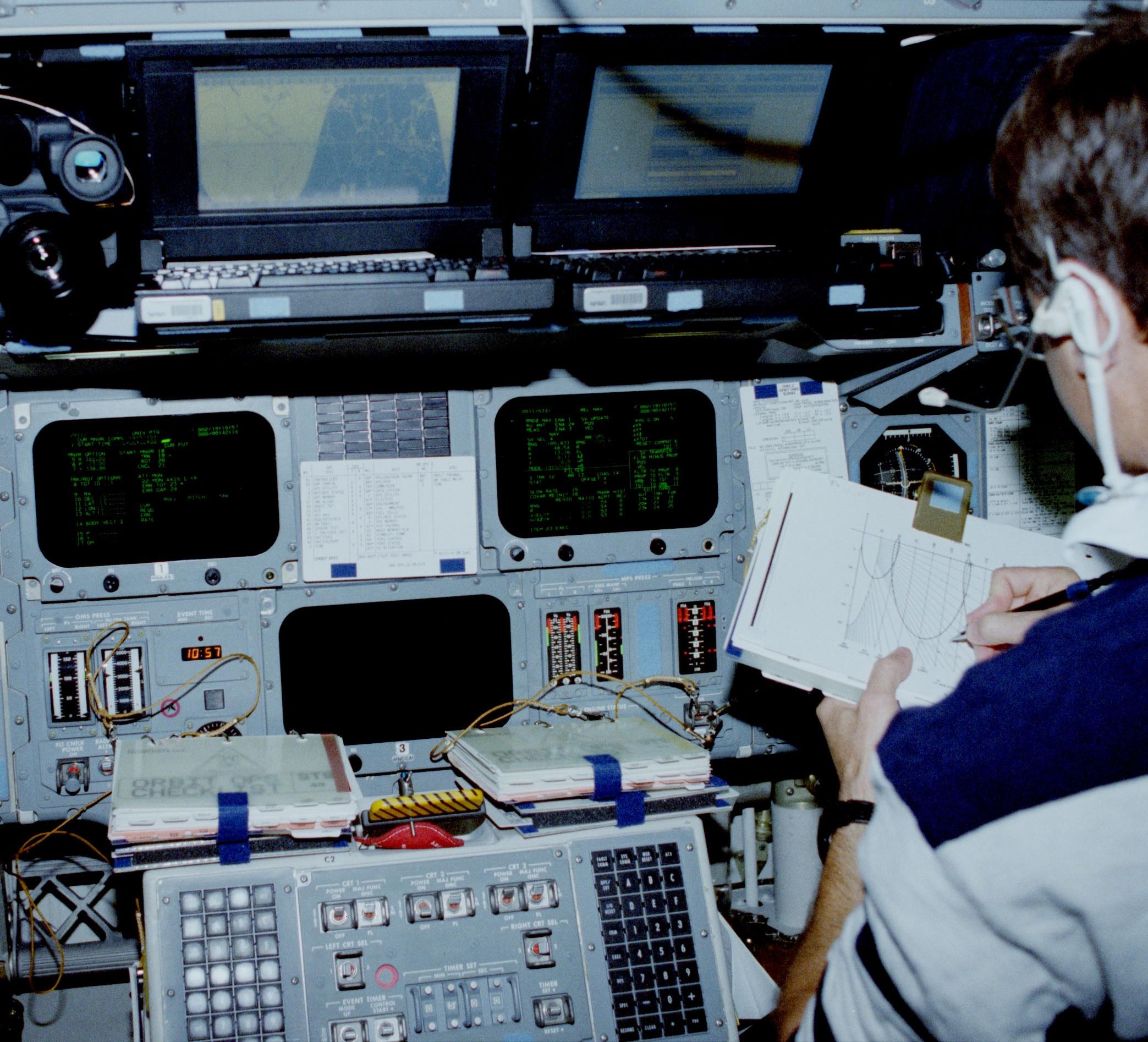
    The connections to the Apollo FDAIs. Adapted from LM-1 Systems Handbook. I think this diagram predates the ORDEAL system. (Click for a larger version.)The connections to the Apollo FDAIs. Adapted from LM-1 Systems Handbook. I think this diagram predates the ORDEAL system. (Click for a larger version.)


  4. The roll, pitch, and yaw axes of the Lunar Module are not as obvious as the axes of an airplane. The diagram below defines these axes.

    The roll, pitch, and yaw axes of the Lunar Module. Adapted from LM Systems Handbook.The roll, pitch, and yaw axes of the Lunar Module. Adapted from LM Systems Handbook.


  5. The amplifier is constructed on a single-sided printed circuit board. Since the components are packed tightly on the board, routing of the board was difficult. However, some of the components have long leads, protected by plastic sleeves. This provides additional flexibility for the board routing since the leads could be positioned as desired, regardless of the geometry of the component. As a result, the style of this board is very different from modern circuit boards, where components are usually arranged in an orderly pattern. 

  6. In our FDAI, the amplifier boards as well as the needle actuators are connected by pins that plug into sockets. These connections don't seem suitable for flight since they could easily vibrate loose. We suspect that the pin-and-socket connections made the module easier to reconfigure in the simulator, but were not used in flyable units. In particular, in the similar aircraft instruments (ARU/11-A) that we examined, the wires to the amplifier boards were soldered. 

  7. The board has a 56-volt Zener diode, but the function of the diode is unclear. The board is powered by 28 volts, not enough voltage to activate the Zener. Perhaps the diode filters high-voltage transients, but I don't see how transients could arise in that part of the circuit. (I can imagine transients when the pulse transformer switches, but the Zener isn't connected to the transformer.) 

  8. In more detail, each motor's control winding is a center-tapped winding, with the center connected to 28 volts DC. The amplifier board's output transistors will ground either side of the winding during alternate half-cycles of the 400 Hz cycle. This causes the motor to spin in one direction or the other. (Usually, control winding are driven 90° out of phase with the motor power, but I'm not sure how this phase shift is applied in the FDAI.) 

  9. The history of Bill Lear and Lear Siegler is based on Love him or hate him, Bill Lear was a creator and On Course to Tomorrow: A History of Lear Siegler Instrument Division’s Manned Spaceflight Systems 1958-1981

  10. Numerous variants of the Lear Siegler FDAI were built for Apollo, as shown before. Among other things, the length of the unit ("L MAX") varied from 8 inches to 11 inches. (Our FDAI is approximately 8 inches long.)

    The Apollo FDAI part number chart from Grumman Specification Control Drawing LSC350-301. (Click for a larger view.)The Apollo FDAI part number chart from Grumman Specification Control Drawing LSC350-301. (Click for a larger view.)


  11. We examined a different ARU-11/A where the amplifier boards were not quite identical: the boards had one additional capacitor and some of the PCB traces were routed slightly differently. These boards were labeled "REV C" in the PCB copper, so they may have been later boards with a slight modification. 

  12. The amplifier scaling resistors were placed on the power supply board rather than the amplifier boards, which may seem strange. The advantage of this approach is that it permitted the three amplifier boards to be identical, since the components that differ between the axes were not part of the amplifier boards. This simplified the manufacture and repair of the amplifier boards. 

  13. On the front panel of our FDAI, the text "ROLL RATE", "PITCH RATE", and "YAW RATE" has been painted over. However, the text is still faintly visible (reversed) on the inside of the panel, as shown below.

    The inside of the FDAI's front cover.The inside of the FDAI's front cover.


  14. The diagram below shows the internals of the Apollo LM FDAI at a high level. This diagram shows several differences between the LM FDAI and the FDAI that we examined. First, the roll, pitch, and yaw inputs to the LM FDAI are resolver inputs (i.e. sin and cos), rather than the synchro inputs to our FDAI. Second, the needle signals below are modulated on an 800 Hz carrier and are demodulated inside the FDAI. Our FDAI, however, uses positive or negative voltages to drive the needle galvanometers directly. A minor difference is that the diagram below shows the Power Off Flag wired to +28V internally, while our FDAI has the flag wired to connector pins, probably so the flag could be controlled by the simulator.

    The diagram of the FDAI in the LM Systems Handbook. Click for a larger image.The diagram of the FDAI in the LM Systems Handbook. Click for a larger image.


  15. The Space Shuttle instruments were replaced with color LCD screens in the MEDS (Multifunction Electronic Display System) upgrade. This upgrade is discussed in New Displays for the Space Shuttle Cockpit. The Space Shuttle Systems Handbook shows the ADIs on the forward console (pages 263-264) and the aft console (page 275). The physical ADI is compared to the MEDS ADI display in Displays and Controls, Vol. 1 page 119. 
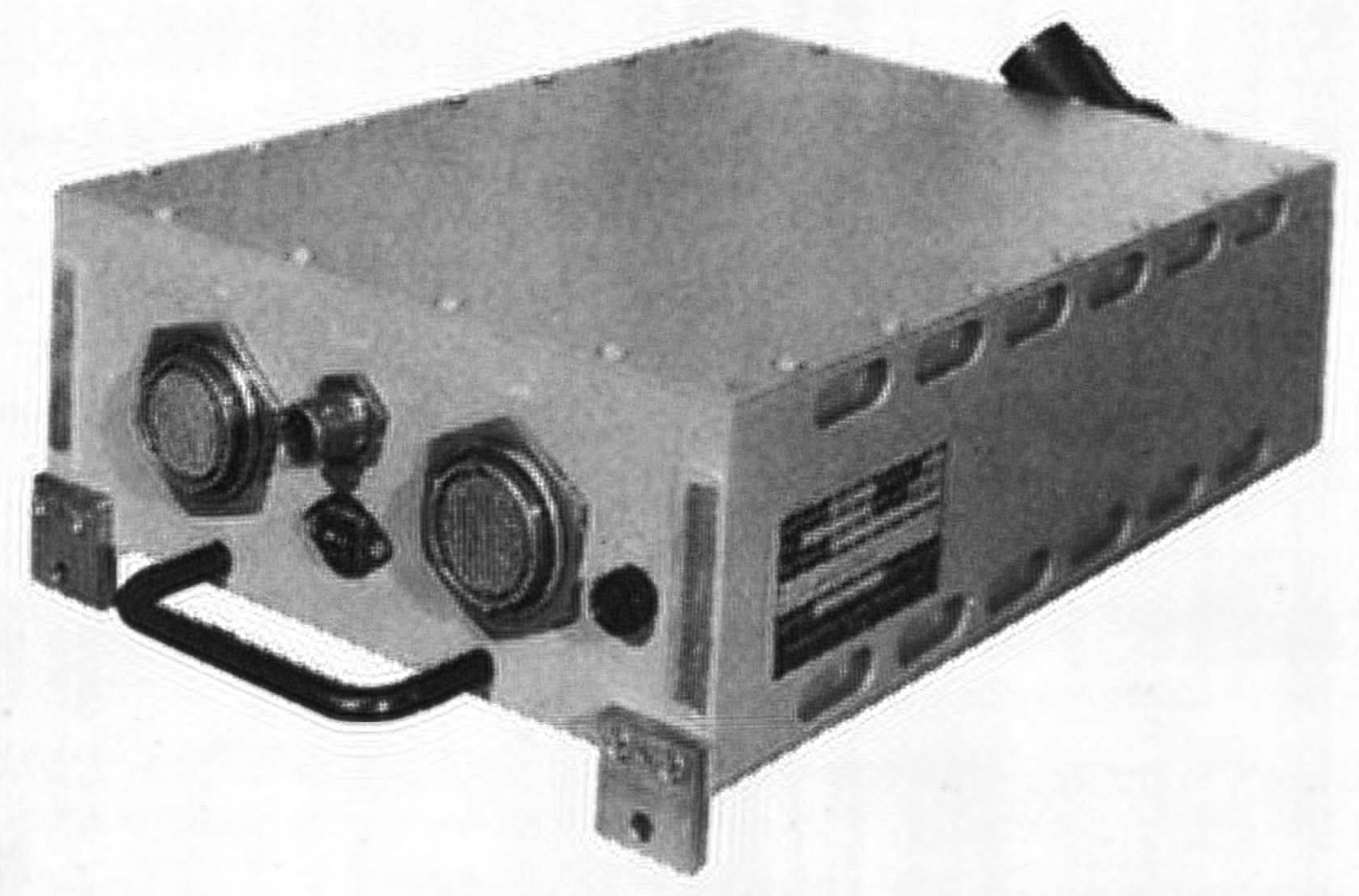
  16. The diagram below shows the internals of the Shuttle's ADI at a high level. The Shuttle's ADI is more complicated than the Apollo FDAI, even though they have the same indicator ball and needles.

    A diagram of the Space Shuttle's ADI. From Space Shuttle Systems Handbook Vol. 1, 1 G&C DISP 1. (Click for a larger image.)A diagram of the Space Shuttle's ADI. From Space Shuttle Systems Handbook Vol. 1, 1 G&C DISP 1. (Click for a larger image.)
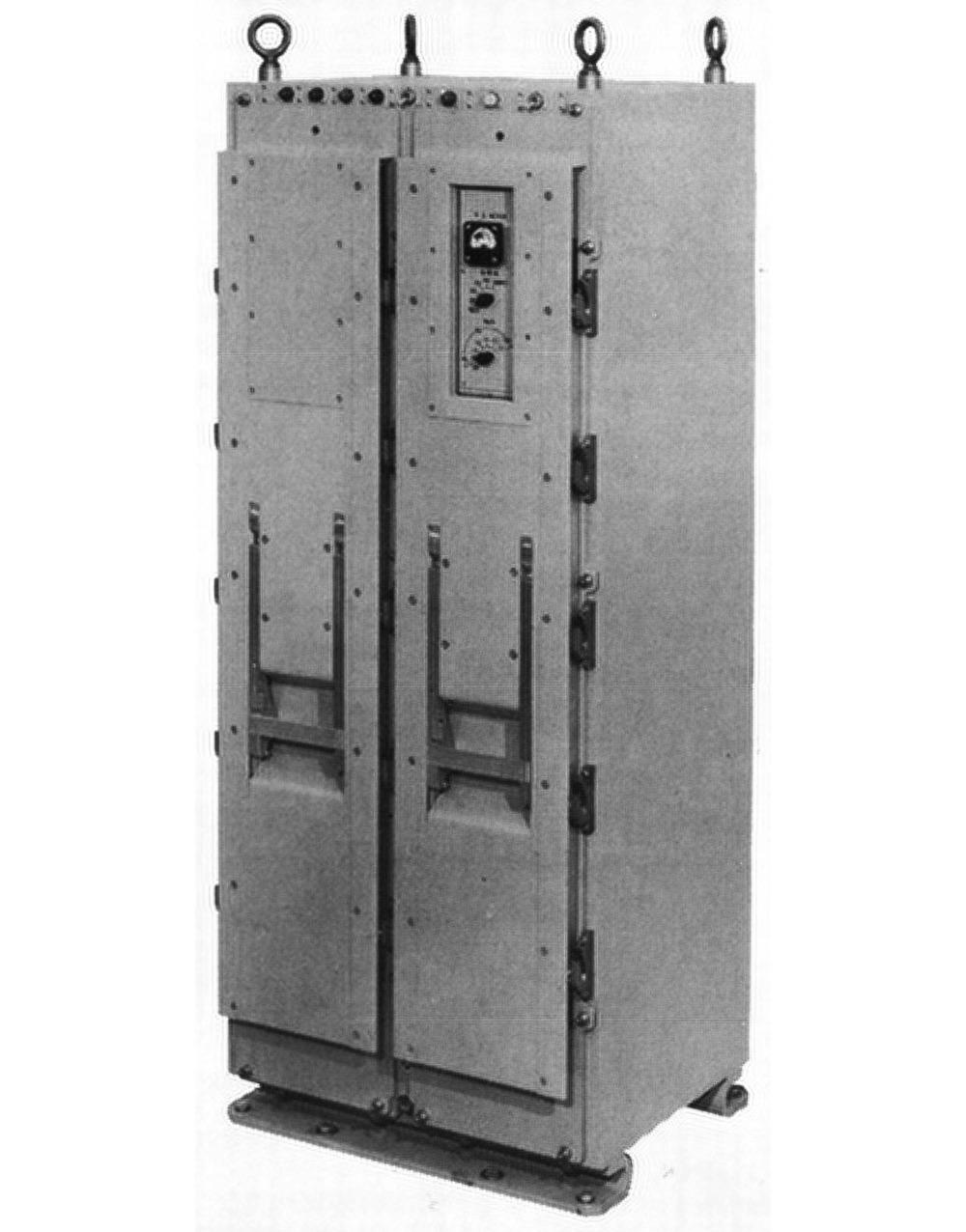
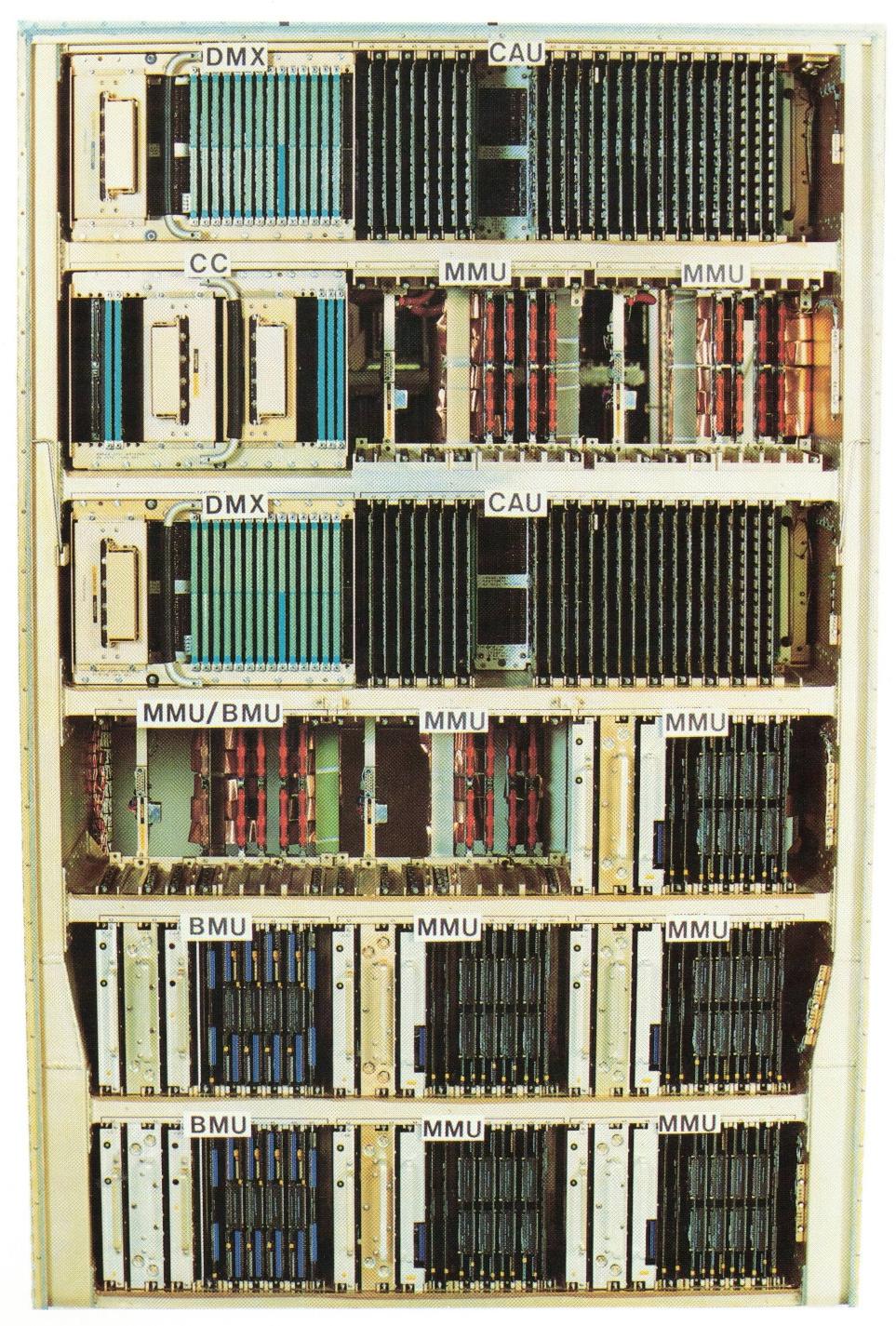
     

  17. Multiple photos of the exterior of the Shuttle ADI are available here, from the National Air and Space Museum. There are interior photos of Apollo FDAIs online, but they all appear to be modified for Shuttle simulators. 

tag:blogger.com,1999:blog-6264947694886887540.post-2250215887377196568
Extensions
Reverse engineering the 386 processor's prefetch queue circuitry
386electronicsintelreverse-engineering
Show full content

In 1985, Intel introduced the groundbreaking 386 processor, the first 32-bit processor in the x86 architecture. To improve performance, the 386 has a 16-byte instruction prefetch queue. The purpose of the prefetch queue is to fetch instructions from memory before they are needed, so the processor usually doesn't need to wait on memory while executing instructions. Instruction prefetching takes advantage of times when the processor is "thinking" and the memory bus would otherwise be unused.

In this article, I look at the 386's prefetch queue circuitry in detail. One interesting circuit is the incrementer, which adds 1 to a pointer to step through memory. This sounds easy enough, but the incrementer uses complicated circuitry for high performance. The prefetch queue uses a large network to shift bytes around so they are properly aligned. It also has a compact circuit to extend signed 8-bit and 16-bit numbers to 32 bits. There aren't any major discoveries in this post, but if you're interested in low-level circuits and dynamic logic, keep reading.

The photo below shows the 386's shiny fingernail-sized silicon die under a microscope. Although it may look like an aerial view of a strangely-zoned city, the die photo reveals the functional blocks of the chip. The Prefetch Unit in the upper left is the relevant block. In this post, I'll discuss the prefetch queue circuitry (highlighted in red), skipping over the prefetch control circuitry to the right. The Prefetch Unit receives data from the Bus Interface Unit (upper right) that communicates with memory. The Instruction Decode Unit receives prefetched instructions from the Prefetch Unit, byte by byte, and decodes the opcodes for execution.

This die photo of the 386 shows the location of the registers. Click this image (or any other) for a larger version.This die photo of the 386 shows the location of the registers. Click this image (or any other) for a larger version.

The left quarter of the chip consists of stripes of circuitry that appears much more orderly than the rest of the chip. This grid-like appearance arises because each functional block is constructed (for the most part) by repeating the same circuit 32 times, once for each bit, side by side. Vertical data lines run up and down, in groups of 32 bits, connecting the functional blocks. To make this work, each circuit must fit into the same width on the die; this layout constraint forces the circuit designers to develop a circuit that uses this width efficiently without exceeding the allowed width. The circuitry for the prefetch queue uses the same approach: each circuit is 66 µm wide1 and repeated 32 times. As will be seen, fitting the prefetch circuitry into this fixed width requires some layout tricks.

What the prefetcher does

The purpose of the prefetch unit is to speed up performance by reading instructions from memory before they are needed, so the processor won't need to wait to get instructions from memory. Prefetching takes advantage of times when the memory bus is otherwise idle, minimizing conflict with other instructions that are reading or writing data. In the 386, prefetched instructions are stored in a 16-byte queue, consisting of four 32-bit blocks.2

The diagram below zooms in on the prefetcher and shows its main components. You can see how the same circuit (in most cases) is repeated 32 times, forming vertical bands. At the top are 32 bus lines from the Bus Interface Unit. These lines provide the connection between the datapath and external memory, via the Bus Interface Unit. These lines form a triangular pattern as the 32 horizontal lines on the right branch off and form 32 vertical lines, one for each bit. Next are the fetch pointer and the limit register, with a circuit to check if the fetch pointer has reached the limit. Note that the two low-order bits (on the right) of the incrementer and limit check circuit are missing. At the bottom of the incrementer, you can see that some bit positions have a blob of circuitry missing from others, breaking the pattern of repeated blocks. The 16-byte prefetch queue is below the incrementer. Although this memory is the heart of the prefetcher, its circuitry takes up a relatively small area.

A close-up of the prefetcher with the main blocks labeled. At the right, the prefetcher receives control signals.A close-up of the prefetcher with the main blocks labeled. At the right, the prefetcher receives control signals.

The bottom part of the prefetcher shifts data to align it as needed. A 32-bit value can be split across two 32-bit rows of the prefetch buffer. To handle this, the prefetcher includes a data shift network to shift and align its data. This network occupies a lot of space, but there is no active circuitry here: just a grid of horizontal and vertical wires.

Finally, the sign extend circuitry converts a signed 8-bit or 16-bit value into a signed 16-bit or 32-bit value as needed. You can see that the sign extend circuitry is highly irregular, especially in the middle. A latch stores the output of the prefetch queue for use by the rest of the datapath.

Limit check

If you've written x86 programs, you probably know about the processor's Instruction Pointer (EIP) that holds the address of the next instruction to execute. As a program executes, the Instruction Pointer moves from instruction to instruction. However, it turns out that the Instruction Pointer doesn't actually exist! Instead, the 386 has an "Advance Instruction Fetch Pointer", which holds the address of the next instruction to fetch into the prefetch queue. But sometimes the processor needs to know the Instruction Pointer value, for instance, to determine the return address when calling a subroutine or to compute the destination address of a relative jump. So what happens? The processor gets the Advance Instruction Fetch Pointer address from the prefetch queue circuitry and subtracts the current length of the prefetch queue. The result is the address of the next instruction to execute, the desired Instruction Pointer value.

The Advance Instruction Fetch Pointer—the address of the next instruction to prefetch—is stored in a register at the top of the prefetch queue circuitry. As instructions are prefetched, this pointer is incremented by the prefetch circuitry. (Since instructions are fetched 32 bits at a time, this pointer is incremented in steps of four and the bottom two bits are always 0.)

But what keeps the prefetcher from prefetching too far and going outside the valid memory range? The x86 architecture infamously uses segments to define valid regions of memory. A segment has a start and end address (known as the base and limit) and memory is protected by blocking accesses outside the segment. The 386 has six active segments; the relevant one is the Code Segment that holds program instructions. Thus, the limit address of the Code Segment controls when the prefetcher must stop prefetching.3 The prefetch queue contains a circuit to stop prefetching when the fetch pointer reaches the limit of the Code Segment. In this section, I'll describe that circuit.

Comparing two values may seem trivial, but the 386 uses a few tricks to make this fast. The basic idea is to use 30 XOR gates to compare the bits of the two registers. (Why 30 bits and not 32? Since 32 bits are fetched at a time, the bottom bits of the address are 00 and can be ignored.) If the two registers match, all the XOR values will be 0, but if they don't match, an XOR value will be 1. Conceptually, connecting the XORs to a 32-input OR gate will yield the desired result: 0 if all bits match and 1 if there is a mismatch. Unfortunately, building a 32-input OR gate using standard CMOS logic is impractical for electrical reasons, as well as inconveniently large to fit into the circuit. Instead, the 386 uses dynamic logic to implement a spread-out NOR gate with one transistor in each column of the prefetcher.

The schematic below shows the implementation of one bit of the equality comparison. The mechanism is that if the two registers differ, the transistor on the right is turned on, pulling the equality bus low. This circuit is replicated 30 times, comparing all the bits: if there is any mismatch, the equality bus will be pulled low, but if all bits match, the bus remains high. The three gates on the left implement XNOR; this circuit may seem overly complicated, but it is a standard way of implementing XNOR. The NOR gate at the right blocks the comparison except during clock phase 2. (The importance of this will be explained below.)

This circuit is repeated 30 times to compare the registers.This circuit is repeated 30 times to compare the registers.

The equality bus travels horizontally through the prefetcher, pulled low if any bits don't match. But what pulls the bus high? That's the job of the dynamic circuit below. Unlike regular static gates, dynamic logic is controlled by the processor's clock signals and depends on capacitance in the circuit to hold data. The 386 is controlled by a two-phase clock signal.4 In the first clock phase, the precharge transistor below turns on, pulling the equality bus high. In the second clock phase, the XOR circuits above are enabled, pulling the equality bus low if the two registers don't match. Meanwhile, the CMOS switch turns on in clock phase 2, passing the equality bus's value to the latch. The "keeper" circuit keeps the equality bus held high unless it is explicitly pulled low, to avoid the risk of the voltage on the equality bus slowly dissipating. The keeper uses a weak transistor to keep the bus high while inactive. But if the bus is pulled low, the keeper transistor is overpowered and turns off.

This is the output circuit for the equality comparison.  This circuit is located to the right of the prefetcher.This is the output circuit for the equality comparison. This circuit is located to the right of the prefetcher.

This dynamic logic reduces power consumption and circuit size. Since the bus is charged and discharged during opposite clock phases, you avoid steady current through the transistors. (In contrast, an NMOS processor like the 8086 might use a pull-up on the bus. When the bus is pulled low, would you end up with current flowing through the pull-up and the pull-down transistors. This would increase power consumption, make the chip run hotter, and limit your clock speed.)

The incrementer

After each prefetch, the Advance Instruction Fetch Pointer must be incremented to hold the address of the next instruction to prefetch. Incrementing this pointer is the job of the incrementer. (Because each fetch is 32 bits, the pointer is incremented by 4 each time. But in the die photo, you can see a notch in the incrementer and limit check circuit where the circuitry for the bottom two bits has been omitted. Thus, the incrementer's circuitry increments its value by 1, so the pointer (with two zero bits appended) increases in steps of 4.)

Building an incrementer circuit is straightforward, for example, you can use a chain of 30 half-adders. The problem is that incrementing a 30-bit value at high speed is difficult because of the carries from one position to the next. It's similar to calculating 99999999 + 1 in decimal; you need to tediously carry the 1, carry the 1, carry the 1, and so forth, through all the digits, resulting in a slow, sequential process.

The incrementer uses a faster approach. First, it computes all the carries at high speed, almost in parallel. Then it computes each output bit in parallel from the carries—if there is a carry into a position, it toggles that bit.

Computing the carries is straightforward in concept: if there is a block of 1 bits at the end of the value, all those bits will produce carries, but carrying is stopped by the rightmost 0 bit. For instance, incrementing binary 11011 results in 11100; there are carries from the last two bits, but the zero stops the carries. A circuit to implement this was developed at the University of Manchester in England way back in 1959, and is known as the Manchester carry chain.

In the Manchester carry chain, you build a chain of switches, one for each data bit, as shown below. For a 1 bit, you close the switch, but for a 0 bit you open the switch. (The switches are implemented by transistors.) To compute the carries, you start by feeding in a carry signal at the right The signal will go through the closed switches until it hits an open switch, and then it will be blocked.5 The outputs along the chain give us the desired carry value at each position.

Concept of the Manchester carry chain, 4 bits.Concept of the Manchester carry chain, 4 bits.

Since the switches in the Manchester carry chain can all be set in parallel and the carry signal blasts through the switches at high speed, this circuit rapidly computes the carries we need. The carries then flip the associated bits (in parallel), giving us the result much faster than a straightforward adder.

There are complications, of course, in the actual implementation. The carry signal in the carry chain is inverted, so a low signal propagates through the carry chain to indicate a carry. (It is faster to pull a signal low than high.) But something needs to make the line go high when necessary. As with the equality circuitry, the solution is dynamic logic. That is, the carry line is precharged high during one clock phase and then processing happens in the second clock phase, potentially pulling the line low.

The next problem is that the carry signal weakens as it passes through multiple transistors and long lengths of wire. The solution is that each segment has a circuit to amplify the signal, using a clocked inverter and an asymmetrical inverter. Importantly, this amplifier is not in the carry chain path, so it doesn't slow down the signal through the chain.

The Manchester carry chain circuit for a typical bit in the incrementer.The Manchester carry chain circuit for a typical bit in the incrementer.

The schematic above shows the implementation of the Manchester carry chain for a typical bit. The chain itself is at the bottom, with the transistor switch as before. During clock phase 1, the precharge transistor pulls this segment of the carry chain high. During clock phase 2, the signal on the chain goes through the "clocked inverter" at the right to produce the local carry signal. If there is a carry, the next bit is flipped by the XOR gate, producing the incremented output.6 The "keeper/amplifier" is an asymmetrical inverter that produces a strong low output but a weak high output. When there is no carry, its weak output keeps the carry chain pulled high. But as soon as a carry is detected, it strongly pulls the carry chain low to boost the carry signal.

But this circuit still isn't enough for the desired performance. The incrementer uses a second carry technique in parallel: carry skip. The concept is to look at blocks of bits and allow the carry to jump over the entire block. The diagram below shows a simplified implementation of the carry skip circuit. Each block consists of 3 to 6 bits. If all the bits in a block are 1's, then the AND gate turns on the associated transistor in the carry skip line. This allows the carry skip signal to propagate (from left to right), a block at a time. When it reaches a block with a 0 bit, the corresponding transistor will be off, stopping the carry as in the Manchester carry chain. The AND gates all operate in parallel, so the transistors are rapidly turned on or off in parallel. Then, the carry skip signal passes through a small number of transistors, without going through any logic. (The carry skip signal is like an express train that skips most stations, while the Manchester carry chain is the local train to all the stations.) Like the Manchester carry chain, the implementation of carry skip needs precharge circuits on the lines, a keeper/amplifier, and clocked logic, but I'll skip the details.

An abstracted and simplified carry-skip circuit. The block sizes don't match the 386's circuit.An abstracted and simplified carry-skip circuit. The block sizes don't match the 386's circuit.

One interesting feature is the layout of the large AND gates. A 6-input AND gate is a large device, difficult to fit into one cell of the incrementer. The solution is that the gate is spread out across multiple cells. Specifically, the gate uses a standard CMOS NAND gate circuit with NMOS transistors in series and PMOS transistors in parallel. Each cell has an NMOS transistor and a PMOS transistor, and the chains are connected at the end to form the desired NAND gate. (Inverting the output produces the desired AND function.) This spread-out layout technique is unusual, but keeps each bit's circuitry approximately the same size.

The incrementer circuitry was tricky to reverse engineer because of these techniques. In particular, most of the prefetcher consists of a single block of circuitry repeated 32 times, once for each bit. The incrementer, on the other hand, consists of four different blocks of circuitry, repeating in an irregular pattern. Specifically, one block starts a carry chain, a second block continues the carry chain, and a third block ends a carry chain. The block before the ending block is different (one large transistor to drive the last block), making four variants in total. This irregular pattern is visible in the earlier photo of the prefetcher.

The alignment network

The bottom part of the prefetcher rotates data to align it as needed. Unlike some processors, the x86 does not enforce aligned memory accesses. That is, a 32-bit value does not need to start on a 4-byte boundary in memory. As a result, a 32-bit value may be split across two 32-bit rows of the prefetch queue. Moreover, when the instruction decoder fetches one byte of an instruction, that byte may be at any position in the prefetch queue.

To deal with these problems, the prefetcher includes an alignment network that can rotate bytes to output a byte, word, or four bytes with the alignment required by the rest of the processor.

The diagram below shows part of this alignment network. Each bit exiting the prefetch queue (top) has four wires, for rotates of 24, 16, 8, or 0 bits. Each rotate wire is connected to one of the 32 horizontal bit lines. Finally, each horizontal bit line has an output tap, going to the datapath below. (The vertical lines are in the chip's lower M1 metal layer, while the horizontal lines are in the upper M2 metal layer. For this photo, I removed the M2 layer to show the underlying layer. Shadows of the original horizontal lines are still visible.)

Part of the alignment network.Part of the alignment network.

The idea is that by selecting one set of vertical rotate lines, the 32-bit output from the prefetch queue will be rotated left by that amount. For instance, to rotate by 8, bits are sent down the "rotate 8" lines. Bit 0 from the prefetch queue will energize horizontal line 8, bit 1 will energize horizontal line 9, and so forth, with bit 31 wrapping around to horizontal line 7. Since horizontal bit line 8 is connected to output 8, the result is that bit 0 is output as bit 8, bit 1 is output as bit 9, and so forth.

The four possibilities for aligning a 32-bit value. The four bytes above are shifted as specified to produce the desired output below.The four possibilities for aligning a 32-bit value. The four bytes above are shifted as specified to produce the desired output below.

For the alignment process, one 32-bit output may be split across two 32-bit entries in the prefetch queue in four different ways, as shown above. These combinations are implemented by multiplexers and drivers. Two 32-bit multiplexers select the two relevant rows in the prefetch queue (blue and green above). Four 32-bit drivers are connected to the four sets of vertical lines, with one set of drivers activated to produce the desired shift. Each byte of each driver is wired to achieve the alignment shown above. For instance, the rotate-8 driver gets its top byte from the "green" multiplexer and the other three bytes from the "blue" multiplexer. The result is that the four bytes, split across two queue rows, are rotated to form an aligned 32-bit value.

Sign extension

The final circuit is sign extension. Suppose you want to add an 8-bit value to a 32-bit value. An unsigned 8-bit value can be extended to 32 bits by simply filling the upper bits with zeroes. But for a signed value, it's trickier. For instance, -1 is the eight-bit value 0xFF, but the 32-bit value is 0xFFFFFFFF. To convert an 8-bit signed value to 32 bits, the top 24 bits must be filled in with the top bit of the original value (which indicates the sign). In other words, for a positive value, the extra bits are filled with 0, but for a negative value, the extra bits are filled with 1. This process is called sign extension.9

In the 386, a circuit at the bottom of the prefetcher performs sign extension for values in instructions. This circuit supports extending an 8-bit value to 16 bits or 32 bits, as well as extending a 16-bit value to 32 bits. This circuit will extend a value with zeros or with the sign, depending on the instruction.

The schematic below shows one bit of this sign extension circuit. It consists of a latch on the left and right, with a multiplexer in the middle. The latches are constructed with a standard 386 circuit using a CMOS switch (see footnote).7 The multiplexer selects one of three values: the bit value from the swap network, 0 for sign extension, or 1 for sign extension. The multiplexer is constructed from a CMOS switch if the bit value is selected and two transistors for the 0 or 1 values. This circuit is replicated 32 times, although the bottom byte only has the latches, not the multiplexer, as sign extension does not modify the bottom byte.

The sign extend circuit associated with bits 31-8 from the prefetcher.The sign extend circuit associated with bits 31-8 from the prefetcher.

The second part of the sign extension circuitry determines if the bits should be filled with 0 or 1 and sends the control signals to the circuit above. The gates on the left determine if the sign extension bit should be a 0 or a 1. For a 16-bit sign extension, this bit comes from bit 15 of the data, while for an 8-bit sign extension, the bit comes from bit 7. The four gates on the right generate the signals to sign extend each bit, producing separate signals for the bit range 31-16 and the range 15-8.

This circuit determines which bits should be filled with 0 or 1.This circuit determines which bits should be filled with 0 or 1.

The layout of this circuit on the die is somewhat unusual. Most of the prefetcher circuitry consists of 32 identical columns, one for each bit.8 The circuitry above is implemented once, using about 16 gates (buffers and inverters are not shown above). Despite this, the circuitry above is crammed into bit positions 17 through 7, creating irregularities in the layout. Moreover, the implementation of the circuitry in silicon is unusual compared to the rest of the 386. Most of the 386's circuitry uses the two metal layers for interconnection, minimizing the use of polysilicon wiring. However, the circuit above also uses long stretches of polysilicon to connect the gates.

Layout of the sign extension circuitry. This circuitry is at the bottom of the prefetch queue.Layout of the sign extension circuitry. This circuitry is at the bottom of the prefetch queue.

The diagram above shows the irregular layout of the sign extension circuitry amid the regular datapath circuitry that is 32 bits wide. The sign extension circuitry is shown in green; this is the circuitry described at the top of this section, repeated for each bit 31-8. The circuitry for bits 15-8 has been shifted upward, perhaps to make room for the sign extension control circuitry, indicated in red. Note that the layout of the control circuitry is completely irregular, since there is one copy of the circuitry and it has no internal structure. One consequence of this layout is the wasted space to the left and right of this circuitry block, the tan regions with no circuitry except vertical metal lines passing through. At the far right, a block of circuitry to control the latches has been wedged under bit 0. Intel's designers go to great effort to minimize the size of the processor die since a smaller die saves substantial money. This layout must have been the most efficient they could manage, but I find it aesthetically displeasing compared to the regularity of the rest of the datapath.

How instructions flow through the chip

Instructions follow a tortuous path through the 386 chip. First, the Bus Interface Unit in the upper right corner reads instructions from memory and sends them over a 32-bit bus (blue) to the prefetch unit. The prefetch unit stores the instructions in the 16-byte prefetch queue.

Instructions follow a twisting path to and from the prefetch queue.Instructions follow a twisting path to and from the prefetch queue.

How is an instruction executed from the prefetch queue? It turns out that there are two distinct paths. Suppose you're executing an instruction to add 12345678 to the EAX register. The prefetch queue will hold the five bytes 05 (the opcode), 78, 56, 34, and 12. The prefetch queue provides opcodes to the decoder one byte at a time over the 8-bit bus shown in red. The bus takes the lowest 8 bits from the prefetch queue's alignment network and sends this byte to a buffer (the small square at the head of the red arrow). From there, the opcode travels to the instruction decoder.10 The instruction decoder, in turn, uses large tables (PLAs) to convert the x86 instruction into a 111-bit internal format with 19 different fields.11

The data bytes of an instruction, on the other hand, go from the prefetch queue to the ALU (Arithmetic Logic Unit) through a 32-bit data bus (orange). Unlike the previous buses, this data bus is spread out, with one wire through each column of the datapath. This bus extends through the entire datapath so values can also be stored into registers. For instance, the MOV (move) instruction can store a value from an instruction (an "immediate" value) into a register.

Conclusions

The 386's prefetch queue contains about 7400 transistors, more than an Intel 8080 processor. (And this is just the queue itself; I'm ignoring the prefetch control logic.) This illustrates the rapid advance of processor technology: part of one functional unit in the 386 contains more transistors than an entire 8080 processor from 11 years earlier. And this unit is less than 3% of the entire 386 processor.

Every time I look at an x86 circuit, I see the complexity required to support backward compatibility, and I gain more understanding of why RISC became popular. The prefetcher is no exception. Much of the complexity is due to the 386's support for unaligned memory accesses, requiring a byte shift network to move bytes into 32-bit alignment. Moreover, at the other end of the instruction bus is the complicated instruction decoder that decodes intricate x86 instructions. Decoding RISC instructions is much easier.

In any case, I hope you've found this look at the prefetch circuitry interesting. I plan to write more about the 386, so follow me on Bluesky (@righto.com) or RSS for updates. I've written multiple articles on the 386 previously; a good place to start might be my survey of the 368 dies.

Footnotes and references
  1. The width of the circuitry for one bit changes a few times: while the prefetch queue and segment descriptor cache use a circuit that is 66 µm wide, the datapath circuitry is a bit tighter at 60 µm. The barrel shifter is even narrower at 54.5 µm per bit. Connecting circuits with different widths wastes space, since the wiring to connect the bits requires horizontal segments to adjust the spacing. But it also wastes space to use widths that are wider than needed. Thus, changes in the spacing are rare, where the tradeoffs make it worthwhile. 

  2. The Intel 8086 processor had a six-byte prefetch queue, while the Intel 8088 (used in the original IBM PC) had a prefetch queue of just four bytes. In comparison, the 16-byte queue of the 386 seems luxurious. (Some 386 processors, however, are said to only use 12 bytes due to a bug.)

    The prefetch queue assumes instructions are executed in linear order, so it doesn't help with branches or loops. If the processor encounters a branch, the prefetch queue is discarded. (In contrast, a modern cache will work even if execution jumps around.) Moreover, the prefetch queue doesn't handle self-modifying code. (It used to be common for code to change itself while executing to squeeze out extra performance.) By loading code into the prefetch queue and then modifying instructions, you could determine the size of the prefetch queue: if the old instruction was executed, it must be in the prefetch queue, but if the modified instruction was executed, it must be outside the prefetch queue. Starting with the Pentium Pro, x86 processors flush the prefetch queue if a write modifies a prefetched instruction. 

  3. The prefetch unit generates "linear" addresses that must be translated to physical addresses by the paging unit (ref). 

  4. I don't know which phase of the clock is phase 1 and which is phase 2, so I've assigned the numbers arbitrarily. The 386 creates four clock signals internally from a clock input CLK2 that runs at twice the processor's clock speed. The 386 generates a two-phase clock with non-overlapping phases. That is, there is a small gap between when the first phase is high and when the second phase is high. The 386's circuitry is controlled by the clock, with alternate blocks controlled by alternate phases. Since the clock phases don't overlap, this ensures that logic blocks are activated in sequence, allowing the orderly flow of data. But because the 386 uses CMOS, it also needs active-low clocks for the PMOS transistors. You might think that you could simply use the phase 1 clock as the active-low phase 2 clock and vice versa. The problem is that these clock phases overlap when used as active-low; there are times when both clock signals are low. Thus, the two clock phases must be explicitly inverted to produce the two active-low clock phases. I described the 386's clock generation circuitry in detail in this article

  5. The Manchester carry chain is typically used in an adder, which makes it more complicated than shown here. In particular, a new carry can be generated when two 1 bits are added. Since we're looking at an incrementer, this case can be ignored.

    The Manchester carry chain was first described in Parallel addition in digital computers: a new fast ‘carry’ circuit. It was developed at the University of Manchester in 1959 and used in the Atlas supercomputer. 

  6. For some reason, the incrementer uses a completely different XOR circuit from the comparator, built from a multiplexer instead of logic. In the circuit below, the two CMOS switches form a multiplexer: if the first input is 1, the top switch turns on, while if the first input is a 0, the bottom switch turns on. Thus, if the first input is a 1, the second input passes through and then is inverted to form the output. But if the first input is a 0, the second input is inverted before the switch and then is inverted again to form the output. Thus, the second input is inverted if the first input is 1, which is a description of XOR.

    The implementation of an XOR gate in the incrementer.The implementation of an XOR gate in the incrementer.

    I don't see any clear reason why two different XOR circuits were used in different parts of the prefetcher. Perhaps the available space for the layout made a difference. Or maybe the different circuits have different timing or output current characteristics. Or it could just be the personal preference of the designers. 

  7. The latch circuit is based on a CMOS switch (or transmission gate) and a weak inverter. Normally, the inverter loop holds the bit. However, if the CMOS switch is enabled, its output overpowers the signal from the weak inverter, forcing the inverter loop into the desired state.

    The CMOS switch consists of an NMOS transistor and a PMOS transistor in parallel. By setting the top control input high and the bottom control input low, both transistors turn on, allowing the signal to pass through the switch. Conversely, by setting the top input low and the bottom input high, both transistors turn off, blocking the signal. CMOS switches are used extensively in the 386, to form multiplexers, create latches, and implement XOR. 

  8. Most of the 386's control circuitry is to the right of the datapath, rather than awkwardly wedged into the datapath. So why is this circuit different? My hypothesis is that since the circuit needs the values of bit 15 and bit 7, it made sense to put the circuitry next to bits 15 and 7; if this control circuitry were off to the right, long wires would need to run from bits 15 and 7 to the circuitry. 

  9. In case this post is getting tedious, I'll provide a lighter footnote on sign extension. The obvious mnemonic for a sign extension instruction is SEX, but that mnemonic was too risque for Intel. The Motorola 6809 processor (1978) used this mnemonic, as did the related 68HC12 microcontroller (1996). However, Steve Morse, architect of the 8086, stated that the sign extension instructions on the 8086 were initially named SEX but were renamed before release to the more conservative CBW and CWD (Convert Byte to Word and Convert Word to Double word).

    The DEC PDP-11 was a bit contradictory. It has a sign extend instruction with the mnemonic SXT; the Jargon File claims that DEC engineers almost got SEX as the assembler mnemonic, but marketing forced the change. On the other hand, SEX was the official abbreviation for Sign Extend (see PDP-11 Conventions Manual, PDP-11 Paper Tape Software Handbook) and SEX was used in the microcode for sign extend.

    RCA's CDP1802 processor (1976) may have been the first with a SEX instruction, using the mnemonic SEX for the unrelated Set X instruction. See also this Retrocomputing Stack Exchange page

  10. It seems inconvenient to send instructions all the way across the chip from the Bus Interface Unit to the prefetch queue and then back across to the chip to the instruction decoder, which is next to the Bus Interface Unit. But this was probably the best alternative for the layout, since you can't put everything close to everything. The 32-bit datapath circuitry is on the left, organized into 32 columns. It would be nice to put the Bus Interface Unit other there too, but there isn't room, so you end up with the wide 32-bit data bus going across the chip. Sending instruction bytes across the chip is less of an impact, since the instruction bus is just 8 bits wide. 

  11. See "Performance Optimizations of the 80386", Slager, Oct 1986, in Proceedings of ICCD, pages 165-168. 

tag:blogger.com,1999:blog-6264947694886887540.post-6792624295909344732
Extensions
The absurdly complicated circuitry for the 386 processor's registers
386electronicsintelreverse-engineering
Show full content

The groundbreaking Intel 386 processor (1985) was the first 32-bit processor in the x86 architecture. Like most processors, the 386 contains numerous registers; registers are a key part of a processor because they provide storage that is much faster than main memory. The register set of the 386 includes general-purpose registers, index registers, and segment selectors, as well as registers with special functions for memory management and operating system implementation. In this blog post, I look at the silicon die of the 386 and explain how the processor implements its main registers.

It turns out that the circuitry that implements the 386's registers is much more complicated than one would expect. For the 30 registers that I examine, instead of using a standard circuit, the 386 uses six different circuits, each one optimized for the particular characteristics of the register. For some registers, Intel squeezes register cells together to double the storage capacity. Other registers support accesses of 8, 16, or 32 bits at a time. Much of the register file is "triple-ported", allowing two registers to be read simultaneously while a value is written to a third register. Finally, I was surprised to find that registers don't store bits in order: the lower 16 bits of each register are interleaved, while the upper 16 bits are stored linearly.

The photo below shows the 386's shiny fingernail-sized silicon die under a special metallurgical microscope. I've labeled the main functional blocks. For this post, the Data Unit in the lower left quadrant of the chip is the relevant component. It consists of the 32-bit arithmetic logic unit (ALU) along with the processor's main register bank (highlighted in red at the bottom). The circuitry, called the datapath, can be viewed as the heart of the processor.

This die photo of the 386 shows the location of the registers. Click this image (or any other) for a larger version.This die photo of the 386 shows the location of the registers. Click this image (or any other) for a larger version.

The datapath is built with a regular structure: each register or ALU functional unit is a horizontal stripe of circuitry, forming the horizontal bands visible in the image. For the most part, this circuitry consists of a carefully optimized circuit copied 32 times, once for each bit of the processor. Each circuit for one bit is exactly the same width—60 µm—so the functional blocks can be stacked together like microscopic LEGO bricks. To link these circuits, metal bus lines run vertically through the datapath in groups of 32, allowing data to flow up and down through the blocks. Meanwhile, control lines run horizontally, enabling ALU operations or register reads and writes; the irregular circuitry on the right side of the Data Unit produces the signals for these control lines, activating the appropriate control lines for each instruction.

The datapath is highly structured to maximize performance while minimizing its area on the die. Below, I'll look at how the registers are implemented according to this structure.

The 386's registers

A processor's registers are one of the most visible features of the processor architecture. The 386 processor contains 16 registers for use by application programmers, a small number by modern standards, but large enough for the time. The diagram below shows the eight 32-bit general-purpose registers. At the top are four registers called EAX, EBX, ECX, and EDX. Although these registers are 32-bit registers, they can also be treated as 16 or 8-bit registers for backward compatibility with earlier processors. For instance, the lower half of EAX can be accessed as the 16-bit register AX, while the bottom byte of EAX can be accessed as the 8-bit register AL. Moreover, bits 15-8 can also be accessed as an 8-bit register called AH. In other words, there are four different ways to access the EAX register, and similarly for the other three registers. As will be seen, these features complicate the implementation of the register set.

The general purpose registers in the 386. From 80386 Programmer's Reference Manual, page 2-8.The general purpose registers in the 386. From 80386 Programmer's Reference Manual, page 2-8.

The bottom half of the diagram shows that the 32-bit EBP, ESI, EDI, and ESP registers can also be treated as 16-bit registers BP, SI, DI, and SP. Unlike the previous registers, these ones cannot be treated as 8-bit registers. The 386 also has six segment registers that define the start of memory segments; these are 16-bit registers. The 16 application registers are rounded out by the status flags and instruction pointer (EIP); they are viewed as 32-bit registers, but their implementation is more complicated. The 386 also has numerous registers for operating system programming, but I won't discuss them here, since they are likely in other parts of the chip.1 Finally, the 386 has numerous temporary registers that are not visible to the programmer but are used by the microcode to perform complex instructions.

The 6T and 8T static RAM cells

The 386's registers are implemented with static RAM cells, a circuit that can hold one bit. These cells are arranged into a grid to provide multiple registers. Static RAM can be contrasted with the dynamic RAM that computers use for their main memory: dynamic RAM holds each bit in a tiny capacitor, while static RAM uses a faster but larger and more complicated circuit. Since main memory holds gigabytes of data, it uses dynamic RAM to provide dense and inexpensive storage. But the tradeoffs are different for registers: the storage capacity is small, but speed is of the essence. Thus, registers use the static RAM circuit that I'll explain below.

The concept behind a static RAM cell is to connect two inverters into a loop. If an inverter has a "0" as input, it will output a "1", and vice versa. Thus, the inverter loop will be stable, with one inverter on and one inverter off, and each inverter supporting the other. Depending on which inverter is on, the circuit stores a 0 or a 1, as shown below. Thus, the pair of inverters provides one bit of memory.

Two inverters in a loop can store a 0 or a 1.Two inverters in a loop can store a 0 or a 1.

To be useful, however, the inverter loop needs a way to store a bit into it, as well as a way to read out the stored bit. To write a new value into the circuit, two signals are fed in, forcing the inverters to the desired new values. One inverter receives the new bit value, while the other inverter receives the complemented bit value. This may seem like a brute-force way to update the bit, but it works. The trick is that the inverters in the cell are small and weak, while the input signals are higher current, able to overpower the inverters.2 These signals are fed in through wiring called "bitlines"; the bitlines can also be used to read the value stored in the cell.

By adding two pass transistors to the circuit, the cell can be read and written.By adding two pass transistors to the circuit, the cell can be read and written.

To control access to the register, the bitlines are connected to the inverters through pass transistors, which act as switches to control access to the inverter loop.3 When the pass transistors are on, the signals on the write lines can pass through to the inverters. But when the pass transistors are off, the inverters are isolated from the write lines. The pass transistors are turned on by a control signal, called a "wordline" since it controls access to a word of storage in the register. Since each inverter is constructed from two transistors, the circuit above consists of six transistors—thus this circuit is called a "6T" cell.

The 6T cell uses the same bitlines for reading and writing, so you can't read and write to registers simultaneously. But adding two transistors creates an "8T" circuit that lets you read from one register and write to another register at the same time. (In technical terms, the register file is two-ported.) In the 8T schematic below, the two additional transistors (G and H) are used for reading. Transistor G buffers the cell's value; it turns on if the inverter output is high, pulling the read output bitline low.4 Transistor H is a pass transistor that blocks this signal until a read is performed on this register; it is controlled by a read wordline. Note that there are two bitlines for writing (as before) along with one bitline for reading.

Schematic of a storage cell. Each transistor is labeled with a letter.Schematic of a storage cell. Each transistor is labeled with a letter.

To construct registers (or memory), a grid is constructed from these cells. Each row corresponds to a register, while each column corresponds to a bit position. The horizontal lines are the wordlines, selecting which word to access, while the vertical lines are the bitlines, passing bits in or out of the registers. For a write, the vertical bitlines provide the 32 bits (along with their complements). For a read, the vertical bitlines receive the 32 bits from the register. A wordline is activated to read or write the selected register. To summarize: each row is a register, data flows vertically, and control signals flow horizontally.

Static memory cells (8T) organized into a grid.Static memory cells (8T) organized into a grid.

Six register circuits in the 386

The die photo below zooms in on the register circuitry in the lower left corner of the 386 processor. You can see the arrangement of storage cells into a grid, but note that the pattern changes from row to row. This circuitry implements 30 registers: 22 of the registers hold 32 bits, while the bottom ones are 16-bit registers. By studying the die, I determined that there are six different register circuits, which I've arbitrarily labeled (a) to (f). In this section, I'll describe these six types of registers.

The 386's main register bank, at the bottom of the datapath.  The numbers show how many bits of the register can be accessed.The 386's main register bank, at the bottom of the datapath. The numbers show how many bits of the register can be accessed.

I'll start at the bottom with the simplest circuit: eight 16-bit registers that I'm calling type (f). You can see a "notch" on the left side of the register file because these registers are half the width of the other registers (16 bits versus 32 bits). These registers are implemented with the 8T circuit described earlier, making them dual ported: one register can be read while another register is written. As described earlier, three vertical bus lines pass through each bit: one bitline for reading and two bitlines (with opposite polarity) for writing. Each register has two control lines (wordlines): one to select a register for reading and another to select a register for writing.

The photo below shows how four cells of type (f) are implemented on the chip. In this image, the chip's two metal layers have been removed along with most of the polysilicon wiring, showing the underlying silicon. The dark outlines indicate regions of doped silicon, while the stripes across the doped region correspond to transistor gates. I've labeled each transistor with a letter corresponding to the earlier schematic. Observe that the layout of the bottom half is a mirrored copy of the upper half, saving a bit of space. The left and right sides are approximately mirrored; the irregular shape allows separate read and wite wordlines to control the left and right halves without colliding.

Four memory cells of type (f), separated by dotted lines. The small irregular squares are remnants of polysilicon
that weren't fully removed.Four memory cells of type (f), separated by dotted lines. The small irregular squares are remnants of polysilicon that weren't fully removed.

The 386's register file and datapath are designed with 60 µm of width assigned to each bit. However, the register circuit above is unusual: the image above is 60 µm wide but there are two register cells side-by-side. That is, the circuit crams two bits in 60 µm of width, rather than one. Thus, this dense layout implements two registers per row (with interleaved bits), providing twice the density of the other register circuits.

If you're curious to know how the transistors above are connected, the schematic below shows how the physical arrangement of the transistors above corresponds to two of the 8T memory cells described earlier. Since the 386 has two overlapping layers of metal, it is very hard to interpret a die photo with the metal layers. But see my earlier article if you want these photos.

Schematic of two static cells in the 386, labeled "R" and "L" for "right" and "left". The schematic approximately matches the physical layout.Schematic of two static cells in the 386, labeled "R" and "L" for "right" and "left". The schematic approximately matches the physical layout.

Above the type (f) registers are 10 registers of type (e), occupying five rows of cells. These registers are the same 8T implementation as before, but these registers are 32 bits wide instead of 16. Thus, the register takes up the full width of the datapath, unlike the previous registers. As before, the double-density circuit implements two registers per row. The silicon layout is identical (apart from being 32 bits wide instead of 16), so I'm not including a photo.

Above those registers are four (d) registers, which are more complex. They are triple-ported registers, so one register can be written while two other registers are read. (This is useful for ALU operations, for instance, since two values can be added and the result written back at the same time.) To support reading a second register, another vertical bus line is added for each bit. Each cell has two more transistors to connect the cell to the new bitline. Another wordline controls the additional read path. Since each cell has two more transistors, there are 10 transistors in total and the circuit is called 10T.

Four cells of type (d). The striped green regions are the remnants of oxide layers that weren't completely removed, and can be ignored.Four cells of type (d). The striped green regions are the remnants of oxide layers that weren't completely removed, and can be ignored.

The diagram above shows four memory cells of type (d). Each of these cells takes the full 60 µm of width, unlike the previous double-density cells. The cells are mirrored horizontally and vertically; this increases the density slightly since power lines can be shared between cells. I've labeled the transistors A through H as before, as well as the two additional transistors I and J for the second read line. The circuit is the same as before, except for the two additional transistors, but the silicon layout is significantly different.

Each of the (d) registers has five control lines. Two control lines select a register for reading, connecting the register to one of the two vertical read buses. The three write lines allow parts of the register to be written independently: the top 16 bits, the next 8 bits, or the bottom 8 bits. This is required by the x86 architecture, where a 32-bit register such as EAX can also be accessed as the 16-bit AX register, the 8-bit AH register, or the 8-bit AL register. Note that reading part of a register doesn't require separate control lines: the register provides all 32 bits and the reading circuit can ignore the bits it doesn't want.

Proceeding upward, the three (c) registers have a similar 10T implementation. These registers, however, do not support partial writes so all 32 bits must be written at once. As a result, these registers only require three control lines (two for reads and one for writes). With fewer control lines, the cells can be fit into less vertical space, so the layout is slightly more compact than the previous type (d) cells. The diagram below shows four type (c) rows above two type (d) rows. Although the cells have the same ten transistors, they have been shifted around somewhat.

Four rows of type (c) above two cells of type (d).Four rows of type (c) above two cells of type (d).

Next are the four (b) registers, which support 16-bit writes and 32-bit writes (but not 8-bit writes). Thus, these registers have four control lines (two for reads and two for writes). The cells take slightly more vertical space than the (c) cells due to the additional control line, but the layout is almost identical.

Finally, the (a) register at the top has an unusual feature: it can receive a copy of the value in the register just below it. This value is copied directly between the registers, without using the read or write buses. This register has 3 control lines: one for read, one for write, and one for copying.

A cell of type (a), which can copy the value in the cell of type (b) below.A cell of type (a), which can copy the value in the cell of type (b) below.

The diagram above shows a cell of type (a) above a cell of type (b). The cell of type (a) is based on the standard 8T circuit, but with six additional transistors to copy the value of the cell below. Specifically, two inverters buffer the output from cell (b), one inverter for each side of the cell. These inverters are implemented with transistors I1 through I4.5 Two transistors, S1 and S2, act as a pass-transistor switches between these inverters and the memory cell. When activated by the control line, the switch transistors allow the inverters to overwrite the memory cell with the contents of the cell below. Note that cell (a) takes considerably more vertical space because of the extra transistors.

Speculation on the physical layout of the registers

I haven't determined the mapping between the 386's registers and the 30 physical registers, but I can speculate. First, the 386 has four registers that can be accessed as 8, 16, or 32-bit registers: EAX, EBX, ECX, and EDX. These must map onto the (d) registers, which support these access patterns.

The four index registers (ESP, EBP, ESI, and EDI) can be used as 32-bit registers or 16-bit registers, matching the four (b) registers with the same properties. Which one of these registers can be copied to the type (a) register? Maybe the stack pointer (ESP) is copied as part of interrupt handling.

The register file has eight 16-bit registers, type (f). Since there are six 16-bit segment registers in the 386, I suspect the 16-bit registers are the segment registers and two additional registers. The LOADALL instruction gives some clues, suggesting that the two additional 16-bit registers are LDT (Local Descriptor Table register) and TR (Task Register). Moreover, LOADALL handles 10 temporary registers, matching the 10 registers of type (e) near the bottom of the register file. The three 32-bit registers of type (c) may be the CR0 control register and the DR6 and DR7 debug registers.

The six 16-bit segment registers in the 386.The six 16-bit segment registers in the 386.

In this article, I'm only looking at the main register file in the datapath. The 386 presumably has other registers scattered around the chip for various purposes. For instance, the Segment Descriptor Cache contains multiple registers similar to type (e), probably holding cache entries. The processor status flags and the instruction pointer (EIP) may not be implemented as discrete registers.6

To the right of the register file, a complicated block of circuitry uses seven-bit values to select registers. Two values select the registers (or constants) to read, while a third value selects the register to write. I'm currently analyzing this circuitry, which should provide more insight into how the physical registers are assigned.

The shuffle network

There's one additional complication in the register layout. As mentioned earlier, the bottom 16 bits of the main registers can be treated as two 8-bit registers.7 For example, the 8-bit AH and AL registers form the bottom 16 bits of the EAX register. I explained earlier how the registers use multiple write control lines to allow these different parts of the register to be updated separately. However, there is also a layout problem.

To see the problem, suppose you perform an 8-bit ALU operation on the AH register, which is bits 15-8 of the EAX register. These bits must be shifted down to positions 7-0 so they can take part in the ALU operation, and then must be shifted back to positions 15-8 when stored into AH. On the other hand, if you perform an ALU operation on AL (bits 7-0 of EAX), the bits are already in position and don't need to be shifted.

To support the shifting required for 8-bit register operations, the 386's register file physically interleaves the bits of the two lower bytes (but not the high bytes). As a result, bit 0 of AL is next to bit 0 of AH in the register file, and so forth. This allows multiplexers to easily select bits from AH or AL as needed. In other words, each bit of AH and AL is in almost the correct physical position, so an 8-bit shift is not required. (If the bits were in order, each multiplexer would need to be connected to bits that are separated by eight positions, requiring inconvenient wiring.)8

The shuffle network above the register file interleaves the bottom 16 bits.The shuffle network above the register file interleaves the bottom 16 bits.

The photo above shows the shuffle network. Each bit has three bus lines associated with it: two for reads and one for writes, and these all get shuffled. On the left, the lines for the 16 bits pass straight through. On the right, though, the two bytes are interleaved. This shuffle network is located below the ALU and above the register file, so data words are shuffled when stored in the register file and then unshuffled when read from the register file.9

In the photo, the lines on the left aren't quite straight. The reason is that the circuitry above is narrower than the circuitry below. For the most part, each functional block in the datapath is constructed with the same width (60 µm) for each bit. This makes the layout simpler since functional blocks can be stacked on top of each other and the vertical bus wiring can pass straight through. However, the circuitry above the registers (for the barrel shifter) is about 10% narrower (54.5 µm), so the wiring needs to squeeze in and then expand back out.10 There's a tradeoff of requiring more space for this wiring versus the space saved by making the barrel shifter narrower and Intel must have considered the tradeoff worthwhile. (My hypothesis is that since the shuffle network required additional wiring to shuffle the bits, it didn't take up more space to squeeze the wiring together at the same time.)

Conclusions

If you look in a book on processor design, you'll find a description of how registers can be created from static memory cells. However, the 386 illustrates that the implementation in a real processor is considerably more complicated. Instead of using one circuit, Intel used six different circuits for the registers in the 386.
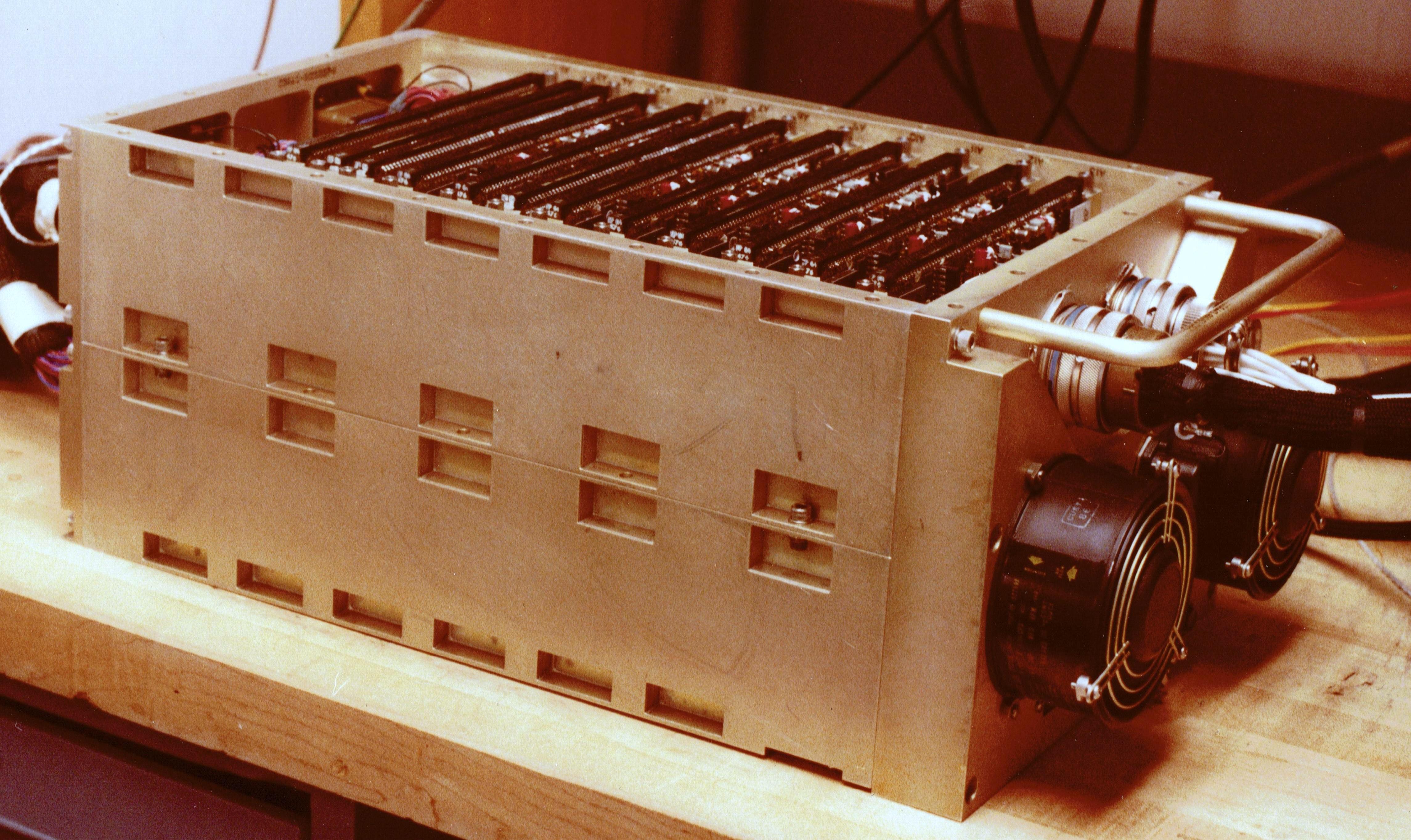
The 386's register circuitry also shows the curse of backward compatibility. The x86 architecture supports 8-bit register accesses for compatibility with processors dating back to 1971. This compatibility requires additional circuitry such as the shuffle network and interleaved registers. Looking at the circuitry of x86 processors makes me appreciate some of the advantages of RISC processors, which avoid much of the ad hoc circuitry of x86 processors.

If you want more information about how the 386's memory cells were implemented, I wrote a lower-level article earlier. I plan to write more about the 386, so follow me on Bluesky (@righto.com) or RSS for updates.

Footnotes and references
  1. The 386 has multiple registers that are only relevant to operating systems programmers (see Chapter 4 of the 386 Programmer's Reference Manual). These include the Global Descriptor Table Register (GDTR), Local Descriptor Table Register (LDTR), Interrupt Descriptor Table Register (IDTR), and Task Register (TR). There are four Control Registers CR0-CR3; CR0 controls coprocessor usage, paging, and a few other things. The six Debug Registers for hardware breakpoints are named DR0-DR3, DR6, and DR7. The two Test Registers for TLB testing are named TR6 and TR7. I expect that these registers are in the 386's Segment Unit and Paging Unit, rather than part of the processing datapath. 

  2. Typically the write driver circuit generates a strong low on one of the bitlines, flipping the corresponding inverter to a high output. As soon as one inverter flips, it will force the other inverter into the right state. To support this, the pullup transistors in the inverters are weaker than normal. 

  3. The pass transistor passes its signal through or blocks it. In CMOS, this is usually implemented with a transmission gate with an NMOS and a PMOS transistor in parallel. The cell uses only the NMOS transistor, which is much worse at passing a high signal than a low signal. Because there is one NMOS pass transistor on each side of the inverters, one of the transistors will be passing a low signal that will flip the state. 

  4. The bitline is typically precharged to a high level for a read, and then the cell pulls the line low for a 0. This is more compact than including circuitry in each cell to pull the line high. 

  5. Note that buffering is needed so the (b) cell can write to the (a) cell. If the cells were connected directly, cell (a) could overwrite cell (b) as easily as cell (b) could overwrite cell (a). With the inverters in between, cell (b) won't be affected by cell (a). 

  6. In the 8086, the processor status flags are not stored as a physical register, but instead consist of flip-flops scattered throughout the chip (details). The 386 probably has a similar implementation for the flags.

    In the 8086, the program counter (instruction pointer) does not exist as such. Instead, the instruction prefetch circuitry has a register holding the current prefetch address. If the program counter address is required (to push a return address or to perform a relative branch, for instance), the program counter value is derived from the prefetch address. If the 386 is similar, the program counter won't have a physical register in the register file. 

  7. The x86 architecture combines two 8-bit registers to form a 16-bit register for historical reasons. The TTL-based Datapoint 2200 (1971) system had 8-bit A, B, C, D, E, H, and L registers, with the H and L registers combined to form a 16-bit indexing register for memory accesses. Intel created a microprocessor version of the Datapoint 2200's architecture, called the 8008. Intel's 8080 processor extended the register pairs so BC and DE could also be used as 16-bit registers. The 8086 kept this register design, but changed the 16-bit register names to AX, BX, CX, and DX, with the 8-bit parts called AH, AL, and so forth. Thus, the unusual physical structure of the 386's register file is due to compatibility with a programmable terminal from 1971. 

  8. To support 8-bit and 16-bit operations, the 8086 processor used a similar interleaving scheme with the two 8-bit halves of a register interleaved. Since the 8086 was a 16-bit processor, though, its interleaving was simpler than the 32-bit 386. Specifically, the 8086 didn't have the upper 16 bits to deal with. 

  9. The 386's constant ROM is located below the shuffle network. Thus, constants are stored with the bits interleaved in order to produce the right results. (This made the ROM contents incomprehensible until I figured out the shuffling pattern, but that's a topic for another article.) 

  10. The main body of the datapath (ALU, etc.) has the same 60 µm cell width as the register file. However, the datapath is slightly wider than the register file overall. The reason? The datapath has a small amount of circuitry between bits 7 and 8 and between bits 15 and 16, in order to handle 8-bit and 16-bit operations. As a result, the logical structure of the registers is visible as stripes in the physical layout of the ALU below. (These stripes are also visible in the die photo at the beginning of this article.)

    Part of the ALU circuitry, displayed underneath the structure of the EAX register.Part of the ALU circuitry, displayed underneath the structure of the EAX register.


tag:blogger.com,1999:blog-6264947694886887540.post-8383886582076151029
Extensions
A tricky Commodore PET repair: tracking down 6 1/2 bad chips
6502electronics
Show full content
code {font-size: 100%; font-family: courier, fixed;}

mult3

In 1977, Commodore released the PET computer, a quirky home computer that combined the processor, a tiny keyboard, a cassette drive for storage, and a trapezoidal screen in a metal unit. The Commodore PET, the Apple II, and Radio Shack's TRS-80 started the home computer market with ready-to-run computers, systems that were called in retrospect the 1977 Trinity. I did much of my early programming on the PET, so when someone offered me a non-working PET a few years ago, I took it for nostalgic reasons.
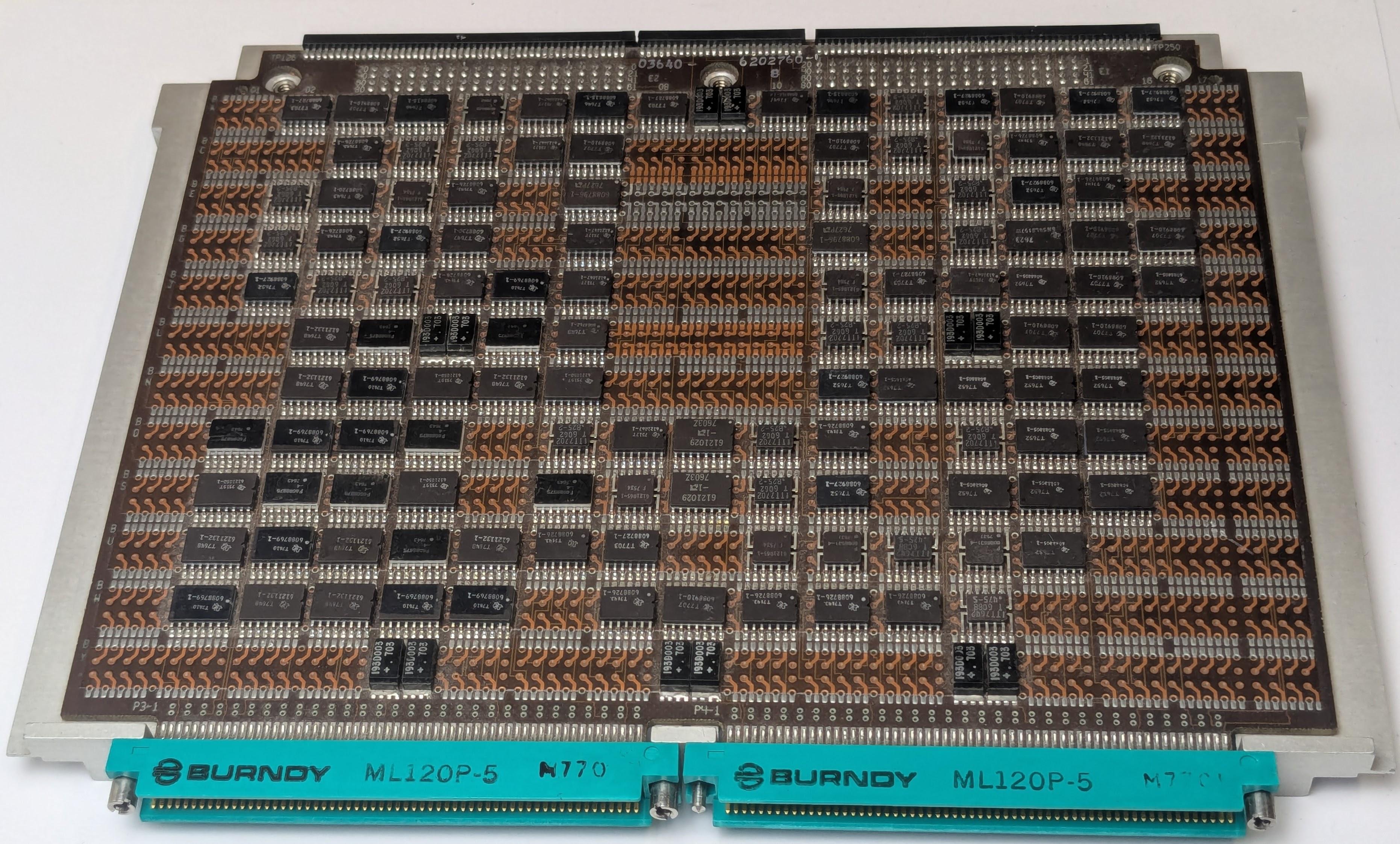
You'd think that a home computer would be easy to repair, but it turned out to be a challenge. The chips in early PETs are notorious for failures and, sure enough, we found multiple bad chips. Moreover, these RAM and ROM chips were special designs that are mostly unobtainable now. In this post, I'll summarize how we repaired the system, in case it helps anyone else.

When I first powered up the computer, I was greeted with a display full of random characters. This was actually reassuring since it showed that most of the computer was working: not just the monitor, but the video RAM, character ROM, system clock, and power supply were all operational.

The Commodore PET started up, but the screen was full of garbage.The Commodore PET started up, but the screen was full of garbage.

With an oscilloscope, I examined signals on the system bus and found that the clock, address, and data lines were full of activity, so the 6502 CPU seemed to be operating. However, some of the data lines had three voltage levels, as shown below. This was clearly not good, and suggested that a chip on the bus was messing up the data signals.

The scope shows three voltage levels on the data bus.The scope shows three voltage levels on the data bus.

Some helpful sites online7 suggested that if a PET gets stuck before clearing the screen, the most likely cause is a failure of a system ROM chip. Fortunately, Marc has a Retro Chip Tester, a cool device designed to test vintage ICs: not just 7400-series logic, but vintage RAMs and ROMs. Moreover, the tester knows the correct ROM contents for a ton of old computers, so it can tell if a PET ROM has the right contents.

The Retro Chip Tester showed that two of the PET's seven ROM chips had failed. These chips are MOS Technologies MPS6540, a 2K×8 ROM with a weird design that is incompatible with standard ROMs. Fortunately, several people make adapter boards that let you substitute a standard 2716 EPROM, so I ordered two adapter boards, assembled them, and Marc programmed the 2716 EPROMs from online data files. The 2716 EPROM requires a bit more voltage to program than Marc's programmer supported, but the chips seemed to have the right contents (foreshadowing).

The PET opened, showing the motherboard.The PET opened, showing the motherboard.

The PET's case swings open with an arm at the left to hold it open like a car hood. The first two rows of chips at the front of the motherboard are the RAM chips. Behind the RAM are the seven ROM chips; two have been replaced by the ROM adapter boards. The 6502 processor is the large black chip behind the ROMs, toward the right.

With the adapter boards in place, I powered on the PET with great expectations of success, but it failed in precisely the same way as before, failing to clear the garbage off the screen. Marc decided it was time to use his Agilent 1670G logic analyzer to find out what was going on; (Dating back to 1999, this logic analyzer is modern by Marc's standards.) He wired up the logic analyzer to the 6502 chip, as shown below, so we could track the address bus, data bus, and the read/write signal. Meanwhile, I disassembled the ROM contents using Ghidra, so I could interpret the logic analyzer against the assembly code. (Ghidra is a program for reverse-engineering software that was developed by the NSA, strangely enough.)

Marc wired up the logic analyzer to the 6502 chip.Marc wired up the logic analyzer to the 6502 chip.

The logic analyzer provided a trace of every memory access from the 6502 processor, showing what it was executing. Everything went well for a while after the system was turned on: the processor jumped to the reset vector location, did a bit of initialization, tested the memory, but then everything went haywire. I noticed that the memory test failed on the first byte. Then the software tried to get more storage by garbage collecting the BASIC program and variables. Since there wasn't any storage at all, this didn't go well and the system hung before reaching the code that clears the screen.

We tested the memory chips, using the Retro Chip Tester again, and found three bad chips. Like the ROM chips, the RAM chips are unusual: MOS Technology 6550 static RAM chip, 1K×4. By removing the bad chips and shuffling the good chips around, we reduced the 8K PET to a 6K PET. This time, the system booted, although there was a mysterious 2×2 checkerboard symbol near the middle of the screen (foreshadowing). I typed in a simple program to print "HELLO", but the results were very strange: four floating-point numbers, followed by a hang.

This program didn't work the way I expected.This program didn't work the way I expected.

This behavior was very puzzling. I could successfully enter a program into the computer, which exercises a lot of the system code. (It's not like a terminal, where echoing text is trivial; the PET does a lot of processing behind the scenes to parse a BASIC program as it is entered.) However, the output of the program was completely wrong, printing floating-point numbers instead of a string.

We also encountered an intermittent problem that after turning the computer on, the boot message would be complete gibberish, as shown below. Instead of the "*** COMMODORE BASIC ***" banner, random characters and graphics would appear.

The garbled boot message.The garbled boot message.

How could the computer be operating well for the most part, yet also completely wrong? We went back to the logic analyzer to find out.

I figured that the gibberish boot message would probably be the easiest thing to track down, since that happens early in the boot process. Looking at the code, I discovered that after the software tests the memory, it converts the memory size to an ASCII string using a moderately complicated algorithm.1 Then it writes the system boot message and the memory size to the screen.

The PET uses a subroutine to write text to the screen. A pointer to the text message is held in memory locations 0071 and 0072. The assembly code below stores the pointer (in the X and Y registers) into these memory locations. (This Ghidra output shows the address, the instruction bytes, and the symbolic assembler instructions.)

d5ae 86 71   STX 71
d5b0 84 72   STY 72           
d5b2 60      RTS

For the code above, you'd expect the processor to read the instruction bytes 86 and 71, and then write to address 0071. Next it should read the bytes 84 and 72 and write to address 0072. However, the logic analyzer output below showed that something slightly different happened. The processor fetched instruction bytes 86 and 71 from addresses D5AE and D5AF, then wrote 00 to address 0071, as expected. Next, it fetched instruction bytes 84 and 72 as expected, but wrote 01 to address 007A, not 0072!

 step   address byte  read/write'
112235   D5AE   86      1
112236   D5AF   71      1
112237   0071   00      0
112238   D5B0   84      1
112239   D5B1   72      1
112240   007A   01      0

This was a smoking gun. The processor had messed up and there was a one-bit error in the address. Maybe the 6502 processor issued a bad signal or maybe something else was causing problems on the bus. The consequence of this error was that the string pointer referenced random memory rather than the desired boot message, so random characters were written to the screen.

Next, I investigated why the screen had a mysterious checkerboard character. I wrote a program to scan the logic analyzer output to extract all the writes to screen memory. Most of the screen operations made sense—clearing the screen at startup and then writing the boot message—but I found one unexpected write to the screen. In the assembly code below, the Y register should be written to zero-page address 5e, and the X register should be written to the address 66, some locations used by the BASIC interpreter.

d3c8 84 5e   STY 5e
d3ca 86 66   STX 66

However, the logic analyzer output below showed a problem. The first line should fetch the opcode 84 from address d3c8, but the processor received the opcode 8c from the ROM, the instruction to write to a 16-bit address. The result was that instead of writing to a zero-page address, the 6502 fetched another byte to write to a 16-bit address. Specifically, it grabbed the STX instruction (86) and used that as part of the address, writing FF (a checkerboard character) to screen memory at 865E2 instead of to the BASIC data structure at 005E. Moreover, the STX instruction wasn't executed, since it was consumed as an address. Thus, not only did a stray character get written to the screen, but data structures in memory didn't get updated. It's not surprising that the BASIC interpreter went out of control when it tried to run the program.

 step   address byte read/write'
186600   D3C8   8C      1
186601   D3C9   5E      1
186602   D3CA   86      1
186603   865E   FF      0

We concluded that a ROM was providing the wrong byte (8C) at address D3C8. This ROM turned out to be one of our replacements; the under-powered EPROM programmer had resulted in a flaky byte. Marc re-programmed the EPROM with a more powerful programmer. The system booted, but with much less RAM than expected. It turned out that another RAM chip had failed.

Finally, we got the PET to run. I typed in a simple program to generate an animated graphical pattern, a program I remembered from when I was about 133, and generated this output:

Finally, the PET worked and displayed some graphics. Imagine this pattern constantly changing.Finally, the PET worked and displayed some graphics. Imagine this pattern constantly changing.

In retrospect, I should have tested all the RAM and ROM chips at the start, and we probably could have found the faults without the logic analyzer. However, the logic analyzer gave me an excuse to learn more about Ghidra and the PET's assembly code, so it all worked out in the end.4

The bad chips sitting on top of the keyboard.The bad chips sitting on top of the keyboard.

In the end, the PET had 6 bad chips: two ROMs and four RAMs. The 6502 processor itself turned out to be fine.5 The photo below shows the 6 bad chips on top of the PET's tiny keyboard. On the top of each key, you can see the quirky graphical character set known as PETSCII.6 As for the title, I'm counting the badly-programmed ROM as half a bad chip since the chip itself wasn't bad but it was functioning erratically.

CuriousMarc created a video of the PET restoration, if you want more:

Follow me on Bluesky (@righto.com) or RSS for updates. (I'm no longer on Twitter.) Thanks to Mike Naberezny for providing the PET. Thanks to TubeTime, Mike Stewart, and especially CuriousMarc for help with the repairs. Some useful PET troubleshooting links are in the footnotes.7

Footnotes and references
  1. Converting a number to an ASCII string is somewhat complicated on the 6502. You can't quickly divide by 10 for the decimal conversion, since the processor doesn't have a divide instruction. Instead, the PET's conversion routine has hard-coded four-byte constants: -100000000, 10000000, -100000, 100000, -10000, 1000, -100, 10, and -1. The routine repeatedly adds the first constant (i.e. subtracting 100000000) until the result is negative. Then it repeatedly adds the second constant until the result is positive, and so forth. The number of steps gives each decimal digit (after adjustment).

    The same algorithm is used with the base-60 constants: -2160000, 216000, -36000, 3600, -600, and 60. This converts the uptime count into hours, minutes, and seconds for the TIME$ variable. (The PET's basic time count is the "jiffy", 1/60th of a second.) 

  2. Technically, the address 865E is not part of screen memory, which is 1000 characters starting at address 0x8000. However, the PET's address uses some shortcuts in address decoding, so 865E ends up the same as 825e, referencing the 7th character of the 16th line. 

  3. Here's the source code for my demo program, which I remembered from my teenage programming. It simply displays blocks (black, white, or gray) with 8-fold symmetry, writing directly to screen memory with POKE statements. (It turns out that almost anything looks good with 8-fold symmetry.) The cryptic heart in the first PRINT statement is the clear-screen character.

    My program to display some graphics.My program to display some graphics.


  4. So why did I suddenly decide to restore a PET that had been sitting in my garage since 2017? Well, CNN was filming an interview with Bill Gates and they wanted background footage of the 1970s-era computers that ran the Microsoft BASIC that Bill Gates wrote. Spoiler: I didn't get my computer working in time for CNN, but Marc found some other computers.


  5. I suspected a problem with the 6502 processor because the logic analyzer showed that the 6502 read an instruction correctly but then accessed the wrong address. Eric provided a replacement 6502 chip but swapping the processor had no effect. However, reprogramming the ROM fixed both problems. Our theory is that the signal on the bus either had a timing problem or a voltage problem, causing the logic analyzer to show the correct value but the 6502 to read the wrong value. Probably the ROM had a weakly-programmed bit, causing the ROM's output for that bit to either be at an intermediate voltage or causing the output to take too long to settle to the correct voltage. The moral is that you can't always trust the logic analyzer if there are analog faults. 

  6. The PETSCII graphics characters are now in Unicode in the Symbols for Legacy Computing block. 

  7. The PET troubleshooting site was very helpful. The Commodore PET's Microsoft BASIC source code is here, mostly uncommented. I mapped many of the labels in the source code to the assembly code produced by Ghidra to understand the logic analyzer traces. The ROM images are here. Schematics of the PET are here

tag:blogger.com,1999:blog-6264947694886887540.post-8423043954026949924
Extensions
Notes on the Pentium's microcode circuitry
intelmicrocodePentiumreverse-engineering
Show full content

Most people think of machine instructions as the fundamental steps that a computer performs. However, many processors have another layer of software underneath: microcode. With microcode, instead of building the processor's control circuitry from complex logic gates, the control logic is implemented with code known as microcode, stored in the microcode ROM. To execute a machine instruction, the computer internally executes several simpler micro-instructions, specified by the microcode. In this post, I examine the microcode ROM in the original Pentium, looking at the low-level circuitry.

The photo below shows the Pentium's thumbnail-sized silicon die under a microscope. I've labeled the main functional blocks. The microcode ROM is highlighted at the right. If you look closely, you can see that the microcode ROM consists of two rectangular banks, one above the other.
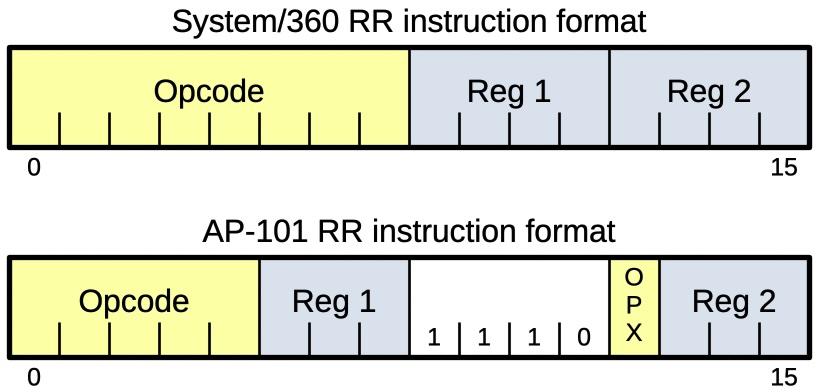
This die photo of the Pentium shows the location of the microcode ROM. Click this image (or any other) for a larger version.This die photo of the Pentium shows the location of the microcode ROM. Click this image (or any other) for a larger version.
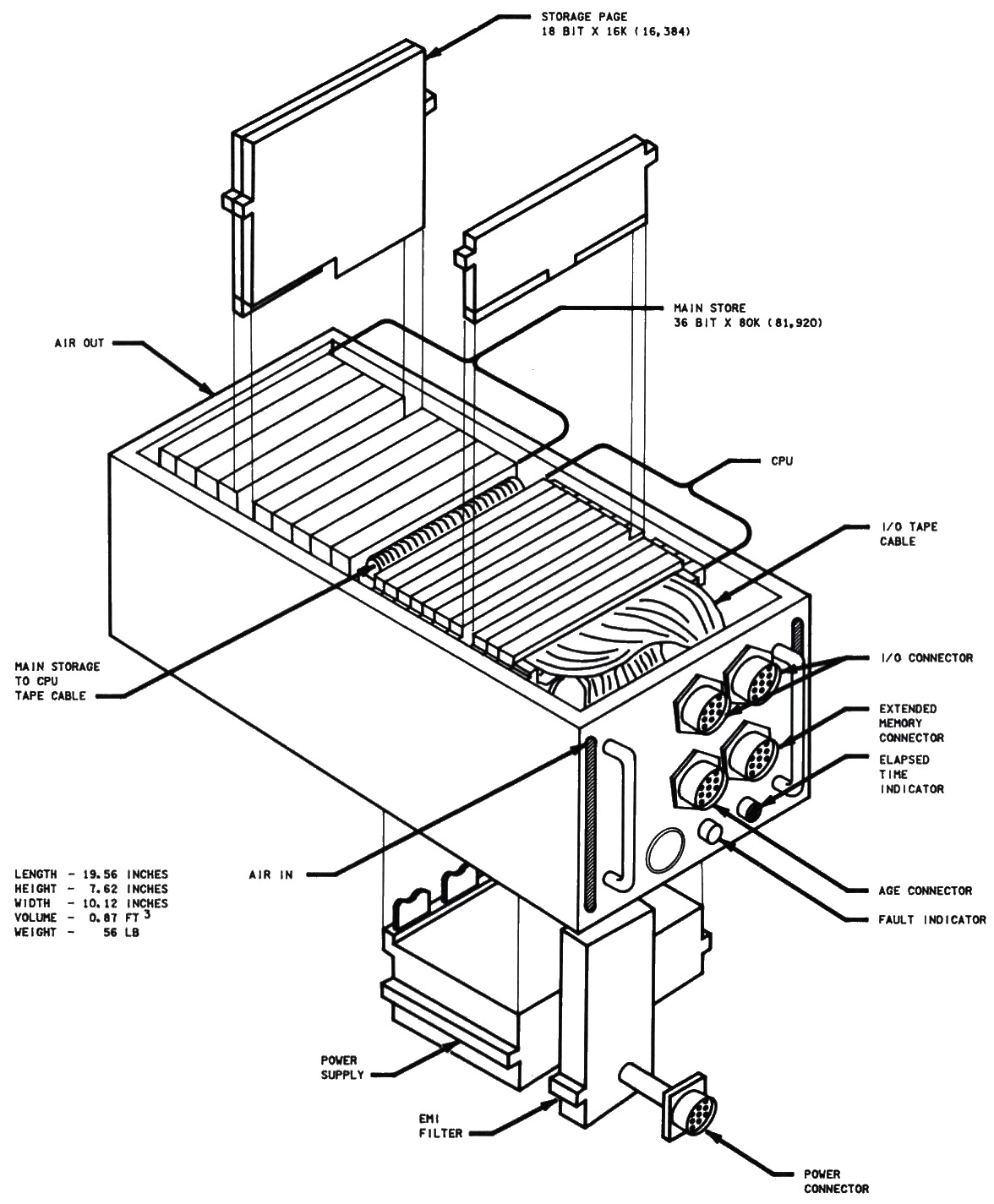
The image below shows a closeup of the two microcode ROM banks. Each bank provides 45 bits of output; together they implement a micro-instruction that is 90 bits long. Each bank consists of a grid of transistors arranged into 288 rows and 720 columns. The microcode ROM holds 4608 micro-instructions, 414,720 bits in total. At this magnification, the ROM appears featureless, but it is covered with horizontal wires, each just 1.5 µm thick.

The 90 output lines from the ROM, with a closeup of six lines exiting the ROM.The 90 output lines from the ROM, with a closeup of six lines exiting the ROM.

The ROM's 90 output lines are collected into a bundle of wires between the banks, as shown above. The detail shows how six of the bits exit from the banks and join the bundle. This bundle exits the ROM to the left, travels to various parts of the chip, and controls the chip's circuitry. The output lines are in the chip's top metal layer (M3): the Pentium has three layers of metal wiring with M1 on the bottom, M2 in the middle, and M3 on top.

The Pentium has a large number of bits in its micro-instruction, 90 bits compared to 21 bits in the 8086. Presumably, the Pentium has a "horizontal" microcode architecture, where the microcode bits correspond to low-level control signals, as opposed to "vertical" microcode, where the bits are encoded into denser micro-instructions. I don't have any information on the Pentium's encoding of microcode; unlike the 8086, the Pentium's patents don't provide any clues. The 8086's microcode ROM holds 512 micro-instructions, much less than the Pentium's 4608 micro-instructions. This makes sense, given the much greater complexity of the Pentium's instruction set, including the floating-point unit on the chip.

The image below shows a closeup of the Pentium's microcode ROM. For this image, I removed the three layers of metal and the polysilicon layer to expose the chip's underlying silicon. The pattern of silicon doping is visible, showing the transistors and thus the data stored in the ROM. If you have enough time, you can extract the bits from the ROM by examining the silicon and seeing where transistors are present.

A closeup of the ROM showing how bits are encoded in the layout of transistors.A closeup of the ROM showing how bits are encoded in the layout of transistors.

Before explaining the ROM's circuitry, I'll review how an NMOS transistor is constructed. A transistor can be considered a switch between the source and drain, controlled by the gate. The source and drain regions (green) consist of silicon doped with impurities to change its semiconductor properties, forming N+ silicon. (These regions are visible in the photo above.) The gate consists of a layer of polysilicon (red), separated from the silicon by a very thin insulating oxide layer. Whenever polysilicon crosses active silicon, a transistor is formed.

Diagram showing the structure of an NMOS transistor.Diagram showing the structure of an NMOS transistor.

Bits are stored in the ROM through the pattern of transistors in the grid. The presence or absence of a transistor stores a 0 or 1 bit.1 The closeup below shows eight bits of the microcode ROM. There are four transistors present and four gaps where transistors are missing. Thus, this part of the ROM holds four 0 bits and four 1 bits. For the diagram below, I removed the three metal layers and the polysilicon to show the underlying silicon. I colored doped (active) silicon regions green, and drew in the horizontal polysilicon lines in red. As explained above, a transistor is created if polysilicon crosses doped silicon. Thus, the contents of the ROM are defined by the pattern of silicon regions, which creates the transistors.

Eight bits of the microcode ROM, with four transistors present.Eight bits of the microcode ROM, with four transistors present.

The horizontal silicon lines are used as wiring to provide ground to the transistors, while the horizontal polysilicon lines select one of the rows in the ROM. The transistors in that row will turn on, pulling the associated output lines low. That is, the presence of a transistor in a row causes the output to be pulled low, while the absence of a transistor causes the output line to remain high.

A schematic corresponding to the eight bits above.A schematic corresponding to the eight bits above.

The diagram below shows the silicon, polysilicon, and bottom metal (M1) layers. I removed the metal from the left to reveal the silicon and polysilicon underneath, but the pattern of vertical metal lines continues there. As shown earlier, the silicon pattern forms transistors. Each horizontal metal line has a connection to ground through a metal line (not shown). The horizontal polysilicon lines select a row. When polysilicon lines cross doped silicon, the gate of a transistor is formed. Two transistors may share the drain, as in the transistor pair on the left.

Diagram showing the silicon, polysilicon, and M1 layers.Diagram showing the silicon, polysilicon, and M1 layers.

The vertical metal wires form the outputs. The circles are contacts between the metal wire and the silicon of a transistor.2 Short metal jumpers connect the polysilicon lines to the metal layer above, which will be described next.

The image below shows the upper left corner of the ROM. The yellowish metal lines are the top metal layer (M3), while the reddish metal lines are the middle metal layer (M2). The thick yellowish M3 lines distribute ground to the ROM. Underneath the horizontal M3 line, a horizontal M2 line also distributes ground. The grids of black dots are numerous contacts between the M3 line and the M2 line, providing a low-resistance connection. The M2 line, in turn, connects to vertical M1 ground lines underneath—these wide vertical lines are faintly visible. These M1 lines connect to the silicon, as shown earlier, providing ground to each transistor. This illustrates the complexity of power distribution in the Pentium: the thick top metal (M3) is the primary distribution of +5 volts and ground through the chip, but power must be passed down through M2 and M1 to reach the transistors.

The upper left corner of the ROM.The upper left corner of the ROM.

The other important feature above is the horizontal metal lines, which help distribute the row-select signals. As shown earlier, horizontal polysilicon lines provide the row-select signals to the transistors. However, polysilicon is not as good a conductor as metal, so long polysilicon lines have too much resistance. The solution is to run metal lines in parallel, periodically connected to the underlying polysilicon lines and reducing the overall resistance. Since the vertical metal output lines are in the M1 layer, the horizontal row-select lines run in the M2 layer so they don't collide. Short "jumpers" in the M1 layer connect the M2 lines to the polysilicon lines.

To summarize, each ROM bank contains a grid of transistors and transistor vacancies to define the bits of the ROM. The ROM is carefully designed so the different layers—silicon, polysilicon, M1, and M2—work together to maximize the ROM's performance and density.

Microcode Address Register

As the Pentium executes an instruction, it provides the address of each micro-instruction to the microcode ROM. The Pentium holds this address—the micro-address—in the Microcode Address Register (MAR). The MAR is a 13-bit register located above the microcode ROM.

The diagram below shows the Microcode Address Register above the upper ROM bank. It consists of 13 bits; each bit has multiple latches to hold the value as well as any pushed subroutine micro-addresses. Between bits 7 and 8, some buffer circuitry amplifies the control signals that go to each bit's circuitry. At the right, drivers amplify the outputs from the MAR, sending the signals to the row drivers and column-select circuitry that I will discuss below. To the left of the MAR is a 32-bit register that is apparently unrelated to the microcode ROM, although I haven't determined its function.

The Microcode Address Register is located above the upper ROM bank.The Microcode Address Register is located above the upper ROM bank.

The outputs from the Microcode Address Register select rows and columns in the microcode ROM, as I'll explain below. Bits 12 through 7 of the MAR select a block of 8 rows, while bits 6 through 4 select a row in this block. Bits 3 through 0 select one column out of each group of 16 columns to select an output bit. Thus, the microcode address controls what word is provided by the ROM.

Several different operations can be performed on the Microcode Address Register. When executing a machine instruction, the MAR must be loaded with the address of the corresponding microcode routine. (I haven't determined how this address is generated.) As microcode is executed, the MAR is usually incremented to move to the next micro-instruction. However, the MAR can branch to a new micro-address as required. The MAR also supports microcode subroutine calls; it will push the current micro-address and jump to the new micro-address. At the end of the micro-subroutine, the micro-address is popped so execution returns to the previous location. The MAR supports three levels of subroutine calls, as it contains three registers to hold the stack of pushed micro-addresses.

The MAR receives control signals and addresses from standard-cell logic located above the MAR. Strangely, in Intel's published floorplans for the Pentium, this standard-cell logic is labeled as part of the branch prediction logic, which is above it. However, carefully tracing the signals from the standard-cell logic shows that is connected to the Microcode Address Register, not the branch predictor.

Row-select drivers

As explained above, each ROM bank has 288 rows of transistors, with polysilicon lines to select one of the rows. To the right of the ROM is circuitry that activates one of these row-select lines, based on the micro-address. Each row matches a different 9-bit address. A straightforward implementation would use a 9-input AND gate for each row, matching a particular pattern of 9 address bits or their complements.

However, this implementation would require 576 very large AND gates, so it is impractical. Instead, the Pentium uses an optimized implementation with one 6-input AND gate for each group of 8 rows. The remaining three address bits are decoded once at the top of the ROM. As a result, each row only needs one gate, detecting if its group of eight rows is selected and if the particular one of eight is selected.

Simplified schematic of the row driver circuitry.Simplified schematic of the row driver circuitry.

The schematic above shows the circuitry for a group of eight rows, slightly simplified.3 At the top, three address bits are decoded, generating eight output lines with one active at a time. The remaining six address bits are inverted, providing the bit and its complement to the decoding circuitry. Thus, the 9 bits are converted into 20 signals that flow through the decoders, a large number of wires, but not unmanageable. Each group of eight rows has a 6-input AND gate that matches a particular 6-bit address, determined by which inputs are complemented and which are not.4 The NAND gate and inverter at the left combine the 3-bit decoding and the 6-bit decoding, activating the appropriate row.

Since there are up to 720 transistors in each row, the row-select lines need to be driven with high current. Thus, the row-select drivers use large transistors, roughly 25 times the size of a regular transistor. To fit these transistors into the same vertical spacing as the rest of the decoding circuitry, a tricky packing is used. The drivers for each group of 8 rows are packed into a 3×3 grid, except the first column has two drivers (since there are 8 drivers in the group, not 9). To avoid a gap, the drivers in the first column are larger vertically and squashed horizontally.

Output circuitry

The schematic below shows the multiplexer circuit that selects one of 16 columns for a microcode output bit. The first stage has four 4-to-1 multiplexers. Next, another 4-to-1 multiplexer selects one of the outputs. Finally, a BiCMOS driver amplifies the output for transmission to the rest of the processor.

The 16-to-1 multiplexer/output driver.The 16-to-1 multiplexer/output driver.

In more detail, the ROM and the first multiplexer are essentially NMOS circuits, rather than CMOS. Specifically, the ROM's grid of transistors is constructed from NMOS transistors that can pull a column line low, but there are no PMOS transistors in the grid to pull the line high (since that would double the size of the ROM). Instead, the multiplexer includes precharge transistors to pull the lines high, presumably in the clock phase before the ROM is read. The capacitance of the lines will keep the line high unless it is pulled low by a transistor in the grid. One of the four transistors in the multiplexer is activated (by control signal a, b, c, or d) to select the desired line. The output goes to a "keeper" circuit, which keeps the output high unless it is pulled low. The keeper uses an inverter with a weak PMOS transistor that can only provide a small pull-up current. A stronger low input will overpower this transistor, switching the state of the keeper.

The output of this multiplexer, along with the outputs of three other multiplexers, goes to the second-stage multiplexer,5 which selects one of its four inputs, based on control signals e, f, g, and h. The output of this multiplexer is held in a latch built from two inverters. The second latch has weak transistors so the latch can be easily forced into the desired state. The output from the first latch goes through a CMOS switch into a second latch, creating a flip-flop.

The output from the second latch goes to a BiCMOS driver, which drives one of the 90 microcode output lines. Most processors are built from CMOS circuitry (i.e. NMOS and PMOS transistors), but the Pentium is built from BiCMOS circuitry: bipolar transistors as well as CMOS. At the time, bipolar transistors improved performance for high-current drivers; see my article on the Pentium's BiCMOS circuitry.

The diagram below shows three bits of the microcode output. This circuitry is for the upper ROM bank; the circuitry is mirrored for the lower bank. The circuitry matches the schematic above. Each of the three blocks has 16 input lines from the ROM grid. Four 4-to-1 multiplexers reduce this to 4 lines, and the second multiplexer selects a single line. The result is latched and amplified by the output driver. (Note the large square shape of the bipolar transistors.) Next is the shift register that processes the microcode ROM outputs for testing. The shift register uses XOR logic for its feedback; unlike the rest of the circuitry, the XOR logic is irregular since only some bits are fed into XOR gates.

Three bits of output from the microcode, I removed the three metal layers to show the polysilicon and silicon.Three bits of output from the microcode, I removed the three metal layers to show the polysilicon and silicon.

Circuitry for testing

Why does the microcode ROM have shift registers and XOR gates? The reason is that a chip such as the Pentium is very difficult to test: if one out of 3.1 million transistors goes bad, how do you detect it? For a simple processor like the 8086, you can run through the instruction set and be fairly confident that any problem would turn up. But with a complex chip, it is almost impossible to design an instruction sequence that would test every bit of the microcode ROM, every bit of the cache, and so forth. Starting with the 386, Intel added circuitry to the processor solely to make testing easier; about 2.7% of the transistors in the 386 were for testing.

The Pentium has this testing circuitry for many ROMs and PLAs, including the division PLA that caused the infamous FDIV bug. To test a ROM inside the processor, Intel added circuitry to scan the entire ROM and checksum its contents. Specifically, a pseudo-random number generator runs through each address, while another circuit computes a checksum of the ROM output, forming a "signature" word. At the end, if the signature word has the right value, the ROM is almost certainly correct. But if there is even a single bit error, the checksum will be wrong and the chip will be rejected.

The pseudo-random numbers and the checksum are both implemented with linear feedback shift registers (LFSR), a shift register along with a few XOR gates to feed the output back to the input. For more information on testing circuitry in the 386, see Design and Test of the 80386, written by Pat Gelsinger, who became Intel's CEO years later.

Conclusions

You'd think that implementing a ROM would be straightforward, but the Pentium's microcode ROM is surprisingly complex due to its optimized structure and its circuitry for testing. I haven't been able to determine much about how the microcode works, except that the micro-instruction is 90 bits wide and the ROM holds 4608 micro-instructions in total. But hopefully you've found this look at the circuitry interesting.

Disclaimer: this should all be viewed as slightly speculative and there are probably some errors. I didn't want to prefix every statement with "I think that..." but you should pretend it is there. I plan to write more about the implementation of the Pentium, so follow me on Bluesky (@righto.com) or RSS for updates. Peter Bosch has done some reverse engineering of the Pentium II microcode; his information is here.

Footnotes and references
  1. It is arbitrary if a transistor corresponds to a 0 bit or a 1 bit. A transistor will pull the output line low (i.e. a 0 bit), but the signal could be inverted before it is used. More analysis of the circuitry or ROM contents would clear this up. 

  2. When looking at a ROM like this, the contact pattern seems like it should tell you the contents of the ROM. Unfortunately, this doesn't work. Since a contact can be attached to one or two transistors, the contact pattern doesn't give you enough information. You need to see the silicon to determine the transistor pattern and thus the bits. 

  3. I simplified the row driver schematic. The most interesting difference is that the NAND gates are optimized to use three transistors each, instead of four transistors. The trick is that one of the NMOS transistors is essentially shared across the group of 8 drivers; an inverter drives the low side of all eight gates. The second simplification is that the 6-input AND gate is implemented with two 3-input NAND gates and a NOR gate for electrical reasons.

    Also, the decoder that converts 3 bits into 8 select lines is located between the banks, at the right, not at the top of the ROM as I showed in the schematic. Likewise, the inverters for the 6 row-select bits are not at the top. Instead, there are 6 inverters and 6 buffers arranged in a column to the right of the ROM, which works better for the layout. These are BiCMOS drivers so they can provide the high-current outputs necessary for the long wires and numerous transistor gates that they must drive. 

  4. The inputs to the 6-input AND gate are arranged in a binary counting pattern, selecting each row in sequence. This binary arrangment is standard for a ROM's decoder circuitry and is a good way to recognize a ROM on a die. The Pentium has 36 row decoders, rather than the 64 that you'd expect from a 6-bit input. The ROM was made to the size necessary, rather than a full power of two. In most ROMs, it's difficult to determine if the ROM is addressed bottom-to-top or top-to-bottom. However, because the microcode ROM's counting pattern is truncated, one can see that the top bank starts with 0 at the top and counts downward, while the bottom bank is reversed, starting with 0 at the bottom and counting upward. 

  5. A note to anyone trying to read the ROM contents: it appears that the order of entries in a group of 16 is inconsistent, so a straightforward attempt to visually read the ROM will end up with scrambled data. That is, some of the groups are reversed. I don't see any obvious pattern in which groups are reversed.

    A closeup of the first stage output mux. This image shows the M1 metal layer.A closeup of the first stage output mux. This image shows the M1 metal layer.

    In the diagram above, look at the contacts from the select lines, connecting the select lines to the mux transistors. The contacts on the left are the mirror image of the contacts on the right, so the columns will be accessed in the opposite order. This mirroring pattern isn't consistent, though; sometimes neighboring groups are mirrored and sometimes they aren't.

    I don't know why the circuitry has this layout. Sometimes mirroring adjacent groups makes the layout more efficient, but the inconsistent mirroring argues against this. Maybe an automated layout system decided this was the best way. Or maybe Intel did this to provide a bit of obfuscation against reverse engineering. 

tag:blogger.com,1999:blog-6264947694886887540.post-3129002752159663932
Extensions
A USB interface to the "Mother of All Demos" keyset
altoelectronicsreverse-engineering
Show full content

In the early 1960s, Douglas Engelbart started investigating how computers could augment human intelligence: "If, in your office, you as an intellectual worker were supplied with a computer display backed up by a computer that was alive for you all day and was instantly responsive to every action you had, how much value could you derive from that?" Engelbart developed many features of modern computing that we now take for granted: the mouse,1 hypertext, shared documents, windows, and a graphical user interface. At the 1968 Joint Computer Conference, Engelbart demonstrated these innovations in a groundbreaking presentation, now known as "The Mother of All Demos."

The keyset with my prototype USB interface.The keyset with my prototype USB interface.

Engelbart's demo also featured an input device known as the keyset, but unlike his other innovations, the keyset failed to catch on. The 5-finger keyset lets you type without moving your hand, entering characters by pressing multiple keys simultaneously as a chord. Christina Englebart, his daughter, loaned one of Engelbart's keysets to me. I constructed an interface to connect the keyset to USB, so that it can be used with a modern computer. The video below shows me typing with the keyset, using the mouse buttons to select upper case and special characters.2

I wrote this blog post to describe my USB keyset interface. Along the way, however, I got sidetracked by the history of The Mother of All Demos and how it obtained that name. It turns out that Engelbart's demo isn't the first demo to be called "The Mother of All Demos".

Engelbart and The Mother of All Demos

Engelbart's work has its roots in Vannevar Bush's 1945 visionary essay, "As We May Think." Bush envisioned thinking machines, along with the "memex", a compact machine holding a library of collective knowledge with hypertext-style links: "The Encyclopedia Britannica could be reduced to the volume of a matchbox." The memex could search out information based on associative search, building up a hypertext-like trail of connections.

In the early 1960s, Engelbart was inspired by Bush's essay and set out to develop means to augment human intellect: "increasing the capability of a man to approach a complex problem situation, to gain comprehension to suit his particular needs, and to derive solutions to problems."3 Engelbart founded the Augmentation Research Center at the Stanford Research Institute (now SRI), where he and his team created a system called NLS (oN-Line System).

Engelbart editing a hierarchical shopping list.Engelbart editing a hierarchical shopping list.

In 1968, Engelbart demonstrated NLS to a crowd of two thousand people at the Fall Joint Computer Conference. Engelbart gave the demo from the stage, wearing a crisp shirt and tie and a headset microphone. Engelbart created hierarchical documents, such as the shopping list above, and moved around them with hyperlinks. He demonstrated how text could be created, moved, and edited with the keyset and mouse. Other documents included graphics, crude line drawing by today's standards but cutting-edge for the time. The computer's output was projected onto a giant screen, along with video of Engelbart.

Engelbart using the keyset to edit text. Note that the display doesn't support lowercase text; instead, uppercase is indicated by a line above the character. Adapted from The Mother of All Demos.Engelbart using the keyset to edit text. Note that the display doesn't support lowercase text; instead, uppercase is indicated by a line above the character. Adapted from The Mother of All Demos.

Engelbart sat at a specially-designed Herman Miller desk6 that held the keyset, keyboard, and mouse, shown above. While Engelbart was on stage in San Francisco, the SDS 9404 computer that ran the NLS software was 30 miles to the south in Menlo Park.5

To the modern eye, the demo resembles a PowerPoint presentation over Zoom, as Engelbart collaborated with Jeff Rulifson and Bill Paxton, miles away in Menlo Park. (Just like a modern Zoom call, the remote connection started with "We're not hearing you. How about now?") Jeff Rulifson browsed the NLS code, jumping between code files with hyperlinks and expanding subroutines by clicking on them. NLS was written in custom high-level languages, which they developed with a "compiler compiler" called TREE-META. The NLS system held interactive documentation as well as tracking bugs and changes. Bill Paxton interactively drew a diagram and then demonstrated how NLS could be used as a database, retrieving information by searching on keywords. (Although Engelbart was stressed by the live demo, Paxton told me that he was "too young and inexperienced to be concerned.")

Bill Paxton, in Menlo Park, communicating with the conference in San Francisco.Bill Paxton, in Menlo Park, communicating with the conference in San Francisco.

Bill English, an electrical engineer, not only built the first mouse for Engelbart but was also the hardware mastermind behind the demo. In San Francisco, the screen images were projected on a 20-foot screen by a Volkswagen-sized Eidophor projector, bouncing light off a modulated oil film. Numerous cameras, video switchers and mixers created the video image. Two leased microwave links and half a dozen antennas connected SRI in Menlo Park to the demo in San Francisco. High-speed modems send the mouse, keyset, and keyboard signals from the demo back to SRI. Bill English spent months assembling the hardware and network for the demo and then managed the demo behind the scenes, assisted by a team of about 17 people.

Another participant was the famed counterculturist Stewart Brand, known for the Whole Earth Catalog and the WELL, one of the oldest online virtual communities. Brand advised Engelbart on the presentation, as well as running a camera. He'd often point the camera at a monitor to generate swirling psychedelic feedback patterns, reminiscent of the LSD that he and Engelbart had experimented with.

The demo received press attention such as a San Francisco Chronicle article titled "Fantastic World of Tomorrow's Computer". It stated, "The most fantastic glimpse into the computer future was taking place in a windowless room on the third floor of the Civic Auditorium" where Engelbart "made a computer in Menlo Park do secretarial work for him that ten efficient secretaries couldn't do in twice the time." His goal: "We hope to help man do better what he does—perhaps by as much as 50 per cent." However, the demo received little attention in the following decades.7

Engelbart continued his work at SRI for almost a decade, but as Engelbart commented with frustration, “There was a slightly less than universal perception of our value at SRI”.8 In 1977, SRI sold the Augmentation Research Center to Tymshare, a time-sharing computing company. (Timesharing was the cloud computing of the 1970s and 1980s, where companies would use time on a centralized computer.) At Tymshare, Engelbart's system was renamed AUGMENT and marketed as an office automation service, but Engelbart himself was sidelined from development, a situation that he described as sitting in a corner and becoming invisible.

Meanwhile, Bill English and some other SRI researchers9 migrated four miles south to Xerox PARC and worked on the Xerox Alto computer. The Xerox Alto incorporated many ideas from the Augmentation Research Center including the graphical user interface, the mouse, and the keyset. The Alto's keyset was almost identical to the Engelbart keyset, as can be seen in the photo below. The Alto's keyset was most popular for the networked 3D shooter game "Maze War", with the clicking of keysets echoing through the hallways of Xerox PARC.

A Xerox Alto with a keyset on the left.A Xerox Alto with a keyset on the left.

Xerox famously failed to commercialize the ideas from the Xerox Alto, but Steve Jobs recognized the importance of interactivity, the graphical user interface, and the mouse when he visited Xerox PARC in 1979. Steve Jobs provided the Apple Lisa and Macintosh ended up with a graphical user interface and the mouse (streamlined to one button instead of three), but he left the keyset behind.10

When McDonnell Douglas acquired Tymshare in 1984, Engelbart and his software—now called Augment—had a new home.11 In 1987, McDonnell Douglas released a text editor and outline processor for the IBM PC called MiniBASE, one of the few PC applications that supported a keyset. The functionality of MiniBASE was almost identical to Engelbart's 1968 demo, but in 1987, MiniBASE was competing against GUI-based word processors such as MacWrite and Microsoft Word, so MiniBASE had little impact. Engelbart left McDonnell Douglas in 1988, forming a research foundation called the Bootstrap Institute to continue his research independently.

The name: "The Mother of All Demos"

The name "The Mother of All Demos" has its roots in the Gulf War. In August 1990, Iraq invaded Kuwait, leading to war between Iraq and a coalition of the United States and 41 other countries. During the months of buildup prior to active conflict, Iraq's leader, Saddam Hussein, exhorted the Iraqi people to prepare for "the mother of all battles",12 a phrase that caught the attention of the media. The battle didn't proceed as Hussein hoped: during exactly 100 hours of ground combat, the US-led coalition liberated Kuwait, pushed into Iraq, crushed the Iraqi forces, and declared a ceasefire.13 Hussein's mother of all battles became the mother of all surrenders.

The phrase "mother of all ..." became the 1990s equivalent of a meme, used as a slightly-ironic superlative. It was applied to everything from The Mother of All Traffic Jams to The Mother of All Windows Books, from The Mother of All Butter Cookies to Apple calling mobile devices The Mother of All Markets.14

In 1991, this superlative was applied to a computer demo, but it wasn't Engelbart's demo. Andy Grove, Intel's president, gave a keynote speech at Comdex 1991 entitled The Second Decade: Computer-Supported Collaboration, a live demonstration of his vision for PC-based video conferencing and wireless communication in the PC's second decade. This complex hour-long demo required almost six months to prepare, with 15 companies collaborating. Intel called this demo "The Mother of All Demos", a name repeated in the New York Times, San Francisco Chronicle, Fortune, and PC Week.15 Andy Grove's demo was a hit, with over 20,000 people requesting a video tape, but the demo was soon forgotten.

On the eve of Comdex, the New York Times wrote about Intel's "Mother of All Demos". Oct 21, 1991, D1-D2.On the eve of Comdex, the New York Times wrote about Intel's "Mother of All Demos". Oct 21, 1991, D1-D2.

In 1994, Wired writer Steven Levy wrote Insanely Great: The Life and Times of Macintosh, the Computer that Changed Everything.8 In the second chapter of this comprehensive book, Levy explained how Vannevar Bush and Doug Engelbart "sparked a chain reaction" that led to the Macintosh. The chapter described Engelbart's 1968 demo in detail including a throwaway line saying, "It was the mother of all demos."16 Based on my research, I think this is the source of the name "The Mother of All Demos" for Engelbart's demo.

By the end of the century, multiple publications echoed Levy's catchy phrase. In February 1999, the San Jose Mercury News had a special article on Engelbart, saying that the demonstration was "still called 'the mother of all demos'", a description echoed by the industry publication Computerworld.17 The book Nerds: A Brief History of the Internet stated that the demo "has entered legend as 'the mother of all demos'". By this point, Engelbart's fame for the "mother of all demos" was cemented and the phrase became near-obligatory when writing about him. The classic Silicon Valley history Fire in the Valley (1984), for example, didn't even mention Engelbart but in the second edition (2000), "The Mother of All Demos" had its own chapter.
Interfacing the keyset to USB

Getting back to the keyset interface, the keyset consists of five microswitches, triggered by the five levers. The switches are wired to a standard DB-25 connector. I used a Teensy 3.6 microcontroller board for the interface, since this board can act both as a USB device and as a USB host. As a USB device, the Teensy can emulate a standard USB keyboard. As a USB host, the Teensy can receive input from a standard USB mouse.

Connecting the keyset to the Teensy is (almost) straightforward, wiring the switches to five data inputs on the Teensy and the common line connected to ground. The Teensy's input lines can be configured with pullup resistors inside the microcontroller. The result is that a data line shows 1 by default and 0 when the corresponding key is pressed. One complication is that the keyset apparently has a 1.5 kΩ between the leftmost button and ground, maybe to indicate that the device is plugged in. This resistor caused that line to always appear low to the Teensy. To counteract this and allow the Teensy to read the pin, I connected a 1 kΩ pullup resistor to that one line.

The interface code

Reading the keyset and sending characters over USB is mostly straightforward, but there are a few complications. First, it's unlikely that the user will press multiple keyset buttons at exactly the same time. Moreover, the button contacts may bounce. To deal with this, I wait until the buttons have a stable value for 100 ms (a semi-arbitrary delay) before sending a key over USB.

The second complication is that with five keys, the keyset only supports 32 characters. To obtain upper case, numbers, special characters, and control characters, the keyset is designed to be used in conjunction with mouse buttons. Thus, the interface needs to act as a USB host, so I can plug in a USB mouse to the interface. If I want the mouse to be usable as a mouse, not just buttons in conjunction with the keyset, the interface mus forward mouse events over USB. But it's not that easy, since mouse clicks in conjunction with the keyset shouldn't be forwarded. Otherwise, unwanted clicks will happen while using the keyset.

To emulate a keyboard, the code uses the Keyboard library. This library provides an API to send characters to the destination computer. Inconveniently, the simplest method, print(), supports only regular characters, not special characters like ENTER or BACKSPACE. For those, I needed to use the lower-level press() and release() methods. To read the mouse buttons, the code uses the USBHost_t36 library, the Teensy version of the USB Host library. Finally, to pass mouse motion through to the destination computer, I use the Mouse library.

If you want to make your own keyset, Eric Schlaepfer has a model here.

Conclusions

Engelbart claimed that learning a keyset wasn't difficult—a six-year-old kid could learn it in less than a week—but I'm not willing to invest much time into learning it. In my brief use of the keyset, I found it very difficult to use physically. Pressing four keys at once is difficult, with the worst being all fingers except the ring finger. Combining this with a mouse button or two at the same time gave me the feeling that I was sight-reading a difficult piano piece. Maybe it becomes easier with use, but I noticed that Alto programs tended to treat the keyset as function keys, rather than a mechanism for typing with chords.18 David Liddle of Xerox PARC said, "We found that [the keyset] was tending to slow people down, once you got away from really hot [stuff] system programmers. It wasn't quite so good if you were giving it to other engineers, let alone clerical people and so on."

If anyone else has a keyset that they want to connect via USB (unlikely as it may be), my code is on github.19 Thanks to Christina Engelbart for loaning me the keyset. Thanks to Bill Paxton for answering my questions. Follow me on Bluesky (@righto.com) or RSS for updates.

Footnotes and references
  1. Engelbart's use of the mouse wasn't arbitrary, but based on research. In 1966, shortly after inventing the mouse, Engelbart carried out a NASA-sponsored study that evaluated six input devices: two types of joysticks, a Graphacon positioner, the mouse, a light pen, and a control operated by the knees (leaving the hands free). The mouse, knee control, and light pen performed best, with users finding the mouse satisfying to use. Although inexperienced subjects had some trouble with the mouse, experienced subjects considered it the best device.

    A joystick, Graphacon, mouse, knee control, and light pen were examined as input devices. Photos from the study.A joystick, Graphacon, mouse, knee control, and light pen were examined as input devices. Photos from the study.


  2. The information sheet below from the Augmentation Research Center shows what keyset chords correspond to each character. I used this encoding for my interface software. Each column corresponds to a different combination of mouse buttons.

    The information sheet for the keyset specifies how to obtain each character.The information sheet for the keyset specifies how to obtain each character.

    The special characters above are <CD> (Command Delete, i.e. cancel a partially-entered command), <BC> (Backspace Character), <OK> (confirm command), <BW>(Backspace Word), <RC> (Replace Character), <ESC> (which does filename completion).

    NLS and the Augment software have the concept of a viewspec, a view specification that controls the view of a file. For instance, viewspecs can expand or collapse an outline to show more or less detail, filter the content, or show authorship of sections. The keyset can select viewspecs, as shown below.

    Back of the keyset information sheet.Back of the keyset information sheet.

    Viewsets are explained in more detail in The Mother of All Demos. For my keyset interface, I ignored viewspecs since I don't have software to use these inputs, but it would be easy to modify the code to output the desired viewspec characters.


  3. See Augmenting Human Intellect: A Conceptual Framework, Engelbart's 1962 report. 

  4. Engelbart used an SDS 940 computer running the Berkeley Timesharing System. The computer had 64K words of core memory, with 4.5 MB of drum storage for swapping and 96 MB of disk storage for files. For displays, the computer drove twelve 5" high-resolution CRTs, but these weren't viewed directly. Instead, each CRT had a video camera pointed at it and the video was redisplayed on a larger display in a work station in each office.

    The SDS 940 was a large 24-bit scientific computer, built by Scientific Data Systems. Although SDS built the first integrated-circuit-based commercial computer in 1965 (the SDS 92), the SDS 940 was a transistorized system. It consisted of multiple refrigerator-sized cabinets, as shown below. Since each memory cabinet held 16K words and the computer at SRI had 64K, SRI's computer had two additional cabinets of memory.

    Front view of an SDS 940 computer. From the Theory of Operation manual.Front view of an SDS 940 computer. From the Theory of Operation manual.

    In the late 1960s, Xerox wanted to get into the computer industry, so Xerox bought Scientific Data Systems in 1969 for $900 million (about $8 billion in current dollars). The acquisition was a disaster. After steadily losing money, Xerox decided to exit the mainframe computer business in 1975. Xerox's CEO summed up the purchase: "With hindsight, we would not have done the same thing." 

  5. The Mother of All Demos is on YouTube, as well as a five-minute summary for the impatient. 

  6. The desk for the keyset and mouse was designed by Herman Miller, the office furniture company. Herman Miller worked with SRI to design the desks, chairs, and office walls as part of their plans for the office of the future. Herman Miller invented the cubicle office in 1964, creating a modern replacement for the commonly used open office arrangement. 

  7. Engelbart's demo is famous now, but for many years it was ignored. For instance, Electronic Design had a long article on Engelbart's work in 1969 (putting the system on the cover), but there was no mention of the demo.

    Engelbart's system was featured on the cover of Electronic Design. Feb 1, 1969. (slightly retouched)Engelbart's system was featured on the cover of Electronic Design. Feb 1, 1969. (slightly retouched)

    But by the 1980s, the Engelbart demo started getting attention. The 1986 documentary Silicon Valley Boomtown had a long section on Engelbart's work and the demo. By 1988, the New York Times was referring to the demo as legendary

  8. Levy had written about Engelbart a decade earlier, in the May 1984 issue of the magazine Popular Computing. The article focused on the mouse, recently available to the public through the Apple Lisa and the IBM PC (as an option). The big issue at the time was how many buttons a mouse should have: three like Engelbart's mouse, the one button that Apple used, or two buttons as Bill Gates preferred. But Engelbart's larger vision also came through in Levy's interview along with his frustration that most of his research had been ignored, overshadowed by the mouse. Notably, there was no mention of Engelbart's 1968 demo in the article. 

  9. The SRI researchers who moved to Xerox include Bill English, Charles Irby, Jeff Rulifson, Bill Duval, and Bill Paxton (details). 

  10. In 2023, Xerox donated the entire Xerox PARC research center to SRI. The research center remained in Palo Alto but became part of SRI. In a sense, this closed the circle, since many of the people and ideas from SRI had gone to PARC in the 1970s. However, both PARC and SRI had changed radically since the 1970s, with the cutting edge of computer research moving elsewhere. 

  11. For a detailed discussion of the Augment system, see Tymshare's Augment: Heralding a New Era, Oct 1978. Augment provided a "broad range of information handling capability" that was not available elsewhere. Unlike other word processing systems, Augment was targeted at the professional, not clerical workers, people who were "eager to explore the open-ended possibilities" of the interactive process.

    The main complaints about Augment were its price and that it was not easy to use. Accessing Engelbart's NLS system over ARPANET cost an eye-watering $48,000 a year (over $300,000 a year in current dollars). Tymshare's Augment service was cheaper (about $80 an hour in current dollars), but still much more expensive than a standard word processing service.

    Overall, the article found that Augment users were delighted with the system: "It is stimulating to belong to the electronic intelligentsia." Users found it to be "a way of life—an absorbing, enriching experience". 

  12. William Safire provided background in the New York Times, explaining that "the mother of all battles" originally referred to the battle of Qadisiya in A.D. 636, and Saddam Hussein was referencing that ancient battle. A translator responded, however, that the Arabic expression would be better translated as "the great battle" than "the mother of all battles." 

  13. The end of the Gulf War left Saddam Hussein in control of Iraq and left thousands of US troops in Saudi Arabia. These factors would turn out to be catastrophic in the following years. 

  14. At the Mobile '92 conference, Apple's CEO, John Sculley, said personal communicators could be "the mother of all markets," while Andy Grove of Intel said that the idea of a wireless personal communicator in every pocket is "a pipe dream driven by greed" (link). In hindsight, Sculley was completely right and Grove was completely wrong. 

  15. Some references to Intel's "Mother of all demos" are Computer Industry Gathers Amid Chaos, New York Times, Oct 21, 1991 and "Intel's High-Tech Vision of the Future: Chipmaker proposes using computers to dramatically improve productivity", San Francisco Chronicle, Oct 21, 1991, p24. The title of an article in Microprocessor Report, "Intel Declares Victory in the Mother of All Demos" (Nov. 20, 1991), alluded to the recently-ended war. Fortune wrote about Intel's demo in the Feb 17, 1997 issue. A longer description of Intel's demo is in the book Strategy is Destiny
  16. Several sources claim that Andy van Dam was the first to call Engelbart's demo "The Mother of All Demos." Although van Dam attended the 1968 demo, I couldn't find any evidence that he coined the phrase. John Markoff, a technology journalist for The New York Times, wrote a book What the Dormouse Said: How the Sixties Counterculture Shaped the Personal Computer Industry. In this book, Markoff wrote about Engelbart's demo, saying "Years later, his talk remained 'the mother of all demos' in the words of Andries van Dam, a Brown University computer scientist." As far as I can tell, van Dam used the phrase but only after it had already been popularized by Levy. 
  17. It's curious to write that the demonstration was still called the "mother of all demos" when the phrase was just a few years old. 

  18. The photo below shows a keyset from the Xerox Alto. The five keys are labeled with separate functions—Copy, Undelete, Move, Draw, and Fine— for use with ALE, a program for IC design. ALE supported keyset chording in combination with the mouse.

    Keyset from a Xerox Alto, courtesy of Digibarn.Keyset from a Xerox Alto, courtesy of Digibarn.

  19. After I implemented this interface, I came across a project that constructed a 3D-printed chording keyset, also using a Teensy for the USB interface. You can find that project here

tag:blogger.com,1999:blog-6264947694886887540.post-4116959493954575947
Extensions
The Pentium contains a complicated circuit to multiply by three
intelmathPentiumreverse-engineering
Show full content
This article is available in German at Heise Online.

In 1993, Intel released the high-performance Pentium processor, the start of the long-running Pentium line. I've been examining the Pentium's circuitry in detail and I came across a circuit to multiply by three, a complex circuit with thousands of transistors. Why does the Pentium have a circuit to multiply specifically by three? Why is it so complicated? In this article, I examine this multiplier—which I'll call the ×3 circuit—and explain its purpose and how it is implemented.

It turns out that this multiplier is a small part of the Pentium's floating-point multiplier circuit. In particular, the Pentium multiplies two 64-bit numbers using base-8 multiplication, which is faster than binary multiplication.1 However, multiplying by 3 needs to be handled as a special case. Moreover, since the rest of the multiplication process can't start until the multiplication by 3 finishes, this circuit must be very fast. If you've studied digital design, you may have heard of techniques such as carry lookahead, Kogge-Stone addition, and carry-select addition. I'll explain how the ×3 circuit combines all these techniques to maximize performance.

The photo below shows the Pentium's thumbnail-sized silicon die under a microscope. I've labeled the main functional blocks. In the center is the integer execution unit that performs most instructions. On the left, the code and data caches improve memory performance. The floating point unit, in the lower right, performs floating point operations. Almost half of the floating point unit is occupied by the multiplier, which uses an array of adders to rapidly multiply two 64-bit numbers. The focus of this article is the ×3 circuit, highlighted in yellow near the top of the multiplier. As you can see, the ×3 circuit takes up a nontrivial amount of the Pentium die, especially considering that its task seems simple.

This die photo of the Pentium shows the location of the multiplier.This die photo of the Pentium shows the location of the multiplier.

Why does the Pentium use base-8 to multiply numbers?

Multiplying two numbers in binary is conceptually straightforward. You can think of binary multiplication as similar to grade-school long multiplication, but with binary numbers instead of decimal numbers. The example below shows how 5×6 is computed in binary: the three terms are added to produce the result. Conveniently, each term is either the multiplicand (101 in this case) or 0, shifted appropriately, so computing the terms is easy.

     101
    ×110
     ―――
     000    i.e. 0×101
    101     i.e. 1×101
  +101      i.e. 1×101
   ―――――
   11110

Unfortunately, this straightforward multiplication approach is slow. With the three-bit numbers above, there are three terms to add. But if you multiply two 64-bit numbers, you have 64 terms to add, requiring a lot of time and/or circuitry.

The Pentium uses a more complicated approach, computing multiplication in base 8. The idea is to consider the multiplier in groups of three bits, so instead of multiplying by 0 or 1 in each step, you multiply by a number from 0 to 7. Each term that gets added is still in binary, but the number of terms is reduced by a factor of three. Thus, instead of adding 64 terms, you add 22 terms, providing a substantial reduction in the circuitry required. (I'll describe the full details of the Pentium multiplier in a future article.2)

The downside to radix-8 multiplication is that multiplying by a number from 0 to 7 is much more complicated than multiplying by 0 or 1, which is almost trivial. Fortunately, there are some shortcuts. Note that multiplying by 2 is the same as shifting the number to the left by 1 bit position, which is very easy in hardware—you wire each bit one position to the left. Similarly, to multiply by 4, shift the multiplicand two bit positions to the left.

Multiplying by 7 seems inconvenient, but there is a trick, known as Booth's multiplication algorithm. Instead of multiplying by 7, you add 8 times the number and subtract the number, ending up with 7 times the number. You might think this requires two steps, but the trick is to multiply by one more in the (base-8) digit to the left, so you get the factor of 8 without an additional step. (A base-10 analogy is that if you want to multiply by 19, you can multiply by 20 and subtract the multiplicand.) Thus, you can get the ×7 by subtracting. Similarly, for a ×6 term, you can subtract a ×2 multiple and add ×8 in the next digit. Thus, the only difficult multiple is ×3. (What about ×5? If you can compute ×3, you can subtract that from ×8 to get ×5.)

To summarize, the Pentium's radix-8 Booth's algorithm is a fast way to multiply, but it requires a special circuit to produce the ×3 multiple of the multiplicand.

Implementing a fast ×3 circuit with carry lookahead

Multiplying a number by three is straightforward in binary: add the number to itself, shifted to the left one position. (As mentioned above, shifting to the left is the same as multiplying by two and is easy in hardware.) Unfortunately, using a simple adder is too slow.

The problem with addition is that carries make addition slow. Consider calculating 99999+1 by hand. You'll start with 9+1=10, then carry the one, generating another carry, which generates another carry, and so forth, until you go through all the digits. Computer addition has the same problem: If you're adding two numbers, the low-order bits can generate a carry that then propagates through all the bits. An adder that works this way—known as a ripple carry adder—will be slow because the carry has to ripple through all the bits. As a result, CPUs use special circuits to make addition faster.

One solution is the carry-lookahead adder. In this adder, all the carry bits are computed in parallel, before computing the sums. Then, the sum bits can be computed in parallel, using the carry bits. As a result, the addition can be completed quickly, without waiting for the carries to ripple through the entire sum.

It may seem impossible to compute the carries without computing the sum first, but there's a way to do it. For each bit position, you determine signals called "carry generate" and "carry propagate". These signals can then be used to determine all the carries in parallel. The generate signal indicates that the position generates a carry. For instance, if you add binary 1xx and 1xx (where x is an arbitrary bit), a carry will be generated from the top bit, regardless of the unspecified bits. On the other hand, adding 0xx and 0xx will never generate a carry. Thus, the generate signal is produced for the first case but not the second.

But what about 1xx plus 0xx? We might get a carry, for instance, 111+001, but we might not, for instance, 101+001. In this "maybe" case, we set the carry propagate signal, indicating that a carry into the position will get propagated out of the position. For example, if there is a carry out of the middle position, 1xx+0xx will have a carry from the top bit. But if there is no carry out of the middle position, then there will not be a carry from the top bit. In other words, the propagate signal indicates that a carry into the top bit will be propagated out of the top bit.

To summarize, adding 1+1 will generate a carry. Adding 0+1 or 1+0 will propagate a carry. Thus, the generate signal is formed at each position by Gn = An·Bn, where A and B are the inputs. The propagate signal is Pn = An+Bn, the logical-OR of the inputs.3

Now that the propagate and generate signals are defined, some moderately complex logic4 can compute the carry Cn into each bit position. The important thing is that all the carry bits can be computed in parallel, without waiting for the carry to ripple through each bit position. Once each carry is computed, the sum bits can be computed in parallel: Sn = An ⊕ Bn ⊕ Cn. In other words, the two input bits and the computed carry are combined with exclusive-or. Thus, the entire sum can be computed in parallel by using carry lookahead. However, there are complications.

Implementing carry lookahead with a parallel prefix adder

The carry bits can be generated directly from the G and P signals. However, the straightforward approach requires too much hardware as the number of bits increases. Moreover, this approach needs gates with many inputs, which are slow for electrical reasons. For these reasons, the Pentium uses two techniques to keep the hardware requirements for carry lookahead tractable. First, it uses a "parallel prefix adder" algorithm for carry lookahead across 8-bit chunks.7 Second, it uses a two-level hierarchical approach for carry lookahead: the upper carry-lookahead circuit handles eight 8-bit chunks, using the same 8-bit algorithm.5

The photo below shows the complete ×3 circuit; you can see that the circuitry is divided into blocks of 8 bits. (Although I'm calling this a 64-bit circuit, it really produces a 69-bit output: there are 5 "extra" bits on the left to avoid overflow and to provide additional bits for rounding.)

The full ×3 adder circuit under a microscope.The full ×3 adder circuit under a microscope.

The idea of the parallel-prefix adder is to produce the propagate and generate signals across ranges of bits, not just single bits as before. For instance, the propagate signal P32 indicates that a carry in to bit 2 would be propagated out of bit 3, (This would happen with 10xx+01xx, for example.) And G30 indicates that bits 3 to 0 generate a carry out of bit 3. (This would happen with 1011+0111, for example.)

Using some mathematical tricks,6 you can take the P and G values for two smaller ranges and merge them into the P and G values for the combined range. For instance, you can start with the P and G values for bits 0 and 1, and produce P10 and G10, the propagate and generate signals describing two bits. These could be merged with P32 and G32 to produce P30 and G30, indicating if a carry is propagated across bits 3-0 or generated by bits 3-0. Note that Gn0 tells us if a carry is generated into bit n+1 from all the lower bits, which is the Cn+1 carry value that we need to compute the final sum. This merging process is more efficient than the "brute force" implementation of the carry-lookahead logic since logic subexpressions can be reused.

There are many different ways that you can combine the P and G terms to generate the necessary terms.8 The Pentium uses an approach called Kogge-Stone that attempts to minimize the total delay while keeping the amount of circuitry reasonable. The diagram below is the standard diagram that illustrates how a Kogge-Stone adder works. It's rather abstract, but I'll try to explain it. The diagram shows how the P and G signals are merged to produce each output at the bottom. Each square box at the top generates the P and G signals for that bit. Each line corresponds to both the P and the G signal. Each diamond combines two ranges of P and G signals to generate new P and G signals for the combined range. Thus, the signals cover wider ranges of bits as they progress downward, ending with the Gn0 outputs that indicate carries.

A diagram of an 8-bit Kogge-Stone adder highlighting the carry out of bit 6 (green) and out of bit 2 (purple). Modification of the diagram by Robey Pointer, Wikimedia Commons.A diagram of an 8-bit Kogge-Stone adder highlighting the carry out of bit 6 (green) and out of bit 2 (purple). Modification of the diagram by Robey Pointer, Wikimedia Commons.

I've labeled a few of the intermediate signals so you can get an idea of how it works. Circuit "A" combines P7 and G7 with P6 and G6 to produce the signals describing two bits: P76 and G76. Similarly, circuit "B" combines P76 and G76 with P54 and G54 to produce the signals describing four bits: P74 and G74. Finally, circuit "C" produces the final outputs for bit 7: P70 and G70. Note that most of the intermediate results are used twice, reducing the amount of circuitry. Moreover, there are at most three levels of combination circuitry, reducing the delay compared to a deeper network.

The key point is the P and G values are computed in parallel so the carry bits can all be computed in parallel, without waiting for the carry to ripple through all the bits. (If this explanation doesn't make sense, see my discussion of the Kogge-Stone adder in the Pentium's division circuit for a different—but maybe still confusing—explanation.)

Recursive Kogge-Stone lookahead

The Kogge-Stone approach can be extended to 64 bits, but the amount of circuitry and wiring becomes overwhelming. Instead, the Pentium uses a recursive, hierarchical approach with two levels of Kogge-Stone lookahead. The lower layer uses eight Kogge-Stone adders as described above, supporting 64 bits in total.

The upper layer uses a single eight-bit Kogge-Stone lookahead circuit, treating each of the lower chunks as a single bit. That is, a lower chunk has a propagate signal P indicating that a carry into the chunk will be propagated out, as well as a generate signal G indicating that the chunk generates a carry. The upper Kogge-Stone circuit combines these chunked signals to determine if carries will be generated or propagated by groups of chunks.9

To summarize, each of the eight lower lookahead circuits computes the carries within an 8-bit chunk. The upper lookahead circuit computes the carries into and out of each 8-bit chunk. In combination, the circuits rapidly provide all the carries needed to compute the 64-bit sum.

The carry-select adder

Suppose you're on a game show: "What is 553 + 246 + c? In 10 seconds, I'll tell you if c is 0 or 1 and whoever gives the answer first wins $1000." Obviously, you shouldn't just sit around until you get c. You should do the two sums now, so you can hit the buzzer as soon as c is announced. This is the concept behind the carry-select adder: perform two additions—with a carry-in and without--and then supply the correct answer as soon as the carry is available. The carry-select adder requires additional hardware—two adders along with a multiplexer to select the result—but it overlaps the time to compute the sum with the time to compute the carry. In effect, the addition and the carry lookahead operations are performed in parallel, with the multiplexer combining the results from each.

The Pentium uses a carry-select adder for each 8-bit chunk in the ×3 circuit. The carry from the second-level carry-lookahead selects which sum should be produced for the chunk. Thus, the time to compute the carry is overlapped with the time to compute the sum.

Putting the adder pieces together

The image below zooms in on an 8-bit chunk of the ×3 multiplier, implementing an 8-bit adder. Eight input lines are at the top (along with some unrelated wires). Note that each input line splits with a signal going to the adder on the left and a signal going to the right. This is what causes the adder to multiply by 3: it adds the input and the input shifted one bit to the left, i.e. multiplied by two. The top part of the adder has eight circuits to produce the propagate and generate signals. These signals go into the 8-bit Kogge-Stone lookahead circuit. Although most of the adder consists of a circuit block repeated eight times, the Kogge-Stone circuitry appears chaotic. This is because each bit of the Kogge-Stone circuit is different—higher bits are more complicated to compute than lower bits.

One 8-bit block of the ×3 circuit.One 8-bit block of the ×3 circuit.

The lower half of the circuit block contains an 8-bit carry-select adder. This circuit produces two sums, with multiplexers selecting the correct sum based on the carry into the block. Note that the carry-select adder blocks are narrower than the other circuitry.10 This makes room for a Kogge-Stone block on the left. The second level Kogge-Stone circuitry is split up; the 8-bit carry-lookahead circuitry has one bit implemented in each block of the adder, and produces the carry-in signal for that adder block. In other words, the image above includes 1/8 of the second-level Kogge-Stone circuit. Finally, eight driver circuits amplify the output bits before they are sent to the rest of the floating-point multiplier.

The block diagram below shows the pieces are combined to form the ×3 multiplier. The multiplier has eight 8-bit adder blocks (green boxes, corresponding to the image above). Each block computes eight bits of the total sum. Each block provides P70 and G70 signals to the second-level lookahead, which determines if each block receives a carry in. The key point to this architecture is that everything is computed in parallel, making the addition fast.

A block diagram of the multiplier.A block diagram of the multiplier.

In the diagram above, the first 8-bit block is expanded to show its contents. The 8-bit lookahead circuit generates the P and G signals that determine the internal carry signals. The carry-select adder contains two 8-bit adders that use the carry lookahead values. As described earlier, one adder assumes that the block's carry-in is 1 and the second assumes the carry-in is 0. When the real carry in value is provided by the second-level lookahead circuit, the multiplexer selects the correct sum.

The photo below shows how the complete multiplier is constructed from 8-bit blocks. The multiplier produces a 69-bit output; there are 5 "extra" bits on the left. Note that the second-level Kogge-Stone blocks are larger on the right than the left since the lookahead circuitry is more complex for higher-order bits.

The full adder circuit. This is the same image as before, but hopefully it makes more sense at this point.The full adder circuit. This is the same image as before, but hopefully it makes more sense at this point.

Going back to the full ×3 circuit above, you can see that the 8 bits on the right have significantly simpler circuitry. Because there is no carry-in to this block, the carry-select circuitry can be omitted. The block's internal carries, generated by the Kogge-Stone lookahead circuitry, are added using exclusive-NOR gates. The diagram below shows the implementation of an XNOR gate, using inverters and a multiplexer.

The XNOR circuit

I'll now describe one of the multiplier's circuits at the transistor level, in particular an XNOR gate. It's interesting to look at XNOR because XNOR (like XOR) is a tricky gate to implement and different processors use very different approaches. For instance, the Intel 386 implements XOR from AND-NOR gates (details) while the Z-80 uses pass transistors (details). The Pentium, on the other hand, uses a multiplexer.

An exclusive-NOR gate with the components labeled. This is a focus-stacked image.An exclusive-NOR gate with the components labeled. This is a focus-stacked image.

The diagram above shows one of the XNOR gates in the adder's low bits.11 The gate is constructed from four inverters and a pass-transistor multiplexer. Input B selects one of the multiplexer's two inputs: input A or input A inverted. The result is the XNOR function. (Inverter 1 buffers the input, inverter 5 buffers the output, and inverter 4 provides the complemented B signal to drive the multiplexer.)

For the photo, I removed the top two metal layers from the chip, leaving the bottom metal layer, called M1. The doped silicon regions are barely visible beneath the metal. When a polysilicon line crosses doped silicon, it forms the gate of a transistor. This CMOS circuit has NMOS transistors at the top and PMOS transistors at the bottom. Each inverter consists of two transistors, while the multiplexer consists of four transistors.

The BiCMOS output drivers

The outputs from the ×3 circuit require high current. In particular, each signal from the ×3 circuit can drive up to 22 terms in the floating-point multiplier. Moreover, the destination circuits can be a significant distance from the ×3 circuit due to the size of the multiplier. Since the ×3 signals are connected to many transistor gates through long wires, the capacitance is high, requiring high current to change the signals quickly.

The Pentium is constructed with a somewhat unusual process called BiCMOS, which combines bipolar transistors and CMOS on the same chip. The Pentium extensively uses BiCMOS circuits since they reduced signal delays by up to 35%. Intel also used BiCMOS for the Pentium Pro, Pentium II, Pentium III, and Xeon processors. However, as chip voltages dropped, the benefit from bipolar transistors dropped too and BiCMOS was eventually abandoned.

The schematic below shows a simplified BiCMOS driver that inverts its input. A 0 input turns on the upper inverter, providing current into the bipolar (NPN) transistor's base. This turns on the transistor, causing it to pull the output high strongly and rapidly. A 1 input, on the other hand, will stop the current flow through the NPN transistor's base, turning it off. At the same time, the lower inverter will pull the output low. (The NPN transistor can only pull the output high.)

Note the asymmetrical construction of the inverters. Since the upper inverter must provide a large current into the NPN transistor's base, it is designed to produce a strong (high-current) positive output and a weak low output. The lower inverter, on the other hand, is responsible for pulling the output low. Thus, it is constructed to produce a strong low output, while the high output can be weak.

The basic circuit for a BiCMOS driver.The basic circuit for a BiCMOS driver.

The driver of the ×3 circuit goes one step further: it uses a BiCMOS driver to drive a second BiCMOS driver. The motivation is that the high-current inverters have fairly large transistor gates, so they need to be driven with high current (but not as much as they produce, so there isn't an infinite regress).12

The schematic below shows the BiCMOS driver circuit that the ×3 multiplier uses. Note the large, box-like appearance of the NPN transistors, very different from the regular MOS transistors. Each box contains two NPN transistors sharing collectors: a larger transistor on the left and a smaller one on the right. You might expect these transistors to work together, but the contiguous transistors are part of two separate circuits. Instead, the small NPN transistor to the left and the large NPN transistor to the right are part of the same circuit.

One of the output driver circuits, showing the polysilicon and silicon.One of the output driver circuits, showing the polysilicon and silicon.

The inverters are constructed as standard CMOS circuits with PMOS transistors to pull the output high and NMOS transistors to pull the output low. The inverters are carefully structured to provide asymmetrical current, making them more interesting than typical inverters. Two pullup transistors have a long gate, making these transistors unusually weak. Other parts of the inverters have multiple transistors in parallel, providing more current. Moreover, the inverters have unusual layouts, with the NMOS and PMOS transistors widely separated to make the layout more efficient. For more on BiCMOS in the Pentium, see my article on interesting BiCMOS circuits in the Pentium.

Conclusions

Hardware support for computer multiplication has a long history going back to the 1950s.13 Early microprocessors, though, had very limited capabilities, so microprocessors such as the 6502 didn't have hardware support for multiplication; users had to implement multiplication in software through shifts and adds. As hardware advanced, processors provided multiplication instructions but they were still slow. For example, the Intel 8086 processor (1978) implemented multiplication in microcode, performing a slow shift-and-add loop internally. Processors became exponentially more powerful over time, as described by Moore's Law, allowing later processors to include dedicated multiplication hardware. The 386 processor (1985) included a multiply unit, but it was still slow, taking up to 41 clock cycles for a multiplication instruction.

By the time of the Pentium (1993), microprocessors contained millions of transistors, opening up new possibilities for design. With a seemingly unlimited number of transistors, chip architects could look at complicated new approaches to squeeze more performance out of a system. This ×3 multiplier contains roughly 9000 transistors, a bit more than an entire Z80 microprocessor (1976). Keep in mind that the ×3 multiplier is a small part of the floating-point multiplier, which is part of the floating-point unit in the Pentium. Thus, this small piece of a feature is more complicated than an entire microprocessor from 17 years earlier, illustrating the incredible growth in processor complexity.

I plan to write more about the implementation of the Pentium, so follow me on Bluesky (@righto.com) or RSS for updates. (I'm no longer on Twitter.) The Pentium Navajo rug inspired me to examine the Pentium in more detail.

Footnotes and references
  1. A floating-point multiplication on the Pentium takes three clock cycles, of which the multiplication circuitry is busy for two cycles. (See Agner Fog's optimization manual.) In comparison, integer multiplication (MUL) is much slower, taking 11 cycles. The Nehalem microarchitecture (2008) reduced floating-point multiplication time to 1 cycle. 

  2. I'll give a quick outline of the Pentium's floating-point multiplier as a preview. The multiplier is built from a tree of ten carry-save adders to sum the terms. Each carry-save adder is a 4:2 compression adder, taking four input bits and producing two output bits. The output from the carry-save adder is converted to the final result by an adder using Kogge-Stone lookahead and carry select. Multiplying two 64-bit numbers yields 128 bits, but the Pentium produces a 64-bit result. (There are actually a few more bits for rounding.) The low 64 bits can't simply be discarded because they could produce a carry into the preserved bits. Thus, the low 64 bits go into another Kogge-Stone lookahead circuit that doesn't produce a sum, but indicates if there is a carry. Since the datapath is 64 bits wide, but the product is 128 bits, there are many shift stages to move the bits to the right column. Moreover, the adders are somewhat wider than 64 bits as needed to hold the intermediate sums. 

  3. The bits 1+1 will set generate, but should propagate be set too? It doesn't make a difference as far as the equations. This adder sets propagate for 1+1 but some other adders do not. The answer depends on if you use an inclusive-or or exclusive-or gate to produce the propagate signal. 

  4. The carry Cn at each bit position n can be computed from the G and P signals by considering the various cases:

    C1 = G0: a carry into bit 1 occurs if a carry is generated from bit 0.
    C2 = G1 + G0P1: A carry into bit 2 occurs if bit 1 generates a carry or bit 1 propagates a carry from bit 0.
    C3 = G2 + G1P2 + G0P1P2: A carry into bit 3 occurs if bit 2 generates a carry, or bit 2 propagates a carry generated from bit 1, or bits 2 and 1 propagate a carry generated from bit 0.
    C4 = G3 + G2P3 + G1P2P3 + G0P1P2P3: A carry into bit 4 occurs if a carry is generated from bit 3, 2, 1, or 0 along with the necessary propagate signals.
    And so on...

    Note that the formula gets more complicated for each bit position. The circuit complexity is approximately O(N3), depending on how you measure it. Thus, implementing the carry lookahead formula directly becomes impractical as the number of bits gets large. The Kogge-Stone approach uses approximately O(N log N) transistors, but the wiring becomes excessive for large N since there are N/2 wires of length N/2. Using a tree of Kogge-Stone circuits reduces the amount of wiring. 

  5. The 8-bit chunks in the circuitry have nothing to do with bytes. The motivation is that 8 bits is a reasonable size for a chunk, as well as providing a nice breakdown into 8 chunks of 8 bits. Other systems have used 4-bit chunks for carry lookahead (such as minicomputers based on the 74181 ALU chip). 

  6. I won't go into the mathematics of merging P and G signals; see, for example, Adder Circuits or Carry Lookahead Adders for additional details. The important factor is that the carry merge operator is associative (actually a monoid), so the sub-ranges can be merged in any order. This flexibility is what allows different algorithms with different tradeoffs. 

  7. The idea behind a prefix adder is that we want to see if there is a carry out of bit 0, bits 0-1, bits 0-2, bits 0-3, 0-4, and so forth. These are all the prefixes of the word. Since the prefixes are computed in parallel, it's called a parallel prefix adder. 

  8. The lookahead merging process can be implemented in many ways, including Kogge-Stone, Brent-Kung, and Ladner-Fischer, with different tradeoffs. For one example, the diagram below shows that Brent-Kung uses fewer "diamonds" but more layers. Thus, a Brent-Kung adder uses less circuitry but is slower. (You can follow each output upward to verify that the tree reaches the correct inputs.)

    A diagram of an 8-bit Brent-Kung adder. Diagram by Robey Pointer, Wikimedia Commons.A diagram of an 8-bit Brent-Kung adder. Diagram by Robey Pointer, Wikimedia Commons.


  9. The higher-level Kogge-Stone lookahead circuit uses the eight P70 and G70 signals from the eight lower-level lookahead circuits. Note that P70 and G70 indicate that an 8-bit chunk will propagate or generate a carry. The higher-level lookahead circuit treats 8-bit chunks as a unit, while the lower-level lookahead circuit treats 1-bit chunks as a unit. Thus, the higher-level and lower-level lookahead circuits are essentially identical, acting on 8-bit values. 

  10. The floating-point unit is built from fixed-width columns, one for each bit. Each column is 38.5 µm wide, so the circuitry in each column must be designed to fit that width. For the most part, the same circuitry is repeated for each of the 64 (or so) bits. The carry-select adder is unusual since it doesn't follow the column width of the rest of the floating-point unit. Instead, it crams 8 circuits into the width of 6.5 regular circuits. This leaves room for one Kogge-Stone circuitry block. 

  11. Because there is no carry-in to the lowest 8-bit block of the ×3 circuit, the carry-select circuit is not needed. Instead, each output bit can be computed using an XNOR gate. 

  12. The principle of Logical Effort explains that for best performance, you don't want to jump from a small signal to a high-current signal in one step. Instead, a small signal produces a medium signal, which produces a larger signal. By using multiple stages of circuitry, the overall delay can be reduced. 

  13. The Booth multiplication technique was described in 1951, while parallel multipliers were proposed in the mid-1960s by Wallace and Dadda. Jumping ahead to higher-radix multiplication, a 1992 paper A Fast Hybrid Multiplier Combining Booth and Wallace/Dadda Algorithms from Motorola discusses radix-4 and radix-8 algorithms for a 32-bit multiplier, but decides that computing the ×3 multiple makes radix-8 impractical. IBM discussed a 32-bit multiplier in 1997: A Radix-8 CMOS S/390 Multiplier. Bewick's 1994 PhD thesis Fast Multiplication: Algorithms and Implementation describes numerous algorithms.

    For adders, Two-Operand Addition is an interesting presentation on different approaches. CMOS VLSI Design has a good discussion of addition and various lookahead networks. It summarizes the tradeoffs: "Brent-Kung has too many logic levels. Sklansky has too much fanout. And Kogge-Stone has too many wires. Between these three extremes, the Han-Carlson, Ladner-Fischer, and Knowles trees fill out the design space with different compromises between number of stages, fanout, and wire count." The approach used in the Pentium's ×3 multiplier is sometimes called a sparse-tree adder. 

tag:blogger.com,1999:blog-6264947694886887540.post-3533328182698832872
Extensions
The origin and unexpected evolution of the word "mainframe"
ibm
Show full content

What is the origin of the word "mainframe", referring to a large, complex computer? Most sources agree that the term is related to the frames that held early computers, but the details are vague.1 It turns out that the history is more interesting and complicated than you'd expect.

Based on my research, the earliest computer to use the term "main frame" was the IBM 701 computer (1952), which consisted of boxes called "frames." The 701 system consisted of two power frames, a power distribution frame, an electrostatic storage frame, a drum frame, tape frames, and most importantly a main frame. The IBM 701's main frame is shown in the documentation below.2

This diagram shows how the IBM 701 mainframe swings open for access to the circuitry. From "Type 701 EDPM Installation Manual", IBM. From Computer History Museum archives.This diagram shows how the IBM 701 mainframe swings open for access to the circuitry. From "Type 701 EDPM [Electronic Data Processing Machine] Installation Manual", IBM. From Computer History Museum archives.

The meaning of "mainframe" has evolved, shifting from being a part of a computer to being a type of computer. For decades, "mainframe" referred to the physical box of the computer; unlike modern usage, this "mainframe" could be a minicomputer or even microcomputer. Simultaneously, "mainframe" was a synonym for "central processing unit." In the 1970s, the modern meaning started to develop—a large, powerful computer for transaction processing or business applications—but it took decades for this meaning to replace the earlier ones. In this article, I'll examine the history of these shifting meanings in detail.

Early computers and the origin of "main frame"

Early computers used a variety of mounting and packaging techniques including panels, cabinets, racks, and bays.3 This packaging made it very difficult to install or move a computer, often requiring cranes or the removal of walls.4 To avoid these problems, the designers of the IBM 701 computer came up with an innovative packaging technique. This computer was constructed as individual units that would pass through a standard doorway, would fit on a standard elevator, and could be transported with normal trucking or aircraft facilities.7 These units were built from a metal frame with covers attached, so each unit was called a frame. The frames were named according to their function, such as the power frames and the tape frame. Naturally, the main part of the computer was called the main frame.

An IBM 701 system at General Motors. On the left: tape drives in front of power frames. Back: drum unit/frame, control panel and electronic analytical control unit (main frame), electrostatic storage unit/frame (with circular storage CRTs). Right: printer, card punch. Photo from BRL Report, thanks to Ed Thelen.An IBM 701 system at General Motors. On the left: tape drives in front of power frames. Back: drum unit/frame, control panel and electronic analytical control unit (main frame), electrostatic storage unit/frame (with circular storage CRTs). Right: printer, card punch. Photo from BRL Report, thanks to Ed Thelen.

The IBM 701's internal documentation used "main frame" frequently to indicate the main box of the computer, alongside "power frame", "core frame", and so forth. For instance, each component in the schematics was labeled with its location in the computer, "MF" for the main frame.6 Externally, however, IBM documentation described the parts of the 701 computer as units rather than frames.5

The term "main frame" was used by a few other computers in the 1950s.8 For instance, the JOHNNIAC Progress Report (August 8, 1952) mentions that "the main frame for the JOHNNIAC is ready to receive registers" and they could test the arithmetic unit "in the JOHNNIAC main frame in October."10 An article on the RAND Computer in 1953 stated that "The main frame is completed and partially wired" The main body of a computer called ERMA is labeled "main frame" in the 1955 Proceedings of the Eastern Computer Conference.9

Operator at console of IBM 701. The main frame is on the left with the cover removed. The console is in the center. The power frame (with gauges) is on the right. Photo from NOAA.Operator at console of IBM 701. The main frame is on the left with the cover removed. The console is in the center. The power frame (with gauges) is on the right. Photo from NOAA.

The progression of the word "main frame" can be seen in reports from the Ballistics Research Lab (BRL) that list almost all the computers in the United States. In the 1955 BRL report, most computers were built from cabinets or racks; the phrase "main frame" was only used with the IBM 650, 701, and 704. By 1961, the BRL report shows "main frame" appearing in descriptions of the IBM 702, 705, 709, and 650 RAMAC, as well as the Univac FILE 0, FILE I, RCA 501, READIX, and Teleregister Telefile. This shows that the use of "main frame" was increasing, but still mostly an IBM term.

The physical box of a minicomputer or microcomputer

In modern usage, mainframes are distinct from minicomputers or microcomputers. But until the 1980s, the word "mainframe" could also mean the main physical part of a minicomputer or microcomputer. For instance, a "minicomputer mainframe" was not a powerful minicomputer, but simply the main part of a minicomputer.13 For example, the PDP-11 is an iconic minicomputer, but DEC discussed its "mainframe."14. Similarly, the desktop-sized HP 2115A and Varian Data 620i computers also had mainframes.15 As late as 1981, the book Mini and Microcomputers mentioned "a minicomputer mainframe."

"Mainframes for Hobbyists" on the front cover of Radio-Electronics, Feb 1978."Mainframes for Hobbyists" on the front cover of Radio-Electronics, Feb 1978.

Even microcomputers had a mainframe: the cover of Radio Electronics (1978, above) stated, "Own your own Personal Computer: Mainframes for Hobbyists", using the definition below. An article "Introduction to Personal Computers" in Radio Electronics (Mar 1979) uses a similar meaning: "The first choice you will have to make is the mainframe or actual enclosure that the computer will sit in." The popular hobbyist magazine BYTE also used "mainframe" to describe a microprocessor's box in the 1970s and early 1980s16. BYTE sometimes used the word "mainframe" both to describe a large IBM computer and to describe a home computer box in the same issue, illustrating that the two distinct meanings coexisted.

Definition from Radio-Electronics: main-frame n: COMPUTER; esp: a cabinet housing the computer itself as distinguished from peripheral devices connected with it: a cabinet containing a motherboard and power supply intended to house the CPU, memory, I/O ports, etc., that comprise the computer itself.Definition from Radio-Electronics: main-frame n: COMPUTER; esp: a cabinet housing the computer itself as distinguished from peripheral devices connected with it: a cabinet containing a motherboard and power supply intended to house the CPU, memory, I/O ports, etc., that comprise the computer itself.

Main frame synonymous with CPU

Words often change meaning through metonymy, where a word takes on the meaning of something closely associated with the original meaning. Through this process, "main frame" shifted from the physical frame (as a box) to the functional contents of the frame, specifically the central processing unit.17

The earliest instance that I could find of the "main frame" being equated with the central processing unit was in 1955. Survey of Data Processors stated: "The central processing unit is known by other names; the arithmetic and ligical [sic] unit, the main frame, the computer, etc. but we shall refer to it, usually, as the central processing unit." A similar definition appeared in Radio Electronics (June 1957, p37): "These arithmetic operations are performed in what is called the arithmetic unit of the machine, also sometimes referred to as the 'main frame.'"

The US Department of Agriculture's Glossary of ADP Terminology (1960) uses the definition: "MAIN FRAME - The central processor of the computer system. It contains the main memory, arithmetic unit and special register groups." I'll mention that "special register groups" is nonsense that was repeated for years.18 This definition was reused and extended in the government's Automatic Data Processing Glossary, published in 1962 "for use as an authoritative reference by all officials and employees of the executive branch of the Government" (below). This definition was reused in many other places, notably the Oxford English Dictionary.19

Definition from Bureau of the Budget: frame, main, (1) the central processor of the computer system. It contains the main storage, arithmetic unit and special register groups. Synonymous with (CPU) and (central processing unit). (2) All that portion of a computer exclusive of the input, output, peripheral and in some instances, storage units.Definition from Bureau of the Budget: frame, main, (1) the central processor of the computer system. It contains the main storage, arithmetic unit and special register groups. Synonymous with (CPU) and (central processing unit). (2) All that portion of a computer exclusive of the input, output, peripheral and in some instances, storage units.

By the early 1980s, defining a mainframe as the CPU had become obsolete. IBM stated that "mainframe" was a deprecated term for "processing unit" in the Vocabulary for Data Processing, Telecommunications, and Office Systems (1981); the American National Dictionary for Information Processing Systems (1982) was similar. Computers and Business Information Processing (1983) bluntly stated: "According to the official definition, 'mainframe' and 'CPU' are synonyms. Nobody uses the word mainframe that way."

Mainframe vs. peripherals

Rather than defining the mainframe as the CPU, some dictionaries defined the mainframe in opposition to the "peripherals", the computer's I/O devices. The two definitions are essentially the same, but have a different focus.20 One example is the IFIP-ICC Vocabulary of Information Processing (1966) which defined "central processor" and "main frame" as "that part of an automatic data processing system which is not considered as peripheral equipment." Computer Dictionary (1982) had the definition "main frame—The fundamental portion of a computer, i.e. the portion that contains the CPU and control elements of a computer system, as contrasted with peripheral or remote devices usually of an input-output or memory nature."

One reason for this definition was that computer usage was billed for mainframe time, while other tasks such as printing results could save money by taking place directly on the peripherals without using the mainframe itself.21 A second reason was that the mainframe vs. peripheral split mirrored the composition of the computer industry, especially in the late 1960s and 1970s. Computer systems were built by a handful of companies, led by IBM. Compatible I/O devices and memory were built by many other companies that could sell them at a lower cost than IBM.22 Publications about the computer industry needed convenient terms to describe these two industry sectors, and they often used "mainframe manufacturers" and "peripheral manufacturers."

Main Frame or Mainframe?

An interesting linguistic shift is from "main frame" as two independent words to a compound word: either hyphenated "main-frame" or the single word "mainframe." This indicates the change from "main frame" being a type of frame to "mainframe" being a new concept. The earliest instance of hyphenated "main-frame" that I found was from 1959 in IBM Information Retrieval Systems Conference. "Mainframe" as a single, non-hyphenated word appears the same year in Datamation, mentioning the mainframe of the NEAC2201 computer. In 1962, the IBM 7090 Installation Instructions refer to a "Mainframe Diag[nostic] and Reliability Program." (Curiously, the document also uses "main frame" as two words in several places.) The 1962 book Information Retrieval Management discusses how much computer time document queries can take: "A run of 100 or more machine questions may require two to five minutes of mainframe time." This shows that by 1962, "main frame" had semantically shifted to a new word, "mainframe."

The rise of the minicomputer and how the "mainframe" become a class of computers

So far, I've shown how "mainframe" started as a physical frame in the computer, and then was generalized to describe the CPU. But how did "mainframe" change from being part of a computer to being a class of computers? This was a gradual process, largely happening in the mid-1970s as the rise of the minicomputer and microcomputer created a need for a word to describe large computers.

Although microcomputers, minicomputers, and mainframes are now viewed as distinct categories, this was not the case at first. For instance, a 1966 computer buyer's guide lumps together computers ranging from desk-sized to 70,000 square feet.23 Around 1968, however, the term "minicomputer" was created to describe small computers. The story is that the head of DEC in England created the term, inspired by the miniskirt and the Mini Minor car.24 While minicomputers had a specific name, larger computers did not.25

Gradually in the 1970s "mainframe" came to be a separate category, distinct from "minicomputer."2627 An early example is Datamation (1970), describing systems of various sizes: "mainframe, minicomputer, data logger, converters, readers and sorters, terminals." The influential business report EDP first split mainframes from minicomputers in 1972.28 The line between minicomputers and mainframes was controversial, with articles such as Distinction Helpful for Minis, Mainframes and Micro, Mini, or Mainframe? Confusion persists (1981) attempting to clarify the issue.29

With the development of the microprocessor, computers became categorized as mainframes, minicomputers or microcomputers. For instance, a 1975 Computerworld article discussed how the minicomputer competes against the microcomputer and mainframes. Adam Osborne's An Introduction to Microcomputers (1977) described computers as divided into mainframes, minicomputers, and microcomputers by price, power, and size. He pointed out the large overlap between categories and avoided specific definitions, stating that "A minicomputer is a minicomputer, and a mainframe is a mainframe, because that is what the manufacturer calls it."32

In the late 1980s, computer industry dictionaries started defining a mainframe as a large computer, often explicitly contrasted with a minicomputer or microcomputer. By 1990, they mentioned the networked aspects of mainframes.33

IBM embraces the mainframe label

Even though IBM is almost synonymous with "mainframe" now, IBM avoided marketing use of the word for many years, preferring terms such as "general-purpose computer."35 IBM's book Planning a Computer System (1962) repeatedly referred to "general-purpose computers" and "large-scale computers", but never used the word "mainframe."34 The announcement of the revolutionary System/360 (1964) didn't use the word "mainframe"; it was called a general-purpose computer system. The announcement of the System/370 (1970) discussed "medium- and large-scale systems." The System/32 introduction (1977) said, "System/32 is a general purpose computer..." The 1982 announcement of the 3084, IBM's most powerful computer at the time, called it a "large scale processor" not a mainframe.

IBM started using "mainframe" as a marketing term in the mid-1980s. For example, the 3270 PC Guide (1986) refers to "IBM mainframe computers." An IBM 9370 Information System brochure (c. 1986) says the system was "designed to provide mainframe power." IBM's brochure for the 3090 processor (1987) called them "advanced general-purpose computers" but also mentioned "mainframe computers." A System 390 brochure (c. 1990) discussed "entry into the mainframe class." The 1990 announcement of the ES/9000 called them "the most powerful mainframe systems the company has ever offered."

The IBM System/390: "The excellent balance between price and performance makes entry into the mainframe class an attractive proposition." IBM System/390 BrochureThe IBM System/390: "The excellent balance between price and performance makes entry into the mainframe class an attractive proposition." IBM System/390 Brochure

By 2000, IBM had enthusiastically adopted the mainframe label: the z900 announcement used the word "mainframe" six times, calling it the "reinvented mainframe." In 2003, IBM announced "The Mainframe Charter", describing IBM's "mainframe values" and "mainframe strategy." Now, IBM has retroactively applied the name "mainframe" to their large computers going back to 1959 (link), (link).

Mainframes and the general public

While "mainframe" was a relatively obscure computer term for many years, it became widespread in the 1980s. The Google Ngram graph below shows the popularity of "microcomputer", "minicomputer", and "mainframe" in books.36 The terms became popular during the late 1970s and 1980s. The popularity of "minicomputer" and "microcomputer" roughly mirrored the development of these classes of computers. Unexpectedly, even though mainframes were the earliest computers, the term "mainframe" peaked later than the other types of computers.

N-gram graph from Google Books Ngram Viewer.N-gram graph from Google Books Ngram Viewer.

Dictionary definitions

I studied many old dictionaries to see when the word "mainframe" showed up and how they defined it. To summarize, "mainframe" started to appear in dictionaries in the late 1970s, first defining the mainframe in opposition to peripherals or as the CPU. In the 1980s, the definition gradually changed to the modern definition, with a mainframe distinguished as being large, fast, and often centralized system. These definitions were roughly a decade behind industry usage, which switched to the modern meaning in the 1970s.

The word didn't appear in older dictionaries, such as the Random House College Dictionary (1968) and Merriam-Webster (1974). The earliest definition I could find was in the supplement to Webster's International Dictionary (1976): "a computer and esp. the computer itself and its cabinet as distinguished from peripheral devices connected with it." Similar definitions appeared in Webster's New Collegiate Dictionary (1976, 1980).

A CPU-based definition appeared in Random House College Dictionary (1980): "the device within a computer which contains the central control and arithmetic units, responsible for the essential control and computational functions. Also called central processing unit." The Random House Dictionary (1978, 1988 printing) was similar. The American Heritage Dictionary (1982, 1985) combined the CPU and peripheral approaches: "mainframe. The central processing unit of a computer exclusive of peripheral and remote devices."

The modern definition as a large computer appeared alongside the old definition in Webster's Ninth New Collegiate Dictionary (1983): "mainframe (1964): a computer with its cabinet and internal circuits; also: a large fast computer that can handle multiple tasks concurrently." Only the modern definition appears in The New Merriram-Webster Dictionary (1989): "large fast computer", while Webster's Unabridged Dictionary of the English Language (1989): "mainframe. a large high-speed computer with greater storage capacity than a minicomputer, often serving as the central unit in a system of smaller computers. [MAIN + FRAME]." Random House Webster's College Dictionary (1991) and Random House College Dictionary (2001) had similar definitions.

The Oxford English Dictionary is the principal historical dictionary, so it is interesting to see its view. The 1989 OED gave historical definitions as well as defining mainframe as "any large or general-purpose computer, exp. one supporting numerous peripherals or subordinate computers." It has seven historical examples from 1964 to 1984; the earliest is the 1964 Honeywell Glossary. It quotes a 1970 Dictionary of Computers as saying that the word "Originally implied the main framework of a central processing unit on which the arithmetic unit and associated logic circuits were mounted, but now used colloquially to refer to the central processor itself." The OED also cited a Hewlett-Packard ad from 1974 that used the word "mainframe", but I consider this a mistake as the usage is completely different.15

Encyclopedias

A look at encyclopedias shows that the word "mainframe" started appearing in discussions of computers in the early 1980s, later than in dictionaries. At the beginning of the 1980s, many encyclopedias focused on large computers, without using the word "mainframe", for instance, The Concise Encyclopedia of the Sciences (1980) and World Book (1980). The word "mainframe" started to appear in supplements such as Britannica Book of the Year (1980) and World Book Year Book (1981), at the same time as they started discussing microcomputers. Soon encyclopedias were using the word "mainframe", for example, Funk & Wagnalls Encyclopedia (1983), Encyclopedia Americana (1983), and World Book (1984). By 1986, even the Doubleday Children's Almanac showed a "mainframe computer."

Newspapers

I examined old newspapers to track the usage of the word "mainframe." The graph below shows the usage of "mainframe" in newspapers. The curve shows a rise in popularity through the 1980s and a steep drop in the late 1990s. The newspaper graph roughly matches the book graph above, although newspapers show a much steeper drop in the late 1990s. Perhaps mainframes aren't in the news anymore, but people still write books about them.

Newspaper usage of "mainframe." Graph from newspapers.com from 1975 to 2010 shows usage started growing in 1978, picked up in 1984, and peaked in 1989 and 1997, with a large drop in 2001 and after (y2k?).Newspaper usage of "mainframe." Graph from newspapers.com from 1975 to 2010 shows usage started growing in 1978, picked up in 1984, and peaked in 1989 and 1997, with a large drop in 2001 and after (y2k?).

The first newspaper appearances were in classified ads seeking employees, for instance, a 1960 ad in the San Francisco Examiner for people "to monitor and control main-frame operations of electronic computers...and to operate peripheral equipment..." and a (sexist) 1966 ad in the Philadelphia Inquirer for "men with Digital Computer Bkgrnd [sic] (Peripheral or Mainframe)."37

By 1970, "mainframe" started to appear in news articles, for example, "The computer can't work without the mainframe unit." By 1971, the usage increased with phrases such as "mainframe central processor" and "'main-frame' computer manufacturers". 1972 had usages such as "the mainframe or central processing unit is the heart of any computer, and does all the calculations". A 1975 article explained "'Mainframe' is the industry's word for the computer itself, as opposed to associated items such as printers, which are referred to as 'peripherals.'" By 1980, minicomputers and microcomputers were appearing: "All hardware categories-mainframes, minicomputers, microcomputers, and terminals" and "The mainframe and the minis are interconnected."

By 1985, the mainframe was a type of computer, not just the CPU: "These days it's tough to even define 'mainframe'. One definition is that it has for its electronic brain a central processor unit (CPU) that can handle at least 32 bits of information at once. ... A better distinction is that mainframes have numerous processors so they can work on several jobs at once." Articles also discussed "the micro's challenge to the mainframe" and asked, "buy a mainframe, rather than a mini?"

By 1990, descriptions of mainframes became florid: "huge machines laboring away in glass-walled rooms", "the big burner which carries the whole computing load for an organization", "behemoth data crunchers", "the room-size machines that dominated computing until the 1980s", "the giant workhorses that form the nucleus of many data-processing centers", "But it is not raw central-processing-power that makes a mainframe a mainframe. Mainframe computers command their much higher prices because they have much more sophisticated input/output systems."

Conclusion

After extensive searches through archival documents, I found usages of the term "main frame" dating back to 1952, much earlier than previously reported. In particular, the introduction of frames to package the IBM 701 computer led to the use of the word "main frame" for that computer and later ones. The term went through various shades of meaning and remained fairly obscure for many years. In the mid-1970s, the term started describing a large computer, essentially its modern meaning. In the 1980s, the term escaped the computer industry and appeared in dictionaries, encyclopedias, and newspapers. After peaking in the 1990s, the term declined in usage (tracking the decline in mainframe computers), but the term and the mainframe computer both survive.

Two factors drove the popularity of the word "mainframe" in the 1980s with its current meaning of a large computer. First, the terms "microcomputer" and "minicomputer" led to linguistic pressure for a parallel term for large computers. For instance, the business press needed a word to describe IBM and other large computer manufacturers. While "server" is the modern term, "mainframe" easily filled the role back then and was nicely alliterative with "microcomputer" and "minicomputer."38

Second, up until the 1980s, the prototype meaning for "computer" was a large mainframe, typically IBM.39 But as millions of home computers were sold in the early 1980s, the prototypical "computer" shifted to smaller machines. This left a need for a term for large computers, and "mainframe" filled that need. In other words, if you were talking about a large computer in the 1970s, you could say "computer" and people would assume you meant a mainframe. But if you said "computer" in the 1980s, you needed to clarify if it was a large computer.

The word "mainframe" is almost 75 years old and both the computer and the word have gone through extensive changes in this time. The "death of the mainframe" has been proclaimed for well over 30 years but mainframes are still hanging on. Who knows what meaning "mainframe" will have in another 75 years?

Follow me on Bluesky (@righto.com) or RSS. (I'm no longer on Twitter.) Thanks to the Computer History Museum and archivist Sara Lott for access to many documents.

Notes and References
  1. The Computer History Museum states: "Why are they called “Mainframes”? Nobody knows for sure. There was no mainframe “inventor” who coined the term. Probably “main frame” originally referred to the frames (designed for telephone switches) holding processor circuits and main memory, separate from racks or cabinets holding other components. Over time, main frame became mainframe and came to mean 'big computer.'" (Based on my research, I don't think telephone switches have any connection to computer mainframes.)

    Several sources explain that the mainframe is named after the frame used to construct the computer. The Jargon File has a long discussion, stating that the term "originally referring to the cabinet containing the central processor unit or ‘main frame’." Ken Uston's Illustrated Guide to the IBM PC (1984) has the definition "MAIN FRAME A large, high-capacity computer, so named because the CPU of this kind of computer used to be mounted on a frame." IBM states that mainframe "Originally referred to the central processing unit of a large computer, which occupied the largest or central frame (rack)." The Microsoft Computer Dictionary (2002) states that the name mainframe "is derived from 'main frame', the cabinet originally used to house the processing unit of such computers." Some discussions of the origin of the word "mainframe" are here, here, here, here, and here.

    The phrase "main frame" in non-computer contexts has a very old but irrelevant history, describing many things that have a frame. For example, it appears in thousands of patents from the 1800s, including drills, saws, a meat cutter, a cider mill, printing presses, and corn planters. This shows that it was natural to use the phrase "main frame" when describing something constructed from frames. Telephony uses a Main distribution frame or "main frame" for wiring, going back to 1902. Some people claim that the computer use of "mainframe" is related to the telephony use, but I don't think they are related. In particular, a telephone main distribution frame looks nothing like a computer mainframe. Moreover, the computer use and the telephony use developed separately; if the computer use started in, say, Bell Labs, a connection would be more plausible.

    IBM patents with "main frame" include a scale (1922), a card sorter (1927), a card duplicator (1929), and a card-based accounting machine (1930). IBM's incidental uses of "main frame" are probably unrelated to modern usage, but they are a reminder that punch card data processing started decades before the modern computer. 

  2. It is unclear why the IBM 701 installation manual is dated August 27, 1952 but the drawing is dated 1953. I assume the drawing was updated after the manual was originally produced. 

  3. This footnote will survey the construction techniques of some early computers; the key point is that building a computer on frames was not an obvious technique. ENIAC (1945), the famous early vacuum tube computer, was constructed from 40 panels forming three walls filling a room (ref, ref). EDVAC (1949) was built from large cabinets or panels (ref) while ORDVAC and CLADIC (1949) were built on racks (ref). One of the first commercial computers, UNIVAC 1 (1951), had a "Central Computer" organized as bays, divided into three sections, with tube "chassis" plugged in (ref ). The Raytheon computer (1951) and Moore School Automatic Computer (1952) (ref) were built from racks. The MONROBOT VI (1955) was described as constructed from the "conventional rack-panel-cabinet form" (ref). 

  4. The size and construction of early computers often made it difficult to install or move them. The early computer ENIAC required 9 months to move from Philadelphia to the Aberdeen Proving Ground. For this move, the wall of the Moore School in Philadelphia had to be partially demolished so ENIAC's main panels could be removed. In 1959, moving the SWAC computer required disassembly of the computer and removing one wall of the building (ref). When moving the early computer JOHNNIAC to a different site, the builders discovered the computer was too big for the elevator. They had to raise the computer up the elevator shaft without the elevator (ref). This illustrates the benefits of building a computer from moveable frames. 

  5. The IBM 701's main frame was called the Electronic Analytical Control Unit in external documentation. 

  6. The 701 installation manual (1952) has a frame arrangement diagram showing the dimensions of the various frames, along with a drawing of the main frame, and power usage of the various frames. Service documentation (1953) refers to "main frame adjustments" (page 74). The 700 Series Data Processing Systems Component Circuits document (1955-1959) lists various types of frames in its abbreviation list (below)

    Abbreviations used in IBM drawings include MF for main frame. Also note CF for core frame, and DF for drum frame, From 700 Series Data Processing Systems Component Circuits (1955-1959).Abbreviations used in IBM drawings include MF for main frame. Also note CF for core frame, and DF for drum frame, From 700 Series Data Processing Systems Component Circuits (1955-1959).

    When repairing an IBM 701, it was important to know which frame held which components, so "main frame" appeared throughout the engineering documents. For instance, in the schematics, each module was labeled with its location; "MF" stands for "main frame."

    Detail of a 701 schematic diagram. "MF" stands for "main frame." This diagram shows part of a pluggable tube module (type 2891) in mainframe panel 3 (MF3) section J, column 29.
The blocks shown are an AND gate, OR gate, and Cathode Follower (buffer).
From System Drawings 1.04.1.Detail of a 701 schematic diagram. "MF" stands for "main frame." This diagram shows part of a pluggable tube module (type 2891) in mainframe panel 3 (MF3) section J, column 29. The blocks shown are an AND gate, OR gate, and Cathode Follower (buffer). From System Drawings 1.04.1.

    The "main frame" terminology was used in discussions with customers. For example, notes from a meeting with IBM (April 8, 1952) mention "E. S. [Electrostatic] Memory 15 feet from main frame" and list "main frame" as one of the seven items obtained for the $15,000/month rental cost.  

  7. For more information on how the IBM 701 was designed to fit on elevators and through doorways, see Building IBM: Shaping an Industry and Technology page 170, and The Interface: IBM and the Transformation of Corporate Design page 69. This is also mentioned in "Engineering Description of the IBM Type 701 Computer", Proceedings of the IRE Oct 1953, page 1285. 

  8. Many early systems used "central computer" to describe the main part of the computer, perhaps more commonly than "main frame." An early example is the "central computer" of the Elecom 125 (1954). The Digital Computer Newsletter (Apr 1955) used "central computer" several times to describe the processor of SEAC. The 1961 BRL report shows "central computer" being used by Univac II, Univac 1107, Univac File 0, DYSEAC and RCA Series 300. The MIT TX-2 Technical Manual (1961) uses "central computer" very frequently. The NAREC glossary (1962) defined "central computer. That part of a computer housed in the main frame." 

  9. This footnote lists some other early computers that used the term "main frame." The October 1956 Digital Computer Newsletter mentions the "main frame" of the IBM NORC. Digital Computer Newsletter (Jan 1959) discusses using a RAMAC disk drive to reduce "main frame processing time." This document also mentions the IBM 709 "main frame." The IBM 704 documentation (1958) says "Each DC voltage is distributed to the main frame..." (IBM 736 reference manual) and "Check the air filters in each main frame unit and replace when dirty." (704 Central Processing Unit).

    The July 1962 Digital Computer Newsletter discusses the LEO III computer: "It has been built on the modular principle with the main frame, individual blocks of storage, and input and output channels all physically separate." The article also mentions that the new computer is more compact with "a reduction of two cabinets for housing the main frame."

    The IBM 7040 (1964) and IBM 7090 (1962) were constructed from multiple frames, including the processing unit called the "main frame."11 Machines in IBM's System/360 line (1964) were built from frames; some models had a main frame, power frame, wall frame, and so forth, while other models simply numbered the frames sequentially.12 

  10. The 1952 JOHNNIAC progress report is quoted in The History of the JOHNNIAC. This memorandum was dated August 8, 1952, so it is the earliest citation that I found. The June 1953 memorandum also used the term, stating, "The main frame is complete." 

  11. A detailed description of IBM's frame-based computer packaging is in Standard Module System Component Circuits pages 6-9. This describes the SMS-based packaging used in the IBM 709x computers, the IBM 1401, and related systems as of 1960. 

  12. IBM System/360 computers could have many frames, so they were usually given sequential numbers. The Model 85, for instance, had 12 frames for the processor and four megabytes of memory in 18 frames (at over 1000 pounds each). Some of the frames had descriptive names, though. The Model 40 had a main frame (CPU main frame, CPU frame), a main storage logic frame, a power supply frame, and a wall frame. The Model 50 had a CPU frame, power frame, and main storage frame. The Model 75 had a main frame (consisting of multiple physical frames), storage frames, channel frames, central processing frames, and a maintenance console frame. The compact Model 30 consisted of a single frame, so the documentation refers to the "frame", not the "main frame." For more information on frames in the System/360, see 360 Physical Planning. The Architecture of the IBM System/360 paper refers to the "main-frame hardware." 

  13. A few more examples that discuss the minicomputer's mainframe, its physical box: A 1970 article discusses the mainframe of a minicomputer (as opposed to the peripherals) and contrasts minicomputers with large scale computers. A 1971 article on minicomputers discusses "minicomputer mainframes." Computerworld (Jan 28, 1970, p59) discusses minicomputer purchases: "The actual mainframe is not the major cost of the system to the user." Modern Data (1973) mentions minicomputer mainframes several times. 

  14. DEC documents refer to the PDP-11 minicomputer as a mainframe. The PDP-11 Conventions manual (1970) defined: "Processor: A unit of a computing system that includes the circuits controlling the interpretation and execution of instructions. The processor does not include the Unibus, core memory, interface, or peripheral devices. The term 'main frame' is sometimes used but this term refers to all components (processor, memory, power supply) in the basic mounting box." In 1976, DEC published the PDP-11 Mainframe Troubleshooting Guide. The PDP-11 mainframe is also mentioned in Computerworld (1977). 

  15. Test equipment manufacturers started using the term "main frame" (and later "mainframe") around 1962, to describe an oscilloscope or other test equipment that would accept plug-in modules. I suspect this is related to the use of "mainframe" to describe a computer's box, but it could be independent. Hewlett-Packard even used the term to describe a solderless breadboard, the 5035 Logic Lab. The Oxford English Dictionary (1989) used HP's 1974 ad for the Logic Lab as its earliest citation of mainframe as a single word. It appears that the OED confused this use of "mainframe" with the computer use.

    Is this a mainframe? The HP 5035A Logic Lab was a power supply and support circuitry for a solderless breadboard. HP's ads referred to this as a "laboratory station mainframe."Is this a mainframe? The HP 5035A Logic Lab was a power supply and support circuitry for a solderless breadboard. HP's ads referred to this as a "laboratory station mainframe."


  16. In the 1980s, the use of "mainframe" to describe the box holding a microcomputer started to conflict with "mainframe" as a large computer. For example, Radio Electronics (October 1982), started using the short-lived term "micro-mainframe" instead of "mainframe" for a microcomputer's enclosure. By 1985, Byte magazine had largely switched to the modern usage of "mainframe." But even as late as 1987, a review of the Apple IIGC described one of the system's components as the '"mainframe" (i.e. the actual system box)'. 

  17. Definitions of "central processing unit" disagreed as to whether storage was part of the CPU, part of the main frame, or something separate. This was largely a consequence of the physical construction of early computers. Smaller computers had memory in the same frame as the processor, while larger computers often had separate storage frames for memory. Other computers had some memory with the processor and some external. Thus, the "main frame" might or might not contain memory, and this ambiguity carried over to definitions of CPU. (In modern usage, the CPU consists of the arithmetic/logic unit (ALU) and control circuitry, but excludes memory.) 

  18. Many definitions of mainframe or CPU mention "special register groups", an obscure feature specific to the Honeywell 800 computer (1959). (Processors have registers, special registers are common, and some processors have register groups, but only the Honeywell 800 had "special register groups.") However, computer dictionaries kept using this phrase for decades, even though it doesn't make sense for other computers. I wrote a blog post about special register groups here

  19. This footnote provides more examples of "mainframe" being defined as the CPU. The Data Processing Equipment Encyclopedia (1961) had a similar definition: "Main Frame: The main part of the computer, i.e. the arithmetic or logic unit; the central processing unit." The 1967 IBM 360 operator's guide defined: "The main frame - the central processing unit and main storage." The Department of the Navy's ADP Glossary (1970): "Central processing unit: A unit of a computer that includes the circuits controlling the interpretation and execution of instructions. Synonymous with main frame." This was a popular definition, originally from the ISO, used by IBM (1979) among others. Funk & Wagnalls Dictionary of Data Processing Terms (1970) defined: "main frame: The basic or essential portion of an assembly of hardware, in particular, the central processing unit of a computer." The American National Standard Vocabulary for Information Processing (1970) defined: "central processing unit: A unit of a computer that includes the circuits controlling the interpretation and execution of instructions. Synonymous with main frame." 

  20. Both the mainframe vs. peripheral definition and the mainframe as CPU definition made it unclear exactly what components of the computer were included in the mainframe. It's clear that the arithmetic-logic unit and the processor control circuitry were included, while I/O devices were excluded, but some components such as memory were in a gray area. It's also unclear if the power supply and I/O interfaces (channels) are part of the mainframe. These distinctions were ignored in almost all of the uses of "mainframe" that I saw.

    An unusual definition in a Goddard Space Center document (1965, below) partitioned equipment into the "main frame" (the electronic equipment), "peripheral equipment" (electromechanical components such as the printer and tape), and "middle ground equipment" (the I/O interfaces). The "middle ground" terminology here appears to be unique. Also note that computers are partitioned into "super speed", "large-scale", "medium-scale", and "small-scale."

    Definitions from Automatic Data Processing Equipment, Goddard Space Center, 1965. "Main frame" was defined as "The central processing unit of a system including the hi-speed core storage memory bank. (This is the electronic element.)Definitions from Automatic Data Processing Equipment, Goddard Space Center, 1965. "Main frame" was defined as "The central processing unit of a system including the hi-speed core storage memory bank. (This is the electronic element.)


  21. This footnote gives some examples of using peripherals to save the cost of mainframe time. IBM 650 documentation (1956) describes how "Data written on tape by the 650 can be processed by the main frame of the 700 series systems." Univac II Marketing Material (1957) discusses various ways of reducing "main frame time" by, for instance, printing from tape off-line. The USAF Guide for auditing automatic data processing systems (1961) discusses how these "off line" operations make the most efficient use of "the more expensive main frame time." 

  22. Peripheral manufacturers were companies that built tape drives, printers, and other devices that could be connected to a mainframe built by IBM or another company. The basis for the peripheral industry was antitrust action against IBM that led to the 1956 Consent Decree. Among other things, the consent decree forced IBM to provide reasonable patent licensing, which allowed other firms to build "plug-compatible" peripherals. The introduction of the System/360 in 1964 produced a large market for peripherals and IBM's large profit margins left plenty of room for other companies. 

  23. Computers and Automation, March 1965, categorized computers into five classes, from "Teeny systems" (such as the IBM 360/20) renting for $2000/month, through Small, Medium, and Large systems, up to "Family or Economy Size Systems" (such as the IBM 360/92) renting for $75,000 per month. 

  24. The term "minicomputer" was supposedly invented by John Leng, head of DEC's England operations. In the 1960s, he sent back a sales report: "Here is the latest minicomputer activity in the land of miniskirts as I drive around in my Mini Minor", which led to the term becoming popular at DEC. This story is described in The Ultimate Entrepreneur: The Story of Ken Olsen and Digital Equipment Corporation (1988). I'd trust the story more if I could find a reference that wasn't 20 years after the fact. 

  25. For instance, Computers and Automation (1971) discussed the role of the minicomputer as compared to "larger computers." A 1975 minicomputer report compared minicomputers to their "general-purpose cousins." 

  26. This footnote provides more on the split between minicomputers and mainframes. In 1971, Modern Data Products, Systems, Services contained .".. will offer mainframe, minicomputer, and peripheral manufacturers a design, manufacturing, and production facility...." Standard & Poor's Industry Surveys (1972) mentions "mainframes, minicomputers, and IBM-compatible peripherals." Computerworld (1975) refers to "mainframe and minicomputer systems manufacturers."

    The 1974 textbook "Information Systems: Technology, Economics, Applications" couldn't decide if mainframes were a part of the computer or a type of computer separate from minicomputers, saying: "Computer mainframes include the CPU and main memory, and in some usages of the term, the controllers, channels, and secondary storage and I/O devices such as tape drives, disks, terminals, card readers, printers, and so forth. However, the equipment for storage and I/O are usually called peripheral devices. Computer mainframes are usually thought of as medium to large scale, rather than mini-computers."

    Studying U.S. Industrial Outlook reports provides another perspective over time. U.S. Industrial Outlook 1969 divides computers into small, medium-size, and large-scale. Mainframe manufacturers are in opposition to peripheral manufacturers. The same mainframe vs. peripherals opposition appears in U.S. Industrial Outlook 1970 and U.S. Industrial Outlook 1971. The 1971 report also discusses minicomputer manufacturers entering the "maxicomputer market."30 1973 mentions "large computers, minicomputers, and peripherals." U.S. Industrial Outlook 1976 states, "The distinction between mainframe computers, minis, micros, and also accounting machines and calculators should merge into a spectrum." By 1977, the market was separated into "general purpose mainframe computers", "minicomputers and small business computers" and "microprocessors."

    Family Computing Magazine (1984) had a "Dictionary of Computer Terms Made Simple." It explained that "A Digital computer is either a "mainframe", a "mini", or a "micro." Forty years ago, large mainframes were the only size that a computer could be. They are still the largest size, and can handle more than 100,000,000 instructions per second. PER SECOND! [...] Mainframes are also called general-purpose computers." 

  27. In 1974, Congress held antitrust hearings into IBM. The thousand-page report provides a detailed snapshot of the meanings of "mainframe" at the time. For instance, a market analysis report from IDC illustrates the difficulty of defining mainframes and minicomputers in this era (p4952). The "Mainframe Manufacturers" section splits the market into "general-purpose computers" and "dedicated application computers" including "all the so-called minicomputers." Although this section discusses minicomputers, the emphasis is on the manufacturers of traditional mainframes. A second "Plug-Compatible Manufacturers" section discusses companies that manufactured only peripherals. But there's also a separate "Minicomputers" section that focuses on minicomputers (along with microcomputers "which are simply microprocessor-based minicomputers"). My interpretation of this report is the terminology is in the process of moving from "mainframe vs. peripheral" to "mainframe vs. minicomputer." The statement from Research Shareholders Management (p5416) on the other hand discusses IBM and the five other mainframe companies; they classify minicomputer manufacturers separately. (p5425) p5426 mentions "mainframes, small business computers, industrial minicomputers, terminals, communications equipment, and minicomputers." Economist Ralph Miller mentions the central processing unit "(the so-called 'mainframe')" (p5621) and then contrasts independent peripheral manufacturers with mainframe manufacturers (p5622). The Computer Industry Alliance refers to mainframes and peripherals in multiple places, and "shifting the location of a controller from peripheral to mainframe", as well as "the central processing unit (mainframe)" p5099. On page 5290, "IBM on trial: Monopoly tends to corrupt", from Harper's (May 1974), mentions peripherals compatible with "IBM mainframe units—or, as they are called, central processing computers." 

  28. The influential business newsletter EDP provides an interesting view on the struggle to separate the minicomputer market from larger computers. Through 1968, they included minicomputers in the "general-purpose computer" category. But in 1969, they split "general-purpose computers" into "Group A, General Purpose Digital Computers" and "Group B, Dedicated Application Digital Computers." These categories roughly corresponded to larger computers and minicomputers, on the (dubious) assumption that minicomputers were used for a "dedicated application." The important thing to note is that in 1969 they did not use the term "mainframe" for the first category, even though with the modern definition it's the obvious term to use. At the time, EDP used "mainframe manufacturer" or "mainframer"31 to refer to companies that manufactured computers (including minicomputers), as opposed to manufacturers of peripherals. In 1972, EDP first mentioned mainframes and minicomputers as distinct types. In 1973, "microcomputer" was added to the categories. As the 1970s progressed, the separation between minicomputers and mainframes became common. However, the transition was not completely smooth; 1973 included a reference to "mainframe shipments (including minicomputers)."

    To specific, the EDP Industry Report (Nov. 28, 1969) gave the following definitions of the two groups of computers:

    Group A—General Purpose Digital Computers: These comprise the bulk of the computers that have been listed in the Census previously. They are character or byte oriented except in the case of the large-scale scientific machines, which have 36, 48, or 60-bit words. The predominant portion (60% to 80%) of these computers is rented, usually for $2,000 a month or more. Higher level languages such as Fortran, Cobol, or PL/1 are the primary means by which users program these computers.

    Group B—Dedicated Application Digital Computers: This group of computers includes the "mini's" (purchase price below $25,000), the "midi's" ($25,000 to $50,000), and certain larger systems usually designed or used for one dedicated application such as process control, data acquisition, etc. The characteristics of this group are that the computers are usually word oriented (8, 12, 16, or 24-bits per word), the predominant number (70% to 100%) are purchased, and assembly language (at times Fortran) is the predominant means of programming. This type of computer is often sold to an original equipment manufacturer (OEM) for further system integration and resale to the final user.

    These definitions strike me as rather arbitrary. 

  29. In 1981 Computerworld had articles trying to clarify the distinctions between microcomputers, minicomputers, superminicomputers, and mainframes, as the systems started to overlay. One article, Distinction Helpful for Minis, Mainframes said that minicomputers were generally interactive, while mainframes made good batch machines and network hosts. Microcomputers had up to 512 KB of memory, minis were 16-bit machines with 512 KB to 4 MB of memory, costing up to $100,000. Superminis were 16- to 32-bit machines with 4 MB to 8 MB of memory, costing up to $200,000 but with less memory bandwidth than mainframes. Finally, mainframes were 32-bit machines with more than 8 MB of memory, costing over $200,000. Another article Micro, Mini, or Mainframe? Confusion persists described a microcomputer as using an 8-bit architecture and having fewer peripherals, while a minicomputer has a 16-bit architecture and 48 KB to 1 MB of memory. 

  30. The miniskirt in the mid-1960s was shortly followed by the midiskirt and maxiskirt. These terms led to the parallel construction of the terms minicomputer, midicomputer, and maxicomputer.

    The New York Times had a long article Maxi Computers Face Mini Conflict (April 5, 1970) explicitly making the parallel: "Mini vs. Maxi, the reigning issue in the glamorous world of fashion, is strangely enough also a major point of contention in the definitely unsexy realm of computers."

    Although midicomputer and maxicomputer terminology didn't catch on the way minicomputer did, they still had significant use (example, midicomputer examples, maxicomputer examples).

    The miniskirt/minicomputer parallel was done with varying degrees of sexism. One example is Electronic Design News (1969): "A minicomputer. Like the miniskirt, the small general-purpose computer presents the same basic commodity in a more appealing way." 

  31. Linguistically, one indication that a new word has become integrated in the language is when it can be extended to form additional new words. One example is the formation of "mainframers", referring to companies that build mainframes. This word was moderately popular in the 1970s to 1990s. It was even used by the Department of Justice in their 1975 action against IBM where they described the companies in the systems market as the "mainframe companies" or "mainframers." The word is still used today, but usually refers to people with mainframe skills. Other linguistic extensions of "mainframe" include mainframing, unmainframe, mainframed, nonmainframe, and postmainframe

  32. More examples of the split between microcomputers and mainframes: Softwide Magazine (1978) describes "BASIC versions for micro, mini and mainframe computers." MSC, a disk system manufacturer, had drives "used with many microcomputer, minicomputer, and mainframe processor types" (1980). 

  33. Some examples of computer dictionaries referring to mainframes as a size category: Illustrated Dictionary of Microcomputer Terminology (1978) defines "mainframe" as "(1) The heart of a computer system, which includes the CPU and ALU. (2) A large computer, as opposed to a mini or micro." A Dictionary of Minicomputing and Microcomputing (1982) includes the definition of "mainframe" as "A high-speed computer that is larger, faster, and more expensive than the high-end minicomputers. The boundary between a small mainframe and a large mini is fuzzy indeed." The National Bureau of Standards Future Information Technology (1984) defined: "Mainframe is a term used to designate a medium and large scale CPU." The New American Computer Dictionary (1985) defined "mainframe" as "(1) Specifically, the rack(s) holding the central processing unit and the memory of a large computer. (2) More generally, any large computer. 'We have two mainframes and several minis.'" The 1990 ANSI Dictionary for Information Systems (ANSI X3.172-1990) defined: mainframe. A large computer, usually one to which other computers are connected in order to share its resources and computing power. Microsoft Press Computer Dictionary (1991) defined "mainframe computer" as "A high-level computer designed for the most intensive computational tasks. Mainframe computers are often shared by multiple users connected to the computer via terminals." ISO 2382 (1993) defines a mainframe as "a computer, usually in a computer center, with extensive capabilities and resources to which other computers may be connected so that they can share facilities."

    The Microsoft Computer Dictionary (2002) had an amusingly critical definition of mainframe: "A type of large computer system (in the past often water-cooled), the primary data processing resource for many large businesses and organizations. Some mainframe operating systems and solutions are over 40 years old and have the capacity to store year values only as two digits." 

  34. IBM's 1962 book Planning a Computer System (1962) describes how the Stretch computer's circuitry was assembled into frames, with the CPU consisting of 18 frames. The picture below shows how a "frame" was, in fact, constructed from a metal frame.

    In the Stretch computer, the circuitry (left) could be rolled out of the frame (right)In the Stretch computer, the circuitry (left) could be rolled out of the frame (right)


  35. The term "general-purpose computer" is probably worthy of investigation since it was used in a variety of ways. It is one of those phrases that seems obvious until you think about it more closely. On the one hand, a computer such as the Apollo Guidance Computer can be considered general purpose because it runs a variety of programs, even though the computer was designed for one specific mission. On the other hand, minicomputers were often contrasted with "general-purpose computers" because customers would buy a minicomputer for a specific application, unlike a mainframe which would be used for a variety of applications. 

  36. The n-gram graph is from the Google Books Ngram Viewer. The curves on the graph should be taken with a grain of salt. First, the usage of words in published books is likely to lag behind "real world" usage. Second, the number of usages in the data set is small, especially at the beginning. Nonetheless, the n-gram graph generally agrees with what I've seen looking at documents directly. 

  37. More examples of "mainframe" in want ads: A 1966 ad from Western Union in The Arizona Republic looking for experience "in a systems engineering capacity dealing with both mainframe and peripherals." A 1968 ad in The Minneapolis Star for an engineer with knowledge of "mainframe and peripheral hardware." A 1968 ad from SDS in The Los Angeles Times for an engineer to design "circuits for computer mainframes and peripheral equipment." A 1968 ad in Fort Lauderdale News for "Computer mainframe and peripheral logic design." A 1972 ad in The Los Angeles Times saying "Mainframe or peripheral [experience] highly desired." In most of these ads, the mainframe was in contrast to the peripherals. 

  38. A related factor is the development of remote connections from a microcomputer to a mainframe in the 1980s. This led to the need for a word to describe the remote computer, rather than saying "I connected my home computer to the other computer." See the many books and articles on connecting "micro to mainframe." 

  39. To see how the prototypical meaning of "computer" changed in the 1980s, I examined the "Computer" article in encyclopedias from that time. The 1980 Concise Encyclopedia of the Sciences discusses a large system with punched-card input. In 1980, the World Book article focused on mainframe systems, starting with a photo of an IBM System/360 Model 40 mainframe. But in the 1981 supplement and the 1984 encyclopedia, the World Book article opened with a handheld computer game, a desktop computer, and a "large-scale computer." The article described microcomputers, minicomputers, and mainframes. Funk & Wagnalls Encyclopedia (1983) was in the middle of the transition; the article focused on large computers and had photos of IBM machines, but mentioned that future growth is expected in microcomputers. By 1994, the World Book article's main focus was the personal computer, although the mainframe still had a few paragraphs and a photo. This is evidence that the prototypical meaning of "computer" underwent a dramatic shift in the early 1980s from a mainframe to a balance between small and large computers, and then to the personal computer. 

tag:blogger.com,1999:blog-6264947694886887540.post-6200323939324043506
Extensions
Interesting BiCMOS circuits in the Pentium, reverse-engineered
electronicsPentiumreverse-engineering
Show full content

Intel released the powerful Pentium processor in 1993, establishing a long-running brand of processors. Earlier, I wrote about the ROM in the Pentium's floating point unit that holds constants such as π. In this post, I'll look at some interesting circuits associated with this ROM. In particular, the circuitry is implemented in BiCMOS, a process that combines bipolar transistors with standard CMOS logic.

The photo below shows the Pentium's thumbnail-sized silicon die under a microscope. I've labeled the main functional blocks; the floating point unit is in the lower right with the constant ROM highlighted at the bottom. The various parts of the floating point unit form horizontal stripes. Data buses run vertically through the floating point unit, moving values around the unit.

Die photo of the Intel Pentium processor with the floating point constant ROM highlighted in red. Click this image (or any other) for a larger version.Die photo of the Intel Pentium processor with the floating point constant ROM highlighted in red. Click this image (or any other) for a larger version.

The diagram below shows how the circuitry in this post forms part of the Pentium. Zooming in to the bottom of the chip shows the constant ROM, holding 86-bit words: at the left, the exponent section provides 18 bits. At the right, the wider significand section provides 68 bits. Below that, the diagram zooms in on the subject of this article: one of the 86 identical multiplexer/driver circuits that provides the output from the ROM. As you can see, this circuit is a microscopic speck in the chip.

Zooming in on the constant ROM's driver circuits at the top of the ROM.Zooming in on the constant ROM's driver circuits at the top of the ROM.

The layers

In this section, I'll show how the Pentium is constructed from layers. The bottom layer of the chip consists of transistors fabricated on the silicon die. Regions of silicon are doped with impurities to change the electrical properties; these regions appear pinkish in the photo below, compared to the grayish undoped silicon. Thin polysilicon wiring is formed on top of the silicon. Where a polysilicon line crosses doped silicon, a transistor is formed; the polysilicon creates the transistor's gate. Most of these transistors are NMOS and PMOS transistors, but there is a bipolar transistor near the upper right, the large box-like structure. The dark circles are contacts, regions where the metal layer above is connected to the polysilicon or silicon to wire the circuits together.

The polysilicon and silicon layers form the Pentium's transistors. This photo shows part of the complete circuit.The polysilicon and silicon layers form the Pentium's transistors. This photo shows part of the complete circuit.

The Pentium has three layers of metal wiring. The photo below shows the bottom layer, called M1. For the most part, this layer of metal connects the transistors into various circuits, providing wiring over a short distance. The photos in this section show the same region of the chip, so you can match up features between the photos. For instance, the contacts below (black circles) match the black circles above, showing how this metal layer connects to the silicon and polysilicon circuits. You can see some of the silicon and polysilicon in this image, but most of it is hidden by the metal.

The Pentium's M1 metal layer is the bottom metal layer.The Pentium's M1 metal layer is the bottom metal layer.

The M2 metal layer (below) sits above the M1 wiring. In this part of the chip, the M2 wires are horizontal. The thicker lines are power and ground. (Because they are thicker, they have lower resistance and can provide the necessary current to the underlying circuitry.) The thinner lines are control signals. The floating point unit is structured so functional blocks are horizontal, while data is transmitted vertically. Thus, a horizontal wire can supply a control signal to all the bits in a functional block.

The Pentium's M2 layer.The Pentium's M2 layer.

The M3 layer is the top metal layer in the Pentium. It is thicker, so it is better suited for the chip's main power and ground lines as well as long-distance bus wiring. In the photo below, the wide line on the left provides power, while the wide line on the right provides ground. The power and ground are distributed through wiring in the M2 and M1 layers until they are connected to the underlying transistors. At the top of the photo, vertical bus lines are visible; these extend for long distances through the floating point unit. Notice the slightly longer line, fourth from the right. This line provides one bit of data from the ROM, provided by the circuitry described below. The dot near the bottom is a via, connecting this line to a short wire in M2, connected to a wire in M1, connected to the silicon of the output transistors.

The Pentium's M3 metal layer. Lower layers are visible, but blurry due to the insulating oxide layers.The Pentium's M3 metal layer. Lower layers are visible, but blurry due to the insulating oxide layers.

The circuits for the ROM's output

The simplified schematic below shows the circuit that I reverse-engineered. This circuit is repeated 86 times, once for each bit in the ROM's word. You might expect the ROM to provide a single 86-bit word. However, to make the layout work better, the ROM provides eight words in parallel. Thus, the circuitry must select one of the eight words with a multiplexer. In particular, each of the 86 circuits has an 8-to-1 multiplexer to select one bit out of the eight. This bit is then stored in a latch. Finally, a high-current driver amplifies the signal so it can be sent through a bus, traveling to a destination halfway across the floating point unit.

A high-level schematic of the circuit.A high-level schematic of the circuit.

I'll provide a quick review of MOS transistors before I explain the circuitry in detail. CMOS circuitry uses two types of transistors—PMOS and NMOS—which are similar but also opposites. A PMOS transistor is turned on by a low signal on the gate, while an NMOS transistor is turned on by a high signal on the gate; the PMOS symbol has an inversion bubble on the gate. A PMOS transistor works best when pulling its output high, while an NMOS transistor works best when pulling its output low. CMOS circuitry normally uses the two types of MOS transistors in a Complementary fashion to implement logic gates, working together. What makes the circuits below interesting is that they often use NMOS and PMOS transistors independently.

The symbol for a PMOS transistor and an NMOS transistor.The symbol for a PMOS transistor and an NMOS transistor.

The detailed schematic below shows the circuitry at the transistor and inverter level. I'll go through each of the components in the remainder of this post.

A detailed schematic of the circuit. Click for a larger version.A detailed schematic of the circuit. Click for a larger version.

The ROM is constructed as a grid: at each grid point, the ROM can have a transistor for a 0 bit, or no transistor for a 1 bit. Thus, the data is represented by the transistor pattern. The ROM holds 304 constants so there are 304 potential transistors associated with each bit of the output word. These transistors are organized in a 38×8 grid. To select a word from the ROM, a select line activates one group of eight potential transistors. Each transistor is connected to ground, so the transistor (if present) will pull the associated line low, for a 0 bit. Note that the ROM itself consists of only NMOS transistors, making it half the size of a truly CMOS implementation. For more information on the structure and contents of the ROM, see my earlier article.

The ROM grid and multiplexer.The ROM grid and multiplexer.

A ROM transistor can pull a line low for a 0 bit, but how does the line get pulled high for a 1 bit? This is accomplished by a precharge transistor on each line. Before a read from the ROM, the precharge transistors are all activated, pulling the lines high. If a ROM transistor is present on the line, the line will next be pulled low, but otherwise it will remain high due to the capacitance on the line.

Next, the multiplexer above selects one of the 8 lines, depending on which word is being accessed. The multiplexer consists of eight transistors. One transistor is activated by a select line, allowing the ROM's signal to pass through. The other seven transistors are in the off state, blocking those ROM signals. Thus, the multiplexer selects one of the 8 bits from the ROM.

The circuit below is the "keeper." As explained above, each ROM line is charged high before reading the ROM. However, this charge can fade away. The job of the keeper is to keep the multiplexer's output high until it is pulled low. This is implemented by an inverter connected to a PMOS transistor. If the signal on the line is high, the PMOS transistor will turn on, pulling the line high. (Note that a PMOS transistor is turned on by a low signal, thus the inverter.) If the ROM pulls the line low, the transistor will turn off and stop pulling the line high. This transistor is very weak, so it is easily overpowered by the signal from the ROM. The transistor on the left ensures that the line is high at the start of the cycle.

The keeper circuit.The keeper circuit.

The diagram below shows the transistors for the keeper. The two transistors on the left implement a standard CMOS inverter. On the right, note the weak transistor that holds the line high. You might notice that the weak transistor looks larger and wonder why that makes the transistor weak rather than strong. The explanation is that the transistor is large in the "wrong" dimension. The current capacity of an MOS transistor is proportional to the width/length ratio of its gate. (Width is usually the long dimension and length is usually the skinny dimension.) The weak transistor's length is much larger than the other transistors, so the W/L ratio is smaller and the transistor is weaker. (You can think of the transistor's gate as a bridge between its two sides. A wide bridge with many lanes lets lots of traffic through. However, a long, single-lane bridge will slow down the traffic.)

The silicon implementation of the keeper.The silicon implementation of the keeper.

Next, we come to the latch, which remembers the value read from the ROM. This latch will read its input when the load signal is high. When the load signal goes low, the latch will hold its value. Conceptually, the latch is implemented with the circuit below. A multiplexer selects the lower input when the load signal is active, passing the latch input through to the (inverted) output. But when the load signal goes low, the multiplexer will select the top input, which is feedback of the value in the latch. This signal will cycle through the inverters and the multiplexer, holding the value until a new value is loaded. The inverters are required because the multiplexer itself doesn't provide any amplification; the signal would rapidly die out if not amplified by the inverters.

The implementation of the latch.The implementation of the latch.

The multiplexer is implemented with two CMOS switches, one to select each multiplexer input. Each switch is a pair of PMOS and NMOS transistors that turn on together, allowing a signal to pass through. (See the bottom two transistors below.)1 The upper circuit is trickier. Conceptually, it is an inverter feeding into the multiplexer's CMOS switch. However, the order is switched so the switch feeds into the inverter. The result is not-exactly-a-switch and not-exactly-an-inverter, but the result is the same. You can also view it as an inverter with power and ground that gets cut off when not selected. I suspect this implementation uses slightly less power than the straightforward implementation.

The detailed schematic of the latch.The detailed schematic of the latch.

The most unusual circuit is the BiCMOS driver. By adding a few extra processing steps to the regular CMOS manufacturing process, bipolar (NPN and PNP) transistors can be created. The Pentium extensively used BiCMOS circuits since they reduced signal delays by up to 35%. Intel also used BiCMOS for the Pentium Pro, Pentium II, Pentium III, and Xeon processors. However, as chip voltages dropped, the benefit from bipolar transistors dropped too and BiCMOS was eventually abandoned.

The BiCMOS driver circuit.The BiCMOS driver circuit.

In the Pentium, BiCMOS drivers are used when signals must travel a long distance across the chip. (In this case, the ROM output travels about halfway up the floating point unit.) These long wires have a lot of capacitance so a high-current driver circuit is needed and the NPN transistor provides extra "oomph."

The diagram below shows how the driver is implemented. The NPN transistor is the large boxy structure in the upper right. When the base (B) is pulled high, current flows from the collector (C), pulling the emitter (E) high and thus rapidly pulling the output high. The remainder of the circuit consists of three inverters, each composed of PMOS and NMOS transistors. When a polysilicon line crosses doped silicon, it creates a transistor gate, so each crossing corresponds to a transistor. The inverters use multiple transistors in parallel to provide more current; the transistor sources and/or drains overlap to make the circuitry more compact.

This diagram shows the silicon and polysilicon for the driver circuit.This diagram shows the silicon and polysilicon for the driver circuit.

One interesting thing about this circuit is that each inverter is carefully designed to provide the desired current, with a different current for a high output versus a low output. The first inverter (purple boxes) has two PMOS transistors and two NMOS transistors, so it is a regular inverter, balanced for high and low outputs. (This inverter is conceptually part of the latch.) The second inverter (yellow boxes) has three large PMOS transistors and one smaller NMOS transistor, so it has more ability to pull the output high than low. This transistor turns on the NPN transistor by providing a high signal to the base, so it needs more current in the high state. The third inverter (green boxes) has one weak PMOS transistor and seven NMOS transistors, so it can pull its output low strongly, but can barely pull its output high. This transistor pulls the ROM output line low, so it needs enough current to drive the entire bus line. But this transistor doesn't need to pull the output high—that's the job of the NPN transistor—so the PMOS transistor can be weak. The construction of the weak transistor is similar to the keeper's weak transistor; its gate length is much larger than the other transistors, so it provides less current.

Conclusions

The diagram below shows how the functional blocks are arranged in the complete circuit, from the ROM at the bottom to the output at the top. The floating point unit is constructed with a constant width for each bit—38.5 µm—so the circuitry is designed to fit into this width. The layout of this circuitry was hand-optimized to fit as tightly as possible, In comparison, much of the Pentium's circuitry was arranged by software using a standard-cell approach, which is much easier to design but not as dense. Since each bit in the floating point unit is repeated many times, hand-optimization paid off here.

The silicon and polysilicon of the circuit, showing the functional blocks.The silicon and polysilicon of the circuit, showing the functional blocks.

This circuit contains 47 transistors. Since it is duplicated once for each bit, it has 4042 transistors in total, a tiny fraction of the Pentium's 3.1 million transistors. In comparison, the MOS 6502 processor has about 3500-4500 transistors, depending on how you count. In other words, the circuit to select a word from the Pentium's ROM is about as complex as the entire 6502 processor. This illustrates the dramatic growth in processor complexity described by Moore's law.

I plan to write more about the Pentium so follow me on Bluesky (@righto.com) or RSS for updates. (I'm no longer on Twitter.) You might enjoy reading about the Pentium Navajo rug.

Notes
  1. The 8-to-1 multiplexer and the latch's multiplexer use different switch implementations: the first is built from NMOS transistors while the second is built from paired PMOS and NMOS transistors. The reason is that NMOS transistors are better at pulling signals low, while PMOS transistors are better at pulling signals high. Combining the transistors creates a switch that passes low and high signals efficiently, which is useful in the latch. The 8-to-1 multiplexer, however, only needs to pull signals low (due to the precharging), so the NMOS-only multiplexer works in this role. (Note that early NMOS processors like the 6502 and 8086 built multiplexers and pass-transistor logic out of solely NMOS. This illustrates that you can use NMOS-only switches with both logic levels, but performance is better if you add PMOS transistors.) 

tag:blogger.com,1999:blog-6264947694886887540.post-5364654464288584255
Extensions
Reverse-engineering a carry-lookahead adder in the Pentium
Pentiumreverse-engineering
Show full content

Addition is harder than you'd expect, at least for a computer. Computers use multiple types of adder circuits with different tradeoffs of size versus speed. In this article, I reverse-engineer an 8-bit adder in the Pentium's floating point unit. This adder turns out to be a carry-lookahead adder, in particular, a type known as "Kogge-Stone."1 In this article, I'll explain how a carry-lookahead adder works and I'll show how the Pentium implemented it. Warning: lots of Boolean logic ahead.

The Pentium die, showing the adder. Click this image (or any other) for a larger version.The Pentium die, showing the adder. Click this image (or any other) for a larger version.

The die photo above shows the main functional units of the Pentium. The adder, in the lower right, is a small component of the floating point unit. It is not a general-purpose adder, but is used only for determining quotient digits during division. It played a role in the famous Pentium FDIV division bug, which I wrote about here.

The hardware implementation

The photo below shows the carry-lookahead adder used by the divider. The adder itself consists of the circuitry highlighted in red. At the top, logic gates compute signals in parallel for each of the 8 pairs of inputs: partial sum, carry generate, and carry propagate. Next, the complex carry-lookahead logic determines in parallel if there will be a carry at each position. Finally, XOR gates apply the carry to each bit. Note that the sum/generate/propagate circuitry consists of 8 repeated blocks, and the same with the carry XOR circuitry. The carry lookahead circuitry, however, doesn't have any visible structure since it is different for each bit.2

The carry-lookahead adder that feeds the lookup table. This block of circuitry is just above the PLA on the die. I removed the metal layers, so this photo shows the doped silicon (dark) and the polysilicon (faint gray).The carry-lookahead adder that feeds the lookup table. This block of circuitry is just above the PLA on the die. I removed the metal layers, so this photo shows the doped silicon (dark) and the polysilicon (faint gray).

The large amount of circuitry in the middle is used for testing; see the footnote.3 At the bottom, the drivers amplify control signals for various parts of the circuit.

The carry-lookahead adder concept

The problem with addition is that carries make addition slow. Consider calculating 99999+1 by hand. You'll start with 9+1=10, then carry the one, generating another carry, which generates another carry, and so forth, until you go through all the digits. Computer addition has the same problem: If you're adding two numbers, the low-order bits can generate a carry that then propagates through all the bits. An adder that works this way—known as a ripple carry adder—will be slow because the carry has to ripple through all the bits. As a result, CPUs use special circuits to make addition faster.

One solution is the carry-lookahead adder. In this adder, all the carry bits are computed in parallel, before computing the sums. Then, the sum bits can be computed in parallel, using the carry bits. As a result, the addition can be completed quickly, without waiting for the carries to ripple through the entire sum.

It may seem impossible to compute the carries without computing the sum first, but there's a way to do it. For each bit position, you determine signals called "carry generate" and "carry propagate". These signals can then be used to determine all the carries in parallel. The generate signal indicates that the position generates a carry. For instance, if you add binary 1xx and 1xx (where x is an arbitrary bit), a carry will be generated from the top bit, regardless of the unspecified bits. On the other hand, adding 0xx and 0xx will never produce a carry. Thus, the generate signal is produced for the first case but not the second.

But what about 1xx plus 0xx? We might get a carry, for instance, 111+001, but we might not get a carry, for instance, 101+001. In this "maybe" case, we set the carry propagate signal, indicating that a carry into the position will get propagated out of the position. For example, if there is a carry out of the middle position, 1xx+0xx will have a carry from the top bit. But if there is no carry out of the middle position, then there will not be a carry from the top bit. In other words, the propagate signal indicates that a carry into the top bit will be propagated out of the top bit.

To summarize, adding 1+1 will generate a carry. Adding 0+1 or 1+0 will propagate a carry. Thus, the generate signal is formed at each position by Gn = An·Bn, where A and B are the inputs. The propagate signal is Pn = An+Bn, the logical-OR of the inputs.4

Now that the propagate and generate signals are defined, they can be used to compute the carry Cn at each bit position:
C1 = G0: a carry into bit 1 occurs if a carry is generated from bit 0.
C2 = G1 + G0P1: A carry into bit 2 occur if bit 1 generates a carry or bit 1 propagates a carry from bit 0.
C3 = G2 + G1P2 + G0P1P2: A carry into bit 3 occurs if bit 2 generates a carry, or bit 2 propagates a carry generated from bit 1, or bits 2 and 1 propagate a carry generated from bit 0.
C4 = G3 + G2P3 + G1P2P3 + G0P1P2P3: A carry into bit 4 occurs if a carry is generated from bit 3, 2, 1, or 0 along with the necessary propagate signals.
... and so forth, getting more complicated with each bit ...

The important thing about these equations is that they can be computed in parallel, without waiting for a carry to ripple through each position. Once each carry is computed, the sum bits can be computed in parallel: Sn = An ⊕ Bn ⊕ Cn. In other words, the two input bits and the computed carry are combined with exclusive-or.

Implementing carry lookahead with a parallel prefix adder

The straightforward way to implement carry lookahead is to directly implement the equations above. However, this approach requires a lot of circuitry due to the complicated equations. Moreover, it needs gates with many inputs, which are slow for electrical reasons.5

The Pentium's adder implements the carry lookahead in a different way, called the "parallel prefix adder."7 The idea is to produce the propagate and generate signals across ranges of bits, not just single bits as before. For instance, the propagate signal P32 indicates that a carry in to bit 2 would be propagated out of bit 3. And G30 indicates that bits 3 to 0 generate a carry out of bit 3.

Using some mathematical tricks,6 you can take the P and G values for two smaller ranges and merge them into the P and G values for the combined range. For instance, you can start with the P and G values for bits 0 and 1, and produce P10 and G10. These could be merged with P32 and G32 to produce P30 and G30, indicating if a carry is propagated across bits 3-0 or generated by bits 3-0. Note that Gn0 is the carry-lookahead value we need for bit n, so producing these G values gives the results that we need from the carry-lookahead implementation.

This merging process is more efficient than the "brute force" implementation of the carry-lookahead logic since logic subexpressions can be reused. This merging process can be implemented in many ways, including Kogge-Stone, Brent-Kung, and Ladner-Fischer. The different algorithms have different tradeoffs of performance versus circuit area. In the next section, I'll show how the Pentium implements the Kogge-Stone algorithm.

The Pentium's implementation of the carry-lookahead adder

The Pentium's adder is implemented with four layers of circuitry. The first layer produces the propagate and generate signals (P and G) for each bit, along with a partial sum (the sum without any carries). The second layer merges pairs of neighboring P and G values, producing, for instance G65 and P21. The third layer generates the carry-lookahead bits by merging previous P and G values. This layer is complicated because it has different circuitry for each bit. Finally, the fourth layer applies the carry bits to the partial sum, producing the final arithmetic sum.

Here is the schematic of the adder, from my reverse engineering. The circuit in the upper left is repeated 8 times to produce the propagate, generate, and partial sum for each bit. This corresponds to the first layer of logic. At the left are the circuits to merge the generate and propagate signals across pairs of bits. These circuits are the second layer of logic.

Schematic of the Pentium's 8-bit carry-lookahead adder. Click for a larger version.Schematic of the Pentium's 8-bit carry-lookahead adder. Click for a larger version.

The circuitry at the right is the interesting part—it computes the carries in parallel and then computes the final sum bits using XOR. This corresponds to the third and fourth layers of circuitry respectively. The circuitry gets more complicated going from bottom to top as the bit position increases.

The diagram below is the standard diagram that illustrates how a Kogge-Stone adder works. It's rather abstract, but I'll try to explain it. The diagram shows how the P and G signals are merged to produce each output at the bottom. Each line coresponds to both the P and the G signal. Each square box generates the P and G signals for that bit. (Confusingly, the vertical and diagonal lines have the same meaning, indicating inputs going into a diamond and outputs coming out of a diamond.) Each diamond combines two ranges of P and G signals to generate new P and G signals for the combined range. Thus, the signals cover wider ranges as they progress downward, ending with the Gn0 signals that are the outputs.

A diagram of an 8-bit Kogge-Stone adder highlighting the carry out of bit 6 (green) and out of bit 2 (purple). Modification of the diagram by Robey Pointer, Wikimedia Commons.A diagram of an 8-bit Kogge-Stone adder highlighting the carry out of bit 6 (green) and out of bit 2 (purple). Modification of the diagram by Robey Pointer, Wikimedia Commons.

It may be easier to understand the diagram by starting with the outputs. I've highlighted two circuits: The purple circuit computes the carry into bit 3 (out of bit 2), while the green circuit computes the carry into bit 7 (out of bit 6). Following the purple output upward, note that it forms a tree reaching bits 2, 1, and 0, so it generates the carry based on these bits, as desired. In more detail, the upper purple diamond combines the P and G signals for bits 2 and 1, generating P21 and G21. The lower purple diamond merges in P0 and G0 to create P20 and G20. Signal G20 indicates of bits 2 through 0 generate a carry; this is the desired carry value into bit 3.

Now, look at the green output and see how it forms a tree going upward, combining bits 6 through 0. Notice how it takes advantage of the purple carry output, reducing the circuitry required. It also uses P65, P43, and the corresponding G signals. Comparing with the earlier schematic shows how the diagram corresponds to the schematic, but abstracts out the details of the gates.

Comparing the diagram to the schematic, each square box corresponds to to the circuit in the upper left of the schematic that generates P and G, the first layer of circuitry. The first row of diamonds corresponds to the pairwise combination circuitry on the left of the schematic, the second layer of circuitry. The remaining diamonds correspond to the circuitry on the right of the schematic, with each column corresponding to a bit, the third layer of circuitry. (The diagram ignores the final XOR step, the fourth layer of circuitry.)

Next, I'll show how the diagram above, the logic equations, and the schematic are related. The diagram below shows the logic equation for C7 and how it is implemented with gates; this corresponds to the green diamonds above. The gates on the left below computes G63; this corresponds to the middle green diamond on the left. The next gate below computes P63 from P65 and P43; this corresponds to the same green diamond. The last gates mix in C3 (the purple line above); this corresponds to the bottom green diamond. As you can see, the diamonds abstract away the complexity of the gates. Finally, the colored boxes below show how the gate inputs map onto the logic equation. Each input corresponds to multiple terms in the equation (6 inputs replace 28 terms), showing how this approach reduces the circuitry required.

This diagram shows how the carry into bit 7 is computed, comparing the equations to the logic circuit.This diagram shows how the carry into bit 7 is computed, comparing the equations to the logic circuit.

There are alternatives to the Kogge-Stone adder. For example, a Brent-Kung adder (below) uses a different arrangement with fewer diamonds but more layers. Thus, a Brent-Kung adder uses less circuitry but is slower. (You can follow each output upward to verify that the tree reaches the correct inputs.)

A diagram of an 8-bit Brent-Kung adder. Diagram by Robey Pointer, Wikimedia Commons.A diagram of an 8-bit Brent-Kung adder. Diagram by Robey Pointer, Wikimedia Commons.

Conclusions

The photo below shows the adder circuitry. I've removed the top two layers of metal, leaving the bottom layer of metal. Underneath the metal, polysilicon wiring and doped silicon regions are barely visible; they form the transistors. At the top are eight blocks of gates to generate the partial sum, generate, and propagate signals for each bit. (This corresponds to the first layer of circuitry as described earlier.) In the middle is the carry lookahead circuitry. It is irregular since each bit has different circuitry. (This corresponds to the second and third layers of circuitry, jumbled together.) At the bottom, eight XOR gates combine the carry lookahead output with the partial sum to produce the adder's output. (This corresponds to the fourth layer of circuitry.)

The Pentium's adder circuitry with the top two layers of metal removed.The Pentium's adder circuitry with the top two layers of metal removed.

The Pentium uses many adders for different purposes: in the integer unit, in the floating point unit, and for address calculation, among others. Floating-point division is known to use a carry-save adder to hold the partial remainder at each step; see my post on the Pentium FDIV division bug for details. I don't know what types of adders are used in other parts of the chip, but maybe I'll reverse-engineer some of them. Follow me on Bluesky (@righto.com) or RSS for updates. (I'm no longer on Twitter.)

Footnotes and references
  1. Strangely, the original paper by Kogge and Stone had nothing to do with addition and carries. Their 1973 paper was titled, "A Parallel Algorithm for the Efficient Solution of a General Class of Recurrence Equations." It described how to solve recurrence problems on parallel computers, in particular the massively parallel ILLIAC IV. As far as I can tell, it wasn't until 1987 that their algorithm was applied to carry lookahead, in Fast Area-Efficient VLSI Adders

  2. I'm a bit puzzled why the circuit uses an 8-bit carry-lookahead adder since only 7 bits are used. Moreover, the carry-out is unused. However, the adder's bottom output bit is not connected to anything. Perhaps the 8-bit adder was a standard logic block at Intel and was used as-is. 

  3. I probably won't make a separate blog post on the testing circuitry, so I'll put details in this footnote. Half of the circuitry in the adder block is used to test the lookup table. The reason is that a chip such as the Pentium is very difficult to test: if one out of 3.1 million transistors goes bad, how do you detect it? For a simple processor like the 8080, you can run through the instruction set and be fairly confident that any problem would turn up. But with a complex chip, it is almost impossible to come up with an instruction sequence that would test every bit of the microcode ROM, every bit of the cache, and so forth. Starting with the 386, Intel added circuitry to the processor solely to make testing easier; about 2.7% of the transistors in the 386 were for testing.

    To test a ROM inside the processor, Intel added circuitry to scan the entire ROM and checksum its contents. Specifically, a pseudo-random number generator runs through each address, while another circuit computes a checksum of the ROM output, forming a "signature" word. At the end, if the signature word has the right value, the ROM is almost certainly correct. But if there is even a single bit error, the checksum will be wrong and the chip will be rejected. The pseudo-random numbers and the checksum are both implemented with linear feedback shift registers (LFSR), a shift register along with a few XOR gates to feed the output back to the input. For more information on testing circuitry in the 386, see Design and Test of the 80386, written by Pat Gelsinger, who became Intel's CEO years later. Even with the test circuitry, 48% of the transistor sites in the 386 were untested. The instruction-level test suite to test the remaining circuitry took almost 800,000 clock cycles to run. The overhead of the test circuitry was about 10% more transistors in the blocks that were tested.

    In the Pentium, the circuitry to test the lookup table PLA is just below the 7-bit adder. An 11-bit LFSR creates the 11-bit input value to the lookup table. A 13-bit LFSR hashes the two-bit quotient result from the PLA, forming a 13-bit checksum. The checksum is fed serially to test circuitry elsewhere in the chip, where it is merged with other test data and written to a register. If the register is 0 at the end, all the tests pass. In particular, if the checksum is correct, you can be 99.99% sure that the lookup table is operating as expected. The ironic thing is that this test circuit was useless for the FDIV bug: it ensured that the lookup table held the intended values, but the intended values were wrong.

    Why did Intel generate test addresses with a pseudo-random sequence instead of a sequential counter? It turns out that a linear feedback shift register (LFSR) is slightly more compact than a counter. This LFSR trick was also used in a touch-tone chip and the program counter of the Texas Instruments TMS 1000 microcontroller (1974). In the TMS 1000, the program counter steps through the program pseudo-randomly rather than sequentially. The program is shuffled appropriately in the ROM to counteract the sequence, so the program executes as expected and a few transistors are saved.

    Block diagram of the testing circuitry.Block diagram of the testing circuitry.

  4. The bits 1+1 will set generate, but should propagate be set too? It doesn't make a difference as far as the equations. This adder sets propagate for 1+1 but some other adders do not. The answer depends on if you use an inclusive-or or exclusive-or gate to produce the propagate signal. 

  5. One solution is to implement the carry-lookahead circuit in blocks of four. This can be scaled up with a second level of carry-lookahead to provide the carry lookahead across each group of four blocks. A third level can provide carry lookahead for groups of four second-level blocks, and so forth. This approach requires O(log(N)) levels for N-bit addition. This approach is used by the venerable 74181 ALU, a chip used by many minicomputers in the 1970s; I reverse-engineered the 74181 here. The 74182 chip provides carry lookahead for the higher levels. 

  6. I won't go into the mathematics of merging P and G signals; see, for example, Adder Circuits, Adders, or Carry Lookahead Adders for additional details. The important factor is that the carry merge operator is associative (actually a monoid), so the sub-ranges can be merged in any order. This flexibility is what allows different algorithms with different tradeoffs. 

  7. The idea behind a prefix adder is that we want to see if there is a carry out of bit 0, bits 0-1, bits 0-2, bits 0-3, 0-4, and so forth. These are all the prefixes of the word. Since the prefixes are computed in parallel, it's called a parallel prefix adder. 

tag:blogger.com,1999:blog-6264947694886887540.post-256338700959855937
Extensions
It's time to abandon the cargo cult metaphor
Show full content

The cargo cult metaphor is commonly used by programmers. This metaphor was popularized by Richard Feynman's "cargo cult science" talk with a vivid description of South Seas cargo cults. However, this metaphor has three major problems. First, the pop-culture depiction of cargo cults is inaccurate and fictionalized, as I'll show. Second, the metaphor is overused and has contradictory meanings making it a lazy insult. Finally, cargo cults are portrayed as an amusing story of native misunderstanding but the background is much darker: cargo cults are a reaction to decades of oppression of Melanesian islanders and the destruction of their culture. For these reasons, the cargo cult metaphor is best avoided.

Members of the John Frum cargo cult, marching with bamboo "rifles". Photo adapted from The Open Encyclopedia of Anthropology, (CC BY-NC 4.0).Members of the John Frum cargo cult, marching with bamboo "rifles". Photo adapted from The Open Encyclopedia of Anthropology, (CC BY-NC 4.0).

In this post, I'll describe some cargo cults from 1919 to the present. These cargo cults are completely different from the description of cargo cults you usually find on the internet, which I'll call the "pop-culture cargo cult." Cargo cults are extremely diverse, to the extent that anthropologists disagree on the cause, definition, or even if the term has value. I'll show that many of the popular views of cargo cults come from a 1962 "shockumentary" called Mondo Cane. Moreover, most online photos of cargo cults are fake.

Feynman and Cargo Cult Science

The cargo cult metaphor in science started with Professor Richard Feynman's well-known 1974 commencement address at Caltech.1 This speech, titled "Cargo Cult Science", was expanded into a chapter in his best-selling 1985 book "Surely You're Joking, Mr. Feynman". He said:

In the South Seas there is a cargo cult of people. During the war they saw airplanes land with lots of good materials, and they want the same thing to happen now. So they’ve arranged to make things like runways, to put fires along the sides of the runways, to make a wooden hut for a man to sit in, with two wooden pieces on his head like headphones and bars of bamboo sticking out like antennas—he’s the controller—and they wait for the airplanes to land. They’re doing everything right. The form is perfect. It looks exactly the way it looked before. But it doesn’t work. No airplanes land. So I call these things cargo cult science, because they follow all the apparent precepts and forms of scientific investigation, but they’re missing something essential, because the planes don’t land.

Richard Feynman giving the 1974 commencement address at Caltech. Photo from Wikimedia Commons.Richard Feynman giving the 1974 commencement address at Caltech. Photo from Wikimedia Commons.

But the standard anthropological definition of "cargo cult" is entirely different: 2

Cargo cults are strange religious movements in the South Pacific that appeared during the last few decades. In these movements, a prophet announces the imminence of the end of the world in a cataclysm which will destroy everything. Then the ancestors will return, or God, or some other liberating power, will appear, bringing all the goods the people desire, and ushering in a reign of eternal bliss.

An anthropology encyclopedia gives a similar definition:

A southwest Pacific example of messianic or millenarian movements once common throughout the colonial world, the modal cargo cult was an agitation or organised social movement of Melanesian villagers in pursuit of ‘cargo’ by means of renewed or invented ritual action that they hoped would induce ancestral spirits or other powerful beings to provide. Typically, an inspired prophet with messages from those spirits persuaded a community that social harmony and engagement in improvised ritual (dancing, marching, flag-raising) or revived cultural traditions would, for believers, bring them cargo.

As you may see, the pop-culture explanation of a cargo cult and the anthropological definition are completely different, apart from the presence of "cargo" of some sort. Have anthropologists buried cargo cults under layers of theory? Are they even discussing the same thing? My conclusion, after researching many primary sources, is that the anthropological description accurately describes the wide variety of cargo cults. The pop-culture cargo cult description, however, takes features of some cargo cults (the occasional runway) and combines this with movie scenes to yield an inaccurate and fictionalized dscription. It may be hard to believe that the description of cargo cults that you see on the internet is mostly wrong, but in the remainder of this article, I will explain this in detail.

Background on Melanesia

Cargo cults occur in a specific region of the South Pacific called Melanesia. I'll give a brief (oversimplified) description of Melanesia to provide important background. The Pacific Ocean islands are divided into three cultural areas: Polynesia, Micronesia, and Melanesia. Polynesia is the best known, including Hawaii, New Zealand, and Samoa. Micronesia, in the northwest, consists of thousands of small islands, of which Guam is the largest; the name "Micronesia" is Greek for "small island". Melanesia, the relevant area for this article, is a group of islands between Micronesia and Australia, including Fiji, Vanuatu, Solomon Islands, and New Guinea. (New Guinea is the world's second-largest island; confusingly, the country of Papua New Guinea occupies the eastern half of the island, while the western half is part of Indonesia.)

Major cultural areas of Oceania. Image by https://commons.wikimedia.org/wiki/File:Pacific_Culture_Areas.jpg.Major cultural areas of Oceania. Image by https://commons.wikimedia.org/wiki/File:Pacific_Culture_Areas.jpg.

The inhabitants of Melanesia typically lived in small villages of under 200 people, isolated by mountainous geography. They had a simple, subsistence economy, living off cultivated root vegetables, pigs, and hunting. People tended their own garden, without specialization into particular tasks. The people of Melanesia are dark-skinned, which will be important ("Melanesia" and "melanin" have the same root). Technologically, the Melanesians used stone, wood, and shell tools, without knowledge of metallurgy or even weaving. The Melanesian cultures were generally violent3 with everpresent tribal warfare and cannibalism.4

Due to the geographic separation of tribes, New Guinea became the most linguistically diverse country in the world, with over 800 distinct languages. Pidgin English was often the only way for tribes to communicate, and is now one of the official languages of New Guinea. This language, called Tok Pisin (i.e. "talk pidgin"), is now the most common language in Papua New Guinea, spoken by over two-thirds of the population.5

For the Melanesians, religion was a matter of ritual, rather than a moral framework. It is said that "to the Melanesian, a religion is above all a technology: it is the knowledge of how to bring the community into the correct relation, by rites and spells, with the divinities and spirit-beings and cosmic forces that can make or mar man's this-worldly wealth and well-being." This is important since, as will be seen, the Melanesians expected that the correct ritual would result in the arrival of cargo. Catholic and Protestant missionaries converted the inhabitants to Christianity, largely wiping out traditional religious practices and customs; Melanesia is now over 95% Christian. Christianity played a large role in cargo cults, as will be shown below.

European explorers first reached Melanesia in the 1500s, followed by colonization.6 By the end of the 1800s, control of the island of New Guinea was divided among Germany, Britain, and the Netherlands. Britain passed responsibility to Australia in 1906 and Australia gained the German part of New Guinea in World War I. As for the islands of Vanuatu, the British and French colonized them (under the name New Hebrides) in the 18th century.

The influx of Europeans was highly harmful to the Melanesians. "Native society was severely disrupted by war, by catastrophic epidemics of European diseases, by the introduction of alcohol, by the devastation of generations of warfare, and by the depredations of the labour recruiters."8 People were kidnapped and forced to work as laborers in other countries, a practice called blackbirding. Prime agricultural land was taken by planters to raise crops such as coconuts for export, with natives coerced into working for the planters.9 Up until 1919, employers were free to flog the natives for disobedience; afterward, flogging was technically forbidden but still took place. Colonial administrators jailed natives who stepped out of line.7

Cargo cults before World War II

While the pop-culture cargo cults explains them as a reaction to World War II, cargo cults started years earlier. One anthropologist stated, "Cargo cults long preceded [World War II], continued to occur during the war, and have continued to the present."

The first writings about cargo cult behavior date back to 1919, when it was called the "Vailala Madness":10

The natives were saying that the spirits of their ancestors had appeared to several in the villages and told them that all flour, rice, tobacco, and other trade belonged to the New Guinea people, and that the white man had no right whatever to these goods; in a short time all the white men were to be driven away, and then everything would be in the hands of the natives; a large ship was also shortly to appear bringing back the spirits of their departed relatives with quantities of cargo, and all the villages were to make ready to receive them.

The 1926 book In Unknown New Guinea also describes the Vialala Madness:11

[The leader proclaimed] that the ancestors were coming back in the persons of the white people in the country and that all the things introduced by the white people and the ships that brought them belonged really to their ancestors and themselves. [He claimed that] he himself was King George and his friend was the Governor. Christ had given him this authority and he was in communication with Christ through a hole near his village.

The Melanesians blamed the Europeans for the failure of cargo to arrive. In the 1930s, one story was that because the natives had converted to Christianity, God was sending the ancestors with cargo that was loaded on ships. However, the Europeans were going through the cargo holds and replacing the names on the crates so the cargo was fraudulently delivered to the Europeans instead of the rightful natives.

The Mambu Movement occurred in 1937. Mambu, the movement's prophet, claimed that "the Whites had deceived the natives. The ancestors lived inside a volcano on Manum Island, where they worked hard making goods for their descendants: loin-cloths, socks, metal axes, bush-knives, flashlights, mirrors, red dye, etc., even plank-houses, but the scoundrelly Whites took the cargoes. Now this was to stop. The ancestors themselves would bring the goods in a large ship." To stop this movement, the Government arrested Mambu, exiled him, and imprisoned him for six months in 1938.

To summarize, these early cargo cults believed that ships would bring cargo that rightfully belonged to the natives but had been stolen by the whites. The return of the cargo would be accompanied by the spirits of the ancestors. Moreover, Christianity often played a large role. A significant racial component was present, with natives driving out the whites or becoming white themselves.

Cargo cults in World War II and beyond

World War II caused tremendous social and economic upheavals in Melanesia. Much of Melanesia was occupied by Japan near the beginning of the war and the Japanese treated the inhabitants harshly. The American entry into the war led to heavy conflict in the area such as the arduous New Guinea campaign (1942-1945) and the Solomon Islands campaign. As the Americans and Japanese battled for control of the islands, the inhabitants were caught in the middle. Papua and New Guinea suffered over 15,000 civilian deaths, a shockingly high number for such a small region.12


The photo shows a long line of F4F Wildcats at Henderson Field, Guadalcanal, Solomon Islands, April 14, 1943.
Solomon Islands was home to several cargo cults, both before and after World War II (see map).
Source: US Navy photo 80-G-41099. The photo shows a long line of F4F Wildcats at Henderson Field, Guadalcanal, Solomon Islands, April 14, 1943. Solomon Islands was home to several cargo cults, both before and after World War II (see map). Source: US Navy photo 80-G-41099.

The impact of the Japanese occupation on cargo cults is usually ignored. One example from 1942 is a cargo belief that the Japanese soldiers were spirits of the dead, who were being sent by Jesus to liberate the people from European rule. The Japanese would bring the cargo by airplane since the Europeans were blocking the delivery of cargo by ship. This would be accompanied by storms and earthquakes, and the natives' skin would change from black to white. The natives were to build storehouses for the cargo and fill the storehouses with food for the ancestors. The leader of this movement, named Tagarab, explained that he had an iron rod that gave him messages about the future. Eventually, the Japanese shot Tagarab, bringing an end to this cargo cult.13

The largest and most enduring cargo cult is the John Frum movement, which started on the island of Tanna around 1941 and continues to the present. According to one story, a mythical person known as John Frum, master of the airplanes, would reveal himself and drive off the whites. He would provide houses, clothes, and food for the people of Tanna. The island of Tanna would flatten as the mountains filled up the valleys and everyone would have perfect health. In other areas, the followers of John Frum believed they "would receive a great quantity of goods, brought by a white steamer which would come from America." Families abandoned the Christian villages and moved to primitive shelters in the interior. They wildly spent much of their money and threw the rest into the sea. The government arrested and deported the leaders, but that failed to stop the movement. The identity of John Frum is unclear; he is sometimes said to be a white American while in other cases natives have claimed to be John Frum.14

The cargo cult of Kainantu17 arose around 1945 when a "spirit wind" caused people in the area to shiver and shake. Villages built large "cargo houses" and put stones, wood, and insect-marked leaves inside, representing European goods, rifles, and paper letters respectively. They killed pigs and anointed the objects, the house, and themselves with blood. The cargo house was to receive the visiting European spirit of the dead who would fill the house with goods. This cargo cult continued for about 5 years, diminishing as people became disillusioned by the failure of the goods to arrive.

The name "Cargo Cult" was first used in print in 1945, just after the end of World War II.15 The article blamed the problems on the teachings of missionaries, with the problems "accentuated a hundredfold" by World War II.

Stemming directly from religious teaching of equality, and its resulting sense of injustice, is what is generally known as “Vailala Madness,” or “Cargo Cult.” "In all cases the "Madness" takes the same form: A native, infected with the disorder, states that he has been visited by a relative long dead, who stated that a great number of ships loaded with "cargo" had been sent by the ancestor of the native for the benefit of the natives of a particular village or area. But the white man, being very cunning, knows how to intercept these ships and takes the "cargo" for his own use... Livestock has been destroyed, and gardens neglected in the expectation of the magic cargo arriving. The natives infected by the "Madness" sank into indolence and apathy regarding common hygiene."

In a 1946 episode, agents of the Australian government found a group of New Guinea highlanders who believed that the arrival of the whites signaled that the end of the world was at hand. The highlanders butchered all their pigs in the expectation that "Great Pigs" would appear from the sky in three days. At this time, the residents would exchange their black skin for white skin. They created mock radio antennas of bamboo and rope to receive news of the millennium.16

The New York Times described Cargo Cults in 1948 as "the belief that a convoy of cargo ships is on its way, laden with the fruits of the modern world, to outfit the leaf huts of the natives." The occupants of the British Solomon Islands were building warehouses along the beaches to hold these goods. Natives marched into a US Army camp, presented $3000 in US money, and asked the Army to drive out the British.

A 1951 paper described cargo cults: "The insistence that a 'cargo' of European goods is to be sent by the ancestors or deceased spirits; this may or may not be part of a general reaction against Europeans, with an overtly expressed desire to be free from alien domination. Usually the underlying theme is a belief that all trade goods were sent by ancestors or spirits as gifts for their descendants, but have been misappropriated on the way by Europeans."17

In 1959, The New York Times wrote about cargo cults: "Rare Disease and Strange Cult Disturb New Guinea Territory; Fatal Laughing Sickness Is Under Study by Medical Experts—Prophets Stir Delusions of Food Arrivals". The article states that "large native groups had been infected with the idea that they could expect the arrival of spirit ships carrying large supplies of food. In false anticipation of the arrival of the 'cargoes', 5000 to 7000 native have been known to consume their entire food reserve and create a famine." As for "laughing sickness", this is now known to be a prion disease transmitted by eating human brains. In some communities, this disease, also called Kuru, caused 50% of all deaths.

A detailed 1959 article in Scientific American, "Cargo Cults", described many different cargo cults.16 It lists various features of cargo cults, such as the return of the dead, skin color switching from black to white, threats against white rule, and belief in a coming messiah. The article finds a central theme in cargo cults: "The world is about to end in a terrible cataclysm. Thereafter God, the ancestors or some local culture hero will appear and inaugurate a blissful paradise on earth. Death, old age, illness and evil will be unknown. The riches of the white man will accrue to the Melanesians."

In 1960, the celebrated naturalist David Attenborough created a documentary The People of Paradise: Cargo Cult.18 Attenborough travels through the island of Tanna and encounters many artifacts of the John Frum cult, such as symbolic gates and crosses, painted brilliant scarlet and decorated with objects such as a shaving brush, a winged rat, and a small carved airplane. Attenborough interviews a cult leader who claims to have talked with the mythical John Frum, said to be a white American. The leader remains in communication with John Frum through a tall pole said to be a radio mast, and an unseen radio. (The "radio" consisted of an old woman with electrical wire wrapper around her waist, who would speak gibberish in a trance.)

"Symbols of the cargo cult." In the center, a representation of John Frum with "scarlet coat and a white European face" stands behind a brilliantly painted cross. A wooden airplane is on the right, while on the left (outside the photo) a cage contains a winged rat. From Journeys to the Past, which describes Attenborough's visit to the island of Tanna."Symbols of the cargo cult." In the center, a representation of John Frum with "scarlet coat and a white European face" stands behind a brilliantly painted cross. A wooden airplane is on the right, while on the left (outside the photo) a cage contains a winged rat. From Journeys to the Past, which describes Attenborough's visit to the island of Tanna.

In 1963, famed anthropologist Margaret Mead brought cargo cults to the general public, writing Where Americans are Gods: The Strange Story of the Cargo Cults in the mass-market newspaper supplement Family Weekly. In just over a page, this article describes the history of cargo cults before, during, and after World War II.19 One cult sat around a table with vases of colorful flowers on them. Another cult threw away their money. Another cult watched for ships from hilltops, expecting John Frum to bring a fleet of ships bearing cargo from the land of the dead.

One of the strangest cargo cults was a group of 2000 people on New Hanover Island, "collecting money to buy President Johnson of the United States [who] would arrive with other Americans on the liner Queen Mary and helicopters next Tuesday." The islanders raised $2000, expecting American cargo to follow the president. Seeing the name Johnson on outboard motors confirmed their belief that President Johnson was personally sending cargo.20

A 1971 article in Time Magazine22 described how tribesmen brought US Army concrete survey markers down from a mountaintop while reciting the Roman Catholic rosary, dropping the heavy markers outside the Australian government office. They expected that "a fleet of 500 jet transports would disgorge thousands of sympathetic Americans bearing crates of knives, steel axes, rifles, mirrors and other wonders." Time magazine explained the “cargo cult” as "a conviction that if only the dark-skinned people can hit on the magic formula, they can, without working, acquire all the wealth and possessions that seem concentrated in the white world... They believe that everything has a deity who has to be contacted through ritual and who only then will deliver the cargo." Cult leaders tried "to duplicate the white man’s magic. They hacked airstrips in the rain forest, but no planes came. They built structures that look like white men’s banks, but no money materialized."21

National Geographic, in an article Head-hunters in Today's World (1972), mentioned a cargo-cult landing field with a replica of a radio aerial, created by villagers who hoped that it would attract airplanes bearing gifts. It also described a cult leader in South Papua who claimed to obtain airplanes and cans of food from a hole in the ground. If the people believed in him, their skins would turn white and he would lead them to freedom.

These sources and many others23 illustrate that cargo cults do not fit a simple story. Instead, cargo cults are extremely varied, happening across thousands of miles and many decades. The lack of common features between cargo cults leads some anthropologists to reject the idea of cargo cults as a meaningful term.24 In any case, most historical cargo cults have very little in common with the pop-culture description of a cargo cult.

Cargo beliefs were inspired by Christianity

Cargo cult beliefs are closely tied to Christianity, a factor that is ignored in pop-culture descriptions of cargo cults. Beginning in the mid-1800s, Christian missionaries set up churches in New Guinea to convert the inhabitants. As a result, cargo cults incorporated Christian ideas, but in very confusing ways. At first, the natives believed that missionaries had come to reveal the ritual secrets and restore the cargo. By enthusiastically joining the church, singing the hymns, and following the church's rituals, the people would be blessed by God, who would give them the cargo. This belief was common in the 1920s and 1930s, but as the years went on and the people didn't receive the cargo, they theorized that the missionaries had removed the first pages of the Bible to hide the cargo secrets.

A typical belief was that God created Adam and Eve in Paradise, "giving them cargo: tinned meat, steel tools, rice in bags, tobacco in tins, and matches, but not cotton clothing." When Adam and Eve offended God by having sexual intercourse, God threw them out of Paradise and took their cargo. Eventually, God sent the Flood but Noah was saved in a steamship and God gave back the cargo. Noah's son Ham offended God, so God took the cargo away from Ham and sent him to New Guinea, where he became the ancestor of the natives.

Other natives believed that God lived in Heaven, which was in the clouds and reachable by ladder from Sydney, Australia (source). God, along with the ancestors, created cargo in Heaven—"tinned meat, bags of rice, steel tools, cotton cloth, tinned tobacco, and a machine for making electric light"—which would be flown from Sydney and delivered to the natives, who thus needed to clear an airstrip (source).25

Another common belief was that symbolic radios could be used to communicate with Jesus. For instance, a Markham Valley cargo group in 1943 created large radio houses so they could be informed of the imminent Coming of Jesus, at which point the natives would expel the whites (source). The "radio" consisted of bamboo cylinders connected to a rope "aerial" strung between two poles. The houses contained a pole with rungs so the natives could climb to Jesus along with cane "flashlights" to see Jesus.

A tall mast with a flag and cross on top. This was claimed to be a special radio mast that enabled
communication with John Frum. It was decorated with scarlet leaves and flowers.
From Attenborough's Cargo Cult.A tall mast with a flag and cross on top. This was claimed to be a special radio mast that enabled communication with John Frum. It was decorated with scarlet leaves and flowers. From Attenborough's Cargo Cult.

Mock radio antennas are also discussed in a 1943 report26 from a wartime patrol that found a bamboo "wireless house", 42 feet in diameter. It had two long poles outside and with an "aerial" of rope between them, connected to the "radio" inside, a bamboo cylinder. Villagers explained that the "radio" was to receive messages of the return of Jesus, who would provide weapons for the overthrow of white rule. The villagers constructed ladders outside the house so they could climb up to the Christian God after death. They would shed their skin like a snake, getting a new white skin, and then they would receive the "boats and white men's clothing, goods, etc."

Mondo Cane and the creation of the pop-culture cargo cult

As described above, cargo cults expected the cargo to arrive by ships much more often than airplanes. So why do pop-culture cargo cults have detailed descriptions of runways, airplanes, wooden headphones, and bamboo control towers?27 My hypothesis is that it came from a 1962 movie called Mondo Cane. This film was the first "shockumentary", showing extreme and shocking scenes from around the world. Although the film was highly controversial, it was shown at the Cannes Film Festival and was a box-office success.

The film made extensive use of New Guinea with multiple scandalous segments, such as a group of "love-struck" topless women chasing men,29 a woman breastfeeding a pig, and women in cages being fattened for marriage. The last segment in the movie showed "the cult of the cargo plane": natives forlornly watching planes at the airport, followed by scenes of a bamboo airplane sitting on a mountaintop "runway" along with bamboo control towers. The natives waited all day and then lit torches to illuminate the runway at nightfall. These scenes are very similar to the pop-culture descriptions of cargo cults so I suspect this movie is the source.

A still from the 1962 movie "Mondo Cane", showing a bamboo airplane sitting on a runway, with flaming torches acting as beacons. I have my doubts about its accuracy.A still from the 1962 movie "Mondo Cane", showing a bamboo airplane sitting on a runway, with flaming torches acting as beacons. I have my doubts about its accuracy.

The film claims that all the scenes "are true and taken only from life", but many of the scenes are said to be staged. Since the cargo cult scenes are very different from anthropological reports and much more dramatic, I think they were also staged and exaggerated.28 It is known that the makers of Mondo Cane paid the Melanesian natives generously for the filming (source, source).

Did Feynman get his cargo cult ideas from Mondo Cane? It may seem implausible since the movie was released over a decade earlier. However, the movie became a cult classic, was periodically shown in theaters, and influenced academics.30 In particular, Mondo Cane showed at the famed Cameo theater in downtown Los Angeles on April 3, 1974, two months before Feynman's commencement speech. Mondo Cane seems like the type of offbeat movie that Feynman would see and the theater was just 11 miles from Caltech. While I can't prove that Feynman went to the showing, his description of a cargo cult strongly resembles the movie.31

Fake cargo-cult photos fill the internet

Fakes and hoaxes make researching cargo cults online difficult. There are numerous photos online of cargo cults, but many of these photos are completely made up. For instance, the photo below has illustrated cargo cults for articles such as Cargo Cult, UX personas are useless, A word on cargo cults, The UK Integrated Review and security sector innovation, and Don't be a cargo cult. However, this photo is from a Japanese straw festival and has nothing to do with cargo cults.

An airplane built from straw, one creation at a Japanese straw festival. I've labeled the photo with "Not cargo cult" to ensure it doesn't get reused in cargo cult articles.An airplane built from straw, one creation at a Japanese straw festival. I've labeled the photo with "Not cargo cult" to ensure it doesn't get reused in cargo cult articles.

Another example is the photo below, supposedly an antenna created by a cargo cult. However, it is actually a replica of the Jodrell Bank radio telescope, built in 2007 by a British farmer from six tons of straw (details). The farmer's replica ended up erroneously illustrating Cargo Cult Politics, The Cargo Cult & Beliefs, The Cargo Cult, Cargo Cults of the South Pacific, and Cargo Cult, among others.32

A British farmer created this replica radio telescope. Photo by Mike Peel, (CC BY-SA 4.0).A British farmer created this replica radio telescope. Photo by Mike Peel, (CC BY-SA 4.0).

Other articles illustrate cargo cults with the aircraft below, suspiciously sleek and well-constructed. However, the photo actually shows a wooden wind tunnel model of the Buran spacecraft, abandoned at a Russian airfield as described in this article. Some uses of the photo are Are you guilty of “cargo cult” thinking without even knowing it? and The Cargo Cult of Wealth.

This is an abandoned Soviet wind tunnel model of the Buran spacecraft. Photo by Aleksandr Markin.This is an abandoned Soviet wind tunnel model of the Buran spacecraft. Photo by Aleksandr Markin.

Many cargo cult articles use one of the photo below. I tracked them down to the 1970 movie "Chariots of the Gods" (link), a dubious documentary claiming that aliens have visited Earth throughout history. The segment on cargo cults is similar to Mondo Cane with cultists surrounding a mock plane on a mountaintop, lighting fires along the runway. However, it is clearly faked, probably in Africa: the people don't look like Pacific Islanders and are wearing wigs. One participant wears leopard skin (leopards don't live in the South Pacific). The vegetation is another giveaway: the plants are from Africa, not the South Pacific.33

Two photos of a straw plane from "Chariots of the Gods".Two photos of a straw plane from "Chariots of the Gods".

The point is that most of the images that illustrate cargo cults online are fake or wrong. Most internet photos and information about cargo cults have just been copied from page to page. (And now we have AI-generated cargo cult photos.) If a photo doesn't have a clear source (including who, when, and where), don't believe it.

Conclusions

The cargo cult metaphor should be avoided for three reasons. First, the metaphor is essentially meaningless and heavily overused. The influential "Jargon File" defined cargo-cult programming as "A style of (incompetent) programming dominated by ritual inclusion of code or program structures that serve no real purpose."34 Note that the metaphor in cargo-cult programming is the opposite of the metaphor in cargo-cult science: Feyman's cargo-cult science has no chance of working, while cargo-cult programming works but isn't understood. Moreover, both metaphors differ from the cargo-cult metaphor in other contexts, referring to the expectation of receiving valuables without working.35

The popular site Hacker News is an example of how "cargo cult" can be applied to anything: agile programming, artificial intelligence, cleaning your desk. Go, hatred of Perl, key rotation, layoffs, MBA programs, microservices, new drugs, quantum computing, static linking, test-driven development, and updating the copyright year are just a few things that are called "cargo cult".36 At this point, cargo cult is simply a lazy, meaningless attack.

The second problem with "cargo cult" is that the pop-culture description of cargo cults is historically inaccurate. Actual cargo cults are much more complex and include a much wider (and stranger) variety of behaviors. Cargo cults started before World War II and involve ships more often than airplanes. Cargo cults mix aspects of paganism and Christianity, often with apocalyptic ideas of the end of the current era, the overthrow of white rule, and the return of dead ancestors. The pop-culture description discards all this complexity, replacing it with a myth.

Finally, the cargo cult metaphor turns decades of harmful colonialism into a humorous anecdote. Feynman's description of cargo cults strips out the moral complexity: US soldiers show up with their cargo and planes, the indigenous residents amusingly misunderstand the situation, and everyone carries on. However, cargo cults really were a response to decades of colonial mistreatment, exploitation, and cultural destruction. Moreover, cargo cults were often harmful: expecting a bounty of cargo, villagers would throw away their money, kill their pigs, and stop tending their crops, resulting in famine. The pop-culture cargo cult erases the decades of colonial oppression, along with the cultural upheaval and deaths from World War II. Melanesians deserve to be more than the punch line in a cargo cult story.

Thus, it's time to move beyond the cargo cult metaphor.

Update: well, this sparked much more discussion on Hacker News than I expected. To answer some questions: Am I better or more virtuous than other people? No. Are you a bad person if you use the cargo cult metaphor? No. Is "cargo cult" one of many Hacker News comments that I'm tired of seeing? Yes (details). Am I criticizing Feynman? No. Do the Melanesians care about this? Probably not. Did I put way too much research into this? Yes. Is criticizing colonialism in the early 20th century woke? I have no response to that. Notes and references

  1. As an illustration of the popularity of Feynman's "Cargo Cult Science" commencement address, it has been on Hacker News at least 15 times. 

  2. The first cargo cult definition above comes from The Trumpet Shall Sound; A Study of "Cargo" Cults in Melanesia. The second definition is from the Cargo Cult entry in The Open Encyclopedia of Anthropology. Written by Lamont Lindstrom, a professor who studies Melanesia, the entry comprehensively describes the history and variety of cargo cults, as well as current anthropological analysis.

    For an early anthropological theory of cargo cults, see An Empirical Case-Study: The Problem of Cargo Cults in "The Revolution in Anthropology" (Jarvie, 1964). This book categorizes cargo cults as an apocalyptic millenarian religious movement with a central tenet:

    When the millennium comes it will largely consist of the arrival of ships and/or aeroplanes loaded up with cargo; a cargo consisting either of material goods the natives long for (and which are delivered to the whites in this manner), or of the ancestors, or of both.
     

  3. European colonization brought pacification and a reduction in violence. The Cargo Cult: A Melanesian Type-Response to Change describes this pacification and termination of warfare as the Pax Imperii, suggesting that pacification came as a relief to the Melanesians: "They welcomed the cessation of many of the concomitants of warfare: the sneak attack, ambush, raiding, kidnapping of women and children, cannibalism, torture, extreme indignities inflicted on captives, and the continual need to be concerned with defense." That article calls the peace the Pax Imperii.

    Warfare among the Enga people of New Guinea is described in From Spears to M-16s: Testing the Imbalance of Power Hypothesis among the Enga. The Enga engaged in tribal warfare for reasons such as "theft of game from traps, quarrels over possessions, or work sharing within the group." The surviving losers were usually driven off the land and forced to settle elsewhere. In the 1930s and 1940s, the Australian administration banned tribal fighting and pacified much of the area. However, after the independence of Papua New Guinea in 1975, warfare increased along with the creation of criminal gangs known as Raskols (rascals). The situation worsened in the late 1980s with the introduction of shotguns and high-powered weapons to warfare. Now, Papua New Guinea has one of the highest crime rates in the world along with one of the lowest police-to-population ratios in the world. 

  4. When you hear tales of cannibalism, some skepticism is warranted. However, cannibalism is proved by the prevalence of kuru, or "laughing sickness", a fatal prion disease (transmissible spongiform encephalopathy) spread by consuming human brains. Also see Headhunters in Today's World, a 1972 National Geographic article that describes the baking of heads and the eating of brains. 

  5. A 1957 dictionary of Pidgin English can be found here. Linguistically, Tok Pisin is a creole, not a pidgin. 

  6. The modern view is that countries such as Great Britain acquired colonies against the will of the colonized, but the situation was more complex in the 19th century. Many Pacific islands desperately wanted to become European colonies, but were turned down for years because the countries were viewed as undesiable burdens.

    For example, Fiji viewed colonization as the solution to the chaos caused by the influx of white settlers in the 1800s. Fijian political leaders attempted to cede the islands to a European power that could end the lawlessness, but were turned down. In 1874, the situation changed when Disraeli was elected British prime minister. His pro-imperial policies, along with the Royal Navy's interest in obtaining a coaling station, concerns about American expansion, and pressure from anti-slavery groups, led to the annexation of Fiji by Britain. The situation in Fiji didn't particularly improve from annexation. (Fiji obtained independence almost a century later, in 1970.)

    As an example of the cost of a colony, Australia was subsidizing Papua New Guinea (with a population of 2.5 million) with over 100 million dollars a year in the early 1970s. (source

  7. When reading about colonial Melanesia, one notices a constant background of police activity. Even when police patrols were very rare (annual in some parts), they were typically accompanied by arbitrary arrests and imprisonment. The most common cause for arrest was adultery; it may seem strange that the police were so concerned with it, but it turns out that adultery was the most common cause of warfare between tribes, and the authorities were trying to reduce the level of warfare. Cargo cult activity could be punished by six months of imprisonment. Jailing tended to be ineffective in stopping cargo cults, however, as it was viewed as evidence that the Europeans were trying to stop the cult leaders from spreading the cargo secrets that they had uncovered. 

  8. See The Trumpet Shall Sound

  9. The government imposed a head tax, which for the most part could only be paid through employment. A 1924 report states, "The primary object of the head tax was not to collect revenue but to create among the natives a need for money, which would make labour for Europeans desirable and would force the natives to accept employment." 

  10. The Papua Annual Report, 1919-20 includes a report on the "Vailala Madness", starting on page 118. It describes how villages with the "Vialala madness" had "ornamented flag-poles, long tables, and forms or benches, the tables being usually decorated with flowers in bottles of water in imitation of a white man's dining table." Village men would sit motionless with their backs to the tables. Their idleness infuriated the white men, who considered the villagers to be "fit subjects for a lunatic asylum." 

  11. The Vailala Madness is also described in The Missionary Review of the World, 1924. The Vaialala Madness also involved seizure-like physical aspects, which typically didn't appear in later cargo cult behavior.

    The 1957 book The Trumpet Shall Sound: A Study of "Cargo" Cults in Melanesia is an extensive discussion of cargo cults, as well as earlier activity and movements. Chapter 4 covers the Vailala Madness in detail. 

  12. The battles in the Pacific have been extensively described from the American and Japanese perspectives, but the indigenous residents of these islands are usually left out of the narratives. This review discusses two books that provide the Melanesian perspective.

    I came across the incredible story of Sergeant Major Vouza of the Native Constabulary. While this story is not directly related to cargo cults, I wanted to include it as it illustrates the dedication and suffering of the New Guinea natives during World War II. Vouza volunteered to scout behind enemy lines for the Marines at Guadalcanal but he was captured by the Japanese, tied to a tree, tortured, bayonetted, and left for dead. He chewed through his ropes, made his way through the enemy force, and warned the Marines of an impending enemy attack.

    SgtMaj Vouza, British Solomon Islands Constabulary.
From The Guadalcanal Campaign, 1949.SgtMaj Vouza, British Solomon Islands Constabulary. From The Guadalcanal Campaign, 1949.

    Vouza described the event in a letter:

    Letter from SgtMaj Vouza to Hector MacQuarrie, 1984. From The Guadalcanal Campaign.Letter from SgtMaj Vouza to Hector MacQuarrie, 1984. From The Guadalcanal Campaign.


  13. The Japanese occupation and the cargo cult started by Tagareb are described in detail in Road Belong Cargo, pages 98-110. (An entertaining review of that book is here.) 

  14. See "John Frum Movement in Tanna", Oceania, March 1952. The New York Times described the John Frum movement in detail in a 1970 article: "On a Pacific island, they wait for the G.I. who became a God". A more modern article (2006) on John Frum is In John They Trust in the Smithsonian Magazine.

    As for the identity of John Frum, some claim that his name is short for "John from America". Others claim it is a modification of "John Broom" who would sweep away the whites. These claims lack evidence. 

  15. The quote is from Pacific Islands Monthly, November 1945 (link). The National Library of Australia has an extensive collection of issues of Pacific Islands Monthly online. Searching these magazines for "cargo cult" provides an interesting look at how cargo cults were viewed as they happened. 

  16. Scientific American had a long article titled Cargo Cults in May 1959, written by Peter Worsley, who also wrote the classic book The Trumpet Shall Sound: A Study of 'Cargo' Cults in Melanesia. The article lists the following features of cargo cults:

    • Myth of the return of the dead
    • Revival or modification of paganism
    • Introduction of Christian elements
    • Cargo myth
    • Belief that Negroes will become white men and vice versa
    • Belief in a coming messiah
    • Attempts to restore native political and economic control
    • Threats and violence against white men
    • Union of traditionally separate and unfriendly groups

    Different cargo cults contained different subsets of these features but no specific feature The article is reprinted here; the detailed maps show the wide distribution of cargo cults. 

  17. See A Cargo Movement in the Eastern Central Highlands of New Guinea, Oceania, 1952. 

  18. The Attenborough Cargo Cult documentary can be watched on YouTube.

    I'll summarize some highlights with timestamps:
    5:20: A gate, palisade, and a cross all painted brilliant red.
    6:38: A cross decorated with a wooden bird and a shaving brush.
    7:00: A tall pole claimed to be a special radio mast to talk with John Frum.
    8:25: Interview with trader Bob Paul. He describes "troops" marching with wooden guns around the whole island.
    12:00: Preparation and consumption of kava, the intoxicating beverage.
    13:08: Interview with a local about John Frum.
    14:16: John Frum described as a white man and a big fellow.
    16:29: Attenborough asks, "You say John Frum has not come for 19 years. Isn't this a long time for you to wait?" The leader responds, "No, I can wait. It's you waiting for two thousand years for Christ to come and I must wait over 19 years." Attenborough accepts this as a fair point.
    17:23: Another scarlet gate, on the way to the volcano, with a cross, figure, and model airplane.
    22:30: Interview with the leader. There's a discussion of the radio, but Attenborough is not allowed to see it.
    24:21: John Frum is described as a white American.

    The expedition is also described in David Attenborough's 1962 book Quest in Paradise.  

  19. I have to criticize Mead's article for centering Americans as the heroes, almost a parody of American triumphalism. The title sets the article's tone: "Where Americans are Gods..." The article explains, "The Americans were lavish. They gave away Uncle Sam's property with a generosity which appealed mightily... so many kind, generous people, all alike, with such magnificent cargoes! The American servicemen, in turn, enjoyed and indulged the islanders."

    The article views cargo cults as a temporary stage before moving to a prosperous American-style society as islanders realized that "American things could come [...] only by work, education, persistence." A movement leader named Paliau is approvingly quoted: "We would like to have the things Americans have. [...] We think Americans have all these things because they live under law, without endless quarrels. So we must first set up a new society."

    On the other hand, by most reports, the Americans treated the residents of Melanesia much better than the colonial administrators. Americans paid the natives much more (which was viewed as overpaying them by the planters). The Americans treated the natives with much more respect; natives worked with Americans almost as equals. Finally, it appeared to the natives that black soldiers were treated as equals to white soldiers. (Obviously, this wasn't entirely accurate.)

    The Melanesian experience with Americans also strengthened Melanesian demands for independence. Following the war, the reversion to colonial administration produced a lot of discontent in the natives, who realized that their situation could be much better. (See World War II and Melanesian self-determination.) 

  20. The Johnson cult was analyzed in depth by Billings, an anthropologist who wrote about it in Cargo Cult as Theater: Political Performance in the Pacific. See also Australian Daily News, June 12, 1964, and Time Magazine, July 19, 1971. 

  21. In one unusual case, the islanders built an airstrip and airplanes did come. Specifically, the Miyanmin people of New Guinea hacked an airstrip out of the forest in 1966 using hand tools. The airstrip was discovered by a patrol and turned out to be usable, so Baptist missionaries made monthly landings, bringing medicine and goods for a store. It is pointed out that the only thing preventing this activity from being considered a cargo cult is that in this case, it was effective. See A Small Footnote to the 'Big Walk', p. 59. 

  22. See "New Guinea: Waiting for That Cargo", Time Magazine, July 19, 1971.  

  23. In this footnote, I'll list some interesting cargo cult stories that didn't fit into the body of the article.

    The 1964 US Bureau of Labor Statistics report on New Guinea describes cargo cults: "A simplified explanation of them is often given namely that contact with Western culture has given the indigene a desire for a better economic standard of living this desire has not been accompanied by the understanding that economic prosperity is achieved by human effort. The term cargo cult derives from the mystical expectation of the imminent arrival by sea or air of the good things of this earth. It is believed sufficient to build warehouses of leaves and prepare air strips to receive these goods. Activity in the food gardens and daily community routine chores is often neglected so that economic distress is engendered."

    Cargo Cult Activity in Tangu (Burridge) is a 1954 anthropological paper discussing stories of three cargo cults in Tangu, a region of New Guinea. The first involved dancing around a man in a trance, which was supposed to result in the appearance of "rice, canned meat, lava-lavas, knives, beads, etc." In the second story, villagers built a shed in a cemetery and then engaged in ritualized sex acts, expecting the shed to be filled with goods. However, the authorities forced the participants to dismantle the shed and throw it into the sea. In the third story, the protagonist is Mambu, who stowed away on a steamship to Australia, where he discovered the secrets of the white man's cargo. On his return, he collected money to help force the Europeans out, until he was jailed. He performed "miracles" by appearing outside jail as well as by producing money out of thin air.

    Reaction to Contact in the Eastern Highlands of New Guinea (Berndt, 1954) has a long story about Berebi, a leader who was promised a rifle, axes, cloth, knives, and valuable cowrie by a white spirit. Berebi convinces his villagers to build storehouses and they filled the houses with stones that would be replaced by goods. They take part in many pig sacrifices and various rituals, and endure attacks of shivering and paralysis, but they fail to receive any goods and Berebi concludes that the spirit deceived him. 

  24. Many anthropologists view the idea of cargo cults as controversial. One anthropologist states, "What I want to suggest here is that, similarly, cargo cults do not exist, or at least their symptoms vanish when we start to doubt that we can arbitrarily extract a few features from context and label them an institution." See A Note on Cargo Cults and Cultural Constructions of Change (1988). The 1992 paper The Yali Movement in Retrospect: Rewriting History, Redefining 'Cargo Cult' summarizes the uneasiness that many anthropologists have with the term "cargo cult", viewing it as "tantamount to an invocation of colonial power relationships."

    The book Cargo, Cult, and Culture Critique (2004) states, "Some authors plead quite convincingly for the abolition of the term itself, not only because of its troublesome implications, but also because, in their view, cargo cults do not even exist as an identifiable object of study." One paper states that the phrase is both inaccurate and necessary, proposing that it be written crossed-out (sous rature in Derrida's post-modern language). Another paper states: "Cargo cults defy definition. They are inherently troublesome and problematic," but concludes that the term is useful precisely because of this troublesome nature.

    At first, I considered the idea of abandoning the label "cargo cult" to be absurd, but after reading the anthropological arguments, it makes more sense. In particular, the category "cargo cult" is excessively broad, lumping together unrelated things and forcing them into a Procrustean ideal: John Frum has very little in common with Vaialala Madness, let alone the Johnson Cult. I think that the term "cargo cult" became popular due to its catchy, alliterative name. (Journalists love alliterations such as "Digital Divide" or "Quiet Quitting".) 

  25. It was clear to the natives that the ancestors, and not the Europeans, must have created the cargo because the local Europeans were unable to repair complex mechanical devices locally, but had to ship them off. These ships presumably took the broken devices back to the ancestral spirits to be repaired. Source: The Trumpet Shall Sound, p119. 

  26. The report from the 1943 patrol is discussed in Berndt's "A Cargo Movement in the Eastern Central Highlands of New Guinea", Oceania, Mar. 1953 (link), page 227. These radio houses are also discussed in The Trumpet Shall Sound, page 199. 

  27. Wooden airplanes are a staple of the pop-culture cargo cult story, but they are extremely rare in authentic cargo cults. I searched extensively, but could find just a few primary sources that involve airplanes.

    The closest match that I could find is Vanishing Peoples of the Earth, published by National Geographic in 1968, which mentions a New Guinea village that built a "crude wooden airplane", which they thought "offers the key to getting cargo".

    The photo below, from 1950, shows a cargo-house built in the shape of an airplane. (Note how abstract the construction is, compared to the realistic straw airplanes in faked photos.) The photographer mentioned that another cargo house was in the shape of a jeep, while in another village, the villagers gather in a circle at midnight to await the arrival of heavily laden cargo boats.

    The photo is from They Still Believe in Cargo Cult, Pacific Islands Monthly, May 1950.The photo is from They Still Believe in Cargo Cult, Pacific Islands Monthly, May 1950.

    David Attenborough's Cargo Cult documentary shows a small wooden airplane, painted scarlet red. This model airplane is very small compared to the mock airplanes described in the pop-culture cargo cult.

    A closeup of the model airplane. From Attenborough's Cargo Cult documentary.A closeup of the model airplane. From Attenborough's Cargo Cult documentary.

    The photo below shows the scale of the aircraft, directly in front of Attenborough. In the center, a figure of John Frum has a "scarlet coat and a white, European face." On the left, a cage contains a winged rat for some reason.

    David Attenborough visiting a John Frum monument on Tanna, near Sulfur Bay.
From Attenborough's Cargo Cult documentary.David Attenborough visiting a John Frum monument on Tanna, near Sulfur Bay. From Attenborough's Cargo Cult documentary.


  28. The photo below shows another scene from the movie Mondo Cane that is very popular online in cargo cult articles. I suspect that the airplane is not authentic but was made for the movie.

    Screenshot from Mondo Cane, 
 showing the cargo cultists posed in front of their airplane.Screenshot from Mondo Cane, showing the cargo cultists posed in front of their airplane.


  29. The tale of women pursuing men was described in detail in the 1929 anthropological book The Sexual Life of Savages in North-Western Melanesia, specifically the section "Yausa—Orgiastic Assaults by Women" (pages 231-234). The anthropologist heard stories about these attacks from natives, but didn't observe them firsthand and remained skeptical. He concluded that "The most that can be said with certainty is that the yausa, if it happened at all, happened extremely rarely". Unlike the portrayal in Mondo Cane, these attacks on men were violent and extremely unpleasant (I won't go into details). Thus, it is very likely that this scene in Mondo Cane was staged, based on the stories. 

  30. The movie Mondo Cane directly influenced the pop-culture cargo cult as shown by several books. The book River of Tears: The Rise of the Rio Tinto-Zinc Mining Corporation explains cargo cults and how one tribe built an "aeroplane on a hilltop to attract the white man's aeroplane and its cargo", citing Mondo Cane. Likewise, the book Introducing Social Change states that underdeveloped nations are moving directly from ships to airplanes without building railroads, bizarrely using the cargo cult scene in Mondo Cane as an example. Finally, the religious book Open Letter to God uses the cargo cult in Mondo Cane as an example of the suffering of godless people. 

  31. Another possibility is that Feynman got his cargo cult ideas from the 1974 book Cows, Pigs, Wars and Witches: The Riddle of Culture. It has a chapter "Phantom Cargo", which starts with a description suspiciously similar to the scene in Mondo Cane:

    The scene is a jungle airstrip high in the mountains of New Guinea. Nearby are thatch-roofed hangars, a radio shack, and a beacon tower made of bamboo. On the ground is an airplane made of sticks and leaves. The airstrip is manned twenty-four hours a day by a group of natives wearing nose ornaments and shell armbands. At night they keep a bonfire going to serve as a beacon. They are expecting the arrival of an important flight: cargo planes filled with canned food, clothing, portable radios, wrist watches, and motorcycles. The planes will be piloted by ancestors who have come back to life. Why the delay? A man goes inside the radio shack and gives instructions into the tin-can microphone. The message goes out over an antenna constructed of string and vines: “Do you read me? Roger and out.” From time to time they watch a jet trail crossing the sky; occasionally they hear the sound of distant motors. The ancestors are overhead! They are looking for them. But the whites in the towns below are also sending messages. The ancestors are confused. They land at the wrong airport.
     

  32. Some other uses of the radio telescope photo as a cargo-cult item are Cargo cults, Melanesian cargo cults and the unquenchable thirst of consumerism, Cargo Cult : Correlation vs. Causation, Cargo Cult Agile, Stop looking for silver bullets, and Cargo Cult Investing

  33. Chariots of the Gods claims to be showing a cargo cult from an isolated island in the South Pacific. However, the large succulent plants in the scene are Euphorbia ingens and tree aloe, which grow in southern Africa, not the South Pacific. The rock formations at the very beginning look a lot like Matobo Hills in Zimbabwe. Note that these "Stone Age" people are astounded by the modern world but ignore the cameraman who is walking among them.

    Many cargo cults articles use photos that can be traced back from this film, such as The Scrum Cargo Cult, Is Your UX Cargo Cult, The Remote South Pacific Island Where They Worship Planes, The Design of Everyday Games, Don’t be Fooled by the Bitcoin Core Cargo Cult, The Dying Art of Design, Retail Apocalypse Not, You Are Not Google, and Cargo Cults. The general theme of these articles is that you shouldn't copy what other people are doing without understanding it, which is somewhat ironic. 

  34. The Jargon File defined "cargo-cult programming" in 1991:

    cargo-cult programming: n. A style of (incompetent) programming dominated by ritual inclusion of code or program structures that serve no real purpose. A cargo-cult programmer will usually explain the extra code as a way of working around some bug encountered in the past, but usually, neither the bug nor the reason the code avoided the bug were ever fully understood.

    The term cargo-cult is a reference to aboriginal religions that grew up in the South Pacific after World War II. The practices of these cults center on building elaborate mockups of airplanes and military style landing strips in the hope of bringing the return of the god-like airplanes that brought such marvelous cargo during the war. Hackish usage probably derives from Richard Feynman's characterization of certain practices as "cargo-cult science" in `Surely You're Joking, Mr. Feynman'.

    This definition of "cargo-cult programming" came from a 1991 Usenet post to alt.folklore.computers, quoting Kent Williams. The definition was added to the much-expanded 1991 Jargon File, which was published as The New Hacker's Dictionary in 1993. 

  35. Overuse of the cargo cult metaphor isn't specific to programming, of course. The book Cargo Cult: Strange Stories of Desire from Melanesia and Beyond describes how "cargo cult" has been applied to everything from advertisements, social welfare policy, and shoplifting to the Mormons, Euro Disney, and the state of New Mexico.

    This book, by Lamont Linstrom, provides a thorough analysis of writings on cargo cults. It takes a questioning, somewhat trenchant look at these writings, illuminating the development of trends in these writings and the lack of objectivity. I recommend this book to anyone interested in the term "cargo cult" and its history. 

  36. Some more things that have been called "cargo cult" on Hacker News: the American worldview, ChatGPT fiction, copy and pasting code, hiring, HR, priorities, psychiatry, quantitative tests, religion, SSRI medication, the tech industry, Uber, and young-earth creationism

tag:blogger.com,1999:blog-6264947694886887540.post-3749482818633148647
Extensions