GeistHaus
log in · sign up

Saagar Jha

Part of saagarjha.com

Saagar Jha's website.

stories primary
Wiring Your House for Networking
You won’t know it from reading my about page, but I no longer live in Cupertino. I haven’t updated that for years–I don’t spend much time in Southern California anymore either. I should probably get around to changing it someday.
Show full content

You won’t know it from reading my about page, but I no longer live in Cupertino. I haven’t updated that for years–I don’t spend much time in Southern California anymore either. I should probably get around to changing it someday.

Of course, where I live now isn’t the topic of this blog post–it’s San Jose by the way–but rather that I’ve moved to a new house, where I can set up my home network the right way™. There’s not too much I can do about my ISP (though I do have fiber now, which is nice except for the part where I sell my soul to AT&T). However, everything between the modem box and my computer is something I control, and I’ll be damned if I fail to take advantage of any of the symmetric gigabit I’m paying for. So I did what tech nerds with too much free time on their hands do: I paid to make the problem go away. In this case, this took the form of putting Category 6 cables in the walls. Think of this as the dummies guide to home networking, from someone who was a dummy when he started and ended up as a dummy with some 10 gigabit backbone.

Background

A general rule of thumb for networking is that wires are always better than wireless. There are exceptions–which we’ll get to–but if you want something to be fast, then you should generally run a direct line as far as you can. Of course, you’re not going to plug a Lightning-to-Ethernet into your iPhone (you can literally buy anything on the internet). But if you’re sitting at your desk, as I do for most of my day, you can deal with a few wires. And you generally want wires to go between your networking equipment too. Those sleek plug-and-play wireless mesh APs? Those are basically always a scam. Seriously, don’t buy them unless you really don’t care about your networking speeds. You’ll get much better performance if you run a direct line between them.

Note

We’re getting to dedicated backhaul antennas, hold your horses.

At the time of writing this, networking is on a precipice where things are going to get a little strange really soon. But historically, things have been very clear, and since that’s mostly still true today we can start there.

When it comes to networking, wires are fast and cheap. Today you can get copper Cat6 cable, which does 10 gigabits/s for any reasonable length you’d have in your house, for pennies per meter. You can even splurge on Cat6a or Cat7 (I have a vague feeling that these are like not standard, so I kind of avoid them?) for maybe twice the price. Cat8 has a shorter length limit (but still probably good enough for most houses) and is supposed to do 40 Gbps or something and you can find it for just a tiny bit more.

Wireless, on the flip side, has basically always been slower than wires, more expensive, and definitely more temperamental. Wi-Fi 6, which is starting to get solid adoption on good hardware (think laptops, tablets: your IoT is going to be cursed to 802.11b/g forever…) has some insane “theoretical” speed but on a good day might give you several hundred megabits if you are within a room or two of your AP. Of course, if you move further away or the phase of the moon isn’t right you might see much less than that. If you want to go for Wi-Fi 6e or Wi-Fi 7 (which is just starting to enter the market) you’re going to be paying a pretty penny and be restricted to exclusively picking from the high end of everything.

This has basically been the case for the last several decades, so what’s going on today, in 2024?

New updates

For years, networking basically just got better, and everyone used the same wires. We went from 10BASE-T to 100BASE-TX to 1000BASE-T and all of it worked on Cat5 cable if you were careful. If you wanted to play it safe or do a long run then you could go for Cat5e, which for a lot of cables is just “sike! We actually made the Cat5 cable a little better than required and it happens to be Cat5e!”. Cat6 pushes you from 2.5 Gbps to 10 Gbps carrying 10GBASE-T, and so on. All of these were typically pure copper cables that you could get for basically nothing.

This is not how high-speed networking is done these days. People who care (think Google, or your local crazy networking nerd) are all on fiber. They don’t use RJ45 8P8C, they have SFP+ adapters that can do 100 Gbps. I don’t fully understand the history here, but it turns out all the hardware that works directly with copper gets really hot or something. Or maybe nobody bothered to make good ASICs for this stuff yet? But what it means is that switches are typically massive, run hot, and are at least 2-3x more expensive if you go for 2.5 Gbps and 5x more expensive at 10 Gbps. Similarly, everyone puts 1 GbE ports on their hardware but very few things will come with 2.5 Gbps or 10 Gbps Ethernet ports. Sometimes this means you get very silly products like this that advertise networking speeds based on their wireless capabilities that it is literally impossible to feed into the device because their wired ports don’t go fast enough. But you have to be careful with even “prosumer” hardware these days: many of them will still offer just a gigabit interface.

Overall, this actually means that if you want a network that regularly goes over a gigabit now, you should probably start looking at fiber. The costs actually start to become comparable as you up your speeds. On the flip side, I think unless we see major changes in copper wireless is actually going to cross it in a few years, as annoying as that will be. Most of the other problems with it with regards to reliability will stay, but it will actually probably be cheaper to just beam your network connections over a Wi-Fi 8 backhaul or something rather than upgrade all your hardware to 10 Gbps. Early wireless mesh systems would cut into your bandwidth to relay your data, but new ones almost invariably keep a high-quality dedicated antenna for this purpose. So maybe those will be the strategy for casual prosumers moving forward.

My plan

So with that said, why did I go for Cat6 in my house? Well, for one, I don’t have hardware that does better than gigabit speeds. Almost everything just doesn’t have 2.5 or 10 GbE ports, or uses a Wi-Fi standard that can’t push beyond that. While my old house didn’t have Ethernet wired in the walls, I was actually fortunate enough to have a MoCA setup that gave me a 2.5 Gbps backbone that I had a bunch of gigabit switches set up on top of. So I am just reusing all of those in the new house too. Plus, while I can get faster internet now from my ISP (up to 5 Gbps!) I don’t really want to pay for it yet ($$$!).

However, the real reason–and one I don’t actually hear very often–is that my wires are actually explicitly not meant to be “future-proof”. Of course they are to some extent–I went for Cat6 instead of Cat5e because it was barely any more expensive, and provided plenty of headroom if I ever do update my switches and hardware over the next several years–but it’s a little more complicated than that. But it’s not actually the only thing I’m thinking of here, and for that it’s important to go over the actual installation process.

Installation details

Going into this projct, I had basically no idea how people put wires in walls. It turned out a lot simpler than I expected, though. At a high level, you need to do the following:

  1. Plan where you want your cables to go. Make sure you have good coverage of your house. Keep in mind that just because you have Ethernet in a room doesn’t necessarily mean it is where you want it to be: unless you want an unsightly cable running across your room, you may need to think about where specifically to place the drop in the room. Depending on your house, you might run your cables through the crawlspace, attic, or outside the house. Try to avoid super long runs for no reason.
  2. Buy supplies. Namely:
    • Your Ethernet cable. In my house I ran it through the crawlspace. If you want to pay a bunch extra you can go for “plenum” (roughly, if you run the cable through a place with airflow, it is not supposed to poison you with toxic gas when it catches fire, but you probably aren’t running your cables in ducts) or “shielded” (what it sounds like but I don’t think I need it) but to my knowledge it doesn’t really matter here and it will double your price so I saw no need to go for it.
    • Keystones. If you aren’t familiar with these (as I was) think “Framework laptop ports, but for your walls”. You get an Ethernet female jack and it will go into a mounting slot that can fit any keystone adapter. They’re really neat actually, and look clean and professional.
    • A wall plate with keystone holes in it. The most cost-effective way to wire your house is likely to have one central point where all the wires meet and then run a line to each room, so you probably want say one 6/12 port plate and 1-2 port plates everywhere else. Grab a couple of “blank” keystones while you’re at it to fill in the holes you’re not using.
    • Low-voltage boxes. These go into the holes you cut in the walls and basically give the wall plate something to attach to instead of the empty space behind the drywall.
    • Wire cutters/strippers. You’ll need this for the cables, obviously.
    • Punch-down tool. When you wire the cable you need to basically take each twisted pair in the wire and thread it into the keystone jack in a specific order (in a certain order, of course. I picked T568B for what it’s worth, but it literally does not matter). You should watch a video on how to do this but the punch-down tool makes it far, far easier. Also grab a keystone jack holder while you’re at it.
    • Cable tester. You can find a cheap one for like $10. You don’t need this but it will make you feel better that each contact is solid.
  3. Figure out if you want someone to do the dirty work for you. I just paid someone to run the cables, because we already had someone in the crawlspace wiring up the car charger, which I absolutely will not touch. If not, you probably need to buy supplies and learn how to make holes in your walls, apply patch-up paint, overcome your fear of spiders under the house, etc.
  4. Run all the cable. Leave a couple feet on each end so you can terminate the wires. Especially if you mess up you want extra length cut your losses (literally, just snip off the failed try) and do it again. You’ll push the extra into the walls anyways.
  5. Terminate everything and test it before closing things up. At the central point where you have all the wires coming in you probably want to label all the wires :)
  6. Once everything works, put all the plates in and clean up.

This is a decent amount of work (it took the better part of a day) but surprisingly it’s not that expensive, comparatively. You can get all these supplies for like $100. You can pay someone to run the cables for a few hundred dollars. This actually means that you don’t have to future-proof as hard as people tell you! Sure, it’s a little more work than clicking a button on Amazon and setting up an app, but cost-wise it’s comparable to replacing any other part of your networking hardware. I’ve spent more over the last few years on routers, adapters, and the like.

Looking forward

With all that, I get what I wanted: gigabit speed from basically anywhere in the house if I plug in. And I’ve placed the ports in choice locations so that I can directly wire some extra APs into the backbone to get good wireless coverage, which I’m really pleased with. For now, and the forseeable future, I think this is more than enough for my needs.

After that, though, it’s more complicated. The lines I put in are Cat6 so they can do 10 Gbps, assuming the right hardware on both ends. As I mentioned earlier, that hardware doesn’t seem to exist today, and it’s not clear if it will be forthcoming. If it does start rolling out, I can upgrade piecemeal–starting with the most critical equipment first, like my router and core switches–and the new wiring will truly be “future proof” for probably a decade or two.

Another option is that high-speed wired networking over copper never really takes off. It remains expensive and unpopular, and consumers basically all vote for faster wireless instead. In that case I think I’ll just keep using the wires for as long as feasible and then update to wireless, as unpleasant as it will feel. To that end, I’ll probably get less than a decade of use out the cabling–but that’s basically on par with the rate at which I spend on networking anyways, so I don’t feel too bad about it.

Finally, it might be that the future is still wired (over fiber, or something else…), which still means my Cat6 wasn’t the best decision. I definitely could have put in fiber right now, but it’s a bit more fiddly to work with and I just wasn’t comfortable with it yet. I see nothing wrong with going back in 10 years from now and putting in fiber, though. I’ll definitely be more confident about doing something like that, now that I know how to e.g. make holes in my walls and can focus on the fiber part specifically. Or, depending on the circumstances, the Cat6 might see a new life as a convenient transport that I equip with adapters on both ends for whatever the new technology is. Those MoCA adapters I was using in the old house? That’s basically what those are, except they run data over coaxial cable I have no use for but happens to be convenient to reuse because it’s just there. And they’re still in use, because they go to one part of my house hard to lay Ethernet cable to, which means there will always probably be some sort of conversion somewhere regardless of what new wiring I do.
https://saagarjha.com/blog/2024/04/12/wiring-your-house-for-networking
Making Friends with AttributeGraph
If you’ve used SwiftUI for long enough, you’ve probably noticed that the public Swift APIs it provides are really only half the story. Normally inconspicuous unless something goes exceedingly wrong, the private framework called AttributeGraph tracks almost every single aspect of your app from behind the scenes to make decisions on when things need to be updated. It would not be much of an exaggeration to suggest that this C++ library is actually what runs the show, with SwiftUI just being a thin veneer on top to draw some platform-appropriate controls and provide a stable interface to program against. True to its name, AttributeGraph provides the foundation of what a declarative UI framework needs: a graph of attributes that tracks data dependencies.
Show full content

If you’ve used SwiftUI for long enough, you’ve probably noticed that the public Swift APIs it provides are really only half the story. Normally inconspicuous unless something goes exceedingly wrong, the private framework called AttributeGraph tracks almost every single aspect of your app from behind the scenes to make decisions on when things need to be updated. It would not be much of an exaggeration to suggest that this C++ library is actually what runs the show, with SwiftUI just being a thin veneer on top to draw some platform-appropriate controls and provide a stable interface to program against. True to its name, AttributeGraph provides the foundation of what a declarative UI framework needs: a graph of attributes that tracks data dependencies.

Mastering how these dependencies work is crucial to writing advanced SwiftUI code. Unfortunately, being a private implementation detail of a closed-source framework means that searching for AttributeGraph online usually only yields results from people desperate for help with their crashes. (Being deeply unpleasant to reverse-engineer definitely doesn’t help things, though some have tried.) Apple has several videos that go over the high-level design, but unsurprisingly they shy away from mentioning the existence of AttributeGraph itself. Other developers do, but only fleetingly.

This puts us in a real bind! We can Self._printChanges() all day and still not understand what is going on, especially if problems we have relate to missing updates rather than too many of them. To be honest, figuring out what AttributeGraph is doing internally is not all that useful unless it is not working correctly. We aren’t going to be calling those private APIs anyways, at least not easily, so there’s not much point exploring them. What’s more important is understanding what SwiftUI does and how the dependencies need to be set up to support that. We can take a leaf out of the generative AI playbook and go with the approach of just making guesses as how things are implemented. Unlike AI, we can also test our theories. We won’t know whether our speculation is right, but we can definitely check to make sure we’re not wrong!

Warning

If it isn’t clear already, what follows is conjecture about how a private implementation detail of SwiftUI works. It is, to my knowledge, accurate; however, it is extremely susceptible to deducing implementation details. Be cautious before relying on any of this information!

Introducing Setting

As we explore how SwiftUI propagates changes, it will be very helpful to have an real example to work with. Say hello to Setting, a simple UserDefaults wrapper similar to AppStorage:

@propertyWrapper
struct Setting<T> {
	init(_ key: String, defaultValue: T)
	var wrappedValue: T { get set }
	var projectedValue: Binding<T> { get }
	var isSet: Bool { get }
	func reset()
}

We haven’t implemented it yet, but it should be fairly straightforward to see how you might use this:

@Setting("favoriteNumber", defaultValue: 42)
var favoriteNumber

favoriteNumber = 69
print(favoriteNumber) // 69
print($favoriteNumber.isSet) // true
$favoriteNumber.reset()
print($favoriteNumber.isSet) // false
print(favoriteNumber) // 42

Our API is slightly more explicit about how unset values should work, but it is otherwise almost identical to Apple’s: we even expose a Binding as the projectedValue so Setting can be used directly with SwiftUI controls. Here’s what a preliminary implementation might look like. None of it should be particularly surprising:

@propertyWrapper
struct Setting<T> {
	let key: String
	let defaultValue: T

	init(_ key: String, defaultValue: T) {
		self.key = key
		self.defaultValue = defaultValue
	}

	var wrappedValue: T {
		get {
			UserDefaults.standard.object(forKey: key) as? T ?? defaultValue
		}
		set {
			UserDefaults.standard.setValue(newValue, forKey: key)
		}
	}

	var projectedValue: Binding<T> {
		Binding(
			get: {
				wrappedValue
			},
			set: {
				wrappedValue = $0
			}
		)
	}

	var isSet: Bool {
		UserDefaults.standard.value(forKey: key) != nil
	}

	func reset() {
		UserDefaults.standard.removeObject(forKey: key)
	}
}

This almost works. However, we have a compiler error in our implementation for projectedValue–it captures self, and when the Binding updates it tries to call wrappedValue’s setter. But since self is immutable, the compiler will not let us modify wrappedValue. Or will it?

We’re not really modifying self here: the setter just writes to user defaults. In particular, it doesn’t touch any members of the struct at all, so self doesn’t change. Swift has a special way to accommodate this: a nonmutating setter. This is actually what State uses itself to let you assign to it, even in contexts where the view that owns it is not mutable: it stores its state outside of itself, just like we do. Let’s update our implementation of wrappedValue to use this.

var wrappedValue: T {
	get {
		UserDefaults.standard.object(forKey: key) as? T ?? defaultValue
	}
	nonmutating set {
		UserDefaults.standard.setValue(newValue, forKey: key)
	}
}

With that, the code compiles, so let’s take it for a spin:

struct ContentView: View {
	@Setting("enabled", defaultValue: false)
	var enabled

	var body: some View {
		Toggle("Item", isOn: $enabled)
	}
}
Handling updates

If you copied the code above into a test project of your own, you might have noticed that it doesn’t exactly seem to work as we’d hope. You can toggle the switch all you want, but the UI doesn’t update. What’s going on? We made a Binding and everything!

With a debugger, it’s easy to verify that the Toggle is actually invoking the Binding callback as it should. When we flip the switch, it calls through the set implementation, and from there to our wrappedValue setter, which writes to user defaults. In fact if we relaunch the app the UI will read the correct state that has been being saved in user defaults all this time, so the problem is in how SwiftUI updates the view rather than the backing store for the value. Since we have a debugger attached, we can see that the getter does get called a few times, which must be how the framework sets the initial state of the view. After that, though, the UI does not update, even though the getter returns the new value. Notably, ContentView’s body is not evaluated again, even though it should because of the new state.

Examining State

If we replace Setting in our sample code with State, things work as expected. This is entirely unsurprising, because this is how we’re supposed to do things. Somehow SwiftUI knows when States change and triggers a view update in response. To do this, it must somehow be instrumenting stores to the underlying value…wait, this is exactly what property wrappers are for! When you call the setter you get a chance to run your own code, and State must use it to tell SwiftUI about the change. Putting aside our earlier conversation about nonmutating, State probably looks something like this:

struct State<Value> {
	var _value: Value

	var wrappedValue: Value {
		get {
			_value
		}
		set {
			_value = newValue
			SwiftUI._noteChanges(self)
		}
	}
}

Even though this explains why our code doesn’t work, this is still a problem for us, because we can’t call this method ourselves. It’s internal to SwiftUI, and only State (and the other built-in types) know how to do it. However, we don’t have to. The framework provides an affordance to let solve our issue: composing property wrappers.

Composition with DynamicProperty

Since only built-in types know how to update the UI, SwiftUI allows us to extend this system with composition. If a property wrapper contains a State inside of itself, then mutating it can initiate a refresh. Let’s make a few changes to the property wrapper (and skip the parts that remain unmodified):

@propertyWrapper
struct Setting<T> {
	let key: String
	let defaultValue: T
	
	@State
	var value: T?

	init(_ key: String, defaultValue: T) {
		self.key = key
		self.defaultValue = defaultValue
		self.value = UserDefaults.standard.object(forKey: key) as? T
	}

	var wrappedValue: T {
		get {
			value ?? defaultValue
		}
		nonmutating set {
			value = newValue
			UserDefaults.standard.setValue(newValue, forKey: key)
		}
	}
}

Note the addition of value, the new State<T> variable that we return instead. In the wrappedValue setter, we write to user defaults as before, but we also update value, which (as a State) can go and trigger a view refresh. Or, it would, but we’re not quite done yet. SwiftUI doesn’t know about the State we put inside our property wrapper yet: to let it peer inside and hook things up we need to conform Setting to the DynamicProperty protocol. We’ll look into why this needs to be the case a little later, but with the change this code finally works. Toggling the switch updates the UI and it also writes to defaults, and this value persists across launches. Success!

Abusing dependencies

Even though our design works, it’s a little…unpleasant? The “source of truth” is in two places: in the State variable value, and in user defaults. UserDefaults is plenty fast and doesn’t need us to cache values on its behalf. The old design we had, where defaults was the backing store and we talked to it directly, was definitely cleaner. If the State setter’s side effects are all we need, can we clean the code up a little bit? What if we did this?

@propertyWrapper
struct Setting<T>: DynamicProperty {
	let key: String
	let defaultValue: T
	
	@State
	var value: T? = nil

	init(_ key: String, defaultValue: T) {
		self.key = key
		self.defaultValue = defaultValue
	}

	var wrappedValue: T {
		get {
			UserDefaults.standard.object(forKey: key) as? T ?? defaultValue
		}
		nonmutating set {
			value = newValue
			UserDefaults.standard.setValue(newValue, forKey: key)
		}
	}
}

Even though we store things in value to trigger updates, we don’t use it as the source of truth anymore. Instead, we just return whatever user defaults has in it. In the last version we were careful to have it match value at all times, so this should produce the same value.

If you try out this version, you’ll find that it doesn’t work anymore! The reason for this is actually quite subtle. If you’ve been following along so far and want a quick puzzle, see if you can debug what is going on before moving on to the next section. Hint: try printing value in wrappedValue’s getter.


The hint I gave was slightly misleading. Yes, printing value in wrappedValue’s getter does tell you that its value matches what is in user defaults (well, except until it is set for the first time, but you can add that code back in and check that it doesn’t matter). But more importantly, adding the print statement makes it work again! If you remove the print statement, it stops working, and if you add it back, it works again.

If you test a little bit more, you’ll see that it’s not the print statement that’s important, but the access of value itself. Even this code works:

get {
	_ = value
	return UserDefaults.standard.object(forKey: key) as? T ?? defaultValue
}

This is not a fluke of the optimizer. State.wrappedValue’s getter actually does something special: it returns the value, but it also notes to SwiftUI that the value has been “read”. This is actually how SwiftUI optimizes view updates to only change parts of the UI that matter. When invoking a view’s body, it must keep a list of all the state that is read during the pass. If any of the state changes in the future, it knows which views to update based on which ones access that state, and it will skip redrawing views that are unrelated. For us, this means that we cannot just set value in our setter: we also have to access it in the getter, to indicate to SwiftUI that we depend on it.

It’s important to note at this point that this mechanism, while clever, is also somewhat crude. SwiftUI has no idea what we are doing with the value, only that we have accessed it. It cannot, because we can perform arbitrary computation with it to generate all of our “derived” properties. In fact the type of the State we update does not have to match the eventual dependent value (you can imagine a legitimate case where the wrappedValue was, say, the description of the State’s value). And we don’t even have to do anything with the value we access. It’s an access for the side effects of the access, and an update for the side effects of the update. This, you could argue, is a lot worse than our proper State-based solution, but it’s far more flexible. Here’s what it looks like (again, skipping redundant parts):

@propertyWrapper
struct Setting<T>: DynamicProperty {
	// Dummy state that SwiftUI thinks we depend on
	@State
	var _update = false

	var wrappedValue: T {
		get {
			_ = _update
			return UserDefaults.standard.object(forKey: key) as? T ?? defaultValue
		}
		nonmutating set {
			_update.toggle()
			UserDefaults.standard.setValue(newValue, forKey: key)
		}
	}
}

Note

We chose a State<Bool> to update because it is small and easy to update. We do have to be a little careful here, though: if we try to be even cleverer by using Void, then SwiftUI actually gets out ahead of us and ignores our set because the new value we use (()) is equal to the old one and discards the update. In theory SwiftUI could get more “memory” and cache both the true and false states for Bool and prevent future updates, but we can work around this by using an Int and incrementing it each time instead (like a sequence number).

State lifecycle

Our Setting is pretty neat, but it’s missing an important feature: user defaults can be updated externally, not just from the changes we make in the app. UserDefaults is KVO compliant to allow us to respond to these changes. Since we know how to set up dependencies ourselves, updating our code to handle this isn’t too hard:

@propertyWrapper
struct Setting<T>: DynamicProperty {
	class Observer: NSObject {
		let key: String
		let _update: State<Bool>

		init(key: String, _update: State<Bool>) {
			self.key = key
			self._update = _update
			super.init()
			UserDefaults.standard.addObserver(self, forKeyPath: key, context: nil)
		}
		
		deinit {
			UserDefaults.standard.removeObserver(self, forKeyPath: key)
		}

		override func observeValue(forKeyPath keyPath: String?, of object: Any?, change: [NSKeyValueChangeKey: Any]?, context: UnsafeMutableRawPointer?) {
			_update.wrappedValue.toggle()
		}
	}
	
	let observer: Observer

	init(_ key: String, defaultValue: T) {
		self.key = key
		self.defaultValue = defaultValue
		self.observer = Observer(key: key, _update: __update)
	}
}

Unfortunately, we can’t use Swift’s type-safe KeyPath-based callback API because key is a string, so we need a bit more boilerplate involving a NSObject subclass. We can pass it the State that we’re using to manage updates and it can inform SwiftUI using that when the value changes. Otherwise, everything else can stay the same.

As you’ve probably guessed by now, this doesn’t work. At least it doesn’t break in-app behavior this time: it just doesn’t update when changes happen externally. While the KVO callback does get invoked, poking _update from inside it does not have any visible effects.

Reflection introspection

Even though State looks opaque to us, it must maintain some private data inside of itself. At the very least, it must have some sort of identity: even though it’s a struct, it manages data that has a lifetime longer than any particular State instance. This state (pun unintended) is not accessible to us, but holds the key to the behavior we are seeing. Even though we are trying to update the “same” State in our code, something must be different about the two for one change to go through and another to get dropped.

Fortunately, Swift binaries typically contain fairly rich metadata that can help expose these internals for us. Mirror uses this to back its reflection APIs, but the debugger also knows how to read it, allowing us to poke around at the innards of types we don’t own. Let’s try that by printing __update (note the extra leading underscore to refer to the property wrapper itself) in wrappedValue, where we know it is ready to publish our changes:

(lldb) po __update
▿ State<Bool>
- _value : false
▿ _location : Optional<AnyLocation<Bool>>
  ▿ some : <StoredLocation<Bool>: 0x600002f88c00>

As expected, State is a composite of several properties. _value is fairly self-explanatory, and we guessed its existence earlier. However, the other property, _location, is a little more enigmatic. We can drill down into it further using LLDB (for example, we can see that there is a flag called _wasRead, as well as a connection to AttributeGraph), but before dive too deeply let’s do the same dump in Observer.observeValue(forKeyPath:of:change:context:):

(lldb) po _update
▿ State<Bool>
  - _value : false
  - _location : nil

Aha! This time, _location is nil. This _location must (among other things) contain the connection back to SwiftUI used when notifying it of changes. Since it’s not set at this point, there’s nobody there to listen to our updates.

It’s worth thinking about how this might happen. Even though both Setting and Observer are using the “same” State, they actually don’t get a coherent view of _update. States are structs as mentioned earlier, so the Observer gets a copy of the state when it is initialized, which is when Setting is initialized. If we put a breakpoint in that initializer, we can see that _location is nil at that point. Observer’s own local copy is made then, and never sees any changes. On the other hand, Setting’s _update also has a nil _location at this point, but sometime in the future this changes to something valid. Who is doing it? When, and how?

The answer, of course, is that SwiftUI does it for us. Shortly before a view’s body is computed, it goes through and sets the _location on all relevant State variables, so that they are ready for dependency tracking. Typically, a property wrapper does not have the ability to grab context from outside of itself (for example, by looking up who owns it). SwiftUI can use reflection much like we did to discover State members that it needs to install _location on, sidestepping this issue. To discover State in nested types, it needs a little bit of help: this is why we had to add a DynamicProperty conformance earlier. In that case, it uses reflection to look for DynamicProperty members instead and then does a search for State inside of those.

SwiftUI does the same inside of our Setting property wrapper when the view that owns it goes for an update. This means that we need Observer._update to be set then, rather than in the initializer. Fortunately, the framework calls DynamicProperty.update() at exactly the right point in time to let us do this. Let’s update Setting to use it:

@propertyWrapper
struct Setting<T>: DynamicProperty {
	let key: String
	let defaultValue: T

	@State
	var _update = false

	class Observer: NSObject {
		let key: String
		var _update: State<Bool>!

		init(key: String) {
			self.key = key
			super.init()
			UserDefaults.standard.addObserver(self, forKeyPath: key, context: nil)
		}
		
		deinit {
			UserDefaults.standard.removeObserver(self, forKeyPath: key)
		}

		override func observeValue(forKeyPath keyPath: String?, of object: Any?, change: [NSKeyValueChangeKey: Any]?, context: UnsafeMutableRawPointer?) {
			_update.wrappedValue.toggle()
		}
	}
	
	let observer: Observer

	init(_ key: String, defaultValue: T) {
		self.key = key
		self.defaultValue = defaultValue
		self.observer = Observer(key: key)
	}
	
	func update() {
		observer._update = __update
	}
}

With that, external updates (e.g. using defaults write) update the view as well. With that, our Setting is functional and ready to use with SwiftUI. Here’s the final version that we created, for reference:

Preference.swift

@propertyWrapper
struct Setting<T>: DynamicProperty {
	let key: String
	let defaultValue: T

	@State
	var _update = false

	class Observer: NSObject {
		let key: String
		var _update: State<Bool>!

		init(key: String) {
			self.key = key
			super.init()
			UserDefaults.standard.addObserver(self, forKeyPath: key, context: nil)
		}
		
		deinit {
			UserDefaults.standard.removeObserver(self, forKeyPath: key)
		}

		override func observeValue(forKeyPath keyPath: String?, of object: Any?, change: [NSKeyValueChangeKey: Any]?, context: UnsafeMutableRawPointer?) {
			_update.wrappedValue.toggle()
		}
	}
	
	let observer: Observer

	init(_ key: String, defaultValue: T) {
		self.key = key
		self.defaultValue = defaultValue
		self.observer = Observer(key: key)
	}

	var wrappedValue: T {
		get {
			_ = _update
			return UserDefaults.standard.object(forKey: key) as? T ?? defaultValue
		}
		nonmutating set {
			_update.toggle()
			UserDefaults.standard.setValue(newValue, forKey: key)
		}
	}

	var projectedValue: Binding<T> {
		Binding(
			get: {
				wrappedValue
			},
			set: {
				wrappedValue = $0
			}
		)
	}

	var isSet: Bool {
		UserDefaults.standard.value(forKey: key) != nil
	}

	func reset() {
		UserDefaults.standard.removeObject(forKey: key)
	}
	
	func update() {
		observer._update = __update
	}
}

While it is probably not worth using this code directly in your app (note the disclaimer above!), understanding how and why it works the way it does might be helpful in debugging your own SwiftUI projects.

https://saagarjha.com/blog/2024/02/27/making-friends-with-attributegraph
Swift Concurrency Waits for No One
There was once a master engineer who lived by herself in a mystical, far off place, where nourishment flowed freely and the dirt beneath your feet was more valuable than gold. Inaccessible even by foot, only very few could make the trip for a chance at receiving her wisdom. A novice programmer, enthusiastic but still wet behind the ears, visited her one day. “I have read your code,” he began, “and I can only describe it as sublime. But, I’ve been learning a lot about Swift Concurrency and I see that you don’t use it all the time. Why is that?” The master engineer replied promptly with a question of her own: “Tell me, how would an asynchronous program call synchronous code?” “That’s easy,” he replied. “You can just call it directly.” “Now, how would one invoke asynchronous code from a synchronous context?” “Spawn a Task, obviously!” replied the novice engineer, glad that his studies had come in handy. The master engineer smiled. “Very good. But now, imagine waiting for the work to complete before proceeding. What then? The API, naturally, is provided by the system and cannot be redesigned.” This troubled the novice, and he furrowed his brow in concentration for some time. Finally, a half-forgotten memory came back to him: “DispatchSemaphore! I can use a semaphore to wait for the asynchronous work!” “Swift Concurrency requires tasks to make forward progress”, responded the master engineer. Then she fell silent. After a while, the novice was enlightened.
Show full content

There was once a master engineer who lived by herself in a mystical, far off place, where nourishment flowed freely and the dirt beneath your feet was more valuable than gold. Inaccessible even by foot, only very few could make the trip for a chance at receiving her wisdom. A novice programmer, enthusiastic but still wet behind the ears, visited her one day.

“I have read your code,” he began, “and I can only describe it as sublime. But, I’ve been learning a lot about Swift Concurrency and I see that you don’t use it all the time. Why is that?”

The master engineer replied promptly with a question of her own: “Tell me, how would an asynchronous program call synchronous code?”

“That’s easy,” he replied. “You can just call it directly.”

“Now, how would one invoke asynchronous code from a synchronous context?”

“Spawn a Task, obviously!” replied the novice engineer, glad that his studies had come in handy.

The master engineer smiled. “Very good. But now, imagine waiting for the work to complete before proceeding. What then? The API, naturally, is provided by the system and cannot be redesigned.”

This troubled the novice, and he furrowed his brow in concentration for some time. Finally, a half-forgotten memory came back to him: “DispatchSemaphore! I can use a semaphore to wait for the asynchronous work!”

“Swift Concurrency requires tasks to make forward progress”, responded the master engineer. Then she fell silent. After a while, the novice was enlightened.

Background

Swift Concurrency promises to make it possible to write correct, performant code designed for today’s world of asynchronous events and ubiquitous hardware parallelism. And indeed, when wielded appropriately it does exactly that. However–much like an iceberg–the simple APIs it exposes hide a staggering amount of complexity underneath. Unfortunately, concurrency is a challenging topic to reason about when compared to straight-line, synchronous code, and it is difficult for any programming model to paper over all of its subtleties.

Concurrency is nothing new for most Swift developers, of course. Those programming for Apple’s platforms are almost certainly aware of Grand Central Dispatch, or even other APIs such as POSIX threads. Many applications will use several of these at once! What’s novel, however, is that Swift Concurrency is an entirely different paradigm for concurrent programming, governed by a completely new set of rules. The penalties for violating these conditions are, on occasion, just as severe as they were for the technologies that came before it–unintentional reentrancy, deadlocks, even data corruption. Thankfully, one of the major selling points for Swift Concurrency is that the compiler tries to enforce many of the rules for us. Often, code that violates the guidelines will fail to build! Other rules are well documented and easy to follow, even if they aren’t checked by the compiler. Some invariants are unconditionally validated at runtime when practical, and others are available as opt-in debug checks.

Despite being critical for writing correct programs, sometimes the rules are less clear (or not mentioned at all). While the runtime is open source, it is constantly evolving and difficult for non-experts to understand. In pathological cases, it may be impossible to write certain code using Swift Concurrency, but easy to construct something that seems like it works–whether it be due to bugs, implementation details of the runtime, or even just plain luck. As a result, a successful practitioner needs a firm grasp of how to reason about the correctness of their code. We will explore one way to analyze programs by tackling what has historically been a problematic area for many developers: Swift Concurrency’s concept of forward progress.

Concurrency and Parallelism

If you’re coming from the world of threads and queues, Swift Concurrency can look somewhat similar on the surface: you can kick off tasks to run asynchronously and wait on their completion, just like you might with older APIs. In many instances, a model of the runtime having “unlimited threads” to run the work we schedule is sufficient for understanding whether some code is correct or not. Obviously, Swift Concurrency manages its own cooperative thread pool under the hood, so we don’t actually spawn infinitely many threads, but in these cases it’s easy to treat the runtime as “magically” doing the right thing for us.

Occasionally, however, the nature of the cooperative thread pool becomes very important. This is one of those times. Before we talk about how, we need to go over two important terms: concurrency and parallelism. If you’re like me your recollection probably extends to them having something to do with managing several jobs at once, but not much further. After all, you can just look up their exact definitions when you need them. That said, the difference matters here so you can review them now or come back if you forget:

  • Concurrency lets you have multiple tasks “in progress” (that is: not completed) at any given time.
  • Parallelism enables running multiple tasks that are actively executing at the same time.

Less abstractly, when you stop coding and start replying to a message from your boss on Slack, you’re practicing concurrency. Likewise, when you’re scrolling through Hacker News while sitting through a boring meeting you’re showing off your parallelism skills. How this usually works out in practice for computers is that concurrent scheduling of tasks involves slicing them up and interleaving the parts, while parallel scheduling requires multiple “cores”. Note that it is possible to have concurrency without parallelism: a single-core machine does not have the ability to do any work in parallel, but it will typically context switch between multiple tasks.

Swift Concurrency (as its name suggests) is a system for concurrently scheduling tasks. One core feature of its implementation is that it can transparently scale to take advantage of all the parallelism on the system, but this detail is exactly that: an implementation detail. A correctly written program will, for the most part, not be able to tell the difference between a single thread and a hundred.

Fun fact

Typically the underlying cooperative pool is scaled to match the number of cores on the system, since (at least in theory) there isn’t much point scheduling more tasks than that at once. However, the runtime is free to choose fewer or greater threads at its discretion. For example, older versions of the iOS simulator used to set the pool size to one, and the DISPATCH_COOPERATIVE_POOL_STRICT environment variable lets you opt into this width for debugging purposes.

Forward progress

Forward progress, roughly speaking, means that something needs to be able to keep doing work. A program that makes forward progress can “wait” (e.g. by taking locks, sleeping, or performing I/O) but there must always be a way for it to come out of the wait. One simple example of a program that is not making forward progress is one that is stuck in an infinite loop, because it’s never going to be able to do anything else no matter what you try or how long you wait.

In Swift Concurrency, one central rule is that all tasks on the cooperative thread pool must make forward progress. Violating this rule will result in deadlocks. With that in mind, can we say anything about the following code?

let semaphore = DispatchSemaphore(value: 0)

func wait() async {
	semaphore.wait()
}

func signal() async {
	semaphore.signal()
}

You may have heard that DispatchSemaphore is unsafe to use with Swift Concurrency. The warnings when you build this also point towards that. But why? What is wrong with it?

To start with, we know that wait() and signal() are both async functions, meaning they will be called on the cooperative thread pool. We also know that all tasks here need to make forward progress. We can spot potential trouble immediately: wait() calls DispatchSemaphore.wait(), which blocks the current thread without notifying the runtime about it as await is designed to do. When this happens nothing else can run on that thread until it returns, and this means that it can arbitrarily block forward progress of this task forever.

“But wait!”, you say. “Who said anything about blocking forward progress forever? Of course I plan to call signal() at some point in the future, and that will unblock the wait() call. See, I can make sure there is forward progress!” However, even if you balance all your calls to wait() and signal(), this code can still deadlock. How? The answer requires going back to our discussion of parallelism.

The Swift cooperative thread pool is allowed to be any size. This means it can have exactly one thread in it. What happens when you call wait() in this scenario? It blocks the sole thread, which means that any future call to signal() will never get a chance to be scheduled. It cannot: it has to go on the cooperative thread pool, and there are no threads available. Ergo, deadlock.

Note

If you didn’t read the previous fun fact, you should probably read it now. We’ll proceed without it, though, since it’s not critical to the argument. It is an aside, after all.

“Hold on!”, you protest again. “This is stupid. Why do we even care about a cooperative thread pool of size one? I understand that this is wrong theoretically but in practice this is never going to break because there are always more threads.” Ok, but you’re still looking at deadlocks. Why? Because I know you’re not going to write code like my example. Instead, you’ll likely write this:

actor Lock {
	let semaphore = DispatchSemaphore(value: 0)

	func lock() {
		semaphore.wait()
	}

	func unlock() {
		semaphore.signal()
	}
}

Who writes an app with just one semaphore? And if you are going to have a bunch, you might as well name them and all. The name doesn’t matter, obviously; the important part is what happens when all threads in your app happen to call lock() at the same time. This will only happen rarely, but when it does, no further work can happen on the cooperative thread pool and you’re deadlocked again. There’s nothing special about Lock: it’s just a stand-in for the more general problem of blocking on multiple threads at once and starving the cooperative pool until it can’t service new work anymore.

Waiting on async work

Let’s look at a more complicated example. Let’s say we have an API for borrowing books. It predates Swift Concurrency and uses a delegate interface:

protocol LibraryDelegate {
	func shouldLend(_ book: Book) -> Bool
}

When the user goes to borrow a book, the framework lets the delegate dissent (maybe they have unpaid fines?). A (simplified) implementation might look like this:

class CheckoutMachine: LibraryDelegate {
	func shouldLend(_ book: Book) -> Bool {
		let account = library.lookupAccount(forCardNumber: cardNumber)
		return !account.hasFines
	}
}

This is a great start, but the library would also like to make sure that we don’t check out a book that someone has placed on hold. This could be another library patron, or it can be a researcher at a local university they’ve set up a catalog-sharing partnership with. Thankfully we have some code for this, too. Interacting with the university system can be a bit slow, but the implementation to talk to it is a little more modern:

class HoldManager {
	func holds(on book: Book) async -> [Account] {
		let libraryHolds = library.holds(on: book)
		// This reaches out to the university system to see if someone reserved it
		let universityHolds = await university.holds(on: book)
		return libraryHolds + universityHolds
	}
}

Now we just update shouldLend(_:) to use thi…wait. This is an async function, which means we need to await its result. But shouldLend(_:) is synchronous! How can we make this work?

Clearly, we need to wait for the task to finish somehow. This problem–making asynchronous work synchronous–is super common when interfacing with Swift Concurrency from older code that was designed without it in mind. Bridging synchronous and asynchronous code has never been easy, but in the past we might have used a semaphore for situations like this one. This has its own issues, but in general it will not block forward progress.

Note

The primary issue being the potential for priority inversion when waiting on discretionary work from a high-priority thread, which, depending on system conditions, may not be resolved until an arbitrary point in the future. Since fixing this takes “a while” and not “forever” it isn’t a true deadlock, but it can still be problematic: sometimes this “kinda” sucks (e.g. you drop a couple frames because your UI thread blocks); sometimes it really sucks (e.g. your app hangs until low power mode disengages). Friends don’t let friends use DispatchSemaphore.

Swift Concurrency’s Task initializer is a synchronous function that takes an async closure, which at least matches what we are looking for. If we squint at this construction it looks a bit like how we’ve used to wait for callbacks:

func shouldLend(_ book: Book) -> Bool {
	class Unreserved: @unchecked Sendable { var value: Bool! }
	let Unreserved = Unreserved()

	let semaphore = DispatchSemaphore(value: 0)
	Task {
		let holds = await holdManager.holds(on: book)
		unreserved.value = holds.isEmpty
		semaphore.signal()
	}
	semaphore.wait()

	let account = library.lookupAccount(forCardNumber: cardNumber)
	return !account.hasFines && unreserved.value
}

Because what we’re doing is somewhat unusual, we need a little bit of ceremony to hoist the results out of the Task. Despite its unsightly appearance, the @unchecked Sendable and implicitly unwrapped optional are fine, since our control flow guarantees initialization and exclusive access. Is this code correct, though?

At first glance, this seems like it might be OK: even though we’re using DispatchSemaphore, this time we only signal from an asynchronous context. The blocking wait is on a code path that doesn’t “know” about Swift Concurrency at all. However, this can still deadlock!

Analysis

The rationale for this is not obvious, even though it can be described quite simply: the reason the code deadlocks is that shouldLend(_:) might end up being called on the cooperative pool, even though it is a synchronous, pre-Swift Concurrency callback. Here’s the actual backtrace of the call for shouldLend(_:):

* thread #2, queue = 'com.apple.root.default-qos.cooperative'
  * frame #0: App`CheckoutMachine.shouldLend(_: Book)
    frame #1: LibraryCore`Library.checkLendability(of: Book)
    frame #2: LibraryCore`Library.reallyDoCheckout(of: Book, from: Catalog)
    frame #3: LibraryCore`Library.checkoutCommonImpl(book: Book)
    frame #4: LibraryCore`Library.checkout(_: Book)
    frame #5: App`CheckoutMachine.checkoutBooks() async throws

It’s on the cooperative thread pool! This is because in another part of our app, we used Library.checkout(_:) from an async context, and LibraryCore ended up calling our delegate method. This is bad news, because in our implementation the semaphore blocks this thread. If we reduce parallelism to one, the Task we kick off doesn’t get a chance to start, and because we rely on its work to signal the semaphore we’re waiting on we have yet another deadlock.

This analysis might feel somewhat unfair, since I didn’t tell you anything about the rest of CheckoutMachine or LibraryCore. But that’s the point: we broke the guarantee of forward progress in a surprising, nonlocal way. Even if you have a handle on all the code in your own app (a tall order for any complex project!) the forward progress guarantee depends on scheduling decisions of every single function in your call stack, many of which you may not own or even have the source code to. Needless to say, whether something decides to run its code synchronously, on an internal queue, or even use Swift Concurrency itself is an implementation detail you can’t rely on.

Forward progress in legacy code

It’s probably obvious at this point that blocking in concurrently-executing code is a recipe for deadlocks. There’s a second part to our analysis, though, and it centers around a question you might have had yourself if you read the review above: how can we safely call arbitrary code at all, if we’re not allowed to block the cooperative thread pool? After all, some library we use might be implemented internally using a semaphore. Is this a problem for us?

Experimentally, the answer is “no”: well behaved Swift Concurrency code does not appear to deadlock, regardless of how the libraries it depends on choose to synchronize themselves. Somehow we’re not allowed to block or wait, but the code we call synchronously is. DispatchSemaphore can’t be smart enough to know the difference…or is it? Is it capable of punishing us with hangs when we misbehave?

Needless to say, this isn’t the case, but the real reason is subtle. We know that code which predates Swift Concurrency might end up running on the cooperative thread pool, but it won’t choose to do so itself. Library code like this is quite common:

func foo() {
	let semaphore = DispatchSemaphore(value: 0)
	doSomeAsynchronousWork(completion: {
		semaphore.signal()
	})
	semaphore.wait()
}

Even though this looks a lot like our example from above, we can generally call it safely, even from an async context. Because this code predates Swift Concurrency, it’s not going to spawn a Task to do the asynchronous work like we did in our example earlier. It might do a dispatch_async, XPC callout, or network call, but none of these will schedule on the cooperative pool. This allows forward progress because the other work will start and complete independently, unblocking our waiting thread at some point in the future.

Warning

I said “generally” because there is one case where this breaks: if doSomeAsynchronousWork ends up being reimplemented in the future to use Swift Concurrency, such that it captures and calls the completion handler in an async context, then this code becomes deadlock-prone. This construction is rare today, so I’m mostly just bringing it up as a final reminder of how forward progress invariants can be violated in surprising ways. As Swift Concurrency adoption rises in the future, it’s important to remember that even small details–such as where callbacks run–can be serious API-breaking changes with the potential to cause problems for real programs.

Takeaways

Forward progress is a difficult concept to master. While important when reasoning about any concurrent design, in a cooperative system such as Swift Concurrency the repercussions for deadlock are much more pervasive, entangled, and usually harder to debug. Some primitives, notably techniques to wait synchronously without the use of await, are all but impossible to use safely from Swift Concurrency. Unfortunately, trying to build a homegrown but subtly incorrect version is far easier than analyzing why it is broken. This, paired with stochastic failures, means there’s an an awful lot of code out in the wild with a future full of hangs. (The examples in this post, for example, are derived from searches I performed on GitHub.)

The unwelcome truth is that some code just cannot be bridged with Swift Concurrency. In other cases, the effort needed to write this code and validate its correctness is so exceptionally high that continuing to use the technology is not well justified. This can be particularly painful if discovered long after a choice to use Swift Concurrency was made, and the only solution here (as frustrating as it might be) is to go back and rewrite the program using other APIs.

Despite these limitations, Swift Concurrency remains a good choice for many projects that are seeking to manage asynchronous work; it’s just important to understand which those might be. Checking for forward progress is one way we might make such a decision. This analysis can be complex, but the examples presented here should provide a place to start when thinking about the correctness of your own asynchronous code.

https://saagarjha.com/blog/2023/12/22/swift-concurrency-waits-for-no-one
Fixing Section 2.5.2
From its inception, applications that wished to make themselves available on the iOS App Store—the de-facto mechanism of third-party software distribution on the platform—have been required to conform to a set of guidelines laid out and enforced by Apple’s App Review process. Apple’s list of guidelines have expanded and been amended through the years, but the focus has largely remained the same: preventing the distribution of applications that are fraudulent, malicious, contain questionable or illegal content, or undermine Apple’s business interests. Much has already been said about the review process as a whole or Apple’s choice of guidelines, but we are going to focus on one guideline that may be one of the most important of them all: the rule that dictates restrictions on downloading additional code at runtime. For the last couple years, this rule has lived in section 2.5.2 of the guidelines, and this is the name that we will be using to refer to it.
Show full content

From its inception, applications that wished to make themselves available on the iOS App Store—the de-facto mechanism of third-party software distribution on the platform—have been required to conform to a set of guidelines laid out and enforced by Apple’s App Review process. Apple’s list of guidelines have expanded and been amended through the years, but the focus has largely remained the same: preventing the distribution of applications that are fraudulent, malicious, contain questionable or illegal content, or undermine Apple’s business interests. Much has already been said about the review process as a whole or Apple’s choice of guidelines, but we are going to focus on one guideline that may be one of the most important of them all: the rule that dictates restrictions on downloading additional code at runtime. For the last couple years, this rule has lived in section 2.5.2 of the guidelines, and this is the name that we will be using to refer to it.

Note

For those who are unfamiliar with the premise of this post, my name is Saagar Jha, and I work as a developer, publicist, and compliance expert for iSH, the Linux shell for iOS. iSH has recently been found by Apple to be noncompliant with the App Store Review Guidelines for reasons which we believe to be fundamental flaws in the implementation of this rule. Many of the examples provided come directly from my experience with working on iSH and the App Review process for it.

The history and evolution of section 2.5.2

The current text of section 2.5.2 in the App Store Review Guidelines is fairly short—it’s three sentences that are just under a hundred words in total, making it concise enough to reproduce here in its entirety:

Apps should be self-contained in their bundles, and may not read or write data outside the designated container area, nor may they download, install, or execute code which introduces or changes features or functionality of the app, including other apps. Educational apps designed to teach, develop, or allow students to test executable code may, in limited circumstances, download code provided that such code is not used for other purposes. Such apps must make the source code provided by the Application completely viewable and editable by the user.

This particular formulation is relatively new, however: its spiritual ancestor, then going by the classification “section 2.7”, was even shorter:

Apps that download code in any way or form will be rejected

The existence of some kind of rule similar to this is fundamental to the premise of App Review—so much so that without it the entire process falls apart. Since the review process is largely done only once, it relies on an app’s behavior not changing after review has been performed on a build. iOS has effective technological protections against applications downloading additional native code at runtime, but the original “section 2.7” formulation of this rule covers the remaining cases arising from non-native (interpreted) code.

The modern 2.5.2 incarnation of this rule has additional verbiage which we will get to in a moment, but still retains the core idea of the guideline: applications that download additional code to alter their functionality as a way to bypass app review are not allowed. This has always been and must always be the intent of this guideline if the format of the App Review process is to remain unchanged. In recent years there have been a handful of modifications to the section, but even as the language of this rule has evolved its enforcement has remained consistent; developers may not create applications that remotely download code, period.

Scripting applications

To fully understand section 2.5.2, we must first understand the environment in which the additions were written in. For this we need to talk about the rise of a new type of app, one which we will call “scripting applications”.

Scripting applications consist of two parts: a frontend that accepts code from the user, and a backend that runs it. As generating native code is generally disallowed for third-party apps distributed on the App Store, the backend is usually some sort of Turing-complete interpreter. Under the original “section 2.7” guideline, such apps would not be allowed on the store, as they would allow the addition of new code and thus violate the guidelines. However, it is important to note that these apps do not actually have the issue that the guideline was meant to solve: the app itself—neither the frontend nor the backend—changes, and scripts are user- and not developer-generated.

In recent years a number of factors have caused the guidelines to evolve into the 2.5.2 rules we have today—likely a combination of pent-up demand for being able to write scripts on iOS, Apple releasing their own scripting apps to the App Store, and the creation of a number of high-quality apps that ostensibly did not meet the guidelines but were “harmless” started getting accepted. App Review itself seemed to have started shifting to start allowing “educational” apps to execute code, where the user could fully edit and modify what was being run, with parts of this ending up into section 2.5.2 itself. Today there are many scripting apps on the App Store that will let you write scripts in programming languages such as Python, Lua, or JavaScript, some that let you run WebAssembly or LLVM IR bundles, and still others that provide custom “automations”. Apple themselves ships two scripting apps: Swift Playgrounds and Shortcuts. Our own application, iSH, is a scripting application: it interprets x86 scripts. Scripting applications are quite popular among developers, students, teachers, and power users: for many they quite literally make iOS an operating system they are willing to use.

Problems with section 2.5.2

With such a vibrant ecosystem of scripting applications, it seems like 2.5.2 is a massive success for the App Store: it allows so many of these apps to exist, all without circumventing the App Review process. In reality, however, it does not protect these applications from being found noncompliant with the guidelines. It shares the same goal that section 2.7 has, but even with its additions it suffers from the same problem in that it does not distinguish between user and developer code, nor does it contain a rigorous definition of scripting applications. In cases where App Review does not understand the intent behind 2.5.2, this leads to erroneous rejections, such as the one that iSH received.

Most applications that allow users to create content inherently indemnify the application author against the app being used to violate the guidelines; section 2.5.2 does not do this. Apps that include explicit content are forbidden on the App Store, for example, but drawing apps are not rejected because they allow the user to create such content. However, developers of scripting apps live in constant fear of App Review finding a way to create scripts that do things that the review team feels is objectionable and rejecting their app.

This situation is made worse when the “violation” is a misinterpretation of section 2.5.2 by the review team, especially because they are not equipped to handle such cases and create nonsensical rejections. For example, iSH was once rejected with the rationale that “During review, your app installed or launched executable code, which is not permitted on the App Store.” The template itself clearly outlines the case it is meant to apply—an app that is installing code by itself, to bypass review—but in the case of iSH the reviewer chose to install code and then complained that the app did what they told it to do. In a second case we removed the package manager from iSH, but the reviewer used the wget tool to redownload it and then rejected the app because they “found that [our] app is not self-contained and has remote package updating functionality”—functionality that the reviewer added themselves and then decided to enforce the rules on. Rejecting a drawing application for what the user can draw in it is absurd, but this is exactly how section 2.5.2 is used to reject legitimate scripting applications.

These issues are not unique to iSH, they apply to every single scripting application. Not only is it impossible for an application developer to prevent their users from doing things that the App Review team doesn’t like, any additional restrictions that review asks a developer to put into place transfer to all scripting applications, including Apple’s. The App Review team seems to have been told that the ability to run code at all is some sort of “security issue”, but again, this is how every scripting application works—trying to enforce the guidelines in this way would require all of them to not be allowed on the store.

Fixing section 2.5.2

With such severe issues with section 2.5.2, it may be difficult to see how to fix it to allow scripting apps to exist, while also preventing App Review from falling apart because we allow apps to update themselves without going through review. However, we’ve already touched on the solution: the difference between the two situations is user involvement. Trying to place restrictions on what a user can write themselves, or download, is not possible in a scripting app. But we can distinguish a scripting application from a normal app that is trying to update its app logic by downloading code quite easily: a scripting application keeps a clear boundary between its native runtime and the scripts that run on top of it, and it also allows users to freely edit scripts. Thus, we suggest the following replacement for section 2.5.2:

Apps may not download, install, or execute code which introduces features or changes functionality of the app. Some applications may provide a scripting runtime to allow users to execute scripts. Scripts differ from normal application code in that they must be fully viewable and modifiable by the user. An app may execute, download, import, or install scripts, provided that this is done at the request of the user. Apps that attempt to write outside of their sandbox container or circumvent other platform security features will be rejected.

Not only does this ensure that applications cannot use downloaded code to update themselves, it provides a clear definition of a scripting application and tightens up some language around the platform sandbox.

https://saagarjha.com/blog/2020/11/08/fixing-section-2-5-2
Mac App Store Sandbox Escape
The App Sandbox, originally introduced in Mac OS X Leopard as “the Seatbelt”, is a macOS security feature modeled after FreeBSD’s Mandatory Access Control (left unabbreviated for clarity) that serves as a way to restrict the abilities of an application beyond the usual user- and permission-based systems that UNIX offers. The full extent of the capabilities the sandbox manages is fairly broad, ranging from file operations to Mach calls, and is specified in a custom Scheme implementation called the Sandbox Profile Language (SBPL). The sandbox profiles that macOS ships with can be found in /System/Library/Sandbox/Profiles, and while their format is technically SPI (as the header comment on them will tell you) there is fairly extensive third-party documentation. The implementation details of sandboxing are not intended to be accessed by third-party developers, but applications on Apple’s platforms can request (and in some cases, such as new applications distributed on the Mac App Store and all applications for Apple’s embedded platforms, must function in) a sandbox specified by a fixed, system-defined profile (on macOS, application.sb). Barring a few exceptions (which usually require additional review and justification for their use) this system-provided sandbox provide an effective way to prevent applications from accessing user data without consent or performing undesired system modifications.
Show full content

The App Sandbox, originally introduced in Mac OS X Leopard as “the Seatbelt”, is a macOS security feature modeled after FreeBSD’s Mandatory Access Control (left unabbreviated for clarity) that serves as a way to restrict the abilities of an application beyond the usual user- and permission-based systems that UNIX offers. The full extent of the capabilities the sandbox manages is fairly broad, ranging from file operations to Mach calls, and is specified in a custom Scheme implementation called the Sandbox Profile Language (SBPL). The sandbox profiles that macOS ships with can be found in /System/Library/Sandbox/Profiles, and while their format is technically SPI (as the header comment on them will tell you) there is fairly extensive third-party documentation. The implementation details of sandboxing are not intended to be accessed by third-party developers, but applications on Apple’s platforms can request (and in some cases, such as new applications distributed on the Mac App Store and all applications for Apple’s embedded platforms, must function in) a sandbox specified by a fixed, system-defined profile (on macOS, application.sb). Barring a few exceptions (which usually require additional review and justification for their use) this system-provided sandbox provide an effective way to prevent applications from accessing user data without consent or performing undesired system modifications.

In January I discovered a flaw in the implementation of the sandbox initialization procedure on macOS that would allow malicious applications distributed through the Mac App Store to circumvent the enforcement of these restrictions and silently perform unauthorized operations, including actions such as accessing sensitive user data. Apple has since implemented changes in the Mac App Store to address this issue and the technique outlined below should no longer be effective.

Sandbox initialization on macOS

Sandboxing is enforced by the kernel and present on both macOS and Apple’s iOS-based operating systems, but it is important to note that third party code is not required to run in a sandbox on macOS. While the use of the platform sandbox is mandatory for third-party software running on embedded devices, on Macs it is rarely used by applications distributed outside of the Mac App Store; even on the store there are still a couple of unsandboxed applications that have been grandfathered into being allowed to remain for sale as they were published prior to the 2012 sandboxing deadline. A lesser known, but likely related fact is that processes are not born sandboxed on macOS: unlike iOS, where the sandbox is applied by the kernel before the first instruction of a program executes, on macOS a process must elect to place itself into the sandbox using the “deprecated” sandbox_init(3) family of functions. These themselves are wrappers around the __sandbox_ms function, an alias for __mac_syscall from libsystem_kernel.dylib in /usr/lib/system. This design raises an important question: if a process chooses to place itself in a sandbox, how does Apple require it for apps distributed through the Mac App Store?

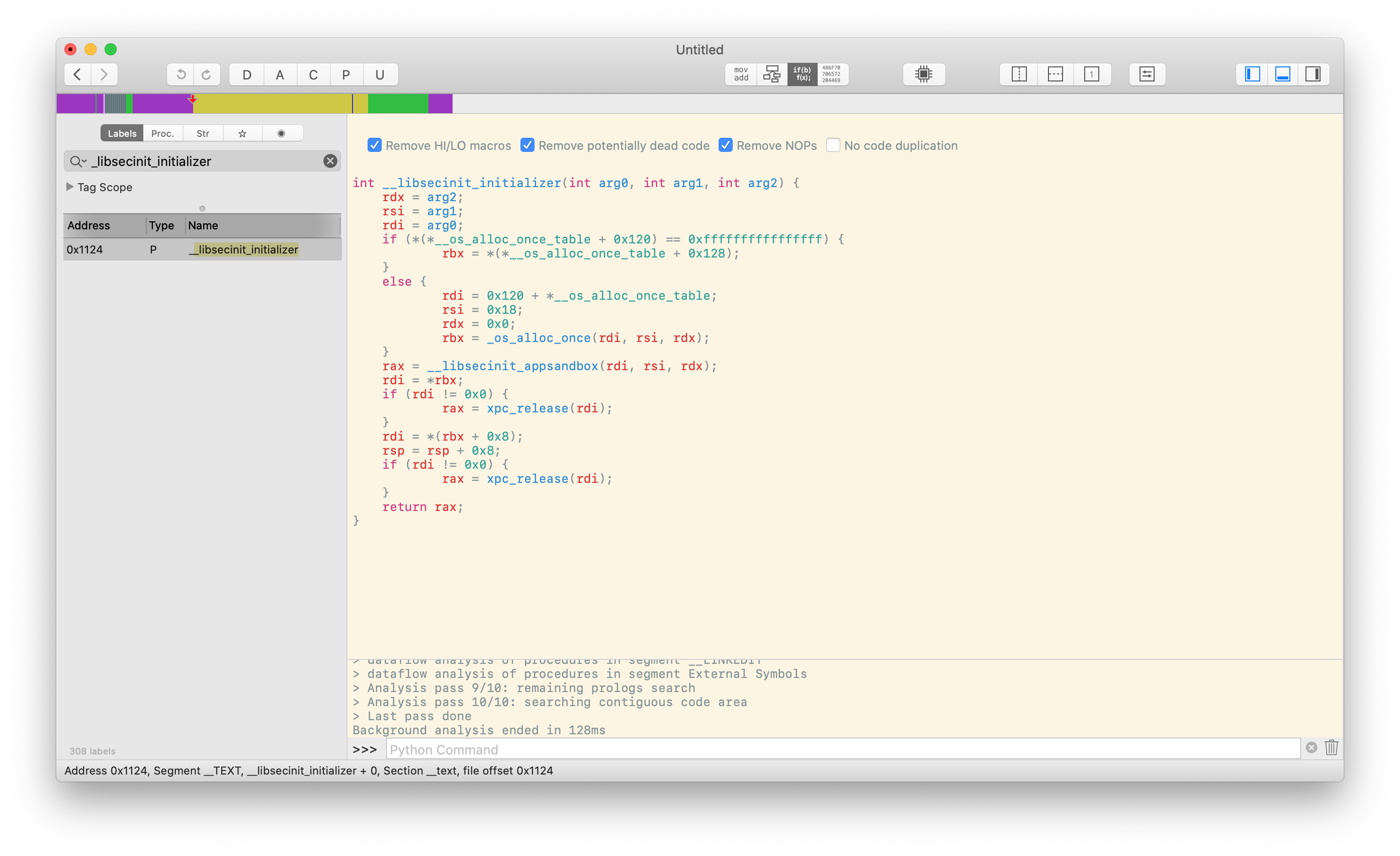
Experienced Mac developers already know the answer: Apple checks for the presence of the com.apple.security.app-sandbox entitlement in all apps submitted for review, and its mere existence magically places the process in a sandbox by the time code execution reaches main. But the process isn’t actually magic at all: it’s performed by a function called _libsecinit_initializer inside the library libsystem_secinit.dylib, also located at /usr/lib/system:

libsystem_secinit.dylib opened in Hopper, showing _libsecinit_initializer

_libsecinit_initializer calls _libsecinit_appsandbox, which (among other things) copies the current process’s entitlements, checks for the com.apple.security.app-sandbox in them, and calls __sandbox_ms after consulting with the secinitd daemon. So this answers where the sandbox is applied, but doesn’t explain how: for that, we need to look inside libSystem.

libSystem is the standard C library on macOS (see intro(3) for more details). While it vends system APIs, by itself it does very little; instead, it provides this functionality by re-exporting all the libraries inside of /usr/lib/system:

$ otool -L /usr/lib/libSystem.dylib
/usr/lib/libSystem.dylib:
	/usr/lib/libSystem.B.dylib (compatibility version 1.0.0, current version 1281.100.1)
	/usr/lib/system/libcache.dylib (compatibility version 1.0.0, current version 83.0.0)
	/usr/lib/system/libcommonCrypto.dylib (compatibility version 1.0.0, current version 60165.120.1)
	/usr/lib/system/libcompiler_rt.dylib (compatibility version 1.0.0, current version 101.2.0)
	/usr/lib/system/libcopyfile.dylib (compatibility version 1.0.0, current version 1.0.0)
	/usr/lib/system/libcorecrypto.dylib (compatibility version 1.0.0, current version 866.120.3)
	/usr/lib/system/libdispatch.dylib (compatibility version 1.0.0, current version 1173.100.2)
	/usr/lib/system/libdyld.dylib (compatibility version 1.0.0, current version 750.5.0)
	/usr/lib/system/libkeymgr.dylib (compatibility version 1.0.0, current version 30.0.0)
	/usr/lib/system/liblaunch.dylib (compatibility version 1.0.0, current version 1738.120.8)
	/usr/lib/system/libmacho.dylib (compatibility version 1.0.0, current version 959.0.1)
	/usr/lib/system/libquarantine.dylib (compatibility version 1.0.0, current version 110.40.3)
	/usr/lib/system/libremovefile.dylib (compatibility version 1.0.0, current version 48.0.0)
	/usr/lib/system/libsystem_asl.dylib (compatibility version 1.0.0, current version 377.60.2)
	/usr/lib/system/libsystem_blocks.dylib (compatibility version 1.0.0, current version 74.0.0)
	/usr/lib/system/libsystem_c.dylib (compatibility version 1.0.0, current version 1353.100.2)
	/usr/lib/system/libsystem_configuration.dylib (compatibility version 1.0.0, current version 1061.120.2)
	/usr/lib/system/libsystem_coreservices.dylib (compatibility version 1.0.0, current version 114.0.0)
	/usr/lib/system/libsystem_darwin.dylib (compatibility version 1.0.0, current version 1.0.0)
	/usr/lib/system/libsystem_dnssd.dylib (compatibility version 1.0.0, current version 1096.100.3)
	/usr/lib/system/libsystem_featureflags.dylib (compatibility version 1.0.0, current version 17.0.0)
	/usr/lib/system/libsystem_info.dylib (compatibility version 1.0.0, current version 1.0.0)
	/usr/lib/system/libsystem_m.dylib (compatibility version 1.0.0, current version 3178.0.0)
	/usr/lib/system/libsystem_malloc.dylib (compatibility version 1.0.0, current version 283.100.6)
	/usr/lib/system/libsystem_networkextension.dylib (compatibility version 1.0.0, current version 1.0.0)
	/usr/lib/system/libsystem_notify.dylib (compatibility version 1.0.0, current version 241.100.2)
	/usr/lib/system/libsystem_sandbox.dylib (compatibility version 1.0.0, current version 1217.120.7)
	/usr/lib/system/libsystem_secinit.dylib (compatibility version 1.0.0, current version 62.100.2)
	/usr/lib/system/libsystem_kernel.dylib (compatibility version 1.0.0, current version 6153.121.1)
	/usr/lib/system/libsystem_platform.dylib (compatibility version 1.0.0, current version 220.100.1)
	/usr/lib/system/libsystem_pthread.dylib (compatibility version 1.0.0, current version 416.100.3)
	/usr/lib/system/libsystem_symptoms.dylib (compatibility version 1.0.0, current version 1.0.0)
	/usr/lib/system/libsystem_trace.dylib (compatibility version 1.0.0, current version 1147.120.0)
	/usr/lib/system/libunwind.dylib (compatibility version 1.0.0, current version 35.4.0)
	/usr/lib/system/libxpc.dylib (compatibility version 1.0.0, current version 1738.120.8)

Like most standard libraries, the compiler will automatically (and dynamically) link it into your programs even if you don’t specify it explicitly:

$ echo "int main(void) {}" | clang -x c - && otool -L a.out
a.out:
	/usr/lib/libSystem.B.dylib (compatibility version 1.0.0, current version 1281.100.1)

When a program is started, the dynamic linker will ensure that libSystem’s initializer functions are called, which includes the function that calls _libsecinit_initializer. As dyld ensures that libSystem’s initializer is run prior to handing off control to the app’s code, this ensures that any application that links against it will have sandboxing applied to it before it can execute its own code.

Bypassing sandbox initialization

As you may have guessed, this process is problematic. In fact, there are actually multiple issues, each of which allows an application with the com.apple.security.app-sandbox entitlement to bypass the sandbox initialization process.

dyld interposing

dyld interposing is a neat little feature that allows applications to tell the dynamic linker to “interpose” an exported function and replace it with another by including a special __DATA,__interpose section in their binary. Since _libsecinit_appsandbox is exported by libsystem_secinit.dylib so that it can be called by libSystem, we can try interposing it with a function that does nothing:

void _libsecinit_initializer(void);

void overriden__libsecinit_initializer(void) {
}

__attribute__((used, section("__DATA,__interpose"))) static struct {
	void (*overriden__libsecinit_initializer)(void);
	void (*_libsecinit_initializer)(void);
} _libsecinit_initializer_interpose = {overriden__libsecinit_initializer, _libsecinit_initializer};

When interposing was first introduced, it would only be applied when a library was preloaded into a process using the DYLD_INSERT_LIBRARIES environment variable. However, on newer OSes this functionality has been improved to work for any linked libraries as well, which means all we have to do to take advantage of this feature is put this code in a framework and link against it in our main app. Since interposing is applied before image initializers we will be able to prevent the real _libsecinit_initializer from running and thus __sandbox_ms being called. Success!

As this technique allowed an application that appears to be sandboxed (possessing the com.apple.security.app-sandbox entitlement) to interfere with its own initialization process, I reported this issue to Apple on January 20th and explained that such an app might be able to be submitted to the App Store and get past app review. On March 19th, I received a reply from Apple stating that App Store applications are prevented from being interposed, which was news to me. Apparently right after I submitted my original report Apple added an additional check in dyld, one so new that it’s still not in any public sources:

Hopper disassembly of dyld::_main, focused on code inlined from configureProcessRestrictions, highlighting the existence of a new AMFI flag

While the dyld source for configureProcessRestrictions only shows five flags being read from amfi_check_dyld_policy_self, the binary clearly checks a sixth: 1 << 6. (configureProcessRestrictions has been inlined here into its caller, dyld::_main.) I still do not know what its real name is but it’s used later in dyld::_main to control whether interposing is allowed. This means we can’t interpose _libsecinit_initializer–we’ll have to prevent it from from being called instead.

Update, 6/10/19

With the code to dyld released, we can see that the flag is called AMFI_DYLD_OUTPUT_ALLOW_LIBRARY_INTERPOSING. Interestingly, there are some applications that are exempted from the check in AMFI’s macos_dyld_policy_library_interposing, meaning that they are still susceptible to this issue: Hopper disassembly listing showing the bundle identifiers of exemptions

Static linking

Linking against libSystem causes dyld to call _libsecinit_initializer, so it’s logical to try to avoid having anything to do with dyld at all. This is fairly strange to do on macOS, as it does not have a stable syscall interface, but with the right set of compiler flags we can make a fully static binary that needs to no additional support to run.

Fun fact

We know that this must be possible because Go used to do it, until they got tired of new versions of macOS breaking everything and gave up trying to make system calls themselves. Go programs as of Go 1.11 now use libSystem.

Unfortunately, macOS does not ship with a crt0.o that we can statically link, so using just the -static flag does not work:

$ echo "int main() {}" | clang -x c -static -
ld: library not found for -lcrt0.o
clang: error: linker command failed with exit code 1 (use -v to see invocation

But if we’re jettisoning the standard library, we might as well get rid of the C runtime as well, defining our own start symbol:

$ clang -x c -static -nostdlib -
void start(void) __asm__("start");

void start(void) {
        while (1);
}
$ otool -L a.out
a.out:
$ a.out
^C
$

No dyld means no code that can arrange a call _libsecinit_initializer, so we’re free to do whatever we like without restriction. However, not having libSystem and dyld to support us means we cannot use dynamic linking and need to make raw system calls for everything, which is a bit of a pain. One way to resolve this would be to keep the unsandboxed code short–just a couple of calls to acquire a handle on restricted resources–then stash that away before execveing a new dynamically linked binary, restoring the process to a sane state. When responding to Apple with a new sample program based on this idea, I simply opened a file descriptor for the home directory (you can locate the directory without any syscalls by pulling the current username from the apple array on the stack during process initialization) and then once that succeeds executed an inner binary. The new file descriptor was preserved for across the execve call and became accessible to the inner application, even though that one was dynamically linked and had the sandbox applied to it as usual.

Dynamically linking against nothing

Statically linking works, but it’s somewhat inconvenient: either you perform the work of the dynamic linker yourself if you want to do anything non-trivial, or you execve a new binary. It’s actually worse than that though, because there’s an additional complication: executing a new binary causes a hook in the AppleMobileFileIntegrity kernel extension to run, and when System Integrity Protection is enabled this hook (for reasons unknown to me) checks to see if the process has a valid dyld signature:

Hopper disassembly of the MAC hook _cred_label_update_execve, showing the check for CS_DYLD_PLATFORM

The strange pointer arithmetic and mask is really a check for CS_DYLD_PLATFORM, which the comment helpfully states is set if the “dyld used to load this is a platform binary”. Since we didn’t use dyld at all, this isn’t set and we can’t execve. While malicious applications willing to do a bit of work can still “fix” their process without blowing it away, I figured I might as well figure out a way to construct a new one.

Since the hook wants us to have a valid dyld, we should probably just link dynamically. As we mentioned before, this makes the compiler automatically bring in libSystem (and with it, the libsystem_secinit.dylib initializers), which we don’t want. I couldn’t find out a way to get the linker to not automatically insert the load command for libSystem, but we can get essentially the same result by modifying the binary ourselves afterwards to delete that specific command. I found a Mach-O editor online that was slightly crashy but worked well enough for this purpose. Unfortunately, removing the load command isn’t enough: dyld specifically checks for libSystem “glue” before running our code, and as we don’t have a libSystem at all it aborts execution.

However, there’s one way around this: if we use a LC_UNIXTHREAD rather than a LC_MAIN load command, dyld will pass execution to us without checking for libSystem (as it thinks we have linked against crt1.o instead). Both load commands specify the entrypoint of the executable, but LC_MAIN is the “new” way of doing so. LC_UNIXTHREAD specifies the entire thread state, but LC_MAIN only points to the “entry offset” where code execution should begin–the linker sets this to where main is, unless you’ve used -e to change it. The compiler uses it for dynamically linked binaries because it expects libSystem to set all the thread state prior to calling the entrypoint function.

$ echo "int main(void) {}" | clang -x c -
$ nm a.out
0000000100000000 T __mh_execute_header
0000000100000fb0 T _main
                 U dyld_stub_binder
$ otool -l a.out | grep -A 3 "LC_MAIN"
       cmd LC_MAIN
   cmdsize 24
  entryoff 4016
 stacksize 0
$ clang -x c -static -nostdlib -
void start(void) __asm__("start");

void start(void) {
        while (1);
}
$ nm a.out
0000000100000000 A __mh_execute_header
0000000100000fb0 T start
$ otool -l a.out | grep -A 11 "LC_UNIXTHREAD"
        cmd LC_UNIXTHREAD
    cmdsize 184
     flavor x86_THREAD_STATE64
      count x86_THREAD_STATE64_COUNT
   rax  0x0000000000000000 rbx 0x0000000000000000 rcx  0x0000000000000000
   rdx  0x0000000000000000 rdi 0x0000000000000000 rsi  0x0000000000000000
   rbp  0x0000000000000000 rsp 0x0000000000000000 r8   0x0000000000000000
    r9  0x0000000000000000 r10 0x0000000000000000 r11  0x0000000000000000
   r12  0x0000000000000000 r13 0x0000000000000000 r14  0x0000000000000000
   r15  0x0000000000000000 rip 0x0000000100000fb0
rflags  0x0000000000000000 cs  0x0000000000000000 fs   0x0000000000000000
    gs  0x0000000000000000

The linker flag -no_new_main tells the linker to use LC_UNIXTHREAD instead of LC_MAIN for dynamically linked executables, but it has been silently ignored for years (apparently, this has something to do with rdar://problem/39514191). This means to generate the binary we’ll have to go back in time and download an old toolchain that accepts this flag. The one that Xcode 5.1.1 ships with does nicely.

Fun fact

I have a friend who refers to Xcode 5.1.1 as “the good toolchain” because it supports everything.

Once we use that to create a binary, upon running it we have a valid dyld in our process and unsandboxed code execution so we can just continue as we did in the statically linked case, as this will satisfy AMFI’s checks.

Final thoughts

I submitted the final example to Apple just before the initial 90-day disclosure deadline of April 20th, and when they requested an extension to work on the new information I provided them with an additional 30 days. Apple says it has made changes in the Mac App Store to address this issue during that period, and although I don’t really have a good way to check if or how the change works I would guess that it simply looks for and rejects applications using techniques similar to the ones described above.

dyld is a fairly complicated system and it has many useful features, but these features along with the fact that it runs in-process makes it nontrivial to protect against control flow subversion early in the initialization process. Applying sandboxing in the kernel itself, as iOS does, is probably a better solution in the long run, as the bugs I found here were fairly straightforwards and exploited logic errors rather than undefined behavior in the language. Perhaps we will see such a change in the future.

The code I submitted to Apple to demonstrate the issue is available online.

Timeline
  • 1/20/20: Initial disclosure of library interposing bypass to Apple
  • 1/22/20: Acknowledgment of submission by Apple
  • 1/28/20: Request for status update after recent updates did not resolve the issue
  • 1/29/20: Response from Apple that they were still investigating
  • 2/26/20: Request for update and affirmation of 90-day disclosure timeline
  • 2/28:20: Response from Apple that they were still looking into the issue
  • 3/19:20: Email from Apple stating that Mac App Store applications cannot be interposed
  • 3/20/20: Submission of statically linked application to avoid interposing
  • 3/23/20: Acknowledgement of the new information
  • 4/14/20: Submission of dynamically linked application to bypass execve limitation
  • 4/17/20: Request for more time from Apple to analyze the new submission
  • 4/19/20: Disclosure deadline extended by 30 days to May 20th
  • 4/20/20: Confirmation and appreciation for the extension
  • 5/13/20: Request for an update on progress
  • 5/15/20: Confirmation that a change had been implemented in Mac App Store
  • 5/20/20: Expiration of discretionary disclosure extension
https://saagarjha.com/blog/2020/05/20/mac-app-store-sandbox-escape
Why we at $FAMOUS_COMPANY Switched to $HYPED_TECHNOLOGY
When $FAMOUS_COMPANY launched in 2010, it ran on a single server in $TECHBRO_FOUNDER’s garage. Since then, we’ve experienced explosive VC-funded growth and today we have hundreds of millions of daily active users (DAUs) from all around the globe accessing our products from our mobile apps and on $famouscompany.com. We’ve since made a couple of panic-induced changes to our backend to manage our technical debt (usually right after a high-profile outage) to keep our servers from keeling over. Our existing technology stack has served us well for all these years, but as we seek to grow further it’s clear that a complete rewrite of our application is something which will somehow prevent us from losing two billion dollars a year on customer acquisition.
Show full content

When $FAMOUS_COMPANY launched in 2010, it ran on a single server in $TECHBRO_FOUNDER’s garage. Since then, we’ve experienced explosive VC-funded growth and today we have hundreds of millions of daily active users (DAUs) from all around the globe accessing our products from our mobile apps and on $famouscompany.com. We’ve since made a couple of panic-induced changes to our backend to manage our technical debt (usually right after a high-profile outage) to keep our servers from keeling over. Our existing technology stack has served us well for all these years, but as we seek to grow further it’s clear that a complete rewrite of our application is something which will somehow prevent us from losing two billion dollars a year on customer acquisition.

Why switch?

As we’ve mentioned in previous blog posts, the $FAMOUS_COMPANY backend has historically been developed in $UNREMARKABLE_LANGUAGE and architected on top of $PRACTICAL_OPEN_SOURCE_FRAMEWORK. To suit our unique needs, we designed and open-sourced $AN_ENGINEER_TOOK_A_MYTHOLOGY_CLASS, a highly-available, just-in-time compiler for $UNREMARKABLE_LANGUAGE. Even with our custom runtime, however, we eventually began seeing sporadic spikes in our 99th percentile latency statistics, which grew ever more pronounced as we scaled up to handle our increasing DAU count. Luckily, all of our software is designed from the ground up for introspectability, and using some BPF scripts we copied from Brendan Gregg’s website our in-house profiling tools $FAMOUS_COMPANY engineers determined that the performance bottlenecks were a result of time spent in the garbage collector.

Initially, we tried messing with some garbage collector parameters we didn’t really understand, but to our surprise that didn’t magically solve our problems so instead we disabled garbage collection altogether. This increased our memory usage, but our automatic on-demand scaler handled this for us, as the graph below shows:

The inevitable conclusion of scalable architecture

Ultimately, however, our decision to switch was driven by our difficulty in hiring new talent for $UNREMARKABLE_LANGUAGE, despite it being taught in dozens of universities across the United States. Our blog posts on $PRACTICAL_OPEN_SOURCE_FRAMEWORK seemed to get fewer upvotes when posted on Reddit as well, cementing our conviction that our technology stack was now legacy code.

Pivoting to a new stack

We knew we needed to find something that could keep up with us at $FAMOUS_COMPANY scale. We evaluated a number of promising alternatives that we selected and ranked based on the how many bullet points they had on their websites, how often they’d appear on the front page of Hacker News, and a spreadsheet of important language characteristics (performance, efficiency, community, ease-of-use) that we had people in the office fill out.

Fun fact

As our spreadsheet met strong statistical guarantees of randomness, we were able to reuse it to replace our application’s CSPRNG.

After careful consideration, we settled on rearchitecting our platform to use $FLASHY_LANGUAGE and $HYPED_TECHNOLOGY. Not only is $FLASHY_LANGUAGE popular according to the Stack Overflow developer survey, it’s also cross platform; we’re using it to reimplement our mobile apps as well. Rewriting our core infrastructure was fairly straightforward: as we have more engineers than we could possibly ever need or even know what to do with, we simply put a freeze on handling bug reports and shifted our effort to $HYPED_TECHNOLOGY instead. We originally had some trouble with adapting to some of $FLASHY_LANGUAGE’s quirks, and ran into a couple of bugs with $HYPED_TECHNOLOGY, but overall their powerful new features let us remove some of the complexity that our previous solution had to handle.

Deploying the changes without downtime required some careful planning, but this was also not too difficult: we just hardcoded the status page to not update whenever we pushed new changes, keeping users guessing if our service was up or not. Managing incremental rollout was key: we aggressively A/B tested the new code. Our internal studies showed that gaslighting users by showing them a completely new interface once in a while and then switching back to the old one the next time they loaded a page increases user engagement, so we made sure to implement such a system based on a Medium article we found that had something to do with multi-armed bandits.

With our rewrite now complete and rolled out to all of our customers, we think the effort has been a massive success for us and our team. We have measured our performance and you can see a summary of the results below:

Stonks

Every metric that matters to us has increased substantially from the rewrite, and we even identified some that were no longer relevant to us, such as number of bugs, user frustration, and maintenance cost. Today we are making some of the code that we can afford to open source available on our GitHub page. It is useless by itself and is heavily tied to our infrastructure, but you can star it to make us seem more relevant.

Final thoughts

It’s often said that completely rewriting software is fraught with peril, but we at $FAMOUS_COMPANY like to take big bets, and it’s clear that this one has paid off handsomely. While we focused on our backend changes in this blog post, as we mentioned before we are using $FLASHY_LANGUAGE in our mobile apps as well, since we don’t have the resources to write native applications for each platform. Unfortunately to increase lock-in these rewrites also mean we will be deprecating third-party API access to our services. We know some of our users relied on these interfaces for accessibility reasons, but we at $FAMOUS_COMPANY are dedicated to improving our services for those with disabilities as long as you aren’t using any sort of assistive technologies, which no longer work at all with our apps.

We hope that you internalize our company’s anecdote as some sort of ground truth and show it to your company’s CTO so they too can consider redesigning their architecture like we have done. We know you’ll ignore the fact that you’re not us and we have enough engineers and resources to do whatever we like, but the decision will ruin your startup so it’s not like we’ll see your blog posts about your experience with $HYPED_TECHNOLOGY anytime soon. If you’re not in a position to influence what your company uses, you can still bring it up for point-scoring the next time a language war comes up.

If you’re reading this and are interested in $HYPED_TECHNOLOGY like we are, we are hiring! Be sure to check out our jobs page, where there will be zero positions related to $FLASHY_LANGUAGE.

https://saagarjha.com/blog/2020/05/10/why-we-at-famous-company-switched-to-hyped-technology
Debugging Python Operator Precedence With MacsBug
I’m a Capture the Flag (CTF) player with Shellphish, and last weekend our team participated in PlaidCTF 2020, an event organized by the Plaid Parliament of Pwning (PPP). As a pre-qualifier for the DEF CON CTF 2020, it’s historically been a fairly challenging competition–this year our team only managed to place 17th, slightly below our usual performance, as many of our team members were preoccupied with inconveniently-placed project deadlines. However, the rest of us had a great time working on the challenges; I helped solve two, golf.so and The Watness 2. golf.so was released early in the CTF and asked teams to create small shared libraries that would call execve("/bin/sh", ["/bin/sh"], ...) when LD_PRELOADed in to /bin/true; a number of us worked together to solve this fairly quickly, getting under 194 bytes (the requirement for the full 500 points) with some aggressive but straightforward segment overlapping, careful trimming of “required” but leniently checked fields, and stuffing of code into the remaining header bytes that were required but could be set to fairly arbitrary values. Some teams golfed it further to 136 bytes, although I’m not sure how (or why, beside bragging rights) they did so. The Watness 2 took longer and in my opinion was a bit more interesting, and this is the one we’ll be talking about here.
Show full content

I’m a Capture the Flag (CTF) player with Shellphish, and last weekend our team participated in PlaidCTF 2020, an event organized by the Plaid Parliament of Pwning (PPP). As a pre-qualifier for the DEF CON CTF 2020, it’s historically been a fairly challenging competition–this year our team only managed to place 17th, slightly below our usual performance, as many of our team members were preoccupied with inconveniently-placed project deadlines. However, the rest of us had a great time working on the challenges; I helped solve two, golf.so and The Watness 2. golf.so was released early in the CTF and asked teams to create small shared libraries that would call execve("/bin/sh", ["/bin/sh"], ...) when LD_PRELOADed in to /bin/true; a number of us worked together to solve this fairly quickly, getting under 194 bytes (the requirement for the full 500 points) with some aggressive but straightforward segment overlapping, careful trimming of “required” but leniently checked fields, and stuffing of code into the remaining header bytes that were required but could be set to fairly arbitrary values. Some teams golfed it further to 136 bytes, although I’m not sure how (or why, beside bragging rights) they did so. The Watness 2 took longer and in my opinion was a bit more interesting, and this is the one we’ll be talking about here.

Note

The description below has been written up after the fact by trawling through chat logs and my recollection, and might not be entirely accurate. To preserve your sanity, screenshots and code snippets were re-extracted and cleaned after the CTF and as such are not representative of what is colloquially referred to as “CTF quality”. (I think I might have lost mine after revisiting some of it.)

Forensics

CTF challenges usually come in a couple of varieties: among others there’s pwn, which often means that there’s a vulnerable binary running somewhere that you need to exploit to (normally) pop a shell and grab a flag, web, which often means there’s something wrong with a website or a database, crypto, where your RSA exponent is 3, or reversing, which means you have a black box with a flag hidden somewhere in it. As The Watness 2 was a reversing challenge, we were given the challenge title, a protracted snippet of prose that was entirely useless by PPP’s own admission, and .tar.gz that contained the thing we needed to reverse. This time we had one additional clue: last year, PlaidCTF ran a challenge called The .Wat ness, a WebAssembly-based implementation of a puzzle game inspired by The Witness, and we knew to expect something related this year.

Michele from our team took the first look at the challenge, and I joined in soon afterwards. Opening the archive, we hit our first clue: a single file named watness_2.sit–a StuffIt archive. It’s an obscure archive format but it’s instantly recognizable to anyone who’s done anything with classic Mac OS. The Unarchiver made quick work of expanding it, and we were left with one more file: game_cleaned.rc1, which Michele identified as a HyperCard stack. Before running a program, it’s often a good idea to poke around it to get some insight into what it does, so I downloaded a little Swift app called HyperCardPreview to take a peek inside. This let us take a look at the HyperTalk code for the stack, as well as its cards and resources. The code clearly implemented a game similar to The Witness in HyperCard, and it didn’t take long for us to zero in on the part of the code that was relevant to us:

on checkSolution
  global puzzle_id,path,constraints,flag_1,flag_2,flag_3
  watnesssolver constraints,path
  put the result into success
  if success = "true" then
    if puzzle_id = 1 then
      decoder path,"clrtffxpry"
      put the result into flag_1
    end if
    if puzzle_id = 2 then
      decoder path,"nyghq7xksg"
      put the result into flag_2
    end if
    if puzzle_id = 3 then
      decoder path,"ppyyvn}1{7"
      put the result into flag_3
    end if
  else
    send opencard to this cd
  end if
end checkSolution

watnesssolver didn’t show up anywhere else in the HyperTalk code, but looking into the stack’s resources, we found a number of XCMDs, one which had the same label:

The resources contained in the HyperCard stack, including some BITs, STR#, PICT, and XCMD resources, one of which is watnesssolver

A quick search revealed that XCMD was the four-letter type code for some sort of executable plugin, so we tried loading it into a disassembler as a PowerPC blob, thinking to match the architecture that Apple was using at the time. That didn’t really work out, so on a hunch we tried again with the Motorola 68k loader. This proved to be much more sucessful: conveniently, pointing the disassembler at the very top of the file caused it to fall apart, revealing that the XCMD was largely position-independent and started code execution right from the top of the file:

The WatnessSolver XKMD loaded into Ghidra, showing automatic code detection and function recovery

Reversing

With CTF challenges, we’ve often had to cobble together toolchains to work with strange, obscure, or old platforms, so getting something that would run the stack was not too challenging: we already knew about SheepShaver, and a quick search gave us a prebuilt “sheepvm” that we could download and run immediately. By this time Michele had drifted off to bed (this was a 48 hour CTF, after all, and it was past 2 AM in Italy) but the promise of a challenge based on The Witness was enough to lure in Eric–in addition to his excellent blob reversing skills, he was one of the few team members who had actually played the game. He instantly recognized the screenshot I sent him from SheepShaver:

Screenshot of The Watness 2 HyperCard stack running in SheepShaver, showing a striking similarity to the setting of The Witness

I hastened to send him a copy of the files I had used to run the emulator, but we hit upon a snag: the resource forks from before, which were necessary to run the stack, were handed transparently by my filesystem on my Mac, but on Eric’s Linux machine they would literally fall apart and become unusable. After fiddling a bit with sending DMGs back and forth, we realized that the HyperCard sheepvm actually had a copy of StuffIt expander on it, so Eric could just extract it inside the VM and keep the resource forks intact. With Eric busy playing the game and exploring its puzzles, I roped in Paul with the incentive of the 68k binary blob (we have somewhat strange interests) and got to reversing the XCMD. Paul quickly figured out that the XCMD was called with a pointer to some sort of context struct, the layout of which was not too difficult to find online; the remaining interface between the extension and any code outside of it was matched up to a file called HyperXCMD.h that we spotted online, showing that the calls were to EvalExpr and ZeroToPas (yes, those are Pascal functions, and yes, the last one converts a null-terminated string to a Pascal-style one). With that out of the way, we got to reversing the code inside the XCMD itself, which was organized a short list of named functions: ENTRYPOINT, BUILDAUTOMATON, GETNEIGHBORS, CHOOSEEMPTY, CHOOSERED, CHOOSEGREEN, CHOOSEBLUE, STEPAUTOMATON, ISRED, INITIALIZENODES, PERFORMMOVE, and SOLVER.

Fun fact

The function names were included in the binary as strings, placed just after the function itself. Initially we had labeled the functions based on the name that came before it, making our reversing a bit harder as we tried to figure out why ENTRYPOINT did not seem to be the entry point and why PERFORMMOVE was zeroing out internal buffers. For us, this was not so fun, but we realized our mistake fairly early.

As we were reversing the functions, Eric found three puzzles and one final gate barred by three locks–fairly straightforwards, if not for the clearly impossible puzzles:

A puzzle which would be impossible to solve; the cursor is resting on a spot where no valid path can be drawn

In The Witness, Eric explained, you can run into puzzles where the goal is to separate all “unlike” things from each other by drawing a path from start to finish on the grid. In the challenge’s puzzles, this was provably impossible, confirming our suspicions that there were other, hidden rules involved. Looking at PERFORMMOVE showed that the game wanted a path that always touched a red square–the only problem was that such a path was clearly impossible as well! Every time the function was run, however, it would call the STEPAUTOMATON function, so it was pretty clear what was going on: the board shown was simply the initial state to some sort of cellular automaton, and it would invisibly evolve as we moved along the board. We decided we needed to simulate the board outside of the game and try to find the path there. The CHOOSE* functions held the transformation rules, and we translated them as literally as possible to Python for our simulation, with Paul doing the first two cases and me doing the latter two:

if cur == Color.EMPTY:
    d0 = gn == 0
    d1 = bn == 0
    if (d0 and d1) == 0:
        if bn - gn < 0:
            out = Color.new(2)
        else:
            out = Color.new(3)
    else:
        out = Color.new(0)
elif cur == Color.RED:
    d0 = rn != 2
    d1 = rn != 3
    if (d0 and d1) == 0:
        d0 = bn == 0
        d1 = gn == 0
        if (d0 or d1) == 0:
            out = Color.new(1)
        else:
            out = Color.new(0)
    else:
        out = Color.new(0)
elif cur == Color.GREEN:
    if 4 - rn >= 0:
        if 4 - bn >= 0:
            d0 = rn == 2
            d1 = rn == 3
            if d0 or d1 == 0:
                out = Color.new(2)
            else:
                out = Color.new(1)
        else:
            out = Color.new(3)
    else:
        out = Color.new(0)
elif cur == Color.BLUE:
    if 4 - rn >= 0:
        if 4 - gn >= 0:
            d0 = rn == 2
            d1 = rn == 3
            if d0 or d1 == 0:
                out = Color.new(3)
            else:
                out = Color.new(1)
        else:
            out = Color.new(2)
    else:
        out = Color.new(0)

All that remained was to extract the three boards from the game. I dug around a bit in the card scripts to try to find them, but Paul managed to grab them before I could by running strings on the file (there were a couple of duplicates):

$ strings game_cleaned.rc1 | grep -E 'put "[rgb ]+" into constraints' | sort -u
put "rbr  bbggrgrggb   bggbb b  b bbrbbgg gbrrbgrbbb g" into constraints
put "rbrr rgb rb  r brgrbrgb  grrgbbg grg bgrg  bbgrbg" into constraints
put "rrbrb rg g  bgrbgggr ggrgr gr rg brr  b  bggrbgbb" into constraints
Debugging

While we had tried our best to transcribe the automaton’s rules accurately, we found that the board in our simulation would run out of red squares within a couple of steps, making it impassible. Clearly there was something wrong with our Python script (you may have found it already), but we couldn’t see anything obviously incorrect so we set out to debug the issue by comparing our results with the actual program’s. As the XCMD had few external dependencies, this process was made somewhat more straightforward.

While Paul and Eric split off to try to emulate it in Unicorn, I sat down to try to get a debugger on the process using MacsBug.

Note

I am obligated to mention that MacsBug stands for “Motorola Advanced Computer Systems Debugger”, not “Macs debugger”.

I managed to find a copy of MacsBug and install it in SheepSaver, but had a hard time figuring out how to get it to trigger: on real Macs you’d press a key (the “programmer key”) that would send a non-maskable interrupt, or the Command and Power buttons, but neither was easy to figure out how to do in the emulator. I eventually found a forum post that contained SDL2 Cocoa keybindings, which I tweaked a little to remap an unused key to power, but this just caused SheepSaver to crash. The emulator has a number of flags that you can pass it in from the command line with hopeful names like --ignoresegv and --ignoreillegal, but neither seemed to work so I gave up on using SheepSaver. Meanwhile, while I wasn’t directly involved in what they were doing, I knew Eric and Paul had a harness up and were working on some unimplemented opcode, but they ran into emulation fidelity issues that prevented accurate simulation. With both of them on that, I figured it was time to try something else, so I found a guide on installing Mac OS 9 in QEMU and decided to go through with that.

First, I had to get through the setup screen, which asked a lot of personal questions and then threw you into this screen:

Mac OS setup screen in QEMU, on the "Tell me more about the internet" screen

With a bit of fiddling around I got MacsBug installed:

Mac OS boot screen in QEMU, showing that the debugger has been installed

Using the QEMU monitor (-monitor stdio), it was easy to deliver an NMI to Mac OS and get it to successfully drop into MacsBug. It took a little while to get used to it, but after using MacsBug for a bit it seems quite nice; it even has a number of nice GUI features like being able to click on addresses! Initially I used the F (Find) command to find the function names in memory (since they are included in the binary) but ran into some snags. As Mac OS has no memory segmentation, I hit an issue similar to the one you may have run into when you grep the output of ps: you find your query itself! In this case, the search was probing through the entire address space and running into the query string in the debugger’s memory. Looking through the manual, I found the HZ (Heap Zone) command, which let me limit the space I needed to search, and after figuring out that the XCMD was dynamically loaded I managed to find the code and set a breakpoint in it using a raw address. However, I noticed that MacsBug had “symbolicated” the disassembly (IL, Disassemble From Address), so I pushed my luck and tried a straightforward BR (Breakpoint) with a function name. Apparently the XCMD had enough information to make this work, and from there working with the module was quite easy.

MacsBug in QEMU, with a breakpoint set on `ENTRYPOINT` and the instruction listing confirming that the code matches our XCMD

Paul and Eric abandoned the code they were working on as I got them up to speed on how to use MacsBug, and Paul quickly found the discrepancy between our script and the XCMD. Comparing square by square, the bug in the Python code was obvious: I had forgotten a pair of parentheses when creating the transition rules for green and blue squares, and our d0 or d1 == 0 statements were being interpreted as d0 or (d1 == 0) rather than (d0 or d1) == 0 as was intended. (In my defense, the table in Python’s documentation is in the opposite order from what I’d expect…).

With the fix in place, Paul finished writing a DFS solver for the correct solutions, and we all watched as Eric shared his screen and clicked his way through the puzzles. Our efforts were rewarded with the flag, pctf{l1ke_a_lost_ag3_fkz7bqxp}.

HyperCard running on QEMU showing the flag for The Watness 2

Aside

By the way, here is what the evolution of puzzle boards looks like dynamically, along with the correct path we found through them:

Animation of the three puzzle boards, with the path superimposed on them

I am curious if the cellular automata are Turing complete…

https://saagarjha.com/blog/2020/04/22/debugging-python-operator-precedence-with-macsbug
Designing a Better `strcpy`
Like them or not, null-terminated strings are essential to C, and working with them is necessary in all but the most trivial programs. While C-style strings are a fundamental part of using the language, manipulating them is a common source of security bugs and lost performance. One of the most common operations is copying a string from one buffer to another, and there are a variety of string functions that claim to do this in C. Anecdotally, however, there is much confusion about what they actually do, and many people desire a string copying function with the following properties:
Show full content

Like them or not, null-terminated strings are essential to C, and working with them is necessary in all but the most trivial programs. While C-style strings are a fundamental part of using the language, manipulating them is a common source of security bugs and lost performance. One of the most common operations is copying a string from one buffer to another, and there are a variety of string functions that claim to do this in C. Anecdotally, however, there is much confusion about what they actually do, and many people desire a string copying function with the following properties:

  1. The function should accept a null-terminated source string, a destination buffer, and an integer representing the size of the destination buffer.
  2. Upon return the function should ensure that the destination buffer points to a null-terminated string containing a prefix of the source string when possible (specifically, when the destination buffer has a non-zero size) to avoid issues in the future with unterminated strings. (While string truncation has its own issues, it is often a fairly reasonable fallback.)
  3. The function should indicate how many characters it copied from the source, as well as indicate if an overflow occurred. (This allows for dealing with the overflow, if desired.)
  4. The function should be efficient, and it should not read or write memory that it does not have to. These go partially hand-in-hand: the function should run in a single pass, not write to the destination buffer past the NUL byte it places, or read characters from the source string once it’s determined that it has filled the destination buffer. Ideally, the implementation would be vectorizable (relaxing some of the previous constraints slightly to within platform alignment guarantees).
  5. The function should be standardized, so that it may be used portably across systems. Conformance to ISO C or POSIX.1 are generally the most desirable.

That is, what is often necessary is the function below, which we’ll call strxcpy:

char *strxcpy(char *restrict dst, const char *restrict src, size_t len) {
	if (!len) {
		return NULL;
	}

	while (--len && (*dst++ = *src++))
		;

	if (!len) {
		*dst++ = '\0';
		return *src ? NULL : dst;
	} else {
		return dst;
	}
}

Other than standardization, this function will copy the smaller of strlen(src) or len - 1 bytes from src to dst and cap the copy with a NUL character. In the case where src fits in dst, it will return a pointer past the NUL byte it placed; otherwise it returns NULL to indicate a truncation. While current compilers seem to have trouble with its control flow, it should also be fairly straightforwards to vectorize, as the core loop is somewhat similar to a combination of strncpy and strlen.

With guidance to look back to, let’s take a look at a variety of copying routines and see if they can help us.

Note

To head off the usual concerns, we’ll assume that we must use C, and that we will be eschewing the various length-prefixed or aggregate string constructions available as third-party libraries. While using a different language can solve many of the issues in C besides the one mentioned here; it’s not always desirable or even possible to utilize them. In addition to the usual drawbacks to using third-party libraries, replacing null-terminated strings often causes added syntactical overhead and incompatibilities with other code that has been designed to work with them.

Some commonly used string copying routines strcpy

Summary

Signature
#include <string.h>

char *strcpy(char *restrict dst, const char *restrict src);
Standardization

strcpy conforms to ISO C90.

Notes

The standard strcpy function, which copies characters from src to dst, up to and including the first NUL byte encountered. If dst is smaller than or aliases src, then the behavior of the program is undefined. dst is returned.

strcpy certainly fulfills requirement 2 and parts of 4: it will always write out a null-terminated string and it’ll do so quickly. However, it cannot perform bounds checks at all, so we can only use it if we know our source buffer is smaller than our destination buffer–it fails requirement 1. Plus it doesn’t tell us how many characters it wrote, either–that’s requirement 3. It’s been part of C forever, so it does meet requirement 5.

strncpy

Summary

Signature
#include <string.h>

char *strncpy(char *restrict dst, const char *restrict src, size_t len);
Standardization

strncpy conforms to ISO C90.

Notes

strncpy copies up to len characters from src to dst. If src is shorter than len, then dst is NUL-padded to len characters. dst is returned.

strncpy takes the parameters we want, so it satisfies requirement 1; even in the face of an arbitrary source string it won’t exhibit undefined behavior, provided that we supply it with the correct destination buffer length. However, if the source is longer that the destination, the buffer will not be null-terminated, and if it is shorter strncpy will continue writing NUL bytes to the destination up to its size. In addition, it doesn’t indicate how many characters from the source were written, though it is possible to detect overflow by writing a NUL byte to the last character of the destination buffer and checking it after the call. That means it fails requirements 2, 3, and 4, but as it’s been around in C for as long as strcpy it does meet requirement 5.

memcpy

Summary

Signature
#include <string.h>

void *memcpy(void *restrict dst, const void *restrict src, size_t n);
Standardization

memcpy conforms to ISO C90.

Notes

Copies n bytes form src to dst, returning dst.

memcpy doesn’t care about NUL characters at all; it doesn’t even require the source to be a null-terminated string. It fails the first three requirements right off the bat, but it’s part of C and it sure is fast so it meets requirements 4 and 5.

strcpy_s

Summary

Signature
#define __STDC_WANT_LIB_EXT1__ 1
#include <string.h>

#ifdef __STDC_LIB_EXT1__
errno_t strcpy_s(char *restrict dst, rsize_t len, const char *restrict src);
#endif
Standardization

strcpy_s conforms to ISO C11, and is available if __STDC_WANT_LIB_EXT1__ is defined prior to including string.h and __STDC_LIB_EXT1__ is defined.

Notes

A bounds-checked version of strcpy that performs the same operation and returns zero except it can write unspecified values to the remainder of dst, and if src == NULL, dst == NULL, if truncation would occur, len is zero or greater than RSIZE_MAX, or src and dst overlap, it will write a NUL byte to *dst if possible, return a nonzero value, and call a constraint handler function.

On the surface, this function seems useful–but a closer look shows that it has a number of unfortunate issues. The largest is that any truncation will call a constraint handler function which can do many things, like abort the program. In addition, it doesn’t tell us how much it wrote, can scribble over the destination, and is standardized but only available as an optional extension to C11. Overall, it only satisfies requirement 1.

strncpy_s

Summary

Signature
#define __STDC_WANT_LIB_EXT1__ 1
#include <string.h>

#ifdef __STDC_LIB_EXT1__
errno_t strncpy_s(char *restrict dst, const char *restrict src, size_t len);
#endif
Standardization

strncpy_s conforms to ISO C11, and is available if __STDC_WANT_LIB_EXT1__ is defined prior to including string.h and __STDC_LIB_EXT1__ is defined.

Notes

A bounds-checked version of strncpy, that returns a non-zero value if src == NULL, dst == NULL, if truncation would occur, len is zero or greater than RSIZE_MAX, or src and dst overlap, in which case it will write the NUL byte to *dst if possible, unspecified values to the remainder of dst, return a nonzero value, and call a constraint handler function. Otherwise is will copy len bytes from src to dst and then add a NUL terminating byte at dst[len - 1], returning zero.

This function has the same constraint handler issue as strcpy_s, and is also standardized but often not available. While it will null-terminate when the string fits and only clobber the destination on an error, it still only satisfies the first requirement.

stpncpy

Summary

Signature
#include <string.h>

char *stpncpy(char *restrict dst, const char *restrict src, size_t len);
Standardization

stpncpy conforms to POSIX.1-2008.

Notes

Identical to strncpy, except that a pointer to the written NUL byte is returned, if any; otherwise dst + len is returned.

stpncpy is an improvement on strncpy, but it only fixes the issue of detecting termination or overflow, which is requirement 3. It still fails requirement 2 because it doesn’t necessarily null-terminate and it fails requirement 4 because it writes NULs to the end of the destination buffer. Unlike strncpy it’s part of POSIX, but it still meets requirement 5 in addition to requirement 1.

snprintf

Summary

Signature
#include <stdio.h>

int snprintf(char *restrict dst, size_t len, const char *restrict fmt, ...);
Standardization

snprintf conforms to ISO C99.

Notes

When used with %s as fmt, copies the first variadic parameter (a string) to dst, or the first len - 1 bytes followed by the NUL byte. Returns the length of the first variadic parameter.

snprintf is a somewhat strange inclusion, but it’s a standard function that can help us if we use “%s” as the format string, taking a size and null-terminating its destination. It fulfills requirements 1, 2, and 5, but falls short on 3 and 4: its return value is essentially “what sprintf would have returned”, which means it must perform an equivalent of a strlen at the very least. This is slow, not what we want, and an int (not a size_t).

strlcpy

Summary

Signature
#include <string.h>

size_t strlcpy(char *restrict dst, const char *restrict src, size_t len);
Standardization

strlcpy is a common BSD extension.

Notes

Semantically equivalent to sprintf(dst, len, "%s", src) save for the return value, which is a size_t.

strlcpy is identical to the sprintf invocation from before, except it uses the correct size_t return type. This still means it fails to satisfy the performance requirements of 3 and 4, and it’s not standard so it doesn’t satisfy 5 either. Since it does the copy and leaves you with a null-terminated string it fills the first two requirements.

strscpy

Summary

Signature
size_t strscpy(char *restrict dst, const char *restrict src, size_t len);
Standardization

strscpy is a Linux kernel function.

Notes

strscpy copies src to dst if it fits in the buffer and return the number of characters copied excluding the trailing NUL byte; otherwise it will copy the first len - 1 characters and set dst[len - 1] to a NUL byte, returning -E2BIG.

strscpy is the first function we’ve seen that satisfies the four functional requirements: it copies the as much of the source string as possible, null terminates the destination buffer, returns the number of characters copied, and does not perform excessive reads or writes. In fact, we can implement our strxcpy function using it:

char *strxcpy(char *restrict dst, const char *restrict src, size_t len) {
	ssize_t copied = strscpy(dst, src, len);
	return copied != -E2BIG : src + copied + 1 : NULL;
}

It has two issues: the first, is that it returns an ssize_t rather than a size_t, but in practice this isn’t really a problem. The second is that it’s unfortunately non-standard–it’s something the Linux kernel wrote for itself–which means it violates requirement 5.

memccpy

Summary

Signature
#include <string.h>

void *memccpy(void *restrict dst, const void *restrict src, int chr, size_t len);
Standardization

memccpy is an XSI extension to POSIX.1-2001, and is planned to be added to ISO C2X.

Notes

memccpy is identical to memcpy, but may stop prematurely if src contains chr, copying chr and returning pointer after its location in dst. If len characters are copied without encountering chr, then NULL is returned.

memccpy, when used with the NUL character, satisfies all the requirements except for the second one, but this is trivial to fix:

char *strxcpy(char *restrict dst, const char *restrict src, size_t len) {
	char *end = memccpy(dst, src, '\0', len);
	if (!end && len) {
		dst[len - 1] = '\0';
	}
	return end;
}

While it’ll ship in an upcoming C standard, it’s already widely available as a popular, optional POSIX extension.

Fun fact

The original implementation listed here contained a bug when handling len == 0. Fittingly, the out-of-bounds write went unnoticed for over two years, which goes to show that string handling in C remains difficult ;) Thanks to Bilgus for finding this!

Other functions

There’s a couple of other functions–stpcpy, mempcpy, sprintf, sprintf_s, and snprintf_s–that have been omitted for brevity, as their behavior (and issues) are fairly self-explanatory based on the other functions. (mempcpy is a GNU extension.)

Final thoughts

Copying strings in C is an extremely common operation, but doing so safely and efficiently is non-trivial. Almost all currently available string routines, standardized or not, have subtle quirks that often prevent them from matching the expectations of the programmer who reaches for them. This issue is compounded by the fact that many style guides or linters will recommend the use of one (or sometimes more than one!) of these functions to replace strcpy without discussing their limitations. Finally, as we saw above the functions compose quite poorly: our strxcpy, an academic but not improbable scenario, could not use any of them in its implementation; one can only imagine that those writing an ad-hoc replacement for it may make both errors in doing so.

In contrast, the standardization of memccpy is a very welcome improvement, as it facilitates the construction of safer and more efficient string algorithms–in addition to strxcpy, a number of the functions discussed are also easy to construct with it. As it becomes more widespread, most code that relies on some of the semantics of strxcpy but uses one of the other functions to achieve it should probably migrate to memccpy, and ideally the push to phase out the use of them will drive the standardization and adoption of many more widely applicable string functions.

https://saagarjha.com/blog/2020/04/12/designing-a-better-strcpy
Jailed Just-in-Time Compilation on iOS
Just-in-time compilation on iOS normally requires applications to possess the dynamic-codesigning entitlement, a privilege that Apple uniquely awards to system processes that require the high-performance tiers of JavaScriptCore. “True” just-in-time compilers require the ability to generate executable pages with an invalid code signature, a practice that is usually prohibited on iOS for third-party apps because it sidesteps code validation guarantees that Apple would like to enforce. While these applications cannot use mmap’s MAP_JIT without this entitlement (the usual way to create a RWX region for JIT purposes), there is a method that does work on devices without a jailbreak, though its combination of being unfit for the App Store and really only being useful for speeding up virtual machines makes it seemingly unknown outside of the emulation community. The technique relies on a somewhat arcane side effect of how debugging works on iOS to enable a slightly more limited JIT.
Show full content

Just-in-time compilation on iOS normally requires applications to possess the dynamic-codesigning entitlement, a privilege that Apple uniquely awards to system processes that require the high-performance tiers of JavaScriptCore. “True” just-in-time compilers require the ability to generate executable pages with an invalid code signature, a practice that is usually prohibited on iOS for third-party apps because it sidesteps code validation guarantees that Apple would like to enforce. While these applications cannot use mmap’s MAP_JIT without this entitlement (the usual way to create a RWX region for JIT purposes), there is a method that does work on devices without a jailbreak, though its combination of being unfit for the App Store and really only being useful for speeding up virtual machines makes it seemingly unknown outside of the emulation community. The technique relies on a somewhat arcane side effect of how debugging works on iOS to enable a slightly more limited JIT.

Update, 6/24/20

Preliminary testing on iOS 14 seems to indicate that Apple has changed the kernel so that this trick no longer works.

Introducing the W^X JIT

The simplest way to implement a JIT is to create pages that have both PROT_WRITE and PROT_EXEC (along with PROT_READ–this isn’t the bulletproof JIT) enabled simultaneously, writing code into this region, and executing it. As this code is generated on the fly, it lack a code signature to back it, and mmap (or its Mach VM equivalents) will only allow these kinds of mappings if the process requesting them possesses the dynamic-codesigning entitlement and passes the MAP_JIT flag as mentioned previously. But we don’t actually need both permissions at the same time: unless we’re generating self-modifying code, we only need the write permissions when writing the code to memory and the execute permissions when executing it. In fact, if we just continually flipped the permissions of the pages back and forth between PROT_WRITE and PROT_EXEC based on when we were generating or running code, we’d be able to implement a just-in-time compiler while still maintaining the exclusivity of W^X–we’d never have a page be both at once. Many platforms other than iOS enforce this policy by default as a rudimentary security mitigation, including OpenBSD.

While this approach works, continuously changing page permissions is often quite slow. A better solution for performance is to (ab)use memory mappings to map the same physical page twice, with two virtual addresses, one of which is accessible with write permissions and one which enables execute permissions. From the perspective of virtual memory, the address space is still W^X, but by using the appropriate pointer to access the memory the region is effectively RWX.

The CS_DEBUGGED loophole

On iOS there is normally no reason for a third-party process to need to possess invalid pages except for one: when it is being debugged. Since setting breakpoints requires overwriting code with an appropriate trapping instruction, debugging a process must disable the CS_KILL and CS_HARD flags that would ordinary cause a process to be killed when its code signature becomes invalid; a program in this state instead has the CS_DEBUGGED flag set on it.

The usual way this flag gets set is using Xcode to debug the app, which causes debugserver to attach the process by using ptrace with the PT_ATTACHEXC request (which the same as the deprecated PT_ATTACH, except it causes signals to be delivered as Mach exceptions; see below). However, relying on debugserver to make our JIT work is somewhat inconvenient and cumbersome: ideally there would be a way to do this without having to be connected to Xcode all the time. Since we cannot attach to ourselves, it’d be nice if we could create a new, temporary process with the sole purpose to attach to ours to set CS_DEBUGGED…except that this is nonjailbroken iOS, where we can’t spawn new processes. Hmm.

A closer look at ptrace’s documentation reveals an interesting request: PT_TRACE_ME, intended to be used by a process that expects to be traced. In addition to the interesting property that it is called by the child process (that is: ours, not the debugger’s!), it also disables code signing validation!

Fun fact

Interestingly, it disables validation in the parent process as well for some reason. I wonder if calling this in an ordinary process will end up disabling validation in its parent process, launchd, or if this is blocked by MAC.

So all we need to do is call ptrace with the PT_TRACE_ME request (the other arguments are ignored) and we’ll have all we need to implement a W^X JIT (unfortunately, a true RWX JIT would still require dynamic-codesigning, because mmap checks for the entitlement specifically when granting MAP_JIT requests). While the <sys/ptrace.h> isn’t the iOS SDK, the function is still present and loaded into every process. In C we can just forward declare the function and the appropriate constants and dynamic linking will take care of the rest:

#include <sys/types.h>

#define PT_TRACE_ME 0
int ptrace(int, pid_t, caddr_t, int);

int main(void) {
	ptrace(PT_TRACE_ME, 0, NULL, 0);
}

In Swift, the process is a little more involved, but still fairly straightforward:

import Darwin

let PT_TRACE_ME: CInt = 0
let ptrace = unsafeBitCast(dlsym(dlopen(nil, RTLD_LAZY), "ptrace"), to: (@convention(c) (CInt, pid_t, caddr_t?, CInt) -> CInt).self)

ptrace(PT_TRACE_ME, 0, nil, 0)
Limitations

This isn’t a RWX JIT (which isn’t a huge deal as you can still map the memory twice), but there are other limitations to consider. Since this is ARM, the normal cache-flushing recommendations apply. Unlike processes with dynamic-codesigning, which get access to “jumbo VA spaces”, iOS applications can normally only allocate a limited amount of virtual memory (which is determined using a fairly elaborate calculation based on the size of physical memory).

However, one major issue is actually described in description for PT_TRACE_ME in the man page for ptrace(2):

PT_TRACE_ME This request is one of two used by the traced process; it declares that the process expects to be traced by its parent. All the other arguments are ignored. (If the parent process does not expect to trace the child, it will probably be rather confused by the results; once the traced process stops, it cannot be made to continue except via ptrace().) When a process has used this request and calls execve(2) or any of the routines built on it (such as execv(3)), it will stop before executing the first instruction of the new image. Also, any setuid or setgid bits on the executable being executed will be ignored.

The part I have emphasized is quite important: if the process ends up stopping for any reason, it will be impossible to start it again. When a process is being ptraced, it will stop upon delivery of any signal (normally, so the parent process can respond appropriately) but in this cause launchd has no idea that we are being traced so it will not know how to handle it correctly. If our program crashes or is killed by the system, the process will not exit, and this will cause the entire system to slowly grind to a halt as (I think) it first tries to repeatedly SIGKILL your process, fails to do, and then just hangs in something important while waiting for process termination that will never come. One way to avoid this is to convert signals to Mach exceptions using the PT_SIGEXC ptrace request, and install a Mach exception handler to handle these:

#import <mach/mach.h>
#import <pthread.h>
#import <sys/sysctl.h>

#import "AppDelegate.h"

boolean_t exc_server(mach_msg_header_t *, mach_msg_header_t *);
int ptrace(int, pid_t, caddr_t, int);

#define PT_TRACE_ME 0
#define PT_SIGEXC 12

kern_return_t catch_exception_raise(mach_port_t exception_port,
                                    mach_port_t thread,
                                    mach_port_t task,
                                    exception_type_t exception,
                                    exception_data_t code,
                                    mach_msg_type_number_t code_count) {
	// Forward the request to the next-level Mach exception handler. This will
	// probably be ReportCrash's.
	return KERN_FAILURE;
}

void *exception_handler(void *argument) {
	mach_port_t port = *(mach_port_t *)argument;
	mach_msg_server(exc_server, 2048, port, 0);
	return NULL;
}

int main(void) {
	ptrace(PT_TRACE_ME, 0, NULL, 0);

	ptrace(PT_SIGEXC, 0, NULL, 0);

	mach_port_t port = MACH_PORT_NULL;
	mach_port_allocate(mach_task_self(), MACH_PORT_RIGHT_RECEIVE, &port);
	mach_port_insert_right(mach_task_self(), port, port, MACH_MSG_TYPE_MAKE_SEND);
	// PT_SIGEXC maps signals to EXC_SOFTWARE; note that this will interfere
	// with the debugger (which will try to do the same thing via PT_ATTACHEXC).
	// Usually you'd check for that and predicate the execution of the following
	// code on whether it's attached.
	task_set_exception_ports(mach_task_self(), EXC_MASK_SOFTWARE, port, EXCEPTION_DEFAULT, THREAD_STATE_NONE);
	pthread_t thread;
	pthread_create(&thread, NULL, exception_handler, (void *)&port);

	@autoreleasepool {
		return UIApplicationMain(argc, argv, nil, NSStringFromClass([AppDelegate class]));
	}
}

While this won’t catch SIGKILL, we can try to avoid being sent these by exiting before we’d get one in the cases were we can:

#import "AppDelegate.h"

@implementation AppDelegate
- (void)applicationWillTerminate:(UIApplication *)application {
	exit(0);
}
@end

Finally, this procedure is unfit for the App Store: not only does it use private API, it requires the process to have the get-task-allow entitlement, which Apple only grants for code signed with a development certificate. Apps of this type cannot be submitted to the App Store or TestFlight.

https://saagarjha.com/blog/2020/02/23/jailed-just-in-time-compilation-on-ios
AppKit in Swift Playgrounds
A Catalyst version of the Swift Playgrounds app launched for macOS earlier today, with support for the Mac Catalyst platform SDK. While it’s usually impractical to import AppKit in a Catalyst application, this is apparently now possible in Swift Playgrounds. Most Cocoa APIs have been marked as unavailable, but import AppKit does cause the image to actually end up being loaded so it only takes a little bit of work to be able to use them:
Show full content

A Catalyst version of the Swift Playgrounds app launched for macOS earlier today, with support for the Mac Catalyst platform SDK. While it’s usually impractical to import AppKit in a Catalyst application, this is apparently now possible in Swift Playgrounds. Most Cocoa APIs have been marked as unavailable, but import AppKit does cause the image to actually end up being loaded so it only takes a little bit of work to be able to use them:

A native AppKit window presented from Swift Playgrounds on macOS. It's titled "Hello from Swift Playgrounds!".

Catalyst sets up an application for us already, so all we need to do to show a native window is to find the class for NSWindow dynamically and mock its interface so the Objective-C runtime will let us call the right methods on it set it up. The code used to make the demo above is quite simple:

import AppKit
import PlaygroundSupport
import SwiftUI

@objc protocol _NSWindow {
    var title: String? { get set }
    var styleMask: UInt { get set }
    func setFrame(_ frameRect: NSRect, display flag: Bool)
    func center()
    func makeKeyAndOrderFront(_ sender: Any?)
}

let _NSWindowStyleMaskClosable: UInt = 1 << 1

// A bit more roundabout than it needs to be: see https://bugs.swift.org/browse/SR-4243
let window = unsafeBitCast((NSClassFromString("NSWindow")! as! NSObject.Type).init(), to: _NSWindow.self)
window.styleMask |= _NSWindowStyleMaskClosable
window.title = "Hello from Swift Playgrounds!"
window.setFrame(CGRect(x: 0, y: 0, width: 300, height: 300), display: true)
window.center()
window.makeKeyAndOrderFront(nil)

PlaygroundPage.current.needsIndefiniteExecution = true

Perhaps Apple is simply testing this internally and we’ll be able to do this officially in a future release of Playgrounds.

https://saagarjha.com/blog/2020/02/11/appkit-in-swift-playgrounds