In Five reasons to use CAP,
we see that everything is an
event.
Whether synchronous, such as via HTTP requests and responses for OData
operations, or asynchronous, where messages are emitted and received for
decoupled service-to-service communications.
The Messaging topic in Capire
has a great overview and an explanation of all the different message brokers
that can be used. And there's one that is well suited for local-first
development: File
based messaging.
Working through an example
In this post, we'll work through an example of mocking messaging using the
file-based facility, with content in the
messaging/
directory of the repo set up for the related
talk.
The setup is a little different to the other mock examples in this series.
First, there are two CAP services that will be in play. Second, neither of them
have any entity definitions; in fact, only one has a CDS model at all, and that
only has a service definition with an action and an event defined within it.
The containing project definition
Usually in an asynchronous event scenario there is an emitter and a receiver,
and that's what we have here. They're both found within the messaging/
directory, which is the containing project for this example, and has been set
up to use the Node.js
workspaces concept, with
this as the definition in package.json:
Within the emitter/ subdirectory we have a CAP project which has been put
together in the form of a package (like a
plugin would be). The name
declared in emitter/package.json is @qmacro/emitter and as well as the content in
srv/ there's also a project root level emitter/index.js which acts as the package
entry point and contains:
using from './srv/main';
The emitter service definition
This emitter is where the service definition is found, which looks like this,
in emitter/srv/main.cds:
namespace org.qmacro.emitter;

@rest
service EmitterService {
  action greet(greeting: String) returns String;

  event Greeting.Received {
    info : String;
  }
}
The service defines:
an action endpoint greet
an event Greeting.Received
Note that while the term "action" has loaded meaning in the context of OData,
it also serves to define a POST based "RPC" style target that is valid even
in the context of the "REST" protocol, as declared here. The design of the
event and also the signature of the action endpoint is deliberately as simple
as possible for this example.
As we'll see shortly, to have an event be emitted in this example scenario, we
need to make an HTTP POST request to the /greet endpoint, with a payload body
containing the greeting data.
The emitter service implementation
Every action definition needs an implementation, and this is what we have in
emitter/srv/main.js:
The value file-based-messaging is what we want here, as described in the
corresponding Capire
section where it
tells us that a file is used as the message broker; that is, the emitter writes
messages to the file, and the receiver reads (and then removes) messages from
that file.
By default the file is ~/.cds-msg-box. This fits with the general approach of
using hidden files in the developer's home directory (~/.cds-services.json is
another example), emphasising the point that this is design-time only, i.e.
only for used in a local development context.
Examining the receiver
The receiver in this setup is even simpler. It relies upon the emitter package,
and defines it as a required service, in receiver/package.json:
Once the CAP server has started up, a connection to the emitter service is made
and a handler is registered for the Greeting.Received event.
And that's all we need!
Trying it out
We can try the entire construct out step by step to see what's going on. All
the following invocations are based on being in the messaging/ project root
directory.
Before we start, we'll install the dependencies from the project root with:
npm install
Starting up the emitter
Now, let's start the emitter up, and we'll specify DEBUG level for the
queue component(s) for a more detailed insight as to what happens:
DEBUG=queue cds watch emitter
We should see some familiar log output (some lines have been omitted for
brevity):
[cds] - using bindings from: { registry: '~/.cds-services.json' }

[queue] - Using non-scheduling-based event queue processing
[cds] - connect to messaging > file-based-messaging
[cds] - serving org.qmacro.emitter.EmitterService {
  at: [ '/rest/emitter' ],
  decl: 'emitter/srv/main.cds:4',
  impl: 'emitter/srv/main.js'
}
[cds] - server listening on { url: 'http://localhost:4006' }
The file-based-messaging mechanism is brought into play, just before our
emitter service is served.
Port 4006 is selected by means of the value in emitter/.env; it has no
special significance, except that it's one of a few ports (4004-4006 and
9229) that I publish in my dev container in which I do all my work.
The service is registered in the local development binding registry
~/.cds-services.json:
As we've seen in another blog post in this series, on mocking remote
services,
this registry serves to provide information on services provided and required.
Invoking the greet action
Normally at this point it would make sense to start up the receiver, to have
the fully coordinated asynchronous setup. But we want to see things happen step
by step, and if we were to start the receiver now, any message generated and
emitted would be immediately consumed and we wouldn't see it "in transit".
So at this point we'll invoke the greet action that the emitter exposes, to
have a message emitted.
curl \
  --request POST \
  --url "localhost:4006/rest/emitter/greet" \
  --data '{"greeting":"Understanding is everything!"}'
}
From this, we get a simple OK, as we'd expect from the emitter service
implementation. More interesting is what
we see in the server log:
While the [rest] log record is just recording the incoming POST request, and
the [emitter] log record was written by the emitter implementation (see
above), most notably we see the core messaging mechanism in action, handling the
queuing of the message. After all, queueing is a core part of everything that
is asynchronous.
Looking at the message queue
As we know, the file based messaging uses ~/.cds-msg-box by default as the queue. And if we look at that right now:
cat ~/.cds-msg-box
we see the message, "in transit", as it were (formatted here for easier reading):
Now we've had a chance to examine the queue, we can start up the receiver:
cds watch receiver
[cds] - bootstrapping from { file: 'receiver/server.js' }
...
[queue] - Using non-scheduling-based event queue processing
[cds] - connect to messaging > file-based-messaging
...
[receiver] - Setting up listener for Greeting.Received
[cds] - server listening on { url: 'http://localhost:4005' }
And directly following this, we see:
[receiver] - received: Greeting.Received { info: 'Understanding is everything!' }
Not only that, but the queued message in ~/.cds-msg-box is now gone. Consumed!
Wrapping up
Asynchronous messaging is yet another fundamentally important aspect of real
life service design, delivery and orchestration, and we have no reason to put
off designing and building that in our projects, as we can incorporate local
mocking from the very start.
By the way, for automated tests, you might even want to look at local
messaging which
takes place in-process, a little bit like in-process remote-service mocking,
and is very useful for automated testing.
In the context of CAP-Level Service
Integration (aka
"Calesi") we can mash up remote and local services, and in the full spirit of
CAP generally, run everything in airplane
mode,
i.e. fully locally.
Working through an example
In this post, we'll work through an example of mocking a remote service, based
on content in the
remoteservice/
directory of the repo set up for the related
talk.
We start with an almost empty project directory, save for a basic
package.json file which we only really have at this point so we can check the
changes in it that are introduced when we import a remote service API
definition. All operations are done in the context of this project directory.
The other files in this directory in the repo are related to performing and
resetting the demo during the talk version of this post.
Examining and importing the candidate remote service
[cds] - updated ./package.json

[cds] - imported API to srv/external/northbreeze
> use it in your CDS models through the likes of:

using { northbreeze as external } from './external/northbreeze';
and the EDMX API definition, along with the CAP-focused CSN equivalent that was
created at import, are moved into an external/ directory within a standard
srv/ directory (which itself is
autovivified at this point):
Mocking is automatically and immediately initiated
At this point too, the CAP server restarts and shows:
[cds] - loaded model from 1 file(s):

  srv/external/northbreeze.csn

[cds] - using bindings from: { registry: '~/.cds-services.json' }
[cds] - connect to db > sqlite { url: ':memory:' }
/> successfully deployed to in-memory database.

[cds] - mocking northbreeze {
  at: [ '/odata/v4/northbreeze' ],
  decl: 'srv/external/northbreeze.csn:170'
}
[cds] - server listening on { url: 'http://localhost:4004' }
This is because cds watch is actually shorthand for:
cds serve all --with-mocks --in-memory?
and if we read the help for --with-mocks we see this:
Use this in combination with the variants serving multiple services.
It starts in-process mock services for all required services configured in
package.json#cds.requires, which don't have external bindings in the current
process environment.
Note that by default, this feature is disabled in production and must be
enabled with configuration 'features.mocked_bindings=true'.
That's right - mocking is already being done for our imported remote service!
It's in-process, i.e. within the same CAP server process that we started with
cds watch.
The package.json file is extended
As part of the import process, package.json was modified in two key areas:
the SAP Cloud SDK libraries were added - for marshalling of, connection to and
communication with remote destinations2
the remote service is added as "required", with the name northbreeze
Reviewing the situation
This in-process mocking of the required remote service "northbreeze" means that
in the CAP server context that exists for our project, we have that remote
service available to us:
But while the mocked remote service is already fully formed, even in this
"in-process" mode, there's no data. Let's add some so we can better explore the
service.
Add data for the mocked remote service
Using CAP's mock data facilities, we can easily come up
with some mock data. Because of CAP's convention over
configuration
axiom, this works even for mocked remote services. As an erstwhile Perl
programmer, I appreciate this
DWIM-style approach.
Have some data generated
Let's first have CAP generate some data for us:
cds \
  add data \
  --filter Categories \
  --records 10
This creates a CSV file with an appropriate name and in the expected place for
initial data:
Given this is about gathering some data to exercise the mocked remote service,
it's likely that the actual remote service has data that we can perhaps use
too.
Being an OData V4 service, the data available, in the form of, say, an
entityset, is going to be in JSON format by default. But that's fine, the CAP
server's data mechanism can deal with this too. So let's grab the Products data
from the actual remote service and place it alongside the Categories data we
have:
[cds] - connect to db > sqlite { url: ':memory:' }
  > init from db/data/northbreeze.Products.json
  > init from db/data/northbreeze.Categories.csv
/> successfully deployed to in-memory database.
Switching to a separate mocking process
So far the required remote service has been mocked in-process.
But for local development with a scenario that is closer to the eventual
production scenario we can also have that service mocked in a separate process.
One effect of this is that real wire API calls are made between your local
service and the separately mocked (but still locally running) remote service.
Before continuing, let's stop the current CAP server.
Now let's revisit the in-process mocking, but in the context of a local to
remote proxy definition for an entity. Following that, we'll then switch to
separate process based mocking.
Set up a local to remote proxy definition
One of the simplest forms of service mashup is surfacing a remote entity as a
local one. This may not be entirely useful, but it demonstrates the atomic
structure of more involved scenarios, and is nice and simple so as not to get
in the way of understanding here.
First, add the following service definition in srv/main.cds, remembering that
the using directive here brings in the northbreeze scope from the imported
remote service definition that was created with the cds import earlier:
using {northbreeze} from './external/northbreeze';

service Main {
  entity Products as projection on northbreeze.Products;
}
In the following sections, we'll see the difference between in-process and
external process mocking.
Restart the single CAP server process
Restart the CAP server with cds watch, whereupon we will see:
[cds] - loaded model from 2 file(s):

  srv/main.cds
  srv/external/northbreeze.csn

[cds] - using bindings from: { registry: '~/.cds-services.json' }
[cds] - connect to db > sqlite { url: ':memory:' }
  > init from db/data/northbreeze.Products.json
  > init from db/data/northbreeze.Categories.csv
/> successfully deployed to in-memory database.

[cds] - serving Main {
  at: [ '/odata/v4/main' ],
  decl: 'srv/main.cds:3'
}
[cds] - mocking northbreeze {
  at: [ '/odata/v4/northbreeze' ],
  decl: 'srv/external/northbreeze.csn:170'
}
In other words:
the overall CDS model is built from the local definition we've just created,
plus the definitions from the remote service
initial data is loaded from the CSV and JSON files in db/data/
the local provided service Main is served
the remote required service northbreeze is also served, mocked in-process
Moreover, when we request a Products resource from the local Main service
at /odata/v4/main, which as we know from our service definition is a
projection onto the corresponding entity in the remote service definition:
This is due to the in-process based connectivity available in the single CAP
server process.
Let's stop the CAP server at this point.
Mock the remote service in a separate process
In a second terminal window, let's now start the standalone mocking of the
required northbreeze service with the cds mock command, like this:
cds mock northbreeze
We should see output like this:
[cds] - using bindings from: { registry: '~/.cds-services.json' }
[cds] - connect to db > sqlite { database: ':memory:' }
  > init from db/data/northbreeze.Products.json
  > init from db/data/northbreeze.Categories.csv
/> successfully deployed to in-memory database.

[cds] - mocking northbreeze {
  at: [ '/odata/v4/northbreeze' ],
  decl: 'srv/external/northbreeze.csn:170'
}
[cds] - server listening on { url: 'http://localhost:42623' }
The initial data is loaded as before, the northbreeze service is served, but
crucially:
the provided Main service is not served (as we haven't asked it to be)
the required northbreeze service is available on a non-standard (in fact
random) port 42623
We can successfully request resources in this mocked remote service at
http://localhost:42623/odata/v4/northbreeze.
Start a normal CAP server process to have the local service served
Now in the first terminal window, let's restart the CAP server with cds watch, and we should now see:
[cds] - using bindings from: { registry: '~/.cds-services.json' }
[cds] - connect to db > sqlite { url: ':memory:' }
/> successfully deployed to in-memory database.

[cds] - serving Main {
  at: [ '/odata/v4/main' ],
  decl: 'srv/main.cds:3'
}
[cds] - server listening on { url: 'http://localhost:4004' }
Now, there's no initial data loaded, because that belongs to the required
remote northbreeze service and thus not relevant here, because only the
Main service is being served.
Why is only the provided Main service being served, and not the required
remote northbreeze service, like before?
Get to know the binding registry
To answer that question, we need to recall that highlighted part of the help
for the mocking option to cds serve earlier:
It starts in-process mock services for all required services configured in
package.json#cds.requires, which don't have external bindings in the current
process environment.
Here, in our local-first development context, our "current process environment"
is effectively any (and all) CAP server process(es) running locally.
You might have noticed this line appearing in previous CAP server output
samples in this post:
[cds] - using bindings from: { registry: '~/.cds-services.json' }
As they start up and shut down, local CAP server processes read and write to
this registry file ~/.cds-services.json. They read it to see what services
are available (that they might be requiring), and write to it to record the
services they're providing (for other locally running CAP server processes).
When we started the separate CAP server to mock the northbreeze remote
service with cds mock northbreeze, information was written to this file,
recording the fact that this northbreeze service is "provided":
As we can see, it also records where the provision is, in this case at
http://localhost:42623, which is at the port that the mock server is
listening on.
This is why a random port is not such a problem here.
Retry the local to remote proxy - part 1
Now that we have two CAP server processes running, one mocking the required
remote service northbreeze, and the other serving the local service Main,
let's retry that same request (to get the product data from the mocked remote
service, proxied through the local service definition):
{
  "error": {
    "message": "Entity \"Main.Products\" is annotated with \"@cds.persistence.skip\" and cannot be served generically.",
    "code": "501",
    "@Common.numericSeverity": 4
  }
}
The in-process connectivity available (provided for convenience) cannot be used
here, and we have to implement some basic query and connectivity logic which is
exactly what we will have to do in a productive scenario anyway.
So let's do that, using the simplest thing that could possibly work - adding
this to a corresponding srv/main.js file:
This is a direct result of the await cds.connect.to('northbreeze') line
above.
Retry the local to remote proxy - part 2
With this simple implementation in place, retrying that same request again will
result in some very satisfying log output in both CAP server processes.
Before we do, stop the CAP server in the first terminal window and restart it
specifying DEBUG=remote like this, to get more log output detail for remote
related activities:
DEBUG=remote cds watch
Now, after retrying the request for a final time, we see this log output in the
first (Main) CAP server log output:
We can see that there's an HTTP request, specifically an OData QUERY operation,
that's been constructed and sent to the URL where the remote service is being
provided3.
And in the CAP server process in the second terminal window, where we're
separately mocking the northbreeze remote service on 42623, we see that OData
QUERY operation arrive:
[odata] - GET /odata/v4/northbreeze/Products {
  '$select': 'ProductID,ProductName,QuantityPerUnit,UnitPrice,Category_CategoryID,Supplier_SupplierID,UnitsInStock,UnitsOnOrder,ReorderLevel,Discontinued',
  '$top': '1'
}
A true inter-process remote service call. All running locally, and orchestrated
in the simplest way possible.
Wrapping up
This post has just scratched the surface of what's possible when it comes to
working in local-first development mode, with remote services. For more
information and stuff that you can practise yourself, we have the CAP Service
Integration
CodeJam
exercises publicly available for you. Happy learning!
Footnotes
"odd" is short for OData Deep Dive, and the service is used in the
corresponding SAP Tutorial Navigator mission that I'm rewriting currently -
see OData Deep Dive rewrite in the
open for
details.
Note that since the CAP Apr 2026
release, the
SAP Cloud SDK is no longer mandatory for remote communication in
development scenarios.
The Authentication
Strategies
section of the Node.js Security topic in Capire explains the different
strategies available, and the "mocked" strategy comes with pre-defined users
that can be used, with their various levels of authorisations, to explore,
define and test security-related constructs. This mock user configuration can
be modified and extended too, but what comes out of the box is definitely
enough to get started.
Working through an example
In this post, we'll work through an example of mocking auth, based
on content in the
auth/
directory of the talk repository.
Note that what's absent here is any form of auth implementation - all
declarations available are automatically enforced by CAP's generic service
providers.
The service definition
In
srv/main.cds
there's a single service defined, with a couple of entities that are simple
projections on to the entities in the data model:
using northwind from '../db/schema';

service Main {

  entity Products   as projection on northwind.Products;
  entity Categories as projection on northwind.Categories;

}
Starting a CAP server in local development mode with cds watch shows us that
the mocked authentication strategy is in play by default:
Let's annotate the service with some basic role based access control (RBAC)
requirements - that of needing to authenticate, via the pseudo-role
authenticated-user. We can use the
@requires
annotation:
using northwind from '../db/schema';

@requires: 'authenticated-user'
service Main {

  ...

}
The same curl request as before now fails with an appropriate HTTP 401 status
code:
We can re-try the request with one of the pre-defined
users2; because the requirement is just for the
pseudo-role authenticated-user, we don't need any particular actual role
allocated to the user, we just need to be successfully authenticated (and so
identified) in this case:
Let's now add privilege requirements for the Categories entity, like this:
using northwind from '../db/schema';

@requires: 'authenticated-user'
service Main {

  entity Products   as projection on northwind.Products;

  @restrict: [
    {
      grant: 'WRITE',
      to   : 'buyer'
    },
    {
      grant: 'READ',
      to   : 'any'
    }
  ]
  entity Categories as projection on northwind.Categories;
}
This says that any (authenticated) user can read the categories, but only a
user with the buyer role can perform "write"-semantic operations.
Confirm read operations are permitted
Let's check that "read"-semantic operations are allowed for authenticated users
(remember that the entity access is also governed by the authenticated-user
pseudo-role restriction on the service that contains it):
We can also modify and add to the pre-defined user definitions for the mocked
authentication strategy. Let's do that, adding a couple of extra roles for
Alice in a separate .cdsrc.json file in the project:
With the mocked authentication strategy, we can embrace and work on the
important aspect of securing our app or service right from the very start. CAP
makes it easy to do the right things here.
For more information, see the
Authentication topic in
Capire.
Footnotes
The JSON output in these examples has been pretty-printed for readability here.
The --user option for curl allows us to specify a username and password
separated by a colon, so alice: here is just the username combined with an
empty password (there are no passwords for these users). If we'd just
specified --user alice without a colon, then curl would have prompted
us for a password - we could have then just pressed Enter but this is one
step we can avoid.
In fact, @requires is just a convenience shortcut for @restrict. The annotation
@requires: 'authenticated-user'
that we used earlier is equivalent to
@restrict: [ { grant: '*', to: 'authenticated-user' } ]
Mocking data is likely the most common and useful of the various local-first
development mechanisms that provide mock facilities.
Before we start digging in, it's worth spending a minute on terminology used in
the CAP development ecosphere in general and in Capire in particular.
There are three terms widely used in the context of mocking data: "initial", "test"
and "sample".
Initial data
This is real data that is intended for use beyond development. In other words,
it's data that will be deployed not only in development but also in production
scenarios. Conventionally, initial data is placed in a data/ directory within
the db/ directory.
Test data
This is data for development and testing only. It is data that is not intended
for production. Conventionally, test data is placed in a data/ directory
within a test/ directory in the project, and will not be deployed in
non-development scenarios.
Sample data
Unlike "initial" or "test", "sample" is a looser term that is not specifically
recognised in Capire. However, it's implicitly part of the local-first
development approach in that it refers to data that is provided in the context
of a sample application or service, which itself is not intended for
production.
In other words, what we might refer to as sample data is normally found in the
same place as initial data, i.e. typically in a db/data/ directory, but won't
make it to production because the entire project will never be deployed there.
An example of sample data is the set of files in the
db/data/ directory in
the @capire/bookshop sample.
Understanding the mock data structure
Following CAP's strong convention over
configuration
approach, which is especially useful in development mode, mock data is, by
default:
in CSV format
organised into files, one per entity
and the contents (of all types) are automatically deployed to the database in
development mode.
The file names are normally based on the entity's scope and name. For example,
given the db/schema.cds content in the aforementioned @capire/bookshop
sample:
using { Currency, cuid, managed, sap } from '@sap/cds/common';
namespace sap.capire.bookshop;

entity Books : managed {

  ...

}
Its location suggests that it is initial data, but the fact that it's a sample
app suggests that we can consider it sample data here.
Working through an example
In this post, we'll work through an example of mocking data, based on content
in the
data/
directory of the
repo set up
for the related talk.
This directory contains a simplified "Northwind" sample with three entities
Products, Suppliers and Categories in a db/schema.cds file, exposed in
a simple service in srv/main.cds:
using northwind from '../db/schema';

@rest  @path: '/northbreeze'
service northbreeze {

  entity Products   as projection on northwind.Products;
  entity Suppliers  as projection on northwind.Suppliers;
  entity Categories as projection on northwind.Categories;

}
To keep things even simpler, this service has been annotated with @rest for
a simpler HTTP API surface1.
Starting the server
Starting a CAP server in development mode with cds watch, we see:
[cds] - connect to db > sqlite { url: ':memory:' }
/> successfully deployed to in-memory database.
This tells us that the Data Definition Language (DDL) statements for the
tables and views have been deployed.
We can add the "data" facet to the project to generate initial data files, which will have the right names, be put in the right place, and have CSV header lines that reflect the entity structures.
Let's do that now, with:
cds add data
This emits:
Adding facet: data
adding headers only, use --records to create random entries
  creating db/data/northwind-Categories.csv
  creating db/data/northwind-Products.csv
  creating db/data/northwind-Suppliers.csv

Successfully added features to your project
It's a great starting point if we want to add our own data records manually.
Adding generated data
But what if we wanted to get started with mock data even quicker? With the
--records option, we can have "random" records generated for us. Let's try
that now, using also the --force option to ensure the CSV files are created
anew:
cds \
  add data \
  --records 3 \
  --force
While the generated data is largely random (as the output above already
mentioned), note that relationships are honoured, and foreign keys are
generated appropriately for some (not all) entities so that we can immediately
try following such relationships.
If you already have some data that you can transform into the appropriate CSV shape, then you can use that directly. In the .csv/ directory of our example, there are CSV files for each of the entities, with some realistic data (from Northwind).
Let's copy those over into db/data/:
cp .csv/* db/data/
This enables us to move forward with our development alongside our domain expert, with more familiar business data to work with.
Using non-CSV data
It's not just CSV data that the mock data mechanism supports. If you have JSON in the right "shape", you can use this too.
And it just so happens (not by accident) that the "shape" is exactly that of an OData V4 entityset, specifically the contents of the value node (i.e. not including the @odata.context). Here's an example from a cut down version of Northwind:
Let's use the cds REPL for a change, to check that this data is also valid and surfaced. We can already tell that it is very likely OK, given the log message emitted when the CAP server restarted:
[cds] - connect to db > sqlite { url: ':memory:' }
  > init from db/data/northwind-Suppliers.csv
  > init from db/data/northwind-Products.json
  > init from db/data/northwind-Categories.csv
/> successfully deployed to in-memory database.
Starting the cds REPL and getting it to load and run a server for the current project with cds repl --run ., we see:
...
Following variables are made available in your repl's global context:

from cds.entities: {
  Products,
  Categories,
  Suppliers,
}

from cds.services: {
  db,
  northbreeze,
}

Simply type e.g. northbreeze in the prompt to use the respective objects.
We can use the relatively new query
mode
with the .ql command:
> .ql
cql>
Now, within the cql> prompt, we can try out a query like this:
select from Products[UnitsInStock = 0] \
{ ProductName as name, Supplier.CompanyName as supplier }
Getting started on that local-first tight development loop is easy with CAP,
and made easier with the data mocking facilities. By the way, there's another
example of using JSON in this context in the mocking remote
services
post which is also in this
series.
Footnotes
Although, surprisingly, or wonderfully, depending on your perspective, OData
system query options like $filter, $select and $expand work perfectly
fine too. The beauty of OData is the formalisation and standardisation,
which is naturally and logically lacking in something (REST) that is mainly
an architectural style.
It's the same data as in the equivalent CSV file, but that's not important,
what's important is the different format.
This series post is related to a talk I'm putting together:
Local-first development with CAP Node.js - mock all the things!
As developers we need to be free of distractions plus a tight and speedy
development loop. But definitely not at the expense of ignoring or postponing
important design decisions. CAP's mocking facilities abstracts us from much
tedium and ceremony, allowing us to iterate fast on data, auth, messaging and
remote services while we develop. This session shows you what, and how.
There are a couple of aspects of development that come together for the perfect
(positive) storm of focused rapid iteration that results in a solid and
complete foundation for a production offering, from the outset. They are:
a tight feedback loop within which we can iterate rapidly on design and
implementation
local-first facilities for everything we need to get going, with minimum
setup and configuration
As part of this second aspect, being able to easily fold in key design
requirements and real world facilities from the very start means that we don't
avoid them, or put them off until it's too late. Instead, we can embrace and
address them right from the start of the iteration cycles, and avoid the
build-up of design debt. The CAP development kit includes tools and affordances
that make this easy for us to do, in the form of mocking.
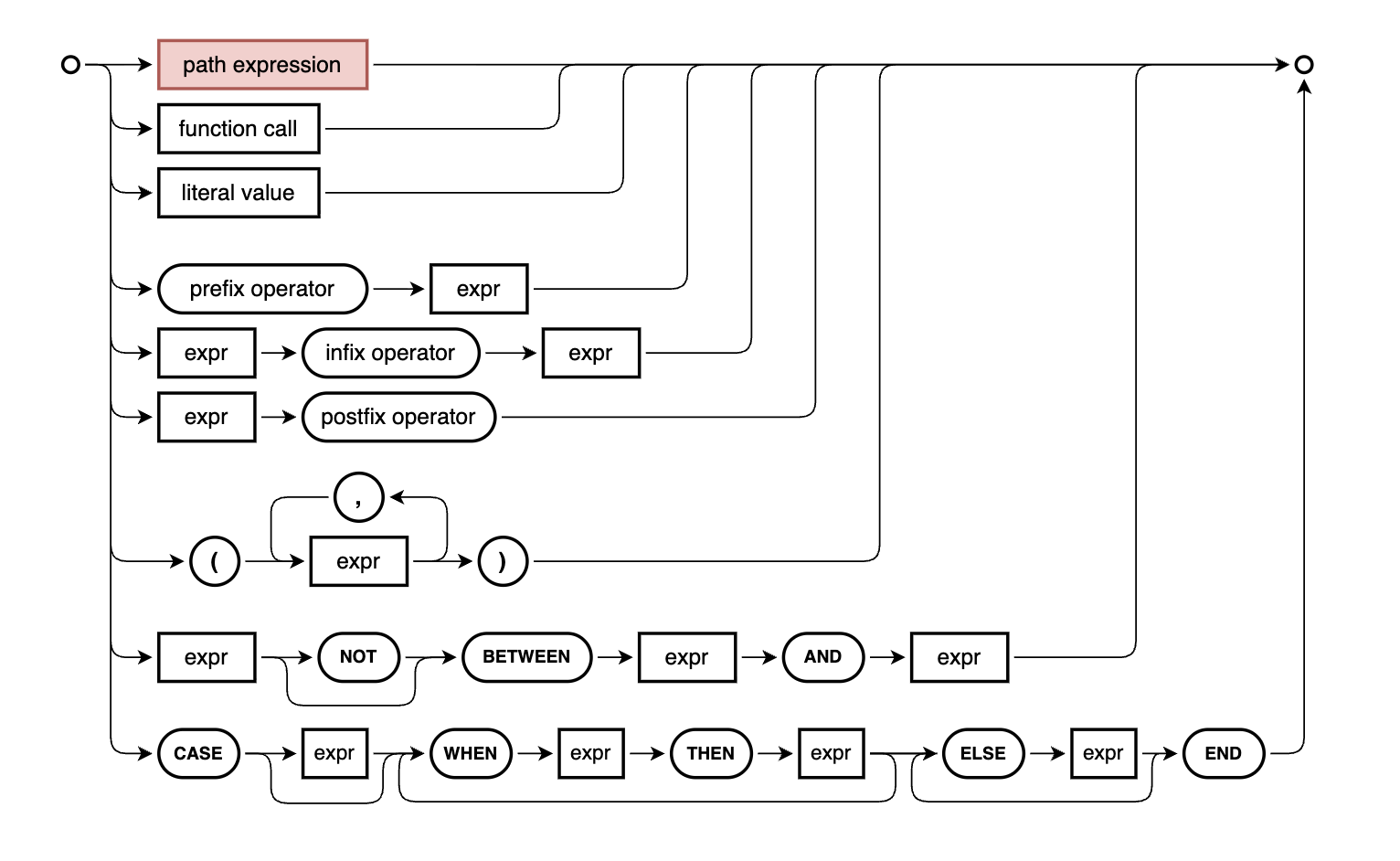
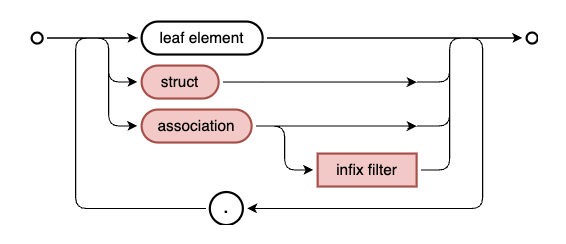
05:47 Patrice takes over
and looks at the syntax diagram in the CXL topic of
Capire and the specific
path expression
diagram. He remarks
that one of the cool things about path expressions is that you can chain
navigations together, as is shown in one of the examples that follow the
diagram:
assoc[filter].struct.assoc.element
Such navigation paths are materialised at some point (on use) into constructs
such as:
an EXISTS subquery
a LEFT JOIN
a correlated subquery (for the expands)
These path expressions in particular (as well as CXL in general) can be used
everywhere; Patrice gives examples:
in CDL models (when defining the schema or service projections)
in annotation expressions (when referring to a path or element)
in queries (written in CQL)
10:26 As good things come
in threes, or so they say, here's a final three-bullet point list (making a
total of three lists, too), where Patrice enumerates the different contexts in
which we used the nonSeller association-like calculated element (nonSeller = books[ stock > 170 ]), in the previous episode:
12:29 We get a glimpse
behind the scenes at the @cap-js/db-service mechanisms, where Patrice shows
the function that is used to generate aliases, in the context of the new (to us
in this series) style of aliases shown in the normalised, intermediate
CAP-style SQL:
These $-prefixed short alias names are "technical" aliases. There's a
function that Patrice dives into, specifically getImplicitAlias in
@cap-js/db-service/lib/utils.js, that has a useTechnicalAlias parameter
which defaults to true.
At this point we'll make the transition to having these technical aliases
shown in our CAP-style SQL, as shown in this example, instead of the
human-centric ones we've had so far.
Looking at the genres entity definition
16:02 Patrice takes some
time to explain the reason for the technical aliases, using the recursively
structured Genres entity definition as an example:
entity Genres : sap.common.CodeList {
  key ID       : Integer;
      parent   : Association to Genres;
      children : Composition of many Genres
                   on children.parent = $self;
}
Querying the genre information in Patrice's sample project we see the general idea:
Because we'll be referring to them later in this post, the IDs for Fiction,
Non-Fiction and Biography (genres that are "parents") are shown in
brackets.
An introduction to scoped queries
16:44 At this point
Patrice introduces us to "scoped queries", where we can traverse the FROM
with a path expression like construct:
The value for from looks very much like a path expression - a ref with a
value that is an array of multiple elements [ 'sap.capire.bookshop.Books', 'parent' ].
I initially struggled with this example. Illustrative as it was (especially
with the parent.parent part), it was one that was a little complicated due to
its self-referential nature.
So I used the power & utility of the cds REPL to explore more, and things
started to make sense. For example, this query gives us the genres for books
written by authors 40 years old or younger (Carpenter and the two Brontë
sisters):
Again we have a path expression traversal happening in the from part of the
query, this time with an infix filter on the first part of the path. I used an
infix filter here to make the example a little more interesting.
I then wondered to myself what it would look and feel like to use an infix
filter on a different part of the path, and came up with this:
At first I thought the first part of the path in this query would now be
redundant, assuming that I could have just written:
> q = cds.ql`
  SELECT from ${Books}[title like 'The %'].genre
  { name }
  `
But I was mistaken.
The key to thinking about this is remembering the term "scoped". To illustrate,
let's adjust the postfix projection to have the book titles returned, and run
the scoped query:
> await cds.ql`
  SELECT from ${Authors}:books[title like 'The %']
  { title }
  `
[
  { title: 'The Raven' },
  ... (12 rows removed for brevity)
  { title: 'The Fall of Gondolin' }
]
Running the unscoped query returns the same result set, yes:
> await cds.ql`
  SELECT from ${Books}[title like 'The %']
  { title }
  `
[
  { title: 'The Raven' },
  ... (12 rows removed for brevity)
  { title: 'The Fall of Gondolin' }
]
At this point let's add a book, but without a connection to an author, like this:
> await INSERT.into(Books,[{ID:999,title: 'The Book With No Author!'}])
InsertResult { results: [ { changes: 1, lastInsertRowid: 999 } ] }
Now re-running those queries gives us different result sets. First, the new
book is included in the result set for the unscoped query:
> await cds.ql`
  SELECT from ${Books}[title like 'The %']
  { title }
  `
[
  { title: 'The Raven' },
  ... (12 rows removed for brevity)
  { title: 'The Fall of Gondolin' },
  { title: 'The Book With No Author!' }
]
But it is not included in the result set for the scoped query:
> await cds.ql`
  SELECT from ${Authors}:books[title like 'The %']
  { title }
  `
[
  { title: 'The Raven' },
  ... (12 rows removed for brevity)
  { title: 'The Fall of Gondolin' }
]
While both queries are materialised into SELECTs on
sap.capire.bookshop.Books, the scoped query constrains the result set to
those entries where there is an author, as we can see with the EXISTS in the
intermediate SQL:
The alias is to the path expression in the query, and is an explicit one. It
was also used explicitly in the parent.ID construct. There's also an implicit
alias in that the referenced name element is really parent.name.
But things get confusing if we want to refer to elements in the parent genre's
parent, as Patrice demonstrates:
which is what we should expect, in that Fiction and Non-Fiction are top
level genres and have no parents.
Clearly there's a high degree of potential confusion and conflict, and so
technical aliases make more sense in the runtime (i.e. implicitly) as they have
far less chance of clashing.
At this point, it wouldn't be a bad idea to go and get a coffee and then come
back for the rest of this write-up :-)
> await cds.ql`
  SELECT from ${Authors}
  { name, nonSeller { title, stock } }
  where exists nonSeller
  `
[
  {
    name: 'Richard Carpenter',
    nonSeller: [ { title: 'Catweazle', stock: 187 } ]
  },
  {
    name: 'J. R. R. Tolkien',
    nonSeller: [
      { title: 'Unfinished Tales', stock: 189 },
      { title: 'The Children of Húrin', stock: 203 },
      { title: 'Beren and Lúthien', stock: 178 },
      { title: 'The Fall of Gondolin', stock: 195 }
    ]
  }
]
Patrice reminds us that such an expand is "just another postfix projection",
which leads to the possibility of using * and excluding clauses, as we saw
in the previous episode on this topic:
{ name, nonSeller { * } excluding { ID } }
With such expands being "variants" of postfix projections, we are then
introduced to another variant, which looks similar but does something
different.
To illustrate, we move up to the service layer and go to the Books projection
in the CatalogService, which currently looks like this, which includes a
single element (the author name) from the author association:
entity Books       as
  projection on my.Books {
    *,
    author.name as author
  }
  excluding {
    createdBy,
    modifiedBy
  };
If we wanted to add another element from the author association, we could do this:
entity Books       as
  projection on my.Books {
    *,
    author.name as author,
    author.dateOfBirth
  }
  excluding {
    createdBy,
    modifiedBy
  };
At 26:27 Patrice shows what this resolves to at the database layer, by running a build for HANA:
cds build --profile production
This produces the HANA artifacts for deploying via the HDI container. One of these artifacts is the gen/db/src/gen/CatalogService.Books.hdbview file which contains the DDL statement to create the view that represents this projection:
VIEW CatalogService_Books AS SELECT
  Books_0.createdAt,
  Books_0.modifiedAt,
  Books_0.title,
  Books_0.ID,
  Books_0.descr,
  author_1.name AS author,
  Books_0.genre_ID,
  Books_0.stock,
  Books_0.price,
  Books_0.currency_code,
  author_1.dateOfBirth
FROM (
  sap_capire_bookshop_Books AS Books_0
  LEFT JOIN sap_capire_bookshop_Authors AS author_1
    ON Books_0.author_ID = author_1.ID
)
Doing this for the CDL is the rough equivalent to when we've been examining
the corresponding SQL for our queries in CQL, using toSQL() in the cds
REPL.
Here's what Patrice had to say about this DDL:
technical aliases (Books_0 and author_1) were used by the compiler, minimising ambiguities
both name and dateOfBirth use the same JOIN node
Now we have defined this and have confirmed at the DDL level what we expect to see, we can now explore the dot notation, which is essentially a little bit of syntactic sugar that is arguably easier on the eye:
entity Books       as
  projection on my.Books {
    *,
    author.{
      name,
      dateOfBirth
    }
  }
  excluding {
    createdBy,
    modifiedBy
  };
We can easily think of this as opening another projection (on the author
association) because of the use of braces, but be aware that this is not a
nested expand, it is a shortcut to, or a summarised version of, multiple path
expressions with the same root.
A look at the compiled DDL for this variant shows that it's pretty much the
same, i.e. still a flat list of elements, essentially:
VIEW CatalogService_Books AS SELECT
  Books_0.createdAt,
  Books_0.modifiedAt,
  Books_0.title,
  Books_0.ID,
  Books_0.descr,
  Books_0.author_ID,
  Books_0.genre_ID,
  Books_0.stock,
  Books_0.price,
  Books_0.currency_code,
  author_1.name AS name,
  author_1.dateOfBirth AS dateOfBirth
FROM (
  sap_capire_bookshop_Books AS Books_0
  LEFT JOIN sap_capire_bookshop_Authors AS author_1
    ON Books_0.author_ID = author_1.ID
)
We do get the Books_0.author_ID element additionally here, but that is of
little consequence.
The power of infix filters
Patrice goes one step further at
30:45 to show how an
infix filter might be added to this dot notation construct; the filter chosen
isn't allowed in this context, but something like this is:
entity Books       as
  projection on my.Books {
    *,
    author[isAlive].{
      name as thename,
      dateOfBirth
    }
  }
  excluding {
    createdBy,
    modifiedBy
  };
In fact, Patrice uses this condition a little bit later on, albeit in a
slightly longer form isAlive = true.
There is a wider range of possibilities here in the context of queries, which
Patrice then demonstrates in the cds REPL with:
> await cds.ql`
  SELECT from ${Books}
  {
    title as book,
    author[exists books[genre.name = 'Fantasy']].{ name, age }
  }
  `
[
  { book: 'Wuthering Heights', author_name: null, author_age: null },
  { book: 'Jane Eyre', author_name: null, author_age: null },
  { book: 'The Raven', author_name: null, author_age: null },
  { book: 'Eleonora', author_name: null, author_age: null },
  {
    book: 'Catweazle',
    author_name: 'Richard Carpenter',
    author_age: 82
  },
  {
    book: 'Mistborn: The Final Empire',
    author_name: 'Brandon Sanderson',
    author_age: 50
  },
  {
    book: 'The Well of Ascension',
    author_name: 'Brandon Sanderson',
    author_age: 50
  },
  ...
]
Here we have a nested infix filter. Note that the condition construct only
applies to the author data here, which explains why we have null values for
some authors but not for others, within the books-led set.
Patrice highlights that one of the advantages of this dot notation approach,
when used with infix filters, is that we can define our path conditions up front
and then specify what we want when we follow that path, without having to
repeat it.
This is also known as an inline nested projection.
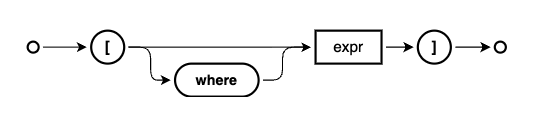
Infix filter construction
At 36:36 Patrice shows
us the syntax diagram that describes infix
filters
and we talk a little about:
the where keyword, which is optional and often omitted, similar to other
keywords in CDL such as
define.
the main part which is an expression, which is thus essentially "anything"
This latter point means that, depending on the context used, infix filters will
be materialised into different shapes.
Materialisation in DDL
To illustrate this somewhat, and to round this section out, at
38:18 Patrice modifies
the infix filter condition in the CDL for the books projection to be
dateOfBirth > 19001:
entity Books       as
  projection on my.Books {
    *,
    author[dateOfBirth > 1900].{
      name as thename,
      dateOfBirth
    }
  }
  excluding {
    createdBy,
    modifiedBy
  };
This has the effect that the DDL for the corresponding view in HANA is defined
like this:
VIEW CatalogService_Books AS SELECT
  Books_0.createdAt,
  Books_0.modifiedAt,
  Books_0.title,
  Books_0.ID,
  Books_0.descr,
  Books_0.author_ID,
  Books_0.genre_ID,
  Books_0.stock,
  Books_0.price,
  Books_0.currency_code,
  author_1.name AS thename,
  author_1.dateOfBirth AS dateOfBirth
FROM (
  sap_capire_bookshop_Books AS Books_0
  LEFT JOIN sap_capire_bookshop_Authors AS author_1
    ON
      (Books_0.author_ID = author_1.ID)
      AND
      (author_1.dateOfBirth > 1900)
)
The infix filter is mixed in to the main foreign key matching part of the ON
condition.
Infix filters in the FROM clause
Infix filters can also be used in the FROM clause in queries, as Patrice shows at
43:35:
> await cds.ql`
  SELECT from ${Books}[where stock between 50 and 100]
  { title, stock }
  `
[
  { title: 'Wuthering Heights', stock: 95 },
  { title: 'Jane Eyre', stock: 78 },
  { title: 'The Alloy of Law', stock: 67 },
  { title: 'Shadows of Self', stock: 89 },
  { title: 'Mistborn: Secret History', stock: 98 }
]
This is a nice syntactic sugar based variant, made even better by the use of
the optional where, so we can read the entire construct (entity, infix filter
condition and then the postfix projection) naturally, rather than e.g.:
> await cds.ql`
  SELECT from ${Books}
  { title, stock }
  where stock between 50 and 100
  `
These variants are the same, which we can see if we compare their intermediate
SQL (via forSQL()):
To drive home two of the key concepts we've looked at, Patrice now combines
them, starting at 47:15.
In other words, taking the scoped syntax variant of the FROM clause with a
path expression constructed with a colon, and adding an infix filter.
To illustrate this and start simply, we first see this, which is just the
scoped query part:
This alone is worth dwelling on, when Patrice explains how he thinks about such
constructs - reading from right to left: "select those authors for whom exist
(at least one) book(s)". The selection is on the Authors entity, but it is
constrained by the books-authors relationship.
If there was an author in the database for whom there were no corresponding
book entries, this author would not be part of the result set. Rather than add
an entry to show this, Patrice now adds on to this query an infix filter for the
Books entity:
> q = cds.ql`
  SELECT from ${Books}[stock between 50 and 100]:author
  { name }
  `
Looking at the intermediate SQL, we can see that this stock based condition in
the infix filter becomes part of the WHERE clause of the subquery used in the
EXISTS:
And the possibilities don't end there, of course, which Patrice shows at this point by gratuitously adding another infix clause thus:
> await cds.ql`
  SELECT from ${Books}[stock between 50 and 100]:author[order by name asc]
  { name }
  `
[
  { name: 'Brandon Sanderson' },
  { name: 'Charlotte Brontë' },
  { name: 'Emily Brontë' }
]
At this point in this writeup, I wonder about the contents of this second infix
clause, in that it's not really a filter in the simple way I understand filters
so I wanted to try to add something that feels more like an actual
"restrictive" filter2, and that works too:
> await cds.ql`
  SELECT from ${Books}[stock between 50 and 100]:author[name like '%Brontë']
  { name }
  `
[
  { name: 'Emily Brontë' },
  { name: 'Charlotte Brontë' }
]
Disambiguating elements and their scoped named containers with colons
At 50:00 I ask Patrice
to explain a little bit more about the use of the colon (:) when constructing
a "fully qualified" element reference. Normally we would use a dot to express
traversal through a relationship, such as author.name. But when it comes to
including the "container" name, most commonly an entity, we must be precise and
unambiguous, especially in the context of how the compiler will interpret what
we express.
With the use of namespaces,
defined with either the namespace or context directives, or even just
expressed explicitly (e.g.
entity Foo.Bar { ... }), a question arises: "Where does the name of the
container end and the name of the element (path) start?". Sometimes, a colon
is needed to facilitate the answer to that question.
Here's an example. Consider this simple model:
namespace a;

context b.c {

  entity D {
    e : String;
  }

}
If we wanted to annotate the element e with @readonly3, we might write:
annotate a.b.c.D.e with @readonly;
However, the compiler would emit a warning:
Artifact “a.b.c.D.e” has not been found
To disambiguate where the "join" is, we use a colon4:
annotate a.b.c.D : e with @readonly;
Summarising infix filters
At 52:58 Patrice gives a
nice summary concerning infix filters, which can be employed in many places -
everywhere that you can use paths, effectively - and are materialised
differently depending on where and how they're used:
One of these places we saw was in the Books projection in the
CatalogService (see the Materialisation in DDL
section):
author[dateOfBirth > 1900].name as authorName
This infix filter is materialised in the JOIN
VIEW CatalogService_Books AS SELECT
  ...
  Books_0.author_ID,
  ...
  author_1.name AS authorName,
  author_1.dateOfBirth AS dateOfBirth
FROM (
  sap_capire_bookshop_Books AS Books_0
  LEFT JOIN sap_capire_bookshop_Authors AS author_1
    ON (Books_0.author_ID = author_1.ID)
    AND (author_1.dateOfBirth > 1900)
)
In an expand construction (a correlated subquery example)
When the infix filter is used in the context of an expand (which will result in
a nested result set) then the filter (stock > 10) is pushed down into the
context of the subquery constructed for the expand, and added to the correlated
subquery's conditions.
I find it interesting how we can use the > operator on dateOfBirth and
supply only the first part of a value i.e. 1900, as if it were a string
style comparison.
Later on in this episode at
54:48 I ask whether
we can add such an order by in an infix filter at the schema level, and
the answer helped me understand the difference between such "post-condition"
filters and "restrictive". The answer was "no, not yet", but included an
explanation which made a lot of sense - a restrictive filter (such as
stock > 10) can be added to the WHERE condition in the subquery or JOIN,
whereas a "post-condition" filter (such as order by name asc) cannot.
The latter is only really possible right now at the query level.
Of course, this example assumes we do not want to, or cannot, add the
annotation directly to the element where it occurs (@readonly e : String).
The language server based CDS formatter has inserted the spaces either side
of the colon, which is a nice touch.
06:55 Patrice jumps back
in and visits the CXL documentation in
Capire, which already by this point has
even been updated and improved. He also briefly runs over some of the expressions
and concepts we've covered thus far, including the CASE statement, predicates,
association-like calculated elements (derived from existing associations) and more.
Combining CASE and concatenation operators
11:33 Revisiting my
question last time about element
references,
Patrice expands the fullName example to combine some of the concepts with
which we're now familiar:
the ternary operator (syntactic sugar for the CASE construct)
string concatenation (||)
fullName = academicTitle is not null
  ? academicTitle || ' ' || name
  : name;
This allows us to take Tolkien's "Professor" title into account 👍.
To show the result of this expression, Patrice runs a
query1 in the cds REPL:
> await SELECT
    .from(Authors)
    .columns('name', 'academicTitle', 'fullName')
[
  ...,
  {
    name: 'Brandon Sanderson',
    academicTitle: null,
    fullName: 'Brandon Sanderson'
  },
  {
    name: 'J. R. R. Tolkien',
    academicTitle: 'Prof.',
    fullName: 'Prof. J. R. R. Tolkien'
  }
]
If you want to copy this to try it out yourself, you can use the cds REPL's
.editor feature to enter the multi-line construct (shown like this for
better readability here).
Explicit and default types for calculated elements
14:01 I ask a question
relating to the type declarations (or lack thereof) for the calculated elements.
I came up with a very fanciful theory, only to be told that types are declared
when the type is not String. In other words, if a type is not declared, then
String is the default (for fullName here):
entity Authors : managed {
  key ID            : Integer;
      name          : String(111) @mandatory;
      address       : Association to Addresses;
      academicTitle : String(111);
      ...

      fullName = academicTitle is not null
        ? academicTitle || ' ' || name
        : name;

      isAlive       : Boolean = dateOfDeath is null ? true : false;
      age           : Integer = years_between(
        dateOfBirth, coalesce(dateOfDeath, current_date)
      );
}
Keep services simple
16:25 Then comes a great
question from Neil, on hints, tips and best practices for complex models in the
context of large data volumes.
In response, Patrice talks about how caution is needed when constructing
definitions with large numbers of associations, especially when querying
views that result from such definitions, where the queries are only to retrieve
a small subset of data. To satisfy any query, a complex and possibly costly
FROM clause needs to be processed by the underlying database, which when
compared to the small query surface area, is then costly in comparison.
It's much better to keep service definitions simple and granular; think of
services as reflectors of single domain problems, rather than representing the
entire domain.
This is also why it's always important to not only know about the power
that we are able to wield, but also to know what happens behind the scenes.
Two key reasons for this series!
Additionally, another member of the CAP team in the chat, Johannes Vogt,
suggests employing DEBUG=sql as another way to see what's going on. At around
21:33 Patrice
demonstrates this (with DEBUG=sql cds repl --run .).
Always consider EXISTS for checks across to-many relationships
24:10 Patrice concludes
his wrap up by emphasising the importance of the EXISTS predicate. Not using
this predicate results in likely unwanted duplicate records in the result set
due to the LEFT JOIN that is used:
> await cds.ql`
  SELECT from Authors { fullName }
  where books.title like '%Mistborn%'
  `
[
  { fullName: 'Brandon Sanderson' },
  { fullName: 'Brandon Sanderson' }
]
Reformulating the above to use EXISTS plus an infix filter solves that, as a
subquery (a "subselect") is used instead:
> await cds.ql`
  SELECT from Authors { fullName }
  where exists books[title like '%Mistborn%']
  `
[
  { fullName: 'Brandon Sanderson' }
]
It would not be out of the ordinary to construct and execute a query like this:
> await cds.ql`
  SELECT from Authors { fullName }
  where exists books[stock > 170]
  `
[
  { fullName: 'Richard Carpenter' },
  { fullName: 'Prof. J. R. R. Tolkien' }
]
This is already an "accomplished" query, using the very constructions we looked
at just earlier. However, if we shift this condition left, moving it from the query
to our CDS model:
entity Authors : managed {
  key ID            : Integer;
      name          : String(111) @mandatory;
      ...

      books         : Association to many Books
                        on books.author = $self;

      nonSeller = books[ stock > 170 ];
      ...
}
then we define it once, can identify and test it once, and consumers have a
convenient semantic shortcut to what the domain modelling process has defined.
Moreover, let's just take a second to boggle at the simplicity of the expression
that is then available to us in query construction:
> await cds.ql`
  SELECT from Authors { fullName }
  where exists nonSeller
  `
[
  { fullName: 'Richard Carpenter' },
  { fullName: 'Prof. J. R. R. Tolkien' }
]
Digging into the condition
Here it is: where exists nonSeller. Now that is simple. How exactly are we
checking for existence here? And what exactly are we checking anyway? An
association? Well, yes, but this is where the term "association-like calculated
element" fits much better.
At 28:31 Patrice takes
a moment to look under the hood at this, so we can understand better what is
going on.
First, the CQN shows us that the the target of the EXISTS is an expression
{ ref: [ 'nonSeller' ] }:
For the sake of this discussion, we can ignore the first part, specifically the
value of columns, as that is for the fullName element. It's the WHERE
clause that is of interest, and where the answers to the questions earlier
start to appear.
You may wish to refer to the section A look at the EXISTS
predicate
from the notes to the previous episode for a detailed analysis, but revisiting
this allows us to stare at the construct a little more, and see how it fits
together - the subquery includes both conditions:
one from the nonSeller definition
one from the "donor" books definition
and either returns something (1)4 or nothing, which
is why we can treat it almost like a Boolean.
31:30 Patrice makes a
point about the SQL that is ultimately produced here, in that it's perfectly
possible to construct that SQL yourself, manually. But who would want to do
that, also taking into account the nuances of different database SQL dialects?
Moreover, one could consider taking one step back and writing the CAP-style SQL
manually instead, using cds.ql facilities5. But for
everyday development, this is extra effort that is not required, when compared
to the power & expressiveness of CQL combined with CXL.
Using a path expression in the column list
At 32:36 Patrice
continues the exploration of the nonSeller association-like calculated
element, adding a couple of path expressions (nonSeller.stock and
nonSeller.title) to the column list of the query:
The challenge here is that the introduction of the path expression into this
query causes a flat list to be produced, with multiple entries for the authors
involved:
> await q
[
  {
    fullName: 'Richard Carpenter',
    nonSeller_stock: 187,
    nonSeller_title: 'Catweazle'
  },
  {
    fullName: 'Prof. J. R. R. Tolkien',
    nonSeller_stock: 178,
    nonSeller_title: 'Beren and Lúthien'
  },
  {
    fullName: 'Prof. J. R. R. Tolkien',
    nonSeller_stock: 203,
    nonSeller_title: 'The Children of Húrin'
  },
  {
    fullName: 'Prof. J. R. R. Tolkien',
    nonSeller_stock: 195,
    nonSeller_title: 'The Fall of Gondolin'
  },
  {
    fullName: 'Prof. J. R. R. Tolkien',
    nonSeller_stock: 189,
    nonSeller_title: 'Unfinished Tales'
  }
]
Now we know about forSQL() and toSQL(), we can comfortably look behind the scenes, as Patrice does
at 34:17, to understand why:
Patrice points out the alias nonSeller2 - the term nonSeller has already
been used for the alias for Books in the LEFT JOIN constructed due to the
path expressions we added to the column list.
37:35 In answering a
question I asked about this, Patrice explains the query plan here, which is to:
Filter the entire set of authors down to those satisfying the non-seller
predicate condition
For that subset of authors, a LEFT JOIN is made to the books
The duplicate author names in the result set are because of this LEFT JOIN
which brings about a flattening, essentially a consequence of the implicit
requirement for a LEFT JOIN contradicting or invalidating the point of the
subquery.
One could have just as well constructed the query like this, which Patrice
shows at 38:33:
39:50 However, there's
more to life than flattened lists! Returning to the original query with the
EXISTS predicate, we can avoid the flattening and repetition (which we now
know is caused by the LEFT JOIN, due in turn to the path expression traversal
requirements).
This brings back a result set that is definitely not flattened:
> await q
[
  {
    fullName: 'Richard Carpenter',
    nonSeller: [ { title: 'Catweazle', stock: 187 } ]
  },
  {
    fullName: 'Prof. J. R. R. Tolkien',
    nonSeller: [
      { title: 'Unfinished Tales', stock: 189 },
      { title: 'The Children of Húrin', stock: 203 },
      { title: 'Beren and Lúthien', stock: 178 },
      { title: 'The Fall of Gondolin', stock: 195 }
    ]
  }
]
... it's structured!
This seems a little extraordinary, given the nature of SQL generally, and the
native inability to store an entire set of data into a single column in
particular. This extraordinariness is made possible due to the modern database
adapters, re-written and introduced in CAP major version 8.
42:50 Patrice explains
how this was achieved before those new database adapters: such queries were
realised by a combination of SQL and also runtime logic, perhaps a bit like we
approached similar query tasks in ABAP by using internal tables and custom
logic controlled execution of various SELECT statements, back in the day.
Various optimizations like using database-native JSON functions for deep
queries in single roundtrips, user-defined functions and more, to push
data-processing tasks down to the database (→ improves utilization).
What do these "database-native JSON functions" look like? Well, we've seen them
in passing before, but we can work our way towards them by following the
now-familiar path, going from the CQN, to the CAP-style SQL, and ultimately to
the native SQL.
First, the CAP-style SQL (with the expression for the fullName construction
and the subquery for the exists nonSeller both elided for brevity):
Note that there's no LEFT JOIN that we've seen employed previously (before we
introduced the nested expand). Instead, alongside the fullName column,
there's now a second column in the outermost (main) query, which is a subquery,
specifically a SELECT on Books.
The WHERE clause in this subquery should look familiar, and serves to
correlate the IDs of the Authors from the main query as well as restricting
the result set according to the stock values.
48:16 In answer to my
question at this point, Patrice tells us that these expands are similar to
postfix projections
and the concepts are shared.
> await cds.ql`
  SELECT from ${Authors}
  {
    fullName,
    nonSeller as booksNotSellingWell
      { *, title as bookName }
      excluding { createdBy, modifiedBy, ID, descr }
  }
  where exists nonSeller
  `
[
  {
    fullName: 'Richard Carpenter',
    nonSeller: [
      {
        createdAt: '2026-04-04T10:29:20.859Z',
        modifiedAt: '2026-04-04T10:29:20.859Z',
        title: 'Catweazle',
        author_ID: 170,
        genre_ID: 13,
        stock: 187,
        price: 150,
        currency_code: 'JPY',
        bookName: 'Catweazle'
      }
    ]
  },
  {
    fullName: 'Prof. J. R. R. Tolkien',
    nonSeller: [
      {
        createdAt: '2026-04-04T10:29:20.859Z',
        modifiedAt: '2026-04-04T10:29:20.859Z',
        title: 'Unfinished Tales',
        author_ID: 201,
        genre_ID: 13,
        stock: 189,
        price: 13.99,
        currency_code: 'GBP',
        bookName: 'Unfinished Tales'
      },
      {
        createdAt: '2026-04-04T10:29:20.859Z',
        modifiedAt: '2026-04-04T10:29:20.859Z',
        title: 'The Children of Húrin',
        author_ID: 201,
        genre_ID: 13,
        stock: 203,
        price: 13.99,
        currency_code: 'GBP',
        bookName: 'The Children of Húrin'
      },
      ...
    ]
  }
]
At 50:12 I make an
observation about nesting depth, to which Patrice responds by extending the
example to add genre information, which I will do here to this example:
> await cds.ql`
  SELECT from ${Authors}
  {
    fullName,
    nonSeller as booksNotSellingWell
      { *, title as bookName, genre { * } }
      excluding { createdBy, modifiedBy, ID, descr }
  }
  where exists nonSeller
  `
The result set is suitably extended, here's what a typical book structure looks
like now:
{
  createdAt: '2026-04-04T10:29:20.859Z',
  modifiedAt: '2026-04-04T10:29:20.859Z',
  title: 'The Fall of Gondolin',
  author_ID: 201,
  genre_ID: 13,
  stock: 195,
  price: 13.99,
  currency_code: 'GBP',
  bookName: 'The Fall of Gondolin',
  genre: {
    name: 'Fantasy',
    descr: null,
    ID: 13,
    parent_ID: 10
  }
}
Note also, as Patrice points out, that before CAP 8, this would have been realised
by multiple (three, in fact) separate calls to the database layer, coordinated
by logic in the runtime, and then the results stitched together before being
returned as a contiguous set. These three calls can be seen as three nested
SELECT statements in the query's intermediate format6.
With the new database adapters, there's only a single call to the database
layer, and no coordination or combination logic required at runtime.
JSON functions in SQL
53:18 Based on this query
that Patrice was working with:
> q = cds.ql`
  SELECT from ${Authors}
  {
    fullName,
    nonSeller
    {
      title as book,
      stock,
      genre
      {
        *
      }
    }
  }
  where exists nonSeller
  `
here's what the
actual database native (SQLite in this particular example) SQL looks
like7:
SELECT
  case
    when Authors.academicTitle is not null then Authors.academicTitle || ? || Authors.name
    else Authors.name
  end as fullName,
  (
    SELECT
      jsonb_group_array (
        jsonb_insert (
          '{}',
          '$."book"',
          book,
          '$."stock"',
          stock,
          '$."genre"',
          genre - > '$'
        )
      ) as _json_
    FROM
      (
        SELECT
          nonSeller2.title as book,
          nonSeller2.stock,
          (
            SELECT
              json_insert (
                '{}',
                '$."name"',
                name,
                '$."descr"',
                descr,
                '$."ID"',
                ID,
                '$."parent_ID"',
                parent_ID
              ) as _json_
            FROM
              (
                SELECT
                  genre.name,
                  genre.descr,
                  genre.ID,
                  genre.parent_ID
                FROM
                  sap_capire_bookshop_Genres as genre
                WHERE
                  "nonSeller2".genre_ID = genre.ID
                LIMIT
                  ?
              )
          ) as genre
        FROM
          sap_capire_bookshop_Books as "nonSeller2"
        WHERE
          (Authors.ID = "nonSeller2".author_ID)
          and ("nonSeller2".stock > ?)
      )
  ) as nonSeller
FROM
  sap_capire_bookshop_Authors as Authors
WHERE
  exists (
    SELECT
      1 as "1"
    FROM
      sap_capire_bookshop_Books as nonSeller
    WHERE
      (nonSeller.author_ID = Authors.ID)
      and (nonSeller.stock > ?)
  )
Here are some initial notes on this (single!) SQL statement:
the outermost SELECT is on the Authors
it is constrained by the WHERE clause that represents the non-seller
subquery with which we are familiar
the construction of the fullName in SQL here is extremely similar to the
CXL CASE expression
Then come the nested subqueries. But wait, that's a lot more SELECTs that we
expected! That's because of the interleaving of JSON functions, from which
comes the power and ability to push down such complex queries directly and
solely to the database layer.
the function
json_insert
to construct JSON objects (to be aggregated)
The juxtaposition (pairing, almost) of the JSON functions and the corresponding
subquery SELECT statements is not accidental. They have been generated
exactly like this to be able to build the deeply nested structure required,
otherwise impossible in SQL without such JSON facilities ... combined with the
ability to stringify complex JSON structures into scalar values (large
strings!).
The query is constructed using the fluent API style, rather than what we've
mostly employed, which has been by writing queries in tagged template
literals. See the Constructing
Queries
section of the Querying in JavaScript topic in Capire for more information.
Additionally, I used the
columns() method to
restrict the data set returned.
It's for the benefit of this method that we're using ${Authors} rather
than Authors in the query template string, so that the transformation
function will work properly.
Note that this value of 1 is not the SQLite Boolean value for
true. This is the
normalised neutral SQL (from forSQL()) rather than the database specific
SQL. If we were to ask for the database specific SQL when connected to HANA
(instead of SQLite here):
SELECT
  case
    when Authors.academicTitle is not null then Authors.academicTitle || ? || Authors.name
    else Authors.name
  end as "fullName"
FROM
  sap_capire_bookshop_Authors as Authors
WHERE
  exists (
    SELECT
      1 as "1"
    FROM
      sap_capire_bookshop_Books as nonSeller
    WHERE
      (nonSeller.author_ID = Authors.ID)
      and (nonSeller.stock > ?)
  )
cds.ql contains a whole
host of facilities for this:
07:00 Patrice revisits
the syntax diagram and starts to explain the insignificant-looking but very
significant (in terms of power and utility) "ref" box in that diagram, which is
the start of our journey to understand path expressions.
Some syntactic sugar for the case-when-then-else-end expression
10:08 Patrice revisits
the CASE ... WHEN ... THEN ... ELSE ... END expression, which we looked at
first in part
2
but for which there's some nice syntactic sugar.
He starts with passing a simple CXL example to the context-free parser
(cds.parse.expr), which emits the corresponding CXN:
This version of the CXL expression is actually exactly the same in the internal
(CXN) machine-readable form. Not only that, but this ? : is nestable too:
First, we look at the BETWEEN predicate, by first considering an compound
expression that describes a closed interval, to check for stock between 10 and
30:
Here we have two binary operator based expressions (with the comparison
operators >= and <=) that are joined with (and become the operands for)
another binary operator, the logical operator and.
In contrast, there's the range checking operator between, which we can use
instead:
Not only is this a single expression, it is also much neater and (arguably)
easier to read as well as write.
Here's that expression in action, in a query:
> await cds.ql`
  select from Books { title, stock } where stock between 12 and 34
  `
[
  { title: 'Mistborn: The Final Empire', stock: 12 },
  { title: 'The Two Towers', stock: 14 }
]
There's also the not variant which is also available.
20:30 Next up is IN,
which Patrice first demonstrates in an abstract way with:
Here, the ID of the author association (via author_ID, effectively) is
matched to the set of values from the (select ID from ...) subquery:
> await q
[
  { title: 'Mistborn: The Final Empire', stock: 12 },
  { title: 'The Well of Ascension', stock: 8 },
  { title: 'The Hero of Ages', stock: 5 },
  { title: 'The Alloy of Law', stock: 67 },
  { title: 'Shadows of Self', stock: 89 },
  { title: 'The Bands of Mourning', stock: 134 },
  { title: 'The Lost Metal', stock: 156 },
  { title: 'Mistborn: Secret History', stock: 98 },
  { title: 'The Way of Kings', stock: 7 },
  { title: 'Words of Radiance', stock: 4 },
  { title: 'Edgedancer', stock: 125 },
  { title: 'Oathbringer', stock: 3 },
  { title: 'Dawnshard', stock: 142 },
  { title: 'Rhythm of War', stock: 6 },
  { title: 'Wind and Truth', stock: 2 }
]
Moreover, the expression (author.ID) could have been written as author.ID
i.e. as a path expression, rather than a path expression within a list context,
which Patrice explains at
24:45, and also
clarifies at 27:59 that
the subquery is indeed an expression (it is, according to the syntax diagram) -
a "query expression".
A first look at path expressions
There's also the EXISTS predicate which we will want to take a look at, but
because this is most often found in use with path expressions, Patrice takes us
on our first excursion to explore their power and utility, starting at
29:30, with a simple
example (some results omitted for brevity here):
This is a "flat" list, i.e. all of the authors + book combinations.
To help our understanding, Patrice then highlights the diagram specifically for
path expressions,
which looks like this:
A brief digression on the term "forward-declared join"
At this point (32:30)
I'm unable to resist surfacing a phrase that is also used in this context, and
that is "forward-declared join", which Daniel Hutzel and I touched upon in
part 9 of The Art and Science of
CAP. Patrice nicely
explains what this term is, and how the concept it represents, is present in
the model that we're using, for example in the definition of the Authors
entity (some elements omitted here for brevity):
entity Authors : managed {
  key ID            : Integer;
      name          : String(111) @mandatory;
      books         : Association to many Books
                        on books.author = $self;
}
The "on condition" for the books element definition is a sign that some
correlation is going to be involved (as Patrice rightly points out, correlation
is at the heart of any RDBMS); what's more, that correlation connecting
Authors to Books is defined ahead of time, before any actual manifestation
of the JOIN mechanism that will be required to realise the correlation.
Digging deeper into path expressions
Turning back to the path expression we had in SELECT from ${Authors} {name as author, books.title },
Patrice had pointed out that this query is not directly possible (in its current,
simple form) in SQL, as books.title traverses a path from one entity to
another.
Indeed, at 36:07 we see
what this query is going to become by using the forSQL() method on the query
object, where we see a LEFT JOIN is planned in the SELECT specification, in
this SQL-style CQN version of the query:
Note that the name of the association element books becomes the alias for the
target of the traversal.
So here we're seeing the time element of a forward-declared join i.e. a path
expression, in that the join is manifested "just in time". By the way, with
toSQL() we can see that the actual database engine specific SQL (SQLite in
this case) looks like this (with the json_insert removed):
SELECT
  Authors.name as author,
  books.title as books_title
FROM
  sap_capire_bookshop_Authors as Authors
  left JOIN sap_capire_bookshop_Books as books
    ON books.author_ID = Authors.ID
Association-like calculated element
40:16 Building on this
knowledge and what we learned last week, Patrice now adds a further element to
the Authors entity definition, called nonSeller. And what a remarkable one!
Here it is (again, with other elements removed for brevity):
entity Authors : managed {
  key ID            : Integer;
      name          : String(111) @mandatory;
      books         : Association to many Books
                        on books.author = $self;

      nonSeller = books[ stock > 100 ];

      isAlive       : Boolean = dateOfDeath is null ? true : false;
      age           : Integer = years_between(
        dateOfBirth, coalesce(
          dateOfDeath, current_date
        )
      );
}
This nonSeller element builds upon an existing association (books), and
adds a condition in an infix filter ([stock > 100]). The syntax used for this
definition basically follows the calculated element pattern. Patrice and I
discussed the type, which is derived from the referenced element (books).
Additionally, the "on" condition in that referenced element is, for
nonSeller, enhanced by the infix filter. This is exactly what's shown in the
bottom part of the path expression syntax diagram shown
earlier.
Essentially this new element nonSeller is still an association, and can
therefore be used in path expressions just like books, as Patrice
demonstrates at 43:46:
We can see that there's a left join planned, and there is a set of "on" conditions in an array, two expressions:
a correlation of the author ID across the two entities
a comparison operator based condition on the stock value
In both cases the entities are referred to by their aliases.
48:00 The dataset returned from this query looks like this:
  { name: 'Emily Brontë', nonSeller_title: null },
  { name: 'Charlotte Brontë', nonSeller_title: null },
  { name: 'Edgar Allen Poe', nonSeller_title: 'Eleonora' },
  { name: 'Edgar Allen Poe', nonSeller_title: 'The Raven' },
  { name: 'Richard Carpenter', nonSeller_title: 'Catweazle' },
  { name: 'Brandon Sanderson', nonSeller_title: 'Dawnshard' },
  { name: 'Brandon Sanderson', nonSeller_title: 'Edgedancer' },
  { name: 'Brandon Sanderson', nonSeller_title: 'The Bands of Mourning' },
  { name: 'Brandon Sanderson', nonSeller_title: 'The Lost Metal' },
  { name: 'J. R. R. Tolkien', nonSeller_title: 'Beren and Lúthien' },
  { name: 'J. R. R. Tolkien', nonSeller_title: 'The Children of Húrin' },
  { name: 'J. R. R. Tolkien', nonSeller_title: 'The Fall of Gondolin' },
  { name: 'J. R. R. Tolkien', nonSeller_title: 'The Silmarillion' },
  { name: 'J. R. R. Tolkien', nonSeller_title: 'Unfinished Tales' }
]
We're driving this query from the Authors, with a(n implicit) LEFT JOIN,
which means that we are going to get all of the authors, including those (two
of the Brontë
sisters!)
for which there are no "non sellers", i.e. no books with more than 100 in
stock. We can deal with this in various ways, see the next
section.
Element reference expressions
51:02 Based on a question
from me going back to the CDL definition of nonSeller, and how it is basically
a reference to an existing element (books), Patrice shows that this is a
pattern that works generally. For example, we add an origin element that just
points to placeOfBirth:
entity Authors : managed {
  key ID            : Integer;
      name          : String(111) @mandatory;
      address       : Association to Addresses;
      academicTitle : String(111);
      dateOfBirth   : Date;
      dateOfDeath   : Date;
      placeOfBirth  : String;
      placeOfDeath  : String;
      books         : Association to many Books
                        on books.author = $self;

      nonSeller = books[stock > 100];

      origin = placeOfBirth;

      isAlive       : Boolean = dateOfDeath is null ? true : false;
      age           : Integer = years_between(
        dateOfBirth, coalesce(
          dateOfDeath, current_date
        )
      );
}
Essentially this is just another calculated element, albeit a very simple one!
Patrice gives another example:
The type of fullName here is implicit but we can make it explicit:
fullName : String = academicTitle || ' ' || name;
like we have done for the isAlive and age elements.
A look at the EXISTS predicate
54:54 At this point we
go back to the dataset that was produced from the query SELECT from ${Authors} { name, nonSeller.title }, in particular with the two author records with
null for nonSeller_title. What if we wanted to exclude such authors, i.e. only
include authors with non-sellers?
Patrice first shows us an option that is available to us, but one which we probably
want to avoid, as it is a little clumsy, involves a somewhat technical approach:
> await cds.ql`select from ${Authors} { name } where nonSeller.ID is not null`
[
  { name: 'Edgar Allen Poe' },
  { name: 'Edgar Allen Poe' },
  { name: 'Richard Carpenter' },
  { name: 'Brandon Sanderson' },
  { name: 'Brandon Sanderson' },
  { name: 'Brandon Sanderson' },
  { name: 'Brandon Sanderson' },
  { name: 'J. R. R. Tolkien' },
  { name: 'J. R. R. Tolkien' },
  { name: 'J. R. R. Tolkien' },
  { name: 'J. R. R. Tolkien' },
  { name: 'J. R. R. Tolkien' }
]
Moreover, there is still an issue with the authors that do have non-sellers -
there are duplicate records returned. This is a natural consequence of the
to-many relationship:
entity Authors : managed {
  key ID            : Integer;
      name          : String(111) @mandatory;

      ...

      books         : Association to many Books
                        on books.author = $self;

      nonSeller = books[stock > 100];

      ...
}
and is essentially the result of a LEFT JOIN that traverses it.
> await cds.ql`select from ${Authors} { name } where exists nonSeller`
[
  { name: 'Edgar Allen Poe' },
  { name: 'Richard Carpenter' },
  { name: 'Brandon Sanderson' },
  { name: 'J. R. R. Tolkien' }
]
This is almost magic! The expression used as the operand here is simply
nonSeller, i.e. a reference to the association, to the relationship. It's the
closest we can get to how we'd say it in English.
By now, we know how to look under the hood for this - we can trace the steps
from this CQL and CXL ... through the various stages. First, here's what the
"CAP style CQN" looks like:
Notice that the simple association name nonSeller here (as the target of
exists, i.e. { ref: [ 'nonSeller' ]}) is perfectly valid according to the
syntax diagram we looked at earlier in our first look at path
expressions.
the WHERE clause is essentially the EXISTS predicate
the predicate's target (or focus) is a complete subquery
this subquery represents the association and is on the Books
a Boolean value is expected from this subquery
that value is represented by the dummy literal value { val: 1 }
What's not changed subquery's WHERE clause is exactly the same as what was in
the on clause in the earlier query in the previous association-like
calculated element section, representing
the combined conditions of books.author = $self and stock > 100.
So moving from a LEFT JOIN to an EXISTS with a subquery ... moves us from
duplicate data from the left part of the relationship, to unique values, as
what's returned from this subquery is either something ({ val: 1 }) or
nothing.
01:01:16 To underline the
power and utility of this predicate, Patrice rounds the episode off with another
example, contrasting the two approaches and result sets, based on the books from
Brandon Sanderson, two of which include the word "Mistborn":
> await cds.ql`
  select title from ${Books} where author.name like '%Sanderson'
  `
[
  { title: 'Mistborn: The Final Empire' },
  { title: 'The Well of Ascension' },
  { title: 'The Lost Metal' },
  { title: 'Mistborn: Secret History' },
  { title: 'The Way of Kings' },
  { title: '...' },
  { title: 'Wind and Truth' }
]
binary operators, including some that are common in programming languages, such
as != which is translated to IS NOT in SQL:
> cds.ql`SELECT title from ${Books} where stock != null`.toSQL()
{
  sql: 'SELECT title AS "title" FROM (
    SELECT "$B".title
    FROM sap_capire_bookshop_Books as "$B"
    WHERE "$B".stock is not NULL
  )',
  values: []
}
09:58 Next up is a look
at the function syntax, which Patrice shows with an example in the cds REPL,
emphasising that the arguments are just expressions:
19:06 And then we
look at the family of predicates available, such as [NOT] LIKE, IS [NOT] NULL, [NOT] BETWEEN ... AND ..., [NOT] IN ( ... ) and [NOT] EXISTS ....
Adding a calculated element
21:50 Patrice shows an
example at the "db" level in the db/schema.cds file, by adding a calculated
element (the sort that we might alternatively find in queries, i.e. in CQL) to
the CDL definition of the Authors entity which currently looks like this:
entity Authors : managed {
  key ID            : Integer;
      name          : String(111) @mandatory;
      address       : Association to Addresses;
      academicTitle : String(111);
      dateOfBirth   : Date;
      dateOfDeath   : Date;
      placeOfBirth  : String;
      placeOfDeath  : String;
      books         : Association to many Books
                        on books.author = $self;
}
Adding a Boolean element isAlive can be done via an expression, in various
ways, such as:
isAlive : Boolean = case
  when dateOfDeath is null then true
  else false
end;
Or with the concise ternary expression beloved of JavaScript (and other)
programmers:
The calculated element only plays a role in queries, and in the context of
views or projections. And we have one of those, in the form of the
AdminService which looks like this:
using {sap.capire.bookshop as my} from '../db/schema';

service AdminService {
  entity Books   as projection on my.Books;
  entity Authors as projection on my.Authors;
}

// ...
Compiling srv/admin-service.cds:
cds compile -2 sql srv/admin-service.cds
shows us where this manifests, in the DDL for this Authors projection:
CREATE VIEW AdminService_Authors AS SELECT
  Authors_0.createdAt,
  Authors_0.createdBy,
  Authors_0.modifiedAt,
  Authors_0.modifiedBy,
  Authors_0.ID,
  Authors_0.name,
  Authors_0.address_ID,
  Authors_0.academicTitle,
  Authors_0.dateOfBirth,
  Authors_0.dateOfDeath,
  Authors_0.placeOfBirth,
  Authors_0.placeOfDeath,
  CASE WHEN Authors_0.dateOfDeath IS NULL THEN TRUE ELSE FALSE END AS isAlive
FROM sap_capire_bookshop_Authors AS Authors_0;
This, incidentally, is a great example of both shifting left and down, where
the convenience mechanism that results in an isAlive Boolean value is not
calculated by any requester (based on the dateOfDeath value that is
available, once the dataset has been retrieved), or added to any transient
dynamic queries, or even added as adornments to one or more service
definitions that have projections on the authors data.
Instead, it is defined once, quietly and gently, at the "db" level, and
reified where appropriate, and available automatically. As Patrice puts it a
bit later on, this is "centralising our common expressions into one place -
our domain model".
See the Further info section for links to more reading on this.
26:40 In the context of
a question asked by VishalK, Patrice notes that there are two forms of
calculated elements,
on-read (as here) and also on-write.
28:20 Patrice
illustrates the expression that has been constructed (in CXN) for this
isAlive calculated element by looking directly at it in the cds REPL:
29:26 Having looked at
how the calculated element at the "db" level is manifested in the DDL for the
AdminService's projection, Patrice now shows how it comes into play in a
query, in the cds REPL:
> await cds.ql`
  SELECT from ${Books} { title, author.name }
  where author.isAlive = true
  `
[
  { title: 'Mistborn: The Final Empire', author_name: 'Brandon Sanderson' },
  { title: 'The Well of Ascension', author_name: 'Brandon Sanderson' },
  ...
  { title: 'Wind and Truth', author_name: 'Brandon Sanderson' }
]
The condition could be written more simply as where author.isAlive here
too.
An illustration of the opposite might look like this (again, using terser
condition syntax, instead of, say, where isAlive = false):
> await cds.ql`
  SELECT from ${Authors} { name, books.title }
  where isAlive = false
  `
[
  { name: 'Emily Brontë', books_title: 'Wuthering Heights' },
  { name: 'Charlotte Brontë', books_title: 'Jane Eyre' },
  { name: 'Edgar Allen Poe', books_title: 'Eleonora' },
  { name: 'Edgar Allen Poe', books_title: 'The Raven' },
  { name: 'Richard Carpenter', books_title: 'Catweazle' },
  { name: 'J. R. R. Tolkien', books_title: 'Beren and Lúthien' },
  { name: 'J. R. R. Tolkien', books_title: 'The Children of Húrin' },
  ...
  { name: 'J. R. R. Tolkien', books_title: 'Unfinished Tales' }
]
Here also the condition could be written more simply as where not isAlive.
Target references
33:11 There was a brief
discussion about the "Books" reference in the previous query, which looked like
this:
SELECT from ${Books}
This is the more precise approach to specifying the target of the query - the
entity represented by (contained in) the Books variable injected into the cds
REPL session, which resolves thus:
> Books.name
sap.capire.bookshop.Books
When we use a literal value instead, like this:
SELECT from Books
then CAP can often resolve the reference, but caution must be used here in case
there are other entities, in different scopes, but with the same name; in this
case using the template string interpolation (${ ... }) will allow us to be
specific.
Query details and the phased translation to native SQL
35:05 At this point
Patrice digs in a little deeper to the query. First, from the CQL (which was
then modified at 36:25,
so that the from reference is to sap.capire.bookshop.Books rather than just
Books), we see the CQN representation which includes an expression notation
for the isAlive check:
Using the toSQL() method on the query object, we see the
SQL1 and the injectable values:
> q.toSQL()
{
  sql: `SELECT json_insert('{}','$."title"',title,'$."author_name"',author_name) as _json_ FROM (SELECT Books.title,author.name as author_name FROM sap_capire_bookshop_Books as Books left JOIN sap_capire_bookshop_Authors as author ON author.ID = Books.author_ID WHERE (case when author.dateOfDeath is null then ? else ? end) = ?)`,
  values: [ 1, 0, 0 ]
}
And the SQL, when formatted nicely, looks like this:
SELECT
  json_insert(
    '{}', '$."title"', title, '$."author_name"', author_name
  ) as _json_
FROM
  (
    SELECT
      Books.title,
      author.name as author_name
    FROM sap_capire_bookshop_Books as Books
      left JOIN sap_capire_bookshop_Authors as author
      ON author.ID = Books.author_ID
    WHERE
      (
        case
          when author.dateOfDeath is null then ?
          else ?
        end
      ) = ?
  )
38:30 We've jumped from
CQL almost directly to the (SQLite dialect2 of) SQL
here, but Patrice now explains the multi-step process here.
Between the CQL (and CXL), and its machine-readable CQN (and CXN) equivalents,
and the ultimate persistence-layer-specific SQL, there's an intermediate
"normalised" format. This is often referred to as "CAP-style SQL", or the "SQL
variant of CQL". Using the forSQL() method on the query object (as opposed to
the toSQL() we used just now), we can get this intermediate format:
As we can see, we can recognise both CXL (CXN) style expressions, as well as
SQL-style constructions such as JOINs. At this point this is is still in a form
that is not SQL database system specific (i.e. not SQLite, Postgres or HANA
specific SQL).
And as opposed to this neutral "normalised" format from forSQL(), we get the
database-specific dialect with toSQL().
A question on WITH ASSOCIATIONS and the previous db adapters
41:20 At this point
ArtlessSoul asks a question to which Patrice responds by explaining the
difference between how path expressions were handled (translated to SQL) in the
now-legacy database services which were in play before the current major CAP
version.
It had not been possible at the time to transform all path expressions to the
required JOINs that would be needed to represent them at a SQL level. One way
to address this at the time, specifically for HANA, had been to push down such
associations to the database, which supported them with a WITH ASSOCIATIONS
native feature (see the Native
Associations
section of the SAP HANA topic in Capire).
While HANA would be the typical target database runtime for production, it had
thus not been previously possible to test associations in development, i.e.
outside the HANA context.
But thanks to the new database adapters with the current major release, all
associations are possible for all supported databases due to improvements in
how they're managed and translated by the CAP runtime, and therefore a much
higher development and testing confidence can be achieved.
Exploring function expressions
45:01 Patrice starts to round
off this episode with a nice example to illustrate function expressions. The example
is another calculated element on the Authors entity, for the author's age:
age : Integer = years_between(dateOfBirth, coalesce(dateOfDeath, current_date));
46:38 But before
continuing, he connects and deploys to the HANA Cloud service he has already
set up in his account, following the same connection and deployment to
HANA
procedure from part 2, and then at
48:20 he starts the cds
REPL using the hybrid profile, also following the same procedure from part 2
(see the Going
hybrid
section of part 2's notes for details).
49:10 At this point we take a look at what happens under the hood -- in HANA -- for this new age element, step by step.
First, step 1, from CQL to CQN and the query object:
51:05 After adding the isAlive element back into the query, Patrice now takes a look at the actual SQL resolved for this query ... in the context of the hybrid profile, which means in the context of a HANA database:
> cds.ql`SELECT from ${Authors} {name, age, isAlive }`.toSQL().sql
This results in SQL that, when formatted, looks like this:
SELECT
  Authors.name as "name",
  years_between (
    Authors.dateOfBirth,
    coalesce(Authors.dateOfDeath, current_utcdate)
  ) as "age",
  case
    when Authors.dateOfDeath is null then true
    else false
  end as "isAlive"
FROM
  sap_capire_bookshop_Authors as Authors
There's pretty much a 1-to-1 correlation between the CDL we have used to define our Authors entity, and the HANA-flavoured SQL here.
Portable functions
And that's because HANA implements the years_between function natively.
Unlike SQLite, for which more heavy lifting is done by the compiler team, to
essentially provide us with "a set of portable functions (and also operators)
which are automatically translated for us to the best-possible
database-specific native SQL equivalents". That quote is from Capire's
CAP-Level Database
Support topic which
is well worth a read.
52:47 To illustrate this, Patrice starts a new cds REPL session in the context of the default (development) profile which implies SQLite:
cds repl --run .
This time, the same query (SELECT from ${Authors} { name, age }) results in the same CQN of course, as well as the same normalised CAP-style SQL (via forSQL()) as before, but the resulting database-specific SQL(via toSQL().sql) is quite different3:
SELECT
  json_insert ('{}', '$."name"', name, '$."age"', age) as _json_
FROM
  (
    SELECT
      "Authors".name,
      floor(
        (
          (
            (
              cast(
                strftime ('%Y', coalesce("Authors".dateOfDeath, current_date)) as Integer
              ) - cast(strftime ('%Y', "Authors".dateOfBirth) as Integer)
            ) * 12
          ) + (
            cast(
              strftime ('%m', coalesce("Authors".dateOfDeath, current_date)) as Integer
            ) - cast(strftime ('%m', "Authors".dateOfBirth) as Integer)
          ) + (
            (
              case
                when (
                  cast(
                    strftime ('%Y%m', coalesce("Authors".dateOfDeath, current_date)) as Integer
                  ) < cast(strftime ('%Y%m', "Authors".dateOfBirth) as Integer)
                ) then (
                  cast(
                    strftime (
                      '%d%H%M%S%f0000',
                      coalesce("Authors".dateOfDeath, current_date)
                    ) as Integer
                  ) > cast(
                    strftime ('%d%H%M%S%f0000', "Authors".dateOfBirth) as Integer
                  )
                )
                else (
                  cast(
                    strftime (
                      '%d%H%M%S%f0000',
                      coalesce("Authors".dateOfDeath, current_date)
                    ) as Integer
                  ) < cast(
                    strftime ('%d%H%M%S%f0000', "Authors".dateOfBirth) as Integer
                  )
                ) * -1
              end
            )
          )
        ) / 12
      ) as age
    FROM
      sap_capire_bookshop_Authors as "Authors"
  )
As Patrice reminds us, this is another example of AXI001 What not how in action.
56:45 To wrap this section up, Patrice adds back in the isAlive element to the query before executing it, to show that this works too, albeit resulting in a different4 representation of true and false, as SQLite has no Boolean data type:
58:25 Wrapping up, Patrice makes the very good point that this portability afforded by CAP to support different database runtimes is not only at the "runtime" level, i.e. in queries (as we've seen in these examples), but also at the persistence, or data definition level (in particular for views). To illustrate this, Patrice shows us that the view DDL is constructed appropriately, first in the production profile context, i.e. for HANA:
; cds build --production
building project with {
  versions: { cds: '9.8.0', compiler: '6.8.0', dk: '9.4.3' },
  target: 'gen',
  tasks: [
    { src: 'db', for: 'hana', options: { model: [ 'db', 'srv', '@sap/cds/srv/outbox' ] } },
    { src: 'srv', for: 'nodejs', options: { model: [ 'db', 'srv', '@sap/cds/srv/outbox' ] } }
  ]
}
done > wrote output to:
   gen/db/package.json
   gen/db/src/.hdiconfig
   gen/db/src/gen/.hdiconfig
   gen/db/src/gen/.hdinamespace
   gen/db/src/gen/AdminService.Authors.hdbview
   gen/db/src/gen/AdminService.Books.hdbview
   ... more. Run with DEBUG=build to show all files.

build completed in 2438 ms
The DDL for the Authors projection in the AdminService (in gen/db/src/gen/AdminService.Authors.hdbview) looks like this, where the HANA native years_between function is available:
VIEW AdminService_Authors AS SELECT
  Authors_0.createdAt,
  Authors_0.createdBy,
  Authors_0.modifiedAt,
  Authors_0.modifiedBy,
  Authors_0.ID,
  Authors_0.name,
  Authors_0.address_ID,
  Authors_0.academicTitle,
  Authors_0.dateOfBirth,
  Authors_0.dateOfDeath,
  Authors_0.placeOfBirth,
  Authors_0.placeOfDeath,
  CASE WHEN Authors_0.dateOfDeath IS NULL THEN TRUE ELSE FALSE END AS isAlive,
  years_between(Authors_0.dateOfBirth, coalesce(Authors_0.dateOfDeath, current_date)) AS age
FROM sap_capire_bookshop_Authors AS Authors_0
In contrast, when, like earlier, we compile the AdminService definitions in the default development profile context i.e. for SQLite:
cds compile -2 sql srv/admin-service.cds
we get this for the Authors projection:
CREATE VIEW AdminService_Authors AS
SELECT
  Authors_0.createdAt,
  Authors_0.createdBy,
  Authors_0.modifiedAt,
  Authors_0.modifiedBy,
  Authors_0.ID,
  Authors_0.name,
  Authors_0.address_ID,
  Authors_0.academicTitle,
  Authors_0.dateOfBirth,
  Authors_0.dateOfDeath,
  Authors_0.placeOfBirth,
  Authors_0.placeOfDeath,
  CASE
    WHEN Authors_0.dateOfDeath IS NULL THEN TRUE
    ELSE FALSE
  END AS isAlive,
  floor(
    (
      (
        (
          (
            CAST(
              strftime (
                '%Y',
                coalesce(Authors_0.dateOfDeath, current_date)
              ) AS Integer
            ) - CAST(strftime ('%Y', Authors_0.dateOfBirth) AS Integer)
          ) * 12
        ) + (
          CAST(
            strftime (
              '%m',
              coalesce(Authors_0.dateOfDeath, current_date)
            ) AS Integer
          ) - CAST(strftime ('%m', Authors_0.dateOfBirth) AS Integer)
        ) + (
          CASE /* For backward intervals: if the composite (day + time) of y is greater than x, add 1. */
            WHEN CAST(
              strftime (
                '%Y%m',
                coalesce(Authors_0.dateOfDeath, current_date)
              ) AS Integer
            ) < CAST(
              strftime ('%Y%m', Authors_0.dateOfBirth) AS Integer
            ) THEN (
              CAST(
                strftime (
                  '%d%H%M%S%f0000',
                  coalesce(Authors_0.dateOfDeath, current_date)
                ) AS Integer
              ) > CAST(
                strftime ('%d%H%M%S%f0000', Authors_0.dateOfBirth) AS Integer
              )
            ) /* For forward intervals: if the composite of y is less than x, subtract 1. */
            ELSE (
              CAST(
                strftime (
                  '%d%H%M%S%f0000',
                  coalesce(Authors_0.dateOfDeath, current_date)
                ) AS Integer
              ) < CAST(
                strftime ('%d%H%M%S%f0000', Authors_0.dateOfBirth) AS Integer
              )
            ) * -1
          END
        )
      )
    ) / 12
  ) AS age
FROM
  sap_capire_bookshop_Authors AS Authors_0;
This is what was show on Patrice's screen; what you will likely get instead is SQL that is almost the same, except that a technical alias name is used for the FROM target, i.e. you will likely see "$B" instead of Books, like this:
SELECT
  json_insert(
    '{}', '$."title"', title, '$."author_name"', author_name
  ) as _json_
FROM
  (
    SELECT
      "$B".title,
      author.name as author_name
    FROM sap_capire_bookshop_Books as "$B"
      left JOIN sap_capire_bookshop_Authors as author
      ON author.ID = "$B".author_ID
    WHERE
      (
        case
          when author.dateOfDeath is null then ?
          else ?
        end
      ) = ?
  )
Technical aliases are discussed in a later episode in this series.
The SQL that we see here is the SQLite dialect as we're running in development mode by default.
Notice that the coalesce function is available natively not only in HANA but also in SQLite.
When using the hybrid profile and connected to HANA, this is how the query runs:
See the series
post
for an overview of all the episodes.
Introduction
00:00 A rather lengthy introduction and recap (sorry Patrice!).
The case-when-then-else-end expression
09:30 Patrice reviews and re-explains the CASE ... WHEN ... THEN ... ELSE ... END expression in the @assert annotation, noting that if neither of the conditions match then the expression evaluates to null:
annotate AdminService.Books:stock with @assert: (
  case
    when stock < 0 then 'stock must not be negative'
    when stock > 1000 then 'stock exceeds maximum limit of 1000'
  end
);
13:15 Starting the cds REPL with DEBUG=sql to see what happens under the hood:
DEBUG=sql cds r --run .
Immediately we see many SQL statements being executed due to the automatic deployment to the in-memory SQLite database that's used:
22:00 At this point Patrice explains what actually happened, by following the detail emitted in the SQL debug output. There's also a dedicated blog post on this detail: Constraints, expressions and axioms in action.
The key SQL statement that we focused on was this one:
SELECT
  Books.ID,
  case
      when Books.stock < ? then ?
      when Books.stock > ? then >
  end as "@assert:stock"
FROM AdminService_Books as Books
WHERE (Books.ID) in ((?), (?))
This is executed within the transaction, straight after the record insertion, and, in the @assert:stock alias, surfaces either nothing or an error string (from the expression in the @assert annotation above); the selection is restricted to the two records specifically just inserted. If something (i.e. an error string) is surfaced from this, then the entire transaction is aborted and rolled back.
31:20 While some checks are done implicitly in the "before" phase, such as in the built-in validate_input here:
... such declarative constraints are checked in an "after" phase handler - see the notes to part 3 of this series for a clarification.
A question on reusable expressions
31:30 At this point we start to look at one of the two questions that were asked at the very end of part 1 by Ben: "Would it be possible to build an expression and then re-use it for different assertions?".
Patrice's answer was based on CAP's embrace of aspect orientation, specifically at the "db" level, in db/schema.cds. First, an aspect defined thus:
aspect ConstrainedTitle {
  @assert: (
    case
      when length(title) < 2 then 'title must be at least 2 characters long'
    end
  )
  title : String @mandatory;
}
and employed like this (where the basic Books entity definition does not now have its own title element):
Looking at the CSN, we see that this constraint is included in the AdminService as we'd expect:
; echo 'AdminService.entities.Books.elements.title' | cds r -r .
...
String {
  '@assert': {
    '=': "case when length(title) < 2 then 'title must be at least 2 characters long' end",
    xpr: [
      'case',
      'when',
      {
        func: 'length',
        args: [ { ref: [ 'title' ] } ]
      },
      '<',
      { val: 2 },
      'then',
      { val: 'title must be at least 2 characters long' },
      'end'
    ]
  },
  '@mandatory': true,
  type: 'cds.String',
  '@Common.FieldControl': { '#': 'Mandatory' }
}
36:56 This constraint annotation is propagated up to the "service" level where there's a projection on the Books entity. Patrice also points out here something that we might not expect, but happens anyway thanks to the compiler ... even if we change the name of the element, say from title to mytitle in the projection, the expression is modified accordingly!
To see this in action, here's a temporary modification to the Books projection in the AdminService, renaming the title element to mytitle:
using {sap.capire.bookshop as my} from '../db/schema';

service AdminService {
  entity Books   as
    projection on my.Books {
      *,
      title as mytitle
    }
    excluding { title }

  ...
}
The change is effected not only at the element level, but within the expression too:
; echo 'AdminService.entities.Books.elements.mytitle' | cds r -r .
String {
  '@assert': {
    '=': true,
    xpr: [
      'case',
      'when',
      {
        func: 'length',
        args: [ { ref: [ 'mytitle' ] } ]
      },                     ^
      '<',                   |
      { val: 2 },            +--- modified within the expression
      'then',
      { val: 'title must be at least 2 characters long' },
      'end'
    ]
  },
  '@mandatory': true,
  type: 'cds.String',
  '@Common.FieldControl': { '#': 'Mandatory' }
}
This constraint works as expected, as we can see from this cds REPL session:
39:52 To show that this entire approach is portable across, and abstract from the underlying database systms supported by CAP, Patrice proceeds at this point to show the same thing but with HANA.
First, adding database support for HANA via the facet:
; cds add hana

Adding facet: hana

Successfully added features to your project
Amongst other things (such as creating db/undeploy.json), this adds @cap-js/hana as a dependency:
42:49 Now everything is ready for a deployment to HANA, which Patrice does at this point:
; cds deploy --to hana
building project with {
versions: { cds: '9.8.0', compiler: '6.8.0', dk: '9.7.2' },
target: 'gen',
tasks: [
{ for: 'hana', src: 'db', options: { model: [ 'db', 'srv', '@sap/cds/srv/outbox' ] } }
]
}
done > wrote output to:
gen/db/package.json
gen/db/src/gen/.hdiconfig
gen/db/src/gen/.hdinamespace
gen/db/src/gen/AdminService.Authors.hdbview
gen/db/src/gen/AdminService.Books.hdbview
...
build completed in 332 ms
using container cxl-bookshop-db
creating service cxl-bookshop-db - please be patient...
creating service key cxl-bookshop-db-key - please be patient...
starting deployment to SAP HANA ...
deploying to HANA from /work/gh/github.com/patricebender/cxl-bookshop/gen/db/
HDI deployer path: /home/dj/.npm-packages/lib/node_modules/@sap/cds-dk/node_modules/@sap/hdi-deploy/library.js
HDI deployer version: 5.6.1
VCAP_SERVICES:
{
"hana": [
{
"name": "cxl-bookshop-db",
"label": "hana",
"credentials": {
"schema": "4DCBA6B626C745E29947D848D3CCEE38",
"database_id": "442316b0-3ec9-469c-b3ab-2d333c2ecf8f",
"user": "4DCBA6B626C745E29947D848D3CCEE38_BROA7XLTTVAJ193W0CETRKJF2_RT",
"hdi_user": "4DCBA6B626C745E29947D848D3CCEE38_BROA7XLTTVAJ193W0CETRKJF2_DT"
},
"tags": [
"hana"
]
}
]
}
...
Deployment started ...
... (lots of log output deleted)
Processing work list... ok (2s 70ms)
Finalizing... ok (0s 126ms)
Make succeeded (0 warnings): 51 files deployed (effective 58), 0 files undeployed (effective 0), 0 dependent files redeployed
Making... ok (4s 497ms)
Enabling table replication for the container schema "4DCBA6B626C745E29947D848D3CCEE38"...
Enabling table replication for the container schema "4DCBA6B626C745E29947D848D3CCEE38"... ok (0s 17ms)
Starting make in the container "4DCBA6B626C745E29947D848D3CCEE38" with 51 files to deploy, 0 files to undeploy... ok (4s 586ms)
Deploying to the container "4DCBA6B626C745E29947D848D3CCEE38"... ok (10s 853ms)
...
Deployment ended ...
...
retrieving data from Cloud Foundry...
binding db to Cloud Foundry managed service cxl-bookshop-db:cxl-bookshop-db-key with kind hana
saving bindings to .cdsrc-private.json in profile hybrid
successfully finished deployment
Going hybrid
Right at the end we can see the bindings saved in a project-local .cdsrc-private.json file, under the "hybrid" profile name (see the Hybrid Testing topic in Capire); the binding information looks similar to this:
This binding information is then used to start a cds REPL session ... but in the context of the remote HANA database system1:
; cds bind --exec --profile hybrid -- cds repl --run .
resolving cloud service bindings...
bound db to cf managed service cxl-bookshop-db:cxl-bookshop-db-key
Welcome to cds repl v 9.8.0
[cds] - using bindings from: { registry: '~/.cds-services.json' }
[cds] - loaded model from 4 file(s):
srv/cat-service.cds
srv/admin-service.cds
db/schema.cds
node_modules/@sap/cds/common.cds
[cds] - connect to db > hana {
database_id: '442316b0-3ec9-469c-b3ab-2d333c2ecf8f',
host: '442316b0-3ec9-469c-b3ab-2d333c2ecf8f.hna1.prod-us10.hanacloud.ondemand.com',
port: '443',
driver: 'com.sap.db.jdbc.Driver',
url: 'jdbc:sap://442316b0-3ec9-469c-b3ab-2d333c2ecf8f.hna1.prod-us10.hanacloud.ondemand.com:443?encrypt=true&validateCertificate=true¤tschema=4DCBA6B626C745E29947D848D3CCEE38',
schema: '4DCBA6B626C745E29947D848D3CCEE38',
certificate: '...',
hdi_user: '4DCBA6B626C745E29947D848D3CCEE38_BROA7XLTTVAJ193W0CETRKJF2_DT',
hdi_password: '...',
user: '4DCBA6B626C745E29947D848D3CCEE38_BROA7XLTTVAJ193W0CETRKJF2_RT',
password: '...'
}
[cds] - using auth strategy { kind: 'mocked' }
[cds] - serving AdminService {
at: [ '/odata/v4/admin' ],
decl: 'srv/admin-service.cds:3'
}
[cds] - serving CatalogService {
at: [ '/odata/v4/catalog' ],
decl: 'srv/cat-service.cds:3'
}
[cds] - server listening on { url: 'http://localhost:45699' }
[cds] - server v9.8.0 launched in 555 ms
[cds] - [ terminate with ^C ]
------------------------------------------------------------------------
Following variables are made available in your repl's global context:
from cds.entities: {
Books,
Authors,
Addresses,
Cities,
Genres,
Orders,
OrderItems,
}
from cds.services: {
db,
AdminService,
CatalogService,
}
Simply type e.g. CatalogService in the prompt to use the respective objects.
This setup is now complete and we can see that the constraint works here on HANA just the same, too:
> { Books } = AdminService.entities
[object Function]
> await AdminService.run(INSERT.into(Books).entries({ ID:567, author_ID:180, title:"X", stock:1 }))
Uncaught:
{
status: 400,
code: 'ASSERT',
target: 'title',
message: 'title must be at least 2 characters long'
}
A question on iteration and aggregation in expressions
46:27 Next, Patrice turns to the second of the two questions asked in the previous episode, this time one from Stubbs: "Can we iterate over composition items with expressions? Example calculate order total amount using line item amounts?". I've written about the answer to this question in great detail in the post Path expressions, nested projections, aggregations and expressions in queries with CQL and CXL in CAP, so won't dwell any more on it in these notes here.
Exploring with cds.parse.expr
54:32 Rounding off this episode, Patrice explores some of the brand new documentation in Capire for CXL, and emphasises how easy it is to try things out in the cds REPL.
Starting out as simple as possible with just a literal:
And with the binary operator +, producing an expression made up of a literal ({ val: 1 }) followed by the binary operator '+' followed by another literal ({ val: 1}):