GeistHaus
log in · sign up

p410n3 blog

Part of palone.blog

Palone's Blog. I sometimes write stuff about technology here.

stories primary
Modern Android is pretty secure
Uncategorized
When most people would describe the Android Platform, things like customizability, device diversity and pricing are usually named. Security on the other hand, most likely will not come to people’s mind. At least in my experience that is. Most people just don’t perceive Android as being especially secure. The biggest reason could be the more ... Read more
Show full content

When most people would describe the Android Platform, things like customizability, device diversity and pricing are usually named. Security on the other hand, most likely will not come to people’s mind. At least in my experience that is. Most people just don’t perceive Android as being especially secure. The biggest reason could be the more open Google Play Store. Sneaking malware into there is just easier than on Apple’s AppStore. And it has happened. Plenty times. 

And sure, malware in the App Store is definitely a problem. But in the end it’s just a drawback of the more relaxed platform rules that Google has put in place. Although this seems to be changing. One should always be conscious about what kind of software should be trusted anyways. On any platform

Now, I am currently looking for a new phone and was interested just how bad Security on the Android platform actually is, and what phone would be the least insecure.It actually turns out that Android has a very impressive Security Model!

For devices that shall run Android, a device maker has to make sure that their device and the Android they ship complies with the Android Compatibility Definition Document (CDD). If a device is incompatible hardware wise, it can not run Android. If a vendor modifies Android in a way that violates the CDD, it is, by definition, not Android anymore. So if you buy a device that explicitly states that it runs Android, it means that compatibility with the CDD is ensured.

The CDD ensures Security

Taking a look at the CDD for Android 10, there is a whole section on Security. This document is huge and references multiple other huge documents. I’ll try to summarize it as best as I can:

The Permission system has to be compliant with the Android Security and Permission Reference. This ensures things like being able to revoke permissions after they have been granted, how permission prompts work, which permissions can only be granted to system apps and much more.

Sandboxing has to be properly implemented. The Android sandbox is further explained in this document. Essentially, every app has an unique UNIX User ID and directories that are owned by that user and that user alone. Because Android has no root user, other apps can not access the data that is stored in these particular directories. Introducing root into the system would therefore break the security model. That’s why we will never see an Android phone which is rooted by default. On top of all that, there are also SELinux policies to further improve the sandbox.

Speaking of which, SELinux’s Mandatory Access Controls (MAC) have to be fully functional. MAC must also be implemented to allow for sandboxing of kernel applications. These Mandatory Access Control policies allow for restrictions to be made and enforced by the system. They are applied for everything on the system. They can not be altered or overwritten by anything in userspace and thus can’t just be manipulated by malware or another threat actor.

And now: Encryption

The CDD also requires that the /data and the /sdcard partitions of the built-in storage have to be encrypted out of the box. The /data partition houses the private data for each application. The /sdcard partition is for shared storage, such as your photos and documents.

So if your device is powered off and someone gets ahold of it, it will be hard if not nearly impossible to grab any meaningful data from the device’s onboard storage. Which brings us to the next thing:

Verified Boot

On top of all that, verified boot also has to be properly working. To quote:

Verified Boot strives to ensure all executed code comes from a trusted source (usually device OEMs), rather than from an attacker or corruption. It establishes a full chain of trust […] In addition to ensuring that devices are running a safe version of Android, Verified Boot checks for the correct version of Android with rollback protection. Rollback protection helps to prevent a possible exploit from becoming persistent by ensuring devices only update to newer versions of Android.

https://source.android.com/security/verifiedboot/avb

Many people seem to believe that verified boot only ensures the device’s security when an adversary has physical access to the machine. And dismiss the importance of verified boot because of that. But first of all, physical access is definitely worth considering when talking about mobile devices. And second of all, that’s just not true. Verified boot makes sure that no unwanted code is running while or directly after booting the device. This makes it much harder for any type of malware to achieve any form of privileged persistence. A simple reboot would just get rid of it. This can be observed with jailbreak exploits like checkra1n which do not persist after a reboot, since iOS too uses verified boot.

Keep in mind that for all of that to work, your device’s bootloader has to be locked.

Key Management

Encryption requires Keys. Keys have to be stored somewhere. Android can utilize technologies such as Keymaster and Strongbox to guard keys, even in case of Kernel Compromises or Hardware Exploits such as the infamous Meltdown and Spectre. Samsung’s KNOX goes even further and wipes the keys once tampering is detected.

Avoiding Exploits that are based on memory safety bugs

There’s more!

A recent study from Microsoft revealed that about 70% of all the vulnerabilities in Microsoft Products are related to memory safety.

Another study from Google revealed the exact same, but for Chrome.

So there is definitely reason to assume that memory safety bugs are worth considering on Android as well. And Google did. For Android 11 they announced the use of a new hardened memory allocator, several safer ways to initialize the kernel and userspace as well as techniques to identify memory bugs in real time.

None of this completely eliminates memory bugs, but they’re certainly going to appear much rarer once all of this is in place in Android 11.

And… even more

All of the above is just the tip of the iceberg really. There are a lot more things to learn about the Android Operating System in terms of security. And stuff like Samsung’s KNOX would be yet another rabbit hole to fall into. But in Summary:

Contrary to popular belief, modern Android is pretty secure.

Thanks for reading
http://wp.palone.blog/?p=4
Extensions
Slipping past China’s Firewall in a Trojan Horse
Uncategorized
Sometime in 1260–1180 BC some smart Greek dudes used a “Trojan Horse” to smuggle their soldiers inside of the city of Troy. In 2019 some smart Chinese dudes use a software called “Trojan” to smuggle their TCP/IP Packets outside of the country. And I think that’s just as exciting. Continuing to research about Firewalls and ... Read more
Show full content

Sometime in 1260–1180 BC some smart Greek dudes used a “Trojan Horse” to smuggle their soldiers inside of the city of Troy. In 2019 some smart Chinese dudes use a software called “Trojan” to smuggle their TCP/IP Packets outside of the country. And I think that’s just as exciting.

Continuing to research about Firewalls and bypassing them just as in my previous two blogposts, I was made aware of the Trojan Project on Github by a guy called itshaadi. He and another Chinese guy confirmed that Trojan could successfully hide their traffic well enough to bypass their respective censorship machines.

What does Trojan do?

The theory behind Trojan is fairly simple, yet brilliant. Trojan, like many other tools that are made for censorship circumvention, imitates HTTPS traffic. The catch however is, that a Trojan Server also serves a legitimate Website or Service at the same time. If a normal user connects to a Trojan Server on the HTTPS port 443, he will be served a legitimate website or service. It’s worth noting that you can redirect such requests to ANY service on your server that you want to. It can work with any web server (NGINX, Apache2, Caddy etc.) or just about any service. As long as you have control over Port 443 and Trojan configured properly, you can do what you want really.

When a non-Trojan request happens, Trojan handles it seamlessly. No weird redirects or anything happen which might raise some suspicions. It just behaves normal. So if you host a website on that server, all the user will see is a normal website, just as expected. If YOU however connect to the same server on the same port, using a correctly structured request and a valid password, you will be able to use the Trojan server as a proxy and finally bypass these Firewalls! All this closely imitates normal HTTPS traffic, so neither a firewall or a SysAdmin will be able to tell that you are actually bypassing a firewall right now.

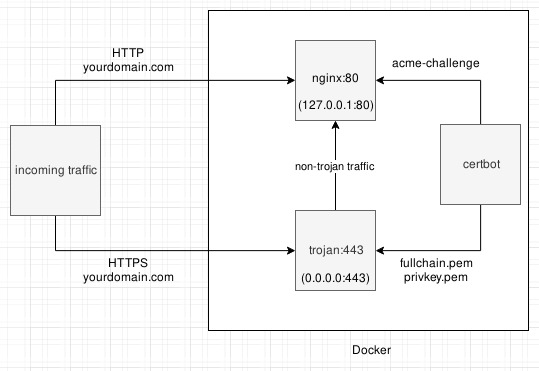
itshaadi made a boilerplate for using Trojan alongside NGINX. This differs from the original implementation, but it does show a very useful setup, and is actively deployed to circumvent censorship as I write this text. Here is a illustration from his project:

image

Make sure to check his repo out!

In that particular setup, traffic is divided into HTTP and HTTPS. On port 80, the server runs NGINX, to be able to serve normal websites. Port 443 is where Trojan resides. If it receives non-Trojan traffic, it will internally reverse proxy it to NGINX. This way, a normal user of the website will still be using a HTTPS connection. Now if you connect to that server using Trojan, it acts as a proxy to the outside world for you. The traffic you get using Trojan looks like a standard HTTP keep-alive or WebSocket connection.

Why is that so great.

The way Trojan works is great to avoid a proxy server being identified as such. This hopefully stops anyone from blacklisting your proxy. Ideally, you serve a legitimate website or service on such a server. This may be a Blog, a gitea instance or hundreds of pictures of cats in skirts. Now add a nice looking domain name and maybe even a bought SSL Certificate from a respected CA and you are golden. Hiding in all that legit traffic is just like hiding in a big ’ol Trojan Horse. Just with less angry Greeks this time.

Installing and using Trojan

I am not going to give you an in-depth install guide here. Trojan is a very versatile and flexible piece of software. You have to think about what kind of solution YOU want to build with it, what YOUR threat model is and so on and so forth. Even according to their own website, Trojan is kinda complex. To quote them:

Unless you are an expert, you shouldn’t configure a Trojan server all by yourself.

The aforementioned project by itshaadi can help you lots, but it’s still recommended to avoid setting up a Trojan server if you aren’t all that experienced with servers. Especially when using something like Trojan might get you in trouble.

It’s quite the contrast to setting up ShadowSocks, which usually takes me about 5 minutes, and I think even a newbie can do in an hour or two.

Something that you should also keep in mind, is that while there is an Android app it is currently in Pre-Alpha. So most likely barely usable. To connect to your Trojan server, I recommend that you use a proper computer with Trojan installed. The Trojan website mentions that they work on making Trojan a ShadowSocks plugin, which would make all the various ShadowSocks clients work with it. But that isn’t usable as of now.

Thanks for Reading!

Big thanks to itshaadi for helping me out on this one!

https://wp.palone.blog/?p=72
Extensions
Bypassing Firewalls – But How?
Uncategorized
In my last post I have elaborated multiple reasons as to why someone would want to bypass a Firewall. Now that this is established, here comes the part where we get to the “how”. If you don’t care about the technology behind any of this, jump to the conclusion. However, if you are interested in the theory behind Firewall ... Read more
Show full content

In my last post I have elaborated multiple reasons as to why someone would want to bypass a Firewall. Now that this is established, here comes the part where we get to the “how”.

If you don’t care about the technology behind any of this, jump to the conclusion.

However, if you are interested in the theory behind Firewall bypassing, go right ahead and read the rest of this article.

Digging your way out

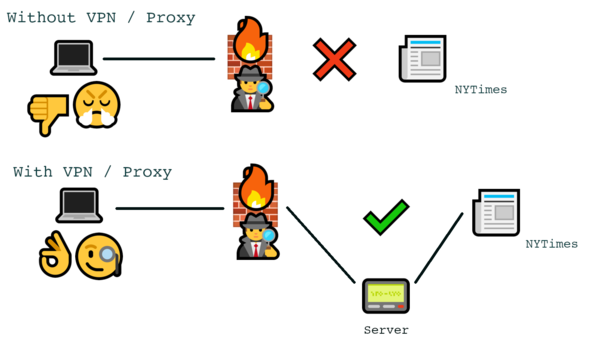
Network Firewalls act as a barrier between your client device and the “bad, scary outside world”. They require in- and outgoing traffic to be passed through them to be able to achieve this. Now the general concept to bypassing a firewall is using a proxy or a VPN server. These are uncensored servers on the outside of the restricted network, which then will act as your gateway to the uncensored Internet.

But “Just use a proxy or a VPN” is obviously not the answer to our question. That would be way too easy. Bypassing Firewalls is a never ending game of cat and mouse, and so it gets quite a bit more complex than that. 

For elaboration’s sake, let’s pretend your company has banned access to the NYTimes website for whatever reason. If you want to connect to their website, the Firewall will see that your Computer wants to connect to the NYTimes website. Upon seeing this request, the Firewall will not let it pass to the open internet, but rather reply with a very polite “lol no fuck you”. Using a VPN / Proxy however, you are requesting a connection to a domain like myproxyserver.com, which then will forward your request to the NYTimes website and the answer from their servers back to you. Because after all only the NYTimes website is blocked, but your middlebox is not.

That is the basic idea

For a very unsophisticated Firewall, all of this might already be enough to bypass it. Any VPN or Proxy Server may suffice. But a more advanced Firewall is able to tell that you tried to bypass it by inspecting your traffic, and stop you from doing so. Or your server might be set up in a way that gets blocked for some other reason that isn’t even related to your attempt to bypass the Firewall.

Staying undetected, and overcoming obstacles

To actually escape such Firewalls effectively, what we need to know are the restrictions and methodologies used against us first. Once we have an understanding what could make us fail, we can work towards getting around this.

The following list of two Security measures which a Firewall might put into place is far from complete. These are things I have personally dealt with or that I was otherwise able to find out about during my research. There is probably an infinite amount of stuff that might happen to stop you in your tracks, and just as much to bypass that again.

Blocked ports

A very common practice in Firewalls is to block, or whitelist, certain ports. Many resources, like this, exist about this topic, some targeted specifically at Firewall admins. Blocked ports are a common thing to encounter in any kind of restricted network. Even some ISPs are blocking ports. It’s usually not specifically done to stop people from bypassing their Firewall, it’s just an overall used practice, following the principle of least privilege. Avoiding blocked ports is easy, just use one on your VPN / Proxy Server that is used for a very common service, and therefore is very likely not to be blocked.

Examples are:

These ports are almost always unrestricted. I personally use Port 443, but the other ones should work as well.

Protocol Fingerprinting

A slightly more advanced method of restricting users is by identifying the protocol their connection is using. Connecting to port 443, the one commonly associated with https traffic is neat, but if the Firewall notices that your connection clearly is NOT https traffic, that isn’t so neat anymore. In fact, it might make you look even more suspicious. For example, The OpenVPN protocol can often be identified when using default settings. To hide what you are doing, many solutions already exist. I have split them into these two categories:

  1. Make your traffic look like a different protocol
  2. Make your traffic look like random shit (aka Obfuscation)

OpenVPN for example, does use SSL for their authentication, which does look very similar to HTTPS traffic at first glance, but analyzing the traffic can reveal the differences between a SSL Handshake performed by a regular https Website and one made via OpenVPN. There are ways to wrap OpenVPN traffic into different protocols like SSH, or use Obfuscation to combat this.

Obfuscation seems to be the more widespread and also more useful method. A famous tool for that are the ‘Pluggable Transports’ made and used by the TOR Project. The one that is currently in use by TOR is obfs4 also referred to as the ‘Obfourscator’. This obfuscation layer for the TCP protocol does transform the traffic in such a way that it is not easily identifiable anymore. Stuff like packet size, packet timing and more can be randomized, and the payloads are heavily encrypted.

Another project that uses obfuscation to avoid detection is ShadowSocks. Originally made to bypass the GFW, it also is hard to be detected by DPI. By using a pre shared key, every single part of the communication, including the TCP handshake, are always encrypted and randomized. Message length and other factors are being randomized as well. Although there seem to be ways to fingerprint vanilla ShadowSocks traffic with DPI, most notably by the GFW itself, for most networks ShadowSocks is a very effective and surprisingly simple way of bypassing Firewalls. Setting up ShadowSocks-libev Server on a Debian 10 VPS took me a whopping 5 minutes last time I did it.

To tackle even the most sophisticated Firewalls like the GFW, you can also use Shadowsocks Plugins to make it even harder to get detected. These plugins do even more things, such as making your traffic look like actual https instead of just obfuscating it, Domain Fronting and much more. But this is currently only neccessary for the most nefarious types of Firewalls.

Some additional things to consider.

There are some more things you should consider when choosing and setting up a method for bypassing. Some proxies commonly installed in networks may have problems dealing with UDP traffic. So setting your connection to TCP only may help. Also, it might be a good idea to only fire up a connection to your Server when it’s actually needed, as being connected to the same server for hours at end will look suspicious too. Especially when a human might take a look into some traffic logs. And as a last tip, changing your MAC Address is good for ban evasion.

Conclusion

Now all of this is a lot of information, but what is the conclusion? What do I actually recommend? Well all things considered, I believe using a ShadowSocks Server that is listening on port 443, TCP only, is a very solid start. When dealing with an especially sophisticated Firewall, the various ShadowSocks Plugins will be of help.

For self-hosting, I recommend to get a KVM-VPS running Debian 10. Shadowsocks-libev is in the debian repos, making it a breeze to install. And a KMS Server has the least amount of problems for proxies and / or VPNs. In my experience at least. 

If you don’t want or can’t selfhost mullvad.net offers ShadowSocks bridges. And just before anyone asks, I am not affiliated with them.

Thanks for reading
https://wp.palone.blog/?p=69
Extensions
Bypassing Firewalls – But why?
Uncategorized
Oh boy here goes. This is the first post of many, in which I will touch the topic of bypassing Firewalls. This being the Introduction of this series, I will focus on setting the topic up, providing explanations and all that stuff. Some of the resources I will provide are screenshots from chats I took ... Read more
Show full content

Oh boy here goes. This is the first post of many, in which I will touch the topic of bypassing Firewalls. This being the Introduction of this series, I will focus on setting the topic up, providing explanations and all that stuff.

Some of the resources I will provide are screenshots from chats I took in the Telegram Messenger. I’ve had many and very lenghty converstaions with a some very awesome individuals over the past few months. These people all have a need to bypass Firewalls on a daily basis. I was also lurking around in subreddits and forums where people are discussing that topic.

So why?

First things first, WHY would anyone need to bypass a firewall? Firewalls are mostly perceived as a security measure. They are installed on your endpoint machine or in the network, or… well both, and they make sure no malware reaches your PC. And while this is not exactly wrong, that isn’t completely true either.

Because my english sucks, here is the first definition from Wikipedia:

In computing, a firewall is a network security system that monitors and controls incoming and outgoing network traffic based on predetermined security rules.

That’s pretty accurate so far, although I would personally cross out the word ‘security’. Because Firewalls are also commonly used to censor and surveil the users that sit behind it. The most famous example for that is probably the Great Firewall of China (GFW). It’s the wet dream of any totalitarist leader in the modern world, and a very powerful tool in shielding away reality from citizens for the purpose of propaganda. But I might write more about the GFW another day.

I am also in contact with a couple of folks from Iran, a country which has a form of internet censorship which is similar to China. The freedom of chinese and iranian people is actively limited by their oppresive governments, bypassing the censorship machine means liberation!

See, I am not in china, neither am I chinese. I am very privileged to live in a country where I mostly have free access to any kind of information I desire. Therefore, the GFW is nothing I personally have to fear. But there are more reasons so even someone like me might have genuine interest in bypassing firewalls. Even though my freedom is not limited by my government.

Less dramatic reasons for bypassing Firewalls

A classical example why one wold want to bypass a firewall, are free WiFi Hotspots. Germany’s mobile network is trash. And expensive too. So when I can, I use open WiFi Hotspots. Now these aren’t often the safest option out there, and some of them are straight up nefarious. I was in a Subway the other day, the one where you get sandwiches, and after connecting to the WiFi my browser was barfing all sorts of SSL error messages out. This network actually deployed their own Certificate, which would break the encryption of any HTTPS site if used. They could straight up log my internet activity. We are in 2019, and I am sure that violates the GDPR and probably other laws, but whatever. Who cares about data protection laws right?

That's the error I was shown. Pretty clear message.

I have no idea *why *they do that. As far as I am concerned it may just be a misconfiguration. Maybe.

One argument now could be, just to not connect to such a network in the first place. And sure, I could. Fair point. But I can also use a VPN and continue using free WiFi while eating my damn fastfood.

Another thing happenend at my school. It deploys a network filter, like many schools do. What sucks is that they block web.de, amongst many other sites. Web.de is a webmail provider that also delivers news. These news are very clickbaity and generally low quality, and I guess that is why the school has blocked it. (Although it was listed under ‘pornography’ which was odd.) Now as luck would strike me, I had to reset a password. Mail sent to my web.de Account. Well, I was able to get to my mails, because I could bypass the restriction that was set by the firewall. But usually I would have not been able to.

These two examples show security and usability concerns respectively. Avoiding the firewall means avoiding sniffing and restrictions.

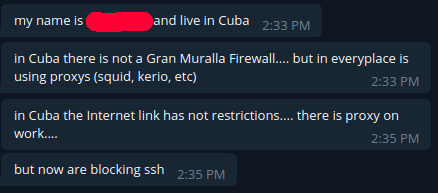
I  was also chatting with a guy from Cuba. Take a look at what he wrote to me:

Now it gets comical. That guy is a SysAdmin. One would think using SSH is useful for such a person.

Okay and… how?

After I have (hopefully) made clear why there are many reasons to bypass Firewalls, what remains is the question how to bypass them. And this, dear reader, will be in the next blog post.

In the meantime, anyone who is interested in that topic can write me a PM on telegram, and when there is a genuine interest, come and join this Telegram group and chat with me and others about this topic.

Thanks for reading and Fuck Firewalls
https://wp.palone.blog/?p=65
Extensions
Trust is good, cryptography is better
Uncategorized
Recently, I have seen a lot of people in the InfoSec- and Online Privacy Community having lenghty discussions about which companies we can trust these days. At the very least, since Snowden has leaked various documents,  many companies have been labeled as either “trustworthy” or “not trustworthy”. These companies and services are rated by their past actions, and the ... Read more
Show full content

Recently, I have seen a lot of people in the InfoSec- and Online Privacy Community having lenghty discussions about which companies we can trust these days.

At the very least, since Snowden has leaked various documents,  many companies have been labeled as either “trustworthy” or “not trustworthy”. These companies and services are rated by their past actions, and the main factors seem to be how they handle personal data, and how much they value their security. Let’s look at some examples:

  • “GMail is a privacy nightmare but is a very secure service”
  • “Yahoo was totally pwned a few Years back and the hid it for 3 YEARS! Oh and they spy on you”
  • “ProtonMail is anonymous and safe”

And so on and so forth. Any discussion or article about this topic includes tons of links to all kinds of sources, personal experiences and quite often very, VERY heated tempers.

And it surely doesn’t end with E-Mail Services. VPN Providers, ISPs, Cloud Storage Providers and Server Hosts are frequently discussed in the realms I lurk around.

But, in the end, it’s all about TRUST. Yes, Yahoo is not as trustworthy as ProtonMail these days, after having every single User Account they had in 2013 being hacked, and trying to sweep it under the Rug

Let me elaborate this with an example: Imagine we have a 50GB folder full of documents, images or otherwise valuable data on our harddrive. Now, we might back that up to an extrenal HDD, but as any responsible IT-Person would tell us, a local backup is pretty much like having no backup at all. Houses burn down, HDDs get confiscated or stolen and viruses nuke any file they come in contact with. What we need to do is a so called “offsite backup”. This means storing our data at a different physical location.

For personal use, one of the many cloud storage providers seems to be a good choice for our problem at first, but if we do some research we might notice that some of these options are pretty invasive. And even If we don’t care about the privacy aspect of it, we still have to consider that accounts can be breached, passwords hijacked and data stolen. Maybe having our vacation pictures stolen isn’t that big of a deal, but having our tax info stolen for example, can be quite a pain in the ass, as this information can be used to commit tax fraud under your name. Actually, any type of personal Information leaked might help Criminals to build a synthetic profile or even just help them answer some KBA Questions to get into other Accounts we own. What exactly can be done with our data depends entirely on the data that would actually be uploaded and differs from person to person. This is what many people refer to as a “Threat Model”.

What I am saying is: When choosing a cloud storage provider, we should think about our personal privacy and security, as these two things go hand in hand these days.

Now so far we have only built our threat model and have been getting more and more paranoid. Doesn’t exactly sound like fun to me.

At this point, one might be inclined to do some research to find the most trustworthy cloud provider. Is Google a good choice? Or use the (way more expensive) MEGA? Is DropBox even still a thing?

BUT trust is something we shouldn’t rely on. Trust is definitely not worthless¹, but its based on assumption and goodwill, not on facts. I looked up a definition in a dictionary:

TRUST – noun

reliance on the integrity, strength, ability, surety, etc., of a person or thing; confidence. confident expectation of something; hope.

I think this summarizes it pretty well. So what is the solution to our little Backup problem?

CRYPTOGRAPHY IS!

If we upload our files zipped and encrypted with a strong passphrase and decent Algorithm, we don’t need to hope that our storage provider doesn’t snoop around in the files. And if our account gets hacked, that is certainly annoying, but without the keys, the attacker will only be able to steal useless data junk from us.

Disclaimer: In theory an Attacker could, with enough sophisitication and resources, decrypt our files. If we choose a strong passphrase however, we would need to be an exceptionally high value target to justify such measures.

When we trust a service, we are giving control away. If we don’t want our data to be accesed by ANY third party, including hackers and the storage provider, the easiest way is to take matters in our own hands. By encrypting the data we want to protect.

For this specific scenario I personally use GPG with symmetric encryption, using a 200+ char long password. GPG’s default algorithm is considered safe, but it’s possible to just use AES256 or others.

For emails, one can use PGP, for websites make sure they run HTTPS. If they do, the connection to the server is encrypted. I recommend using HTTPS Everywhere to make sure all connectioons are safe. And as described in an earlier blog post of mine, I also recommend anyone to use full drive encryption in case of a stolen hard drive.

TLDR: Encrypt your shit

Thanks for reading!

¹~Thanks to this guy for correcting me!~

https://wp.palone.blog/?p=63
Extensions
Google Dorks – Sometimes it really is that easy
Uncategorized
One day, I was watching some DefCon talks at YouTube, as I often do. One of the videos was titled “Google Hacking for Penetration Testers“. This title sounded very interesting, but also didn’t tell me much about what to actually see in there. So naturally, I watched it. It was amazing. All I could think ... Read more
Show full content

One day, I was watching some DefCon talks at YouTube, as I often do. One of the videos was titled “Google Hacking for Penetration Testers“. This title sounded very interesting, but also didn’t tell me much about what to actually see in there. So naturally, I watched it. It was amazing.

All I could think about was “huh it really is that easy sometimes”. A couple weeks later I made my first own Google Dork, found a good couple of COMPLETELY wide-open databases for various sites, including some decently sized forums, and reported the leak to the Owners.

But before I tell that story further, let me just tell you what “Google Hacking” and “Google Dorks” are all about:

The concept is fairly simple. People put a lot of stuff on the internet. And Google is highly effective at finding and indexing basically everything there is. Additionally, Google offers some advanced search Parameters that can make searches very effective. So if somebody posts their Facebook password in a public pastebin under the wrong Impression that these are private, you can literally just google for that password. Some other thing that you might see a lot are so called “Open Web Directories”. These are folders on web servers that have auto-indexing on. That sometimes is by design, but also often a misconfiguration. In that case, finding someones juicy files is fairly trivial.

Now to show you an Example, let me show you the Google Dork that I used to find those Databases as mentioned above:

inurl:"main.php?action=db"

Just put that in the Google Search and you may find similar things. Yes. Its really that easy sometimes.

So let me explain how I found it: At work, we had to dump a database for a customer. The server was not our own, and we did not have DB or SSH Access. However we had FTP Access. So a colleague suggested to use a tool named MySQLDumper “MySQLDumper”). This tool is designed to be put on a server, dump databases to SQL and remove it again. Because of that it has NO PASSWORD PROTECTION by default. It also provides some functionality very similar to PHPMyAdmin, as in you can change or delete certain data sets from the tables.

So I asked myself “What if people just leave that thing on their servers.” As I recently learned about Google dorks, I found a distinguishable factor that would allow me to find MySQLDumper in a Google Search. There would probably be many other ways, but I chose to use part of the URL to search for it.

And low and behold, I found lots. Many returned a 404, meaning the owner removed the tool already, and some have put up an HTPASSWD protection. But for a handful of sites I just was able to get to the site and was effectively having control over their database. You could (in theory) dump the Database and sell it, change the Password Hash for the Admin User to your own and control the whole site / server and a lot of other things. Dont do that though. It’s illegal and immoral.

Sometimes…it really is too easy.

I have then submitted that dork and others I created to the Google hacking database. Which makes me an official contributor of the “Exploit Database and Google Hacking Database” apparently. It sounds cooler that it is to be honest.

screenshot of my profile on ghdb

Some other Dorks from me Include one that is capable of finding incomplete Installations of the TYPO3 CMS that one would be able to hijack by finishing the Installation. This would allow an attacker to not just run the website but to Upload a webshell or other malicious PHP code using the Extension System.

Here is a list of all my approved dorks so far:

I recommend just surfing the GHDB as well

Please use this knowledge responsibly and follow the laws of where you live.

Thanks for reading.
https://wp.palone.blog/?p=60
Extensions
Hacking into an online games leaderboard – Reversing JS
Uncategorized
This is Part 2 of my Series about unconventional usage of JavaScript. Please read part 1 first if you haven’t already, as I will write this second part less noob friendly. This time I will take a look at a JavaScript powered game, which features a Online Leaderboard to show off your 1337 Hacker Skills to the ... Read more
Show full content

This is Part 2 of my Series about unconventional usage of JavaScript. Please read part 1 first if you haven’t already, as I will write this second part less noob friendly.

This time I will take a look at a JavaScript powered game, which features a Online Leaderboard to show off your 1337 Hacker Skills to the world.

The website I will be using for that is https://www.bernhard-gaul.de/spiele/reaktion/reaktion2.php

With that out of the way, let’s just start:

1) The Game
The game

This is what the game looks like. You hold the Left MB to drag the red block around, evading the blue thingies flying around. This game can be found at various places, but I am not sure if the Leaderboard functionality was added by this particular website or the original game coder. Whatever may be the case, let’s start to reverse some stuff.

2) The easy way

The easy way is… really easy.

When we just open the Source tab we see a Reaktionstest.js (ENG: Reactiontest.js)

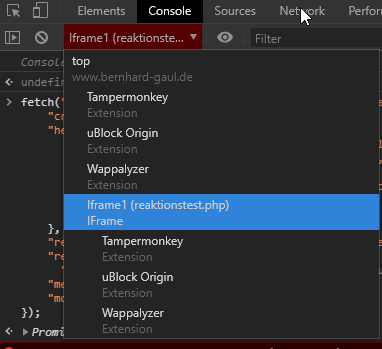
This game is so simple that we don’t really need to run it to understand what’s going on. Before you do any testing though, be aware that the game runs in an iFrame. You have to make sure your console is in the right context:

You can do many things. Disabling the collision detection is one of the simpler ones.

Frankly, this is so easy, I am not gonna show it in Detail. Just look at some of the functions and replace some stuff.

3) Network Requests

Now this is the fun part! Skip all the actual gameplay and go straight for the Leaderboard. The Highscore obviously has to be submitted somehow. It is probable that this game uses plain old HTTP requests, newer games may use Websockets. Let’s try to submit a score and see what our Chrome Dev Tools say:

The request

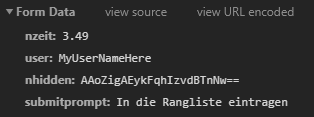
So this is the relevant POST request. Let’s look at the fields one by one:

  • nzeit
    • Translated this means “nTime”. Basically the score.
  • user
    • The username I submitted
  • nHidden
    • Not sure at this point, this looks like some protection
  • Submitprompt
    • This was the Text in the prompt. I found out later that this tells the server what there is to do.

Also noteworthy is the fact that the site loads the file “Blowfish.js” which is a JS implementation for a very popular and safe encryption cipher. Probably in relation to the “nHidden” thing?

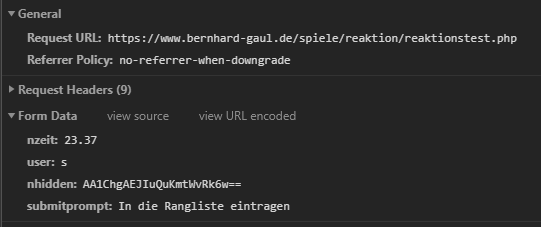
Let’s forget this for now and just copy one request and resend with a higher score. You can right click any request and select “Copy -> Copy as Fetch” to get JS code with the request ready to paste into the console.

The replayed request

The Server takes it. However, the first legitimate Request triggered a reload of the page. This time the response is completely empty. Did it work? Let’s refresh

Nope.

Nope.

So let’s look for referneces to “nHidden” and see whats going on. This is what we find:

<input name="nhidden" id="ihidden" type="hidden" />

It’s a empty hidden input field. Not suprising given the name. The id of “iHidden” then probably is referred to in the JS. Basically, if you dont worked a lot with JS before, the default way to select a single node in the Websites DOM is to use the function

document.getElementById()

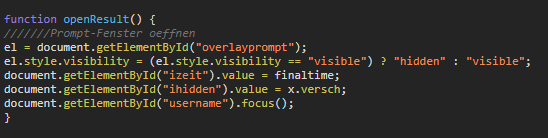
Let’s search for that:

There it is

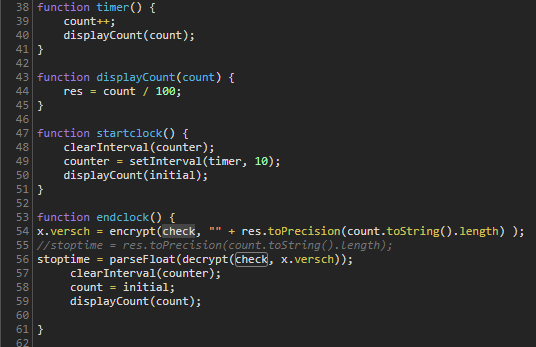
So the openResult() function opens the dialog to submit the Score. Our “ihidden” value comes from the variable “x.versch”. Let’s see where this comes from.

Some crypto stuff

Ooooh. There’s some crypto going on. The counter, which I assume is the time, get’s encrypted with “check” which is some other stuff…?

What are all these values, and what’s the result? Let’s set a breakpoint to find out.

There is a lead

These are the arguments for the encrypt() function. The key “aeiou” is hardcoded above, so it’s our score and a secret key thats used here.

(PRO TIP: Don’t hardcode secret keys where everyone can grab them)

And here is the value after encrypt() happened.

Encrypted String

Looks familiar right?

So to set any score we want, we have to encrypt our desired value and adjust the request acordingly. The server then checks if these values are the same.

Luckily, the function is in the Global Scope! (IF you have your console in the right context as mentioned above).

So I can just pop some score in to get my values and theres no need to use additional tools.

The body of the request now looks like that:

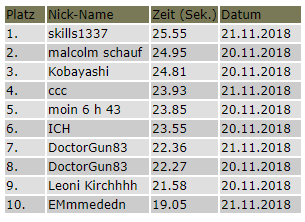
"body": "nzeit=25.55&user=skills1337&nhidden=AAh02gAL5DG3DXgj7H0AeQ%3D%3D&submitprompt=In+die+Rangliste+eintragen",

Note how the ‘=’ is URL encoded with %3D%3D as using the actual ‘=’ char, would make this an invalid request.

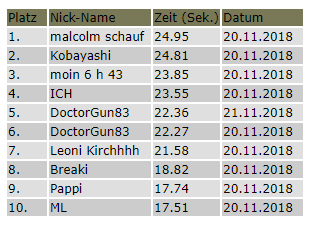
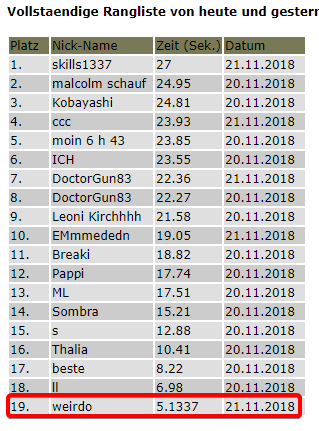
I am the winner

Works! I can freely set my score now. Topping things off, we could write a UserScript for that so we dont have to deal with breakpoints the next time. But I am too lazy for that right now.

I have found out a couple additional things as well. It seems that every score over > 27 seconds get rejected. I was however able to set the score to 26.999 (normally impossible) and 26.9999999999 which gets rounded to 27. That means we can achieve scores that are impossible using the actual game.

1337!

This raises suspicion that this site might actually be vulnerable to XSS. Anything that’s not a normal number seems to be disregarded, but there may be ways around that.

Further testing revealed that users are distinguished by IP address.

That all for now.

Thanks for reading

https://wp.palone.blog/?p=44
Extensions
Free Premium for textmechanic – Reversing JS
Uncategorized
This post is part of a multi-part Series where I write about fun things you can do with just some JS and a modern day browser. Part 1 is about getting Free Premium Features on textmechanic.com. What do I need? A browser. I will be using chrome Basic understanding of programming as well as the HTTP ... Read more
Show full content

This post is part of a multi-part Series where I write about fun things you can do with just some JS and a modern day browser. Part 1 is about getting Free Premium Features on textmechanic.com.

What do I need?
  • A browser. I will be using chrome
  • Basic understanding of programming as well as the HTTP protocol including POST/GET requests is recommended.
  • Creativity.
What do we want to do?

Part 1 will be about bypassing the premium paywall on textmechanic.com. If you don’t know textmechanic: It’s a website that offers various text manipulation tools such as removing duplicate lines, comparing lists for differences, removing whitespace, adding suffixes and prefixes and much more. I use that site every now and again when I need to do some filtering and sorting of massive CSV files. Now, one day, I was seeing this:

I already whitelisted the site in uBlock after the site showed ADs. I was fine with that. If that would’ve been a one time 10$ charge I would have even consider paying it, but this paying monthly thing was way too much for me.

Considering nearly all stuff happens in client JS only, this site is good target for the introduction to client side JS hacking.

The Reversing

Let’s clarify something first: What is our goal? Using the site for free of course. Then how do we do that? This is where we start reversing the website.

The first things we gonna try don’t even involve any code at all. We just take a look at how the site behaves when we:

  • Use all Free actions
  • Delete all Cookies

Result: I still couldn’t use the Site. That tells us it does not store the anything in a cookie. So next:

  • Clearing everything including Chromes localstorage
  • Using FireFox

Result: Still, no luck. It’s not saved in the browser at all. Then:

  • Using a VPN
  • Using my phones 4G

Result: This worked. So we definitely know the “ban” we get is applied by IP address. That tells us that the Webserver is somehow involved in the process.

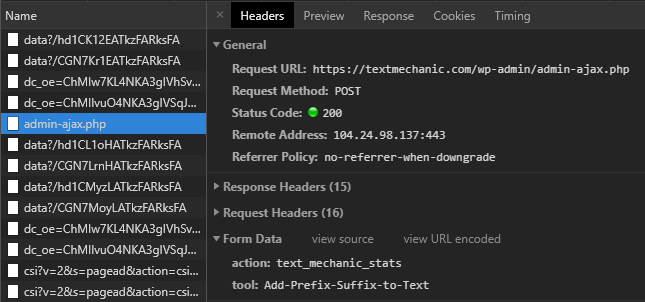
Now is a good time to look into the Network Tab in the Chrome DevTools (Press f12 in chrome). After using the site for a bit, this is what I saw:

What does that mean?

  1. There is a lot of random stuff like googleAds, some stuff from research.de (whatever that is) and more that looks like tracking and / or ADs.
  2. The highlighted thing is a POST request to “admin-ajax.php”. That is probably what we are looking for. Not only is it the only thing hosted locally on the textmechanic server but it also has ajax in the name. How sweet!

So the request includes two fields of data:

  • ACTION
    • I don’t exactly know what that is supposed to do, seems to be required so the admin.ajax.php knows what function to actually call.
  • TOOL
    • This is the “tool” I used on the Site. In this case I added an prefix to some random text.

As any request also contains our IP address (obvisously, because we just send some data to it), we have given the server all the data it needs to limit us by IP address.

Let’s look at the response we got now:

img

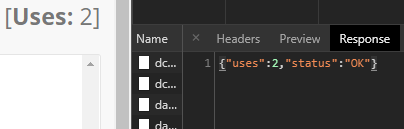
So on the left is the part of the website telling us that we have 2 “uses” already done (it started at 0), and the response also tells us our uses are at ‘2’.

Proving that this is the right thing we are looking at.

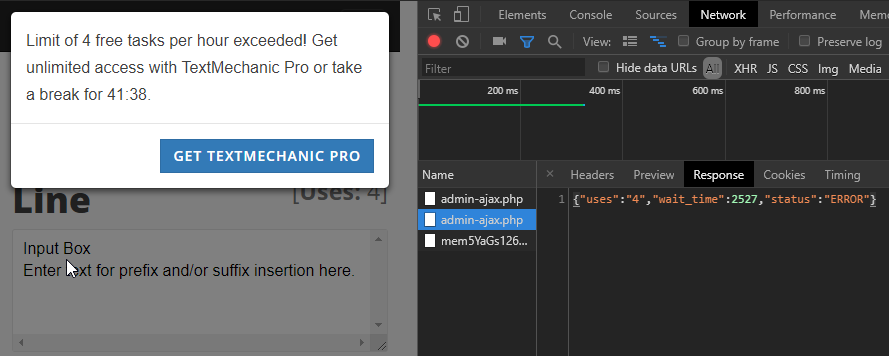
There is also something called status, that has the value ‘OK’. Let’s use up all free uses and see what happens:

img

Okay we have something interesting going on here:

  • Uses are at 4 which gave us the dreaded warning
  • The status is now ‘ERROR’
  • The server responded with the time we have to wait until we can continue again.

That is all we need to know. Actually that’s a bit more than we really need to know, but whatever. Now for the fun part.

Manipulating the Code

So we have a decent understanding of what is happening now. All that is left to do is stopping that from happening. There are many ways to approach this, I will just share what I did in this case.

I know there is a AJAX request happening. I also know, that all the text manipulation is done in client d Side JS. That is because:

  1. The Network Tab didn’t show anything regarding the actual Text manipulation
  2. Some parts of the code I looked at browsing the Sources did.
  3. The site also literally tells you that it does everything client side.

My first Idea than was to just NOT DO the AJAX request. And that’s exactly what I did! Honestly that’s a pretty straight forward process:

  • Find the code
  • Understand the code
  • Replace the code

To find the code we need, I switch over to the sources tab and use “search in all files” to search for the string ‘admin-ajax.php’:

img

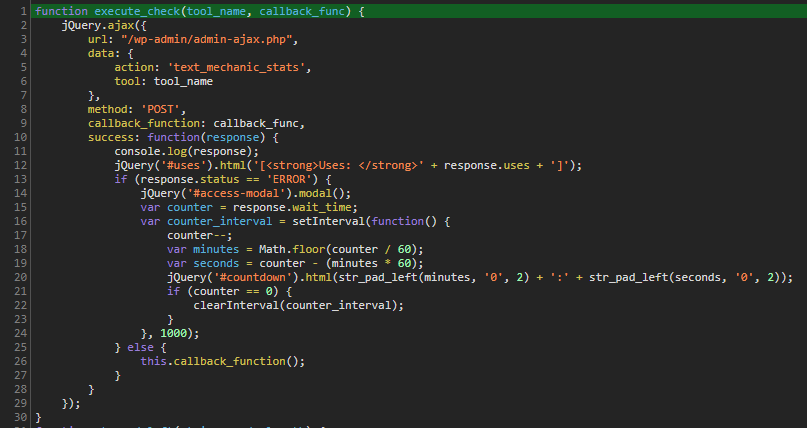
And I find this string in this function right here:

img

Now (after pretty printing the code; It was minified) we found the golden nugget! Take some time and read the code, try to understand it yourself if you can.

If you know what callbacks are you probably already know what to do from here. Still, let me explain:

The “execute_check” function takes the arguments ‘tool_name’ and ‘callback_func’ which is a function passed into a function (if you don’t know JS, this is very common practice here.) The function does the request, takes the response and when the status variable we saw earlier is ‘ERROR’ it will show the error window. Otherwise it will execute the “callback_func”.

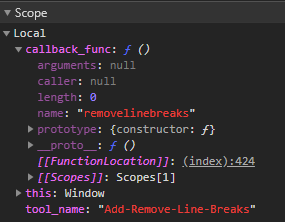
But…what is “callback_func” even doing? Well let’s use the debugger and take a peek at the scope:

img

We see two things here:

  • The “callback_func” is (in this case) called ‘removelinebreaks’. I was using the tool remove line breaks. So that definitely checks out.
  • Also the whole function “execute_check” exists in the globally accessible scope “window”. So it’s extremely easy to overwrite.

So by just removing the code that does the request, or even just changing the IF clause, we get what we want.

Let’s test that:

img

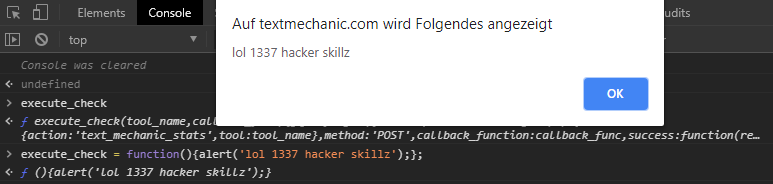
What I did here is, that I opened the console, which allows me to interact with the sites JavaScript. I first entered the function name “execute_check” and can confirm that it returns the above discovered function. This proves that it is globally accessible. Now I replaced the content of the function with

alert('lol 1337 hacker skillz');

and clicked the “REMOVE LINE BREAKS” button. So we changed the functions behaviour to do whatever we want! We successfully manipulated the sites code and behaviour.

Actually Hacking stuff and achieving persistence

This is the last part of our Hack. We can now change the code we need to change, but it still doesn’t do anything useful as of right now. Also, no one wants to redo the whole process every single time visiting the website, so we also have to look into persistence.

First off, let’s replace the function with useful code this time to achieve our goal. All we need to do is remove everything that we don’t need from the original function while keeping it working:

img

It’s very simple. First, we accept the same function arguments as the original function. This function gets called from several places with always the same arguments. So if we dont leave that like it is, we break the script. We don’t actually need ‘tool_name’ but still take it as an argument so the script works when it tries to pass these arguments. Then we just call the “callback_func” without ever performing every check like the original function did. That’s about it.

Now the last thing left to do is persistence. There are two ways I consider good enough.

The first is using a chrome snippet. Read more about that here

Personally though, I recommend using UserScripts and a UserScript manager. Chrome has Tampermonkey and FireFox has Greasemonkey. Main Advantages are that these run scripts automatically on the site it needs to, offer one-click installs, are auto updating the scripts and give feedback when scripts are running.

If you are using a UserScript manager now, click HERE to install my script that gives you free premium on textmechanic.com.

I hope that article was easy enough to follow, if you have any ideas, critique or anything else, feel free to write me a mail to p410n3@gmail.com

Thanks for reading!
https://wp.palone.blog/?p=25
Extensions
Brutal Web Design – Resource Collection
Uncategorized
Over the last 2 years, I found various interesting articles regarding brutalism in web design. Even though they do not necessarily considered themselves talking about that topic. If you don’t know what Brutal web design is, then let me quote one of the said articles to sum it up quickly: Originated in post-World War II ... Read more
Show full content

Over the last 2 years, I found various interesting articles regarding brutalism in web design. Even though they do not necessarily considered themselves talking about that topic.

If you don’t know what Brutal web design is, then let me quote one of the said articles to sum it up quickly:

Originated in post-World War II Europe, Brutalism in design and architecture was marked by raw, unpolished aesthetics that made it easier to inexpensively rebuild cities and venues.

(Quote from uxbrutalism.com)

This concept just got applied to websites. This idea appealed to me, but I never came around using it in an actual project. Now FINALLY I came around making my own website in a brutal way. You might’ve guessed it; it’s this exact blog you are reading right now.

And all I can say is that it was a blast! Mainly because it’s just so simple. At least when you choose a more minimalistic form of brutalism. There are some other examples that I would describe as maximalism, that definitely where a lot of crazy hard work. However, I didn’t want that. And with just around 100 lines of CSS code I turned my bare HTML output to some sexy brutalist website that does focus on its content alone. And that’s all that matters. I also finally came around using CSS Grid. That was nice too.

So after getting inspired by many different Articles and websites, I present you my compilation of helpful and/or interesting links. A starter pack so to speak:

First, let’s start with the most simple and funniest reads on this list. It’s a saga teaching you the why and how of brutalism:

Some more articles, a bit more boring but still worth it:

Last but not least:

Especially that last link is worth it. Using some JS magic I found the exact number of websites featured there of the time writing that article:

> document.getElementsByClassName('screenshot').length
< 1391

1391 Websites most of them unique in their presentation and definitely worth checking out. Many of them include Easter eggs or very cool CSS / JS effects that might even be worth it for normal modern websites.

That’s it for that article. Stay brutal!

https://wp.palone.blog/?p=22
Extensions
Why having your own Server is totally awesome
Uncategorized
Around 2015-2016 I was getting more and more involved in webdevelopment. Before that my coding revolved mostly about some Batch scripting or Automation scripts with AHK. Nothing fancy and barely over 100 lines each. Having made my first somewhat good looking website at that time, I wanted to made it available to the public eye. At first ... Read more
Show full content

Around 2015-2016 I was getting more and more involved in webdevelopment. Before that my coding revolved mostly about some Batch scripting or Automation scripts with AHK. Nothing fancy and barely over 100 lines each. Having made my first somewhat good looking website at that time, I wanted to made it available to the public eye. At first I used some weird free webhosting. A couple weeks later, a friend of mine recommended that I rent a cheap Linux VPS. Things changed after that. Drastically. Having my own server instead of just that mediocre webhosting introduced me to a whole lot of things that I learned to love in the following years. Including Linux administration and the whole world of selfhosted software. Especially selfhosting is so useful, I can’t image going back now. To make it more clear, here are a couple things I do or at one point did with my server:

  • Own webserver. Serving any content I like, using any software I like. (Try convincing your shared hoster to switch to a different DBMS). Also updating ASAP instead of weeks later.
  • Hosting my ownCloud to backup and share files from. Kinda like dropbox. Files are encrypted as well.
  • A small reddit and a telegram bot.
  • My own instance of gitlab
  • A script to idle hours on my Steam alt account, which I build my own Webinterface for.
  • NMap, WhatWeb and other interesting security tools from the Kali linux repos, to launch penetration tests on my own server and sites. (My laptop was too slow)
  • Used it as an CnC back when I was fiddling with AV evasion and Metasploit.
  • Use it as an VPN.
  • An PHP based proxy. For some reason email websites are blacklisted at my school, so I use an PHP proxy to connect through my webserver, bypassing the blacklist.
  • This blog obviously.
  • An image hoster for sharing my screenshots. Instead of having them uploaded to Gyazo or imgur. (Services I can’t control) They are uploaded to my own server using shareX and THIS script.
  • Converting of big files, so I can still use my PC while my server is at 100% CPU rendering things.

I probably have forgotten a couple things too, but these are enough to hopefully show that selfhosting can be really awesome. Especially people who care a bit about their privacy will see great value from having their own server. But hey, it’s too expensive right? No. Not at all. Many People seem to think that renting a server means to rent a full machine in a data centre. But we live in the age of virtualization, so buying a virtual server is the way to go. My first Server costed 1.50€ / month and I hosted 2 small websites, an owncloud instance and an TeamSpeak Server there. 1 vCore and 512 mb ram are plenty for that, and I only upgraded my package once I started working with server side programming and MetaSploit more. These Services can be pretty demanding at times. Learning to set up an whole Webserver Stack on my own and how to properly use Linux from the Terminal was not only fun, it’s a skillset I use nearly every day at my current Job. So if you want to get into full-Stack web-development specifically, this will get you started. If you are living near Germany I recommend dyn-box.de, I am a Customer there for 2 years now. Otherwise OVH is always a safe bet. (This article is not sponsored by anyone btw) Now, go out and have some fun with you Server!

https://wp.palone.blog/?p=16
Extensions
The misuse of the word Hacker
Uncategorized
Ask the media, then ask an older programmer from the 80’s. Maybe ask your best friend and now, ask yourself: Who or what is a “hacker”? This one particular word is being misused by the general public for years now, drawing the picture of that lonely criminal, sitting in an all dark room watching the matrix intro ... Read more
Show full content

Ask the media, then ask an older programmer from the 80’s. Maybe ask your best friend and now, ask yourself: Who or what is a “hacker”? This one particular word is being misused by the general public for years now, drawing the picture of that lonely criminal, sitting in an all dark room watching the matrix intro while he punches the keycaps of his keyboard with the same amount of hate he has for the rest of the world. Or something like that. People like anonymous even confirm that bias we have in mind. A picture drawn by people that don’t even want to understand what a hacker is at all. By just reading the first three sentences of the english Wikipedia article about the “hacker culture”, it’s clear that the terms real meaning is not even close to the one most people actually know. That’s the part I mean:

The hacker culture is a subculture of individuals who enjoy the intellectual challenge of creatively overcoming limitations of software systems to achieve novel and clever outcomes. The act of engaging in activities (such as programming or other media) in a spirit of playfulness and exploration is termed “hacking”. However, the defining characteristic of a hacker is not the activities performed themselves (e.g. programming), but the manner in which it is done and whether it is something exciting and meaningful.

Two of the three references are from Interviews with Richard Stallmann, founder of the GNU Project and developer of the GNU Compiler collection. Therefore, they aren’t as objective as I would want an article on Wikipedia to be. I also think the article is focused too much on technology, which somewhat confirms the bias hacking has. Still, it does a way better job explaining what actual “hacking” is then any news station I’ve heard off. Let’s take the parts out, that I believe are the most important to define what hacking is:

  • Enjoying the intellectual challenge
  • In a spirit of playfulness and exploration
  • It is something exciting

That’s it. A hacker is someone who does and enjoys the three steps above. Notice how I purposely avoided technical terms and generalized it to be that way. Hacking is a way of thinking, some say it’s a lifestyle even, but I wouldn’t go that far. Another way to say what the term means is this popular quote:

A Hacker is someone who tries to find a way how to use a coffee machine to make toast.

This book

Hacking has many forms in this world. Apart from the classical approach of bypassing any sort of digital security measurement, (most hackers I know all found a way to bypass the Internet filter back in middle / high school) many enjoy picking locks as a challenge. Some other thing that is worth mentioning is anything related to Social Engineering, the art of “Hacking people”. You don’t use code to get to your goal, you use psychology and charisma. I’ve seen a Video where a guy ordered a burger and added a note where he asked to add extra cheese to his burger, but actually ordered a different burger. This was done unintentionally as he wanted to buy the referred burger first, but changed his mind. The stressed out fast food workers just assumed he had ordered 2 burgers because one was listed in the order and one was referred to in the note. So he got two burgers and paid for one. (Story told out of memory). He basically exploited the stress of the fast food place by simply implying something, not even with a provable bad intent. That’s definitely hacking in my opinion, but not technical at all. Using Google Dorks to find vulnerable Systems, or just juicy files is another non-technical way of hacking. Digging through github repos or through pastebin, finding database dumps or config.php files including database passwords is something literally EVERYONE is capable of. But just thinking of using plain old Google to search for those kinda files is something most people don’t do. Whenever I show someone that I can use search parameters to access a whole lot of unprotected databases by typing ONE line into my browser they are shocked, even though, the thought isn’t even that abstract. Google crawls the whole Internet for Content to allow you to search for specific parts of it. Why shouldn’t it be able to find sensitive data like that? Think about that. I hope that post was clear enough in explaining what a hacker actually does. It’s not about stealing peoples bank accounts nor about being an “ethical hacker” who respects the laws and reports vulnerabilities. That’s irrelevant.

Hacking is a way of thinking. Being an Hacker means you have a specific mindset!

https://wp.palone.blog/?p=10
Extensions