GeistHaus
log in · sign up

Harder, Better, Faster, Stronger

Part of wordpress.com

Explorations in better, faster, stronger code.

stories
Bresenham’s Pie
Uncategorized
Approximating is always fun. Some approximations are well known, like Zu Chongzhi’s, , that is fairly precise (it gives 6 digits). We can derive a good approximation using continue fractions, series, or some spigot algorithm. We can also use Monte Carlo methods, such as drawing uniformly distributed values inside a square, count those who falls […]
Show full content

Approximating \pi is always fun. Some approximations are well known, like Zu Chongzhi’s, \frac{355}{113}, that is fairly precise (it gives 6 digits).

We can derive a good approximation using continue fractions, series, or some spigot algorithm. We can also use Monte Carlo methods, such as drawing uniformly distributed values inside a square, count those who falls in the circle, then use the ratio of inside points to outside points to evaluate \pi. This converges slowly. How do we evaluate the area of the circle then? Well, we could do it exhaustively, but in a smart way.

If we count the number of (discrete) points inside a circle, one by one, that would be an O(r^2) process because a circle of (integer) radius r is contained in a 4r^2 points square. But we can actually only walk on the edge of the disc, that is, on the circle itself in a much faster way.

Using Bresenham’s midpoint circle algorithm, and symmetries, we can cover an r^2 area in r steps! Bresenham’s is actually a clever way of walking around the circle using an error-correction scheme. As we walk the circle along (x,y) points, incrementing x as we go, we sum the ys, because they represent the height, and therefore the number of points in the circle between (x,y) and the axis at (x,0).

We have to be a bit careful on the symmetries, as the algorithm works only on one eighth of the circle. If (x,y) is on the circle, so will (y,x); and we have to be careful to add x only when y changes. We compute the area of a quarter circle, times four (minus overlaps), and we get a fairly accurate estimation of \pi.

A quick implementation would look like this:

// c++20
#include 
#include 
#include 
template  T sqr(const T & x) { return x*x; }

int main()
{
 int64_t r=1'000'000'000;
 int64_t x=0;
 int64_t y=r;
 int64_t oy=0; // old y
 int64_t d=5-4*r; // everything times 4 to avoid fractions

 size_t s1=0;
 size_t s2=0;

while (x<y)
 {
  s1+=y;
  if (d<0)
     d+=4*x+6;
  else
    {
     d+=8*(x-y)+20;
     y--;
    }
 x++;
 if (oy!=y) // symmetry
     s2+=x;

oy=y;
}

double pi_est=4.0*(s1+s2-r/2)/sqr(r);
std::cout
<< (s1+s2) << '/' << sqr(r) << std::endl
<< pi_est << std::endl
<< pi_est-std::numbers::pi << std::endl;

return 0;
}

The output is:

time a.out
785398163690333774/1000000000000000000
3.14159
-8.28458e-10
real    0m0.412s
user    0m0.412s
sys    0m0.000s

The interesting thing about this algorithm is that it is O(r), and that its error is proportional to \frac{1}{r}. Indeed, above we see that r=10^9 gives an error of \approx 8\times{}10^{-10}, which is not too bad.

stevenpigeon
http://hbfs.wordpress.com/?p=6646
Extensions
Binary Trees are optimal… except when they’re not.
Uncategorized
The best case depth for a search tree is , if is the arity (or branching) of the tree. Intuitively, we know that if we increase , the depth goes down, but is that all there is to it? And if not, how do we chose the optimal branching ? While it’s true that an […]
Show full content

The best case depth for a search tree is O(\log_b n), if b is the arity (or branching) of the tree. Intuitively, we know that if we increase b, the depth goes down, but is that all there is to it? And if not, how do we chose the optimal branching b?

measuring-tree

While it’s true that an optimal search tree will have depth O(\log_b n), we can’t just increase b indefinitely, because we also increase the number of comparisons we must do in each node. A b-ary tree will have (in the worst case) b-1 keys, and for each, we must do comparisons for lower-than and equal (the right-most child will be searched without comparison, it will be the “else” of all the comparisons). We must first understand how these comparisons affect average search time.

If we use a naïve comparison scheme, each keys ask for two (potentially expensive) comparisons. One to test if the sought value, v is smaller than a key k; one to test if they’re equal. If neither tests is true, we move on to the next key. If none of the tests are true, it is an “else” case and we go down the rightmost branch. That scheme does way more work than necessary and would ask for 2(b-1) comparison per node (because there are b-1 keys per node).

The main problem with this straightforward approach is that comparisons can be very expensive. While comparing two integral types (int and the like) is often thought of as “free”, comparing string is expensive. So you clearly do not want to test two strings twice, once for < and once for =. The much better approach is to use a three-way comparison, also known as the “spaceship operator”.

The spaceship operator, <=> is C++20’s version of C’s old timey qsort comparison function (it is in fact much better because it also automagically provides all comparison operators). Basically, a<=>b can return <0 if a<b, 0 if they’re equal, and >0 if a>b. We can therefore store the result of the expensive comparison, then do inexpensive comparisons for the result. That reduces the number of expensive comparisons to b-1 per node.

The search complexity, counting the number of comparisons in the worst case for the best-case tree is

\displaystyle (b-1)\log_b n=(b-1)\frac{\ln n}{\ln b}=\frac{b-1}{ln b}\ln n,

a strictly increasing function in b>1 (as we can treat \ln n as a constant, since we’re not optimizing for n):

search-cost

We therefore conclude that b=2 is the optimal solution.

Except when it isn’t

We have neglected, or rather abstracted, something important: the cost of accessing the node. In main memory, it’s very convenient to suppose that reading a node is free, that is, incurs no cost. That’s of course false, because even reading from cache incurs a delay; fortunately very small. It is even more false if we read the node from disk (yes, even NVMe). A classical spinning rust disk reading a block will cause a few millisecond delay, that may be really, really expensive relative to the comparison of two keys (once they’re) in memory.

The new cost function to optimize will be

\displaystyle ((b-1)c_1+c_2)\log_b n=\frac{(b-1)c_1+c2}{\ln b}\ln n,

with c_1 the comparison cost, and c_2, the cost of accessing the node. We can set c_1 to 1 and make c_2 relative to c_1. Let’s say something like c_2=100. Now, luckily for us, this function is convex in b, so we can solve for the optimal b given c_1 and c_2. To do so, we take the derivative and find where it is zero, that is, solve

\displaystyle \frac{\partial}{\partial b}\frac{(b-1)c_1+c_2}{\ln b}=\frac{b(\ln b-1)c_1+c_1-c_2}{b(\ln b)^2}=0

for b. Since the denominator is strictly increasing in b>1, we must solve for a zero numerator. However, there’s a slight complication:

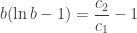
\displaystyle b(\ln b-1)=\frac{c_2}{c_1}-1

isn’t algebraic. We must use a numerical solution to the Lambert W Function. It gives us, with u=\frac{c_2}{c_1}-1,

\displaystyle b^*=\frac{u}{LambertW(\frac{u}{e})}.

The following graph shows the function’s surface with c_1=5 and c_2=200, one axes being b, block size and the other being n, the number of items in the tree. The green plane shows the optimal b found with the Lambert W function.

search-cost-with-blocks

*
* *

To conclude, binary trees are optimal when we ignore the cost of accessing a node, but they aren’t when it becomes costly to access a node. When we access the nodes on disk, with a high cost, it becomes interesting to bundles many keys in a node, and we gave the optimal solution. However, the problem is often solved quite more directly. We just fit as many keys as possible in an I/O block. Disks operates on small blocks of (typically) 512 bytes, but file systems operate in somewhat larger, but fixed-sized blocks, something like 4 or 8k. A good strategy is therefore to fit as many keys as possible in that block, since even if the number of comparisons is large, it will still be faster than bringing that block into main memory.

stevenpigeon
measuring-tree
search-cost
search-cost-with-blocks
http://hbfs.wordpress.com/?p=6623
Extensions
Fixed-Points
algorithmsC-plus-plushacksArithmeticC++20 C++2acomputer arithmeticDSPfixed-point
Preparing lecture notes (or videos) sometimes brings you to revisit things you’ve known for a while, but haven’t really taken time to formalize properly. One of those things is fixed-point arithmetic. Fixed-point arithmetic joins the advantage of representing fractional values while maintaining a great simplicity in the operations. Contrary to floating point, arithmetic on fixed-points […]
Show full content

Preparing lecture notes (or videos) sometimes brings you to revisit things you’ve known for a while, but haven’t really taken time to formalize properly. One of those things is fixed-point arithmetic.

Fixed-point arithmetic joins the advantage of representing fractional values while maintaining a great simplicity in the operations. Contrary to floating point, arithmetic on fixed-points can be done using entirely integer operations, which explains their popularity on DSPs of all sorts.

Basically, a fixed-point number is just a fixed-width number of bits, with an unmoving, virtual point. For example, in a 16-bits register, four bits could be devoted to the fractional part, and 12 to the integer part, making a Q12.4 fixed-point (the Qn.m notation says that we have n integer bits, m fractional bits). In a fixed-point, the fractional bits behave as you would expect: the first after the point is worth 1/2, the next one 1/4, etc. Furthermore, the integers can be two’s-complement.

What makes it especially nice is the arithmetic that comes with fixed-point numbers:

  • Addition/subtraction. It behaves exactly as two’s-complement integer addition and subtraction. Therefore, adding/subtracting two fixed-point can be done directly by adding/subtracting the registers as signed integers.
  • multiplication. Multiplying together two Qn.m fixed-points results in a Q2n.2m fixed-point, that we must restore to Q2n.m at least. (as always, if it overflows, that’s your problem). To multiply two Qn.m fixed-points, we use integer multiplication and shift back (right) m bits to restore the results to Qx.m. The nice thing is that it results in the correct truncation.
  • division. Division is the tricky one (but isn’t much harder). Let:

    \displaystyle \left(a+\frac{b}{2^m}\right)

    and

    \displaystyle \left(c+\frac{c}{2^m}\right)

    be two Qn.m values. Then

    \displaystyle        \frac{\left(a+\frac{b}{2^m}\right)}        {\left(c+\frac{d}{2^m}\right)}=        \frac{a2^m+b}{c2^m+d}.

    It’s as if we lost the fractional bits. That’s a problem because the quotient isn’t an integer; and it should be represented in 2^mths. To express the result correctly in 2^mths, we multiply the dividend (the number being divided) by 2^m, which is only a shift left.

So basically, fixed-point numbers are numbers expressed in 2^mths.

*
* *

So let’s implement that. First, we need a cute little template to get, given an integer type, the type containing the double number of bits (for multiplication and division):

// enough.hpp
#ifndef __MODULE_ENOUGH__
#define __MODULE_ENOUGH__

namespace enough {
 template <typename T> struct __twice; // incomplete type

 template <> struct __twice<int8_t>  { using type = int16_t; };
 template <> struct __twice<int16_t> { using type = int32_t; };
 template <> struct __twice<int32_t> { using type = int64_t; };
 template <> struct __twice<int64_t> { using type = int64_t; }; // fails silently

 template <typename T>
 using twice=typename __twice<T>::type;

} // namespace enough

#endif
     // __MODULE_ENOUGH__

We could use C++2a concepts to make sure that the fixed-point template has consistent arguments (I’m just beginning to look into C++20), and make sure we overload the basic operators:

// fixed.hpp
#ifndef __MODULE_FIXED__
#define __MODULE_FIXED__

#include <enough.hpp>

template <typename T, int scale=4>
requires ((std::is_signed<T>::value==true) // c++2a
          && (scale<sizeof(T)*8))
class fixed
 {
  private:

      T number;

      fixed(int, T n) :number(n) {}

  public:

      // avec un autre fixed
      fixed operator+(const fixed & f) const { return fixed(0,number+f.number); }
      fixed operator-(const fixed & f) const { return fixed(0,number-f.number); }
      fixed operator*(const fixed & f) const { return fixed(0,(enough::twice<T>{number}*f.number) >> scale); }
      fixed operator/(const fixed & f) const { return fixed(0,(enough::twice<T>{number}<<scale)/f.number); }

      // avec float
      fixed operator+(float f) const { return *this+fixed(f); }
      fixed operator-(float f) const { return *this-fixed(f); }
      fixed operator*(float f) const { return *this*fixed(f); }
      fixed operator/(float f) const { return *this/fixed(f); }

      fixed operator=(const fixed & f) { return number=f.number; }

      bool operator==(const fixed & f) { return number==f.number; }
      operator float() const { return number/(float)(1<<scale); }

  fixed(): number(0) {}
  fixed(const fixed<T,scale> & other) : number(other.number) {};
  fixed(float f) : number(f * (1<<scale)) {}
 };

#endif
 // __MODULE_FIXED__

We just use it:

#include <iostream>
#include <fixed.hpp>

int main()
 {
  fixed<int16_t> a(-4),b(3);

  std::cout
   << a+b << std::endl
   << a*b << std::endl
   << a/b << std::endl
   << a-b << std::endl
   ;

  return 0;
 }

*
* *

The complexity is visibly much, much less than floating point numbers. Addition/subtraction is just signed integer add/sub; multiplication and division ask for an integer promotion (the “cast”) and a shift. If you choose the number of bits after the point wisely, you may even get away with no-shifts and only memory operations. No wonder it’s used in low-complexity, low-power DSP chips.

stevenpigeon
http://hbfs.wordpress.com/?p=6620
Extensions
Mirror, Mirror on the Tripod, Who’s the Fairest of them All?
hackscameragluelightboardmirrorscrewteachingteaching onlinewood
This week, I’ll show my mirror assembly to reverse the image “in hardware” for the lightboard. If you can mirror the image in post-production, some cameras can’t do it either (and in Zoom, it seems that mirror image is only for your display only, not the image you send, and therefore is perfectly useless), so […]
Show full content

This week, I’ll show my mirror assembly to reverse the image “in hardware” for the lightboard.

If you can mirror the image in post-production, some cameras can’t do it either (and in Zoom, it seems that mirror image is only for your display only, not the image you send, and therefore is perfectly useless), so you need a bit of help. What you want is a simple mirror:

I built a rack with two sliding windows and a t-nut (apparently, that’s what they’re called). Cameras (all types it seems) use ¼”-20 screws (¼” of an inch diameter, 20 turns per inch), and they’re easy to get in any lengths from your favorite hardware store (I merely rummaged in my miscellaneous screw box to find a few). What’s harder to find in a misc. box are the t-nuts:

The t-nut will be use to screw the camera tripod onto the rail (maybe by replacing the usually very short default screw by a longer one). The teeth go on the opposite side so that as you fasten the screw, it holds the block of wood. Pretty much everything else is bits of scrap wood, wood glue, and generic black spray paint.

So There are three holes: one for the t-nut that will fasten the whole thing onto the camera tripod; and two for adjustments for the camera and the mirror block. In principle, you would not need a slot for the camera, because you could measure everything exactly. But if you change the camera, or measure wrong, you’re … screwed. So a slot. Same for the mirror, which could also be glued in optimal position, but, here also, a slot. Slots are done by drilling at both ends a single ¼” inch hole, and then the wood in between is cut away with a chisel. Two small blocks are placed to raise the camera a bit: they are merely glued in place.

The mirror is glued to a 2×4 block (scraps from the scrap box). The mirror itself is a cut-off from some larger mirror, but you could use a mirror from a dollar-store handheld mirror. The hole in the block is smaller than ¼” so that the screw actually stay screwed (3/16″).

The finished product:

Once you’re happy with the setup and the glue is dried, time for paint. That’s just generic black spray paint. Once the paint is very dry, you can add some felt on the block so that when screwed in, the camera won’t stick to the paint. You can see the felt in red, if you look closely:

Finally, the block being mobile, you can adjust the mirror whenever you setup your lightboard at home. A still from the camera, seen through the mirror:

*
* *

This post pretty much conclude my series on the lightboard. In these three posts, we’ve seen how to build the lightboard itself, how to setup the studio, and now how to build the mirror assembly. So, all’s left to do is actually use it!

stevenpigeon
http://hbfs.wordpress.com/?p=6605
Extensions
Møre Lïtbørd
hackshardwarelightboardteachingteaching onlinezoom
Last time, I gave the instruction on how to build a lightboard, but not much in terms of how you actually use it. Now I’ve been giving lectures from it (with graduate students as test subjects), I’ve started recording for the undergrad courses, and so I’ve tweaked my setup and learnt a few tricks. This […]
Show full content

Last time, I gave the instruction on how to build a lightboard, but not much in terms of how you actually use it. Now I’ve been giving lectures from it (with graduate students as test subjects), I’ve started recording for the undergrad courses, and so I’ve tweaked my setup and learnt a few tricks. This week, I’ll discuss some of them

First, let’s have a global look at the setup:

This is a panorama stitches from 3 or 4 individual pictures since I don’t have a wide-enough lens for to show all of it at once. Let’s have a second look, now with numbered items:

We have (in no particular order) (pay no attention to the misc stuff on the shelves: it’s the basement!):

  1. Computer. A ~10-year old MacBook Pro running Ubuntu 20.04 (Focal Fossa) for Zoom and recording.
  2. Spots. A set of Neewer BiColor 660 LED spots. They are positioned (see diagram below) so that they do not reflect in the class from the point of view of the camera. Two are on the sides and one center, below.
  3. Generic microphone stand reused to hold 3rd spot.
  4. Lectern. I put notes on what to do in what order during lectures or recording. Put at an angle so that it doesn’t show too much I’m reading from it when I write stuff on the board.
  5. Larger screen to show Zoom participants. Higher, the image would reflect on the glass. It sits on a standard milk crate.
  6. Coffee table (from Goodwill). Serves as hub. Not visible: USB 8-port hub, camera battery charger, extra sets of speakers (so that the lightboard doesn’t cut the sound from the laptop). Misc. thingies holder.
  7. Focus pattern to give something the camera to focus on during setup. Might also use “standard test card” (not necessarily the one with the “Indian head”, but maybe this one.
  8. Ceiling light. Should be off.
  9. Bundle of 6′ electrical extensions.
  10. Crop marks. I adjust the view from the camera so that these marks are just barely outside the field of view. It also helps you do stay within field of view.
  11. HDMI to “fake USB Camera” adapter. Used to convert the movie camera HDMI output to the computer as a USB camera (for Zoom). Actually, on the image, it’s the USB cable that leads to the hub with the converter. Also HDMI output to second screen.
  12. A “puzzle play mat”, black and white. That helps if you’re going to stand up all day.

Not shown/not highlighted:

  • Canon HF R800. A basic 1080p video camera with zoom, HDMI output and about 2 hours’ worth of autonomy. It’s uncomplicated, and you can control some of the exposition, frame rate, color balanced. It’s a basic consumer-level thingie, it’s grainy in mid- to low-light, but it works well for hours on end.
  • Canon Rebel T8i (alias EOS 850D, alias EOS Kiss-X10i) for quality recording. It does 4K (that nobody uses, but that may eventually turn out to be useful in post-prod, by shooting in 4K, applying image processing, then downsampling to 1080p), but I use 1080p for now.
  • Good Manfrotto Tripod (maybe different from my model; I had mine for the last 20 years or so).
  • Audiotechnica Lavaliere microphones.
  • A bunch of extensions & power bars:
    • Audio cables with 2.5mm jacks (one going to the camera, the other to the computer).
    • HDMI extensions: one 25′ for the camera, one 6′ for the second screen.
    • At least two power bars: one for the computer and screen, one for the spots.
  • Green masking tape marks. To align stuff. One you’re happy with your setup, use making tape (easy to remove) to mark what goes where.
  • Curtains behind the lightboard but also behind the camera. It keeps the rest of the room from reflecting in the lightboard glass.

The general arrangement is (as seen from above):

The spots are placed to light the screen evenly, but not reflect in it. Two are placed at eye-height (for me, 1m70 / 5’8″ or so) and the center one as low as possible but also as close as possible to the lightboard and you’ll need something else than the default stand that comes with it (it’s a microphone stand).

*
* *

Finally, you’ll have to experiment. Exposition settings on your camera will vary (because you have a different lens, different brand, etc.). Light will vary. Maybe you’ll find that spots at 50% are good. Maybe you’ll want darker background. Or not.

The markers I use are Expo Neons, but other style works well (liquid chalk works visually well, but isn’t really dry-erasable), some are just really bad (everything that’s vaguely wax-based, like Crayola “dry erase”).

You’ll also have to experiment with sound. Boom mike or Lavaliere? Record sound separately and resync in post-prod or record on the camera itself? I prefer recording on the camera (thus the audio cable extensions).

Finally, the software. I, as a enthusiast penguinisttm, avoid proprietary software. For now, I use Kendlive (KDE application that runs just fine in Gnome). I still have to figure out everything in it.

The rest is up to you.

An example: Des nombres à l’égyptienne.

stevenpigeon
http://hbfs.wordpress.com/?p=6596
Extensions
just_enough
C-plus-plusC99data compressiondata structureshacksBitsCC PreprocessorLog2Portable softwaretemplate
The C99 <stdint.h> header provides a plethora of type definition for platform-independent safe code: int_fast16_t, for example, provides an integer that plays well with the machine but has at least 16 bits. The int_fastxx_t and int_leastxx_t defines doesn’t guarantee a tight fit, they provide an machine-efficient fit. They find the fastest type of integer for […]
Show full content

The C99 <stdint.h> header provides a plethora of type definition for platform-independent safe code: int_fast16_t, for example, provides an integer that plays well with the machine but has at least 16 bits. The int_fastxx_t and int_leastxx_t defines doesn’t guarantee a tight fit, they provide an machine-efficient fit. They find the fastest type of integer for that machine that respects the constraint.

But let’s take the problem the other way around: what about defines that gives you the smallest integer, not for the number of bits (because that’s trivial with intxx_t) but from the maximum value you need to represent?

There are plenty of reasons to use the smallest possible integer to store values with known bounds: smaller files, smaller data structures, more useful data in the same cache line. The C99 <stdint.h> isn’t much use here because it lacks metaprogramming, or more exactly, the C preprocessor and old-style macros are too weak to provide the kind of metaprogramming we need here:

  • A compile-time function that tells us how many bits are needed to represent a max value;
  • A template that takes a number of bits and decides one the smallest integer accommodating it.

The first constexpr function gives the number of bits to represent a maximum value, that is, it doesn’t think you need 5000 values (0-4999) but that you need to represent the value 5000 (0-5000). So if the maximum value is 4, you do need 3 bits (because 4 is 1002); so it’s not quite log-base-2 (and don’t come whine in the comments).

////////////////////////////////////////
// c++14 and +
constexpr std::size_t bits_from_value(std::size_t n)
 {
  if (n)
   return (n<2)?1:(1+bits_from_value(n/2));
  else
   return 0;
 }

Now, let’s create a template that takes a number of bits and decides on the smallest integer that accommodates that number of bits:

////////////////////////////////////////
// should also do signed...
template <int x> struct __just_enough_uint; // incomplete type
template <> struct __just_enough_uint<64> { using type = uint64_t; };
template <> struct __just_enough_uint<32> { using type = uint32_t; };
template <> struct __just_enough_uint<16> { using type = uint16_t; };
template <> struct __just_enough_uint<8>  { using type =  uint8_t; };

template <const int x>
using just_enough_uint =
 typename
  __just_enough_uint<(x>32) ? 64 : ((x>16) ? 32 : ((x>8) ? 16 : 8))>::type;

////////////////////////////////////////
template <typename T>
 struct bits_from_type { constexpr static size_t value = sizeof(T)*8; };

You may have to extend the above if your architecture has more possible types; but you should be fine with 8, 16, 32, and 64 bits. To create a variable of the just_enough_uint type, you use:

 just_enough_uint<bits_from_value(13)> z; //enough for max value 13 (0...13)

*
* *

This is but a small brick in a much wider scheme to save memory (or storage). Compact data structures have been a research interest for while now and I’ve done a few things before. However, a more algorithmic approach is needed, as a couple of clever tricks, while helpful, aren’t a complete theory. More on this later.

stevenpigeon
http://hbfs.wordpress.com/?p=6591
Extensions
Lïtbørd (more than some assembly required)
hackslightboardpandemicstudioteachingweek-end projectwoodworking
As you may have noticed, a global pandemics got many of us working from home. While one can argue that you can do accounting from home, it’s a lot more complicated to teach from home. Pretty much everyone is trying to figure that one out. For my part, I decided that zoom and the virtual […]
Show full content

As you may have noticed, a global pandemics got many of us working from home. While one can argue that you can do accounting from home, it’s a lot more complicated to teach from home. Pretty much everyone is trying to figure that one out. For my part, I decided that zoom and the virtual whiteboard is not very interesting. Like many, I decided to use a lightboard.

So, the problem is, where do you get a lightboard on short notice? Well, you can build one. Let’s see how:

Basically, a lightboard is just a glass panel with legs; there are many way you can build one. I opted for something very simple: A frame, transverse legs and a 4’×6′ pane of glass:

What you’ll need:

  • 5 2×4 8′,
  • 6 quarter round 1/2″, 8′
  • 4 heavy duty shelving brackets,
  • 4 T-shaped “flat angle” brackets,
  • 4 “flat corner” brackets,
  • 4 4″ wood screws,
  • a large number of 1″ (¼) wood screws,
  • 4 lockable swivel wheels,
  • some black paint,
  • 20 ¼”×2½” rectangle felts.

It took a small afternoon to cut everything to size and assemble it:

The quarter rounds will hold the sheet of glass (as shown in the hand drawing). I also used felts between the glass and the quarter rounds (4 on 6′ lengths, 3 on 4′ lengths) to fasten softly the glass, as I feared that pressing the wood directly to the glass and then screwing it to the frame may break the glass. The assembled frame looks like this:

I painted the inside and the front of the frame black, to avoid glare and reflection into the glass. With the glass, it looks like this, with yours truly:

Total assembly time is about a week: an afternoon for the frame, another day for the paint, a couple of day drying and waiting for the glass to be delivered, a few minutes assembling the last quarter rounds to hold the glass in place.

*
* *

Aside from the lightboard itself, you need to light the glass. Some use in-sheet lighting, it seems to be marginally useful from my test. What works best are studio lights, placed in front of the glass and outside of view, (you can see the glare on the frame on the picture above). You can get some from your favorite online store for more or less 100$ apiece.

The curtains behind the glass and in front (to prevent reflection of the surrounding room) are from online. They are 10’×12′ black muslin.

To write on the glass, basic whiteboard pens won’t work, they’re too transparent to be useful. You’ll need some thick, preferably fluo, pens, such as Expo Neons and the like. Some use liquid chalk pens, I haven’t found any locally. I may order some later.

You’ll also need to figure the type of video you want, the general brightness of the scene, etc. Anyway, you’ll want to maximize readability, and I what I found worked best (for me) is to disable the camera auto-exposure and use a fixed ISO and opening. For my camera, ISO 400 and F/4 does the trick:

*
* *

For sound, a “lavaliere” (or Lavalier, or tie-clip,…) type of clip-on microphone works well, I’m still experimenting with a microphone above me on a boom… I’m not sure what works best yet.

*
* *

I’ll do another entry where I detail the rest of the “studio” more carefully. Until then, I’ll keep experimenting!

stevenpigeon
http://hbfs.wordpress.com/?p=6578
Extensions
Evaluating polynomials
algorithmsCC-plus-plusMathematicsEstrinHornerParallelismPolynomialSIMD
Evaluating polynomials is not a thing I do very often. When I do, it’s for interpolation and splines; and traditionally those are done with relatively low degree polynomials—cubic at most. There are a few rather simple tricks you can use to evaluate them efficiently, and we’ll have a look at them. A polynomial is an […]
Show full content

Evaluating polynomials is not a thing I do very often. When I do, it’s for interpolation and splines; and traditionally those are done with relatively low degree polynomials—cubic at most. There are a few rather simple tricks you can use to evaluate them efficiently, and we’ll have a look at them.
A polynomial is an expression of the form

a_nx^n+a_{n-1}x^{n-1}+\cdots+a_2x^2+a_1x+a_0.

A naïve approach to evaluating a polynomial would be to compute, independently, each monomial a_jx^j, everyone at a cost of j products (j-1 for x^j, plus one for a_j\times{}x^j). When you sum over all j, you get \frac{1}{2}n(n+1) products (and n-1 additions) for a polynomial of degree n. That’s way too much.

Someone, in the early 19th century, Horner, remarked that you could rewrite any polynomial as

(\cdots((a_nx+a_{n-1})x+a_{n-2})x+\cdots+a_1)x+a_0,

giving us n products and n-1 additions. That’s much better. Also turns out that if there’s nothing special about the polynomial (no zero coefficients) it’s optimal.

But Horner’s method (or Horner’s formula, depending on where you read about it) is inherently sequential, because all the products are nested. It’s not amenable to parallel processing, even in its simpler SIMD form.

However, preparing lectures notes, I found that Estrin proposed a parallel algorithm to evaluate polynomial that both minimize wait time and the total number of products [1]. The scheme is shown here:

The original paper presents a method for polynomials with a degree of n=2^k-1, but you can easily adapt the splitting for an arbitrary degree. The first step is to split the polynomial into binomials, each of which are evaluated in parallel. You then combine those into new binomials, also evaluated in parallel, and again, until you have only one term left, that is, the answer.

What immediately comes to mind is a SIMD implementation where we use wide registers to do all products in parallel, but maybe just relying on instruction-level parallelism and the compiler is quite efficient for low degree polynomials. Let’s try with degree seven. Let’s say, with:

9x^7+5x^6+7x^5+4x^4+5x^3+3x^2+3x+2,

because why not. Let’s test an implementation:

////////////////////////////////////////
int pow_naif(int x, int n)
 {
  int p=1;
  for (int i=0;i<n;i++,p*=x);

  return p;
 }

////////////////////////////////////////
int eval_naif(int x)
 {
  return
    9*pow_naif(x,7)
   +5*pow_naif(x,6)
   +7*pow_naif(x,5)
   +4*pow_naif(x,4)
   +5*pow_naif(x,3)
   +3*pow_naif(x,2)
   +3*x
   +2;
 }

/////////////////////////////////////////
int eval_horner(int x)
 {
  return ((((((9*x+5)*x+7)*x+4)*x+5)*x+3)*x+3)*x+2;
 }

////////////////////////////////////////
int eval_estrin(int x)
{
  int t0=3*x+2;
  int t1=5*x+3;
  int t2=7*x+4;
  int t3=9*x+5;
  x*=x;
  int t4=t1*x+t0;
  int t5=t3*x+t2;
  x*=x;
  return t5*x+t4;
}

We compile with all optimizations enabled, and evaluate the polynomial for x from 0 to 1000000000. Times are:

Method Time (s) Naïve 1.93 Horner 1.66 Estrin 1.41

So despite not being explicitly parallel, Estrin’s version performs significantly better because of instruction-level parallelism. Let’s look at the generated code:

0000000000000e00 <_Z11eval_estrini>:
e00:  8d 04 fd 00 00 00 00    lea    eax,[rdi*8+0x0]
e07:  89 f9                   mov    ecx,edi
e09:  0f af cf                imul   ecx,edi
e0c:  8d 54 07 05             lea    edx,[rdi+rax*1+0x5]
e10:  29 f8                   sub    eax,edi
e12:  0f af d1                imul   edx,ecx
e15:  8d 44 02 04             lea    eax,[rdx+rax*1+0x4]
e19:  89 ca                   mov    edx,ecx
e1b:  0f af d1                imul   edx,ecx
e1e:  0f af c2                imul   eax,edx
e21:  8d 54 bf 03             lea    edx,[rdi+rdi*4+0x3]
e25:  0f af d1                imul   edx,ecx
e28:  8d 4c 7f 02             lea    ecx,[rdi+rdi*2+0x2]
e2c:  01 ca                   add    edx,ecx
e2e:  01 d0                   add    eax,edx
e30:  c3                      ret     

We see that the clever use of lea allows different pipelines to compute address independently and that it is also used to multiply by the coefficients. Such magic wouldn’t occur if the coefficients were much less cooperative (say 27, or something).

*
* *

What about actual SIMD implementation? Well, I gave it a try and my implementation has the same number of instructions as the sequential version generated by the compiler. Turns out that even if you can you a couple of multiply in parallel, the butterfly-like structure asks you to shuffle the values around (using pshufd) and that negates any gain you get from parallelism (on some of my machines, it’s even slower!). Maybe there’s a better way of doing this. Questions for later.


[1] Gerald Estrin — Organization of computer systems – The fixed plus variable structure computer — Procs. Western Joint IRE-AIEE-ACM Computer Conference (1960), p. 33–40.

stevenpigeon
http://hbfs.wordpress.com/?p=6571
Extensions
Factorial Approximations
algorithmsMathematicsapproximationFactorialGosperMohantyRummensStirling
(and its logarithm) keep showing up in the analysis of algorithm. Unfortunately, it’s very often unwieldy, and we use approximations of (or ) to simplify things. Let’s examine a few! First, we have the most known of these approximations, the famous “Stirling formula”: , Where the terms at the right are known as Stirling Series […]
Show full content

n! (and its logarithm) keep showing up in the analysis of algorithm. Unfortunately, it’s very often unwieldy, and we use approximations of n! (or \log n!) to simplify things. Let’s examine a few!

First, we have the most known of these approximations, the famous “Stirling formula”:

\displaystyle n!=\sqrt{2\pi{}n}\left(\frac{n}{e}\right)^n\left(1+\frac{1}{12n}+\frac{1}{288n^2}-\frac{139}{51840n^3}-\cdots\right),

Where the terms at the right are known as Stirling Series (the numerators are given by A046968 and the denominators by A046969). If you evaluate the complete series, it’s truly equal to n!.

However, you may not quite want to evaluate an infinite series, and we find truncated versions:

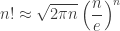
\displaystyle n!\approx\sqrt{2\pi{}n}\left(\frac{n}{e}\right)^n

that we will call “Stirling” from now on; a “Stirling more” version could be

n!\approx\sqrt{2\pi{}n}\left(\frac{n}{e}\right)^n\left(1+\frac{1}{12n}\right),

or even a “Stirling most”:

\displaystyle n!\approx\sqrt{2\pi{}n}\left(\frac{n}{e}\right)^n\left(1+\frac{1}{12n}+\frac{1}{288n^2}\right).

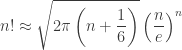
The literature is fraught with approximations. For example, we find Gosper’s:

\displaystyle n!\approx\sqrt{2\pi\left(n+\frac{1}{6}\right)}\left(\frac{n}{e}\right)^n.

Everybody refers [a] as the source of this approximation. However, while it can be a consequence of that paper, it’s not in it (also, its typography is a train wreck).

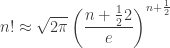
We have Burnside’s [2]:

\displaystyle n!\approx\sqrt{2\pi}\left(\frac{n+\frac{1}2{2}}{e}\right)^{n+\frac{1}{2}}.

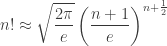
Then Mortici’s [3]:

\displaystyle n!\approx\sqrt{\frac{2\pi}{e}}\left(\frac{n+1}{e}\right)^{n+\frac{1}{2}}.

There are plenty more, but let’s consider one more. Mohanty and Rummens’ [4]:

\displaystyle n!\approx\sqrt{2\pi}(n+1)^{n+\frac{1}{2}}e^{\frac{1}{12(n+1)}-(n+1)}.

*
* *

How do those compare? Asymptotically, when n is very large, the ratio of any of these approximation to n! goes to 1. On smaller n, they also all kind-of-work OK:

From the figure above, we see that Gosper’s does very well, just a bit worst than “Sterling More”. Mohanty and Rumme1ns’ does best, but it’s also quite a bit more complex than Gosper’s. What if we have a look at the digits that are output? The following shows the result (in Mathematica, which computes in “infinite precision”) rounded:

But what’s more telling, is the ratio to the real value:

But we can also have a look at the number of correct leading digits:

*
* *

So Gosper’s approximation is much better than just the truncated Stirling and compares to “Stirling More”, which is not that surprising because it’s very close to what you get by distributing the 1/12n into the square root; so it’s a good numerical trade off. However, “Stirling More” and Mohanty & Rummens’ compare with a slight advantage to the later.


[1] R. William Gosper, Jr. — Decision Procedure for Indefinite Hypergeometric Summation — Procs. Nat. Acad. Science USA, vol 75 no 1 (1978) p. 42–46.

[2] W. Burnside — A Rapidly Convergent Series for Log N! — Messenger Math., vol 46 no ? (1917) p. 157–159

[3] Cristinel Mortici — An Ultimate Extremely Accurate Formula for Approximation of the Factorial Function — Archiv der Mathematik, vol 93 (2009) p. 37–45

[4] S. Mohanty, F. H. A. Rummens — Comment on “An Improved Analytical Approximation to n!” — J. Chem. Physics, vol 80 (1984) p. 591.

stevenpigeon
http://hbfs.wordpress.com/?p=6557
Extensions
How many bits?
data compressiondBDynamic RangeLuminosityPain ThresholdPhotopicScotopicsoundThreshold of hearing
In this quarantine week, let’s answer a (not that) simple question: how many bits do you need to encode sound and images with a satisfying dynamic range? Let’s see what hypotheses are useful, and how we can use them to get a good idea on the number of bits needed. For Sound I have shown […]
Show full content

In this quarantine week, let’s answer a (not that) simple question: how many bits do you need to encode sound and images with a satisfying dynamic range?

Let’s see what hypotheses are useful, and how we can use them to get a good idea on the number of bits needed.

For Sound

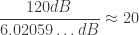
I have shown how dB and bits are related, here and also here. Basically, adding one bit to a code adds about 6 dB to the resulting signal. Now, by definition, the threshold of hearing, is set at 0 dB. This corresponds to the weakest sound you can distinguish from true silence. Threshold of pain (the point where you kind of expect your ears to start bleeding) is somewhere above 120 dB. Much louder sounds lead to actual hearing damage—explosions, rocket launches, etc. If we assume that we stay in the 0 to 120 dB range, the useful range for safe sound reproduction, at about 6 dB by bit,

\displaystyle \frac{120 dB}{6.02059\ldots dB}\approx{}20.

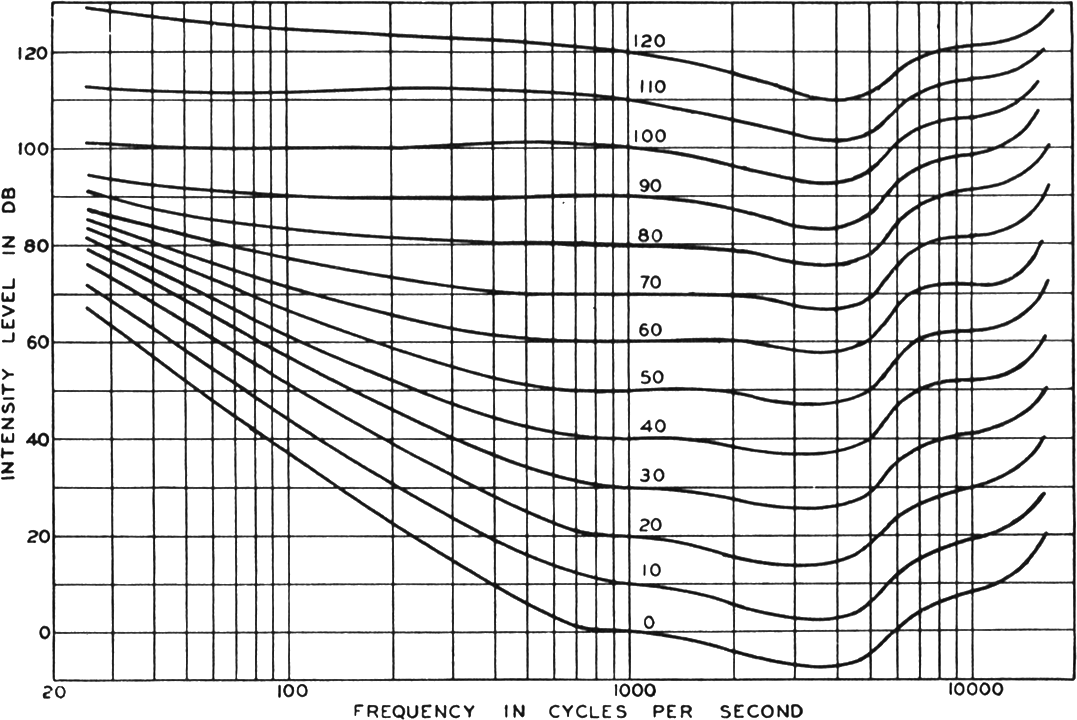
So about 20 bits would be enough. If you consider 0 dB as the threshold of hearing, you might want to use 1 or 2 more bits to account for people with much finer hearing (as would suggest the loudness contour chart). Round to the next byte, you get 24 bits. What pros suggest you use.

For Images

That one asked me a bit more research to find good references. Some report the total visual dynamic range is about 10 orders of magnitude (from 10^{-6} to 10^4) (in appropriate luminosity units), others, like Fein and Szuts[1], report 16 (from 10^{-9} to 10^7). Depending on the range, that’d yield

\log_2 10^{10} \approx 33.22 bits,

or

\log_2 10^{16} \approx 53.15 bits.

However, while the human eye can see luminosity on that range, it can’t do it simultaneously. The following figure (from Gonzalez & Woods, [2]) shows that around a base value (average scene luminosity), shown as B_a in the figure, only a certain range can be perceived (with lower range marked as B_b). That range seems to be only 4, or 5 order of magnitude, so only

\log_2 10^5 \approx 16.61 bits.

So if we consider the simultaneously perceivable range around some standard average-but-bright-enough luminosity, we might get away with 16 bits per color component (maybe less?).

*
* *

The number we get are pretty much in line with what we find in audio and video. 24 bits is considered “professional” (but not necessarily useful, depending on the quantity of noise in the original source) for audio. HDMI support up to 48 bits per pixel (16 bits per component) while digital camera often sport 10, 12 or 14 bits per component.


[1] Alan Fein, Ete Zoltan Szutz
— Photoreceptors: Their Role in Vision —
Cambridge University Press (1982)

[2] Rafael C. Gonzalez, Richard E. Woods
— Digital Image Processing — 2nd ed, Prentice
Hall (2002)

stevenpigeon
http://hbfs.wordpress.com/?p=6547
Extensions