GeistHaus
log in · sign up

SQL Server Code,Tips and Tricks, Performance Tuning

Part of feedburner.com

A blog about SQL Server, Books, Movies and life in general

stories
Benefits of Indexes
Best Practices
Show full content
This is day fifteen of the SQL Advent 2012 series of blog posts. Today we are going to look at the benefit of indexes So how does an index work? How does an index work, how does it help SQL Server finding stuff faster? Here is an simple non technology explanation. If I told you to grab a cookbook and give me all the recipes in that book for cod, what would you do? There are two things yuo can do, you can read through the whole book page by page until you get to the last page looking for any cod recipes. Or...........take a look at the picture below
See that, in one second I know exactly where to find cod recipes, it is on page 305 and 61. Which do you think is faster, looking it up in an index or scanning through the book? SQL Server pretty much uses the same technique. There are two types of basic indexes in SQL Server, these are clustered and non clustered indexes. A clustered index will contain all the data from the table as well, a non clustered index will have a pointer to the table row if there is no clustered index on that table or to the clustered index position is there is a clustered index on the table. A table with a clustered index is also called a clustered table. A table without a clustered index is also called a heap. SQL Server also has XML, spatial, columnstore, filtered, full text indexes but we are just focusing on the basic indexes in this post. Here is what books on line has to say about the storage of a clustered index
In SQL Server, indexes are organized as B-trees. Each page in an index B-tree is called an index node. The top node of the B-tree is called the root node. The bottom level of nodes in the index is called the leaf nodes. Any index levels between the root and the leaf nodes are collectively known as intermediate levels. In a clustered index, the leaf nodes contain the data pages of the underlying table. The root and intermediate level nodes contain index pages holding index rows. Each index row contains a key value and a pointer to either an intermediate level page in the B-tree, or a data row in the leaf level of the index. The pages in each level of the index are linked in a doubly-linked list.
A non clustered index is a little different since it doesn't store the whole data pages, here is what books on line has to say about the storage of a nonclustered index
Nonclustered indexes have the same B-tree structure as clustered indexes, except for the following significant differences:
  • The data rows of the underlying table are not sorted and stored in order based on their nonclustered keys.
  • The leaf layer of a nonclustered index is made up of index pages instead of data pages.
Nonclustered indexes can be defined on a table or view with a clustered index or a heap. Each index row in the nonclustered index contains the nonclustered key value and a row locator. This locator points to the data row in the clustered index or heap having the key value.
The row locators in nonclustered index rows are either a pointer to a row or are a clustered index key for a row, as described in the following:
  • If the table is a heap, which means it does not have a clustered index, the row locator is a pointer to the row. The pointer is built from the file identifier (ID), page number, and number of the row on the page. The whole pointer is known as a Row ID (RID).
  • If the table has a clustered index, or the index is on an indexed view, the row locator is the clustered index key for the row. If the clustered index is not a unique index, SQL Server makes any duplicate keys unique by adding an internally generated value called a uniqueifier. This four-byte value is not visible to users. It is only added when required to make the clustered key unique for use in nonclustered indexes. SQL Server retrieves the data row by searching the clustered index using the clustered index key stored in the leaf row of the nonclustered index.
Cool, I will now just add indexes on every column. Not so fast, there are some things to consider here, for every update, insert and delete statement indexes have to be maintained. If you have a busy OLTP database, you have to find the right balance between your read and write IO. Not enough indexes and your retrieval queries will suffer, too many indexes and your inserts will be slower. Also keep in mind that indexes take up storage, the more you have the bigger your database will be. Keep your clustered indexes narrow Try to keep your clustered indexes as narrow as possible, if you can use something like an integer, this is only 4 bytes. The reason to keep your clustered indexes narrow is that when you have non clustered indexes, the row locator is the clustered index key for the row. In this case your non clustered index will become bigger as well and now you won't be able to store as much data on a page. To illustrate that let's take a look at some simple code First let's create this table and populate it with 2048 rows
CREATE TABLE Test1(id int, somecol char(36), somecol2 char(36))
GO

INSERT Test1 
SELECT number,newid(),newid() 
FROM master..spt_values
WHERE type = 'P'
Add a clustered index
CREATE CLUSTERED INDEX cx on Test1(id)
Add these two non clustered indexes
CREATE NONCLUSTERED INDEX ix1 on Test1(somecol)
CREATE NONCLUSTERED INDEX ix2 on Test1(somecol2)
Let's check how much storage is required for the non clustered indexes
SELECT
DB_NAME(DATABASE_ID) AS [DatabaseName],
OBJECT_NAME(OBJECT_ID) AS TableName,
SI.NAME AS IndexName,
INDEX_TYPE_DESC AS IndexType,
PAGE_COUNT AS PageCounts
FROM sys.dm_db_index_physical_stats (DB_ID(), NULL, NULL , NULL, N'LIMITED') DPS
INNER JOIN sysindexes SI
ON DPS.OBJECT_ID = SI.ID AND DPS.INDEX_ID = SI.INDID
AND OBJECT_NAME(OBJECT_ID) = 'Test1'
GO
Here is the output, as you can see the non clustered indexes take up 12 pages
DatabaseName TableName IndexName IndexType PageCounts
tempdb         Test1         cx       CLUSTERED INDEX 22
tempdb         Test1         ix1    NONCLUSTERED INDEX 12
tempdb         Test1         ix2    NONCLUSTERED INDEX 12
If we check the table size
EXEC sp_spaceused 'Test1'
name rows reserved data index_size unused
Test1 2048    472 KB        176 KB 240 KB         56 KB
We see that it is using 240 KB for the indexes Let's recreate the clustered index with all 3 columns now.
CREATE CLUSTERED INDEX cx on Test1(id,somecol,somecol2)
WITH DROP_EXISTING
Recreating the clustered index also recreated the non clustered indexes. Let's check now how many pages a non clustered index is
SELECT
DB_NAME(DATABASE_ID) AS [DatabaseName],
OBJECT_NAME(OBJECT_ID) AS TableName,
SI.NAME AS IndexName,
INDEX_TYPE_DESC AS IndexType,
PAGE_COUNT AS PageCounts
FROM sys.dm_db_index_physical_stats (DB_ID(), NULL, NULL , NULL, N'LIMITED') DPS
INNER JOIN sysindexes SI
ON DPS.OBJECT_ID = SI.ID AND DPS.INDEX_ID = SI.INDID
AND OBJECT_NAME(OBJECT_ID) = 'Test1'
GO
Here are the results
DatabaseName TableName IndexName IndexType PageCounts
tempdb          Test1         cx         CLUSTERED INDEX 22
tempdb          Test1         ix1      NONCLUSTERED INDEX 21
tempdb   Test1         ix2      NONCLUSTERED INDEX 21
As you can see the non clustered indexes went from 12 to 21 pages The index size changed, if you run this
EXEC sp_spaceused 'Test1'
Here is the result
name rows reserved data index_size unused
Test1 2048    600 KB  176 KB 384 KB         40 KB
So we went from 240 KB to 384 KB for the index storage. So why does this matter you ask? SQL Server will use indexes for all kind of things, if you run a COUNT(*) it will use an index, if you do a JOIN it will use an index, it will use indexes in GROUP By queries and many more things. Let's look at a simple example, when you do a COUNT(*), the optimizer will pick a non clustered index if there is one since it usually has less columns than the clustered index
SET SHOWPLAN_TEXT ON
GO

SELECT count(*) FROM Test1
GO

SET SHOWPLAN_TEXT OFF
GO
Here is the plan
|--Compute Scalar(DEFINE:([Expr1004]=CONVERT_IMPLICIT(int,[Expr1005],0)))
|--Stream Aggregate(DEFINE:([Expr1005]=Count(*)))
|--Index Scan(OBJECT:([ReportServer].[dbo].[Test1].[ix2]))
Basically it had to scan through all the index pages to get the count, if your index was now still 12 pages instead of 21, SQL Server would take less time to accomplish this. I barely scratched the surface on indexing, it is a big topic and I recommend you start by navigating to the topic in Books On Line: http://msdn.microsoft.com/en-us/library/ms175049.aspx You can also take a look at the following posts written about indexing right here on this site Index REBUILD and REORGANIZE
Indexes with Included Columns
Filtered Indexes
Is an index seek always better or faster than an index scan?
Finding Fragmentation Of An Index And Fixing It
How to get the selectivity of an index
Adding nonclustered index on primary keys
Index Seek on LOB Columns
Row Overflow Pages - Index Tuning
Columnstore Index Basics
Columnstore Index – Index Statistics That is all for day fifteen of the SQL Advent 2012 series, come back tomorrow for the next one, you can also check out all the posts from last year here: SQL Advent 2011 Recap
tag:blogger.com,1999:blog-16771259.post-6881438480939579177
Extensions
How to connect to a SQL Server instance on a different domain and a non default port number?
Show full content


We have several domains at my job, we have a dev domain, a prod domain and then several other domains. Recently we had some domain changes where we would connect to a different domain when logging in from the laptops.

When opening up SSMS and connecting to the SQL Server instances, we now need to use a fully qualified domain name (FQDN) and also specify the port number and the instance name. This could seem a little confusing if you have never done this


Here is what it looks like if for example your instance is listening on port 8000, the instance name is SQL01, the server name is DevSQL01 and the domain name is SQLRules.net


You would put the following in server name

DevSQL01.SQLRules.net,8000\SQL01


SQLServerConnection


To make is easier to see... here it is again with different colors for the different parts

DevSQL01.SQLRules.net,8000\SQL01

The server name is DevSQL01

The domain name is SQLRules.net

The port number is 8000

The instance name in SQL01


The fully qualified domain name (FQDN) in this case is of course DevSQL01.SQLRules.net

Hopefully this helps someone in the future


tag:blogger.com,1999:blog-16771259.post-466620691622809801
Extensions
After 20+ years in IT .. I finally discovered this useful command
dosGotchaHowtopowershellTIL
Show full content

Very similar to my  After 20+ years in IT .. I finally discovered this... post, I discovered yet another command I should have know about

Originally I was not going to write this post, but after I found out that several other people didn't know this, I figured what the heck, why not, maybe someone will think this is cool as well


Open up a command prompt or powershell command window, , navigate to a folder, type in tree... hit enter

Here is what I see

Tree dos command

I was watching a Pluralsight course and the person typed in the tree command.. and I was like whoaaaa.. How do I not know this?  Perhaps maybe because I don't use the command window all that much?  Anyway I thought that this was pretty cool

As you can see tree list all the directories and sub directories in a tree like structure. This is great to quickly see all the directories in one shot

The same command will work in Powershell


tree command in Powershell

Finally, here is an image of the command window output as well as the explorer navigation pane side by side


command window output as well as the explorer navigation pane side by side

Hopefully this will be useful to someone


tag:blogger.com,1999:blog-16771259.post-6335022592273235149
Extensions
PostgreSQL adds FETCH FIRST WITH TIES.. just like TOP n WITH TIES in SQL Server
Show full content
PostgreSQL 13 Beta 1 was released yesterday, you can read the release notes here

https://www.postgresql.org/about/news/2040/

One thing that caught my eye was this statement in the release notes

PostgreSQL 13 brings more convenience to writing queries with features like FETCH FIRST WITH TIES, which returns any additional rows that match the last row.

This is I guess exactly like TOP WITH TIES in SQL Server. I believe this has been around in SQL Server since at least version 7.  How many times have I used it in code that was deployed in the last 20 years?  I believe I have used WITH TIES only once. It does make for great interview questions and SQL puzzles  :-)


So let's take a quick look at how TOP WITH TIES works in SQL Server.  The first thing we will do is look at what Books On Line says about TOP


WITH TIES Returns two or more rows that tie for last place in the limited results set. You must use this argument with the ORDER BY clause. WITH TIES might cause more rows to be returned than the value specified in expression. For example, if expression is set to 5 but two additional rows match the values of the ORDER BY columns in row 5, the result set will contain seven rows.You can specify the TOP clause with the WITH TIES argument only in SELECT statements, and only if you've also specified the ORDER BY clause. The returned order of tying records is arbitrary. ORDER BY doesn't affect this rule.

Time to get started and write some code to see this in action

First create this table of students and insert some data

CREATE TABLE #TopExample(GradeAverage int, Student varchar(100))
INSERT #TopExample VALUES(99.00,'Plato'),
      (98,'Socrates'),
      (95,'Diogenes the Cynic'),
      (94,'Antisthenes'),
      (94,'Demetrius'),
      (50,'Denis')

As you can see, I am not a very good student  :-(

If you do a regular TOP 4 query like this

SELECT TOP 4 GradeAverage, Student 
FROM #TopExample  
ORDER BY GradeAverage DESC

You will get back these results

GradeAverage Student
99          Plato
98          Socrates
95          Diogenes the Cynic
94          Demetrius


As you can see we are missing another student with a grade of 94, this is Antisthenes

This is easily fixed by adding WITH TIES to the query

SELECT TOP 4 WITH TIES GradeAverage, Student 
FROM #TopExample 
ORDER BY GradeAverage DESC

Now, you will get back these results, as you can see, you now have 5 rows and both rows with a grade average of 94 are included

GradeAverage Student
99          Plato
98          Socrates
95          Diogenes the Cynic
94          Demetrius
94          Antisthenes


Another way to do the same as WITH TIES is by using DENSE_RANK.  That query looks like this

;WITH c AS (SELECT DENSE_RANK() OVER (ORDER BY GradeAverage DESC) AS dens, 
 GradeAverage,Student 
 FROM #TopExample)

SELECT GradeAverage, Student 
FROM c WHERE dens <=4
ORDER BY GradeAverage DESC 


You will get back these same results again, you now have 5 rows and both rows with a grade average of 94 are included as well

GradeAverage Student
99          Plato
98          Socrates
95          Diogenes the Cynic
94          Demetrius
94          Antisthenes

Using DENSE_RANK is bit more code, but if portability is a concern, it might be a better choice

There you go a post about a feature you will never use :-)

If you want to run all the queries in one shot here is all the code


CREATE TABLE #TopExample(GradeAverage int, Student varchar(100))
INSERT #TopExample VALUES(99.00,'Plato'),
      (98.00,'Socrates'),
      (95.00,'Diogenes the Cynic'),
      (94.00,'Antisthenes'),
      (94.00,'Demetrius'),
      (50.00,'Denis')

SELECT TOP 4 GradeAverage, Student 
FROM #TopExample  
ORDER BY GradeAverage DESC

SELECT TOP 4 WITH TIES GradeAverage, Student 
FROM #TopExample 
ORDER BY GradeAverage DESC

;WITH c AS (SELECT DENSE_RANK() OVER (ORDER BY GradeAverage DESC) AS dens, 
 GradeAverage,Student 
 FROM #TopExample)

SELECT GradeAverage, Student 
FROM c WHERE dens <=4
ORDER BY GradeAverage DESC 


DROP TABLE #TopExample


And here is what it all looks like in SSMS, code and output


PostgreSQL adds FETCH FIRST WITH TIES.. just like TOP n WITH TIES in SQL Server Query in SSMS

tag:blogger.com,1999:blog-16771259.post-1270110701785260903
Extensions
You know about waitfor delay but did you know there is a waitfor time?
Howto
Show full content

I was looking at some code I wrote the other day and noticed the WAITFOR command.. This got me thinking. How many times have I used WAITFOR in code, probably as much as I have used NTILE  :-)

I looked at the documentation for WAITFOR and notice there is TIME in addition to DELAY.  Oh that is handy, I always rolled my own ghetto-style version by calculating how long it would be until a specific time and then I would use that in the WAITFOR DELAY command

Why would you use the WAITFOR command?

The WAITFOR command can be used to delay the execution of command for a specific duration or until a specific time occurs. From Books On Line, the description is as follows:


Blocks the execution of a batch, stored procedure, or transaction until either a specified time or time interval elapses, or a specified statement modifies or returns at least one row.

WAITFOR   
{  
    DELAY 'time_to_pass'   
  | TIME 'time_to_execute'   
  | [ ( receive_statement ) | ( get_conversation_group_statement ) ]   
    [ , TIMEOUT timeout ]  
}  


Arguments
DELAY
Is the specified period of time that must pass, up to a maximum of 24 hours, before execution of a batch, stored procedure, or transaction proceeds.

'time_to_pass'
Is the period of time to wait. time_to_pass can be specified either in a datetime data format, or as a local variable. Dates can't be specified, so the date part of the datetime value isn't allowed. time_to_pass is formatted as hh:mm[[:ss].mss].

TIME
Is the specified time when the batch, stored procedure, or transaction runs.

'time_to_execute'
Is the time at which the WAITFOR statement finishes. time_to_execute can be specified in a datetime data format, or it can be specified as a local variable. Dates can't be specified, so the date part of the datetime value isn't allowed. time_to_execute is formatted as hh:mm[[:ss].mss] and can optionally include the date of 1900-01-01.


WAITFOR with a receive_statement or get_conversation_group_statement is applicable only to Service Broker messages. I will not cover those in this post


I must admit that I only use these commands a couple of times a year when running something ad-hoc.  In code,  I will use WAITFOR DELAY when doing a back fill of data,  and the table is replicated. In that case I will batch the data and after each batch is completed I will pause for a second or so. The reason I am doing this is because I don't want to increase replication latency, after all, I am a nice guy


WAITFOR TIME 

Let's take a look how you would use the WAITFOR command. I will start with WAITFOR TIME


The command is very easy.. if you want the print command to run at 09:57:16, you would do the following

WAITFOR TIME '09:57:16'
PRINT 'DONE  ' 

The seconds are optional, if you want it to run at 9 hours and 57 minutes, you can do the following

WAITFOR TIME '09:57'
PRINT 'DONE  ' 

One thing to know is that you can't grab the output from a time data type and use that in your WAITFOR TIME command. The following will blow up

SELECT CONVERT(time,  getdate()) --'09:57:16.9600000'

WAITFOR TIME '09:57:16.9600000'

Msg 148, Level 15 , State 1, Line 32
Incorrect time syntax in time string '09:57:16.9600000' used with WAITFOR.

What you need to do is strip everything after the dot.

We need the command to be the following


WAITFOR TIME '09:57:16'

There are two ways to accomplish this... first way is by using PARSENAME, I blogged about that function several times, the first time here: Ten SQL Server Functions That You Hardly Use But Should

All you have to tell SQL Server which part you want, if you use PARSENAME,1 you will get everything after the dot, if you use PARSENAME,2 you will get everything before the dot.


1
2
SELECT  PARSENAME('09:57:16.9600000',2), 
PARSENAME('09:57:16.9600000',1)

This returns  the following

09:57:16     9600000


The easiest way would have been to just use time(0) instead

1
2
SELECT CONVERT(time,  getdate()) ,--'09:57:16.9600000'
CONVERT(time(0),  getdate())  --'09:57:16

Below is a complete example that will wait for 10 seconds to run the PRINT statement on line 12 if you run the whole code block in 1 shot.

Also notice that I use a variable with the WAITFOR TIME command on line 9. The caveat with that is that the variable can't be a time datatype. This is why I use a varchar datatype and store the value of the time data type in it. The reason I use the time datatype in my procs is so that I don't have to do a lot of validations when someone is calling the proc. If they pass in a string that can't be converted.. the proc won't even run... it will fail right at the proc call itself


 1
 2
 3
 4
 5
 6
 7
 8
 9
10
11
12
DECLARE @DelayTime time(0)= GETDATE()
PRINT @DelayTime

SELECT @DelayTime =DATEADD(second,10,@DelayTime)

PRINT @DelayTime

DECLARE @d varchar(100) = @DelayTime -- you have to use varchar in command
WAITFOR TIME @d 

-- Run your command here
PRINT 'DONE  ' + CONVERT(varchar(100),CONVERT(time(0),  getdate()))


What is printed is the following


10:49:48
10:49:58
DONE  10:49:58

Now when would you really use WAITFOR TIME?  You can accomplish the same with a scheduled job, the only time I use WAITFOR TIME is if I want a quick count of want to run something at a specific time but I know I won't be at my desk and I can't create a job without a ticket

But you also have to be aware that if your connection gets lost to the SQL Server instance, your command won't execute


WAITFOR DELAY

The WAITFOR DELAY command is similar to the WAITFOR TIME command, instead of waiting for a time, the command pauses for a specific period

Like I said before,  I use WAITFOR DELAY as well as a batch size in my back fill procs. Both can be passed in, if you do a load during a weekday, your delay would be longer than on a weekend.


Sometimes I need to see how many rows are getting inserted every minute.. or something similar
I will then combine WAITFOR DELAY and the batch terminator with a count number to execute the batch of statements  more than once

Here is such an example, it will run the INSERT statement 20 times, it will pause 1 minute between each execution


1
2
3
4
INSERT #temp(SomeCol, SomeTimeStamp)
SELECT COUNT(*), GETDATE() FROM sometable 
WAITFOR DELAY '00:01:00'
GO 20


That's all for this post.

Do you use the WAITFOR command, if so, what do you use it for?


tag:blogger.com,1999:blog-16771259.post-5796988108870909602
Extensions
TVPs vs Memory Optimized TVPs
hekatonMemory Optimizedsql server 2017sql server 2019
Show full content

The other day I was thinking about the blog post Faster temp table and table variable by using memory optimization I read a while back. Since you can't believe anything on the internets (no disrespect to whoever wrote that post) , I decided to take this for a test

In this post I will be creating 2 databases, one is a plain vanilla database and the other, a database that also has a file group that contains memory optimized data

I will also be creating a table type in each database, a plain one and a memory optimized one in the memory optimized database

So lets get started, first I will create the regular database and the regular table type

 1
 2
 3
 4
 5
 6
 7
 8
 9
10
11
12
13
CREATE DATABASE TempTVP
GO

USE TempTVP
GO

CREATE TYPE dbo.DataProcessingType AS TABLE(
 SomeDate datetime NOT NULL,
 SomeSymbol varchar(40) NOT NULL,
 SomeValue numeric(24, 10) NOT NULL,
 SomeDescription varchar(100),
 index tvp_temp (SomeDate, SomeSymbol))
GO


Now I will create the memory optimized database and the memory optimized table type
In order for the database to be able to use memory optimized code, you need to add a filegroup and tell SQL Server it contains memory optimized data, after that is created, you add a file to that file group.

The table type syntax is identical except for the line (WITH   (MEMORY_OPTIMIZED = ON);) at the end

Here is what the script looks like


 1
 2
 3
 4
 5
 6
 7
 8
 9
10
11
12
13
14
15
16
17
18
19
20
21
22
23
24
CREATE DATABASE TempTVPHekaton
GO

USE TempTVPHekaton
GO


ALTER DATABASE [TempTVPHekaton] ADD FILEGROUP [Hekaton_Data] 
CONTAINS MEMORY_OPTIMIZED_DATA 
GO


ALTER DATABASE [TempTVPHekaton] ADD FILE (NAME='Hekaton_Data_file',
 FILENAME='C:\Data\ekaton_Data_file.mdf') TO FILEGROUP Hekaton_Data;
GO

CREATE TYPE dbo.DataProcessingType AS TABLE(
 SomeDate datetime NOT NULL,
 SomeSymbol varchar(40) NOT NULL,
 SomeValue numeric(24, 10) NOT NULL,
 SomeDescription varchar(100),
 index tvp_temp (SomeDate, SomeSymbol))
  WITH   (MEMORY_OPTIMIZED = ON); 
GO

Now that we have our two database, lets create a very simple stored proc in each database, all it does is store the row count from the table valued parameter passed in into a variable


 1
 2
 3
 4
 5
 6
 7
 8
 9
10
CREATE PROCEDURE prTestTVP @tvp DataProcessingType readonly

AS

SET NOCOUNT ON

DECLARE @Count int

SELECT @Count = COUNT(*) FROM @tvp
GO

Now it is time to generate the test script

The text script will call the stored procedure 1000 times passing in a table valued parameter
The test script will populate the table type with 1000 rows, the data looks like this


That data is pushed into the table valued parameter, the proc is called, the table type is cleared out and every 100 iterations the current iteration will be printed

 1
 2
 3
 4
 5
 6
 7
 8
 9
10
11
12
13
14
15
16
17
18
19
20
21
22
23
24
25
26
SET NOCOUNT ON
DECLARE @LoopID int = 1

WHILE @LoopID <= 1000
BEGIN
 DECLARE @tvp DataProcessingType
 INSERT @tvp -- add some values
  SELECT DATEADD(d,number,'20200101') as SomeDate,
  'X' + STR(number) + STR(@LoopID) as SomeSymbol,
   number * @LoopID * 1.11 as SomeValue,
   LEFT(REPLICATE(number,100),100) as SomeDescription
 FROM master..spt_values
  WHERE type = 'p' -- only numbers
  and number < 1000
 ORDER BY NEWID() --pseudo-random sort


 EXEC prTestTVP @tvp -- CALL proc with 1000 rows
 
 DELETE @tvp -- delete the data since it will be populated again

  if @LoopID %100 = 0 -- print every 100 iterations
  PRINT STR(@LoopID)
 SET @LoopID += 1 -- add 1 to counter

END


What I did now is take the code, I then pasted the code in 2 different SSMS windows and connected to the TempTVP database, I then executed the code in both windows and let it run.  Once it was finished, I noted down how long it took and then changed the connections to the database TempTVPHekaton which is memory optimized and ran the code in both windows as well. I played around with loops of 100, 1000, 2000, I played around as well by populating the table with rows between 1000 and 2048

Here are some of the results


.tg {border-collapse:collapse;border-spacing:0;border-color:#aaa;} .tg td{font-family:Arial, sans-serif;font-size:14px;padding:10px 5px;border-style:solid;border-width:1px;overflow:hidden;word-break:normal;border-color:#aaa;color:#333;background-color:#fff;} .tg th{font-family:Arial, sans-serif;font-size:14px;font-weight:normal;padding:10px 5px;border-style:solid;border-width:1px;overflow:hidden;word-break:normal;border-color:#aaa;color:#fff;background-color:#f38630;} .tg .tg-fp3b{font-weight:bold;border-color:#fd6864;text-align:left;vertical-align:middle} .tg .tg-e5mg{border-color:#fd6864;text-align:left;vertical-align:middle}
DB Storage Iterations * rows Percentage of time Disk 1000 * 1000 85.37% Memory 1000 * 1000 14.63% Disk 1500 * 1000 76.36% Memory 1500 * 1000 23.64% Disk 5000 * 100 92.31% Memory 5000 * 100 7.69%

So it looks like it is at least 4 times faster, if the table is smaller and you have more iterations, it gets even faster


I did run into an issue while testing, if I made it execute 5000 times with a 2000 rows table.. I was greeted by the following error

Msg 701, Level 17, State 154, Procedure prTestTVP, Line 7 [Batch Start Line 0]
There is insufficient system memory in resource pool 'default' to run this query.

This code was running on a laptop where I had 40 tabs open in chrome so there was not a lot of free memory, I also didn't create a resource pool, everything was a default setup

If you look at the code you will see that I clear out the table after each iteration.

However the table variable doesn't get out of scope until the loop is finished. In my real time scenario, I don't have this issue, my procs are called by many processes but not in a loop

To read more about this error start here

Be aware of 701 error if you use memory optimized table variable in a loop

This is actually by-design behavior documented in “Memory-Optimized Table Variables”).  Here is what is state “Unlike memory-optimized tables, the memory consumed (including deleted rows) by table variables is freed when the table variable goes out of scope)”.  With a loop like above, all deleted rows will be kept and consume memory until end of the loop.


There you go.. if you are using table types, switching them to in memory table types might help your application perform better. But of course as I said before...  since you can't believe anything on the internets, test for yourself


tag:blogger.com,1999:blog-16771259.post-369512842292352126
Extensions
Top 10 posts from the last decade
HowtoSQL Server
Show full content
Out of focus Christmas tree

As we finish the tumultuous 2010s and are ready for the roaring 2020s, I decided to take a quick look at the ten most viewed posts from the past decade. Two of these posts were made posted before 2010

Without any fanfare, here is the list


10. Some cool SQL Server announcements SQL Graph, Adaptive Query Plan, CTP1 of SQL vNext, SQL Injection detection
This is my recap of the chalkboard session with the SQL Server team at the SQL Server PASS summit in Seattle.

09. Convert Millisecond To "hh:mm:ss" Format
A very old post showing you how to convert from milliseconds to "hh:mm:ss" format

08. Can adding an index make a non SARGable query SARGable?
A post showing you how adding an index can make a query use that index even though the index column doesn't match the query

07. A little less hate for: String or binary data would be truncated in table
Can you believe they actually managed to accomplish this during the past decade  :-)

06. Some numbers that you will know by heart if you have been working with SQL Server for a while
After working with SQL Server for a while, you should know most of these

05. Use T-SQL to create caveman graphs
One of the shortest post on this site, show you how you can make visually appealing output with a pipe symbol

04. Ten SQL Server Functions That You Hardly Use But Should A post from 2007 showing some hardly used functions like NULLIF, PARSENAME and STUFF

03. Your lack of constraints is disturbing
A post showing the type of constraints available in SQL Server with examples

02. Five Ways To Return Values From Stored Procedures
A very old post that shows you five ways to return values from a stored proc

01. After 20+ years in IT .. I finally discovered this...
What can I say, read it and let me know if you knew this one....


tag:blogger.com,1999:blog-16771259.post-7361310341726059613
Extensions
SQLSTATE 4200 Error 666 and what to do.
ErrorsIndexesIndexingSQL Server
Show full content


This morning I was greeted by the following message from a job email

The maximum system-generated unique value for a duplicate group was exceeded for index with partition ID 72059165481762816. Dropping and re-creating the index may resolve this; otherwise, use another clustering key. [SQLSTATE 42000] (Error 666)


Almost Halloween? check!
Error 666? check!
Ever seen this error before? no!


The job has a step that inserts into a bunch of tables... 
The table in question had a clustered index that was created without the UNIQUE property. When you create such an index, SQL Server will create a uniqueifier internally

This part is from the  CSS SQL Server Engineers blog post

A uniqueifier (or uniquifier as reported by SQL Server internal tools) has been used in the engine for a long time (since SQL Server 7.0), and even being known to many, referenced in books and blogs, The SQL Server documentation clearly states that you will not see it exposed externally in the engine (https://docs.microsoft.com/en-us/sql/relational-databases/sql-server-index-design-guide).


"If the clustered index is not created with the UNIQUE property, the Database Engine automatically adds a 4-byte uniqueifier column to the table. When it is required, the Database Engine automatically adds a uniqueifier value to a row to make each key unique. This column and its values are used internally and cannot be seen or accessed by users."

While it´s unlikely that you will face an issue related with uniqueifiers, the SQL Server team has seen rare cases where customer reaches the uniqueifier limit of 2,147,483,648, generating error 666.


Msg 666, Level 16, State 2, Line 1

The maximum system-generated unique value for a duplicate group was exceeded for index with partition ID <PARTITIONID>. Dropping and re-creating the index may resolve this; otherwise, use another clustering key.


So I ran into this rare case :-(

How can you quickly find out what table and index name the error is complaining about?

You can use the following query, just change the partitionid to match the one from your error message


SELECT SCHEMA_NAME(o.schema_id) as SchemaName, 
  o.name as ObjectName, 
  i.name as IndexName, 
  p.partition_id as PartitionID
FROM sys.partitions p
JOIN sys.objects o on p.object_id = o.object_id
JOIN sys.indexes i on p.object_id = i.object_id
WHERE p.partition_id = 72059165481762816

After running the query, you will  now have the schema name, the table name and the index name. That is all you need to find the index, you can now drop and recreate it

In my case this table was not big at all... 5 million rows or so, but we do delete and insert a lot of data into this table many times a day.
Also we have rebuild jobs running, rebuild jobs do not reset the uniqifier (see also below about a change from the CSS SQL Server Engineers)


To fix this, all I had to do was drop the index and recreate the index (after filling out tickets and testing it on a lower environment first). 

DROP INDEX [IX_IndexName] ON [SchemaName].TableName] 
GO

CREATE CLUSTERED INDEX [IX_IndexName] ON [SchemaName].[TableName] 
(
 Col1 ASC,
 Col2 ASC,
 Col3 ASC
) ON [PRIMARY]
GO


After dropping and recreating the index.. the code that threw an error earlier did not throw an error anymore

Since my table only had 5 million rows or so.. this was not a big deal and completed in seconds. If you have a large table you might have to wait or think of a different approach


If you want to know more, check out this post by the CSS SQL Server Engineers Uniqueifier considerations and error 666

The interesting part is

As of February 2018, the design goal for the storage engine is to not reset uniqueifiers during REBUILDs. As such, rebuild of the index ideally would not reset uniquifiers and issue would continue to occur, while inserting new data with a key value for which the uniquifiers were exhausted. But current engine behavior is different for one specific case, if you use the statement ALTER INDEX ALL ON <TABLE> REBUILD WITH (ONLINE = ON), it will reset the uniqueifiers (across all version starting SQL Server 2005 to SQL Server 2017).

Important: This is something that is not documented and can change in future versions, so our recommendation is that you should review table design to avoid relying on it.


Edit.. it turns out I have seen this before and have even blogged about it  http://sqlservercode.blogspot.com/2017/06/having-fun-with-maxed-out-uniqifiers-on.html


tag:blogger.com,1999:blog-16771259.post-8780848671526784832
Extensions
Can adding an index make a non SARGable query SARGable?
HowtoIndexingquery plan
Show full content

This question came up the other day from a co-worker, he said he couldn't change a query but was there a way of making the same query produce a better plan by doing something else perhaps (magic?)

He said his query had a WHERE clause that looked like the following

WHERE RIGHT(SomeColumn,3) = '333'

I then asked if he could change the table, his answer was that he couldn't mess around with the current columns but he could add a column

Ok, that got me thinking about a solution, let's see what I came up with


First create the following table


USE tempdb
GO


CREATE TABLE StagingData (SomeColumn varchar(255) NOT NULL )

ALTER TABLE dbo.StagingData ADD CONSTRAINT
 PK_StagingData PRIMARY KEY CLUSTERED 
 (
 SomeColumn
 )  ON [PRIMARY]

GO


We will create some fake data by appending a dot and a number between 100 and 999 to a GUID

Let's insert one row so that you can see what the data will look like

DECLARE @guid uniqueidentifier
SELECT @guid = 'DEADBEEF-DEAD-BEEF-DEAD-BEEF00000075' 

INSERT StagingData
SELECT CONVERT(varchar(200),@guid) + '.100'

SELECT * FROM StagingData


Output

SomeColumn
--------------------------------
DEADBEEF-DEAD-BEEF-DEAD-BEEF00000075.100


Time to insert 999,999 rows

Here is what the code looks like

INSERT StagingData
SELECT top 999999 CONVERT(varchar(200),NEWID()) 
 +  '.' 
 + CONVERT(VARCHAR(10),s2.number)
FROM master..SPT_VALUES s1
CROSS JOIN master..SPT_VALUES s2
WHERE s1.type = 'P'
AND s2.type = 'P'
and s1.number between 100 and 999
and s2.number between 100 and 999


With that completed we should now have one million rows


If we run our query to look for rows where the last 3 characters are 333 we can see that we get a scan

SET STATISTICS IO ON
GO

SELECT SomeColumn FROM StagingData
WHERE RIGHT(SomeColumn,3) = '333'


SET STATISTICS IO OFF
GO


(900 rows affected)
Table 'StagingData'. Scan count 1, logical reads 5404, physical reads 0, read-ahead reads 0, lob logical reads 0, lob physical reads 0, lob read-ahead reads 0.

We get 900 rows back and 5404 reads


Here is what the execution plan looks like


If we always query for the last 3 characters, what we can do is add a computed column to the table that just contains the last 3 characters and then add a nonclustered index to that column

That code looks like this

ALTER TABLE StagingData ADD RightChar as RIGHT(SomeColumn,3)
GO


CREATE INDEX ix_RightChar on StagingData(RightChar)
GO


Now let's check what we get when we use this new column

SET STATISTICS IO ON
GO

SELECT SomeColumn  FROM StagingData
WHERE RightChar  = '333'


SET STATISTICS IO OFF
GO


(900 rows affected)
Table 'StagingData'. Scan count 1, logical reads 10, physical reads 0, read-ahead reads 0, lob logical reads 0, lob physical reads 0, lob read-ahead reads 0.


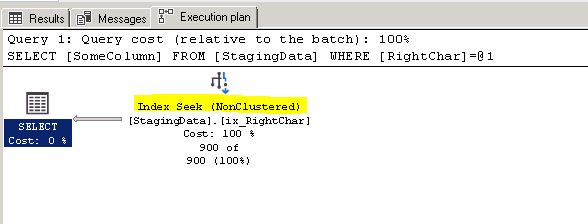
The reads went from 5404 to 10, that is a massive improvement, here is what the execution plan looks like


However there is a small problem.....

We said we would not modify the query...

What happens if we execute the same query from before?  Can the SQL Server optimizer recognize that our new column and index is pretty much the same as the WHERE clause?

SET STATISTICS IO ON
GO

SELECT SomeColumn FROM StagingData
WHERE RIGHT(SomeColumn,3) = '333'


SET STATISTICS IO OFF
GO

(900 rows affected)

Table 'StagingData'. Scan count 1, logical reads 10, physical reads 0, read-ahead reads 0, lob logical reads 0, lob physical reads 0, lob read-ahead reads 0.


Damn right, the optimizer can, , there it is, it uses the new index and column although we specify the original column..... (must be all that AI built in... (just kidding))


If you look at the execution plan, you can see it is indeed a seek


So there you have it.. sometimes, you can't change the query, you can't mess around with existing column but you can add a column to the table, in this case a technique like the following can be beneficial


PS

Betteridge's law of headlines is an adage that states: "Any headline that ends in a question mark can be answered by the word no." It is named after Ian Betteridge, a British technology journalist who wrote about it in 2009

In this case as you can plainly see...this is not true  :-) The answer to "Can adding an index make a non SARGable query SARGable?" is clearly yes

tag:blogger.com,1999:blog-16771259.post-1177466799614780580
Extensions
How to count NULLS without using IS NULL in a WHERE clause
HowtoNulls
Show full content


This came up the other day, someone wanted to know the percentage of NULL values in a column

Then I said "I bet you I can run that query without using a NULL in the WHERE clause, as a matter of fact, I can run that query without a WHERE clause at all!!"

The person then wanted to know more, so you know what that means.. it becomes a blog post  :-)

BTW, the PostgreSQL version of this blog post can be found here:  A quick and easy way to count the percentage of nulls without a where clause in PostgreSQL


To get started, first create this table and verify you have 9 rows

CREATE TABLE foo(bar int)
INSERT foo values(1),(null),(2),(3),(4),
 (null),(5),(6),(7)

SELECT * FROM foo

Here is what the output should be

bar
1
NULL
2
3
4
NULL
5
6
7

To get the NULL values and NON NULL values, you can do something like this


SELECT COUNT(*) as CountAll FROM foo WHERE bar IS NOT NULL
SELECT COUNT(*) as CountAll FROM foo WHERE bar IS  NULL

However, there is another way

Did you know that COUNT behaves differently if you use a column name compared to when you use *

Take a look

SELECT COUNT(*) as CountAll, 
  COUNT(bar) as CountColumn
FROM foo

If you ran that query, the result is the following

CountAll    CountColumn
----------- -----------
9           7

Warning: Null value is eliminated by an aggregate or other SET operation.


And did you notice the warning? That came from the count against the column

Let's see what Books On Line has to say


COUNT(*) returns the number of items in a group. This includes NULL values and duplicates.

COUNT(ALL expression) evaluates expression for each row in a group, and returns the number of nonnull values.

COUNT(DISTINCT expression) evaluates expression for each row in a group, and returns the number of unique, nonnull values.

This is indeed documented behavior

So now, lets change our query to return the percentage of non null values in the column

SELECT COUNT(*) as CountAll, 
  COUNT(bar) as CountColumn, 
  (COUNT(bar)*1.0/COUNT(*))*100 as PercentageOfNonNullValues 
FROM foo

Here is the output

CountAll    CountColumn percentageOfNonNullValues
----------- ----------- ---------------------------------------
9           7           77.777777777700

I just want to point out one thing,  the reason I have this * 1.0 in the query

(COUNT(bar)*1.0/COUNT(*))*100

I am doing * 1.0 here because count returns an integer, so you will end up with integer math and the PercentageOfNonNullValues would be 0 instead of 77.7777...


That's it for this short post.. hopefully you knew this, if not, then you know it now  :-)


tag:blogger.com,1999:blog-16771259.post-8781255150544871627
Extensions
How to check if an Extended Event session exists before dropping it
Best Practicesextended events
Show full content


Are you still running profiler or have you transferred to using Extended Events? I use Extended Events almost exclusively now because it's so much easier compared to using profiler or trace from T-SQL. Not to mentioned you can capture more things


The other day someone checked in some code and every now and then the build would fail with the error

Msg 15151, Level 16, State 19, Line 51
Cannot drop the event session 'ProcsExecutions', because it does not exist or you do not have permission.

I decided to take a look at the code and saw what the problem was. I will recreate the code here and then show you what needs to be changed.  This post will not go into what Extended Events are, you can look that up in the SQL Server  Extended Events documentation

Start by creating the Extended Event session by executing the following T-SQL

CREATE EVENT SESSION ProcsExecutions ON SERVER 
ADD EVENT sqlserver.rpc_completed(
    ACTION(sqlos.task_time,sqlserver.client_app_name,
 sqlserver.client_hostname,sqlserver.database_name,sqlserver.sql_text)
    WHERE ([sqlserver].[database_name]=N'Test')
 ),
ADD EVENT sqlserver.rpc_starting(
    ACTION(sqlos.task_time,sqlserver.client_app_name,
 sqlserver.client_hostname,sqlserver.database_name,sqlserver.sql_text)
    WHERE ([sqlserver].[database_name]=N'Test')
  )


To start the Extended Event session from T-SQL, execute the following command

ALTER EVENT SESSION ProcsExecutions
   ON SERVER  
   STATE = START; 


Below is what the code looked like that was checked in.

You can run it and it will execute without a problem

IF EXISTS (SELECT name FROM sys.dm_xe_sessions  WHERE name = 'ProcsExecutions')
DROP EVENT SESSION ProcsExecutions ON SERVER
GO


CREATE EVENT SESSION ProcsExecutions ON SERVER 
ADD EVENT sqlserver.rpc_completed(
    ACTION(sqlos.task_time,sqlserver.client_app_name,
 sqlserver.client_hostname,sqlserver.database_name,sqlserver.sql_text)
    WHERE ([sqlserver].[database_name]=N'Test')
 ),
ADD EVENT sqlserver.rpc_starting(
    ACTION(sqlos.task_time,sqlserver.client_app_name,
 sqlserver.client_hostname,sqlserver.database_name,sqlserver.sql_text)
    WHERE ([sqlserver].[database_name]=N'Test')
  )


  ALTER EVENT SESSION ProcsExecutions
   ON SERVER  
   STATE = START; 
   GO

However if you run the following command now

 ALTER EVENT SESSION ProcsExecutions
   ON SERVER  
   STATE = STOP; 

And then execute the same create Extended Event T-SQL Query again

IF EXISTS (SELECT name FROM sys.dm_xe_sessions  WHERE name = 'ProcsExecutions')
DROP EVENT SESSION ProcsExecutions ON SERVER
GO


CREATE EVENT SESSION ProcsExecutions ON SERVER 
ADD EVENT sqlserver.rpc_completed(
    ACTION(sqlos.task_time,sqlserver.client_app_name,
 sqlserver.client_hostname,sqlserver.database_name,sqlserver.sql_text)
    WHERE ([sqlserver].[database_name]=N'Test')
 ),
ADD EVENT sqlserver.rpc_starting(
    ACTION(sqlos.task_time,sqlserver.client_app_name,
 sqlserver.client_hostname,sqlserver.database_name,sqlserver.sql_text)
    WHERE ([sqlserver].[database_name]=N'Test')
  )


 ALTER EVENT SESSION ProcsExecutions
   ON SERVER  
   STATE = START; 
   GO


You will get the error

Msg 25631, Level 16, State 1, Line 29
The event session, "ProcsExecutions", already exists.  Choose a unique name for the event session.

So why is that?  There are 2 DMV that exist sys.dm_xe_sessions and sys.server_event_sessions. The DMV sys.dm_xe_sessions only returns a row for Extended Event sessions that are in the running state, the DMV sys.server_event_sessions will return a row even if the Extended Event session is not currently running

Lets' take a look at what that looks like by running some queries and commands

First we are going to stop the session and then query the sys.dm_xe_sessions DMV

--Stop the session if is running
 ALTER EVENT SESSION ProcsExecutions
   ON SERVER  
   STATE = STOP; 
   GO

-- this query returns only the running Extended Event sessions
SELECT dxs.name,
dxs.create_time,*
FROM sys.dm_xe_sessions AS dxs;

 Output
-----------------
hkenginexesession
system_health
sp_server_diagnostics session
telemetry_xevents

As you can see our Extended Event session is not returned because it is not in a running state

Now lets's query the sys.server_event_sessions DMV and check if our Extended Event session is returned

-- this query returns also Extended Event sessions that are not currently running
 SELECT *
 FROM sys.server_event_sessions 

 Output
-----------------
system_health
AlwaysOn_health
telemetry_xevents
ProcsExecutions

As you can see our  Extended Event session is returned even though it is not in a running state

If we now start the session again and then check the sys.dm_xe_sessions DMV, we will get back out session

-- start the session again
   ALTER EVENT SESSION ProcsExecutions
   ON SERVER  
   STATE = START; 
   GO


SELECT dxs.name,
dxs.create_time,*
FROM sys.dm_xe_sessions AS dxs;

 Output
-----------------
hkenginexesession
system_health
sp_server_diagnostics session
telemetry_xevents
ProcsExecutions


So now our Extended Event session is returned because it is in a running state

Instead of this query to check for the existence

IF EXISTS (SELECT name FROM sys.dm_xe_sessions  WHERE name = 'ProcsExecutions')
DROP EVENT SESSION ProcsExecutions ON SERVER
GO


What we really want is this

IF EXISTS (SELECT name FROM sys.server_event_sessions  WHERE name = 'ProcsExecutions')
DROP EVENT SESSION ProcsExecutions ON SERVER
GO

So basically we change the dmv from sys.dm_xe_sessions to sys.server_event_sessions in IF EXISTS check

So it is a pretty easy change, just swap out the DMV


If you want to stop a session if it is running, you can go ahead and implement something like this

 IF EXISTS (SELECT name FROM sys.dm_xe_sessions  WHERE name = 'ProcsExecutions')
 BEGIN
 PRINT 'The Session Was Running'

 ALTER EVENT SESSION ProcsExecutions
   ON SERVER  
   STATE = STOP; 
END

IF NOT EXISTS (SELECT name FROM sys.dm_xe_sessions  WHERE name = 'ProcsExecutions')
 PRINT 'The Session is NOT Running'


That's all for this post, hopefully it will be useful to someone


tag:blogger.com,1999:blog-16771259.post-5734406641927502592
Extensions
How to improve your tech skills
Best Practicesimprovement
Show full content
Today we are going to look at how to improve your tech skills. This really is a continuation of the Stay relevant and marketable post from a couple of weeks ago. Here are some things that you can do to improve your tech skills


Attend usergroups Attend your local usergroup meetings, there is always some expert that comes to do presentations.


Answer questions I still think answering questions is one of the best ways to improve your skill. Join a QA site like stackoverflow, head on to a specialized site on stackexchange, here is a list of all of them http://stackexchange.com/sites


If you are not comfortable with answering yet or if you realize that the questions are too difficult, don't worry about, just start by lurking. What you will find out over time is that every month you will be able to answer more and more of these question. This is because the questions are pretty much the same but some little detail might be different.  After a while you will notice that there will be very few questions that you won't be able to answer in your field of expertise


Lunch and learns No time you say to improve your skills, do you take lunch breaks? If so consider doing lunch and learns, get into a conference room, fire up the projector and then either look at code with the team, do design, watch videos, whatever floats your boat


Get involved with an open source project A good way to improve your skills is to get involved with an open source project. Pick a project download it, then pick it apart. Start reading through the code, notice how things are done, ask yourself why it was done that way. Would you do it the same way? If you pick a big enough project, there will be many contributors, can you tell that the code was put together or does it pretty much look like it was written by one person. Are standards followed, how many design patterns are used


Read books, read code, read blogs There are many classic list of books that every programmer should read
Here is just a small list that you can choose from, I grabbed this from stackoverflow

Code Complete (2nd edition) by Steve McConnell
The Pragmatic Programmer
Design Patterns by the Gang of Four
Refactoring: Improving the Design of Existing Code
The Mythical Man Month
Clean Code: A Handbook of Agile Software Craftsmanship by Robert C. Martin
CODE by Charles Petzold
Working Effectively with Legacy Code by Michael C. Feathers
Peopleware by Demarco and Lister
Coders at Work by Peter Seibel
Patterns of Enterprise Application Architecture by Martin Fowler
Test-Driven Development: By Example by Kent Beck
Practices of an Agile Developer
Don't Make Me Think
Agile Software Development, Principles, Patterns, and Practices by Robert C. Martin
Domain Driven Designs by Eric Evans
The Design of Everyday Things by Donald Norman
JavaScript - The Good Parts
Getting Real by 37 Signals
The Annotated Turing
Agile Principles, Patterns, and Practices in C# by Robert C. Martin
The Soul of a New Machine by Tracy Kidder
Here Comes Everybody: The Power of Organizing Without Organizations by Clay Shirky
Pragmatic Unit Testing in C# with NUnit by Andy Hunt and Dave Thomas with Matt Hargett
Rework by Jason Freid and DHH
JUnit in Action
Reading code is also a good way to improve your skills, head over to the frameworks you use the most and start digging around in the API, look at the example code.
Read blogs of subject expert, study their code and techniques, if something is not clear don't hesitate to leave a comment asking for some info or further explanation


Practice by doing katas If you have ever done Karate you will know what a kata is, it is basically the practice of forms. A kata, or code kata, is defined as an exercise in programming which helps hone your skills through practice and repetition. Dave Thomas, started this movement for programming. You can find a list of awesome katas here: https://github.com/gamontal/awesome-katas


Blog I found that blogging has been very good for my tech skills. It keeps me sharp and since I blog about new things it keeps my skill set up to date. When blogging, your readers will tell you when the code is wrong, so you have to make sure everything is tested and will run as shown in the post. Since you will have to do some research when writing these blog posts, your skills will improve and expand.
An added bonus is that I have a code library that I can access anytime I want.


Write a book If you are a masochistic type of person then I recommend you write a book, almost everybody in the tech world that I know swore that they would never write a book again when they were done.......and yet they did. In order to write a book you have to spend a LOT of time doing research, making sure your code is correct and much more. Once you are done with this if you were not a subject expert you will be now. The worst part of writing a book is the initial feedback you get pointing out all your mistakes, if you are not thick skinned this could become a problem.


Listen to podcast, watch webinars I get a lot of my tech info from podcasts, I like it better than listening to music at times and it makes the commute or run more enjoyable. The benefit is that you will learn something, you also might hear about some new shiny thing and then you will want to check it out when you get to the computer. There are many things I have learned from podcast, I also look forward to the next episode


tag:blogger.com,1999:blog-16771259.post-7599161099039576817
Extensions
Some numbers that you will know by heart if you have been working with SQL Server for a while
numbersSQL Server
Show full content


This is just a quick and fun post.

I was troubleshooting a deadlock the other day and it got me thinking.... I know the number 1205 by heart and know it is associated to a deadlock.  What other numbers are there that you can associate to an event or object or limitation. For example 32767 will be known by a lot of people as the database id of the ResourceDb, master is 1, msdb is 4 etc etc.

So below is a list of numbers I thought of

Leave me a comment with any numbers that you know by heart

BTW I didn't do the limits for int, smallint etc etc, those are the same in all programming languages...so not unique to SQL Server


-1
You use -1 with DBCC TRACESTATUS to see what trace flags are enabled on your system

For example on a brand new instance, I turned on these 3 trace flags, then when I check tracestatus, I get them back in the output


DBCC TRACEON (3605,1204,1222,-1)
DBCC TRACESTATUS(-1)


TraceFlag Status Global Session
1204 1 1 0
1222 1 1 0
3605 1 1 0


1
You can only have 1 clustered index per table. This is also a favorite interview question, asking people to explain why there can only be 1 clustered index


3
The smallest fraction second number in a datetime datatype is 3

Fractions of a seconds are rounded to increments of .000, .003, or .007 seconds


This means the value after 000 midnight is .003 seconds

Take a look at this

DECLARE @d DATETIME = '2019-03-19 23:59:59.997'

SELECT @d AS orig,
 dateadd(ms,1,@d) AS orig1ms,
 dateadd(ms,2,@d) AS orig2ms,
 dateadd(ms,3,@d) AS orig3ms,
 dateadd(ms,4,@d) AS orig4ms,
 dateadd(ms,5,@d) AS orig5ms


Output

2019-03-19 23:59:59.997
2019-03-19 23:59:59.997
2019-03-20 00:00:00.000
2019-03-20 00:00:00.000
2019-03-20 00:00:00.000
2019-03-20 00:00:00.003

This is also the reason you will see datetimes in queries ending in the following values for the time portion '23:59:59.997'.  It will mostly be used with BETWEEN

For example

SELECT ...
FROM SomeTable
WHERE SomeDAte BETWEEN '2019-03-19' and '2019-03-19 23:59:59.997'

WHICH of course is the same as the query below


SELECT ...
FROM SomeTable
WHERE SomeDAte >='2019-03-19'
AND SomeDAte  < '2019-03-20'

But it's less typing to use between   :-)


Another one with the number 3 is the /3GB flag you could set in the boot.ini file. In that case if you had a 32 bit 4 GB system, SQL Server could now use 3GB instead of only 2GB.... oh the good old times  :-)


10
STATS = 10

When you script out a BACKUP or RESTORE command, it will by default use STATS =10, so every 10% you will get a message like below

10 percent processed.
20 percent processed.
30 percent processed.
40 percent processed.
50 percent processed.

For big databases, I like to use STATS = 1


15
If you have been using SQL Server for a while, you might see this in the error log

SQL Server has encountered 1 occurrence(s) of I/O requests taking longer than 15 seconds to complete on file [D:\SomeFilename.ldf] in database
  The OS file handle is 0x0000000000000950.  The offset of the latest long I/O is: 0x000000545eb200

There are several reasons why this might happen

1. SQL Server is spawning more I/O requests than what the I/O disk subsystem could handle.

2 . There could be an issue with the I/O subsystem (or) driver/firmware issue (or) Misconfiguration in the I/O Subsystem (or) Compression is turned on, so the Disks are performing very slow and thus SQL Server is affected by this

3. Some other process on the system is saturating the disks with I/O requests. Common application includes AV Scan,System Backup Etc.


50
Session ids which are smaller than 50 are system... You would filter this out from sp_who2 to get all the user generated sessions (not always true I have seen mirroring spids being between 51 and 70 on one my servers)

These days you would use is_user_process instead

So instead of this query

SELECT *
FROM sys.dm_exec_sessions AS es WITH (NOLOCK)
WHERE es.session_id > 50

You would use this one

SELECT *
FROM sys.dm_exec_sessions AS es WITH (NOLOCK)
WHERE es.is_user_process = 1


99.999
The five nines.. everyone knows this number... a 99.999% uptime certification means that the service or application will only be down for approximately five minutes and 15 seconds every year.

100
The default for MAXRECURSION in a recursive CTE


128
Identifier length (name of table, column etc etc)


128 is plenty, I still remember some FoxPro databases where the length could not exceed 8, then you would end up with Addrln1 etc etc


Here is a repo script that will attempt to create a table where the name is 130 characters in length

DECLARE @Ident VARCHAR(150) = REPLICATE('A', 150)

DECLARE @sql VARCHAR(500)  = 'create table ' + @Ident +'(id int)'

EXEC( @sql )

And it blows up with the following error
Msg 103, Level 15, State 4, Line 1
The identifier that starts with 'AAAA.....AAA' is too long. Maximum length is 128.


300
Page Life Expectancy is 300 seconds, meaning SQL Server can only keep those pages in memory for 300 seconds after reading them.  This number is quoted all over the place that indicates you have issues if you fall below that. Is the number 300 still correct? Start here https://www.sqlskills.com/blogs/paul/page-life-expectancy-isnt-what-you-think/


900
900 bytes for a clustered index. But then again if you have such a wide clustered index and several nonclustered indexes... good luck!


999
Nonclustered indexes you can have per table
I believe this number used to be 249 or 254 back in the day... but I guess it changed after that monstrosity sharepoint came into existence


1,000
Ah yes, who doesn't remember this number. It usually starts with someone saying that they don't see any job history for the job they created on the new server

Hmmm, you already know the answer don't you?
You go and open up SQL Agent-->Properties-->History
And what do you see?

Maximum job history log size: 1000
Maximum job history rows per job: 100


Ah yes..those nasty defaults

Or someone was evil and executed the proc sp_purge_jobhistory for your job  :-)


1,205
Transaction (Process ID %d) was deadlocked on %.*ls resources with another process and has been chosen as the deadlock victim. Rerun the transaction.


1,222
Use this trace flag to return the resources and types of locks that are participating in a deadlock and also the current command affected

1,433
The default port SQL Server is listening on

1,700
You can have 1,700 bytes for a nonclustered index.


2,100
Parameters per stored procedure or user-defined function

Tried that one as well...
declare @d varchar(max) = 'create procedure prtest  '

;with cte as (
select number from master..spt_values
where type = 'p'
union
select number + 2048 from master..spt_values
where type = 'p'
)


select top 2101 @d += '@i' + convert(varchar(10),number)  + ' int ,'
from  cte


select @d = left(@d, len(@d) -1) + 'as select 1 as Test'


exec(@d)


And here is the error

Msg 180, Level 15, State 1, Procedure prtest, Line 1
There are too many parameters in this CREATE PROCEDURE statement. The maximum number is 2100.


3,226
Oh your errorlog is full of messages like these?


Those are not really errors are they?

To stop logging all of your backup success entries to the error log, use traceflag 3226


3,605
Like I showed in the section for number -1, you would use traceflag 3605 alongside traceflags 1204 and 1222 to send deadlock information to the error log

4,096
Columns per SELECT statement.  Really who has such a query?

Hmm, I just had to try that out


declare @d varchar(max) = 'select top 1 '


;with cte as (
select number from master..spt_values
where type = 'p'
union
select number + 2048 from master..spt_values
where type = 'p'
union all
select 4096)


select @d += 'name as [' + convert(varchar(10),number)  + '] ,'
from  cte

select @d = left(@d, len(@d) -1) + 'from sys.objects'

exec(@d)

(1 row(s) affected)
Msg 1056, Level 15, State 1, Line 1
The number of elements in the select list exceeds the maximum allowed number of 4096 elements.


Also 4096 is the default network packet size


4,199
Traceflag 4199 Enables query optimizer (QO) fixes released in SQL Server Cumulative Updates and Service Packs. See also the hint 'ENABLE_QUERY_OPTIMIZER_HOTFIXES' from SQL Server 2016 SP1 onwards


8,060
Bytes per page
The number of bytes a page can hold.. and also the number of bytes a row can hold (not taking into account row overflow data types)


15,000
Partitions per partitioned table or index
I think this used to be either 999 or 1000...don't remember exactly


32,767
This is database id of the ResourceDb
tag:blogger.com,1999:blog-16771259.post-2678365110223876777
Extensions
Stay relevant and marketable
Best Practicescloudnosql
Show full content


It has been a while since I wrote some of my best practices posts. I decided to revisit these posts again to see if anything has changed, I also wanted to see if I could add some additional info.

Whenever I interview people for a DB position, I always ask what the latest version is that they have used. I will also ask if they have used the version that is in beta now. More often than not I will get an answer that they are still running something that is two versions behind. Then I ask if they have installed the latest and greatest on their home computer. The answer to that question is usually no.

This to me is crazy, surely you can't be in this field just for the money, where is the passion for discovering new things? Imagine you are a person who makes tables, after a while you will become a master and there is not much more for you to learn. The curse and the blessing of technology is that it is changing, and it is changing rapidly. If you don't invest time after work, before work and over the weekend to discover new things, play with the newest versions and sharpen your skill you will become obsolete, there are many people like that, they fall apart during the interview process.


But I have no time to do all this additional work People will complain that they don't have enough time to do these additional things. Here are some things you can do if you are short on time. If commuting by public transportation read a book or download the latest papers about the newest versions of the product and read them. If you workout try listening to podcast while doing your aerobic exercises. Perhaps you can set the speed on your player to be 30% faster, this way you can get more podcasts in the same amount of time.

Ask yourself what will help you advance, having up to date skill or being up to date with the latest episodes of Billions, Narcos or American Gods? Another option is to watch the shows on the train on a tablet and then do the tech stuff at home. Attend an launch event or go to your local usergroup meeting, there are usually sessions on the latest and greatest versions of the software. Youtube also has tons of free sessions.

Here are the Amazon AWS re:Invent 2018 breakout sessions https://www.youtube.com/user/AmazonWebServices/playlists?shelf_id=33&view=50&sort=dd

The Microsoft Ignite sessions can be found here:
https://www.youtube.com/channel/UCrhJmfAGQ5K81XQ8_od1iTg

The Google Developer sessions can be found here:
https://www.youtube.com/user/GoogleDevelopers

Database related sessions: Azure SQL Data Warehouse, Azure SQL Database and SQL Server sessions from the Build 2018 conference

Do you eat lunch? If so,  instead of going out for lunch, bring your lunch to the office. While eating your lunch at your desk, watch some of the sessions listed above or read some documentation or books about technologies that you are interested in. If you prefer to read and you want to learn about SQl Server Execution Plans? Head on over to Hugo Kornelis' SQL Server Execution Plan Reference site


Step outside your comfort zone Try out some other things, become a polyglot programmer. If you are a Java developer, give Scala or Clojure a try. If you are a .NET developer then try out F#, IronPython or Boo. If you are a SQL Server guy why not start playing around with Oracle, PostgreSQL or perhaps even a flavor of NoSQL, take a look at MongoDB, CouchDB, Cassandra and other solutions.

Have you looked at Big Data? This is already getting big and it will only get bigger. Ever heard of Hadoop? No, heard of facebook? Sure you have, guess what, facebook claims to have the biggest Hadoop cluster, It is over 100 Petabytes and it grows by about half a Petabyte per day, and you thought your database was big :-)

Trends are cyclical, every 10 years or so something new and big comes along. In the late 90s this was data warehousing, OLAP cubes, dimensions, fact tables. Every company these days does some sort of data warehousing. Now it is big data, data science, AI and machine learning that is new and shiny. Take a look at some of that stuff


Finally have you looked at the cloud yet? If you have not... I beg you to take a look.  If you think that you need to have money to get started, this is not true

You can start with the free tiers to get some experience. All 3 major could providers offer free tiers
Here are the links to these free tiers in order of cloud vendor by market share
Amazon Webservices https://aws.amazon.com/free/


Microsoft Azure https://azure.microsoft.com/en-us/free/

Google Cloud  https://cloud.google.com/free/


That's it for this post.... happy learning.....
tag:blogger.com,1999:blog-16771259.post-4780887706555715569
Extensions
Use sys.configurations to find features that are enabled but perhaps not used
Best Practices
Show full content


It has been a while since I wrote some of my best practices posts. I decided to revisit these posts again to see if anything has changed, I also wanted to see if I could add some additional info.


Today we are going to look at servers where everything is installed and enabled. Before we start this post let's look back in time a little. Before SQL Server 2005 came out when you installed SQL Server pretty much everything was turned on by default. This of course widened the attack vector against the database servers. With SQL Server 2005 pretty much everything is turned off and you have to turn the features on if you want to use them. Now sometimes some admins will just turn everything on because that way they don't have to deal with this later, these are also the same kind of people who insist that the account needs to be db_owner otherwise their code won't work.


To see what these features are and if they are turned off, you can use the following query.


SELECT name, value,value_in_use 
FROM sys.configurations
WHERE name IN (
'Agent XPs',
'SQL Mail XPs',
'Database Mail XPs',
'SMO and DMO XPs',
'Ole Automation Procedures',
'SQL Mail XPs',
'external scripts enabled',
'Web Assistant Procedures',
'xp_cmdshell',
'Ad Hoc Distributed Queries',
'hadoop connectivity',
'polybase enabled',
'Replication XPs',
'clr enabled')

Here is what the output looks like on my laptop

sys.configurations output

The difference between value and value_in_use is that value_in_use is what is currently used and value will be used next time the server is restarted. If you want to have the change take effect immediately then use RECONFIGURE

As you can see xp_cmdshell is turned on

Here is an example that will turn off xp_cmdshell


EXECUTE sp_configure 'show advanced options', 1
RECONFIGURE
GO
 
EXECUTE sp_configure 'xp_cmdshell', '0'
RECONFIGURE
GO
 
EXECUTE sp_configure 'show advanced options', 0
RECONFIGURE
GO


To enable a feature use the value 1, to disable a feature use the value 0

If you prefer the GUI, you can also use that, right click on the database server name in SSMS, select Facets, from the Facet drop down select Surface Area Configuration. You will see the following Surface Area Configuration properties


Here you can enable or disable the features you are interested in. You can also export these properties as a policy to use on other servers so that the features are the same on all your servers


Installing everything by default Here I have mixed feelings myself about what to do. On one hand I don't like to install SSAS or SSRS if there is no need for it, on the other hand I don't feel like adding that stuff 6 months down the road if there is suddenly a need for it. If I do install it, I make sure it at least doesn't run by default but it is disabled.

There is no benefit in having SSAS, SSRS or SSIS running and using CPU cycles as well as RAM if nobody is using these services. If you do install it and nobody uses it, disable the services, you will have more RAM and CPU cycles for the SQL Server service available.


One more thing I want to mention is that I have run into something like this many times.... The Dev or Test server has everything enabled. We deploy to production and oops...  CLR is not enabled (quick fix) or SSRS/SSAS is not installed (need to install it, will take longer)

So make sure before deploying that you check what is enabled and installed on the production box


tag:blogger.com,1999:blog-16771259.post-5904098711687687996
Extensions
Calculating Sexy Primes, Prime Triplets and Sexy Prime Triplets in SQL Server
LearningMathprime numbers
Show full content


The other day I was reading something on Hackernews and someone posted a link to a Sexy Primes wikipedia article.  I looked at that and then decided to do this in SQL Server because.. why not?

From that wikipedia link: https://en.wikipedia.org/wiki/Sexy_prime


In mathematics, sexy primes are prime numbers that differ from each other by six. For example, the numbers 5 and 11 are both sexy primes, because 11 minus 5 is 6.

The term "sexy prime" is a pun stemming from the Latin word for six: sex.

If p + 2 or p + 4 (where p is the lower prime) is also prime, then the sexy prime is part of a prime triplet.

Ok I did a couple of versions of this over the weekend,  I also did a PostgreSQL version: Calculating Sexy Primes, Prime Triplets and Sexy Prime Triplets in PostgreSQL

So first we need a table that will just have the prime numbers

I decided to populate a table with numbers from 2 till 500 and then use the sieve of Eratosthenes method to delete the non primes

This will look like this


CREATE TABLE #PrimeNumbers(n int)

INSERT INTO #PrimeNumbers
SELECT number 
FROM master..spt_values 
WHERE type = 'P'
AND number between 2 and 500

--Sieve method
DECLARE @i INT
SET @I = 2
WHILE @I <= SQRT(500)
BEGIN
    DELETE FROM #PrimeNumbers WHERE N % @I = 0 AND N > @I
    SET @I = @I + 1
END

SELECT * FROM #PrimeNumbers

Thinking about it a little more I decided to do it with a CTE instead of a loop with delete statements, if your tables will be big then the delete method is probably better... it's for you to test that out :-)

What we are doing is a NOT EXISTS query against the same cte and we are filtering out numbers that are greater than the number in the current row and are not divisible by the current number


IF OBJECT_ID('tempdb..#PrimeNumbers') IS NOT NULL
 DROP TABLE #PrimeNumbers

CREATE TABLE #PrimeNumbers(n int)

;WITH cte AS (
  SELECT number n
FROM master..spt_values 
WHERE type = 'P'
AND number between 2 and 500
), PrimeNumbers as (
SELECT n
FROM cte
WHERE NOT EXISTS (
  SELECT n FROM  cte as cte2
WHERE cte.n > cte2.n AND cte.n % cte2.n = 0)
)

INSERT #PrimeNumbers
SELECT * FROM PrimeNumbers

SELECT * FROM #PrimeNumbers

If we run that last select statement, we should have 95 rows

2
3
5
7
 .....
 .....
463
467
479
487
491
499

Now that we have our table filled with prime numbers till 500, it's time to run the queries

Sexy prime pairs
The sexy primes (sequences OEIS: A023201 and OEIS: A046117 in OEIS) below 500 are:

(5,11), (7,13), (11,17), (13,19), (17,23), (23,29), (31,37), (37,43), (41,47), (47,53), (53,59), (61,67), (67,73), (73,79), (83,89), (97,103), (101,107), (103,109), (107,113), (131,137), (151,157), (157,163), (167,173), (173,179), (191,197), (193,199), (223,229), (227,233), (233,239), (251,257), (257,263), (263,269), (271,277), (277,283), (307,313), (311,317), (331,337), (347,353), (353,359), (367,373), (373,379), (383,389), (433,439), (443,449), (457,463), (461,467).


Here is that query for the sexy prime pairs

-- 46 rows.. sexy primes
SELECT t1.N,t2.N 
 FROM #PrimeNumbers t1
join #PrimeNumbers t2 on t2.N - t1.N = 6 
order by 1

It's very simple.. a self join that returns rows where the number from one table alias and the number from the other table alias differ by 6


Prime triplets
The first prime triplets below 500 (sequence A098420 in the OEIS) are

(5, 7, 11), (7, 11, 13), (11, 13, 17), (13, 17, 19), (17, 19, 23), (37, 41, 43), (41, 43, 47), (67, 71, 73), (97, 101, 103), (101, 103, 107), (103, 107, 109), (107, 109, 113), (191, 193, 197), (193, 197, 199), (223, 227, 229), (227, 229, 233), (277, 281, 283), (307, 311, 313), (311, 313, 317), (347, 349, 353), (457, 461, 463), (461, 463, 467)

A prime triplet contains a pair of twin primes (p and p + 2, or p + 4 and p + 6), a pair of cousin primes (p and p + 4, or p + 2 and p + 6), and a pair of sexy primes (p and p + 6).

So we need to check that the 1st and 3rd number have a difference of 6, we also check that that difference between number 1 and 2 is 2 or 4.  That query looks like this


-- 22 rows.. Prime Triplets
SELECT t1.N AS N1,t2.N AS N2, t3.N AS N3
 FROM #PrimeNumbers t1
join #PrimeNumbers t2 on t2.N > t1.N 
join #PrimeNumbers t3 on t3.N - t1.N = 6
and t3.N > t2.N
and t2.n - t1.n IN (2,4)
order by 1


Sexy prime triplets
Triplets of primes (p, p + 6, p + 12) such that p + 18 is composite are called sexy prime.  p p, p+6 and p+12 are all prime, but p+18 is not

Those below 500 (sequence OEIS: A046118) are:

(7,13,19), (17,23,29), (31,37,43), (47,53,59), (67,73,79), (97,103,109), (101,107,113), (151,157,163), (167,173,179), (227,233,239), (257,263,269), (271,277,283), (347,353,359), (367,373,379)


The query looks like this.. instead of a self join, we do a triple self join, we also check that p + 18 is not a prime number in the line before the order by

-- 14 rows.. Sexy prime triplets
SELECT t1.N AS N1,t2.N AS N2, t3.N AS N3
 FROM #PrimeNumbers t1
join #PrimeNumbers t2 on t2.n - t1.n = 6
join #PrimeNumbers t3 on t3.N - t1.N = 12
and t3.N > t2.N
AND NOT EXISTS( SELECT null FROM #PrimeNumbers p WHERE p.n = t1.n +18)
order by 1


And that's it for this post.
tag:blogger.com,1999:blog-16771259.post-2325831223626978597
Extensions
Finding rows where the column starts or ends with a 'bad' character
GotchaHowto
Show full content
A coworker came to me asking me for some help. He had some issues trying to convert some data from a staging table to numeric. I asked him to show me the data in SSMS and at first glance it looked good to me. Then I asked where the data came from, he said it came from Excel.

Aha... I have plenty of war stories with Excel so I said, it's probably some non printable character that is in the column.. either a tab (char(9)) or a non breaking space (char(160))..especially if the value was copied from the internet

He said isnumeric was returning 0 for rows that looked valid, I then told him to run this query on those rows


SELECT ASCII(LEFT(SomeColumn,1)),
 ASCII(RIGHT(SomeColumn,1)),* 
FROM StagingData s

That would give them the ascii numerical value. For example a tab is 9, linefeed =  10....

Here is a chart for the characters between 0 and 32
BinaryOctDecHexAbbreviation[b][c][d]Name (1967) 196319651967 000 0000000000NULLNUL␀^@\0Null 000 0001001101SOMSOH␁^AStart of Heading 000 0010002202EOASTX␂^BStart of Text 000 0011003303EOMETX␃^CEnd of Text 000 0100004404EOT␄^DEnd of Transmission 000 0101005505WRUENQ␅^EEnquiry 000 0110006606RUACK␆^FAcknowledgement 000 0111007707BELLBEL␇^G\aBell 000 1000010808FE0BS␈^H\bBackspace[e][f] 000 1001011909HT/SKHT␉^I\tHorizontal Tab[g] 000 1010012100ALF␊^J\nLine Feed 000 1011013110BVTABVT␋^K\vVertical Tab 000 1100014120CFF␌^L\fForm Feed 000 1101015130DCR␍^M\rCarriage Return[h] 000 1110016140ESO␎^NShift Out 000 1111017150FSI␏^OShift In 001 00000201610DC0DLE␐^PData Link Escape 001 00010211711DC1␑^QDevice Control 1 (often XON) 001 00100221812DC2␒^RDevice Control 2 001 00110231913DC3␓^SDevice Control 3 (often XOFF) 001 01000242014DC4␔^TDevice Control 4 001 01010252115ERRNAK␕^UNegative Acknowledgement 001 01100262216SYNCSYN␖^VSynchronous Idle 001 01110272317LEMETB␗^WEnd of Transmission Block 001 10000302418S0CAN␘^XCancel 001 10010312519S1EM␙^YEnd of Medium 001 1010032261AS2SSSUB␚^ZSubstitute 001 1011033271BS3ESC␛^[\e[i]Escape[j] 001 1100034281CS4FS␜^\File Separator 001 1101035291DS5GS␝^]Group Separator 001 1110036301ES6RS␞^^[k]Record Separator 001 1111037311FS7US␟^_Unit Separator
Source: https://en.wikipedia.org/wiki/ASCII


He then ran the following to grab all the rows that ended or started with tabs

SELECT * FROM StagingData s
WHERE LEFT(SomeColumn,1)  = char(9)
OR  RIGHT(SomeColumn,1)  = char(9)


So let's take another look at this to see how we can make this a little better

Let's create a table that will hold these bad characters that we don't want, in my case ACII values 1 untill 32

Here is what we will do to create and populate the table

CREATE TABLE BadCharacters(
  BadChar char(1) NOT NULL, 
  ASCIINumber int NOT NULL,
   CONSTRAINT pk_BadCharacters 
  PRIMARY KEY CLUSTERED( BadChar )
 )

GO

INSERT BadCharacters
SELECT char(number),number
FROM master..SPT_VALUES
WHERE type = 'P'
AND number BETWEEN 1 AND 32
OR number = 160


A quick look at the data looks like this

SELECT * FROM BadCharacters


 Now let's create our staging table and insert some data so that we can do some tests

CREATE TABLE StagingData (SomeColumn varchar(255) )

INSERT StagingData
SELECT CONVERT(VARCHAR(10),s1.number) + '.' + CONVERT(VARCHAR(10),s2.number)
FROM master..SPT_VALUES s1
CROSS JOIN master..SPT_VALUES s2
WHERE s1.type = 'P'
AND s2.type = 'P'


That inserted 4194304 rows on my machine

Time to insert some of that bad data

Here is what some of the data inserted will look like

2.1
2.2
2.3
2.4
2.5
2.6
2.7
2.8

And this is the query to generated and insert those bad rows, on my machine it generated 1089 such rows


;WITH cte as(SELECT CONVERT(VARCHAR(10),number) as num
FROM master..SPT_VALUES
WHERE type = 'P'
AND number BETWEEN 1 AND 1000)

--INSERT StagingData
SELECT  b.BadChar + c1.num + '.' + c2.num + b2.BadChar
FROM cte c1
CROSS JOIN cte c2
JOIN BadCharacters b on c1.num = b.ASCIINumber
JOIN BadCharacters b2 on c2.num = b2.ASCIINumber

The query create a value by using a bad value, a number a dot a number and a bad value, you can see those values above


Now it's time to find these bad rows, but before we do that, let's add an index

CREATE INDEX ix_StagingData on StagingData(SomeColumn)


OK, we are ready...

Of course I here you saying, why don't we just do this


SELECT * FROM StagingData
WHERE TRY_CONVERT(numeric(20,10),SomeColumn) IS NULL


Well, yes that gives me everything that can't be converted to numeric, but I want to see what those characters are


Before we start, let's set statistics io on so that we can look at some performance


SET STATISTICS IO ON
GO


Here are the queries to find the bad characters at the start

SELECT * FROM StagingData s
JOIN BadCharacters b on b.BadChar = LEFT(s.SomeColumn,1)


SELECT * FROM StagingData s
JOIN BadCharacters b on s.SomeColumn like b.BadChar +'%'


Here is what the reads look like

(1089 row(s) affected)
Table 'BadCharacters'. Scan count 1, logical reads 2, physical reads 0, read-ahead reads 0, lob logical reads 0, lob physical reads 0, lob read-ahead reads 0.
Table 'Worktable'. Scan count 0, logical reads 0, physical reads 0, read-ahead reads 0, lob logical reads 0, lob physical reads 0, lob read-ahead reads 0.
Table 'StagingData'. Scan count 9, logical reads 10851, physical reads 0, read-ahead reads 0, lob logical reads 0, lob physical reads 0, lob read-ahead reads 0.

(1089 row(s) affected)
Table 'BadCharacters'. Scan count 1, logical reads 2, physical reads 0, read-ahead reads 0, lob logical reads 0, lob physical reads 0, lob read-ahead reads 0.
Table 'StagingData'. Scan count 33, logical reads 135, physical reads 0, read-ahead reads 0, lob logical reads 0, lob physical reads 0, lob read-ahead reads 0.
Table 'Worktable'. Scan count 0, logical reads 0, physical reads 0, read-ahead reads 0, lob logical reads 0, lob physical reads 0, lob read-ahead reads 0.

As you can see from the stats, the top query is non-SARGable and generates a lot more reads, the bottom query can use the index. Always make sure to write your queries in a way so that SQL Server can you an index


What about the last character, how can we find those

SELECT * FROM StagingData s
JOIN BadCharacters b on b.BadChar = RIGHT(s.SomeColumn,1)


SELECT * FROM StagingData s
JOIN BadCharacters b on s.SomeColumn like +'%' + b.BadChar 


Here are the stats again

(1089 row(s) affected)
Table 'BadCharacters'. Scan count 1, logical reads 2, physical reads 0, read-ahead reads 0, lob logical reads 0, lob physical reads 0, lob read-ahead reads 0.
Table 'Worktable'. Scan count 0, logical reads 0, physical reads 0, read-ahead reads 0, lob logical reads 0, lob physical reads 0, lob read-ahead reads 0.
Table 'StagingData'. Scan count 9, logical reads 10851, physical reads 0, read-ahead reads 0, lob logical reads 0, lob physical reads 0, lob read-ahead reads 0.

(1089 row(s) affected)
Table 'BadCharacters'. Scan count 1, logical reads 2, physical reads 0, read-ahead reads 0, lob logical reads 0, lob physical reads 0, lob read-ahead reads 0.
Table 'StagingData'. Scan count 33, logical reads 445863, physical reads 0, read-ahead reads 13, lob logical reads 0, lob physical reads 0, lob read-ahead reads 0.
Table 'Worktable'. Scan count 0, logical reads 0, physical reads 0, read-ahead reads 0, lob logical reads 0, lob physical reads 0, lob read-ahead reads 0.


So both of these queries suck the life out of your SQL Server instance, so what can be done?

One thing we can do is add a computed column to the table that will hold just the last character of the column, then we can index the computed column

Here are the commands to do that


ALTER TABLE StagingData ADD RightChar as RIGHT(SomeColumn,1)
GO


CREATE INDEX ix_RightChar on StagingData(RightChar)
GO

And now we can just run the same queries again

SELECT * FROM StagingData s
JOIN BadCharacters b on b.BadChar = RIGHT(s.SomeColumn,1)


SELECT * FROM StagingData s
JOIN BadCharacters b on s.SomeColumn like +'%' + b.BadChar 


Here are the stats

(1089 row(s) affected)
Table 'StagingData'. Scan count 33, logical reads 1223, physical reads 0, read-ahead reads 0, lob logical reads 0, lob physical reads 0, lob read-ahead reads 0.
Table 'BadCharacters'. Scan count 1, logical reads 2, physical reads 0, read-ahead reads 0, lob logical reads 0, lob physical reads 0, lob read-ahead reads 0.

(1089 row(s) affected)
Table 'StagingData'. Scan count 33, logical reads 1223, physical reads 0, read-ahead reads 0, lob logical reads 0, lob physical reads 0, lob read-ahead reads 0.
Table 'BadCharacters'. Scan count 1, logical reads 2, physical reads 0, read-ahead reads 0, lob logical reads 0, lob physical reads 0, lob read-ahead reads 0.


Did you expect to get the same exact reads for both queries?

So what is going on?  Well lets take a look


In both cases, the optimizer was smart enough to use the index on the computed column

Hopefully this will make someone's life easier and you can expand the table to add other character you consider bad.  You can also add constraint to reject values or you can add triggers and then move those bad rows to a bad rows table

Finally if you need to worry about unicode you might want to change the table to be nvarchar

Enjoy.. importing that data..... we all know..it's only getting bigger and bigger


tag:blogger.com,1999:blog-16771259.post-5360631131092448913
Extensions
Using SonarQube, SonarQube Scanner and the sonar-tsql-plugin to run static code analysis
analysisCodeHowtostatic code analysis
Show full content
In the previous post Scripting out procs and user defined functions with PowerShell, we scripted out some procs and functions from the Adventureworks database so that we can run some static code analysis. Today we will install SonarQube, SonarQube Scanner and the sonar-tsql-plugin. First thing we need is to grab Java if you don't have it installed. I know I know... I uninstalled it as well.. sigh

Anyway.. after you have Java installed, you can grab SonarCube here: https://www.sonarqube.org/downloads/

Create a folder named sonarqube-7.6 on the C drive, download SonarCube and extract it in C:\sonarqube-7.6\

Next we need Sonar Cube Scanner,  You can download it here: https://docs.sonarqube.org/display/SCAN/Analyzing+with+SonarQube+Scanner

Create a folder name C:\sonar-scanner-cli-3.3.0.1492-windows and extract the Sonar Cube Scanner file there

Finally we need the sonar-tsql-plugin, you can download that here https://github.com/gretard/sonar-tsql-plugin/releases
Grab the file named: sonar-tsqlopen-plugin-0.9.0.jar and download it
Place the jar file in the folder C:\sonarqube-7.6\sonarqube-7.6\extensions\plugins\

sonar-tsqlopen-plugin

Now it's time to create some environmental variables. In an explorer window, paste this into an address bar

Control Panel\System and Security\System
Click on Advanced System Settings, click on Environment Variable, click on new

In the variable name add SONAR_RUNNER_HOME
In the variable value add C:\sonar-scanner-cli-3.3.0.1492-windows

It will look like this

There is one more thing to do, we need to add something to the path
On older versions of windows... add the line below at the end of the path variable, on newer versions, just click on New and paste the line below

;%SONAR_RUNNER_HOME%\bin;


Ok time to run (and fail) SonarQube finally

Go to the folder C:\sonarqube-7.6\sonarqube-7.6\bin\windows-x86-32 and kick off the script StartSonar.bat

If you get an error about 32 or 64 bit, then run the script from the windows-x86-64 folder

If you run the script, if you are lucky, you won't get an error, but if you do is it this one?


jvm 1    | Error: missing `server' JVM at `C:\Program Files (x86)\Java\jre1.8.0_201\bin\server\jvm.dll'.
jvm 1    | Please install or use the JRE or JDK that contains these missing components.

C:\sonarqube-7.6\sonarqube-7.6\bin\windows-x86-32>StartSonar.bat
wrapper  | ERROR: Another instance of the SonarQube application is already running.
Press any key to continue . . .
C:\sonarqube-7.6\sonarqube-7.6\bin\windows-x86-32>StartSonar.bat
wrapper  | --> Wrapper Started as Console
wrapper  | Launching a JVM...
jvm 1    | Wrapper (Version 3.2.3) http://wrapper.tanukisoftware.org
jvm 1    |   Copyright 1999-2006 Tanuki Software, Inc.  All Rights Reserved.
jvm 1    |
jvm 1    | 2019.02.12 13:22:02 INFO  app[][o.s.a.AppFileSystem] Cleaning or creating temp directory C:\sonarqube-7.6\sonarqube-7.6\temp
jvm 1    | 2019.02.12 13:22:02 INFO  app[][o.s.a.es.EsSettings] Elasticsearch listening on /127.0.0.1:9001
jvm 1    | 2019.02.12 13:22:02 INFO  app[][o.s.a.p.ProcessLauncherImpl] Launch process[[key='es', ipcIndex=1, logFilenamePrefix=es]] from [C:\sonarqube-7.6\sonarqube-7.6\elasticsearch]: C:\Program Files (x86)\Java\jre1.8.0_201\bin\java -XX:+UseConcMarkSweepGC -XX:CMSInitiatingOccupancyFraction=75 -XX:+UseCMSInitiatingOccupancyOnly -XX:+AlwaysPreTouch -server -Xss1m -Djava.awt.headless=true -Dfile.encoding=UTF-8 -Djna.nosys=true -Djdk.io.permissionsUseCanonicalPath=true -Dio.netty.noUnsafe=true -Dio.netty.noKeySetOptimization=true -Dio.netty.recycler.maxCapacityPerThread=0 -Dlog4j.shutdownHookEnabled=false -Dlog4j2.disable.jmx=true -Dlog4j.skipJansi=true -Xms512m -Xmx512m -XX:+HeapDumpOnOutOfMemoryError -Delasticsearch -Des.path.home=C:\sonarqube-7.6\sonarqube-7.6\elasticsearch -cp lib/* org.elasticsearch.bootstrap.Elasticsearch -Epath.conf=C:\sonarqube-7.6\sonarqube-7.6\temp\conf\es
jvm 1    | 2019.02.12 13:22:02 INFO  app[][o.s.a.SchedulerImpl] Waiting for Elasticsearch to be up and running
jvm 1    | Error: missing `server' JVM at `C:\Program Files (x86)\Java\jre1.8.0_201\bin\server\jvm.dll'.
jvm 1    | Please install or use the JRE or JDK that contains these missing components.


So to quickly fix this create a server folder in the java bin location from the error message


Now grab the files from the client folder and copy them to the server folder


Ok, we are ready to run the file again, rerun the command and the last 2 lines should be something like this

jvm 1    | 2019.02.12 13:25:53 INFO  app[][o.s.a.SchedulerImpl] Process[ce] is up
jvm 1    | 2019.02.12 13:25:53 INFO  app[][o.s.a.SchedulerImpl] SonarQube is up

Navigate to http://localhost:9000/ login with admin for username and password

Now we need to do one more thing and we are ready, open notepad or you favorite text editor, paste the following

# Required metadata 
sonar.projectKey=StaticCodeAnalysis.project
sonar.projectName=Static Code Analysis project
sonar.projectVersion=1.0
sonar.sources=StoredProcedures,UserDefinedFunctions
sonar.host.url=http://localhost:9000
#sonar.exclusions=**/bin/**/*.*,**/obj/**/*.*,**/*.sqlproj
# Comma-separated paths to directories of source codes to be analyzed. 
# Path is relative to the sonar-project.properties file. 
# Replace "\" by "/" on Windows. 
# Since SonarQube 4.2, this property is optional. 
# If not set, SonarQube starts looking for source code 
# from the directory containing the sonar-project.properties file. 
# Language 
sonar.language=tsql
#Encoding of the source code 
#sonar.sourceEncoding=UTF-8

Save that as sonar-project.properties in the folder where your code is located, in our case it is in C:\temp


Alright.. it's time to run the static code analysis...

Open a command window, cd to the C;\temp folder, and paste following

C:\sonar-scanner-cli-3.3.0.1492-windows\sonar-scanner-3.3.0.1492-windows\bin\sonar-scanner.bat

You should see something like the following

C:\temp>C:\sonar-scanner-cli-3.3.0.1492-windows\sonar-scanner-3.3.0.1492-windows\bin\sonar-scanner.bat
INFO: Scanner configuration file: C:\sonar-scanner-cli-3.3.0.1492-windows\sonar-scanner-3.3.0.1492-windows\bin\..\conf\sonar-scanner.properties
INFO: Project root configuration file: C:\temp\sonar-project.properties
INFO: SonarQube Scanner 3.3.0.1492
INFO: Java 1.8.0_121 Oracle Corporation (64-bit)
INFO: Windows 10 10.0 amd64
INFO: User cache: C:\Users\denis\.sonar\cache
INFO: SonarQube server 7.6.0
INFO: Default locale: "en_US", source code encoding: "windows-1252" (analysis is platform dependent)
INFO: Load global settings
INFO: Load global settings (done) | time=78ms
INFO: Server id: BF41A1F2-AWji9AZ8kkLV5J16bA1i
INFO: User cache: C:\Users\denis\.sonar\cache
INFO: Load/download plugins
INFO: Load plugins index
INFO: Load plugins index (done) | time=31ms
INFO: Load/download plugins (done) | time=47ms
INFO: Process project properties
INFO: Execute project builders
INFO: Execute project builders (done) | time=0ms
INFO: Project key: StaticCodeAnalysis.project
INFO: Base dir: C:\temp
INFO: Working dir: C:\temp\.scannerwork
INFO: Load project settings
INFO: Load project settings (done) | time=16ms
INFO: Load project repositories
INFO: Load project repositories (done) | time=47ms
INFO: Load quality profiles
INFO: Load quality profiles (done) | time=63ms
INFO: Load active rules
INFO: Load active rules (done) | time=1922ms
INFO: Load metrics repository
INFO: Load metrics repository (done) | time=32ms
WARN: SCM provider autodetection failed. Please use "sonar.scm.provider" to define SCM of your project, or disable the SCM Sensor in the project settings.
INFO: Language is forced to tsql
INFO: Indexing files...
INFO: Project configuration:
INFO: 23 files indexed
INFO: Quality profile for tsql: Sonar Way
INFO: ------------- Run sensors on module Static Code Analysis project
INFO: Sensor JaCoCo XML Report Importer [jacoco]
INFO: Sensor JaCoCo XML Report Importer [jacoco] (done) | time=0ms
INFO: Sensor MsIssuesLoaderSensor [tsqlopen]
INFO: Found 0 issues
INFO: Sensor MsIssuesLoaderSensor [tsqlopen] (done) | time=15ms
INFO: Sensor CodeGuardIssuesLoaderSensor [tsqlopen]
INFO: SQL Code guard path is empty, trying to search directories instead
INFO: Found 0 issues
INFO: Sensor CodeGuardIssuesLoaderSensor [tsqlopen] (done) | time=0ms
INFO: Sensor CustomChecksSensor [tsqlopen]
WARN: Property 'sonar.tsql.customrules.paths' is not declared as multi-values/property set but was read using 'getStringArray' method. The SonarQube plugin declaring this property should be updated.
INFO: Total 1 custom rules repositories with total 15 checks
INFO: Sensor CustomChecksSensor [tsqlopen] (done) | time=21548ms
INFO: Sensor CoverageSensor [tsqlopen]
INFO: Sensor CoverageSensor [tsqlopen] (done) | time=16ms
INFO: Sensor JavaXmlSensor [java]
INFO: Sensor JavaXmlSensor [java] (done) | time=0ms
INFO: Sensor HTML [web]
INFO: Sensor HTML [web] (done) | time=15ms
INFO: Sensor Zero Coverage Sensor
INFO: Sensor Zero Coverage Sensor (done) | time=16ms
INFO: ------------- Run sensors on project
INFO: No SCM system was detected. You can use the 'sonar.scm.provider' property to explicitly specify it.
INFO: 21 files had no CPD blocks
INFO: Calculating CPD for 2 files
INFO: CPD calculation finished
INFO: Analysis report generated in 250ms, dir size=127 KB
INFO: Analysis report compressed in 51ms, zip size=40 KB
INFO: Analysis report uploaded in 47ms
INFO: ANALYSIS SUCCESSFUL, you can browse http://localhost:9000/dashboard?id=StaticCodeAnalysis.project
INFO: Note that you will be able to access the updated dashboard once the server has processed the submitted analysis report
INFO: More about the report processing at http://localhost:9000/api/ce/task?id=AWjjFKvAkkLV5J16bDDx
INFO: Analysis total time: 26.228 s
INFO: ------------------------------------------------------------------------
INFO: EXECUTION SUCCESS
INFO: ------------------------------------------------------------------------
INFO: Total time: 28.017s
INFO: Final Memory: 36M/1173M
INFO: ------------------------------------------------------------------------

C:\temp>


When you get the prompt back, it's time to go to the http://localhost:9000/projects URL

You should have 1 project there, the name matches what we had in our properties file

sonar.projectName=Static Code Analysis project


When you click on the project, you will get some information about bugs, code smells and duplication


Clicking on code smells brings back the following.. you can then act on those or not


I added 2 of my own bad procs to see what it would flag

create proc BadProc
as
select * from Person.Address
order by 2,3


I also added this one Unique_Login_IPs, you can grab it here https://social.msdn.microsoft.com/Forums/en-US/55cfe1b0-402a-4468-bf7a-cc0966d4a487/faster-way-to-do-this

As you can see we got some warnings for those procs

SELECT *..   No need to comment on this one
No ASC/DESC in the order by... this defaults to ASC anyway but I guess for clarity it's better to specify ASC
Positional reference is used... I do this all the time with ad-hoc queries but I don't do it with procs

Non-sargeable argument found - column referenced in a function.

That is this line

WHERE (method = 'LOGIN') AND (YEAR(logged) = @year1) AND (MONTH(logged) = 3)) as tmpy1_3

This you would ideally rewrite by doing something like first creating the variable @startdate  and let it have the value @year.03/01 in other words '20190301'

Then the WHERE clause would be something like that

WHERE (method = 'LOGIN') AND logged >= @startdate and logged < dateadd(mm,1,@startdate) 

That is all for this post. Of course you can do some of this stuff with other tools and even with policy management. But if you use SQL Server and many languages, you could do static code analysis from one tool


tag:blogger.com,1999:blog-16771259.post-8511575142674809871
Extensions
Scripting out procs and user defined functions with PowerShell
Howtopowershellscriptingstored procedures
Show full content


I decided to take SonarCube for a spin to run some static code analysis. In order to do that I needed some code that I can display here without breaking laws.

I a real world, you would just point SonarCube to your code repository, but in order to show you how to run it so that you can follow along, I decided to go this route

I decided to use the AdventureWorks database to script out some procs and functions. If you want to follow what I am doing here, grab the backup from here: https://github.com/Microsoft/sql-server-samples/releases/tag/adventureworks

On your C drive create a folder named DB, in the DB folder create 2 folders, one name data and the other log

To restore the DB you can run this command (assuming your backup is in the c:\temp directory

USE [master]
RESTORE DATABASE [AdventureWorks2017] 
FROM  DISK = N'C:\temp\AdventureWorks2017.bak' WITH  FILE = 1,  
MOVE N'AdventureWorks2017' 
TO N'C:\DB\DATA\AdventureWorks2017.mdf',  
MOVE N'AdventureWorks2017_log' 
TO N'C:\DB\LOG\AdventureWorks2017_log.ldf',  
NOUNLOAD,  STATS = 5

 Now It's time to script out the procs and user defined functions

But first we need a place to store them

In my case I decided to create 2 folders in the c:\temp directory
StoredProcedures
UserDefinedFunctions

Now it's time to script out the procs and user defined functions, I will be using Powershell from that, you will need to install the sql server module, you can download it here

https://docs.microsoft.com/en-us/sql/powershell/download-sql-server-ps-module?view=sql-server-2017

Follow the instruction if you get any errors.

Now it's time to run the script, you will need to run powershell as an administrator

You will need to change Machinename\sql2019 to your machine and instance name

The script is simple.. it's for a one time use.. if you need to run the script repeatedly, you probably want to make it so you can rerun it for different databases and servers, so no hardcoding  :-)


Import-Module SqlServer -Version 21.0.17279

cd SQLSERVER:\SQL\MAchinename\sql2019\Databases\AdventureWorks2017\StoredProcedures


foreach ($tbl in Get-ChildItem  )

{
$k="C:\Temp\StoredProcedures\" + $($tbl.Schema) + "." + $($tbl.name) + ".SQL"
$tbl.Script() > $k
}

cd ..\UserDefinedFunctions

foreach ($tbl in Get-ChildItem  )

{
$k="C:\Temp\UserDefinedFunctions\" + $($tbl.Schema) + "." + $($tbl.name) + ".SQL"
$tbl.Script() > $k


That's all for the script.. if it ran successfully, you should see a bunch of procs and user defined functions in their directories.  Here is a view of the functions


Next up..installing SonarQube, SonarQube Scanner and the sonar-tsql-plugin
tag:blogger.com,1999:blog-16771259.post-3513348498628220832
Extensions
After 20+ years in IT .. I finally discovered this...
GotchaHowtoTIL
Show full content
Originally I was not going to write this post, but after I found out that several other people didn't know this I figured what the heck, why not, maybe this will help someone else as well

Last week I was on a remote session with 2 clients, each run the Advent program . The team I am part of provides a script to run the advent (APX or Axys) executable. This will then generate the portfolios, composites, price, security master, splits and other files. We then zip it up and sftp it over for ingestion so that we can run analytics and attribution

During these calls I interact with system administrators because usually the need to give permissions so that the script runs correctly

None of these admins knew that what I will show you existed. All the co-workers I asked didn't know this either (This could be because they are developers and not admins)


Back in the day (win 98 or perhaps NT 4), there was a windows powertool that you could install and if you right clicked on a folder you would get an option to open a command window and it would be in the path that you right clicked on

Those power tools don't exist anymore and you could do the same by hacking the registry, it's like a 16 step process

But there is a faster way.....

So what I usually did before 2 months ago is that I would select the path


And then I would open a command prompt, type CD and then paste the path...not too complicated

But here is the faster way.... instead of copying the path...just type in cmd in the address bar and hit enter


Boom shakalaka... a command prompt is opened immediately and you are in the same path


Did you know this also works when you type Powershell in the address bar, Eric Darling left me a comment on twitter informing me that it works with powershell as well

Here is what you see after typing it


So there you have it... hopefully it will save you some minutes of valuable time in a year

Also if you knew about this or did not know..leave a comment and let me know


tag:blogger.com,1999:blog-16771259.post-4945552874222558152
Extensions
Print.. the disruptor of batch deletes in SQL
GotchaHowto
Show full content


Someone had an issue where a batched delete script was not deleting anything. I looked over some code in our repository and noticed two patterns the way queries are written to handle batch deletes

One is a while loop that runs while @@rowcount is greater than 0

WHILE @@rowcount > 0
 BEGIN
  DELETE TOP (5000)
  FROM SomeTable
 END


The other way is to run a while loop which is always true and then check if @@rowcount is 0, if it is 0 then break out of the loop

 WHILE 1 = 1  
    BEGIN  
        DELETE TOP(5000)  
        FROM SomeTable

        IF @@ROWCOUNT = 0  
     BREAK  
     END


I have always used WHILE @@rowcount > 0 but you have to be careful because @@rowcount could be 0 when your while loop starts

Let's take a look at an example. This is a simplified example without a where clause..but let's say you have to delete several million rows from a table with many more millions of rows and the table is replicated... in that case you want to batch the deletes so that your log file doesn't fill up, replication has a chance to catch up and in general the deletes should run faster

SELECT TOP 20000 row_number() OVER(ORDER BY t1.id) AS SomeId,
  getutcdate() AS SomeDate, newid() AS SomeValue
INTO SomeTable
FROM sys.sysobjects t1
CROSS JOIN sys.sysobjects t2

SELECT COUNT(*) from SomeTable 

SELECT * FROM SomeTable WHERE 1= 0

WHILE @@rowcount > 0
 BEGIN
  DELETE TOP (5000)
  FROM SomeTable
 END

SELECT COUNT(*) from SomeTable 

DROP TABLE SomeTable -- Added here as cleanup in case people run the example

This is of course a silly example because why would you do a count like that against a different table before a delete
But what if you had this instead, you put a nice print statement there so that from the output you see when it started and you would also see the rowcounts?
SELECT TOP 20000 row_number() OVER(ORDER BY t1.id) AS SomeId,
  getutcdate() AS SomeDate, newid() AS SomeValue
INTO SomeTable
FROM sys.sysobjects t1
CROSS JOIN sys.sysobjects t2

SELECT COUNT(*) from SomeTable 

PRINT' Starting my update now....'

WHILE @@rowcount > 0
 BEGIN
  DELETE TOP (5000)
  FROM SomeTable
 END

SELECT COUNT(*) from SomeTable 

DROP TABLE SomeTable -- Added here as cleanup in case people run the example


The count is 20000 before and after the loop, nothing got delete, this is because a print statement will reset @@rowcount  to 0
Take a look by running this simple set of queries
SELECT 1 UNION ALL SELECT 2
SELECT @@rowcount as 'Rowcount'
PRINT '1'
SELECT @@rowcount as 'RowcountAfterPrint'

Here is what the output looks like

After the  PRINT line @@rowcount is reset back to 0
So if you want to use a while loop while checking @@rowcount, do this instead by running the delete first once outside the loop


SELECT TOP 20000 row_number() OVER(ORDER BY t1.id) AS SomeId,
  getutcdate() AS SomeDate, newid() AS SomeValue
INTO SomeTable
FROM sys.sysobjects t1
CROSS JOIN sys.sysobjects t2

SELECT COUNT(*) from SomeTable 

PRINT' Starting my update now....'

DELETE TOP (5000)
FROM SomeTable

WHILE @@rowcount > 0
 BEGIN
  DELETE TOP (5000)
  FROM SomeTable
 END

SELECT COUNT(*) from SomeTable 

DROP TABLE SomeTable -- Added here as cleanup in case people run the example

If you run the delete this way if there was something to delete, the while loop would be entered, if the table was empty then there would no need to enter the while loop

Also keep in mind that it is not just PRINT that will reset @@rowcount back to 0.

From Books On Line:

Statements such as USE, SET <option>, DEALLOCATE CURSOR, CLOSE CURSOR, BEGIN TRANSACTION, or COMMIT TRANSACTION reset the ROWCOUNT value to 0.
That's all... hopefully this helps someone out in the future if they notice nothing gets deleted
tag:blogger.com,1999:blog-16771259.post-9169544828607960976
Extensions
Proactive notifications
Best Practices
Show full content
It has been a while since I wrote some of my best practices posts. I decided to revisit these posts again to see if anything has changed, I also wanted to see if I could add some additional info.


 Today we are going to look at proactive notifications

In the SQL Server Maintenance post from yesterday I touched upon proactive notifications a little, today I want to dive a little deeper into this subject. The last thing you want to hear as a DBA is  ny of the following things from the end users or developers
  • The transaction log is full
  • The database is very slow
  • The latest backup we have is 9 days old
  • The table that was created has 2 extra columns this morning
  • Everything is locked up can't get any results back from a query
  • Deadlocks are occurring
What you really want to have at your shop is a tool like Quest FoglightSolarwindsRed Gate SQL Monitor or similar. The benefit of these tools is that there is a central location where you can look at all the alerts at a glance. You get a lot of stuff out of the box and all you have to do is tell it what server to start monitoring. I would suggest to start using the trial version to see if it is something that would be beneficial for your organization. Of course you can roll your own solution as well, this will involve work and unless your time is worthless or you are bored out of your mind after work I wouldn't do it. Utilize the logs You need to scan the errorlog periodically to see if there are errors, you can automate this, no need to start opening log files every 5 minutes. create a SQL Agent job that runs every 5 minutes and checks if there are any errors since it last ran. You can use the xp_readerrorlog proc to read the error log from with sql server with T-SQL. Here is a small example of what you can do if you have this in a SQL Agent job that runs every 5 minutes or so, you can of course email yourself the results, dump the result into a table that is perhaps shown on a dashboard in the office, there are many possibilities.


--This will hold the rows
CREATE TABLE #ErrorLog (LogDate datetime, ProcessInfo VarChar(10), 
ErrorMessage VarChar(Max))

-- Dump the errorlog into the table
INSERT INTO #ErrorLog
EXEC master.dbo.xp_readerrorlog

-- Delete everything older than 5 minutes
-- ideally you will store the max date when it ran last
DELETE #ErrorLog
WHERE LogDate <  DATEADD(mi,-5,GETDATE())

-- Some stuff you want to check for
-- Failed backups...you want to know this
SELECT * FROM #ErrorLog
WHERE ErrorMessage LIKE'BACKUP failed%'

-- Why does it take so looong to grow a file, maybe rethink your settings
SELECT * FROM #ErrorLog
WHERE ErrorMessage LIKE'Autogrow of file%'

-- What is going on any backups or statistic updates running at this time?
SELECT * FROM #ErrorLog
WHERE ErrorMessage LIKE'SQL Server has encountered %occurrence(s) of I/O requests taking longer than%'

-- My mirror might not be up to date
SELECT * FROM #ErrorLog
WHERE ErrorMessage LIKE'The alert for ''unsent log'' has been raised%'


DROP TABLE #ErrorLog 

Those are just small samples, you might want to look for other kind of messages from the errorlog The transaction log is full You want to make sure that you know you are running out of space before you run out of space. I covered this in the SQL Server Maintenance post Take a look at the sections Make sure that you have enough space left on the drives and Make sure that you have enough space left for the filegroups In those two section I described what to look for and also supplied code that you can then plug into your own solution The database is very slow This complaint you hear every now and then, I have seen this from time to time. There are several things that could be happening, here is a list Someone decided to take a backup of that 1 TB database in the middle of the day
The update statistics job is still running
Statistics are stale and haven't been updated in a long time
The virus scan is running amok and nobody told it to ignore the database files
Someone decided to query all the data all at once If you have a tool like Quest FoglightConfio IgniteRed Gate SQL Monitor or similar then you can see what query ran at what time, what it did and how long it ran. You can of course also use sp_who2, BlkBy column and DBCC INPUTBUFFER to see what is going on If you like to use Dynamic Management Views, then take a look at Glenn Berry's SQL Server 2005 Diagnostic Information Queries  posts, there is a .sql file in each post with all kind of queries to discover all kinds of stuff about your server. It could also be that your hardware is having issues, make sure the IOs look good and check the eventlog for any clues. The latest backup we have is 9 days old The following query will give you for all the databases the last time it was backed up or display NEVER if it wasn't backed up

SELECT s.Name AS DatabaseName,'Database backup was taken on  ' + 
CASE WHEN MAX(b.backup_finish_date) IS NULL THEN 'NEVER!!!' ELSE
CONVERT(VARCHAR(12), (MAX(b.backup_finish_date)), 101) END AS LastBackUpTime
FROM sys.sysdatabases s
LEFT OUTER JOIN msdb.dbo.backupset b ON b.database_name = s.name
GROUP BY s.Name

Here is what the output will look like

DatabaseName LastBackUpTime
--------------  ---------------------------------------
model         Database backup was taken on  NEVER!!!
msdb         Database backup was taken on  12/10/2012
ReportServer Database backup was taken on  NEVER!!!


As you can see that is not that great, all the databases should be backed up on a regular basis. Scroll up to the Utilize the logs section to see how you can check the errorlog for failed backup messages. Everything is locked up, you can't get any results back from a query Usually this indicates that there is an open transaction somewhere that has not finished or someone did the BEGIN TRAN part but never did a COMMIT or ROLLBACK. Some people just restart the server to 'fix' the issue, of course if you do that you will never know what the root cause is and you never know when it will happen again. We can easily show what happens when you have an open transaction, btw don't do this on the production server.
In 1 query window run this, replace SomeTable with a real table name.

BEGIN TRAN

SELECT TOP 1 * FROM SomeTable WITH(UPDLOCK, HOLDLOCK)

You will get a message that the query completed successfully In another window run this

SELECT TOP 1 * FROM SomeTable WITH(UPDLOCK, HOLDLOCK)

That query won't return anything unless the first one is commited or rolled back

Now run this query below, the first column should have the text AWAITING COMMAND

SELECT   sys.cmd
        ,sys.last_batch
        ,lok.resource_type
        ,lok.resource_subtype
        ,DB_NAME(lok.resource_database_id)
        ,lok.resource_description
        ,lok.resource_associated_entity_id
        ,lok.resource_lock_partition
        ,lok.request_mode
        ,lok.request_type
        ,lok.request_status
        ,lok.request_owner_type
        ,lok.request_owner_id
        ,lok.lock_owner_address
        ,wat.waiting_task_address
        ,wat.session_id
        ,wat.exec_context_id
        ,wat.wait_duration_ms
        ,wat.wait_type
        ,wat.resource_address
        ,wat.blocking_task_address
        ,wat.blocking_session_id
        ,wat.blocking_exec_context_id
        ,wat.resource_description
FROM    sys.dm_tran_locks lok
JOIN    sys.dm_os_waiting_tasks wat
ON      lok.lock_owner_address = wat.resource_address
JOIN sys.sysprocesses sys ON wat.blocking_session_id = sys.spid


As you can see you have a blocking_session_id and a session_id, this will tell you which session_id is being blocked. You can now verify that the transaction session_id is blocking the other id Go back to that first command window and execute a rollback

ROLLBACK

The query that had that second select should now be done as well, if you run that query that checks for the waits it should be clean as well. Of course you could have done the same exercise by running sp_who2, looking at the BlkBy column, finding out what that session is doing by running DBCC INPUTBUFFER(session_id) with that session_id Deadlocks are occurring There is already a post written on LessThanDot explaining how you can get emailed when deadlocks occur. Ted Krueger wrote that post and it can be found here: Proactive Deadlock Notifications Summary I only touched the surface of what can be done in this post. I want you to find out if there is any monitoring being done in your shop, who gets notified? I have worked in places where the end user was the proactive notification, as long as we fixed it before the business users started to complaint life was good. Manual notifications and homebrew solutions might work for a while but when you add more and more servers and you add more people to the team this becomes laborious and error prone.
tag:blogger.com,1999:blog-16771259.post-3568068813725057757
Extensions
Cursors and loops
Best Practicescursors
Show full content
It has been a while since I wrote some of my best practices posts. I decided to revisit these posts again to see if anything has changed, I also wanted to see if I could add some additional info.


 Today we are going to look at cursors Why do we hate those poor cursors? Let's first see why people tend to use cursors. Let's say you come from a procedural language and this is the first time you are using SQL. In the procedural language you know how to traverse a list, you of course will look for something that is similar in SQL........bingo!!! you found it...the almighty cursor....the crusher of almost all SQL Server performance. You start using it, your code works, you are happy, life is good.

Now a team member tells you that the cursor is evil and should never ever be used. You are confused, if a cursor is never to be used then why is it part of the language? Well you might say the same for the GOTO statement, this exists in SQL.  Edsger Dijkstra's letter Go To Statement Considered Harmful was published in the March 1968 Communications of the ACM.
The reason that cursors are evil is that they tend to be slower than a set based solution. Cursors are not needed for 99% of the cases. SQL is a set based language, it works best with sets of data, not row by row processing, when you do something set based it will generally perform hundreds of times faster than using a cursor.

Take a look at this code

CREATE FUNCTION dbo.cursorEnroll ()
    RETURNS INT AS
    BEGIN
        DECLARE @studentsEnrolled INT
        SET @studentsEnrolled = 0
        DECLARE myCursor CURSOR FOR
            SELECT enrollementID
                FROM courseEnrollment
        OPEN myCursor;
 
        FETCH NEXT FROM myCursor INTO @studentsEnrolled
 
        WHILE @@FETCH_STATUS = 0
            BEGIN
                SET @studentsEnrolled = @studentsEnrolled+1
                    FETCH NEXT FROM myCursor INTO @studentsEnrolled
            END;
        CLOSE myCursor
        RETURN @studentsEnrolled
 
    END;

That whole flawed cursor logic can be replaced with one line of T-SQL

SELECT @studentsEnrolled = COUNT(*) FROM courseEnrollment

Which one do you think will perform faster? What is more evil than a cursor? If cursors are evil, then what is more evil than a cursor? Nested cursors of course, especially three nested cursors. Here is an example of some horrible code where a cursor is not needed

CREATE PROCEDURE [dbo].[sp_SomeMadeUpName]
AS

DECLARE @SomeDate DATETIME

SET @SomeDate =  CONVERT(CHAR(10),getDate(),112)

EXEC sp_createSomeLinkedServer @SomeDate,@SomeDate,12

DECLARE @sql NVARCHAR(2000), @SomeID VARCHAR(20)


DECLARE SomeCursor CURSOR 
FOR
SELECT DISTINCT SomeID
FROM SomeTable
WHERE getDate() BETWEEN SomeStart and SomeEnd


OPEN SomeCursor

FETCH NEXT FROM SomeCursor INTO @SomeID

WHILE @@FETCH_STATUS = 0

 BEGIN
 
 PRINT @SomeID
 
 SET @sql = ''
 SET @sql = @sql + N'DECLARE @Date DATETIME, @Value FLOAT' + char(13) + char(13)
 SET @sql = @sql + N'DECLARE curData CURSOR FOR' + char(13)
 SET @sql = @sql + N'SELECT * ' + char(13)
 SET @sql = @sql + N'FROM OPENQUERY(LinkedServerName,''SELECT Date,' + RTRIM(@SomeID) + ' FROM SomeTable'')' + char(13) + char(13)
 SET @sql = @sql + N'OPEN curData' + char(13) + char(13)
 SET @sql = @sql + N'FETCH NEXT FROM curData INTO @Date,@Value' + char(13)
 SET @sql = @sql + N'WHILE @@FETCH_STATUS = 0' + char(13)
 SET @sql = @sql + N'BEGIN' + char(13)
 SET @sql = @sql + N'INSERT INTO SomeTAble' + char(13)
 SET @sql = @sql + N'VALUES(''' + @SomeID + ''',@Date,@Value)' + char(13)
 SET @sql = @sql + N'FETCH NEXT FROM curData INTO @Date,@Value' + char(13)
 SET @sql = @sql + N'END' + char(13)
 SET @sql = @sql + N'CLOSE curData' + char(13) + char(13)
 SET @sql = @sql + N'DEALLOCATE curData' 

 PRINT @sql + char(13) + char(13)

 EXEC sp_ExecuteSQL @sql

 FETCH NEXT FROM SomeCursor INTO @SomeID

 END

CLOSE SomeCursor
DEALLOCATE SomeCursor


Why the need of looping over the list of IDs? Join with the linked server and do all this in 3 lines of code

I have seen some really horrible code with nested cursors, one example I saw was when someone needed to sum up some data, he created 3 nested cursor..the first one to loop over years, the second to loop over months and the third to loop over days.  This thing ran forever

All you need is to do a simple group by... for example

;WITH cte AS (SELECT DATEADD(dd,number,'20190101') AS TheDate,number
FROM master..spt_values WHERE type = 'p')

SELECT SUM(number) as Value,
YEAR(TheDAte)as TheYear, 
MONTH(TheDate) AS TheMonth 
FROM cte
GROUP BY YEAR(TheDate), MONTH(TheDate)
ORDER BY TheYear,TheMonth

Output


Replacing one evil with another

If you are using while loops instead of cursors then you really have not replaced the cursor at all, you are still not doing a set based operation, everything is still going row by row. Aaron Bertrand has a good post here, no need for me to repeat the same Bad Habits to Kick : Thinking a WHILE loop isn't a CURSOR

Loops in triggers

Usually you will find a loop in a trigger that will call some sort of stored procedures that needs to perform some kind of task for each row affected by the trigger. In the Triggers, when to use them, when not to use them post I already explained how to handle this scenario

Loops in stored procedures

Here is where you will find the biggest offenders. All you have to do to find the procs with cursors is run the following piece of code

SELECT * FROM sys.procedures 
WHERE OBJECT_DEFINITION((object_id) )LIKE '%DECLARE%%cursor%'

For while loops, just change the '%DECLARE%%cursor%' part to '%while%' Look at those procs and investigate if you can rewrite them using a SET based operation instead Loops for maintenance purposes One of the few times I will use cursors or while loops is if I need to get information about tables or databases where I have to get information from a stored procedure. Here is an example

CREATE TABLE #tempSpSpaceUsed (TableName VARCHAR(100),
        Rows INT,
        Reserved VARCHAR(100),
        Data VARCHAR(100),
        IndexSize VARCHAR(100),
        Unused VARCHAR(100))
        
        
SELECT name, ROW_NUMBER() OVER(ORDER BY name) AS id
INTO #temp
FROM sys.tables 

DECLARE @TableName VARCHAR(300)
DECLARE @loopid INT = 1, @maxID int = (SELECT MAX(id) FROM #temp)
WHILE @loopid <= @maxID
BEGIN

SELECT @TableName = name FROM #temp WHERE id = @loopid
INSERT #tempSpSpaceUsed
 EXEC('EXEC sp_spaceused ''' + @TableName + '''')
SET @loopid +=1
END

SELECT * FROM #tempSpSpaceUsed
 
Of course this can be simplified as well, you can just run this instead of the while loop and run the output

SELECT DISTINCT 'INSERT #tempSpSPaceUsed
EXEC sp_spaceused ''' + [name] + ''''
FROM sys.tables
Finally if you need more cursor goodness, take a look at these three posts which are also mentioned in the wiki article

The Truth About Cursors: Part I
The Truth About Cursors: Part II
The Truth About Cursors: Part III
tag:blogger.com,1999:blog-16771259.post-39369882807198150
Extensions
SQL Server Maintenance
Best Practices
Show full content
It has been a while since I wrote some of my best practices posts. I decided to revisit these posts again to see if anything has changed, I also wanted to see if I could add some additional info.

In this post  we are going to look at SQL Server maintenance

Just like with a car or a house, you need to do maintenance on databases as well. SQL Server has gotten better over the years, there are less knobs you need to turn out of the box but maintenance is still required.


In this post I will be looking at some stuff that you need to be aware of. Some of the things I will mention can be thought of as maintenance as well as regular checks. Think of a DBA as a car mechanic, instead of an oil change, tune up or checking the tire pressure, the DBA will check index fragmentation, run DBCC CHECKDB and make sure you have enough space for the database to grow for the next predetermined period.

The things I will cover in this post are: fragmentation of indexes, free drives space, space in filegroups, running DBCC CHECKDB and finally making sure that you have the latest source code of your objects in a source control system. Check fragmentation of indexes A lot of time your index will get fragmented over time if you do a lot of updates or inserts and deletes.

Now instead of rolling your own solution, you should take a look at some of them that are out there and used by many people. Take a look at SQL Server Index and Statistics Maintenance by Ola Hallengren, You can also get the scripts from Github here: https://github.com/olahallengren/sql-server-maintenance-solution


Check that your database is healthy by running DBCC CHECKDB What does DBCC CHECKDB do? Here is the explanation from Books On Line
Checks the logical and physical integrity of all the objects in the specified database by performing the following operations:
  • Runs DBCC CHECKALLOC on the database.
  • Runs DBCC CHECKTABLE on every table and view in the database.
  • Runs DBCC CHECKCATALOG on the database.
  • Validates the contents of every indexed view in the database.
  • Validates link-level consistency between table metadata and file system directories and files when storing varbinary(max) data in the file system using FILESTREAM.
  • Validates the Service Broker data in the database.
So how frequent should you be running DBCC CHECKDB? Ideally you should be running DBCC CHECKDB as frequent as possible, do you want to find out that there is corruption when it is very difficult to fix since two weeks have passed or do you want to find out the same day so that you can fix the table immediately.

Paul Randal who worked on DBCC CHECKDB has a whole bunch of blog posts about DBCC CHECKDB, the posts can be found here http://www.sqlskills.com/blogs/paul/category/checkdb-from-every-angle.aspx

Make sure that you have enough space left on the drives Running out of space on a drive is not fun stuff, suddenly you can't insert any more data into your tables because no new pages can be allocated. If you have tools in your shop like cacti then this is probably already monitored. If you don't have any tools then either get a tool or roll your own. Here is how you can get the free space fo the drives with T-SQL


CREATE TABLE #FixedDrives(Drive CHAR(1),MBFree INT)

INSERT #FixedDrives
EXEC xp_fixeddrives

SELECT * FROM #FixedDrives


Here is the output for one of my servers

Drive MBFree
------------------
C 6916  -- System
D 28921 -- Apps
L 52403 -- Log
M 4962  -- System databases
T 86208 -- Temps
U 71075 -- User databases 
V 212075-- User databases 


Here is a simple way of using T-SQL to create a SQL Agent job that runs every 10 minutes and will send an email if you go below the threshold that you specified. This code is very simple and is just to show you that you can do this in T-SQL. You can make it more dynamic/configurable by not hard-coding the drives or thresholds

DECLARE @MBFreeD INT
DECLARE @MBFreeE INT
CREATE TABLE #FixedDrives(Drive CHAR(1),MBFree INT)

INSERT #FixedDrives
EXEC xp_fixeddrives

SELECT @MBFreeD =  MBFree
FROM #FixedDrives
WHERE DRIVE = 'D'

SELECT @MBFreeE =  MBFree
FROM #FixedDrives
WHERE DRIVE = 'E'


DROP TABLE #FixedDrives

IF @MBFreeD < 30000 OR @MBFreeE < 10000
BEGIN
      DECLARE @Recipients VARCHAR(8000)
   SELECT @Recipients ='SomeGroup@SomeEmail.com'
       
  DECLARE @p_body AS NVARCHAR(MAX), @p_subject AS NVARCHAR(MAX), @p_profile_name AS NVARCHAR(MAX)

  SET @p_subject = @@SERVERNAME + N'  Drive Space is running low'
  SET @p_body = ' Drive Space is running low <br><br><br>' + CHAR(13) + CHAR(10) + 'Drive D has ' 
  + CONVERT(VARCHAR(20),@MBFreeD) + ' MB left <br>' + CHAR(13) + CHAR(10) + 'Drive E has ' 
  + CONVERT(VARCHAR(20),@MBFreeE) + ' MB left'

  EXEC msdb.dbo.sp_send_dbmail
     @recipients = @Recipients,
     @body = @p_body,
     @body_format = 'HTML',
     @subject = @p_subject
END
Make sure that you have enough space left for the filegroups In the Sizing database files I talked about the importance of sizing database files. Just like you can run out of hard drive space, you can also fill up a file used by SQL Server. here is query that will tell you how big the file is, how much space is use and how much free space is left. You can use a query like this to alert you before you run out of space


SELECT
 a.FILEID,
 [FILE_SIZE_MB] = 
  CONVERT(DECIMAL(12,2),ROUND(a.size/128.000,2)),
 [SPACE_USED_MB] =
  CONVERT(DECIMAL(12,2),ROUND(FILEPROPERTY(a.name,'SpaceUsed')/128.000,2)),
 [FREE_SPACE_MB] =
  CONVERT(DECIMAL(12,2),ROUND((a.size-FILEPROPERTY(a.name,'SpaceUsed'))/128.000,2)) ,
 NAME = LEFT(a.NAME,35),
 FILENAME = LEFT(a.FILENAME,60)
FROM
 dbo.sysfiles a
Have the latest scripts of all your objects You might say that you have all the code for your objects in the database. What if you want to go back to the version of the proc from 3 days ago, is it really easier to restore a 800 GB backup from 3 days ago just to get the stored proc code?

Of course not, make sure that you have DDL scripts of every object in source control, your life will be much easier. I only touched on a couple of points here, some of the things mentioned here will also show up in the proactive notifications post in a couple of days. There is much more to maintenance than this, keep informed and make sure you understand what needs to be done.

Some more repos for you to use
Take a look at the GitHub repositories mentioned in this post: Five great SQL Server GitHub repos that every SQL Server person should check out  There are some good ones like dbatools and tigertoolbox
tag:blogger.com,1999:blog-16771259.post-7016821073249949850
Extensions
Happy Fibonacci day, here is how to generate a Fibonacci sequence in SQL
cteHowtoSQL
Show full content

Image by Jahobr - Own work, CC0, Link


Since today is Fibonacci day I decided to to a short post about how to do generate a Fibonacci sequence in T-SQL. But first let's take a look at what a Fibonacci sequence actually is.

In mathematics, the Fibonacci numbers are the numbers in the following integer sequence, called the Fibonacci sequence, and characterized by the fact that every number after the first two is the sum of the two preceding ones:

 1, 1, 2, 3, 5, 8, 13, 21, 34, ...

Often, especially in modern usage, the sequence is extended by one more initial term:

0, 1, 1, 2, 3, 5, 8, 13, 21, 34, ...

November 23 is celebrated as Fibonacci day because when the date is written in the mm/dd format (11/23), the digits in the date form a Fibonacci sequence: 1,1,2,3.

So here is how you can generate a Fibonacci sequence in SQL, you can do it by using s recursive table expression.  Here is what it looks like if you wanted to generate the Fibonacci sequence to up to a value of 1 million

;WITH Fibonacci (Prev, Next) as
(
     SELECT 1, 1
     UNION ALL
     SELECT Next, Prev + Next
     FROM Fibonacci
     WHERE Next < 1000000
)
SELECT Prev as Fibonacci
     FROM Fibonacci
     WHERE Prev < 1000000


That will generate a Fibonacci sequence that starts with 1, if you need a Fibonacci sequence that start with 0, all you have to do is replace the 1 to 0 in the first select statement

;WITH Fibonacci (Prev, Next) as
(
     SELECT 1, 1
     UNION ALL
     SELECT Next, Prev + Next
     FROM Fibonacci
     WHERE Next < 1000000
)
SELECT Prev as Fibonacci
     FROM Fibonacci
     WHERE Prev < 1000000


Here is what it looks like in SSMS


Happy Fibonacci day!!

I created the same for PostgreSQL, the only difference is that you need to add the keyword RECURSIVE in the CTE, here is that post  Happy Fibonacci day, here is how to generate a Fibonacci sequence in PostgreSQL
tag:blogger.com,1999:blog-16771259.post-1655663544872197772
Extensions