There’s a popular podcast produced by the New York Times: Hard Fork. It talks about technology, and since a lot of people these days find it difficult to talk about technology without mentioning “AI”, the two Hard Fork hosts make two disclaimers in almost every episode: That the New York Times is suing OpenAI, and that the boyfriend of one of the hosts works for Anthropic, which makes the Claude conversation simulator.
There is, however, another thing that is common to both the New York Times and Anthropic, and it has nothing to do with “AI”. It’s that Android apps made by these two companies have the same bug, and this bug is mindbogglingly silly.
This bug makes countless Android apps partially or completely broken for anyone whose phone interface is set to Hebrew, Arabic, Persian, Urdu, or any other right-to-left (RTL) language. The most frustrating part? This widespread problem, which affects hundreds of millions of users globally, can be fixed by changing one line of code.
The Problem: When English Apps Go RTL
I use my Android phone with a Hebrew interface because, well, Hebrew is my language. I don’t expect all English-language apps to support Hebrew. The New York Times, for example, publishes almost everything in English, and that’s OK. The Claude app’s user interface is in English and hasn’t been localized to Hebrew, at least yet, and that’s not too bad either. I know English, and when I choose an English-language app, I just want it to work well in English.
What’s not fine is when these apps break because they’re trying to adapt to right-to-left languages when they have no business doing so. Apps try to do this because they see that my phone asks for Hebrew user interface. They are trying—and failing. The results are grim.
In the NYT Cooking app, recipe reviews get hidden behind star ratings, English text awkwardly aligns to the right, and ellipsis marks appear on the wrong side of photo captions. The app becomes harder to use despite being entirely in English.
The Claude AI app suffers from similar problems—interface elements flip inappropriately, making the English-language interface confusing and sometimes unusable.
Perhaps most dramatically, in 2019, I captured a screenshot from the Delta Air Lines app that showed a flight appearing to go from Atlanta to JFK when it was actually going from JFK to Atlanta.
While Delta seems to have fixed its app since 2019, it illustrates how RTL bugs can be genuinely misleading.
The Root Cause: Android Studio’s Default Behavior
The real culprit isn’t individual app developers—it’s Google’s Android development ecosystem. When developers create new Android apps using Android Studio, the most popular development tool, the default configuration includes android:supportsRtl="true" in the app’s configuration file, AndroidManifest.xml.
This setting tells Android to automatically flip the app’s layout for RTL languages. Google wants to encourage and simplify RTL language support for developers, but it goes too far: developers don’t even think that they need to do anything, and the result is broken.
The irony is that we’re living in an age of incredibly sophisticated AI and machine learning, yet this simple localization bug—which has nothing to do with advanced computer science—causes daily frustration for hundreds of millions of people.
The Scale of the Problem
This isn’t a niche issue. Consider the numbers:
Arabic: more than 400 million speakers
Urdu: more than 200 million speakers
Persian: more than 110 million speakers
Hebrew speakers: about 9 million speakers
And there are other RTL languages: Punjabi, Uyghur, Yiddish, and more.
We’re talking about hundreds of millions of people who experience degraded app performance through no fault of their own. They’re not asking for their native language support—they just want English apps to work properly when their phone’s system language happens to be RTL. Because of problems like this, many of those people choose to use their phones in English and get all the apps in English, even though many of them don’t actually know English very well.
So please don’t tell me to switch my phone to English—it’s not actually a solution.
There’s another bitter irony in this situation. Hebrew speakers, Arabic speakers, and Persian speakers, are often divided by geopolitics and conflict. Yet we’re all united by the same stupid software bugs in the support for the languages that we speak, read, write, and love.
I’ve spoken with Palestinians, Saudis, Iranians, and Pakistanis about this issue. We all face the same broken apps, the same UI frustrations, the same feeling of being an afterthought in software design. Perhaps instead of fighting each other, we should unite in fighting these bugs—with code and constructive feedback, of course.
My Quixotic Quest for Fixes
I’ve become something of a Don Quixote in this fight, reporting this bug to dozens of companies. The responses have been telling:
Most companies, including Anthropic: Complete silence.
Some companies, including The New York Times, as well as Dave & Busters, italki, Citizens Bank, and many, many others: Promised to fix it, but didn’t.
A few apps, like Dunkin’ Donuts and Podcast Addict, actually got fixed as a result or my emails.
One company, Drive Less, a local Rhode Island biking app, not only fixed it, but also sent me a $20 gift card.
One more company, the Massachusetts Bay Transportation Authority, also known as the MBTA or “the T”, published the source code of its Android app on GitHub under a Free Software license, so I sent a fix, and they quickly merged it and released an update!¹
Despite the few positive examples at the end of this list, the pattern is clear: this is a fixable problem, but most companies don’t prioritize it because it doesn’t affect English-speaking decision-makers.
The Absurdly Simple Solution
Here’s the fix that would solve this problem in almost all affected apps:
In the AndroidManifest.xml file, change the line android:supportsRtl="true" to android:supportsRtl="false".
That’s it. One line.
This tells Android: “This app doesn’t support RTL layouts, so don’t try to flip anything.” The app will continue working normally in English, regardless of the user’s system language.
Apps that genuinely want to support RTL languages—which is commendable!—should keep the setting as "true", but then properly implement RTL layouts with appropriate testing and design considerations.
How to Make an Even Bigger Change
While individual app developers can fix it in their products, this is not really scalable. The real, big solution needs to happen at the platform level. Most importantly, Android Studio should change its defaults: New projects shouldn’t include RTL support unless developers explicitly opt in. I’m not sure how to fix it in all the existing apps, but at least in theory, it’s possible.
So What Can You Do
If you’re an Android developer, check your app’s RTL behavior. If you’re not intentionally supporting RTL languages, please set supportsRtl="false".
If you work at Google or influence Android development tools, please consider changing the default behavior to be opt-in rather than opt-out.
If you’re a user affected by these issues, don’t suffer in silence. Report bugs to app developers. Many don’t even know these problems exist. At least some of them will fix them.
Technology should work for everyone, regardless of which language they speak or which direction their language is written. This bug represents a small but important way that our interconnected world still fails to accommodate its own diversity.
The fix is simple. The impact would be enormous. All it takes is the will to change one line of code—and one default setting—at a time.
¹ Notably, the NJ Transit and the New York MTA’s TrainTime apps still have this bug, even though I’m quite sure that I reported it to them. In the battle of the state transportation agencies for not giving broken apps to people who use their phones in RTL languages, Massachusetts’ MBTA wins big time for now!
Artificial "Intelligence"bugsdiversityEnglishFacebookFirefoxFree SoftwareGoogleHebrewIndiaInternetlanguagelocalizationmaking the world a better placemarketingMicrosoftmoneyPerlQuorasoftwareTalmudtranslationWikipediaIBM
It sometimes happens in people’s lives that someone tells them something that sounds true and obvious at the time. It turns out that it actually is objectively true, and it is also obvious, or at least sensible, to the person who hears it, but it’s not obvious to other people. But it was obvious to them, so they think that it is obvious to everyone else, even though it isn’t.
It happens to everyone, and we are probably all bad at consistently noticing it, remembering it, and reflecting on it.
This post is an attempt to reflect on one such occurrence in my life; there were many others.
(Comment: This whole post is just my opinion. It doesn’t represent anyone else. In particular, it doesn’t represent other translatewiki.net administrators, MediaWiki developers or localizers, Wikipedia editors, or the Wikimedia Foundation.)
There’s the translatewiki.net website, where the user interface of MediaWiki, the software that powers Wikipedia, as well as of some other Free Software projects, is translated to many languages. This kind of translation is also called “localization”. I mentioned it several times on this blog, most importantly at Amir Aharoni’s Quasi-Pro Tips for Translating the Software That Powers Wikipedia, 2020 Edition.
Siebrand Mazeland used to be the community manager for that website. Now he’s less active there, and, although it’s a bit weird to say it, and it’s not really official, these days I kind of act like one of its community managers.
In 2010 or so, Siebrand heard something about a bug in the support of Wikipedia for a certain language. I don’t remember which language it was or what the bug was. Maybe I myself reported something in the display of Hebrew user interface strings, or maybe it was somebody else complaining about something in another language. But I do remember what happened next. Siebrand examined the bug and, with his typical candor, said: “The fix is to complete the localization”.
What he meant is that one of the causes of that bug, and perhaps the only cause, was that the volunteers who were translating the user interface into that language didn’t translate all the strings for that feature (strings are also known as “messages” in MediaWiki developers’ and localizers’ jargon). So instead of rushing to complain about a bug, they should have completed the localization first.
To generalize it, the functionality of all software depends, among many other things, on the completeness of user interface strings. They are essentially a part of the algorithm. They are more presentation than logic, but the end user doesn’t care about those minor distinctions—the end user wants to get their job done.
Those strings are usually written in one language—often English, but occasionally Japanese, Russian, French, or another one. In some software products, they may be translated into other languages. If the translation is incomplete, then the product may work incorrectly in some ways. On the simplest level, users who want to use that product in one language will see the user interface strings in another language that they possibly can’t read. However, it may go beyond that: writing systems for some languages require special fonts, applying which to letters from another writing system may cause weird appearance; strings that are supposed to be shown from left to right will be shown from right to left or vice versa; text size that is good for one language can be wrong for another; and so forth.
In many cases, simply completing the translation may quietly fix all those bugs. Now, there are reasons why the translation is incomplete: it may be hard to find people who know both English and this language well; the potential translator is a volunteer who is busy with other stuff; the language lacks necessary technical terminology to make the translations, and while this is not a blocker —new terms can be coined along the way—, this may slow things down; a potential translator has good will and wants to volunteer their time, but hasn’t had a chance to use the product and doesn’t understand the messages’ context well enough to make a translation; etc. But in theory, if there is a volunteer who has relevant knowledge and time, then completing the translation, by itself, fixes a lot of bugs.
Of course, it may also happen that the software actually has other bugs that completing the localization won’t fix, but that’s not the kind of bugs I’m talking about in this post. Or, going even further, software developers can go the extra mile and try to make their product work well even if the localization is incomplete. While this is usually commendable, it’s still better for the localizers to complete the localization. After all, it should be done anyway.
That’s one of the main things that motivate me to maintain the localization of MediaWiki and its extensions into Hebrew at 100%. From the perspective of the end users who speak Hebrew, they get a complete user experience in their language. And from my perspective, if there’s a bug in how something works in Wikipedia in Hebrew, then at least I can be sure that the reason for it is not that the translation is incomplete.
As one of the administrators of translatewiki, I try my best to make complete localization in all languages not just possible, but easy.¹ It directly flows out of Wikimedia’s famous vision statement:
Imagine a world in which every single human being can freely share in the sum of all knowledge. That’s our commitment.
I love this vision, and I take the words “Every single human being” and “all knowledge” seriously; they implicitly mean “all languages”, not just for the content, but also for the user interface of the software that people use to read and write this content.
If you speak Hindi, for example, and you need to search for something in the Hindi Wikipedia, but the search form works only in English, and you don’t know English, finding what you need will be somewhere between hard and impossible, even if the content is actually written in Hindi somewhere. (Comment #1: If you think that everyone who knows Hindi and uses computers also knows English, you are wrong. Comment #2: Hindi is just one example; the same applies to all languages.)
Granted, it’s not always actually easy to complete the localization. A few paragraphs above, I gave several general examples of why it can be hard in practice. In the particular case of translatewiki.net, there are several additional, specific reasons. For example, translatewiki.net was never properly adapted to mobile screens, and it’s increasingly a big problem. There are other examples, and all of them are, in essence, bugs. I can’t promise to fix them tomorrow, but I acknowledge them, and I hope that some day we’ll find the resources to fix them.
Many years have passed since I heard Siebrand Mazeland saying that the fix is to complete the localization. Soon after I heard it, I started dedicating at least a few minutes every day to living by that principle, but only today I bothered to reflect on it and write this post. The reason I did it today is surprising: I tried to do something about my American health insurance (just a check-up, I’m well, thanks). I logged in to my dental insurance company’s website, and… OMFG:
What you can see here is that some things are in Hebrew, and some aren’t. If you don’t understand the Hebrew parts, that’s OK, because you aren’t supposed to: they are for Hebrew speakers. But you should note that some parts are in English, and they are all supposed to be in Hebrew.
For example, you can see that the exclamation point is at the wrong end of “Welcome, Amir!“. The comma is placed unusually, too. That’s because they oriented the direction of the page from right to left for Hebrew, but didn’t translate the word “Welcome” in the user interface.² If they did translate it, the bug wouldn’t be there: it would correctly appear as “ברוך בואך, Amir!“, and no fixes in the code would be necessary.
You can also see a wrong exclamation point in the end of “Thanks for being a Guardian member!“.
There are also less obvious bugs here. You can also see that in the word “WIKIMEDIA” under the “Group ID” dropdown, the letter “W” is only partly seen. That’s also a typical RTL bug: the menu may be too narrow for a long string, so the string can be visually truncated, but it should happen at the end of the string and not in the beginning. Because the software here thinks that the end is on the left, the beginning gets truncated instead. This is not exactly an issue that can be fixed just by completing the localization, but if the localization were complete, it would be easier to notice it.
There are even more issues that you don’t notice if you don’t know Hebrew. For example, there’s a button with a weird label at the top right. Most Hebrew speakers will understand that label as “a famous website”, which is probably not what it is supposed to say. It’s more likely that it’s supposed to say “published web page”, and the translator made a mistake. Completing the translation correctly would fix this mistake: a thorough translator would review their work, check all the usages of the relevant words, and likely come up with a correct translation. (And maybe the translation is not even made by a human but by machine translation software, in which case it’s the product manager’s mistake. Software should never, ever be released with user interface strings that were machine-translated and not checked by a human.)
Judging by the logo at the top, the dental insurance company used an off-the-shelf IBM product for managing clients’ info. If I ask IBM or the insurance company nicely, will they let me complete the localization of this product, fixing the existing translation mistakes, and filing the rest of the bugs in their bug tracking software, all without asking for anything in return? Maybe I’ll actually try to do it, but I strongly suspect that they will reject this proposal and think that I’m very weird. In case you wonder, I actually tried doing it with some companies, and that’s what happened most of the time.
And this attitude is a bug. It’s not a bug in code, but it is very much a problem in product management and attitude toward business.
If you want to tell me “Amir, why don’t you just switch to English and save yourself the hassle”, then I have two answers for you.
The first answer is described in detail in a blog post I wrote many years ago: The Software Localization Paradox. Briefly: Sure, I can save myself the hassle, but if I don’t notice it and speak about it, then who will?
The second answer is basically the same, but with more pathos. It’s a quote from Avot 1:14, one of the most famous and cited pieces of Jewish literature outside the Bible: If I am not for myself, who is for me? But if I am for my own self, what am I? And if not now, when? I’m sure that many cultures have proverbs that express similar ideas, but this particular proverb is ours.
And if you want to tell me, “Amir, what is wrong with you? Why does it even cross your mind to want to help not one, but two ultramegarich companies for free?”, then you are quite right, idealistically. But pragmatically, it’s more complicated.
Wikimedia understands the importance of localization and lets volunteers translate everything. So do many other Free Software projects. But experience and observation taught me that for-profit corporations don’t prioritize good support for languages unless regulation forces them to do it or they have exceptionally strong reasons to think that it will be good for their income or marketing.
It did happen a few times that corporations that develop non-Free software let volunteers localize it: Facebook, WhatsApp, and Waze are somewhat famous examples; Twitter used to do it (but stopped long ago); and Microsoft occasionally lets people do such things. Also, Quora reached out to me to review the localization before they launched in Hebrew and even incorporated some of my suggestions.³
Very often, however, corporations don’t want to do this at all, and when they do it, they often don’t do it very well. But people who don’t know English want—and often need!—to use their products. And I never get tired of reminding everyone that most people don’t know English.
So for the sake of most humanity, someone has to make all software, including the non-Free products, better localized, and localizable. Of course, it’s not feasible or sustainable that I alone will do it as a volunteer, even for one language. I barely have time to do it for one language in one product (MediaWiki). But that’s why I am thinking of it: I would be not so much helping a rich corporation here as I would be helping people who don’t know English.
Something has to change in the software development world. It would, of course, be nice if all software became Freely-licensed, but if that doesn’t happen, it would be nice if non-Free software would be more open to accepting localization from volunteers. I don’t know how will this change happen, but it is necessary.
If you bothered to read until here, thank you. I wanted to finish with two things:
To thank Siebrand Mazeland again for doing so much to lay the foundations of the MediaWiki localization and the translatewiki community, and for saying that the fix is to complete the localization. It may have been an off-hand remark at the time, but it turned out that there was much to elaborate on.
To ask you, the reader: If you know any language other than English, please use all apps, websites, and devices in this language as much as you can, bother to report bugs in its localization to that language, and invest some time and effort into volunteering to complete the localization of this software to your language. Localizing the software that runs Wikipedia would be great. Localizing OpenStreetMap is a good idea, too, and it’s done on the same website. Other projects that are good for humanity and that accept volunteer localization are Mozilla, Signal, WordPress, and BeMyEyes. There are many others.⁴ It’s one of the best things that you can do for the people who speak your language and for humanity in general.
¹ And here’s another acknowledgement and reflection: This sentence is based on the first chapter of one of the most classic books about software development in general and about Free Software in particular: Programming Perl by Larry Wall (with Randal L. Schwartz, Tom Christiansen, and Jon Orwant): “Computer languages differ not so much in what they make possible, but in what they make easy”. The same is true for software localization platforms. The sentence about the end user wanting to get their job done is inspired by that book, too.
² I don’t expect them to have my name translated. While it’s quite desirable, it’s understandably difficult, and there are almost no software products that can store people’s names in multiple languages. Facebook kind of tries, but does not totally succeed. Maybe it will work well some day.
³ Unfortunately, as far as I can tell, Quora abandoned the development of the version in Hebrew and in all other non-English languages in 2022, and in 2023, they abandoned the English version, too.
⁴ But please think twice before volunteering to localize blockchain or AI projects. I heard several times about volunteers who invested their time into such things, and I was sad that they wasted their volunteering time on this pointlessness. Almost all blockchain projects are pointless. With AI projects, it’s more complicated: some of them are actually useful, but many are not. So I’m not saying “don’t do it”, but I am saying “think twice”.
I was wondering: In which languages, user interface translations tend to be longer, and in which ones they are shorter? The intuitive answers to these questions are that Chinese and Japanese are very short, English tends to be shorter than the average, Hebrew is shorter than English, and the longest ones are Turkish, Finnish, German, … Continue reading Average Lengths of MediaWiki Translations →
Show full content
I was wondering: In which languages, user interface translations tend to be longer, and in which ones they are shorter?
The intuitive answers to these questions are that Chinese and Japanese are very short, English tends to be shorter than the average, Hebrew is shorter than English, and the longest ones are Turkish, Finnish, German, and Tamil. But what if I try to find a more precise answer?
So I made a super-simplistic calculation: I checked the average length of a core MediaWiki user interface message for English and the 150 languages with the highest number of translations.
I sorted them from the shortest average length to the longest. The table is at the end of the post.
Here’s a verbal summary of some interesting points that I found:
The shortest messages are found, unsurprisingly, in Chinese, Japanese, and Korean.
Another group of languages that surprised me by having very short translations are some Arabic-script languages of South Asia: Saraiki, Punjabi, Sindhi, Pashto, Balochi.
Three more languages surprised me by being at the shorter end of the list: Hill Mari (mhr) and Northern Sami (se), which are Finno-Ugric, a family known for agglutinative grammar that tends to make words longer; and Armenian, about which I, for no particular reason, had the impression that its words are longish.
English is at #22 out of 151, with an average length of 38.
Hebrew is slightly above English at #21, with 37.9. This surprised me: I was always under the impression that Hebrew tends to be much shorter.
The longest languages are not quite the ones I thought! The longest ones tend to be the Romance languages: Lombard, French, Portuguese, Spanish, Galician, Arpitan, Romanian, Catalan.
Three Germanic languages, namely Colognian, German and Dutch, are on the longer end of the list, but not all of them. (Colognian is the longest in my list. The reason for this is not so natural, though: The most prolific translator into it, User:Purodha, liked writing out abbreviations in full, so it made many strings longer than they could be. He passed away in 2016. May he rest in peace.)
Other language groups that tend to be longer are Slavic (Belarusian, Russian, Bulgarian, Polish, Ukrainian) and Austronesian (Sakizaya, Ilokano, Tagalog, Bikol, Indonesian).
Other notable, but not easily grouped languages that tend to be longer are Irish, Greek, Shan, Quechua, Finnish, Hungarian, Basque, and Malayalam. All of them have an average length between 45 and 53 characters.
Turkish is only slightly above average with 44.1, at #88.
Tamil is a bit longer, with an average length of 44.6, at #94. Strings in its sister language Malayalam are considerably longer, 49.1.
The median length is 43, and the average for everyone is 42. Notable languages at these lengths are Mongolian, Serbian, Welsh, Norwegian, Malaysian, Esperanto, Georgian, Balinese, Tatar, Estonian, and Bashkir. (Esperantistoj, ĉu vi ĝojas aŭdi, ke via lingvo aperas preskaŭ ĝuste en la mezo de ĉi tiu listo?)
One important factor that I didn’t take into account is that, for various reasons, translators to different languages may select to translate different messages, and one of those reasons may be that people choose to translate shorter messages first because they are usually easier. I addressed this in a very quick and dirty way, by ignoring strings longer than 300 characters. Some time in the (hopefully near) future, I’ll try to make a smarter way to calculate it.
And here are the full results. Please don’t take them too seriously, and feel free to write your own, better, calculation code!
The Python 3 code I’ve used to create the table. You can run in the root directory of the core MediaWiki source tree. It’s horrible, please improve it!
import json
import os
import re

languages = {}
code_re = re.compile(r"(?P<code>[^/]+)\.json$")


def process_file(filename):
    code_search = code_re.search(filename)
    code = code_search.group("code")
    if code in ('qqq', 'ti', 'lzh', 'yue-hant'):
        return

    with open(filename, "r", encoding="utf-8") as file:
        data = json.load(file)
        del(data['@metadata'])
        average_unicode_length(code, data)


def average_unicode_length(language, translations):
    total_translations = len(translations)
    if total_translations < 2200:
        print('Language ' + language + ' has fewer than 2200 translations')
        return

    total_length = 0

    for translation in translations.values():
        if len(translation) < 300:
            total_length += len(translation)

    # Calculate the average length
    average_length = total_length / total_translations
    languages[language] = average_length

root = "./languages/i18n/"
for file in os.listdir(root):
    if file.endswith(".json"):
        path = os.path.join(root, file)
        process_file(path)

sorted_languages = sorted(
    languages.items(),
    key=lambda item: item[1]
)

# Print the sorted items
for code, length in sorted_languages:
    print(code, '\t', length)
As you probably already know, Wikipedia is a website. A website has two components: the content and the user interface. The content of Wikipedia is the articles, as well as various discussion and help pages. The user interface is the menus around the articles and the various screens that let editors edit the articles and communicate to each other.
Another thing that you probably already know is that Wikipedia is massively multilingual, so both the content and the user interface must be translated.
Translation of articles is a topic for another post. This post is about getting all the user interface translated to your language, and doing it as quickly, easily, and efficiently as possible.
The most important piece of software that powers Wikipedia and its sister projects is called MediaWiki. As of today, there are more than 3,800 messages to translate in MediaWiki, and the number grows frequently. “Messages” in the MediaWiki jargon are strings that are shown in the user interface. Every message can and should be translated.
In addition to core MediaWiki, Wikipedia also uses many MediaWiki extensions. Some of them are very important because they are frequently seen by a lot of readers and editors. For example, these are extensions for displaying citations and mathematical formulas, uploading files, receiving notifications, mobile browsing, different editing environments, etc. There are more than 5,000 messages to translate in the main extensions, and over 18,000 messages to translate if you want to have all the extensions translated, including the most technical ones. There are also the Wikipedia mobile apps and additional tools for making automated edits (bots) and monitoring vandalism, with several hundreds of messages each.
Translating all of it probably sounds like an impossibly enormous job. It indeed takes time and effort, but the good news are that there are languages into which all of this was translated completely, and it can also be completely translated into yours. You can do it. In this post I’ll show you how.
A personal story
In early 2011 I completed the translation of all the messages that are needed for Wikipedia and projects related to it into Hebrew. All. The total, complete, no-excuses, premium Wikipedia experience, in Hebrew. Every single part of the MediaWiki software, extensions and additional tools was translated to Hebrew. Since then, if you can read Hebrew, you don’t need to know a single English word to use it.
I didn’t do it alone, of course. There were plenty of other people who did this before I joined the effort, and plenty of others who helped along the way: Rotem Dan, Ofra Hod, Yaron Shahrabani, Rotem Liss, Or Shapiro, Shani Evenshtein, Dagesh Hazak, Guycn2 and Inkbug (I don’t know the real names of the last three), and many others. But back then in 2011 it was I who made a conscious effort to get to 100%. It took me quite a few weeks, but I made it.
However, the software that powers Wikipedia changes every single day. So the day after the translations statistics got to 100%, they went down to 99%, because new messages to translate were added. But there were just a few of them, and it took me only a few minutes to translate them and get back to 100%.
I’ve been doing this almost every day since then, keeping Hebrew at 100%. Sometimes it slips because I am traveling or because I am ill. It slipped for quite a few months in 2014 because my first child was born and a lot of new messages happened to be added at about the same time, but Hebrew got back to 100%. It happened again in 2018 for the same happy reason, and went back to 100% after a few months. And I keep doing this.
With the sincere hope that this will be useful for helping you translate the software that powers Wikipedia completely to your language, let me tell you how.
Preparation
First, let’s do some work to set you up.
If you haven’t already, create a translatewiki.net account at the translatewiki.net main page. First, select the languages you know by clicking the “Choose another language” button (if the language into which you want to translate doesn’t appear in the list, choose some other language you know, or contact me). After selecting your language, enter your account details. This account is separate from your Wikipedia account, so if you already have a Wikipedia account, you need to create a new one. It may be a good idea to give it the same username.
After creating the account you have to make several test translations to get full translator permissions. This may take a few hours. Everybody except vandals and spammers gets full translator permissions, so if for some reason you aren’t getting them or if it appears to take too much time, please contact me.
Make sure you know your ISO 639 language code. You can easily find it on Wikipedia.
Go to your preferences, to the Editing tab, and add languages that you know to Assistant languages. For example, if you speak one of the native languages of South America like Aymara (ay) or Quechua (qu), then you probably also know Spanish (es) or Portuguese (pt), and if you speak one of the languages of Indonesia like Javanese (jv) or Balinese (ban), then you probably also know Indonesian (id). When available, translations to these languages will be shown in addition to English.
The translatewiki.net website hosts many projects to translate beyond stuff related to Wikipedia. It hosts such respectable Free Software projects as OpenStreetMap, Etherpad, MathJax, Blockly, and others. Also, not all the MediaWiki extensions are used on Wikimedia projects. There are plenty of extensions, with thousands of translatable messages, that are not used by Wikimedia, but only on other sites, but they use translatewiki.net as the platform for translation of their user interface.
It would be nice to translate all of it, but because I don’t have time for that, I have to prioritize.
On my translatewiki.net user page I have a list of direct links to the translation interface of the projects that are the most important:
Core MediaWiki: the heart of it all
Extensions used by Wikimedia: the extensions on Wikipedia and related sites. This group is huge, and I prioritize it further; see below.
MediaWiki Action Api: the documentation of the API functions, mostly interesting to developers who build tools around Wikimedia projects
Wikipedia Android app
Wikipedia iOS app
Installer: MediaWiki’s installer, not used on Wikipedia because MediaWiki is already installed there, but useful for people who install their own instances of MediaWiki, in particular new developers
Intuition: a set of tools, like edit counters, statistics collectors, etc.
Pywikibot: a library for writing bots—scripts that make useful automatic edits to MediaWiki sites.
I usually don’t work on translating other projects unless all the above projects are 100% translated to Hebrew. I occasionally make an exception for OpenStreetMap or Etherpad, but only if there’s little to translate there and the untranslated MediaWiki-related projects are not very important.
Priorities, part 2
So how can you know what is important among more than 18,000 messages from the Wikimedia universe?
Start from MediaWiki most important messages. If your language is not at 100% in this list, it absolutely must be. This list is automatically created periodically by counting which 600 or so messages are actually shown most frequently to Wikipedia users. This list includes messages from MediaWiki core and a bunch of extensions, so when you’re done with it, you’ll see that the statistics for several groups improved by themselves.
Now, if the translation of MediaWiki core to your language is not yet at 18%, get it there. Why 18%? Because that’s the threshold for exporting your language to the source code. This is essential for making it possible to use your language in your Wikipedia (or Incubator). It will be quite easy to find short and simple messages to translate (of course, you still have to do it carefully and correctly).
Some technical notes
Have you read the general localization guide for Mediawiki? Read it again, and make sure you understand it. If you don’t, ask for help! The most important section, especially for new translators, is “Translation notes”.
A super-brief list of things that you should know:
Many messages use symbols such as ==, ===, [[]], {{}}, *, #, and so on. This is wiki syntax, also known as “wikitext” or “wiki markup”. It is recommended to become familiar with some wiki syntax by editing a few pages on another wiki site, such as Wikipedia, before translating MediaWiki messages at translatewiki.
“[[Special:Homepage]]” adds a link to the page “Special:Homepage”. “[[Special:Homepage|Homepage]]” adds a link to the page “Special:Homepage”, but it will be displayed as “Homepage”. In such cases, you are usually not supposed to translate the text before the | (pipe), but you should translate the text after it. For example, in Russian: “[[Special:Homepage|Домашняя страница]]”. When in doubt, check the documentation in the sidebar.
$1, $2, $3: These are known as parameters, placeholders, or variables. They are replaced in run time, usually by numbers of names. Copy them as they are, and put them in the right place in the sentence, where it is right for your language. Always check the documentation in the sidebar to understand with what will they be replaced.
If you see something like “$1 {{PLURAL:$1|page|pages}}” in a translatable message, this means that the word will be shown according to the value of the variable $1. Note that you must not change the “PLURAL:$1” part, but you must translate the “page|pages” part.
If you see something else in curly brackets, it’s probably a “magic word”. Check the documentation to understand it. You usually don’t translate the thing in the beginning, such as {{SITENAME, {{GENDER, etc., but you sometimes need to translate things towards the end. See the localization guide for full documentation!
Learn to use the project selector at the top of the translation interface. Projects are also known as “Message groups”. For example, each extension is a message group, and some larger extension, such as Visual Editor, are further divided into several smaller message groups. Using the selector is very simple: Just click “All” next to “Message group”, and use the search box to find the component that you want to translate, such as “Visual Editor” or “Wikibase”. Clicking on a message group will load the untranslated messages for that group.
The “Extensions used by Wikimedia” group is divided into several more subgroups. The important one is “Extensions used by Wikimedia – Main”, which includes the most commonly used extensions. Other subgroups are:
“Advanced”: extensions that are used only on some wikis, or are useful only to administrators and other advanced users. This should be the first subgroup you translate after you complete the “Main” subgroup.
“Fundraising”: extensions used for collecting donations for the Wikimedia Foundation.
“Legacy”: extensions that are still installed on Wikimedia sites, but are going to be removed. You can most likely skip this subgroup completely.
“Media” includes advanced tools for media files curating and uploading, especially on Wikimedia Commons.
“Technical”: this is mostly API documentation for various extensions, which is shown on the ApiHelp and ApiSandbox special pages. It is very useful for developers of gadgets, bots, and other software, but not necessary for other users. This group also includes several other very advanced extensions that are used only by a few people. You should translate these messages some day, but it’s OK to do it later.
“Upcoming”: these are extensions that are not yet widely installed on Wikimedia sites, but are going to be installed soon. Translating them is a pretty good idea, because they are usually very new, and may include some confusing messages. The earlier you report these confusing messages to the developers, the better!
“Wikivoyage”: extensions used only on Wikivoyage sites. Translate them if there is a Wikivoyage site in your language, or if you want to start one.
There is also a group called “EXIF Tags”. It’s an advanced part of core MediaWiki. It mostly includes advanced photography terminology, and it shows information about photographs on Wikimedia Commons. If you are not sure how to translate these messages, ask a professional photographer. In any case, it’s OK to do it later, after you completed more important components.
Getting things done, one by one
Once you have the most important MediaWiki messages 100% and at least 18% of MediaWiki core is translated to your language, where do you go next?
I have surprising advice.
You need to get everything to 100% eventually. There are several ways to get there. Your mileage may vary, but I’m going to suggest the way that worked for me: Complete the easiest piece that will get your language closer to 100%! For me this is an easy way to remove an item off my list and feel that I accomplished something.
But still, there are so many items at which you could start looking! So here’s my selection of components that are more user-visible and less technical. The list is ordered not by importance, but by the number of messages to translate (as of October 2020):
Vector: the default skin for desktop and laptop computers
Minerva Neue: the skin for mobile phones and tablets
Babel: for displaying boxes on user pages with information about the languages that the user knows
Thanks: the extension for sending “thank you” messages to other editors
Universal Language Selector: the extension that lets people easily select the language they need from a long list of languages (disclaimer: I am one of its developers)
jquery.uls: an internal component of Universal Language Selector that has to be translated separately (for technical reasons)
Cite: the extension that displays footnotes on Wikipedia
Math: the extension that displays math formulas in articles
Wikibase Client: the part of Wikidata that appears on Wikipedia, mostly for handling interlanguage links
ProofreadPage: the extension that makes it easy to digitize PDF and DjVu files on Wikisource (this is relevant only if there is a Wikisource site in your language, or if you plan to start one)
I put MediaWiki core last intentionally. It’s a very large message group, with over 3000 messages. It’s hard to get it completed quickly, and actually, some of its features are not seen very frequently by users who aren’t site administrators or very advanced editors. By all means, do complete it, try to do it as early as possible, and get your friends to help you, but it’s also OK if it takes some time.
Getting all the things done
OK, so if you translate all the items above, you’ll make Wikipedia in your language mostly usable for most readers and editors. But let’s go further.
Let’s go further not just for the sake of seeing pure 100% in the statistics everywhere. There’s more.
As I wrote above, the software changes every single day. So do the translatable messages. You need to get your language to 100% not just once; you need to keep doing it continuously.
Once you make the effort of getting to 100%, it will be much easier to keep it there. This means translating some things that are used rarely (but used nevertheless; otherwise they’d be removed). This means investing a few more days or weeks into translating-translating-translating.
You’ll be able to congratulate yourself not only upon the big accomplishment of getting everything to 100%, but also upon the accomplishments along the way.
One strategy to accomplish this is translating extension by extension. This means, going to your translatewiki.net language statistics: here’s an example with Albanian, but choose your own language. Click “expand” on MediaWiki, then again “expand” on “MediaWiki Extensions” (this may take a few seconds—there are lots of them!), then on “Extensions used by Wikimedia” and finally, on “Extensions used by Wikimedia – Main”. Similarly to what I described above, find the smaller extensions first and translate them. Once you’re done with all the Main extensions, do all the extensions used by Wikimedia. This strategy can work well if you have several people translating to your language, because it’s easy to divide work by topic. (Going to all extensions, beyond Extensions used by Wikimedia, helps users of these extensions, but doesn’t help Wikipedia very much.)
Another fun strategy is quiet and friendly competition with other languages. Open the statistics for Extensions Used by Wikimedia – Main and sort the table by the “Completion” column. Find your language. Now translate as many messages as needed to pass the language above you in the list. Then translate as many messages as needed to pass the next language above you in the list. Repeat until you get to 100%.
For example, here’s an excerpt from the statistics for today:
Let’s say that you are translating to Georgian. You only need to translate 37 messages to pass Marathi and go up a notch (2555 – 2519 + 1 = 37). Then 56 messages more to pass Hindi and go up one more notch (2518 – 2463 + 1 = 56). And so on.
Once you’re done, you will have translated over 5600 messages, but it’s much easier to do it in small steps.
Once you get to 100% in the main extensions, do the same with all the Extensions Used by Wikimedia. It’s way over 10,000 messages, but the same strategies work.
Good stuff to do along the way
Invite your friends! You don’t have to do it alone. Friends will help you work more quickly and find translations to difficult words.
Never assume that the English message is perfect. Never. Do what you can to improve the English messages. Developers are people just like you are. There are developers who know their code very well, but who are not the best writers. And though some messages are written by professional user experience designers, many are written by the developers themselves. Developers are developers; they are not necessarily very good writers or designers, and the messages that they write in English may not be perfect. Also, keep in mind that many, many MediaWiki developers are not native English speakers; a lot of them are from Russia, Netherlands, India, Spain, Germany, Norway, China, France and many other countries. English is foreign to them, and they may make mistakes.
So if anything is hard to translate, of if there are any other problems with the English messages to the translatewiki Support page. While you are there, use the opportunity to help other translators who are asking questions there, if you can.
Another good thing is to do your best to try using the software that you are translating. If there are thousands of messages that are not translated to your language, then chances are that it’s already deployed in Wikipedia and you can try it. Actually trying to use it will help you translate it better.
Whenever relevant, fix the documentation displayed near the translation area. Strange as it may sound, it is possible that you understand the message better than the developer who wrote it!
Before translating a component, review the messages that were already translated. To do this, click the “All” tab at the top of the translation area. It’s useful for learning the current terminology, and you can also improve them and make them more consistent.
After you gain some experience, create or improve a localization guide in your language. There are very few of them at the moment, and there should be more. Here’s the localization guide for French, for example. Create your own with the title “Localisation guidelines/xyz” where “xyz” is your language code.
As in Wikipedia itself, Be Bold.
OK, so I got to 100%, what now?
Well done and congratulations.
Now check the statistics for your language every day. I can’t emphasize enough how important it is to do this every day. If not every day, then as frequently as you can.
The way I do this is having a list of links on my translatewiki.net user page. I click them every day, and if there’s anything new to translate, I immediately translate it. Usually there are just a few new messages to translate; I didn’t measure precisely, but usually it’s fewer than 20. Quite often you won’t have to translate from scratch, but to update the translation of a message that changed in English, which is usually even faster.
But what if you suddenly see 200 new messages to translate or more? It happens occasionally. Maybe several times a year, when a major new feature is added or an existing feature is changed. Basically, handle it the same way you got to 100% before: step by step, part by part, day by day, week by week, notch by notch, and get back to 100%.
But you can also try to anticipate it. Follow the discussions about new features, check out new extensions that appear before they are added to the Extensions Used by Wikimedia group, consider translating them when you have a few spare minutes. At the worst case, they will never be used by Wikimedia, but they may be used by somebody else who speaks your language, and your translations will definitely feed the translation memory database that helps you and other people translate more efficiently and easily.
Consider also translating other useful projects: OpenStreetMap, Etherpad, Blockly, Encyclopedia of Life, etc. Up to you. The same techniques apply everywhere.
What do I get for doing all this work?
The knowledge that thanks to you, people who read in your language can use Wikipedia without having to learn English. Awesome, isn’t it? Some people call it “Good karma”. Also, the knowledge that you are responsible for creating and spreading the terminology in your language for one of the most important and popular websites in the world.
Oh, and you also get enormous experience with software localization, which is a rather useful and demanded job skill these days.
Is there any other way in which I can help?
Yes!
If you find this post useful, please translate it to other languages and publish it in your blog. No copyright restrictions, public domain (but it would be nice if you credit me and send me a link to your translation). Make any adaptations you need for your language. It took me years of experience to learn all of this, and it took me about four hours to write it. Translating it will take you much less than four hours, and it will help people be more efficient translators.
Happy Africa Day! To celebrate this, I am happy to make a little announcement: It is now possible to write in all the Wikipedias of all the languages of Africa, with all the special letters that are difficult to find on common keyboards. You can do it on any computer, without buying any new equipment, … Continue reading Happy Africa Day: Keyboards for All African Wikipedia Languages →
To celebrate this, I am happy to make a little announcement: It is now possible to write in all the Wikipedias of all the languages of Africa, with all the special letters that are difficult to find on common keyboards. You can do it on any computer, without buying any new equipment, installing any software, or changing operating system preferences. Please see the full list of languages and instructions.
This release completes a pet project that I began a year ago: to make it easy to write in all the languages of Africa in which there is a Wikipedia or an active Wikipedia Incubator.
Most of these languages are written in the Latin alphabet, but with addition of many special letters such as Ŋ, Ɛ, Ɣ, and Ɔ, or letters with accents such as Ũ or Ẹ̀. These letters are hard to type on common keyboards, and in my meetings with African people who would write in Wikipedia in their language this is very often brought up as a barrier to writing confidently.
Some of these languages have keyboard layouts that are built into modern operating systems, but my experience showed me that to enable them one has to dig deep in the operating system preferences, which is difficult for many people, and even after enabling the right thing in the preferences, some keyboards are still wrong and hard to use. I hope that this will be built into future operating system releases in a more convenient way, just as it is for languages such as French or Russian, but in the mean time I provide this shortcut.
The new software released this week to all Wikimedia sites and to translatewiki.net makes it possible to type these special characters without installing any software or pressing any combining keys such as Ctrl or Alt. In most cases you simply need to press the tilde character (~) followed by the letter that is similar to the one you want to type. For example:
Ɓ is written using ~B
Ɛ is written using ~E
Ɔ is written using ~O
… and so on.
Some of these languages are written in their own unique writing systems. N’Ko and Vai keyboards were made by myself, mostly based on ideas from freely licensed keyboard layouts by Keyman. (A keyboard for the Amharic language, also written with its own script, has had keyboards made by User:Elfalem for a while. I am mentioning it here for completeness.)
This release addresses only laptop and desktop computers. On mobile phones and tablets most of these languages can be typed using apps such as Gboard (also in iPhone), SwiftKey (also on iPhone), or African Keyboard. If you aren’t doing this already, try these apps on your phone, and start exchanging messages with your friends and family in your language, and writing in Wikipedia in your language on your phone! If you are having difficulties doing this, please contact me and I’ll do my best to help.
Mahuton Possoupe (Benin), with whom I made the first of these keyboards, for the Fon language, at the Barcelona Hackathon.
Kartik Mistry, Santhosh Thottingal (India), Niklas Laxström (Finland), and Petar Petkovich (Serbia), who reviewed the numerous code patches that I made for this project.
This is quite a big release or code. While I made quite a lot of effort to test everything, code may always have bugs: missing languages, wrong or missing letters, mistakes in documentation, and so on. I’ll be happy to hear any feedback and to fix the bugs.
And now it’s all up to you! I hope that these keyboard layouts make it easier for all of you, African Wikimedians, to write in your languages, to write and translate articles, and share more knowledge!
Again, happy Africa day!
The full list of languages for which there is now a keyboard in ULS and jquery.ime:
designdiversityeducationFree SoftwareImported from Quoraintellectual propertylanguagetranslationWikipedia
Originally written as an answer to the question What are some major flaws in Wikipedia? on Quora. Republished here with some changes. Wikipedia has a whole lot of flaws, and its basic meta-flaw is the disease of familiarity. It does not mean what you think it means. The disease of familiarity is knowing so much … Continue reading Disease of Familiarity, the Flaw of Wikipedia →
Wikipedia has a whole lot of flaws, and its basic meta-flaw is the disease of familiarity.
It does not mean what you think it means. The disease of familiarity is knowing so much about something that you don’t understand what it is like to not understand it.
Unfortunately, none of these terms is very famous, and their meaning is not obvious without some explanation. What’s even worse, the phenomenon is in general hard to explain because of its very nature. But I’ll try to give a few examples.
Wikipedia doesn’t make it easy for people to understand its jargon.
Wikipedia calls itself “The Free encyclopedia”; what does it mean that it’s “free”? I wrote Wikipedia:The Free Encyclopedia, one of the essays on this topic (there are others), but it’s not official or authoritative, and more importantly, the fact that this essay exists doesn’t mean that everybody who starts writing for Wikipedia reads it and understands the ideology behind it, and its implications. An important implication of this ideology is that according to the ideology of the Free Culture movement, of which Wikipedia is a part, is that some images and pieces of text can be copied from other sites into Wikipedia, and some cannot. The main reason for this is copyright law. People often copy text or images that are not compatible with the policies, and since this is heavily enforced by experienced Wikipedia editors, this causes misunderstandings. Wikipedia’s interface could communicate these policies better, but experienced Wikipedians, who already know them, rarely think about this problem. Disease of familiarity.
Wikipedia calls itself “a wiki”. A lot of people think that it’s just a meaningless catchy brand name, like “Kodak”. Some others think that it refers to the markup language in which the site is written. Yet others think that it’s an acronym that means “what I know is”. None of these interpretations is correct. The actual meaning of “wiki” is “a website that anyone can edit”. The people who are experienced with editing Wikipedia know this, and assume that everybody else does, but the truth is that a lot of new people don’t understand it and are afraid of editing pages that others had written, or freak out when somebody edits what they had written. Disease of familiarity.
The most common, built-in way for communication between the different Wikipedians is the talk page. Only Wikipedia and other sites that use the MediaWiki software use the term “talk page”. Other sites call such a thing “forum”, “comments”, or “discussion”. (To make things more confusing, Wikipedia itself occasionally calls it “discussion”.) Furthermore, talk pages, which started on Wikipedia in 2001, before commenting systems like Disqus, phpBB, Facebook, or Reddit were common, work in a very weird way: you need to manually indent each of your posts, you need to manually sign your name, and you need to use a lot of obscure markup and templates (“what are templates?!”, every new user must wonder). Experienced editors are so accustomed to doing this that they assume that everybody knows this. Disease of familiarity.
A lot of pages in Wikipedia in English and in many other languages have infoboxes. For example, in articles about cities and towns there’s an infobox that shows a photo, the name of the mayor, the population, etc. When you’re writing an article about your town, you’ll want to insert an infobox. Which button do you use to do this? There’s no “Infobox” button, and even if there were, you wouldn’t know that you need to look for it because “Infobox” is a word in Wikipedia’s internal jargon. What you actually have to do is Insert → Template → type “Infobox settlement”, and fill a form. Every step here is non-intuitive, especially the part where you have to type the template’s name. Where are you supposed to know it from? Also, these steps are how it works on the English Wikipedia, and in other languages it works differently. Disease of familiarity.
And this brings us to the next big topic: Language.
You see, when I talk about Wikipedia, I talk about Wikipedia in all languages at once. Otherwise, I talk about the English Wikipedia, the Japanese Wikipedia, the Arabic Wikipedia, and so on. Most people are not like me: when they talk about Wikipedia, they talk about the one in the language in which they read most often. Quite often it’s not their first language; for example, a whole lot of people read the Wikipedia in English even though English is their second language and they don’t even know that there is a Wikipedia in their own language. When these people say “Wikipedia” they actually mean “the English Wikipedia”.
There’s nothing bad in it by itself. It’s usually natural to read in a language that you know best and not to care very much about other languages.
But here’s where it gets complicated: Technically, there are editions of Wikipedia in about 300 languages. This number is pretty meaningless, however: There are about 7,000 languages in the world, so not the whole world is covered, and only in 100 languages or so there is a Wikipedia in which there is actually some continuous writing activity. In the other 200 the activity is only sporadic, or there is no activity at all—somebody just started writing something in that language, and a domain was created, but then the first people who started it lost interest and nobody else came to continue their work.
This is pretty sad because it’s frequently forgotten that a whole lot of people cannot read what they want in Wikipedia because they don’t know a language in which there is an article about what they want to learn. If you are reading this post, you have the privilege of knowing English, and it’s hard for you to imagine how does a person who doesn’t know English feel. Disease of familiarity: You think you can tell everybody “if you want to know something, read about it in Wikipedia”, but you cannot actually tell this to most people because most people don’t know English.
The missed opportunity becomes even more horrific when you realize that the people who would have the most appropriate skills for breaking out of this paradox are the people who are least likely to notice it, and the people who are hurt by it the most are the least capable of fixing it themselves. Think about it:
If you know, for example, Russian and English, and you need to read about a topic on which there is an article in the English Wikipedia, but not in Russian, you can read the English Wikipedia, and it’s possible that you won’t even notice that an article in Russian doesn’t exist. Unless you exercise mindfulness about the issue, you won’t empathize with people who don’t know English. To break out of this cycle, one can practice the following:
When you talk to people in your language, don’t assume that they know English.
A person who doesn’t know English is just stuck without an article, and there’s not much to do. It’s possible that you don’t even know that the article you need exists in another language. And maybe you cannot even read the user manual that teaches you how to edit. What can you do?
Try to be bold and ask your friends who do know English to translate it for you and publish the translation for the benefit of all the people who speak your language.
(Of course, there’s the solution of learning English, but we can’t assume that it works. Evidently, there are billions of people who don’t know English, and they won’t all learn English any time soon.)
(In case it isn’t clear, you can replace “English” and “Russian” in the example above with any other pair of languages.)
It’s particularly painful in countries where English, French, or Portuguese is the dominant language of government and education, even though a lot of the people, often the majority, don’t actually know it. This is true for many countries in Africa, as well as for Philippines, and to a certain extent also in India and Pakistan.
People who know English have a very useful aid for their school studies in the form of Wikipedia. People who don’t know English are left behind: the teachers don’t have Wikipedia to get help with planning the lessons and the students don’t have Wikipedia to get help with homework. The people who know English and study in English-medium schools have these things and don’t even notice how the other people—often their friends!—are left behind. Disease of familiarity.
Finally, most of the people who write in the 70 or so most successful Wikipedias don’t quite realize that the reason the Wikipedia in their language is successful is that before they had a Wikipedia, they had had another printed or digital encyclopedia, possibly more than one; and they had public libraries, and schools, and universities, and all those other things, which allowed them to imagine quite easily how would a free encyclopedia look like. A lot of languages have never had these things, and a Wikipedia would be the first major collection of educational materials in them. This would be pretty awesome, but this develops very slowly. People who write in the successful Wikipedia projects don’t realize that they just had to take the same concepts they already knew well and rebuild them in cyberspace, without having to jump through any conceptual epistemological hoops.
Disease of familiarity.
It’s hard to explain this.
I unfortunately suspect that very few, if any, people will understand this boring, long, and conceptually difficult post. If you disagree, please comment. If you think that you understand what I’m trying to say, but you have a simpler or shorter way to say it, please comment or suggest an edit (and tell your friends). If you have more examples of the disease of familiarity in Wikipedia and elsewhere, please speak up.
Thank you.
(As promised above, a note about Richard Saul Wurman. I heard him introduce the “disease of familiarity” concept in an interview with Debbie Millman on her podcast Design Matters, at about 23 minutes in. That interview was one of this podcast’s weirdest episodes: you can clearly hear that he’s making Millman uncomfortable, and she also mentioned it on Twitter. This, in turn, makes me uncomfortable to discuss something I learned from that interview, but I am just unable to find any better terminology for the phenomenon in question. If you have suggestions, please send them my way.)
Disclaimer: I’m a contractor working with the Wikimedia Foundation, but this post, as well as all my other posts on the topic of Wikimedia, Wikipedia, and related projects, are my own opinions and do not represent the Wikimedia Foundation.
The Wikimedia Foundation is leading a process to write a strategy for the Wikimedia movement. This process takes over a year. A few months ago, the conclusion of Phase 1 of this process was published: The strategic direction.
Some central concepts in this document are “knowledge as a service” and “knowledge equity”. Some people said that it’s too vague and high-level, and that it can be interpreted in a lot of ways. This is true, especially in a movement that is as culturally and linguistically diverse as Wikimedia. Perhaps this is intentional, so that people will be able to interpret this in any way that feels right for them.
Recently I was filling a registration form for Wikimedia Conference 2018. This form was very long, and it asked what do the concepts that appear in the strategic direction document mean to me. My answers were longish, and since there’s nothing secret about them, and they may (or may not) interest some people, I copied them from the form to this blog post. I edited them slightly for publishing here so that the context will be clearer, but the essence is the same as what I submitted.
Knowledge as a service
The knowledge that Wikimedia projects already contain is available through all common channels of communication: in addition to being available on the website, it must be findable on all search engines in all languages and countries, browsable on devices of all operating systems whether open or not, browsable as much as possible through social networks and chat applications, embeddable in other apps, etc.
It must be easy for all people, whether they are knowledgeable about computers or not, to contribute their knowledge to Wikimedia sites, and humanity in general should know that Wikimedia sites is the place where they contribute their knowledge and not only learn it.
Knowledge equity
What it means to me is:
That all people, of all ages and all kinds of identities, of all countries, who speak all languages, must be able to read and write in their language.
That we will fight whenever it’s reasonable against censorship and against all kinds of chilling effects that deter potential contributors or threaten their well-being.
That we remain independent of commercial and political entities by strictly refusing to carry political and commercial advertising and to accept unreasonable limited grants.
That all the software that is useful for reading and writing on our sites must be easily usable in all languages, whether it’s core software, extensions, templates, or gadgets.
That we don’t depend on any non-Free or otherwise unethical software, even if it appears to make consuming and contributing knowledge easier.
That we set a goal of having good coverage for core content in all languages and actively pursue it and not leave it only to the community’s “invisible hand”.
That we set a goal that the most popular Wikimedia projects in each country are in that country’s most spoken languages and not in a foreign language.
What kind of conditions do you need to realize these activities?
Describe what you think would be good conditions for you to move forward in this direction. Think of conditions in the broadest sense; e.g., capacity, skills, partnerships, clarification, structures and processes, room for development or experimentation, financial resources, people, access to other means of support etc.
We need to partner with academic institutions that work on topics that are not currently covered by our projects because of systemic bias.
We need to partner more with organizations that have expertise in developing minorized and under-resourced languages, working on the ground in the countries where these languages are spoken.
We need easy access to data about the social and political situations in poorer countries, and if such data doesn’t exist at all, we need to lead research that creates such data ourselves.
We need a new attitude to developing software for our sites: we need to understand what do our communities actually do on the sites with gadgets and templates rather than just developing new extensions that may be shiny, but are hard to integrate into the sites, each of which is heavily customized.
What I wrote in that form is a good description of my current attitude to what the priorities of Wikimedia movement should be, at least in terms of ideology and values. You can clearly see my interests: remembering that language support is important and that most people don’t speak English; remembering that we are not supposed to be an American non-profit organization, but an international movement that happens to have an office in the U.S.; remembering that we are also a part of the Free Software movement; remembering that good software engineering are important, even if engineering alone can’t solve all the problems.
For people who have doubts: This post represents my own opinions, and doesn’t express the opinion of the Wikimedia Foundation or any of its employees or managers.
Twitter sometimes offers machine translation for tweets that are not written in the language that I chose in my preferences. Usually I have Hebrew chosen, but for writing this post I temporarily switched to English. Here’s an example where it works pretty well. I see a tweet written in French, and a little “Translate from … Continue reading The Curious Problem of Belarusian and Igbo in Twitter and Bing Translation →
Show full content
Twitter sometimes offers machine translation for tweets that are not written in the language that I chose in my preferences. Usually I have Hebrew chosen, but for writing this post I temporarily switched to English.
Here’s an example where it works pretty well. I see a tweet written in French, and a little “Translate from French” link:
The translation is not perfect English, but it’s good enough; I never expect machine translation to have perfect grammar, vocabulary, and word order.
Now, out of curiosity I happen to follow a lot of people and organizations who tweet in the Belarusian language. It’s the official language of the country of Belarus, and it’s very closely related to Russian and Ukrainian. All three languages have similar grammar and share a lot of basic vocabulary, and all are written in the Cyrillic alphabet. However, the actual spelling rules are very different in each of them, and they use slightly different variants of Cyrillic: only Russian uses the letter ⟨ъ⟩; only Belarusian uses ⟨ў⟩; only Ukrainian uses ⟨є⟩.
Despite this, Bing gets totally confused when it sees tweets in the Belarusian language. Here’s an example form the Euroradio account:
Both tweets are written in Belarusian. Both of them have the letter ⟨ў⟩, which is used only in Belarusian, and never in Ukrainian and Russian. The letter ⟨ў⟩ is also used in Uzbek, but Uzbek never uses the letter ⟨і⟩. If a text uses both ⟨ў⟩ and ⟨і⟩, you can be certain that it’s written in Belarusian.
And yet, Twitter’s machine translation suggests to translate the top tweet from Ukrainian, and the bottom one from Russian!
An even stranger thing happens when you actually try to translate it:
Notice two weird things here:
After clicking, “Ukrainian” turned into “Russian”!
Since the text is actually written in Belarusian, trying to translate it as if it was Russian is futile. The actual output is mostly a transliteration of the Belarusian text, and it’s completely useless. You can notice how the letter ⟨ў⟩ cannot be transliterated.
Something similar happens with the Igbo language, spoken by more than 20 million people in Nigeria and other places in Western Africa:
This is written in Igbo by Blossom Ozurumba, a Nigerian Wikipedia editor, whom I have the pleasure of knowing in real life. Twitter identifies this as Vietnamese—a language of South-East Asia.
The reason for this might be that both Vietnamese and Igbo happen to be written in the Latin alphabet with addition of diacritical marks, one of the most common of which is the dot below, such as in the words ibụọla in this Igbo tweet, and the word chọn lọc in Vietnamese. However, other than this incidental and superficial similarity, the languages are completely unrelated. Identifying that a text is written in a certain language only by this feature is really not great.
If I paste the text of the tweet, “Nwoke ọma, ibụọla chi?”, into translate.bing.com, it is auto-identified as Italian, probably because it includes the word chi, and a word that is written identically happens to be very common in Italian. Of course, Bing fails to translate everything else in the Tweet, but this does show a curious thing: Even though the same translation engine is used on both sites, the language of the same text is identified differently.
How could this be resolved?
Neither Belarusian nor Igbo languages are supported by Bing. If Bing is the only machine translation engine that Twitter can use, it would be better to just skip it completely and not to offer any translation, than to offer this strange and meaningless thing. Of course, Bing could start supporting Belarusian; it has a smaller online presence than Russian and Ukrainian, but their grammar is so similar, that it shouldn’t be that hard. But what to do until that happens?
In Wikipedia’s Content Translation, we don’t give exclusivity to any machine translation backend, and we provide whatever we can, legally and technically. At the moment we have Apertium, Yandex, and YouDao, in languages that support them, and we may connect to more machine translation services in the future. In theory, Twitter could do the same and use another machine translation service that does support the Belarusian language, such as Yandex, Google, or Apertium, which started supporting Belarusian recently. This may be more a matter of legal and business decisions than a matter of engineering.
Another thing for Twitter to try is to let users specify in which languages do they write. Currently, Twitter’s preferences only allow selecting one language, and that is the language in which Twitter’s own user interface will appear. It could also let the user say explicitly in which languages do they write. This would make language identification easier for machine translation engines. It would also make some business sense, because it would be useful for researchers and marketers. Of course, it must not be mandatory, because people may want to avoid providing too much identifying information.
If Twitter or Bing Translation were free software projects with a public bug tracking system, I’d post this as a bug report. Given that they aren’t, I can only hope that somebody from Twitter or Microsoft will read it and fix these issues some day. Machine translation can be useful, and in fact Bing often surprises me with the quality of its translation, but it has silly bugs, too.
This post is outdated. For a newer version see Amir Aharoni’s Quasi-Pro Tips for Translating the Software That Powers Wikipedia, 2020 Edition Español: Iniciando la Traducción y la Localización de la Interfaz de Wikipedia Français: Débuter dans la traduction et la localisation de l’interface Wikipédia Português: Começando a localizar e traduzir a interface da Wikipédia As … Continue reading Amir Aharoni’s Quasi-Pro Tips for Translating the Software That Powers Wikipedia →
As you probably already know, Wikipedia is a website. A website has content—the articles; and it has user interface—the menus around the articles and the various screens that let editors edit the articles and communicate to each other.
Another thing that you probably already know is that Wikipedia is massively multilingual, so both the content and the user interface must be translated.
Translation of articles is a topic for another post. This post is about getting all of the user interface translated to your language, as quickly and efficiently as possible.
The most important piece of software that powers Wikipedia and its sister projects is called MediaWiki. As of today, there are 3,335 messages to translate in MediaWiki, and the number grows frequently. “Messages” in the MediaWiki jargon are strings that are shown in the user interface, and that can be translated. In addition to core MediaWiki, Wikipedia also has dozens of MediaWiki extensions installed, some of them very important—extensions for displaying citations and mathematical formulas, uploading files, receiving notifications, mobile browsing, different editing environments, etc. There are around 3,500 messages to translate in the main extensions, and over 10,000 messages to translate if you want to have all the extensions translated. There are also the Wikipedia mobile apps and additional tools for making automated edits (bots) and monitoring vandalism, with several hundreds of messages each.
Translating all of it probably sounds like an enormous job, and yes, it takes time, but it’s doable.
In February 2011 or so—sorry, I don’t remember the exact date—I completed the translation into Hebrew of all of the messages that are needed for Wikipedia and projects related to it. All. The total, complete, no-excuses, premium Wikipedia experience, in Hebrew. Every single part of the MediaWiki software, extensions and additional tools was translated to Hebrew, and if you were a Hebrew speaker, you didn’t need to know a single English word to use it.
I wasn’t the only one who did this of course. There were plenty of other people who did this before I joined the effort, and plenty of others who helped along the way: Rotem Dan, Ofra Hod, Yaron Shahrabani, Rotem Liss, Or Shapiro, Shani Evenshtein, Inkbug (whose real name I don’t know), and many others. But back then in 2011 it was I who made a conscious effort to get to 100%. It took me quite a few weeks, but I made it.
Of course, the software that powers Wikipedia changes every single day. So the day after the translations statistics got to 100%, they went down to 99%, because new messages to translate were added. But there were just a few of them, and it took me a few minutes to translate them and get back to 100%.
I’ve been doing this almost every day since then, keeping Hebrew at 100%. Sometimes it slips because I am traveling or I am ill. It slipped for quite a few months because in late 2014 I became a father, and a lot of new messages happened to be added at the same time, but Hebrew is back at 100% now. And I keep doing this.
With the sincere hope that this will be useful for translating the software behind Wikipedia to your language, let me tell you how.
Preparation
First, let’s do some work to set you up.
Get a translatewiki.net account if you haven’t already.
Make sure you know your language code.
Go to your preferences, to the Editing tab, and add languages that you know to Assistant languages. For example, if you speak one of the native languages of South America like Aymara (ay) or Quechua (qu), then you probably also know Spanish (es) or Portuguese (pt), and if you speak one of the languages of the former Soviet Union like Tatar (tt) or Azerbaijani (az), then you probably also know Russian (ru). When available, translations to these languages will be shown in addition to English.
The translatewiki.net website hosts many projects to translate beyond stuff related to Wikipedia. It hosts such respectable Free Software projects as OpenStreetMap, Etherpad, MathJax, Blockly, and others. Also, not all the MediaWiki extensions are used on Wikimedia projects; there are plenty of extensions, with thousands of translatable messages, that are not used by Wikimedia, but only on other sites, but they use translatewiki.net as the platform for translation of their user interface.
It would be nice to translate all of it, but because I don’t have time for that, I have to prioritize.
On my translatewiki.net user page I have a list of direct links to the translation interface of the projects that are the most important:
Core MediaWiki: the heart of it all
Extensions used by Wikimedia: the extensions on Wikipedia and related sites
MediaWiki Action Api: the documentation of the API functions, mostly interesting to developers who build tools around Wikimedia projects
Wikipedia Android app
Wikipedia iOS app
Installer: MediaWiki’s installer, not used in Wikipedia because MediaWiki is already installed there, but useful for people who install their own instances of MediaWiki, in particular new developers
Intuition: a set of different tools, like edit counters, statistics collectors, etc.
Pywikibot: a library for writing bots—scripts that make useful automatic edits to MediaWiki sites.
I usually don’t work on translating other projects unless all of the above projects are 100% translated to Hebrew. I occasionally make an exception for OpenStreetMap or Etherpad, but only if there’s little to translate there and the untranslated MediaWiki-related projects are not very important.
Priorities, part 2
So how can you know what is important among more than 15,000 messages from the Wikimedia universe?
Start from MediaWiki most important messages. If your language is not at 100% in this list, it absolutely must be. This list is automatically created periodically by counting which 600 or so messages are actually shown most frequently to Wikipedia users. This list includes messages from MediaWiki core and a bunch of extensions, so when you’re done with it, you’ll see that the statistics for several groups improved by themselves.
Now, if the translation of MediaWiki core to your language is not yet at 18%, get it there. Why 18%? Because that’s the threshold for exporting your language to the source code. This is essential for making it possible to use your language in your Wikipedia (or Incubator). It will be quite easy to find short and simple messages to translate (of course, you still have to do it carefully and correctly).
Getting Things Done, One by One
Once you have the most important MediaWiki messages 100% and at least 18% of MediaWiki core is translated to your language, where do you go next?
I have surprising advice.
You need to get everything to 100% eventually. There are several ways to get there. Your mileage may vary, but I’m going to suggest the way that worked for me: Complete the easiest piece that will get your language closer to 100%! For me this is an easy way to strike an item off my list and feel that I accomplished something.
But still, there are so many items at which you could start looking! So here’s my selection of components that are more user-visible and less technical, sorted not by importance, but by the number of messages to translate:
Cite: the extension that displays footnotes on Wikipedia
Babel: the extension that displays boxes on userpages with information about the languages that the user knows
Math: the extension that displays math formulas in articles
Thanks: the extension for sending “thank you” messages to other editors
Universal Language Selector: the extension that lets people select the language they need from a long list of languages (disclaimer: I am one of its developers)
jquery.uls: an internal component of Universal Language Selector that has to be translated separately for technical reasons
Wikibase Client: the part of Wikidata that appears on Wikipedia, mostly for handling interlanguage links
VisualEditor: the extension that allows Wikipedia articles to be edited in a WYSIWYG style
ProofreadPage: the extension that makes it easy to digitize PDF and DjVu files on Wikisource
I put MediaWiki core last intentionally. It’s a very large message group, with over 3000 messages. It’s hard to get it completed quickly, and to be honest, some of its features are not seen very frequently by users who aren’t site administrators or very advanced editors. By all means, do complete it, try to do it as early as possible, and get your friends to help you, but it’s also OK if it takes some time.
Getting All Things Done
OK, so if you translate all the items above, you’ll make Wikipedia in your language mostly usable for most readers and editors.
But let’s go further.
Let’s go further not just for the sake of seeing pure 100% in the statistics everywhere. There’s more.
As I wrote above, the software changes every single day. So do the translatable messages. You need to get your language to 100% not just once; you need to keep doing it continuously.
Once you make the effort of getting to 100%, it will be much easier to keep it there. This means translating some things that are used rarely (but used nevertheless; otherwise they’d be removed). This means investing a few more days or weeks into translating-translating-translating.
You’ll be able to congratulate yourself not only upon the big accomplishment of getting everything to 100%, but also upon the accomplishments along the way.
One strategy to accomplish this is translating extension by extension. This means, going to your translatewiki.net language statistics: here’s an example with Albanian, but choose your own language. Click “expand” on MediaWiki, then again “expand” on “MediaWiki Extensions”, then on “Extensions used by Wikimedia” and finally, on “Extensions used by Wikimedia – Main”. Similarly to what I described above, find the smaller extensions first and translate them. Once you’re done with all the Main extensions, do all the extensions used by Wikimedia. (Going to all extensions, beyond Extensions used by Wikimedia, helps users of these extensions, but doesn’t help Wikipedia very much.) This strategy can work well if you have several people translating to your language, because it’s easy to divide work by topic.
Another strategy is quiet and friendly competition with other languages. Open the statistics for Extensions Used by Wikimedia – Main and sort the table by the “Completion” column. Find your language. Now translate as many messages as needed to pass the language above you in the list. Then translate as many messages as needed to pass the next language above you in the list. Repeat until you get to 100%.
For example, here’s an excerpt from the statistics for today:
Let’s say that you are translating to Malay. You only need to translate eight messages to go up a notch (901 – 894 + 1). Then six messages more to go up another notch (894 – 888). And so on.
Once you’re done, you will have translated over 3,400 messages, but it’s much easier to do it in small steps.
Once you get to 100% in the main extensions, do the same with all the Extensions Used by Wikimedia. It’s over 10,000 messages, but the same strategies work.
Good Stuff to Do Along the Way
Never assume that the English message is perfect. Never. Do what you can to improve the English messages.
Developers are people just like you are. They may know their code very well, but they may not be the most brilliant writers. And though some messages are written by professional user experience designers, many are written by the developers themselves. Developers are developers; they are not necessarily very good writers or designers, and the messages that they write in English may not be perfect. Keep in mind that many, many MediaWiki developers are not native English speakers; a lot of them are from Russia, Netherlands, India, Spain, Germany, Norway, China, France and many other countries, and English is foreign to them, and they may make mistakes.
So report problems with the English messages to the translatewiki Support page. (Use the opportunity to help other translators who are asking questions there, if you can.)
Another good thing is to do your best to try running the software that you are translating. If there are thousands of messages that are not translated to your language, then chances are that it’s already deployed in Wikipedia and you can try it. Actually trying to use it will help you translate it better.
Whenever relevant, fix the documentation displayed near the translation area. Strange as it may sound, it is possible that you understand the message better than the developer who wrote it!
Before translating a component, review the messages that were already translated. To do this, click the “All” tab at the top of the translation area. It’s useful for learning the current terminology, and you can also improve them and make them more consistent.
After you gain some experience, create a localization guide in your language. There are very few of them at the moment, and there should be more. Here’s the localization guide for French, for example. Create your own with the title “Localisation guidelines/xyz” where “xyz” is your language code.
As in Wikipedia, Be Bold.
OK, So I Got to 100%, What Now?
Well done and congratulations.
Now check the statistics for your language every day. I can’t emphasize how important it is to do this every day.
The way I do this is having a list of links on my translatewiki.net user page. I click them every day, and if there’s anything new to translate, I immediately translate it. Usually there is just a small number of new messages to translate; I didn’t measure precisely, but usually it’s less than 20. Quite often you won’t have to translate from scratch, but to update the translation of a message that changed in English, which is usually even faster.
But what if you suddenly see 200 new messages to translate? It happens occasionally. Maybe several times a year, when a major new feature is added or an existing feature is changed.
Basically, handle it the same way you got to 100% before: step by step, part by part, day by day, week by week, notch by notch, and get back to 100%.
But you can also try to anticipate it. Follow the discussions about new features, check out new extensions that appear before they are added to the Extensions Used by Wikimedia group, consider translating them when you have a few spare minutes. At the worst case, they will never be used by Wikimedia, but they may be used by somebody else who speaks your language, and your translations will definitely feed the translation memory database that helps you and other people translate more efficiently and easily.
Consider also translating other useful projects: OpenStreetMap, Etherpad, Blockly, Encyclopedia of Life, etc. Up to you. The same techniques apply everywhere.
What Do I Get for Doing All This Work?
The knowledge that thanks to you people who read in your language can use Wikipedia without having to learn English. Awesome, isn’t it? Some people call it “Good karma”.
Oh, and enormous experience with software localization, which is a rather useful job skill these days.
Is There Any Other Way in Which I Can Help?
Yes!
If you find this post useful, please translate it to other languages and publish it in your blog. No copyright restrictions, public domain (but it would be nice if you credit me and send me a link to your translation). Make any adaptations you need for your language. It took me years of experience to learn all of this, and it took me about four hours to write it. Translating it will take you much less than four hours, and it will help people be more efficient translators.
Versions of this post were already published in the following languages:
In November I gave a talk about how we do localization in Wikimedia at a localization meetup in Tel-Aviv, kindly organized by Eyal Mrejen from Wix. I presented translatewiki.net and UniversalLanguageSelector. I quickly and quite casually said that when you submit a translation at translatewiki, the translation will be deployed to the live Wikipedia sites … Continue reading Continuous Translation and Rewarding Volunteers →
Show full content
In November I gave a talk about how we do localization in Wikimedia at a localization meetup in Tel-Aviv, kindly organized by Eyal Mrejen from Wix.
I presented translatewiki.net and UniversalLanguageSelector. I quickly and quite casually said that when you submit a translation at translatewiki, the translation will be deployed to the live Wikipedia sites in your language within a day or two, after one of translatewiki.net staff members will synchronize the translations database with the MediaWiki source code repository and a scheduled job will copy the new translation to the live site.
Yesterday I attended another of those localization meetups, in which Wix developers themselves presented what they call “Continuous Translation”, similarly to “Continuous Integration“, a popular software deployment methodology. Without going into deep details, “Continuous Translation” as described by Wix is pretty much the same thing as what we have been doing in the Wikimedia world: Translators’ work is separated from coding; all languages are stored in the same way; the translations are validated, merged and deployed as quickly and as automatically as possible. That’s how we’ve been doing it since 2009 or so, without bothering to give this methodology a name.
So in my talk I mentioned it quickly and casually, and the Wix developers did most of their talk about it.
I guess that Wix are doing it because it’s good for their business. Wikimedia is also doing it because it’s good for our business, although our business is not about money, but about making end users and volunteer translators happy. Wikimedia’s main goal is to make useful knowledge accessible to all of humanity, and knowledge is more accessible if our website’s user interface is fully translated; and since we have to rely on volunteers for translation, we have to make them happy by making their work as comfortable and rewarding as possible. Quick deployments is one of those things that provide this rewarding feeling.
Another presentation in yesterday’s meetup was by Orit Yehezkel, who showed how localization is done in Waze, a popular traffic-aware GPS navigator app. It is a commercial product that relies on advertisement for revenue, but for the actual functionality of mapping, reporting traffic and localization, it relies on a loyal community of volunteers. One thing that I especially loved in this presentation is Orit’s explanation of why it is better to get the translations from the volunteer community rather than from a commercial translation service: “Our users understand our product better than anybody else”.
I’ve been always saying the same thing about Wikimedia: Wikimedia projects editors are better than anybody else in understanding the internal lingo, the functionality, the processes and hence – the context of all the details of the interface and the right way to translate them.


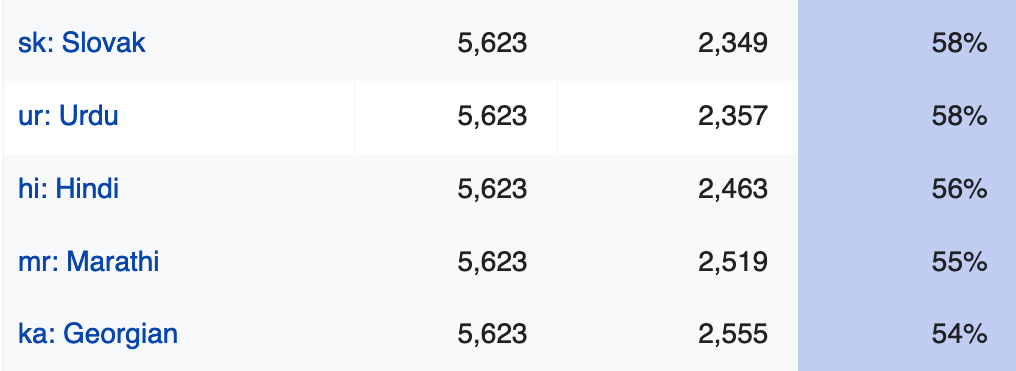

 Both tweets are written in Belarusian. Both of them have the letter ⟨ў⟩, which is used only in Belarusian, and never in Ukrainian and Russian. The letter ⟨ў⟩ is also used in Uzbek, but Uzbek never uses the letter ⟨і⟩. If a text uses both ⟨ў⟩ and ⟨і⟩, you can be certain that it’s written in Belarusian.
 Notice two weird things here:
