GeistHaus
log in · sign up

m10k

Part of m10k

Software, minimalism, and other things

stories primary
How Korean input methods work
languagesinputkorean
My current side project is an input method for Japanese and Korean, and to add support for Korean, I needed to dig a little deeper into how hangul are encoded in UTF-8. This post summarizes what I have learned, and how my input method handles Hangul.
Show full content

My current side project is an input method for Japanese and Korean, and to add support for Korean, I needed to dig a little deeper into how hangul are encoded in UTF-8. This post summarizes what I have learned, and how my input method handles Hangul.

A quick introduction into the Korean writing system

The letters that are used to write Korean are called hangul, and by extension of that, the hangul may also mean Korean script. Each hangul represents one syllable, which typically has between one and three sounds that are pronounced in succession. The start sound of a syllable is a consonant and is called 초성(cho-seong). The middle sound, 중성(jung-seong), is a vowel, and the end sound, 종성(jong-seong), is another consonant. Both the start sound and the end sound may be omitted, but a syllable always has at least a vowel.

There are 19 consonants:

ㅂ ㅃ ㅈ ㅉ ㄷ ㄸ ㄱ ㄲ ㅅ ㅆ ㅁ ㄴ ㅇ ㄹ ㅎ ㅋ ㅌ ㅊ ㅍ b bb j jj d dd g gg s ss m n ng r h k t ch p

And 21 vowels:

ㅏ ㅐ ㅑ ㅒ ㅓ ㅔ ㅕ ㅖ ㅗ ㅘ ㅙ ㅚ ㅛ ㅜ ㅝ ㅞ ㅟ ㅠ ㅡ ㅢ ㅣ a ae ya yae eo e yeo ye o wa wae wi yo u wo we wi yu eu ui i

(Note: Compound consonants and vowels like ㅃ and ㅢ are officially not considered separate, but it makes the following explanation easier.)

The consonants and vowels are collectively called 자모(jamo). The word Hangul (which should technically be Hangeul) would be ㅎㅏㄴㄱㅡㄹ, but that is not how Korean is written. Jamo are not individual letters like the Roman letters that are used in European languages, but rather they are combined to make proper hangul. The first two jamo, ㅎ and ㅏ, both have a vertical shape, and thus they are combined from left to right into 하. When jamo have a horizontal shape, they are combined vertically: ㄱ and ㅡ become 그. When we add an end sound (also called 받침(patchim)), we always add it at the bottom. Thus, hangeul is written 한글.

Jamo are not always stuffed from top to bottom and left to right, though. Some of the vowels in the table above are actually two vowels, such as ㅝ, which is a combination of ㅜ and ㅓ. Compound vowels do not have a neat rectangular shape, so if we wrote them under or next to a consonant, we would get some awkward dead space in between the jamo. To avoid that, we make the consonant smaller, and write the compound vowel around the consonant so that it is enclosed from the bottom right. In terms of writing order, the first vowel is added under the consonant and the second vowel is added on the right side of both of them. For example, ㅇ, ㅜ, and ㅓ are combined into 워. As a side note, when ㅇ is used as consonant, it is not pronounced “ng”, but it is silent: 워 is pronounced “wo”. This hangul is already pretty crowded, but we can still add a final consonant. By adding a ㄴ, we get the name of Korean currency, 원(won). There are tens of thousands of different hangul, but all of them have one of the following six shapes. Hangul where the end sound has two consonants, like 없, are considered the same shape as 한.
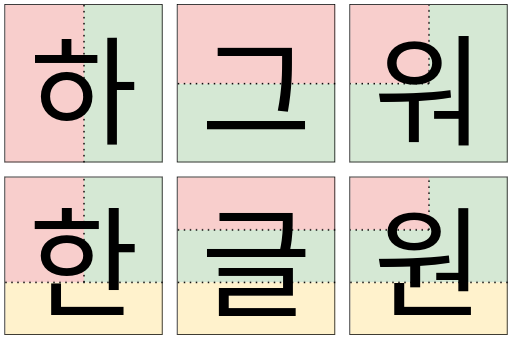
hangul shapes

From King Sejong to Thompson and Pike

The Korean keyboard layout maps each jamo to a key. It is the job of the input method to combine the jamo into hangul as the user types, deciding how they should be combined, if they can be combined at all. As we have seen above, ㅜ and ㅓ can be combined into ㅝ, but there are some combinations like ㅜ and ㅒ or anything that starts with ㅔ that are not possible. My input method treats Korean inputs as a string of jamo, so when the user types 한글, the input is treated internally as ㅎㅏㄴㄱㅡㄹ. Dictionary lookups and other operations all use the input in this shape. The input is only converted into proper hangul when it is output as UTF-8. So let us now have a look at how a string of jamo is parsed into a codepoint and then converted to UTF-8.

How Hangul are arranged in Unicode

Ideally, we would like each hangul to be a bit pattern of three times five bits, allowing us to bitwise-or the patterns for the start, middle, and end sounds. Unfortunately, that is not how Unicode works at all. In Unicode, each character is assigned a number, called a codepoint. The first hangul syllable, 가, is codepoint 44032; the last syllable, 힣, is codepoint 55203. The usual notation for Unicode codepoints is U+x where x is the codepoint written in hexadecimal. So 가 is U+AC00 and 힣 is U+D7A3. When I browsed through all Hangul codepoints in gucharmap, trying to find a pattern, I noticed that the codepoints are arranged in groups of 588 hangul that all begin with the same consonant. The first 588 codepoints all begin with ㄱ, the next 588 codepoints begin with ㄲ, and so on. Comparing the groups, I noticed that the groups are subdivided in sub-groups of 28 codepoints that all have the same middle sound. The first sub-group in the ㄱ-group are all 28 hangul that start with 가: 가, 각, 갂, 갃, and so on. The next sub-group are the 28 hangul that start with 개: 개, 객, 갞, 갟, and so forth. The order of the end sounds is the same in each of the sub-groups. That means that we can use the following formula to determine the Unicode codepoint of a hangul, where x is the start sound,y the middle sound, and z the end sound.

codepoint = 0xAC00 + 588x + 28y + z

The possible values for the consonants and vowels are shown in the following two tables. An empty cell means that the jamo does not occur in that position in a proper hangul (at least as far as Unicode is concerned).

  ㄱ ㄲ ㄴ ㄷ ㄸ ㄹ ㅁ ㅂ ㅃ ㅅ ㅆ ㅇ ㅈ ㅉ ㅊ ㅋ ㅌ ㅍ ㅎ   ㄳ ㄵ ㄶ ㄺ ㄻ ㄼ ㄽ ㄾ ㄿ ㅀ ㅄ x 0 1 2 3 4 5 6 7 8 9 10 11 12 13 14 15 16 17 18                         z 1 2 4 7   8 16 17   19 20 21 22   23 24 25 26 27 0 3 5 6 9 10 11 12 13 14 15 18   ㅏ ㅐ ㅑ ㅒ ㅓ ㅔ ㅕ ㅖ ㅗ ㅘ ㅙ ㅚ ㅛ ㅜ ㅝ ㅞ ㅟ ㅠ ㅡ ㅢ ㅣ y 0 1 2 3 4 5 6 7 8 9 10 11 12 13 14 15 16 17 18 19 20

Now, let’s say we want to find out the codepoint for 분. From the tables, we know that x = 7, y = 13, and z = 4, and if we plug these values into the formula, we get codepoint = 0xAC00 + 588 * 7 + 28 * 13 + 4 = 0xBD84. A look at gucharmap confirms that U+BD84 really is 분.
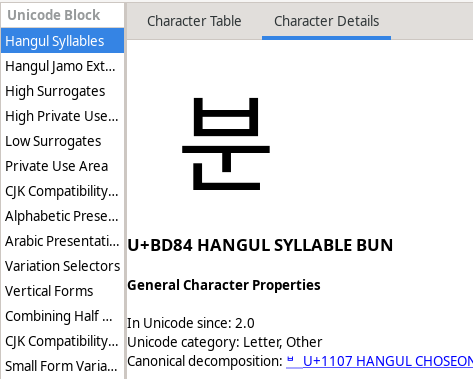
bun in gucharmap

This brings us to the next problem. How do we assemble the jamo that the user entered into proper hangul?

Combining jamo into hangul codepoints

On the Korean keyboard layout, each jamo corresponds to one key. So if a user presses the six keys ㅎㅏㄴㄱㅡㄹ, the input method combines that into the two hangul 한글 and sends it to the application. If the user enters a combination that cannot be converted into proper hangul, such as ㅋㅋㅋ, it is sent to the application as it is.

My input method solves this problem with a simple automaton. The task of the automaton is to parse a string of jamo into values for x, y, and z. It starts in the state X, in which it expects a valid start sound (that is, a consonant). If the first jamo in the input is a consonant, the automaton looks up the value for x in the lookup table xmap shown below, and transitions into the Y state. If the jamo is not a consonant, the automaton aborts because a proper hangul has to start with a consonant.

static const int xmap[] = {
        [CHAR_KR_G]  = 0,   /* ㄱ  */
        [CHAR_KR_GG] = 1,   /* ㄲ  */
        [CHAR_KR_N]  = 2,   /* ㄴ  */
        [CHAR_KR_D]  = 3,   /* ... */
        [CHAR_KR_DD] = 4,
        [CHAR_KR_R]  = 5,
        [CHAR_KR_M]  = 6,
        [CHAR_KR_B]  = 7,
        [CHAR_KR_BB] = 8,
        [CHAR_KR_S]  = 9,
        [CHAR_KR_SS] = 10,
        [CHAR_KR_NG] = 11,
        [CHAR_KR_J]  = 12,
        [CHAR_KR_JJ] = 13,
        [CHAR_KR_Z]  = 14,
        [CHAR_KR_K]  = 15,
        [CHAR_KR_T]  = 16,
        [CHAR_KR_P]  = 17,
        [CHAR_KR_H]  = 18
};

In the Y state, things get a bit more tricky because the automaton also needs to deal with compound vowels such as ㅝ. If the next jamo is a vowel, the automaton first determines the value of y using the lookup table ymap. This table has gaps after ㅗ, ㅜ, and ㅡ because the y-values that follow these vowels are compound vowels. If the automaton is in the Y state and the next jamo is one of these three vowels, it will transition to one of the Yㅗ, Yㅜ, and Yㅡ states. If the next jamo is a vowel that cannot be the start a compound vowel (for example, ㅑ or ㅐ), the automaton transitions into the Z state. Otherwise, if the next jamo is not a vowel at all, the input is not a proper hangul and the automaton aborts.

static const int ymap[] = {
        [CHAR_KR_A]   = 0,
        [CHAR_KR_AE]  = 1,
        [CHAR_KR_YA]  = 2,
        [CHAR_KR_YAE] = 3,
        [CHAR_KR_EO]  = 4,
        [CHAR_KR_E]   = 5,
        [CHAR_KR_YEO] = 6,
        [CHAR_KR_YE]  = 7,
        [CHAR_KR_O]   = 8,  /* ㅗ */
        [CHAR_KR_YO]  = 12,
        [CHAR_KR_U]   = 13, /* ㅜ */
        [CHAR_KR_YU]  = 17,
        [CHAR_KR_EU]  = 18, /* ㅡ */
        [CHAR_KR_I]   = 20
};

If the automaton has come this far, it already has a proper hangul with a consonant and a vowel. Thus, if the following input cannot be added to the current hangul, it is assumed to be the start of the next hangul, and the current hangul is complete. That means, if the automaton is in any of the Yㅗ, Yㅜ, and Yㅡ states, and it finds a vowel that can be used to complete the compound, it will add it to the y-value. Otherwise, it will not touch the input, so that it can be examined again in the next state. The next state is going to be Z, regardless of the input.

Finally, in the Z state, the automaton will attempt to parse the end sound. This state is somewhat similar to the Y state in that the end sound may be a compound of two consonant jamo. If the next jamo is not a consonant, the automaton is done and the current hangul does not have an end sound. If the next jamo in the input is a consonant, we have to deal with a special case before we can add the jamo to the current hangul: if the user entered something like ㄱㅏㄷㅏ it should be assembled into 가다, not 갇ㅏ, because a proper hangul cannot start with ㅏ. Thus, when the automaton is parsing the end sound and the next jamo is a consonant, it must first check if the consonant could also be the start of a new hangul, and only use it as end sound if it is not. The pragmatic solution is to recursively call the parser function (the automaton) to determine if the following input can be assembled into a proper hangul, and this is also what my input method does. It may be more elegant to have the parser look ahead and check if the jamo is followed by a vowel, in which case it is the start of a new hangul, but the recursive solution is easier to understand and implement. So if the next jamo is not the start of a new hangul, it is part of the end sound of the current hangul, and the automaton uses it to look up z from the lookup table zmap, shown below.

static const int zmap[] = {
        [CHAR_KR_G]  = 1,
        [CHAR_KR_GG] = 2,
        [CHAR_KR_N]  = 4,
        [CHAR_KR_D]  = 7,
        [CHAR_KR_R]  = 8,
        [CHAR_KR_M]  = 16,
        [CHAR_KR_B]  = 17,
        [CHAR_KR_S]  = 19,
        [CHAR_KR_SS] = 20,
        [CHAR_KR_NG] = 21,
        [CHAR_KR_J]  = 22,
        [CHAR_KR_Z]  = 23,
        [CHAR_KR_K]  = 24,
        [CHAR_KR_T]  = 25,
        [CHAR_KR_P]  = 26,
        [CHAR_KR_H]  = 27
};

If the jamo is a consonant that cannot be the start of a compound, the automaton is done and the result is returned to the caller. If the jamo may be the start of a compound (ㄱ, ㄴ, ㄹ, or ㅂ), the automaton switches to one of the Zㄱ, Zㄴ, Zㄹ and Zㅂ states, where it will parse the second consonant of the compound, if there is one. Again, the automaton needs to consider the special case that the next consonant may also be the start of another hangul, in which case it is not added to the end sound. Either way, the parsing is complete and the result can be returned to the caller. The graph for this automaton, excluding the recursive part, looks something like the following figure (the notation may not be completely correct).
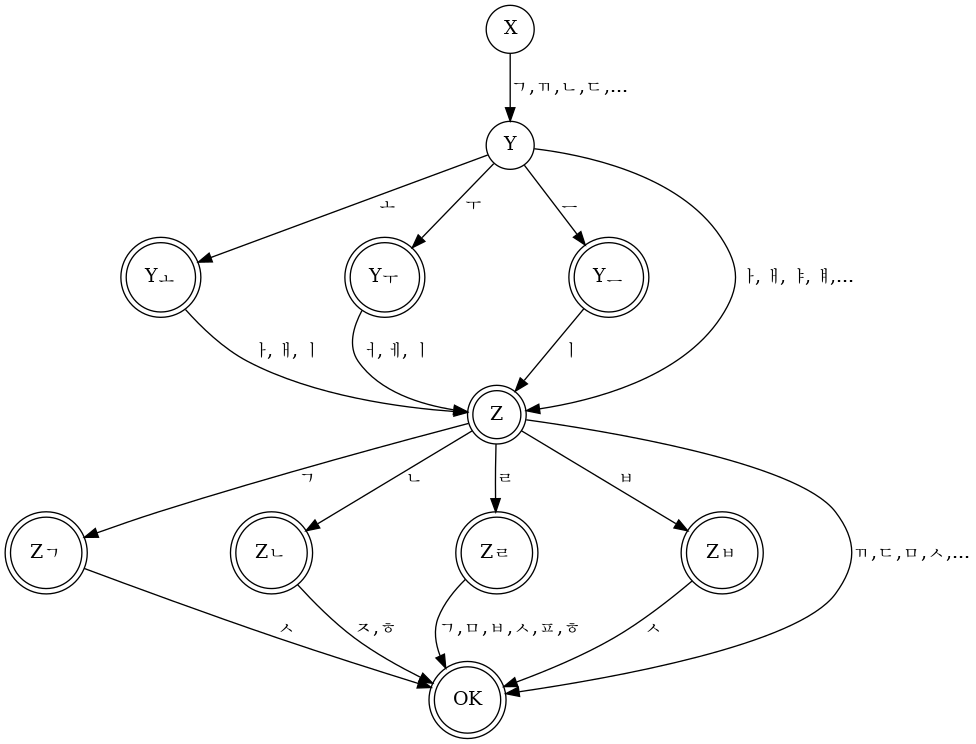
hangul-automaton

Converting hangul codepoints to UTF-8

I have covered the conversion from jamo to Unicode codepoints, but that is not enough to actually display hangul. The application talking to the input method expects a UTF-8 encoded string, so we have to encode the codepoint before we send it to the application. Codepoints in UTF-8 can have any length between one and four bytes. ASCII characters are one byte in UTF-8, and stuff like emoji are typically four bytes. Hangul and other CJK characters have exactly three bytes, so we do not have to deal with any of the variable byte lengths here. All we need to know is the pattern how to encode codepoints between U+0800 and U+FFFF as UTF-8:

U+wxyz = 1110wwww 10xxxxyy 10yyzzzz

The U+... part on the left is the codepoint in hexadecimal notation as explained above. On the right is the binary UTF-8 encoding. One digit in hexadecimal represents four bits (a nibble), so each hexadecimal digit on the left becomes four binary digits on the right. Thus, all we have to do here is shift, mask, and combine the bits from the codepoint into their UTF-8 form. Even in C, this can be done in less than 20 lines of code, depending on how little error handling one feels comfortable with.

#define FIRST_HANGUL 0xAC00
#define LAST_HANGUL  0xD7A3

int hangul_to_utf8(const uint32_t codepoint, char *dst, const size_t dst_size)
{
        if (!dst) {
                return -EINVAL;
        }

        if (codepoint < FIRST_HANGUL || codepoint > LAST_HANGUL) {
                return -EDOM;
        }

        if (dst_size < 3) {
                return -EMSGSIZE;
        }

        dst[0] = 0xE0 | ((codepoint >> 12) & 0x0f);
        dst[1] = 0x80 | ((codepoint >>  6) & 0x3f);
        dst[2] = 0x80 | ( codepoint        & 0x3f);

        return 3;
}

That may not seem like much, but this is all one needs to know to write a simple input method for Korean. If one wants to get fancy and support Hanja (Chinese characters) it does get a little more complicated though. Maybe I will cover that in another post.
https://m10k.eu/2025/03/08/hangul-utf8
Porting AlmaLinux to RISC-V
almalinuxriscvfoundry
Until a couple of weeks ago I assumed that RISC-V was still an experimental architecture that one would have to customize in VHDL or Verilog and use on an FPGA. So when Debian announced official support for the new architecture, I decided to have a closer look. It turns out there are several Raspberry Pi-class boards with RISC-V processors that run some flavor of Linux, and not surprisingly most vendors offer a Debian-based image for their boards.
Show full content

Until a couple of weeks ago I assumed that RISC-V was still an experimental architecture that one would have to customize in VHDL or Verilog and use on an FPGA. So when Debian announced official support for the new architecture, I decided to have a closer look. It turns out there are several Raspberry Pi-class boards with RISC-V processors that run some flavor of Linux, and not surprisingly most vendors offer a Debian-based image for their boards.

While there are Fedora images for some boards, none of the Red Hat-based distributions have support for RISC-V yet, so I got an idea for an ambitious project: make AlmaLinux the first distribution in the Red Hat family that has proper support – whatever that means – for RISC-V. I used to work on MIRACLE LINUX before my employer joined AlmaLinux, so I have a rough idea how much work is involved in building the packages. I had never ported an entire distribution to a new CPU architecture though, so I was not sure if this is possible at all, and this is why I actually wanted to keep this below the radar. Despite that, I somehow happened to mention this project in a 1:1 with my manager, who immediately liked the idea and got me funding for a board. And this is how the ball started rolling.

Clearing the port

Since most available RISC-V boards offer performance that is comparable to a Raspberry Pi, packages like GCC take several hours, and an entire distribution will probably take weeks to build. Getting faster boards is currently out of question, so I will have to scale horizontally, building packages on multiple boards in parallel. Luckily, the build system that I wrote to build Debian packages is very good at scaling horizontally, so I spent some days adding support for RPM builds and a simple build scheduler, and got the build system to the point where it can rebuild an entire RPM-based distribution (modularity packages are the usual exception).

The starting point for the AlmaLinux port is a Fedora build root, since that is the only RPM-based distribution that had RISC-V packages at the time of writing. Fedora 34 is the closest to AlmaLinux 9, so this would be ideal for the initial build root, but there are no Fedora 34 packages for RISC-V. There are packages for Fedora 29 and Fedora 33 though, so I decided to start with AlmaLinux 8, which is based on RHEL8 (the latter is based on Fedora 29). To build AlmaLinux 9, I will first have to port Fedora 34, which should be possible with a Fedora 33 build root, but is very likely more work than a simple rebuild. Either way, I will write a more technical follow-up once I have some tangible results.

https://m10k.eu/2023/10/13/almalinux-riscv
Writing a recursive descent parser in Bash
bashcompiler
Two years ago, I was tasked to write a program that generates RPM package repositories from a large pool of packages. The pool is a set of directories that contain all packages that were ever built for a given Miracle Linux release, and the program would be used to pick specific packages from the pool and generate repositories for yum and dnf. The existing program had hard-coded rules for package selection that made it require frequent repairs, and it didn’t play nice with modularity packages. Since the new solution should be an improvement over the old one, I decided to separate the rules from the code, and for this I needed a small domain-specific language. I had already written a lot of absurd things in Bash at the time, so naturally I had to see if a parser could be another of those things.
Show full content

Two years ago, I was tasked to write a program that generates RPM package repositories from a large pool of packages. The pool is a set of directories that contain all packages that were ever built for a given Miracle Linux release, and the program would be used to pick specific packages from the pool and generate repositories for yum and dnf. The existing program had hard-coded rules for package selection that made it require frequent repairs, and it didn’t play nice with modularity packages. Since the new solution should be an improvement over the old one, I decided to separate the rules from the code, and for this I needed a small domain-specific language. I had already written a lot of absurd things in Bash at the time, so naturally I had to see if a parser could be another of those things.

Making up a language

I didn’t know what kind of criteria would be used for the package selection, but I wanted to give the user as much freedom as possible. An RPM package’s properties can be queried using query tags, so I decided that the language must allow easy access to these tags. The following is what I came up with.

BaseOS : name == "kernel"    &&
         version == "5.6.10" &&
         release >= "1.el9"  &&
         release <= "2.el9"  &&
         arch == "amd64";
BaseOS : name =~ "^miraclelinux-";
AppStream : modularitylabel.module == "nginx" &&
            modularitylabel.stream == "1.14" &&
            buildtime < 1690001217;

The left-hand side of a rule (that is, the part on the left of the colon) is the name of the destination repository while the right-hand side is a logical expression that defines criteria for the packages to be added. The property names used on the right-hand side are the query tags for rpm --queryformat, so this language allows the user to filter RPM packages in all kinds of ways. In the case of the modularitylabel tag, it goes one step further: the information behind this tag has four components that one doesn’t usually compare all at once, so I wanted to allow users to query the individual components of this tag.

The first rule in the example tells the program to search for all packages with name kernel and version 5.6.10 and a release that is between 1.el9 and 2.el9 (inclusive) that were built for the amd64 architecture. The newest package that meets these criteria will be added to the BaseOS repository.

The =~ operator used in the second rule means regular expression match. This rule selects all packages whose name starts with miraclelinux-. Since this will match multiple packages (miraclelinux-release, miraclelinux-logos, etc), this will cause the newest version of each of the matched packages to be added to the BaseOS repository. The rule does not specify the architecture either, so a package will be added multiple times if it is available for multiple architectures.

The last rule selects all packages from the modularity stream nginx:1.14 that were built before 13:46:57 on July 22, 2023, Japanese Standard Time.

Grammar of the language

The first step in any compiler or interpreter is the lexer (or tokenizer), which turns an input into a stream of tokens. Tokens are similar to words in natural languages, in that they can be used to form statements. When we study a foreign language, we try to understand which words are the subject, object, verb, etc of a sentence. That’s essentially what a parser does.

To write a correct lexer for the language, I first needed to define what valid tokens of the language look like. The easiest way to do that is by looking at the grammar of a language, so I determined the grammar for the example file above. I’m not going to explain how exactly I did that (in short, I drew a lot of inspiration from the C grammar), but here is the result.

rule-list = rule
          | rule-list rule

rule = identifier ':' logical-OR-pkgex ';'

logical-OR-pkgex = logical-AND-pkgex
                 | logical-OR-pkgex '||' logical-AND-pkgex

logical-AND-pkgex = primary-pkgex
                  | logical-AND-pkgex '||' primary-pkgex

primary-pkgex = literal operator identifier
              | '(' logical-OR-pkgex ')'

operator = '>' | '>=' | '<' | '<=' | '==' | '!=' | '=~'

identifier = string | literal

A string is a double-quoted sequence of characters just like in C, and a literal is something like a variable name in C, but with . allowed as part of the name. Version numbers like 1.2.3 are also literals.

The lexer should identify all terminals in the language, which are all symbols that never appear on the left-hand side of any grammar rule (grammar rules are also called productions). In the grammar above, the terminals are strings, literals, and everything in single-quotes.

Writing the lexer

Shell does not have classes or structs, and passing data from a function to its caller in variables is very awkward and should be avoided if at all possible. Really, the only practicable way to pass data back to the caller is via standard output. It is nevertheless possible to write a very elegant lexer: with a set of recursive functions that read an input character by character and write the recognized tokens to standard output.

The tokenize() function is the entry point and forwards the input to one of the more specific tokenizer functions. The specific tokenizer functions expect two arguments, the portion of the input that was already processed and not written to stdout yet, and the portion of the input that has not been processed yet. The tokenizer function then looks at the next character of the input and decides whether to print a token to standard output and what tokenizer function to call next. Formally speaking, the tokenizer is a state machine and each tokenizer function represents one state.

tokenize() {
	local input="$1"

	case "${input:0:1}" in
		'<'|'>'|'!')
			tokenize_cmp_op "${input:0:1}" "${input:1}"
			;;

		'=')
			tokenize_eq_op "${input:0:1}" "${input:1}"
			;;

		# ...
	esac
	return "$?"
}

tokenize_cmp_op() {
	local read="$1"
	local input="$2"

	if [[ "${input:0:1}" == "=" ]]; then
		echo "RELOP:$read${input:0:1}"
		tokenize "${input:1}"
	else
		echo "RELOP:$read"
		tokenize "$input"
	fi

	return "$?"
}

tokenize_eq_op() {
	local read="$1"
	local input="$2"

	case "${input:0:1}" in
		'='|'~')
			echo "RELOP:$read${input:0:1}"
			tokenize "${input:1}"
			;;

		*)
			echo "RELOP:$read"
			tokenize "$input"
			;;
	esac

	return "$?"
}

The drawback of this approach is that the depth of the recursion grows with the size of the input, but – speed aside – this worked fine with all inputs that I threw at the script. I’m not including the entire tokenizer in this post, but you can find it on Github.

From tokens to trees

To see how we can use the grammar from earlier to turn a stream of tokens into a parse tree, it’s helpful to have a look at a simple rule and the tokens that the lexer returns when reading it. This will be a little theoretical, but I will try not to make it too boring. Let’s assume we have a file with only the simplest of the three rules from above.

BaseOS : name =~ "^miraclelinux-";

There are six tokens in this input, namely the following.

LITERAL:BaseOS
COLON::
LITERAL:name
RELOP:=~
STRING:^miraclelinux-
SEMICOLON:;

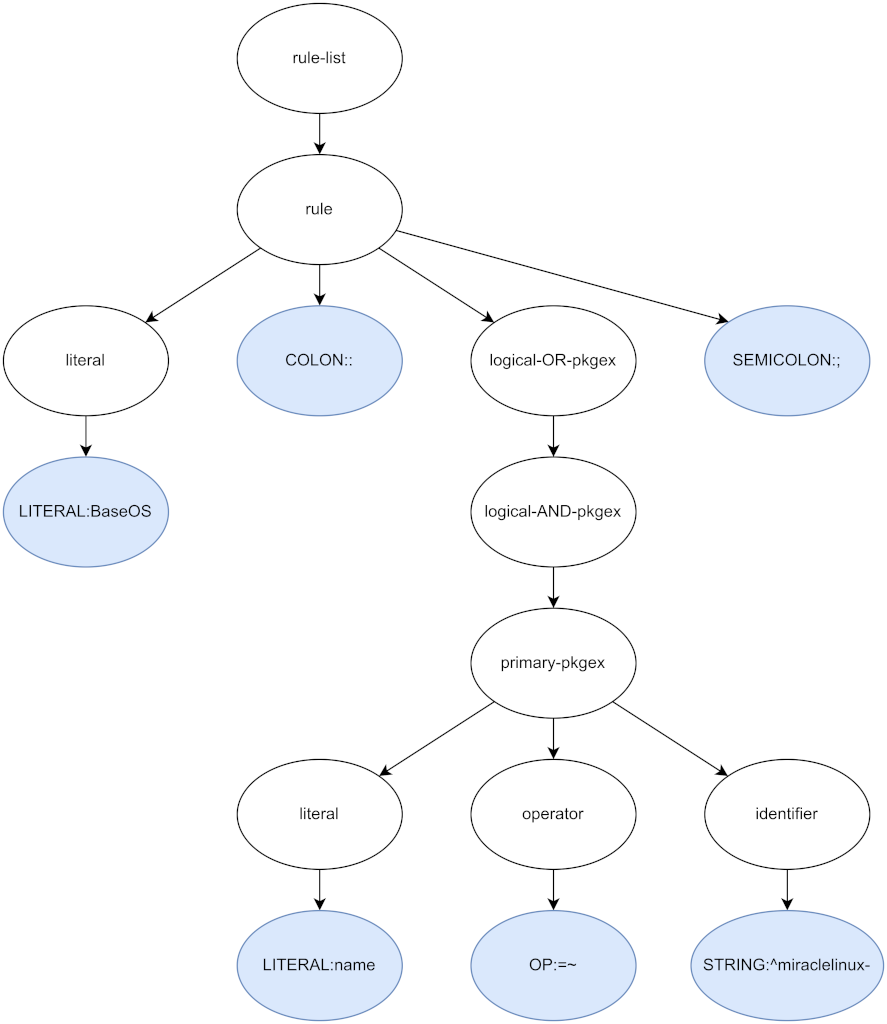
The first production in the grammar of our language is for rule-list, so this is where the parser will start. It will then attempt to derive the right side of the production from the tokens in the token stream. For every production that it successfully parses, it will generate a node and add it to the parse tree. In this example, the parser would start with a rule-list, then derive a list, which in turn contains an identifier, a colon token, a logical-OR-pkgex, and a semicolon token. From the logical-OR-regex production it would derive a logical-AND-pkgex, and from this one it reaches the production for primary-pkgex, which can be produced with the tokens name, =~, and ^miraclelinux- that are next in the token stream. When the parser returns to rule-list, there are no more tokens in the stream, and since the production it parsed does not need more tokens, it is done. The parse tree that the parser generates in this way looks like the following.

pkgex-parsetree.drawio.png

Because the parser recursively descends the productions of the grammar, it is called a recursive descent parser. It uses a grammar to anticipate the structure of the input, making it a syntax-directed parser. Parsers like this are typically implemented with a set of functions, each of which parses one symbol of the grammar.

Let’s have a look at one of the simple cases, parse_string(). This function expects the next token in the token stream to be a string (the token stream is passed in the arguments). If this expectation is met, the function emits a node for the token to stdout, otherwise it returns an error.

parse_string() {
	local token="$1"

	if [[ "${token%%:*}" != "STRING" ]]; then
		return 1
	fi

	node_new 1 "STRING" "s:${token#*:}"
	return "$?"
}

The call to node_new() is what generates the actual node. It creates a JSON object with three properties num_tokens, type, and data, and writes it to standard output.

The first parser function that is slightly more complicated is parse_primary_pkgex(), which implements the following productions.

primary-pkgex = literal operator identifier
              | '(' logical-OR-pkgex ')'

Because primary package expressions can take two different shapes, the function has to decide which one to parse. The second shape always starts with an open parenthesis, so a look at the next token is enough to decide how to continue. The next token, as well as the concept of looking at it to make parser decisions is called lookahead.

When a decision has been made, all that parse_primary_pkgex() has to do is call the parser functions for the symbols that the productions expect, and generate a node for the result – or return an error.

parse_primary_pkgex() {
	local tokens=("$@")

	local -i tokens_used
	local data

	if [[ "${tokens[0]}" == "LPAREN:(" ]]; then
		# primary-pkgex = '(' logical-OR-pkgex ')'

		local lparen
		local pkgex
		local rparen

		lparen="${tokens[0]}"
		tokens_used=1

		if ! pkgex=$(parse_logical_or_pkgex "${tokens[@]:$tokens_used}"); then
			log_error "Expected logical-OR-pkgex near \"${tokens[*]:$tokens_used:1}\""
			return 1
		fi

		(( tokens_used += $(node_get_num_tokens "$pkgex") ))
		rparen="${tokens[$tokens_used]}"

		if [[ "$rparen" != "RPAREN:)" ]]; then
			log_error "Expected ')', found \"$rparen\""
			return 1
		fi

		data=$(json_object "lparen" "$lparen" \
		                   "child"  "$pkgex"  \
		                   "rparen" "$rparen")
		(( tokens_used++ ))
	else
		# primary-pkgex = property operator identifier

		local property
		local operator
		local identifier

		if ! property=$(parse_literal "${tokens[@]}"); then
			log_error "Expected literal, found \"${tokens[0]}\""
			return 1
		fi

		tokens_used=1
		if ! operator=$(parse_operator "${tokens[$tokens_used]}"); then
			log_error "Expected operator, found \"${tokens[$tokens_used]}\""
			return 1
		fi
		(( tokens_used++ ))

		if ! identifier=$(parse_identifier "${tokens[$tokens_used]}"); then
			log_error "Expected identifier, found \"${tokens[$tokens_used]}\""
			return 1
		fi
		(( tokens_used++ ))

		data=$(json_object "property"   "$property"  \
		                   "operator"   "$operator"  \
		                   "identifier" "$identifier")
	fi

	node_new "$tokens_used" "primary-pkgex" "$data"
}

Primary package expressions are not recursive (at least not in the way logical-OR-pkgex grammars are), so while the function is somewhat lengthy, it doesn’t have any complicated logic.

Dealing with left-recursion

This brings us to parse_logical_or_pkgex(), which parses package expressions with a logical or conjunction. Let’s have another look at the grammar.

logical-OR-pkgex = logical-AND-pkgex
                 | logical-OR-pkgex '||' logical-AND-pkgex

The production to derive a logical-AND-pkgex is as simple as could be, but it’s the second production that will give us a headache if we try to implement it with pure recursion. Because the production derives itself as the left-most non-terminal, it is said to be left-recursive. Left-recursive grammars cannot be parsed with a purely recursive algorithm.

This is one of those cases, where the iterative appoach is much simpler anyway: we start by parsing a logical-AND-pkgex and, as long as it is followed by a logical or operator, we loop to parse more. Because the grammar is left-recursive, we have to construct the parse tree in reverse order, creating a new node during each iteration and nesting the node from the previous iteration into the new one. Even though this is arguably more complicated than the parser for primary-pkgex grammars, it is much shorter, and I would even dare to say it is much more readable. The other left-recursive grammars can be parsed with exactly the same approach, so I won’t bother discussing the rest of the code here. You can find the code on Github.

parse_logical_or_pkgex() {
	local tokens=("$@")

	local -i used_tokens
	local logical_or_pkgex

	used_tokens=0
	logical_and_pkgex=""

	while true; do
		local logical_and_pkgex
		local operator
		local data

		if ! logical_and_pkgex=$(parse_logical_and_pkgex "${tokens[@]:$used_tokens}"); then
			log_error "Expected logical-AND-pkgex near \"${tokens[$used_tokens]}\""
			return 1
		fi

		(( used_tokens += $(node_get_num_tokens "$logical_and_pkgex") ))
		operator="${tokens[$used_tokens]}"

		data=$(json_object "right_child" "$logical_and_pkgex" \
		                   "operator"    "$operator"          \
		                   "left_child"  "$logical_or_pkgex")

		logical_or_pkgex=$(node_new "$used_tokens" "logical_or_pkgex" "$data")

		if [[ "$operator" != "OR:||" ]]; then
			break
		fi

		(( ++used_tokens ))
	done

	echo "$logical_or_pkgex"
	return 0
}

By the way, if the production were right-recursive, we would not have to construct the parse tree in reverse order. As a result, the expression would be evaluated from right to left. As a rule of thumb, expressions like a || b || c that are evaluated from left to right have left-recursive productions, and expressions like a = b = c that are evaluated right-to-left have right-recursive productions.

Trial run

Now that lexer and parser are done, they can be pieced together with a short script like the following. It expects the path of an input file in the first argument, reads the contents, tokenizes them, parses the token stream, and writes the resulting parse tree to standard output. I omitted a lot of error handling for the sake of brevity. If you’re coding along, don’t forget to check return values and validate user inputs. :-)

#!/bin/bash

main() {
    local input_file="$1"

    local input
    local tokens

    if ! input=$(<"$input_file"); then
        echo "Could not read $input_file" 1>&2
        return 1
    fi

    readarray -t tokens < <(tokenize "$input")
    parse "${tokens[@]}"
}

{
    main "$@"
    exit "$?"
}

Now we can pass the example file from the top to our parser and we’ll get a minimized JSON object that we’ll pipe through jq to pretty-print it.

$ ./parser.sh example.pkgex | jq '.'
{
  "num_tokens": 42,
  "type": "rule_list",
  "data": {
    "rule": {
      "num_tokens": 14,
      "type": "rule",
      "data": {
        "repository": {
          "num_tokens": 1,
          "type": "LITERAL",
          "data": "AppStream"
        },
        "colon": "COLON::",
        "pkgex": {
          "num_tokens": 11,
          "type": "logical_or_pkgex",
          "data": {
            "right_child": {
              "num_tokens": 11,
              "type": "logical_and_pkgex",
[...]

Pretty neat, right? That’s how you write a recursive descent parser in Bash. And I bet it isn’t nearly as bad or unreadable as you expected. :-)

Nevertheless, it’s hard to overstate how slow it is, and that is why I ended up rewriting it in Python. The script that evaluates parse trees is even slower, but it might still make an interesting read. That’s for another time, though.

Code on Github

You can find the code in the following repository. Note that it depends on toolbox for the modularization.

https://m10k.eu/2023/07/29/pkgex-parser
The Request-Reply Pattern with Bash
toolboxmessagingeip
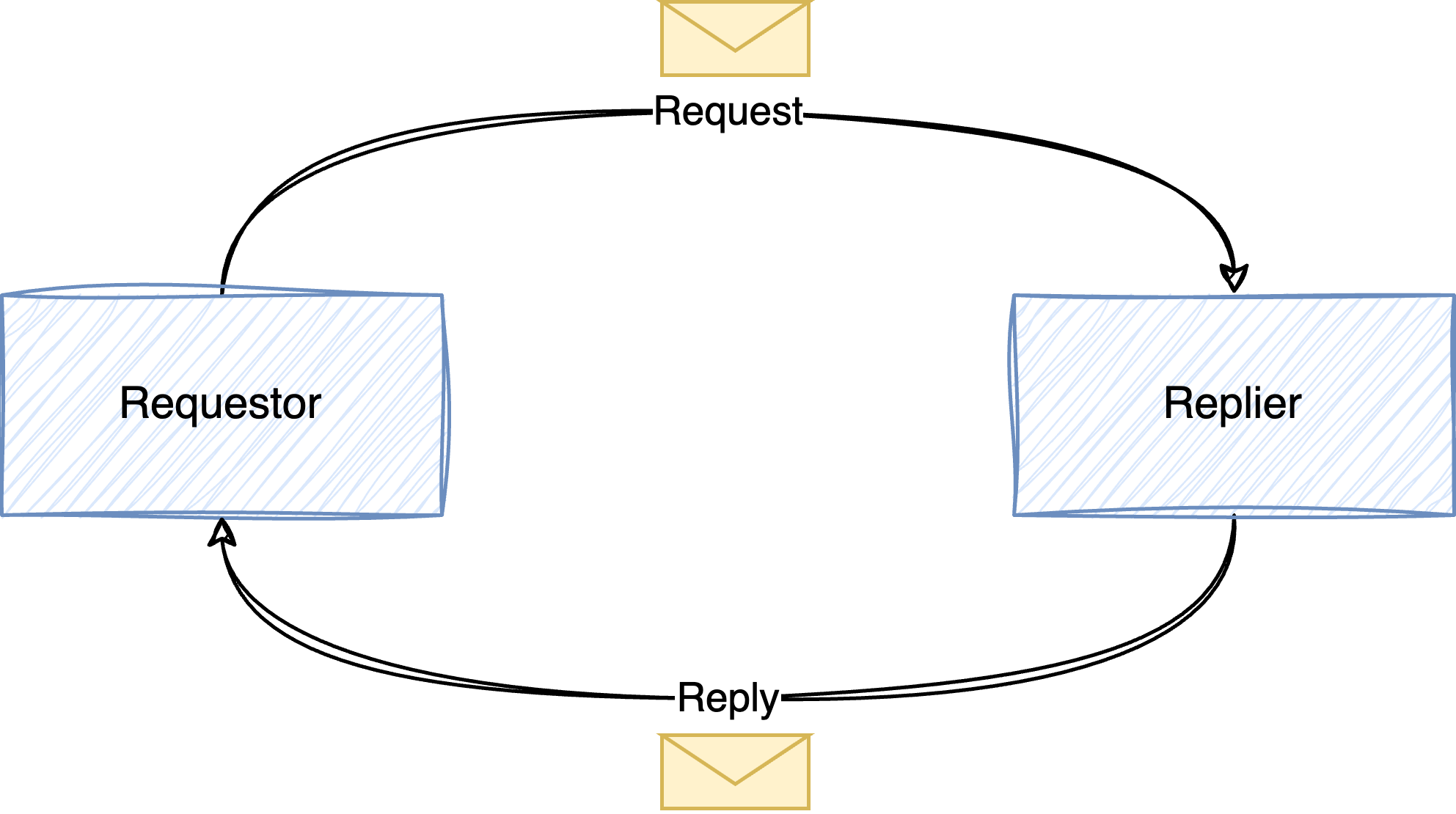
In the previous two articles, I explained how scripts can communicate with point-to-point and publish-subscribe messaging. There are different ways how the two mechanisms can be used, so this time we’re going to have a look at the Request-Reply Pattern. In this pattern, there are two parties. The first one, the requestor, sends a request to the replier, which sends a response back to the requestor, as shown in the following figure. If this reminds you of client-server communication, you got the idea.
Show full content

In the previous two articles, I explained how scripts can communicate with point-to-point and publish-subscribe messaging. There are different ways how the two mechanisms can be used, so this time we’re going to have a look at the Request-Reply Pattern. In this pattern, there are two parties. The first one, the requestor, sends a request to the replier, which sends a response back to the requestor, as shown in the following figure. If this reminds you of client-server communication, you got the idea.

abstract.png

The request-reply pattern can be implemented with point-to-point channels and publish-subscribe channels. Point-to-point channels make a lot of sense if there is only one replier (or multiple repliers that are competing consumers). Using the notation from the Enterprise Integration Patterns book, this simple communication looks something like below.

p2p-request-reply.png

Let’s now use this pattern with point-to-point channels to implement a naive key-value store where the requestor uses messages to set and get data from the replier.

Message format

There are two operations that a requestor may perform: it can either set a value in the store, or retrieve a value from the store. When setting a value, it has to tell the replier the name and the value of the field. When retrieving a value, the name of the field is all that is needed.

In the first case, the requestor sends a SetRequest, which has the following format.

{
  "type": "SetRequest",
  "name": "name-of-the-field",
  "value": "value-of-the-field"
}

The second case, it uses a GetRequest, which is essentially the same, minus the value field.

{
  "type": "GetRequest",
  "name": "name-of-the-field"
}

When the replier receives a GetRequest, it reads the value from the backing storage and sends a GetResponse to the requestor. The response has the following format.

{
  "type": "GetResponse",
  "name": "name-of-the-field",
  "status": return-code
  "value": "value-of-the-field"
}

The value of the field status will be set to 0 if the request was successful, otherwise it will be set to some non-zero value. In the latter case, there is no value that can be sent back to the requestor, and the replier may omit the value field from the response.

When the replier receives a SetRequest, it sets the value in the backing storage and returns a message like the following, indicating if the operation was successful. Again, the status will be 0 upon success or non-zero otherwise.

{
  "type": "SetResponse",
  "name": "name-of-the-field",
  "status": return-code
}
The replier

To send requests to the key-value store, requestors need to know the address of the replier. Thus, we decide that the replier must listen on the address pub/kvs. That means that the replier must look something like the following.

#!/bin/bash

main() {
    local endpoint

    if ! endpoint=$(ipc_endpoint_open "pub/kvs"); then
        log_error "Could not open endpoint"
        return 1
    fi

    while true; do
        local msg

        if msg=$(ipc_endpoint_recv "$endpoint"); then
            handle_message "$endpoint" "$msg"
        fi
    done
}

{
    if ! . toolbox.sh ||
       ! include "log" "json" "conf" "uipc"; then
        exit 1
    fi

    main "$@"
    exit "$?"
}

The replier opens a public endpoint and immediately enters a loop, forever receiving messages and passing them to handle_message(). The latter function reads the payload and the sender’s address from the message. It then passes the payload to handle_request(), which generates the response that is sent back to the sender with ipc_endpoint_send().

handle_message() {
    local endpoint="$1"
    local msg="$2"

    local data
    local sender
    local response

    if ! data=$(ipc_msg_get_data "$msg") ||
       ! sender=$(ipc_msg_get_source "$msg"); then
        log_error "Could not read message"
        return 1
    fi

    if response=$(handle_request "$data"); then
        ipc_endpoint_send "$endpoint" "$sender" "$response"
    fi
}

The handle_request() function uses json_object_get() to read the request type from the message data and then passes it on to the function that is responsible for the request (so, either handle_get_request() or handle_set_request()).

handle_request() {
    local request="$1"

    local -A request_handler
    local request_type

    request_handler["GetRequest"]=handle_get_request
    request_handler["SetRequest"]=handle_set_request

    if request_type=$(json_object_get "$request" "type"); then
        local handler

        handler="${request_handler[$request_type]}"

        if [[ -n "$handler" ]]; then
            "$handler" "$request"
            return "$?"
        else
            log_warn "Received message with invalid type \"$request_type\""
        fi
    fi

    return 1
}

GetRequests are handled by handle_get_request(), which will retrieve the field name from the request and attempt to query its value from the key-value store. To make the code as simple as possible, we’ll use the conf module to simulate the key-value store. The conf_get() function retrieves a value from the backing storage (in this case, a plaintext configuration file). We use the return code and the data that we got from conf_get() to create a GetResponse and write it to standard output.

handle_get_request() {
    local request="$1"

    local name
    local value
    local -i status

    if ! name=$(json_object_get "$request" "name"); then
        return 1
    fi

    value=$(conf_get "$name")
    status="$?"

    json_object "type"   "GetResponse" \
                "name"   "$name"       \
                "status" "$status"     \
                "value"  "$value"
}

Similarly, the handle_set_request() function fetches the field name and value from the request message and calls conf_set() to store the value in the backing storage. Like conf_get(), conf_set() returns zero upon success, and a non-zero value on failure, so we can use it’s return value for the status field in the response message.

handle_set_request() {
    local request="$1"

    local name
    local value
    local -i status

    if ! name=$(json_object_get "$request" "name") ||
       ! value=$(json_object_get "$request" "value"); then
        return 1
    fi

    conf_set "$name" "$value"
    status="$?"

    json_object "type"   "SetResponse" \
                "name"   "$name"       \
                "status" "$status"
}

This is all we need for the replier. We will save it as replier.sh and make it executable with chmod u+x replier.sh. Admittedly, the error handling could be improved (I will cover this in a different post) but there shouldn’t be any major issues with this implementation.

The requestor

Let’s look at the client side now. The requestor sends either a GetRequest or a SetRequest with the necessary data to the replier. For the sake of simplicity, we will use synchronous communication, meaning that the requestor will wait until it receives a response from the replier.

The parameters of the request (get or set, field name, and field value) will be passed to the requestor on the command line. The command line is parsed using the opt module, but I will skip the explanation here.

#!/bin/bash

main() {
    local request
    local value
    local name

    opt_add_arg "R" "request" "v"  "get" "The request type"    '^(get|set)$'
    opt_add_arg "V" "value"   "v"  ""    "The value to be set"
    opt_add_arg "N" "name"    "rv" ""    "The field name"

    if ! opt_parse "$@"; then
        return 1
    fi

    request=$(opt_get "request")
    value=$(opt_get "value")
    name=$(opt_get "name")

    perform_request "$request" "$name" "$value"
}

{
    if ! . toolbox.sh ||
       ! include "log" "opt" "json" "uipc"; then
        exit 1
    fi

    main "$@"
    exit "$?"
}

The main() function is pretty much boilerplate code for reading the command line. The perform_request() function is where things get interesting. We first open an anonymous endpoint and then call a handler to perform the action that the user requested.

perform_request() {
    local request="$1"
    local name="$2"
    local value="$3"

    local endpoint
    local -A handler
    local -i result

    handler["get"]=perform_get_request
    handler["set"]=perform_set_request

    if ! endpoint=$(ipc_endpoint_open); then
        log_error "Could not open IPC endpoint"
        return 1
    fi

    "${handler[$request]}" "$endpoint" "$name" "$value"
    result="$?"

    ipc_endpoint_close "$endpoint"
    return "$result"
}

The perform_get_request() function reads data from the key-value store. It uses send_and_recv() to send a message to the key-value store and wait for the response. If successful, it will check the status in the message, extract the value that was read from the key-value store, and then print it to standard output. If any of these steps fail, it will return an error.

perform_get_request() {
    local endpoint="$1"
    local name="$2"

    local request
    local response
    local data
    local -i status
    local value

    request=$(json_object "type" "GetRequest" \
                          "name" "$name")

    if ! response=$(send_and_recv "$endpoint" "$request") ||
       ! data=$(ipc_msg_get_data "$response") ||
       ! status=$(json_object_get "$data" "status") ||
       (( status != 0 )) ||
       ! value=$(json_object_get "$data" "value"); then
        return 1
    fi

    printf '%s\n' "$value"
}

The perform_set_request() function works similar. It will send a SetRequest to the key value store and wait for its response. Once received, it will attempt to parse the response and return the status to the caller.

perform_set_request() {
    local endpoint="$1"
    local name="$2"
    local value="$3"

    local request
    local response
    local data
    local -i status

    request=$(json_object "type"  "SetRequest" \
                          "name"  "$name"      \
                          "value" "$value")

    if ! response=$(send_and_recv "$endpoint" "$request") ||
       ! data=$(ipc_msg_get_data "$response") ||
       ! status=$(json_object_get "$data" "status"); then
        return 1
    fi

    return "$status"
}

Finally, the send_and_recv() function is exactly what it name says. A call to ipc_endpoint_send(), followed by a call to ipc_endpoint_recv().

send_and_recv() {
    local endpoint="$1"
    local message="$2"

    if ! ipc_endpoint_send "$endpoint" "pub/kvs" "$message"; then
        return 1
    fi

    ipc_endpoint_recv "$endpoint"
}

That’s all we need for the requestor, so we save it as requestor.sh and make it executable.

Test flight

It’s now time to see if everything works, so we first start the replier with the following command.

$ ./replier.sh

The key-value store will initially be empty, so querying it should result in an error. The default behavior of the requestor is to send a GetRequest, so we attempt to query a non-existent value and print the requestor’s return value.

$ ./requestor.sh -N foo; echo "$?"
1

The requestor didn’t write any data to standard output, and its return value is 1, indicating an error. The error case is handled correctly. We want to test the successful case next, so we tell the requestor to set a value in the store and make it read back the value from the store.

$ ./requestor.sh -R set -N foo -V "Hello world"; echo "$?"
0
$ ./requestor.sh -R get -N foo; echo "$?"
Hello world
0

The requestor signalled success in both cases, and printed the expected data to standard output. Our key-value store works! Admittedly, it is kind of slow, but you didn’t expect a high-performance shell script, did you?

Parallelizing the replier

Let’s pretend that we integrated our key-value store with another system and the poor thing needs to handle thousands of requests per minute now. Obviously, one bash process will not be able to keep up, and so we do what any indisputably sane person would do: throw processes at the problem until it goes away.

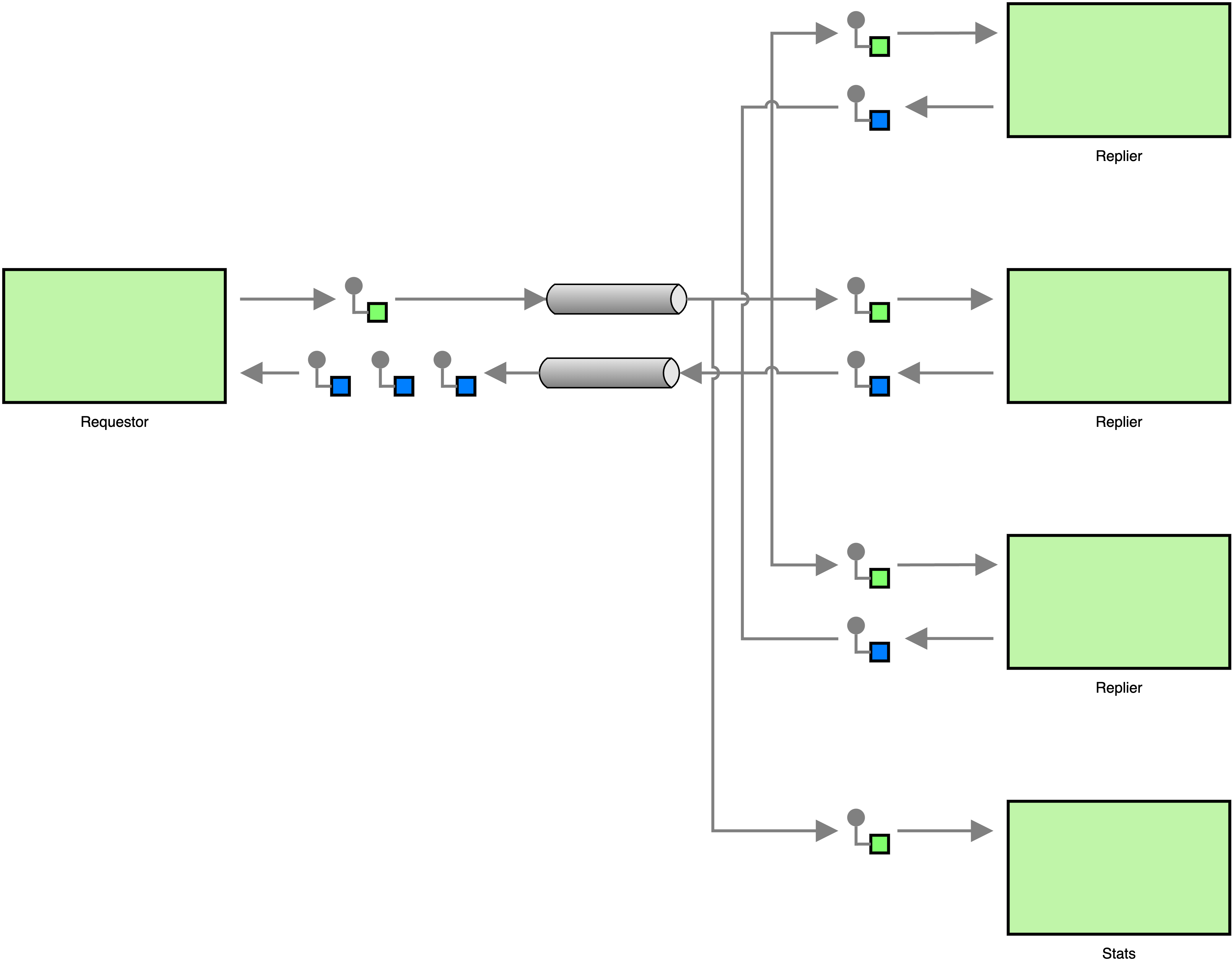
The easiest way to do that is to change the architecture so that there are multiple repliers that implement the Competing Consumers pattern. The EIP notation changes only very slightly.

pubsub-compcons.png

The code, on the other hand, doesn’t change at all. Because the replier is using an endpoint with a public address, the same endpoint can be opened and used by multiple processes, and messages will be load-balanced over all running processes. What is problematic about the code, though, is that the conf module is not “thread safe”. Simultaneous accesses to the backing store might cause issues, but we will ignore that for now, because that is not really what this post is about. A thorough implementation should not take the same shortcut.

Request-Reply with Publish-Subscribe Messaging

There is nothing functionally wrong with the message architecture we created above, but it is somewhat inflexible. Let’s say we want to add a process to the architecture that collects statistics about requests. The process should log the request types, the field names in the requests, and the time of the requests. In our current architecture, each request message is received by only one replier process, so we would either have to modify the replier side to collect statistics directly or forward messages to a process that collects statistics. In other words, we cannot add functionality to the system without changing the existing architecture, existing components, or both. Let’s see what a better, more flexible architecture looks like.

The main problem with the above architecture is that messages are received by only one process and there is no easy way to make another process receive messages. This is the drawback of point-to-point communication, and thus sending requests via publish-subscribe instead of point-to-point is the easy way out. Of course, changing to publish-subscribe alone is not enough, because it would lead to the following situation.

pubsub-stats.png

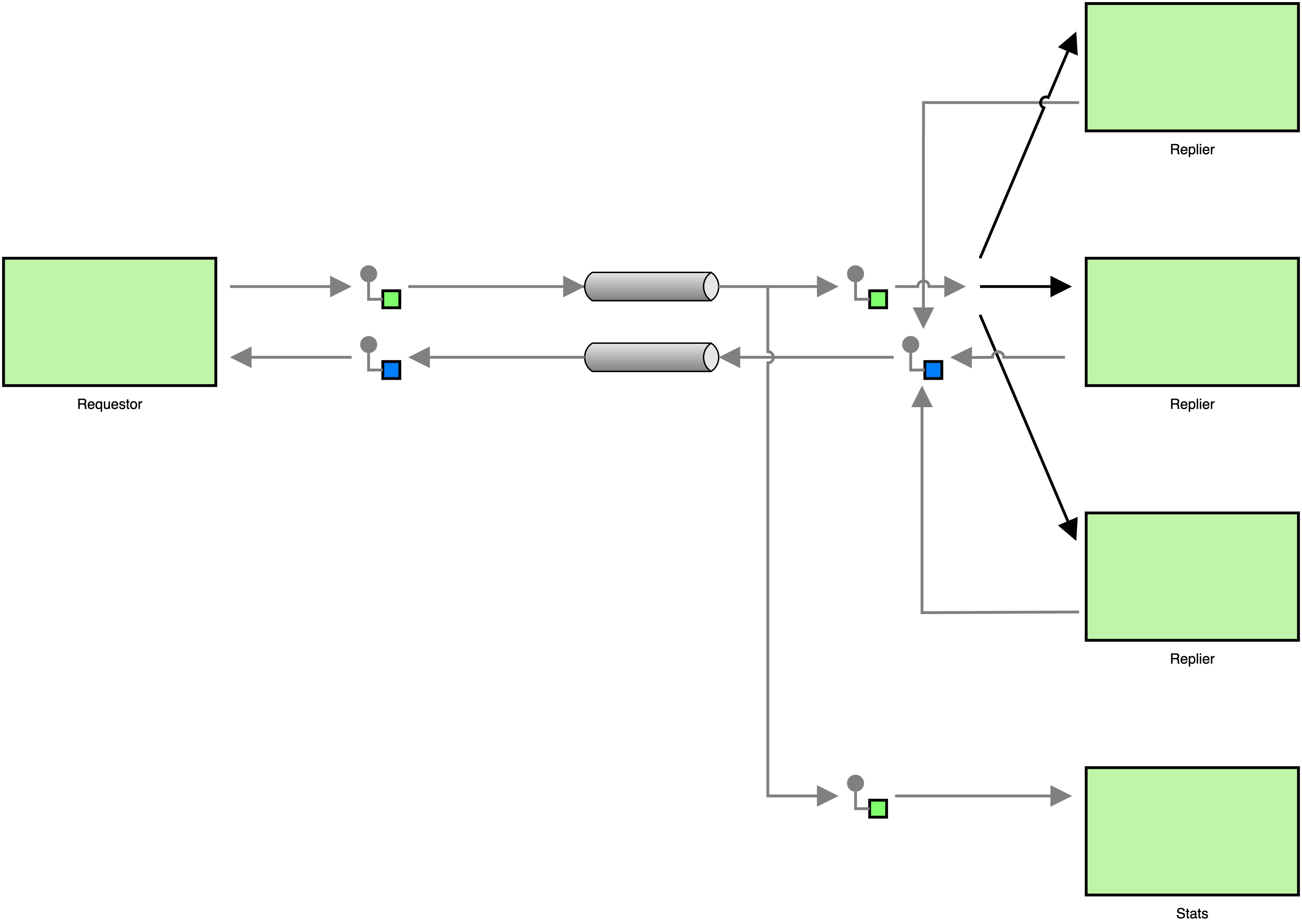
In the above architecture, the requestor sends its request to the pub-sub topic that the repliers are subscribed to. Because each of the repliers will receive a request, each replier will respond to the request, and the requestor will receive multiple responses for a single request. To avoid duplicate responses, all repliers need to share a single endpoint that is subscribed to the topic. This way we can ensure that each request is received by only one replier. The statistics component will use a separate endpoint to subscribe to the topic, making sure that it receives a copy of each request. This can be seen in the next diagram.

pubsub-compcons-stats.png

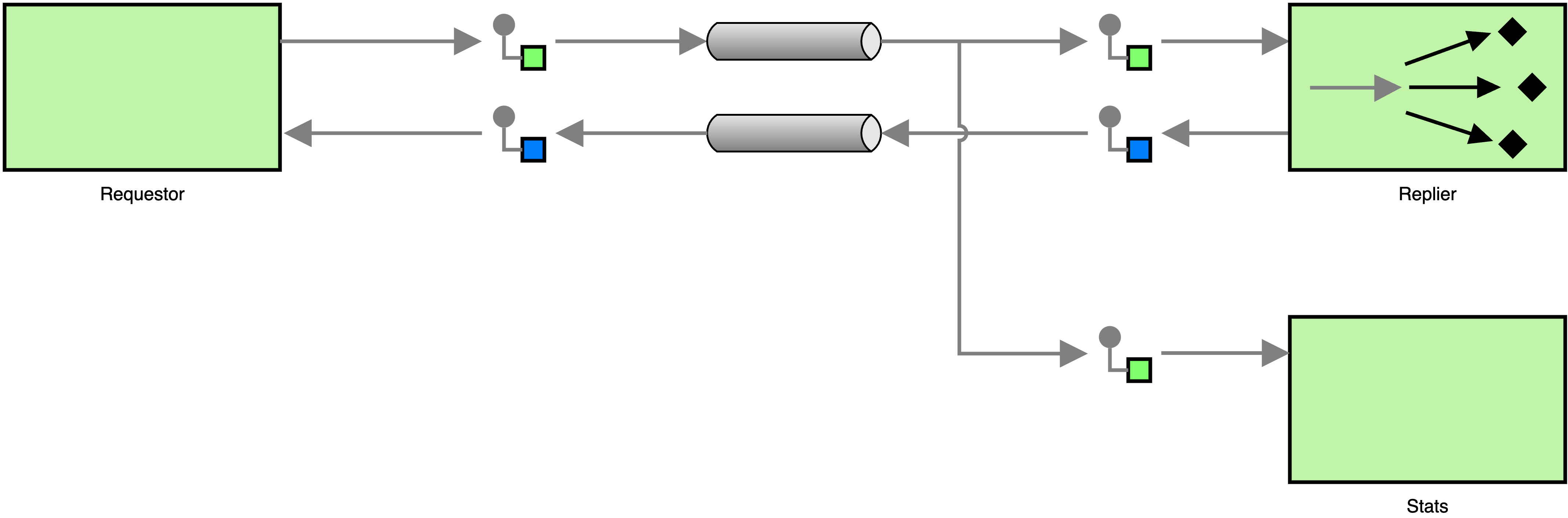
Or, if we use the proper notation for competing consumers, we get the following, simpler diagram.

pubsub-request-reply.png

The migration to publish-subscribe messaging may seem like a big change, but because most functions handle both kinds of messages, we barely have to change the code at all. On the replier side, all we have to do is subscribe the endpoint to the requests topic with a call to ipc_endpoint_subscribe().

main() {
    local endpoint

    if ! endpoint=$(ipc_endpoint_open "pub/kvs"); then
        log_error "Could not open endpoint"
        return 1
    fi

    if ! ipc_endpoint_subscribe "$endpoint" "requests"; then
        log_error "Could not subscribe to topic \"requests\""
        return 1
    fi

    while true; do
        local msg

        if msg=$(ipc_endpoint_recv "$endpoint"); then
            handle_message "$endpoint" "$msg"
        fi
    done
}

We do not remove the address from the call to ipc_endpoint_open() because we need to make sure that all repliers use the same endpoint, making them competing consumers. This has the nice side-effect that the new replier will be able to handle requests that were sent via pub-sub as well as those from point-to-point messages. Hence, old requestors will not stop working all of a sudden.

The change that is necessary to make requestors send requests with pub-sub messaging is even smaller than the change we needed on the replier-side. All we have to do is change the send_and_recv() function to use ipc_endpoint_publish() instead of ipc_endpoint_send(), and that is it.

send_and_recv() {
    local endpoint="$1"
    local message="$2"

    if ! ipc_endpoint_publish "$endpoint" "requests" "$message"; then
        return 1
    fi

    ipc_endpoint_recv "$endpoint"
}

Meanwhile, the new statistics component does nothing but subscribe to the requests topic, process received messages, and write the results to standard output. I will skip the explanation of the code since it doesn’t do anything that wasn’t already in the requestor and replier implementations. But you can see it below.

#!/bin/bash

collect_stats() {
	local msg="$1"

	local data
	local request_type
	local name
	local timestamp

	timestamp=$(ipc_msg_get_timestamp "$msg")
	data=$(ipc_msg_get_data "$msg")
	request_type=$(json_object_get "$data" "type")
	name=$(json_object_get "$data" "name")

	printf '%s %s %s\n' "$timestamp" "$request_type" "$name"
}

process_requests() {
	local endpoint="$1"

	while true; do
		local msg
		local data

		if msg=$(ipc_endpoint_recv "$endpoint"); then
			collect_stats "$msg"
		fi
	done
}

main() {
	local endpoint

	if ! opt_parse "$@"; then
		return 1
	fi

	if ! endpoint=$(ipc_endpoint_open); then
		log_error "Could not open IPC endpoint"
		return 1
	fi

	if ipc_endpoint_subscribe "$endpoint" "requests"; then
		process_requests "$endpoint"
	fi

	ipc_endpoint_close "$endpoint"
	return 0
}

{
	if ! . toolbox.sh ||
	   ! include "log" "opt" "uipc" "json"; then
		exit 1
	fi

	main "$@"
	exit "$?"
}

Thanks to the new architecture we can add new components into the system without having to modify or reconfigure the existing system. Aside from making the architecture more flexible, it also makes our lives a great deal easier when it comes to debugging, because all we have to do is create an endpoint and subscribe it to the relevant topics (or the wildcard topic *) to see what’s going on inside the system.

A word about synchronicity

The Request-Reply pattern can be used with point-to-point messages and publish-subscribe messages, and it can even be used to combine the two. In the above example, we implemented a requestor that synchronously waits for a response from the replier, which might easily turn into a bottleneck in larger systems. This pattern can also be used in an asynchronous fashion, but because this is more effort to do in a Bash script, I will leave it for another time.

https://m10k.eu/2023/07/08/toolbox-request-reply
Interfaces and inheritance in toolbox modules
toolboxbash
When I first wrote toolbox, my goal was to remove boilerplate code from my scripts and improve code-reuse. Because my scripts became more robust and maintainable, I felt more comfortable writing long-running processes like daemons in bash, which led to the development of the ipc module for message-based communication. Because the module uses GPG for message signing, it can be tricky to set up, so I added the uipc module, which does mostly the same thing, but without message signing.
Show full content

When I first wrote toolbox, my goal was to remove boilerplate code from my scripts and improve code-reuse. Because my scripts became more robust and maintainable, I felt more comfortable writing long-running processes like daemons in bash, which led to the development of the ipc module for message-based communication. Because the module uses GPG for message signing, it can be tricky to set up, so I added the uipc module, which does mostly the same thing, but without message signing.

This put me in the situation where I had two modules in toolbox that did the same thing and even had mostly the same functions, but that still could not be used interchangeably because function names started with ipc_ in the one module, and with uipc_ in the other, meaning that you could write your scripts to use one or the other, but not both. In object-oriented programming, this could be easily solved with inheritance or interfaces, both concepts that do not exist in Bash. So I set out to write a small proof-of-concept that is now part of toolbox.

Declaring and implementing interfaces

A module can use the interface() function to declare a set of functions that may be provided (or overridden) by a module that is implementing the interface. Let’s assume the following is the code of a module called greeting.

# Module "greeting"
__init() {
    interface "hello" \
              "bye"
}

When the module is loaded, it declares an interface with the two methods hello and bye. The interface will be called greeting, since that is the name of the module that declares it. And the two methods of the interface will thus be called greeting_hello() and greeting_bye().

What happens internally is that toolbox declares a vtable (very simply said, a table with function references) for the module, and creates the function stubs greeting_hello() and greeting_bye(). When a function stub is called, it looks at the vtable and calls whatever function is referenced there. By default, vtable entries reference the function method_not_implemented(), which lets the caller know that they called an unimplemented method.

A module that wants to implement an interface can do so with the implements() function, which expects exactly one argument: the name of the interface. The following snippet shows the module german, which implements greeting.

# Module "german"
__init() {
    implements "greeting"
}

german_hello() {
    local name="$1"

    echo "Hallo $name"
}

german_bye() {
    local name="$1"

    echo "Tschüss, $name"
}

When the module german is initialized, toolbox checks if the module overrides any of the interface’s methods. The greeting interface has the two methods hello and bye, so toolbox checks if the functions german_hello() or german_bye() exist, and updates the vtable accordingly.

To see why you would want something like this, let’s have a look at a script that uses these modules.

Note: The opt module used below is a command line parser. The opt_parse() function parses the command line according to the options that were declared with opt_add_arg(). The arguments to opt_add_arg() have the following meaning (in order):

  1. Short name of the option (e.g. -f)
  2. Long name of the option (e.g. --foo)
  3. Flags (r = required, v = option is followed by a value)
  4. Default value
  5. Description (for --help)
#!/bin/bash

main() {
    local lang
    local name

    opt_add_arg "l" "lang" "v"  "german" "Language to use"
    opt_add_arg "n" "name" "rv" ""       "Name of the user"

    if ! opt_parse "$@"; then
        return 1
    fi

    lang=$(opt_get "lang")
    name=$(opt_get "name")

    include "$lang"

    greeting_hello "$name"
}

{
    if ! . toolbox.sh ||
       ! include "opt"; then
        exit 1
    fi

    main "$@"
    exit "$?"
}

Let’s assume this script is called greet.sh and the modules have been placed in a directory called include next to it. When you now execute the script with

$ ./greet.sh --name Peter

it will write the message Hallo Peter to standard output. This is because the value of the --lang option defaults to german, causing the module german to be included (which causes greeting to be included).

Now if you wanted to add another language, all you have to do is add a new module. The following is the code of the module japanese.

# Module "japanese"
__init() {
    implements "greeting"
}

japanese_hello() {
    local name="$1"

    echo "$nameさん、こんにちは"
}

japanese_bye() {
    echo "じゃ、また"
}

To use the new module, none of the other files need to be modified. You can execute the script like

$ ./greet.sh --name Peter --lang japanese

and it would greet you with the output Peterさん、こんにちは.

Extending interfaces

The example above declares a pure interface, which is an interface that does not implement any methods itself. Let’s assume we wanted to modify the example, so that it falls back to English if no language was specified.

The first thing we’d do is modify the greeting module so that it provides functions for English like the following.

# Module "greeting"
__init() {
    interface "hello" \
              "bye"
}

greeting_hello() {
    local name="$1"

    echo "Hello $name"
}

greeting_bye() {
    local name="$1"

    echo "Bye $name"
}

What’s special about this case is that the module now has functions that collide with the interface’s call stubs. When this happens, toolbox will first rename the colliding functions, so the greeting_hello() above becomes ___greeting_hello(), and greeting_bye() becomes ___greeting_bye(). It will then generate the call stubs and initialize the vtable so that the entry for hello “points” to ___greeting_hello() and bye to ___greeting_bye(). This way, the interface-implements mechanism can be used to create modules that build on other modules.

Since the greeting module now has a default behavior, we also need to change greet.sh to account for that. This is as simple as changing the default language to greeting, by changing the first option declaration like this.

    opt_add_arg "l" "lang" "v"  "greeting" "Language to use"

This is not the best solution though, since the help text that is printed when opt_parse() encounters -h or --help on the command line will say that the default value for --lang is greeting. It would be nicer to include greeting unconditionally and load one of the other modules only if --lang was passed on the command line. There are many roads that lead to Rome.

And?

Because the uipc module could now inherit code from the ipc module, I was able to remove about 80% of the former. What’s more, I could also modify foundry to support both IPC flavors with very little code changes.

Of course, this mechanism can’t compare with its counterparts in other languages, but it makes writing Bash scripts a lot more comfortable. I had concerns regarding the stability of this mechanism, but since I have been using it for half a year now and had literally zero problems with it, I merged it into stable and released toolbox 0.3.6 today.

https://m10k.eu/2023/06/10/toolbox-interfaces
Publish-Subscribe Messaging in Bash
toolboxmessagingeip
In the last article, I have explained how to implement the Point-to-Point Channel and Competing Consumers patterns with toolbox to process messages in parallel. When employing the Competing Consumers pattern, every message on the channel will be received by only one process. But what if we wanted to broadcast messages so that each process receives a copy? This is where Publish-Subscribe Channels enter the stage.
Show full content

In the last article, I have explained how to implement the Point-to-Point Channel and Competing Consumers patterns with toolbox to process messages in parallel. When employing the Competing Consumers pattern, every message on the channel will be received by only one process. But what if we wanted to broadcast messages so that each process receives a copy? This is where Publish-Subscribe Channels enter the stage.

When a process sends a message to a publish-subscribe channel (or topic, as they are called in toolbox), each of the processes that are subscribed to the channel will receive a copy of the message. This means that receiving processes need to subscribe to a channel before messages are being published (one could thus argue that this pattern should better be called Subscribe-Publish Messaging instead). This pattern can be used when the messages that are sent by a process are interesting for many processes, such as data from sensors or other kinds of notifications. What makes this pattern extremely powerful is that you can add new processes to a system without having to change the messaging architecture. All the new process has to do is subscribe to the publish-subscribe channel. This allows you to build very flexible and decoupled architectures.

Pub-Sub with toolbox

Publish-subscribe messaging is so useful, I use it more than point-to-point messages. And because it gets a lot of my attention, it is very straightforward to use with toolbox.

To publish messages, one first needs to open a new IPC endpoint. Then you can publish messages using ipc_endpoint_publish().

Note: To use the ipc_ family of functions, you need to include either the uipc or ipc module. The latter uses GnuPG for message signing and verification, which makes it a bit more complicated to use. If you don’t exchange messages with other users, or you just want to get quick results, you should use the uipc module.

. toolbox.sh
include "uipc"

ep=$(ipc_endpoint_open)
ipc_endpoint_publish "$ep" "topic" "Hello"

A subscriber that loops forever, printing received messages isn’t much longer. Like the publisher, it first needs an endpoint that is consequently subscribed to the topic with ipc_endpoint_subscribe(). Pub-sub messages can be received like point-to-point messages, using ipc_endpoint_recv().

. toolbox.sh
include "uipc"
include "log"

ep=$(ipc_endpoint_open)
ipc_endpoint_subscribe "$ep" "topic"

while true; do
    msg=$(ipc_endpoint_recv "$ep")
    ipc_msg_get_data "$msg" | log_highlight "Message"
done

Another interesting thing about pub-sub messaging in toolbox is that it can be easily combined with the Competing Consumers pattern. All one has to do is pass a name to ipc_endpoint_open() to obtain a public endpoint that can be shared between processes.

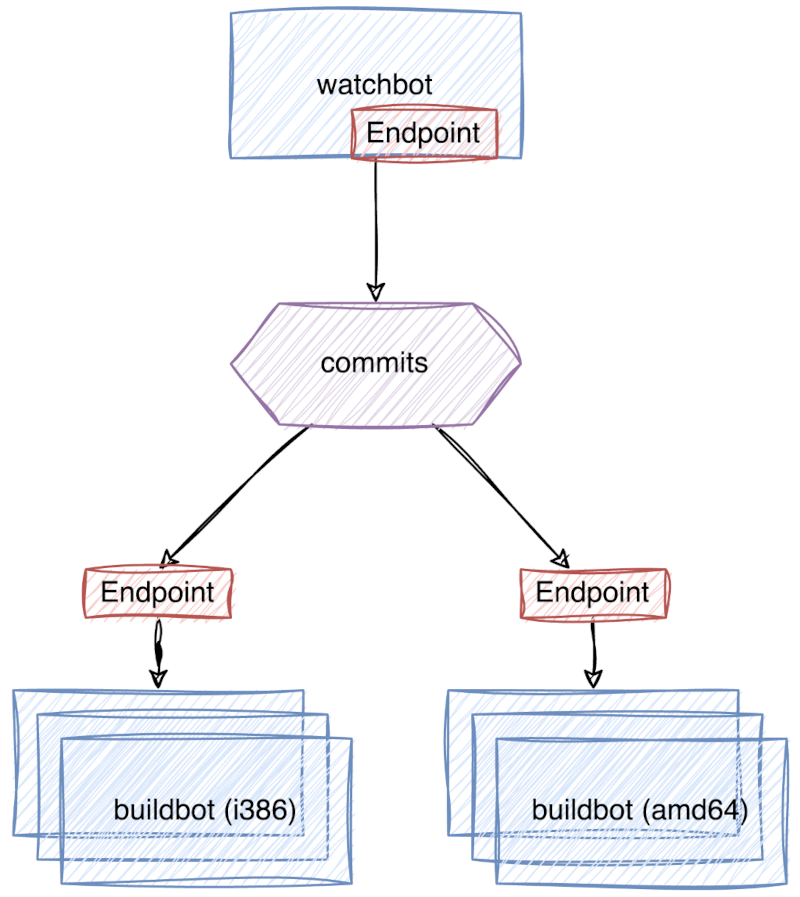
As a real-life example, let’s have a look at foundry. A script called watchbot periodically checks a set of git repositories if they have changed. When watchbot detects a change, it sends a message to the commits topic. Another script called buildbot subscribes to this topic and waits for messages. Once it has received a message, it builds Debian packages from the git repository that is mentioned in the message. Buildbot builds packages only for the CPU architecture that it is running on, meaning that one needs instances running on i386 and amd64 hosts if one wants to build packages for those two architectures. If there is only one buildbot instance per architecture, this will work well with naive pub-sub messaging. But what if there are a lot of packages waiting to be built, and one lonely buildbot per architecture can’t catch up with the workload? If we use naive pub-sub messaging and start multiple buildbots for the same architecture, they all will receive any notifications from watchbot, meaning they all will build the same versions of the same packages for the same architecture, leading to many duplicate package builds and no performance gain whatsoever. We prevent this using the Competing Consumers pattern on top of the pub-sub messaging. By having all buildbots for a particular architecture share the same endpoint, we can make sure that only one buildbot on that endpoint will receive a notification, thus avoiding duplicate package builds.

pubsub-compcons

To implement this using toolbox, all we have to do is change the competing consumers example from the last time so that the shared endpoint is subscribed to the topic that we’re interested in, as shown below.

. toolbox.sh
include "uipc"

consumer() {
	local endpoint_name="$1"
	local topic="$2"

	local endpoint
	local message

	endpoint=$(ipc_endpoint_open "$endpoint_name")
	ipc_endpoint_subscribe "$endpoint" "$topic"

	while true; do
		message=$(ipc_endpoint_recv "$endpoint")
		handle_message "$message"
	done
}

endpoint_name="foo"
topic="bar"
num_cpus=$(nproc)

for (( i = 0; i < num_cpus; i++ )); do
	( consumer "$endpoint_name" "$topic" ) &
done
wait

There is one catch, though. Because toolbox uses the filesystem to send and receive messages, communication between processes on different machines only works if the machines share a network filesystem, making toolbox better suited for smaller systems. But it’s not like anyone would use Bash to implement large-scale geographically-distributed systems anyway, right?

If I managed to pique your interest, don’t forget to have a look at foundry, my proof-of-concept for messaging-based distributed systems in Bash.

https://m10k.eu/2023/05/27/toolbox-pubsub
Messaging Patterns in Bash
toolboxmessagingeip
Around the time when I was implementing queues in toolbox, I was reading Enterprise Integration Patterns, a book about messaging patterns, written by Gregor Hohpe (whom I worked with more than a decade ago) and Bobby Woolf. While reading the book, I thought how awesome it would be if I could use my queues to implement messaging in Bash — and that’s how I got inspired to write the uipc module. Because there is no documentation but an API reference, I decided to write a few articles about how the uipc module can be used to implement some of the messaging patterns from the book.
Show full content

Around the time when I was implementing queues in toolbox, I was reading Enterprise Integration Patterns, a book about messaging patterns, written by Gregor Hohpe (whom I worked with more than a decade ago) and Bobby Woolf. While reading the book, I thought how awesome it would be if I could use my queues to implement messaging in Bash — and that’s how I got inspired to write the uipc module. Because there is no documentation but an API reference, I decided to write a few articles about how the uipc module can be used to implement some of the messaging patterns from the book.

Point-to-Point Channels

The most basic communication that can be implemented with the uipc module is a direct message transfer from the sender to the receiver. The sender places messages in a queue, the channel, from where the receiver will pick them up. If there is more than one receiver, the channel guarantees that the message is picked up by only one of the receivers. This is what EIP calls a Point-to-Point Channel. This pattern is fairly easy to realize with toolbox/uipc, although the terminology is somewhat different.

At first, the script needs to source toolbox and include the uipc module, which contains the ipc_* functions (note that there is also a module called ipc, which is functionally equivalent but uses GPG to sign and verify messages).

. toolbox.sh
include "uipc"

To send messages, a process now needs to create an IPC endpoint like so:

priv_ep=$(ipc_endpoint_open)

This will open a private (or unnamed, or anonymous, or whatever you like to call it) endpoint. Because the address of a private endpoint is random, it’s only useful if you are the one who is initiating the communication.

If you want to receive messages from someone, you need an endpoint with an address that other processes can refer to. Thus, you open your endpoint by passing an address to ipc_endpoint_open() and you get a public endpoint.

pub_ep=$(ipc_endpoint_open "foobar")

A sender can now send messages to the public endpoint by passing its address to ipc_endpoint_send().

ipc_endpoint_send "$priv_ep" "foobar" "Hello world"

This places the message in the queue of the public endpoint, where the receiving process can pick it up with a call to ipc_endpoint_recv(). To put it short, a public endpoint in toolbox/uipc is a Point-to-Point Channel.

The following is what a simple sender looks like (for the sake of brevity, I have omitted any error handling).

. toolbox.sh
include "uipc"

channel="foobar"
message="Hello world"

endpoint=$(ipc_endpoint_open)
ipc_endpoint_send "$endpoint" "$channel" "$message"

And this is what the receiving end looks like.

. toolbox.sh
include "uipc"
include "log"

channel="foobar"
endpoint=$(ipc_endpoint_open "$channel")

while true; do
    message=$(ipc_endpoint_recv "$endpoint")
    ipc_msg_get_data "$message" | log_highlight "Message"
done
Competing Consumers

Endpoints also support multiple receivers as described in the pattern. You can open the same public endpoint from multiple processes, and every message is received by only one of the processes. Because each message is received by only one of the processes, multiple processes can listen on the same public endpoint to process requests in parallel. This is yet another pattern, called Competing Consumers, since the listening processes are competing to get the next message from the endpoint (or channel).

The following is how you would implement the pattern with toolbox/uipc (again, without error handling).

. toolbox.sh
include "uipc"

consumer() {
    local channel="$1"

    local endpoint
    local message

    endpoint=$(ipc_endpoint_open "$channel")

    while true; do
        message=$(ipc_endpoint_recv "$endpoint")
        handle_message "$message"
    done
}

channel="foobar"
num_cpus=$(nproc)

for (( i = 0; i < num_cpus; i++ )); do
    ( consumer "$channel" ) &
done
wait

The above example will spawn one consumer child process per CPU and wait until all of them have ended (which they never will). Of course, you could also have the parent process consume messages from the endpoint and execute the script multiple times. Endpoints can be shared by independent processes, so strictly speaking you could have multiple different scripts share the same endpoint. I’m not sure if that’s something one would actually want to do, though.

https://m10k.eu/2023/05/06/toolbox-messaging
Breaking the cycle
metaautomation
As I was adding the finishing touches to the last article of a series I have been writing for the German monthly Linux-Magazin, I decided to write more stuff to put on here. Not necessarily at the same pace or with the same depth, but we’ll see.
Show full content

As I was adding the finishing touches to the last article of a series I have been writing for the German monthly Linux-Magazin, I decided to write more stuff to put on here. Not necessarily at the same pace or with the same depth, but we’ll see.

The first problem that I always face when I write content for my website is that I forget how to deploy it. Not that it’s terribly complicated, I just forget where I need to push changes to get them deployed, and what parts of the process are automated. This causes mental resistance when I’m trying to write, causing me to write less and forget even more. To break out of this cycle, I decided to document how my blog is deployed. Thus, the following is mostly a memo for myself.

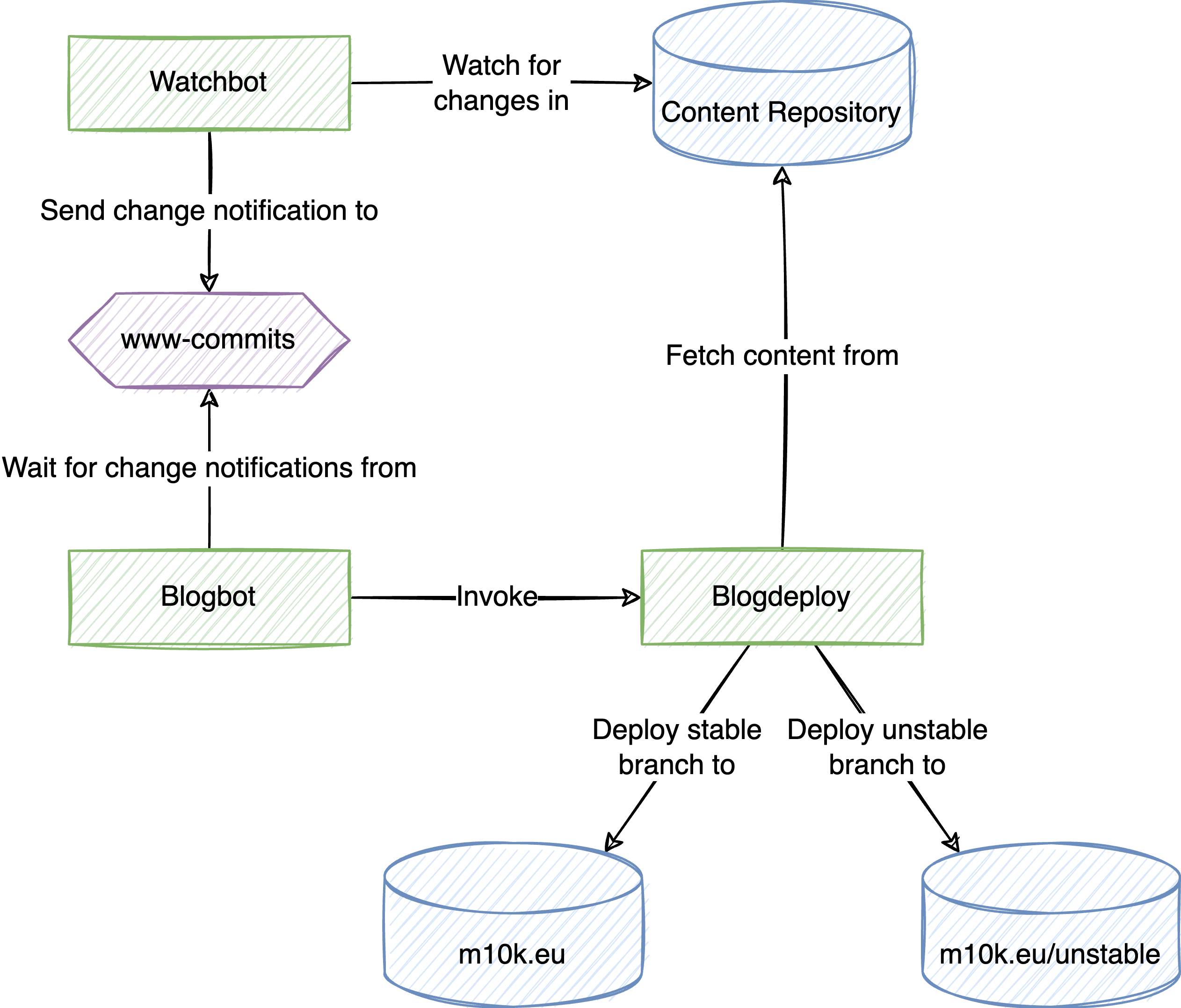
These days, many software-related blogs are static pages generated from markdown, and this one is no exception. The markdown for my blog is kept in a git repository and the blog is automatically re-built whenever the contents of the repository change. When I write new articles, I don’t like to publish them before they’re completely done, but at the same time I work best in iterations, improving things step by step. This is why the content repository has two branches: stable and unstable. The unstable one is where I prepare new content. It’s automatically deployed to m10k.eu/unstable, allowing me to check things as I go. Once the content reaches a state where I can’t find anything obvious to improve, I merge it into stable, triggering a deployment to m10k.eu.

The deployment is done by three scripts, one of which is borrowed from Foundry: watchbot is a deamon that periodically polls git repositories and sends a pub-sub message when it detected a change. This message is received by blogbot, which does little more than trigger blogdeploy, which does the actual deploying.

overview

Blogdeploy will clone the content repository, compile the static pages from the markdown, and then copy the generated pages to the webroot. In case of an unstable deployment, it will set the baseurl in the jekyll configuration to /unstable, but that is pretty much it.

So yeah, it’s really not complicated. I just completely forgot that I had the deployment process automated. When I wrote the last blog post, I still had to deploy everything manually, which was a huge pain.

For the curious, the sources are on Github: https://github.com/m10k/blogdeploy

https://m10k.eu/2023/05/04/blog-deploy
Setting up an IPsec IKEv2 VPN with EAP-TLS authentication
securityipsec
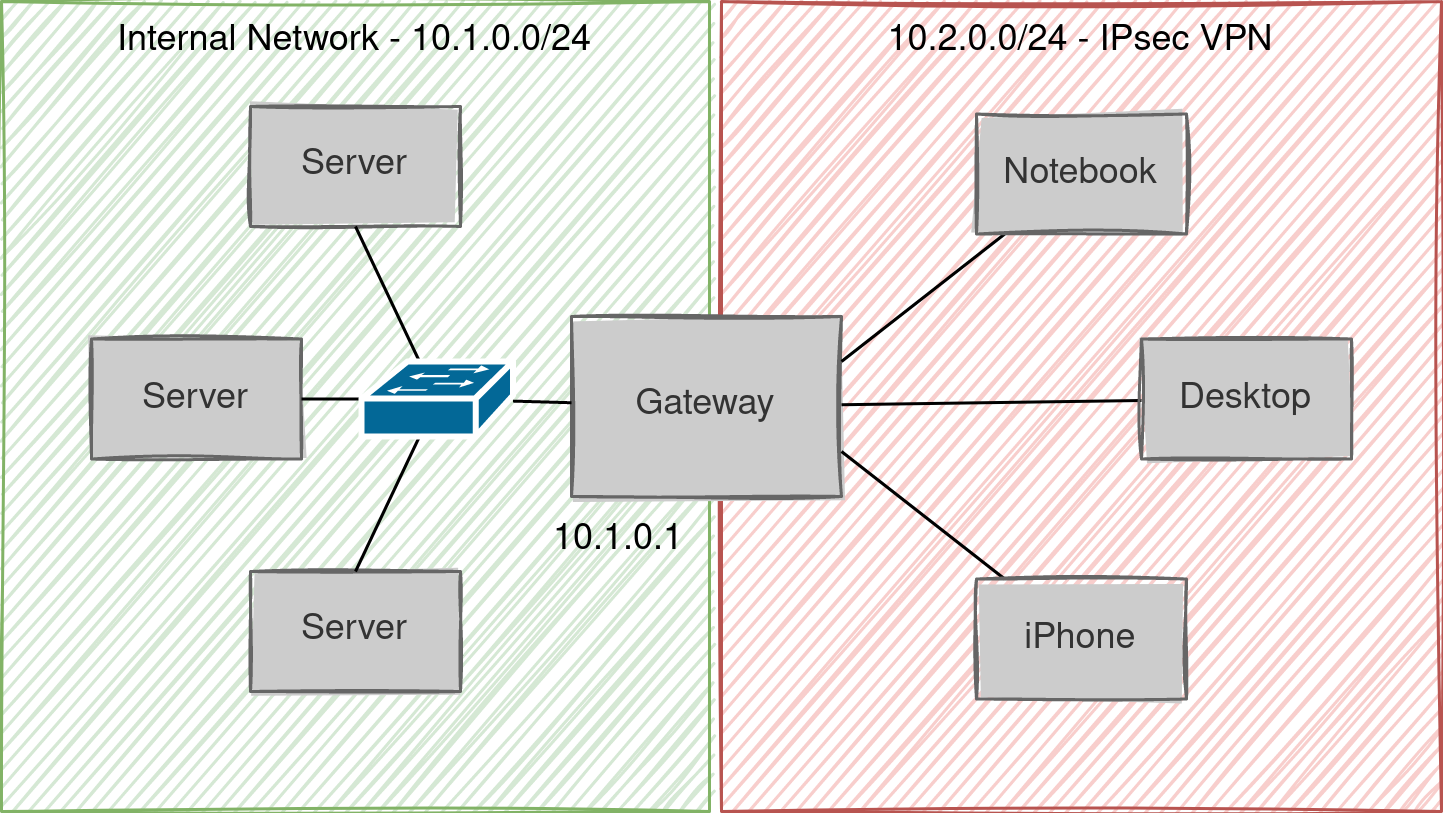
I have a VPS that is hosting a mail server, CalDAV/CardDAV for calendar and contacts, and some other daily necessities. Because I like to keep my attack surface small (and having temporal wiggle space for deploying security updates), most of the services on this VPS are only accessible from inside a VPN. Because the VPS is one of those semi-virtualized ones where all VPSes share the host kernel, I can’t just go ahead and load kernel modules as I see fit. Or in other words, I cannot use a VPN that needs more than a TUN/TAP interface from the kernel, such as IPsec VPNs. So for a lack of other options, I have been using OpenVPN for the past several years, and it has been working okay-ish, except I never got it to work on my iPhone. Like on Android, there is no native OpenVPN support on iOS, meaning you have to use an app for it, and I couldn’t for the life of me figure out how to get it to connect to my server. Luckily, I got another VPS in the meanwhile, and it allows me to load kernel modules, which means the IPsec VPN option is back on the table – so I decided to have a closer look at strongswan one more time. In the end, it took me several evenings to figure out a configuration that uses certificates for mutual authentication and works reasonably well on Linux as well as iOS clients. This post explains how I got it all to work.
Show full content

I have a VPS that is hosting a mail server, CalDAV/CardDAV for calendar and contacts, and some other daily necessities. Because I like to keep my attack surface small (and having temporal wiggle space for deploying security updates), most of the services on this VPS are only accessible from inside a VPN. Because the VPS is one of those semi-virtualized ones where all VPSes share the host kernel, I can’t just go ahead and load kernel modules as I see fit. Or in other words, I cannot use a VPN that needs more than a TUN/TAP interface from the kernel, such as IPsec VPNs. So for a lack of other options, I have been using OpenVPN for the past several years, and it has been working okay-ish, except I never got it to work on my iPhone. Like on Android, there is no native OpenVPN support on iOS, meaning you have to use an app for it, and I couldn’t for the life of me figure out how to get it to connect to my server. Luckily, I got another VPS in the meanwhile, and it allows me to load kernel modules, which means the IPsec VPN option is back on the table – so I decided to have a closer look at strongswan one more time. In the end, it took me several evenings to figure out a configuration that uses certificates for mutual authentication and works reasonably well on Linux as well as iOS clients. This post explains how I got it all to work.

It starts with the PKI

The main reason why it’s annoying to set up a VPN is that you need to set up a PKI (short for public key infrastructure) and distribute keys and certificates to clients. In this regard, IPsec isn’t any better or more convenient than OpenVPN, but I found pki, the tool that comes with strongswan much easier to use than OpenVPN’s easy-rsa or openssl. Also, it turns out that it is immensely helpful to take notes that allow you to recover your memory when you need it. And to write scripts that reduce the amount of information you need to remember in the first place. So first of all, we will create a few small scripts for setting up a new CA, generating client and server certificates, and exporting client certificates either as MobileConfig for iOS clients, or as a shell script that configures strongswan on Debian-flavored Linux boxes.

Trusting strangers

But before we jump into the nitty-gritty, we need to talk about trust. Imagine someone knocks at your door. You open it, and on the other side is a person you have never met in your entire life. They say they are a police officer. You believe them, even though they are a complete stranger. Why? They are in a police uniform, so they have to be a police officer, right? Then you remember your friend – who is certainly not a police officer – showing up to your Halloween party in a uniform just like that. You decide to ask the person at the door for their ID. It looks legitimate – not that you would know what a legitimate ID looks like without asking Google – so you choose to put your doubts aside. Of course, the ID might be fake or stolen, too, and to completely establish the authenticity of the officer, you would have to go to or call the police and ask them to verify the information on the ID. Luckily, there is usually no need to be paranoid like this.

In the analog world, we have a lot of implicit, circumstantial trust. When we buy groceries, we assume that the person at the register is a legitimate store clerk because they are at the register. When we go to a restaurant, we assume that the person that just served us food is a legitimate waiter because we’re at a restaurant and they served us food (maybe even the same food that we ordered). But even if they served us food that we didn’t order, we wouldn’t assume that it was a malicious waiter trying to poison us. We would assume they simply got our order wrong. Why? The risk of getting caught is fairly high, while there is very little for them to gain. It seems very unlikely that the waiter is plotting to harm us, so we implicitly trust them.

On the Internet, the odds are different. The way computers talk to each other is essentially a world-wide game of Chinese whispers. The routers that are relaying messages between us and Amazon might modify the content of our communication (by accident or on purpose), or the person we think we’re communicating with might not be Amazon at all. Because it is relatively easy to operate anonymously, attribution of crime is in most cases impossible (it usually only becomes possible if a criminal reveals information that can be used to identify them, for example when they try to convert their Bitcoin to traditional coins). Unlike in the analog world, there is no voice or face that we can use to guess at the identity of our peer. This is why on the Internet, everyone is a stranger and the trust-by-default mode that we operate in in the analog world does not work. We have to distrust by default.

So how is it that we can shop on the Internet without worrying about all this? When we connect to Amazon, our browser does not blindly believe the peer that they are Amazon, but verifies it by checking their TLS certificate – the digital equivalent of an ID card (except it’s not issued by a government). To establish the authenticity of the TLS certificate, the browser checks whether it was issued by a trusted certificate authority – browsers ship with a set of certificates of CAs that the browser’s developers deem trustworthy. Certificates are generated and verified using mathematical operations that are very hard to reverse (that is, break), making it safe to assume that websites with valid certificates are authentic.

Setting up a certificate authority

Coming back to the question why we need all of this, we need to issue certificates to the server and the clients of the VPN so the clients can make sure they are talking to an authentic server and the server can ensure that the clients are authentic clients. And to issue certificates, we need to set up a certificate authority. Public key infrastructure, or PKI, is the term that is used to refer to the CA and everything around it, such as certificate distribution and revocation mechanisms.

The hard(ish) way

A certificate authority may sound like something really fancy, but in its essence it’s nothing more than a key pair and a certificate. That means, in order to set up a CA, all we have to do is create a new key pair and a self-signed certificate. Using the handy pki tool that comes with strongswan (apt-get install strongswan-pki), this can be done with two commands.

pki --gen                            \
    --type rsa                       \
    --size 4096                      \
    --outform pem > /etc/ipsec.d/private/cakey.pem

pki --self                           \
    --ca                             \
    --in cakey.pem                   \
    --type rsa                       \
    --lifetime 3650                  \
    --dn "C=DE,O=m10k,CN=ca.m10k.de" \
    --outform pem > /etc/ipsec.d/cacerts/cacert.pem

Creating a certificate for a server is somewhat similar, except that we need to use the CA’s key to sign the new certificate. Using pki, the process can be done in two steps:

pki --gen              \
    --type rsa         \
    --size 4096        \
    --outform pem      \
    > serverkey.pem

pki --pub              \
    --outform pem      \
    --in serverkey.pem | pki --issue                                  \
                             --lifetime 3650                          \
                             --cacert /etc/ipsec.d/cacerts/cacert.pem \
                             --cakey /etc/ipsec.d/private/cakey.pem   \
                             --dn "C=DE,O=m10k,CN=m10k.jp"            \
                             --san "m10k.jp"                          \
                             --flag serverAuth                        \
                             --flag ikeIntermediate                   \
                             --outform pem > servercert.pem

We generate client certificates in the exact same way, except that we don’t need to pass --flag serverAuth and --flag ikeIntermediate to pki.

pki --gen              \
    --type rsa         \
    --size 4096        \
    --outform pem      \
    > clientkey.pem

pki --pub              \
    --outform pem      \
    --in clientkey.pem | pki --issue                                  \
                             --lifetime 3650                          \
                             --cacert /etc/ipsec.d/cacerts/cacert.pem \
                             --cakey /etc/ipsec.d/private/cakey.pem   \
                             --dn "C=JP,O=m10k,CN=apfelfon@m10k.jp"   \
                             --san "apfelfon@m10k.jp"                 \
                             --outform pem > clientcert.pem
The easy way

Executing pki and copying the generated keys/certificates manually isn’t terribly complicated, but like all boring procedures there’s a good chance that we’ll make mistakes - or forget the procedure if we have to repeat it a year from now. This is why I wrote a few scripts that streamline the entire process. The script mkca can be used to set up a new certificate authority.

mkca --root /etc/ipsec.d      \
     --country DE             \
     --organization m10k      \
     --common-name ca.m10k.de

To generate a key and certificate for a server, we’d use mkcert.

mkcert --root /etc/ipsec.d          \
       --country DE                 \
       --organization m10k          \
       --common-name m10k.jp

If we pass the --client option to mkcert, we generate a key and certificate for a VPN client.

mkcert --root /etc/ipsec.d          \
       --client                     \
       --country JP                 \
       --organization m10k          \
       --common-name apfelfon@m10k.jp
Configuring strongswan on the server

Now that we have the CA and certificates for our server in place, we can set up the rest of the VPN server. So first of all, let’s have a look at the logical topology of the network we’re trying to build.

topology

On the left side, we have our internal network, 10.1.0.0/24. On the right side, we have the IPsec network, 10.2.0.0/24, and we want the server that is running strongswan (the gateway) to assign addresses to the machines in the right network and to route between the two networks. Strongswan can be configured for this scenario with relatively few configuration changes. The following is strongswan’s configuration file, /etc/ipsec.conf.

config setup
        # strictcrlpolicy=yes
        # uniqueids = no

conn %default
        dpdaction=clear
        dpddelay=300s
        fragmentation=yes
        mobike=yes
        compress=yes

conn m10k.jp-base
        keyexchange=ikev2
        left=%any
        leftauth=pubkey
        leftid=m10k.jp
        leftcert=m10k.jp.pem
        leftsendcert=always
        leftsubnet=10.1.0.0/24
        leftfirewall=yes
        right=%any
        rightsourceip=10.2.0.0/24
        rightdns=10.1.0.1

conn m10k.jp-eaptls
        also=m10k.jp-base
        rightauth=eap-tls
        rightid=%any
        eap_identity=%any
        auto=add
        reauth=no

What’s of particular interest here are the last two conn sections. The first one defines the basic settings for all connections. Because iOS clients do not support EAP-TLS for mutual authentication, we have to use public-key authentication for the left side (that is, the mechanism the client uses to authenticate the server). The leftauth, leftid, and leftcert directives are what’s used for this. Further, iOS clients expect the server to send their certificate without having to ask them first, so we need to set leftsendcert to always, otherwise iPhones won’t be able to connect. Finally, the leftsubnet directive tells strongswan that 10.1.0.0/24 is the network that VPN clients should be able to access, and leftfirewall instructs strongswan to insert rules for the clients to the gateway’s iptables. Directives starting with right configure the right logical subnet (the client’s network). right=%any means that clients with any IP address or host name may connect. rightsourceip=10.2.0.0/24 tells strongswan to assign addresses from 10.2.0.0/24 to VPN clients, and rightdns=10.1.0.1 means that VPN clients should resolve names using the DNS server 10.1.0.1. The last conn section configures EAP-TLS authentication. First, the also=m10k.jp-base statement tells strongswan that this connection should inherit the settings from m10k.jp-base. rightauth=eap-tls means that clients must use EAP-TLS to authenticate themselves with the server. Since authentication uses EAP-TLS, the rightid=%any and eap_identity=%any effectively mean that all clients with a valid certificate from our CA may connect to this server. Finally, the reauth=no option tells the server not to initiate reauthentications. This is necessary for iOS clients since they don’t expect the server to do that, and would disconnect when that happens.

Now that we’ve got strongswan configured, all that’s left to do is tell it the password for the server’s private key. Because mkcert stored the private key unencrypted (that is, without a password), it’s enough to add the following line to /etc/ipsec.secrets.

 : RSA m10k.jp.pem

By the way, all of the above can also be achieved with exportcert from mkpki. Assuming that we generated certificates as shown above, we can generate a configuration script for the VPN server with the following command.

exportcert --root /etc/ipsec.d   \
           --common-name m10k.jp \
           --server m10k.jp > setup.sh
chmod u+x setup.sh
./setup.sh

Either way, now we can restart strongswan and the fun begins.

/etc/init.d/ipsec restart

Well, not quite. Because our iptables policy is to drop everything by default, we need to add the following rules to allow IPsec traffic. eth0 is the interface that connects the gateway to the Internet.

iptables -A INPUT   -j ACCEPT -i eth0 -p esp
iptables -A INPUT   -j ACCEPT -i eth0 -p ah
iptables -A INPUT   -j ACCEPT -i eth0 -p udp --dport isakmp
iptables -A INPUT   -j ACCEPT -i eth0 -p udp --dport ipsec-nat-t
iptables -A OUTPUT  -j ACCEPT -o eth0 -p esp
iptables -A OUTPUT  -j ACCEPT -o eth0 -p ah
iptables -A OUTPUT  -j ACCEPT -o eth0 -p udp --sport isakmp
iptables -A OUTPUT  -j ACCEPT -o eth0 -p udp --sport ipsec-nat-t

iptables -A INPUT   -j ACCEPT -s 10.2.0.0/24 -d 10.1.0.1
iptables -A OUTPUT  -j ACCEPT -s 10.1.0.1    -d 10.2.0.0/24

iptables -A FORWARD -j ACCEPT -s 10.2.0.0/24 -d 10.1.0.0/24 \
         -i eth0 -m policy --dir in --pol ipsec --reqid 1 --proto esp
iptables -A FORWARD -j ACCEPT -s 10.1.0.0/24 -d 10.2.0.0/24 \
         -o eth0 -m policy --dir out --pol ipsec --reqid 1 --proto esp
Configuring strongswan on the client

The steps that are needed to configure strongswan on the client side aren’t much different from the server side. First, we generate a key and a certificate for the client using mkpki.

mkcert --root /etc/ipsec.d          \
       --client                     \
       --country JP                 \
       --organization m10k          \
       --common-name client@m10k.jp

Now we need to copy these files to the client’s /etc/ipsec.d directory (I’ll skip this step here) and add the password for the key to /etc/ipsec.secrets. Again, since the client key is not password-protected, this is trivial.

echo " : RSA client@m10k.jp.pem" >> /etc/ipsec.secrets

Finally, we need to configure strongswan by editing /etc/ipsec.conf to look like the following.

config setup
        # strictcrlpolicy=yes
        # uniqueids = no

conn %default
        ikelifetime=60m
        keylife=20m
        rekeymargin=3m
        keyingtries=1
        keyexchange=ikev2

conn m10k
        leftauth=eap-tls
        left=%defaultroute
        leftid=client@m10k.jp
        leftsubnet=0.0.0.0/0
        leftcert=client@m10k.jp.pem
        leftsourceip=%config
        leftfirewall=yes
        right=m10k.jp
        rightsubnet=10.1.0.0/24
        rightauth=any
        rightid=@m10k.jp
        auto=start
        eap_identity=%identity

This is mostly similar to the configuration on the server-side, except that here left is the local interface we use to connect to the server and right is the server. What’s different from the server configuration is the leftsourceip=%config directive, which tells strongswan to obtain an IP address from the server. Other differences are that the id of the server in rightid needs to be prefixed with an @, and that we need to set eap_identity to %identity so that strongswan uses the common name from the client certificate as our identity. Finally, auto=start instructs strongswan to automatically connect to the server upon startup. And again, exportcert could have been used to generate a configuration script for the client, as shown below.

exportcert --root /etc/ipsec.d          \
           --common-name client@m10k.jp \
           --server m10k.jp > setup-client.sh

Whether we chose to manually configure the client or leave it to a script, we need to restart strongswan for the changes to take effect.

/etc/init.d/ipsec restart

If everything went well, we should be able to connect to the server at 10.1.0.1. The status of the VPN connection can be seen by executing ipsec statusall as root.

Configuring iOS

The iPhone is a wonderful device for non-techie people. That is to say, anyone trying to do something that is slightly more advanced or unusual will quickly perceive the user-friendly interface to be an obstacle rather than a guide. In the case of VPNs using IKEv2 and EAP-TLS, it’s even worse, because the settings app looks like it can be used to configure the VPN but it really can’t. It is not possible to configure IPsec IKEv2 with EAP-TLS on iPhones through the settings app. The only way to configure iPhones is to generate a MobileConfig file and open it with the settings app. The strongswan documentation has a page that explains how to create a MobileConfig file, but it is nevertheless an annoying process because a pkcs12 container with the certificates and key need to be created and embedded into the configuration file. This is where exportcert comes in handy again. Using the --iphone option, we can instruct it to generate a MobileConfig profile for iOS clients:

exportcert --root /etc/ipsec.d \
           --common-name apfelfon@m10k.jp \
           --server m10k.jp > apfelfon.mobileconfig

The password that needs to be entered during the export is used to encrypt the pkcs12 container that is embedded in the profile. Since we’ll have to use iCloud or Google Drive or something similar to transfer the file to the iPhone, encryption is generally a good idea.

Once we’ve transfered the profile to our iPhone, we tap it in the File app, which will cause a dialog to be shown that tells us to check the settings app.

A dialog telling us to check the settings app

In the settings app, there will be an entry, telling us that there are new profiles that can be installed.

Settings app showing new profile entry

Tapping Install in the top right corner of the dialog will install the profile. When asked for a password, we need to enter the password that we defined when we exported the profile.

Installing the MobileConfig profile

By toggling the VPN switch in the settings app, we can now connect to the VPN server. If the connection was successfully established, a VPN icon will appear in the quick settings.

VPN icon showing we are connected

Parting words

Certificate management is usually the most annoying aspect of operating a VPN (no matter the flavor), since – unlike the initial setup – it doesn’t go away. But investing a few hours to write scripts that automate the boring parts pays off very quickly. Of course, that doesn’t mean the initial setup is easy either. This article may not convey it very well but it actually took me several weekends to figure out the correct way to set up the strongswan server and iOS client so it would work at least somewhat decently. That being said, my iPhone still disconnects from the VPN every hour or so, no matter what re-authentication and re-keying settings I use. On the other hand I’ve never had a more stable VPN connection between my Linux boxes.

https://m10k.eu/2022/07/29/ipsec-vpn
Making the shell get in line
bash
I promised that we’re going to build a distributed system in bash, but the mutex that we’ve written in the last part is still pretty far way from that goal. This time, let’s build something more tangible: a queue!
Show full content

I promised that we’re going to build a distributed system in bash, but the mutex that we’ve written in the last part is still pretty far way from that goal. This time, let’s build something more tangible: a queue!

Queues: Conveyor belts for data

A queue is a data structure for storing data in a first-in-first-out fashion. That means, when you take items from the queue, you get them in the same order that you put them into the queue. Exactly what we need for a message exchange. And the mutex from the last time will help us make the queues thread-safe1, so that multiple processes may put data into and take data from the queue at the same time without race conditions.

Let’s start with an naive approach. The queue has a list to store data items (one per line) and a counter that counts the data items in the queue. For thread-safety, both are protected by the same mutex. A producer will append data to the queue in four steps:

  1. Lock the mutex
  2. Append data to the list
  3. Increment the counter
  4. Unlock the mutex

Similarly, consumers will take data from the queue in these four steps:

  1. Lock the mutex
  2. If the counter is larger than 0
    • take the first data item from the list, and
    • decrement the counter
  3. Unlock the mutex
  4. If the counter was zero, go to step 1

This works, but there is a big problem (as you probably guessed, since I called this the naive approach). Imagine there is one consumer and no producer, and the function used to take a data item looks something like the following.

queue_get() {
	local queue="$1"

	local data
	local -i count

	for (( count = 0; count == 0; )); do
		queue_lock "$queue"

		count=$(queue_get_counter "$queue")

		if (( count > 0 )); then
			queue_dec_counter "$queue"
			data=$(queue_take_head "$queue")
		fi

		queue_unlock "$queue"
	done

	echo "$data"
	return 0
}

Because there is nobody else locking the queue, the consumer will never wait in queue_lock() and the loop becomes a tight loop, leaving one of your CPU cores running at 100%. But this problem doesn’t just occur with only one consumer. Even if you have more than one consumer. One consumer will always be executing the loop (it may not always be the same one though), and you will always have one CPU core running at full blast. Instead of wasting energy like it’s 1970, let’s find a way to put consumers to sleep when there is nothing for them to read.

An awful analogy: the semaphore

This is where another synchronization primitive enters the stage: the semaphore. In real life, a semaphore is a signal for trains. The kind that has an arm that moves up and down to signal whether the train may pass to the next track segment. The only thing that railroad semaphores and computing semaphores have in common is the name, so don’t make too much of it. While a normal mutex allows only one process at a time to proceed, a semaphore may allow multiple processes to proceed. Railroad semaphores don’t do that, at least not without making the evening news.

Instead, think of a semaphore as a thread-safe counter with two atomic operations:

  • post: Increase the counter
  • wait: Wait until the counter is greater than 0, then decrease it

This is what the petri net for a semaphore looks like:

petri net of a semaphore

The consumer, starting at the top left, will not be able to proceed until a token has been added to the semaphore. Tokens are added by the producer using sem_post() (the reason I drew the producer upside-down is that the petri net for the queue is symmetrical if you draw it this way).

Putting things together

How does that help us with our queue? Instead of storing the number of data items in a counter, we will use a semaphore as counter.

The entire queue ends up looking something like the following.

petri net of a queue

Places prefixed with C belong to the consumer (i.e.queue_get()), places prefixed with P belong to the producer (i.e.queue_put()). I have left the two places between the semaphore and the mutex unlabelled because neither the consumer nor the producer will execute anything in those places. Nevertheless, they might be interrupted between the semaphore and mutex operations, so the state is necessary (also, it’s not allowed to directly connect two transitions).

Getting data from the queue: queue_get()

Thanks to the semaphore, we can write queue_get() without of any loops! Okay, you might argue that’s because the looping happens in sem_wait() now, but let’s not split hairs2. I also added some error checking, because no code is complete without error checking.

queue_get() {
	local queue="$1"

	local sem
	local mutex
	local data
	local err

	err=0
	sem=$(queue_get_semaphore "$queue")
	mutex=$(queue_get_mutex "$queue")

	sem_wait "$sem"
	mutex_lock "$mutex"

	if ! data=$(queue_take_head "$queue"); then
		err=1
	fi

	mutex_unlock "$mutex"

	if (( err == 0 )); then
		echo "$data"
	fi

	return "$err"
}

Because sem_wait() suspends the caller until the counter is larger than 0, and because it will let only as many processes proceed as there are data items in the queue, we don’t have to check any counters. All we have to do is lock the mutex to make sure we don’t read from the queue at the same time as any of the other processes that were let through the semaphore.

Putting data in the queue: queue_put()

Earlier, I pointed out the symmetry of the queue’s petri net. That was not just for aesthetic purposes (that’s not to say aesthetics aren’t important), but it tells us something important about the two functions. First, neither of them have any loops or branches (but we know that already). Second, we can tell that queue_put() has to call mutex_lock(), mutex_unlock(), and sem_post(), in this order. This is what it looks like:

queue_put() {
	local queue="$1"
	local data="$2"

	local sem
	local mutex
	local err

	err=0
	sem=$(queue_get_semaphore "$queue")
	mutex=$(queue_get_mutex "$queue")

	mutex_lock "$mutex"

	if ! queue_append "$queue" "$data"; then
		err=1
	fi

	mutex_unlock "$mutex"
	sem_post "$sem"

	return "$err"
}
Fun fact: The shell has structs

At this point you are hopefully wondering about the value of the queue argument that is passed to the functions. If this were C, the queue argument would be something like struct queue *queue, but since the shell does not have a notion of structs, and because shell variables can’t be shared between processes, we have to use something that we can share with other processes: file system objects.

A struct in C is a type that contains other types; a file system object that can contain other file system objects is a directory. Therefore, the queue argument contains the shell equivalent of a pointer to a struct: the path to a directory.

queue_get_semaphore() and queue_get_mutex()

This also answers the question, what exactly the queue_get_semaphore() and queue_get_mutex() functions do. They return the path of the semaphore and mutex that is contained within $queue. Depending on your coding style they could be one-liners or you could omit them completely, but I encourage you to write them something like the following because it’s more readable and less work if you decide you want to change the name of any of the queue’s members.

queue_get_semaphore() {
	local queue="$1"

	echo "$queue/sem"
	return 0
}

queue_get_mutex() {
	local queue="$1"

	echo "$queue/mutex"
	return 0
}
queue_init() and queue_destroy()

Now that we know what’s behind these two functions, we can also write functions that initialize and clean up a queue. The initialization function, queue_init() simply attempts to create a new directory with a semaphore inside.

queue_init() {
	local queue="$1"

	local sem

	sem=$(queue_get_semaphore "$queue")

	if ! mkdir "$queue"; then
		# queue exists
		return 1
	fi

	if ! sem_init "$sem"; then
		if ! rmdir "$queue"; then
			echo "Could not clean up $queue" 1>&2
		fi

		return 1
	fi

	return 0
}

Likewise, the destructor queue_destroy() attempts to free the queue’s semaphore and then removes the entire queue.

queue_destroy() {
	local queue="$1"

	local sem

	sem=$(queue_get_semaphore "$queue")

	if ! sem_destroy "$sem"; then
		return 1
	fi

	if ! rm -rf "$queue"; then
		return 1
	fi

	return 0
}

You might argue that the sem_destroy() call is not necessary since the semaphore would be removed by rm -rf anyways, but the call serves another purpose: to make sure that $queue actually points to a valid queue (or a directory that contains a semaphore anyways). It’s not perfect, but it will protect you from havoc in case you accidentally pass your home directory or some other location you probably don’t intend to part with just yet.

queue_append() and queue_take_head()

The last missing piece in our queue implementation are the two functions that add data to and remove data from the queue. In our implementation, we will create a file called data inside the queue directory and add the data items to this file, one item per line. This way, we can easily access the first item using head and append items to the file using the >> operator.

queue_get_data() {
	local queue="$1"

	echo "$queue/data"
	return 0
}

queue_take_head() {
	local queue="$1"

	local data
	local first

	data=$(queue_get_data "$queue")

	if ! first=$(head -n 1 "$data"); then
		return 1
	elif ! sed -i '1d' "$data"; then
		return 1
	fi

	echo "$first"
	return 0
}

The queue_take_head() function attempts to read the first item from the queue file and, if successful, removes the first line from the queue file. The queue_append() function is even more simple, doing nothing but appending a line.

queue_append() {
	local queue="$1"
	local item="$2"

	local data

	data=$(queue_get_data "$queue")

	if ! echo "$item" >> "$data"; then
		return 1
	fi

	return 0
}

There is one problem with the above two functions though. Like many things in the shell world, they can’t handle line breaks, so we have to do what we always to when we want to prevent the shell from mangling our data: encode it in base643. The functions need to be tweaked only slightly:

queue_append() {
	local queue="$1"
	local item="$2"

	local data
	local encoded

	data=$(queue_get_data "$queue")

	if ! encoded=$(base64 -w 0 <<< "$item"); then
		return 1
	fi

	if ! echo "$encoded" >> "$data"; then
		return 1
	fi

	return 0
}

Note the -w 0 argument passed to base64. If you forget this (like I did when I first wrote this function), base64 will insert newlines every 76 bytes of output. D’oh!

queue_take_head() {
	local queue="$1"

	local data
	local first

	data=$(queue_get_data "$queue")

	if ! first=$(head -n 1 "$data"); then
		return 1
	elif ! sed -i '1d' "$data"; then
		return 1
	elif ! base64 -d <<< "$first"; then
		return 1
	fi

	return 0
}

The improved queue_take_head() function is even simpler: only the last echo needs to be replaced with base64. However, since base64 may return an error, we need to make sure to handle that.

The complete picture

The complete queue implementation looks like this.

queue_init() {
	local queue="$1"

	local sem

	sem=$(queue_get_semaphore "$queue")

	if ! mkdir "$queue"; then
		# queue exists
		return 1
	fi

	if ! sem_init "$sem"; then
		if ! rmdir "$queue"; then
			echo "Could not clean up $queue" 1>&2
		fi

		return 1
	fi

	return 0
}

queue_destroy() {
	local queue="$1"

	local sem

	sem=$(queue_get_semaphore "$queue")

	if ! sem_destroy "$sem"; then
		return 1
	fi

	if ! rm -rf "$queue"; then
		return 1
	fi

	return 0
}

queue_get() {
	local queue="$1"

	local sem
	local mutex
	local data
	local err

	err=0
	sem=$(queue_get_semaphore "$queue")
	mutex=$(queue_get_mutex "$queue")

	sem_wait "$sem"
	mutex_lock "$mutex"

	if ! data=$(queue_take_head "$queue"); then
		err=1
	fi

	mutex_unlock "$mutex"

	if (( err == 0 )); then
		echo "$data"
	fi
	return "$err"
}

queue_put() {
	local queue="$1"
	local data="$2"

	local sem
	local mutex
	local err

	err=0
	sem=$(queue_get_semaphore "$queue")
	mutex=$(queue_get_mutex "$queue")

	mutex_lock "$mutex"

	if ! queue_append "$queue" "$data"; then
		err=1
	fi

	mutex_unlock "$mutex"
	sem_post "$sem"

	return "$err"
}

queue_get_semaphore() {
	local queue="$1"

	echo "$queue/sem"
	return 0
}

queue_get_mutex() {
	local queue="$1"

	echo "$queue/mutex"
	return 0
}

queue_get_data() {
	local queue="$1"

	echo "$queue/data"
	return 0
}

queue_take_head() {
	local queue="$1"

	local data
	local first

	data=$(queue_get_data "$queue")

	if ! first=$(head -n 1 "$data"); then
		return 1
	elif ! sed -i '1d' "$data"; then
		return 1
	elif ! base64 -d <<< "$first"; then
		return 1
	fi

	return 0
}

queue_append() {
	local queue="$1"
	local item="$2"

	local data
	local encoded

	data=$(queue_get_data "$queue")

	if ! encoded=$(base64 -w 0 <<< "$item"); then
		return 1
	fi

	if ! echo "$encoded" >> "$data"; then
		return 1
	fi

	return 0
}
But what about …?

“That’s nice,” you might think, “but it doesn’t really work without the semaphore functions.” You’re completely right. I meant to explain about semaphores in this post, but it turned out to be a bit longer than I expected, so I’ll leave that for the next time. :-)

Footnotes
  1. I should be using the term process-safe, since we the shell doesn’t have threads, but I feel that would cause confusion. Please ignore the inaccuracy. 

  2. Actually, moving loops into separate functions is a very easy way to make your code more readable. 

  3. This way you can also store binary data in shell variables. 

https://m10k.eu/2022/01/19/making-the-shell-get-in-line