SubRip - Wikipedia
en.wikipedia.orgDelay or advance subtitles in a .srt file. Contribute to maxkapur/srt_delay development by creating an account on GitHub.
Let’s say you’re giving a talk, and you’ve been asked to provide a caption file in .srt format along with a pre-recorded video of your talk. How should you create the caption file? You could do it manually in a text editor, but there are also many software tools to help, ranging from those aimed at professional captioners to those developed by and for the anime fansub community. For a lot of folks, a simple and effective approach is to use YouTube Studio, taking advantage of YouTube’s automatically generated captions. Of course, the automatic captions are going to be wrong a lot – that’s where you, the human expert, come in!

With the Fall 2025 anime season, Crunchyroll demonstrates zero respect for anime as a medium as the presentation quality of its subtitles reach an all-time low.
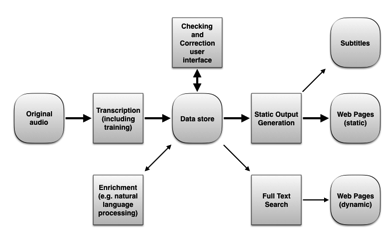
The medium of podcasting continues to grow in popularity. Americans, for example, now listen to over 21 million hours of podcasts per day. Few of those podcasts have transcripts available, so the c…
“Even though you're growing up, you should never stop having fun.” - Nina Dobrev I'm very pleased to announce the release of Factor 0.98!...
Automagically synchronize subtitles with video. Contribute to smacke/ffsubsync development by creating an account on GitHub.
(Assumed audience: folks familiar with Combine and optionally, Point-Free’s swift-composable-architecture and -parsing packages.)

FileBot is the ultimate tool for organizing and renaming your Movies, TV Shows and Anime as well as fetching subtitles and artwork. It's smart and just works.