GeistHaus
log in · sign up

https://yaacoub.github.io/feed.xml

atom
10 posts
Polling state
Status active
Last polled May 19, 2026 05:19 UTC
Next poll May 20, 2026 02:30 UTC
Poll interval 86400s
ETag W/"6a0bed8d-7e851"
Last-Modified Tue, 19 May 2026 04:56:45 GMT

Posts

Measuring Core Data and SwiftData
articlesswift-tip
Introduction
Show full content
Introduction

I originally set out with a simple challenge: build the same SwiftUI app four times, each using a different persistence method: Core Data, SwiftData, UserDefaults, and JSON files. The plan quickly shifted. As I dug deeper, the question stopped being which tool is best, because deep down, I knew that the answer was simpler than how I was trying to make it seem.

Instead, I became more interested in sharing what I actually found along the way: poll results, measurements, and a clearer understanding of both Core Data and SwiftData.

But first, let’s rewind.

What is data persistence?

When you create an app, you typically want to preserve information from one launch to the next. In general, this capability is not implicit because storage and efficiency are sacred, so your runtime environment is always stored in volatile memory. Therefore, you actually need a way to tell the machine to store the data in mass storage. That’s data persistence:

The capability of an application to save data so that it can be retrieved [in its latest version] and used later, even after the application has closed or the system has been restarted [1].

In this broader sense, there are multiple ways to achieve this goal in Swift, but these methods don’t solve the same problem or operate at the same abstraction level.

Industry Standards

In my personal projects, I exclusively use UserDefaults and SwiftData, two Apple-native technologies that feel safe, modern, and well integrated. Core Data always seemed intimidating, and rolling my own file storage felt niche. The basis of my thinking remains: if Apple provides frameworks, why not use them?

I assumed most developers shared this mindset, but I wasn’t sure. To test that assumption, I conducted a quick 24-hour poll in two Swift-focused Slack communities, gathering roughly 35 responses in each.

Poll results

The results were more nuanced than expected. No single method dominated. UserDefaults led with just over a third of responses, while non-native solutions in the “Other” category (SQLite, SQLiteData, GRDB, FMDB, etc.) followed closely with nearly a quarter.

So why focus this article primarily on Core Data and SwiftData?

Partly curiosity. Partly relevance. And partly because persistence is not about popularity, it’s about trade-offs. UserDefaults shines for simple key-value storage but quickly reaches its limits. Third-party tools offer power and flexibility that Apple’s native frameworks can often match, but at the cost of added dependencies and maintenance. That, however, is a broader debate.

Experiment Setup

This experiment builds on the MVVM task app from my article One SwiftUI App, Six Architectures. The app focuses on the four core principles of data persistence: Create, Read, Update, and Delete (CRUD). Using the same functionality across implementations ensures consistency and makes differences in structure, complexity, and performance easier to observe.

To fairly compare both methods, the View layer always remains unchanged, and I avoid framework-specific functionality that would disrupt my architecture. The goal is to see how each tool adapts to the app, not the other way around.

The full source code is available below this article.

Performance Curiosity

Beyond architecture, I was also curious about real-world performance, or, actually, simulator-world performance. For both frameworks, I measure the duration it takes to launch the app by inserting and then reading 0, 1, 1,000, or an extreme 1,000,000 entities on an iPhone 17 Pro simulator running iOS 26.2 on an M1 MacBook Air.

Using Xcode’s debug navigator, I observed:

  • CPU usage
  • Memory consumption
  • Disk activity
  • Estimated launch time

I considered comparing lines of code, but code style varies too much for that metric to be of meaningful relevance.

Core Data

Core Data is Apple’s first full-featured data persistence framework for its operating systems. Originally built for Objective-C and later ported to Swift, it has always divided opinions. Some developers say they “had very bad experiences with Core Data,” while others praise it enthusiastically: “Core Data is so good […] it’s so often misunderstood.”

Technically, Core Data is backed by SQLite, “the most used database engine in the world” [2], but it is not merely a relational database wrapper. As Krys Jurgowski explains in a Stack Overflow response:

Core Data does some serious optimizations under the hood that make accessing data much easier without having to dive deep into SQL [3].

Although Core Data can also handle undo/redo, background tasks, synchronization, versioning, and migration [4], persistence is the focus of this article, in its most basic and naïve implementation.

Code

Tasks.swift:

import CoreData
import Foundation

@objc(Task)
final class Task: NSManagedObject, Identifiable {
    @NSManaged var id: UUID
    @NSManaged var title: String
    @NSManaged var isDone: Bool
    @NSManaged var creationDate: Date

    override func awakeFromInsert() {
        super.awakeFromInsert()
        self.id = UUID()
        self.isDone = false
        self.creationDate = Date()
    }
}

TaskModel.xcdatamodel:

<?xml version="1.0" encoding="UTF-8" standalone="yes"?>
<model type="com.apple.IDECoreDataModeler.DataModel" documentVersion="1.0" lastSavedToolsVersion="24512" systemVersion="25C56" minimumToolsVersion="Automatic" sourceLanguage="Swift" userDefinedModelVersionIdentifier="">
    <entity name="Task" representedClassName="Task" syncable="YES">
        <attribute name="creationDate" attributeType="Date" usesScalarValueType="NO"/>
        <attribute name="id" attributeType="UUID" usesScalarValueType="NO"/>
        <attribute name="isDone" attributeType="Boolean" defaultValueString="NO" usesScalarValueType="YES"/>
        <attribute name="title" attributeType="String" defaultValueString="Untitled"/>
    </entity>
</model>

TaskListViewModel.swift:

import Combine
import CoreData
import Foundation

@MainActor
final class TaskListViewModel: ObservableObject {
    private let context: NSManagedObjectContext
    
    @Published private(set) var tasks: [Task] = []
    @Published var taskTitle: String = ""
    
    init(context: NSManagedObjectContext) {
        self.context = context
        fetchTasks()
    }
    
    func addTask() {
        guard !taskTitle.trimmingCharacters(in: .whitespacesAndNewlines).isEmpty else { return }
        let task = Task(context: context)
        task.title = taskTitle
        taskTitle = ""
        saveTasks()
    }
    
    func deleteTask(_ indexSet: IndexSet) {
        for index in indexSet {
            context.delete(tasks[index])
        }
        saveTasks()
    }

    func fetchTasks() {
        let request = NSFetchRequest<Task>(entityName: "Task")
        request.sortDescriptors = [NSSortDescriptor(keyPath: \Task.creationDate, ascending: true)]
        do {
            tasks = try context.fetch(request)
        } catch let error {
            fatalError("Error fetching tasks: \(error)")
        }
    }
    
    func saveTasks() {
        do {
            try context.save()
            fetchTasks()
        } catch let error {
            fatalError("Error saving tasks: \(error)")
        }
    }
    
    func toggleTask(_ id: UUID) {
        guard let index = tasks.firstIndex(where: { $0.id == id }) else { return }
        tasks[index].isDone.toggle()
        saveTasks()
    }
}

Persistence.swift:

import CoreData

struct PersistenceController {
    static let shared = PersistenceController()

    @MainActor
    static let preview: PersistenceController = {
        let result = PersistenceController(inMemory: true)
        let viewContext = result.container.viewContext
        let testingSample = 1
        for i in 0..<testingSample {
            let newItem = Task(context: viewContext)
            newItem.title = "Sample Task \(i)"
        }
        do {
            try viewContext.save()
        } catch {
            let nsError = error as NSError
            fatalError("Unresolved error \(nsError), \(nsError.userInfo)")
        }
        return result
    }()

    let container: NSPersistentContainer

    init(inMemory: Bool = false) {
        container = NSPersistentContainer(name: "TaskModel")
        if inMemory {
            container.persistentStoreDescriptions.first!.url = URL(fileURLWithPath: "/dev/null")
        }
        container.loadPersistentStores(completionHandler: { (storeDescription, error) in
            if let error = error as NSError? {
                fatalError("Unresolved error \(error), \(error.userInfo)")
            }
        })
        container.viewContext.automaticallyMergesChangesFromParent = true
    }
}
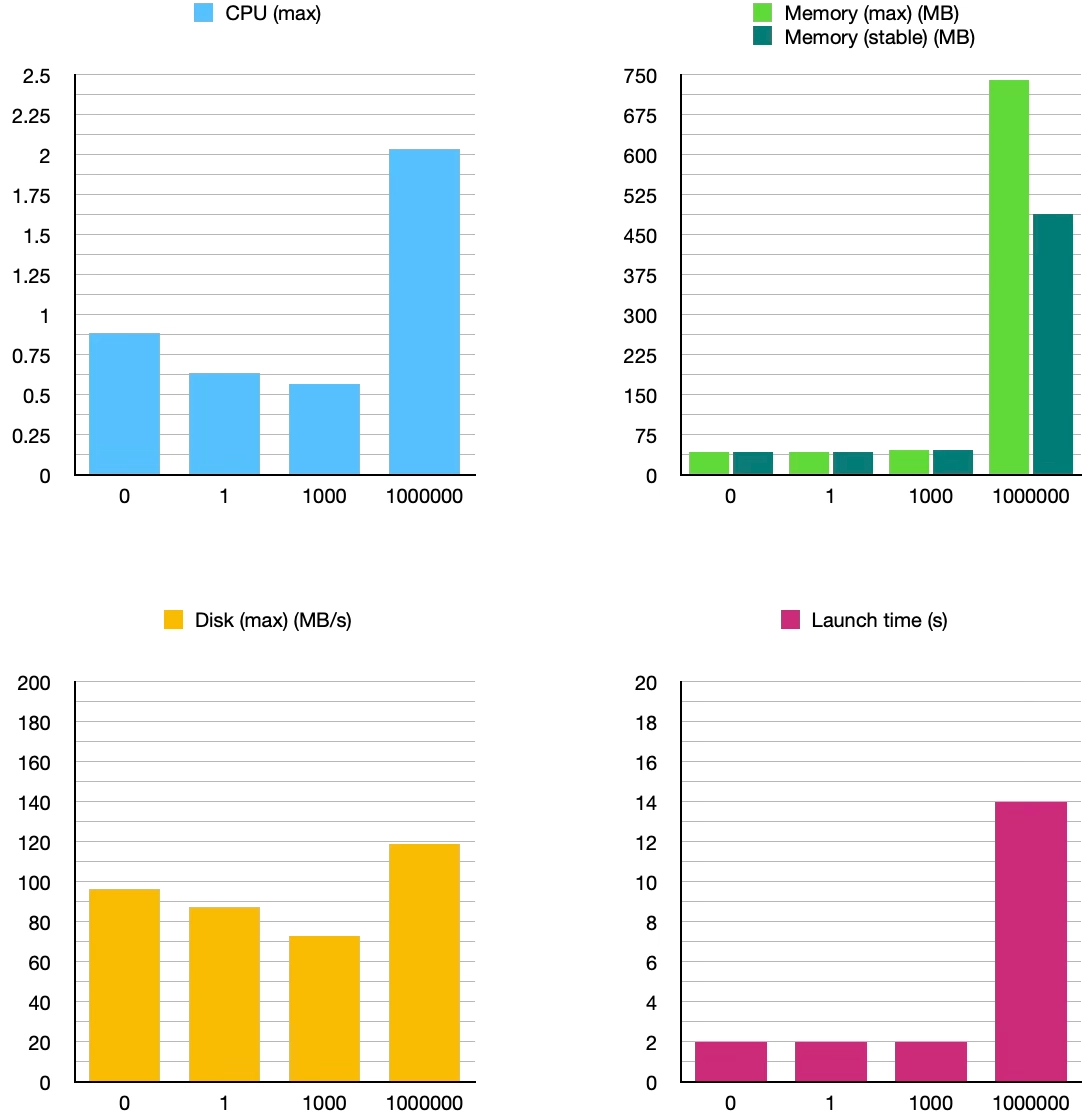
Measurements   0 1 1000 1000000 CPU (max) 0.89 0.64 0.57 2.04 Memory (max) (MB) 42.6 43.1 46.2 740.9 Memory (stable) (MB) 42.3 42.8 46.0 488.7 Disk (max) (MB/s) 96.4 87.7 72.9 118.8 Launch time (s) 2 2 2 14

Core Data Measurements

Analysis

As we multiply the number of entries by 1,000 each time, we can see that from 1 to 1,000, the measurements remain roughly similar. The jump to 1,000,000 is where things become interesting:

  • CPU usage almost triples
  • Maximum memory consumption increases by ~15×
  • Stable memory consumption increases by ~10×
  • Disk activity increases by ~2.5×
  • Estimated launch time increases by ~6×

These numbers may look alarming in absolute terms, but they are far from the 1,000× multiplier applied to the number of entities. Code choices also influence these results: SwiftUI rendering, eager fetching, and storing entities in the view model all contribute to overhead.

Core Data appears to scale sub-linearly in several dimensions. Even with naïve SwiftUI integration, it handles large datasets with relatively controlled growth in resource usage. The trade-off lies more in complexity and developer ergonomics than raw performance.

SwiftData

In Apple’s own words, SwiftData is a combination of:

Core Data’s proven persistence technology and Swift’s modern concurrency features [5].

In other terms, it represents Apple’s attempt to make persistence feel like a natural extension of SwiftUI rather than a separate, heavyweight system. Some evolved concepts include:

  • @Model instead of managed object subclasses
  • Schema inferred from types rather than .xcdatamodeld files
  • ModelContext instead of NSManagedObjectContext

Despite these changes, developers remain mixed. Some view SwiftData as a welcome simplification. Others criticize it as a “black box” that hides important behavior and limits flexibility. Another common observation is that SwiftData feels most at home inside SwiftUI views, whereas layered architectures expose its rough edges.

Code

Tasks.swift:

import Foundation
import SwiftData

@Model
final class Task: Identifiable {
    var id: UUID = UUID()
    var title: String
    var isDone: Bool = false
    var creationDate: Date = Date()
    
    init(title: String) {
        self.title = title
    }
}

TaskListViewModel.swift:

import Combine
import Foundation
import SwiftData

@MainActor
final class TaskListViewModel: ObservableObject {
    private let context: ModelContext
    
    @Published private(set) var tasks: [Task] = []
    @Published var taskTitle: String = ""
    
    init(context: ModelContext) {
        self.context = context
        fetchTasks()
    }
    
    func addTask() {
        guard !taskTitle.trimmingCharacters(in: .whitespacesAndNewlines).isEmpty else { return }
        let task = Task(title: taskTitle)
        context.insert(task)
        taskTitle = ""
        saveTasks()
    }
    
    func deleteTask(_ indexSet: IndexSet) {
        for index in indexSet {
            context.delete(tasks[index])
        }
        saveTasks()
    }
    
    func fetchTasks() {
        let request = FetchDescriptor<Task>(predicate: nil, sortBy: [SortDescriptor(\.creationDate)])
        do {
            tasks = try context.fetch(request)
        } catch let error {
            fatalError("Error fetching tasks: \(error)")
        }
    }
    
    func saveTasks() {
        do {
            try context.save()
            fetchTasks()
        } catch let error {
            fatalError("Error saving tasks: \(error)")
        }
    }
    
    func toggleTask(_ id: UUID) {
        guard let index = tasks.firstIndex(where: { $0.id == id }) else { return }
        tasks[index].isDone.toggle()
        saveTasks()
    }
}

Persistence.swift:

import SwiftData

struct PersistenceController {
    static let shared = PersistenceController()

    @MainActor
    static let preview: PersistenceController = {
        let result = PersistenceController(inMemory: true)
        let context = result.container.mainContext
        let testingSample = 1
        for i in 0..<testingSample {
            let newItem = Task(title: "Sample Task \(i)")
            context.insert(newItem)
        }
        do {
            try context.save()
        } catch {
            fatalError("Unresolved error: \(error)")
        }
        return result
    }()

    let container: ModelContainer

    init(inMemory: Bool = false) {
        let schema = Schema([Task.self])
        let configuration = ModelConfiguration(schema: schema, isStoredInMemoryOnly: inMemory)
        do {
            container = try ModelContainer(for: schema, configurations: [configuration])
        } catch {
            fatalError("Could not create ModelContainer: \(error)")
        }
    }
}
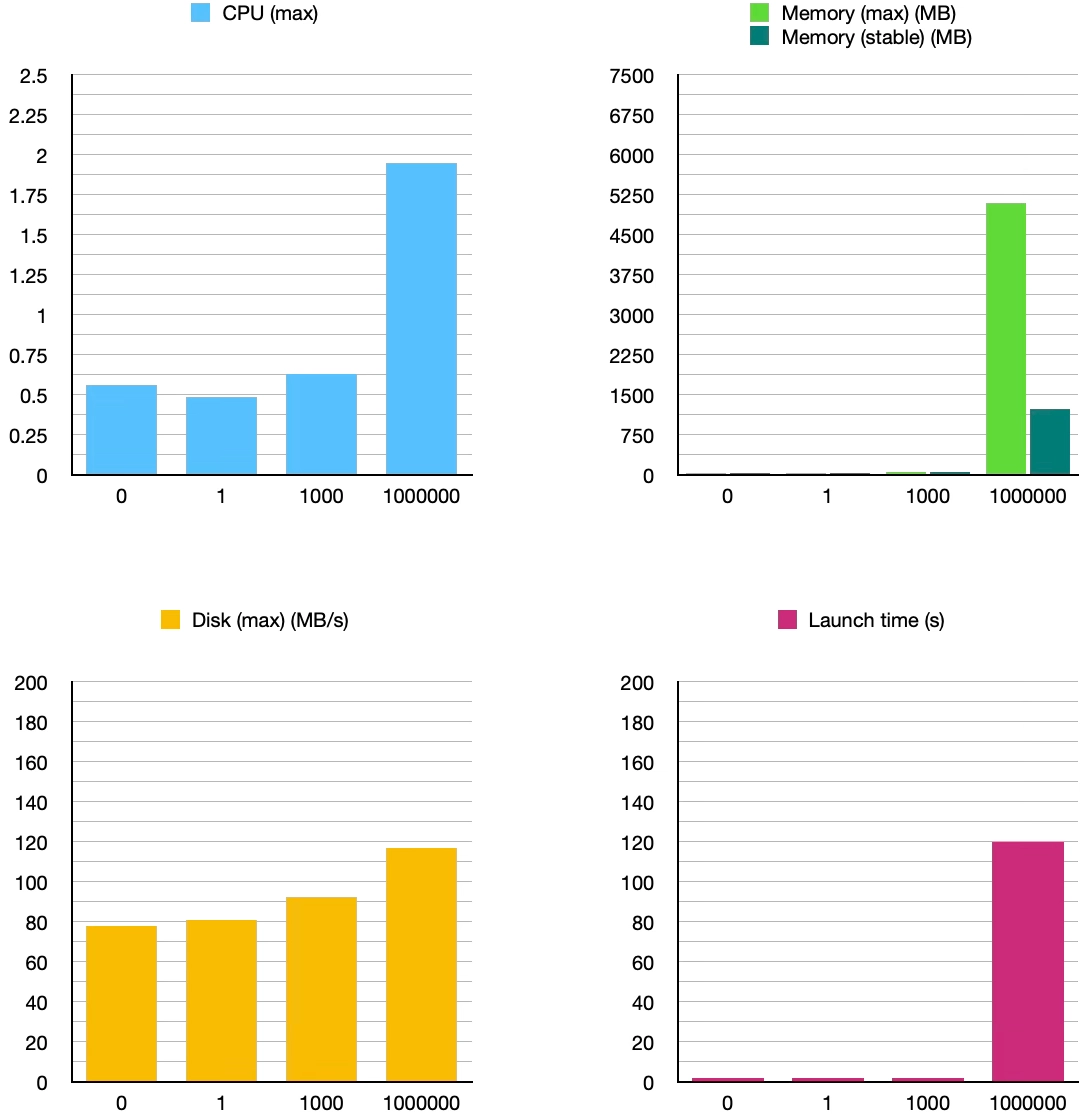
Measurements   0 1 1000 1000000 CPU (max) 0.56 0.49 0.63 1.95 Memory (max) (MB) 42.8 43.2 47.8 5100 Memory (stable) (MB) 42.5 43.0 47.6 1240 Disk (max) (MB/s) 78.2 81.0 92.5 117.2 Launch time (s) 2 2 2 120

SwiftData Measurements

Analysis

For small datasets, SwiftData behaves very similarly to Core Data. CPU usage, memory consumption, disk activity, and estimated launch times remain nearly identical from 0 to 1,000 entities.

The divergence appears at 1,000,000 entities:

  • Maximum memory consumption increases dramatically by ~107×, or ~7× compared with Core Data
  • Stable memory usage also significantly increases by ~26×, or ~2.5× compared with Core Data
  • Estimated launch time jumps by 60×, or ~8.5× compared with Core Data

In this setup, SwiftData appears to materialize more data in memory, possibly due to eager fetching, lack of batching, or current framework optimizations.

Perhaps with careful tuning, results could differ. Still, it seems that abstraction has a cost, especially at scale [6].

Core Data vs. SwiftData. What actually matters?

Well first, Apple writes Core Data with a space and SwiftData without.

Otherwise, from this experiment, some observations emerge:

SwiftData builds on Core Data, which in turn builds on SQLite. This can lead to more predictable performance characteristics in Core Data, particularly in large datasets and naïve implementations, while SwiftData prioritizes ergonomics and syntax. Indeed, for small to medium datasets, differences are negligible. At extreme scales, Core Data’s mature optimizations provide more appropriate behavior.

Considering architectural compatibility, both SwiftData and Core Data can adapt to diverse architectural patterns. In this case, the newer framework’s syntax looks increasingly similar to its predecessor.

Again, these results reflect a naïve, eager-loading implementation without batching, pagination, or advanced fetch optimizations. Different architectural choices or framework-idiomatic patterns may significantly alter performance characteristics.

Conclusion

This article started as a comparison. It ended as a reminder: persistence is not about choosing the best tool, it’s about choosing the right trade-offs.

If I were starting a new SwiftUI app today:

  • I would choose SwiftData for small to medium apps, rapid prototyping, or projects deeply integrated with SwiftUI.
  • I would choose Core Data for large datasets, long-lived projects, or architectures requiring fine-grained control.

UserDefaults still has its place for trivial settings, and third-party databases remain compelling, notably for cross-platform needs or advanced querying.

Now you can disagree, because there’s no right, and honestly, that’s the point.

https://yaacoub.github.io/articles/swift-tip/measuring-core-data-and-swiftdata
Extensions
1 App, 20 Programming Languages (Part 2)
articlescode-dome
Introduction
Show full content
Introduction

If you haven’t read the first part of this challenge, go check it out! (1 App, 20 Programming Languages (Part 1)).

Go

Go, like Golang, and not to be confused with the Go game, is a relatively new programming language released in 2009. That’s the first programming language younger than me. It’s funny how the older languages have an oligopoly (a market dominated by a small number of actors), reminds me of real-world politics (oh, part 2 already punches hard!).

To focus back on the code, Go looks clean, like other modern languages, and the differentiation between a definition := and redefinition is interesting =. However, I found two major inconveniences. First, not unique to Go is the necessity to create other files. In this case, a mod file and an individual main file that would have the code common to both files. Second, Go is the only language in this challenge where I chose to abandon floating-point arithmetic for this implementation, because I couldn’t reliably match Test 7’s precision. So I had to come out with the big guns, and by that I mean the math/big library. Hence, coding took a little more time than I would’ve expected from that newer language.

calculator.go:

package main

// IMPORTS
// =======

import (
    "math/big"
    "regexp"
    "strconv"
    "strings"
)

// FUNCTIONS
// =========

func GetResult(calculation string) string {
    calculation = sanitizeCalculation(calculation)
    result := new(big.Rat)
    result.SetInt64(0)

    for _, i := range strings.Split(calculation, "+") {
        subResult := big.NewRat(1, 1)
        for _, j := range strings.Split(i, "*") {
            if strings.HasPrefix(j, "1/") {
                sanitizedJ := strings.TrimPrefix(j, "1/")
				denom := new(big.Rat)
				denom.SetString(sanitizedJ)
                if denom.Sign() == 0 { return "Undefined" }
                subResult.Quo(subResult, denom)
            } else {
				factor := new(big.Rat)
				factor.SetString(j)
                subResult.Mul(subResult, factor)
            }
        }
        result.Add(result, subResult)
    }

    f, _ := result.Float64()
    return strconv.FormatFloat(f, 'f', -1, 64)
}

func sanitizeCalculation(calculation string) string {
    calc := regexp.MustCompile(`\s+`).ReplaceAllString(calculation, "")			// Remove all spaces
    calc = regexp.MustCompile(`\++`).ReplaceAllString(calc, "+")				// ++ -> +
    calc = regexp.MustCompile(`-+`).ReplaceAllString(calc, "-")					// -- -> -
    calc = regexp.MustCompile(`\*\+`).ReplaceAllString(calc, "*")				// *+ -> *
    calc = regexp.MustCompile(`/\+`).ReplaceAllString(calc, "/")				// /+ -> /
    calc = regexp.MustCompile(`\+-`).ReplaceAllString(calc, "-")				// +- -> -
    calc = regexp.MustCompile(`(\d)-(\d)`).ReplaceAllString(calc, "$1+-$2")		// a-b -> a+-b
    calc = strings.ReplaceAll(calc, "/", "*1/")									// a/b -> a*1/b
    return calc
}

main.go:

//go:build !testmain
// +build !testmain

package main

// IMPORTS§
// =======

import (
    "bufio"
    "fmt"
    "os"
    "strings"
)

// FUNCTIONS
// =========

func askQuestion() {
    reader := bufio.NewReader(os.Stdin)
    fmt.Print("Your calculation: ")
    input, _ := reader.ReadString('\n')
    input = strings.TrimSpace(input)
    result := GetResult(input)
    fmt.Printf(" = %s\n", result)
}

// MAIN
// ====

func main() {
    askQuestion()
}

tests.go:

//go:build testmain
// +build testmain

package main

// IMPORTS
// =======

import (
    "fmt"
    "strconv"
)

// FUNCTIONS
// =========

func runTests() {
    fmt.Printf("Test 01: %v\n", GetResult("2 + 3") == fmt.Sprint(2 + 3))
    fmt.Printf("Test 02: %v\n", GetResult("2 - 3") == fmt.Sprint(2 - 3))
    fmt.Printf("Test 03: %v\n", GetResult("2 * 3") == fmt.Sprint(2 * 3))
    fmt.Printf("Test 04: %v\n", GetResult("2 / 3") == fmt.Sprint(2.0 / 3.0))
    fmt.Printf("Test 05: %v\n", GetResult("2 / 0") == "Undefined")
    fmt.Printf("Test 06: %v\n", GetResult("  7 +   2 * 3 - 4 / -2 ") == fmt.Sprint(  7 +   2 * 3 - 4 / -2 ))
    fmt.Printf("Test 07: %v\n", GetResult("  7 +   2 / 3 - 4 * +-2 ") == strconv.FormatFloat(  7 +   2.0 / 3 - 4 * +-2 , 'f', -1, 64))
    fmt.Printf("Test 08: %v\n", GetResult("2.0 + 3.0") == fmt.Sprint(2.0 + 3.0))
}

// MAIN
// ====

func main() {
	runTests()
}
Rust

I was wondering if Rust was much older than Go. Surprisingly, it’s even more recent! It first appeared in 2012, and I never would’ve thought. Then again, when doing the tests, it seemed intentionally strict about arithmetic between integer and floating-point types. Of course, this doesn’t mean anything on its own, but it tingled my spidey sense.

This time, I only had one new file to add, a Cargo.toml. Also, it was more conventional to use folders to separate the files, so I did so. Also-also, I used true tests this time instead of printing the results to the console, because why not? It was easy. One interesting discovery that relates to the mentioned arithmetic problem is the strict, and I mean very strict, difference between a string and a static string. In practice, this means that I should convert a string literal, which is static, to a string type in order to return it from a function that only returns string types and not static strings, which include string literals. Clear? In short, it seems to me that this is always the case: string ≠ static string.

Rust originated at Mozilla to address performance and memory-safety issues common in C and C++, and today it is used in parts of Firefox and many other systems projects.

calculator.rs:

// IMPORTS
// =======

use regex::Regex;
use std::io::{self, Write};

// FUNCTIONS
// =========

#[allow(dead_code)]
fn ask_question() {
    print!("Your calculation: ");
    io::stdout().flush().ok();
    let mut input = String::new();
    if io::stdin().read_line(&mut input).is_ok() {
        let result = get_result(&input);
        println!(" = {}", result);
    }
}

pub fn get_result(calculation: &str) -> String {
    let calculation = sanitize_calculation(calculation);
    let mut result = 0.0f64;

    for i in calculation.split('+') {
        let mut sub_result = 1.0f64;
        for j in i.split('*') {
            if let Some(sanitized_j) = j.strip_prefix("1/") {
                if sanitized_j.parse().unwrap_or(f64::NAN) == 0.0 { return "Undefined".to_string(); }
                sub_result /= sanitized_j.parse().unwrap_or(f64::NAN);
            } else {
                sub_result *= j.parse().unwrap_or(f64::NAN);
            }
        }
        result += sub_result;
    }

    format!("{}", result)
}

fn sanitize_calculation(calculation: &str) -> String {
    let mut calc = Regex::new(r"\s+").unwrap().replace_all(calculation, "").into_owned();   // Remove all spaces
    calc = Regex::new(r"\++").unwrap().replace_all(&calc, "+").into_owned();                // ++ -> +
    calc = Regex::new(r"-+").unwrap().replace_all(&calc, "-").into_owned();                 // -- -> -
    calc = Regex::new(r"\*\+").unwrap().replace_all(&calc, "*").into_owned();               // *+ -> *
    calc = Regex::new(r"/\+").unwrap().replace_all(&calc, "/").into_owned();                // /+ -> /
    calc = Regex::new(r"\+-").unwrap().replace_all(&calc, "-").into_owned();                // +- -> -
    calc = Regex::new(r"(\d)-(\d)").unwrap().replace_all(&calc, "$1+-$2").into_owned();     // a-b -> a+-b
    calc = Regex::new(r"\/").unwrap().replace_all(&calc, "*1/").into_owned();               // a/b -> a*1/b
    calc
}

// MAIN
// ====

#[allow(dead_code)]
fn main() {
    ask_question();
}

tests.rs:

// IMPORTS
// =======

#[path = "../src/calculator.rs"]
mod calculator;

use calculator::get_result;

// FUNCTIONS
// =========

#[test]
fn run_tests() {
    assert_eq!(get_result("2 + 3"), format!("{}", 2 + 3));
    assert_eq!(get_result("2 - 3"), format!("{}", 2 - 3));
    assert_eq!(get_result("2 * 3"), format!("{}", 2 * 3));
    assert_eq!(get_result("2 / 3"), format!("{}", 2.0 / 3.0));
    assert_eq!(get_result("2 / 0"), "Undefined");
    assert_eq!(get_result("  7 +   2 * 3 - 4 / -2 "), format!("{}",   7.0 +   2.0 * 3.0 - 4.0 / -2.0 ));
    assert_eq!(get_result("  7 +   2 / 3 - 4 * +-2 "), format!("{}",   7.0 +   2.0 / 3.0 - 4.0 * -2.0 ));
    assert_eq!(get_result("2.0 + 3.0"), format!("{}", 2.0 + 3.0));
}

// MAIN
// ====

fn main() {
    run_tests();
}
Kotlin

I seem to have joined the newbies club because Kotlin is a relatively recent language, first appearing in 2011. I’m an avid Swift developer, so as soon as I started using Kotlin, the similarities were screaming at me: optionals, types, syntax,… Besides, the containerization (which is another subject) and float formatting being tedious, everything else was as smooth as butter.

Oh, and why doesn’t my VS Code have built-in syntax highlighting for it? Am I missing something? I know the language is developed by JetBrains, whose IDEs rival VS Code, so does this explain it? So many questions, so few answers. Yet there seems to be change; JetBrains recently announced that they were working on a Kotlin Language Server and extension for VS Code.

calculator.kt:

// IMPORTS
// =======

import java.io.BufferedReader
import java.io.InputStreamReader

// FUNCTIONS
// =========

fun askQuestion() {
    print("Your calculation: ")
    val reader = BufferedReader(InputStreamReader(System.`in`))
    val calculation = reader.readLine()
    val result = getResult(calculation)
    println(" = $result")
}

fun getResult(raw: String?): String {
    val calculation = sanitizeCalculation(raw ?: "")
    var result = 0.0

    for (i in calculation.split("+")) {
        var subResult = 1.0
        for (j in i.split("*")) {
            if (j.startsWith("1/")) {
                val sanitizedJ = j.removePrefix("1/")
                val value = sanitizedJ.toDoubleOrNull() ?: Double.NaN
                if (value == 0.0) return "Undefined"
                subResult /= value
            } else {
                subResult *= j.toDoubleOrNull() ?: Double.NaN
            }
        }
        result += subResult
    }

    if ((result == result.toInt().toDouble()) && !calculation.contains(".")) {
        return result.toInt().toString()
    }
    return result.toString()
}

fun sanitizeCalculation(calculation: String): String {
    return calculation
        .replace("""\s+""".toRegex(), "")               // Remove all spaces
        .replace("""\++""".toRegex(), "+")              // ++ -> +
        .replace("""-+""".toRegex(), "-")               // -- -> -
        .replace("""\*\+""".toRegex(), "*")             // *+ -> *
        .replace("""/\+""".toRegex(), "/")              // /+ -> /
        .replace("""\+-""".toRegex(), "-")              // +- -> -
        .replace("""(\d)-(\d)""".toRegex(), "$1+-$2")   // a-b -> a+-b
        .replace("/", "*1/")                            // a/b -> a*1/b
}

// MAIN
// ====

fun main() {
    askQuestion()
}

tests.kt:

// FUNCTIONS
// =========

fun runTests() {
    println("Test 01: " + (getResult("2 + 3") == "${2 + 3}"))
    println("Test 02: " + (getResult("2 - 3") == "${2 - 3}"))
    println("Test 03: " + (getResult("2 * 3") == "${2 * 3}"))
    println("Test 04: " + (getResult("2 / 3") == "${2.0 / 3}"))
    println("Test 05: " + (getResult("2 / 0") == "Undefined"))
    println("Test 06: " + (getResult("  7 +   2 * 3 - 4 / -2 ") == "${  7 +   2 * 3 - 4 / -2 }"))
    println("Test 07: " + (getResult("  7 +   2 / 3 - 4 * +-2 ") == "${  7 +   2.0 / 3 - 4 * +-2 }"))
    println("Test 08: " + (getResult("2.0 + 3.0") == "${2.0 + 3.0}"))
}

// MAIN
// ====

fun main() {
    runTests()
}
Lua

This, I think, is the first time I have ever heard or been exposed to the Lua programming language. I thought that it would also be part of the younger club, but I was totally wrong. It is actually closer to JavaScript, having been introduced in 1993.

In some ways, the language seems modern, like a blend of JavaScript and Python. In other ways, it has unique quirks. Lua doesn’t use regular expressions, but its own pattern-matching system, which is somewhat annoying. In fact, I lost half an hour to find out that - is also a special character that should be escaped, not using a backslash but a percentage symbol. It also stems from the rare breed that allows the execution of code outside of any block, essentially meaning that the entire file is the main function.

Also interesting how Lua uses the colon, like other languages use the dot for chaining. Makes me wonder why some like to have a unique syntax from “the norm”. What gives? Well, I looked up the answer, so let me explain. In Lua, the dot is the table-access operator, which allows us to write this: obj.func(obj, arg1, arg2); similarly to other languages. On the other hand, the colon is syntactic sugar that passes the object as the first argument, making the code shorter: obj:func(arg1, arg2); where other languages would implicitly pass self to the function.

calculator.lua:

-- FUNCTIONS
-- =========

local function sanitizeCalculation(calculation)
    calculation = calculation:gsub("%s+", "")               -- Remove all spaces
    calculation = calculation:gsub("%++", "+")              -- ++ -> +
    calculation = calculation:gsub("%-+", "-")              -- -- -> -
    calculation = calculation:gsub("%*%+", "*")             -- *+ -> *
    calculation = calculation:gsub("/%+", "/")              -- /+ -> /
    calculation = calculation:gsub("%+%-", "-")             -- +- -> -
    calculation = calculation:gsub("(%d)-(%d)", "%1+-%2")   -- a-b -> a+-b
    calculation = calculation:gsub("/", "*1/")              -- a/b -> a*1/b
    return calculation
end

local function getResult(calculation)
    calculation = sanitizeCalculation(calculation or "")
    local result = 0.0

    for i in calculation:gmatch("([^%+]+)") do
        local subResult = 1.0
        for j in i:gmatch("([^%*]+)") do
            if j:sub(1, 2) == "1/" then
                local sanitizedJ = j:sub(3)
                if tonumber(sanitizedJ) == 0 then return "Undefined" end
                subResult = subResult / tonumber(sanitizedJ)
            else
                subResult = subResult * tonumber(j)
            end
        end
        result = result + subResult
    end

    if result == math.tointeger(result) and not calculation:find("/") and not calculation:find("%.") then
        return tostring(math.tointeger(result))
    end
    return tostring(result)
end

local function askQuestion()
    io.write("Your calculation: ")
    local calculation = io.read("*l") or ""
    local result = getResult(calculation)
    print(" = " .. result)
end

-- MAIN
-- ====

-- If required as a module, expose functions; otherwise run CLI
if pcall(debug.getlocal, 4, 1) then
    return { getResult = getResult }
else
    askQuestion()
end

tests.lua:

-- IMPORTS
-- =======

local calc = require("calculator")
local getResult = calc.getResult

-- FUNCTIONS
-- =========

local function runTests()
    print("Test 01: " .. tostring(getResult("2 + 3") == tostring(2 + 3)))
    print("Test 02: " .. tostring(getResult("2 - 3") == tostring(2 - 3)))
    print("Test 03: " .. tostring(getResult("2 * 3") == tostring(2 * 3)))
    print("Test 04: " .. tostring(getResult("2 / 3") == tostring(2 / 3)))
    print("Test 05: " .. tostring(getResult("2 / 0") == "Undefined"))
    print("Test 06: " .. tostring(getResult("  7 +   2 * 3 - 4 / -2 ") == tostring(  7 +   2 * 3 - 4 / -2 )))
    print("Test 07: " .. tostring(getResult("  7 +   2 / 3 - 4 * +-2 ") == tostring(  7 +   2 / 3 - 4 * -2 )))
    print("Test 08: " .. tostring(getResult("2.0 + 3.0") == tostring(2.0 + 3.0)))
end

-- MAIN
-- ====

runTests()
Assembly

I tried, and I failed. I’ve been dreading this moment ever since I saw that Assembly was in the top 20, which meant that I had to work with it. I took courses working with Assembly or Assembly-like code on paper, but building anything with it requires not only a deep understanding of the language but also understanding the system on which the language is running. I know neither that well. After attempting with the x86-64 NASM syntax, I gave up.

The files I had were twice as long as others, the commands were less readable, and anything not remotely basic had to be recreated manually. With pure perseverance and more tutorials, maybe I could’ve done it, but I just didn’t want to go down that rabbit hole. Lots of developers didn’t want to, because we wouldn’t have created all those other programming languages that are easier to read, write, and collaborate with.

Ruby

Ruby looks like Python and Lua, and was released in the same era: the mid-1990s. I know Ruby mainly from installing the gems that make my website codebase easier to maintain. That said, it’s a very pleasant language and works great as expected.

Now, I know that I’ve been bombarding you with rhetorical questions and answers here and there, so let me give you another one: what’s made Python more popular than Ruby and Lua, for instance? They look and feel the same, but I haven’t dived deep into the lore and the communities surrounding them to know more. Python excels in general-purpose domains, data science, and web development, and it has a wide range of libraries and community support. It also had a couple of years of head start and worked well with scientists and analysts, paving the way for a feedback loop: students learn Python, workforce demands for Python increase, and more projects utilize Python.

calculation.rb:

# FUNCTIONS
# =========

def ask_question
    print 'Your calculation: '
    calculation = STDIN.gets
    return unless calculation
    result = get_result(calculation)
    puts " = #{result}"
end

def get_result(calculation)
    calculation = sanitize_calculation(calculation)
    result = 0.0

    calculation.split('+').each do |i|
        sub_result = 1.0
        i.split('*').each do |j|
            if j.start_with?('1/')
                sanitized_j = j.gsub(%r{1/}, '')
                return 'Undefined' if sanitized_j.to_f == 0.0
                sub_result /= sanitized_j.to_f
            else
                sub_result *= j.to_f
            end
        end
        result += sub_result
    end

    if result == result.to_i and !calculation.include?("/") and !calculation.include?(".") then
        return result.to_i.to_s
    end
    result.to_s
end

def sanitize_calculation(calculation)
    calculation
        .gsub(/\s+/, '')                # Remove all spaces
        .gsub(/\++/, '+')               # ++ -> +
        .gsub(/-+/, '-')                # -- -> -
        .gsub(/\*\+/, '*')              # *+ -> *
        .gsub(/\/\+/, '/')              # /+ -> /
        .gsub(/\+-/, '-')               # +- -> -
        .gsub(/(\d)-(\d)/, '\1+-\2')    # a-b -> a+-b
        .gsub(/\//, '*1/')              # a/b -> a*1/b
end

# MAIN
# ====

if __FILE__ == $PROGRAM_NAME
    ask_question
end

tests.rb:

# IMPORTS
# =======

require_relative './calculator'

# FUNCTIONS
# =========

def run_tests
  puts "Test 01: #{get_result('2 + 3') == (2 + 3).to_s}"
  puts "Test 02: #{get_result('2 - 3') == (2 - 3).to_s}"
  puts "Test 03: #{get_result('2 * 3') == (2 * 3).to_s}"
  puts "Test 04: #{get_result('2 / 3') == (2 / 3.0).to_s}"
  puts "Test 05: #{get_result('2 / 0') == 'Undefined'}"
  puts "Test 06: #{get_result('  7 +   2 * 3 - 4 / -2 ') == (  7 +   2 * 3 - 4 / -2.0 ).to_s}"
  puts "Test 07: #{get_result('  7 +   2 / 3 - 4 * +-2 ') == (  7 +   2 / 3.0 - 4 * +-2 ).to_s}"
  puts "Test 08: #{get_result('2.0 + 3.0') == (2.0 + 3.0).to_s}"
end

# MAIN
# ====

if __FILE__ == $PROGRAM_NAME
  run_tests
end
Dart

Dart feels like a modern language, very easy to use. Again, it feels like I’m back at home using Swift types and optionals. The only feature that’s not modern is the semicolons. Love them or hate them, I don’t love them (I wouldn’t say I hate them, but I can still live with them; however, they should retire already). Dart was released by Google in 2011. Why do I say that only now? Because it makes a perfect transition to the next language!

calculation.dart:

// IMPORTS
// =======

import 'dart:io';

// FUNCTIONS
// =========

void askQuestion() {
    stdout.write("Your calculation: ");
    final calculation = stdin.readLineSync();
    final result = getResult(calculation);
    stdout.writeln(" = $result");
}

String getResult(String calculation) {
    calculation = sanitizeCalculation(calculation);
    double result = 0.0;

    for (final i in calculation.split("+")) {
        double subResult = 1.0;
        for (final j in i.split("*")) {
            if (j.startsWith("1/")) {
                final sanitizedJ = j.replaceAll(RegExp(r"1/"), "");
                final value = double.tryParse(sanitizedJ) ?? double.nan;
                if (value == 0) return "Undefined";
                subResult /= value;
            } else {
                final value = double.tryParse(j) ?? double.nan;
                subResult *= value;
            }
        }
        result += subResult;
    }

    if (result == result.toInt() && !calculation.contains("/") && !calculation.contains(".")) {
        return result.toInt().toString();
    }
    return result.toString();
}

String sanitizeCalculation(String calculation) {
    return calculation
        .replaceAll(RegExp(r"\s+"), "")                                                 // Remove all spaces
        .replaceAll(RegExp(r"\++"), "+")                                                // ++ -> +
        .replaceAll(RegExp(r"-+"), "-")                                                 // -- -> -
        .replaceAll(RegExp(r"\*\+"), "*")                                               // *+ -> *
        .replaceAll(RegExp(r"/\+"), "/")                                                // /+ -> /
        .replaceAll(RegExp(r"\+-"), "-")                                                // +- -> -
        .replaceAllMapped(RegExp(r"(\d)-(\d)"), (match) => "${match[1]}+-${match[2]}")  // a-b -> a+-b
        .replaceAll("/", "*1/");                                                        // a/b -> a*1/b
}

// MAIN
// ====

void main(List<String> args) {
    askQuestion();
}

tests.dart:

// IMPORTS
// =======

import 'calculator.dart';

// FUNCTIONS
// =========

void runTests() {
    print('Test 01: ${getResult("2 + 3") == "${2 + 3}"}');
    print('Test 02: ${getResult("2 - 3") == "${2 - 3}"}');
    print('Test 03: ${getResult("2 * 3") == "${2 * 3}"}');
    print('Test 04: ${getResult("2 / 3") == "${2 / 3}"}');
    print('Test 05: ${getResult("2 / 0") == "Undefined"}');
    print('Test 06: ${getResult("  7 +   2 * 3 - 4 / -2 ") == "${  7 +   2 * 3 - 4 / -2 }"}');
    print('Test 07: ${getResult("  7 +   2 / 3 - 4 * +-2 ") == "${  7 +   2 / 3 - 4 * -2 }"}');
    print('Test 08: ${getResult("2.0 + 3.0") == "${2.0 + 3.0}"}');
}

// MAIN
// ====

void main(List<String> args) {
    runTests();
}
Swift

Swift is a language released by Apple in 2014 to rival Taylor Swift’s music. I use it to develop my applications on Apple devices. Usually, I develop with Xcode and not the command line. I quickly realized that it was painful. Compilation times are always as long, but compiling multiple files at once is tedious. Now, yes, I use the cat command to combine my two files so that I can run my tests, and I use ugly if-statements to conditionally execute the main functions. Instead, I could use the Swift Package Manager, and it can be more elegant, but I’m doing scripting here, and there’s nothing less tedious than having to create more folders and files for simple code. The Swift developer community also builds tools like swift-sh, which can make scripting easier.

Concerning input sanitization, there are multiple ways to work with regular expressions. This comes after enlightenment from a more experienced member of the Swift community. One way of preventing the redundancy of escaping characters with a backslash is by using raw string literals #"..."# with the replacingOccurrences function. Another newer solution is to let go of the string and use regex literals. So, instead of this: "(\\d)-(\\d)", I’d simply write /(\d)-(\d)/ with the replacing function (the slash still needs to be escaped though!). Finally, there is also the RegexBuilder, more verbose but more readable. Regex literals didn’t work for me, even with the latest Swift 6.2 version, and it seems that they have to be explicitly enabled somewhere. Hence, I opted for one last solution: extended regex literals #/.../#!

calculator.swift:

// IMPORTS
// =======

import Foundation

// FUNCTIONS
// =========

func askQuestion() {
    print("Your calculation: ", terminator: "")
    guard let calculation = readLine() else { return }
    let result = getResult(calculation)
    print(" = \(result)")
}

func getResult(_ calculation: String) -> String {
    let sanitized = sanitizeCalculation(calculation)
    var result = 0.0

    for i in sanitized.split(separator: "+") {
        var subResult = 1.0
        for j in i.split(separator: "*") {
            if j.hasPrefix("1/") {
                let sanitizedJ = j.replacingOccurrences(of: "1/", with: "")
                guard let value = Double(sanitizedJ) else { continue }
                if value == 0 { return "Undefined" }
                subResult /= value
            } else {
                guard let value = Double(j) else { continue }
                subResult *= value
            }
        }
        result += subResult
    }

    if result == Double(Int(result)) && !calculation.contains("/") && !calculation.contains(".") {
        return String(Int(result))
    }
    return String(result)
}

func sanitizeCalculation(_ calculation: String) -> String {
    return calculation
        .replacing(#/\s+/#, with: "")                                     // Remove all spaces
        .replacing(#/\++/#, with: "+")                                    // ++ -> +
        .replacing(#/-+/#, with: "-")                                     // -- -> -
        .replacing(#/\*\+/#, with: "*")                                   // *+ -> *
        .replacing(#//\+/#, with: "/")                                   // /+ -> /
        .replacing(#/\+-/#, with: "-")                                    // +- -> -
        .replacing(#/(\d)-(\d)/#) { match in "\(match.1)+-\(match.2)" }   // a-b -> a+-b
        .replacing(#///#, with: "*1/")                                   // a/b -> a*1/b
}

// MAIN
// ====

let file = URL(fileURLWithPath: #file).lastPathComponent
let isCalculator = CommandLine.arguments.first.map { URL(fileURLWithPath: $0).lastPathComponent == file } ?? false
let isRunningTests = CommandLine.arguments.contains(where: { $0.hasSuffix("tests.swift") })
if isCalculator && !isRunningTests {
    askQuestion()
}

tests.swift:

// IMPORTS
// =======

import Foundation

// FUNCTIONS
// =========

func runTests() {
    print("Test 01: \(getResult("2 + 3") == "\(2 + 3)")")
    print("Test 02: \(getResult("2 - 3") == "\(2 - 3)")")
    print("Test 03: \(getResult("2 * 3") == "\(2 * 3)")")
    print("Test 04: \(getResult("2 / 3") == "\(2.0 / 3.0)")")
    print("Test 05: \(getResult("2 / 0") == "Undefined")")
    print("Test 06: \(getResult("  7 +   2 * 3 - 4 / -2 ") == "\(  7 +   2.0 * 3 - 4 / -2 )")")
    print("Test 07: \(getResult("  7 +   2 / 3 - 4 * +-2 ") == "\(  7 +   2.0 / 3 - 4 * -2 )")")
    print("Test 08: \(getResult("2.0 + 3.0") == "\(2.0 + 3.0)")")
}

// MAIN
// ====

runTests()
R

I had never fully understood the extent or power of R. I only learnt to use it for complex calculations, but the language is very capable outside of that.

One confusing thing I stumbled upon is the readline() function that only works reliably in interactive sessions. So I instead used readLines on stdin, which makes it very explicit.

There also seems to be something going on between R and Perl. In fact, the function used to split strings has a parameter called perl. This intrigued me, so I looked into it, and it turns out that the function uses PCRE, Perl-Compatible Regular Expression Engine.

I’d also like to shed light on the default file extension: an uppercase R. Some systems are case-sensitive, and usually all extensions are in lowercase, so it’s an interesting and weird choice there.

calculator.R:

# FUNCTIONS
# =========

ask_question <- function() {
    cat("Your calculation: ")
    calculation <- readLines(con = "stdin", n = 1)
    result <- get_result(calculation)
    cat(" = ", result, "\n", sep = "")
}

get_result <- function(calculation) {
    calculation <- sanitize_calculation(calculation)
    result <- 0.0

    for (i in strsplit(calculation, "\\+", perl = TRUE)[[1]]) {
        sub_result <- 1.0
        for (j in strsplit(i, "\\*", perl = TRUE)[[1]]) {
            if (grepl("^1/", j)) {
                sanitized_j <- sub("^1/", "", j)
                value <- as.numeric(sanitized_j)
                if (as.numeric(sanitized_j) == 0) return("Undefined")
                sub_result <- sub_result / as.numeric(sanitized_j)
            } else {
                sub_result <- sub_result * as.numeric(j)
            }
        }
        result <- result + sub_result
    }

    as.character(result)
}

sanitize_calculation <- function(calculation) {
    calculation <- gsub("\\s+", "", calculation)                # Remove all spaces
    calculation <- gsub("\\++", "+", calculation)               # ++ -> +
    calculation <- gsub("-+", "-", calculation)                 # -- -> -
    calculation <- gsub("\\*\\+", "*", calculation)             # *+ -> *
    calculation <- gsub("/\\+", "/", calculation)               # /+ -> /
    calculation <- gsub("\\+-", "-", calculation)               # +- -> -
    calculation <- gsub("(\\d)-(\\d)", "\\1+-\\2", calculation) # a-b -> a+-b
    calculation <- gsub("/", "*1/", calculation)                # a/b -> a*1/b
    calculation
}

# MAIN
# ====

if (identical(sys.nframe(), 0L)) {
    ask_question()
}

tests.R:

# IMPORTS
# =======

source("calculator.R")

# FUNCTIONS
# =========

run_tests <- function() {
  cat("Test 01: ", get_result("2 + 3") == as.character(2 + 3), "\n", sep = "")
  cat("Test 02: ", get_result("2 - 3") == as.character(2 - 3), "\n", sep = "")
  cat("Test 03: ", get_result("2 * 3") == as.character(2 * 3), "\n", sep = "")
  cat("Test 04: ", get_result("2 / 3") == as.character(2 / 3), "\n", sep = "")
  cat("Test 05: ", get_result("2 / 0") == "Undefined", "\n", sep = "")
  cat("Test 06: ", get_result("  7 +   2 * 3 - 4 / -2 ") == as.character(  7 +   2 * 3 - 4 / -2 ), "\n", sep = "")
  cat("Test 07: ", get_result("  7 +   2 / 3 - 4 * +-2 ") == as.character(  7 +   2 / 3 - 4 * +-2 ), "\n", sep = "")
  cat("Test 08: ", get_result("2.0 + 3.0") == as.character(2.0 + 3.0), "\n", sep = "")
}

# MAIN
# ====

if (identical(sys.nframe(), 0L)) {
  run_tests()
}
Groovy

Let’s end with some grooooove! First time hearing about it, turns out that Groovy is a Java-syntax-compatible language (basically sugar-coated Java). It was immediately clear when I saw the use of System.out, typical in Java. And next to that, new functions like print and println. I also succeeded in using methods outside of a class, unlike with Java. All in all, it’s not the most modern of languages or syntaxes, but it definitely does the job.

If you’re wondering why it isn’t as much or more popular than Java, like TypeScript is with JavaScript, it’s somewhat due to Kotlin, another Java language. Other languages include Scala, and all this fraction dilutes the numbers for each language. Besides, Java is also a fast-evolving language, contrary to common belief, and modern Java incorporates some of the features that made Groovy compelling in the past.

calculator.groovy:

// IMPORTS
// =======

import java.io.BufferedReader
import java.io.InputStreamReader

// FUNCTIONS
// =========

void askQuestion() {
    print "Your calculation: "
    System.out.flush()
    BufferedReader reader = System.in.newReader()
    String calculation = reader.readLine()
    String result = getResult(calculation)
    println " = ${result}"
}

String getResult(String calculation) {
    calculation = sanitizeCalculation(calculation)
    double result = 0.0d

    for (String i : calculation.split("\\+")) {
        double subResult = 1.0d
        for (String j : i.split("\\*")) {
            if (j.startsWith("1/")) {
                String sanitizedJ = j.replaceFirst("1/", "")
                if (!sanitizedJ.isNumber()) return "Undefined"
                if (sanitizedJ.toDouble() == 0.0d) return "Undefined"
                subResult /= sanitizedJ.toDouble()
            } else {
                subResult *= j.toDouble()
            }
        }
        result += subResult
    }

    if (result == result.toLong() && !calculation.contains(".")) {
        return "${result.toLong()}"
    }
    return "${result.round(10)}"
}

String sanitizeCalculation(String calculation) {
    calculation
        .replaceAll('\\s+', '')                 // Remove all spaces
        .replaceAll('\\++', '+')                // ++ -> +
        .replaceAll('-+', '-')                  // -- -> -
        .replaceAll('\\*\\+', '*')              // *+ -> *
        .replaceAll('/\\+', '/')                // /+ -> /
        .replaceAll('\\+-', '-')                // +- -> -
        .replaceAll('(\\d)-(\\d)', '$1+-$2')    // a-b -> a+-b
        .replaceAll('/', '*1/')                 // a/b -> a*1/b
}

// MAIN
// ====

if (this.class.name == 'calculator') {
    askQuestion()
}

tests.groovy:

// IMPORTS
// =======

import groovy.transform.Field

// VARIABLES
// =========

@Field
def calc = new GroovyShell(this.class.classLoader).parse(new File("calculator.groovy"))

// FUNCTIONS
// =========

void runTests() {
    println "Test 01: ${calc.getResult("2 + 3") == "${2 + 3}"}"
    println "Test 02: ${calc.getResult("2 - 3") == "${2 - 3}"}"
    println "Test 03: ${calc.getResult("2 * 3") == "${2 * 3}"}"
    println "Test 04: ${calc.getResult("2 / 3") == "${2 / 3}"}"
    println "Test 05: ${calc.getResult("2 / 0") == "Undefined"}"
    println "Test 06: ${calc.getResult("  7 +   2 * 3 - 4 / -2 ") == "${  7 +   2 * 3 - 4 / -2 }"}"
    println "Test 07: ${calc.getResult("  7 +   2 / 3 - 4 * +-2 ") == "${  7 +   2 / 3 - 4 * +-2 }"}"
    println "Test 08: ${calc.getResult("2.0 + 3.0") == "${2.0 + 3.0}"}"
}

// MAIN
// ====

if (this.class.name == 'tests') {
    runTests()
}
Conclusion

I don’t really have a conclusion. I just did the challenge for what it is. I did learn, though, that the most popular languages are the more established ones, and that newer languages are starting to take over the lower half of the top 20. The web is also at full force, and even if I skipped HTML and CSS, it is undeniable that the rise of PWA (Progressive Web Apps) and technologies like Electron or React Native are becoming powerhouses for big corporations.

I shall also add that not all my tests are created equal. I’m comparing my calculator script to each language’s behavior, including floating precision and integer-decimal compatibility. There might also be some errors throughout the files, or things I missed, such as adding a + after /d in regular expressions.

All in all, coding is fun, you learn, and make mistakes. Choose the language that you want because it can probably do what you want it to do. If not, there’s a similar language that can probably do what you want it to do. If not, there’ll be a similar language that will do what you want it to do.

https://yaacoub.github.io/articles/code-dome/1-app-20-programming-languages-part-2
Extensions
1 App, 20 Programming Languages (Part 1)
articlescode-dome
Introduction
Show full content
Introduction

Similar to my previous article (One SwiftUI App, Six Architectures), this time I wanted to challenge myself in creating the same simple app in different programming languages.

To ensure this project is as fair as possible to all candidates and focuses solely on the code, rather than the result, I will turn to the console. Oh yes, that good old friend that rocked you or your parents at the dawn of the computer, just before any mainstream GUI ever hit homes and offices. Therefore, I won’t be using any UI frameworks and will try to resort to vanilla code only.

I’ll be skipping markup (e.g., HTML), stylesheet (e.g., CSS), query (e.g., SQL), and esoteric languages (whatever this means). The following order of languages is from most to least popular, as given by Stack Overflow’s 2025 Developer Survey.

Okay, I think the introduction is long enough as it is, and I don’t want to waste any further time. So let’s get to make a calculator that handles simple arithmetic (+, -, *, /) with simple test cases. We’ll suppose that the user always writes valid operators and operands; why wouldn’t he? Remember, the focus of this article is not the final product, but the code. This is the polite way of saying that I couldn’t care less if the calculator wasn’t efficient or accurate, as long as it showcases each language’s core features. I do, however, implement and include unit tests in this article, although not extensively enough.

JavaScript

JavaScript, or JS (not to be confused with JScript), is one of the three pillars of the web, and what a whopping 98.9% of websites rely on, thanks to frameworks like React and Angular. If you’re not too familiar with the language (strange…), you might think that it is only useful for the web, and I think that you’re absolutely right. JavaScript cannot work without a host. Most often, this host is the browser DOM, but in our case, we’ll use Node.js. Don’t be mistaken, JS, like many other languages, needs a host to run.

Fun fact! JavaScript is a: curly-bracket, embeddable, extension, impure functional, imperative, interactive-mode, interpreted, garbage-collected, application-macro, modular, multiparadigm, object-oriented, prototype-based, procedural, reflective query, scripting, and system language. Now that’s what I call an omnipotent language!

calculator.js:

// IMPORTS
// =======

import { createInterface } from "readline";

// FUNCTIONS
// =========

function askQuestion() {
    const read = createInterface({ input: process.stdin, output: process.stdout });
    read.question("Your calculation: ", (calculation) => {
        const result = getResult(calculation);
        console.log(` = ${result}`);
        read.close();
    });
}

export function getResult(calculation) {
    calculation = sanitizeCalculation(calculation);
    let result = 0.0;
    
    for (const i of calculation.split("+")) {
        let subResult = 1.0;
        for (const j of i.split("*")) {
            if (j.startsWith("1/")) {
                let sanitizedJ = j.replace(/1\//g, "");
                if (parseFloat(sanitizedJ) === 0) return "Undefined";
                subResult /= parseFloat(sanitizedJ);
            } else {
                subResult *= parseFloat(j);
            }
        }
        result += subResult;
    }
    
    return `${result}`;
}

function sanitizeCalculation(calculation) {
    return calculation
        .replace(/\s+/g, "")                // Remove all spaces
        .replace(/\++/g, "+")               // ++ -> +
        .replace(/-+/g, "-")                // -- -> -
        .replace(/\*\+/g, "*")              // *+ -> *
        .replace(/\/\+/g, "/")              // /+ -> /
        .replace(/\+-/g, "-")               // +- -> -
        .replace(/(\d)-(\d)/g, "$1+-$2")    // a-b -> a+-b
        .replace(/\//g, "*1/");             // a/b -> a*1/b
}

// MAIN
// ====

if (import.meta.url === new URL(process.argv[1], 'file:').href) {
  askQuestion();
}

tests.js:

// IMPORTS
// =======

import { getResult } from "./calculator.js";

// FUNCTIONS
// =========

function runTests() {
    console.log("Test 01: " + (getResult("2 + 3") === `${2 + 3}`));
    console.log("Test 02: " + (getResult("2 - 3") === `${2 - 3}`));
    console.log("Test 03: " + (getResult("2 * 3") === `${2 * 3}`));
    console.log("Test 04: " + (getResult("2 / 3") === `${2 / 3}`));
    console.log("Test 05: " + (getResult("2 / 0") === "Undefined"));
    console.log("Test 06: " + (getResult("  7 +   2 * 3 - 4 / -2 ") === `${  7 +   2 * 3 - 4 / -2 }`));
    console.log("Test 07: " + (getResult("  7 +   2 / 3 - 4 * +-2 ") === `${  7 +   2 / 3 - 4 * +-2 }`));
    console.log("Test 08: " + (getResult("2.0 + 3.0") === `${2.0 + 3.0}`));
}

// MAIN
// ====

if (import.meta.url === new URL(process.argv[1], 'file:').href) {
  runTests();
}
Python

JavaScript and Python are what I would describe as old-newbies in the programming language scene. I say so because they are far from the first computer languages to ever be typed on a console, or even to be punched on cards. They are also not that old: both appeared in the late 80s and early 90s, a decade after the mythical C language and its precursor, B (I kid you not).

Enough said about history. Although from the same generation, Python and JavaScript took different approaches. One small distinction is fewer implicit type coersion. Indeed, Python revealed itself to be stricter with me. Another particularly interesting aspect of Python is that the float type is actually a double, like double-precision. That makes it confusing to people coming from other programming languages that use both types distinctly.

calculator.py:

# IMPORTS
# =======

import math
import re

# FUNCTIONS
# =========

def ask_question() -> None:
    calculation = input("Your calculation: ")
    result = get_result(calculation)
    print(f" = {result}")


def get_result(calculation: str) -> str:
    calculation = sanitize_calculation(calculation)
    result = 0.0
    
    for i in calculation.split("+"):
        sub_result = 1.0
        for j in i.split("*"):
            if j.startswith("1/"):
                sanitized_j = j.replace("1/", "")
                if float(sanitized_j) == 0:
                    return "Undefined"
                sub_result /= float(sanitized_j)
            else:
                sub_result *= float(j)
        result += sub_result

    if result.is_integer() and calculation.count("/") == 0 and calculation.count(".") == 0:
        return f"{int(result)}"
    return f"{result}"


def sanitize_calculation(calculation: str) -> str:
    sanitized = re.sub(r"\s+", "", calculation)             # Remove all spaces
    sanitized = re.sub(r"\++", "+", sanitized)              # ++ -> +
    sanitized = re.sub(r"-+", "-", sanitized)               # -- -> -
    sanitized = re.sub(r"\*\+", "*", sanitized)             # *+ -> *
    sanitized = re.sub(r"/\+", "/", sanitized)              # /+ -> /
    sanitized = re.sub(r"\+-", "-", sanitized)              # +- -> -
    sanitized = re.sub(r"(\d)-(\d)", r"\1+-\2", sanitized)  # a-b -> a+-b
    sanitized = re.sub(r"/", "*1/", sanitized)              # a/b -> a*1/b
    return sanitized

# MAIN
# ====

if __name__ == "__main__":
    ask_question()

tests.py:

# IMPORTS
# =======

from calculator import get_result

# FUNCTIONS
# =========

def run_tests() -> None:
    print("Test 01: " + str(get_result("2 + 3") == f"{2 + 3}"))
    print("Test 02: " + str(get_result("2 - 3") == f"{2 - 3}"))
    print("Test 03: " + str(get_result("2 * 3") == f"{2 * 3}"))
    print("Test 04: " + str(get_result("2 / 3") == f"{2 / 3}"))
    print("Test 05: " + str(get_result("2 / 0") == "Undefined"))
    print("Test 06: " + str(get_result("  7 +   2 * 3 - 4 / -2 ") == f"{  7 +   2 * 3 - 4 / -2 }"))
    print("Test 07: " + str(get_result("  7 +   2 / 3 - 4 * +-2 ") == f"{  7 +   2 / 3 - 4 * +-2 }"))
    print("Test 08: " + str(get_result("2.0 + 3.0") == f"{2.0 + 3.0}"))

# MAIN
# ====

if __name__ == "__main__":
    run_tests()
Bash/Shell

What’s the difference between Shell and Bash? Well, I know that Bash stands for Bourne Again SHell, but that doesn’t help. So I tried looking up the difference directly on my macOS terminal:

% sh --version
GNU bash, version 3.2.57(1)-release (arm64-apple-darwin25)
Copyright (C) 2007 Free Software Foundation, Inc.
% bash --version
GNU bash, version 3.2.57(1)-release (arm64-apple-darwin25)
Copyright (C) 2007 Free Software Foundation, Inc.

Here again, both are literally the same. That doesn’t help, but maybe it’s just that they’re genuinely the same. However, I persevered in my search for further clarification and found this explanation: sh’s a specification, bash’s an implementation. So, for a linguist, I guess this translates to: sh’s like Standard Arabic, and bash’s like the Lebanese/Levantine Dialect, amongst other dialects. On my system, sh is therefore implemented as bash.

Although shell languages may seem old compared to typical programming languages, the Bash dialect was only published in 1989. Yet, like any Shell dialect, I find it painful to read and understand at a glance, especially due to the one-letter arguments and old methods of splitting text by setting a global variable, the IFS (Internal Field Separator).

On the bright side, shell languages use something called a Shebang (#!/usr/bin/env bash), and I love the name!

calculator.bash:

#!/usr/bin/env bash

# Enable strict mode for safer bash script execution
# set -e: Exit immediately if any command exits with a non-zero status
# set -u: Exit if an undefined variable is used
# set -o pipefail: Return the exit status of the last command in a pipeline that failed
set -euo pipefail

# FUNCTIONS
# =========

ask_question() {
    # -r : prevent backslash interpretation
    # -p : display the prompt text
	read -r -p "Your calculation: " calculation
	local result=$(get_result "$calculation")
	echo " = $result"
}

get_result() {
	local calculation=$(sanitize_calculation "$1")
	local result=0

	local IFS='+' # Internal Field Separator set to +
	for i in $calculation; do
		local sub_result=1
		local IFS='*' # Internal Field Separator set to *
		for j in $i; do
			if [[ $j == 1/* ]]; then
				local sanitized_j=${j#1/}
				if [[ $sanitized_j == 0 ]]; then
					echo "Undefined"
					return
				fi
				sub_result=$(echo "$sub_result/$sanitized_j" | bc -l)
			else
				sub_result=$(echo "$sub_result*$j" | bc -l)
			fi
		done
		result=$(echo "$result+$sub_result" | bc -l)
	done
    
	printf '%s\n' "$result"
}

sanitize_calculation() {
	local calculation="$1"
	calculation=$(printf '%s' "$calculation" | sed -E '
        s/[[:space:]]+//g;
        s/\++/+/g;
        s/-+/-/g;
        s/\*\+/*/g;
        s#/\+#/#g;
        s/\+-/-/g;
        s/([0-9])-([0-9])/\1+-\2/g;
        s#/#*1/#g
    ')
	printf '%s' "$calculation"
}

# MAIN
# ====

if [[ "${BASH_SOURCE[0]}" == "$0" ]]; then
	ask_question
fi

tests.bash:

#!/usr/bin/env bash

# Enable strict mode for safer bash script execution
# set -e: Exit immediately if any command exits with a non-zero status
# set -u: Exit if an undefined variable is used
# set -o pipefail: Return the exit status of the last command in a pipeline that failed
set -euo pipefail

# IMPORTS
# =======

source ./calculator.bash

# FUNCTIONS
# =========

run_tests() {
	echo "Test 01: $( [[ $(get_result "2 + 3") == "$(printf "%s" "$(echo "2+3" | bc -l)")" ]] && echo true || echo false )"
	echo "Test 02: $( [[ $(get_result "2 - 3") == "$(printf "%s" "$(echo "2-3" | bc -l)")" ]] && echo true || echo false )"
	echo "Test 03: $( [[ $(get_result "2 * 3") == "$(printf "%s" "$(echo "2*3" | bc -l)")" ]] && echo true || echo false )"
	echo "Test 04: $( [[ $(get_result "2 / 3") == "$(printf "%s" "$(echo "2/3" | bc -l)")" ]] && echo true || echo false )"
	echo "Test 05: $( [[ $(get_result "2 / 0") == "Undefined" ]] && echo true || echo false )"
	echo "Test 06: $( [[ $(get_result "  7 +   2 * 3 - 4 / -2 ") == "$(printf "%s" "$(echo "  7 +   2 * 3 - 4 / -2 " | bc -l)")" ]] && echo true || echo false )"
	echo "Test 07: $( [[ $(get_result "  7 +   2 / 3 - 4 * +-2 ") == "$(printf "%s" "$(echo "  7 +   2 / 3 - 4 * -2 " | bc -l)")" ]] && echo true || echo false )"
	echo "Test 08: $( [[ $(get_result "2.0 + 3.0") == "$(printf "%s" "$(echo "2.0+3.0" | bc -l)")" ]] && echo true || echo false )"
}

# MAIN
# ====

if [[ "${BASH_SOURCE[0]}" == "$0" ]]; then
	run_tests
fi
TypeScript

TypeScript is a JS superset built with static types and safety in mind. Knowing that, I thought that I would have a nicer time writing and compiling the code, but I was surprisingly wrong. I stumbled on unclear errors that were due to the usage of CommonJS and ESM. These two are different JavaScript standards, with ESM being the newer, but not the default: why? Typescript is therefore the first language, and not the last, to necessitate a third file: tsconfig.json (though I think that it can be replaced by arguments in the ts-node command). I also had deprecation warnings that I couldn’t control, so I just shushed them.

calculator.ts:

// IMPORTS
// =======

import { createInterface } from "readline";

// FUNCTIONS
// =========

function askQuestion(): void {
    const read = createInterface({ input: process.stdin, output: process.stdout });
    read.question("Your calculation: ", (calculation: string) => {
        const result = getResult(calculation);
        console.log(` = ${result}`);
        read.close();
    });
}

export function getResult(calculation: string): string {
    calculation = sanitizeCalculation(calculation);
    let result = 0.0;

    for (const i of calculation.split("+")) {
        let subResult = 1.0;
        for (const j of i.split("*")) {
            if (j.startsWith("1/")) {
                const sanitizedJ = j.replace(/1\//g, "");
                if (parseFloat(sanitizedJ) === 0) return "Undefined";
                subResult /= parseFloat(sanitizedJ);
            } else {
                subResult *= parseFloat(j);
            }
        }
        result += subResult;
    }

    return `${result}`;
}

function sanitizeCalculation(calculation: string): string {
    return calculation
        .replace(/\s+/g, "")                // Remove all spaces
        .replace(/\++/g, "+")               // ++ -> +
        .replace(/-+/g, "-")                // -- -> -
        .replace(/\*\+/g, "*")              // *+ -> *
        .replace(/\/\+/g, "/")              // /+ -> /
        .replace(/\+-/g, "-")               // +- -> -
        .replace(/(\d)-(\d)/g, "$1+-$2")    // a-b -> a+-b
        .replace(/\//g, "*1/");             // a/b -> a*1/b
}

// MAIN
// ====

if (import.meta.url === new URL(process.argv[1], 'file:').href) {
  askQuestion();
}

tests.ts:

// IMPORTS
// =======

import { getResult } from "./calculator.ts";

// FUNCTIONS
// =========

function runTests() {
    console.log("Test 01: " + (getResult("2 + 3") === `${2 + 3}`));
    console.log("Test 02: " + (getResult("2 - 3") === `${2 - 3}`));
    console.log("Test 03: " + (getResult("2 * 3") === `${2 * 3}`));
    console.log("Test 04: " + (getResult("2 / 3") === `${2 / 3}`));
    console.log("Test 05: " + (getResult("2 / 0") === "Undefined"));
    console.log("Test 06: " + (getResult("  7 +   2 * 3 - 4 / -2 ") === `${  7 +   2 * 3 - 4 / -2 }`));
    console.log("Test 07: " + (getResult("  7 +   2 / 3 - 4 * +-2 ") === `${  7 +   2 / 3 - 4 * +-2 }`));
    console.log("Test 08: " + (getResult("2.0 + 3.0") === `${2.0 + 3.0}`));
}

// MAIN
// ====

if (import.meta.url === new URL(process.argv[1], 'file:').href) {
  runTests();
}

tsconfig.json:

{
  "ts-node": {
    "esm": true
  }
}
Java

Java is surprisingly just a few months older than JavaScript.

I used to dislike using it because I had to install bulky software. Maybe it wasn’t that big of a deal, but that’s why I held C++ at a higher standard. However, the majority doesn’t seem to have the same opinion, so I’ll stop talking about my feelings. Before doing so, though, I’d like to clarify that my opinion has changed ever since I began using containerization.

Unlike the previous languages, Java is largely a pure object-oriented language. Essentially, most code is structured around classes. It also uses very similar code to JavaScript, even if “Java is to JavaScript as Car is to Carpet”.

Calculator.java:

// IMPORTS
// =======

import java.util.Scanner;

// CLASS
// =====

public class Calculator {

    // METHODS
    // =======
    
    public static void askQuestion() {
        Scanner scanner = new Scanner(System.in);
        System.out.print("Your calculation: ");
        String calculation = scanner.nextLine();
        String result = getResult(calculation);
        System.out.println(" = " + result);
        scanner.close();
    }

    public static String getResult(String calculation) {
        calculation = sanitizeCalculation(calculation);
        double result = 0.0;
        
        String[] addParts = calculation.split("\\+");
        for (String i : addParts) {
            double subResult = 1.0;
            String[] mulParts = i.split("\\*");
            for (String j : mulParts) {
                if (j.startsWith("1/")) {
                    String sanitizedJ = j.replaceAll("1/", "");
                    if (Double.parseDouble(sanitizedJ) == 0) return "Undefined";
                    subResult /= Double.parseDouble(sanitizedJ);
                } else {
                    subResult *= Double.parseDouble(j);
                }
            }
            result += subResult;
        }
        
        if (result == (int) result && !calculation.contains("/") && !calculation.contains(".")) {
            return String.valueOf((int) result);
        }
        return String.valueOf(result);
    }

    public static String sanitizeCalculation(String calculation) {
        return calculation
            .replaceAll("\\s+", "")              // Remove all spaces
            .replaceAll("\\++", "+")             // ++ -> +
            .replaceAll("-+", "-")               // -- -> -
            .replaceAll("\\*\\+", "*")           // *+ -> *
            .replaceAll("/\\+", "/")             // /+ -> /
            .replaceAll("\\+-", "-")             // +- -> -
            .replaceAll("(\\d)-(\\d)", "$1+-$2") // a-b -> a+-b
            .replaceAll("/", "*1/");             // a/b -> a*1/b
    }

    // MAIN
    // ====

    public static void main(String[] args) {
        askQuestion();
    }

}

Tests.java:

// CLASS
// =====

public class CalculatorTest {

    // FUNCTIONS
    // =========
    
    public static void runTests() {
        System.out.println("Test 01: " + (Calculator.getResult("2 + 3").equals(String.valueOf(2 + 3))));
        System.out.println("Test 02: " + (Calculator.getResult("2 - 3").equals(String.valueOf(2 - 3))));
        System.out.println("Test 03: " + (Calculator.getResult("2 * 3").equals(String.valueOf(2 * 3))));
        System.out.println("Test 04: " + (Calculator.getResult("2 / 3").equals(String.valueOf(2.0 / 3.0))));
        System.out.println("Test 05: " + (Calculator.getResult("2 / 0").equals("Undefined")));
        System.out.println("Test 06: " + (Calculator.getResult("  7 +   2 * 3 - 4 / -2 ").equals(String.valueOf(7 + 2 * 3 - 4.0 / -2))));
        System.out.println("Test 07: " + (Calculator.getResult("  7 +   2 / 3 - 4 * +-2 ").equals(String.valueOf(7 + 2.0 / 3 - 4 * -2))));
        System.out.println("Test 08: " + (Calculator.getResult("2.0 + 3.0").equals(String.valueOf(2.0 + 3.0))));
    }

    // MAIN
    // ====

    public static void main(String[] args) {
        runTests();
    }

}
C#

I believe that my only and earliest developer experiences were with C# on Unity and Visual Studio. I haven’t touched the language ever since.

One particularity that stands out to me is namespaces: containers that are used to organize classes and other related code. They’re interesting, but I didn’t find them useful for this example.

C# is also strict with classes, like Java. However, it does offer the possibility of making top-level statements in a single, unique file. Behind the scenes, it still wraps the code in a class, though. I think C# has trust issues and needs counseling.

And like TypeScript, the setup was tedious, and I needed external files for my use case: Calculator.csproj and Tests.csproj.

Calculator.cs:

// IMPORTS
// =======

using System;
using System.Text.RegularExpressions;

// CLASS
// =====

public class Calculator
{

    // FUNCTIONS
    // =========

    public static void AskQuestion()
    {
        Console.Write("Your calculation: ");
        string calculation = Console.ReadLine();
        string result = GetResult(calculation);
        Console.WriteLine(" = " + result);
    }

    public static string GetResult(string calculation)
    {
        calculation = SanitizeCalculation(calculation);
        double result = 0.0;
        
        foreach (string i in calculation.Split("+"))
        {
            double subResult = 1.0;
            foreach (string j in i.Split("*"))
            {
                if (j.StartsWith("1/"))
                {
                    string sanitizedJ = j.Replace("1/", "");
                    if (double.Parse(sanitizedJ) == 0) return "Undefined";
                    subResult /= double.Parse(sanitizedJ);
                }
                else
                {
                    subResult *= double.Parse(j);
                }
            }
            result += subResult;
        }
        
        return result.ToString();
    }

    static string SanitizeCalculation(string calculation)
    {
        string sanitized = Regex.Replace(calculation, @"\s+", "");
        sanitized = Regex.Replace(sanitized, @"\++", "+");
        sanitized = Regex.Replace(sanitized ,@"-+", "-");
        sanitized = Regex.Replace(sanitized, @"\*\+", "*");
        sanitized = Regex.Replace(sanitized, @"/\+", "/");
        sanitized = Regex.Replace(sanitized, @"\+-", "-");
        sanitized = Regex.Replace(sanitized, @"(\d)-(\d)", "$1+-$2");
        sanitized = Regex.Replace(sanitized, @"/", "*1/");
        return sanitized;
    }

    // MAIN
    // ====

    static void Main(string[] args)
    {
        Calculator.AskQuestion();
    }

}

Tests.cs:

// IMPORTS
// =======

using System;

// CLASS
// =====

public class Tests
{

    // FUNCTIONS
    // =========

    static void RunTests()
    {
        Console.WriteLine("Test 01: " + (Calculator.GetResult("2 + 3") == (2 + 3).ToString()));
        Console.WriteLine("Test 02: " + (Calculator.GetResult("2 - 3") == (2 - 3).ToString()));
        Console.WriteLine("Test 03: " + (Calculator.GetResult("2 * 3") == (2 * 3).ToString()));
        Console.WriteLine("Test 04: " + (Calculator.GetResult("2 / 3") == (2.0 / 3.0).ToString()));
        Console.WriteLine("Test 05: " + (Calculator.GetResult("2 / 0") == "Undefined"));
        Console.WriteLine("Test 06: " + (Calculator.GetResult("  7 +   2 * 3 - 4 / -2 ") == (7 + 2 * 3 - 4.0 / -2).ToString()));
        Console.WriteLine("Test 07: " + (Calculator.GetResult("  7 +   2 / 3 - 4 * +-2 ") == (7 + 2.0 / 3 - 4 * -2).ToString()));
        Console.WriteLine("Test 08: " + (Calculator.GetResult("2.0 + 3.0") == (2.0 + 3.0).ToString()));
    }

    // MAIN
    // ====

    static void Main(string[] args)
    {
        RunTests();
    }

}

Calculator.csproj:

<Project Sdk="Microsoft.NET.Sdk">

  <PropertyGroup>
    <OutputType>Exe</OutputType>
    <TargetFramework>net8.0</TargetFramework>
    <Nullable>enable</Nullable>
    <StartupObject>Calculator</StartupObject>
    <EnableDefaultCompileItems>false</EnableDefaultCompileItems>
  </PropertyGroup>

  <ItemGroup>
    <Compile Include="Calculator.cs" />
  </ItemGroup>

</Project>

Tests.csproj:

<Project Sdk="Microsoft.NET.Sdk">

  <PropertyGroup>
    <OutputType>Exe</OutputType>
    <TargetFramework>net8.0</TargetFramework>
    <Nullable>enable</Nullable>
    <StartupObject>Tests</StartupObject>
    <EnableDefaultCompileItems>false</EnableDefaultCompileItems>
  </PropertyGroup>

  <ItemGroup>
    <Compile Include="Calculator.cs" />
    <Compile Include="Tests.cs" />
  </ItemGroup>

</Project>
C++

In my mind, after binary, it goes like Assembly → C → C++, the holy trinity.

I didn’t go into this part with excitement, but I was miles away from being right. C++ was… easy. It has some simple yet powerful features that are still very useful, like the ifdef/ifndef macros. With great power comes great responsibility. Maybe I could’ve used them to simplify my C# code, but it’s too late; I already wasted my time.

I found that the code looks and works surprisingly similarly to Java. I copied and pasted a part from the latter to the former, made some minor syntax changes, and it worked like magic when I wasn’t expecting it.

calculator.cpp:

// IMPORTS
// =======

#include <iostream>
#include <regex>
#include <sstream>
using namespace std;

// FUNCTIONS
// =========

string sanitizeCalculation(const string& calculation);
string getResult(const string& calculation);

void askQuestion() {
    string calculation;
    cout << "Your calculation: ";
    getline(cin, calculation);
    string result = getResult(calculation);
    cout << " = " << result << endl;
}

string getResult(const string& calculation) {
    string sanitized = sanitizeCalculation(calculation);
    double result = 0.0;
    
    stringstream ss(sanitized);
    string i;
    while (getline(ss, i, '+')) {
        double subResult = 1.0;
        stringstream ss2(i);
        string j;
        while (getline(ss2, j, '*')) {
            if (j.find("1/") == 0) {
                string sanitizedJ = j.substr(2);
                double divisor = stod(sanitizedJ);
                if (divisor == 0) return "Undefined";
                subResult /= divisor;
            } else if (!j.empty()) {
                subResult *= stod(j);
            }
        }
        result += subResult;
    }
    
    if (result == (int) result && !calculation.contains(".")) {
        return to_string((int) result);
    }
    return to_string(result);
}

string sanitizeCalculation(const string& calculation) {
    string result = calculation;
    result = regex_replace(result, regex("\\s+"), "");                // Remove all spaces
    result = regex_replace(result, regex("\\++"), "+");               // ++ -> +
    result = regex_replace(result, regex("-+"), "-");                 // -- -> -
    result = regex_replace(result, regex("\\*\\+"), "*");             // *+ -> *
    result = regex_replace(result, regex("/\\+"), "/");               // /+ -> /
    result = regex_replace(result, regex("\\+-"), "-");               // +- -> -
    result = regex_replace(result, regex("(\\d)-(\\d)"), "$1+-$2");   // a-b -> a+-b
    result = regex_replace(result, regex("/"), "*1/");                // a/b -> a*1/b
    return result;
}

// MAIN
// ====

#ifndef NO_MAIN
int main() {
    askQuestion();
    return 0;
}
#endif

tests.cpp:

// IMPORTS
// =======

#include <iostream>
#include <string>
using namespace std;

// FUNCTIONS
// =========

string getResult(const string& calculation);

void runTests() {
    cout << "Test 01: " << (getResult("2 + 3") == to_string(2 + 3)) << endl;
    cout << "Test 02: " << (getResult("2 - 3") == to_string(2 - 3)) << endl;
    cout << "Test 03: " << (getResult("2 * 3") == to_string(2 * 3)) << endl;
    cout << "Test 04: " << (getResult("2 / 3") == to_string(2.0 / 3)) << endl;
    cout << "Test 05: " << (getResult("2 / 0") == "Undefined") << endl;
    cout << "Test 06: " << (getResult("  7 +   2 * 3 - 4 / -2 ") == to_string(  7 +   2 * 3 - 4 / -2 )) << endl;
    cout << "Test 07: " << (getResult("  7 +   2 / 3 - 4 * +-2 ") == to_string(7 + 2.0 / 3 - 4 * -2)) << endl;
    cout << "Test 08: " << (getResult("2.0 + 3.0") == to_string(2.0 + 3.0)) << endl;
}

// MAIN
// ====

int main() {
    runTests();
    return 0;
}
PowerShell

The first language here to not require imports! Truthefully, this is not necessarily a good thing, but it’s definitely something to underline. Another interesting point to mention is that, unlike Bash and other shell dialects, this one doesn’t look so much like one.

It’s funny how Read-Host automatically adds the two dots after the input question. I genuinely feel stripped of my right to free speech.

calculator.ps1:

# FUNCTIONS
# =========

function Ask-Question {
    $calculation = Read-Host "Your calculation"
    $result = Get-Result $calculation
    Write-Host " = $result"
}

function Get-Result {
    param([string]$calculation)
    
    $calculation = Sanitize-Calculation $calculation
    $result = 0.0
    
    foreach ($i in ($calculation -split '\+')) {
        $subResult = 1.0
        foreach ($j in ($i -split '\*')) {
            if ($j.StartsWith("1/")) {
                $sanitizedJ = $j -replace "1/", ""
                if ([double]$sanitizedJ -eq 0) { return "Undefined" }
                $subResult /= [double]$sanitizedJ
            } elseif ($j) {
                $subResult *= [double]$j
            }
        }
        $result += $subResult
    }
    
    # .NET General format specifier with 15 significant digits
    return $result.ToString("G15")
}

function Sanitize-Calculation {
    param([string]$calculation)

    $result = $calculation
    $result = $result -replace '\s+', ""                # Remove all spaces
    $result = $result -replace '\++', "+"               # ++ -> +
    $result = $result -replace '-+', "-"                # -- -> -
    $result = $result -replace '\*\+', "*"              # *+ -> *
    $result = $result -replace '/\+', "/"               # /+ -> /
    $result = $result -replace '\+-', "-"               # +- -> -
    $result = $result -replace '(\d)-(\d)', '$1+-$2'    # a-b -> a+-b
    $result = $result -replace '/', "*1/"               # a/b -> a*1/b
    return $result
}

# MAIN
# ====

if ((Get-PSCallStack).Count -eq 1) {
    Ask-Question
}

tests.ps1:

# IMPORTS
# =======

. ./calculator.ps1

# FUNCTIONS
# =========

function Run-Tests {
    Write-Host ("Test 01: " + ($(Get-Result "2 + 3") -eq "$(2 + 3)"))
    Write-Host ("Test 02: " + ($(Get-Result "2 - 3") -eq "$(2 - 3)"))
    Write-Host ("Test 03: " + ($(Get-Result "2 * 3") -eq "$(2 * 3)"))
    Write-Host ("Test 04: " + ($(Get-Result "2 / 3") -eq "$(2 / 3)"))
    Write-Host ("Test 05: " + ($(Get-Result "2 / 0") -eq "Undefined"))
    Write-Host ("Test 06: " + ($(Get-Result "  7 +   2 * 3 - 4 / -2 ") -eq "$(  7 +   2 * 3 - 4 / -2 )"))
    Write-Host ("Test 07: " + ($(Get-Result "  7 +   2 / 3 - 4 * +-2 ") -eq "$(  7 +   2 / 3 - 4 * -2 )"))
    Write-Host ("Test 08: " + ($(Get-Result "2.0 + 3.0") -eq "$(2.0 + 3.0)"))
}

# MAIN
# ====

if ((Get-PSCallStack).Count -eq 1) {
    Run-Tests
}
C

Coding in C++ was like a very pleasant ride in a Rolls-Royce Phantom III. Coding in C is like that same car on the country’s bumpiest road. Oh, and the car has no tires.

Reading C code is a pain. Writing it too. I did use some AI for other languages, but, for this one, I had to go all out and trust it with my soul. Not that I had any soul left after witnessing this eye-soaring code. Thankfully, I’m not doing Assembly any time soon, right? Right? (Spoiler: I am in part 2).

There’s also very strict float/int separation, and no implicit type casting. For instance, 2/3 is always 0, because what was an integer stays an integer. It’s the same for C++, so I had to adapt the tests accordingly.

calculator.c:

// DEFINITIONS
// ===========

//  Expose the POSIX.1-2008 API set (for strtok_r)
#define _POSIX_C_SOURCE 200809L

// IMPORTS
// =======

#include <ctype.h>
#include <stdio.h>
#include <stdlib.h>
#include <string.h>

// FUNCTIONS
// =========

static char *replace_all(const char *input, const char *pattern, const char *replacement);
static char *remove_spaces(const char *input);
static char *rewrite_digit_minus_digit(const char *input);
static char *sanitize_calculation(const char *calculation);
static char *format_double(double value);

static void ask_question(void);
char *get_result(const char *calculation);

static void ask_question(void) {
    char buffer[256];
    printf("Your calculation: ");
    if (fgets(buffer, sizeof(buffer), stdin) != NULL) {
        buffer[strcspn(buffer, "\n")] = '\0';
        char *result = get_result(buffer);
        printf(" = %s\n", result);
        free(result);
    }
}

char *get_result(const char *calculation) {
    char *sanitized = sanitize_calculation(calculation);
    if (!sanitized) return strdup("Undefined");

    double result = 0.0;
    char *save_i;
    for (char *i = strtok_r(sanitized, "+", &save_i); i; i = strtok_r(NULL, "+", &save_i)) {
        double sub_result = 1.0;
        char *save_j;
        for (char *j = strtok_r(i, "*", &save_j); j; j = strtok_r(NULL, "*", &save_j)) {
            if (strncmp(j, "1/", 2) == 0) {
                const char *sanitized_j = j + 2;
                double divisor = strtod(sanitized_j, NULL);
                if (divisor == 0.0) {
                    free(sanitized);
                    return strdup("Undefined");
                }
                sub_result /= divisor;
            } else if (j[0] != '\0') {
                sub_result *= strtod(j, NULL);
            }
        }
        result += sub_result;
    }

    free(sanitized);
    return format_double(result);
}

static char *sanitize_calculation(const char *calculation) {
    char *result = remove_spaces(calculation);
    if (!result) return NULL;

    char *tmp;

    tmp = replace_all(result, "++", "+");
    free(result);
    if (!tmp) return NULL;
    result = tmp;

    tmp = replace_all(result, "-+", "-");
    free(result);
    if (!tmp) return NULL;
    result = tmp;

    tmp = replace_all(result, "*+", "*");
    free(result);
    if (!tmp) return NULL;
    result = tmp;

    tmp = replace_all(result, "/+", "/");
    free(result);
    if (!tmp) return NULL;
    result = tmp;

    tmp = replace_all(result, "+-", "-");
    free(result);
    if (!tmp) return NULL;
    result = tmp;

    tmp = rewrite_digit_minus_digit(result);
    free(result);
    if (!tmp) return NULL;
    result = tmp;

    tmp = replace_all(result, "/", "*1/");
    free(result);
    if (!tmp) return NULL;
    result = tmp;

    return result;
}

static char *remove_spaces(const char *input) {
    size_t len = strlen(input);
    char *out = malloc(len + 1);
    if (!out) return NULL;

    size_t idx = 0;
    for (size_t i = 0; i < len; ++i) {
        if (!isspace((unsigned char)input[i])) {
            out[idx++] = input[i];
        }
    }
    out[idx] = '\0';
    return out;
}

static char *replace_all(const char *input, const char *pattern, const char *replacement) {
    size_t input_len = strlen(input);
    size_t pat_len = strlen(pattern);
    size_t rep_len = strlen(replacement);

    if (pat_len == 0) return strdup(input);

    size_t count = 0;
    const char *cursor = input;
    while ((cursor = strstr(cursor, pattern)) != NULL) {
        ++count;
        cursor += pat_len;
    }

    size_t new_len = input_len + count * (rep_len - pat_len);
    char *out = malloc(new_len + 1);
    if (!out) return NULL;

    const char *read_ptr = input;
    char *write_ptr = out;
    while ((cursor = strstr(read_ptr, pattern)) != NULL) {
        size_t segment_len = (size_t)(cursor - read_ptr);
        memcpy(write_ptr, read_ptr, segment_len);
        write_ptr += segment_len;
        memcpy(write_ptr, replacement, rep_len);
        write_ptr += rep_len;
        read_ptr = cursor + pat_len;
    }
    strcpy(write_ptr, read_ptr);

    return out;
}

static char *rewrite_digit_minus_digit(const char *input) {
    size_t len = strlen(input);
    char *out = malloc(len * 2 + 1);
    if (!out) return NULL;

    size_t idx = 0;
    for (size_t i = 0; i < len; ++i) {
        char c = input[i];
        if (c == '-' && i > 0 && i + 1 < len && isdigit((unsigned char)input[i - 1]) && isdigit((unsigned char)input[i + 1])) {
            out[idx++] = '+';
            out[idx++] = '-';
        } else {
            out[idx++] = c;
        }
    }
    out[idx] = '\0';
    return out;
}

static char *format_double(double value) {
    char buffer[64];
    snprintf(buffer, sizeof(buffer), "%.15g", value);
    return strdup(buffer);
}

// MAIN
// ====

#ifndef NO_MAIN
int main(void) {
    ask_question();
    return 0;
}
#endif

tests.c:

// IMPORTS
// =======

#include <stdio.h>
#include <stdlib.h>
#include <string.h>

// FUNCTIONS
// =========

char *get_result(const char *calculation);
static char *format_double(double value);
static void run_tests(void);

static char *format_double(double value) {
    char buffer[64];
    snprintf(buffer, sizeof(buffer), "%.15g", value);
    return strdup(buffer);
}

static void run_tests(void) {
    char *expected;
    char *actual;

    expected = format_double(2 + 3);
    actual = get_result("2 + 3");
    printf("Test 01: %d\n", strcmp(actual, expected) == 0);
    free(expected);
    free(actual);

    expected = format_double(2 - 3);
    actual = get_result("2 - 3");
    printf("Test 02: %d\n", strcmp(actual, expected) == 0);
    free(expected);
    free(actual);

    expected = format_double(2 * 3);
    actual = get_result("2 * 3");
    printf("Test 03: %d\n", strcmp(actual, expected) == 0);
    free(expected);
    free(actual);

    expected = format_double(2.0 / 3);
    actual = get_result("2 / 3");
    printf("Test 04: %d\n", strcmp(actual, expected) == 0);
    free(expected);
    free(actual);

    actual = get_result("2 / 0");
    printf("Test 05: %d\n", strcmp(actual, "Undefined") == 0);
    free(actual);

    expected = format_double(  7 +   2 * 3 - 4 / -2 );
    actual = get_result("  7 +   2 * 3 - 4 / -2 ");
    printf("Test 06: %d\n", strcmp(actual, expected) == 0);
    free(expected);
    free(actual);

    expected = format_double(  7 +   2.0 / 3 - 4 * +-2 );
    actual = get_result("  7 +   2 / 3 - 4 * +-2 ");
    printf("Test 07: %d\n", strcmp(actual, expected) == 0);
    free(expected);
    free(actual);

    expected = format_double(2.0 + 3.0);
    actual = get_result("2.0 + 3.0");
    printf("Test 08: %d\n", strcmp(actual, expected) == 0);
    free(expected);
    free(actual);
}

// MAIN
// ====

int main(void) {
    run_tests();
    return 0;
}
PHP

<?php, what a weird thing to put at the beginning of a file. That’s the opening tag used to denote the beginning of PHP code. ?> is the closing tag, but I didn’t use it and probably shouldn’t, since omitting the closing tag is just one solution for avoiding blanks and other characters at the end of the file. All code outside these tags is typically regarded as HTML code in web servers, so any character accidentally added after the closing tag could trigger an error.

I’m quite surprised that PHP is still as popular. In my mind, it was wrongfully like COBOL. I’m exaggerating, don’t take it too seriously. I could’ve compared it to even older: Fortran!

I like the function name for splitting a string: explode. Sounds a bit threatening though…

calculator.php:

<?php

// FUNCTIONS
// =========

function askQuestion(): void {
    $calculation = readline("Your calculation: ");
    $result = getResult($calculation);
    echo " = $result\n";
}

function getResult(string $calculation): string {
    $calculation = sanitizeCalculation($calculation);
    $result = 0.0;

    foreach (explode('+', $calculation) as $i) {
        $subResult = 1.0;
        foreach (explode('*', $i) as $j) {
            if (strpos($j, '1/') === 0) {
                $sanitizedJ = substr($j, 2);
                if ((float)$sanitizedJ == 0.0) {
                    return "Undefined";
                }
                $subResult /= (float)$sanitizedJ;
            } elseif ($j !== '') {
                $subResult *= (float)$j;
            }
        }
        $result += $subResult;
    }

    return (string)$result;
}

function sanitizeCalculation(string $calculation): string {
    $result = $calculation;
    $result = preg_replace('/\s+/', '', $result);               // Remove all spaces
    $result = preg_replace('/\++/', '+', $result);              // ++ -> +
    $result = preg_replace('/-+/', '-', $result);               // -- -> -
    $result = preg_replace('/\*\+/', '*', $result);             // *+ -> *
    $result = preg_replace('/\/\+/', '/', $result);             // /+ -> /
    $result = preg_replace('/\+-/', '-', $result);              // +- -> -
    $result = preg_replace('/(\d)-(\d)/', '$1+-$2', $result);   // a-b -> a+-b
    $result = preg_replace('/\//', '*1/', $result);             // a/b -> a*1/b
    return $result;
}

// MAIN
// ====

if (__FILE__ === realpath($_SERVER['SCRIPT_FILENAME'])) {
    askQuestion();
}

tests.php:

<?php

// IMPORTS
// =======

require_once __DIR__ . '/calculator.php';

// FUNCTIONS
// =========

function runTests(): void {
    echo "Test 01: " . (getResult("2 + 3") === (string)(2 + 3)) . "\n";
    echo "Test 02: " . (getResult("2 - 3") === (string)(2 - 3)) . "\n";
    echo "Test 03: " . (getResult("2 * 3") === (string)(2 * 3)) . "\n";
    echo "Test 04: " . (getResult("2 / 3") === (string)(2 / 3)) . "\n";
    echo "Test 05: " . (getResult("2 / 0") === "Undefined") . "\n";
    echo "Test 06: " . (getResult("  7 +   2 * 3 - 4 / -2 ") === (string)(  7 +   2 * 3 - 4 / -2 )) . "\n";
    echo "Test 07: " . (getResult("  7 +   2 / 3 - 4 * +-2 ") === (string)(  7 +   2 / 3 - 4 * +-2 )) . "\n";
    echo "Test 08: " . (getResult("2.0 + 3.0") === (string)(2.0 + 3.0)) . "\n";
}

// MAIN
// ====

if (__FILE__ === realpath($_SERVER['SCRIPT_FILENAME'])) {
    runTests();
}
What’s next?

Part 2, with the remaining most popular languages!
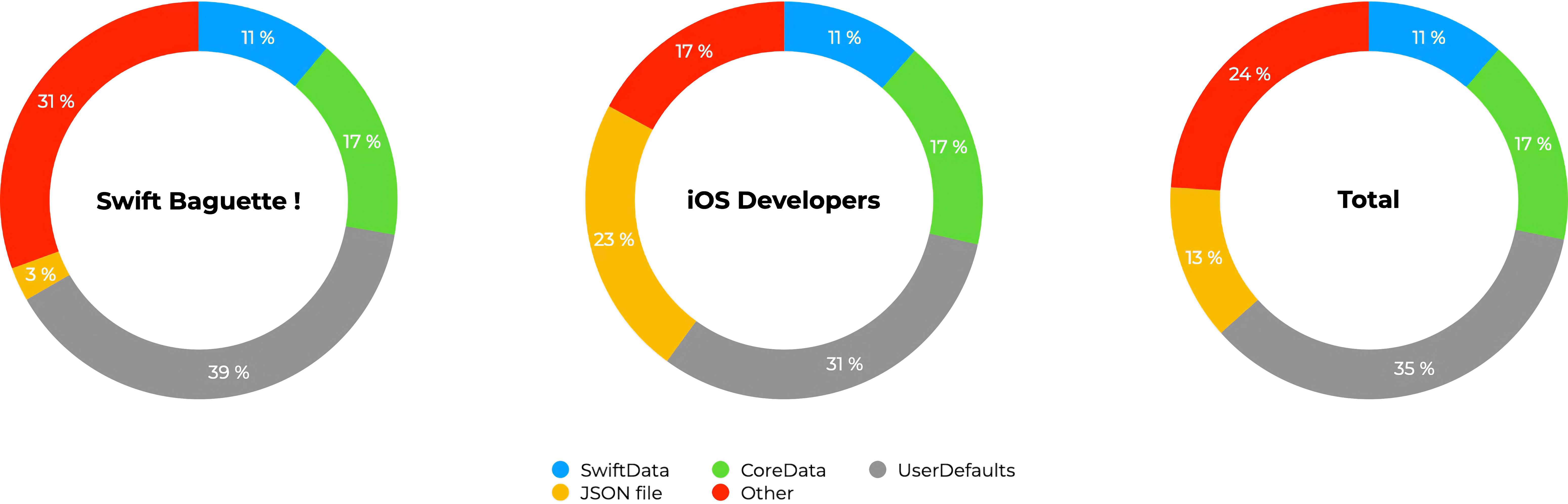
https://yaacoub.github.io/articles/code-dome/1-app-20-programming-languages-part-1
Extensions
One SwiftUI App, Six Architectures
articlesswift-tip
Introduction What’s the best architecture for SwiftUI? This question always sparks endless debate in the iOS development community. Today, I finally decided to cut through the theory by building a simple task manager app six times. Yes, you read it right: SIX times. One app, six different architectures. First things first, I’m no architecture expert, and I’ll never pretend to be one. If you find mistakes or disagree with my following methods, reasoning, or learning, I’ll be happy to get your feedback via email or social media. For most of the following, it will be my first time dabbling in, so be indulgent! To start this new journey, I began with an initial list of 12 candidates. After realizing that many overlapped, I instead turned my focus to the ones that felt the most interesting and popular to me. I’m not hiding the fact that I used AI assistants to help clarify each architecture’s philosophy and implementation. With their strengths, some offering strong starting points, others distinguishing subtle differences, and IDE-integrated AI helping with debugging, I was ready to compare these options head-to-head.
Show full content
Introduction

What’s the best architecture for SwiftUI? This question always sparks endless debate in the iOS development community. Today, I finally decided to cut through the theory by building a simple task manager app six times. Yes, you read it right: SIX times. One app, six different architectures.

First things first, I’m no architecture expert, and I’ll never pretend to be one. If you find mistakes or disagree with my following methods, reasoning, or learning, I’ll be happy to get your feedback via email or social media. For most of the following, it will be my first time dabbling in, so be indulgent!

To start this new journey, I began with an initial list of 12 candidates. After realizing that many overlapped, I instead turned my focus to the ones that felt the most interesting and popular to me. I’m not hiding the fact that I used AI assistants to help clarify each architecture’s philosophy and implementation. With their strengths, some offering strong starting points, others distinguishing subtle differences, and IDE-integrated AI helping with debugging, I was ready to compare these options head-to-head.

What’s the difference between architecture and design patterns?

The terms are often used interchangeably, including in this article, but there’s a subtle distinction worth understanding.

Design patterns solve specific code challenges: ensuring a single existing instance (Singleton), notifying multiple objects of changes (Observer)… In contrast, architectural patterns refer to the high-level organization of the entire application: its data, business logic, navigation handling,…

An architecture like MVVM uses the Observer pattern for data binding, and a Clean Architecture might use Repository and Factory patterns for data access.

Now that this is out of the way, let’s build the same task manager six different ways, ordered by a progression that felt logical as I learned.

Model-View-Controller (MVC)

MVC was invented by Trygve Reenskaug at the Xerox Palo Alto Research Center in the late 70s for Smalltalk, making it one of the oldest architectural patterns in software development. The name simply describes its three core components: Model (data), View (UI), and Controller (logic coordinator).

Apple embraced MVC as the primary pattern for both macOS and iOS development, deeply integrating it into UIKit with UIViewController. It remained dominant throughout the 2010s, though it was criticized for producing “Massive View Controllers” in complex apps. This is caused by Apple’s tight coupling of Views and Controllers, unlike classical MVC, where both are peers. Even though it still plays a role in older and hybrid codebases, MVC is less prominent today due to SwiftUI’s declarative approach.

So, is MVC still compatible with SwiftUI? You’ll get the answer to that question in just a few minutes!

File structure
MVC/
├── MVCApp.swift
├── 1 - Models/
│   └── Task.swift
├── 2 - Views/
│   └── TaskListView.swift
└── 3 - Controllers/
    └── TaskController.swift

The structure is straightforward: Models define data, Views display the UI, and Controllers coordinate between them. In this simple task manager, all logic resides in the TaskController, which the View observes for state changes, enabling the UI to automatically update when the underlying data is modified.

Implementation

Well, actually, there’s no implementation. When I initially wrote the code for this part, it really looked like MVVM, and I didn’t understand why or even the difference between the two. It’s only after a lot of research that I finally understood.

In MVC, the Controller holds references to Views and controls their layout. This supposes that Views are classes, which is not the case in SwiftUI. It also implies that Views are actual views, and always. Not a set of either layout constraints, layers, or views. Just views.

Model-View-ViewModel (MVVM)

MVVM was created by Microsoft architects John Gossman and Ken Cooper around 2005 for WPF (Windows Presentation Foundation) and Silverlight. The ViewModel sits as the mediator between the View and Model, exposing data and commands in a View-friendly format.

MVVM gained serious traction in the iOS community around 2015 with the rise of Swift 2 and reactive programming. It then truly took off with SwiftUI’s launch. Currently, MVVM is the most common baseline architecture for SwiftUI apps, especially for small to medium-sized projects. It’s often the recommended approach and feels natural with SwiftUI’s declarative syntax and reactive nature.

File structure

Almost identical to MVC’s structure, here the ViewModel replaces the Controller.

MVVM/
├── MVVMApp.swift
├── 1 - Models/
│   └── Task.swift
├── 2 - Views/
│   └── TaskListView.swift
└── 3 - ViewModels/
    └── TaskListViewModel.swift

Implementation

In MVVM, the ViewModel exposes observable properties that the View binds to. The View automatically updates itself through these bindings. The ViewModel doesn’t “control” the View; it just tells it that a change was made.

Tasks.swift:

import Foundation

struct Task: Identifiable {
    let id: UUID = UUID()
    var title: String
    var isDone: Bool = false
}

TaskListView.swift:

import SwiftUI

struct TaskListView: View {
    @State private var viewModel = TaskListViewModel()
    
    var body: some View {
        NavigationStack {
            VStack {
                HStack {
                    TextField("Enter a new task…", text: $viewModel.taskTitle)
                        .textFieldStyle(.roundedBorder)
                        .padding(.trailing)
                    Button("Add", action: viewModel.addTask)
                        .buttonStyle(.borderedProminent)
                }
                .padding()
                
                List {
                    ForEach(viewModel.tasks) { task in
                        HStack {
                            Text(task.title)
                            Spacer()
                            Button(task.isDone ? "✓" : "○") {
                                viewModel.toggleTask(task.id)
                            }
                        }
                    }
                    .onDelete(perform: viewModel.deleteTask)
                }
                .listStyle(.plain)
            }
            .navigationTitle("Tasks")
        }
    }
}

TaskListViewModel.swift:

import Foundation
import Observation

@Observable
final class TaskListViewModel {
    private(set) var tasks: [Task] = []
    var taskTitle: String = ""
    
    func addTask() {
        guard !taskTitle.isEmpty else { return }
        let task = Task(title: taskTitle)
        tasks.append(task)
        taskTitle = ""
    }
    
    func toggleTask(_ id: UUID) {
        guard let index = tasks.firstIndex(where: { $0.id == id }) else { return }
        tasks[index].isDone.toggle()
    }
    
    func deleteTask(_ indexSet: IndexSet) {
        for index in indexSet {
            tasks.remove(at: index)
        }
    }
}

Model-View-ViewModel + Combine (MVVM)

Ok, I cheated… this isn’t a separate architecture, but I just wanted to show that this was once the norm in SwiftUI. This pattern is MVVM implemented with reactive streams. Combine is Apple’s reactive programming framework, announced at WWDC 2019 alongside SwiftUI. It brought first-party support for reactive patterns that previously required third-party libraries like RxSwift. The name “Combine” actually refers to its ability to combine, transform, and react to asynchronous streams of values over time, all features not demonstrated in this simple example.

Introduced in 2023, SwiftUI’s @Observable macro has reduced the need for Combine in simple data flows and MVVM. However, Combine remains widely adopted for complex data flows, networking, timers, and multi-source data streams. One doesn’t always replace the other. Observable is for basic state, and Combine is for complex async operations.

File structure

Identical structure to standard MVVM. The difference stands entirely on how the ViewModel publishes changes.

MVVM/
├── MVVMApp.swift
├── 1 - Models/
│   └── Task.swift
├── 2 - Views/
│   └── TaskListView.swift
└── 3 - ViewModels/
    └── TaskListViewModel.swift

Implementation

TaskListView.swift:

// ...
@StateObject private var viewModel = TaskListViewModel()
// ...

TaskListViewModel.swift:

import Foundation
import Combine

final class TaskListViewModel: ObservableObject {
    @Published private(set) var tasks: [Task] = []
    @Published var taskTitle: String = ""
    
    // ...
}

The Composable Architecture (TCA)

TCA was created by Brandon Williams and Stephen Celis of Point-Free around 2020. It’s heavily inspired by the Elm Architecture (2012) and Redux (2015), bringing functional, unidirectional data flow to SwiftUI. The name emphasizes composability: the ability to break down features into independent, testable, and reusable components that compose together seamlessly.

This architecture is gaining momentum in the SwiftUI community, especially for complex apps requiring predictable state management. It’s become the go-to choice for teams wanting strict architectural guarantees.

As stated, TCA draws inspiration from Elm’s message-driven architecture and Redux’s single-source-of-truth model, adapted to Swift. It’s also similar to ReactorKit, an RxSwift-based and imperative architecture. All share core principles: single source of truth, unidirectional data flow, and pure reducers. Unidirectional data flow means data moves in one direction through the application: Actions → Reducer → State → View, and the chain repeats. Unlike bidirectional patterns where Views might directly modify state (creating unpredictable behavior), unidirectional flow enforces that strict path.

TCA’s completeness comes with a steep learning curve. Its implementation requires an external Swift Package, and the architecture was the hardest to implement. The idea, for large projects at least, is that you sacrifice initial development speed for long-term maintainability and correctness. For my quick task manager, TCA is way overkill. For a banking app with 50 features and 10 developers, TCA prevents chaos, hidden side effects, and race conditions.

File structure

TCA organizes code by features rather than technical layers. Each feature is self-contained with its State, Action, Reducer, and View bundled together. The Domain folder holds shared models used across features.

TCA/
├── TCAApp.swift
├── Domain/
│   └── Task.swift
└── Features/
    └── TaskList/
        ├── TaskListFeature.swift
        └── TaskListView.swift

Implementation

TaskListFeature.swift:

import Foundation
import ComposableArchitecture

@Reducer
struct TaskListFeature: Reducer {
    @ObservableState
    struct State {
        var tasks: IdentifiedArrayOf<Task> = []
        var taskTitle: String = ""
    }
    
    enum Action: BindableAction {
        case binding(BindingAction<State>)
        case addTask
        case toggleTask(UUID)
        case deleteTask(IndexSet)
    }
    
    var body: some Reducer<State, Action> {
        BindingReducer()
        Reduce { state, action in
            switch action {
            case .binding:
                return .none
                
            case .addTask:
                let task = Task(title: state.taskTitle)
                state.tasks.append(task)
                state.taskTitle = ""
                return .none
                
            case .toggleTask(let id):
                guard let id = state.tasks.firstIndex(where: { $0.id == id }) else { return .none }
                state.tasks[id].isDone.toggle()
                return .none
                
            case .deleteTask(let indexSet):
                state.tasks.remove(atOffsets: indexSet)
                return .none
            }
        }
    }
}

TaskListView.swift:

import SwiftUI
import ComposableArchitecture

struct TaskListView: View {
    @Bindable var store: StoreOf<TaskListFeature>
    
    var body: some View {
        NavigationStack {
            VStack {
                HStack {
                    TextField("Enter a new task…", text: $store.taskTitle)
                        .textFieldStyle(.roundedBorder)
                        .padding(.trailing)
                    Button("Add") {
                        store.send(.addTask)
                    }
                    .buttonStyle(.borderedProminent)
                }
                .padding()
                
                List {
                    ForEach(store.tasks) { task in
                        HStack {
                            Text(task.title)
                            Spacer()
                            Button(task.isDone ? "✓" : "○") {
                                store.send(.toggleTask(task.id))
                            }
                        }
                    }
                    .onDelete { indexSet in
                        store.send(.deleteTask(indexSet))
                    }
                }
                .listStyle(.plain)
            }
            .navigationTitle("Tasks")
        }
    }
}

TCAApp.swift:

import SwiftUI
import ComposableArchitecture

@main
struct TCAApp: App {
    static let store = Store(initialState: TaskListFeature.State()) {
        TaskListFeature()
    }
    
    var body: some Scene {
        WindowGroup {
            TaskListView(store: TCAApp.store)
        }
    }
}

View-Interactor-Presenter-Entity-Router (VIPER)

VIPER was introduced by Mutual Mobile in 2014 as an application of Clean Architecture principles to iOS. The acronym describes its five components: View (UI), Interactor (business logic), Presenter(presentation logic), Entity (business models), and Router (navigation).

It gained significant popularity in the first years of Swift as iOS projects grew larger and developers sought alternatives to “Massive View Controller” syndrome. In fact, it makes the code highly modular with clear, strict separation of concerns. Today, VIPER is still used in legacy codebases using UIKit’s imperative paradigm and by teams already familiar with it. The pattern’s complexity feels at odds with SwiftUI’s declarative simplicity.

Another popular but similar alternative is Clean Swift or VIP (View-Interactor-Presenter). It works just like VIPER but with a one-way data flow. It also uses Workers for external services and emphasizes scenes over features. There’s also Uber’s RIBs (Router-Interactor-Builder), a reactive cross-platform architecture that structures apps as a hierarchy of features. It includes Builders for dependency injection and was designed for cross-platform teams (iOS/Android).

File structure

VIPER organizes by modules (features), with each module containing all five VIPER components. The TaskListModule.swift file acts as an assembly point, wiring all components together. TaskListInterface.swift contains the protocols that define how components communicate.

VIPER/
├── VIPERApp.swift
└── Modules/
    ├── Entities/
    │   └── Task.swift
    └── TaskList/
        ├── TaskListModule.swift
        ├── TaskListInterface.swift
        ├── TaskListView.swift
        ├── TaskListPresenter.swift
        ├── TaskListInteractor.swift
        └── TaskListRouter.swift

Implementation

TaskListModule.swift:

import SwiftUI

struct TaskListModule {
    static func build() -> some View {
        let interactor = TaskListInteractor()
        let router = TaskListRouter()
        let presenter = TaskListPresenter(interactor: interactor, router: router)
        return TaskListView(presenter: presenter)
    }
}

TaskListInterface.swift:

import Foundation
import Combine

// View -> Presenter
protocol TaskListPresenterProtocol: ObservableObject {
    var tasks: [Task] { get }
    var taskTitle: String { get set }
    
    func addTask()
    func toggleTask(_ id: UUID)
    func deleteTask(_ indexSet: IndexSet)
    func didSelectTaskDetails(task: Task)
}

// Presenter -> Interactor
protocol TaskListInteractorProtocol {
    func fetchTasks() -> [Task]
    func saveTask(_ task: Task)
    func updateTask(_ task: Task)
    func deleteTasks(_ tasks: [Task])
}

// Presenter -> Router
protocol TaskListRouterProtocol {
    func navigateToDetails(for task: Task)
}

TaskListView.swift:

import SwiftUI

struct TaskListView<Presenter: TaskListPresenterProtocol>: View {
    @StateObject var presenter: Presenter
    
    var body: some View {
        NavigationStack {
            VStack {
                HStack {
                    TextField("Enter a new task…", text: $presenter.taskTitle)
                        .textFieldStyle(.roundedBorder)
                        .padding(.trailing)
                    Button("Add", action: presenter.addTask)
                        .buttonStyle(.borderedProminent)
                }
                .padding()
                
                List {
                    ForEach(presenter.tasks) { task in
                        HStack {
                            Text(task.title)
                            Spacer()
                            Button(task.isDone ? "✓" : "○") {
                                presenter.toggleTask(task.id)
                            }
                        }
                    }
                    .onDelete(perform: presenter.deleteTask)
                }
                .listStyle(.plain)
            }
            .navigationTitle("Tasks")
        }
    }
}

TaskListPresenter.swift:

import Foundation
import Combine

class TaskListPresenter: TaskListPresenterProtocol, ObservableObject {
    @Published var tasks: [Task] = []
    @Published var taskTitle: String = ""
    
    private let interactor: TaskListInteractorProtocol
    private let router: TaskListRouterProtocol
    
    init(interactor: TaskListInteractorProtocol, router: TaskListRouterProtocol) {
        self.interactor = interactor
        self.router = router
        self.tasks = interactor.fetchTasks()
    }
    
    func addTask() {
        guard !taskTitle.isEmpty else { return }
        let task = Task(title: taskTitle)
        interactor.saveTask(task)
        tasks = interactor.fetchTasks()
        taskTitle = ""
    }
    
    func toggleTask(_ id: UUID) {
        guard var task = tasks.first(where: { $0.id == id }) else { return }
        task.isDone.toggle()
        interactor.updateTask(task)
        tasks = interactor.fetchTasks()
    }
    
    func deleteTask(_ indexSet: IndexSet) {
        let tasksToDelete = indexSet.map { tasks[$0] }
        interactor.deleteTasks(tasksToDelete)
        tasks = interactor.fetchTasks()
    }
    
    func didSelectTaskDetails(task: Task) {
        router.navigateToDetails(for: task)
    }
}

TaskListInteractor.swift:

import Foundation

class TaskListInteractor: TaskListInteractorProtocol {
    private var dataStore: [Task] = []
    
    func fetchTasks() -> [Task] {
        return dataStore
    }
    
    func saveTask(_ task: Task) {
        dataStore.append(task)
    }
    
    func updateTask(_ task: Task) {
        if let index = dataStore.firstIndex(where: { $0.id == task.id }) {
            dataStore[index] = task
        }
    }
    
    func deleteTasks(_ tasks: [Task]) {
        for task in tasks {
            if let index = dataStore.firstIndex(where: { $0.id == task.id }) {
                dataStore.remove(at: index)
            }
        }
    }
}

TaskListRouter.swift:

class TaskListRouter: TaskListRouterProtocol {
    func navigateToDetails(for task: Task) {
        print("Navigate to details for \(task.title)")
    }
}

VIPERApp.swift:

import SwiftUI

@main
struct VIPERApp: App {
    var body: some Scene {
        WindowGroup {
            TaskListModule.build()
        }
    }
}

Clean Architecture

Clean Architecture is a set of abstract principles defined by Robert C. Martin (Uncle Bob) in his 2012 book. It’s not a specific pattern like MVVM or VIPER, nor a prescribed folder structure. So yes, I cheated again… Clean Architecture is rather a philosophy: organize code in concentric layers where dependencies point inward, and business logic is independent of frameworks, UI, and databases.

The name reflects the goal: “clean” separation of concerns that makes code maintainable, testable, and framework-agnostic. While specific implementations evolve, the principles remain relevant, and many modern architectures (TCA, RIBs, even well-structured MVVM) incorporate Clean Architecture concepts.

Deriving architectures include Layered Architecture, Hexagonal Architecture (Ports & Adapters), Onion Architecture, and CQRS (Command-Query-Responsibility-Segregation). All share the goal of framework-independent business logic. A typical modern architecture for large projects might even use all of them: Clean Architecture for overall structure (layers, dependency rules), Hexagonal principles for implementation (ports/adapters at boundaries), and CQRS for data access (separate read/write models when needed).

File structure

Clean Architecture’s structure reflects its concentric layers:

  • Domain (innermost): Pure business logic; entities, repository interfaces (ports), and use cases. No framework dependencies.
  • Data (middle): Implementation details; repository implementations that conform to domain interfaces. Could swap in CoreData, UserDefaults, or Firebase.
  • Presentation (outer): UI layer; ViewModels and Views that depend on domain use cases.

The CleanAppFactory.swift handles dependency injection, wiring concrete implementations to interfaces.

Clean/
├── CleanApp.swift
├── CleanAppFactory.swift
├── 1 - Domain/
│   ├── Entities/
│   │   └── Task.swift
│   ├── Interfaces/
│   │   └── TaskRepositories.swift
│   └── UseCases/
│       └── TaskUseCases.swift
├── 2 - Data/
│   └── Repositories/
│       └── InMemoryTaskRepository.swift
└── 3 - Presentation/
    ├── ViewModels/
    │   └── TaskListViewModel.swift
    └── Views/
        └── TaskListView.swift

Implementation

TaskRepositories.swift:

import Foundation

protocol TaskRepository {
    func getTasks() -> [Task]
    func save(_ task: Task)
    func update(_ task: Task)
    func delete(_ task: Task)
}

TaskUseCases.swift:

import Foundation

struct GetTasksUseCase {
    let repo: TaskRepository
    func execute() -> [Task] {
        return repo.getTasks()
    }
}

struct AddTaskUseCase {
    let repo: TaskRepository
    func execute(title: String) {
        let task = Task(title: title)
        repo.save(task)
    }
}

struct ToggleTaskUseCase {
    let repo: TaskRepository
    func execute(id: UUID) {
        let tasks = repo.getTasks()
        guard var task = tasks.first(where: { $0.id == id }) else { return }
        task.isDone.toggle()
        repo.update(task)
    }
}

struct DeleteTaskUseCase {
    let repo: TaskRepository
    func execute(indexSet: IndexSet) {
        for index in indexSet {
            let tasks = repo.getTasks()
            repo.delete(tasks[index])
        }
    }
}

InMemoryTaskRepository.swift:

import Foundation

class InMemoryTaskRepository: TaskRepository {
    private var tasks: [Task] = []
    
    func getTasks() -> [Task] {
        return tasks
    }
    
    func save(_ task: Task) {
        tasks.append(task)
    }
    
    func update(_ task: Task) {
        if let index = tasks.firstIndex(where: { $0.id == task.id }) {
            tasks[index] = task
        }
    }
    
    func delete(_ task: Task) {
        tasks.removeAll(where: { $0.id == task.id })
    }
}

TaskListViewModel.swift:

import Foundation
import Observation

@Observable
class TaskListViewModel {
    var tasks: [Task] = []
    var taskTitle: String = ""
    
    private let getTasks: GetTasksUseCase
    private let addTask: AddTaskUseCase
    private let toggleTask: ToggleTaskUseCase
    private let deleteTask: DeleteTaskUseCase
    
    init(getTasks: GetTasksUseCase, addTask: AddTaskUseCase, toggleTask: ToggleTaskUseCase, deleteTask: DeleteTaskUseCase) {
        self.getTasks = getTasks
        self.addTask = addTask
        self.toggleTask = toggleTask
        self.deleteTask = deleteTask
        refresh()
    }
    
    func refresh() {
        self.tasks = getTasks.execute()
    }
    
    func performAdd() {
        guard !taskTitle.isEmpty else { return }
        addTask.execute(title: taskTitle)
        taskTitle = ""
        refresh()
    }
    
    func performToggle(_ id: UUID) {
        toggleTask.execute(id: id)
        refresh()
    }
    
    func performDelete(_ indexSet: IndexSet) {
        deleteTask.execute(indexSet: indexSet)
        refresh()
    }
}

CleanAppFactory.swift:

import SwiftUI

struct CleanAppFactory {
    static func makeView() -> some View {
        let repo = InMemoryTaskRepository()
        
        let getUC = GetTasksUseCase(repo: repo)
        let addUC = AddTaskUseCase(repo: repo)
        let toggleUC = ToggleTaskUseCase(repo: repo)
        let deleteUC = DeleteTaskUseCase(repo: repo)
        
        let vm = TaskListViewModel(getTasks: getUC, addTask: addUC, toggleTask: toggleUC, deleteTask: deleteUC)
        
        return TaskListView(viewModel: vm)
    }
}

CleanApp.swift:

import SwiftUI

@main
struct CleanApp: App {
    var body: some Scene {
        WindowGroup {
            CleanAppFactory.makeView()
        }
    }
}

Conclusion

After building the same task manager six times, one truth became clear, and it’s quite cliché: there’s no universally “best” architecture, only trade-offs that align better or worse with specific needs.

From my experience, the easiest and fastest to implement is MVVM, SwiftUI’s sweet spot. For most projects, basic MVVM with @Observable gives testability and clean separation without boilerplate overhead. I’d point out how TCA was very interesting, even if it trades speed for safety.

On the other side of the coin, MVC and VIPER are fading gracefully. While VIPER taught iOS developers about modularity and testability, its UIKit-centric design feels awkward in SwiftUI.

Finally, Clean Architecture is about principles, not patterns. You don’t need five layers and a dozen protocols to write clean code. The core insights (depend on abstractions, separate business logic from frameworks) can be applied within any pattern.

Remember, architecture serves the code, not the other way around. The best architecture is the one that lets your team ship reliable features efficiently. Start simple, measure pain points, and add structure when complexity demands it, not because someone tells you to.

https://yaacoub.github.io/articles/swift-tip/one-swiftui-app-six-architectures
Extensions
Build a Smart App with Apple Intelligence
articlesswift-tip
At WWDC25, Apple introduced new tools and frameworks that enable the design of intelligent, privacy-preserving, and on-device experiences without requiring access to massive cloud-based models. The central idea is to provide developers with flexible yet secure ways to integrate generative features directly into their applications. This article follows the structure of the sessions presented at WWDC25 to explore how to build smarter apps by leveraging on-device foundation models, prompt engineering strategies, and the latest advances in computer vision.
Show full content

At WWDC25, Apple introduced new tools and frameworks that enable the design of intelligent, privacy-preserving, and on-device experiences without requiring access to massive cloud-based models. The central idea is to provide developers with flexible yet secure ways to integrate generative features directly into their applications. This article follows the structure of the sessions presented at WWDC25 to explore how to build smarter apps by leveraging on-device foundation models, prompt engineering strategies, and the latest advances in computer vision.

Meet the Foundation Models Framework

The Foundation Models framework provides the building blocks for integrating Apple Intelligence into applications. Unlike large cloud-hosted models with hundreds of billions of parameters, Apple’s on-device model is around 3 billion parameters, making it efficient enough to run locally while preserving user privacy. This model is not designed for fact retrieval, code generation, or complex mathematical calculations. Instead, its strength lies in natural language processing tasks where style, tone, and adaptability matter.

Developers can define instructions (static developer-provided guidance) and combine them with user prompts (dynamic input) to generate tailored responses. Prompt engineering is central here, and Apple provides tools like Playgrounds to experiment with different prompt designs and safety mechanisms. The framework supports guided generation using annotations such as Generable for data structures and GenerationGuide with a maximumCount(_:) parameter to control response scope and reliability. Partial results can be handled with streamResponse(to:options:), while snapshots such as PartiallyGenerated help developers capture intermediate output.

The Tool protocol defines how apps can extend a model’s capabilities with external logic. Each tool specifies a name, description, arguments, and a call(arguments:) method. Tools can even be created dynamically, enabling developers to adapt models to context-specific workflows. Sessions are managed with LanguageModelSession, which can be paused or disabled while the model is actively responding. This level of orchestration helps prevent resource conflicts and improves responsiveness.

Availability checks are essential. The availability property lets developers ensure the required model is present and handle errors gracefully. Since large language models are inherently slower than classic ML tasks, developers must also account for performance trade-offs and provide clear feedback when responses are delayed.

Explore Prompt Design and Safety for On-Device Foundation Models

Apple emphasizes that on-device intelligence must be designed with safety, quality, and clarity in mind. Developers are encouraged to combine pre-written instructions with user-generated prompts, while recognizing that these measures are not bulletproof. Commands expressed in all caps (e.g., MUST, DO NOT) help guide the model’s behavior, especially when precision is required.

Error handling is tightly integrated: if a generation violates guardrails, developers receive a guardrailViolation(_:) result. This ensures apps can gracefully recover without exposing users to unintended or unsafe outputs. For safety and effectiveness, Apple recommends extensive testing with varied inputs, followed by systematic feedback collection and sending.

Read Documents Using the Vision Framework

Beyond text generation, Apple has expanded the Vision framework to include new APIs that allow apps to understand and process structured content directly from images. The new RecognizeDocumentsRequest API supports more than twenty languages and can identify hierarchical document structures, including headers, paragraphs, tables, and lists. The resulting DocumentObservation objects break content down into transcripts, lines, words, and paragraphs, enabling precise extraction and downstream processing.

Additional vision-based requests extend the range of on-device intelligence. For example, the new DetectLensSmudgeRequest analyzes images for lens contamination, returning an observation with a confidence value from 0 to 1. Developers can use this information to provide real-time user feedback on camera quality. Similarly, DetectHumanHandPoseRequest introduces a new model with refined joint position detection, improving the accuracy of gesture-based interfaces and assistive technologies.

These vision APIs integrate seamlessly with Apple Intelligence, allowing developers to combine natural language understanding with perceptual features for richer multimodal apps. Together, the Foundation Models framework and the Vision framework empower developers to build apps that are not only intelligent but also deeply integrated with the user’s environment, while keeping computation and privacy on-device.

https://yaacoub.github.io/articles/swift-tip/build-a-smart-app-with-apple-intelligence-wwdc25
Extensions
Apple’s New Design Language - WWDC25
articlesswift-tip
Apple’s latest design updates represent a new era of consistency and continuous refinement in their ecosystem, showing a strong emphasis on fluidity, clarity, and adaptability across all platforms.
Show full content

Apple’s latest design updates represent a new era of consistency and continuous refinement in their ecosystem, showing a strong emphasis on fluidity, clarity, and adaptability across all platforms.

Meet Liquid Glass

Liquid Glass is Apple’s newest material, a direct evolution of the Mac OS X Aqua design and iOS 7 translucency. It embraces the best of flat and skeuomorphic designs with a metamaterial aesthetic that feels organic. Unlike older effects and animations, Liquid Glass uses optical depth and dynamic morphing, for example, when a button transforms into a menu or one view morphs into another.

Liquid Glass

All the glass and transparency effects can make legibility feel worse. However, it is evident that Apple has it at the core of the system. Shadows, a wide dynamic range, and careful use of light and dark modes ensure text and elements remain clear against any background. The system defines two functional layers: a content layer underneath and a functional interface layer on top, connected by blur effects, hard-edge styles, and scroll-edge interactions.

Functional layers

Highlights and shadows add dimensionality, with a normal state and a grayed-out inactive state. Designers are encouraged to use Liquid Glass primarily for navigation. They should avoid layering multiple glass panels together, which can compromise clarity. Apple also distinguishes between Regular and Clear variants: Regular is used in most interface contexts, while Clear is designed for media-rich backgrounds or bold, bright content that benefits from a dimming layer. Sparse tinting can provide emphasis, but the intersection of elements should be avoided in steady states. Importantly, Liquid Glass respects all accessibility settings.

Clear variant

Get to Know the New Design System

Apple’s broader design system has been updated with three pillars in mind: language, structure, and continuity. System colors have been refreshed to be bolder and more legible, and typography is now consistently left-aligned across interfaces. Borders and radii follow consistent rules: fixed corners for standard components, capsule radii for pill-shaped controls, and concentric radii that scale naturally with parent elements and padding.

Border and radii

Navigation and content separation are streamlined. Action sheets now rise from the bottom and point directly to their source, while scroll views feature a single edge effect per view for clarity. Menus emphasize text labels with optional icons, reducing reliance on symbolic shorthand. Apple encourages a platform-adaptive approach: a single view on iPhone, collapsible sidebar and split view navigation on iPad, and sidebar and split view navigation on Mac, all powered by the same underlying decision.

This system aims to reduce redundancy while providing a consistent cross-platform identity. By simplifying grouping, prioritizing layout, and ensuring consistent navigation patterns, designers can build interfaces that feel native on each device without reinventing the wheel.

Elevate the Design of Your iPad App

On iPad, design enhancements focus on navigation, windows, the pointer, and the menu bar. Navigation now offers more flexibility, starting with sidebars that can collapse into tab bars, adapting to context without losing content. Layout changes are non-destructive, so resizing or rotating does not force users to relearn controls. Window controls are now at the leading edge of the toolbar, aligning with macOS conventions and removing unnecessary safe area padding. Each new document can now also open in its own window with descriptive titles, improving multitasking.

Tab bar

Pointer interactions remain central to iPadOS. Apple distinguishes between default menus, which cover common system actions like tab navigation and sidebar toggling, and custom menus, where developers can surface their app’s most relevant features. Custom menus should be populated fully, ordered by frequency, grouped into logical sections, and paired with symbols. The most common actions should be assigned keyboard shortcuts. Importantly, Apple emphasizes never hiding menus or actions based on context. Disabled states are preferable and maintain a predictable interface for users.

Say Hello to the New Look of App Icons

Apple has also rethought how app icons integrate into the system, offering new modes: icons can now appear in translucent light or dark and tinted light or dark modes.

The design grid has been refined for both squircles and circles, with rounder corner radii across platforms. Within icons, designers are encouraged to avoid sharp edges, increase line weights for clarity at smaller sizes, and embrace gradients. A typical icon now uses a gradient that shifts from light at the top to dark at the bottom. Backgrounds adapt as well: colorful in normal mode, darker in dark mode, with translucent variations on request.

Icons

Create Icons with Icon Composer

Apple has consolidated its icon creation pipeline with the new Icon Composer, integrated into Xcode. Historically, developers needed to manage multiple icons per platform. Then came per-platform consolidation. Now, with Icon Composer, a single source can generate all required icon variants across devices.

Icon Composer

Icon Composer provides a default specular highlight for depth, but also allows fine control over blur, shadow, specular intensity, opacity, translucency, and masking. Designers should limit designs to four groups for simplicity and avoid overusing highlights or Liquid Glass on text. Chromatic shadows work well for colored icons against light backgrounds. For legibility in dark mode, use monochrome shadows.

The workflow integrates seamlessly with Apple’s design templates for Figma, Sketch, Photoshop, and Illustrator. Developers can export icons with backgrounds, outlines, and per-layer SVG or PNG assets, or rely on Icon Composer for common gradients and fills. The end result is greater consistency across platforms and less manual overhead.

A fluid and coherent ecosystem

Liquid Glass brings depth and organic transitions. The updated design system strengthens cross-platform consistency. iPad apps gain more flexibility with windows and menus. New icon styles harmonize apps with the system. Icon Composer reduces friction in delivering polished icons. Together, these updates point to Apple’s long-term vision for its products and its ever-increasing interest in Augmented Reality.

https://yaacoub.github.io/articles/swift-tip/apple-s-new-design-language-wwdc25
Extensions
Get Familiar with Your New Development Tools - WWDC25
articlesswift-tip
WWDC25 introduced another set of significant updates to Apple’s developer ecosystem. Xcode 26, Swift 6.2, and SwiftUI all gained major improvements, while WebKit finally arrives as a native SwiftUI component. Here’s what’s new and why it matters.
Show full content

WWDC25 introduced another set of significant updates to Apple’s developer ecosystem. Xcode 26, Swift 6.2, and SwiftUI all gained major improvements, while WebKit finally arrives as a native SwiftUI component. Here’s what’s new and why it matters.

What’s New in Xcode 26

Xcode 26 focuses on speed, size, and smarter tooling. The IDE is about 24% smaller to download, with Intel simulator runtimes no longer bundled by default, and the Metal toolchain installed only when needed. Large projects also open up to 40% faster, cutting down time wasted on reloads.

Tabs now behave like Safari with pinning and start page options, while search has been redesigned to handle multiple words in any order, even across multiple lines, with results ranked by relevance. Voice Control has a new “Swift mode,” which recognizes operators and camelCase, allowing you to navigate and edit entirely by voice.

AI assistance is now built into the workflow. You can connect to ChatGPT, other providers, or even local models to explain code, generate fixes, or suggest refactors. Prompts can reference code symbols with “@,” attach files or images, and selectively include project context. The assistant proposes changes inline, ready for you to accept or refine.

Debugging is also deeper. Concurrency debugging reveals async execution across threads, with task IDs, TaskGroup properties, and actors clearly visible. A new Processor Trace instrument (on M4 Macs and iPhone 16) logs every branch and call. CPU Counters offer presets including “CPU Bottlenecks,” and a new Power Profiler correlates CPU, GPU, networking, and display use with thermal and charging states.

Testing has become more powerful with UI test recording, including failing test replays with videos and element snapshots, as well as the new XCTHitchMetric for measuring UI stutters. Organizer now provides launch and hang diagnostics, benchmarks your app’s startup against similar apps, and gives you measurable performance goals.

What’s New in Swift

Swift 6.2 is all about safety, performance, and reach. The headline feature is default actor isolation, which implicitly applies @MainActor to module-level types. This reduces repetitive annotations while protecting against common concurrency errors.

Performance improves with InlineArray, which stores fixed-size arrays directly on the stack instead of the heap, and with the new Span type, which replaces unsafe buffer pointers with a safer, structured abstraction. Memory safety checks are stricter, compiler diagnostics are clearer, and error messages provide more context.

Interoperability continues to expand. Swift-Java interoperability is now available alongside improved C++ integration, making Swift more viable in mixed-language environments. On the systems front, Swift adds better containerization support, FreeBSD compatibility, and further progress toward WebAssembly targets.

Concurrency becomes more approachable with expanded attributes and built-in checking. Potential data races are hence caught earlier. Combined with performance and platform updates, Swift 6.2 positions the language as both a safer systems tool and a faster app language.

What’s New in SwiftUI

SwiftUI advances visually and functionally, embracing Apple’s new Liquid Glass design language. Standard components such as NavigationSplitView, TabView, sheets, and sidebars adapt more naturally across devices. On iPhone, tab bars float and shrink on scroll, while sheets gain built-in insets and translucent backgrounds. Developers can extend content with the new backgroundExtensionEffect() modifier for a more immersive layout.

Controls receive polish and flexibility. Sliders support tick marks and neutral positions, toolbar items can carry badges, and monochrome icons provide a unified appearance. Text editing also improves as TextEditor now supports AttributedString for inline formatting, styling, and links.

Search becomes a first-class citizen. Developers can place search bars in toolbars, whether at the bottom of the iPhone, the top of the iPad, or the side of the Mac. New behaviors let you control when search bars expand, collapse, or persist, and even dedicate entire tabs to search experiences.

Concurrency is integrated at the framework level. With Swift’s new default actor isolation, SwiftUI code is automatically safer. Background tasks are intelligently offloaded to prevent blocking the main thread, for smooth animations and no UI stutters, even in complex apps.

SwiftUI also stretches into new domains. RealityKit integrates directly, letting you embed 3D scenes, immersive content, and interactive 3D charts. Developers can now build truly multimodal experiences without leaving the SwiftUI ecosystem.

Meet WebKit for SwiftUI

One of the most anticipated updates finally arrived at WWDC25: WebKit has been rebuilt as a native SwiftUI component. No more UIViewRepresentable or NSViewRepresentable workarounds. With the new WebView API, developers can embed web content directly into SwiftUI apps across iOS, macOS, iPadOS, and visionOS.

The API is more than a simple wrapper. It introduces a WebPage model that represents the state of the web content. You can load requests, HTML strings, or data blobs, and SwiftUI updates as the page transitions through navigation states such as start, redirect, commit, fail, and finish. Policy decisions are fully declarative, letting you approve or block navigation with SwiftUI-like clarity.

Developers can go further by injecting JavaScript using callJavaScript(_:arguments:in:contentWorld:), receiving typed results in Swift. Communication flows in both directions, so hybrid apps and embedded tools feel at home. WebKit in SwiftUI also supports navigation delegates, scroll behaviors, bounce effects, and geometry awareness, even adapting to visionOS’s unique scrolling input.

By baking WebKit directly into SwiftUI, Apple bridges the gap between native and web. Whether you need a hybrid UI, a documentation viewer, or a dynamic content container, the new WebView gives you full control without leaving SwiftUI’s declarative world.

Looking Ahead

Development is faster and lighter, concurrency is safer by default, and SwiftUI is now flexible enough to host everything from immersive 3D content to fully interactive web pages.

For developers, these changes mean fewer workarounds, cleaner code, and apps that feel smoother and more consistent across platforms.

https://yaacoub.github.io/articles/swift-tip/get-familiar-with-your-new-development-tools-wwdc25
Extensions
What I Learned from Ego Is the Enemy by Ryan Holiday
articlesloud-letters
Greatness Comes from Humble Beginnings Ego tells us we need to announce ourselves, to show the world how capable we are. But you have to be ready before you ascend. It’s not brilliance that makes the difference. Real greatness comes from consistent effort; practicing, improving, and staying committed to the process. Talk is Cheap, Execution is Everything. We often confuse talking with doing. But this takes time and effort away from success. Image, labels, and external recognition can distract from what actually matters: execution. The work itself is more important than what others and you call you. Don’t Take the Bait Ego thrives on provocation, whether it’s criticism, praise, or conflict. Don’t lose your temper or let yourself be pulled into unnecessary battles. Uncomfortable conversations will happen, but instead of reacting, let others reveal themselves. The real power is control. Stay on the Path Ego says “yes” too easily. Yes to recognition, to distractions, and to obligations that dilute focus. You want it all, what you have and what you don’t, but the challenge is to know what truly matters and stay on the path. Urgent things aren’t always important. The goal isn’t to please others but to pursue what really aligns with your values. Honor Over Honors There’s a strong distinction to make between honor and honors. Honor is about living with integrity and doing the work well. Honors, awards, fame, and titles are secondary. Success, in this view, is self-satisfaction: becoming the best you can be. Recognition and rewards are extras, not the goal. In particular, there’s a difference to make between global and selective fame. The first feeds the ego. It is loud, widespread, and often shallow; it seeks validation from the masses, many of whom don’t truly know or care about the substance behind the name. The second can affirm that you’re on the right path. It is quieter and more meaningful; it stems from being recognized by the people who matter: peers, mentors, or those who deeply understand the craft. Redefining Failure and Success The ego is terrified of failure and can even lead to it. Yet, failure from the outside can actually be success on the inside if it means we’ve stayed true to our principles. In the same way, outside “success” can be empty if it’s only about ego. My Final Thoughts This book felt quick and impactful, like a jab to the chin. It questioned my goals and aspirations in a good way. For anyone wishing to find success and perhaps fame, this is the book to read, not to suppress aspirations but to recenter objectives.
Show full content
Greatness Comes from Humble Beginnings

Ego tells us we need to announce ourselves, to show the world how capable we are. But you have to be ready before you ascend. It’s not brilliance that makes the difference. Real greatness comes from consistent effort; practicing, improving, and staying committed to the process.

Talk is Cheap, Execution is Everything.

We often confuse talking with doing. But this takes time and effort away from success.

Image, labels, and external recognition can distract from what actually matters: execution. The work itself is more important than what others and you call you.

Don’t Take the Bait

Ego thrives on provocation, whether it’s criticism, praise, or conflict. Don’t lose your temper or let yourself be pulled into unnecessary battles. Uncomfortable conversations will happen, but instead of reacting, let others reveal themselves. The real power is control.

Stay on the Path

Ego says “yes” too easily. Yes to recognition, to distractions, and to obligations that dilute focus. You want it all, what you have and what you don’t, but the challenge is to know what truly matters and stay on the path. Urgent things aren’t always important. The goal isn’t to please others but to pursue what really aligns with your values.

Honor Over Honors

There’s a strong distinction to make between honor and honors. Honor is about living with integrity and doing the work well. Honors, awards, fame, and titles are secondary.

Success, in this view, is self-satisfaction: becoming the best you can be. Recognition and rewards are extras, not the goal.

In particular, there’s a difference to make between global and selective fame. The first feeds the ego. It is loud, widespread, and often shallow; it seeks validation from the masses, many of whom don’t truly know or care about the substance behind the name. The second can affirm that you’re on the right path. It is quieter and more meaningful; it stems from being recognized by the people who matter: peers, mentors, or those who deeply understand the craft.

Redefining Failure and Success

The ego is terrified of failure and can even lead to it. Yet, failure from the outside can actually be success on the inside if it means we’ve stayed true to our principles. In the same way, outside “success” can be empty if it’s only about ego.

My Final Thoughts

This book felt quick and impactful, like a jab to the chin. It questioned my goals and aspirations in a good way. For anyone wishing to find success and perhaps fame, this is the book to read, not to suppress aspirations but to recenter objectives.

https://yaacoub.github.io/articles/loud-letters/what-i-learned-from-ego-is-the-enemy-by-ryan-holiday
Extensions
What I Learned from The Almanack of Naval Ravikant by Eric Jorgenson
articlesloud-letters
Do What You’re 100% Into
Show full content
Do What You’re 100% Into

You shouldn’t do something just because it’s “hot.” Whether it’s a career move, a startup idea, or even a hobby, if you’re not fully into it, you won’t go far. Authenticity wins over imitation every time. Trying to copy others may work in the short term, but it doesn’t compound over time.

And when you hesitate or can’t decide, it’s usually a sign to say no. This also ties into time: when you catch yourself saying, “I don’t have time,” what you really mean is, “It’s not my priority.” Intention is about aligning words with actions.

Integrity Compounds Like Interest

Reputation is like compound interest: it builds slowly, but the effects are exponential over time. That only works if you operate with high integrity. A single dishonest move can break what years of honesty have built. If you focus on long-term reputation, wealth and opportunities naturally follow.

Leverage and Knowledge Over Time

A key idea is to shift from trading time for money to getting paid for your knowledge and judgment. Time is capped; leverage is infinite. Code, capital, and media are all forms of leverage that enable you to multiply your impact without increasing your hours. Until you get there, your input will be tied to your output. The goal is to break that equation.
Short-term pain often leads to long-term gain here. Learning new skills, practicing judgment, and building knowledge can be uncomfortable in the moment, but compound massively over time.

Lifestyle Discipline

Another counterintuitive idea: hold your lifestyle fixed. The temptation is always to upgrade as income grows, but that only chains you to the need for more. Financial freedom comes from keeping expenses flat while your leverage and earnings increase. Freedom beats status games every time.

It’s also worth remembering that charisma, like freedom, isn’t about status or charm. It’s rather the projection of courage and love at the same time. It’s about being grounded and authentic.

Value Over Networking

Early in your career, promotions can come faster in startups, but what matters more than titles or even “networking” is the actual value you bring. Deliver results, and networks form naturally around you. Don’t build relationships on ranking but on genuine peer respect. They are worth more than chasing social circles for their own sake.

Free Time Is Thinking Time

Real breakthroughs happen when you have time to think. Filling every hour with meetings, calls, or errands leaves no room for insights. If you can outsource your work, outsource it. Free time isn’t wasted time; it’s where clarity lives.

Peace Over Happiness

Happiness is fleeting, peace is stable. Happiness comes and goes with circumstances. Peace is an internal state. Practices such as meditation are all ways to improve clarity and cultivate peace. It teaches you to watch your thoughts instead of fighting them.

When it comes to learning, read widely and have fun doing it, but don’t stop at interpretations. Go the extra mile and build solid knowledge from the fundamentals.

My Final Thoughts

I really liked reading this book. I didn’t know what to expect at first, but the teachings, thoughts, and experience emanating from the words were impactful, to say the least. This felt more like reading philosophy than a productivity or business book, and it was freshening. I highly recommend this read to anyone interested in discovering the best ways of living a modern and free life.

https://yaacoub.github.io/articles/loud-letters/what-i-learned-from-the-almanack-of-naval-ravikant-by-eric-jorgenson%20copy
Extensions
What I Learned from A Mind For Numbers by Barbara Oakley
articlesloud-letters
Focus vs. Diffuse Thinking Learning requires switching between two modes: Focused mode: when you’re locked in, working through details. Diffuse mode: when your brain wanders, making connections in the background. Taking a break is part of working. Just like muscles need recovery between sets and workouts, the brain needs downtime for deep learning. A great way to utilize diffuse mode is while being active, walking outside, running, or even doing housework. Learning Slow Means Learning Deep We all know that learning fast isn’t the same as learning well. Rushing leads to shallow understanding. Instead, spreading practice into short, daily sessions makes knowledge automatic. It’s just like working out. To build muscles, you don’t rush; you increase the weight gradually, with patience and consistency. Even recalling information in different places helps lock it in. This could be at home, outside, or in class, for example. It’s About the Process, Not the Product Cramming the night before an exam is like going for your first run the day before a marathon. It doesn’t work. What matters is the process: daily practice, testing yourself, reviewing, and redoing. When doing homework, the main focus shouldn’t be on finishing, but on the work itself. Treat each assignment as training for the test. Every session is a workout that slowly and methodically builds the skill. Active Learning Beats Passive Learning Some study methods feel productive but aren’t. Highlighting, for example, gives the illusion that what’s colored is already learned, or that anything not highlighted is unimportant when in fact it is. Here’s what actually works: Active recall: testing yourself without looking at the answer. The Feynman technique: explaining concepts simply, as if teaching. The Pomodoro method: short, focused sprints with breaks in between. Managing Willpower and Stress Willpower is like a muscle: you can use it, but it gets tired. That’s why habits matter. They save willpower for when you really need it. (For more on habits, check out my takeaways from Atomic Habits by James Clear.) Stress can also be valuable. Not panic-level stress, but just enough challenge to stay engaged. During exam prep, time yourself solving questions, or practice in a classroom setting. On test day, start by skimming all the exercises. Begin with the hardest, and when you get stuck, switch to an easier one. That puts the hard problem into diffuse mode while you make progress. Mindsets That Matter A eureka moment, when you finally grasp a solution, isn’t the end. What matters is understanding how the solution came about and reviewing it the same day. If you’re doubting your intellect, skills, or accomplishments, you’re not alone; even experts feel imposter syndrome. And if you’re frustrated by low grades, remember: they may just mean you’re approaching problems differently. That difference could make you a more creative thinker. Nobody is “not good” at learning; they may just not have been exposed to all the lenses yet. Experiment, Compete, Improve Learning is a cycle of self-experimentation: try methods, determine what sticks, adjust. But it’s also important to distinguish between training (homework, practice) and competition (tests, real applications). Both are essential. Athletes don’t always win every competition, but they learn from each attempt and improve. And mastery doesn’t mean you have to stick with something forever. It means building the skill so you can move on. It’s okay to “get good and then quit.” Shared Wisdom Learning is not just personal, it’s collective. Sharing ideas, questioning weak arguments, and working back and forth sharpens understanding. A good study environment is one where study wins over chatter. If you’re in the same room as a friend, try doing the same homework separately and only asking for help when stuck. If you’re in different places, work on the same questions individually, then compare answers. If your answers differ, redo the exercise and compare again. The Einstellung effect occurs when a pre-existing solution blinds you and blocks problem-solving. That’s why collaboration is key to opening your horizons. Techniques like diffuse-mode thinking also help your brain connect dots you wouldn’t have made otherwise. My Final Thoughts I found the book’s strategies really helpful. One technique they used that I especially liked was ending chapters with active recall questions. Like with Atomic Habits, I felt at first that I “already knew” much of what the author would say. I was wrong. The insights run much deeper once you apply them. That said, the book isn’t the easiest read. Not because it’s complex, but because the ideas are scattered. For this article, I actually had to reorder and regroup my notes to make sense of it all. Still, the effort was worthwhile, and I recommend this book to anyone wishing to improve their learning.
Show full content
Focus vs. Diffuse Thinking

Learning requires switching between two modes:

  • Focused mode: when you’re locked in, working through details.
  • Diffuse mode: when your brain wanders, making connections in the background.

Taking a break is part of working. Just like muscles need recovery between sets and workouts, the brain needs downtime for deep learning.

A great way to utilize diffuse mode is while being active, walking outside, running, or even doing housework.

Learning Slow Means Learning Deep

We all know that learning fast isn’t the same as learning well. Rushing leads to shallow understanding. Instead, spreading practice into short, daily sessions makes knowledge automatic. It’s just like working out. To build muscles, you don’t rush; you increase the weight gradually, with patience and consistency.

Even recalling information in different places helps lock it in. This could be at home, outside, or in class, for example.

It’s About the Process, Not the Product

Cramming the night before an exam is like going for your first run the day before a marathon. It doesn’t work. What matters is the process: daily practice, testing yourself, reviewing, and redoing.

When doing homework, the main focus shouldn’t be on finishing, but on the work itself. Treat each assignment as training for the test. Every session is a workout that slowly and methodically builds the skill.

Active Learning Beats Passive Learning

Some study methods feel productive but aren’t. Highlighting, for example, gives the illusion that what’s colored is already learned, or that anything not highlighted is unimportant when in fact it is.

Here’s what actually works:

  • Active recall: testing yourself without looking at the answer.
  • The Feynman technique: explaining concepts simply, as if teaching.
  • The Pomodoro method: short, focused sprints with breaks in between.
Managing Willpower and Stress

Willpower is like a muscle: you can use it, but it gets tired. That’s why habits matter. They save willpower for when you really need it. (For more on habits, check out my takeaways from Atomic Habits by James Clear.)

Stress can also be valuable. Not panic-level stress, but just enough challenge to stay engaged. During exam prep, time yourself solving questions, or practice in a classroom setting. On test day, start by skimming all the exercises. Begin with the hardest, and when you get stuck, switch to an easier one. That puts the hard problem into diffuse mode while you make progress.

Mindsets That Matter

A eureka moment, when you finally grasp a solution, isn’t the end. What matters is understanding how the solution came about and reviewing it the same day.

If you’re doubting your intellect, skills, or accomplishments, you’re not alone; even experts feel imposter syndrome. And if you’re frustrated by low grades, remember: they may just mean you’re approaching problems differently. That difference could make you a more creative thinker. Nobody is “not good” at learning; they may just not have been exposed to all the lenses yet.

Experiment, Compete, Improve

Learning is a cycle of self-experimentation: try methods, determine what sticks, adjust. But it’s also important to distinguish between training (homework, practice) and competition (tests, real applications). Both are essential. Athletes don’t always win every competition, but they learn from each attempt and improve.

And mastery doesn’t mean you have to stick with something forever. It means building the skill so you can move on. It’s okay to “get good and then quit.”

Shared Wisdom

Learning is not just personal, it’s collective. Sharing ideas, questioning weak arguments, and working back and forth sharpens understanding. A good study environment is one where study wins over chatter.

If you’re in the same room as a friend, try doing the same homework separately and only asking for help when stuck. If you’re in different places, work on the same questions individually, then compare answers. If your answers differ, redo the exercise and compare again.

The Einstellung effect occurs when a pre-existing solution blinds you and blocks problem-solving. That’s why collaboration is key to opening your horizons. Techniques like diffuse-mode thinking also help your brain connect dots you wouldn’t have made otherwise.

My Final Thoughts

I found the book’s strategies really helpful. One technique they used that I especially liked was ending chapters with active recall questions.

Like with Atomic Habits, I felt at first that I “already knew” much of what the author would say. I was wrong. The insights run much deeper once you apply them. That said, the book isn’t the easiest read. Not because it’s complex, but because the ideas are scattered. For this article, I actually had to reorder and regroup my notes to make sense of it all.

Still, the effort was worthwhile, and I recommend this book to anyone wishing to improve their learning.

https://yaacoub.github.io/articles/loud-letters/what-i-learned-from-a-mind-for-numbers-by-barbara-oakley
Extensions