GeistHaus
log in · sign up

https://daan.fyi/feeds/feed.xml

rss
9 posts
Polling state
Status active
Last polled May 19, 2026 00:25 UTC
Next poll May 19, 2026 22:33 UTC
Poll interval 86400s
ETag W/"0ba21fc27c03bd8a5857fa48ecaa737d"
Last-Modified Wed, 15 Apr 2026 21:00:18 GMT

Posts

How the State of the World Affects My Mental Health
I sometimes have a hard time coping with the ugliness of people's opinions on the internet and in the world at large.
Show full content

Yesterday was the first day of my much-needed and much-deserved (if I may say so myself) 2-week vacation. We’re not going anywhere. Instead, this will be a staycation in which I allow myself to indulge in all of my hobbies outside of work, ranging from going on trips with my wife and dog, reading books, playing video games, working on side-projects and generally taking life as it comes. And these staycations are usually a great opportunity to pay my social debts as well by seeing friends and family I haven’t seen for way too long.

The first day of a typical staycation for me starts with sleeping in - preferably an outrageous amount - after which I will slowly get into some of the aforementioned activities. Yesterday started in such a way, but a couple of hours after I got up, I was sitting on the couch bawling my eyes out, surrounded by my wife and dog who were trying to console me.

This is what happened.

Keeping up with Current Events

One of the first things I used to do after waking up, is to open the Apollo app to see what’s happening on Reddit. For better of for worse, through /r/news and /r/worldnews, I tried to keep myself up-to-date on what is happening in the world. After the 2023 Reddit API I refuse to use Reddit anymore, so I looked for other outlets to consume news and being curious about local news as well, I ended up frequenting nu.nl, a Dutch news outlet.

Comment Sections Are the Worst

Everybody who’s been on the modern internet for more than 2 seconds knows this: comment sections on websites are the worst. And social media are basically just giant comment sections without useful content (which is why I don’t have Facebook/Instagram/Twitter accounts anymore). For some reason, I thought it would be a good idea to create an account on nu.nl to have friendly discussions with my fellow citizens on the news of the day.

I was dumb

Each day I got confronted more and more by how excruciatingly unempathetic, selfish, unreasonable and unkind people have become. You used to be able to explain this by virtue of The Greater Internet Fuckwad Theory, which states:

Normal Person + Anonymity + Audience = Total Fuckwad

- John Gabriel (2004)

But a bunch of things have changed to make this even worse:

  • Politicians have become more brazen and empowered to spread un-truths, ignore science and generally walk back on hard-won freedoms and improvements to the fabric of society
  • People, feeling unhappy about their lot in life and feeling empowered by those politicians, don’t even care about anonimity anymore. People are openly being dicks wherever you look
Dutch comment sections are even worse because of the 'polite form'

I have a personal pet peeve with Dutch comments on the internet. The Dutch language has 2 different pronouns to address the person you’re speaking to. "Je" is the common form and "U" is the polite form.

The polite form is getting less and less use these days. But what I often see happening in Dutch comments on websites, is that people use "U" as some form of veneer to make their comment seem "normal" while trying to hide the uglyness of what they’re actually saying.

It will usually happen in reponse to someone being actually nice and trying to address some injustice, where the person responding will then "politely" tell them that other people (or science) are not important.

What Triggered Me

Yesterday, I read 2 news articles that in particular triggered emotional distress with me - and especially the comments underneath the reporting on nu.nl on those topics:

I care deeply about LGBTQI+ issues, not in the least because my father is gay, I have a transgender niece and I have many people in my social circles that identify as LGBTQI+. And what makes me so sad is that - despite years of fighting for LGBTQI+ rights - I’m noticing a clear movement backwards on these topics. People seem to have this idea that the fight for equality, equity, diversity and inclusion is over now and they’re using this to argue we should sweep any expression of "otherness" under the rug.

I’m not against gay people, but why do you have to kiss in public?

- Paraphrased from a comment under an article about the Amsterdam Pride event

If you cannot accept self-expression of other people different than you, you are effectively against those people being different

The Cult of I

The sentiment of people towards issues I consider to be wrong in the world - and that I naively believed were generally considered to be wrong - can be summed up by me, me me. This sentiment pervades both on personal and societal level:

  • People increasingly care about only themselves, and want others - including the government - to optimize for their happiness and any cost to the happiness of others is considered acceptable. The most notable example is climate change: even if people are willing to concede it’s real, a large group of people seem to be completely unwilling to accept even the smallest changes to their life-style for the greater good and the future of humanity (which includes their own children, grand-children etc.)
  • The previously common attitude in modern society to live and let live has been turned on its head. Instead of letting people that are "different" live their lives in a way they want, we’re seeing an increasing acceptance of letting bad actors suppress people that are "different". In a way, live and let live applies only to the oppressors now. We let them get on with it.
I use quotes with "different" because I happen to think that everybody is different in some way, including myself

The first point is not only prevalent on places like Twitter, Facebook, Reddit and the comment sections of the average news outlet. Even LinkedIn - a professional networking website - is rife with people that love to "challenge" ideas to improve the global optimum just so they can optimize for their own local happiness. I lament the passing of the days when LinkedIn was about professionals discussing professional things professionally with each other.

But I’m happy to contribute to the downfall of professionalism on LinkedIn by posting this opinion piece once I’m done writing it

It’s the second point that makes my blood truly boil, especially because the acceptance of oppression is done under the guise of reasonableness. In the comment section on the article of The 1975 being banned from Malaysia, a common sentiment could be summed up as: you go to their country, you follow their laws. This completely ignores that there is such a thing as Universal Human Rights.

When you accept oppression - even under the guise of "law" - you let society slide downwards on a slippery slope and it will not end well. I truly don’t think I’m being hyperbolic when I say this kind of acceptance is pretty much exactly what happened in Europe by the end of the 1930ies.

We should always keep fighting for the rights of our fellow citizens and borders do not matter in that regard

How Does This Affect My Mental Health

Society turning "harder" and "colder" by the day, causes depression in me. Reading how unreasonable and intolerant my fellow citizens are, makes me immensely sad. It also makes me feel lonely, because it sometimes feels I’m the only one who still cares about their fellow citizens that are not friends or family.

To be honest, I had some pretty dark thoughts yesterday.

If only the whole of humanity would just die, it would be better for everyone, especially the rest of the species we share our planet with

- Me, after reading one inane comment too many

I feel a strong juxtaposition of the happiness induced by my wife, my pets, my friends and my job and my increasing unhappiness with the world I live in. I’m sure other people have this as well, and part of me hopes that by writing this blog post, I’ll encounter people saying "Hey, I feel this too!" which would make me feel less lonely. But it is honestly increasinly hard to deal with.

What Will I Do about It?

I resolve to talk more about these feelings I have with others. Maybe we can form a counter-movement. Maybe we can rebel against the tide of "not caring".

I considered not reading these comment sections anymore. I’m not sure if I should or shouldn’t, because I also think that if I can turn only one mind towards positivity and caring about others, I will have "won" a little. And not speaking up is exactly what I’m trying to rebel against here.

What Should We Do about It?

It is really simple. We (Society) should strive to not be a dick. You should care about your fellow citizens. We should agree to uphold Universal Human Rights.

Here is one of its most simple tennets and it is to me the core of what each person is entitled to:

Everyone is entitled to all the rights and freedoms set forth in this Declaration, without distinction of any kind, such as race, colour, sex, language, religion, political or other opinion, national or social origin, property, birth or other status. Furthermore, no distinction shall be made on the basis of the political, jurisdictional or international status of the country or territory to which a person belongs, whether it be independent, trust, non-self-governing or under any other limitation of sovereignty.

- Article 2 of the Universal Declaration of Human Rights

One important thing to note here, is that this only works if freedom of one group is not abused to limit the freedoms of another group. This means for example that you cannot limit the rights of LGBTQI+ people because you want to express your own religion.

Furthermore, I think that the time of being accepting of all opinions should come to an end. Any opinion that infringes on universal human rights, should not be tolerated. If we tolerate everything, we tolerate nothing.

It is time that news outlets and social media - such as nu.nl - take responsibility and limit the ability of people to express thoughts that lead to oppression. It is for example not ok to express your "opinion" that same-sex couples kissing is "icky" and should not be done in public. And news outlets and social media should not let you express such opinions in public.

I personally would even go so far to state that scientifically proven facts should not be allowed to be contradicted without proper evidence to the contrary. Everyone should be able to challenge the status quo, but there is the scientific method you can follow to do this in a rigorous and fair way.

PS: I’m Back?

When I started the new version of my blog, I promised that I would write more. That hasn’t really materialized and I don’t know if it will. I felt so strongly about the topic of this blog post, that I wanted to write down my thoughts. Let’s see if that will happen more often.

Peace!

https://www.daan.fyi/writings/mental-health
Aws Iam Demystified
AWS Identity and Access Management (IAM) provides a way to configure who can do what in AWS Accounts. It's powerful but also hard to understand. This post explains the basics.
Show full content

All access management in AWS is done through AWS Identity and Access Management (or IAM in short). IAM provides a way to configure who can do what in an AWS account. The "who" in this case can be humans, machines/software or other AWS services.

IAM is quite complex and there are several concepts you need to understand in order to know how to give people, software and machines the right access to the right resources in your AWS Accounts. This can become complicated quite fast if you’re managing multiple AWS Accounts with many different resources and services, as explained in the previous post in this series.

In this blog post I’m going to attempt to explain the terminology in a clear and concise way. Over the past months, we worked hard at Source.ag to create a good setup for our AWS-hosted infrastructure. I feel that this gave me a solid understanding of how IAM works (among other things). This blog post will help me personally as a kind of cheat sheet for later recall and hopefully be of use to others to whom these concepts are still new.

Accounts and Resources

A Resource in AWS is basically any piece of infrastructure or any AWS service you can pay for and use. This also represents the things you want to control access to. Some examples of this: EC2 servers and S3 buckets.

For all these resources, you can control who or what can access them and to what extent.

An Account in AWS is a container for resources. So it’s not a representation of a human using AWS services. In that sense, it’s quite different from the typical definition of an account in online services like Twitter or Facebook, where accounts are digital extensions of human beings.

An AWS Account is used to create, manage and pay for resources. It can be similar to an environment or project, with servers, databases, S3 buckets etc.

Even though an account does not represent a user, it still has — confusingly — a unique email address attached to it and a password to log in. This login represents the AWS account root user of an AWS account.

AWS Account root users should not be regularly used!

You could use the AWS Account root user to do anything you want in an AWS Account. It is a bad habit to do so. This root user is basically the keys to the kingdom and as such, should be locked away securely and not be used for everyday tasks.

Instead, you should create separate IAM and/or AWS SSO users for normal tasks, even for administrator tasks.

Identities in AWS

So if Accounts in AWS do not represent human users, how is identity established so that access can be granted to resources in AWS Accounts?

This is done through Users, Roles and Groups. All three are a form of Identity in AWS. An Identity is something that can be granted access to an AWS service or resource.

IAM Users

An IAM User represents a human that can log into AWS and/or leverage the AWS API to use AWS services and access resources on AWS. An IAM User has 2 sets of credentials:

  • Username/Password: used to log into the web-based AWS Management Console
  • Access Key/Access Key Secret: used to access AWS programmatically through the API and/or command line

Two key things to understand about IAM users:

  • a regular IAM User does not have an email address attached to it
  • IAM Users are created within a single AWS Account and (usually) only have access to resources within that account

As we’ll see later, there are special kinds of users you can create that do have an email address and can access resources in multiple AWS Accounts. These are created through AWS SSO.

IAM Users can have permissions (policies, see below) that dictate what they can and cannot do on AWS. These permissions are used to allow/deny access to AWS services and resources.

Users usually represent humans but can also represent software and machines outside of AWS that you want to give programmatic access to certain AWS services and resources through the AWS API. If you want to grant software running inside AWS access to other AWS services and resources, you can use Roles.

IAM Roles

A Role in IAM is similar to a User in that it is an Identity with permissions that determine what it can and cannot do within AWS. The difference with a User is that a Role is not tied to a specific human or machine. Instead, a role can be assumed by users or AWS services to temporarily gain access to certain AWS services and/or resources.

Roles do not have permanent login/API credentials. Instead, a role provides temporary credentials when the role is assumed.

IAM Groups

In IAM, Groups are used to group Users together so the same permissions (policies, see below) can be applied to multiple Users at once.

Granting and Denying Access: Policies

Now that we have established that we have Resources * and Identities* that can potentially access those Resources, how exactly do we determine who can access what?

This is done through Policies. In IAM, Policies are basically permissions on resources

A policy defines access (or denial) to an AWS service and/or resource. There are 2 types of policies:

  • Identity-based policy: this policy is attached to a certain Identity to allow/deny this identity access to one or more Resources
  • Resource-based policy: this policy is attached to a Resource to define access to that Resource

A policy contains the following elements:

  • Effect: should we allow or deny something?
  • Resource: what do we want to control access to?
  • Action: what action is allowed/denied?
  • Principal: who should be allowed/denied access?

The Principal is only specified in the case of Resource-based policies. That makes sense if you think about it, because in the case of Identity-based policies, the Principal is the Identity itself the policy is attached to!

Example: Identity-Based Policy

Let’s say that we want to give IAM User kiara access to read all files in the confidential-data S3 bucket. What would the Effect, Resource and Action look like for our policy? The policy would look something like this:

 {
"Effect": "Allow",
"Action": [
"s3:List*",
"s3:Get*"
],
"Resource": [
"arn:aws:s3:::confidential-data",
"arn:aws:s3:::confidential-data/*"
]
}

This policy would then be attached to the IAM User kiara to grant her access.

It’s a Matter of Principal

As mentioned before, for Identity-based policies, you don’t need to specify a Principal. But what exactly is a Principal? Is it the same as an Identity? It turns out it’s more than that:

A Principal is an AWS identity or Service. To understand why services can be used as Principal, we have to understand where Principals are specified, which is in 2 places:

  • In a Resource-based policy, the principal determines who can access the resource the policy is attached to
  • In a Role, the principal determines who (what Identity) can assume the role

When specifying a Principal in a Role, we can say that instead of allowing a regular (human) User to assume the Role, we can allow an AWS Service (e.g. AWS Lambda) to assume the role for us. An example of how this can be useful: we could allow a function run on AWS Lambda to send a message on an SNS topic for us whenever something important happens during its execution. To do this, we would create a special Role for this Lambda function with a Policy attached that would allow this Role to publish messages on an SNS topic. Then we would allow AWS Lambda to assume this Role.

Resource-Based Policies

What is perhaps counter-intuitive, is that Identity-based policies are more common than Resource-based policies for defining access to resources. The common way of doing things, is to attach policies to Identities to specify what Resources they have access to and in what ways.

Part of the reason is that Resource-based policies are not supported by all services and resource-types in AWS, whereas you can use any Resource identifier in an Identity-based polity.

So in what situations are Resource-based policies being used?

Resource-based policies are often used when you want to grant an Identity outside your AWS account access to a Resource in your AWS account. To understand how this works, let’s assume the following scenario:

  • There are 2 AWS Accounts: Account A (managed by Company A) and Account B (managed by Company B)
  • Account A has a special Resource: S3 bucket secret-stuff
  • Company A wants to grant Company B access to the secret-stuff bucket
  • Company B decides that they want to use User X to access the secret-stuff bucket that Company A as granted them access to

To make this happen you have to do 2 things:

  1. Allow access from AWS Account B to a specific Resource (the secret-stuff bucket): on the aforementioned S3 bucket, we would create a Resource-based policy that has AWS Account B as principal
  2. Allow access from a specific Identity in Account B to a specific Resource in Account A: on the IAM User X that we want to grant access to, we would create an Identity-based policy to grant access specifically to the secret-stuff bucket, which happens to live in AWS Account A.

What is interesting here, is that Company A would have no say in exactly what Identity is used by Company B — in AWS Account B — to access their resource. The only thing they would control, is the fact that AWS Account B can access their resource in AWS Account A. It is Account B where it is determined exactly what Identity gets to access the secret-stuff bucket.

IAM with Multiple AWS Accounts: Organizations

As explained in the previous blog post, you can leverage AWS Organizations to group multiple AWS Accounts together to consolidate billing but also access control.

How does IAM work in the context of AWS Organizations? This happens through 2 additional concepts:

  • AWS SSO Users & Groups
  • Permission sets
AWS SSO

AWS Single Sign-on lets you define Users and Groups in a central place — usually in the management account of your AWS Organization — and control access to resources in all AWS Accounts in an Organization for those Users and Groups.

SSO Users have a few fundamental differences compared to regular IAM users:

  • SSO Users have an email address to identify them
  • SSO Users usually have access to resources in multiple AWS Accounts
  • SSO Users don’t have (Identity-based) policies attached directly to them

SSO Groups are similar to IAM Groups in that they’re used to group together Users so that the same policies can be applied to all users within a group. A key difference here is that — just like with SSO Users — policies are not attached to SSO Groups directly.

If you cannot attach policies to SSO Users & Groups directly, how can you allow those Users & Groups access to resources in the AWS Accounts in your Organization? This is done through Permission Sets.

Permission Sets

Permission Sets are basically the AWS SSO alternative to regular IAM Policies. They are set up in a very similar way — with Effects, Actions and Resources. The big difference is that Permission Sets are not applied to an SSO User/Group alone, but they are applied in combination with an AWS Account.

A Permission Set is applied to an SSO User/Group for a specific AWS Account

This means that when you apply a Permission Set to an SSO User/Group, you choose an AWS Account so that the policies defined in the Permission Set are applied to the SSO User/Group for the selected AWS Account.

Example: let’s say you have created a Permission Set that allows read-only access to all resources. Now you can grant kiara@examplecorp.com read access to all resources in Account A in your Organization by applying the aforementioned Permission Set to kiara@examplecorp.com specifically for Account A.

Permission Sets encourage reuse of similar policies across AWS Accounts and SSO Users.

How AWS Applies Access Control in SSO

If you apply a Permission Set to an SSO User for a specific AWS Account, how does that work internally? In the end, AWS will still use IAM to do the actual access management. For each Permission Set you apply to a certain AWS Account — for 1 or more SSO Users/Groups — AWS will create a dedicated Role in that AWS Account. Let’s say that in the example above where we want to grant read-only access, we called the Permission Set ReadOnlyPermissions. When we apply this Permission Set to Account A for kiara@examplecorp.com, AWS will do 3 things:

  • It will create a Role in Account A based on the ReadOnlyPermissions Permission Set
  • It will attach policies to that Role according to the policies defined in the ReadOnlyPermissions Permission Set
  • It will add kiara@examplecorp.com as Principal to the created Role so she can assume that Role in Account A

Now when kiara@examplecorp.com logs into AWS using SSO, she will be presented with a choice to assume the ReadOnlyPermissions Role in Account A — next to all the other Roles she can assume in the same or other AWS Accounts in the Organization, all based on the Permission Sets applied to her for specific Accounts.

Conclusion

When I started writing this post, I hoped it would be concise. I guess I failed a bit on that account, which just goes to show how complex AWS IAM really is. I still hope that this gives you an overview that is easier to digest than reading through pages of AWS documentation.


Thanks to Dan for proofreading this yet again! ❤️

https://www.daan.fyi/writings/iam
Setting up an Aws Multi-Account Strategy for Fun nor Profit
Using multiple AWS accounts is not fun, nor is it profitable, but it can help you set up your infrastructure in a more secure way. It also helps with keeping your sanity as your company/team grows in size.
Show full content

Don’t you just love the freedom of working at an early stage startup, with a relentless focus on product and a blatant disregard for any non-functional distractions? I do.

When I started working at Source about 9 months ago, it was just me — the first employee — and the 2 founders. The only code written, were a couple of demos for investor pitches which we threw away quickly. I was in the luxurious position to be able to start building our product from scratch. I deployed everything I built into a single AWS root account.

Fast-forward to today, and we’re with more than 30 people — most of whom are software engineers and data scientists writing and deploying code. In December, we finished migrating all of our infrastructure to a multi-account setup in AWS. In this blog post I want to explain why we did this and what our multi-account setup looks like.

Buy why?! When the Cracks Start Showing

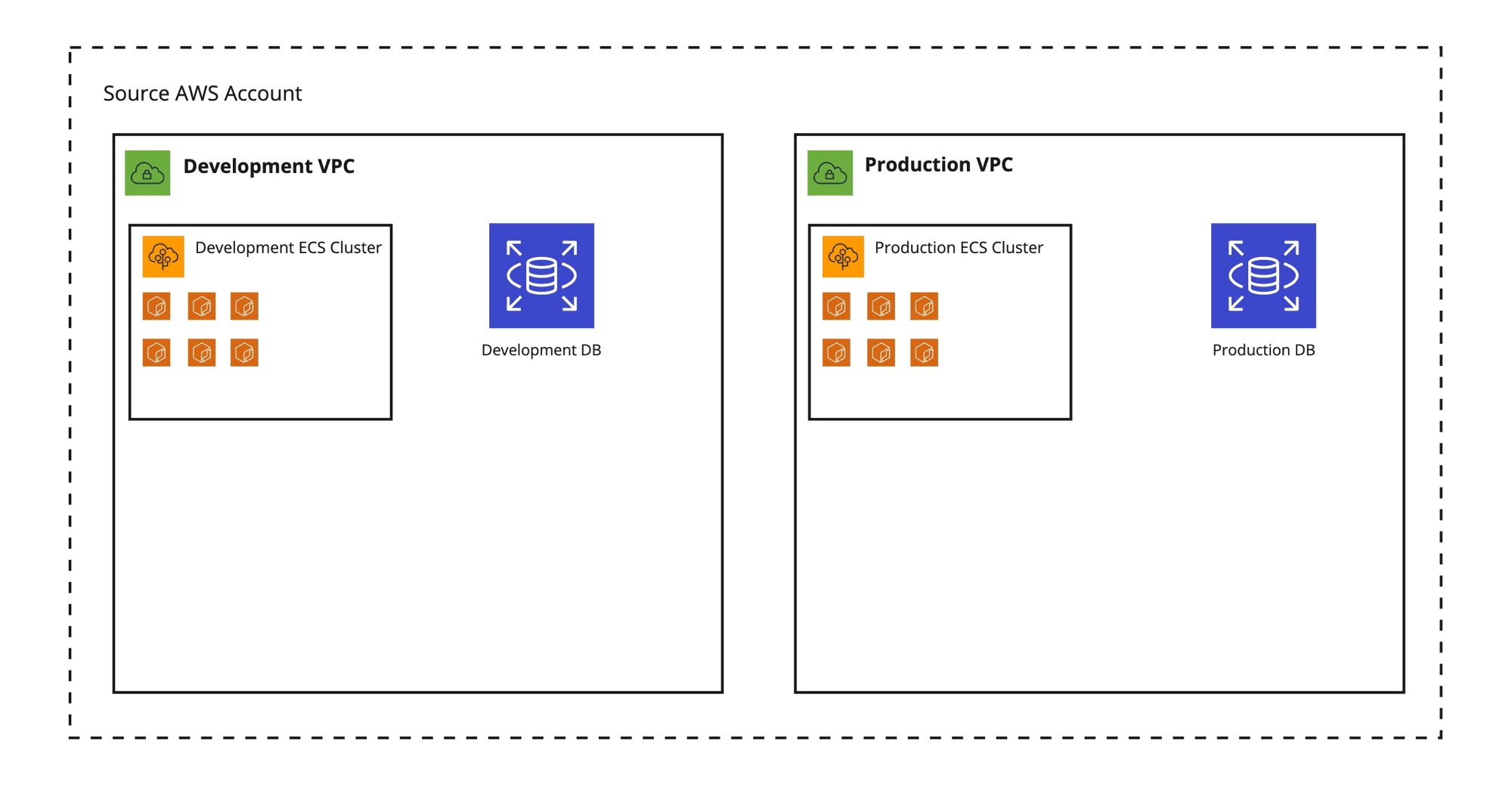
As mentioned, when we started everything was deployed into a single AWS account. When the moment came that we wanted to have separate development and production environments, I created 2 VPCs in the same account and deployed an identical setup in both, each consisting of:

  • An ECS cluster for our backend services
  • A PostgreSQL database on RDS for persistence
  • Some S3 buckets for storing unstructured data
  • Some Lambdas for data processing.

It looked something like this:

All AWS resources in 1 account

I deployed our applications and services (except for our frontend, which is deployed on Vercel) in two identical VPCs — still living in the same AWS account — and called it a day.


When we started building our team and the first software engineers and data scientists joined, I created IAM users for everyone and solved access control by defining groups with specific IAM policies (permissions) attached to them and adding the IAM users to those groups. The more people joined the team, the more diverse the access requirements became, for example:

  • A data scientist does not need access to the same things as a software engineer
  • A junior person does not need the same level of access as a senior person

And there are many more subtle differences in the kind of access to infrastructure people need and should have.

Single-Account Problems in a Nutshell

In the end, our single-account setup made it difficult to build a secure and resilient infrastructure:

  • It is less secure. If someone gains access to this one account, they have access to everything. It’s hard to separate resources for different environments (e.g. production, development) and treat these resources differently security wise.
  • It is less safe and resilient. If something goes wrong with one environment (e.g. development), it’s easy to affect services in other environments (e.g. production) when they’re in the same account. They get caught in the blast radius
  • It’s hard to maintain. All AWS resources live in 1 account so when different users need different levels of access, this needs to be controlled on a per-resource level, which is hard to configure and keep track of
  • It’s hard to control spend in this way. Once certain access is granted to create new resources, there is no limit to how many resources can be created and what services can be used

Many of these problems can actually be solved — even in a single-account setup — by "properly" tagging all your AWS resources and creating elaborate IAM policies for users and resources based on those tags. But such a tagging strategy will quickly become really complex and will cost a lot of time to maintain. Needless to say that it’s quite error-prone as well.

Aside from the security and safety implications, our setup had some other problems:

  • All IAM Users were created and managed through CDK/CloudFormation, because we love Infrastructure as Code. This is problematic:
    • It makes it possible for anyone with access to CloudFormation to see all Access Keys + Secrets
    • It’s not easy to scale, because we now need to manually deploy a CDK stack when new users need to be added
    • It’s hard to broadly define policies for different access patterns in this way
  • Users have to use a separate set of credentials for accessing AWS instead of using an existing login (i.e. their Google Workspace account)
There Is a Better Way

When I was researching a way forward, I found many blog posts extolling the virtues of putting your infrastructure into multiple AWS accounts. But before getting a better understanding of how this would work, I had some reservations about using multiple AWS accounts:

  • Do I need to create multiple IAM users for each person, so they can log in to multiple accounts?
  • How do we control costs? Do I need to keep track of different bills for each account?
  • How can I share resources, such as reusable Docker images or shared data in an S3 bucket?

AWS offers a nice solution to these problems (and others) in the form of AWS Organizations

According to AWS:

An organization is an entity that you create to consolidate a collection of accounts so that you can administer them as a single unit.

What does that even mean?!

AWS Organizations lets you organize a bunch of related AWS accounts in a hierarchical, tree-like structure. It will let you manage all those accounts from one central management account. With Consolidated Billing, all bills from all member accounts will be aggregated to the management account where you can pay them as one.

Arguably the most powerful feature of AWS Organizations is that you can group the member accounts together in Organizational Units (OUs) and apply common security policies to those. This lets you define permissions and control access in broad strokes — and from a central place — while keeping the natural separation of concerns that comes from using separate AWS accounts to organize your infrastructure.

Easy User Management Using AWS SSO

When it comes to user management, AWS Organizations offers the convenience of letting users log in with one user account (not to be confused with AWS account), using AWS Single Sign-on. AWS SSO lets you create users in the root account (also known as management account) of your organization and give them login credentials within AWS itself or link them to an external identity provider like Google or Active Directory. You can then give these users access to specific AWS accounts within your AWS Organization. Users can be assigned specific permissions within these accounts. (I will explain more on how this works in a later blog post)

This has several advantages compared to using regular IAM users:

  • Users only need one set of credentials to log into multiple AWS Accounts
  • Everyone can log in using credentials they already use on a daily basis (Google Workspace credentials in our case)
  • There is no more need to create and manage IAM users through CDK
  • There is no credential leakage through CloudFormation
  • We can potentially automate user creation by programmatically syncing AWS users and Google Workspace users
What Does a Good AWS Organization Setup Look like?

Well, I don’t know. But I do know what works for us so far

When deciding what AWS accounts to create and how to group them, I had the following requirements:

  • There must be a clear separation between Development, Staging and Production resources/infrastructure
  • It should be easy to control access to resources with different security and "stability" properties without having to manually define lots of policies
  • We want to give sandbox accounts to individual engineers and data scientists to allow and encourage experimentation while limiting spend
  • Sensitive resources and data should be placed out of reach from easy access when not needed for normal day-to-day activities
  • We want to follow the Principle of least privilege: give only the minimum set of permissions to allow access to exactly the resources a person or service needs to perform their job and not more.
  • We want as little overhead and bureaucracy as possible within the constraints of the previous requirements

This was aside from solving the aforementioned problems we had with our single-account setup.

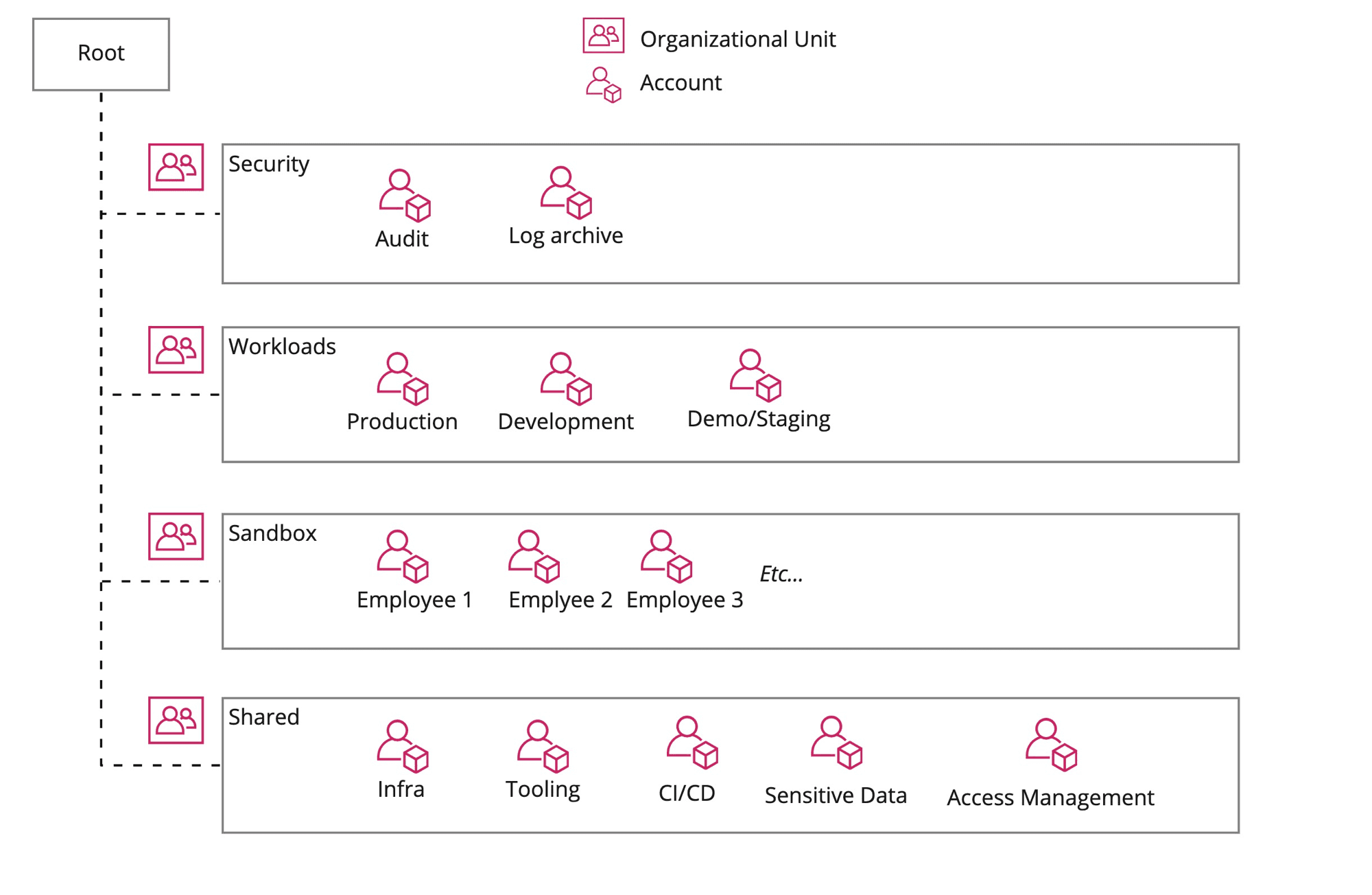
This led me to create the following accounts, organized by Organizational Unit:

AWS Organization design

Some notes and highlights:

  • Workloads: this contains the "meat" of the infrastructure used for the day-to-day running of our products. Each of the workload accounts represents a different environment, like Production, Staging and Development. They all have a similar setup and contain basic infrastructure like:
    • a VPC network with private and public subnets
    • a couple of ECS clusters for running services in (Docker) containers
    • some PostgreSQL databases on RDS
    • many lambdas for data processing, machine learning etc.
  • Shared: as the name implies, this OU houses accounts with infrastructure that is shared between workloads/services on other accounts. Some highlights:
    • Access Management: this contains IAM users for external machines and services that need to access AWS infrastructure on our behalf. Given the sensitive and "dangerous" access some of these machine users get, the Access Management account is tightly locked down. Example of an IAM user in this account, is the Github Actions user that is used to deploy code to our workload accounts. This user assumes roles within the workload accounts for deployments.
    • Sensitive Data: this account holds sensitive data that is not needed for day-to-day operations, but is occasionally used for training ML models and building new features
    • Infra: contains shared infrastructure, such as our central Docker registry. Docker images pushed to this registry are automatically replicated to our workload accounts for easy access
  • Sandbox: our employees occasionally need to experiment with AWS services so they get a sandbox account to do so, without messing up our operational workloads. Budget restrictions are placed on these accounts
Conclusion

Using AWS Organizations we have now set up our infrastructure at Source in such a way that it is more secure and also more scalable and easier to maintain from a security perspective. Our Software Engineers and Data Scientists have easier access to the infrastructure, services and resources they need — using only one set of credentials — without exposing them to sensitive data and/or critical infrastructure.

In future blog posts I will elaborate on the steps taken to set all of this up and share some practical guides on how to use a multi-account setup on a day-to-day basis.


Thanks to Dan for proofreading this ❤️

https://www.daan.fyi/writings/aws-multi-account
Customzing Pyenv Behavior with Hooks
You can customize the behavior of pyenv or its plugins - like pyenv virtualenv - by using hooks. These are simple (bash) scripts that are run at specific points when pyenv commands are run.
Show full content

I use pyenv to manage different Python versions on my laptop. It also comes with an official plugin that lets you manage virtualenvs through pyenv, which I find very convenient. Basically, virtualenvs are treated as just different Python versions by pyenv.

One thing that bothered me is that, whenever I create a new virtualenv and use pip in it, I am inevitably greeted by a message telling me pip is out-of-date:

 WARNING: You are using pip version 21.2.3; however, version 21.3.1 is available.
You should consider upgrading via the '~/.pyenv/versions/3.10.0/envs/test/bin/python3.10 -m pip install --upgrade pip' command.

So I end up always having to upgrade pip after creating a new virtualenv. Wouldn’t it be nice if this could be automated?

Turns out, we actually can by leveraging pyenv hooks.

Pyenv Hooks

pyenv hooks are scripts that are executed by pyenv whenever certain commands are run. These can be regular pyenv commands like pyenv install or pyenv rehash for example. But what is not apparent from the pyenv documentation, is that you can also create hooks for plugins, like pyenv virtualenv.

You can create a hook by creating a script at the following location:

 $PYENV_ROOT/pyenv.d/<hook-name>/<whatever>.bash

hook-name here can be any of: exec, rehash, which, install — which are all regular pyenv commands — but it can also be a plugin command, like virtualenv. The filename of the script doesn’t matter, and neither does the extension. I use .bash here to make it explicit that this is a bash script, but pyenv hooks can be written in any language.

To create a hook that upgrades pip and some other default packages, you can create a new script as follows:

 mkdir -p $PYENV_ROOT/pyenv.d/virtualenv/
$EDITOR $PYENV_ROOT/pyenv.d/virtualenv/after.bash

Where $EDITOR is your favorite editor (like vim, RIGHT?!)

Then add the following contents:

 after_virtualenv 'PYENV_VERSION="$VIRTUALENV_NAME" pyenv-exec pip install --upgrade pip setuptools wheel'

after_virtualenv is the command that tells pyenv when to execute the following command. In this case its defined by the pyenv virtualenv plugin. First we set the pyenv version to the name of the virtualenv we just created. This is set by pyenv virtualenv as $VIRTUALENV_NAME. Then we install/upgrade pip itself and setuptools and wheel.

That is all there is to it! Now any time you create a new virtualenv using pyenv virtualenv, the aforementioned packages will be automatically upgraded after the virtualenv was created.

https://www.daan.fyi/writings/pyenv-hooks
Static Duck Typing in Python with Protocols
Duck typing is considered to be one of Python's strengths. If you want to have the benefits of duck typing but also want your types statically checked, Protocols offer an excellent solution.
Show full content

At Source, we write most of our code in Python. It’s a language that both our Software Engineers and Data Scientists are equally at home in. It’s easy to be productive in Python, in part due to its dynamic nature. Not having to think too much about the types of your variables and functions, can make it easier to experiment, especially if you’re not entirely clear yet on how you’re going to solve a particular problem.

When moving our code to production however, we want to have more guarantees about the behaviour of our code. Writing (unit) tests is one way to get those guarantees, but we also make heavy use of type hints to give us more confidence in our code. Type hints can also provide a productivity boost, because not only humans can reason better about type hinted code, your editor can as well!

Sometimes though, using type hints everywhere can feel like you’re losing out on a lot of the magic and speed that a dynamic type system brings you. One particular trait of dynamic typing that is pretty idiomatic in Python, is duck typing.

Duck Typing

Duck typing is a philosophy in programming where you care more about the behaviour and properties of an object than its stated type to determine if that object is useful in a certain situation. Duck typing is inspired by the duck test:

If it walks like a duck and it quacks like a duck, then it must be a duck

In practice this means that when you write a function that receives a certain input, you care only about the behaviour and/or attributes of that input, not the explicit type of that input.

One interesting question that arises is: if you don’t want to be strict about the type of the parameters a function receives, are there still any static type guarantees to be had?

And the other way around is interesting as well: if you have a function with statically typed inputs, can you loosen up those parameters to make the function more universally useful, the way duck typing does?

As it turns out, Python provides a neat way to have our cake and eat it too!

Protocols to the Rescue

When reviewing some code recently, I came across a function that looked roughly like this:

 def calculate_windowed_avg(
measurements: Union[List[TemperatureMeasurement], List[HumidityMeasurement]],
window_size: timedelta,
field_name: str
) -> Dict[datetime, float]:
window_upper_bound = measurements[0].timestamp + window_size
current_window = []
window_averages = OrderedDict()
for m in measurements:
# various calculations happen here
# based on the timestamp of each measurement
...
return window_averages

The goal of this function is to calculate the average of a certain field (identified by field_name) in a rolling window. At the time of writing this function, we were using it for TemperatureMeasurement and HumidityMeasurement, but it is very likely we’ll want to use it for different types of measurements in the future.

If we look closely at how the function uses the input, it turns out that the only thing we want to be guaranteed of, is that the items we pass into the function have a timestamp field. So instead of specifying each different type that has adheres to this contract, we’d like to tell the type checker that we only care about having a timestamp field to work with.

Protocol from the typing module lets us do that. Just like with duck typing, Protocols let you specify the behaviour or attributes you expect, without caring about the type. Here is what that looks like:

 from typing import Protocol, List, Dict
from datetime import datetime

class MeasurementLike(Protocol):
    timestamp: datetime

def calculate_windowed_avg(
        measurements: List[MeasurementLike],
        window_size: timedelta,
field_name: str
) -> Dict[datetime, float]:
window_upper_bound = measurements[0].timestamp + window_size
...

Now the type checker doesn’t know exactly what the type is of whatever is provided as measurements but it does know what those items have a timestamp field because they adhere to the MeasurementLike Protocol.

In a sense, a Protocol acts like one side of an Interface as we know it from Java or Typescript. Instead of having to specify the behaviour and properties both on a type and on the functions that use it, we only have to specify it on a function, without caring about the types of the objects that are provided to the function.

Protocol and Generics

You can also use Protocols together with TypeVar for even more generic functions that are still type checked to some extend. One use-case that comes to mind, is when you don’t care about the input type to a function, as long as it follows a protocol, but you also want to guarantee that the output of the function is of the same type as the input, no matter what the exact type is.

This works as follows:

 from typing import Protocol, TypeVar
from datetime import datetime

class MeasurementLike(Protocol):
timestamp: datetime

M = TypeVar('M', bound=MeasurementLike)

def measurement_as_timezone(measurement: M, tz: tzinfo) -> M:
measurement.timestamp = measurement.timestamp.astimezone(tz)
return measurement

Here we create a function that takes any object that has a timestamp field and guarantees that the output will be of the same type as the input.

Conclusion

Protocols in Python provide a nice way to use duck typing while still having some static type guarantees. You can define contracts for your functions without caring too much about the actual types of your inputs.


Update on 2021–11–23: There was a wrong type annotation in this article, as pointed out by ragebol on Hacker News, which is now fixed

https://www.daan.fyi/writings/python-protocols
How to Add an Rss Feed to a Nextjs Blog
RSS is an important feature to give your content maximum exposure while also retaining control over your content. This post shows how to add syndication feeds to a statically generated NextJS site
Show full content

Today, I released a new version of my website with only one new feature: syndication through RSS, Atom and JSON Feed. Even though by some accounts, RSS seems to be dead, I strongly believe RSS is an important feature in the fight to keep ownership over your own content while also increasing exposure. The way I approach publishing and sharing my content, is called POSSE:

Publish (on your) Own Site, Syndicate Elsewhere.

RSS is an important part of that strategy.

Luckily, I’m not the only one who values RSS. There are others

In this article I want to share how I implemented syndication feeds in my NextJS-powered website.

Options and Requirements

I did some Googling to see how other NextJS users were generating RSS feeds, and there turned out to be many people that had solved this particular problem and wrote about it I found a couple of different approaches to generating and rendering RSS feeds in NextJS:

Generating feeds:

  • Hand-build the required XML using templated strings 🤢
  • Use a library to do it for you. The most popular library for this in the JS ecosystem seems to be feed 🤩

Rendering feeds:

  • Use Server-side rendering
    • Advantages:
      • Create dynamic feeds (more on that later) that can be different for each visitor
      • Using NextJS pages to represent feeds feels natural in the NextJS way of doing things
    • Disadvantages:
      • You can’t generate the website statically anymore (at least parts of it remain dynamic), which reduces performance As a side note: from a development perspective, server-side rendered pages and statically generated pages in NextJS are so similar that the difference doesn’t matter
  • Use Static generation
    • Advantages:
      • Because the feeds are generated at build time, the site remains snappy
    • Disadvantages
      • You cannot set the Content-Type header for statically generated pages, so you can’t serve those pages as application/rss+xml. I’m not how big of a problem this is and what black magic Vercel applies when serving my NextJS site
Picking the Requirements

After looking at the options, I decided on the following requirements for my feeds:

  • I want to go for statically generated feeds, to keep my site fast and the implementation simple
  • Support for RSS, Atom and JSON Feed
  • I want to include the complete blog post contents in the feeds. This is an important one because I personally really hate it when my RSS reader only shows me a summary of a post and I have to go the the website to read all of it. Caveat though: my website is built using MDX, so I might include components in the future that are not easily convertible to static HTML without Javascript enabled. In that case, readers will have to click through to my site.
Implementation

As per my requirements, I wanted to generate the feeds at build time. But as mentioned before, NextJS doesn’t support setting the Content-Type header for statically generated pages. The alternative that many people use, is to have a separate script generate your feeds and writing them to the public folder where all other static assets such as images are stored as well. That way, the feeds would be served as static assets instead of statically generated pages — which, from the browsers perspective doesn’t make a difference!

I found a good explanation by Ashlee Boyer of this technique.

My plan:

  1. Write script to generate feeds, using the feed library from NPM
  2. Run this script as a postbuild step so it would always be invoked after building the site using npm run build (this happens not only locally, but also when Vercel deploys my site)
Problem 1: Running Typescript Modules Is Hard

I immediately hit a snag with (1), because I couldn’t manage to use ES6/Typescript modules in a script run outside of my normal website code.

I’m using Typescript, and apparently ts-node, the tool to run Typescript files, doesn’t support modules. Writing the script in Javascript wasn’t really an option for me because I wanted to reuse a lot of logic that I already wrote for reading and parsing MDX files in the website itself.

Solution

I decided to follow the route that Ashlee Boyer suggests in her blog post and sneak in the function to generate my feeds as a "stowaway" in the getStaticProps function of my index page. This works beautifully!

pages/index.tsx
 export const getStaticProps: GetStaticProps = () => {
generateMainFeeds();
const lastPosts = getAllPostsFrontMatter('blog', 3);
return {
props: {
lastPosts,
},
};
};
Problem 2: Including the Full Content in the Feeds

The code of my website already supported translating MDX files into valid JSX to be rendered by React. But how to generate valid HTML from that content and include it in the feeds?

Solution

I couldn’t find many examples of this, but did find out about ReactDOMServer.renderToStaticMarkup. This function will take a bunch of React components and render them into HTML. This is what is used by many React server-side rendering solutions (maybe also by NextJS?) and works perfectly here as well.

One caveat: if your content contains internal links — which are often relative links — then you have to be mindful that those relative links are meaningless in the context of an RSS feed. The way I solved this is by doing some regex-based replacements on the generated HTML.

The complete content generation part looks like this:

lib/feeds.tsx
 const url = `${baseUrl}/blog/${post.frontMatter.slug}`;
const htmlContent = ReactDOMServer.renderToStaticMarkup(
<ChakraProvider resetCSS theme={theme}>
<MDXRemote {...post.mdxSource} components={MDXComponents} />
</ChakraProvider>
.replace(/href="\/#/g, `href="${url}#`)
.replace(/href="\//g, `href="${baseUrl}/`)
.replace(/src="\//g, `src="${baseUrl}/`);
)
Problem 3: Getting Rid of Style Information

My site uses Chakra UI for theming, which uses Emotion — a CSS-in-JS library — under the hood. Emotion will happily render tons of tags when statically generating HTML from your React components. For most use cases where you render React on the server (statically or not), this is desirable. In the case of RSS/Atom feeds, this is pretty useless.

Solution

The solution here is to strip all the and </code> tags from the generated HTML. Rather than summoning <style data-emotion="css 3u9hqk">.css-3u9hqk{transition-property:var(--chakra-transition-property-common);transition-duration:var(--chakra-transition-duration-fast);transition-timing-function:var(--chakra-transition-easing-ease-out);cursor:pointer;outline:2px solid transparent;outline-offset:2px;color:inherit;background-image:linear-gradient(to bottom, var(--chakra-colors-teal-300) 0%, var(--chakra-colors-teal-300) 100%);-webkit-background-position:0 100%;background-position:0 100%;-webkit-text-decoration:none;text-decoration:none;background-repeat:repeat-x;-webkit-background-size:2px 2px;background-size:2px 2px;-webkit-transition:background-size .2s;transition:background-size .2s;}.css-3u9hqk:focus-visible,.css-3u9hqk[data-focus-visible]{box-shadow:var(--chakra-shadows-outline);}.css-3u9hqk:hover,.css-3u9hqk[data-hover]{-webkit-text-decoration:none;text-decoration:none;-webkit-background-size:4px 50px;background-size:4px 50px;}The One whose Name cannot be expressed in the Basic Multilingual Plane by trying to use regex here, I found this library to help me with this task:

lib/feeds.tsx
.css-lqvy6z{display:inline-block;font-family:var(--chakra-fonts-mono);font-size:var(--chakra-fontSizes-sm);-webkit-padding-start:0.2em;padding-inline-start:0.2em;-webkit-padding-end:0.2em;padding-inline-end:0.2em;border-radius:var(--chakra-radii-sm);background:var(--badge-bg);color:var(--badge-color);box-shadow:var(--badge-shadow);--badge-bg:var(--chakra-colors-gray-100);--badge-color:var(--chakra-colors-gray-800);}.chakra-ui-dark .css-lqvy6z:not([data-theme]),[data-theme=dark] .css-lqvy6z:not([data-theme]),.css-lqvy6z[data-theme=dark]{--badge-bg:rgba(226, 232, 240, 0.16);--badge-color:var(--chakra-colors-gray-200);}const cleanHtmlContent = stripHtml(htmlContent, {
    onlyStripTags: ['script', 'style'],
    stripTogetherWithTheirContents: ['script', 'style'],
}).result;
.css-r5akja{font-family:var(--chakra-fonts-heading);font-weight:var(--chakra-fontWeights-bold);margin-top:var(--chakra-space-2);margin-bottom:var(--chakra-space-4);font-size:var(--chakra-fontSizes-2xl);line-height:1.33;}@media screen and (min-width: 48em){.css-r5akja{font-size:var(--chakra-fontSizes-3xl);line-height:1.2;}}.css-r5akja{scroll-margin-top:5.5rem;}.css-r5akja:hover>a{visibility:visible;}.css-r5akja a{position:absolute;margin-left:-1em;padding-right:0.5em;cursor:pointer;visibility:hidden;width:80%;max-width:800px;color:var(--chakra-colors-gray-700);}.css-r5akja a:hover{visibility:visible;-webkit-text-decoration:none;text-decoration:none;}.css-r5akja a span:after{content:"#";}.css-auue23{transition-property:var(--chakra-transition-property-common);transition-duration:var(--chakra-transition-duration-fast);transition-timing-function:var(--chakra-transition-easing-ease-out);cursor:pointer;outline:2px solid transparent;outline-offset:2px;color:inherit;-webkit-text-decoration:none;text-decoration:none;}.css-auue23:focus-visible,.css-auue23[data-focus-visible]{box-shadow:var(--chakra-shadows-outline);}.css-auue23:hover,.css-auue23[data-hover]{-webkit-text-decoration:none;text-decoration:none;}The End Result .css-ju3ovf{margin-bottom:var(--chakra-space-2);margin-top:var(--chakra-space-2);}

I now have serve .css-3u9hqk{transition-property:var(--chakra-transition-property-common);transition-duration:var(--chakra-transition-duration-fast);transition-timing-function:var(--chakra-transition-easing-ease-out);cursor:pointer;outline:2px solid transparent;outline-offset:2px;color:inherit;background-image:linear-gradient(to bottom, var(--chakra-colors-teal-300) 0%, var(--chakra-colors-teal-300) 100%);-webkit-background-position:0 100%;background-position:0 100%;-webkit-text-decoration:none;text-decoration:none;background-repeat:repeat-x;-webkit-background-size:2px 2px;background-size:2px 2px;-webkit-transition:background-size .2s;transition:background-size .2s;}.css-3u9hqk:focus-visible,.css-3u9hqk[data-focus-visible]{box-shadow:var(--chakra-shadows-outline);}.css-3u9hqk:hover,.css-3u9hqk[data-hover]{-webkit-text-decoration:none;text-decoration:none;-webkit-background-size:4px 50px;background-size:4px 50px;}RSS, Atom and a JSON Feed for your reading pleasure. Most of the relevant code can be found here

.css-r5akja{font-family:var(--chakra-fonts-heading);font-weight:var(--chakra-fontWeights-bold);margin-top:var(--chakra-space-2);margin-bottom:var(--chakra-space-4);font-size:var(--chakra-fontSizes-2xl);line-height:1.33;}@media screen and (min-width: 48em){.css-r5akja{font-size:var(--chakra-fontSizes-3xl);line-height:1.2;}}.css-r5akja{scroll-margin-top:5.5rem;}.css-r5akja:hover>a{visibility:visible;}.css-r5akja a{position:absolute;margin-left:-1em;padding-right:0.5em;cursor:pointer;visibility:hidden;width:80%;max-width:800px;color:var(--chakra-colors-gray-700);}.css-r5akja a:hover{visibility:visible;-webkit-text-decoration:none;text-decoration:none;}.css-r5akja a span:after{content:"#";}.css-auue23{transition-property:var(--chakra-transition-property-common);transition-duration:var(--chakra-transition-duration-fast);transition-timing-function:var(--chakra-transition-easing-ease-out);cursor:pointer;outline:2px solid transparent;outline-offset:2px;color:inherit;-webkit-text-decoration:none;text-decoration:none;}.css-auue23:focus-visible,.css-auue23[data-focus-visible]{box-shadow:var(--chakra-shadows-outline);}.css-auue23:hover,.css-auue23[data-hover]{-webkit-text-decoration:none;text-decoration:none;}Future Plans .css-ju3ovf{margin-bottom:var(--chakra-space-2);margin-top:var(--chakra-space-2);}

At some point I want to diversify my writing output by not only writing about tech. And even within the topic of tech there are many sub-topics I could write about, not all of which are equally interesting to every reader (all 5 of them, including my mom 👩‍👦). I’m planning to introduce .css-3u9hqk{transition-property:var(--chakra-transition-property-common);transition-duration:var(--chakra-transition-duration-fast);transition-timing-function:var(--chakra-transition-easing-ease-out);cursor:pointer;outline:2px solid transparent;outline-offset:2px;color:inherit;background-image:linear-gradient(to bottom, var(--chakra-colors-teal-300) 0%, var(--chakra-colors-teal-300) 100%);-webkit-background-position:0 100%;background-position:0 100%;-webkit-text-decoration:none;text-decoration:none;background-repeat:repeat-x;-webkit-background-size:2px 2px;background-size:2px 2px;-webkit-transition:background-size .2s;transition:background-size .2s;}.css-3u9hqk:focus-visible,.css-3u9hqk[data-focus-visible]{box-shadow:var(--chakra-shadows-outline);}.css-3u9hqk:hover,.css-3u9hqk[data-hover]{-webkit-text-decoration:none;text-decoration:none;-webkit-background-size:4px 50px;background-size:4px 50px;}tags to allow filtering content once I have enough of it.

.css-ju3ovf{margin-bottom:var(--chakra-space-2);margin-top:var(--chakra-space-2);}

Once I have tags, I would like to start supporting dynamic feeds so readers can subscribe only to the stuff they actually want to read. I imagine building an endpoint like this:

.css-lqvy6z{display:inline-block;font-family:var(--chakra-fonts-mono);font-size:var(--chakra-fontSizes-sm);-webkit-padding-start:0.2em;padding-inline-start:0.2em;-webkit-padding-end:0.2em;padding-inline-end:0.2em;border-radius:var(--chakra-radii-sm);background:var(--badge-bg);color:var(--badge-color);box-shadow:var(--badge-shadow);--badge-bg:var(--chakra-colors-gray-100);--badge-color:var(--chakra-colors-gray-800);}.chakra-ui-dark .css-lqvy6z:not([data-theme]),[data-theme=dark] .css-lqvy6z:not([data-theme]),.css-lqvy6z[data-theme=dark]{--badge-bg:rgba(226, 232, 240, 0.16);--badge-color:var(--chakra-colors-gray-200);}/feeds/by-tags.xml?tags=tag1,tag2
.css-ju3ovf{margin-bottom:var(--chakra-space-2);margin-top:var(--chakra-space-2);}

I’m curious if others are doing this!

https://www.daan.fyi/writings/rss
Use Tools That Suit You and the Problem
Don't let anyone tell you what tools to use. Make sure that your builds are tool-agnostic
Show full content

A couple of weeks ago someone shared an article on Hacker News that discussed the drawbacks of using an IDE for programming. Needless to say, when you touch people’s tools, you can be sure to spark a hefty discussion.

To be fair, the author did clarify that they’re not against IDE’s in general and they actually use one on a daily basis.

When reading the discussion, one of the first things I wondered is if there are places on the internet where carpenters or plumbers furiously criticize each other’s choice of tools. But even that has a place on Hacker News

In this post I want to explore the fundamental problems with this type of discussion and how you can embrace freedom of choice.

It’s All about Context

When discussing someone else’s choice of tools — in this case the choice of editor or IDE — it’s good to be mindful of what we don’t know about this person and their reasons for choosing certain tools. Aside from personal preference and/or familiarity, there can be lots of extra factors to consider:

  • We don’t know what kind of problems they’re working on
  • We don’t know the context in which they work (e.g. security requirements laid down by the company they work for, available budget)
  • We don’t know their level of experience

I think it’s good form to voice an opinion only when we can see the whole picture. I also think that people should be encouraged to choose the right tool for the job. And to put it simply: the right tool for the job is the one that fits the problem and makes you the most productive.

It’s Also about Definition

Another issue with this kind of discussion is that everyone has a different idea of what really constitutes an "IDE". We’re inclined to frame the choice of editor as a binary choice — "pure text editor" vs "IDE", almost like a false dichotomy — while it really is a spectrum. On this spectrum you’ll not only find different editors, but even different configurations of the same editor with varying degrees of "smartness" applied through plugins.

So when someone says "why use an IDE when you can do everything an IDE does in VIM if you install the following 20 plugins", is this really so different from an actual IDE (that was branded as such)?

Philosophies in Tool Choices

When looking at how people setup their development environments, I basically see 2 different approaches:

  • The "additive" approach: this basically follows the UNIX philosophy of composing many different tools that each do one thing well. It often involves a terminal-based editor like VIM, optionally with some plugins and supported by external tools like grep, sed and awk that can help with refactoring code. You basically stack tools until you have an "integrated" development environment
  • The "subtractive" approach: you take one "big" editor as the basis of your stack. This is often an editor that is branded as an IDE (e.g. Eclipse, Jetbrains editors). Then you take away/replace ("subtract") the parts that work better through dedicated tools (according to personal preference of course)

To me, both approaches have their merits and uses!

How to Create Freedom of Choice?

I think the most important question around editors is not

How to choose the right editor?

but rather

How to enable each member of my team to choose the editor that makes them most productive, while enabling effective collaboration?

Here’s my recipe to do that:

My basic starting point in teams: everyone can use the editor/IDE of their choice. To enable effective collaboration, the following rules must be followed:

  • Editor configuration is never checked into version control, unless it’s generic and applicable across editors. Examples of generic editor configuration are: line endings, tabs vs spaces, max line length etc. There is some overlap with linters here
  • Enforce common code style through external tools (i.e. linters, code formatters)
  • Everyone should be able to build and run a project, regardless of the choice of editor, preferably through the terminal. This means that we’ll always prefer external tools for this. Many languages provide tooling for this:
    • Java → Maven/Gradle
    • JS/TS → NPM
    • Go → Go
    • Rust → Cargo
  • Additionally, building and running code can be made easier and better reproducible by using Makefiles and/or Docker (combined with Docker Compose)

I have to admit that in some ways I also limit choice within my teams: building and running projects often involves shell scripts which are portable between Linux and MacOS, but not to Windows. This can be solved by using WSL on Windows.

This Is My Setup

My personal setup involves quite a lot of tools.

For any "serious" development work (i.e. long stretches of coding and big projects) I take the aforementioned "subtractive" approach. My basis is one of the Jetbrains tools, depending on the language(s) I’m working with. I find the Jetbrains tools make me really productive and their All products pack offers great value for money, especially with their huge loyalty discounts after 1 or more years.

I still use the terminal and external tools for many things in this case. I put quite some time in improving and maintaining my dotfiles as well.

  • I prefer to use the terminal for: building, linting, running tests, using git
  • I prefer to use the IDE for: writing and editing code, refactoring, searching for code, find/replace through regex

For quick and short edits and viewing files where speed is preferred and conveniences like syntax highlighting and intellisense are not important, I use Sublime Text or VIM. Example of this: editing my dotfiles.

Sometimes, but rarely, I use VSCodium for editing or viewing files which are not part of a project and which I want to reformat/reindent. This doesn’t work well for me in Sublime Text. For example: viewing/editing minified JSON files.

Conclusion

To wrap this post up, I just want to reiterate: use whatever tools make you productive and help you solve the problems you’re trying to solve and please let others do the same.

And here’s some additional closing advice: should you ever grow unhappy with the tools you’re using, just write a blog post extolling the virtues of your current tools. You can be sure people on the internet will tell you how much better their tools are, thereby providing you with potential alternatives to your current setup 😇


Thanks to Dan for proofreading this

https://www.daan.fyi/writings/tools
The Pitfalls of Deploying a Nextjs Frontend on Aws Amplify
Half-baked products lead to much frustration
Show full content

Have you ever gone above and beyond to give a product a fair chance, only giving up way past your own sanity and patience? I did. The product was AWS Amplify

Let’s Build Something with NextJS

When I started developing the primary (web) UI for the product we’re building at Source, I quickly decided to use the NextJS framework as the basis for the frontend. One thing I really like about NextJS is that it does filesystem-based routing. Even though I like to diss on PHP as much as the next person, this particular feature of NextJS reminds me a bit of PHP in a good way.

Another very compelling feature of NextJS, is the ability to have different rendering strategies for each different page. You can decide to use:

  • Static generation for pages and content that rarely change. These pages get pre-rendered at build time and can be aggressively cached on a CDN. These pages can of-course still be highly dynamic by using client-side data fetching methods
  • Server-side rendering for pages that need to return different content on each request and/or for each different user
  • Incremental static regeneration, which is a variation on Static generation that will cache pages for a period you specify and then regenerate the pages server-side when they’re considered stale
Deployment

This particular feature requires a specific hosting setup that supports the different flavours of rendering. You basically want:

  • a good CDN to cache and serve your static pages
  • a server-side solution to serve the server-side rendered pages and facilitate incremental static regeneration. This should also take care of API routes, should you use them

The NextJS documentation mentions a couple of options for deployment:

  1. Use Vercel. Vercel is the company behind NextJS. They offer a seamless experience where you can use any rendering method, and Vercel will deploy each part of your app in the right way. One neat thing they do is that they’ll convert your server-side rendered pages and API routes into serverless functions that they’ll deploy to edge locations all over the globe.
  2. Setup a NodeJS server somewhere for the server-side stuff and use a CDN manually to serve the static content.

At Source however, we’ve made a conscious decision to use AWS for all of our infrastructure needs. We’re too early in the lifecycle of both our product and company to consider a hybrid cloud setup and AWS offers all the features that we need for prices that are reasonable for now. Through one of our investors we also got a boat-load of AWS credits to get started, which helps.

Amplify

I didn’t want to manually set up a hybrid deployment with NodeJS and CDN - which I could probably do using Cloudfront and ECS - so I looked for alternatives. AWS Amplify claims to be the

Fastest, easiest way to build mobile and web apps that scale

And they claim to support NextJS as well as server-side rendering by virtue of Lambda@Edge

Sounds great! So how does that all work?

Amplify - The Setup

The idea behind Amplify is that it lets you focus on building your app without having to worry about the infrastructure. This means that it will not only let you build and deploy your frontend easily, it will also let you hook-up backend components like authentication through Cognito, a GraphQL API using AppSync and a DataStore.

The way Amplify manages all of this, is through the idea of "backends". A backend contains one or more of the aforementioned components. You can setup different backend environments in Amplify and couple these to different (git) branches of your frontend.

Amplify - The Developer Experience

We are bringing our own database and API and wanted to use a pre-existing Cognito user pool. Amplify lets you import an existing Cognito user pool instead of creating one for you, and this worked fine… until I tried to create a second "backend environment" with a different Cognito user pool.

I want to allow different users on our development environment than our production environment. These environments correspond to the main branch in Git (production) and any other branches in Git (development).

How Do I Tie an Amplify Backend Environment to a Frontend Branch?

Interaction with Amplify is done through the web console or the Amplify CLI. According to the documentation, we can create a new Amplify backend environment like this:

 amplify env add

But nowhere is it made clear how this is linked to our frontend branch. The Amplify CLI tries to mimic the git CLI by having amplify push and amplify pull. So I assume we need to push our new environment to the cloud. Does this command depend on the git branch I’m on? I don’t know. I could just as easily overwrite my existing backend environment when using this command.

Eventually I was able to create a main environment and a dev environment, but no matter how hard I tried, I could not get those environments to use different Cognito user pools.

How Do New Team Members Setup an Existing Project?

The Amplify CLI will create some configuration files, some of which you need to commit to git, and some of them you need to ignore. These files should make the build reproducible. It is unclear however, what a new developer needs to do to be able to run an existing Amplify project. The documentation mentions multiple Amplify CLI commands to setup a project:

 amplify pull
 amplify init
 amplify configure project
 amplify env checkout 

To be run in arbitrary order?

Three similar questions on StackOverflow give 3 different answers on this topic.

When I was on-boarding new team-members, we basically tried some commands in different order until we were able to run the project locally for that engineer.

How Do I Figure Out Why My Build Failed?

In short: you don’t. Or you enlist the help of AWS Support (which you will have to pay for). The Amplify web console doesn’t share detailed build logs, so you’ll have to fix your problems by trial and error.

Amplify - The Bugs

AWS Amplify seems to have quite some bugs. For example: when you use Gitlab, you cannot put the source code of your project in a sub-group. This will silently fail your build, with no clear error message in sight.

The aforementioned problem of using multiple Cognito user pools for different environments of one Amplify frontend, I also consider a bug.

Not having access to the actual build logs, I also consider a bug.

Amplify - No Help Included

The most painful issue I have with AWS Amplify - and AWS in general - is the complete lack of support. You are paying a lot of money for their services, but that does not come with any form of support, unless you pay extra. And when you make use of that paid support, it goes something like this:

  1. Contact AWS Business support through their website and try to explain your problem in a plain text field that you cannot resize or use formatting in
  2. Wait far longer than the promised 4 hours
  3. Get a response from someone telling you they’ll forward it to "the team" (why not have someone respond who can actually help you with your problem?)
  4. Get a canned response with a solution akin to "turn it off and on again"
  5. Tell them you have an actual problem
  6. Get forwarded to the next person who you have to clue in again on what your problem is
  7. Go to 2 and repeat

This means that in practice, AWS Amplify is not usable unless you are willing to pay extra for support and have a lot of patience.

As a side note, I find it really frustrating that with big corporations like Amazon in general, you quickly feel helpless and ignored when you have problems. Stories about Google customer support (or lack thereof) are rampant on Hacker News, and I think Amazon is no different. You’d think that with so much revenue they should be able to set up actual proper customer support 🙄

The Pattern with AWS

I think that these problems with Amplify are endemic of a larger problem with AWS: their PaaS and SaaS solutions suck. Aside from pricing (which is quite high compared to competitors like Digital Ocean), I think AWs’ infrastructure-as-a-service offerings are fine. If you want to have a bunch of servers (EC2), a database here and there (RDS) and some serverless functions (Lambda), AWS will serve you just fine.

But if you want something on top of that, like authentication (Cognito), or a PaaS solution like Amplify, be prepared for a sub-par offering compared to the competition. I think Amazon should focus on strengthening their core offerings instead of offering everything and the kitchen sink.

The Solution

In the end, I dropped Amplify and went with Vercel. $20/user/month is a small price to pay for actually being able to work on the product instead of fighting AWS services and support.

https://www.daan.fyi/writings/amplify
The Joy of Starting Something New
The start of a new blog/job/...
Show full content

I don’t really know how to say this, but: I’m going to try and blog again! After building this site, I didn’t even know how to begin actually writing again. Looking for inspiration, I studied some famous tech people’s websites but came up empty trying to find examples of "first blog posts" there. Most people like to just dig right in with some on-topic tech content it seems…

But HERE IT IS!

My first blog post on my new website.

Previously on…

It’s been nigh on 4 years since I last wrote something on my old crib dandydev.net (by the time you’re reading this, I’ll have most probably redirected everything from there to here). I don’t really know why I stopped blogging in the first place, but it probably had something to do with life/work/… getting in the way (or me letting it get in the way anyways).

So what has been going on?

After working for KLM Royal Dutch Airlines for 4.5 years I got a dream position at Source.ag, a new startup co-founded by a friend, focusing on Agriculture & AI. As VP of Engineering I help build both the tech and the team and I’m loving it to bits!

Keeping with the theme of this post, it’s really exciting to start something so brand new. I’m actually employee #1 which gives me ample opportunity to have a major impact. There are no pre-established rules, processes, dynamics. For the first couple of months, it was just the 2 co-founders and me figuring out what to build, how to build it and then actually building it while at the same time trying to grow the company. And now, 5 months after I started, we’re 12 lifeforms strong and growing!

And after my previous job veered more and more into organizational politics instead of tech, it feels great to be building an actual product again. It’s both amazing and terrifying to code most of an MVP all by yourself in 5 months 😱

If you’re interested in bringing positive change to the food system, you can join us

The Excitement of New Things

Interlude: why is it that I find starting new things so exciting? I often wonder about this.

  • I’m probably one of the few people not actually terrified of starting a new job
  • There are few things that give me more energy than starting a new side-project
  • Even as a gamer, I often spend more time trying out new games than actually finishing them (don’t worry, I also have a Humble Bundle backlog and a PSN profile full of games that you don’t know about yet 🙄)

I think it comes down to wanting to learn new things as much as possible and I guess I just love exploring the unknown.

But I’m gonna be honest: the challenge is to stick with things. For each side-project I finished, there are many left in the dust. They were never time badly spent, because each time I learnt something new. But I think there is value in finishing things as well.

I hope that a different approach with this blog will make it easier for me to stick with it.

Doing Things Differently

I want to sound off this rambling first blog post by sharing how things that are (going to be) different with this website:

  • I ditched my old domain dandydev.net for some place simpler and more elegant: daan.fyi. I paid a pretty penny to get a domain of only my first name and an extension that didn’t look too ridiculous and I love it. It feels a bit more mature as well
  • Always looking to learn new things, I chose to forego a traditional static site generator for a more hand-built experience. This site was built on NextJS, React and Typescript. And I actually designed and built the theme myself using ChakraUI. I did get a lot of inspiration from other people’s websites (see below)
  • I’m writing my posts using MDX instead of regular markdown. For this particular post there is not actually any difference, but MDX will allow me to create more tailored and interactive experiences in the future, should I need/want it
  • In terms of content, I plan to have a different approach than before:
    • I’ll try to write shorter posts and consequently (hopefully) write more often
    • I’m allowing myself to write about other stuff than tech. This blog is meant to express myself more than to advertise myself. This means I’ll probably write about non-tech topics like movies & tv-shows I’ve seen, games I played and maybe even reflect on politics once in a while 😬 Once this kind of content arrives, I’ll make sure it’s easy to see and skip it 😉
Acknowledgements of Inspiration

When building this website, there were a few websites that inspired me and/or helped me with actual solutions to coding problems (yay for open source!):


See you next time!

https://www.daan.fyi/writings/new