GeistHaus
log in · sign up

https://blogger.com/feeds/4474580574529252327/posts/default

atom
25 posts
Polling state
Status active
Last polled May 18, 2026 23:36 UTC
Next poll May 19, 2026 21:27 UTC
Poll interval 86400s
Last-Modified Thu, 14 May 2026 19:20:16 GMT

Posts

FMC Card For MIPI TX/RX Camera CSI and Display DSI Emulation
BreakoutCameraFMCFMC LPCFPGAMIPI CSIMIPI DSI
Show full content
This post is going to about a really special FMC LPC board for Xilinx FPGA boards. This board allow you to Test MIPI Systems, Specially by not only Providing a Port for doing Normal MIPI RX from Camera or TX to display but also Emulating MIPI Camera by doing MIPI TX Camera Emulation and also emulating a Display by doing MIPI RX. This board is specially Designed for Testing MIPI Systems on FPGA and Specially FPGA SoC Running Linux. 

Specification 
  • This breakout Give you 3x MIPI Connections using just HMC LPC Pins.
  • Board Specifically Designed for MIPI Emulation. Has Very special Powered and 2x Passive connector.
  • Board is specifically for MIPI TX/RX for DSI Display and Camera, While Also has Dedicated Emulation Connector to Emulate Camera RX and Display Emulation.
  • Current limited Active Powered MIPI  Connector.
  • Passive MIPI Connector for emulation with Powered Detect LED Indication.
  • This Board Has 3x 22Pin 0.5mm Pitch 4Lane MIPI Connector, Same As Raspberry Pi 5 onwards.
  • Compatible to all Raspberry Style Cameras, 2 Lane and 4Lane cameras and displays for Both TX and RX.
  • Compatible Standard 2Lane Rapsberry Pi 15Pins 1mm Pitch Cameras using RPI to Mini FPC Cable.
  • Compatible to Digilent PCam  cameras.
  • Example Video ISP pipeline working under Linux as V4L2 medica driver on ZCU102 Provided as Reference example.
  • Normal FPGA FMC Board comes from big manufacturer, Availability of such board is very very rare.
  • Board is VITA57.1 Compliant Has EEPROM to Configure voltages.
  • This is Rev D of Board, Works with ZCU106 and ZCU104, ZCU102
  • Both ZCU106 and ZCU104 are supported by Free Xilinx Vivado
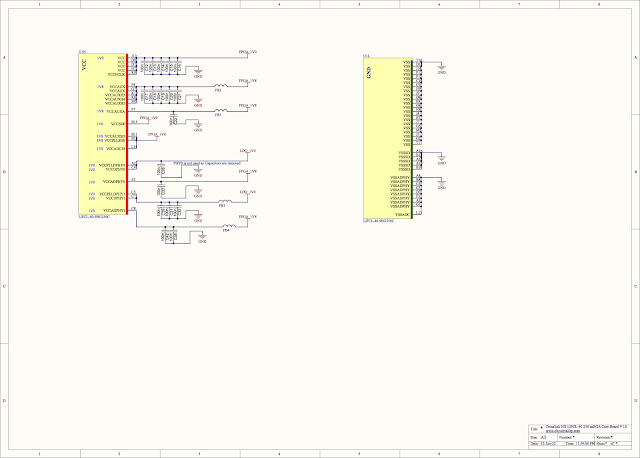
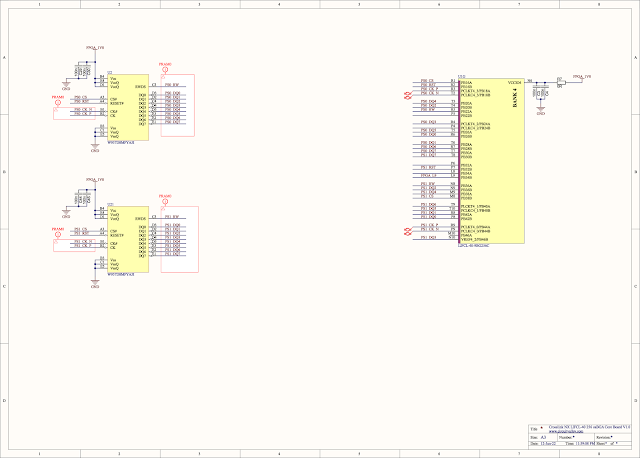
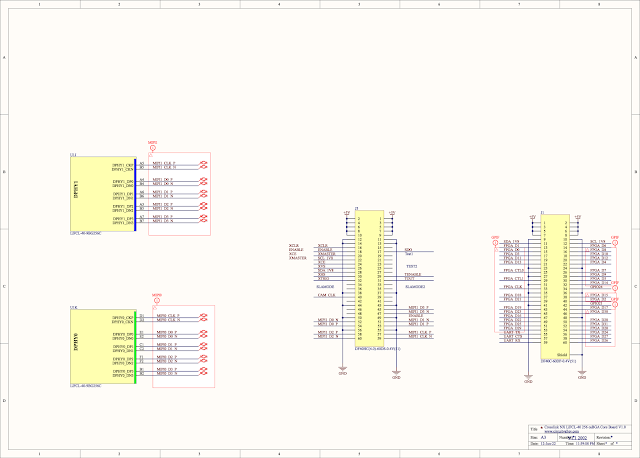
Schematic High Resolution Schematic is available on Project Github Repo


Hardware Revisions 

RevA to Rev C -- Not Publicly known 

RevD, Primary Production Unit. No know issue


Pin Assignment  MIPI Signal FMC Connector Pin ZCU102 HPC0 ZCU102 HPC1 ZCU106 HPC0 ZCU106 HPC1 ZCU104 HPC0 CAM1_MIPI_CLK_PG6Y4G6F17B18F17 CAM1_MIPI_D0_PD14W2AE2H16G20H16 CAM1_MIPI_D1_PH7V2AD2L20K22L20 CAM1_MIPI_D2_PC10AC2AH2H19H21H19 CAM1_MIPI_D3_PG9Y2AH1K19J21K19 CAM1_I2C_SCLD11AB3AG3K17G25K17 CAM1_I2C_SDAD12AC3AH3J17G26J17 CAM1_ENABLEG2T8P10G10xG10 CAM1_REF_CLKG3R8P9F10xF10 PWR_OUT_ENABLEG12V4AE3E18J25E18 TX_EN_DIRG13V3AF3E17H26E17 CAM1_REF_CLK_DIRH4AA7AE7E15F23E15 FMC ZCU102 HPC0 ZCU102 HPC1 ZCU106 HPC0 ZCU106 HPC1 ZCU104 HPC0 PORT 3 CAM3_MIPI_CLK_PC22N9xD11xD11 CAM3_MIPI_D0_PG27M11C7C7 CAM3_MIPI_D1_PH28L12B6B6 CAM3_MIPI_D2_PD26L15B9B9 CAM3_MIPI_D3_PH25P12B10B10 CAM3_I2C_SCLH34V6E9E9 CAM3_I2C_SDAH35U6D9D9 CAM3_ENABLEH38T11E8E8 CAM3_REF_CLKH37U11F8F8 PORT3_RX_EN_DIRD18AC8F15F15 CAM3_REF_CLK_DIRC26M10A8A8 PWRT3_IN_DETECTC27L10A7A7 FMC ZCU102 HPC0 (Bank 66) ZCU102 HPC1 (Bank 65) ZCU106 HPC0 ZCU106 HPC1 ZCU104 HPC0 PORT 4 CAM4_MIPI_CLK_PD20P11xxxx CAM4_MIPI_D0_PD23L16 CAM4_MIPI_D1_PG24M15 CAM4_MIPI_D2_PH22L13 CAM4_MIPI_D3_PG21N13 CAM4_I2C_SCLG34V7 CAM4_I2C_SDAG33V8 CAM4_ENABLEG36V12 CAM4_REF_CLKG37V11 PWR_IN_DETECTH20Y9 RX_EN_DIRH19Y10 CAM4_REF_CLK_DIRH16AB6

Hardware
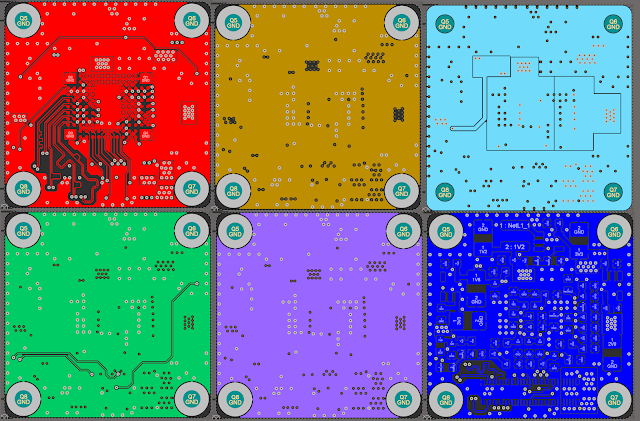
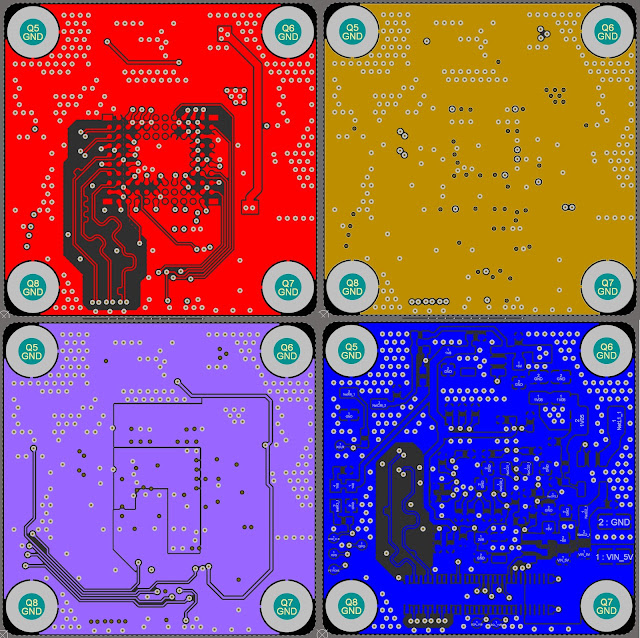
PCB

Top of the board Showing all 3 Ports and Indication LEDs
Back of the FMC Card Showing Power protection and Control Level translators 


Project Github

https://github.com/circuitvalley/DEVEMU_FMC_MIPI_Emulator_card


tag:blogger.com,1999:blog-4474580574529252327.post-6800914586042367830
Extensions
FPGA FMC NVMe Drive SSD, NVMe SSD Drive on PCIe M.2 Adapter FMC HPC FPGA
FMCFMC HPCFPGAFPGA BasicsFPGADriveHPCM.2M.2 CarrierNVMePCIeSSDUltrazedXilinxXilinx Zynq Ultrascale+
Show full content

As I am working with more High end FPGA boards. I need more different type of peripheral pugged into my FPGA board with FMC connector. This board is going to about Why and how i designed FMC HPC PCIe M.2 carrier adapter card so that You can Plug NVMe SSD Drive or any other PCIe Peripheral in M.2 Form factor. 

As case with most modern FPGA board. They come with High density high speed expansion connector. Out of which FMC connectors are most common. FMC Connectors also  have few types, There FMC HPC connector which has all the pins of HPC connector , While there is a FMC LPC connector which has only a subset of HPC connector. Both FMC HPC and LPC connectors are basically same in terms of mechanical dimensions, They both fit into one another. Its just LPC has few electrical pins. The there is also a even bigger connector even with more pins called Vita 57.4 FMC+ , it is mostly Common with very expensive high end boards. 


As I was working on my camera project i needed very fast storage for my FPGA, Where I could store RAW or even Compressed Video from Camera. This Little Board that I designed will allow you Connect very Fast NVMe SSD storage to your FPGA board. This board can Carry Two NVMe SSD  Connected to FPGA. Both devices can be operated parallelly on full x4 PCIe link . This FPGADrive solution give you Multigigabyte per second performance. Allowing to work for any application.

Features

  • FPGA FMC HPC M.2 Carrier board for  NVMe SSD M.2 M Key and Other M.2 m-key card, such as WiFi for AI Accelerator
  • PCIe Gen4 X4 on both of the slots 
  • High Quality 8 Layer Board with Controlled Stripline routing.
  • Independently Power both both Slots Allow Full potential. 
  • Two M Key slots with 4 Different Sizes.
  • Supports 2280, 2260, 2242, 2230 M.2 Sizes.
  • Power and Activity LED indication 
  • Supported by All Xilinx boards with Fully HPC connectors.
  • FMC HPC ANSI/VITA 57.1 compliant.
  • Board is VITA57.1 Compliant Has EEPROM to Configure voltages to support High end FPGA VADJ
YouTube Video

PCB


Vivado Design For PCIe Bridge IP
Project source and example design available on Github 

xdma and very important Reset Signal
Configuring XDMA


Linux Operation
Linux NVMe Driver Config
You need to enable few drivers in linux configuration of ultrascale+ FPGA
PCIe Express Port Bus Support
NVMe Express Block Device Support
Xilinx DMA PL PCIe Host Bridge Support


Device tree
lspci Ouptut showing Both SSD

Gen 4 link speed with SN770M


Benchmark
Write Benchmark Showing Speed of 1.4 GByte/Second
Read Bench Mark Showing Speed of 2.5GByte/SecondRead Bench Mark Showing Speed of 2.5GByte/Second


Hardware Revisions Rev A Not Publicly Know 
Rev B , First Public Version only few made. have 
Rev C, Not Publicly Know
Rev D , Primary Production Version PERST and few other control pins change to Increase Compatibility 
Board SupportZynq ultrascle+ ZCU104, ZCU106, ZCU111, ZCU208Versal VCK190, VCK280, VHK158, VMK180, VPK180

Pin Assignment 
NVMe1 Interface 
Board is supported by Almost all xilinx board that have PCIe FMC or even FMC+ connector 

FMC Pin FMC Pin Name NVMe Net Name Description ZCU106 HPC0 ZCU106 HPC1 C2 FMC_HPC0_DP0_C2M_P NVMe1_PER0_P PCIe Lane 0 (SSD to FPGA) Positive R6 AJ6 C3 FMC_HPC0_DP0_C2M_N NVMe1_PER0_N PCIe Lane 0 (SSD to FPGA) Negative R5 AJ5 C6 FMC_HPC0_DP0_M2C_P NVMe1_PET0_P PCIe Lane 0 (FPGA to SSD) Positive R2 AK4 C7 FMC_HPC0_DP0_M2C_N NVMe1_PET0_N PCIe Lane 0 (FPGA to SSD) Negative R1 AK3 A22 FMC_HPC0_DP1_C2M_P NVMe1_PER1_P PCIe Lane 1 (SSD to FPGA) Positive T4   A23 FMC_HPC0_DP1_C2M_N NVMe1_PER1_N PCIe Lane 1 (SSD to FPGA) Negative T3   A2 FMC_HPC0_DP1_M2C_P NVMe1_PET1_P PCIe Lane 1 (FPGA to SSD) Positive U2   A3 FMC_HPC0_DP1_M2C_N NVMe1_PET1_N PCIe Lane 1 (FPGA to SSD) Negative U1   A26 FMC_HPC0_DP2_C2M_P NVMe1_PER2_P PCIe Lane 2 (SSD to FPGA) Positive N6   A27 FMC_HPC0_DP2_C2M_N NVMe1_PER2_N PCIe Lane 2 (SSD to FPGA) Negative N5   A6 FMC_HPC0_DP2_M2C_P NVMe1_PET2_P PCIe Lane 2 (FPGA to SSD) Positive P4   A7 FMC_HPC0_DP2_M2C_N NVMe1_PET2_N PCIe Lane 2 (FPGA to SSD) Negative P3   A30 FMC_HPC0_DP3_C2M_P NVMe1_PER3_P PCIe Lane 3 (SSD to FPGA) Positive U6   A31 FMC_HPC0_DP3_C2M_N NVMe1_PER3_N PCIe Lane 3 (SSD to FPGA) Negative U5   A10 FMC_HPC0_DP3_M2C_P NVMe1_PET3_P PCIe Lane 3 (FPGA to SSD) Positive V4   A11 FMC_HPC0_DP3_M2C_N NVMe1_PET3_N PCIe Lane 3 (FPGA to SSD) Negative V3   D4 FMC_HPC0_GBTCLK0_M2C_P FMC_NVMe1_REFCLK_P 100MHz Reference Clock Positive V8 Y8 D5 FMC_HPC0_GBTCLK0_M2C_N FMC_NVMe1_REFCLK_N 100MHz Reference Clock Negative V7 Y7 H19

( Old Rev B H22)

FMC_HPC0_LA15_P NVMe1_PERST PCIe Fundamental Reset D16
A18 H20FMC_HPC0_LA15_N NVMe1_PEDET Presence Detect / Interface ID C16 A19 H17  ( Old Rev  B H23) FMC_HPC0_LA11_N NVMe1_DEVSLP Device Sleep / Power Management  C11 A21 NVMe2 Interface  FMC Pin FMC Pin Name NVMe Net Name Description ZCU106 HPC0 ZCU106 HPC1 A34 FMC_HPC0_DP4_C2M_P NVMe2_PER0_P PCIe Lane 0 (SSD to FPGA) Positive H4 X A35 FMC_HPC0_DP4_C2M_N NVMe2_PER0_N PCIe Lane 0 (SSD to FPGA) Negative H3   A14 FMC_HPC0_DP4_M2C_P NVMe2_PET0_P PCIe Lane 0 (FPGA to SSD) Positive G2   A15 FMC_HPC0_DP4_M2C_N NVMe2_PET0_N PCIe Lane 0 (FPGA to SSD) Negative G1   A38 FMC_HPC0_DP5_C2M_P NVMe2_PER1_P PCIe Lane 1 (SSD to FPGA) Positive L6   A39 FMC_HPC0_DP5_C2M_N NVMe2_PER1_N PCIe Lane 1 (SSD to FPGA) Negative L5   A18 FMC_HPC0_DP5_M2C_P NVMe2_PET1_P PCIe Lane 1 (FPGA to SSD) Positive L2   A19 FMC_HPC0_DP5_M2C_N NVMe2_PET1_N PCIe Lane 1 (FPGA to SSD) Negative L1   B16 FMC_HPC0_DP6_M2C_P NVMe2_PET2_P PCIe Lane 2 (SSD to FPGA) Positive N2   B17 FMC_HPC0_DP6_M2C_N NVMe2_PET2_N PCIe Lane 2 (SSD to FPGA) Negative N1   B36 FMC_HPC0_DP6_C2M_P NVMe2_PER2_P PCIe Lane 2 (FPGA to SSD) Positive M4   B37 FMC_HPC0_DP6_C2M_N NVMe2_PER2_N PCIe Lane 2 (FPGA to SSD) Negative M3   B12 FMC_HPC0_DP7_M2C_P NVMe2_PET3_P PCIe Lane 3 (SSD to FPGA) Positive J2   B13 FMC_HPC0_DP7_M2C_N NVMe2_PET3_N PCIe Lane 3 (SSD to FPGA) Negative J1   B32 FMC_HPC0_DP7_C2M_P NVMe2_PER3_P PCIe Lane 3 (FPGA to SSD) Positive K4   B33 FMC_HPC0_DP7_C2M_N NVMe2_PER3_N PCIe Lane 3 (FPGA to SSD) Negative K3   B20 FMC_HPC0_GBTCLK1_M2C_P FMC_NVMe2_REFCLK_P 100MHz Reference Clock Positive T8   B21 FMC_HPC0_GBTCLK1_M2C_N FMC_NVMe2_REFCLK_N 100MHz Reference Clock Negative T7   G19 (Old Rev B G9) FMC_HPC0_LA03_P NVMe2_PERST PCIe Fundamental Reset C17   G18 (Old Rev B H7) FMC_HPC0_LA02_P NVMe2_PEDET Presence Detect Signal D17   H16 (Old Rev B G10) FMC_HPC0_LA03_N NVMe2_DEVSLP Device Sleep / Power Management A13  


PCB Image
High Quality 8 Layer PCB with Stripline, Impedance Controlled Routing
Board Image
Board Fits All different Type of M.2 form factors
Threaded Mounting Studs for SSD, Can be Moved Between Positions.

Supported on Wide Varity of FPGA Boards
Supports Stacking of FMC LPC or even HPC Connector who don't Share pins
Standard from factor Allow side by Side Fitting With Other FMC
Top Quality M.2 Connector From TE 
Project source and example design available on Github 

tag:blogger.com,1999:blog-4474580574529252327.post-779015164345054706
Extensions
FPGA FMC 4x MIPI CSI Camera, MIPI DSI Display Breakout Adapter , V4L2 Linux Media Pipeline Ultrascale+
BreakoutCameraFMCFMC LPCFPGAFPGA BasicsLPCMIPI CSIMIPI DSIXilinx Zynq Ultrascale+
Show full content

Prototyping with advanced FPGA boards is quite challenging, As they often have very high density connectors for expansions and peripherals. As with case with most Modern Systems Xilinx and many other vendors also have very High density very high speed connectors. On Xilinx FPGA have High speed connectors called FMC Connectors. These connectors allow users to attach high speed peripherals to FPGA board.

FMC Connectors also  have few types, There FMC HPC connector which has all the pins of HPC connector , While there is a FMC LPC connector which has only a subset of HPC connector. Both FMC HPC and LPC connectors are basically same in terms of mechanical dimensions, They both fit into one another. Its just LPC has few electrical pins. The there is also a even bigger connector even with more pins called Vita 57.4 FMC+ , it is mostly Common with very expensive high end boards

One of the most common peripheral that you can connect to these board is MIPI CSI-2 Camera or MIPI Display. So i decide to make a breakout board for MIPI CSI, There are 4x Powered , 4 Lane MIPI Connectors that support both camera and display. 


Rev D of Bord with Multiple Carrier Support, ZCU106, ZCU104, ZCU102


This Board Has 4x 22Pin 0.5mm Pitch 4Lane MIPI Camera Connector, Same As Raspberry Pi 5 onwards,

Compatible to all Raspberry Style Cameras, 2 Lane and 4Lane cameras both

Compatible Standard 2Lane Rapsberry Pi 15Pins 1mm Pitch Cameras using RPI to Mini FPC Cable

Compatible to Digilent PCam  cameras


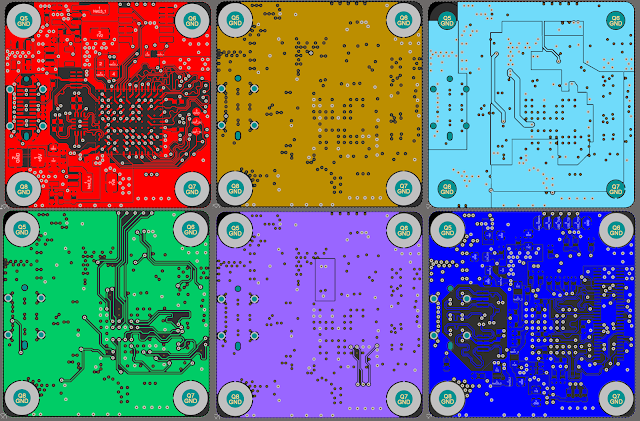
PCB
SchematicTo make board compatible to ZCU102 and ZCU106 Schematic has been changed quite a bit So Latest Schematic Can be found github


Hardware Revisions 

RevA to Rev B -- Not Publicly known 

RevC , Only Few units , Only Works with ZCU102 but all ports have 4 Lane support 

RevD, Primary Production Unit, Works with ZCU102 and ZCU106, ZCU104 but not all ports support 4 Lanes. 


Pin Assignment 
Pin assignment is very critical with every FPGA board it's also similarly critical with the on both ZCU102 and ZCU106. It Comes down to that ZCU106 only supports MIPI RX on very limited number of Pins even though MIPI TX is supported on quite a few pins. But input pins are very few and very limited number of banks as well so only the bank number 28 64 65 66 67 and 68 are available directly on the ZCU106 HPC connectors  which can be used for MIPI input and even on those banks bank you get very limited pins which can be used as a clock Lane and again they are specific Pins which can be used as a data aim when you are using specific clock pins
Rev C Boards are only compatible to ZCU102Red D onwards work with ZCU102 and ZCU106 Both
Rev D pin ist listed blow ,For Rev C Pin Assignment for  Please Refer to Github MIPI Signal FMC Connector Pin ZCU102 ZCU106 ZCU104
HPC0 HPC0 HPC1 HPC0 HPC1 CAM1 PCB Rev D CAM1_MIPI_CLK_PG6Y4G6F17B18F17 CAM1_MIPI_D0_PD14W2AE2H16G20H16 CAM1_MIPI_D1_PH7V2AD2L20K22L20 CAM1_MIPI_D2_PC10AC2AH2H19H21H19 CAM1_MIPI_D3_PG9Y2AH1K19J21K19 CAM1_I2C_SCLD11AB3AG3K17G25K17 CAM1_I2C_SDAD12AC3AH3J17G26J17 CAM1_ENABLEG2T8P10G10xG10 CAM1_REF_CLKG3R8P9F10xF10 CAM2 PCB Rev D CAM2_MIPI_CLK_PH19xxD16A18D16 CAM2_MIPI_D0_PG18D17C18G18 CAM2_MIPI_D1_PG12E18J25E18 CAM2_I2C_SCLD18F15C22F15 CAM2_I2C_SDAD17G15C21G15 CAM2_ENABLEC27A7xA7 CAM2_REF_CLKC26A8xA8 CAM3 PCB Rev D CAM3_MIPI_CLK_PC22N9xD11xD11 CAM3_MIPI_D0_PG27M11C7C7 CAM3_MIPI_D1_PH28L12B6B6 CAM3_MIPI_D2_PD26L15B9B9 CAM3_MIPI_D3_PH25P12B10B10 CAM3_I2C_SCLH34V6E9E9 CAM3_I2C_SDAH35U6D9D9 CAM3_ENABLEH38T11E8E8 CAM3_REF_CLKH37U11F8F8 CAM4 PCB Rev D CAM4_MIPI_CLK_PD20P11xxxx CAM4_MIPI_D0_PD23L16 CAM4_MIPI_D1_PG24M15 CAM4_MIPI_D2_PH22L13 CAM4_MIPI_D3_PG21N13 CAM4_I2C_SCLG34V7 CAM4_I2C_SDAG33V8 CAM4_ENABLEG36V12 CAM4_REF_CLKG37V11

Youtube Video

Linux V4L2 PipelineDevice Tree 

Loading Device Tree
Media Pipeline


V4L2 Pipeline Configuration 


yavta Capture 3 RGB Frames


Setup Image


Project Github

tag:blogger.com,1999:blog-4474580574529252327.post-8061843673236718916
Extensions
RFSTAMP44 RF Signal Generator ADF4351 35M to 4.4Ghz Stamp size castellated
ADF4351Microchip PIC MircocontrollerRFRF Signal GeneratorUSB Interface
Show full content

 This project is going to show you a very very small RF Signal Generator 35Mhz to 4.4Ghz on a Tiny PCB that can be easily integrated into project. this Project is complement to USB RF signal generator which I published few weeks ago. Project is based on Analog device ADF4351


Device Pinout
Device Control Modes


SchematicHigh Resolution Schematic PDF is available Project github


PCB 
FirmwareFirmware Running on PIC USB MCU running USB Stack bridges USB and UART to SPI to control ADF4351 PLL IC . PIC MCU has EEPROM to handle standalone operation. FW also manages AUX pin function. AUX pin Support Sync Out to sync device sweep with sync external devices such as Oscilloscope or spectrum analyzer. AUX pin supports Sync In for similar reason. Dedicated pin for Support External Reference clock for PLL alternative to on Board 25Mhz oscillator 
Cross Platform PC SoftwareOpen Source QT Application 
Qt Application Allow programming frequency in 10 Khz step, Allow Sweep and hop between frequency with programmable time and programmable step. AUX pin function can also be selected. And PC Free Standalone can also be programmed. 


Python Application All features that can be programmed over QT application can also be programmed using Python script


UART Intarface


UART Commands/Protocol
UART Command Manual — RFSTAMP44

All commands start with $, followed by a letter (or ?) and optional parameters. End commands with CR/LF.

Command Usage Description $F $F <frequency_MHz>
e.g. $F 433.12 Set output frequency.
Accepts float MHz values with 10 kHz resolution.
Range: 35.00 MHz – 4400.00 MHz. $A $A <mode>
e.g. $A 2 Select AUX I/O function:
  • 0 = AUX_SYNC_OUT
  • 1 = AUX_SYNC_IN
  • 2 = AUX_EXT_REF_IN
  • 3 = AUX_EXT_REF_IN_SYNC_OUT
  • 4 = AUX_EXT_REF_IN_SYNC_IN
$B $B <frequency_MHz> Set sweep START frequency 
(MHz Float, min10Khz resolution). $C $C <frequency_MHz> Set sweep STOP frequency
(MHz Float, min 10Khz resolution). $E $E Erase stored settings (EEPROM). $G $G <frequency_MHz> Set sweep step frequency
(MHz Float, min 10Khz resolution). $J $J <time_ms> Set dwell time in ms. $R $R <frequency_MHz> Set reference frequency (10–250 MHz). $O $O <0|1> Enable/disable RF output. $P $P Write configuration to PLL. $T $T Save parameters to EEPROM. $S $S <0|1> Enable/disable sweep mode. Updates “Start on Boot”. $H $H <0|1> Enable/disable auto-start sweep on boot. $I $I Identify device / FW version notification. $M $M<n> <hex_value> Write hex value to register Rn (0–5). $? $? Print current settings + registers. Notes
  • UART Baud Rate 115200
  • Frequencies given in MHz (e.g. 433.12), store with 10 kHz resolution.
  • Reference frequency clamped 10–250 MHz.
  • $M expects hexadecimal values (e.g. 0x12345678).
  • Commands must end with \r or \n.
  • No echo for commands.
.uart-manual { font-family: Arial, sans-serif; margin: 20px 0; color: #e6eef6; } .uart-manual .uart-title { margin: 0 0 6px; color: #06b6d4; } .uart-manual .uart-lead { font-size: 14px; color: #9aa7b2; } .uart-manual .uart-card { background: #0b1220; padding: 16px; border-radius: 12px; } .uart-manual .uart-table { width: 100%; border-collapse: collapse; } .uart-manual .uart-table th { text-align: left; padding: 8px; color: #9aa7b2; font-size: 13px; } .uart-manual .uart-table td { padding: 10px; border-top: 1px solid rgba(255,255,255,0.1); } .uart-manual .uart-cmd { font-family: monospace; background: rgba(6,182,212,0.1); padding: 2px 6px; border-radius: 4px; color: #06b6d4; } .uart-manual .uart-usage { font-family: monospace; color: #c8f3ff; } .uart-manual .uart-limits { margin-top: 12px; font-size: 13px; color: #9aa7b2; } .uart-manual .uart-limits ul { margin: 6px 0 0 20px; padding: 0; }

HIDRAW Device access under Linux

hidraw device may need privilized use permission to access usb device with sudo 
Accessing USB hidraw device under linux without sudo


Accessing USB HID  device under linux What’s a “USB HID raw device”?
  • HID = Human Interface Device (like keyboards, mice, game controllers, barcode scanners).

  • hidraw devices expose raw HID reports directly to user space.

  • Path looks like:

    /dev/hidraw0
    /dev/hidraw1
Why you can’t just open them
  • On most distros, these devices are owned by root and a system group like plugdev or input.

  • Permissions are typically:

            crw-rw---- 1 root plugdev 243, 0 Aug 14 12:34 /dev/hidraw0
Why udev rules help

udev manages device nodes dynamically when hardware is connected.
By adding a udev rule, you can:

  • Change file permissions (e.g., MODE="0666" for read/write by everyone).

  • Change ownership (e.g., GROUP="plugdev").

  • Apply these settings automatically whenever the device is plugged in.

Example rule:

SUBSYSTEM=="hidraw", ATTRS{idVendor}=="abcd", ATTRS{idProduct}=="1234", MODE="0666"

udev file from github repo# Put this file into /etc/udev/rules.d and unplug and re-plug your device.# You don't need to restart Udev, new permissions will be picked up automatically.
ATTRS{idVendor}=="1209", ATTRS{idProduct}=="7877", MODE="0666"
RF output 40Mhz Output @ -1.04dBm


100Mhz Output @ -0.97dBm


300Mhz Output @ -1.04 dBm


400Mhz Output @  -1.00 dBm


800Mhz Output @  -1.3 dBm


1Ghz Output @ -0.61 dBm 


1.5Ghz Output @ 0.01 dBm


2Ghz Output @ -0.87 dBm


2.4Ghz Output @ -0.94 dBm


3Ghz Output @ -3.2 dBm


Project Source
Github Project 
tag:blogger.com,1999:blog-4474580574529252327.post-6414344452959692147
Extensions
How to build Custom FSBL for Zynq Ultrascale+ FPGA on new Vitis 2024.2
AMD ZynqBreakoutFMCFMC LPCFPGAFPGA BasicsXilinx Zynq Ultrascale+
Show full content

 This post is going to be about how to Create FSBL for Zynq SOC, Using newer version of Vitis 2024.2 . Since Vitis Received update there are changes to well established process of creating FSBL previously with the old version of Wheatus it was very very easy to create FSBL but with the update 2024.2 there are some quite tricks which you need to do to be able to successfully create at FSBL. FSBL is the primary first stage Bootloader which is needed to be able to boot into secondary Bootloader and later on to the target operating system I will be using Xilinx zcu102 as an example board to show you how you can generate custom fsdl for any Xilinx Zynq SoC platform device. you can of course create FSBL for your custom platform.


To create FSBL for a custom platform first of all you need to get started with vivado in vivado you need to create a hardware platform .xsa file and this file is used to create fsp if you are having any standard xilinx Sport for example ZCU102 or ZCU106 then of course you don't need to create a hardware platform file.
Example blow shows you that the part of project has been set up and this is how to export .xsa file

we got our design ready and of course bit stream is also generated you do not necessarily need to generate stream you can export the pre synthesized design as well  now we export

you can choose on this step whether you want a presynthesized design or include bit strain in the exported hardware if you include the stream then this stream can be used to configure the fpga part in the boot first stage itself


by following these steps you must have your .xsa file ready and this file can be used in Vitis to generate a hardware platform which can be used to generate FSBL for that particular hardware platform
we got our .xsa ready we can move to vitis and generate hardware platform and then FSBL with it


On this step you can choose to create the platform on the basis of custom hardware file you created with vivado or you can of course choose default silence development both this step is important on this step you provide necessary input for the FSBL creation and its necessary to pay attention that you choose the correct file and choose the correct platform.

You must uncheck create boot artifacts because we are not looking to "create Boot Artifacts" in this platform

Now our platform have been created FSBL has not yet been created only the platform have been created you must understand there are multiple domains in which code runs so the code which platform which we created does not run in the FSBL domain so we need to create separate at SPL and we will use Xilinx examples FSBL for it you don't necessarily need to write anything . 


Now we have fsbl elf file so we can now create a boot.bin file with this creating boot.bin file requires quite a few of Step you not only need the FSBL you would also need pmu firmware , bl31 File, U boot and also device tree binary  aswell . They need be this exact order 


as you can see we have successfully created our fsbl and now ZCU102 boots
tag:blogger.com,1999:blog-4474580574529252327.post-3058346448036233565
Extensions
DISTISO6 Isolated Distribution Amplifier for GPSDO
Distribution AmplifierGPSDO OCXO
Show full content
This project is in continuation of the project that I have previously published making Sin Wave Galvanically Isolated Distribution Amplifier for GPSDO and Lab Reference. 
This Device is capable for producing very high voltage range  ~14dBm Output on 10 Mhz . This device can be used for any frequency from 100Khz to 190Mhz 
This project is based on the previous GPDO Distribution board that I designed few years ago.


Specifications 

Signal Distribution Amplifier, With Galvanically Isolated Output Using Signal Transformers  For Clock and Signal Distribution, With Bandwidth 100Khz to 190Mhz with Gain of +4dBm


Input 

50 Ohm Input impedance ,

AC coupled  to Primary Stage,  Max 2V DC Offset

Max  +10dBm  for 100Khz to 100Mhz, 2Vpp + 2V DC Offset

Max +17 dBm Max 101 to 190Mhz

A standard 3.3 CMOS or TTL when driving into 50R will fall into compatible range.

If you have requirement of even Higher input voltage then external BNC attenuator can be used

Output

50 Ohm Galvanically Isolated

+13dBm  100Khz to 50Mhz into 50Ohm , ~6Vpp into 1Mohm

+12 dBm 50 to 100 Mhz into 50Ohm

+7 dBm 101 to 190Mhz into 50Ohm

Frequency Deviation between Channels

Base line Measured Ratio difference on same Channel max  7.956p

Channels Between same driver (e.g CH1 vs CH2) max Ratio difference of around  8.16p

Channels Between different driver (e.g CH1 vs CH3) max Ratio difference of around 10.2p , Max ~ 10 PPT

Phase Noise

Measured only with Spectrum analyzer, Device should perform same or better. Measurement are limited by noise floor of Generic SSA

-70dBc/Hz@1Hz

-90dBc/Hz@10Hz

-114dBc/Hz@100Hz

-125dBc/Hz@1Khz

Phase Deviation between Channels

TDS8000 70Ghz Bandwidth scope Was used with 50Ghz and 20Ghz sampling head, even on 1fs resolution no measurable phase difference 


Power

Dual Power input

USB C PD 15 V or 12V

DC Banana Jack 6.5mm 2mm Pin Center Positive


PCB Design


Output Level


    Specs & Docs
tag:blogger.com,1999:blog-4474580574529252327.post-3628899854017042231
Extensions
KLIP30 Fast Pulse Generator for TDR, Impedance and Bandwidth Measurement
30psfast pulseFast Pulse GeneratorFast Rising edgeFast Rising Edge GeneratorLeo Bodnar fast pulseUSB Interface
Show full content

KLIP30 USB Programmable 30ps Fast Pulse Generator

  • Programmable DC Coupled Output with 50mV to 1300mV Signal Amplitude with 50Ω Output
  • Very Fast ~20ps Falling Time and 30ps Rise time with Uncertainties + 1.6ps to – 1.8ps
  • Programmable output frequency PLL Supports 30Khz to 300Mhz
  • Top Quality 27Ghz SMA Output Connector
  • Aux In/Out Supports output AC Coupled 1.8Vpp output and input
  • Support External Reference Input and Output For trigger and Sync between Multiple devices/ GPSDO
  • Internal Oscillator 25ppm Initial accuracy and 2.5ppm/year ageing Stability, External Reference Input Supported 10Mhz to 25Mhz.
  • USB C Power/ Configuration Communication , consumes ~250mA on 5V USB
  • Extruded Aluminium Enclosure. Device fully user serviceable with support.
  • Crossplatform Configuration GUI Application , Supports Windows, Linux, MacOS
  • Deliverables, Pulse Generator Device, SMA Male to SMA Male Adapter, SMA Male to BNC Male Adapter, Individually measurement report


Accessing Device From Windows


Device under Linux


hidraw device may need privilized use permission to access usb device with sudo 
Accessing USB hidraw device under linux without sudoWhat’s a “USB HID raw device”?
  • HID = Human Interface Device (like keyboards, mice, game controllers, barcode scanners).

  • hidraw devices expose raw HID reports directly to user space.

  • Path looks like:

    /dev/hidraw0
    /dev/hidraw1
Why you can’t just open them
  • On most distros, these devices are owned by root and a system group like plugdev or input.

  • Permissions are typically:

            crw-rw---- 1 root plugdev 243, 0 Aug 14 12:34 /dev/hidraw0
Why udev rules help

udev manages device nodes dynamically when hardware is connected.
By adding a udev rule, you can:

  • Change file permissions (e.g., MODE="0666" for read/write by everyone).

  • Change ownership (e.g., GROUP="plugdev").

  • Apply these settings automatically whenever the device is plugged in.

Example rule:

SUBSYSTEM=="hidraw", ATTRS{idVendor}=="abcd", ATTRS{idProduct}=="1234", MODE="0666"

udev file from github repo# Put this file into /etc/udev/rules.d and unplug and re-plug your device.# You don't need to restart Udev, new permissions will be picked up automatically.
ATTRS{idVendor}=="1209", ATTRS{idProduct}=="8777", MODE="0666"


tag:blogger.com,1999:blog-4474580574529252327.post-5217460637160048231
Extensions
RFGEN44 Open Source 4.4Ghz USB RF Signal Generator
ADF4351RFRF Signal GeneratorUSB Interface
Show full content

 This Project is going to be about making a fully open source USB Programmable RF signal Generator. Device cable of Generating Frequency upto 4.4Ghz Fully Programmable using USB. Device Support Driver free operation using USB HID . Fully programmable under Window, Linux or macOS using Provided Python or QT5 GUI Application using libHID. Cross platform Support and Raw HID support allow Programming using any scientific platform such as MATLAB. 

HW is based on ADF4351 from analog devices. supported by USB Microcontroller from Microchip.


Device Ports


PCB
PCB Design made up of 6 Layer PCB Fully Controlled Stack up 


Firmware

Firmware Running on PIC USB MCU running USB Stack bridges USB to SPI to control ADF4351 PLL IC . PIC MCU has High endurance Flash memory to handle standalone operation. FW also manages AUX pin function. AUX pin Support Sync Out to sync device sweep with sync external devices such as Oscilloscope or spectrum analyzer. AUX pin supports Sync In for similar reason. AUX pins also Support External Reference clock for PLL alternative to on Board 25Mhz oscillator 

Cross Platform PC SoftwareOpen Source QT Application 
Qt Application Allow programming frequency in 10 Khz step, Allow Sweep and hop between frequency with programmable time and programmable step. AUX pin function can also be selected. And PC Free Standalone can also be programmed. 


Python Application 

All features that can be programmed over QT application can also be programmed using Python script


HIDRAW Device access under Linux

hidraw device may need privilized use permission to access usb device with sudo 
Accessing USB hidraw device under linux without sudo


Accessing USB HID  device under linux What’s a “USB HID raw device”?
  • HID = Human Interface Device (like keyboards, mice, game controllers, barcode scanners).

  • hidraw devices expose raw HID reports directly to user space.

  • Path looks like:

    /dev/hidraw0
    /dev/hidraw1
Why you can’t just open them
  • On most distros, these devices are owned by root and a system group like plugdev or input.

  • Permissions are typically:

            crw-rw---- 1 root plugdev 243, 0 Aug 14 12:34 /dev/hidraw0
Why udev rules help

udev manages device nodes dynamically when hardware is connected.
By adding a udev rule, you can:

  • Change file permissions (e.g., MODE="0666" for read/write by everyone).

  • Change ownership (e.g., GROUP="plugdev").

  • Apply these settings automatically whenever the device is plugged in.

Example rule:

SUBSYSTEM=="hidraw", ATTRS{idVendor}=="abcd", ATTRS{idProduct}=="1234", MODE="0666"

udev file from github repo# Put this file into /etc/udev/rules.d and unplug and re-plug your device.# You don't need to restart Udev, new permissions will be picked up automatically.
ATTRS{idVendor}=="1209", ATTRS{idProduct}=="7877", MODE="0666"
RF output 40Mhz Output @ -1.04dBm


100Mhz Output @ -0.97dBm


300Mhz Output @ -1.04 dBm


400Mhz Output @  -1.00 dBm


800Mhz Output @  -1.3 dBm


1Ghz Output @ -0.61 dBm 


1.5Ghz Output @ 0.01 dBm


2Ghz Output @ -0.87 dBm


2.4Ghz Output @ -0.94 dBm


3Ghz Output @ -3.2 dBm


Github Source Repo  Programming Software and Python Script


Download Windows GUI Program


Source and Other Files on Github


tag:blogger.com,1999:blog-4474580574529252327.post-9217610876551418733
Extensions
Ikea INSPELNING Teardown, Ikea SmartPlug Socket with energy meter INSPELNING Internal PCB
IkeaSmart SensorTeardown
Show full content

 This Post is going to be Ikea INSPELNING Tear down images. Showing Internal construction and quality. Schematic and Power supply and How they Measure Power consumption. 


Power Supply with BP2525

Power measurement with HLW8110


tag:blogger.com,1999:blog-4474580574529252327.post-200897819618747806
Extensions
FPGA FMC Breakout Board for Accessing LPC Connections from High End Xilinx FPGA Ultrascale+ Zynq
FMCFPGAXilinxXilinx Zynq Ultrascale+
Show full content

This post is going to be about Breakout board PCB for FMC Connector which are widely used on Xilinx High End FPGA board. LPC Low pinout connections do not have any GTY or GTH or GTX or MGT connections they have only differential normal SerDes connections ANSI/VITA 57.1 compliant


YouTube 


Schematic 

Schematic has only 4 LPC rows connected directly to Top layer and board layer connector. 1.27 mm Header route out all connections including GND pins all the Signals are routed in Differential connection 


PCB


Signal Rows in FMC LPC vs. HPC Connector pins DifferenceRowLPC (160 Pins)HPC (400 Pins)FunctionA❌ No✅ YesPower, control, & reference clocksB❌ No✅ YesAdditional I/O and clocksC✅ Yes✅ YesSingle-ended I/O & differential pairsD✅ Yes✅ YesMore I/O & differential pairsE❌ No✅ YesAdditional differential pairs (DP0-9)F❌ No✅ YesMore differential pairs (DP10-17)G✅ Yes✅ YesPrimary differential pairs & clocksH✅ Yes✅ YesMore primary differential pairs & clocksJ❌ No✅ YesGigabit transceiver signals (MGTs)K❌ No✅ YesMore MGTs & ground


EEPROM Content 


tag:blogger.com,1999:blog-4474580574529252327.post-7672332495153571427
Extensions
3D Printed PCB Test Jig for ADR1339 Reference Board
ADR1399ADR1399KHZLM399PCB Test JigVoltage Reference
Show full content


Ribbon cable are used to Distribute power to all other boards Input Primary power of 16 to 20 V and USB 5V both are distributed over Ribbon cable 

3D Printed Part
Plastic Part is Designed with Solidworks and Printed with PETG. 


PCB


Source And 3D Design Files are Available github Repo
https://github.com/circuitvalley/LM399_Voltage_reference
tag:blogger.com,1999:blog-4474580574529252327.post-5683768656144145055
Extensions
TEN399 3V1 : Improved OpenSource ADR1399KHZ LM399 10V Ultrastable Precision Voltage Reference
ADR1399ADR1399KHZLM399Voltage Reference
Show full content

  This is Next 3V1 revision of LM399 ADR1399KHZ based reference board, when i made my last version i received quite few small feedback form users , So I have again made few improvements in This forth version over Third reversion accumulating those suggestions.

Fist improvements is, Board has LT3042 Ultralow Noise, Ultrahigh PSRR RF Linear Regulator To Supply 15V to the ADR1399 and LT1001 , This regulator Offers reverse polarity protection and PG LED.Board offers Dual Power supply input with a Normal Liner supply input and a USB input with boot converter to use as backup and transport. This version has ADR1399KHZ Snubber and also Trim pot has been removed and replaced with multiple resistors with solderable jumper There are few minor change in the PCB as well there is great care has been taken in designing slots around the PCB to remove mechanical strain on Chips and reference. Also board has been designed for Testing.  Board also now also have a enclosure. Now on the output side both calibrated 10V and Direct reference voltage is also available as output.


 Schematic


PCB
Source is available in my Github Repo.

tag:blogger.com,1999:blog-4474580574529252327.post-6163934368081551630
Extensions
microZed Breakout Carrier Card for MicroZed Zynq FPGA SOM board AES-MBCC-BRK-G
FPGAmicroZedmicroZed Zynq FPGA CarrierZynq
Show full content

 For new FPGA SoC related project, and i will be using Avnet MicroZed Zynq SOM board. But Avnet microZed Board has two 100 Pin fine pitch connectors for expansion, Which is impractical for prototyping so i decided to make my own breakout board.  Finding Avent microzed GPIO breakout was little hard and official board has same VCCIO regulator for all banks and avnet board also does not have differential LVDS layout.

So i made this Open source Board, With three separate switching regulator for each bank VCCIO on 4 Layer Gold finish board with most of microZed pins broken out in LVDS pair. PCB is 4 Layer impedance control for 100R LVDS pair. Board has 3 solder jumpers per regulator to change bank voltage of each bank separately.
In this project, I set out to design a custom carrier PCB tailored for the MicroZed Zynq FPGA System-on-Module (SOM), inspired by the functionality of the AES-MBCC-BRK-G. This carrier board is designed to seamlessly interface with the MicroZed module, providing robust connectivity and enhanced peripheral integration for a variety of FPGA applications. From initial concept to detailed PCB layout, the design process focused on optimizing functionality, signal integrity, and scalability to suit custom project requirements. Whether you're exploring embedded systems, hardware acceleration, or IoT development, this custom carrier board simplifies working with the powerful Zynq FPGA platform.


Schematic
There is not much in schematic , only few switching regulator for all Bank Voltage and IO headers .

PCB Source on Github 
https://github.com/circuitvalley/microzed_carrier_board

tag:blogger.com,1999:blog-4474580574529252327.post-2384989869885192914
Extensions
5$ Low Noise, Electronics Bench LED lighting Solution with Linear Power supply, Flicker Free
LEDLED Driver
Show full content

 This small Article shows my solution to Low noise electronics bench lighting problem, Many electronics Measurement needs to be done in no electrical noise environment. I have repurposed 5$ 30V 3A Linear power supply for this purpose with Custom made LED Strip using philips Luxeon LEDs


Primary Switching transistor is mounted directly on the Heat sink
Standard Heat Sink Fit exactly on PCB holes


LED Strip PCB


tag:blogger.com,1999:blog-4474580574529252327.post-5866322550462880105
Extensions
Ikea BADRING Water leakage sensor Teardown , Smart Zigbee sensor
IkeaSmart SensorTeardown
Show full content

       This Small Article shows internals of BADRING Water leakage sensor 


Video 

tag:blogger.com,1999:blog-4474580574529252327.post-5937885604653123521
Extensions
Ikea PARASOLL Smart Door/Window Zigbee Sensor Teardown Hall Effect sensor Analysis
IkeaSmart SensorTeardown
Show full content

      This Small Article shows internals of PARASOLL Smart Door/Window Zigbee Sensor  and analysis of its hall effect sensor using a oscilloscope 


Front PCB EFR32MG24  along with a LED , Oscillator and Passives for antenna. 

Back of the PCB has paring button along with a OC6811 DC-DC converter and MG3521 Halleffect sensor IC 


Video 


tag:blogger.com,1999:blog-4474580574529252327.post-2455352314064628813
Extensions
Ikea Vallhorn PIR Zigbee Motion Sensor Teardown
IkeaTeardown
Show full content

     This Small Article shows internals of Ikea Vallhorn PIR Motion Sensor


Board uses EFR32MG21 Silicon labs Multiprotocol SOC along with 8601 Opamp IC from analog devices. 


tag:blogger.com,1999:blog-4474580574529252327.post-6359776150827561796
Extensions
How to Reverse Engineer a 12 EUR Intel PCIe FPGA Card IBM 98Y2610
AlteraFPGAPCIeReverse Engineering
Show full content

 This Post is showing how to Reverse Engineer a Unknown FPGA Board which I got off Ebay. 

This board has Intel Cyclone IV FPGA EP4CGX22BF14 board can be found on internet with part number IBM 98Y2610


Schematic


Source Example project is available on Github. 

https://github.com/circuitvalley/Intel_FPGA_Board_98Y2610


tag:blogger.com,1999:blog-4474580574529252327.post-5073521517868804734
Extensions
TEN399 : OpenSource ADR1399KHZ LM399 10V Ultrastable Precision Voltage Reference
ADR1399LM399Voltage Reference
Show full content

 This is Third version of LM399 ADR1399KHZ based reference board, when i made my last version i received quite few small feedback form users , So I have again made few improvements in Third reversion accumulating those suggestions.

Fist improvements is, Board has LT3042 Ultralow Noise, Ultrahigh PSRR RF Linear Regulator To Supply 15V to the ADR1399 and LT1001 , This regulator Offers reverse polarity protection and PG LED.Board offers Dual Power supply input with a Normal Liner supply input and a USB input with boot converter to use as backup and transport. There are few minor change in the PCB as well there is great care has been taken in designing slots around the PCB to remove mechanical strain on Chips and reference. Board also now also have a enclosure. Now on the output side both calibrated 10V and Direct reference voltage is also available as output. 


YouTube Video
Schematic


PCB
Source is available in my Github Repo.
tag:blogger.com,1999:blog-4474580574529252327.post-3848736424083508036
Extensions
Ikea TRETAKT Teardown, Ikea SmartPlug Socket TRETAKT Internal PCB
IkeaTeardown
Show full content
This Post is going to be Ikea TRETAKT Tear down images. Showing Internal construction and quality. 


tag:blogger.com,1999:blog-4474580574529252327.post-889278679267215692
Extensions
Ultrabase : Open source Ultrazed PCIe Carrier Card for Xilinx AMD Zynq Ultrascale+ FPGA SOC SOM
AMD ZynqFPGAUltrazedXilinxXilinx Zynq Ultrascale+
Show full content

This post is going to be about designing and construction of  PCI carrier card for Avnet Ultrazed Zynq  Ultrascale+ FPGA SOM board.

These are available from Avnet SOM board are available pretty reasonable price and you can use them for various projects the carry a Zynq Ultrascale on a small SOM formfactor.


Board Features Avent Ultrazed Board SOM 

  • PS PCIe x1 Gen2 
  • PS USB 3.0
  • PS SATA 6Gbps
  • PS Mini Display Port
  • Gigabit Ethernet 
  • microSD card 
  • PL expansion Port
  • PS and PL LEDs
  • PL DIP Switch 
  • Reset and PL Switch
  • PLL Clock Gen
  • PMIC Regulator
YouTube Video


Schematic
Schematic Source is available on Github 
https://github.com/circuitvalley/ultrazed_base_boards


PCB

PCB Source along with Gerbers are available on my Github https://github.com/circuitvalley/ultrazed_base_boards

Top Layer
Layer 2, GND Reference for TOP Layer
Layer 3, Power Plane
Layer 4, Power Plane
Bottom Layer
Board Image


PLL Path for V1.0 PCB


TestPL Counter Test


USB 3.0 Test


Display Port Test


Ethernet Test


SATA Test


PCIe Endpoint Test


Sources, Example Design
Source along with other files are available on my Github https://github.com/circuitvalley/ultrazed_base_boards


tag:blogger.com,1999:blog-4474580574529252327.post-1995228105831495701
Extensions
Raspberry PI 5 Dedicated Debug UART Connector Pinout
LinuxRaspberry PI
Show full content

 This short post to show how to connector to Dedicated UART connector, The connector is uses is JST SH 1.0 mm 3 Pin connector 

    The Raspberry Pi 5 features a dedicated debug UART connector, offering a streamlined method for developers to monitor and troubleshoot system-level operations. This UART interface provides easy access for debugging, bypassing the need for USB-to-serial adapters and enabling direct serial communication. The inclusion of a dedicated UART port ensures stable and continuous debugging, especially crucial for system diagnostics and low-level programming tasks


tag:blogger.com,1999:blog-4474580574529252327.post-2079915083904243328
Extensions
HP Agilent Infiniium 54815A 500Mhz Boot Repair and SSD Upgrade
KeysightOscilloscopeRepair
Show full content

 This post is going to be about Repair of old HP Infiniium 54815A 500Mhz oscilloscope.  Scope has normal PC motherboard with Windows 98. Scope has issue booting into windows because DS12887A RTC which scope's motherboard uses has internal battery. And because of RTC battery being empty scope has CMOS checksum bad and can not boot as it has forgotten all boot settings. I will try to fix DS12887A and restore setting to CMOS memory. 


Scope Motherboard

RTC DS12887A pulled out and Contact point exposed with soldering iron.

CR2032  Battery mounted on DS12887A RTC


Battery Installed back on motherboard

8GB CF card installed with 2.5 to CF adapter.

Motherboard BIOS menu
Running Default Setup on BIOS
Run Default setup
Enable IDE driver because drive are connected on IDE.


Detect IDE so that board know where is Drive connected.


8GB CF card detected.

Save and Reboot


Booting into Windows 98


tag:blogger.com,1999:blog-4474580574529252327.post-2263016830654257804
Extensions
Agilent Keysight 1152A Active Probe Autoprobe Smart Probe, Probe ID Mod Patch
KeysightOscilloscopeRepair
Show full content


 This Post is going to be about modifying Agilent/HP 1152A active probe to be able to support 5V input and Smart Probe ID. 1152A Active  Probe is available in used marked at quite reasonable price but it is not supported by many new generation Keysight Oscilloscopes. As few of these oscilloscope have not fully featured Autoprobe interface and only output +5 -5V . Normally a fully featured Autoprobe interface should set supply voltage as requested by Probes Rp Resistor. 
So to be able to use 1152A active probe with every Keysight oscilloscope regardless how limited its Autoprobe interface is, I have made this small PCB with 4V Regulator with good  PSSR to be able to support +5V input  and 2Kbit EEPROM to support Smart Probe. This probe does not use -5V so its left untouched .


Schematic 

Schematic has a regulator and EEPROM. EEPROM to support Digital Probe ID and Regulator for supporting 5V input. This probe does not use -5V input so there no need for regulator on that pin. 


PCB


Flap soldered back to Prevent sorting with Enclosure.Flap soldered back to Prevent sorting with Enclosure.


Assembly


Programming the EEPROMEEPROM Dump blow shows hex dump of 1158A probe, With internet search more hex dumps can be found. 

Buy Assembled Flex PCB Board
You can Buy Fully Assembled Flex PCB board that will be ready to be installed by user. You will receive board as show in Image blow


Quantity QTY 1 €25,00 EUR QTY 2 €45,00 EUR QTY 3 €60,00 EUR Message to Seller


PCB Soure and EEPROM Dump 
https://github.com/circuitvalley/Agilent_1152A_Smart_Probe_Patch
tag:blogger.com,1999:blog-4474580574529252327.post-4105596317093143877
Extensions
Making Opensource USB C industrial camera with Interchangeable C mount lens, Interchangeable MIPI Sensor with Lattice Crosslink NX FPGA and Cypress FX3 USB 3.0 controller
CameraCypress FX3FPGALatticeMIPI CSIUSB 3.0USB InterfaceUSB Video Device Class UVC
Show full content

     This post is going yet another part in the DIY camera projects which have been doing since quite some time. In this post I will showing you next successful implementation of making C mount high lens mount  USB C camera. This implementation will have absolute modular boards having dedicated Sensor board which can be changed if needed. 

Project Video


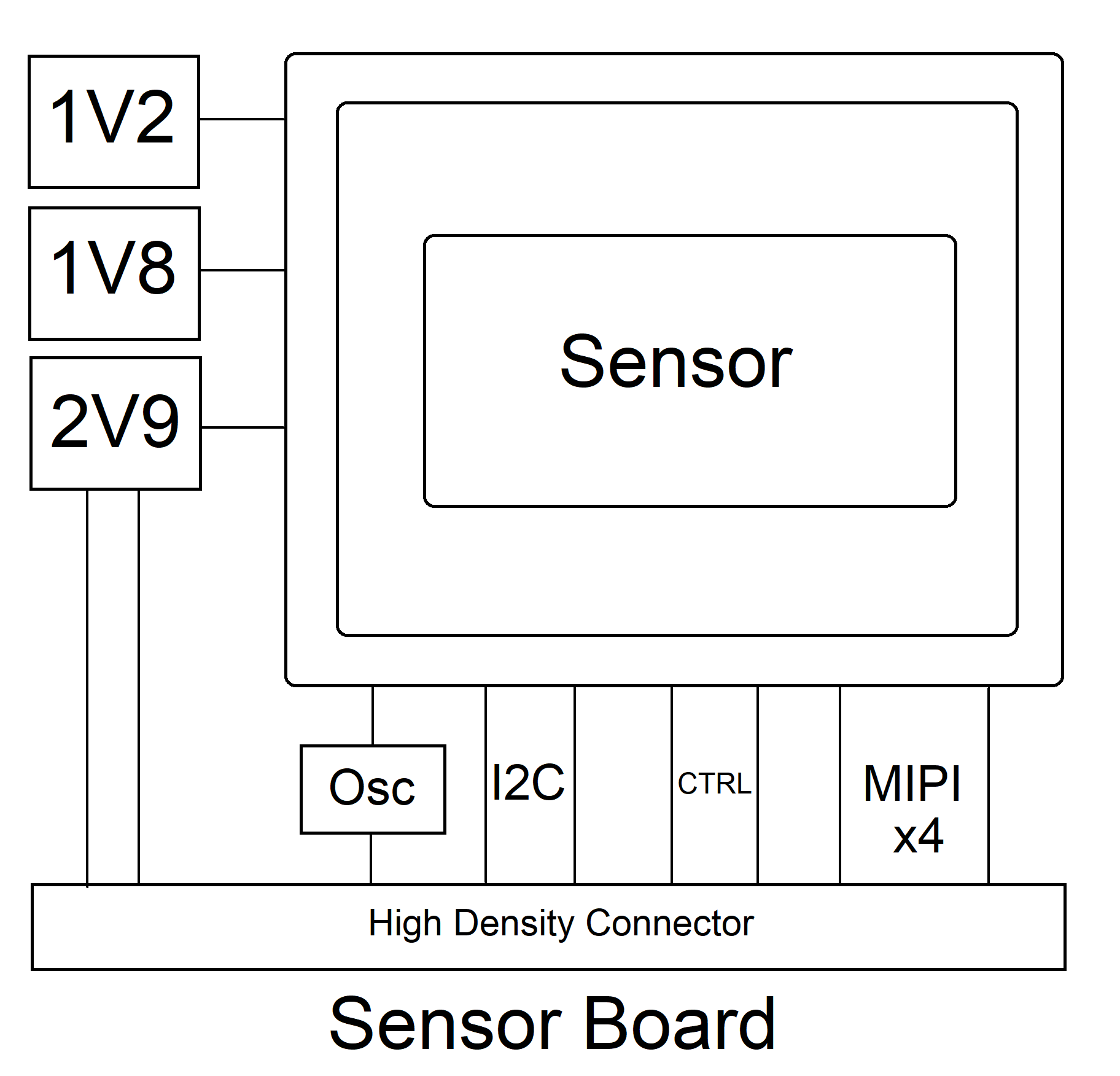
Hardware SystemThere are three boards, USB, FPGA and Sensor board. Sensor board has Sensor itself along with its power and Oscillator, Board has  High Density connector to be able to connect to FPGA/Host board, High Density connector also supply power to the board has I2C, 4Lane MIPI with clock , I2C and also few other control signals. 


FPGA board has in this case Lattice Crosslink NX LIFCL-40 in 256caBGA package with required power regulators, This board also has 2x 16Mybte RAM for applications that need additional memory, FPGA config flash memory is also on this board this board has two high density connector. Board pass I2C signal from Host right threw. 
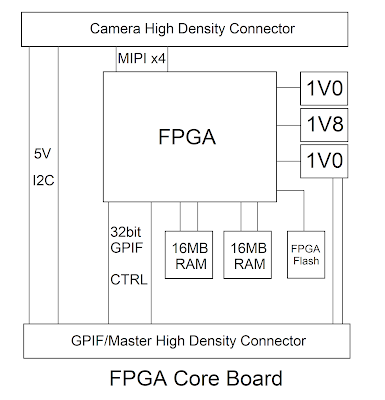
USB Board in this case has CYUSB3014 USB 3.0 Superspeed controller, along with required power and Memory, As this board has 3.0 USB C connector, so there is USB 3.0 mux is also there to support connector reversal 
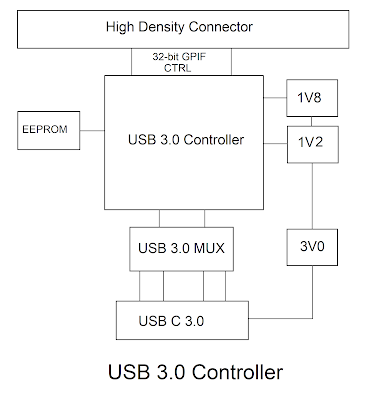
Schematic 
Currently I have just one camera PCB, This schematic shows IMX290 IMX327 IMX462 PCB , all these 3 sensors have same resolution and also same PCB footprint.


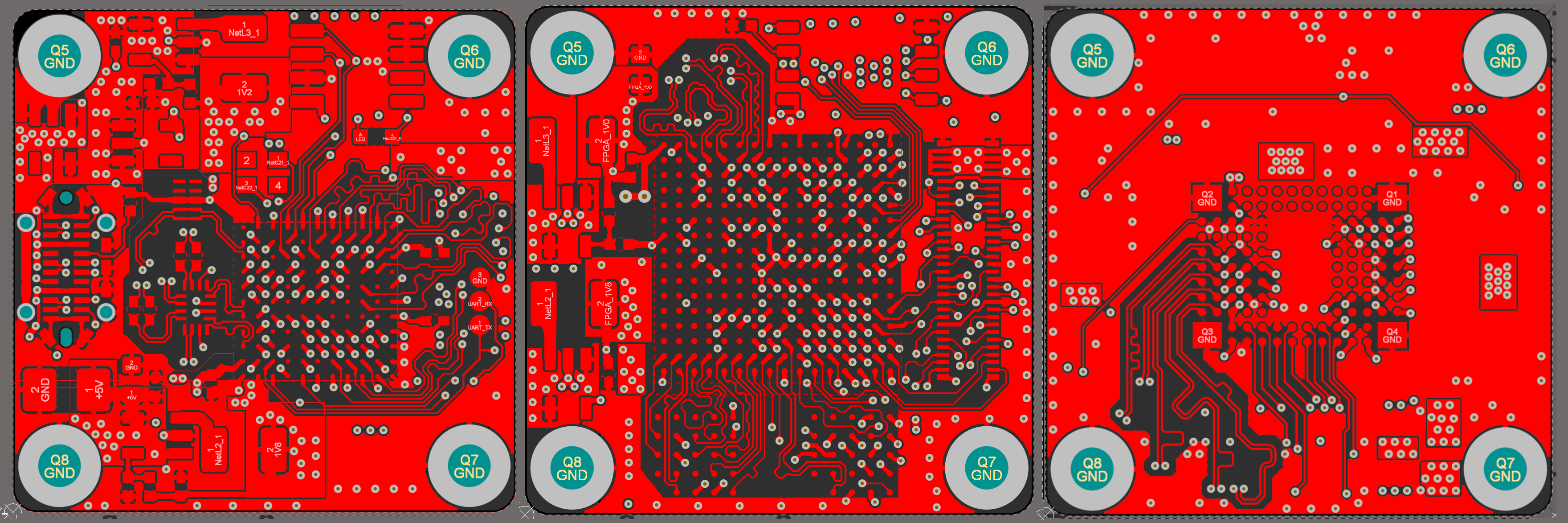
FPGA board


USB 3.0 board


PCB Boards

All of the boards are 6 Layer, All of them are 27 x 27 mm , while mounting holes are 22 mm appart
Camera sensor Board 


IMX477 Sensor PCB


FPGA PCB


USB 3.0 Board


Assembly 


Hardware and Camera Lens C mount

To be able to mount a C mount lens I designed a mount in Fusion 360. as small threads on FDM printer are little hard to deal with  There are many already made aluminum CS mount to C mount adapters are available online, Raspberry Pi camera also comes with one such ring, I bought these CS to C mount ring and I designed part around my PCB to fit these CS mount adapter ring to give me metal thread. 
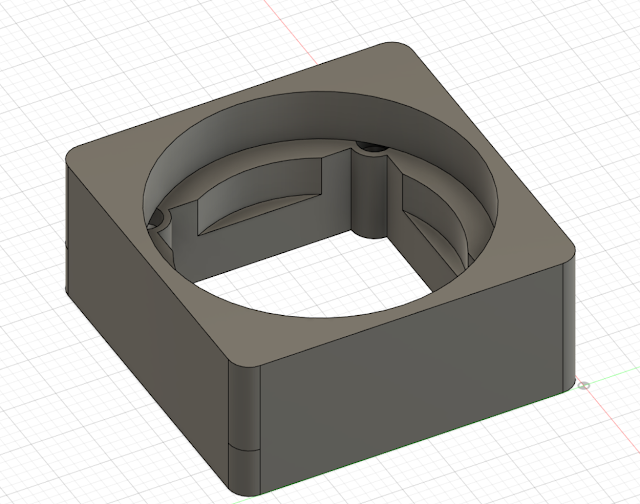


Enclosure


FPGA Design
MIPIWhat is MIPI, you can google it to find out but basically it is a interface specification for Displays and Camera sensor to a application processor.
Image blow show block diagram of MIPI.  On one side there is application processor and other side is the peripheral. When peripheral is Camera and CSI apply. though mipi is closed specification which means one has to be member of MIPI consortium to gain access to full specification. And membership of the consortium comes with a big price tag for individuals. Luckily full specification is already available just a right keyword web search away. DCS, CCS, DSI, CSI and DPHY all the specification are available with just few minutes of web search.


MIPI DPHY Signal
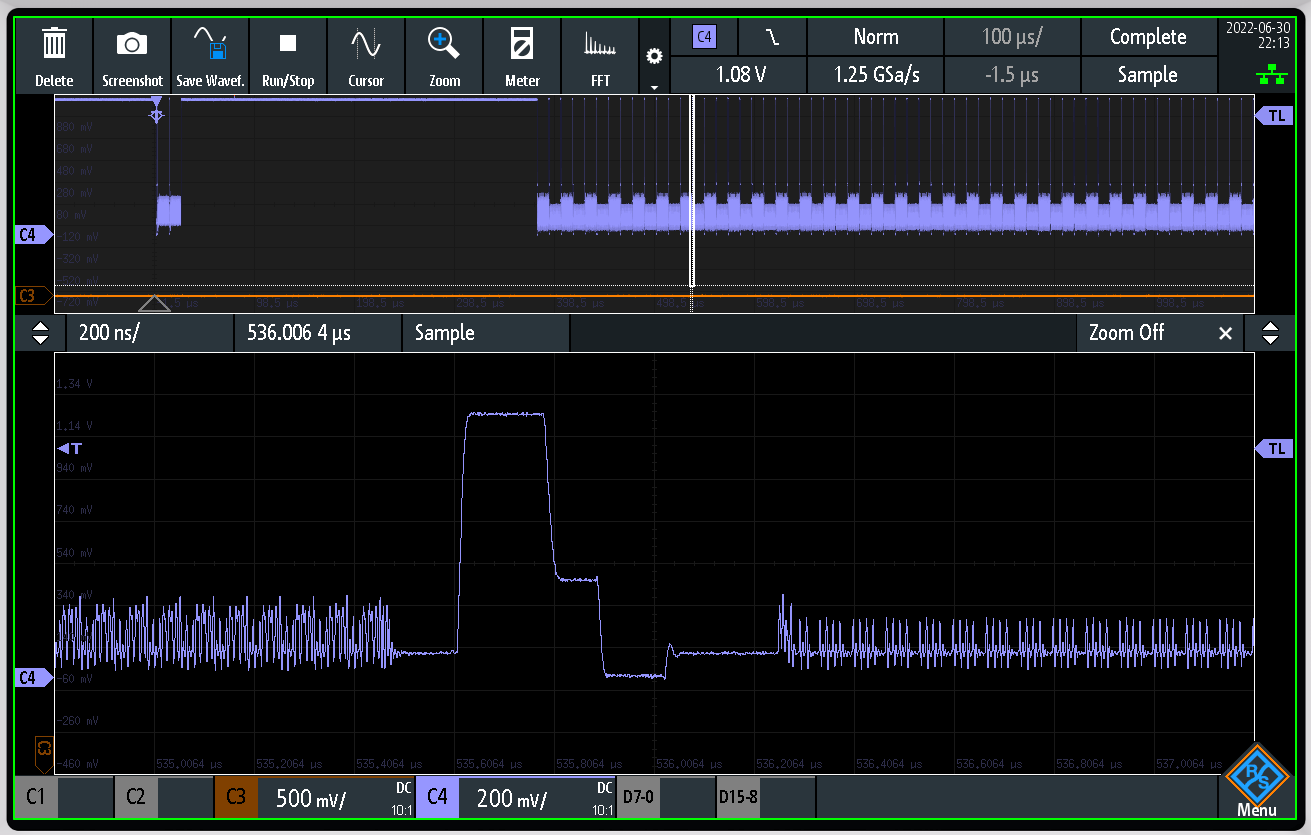
The image shows i got from google shows signal level for MIPI , HS driven by differential driver swings -200mV to +200mV at offset of 200mv. while LP signal is a 1.2V lvcmos 

there are two different modes of transmission , HS mode and LP mode, HS mode is for hi speed display data while LP mode is for Low power transmission. 

Receiver must detect when transmitter has gone into HS mode and exited HS mode. Image blow shows how transmitter enter HS modes. 

Stage 0 : LP-11 state in the shown image is LP state. Stage 1 : To get into HS mode driver drives LPdp low for Tlpx(minimum 50ns) and stay in LP-01 (HS driver is tristate in LP 01). Stage 2: Driver drives LPdn low for Ths-prepare (minimum 95ns) stay in LP-00 , Later somewere in the middle of this stage target device will activate it's 100R termination register.  Stage 3: Now Target is in HS, driver activates HS driver start sending mandatory zeros . Stage 4: Send mandatory 0xB8 sync byte and then payload.
CSI
As explained earlier CSI , describes Packet structure. How exactly bytes are packed on to wire in different lanes configuration. Image blow shows packet structure. 
There are Two types of Packets Short Packet: 4 Bytes (Fixed Length) Long Packet: 6 - 655541 Bytes (Variable Length)
MIPI Short Packet Structure
MIPI Long Packet Structure Endianness
Bytes are sent lsbit first and bytes in the packet are sent LSByte first. 

CCS
Very important fact with CCS when comparing with DCS , CCS describes command interface to be I2C while with DCS commands are set over same HS line as the data itself.  But in case of camera as per MIPI spec CCS is implemented over a extra I2C line. 
CSI Single Frame
Single Frame from camera is show in the image blow. 
Camera send a Frame start packet  Then send embedded line information which tells receiver about the stream  Then image data line by line. 

Test Video


What make this camera sensor different to camera modules
IMX219 camera is bare bone camera sensor. What do means when i say bare bone camera sensor is , there not much image processing going on on the camera die it self. Camera sensor is Sensor array with Bayer filter on it , 10 bit ADC , clock system , MIPI output driver and I2C controllable system control.

What does this means for us as camera sensor implementer. As my final goal is to interface this camera to USB3.0 UVC with RAW YUV.  This camera does not output YUV, forget about YUV this will not even output RGB. Camera output is absolute RAW 10-bit ADC conversion result from the Bayer filtered sensor array.
So go first get RGB output from bayer raw data, a Debayer or demosaic need to be performed. Once demosaic is done we will have RGB ready to be converted to YUV. And one we have YUV it can be transmitted to USB to be displayed.
What next this camera will not have is any automatic control over exposure. because camera does not have any intelligence to know how dark  or bright scene is.  Solution to this problem what raspberry pi implement is , Raspberry Pi regularly on each frame update analog gain register over I2C to adjust gain according to how bright and dark scene is.
This camera does not have any white balance control as well so host must do correct while balance compensations. To get correct colors out of image.
FPGA module Block Diagram 

FPGA block diagram is show in the image blow. This diagram describe how overall system is implemented and what the key components what this diagram does not describe is control signals and other miscellaneous stuff.




Byte Aligner Received Raw unaligned bits from DDR RX module outputs Aligned bytes, Bytes on MIPI lane does not have any defined byte boundary so this modules Looks for always constant first byte 0xB8 on wire, once 0xB8 is found, byte boundary offset is determined, set output valid to active and start outputting correct bytes stays reset when data lane are in MIPI LP state .
Lane Aligner Receives multiple lane, byte aligned data from mipi rx byte aligner @mipi byte clock  outputs lane aligned data in a multi-lane mipi bus, data on different lane may appear at different offset so this module will wait till of the all lanes have valid output start outputting lane aligned data so byte x from all the lanes outputted at same timescale
MIPI CSI Packet Decoder Basically a packet Stripper, removes header and footer from packet Takes lane aligned data from lane aligner @ mipi byte clock looks for specific packet type, in this case RAW10bit (0x2B) RAW12bit (0x2C) RAW14bit (0x2D). Module outputs Stripped bytes in exactly the way they were received. This module also fetch packet length and output_valid is active as long as input data is valid and received number of bytes is still within the limits of packet length.
MIPI CSI RAW Depacker  Receives Upto 4 lane raw mipi bytes from packet decoder, rearrange bytes to output upto 8 pixel upto 16bit each output is one clock cycle delayed, because the way,  output_valid_o remains active only while  chunk is outputted
Debayer / demosaic Takes upto 8x upto 16bit pixel from depacker module @mipi byte clock output upto 8x upto 32bit RGB for each pixel , output is delayed by 2 lines Implement Basic Debayer filter, As debayer need pixel inform neighboring pixel which may be on next or previous display line, so input data is written onto RAM, only 4 lines are stored in RAM at one time and only three of the readable at any give time , RAM to which data is written to can not be read. First line is expected to BGBG , second line GRGR Basically BGGR format  
RGB to YUV Color Space Converter Received upto 8 pixel RGB from the Debayer filter output upto 8pixel yuv422  Calculation is done based on integer YUV formula from the YUV wiki page 
Output reformatter Takes upto 8pixel yuv input from rgb2yuv module @ mipi byte clock outputs 32bit 2pixel yuv output @output_clk_i , This block has RAM to have output clock independent of mipi clock, Output clock_clock must be fast enough to be able to get whole line worth of data before next line starts,  This implementation of Output reformatter outputs data which which meant to send out of the system to a 32bit receiver depending on requirement this will be need to be adapted as per the receiver 
Debayer / demosaic  Need little more attention than other modules , IMX219 datasheet incorrectly mention output as to be either GBRG or RGGB. 
But after wasting lots of time it turned out camera output BGGR .  IMX219 Camera only output BGGR as defined by the IMX219 Driver in linux repo MEDIA_BUS_FMT_SBGGR10_1X10,  Camera datasheet incrorrectly defines output as RGGB and GBRG. Data sheet is incorrect in this case. To test my debayer, Iwas using built in camera test patterns. One key thing about IMX219 is Bayer filter type does affect test pattern as well. It seems like in Test pattern mode it outputs RGGB instead of BGGR. Test pattern will have R and B channel inverted when image have right color.
Update: I have discussed this issue with raspberry pi , It turned out flipping image seems to be the solution, once image flipped bayer output it correct for both data from sensor and test pattern. because flipping image does not affect bayer order of the test pattern.


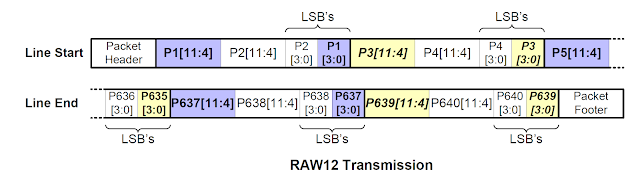
MIPI RAW Packet Format


ISP Pipeline Specifications
No virtual restriction on supported frame rate or resolution. Tested more than 4K with IMX477 4056x3040. Can do 8K with around 30FPS or even higher than that as long as FPGA is fast enough for needed frame rate and FPGA/Board has enough memory to be able to store minimum 4 Line worth of pixels. Output Clock is independent of MIPI clock. Easily Portable code to Xilinx or any other FPGA, No Vendor specific components has been used except for the PHY itself which can be replaced by other vendor's DDR phy and Embedded Block RAM. Only Debayer/Demosaic and Output reformatter need Block RAM. Block ram can also be replaced vendor's RAM. Auto detection of RAW pixel width supporting different camera sensors and sensor modes without FPGA reconfiguration.
Speed
  • Supports MIPI bus clock 900Mbitsps Per lane with upto 4 Lanes, Total 3.6Gbitsps Sensor bit stream, Has been Tested upto 900Mbitsps with 8x Gear.
  • Pixel Processing pipeline with 2,4 or 8 Pixel per clock can reach more than 110Mhz with Lattice Crosslink-NX LIFCL-40 High Speed, So basically Can process upto 880 MegaPixels per second. With this can reach Around 120FPS with 4K resolution and around 30 FPS with 8K. Or even 3000 FPS with 640 x 480 as long as Camera and MIPI Wire allows. With Different Faster FPGA speed will be more.
  • FPGA Oputput Pipeline is decoupled from MIPI clock, runs on output clock, It feeds into Cypress FX3 32bit GPIF can do Max 160Mhz. Cyress FX3's specs limits max GPIF clock to 100Mhz.

Configurability
  • Selectable max RAW pixel width
        FPGA Design is configurable with parameters to support pixel depth from RAW10 to RAW14 or Virtually any bit depth even 16bit RAW when it becomes a MIPI Specs. Parameter specify maximum pixel width that is supported while module auto detect package type at runtime with RAW14 selected as max pixel width, RAW10, RAW12 and RAW14 will be automatically detected and processed
  • Selectable number of MIPI lanes: With just definition of Parameter value number of lane is also configurable between 2 or 4 MIPI lanes.
  • Selectable Pipeline Size: Pipeline is Configurable with a parameter to Process 2,4 or 8 Pixel. 2 Pixel Per Clock is only available with 2 Lane MIPI, while 8 Pixel Per Clock is only available with 4 Lanes.
  • Selectable MIPI Gear Ratio: User can select weather to operate MIPI/DDR Phy in 16x or 8x Gear ratio. Most DDR/MIPI Phy supports 8x Gear while few do support 16x gear.
  • Selectable MIPI continuous clock mode
    User and select between MIPI clock lp based Frame sync or Frame start and frame stop packt based frame sync. Some MIPI cameras do not support going to LP mode while frame blank occur, With this option user can enable Frame Start and Frame stop detection, to have a frame sync.
  • Selectable ROM based Sample Generator
    For ISP debuging ROM based sample generator can be activated. Two ROM lines are there have both even and odd line to full image test.
Block RAM and DDR PHY IPs need to be manually regenerated if Gear, pixel width , lane or PPC is changed.
Tests
4 Lane 12 bit IMX477        4056x3040 20 FPS Full Sensor        2028x1520 70 FPS Full Sensor Binned 2x2        2028x1080 100 FPS4 Lane 10 bit IMX477        1332x990 200 FPS Binned 4x4        640x480 400 FPS Binned 4x42 Lane 12 bit IMX477        4056x3040 10 FPS Full Sensor        2028x1520 35 FPS Full Sensor Binned 2x2        2028x1080 50 FPS2 Lane 10 bit IMX477        1332x990 100 FPS Binned 4x4        640x480 200 FPS Binned 4x42 Lane 10 bit IMX219        3280x2464 7 FPS        1280x720 30 FPS        1280x720 60 FPS        1920x1080 30 FPS        640x480 30 FPS        640x480 200 FPS        640x128 600 FPS        640x80 900 FPS

4 Lane 12 bit IMX290/IMX327/IMX462        1280x720 120 FPS        1920x1080 120 FPS
2 Lane 12 bit IMX290/IMX327/IMX462        1280x720 60 FPS        1920x1080 60 FPS
What decides camera Max FPS
Camera timing is controlled by just a few registers which control Clock. Then every sensor has a maximum ADC sample rate to convert Pixel Value to Digital, Different camera sensors have fast or slow ADC. or even multiple ADCs. so you  do simple division on what your ADC pump needs for the needed frame rate. Shutter open time is also user adjustable so that also affects frame rate. And Interface clock is also important, If ADCs faster than how fast interface can pump data out of sensor then you have an issue of FIFO full. 
Scope capture 
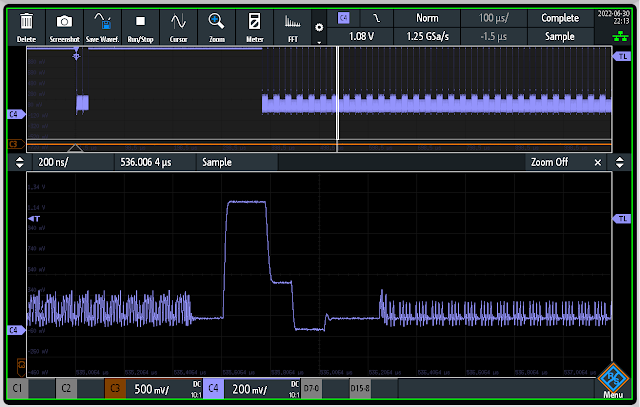
MIPI 2 Lane Mode, Decoded Data shows both lanes of lane aligned data IMX219 Full frame one of the line, on ch2 is byte clock
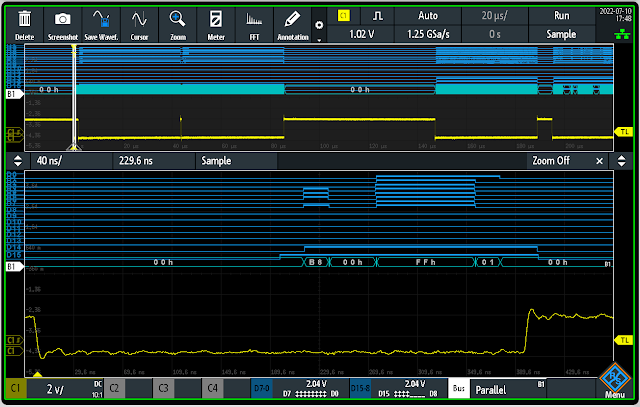
A start frame MIPI package (0x00), Use for Frame Sync with cameras where Clock does not go into LP during frame blank
A Frame Stop MIPI package (0x01) , Use for Frame Sync with cameras where Clock does not go into LP during frame blank
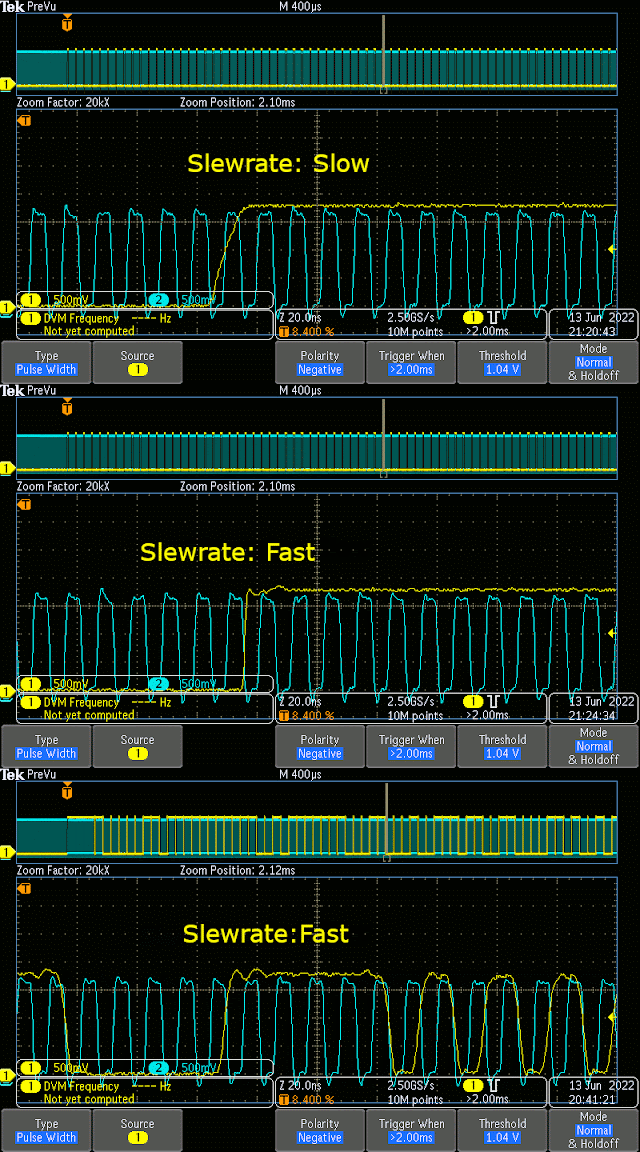
Show difference of Fast vs slow slew rate on GPIF port , CH1 shows GPIF port data line and ch2 is ~100Mhz clok
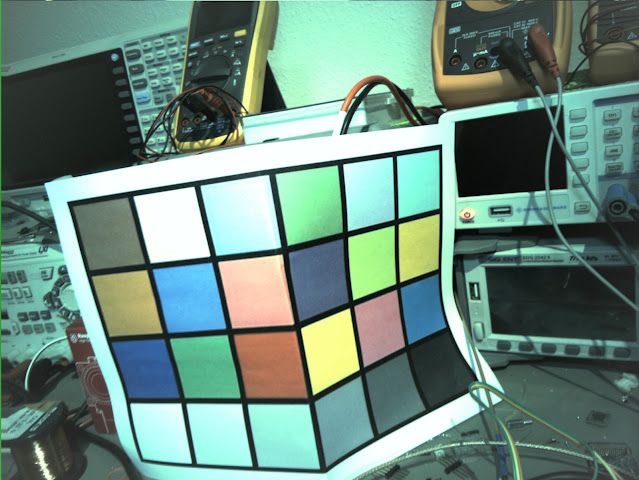
IMX477 Test pattern mode 0 were full is set to full 0x7FF and other colors are zero, but pixel where there is no blue color present shows high bits, Also Even line where there is no blue at all shows high bits, This must be kept in mind when matching colors 


Test image 
IMX219 Basic Test Full Frame Colors Uncorrected 
IMX219 Full Frame Test pattern 5



IMX477 Full Frame Test Pattern 2 IMX477 Full Frame Test Pattern 3



Cypress FX3 Firmware

Firmware implementation with FX3 was quite easy. I have put all the resolution and framerate in the USB descriptor , As described earlier this type of camera sensors are quite bare bone all the have sensor element, PLLs and ADC . So this camera sensor does not have any control over exposure, White-balance or even brightness, I have implemented manual control over USB UVC control channel. it possible to completely control camera exposure and brightness.

Few things you keep in mind, cypress fx3 clock frequency need to be set in 400Mhz mode to allow full 100Mhz 32bit GPIF DMA transfer.
One more thing is though Cypress CYUSB3014 has 512KB RAM but only 224 KB and additional 32KB is available for DMA buffer.
Having large buffer chunk is really important because on every DMA chunk CPU intervention is expected to insert UVC header. As this is high performance application less often CPU intervention is needed is better. So I have set DMA chunk / UVC individual packet to 32KB
Scope capture Image blow shows Channel 13 is the individual DMA packet capture and on Channel 12 show CPU DMA finish interrupt.
These Two scope capture show difference between 16KB DMA vs 32KB DMA
16KB DMA Size, CH13 DMA packet , CH12 CPU interrupt 32KB DMA Size, CH13 DMA packet , CH12 CPU interrupt

PCB and Schematic Source is available in the Github Repo

https://github.com/circuitvalley/USB_C_Industrial_Camera_FPGA_USB3

tag:blogger.com,1999:blog-4474580574529252327.post-5844044823411408969
Extensions