GeistHaus
log in · sign up

https://tiwariyadnesh.com/feed

rss
10 posts
Polling state
Status active
Last polled May 18, 2026 20:35 UTC
Next poll May 19, 2026 17:43 UTC
Poll interval 86400s
ETag "0d94c6eea961b2d56d9f7a718a81ffd9"
Last-Modified Sun, 08 Feb 2026 16:50:10 GMT

Posts

Leveraging AI in the Realm of Unknown
Technical

AI is all over the world. The print media uses it to show ads, others uses it to show area-specific ads in digital media, and IT sector uses it all scared 😀 and getting their work done, I find myself on the same list ( using it all scared ). Recently, one of my clients, […]
The post Leveraging AI in the Realm of Unknown appeared first on Yadnesh Tiwari.

Show full content

AI is all over the world. The print media uses it to show ads, others uses it to show area-specific ads in digital media, and IT sector uses it all scared 😀 and getting their work done, I find myself on the same list ( using it all scared ).

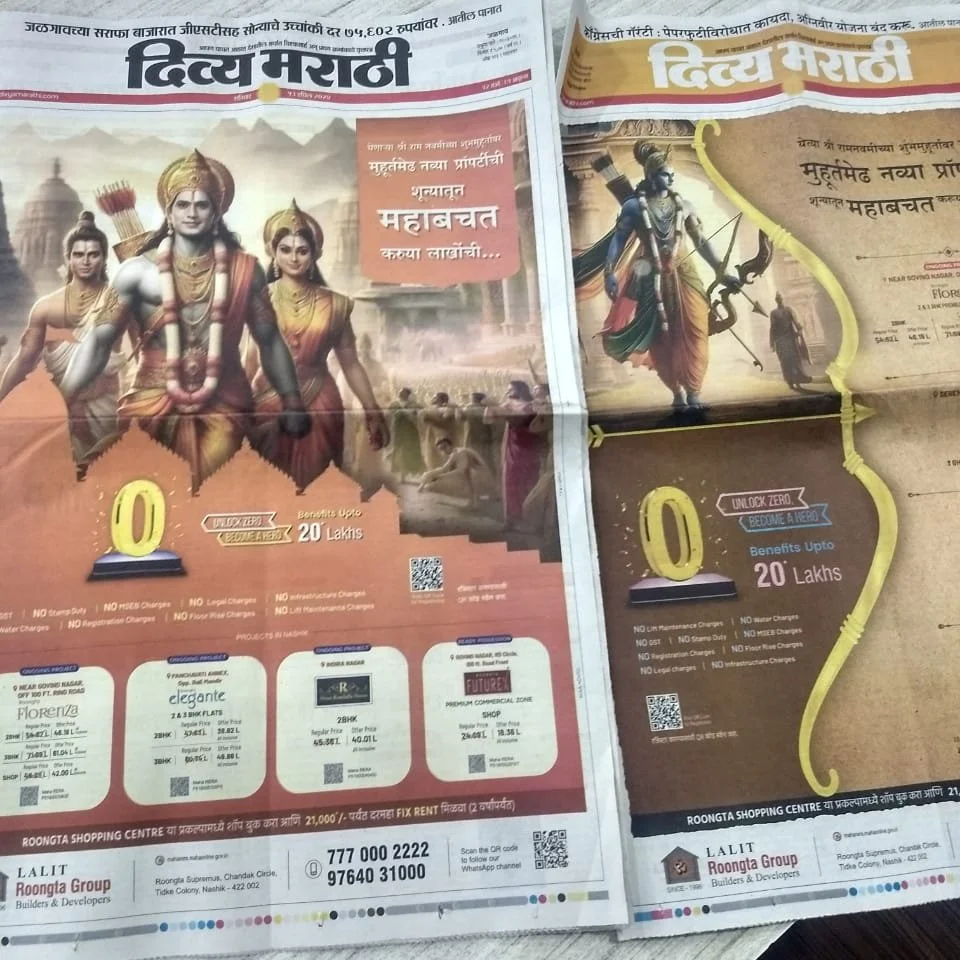
Print media using AI genrated images
In case you have missed it, Print media using AI-generated images for front-page ads

Recently, one of my clients, for whom I was creating a website, asked if I could create a promotional video for his company. They wanted a general-purpose video to showcase their products. Initially, I told him I had no expertise in creating video ads and offered to connect him with a professional video creator.

Since the client was an early-stage startup and had some budget constraints at his end did not have a deal with a professional video creator. Here’s where I pitched the client to create one as a trial if he likes it we can have a deal.

The idea behind pitching for the video was to gain confidence by experimenting with my current set of skills and also to add new ones by learning in the process of creating the video. Took the client in confidence by allowing him to pay only if he liked the video.

Attempt

With a deadline of 3 days, I started looking for a tool that could help me to create a video.

HB Technology Pvt Ltd, my client was in the manufacturing of LED lights, and street lights with various categories, The requirement was to create a promotional video of 30 sec creatively showcasing his products.

For video, the hardest part was getting a voice-over that could describe the product in easy to understandable way and in Hindi. The cost of hiring a voice-over artist was way too much and had to explore alternatives.

One of the easiest ways to create the video was using the Canva tool and for voice over had to choose AI, Now there are various tools for that as well but my requirement was the video should be in Hindi and should sound human.

Narakeet was the tool that was able to find for voice over, It has some limitations for free users and to achieve my results within those limitations, It had perfect less than min record limitation.

Created the script using ChatGPT, Extracted the voice-over using Narakeet in Hindi, and selected some background music. The client had sent product images, so I enhanced them, made them transparent, and then uploaded them to Canva.

If you are in web development, you already have these skills, but the outcome is a video instead of a website. It was time to explore Canva and create the video back and forth between YouTube and Google exploring tutorials and effects was able to create the video.

After sending the first draft, the client was happy because I delivered what he expected. After making changes, I published the video.

I wrote the script with the help of AI, created the voice-over using AI, and used AI for image creation and enhancement. Now, I have a new skill that I can sell along with web development.

The post Leveraging AI in the Realm of Unknown appeared first on Yadnesh Tiwari.

https://tiwariyadnesh.com/?p=1542
Extensions
The Art of Flexibility: A Freelancer’s Journey
Technical

As freelancers, we often find ourselves traversing through a dynamic landscape of opportunities. With each project comes a unique set of challenges and demands, pushing us to adapt and evolve our skill sets. Yet, perhaps one of the most underrated virtues in the freelancer’s toolkit is flexibility. Picture this: I, a web developer by trade, […]

The post The Art of Flexibility: A Freelancer’s Journey appeared first on Yadnesh Tiwari.

Show full content

As freelancers, we often find ourselves traversing through a dynamic landscape of opportunities. With each project comes a unique set of challenges and demands, pushing us to adapt and evolve our skill sets. Yet, perhaps one of the most underrated virtues in the freelancer’s toolkit is flexibility.

Picture this: I, a web developer by trade, found myself venturing into the realms of content creation for social media platforms. The task at hand? Crafting an Instagram post that not only resonated with the client’s vision but also captivated their audience with a seamless blend of aesthetics and readability.

AI image showing man working and insta logo sorrounding
AI-Generated Image, The Prompt for this is the above Paragraph mentioned

Now, you might wonder, why would a web developer, entrenched in the realm of coding and design, stray into the territory of content creation? The answer lies in the essence of freelancing itself – the ability to adapt, pivot, and seize opportunities beyond the confines of traditional roles.

Being flexible as a freelancer means being ready to take on all sorts of projects, even ones that aren’t exactly in your usual wheelhouse. It’s about being open to new challenges and opportunities, no matter where they come from.

So, I had this client who wanted an Instagram post. Now, here’s the thing – my client wasn’t all about corporate stuff, and they definitely weren’t into tech. They just had some ideas they wanted to share, and they needed someone to make it look good and easy to understand. That’s where I came in.

Challenges Faced:
  • Content Format: The content provided by the client revolved around a book, which meant that the information was predominantly available in a physical format. However, in the digital world of IT, working with soft copy content is more convenient for integration. Thus, the initial hurdle lay in converting the book content into a digital format suitable for our purposes.
  • Client Communication: Communicating with the client proved to be another challenge. Not well-versed in Google Docs or similar tools, the client initially struggled to share the content electronically. After some patient guidance and assistance, we finally managed to transfer the content seamlessly via Google Docs, bridging the gap between our technical processes and the client’s preferred methods.
  • Content Presentation: With a plethora of information to incorporate, the task of condensing large chunks of text into a visually appealing and digestible format posed a significant challenge. Ensuring that the content remained readable within the confines of an Instagram post while maintaining its essence required careful consideration of layout, font size, and design elements.
  • Icon Selection: Adding visual elements such as icons to complement the content posed its own set of challenges. Finding relevant icons that resonated with the theme of the post and enhanced its visual appeal took time and meticulous effort.

In the end, we managed to overcome these hurdles and deliver a post that satisfied the client’s needs.

View this post on Instagram

A post shared by kinjal Bhandari (@heal_n_deal)

In the world of freelancing, flexibility isn’t just a skill – it’s a way of life. Embrace it, and you’ll find yourself thriving in the ever-changing landscape of remote work.

Remember, every project is an opportunity to learn, grow, and push the boundaries of what you thought possible. So, here’s to embracing the unknown and charting new territories – one project at a time.

The post The Art of Flexibility: A Freelancer’s Journey appeared first on Yadnesh Tiwari.

https://tiwariyadnesh.com/?p=1394
Extensions
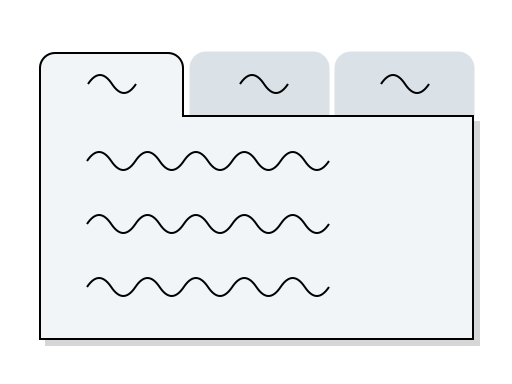
A Case Study of Sliders and Tabs in Web Design
Case StudyDesigncase studyUI/UX

When receiving a draft of content from the client, The very first thing that the mind runs is putting that content in the various UI components. It’s not as simple as it sounds to put the content in the components. The process goes from which component to select, why we should select that component, and […]

The post A Case Study of Sliders and Tabs in Web Design appeared first on Yadnesh Tiwari.
Show full content

When receiving a draft of content from the client, The very first thing that the mind runs is putting that content in the various UI components. It’s not as simple as it sounds to put the content in the components.

The process goes from which component to select, why we should select that component, and how it will best represent the information to the users. No matter what you do “Why” and “How” tools should be kept handy and used often to back your decision.

There are various UI components but here we will particularly study Sliders and Tabs.

Sliders

Sliders, the versatile component, find their place in various corners of the digital landscape. From eye-catching banner sliders to the ever-popular post loops (commonly known as carousels), sliders serve a multitude of purposes.

Banner Sliders: When you want to grab your visitors’ attention and showcase multiple images or messages in a space-efficient manner, banner sliders are your go-to choice. They create an engaging visual experience and allow you to convey a range of information or promotions without cluttering your homepage.

Price Range Bars: E-commerce websites often employ sliders to make the shopping experience more interactive. With a price range slider, users can effortlessly set their budget, creating a seamless and personalized product browsing experience.

Map Distance Selection: In maps and location-based applications, sliders help users fine-tune their preferences. Whether it’s selecting a radius for nearby restaurants or adjusting the zoom level, sliders simplify the process of interacting with maps.

The Art of Choosing

  • Content Relevance: Ensure that slider content aligns with your website’s goals and presents related or complementary elements effectively.
  • User Experience: Prioritize an intuitive and distraction-free user experience with clear navigation controls.
  • Mobile Responsiveness: Optimize sliders to function seamlessly on various devices, including mobile phones and desktops.
  • Performance Optimization: Minimize page load times by optimizing slider images and scripts for a smoother user experience.
  • A/B Testing: Use data-driven A/B testing to assess the slider’s effectiveness compared to alternative design elements on your website.

Points to Keep in Mind

  • Page Speed Impact: Sliders, especially banner sliders with multiple high-resolution images, can significantly impact page load times. Optimize images and scripts to maintain a fast and responsive website.
  • Uncertain User Interaction: Metrics often struggle to provide clear insights into user interactions with sliders. It’s challenging to determine whether users engage with all slides or simply ignore them.
  • Purposeful Animation: If you choose to use animations within your slider, make sure they serve a purpose. Avoid flashy or distracting transitions that can annoy or confuse users.
Tabs

Tabs are the unsung heroes of web design, simplifying content navigation and ensuring users find what they need without getting lost in a sea of information.

When to Choose Tabs:

  • Organizing Content: Tabs are ideal for categorizing and organizing content into easily digestible sections, making it effortless for users to explore different aspects of your website.
  • Clear Navigation: Use tabs as primary navigation menus to help users navigate your site seamlessly, ensuring that they can swiftly access the information they’re seeking.
  • Multi-Step Processes: When breaking down complex tasks into manageable steps, such as forms or checkout processes, tabs can guide users through the journey one step at a time, reducing cognitive overload.
  • Comprehensive Product Information: Tabs provide an excellent way to present in-depth product details, from specifications and reviews to FAQs, ensuring users have access to all the information they need in an organized format.
  • Interactive Storytelling: Tabs can be used to tell interactive stories, where each tab represents a different part of the narrative, creating an engaging and progressive reading experience.

Points to Keep in Mind:

  • Content Balance: While tabs control page length effectively, be cautious not to hide critical content. Poor execution can lead to issues, regardless of SEO or content quality.
  • Comparison Limitation: Avoid using tabs for direct content comparison. Frequent toggling between tabs can strain users’ short-term memory, increase cognitive load, and raise interaction costs.
  • Visual Feedback: Ensure that your tab design highlights the currently selected tab. This visual feedback helps users stay oriented and understand which section of content they are viewing.

The post A Case Study of Sliders and Tabs in Web Design appeared first on Yadnesh Tiwari.
Download video
https://tiwariyadnesh.com/?p=1144
Extensions
A Closer Look at Pick Up Lime: The Most User-Friendly Recipe Site
Case StudyUI/UX

Pick Up Lime is a recipe blogging site that stands out for its user-centric design and approach. With its visually appealing and functional interface, the site offers features that cater to users’ specific needs and preferences. Customizable Serving Options: The site’s serving option is one of its most impressive features. Instead of providing generic serving […]

The post A Closer Look at Pick Up Lime: The Most User-Friendly Recipe Site appeared first on Yadnesh Tiwari.
Show full content

Pick Up Lime is a recipe blogging site that stands out for its user-centric design and approach. With its visually appealing and functional interface, the site offers features that cater to users’ specific needs and preferences.

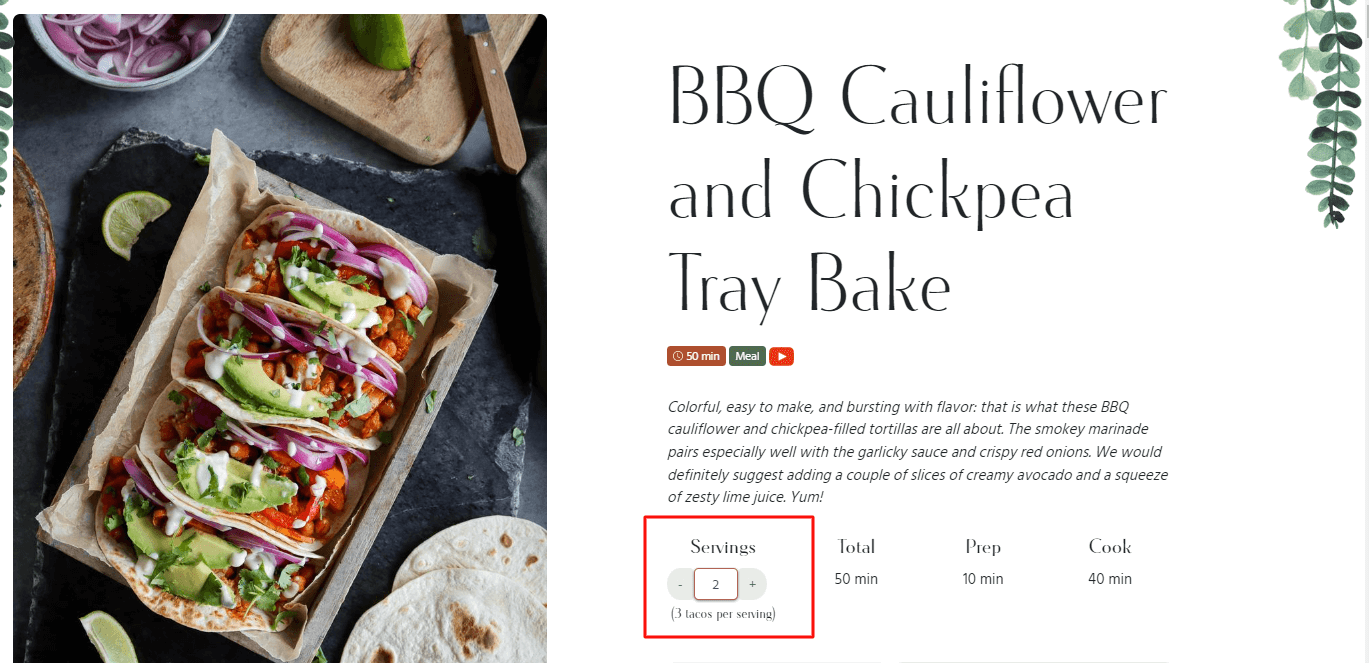
Customizable Serving Options:

The site’s serving option is one of its most impressive features. Instead of providing generic serving sizes, Pick Up Lime allows users to adjust the recipe to their specific needs. Whether you’re cooking for two or ten, the parameters adjust accordingly to ensure the recipe comes out perfectly every time.

Image showing serving Option on the blogging site
Swap-Out Options for Dietary Restrictions:

For users with dietary restrictions, the site offers swap-out options for ingredients. Whether it’s gluten-free or soy-free, users can easily find alternative options that fit their dietary needs. This thoughtful feature saves time and hassle, making the recipe preparation process seamless.

Swap out section highlighted
Interactive Instruction Section:

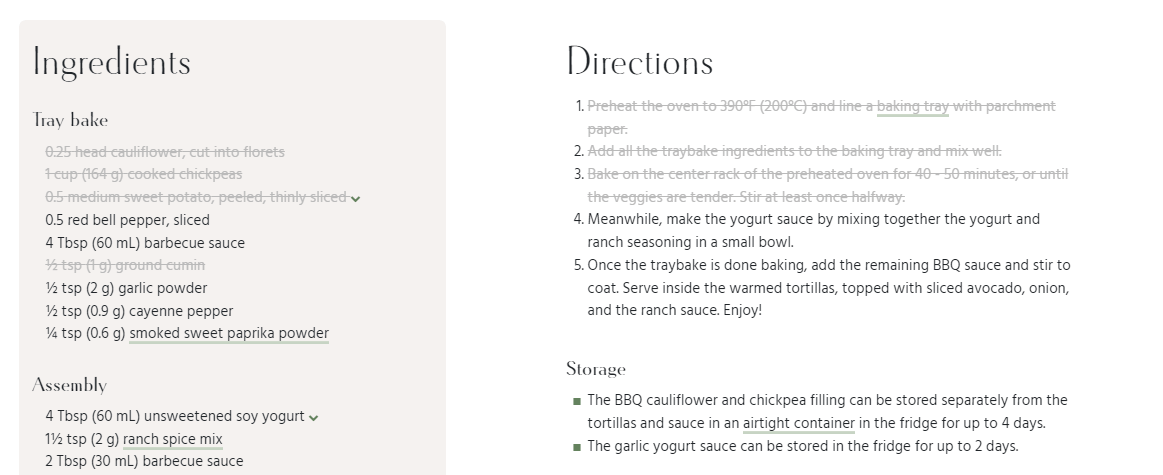
The recipe instruction section of the site is also designed to be user-friendly. With cut-out options for each step of the recipe, users can easily track their progress and cross off each step as they complete it. This feature avoids confusion, saves time, and ensures that the recipe is executed smoothly.

Strike-through highlighted and marked as steps are done from user end
Printing Options with Customization

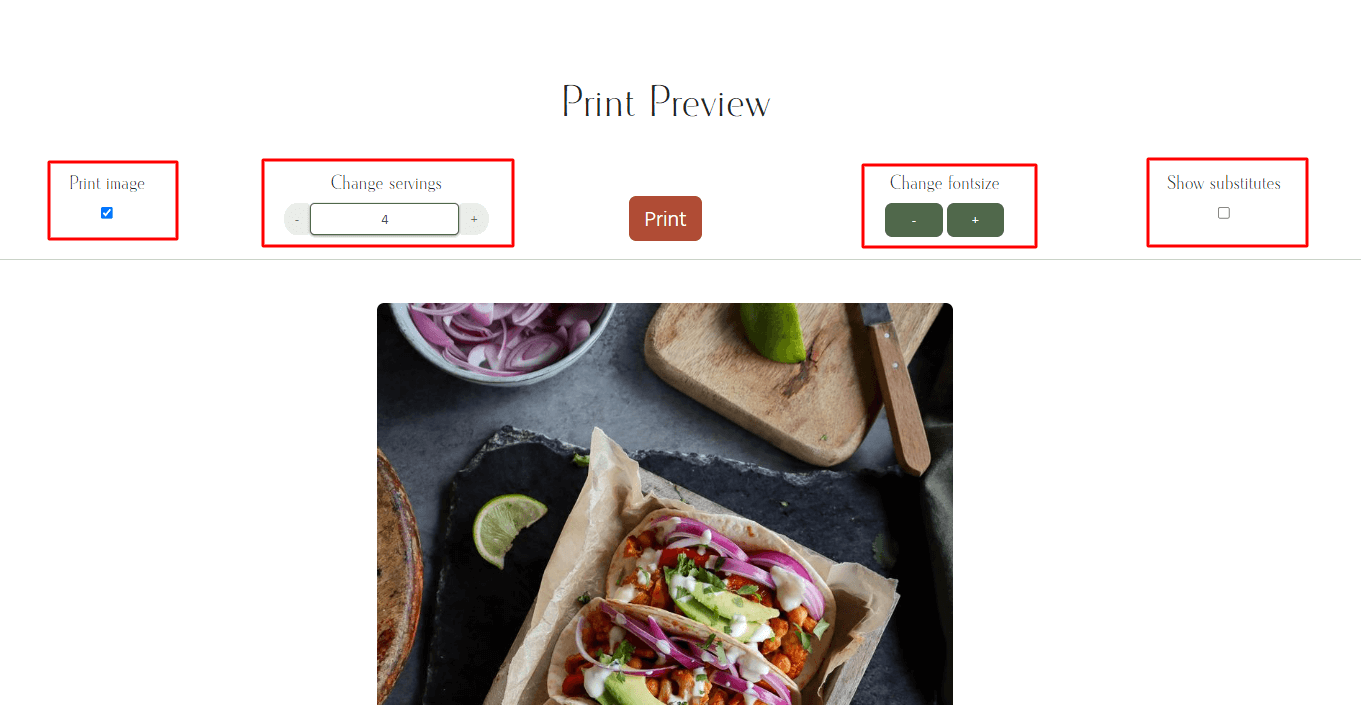
For users who prefer hard copies of the recipe, Pick Up Lime offers a printing option. The feature includes customization options such as image inclusion and font size adjustment. This touch ensures that users have the information they need, even if they’re offline.

The image highlights various customizable options
Mordern Layout and UI

The overall blog layout is crafted beautifully. The fixed scroll options and section scrolling make it stand out from other recipe blogs in the market which still have traditional layout text-based layouts.

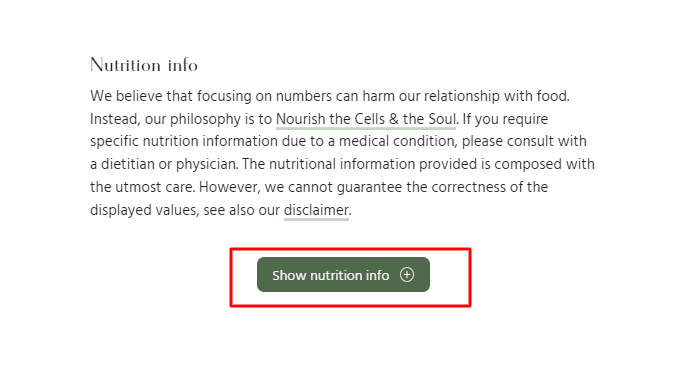
Nutrition Info

When it comes to food we should enjoy it cooking and eating rather than worrying and thinking or eat only to get healthy, The Nutrition info at the start is hidden with that purpose. The purpose is to satisfy the soul and cells.

Conclusion

In summary, Pick Up Lime is an exceptional recipe blogging site with a design that puts users first. Its practical and intuitive features make it an excellent choice for anyone looking for a user-friendly recipe site.

The post A Closer Look at Pick Up Lime: The Most User-Friendly Recipe Site appeared first on Yadnesh Tiwari.

https://tiwariyadnesh.com/?p=941
Extensions
Improving UX through Minimalist Design and Enhanced Navigation
Case Studycase studyUI/UX

As a web developer, I often visit other creative professionals’ Twitter profiles and websites to study their work and gather inspiration. In order to sell my services, I conduct in-depth studies of these websites and come up with my own versions that address any flaws or areas for improvement. This helps me to showcase my […]

The post Improving UX through Minimalist Design and Enhanced Navigation appeared first on Yadnesh Tiwari.

Show full content

As a web developer, I often visit other creative professionals’ Twitter profiles and websites to study their work and gather inspiration. In order to sell my services, I conduct in-depth studies of these websites and come up with my own versions that address any flaws or areas for improvement.

This helps me to showcase my skills and demonstrate my capabilities to potential clients. By doing this, I am able to provide proof of my work and show that I am capable of creating high-quality websites that meet the needs of my clients.

In this post, we’ll walk through a case study where we analyzed a portfolio website and made recommendations for improving the user experience. Website Link

The website contained multiple pages with information about the user’s work and background. However, during user testing, I found that the multi-page layout made it difficult for users to quickly find the information they were looking for as each page section contains information about one-fold.

To address these issues, we made the following changes to the website:

  • We redesigned the site as a one-page layout, with all the information organized into easy-to-scroll sections. This allowed users to access all the content in a more cohesive and intuitive way, without the need to click through multiple pages.
  • Showing Feature case studies or blogs and adding a ‘Know More’ button where website visitors can see other details and posts.
  • On visiting the about us page there was a CTA of download a resume. Since it’s important it can’t be inside the page we can just lock up it with the portfolio button in the hero section. by doing this we have both important buttons right up there when the user visits.
  • Instead of the contact us form as a popup, a section on the page is better in context to this website, and more accessible to users who have disabilities or use assistive technologies, as it may be easier to navigate and interact with on the page.
Website Changes
This image shows the full website, which was redesigned with ux prespetive.

Attaching the original website link, all data and images belong to praveen.me, the above images have been used for case study purposes.

The post Improving UX through Minimalist Design and Enhanced Navigation appeared first on Yadnesh Tiwari.

https://tiwariyadnesh.com/?p=898
Extensions
ChatGPT-3: A Friend and Mentor in My Daily Life
Technical

As someone who works in the tech industry, I often find myself facing complex problems and seeking answers to tough questions. In the past, I’ve turned to Google and other search engines for help, but I’ve found that the results can be hit or miss. That’s where ChatGPT-3 comes in. ChatGPT-3 is a large language […]

The post ChatGPT-3: A Friend and Mentor in My Daily Life appeared first on Yadnesh Tiwari.

Show full content

As someone who works in the tech industry, I often find myself facing complex problems and seeking answers to tough questions. In the past, I’ve turned to Google and other search engines for help, but I’ve found that the results can be hit or miss. That’s where ChatGPT-3 comes in.

ChatGPT-3 is a large language model trained by OpenAI that I use on a daily basis to help me frame sentences, get more direct answers to my questions, and understand complex concepts. It’s been a valuable resource for me, and I can see why other users are amazed by it.

One of the things that sets ChatGPT-3 apart is its ability to provide suggestions that are on point and helpful. For example, when I was struggling to come up with the right words to describe a technical issue I was experiencing, ChatGPT-3 was able to provide me with a list of options that were all relevant and accurate.

Another area where ChatGPT-3 has been especially useful is in helping me solve regex and validation problems. Its explanations and guidance have been clear and concise, making it easier for me to understand the concepts and apply them to my work.

But perhaps the biggest challenge with ChatGPT-3 is figuring out the best way to prompt it with my questions. It’s a real task to find the right balance between being too vague and too specific, but the more I use it, the better I get at it.

In conclusion, ChatGPT-3 has been an invaluable resource for me in my daily work. Its ability to provide helpful suggestions and explanations for complex problems has made it a valuable friend and mentor. I highly recommend it to anyone who is looking for a reliable source of guidance and support.

Here is the link to the website: https://chat.openai.com/chat

Truth

I prompted ChatGPT-3 to write this blog post.

Hey ChatGPT-3, Help me to create a blog post with 300 plus words with this small description, ChatGPT-3 a friend and mentor as title and how on daily basis I am using it.

  1. It helped me to frame sentences.
  2. More direct answers than just researching like on google.
  3. Great explanation for complex problems.
  4. Regex and validation problem chatGPT3 Helped me.
  5. suggestions are better and on point.
  6. To prompt,t your question to chatGPT is a real task.
  7. What is amazing about chatGPT-3?

The post ChatGPT-3: A Friend and Mentor in My Daily Life appeared first on Yadnesh Tiwari.

https://tiwariyadnesh.com/?p=844
Extensions
Fine Dine and Case Study of Restaurant Website
Case Studycase studyUI/UX

Back Story I went to dinner with my family at the resort. The atmosphere was cozy and inviting, and I couldn’t wait to try the delicious-sounding dishes on the menu. However, as I looked over the bill after my meal, something caught my eye. The resort website address was listed on the bill. Upon visiting […]

The post Fine Dine and Case Study of Restaurant Website appeared first on Yadnesh Tiwari.

Show full content
Back Story

I went to dinner with my family at the resort. The atmosphere was cozy and inviting, and I couldn’t wait to try the delicious-sounding dishes on the menu.

However, as I looked over the bill after my meal, something caught my eye. The resort website address was listed on the bill.

Upon visiting the website address, the site was not in working condition, I checked it with my phone and while back at home was having the same issue, As I dug deeper, the site certificate was expired, It was not a great experience to see that furthermore, the domain was also about to expire, I saw an opportunity here and thought to build the site with my expertise.

To access the site I enabled it through the advanced tab, This is how the site appeared (attached Image below). My initial thought was should I build this ?? building this should not be a waste of my time, maybe the client won’t want to continue with the website. With all the various thoughts I just went ahead to build it, maybe I can use a concept project and create a case study or blog out of it.

The creative person within me wanted to create a case study like Growth.Desing but after spending some time realized that I was making it more complicated, better to publish something rather than nothing.

Case Study

After studying the resort website here is my list of points where the site needs improvements and changes.

  • Sticky Header with No Navigation menu, just phone numbers with no proper alignments.
  • Since No navigation, the user cannot navigate to the reservation page.
  • With just great-looking property but not a single image of it on the website.
  • Fonts are not consistent across the site.
  • Throughout the site, there are no left-right alignments.
  • 2 different footers and both footers were distinct from each other.
  • The site was not mobile-responsive.
Conclusion

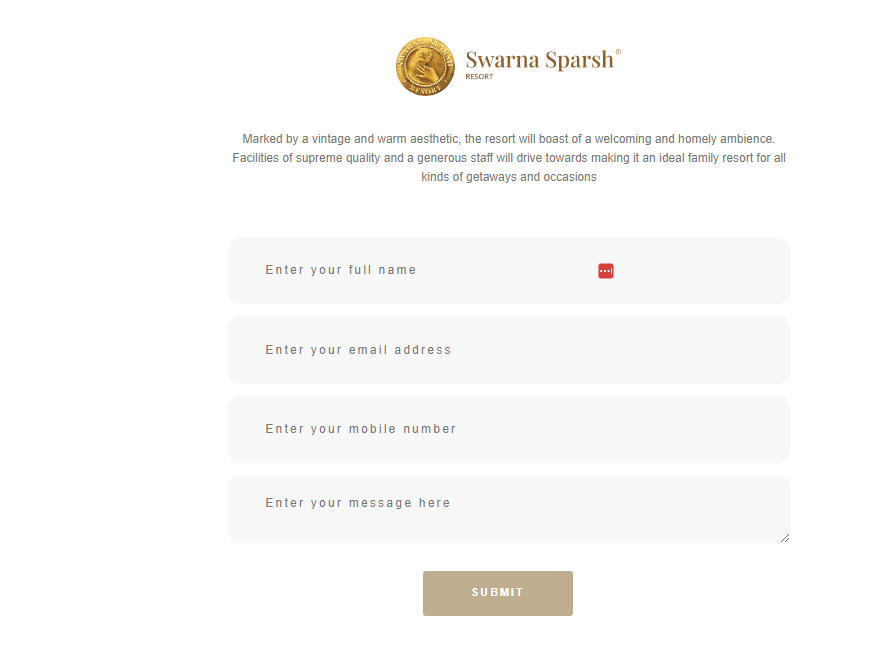
After spending over a week on it. The new updated version of the resort website.

  • Fully Mobile Responsive, Since many user access the site through mobiles.
  • Added property Images, a few as banners, and a few in the about us section.
  • Made it a single-page site with proper navigation.
  • Added Map for users to navigate while they land on the website.
  • With proper left-right alignments across the site.

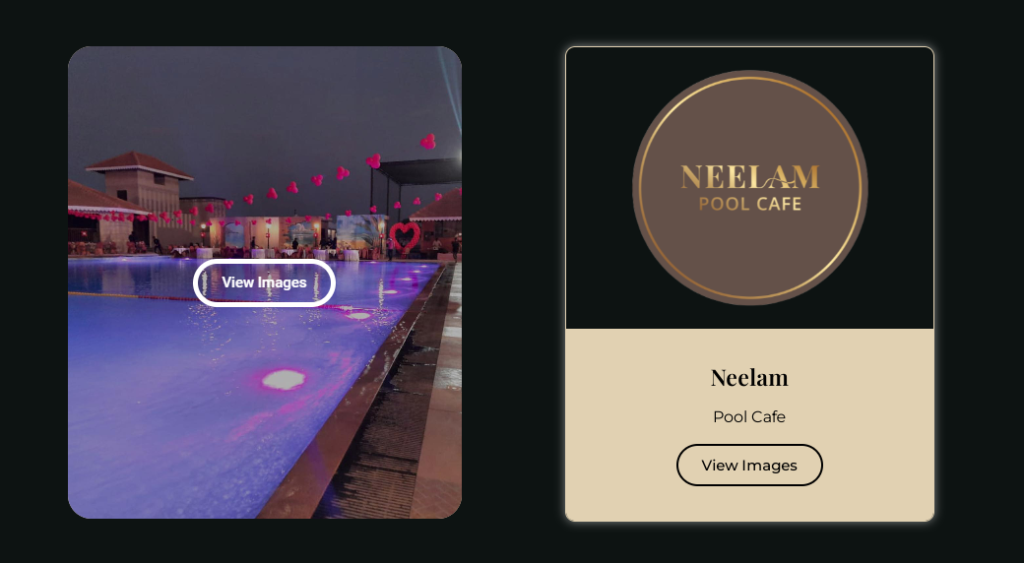
For services, I tried various methods and finally went with the button card, The name of services and their icons are very unique for the resort so I did not change them, The flip effects from the right or other animation were considered but having more clicks to see what’s inside service is what makes it complicated. On mobile devices, the hover effect appears when you click on it. so this made my decision to go with the button card.

This is how I finished the project, the color scheme and heading fonts are inspired by the logo and the secondary font is Montserrat.

The property images and their ownership belongs to the resort solely, I took these images from Instagram and used them for the project specifically.

This case study does not aim to criticize the other developer or agency, Intention here was to highlight the missing points and Improvise the website from a business perspective.

If you have any suggestions or feedback please send me a dm over Twitter.

The post Fine Dine and Case Study of Restaurant Website appeared first on Yadnesh Tiwari.
https://tiwariyadnesh.com/?p=796
Extensions
Apple Event and Importance of RE-Design
Design

September was the month when Apple showcased the new iPhones, Apple Watch, and Air pods. In This Apple Event, iPhone 14 was launched with tons of upgrades and features. There’s even a meme that shows only a digit has been increased from 13 to 14 rest of everything remains the same on phone. The major […]

The post Apple Event and Importance of RE-Design appeared first on Yadnesh Tiwari.

Show full content

September was the month when Apple showcased the new iPhones, Apple Watch, and Air pods. In This Apple Event, iPhone 14 was launched with tons of upgrades and features. There’s even a meme that shows only a digit has been increased from 13 to 14 rest of everything remains the same on phone.

iPhone 14 Pro and iPhone 14 Pro Max introduce the Dynamic Island.

The major highlight of the iPhones was the iPhone 14 PRO. They introduced a UI element with smooth animation around the notch. Where the whole world is thinking of removing it, Apple made it a major feature update. Currently, the same design with a notch is buzzing around the whole world. Apple call this feature as Dynamic Island. Instead of thinking this notch is a curse, they changed the perspective and made it a feature, An interactive feature.

The moment you change the perspective about the problem, the problem gets vanished.

Unkonwn

Apple as the company shifted the view of removing the notch to how can we make it more useful and thus solves the problem by redesigning it. The Apple design team had really pulled this off well and to be honest, they have thought Inside the box rather than thinking outside the box and the strategy worked well.

The post Apple Event and Importance of RE-Design appeared first on Yadnesh Tiwari.

Download video
https://tiwariyadnesh.com/?p=541
Extensions
Open AI and Project DALL-E 2
Technical

Open AI is a company focused on creating AI ( Artificial Intelligence ) tools and software which will help humans to solve complex problems and collaborate with other organizations helping and sharing their research for the betterment and safety of Humanity. Research and patents made by the company are intended to remain open to the […]

The post Open AI and Project DALL-E 2 appeared first on Yadnesh Tiwari.

Show full content

Open AI is a company focused on creating AI ( Artificial Intelligence ) tools and software which will help humans to solve complex problems and collaborate with other organizations helping and sharing their research for the betterment and safety of Humanity. Research and patents made by the company are intended to remain open to the public except in cases where they could negatively affect safety. The company was founded in 2015 by Elon Musk and Sam Altman and some other investors with its headquarters in San Francisco, California.

The mission they work for and I quote is :

OpenAI’s mission is to ensure that artificial general intelligence (AGI)—by which we mean highly autonomous systems that outperform humans at most economically valuable work—benefits all of humanity.

The core purpose of Open AI is to work in Artificial General Intelligence ( AGI ) also known as Strong Intelligence. The AGI is the field where computers are trained to solve any problems that human faces and to solve them more accurately than humans in the best way possible.

To know more about AGI: capabilities, abilities, and AGI vs AI, weak AI please read this article by Ben Lutkevich on Tech Target dot com

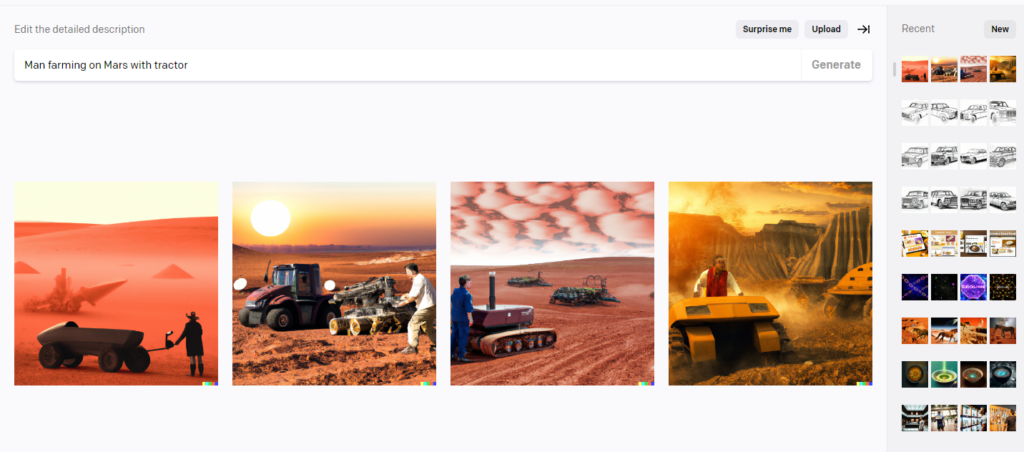
Open AI had many different projects already launched and with each launch, it surprises the world and creates a buzz around it. The recent one and my reason to write this was the project DALL-E. DALL-E is an AI tool that helps to edit or create an image with natural language instructions. Its upgraded version DALL-E 2 just got launched and I happen to get early access to this tool.

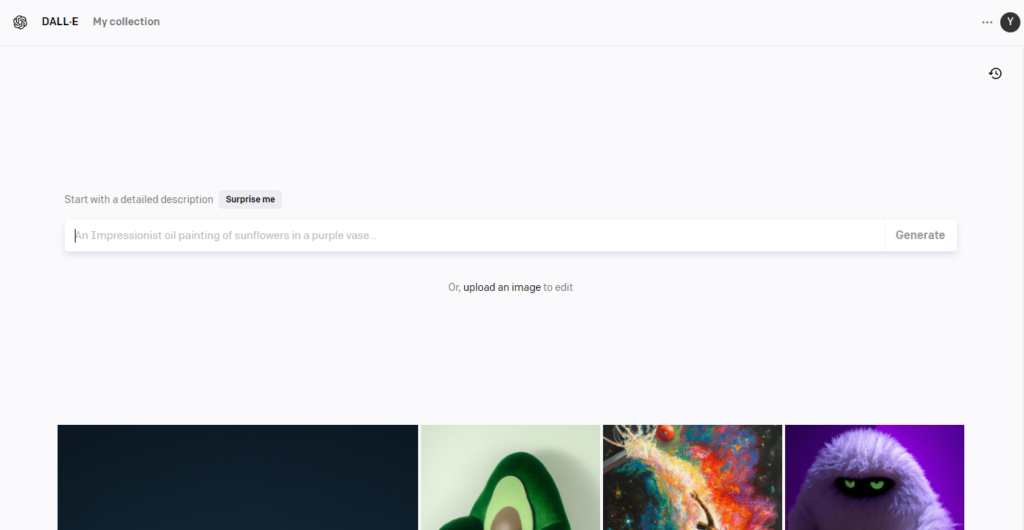
This was Invite only tool and I happened to be on the waitlist since I had registered for it ever since I had heard about it. The UI of the site is as simple as it can be. Just an input box and generate button and the magic happens.

DALL-E WEBSITE INTERFACE WHERE WE CAN ACCESS THIS TOOL

The transcition from DALL-E1 to DALL-E 2 is on diffrent level. The progress has been great, the real object with the imaginary things which we type gets generated in seconds and this is done using “diffusion”.

As per the Open AI team and I quote :

DALL·E 2 has learned the relationship between images and the text used to describe them. It uses a process called “diffusion,” which starts with a pattern of random dots and gradually alters that pattern towards an image when it recognizes specific aspects of that image.

NATURAL LANGAUGE QUERY
RESULTS GENERATED IN LESS THAN 10 SECONDS
The Buzz around DALL-E 2 and My Opinion

The more noise that this tool generated was that in time coming it would take the graphics designer’s jobs away. Since it gets the results out in seconds to whatever we write to it. The AI does the job well but it does not satisfy the outcomes and there is always a level of correctness we need to apply as humans. We can treat the generated images as mock-up designs (High-level designs) but we cannot consider them as final designs or ready to use for business/production purposes.

TRIED TO GENERATE UI DESIGNS BY GIVING SOME DESCRIPTIONS 😀

This is a training model and in beta version, We need to train this model with a huge amount of data sets, and images and make it proficient in natural language processing. This would be too early to speculate about AI taking anyone’s job away.

Learn any skills and as Steve Jobs said it’s always about connecting the dots. He took calligraphy classes and Introduced us to different kinds of computer fonts. We use this for our enhancements for our projects, Websites and similarly, we will use AI for enhancements.

Technically if you are more eager to read about DALL-E please go through these links:


Aditya Ramesh ( Creator of DALL-E): http://adityaramesh.com/posts/dalle2/dalle2.html

Sam Altman blog ( co-founder Open AI ): https://blog.samaltman.com/

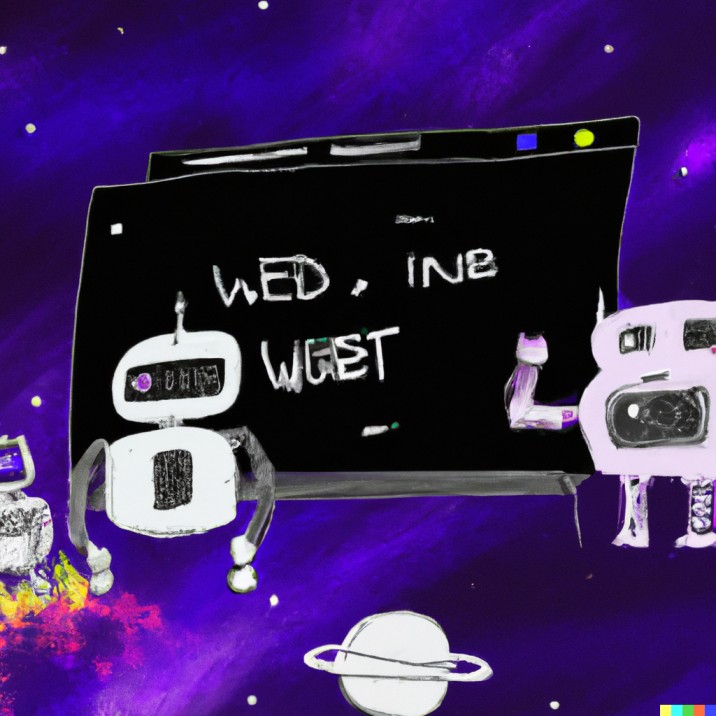
MY QUERY : ROBOTS DESIGNING UI/UX OF WEBSITE IN SPACE WITH GALAXY AROUND

The post Open AI and Project DALL-E 2 appeared first on Yadnesh Tiwari.
https://tiwariyadnesh.com/?p=528
Extensions
Quick overview of JavaScript Fundamentals
Technical

The thing that people like to compare with JavaScript is Java and guess what there is no link between them.The best example of this is Car and Carpet, No link between them correct ?. That’s how Java and JavaScript are connected with each other. There is no relation between them apart from the name. While […]

The post Quick overview of JavaScript Fundamentals appeared first on Yadnesh Tiwari.
Show full content

The thing that people like to compare with JavaScript is Java and guess what there is no link between them.
The best example of this is Car and Carpet, No link between them correct ?. That’s how Java and JavaScript are connected with each other. There is no relation between them apart from the name.

While the time I am writing this blog JavaScript had topped consistently 10 years as the most commonly used coding language with HTML and CSS ref: StackOverflow Survey 2022

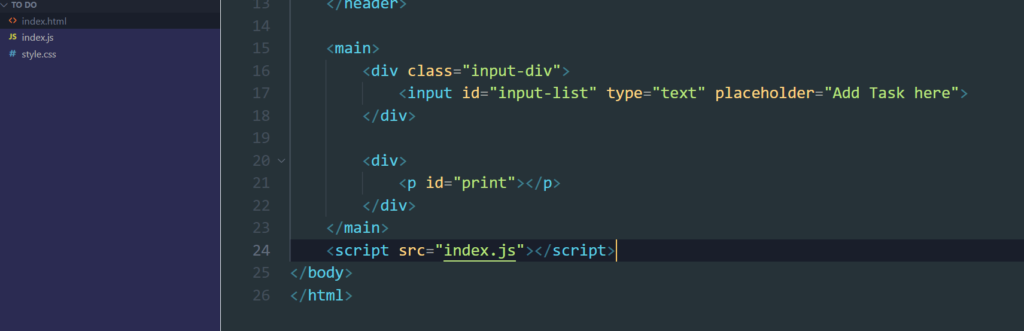
To link an HTML file to Js we have to just add a script tag inside the body as the last line.

Code snippet for attaching js
Code snippet for attaching HTML and JavaScript File

Why last line and inside body tag ?? The ANS from StackOverflow

script tags are loaded and executed by the browser as and when it encounters them. Most modern browsers have a number of multiple threads that render the HTML page at the same time, however, if all those threads are blocked waiting to load JavaScript assets, the page takes a whole lot longer to render.
That's the reason people usually place their script tags in the body at the bottom of the page, so that all the HTML of the page has been rendered, and the user can see something while the page loads any heavy JavaScript assets.

Once it’s linked we can write our JavaScript code to test. Before all that, we need to know how it’s written, and what are the syntax and methods for it.

Everything that happens in JavaScript happens in the Execution Context. Even if we run an empty file an Execution Context is created. Execution Context (EC) consists of two components Memory and Code. In Memory all the variables and functions are stored and Code is where all the JavaScript codes get executed line by line.

JavaScript is Synchronous Single-Threaded Language, which means it executes one command at a time and in a specific order.

The Basic Fundaments of JavaScript which we are going to look at in this blog post are :

  • Variables
  • Constants
  • Arrays
  • Conditional Statements
  • Functions
  • Loops
Variables

Variables are reserved memory locations to store values temporarily.
We can declare variables in 3 ways in JavaScript: var, let, and const. Let and Const are block-scoped and var is globally available in the Execution Context.

let name = "Yadnesh"

here we are assigning the string value “Yadnesh” to the variable: name.

Constants

The const was Introduced by Js in ES6 in 2015.
The value of const cannot be changed through reassignment and it cant be redeclared ( MDN DOCS ).

const birthday = "6th Feb"

We have used const here because the value of it in the given context would never change. Its always recommended to use const wherever possible

Arrays

An array is a data structure that contains a list of elements which store multiple values in a single variable.

Array is declared as Syntax : let fruits = [ ]

let fruits = ["Apple","Mango","Orange"]
console.log(fruits)

Array are 0 indexed, to check the length of aaray we can use fruit.length to check the number of items in the array. To remove and add items we can use push( ) and pop ( ) method.

Conditional Statements

We use conditional statement when we want to execute the condition if and only if its true.
Conditional statements Syntax is :
if ( condition ) {
statement
}

Inside the condition if we use equals to operator it has 2 options one it checks and other it strickly checks the condition. we denote it by == sign and === respectively for strictly check.

let num = 8
if ( num == "8" ) {
   console.log ("True")
} else ( "False")

O/P : True 

let num = 8 
if ( num === "8") {
    console.log("True")
} else ("False")

O/P : False

In === it has different output since value of data type is number and with what we are comparing is string. Hence one is number and other is string and they both are not equal. Hence it logged False as output.

Functions

A function is a block of organized and reuseable code that is used to perform a single related action.
To declare a function we need to use the syntax as “function nameoffunction ( ) {—}

let num = 2
function square () {
 return num*num
}

square ()
Loops

Whenever we have to do a repetition task we use loops. There are 3 types of loops
– for Loop
– while Loop
– do-while
we can run this loop until the condition/result is not met. We will see how for loop works here.
The syntax for loop is :

for(begin; condition; step) {
loop code
}

for ( let i=0; i<5; i++) {
     console.log(i);
} 

O/P :
0
1
2
3
4

Here loop runs from 0 to the condition less than 5 and incerementing it by 1, so the loop starts from 0 increments by 1 than 2 , 3 ,and 4. that’s how the for loop runs.

The post Quick overview of JavaScript Fundamentals appeared first on Yadnesh Tiwari.

https://tiwariyadnesh.com/?p=446
Extensions