Show full content
I was interviewed on Veritasium about the rise of Linux and the XZ hack.
I was interviewed on Veritasium about the rise of Linux and the XZ hack.

Some colleagues of mine have been working hard on this for a really long time:
Red Hat partners with SiFive for a RISC-V developer preview of Red Hat Enterprise Linux 10
I was investigating possible disk corruption when copying a disk image between servers, but needed a way to visualise what might be happening. The disk image is tens of gigabytes, so looking at it in hexdump wasn’t a lot of fun. A little Python to the rescue instead:
#!/usr/bin/python3

from PIL import Image, ImageColor

import nbd
h1 = nbd.NBD()
h2 = nbd.NBD()

original = "original.qcow2";
copied = "copied.qcow2";

blksize = 4096
zero_block = bytearray(blksize)

width = 4096
output = "output.png"
red = ImageColor.getrgb("red")
green = ImageColor.getrgb("green")
blue = ImageColor.getrgb("blue")
white = ImageColor.getrgb("white")
black = ImageColor.getrgb("black")

# Open original disk image.
h1.connect_systemd_socket_activation(["qemu-nbd", "-f", "qcow2", original])

# Open copied disk image.
h2.connect_systemd_socket_activation(["qemu-nbd", "-f", "qcow2", copied])

assert(h1.get_size() <= h2.get_size())

# Open the output visualisation.
height = int(h1.get_size() / blksize / width) + 1
image = Image.new("RGB", (width, height), white)

# Iterate over the blocks of each.
x = 0
y = 0
for i in range(0, h1.get_size(), blksize):
    b1 = h1.pread(blksize, i)
    b2 = h2.pread(blksize, i)
    if b1 == b2:
        # Same
        image.putpixel((x, y), green)
    elif b1 != zero_block and b2 == zero_block:
        # Zeroed
        image.putpixel((x, y), black)
    else:
        # Different but not zeroed
        image.putpixel((x, y), red)
    x = x+1
    if x == width:
        x = 0
        y = y+1
        print("%d/%d\r" % (y, height), end='')

print()
image.save(output)
print("Saved to %s" % output)

h1.close()
h2.close()
The resulting image showed that stretches of the disk were getting zeroed out during the copy (which was definitely not supposed to happen).

The RISC-V open instruction set architecture is becoming popular, but getting development boards into programmers’ hands so people can use it has been difficult and expensive so far, and the ones available have been slow. Things are changing, slowly, but this year many more are available. Which ones are any good?
I recently received 4 Milk-V Jupiter development boards, and one Banana Pi F3 through RISC-V International. All of these boards have the same (or very similar) SpaceMIT X60 SoC which is a fairly capable 8 core RISC-V processor.
model name      : Spacemit(R) X60
isa             : rv64imafdcv_zicbom_zicboz_zicntr_zicond_zicsr_zifencei_zihintpause_zihpm_zfh_zfhmin_zca_zcd_zba_zbb_zbc_zbs_zkt_zve32f_zve32x_zve64d_zve64f_zve64x_zvfh_zvfhmin_zvkt_sscofpmf_sstc_svinval_svnapot_svpbmt
Since we’ll be using all of these boards for Fedora package building I ran some simple benchmarks of how well they perform. The benchmark is to recompile this grub2 package to RPMs:
# dnf builddep grub2-2.12-11.0.riscv64.fc41.src.rpm
$ time rpmbuild --recompile grub2-2.12-11.0.riscv64.fc41.src.rpm
(I did a few builds in a row until the times settled down, so these are all “hot cache” builds on an otherwise unloaded board.)
We should be getting a SiFive P550 development board soon which is the first widely available out-of-order RISC-V core.
(Thanks Andrea Bolognani for benchmarking the VF2 and P550 with NVMe and KVM guest)
Red Hat is hiring two software engineering positions, to work on virt-v2v and the wider MTV project. Virt-v2v is the software we use for “VMware take-out”, ie. converting existing virtual machines from VMware to run on KVM (Openshift, Openstack, or just plain qemu). This is a huge opportunity right now owing to Broadcom deciding to set fire to piles of money.
As is usual with these things there was a lot of miscommunication between what we asked for an what the job description says, but for the virt-v2v position we’re looking especially for C programmers with a good understanding of virtualization, who are motivated self-starters. The roles nominally are on-site in Brno, Czech Republic, and the US (Ireland is mentioned weirdly, but I think that’s a tax thing). This isn’t a real requirement and remote work is fine, although for junior developers we’d probably ask you to attend the office for the first month or so.
Workday links (sorry, not my choice): Senior Software Engineer role, Principal Software Engineer role. If you’re interested in applying please follow the instructions there rather than commenting here.
I discovered this exploit in qemu’s network block driver:

To reproduce it you’ll need nbdkit >= 1.40.1:
$ wget http://oirase.annexia.org/nyan.c
$ nbdkit --log=null cc nyan.c
$ qemu-img info nbd://localhost
What’s happening here (discussion upstream) is just that qemu prints the error message from the server without sanitisation, so we can send terminal codes and more. This affects any user-controlled qcow2 file, since you can set NBD as a backing source.
I did a talk about the Broadcom acquisition of VMware and using virt-v2v to liberate your VMs. Check it out below. It’s only 5 minutes long!
(Note this is a link to the livestream, it should start at 7h 4m 9s)
David Abdurachmanov and myself did a talk about Fedora on RISC-V. Check it out below.
(Note this is a link to the live stream, and it should start playing at 4h 45m 14s)
I was interviewed on NPR Planet Money about my small role in the Jia Tan / xz / ssh backdoor.
NPR journalist Jeff Guo interviewed me for a whole 2 hours, and I was on the program (very edited) for about 4 minutes! Quite an interesting experience though.
Finally been published …
https://research.redhat.com/blog/article/risc-v-extensions-whats-available-and-how-to-find-it/
Much requested, I’m now building nbdkit binaries for Windows. You can get them from the Fedora Koji build system by following this link. Choose the latest build by me (not one of the automatic builds), then under the noarch heading look for a package called mingw64-nbdkit-version. Download this and use your favourite tool that can unpack RPM files.
Some notes: This contains a 64 bit Windows binary of nbdkit and a selection of plugins and filters. There is a mingw32-nbdkit package too if you really want a 32 bit binary but I wouldn’t recommend it. For more information about running nbdkit on Windows, see the instructions here. Source is available for the binaries from either Koji or the upstream git repository. The binary is cross-compiled and not tested, so if it is broken please let us know on the mailing list.
I have a lot of RISC-V and Arm hardware. How do my latest 3 RISC-V purchases stand up against each other and the stalwart Raspberry Pi 4B? Let’s find out!
The similarities between these boards are striking. All have 4 cores and all except the HiFive board have 8GB of RAM (HiFive Unmatched has 16GB). All have some kind of flash-based storage: The Raspberry Pi and Sipeed Lichee are using external SanDisk SSDs connected by USB 3. The HiFive Unmatched and VisionFive 2 have NVMe drives (I hope all SBCs provide an NVMe slot going forward).
Since I mainly use these for compiling Fedora packages, I tested compiling qemu using identical configurations. I built it a few times to warm up and then timed the last build, on otherwise unloaded machines. Here are the results:
Note that in the cost column I have included tax, delivery, and all extras that I had to purchase (such as disks) to bring the device up to the tested configuration. This is why the prices are much higher than the sticker price you will see online. Also the Raspberry Pi price is what I paid back in the halcyon days of 2020 before Raspberry Pi shortages.
* The speed test for the Sipeed Lichee was done using the Fedora distribution. There seems to be something very wrong with the measured speed of this board, and given the TH1520 chip we think this board ought to be able to do much better. However restoring the original Debian distro to it will require a load more work, because the boot path for this board is insane.
If you would like to try to reproduce these numbers, first download this config file (benchconfig.sh). Then check out qemu sources @ commit 885fc169f09f591 (don’t forget the submodules). Then do:
mkdir build
cd build
../benchconfig.sh
make clean
time make -j4
This should compile about 2576 targets (the number can vary depending on the precise stuff you have installed, it’s hard to make qemu configurations completely identical, but it shouldn’t be much larger or smaller than this).
# cat /proc/cpuinfo
processor	: 0
hart		: 0
isa		: rv64imafdcvsu
mmu		: sv39
cpu-freq	: 1.848Ghz
cpu-icache	: 64KB
cpu-dcache	: 64KB
cpu-l2cache	: 1MB
cpu-tlb		: 1024 4-ways
cpu-cacheline	: 64Bytes
cpu-vector	: 0.7.1

processor	: 1
hart		: 1
isa		: rv64imafdcvsu
mmu		: sv39
cpu-freq	: 1.848Ghz
cpu-icache	: 64KB
cpu-dcache	: 64KB
cpu-l2cache	: 1MB
cpu-tlb		: 1024 4-ways
cpu-cacheline	: 64Bytes
cpu-vector	: 0.7.1

processor	: 2
hart		: 2
isa		: rv64imafdcvsu
mmu		: sv39
cpu-freq	: 1.848Ghz
cpu-icache	: 64KB
cpu-dcache	: 64KB
cpu-l2cache	: 1MB
cpu-tlb		: 1024 4-ways
cpu-cacheline	: 64Bytes
cpu-vector	: 0.7.1

processor	: 3
hart		: 3
isa		: rv64imafdcvsu
mmu		: sv39
cpu-freq	: 1.848Ghz
cpu-icache	: 64KB
cpu-dcache	: 64KB
cpu-l2cache	: 1MB
cpu-tlb		: 1024 4-ways
cpu-cacheline	: 64Bytes
cpu-vector	: 0.7.1

# free -m
               total        used        free      shared  buff/cache   available
Mem:            7803         432        6816          11         645        7371
Swap:              0           0           0

# lsblk
NAME         MAJ:MIN RM  SIZE RO TYPE MOUNTPOINTS
mmcblk0      179:0    0  7.3G  0 disk
|-mmcblk0p1  179:1    0    2M  0 part
|-mmcblk0p2  179:2    0  500M  0 part /boot
`-mmcblk0p3  179:3    0  6.8G  0 part /
mmcblk0boot0 179:8    0    4M  1 disk
mmcblk0boot1 179:16   0    4M  1 disk
At some point I will do a head to head comparison of HiFive Unmatched, Vision Five 2, Lichee Pi 4A, and Raspberry Pi 4B. I believe this little Lichee board below might win!

Well that blew up. It was supposed to be just a silly off-the-cuff comment about how some bugs are very tedious to bisect.
To answer a few questions people had, here’s what actually happened. As they say, don’t believe everything you read in the press.
A few weeks ago I noticed that some nbdkit tests which work by booting a Linux appliance under qemu were randomly hanging. I ignored it to start off with, but it got annoying so I decided to try to track down what was going on. Initially we thought it might be a qemu bug so I started by filing a bug there and writing my thoughts as I went to investigate. After swapping qemu, Linux guest and Linux host versions around it became clear that the problem was probably in the Linux guest kernel (although I didn’t rule out an issue with KVM emulation which might have implicated either qemu or the host kvm.ko module).
Initially I just had a hang, and because getting to that hang involved booting Linux hundreds or thousands of times it wasn’t feasible to attach gdb at the start to trace through the hang. Instead I had to connect gdb after observing the hang. It turns out that when the Linux guest was “hanging” it really was just missing a timer event so the kernel was still running albeit making no progress. But the upshot is that the stack trace you see is not of the hang itself, but of an idle, slightly confused kernel. gdb was out of the picture.
But since guest kernel 6.0 seemed to work and 6.4rc seemed to hang, I had a path to bisecting the bug.
Well, a very slow path. You see there are 52,363 commits between those two kernels, which means at least 15 or 16 bisect steps. Each step was going to involve booting the kernel at least thousands times to prove it was working (if it hung before then I’d observe that).
I made the mistake here of not first working on a good test, instead just running “while guestfish … ; echo -n . ; done” and watching until I’d seen a page of dots to judge the kernel “good”. Yeah, that didn’t work. It turns out the hang was made more likely by slightly loading the test machine (or running the tests in parallel which is the same thing). As a result my first bisection that took several days got the wrong commit.
Back to the drawing board. This time I wrote a proper test. It booted the kernel 10,000 times using 8 threads, and checked the qemu output to see if the boot had hung, stop the test and print a diagnostic, or print “test ok” if it got through all iterations. This time my bisection was better but that still took a couple of days.
At that point I thought I had the right commit, but Paolo Bonzini suggested to me that I boot the kernel in parallel, in a loop, for 24 hours at the point immediately before the commit, to try to show that there was no latent issue in the kernel before. (As it turns out while this is a good idea, this analysis is subtly flawed as we’ll see).
So I did just that. After 21 hours I got bored (plus this is using a lot of electricity and generating huge amounts of heat, and we’re in the middle of a heatwave here in the UK). I killed the test after 292,612 successful boots.
I had a commit that looked suspicious, but what to do now? I posted my findings on LKML.
We still didn’t fully understand how to trigger the hang, except it was annoying and rare, seemed to happen with different frequencies on AMD and Intel, could be reproduced by several independent people, but crucially kernel developer Peter Zijlstra could not reproduce it.
[For the record, the bug is a load and hardware-speed dependent race condition. It will particularly affect qemu virtual machines, but at least in theory it could happen on baremetal. It’s not AMD or Intel specific, that’s just a timing issue.]
By this point several other people had observed the hang including CoreOS developers and Rishabh Bhatnagar at Amazon.
A commenter on Hacker News pointed out that simply inserting a sleep into the problematic code path caused the same hang (and I verified that). So the commit I had bisected to was the wrong one again – it exposed a latent bug simply because it ran the same code as a sleep. It was introducing the sleep which exposed the bug, not the commit I’d spent a week bisecting. And the 262K boots didn’t in fact prove there was no latent bug. You live and learn …
Eventually the Amazon thread led to Thomas Gleixner suggesting a fix.
I tested the fix and … it worked!
Unfortunately the patch that introduced the bug has already gone into several stable trees meaning that many more people will likely be hitting the problem in future, but thanks to a heroic effort of many people (and not me, really) the bug has been fixed now.
And it only took 21 hours.
Linux 6.4 has a bug where it hangs on boot, but probably only 1 in 1000 boots (and rarer if using Intel hardware for some reason). It’s surprising to me that no one has noticed this, but I certainly did because our nbdkit tests which use libguestfs were randomly hanging, always at the same place early in booting the libguestfs qemu appliance:
[ 0.070120] Freeing SMP alternatives memory: 48KSo to bisect this I had to run guestfish in a loop until it either hangs or doesn’t. How many times? I chose 10,000 boots as a good threshold. To make this easier I wrote a test harness which uses up to 8 threads and parses the output to detect the hang.
After a painful bisection between v6.0 and v6.4-rc6 which took many days I found the culprit, a regression in the printk time feature: https://lkml.org/lkml/2023/6/13/733
To prove it I booted Linux 292,612 times before the faulty commit (successfully), and then after (failed after under 1,000 boots).
This seems too crazy to work, but it does:
$ nbdkit memory 1G
$ nbdfuse mem nbd://localhost &
[1] 1053075
$ ll mem
-rw-rw-rw-. 1 rjones rjones 1073741824 May 17 18:31 mem
Now boot qemu with that memory as the backing RAM:
$ qemu-system-x86_64 -m 1024 \
-object memory-backend-file,id=pc.ram,size=1024M,mem-path=/var/tmp/mem,share=on \
-machine memory-backend=pc.ram \
-drive file=fedora-36.img,if=virtio,format=raw
It works! You can even dump the RAM over a second NBD connection and grep for strings which appear on the screen (or passwords etc):
$ nbdcopy nbd://localhost - | strings | grep 'There was 1 failed'
There was 1 failed login attempt since the last successful login.
Of course this isn’t very useful on its own, it’s just an awkward way to use a sparse RAM disk as guest RAM, but nbdkit has plenty of other plugins that might be useful here. How about remote RAM? You’ll need a very fast network.
If you want to simulate how your filesystem behaves with a bad drive underneath you have a few options like the kernel dm-flakey device, writing a bash nbdkit plugin, kernel fault injection or a few others. We didn’t have that facility in nbdkit however so last week I started the “evil filter”.
The evil filter can add data corruption to an existing nbdkit plugin. Types of corruption include “cosmic rays” (ie. random bit flips), but more realisticly it can simulate stuck bits. Stuck bits are the only failure mode I can remember seeing in real disks and RAM.
One challenge with writing a filter like this is to make the stuck bits persistent across accesses, without requiring us to maintain a large bitmap in the filter keeping track of their location. The solution is fairly elegant: split the underlying disk into blocks. When we read from a block, reconstruct the stuck bits within that block from a fixed seed (calculated from a global PRNG seed + the block’s offset), and iterate across the block incrementing by random intervals. The intervals are derived from the block’s seed so they are the same each time they are calculated. We size the blocks so that each one will have about 100 corrupted bits so this reconstruction doesn’t take very long. Nothing is stored except one global PRNG seed.
The filter isn’t upstream yet but hopefully it can be another way to test filesystems and distributed storage in future.
A couple of weeks ago I wrote a blog posting here about Fedora having frame pointers (LWN backgrounder, HN thread). I made some mistakes in that blog posting and retracted it, but I wasn’t wrong about the conclusions, just wrong about how I reached them. Frame pointers are much better than DWARF. DWARF unwinding might have some theoretical advantages but it’s worse in every practical respect.
In particular:
Below I’ll try to demonstrate some of the issues, but first a little bit of background is necessary about how all this works.
When you run perf record -a on a workload, the kernel fires a timer interrupt on every CPU 100s or 1000s of times a second. Each interrupt must collect a stack trace for that CPU at that moment which is then sent up to the userspace perf process that writes it to a perf.data file in the current directory. Obviously collecting this stack trace and writing it to the file must be done as quickly as possible with the least overhead.
Also the stack trace may start inside the kernel and go all the way out to userspace (unless the CPU was running userspace code at the moment it was interrupted in which case it just collects userspace). That involves unwinding the two different stacks.
For the kernel stack, the kernel has its own unwinding information called ORC. For the userspace stack you choose (with the perf --call-graph option) whether to use frame pointers or DWARF. For frame pointers the kernel is able to immediately walk up the userspace stack all the way to the top (assuming everything was compiled with frame pointers, but that is now true for Fedora 38). For DWARF however the format is complicated and the kernel cannot unwind it immediately. Instead the kernel just collects the user stack. But collecting the whole stack would consume far too much storage, so by default it only collects the first 8K. Many userspace stacks will be larger than this, in which case the data collection will simply be incomplete – it will never be possible to recover the full stack trace. You can adjust the size of stack collected, but that massively bloats the perf.data file as we’ll see below.
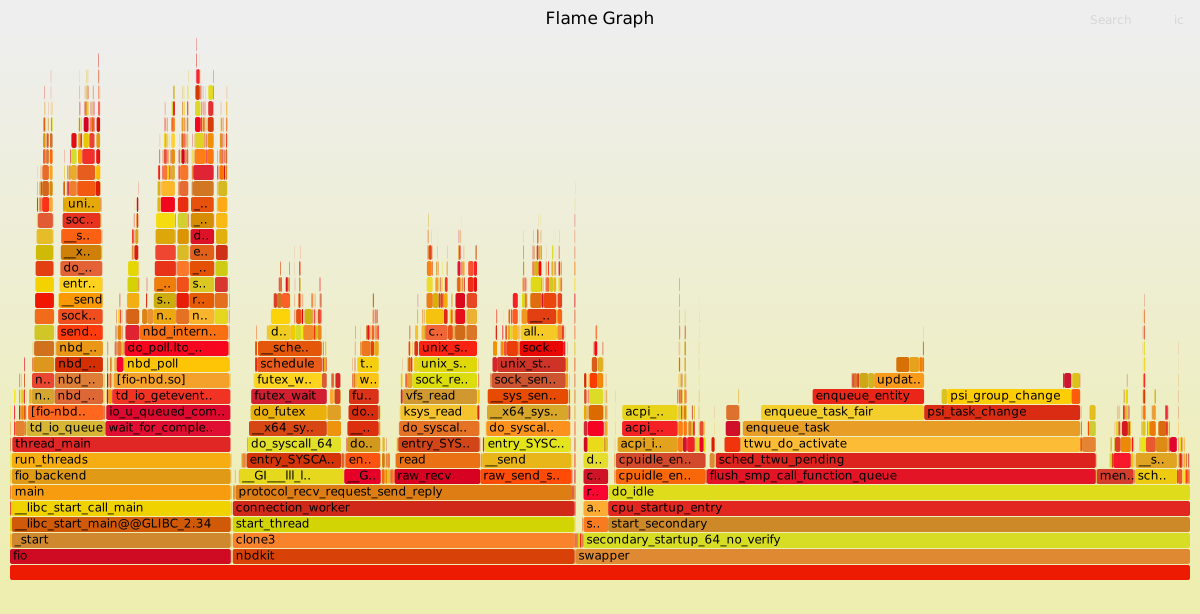
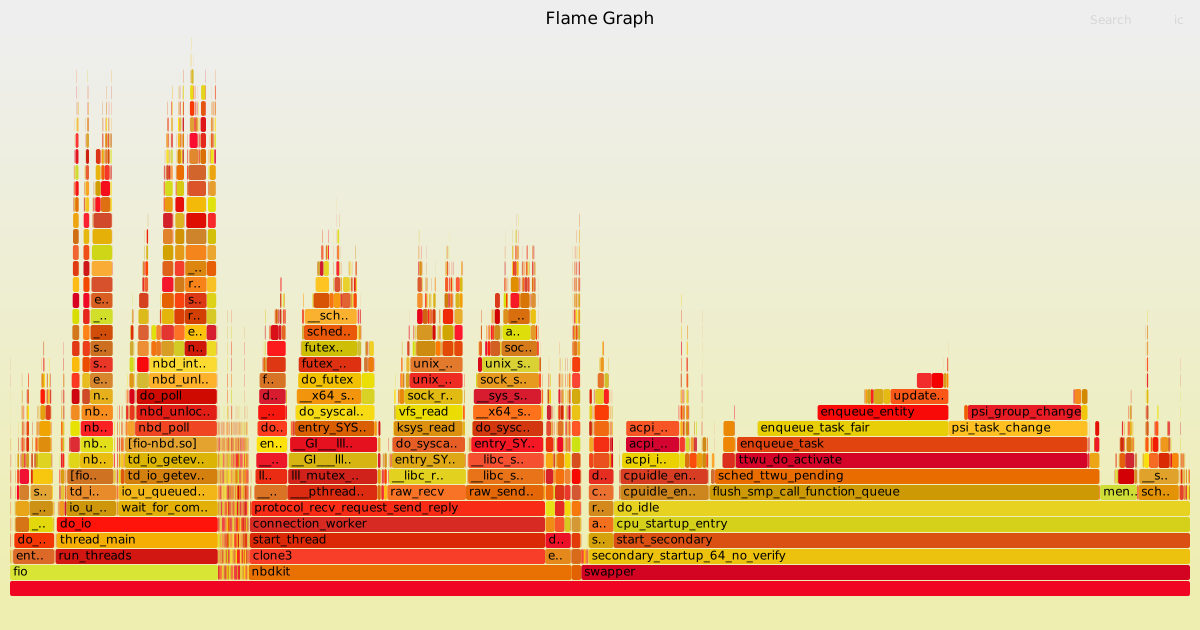
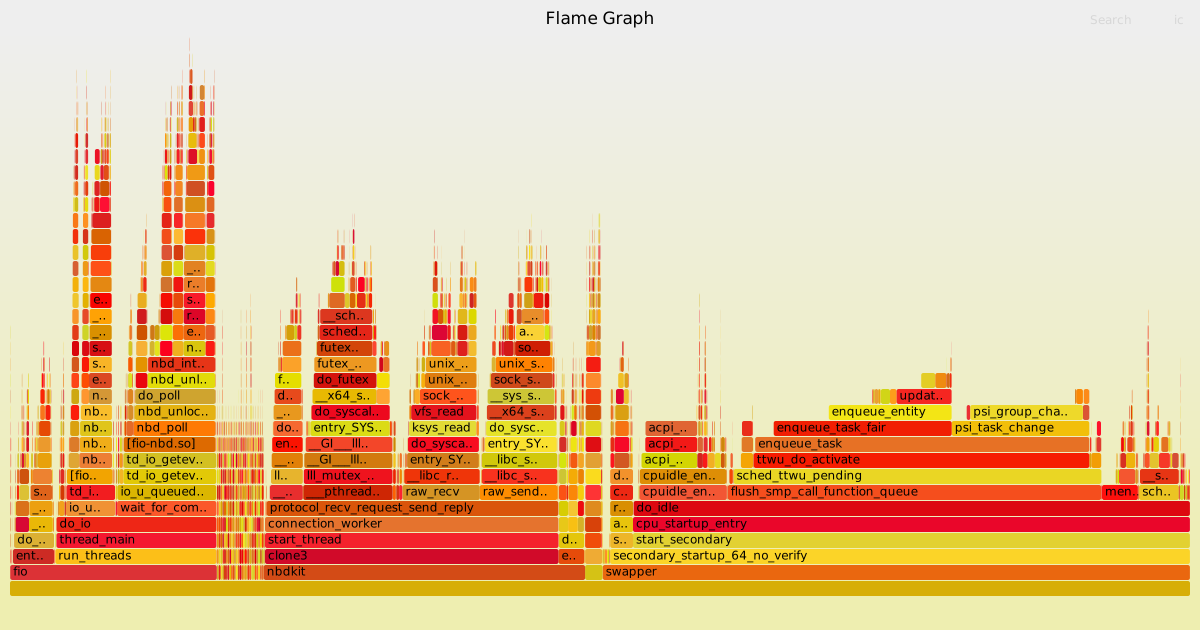
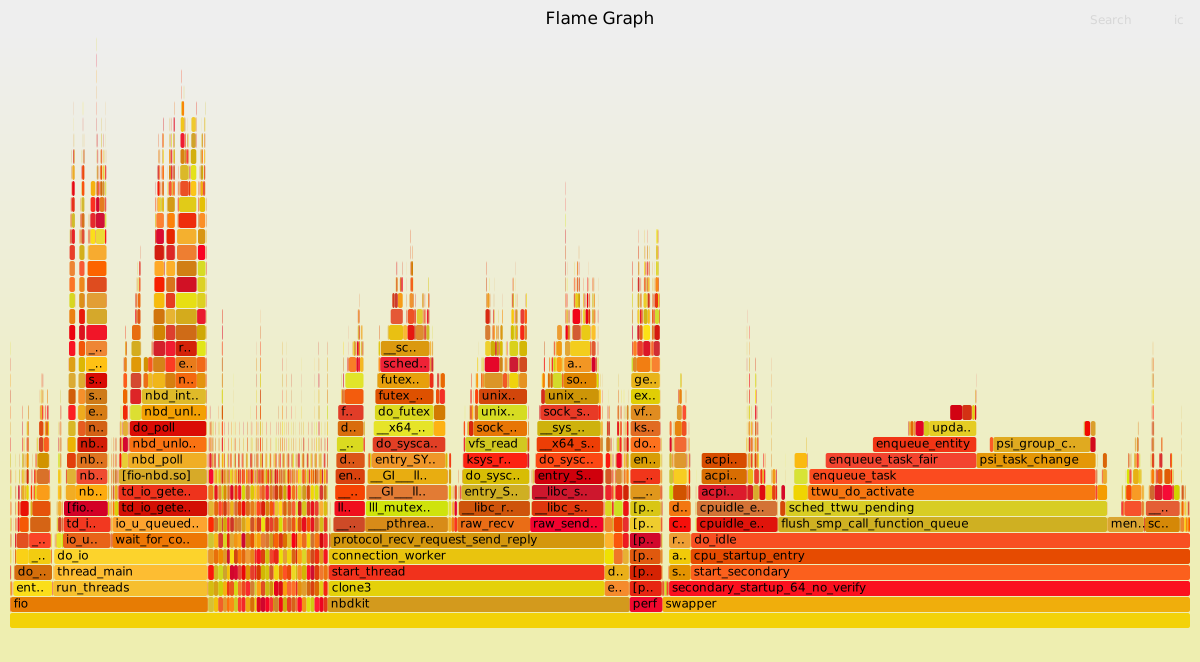
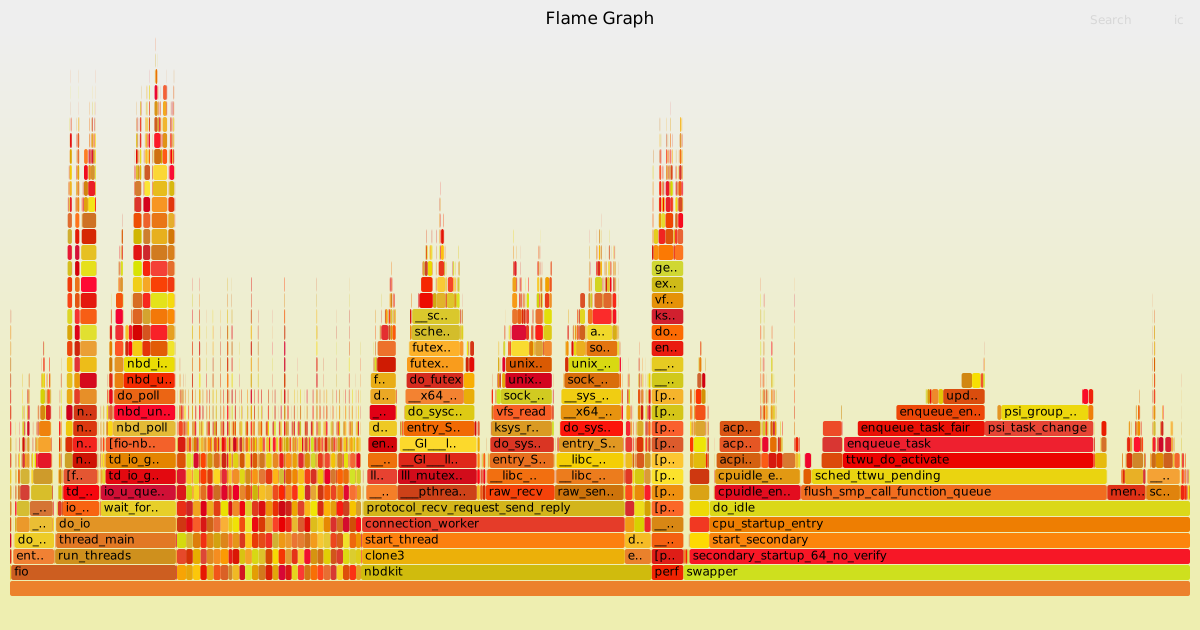
To demonstrate what I mean, I collected a set of traces using fio and nbdkit on Fedora 38, using both frame pointers and DWARF. The command is:
sudo perf record -a -g [--call-graph=...] -- nbdkit -U - null 1G --run 'export uri; fio nbd.fio'with the nbd.fio file from fio’s examples.
I used no --call-graph option for collecting frame pointers (as it is the default), and --call-graph=dwarf,{4096,8192,16384,32768} to collect the DWARF examples with 4 different stack sizes.
I converted the resulting data into flame graphs using Brendan Gregg’s tools.
Everything was run on my idle 12 core / 24 thread AMD development machine.
The first most obvious thing is that even with the smallest stack data collection, DWARF’s perf.data is over 10 times larger, and it balloons even larger once you start to collect more reasonable stack sizes. For a single minute of data collection, collecting 10s of gigabytes of data is not very practical even on high end machines, and continuous performance analysis would be impossible at these data rates.
Related to this, the overhead of perf increases. It is ~ 0.1% for frame pointers. For DWARF the overhead goes: 0.8% (4K), 1.5% (8K), 2.8% (16K), 2.7% (32K). But this disguises the true overhead because it doesn’t count the cost of writing to disk. Unfortunately on this machine I have full disk encryption enabled (which does add a lot to the overhead of writing nearly 60 GB of perf data), but you can see the overhead of all that encryption separate from perf in the flame graph. The total overhead of perf + writing + encryption is about 20%.

This may also be the reason for seeing so many “lost chunks” even on this very fast machine. All of the DWARF tests even at the smallest size printed:
Check IO/CPU overload!But is the DWARF data accurate? Clearly not. This is to be expected, collecting a partial user stack is not going to be enough to reconstruct a stack trace, but remember that even with 4K of stack, the perf.data is already > 10 times larger than for frame pointers. Zooming in to the nbdkit process only and comparing the flamegraphs shows significant amounts of incomplete stack traces, even when collecting 32K of stack.
On the left, nbdkit with frame pointers (correct). On the right, nbdkit with DWARF and 32K collection size. Notice on the right the large number of unattached frames. nbdkit main() does not directly call Unix domain socket send and receive functions!


If 8K (the default) is insufficient, and even 32K is not enough, how large do we need to make the DWARF stack collection? I couldn’t find out because I don’t have enough space for the expected 120 GB perf.data file at the next size up.
Let’s have a look at one thing which DWARF can do — show inlined and leaf functions. The stack trace for these is more accurate as you can see below. (To reproduce, zoom in on the nbd_poll function). On the left, frame pointers. On the right DWARF with 32K stacks, showing the extra enter_* frames which are inlined.

My final summary here is that for most purposes you would be better off using frame pointers, and it’s a good thing that Fedora 38 now compiles everything with frame pointers. It should result in easier performance analysis, and even makes continuous performance analysis more plausible.
I’m just going to leave a link to it …
Also watch David Smith’s youtube vid:
More Jonesforth links …