GeistHaus
log in · sign up

https://paagman.dev/feed.xml

atom
10 posts
Polling state
Status active
Last polled May 19, 2026 05:39 UTC
Next poll May 20, 2026 02:06 UTC
Poll interval 86400s
ETag "0121e7e3a8f7a636cde4061cf69c37ae-ssl-df"

Posts

Making sure local CI is green before deploying to Heroku
ruby-on-rails
Automatically run Rails 8.1's local CI before deploying to Heroku. This ensures your CI is green before you deploy.
Show full content

Note: this article assumes you’re using GitHub, something similar can probably also be cooked up for other hosting providers.

Rails 8.1 was released recently with a new ‘Local CI’ feature. This allows you to easily define and run the steps you traditionally run on an external system (like GitHub Actions) on your own machine. Modern hardware is fast enough to even run large test suites nowadays.

One benefit of using an external system is that they can run your CI steps structurally and independently and you can prevent PRs from being merged if the linters and test suites are failing, adding famous green checks to your pull requests.

Local CI also does this by including a “signoff” step which basically signals to GitHub that your commit has successfully run the CI suite locally (Works On My Machine™). This is great and allows you to keep some certainty of the state of your code and your pull requests.

With local CI there is a missing piece though: once a PR gets merged there is no final check for the merge commit on your main branch. All external tools I know run another build for the merge commit and I usually wait for those before deploying (or automated deploy processes usually do).

Since I deploy directly to Heroku through the command line (git push heroku main 🤘) there is no such check anymore and I have to remember to run and check the command myself.

To prevent myself from forgetting I’ve written a small git pre push hook that runs the local CI suite if necessary and holds the push if it fails. This serves as a nice backstop while keeping all the benefits from running everything locally.

What it basically does:

  • Check if the current commit has already been signed off.
  • If not: run the CI suite (which then marks the commit as signed off).
  • Blocks the push if it fails, else continue and deploy.

This gives me peace of mind that no bugs will make it to production (right 🥹).

Setup
  • Install the gh cli tool and authenticate with GitHub (gh auth login).
  • Create a new file in your app’s folder: .git/hooks/pre-push:
#!/usr/bin/env bash

set -euo pipefail

# Pre-push hook that only runs on main branch when pushing to Heroku

remote="$1"

while IFS=' ' read -r local_ref local_sha remote_ref remote_sha; do
  # Only check main branch pushes to Heroku
  if [[ "$remote_ref" != "refs/heads/main" ]] || [[ "$remote" != "heroku" ]]; then
    continue
  fi

  echo "Pushing to main branch on Heroku..."
  echo "Checking if commit $local_sha has passed status checks on GitHub..."

  # Get commit status from GitHub
  status_response=$(gh api "repos/:owner/:repo/commits/$local_sha/status")
  status=$(echo "$status_response" | jq -r '.state // "unknown"')

  case "$status" in
  success)
    echo "✅ Commit has passed GitHub status checks, skipping bin/ci"
    ;;
  pending)
    echo "⏳ GitHub checks are still pending. Running local CI..."
    bin/ci || {
      echo "❌ bin/ci failed! Push aborted."
      exit 1
    }
    echo "✅ bin/ci passed!"
    ;;
  failure | error)
    echo "❌ GitHub checks failed with status: $status"
    echo "Running local CI to verify..."
    bin/ci || {
      echo "❌ bin/ci failed! Push aborted."
      exit 1
    }
    echo "✅ bin/ci passed!"
    ;;
  *)
    echo "⚠️ Unknown GitHub status: '$status'. Running local CI..."
    bin/ci || {
      echo "❌ bin/ci failed! Push aborted."
      exit 1
    }
    echo "✅ bin/ci passed!"
    ;;
  esac
done

exit 0

And you’re done ✅! Only green commits will be deployed to Heroku.

https://paagman.dev/rails-local-ci-with-heroku
Hotwire Native is extremely future proof
hotwire-native
The release of iOS 26 and its new design shows how future-proof Hotwire Native is. No code changes required to upgrade your app to the new look.
Show full content

Yesterday, iOS 26 was released with a whole new look-and-feel called ‘liquid glass’.

You might think that getting that to work with your Hotwire Native app requires at least writing some code. But because of the tight integration with iOS (using first party, native UI components) it actually does not need any code changes at all.

Upgrading your app to the new look requires exactly 0 lines of code! Just a few clicks and some patience:

  1. Update Xcode.
  2. Rebuild your app against iOS 26.
  3. ✨ literally nothing else ✨.
  4. Push to the App Store.

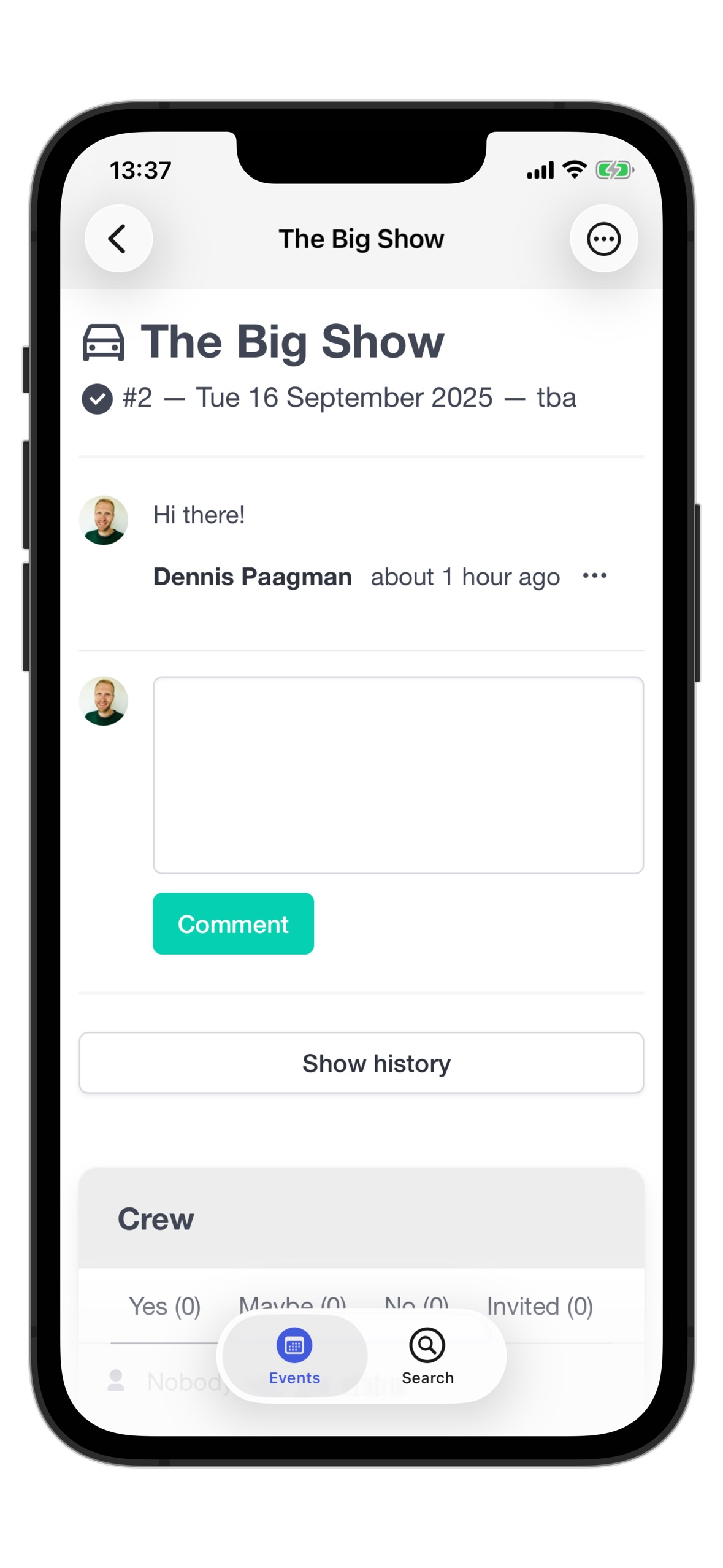
And you’re ready to go. Your users will like that your app matches the new shiny looks of their OS, including all new animations and effects.

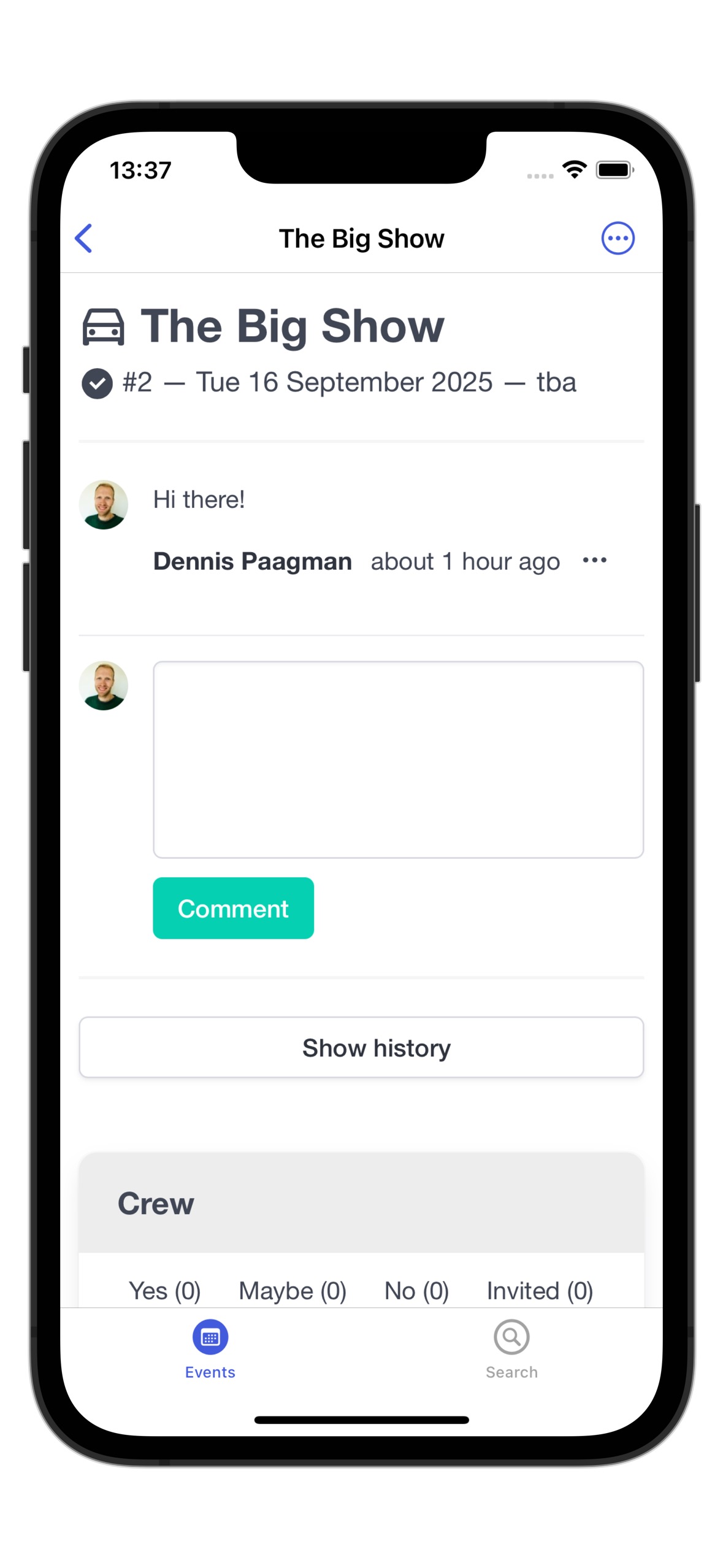
iOS 18
iOS 26 (w/ liquid glass)

Joe Masilotti also touched on this in his Rails World 2025 keynote (check out it if you haven’t, it’s awesome).

My main take away is something else though: things like this makes Hotwire Native extremely future proof. Any changes to the underlying platforms will almost automatically just work in your app. You just need to rebuild and push a new version every now and then.

This makes building on top of Hotwire and Hotwire Native the best way to accompany your Rails app with native apps. You can have the best of both worlds and focus on building your web app the way you’re used to, adding some sprinkles for native behavior when needed.

Changes in your web app will automatically be available to your app users when you deploy and platform changes will automatically trickle down to your apps as well. It only require a new build every now and then.

This made my believe in the future of Hotwire Native and Rails even more solid. Exciting times are ahead!

https://paagman.dev/hotwire-native-is-extremely-future-proof
Handling chrome.devtools.json requests in Rails apps
ruby-on-rails
Handle Chrome DevTools workspace requests using a simple Rack middleware to eliminate log errors and enable automatic workspace mapping.
Show full content

Chrome recently added a new feature called “Automatic Workspace Folders” to Chrome DevTools. It can help with automatically mapping the correct folder of a project to the Workspace feature of the web inspector. In the workspace you can, for example, directly edit and save files in your project.

I don’t use the feature, but errors from requests to a specific file for this feature in my logs were cluttering my log output. Basically Chrome is constantly trying to fetch a JSON file:

Started GET “/.well-known/appspecific/com.chrome.devtools.json” for ::1 at ….

ActionController::RoutingError (No route matches [GET] “/.well-known/appspecific/com.chrome.devtools.json”):

To resolve this I wrote a small Rack middleware class that handles these requests and responds in the way Chrome wants. That solves the problem of the cluttered log entries and you can automatically set up the Workspace feature if you want. It needs a small JSON response with the path to the project and a unique UUID.

There are some other solutions out there, like a Vite plugin or a small Ruby gem (chrome_devtools_rails), but the nice thing about this small middleware is that you can simply add it to your codebase without adding an extra dependency.

Simply create the following file as lib/middleware/chrome_devtools.rb:

# frozen_string_literal: true

require "digest"
require "json"

module Middleware
  # Chrome DevTools middleware that intercepts requests to the Chrome DevTools
  # `com.chrome.devtools.json` endpoint and returns a workspace configuration.
  #
  # This allows Chrome DevTools to automatically detect and connect to the project
  # workspace in their developer tools.
  #
  # For more info: See https://chromium.googlesource.com/devtools/devtools-frontend/+/main/docs/ecosystem/automatic_workspace_folders.md
  class ChromeDevtools
    NAMESPACE = "822f7bc5-aa31-4b9f-9c14-df23d95578a1" # randomly generated when writing this code, you can change it to any UUID you want.
    PATH = "/.well-known/appspecific/com.chrome.devtools.json"

    def initialize(app)
      @app = app
    end

    def call(env)
      return @app.call(env) unless env["PATH_INFO"] == PATH

      body = {
        workspace: {
          uuid: generate_uuid,
          root: Rails.root.to_s
        }
      }

      headers = {
        "Content-Type" => "application/json",
        "Cache-Control" => "public, max-age=31536000, immutable",
        "Expires" => (Time.now + 1.year).httpdate
      }

      [200, headers, [body.to_json]]
    end

    private

    def generate_uuid
      Digest::UUID.uuid_v5(NAMESPACE, Rails.root.to_s)
    end
  end
end

And enable the middleware in your config/environments/development.rb:

require "./lib/middleware/chrome_devtools"

Rails.application.configure do
  # ...
  config.middleware.use Middleware::ChromeDevtools
end

That’s it!

https://paagman.dev/handling-chrome-devtools-json-requests-in-rails-apps
Deep link into apps with Hotwire Native and universal links (iOS)
hotwire-native
Use universal links to open links directly in their app, but keep them in yours otherwise by handling them in a modal.
Show full content
This post was updated in October 2025 to work with the latest version of Hotwire Native (1.2 and up).

By default all external links in your Hotwire Native app will open in a Safari modal. This is great for most cases, but it’s also very nice to directly open links in a specific app, for example, when linking to a location on Google Maps, or an Instagram post.

This is where universal links come in. They are just standard https links that you can also open in the browser, but if the user has the app installed, the system will open the link directly in the app.

When users tap or click a universal link, the system redirects the link directly to your app without routing through Safari or your website. In addition, because universal links are standard HTTP or HTTPS links, one URL works for both your website and your app. If the user has not installed your app, the system opens the URL in Safari, allowing your website to handle it.

Hotwire Native

Fortunately, Hotwire Native offers some flexibility on how to deal with links through ‘route decision handlers’ (introduced in 1.2.0), and with a little bit of code we can open links that have a the corresponding app installed in their app, and open the rest in a Safari modal.

There are two built-in handlers:

  1. Open links through the system (SystemNavigationRouteDecisionHandler).
  2. Open links in a Safari modal (SafariViewControllerRouteDecisionHandler), the default.

The first option works well with universal links, they open in their app as expected. But if you don’t have the app installed (or there is no app at all), those links will now be opened in the Safari app, no longer in a modal, and the user will have left your app.

Instead of using one of the options above, we can also write our own custom handler and have the best of both worlds. We’ll call it the UniversalRouteDecisionHandler. Put the following in a file named UniversalRouteDecisionHandler.swift.

It’s based on the SafariViewControllerRouteDecisionHandler, especially the code for matches is copied as it is. The ‘magic’ happens in the handle method.

Unfortunately, as of today there is no other way to detect if an app answers to an universal links then trying to open it and see what happens. We tell the system to open the link (but as an universal link only), and if it fails, we fall back by calling Hotwire Native’s built in SafariViewControllerRouteDecisionHandler to handle the link.

import Foundation
import HotwireNative
import UIKit

public final class UniversalRouteDecisionHandler: RouteDecisionHandler {
    public let name: String = "universal-route-decision-handler"

    public init() {}

    public func matches(location: URL,
                        configuration: Navigator.Configuration) -> Bool
    {
        /// SFSafariViewController will crash if we pass along a URL that's not valid.
        guard location.scheme == "http" || location.scheme == "https" else {
            return false
        }

        if #available(iOS 16, *) {
            return configuration.startLocation.host() != location.host()
        }

        return configuration.startLocation.host != location.host
    }

    public func handle(location: URL,
                       configuration: Navigator.Configuration,
                       navigator: Navigator) -> Router.Decision
    {
        UIApplication.shared.open(location, options: [.universalLinksOnly: true]) { success in
            if !success {
                // no app to handle the link, open in a modal through the built-in SafariViewControllerRouteDecisionHandler
                let handler = SafariViewControllerRouteDecisionHandler()

                _ = handler.handle(location: location,
                                   configuration: configuration,
                                   navigator: navigator)
            }
        }

        return .cancel
    }
}

The only thing left is to register our new handler in your AppDelegate. We keep some of the existing stack of handlers as well, as they handle internal links (AppNavigationRouteDecisionHandler) and other links, like email:... or tel:... or other custom URL schemes (SystemNavigationRouteDecisionHandler).

Hotwire.registerRouteDecisionHandlers([
    AppNavigationRouteDecisionHandler(),
    UniversalRouteDecisionHandler(), // this replaces `SafariViewControllerRouteDecisionHandler()`
    SystemNavigationRouteDecisionHandler()
])

This way your users will have the best user experience for all links in your app. If a link has a corresponding app installed, that will be used. If not, the link will open in a modal Safari screen in your app.

https://paagman.dev/deep-link-hotwire-native-universal-links
Make delete actions stand out in Hotwire Native menus
hotwire-native
Automatically make menu items red for destructive actions in Hotwire Native menus.
Show full content

The Hotwire Native menu bridge is one of the most common ways to interact with native functionality from your Hotwire Native app. It is part of the demo application and probably one of the first components you will implement when you start building your own Hotwire Native app. It instantly makes your app feel more native.

A common design pattern is to show ‘destructive’ actions (deleting a record, for example) in a different color (usually red) to indicate that the action is potentially dangerous and make them stand out from the other actions.

The example menu component has no way to do this out of the box, so in this article I will show you how to add different styling for such actions with just a few lines of code!

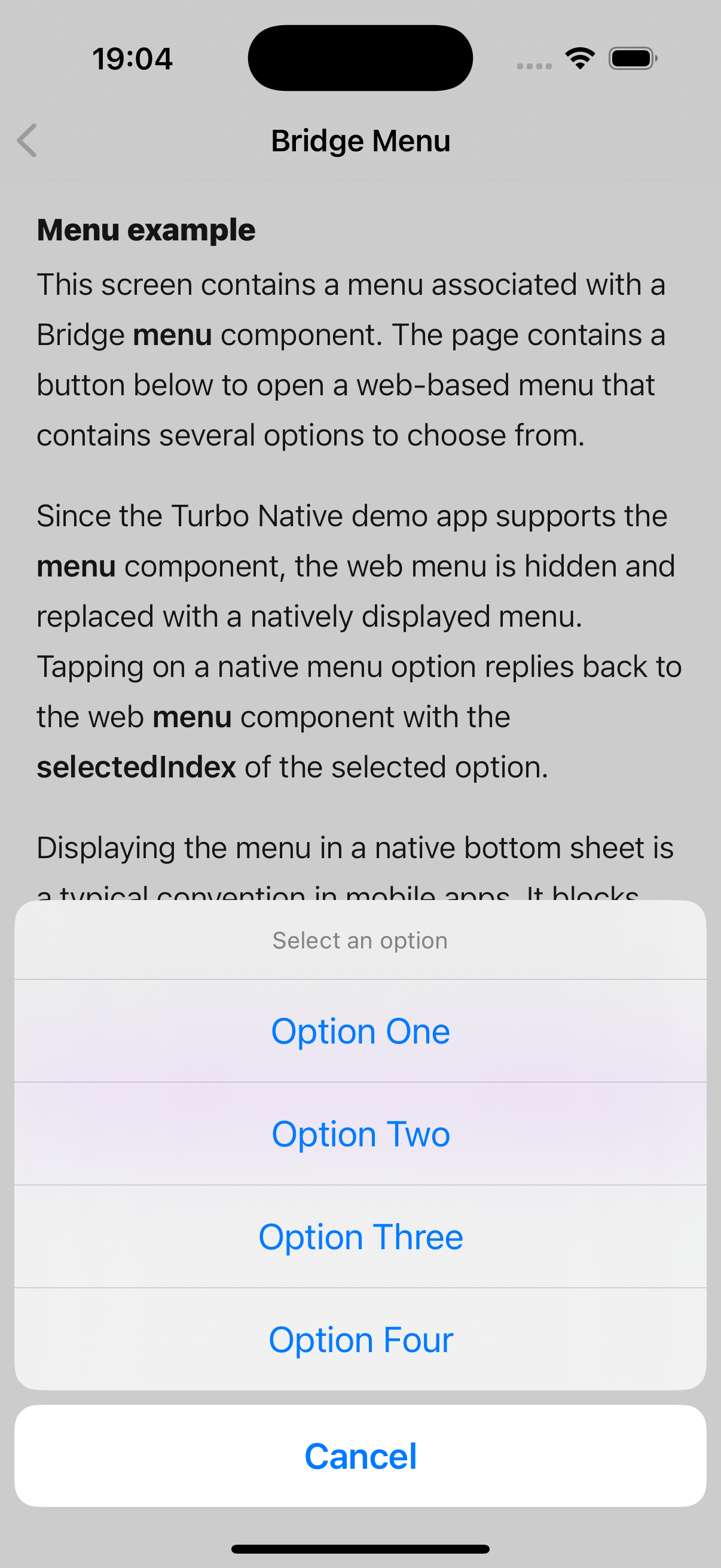
The current situation
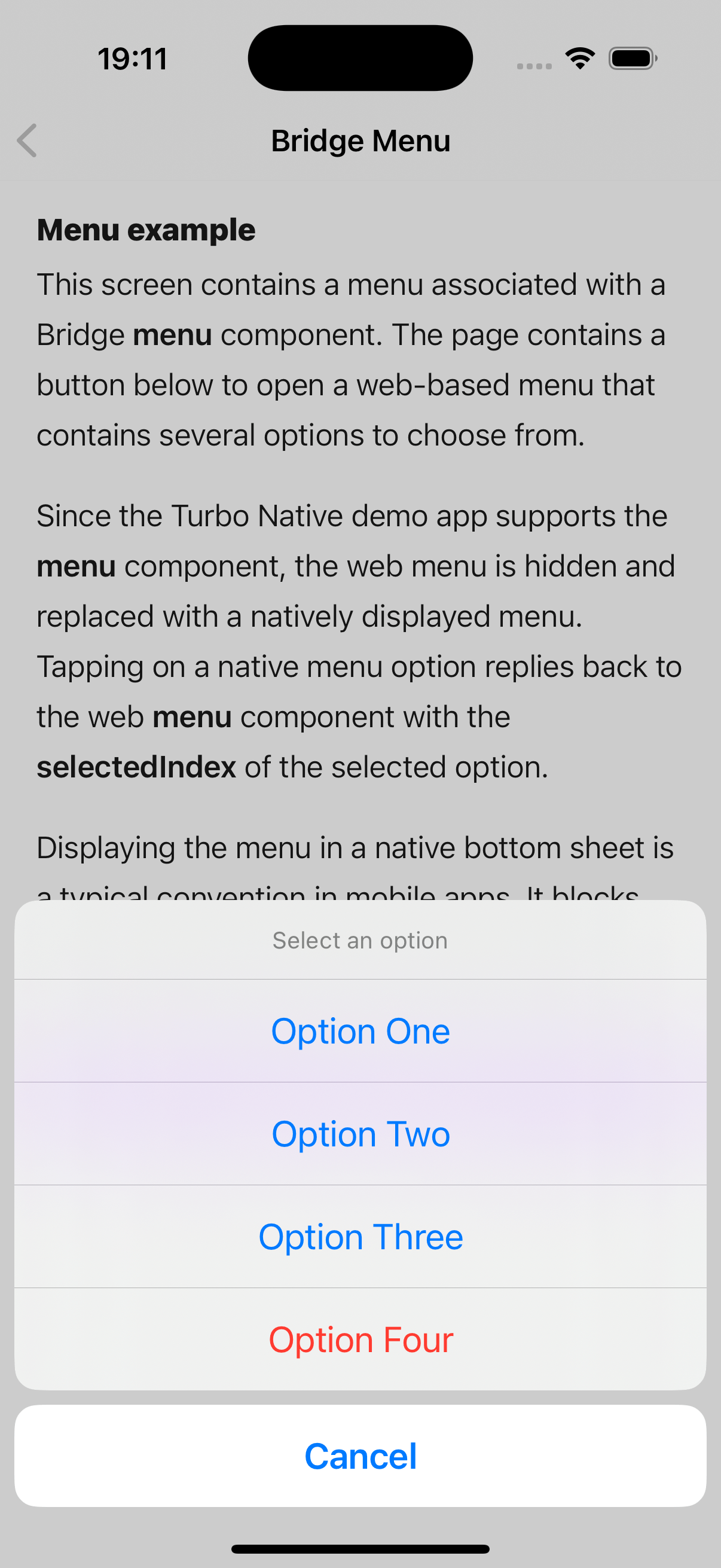
What we'll end up with
The Bridge component (iOS)

All code is based on the example app’s MenuComponent and the corresponding Stimulus controller from the Hotwire Native demo app.

The menu is constructed from UIAlertAction classes in the iOS app’s MenuComponent. They allow for little configuration, but do have a style property that can be set to .destructive to indicate a destructive action, which makes the text of the item red. We’ll use this property to style our menu item differently.

The current implementation always uses the .default style, so we’re going to keep that as, well, the default.

To distinguish between regular and destructive menu items, we add a destructive boolean property to the Item struct (which is part of the data structure received from the bridge component), and set the style property of the UIAlertAction based on it’s value.

That leads to the following changes:

// MenuComponent.swift
// source: https://github.com/hotwired/hotwire-native-ios/blob/1.1.0/Demo/Bridge/MenuComponent.swift

// lines 39-43
for item in items {
-   let action = UIAlertAction(title: item.title, style: .default) { [unowned self] _ in
-       onItemSelected(item: item)
-   }
+   let action = UIAlertAction(title: item.title,
+                              style: item.destructive ? .destructive : .default)
+   { [unowned self] _ in
+       onItemSelected(item: item)
+   }
    alertController.addAction(action)
}

// ...

# line 89
struct Item: Decodable {
    let title: String
    let index: Int
+   let destructive: Bool
}

The formatting is a bit different, but the main functional change is the addition of the ternary operator that sets style based on the new property.

The Bridge component (Android)

Thanks to Leon Vogt for providing tips for the Android implementation!

The Android implementation is a bit different, but the concept is the same. We need to add a destructive property to the Item data class and use it to set the text color of the menu item. Android itself has no notion of ‘destructive’ actions, so we set to set the color of the text ourselves.

// MenuComponent.kt
// source: https://github.com/hotwired/hotwire-native-android/blob/1.1.1/demo/src/main/kotlin/dev/hotwire/demo/bridge/MenuComponent.kt

// line 72
@Serializable
data class Item(
    @SerialName("title") val title: String,
    @SerialName("index") val index: Int
+   @SerialName("destructive") val destructive: Boolean
)
// MenuComponentAdapter.kt
// source: https://github.com/hotwired/hotwire-native-android/blob/1.1..1/demo/src/main/kotlin/dev/hotwire/demo/bridge/MenuComponentAdapter.kt

// line 50
fun bind(item: MenuComponent.Item) {
    textView.text = item.title

+   if (item.destructive) {
+       textView.setTextColor(Color.RED)
+   } else {
+       textView.setTextColor(Color.BLACK)
+   }
+
    itemView.setOnClickListener {
        action?.invoke(item)
    }
}
The Stimulus bridge controller

We now need to change the payload that is sent from the stimulus controller. The menuItem function inside the controller constructs the data for each menu item, so that’s where we need to add our new destructive property.

We could use a custom Stimulus value or data attribute and set it explicitly for the items we want to use it for. But since we already use Turbo there’s a good chance there’s already a data-turbo-method attribute set on link that do deletes, as Turbo uses that to send requests with the right HTTP request method.

We can leverage that attribute to set the destructive property directly. This means that all menu items that link to a DELETE action will automatically be marked as destructive, without changing any of the underlying HTML.

// app/javascript/controllers/bridge/menu_controller.js
// source: https://github.com/hotwired/hotwire-native-demo/blob/f5d60c343a1cf741f50aaec930e2ff17c267df26/public/javascript/controllers/bridge/menu_controller.js

// line 34
menuItem(element, index) {
  const bridgeElement = new BridgeElement(element)

  if (bridgeElement.disabled) return null

  return {
    title: bridgeElement.title,
    index: index,
+   destructive: element.dataset.turboMethod === "delete",
  }
}

That’s it! All menu items that link to a DELETE action will now be marked as destructive and shown in red in the native menu.

https://paagman.dev/make-delete-actions-stand-out-in-hotwire-native-menus
Building a Native sharing component with Hotwire Native (iOS)
hotwire-native
Learn how to implement native sharing functionality in your Hotwire Native app using a bridge component.
Show full content

One of the great things about building with Hotwire Native is being able to easily tap into native functionality. A common use case in mobile apps is the ability to share content using the native share functionality. It’s the most center button in Safari, after all. Let’s look at how we can implement this using Hotwire Native’s bridge components! The implementation consists of three parts:

  1. A Stimulus bridge component that handles the web interface.
  2. A Swift bridge component that opens the native sharing modal.
  3. HTML markup to wire everything up.

Let’s break down each piece:

The Stimulus bridge controller
// app/javascript/controllers/bridge/share_controller.js
import { BridgeComponent } from "@hotwired/hotwire-native-bridge";

export default class extends BridgeComponent {
  static component = "share";

  open() {
    this.send("open", { url: window.location.href });
  }
}

This simple Stimulus controller doesn’t need to do much. It defines the bridge component’s name and an open function, which sends a message to the native layer with the current page URL as it’s data payload. Since we only need to send some data one way (to the bridge layer) when the open action is performed, we do not need to override the connect() function or define a callback function.

The Bridge component
// ShareComponent.swift
import HotwireNative
import UIKit

final class ShareComponent: BridgeComponent {
    override static var name: String { "share" }

    override func onReceive(message: Message) {
        guard
            let data: MessageData = message.data(),
            let url = URL(string: data.url)
        else { return }

        openShareModal(url: url)
    }

    private var viewController: UIViewController? {
        delegate.destination as? UIViewController
    }

    private func openShareModal(url: URL) {
        let activityViewController = UIActivityViewController(activityItems: [url], applicationActivities: nil)
        viewController?.present(activityViewController, animated: true)
    }
}

private extension ShareComponent {
    struct MessageData: Decodable {
        let url: String
    }
}

The Swift component handles the native part of the implementation. When it receives a message from the share component, it creates a UIActivityViewController - iOS’s native sharing interface - with the url from the data payload, and opens it by passing it to the viewController. We only have one possible event (open), so there is no need to check for specific message types in the onReceive function and we can just assume it will always be that event.

There are some additional options to pass to the UIActivityViewController initializer, you can for example exclude certain activity types or sections. Check out the documentation for more information.

Tying it all together: the HTML part
<div data-controller="bridge--share">
  <button data-action="bridge--share#open">Share</button>
</div>

Implementing the HTML markup is straightforward. We add a button that triggers the open action on the bridge--share controller when clicked.

You can also combine this with other Hotwire Native components, for example inside a menu, because those will simply trigger a click event, which in turn triggers the action of our share component.

You probably want to hide the share button for non-native apps, as they have to use the browser’s share functionality and the button won’t have any functionality when clicked (as it only triggers the bridge message). You can do this by checking if view is rendered for a native app:

<% if hotwire_native_app? %>
  <div data-controller="bridge--share">
    <button data-action="bridge--share#open">Share</button>
  </div>
<% end %>

You can also add css classes to hide functionality for non-native apps. This has the added benefit of having less code in your views, and means there is only one version of the page, which makes caching a lot simpler. This article by Yaroslav Shmarov explains how to do this with Tailwind CSS.

If anyone has written the Android variant of this component, please let me know! I didn’t dive into Android development yet, so haven’t written it yet myself.

https://paagman.dev/hotwire-native-share-component
Benchmarking return data types
ruby
In a previous article, I discussed several approaches to handling returned data in API responses. In this article I benchmark the performance of them.
Show full content

In a previous article, I discussed several approaches to handling returned data in API responses. These ranged from using plain Ruby hashes to more type-strict solutions like dry-struct.

I also wanted to benchmark all of them to compare their performance. In any real-world application, the raw performance of each method is largely irrelevant, as the overhead of the web request and response time of the API itself is likely much larger by multiple orders of magnitude. However, running some benchmarks can still be a fun exercise.

First, I want to formulate some assumptions about what I would expect. This is a valuable exercise for improving your ability to make ballpark estimations and train your intuition when it comes to performance.

So, here are my predictions:

  • Nothing beats the performance of Hash, simply for the fact that all other structures need a hash as input, so per definition that’s the absolute lower limit of performance.
  • Hashes with symbolized keys or indifferent access (both string and symbol) are a bit slower, but not twice as slow. So let’s end in the middle and guess 1.5 times slower.
  • All the Ruby class like structures have roughly the same performance and are a couple of times slower than Hash.
  • OpenStruct performs very bad, because I already know this before I started on this article and the docs are so explicit about it. It performs the worst of all structures, about 10 times as slow.
  • The structures that have some form of type checking are also slower because there’s a lot more going on. It needs to check types and cast types for example. I expect those to be twice as slow as the regular class like structures.

I’ve decided to split the tests into two parts, one where I test parsing JSON into hashes (with string keys, symbol keys and indifferent access), and one for converting those hashes into more complex structures. The reason for this is that all the other methods need a Hash as input anyway, so comparing pure performance make no sense, and I feel there is a distinct different between a hash structure and a more refined object-like structures.

I also want to have a look at memory usage, just to see if anything interesting shows up there. Memory usage might be a better to reason to use one or the other in any real life application, more so than raw performance, as API responses can be quite large.

💎 I ran these tests on a 2021 Macbook Pro equipped with a M1 Max chip and 32 GB of ram. I used Ruby 3.3.0 with YJIT enabled. (ruby 3.3.0 (2023-12-25 revision 5124f9ac75) +YJIT [arm64-darwin23])

For these tests I convert the full output of the Github User API for my personal account, which has about 22 simple string/integer fields in it. I wrote (with some help from Github Copilot) simple wrapper classes that take all fields as attributes. For the structures that have types I set up the correct types.

First the results for hash conversion:

Hash               164.407k (± 1.4%) i/s -    837.318k in   5.093985s
Hash w/ symbols    147.386k (± 1.4%) i/s -    738.750k in   5.013394s
Hash w/ ind. xs    115.527k (± 0.6%) i/s -    586.143k in   5.073812s

Comparison:
Hash:              164407.2 i/s
Hash w/ symbols:   147386.3 i/s - 1.12x  slower
Hash w/ ind. xs:   115527.4 i/s - 1.42x  slower

Hash:                  4328 allocated
Hash w/ symbols:       4488 allocated - 1.04x more
Hash w/ ind. xs:       5360 allocated - 1.24x more

I expected the symbolized keys and indifferent access hashes to be about 1.5 times slower, so these results are about what I expected. Memory wise there are a few more allocations, but nothing serious.

Now onto the more interesting data structures.

                PORO      1.615M (± 0.7%) i/s -      8.209M in   5.083925s
              Struct    979.275k (± 2.1%) i/s -      4.991M in   5.099120s
          OpenStruct    216.668  (±18.5%) i/s -      1.072k in   5.107021s
                Data    996.112k (± 3.0%) i/s -      4.989M in   5.013517s
         Dry::Struct    179.454k (± 2.5%) i/s -    914.175k in   5.097592s
         ActiveModel    125.635k (± 0.8%) i/s -    638.612k in   5.083395s
        Hashie::Mash     61.640k (± 1.2%) i/s -    314.132k in   5.097024s
        Hashie::Dash    132.436k (± 2.0%) i/s -    663.850k in   5.014691s

Comparison:
                PORO:  1614715.8 i/s
                Data:   996112.0 i/s - 1.62x  slower
              Struct:   979275.1 i/s - 1.65x  slower
         Dry::Struct:   179454.0 i/s - 9.00x  slower
        Hashie::Dash:   132436.3 i/s - 12.19x  slower
         ActiveModel:   125634.8 i/s - 12.85x  slower
        Hashie::Mash:    61639.7 i/s - 26.20x  slower
          OpenStruct:      216.7 i/s - 7452.49x  slower

                PORO:        320 allocated
              Struct:       1232 allocated - 3.85x more
                Data:       1232 allocated - 3.85x more
         ActiveModel:       1856 allocated - 5.80x more
        Hashie::Dash:       3808 allocated - 11.90x more
          OpenStruct:      18256 allocated - 57.05x more
         Dry::Struct:      24170 allocated - 75.53x more
        Hashie::Mash:     183756 allocated - 574.24x more

The Plain Ruby Object is the clear winner here. In general you could say that Data and Struct perform the same, being a bit slower than a simple Ruby object, but not as much as the more complex structures.

We can also group together the more complex structures like Dry::Struct, regular Hashie and ActiveModel. They perform a few times slower than the simpler structures, but still seem to be pretty fast. Dry::Struct does use a lot more memory though, I assume this is because of the type checking and type casting it needs to do.

The only real outlier is OpenStruct, which is a whopping 2500 times slower (!) and uses 57 times more memory. Next to that, Hashie::Mash is also really memory hungry, needing almost than 575 times more allocations than a simple Ruby object.

I think the main conclusion to draw from these benchmarks are:

  • There is no reason to ever use OpenStruct.
  • Any other structure is probably fine.

To circle back to my predictions I made at the start of the article:

  • ✅ Hash is the fastest (that was easy 😅).
  • ✅ Stringified keys is a bit slower, but not 2 times.
  • ✅ Regular Ruby objects perform about the same.
  • ❌ OpenStruct is not 10 times slower, but 2500 times.
  • ❌ Typed structures are not 2 times slower, but more like between 5 and 10 times.
https://paagman.dev/benchmarking-return-data-types
Embedding Superset dashboards in React applications
react
Properly embedding Superset dashboards in React applications can be tricky. Here's how I did it by writing a custom React hook.
Show full content

Superset is an open-source data visualization platform, while Preset is a hosted SaaS solution for Superset. A notable capability of Superset is its ability to embed dashboards within other applications. This feature allows for easy dashboard management using Superset, without requiring users to leave your application. Additionally, Superset offers security rules to ensure data is correctly filtered for each user or team.

To embed dashboards, Superset provides an SDK that renders an iframe within your application. This process requires a special guest token, which you can generate on your application’s backend by interacting with the Superset API.

This article presumes that you’ve already set up and configured Superset and written the backend code to generate guest tokens. If not, please refer to the official Preset (or Superset) documentation.

The primary challenge I encountered while integrating Superset into our React application was making sure I called the embed code at the right moment and only once. The library and needs access to a DOM element to insert the iframe. However, it wouldn’t render correctly when other parts of the page were still loading (and the mounting point wouldn’t exist yet) and would suffer from unnecessary additional calls caused by re-renders.

My initial attempts used just useEffect and useLayoutEffect hooks, which didn’t solve the problems consistently. My next attempt involved useRef with a reference to the mounting point. However, useRef does not trigger re-renders by design, so there’s no way to re-trigger the effect once the current reference is set after the element is added to the DOM.

Luckily, there’s an alternative process where we can pass a callback function directly to ref. This method, known as a “ref callback function”, passes the DOM node you set the ref on as an argument:

When the <div> DOM node is added to the screen, React will call your ref callback with the DOM node as the argument.

<div ref={(node) => console.log(node)} />

This perfectly suits our needs as it will only be called when the element is available in the DOM.

The final point to address is to make sure that the embedding code is called only once, not every time the component is re-rendered, for example when a parent gets re-rendered. This can be achieved by keeping a simple ‘mounted’ state, which can then be used to make sure the code gets called only once.

Combining these elements, we can create a custom hook. This custom hook takes one argument, the id of the dashboard, and returns a callback function that takes the mounting point as the sole argument. This function can then be passed into the ref as the direct callback function in your component:

import { useCallback } from "react";
import { embedDashboard } from "@superset-ui/embedded-sdk";

// Implement your actual API backend call here (through a Promise).
const fetchGuestToken = () => { /* ... */ };

export const useSupersetEmbed = (id: string) => {
  const [mounted, setMounted] = useState(false);

  const ref = useRef(null);

  useEffect(() => {
    if (!ref.current) return;
    if (mounted) return;

    void embedDashboard({
      id,
      supersetDomain: "https://....",
      mountPoint: ref.current,
      fetchGuestToken,
      // dashboardUiConfig: {},
      // debug: true,
    });

    setMounted(true);
  }, [id, mounted];

  return ref;
};

export const SupersetExampleDashboard = () => {
  const embed = useSupersetEmbed("your-dashboard-id-here");

  return <div ref={embed} />;
};

And that’s it! You can now embed Superset dashboards in your React application without any reloading or rendering issues.

https://paagman.dev/embedding-superset-dashboards-in-react-applications
Structuring return data
ruby
Handling data returned from APIs can be done in a lot of different ways. This article explores a few of the most common approaches.
Show full content

If you’re working with APIs, it’s highly likely that you’ll also need to handle the data returned from those APIs (unless you’re only sending data to them). There are various approaches to handling this data, ranging from using basic Hashes to utilizing full model-like classes. In this article, I will explore a few of the most commonly used methods.

Note: For these examples, I’ll use a greatly simplified version of the Github user API response. The whole object is a lot larger, but I don’t want the examples to get too big. Some of the methods will get more bloated than others when used with a lot of fields, which won’t be super apparent from these simplified examples. Keep that in mind as well.

Here’s the JSON response we’ll be using for the examples:

json = <<~JSON
  {
    "login": "dennispaagman",
    "id": 170034,
    "name": "Dennis Paagman"
  }
JSON

I’ve also marked each heading with an emoji, with the follow meanings:

  • 💎 means that it’s part of the Ruby standard library (side note: has anyone yet petitioned the Unicode consortium to add color modifiers to the ‘gem stone’ emoji so we can actually have a red one?).
  • 🚄 means it’s part of the Ruby on Rails framework.
  • 💠 means it’s a separate Ruby gem.
💎 Hash

Omnipresent in Ruby, Hash is basically used for everything all the time. It is also the default output when parsing JSON. Just using a Hash makes sense for many cases as it is easy to work with and straightforward. If you don’t need to do to much with the data, this can be a very straightforward and clean approach.

user = JSON.parse(json)

user["login"] # => dennispaagman
💎 Hash with symbolized keys

By default, JSON.parse uses strings for keys. While reading values from a Hash with string keys works great, using symbols is more Ruby-like and offers several advantages. Symbols are more memory efficient and lookups are faster. But most importantly, using symbols makes the code read nicer, which in turn makes it easier to understand.

user = JSON.parse(json, symbolize_names: true)

user[:login] # => dennispaagman
🚅 Hash with indifferent access (both strings and symbols)

Implements a hash where keys :foo and "foo" are considered to be the same.

Rails also provides HashWithIndifferentAccess, which is essentially a Hash that can retrieve values using either string or symbol keys. It is widely used in Rails.

user = JSON.parse(json).with_indifferent_access

user["login"] # => dennispaagman
user[:login] # => dennispaagman

However, having access through both strings and symbols can have drawbacks. It may become unclear which type of Hash you are working with (should I use strings or symbols for keys? can I use both?), and there is a risk of mixing both approaches in your codebase.

💎 PORO

Our trusted friend, the Plain Old Ruby Object.

Before diving into more specific data structures, you can always start with a basic Ruby class. These classes can be very simple, with just some reader methods and an initializer to set the data.

class GithubUser
  attr_reader :login, :id, :name

  def initialize(attributes)
    @login = attributes["login"]
    @id = attributes["id"]
    @name = attributes["name"]
  end
end

user = GithubUser.new(JSON.parse(json))

user.login # => dennispaagman

As the number of attributes grows, it may make sense to make the initializer smarter. This can be achieved using metaprogramming to check if an instance variable for the attribute exists and set it if it does. You can create a superclass that implements this behavior and allow subclasses to define their own attributes.

However, before reinventing the wheel, there are a few better-suited options available!

💎 Struct

Struct provides a convenient way to create a simple class that can store and fetch values.

Moving up to a more object-oriented structure, Ruby provides a built-in Struct. A Struct is a simple class where you define its fields, and it automatically generates getters and setters for those fields.

You can set fields using the setters (user.name = "...") or initialize an instance of the class with keyword arguments (GithubUser.new(name: "...")).

To pass the JSON directly into the Struct, you can use the ‘double splat’ (**) operator to destructure the JSON hash into keyword arguments:

GithubUser = Struct.new("GithubUser", :login, :id, :name)

user = GithubUser.new(**JSON.parse(json))
  # => #<struct Struct::GithubUser login="dennispaagman", id=170034, name="Dennis Paagman">

After that, you can access the values through regular instance methods or with a hash-like (with indifferent access) syntax:

user.login # => "dennispaagman"
user[:login] # => "dennispaagman"
user["login"] # => "dennispaagman"

The biggest benefit of Structs is their ease of definition, good performance, and the clarity they provide regarding the data format when passing instances of the class around.

However, Structs are strict and do not ignore undefined fields. You need to include all fields in your struct or select specific fields from your response data when passing it into the struct.

This also means that Structs may break if the underlying API changes, such as when a new field is added.

💎 OpenStruct

An OpenStruct is a data structure, similar to a Hash, that allows the definition of arbitrary attributes with their accompanying values. This is accomplished by using Ruby’s metaprogramming to define methods on the class itself.

OpenStruct provides a different approach compared to Struct. While Struct requires you to define the attributes, OpenStruct infers them based on the data you provide:

user = OpenStruct.new(JSON.parse(json))
  # => #<OpenStruct login="dennispaagman", id=170034, name="Dennis Paagman">

user.login #=> "dennispaagman"
user[:login] # => "dennispaagman"
user["login"] # => "dennispaagman"

This flexibility comes at the cost of not offering many advantages over using a simple Hash. In fact, using OpenStruct can result in a performance penalty. The documentation highlights a couple of significant downsides:

Creating an open struct from a small Hash and accessing a few of the entries can be 200 times slower than accessing the hash directly.

This is a potential security issue; building OpenStruct from untrusted user data (e.g. JSON web request) may be susceptible to a “symbol denial of service” attack since the keys create methods and names of methods are never garbage collected.

Therefore, I would advise against using OpenStruct.

💎 Data

Data provides a convenient way to define simple classes for value-alike objects.

In Ruby 3.2, a new class called Data was introduced. It is a simple structure similar to Struct, but with the main difference that it is meant for immutable (non-changing) data. Unlike Struct, it does not create setters for its attributes.

In general, Data has the same advantages and disadvantages as Struct.

GithubUser = Data.define(:login, :id, :name)

user = GithubUser.new(**JSON.parse(json))
  # => #<data GithubUser login="dennispaagman", id=170034, name="Dennis Paagman">
💠 Dry::Struct

dry-struct is a gem built on top of dry-types which provides virtus-like DSL for defining typed struct classes.

dry-struct is a library from the dry-rb ecosystem. It can be best described as a Struct with a nice DSL and a variety of extra features. One of its main features is typed attributes, which provide type safety and allow you to be more strict with the API input you receive. It also offers other useful features such as type coercion, validation, nesting of structs, and optional fields with default values.

Setting up dry-struct requires a bit more code. One additional step we need to take once is to set up a Types module if we want to use the typed attributes:

require 'dry-struct'

module Types
  include Dry.Types()
end

class GithubUser < Dry::Struct
  attribute :login, Types::String
  attribute :id, Types::Coercible::Integer
  attribute :name, Types::String
end

user = GithubUser.new(JSON.parse(json, j))
  # => #<GithubUser login="dennispaagman" id=170034 name="Dennis Paagman">

One of the major benefits of dry-struct is that it ignores undefined attributes by default. This makes it well-suited for use in API clients, as you can define only the attributes you want to use and still pass in a JSON with additional fields without breaking the code.

🚅 Active Model

Active Model is a library containing various modules used in developing classes that need some features present on Active Record.

ActiveModel is a component of Ruby on Rails and serves as the foundation for ActiveRecord models used in everyday development. It provides a collection of building blocks that power various aspects of regular models. You can selectively use these building blocks to create custom classes with similar functionality.

class GithubUser
  include ActiveModel::API

  attr_accessor :login, :id, :name
end

user = GithubUser.new(JSON.parse(json))
  # => #<GithubUser:0x000000010dfbcb70
  # @attributes= #<...>,
  # @id=170034,
  # @login="dennispaagman",
  # @name="Dennis Paagman">

One major advantage is that the interface will be familiar to Rails users. Additionally, you can enhance it with various features offered by Rails models, such as validations, callbacks, or serializers.

💠 Hashie

Hashie is a collection of classes and mixins that make Ruby hashes more powerful.

Hashie is a gem that provides additional functionality on top of Ruby hashes. It offers different ways to handle data, giving you flexibility in your work.

One commonly used approach is to use Hashie::Mash, which behaves similarly to OpenStruct (as described above).

user = Hashie::Mash.new JSON.parse(json))
  # => #<Hashie::Mash id=170034 login="dennispaagman" name="Dennis Paagman">

Hashie also provides Hashie::Dash, which is more similar to dry-struct. With `Hashie::Dash`, you can define the properties your class has and mark properties as required or provide default values.

class Person < Hashie::Dash
  property :login
  property :id
  property :name
end

user = Person.new(JSON.parse(json, symbolize_names: true))
  # => #<Person id=170034 login="dennispaagman" name="Dennis Paagman">
💠 Virtus

 Attributes on Steroids for Plain Old Ruby Objects

Once upon a time, there was a gem called Virtus that offered similar features to what we’ve described so far. However, the author has stopped working on it and declared it discontinued, recommending dry-struct as its spiritual successor.

Although Virtus was once popular and is still used by many projects, I do not recommend starting to use it today.

💠 Literal

Literal provides a few tools to help you define type-checked structs, data objects and value objects, as well as a mixin for your plain old Ruby objects.

One exciting new kid on the block is the Literal gem. It’s a layer that adds types on top of the existing data structures provided by Ruby, such as Struct and Data.

At this moment it’s not entirely ready for broader usage yet, but the foundation is there and it could be

❓… what else?

There are probably many more libraries out there, if you think one should be on this list, please reach out and I’ll consider adding it!

🚀 Conclusion

When you need more structure than just a Hash, there are several options available. Personally, I prefer using dry-struct as it strikes a nice balance between simplicity, code friendliness, and functionality.

In a future article, I will conduct benchmarks to compare the different options and their relative performance.
https://paagman.dev/structuring-return-data
Rails 7.1 released, with my first contribution!
ruby-on-rails
Rails 7.1 was just released and it contains my first contribution to Rails.
Show full content

Last week at Rails World version 7.1 of Ruby on Rails was finally released. This is a great milestone with many great new features, but for me it’s extra special because it’s the first time I contributed to Rails and code I wrote is now part of the framework.

In this post I want to share what I found and how I came up with a fix that was eventually merged into Rails. If you want have a look, here’s my pull request titled ‘Log redirects from router similarly to controller redirects’.

At some point I noticed that redirects created directly in the routes (if you’re not familiar with how that works, here are the relevant docs for it) weren’t logged properly. Basically what showed up in the logs was something like this:

# config/routes.rb
get :moo, to: "rails/welcome#index"
root to: redirect("moo")
Started GET "/" for 127.0.0.1 at 2021-10-21 13:09:51 +0200
Started GET "/moo" for 127.0.0.1 at 2021-10-21 13:09:51 +0200
Processing by Rails::WelcomeController#index as */*

The request to / correctly redirects to /moo, but that’s not very clear in the logs, as it only outputs a line for ‘Started GET …’ with the next line already being the next request. Normally requests (and redirects) always end with a ‘Completed xx in xxx ms’ and most importantly have an empty line between them for readability.

With my fix implemented, the logs are now much clearer:

Started GET "/" for 127.0.0.1 at 2021-10-21 13:14:49 +0200
Redirected to http://localhost:3000/moo
Completed 301 Moved Permanently in 0ms

Started GET "/moo" for 127.0.0.1 at 2021-10-21 13:14:49 +0200
Processing by Rails::WelcomeController#index as */*

Figuring out how this all works was an interesting deep dive into the internals of Rails, specifically how the whole logging framework works. Basically all things that need to be logged are wrapped in an ActiveSupport::Notifications.instrument block, which executes the code inside and then sends a payload to subscribed listeners for that specific event.

In this case, there was no event for redirects made from the router, so I added that and also created a new subscriber thats outputs the logs nicely. I had the advantage that there already existed a logger for controller redirects, so it was quite straight forward to implement something similar for the router.

It took a while, but eventually the pull request was merged and has now landed in the latest 7.1 release. I hope to contribute more in the future, but for now I’m very happy with my first small contribution to Rails.

https://paagman.dev/rails-71-released-my-first-contribution