GeistHaus
log in · sign up

https://nadav.ca/atom.xml

atom
19 posts
Polling state
Status active
Last polled May 19, 2026 02:40 UTC
Next poll May 20, 2026 01:29 UTC
Poll interval 86400s
ETag W/"69f401b8-11428"
Last-Modified Fri, 01 May 2026 01:28:24 GMT

Posts

Microdemos: Just 🤬 Show Them
Show full content

TL;DR
Skip the doc and use agentic coding to build a microdemo. Building it forces you to scope the problem and understand it well. Then, put it in front of product and iterate live.

Want to skip ahead and see one?
example 1 ↓ · example 2 ↓

I keep running into the same problem. I’m building something where good results are subjective. Search results, recommended movies, restaurants sorted by “relevance.” It usually boils down to engineers crossing our fingers, combining a bunch of competing signals and making a judgment call about what needs to get built. It often goes something like:

Product wants something ambiguous built.

Engineer writes a doc.

Product reads it. Everyone aligns.

It gets built.

“That’s not what we expected.”

“You weren’t clear enough about what you wanted.”

and the blame gets passed back and forth while the feature still isn’t what customers want

Nobody was really wrong, but who can actually make useful sense of

“better recommendations”

or

well if distance weight is 3 and rating weight is 0.5…

User acceptance testing and feature-flagged experiments help validate ideas, but I’d argue they’re still too slow for ambiguous requirements. They force us to build a full thing and then see.

What if we could get on the same page before we build or loop a customer in?

Enter microdemos.

microdemo /ˈmī-krō-ˌde-mō/
n. A tightly-scoped, throwaway, interactive demo that exposes implicit assumptions about ambiguous problems.


example 1: recommendation scoring

Product wants a restaurant recommendation feature. It’s currently sorted by rating, but users say results don’t feel relevant.

Prompt:

Look at the restaurant model in the codebase and build me a one-page interactive spike doc for our “recommended for you” ranking. There’s no user input, this is system-generated. Frame it as a problem statement with an interactive demo. Generate synthetic data that matches the schema. Signals: distance, rating, review count, recency. Sliders for each weight so product can tune them. Include open questions and out of scope from the attached requirements doc. The output should be a single HTML file with no external data calls.

The microdemo is ready in minutes and you can talk about what the customer sees in concrete terms.

Here’s a quick version, drag the sliders:

.rec-teaser { border: 1px solid var(--stage-rule); border-radius: 4px; padding: 1rem 1.25rem; margin: 1.5rem 0; background: var(--stage-surface); } .rec-teaser-sliders { display: flex; gap: 1.5rem; margin-bottom: 0.75rem; } .rec-teaser-slider { flex: 1; display: flex; flex-direction: column; gap: 0.15rem; } .rec-teaser-slider label { font-size: 12.5px; color: var(--stage-muted); } .rec-teaser-slider input[type="range"] { width: 100%; accent-color: var(--stage-accent); cursor: pointer; } .rec-teaser-table { width: 100%; border-collapse: collapse; font-size: 13px; } .rec-teaser-table th { text-align: left; font-weight: 400; font-size: 11px; color: var(--stage-muted); padding: 0.25rem 0.4rem; border-bottom: 1px solid var(--stage-rule); } .rec-teaser-table th.num { text-align: right; } .rec-teaser-table td { padding: 0.25rem 0.4rem; } .rec-teaser-table td.num { text-align: right; color: var(--stage-muted); font-size: 12.5px; } .rec-teaser-table td.rank { color: var(--stage-muted); font-size: 12.5px; width: 2ch; } distance 50% rating 50% #namedistrating (() => { const MAX_DIST = 8.5; const MAX_RATING = 5; const restaurants = [ { name: 'Corner Deli', rating: 3.2, dist: 0.2 }, { name: 'Taco Loco', rating: 4.1, dist: 0.4 }, { name: 'Sakura House', rating: 4.6, dist: 1.2 }, { name: 'Napoli Pizza', rating: 4.5, dist: 3.1 }, { name: 'Le Petit Bistro', rating: 4.8, dist: 8.5 }, ]; const list = document.getElementById('rec-list'); const distSlider = document.getElementById('rec-dist'); const rateSlider = document.getElementById('rec-rate'); const distVal = document.getElementById('rec-dist-val'); const rateVal = document.getElementById('rec-rate-val'); const rank = () => { const dw = distSlider.value / 100; const rw = rateSlider.value / 100; distVal.textContent = distSlider.value; rateVal.textContent = rateSlider.value; const scored = restaurants .map(r => ({ r, score: dw * (1 - r.dist / MAX_DIST) + rw * (r.rating / MAX_RATING), })) .sort((a, b) => b.score - a.score); list.innerHTML = scored .map((s, i) => `<tr> <td class="rank">${i + 1}</td> <td>${s.r.name}</td> <td class="num">${s.r.dist} km</td> <td class="num">${s.r.rating}\u2605</td> </tr>`) .join(''); }; rank(); distSlider.addEventListener('input', rank); rateSlider.addEventListener('input', rank); })();

Here’s the full version that is way more demoable, you can have an actual conversation around this.

the point

You get to a useful conversation faster.

Your repo is 90% of the prompt. A short prompt generates outsized results because the tool already has your context. I didn’t need to pull a frontend repo or stuff the context window with code I don’t normally work in.

Nobody thinks it’s done before it is. The full recommendation demo has rough edges. The layout shifts, the open questions section sits a little off. Nobody in a product meeting gets hung up on that in a throwaway spike. Contrast that with the actual product UI, where every misaligned pixel detracts from the conversation and a polished prototype accidentally communicates “we can just ship this, right?”

It accelerates the conversation. Build it before the meeting and bake in the controls you think people will want, or do it live and figure it out together. First prompt doesn’t get it? Scrap it and try again. Someone asks “what about recency?” Add the slider then and there, it only takes five minutes.

One page keeps it honest. There’s only so much you can fit in a prompt, which forces you to (de)scope aggressively, that’s a feature. Like making a cheat sheet for an exam, building the demo teaches you the material. You can’t ask for sliders for signals you haven’t identified.

example 2: harping on it

I needed to pick colors for this site. Usually you mock up options, flip between them, try to remember what B looked like while staring at C, but oh shit, what about accessibility and contrast ratings?

One prompt to Claude Code and bam! Another microdemo, the color lab.

It pulled the actual fonts, actual layouts, actual color roles from the repo because it could read my HTML and SCSS. Every token has a picker that updates live, contrast scores are right there, and all the key elements are on one page.

still thinking about
  • HTML doesn’t diff well in code review, is there any value in keeping these somewhere or is throwaway really throwaway?
  • If we do keep them, where do these live? Next to the code they informed? A docs folder? Somewhere else?
  • Should the demo bundle docs into itself? Problem statement, approach comparison, open questions, one artifact? I’m leaning yes, but it makes async collaboration harder since you can’t comment on an HTML file the way you can a doc. Maybe that’s fine?
  • Does this only work synchronously? The magic is pointing at a list together and saying “should this be higher?” That’s hard to do in a Slack thread. When does a demo stop being the right tool and a doc take over?

If you’ve tried something like this or have thoughts on any of the above, I’d love to hear about it: post-microdemos-just-show-them-ce24@nadav.ca
https://nadav.ca/posts/microdemos-just-show-them
str[0] lies about emoji
Show full content

Say you built an app and wanted to show a user’s initial in an avatar, to do so you KISS:

const avatar = displayName[0]
const displayName = "Nadav"

lgtm

One day, a user decides to make their display name: const displayName = "🇨🇦 Mike" or const displayName = "👍🏽 Dave" or const displayName = "👨‍👩‍👧‍👦 The Smiths" or maybe const displayName = "🤷 idk" should work right?

*slack bloop* avatars are broken, pls fix.

So you try spreading instead:

const avatar = [...displayName][0]

that should fix it

It’s better, but notice how the flag split into a letter, the thumbs up lost its skin tone, and the family is just a man now? Hold that thought.

Finally, you reach for Intl.Segmenter:

const seg = new Intl.Segmenter('en', { granularity: 'grapheme' })
const avatar = [...seg.segment(displayName)].map(x => x.segment)[0]

will that fix it?

ok but why

str[0] doesn’t give you a character, it gives you a code unit. A chunk of UTF-16, which is how JavaScript stores strings internally. For a, 1, or $, one code unit is the whole character and you never notice. But most emoji live outside the Basic Multilingual Plane (they’re like on a different dimension maaaan) and need two code units to fit (aka surrogate pairs). str[0] hands you the first one, half an emoji. That’s the garbage in those avatars.

Spread helps. [...str] splits on codepoints instead of code units. Closer, but emoji like 👨‍👩‍👧‍👦 are actually four emoji joined by zero-width joiners. Spreading rips the family apart (rough I know). Skin tone is a separate modifier codepoint, gone. Flags are actually two regional indicator letters that render as a flag when paired, also gone.

Intl.Segmenter splits on graphemes, one visual character each, regardless of how many codepoints it takes to make them.

That’s it. If a user still sees tofu, their OS is older than the emoji. Tell them to update or eat it (the tofu I mean…).

https://nadav.ca/posts/str0-lies-about-emojis
When You Forget Your BIOS Password
Show full content

I have an old Linux laptop that I decided to repurpose last weekend. After spending 5 hours backing up files (APFS drive + read-only FUSE drivers + stubborn dev who doesn’t want to think too hard (me) = slow backup using SCP), I was finally ready to install a fresh OS. I grab a USB drive, boot from it, and… the BIOS is password protected. Every password I try fails.

After some Googling, I found this Github issue discussing how to use Intel’s FPTW64 tool to dump the BIOS and extract the password. Perfect! Except… version 11 of the tool is Windows-only, and my laptop is running Linux.

I’ve used flashrom in the past, an open-source tool for reading and writing flash chips, maybe it can be used here? A little more googling and turns out it can! The -p internal flag tells flashrom to use the laptop’s own flash chip programmer instead of an external device.

The problem? Some memory regions are locked by default, which means flashrom complains and fails to read the entire chip, even the accessible regions. What to do?

First, I ran flashrom in verbose mode to see what memory regions were available:

flashrom -p internal -V

Buried in the output was this helpful information:

0x58: 0x07ff0200 FREG1: BIOS region (0x00200000-0x007fffff) is read-write.
0x5C: 0x01fe0001 FREG2: Management Engine region (0x00001000-0x001fefff) is locked.
0x64: 0x01ff01ff FREG4: Platform Data region (0x001ff000-0x001fffff) is locked.
Not all flash regions are freely accessible by flashrom. This is most likely
due to an active ME. Please see https://flashrom.org/ME for details.

Great! The BIOS region (0x00200000-0x007fffff) is accessible. I created a simple layout file to tell flashrom to only dump that region, it looks like this:

00200000:007fffff bios

Then ran the actual dump:

flashrom -p internal -l layout -i bios -r dump.bin

The -l flag points to the layout file, -i bios tells it to only read the “bios” region (the name is arbitrary but needs to match what’s in the layout file), and -r writes it all to a file. A few seconds later, I had a BIOS dump.

Now I just needed to find the password in the hex dump. I knew from the Github issue that BIOS passwords are typically stored near a specific UTF-16 string: “SystemSupervisorPw” which in hex looks like:

00 53 00 79 00 73 00 74 00 65 00 6D 00 53 00 75 00 70 00 65 00 72 00 76 00 69 00 73 00 6F 00 72 00 50 00 77

I opened the dump in Bless (a hex editor) and searched for that sequence. Found it almost immediately. And right there, visible in the ASCII column, was the password.

Hex dump showing the BIOS password

So after approximately 8 hours of work and trying countless complex password combinations, the password was… nadav.

My name. All lowercase.

¯\_(ツ)_/¯

https://nadav.ca/posts/when-you-forget-your-bios-password
Exploring and Modifying Electron Apps on macOS
Show full content

In my previous job, I was building a side-car app using Electron. I occasionally found myself needing to debug a packaged production app and this post is just a few commands I that have been helpful to me.

Unpack and Repack ASAR archives: Electron apps often store their resources in ASAR files, which are simple archives. You can easily extract/modify/repack the contents using the asar package.

npm i -g asar
asar extract app.asar destfolder
asar pack sourcefolder app.asar

Allow modified signed package to run: If you’ve modified a signed Electron app macOS Gatekeeper will prevent you from running it, displaying a “Damaged app” dialog. To bypass this restriction and skip the Gatekeeper checks, you can strip the quarantine attribute like this:

xattr -r -d com.apple.quarantine /path/to/xyz.app
https://nadav.ca/posts/exploring-modifying-electron-apps
Purge Common Public DNS Caches
Show full content

Like many today, I woke up to reading about Facebook’s major DNS outage. While I’m looking forward to hopefully reading the outage’s postmortem, in reading the comments I learned that you can actually “ask” many public DNS providers to flush the cache for one of their entires. This is super useful if you change a DNS entry and want the change to be seen by your users quicker.

So for future me, here’s a list of all the common DNS provider cache flush pages you could find.

https://nadav.ca/posts/purge-common-public-dns-caches
Mounting HFS+ Drives on Ubuntu
Show full content

As part of a little home server I’ve been building, I wanted to reuse some old mac hard drives I had laying around. Before reusing the drives, I was really curious to see what was on them.

In order to do this, I needed a way to mount the HFS+ formatted drives on Linux.

First thing was to install hfsprogs, this will let us read from the drive (Ubuntu can only read from non-journaled HFS drives).

sudo apt install hfsprogs

Next, find out what device the drive is attached to

sudo fdisk --list

Which will return something like this.

Disk /dev/sda: 149.1 GiB, 160041885696 bytes, 312581808 sectors
Units: sectors of 1 * 512 = 512 bytes
Sector size (logical/physical): 512 bytes / 512 bytes
I/O size (minimum/optimal): 512 bytes / 512 bytes
Disklabel type: gpt
Disk identifier: E55FCDF7-6658-4DEE-8478-33707537F42A

Device       Start       End   Sectors  Size Type
/dev/sda1     2048      4095      2048    1M BIOS boot
/dev/sda2     4096   2101247   2097152    1G Linux filesystem
/dev/sda3  2101248 312578047 310476800  148G Linux filesystem


Disk /dev/sdb: 232.9 GiB, 250059350016 bytes, 488397168 sectors
Units: sectors of 1 * 512 = 512 bytes
Sector size (logical/physical): 512 bytes / 512 bytes
I/O size (minimum/optimal): 512 bytes / 512 bytes
Disklabel type: gpt
Disk identifier: A2D23874-863A-4F6E-AFB4-4F025A563528

Device         Start       End   Sectors  Size Type
/dev/sdb1         40    409639    409600  200M EFI System
/dev/sdb2     409640 398847143 398437504  190G Apple HFS/HFS+
/dev/sdb3  399110144 488396799  89286656 42.6G Microsoft basic data

Looking at the type column, we can see an HFS/HFS+ drive attached to /dev/sdb2. It also appears that this drive has a bootcamp partition, cool!

From here on out, all the commands will reference my particular device on /dev/sdb2, but be sure to change it for the value you found.

Now let’s try and actually mount the drive. First by creating the mount point.

sudo mkdir /media/machd

Then, by mounting the drive

sudo mount -t hfsplus -o force,rw /dev/sdb2 /media/machd

That’s it! With any luck, when you go to /media/machd you should see all the drives contents!

When you’re done, we can unmount the drive like this

sudo umount /media/machd

We can also check the status of the drive (it doesn’t need to be mounted for this).

sudo fsck.hfsplus -f /dev/sdb2

Which returns something like:

** /dev/sdb2
** Checking HFS Plus volume.
** Checking Extents Overflow file.
** Checking Catalog file.
...
https://nadav.ca/posts/mounting-hfs-drives-on-ubuntu
What (Not) to Do When You're Missing a Keyboard
Show full content

Yesterday, I was building a little home server out of some spare parts or I was until I hit a bit of a roadblock. When it came time to install the OS (Ubuntu Server in this case), I realized I didn’t have a keyboard to configure the install.

A normal person would have just gone out and bought a keyboard and an experienced one would have preseeded the install so it could run unattended.

Since I’m neither normal nor experienced, I built idonthaveakeyboard. An Arduino based USB keyboard that uses a serial console as the input. In other words, it lets me use my laptop’s keyboard as a USB keyboard for another machine.

Here’s a little run down of how to use it:

  1. Get a compatible Arduino, program it and connect a USB<>Serial adapter to it’s TX/RX pins
  2. Plug the Arduino’s USB cable into the computer that’s missing a keyboard
  3. Plug the USB<>Serial adapter into the laptop that has a keyboard
  4. Open a terminal on the laptop and connect to the serial port (screen /dev/ttyUSB0 9600)

(Almost) anything you type into the terminal will show up on the other end as if it were being typed on a normal USB keyboard. Right now, it only sends arrow keys, return, backspace, and printable ASCII characters (because that’s all I needed).

And with that, I was able to successfully set up the OS! Job done!

Ok, maybe not… I had to change some BIOS settings and for whatever reason my fake keyboard wasn’t being recognized, so I went out and bought a real one ¯\_(ツ)_/¯

https://nadav.ca/posts/arduino-usb-serial-keyboard
Attempting to Spoof an iPod with an OrangePi Zero
Show full content

This is the third part of a series on spoofing an iPod for car stereo shenanigans. You can find part 1 here or part 2 here.

In the previous part, I found out that my car stereo is trying to talk to an iPod over serial. Here I will cover my first attempt at bridging that serial connection with my phone via bluetooth. I’ll mostly be focusing on what went wrong, but feel free to dig through the code if you want all the details.

First a few basics to get out of the way. iPods of the era communicate over Apple’s iPod Accessory Protocol. There have been some attempts to reverse engineer this protocol, but unfortunately the only way to get the full documentation is to join Apple’s MFI program. That said, if you look hard enough you might be able to find more specifications, but I’m not saying I did or you that you should…

The second piece of the puzzle is bluetooth. For this project there are two bluetooth profiles that are important, Audio/Video Remote Control Profile (AVRCP) and Advanced Audio Distribution Profile (A2DP). Without going into too much detail (because I don’t really understand them), AVRCP is how to control and get media info from the connected device and A2DP is how to get the actual audio stream.

Putting both pieces together, I made something that looks like this 👇.

The demo is short (and buggy!) but there’s quite a lot going on, so I’ll break it down.

  1. Yes, I’m parked in the street and I get as many weird looks as you might expect someone to be hacking his car would get.
  2. The audio quality is terrible. That’s not an artifact of recording but noise on the Pi’s analog audio output. A USB soundcard would probably fix this.
  3. When I hit the up button on the steering wheel (at around the 10s mark), it restarts the song. If you have eagle eyes, you’ll see the time counter to the right of the artist name restarting.
  4. Pressing on the button again goes to the previous song, but doesn’t update the track info.

There are a also few other things that make this just about unusable.

  1. The Pi takes about 45 seconds to a minute to boot. The car detects an “iPod” right when it starts and times out on connecting to it before the Pi is ready to respond to commands. In practice, this means starting the car waiting for the Pi to boot and then trying to go back into the iPod mode.
  2. There’s no easy way to pair/reconnect a bluetooth device. If my phone doesn’t connect, I’m SOL.
  3. Every so often, the car will see an “iPod” but no audio comes out even though the phone is connected. 9 times out of 10, this is because the audio stack has crashed.

So to how to wrap this up? I built a thing! It works - but not well enough to be useful.

There are still a few things I’d like to try to get this working but some of them require taking trim pieces off the dash. Since it’s still winter, I’ll have to hold off until the weather gets a bit warmer. Should be just enough time for me to build up the courage… 🙃

https://nadav.ca/posts/car-stereo-part-3
Inspecting an iPhone’s HTTPS Traffic
Show full content

Recently, I wanted to see how an app on my phone was making API calls.

The Montreal INFO-Neige app tracks the status of plowed streets around the city and I wanted to see if could use the data for a possible upcoming project. The API is actually part of the city’s Open Data project, but you have to send an email to get an API key and I couldn’t be bothered…

To inspect the traffic, I used mitmproxy. It’s a really awesome tool that lets you inspect web traffic. The following was done on a Mac, but should be pretty similar regardless of the OS.

First things first, install the package using homebrew (or read the docs for another OS)

  brew install mitmproxy

Then, get the IP of the your machine. I used, ifconfig but you can also go into System Preferences > Network and grab the IP from there. We’ll need this IP when we connect to mitmproxy in a later step.

Run, mitmweb. It should open a new browser window to http://127.0.0.1:8081. All the intercepted requests will show up here. mitmproxy also has a command line based viewer.

Next, we’ll need to configure the device we want to inspect. This can be anything that can use a proxy, but in this case I’ll be using my iPhone running iOS 14.

On the iPhone, open Settings > Wi-Fi > [Current Network] > Configure Proxy > Manual. Server will be the IP from before and the port is 8080. Authentication should be left disabled.

At this point we can technically inspect traffic, but it’ll only work for HTTP. If we try and visit a site with https, we’ll get a certificate invalid error. This is your iPhone’s certificate trust store protecting you. Mitmproxy is resigning the HTTPS requests that it’s intercepting with it’s certificate authority, but the iPhone doesn’t trust that CA (yet).

You can easily test this yourself. Go to http://neverssl.com on the iPhone, it should display as normal and will show up on the mitmproxy webpage. However, if you go to https://google.com you’ll get a certificate error.

To fix this, you need to install the certificate authority for the proxy. Open the iPhone’s browser and go to http://mitm.it. There you’ll find the steps to download and trust mitmproxy’s CA.

With the CA trusted, you can open any app and start inspecting it’s traffic. Here’s an example capture of when I opened the Sepaq snow app(which gives Quebec national park snow conditions, I don’t know where this snow theme is coming from…).

mitmproxy web view

Pretty cool! We can dig around, see the request (with all the headers etc) and the full response.

This type of proxy will work for many apps, but you might notice some not working properly. This could be for a number of reasons, but one that’s becoming more common is certificate pinning.

Certificate pinning is a defence against this sort of man-in-the-middle attack where a trusted (but bad) CA is singing certificates it shouldn’t be. Basically, with certificate pinning only specific certificates which are trusted for that connection can be used. Our self-signed (but trusted) mitmproxy certificate would get rejected because it doesn’t match the “pinned” cert.

There’s a lot more you can do with mitmproxy, for example replaying captured requests but that’s for another time.

https://nadav.ca/posts/inspecting-an-iphone-s-https-traffic
Getting Back Into Blogging
Show full content

Writing is hard. Writing consistently is even harder. Here’s a list of things I’m doing to motivate myself to get back into writing and posting regularly. Time will tell if it works.

Perfect is the enemy of good

A post doesn’t have to be perfect to be published. Finding out that my most viewed post is one I put very little effort into helped a lot.

Breaking things into manageable pieces

The projects I do usually span weeks or months. Sometimes I shelve them because of lack of interest, missing parts/knowledge, etc. Breaking posts into smaller pieces means I can keep the writing momentum going without waiting until the whole thing is done - or worse “ready”, whatever that means.

Making this place my own

Sometimes I need to remind myself that this is my site. I can write about whatever I want. It also means I can go back and edit a post if I feel like it. Make myself the primary audience takes a lot of the writing anxiety away.

Seeing page view stats

Even though I’m writing for myself, it’s nice to see people reading what I wrote. I debated for a long time if I should use google analytics. It’s surprisingly motivating to see the views come in and I regret not doing it sooner. If google analytics bothers you, I encourage you to block it. I do.

Make a list of things I want write about

I keep a little list on my phone and jot down post ideas as they come to me. When I’m ready to start writing, I can take something from the list if I can’t think of anything to write about. I also keep a drafts folder pushed to git. As I’m working on a project, I throw things in the draft file. It makes it much easier to start a post when the page isn’t blank.

https://nadav.ca/posts/getting-back-into-blogging
Hyundai iPod Cable Reverse Engineering
Show full content

This is the second part of a series on spoofing an iPod for car stereo shenanigans. You can read part 1 here.

Before being able to spoof an iPod, my first step was to figure out how the car talks to a real one. I tried the simplest thing I could think of first, plug my iPhone directly into the car using the lightning cable. No dice. Next, I dug up an old iPod nano and plugged that in using a standard apple 30-pin cable. Still no luck.

It’s at this point that I realized that there must of been something special with Hyundai’s cable. Not wanting to shell out $50 on a real one, I found a cheap knock-off on Aliexpress and tried that instead. After waiting about a month for the cable to arrive, I plugged it in and it still didn’t work.

Time to try the real thing. As luck would have it, I found one on Kijiji for cheap. Unsurprisingly, the real one worked perfectly. I could see the current track info on the center console and change songs using the steering wheel. Progress!

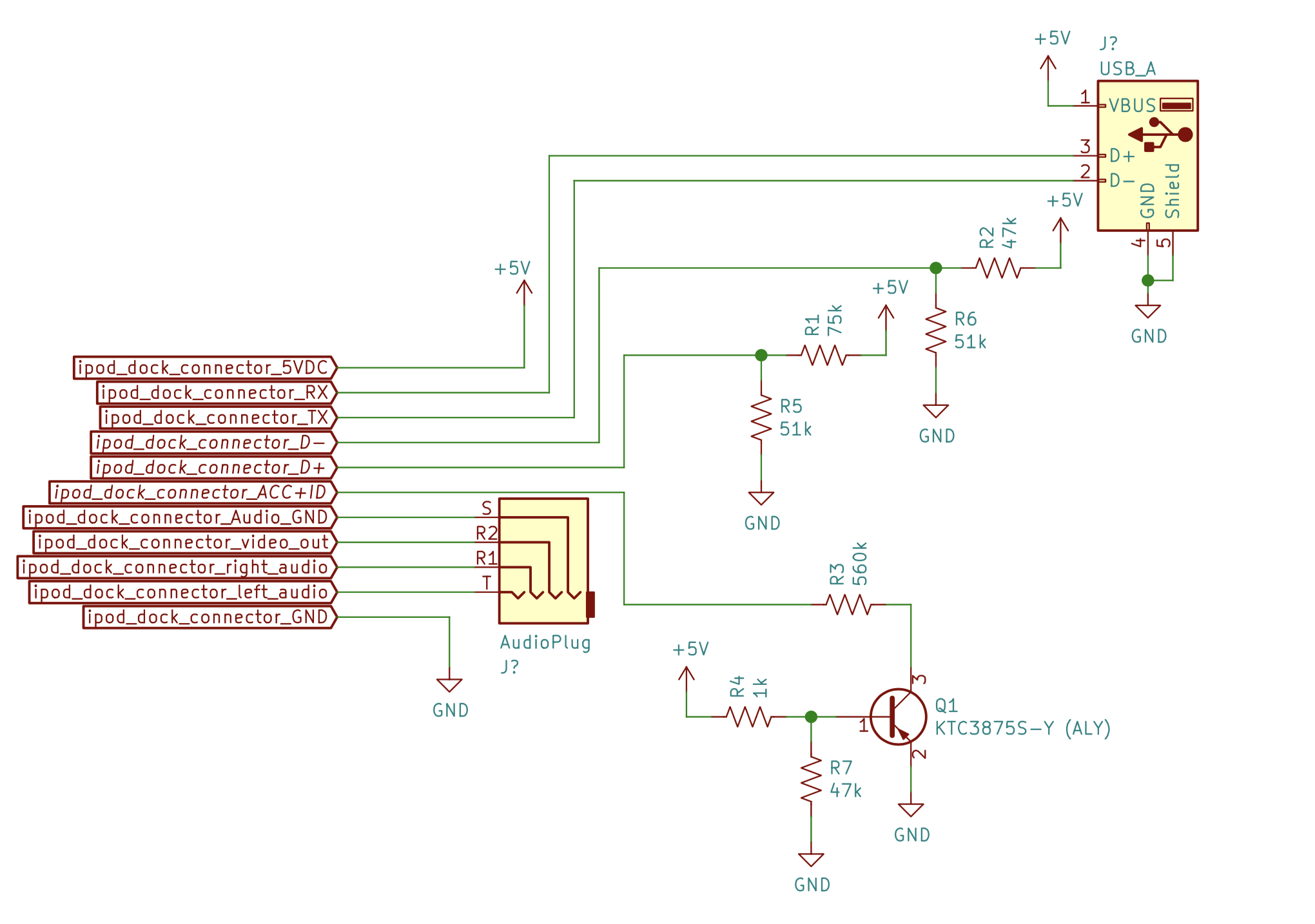
Now that I know it works, it was time to tear it to bits. Here are pictures of the front and back of the PCB inside the cable.

PCB front, annotated with the hidden silkscreen

PCB front, annotated with the hidden silkscreen.

PCB back

PCB back, where the most of the magic happens ✨.

I could now start tracing out connections using the pictures and a multimeter set to continuity mode. Since most of the circuit is made up of simple resistors so I started with those first.

Next, I focused on the mystery 3-pin device labeled Q1. Q1 tells me it’s a transistor and by decoding the ALY markings on it, I could figure out exactly what transistor it is. Here’s a pretty great post on StackExchange on how to identify SMD components. After the research, we can see it’s a KTC3875S-Y NPN transistor.

I also needed to understand what the various pins on the iPod connector do. This page from LowEnd Mac and this one from AllPinouts were super helpful.

With the circuit all sketched out, I took it to KiCad and made it all pretty. Those files or a PDF version is available here.

Cable Schematic

I could finally begin figuring out what the circuit actually does.

Let’s start with the USB connector, it’s not actually sending USB signals! It’s connected to the iPod’s serial lines. That would explain why a regular iPod cable (or the knock-off) wouldn’t work - those sent USB traffic when the car was expecting plain-old 19200 baud 8N1 serial.

The next interesting bit is the ACC+ID line which tells the iPod what type of accessory it’s connecting to. When the car is powered the transistor (Q1) acts as a closed switch (biased by R4 & R7), and puts R3 (560k resistor) between ACC+ID and ground. Referring back to the LowEnd Mac and AllPinouts pages tells us that a 500k resistor on ACC+ID enables serial communication and sets the iPod into “Dension Ice Link Plus” car interface mode. This makes sense considering what we figured out about the USB connector.

Audio signals are simply sent straight through from the dock connector to the audio plug on the cable. I was pretty surprised to see the iPod’s video out signal is passed though as well. My car has a monochrome graphic display so it’s clearly not used. That said, the same cable is used on many Hyundai and Kia cars of the era so maybe it was on a different model ¯\_(ツ)_/¯.

Not particularly critical to my end-goal but still worth mentioning are the connections to D+ and D- on the dock connector. These are used to allow the iPod to charge from the power provided by the car and also to been seen as a valid (read: Apple authorized) accessory. Since there won’t actually be an iPod, we can ignore them.

tl;dr - the iPod is communicating via serial on the USB port D+ & D- lines and analog audio is passed straight through.

In the next post, we’ll see how I can (hopefully) put all of that info to use and change the damn song using the steering wheel.
Edit: Part 3 is now up! You can read it here.

https://nadav.ca/posts/car-stereo-part-2
My First Open Source Project - 11.5 Years Later
Show full content

This past weekend I was digging through an old hard drive when I came across a piece of software I wrote a while ago. In fact, it’s the very first thing I ever opensourced. In the spirit of writing more and personal growth, I figured I would do a sort of code review and see if i’ve improved at all from age 14 (fingers crossed).

So with out further ado, let me introduce you to dSearchr! You might be wondering what it does, so here is some quick info taken straight out of 2009 from the Google Code repo.

dSearchr is a simple single file, directory content search script written in PHP5.
It is highly customizable, and super easy to incorporate with your existing website.
Hiding files and and adding error messages is just as easy to do.
Best of all, there’s no SQL or databases, just point it to a directory and start searching.

Look at that beautifully crafted pitch, and PHP5 - oh boy! Ok enough sarcasm, let’s see the code.

<pre>400: Invalid request</pre>

search.php, released Aug 28, 2009 in all of it’s original glory

Ok, so it’s pretty bad. I’ll start with the most general issues and then work my way down from the top.

  1. Linting & code format. Was linting a word in 2009? I’m not sure, but I clearly had never head it.
  2. Unrelated code. Lines 5 - 15 and pretty much all the HTML in the document should have been removed. Side note, at the time I was building a music player webapp so that I could learn the then newfangled HTML5 spec. The fact that you could use <audio> to embed audio was amazing, such simpler times!
  3. Variable names. What is $des? [get it, what is this?… sorry…] Variable names could have been much more clear and made the coder easier to read.
  4. Useless variable reassignment. I’m really not sure what’s up with lines 22 & 23…
  5. Weird conditional on line 27. Why not invert it at get rid of the else clause.

A few years later, I was motivated me to release a few minor revisions, let’s take a quick look at the last one.

<pre>400: Invalid request</pre>

search.php v1.2! Now with less eye bleeding!

It’s still not great, but it’s better! So… progress 🎉! At it’s peak, it had about 2000 downloads, a little wiki, and even a few bugs opened.

As a last little experiment, I thought it might be interesting to see what the code would look like if I refactored it today. Shout-out to @sylhare for the suggestion.

<pre>400: Invalid request</pre>

Is it better? I mean, it’s still PHP. I’m teasing of course, I write js for a living

After basic linting, probably the most valuable change is moving the important (from a dev/user point of view) variables to the top of the file. Other then that it’s just small enhancements. Putting the files to exclude in an array, excluding the name of the current file without hardcoding it, making a little utility function to make the code read a more naturally.

It’s been quite some time since I’ve done any PHP, so i’m sure there is still room for improvement.

Anyways, the code itself is not what actually matters with these kinds of projects and I hope this post proves that. I think what matters is making shit and putting it out there. It doesn’t matter how small, how simple or how useless. Someone else might find value in it and to me that makes it worth it. Plus, I think it’s also pretty cool to be able to look back on how you’ve improved (or haven’t) over time!

https://nadav.ca/posts/looking-back-at-my-first-open-source-project
Hacking My Car Stereo (Part 1)
Show full content

I like my car, probably more then anyone should like a 2012 Hyundai Elantra. In 2021 terms it’s not the most technologically advance thing but it does most of what I need. While driving, I use my phone for navigation and music - both are extremely essential.

My car was built around the time of “peak iPod” and like many from that era, have enhanced support for the iPod. The Elantra does this via a proprietary cable with a 30-pin dock connector on one end and usb on the other. Thankfully, the car also supports bluetooth audio and handsfree calling. It even has steering wheel playback controls.

This is where my (entirely self-created) problems begin. You see, the playback controls are limited to volume up/down and track next/prev. Volume works great, no complaints there! However, the track next/prev only works when connected to an iPod.

Sure, I can (and occasionally do) yell at Siri to change the track, but it’s unreliable at best.

Like in most of my side projects, I set off to do what most reasonable wouldn’t. Trick the car into thinking it’s talking to an old school iPod and send back the track next/prev controls to my phone via bluetooth.

  +-------+
  | Phone |
  +-------+
      |
  Bluetooth
      |
      v
+-----------+
|   Thing   +---------+
+-----------+         |
      |               |
iPod Protocol   Analog Audio
      |               |
      v               |
  +-------+           |
  |  Car  +<----------+
  +-------+

Figure 1

In the following few posts, I’ll be documenting my journey in attempting to build that thing[1]. Edit: Part 2 is now up! You can read it here.

P.S. This project was started in the summer of 2019 and at the time of writing is still not really working, mostly because i’ve gotten used to yelling at Siri :)

https://nadav.ca/posts/car-stereo-part-1
Learning by Failing (IoT Camera Hacking) - Lightning Talk
Show full content

This is a lightning talk about my journey hacking an IoT camera and the things I learned while failing at doing so. This was also my first solo talk!
The slides are also available for download as pdf or pptx.

https://nadav.ca/posts/learning-by-failing
3018 CNC Machine Spindle & Laser Mount
Show full content

I made a little holder for the spindle/laser on my 3018 CNC. This way, when I’m using one I can keep the other on the machine and swap between them easily. If you want to print your own, the files are available on Thingiverse.

Back view of the CNC machine

https://nadav.ca/posts/spindle-laser-holder
Adding Limit Switches to 3018 CNC Machine
Show full content

Here’s how I added some limit/homing switches to my 3018 CNC machine.

Parts Needed The (Short) Guide

I think that @Bracketracer’s guide on Thingiverse is very detailed and easy to follow. Instead of repeating it, I’ve decided to only include the parts I did differently and add a few extra pictures for detail. I should also note that I forgot to print out the mirrored versions of the mounts and decided to make due with my mistake.

Z Home

I decided to mount roller-style switch for Z home on the C-shaped part of the z-axis instead of going directly on the tool clamp as shown in the guide. This way, I don’t have to bend the lever arm or drill any holes into the tool clamp. The switch was first mounted in the printed part, then the assembly was super glued.

Home switch mounted at the top of the z-axis

Mess of wires showing the limit switches mounted and connections to the controller

https://nadav.ca/posts/3018-cnc-limit-switches
List of 3018 CNC Upgrades
Show full content

Below is a fairly messy list of upgrades done (or planned to be) to the cheap “3018 CNC” mills/laser engravers.

Planned
  • Power Switch
  • Cable Management
Completed
https://nadav.ca/posts/list-of-3018-cnc-upgrades
Maintaining a Healthy CI/CD Pipeline
Show full content
First, a bit of context

Yesterday, I took part in a discussion with a few colleagues about how we should be maintaining our CI/CD pipelines. Recently, some of them have been staying in a failed state for longer than usual or failing test cases are simply skipped/commented out. Below is a first draft of my opinions on the matter.

Golden Rule: Keep It Green

The pipeline should always be green or be in the process of being made green.

A red pipeline is a “stop the presses” event

In other words, when the pipeline fails new feature development stops and the team fixes it. Fixing the pipeline does not have to mean always fixing the underlying bug. In some cases fixing the issue is not straight forward, when this happens the commit can be reverted. With the pipeline back in the green state, a subset of team members can continue debugging and others can continue integrating new features.

Fix False Positives

If we notice a bug make it through the pipeline. Add a test case to catch it and fix the bug. This way we maintain confidence in our pipeline status.

Fix False Negatives

If our pipeline fails unexpectedly, we need to investigate and fix it as though the pipeline failed a test case. It’s important to remember that pipeline code is the same as any other piece of code in our codebase; as developers it is our job to maintain it.

It might be tempting to make the pipeline “artificially green” by commenting out a section or skipping a test. This shouldn’t be done at all cost. Doing so essentially turns your false negative into a false positive and defeats the purpose of having a pipeline for a few reasons:

  1. It reduces confidence in the pipeline; all the written tests should be valid against the codebase.
  2. It hides the real state of the pipeline from anyone looking in (and who might be in a capacity to help).
  3. It pollutes the code. Commented code and skipped test cases can be hard to notice later on and are often missed by other developers who may not understand their significance.

Also…
With regards to fixing false positives and negatives: If the team looks at the pipeline with a sort of “knowing smile” when it’s ‘green’, it’s a safe bet that there are false positives.

https://nadav.ca/posts/maintaining-a-healthy-ci-cd-pipeline