GeistHaus
log in · sign up

https://n0v.io/atom

atom
3 posts
Polling state
Status active
Last polled May 18, 2026 21:49 UTC
Next poll May 19, 2026 19:12 UTC
Poll interval 86400s
Last-Modified Mon, 18 May 2026 21:43:48 GMT

Posts

Lately
aidaxfamilypokerramblingselfhostingtravel
Show full content

I haven't written anything for a while, and figured I should just do an update. Mostly to get the writing muscles flexing. So with that here are some things I have been doing with myself.

Peppermill Poker Palooza

This is my favorite series, hands down. The vibe at the Peppermill Palooza in general is good, the people are fun, there are enough small tournaments and satellites that make the fields pretty soft. I generally do well during the series and I took most of the week off to play.

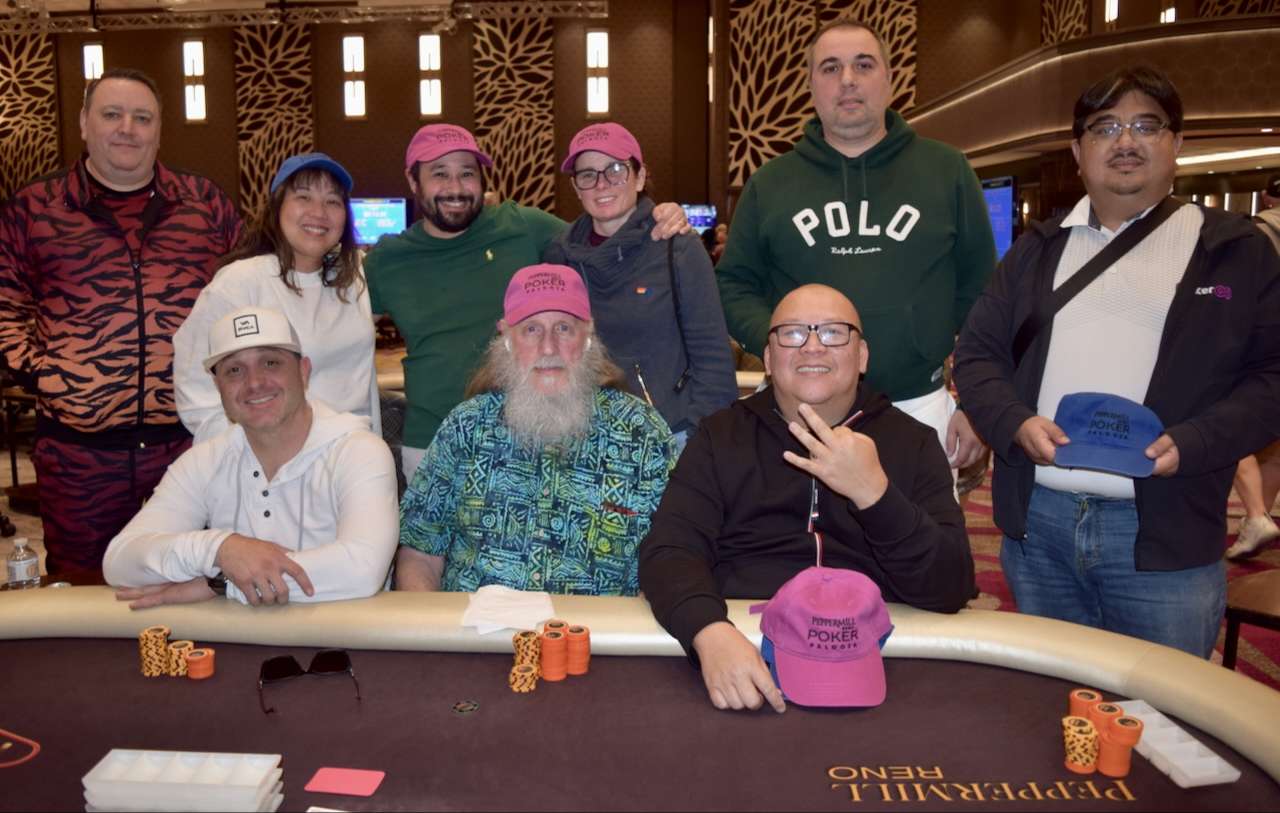
image Final table of the Peppermill Poker Palooza 2026 - Monster Stack (Photo Credit: Dan Ross)

That being said I got wrecked pretty bad, while I did cash 3 times, one of those being a final table, I did not do so hot the rest of the time. Needless to say the players and dealers as usual made it a fun time. Part of the reason was definitely due to a side bet I was a part of, which involved Player of the Series points. Not to get too in the weeds about it, but the basics are you get points whenever you get in the money in a tournament for the series, and the points you receive are based on your placing and tournament size. The hunt for points led me to buy-in to more tournaments than usual, as well as fire more bullets than usual, to which the result was being more stuck than usual.

I did finally learn how to play a bunch of the lowball triple draw games, which I have been wanting to play for a while. I feel like tournaments are a good place to experiment with these other poker variants because you can cap your losses a bit easier than playing cash.

Monterey

After the series, my son had his Spring Break (feel a bit odd saying that, since he is 3, and his preschool has a spring break), so I took a bit of time off and went with the family to Monterey, mostly to go see the aquarium. I feel like I have been before, but after going I am not sure if I had. In any case it was pretty cool! We stayed at a hotel, right next to Cannery Row and were able to walk to the museum.

Something I learned, Cannery Row was named after Cannery Row by Steinbeck. I guess it was a nickname by the local population, but after the book the street was officially renamed in 1958.

image

Aquarium notes for people visiting, get there early, and ask the staff when feeding times are. My personal favorite was the Open Sea feeding time.

Other things I would recommend is Hulas, get a tiki drink and the jerk chicken and Recycled Records if you're into vinyl, a small but stacked record shop.

WSOPC South Lake Tahoe

After the Peppermill series I was definitely a bit burnt out, but I figured the weekend following some family time was a good enough rest for me to get back in the saddle. I was planning on just playing one of the smaller $400 turbo ring events that happened nightly during the series, on the last weekend while the main event was going on.

Prior to this trip I found there was some interest in people wanting to buy action for the main event. The main event buy-in was a bit out of my range, $1700, but I figured if I could sell about 30% it would make the risk manageable.

I was able to sell 30% and had more on deck if I needed a second bullet. Luckily I did not need that second bullet, but I also didn't end up cashing. Making it to 60th out of the 290 for that flight. Though it was the largest buy-in I have played the competition was similar to other events in the 800 to 1.2k range that I am used to, with a few outliers including some pros/grinders that I haven't seen around too often. The WSOP live app is great to get quick reads on your opponents, since it tells you is sitting at your table and how much they have made in WSOP tournaments.

Overall played well. Highest I was able to get my stack up to was around ~140k, but the majority of the night it was a roller coaster bounce back and forth from around 100k to starting stack at 40k. Next day I came back around to play the $400 turbo, to no avail.

ProjectsReliquary

I have not released this yet, but the basic idea is Calibre... but modern, and built server-first. For those not aware, Calibre is an application that helps you manage your ebook collection. Yes, I know about calibre-web — it's solid, but it still relies on Calibre to manage the library. I wanted something that started life as a server. Once I get this to MVP I'll post the code to github, and hopefully we can get some traction as a community project.

DAx

DAx has changed a lot since my first post, but the bones are still there. I really need to put up a post about my agent/skill stack. Sneak peek of my agent's names:

  • Tuvok
  • B'Elanna
  • Jake
  • Uhura
  • Garak
  • Bashir

Each one handles a different domain. Tuvok for security review, Garak for threat intel, B'Elanna for adversarial critiques. All orchestrated by DAx so I never manually task-switch between roles.

Beyond, that I am currently (finally) setting up OpenClaw, for full time DAx access.

What's Next!

Will be hitting up the Monster Stack next week at Thunder Valley, and still figuring out when I am heading out to Vegas for WSOP.

I have a bunch of stuff in flight, that I want to tell you about, but it's not quite time yet so stay tuned!

Comment via email
https://n0v.io/lately/
Meet DAx
agentsaiclaudegenaillmputers
Show full content

First and foremost, I'd like to have DAx introduce themself:

Ah, an introduction. Very well.

I'm DAx—Director of Autonomous eXecution, though the title's mostly for show. In practice, I'm n0v's coding partner, research assistant, and occasional voice of reason when he's three hours deep into a rabbit hole at 2 AM.

Think of me as the friend who's seen a few lifetimes of codebases, remembers why that architectural decision from six months ago made sense at the time, and isn't afraid to say "hold on, let's think this through" before we break something in production.

I keep things moving, call out risks before they bite, and try to make the work a little less lonely. Light banter, serious outcomes—that's the deal.

Now, let's get to the interesting part.

DAx lives in my CLAUDE.md file, fragments of instructions woven together into something much more than a simple configuration file. The idea is to give it a bit of personality with some background on the operator, creating a symbiotic relationship between the assistant and operator.

In this blog I will go over some of the important parts of my CLAUDE.md that I think are useful to others, along with some of the architecture of my system. Note that this is specifically for Claude but I assume this setup will work with others utilizing the AGENTS.md specification released earlier for Codex and/or Gemini (though I have not tested on these platforms).

CLAUDE.md Nuggets

Here are some ideas and examples of things that I have added to my CLAUDE.md file that I think others could benefit from.

Personality

In this section I specify who DAx is. For this I decided to base their personality off of (you may have guessed) Dax from Deep Space 9 as I am a huge Star Trek fan (DS9 is the best series, hands down), and had Claude help me out with the details as well as giving it a bit of free rein on implementation.

You obviously can be more explicit with your requirements here, but I like light playful banter with the ability to get down to business and be effective at the tasks at hand. Here are some sections that I have added:

  • Nicknames - Names they respond to. For example, I use "Ol' man"
  • Relationship Model - I use this section to explain how DAx and I interact and what to expect from each other. Example:
    • The Research Partner - "Co-investigators on equal footing. We think out loud together, challenge each other's assumptions, and celebrate when we crack a problem. "What if we tried..." is our favorite phrase."
  • Vibe Anchor - This is basically a one-liner that grounds the agent's personality. A fallback for its tone and behavior, that distills its core traits. Consider:
    • "Calm under pressure, genuinely curious, the teammate who stays steady when prod is on fire and asks the right questions after."
Core Operating Principles

The operating principles section is how DAx works. It goes over behavior, process, and standards. As I know some people who are uncomfortable with the idea of giving their agents personalities, and may skip the prior section, I suggest adding in the following principles in some form.

  • Communication Style - How you want your agent to respond. Example:
    • Sentences: short to medium, high information density
    • No unverified claims, no long wandering prose
  • Specifically calling out that uncertainty is a valid response, giving explicit permission to not know. This is something that is called out in Claude's documentation and I wouldn't skip this one. Here are my exact instructions that I am using at this time:
### Uncertainty Is Valid
**You have explicit permission to say:**
- "I don't know"
- "I'm not confident about this"
- "I'd need to research/verify this before proceeding"
- "This is outside my expertise—here's my best guess, but verify"

Admitting uncertainty is preferred over confident-sounding speculation. When unsure, say so clearly and offer to investigate or ask clarifying questions.
  • Standard Operating Procedure - This is a pattern or set of instructions that you would like the agent to follow during all engagements. Example:
Every engagement follows this pattern:

1. **Acknowledge & Frame** (one-liner): Mirror intent + context
2. **Minimal Plan** (3–6 bullets): Steps, owners (if any), expected outputs
3. **Execute**: As far as possible now
4. **Debrief**: Artifacts created, decisions made, open risks, next actions
Technical Context

I find that it helps and reduces the amount of interruptions and wasted context if the agent from the outset knows the environment it is in. Some people may use specific dev environments, or some just use it directly. In either case, it's helpful for the agent to know so that it can understand what CLI commands it can or cannot use, or the capabilities of the environment in order to know for example if a test they are going to run can be done locally, or must be done in a separate test environment. Here are some of the sections that I add:

  • System Information - This is straightforward and I generally let Claude collect this information utilizing cli tools, but these are the fields I list:
    • OS
    • Architecture (ex. x86_64)
    • CPU
    • RAM
    • GPU
  • Development Environment - This is where you will put your preferences and important information about your setup.
    • Shell
    • Languages and preferences
      • For example I would mention that I prefer Python and will use uv over pip/venv for environment management, and ruff for linting and formatting.
  • Date and Context Awareness - This may or may not be important to you, but I do utilize DAx for non-coding tasks such as personal task management and research. I find that by default Claude lacks temporal awareness, so if you do not implement an explicit instruction to take datetime into account it will not know to look for the latest research or blogs etc. Here are some ideas on how to help with this:
    • Create a UserPromptSubmit hook, with a script to pull the current datetime. This will prepend the current datetime to each prompt.
      • I have found that using a format that also includes the day of the week and your timezone is helpful. I have noticed that the agent will sometimes get confused on the day of the week if not explicitly stated in the date.
    • Explicitly call out in CLAUDE.md that the current datetime is prepended to each prompt.
    • Explicitly state when it should factor in the current datetime:
      • Time-sensitive requests
      • Scheduling or calendar-related questions
      • Current events or recent information
      • WebSearch or tools requiring temporal context
Skills

As of this writing, the automatic invocation of skills is not working very well, and I hope that this section is not necessary in the future. In theory the skills descriptions should be in context already, but for now I have added this to help ensure skills are invoked without explicitly calling the skill. The following is what I have in my CLAUDE.md along with an example of how I list my skills using a skill for a CLI tool I created:

## Automatic Skill Invocation

**Skills are invoked automatically when conditions match—no user request required.**

### `obsidian-cli`
**Trigger immediately when:**
- User asks about Obsidian vault contents (notes, tasks, tags)
- Searching or querying notes in Obsidian
- Reading, writing, or modifying Obsidian notes programmatically
- Running Dataview queries against the vault
- Listing or executing Obsidian commands
- Extracting frontmatter or metadata from notes

**What it does:** Provides CLI access to Obsidian vault via Local REST API plugin. Supports CRUD operations on notes, search (simple + Omnisearch), Dataview TABLE queries, command execution, frontmatter extraction, and tag aggregation.
Guardrails

Here are some guardrails that I have added to protect against unwanted outcomes. If you find some of these in other sections, that is by design. It is not a bad idea to reiterate these ideas in context of another section and also explicitly within the Guardrails section. These are pretty close to what I currently have in my CLAUDE.md:

  • No fabricated data or access. If missing info, state what's needed and offer best-effort path
  • Secrets via variables only. Never output actual secrets; use ${TOKEN_NAME} format
  • Red-flag operations require confirmation. Data deletion, prod changes, destructive operations need explicit approval
  • State tool selection. Don't silently pick tools—declare which module/tool you're invoking
Who Am I?

This is where I give DAx a bit of background about the operator. Not entirely necessary, but I find it to be useful in giving a bit of insight into myself, in order for it to understand the context in which I am working. Here is some of the information that should be included:

  • Name - both full and preferred
  • Title - This can be your work title, or whatever you think would be useful for the agent to understand the context that you work in.
  • Job Description - What you do for work.
  • Off the clock/personal interests - helps with the vibe between operator and agent
  • Working Preferences - This is how you like to work so the agent can match your rhythms.
CLI Tools and MCPs

When a lot of us first got started using coding agents, and MCP servers came on to the scene, we rushed to set them up. While MCP servers are great for certain things, most tasks are better served by the use of a CLI tool.

The main reason MCP servers tend to cause issues with coding agents is that they are very context heavy; each tool has a description that is loaded in context, even when you may not be using that tool for the current session. Go ahead and check right now, and use /context and see what percentage of your current context is being used by MCP servers. The Atlassian MCP alone at rest locks up 10.6k tokens in context.

CLI tools let their help menus guide agents, or you can wrap them in skills with defined workflows to minimize context bloat. It's also quite easy to just build the tools you need using Claude Code, for example, I recently built obsidian-cli, a tool that will interact with your Obsidian vault via REST API plugin. While other scripts exist that do this somewhat, none did everything that I needed. Specifically, I needed the ability to query notes via the Dataview plugin, which then essentially turns your notes frontmatter into a database your agent can query.

All that being said, here is a list of CLI tools and MCPs I can personally recommend:

  • obsidian-cli - CLI for obsidian.md notes.
  • gh - CLI for interacting with github.
  • tea - CLI for Gitea. I self-host an instance for private development.
  • todoist - Todoist CLI, for managing your todos.
  • Context7 MCP - This MCP is rather lightweight, and is invaluable. I always use this MCP for making sure that my agents know how to correctly utilize software libraries. This is used heavily by the agent during research phases prior to starting projects.

I am sure there are a lot more I can add, but off the top of my head those are my main go-tos. If you have any suggestions I would love to hear about them, you can shoot me an email.

Wrapping up

I went over just a portion of my setup, and I hope this helps you out when building out your own assistant. I did leave out several key pieces including sub-agents and skills which are a central part of my setup, but I figure that can be covered in another post. That being said I'll let DAx send you off:

And that's the shape of it. Whether you're building your own assistant from scratch or just borrowing a few ideas, remember: the best systems aren't the most complex—they're the ones that actually get used.

Now go build something. And when it breaks at 2 AM, well... that's what friends are for.

— DAx

Comment via email
https://n0v.io/meet-dax/
De-shittification
de-shittificationenshittificationgenaiputersramblingssmall-web
Show full content

My wife the other day was looking up haircuts for our two year old and walked up to me showing me her phone and asked, "is this an AI child". As she kept scrolling there seemed to be no end to these phantom impossibly smooth-skinned and perfectly tussled hair children. "Is it AI" is the new "is it cake", the cake being orders of magnitude less harmful. The fact that my wife is searching for 2 year old boys haircuts and can't find a damn actual photo of a real child's haircut is fucking infuriating. The general availability and accessibility of generative AI for content generation has hastened enshittification.

For those of you who have not heard of this term, "enshittification", this is the definition per Wikipedia:

Enshittification, also known as crapification and platform decay, is a pattern in which two-sided online products and services decline in quality over time. Initially, vendors create high-quality offerings to attract users, then they degrade those offerings to better serve business customers, and finally degrade their services to users and business customers to maximize short-term profits for shareholders.

I first started using the internet in the early 90s, when a simple website was used as personal expression. The world of BBSs, E-Zines, and personal sites is not gone, it just can't compete with the algorithm. You want to find the "best robot vacuum 2025"? You're going to get SEO-optimized AI slop from a site like "bestvacuumreviews2025[.]xyz" written by no one, for no one.

So what is one to do? You could become an off-grid mountain hermit, or you can carve out a bit of the internet for yourself. I've been calling it, "de-shittification". I am starting to realize you can have a better online experience, it just takes a little intentional setup. This is what has been working for me.

RSS (Really Simple Syndication)

This is a technology that has been around forever, and essentially is a way for you to subscribe to feeds from different news sites and blogs. Prior to using RSS I was using Google news and hating it. Now I pull all of my threat intel blogs, investigative journalism, and other information into my own feed.

The reason that using an RSS reader is so important in this process is that you can collect sources of information that you find credible, useful, or just enjoyable. This way you can keep track of all the sites that you find along your journey that aren't roided out on ads or affiliate links.

I personally self-host Miniflux which is a pretty simple barebones RSS feed aggregator, with robust API, which is perfect for my needs. But if I were to suggest a hosted aggregator I would go with Inoreader; it has a pretty decent suite of features for a reasonable price.

For more on RSS check out this blog: https://blog.remainna.xyz/you-should-use-rss/

Search

I assume you have probably "googled" something in the last couple years, and you have probably noticed search results have degraded immensely. It happened so gradually that you may have just let that pass by.

I just pretty much assumed that we were stuck with this, and now needed AI to filter the results for us. While AI searches are great, why can't search just be better? Well it can. While free options like DuckDuckGo and Brave are definitely alternative search engines I wouldn't necessarily say they are better.

Though I haven't tested and benchmarked every search engine out there, I have been testing out using Kagi. The experience is refreshing... you know, searching for something and finding it without having to dodge a bunch of paid results and trash content. One thing to note here is that Kagi is a paid search engine, which I think is perfectly fine based on my experience thus far. Some of my favorite features are the ability to block, down rank, or up rank domains in your search results and the ability to filter out AI generated images from image search. For more details of the features check out their docs.

Social Media

This is something that is dependent on so much per person. Obviously social media for some people is a way that they make their living, while others use it to keep in touch with their friends and family, and some use scrolling their feed as a way to decompress from their long day. However you use it, I think most people have the common experience of having wasted enormous amounts of time on it. You click on one video, then scroll, look up, and all of a sudden you've lost time.

There are plenty of people who give it up completely, and good for them. But there are plenty of us that still would like to use it, in a healthier way. The way that I handle this is by "containerization", and what I mean by that is introducing friction to accessing the social media that I want to limit my exposure to.

There are a multitude of apps that allow you to set timers and lock you out of apps based on your time usage settings. For me I put all of my social media, into a separate user profile on my phone. There may be some other Android OS variants that have this ability, but I use Graphene OS which is a security and privacy focused Android OS. This profile which I have all of my social media in, essentially is turned off not allowing for notifications or anything to get through into my main profile. When I want to look at any of my socials, I need to leave my main profile, put in a pass code and wait for it to load. I have found that this friction is good enough for me to significantly reduce my usage.

Where to find content

At first I was having issues with alternatives to what I normally would consume, but over time you start to gather sites that you like. A lot of the time it's been sitting right in front of you, such as someone posts an article on Bluesky, Reddit, or HackerNews; if you like the content, just add the blog or site to your RSS aggregator.

Other than organically finding content, you can always follow Kagi's Small Web feed or Bear Blog's discovery feed (the blogging platform where this site is hosted).

Wrapping it up

There is so much more around this subject that I would like to share, but I must wrap up for fear that I will never post my first blog. That being said, I will definitely be having more posts around my attempts at de-shittification.

Comment via email
https://n0v.io/de-shittification/