GeistHaus
log in · sign up

https://mickaelistria.wordpress.com/feed

rss
10 posts
Polling state
Status active
Last polled May 18, 2026 23:56 UTC
Next poll May 19, 2026 23:33 UTC
Poll interval 86400s
Last-Modified Thu, 15 Jan 2026 02:26:03 GMT

Posts

🌘🧑‍💻⚗️ (EclipseDevLab)
Uncategorized
There I am up for a new chapter; after nearly 14 very good years doing Eclipse IDE development for Red Hat, I’m taking the opportunity to try something new, and do some Eclipse IDE development for… my own company, 🌘🧑‍💻⚗️ (EclipseDevLab) and its future customers! 🌘🧑‍💻⚗️ (EclipseDevLab) provides expert consulting and software development for the […]
Show full content

There I am up for a new chapter; after nearly 14 very good years doing Eclipse IDE development for Red Hat, I’m taking the opportunity to try something new, and do some Eclipse IDE development for… my own company, 🌘🧑‍💻⚗ (EclipseDevLab) and its future customers! 🌘🧑‍💻⚗ (EclipseDevLab) provides expert consulting and software development for the Eclipse IDE stack and ecosystem, and can also help you in finding other expert developers fit for you missions.

mistria
http://mickaelistria.wordpress.com/?p=588
Extensions
Indentation and alignment, tabs and spaces
Uncategorized
It’s been a while I posted something here! If I’m doing it, it’s for a very worthy reason: there are currently too many people who are wrong, who think that tabs are better than spaces, or that spaces are better than tabs… I hope I can do something about it. Here are some recent posts […]
Show full content

It’s been a while I posted something here! If I’m doing it, it’s for a very worthy reason: there are currently too many people who are wrong, who think that tabs are better than spaces, or that spaces are better than tabs… I hope I can do something about it.

Here are some recent posts on this topic:

Did you happen to wonder why there are tabs and spaces and why both are still used? There is a reason beyond all that: they serve different and compatible purposes!

Tabs are not a character per se, it’s a model of indentation, which can be rendered differently according to user preferences and editors (2, 4, 8 spaces; it’s up to you. For example, I use a 2-spaces wide tab in vim for XML, and a 4-spaces wide tab for the same in Eclipse IDE).
Tabs are not meant to align, they’re meant to conceptually highlight a “level” of a line in the file. This level can be imagined as an abstract column, with a width that’s not controlled by the author of the code. Tabs are used to group a block of successive lines with the same level together and to show them as more or less “deep” than some other lines, they appear on a same column independently of the tab width.
Tabs only make sense -and are perfect- at the beginning of a line, for indentation only. Their variable width rendering make them very bad to use for spacing and formatting content inside a line.

Spaces are for alignment. There size is exactly 1 character. If you have content with same level of indentation, then you can use spaces to align pieces of code or even parts of lines together.
However, spaces suck for indentation. They cannot be set by user to something more compact or wider (some editors have hacks to render spaces with different size than one character, but that simply highlights how the idea of indenting with spaces is wrong as some want them to behave just like tabs). They obviously consume more space in storage, and may even contribute to energy consumption and global warming more than tabs do. The only argument of spaces for indentation is that code looks the same on all editors and for all user. But it’s exactly a counter-argument, as we see above, customizing indentation rendering can be useful.
But once your line of code starts, after your indentation, then spaces become the only good whitespace to use until the next line! You can use it to align code, or to make a clear separation between 2 parts of the same line.

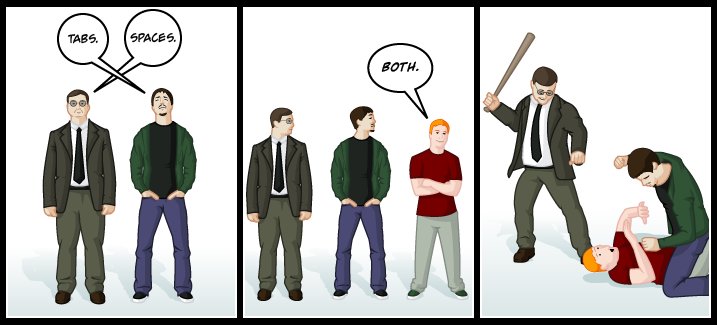
Now, what about mixing them? A drawing become viral on Twitter on this topic highlighting that people mixing them can upset the pro-tabs or pro-spaces. Well, it’s really a pity, because you should use tabs for indentation, and spaces for alignment, even on the same line!
This is exactly the purpose of those 2 character: the first one is an abstract whitespace and rendered freely, the other is concrete and mapped to an actual and immutable width of 1 character. They can and should be used together, each one for their specific use-cases.

Some examples:

ex3

Indent with tabs, align in lines with spaces. Items will remain aligned on all editors, tabs width rendering is up to user/editor.

ex4

Mark indentation with tabs, then align with previous line with spaces. The alignment is preserved across editors and users, although they can have different tab width rendering.

ex2.png

Even if rendering would be similar locally with tabs or spaces, use tabs for indent, and spaces for alignment. Then the alignment remains portable on all editors and user settings, independently of tabs width rendering.

And those are actually the default settings of Eclipse IDE! It indents with tabs, and allows to align with spaces; and in case you already used spaces after the indentation to align you code, it just shows the same indentation and alignment if you create a new line just after.
If you consider the definition of a tab and a space, and of indentation and alignment, Eclipse IDE defaults are simply the settings that are the more natural and efficient, the best ones, rather than the most popular ones.

mistria
ex3
ex4
ex2.png
http://mickaelistria.wordpress.com/?p=474
Extensions
The face of SWTBot
EclipseJBossPlanet PetalsLink
The Eclipse Foundation has recently been generous, and offered to sponsor creation of logos for Eclipse.org projects that don’t already have one. When I saw Wayne’s mail announcing this program, I took immediately this opportunity and asked Ian Skerett whether SWTBot could be a candidate for a logo, and it was a yes! After 2 […]
Show full content

The Eclipse Foundation has recently been generous, and offered to sponsor creation of logos for Eclipse.org projects that don’t already have one. When I saw Wayne’s mail announcing this program, I took immediately this opportunity and asked Ian Skerett whether SWTBot could be a candidate for a logo, and it was a yes! After 2 weeks of contest on a nice German site called designonclick, over a hundred logos were submitted, and we had to chose only one.

So here is what SWTBot looks like!

logo_116Nice, isn’t it? We’ve discussed of the reasons why choosing this logo on the SWTBot Developers mailing-list, and there were only “+1″s,  not a single objection or discussion. I guess that can be interpreted as a good sign for this new logo and SWTBot project.

SWTBot website was already updated, and current snapshots and next release of SWTBot will show this logo as an icon in many places. Get used to it !

For the curious, you can see the myriad of contenders on Bugzilla, and on the designonclick project page.

Thanks for the Eclipse Foundation for sponsoring this highly visible improvement for its hosted projects!

mistria
logo_116
http://mickaelistria.wordpress.com/?p=461
Extensions
About being part of Program Committee for EclipseCon France
EclipseJBoss
I’ve been invited by Benjamin Cabe to be part of the Program Committee (PC) for EclipseCon France. Benjamin told me it wouldn’t take too much time and I thought it would be something interesting. Benjamin was partly right (it does not take too much time, but it definitely takes some time), and I was totally […]
Show full content

I’ve been invited by Benjamin Cabe to be part of the Program Committee (PC) for EclipseCon France. Benjamin told me it wouldn’t take too much time and I thought it would be something interesting. Benjamin was partly right (it does not take too much time, but it definitely takes some time), and I was totally right to think it would be a good experience.

Here are some additional thoughts and explanation about how a Program Committee works

So many (good) proposals! So few slots!

I guess that’s always the problem when it comes to setting up a conference program. There are always more good talks than the program contains slots. For EclipseCon France, here are the numbers: 130 submissions for 33 slots. So it means that 97 submissions were rejected, including a lot of great ones. That is very frustrating at the beginning when you see so many good proposals being declined, but there’s no way to change that, so PC has to deal with it…

So much diversity! So much consistency!

Although I’ve been involved in the Eclipse community for some time now, I’ve been impressed by the diversity of concerns in the Eclipse community and eco-system while reviewing submissions: Machine-2-Machine, Diagrams & DSLs, Requirements, ALM (ie. Testing, Code Quality, Development Productivity…), JVM languages, other languages, Mobile/Web/Cloud, Product management… among others. That’s awesome because all the specific concerns of a topic also apply (with different priority) to other topics. I think that’s what makes Eclipse and the Eclipse conferences great places for innovation: you can learn and understand from people who do very different things than you, because we share this Eclipse thing.

There are so many topics in the Eclipse community that 3 conferences a year are not too much to cover them all 😉

How does a PC work?

I find it interesting to tell you how talks are selected because I have submitted so many talks and got so many declined in the past that it’s good to know how to turn them “sexier” for a next conference and improve their chances of getting accepted.

Each PC member may grade the proposals (from 0 to 5). So every PC member reads all submissions and grades them. After it’s done, our dedicated PC chair (Benjamin) sends us a summary of the talks sorted out according to average grade, and then starts the time to negotiate: some PC members have very high interest in some talks and may try to convince other PC members to increase their grades on a submission so it gets to the top of the list. Some of these negotiations do work and change the list of accepted talks. At the same time, we try to get some talks to merge to avoid redundant talks and to increase the amount of topics covered. For instance, that’s how we could merge some IWG or Requirements-Oriented talks, so we are sure these topics are well covered by the program but leave some free slots for other talks. We did another round of negotiations, and we finally got the list of selected talks.

Advices for future submissions

Now that you know how selection systems work, you can understand that the grades for your submissions will highly depend on the people in the Program Committee. For EclipseCon France, we have an “industry-oriented” program committee, so it’s easier to get a good average grade if you speak about industry, because it speaks to the majority of the PC. To the contrary, I was the only one showing a big interest in Mobile/Web/Cloud stuff (since that’s our business at JBoss), so it appeared that most Web-oriented submissions did not get enough interest from other PC members to get into the program.

Based on that experience, here are a few tangible pieces of advice for your future submissions:

  • Make your title and abstract very clear and explicit: PC members review a lot of submissions, and read those submissions quickly. So write your title and abstract in a very efficient way to ensure PC won’t miss the point. I admit there are some talks I did read too quickly to understand how good they were, and I changed my mind when negotiating with other PC members to increase the grade I gave. It can happen to any PC member. Try to make you submission clear enough to compensate a potential PC failure.
  • Put some context in your abstract: Some PC members don’t know what you’re doing (ie, I don’t know anything about Requirement stuff, and I guess other people in PC don’t know anything about Jax-RS and Javascript…), so if you want a PC member to give a good grade to something he doesn’t understand, you have to give him some context so he can understand how important is the issue your presentation addresses. What kind of development does it apply to?  Which issue does this presentation address?
  • Highlight the added-value of your presentation: What makes a good talk is a talk that brings value (re-usable knowledge) to attendees. So it’s interesting to make what your talk will bring to the attendees clear: when selecting a talk, PC members (at least me) are not that interested in what will be presented in the talk but they care about How will the attendee be able to take advantage of the content of this presentation? It’s also interesting to say whether what you’d like to present contributed to a success-story and could be repeated by attendees to create some more success-stories.
  • Open-up: Eclipse is a big community, you’re probably about to present a small subset of what’s happening in this community. So try to make your presentation useful to other areas in the community. Could your presentation open to other related technologies/fields?…

Whatever is the topic, a clear submission that shows how you used a technology to solve a usual or trendy use-case and how this solution can apply to other use-cases has very big chances of being accepted.

What’s next?
  1. First register to EclipseCon France
  2. Think about organizing or presenting some stuff for an Eclipse Kepler Demo Camp. Demo Camps are also nice places to meet Eclipse people and learn cool stuff.
  3. Next EclipseCon after EclipseCon France will be in Ludwigsburg, Germany by the end of October.
mistria
http://mickaelistria.wordpress.com/?p=440
Extensions
What’s hot for SWTBot ?
EclipseJBossPlanet PetalsLink
Here are some news from SWTBot, the famous SWT UI Bot API that’s widely used in order to write some functional tests! A Test Recorder and Generator Together with Rastislav Wagner (who’s a Red Hat colleague working on testing JBoss Tools and JBoss Developer Studio), we had the opportunity to meet in person with the […]
Show full content

Here are some news from SWTBot, the famous SWT UI Bot API that’s widely used in order to write some functional tests!

A Test Recorder and Generator

Together with Rastislav Wagner (who’s a Red Hat colleague working on testing JBoss Tools and JBoss Developer Studio), we had the opportunity to meet in person with the whole JBoss Tools team in Brno. We started to work on a draft of a test recorder and generator that could work for both SWTBot, and an Eclipse bot API used by Brno folks called RedDeer.
We made so much progress that we did not simply sketch a way to get it to work; but in the end, we wrote a first simple version of the generator. It’s quite simple, but it’s already powerful enough to be useful, so we decided to contribute it to SWTBot.
For more details about the contribution process, you can follow those links: Gerrit contribution (thanks to Matthias Sohn for reviewing it), disucssion on the developer mailing-list, discussion on user forum, and finally the Git commit in the source repository.

All this stuff leads us to the ability to install this recorder from the SNAPSHOT p2 repository: http://download.eclipse.org/technology/swtbot/snapshots/

SWTBot Snapshot p2 Reposioty

SWTBot Snapshot p2 Reposioty

Once installed on any RCP application, it’s pretty easy to use: just set the -Dorg.eclipse.swtbot.generator.enable=true system property. The following video shows a basic use-case

It’s currently limited to a few concepts, but it’s easy to add support for new widgets, and it can already be used to save a lot of time when writing tests. If you feel interested in contibuting, see http://wiki.eclipse.org/SWTBot/Contributing and come to the swtbot-dev mailing-list to have a chat.

Rastislav already has plans to implement support for more complex UI operations that match several events, that will be a very interesting to implement and powerful to use improvement!

Support for Eclipse 4

SWT has not changed much between Eclipse 3.x and Eclipse 4, so SWTBot still supports most SWT concepts There are very few bugs that are known, but there is no blocker. The most critical one is probably related to the visibility of some menus. Any help to fix one of these bugs is highly welcome.

However, there is an important bug that prevents UI tests (may them use SWTBot or not) from being run with PDE for an Eclipse 4 application. So it’s difficult to test SWTBot for Eclipse 4 from IDE. Fortunately, Tycho, which is more “regular”, is able to run tests that use SWTBot on an e4 application. You can give it a try by configuring the product in tycho-surefire-plugin to use an e4 product (such as the contact demo) and use SWTBot in your tests. Make sure e4 bundles are present during tests (they must either be a transitive dependency of the test –recommanded-, or you can add them as dependencies of test execution).

I think once all the SWTBot for e4 are fixed, we’ll try to make an official release of SWTBot.

SWTBot is an open project!

SWTBot is a community-engaging project: there is activity on the user forum, on the developer mailing-list, the wiki makes it easy to learn how to use SWTBot, but also how to contribute. SWTBot excels in the use of Git, Gerrit, Hudson, Sonar… All those tools are there to make it easier for users to turn into contributors, and contributors into committers, and to keep productivity and quality at a high level; and they’ve proven there efficiency on these topics in the last few months. They provide so much feedback on contributions that the process of accepting a patch is made faster.
So if you’re interested in contributing, please give it a try and feel free to ask for help on the developer mailing-list. The tools and processes are open as well, so please come and suggest better ways of doing things, it will be very appreciated!

All those proofs of openness made that I nominated SWTBot for the Most Open Project of Eclipse Community Awards.

mistria
SWTBot Snapshot p2 Reposioty
http://mickaelistria.wordpress.com/?p=415
Extensions
Sonar at Eclipse.org !
AgilityEclipseJBossPlanet PetalsLinkReleng
It’s been awhile since I started bugging around with having Sonar at Eclipse.org. But there has been a lot of progress recently, enough progress to share them in a blog post and get you start using Sonar. So let’s get started evangelizing the fight against technical debt. What’s the current status for most Eclipse projects? […]
Show full content

It’s been awhile since I started bugging around with having Sonar at Eclipse.org. But there has been a lot of progress recently, enough progress to share them in a blog post and get you start using Sonar. So let’s get started evangelizing the fight against technical debt.

What’s the current status for most Eclipse projects?

Most Eclipse projects now have an automated build system, and have this integrated in Hudson. All projects do have some acceptance tests run on each build, which help project teams to decide whether project is good to get released in its current state or not. So we can say that Eclipse projects are already leveraging Continuous Integration.

Static Code Quality Analysis

I already mentioned in in an earlier blog post (see #3 in “my favourite talks”): Static Code Analysis helps you to find mistakes you’ve done, and saves you a lot of time/money/stress/[anything you don’t want to have]. We are all humans, and humans make mistakes. In software development, we are lucky to have some great tools to tell us quickly and for free when we are doing something wrong. In my previous post, I shared some tricks to get Code Quality Analysis part of your workbench and give you reports as-you-type, but it can also be useful to have also some coarser-grained view of quality accross the project, and not only accross one class.

Tools such as Sonar allows you to see how the quality of your code evolves. It’s a necessary tool to go from Continuous Integration to Continuous Improvement.

Why fighting the technical debt?

Technical debt is all about pieces of your code that are not very beautiful, but which are working correctly. So you are likely to never improve them. You’ll ask me “why improving them if this works?”. There are lots of answers, but I’ll only give the one that looks the most important for Eclipse.org usage: We are open-source projects, and as committers on those projects, we must think about gettting more and more contributors. Code which has a huge technical debt is way more difficult to tweak for a newcomer to this project than “clean code”. Fighting technical debt makes your project more welcoming and more agile (as in agile “able to move/change quickly without pain”).

Important note about code quality before we start speaking of Sonar

Once again, I’ll refer to what I learnt there: http://www.eclipsecon.org/2012/sessions/how-profit-static-analysis.
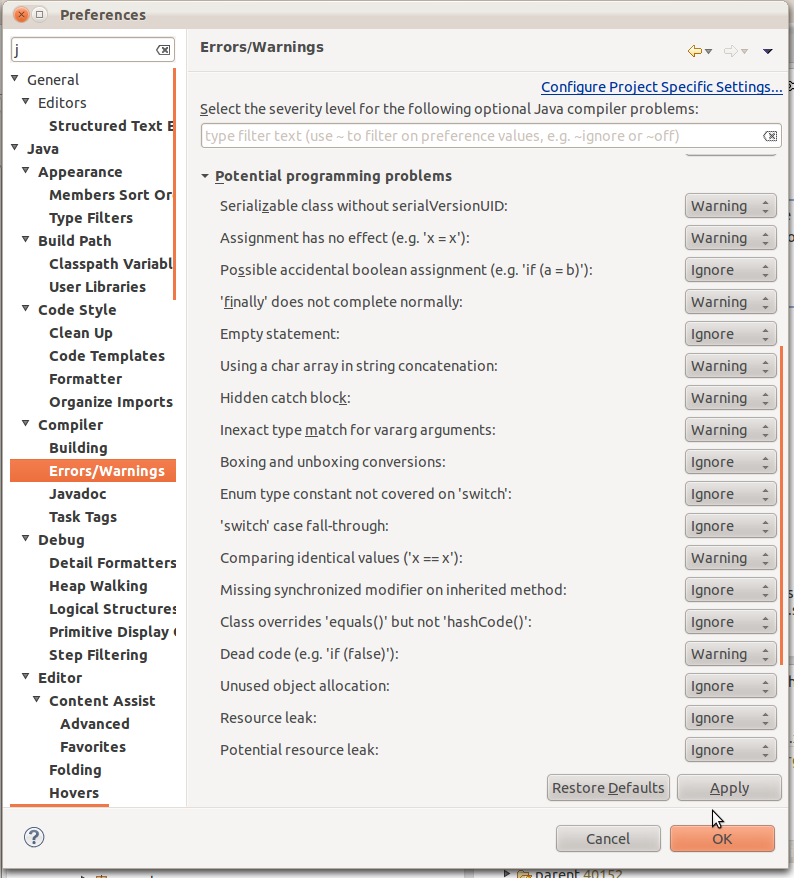
If you want to start improving quality, don’t think on using Sonar first. You first step should probably be to add quality tools in your workbench: enable all JDT warnings, install FindBugs, PMD, and other quality tools. At the beginning, you may find them too verbose, but just do what they want you to do in most cases, and you’ll see you’ll probably write less bugs.
First take care of the code you write daily by leveraging such tools, they prevent from increasing the technical debt. You can’t hope to reduce existing technical debt on one side if you keep on adding some on the other side.

Why Sonar?

Sonar is basically a “quality dashboard”: it shows a lot of metrics and warnings. It relies on several common Java tools (Checkstyle, Findbugs, PMD, Jacoco…) to provide the reports and show their results in an aggregated view. That helps you to spot which pieces of your code deserve to be improved. It’s easy to use and is a very informative tool which is intended to projects teams to reduce their technical debt.
Let’s be honest: I’ve only known Sonar as an OSS quality dashboard. I don’t even know if some other exist, but I only hear about this one, and I think it good. Also the team is helpful and reactive, and they are close to the Eclipse community, as you can see by the kind of extension they develop, or their presence at EclipseCon.

Sonar at work

Strategies to fight technical debt using Sonar reports?

Quality reports is not something you produce for each build: it takes some time to process and reduce “acceptance” feedback loop. Also, this kind of quality metrics evolve slowly, and you’ll quickly notice that re-computing them in each commit is kind of useless. Instead I’d recommend using them weekly. or on a schedule that will help you to capture trends of quality. Of course, when you think it’s useful, you can stuff run a “Sonar” job manually to see how metrics evolved after an intense clean.

Some teams have some “quality hours”: for example, on the Friday afternoon, when people don’t want to get into huge difficult tasks before week-end, developers simply have a look at Sonar and decide of reducing amount of Findbugs warnings, or to reduce duplication… Since you have a tool to tell you what should be improved, those tasks become easy, and we all need some easy tasks from time to time.

So I recommend producing reports weekly, and use Sonar to have some technical debt shooting sessions, weekly, or one week after a release build, or on any schedule you like. The important is to turn it into a regular habit.

Setting up a [Project]-Sonar build on hudson.eclipse.org

Currently, there is one pre-requisite for Hudson-Sonar integration, which is not that big since it’s already the choice made by many projects, and by CBI: your project needs to build with Maven (and Tycho if you’re building Eclipse plugins).
If you already have a Tycho-based build, it pretty easy:

  1. Ask for a CI job [Project]-Sonar on Hudson Sandbox
  2. Configure your project to run a normal build with automated tests. Do not include any publishing related stuff (profile, build steps…) into it, since it’s not the goal of this job. You may want to set the following Maven properties: -Dmaven.test.error.ignore=true -Dmaven.test.failure.ignore=true to get reports even when some tests fail.
  3. Go to Post-Build Actions and tick Sonar
  4. Ensure the Maven Version is the same as the one that perform the build
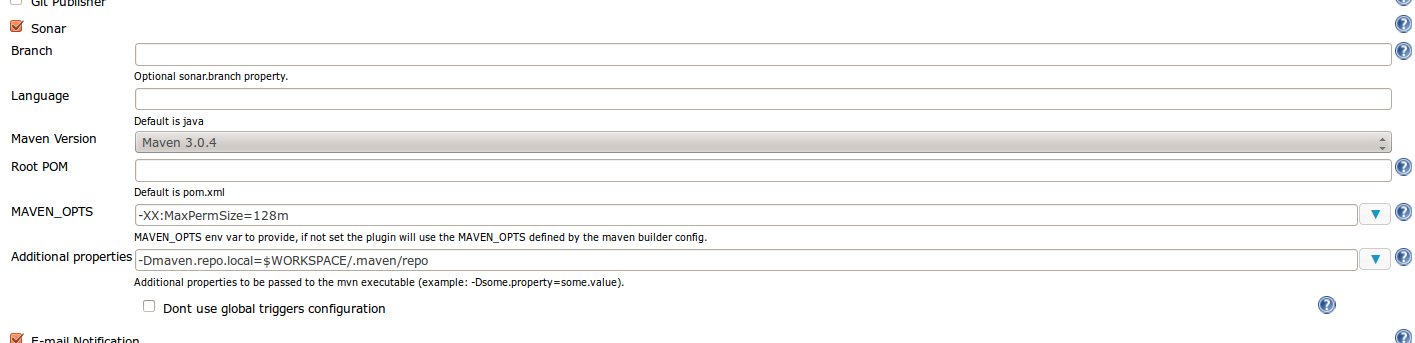
  5. Configured Sonar plugin: If you build using on the Private Repository Maven option (recommended), you’ll need to set Additional Properties for Sonar to -Dmaven.repo.local=$WORKSPACE/.maven/repo. It’s also recommended to set -XX:MaxPermSize=128m

Sonar configuration for your job

You can see an example of configuration here: https://hudson.eclipse.org/sandbox/job/SWTBot-Sonar/configure

Sonar reports are 1 click further

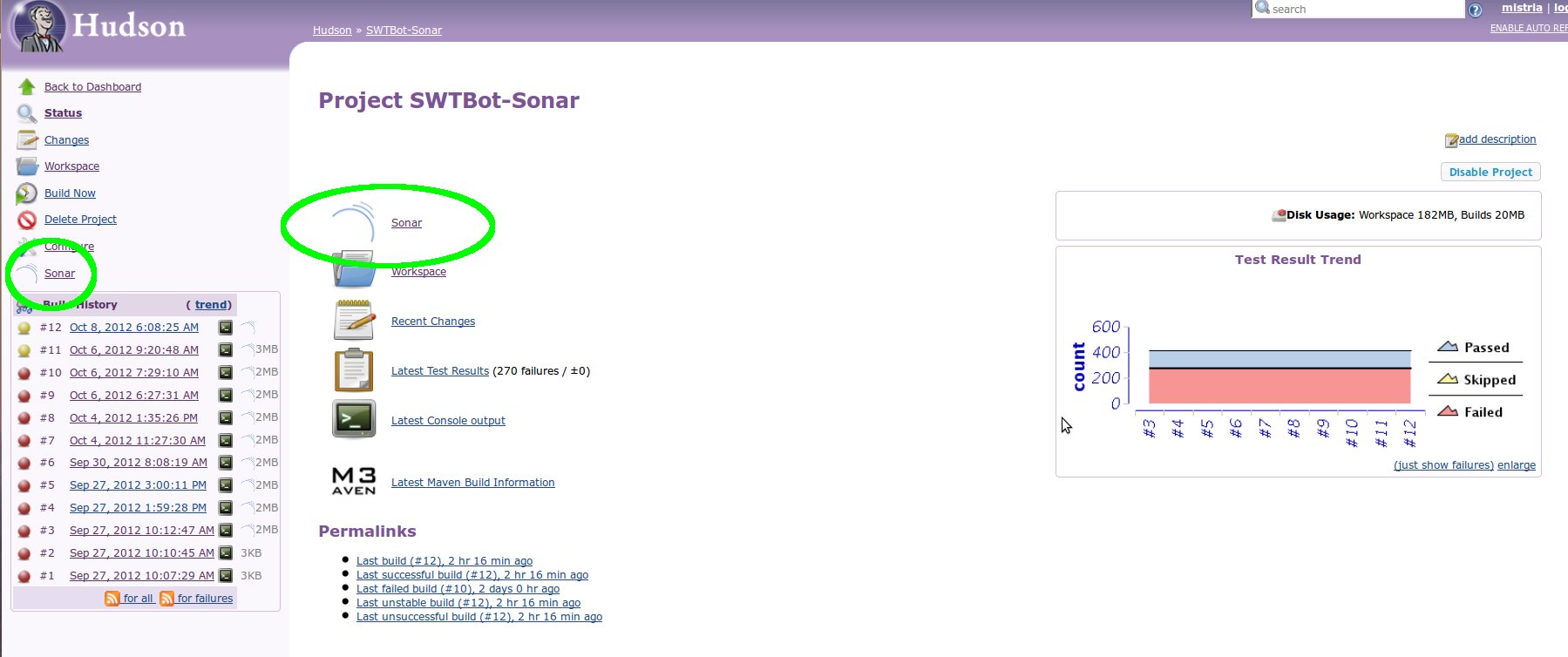
When you’re done, just run a build. If it’s blue or yellow, you’ll notice a “Sonar” link on the left of job’s page. Click it. You’re there! You can browse Sonar reports for your job, and find out some interesting stuff about your project that deserve immediate improvement. Just enjoy it, have a look at Sonar reports, find out some Findbugs warning you don’t like, install Findbugs plugin in your workbench, and spend one hour cleaning some of them. Re-build, and see how Sonar reflected your change. You reduced technical debt!

Bonus: Maven, Jacoco, and Sonar

Once again, no big difficulty here. There are only 2 constraints/rules to follow:

  1. Sonar only allows a single execution file (jacoco.exec) for you whole project
  2. The sonar.jacoco.reportPath so it references this jacoco.exec file from any “Java” (plugins or tests) module.

For example in case of “flat” project: 1 directory containing at its root the parent pom, and all modules (org.eclipse.project.*), you’d like to configure that in parent pom

<properties>
	<!-- Properties to enable jacoco code coverage analysis -->
	<sonar.core.codeCoveragePlugin>jacoco</sonar.core.codeCoveragePlugin>
	<sonar.dynamicAnalysis>reuseReports</sonar.dynamicAnalysis>
	<sonar.jacoco.reportPath>../target/jacoco.exec</sonar.jacoco.reportPath>
</properties>

<build>
	<plugins>
		<plugin>
			<groupId>org.jacoco</groupId>
			<artifactId>jacoco-maven-plugin</artifactId>
			<version>0.5.8.201207111220</version>
			<executions>
				<execution>
					<goals>
						<goal>prepare-agent</goal>
					</goals>
					<configuration>
						<!-- Where to put jacoco coverage report -->
						<destFile>${sonar.jacoco.reportPath}</destFile>
						<includes>
							<include>org.eclipse.swtbot.*</include>
						</includes>
						<append>true</append>
					</configuration>
				</execution>
			</executions>
		</plugin>
	</plugins>
</build>

For 2-folders-deep projects, where there is a parent pom.xml at root + a plugins/ folder containing plugins, and a tests/ folder containing tests, you’d rather set the sonar.jacoco.reportPath property to ../../target/jacoco.exec (so all tests and plugins look at the same jacoco.exec which is on there <firstCommonParentDirectory>/target).

Note that there is no need to put it in a profile. Indeed jacoco almost doesn’t affect performance, so it won’t slow down your build, then you’d better make it always enabled.

mistria
sonar-logo
sonar
sonar-config
hudson-sonar
http://mickaelistria.wordpress.com/?p=388
Extensions
Grenoble Eclipse Demo Camp is next week!
conferencesEclipseJBossPlanet PetalsLink
Hi everybody! For those who are living in French Alps, in Lyon area, or even in Geneve area, here is a reminder for an important event that takes place for the first time in Grenoble: an Eclipse Demo Camp! We’ll celebrate the latest release of Eclipse: Juno. If you come at this Demo Camp, you’ll […]
Show full content

Hi everybody!

For those who are living in French Alps, in Lyon area, or even in Geneve area, here is a reminder for an important event that takes place for the first time in Grenoble: an Eclipse Demo Camp! We’ll celebrate the latest release of Eclipse: Juno.

Where DemoCamp takes place

If you come at this Demo Camp, you’ll have the opportunity to see some demos of what’s new in Juno, what you must know about E4, discover some presentations and demonstrations of what people do with Eclipse in Grenoble area. This event is open to anyone: Eclipse users will learn new tricks, Eclipse developers will learn new stuff, non-Eclipse people will learn new things. You can see the diversity of covered topics by having a look at the agenda.

Also, such an event is a great opportunity to add people to your network, a lot of companies (from local to worldwide) already have some employees attending this event.

This year, we introduced quickies to increase the number of topics that can be presented or discussed, then there are still a few slots available if you want to present something.

The event takes place on Wednesday June 13th, during the afternoon. You can register either on the wiki page of the event, or using the EventBrite ticket system. In order to facilitate the venue, you can see on the event page a field to propose or seek carpool For the hottest news, you can follow the Twitter account of the DemoCamp. Amd rememver: all that for FREE!


I hope I’ll meet some of you there!

mistria
xrce
http://mickaelistria.wordpress.com/?p=384
Extensions
What happened (to me) at EclipseCon 2012
conferencesEclipseJBossReleng
It’s been a few week since EclipseCon ended. It’s now time for a retrospective. First, the event was great. Although I did not have time to view that many presentations, I was able to discuss with a lot of people about a lot of topics. I learned new stuff, and shared some knowledge. I made […]
Show full content

It’s been a few week since EclipseCon ended. It’s now time for a retrospective.

Do you also know the Red Hat Society?

First, the event was great. Although I did not have time to view that many presentations, I was able to discuss with a lot of people about a lot of topics. I learned new stuff, and shared some knowledge. I made huge steps ahead in my own work, and helped people to go ahead in their own work too. I was also able to boost some projects I like and work in making them more widely used.
So I am pretty happy of this conference. Being at EclipseCon has and will improve my daily work, that’s the best thing to expect from this kind of event.

My Top #3 favourite talks

Since I spent most of my time chatting with several people, I could only see a few presentations. I’d like to share 3 of them:

  • Persona non grata by Brian Fitzpatrick.
    I like this idea to bring  some practices coming from marketing into software development that are aimed to get a better knowledge of what your users want. Introducing Personas seems to be a high benefit for a team, since every participant will be able to talk about these personas instead of limitating users to only a role. It helps to have a clearer idea of what their users are like and can refer easily to them in their daily work. It makes product teams think more about their users being humans and act consequently, for instance when developing UI.

    Personas allow you to consider your users as people, not only roles.

  • CodeRecommanders, by Marcel Bruch
    CodeRecommanders won the Best Developer Tool award, this talk demonstrated why this project deserves such a recognition. It is pretty easy to set-up, use and provide immediately a boost in your code-writing productivity. Code Recommanders has analyzed most  of the open-source Java code on the planet and so comes into your IDE to provide you snippets, templates, examples, pieces of advice and more, gathered from all the code it has analyzed! You can save a lot of time since you do not have to search through the web anymore: CodeRecommanders has snippets and pieces of advice for you. Always.

    CodeRecommanders will become your best colleague.

  • How to profit from static analysis, by Elena Laskavaia
    This talk explains why static analysis makes you save (a lot of!) development time and money, and how to get the highest value from it. How not to spend more than necessary in setting it up, and how to get started in making static analysis part of your strategy.  Very concrete lessons and tips! Here are my 3 favorite notes:

    • Detecting a bug at dev-time with static analysis costs a few seconds, detecting it at build-time costs minutes to fix it, detecting it in a satellite costs millions. (slide 5)
    • JDT provides you very good static analysis, but most rules are disabled by default. So just turning these rules on will make you more productive. (slide 18)
    • full JDT analysis + PMD enabled in your IDE = profit.

    Did you know that JDT is a hidden gem for static analysis? I did not.

What I presented

This year, I had the opportunity to be a speaker for 3 talks

How to remain agile in code generation approaches?

This short presentation during Modeling Symposium explains some good practices to use in order to avoid being locked in code-generation approaches. Indeed, the indirection introduced by code generation can have some pitfalls when it comes to customizing generated code. But actually, you don’t want to customize generated code, you want to customize generated behavior. Modifying generated code is not the best solution for that, here are some more sustainable approaches:

The lesson is: consider generator config/generated code the same way you consider source code/compiled code.

Some news of GMF Tooling, at Modeling Symposium

If you read this blog, you probably know most of it.

What’s up GMF Tooling?

View more presentations from Mickael Istria Get ready to fight your technical debt, with Tycho, Sonar, and Jacoco

I had the opportunity to present, together with Xavier Seignard, how easy it is to integrate Tycho, Jenkins/Hudson, Sonar and Jacoco together. This provides a 1st-class build environment that makes you go from continuous integration to continuous improvement. We think code quality is now pretty easy to get, even in the Eclipse world, so we should not do without it any longer. There are now very very very (…) very powerful and easy tools for quality in the Java world. They work with a few efforts and minutes. That was the aim of this talk: showing people that they are very close to continuous improvement and giving them some keys to set it up by and for themselves.

Fight your technical debt with Jenkins, Jacoco and Sonar

View more presentations from Mickael Istria

I was able to also make some lobbying on Sonar@Eclipse.org, so that there is progress on bug 360935 ! Woot!

Things I did

EclipseCon, like any conference, is mostly a social event. It is a great opportunity to meet people you need to help you, to meet people who need your help; and to get things actually done and gone ahead.

About Tycho

Tycho is the masterpiece of builds for projects I work on. With JBoss Tools, we have found some bugs, we often have some new requirements and ideas for improvements. Participating in the Tycho BOF was a great opportunity to chat with the other guys doing/using Tycho and to highlight some issues that are important to us. It’s worked and we are now pleased to see and provide “quality patches”, as Igor likes to say.

About CBI

The Eclipse foundation is making an effort to improve the “Common Build Infrastructure”. The goal is to provide an efficient and easy-to-use build environment for Eclipse projects. This is something very interesting for Eclipse.org projects, but also for consumers such as JBoss Tools, since we have ideas on making Eclipse projects easier to consume. So that’s something we follow closely and we are happy to see all these efforts carried out to push Tycho and Jenkins usage for all Eclipse.org projects!

Let’s hope CBI will also address issues regarding p2 repository governance (lifecycle, availability, URL conventions…). As I am writing, a bug has just opened on this topic. Coincidence or esoterism?

About GMF-Tooling

I could see the presentation by Andres Alvarez Mattos and Ruben De Dios during Modeling Symposium. These guys made a very nice editor for GMF Tooling models that allows you to create a diagram editor graphically. It is not intrusive and is a much more efficient way to get started with GMF Tooling than the current approach based on models and tree editors. This editor simply looks like a renewal of GMF Tooling.

I helped them to get some of their patches applied into GMF Tooling code. I hope I’ll be able to nominate them as committers soon, since their editor would make a lot of sense in GMF Tooling.

Conclusion

That was a busy EclipseCon! But I enjoyed it! Some things got done, some can now be done, and some others will be done soon. There are some concrete results and some new opportunities, it’s everything I expected!

mistria
RedHat
personas
recommanders
JDT_static_analysis
http://mickaelistria.wordpress.com/?p=342
Extensions
The ultimate Usage Report in your Java application: a Jacoco.exec file!
EclipseJBoss
I don’t know if you know it, but I love Jacoco. Jacoco is a very neat and easy to use coverage tool. You can easily use it with existing Java applications, it is just about giving a -javaagent to your JVM parameters. It is so easy to have coverage reports as it is to increase […]
Show full content

I don’t know if you know it, but I love Jacoco. Jacoco is a very neat and easy to use coverage tool. You can easily use it with existing Java applications, it is just about giving a -javaagent to your JVM parameters. It is so easy to have coverage reports as it is to increase a PermSize.
Everybody loves Jacoco. Those who don’t love it yet simply need to give it a try to get convinced Jacoco in the only good tool for code coverage.

We did enable Jacoco for our our Tycho-based builds of JBoss Tools and JBoss Developer Studio components thanks to its Maven plugin, so we get some very nice jacoco.exec files that developer can import into their Eclipse workspace thanks to EclEmma. Then developers can see how their tests cover their code. That’s very nice.

But I think that measuring unit test coverage is not the best thing we can do with Jacoco. Since it is just about a simple argument to the Java command-line, we can think of… Enabling Jacoco by default on real execution of Java applications to track real usage and deduce which pieces of code are really used! This is pretty easy to do, and the effect on performances is low enough to be acceptable in a lot of cases, especially on desktop applications.

Knowing which pieces of your software are critical in production, and which ones are useless and should get removed is a priceless information that for sure helps you in making your software better. That’s a topic we are working on for JBoss Tools and JBoss Developer Studio, and we got some ideas on how to make it real and already have ideas of improvements to have a better control over Jacoco.

Stay tuned. soon all Java applications will use Jacoco!

mistria
http://mickaelistria.wordpress.com/?p=307
Extensions
Wish list of bugs to make the Releng and QA world better
EclipseJBossReleng
That’s now a few weeks since I joined the JBoss Tools and JBoss Developer Studio team and started working on build. JBoss Tools is a HUGE amount of code, with about 35 components (or modules in Maven terminology) that are aggregated in a way that can be compared to the Eclipse release train, and that […]
Show full content

That’s now a few weeks since I joined the JBoss Tools and JBoss Developer Studio team and started working on build. JBoss Tools is a HUGE amount of code, with about 35 components (or modules in Maven terminology) that are aggregated in a way that can be compared to the Eclipse release train, and that all use a “Common Build Infrastructure” based on Maven/Tycho to perform build and Jenkins to trigger it.

There are a lot of improvements in the pipe for Nick and myself to make build more and more agile, and to make it produce more and more interesting results. I feel very interested in going a step ahead of continuous integration, and open the road towards continuous improvement, automating QA to get reports about static analysis and code coverage on each build. I bet it will help developers to avoid mistakes and improve there code. (Advertising: You can learn more on this topic during next EclipseCon ).

Here are some of these topics that are worth this blog post:

QA with Sonar

About static analysis, my choice fully goes to Sonar, a webapp that provides a dashboard aggregating reports from several QA “services” (Findbugs, Checkstyle, Test reports, coverage…). Sonar provides nice integration with Maven and Jenkins & Hudson, and getting the whole working together is about a few minutes of configuration. The return on investment when setting up Sonar is very high and immediate. In my humble opinion Sonar is a must-have nowadays.

So, there are 2 bugs I encourage you to look at/vote for, in order to leverage Sonar, QA and continuous improvements in your favourite projects:

Jacoco, without Sonar

Jacoco is a very easy-to-set-up code coverage tool, with a very convenient Maven integration. With Jacoco, there is no need for instrumentation step to get coverage results, all is about giving a -java.agent=jacocoagent.jar property to your JVM. While using it, I did not detect any effect on performances. That’s pretty cool.

The current issue for Jacoco adoption is the reporting. Here are the known ways to analyse reports from a Jacoco coverage output file (aka jacoco.exec):

As a fan of Sonar, I think the Sonar-based approach is the best one. But both previous bugs show something clear: despite of my full enthusiasm for Sonar, community-wide infrastructures such as Eclipse.org or JBoss.org cannot set up a Sonar instance immediately. I guess this is because of issues with credentials, or hardware, or IT stuff. So we need to be able to consume Jacoco reports without Sonar.
The issues with all these approaches is that it introduces the need for a new build step or a new developer tool to analyze reports. The main dashboard for JBoss.org builds in Jenkins (and Hudson for Eclipse.org), then the ideal place for such reports would be  a Jenkins plugin for Jacoco. Unfortunately this does not existt (yet), but a Jenkins issue is open for this. Now that I have lost some optimism in getting Sonar available for Eclipse.org or JBoss.org community quickly (as an impatient guy, quickly means today), this Jacoco Jenkins is now my #1 wish in the whole Java software world. Although setting up Jacoco for execution is very easy, setting up integrated reporting is still almost a blocking point for adoption.

So please, vote for this bug!!! iJacoco Jenkins plugin

Some other stuff

Since I’m writing here a wish list, I’d also like to share with you thib Jenkins issue I opened: Add an option to select Build status when no Test is found. The idea is simple: Even if no-one should never do that, it happens that we need to run a Jenkins build with skipped tests. Ok, it’s bad, but it happens. In such case, the fileset for Test results in Jenkins JUnit plugin does not match any existing report, and then build turn to FAILED/Red. When you have cascading of jubs, this is pretty annoying, since you’d rather see this build UNSTABLE/Yellow -my favourite- or SUCCESS/Blue. So this issue simply requests the ability to change the result of plugin when no test is found.
If you find this useful, you can vote for it.

mistria
http://mickaelistria.wordpress.com/?p=323
Extensions