GeistHaus
log in · sign up

https://k3a.me/atom

atom
10 posts
Polling state
Status active
Last polled May 18, 2026 22:00 UTC
Next poll May 20, 2026 00:06 UTC
Poll interval 86400s
ETag W/"b498f9051c584183125bf177ce939e4e"
Last-Modified Fri, 05 Jan 2024 14:31:00 GMT

Posts

Adding CUPS server to MacOS 10.7 or later without client.conf
Uncategorized

Since MacOS version 10.7 Lion, it has not been possible to use the ServerName option in the CUPS client.conf configuration to add a remote CUPS and skip the local CUPS server. Instead, printers are expected to be added via the Settings app. However, for some reason, adding the printer there did not work for me. […]

The post Adding CUPS server to MacOS 10.7 or later without client.conf appeared first on K3A.

Show full content

Since MacOS version 10.7 Lion, it has not been possible to use the ServerName option in the CUPS client.conf configuration to add a remote CUPS and skip the local CUPS server. Instead, printers are expected to be added via the Settings app. However, for some reason, adding the printer there did not work for me. The printer was added successfully and looked fine, but when selecting the printer to print a document, it would display as “Offline” and it would say “Looking for printer” in the Jobs dialog. The fix is easy!

It turns out, it can be solved by simply using the lpadmin command.

lpadmin -p Samsung_ML-2160_Series -E -v ipp://cups-srv-hostname/printers/Samsung_ML-2160_Series -m everywhere
  • -p Printer_Name sets the name of the printer as it will appear on your Mac
  • -E enables and accepts jobs on the printer
  • -v is the ipp path to the printer on the server, the hostname is clear and the printer URL name can be found by visiting the CUPS server administration web UI, for example http://hostname:631 if HTTP is used. The webadmin follows the same URI pattern
  • -m everywhere option tells CUPS to use the driverless printing feature, which is compatible with IPP Everywhere printers. If the printer requires a specific PPD file, you would replace everywhere with the path to the PPD file.

I don’t know why it wouldn’t work when the printer is set up using the system Settings app. Perhaps the system settings are unable to use the “everywhere” PPD config, requiring a local printer driver to be installed instead.

Displaying that the printer is offline or busy and not providing any more diagnostic information creates a really bad user experience. I was about to try analyzing the network communication and debugging the real cause, but I found the lpadmin command and since it worked, I didn’t bother anymore.

Hope it helps. Happy printing!

The post Adding CUPS server to MacOS 10.7 or later without client.conf appeared first on K3A.

https://k3a.me/?p=805
Extensions
RT2870/RT3070 ath9k_htc and maximum number of STAs
Uncategorized

For many years I have been using RT2870/RT3070 USB WiFi dongles and I was happy with them. They have great Linux support thanks to the ath9k_htc driver. But as number of IoT devices increased, one day one of them couldn’t connect and hostapd was reporting errors like these: After 2 hours of reading ath9k_htc source […]

The post RT2870/RT3070 ath9k_htc and maximum number of STAs appeared first on K3A.

Show full content

For many years I have been using RT2870/RT3070 USB WiFi dongles and I was happy with them. They have great Linux support thanks to the ath9k_htc driver.

But as number of IoT devices increased, one day one of them couldn’t connect and hostapd was reporting errors like these:

Could not set STA to kernel driver
nl80211: NL80211_CMD_SET_STATION result: -105 (No buffer space available)

After 2 hours of reading ath9k_htc source code, I reached the following:

#define ATH9K_HTC_MAX_STA 8

/* ... */

if (priv->nstations >= ATH9K_HTC_MAX_STA)
  return -ENOBUFS;

It turns out this chip is not big enough to support more than 8 WiFi clients. Some additional searching over the web revealed this conversation:

“K2/AR9271 is limited to 8 nodes in AP mode due to RAM size imitation of internal on-chip RAM (K2 does not use external RAM).

It was once suggested that, with a lot of work, the internal RAM might be able to be used more efficiently to realize up to 16 nodes. But this was deemed too much work in light of newer USB chipsets like WASP/AR9342 which have no such limitations.”

After quite extensive effort of reading about various alternatives and their Linux support, I decided to buy Alfa AWUS036ACM which is a dongle based on MT7612U which is Wi-Fi 5 (a/b/g/n/ac) and is in the mainline kernel since 4.19 (2018). It is not as open as ath9k_htc dongles but it works very well! I would even say this is one of the best Linux-supported USB wifi chips currently available.

If you know about other well-supported dongles or WiFi chips, please let us know in the comments.

The post RT2870/RT3070 ath9k_htc and maximum number of STAs appeared first on K3A.

https://k3a.me/?p=757
Extensions
Linux Capabilities in a nutshell
LinuxServer stuff

Capabilities are being used by many Linux-based software nowadays to limit what a process can do. But I think the documentation is a bit hard to grasp and I found some parts of capabilities implementation confusing so I decided to condense my current knowledge into a shorter article. The most important reference for capabilities is […]

The post Linux Capabilities in a nutshell appeared first on K3A.

Show full content

Capabilities are being used by many Linux-based software nowadays to limit what a process can do. But I think the documentation is a bit hard to grasp and I found some parts of capabilities implementation confusing so I decided to condense my current knowledge into a shorter article.

The most important reference for capabilities is up-to-date man page capabilities(7). But that doesn’t provide an easy to read introduction.

Process Capabilities

Permissions of regular users are very limited, while permissions of “root” user are very powerful. But processes running under “root” often don’t require full root capabilities.

To help reduce “root” user power, POSIX capabilities provides a way to restrict groups of privileged system operations a process and its children are allowed to do. They basically divide full “root” privilege into a set of distinct privileges. The idea of capabilities was described in POSIX 1003.1e draft that was withdrawn in 1997.

Each Linux process (task) has five 64-bit numbers (sets) holding capability bits (used to be 32-bit before Linux 2.6.25) which can be inspected by reading /proc/<pid>/status

CapInh: 00000000000004c0
CapPrm: 00000000000004c0
CapEff: 00000000000004c0
CapBnd: 00000000000004c0
CapAmb: 0000000000000000

These numbers (here displayed as hex digits) are acting as a bitmap encoding a set of capabilities. Full names are:

  • Inheritable – capabilities that children can inherit
  • Permitted – capabilities the task is permitted to use
  • Effective – capabilities actually effective
  • Bounding set – prior to Linux 2.6.25, the bounding set was a system-wide attribute shared by all threads, probably meant to describe a set beyond which capabilities cannot grow. Currently it is per-task set. It is a part of execve transformation logic (more later) and also limits what a process can set to its inheritable set using capset().
  • Ambient set (since Linux 4.3) – added to give capabilities to non-0 user easily, without using setuid or file capabilities (more later).

If a task asks to perform a privileged operation (like binding on ports < 1024), the kernel checks Effective bounding set to see if CAP_NET_BIND_SERVICE is set. If it is, it continues. Otherwise, it rejects the operation with EPERM (operation not permitted). These CAP_ defines in the kernel source are numbered sequentially so CAP_NET_BIND_SERVICE being 10 means a bit 1<<10 = 0x400 (that is the ‘4’ hex digit in my previous example).

The full human readable list of currently-defined capabilities can be found in your up-to-date manpage capabilities(7) (the one here is for reference only).

Additionally there is a library libcap to make capabilities management and inspection easier. In addition to library API, the package includes capsh utility which, among other things, allows printing its capabilities.

# capsh --print
Current: = cap_setgid,cap_setuid,cap_net_bind_service+eip
Bounding set =cap_setgid,cap_setuid,cap_net_bind_service
Ambient set =
Securebits: 00/0x0/1'b0
 secure-noroot: no (unlocked)
 secure-no-suid-fixup: no (unlocked)
 secure-keep-caps: no (unlocked)
 secure-no-ambient-raise: no (unlocked)
uid=0(root)
gid=0(root)
groups=0(root),1(bin),2(daemon),3(sys),4(adm),6(disk),10(wheel),11(floppy),20(dialout),26(tape),27(video)

There are a few confusing bits:

  • Current – displays effective, inheritable and permitted capabilities of capsh process in cap_to_text(3) format. Again, it displays it in cap_to_text format which lists capabilities basically as capability[,capability…]+(e|i|p) groups, where ‘e’ means effective, ‘i’ inheritable and ‘p’ permitted. The list is not separated by ‘,’ as you would guess (cap_setgid+eip,cap_setuid+eip). The ‘,’ separates capabilities in a single +… (action) group. The actual list of action groups is then separated by spaces. So another example with two action groups would be “= cap_sys_chroot+ep cap_net_bind_service+eip”. And also these two action groups “= cap_net_bind_service+e cap_net_bind_service+ip” would encode the same meaning as a single “cap_net_bind_service+eip”.
  • Bounding set/Ambient set. To make things even more confusing, these two lines contain just a list of capabilities set in those sets, separated by spaces. No cap_to_text format is used here because it is not listing permitted, effective, inheritable sets together but just a single (bounding/ambient) set.
  • Securebits: displays task’s securebits integer in as decimal/hex/fancy-verilog-convention-for-binary-strings (yes, everyone would expect it here and it’s totally clear by ‘b because every sysadmin programs its own FPGAs and ASICs). The state of securebits follows. The actual bits are defined as SECBIT_* in securebits.h and also described in capabilities(7).
  • The tool lacks the one important state and that is the “NoNewPrivs” which can be also seen by inspecting /proc/<pid>/status. That is described in prctl(2) only, even though it directly affects capabilities when used in conjunction with file capabilities (more later). NoNewPrivs is described as “With no_new_privs set to 1, execve(2) promises not to grant privileges to do anything that could not have been done without the execve(2) call (for example, rendering the set-user-ID and set-group-ID mode bits, and file capabilities non-functional). Once set, this the no_new_privs attribute cannot be unset. The setting of this attribute is inherited by children created by fork(2) and clone(2), and preserved across execve(2).“. This is the flag which Kubernetes sets to 1 when allowPrivilegeEscalation is set to false in pod’s securityContext.

When a process starts a new process by doing execve(2), capabilities are transformed to the child using the formula mentioned in capabilities(7):

P'(ambient)     = (file is privileged) ? 0 : P(ambient)

P'(permitted)   = (P(inheritable) & F(inheritable)) |
                  (F(permitted) & P(bounding)) | P'(ambient)

P'(effective)   = F(effective) ? P'(permitted) : P'(ambient)

P'(inheritable) = P(inheritable)    [i.e., unchanged]

P'(bounding)    = P(bounding)       [i.e., unchanged]

where:

     P()   denotes the value of a thread capability set before the
           execve(2)

     P'()  denotes the value of a thread capability set after the
           execve(2)

     F()   denotes a file capability set

These rules describe action taken for every bit in ambient/permitted/effective/inheritable/bounding sets. It uses standard C syntax (& for logic AND, | for logic OR). P’ is the child process, P is the current process calling execve(2). F are so called “file capabilities” of the file being execve’d.

Additionaly, a process can programmatically change its inheritable, permitted and effective sets using libpcap any time according to these rules:

  • Unless the caller have the CAP_SETPCAP, the new inheritable set must be a subset of P(inheritable) & P(permitted)
  • (since Linux 2.6.25) The new inheritable set must be a subset of P(inheritable) & P(bounding)
  • The new permitted set must be a subset of P(permitted)
  • The new effective set must be a subset of P(effective)

As HN user eqvinox suggested, pspax from pax-utils can be used to list capabilities of running processes, just compile it with libpcap support (make USE_CAP=yes):

  # pspax
  USER     PID    PAX    MAPS ETYPE      NAME             CAPS ATTR  
  root     60879  ---    w^x  ET_DYN     crond            =ep  system_u:system_r:kernel_t:s0  
  root     60910  ---    w^x  ET_DYN     ntpd             cap_net_bind_service,cap_ipc_lock,cap_sys_time=ep system_u:system_r:kernel_t:s0
File capabilities

Sometimes a user with a reduced set of capabilities needs to run a binary which requires more capabilities. Previously, this was achieved by setuid binary (chmod +s ./executable). Such a binary, if owned by root, would assign full root privileges to it when executed by any user.

That gives too many privileges to the binary, so POSIX capabilities implemented a concept called “file capabilities”. They are stored as a extended file attribute called “security.capability” so you need a capable filesystem (ext*, XFS, Raiserfs, Brtfs, overlay2, …). For a process to write to this attribute, CAP_SETFCAP capability is needed (be in process’ effective set).

$ getfattr -m - -d `which ping`
# file: usr/bin/ping
security.capability=0sAQAAAgAgAAAAAAAAAAAAAAAAAAA=

$ getcap `which ping`  
/usr/bin/ping = cap_net_raw+ep
Special cases and notes

Of course, life is not simple, so is not the implementation of capabilities and there are several special cases described in capabilities(7) man page. Probably the most important are:

  • setuid file bit and file capabilities are ignored if NoNewPrivs is set or filesystem is mounted nosuid or the process calling execve is being ptraced. The file capabilities are also ignored when the kernel is booted with no_file_caps.
  • Capability-dumb binary is a binary converted from setuid to file capabilities without changing its code. Such binaries are often converted by setting +ep capability on them like “setcap cap_net_bind_service+ep ./binary”. The important part is “e”, effective. Upon execve, this capability is added to both permitted and effective so the executable is ready to use the privileged operation. In contrast capability-smart binary which uses libpcap or similar, can use cap_set_proc(3) (or capset) to set “effective” or “inheritable” bits at any point, as long as that capability is already in the “permitted” set. So “setcap cap_net_bind_service+p ./binary” would be enough for a capability-smart binary as it will be able to set the effective bit itself before calling the privileged operation. See my example code.
  • setuid-root binaries continue to work, giving all privileges of root when run by a non-root user. Unless they have file capabilities set, in which case only those are granted. It is also possible to create a setuid binary with empty file capability set, making it execute as 0, though without any capabilities. There are special cases for root user running setuid-root binary and various securebits are set (consult the man).
  • The bounding set masks the file permitted capabilities, but not the inheritable capabilities – remember P'(permitted) = F(permitted) & P(bounding). If a thread maintains a capability in its inheritable set that is not in its bounding set, then it can still gain that capability in its permitted set by executing a file that has the capability in its inheritable set – remember P'(permitted) = P(inheritable) & F(inheritable).
  • Executing a program that changes UID or GID due to the set-user-ID or set-group-ID bits or executing a program that has any file capabilities set will clear the ambient set. Capabilities are added to ambient set using PR_CAP_AMBIENT prctl. Such capability must already be present in both the permitted and the inheritable sets of the process.
  • If a process with non-0 UID performs an execve(2) then any capabilities that are present in its permitted and effective sets will be cleared.
  • Unless SECBIT_KEEP_CAPS (or more broader SECBIT_NO_SETUID_FIXUP) is set, changing UID from 0 to non-0 clears all capabilities from permitted, effective, and ambient sets.
So…

If the official nginx or ingress-nginx container or your own stops or restarts with:

bind() to 0.0.0.0:80 failed (13: Permission denied)

…it simply means it tried to listen on port 80 as an unprivileged (non-0) user and it doesn’t have CAP_NET_BIND_SERVICE in its effective capability set. To gain such capability, one has to use xattr file capabilities and set (using setcap) nginx file capability set to at least cap_net_bind_service+ie. This file capability will be &ed with inherited set (set together with bounding set by pod’s securityContext/capabilities/add/NET_BIND_SERVICE), making it into the permitted set as well. Leading to the final result =cap_net_bind_service+pie effectively.

That all works as long as securityContext/allowPrivilegeEscalation is true and your docker/rkt storage driver (see docker info) supports xattrs.

If the nginx was a capability-smart binary, cap_net_bind_service+i file capability would be enough. It could then use libcap to extend the capability from permitted to effective set. Resulting in the =cap_net_bind_service+pie as well.

Other than using file xattrs, the only way to achieve cap_net_bind_service in a non-root container would be to let Docker set the ambient capabilities. But as of 4/2019, that is not yet implemented

Example code

Here is the example code to use libcap to add cap_net_bind_service to the effective set. That requires the cap_net_bind_service+p file capability set on the binary.

To compile and run it:
$ gcc -lcap captest.c -o captest
$ ./captest
Current process capabilities (+set): =
cap_set_proc: Operation not permitted

After adding file capability:
$ sudo setcap cap_net_bind_service+p ./captest
$ ./captest
Current process capabilities (+set): = cap_net_bind_service+p
bind successful! :)

Diagram

There is also a nice diagram made by H. Plötz which summarizes relations between thread’s set, binary’s set and those applied to execve’d child.

Credit for the image goes to H. Plötz.


References:

The post Linux Capabilities in a nutshell appeared first on K3A.

https://k3a.me/?p=688
Extensions
Running x86_64/amd64 executables on PPC64le IBM Power 9 Gentoo
Linux

Running android-studio on a Talos II ppc64 machine requires the aapt2 binary. That is currently only a part of the x86_64 build-tools, so I had to learn a way to run x86_64 executables on ppc64 cpu. The first option is full emulation (emulating x86_64 kernel and apps), the other is QEMU’s user mode translation (emulating […]

The post Running x86_64/amd64 executables on PPC64le IBM Power 9 Gentoo appeared first on K3A.

Show full content

Running android-studio on a Talos II ppc64 machine requires the aapt2 binary. That is currently only a part of the x86_64 build-tools, so I had to learn a way to run x86_64 executables on ppc64 cpu. The first option is full emulation (emulating x86_64 kernel and apps), the other is QEMU’s user mode translation (emulating only user-mode, translating syscalls to a running ppc64 kernel). Let’s have a quick look at the QEMU user-mode translation.

It is described and demoed (under chroot though) in short at Raptor’s website. I don’t have enough time to describe every single step so this article contains just a couple of hints which I missed when I was attempting to do this.

I have a Gentoo ppc64le system compiled fully from source. I made it using Catalyst on x86 and various profile dirty hacks, then copied to Talos HDD – I don’t remember exact steps but I can tell you it took approximately 4 days to figure out and it is possible to achieve (for the compilation of amdgpu support and gnome or other graphical stuff you should reserve couple more days and be prepared to manually modify a few ebuilds).

Once you have a working Gentoo ppc64 installation, the next step is to get an x86_64 cross-dev environment if you don’t have it already from Catalyst preparation. It will create a directory /usr/x86_64-multilib-linux-gnu/ and it is made by cross-x86_64-multilib-linux-gnu/glibc and similar ebuilds.

Then we need QEMU with proper targets (add this to make.conf and emerge qemu):

QEMU_USER_TARGETS="x86_64"

To allow running x86_64 apps like any other app, binfmt_misc (CONFIG_BINFMT_MISC) needs to be enabled in the kernel and x86_64 ELF definition loaded. Either look at /etc/init.d/qemu-binfmt (Open-RC) or add this file /etc/binfmt.d/qemu-x86_64.conf and enable systemd-binfmt service (for systemd):

:x86_64:M::\x7fELF\x02\x01\x01\x00\x00\x00\x00\x00\x00\x00\x00\x00\x02\x00\x3e\x00:\xff\xff\xff\xff\xff\xfe\xfe\xfc\xff\xff\xff\xff\xff\xff\xff\xff\xfe\xff\xff\xff:/usr/bin/qemu-x86_64:OC

This will allow running x86_64 binaries directly using qemu-x86_64 automatically.

But unless you use chroot, it still won’t work because of a missing ld linker and libraries. Using strace you can see that it tries to load libraries under various paths. It searches for a linker at /lib64/ld-linux-x86-64.so.2 so we have to make a symlink there. For other libraries it tries /lib64/x86_64 and /usr/lib64/x86_64 which are perfect candidates for symlinking. The only remaining path is gcc libs, we can’t add them to /etc/ld.so.conf.d where your ppc64 GCC LDPATH is, so we have to make symlinks for individual files. In other words you want to do something like this:

sudo ln -s /usr/x86_64-multilib-linux-gnu/lib64 /lib64/x86_64
sudo ln -s /usr/x86_64-multilib-linux-gnu/usr/lib64 /usr/lib64/x86_64
sudo ln -s /lib64/x86_64/ld-linux-x86-64.so.2 /lib64/ld-linux-x86-64.so.2
sudo ln -s /usr/lib/gcc/x86_64-multilib-linux-gnu/7.3.0/libgcc_s.so.1 /lib/x86_64/libgcc_s.so.1

After that, x86 binaries should auto-magically work just like any other binary, without using an explicit chroot.

You may come across a problem that an executable fails to load libraries despite you see that the x86_64 library is found. All you see is mmap fail with errno EFAULT and errors like “error while loading shared libraries” or “failed to map segment from shared object”. That is because your kernel is not compiled with 4k page size! In kernel menuconfig, it is under “Kernel config” -> “Page size” (CONFIG_PPC_4K_PAGES=y). It has to be 4k, because it is x86_64 standard page size.

I hope this has helped you move in the right direction.

The post Running x86_64/amd64 executables on PPC64le IBM Power 9 Gentoo appeared first on K3A.

https://k3a.me/?p=662
Extensions
Missing Android manual
Uncategorized

We all got Android devices without a proper manual so here are some basics I have learned over time… It was taken from my internal notes so it’s not very pretty but I decided to share it so it can help more people. I am not an Android expert, this is rather an introduction to […]

The post Missing Android manual appeared first on K3A.

Show full content

We all got Android devices without a proper manual so here are some basics I have learned over time…

It was taken from my internal notes so it’s not very pretty but I decided to share it so it can help more people. I am not an Android expert, this is rather an introduction to basic Android ops. For more, you can visit official Android docs. Fortunately they had been extended over the years.

Basic Paths
  • /system – system partition with read-only system
  • /data – data partition with user data
  • /data/data – application data (each app folder has to have u:object_r:app_data_file:s0:c512,c768 selinux context)
  • /data/user/0 – application data for user 0
  • /storage/emulated (/storage/self/primary) – internal flash memory, number folders for individual android users
  • /sdcard (/storage/self/primary) – internal flash memory for the current user (alias of /storage/emulated/0)
  • /storage/SOME-ID (or /mnt/media_rw/SOME-ID) – shared external SDCARd
Important files
  • /data/system/packages.xml – list of installed packages with their permissions and other metadata, includes package renames
  • /data/system/packages.list – list of installed packages in format “packageID UID isDebuggable PathToDataDirectory otherflags..”
Important Android Commands
  • pm – package manager:
      to list packages pm list packages
      to uninstall pm uninstall package.id
      to freeze/unfreeze pm enable/disable package.id
  • am – activity manager
      to force-stop app am force-stop package.id
     
    to start an activity (app) am start -a android.intent.action.MAIN -n com.android.browser/.BrowserActivity (package.id/activity.name)
  • dumpsys – dumps various system stuff, you can use dumpsys package package.id to dump various package info including installed version number
  • ime – input method manager. To list all keyboards and other input methods including disabled ones ime list -a, to enable input method ime enable package.id/somePath
  • (more commands and examples in this helpful gist I’ve found recently)
Important Computer Commands Normal debug mode
  • adb reboot recovery reboot into recovery (TWRP)
  • adb reboot bootloader reboot into fastboot mode
  • adb root – switch adb daemon on the phone to root by default (root required)
  • adb shell – access phone shell
  • adb install [-r] /path/to.apk – install apk, use -r to replace existing package
  • adb push /path/on/pc /path/on/phone – push local file/folder to a destination on the phone
  • adb pull /path/on/phone /target/path/on/pc – pull files/folders from the phone
Fastboot mode
  • fastboot flash recovery /path/to/recovery.img – flash recovery partition (can flash other partitions too)
  • fastboot boot /path/to/image.img – boot the image (image is abootimg – contains kernel, initramfs and potentially other partitions)
  • fastboot reboot – reboot normally
  • fastboot oem unlock / fastboot oem unlock-go – unlock bootloader (different for different vendors)
Booting Process

Booting process is described more in this Magisk article called Android Booting Shenanigans

SELinux and Modern Security

Modern Android builds implement SELinux rules for enhanced security. SELinux complements UNIX access permissions. Additionally some software like Google Play or Google Pay checks that SELinux rules are set up properly and that system has not been tampered.

That basically means that you can’t easily modify /system. Thankfully, people from Magisk managed to implement a system for bind mounts mounted during boot. That way, they can overlay modified files on top of existing /system files without breaking integrity and keeping SafetyNet attestation.

Some apps does check for root. MagiskHide, which is part of Magisk can help. It can be accessed via a tab in Magisk manager, you can select apps to hide the root from.  Only select apps which explicitly complain and rather don’t select system apps. You should also rename Magisk manager to a custom name to hide it (that is done from Magisk Settings).

To make Google Pay working on rooted phone, you need MagiskHidePropsConf and update device fingerprint. Looks like this may not work on all devices, though.

Remove fingerprint data after secure storage invalidation to allow removing old fingerprints and adding new ones

I don’t remember why I needed that in the past but keeping here in case useful. :P

  • rm -rf /data/system/users/0/fpdata
  • (may not be needed) edit /data/system/users/0/settings_fingerprint.xml to remove fingerprint lines
  • restart Settings app and edit fingerprints


The post Missing Android manual appeared first on K3A.

http://k3a.me/?p=648
Extensions
How to boot Windows partition virtually under KVM with UEFI firmware
LinuxServer stuff

It is actually quite easy to boot Windows virtualized using KVM. But to properly use the UEFI bootloader, suitable QEMU arguments are required. Here is a lightly commented QEMU command I use to boot virtual Windows 10 I have on a separate partition. sudo qemu-system-x86_64 --enable-kvm -cpu host -m 2048 \-smp 4,sockets=1,cores=2,threads=2 -mem-path /dev/hugepages \-vga […]

The post How to boot Windows partition virtually under KVM with UEFI firmware appeared first on K3A.

Show full content

It is actually quite easy to boot Windows virtualized using KVM. But to properly use the UEFI bootloader, suitable QEMU arguments are required. Here is a lightly commented QEMU command I use to boot virtual Windows 10 I have on a separate partition.

sudo qemu-system-x86_64 --enable-kvm -cpu host -m 2048 \
-smp 4,sockets=1,cores=2,threads=2 -mem-path /dev/hugepages \
-vga qxl -display none -serial mon:stdio \
-rtc clock=host,base=localtime \
-device qemu-xhci,id=xhci \
-device virtio-tablet,wheel-axis=true \
-soundhw ac97 \
-netdev user,id=vmnic,smb=/ \
-device virtio-net,netdev=vmnic \
-drive file=/usr/share/ovmf/x64/OVMF_CODE.fd,if=pflash,format=raw,unit=0,readonly=on \
-drive file=$HOME/.config/qemu-windows.nvram,if=pflash,format=raw,unit=1 \
-drive file=/dev/sdb,index=0,media=disk,driver=raw \
-cdrom /opt/UefiShell.iso

For now I use sudo, because QEMU needs to access raw partitions from /dev/sdb. The other, maybe better way would be assigning a group to /dev/sdb, setting up proper group permissions and adding me to that group.

-m 2048 -smp 4,sockets=1,cores=2,threads=2 says to allocate 2GB of RAM for the guest and use CPU threads (1 CPU socket, with 2 cores, each core having 2 threads).

-mem-path /dev/hugepages is better described in Arch wiki.

-display sdl -vga qxl Use SDL for rendering and window management in the host and QXL GPU device in the guest (there are QXL drivers for Windows).

-device qemu-xhci,id=xhci Enable USB3 support by emulating an XHCI controller

-device virtio-tablet,wheel-axis=true Emulate a tablet pointing device with mouse scroll support

-soundhw ac97 Emulate ac97. You can then use Realtek driver. It worked better in QEMU than Intel hda for me.

netdev stuff Is for setting up network interface

-drive file=/usr/share/ovmf/x64/OVMF_CODE.fd,if=pflash,format=raw,unit=0,readonly=on This is a very important part. It loads OVMF UEFI firmware read-only as the first Flash device. This firmware implements a UEFI bios and allows running UEFI Shell or booting .efi bootloader for Windows (bootmgfw.efi). This OVMF can be downloaded directly from the OVMF project repo or if you are using Arch Linux, just install ovmf package.

-drive file=$HOME/.config/qemu-windows.nvram,if=pflash,format=raw,unit=1 this loads a read-write NVRam flash image as the second virtual flash chip. OVMF firmware uses this to store UEFI variables, .efi boot order, etc. The default image can be copied from the OVMF setup (at /usr/share/ovmf/x64/OVMF_VARS.fd in ovmf Arch linux package). It must be a writable copy.

-drive file=/dev/sdb,index=0,media=disk,driver=raw Attaches my raw sdb block device to the virtual machine. That is used as a HDD for the guest, it has Windows pre-installed there together with EFI partition.

-cdrom /opt/UefiShell.iso UEFI shell iso as a CDROM. Before OVMF nvram is properly configured to boot Windows by default, this will result in booting into the EFI shell which allows to run .efi executables manually. Windows can be run by just navigating into the EFI partition and running the Windows efi loader – blkX:\EFI\Microsoft\Boot\bootmgfw.efi.

I don’t know how to force Windows to write UEFI boot order. There doesn’t seem to be a tool like efibootmgr on Windows. It would set the UEFI boot order up randomly during Windows Updates (mostly when you don’t want it to touch your EFI setup). If TianoCore fails to find your Windows installation, you can try pressing ESC during TianoCore EFI boot to get to boot menu. Or you can always boot Linux using the -cdrom command and use efibootmgr to force the OVMF to boot the Windows loader entry for this virtual machine by default. Usage of the efibootmgr command is out of scope of this article and can be found in many online resources elsewhere.

You can even use SPICE to connect to the booted VM remotely. To do that, add these options:

-spice port=5900,addr=127.0.0.1,disable-ticketing -device virtserialport,chardev=spicechannel0,name=com.redhat.spice.0 -chardev spicevmc,id=spicechannel0,name=vdagent \ -chardev spicevmc,name=usbredir,id=usbredirchardev1 -device usb-redir,chardev=usbredirchardev1,id=usbredirdev1 \ -chardev spicevmc,name=usbredir,id=usbredirchardev2 -device usb-redir,chardev=usbredirchardev2,id=usbredirdev2 \ -chardev spicevmc,name=usbredir,id=usbredirchardev3 -device usb-redir,chardev=usbredirchardev3,id=usbredirdev3 \

It says to listen on port 5900 (localhost-only), adds SPICE channel between host and guest (to allow remote copy-paste) and 4 remotelly-attachable USB devices.

You can then use SPICE client like remote-viewer to connect to the VM. If the original local VM graphical output is not needed, add -display none parameter.

Have fun with virtualized Windows and remember – Windows is good for games only and for stuff like government PDFs which use proprietary Adobe XFA forms and are therefore supported in official Adobe Reader which has the best support in this platform only. Windows definitely shouldn’t be used on servers or anything serious! By default it is very limited (maximum number or RAM, maximum number of CPU cores, maximum number of listening socket connections, etc) until you pay huge amounts of money to Microsoft. Wise people use Linux and lazy people who don’t care about privacy or freedom use Mac OS X.

The post How to boot Windows partition virtually under KVM with UEFI firmware appeared first on K3A.

http://k3a.me/?p=636
Extensions
RC5 device addressees and commands are partly “standardized”
AVRElectronicsProgrammingUncategorized

During my attempt to program an Atmel micro-controller to act as a remote controller sending RC5 commands, the original remote suddenly stopped sending the correct Standby code to the device and I noticed device ID part of the RC5 frame has changed from 0x10 into 0x11. I accidentally switched the original remote to a mode […]

The post RC5 device addressees and commands are partly “standardized” appeared first on K3A.

Show full content

During my attempt to program an Atmel micro-controller to act as a remote controller sending RC5 commands, the original remote suddenly stopped sending the correct Standby code to the device and I noticed device ID part of the RC5 frame has changed from 0x10 into 0x11. I accidentally switched the original remote to a mode for a different type of appliance! I realized that after I found a nice PDF from Freescale semiconductor showing a table with common device IDs and command IDs.

It is interesting to know these IDs are at least partly “standardized”. This PDF can be found here and maybe it will help someone else too. I don’t like linking to remote content as it can be moved or deleted easily – especially in this case – I couldn’t find this PDF on the official Freescale site.

So then I found out how to switch the original remote into the proper device mode again. :P

Example RC5 sending code for Atmega328P

If you are into coding a RC5 remote, you can use my work-in-progress code for Atmel Atmega328p as a starting point. RC5 sending code is partly based on Arduino IR library. I found out exact meaning of the timer setup bits, commented it more, added explicit device ID and command ID and RC5x support.

PB5 is used for debug LED output (Arduino Nano uses it for internal LED too), PB1 is PWM output for IR LED and PD2 is used as an external interrupt input to wake the device up from sleep mode (connecting it to low level wakes the device up). The command codes are for Marantz SR series btw…

#ifndef F_CPU
#define F_CPU 16 * 1000000UL // 16 MHz clock speed
#endif

// Atmega 328p by default
#ifdef VSCODE
#include <avr/iom328p.h>
#endif

#include <avr/io.h>
#include <avr/interrupt.h>
#include <avr/sleep.h>
#include <util/delay.h>

#define RC5_T1 889
#define RC5_RPT_LENGTH 46000

void mark()
{
  TCCR1A |= _BV(COM1A1); // enable PWM
  _delay_us(RC5_T1);
}

void space()
{
  TCCR1A &= ~(_BV(COM1A1)); // disable PWM
  _delay_us(RC5_T1);
}

// send numbits of LSB of data
void rc5_send_raw(unsigned long data, unsigned numbits) {
  for (unsigned long mask = 1UL << (numbits-1); mask; mask >>= 1) {
    if (data & mask)  {
      // 1 is space, then mark
      space(); 
      mark();
    } else {
      // 0 is mark, then space
      mark();
      space();
    }
  }
}

void rc5_send(unsigned char device, char subdev, unsigned char command)
{
  static unsigned long toggle = 0;
  
  toggle = !toggle;

  // two starting ones
  mark();
  space();
  mark();

  // toggle
  rc5_send_raw(toggle, 1);

  // 5 device address bits
  rc5_send_raw(device, 5);

  // RC5x ?
  if (subdev >= 0) {
    space();
    space();
    space();
    space();

    // 6 subdevice address bits
    rc5_send_raw(subdev, 6);
  }

  // 6 command bits
  rc5_send_raw(command, 6);

  // always end with the LED off
  space();
}

void blink()
{
  PORTB ^= _BV(PORTB5);
  _delay_ms(100);
  PORTB ^= _BV(PORTB5);
  _delay_ms(100);
  PORTB ^= _BV(PORTB5);
  _delay_ms(300);
  PORTB ^= _BV(PORTB5);
  _delay_ms(300);
}

int main(void)
{
  // PD2 input with pullup for INT0
  DDRD &= ~_BV(DDD2);
  PORTD |= _BV(PORTD2);

  DDRB |= _BV(DDB5); // led output

  // PB1 (D9/OC1A) as IR LED OUT
  DDRB |= _BV(DDB1);

  // TIMER1 for PWM
  const uint16_t khz = 36;
  const uint16_t pwmval = F_CPU / 2000 / khz;
  // PWM, Phase Correct
  //  top=ICR1
  //  update OCR1x (output compare register) at TOP
  //  TOV1 (Timer/Counter Overflow Flag) set at BOTTOM
  TCCR1A = _BV(WGM11);
  TCCR1B = _BV(WGM13) | _BV(CS10); // CS10 without other CSx => no prescaling
  ICR1 = pwmval;

  // specifies duty percentage in <0-ICR1> range
  OCR1A = pwmval / 3; // Output compare of 1A oc unit, compares with TCNT1

  // INT0 on low level (00)
  EICRA = 0x00;

  // sleep mode
  set_sleep_mode(SLEEP_MODE_PWR_DOWN);

  while (1) {
    blink();

    rc5_send(0x10, 0x25, 0x2A); // night mode toggle (RC5x type)
    // rc5_send(0x10, -1, 0xC); // pwr
    // rc5_send(0x10, -1, 0x10); // vol+
    // rc5_send(0x10, -1, 0x11); // vol-
    // _delay_ms(1000);

    // enable external INT0 to wake up
    EIMSK |= _BV(INT0);

    // sleep_mode() has a possible race condition so let's use these macros
    sleep_enable();
    sei(); // turn interrupts on
    sleep_cpu();
    sleep_disable();

    // we want single external interrupt to wake up only
    EIMSK &= ~_BV(INT0);
    cli();
  }
}

The post RC5 device addressees and commands are partly “standardized” appeared first on K3A.

http://k3a.me/?p=631
Extensions
Telegram emoji list with codes and descriptions
Programming

After almost 2 years of using Telegram, I finally discovered that it is possible to enter emoji using its name after “:” character. Unfortunately I couldn’t find any complete list of available emojis anywhere, so I had to dig deep into the Telegram desktop source code to generate it. It was far more complicated than […]

The post Telegram emoji list with codes and descriptions appeared first on K3A.

Show full content

After almost 2 years of using Telegram, I finally discovered that it is possible to enter emoji using its name after “:” character. Unfortunately I couldn’t find any complete list of available emojis anywhere, so I had to dig deep into the Telegram desktop source code to generate it.

It was far more complicated than I hoped. I expected it would take 30 minutes but instead, it took me almost whole day!

Telegram emoji is based on Apple Color Emoji font embedded in iOS and Mac OS X which Apple allows to use outside Apple platforms. This ttf/ttc font is quite big (~50MB) so Telegram developers decided not to use the font directly but generate an image atlas in webp format instead. This generation is part of their “codegen” step and I had to compile the “codegen_emoji” generator which is based on Qt5. It took some time to understand the code and find a place to put logging there.

Code changes and relevant files are available in this repo: https://github.com/k3a/telegram-emoji-list.

Here is the resulting handy table with all Telegram emojis:

Icon Telegram Code
Emoji Name or Description :grinning:
grinning face :smiley:
smiling face with open mouth :smile:
smiling face with open mouth & smiling eyes :grin:
grinning face with smiling eyes :satisfied: :laughing:
smiling face with open mouth & closed eyes :sweat_smile:
smiling face with open mouth & cold sweat :joy:
face with tears of joy :rolling_on_the_floor_laughing: :rofl:
rolling on the floor laughing :relaxed:
smiling face :blush:
smiling face with smiling eyes :innocent:
smiling face with halo :slightly_smiling_face: :slight_smile:
slightly smiling face :upside_down_face: :upside_down:
upside-down face :wink:
winking face :relieved:
relieved face :heart_eyes:
smiling face with heart-eyes :kissing_heart:
face blowing a kiss :kissing:
kissing face :kissing_smiling_eyes:
kissing face with smiling eyes :kissing_closed_eyes:
kissing face with closed eyes :yum:
face savouring delicious food :stuck_out_tongue_winking_eye:
face with stuck-out tongue & winking eye :stuck_out_tongue_closed_eyes:
face with stuck-out tongue & closed eyes :stuck_out_tongue:
face with stuck-out tongue :money_mouth_face: :money_mouth:
money-mouth face :hugging_face: :hugging:
hugging face :nerd_face: :nerd:
nerd face :sunglasses:
smiling face with sunglasses :clown_face: :clown:
clown face :face_with_cowboy_hat: :cowboy:
cowboy hat face :smirk:
smirking face :unamused:
unamused face :disappointed:
disappointed face :pensive:
pensive face :worried:
worried face :confused:
confused face :slightly_frowning_face: :slight_frown:
slightly frowning face :white_frowning_face: :frowning2:
frowning face :persevere:
persevering face :confounded:
confounded face :tired_face:
tired face :weary:
weary face :triumph:
face with steam from nose :angry:
angry face :rage:
pouting face :no_mouth:
face without mouth :neutral_face:
neutral face :expressionless:
expressionless face :hushed:
hushed face :frowning:
frowning face with open mouth :anguished:
anguished face :open_mouth:
face with open mouth :astonished:
astonished face :dizzy_face:
dizzy face :flushed:
flushed face :scream:
face screaming in fear :fearful:
fearful face :cold_sweat:
face with open mouth & cold sweat :cry:
crying face :disappointed_relieved:
disappointed but relieved face :drool: :drooling_face:
drooling face :sob:
loudly crying face :sweat:
face with cold sweat :sleepy:
sleepy face :sleeping:
sleeping face :face_with_rolling_eyes: :rolling_eyes:
face with rolling eyes :hmm: :thinking_face: :thinking:
thinking face :liar: :lying_face:
lying face :grimacing:
grimacing face :zipper_mouth_face: :zipper_mouth:
zipper-mouth face :sick: :nauseated_face:
nauseated face :sneeze: :sneezing_face:
sneezing face :mask:
face with medical mask :face_with_thermometer: :thermometer_face:
face with thermometer :face_with_head_bandage: :head_bandage:
face with head-bandage :smiling_imp:
smiling face with horns :imp:
angry face with horns :japanese_ogre:
ogre :japanese_goblin:
goblin :poo: :hankey: :shit: :poop:
pile of poo :ghost:
ghost :skeleton: :skull:
skull :skull_and_crossbones: :skull_crossbones:
skull and crossbones :alien:
alien :space_invader:
alien monster :robot_face: :robot:
robot face :jack_o_lantern:
jack-o-lantern :smiley_cat:
smiling cat face with open mouth :smile_cat:
grinning cat face with smiling eyes :joy_cat:
cat face with tears of joy :heart_eyes_cat:
smiling cat face with heart-eyes :smirk_cat:
cat face with wry smile :kissing_cat:
kissing cat face with closed eyes :scream_cat:
weary cat face :crying_cat_face:
crying cat face :pouting_cat:
pouting cat face :open_hands:
open hands :raised_hands:
raising hands :clap:
clapping hands :pray:
folded hands :shaking_hands: :handshake:
handshake :like: :thumbup: :+1: :thumbsup:
thumbs up :dislike: :thumbdown: :-1: :thumbsdown:
thumbs down :punch:
oncoming fist :fist:
raised fist :left_fist: :left_facing_fist:
left-facing fist :right_fist: :right_facing_fist:
right-facing fist :hand_with_index_and_middle_finger_crossed: :fingers_crossed:
crossed fingers :v:
victory hand :sign_of_the_horns: :metal:
sign of the horns :ok_hand:
OK hand :point_left:
backhand index pointing left :point_right:
backhand index pointing right :point_up_2:
backhand index pointing up :point_down:
backhand index pointing down :point_up:
index pointing up :raised_hand:
raised hand :back_of_hand: :raised_back_of_hand:
raised back of hand :raised_hand_with_fingers_splayed: :hand_splayed:
raised hand with fingers splayed :raised_hand_with_part_between_middle_and_ring_fingers: :vulcan:
vulcan salute :wave:
waving hand :call_me_hand: :call_me:
call me hand :muscle:
flexed biceps :reversed_hand_with_middle_finger_extended: :middle_finger:
middle finger :writing_hand:
writing hand :selfie:
selfie :nail_care:
nail polish :ring:
ring :lipstick:
lipstick :kiss:
kiss mark :lips:
mouth :tongue:
tongue :ear:
ear :nose:
nose :footprints:
footprints :eye:
eye :eyes:
eyes :speaking_head_in_silhouette: :speaking_head:
speaking head :bust_in_silhouette:
bust in silhouette :busts_in_silhouette:
busts in silhouette :baby:
baby :boy:
boy :girl:
girl :man:
man :woman:
woman :blond-haired_woman:
blond-haired woman :blond-haired_man: :person_with_blond_hair: :blond_haired_person:
blond-haired person :older_man:
old man :grandma: :older_woman:
old woman :man_with_gua_pi_mao: :man_with_chinese_cap:
man with Chinese cap :woman_wearing_turban:
woman wearing turban :man_wearing_turban: :man_with_turban: :person_wearing_turban:
person wearing turban :woman_police_officer:
woman police officer :man_police_officer: :cop: :police_officer:
police officer :woman_construction_worker:
woman construction worker :man_construction_worker: :construction_worker:
construction worker :woman_guard:
woman guard :man_guard: :guardsman: :guard:
guard :woman_detective:
woman detective :man_detective: :sleuth_or_spy: :spy: :detective:
detective :woman_health_worker:
woman health worker :man_health_worker:
man health worker :woman_farmer:
woman farmer :man_farmer:
man farmer :woman_cook:
woman cook :man_cook:
man cook :woman_student:
woman student :man_student:
man student :woman_singer:
woman singer :man_singer:
man singer :woman_teacher:
woman teacher :man_teacher:
man teacher :woman_factory_worker:
woman factory worker :man_factory_worker:
man factory worker :woman_technologist:
woman technologist :man_technologist:
man technologist :woman_office_worker:
woman office worker :man_office_worker:
man office worker :woman_mechanic:
woman mechanic :man_mechanic:
man mechanic :woman_scientist:
woman scientist :man_scientist:
man scientist :woman_artist:
woman artist :man_artist:
man artist :woman_firefighter:
woman firefighter :man_firefighter:
man firefighter :woman_pilot:
woman pilot :man_pilot:
man pilot :woman_astronaut:
woman astronaut :man_astronaut:
man astronaut :woman_judge:
woman judge :man_judge:
man judge :mother_christmas: :mrs_claus:
Mrs. Claus :santa:
Santa Claus :princess:
princess :prince:
prince :bride_with_veil:
bride with veil :man_in_tuxedo:
man in tuxedo :angel:
baby angel :expecting_woman: :pregnant_woman:
pregnant woman :woman_bowing:
woman bowing :man_bowing: :bow: :person_bowing:
person bowing :woman_tipping_hand: :information_desk_person: :person_tipping_hand:
person tipping hand :man_tipping_hand:
man tipping hand :woman_gesturing_no: :no_good: :person_gesturing_no:
person gesturing NO :man_gesturing_no:
man gesturing NO :woman_gesturing_ok: :ok_woman: :person_gesturing_ok:
person gesturing OK :man_gesturing_ok:
man gesturing OK :woman_raising_hand: :raising_hand: :person_raising_hand:
person raising hand :man_raising_hand:
man raising hand :woman_facepalming:
woman facepalming :man_facepalming: :facepalm: :face_palm: :person_facepalming:
person facepalming :woman_shrugging: :shrug: :person_shrugging:
person shrugging :man_shrugging:
man shrugging :woman_pouting: :person_with_pouting_face: :person_pouting:
person pouting :man_pouting:
man pouting :woman_frowning: :person_frowning:
person frowning :man_frowning:
man frowning :woman_getting_haircut: :haircut: :person_getting_haircut:
person getting haircut :man_getting_haircut:
man getting haircut :woman_getting_face_massage: :massage: :person_getting_massage:
person getting massage :man_getting_face_massage:
man getting massage :man_in_business_suit_levitating:
man in business suit levitating :dancer:
woman dancing :male_dancer: :man_dancing:
man dancing :women_with_bunny_ears_partying: :dancers: :people_with_bunny_ears_partying:
people with bunny ears partying :men_with_bunny_ears_partying:
men with bunny ears partying :woman_walking:
woman walking :man_walking: :walking: :person_walking:
person walking :woman_running:
woman running :man_running: :runner: :person_running:
person running :couple:
man and woman holding hands :two_women_holding_hands:
two women holding hands :two_men_holding_hands:
two men holding hands :couple_with_heart: :couple_with_heart_woman_man:
couple with heart: woman, man :couple_with_heart_ww: :couple_ww:
couple with heart: woman, woman :couple_with_heart_mm: :couple_mm:
couple with heart: man, man :couplekiss: :kiss_woman_man:
kiss: woman, man :couplekiss_ww: :kiss_ww:
kiss: woman, woman :couplekiss_mm: :kiss_mm:
kiss: man, man :family: :family_man_woman_boy:
family: man, woman, boy :family_mwg:
family: man, woman, girl :family_mwgb:
family: man, woman, girl, boy :family_mwbb:
family: man, woman, boy, boy :family_mwgg:
family: man, woman, girl, girl :family_wwb:
family: woman, woman, boy :family_wwg:
family: woman, woman, girl :family_wwgb:
family: woman, woman, girl, boy :family_wwbb:
family: woman, woman, boy, boy :family_wwgg:
family: woman, woman, girl, girl :family_mmb:
family: man, man, boy :family_mmg:
family: man, man, girl :family_mmgb:
family: man, man, girl, boy :family_mmbb:
family: man, man, boy, boy :family_mmgg:
family: man, man, girl, girl :family_woman_boy:
family: woman, boy :family_woman_girl:
family: woman, girl :family_woman_girl_boy:
family: woman, girl, boy :family_woman_boy_boy:
family: woman, boy, boy :family_woman_girl_girl:
family: woman, girl, girl :family_man_boy:
family: man, boy :family_man_girl:
family: man, girl :family_man_girl_boy:
family: man, girl, boy :family_man_boy_boy:
family: man, boy, boy :family_man_girl_girl:
family: man, girl, girl :womans_clothes:
woman’s clothes :shirt:
t-shirt :jeans:
jeans :necktie:
necktie :dress:
dress :bikini:
bikini :kimono:
kimono :high_heel:
high-heeled shoe :sandal:
woman’s sandal :boot:
woman’s boot :mans_shoe:
man’s shoe :athletic_shoe:
running shoe :womans_hat:
woman’s hat :tophat:
top hat :mortar_board:
graduation cap :crown:
crown :helmet_with_white_cross: :helmet_with_cross:
rescue worker’s helmet :school_satchel:
school backpack :pouch:
clutch bag :purse:
purse :handbag:
handbag :briefcase:
briefcase :eyeglasses:
glasses :dark_sunglasses:
sunglasses :closed_umbrella:
closed umbrella :umbrella2:
umbrella :dog:
dog face :cat:
cat face :mouse:
mouse face :hamster:
hamster face :rabbit:
rabbit face :fox_face: :fox:
fox face :bear:
bear face :panda_face:
panda face :koala:
koala :tiger:
tiger face :lion: :lion_face:
lion face :cow:
cow face :pig:
pig face :pig_nose:
pig nose :frog:
frog face :monkey_face:
monkey face :see_no_evil:
see-no-evil monkey :hear_no_evil:
hear-no-evil monkey :speak_no_evil:
speak-no-evil monkey :monkey:
monkey :chicken:
chicken :penguin:
penguin :bird:
bird :baby_chick:
baby chick :hatching_chick:
hatching chick :hatched_chick:
front-facing baby chick :duck:
duck :eagle:
eagle :owl:
owl :bat:
bat :wolf:
wolf face :boar:
boar :horse:
horse face :unicorn_face: :unicorn:
unicorn face :bee:
honeybee :bug:
bug :butterfly:
butterfly :snail:
snail :shell:
spiral shell :beetle:
lady beetle :ant:
ant :spider:
spider :spider_web:
spider web :turtle:
turtle :snake:
snake :lizard:
lizard :scorpion:
scorpion :crab:
crab :squid:
squid :octopus:
octopus :shrimp:
shrimp :tropical_fish:
tropical fish :fish:
fish :blowfish:
blowfish :dolphin:
dolphin :shark:
shark :whale:
spouting whale :whale2:
whale :crocodile:
crocodile :leopard:
leopard :tiger2:
tiger :water_buffalo:
water buffalo :ox:
ox :cow2:
cow :deer:
deer :dromedary_camel:
camel :camel:
two-hump camel :elephant:
elephant :rhinoceros: :rhino:
rhinoceros :gorilla:
gorilla :racehorse:
horse :pig2:
pig :goat:
goat :ram:
ram :sheep:
ewe :dog2:
dog :poodle:
poodle :cat2:
cat :rooster:
rooster :turkey:
turkey :dove_of_peace: :dove:
dove :rabbit2:
rabbit :mouse2:
mouse :rat:
rat :chipmunk:
chipmunk :paw_prints: :feet:
paw prints :dragon:
dragon :dragon_face:
dragon face :cactus:
cactus :christmas_tree:
Christmas tree :evergreen_tree:
evergreen tree :deciduous_tree:
deciduous tree :palm_tree:
palm tree :seedling:
seedling :herb:
herb :shamrock:
shamrock :four_leaf_clover:
four leaf clover :bamboo:
pine decoration :tanabata_tree:
tanabata tree :leaves:
leaf fluttering in wind :fallen_leaf:
fallen leaf :maple_leaf:
maple leaf :mushroom:
mushroom :ear_of_rice:
sheaf of rice :bouquet:
bouquet :tulip:
tulip :rose:
rose :wilted_flower: :wilted_rose:
wilted flower :sunflower:
sunflower :blossom:
blossom :cherry_blossom:
cherry blossom :hibiscus:
hibiscus :earth_americas:
globe showing Americas :earth_africa:
globe showing Europe-Africa :earth_asia:
globe showing Asia-Australia :full_moon:
full moon :waning_gibbous_moon:
waning gibbous moon :last_quarter_moon:
last quarter moon :waning_crescent_moon:
waning crescent moon :new_moon:
new moon :waxing_crescent_moon:
waxing crescent moon :first_quarter_moon:
first quarter moon :waxing_gibbous_moon:
waxing gibbous moon :new_moon_with_face:
new moon face :full_moon_with_face:
full moon with face :sun_with_face:
sun with face :first_quarter_moon_with_face:
first quarter moon with face :last_quarter_moon_with_face:
last quarter moon with face :crescent_moon:
crescent moon :dizzy:
dizzy :star:
white medium star :star2:
glowing star :sparkles:
sparkles :zap:
high voltage :flame: :fire:
fire :boom:
collision :comet:
comet :sunny:
sun :white_sun_with_small_cloud: :white_sun_small_cloud:
sun behind small cloud :partly_sunny:
sun behind cloud :white_sun_behind_cloud: :white_sun_cloud:
sun behind large cloud :white_sun_behind_cloud_with_rain: :white_sun_rain_cloud:
sun behind rain cloud :rainbow:
rainbow :cloud:
cloud :cloud_with_rain: :cloud_rain:
cloud with rain :thunder_cloud_and_rain: :thunder_cloud_rain:
cloud with lightning and rain :cloud_with_lightning: :cloud_lightning:
cloud with lightning :cloud_with_snow: :cloud_snow:
cloud with snow :snowman2:
snowman :snowman:
snowman without snow :snowflake:
snowflake :wind_blowing_face:
wind face :dash:
dashing away :cloud_with_tornado: :cloud_tornado:
tornado :fog:
fog :ocean:
water wave :droplet:
droplet :sweat_drops:
sweat droplets :umbrella:
umbrella with rain drops :green_apple:
green apple :apple:
red apple :pear:
pear :tangerine:
tangerine :lemon:
lemon :banana:
banana :watermelon:
watermelon :grapes:
grapes :strawberry:
strawberry :melon:
melon :cherries:
cherries :peach:
peach :pineapple:
pineapple :kiwifruit: :kiwi:
kiwi fruit :avocado:
avocado :tomato:
tomato :eggplant:
eggplant :cucumber:
cucumber :carrot:
carrot :corn:
ear of corn :hot_pepper:
hot pepper :potato:
potato :sweet_potato:
roasted sweet potato :chestnut:
chestnut :shelled_peanut: :peanuts:
peanuts :honey_pot:
honey pot :croissant:
croissant :bread:
bread :baguette_bread: :french_bread:
baguette bread :cheese_wedge: :cheese:
cheese wedge :egg:
egg :cooking:
cooking :bacon:
bacon :pancakes:
pancakes :fried_shrimp:
fried shrimp :poultry_leg:
poultry leg :meat_on_bone:
meat on bone :pizza:
pizza :hot_dog: :hotdog:
hot dog :hamburger:
hamburger :fries:
french fries :stuffed_pita: :stuffed_flatbread:
stuffed flatbread :taco:
taco :burrito:
burrito :green_salad: :salad:
green salad :paella: :shallow_pan_of_food:
shallow pan of food :spaghetti:
spaghetti :ramen:
steaming bowl :stew:
pot of food :fish_cake:
fish cake with swirl :sushi:
sushi :bento:
bento box :curry:
curry rice :rice_ball:
rice ball :rice:
cooked rice :rice_cracker:
rice cracker :oden:
oden :dango:
dango :shaved_ice:
shaved ice :ice_cream:
ice cream :icecream:
soft ice cream :cake:
shortcake :birthday:
birthday cake :flan: :pudding: :custard:
custard :lollipop:
lollipop :candy:
candy :chocolate_bar:
chocolate bar :popcorn:
popcorn :doughnut:
doughnut :cookie:
cookie :glass_of_milk: :milk:
glass of milk :baby_bottle:
baby bottle :coffee:
hot beverage :tea:
teacup without handle :sake:
sake :beer:
beer mug :beers:
clinking beer mugs :clinking_glass: :champagne_glass:
clinking glasses :wine_glass:
wine glass :whisky: :tumbler_glass:
tumbler glass :cocktail:
cocktail glass :tropical_drink:
tropical drink :bottle_with_popping_cork: :champagne:
bottle with popping cork :spoon:
spoon :fork_and_knife:
fork and knife :fork_and_knife_with_plate: :fork_knife_plate:
fork and knife with plate :soccer:
soccer ball :basketball:
basketball :football:
american football :baseball:
baseball :tennis:
tennis :volleyball:
volleyball :rugby_football:
rugby football :8ball:
pool 8 ball :table_tennis: :ping_pong:
ping pong :badminton:
badminton :goal_net: :goal:
goal net :hockey:
ice hockey :field_hockey:
field hockey :cricket_bat_ball: :cricket_game:
cricket game :golf:
flag in hole :archery: :bow_and_arrow:
bow and arrow :fishing_pole_and_fish:
fishing pole :boxing_gloves: :boxing_glove:
boxing glove :karate_uniform: :martial_arts_uniform:
martial arts uniform :ice_skate:
ice skate :ski:
skis :skier:
skier :snowboarder:
snowboarder :woman_lifting_weights:
woman lifting weights :man_lifting_weights: :weight_lifter: :lifter: :person_lifting_weights:
person lifting weights :fencing: :fencer: :person_fencing:
person fencing :women_wrestling:
women wrestling :men_wrestling: :wrestling: :wrestlers: :people_wrestling:
people wrestling :woman_cartwheeling:
woman cartwheeling :man_cartwheeling: :cartwheel: :person_doing_cartwheel:
person cartwheeling :woman_bouncing_ball:
woman bouncing ball :man_bouncing_ball: :person_with_ball: :basketball_player: :person_bouncing_ball:
person bouncing ball :woman_playing_handball: :handball: :person_playing_handball:
person playing handball :man_playing_handball:
man playing handball :woman_golfing:
woman golfing :man_golfing: :golfer: :person_golfing:
person golfing :woman_surfing:
woman surfing :man_surfing: :surfer: :person_surfing:
person surfing :woman_swimming:
woman swimming :man_swimming: :swimmer: :person_swimming:
person swimming :woman_playing_water_polo:
woman playing water polo :man_playing_water_polo: :water_polo: :person_playing_water_polo:
person playing water polo :woman_rowing_boat:
woman rowing boat :man_rowing_boat: :rowboat: :person_rowing_boat:
person rowing boat :horse_racing:
horse racing :woman_biking:
woman biking :man_biking: :bicyclist: :person_biking:
person biking :woman_mountain_biking:
woman mountain biking :man_mountain_biking: :mountain_bicyclist: :person_mountain_biking:
person mountain biking :running_shirt_with_sash:
running shirt :sports_medal: :medal:
sports medal :military_medal:
military medal :first_place_medal: :first_place:
1st place medal :second_place_medal: :second_place:
2nd place medal :third_place_medal: :third_place:
3rd place medal :trophy:
trophy :rosette:
rosette :reminder_ribbon:
reminder ribbon :ticket:
ticket :admission_tickets: :tickets:
admission tickets :circus_tent:
circus tent :woman_juggling:
woman juggling :man_juggling: :juggler: :juggling: :person_juggling:
person juggling :performing_arts:
performing arts :art:
artist palette :clapper:
clapper board :microphone:
microphone :headphones:
headphone :musical_score:
musical score :musical_keyboard:
musical keyboard :drum_with_drumsticks: :drum:
drum :saxophone:
saxophone :trumpet:
trumpet :guitar:
guitar :violin:
violin :game_die:
game die :dart:
direct hit :bowling:
bowling :video_game:
video game :slot_machine:
slot machine :red_car:
automobile :taxi:
taxi :blue_car:
sport utility vehicle :bus:
bus :trolleybus:
trolleybus :racing_car: :race_car:
racing car :police_car:
police car :ambulance:
ambulance :fire_engine:
fire engine :minibus:
minibus :truck:
delivery truck :articulated_lorry:
articulated lorry :tractor:
tractor :scooter:
kick scooter :bike:
bicycle :motorbike: :motor_scooter:
motor scooter :racing_motorcycle: :motorcycle:
motorcycle :rotating_light:
police car light :oncoming_police_car:
oncoming police car :oncoming_bus:
oncoming bus :oncoming_automobile:
oncoming automobile :oncoming_taxi:
oncoming taxi :aerial_tramway:
aerial tramway :mountain_cableway:
mountain cableway :suspension_railway:
suspension railway :railway_car:
railway car :train:
tram car :mountain_railway:
mountain railway :monorail:
monorail :bullettrain_side:
high-speed train :bullettrain_front:
high-speed train with bullet nose :light_rail:
light rail :steam_locomotive:
locomotive :train2:
train :metro:
metro :tram:
tram :station:
station :helicopter:
helicopter :small_airplane: :airplane_small:
small airplane :airplane:
airplane :airplane_departure:
airplane departure :airplane_arriving:
airplane arrival :rocket:
rocket :satellite_orbital:
satellite :seat:
seat :kayak: :canoe:
canoe :sailboat:
sailboat :motorboat:
motor boat :speedboat:
speedboat :passenger_ship: :cruise_ship:
passenger ship :ferry:
ferry :ship:
ship :anchor:
anchor :construction:
construction :fuelpump:
fuel pump :busstop:
bus stop :vertical_traffic_light:
vertical traffic light :traffic_light:
horizontal traffic light :world_map: :map:
world map :moyai:
moai :statue_of_liberty:
Statue of Liberty :fountain:
fountain :tokyo_tower:
Tokyo tower :european_castle:
castle :japanese_castle:
Japanese castle :stadium:
stadium :ferris_wheel:
ferris wheel :roller_coaster:
roller coaster :carousel_horse:
carousel horse :umbrella_on_ground: :beach_umbrella:
umbrella on ground :beach_with_umbrella: :beach:
beach with umbrella :desert_island: :island:
desert island :mountain:
mountain :snow_capped_mountain: :mountain_snow:
snow-capped mountain :mount_fuji:
mount fuji :volcano:
volcano :desert:
desert :camping:
camping :tent:
tent :railroad_track: :railway_track:
railway track :motorway:
motorway :building_construction: :construction_site:
building construction :factory:
factory :house:
house :house_with_garden:
house with garden :house_buildings: :homes:
houses :derelict_house_building: :house_abandoned:
derelict house :office:
office building :department_store:
department store :post_office:
Japanese post office :european_post_office:
post office :hospital:
hospital :bank:
bank :hotel:
hotel :convenience_store:
convenience store :school:
school :love_hotel:
love hotel :wedding:
wedding :classical_building:
classical building :church:
church :mosque:
mosque :synagogue:
synagogue :kaaba:
kaaba :shinto_shrine:
shinto shrine :japan:
map of Japan :rice_scene:
moon viewing ceremony :national_park: :park:
national park :sunrise:
sunrise :sunrise_over_mountains:
sunrise over mountains :stars:
shooting star :sparkler:
sparkler :fireworks:
fireworks :city_sunrise: :city_sunset:
sunset :city_dusk:
cityscape at dusk :cityscape:
cityscape :night_with_stars:
night with stars :milky_way:
milky way :bridge_at_night:
bridge at night :foggy:
foggy :watch:
watch :iphone:
mobile phone :calling:
mobile phone with arrow :computer:
laptop computer :keyboard:
keyboard :desktop_computer: :desktop:
desktop computer :printer:
printer :three_button_mouse: :mouse_three_button:
computer mouse :trackball:
trackball :joystick:
joystick :compression:
clamp :minidisc:
computer disk :floppy_disk:
floppy disk :cd:
optical disk :dvd:
dvd :vhs:
videocassette :camera:
camera :camera_with_flash:
camera with flash :video_camera:
video camera :movie_camera:
movie camera :film_projector: :projector:
film projector :film_frames:
film frames :telephone_receiver:
telephone receiver :telephone:
telephone :pager:
pager :fax:
fax machine :tv:
television :radio:
radio :studio_microphone: :microphone2:
studio microphone :level_slider:
level slider :control_knobs:
control knobs :stopwatch:
stopwatch :timer_clock: :timer:
timer clock :alarm_clock:
alarm clock :mantlepiece_clock: :clock:
mantelpiece clock :hourglass:
hourglass :hourglass_flowing_sand:
hourglass with flowing sand :satellite:
satellite antenna :battery:
battery :electric_plug:
electric plug :bulb:
light bulb :flashlight:
flashlight :candle:
candle :wastebasket:
wastebasket :oil_drum: :oil:
oil drum :money_with_wings:
money with wings :dollar:
dollar banknote :yen:
yen banknote :euro:
euro banknote :pound:
pound banknote :moneybag:
money bag :credit_card:
credit card :gem:
gem stone :scales:
balance scale :wrench:
wrench :hammer:
hammer :hammer_and_pick: :hammer_pick:
hammer and pick :hammer_and_wrench: :tools:
hammer and wrench :pick:
pick :nut_and_bolt:
nut and bolt :gear:
gear :chains:
chains :gun:
pistol :bomb:
bomb :knife:
kitchen knife :dagger_knife: :dagger:
dagger :crossed_swords:
crossed swords :shield:
shield :smoking:
cigarette :coffin:
coffin :funeral_urn: :urn:
funeral urn :amphora:
amphora :crystal_ball:
crystal ball :prayer_beads:
prayer beads :barber:
barber pole :alembic:
alembic :telescope:
telescope :microscope:
microscope :hole:
hole :pill:
pill :syringe:
syringe :thermometer:
thermometer :toilet:
toilet :potable_water:
potable water :shower:
shower :bathtub:
bathtub :bath:
person taking bath :bellhop_bell: :bellhop:
bellhop bell :key:
key :old_key: :key2:
old key :door:
door :couch_and_lamp: :couch:
couch and lamp :bed:
bed :sleeping_accommodation:
person in bed :frame_with_picture: :frame_photo:
framed picture :shopping_bags:
shopping bags :shopping_trolley: :shopping_cart:
shopping cart :gift:
wrapped gift :balloon:
balloon :flags:
carp streamer :ribbon:
ribbon :confetti_ball:
confetti ball :tada:
party popper :dolls:
Japanese dolls :izakaya_lantern:
red paper lantern :wind_chime:
wind chime :envelope:
envelope :envelope_with_arrow:
envelope with arrow :incoming_envelope:
incoming envelope :email: :e-mail:
e-mail :love_letter:
love letter :inbox_tray:
inbox tray :outbox_tray:
outbox tray :package:
package :label:
label :mailbox_closed:
closed mailbox with lowered flag :mailbox:
closed mailbox with raised flag :mailbox_with_mail:
open mailbox with raised flag :mailbox_with_no_mail:
open mailbox with lowered flag :postbox:
postbox :postal_horn:
postal horn :scroll:
scroll :page_with_curl:
page with curl :page_facing_up:
page facing up :bookmark_tabs:
bookmark tabs :bar_chart:
bar chart :chart_with_upwards_trend:
chart increasing :chart_with_downwards_trend:
chart decreasing :spiral_note_pad: :notepad_spiral:
spiral notepad :spiral_calendar_pad: :calendar_spiral:
spiral calendar :calendar:
tear-off calendar :date:
calendar :card_index:
card index :card_file_box: :card_box:
card file box :ballot_box_with_ballot: :ballot_box:
ballot box with ballot :file_cabinet:
file cabinet :clipboard:
clipboard :file_folder:
file folder :open_file_folder:
open file folder :card_index_dividers: :dividers:
card index dividers :rolled_up_newspaper: :newspaper2:
rolled-up newspaper :newspaper:
newspaper :notebook:
notebook :notebook_with_decorative_cover:
notebook with decorative cover :ledger:
ledger :closed_book:
closed book :green_book:
green book :blue_book:
blue book :orange_book:
orange book :books:
books :book:
open book :bookmark:
bookmark :link:
link :paperclip:
paperclip :linked_paperclips: :paperclips:
linked paperclips :triangular_ruler:
triangular ruler :straight_ruler:
straight ruler :pushpin:
pushpin :round_pushpin:
round pushpin :scissors:
scissors :lower_left_ballpoint_pen: :pen_ballpoint:
pen :lower_left_fountain_pen: :pen_fountain:
fountain pen :black_nib:
black nib :lower_left_paintbrush: :paintbrush:
paintbrush :lower_left_crayon: :crayon:
crayon :memo: :pencil:
memo :pencil2:
pencil :mag:
left-pointing magnifying glass :mag_right:
right-pointing magnifying glass :lock_with_ink_pen:
locked with pen :closed_lock_with_key:
locked with key :lock:
locked :unlock:
unlocked :heart:
red heart :yellow_heart:
yellow heart :green_heart:
green heart :blue_heart:
blue heart :purple_heart:
purple heart :black_heart:
black heart :broken_heart:
broken heart :heavy_heart_exclamation_mark_ornament: :heart_exclamation:
heavy heart exclamation :two_hearts:
two hearts :revolving_hearts:
revolving hearts :heartbeat:
beating heart :heartpulse:
growing heart :sparkling_heart:
sparkling heart :cupid:
heart with arrow :gift_heart:
heart with ribbon :heart_decoration:
heart decoration :peace_symbol: :peace:
peace symbol :latin_cross: :cross:
latin cross :star_and_crescent:
star and crescent :om_symbol:
om :wheel_of_dharma:
wheel of dharma :star_of_david:
star of David :six_pointed_star:
dotted six-pointed star :menorah:
menorah :yin_yang:
yin yang :orthodox_cross:
orthodox cross :worship_symbol: :place_of_worship:
place of worship :ophiuchus:
Ophiuchus :aries:
Aries :taurus:
Taurus :gemini:
Gemini :cancer:
Cancer :leo:
Leo :virgo:
Virgo :libra:
Libra :scorpius:
Scorpius :sagittarius:
Sagittarius :capricorn:
Capricorn :aquarius:
Aquarius :pisces:
Pisces :id:
ID button :atom_symbol: :atom:
atom symbol :accept:
Japanese “acceptable” button :radioactive_sign: :radioactive:
radioactive :biohazard_sign: :biohazard:
biohazard :mobile_phone_off:
mobile phone off :vibration_mode:
vibration mode :u6709:
Japanese “not free of charge” button :u7121:
Japanese “free of charge” button :u7533:
Japanese “application” button :u55b6:
Japanese “open for business” button :u6708:
Japanese “monthly amount” button :eight_pointed_black_star:
eight-pointed star :vs:
VS button :white_flower:
white flower :ideograph_advantage:
Japanese “bargain” button :secret:
Japanese “secret” button :congratulations:
Japanese “congratulations” button :u5408:
Japanese “passing grade” button :u6e80:
Japanese “no vacancy” button :u5272:
Japanese “discount” button :u7981:
Japanese “prohibited” button :a:
A button (blood type) :b:
B button (blood type) :ab:
AB button (blood type) :cl:
CL button :o2:
O button (blood type) :sos:
SOS button :x:
cross mark :o:
heavy large circle :stop_sign: :octagonal_sign:
stop sign :no_entry:
no entry :name_badge:
name badge :no_entry_sign:
prohibited :100:
hundred points :anger:
anger symbol :hotsprings:
hot springs :no_pedestrians:
no pedestrians :do_not_litter:
no littering :no_bicycles:
no bicycles :non-potable_water:
non-potable water :underage:
no one under eighteen :no_mobile_phones:
no mobile phones :no_smoking:
no smoking :exclamation:
exclamation mark :grey_exclamation:
white exclamation mark :question:
question mark :grey_question:
white question mark :bangbang:
double exclamation mark :interrobang:
exclamation question mark :low_brightness:
dim button :high_brightness:
bright button :part_alternation_mark:
part alternation mark :warning:
warning :children_crossing:
children crossing :trident:
trident emblem :fleur-de-lis:
fleur-de-lis :beginner:
Japanese symbol for beginner :recycle:
recycling symbol :white_check_mark:
white heavy check mark :u6307:
Japanese “reserved” button :chart:
chart increasing with yen :sparkle:
sparkle :eight_spoked_asterisk:
eight-spoked asterisk :negative_squared_cross_mark:
cross mark button :globe_with_meridians:
globe with meridians :diamond_shape_with_a_dot_inside:
diamond with a dot :m:
circled M :cyclone:
cyclone :zzz:
zzz :atm:
ATM sign :wc:
water closet :wheelchair:
wheelchair symbol :parking:
P button :u7a7a:
Japanese “vacancy” button :sa:
Japanese “service charge” button :passport_control:
passport control :customs:
customs :baggage_claim:
baggage claim :left_luggage:
left luggage :mens:
men’s room :womens:
women’s room :baby_symbol:
baby symbol :restroom:
restroom :put_litter_in_its_place:
litter in bin sign :cinema:
cinema :signal_strength:
antenna bars :koko:
Japanese “here” button :symbols:
input symbols :information_source:
information :abc:
input latin letters :abcd:
input latin lowercase :capital_abcd:
input latin uppercase :ng:
NG button :ok:
OK button :up:
UP! button :cool:
COOL button :new:
NEW button :free:
FREE button :zero:
keycap: 0 :one:
keycap: 1 :two:
keycap: 2 :three:
keycap: 3 :four:
keycap: 4 :five:
keycap: 5 :six:
keycap: 6 :seven:
keycap: 7 :eight:
keycap: 8 :nine:
keycap: 9 :keycap_ten:
keycap 10 :1234:
input numbers :hash:
keycap: # :keycap_asterisk: :asterisk:
keycap: * :arrow_forward:
play button :double_vertical_bar: :pause_button:
pause button :play_pause:
play or pause button :stop_button:
stop button :record_button:
record button :next_track: :track_next:
next track button :previous_track: :track_previous:
last track button :fast_forward:
fast-forward button :rewind:
fast reverse button :arrow_double_up:
fast up button :arrow_double_down:
fast down button :arrow_backward:
reverse button :arrow_up_small:
up button :arrow_down_small:
down button :arrow_right:
right arrow :arrow_left:
left arrow :arrow_up:
up arrow :arrow_down:
down arrow :arrow_upper_right:
up-right arrow :arrow_lower_right:
down-right arrow :arrow_lower_left:
down-left arrow :arrow_upper_left:
up-left arrow :arrow_up_down:
up-down arrow :left_right_arrow:
left-right arrow :arrow_right_hook:
left arrow curving right :leftwards_arrow_with_hook:
right arrow curving left :arrow_heading_up:
right arrow curving up :arrow_heading_down:
right arrow curving down :twisted_rightwards_arrows:
shuffle tracks button :repeat:
repeat button :repeat_one:
repeat single button :arrows_counterclockwise:
anticlockwise arrows button :arrows_clockwise:
clockwise vertical arrows :musical_note:
musical note :notes:
musical notes :heavy_plus_sign:
heavy plus sign :heavy_minus_sign:
heavy minus sign :heavy_division_sign:
heavy division sign :heavy_multiplication_x:
heavy multiplication x :heavy_dollar_sign:
heavy dollar sign :currency_exchange:
currency exchange :tm:
trade mark :copyright:
copyright :registered:
registered :wavy_dash:
wavy dash :curly_loop:
curly loop :loop:
double curly loop :end:
END arrow :back:
BACK arrow :on:
ON! arrow :top:
TOP arrow :soon:
SOON arrow :heavy_check_mark:
heavy check mark :ballot_box_with_check:
ballot box with check :radio_button:
radio button :white_circle:
white circle :black_circle:
black circle :red_circle:
red circle :blue_circle:
blue circle :small_red_triangle:
red triangle pointed up :small_red_triangle_down:
red triangle pointed down :small_orange_diamond:
small orange diamond :small_blue_diamond:
small blue diamond :large_orange_diamond:
large orange diamond :large_blue_diamond:
large blue diamond :white_square_button:
white square button :black_square_button:
black square button :black_small_square:
black small square :white_small_square:
white small square :black_medium_small_square:
black medium-small square :white_medium_small_square:
white medium-small square :black_medium_square:
black medium square :white_medium_square:
white medium square :black_large_square:
black large square :white_large_square:
white large square :speaker:
speaker low volume :mute:
muted speaker :sound:
speaker medium volume :loud_sound:
speaker high volume :bell:
bell :no_bell:
bell with slash :mega:
megaphone :loudspeaker:
loudspeaker :left_speech_bubble: :speech_left:
left speech bubble :eye_in_speech_bubble:
eye in speech bubble :speech_balloon:
speech balloon :thought_balloon:
thought balloon :right_anger_bubble: :anger_right:
right anger bubble :spades:
spade suit :clubs:
club suit :hearts:
heart suit :diamonds:
diamond suit :black_joker:
joker :flower_playing_cards:
flower playing cards :mahjong:
mahjong red dragon :clock1:
one o’clock :clock2:
two o’clock :clock3:
three o’clock :clock4:
four o’clock :clock5:
five o’clock :clock6:
six o’clock :clock7:
seven o’clock :clock8:
eight o’clock :clock9:
nine o’clock :clock10:
ten o’clock :clock11:
eleven o’clock :clock12:
twelve o’clock :clock130:
one-thirty :clock230:
two-thirty :clock330:
three-thirty :clock430:
four-thirty :clock530:
five-thirty :clock630:
six-thirty :clock730:
seven-thirty :clock830:
eight-thirty :clock930:
nine-thirty :clock1030:
ten-thirty :clock1130:
eleven-thirty :clock1230:
twelve-thirty :waving_white_flag: :flag_white:
white flag :waving_black_flag: :flag_black:
black flag :checkered_flag:
chequered flag :triangular_flag_on_post:
triangular flag :gay_pride_flag: :rainbow_flag:
rainbow flag :af: :flag_af:
Afghanistan :ax: :flag_ax:
Åland Islands :al: :flag_al:
Albania :dz: :flag_dz:
Algeria :as: :flag_as:
American Samoa :ad: :flag_ad:
Andorra :ao: :flag_ao:
Angola :ai: :flag_ai:
Anguilla :aq: :flag_aq:
Antarctica :ag: :flag_ag:
Antigua & Barbuda :ar: :flag_ar:
Argentina :am: :flag_am:
Armenia :aw: :flag_aw:
Aruba :hm: :flag_hm: :au: :flag_au:
Australia :at: :flag_at:
Austria :az: :flag_az:
Azerbaijan :bs: :flag_bs:
Bahamas :bh: :flag_bh:
Bahrain :bd: :flag_bd:
Bangladesh :bb: :flag_bb:
Barbados :by: :flag_by:
Belarus :be: :flag_be:
Belgium :bz: :flag_bz:
Belize :bj: :flag_bj:
Benin :bm: :flag_bm:
Bermuda :bt: :flag_bt:
Bhutan :bo: :flag_bo:
Bolivia :ba: :flag_ba:
Bosnia & Herzegovina :bw: :flag_bw:
Botswana :br: :flag_br:
Brazil :io: :flag_io: :dg: :flag_dg:
Diego Garcia :vg: :flag_vg:
British Virgin Islands :bn: :flag_bn:
Brunei :bg: :flag_bg:
Bulgaria :bf: :flag_bf:
Burkina Faso :bi: :flag_bi:
Burundi :kh: :flag_kh:
Cambodia :cm: :flag_cm:
Cameroon :ca: :flag_ca:
Canada :ic: :flag_ic:
Canary Islands :cv: :flag_cv:
Cape Verde :bq: :flag_bq:
Caribbean Netherlands :ky: :flag_ky:
Cayman Islands :cf: :flag_cf:
Central African Republic :td: :flag_td:
Chad :chile: :flag_cl:
Chile :cn: :flag_cn:
China :cx: :flag_cx:
Christmas Island :cc: :flag_cc:
Cocos (Keeling) Islands :co: :flag_co:
Colombia :km: :flag_km:
Comoros :cg: :flag_cg:
Congo – Brazzaville :congo: :flag_cd:
Congo – Kinshasa :ck: :flag_ck:
Cook Islands :cr: :flag_cr:
Costa Rica :ci: :flag_ci:
Côte d’Ivoire :hr: :flag_hr:
Croatia :cu: :flag_cu:
Cuba :cw: :flag_cw:
Curaçao :cy: :flag_cy:
Cyprus :cz: :flag_cz:
Czechia :dk: :flag_dk:
Denmark :dj: :flag_dj:
Djibouti :dm: :flag_dm:
Dominica :do: :flag_do:
Dominican Republic :ec: :flag_ec:
Ecuador :eg: :flag_eg:
Egypt :sv: :flag_sv:
El Salvador :gq: :flag_gq:
Equatorial Guinea :er: :flag_er:
Eritrea :ee: :flag_ee:
Estonia :et: :flag_et:
Ethiopia :eu: :flag_eu:
European Union :fk: :flag_fk:
Falkland Islands :fo: :flag_fo:
Faroe Islands :fj: :flag_fj:
Fiji :fi: :flag_fi:
Finland :mf: :flag_mf: :fr: :flag_fr: :cp: :flag_cp:
Clipperton Island :gf: :flag_gf:
French Guiana :pf: :flag_pf:
French Polynesia :tf: :flag_tf:
French Southern Territories :ga: :flag_ga:
Gabon :gm: :flag_gm:
Gambia :ge: :flag_ge:
Georgia :de: :flag_de:
Germany :gh: :flag_gh:
Ghana :gi: :flag_gi:
Gibraltar :gr: :flag_gr:
Greece :gl: :flag_gl:
Greenland :gd: :flag_gd:
Grenada :gp: :flag_gp:
Guadeloupe :gu: :flag_gu:
Guam :gt: :flag_gt:
Guatemala :gg: :flag_gg:
Guernsey :gn: :flag_gn:
Guinea :gw: :flag_gw:
Guinea-Bissau :gy: :flag_gy:
Guyana :ht: :flag_ht:
Haiti :hn: :flag_hn:
Honduras :hk: :flag_hk:
Hong Kong SAR China :hu: :flag_hu:
Hungary :is: :flag_is:
Iceland :in: :flag_in:
India :indonesia: :flag_id:
Indonesia :ir: :flag_ir:
Iran :iq: :flag_iq:
Iraq :ie: :flag_ie:
Ireland :im: :flag_im:
Isle of Man :il: :flag_il:
Israel :it: :flag_it:
Italy :jm: :flag_jm:
Jamaica :jp: :flag_jp:
Japan :crossed_flags:
crossed flags :je: :flag_je:
Jersey :jo: :flag_jo:
Jordan :kz: :flag_kz:
Kazakhstan :ke: :flag_ke:
Kenya :ki: :flag_ki:
Kiribati :xk: :flag_xk:
Kosovo :kw: :flag_kw:
Kuwait :kg: :flag_kg:
Kyrgyzstan :la: :flag_la:
Laos :lv: :flag_lv:
Latvia :lb: :flag_lb:
Lebanon :ls: :flag_ls:
Lesotho :lr: :flag_lr:
Liberia :ly: :flag_ly:
Libya :li: :flag_li:
Liechtenstein :lt: :flag_lt:
Lithuania :lu: :flag_lu:
Luxembourg :mo: :flag_mo:
Macau SAR China :mk: :flag_mk:
Macedonia :mg: :flag_mg:
Madagascar :mw: :flag_mw:
Malawi :my: :flag_my:
Malaysia :mv: :flag_mv:
Maldives :ml: :flag_ml:
Mali :mt: :flag_mt:
Malta :mh: :flag_mh:
Marshall Islands :mq: :flag_mq:
Martinique :mr: :flag_mr:
Mauritania :mu: :flag_mu:
Mauritius :yt: :flag_yt:
Mayotte :mx: :flag_mx:
Mexico :fm: :flag_fm:
Micronesia :md: :flag_md:
Moldova :mc: :flag_mc:
Monaco :mn: :flag_mn:
Mongolia :me: :flag_me:
Montenegro :ms: :flag_ms:
Montserrat :ma: :flag_ma:
Morocco :mz: :flag_mz:
Mozambique :mm: :flag_mm:
Myanmar (Burma) :na: :flag_na:
Namibia :nr: :flag_nr:
Nauru :np: :flag_np:
Nepal :nl: :flag_nl:
Netherlands :nc: :flag_nc:
New Caledonia :nz: :flag_nz:
New Zealand :ni: :flag_ni:
Nicaragua :ne: :flag_ne:
Niger :nigeria: :flag_ng:
Nigeria :nu: :flag_nu:
Niue :nf: :flag_nf:
Norfolk Island :kp: :flag_kp:
North Korea :mp: :flag_mp:
Northern Mariana Islands :sj: :flag_sj: :no: :flag_no: :bv: :flag_bv:
Bouvet Island :om: :flag_om:
Oman :pk: :flag_pk:
Pakistan :pw: :flag_pw:
Palau :ps: :flag_ps:
Palestinian Territories :pa: :flag_pa:
Panama :pg: :flag_pg:
Papua New Guinea :py: :flag_py:
Paraguay :pe: :flag_pe:
Peru :ph: :flag_ph:
Philippines :pn: :flag_pn:
Pitcairn Islands :pl: :flag_pl:
Poland :pt: :flag_pt:
Portugal :pr: :flag_pr:
Puerto Rico :qa: :flag_qa:
Qatar :re: :flag_re:
Réunion :ro: :flag_ro:
Romania :ru: :flag_ru:
Russia :rw: :flag_rw:
Rwanda :ws: :flag_ws:
Samoa :sm: :flag_sm:
San Marino :st: :flag_st:
São Tomé & Príncipe :saudi: :saudiarabia: :flag_sa:
Saudi Arabia :sn: :flag_sn:
Senegal :rs: :flag_rs:
Serbia :sc: :flag_sc:
Seychelles :sl: :flag_sl:
Sierra Leone :sg: :flag_sg:
Singapore :sx: :flag_sx:
Sint Maarten :sk: :flag_sk:
Slovakia :si: :flag_si:
Slovenia :gs: :flag_gs:
South Georgia & South Sandwich Islands :sb: :flag_sb:
Solomon Islands :so: :flag_so:
Somalia :za: :flag_za:
South Africa :kr: :flag_kr:
South Korea :ss: :flag_ss:
South Sudan :es: :flag_es: :ea: :flag_ea:
Ceuta & Melilla :lk: :flag_lk:
Sri Lanka :bl: :flag_bl:
St. Barthélemy :ta: :flag_ta: :sh: :flag_sh: :ac: :flag_ac:
Ascension Island :kn: :flag_kn:
St. Kitts & Nevis :lc: :flag_lc:
St. Lucia :pm: :flag_pm:
St. Pierre & Miquelon :vc: :flag_vc:
St. Vincent & Grenadines :sd: :flag_sd:
Sudan :sr: :flag_sr:
Suriname :sz: :flag_sz:
Swaziland :se: :flag_se:
Sweden :ch: :flag_ch:
Switzerland :sy: :flag_sy:
Syria :tw: :flag_tw:
Taiwan :tj: :flag_tj:
Tajikistan :tz: :flag_tz:
Tanzania :th: :flag_th:
Thailand :tl: :flag_tl:
Timor-Leste :tg: :flag_tg:
Togo :tk: :flag_tk:
Tokelau :to: :flag_to:
Tonga :tt: :flag_tt:
Trinidad & Tobago :tn: :flag_tn:
Tunisia :tr: :flag_tr:
Turkey :turkmenistan: :flag_tm:
Turkmenistan :tc: :flag_tc:
Turks & Caicos Islands :tuvalu: :flag_tv:
Tuvalu :vi: :flag_vi:
U.S. Virgin Islands :ug: :flag_ug:
Uganda :ua: :flag_ua:
Ukraine :ae: :flag_ae:
United Arab Emirates :gb: :flag_gb:
United Kingdom :us: :flag_us: :um: :flag_um:
U.S. Outlying Islands :uy: :flag_uy:
Uruguay :uz: :flag_uz:
Uzbekistan :vu: :flag_vu:
Vanuatu :va: :flag_va:
Vatican City :ve: :flag_ve:
Venezuela :vn: :flag_vn:
Vietnam :wf: :flag_wf:
Wallis & Futuna :eh: :flag_eh:
Western Sahara :ye: :flag_ye:
Yemen :zm: :flag_zm:
Zambia :zw: :flag_zw:
Zimbabwe

Image atlas was generated by Telegram team, I just converted it to png. Emoji icons are copyright of Apple.

The post Telegram emoji list with codes and descriptions appeared first on K3A.
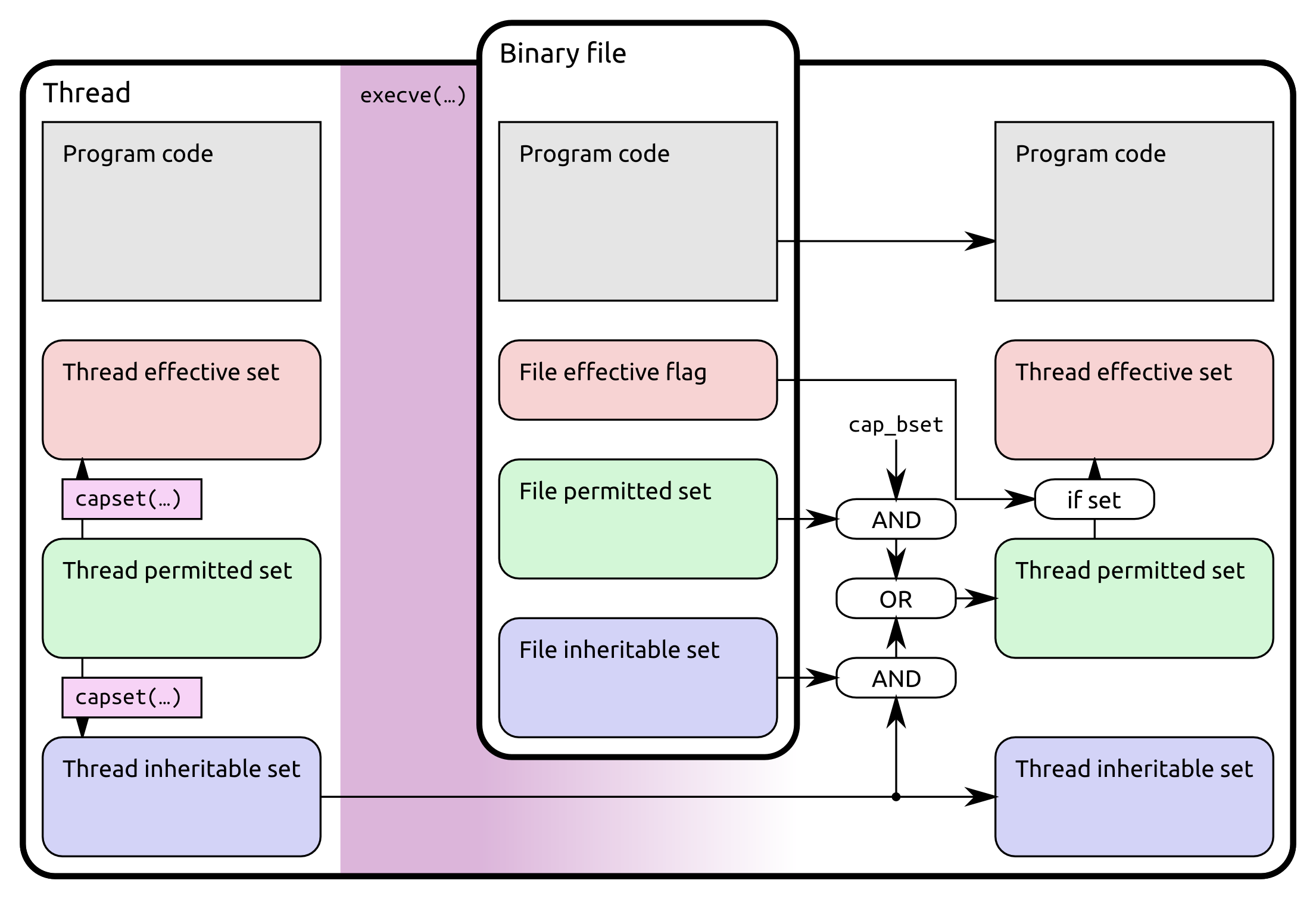
http://k3a.me/?p=603
Extensions
Samsung printer problem on GNU/Linux (printing black pages)
Linux

I’ve been using Samsung ML-2160 printer on Gentoo Linux for some time without problems but then I connected it to a box running Arch Linux and I some problems came up. It was printing almost completely black pages (with a few narrow white strips). I installed samsung-unified-driver-printer from AUR first and thought the problem is in […]

The post Samsung printer problem on GNU/Linux (printing black pages) appeared first on K3A.

Show full content

I’ve been using Samsung ML-2160 printer on Gentoo Linux for some time without problems but then I connected it to a box running Arch Linux and I some problems came up. It was printing almost completely black pages (with a few narrow white strips).

I installed samsung-unified-driver-printer from AUR first and thought the problem is in the packaging but the same problem appeared when installed unsing official install script.

From the CUPS error log it was clear that rastertospl crashes and despite the crash, CUPS sends the rastertospl output to the printer.

These errors are logged before the crash:
– double free or corruption (!prev)
– corrupted double-linked list
– free(): invalid next size (fast)

A stack trace points to the gnutls/libasm1 and the bug appears to occur at the end of the program execution when the program tries to do a cleanup. I suspect that a memory bug ocurrs sooner in the execution, also damaging some of the internal gnutls structures.

These error messages are all glibc memory operation checks which can be disabled by MALLOC_CHECK_=0 env variable but disabling them doesn’t help in any way – CUPS apparently sends the filter output to the printer despite filter being abort()’d by this check. 

A crash happened for me only when “Edge Control=On” AND “Toner Save=Off”. When I turned the Edge control “Off”, I could enable/disable the toner save and it wouldn’t crash anymore. BTW “edge control” probably doesn’t refer to the page edges; it probably controls how edges of black elements (characters) are rendered and there appears to be a minimal difference so keeping it Off is not a big deal.

So if your Samsung is printing black pages on GNU/Linux,  try disabling “Edge Control” and send complains to Samsung about their buggy rastertospl.

During my thoubleshooting, I found out that rastertospl is able to output more debugging messages. It didn’t help to solve this problem but in case anyone is interested, to enable verbose log, create a file “/tmp/rastertospl.lcf” with content LOG_LEVEL=9 and the next time the rastertospl is executed, it will output a more verbose log into “/tmp/rastertospl.log”.

The post Samsung printer problem on GNU/Linux (printing black pages) appeared first on K3A.

http://k3a.me/?p=590
Extensions
[cz] Proč je Facebook a Messenger špatný
UncategorizedWebalternativyfacebookmessengersdilenisocialweb

Facebook prý spojuje lidi a umožňuje být neustále s přáteli, aniž bych vystrčil nohu z baráku či postele. Facebook se tváří jako nejlepší kamarád a pomocník, že dělá pro nás to nejlepší. Ale je tomu opravdu tak? Facebook primárně dělá svůj business a uspokojení potřeb uživatelů je pro něj jen nutná práce navíc. Snaží se […]

The post [cz] Proč je Facebook a Messenger špatný appeared first on K3A.

Show full content

Facebook prý spojuje lidi a umožňuje být neustále s přáteli, aniž bych vystrčil nohu z baráku či postele. Facebook se tváří jako nejlepší kamarád a pomocník, že dělá pro nás to nejlepší. Ale je tomu opravdu tak?

Facebook primárně dělá svůj business a uspokojení potřeb uživatelů je pro něj jen nutná práce navíc. Snaží se z uživatelů (nebo spíš svých obětí) vymačkat co nejvíc zisku. To dělá hlavně servírováním reklam na webu a doporučováním sponzorovaných stránek a skupin. Přidává důvody k tomu, aby oběti trávili na jeho webu co nejvíc času a nestydí se dělat reklamu vašimi fotkami.

Zaprvé já jako introvert moc dobře vím, že Facebook nenahradí osobní setkání. Při osobním setkání se totiž předá mnohem víc informací, emocí a dobré nálady. S Facebook kontaktem taky člověk nezajde na kafe nebo se neproletí letadlem. Navíc i když ve FB mám asi 10 nejbližších lidí, napsali mi sami od sebe tak 4. Ostatním jsem psal jen já. FB dává jen falešný pocit blízkosti přátel.

Co je špatně:

  • Můžete mít nalajkováno tisíc stránek, ale uvidíte jen občas nějaký příspěvek, hlavně když si to jeho autor zaplatí. Facebook rozhoduje o tom, co uvidíte a co ne. Už jen tímhle ovlivňuje vaše názory a preference. A vytahuje peníze z autorů obsahu – čím víc peněz autor do toho nasype, tím větší zásah bude mít. Absurdní také je, že jednou v timeline něco zobrazí a při obnovení stránky už to tam není.
  • Podněcuje k závisti na jedné straně a k chloubě na straně druhé. Tím u některých lidí může prohloubit deprese a pocit méněcennosti (nemůže si dovolit to co jeho známý, jeho známý má na oko mnohem lepší život než on sám, atd.).
  • Podněcuje ke zbytečným diskusím, ztrátě času a produktivity. Člověk se navíc v online diskusích chová často jinak než ve skutečnosti, zvlášť když má “anonymní” profil.
  • Nedostatečně ověřuje účty, a tak se nedá věřit počtu lajků (falešné profily).
  • Násilně tlačí lidi do používání Messengeru a oficiálních aplikací, které kradou soukromá data z mobilu, jsou pomalé a žerou moc paměti. Snaží se maximálně omezit jakékoliv alternativy.
  • Vybízí k uploadu fotek a galerií, ale zmenšuje a komprimuje fotky, prostě tam nejde mít originál. Nahrané fotky používá pro vlastní reklamu a detekuje v nich lidi. A proto nikdy FB nebudu používat jako galerii.
  • Videa kombinuje z audio a video částí a dodává do HTML5 video elementu jako blob, znemožnující sdílet video přímo odkazem mimo FB. Přitom na FB lze sdílet cízí zdroje a velká část “zábavy” na FB jsou gify hostované mimo FB.

Facebook je špatný i z mnoha jiných závažných důvodů (v angličtině).

Já osobně používám FB hlavně pro čtení příspěvků ze stránek, které nemají web a jako místo, kde podniky a lidé často zveřejňují akce a pozvánky na ně. Jinak je to jen konzumní/zábavná platforma snažící se udělat u lidí návyk a co nejvíc stížit odchod (“nemůžu odejít, protože mám tam kamarády, co nekomunikují jinak než pres Messenger a mám tam 20 403 fotek ve 100 galeriích a o to přece nechci přijít”).

Messenger

To mi na FB vadí úplně nejvíc. Aby udrželi lidi na webu a odposlouchávali komunikaci lidí, přidali funkci kecálka a nanutili lidi používat jejich otřesně fungující a obrovský Messenger aplikaci na mobilech (iOS app má 249 MB! To je jak celý OS). Zárověň dělají co můžou, aby tuto síť nešlo používat s alternativními aplikacemi nebo mimo FB web. Spousta lidí je líná používat jiné, k tomu určené kanály (jako e-mail, telefon, Telegram či Jabber), a tak píše přes Messenger, v tom nepohodlném miniaturním okénku na webu.

Mesenger nerad používám z těchto důvodů:

  • Musím mít na PC puštěný celý velký FB web, jen abych napsal krátkou zprávu a k tomu mě samozřejmě rozptylují příspěvky na timeline, případně reklamy (tam kde je ještě neblokuju pomocí Facebook Unsponsored tampermonkey scriptu). Vesměs pak u FB trčím další minuty zbytečně navíc.
  • To malé okýnko je úplně na h*vno a nedá se tam poslat trochu delší text (výstup logu, kousek kódu, atd). A tím jak je to javascript app a dělají tam kdovíco, CTRL+V mi často ve Firefoxu rozhodí celý ten web a musím to pouštět celé znova v Chromium.
  • To velké okýnko (“webový Messenger app”) není konfigurovatelné a má tak velký font, že se opět nedá poslat trochu delší text.
  • Nemožnost používat cokoliv jiného než Messenger app nebo pomalý web. Je to jako by vám telefonní operátor nanutil používat jen jeho model telefonu a žádný jiný. Komunita sice dělá libpurple plugin (aby šlo používat Messenger pohodlně třeba v Pidgin či Adium), ovšem ten funguje tak, že interaguje s javascriptem na webu FB a čas od času se to rozbije a někdo to musí neustále dávat dokupy. Navíc já ty zprávy pak v Pidgin vidím krásně, ale druhá strana na webu vidí dlouhý text blbě.
  • Facebook všechny zprávy archivuje a odposlouchává bez možnosti volby. 
  • Omezují to tak, že zéměrně nejde nastavit ani auto-response. Spousta lidí by si totiž nastavila zprávu, ať jim píšou jiným kanálem. A to FB nechce dopustit.
  • Messenger mobilní app pro Android neumožňuje ani nastavit zvuk notifikace, barvu LEDky či tmavý vzhled. Vám nevadí, že všude na veřejnosti pinká všem ten stejný zvuk a nevíte jestli je to z vašeho mobilu?
  • Protože nepoužívám mobilní Messenger, nemám vůbec notifikace. Zprávy si všimnu, až když se nudím a pustím si mobilní FB web ve wrapperu MaterialFBook.
  • Tím, že to lidi používají to nutí používat jiné (mě).

Pokud hledáte něco rychlejšího, než e-mail a méně rušícího než telefon, je v současnu snad jen jedna funkční a pohodlná volba – Telegram.

Jasně, je tady WhatsApp, ale ten koupil Facebook, takže to je jen jiný kanál jejich odposlechu a v minulosti měl bezpečností problémy, kdy šifrování mělo fungovat, ale nefungovalo.

Pak je tady Hangouts, ale ten dává data Google, který už o lidech ví dost z Gmailu, G+ a hledání.

Skype je oldschool, zprávy umí spíš jen mimochodem, kvalita volání je taky nevalná a klient na mobil žere baterku, je nedůvěryhodný a furt mě dával z Invisible do Online.

Rozumnější alternativy jsou TextSecure, který ale nemá normální PC app (jen Chrome plugin) a Wire, který je hodně dobrou alternativou Telegramu, ale není ještě tak “vymazlený” a nemá velkou základnu uživatelů. Pak pár XMPP (Jabber) klientů, ty ale nefungují moc dobře na mobilu, resp. při paralelním používání na mobilu i PC a je potřeba mít dobrý XMPP server. Přesto používám Jabber s klienty Conversations (android) a Pidgin (desktop). Tahle kombinace docela funguje, ne však tak dobře jako Telegram.

Proč Telegram (hlavní důvody):

  • Klienti jsou open-source, dá se tedy ověřit kontrolou kódu že fungují jak mají.
  • Volitelná podpora end-to-end šifrování, které se dělá v klientech, kteří jsou auditovatelní viz. minulý bod. Zabezpečený chat mezi dvěmi mobily tedy nejde na cestě mezi zařízeními odposlechnout.
  • Vývojáři smějí dělat alternativní klienty a je tedy možnost volby.
  • V klientu možnost přiřadit různé notifikace různým uživatelům, nastavení barev rozhraní a pozadí konverzace. Klient celkově nabízí spoustu nastavení dle osobních preferencí.
  • Oficialní mobilní klient nežere moc baterku a data.
  • Funguje perfektně mezi platformami (můžu začít psát na PC a pokračovat na mobilu).
  • Dobře vyřešené telefonování, lepší než Skype, automaticky end-to-end šifrované a jde dobře používat i na mobilních datech.
  • Synchronizace historie, smajlíci a stickers jsou samozřejmostí.

Nevýhody a rizika Telegramu:

  • Klienti sice mají otevřený kód, ale servery jsou uzavřené. Může se teda stát, že zkrachují a služba dál nebude fungovat, nebo se rozodnou přidat tam spam či reklamu, přestože teď hlásají, že služba je zdarma a na vždy. Tohle riziko se dá akceptovat s přihlédnutím k tomu, jak dobře to celé funguje. 
  • Uživatelé jsou identifikováni telefonními čísly a volitelně přezdívkou. Sdílet telefonní číslo není příjemné, ale funguje i jako ochrana účtu. Při povolení přístupů ke kontaktům v mobilu, dokáže Telegram sám najít lidi z kontaktů, kteří používají Telegram a je možno s nimi ihned komunikovat.
  • Klient vyžaduje aspoň iOS 6
Závěr

Už jednou jsem FB účet v minulosti zrušil poté, co jsem si řek, že mi za ty roky nepřines žádná významnější pozitiva. Po čase jsem se nudil, a tak jsem ho znovu založil. Rušit ho nebudu, protože mi přeci jen pár pozitiv přináší:

  • Již zmíněné pozvánky na akce (jsou na to sice i jiné weby, ale tady je ten seznam přátel, tak budiž, funguje to docela dobře a zatím to FB nefiltruje a neříká, která akce je lepší než jiná, aspoň mi to tak nepřijde)
  • Občas zahlédnu že někdo doporučuje nějakou restauraci či dostanu jiný tip na něco
  • Jsou určité firmy jako Zonky, které nejsou schopny založit své fórum, a tak mají jen skupinu na FB
  • Jsou firmy, které nejsou schopny si založit web, a tak se dá třeba vybrat pizza jen na jejich FB stránce

Není to mnoho, proto kdyby skončili, byl bych jen rád a lidi by si našli normálnější alternativy pro jednotlivé potřeby. Lidstvo je ale na nich bohužel už příliš závislé a FB dělá vše proto, aby měli iluzi, že je to to nejlepší a že to používá každý, takže k tomu nejspíš jen tak nedojde.

Budu FB používat občas dál, ale rád bych s vámi psal svobodnějším kanálem jako Telegram či Jabber!

Proto mějte prosím rozum a komunikujte e-mailem, telefonem a Telegramem!
Pokud se chcete se mnou spojit Telegramem, má přezdívka je @kiminari. Případně pište na . :)

The post [cz] Proč je Facebook a Messenger špatný appeared first on K3A.

http://k3a.me/?p=547
Extensions