My docker containers suddenly were unable to resolve DNS names, which blocked them from accessing the remote database they need. The symptoms were various but in the end the containers...
Show full content
My docker containers suddenly were unable to resolve DNS names, which blocked them from accessing the remote database they need.
The symptoms were various but in the end the containers failed to start.
Go apps had a log similar to this:
dial tcp: lookup db.example.com on 127.0.0.11:53: server misbehaving
Python apps were outputing large stack traces, and so on.
The fix was to completely remove the container (docker compose down) and re-create it. Stopping and restarting it was not enough.
I still don’t know the root cause, but the incident is over 😮💨
When handling pictures from iOS devices on other operating systems, we often see the infamous .heic extension. Some web services like ones who offer to produce a photo book or calendar...
Show full content
When handling pictures from iOS devices on other operating systems, we often see the infamous .heic extension. Some web services like ones who offer to produce a photo book or calendar and which are overly popular around the winter festivities only accept JPEG files.
Here’s a quick snippet for converting these HEIC files to JPEG (it’s fish but bash or other shells probably provide similar functionalities):
for f in *.heic
  heif-convert "$f" "$(path change-extension 'jpg' $f)"
end
It depends on heif-convert, which is provided by libheif-tools on Fedora.
dnf install libheif-tools
If you have the relevant commands for bash/zsh and other distros, please send an email so I can update this article 😊
“🏃🏻 On a rush? Don’t want to read the whole piece? Don’t bother asking an AI to summarize! Read the TL;DR: I tried moving from an iPhone 15 Pro to a Pixel...
Show full content
🏃🏻 On a rush? Don’t want to read the whole piece? Don’t bother asking an AI to summarize! Read the TL;DR:
I tried moving from an iPhone 15 Pro to a Pixel 9 Pro with GrapheneOS. Most things worked fine. Others like family photo sharing and calendar sharing were clunky and/or required server-side components that I didn’t want to maintain. Still others like mobile payment or AirTag-like devices just didn’t work. So I moved back, glad I did the experience.
📖 Context
I’ve been using iOS on mobile since the iPhone 5 came out in 2012. In June 2025, after nearly thirteen years, I wanted to try something else. I wanted to check whether the grass was greener over there. “Over there” being Android, since I wasn’t ready to jump to what I feel are more experimental mobile OSes like postmarketOS.
The Android space is largely dominated by Google. Leaving Apple for Google wasn’t in my plans, I’ve already picked my poison between the two. There are however alternative builds made by privacy/security-conscious people, and that’s what I wanted to try. After doing some research, I decided on GrapheneOS since it resonates most with my values. It’s only compatible with Google Pixel devices, so I needed one.
At that time, my phone was an iPhone 15 Pro. The latest generation of iPhone was 16, so I had a very recent device. I didn’t want to compare apples to oranges and be biased with an old/slow device, so I wanted to get my hands on a recent Pixel. There were sales running at a cell phone provider, so I went to a shop and grabbed a Pixel 9 Pro — the latest generation available.
At home, I flashed it with GrapheneOS, tried it as a secondary device for a week then switched to it full time. I had to notify my iMessage groups that they wouldn’t be able to reach me anymore. Fortunately, I didn’t have many and it wasn’t very difficult to convince them to use Signal instead.
After a month of use, I decided to go back to iPhone and iOS.
👌🏻 What worked well
First, I want to mention that GrapheneOS works just fine — and that’s what I expect of my phone. I was initially afraid that I wouldn’t be able to use some of the apps I needed (e.g. banks), but it turned out OK.
Hardware
The Pixel’s photo module combined to the Pixel Camera app makes gorgeous photos. The 5x lens is especially awesome.
The battery life was good. I expect my phone to last for a day at least, and GrapheneOS on Pixel 9 Pro passed with flying colors. I had several occasions to use the camera more intensively and even on these days I didn’t need to charge before the night. It also didn’t heat that much, at least not at levels or places that were disturbing during use.
The fingerprint reader under the screen worked fine. It produced some false negatives but not enough to be annoying. It took a bit of time to get used to the location and to the fact that I needed to use my finger to authenticate (recent iPhones have hardware for face authentication) but it was mostly a smooth ride after that.
I have several MagSafe chargers around the house, and the case I picked for the Pixel is compatible with them, so I could continue using them.
Apps
The community is very open, with forums and GitHub issues for example. Lots of literature online.
Alternative app stores are available, mostly around free software.
There are free (as in free speech) apps for many things.
I live in Lyon (France) and they have an Android app to store public transportation tickets on the phone. This just doesn’t exist on iOS.
KDEConnect works fine with my Linux device, allowing me to share a clipboard and share files between my laptop and phone. It had a few disconnects, but I attribute them to KDEConnect itself and not GrapheneOS.
OS
Android has a notion of “Professional profile” on which you can install apps that you don’t want running 100% of the time. This profile can be turned off which causes all apps in the profile to be “paused”. They don’t work in background or send notifications. Useful for various apps such as work chat, email, calendar, etc. that I could turn on only during work time and disable when going home.
Many apps require some form of Google Play services running on the phone. GrapheneOS chooses to allow the user to run these Play services sandboxed, as any other app on the phone. I found it worked quite well.
Notifications management on Android is really nice. If the app plays nicely, the OS can discriminate between different categories of notifications and let the user chose in the system settings how they want to handle them. This removes a burden on the app developers because they don’t have to develop a UI for this, and gives more power to the user.
Visual voicemail worked in the Google Phone app (not in the default phone app).
👎🏻 What didn’t work so well
Photo library
My wife has an iPhone as well and we have an iCloud Shared Photo Library setup so the phone automatically shares photos we take at home or when we’re together. This avoids having to store them twice, and avoids constants “could you send me the pictures you took tonight?”. This iCloud feature is obviously reserved for iOS devices. We grew accustomed to it however, so I needed to find a solution.
Enter immich. They describe themselves as a “self-hosted photo and video management solution”. They have a server component to host and process photos, and mobile apps for Android and iOS to upload them automatically and access them. The UI is similar to Google Photo (which I believe is a good thing).
Immich has a partner sharing feature which works similar to the iCloud Shared Photo Library except that it’s all or nothing: you can’t decide which pictures to share.
I set it up on my VPS and re-uploaded all my iPhone photos so they could be processed. This took some time but ended up working. I also setup my wife’s phone similarly.
In the end, we had a working solution but not as good as what we had on iOS:
we couldn’t decide which pictures to share or keep to ourselves
the app wasn’t as integrated to the OS (but worked well)
most importantly: it was yet another thing I had to maintain server-side, and as I mentioned before, I’m trying to avoid this trajectory.
Tracking devices (AirTag-like)
I have several AirTags for things that I don’t want to lose: my keys, badge, etc. These work only with iPhones so I wanted to try an alternative. I already knew about Pebblebee because I have one of their “card” devices to slip in my wallet. They offer rechargeable devices where most of their competitors sell devices with non-replaceable or rechargeable battery — basically e-waste.
So I purchased a few.
Unfortunately, GrapheneOS doesn’t support Google’s Find My Device network and Pebblebee discontinued their own tracking app for new devices, so I was left without a solution.
Tracking the phone
I’m used to be able to locate my phone if I forget it somewhere. Since Google’s Find My Device was out of the equation, I searched for an alternative. I found FMD. It works quite well, I was able to track my device when on, and I could even take a picture of the cameras. However, if the phone got stolen, the first thing the thieve would do is turn off the phone or restart it. And in that case, FMD becomes useless because the app only restarts when unlocking the phone after booting (unless the device is rooted, which I don’t wanted).
Also, it was Yet Another Thing I Had To Maintain™ server-side.
Mobile payment
GrapheneOS doesn’t support Google Wallet, so users rely on banks providing a dedicated app for mobile payment. My main bank does, no issue there. However, my meal card and other banks don’t, so I have to carry around my wallet with me. At this point, I’m so used to be able to pay with my phone that this is a real annoyance.
Calendar and contacts sync
I didn’t want to give Google my calendars and contacts again, and I couldn’t sync iCloud data. I worked around using radicale, and it worked fine but it was Yet Another Thing I Had To Maintain™.
Also, calendar sharing on radicale was fun: I had to symlink a file between two directories on disk.
Other minor annoyances
The default keyboard wasn’t to my taste (but I found alternatives).
No gesture for “Forward” in Firefox. In Safari on iOS, swiping left to right calls the previous page and right to left calls the next page. On Android, both these gestures are for “Back”.
No builtin reliable backup system. Seedvault is builtin but apparently isn’t that reliable.
I found the emojis ugly.
Some AirPods Pro feature, like conversation detection, don’t work. Could probably be worked around with a more Android-friendly device.
The wallabag app doesn’t support 2FA on Android.
I was unable to print a shipping label correctly from the phone. I never had any issue on iOS. I tried system defaults and several apps, no dice. The orientation was always wrong and the label only printed partially.
Opsgenie on Android handles urgent notifications badly — a pity given that’s their core business.
Face unlock is not available. It is on Google’s Android but it only uses the camera which can apparently easily be tricked so GrapheneOS disables it.
🪃 Conclusion
I’m glad I was able to test things out. The Pixel 9 Pro is a good device, and GrapheneOS is a good OS — they’re just not for me right now. You can absolutely make it work but I feel like it requires more energy than I have available now, so I decided to go back to iOS.
I sold the Pixel and its accessories for 30€ less than I purchased them a month earlier, not a bad deal in the end. It’s like I rented a phone for 1€/day.
iOS doesn’t align with my free software values, but for now it’s a tool that gets the job done and gets out of the way. I don’t want my phone to be a project, I have enough of those.
If you have the means — either financially or if you find a cheap decent device — I encourage you to follow a similar experience! It was enriching. At first I really thought it would stick, but it turned out otherwise.
“💡 OVHcloud is my current employer. This is my opinion, as a customer, on a service they provide.” ⏮️ Initial costWhen moving my home server to a VPS, I made some calculations...
With the VPS, here's the cost breakdown (including 20% VAT in France):
VPS: 13.56€/mo
Automated backup option: 3.96€/mo
MySQL: 7.908€/mo
PostgreSQL: 7.908€/mo
Total: 33.336€/mo or 400.032€/year
I could save some money - about 30€/year - by committing to the VPS for one or two years but I'm giving myself some time before doing that.
[…]
The MySQL DB is used only for three instances of Ghost (open source blog software). I'm looking at alternative solutions for the blogs. Removing MySQL would save me ~96€/year so the recurring cost would go even below the homemade setup.
⏩ New offer
Fast forward to now, I’ve made a few changes:
Thanks to a new VPS offer at OVHcloud, I now pay 5.39€/mo for more resources (4 CPU and 8 GB RAM)
Automated backups are now included
I moved my blogs over to Pika, which costs 4.33€/mo ($60/yr), and I was able to shut down the MySQL instance
I still use a Web Cloud Database PostgreSQL instance: 7.91€/mo
Total: 17.63€/mo or 211.56€/yr
This is less than the ~334€/yr I estimated for the home setup, and nearly half of the initial cloud cost. I have enough resources for my current needs, and I can even scale vertically: the next plan gives me 50% more CPU and RAM for +3€/mo, still well within reason.
Committing for 12 months now looks far less interesting: I would only save 10€ over the year.
🧐 Opinion
So far, I’m glad! I initially started renting my VPS at OVHcloud because it’s a French company 🇫🇷🐔 and because I wanted control on my data, but the price was steep compared to competition. I’m now also staying for the price. Their offer is quite competitive now!
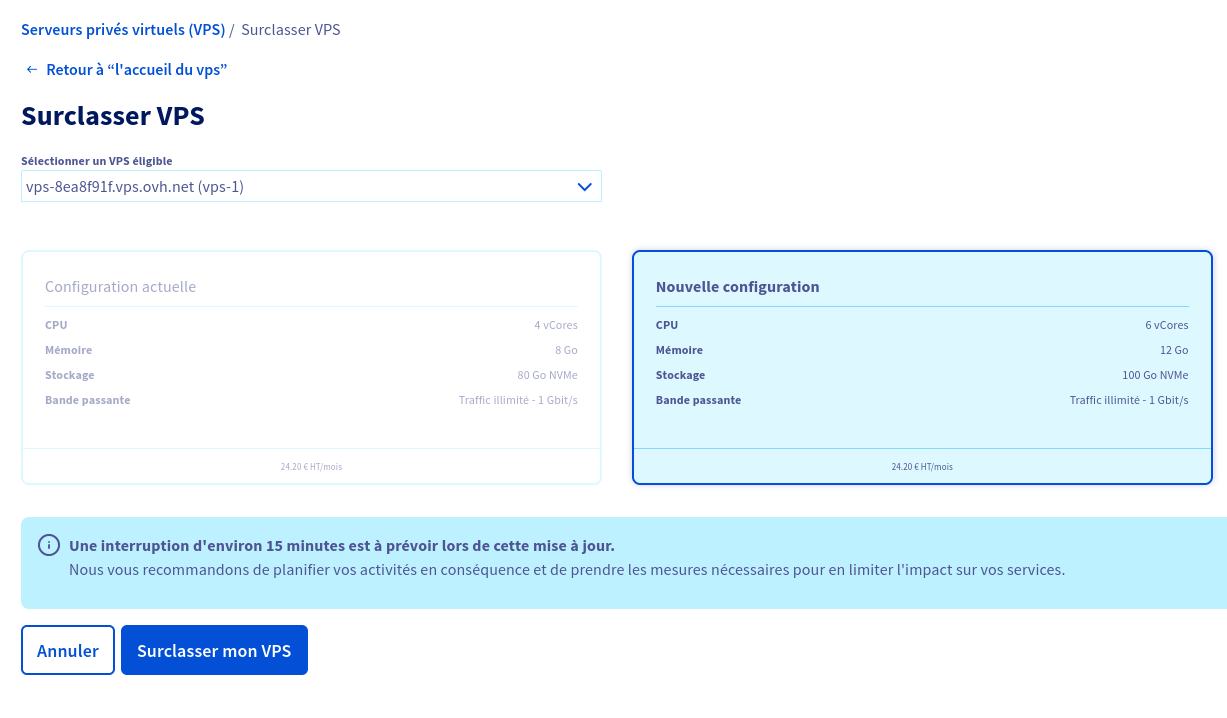
The migration was not perfectly smooth. I had to order a new service and reinstall everything from scratch. There was an option for me to upgrade to the new offer at the same cost but I wouldn’t get as much as the new offer advertised for that price, and I wasn’t presented with an option to stay on a similar resource level and reduce the monthly fee. See the images below for context.
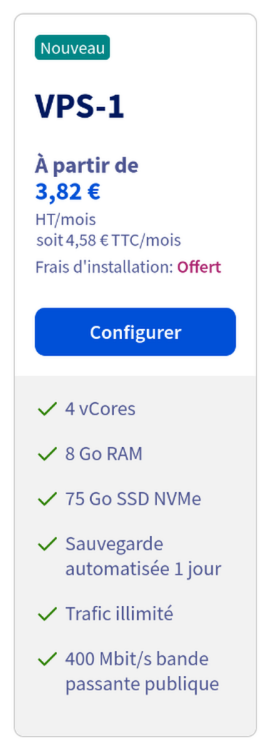
The plan I chose in the new offer: 4 CPU and 8GB RAM is priced at 3.82€/mo (excl. taxes and with commitment)
Upgrade screen: on the left, the configuration I had before with 4 CPU and 8GB RAM for 24.20€/mo and on the right 6 CPU and 12GB RAM for the same price.
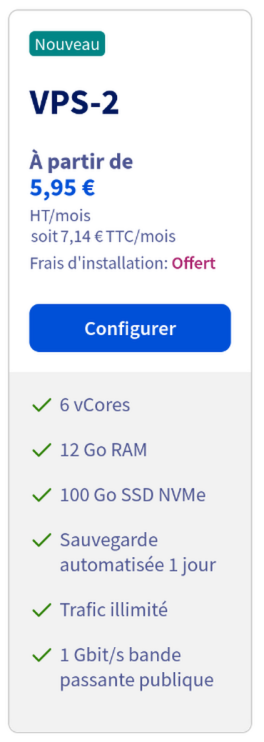
The plan suggested by the upgrade screen: 6 CPU and 12GB RAM, priced at 5.95€/mo for new customers but 24.20€/mo when upgrading.
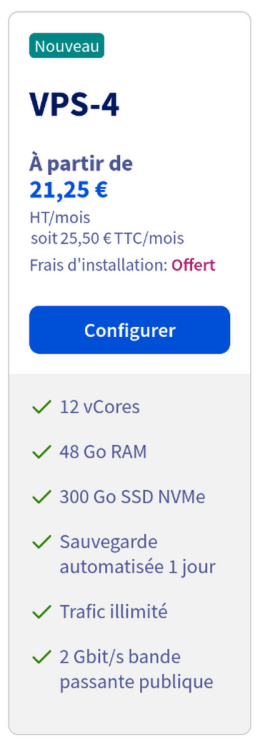
For 21.25€/mo on the new offer, I could get as much as 12 CPU and 48GB RAM: twice the CPU count and 4x the RAM.
Thankfully, I already had most of the setup process automated, including application deployment and DNS record management, so migrating wasn’t too difficult. All applications using a database were already using the managed instance outside the VPS. I had to transfer a few files but nothing that scp and rsync couldn’t handle. I regret the marketing move though, it doesn’t seem very fair.
I may investigate in using S3 as a backend for file-based applications, to make the VPS deployments truly stateless. I’m not sure yet. Stay tuned! 😉
ContextFollowing my Terraform module adventures, I wanted to detect potential duplicates in our numerous ACLs, because they would only produce errors during application of the plan, after merging. And relying...
Following my Terraform module adventures, I wanted to detect potential duplicates in our numerous ACLs, because they would only produce errors during application of the plan, after merging. And relying on humans to find a needle in the proverbial haystack wasn’t going to scale. I needed to automate this.
Duplicate you say?
Two ACLs are considered duplicates if they share the same source (token) and destination (endpoint).
Enter tflint. We already use it to make sure our code follows common best practices, and it advertises itself as “pluggable”. Unfortunately, it requires writing a separate Go program using a specific library, creating build binaries, releases, etc.
Go is in our tool set, but I had something much simpler in mind. Ideally, I could package everything in our Terraform repository to avoid having a separate thing to maintain.
tflint promotes another option with the opaplugin. It allows you to write custom policies in a language called Rego. It also provides custom functions to retrieve data from your Terraform definitions. We can also write tests for our rules.
The rule
Here is the rule I came up with for our duplicate detection. I’m no expert in Rego nor Terraform, so if you see something that I could improve, please let me know! The rest of this section is dedicated to explaining every step.
package tflint

import rego.v1

resource_acls := terraform.resources("arsenal_gateway_policy", {"token": "string", "endpoint": "string"}, {})
module_acls := terraform.module_calls({"token": "string", "endpoint": "string"}, {})
all_acls := array.concat(resource_acls, module_acls)

# filter out resources and modules
# which don't have a token or endpoint
# or which have undefined ones
# as we can't check for duplicates in this case.
acls := [
  acl |
    acl := all_acls[_]
    "token" in object.keys(acl.config)
    not acl.config.token.unknown
    "endpoint" in object.keys(acl.config)
    not acl.config.endpoint.unknown
]

acl_pairs := [
  acl_string |
    acl := acls[_]
    acl_string := concat(" -> ", [acl.config.token.value, acl.config.endpoint.value])
]

acl_duplicates := {
  i |
    pair := acl_pairs[i]
    count([x | some x in acl_pairs; x == pair]) > 1
}

deny_duplicate_acl contains issue if {
  _ := acl_duplicates[i]
  issue := tflint.issue(`Duplicate ACL found`, acls[i].decl_range)
}
terraform.resources and terraform.module_calls are documented here. They return a list of resources of the given type or module calls, and we request the token and endpoint values. We then concatenate everything to the all_acls list.
# filter out resources and modules
# which don't have a token or endpoint
# or which have undefined ones
# as we can't check for duplicates in this case.
acls := [
  acl |
    acl := all_acls[_]
    "token" in object.keys(acl.config)
    not acl.config.token.unknown
    "endpoint" in object.keys(acl.config)
    not acl.config.endpoint.unknown
]
We filter out the items we can’t work with: the modules which don’t have a token or endpoint (we have other module calls), and the ACLs for which one of the values is unknown. This can happen if one of them is defined as the output of another module, resource or data block for example, and in this case we have very little to work with, so we chose to exclude them.
We use a list comprehension to transform this list of modules to a list of strings containing the token and endpoint of the modules. We end up with something like this:
In the end, we declare our rule, which produces an issue for every item in module_acl_duplicates. It uses the indices stored in this list to retrieve the original module calls saved in module_acls in order to fetch their decl_range, which allows us to produce a nice error message pointing directly at the relevant source code.
One thing that is only written deep in the “introduction” docs of the plugin and which cost me quite some time was the fact that rules must conform to a specific naming scheme. Specifically, the rule name must start with a given string to be interpreted, in our case we chose deny_.
$ <span class="bash"><span class="bash"><span class="bash">tflint</span></span></span>
2 issue(s) found:

Error: Duplicate ACL found (opa_deny_duplicate_acl)

  on envs/prod/acl.tf line 97:
  97: module "acl_foo" {

Reference: ../../.tflint.d/policies/duplicate_acls.rego:31

Error: Duplicate ACL found (opa_deny_duplicate_acl)

  on envs/prod/acl.tf line 111:
 111: resource "gateway_policy" "bar" {

Reference: ../../.tflint.d/policies/duplicate_acls.rego:31
Tests
This rule can be tested using the facilities provided by the plugin. We test that we detect duplicates across resources, modules, a mix of both, and that we don’t report errors when everything is fine.
This pre-commit config tells the hook to use the root .tflint.hcl configuration file for every subdirectory, and to delegate the directory change to tflint so the error messages include the whole path of the file and not the path relative to the directory.
Then, we configure tflint using .tflint.hcl placed at the root of the repository:
plugin "opa" {
  enabled = true
  version = "0.9.0"
  source  = "github.com/terraform-linters/tflint-ruleset-opa"

  # this is relative to the directory in which tflint will be run: each subdir of envs/ and modules/
  policy_dir = "../../.tflint.d/policies"
}
As mentioned in the comment, we must declare the policy_dir relative to where tflint runs. Since it changes directory to run two levels deep, and we want our policies to be shared, we have to tell it to look for policies in the root of the repo.
Conclusion
This was quite a piece, but I’m glad we now have something to catch issues before they even happen. All of this can work locally, on the developer’s machine, before even spending time planning thus reducing the feedback loop to a minimum.
There is still a lot to learn about Rego, which I’m still deeply unfamiliar with but looks like a powerful tool. I don’t know whether I’ll spend much more time with it though, as I don’t have other immediate use cases.
Let me know if you see something I can improve in this setup! I’m still quite new to all this and I’m eager to learn.
ContextMy team at OVHcloud is in the process of adopting Terraform for various tasks related to software deployment on our internal infrastructure. The Developer Platform team offers a Terraform provider,...
My team at OVHcloud is in the process of adopting Terraform for various tasks related to software deployment on our internal infrastructure. The Developer Platform team offers a Terraform provider, which exposes raw resources that we can manipulate to deploy software, expose APIs, manage access control, etc.
I won’t explain all the Terraform related terms in this article. You can refer to the Terraform glossary.
After some experimentation, I decided to write a couple of Terraform modules1 to reduce the boilerplate of our use cases.
Issue
One of the modules was dedicated to producing a gateway_policy resource, and here’s how I initially implemented it:
variable "project" {
  type = string
}

variable "stack" {
  type = string
}

data "project" "this" {
  name = var.project
}

data "kubernetes_tenant" "this" {
  project = data.project.this.name
  name    = var.stack
}

data "gateway_account" "this" {
  project = data.project.this.name
  name    = var.project
}

resource "gateway_policy" "this" {
  kubernetes_tenant = data.kubernetes_tenant.this.id
  gateway_account   = data.gateway_account.this.id
  # ...
}
I’m omitting what makes it interesting as a module, it’s a bunch of variable manipulation unrelated to what I want to discuss in this article.
Terraform was fetching the same data over and over again, because the variables project and stack were (purposefully) given the same value in every call. Far from a useful use of resources!
Refactor
The gateway_policy resource needs access to the kubernetes_tenant and gateway_account though, so I refactored my module to take these as inputs instead.
This allowed Terraform to fetch the data only once and pass it down to all module calls. The plan time went down from 80s to 40s, with the same result.
I learned a couple of things along the way:
data calls are costly: push them up, and avoid them in modules if possible
it’s worth properly reading the whole plan from time to time to look for optimisation opportunities, instead of skipping to the end where the infrastructure changes are listed.
You can think of modules as kind of functions that take inputs, produce resources, and return outputs.
TL;DR: this blog is now hosted at Pika! Many thanks to Barry for the smooth migration. I was lately using a self-hosted Ghost instance to publish on this blog but...
TL;DR: this blog is now hosted at Pika! Many thanks to Barry for the smooth migration.
I was lately using a self-hosted Ghost instance to publish on this blog but I was unsatisfied for several reasons:
The UI was built around features like paid subscriptions, engagement, growth, …
The editing experience on mobile was suboptimal
It was hungry for RAM — my poor VPS had trouble handling three instances even with remote databases.
The few things I liked were that it’s free software and it has built-in first-class citizen email sending capability.
I went on the hunt for another blogging software to migrate my three instances then (this blog and two family travel logs). I wanted something:
simple,
easily self-hostable or affordable in SaaS,
beautiful by default,
usable by my non-tech wife.
I found many platforms, some of which great but none filling my criteria. They were either ugly, too geeky, crippled with AI, required building things myself, wouldn’t work out of the box, had an editor that’s hard to work with on mobile, pushed towards monetization, weren’t maintained anymore…
Then, I found Pika. It’s not free or open-source software but the people at Good Enough have values that resonate with my own. I found its simplicity refreshing and its pricing fair. It can be customized with color themes and fonts and power users can inject custom CSS. You get 50 blog posts for free and to go further (or to use a custom domain), the subscription is $60/year. They don’t yet have email built-in, but I hear it’s cooking 👨🏻🍳
💡 Edit 2026-01-05: Email has landed a few months ago.
Pika is blogging powered by people. No algorithms or AI, but real human beings writing about their experiences. 🐇
I had three blogs to migrate and $180/year for one hobby and two family blogs was not conceivable, so I sent an email to discuss the options. I had the pleasure to exchange with Barry, and he told me that they had in their backlog a “multi-blog” feature on a single subscription. He was kind enough to send a coupon so that I only had to pay a single subscription and we could merge the accounts when the feature lands.
Barry then worked on an import script for Ghost, which would help me get started here without having to manually copy over my posts. It was not 100% perfect but it was good enough so that I only had an hour or so of work to fix a few things here and there.
Once I’ll have migrated the third and last blog, I’ll be able to shut down the MySQL instance that supports it and nearly halve my blog direct costs (from ~95€/year to ~53€/year at the current exchange rates), while supporting people building good enough software.
💡 I’ve since migrated all three blogs. For an update on my setup’s pricing, read this piece.
Thank you very much again Barry, for bearing with my tsunami of questions and helping me migrate. I’m very happy here for now.
I encourage you to try out Pika if you’re looking for a place to host your blog!
I’ve been a heavy user of Apple products for a while now (see my two previous posts mentioning it), and it’s time to leave the walled garden for more free...
I’ve been a heavy user of Apple products for a while now (see my twoprevious posts mentioning it), and it’s time to leave the walled garden for more free and open source pastures.
I first requested a Linux laptop at work. They were kind enough to provide one even though my macOS machine hadn’t reach its “time to live”1. The laptop is setup with Ubuntu 22.04 LTS, and I was feeling already lighter than with the previous machine (despite the heavier hardware 🙃).
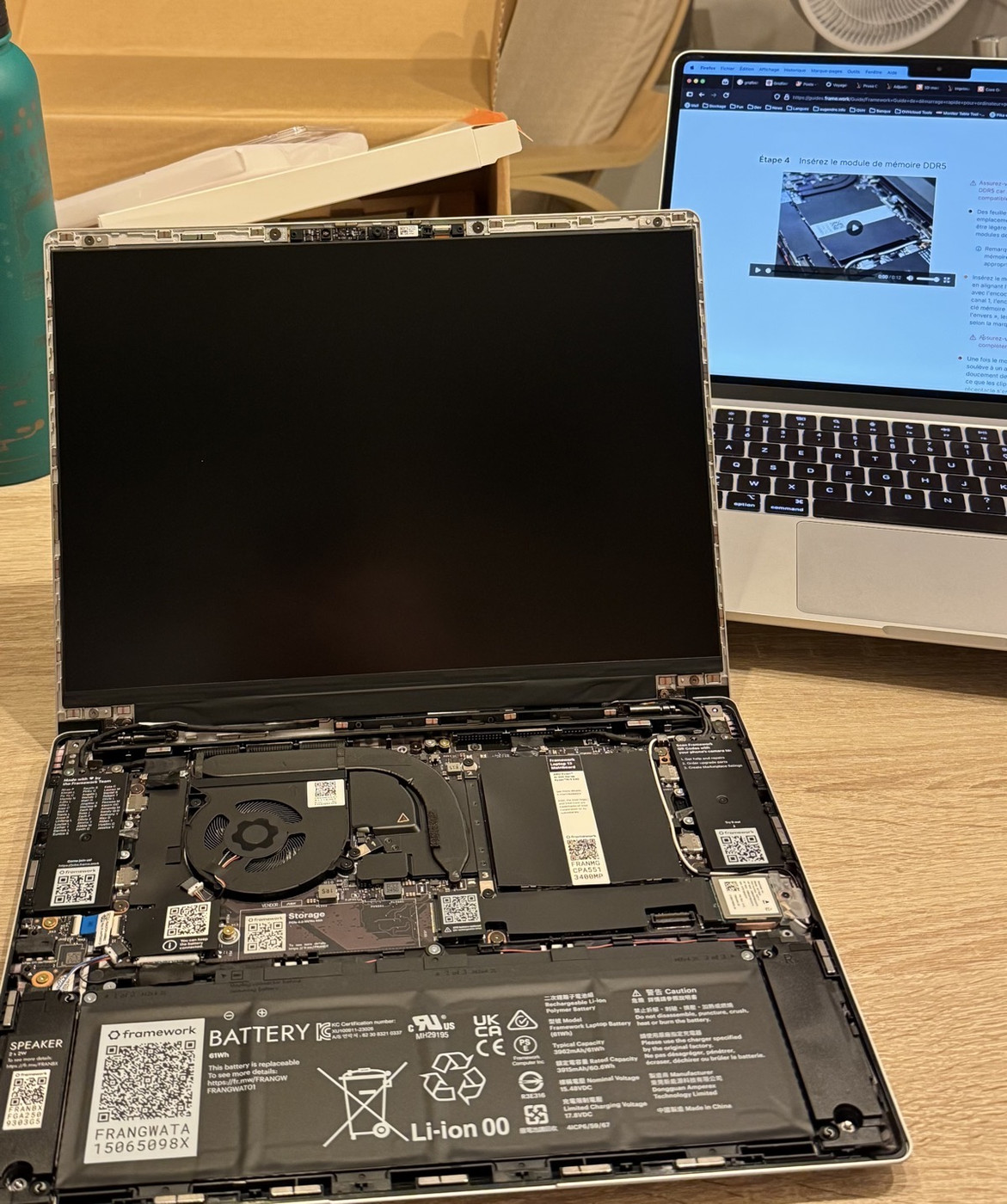
Then came the personal machine. I was daily driving a MacBook Air M3, which is compact, light, powerful and energy efficient. I’ve been eyeing on the Framework Laptop 13 for a while now and, inspired by Kev, decided to pre-order the latest generation, DIY edition. You can find my config by following this link. I went with the lowest end AMD CPU, some expansion cards, and purchased RAM and storage separately. It cost me 1380€ total.
I received it this week and the unboxing experience was very pleasant. I installed RAM and storage with ease. It’s not my first computer build, but the instructions were detailed and there were videos to help with every step. I’ve had more trouble than I’d have liked installing the screen bezel though, but it’s there now.
The result looks and feels fantastic!
There are a few things that I miss from my MacBook:
AirDrop and Continuity: I used to be able to instantly share information between my iPhone and my computer. After switching to Fedora this seems gone — if you have workarounds, let me know!
Fanless design: the fan turns on a bit more than I’d like — which would be never, let’s be honest.
One hand lid opening: the lid on the Framework 13 is hard to open. The notch on the bottom part is not very deep and the hinge is strong.
The trackpad: I’ve never met a better trackpad than on Mac laptops. The trackpad on Framework is hard to press on top.
There are a few things I prefer on Framework:
It can run Linux
It has hardware switches for mic and camera
I can repair it
It can be upgraded
All in all, I’m quite happy with his move. Installing Fedora was a breeze, everything worked out of the box. I’m not 100% sold on GNOME though, I may try a different desktop environment. I may also cover it with stickers, I’m not sure yet 😇
For economical and ecological reasons, the policy at OVHcloud is to keep company provided laptops at least three years and to only replace them on-demand and not automatically.
Two months ago, I was busy building a system to automatically upload files sent via our company messaging system to a malware detection API. The system has to respond within...
Two months ago, I was busy building a system to automatically upload files sent via our company messaging system to a malware detection API. The system has to respond within 10 seconds, otherwise the file is automatically distributed to recipients. Everything was fine during testing. Just after the rollout however, we started to see our Go microservice fall apart and restart again and again.
📊 Death by Powerpoint
During testing I only worked with small files because the upload limit on the test messaging instance was set to 5MB and because it was faster. However, on the production system the threshold is much higher: 50MB per file. My poor k8s pods and their 20MB RAM limit were quickly overwhelmed by users sharing large Powerpoint files.
So, first: increase the RAM limit and scale up the deployment to 8 replicas instead of 2. That would give me some time to handle the next issue.
🐜 What's next?
Next was the fact that a single file upload was limited to 50MB but users could upload several files at once in a single message.
One solution could then be to split the file handling in two parts: for each received message, loop through all files and send each to a queue system to be handled by subscribers. But I was happy with my single, no-dependency binary and I didn't want to introduce complexity unless absolutely necessary.
Also, since the limiting factor in this case was the file size and not the number of files, I wanted to find a solution that would work for either one large file or many small files in parallel.
The idea then was to introduce a semaphore.
🚦 What's that?
A semaphore works a bit like a bag of tokens. If you want to access a section restricted by the semaphore, you request some tokens. If there are enough tokens in the bag, you're allowed to continue. Otherwise, you either wait until there are, or you error out (depending on your use case).
In our case, we defined the maximum RAM a pod should have as 200MB and we configured the semaphore size to a bit less than 200x1024x1024x8 (the number of bytes in 200MB). Then, before downloading a file, we send a HEAD request to retrieve the file size in bytes without downloading it. We request that many tokens to the semaphore with a timeout of 5 seconds. If the timeout is reached, we reject the file so it's not distributed. Otherwise, we continue down our happy path.
Not single OOMKill since this update was deployed! Also, only two files in the last 30 days were rejected because of the semaphore timeout out of more than 90k files processed, or 0.002%. Not bad!
📖 ContextIn 2025, I've decided to reassess the software I self-host and by extension maintain. This led to the decision to move away from Nextcloud, among other things. Nextcloud is...
In 2025, I've decided to reassess the software I self-host and by extension maintain. This led to the decision to move away from Nextcloud, among other things.
Nextcloud is a great piece of software but it took a lot of my mental energy to maintain in a working state, especially for several users who rely on in being up and running when they need it the most. It got better when I moved to the "all-in-one" setup, but still.
I also wanted to move most of my hosted software away from the server in my house because I realized that I don't like waking up to a server reporting that backups could not complete due to faulty disk sectors. Important services would move to a cloud server while storage hungry but non-critical services (like media consumption) could stay home. Also, it would free up valuable space under the TV 😁
💾 File storage
Nextcloud served among other things as backup for our photo library and I didn't want to pay a fortune in server storage, so I took the decision to move my personal "drive" to pCloud, along with my wife's. They have lifetime offers, store data in Europe, and I had already paid for a lifetime personal plan in 2018. I upgraded it to a family plan and I don't worry about storage anymore.
2TB is plenty for now, including the photo library. I'd like to find a solution for the iCloud shared library pictures though, because we have a bunch of pictures being uploaded twice.
I keep it synced to an S3 bucket with rclone because I feel safer having a backup plan in case pCloud suddenly goes out of business.
☁️ New setup
I rent a VPS at OVHcloud. It has 2 vCores, 4GB of RAM and 40GB of storage. Quite the downgrade from my 8 cores, 56GB RAM and 2TB SSD server at home but now at least I don't have to manage the hardware myself.
I also discovered the Web Cloud Database offer: for less than 8€ per month, you can order a MySQL, Redis, MariaDB or PostgreSQL host and create as many databases as you want provided that you stay in the 8GB of storage and 512MB of RAM.
Finally, I took the time to setup Tailscale to avoid exposing SSH and some web services to the world and It Just Works™.
The resources are scarcer on the VPS, especially the 2 vCores, but it forces me to be more mindful with what I host. And I can always throw more money at it and upgrade at the click of a button if I really need to.
💶 Speaking of money
The current setup at home has cost about 1500€ over the course of 4.5 years (~334€/year) and the SSDs are starting to show signs of weakness. I already replaced two, I don't want to do more. They're about 90-100€ apiece at current prices.
With the VPS, here's the cost breakdown (including 20% VAT in France):
VPS: 13.56€/mo
Automated backup option: 3.96€/mo
MySQL: 7.908€/mo
PostgreSQL: 7.908€/mo
Total: 33.336€/mo or 400.032€/year
I could save some money - about 30€/year - by committing to the VPS for one or two years but I'm giving myself some time before doing that.
OVHcloud is my employer but we don't have insider discounts on products so you shouldn't have any surprises if you want to replicate this setup yourself 🙂
The MySQL DB is used only for three instances of Ghost (open source blog software). I'm looking at alternative solutions for the blogs. Removing MySQL would save me ~96€/year so the recurring cost would go even below the homemade setup.
📕 Conclusion
All in all I'm pretty happy with the move. It was mostly painless since I had most of my configuration handled by Ansible so there were few things I had to do manually. I still have some cleanup to do on the home server but I feel lighter already.
Yes it costs more for less resources, but it covers my needs. I can upgrade or move away easily, and it takes away tasks I don't want to handle anymore. I could bring the cost down a bit more with commitment, but for now I'm enjoying the freedom.
I'll probably sell the hardware I have at home and replace it with a mini PC and a single disk for media consumption, it should be more than enough.








_with_a_mouthful_of_flowers.jpg)