GeistHaus
log in · sign up

https://feeds.feedburner.com/TheCodeArtist

atom
25 posts
Polling state
Status active
Last polled May 19, 2026 04:34 UTC
Next poll May 20, 2026 06:40 UTC
Poll interval 86400s
Last-Modified Mon, 18 May 2026 12:48:53 GMT

Posts

Cost-Effective Communication
AgileCommunicationTeam-work
Show full content

Do you hate messaging someone for a quick clarification,
and waiting and praying that they see the message,
and then anxiously staring at "X is typing..." for several minutes ?

Do you find it irritating to setup calls/meetings just to explain a tiny detail?

In modern teams that believe in "Agile" and "Open Communication",
a common trope is...

When someone gets stuck or needs help,
then quick in-person discussions are so much nicer
and get the job done instantly.

While this sounds great at first sight, closer inspection reveals the massive overheads such an approach introduces. Imagine you are being invited for "quick discussions" by 3-4 people in your team whenever they get blocked every couple of times a day. Some of which often require multiple extended back-n-forth discussions. Your entire day is spent catering to their interruptions (though not "constant interruptions" for any of them individually, but a constant stream of interruptions for you.)

In such a scenario, a common technique to avoid being a bottleneck, is to have such discussions in written down form, in wider/public chats, bug-trackers, task-trackers, wikis (not direct-messages, not voice/video-calls, not face-to-face in-person chats).


...so that the folks who get stuck,

  • ...can first search for previously "asked-and-answered" stuff
    in the above wider/public channels of communication.

  • ...and even if someone misses a previous discussion and approaches you,
    you can now quickly point them to previous written down notes/comments/guides from your memory (or using search features of the communication tools).

An added bonus of this approach is often you can find your own notes/guides in search results and thank your past self for saving 2 days of breaking your head trying to find a workaround for a weird corner-case which you have previously encountered and solved.

(least-expensive)  A < B < C < (most-expensive)

Meetings, Calls, Chats, Emails, Wikis, Documentation, ...
Various communication modes vary in their costs they impose on the participants.

Costs include time and effort in the form of...

  • duplicated/recurring communication that can be avoided.
  • disrupting the participants' schedule/flow.
  • fragmenting the participants' calendar
    • reducing slots for deep/heads-down work.


Common pitfalls that prevent efficient communication are:

  • Using mode-D when mode-B or mode-C would suffice.
  • Not investing time upfront regularly to develop sufficient mode-B.
  • Not establishing clear expectations about "what is mode-C in the team".
  • Not teaching/learning how to be great at mode-A.


For an in-depth guide on
the principles and best-practices of asynchronous communication,
checkout Gitlab's guide to Asynchronous Communication.

tag:blogger.com,1999:blog-5879050571098780501.post-6365445143120659936
Extensions
Tools to Fix a Perceived Lack of Leadership
Creative thinkingLeadershipSoftware Engineering
Show full content

Wondering how to be an influential servant-leader, and grow productive teams?

Did you notice certain teams repeatedly miss sprint-deadlines?

Do you sense that the team-members appear to lack motivation?

Here's a theory that can explain this (and a potential fix).

tag:blogger.com,1999:blog-5879050571098780501.post-4715884112697044727
Extensions
The Impact of Alchian-Allen Effect on Software Development Teams
Creative thinkingSoftware Engineering
Show full content

While reading about the toxicity of 30-year mortgages this weekend,
i came across the Alchian-Allen Effect.

What is this Alchian-Allen effect?

Imagine a fruit F grown in city-A.
Let's say the higher-quality of fruit F sells in city-A for $2,
whereas the lower-quality of fruit F sells in city-A for $1.

Based on the fact that higher-quality of the fruit sells for twice the price of the lower-quality fruit, there would be a certain distribution of the consumption of both the varieties of the fruit. Based on the price-sensitivity of the people who buy the fruit in city-A, a certain percentage of people would buy a certain amount of the lower-quality fruit (as it is half-price of the more expensive variety).

Now, think of a city-B that imports both the varieties of Fruit F. Let's say the transportation costs from city-A to city-B add $1 to the price of each fruit F. This is irrespective of the variety of the fruit being transported (after all the truck doesn't care how good the fruit is).

Assuming there's no price-gouging going on in city-B,
the higher-quality of fruit F sells in city-B for $3,
whereas the lower-quality of fruit F sells in city-B for $2.

Now, if the price-sensitivity of the people of city-B is similar to those in city-A,
then one would see a larger percentage of people in city-B buying the higher-quality fruit F in city-B.

The simple reason being,

  • residents of city-A
    need to pay a 100% premium for the better quality of fruit
    ($2 instead of $1),
  • residents of city-B
    need to pay just a 50% premium for the better quality of fruit
    ($3 instead of $2).

An extreme result of the Alchian-Allen effect can be seen when the source of the additional fixed-cost has a limit. In the above example, if there is a limit to the amount of fruit that can be transported from city-A to city-B, then only the higher-quality fruit would be transported to city-B. This would result in city-A having all the lower-quality of the fruit (and if any higher-quality fruit was leftover due to the limit on transport to city-B).

NOTE: In both the individual scenarios above, the anchoring effect appears to be at play as well. The Alchian-Allen effect can be seen as a composite of 2 instances of the anchoring effect with a common fixed-cost being the main differentiator between the 2 scenarios - ultimately leading to 2 different outcomes.

Alchian-Allen effect in Software-Development1. Buying Software vs. Building Software ?

Nowadays, most software teams that work of huge problems, are often posed the question - "Build or Buy". Whether to develop a necessary piece of software in-house or opt for such a software-solution from some other team/company.

The Alchian-Allen effect may NOT be immediately obvious when choosing between Build vs. Buy, it tends to play a significant role over the long-run. Consider a team that opts for the "Build" option because the overall costs of developing the solution in-house are perceived to be lesser than the price demanded by existing solution providers. Such a team will in the future perceive the cost of each additional feature to be significantly higher (as anchored to the relatively lower cost of the initial deployment).

Contrast this with a company that opts for the "Buy" option i.e. gets the software developed/maintained by another  team/vendor, even though they perceive the initial deployment cost to be significantly higher. Such a team will in the future perceive the cost of each additional feature to be significantly lower (as they are anchored to the relatively higher cost of the initial deployment).

Can this explain, why sometimes Non-Commercial Open-Source Software is criticized due to the costs associated with maintaining it over the long-run? Whereas such costs associated with similar proprietary software are written-off as "just the cost of doing business".

2. Grooming/Training within vs. Hiring from the outside ?

Let us compare 2 situations...

Scenario A - An employer is asked to invest in an existing employee. This could be in the form of a paid training/certification, or even some dedicated time-off for the employee to focus on learning/improvement, and other such secondary activities. Let's say the cost of such grooming/training an existing employee is $X.

Scenario B - An employer in considering hiring a new employee. There are 2 potential candidates. The difference between the 2 being that one of them has had the additional relevant training as part their previous work and is also demanding a slightly higher pay (let's say the same additional amount of $X) compared to the other candidate.

Note that both the above scenarios involve the employer choosing between...

  1. An employee with a certain set of skills.
  2. An employee with a certain larger set of skills that, and costs $X more.

It sounds plausible that, when anchored with the relatively larger costs associated with hiring a new employee, a typical employer would view the amount $X as "a good deal", and is thus more likely to choose better employees when hiring. Whereas, when viewed in the context of a relatively smaller cost to the company of an existing employee, given the choice of a similar cost of training/grooming $X, they may view the same $X as too high a price to pay.

If this sounds like your team,
then the Alchain-Allen effect appears to be biasing you
towards better external hires than better grooming within the team.

tag:blogger.com,1999:blog-5879050571098780501.post-1052760973782184251
Extensions
Watch Bonds traded on NSE India - Part1
BondsFinanceProgrammingPython
Show full content
On the website of the National Stock Exchange (NSE) India, the details of various Bonds traded on the exchange are published. Anyone can view this publicly available data... ...on this page which is updated in real-time (or near real-time).
Sufficient to keep an eye on numerous bonds traded on the exchange.  

However, unlike the stock of a company that trades under single symbol on the exchange, bonds of a single company often have multiple series, each with their different yields and maturity-dates. Thus, even if one is interested in a single company, often one would need to monitor dozens of bonds of the same company to find one that has the desired yield and is also currently being traded.

To simplify this workflow, we can scrape the above NSE webpage and filter the bonds of interest to us. Here's one way we can do that using simple Python code...   

Running the above script nse-bond-watch.py
on a system that has access to the internet,
we receive the data in CSV and JSON formats.


In subsequent posts in this series,
we will explore how we can maintain this data locally, as well as filter it.

tag:blogger.com,1999:blog-5879050571098780501.post-6126085945670837
Extensions
Commoditise the Supply-Chain, Improve your Life
Creative thinkingProblem Solvingproduct management
Show full content
What do the following have in common?…
  • Microsoft in the ’90s
  • Google in the ’00s
  • Amazon in the ’10s
  • Atlassian (makers of JIRA, Confluence)
  • Uber
  • Elon Musk
They all successfully commoditised the supply chain in their domain.

Commoditising the Supply Chain is a simple, yet powerful approach to disrupt an existing status-quo. Numerous companies have successfully employed this strategy in various industries/domains.
This talk will briefly go over real-life examples that demonstrate this technique.
We will then discuss how this technique can be applied by individuals when confronted with seemingly insurmountable challenges in daily life. How this can be applied to counter bullies at school, learn that new language, get that promotion at work, and everything in between.
Commoditise the Supply-Chain
and never worry about having to force yourself to do what you don’t want to.

Slides from the talk i gave at BarCamp Bangalore Spring 2019
 
Improve your Life by Commoditising the Supply Chain
tag:blogger.com,1999:blog-5879050571098780501.post-9038725613096897543
Extensions
Bottom Halves on Linux
irqlinuxlinux-kernelProgrammingsoftirqtaskletworkqueue
Show full content

Bottom halves on Linux
tag:blogger.com,1999:blog-5879050571098780501.post-6492768756417256733
Extensions
Optimise project scheduling using CD3
product managementproject planningproject schedulingSoftware Engineering
Show full content
How to measure value? CD3!

Optimise project scheduling using CD3 - Cost of Delay, Divided by Duration
(a.k.a. WSJF - Weighted Shortest Job First)
Release-planning, sprint-planning, task-scheduling - all require a metric to prioritise between mutiple activities. A simple strategy like higher-business-values-tasks-first does NOT guarantee the most optimal schedule for a team/organisation.
Cost of Delay, Divided by Duration i.e. CD3 is a metric that:
- is easy to understand,
- simple to calculate,
- enables a more effective strategy.

  
Download the complete slide-deck - CD3 – Cost of Delay, Divided by Duration.

How to get the "duration" right? - Checkout this slide-deck on Effort Estimation.
tag:blogger.com,1999:blog-5879050571098780501.post-3646401818966894476
Extensions
Effort Estimation
AgileSoftware Engineering
Show full content
[VIDEO] Importance of Effort Estimation and how to get it right. 

 A talk on Effort Estimation
at ScrumBLR 19th Meetup
and BarCamp Bangalore Spring 2018

6 REASONS why Estimates tend to be wrong!
  
A newer updated version of the complete slide-deck
is now available for free (CC-BY-SA).

Download Effort Estimation v2.
tag:blogger.com,1999:blog-5879050571098780501.post-4712376800778067185
Extensions
git gc, loose and packed git objects
gitPatchesProgramming
Show full content
Intro:
Recently during lunch, a bunch of us started discussing git internals. One popular point of contention that came-up was how git stores the incremental changes internally?

The Question:
Does the .git subdirectory contain:
- compressed diffs that apply on the original version of each file?
    OR
- compressed copy of each version of each modified file?
The Answer:
Different blogs appeared to claim differently [1] [2], and we were too lazy to go look-up the definitive source - the source-code of git.

Warning: The following video is processed in a facility that also processes nuts.  Contains traces of the 60's Batman TV show.

The Conclusion:

Another mystery solved. git gc to the rescue...

References:
[1] https://codewords.recurse.com/issues/two/git-from-the-inside-out
[2] https://schacon.github.io/gitbook/1_the_git_object_model.html
[3] https://schacon.github.io/gitbook/7_how_git_stores_objects.html
[4] https://schacon.github.io/gitbook/7_the_packfile.html

Meanwhile... having solved the riddle,
the caped-crusader and the wonder-boy went to Gotham city's garbage collection facility
in the Bat-mobile to foil whatever plan the Riddler's hatching...
tag:blogger.com,1999:blog-5879050571098780501.post-8472931721947741320
Extensions
Git prevision
awkgitProgramming
Show full content
Need to quickly check a previous version of a specific file?...
Do not want to switch the entire repository to an older commit and back?...

A combination of git aliases/awk/shell-functions to the rescue
Here is a quick and intuitive way to checkout a older version of a single file in git.

Basically the command does a git log on the specified file and picks the appropriate commit-id in the history of the file and then runs git checkout to the commit-id for the specified file.

Essentially, all that one would manually do in this situation, wrapped-up in one beautiful, efficient git-alias - git-prevision
Liked git-prevision? Help others discover git-prevision.
Upvote git-prevision on StackOverflow.
tag:blogger.com,1999:blog-5879050571098780501.post-1931519705058993206
Extensions
Use-Case is Everything
AgileMisc.ProgrammingTest-Driven-DevelopmentUse-case
Show full content
The importance of a proper requirements gathering process, including detailed use-cases at the beginning of the software development process is often underestimated.
Common problems like feature-bloat, schedule-overruns, customer dissatisfaction are easily avoided by mandating during the requirements gathering stage, the preparation of an artifact containing a comprehensive list of detailed use-cases of the final system.
  
Download the complete slide-deck - Use-Case is Everything.
tag:blogger.com,1999:blog-5879050571098780501.post-5136834123110937453
Extensions
MAX_JIFFY_OFFSET: msleep() beyond infinity
linuxlinux-kernelmsleepProgramming
Show full content
Ever wondered what would happen if a driver in the Linux kernel were to invoke Buzz Lightyear's oft-quoted catchphrase?


If not then today is your lucky day, you can ponder over this million-dollar(price of Lightyear's left wing-nut :P) question safe in the comfort of the fact that the definitive answer is only as far as a couple of clicks of your mouse-wheel.

NOTE: This article discusses the intricacies of the implementation of msleep(), specifically the conversion between milliseconds and jiffies within the Linux kernel. For details on implementing blocking calls and other such constructs that wait indefinitely, refer to Section 6.2 Blocking I/O of LDD3 here or here.

First a few numerical constants relevant to this discussion
Largest unsigned 32bit number = ULONG_MAX         = 0xFFFFFFFF
Largest signed 32bit number   = LONG_MAX          = 0x7FFFFFFF
Largest jiffies defined       = MAX_JIFFY_OFFSET  = 0x3FFFFFFE

A "jiffy" is defined as 1/HZ seconds. On a typical system with HZ=100, 1Jiffy works out to be 10ms in terms of real world units of time.

MAX_JIFFY_OFFSET = 0x3FFFFFFE jiffies = 1073741822jiffies = ~10737418seconds = ~2982 hrs = ~124days = ~17weeks
msleep() uses msecs_to_jiffies(), which relies on MAX_JIFFY_OFFSET as the definition of infinite sleep timeout.

Now consider the following input/output map of the msec_to_jiffies() for the entire range of 32bit unsigned int.


As is apparent, msecs-jiffies mapping is mostly linearly. Starting from 0, for increasing values of input, msec_to_jiffies() returns correspondingly larger values. However once the input msecs exceeds LONG_MAX, the output jiffies is clamped to MAX_JIFFY_OFFSET.

Its obvious that, for certain values of input to msecs_to_jiffies() the output result exceeds its definition of "infinity" i.e. exceeds MAX_JIFFY_OFFSET. In fact, this happens for a quarter of the range of 32bit unsigned int! Pretty brain-dead, you say, eh?

https://www.youtube.com/watch?v=-vohNUTTx3A
To be fair, the patch that introduced this definition of MAX_JIFFY_OFFSET is perfectly fine as it solves a genuine practical problem.
commit 9f907c0144496e464bd5ed5a99a51227d63a9c0b
Author: Ingo Molnar
[PATCH] Fix timeout overflow with jiffies
Prevent timeout overflow if timer ticks are behind jiffies
(due to high softirq load or due to dyntick),
by limiting the valid timeout range to MAX_LONG/2.

So what can be done for msecs_to_jiffies()?

Instead of clamping negative values to MAX_JIFFY_OFFSET
502         /*
503          * Negative value, means infinite timeout:
504          */
505         if ((int)m < 0)
506                 return MAX_JIFFY_OFFSET;

Should values larger than (MAX_LONG/2) be clamped to MAX_JIFFY_OFFSET?
502         /*
503          * Prevent timeout overflow if timer ticks are behind jiffies
504          * by limiting the valid timeout range to MAX_LONG/2.
505          */
506         if (m > MAX_JIFFY_OFFSET)
507                 return MAX_JIFFY_OFFSET;

This update follows the spirit of the patch that introduced the current definition of MAX_JIFFY_OFFSET. Heck, even the comment is borrowed from it!

To answer the original question, any invocation of  msleep(N)
where MAX_JIFFY_OFFSET < N < LONG_MAX
technically sleeps for longer than "infinity" as defined in the context of msleep().

For the technically inclined, a parting question -

Q. With the current implementation in the Linux kernel,
under what circumstances will msleep(10) return sooner than 10ms?
tag:blogger.com,1999:blog-5879050571098780501.post-4587967913617827601
Extensions
Sensors on Google Glass
Accelerometer SensorGoogle GlassMagnetic-Field sensorOrientation SensorSensors
Show full content
Recently Google has shared the Linux Kernel source for the firmware running on the Google Glass. Having grown tired of watching online reviews about the monotonous "Glass this, glass that" voice commands, i was curious about the support for other forms of input. (read gestures). A quick peek into the innards of the kernel source revealed quite a lot...
 
FACT1. Google Glass runs on Texas Instruments OMAP4430. Nothing revolutionary. A major win for TI (FWIW), considering that it has nonchalantly quit the mobile-SoC market citing a low RoI. This was already known as some guy who actually had the Google Glass, ran adb and found out.
Refer: arch/arm/configs/notle_defconfig
  FACT2. Google Glass has a built-in Accel, Gyro & Compass.  Invensense MPU6050 = 3axis gyro + 3 axis accel.
Asahi Kasei AKM8975 = 3axis geomagnetic sensor(compass).
Combining facts 1 and 2 we can see that the device spec for SoC and sensors perfectly matches the popular Samsung Galaxy S2 (variant I9100G).
Rather than having independent ICs for both, the Google Glass uses MPU9150. Invensense MPU9150 is a single SiP which contains MPU6050 and AK8975 ICs within. This is fully hardware-compatible with existing MPU6050 board designs with the additional benefit of... (as Invensense quotes on its website) "...providing a simple upgrade path and making it easy to fit on space constrained boards." Perfect for Google Glass.
Refer: arch/arm/mach-omap2/board-notle.c line:1710

FACT3. Google Glass has a "glasshub" I stumbled upon this by accident as i was searching for the sensor drivers. The glasshub appears to be a external micro-controller that communicates with OMAP4430 over I2C. This is the hardware that supports the "wink" command. Strangely enough, it supports upto 20winks! Looks like someone didn't learn their lesson with triple and quadruple mouse-clicks designs. On the other hand, this will be most essential when someone attempts to write a Google Glass app to detect seizures. Forward thinking as always, Google.

The glasshub also reports IR data and proximity (not sure about the underlying hardware though).
Refer: arch/arm/mach-omap2/board-notle.c line:1843
          drivers/input/mis/glasshub.c
  FACT4. Google Glass has a "Proximity" sensor. Not to be confused with the "glasshub" there is another independent module, the LiteON LTR-506ALS. A very good sign, this IC is extremely customisable when it comes thresholds/IR-pulse-freq/pulse-count/poll-rate. Maybe, just maybe, we could hack the whole setup into a rudimentary IR remote. While being used primarily for ambient light sensing, it also supports proximity sensing. This means that we can have the Google Glass detecting our finger/hand swipes in front of our face. Quite the most exciting tech of the lot as it will provide the illusion of being able to actually handle the projected images.
Refer: arch/arm/mach-omap2/board-notle.c line:1727
          drivers/input/misc/ltr506als.c


Overall quite a good amount of
"sensory" tech inside for me to play with.
Me so excited. ;-) ;-) wink wink Hey Google, Can i haz a Google Glass?
tag:blogger.com,1999:blog-5879050571098780501.post-4206837575803792057
Extensions
Internet Radio : Part1 - Shoutcast Protocol
CCodeProjectcurlinternet-radioProgrammingShoutcaststreaming
Show full content
NOTE: If you spent the last decade 100miles below the surface of the earth studying the growth of algae under an antarctic glacier, then you will be surprised to learn that we can now listen to radio over the internet. Just like tuning-in to particular frequencies for particular stations in the olden days; now we can "tune-in" to specific radio stations over the internet. Without further ado, lets jump-in into the world of "Internet Radio".

Most apps claiming to support Internet Radio, in fact support a industry standard - Shoutcast. It was a protocol devised by nullsoft in the 90's and first implemented in their popular player Winamp(stop reading if you haven't heard of Winamp!). Inspite of being a proprietary protocol with not much documentation to go with, Shoutcast has become the de-facto industry standard for streaming audio. This is mainly due to its simplicity and similarity with the existing hyper-text transfer protocol (dear old http! wink wink). Icecast is a similar open-source implementation compatible with Shoutcast.
Initial handshake between Shoutcast client-server High-level overview of Internet-radio over Shoutcast. [STEP1] Station Listing The client app connects to a station listing/aggregator on the internet and obtains a list of stations alongwith their details like genres, language, now-playing, bitrate among other things.

[STEP2] Station Lookup The user can then select one of the stations as desired. Then the client obtains the ip-address(& port) of the server running that particular station from the station-listing/aggregator. Networking enthusiasts will notice that this step is exactly like a DNS lookup i.e. the client obtains the network address for a particular station name; the station-listing/aggregator acting like a DNS-server for Radio stations. Also note that sometimes the station-listing will provide only a domain-name and then an additional actual DNS lookup is needed to obtain the ip-address of the streaming server. Popular station-listing/aggregator sites like Xiph, Shoutcast.com and vTuner provide huge web-friendly lists of live radio stations.

[STEP3|4] Station Connection 1. The client attempts to connect to the server using the ip-address(and port) obtained during station lookup.
Connection request from shoutcast client (click to enlarge)
2. The server responds with "ICY 200 OK" (a custom 200 OK success code)...
ICY 200 OK reply from shoutcast server (click to enlarge)
3. ...and the stream header...
Shoutcast stream header (click to enlarge)
4. ..and finally the server starts sending encoded audio in a continuous stream of packets(which the client app can decode and playback) until the client disconnects(stops ACK-ing and signals a disconnect).
Encoded audio data stream (click to enlarge)
Download the entire WireShark capture of packets exchanged by the shoutcast client and server during initial station connection.

 The above steps are similar to what a browser does when it connects to a website (and hence in-browser streaming audio playback of shoutcast streams IS possible).

Shoutcast has subtle differences over http during the station connection step above. Shoutcast supports "Icy-MetaData" - an additonal field in the request header. When set, its a request to the shoutcast server to embed metadata about the stream at periodic intervals(once every "icy-metaint" bytes) in the encoded audio stream itself. The value of "icy-metaint" is decided by the shoutcast server configuration and is sent to the client as part of the initial reply.
Shoutcast stream format when ICY:MetaData is set to 1

This poses a slight complication during playback. If the received audio stream is directly queued for playback, then the embedded metadata appears as periodic glitches. Following is one such sample recording. This audio clip was retrieved from a radio stream whose icy:metaint = 32768; i.e. the metadata is embedded in the audio stream once every 32KBytes. Stream bit-rate is 4KBps. So during playback a glitch is present once every 32KB/4KB = 8seconds (0:08s, 0:16s, 0:24s, 0:32s,...).


To view/analyse the stream data in a hex editor, download the actual clip and check out the following offsets 
Update: Unfortunately the service i was using to host the audio clip has lost it and i was foolish enough to trust them and have no local backups. :(
R.I.P
Shoutcast-Metadata.mp3 2013-2014
Here lies a song, cut short in its prime...

[0:08s] 0x0815A - 0x0817A count N = 2, meta = 1+ (16 x 2) = 33(0x21h)bytes
[0:16s] 0x1017B - 0x1017B count N = 0, meta = 1byte
[0:24s] 0x1817C - 0x1817C count N = 0, meta = 1byte
[0:32s] 0x2017D - 0x2017D count N = 0, meta = 1byte

Embedded metadata from 0x0815A to 0x0817a.
Note the first byte is 02 i.e. metadata is 2x16=32(0x20h)bytes following it.
Also note that the first 345(0x159h)bytes of the clip are the reply header of the stream(plain-text in ASCII) sent by the shoutcast server. Technically these are NOT part of the audio stream as well.

NOTE: If you simply want to obtain the audio stream (no embedded metadata) then set the "Icy-MetaData" field in the request header to 0 or simply do NOT pass it as part of the initial request header.

Finally here is a small bit of code that implements all that we have learnt so far - a simple shoutcast client in a few lines of C, that connects to any shoutcast server and logs the audio stream data to stdout. It uses the curl library to initiate connection requests to the shoutcast server.

https://gist.github.com/TheCodeArtist/2f1b9fa68197e39ca9bc
Stripping off the comments and the clean-up code following line:50, it comes down to 13 lines of C code. Pretttty neat eh?...

Usage:
$> sudo apt-get install libcurl4-gnutls-dev
$> gcc simple.c -o simple -l libcurl
$> ./simple <shoutcast-server-ip-addr:port> > <test-file>

After running the above commands, the <test-file> will contain the audio stream of that particular internet radio station. The can be played back in any player that supports decoding the stream format(AAC, MP3, OGG etc. depending on the radio station) Make sure to comment out line 38 in simple.c to have a glitch-free(no embedded metadata) audio stream.

This concludes part 1 of the series on how internet radio works. In part2 we will analyse the challenges and issues faced during de-packetising, parsing and queuing the audio stream buffers for local playback. Stay tuned for updates.


tag:blogger.com,1999:blog-5879050571098780501.post-3925164578973094658
Extensions
HDD, FS, O_SYNC : Throughput vs. Integrity
CodeProjectdata-barrierHDDlinuxlinux-kernelpage-cacheSATA
Show full content
Today we will spend some time over filesystems, block-devices, throughput and data-integrity. But first, a few "MYTHBUSTER" statements.
#1: Even the fastest HDD today can do ONLY 650KBps natively.

#2: O_SYNC on a filesystem does NOT guarantee a write to the HDD.

#3: Raw-I/O over BLOCK devices DOES guarantee data-integrity.

Hard to believe, right? Lets analyse these statements one by one...

The fastest Hard-disk drives today run at 10,000RPM (compared to regular ones at 5400,7200). Also the faster HDDs have transitioned to a 4096 byte internal block-size (compared to 512 bytes on regular ones).
Details of HDD components To read/write one particular sector from/to the HDD, the head needs to be first aligned radially in the proper position. Next one waits as the rotating disk platter positions the desired sector under the disk-head. Now one is able read/write to the sector.

Unit of data on HDD = 1 sector =4096 bytes MAX RPM = 10,000 = 10,000/60 = 166.667 rotations/second Seek-time = 1/166.667 = 0.006s Throughput = 4096/0.006 = 682666.667 ~ 650KBps
The above calculation assumes the worst possible values for both the I/O-size(1 sector) and seek-time(1 entire rotation). This condition though is quite easily seen in real life scenarios like database applications which use the HDD as a raw block-device.

Better speeds in the range of 20-50MBps are commonly obtained by a combination of several strategies like:
  • Multi-block I/O.
  • Native Command Queueing.
  • RAID stripping.
Now lets consider a regular I/O request at the HDD level:
HDD Read:
  1. The kernel raises a disk read request to the HDD.The HDD has a small amount of disk-cache (RAM) which it checks to see if the requested data exists.
  2. If NOT found in the disk-cache then the disk-head is moved to the data location on the platter.
  3. The data is read into disk-cache and a copy is returned to the kernel.
HDD Write:
  1. The kernel raises a disk write request to the HDD.
  2. The HDD has a small amount of cache (RAM) where the data to be written is placed.
  3. An on-board disk controller is in-charge of the saving the contents of the cache to the platter. It operates on the following set of rules:
  • [Rule1] Write cache to platter as soon as possible.
  • [Rule2] Re-order write operations in sequence of platter location.
  • [Rule3] Bunch several random writes together into one sequence.
"Hasta la vista, baby!"
HUD of the disk-IO firmware running on a T-800 Terminator ;-)
[Rule1] minimises data loss. As cache is volatile i.e. any power-outage will mean that data (in the HDD-cache), which is NOT yet written to the HDD-platter, is lost.

[Rule2] optimises the throughput. As serialising access reduces the time spent in seeking by the read-write head.

[Rule3] reduces power consumption, disk-wear by allowing the disk to be stopped from constantly spinning all the time. Only when the cache is filled to a certain limit the disk motor is powered on and the cache is flushed to the platter, following which the motor is powered-down again until the next cache flush.

Its obvious that [1] [2] [3] are counter-productive and the right balance needs to be struck between the three to have data-integrity, high-throughput, low-power-consumption & longer disk-life. Several complex algorithms have been devised to handle this in modern-day HDD controllers.

The problem though is that by default performance is sacrificed in favour of the other two. This is just a "default" setting though and the beauty of the Linux-Kernel being open-source is that one is free to stray from the "default" setting.

If you are doing mostly sequential raw block-I/O on a SATA HDD, you would be a prime candidate for this patch, which effectively moves the operation-point of the HDD closer to high-performance region in the map.
  
Moving on, we now focus on how the use of O_SYNC affects I/O on filesystems as well as the raw block device.

Regular write on a regular filesystem
fd = open("/media/mount1/file");
Consider the first case where one does a regular write(NO O_SYNC flag) on a regular filesystem on a HDD. The data is copied from the APP to the FS i.e. userspace-app(RAM) into the kernel filesystem page-cache(RAM) and control returns. During this, one does NOT cross any data-barriers and hence data is NOT guaranteed to be written to the HDD. This makes the entire process of a regular write on an fs extremely fast.

Synchronous write on a regular filesystem
fd = open("/media/mount1/file", O_SYNC);
The second case illustrated above depicts a synchronous write (with O_SYNC flag) on a regular filesystem on a HDD. The man page for open() call contains the following notes:
O_SYNC The file is opened for synchronous I/O. Any writes on the resulting file descriptor will block the calling process until the data has been physically written to the underlying hardware.

Although using O_SYNC looks like a sureshot guarantee that data is indeed written to disk, there lies a catch in the implementation. Most HDDs contain a on-board cache on the HDD itself. A write command to the disk transfers the data from the kernel filesystem page-cache(RAM) to the HDD-cache(not the actual mechanical platter of the disk.) This process is limited by the bus(SATA, IDE etc) which is faster than the actual mechanical platter. When a HDD receives a write command, it copies the data into its internal HDD-cache and returns immediately. The HDD's internal firmware later transfers the data to the disk-platter according to its "3 rules" as discussed previously. Thus a write to HDD does NOT necessarily imply a write to the disk platter. Hence even synchronous writes on a filsystem do NOT imply 100% data integrity.

Also a data-barrier exists along this path in the filesystem layer where metadata(inode,superblock) info is stored. This will help in identifying any data integrity on future access. Note that maintaining/updating inode,superblocks does NOT guarantee that the data is written to disk. Rather it makes the last sequence of writes atomic (i.e. all the writes get committed to disk or none). The inode,superblock info serves as a kind of checksum as they are updated accordingly following the atomic write operation. All this processing means that throughput incurs a slight penalty in this case.
Synchronous write on a block device
fd = open("/dev/sda", O_SYNC);
The third case illustrated above is a synchronous write to the HDD directly via its block-device(eg. /dev/sda). In this case there is NO data-barrier in the filesystem. The O_SYNC is implemented by using the data-barrier present in the HDD i.e. flushing  the disk-cache explicity to ensure that all the data is indeed transferred to the disk-platter before returning. This incurs the maximum penalty and hence the throughput is the slowest of all 3 scenarios above.

Salient observations:
  1. A data barrier is a module/function across which data integrity is guaranteed i.e if the function is called and it returns successfully, then the data is completely written to non-volatile memory(HDD, in this case). A data barrier introduces an order of magnitude change in:
    • Access-time (++)
    • Throughput  (--)
  2. A data barrier in the lower layers incurs a larger penalty than one in the upper layers. (Penalty : App < FS < Disk.)
  3. O_SYNC on HDD via filesystems does NOT guarantee a successful write to non-volatile disk-platter.
  4. O_SYNC on HDD via block-device directly guarantees data-integrity but offers very low throughput.
  5. The HDD data-barrier(FLUSH_CACHE) is NOT utilised when using regular filesystems to access the HDD.
  6. Disabling HDD data-barrier and raw DIRECT-I/O via the block device provides maximum throughput to a HDD.
fd = open("/dev/sda", O_SYNC|O_DIRECT);

Further reading : 5 ways to improve HDD performance on Linux
tag:blogger.com,1999:blog-5879050571098780501.post-4993649928680510170
Extensions
SATA hotplug : Add/Remove sata HDD in a jiffy
CodeProjectHDDlinuxSATA
Show full content
Its not common knowledge that SATA HDDs are capable of being hot-plugged into almost any modern PC. However using them in a plug-n-play manner like portable external USB-HDDs is still not common.
Here is how to use your SATA HDD like an portable HDD.

Tested on:
- Ubuntu 11.10
- DELL Optiplex 380
- Seagate Barracuda 1TB (SATA).

1. Connect the SATA HDD to host PC. (sata-bus + power)
2. Scan for new devices on SCSI host
sudo echo "- - -" > /sys/class/scsi_host/hostN/scan
where N is the host port number on your host PC to which you have plugged-in the SATA HDD. Usually N=1, assuming the primary HDD on host PC is connected on SATA0.

"- - -" stands for wildcards in place of the
channel number, SCSI target ID, and LUN. More Info

3. Mount the newly detected device locally
sudo mount /dev/sdX /media/temphdd
where X is a/b/c/d etc. Usually X=b, assuming the primary HDD on host PC is enumerated as sda an there are no other block devices.

4. Copy all your data to/from the HDD present at /media/tempHDD.
5. Once finished, unmount the device
sudo umount /media/temphdd

6. Powering down the SATA HDD
sudo echo 1 > /sys/block/sdX/device/delete
Ensure that you refer to the proper device (sdb, sdc etc.) as above in step 3.

7. Disconnect the SATA HDD from host PC. Thats it! Thats how one can use the hotplug feature of SATA HDDs to efectively use them as portable external HDDs.
tag:blogger.com,1999:blog-5879050571098780501.post-7410773548181587069
Extensions
5 ways to improve HDD speed on Linux
CcacheCodeProjectHDDlinuxlinux-kernelpage-cacheProgramming
Show full content
LINUX LINUX LINUX LINUX LINUX LINUX LINUX LINUX
(If you still think this post is about making windows load faster, then press ALT+F4 to continue) Our dear Mr. Client

Its a fine sunny sunday morning. Due tomorrow, is your presentation to a client on improving disk-I/O. You pull yourself up by your boots and manage to climb out of bed and onto your favorite chair... I think you forgot to wear your glasses...


Aahh thats better... You jump into the couch and turn on your laptop and launch (your favorite presentation app here). As you sip your morning coffee and wait for the app to load, you look out of the window and wonder what it could be doing. Looks simple, right? Then why is it taking so long?
If you would be so kind enough to wipe your rose-coloured glasses clean, you would see that this is what is ACTUALLY happening
0. The app (running in RAM) decides that it wants to play spin-the-wheel with your hard-disk.
1. It initiates a disk-I/O request to read some data from the HDD to RAM(userspace).
2. The kernel does a quick check in its page-cache(again in RAM) to see if it has this data from any earlier request. Since you just switched-on your computer,...
3. ...the kernel did NOT find the requested data in the page-cache. "Sigh!" it says and starts its bike and begins it journey all the way to HDD-land. On its way, the kernel decides to call-up its old friend "HDD-cache" and tells him that he will be arriving shortly to collect a package of data from HDD-land. HDD-cache, the good-friend as always, tells the kernel not to worry and that everything will be ready by the time he arrives in HDD-land.
4. HDD-cache starts spinning the HDD-disk...
5. ...and locates and collects the data.
6. The kernel reaches HDD-land and picks-up the data package and starts back.
7. Once back home, it saves a copy of the package in its cache in case the app asks for it again. (Poor kernel has NO way of knowing that the app has no such plans).
8. The kernel gives the package of data to the app...
9. ...which promptly stores it in RAM(userspace).
Do keep in mind that this is how it works in case of extremely disciplined, well-behaved apps. At this point misbehaving apps tend to go -
"Yo kernel, ACTUALLY, i didn't allocate any RAM, i wanted to just see if the file existed. Now that i know it does, can you please send me this other file from some other corner of HDD-land."
...and the story continues...

Time to go refill your coffee-cup. Go go go...

Hmmm... you are back with some donuts too. Nice caching!
So as you sit there having coffee and donuts, you wonder how does one really improve the disk-I/O performance. Improving performance can mean different things to different people:
  1. Apps should NOT slow down waiting for data from disk.
  2. One disk-I/O-heavy app should NOT slow down another app's disk-I/O.
  3. Heavy disk-I/O should NOT cause increased cpu-usage.
  4. (Enter your client's requirement here)

So when the disk-I/O throughput is PATHETIC, what does one do?... 5 WAYS to optimise your HDD throughput!

1. Bypass page-cache for "read-once" data. What exactly does page-cache do? It caches recently accessed pages from the HDD. Thus reducing seek-times for subsequent accesses to the same data. The key here being subsequent. The page-cache does NOT improve the performance the first time a page is accessed from the HDD. So if an app is going to read a file once and just once, then bypassing the page-cache is the better way to go. This is possible by using the O_DIRECT flag. This means that the kernel does NOT considered this particular data for the page-cache. Reducing cache-contention means that other pages (which wouold be accessed repeatedly) have a better chance of being retained in the page-cache. This improves the cache-hit ratio i.e better performance.
void ioReadOnceFile()
{
/*  Using direct_fd and direct_f bypasses kernel page-cache.
 *  - direct_fd is a low-level file descriptor
 *  - direct_f is a filestream similar to one returned by fopen()
 *  NOTE: Use getpagesize() for determining optimal sized buffers.
 */

int direct_fd = open("filename", O_DIRECT | O_RDWR);
FILE *direct_f = fdopen(direct_fd, "w+");

/* direct disk-I/O done HERE*/

fclose(f);
close(fd);
}


2. Bypass page-cache for large files. Consider the case of a reading in a large file (ex: a database) made of a huge number of pages. Every subsequent page accessed get into the page-cache only to be dropped out later as more and more pages are read. This severely reduces the cache-hit ratio. In this case the page-cache does NOT provide any performance gains. Hence one would be better off bypassing the page-cache when accessing large files.
void ioLargeFile()
{
/*  Using direct_fd and direct_f bypasses kernel page-cache.
 *  - direct_fd is a low-level file descriptor
 *  - direct_f is a filestream similar to one returned by fopen()
 *  NOTE: Use getpagesize() for determining optimal sized buffers.
 */

int direct_fd = open("largefile.bin", O_DIRECT | O_RDWR | O_LARGEFILE);
FILE *direct_f = fdopen(direct_fd, "w+");

/* direct disk-I/O done HERE*/

fclose(f);
close(fd);
}


3. If (cpu-bound) then scheduler == no-op; The io-scheduler optimises the order of I/O operations to be queued on to the HDD. As seek-time is the heaviest penalty on a HDD, most I/O schedulers attempt to minimise the seek-time. This is implemented as a variant of the elevator algorithm i.e. re-ordering the randomly ordered requests from numerous processes to the order in which the data is present on the HDD. require a significant amount of CPU-time.
Certain tasks that involve complex operations tend to be limited by how fast the cpu can process vast amounts of data. A complex I/O-scheduler running in the background can be consuming precious CPU cycles, thereby reducing the system performance. In this case, switching to a simpler algorithm like no-op reduces the CPU load and can improve system performance. echo noop > /sys/block/<block-dev>/queue/scheduler


4. Block-size: Bigger is Better
Q. How will you move Mount Fuji to bangalore?
Ans. Bit by bit.
While this will eventually get the job done, its definitely NOT the most optimal way. From the kernel's perspective, the most optimal size for I/O requests is the the filesystem blocksize (i.e the page-size). As all I/O in the filesystem (and the kernel page-cache) is in terms of pages, it makes sense for the app to do transfers in multiples of pages-size too. Also with multi-segmented caches making their way into HDDs now, one would hugely benefit by doing I/O in multiples of block-size. Barracuda 1TB HDD : Optimal I/O block size 2M (=4blocks) The following command can be used to determine the optimal block-size
stat --printf="bs=%s optimal-bs=%S\n" --file-system /dev/<block-dev> 
 

5. SYNC vs. ASYNC (& read vs. write) ASYNC I/O i.e. non-blocking mode is effectively faster with cache
When an app initiates a SYNC I/O read, the kernel queues a read operation for the data and returns only after the entire block of requested data is read back. During this period, the Kernel will mark the app's process as blocked for I/O. Other processes can utilise the CPU, resulting in a overall better performance for the system.

When an app initiates a SYNC I/O write, the kernel queues a write operation for the data puts the app's process in a blocked I/O. Unfortunately what this means is that the current app's process is blocked and cannot do any other processing (or I/O for that matter) until this write operation completes.

When an app initiates an ASYNC I/O read, the read() function usually returns after reading a subset of the large block of data. The app needs to repeatedly call read() with the size of data remaining to be read, until the entire required data is read-in. Each additional call to read introduces some overhead as it introduces a context-switch between the userspace and the kernel. Implementing a tight loop to repeatedly call read() wastes CPU cycles that other processes could have used. Hence one usually implements blocking using select() until the next read() returns non-zero bytes read-in. i.e the ASYNC is made to block just like the SYNC read does.

When an app initiates an ASYNC I/O write, the kernel updates the corresponding pages in the page-cache and marks them dirty. Then the control quickly returns to the app which can continue to run. The data is flushed to HDD later at a more optimal time(low cpu-load) in a more optimal way(sequentially bunched writes).

Hence, SYNC-reads and ASYNC-writes are generally a good way to go as they allow the kernel to optimise the order and timing of the underlying I/O requests.

There you go. I bet you now have quite a lot of things to say in your presentation about improving disk-IO. ;-)


PS: If your client fails to comprehend all this (just like when he saw inception for the first time), then do not despair. Ask him to go buy a freaking-fast SSD and he will never bother you again.

More on How data-barriers affect HDD Throughput and Data-integrity.
tag:blogger.com,1999:blog-5879050571098780501.post-1133135425967887361
Extensions
Omnivison ov3640 i2c sccb
Camerai2cOmnivisionov3640Programmingsccb
Show full content
TASK : Write a device-driver for Omnivision ov3640 camera Timeline : A.S.A.P (is there any other way? :P) For the aptitude champs out there, here is a quick one:
Q. If you are sitting facing west and running I2C at 0.00000000055kbps and a bear appears in front of you, what color is the bear?
Not sure? Read on...

DAY 1 : Initial study
A bit about ov3640: The ov3640 (color) image sensor is a 1/4-inch 3.2-megapixel CMOS image sensor that is capable of QXGA(2048x1536)@15FPS using OmniPixel3™ technology in a small footprint package. It provides full-frame, sub-sampled, windowed or arbitrarily scaled 8-bit/10-bit images in various formats via the control of the Serial Camera Control Bus (SCCB) interface or MIPI interface. It supports both a digital video parallel port and a serial MIPI port.
Searching the "internets", an old "v4l2-int" styled driver for ov3640 is available for the linux-kernel. This will have to do for now. Can scavenge the camera configuration register-settings from it.
The Omnivision ov3640 product-brief contains the following functional block-diagram of ov3640:

The camera is controlled using the SCCB bus. Again back to the "internets". SCCB is an i2c-clone i.e a two-wire serial protocol that has significant differences from I2C to merits its own specification.
  1. According to spec, SCCB supports only upto 100Khz (not more).
  2. I2C spec requires pullups with open-collector(drain) drivers everywhere. SCCB requires CMOS-like drivers which are always either +VDD or GND i.e no pullups.
  3. In I2C, after every 8bits transferred, the 9th bit is designated ACK. The slave pulls SDA low to ack. SCCB designates the 9th bit "dont-care". SCCB spec states that the master continues regardless of ACK/NACK in the 9th bit.

DAY 2 : First attempt Following the omnivision product-brief and the datasheet, the ov3640 camera-module is connected with the CPU as follows:
So far SCCB looked to be a simpler less restrictive version of I2C. Having worked extensively on I2C previously, was under the impression that setting up the basic comunication between the CPU and ov3640 would be a walk in the park. Wrote a simple skeleton i2c-driver and registered it with the kernel. Scavenged the I2C read/write routines from the old ov3640 driver and booted-up the device...
...and the driver failed to load as I2C-read failed. The ID register of ov3640 did NOT match the expected ID. Inserting logs in the code showed that the I2C-read routine was failing. The CPU was NOT getting an ACK from the ov3640 sensor. A true WTF moment as the I2C routines in the driver were tested to be working properly in earlier devices.
Oh well, maybe should really not expect an ACK i suppose. What with ov3640 being an SCCB device and not I2C. Started digging into the I2C core driver. found a provision to ignore this NACK(absense of ACK from slave). Updated the ov3640 driver to set the IGNORE_NACK flag and tried again. Now the I2C-read routine completed successfully despite there being no ACK from the slave. But still the driver failed to load. Turns out the contents of the ID register, read over I2C, did NOT match the expected value. The I2C-read routine was returning the contents of the ID register as "0". Further debugging showed that attempting to read any register of ov3640 over I2C gave the same result- a nice big ZERO. It was evident now that something was terribly wrong.
DAY 3 : Challenge Accepted Time to bring out the big guns. Switched to multimeter and oscilloscope. Tested the lines from CPU to the ov3640 connecters for proper continuity. Booted-up the device and probed the I2C lines. The master was sending in the right values alright. But ov3640 was simply not responding. Suspect no.1 ? the I2C slave-id.
Ov3640 spec mentions that it responds to 2 I2C slave-IDs. 0x78 & 0x79. Had tried 0x78 so far. 0x79 also makes no difference - still no data from ov3640. Further digging through the docs i find one interesting line which mentions that the addresses are special in the sense that 0x78 is used to write and 0x79 to read the device. Hmmm... interesting. Lokks like these are 8bit addresses including the read/write bit of I2C. Which means the actual device slave-id is just the 7MSBs (common to 0x78 & 0x79) i.e. 0x3C. Face-palm!
Changed the slave-id of the ov3640-driver and booted-up the device, but still no dice. It would be easier to light a fire with 2 stones and twig.
DAY 4 : ...and let there be light Lost all hopes of getting this to work. Swapped other camera modules. Tried a couple of other boards. But the ov3640 just does not seem to respond to anything. It is as if the module is not even powered-on.

Maybe, mayyyybe thats wat it IS!
Back to the schematics. I2C-CLK? check. I2C-DATA? check. CAM_XCLK? check. CAM-IO? check. CAM-digital? check. CAM-Analog? Do we really need to power the sensor array at this stage?
Well what the heck nothing else seems to work anyway. Might as well try this. So quickly pulled down a line from an existing 3.3V power-rail on the board. Placed a diode along it to drop it down a bit and powered-on the board.
And VOILA! It worked. The driver was able to read the ov3640 module properly.
The ov3640 even responded to the default settings (QXGA@15FPS). Pretty neat eh?
Oh well... sure makes me look foolish, now that it works. :-)
Ah well there's always the first time for everything. ;-) ;-)
And now that it works, was able to summarise the following
Hardware connections:
  • CAM-Analog (2.8V for powering-on the module)
  • CAM-IO 1.8V (1.8V for i2c-communication)
  • CAM-Digital (1.5V generated by module)
  • I2C_CLK (1.8V 400Khz-MAX for i2c-communication)
  • I2C_DATA (1.8V bi-directional)
  • CAM_XCLK (24Mhz reqd. for internal PLL)
  • CAM_PCLK (generated by module)
Software configurations:
  • I2C slave-id 0x3c
  • ov3640 DOES provide an ACK (its I2C, NOT sccb)
  • Works on I2C@400KHz

With the above specs, surely this begs the question that why does someone go all the way to define their own bus-specs when the hardware obviously works on I2C!!!! WHY Omnivision? WHY????
Designing you own serial-bus? == $1,000,000

Not using it in your own products? == $0

The smile on my face when i finally figure it out? PRICELESS
Somethings, money can't buy. For everything else , there is... Ah wait, i'm forgetting something now, right? Well here goes...
Q. If you are sitting facing west and running I2C at 0.00000000055kbps and a bear appears in front of you, what color is the bear?
Ans. If it takes 4 days to transfer a byte, do you REALLY think i care!!

NOTE:
[i]. No bears were harmed in the development of this camera-module.
[ii]. The image captured above did NOT appear out of the blue with only the driver in place. Several days of tweaking the exposure/white-balance settings and an earthquake later, managed to get the Kernel-driver, Android camera-HAL and app to work together.
tag:blogger.com,1999:blog-5879050571098780501.post-4216154803100092755
Extensions
Android Double-buffering, Page-Flip and HDMI
AndroidCodeProjectDisplayDouble-bufferingFramebufferPage-FlippingProgrammingSurfaceFlinger
Show full content
(a.k.a The case of the disappearing charging-icon)
The following is an account of the final development stages of an android phone, which for obvious reasons will not be named. The bug in itself was a very simple matter and the consequent fix too. But the entire process of discovering what exactly was happening was quite fun. (Ya right! tell that to my manager :P)
The android phone, i was working on, supported connecting an external-display/TV via MHL(Mobile-HD link i.e. HDMI-over-USB). Once connected, the entire UI would be displayed on the TV. The phone battery would also charge while connected.
The issue in question was initially raised as an application issue. It so happened that the charging status was not being displayed properly on the lockscreen. 
I. The issue... With the device locked, when a external MHL-cable was connected to the android phone, it used to update the charging-icon. But if removed immediately, the charging-icon would continue to be displayed. This would not happen always. But sometimes even upto a minute after the cable was removed, the status would continue to be displayed as "charging".
The application developers banged their heads over the weekend and finally pushed the issue onto the underlying kernel drivers, stating that they were updating the charging-status as-&-when they get an update from the framework, which in turn depends on the fuelguage/battery-driver to obtain the battery-status.   It was now the kernel developers turn to use the "stress-reduction kit". After hours of logging almost every single instruction in every single interrupt routine, it was quite evident that the battery driver was not at fault. It was promptly reporting the connect/disconnect events when(and only when) an MHL cable was inserted/removed. The android framework was getting the events and eventually the lockscreen application too.
So now the question was that if EVERYTHING was working as it was supposed to, why the charging-status was not being displayed correctly?

II. The peculiar observation... The peculiar thing about the disappearing charging-icon was that it was almost never for the same amount of time. Every time we tested it by plugging-in the cable, if it would disappear, it would do so for varying periods of time and then appear again onscreen.


III. What it meant... We finally got onto the right track after we saw that the icon ALWAYS re-appeared onscreen just as the clock on the lock-screen updated itself. As it turned out the culprit was the display driver. When plugging in the MHL cable, there was some amount of tinkering going on in the background to handle the multiple displays and/or switch to the secondary(external HDTV over MHL)  from the primary(mobile-LCD). As is the norm, the display was double-buffered to improve performance and prevent onscreen flickering and tearing. Plugging-in the MHL-cable just as the display driver was initiating a swapbuffer() (i.e. a page-flip operation to pick the back-buffer to display onscreen) the device would then initiate another swapbuffer() which meant the stale buffer was displayed onscreen. to add to the misery the "smart" display driver was programmed to skip redundant swapbuffer() calls. i.e. unless the display contents had changed from the time the previous call to swapbuffer() it would not refresh the display unnecessarily. This meant that after plugging-in the MHL-cable, once the wrong screen (one without the chargin-icon) was displayed, it would not be refreshed unless something else changed onscreen.

Usually the onscreen clock forced a refresh of the buffers when the time was updated. As it showed time only down to the minute, it would mean that sometimes the display could be "stale" for as long as (but no longer than) a minute. An additional forced-refresh in the MHL-cable detection routine fixed the issue properly.

A simple example of double-buffering is shown below:


IV. Could Triple-buffering have prevented this issue?
Triple-buffering involves 2 back-buffers. at any given moment, the display-driver can immediately pick one that is not being updated by the graphics h/w to display into the front-buffer.
Triple buffering itself has 2 variants:
(A) Triple-buffering with no-sync. In this method the back-buffers are alternately updated by the graphics-h/w as fast as it can. At each Vsync, the display driver picks one of the buffers which is currently not being written to and swaps it with the front-buffer.

(B) Triple-buffering with Vsync. In this method, the back-buffers are updated by the graphics h/w as fast as it can. But the update stops if both the back-buffers are updated but have not been displayed in the front-buffer yet. The display-driver as usual swaps one of the back-buffers witht he fornt-buffer at each Vsync. at this point the previous front-buffer which is now a back buffer is considered "stale" and the graphics h/w fills it up with the updated frame.

Triple-bufffering used could potentially correct the issue as one of the back-buffers would hold the properly updated screen data and it even if it was not picked-up right away, it would be picked immediately in the following next swapbuffer() call. Also in double-buffering, the graphics h/w doesn't have to wait for access to the backbuffer till the swapbuffer() completes the flip operation between the front and back buffers. This is not the case in triple-buffering, thus allowing the graphics h/w to run at full throttle thereby reducing the time that either of the backbuffers contains stale display data.


Further reading: A detailed description of double/triple buffering.
tag:blogger.com,1999:blog-5879050571098780501.post-7311487499378615192
Extensions
[patch] [resend] Preparing a modified patch
gitpatch resendProgramming
Show full content
In case of any collaborated project (eg. linux-kernel), often after submitting a patch for review,  we often receive several comments and need to make appropriate changes and generate a new "version2" of the patch containing the changes. If we are using Git for revision control, then the entire process becomes a snap.
How to prepare a modified patch for resend in 5 easy steps:
STEP1.
git rebase -i <commit-id-just-before-our-changes>

STEP2.
As discussed in the review, make the new changes to the source-files.

STEP3.
git add <modified-filenames>

STEP4.
git commit --amend
(shows editor with original commit-msg)
Edit the commit-msg (or leave as-is) and quit.
New commit is generated in the place of old commit.

STEP5.
git format-patch HEAD~1
DONE!! New patch version2 is ready for review now. :-)

If we do a diff between the PREV and NEW patch, we can see : + Changes made after review. + Time-Stamp change. + Hash change.
tag:blogger.com,1999:blog-5879050571098780501.post-4774407325399048891
Extensions
Android Sensors and Location based services
Accelerometer SensorAndroidInvensenseLight SensorMagnetic-Field sensornGPSOrientation SensorProximity-sensorSensors
Show full content
Here is the talk i presented about
Sensors and location based services on Android  at B.A.(U).G / BLR-DROID. 
Felt awesome talking to people, answering Qs about nGPS.


Download Sensors and location based services on Android
tag:blogger.com,1999:blog-5879050571098780501.post-6179143951810232618
Extensions
Booting Android completely over ethernet
AndroidbootCodeProjectlinux-kernelNFSProgrammingTest-Driven-Developmenttftpu-boot
Show full content
When developing embedded-systems, initial development stages often involve huge number of "Modify-Build-Flash-Test" cycles. Test-Driven-Development methodology further promotes this style of development. This leads to a break in the "flow" at the Flash stage. Flashing the device with a newly built set of binaries interrupts the otherwise smooth "Modify-Build-Test" flow. Also errors tend to creep-in in the form of an older binary being copied/flashed, often causing confusion during debugging and  endless grief to the developer.
A simple way to avoid this is to have the binaries on the host-machine (a PC) and boot the embedded device directly using those binaries. In case of Android embedded system development, these binaries are the Linux-Kernel and the Android filesystem image.
Pre-requisites:
  • The embedded device
  • A linux PC
  • Ethernet connectivity between the two

NOTE: Below listed parts 1, 2 & 3 involve setting-up the "host" Linux PC. Part 4 describes configuring the device to boot directly using the binaries present on the "host". It is assumed that a functional bootloader (u-boot) is present on the device (internal-flash/mmc-card) and that ethernet-support(either direct or over usb) is enabled.
Part1: Linux kernel over tftp1. Install tftpd and related packages
host-PC$ sudo apt-get install xinetd tftpd tftp

2. Create /etc/xinetd.d/tftp
host-PC$ cat <<EOF | sudo tee /etc/xinetd.d/tftp
service tftp
{
    protocol        = udp
    port            = 69
    socket_type     = dgram
    wait            = yes
    user            = nobody
    server          = /usr/sbin/in.tftpd
    server_args     = /srv/tftp
    disable         = no
}
EOF

3. Make tftp-server directoryhost-PC$ mkdir <tftp-server-path>

host-PC$ chmod -R 777 <tftp-server-path>

host-PC$ chown -R nobody <tftp-server-path>

4. Start tftpd through xinetdhost-PC$ sudo /etc/init.d/xinetd restart 
This concludes the tftp part of the setup process on the host.

Part2: Android fs over NFS1. Install nfs packages host-PC$ sudo apt-get install nfs-kernel-server nfs-common 
2. Add this line to /etc/exports <rootfs-path> *(rw,sync,no_subtree_check,no_root_squash)
3. Restart service host-PC$ sudo service nfs-kernel-server restart
4. Update exports for the NFS server host-PC$ exportfs -a
5. Check NFS server host-PC$ showmount -e
If everything went right, the <rootfs-path> will be listed in the output of showmount.

Part3: Where to put the files1. Linux Kernel uImageOn the "host" PC,
Copy the Linux-Kernel uImage into <tftp-server-path>
    2. Android rootfsOn the "host" PC,
    Copy the contents of the Android rootfs into <rootfs-path>

      Part4: Configuring the bootloader1. Update bootargsConnect the embedded device to the host-PC over ethernet (either directly or via a switch/router) and power it on. As shown below, configure the bootloader to pick-up the kernel from the host-PC over tftp and to mount the filesystem from the host-PC over NFS. As both support configuring a static-ip for the embedded-device or obtaining one dynamically using dhcp, 4 combinations are possible (2 shown below).

      nfs(static-ip) and tftp(dhcp)
      U-Boot# setenv bootargs 'console=ttyO0,115200n8 androidboot.console=ttyO0 mem=256M root=/dev/nfs ip=<client-device-ip> nfsroot=<nfs-server-ip>:<rootfs-path> rootdelay=2'

      U-Boot# setenv serverip 'host-pc-ip'

      U-Boot# bootm <Load address>


      nfs(dhcp) and tftp(static-ip)
      U-Boot# setenv bootargs 'console=ttyO0,115200n8 androidboot.console=ttyO0 mem=256M root=/dev/nfs ip=dhcp nfsroot=<nfs-server-ip>:<rootfs-path> rootdelay=2'

      U-Boot# setenv serverip 'host-pc-ip'

      U-Boot# setenv ipaddr 'client-device-ip'

      U-Boot# tftp

      U-Boot# bootm <Load address>


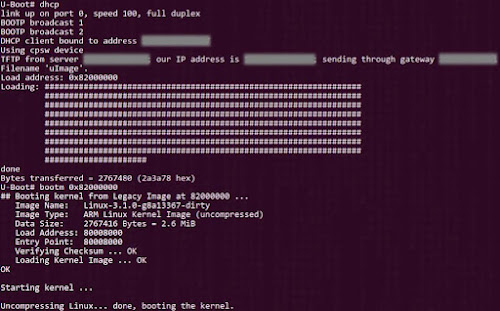
      2. Boot ;-) Linux-Kernel loaded over tftp
      Filesystem mounted over NFS


      tag:blogger.com,1999:blog-5879050571098780501.post-4333206887207912301
      Extensions
      Why __read_mostly does NOT work as it should
      ARMcacheCodeProjectlinux-kernelProgrammingx86
      Show full content
      In modern SMP(multicore) systems, any processor can write to a memory location. The other processors have to update their caches immediately. For that reason, SMP systems implement the concept of "cacheline bouncing" to move "ownership" of cached-data between cores. This is effective but expensive.

      Individual cores have private L1 caches which are extremely faster than the L2 and L3 caches which are shared between multiple cores. Typically, when a memory location is going to be ONLY read repeatedly, but never written to (for example a variable tagged with the const modifier), each core on the SMP system can safely store its own copy of that variable in its private(non-shared) cache. As the variable is NEVER written, the cache-entry never gets invalidated or "dirty". Hence the cores never need to get into "cache line bouncing" for that variable.

      Take the case of the x86 architecture,

      An Intel core i5 die showing the various caches present
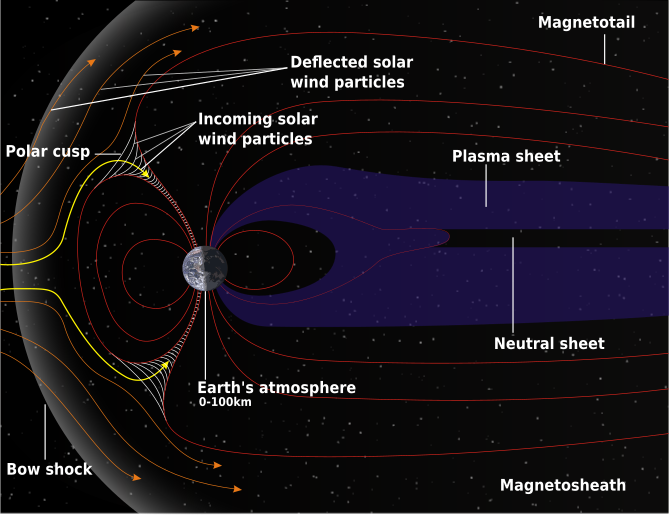
      • [NON-SMP] Intel Pentium 4 processor has to communicate between threads over the front-side bus, thus requiring at least a 400-500 cycle delay.
      • [SMP] Intel Core processor family allowed for communication over a shared L2 cache with a delay of only 20 cycles between pairs of cores and the front-side bus between multiple pairs on a quad-core design.
      • [SMP] The use of a shared L3 cache in the Intel Core i7 processor means that going across a bus to synchronize with another core is NEVER required unless a multiple-socket system is being used.
      The copies of "read-only" locations usually end-up being cached in the private caches of the individual cores, which are several orders of magnitude faster than the shared L3 cache.

      How __read_mostly is supposed to work:  When a variable is tagged with the __read_mostly annotation, it is a signal to the compiler that accesses to the variable will be mostly reads and rarely(but NOT never) a write.

      All variables tagged __read_mostly are grouped together into a single section in the final executable. This is to improve performance by allowing the system to optimise access time to those variables in SMP systems by allowing each core to maintain its own copy of them variable in it local cache. Once in a while when the variable does get written to, "cacheline bouncing" takes place. But this is  acceptable as the the time spent by the cores constantly synchronising using locks and using the slower shared-cache would be far more than the time it takes for the multiple cores to operate on own copies in their independent caches.

      What actually happens:
      (NOTE: In the following section, "elements" refers to memory blocks which are are smaller than a single cache-line and are so sparse in main-memory that a single cache-line cannot contain them both simultaneously.) The problem with the above approach is that once all the __read_mostly variables are grouped into one section, the remaining "non-read-mostly" variables end-up  together too. This increases the chances that two frequently used elements (in the "non-read-mostly" region) will end-up competing for the same position (or cache-line, the basic fixed-sized block for memory<-->cache transfers) in the cache. Thus frequent accesses will cause excessive cache thrashing on that particular cache-line thereby degrading the overall system performance.

      This situation is slightly alleviated by the fact that modern cpu caches are mostly 8way or 16way set-associative. In a 16way associative cache, each element has a choice of 16 different cache-slots. This means that two very frequently accessed elements, though closely located in memory, can still end-up in 2 different slots in the cache, thereby preventing cache-thrashing (which would have occurred had both continued competing for the same cache-line slot). In other words a minimum of 17 elements frequently accessed and closely located in memory are required for 2 of them to begin competing for a common cache-line slot.

      While this is true in the case of INTEL and its x86 architecture, ARM still sticks to 4way & 2way set-associative caches even in its Cortex A8, which means that just 3 or 5 closely located, frequently accessed elements can result in cache-thrashing on an ARM system. (Update: "Anonymous" rightly points out in the comments that 16-way set associative caches have made their way into modern SoCs, ARM Cortex A9 onwards.)

      kernel/arch/x86/include/asm/cache.h contains
      #define __read_mostly __attribute__((__section__(".data..read_mostly")))
      kernel/arch/arm/include/asm/cache.h: does NOT, thereby defaulting to the empty definition in
      kernel/include/linux/cache.h
      #ifndef __read_mostly
      #define __read_mostly
      #endif


      UPDATE: The patch daf8741675562197d4fb4c4e9d773f53494203a5 enables support for __read_mostly  in the linux kernel for ARM architecture as well.

      The reason for this? It turns out that most modern ARM SoCs have started using 8/16-way set associative caches. For example, the ARM PL310 cache controller (as "Anonymous" rightly points out in the comments) available on the ARM Cortex-A9 supports 16-way set associativity. The above patch now makes sense on modern ARM SoCs as the probability of cache-thrashing is reduced by the larger "N" in the N-way associative caches.

      With the number of cores increasing rapidly and the on-die cache size growing slowly, one must always aim to:
      • Minimise access to the last level of shared cache to improve performance on multicore systems.
      • Increase associativity of private caches (of individual cores) to eliminate cache-slot contention and reduce cache-thrashing.
      tag:blogger.com,1999:blog-5879050571098780501.post-4808524863142163783
      Extensions
      nGPS : Location fix without GPS
      AndroidDroidCon2011GeomagneticFieldMagnetic-Field sensornGPSProgrammingSensors
      Show full content
      NOTE: Skip this post if you do NOT live on planet earth.
      This is one of the ideas that i hit upon when preparing for a talk Sensors on Android @DroidCon2011. It is an unusual application of the on-board sensors present most Android devices. Due to lack of time i was unable to present it in much detail during my talk. So here goes...
      nGPS (NO GPS) is a way of obtaining a location fix without using any GPS, AGPS, Wi-Fi Positioning and cell-site triangulation technologies.
      Why would anyone want to use nGPS - Pure GPS based systems take upto 10mins for 1st fix. - AGPS, Wi-Fi positioning require an active data-connection. - Cell-site triangulation requires network coverage.

      So without any of these technologies at our disposal, how do we obtain a "location-fix" i.e. a latitude-longitude pair representing our current position. The answer lies in the magnetic-field sensor.
      The Earth's magnetic field, as measured by a magnetic sensor on the Earth's surface, is combination of of several magnetic fields generated by various sources. These fields interact with each other and the net resultant what the magnetic sensor measures.  World Magnetic Model (WMM) Major contributors to a magnetic-field:  + Conducting, fluid outer core.
      + Earth's crust and upper mantle.
      + Electrical currents in the atmosphere.  + Local magnetic interference. By filtering the local magnetic interference due to other electronic/electrical devices, we have a unique magnetic-field signature present at each place on earth. The WMM aims to provide an accurate estimate of this field. A device (having a magnetic sensor) can measure the components of this field. Then comparing it with the WMM values of the earth's field, one can identify the latitude/longitude of the present location. Android contains built-in support for the WMM using the GeomagneticField class. The GeomagneticField class utilises the WMM internally to provide an estimated magnetic field at any given point on Earth at a given time. The important thing to note is that this class accepts the location (alongwith altitude and time) and provides the expected magnetic-field at that position (at that particular altitude and instant of time).

      To determine the location using the GeomagneticField class, requires some reverse-lookup trickery on our part. More on it in another post.

      UPDATE : A recent talk on Sensors and Location based services on Android at blr-droid meetp#12 featuring nGPS among other things.
      tag:blogger.com,1999:blog-5879050571098780501.post-4863516113311330916
      Extensions
      Tonight's the night : ICS
      AndroidMisc.
      Show full content
      Two weeks after ICS was released, finally synced-up the entire source. 6GB.
      Gave a repo sync and woke-up and it was done! Sweet na?...
      A good thing with ICS is that pandaboard is supported as-is.
      This means that i can...
      $ source build/envsetup.sh
      $ lunch full_panda-eng
      $ make -j4
      ...and i'm done! :-)
      And so i have. Estimating 4hrs for a build on my "old" pc.
      Tonight's the night... ;-)
      tag:blogger.com,1999:blog-5879050571098780501.post-5988045338743118265
      Extensions