GeistHaus
log in · sign up

https://feeds.feedburner.com/JakeMccrarysMusings

atom
60 posts
Polling state
Status active
Last polled May 19, 2026 02:25 UTC
Next poll May 20, 2026 01:49 UTC
Poll interval 86400s
Last-Modified Sat, 18 Apr 2026 21:50:58 GMT

Posts

Reading in 2025
Show full content

At the beginning of every year, I take the time to update my records of what I've read the previous year and write up a summary.

Previous summaries: 2013, 2014, 2015, 2016, 2017, 2018, 2019, 2020, 2021, 2022, 2023, and 2024.

I've continued to keep track of my reading using Goodreads. My profile has nearly the full list of the books I've read since 2010.

2025 Goals

For the last month or so, I've been better about reading with a regular cadence. I'd like to keep that up.

I don't particularly feel like I kept a good cadence, but when I look at the chart of pages and books per month, it seems fairly well distributed over the year. Success, I guess?

One thing not captured here is that I'm doing a lot more long-form reading online. I'm okay with that not showing up here, but it's accurate to say that some of my reading time has been taken up by long articles from authors I follow on Substack.

Highlights

Below are the highlights from 2025. Any title link will bring you to Goodreads.

Five-star booksAlien Clay by Adrian Tchaikovsky

This was the first Adrian Tchaikovsky book I've read, and it was great. I thought it built an interesting world and wrestled with good questions.

I was so hopeful that I had found a new-to-me science fiction author with a large catalog of books. Unfortunately, I've found Tchaikovsky's other writing not as compelling.

This Is How They Tell Me the World Ends: The Cyberweapons Arms Race by Nicole Perlroth

I might have been a bit generous with my stars here, but I did enjoy this book. It doesn't leave the reader feeling great about our world. I was already familiar with a lot of what this book covers, but I've probably been exposed to the topic more due to my profession. Still, a bunch of this was new to me, and even the parts that weren't were interesting.

Adapt: Lessons Learned Climbing 100 5.13's by Kris Hampton

I'm a huge fan of Kris Hampton's work and I'll continue reading it and listening to it over the years to come.

Demon Copperhead by Barbara Kingsolver

I enjoyed it and thought it was compelling. Here are two other reviews (one, two) that can give you an idea of what you're getting into when you pick up this book.

A Deepness in the Sky (Zones of Thought, #2) by Vernor Vinge

I also read the first book in this series in 2025 and would recommend you read both of them. I preferred this book to the first but, from talking to some friends, I know others feel the other way.

It touches on one of my favorite topics in science fiction: what does it mean to be human? Parts of that leaked into another article I wrote about using recent AI tooling.

This was the second book I read in 2025 where spider-like aliens exist.

Endling by Maria Reva

I'm not entirely sure I can describe why I like this so much. It was funny and dark with a fair amount of meta self-awareness.

If Anyone Builds It, Everyone Dies: Why Superhuman AI Would Kill Us All by Eliezer Yudkowsky

I bought this book with the goal of helping it reach bestseller status. I was already sold on the arguments before reading the book. I think this is an important topic that is undercovered by media and not thought nearly enough about by people (both in power and normal folks).

Playground by Richard Powers

Richard Powers does it again. He continues to deliver some deep emotional moments wrapped around neat and interesting technology that either exists or you can imagine existing in this world. To me, this is up there in quality with The Overstory.

Other highlights

Here are some other highlights from the year. Most of these are probably four-star books, though some might have been three-star.

The Ministry of Time by Kaliane Bradley

Time travel and workplace romance/comedy. Of course it was enjoyable.

Nightbitch by Rachel Yoder

That was weird. I liked it a lot.

I Who Have Never Known Men by Jacqueline Harpman

Perfect length of a novel for living in this odd, unexplained world.

Dream Count by Chimamanda Ngozi Adichie

What can I say, I like Adichie's writing.

Children of Time (Children of Time, #1) by Adrian Tchaikovsky

Probably my second favorite book by this author. Shares a similar alien race with Vinge's A Deepness in the Sky. Again, science fiction that makes you wonder about society.

Disgrace by J.M. Coetzee

Slow-motion train wreck of a story presented through excellent writing. Shortly after reading this, I listened to Tyler Cowen's podcast on South African crime and that helped me understand this book.

What We Can Know by Ian McEwan

It was good.

Endure: Mind, Body, and the Curiously Elastic Limits of Human Performance by Alex Hutchinson

I learned a ton reading this book. I think quite a bit of it will be applicable to my own sports practice.

Project Hail Mary by Andy Weir

I thought it was a good and entertaining book, if predictable and not really surprising. If you liked The Martian, you'll like this book.

Stats

I read 37 books in 2025.

| Year | # of Pages | # of Books |
|------+------------+------------|
| 2025 |      14661 |         37 |
| 2024 |      12919 |         37 |
| 2023 |      14956 |         53 |
| 2022 |      10127 |         35 |
| 2021 |      19564 |         57 |
| 2020 |      12093 |         43 |
| 2019 |      15994 |         42 |
| 2018 |      13538 |         36 |
| 2017 |      18317 |         48 |
| 2016 |      22790 |         59 |
| 2015 |      21689 |         51 |
| 2014 |      24340 |         71 |
| 2013 |      19815 |         60 |
| 2012 |      14208 |         44 |
| 2011 |       9179 |         19 |
| 2010 |      14667 |         46 |

Reading was fairly well spread out over the year.

Book and pages count by month

Electronic books continue to dominate.

|           | 2025 | 2024 | 2023 | 2022 | 2021 | 2020 | 2019 | 2018 | 2017 | 2016 | 2015 |
|-----------+------+------+------+------+------+------+------+------+------+------+------|
| audiobook |    0 |    0 |    0 |    0 |    0 |    1 |    0 |    0 |    0 |    0 |    0 |
| ebook     |   35 |   35 |   51 |   34 |   56 |   41 |   43 |   37 |   37 |   56 |   47 |
| hardcover |    1 |    1 |    0 |    1 |    0 |    0 |    1 |    1 |    7 |    0 |    1 |
| paperback |    1 |    1 |    2 |    0 |    1 |    1 |    7 |    5 |    5 |    3 |    3 |

My non-fiction reading increased last year.

|                           |   2025 |   2024 |  2023 | 2022 |   2021 |   2020 |   2019 |   2018 |
|---------------------------+--------+--------+-------+------+--------+--------+--------+--------|
| fiction                   |     26 |     33 |    47 |   28 |     46 |     26 |     28 |     29 |
| non-fiction               |     11 |      4 |     6 |    7 |     11 |     17 |     23 |     14 |
| fiction:non-fiction ratio | 2.36:1 | 8.25:1 | 7.8:1 |  4:1 | 4.18:1 | 1.53:1 | 1.22:1 | 2.07:1 |

Here is the star rating distribution.

|             | 2 stars | 3 stars | 4 stars | 5 stars |
|-------------+---------+---------+---------+---------|
| fiction     |       1 |       9 |      11 |       5 |
| non-fiction |       1 |       4 |       3 |       3 |
2026 goals

I'd like to keep up a regular reading cadence. I've done a pretty good job this month of making a little progress on books almost every day. I'd like to keep doing that. Maybe not every day, but most days, I'd like to read at least a little.

https://jakemccrary.com/blog/reading-in-2025/index.html
Notify yourself when a task finishes
Show full content

If you've got a ridiculously good memory and you've been reading my writing for a while, you know I'm a fan of processes notifying you when they are done. I often have some task running in a hidden terminal that performs actions when files change. This is most often running Clojure tests whenever a file changes using either test-refresh or lein-autoexpect. Another common watch task is rendering this website whenever one of the markdown files changes.

I don't like needing to have these processes always visible, since I mostly only care about when they finish. When running unit tests, I don't need to see the output unless a test is failing. When writing articles, I only care about when the rendering is done so I know I can refresh my browser to review the output.

On macOS, one way of doing this is using terminal-notifier. terminal-notifier makes it trivial to send notifications.

Below is the script I run while working on this website. It uses entr to monitor the input files; when changes are detected, it renders this site using my homegrown Babashka static site generator, and when that finishes, it uses terminal-notifier to alert me.

#!/bin/bash
while sleep 0.5; do 
    rg bb templates source --files -t css -t clojure -t markdown -t html \
        | entr -d -s 'rm -rf output/*; bb render && terminal-notifier -message "Rendering complete"';
done

This site renders quickly, so I can usually make some edits, save, and toggle to a browser to refresh and see the output. Still, it is nice to see that little notification pop-up on my screen so I know for sure that if I hit refresh, I'm seeing the latest render.

When I'm running my Clojure tests, both lein-autoexpect and test-refresh send a notification with a pass or fail message based on the status of the unit tests that just ran. If the tests are passing, I don't have to glance at my terminal. If they are failing, I do.

I'd encourage you to think about what processes you might want to get notifications from when they are done and look into how to set that up. terminal-notifier works great on macOS. I can't make recommendations for other operating systems since it has been years since I've used any alternatives besides SSHing into a Linux server.

It is worth the effort to figure out how to have notifications. They remove a trivial inconvenience (having to switch programs, needing to keep a window visible on your screen) and make life a little better. By stacking small, slightly life-improving techniques, all of a sudden you find yourself much more productive.

https://jakemccrary.com/blog/notify-yourself-when-a-task-finishes/index.html
Shipping little apps anywhere, anytime
Show full content

I'm a big fan of making small (sometimes silly) programs. As a software developer, you have a superpower: you can identify problems in your life and fix them by creating some specific software that solves for exactly what you need. When scoped small enough, creating these tiny programs takes minimal time investment.

When you develop the practice of recognizing when a bit of software would be helpful, you see opportunities all the time. But you don't control when you get inspiration for these programs. So you come up with strategies for handling these bursts of inspiration.

One strategy: Write yourself a note (paper, email to yourself, some app on your phone) and maybe get around to it later. (You occasionally manage to get around to it later.) Another strategy: Think about the inspiration and trick yourself into thinking you'll remember it later when you're at a computer. You justify this by claiming if you forget it, it must not have been important.

These workflows are fine but they leave a lot of room for never following up. With modern AI tools, we can do better.

My new strategy:

  1. Inspiration strikes!
  2. I pull out my phone and open my web browser to OpenAI's Codex web app.
  3. I translate my inspiration into a task and type (or voice-to-text) it into Codex.
  4. I submit the task to Codex, go about my day, and check on it later.
  5. Later: read the diff, click the Codex button to open a PR, merge the PR through GitHub's mobile interface, and let GitHub Actions deploy the changes to GitHub Pages.

I started using this technique in early summer 2025. Since then, I've been able to develop and iterate on a handful of single-page web applications this way. As models improve, it is getting even easier to knock them out. It works well for either making a new application or tweaking an existing one.

Here is my setup:

  • I have a single repo named experiments1 on GitHub.
  • This repo has a subdirectory per application.
  • The applications are in a variety of web languages (HTML, CSS, TypeScript, JavaScript, ClojureScript).
  • OpenAI Codex is linked with this experiments repo.

With this setup, I'm able to follow the above strategy with minimal friction. If I have an idea for a new little application, I open Codex and provide a description of what I want and what it should be called, and it usually manages to start work on it. When I have an idea for tweaking an application, I open Codex, tell it what subdirectory the app is in and what tweak I want made. All of this can be done from a smartphone.

When Codex is done, I do a quick scan through the diff, click the buttons to open a PR, merge it, wait for the deploy, and then check on the deployed artifacts. The apps end up published at jake.in/experiments.

It isn't all smooth; sometimes a problem is introduced. Depending on the problem, I'll either revert the code and try again or give Codex more instructions and try to have it fix it. If really needed, I'll fire up my laptop and fix it myself or iterate with AI on fixing the problem there.

The bar has been seriously lowered for creating specific software. Go do it. It is fun, but in a different way than traditional programming.

  1. I don't know if this limitation still exists, but when I was initially setting this up my experiments repo had zero commits. This caused problems in Codex that were fixed by adding a single commit.

https://jakemccrary.com/blog/shipping-little-apps-anywhere-anytime/index.html
Humans ask, computers propose, humans decide
Show full content

Warning: There are minor spoilers of parts of A Deepness in the Sky in this article.

I was reading Vernor Vinge's A Deepness in the Sky when a paragraph made me think of today's AI tools.

In A Deepness in the Sky, one of the groups of humans, the Emergents, has figured out how to take advantage of a "mindrot" virus that was a plague on their homeland. Once a person is infected, the Emergents are able to manipulate the mindrot to force an obsession. This practically turns the infected person, colloquially called a ziphead, into a specialized appliance focused on their obsession and little else.

In the following paragraph, one of the Emergents talks about how they use a subset of the zipheads to enhance their ship's computer:

They left the group room and started back down the central tower. “See, Pham, you—all you Qeng Ho—grew up wearing blinders. You just know certain things are impossible. I see the clichés in your literature: ‘Garbage input means garbage output’; ‘The trouble with automation is that it does exactly what you ask it’; ‘Automation can never be truly creative.’ Humankind has accepted such claims for thousands of years. But we Emergents have disproved them! With ziphead support, I can get correct performance from ambiguous inputs. I can get effective natural language translation. I can get human-quality judgment as part of the automation!”

The zipheads see the requests made by the users of the ship, apply their human judgment to the request, and then work with the computer to fulfill their interpretation of what the user is requesting. This allows the Emergents to make ambiguous requests to their ship's computer, requests a human would understand but a computer could not, and get back quality results. There are literally humans-in-the-loop of the Emergents' computer system.

This paragraph made me think about how I use the current crop of AI tools and how it's changed how I interact with computers. I can now open an app and poorly specify what I want (don't fix typos, don't bother with full sentences, be vague) and the computer still often manages to perform the task or find the information I'm asking about.

I can underspecify what I'm looking for and get approximately a "human-quality"1 fulfillment of that request. Not only that, but the AI response often comes back and asks about follow-up steps and offers to perform them. And all without enslaving other humans with a virus and attaching them to the computer.

This is amazing. Does it work 100% of the time? No. But wow, it works enough of the time to be a big game changer.

Here are three examples of varying degrees of specification while working with an AI:

Typos barely matter

I rarely correct typos anymore when searching on Google or asking an AI for help with something. The computer doesn't care and still mostly does the right thing. To be fair, this has been gradually happening over time with Google's ability to make sense of garbage searches, but modern AI tools have drastically accelerated it.

Time series triage with o3

Earlier this year, I threw a CSV of memory stats and usage metrics for a ton of JVM processes my team manages at OpenAI's o3 model. I mentioned three services that ran out of memory on specific dates and asked it to identify other services that might be approaching memory problems. o3 identified a pattern in the data that correlated with running out of memory and flagged a few other processes that might be approaching a problem. I looked at more metrics, agreed with o3, and then changed some memory settings to avoid future problems.

Config migrations

I recently needed to change a couple of values in about 45 config files. This wasn't something a simple sed could do because each file needed a unique value derived from another service's config. I provided a command to run that would tell the AI agent (or me, if I were doing this by hand) if the config values were correct and told it to run the command and fix the problems. I didn't specify what to change; it figured it out while I worked with some coworkers on figuring out a bug. Once I wrapped up with my coworkers, I reviewed the changes, agreed with them, and moved on to the next task.

🙂 Asks ➡ 🤖 Proposes ➡ 🙂 Decides

We used to have to specify specific instructions to a computer through programming. Now we can specify desires/outcomes with natural language and often the computer will do a decent job of achieving our goal or at least getting us to a reasonable starting point to take over.

The computer takes our ambiguous input, proposes a solution, and then we're able to step in and accept, change, and modify the results. This is an exciting change and thankfully we're able to achieve it without turning other humans into infected appliances.

┌─────────────┐     ┌────────────────┐     ┌─────────────┐
│  Humans ask │ ──▶ │ Computer       │ ──▶ │ Humans      │
└─────────────┘     │  proposes      │     │   decide    │
      ▲             └────────────────┘     └─────────────┘
      │                                               │
      └───────────────────────────────────────────────┘

This feels like Vinge's ziphead-supported computer but we've replaced infected humans with AI models2.

  1. For some definition of human-quality

  2. How much longer until the non-infected humans are also replaced? Hopefully we're able to avoid a future dystopia.

https://jakemccrary.com/blog/humans-ask-computers-propose-humans-decide/index.html
Setup Emacs to autoformat your Clojure code with Apheleia and zprint
Show full content

Keeping code consistently formatted is important for readability and maintainability. Once you get used to having a computer format your code for you, manually formatting code can feel tedious.

For the last few years, my team has been using zprint to keep our Clojure codebase formatted to our specifications. zprint is great because it runs fast and is extremely customizable. This flexibility is powerful since it lets you format your code exactly how you want.

I've recently migrated from my own custom before-save-hook that triggered zprint whenever I saved a buffer to using Apheleia. Apheleia is an Emacs package that applies code formatters automatically on save. I won't quote the whole introduction in Apheleia's readme but it is designed to keep Emacs feeling responsive.

Here's the configuration I use in my Emacs setup:

(use-package apheleia
  :straight (apheleia :host github :repo "radian-software/apheleia")
  :config
  (setf (alist-get 'zprint apheleia-formatters)
        '("zprint" "{:style [:community] :map {:comma? false}}"))
  (setf (alist-get 'clojure-mode apheleia-mode-alist) 'zprint
        (alist-get 'clojure-ts-mode apheleia-mode-alist) 'zprint)
  (apheleia-global-mode t))

This snippet shows how to install and configure using straight.el and use-package. The :config section instructs apheleia under what modes it should run zprint and how to run it.1 I found the docstring for apheleia-formatters to be crucial for figuring out how to hook zprint into apheleia.

With this setup, your Clojure code will be automatically formatted using zprint every time you save. No more manual formatting needed. I've been running with this for a little while now and am enjoying it.

  1. I don't actually use :community and have my own custom formatting configuration but am using :community in this post so the snippet is immediately useful to readers.

https://jakemccrary.com/blog/setup-emacs-to-autoformat-your-clojure-code-with-apheleia-and-zprint/index.html
A couple tiny elisp functions for improving living in Emacs
Show full content

I've been using Emacs for nearly twenty years but find it challenging to craft even tiny elisp functions to enhance my workflow. Despite that, I've written elisp to enhance my Emacs experience but I often don't bother fixing small annoyances that are solved relatively easily in other ways. Now that LLMs exist and are reasonably good, they have lowered the bar for creating small quality of life enhancements. Below are two such enhancements.

These have only been tested and used in Emacs 29.4 on macOS.

Quickly change font sizes

I find myself working on a variety of monitor sizes and resolutions. This function lets me quickly switch between font sizes.

(defun jm/choose-font-size ()
  "Choose between three different font sizes: 16, 18, and 20."
  (interactive)
  (set-face-attribute 'default nil :height
                      (* 10 (string-to-number
                             (completing-read "Choose font size: "
                                              (mapcar #'number-to-string '(16 18 20)))))))
Change window split orientation

First some definitions from the Emacs manual.

A frame is a screen object that contains one or more Emacs windows (see Windows). It is the kind of object called a “window” in the terminology of graphical environments; but we can’t call it a “window” here, because Emacs uses that word in a different way. - Emacs manual

A window is an area of the screen that can be used to display a buffer (see Buffers). Windows are grouped into frames (see Frames). Each frame contains at least one window; the user can subdivide a frame into multiple, non-overlapping windows to view several buffers at once. - Emacs manual

I primarily work in a single frame split into at most two windows. I haven't found a setup that I like for working with more than two windows, so I avoid it. Often, I'll want to change the split from vertical to horizontal or horizontal to vertical. I hear a picture is worth a thousand words and a gif even more so below is a demo and and the enabling code.

Demo of toggling window orientation

(defun jm/toggle-window-split ()
  "Toggle between horizontal and vertical split for two windows. Thanks ChatGPT."
  (interactive)
  (if (= (count-windows) 2)
      (let* ((this-win-buffer (window-buffer))
             (next-win-buffer (window-buffer (next-window)))
             (this-win-edges (window-edges (selected-window)))
             (next-win-edges (window-edges (next-window)))
             (this-win-2nd (not (and (<= (car this-win-edges)
                                         (car next-win-edges))
                                     (<= (cadr this-win-edges)
                                         (cadr next-win-edges)))))
             (splitter
              (if (= (car this-win-edges)
                     (car (window-edges (next-window))))
                  'split-window-horizontally
                'split-window-vertically)))
        (delete-other-windows)
        (let ((first-win (selected-window)))
          (funcall splitter)
          (if this-win-2nd (other-window 1))
          (set-window-buffer (selected-window) this-win-buffer)
          (set-window-buffer (next-window) next-win-buffer)
          (select-window first-win)
          (if this-win-2nd (other-window 1))))))
End

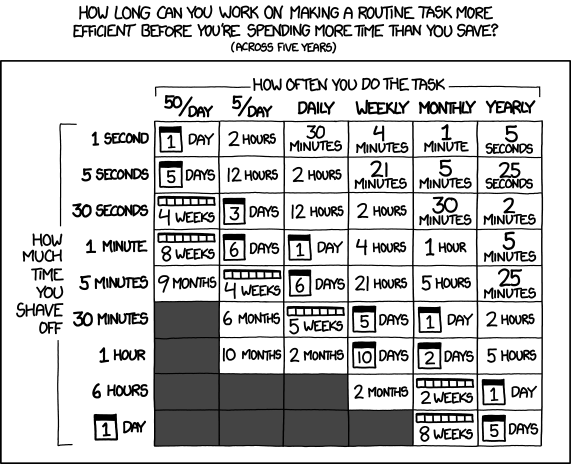
Could those functions be written better? I don't know, maybe. If I had to read the documentation and write these entirely on my down, these functions wouldn't exist because the return on investment just wouldn't be there. These only exist because the time to generate them1 is so small that it becomes worth it. AI tools drastically lower the bar for making small routine operations more efficient.

xkcd: Is It Worth The Time?

  1. And test and make minor edits as needed.

https://jakemccrary.com/blog/a-couple-tiny-elisp-functions-for-improving-living-in-emacs/index.html
Reading in 2024
Show full content

At the beginning of every year, I take the time to update my records of what I've read the previous year and write up a summary.

Previous summaries: 2013, 2014, 2015, 2016, 2017, 2018, 2019, 2020, 2021, 2022, 2023.

I've continued to keep track of my reading using Goodreads. My profile has nearly the full list of the books I've read since 2010.

2024 Goals

I'd like to maintain a regular reading practice. I think this means having a similar number of pages read this year.

Ehh, I don't think I succeeded in this goal, despite not being too far off the number of pages I read in 2023.

I have a massive stack of books at home that I haven't read through yet, I'd like to whittle that down some.

I'm pretty sure there is a universal law that a stack of unread books can only grow and my coffee table is proof it is true.

Highlights

Below are the highlights from 2024. Any title link will bring you to Goodreads.

Five-star booksProphet Song by Paul Lynch

This book was beautiful. I cried. The writing is lyrical, the subject matter is tough, and you'll probably tear up too.

You may have heard that reading fiction can help you be more empathetic. I could feel this book do that to me.

Go read it.

All Fours by Miranda July

This book is fantastic. I literally laughed out loud multiple times. Miranda July's writing tickles me in just the right way.

Day by Michael Cunningham

I guess I haven't gotten sick of books that deal with the COVID-19 pandemic. Maybe that is because I've only read stories on the topic from really solid authors.

This book gives you a glimpse into the lives of a family on three different days (April 5 2019, 2020 and 2021). It has been nearly a year since I've read this and unfortunately I don't remember what I enjoyed so much about this book.

Looking for Alaska by John Green

I don't know, sometimes you read a young adult book and it just makes an impact. I doubt others will enjoy this as much as I did at the time I read it.

Supercommunicators by Charles Duhigg

I'm projecting but I'd guess that most folks would be better off if they became better communicators. And that is exactly what this book says it will do.

I enjoyed reading this and will benefit by going back through and trying to apply the lessons found in this book.

Other highlightsThe Zen of Climbing by Francis Sanzaro

Some parts were great; some parts were so-so. Seeing Zen principles applied to climbing was thought-provoking.

Ada Palmer's Terra Ignota series

The right reader will absolutely love this series. Unfortunately, I'm not that reader. Still, I enjoyed the series quite a bit. The world built by Ada Palmer is fascinating. I'll admit though, I think about this world quite often. This book made an impact.

Small Things Like These by Claire Keegan

A short and powerful book.

Jasper Fforde's Shades of Grey series

At the time of writing this, I think there are only two books in the series and those are the two that I've read.

This series puts you into a world of rules and structure, with society being built on top of hierarchies based on how much color you can see. It is an interesting coming of age story as the main character learns to navigate this world. This is a fun and interesting world and I hope more books come out in the series.

I'm Starting to Worry About This Black Box of Doom by Jason Pargin

This book calls out our modern world and our addiction to outrage-as-entertainment, addiction to screens, and the information bubbles we live in.

I really enjoyed all of that. In a way, this book takes non-fiction books, such as Hans Rosling's Factfulness (a book about how much better the world has become) and books on social media, filter bubbles, and polarization, and packages it up into a fiction tale demonstrating how it the Internet warps how we perceive each other and our modern world. Some readers might not enjoy characters going on rants and arguments about these topics but I really enjoyed it.

This book is a good reminder that we're really more similar than we are different and that modern media (social, news, etc) really divides us and both makes the world seem worse and actually be worse.

Rejection by Tony Tulathimutte

A collection of stories about rejection that are loosely connected. It is fun satire. I probably could have given this one five stars.

Stats

I read 35 books in 2024.

| Year | # of Pages | # of Books |
|------+------------+------------|
| 2024 |      12919 |         37 |
| 2023 |      14956 |         53 |
| 2022 |      10127 |         35 |
| 2021 |      19564 |         57 |
| 2020 |      12093 |         43 |
| 2019 |      15994 |         42 |
| 2018 |      13538 |         36 |
| 2017 |      18317 |         48 |
| 2016 |      22790 |         59 |
| 2015 |      21689 |         51 |
| 2014 |      24340 |         71 |
| 2013 |      19815 |         60 |
| 2012 |      14208 |         44 |
| 2011 |       9179 |         19 |
| 2010 |      14667 |         46 |

Book and pages count by month

Electronic books continue to dominate.

|           | 2024 | 2023 | 2022 | 2021 | 2020 | 2019 | 2018 | 2017 | 2016 | 2015 |
|-----------+------+------+------+------+------+------+------+------+------+------|
| audiobook |    0 |    0 |    0 |    0 |    1 |    0 |    0 |    0 |    0 |    0 |
| ebook     |   35 |   51 |   34 |   56 |   41 |   43 |   37 |   37 |   56 |   47 |
| hardcover |    1 |    0 |    1 |    0 |    0 |    1 |    1 |    7 |    0 |    1 |
| paperback |    1 |    2 |    0 |    1 |    1 |    7 |    5 |    5 |    3 |    3 |

I did not read many non-fiction books last year.

|                           |   2024 |  2023 | 2022 |   2021 |   2020 |   2019 |   2018 |
|---------------------------+--------+-------+------+--------+--------+--------+--------|
| fiction                   |     33 |    47 |   28 |     46 |     26 |     28 |     29 |
| non-fiction               |      4 |     6 |    7 |     11 |     17 |     23 |     14 |
| fiction:non-fiction ratio | 8.25:1 | 7.8:1 |  4:1 | 4.18:1 | 1.53:1 | 1.22:1 | 2.07:1 |

Here is the star rating distribution.

|             | 3 stars | 4 stars | 5 stars |
|-------------+---------+---------+---------|
| fiction     |      17 |      12 |       4 |
| non-fiction |       1 |       2 |       1 |
2025 goals

For the last month or so, I've been better about reading with a regular cadence. I'd like to keep that up.

https://jakemccrary.com/blog/reading-in-2024/index.html
Scheduling cron tasks in mixed time zones
Show full content

Have you ever needed to schedule a repeating task on a Linux host? If so, you've probably reached for cron. cron is widely available and reliable; it is a great choice for scheduling tasks.

Sometimes you find yourself scheduling a task and, ideally, you'd be scheduling that task referencing a different time zone. This is a common need if your programs are interacting with systems hosted in different areas of the world. If one system you interact with starts up at 7 AM Europe/London and another at 8 AM America/New_York, it would be much better to schedule your program to run using times specified in those time zones.

Why is that preferred?

  • If you schedule in your host time zone, you have to convert from the other time zone to your own. This is error prone.
  • Different time zones have different Daylights savings shifts. Having to adjust your schedule when your host or target time zone shifts is error prone.

Luckily, you can do this with cron! At least, with the cronie implementation.

You do this by specifying the time zone in the crontab with the CRON_TZ variable. Any line after a CRON_TZ specification is scheduled in the specified time zone. This persists until the next CRON_TZ value is specified.

Below is a sample crontab that schedules four tasks. One is scheduled in the host time zone, two in America/New_York, and one in Europe/London.

0 7 * * * echo "run at 7 AM in the host time zone"

CRON_TZ=America/New_York
0 7 * * * echo "Run at 7 AM New York"
10 7 * * * echo "Run at 7:10 AM New York"

CRON_TZ=Europe/London
* 8 * * * echo "Run at 8 AM London"

The one gotcha with this is that cronie's behavior is unspecified if the scheduled time ends up in the daylights savings shift of the host machine1. So make sure you don't do that.

My team at work has been taking advantage of this feature since early 2023 for scheduling all of our processes start and end times. It has been working great. Prior to figuring2 this out, the fall and spring time shifts were sources of issues as various countries shifted on different days. That entire source of problems has been solved through scheduling tasks in the proper time zone.

  1. We have unit tests that confirm someone hasn't configured a task to run within one of these periods.

  2. Figuring this out was a bit of a chore. Even the Linux experts I talked to weren't aware of being able to do this. Digging through the source of cronie was how I figured this out. Hopefully this article makes it easier for the next person. Though, now that I know the CRON_TZ solution, it is pretty easy to search and find other folks talking about this.

https://jakemccrary.com/blog/2024/06/16/scheduling-cron-tasks-in-mixed-time-zones/index.html
Reading in 2023
Show full content

At the beginning of every year (not so much the beginning this year), I take the time to update my records of what I've read the previous year and write up a summary.

Previous summaries: 2013, 2014, 2015, 2016, 2017, 2018, 2019, 2020, 2021, 2022.

I've continued to keep track of my reading using Goodreads. My profile has nearly the full list of the books I've read since 2010.

2023 Goals

Last year I wrote:

I’d like to do a better job of keeping track of my reading. This should be pretty easy to do.

I don’t feel too bad about the reduction in reading but I’d like to read more this year. Some of my reading time has been replaced with worthwhile endeavors but not always.

Reading rejuvenates me. I need to keep it a regular part of my life.

Well, I don't remember how poorly I did in 2022 of keeping tack of reading but I don't think I did a great job in 2023. Was it better than 2022? Perhaps.

I didn't write many reviews for specific books nor did I send out any emails about what I was reading throughout the year. But I did do fewer corrections of the data I had in Goodreads.

I did read more than I did last year.

If I were grading myself on how well I achieved my goal, I'd give myself a B.

Highlights

Below are the highlights from 2023. Any title link will bring you to Goodreads.

Five-star booksSea of Tranquility by Emily St. John Mandel

I started off the year with this book and really enjoyed it. It is a pandemic story that has characters spanning hundreds of years.

It is a little weird and beautiful. It did an excellent job of conveying feeling.

This is one of the few books that I did a mini-review of when I finished it. That review:

A beautiful novel. While reading, I found myself rereading parts. Not because the sentences were confusing but because they expressed such a clear feeling.

I highly recommend this book.

The First Bad Man by Miranda July

This book is real weird and fantastic. The main character is extremely interesting. I had a blast reading this.

Network Effect by Martha Wells

I really enjoy this series and thought this as an excellent addition to it.

Tomorrow, and Tomorrow, and Tomorrow by Gabrielle Zevin

This was an excellent book about friendship and creative, collaborative pursuits.

How to Live: 27 conflicting answers and one weird conclusion by Derek Sivers

A friend offered to send copies of this books to anyone who was up to reading it and I'm glad I spoke up and asked. Each chapter presents a philosophy. And the next chapter usually presents a different, conflicting philosophy. Every chapter is small, so it is easy to read a bit and take some time to reflect.

The Little Book of Talent: 52 Tips for Improving Your Skills by Daniel Coyle

A bunch of distilled ideas around improvement. No fluff, just tips.

Wool Omnibus by Hugh Howey

I have mixed feelings about including this book on the list. I reread this series when I was debating watching the television show. Even on a second read, I still enjoyed this story.

Is it complex and view shattering science fiction? Nahh, not really.

Is it entertaining? Yep.

Other highlightsChain-Gang All-Stars by Nana Kwame Adjei-Brenyah

This is a really well done book that explores a modern gladiator system of punishment for criminals. It is dark and creative and a solid commentary on modern society.

Maybe this should have been five-stars.

The Sparrow by Mary Doria Russell

I knew nothing about it going in and thought this was a interesting take on first contact with aliens.

Stats

I read 53 books in 2023.

| Year | # of Pages | # of Books |
|------+------------+------------|
| 2023 |      14956 |         53 |
| 2022 |      10127 |         35 |
| 2021 |      19564 |         57 |
| 2020 |      12093 |         43 |
| 2019 |      15994 |         42 |
| 2018 |      13538 |         36 |
| 2017 |      18317 |         48 |
| 2016 |      22790 |         59 |
| 2015 |      21689 |         51 |
| 2014 |      24340 |         71 |
| 2013 |      19815 |         60 |
| 2012 |      14208 |         44 |
| 2011 |       9179 |         19 |
| 2010 |      14667 |         46 |

There are definitely some spiky months in the data.

Book and pages count by month

Unsurprisingly, electronic books are still the dominate format.

|           | 2023 | 2022 | 2021 | 2020 | 2019 | 2018 | 2017 | 2016 | 2015 |
|-----------+------+------+------+------+------+------+------+------+------|
| audiobook |    0 |    0 |    0 |    1 |    0 |    0 |    0 |    0 |    0 |
| ebook     |   51 |   34 |   56 |   41 |   43 |   37 |   37 |   56 |   47 |
| hardcover |    0 |    1 |    0 |    0 |    1 |    1 |    7 |    0 |    1 |
| paperback |    2 |    0 |    1 |    1 |    7 |    5 |    5 |    3 |    3 |

Fiction continued to dominate the book count this year. If I did this by page count I think it would tell a different story, as I read quite a few short stories published as Kindle books and this skewed my fiction book count high.

|                           |  2023 | 2022 |   2021 |   2020 |   2019 |   2018 |
|---------------------------+-------+------+--------+--------+--------+--------|
| fiction                   |    47 |   28 |     46 |     26 |     28 |     29 |
| non-fiction               |     6 |    7 |     11 |     17 |     23 |     14 |
| fiction:non-fiction ratio | 7.8:1 |  4:1 | 4.18:1 | 1.53:1 | 1.22:1 | 2.07:1 |

Here is the star rating distribution.

|             | 2 stars | 3 stars | 4 stars | 5 stars |
|-------------+---------+---------+---------+---------|
| fiction     |       0 |      21 |      22 |       4 |
| non-fiction |       0 |       1 |       3 |       2 |
2024 goals

I'd like to maintain a regular reading practice. I think this means having a similar number of pages read this year.

I have a massive stack of books at home that I haven't read through yet, I'd like to whittle that down some.

https://jakemccrary.com/blog/2024/02/18/reading-in-2023/index.html
Reading in 2022
Show full content

At the beginning of every year, I look back at my records and reflect on the books I read the previous year.

Previous years: 2013, 2014, 2015, 2016, 2017, 2018, 2019, 2020, 2021.

I've continued to keep track of my reading using Goodreads. My profile has nearly the full list of the books I've read since 2010.

This year I did a poor job of keeping Goodreads updated. I had somewhat stopped updating Goodreads, or at least caring if I did it accurately, because I thought they were killing the ability to export your data. Luckily, that feature hasn't been removed so I'm going to continue using the service.

2022 goals

Last year I wrote:

I used to be pretty good at capturing some thoughts upon completion of a book. I haven't been doing a great job of that. I'd like to do better this year.

We'll see what that entails but it might take the form of having more discipline around sending out some thoughts in the [newsletter]({{ site.subscribe_email }}).

I accomplished absolutely nothing related to the goals I wrote at the beginning of 2022.

I didn't write down thoughts on books closer to when I finished them. I didn't keep my Goodreads data updated. I didn't send out updates to my newsletter.

Highlights

Below are some highlights from 2022. The titles link to Goodreads.

I didn't write many reviews on Goodreads this year and did not write detailed reviews in this article. I'd encourage you to click the links and read reviews on Goodreads.

Five-star booksLiberation Day: Stories by George Saunders

I love George Saunders' writing and especially enjoy his short stories. This collection delivered.

The Lathe of Heaven by Ursula K. Le Guin

A science fiction classic that deserves to be read.

Four Thousand Weeks: Time Management for Mortals by Oliver Burkeman

Gist of the book: Life is short and you won't be able to accomplish everything you desire.

I enjoyed reading this and would benefit from reading it (or at least the Goodread's reviews) again. This review on Goodreads is excellent.

Breath: The New Science of a Lost Art by James Nestor

I found this book fascinating and it made me interested in breathing. It was a nice mix of self-experimentation and reporting on studies. The history of the shape of our faces and how it affects breathing really hooked me into this book.

I enjoyed the book enough that I also listened to a significant portion of it while on a road trip so my partner could also consume it.

Other HighlightsMount Chicago: A Novel by Adam Levin

This probably could have been rated five stars. It is a ridiculous and long novel that rewards the reader for paying attention.

Probably the highlights for me were the chapters from the perspective of a pet.

I thought a couple sections dragged a bit and are what held me back from five stars.

Novelist as a Vocation by Haruki Murakami

To say I like Murakami's writing would be an understatement, so reading a collection of essays by him about his writing was a pleasure. I learned a bunch about Murakami and his journey to becoming an internationally renowned author. At least as presented by Murakami, aspects of his life seem as surreal as some of his books.

This didn't earn five stars because I found myself just not caring about some of the topics. But overall, solid book, especially for someone that enjoys Murakami and enjoys reading about writing.

Octavia Butler's Patternmaster series.

Octavia Butler is one of my favorite authors and I devoured the first three books in this series. I enjoyed the first book, Wild Seed, the best.

I didn't realize until writing this up that there is a fourth book in the series and I've immediately queued up reading it.

Stats

Compared to my usual number of books and pages read, this was a low reading year. I read 35 books in 2022.

| Year | # of Pages | # of Books |
|------+------------+------------|
| 2022 |      10127 |         35 |
| 2021 |      19564 |         57 |
| 2020 |      12093 |         43 |
| 2019 |      15994 |         42 |
| 2018 |      13538 |         36 |
| 2017 |      18317 |         48 |
| 2016 |      22790 |         59 |
| 2015 |      21689 |         51 |
| 2014 |      24340 |         71 |
| 2013 |      19815 |         60 |
| 2012 |      14208 |         44 |
| 2011 |       9179 |         19 |
| 2010 |      14667 |         46 |

Here is a breakdown of books finished by month. There were even a couple months where I allegedly didn't finish a single book, though I wonder if that is actually true or of it is a data issue.

Book and pages count by month

Electronic books continue to be the dominant format. Audio book could be 0.5 for how much I listened to Breath while on a road trip.

|           | 2022 | 2021 | 2020 | 2019 | 2018 | 2017 | 2016 | 2015 |
|-----------+------+------+------+------+------+------+------+------|
| audiobook |    0 |    0 |    1 |    0 |    0 |    0 |    0 |    0 |
| ebook     |   34 |   56 |   41 |   43 |   37 |   37 |   56 |   47 |
| hardcover |    1 |    0 |    0 |    1 |    1 |    7 |    0 |    1 |
| paperback |    0 |    1 |    1 |    7 |    5 |    5 |    3 |    3 |

Fiction dominated this year.

|                           | 2022 |   2021 |   2020 |   2019 |   2018 |
|---------------------------+------+--------+--------+--------+--------|
| fiction                   |   28 |     46 |     26 |     28 |     29 |
| non-fiction               |    7 |     11 |     17 |     23 |     14 |
| fiction:non-fiction ratio |  4:1 | 4.18:1 | 1.53:1 | 1.22:1 | 2.07:1 |

Here is the star rating distribution.

|             | 2 stars | 3 stars | 4 stars | 5 stars |
|-------------+---------+---------+---------+---------|
| fiction     |       2 |      10 |      14 |       2 |
| non-fiction |       0 |       0 |       5 |       2 |
2023 goals

I'd like to do a better job of keeping track of my reading. This should be pretty easy to do.

I don't feel too bad about the reduction in reading but I'd like to read more this year. Some of my reading time has been replaced with worthwhile endeavors but not always.

Reading rejuvenates me. I need to keep it a regular part of my life.

Have any book recommendations? Please shoot me an email or leave a comment.

https://jakemccrary.com/blog/2023/01/14/reading-in-2022/index.html
Bookmarklets on mobile are useful
Show full content

Bookmarklets, little snippets of JavaScript that you keep around as a bookmark, are useful. They let you execute some JavaScript to perform almost any action you want on a website.

Some bookmarklets I use on my desktop browser include:

  1. A collection of bookmarklets that let you change the playback speed of most embedded videos.
  2. A bookmarklet to manipulate the URL of the page you're visiting.
  3. A bookmarklet to save the current page's URL to pinboard.in.

For years, I thought I was restricted to only using bookmarklets in my desktop web browser. I hadn't effectively used mobile bookmarks before and thought that clicking them would be a huge pain.

It turns out, I was wrong! I recently learned that if you start typing a bookmark's title into your mobile browser's location bar, it will let you select the bookmark. This means you can easily execute a bookmarklet just by starting to type its name and clicking it when it appears. This "search for bookmark in location bar" technique works with at least Google Chrome and Brave running in Android.

Below are the two bookmarklets I use regularly on my phone. They exist to bypass paywalls.

This one prepends http://archive.is/ to the current URL:

javascript:(function() {window.location="http://archive.is/"+window.location.toString();}())

This one changes theatlantic.com to theatlantic.com. (though it no longer gets around their paywall):

javascript:(function() {window.location=window.location.href.replace(/theatlantic.com/, 'theatlantic.com.');}())

To get them onto my phone, I added them a bookmarks on my laptop's Chrome and synced them to my mobile phone. Once in my mobile Chrome, I edited the bookmark in mobile Chrome, copied the code, and pasted it into a bookmark in Brave.

I type three characters into my mobile browser's location bar before I can select either of these bookmarklets. That is quicker than editing the URLs by hand and has improved the experience of reading articles on my phone.

https://jakemccrary.com/blog/2022/11/13/bookmarklets-on-mobile-are-useful/index.html
Reading in 2021
Show full content

At the beginning of every year, I reflect on books I've read in the previous year. I take a look at my records, fix errors, and think about reading goals for the upcoming year.

Here are links to my previous end-of-year reflections: 2013, 2014, 2015, 2016, 2017, 2018, 2019, and 2020.

I've continued to keep track of my reading using Goodreads. My profile has nearly the full list of the books I've read since 2010. Here is my 2021.

2021 Goals

Last year I wrote:

I have quite a few unread books sitting on my virtual and physical bookshelf. This feels like setting a really low-bar but this year I'd like to read some of these unread-but-owned books.

I'm also planning on reading at least one book on writing and one book on climbing. This goal is almost a subset of the above goal as I have books on both these topics sitting on my shelf.

Did I achieve those goals? No.

Looking through my list of read books, I think only one of those a book I owned at the beginning of 2021. I did not read some already owned books; I read a single already owned book.

I did read a book on writing, George Saunders' A Swim in a Pond in the Rain, and multiple climbing books, Rock Climbing Technique by John Kettle and Rock Climbing in Kentucky's Red River Gorge by James Maples.

Early in 2020, at the request of some readers of this site, I started a [mailing list]({{ site.subscribe_email }}). During 2020 I used this newsletter as a way to notify subscribers of new articles posted to this website and write up short blurbs on books I had finished. Except for a single email, I also didn't send out any updates to the newsletter.

This is partially because I didn't write many articles last year. I generally try to write about one article a month but I did not do that in 2021. We'll see if I pick back up this habit in 2022.

Highlights

Below are some highlights from 2021. The titles link to Goodreads.

I didn't write many reviews on Goodreads this year and did not write detailed reviews in this article. I'd encourage you to click the links and read reviews on Goodreads.

Five-star booksDune by Frank Herbert

This was my third time reading Dune. I read it in preparation for seeing the 2021 film.

I'm a huge fan of Dune but parts of it definitely haven't aged well. I think the story manages to be complex and have plenty of movement but somehow isn't overwhelming. I thought the film did a pretty good job of capturing that.

The first time I read Dune, I also made the very first Kindle Dune Dictionary. If you are reading on a Kindle and haven't read the book before, I'd recommend purchasing the dictionary. I didn't find it useful on my third time through the book but it made my first read through better.

Memory by Lois McMaster Bujold

In August and September, I pretty much devoured the entire Vorkosigan Saga. I read all these books pretty much back to back and can barely distinguish them.

I'd recommend the series. It was a fun series and there are quite a few books in it. For some reason, this book stood out and is the only one I gave five stars.

A Memory Called Empire and A Desolation Called Peace by Arkady Martine

These are two incredible books. Arkady Martine built a great world. Politics, aliens, and poetry all show up in these books and it is great.

Go read some reviews (perhaps this and this) and then go start this series.

The Overstory by Richard Powers

The book starts with what feels like a collection of short stories and grows into a story of struggle, triumph, and failure. I can't point to what made this book stand out to me but a I really enjoyed it. It might have had some moments that dragged a bit but I still loved it.

This Is How You Lose the Time War by Amal El-Mohtar

I went into this book knowing nothing about it and found it beautiful. The writing is lyrical and the way the story is told worked really well.

The book isn't that long and I absolutely devoured it.

Zikora by Chimamanda Ngozi Adichie

This is a 35 page short story. Go spend the short time it takes to read it. And then go read the rest of Adichie's writing.

A Swim in a Pond in the Rain: In Which Four Russians Give a Master Class on Writing, Reading, and Life by George Saunders

This book is fantastic. Generally, the format of the book is that you read a short story and then read George Saunders' thoughts about that story.

This book slightly changed how I think about stories.

Dept. of Speculation by Jenny Offill

This is a relatively short, beautiful book. I experienced a full range of emotions while reading it.

Think Again: The Power of Knowing What You Don't Know by Adam M. Grant

A solid book on the benefits of rethinking your positions. A very short summary is that it is good to update your beliefs and be curious. There is little benefit to being wrong longer. Learn how to rejoice in correcting your beliefs and embrace updating your viewpoints.

There is a some overlap of concepts in this book and the book Moral Tribes. If you are also well-versed in cognitive biases, parts of this book will be a repeat.

The DevOps Handbook: How to Create World-Class Agility, Reliability, and Security in Technology Organizations by Gene Kim

I think a second edition came out immediately after I finished reading the first edition. Hopefully the second edition has high quality updates as the original edition of this book is pretty solid. I've lived the vision promoted by this book and it is a good place to be.

Rock Climbing Technique: The Practical Guide to Movement Mastery by John Kettle

A short book full of specific drills that are intended to improve your skill in climbing. This book isn't about improving your strength, flexibility, or endurance. It is all about getting better at movement and paying attention to your movement patterns.

I've taken some of these drills and incorporated them into my climbing practice. I plan on digging back into this book and incorporating more of them.

Drug Use for Grown-Ups: Chasing Liberty in the Land of Fear by Carl L. Hart

This book is a mix of the author's personal experience, policy, and science and makes the argument that drugs should be legal. Probably worth reading if you have any sort of reaction to that last sentence.

Reading some reviews on Goodreads gives a fairly balanced view of what this book is about. Even if I personally gave this book five stars, I find myself agreeing with a wide range of reviews by others.

Other HighlightsA Psalm for the Wild-Built by Becky Chambers

A couple other reviews (one, two) described this book as comforting science fiction. I think that is a great description.

The world feels cozy. It is full of generally nice folks going about their lives and interacting with each other over tea. This main character in this book is non-binary and you get to hang out with them as they live their life. It feels like a nice place to be with reasonable folks and respect between humans, nature, and robots.

It is a relaxing read that feels like a gentle fable that muses on life and what it means to exist.

Rock Climbing in Kentucky's Red River Gorge by James Maples

This book has a very narrow audience. If you have heard about the Red River Gorge, rock climb, and are interested in the history of the area you should read this book.

I learned a lot about one of my favorite places to rock climb.

Crossroads by Jonathan Franzen

There is a really good chance I should have given this book five stars. It was great. This book tells the story of the Hildebrandt family through interweaving perspectives of the family's members. The characters are complex and the perspectives are interesting. I hope Franzen can continue to deliver this level of story in the sequels.

This goodreads review does a great job of selling the book.

The Art of Gathering by Priya Parker

This book does a wonderful job of describing what makes a gathering great. It was a bit hopeful to read this book early in 2021.

All Systems Red by Martha Wells

A fun novella told from the perspective of an android.

Klara and the Sun by Kazuo Ishiguro

This book was beautiful. It manages to feel slightly off and this is completely appropriate given the narrator. This leads to some really amusing bits of writing.

Stats

I thought I had read less this year than I had in recent years but I was wrong. I read 57 books and 19,564 pages in 2021.

| Year | # of Pages | # of Books |
|------+------------+------------|
| 2021 |      19564 |         57 |
| 2020 |      12093 |         43 |
| 2019 |      15994 |         42 |
| 2018 |      13538 |         36 |
| 2017 |      18317 |         48 |
| 2016 |      22790 |         59 |
| 2015 |      21689 |         51 |
| 2014 |      24340 |         71 |
| 2013 |      19815 |         60 |
| 2012 |      14208 |         44 |
| 2011 |       9179 |         19 |
| 2010 |      14667 |         46 |

Here is a breakdown of books finished by month. I can tell from looking at August and September that I started and finished the Vorkosigan series during those months.

Book and pages count by month

Electronic books continue to be the dominant format.

|           | 2021 | 2020 | 2019 | 2018 | 2017 | 2016 | 2015 |
|-----------+------+------+------+------+------+------+------|
| audiobook |    0 |    1 |    0 |    0 |    0 |    0 |    0 |
| ebook     |   56 |   41 |   43 |   37 |   37 |   56 |   47 |
| hardcover |    0 |    0 |    1 |    1 |    7 |    0 |    1 |
| paperback |    1 |    1 |    7 |    5 |    5 |    3 |    3 |

Fiction dominated this year.

|                           |   2021 |   2020 |   2019 |   2018 |
|---------------------------+--------+--------+--------+--------|
| fiction                   |     46 |     26 |     28 |     29 |
| non-fiction               |     11 |     17 |     23 |     14 |
| fiction:non-fiction ratio | 4.18:1 | 1.53:1 | 1.22:1 | 2.07:1 |

Here is the star rating distribution.

|             | 2 stars | 3 stars | 4 stars | 5 stars |
|-------------+---------+---------+---------+---------|
| fiction     |       2 |      17 |      19 |       8 |
| non-fiction |       1 |       2 |       3 |       5 |
2022 goals

I used to be pretty good at capturing some thoughts upon completion of a book. I haven't been doing a great job of that. I'd like to do better this year.

We'll see what that entails but it might take the form of having more discipline around sending out some thoughts in the [newsletter]({{ site.subscribe_email }}).

Have any book recommendations? Please shoot me an email or leave a comment.

https://jakemccrary.com/blog/2022/01/02/reading-in-2021/index.html
Tests are living documentation
Show full content

Tests can serve many purposes.

You might write tests as a way of driving the design of your software. Other tests might be written in response to a discovered bug and, if written first, those tests you know when you've fixed the bug and act as guardrails preventing the reintroduction of that bug. Tests can also be used to confirm you haven't changed behavior while refactoring.

Tests can also be used as documentation. Unlike non-executable documentation, tests will always match the implementation's behavior.

An example in a comment or other documentation deserves to be in a test. Take the following sketch of a Clojure function:

(defn confobulate
  "Takes a string and transforms it to the confobulated form. Examples:
  - \"alice\" -> \"EcilA\"
  - \"//yolo1\" -> \"//oneOloY\"
  "
  [s]
  (-> s
      ;; insert some work here, not going to implement this
      ))

The docstring has examples in it to aid humans in understanding its behavior. These examples are useful! But they stop being useful and start being dangerous when they stop being accurate.

We can use unit tests to keep examples like this correct. You can write comments near the assertions letting future readers know about the documentation that needs to be updated if behavior changes.

(deftest confobulate-should-ignore-slashes
  ;; If this assertion changes the docstring needs to be updated
  (is (= "//oneOloY" (confobulate "//yolo1"))))

(deftest confobulate-reverses-and-capitalizes
  ;; If this assertion changes the docstring needs to be updated
  (is (= "alice" (confobulate "EcilA"))))

Any example in a comment or other non-executable documentation should be an assertion in a unit test. You've already taken the time to document the behavior; take the time to figure out how to document it in a way that will fail if the behavior changes.

https://jakemccrary.com/blog/2021/09/11/tests-can-act-as-living-documentation/index.html
Improve your tests by picking better constants
Show full content

The constants you use in unit tests matter. Like test and variable names, they can improve the readability of your code and make it easier to understand test failures.

Imagine the following.

A new developer joins your team and asks a question about how the code resolves config values. You are unsure of the details so you pair up with the new teammate to dig into the code.

You know the codebase uses a relatively simple key-value pair concept for configuration. It reads keys and values from a known files and, based on some rules, either ignores or overrides values when keys are duplicated across files.

config-value is the function that looks up the value for a particular configuration key, represented as a string. This function takes three arguments: an in-memory representation of the configuration files, the key to lookup, and the mode to operate in. You know the mode is important in influencing how config resolution works but you don't remember the details.

Luckily for you and your pair, the codebase has plenty of unit tests. The two of you dive in and look at some tests, hoping to understand how config resolution works.

(def config {"scratch.conf" {"a" "1"}

             "development.conf" {"a" "2"
                                 "b" "2"}

             "application.conf" {"a" "3"
                                 "b" "3"
                                 "c" "3"}})

(deftest handles-overrides-in-dev-mode
  (is (= "1" (config-value config "a" :dev)))
  (is (= "2" (config-value config "b" :dev)))
  (is (= "3" (config-value config "c" :dev))))

(deftest handles-overrides-in-prod-mode
  (is (= "3" (config-value config "a" :prod)))
  (is (= "3" (config-value config "b" :prod)))
  (is (= "3" (config-value config "c" :prod))))

It is great that these tests exist but they could be clearer. They aren't terrible but you have to work a bit understand what is happening.

When reading (= "2" (config-value config "b" :dev)), what does "2" represent? What does "b" mean? You have to either keep the value of config in your brain or keep glancing up in the file to recall what it is.

This isn't great. This adds cognitive overhead that doesn't need to be there.

There are a few ways these tests could be improved One way is through using better constants. Let's do a quick rewrite.

(def config {"scratch.conf" {"in dev+app+scratch" "from scratch"}

             "development.conf" {"in dev+app+scratch" "from development"
                                 "in dev+app" "from development"}

             "application.conf" {"in dev+app+scratch" "from application"
                                 "in dev+app" "from application"
                                 "in app" "from application"}})

(deftest handles-overrides-in-dev-mode
  (is (= "from scratch" (config-value config "in dev+app+scratch" :dev)))
  (is (= "from development" (config-value config "in dev+app" :dev)))
  (is (= "from application" (config-value config "in app" :dev))))

(deftest handles-overrides-in-prod-mode
  (is (= "from application" (config-value config "in dev+app+scratch" :prod)))
  (is (= "from application" (config-value config "in dev+app" :prod)))
  (is (= "from application" (config-value config "in app" :prod))))

These are the same tests but with different constants. Those constants make a huge difference. This change has made the tests more legible. You no longer need to remember the value of config or keep glancing up at it to understand the assertions in a test.

You can read (= "from development" (config-value config "in dev+app" :dev)) and have a pretty solid idea that you are looking up a key found in both development.conf and application.conf and while in :dev mode expect the value from development.conf.

The new constants provide clues about what the test expects. You can read and understand the assertions without keeping much state in your head.

This increases the legibility of the tests and is useful when a test fails. Which of the following is clearer?

FAIL in (handles-overrides-in-dev-mode)
expected: "2"
  actual: "3"
    diff: - "2"
          + "3"
FAIL in (handles-overrides-in-dev-mode)
expected: "from development"
  actual: "from application"
    diff: - "from development"
          + "from application"

The second one is clearer. You can read it and form a hypothesis about what might be broken.

Well chosen constants reduce the state a person needs to keep in their head. This makes tests easier to understand. Good constants also make test failures easier to understand. Just like good variable names, good constants increase the readability of our tests.

It is well worth placing some extra thought into the constants found in your tests.

https://jakemccrary.com/blog/2021/08/07/improve-your-tests-by-picking-better-constants/index.html
Reading in 2020
Show full content

At the beginning of every year I reflect on my reading from the previous year. I take a look at my records, fix errors, and think about reading goals for the upcoming year.

Here are links to my previous end-of-year reflections: 2013, 2014, 2015, 2016, 2017, 2018, and 2019.

I've continued to keep track of my reading using Goodreads. My profile has nearly the full list of the books I've read since 2010. Here is my 2020.

2020 Goals

Last year I wrote:

I was encouraged by how many non-fiction books I read this year and how many of them ended up earning a five star rating. I'd like to continue that trend of reading high-quality non-fiction books.

I've also been reading a lot of books but I haven't always been the best at trying to consciously apply the lessons from those books. I'm going to try to improve that this year.

Those are pretty fuzzy goals but I'm alright with that.

I'll come back at the end of this article and reflect on if I hit it or not.

Highlights

Here are my five star books from 2020. The titles are Amazon.

If I wrote a review on Goodreads then the my review link will take you there. In the last couple of years, I've been writing fewer reviews on Goodreads than in the past so many books do not have a review there.

If you're missing these reviews, I have started sending out an email every month or two and it frequently includes small reviews of what I've read since the previous email. You can subscribe to that [here]({{ site.subscribe_email }}).

Here are the 2020 five star books:

The Hard Truth: Simple Ways to Become a Better Climber by Kris Hampton

This is an excellent dose of wisdom about climbing and improving your performance. It does this through suggestions of how to change your mental relationship with climbing. Improving is about putting in the work, reflecting, and trying hard.

The Body Keeps the Score: Brain, Mind, and Body in the Healing of Trauma by Bessel A. van der Kolk

I really enjoyed this book and made hundreds of highlights while reading it on my Kindle. I'd suggest reading reviews on Goodreads and seeing if it is something that would be interesting for you.

Come as You Are: The Surprising New Science that Will Transform Your Sex Life by Emily Nagoski

This was a good book that, unlike what the subtitle claims, did not transform my sex life. But I didn't go into it expecting that. I'm not the main audience for this book but still got some value from it. I particularly enjoyed the parts that talked about stress, responses to stress, and emotional systems.

How to Change Your Mind by Michael Pollan

This book is about psychedelics, such as LSD and psilocybin. It combines the history of these substances, old and new research being done with them, and sort of a travelogue of Michael Pollan's growing experience with these substances.

Why I’m No Longer Talking to White People About Race by Reni Eddo-Lodge

I'll just link to a friend's review of this book.

The author Chimamanda Ngozi Adichie

I devoured all of her writing this year, both fiction and non-fiction, and the highlights are above. None of her writing earned less than four stars.

Between starting and finishing writing this article, I learned she published a new short story, Zikora, and immediately read it. It was pretty great.

One of the reasons I enjoy reading fiction is that it provides a window into the experiences of others. Chimamanda Ngozi Adichie's writing does exactly this and does it with beautiful prose and compelling stories.

The Diamond Age by Neal Stephenson

This was a reread of the first Neal Stephenson book I read. I wanted to reread this book as I had been recommending it as a relatively short introduction to Neal Stephenson's writing but I was second guessing how much I enjoyed it.

I was wrong to second guess that. This story was still great the second time through. This book covers so much and feels prescient despite being read 25 years after it was originally published (February 1995).

Parable of the Sower and Parable of the Talents by Octavia E. Butler

Octavia Butler builds a new religion in this series and, honestly, that religion is tempting. These are fantastic science fiction reads that explore human connections and what we could be as a species.

Other notable reads

These are books that for some reason I didn't give five stars but I still think they are worth recommending. All links below are to Goodreads.

Piranesi by Susanna Clark

This book was weird and I enjoyed it. You follow a character that lives in a weird, infinite building made of corridors lined with statues.

Why We're Polarized by Ezra Klein

This covers the American political system and how we got to our modern form with deeply polarized parties. I thought it was a pretty interesting read.

The Will to Change: Men, Masculinity, and Love by bell hooks

I read this at the very beginning of 2020 and think that everyone should read it. I highlighted a ton of passages and plan on going back and reviewing those passages.

You're Not Listening: What You're Missing and Why It Matters by Kate Murphy

I read this at the very beginning of 2020 and highlighted a ton of passages. The book is about listening and how we do a bad job at it. It includes suggestions about how to get better.

Pair this book with I hear you, a book I read last year, and you'll have the tools to become a better listener.

Diaspora by Greg Egan

This was a stupendous science fiction read. It takes you on a wild journey into a far future where sentient beings can exist in software.

This was very close to receiving five stars but I kept getting bogged down in some of the explanations. I know this is why some folks enjoy hard science fiction but that isn't why I'm reading these stories. This book delivers an interesting, complex, and very speculative far future. If the blurb sounds interesting to you and you're willing to put up some with advanced theoretical (real? fake? I don't know) physics then pick this book up.

Stats

I read 43 books and 12,093 pages in 2020. The data also doesn't capture three books that I've started but have yet to finish.

| Year | # of Pages | # of Books |
|------+------------+------------|
| 2020 |      12093 |         43 |
| 2019 |      15994 |         42 |
| 2018 |      13538 |         36 |
| 2017 |      18317 |         48 |
| 2016 |      22790 |         59 |
| 2015 |      21689 |         51 |
| 2014 |      24340 |         71 |
| 2013 |      19815 |         60 |
| 2012 |      14208 |         44 |
| 2011 |       9179 |         19 |
| 2010 |      14667 |         46 |

Last year marks a decade of me tracking my reading and it was the second lowest page count in that decade. For many reasons 2020 was an unforgettable year and one where I spent a lot of time at home.

I would have thought that would have lead to a large number of pages read but I think much of my time ended up being taken up by non-book reading activities. For better or worse (probably worse), a lot of my time was spent reading articles about the on-going global pandemic, the USA election, and the other non-stop news cycle of 2020. Between that and the increase in newsletters and podcasts I'm consuming, I'm not that surprised my book reading has taken a hit.

Here is a breakdown of books finished by month.

Book and pages count by month

This graph tells a slightly different story than the one I presented above. I did not finish many pages in January through March, the pre-pandemic time period in the United States.

Those months I was extremely dedicated to training for climbing and was starting a new relationship. I'm very happy both of those took up my non-working hours during those months.

I was still commuting to an office from January till mid-March and would have expected more pages finished on the train. I'll blame podcasts for that as this year I did start listening to those while commuting, since I can enjoy those while walking to and from the train as well.

The number of books read in February is high because I read a short story collection where each story was published individually on Amazon.

Unsurprisingly, electronic books continue to be the dominant format.

|           | 2020 | 2019 | 2018 | 2017 | 2016 | 2015 |
|-----------+------+------+------+------+------+------|
| audiobook |    1 |    0 |    0 |    0 |    0 |    0 |
| ebook     |   41 |   43 |   37 |   37 |   56 |   47 |
| hardcover |    0 |    1 |    1 |    7 |    0 |    1 |
| paperback |    1 |    7 |    5 |    5 |    3 |    3 |

Below is the breakdown of fiction vs non-fiction books. Fiction started to regain its dominance after having non-fiction catch up in 2019.

|                           |   2020 |   2019 |   2018 |
|---------------------------+--------+--------+--------|
| fiction                   |     26 |     28 |     29 |
| non-fiction               |     17 |     23 |     14 |
| fiction:non-fiction ratio | 1.53:1 | 1.22:1 | 2.07:1 |

Here is the star rating distribution.

|             | 2 stars | 3 stars | 4 stars | 5 stars |
|-------------+---------+---------+---------+---------|
| fiction     |       1 |       8 |      12 |       5 |
| non-fiction |       0 |       4 |       7 |       6 |
Did I hit my 2020 goals?

I succeeded in reading a solid number of non-fiction books that earned a high rating. I read fewer non-fiction books than fiction but managed to have more 5 star ratings. I'm going to count this as successfully hitting the non-fiction part of my 2020 goal.

Did I get better at applying the lessons from books? Not at all and I barely even tried to do so. Definite failure here.

2021 goals

I have quite a few unread books sitting on my virtual and physical bookshelf. This feels like setting a really low-bar but this year I'd like to read some of these unread-but-owned books.

I'm also planning on reading at least one book on writing and one book on climbing. This goal is almost a subset of the above goal as I have books on both these topics sitting on my shelf.

It is interesting to have been collecting this data for a decade now. I haven't done much in the way around looking at multi-year trends but I think it might be interesting to do so.

If you have a book recommendation, feel free to reach out and contact me.

https://jakemccrary.com/blog/2021/01/24/reading-in-2020/index.html
Speeding up Magit with the native-comp branch of Emacs
Show full content

In my last article, Speeding up Magit, I showed how removing elements from Magit's status buffer drastically reduces the time it takes to refresh this buffer when working in a large repository (from 4 seconds to around 0.348 seconds). In a comment on r/emacs, someone wondered if the native-comp feature of Emacs might improve the Magit status refresh time.

This reddit thread was the first time I had heard of the native-comp feature. This feature lives on the feature/native-comp branch of the Emacs repository and it compiles Elisp code into native code. Many users have reported noticeable speed improvements using it. The official development log and Emacs Wiki have more information about it.

I'll provide more information about getting native-comp working on macOS after I answer the Magit speed question.

How did it change refresh times of the Magit status buffer?

The quick answer is that running Emacs with native-comp improved the refresh times of the Magit status buffer. Below is a table of the various times.

| Experiment                              | magit-status refresh time |
|-----------------------------------------+---------------------------|
| full magit-status with native-comp      | 3.152 seconds             |
| full magit-status without native-comp   | 4.003 seconds             |
| magit-status with many sections removed | 0.348 seconds             |

Using native-comp, we've cut off about 0.85 seconds. That is a pretty solid improvement. Even still, that isn't fast enough for how often I use Magit so I'll be sticking with my Magit setup with many sections removed.

As a caveat, the timing with native-comp also includes upgrading Emacs from 26.3 to 28.0.50 (so I could have native-comp) and Magit from 20201111.1436 to 20201212.929. As a result, the comparison to full magit-status without native-comp isn't entirely fair as multiple variables have changed. The comparison to time with sections removed is fair as I'm still using that setup (but with native-comp) and the timing is pretty much the same.

Getting native-comp on macOS

To enable native-comp you need to build Emacs from source. I've done this before on Linux systems but this was the first time I've done this on macOS.

When browsing reddit, I found the build-emacs-for-macos project which has some helpful instructions for doing this. I followed the instructions from the readme and picked the latest known good commit from this issue (at the time I did this be907b0ba82c2a65e0468d50653cae8a7cf5f16b). I then updated my init.el based on instructions from in the build-emacs-for-macos project.

I haven't had any issues since switching to this very new Emacs. I don't have numbers to back this up but it does feel faster.

Recommendation

I'd recommend giving the native-comp feature of Emacs a shot. It wasn't terribly challenging to get setup and it is nice to get a glimpse of what the future of Emacs might be. That future is a bit snappier.

https://jakemccrary.com/blog/2020/12/30/speeding-up-magit-with-the-native-comp-branch-of-emacs/index.html
Speeding up magit
Show full content

Magit is a great Emacs tool and by far my favorite way of interacting with git repositories. I use Magit nearly every day.

Unfortunately, refreshing the magit-status buffer is sluggish when you are working in a large repository.

A few months ago, I became sick of waiting and investigated how to speed up refreshing the status buffer. After doing some research, I learned about the magit-refresh-verbose variable.

Setting magit-refresh-verbose to true causes Magit to print some very useful output to your *Messages* buffer. This output shows how many seconds each step of magit-status takes.

Here is the output for the large repo that caused me to look into this.

Refreshing buffer ‘magit: example-repo’...
  magit-insert-error-header                          1e-06
  magit-insert-diff-filter-header                    2.3e-05
  magit-insert-head-branch-header                    0.026227
  magit-insert-upstream-branch-header                0.014285
  magit-insert-push-branch-header                    0.005662
  magit-insert-tags-header                           1.7119309999999999
  magit-insert-status-headers                        1.767466
  magit-insert-merge-log                             0.005947
  magit-insert-rebase-sequence                       0.000115
  magit-insert-am-sequence                           5.1e-05
  magit-insert-sequencer-sequence                    0.000105
  magit-insert-bisect-output                         5.3e-05
  magit-insert-bisect-rest                           1.1e-05
  magit-insert-bisect-log                            1e-05
  magit-insert-untracked-files                       0.259485
  magit-insert-unstaged-changes                      0.031528
  magit-insert-staged-changes                        0.017763
  magit-insert-stashes                               0.028514
  magit-insert-unpushed-to-pushremote                0.911193
  magit-insert-unpushed-to-upstream-or-recent        0.497709
  magit-insert-unpulled-from-pushremote              7.2e-05
  magit-insert-unpulled-from-upstream                0.446168
Refreshing buffer ‘magit: example-repo’...done (4.003s)

The total time is found in the last line and we can see it took four seconds. Four seconds is an incredibly long time to wait before interacting with Magit.

You can change how much work Magit does by removing functions from the magit-status-sections-hook with remove-hook. I looked at the timings and and tried removing anything I decided was slow and something I didn't think I'd miss. For me, that list includes magit-insert-tags-header, magit-insert-status-headers, magit-insert-unpushed-to-pushremote, magit-insert-unpushed-to-upstream-or-recent, and magit-insert-unpulled-from-upstream. I also removed magit-insert-unpulled-from-pushremote.

You remove a function from a hook by adding elisp similar to (remove-hook 'magit-status-sections-hook 'magit-insert-tags-header) to your Emacs configuration.

I use use-package to configure mine and below is what my magit section looks like.

Lines 20-25 remove the hooks. I also hard-code magit-git-executable to be the full path of the git executable on line 5 because folks said this made a difference on macOS.

(use-package magit
  :ensure t
  :bind ("C-c g" . magit-status)
  :custom
  (magit-git-executable "/usr/local/bin/git")
  :init
  (use-package with-editor :ensure t)

  ;; Have magit-status go full screen and quit to previous
  ;; configuration.  Taken from
  ;; http://whattheemacsd.com/setup-magit.el-01.html#comment-748135498
  ;; and http://irreal.org/blog/?p=2253
  (defadvice magit-status (around magit-fullscreen activate)
    (window-configuration-to-register :magit-fullscreen)
    ad-do-it
    (delete-other-windows))
  (defadvice magit-quit-window (after magit-restore-screen activate)
    (jump-to-register :magit-fullscreen))
  :config
  (remove-hook 'magit-status-sections-hook 'magit-insert-tags-header)
  (remove-hook 'magit-status-sections-hook 'magit-insert-status-headers)
  (remove-hook 'magit-status-sections-hook 'magit-insert-unpushed-to-pushremote)
  (remove-hook 'magit-status-sections-hook 'magit-insert-unpulled-from-pushremote)
  (remove-hook 'magit-status-sections-hook 'magit-insert-unpulled-from-upstream)
  (remove-hook 'magit-status-sections-hook 'magit-insert-unpushed-to-upstream-or-recent))

After this change, my magit-status buffer refreshes in under half a second.

Refreshing buffer ‘magit: example-repo’...
  magit-insert-merge-log                             0.005771
  magit-insert-rebase-sequence                       0.000118
  magit-insert-am-sequence                           5.3e-05
  magit-insert-sequencer-sequence                    0.0001
  magit-insert-bisect-output                         5.5e-05
  magit-insert-bisect-rest                           1.1e-05
  magit-insert-bisect-log                            1.1e-05
  magit-insert-untracked-files                       0.247723
  magit-insert-unstaged-changes                      0.024989
  magit-insert-staged-changes                        0.018397
  magit-insert-stashes                               0.026055
Refreshing buffer ‘magit: example-repo’...done (0.348s)

What did I lose from the magit-status buffer as a result of these changes? Here is screenshot of the original buffer.

Buffer before changes

And here is the buffer after.

Buffer after changes

The difference is drastic1. And so is the speed difference.

The increased speed is worth losing the additional information. I interact with git very often and much prefer using Magit to do so. Before these changes, I found myself regressing to using git at the command line and I don't find that to be nearly as enjoyable. Since I've made these changes, I'm back to doing 99% of my git interactions through Magit.

Don't settle for slow interactions with your computer. Aggressively shorten your feedback cycles and you'll change how you interact with the machine.

Versions used when writing this article

This post was written with Magit version 20201111.1436 and Emacs 26.3 on macOS 10.15.7. I've been using these changes for a few months but do not remember or have a record of what Magit version I was using at the time I originally made these changes.

edit on 2020/12/15: I recently upgraded Emacs to tryout the native-comp work and can report this still works with with Emacs 28.0.50, Magit 20201212.929, and Git 2.29.2 running in macOS 11.0.1.

Warning: This reduces the information Magit shows you. The status buffer will be blank if you have no changes. I find this tradeoff to be worth it.

  1. The before image is even missing some sections that would have gone missing in the after shot since I didn't want to put the effort.

https://jakemccrary.com/blog/2020/11/14/speeding-up-magit/index.html
Creating a custom Kindle dictionary
Show full content

Back in April 2013, I created and published a custom Kindle dictionary for the book Dune. As far as I can tell, my Dune dictionary was the very first custom Kindle dictionary for a fiction book.

I created it because I was reading Dune for the first time and there were many unfamiliar words. These words could not be looked up by my Kindle because they were not found in any of on-device dictionaries. These words were in Dune's glossary but flipping back-and-forth to that on a Kindle was a huge pain.

I initially worked around this by printing a word list from Wikipedia and carrying it with me. This was better but it was still annoying.

I was so annoyed that I took a break from reading to figure out how to create a custom Kindle dictionary. At the time, there wasn't a ton of great information online about how to do this.

Eventually, I found Amazon's Kindle Publishing Guidelines and, referencing it, managed to figure out something that worked. The link in the previous sentence is to the current documentation which is much nicer than the mid-2013 documentation. The earlier documentation left me with questions and required quite a bit of experimentation.

Using the mid-2013 documentation, I developed some Clojure code to generate my dictionary. Doing this in 2013 was annoying. The documentation was not good.

I recently read Greg Egan's Diaspora and found myself wishing I had a custom dictionary. I took a break from reading and packaged up Diaspora's glossary into a dictionary. I could have stuck with my 2013 generator but I decided to update it and write this article about creating a Kindle dictionary in late 2020.

The new documentation is a bit better but it still isn't great. Here is what you need to do.

Making a dictionary

Below are the steps to building a dictionary.

  1. Construct your list of words and definitions.
  2. Convert the list into the format specified by Amazon.
  3. Create a cover page.
  4. Create a copyright page.
  5. Create a usage page (definitely optional).
  6. Make an .opf file.
  7. Combine the files together.
  8. Put it onto your device.
1. Construct your list of words and definitions

There really are no set instructions for this. Source your words and definitions and store them in some format that you'll be able to manipulate in a programming language.

I've sourced words a few different ways. I've taken them straight from a book's glossary, a Wikipedia entry, and extracted them from a programming book's source code.

2. Convert the list into the format specified by Amazon

Below is the basic scaffolding of the html file Amazon requires along with some inline styles that I think look decent on devices. This has some extra stuff in it and also doesn't contain everything Amazon specifies. But it works.

<html xmlns:math="http://exslt.org/math" xmlns:svg="http://www.w3.org/2000/svg"
      xmlns:tl="https://kindlegen.s3.amazonaws.com/AmazonKindlePublishingGuidelines.pdf"
      xmlns:saxon="http://saxon.sf.net/" xmlns:xs="http://www.w3.org/2001/XMLSchema"
      xmlns:xsi="http://www.w3.org/2001/XMLSchema-instance"
      xmlns:cx="https://kindlegen.s3.amazonaws.com/AmazonKindlePublishingGuidelines.pdf"
      xmlns:dc="http://purl.org/dc/elements/1.1/"
      xmlns:mbp="https://kindlegen.s3.amazonaws.com/AmazonKindlePublishingGuidelines.pdf"
      xmlns:mmc="https://kindlegen.s3.amazonaws.com/AmazonKindlePublishingGuidelines.pdf"
      xmlns:idx="https://kindlegen.s3.amazonaws.com/AmazonKindlePublishingGuidelines.pdf">
  <head>
    <meta http-equiv="Content-Type" content="text/html; charset=utf-8">
    <style>
      h5 {
          font-size: 1em;
          margin: 0;
      }
      dt {
          font-weight: bold;
      }
      dd {
          margin: 0;
          padding: 0 0 0.5em 0;
          display: block
      }
    </style>
  </head>
  <body>
    <mbp:frameset>
      [PUT THE WORDS HERE]
    </mbp:frameset>
  </body>
</html>

The [PUT THE WORDS HERE] part gets filled in with the markup for all of your words. The basic structure for an entry looks like the following.

<idx:entry name="default" scriptable="yes" spell="yes">
  <h5><dt><idx:orth>WORD HERE</idx:orth></dt></h5>
  <dd>DEFINITION</dd>
</idx:entry>
<hr/>

Every word has an <idx:entry> block followed by a <hr>. These two elements together comprise a single entry.

The name attribute on the <idx:entry> element sets the lookup index associated with the entry. Unless you are building a dictionary with multiple indexes, you can pretty much ignore it. Whatever value is provided needs to match the value found in the .opf file we'll make later.

The scriptable attribute makes the entry available from the index and can only have the value "yes". The spell can also only be "yes" and enables wildcard search and spell correction.

The markup you use inside the idx:entry element is mostly up to you. The only markup you need is the <idx:orth> node. Its content is the word being looked up. The rest of the markup can be whatever you want.

I wrap the term in a dt and the definition in dd because it just feels like the right thing to do and provides tags to put some CSS styles on. I wrap the dt element in an h5 because I couldn't figure out what CSS styles would actually work on my Kindle voyage to put the term on its own line.

It isn't that I don't know what the styles should be but my Kindle did not respect them. Figuring out stuff like this is part of the experimentation required to produce a dictionary that you're happy with.

There is additional supported markup that provides more functionality. This includes providing alternative words that all resolve to the same entry, specifying if an exact match is required, and varying the search word from the displayed word. Most dictionaries don't need these features so I'm not going to elaborate on them.

3. Construct a cover page.

This is just a requirement of a Kindle. Create a html file called cover.html and substitute in the appropriate values.

<html>
  <head>
    <meta content="text/html" http-equiv="content-type">
  </head>
  <body>
    <h1>Dune Dictionary</h1>
    <h3>Created by Jake McCrary</h3>
  </body>
</html>

Amazon wants you to provide an image as well but you don't actually have to do this. You probably need to do this if you actually publish the dictionary through Amazon1.

4. Create a copyright page

This is also a requirement of the Kindle publishing guide. There isn't any special markup for doing this.

Just make another html file and fill in some appropriate details.

5. Create a usage page

This isn't a requirement but I include another page that explains how to use the dictionary. Again, this is just a html document with some content in it.

6. Make an .opf file.

This is one of the poorly documented but extremely important parts of making a Kindle dictionary. This is a XML file that ties together all the previous files into an actual dictionary.

Make an opf file and name it whatever you want; in this example we'll go with dict.opf.

Below is the one I've used for the Diaspora dictionary. If you've created an image for a cover then lines 7 and 15 are the important and line 15 should be uncommented.

<?xml version="1.0"?>
<package version="2.0" xmlns="http://www.idpf.org/2007/opf" unique-identifier="BookId">
  <metadata>
    <dc:title>A dictionary for Diaspora by Greg Egan</dc:title>
    <dc:creator opf:role="aut">Jake McCrary</dc:creator>
    <dc:language>en-us</dc:language>
    <meta name="cover" content="my-cover-image" />
    <x-metadata>
      <DictionaryInLanguage>en-us</DictionaryInLanguage>
      <DictionaryOutLanguage>en-us</DictionaryOutLanguage>
      <DefaultLookupIndex>default</DefaultLookupIndex>
    </x-metadata>
  </metadata>
  <manifest>
    <!-- <item href="cover-image.jpg" id="my-cover-image" media-type="image/jpg" /> -->
    <item id="cover"
          href="cover.html"
          media-type="application/xhtml+xml" />
    <item id="usage"
          href="usage.html"
          media-type="application/xhtml+xml" />
    <item id="copyright"
          href="copyright.html"
          media-type="application/xhtml+xml" />
    <item id="content"
          href="content.html"
          media-type="application/xhtml+xml" />
  </manifest>
  <spine>
    <itemref idref="cover" />
    <itemref idref="usage" />
    <itemref idref="copyright"/>
    <itemref idref="content"/>
  </spine>
  <guide>
    <reference type="index" title="IndexName" href="content.html"/>
  </guide>
</package>

An import element in this file is the <DefaultLookupIndex> element. The <DefaultLookupIndex> content needs to contain the same value from the name attribute on your <idx:entry> elements. The <DictionaryInLanguage> and <DictionaryOutLanguage> tell the Kindle the valid languages for your dictionary.

The other elements in the <metadata> should be pretty self-explanatory.

The <manifest> gives identifiers for the various files you've made in the previous steps

The commented out <img> shows how you'd add the cover image if you opt to have one. For sideloading dictionaries onto Kindles, it is not required.

The <spine> section references the <item>s from the <manifest> and specifies the order they appear in your book.

I honestly don't remember why the <guide> section is in there or what it is doing in this example. I'm guessing that is what causes there to be an index with the word list in the dictionary but I haven't tried removing it and the documentation doesn't talk about it. I only have it there since I had it in earlier dictionaries I made.

7. Combine the files together

The publishing guidelines (as of October 2020) tell you to combine the previously created files together using the command line tool kindlegen. The problem with those instructions is that Amazon doesn't offer kindlegen as a download anymore. If you want to use it, you can still find it through the Internet Archive (see newly added section at end of article).

Instead of following the publishing guidelines, we'll use Kindle Previewer to finish making the dictionary. It is pretty straight forward.

  1. Download the Kindle Previewer application.
  2. Open it up and click File > Open.
  3. Find your dict.opf file and open that.
  4. File > Export and export it as a .mobi file.

The conversion log will complain about a couple things such as missing cover. As long as these are just Warnings it doesn't matter.

I've found the preview in this app doesn't match what it looks like on your device so take it with a grain of salt.

7. Put it onto your device

Finally, put the dictionary onto your Kindle. You can do this by either using a USB cable or by emailing it to your Kindle's email address.

Once it is on your Kindle, open it up and double check that the formatting is correct. Next, open the book you've made it for and try looking up a word. If the lookup fails or uses another dictionary, click the dictionary name in the pop-up to change your default dictionary to yours. Now when you try to look up a word, your dictionary is searched first.

The great thing is that if a word isn't in your dictionary then the Kindle searches the other dictionaries2. This feature is great as it lets your dictionary be very focused. Hopefully Amazon doesn't remove this feature.

End

It was interesting creating another dictionary so long after I made my first couple. Some of the new features, like the ability to require an exact word match, would have been useful for my second dictionary. The actual markup recommendations have changed over the years but luckily my Dune dictionary still works. I'm not constantly checking that it works, so if Amazon had changed something and it broke, I probably wouldn't notice until someone reported it.

The Kindle documentation is much better now compared to 2013 but it still isn't great.

It is also a bummer that kindlegen is gone. It was nice to be able to convert the input files from the command line. I also think this means you can no longer make a dictionary from a Linux machine as I don't remember seeing Kindle Previewer support.

If you're ever in a situation where you think a custom dictionary would be useful, feel free to reach out.

Go forth and make dictionaries.

kindlegen download

I haven't verified this but a reader sent me an email and provided the following helpful details about downloading kindlegen.

Thanks a lot for your page about kindle dictionaries.
For your information, it is still possible to use the kindlegen on linux.
 
You can download the old i386 version from the internet archive:
https://archive.org/details/kindlegen_linux_2_6_i386_v2_9
 
In order to make it work on a recent amd64 architecture, you need to
 
enable i386 support:
      enable multi-arch
      (debian) sudo dpkg --add-architecture i386
               sudo apt update
Install essential libraries:
      (debian) sudo apt install libc6:i386 libncurses5:i386 libstdc++6:i386
  1. This is actually a challenge to do due to restrictions on what Amazon allows published.

  2. No idea if it searches all of them in some order but I'm very glad it works this way.

https://jakemccrary.com/blog/2020/11/11/creating-a-custom-kindle-dictionary/index.html
Go create silly, small programs
Show full content

Over the summer, I developed a couple of small, sort of silly programs. One, Photo Fit, is a little tool that runs in a web browser and resizes photos to fit as your phone's background. The other, Default Equipment, runs on Heroku and automates changing the "bike" of my Strava-tracked e-bike rides to be my onewheel.

These weren't created to solve large problems in the world. There is no plan to make any money with them. As of October 2020, Default Equipment doesn't even work for other people (though it could, send me a message if you'd like to use it and I'll get around to it).

Each was created to fix a minor annoyance in my life and, because these tools can live on the Internet, they can fix the same minor annoyance in other lives.

With an increasing amount of software in the world, being able to write software is nearly sorcery1. As a developer, you can identify a problem in the world and then change the world to remove that problem. And, depending on the problem, you can remove it for everyone else.

Software developers aren't alone in being able to identify problems and remove them through creation. Carpenters can build shelves for their books. Cooks can prepare food to remove hunger. You can come up with nearly an infinite number of other examples.

The difference is that a solo developer can solve problems for an unknown number of other folks. This is enabled by the Internet enabled ease of distribution. This is very powerful.

Developers can expose their solution to others through a web application. Desktop or mobile applications can be distributed through various app stores or made available as a download. Source code can be made available for others to run. Being able to distribute easily and cheaply is a game changer.

A developer's change to the world might be a minor improvement. Photo Fit might never be used by anyone besides me. But it is still out there, making the world slightly better. It is available for someone to stumble upon when they are also annoyed by the same problem.

It felt good to write these tiny, useful programs. If you scope them small enough, there is a definitive ending point2. This lets you feel that finishing-a-project satisfaction quickly. The small size also allows you experiment with new techniques and tools without committing to a large and ongoing commitment.

I wrote both Photo Fit and Default Equipment in TypeScript. Before the beginning of summer, I didn't know TypeScript and had little exposure to Node.js. Now I have some experience with both and gained that while making small improvements to my life and potentially the lives of others.

If you haven't developed software to solve a small problem recently, I'd recommend doing it. Don't hesitate to remove a problem that feels silly. Removing those problems can still make your life slightly better and gives you an opportunity to learn. It feels good to remove an annoyance from your life. If you can, make that software available to others so their lives are improved as well. Take advantage of the power of easy distribution to improve the world and not just your tiny slice of it.

  1. This is taken to an extreme in the fantasy series Magic 2.0.

  2. Excluding any ongoing maintenance. But if you're making something small enough you can approach near zero ongoing maintenance. One of my longest running solve-my-own-problems application, Book Robot, has been operating for nearly 7 years with minimal effort.

https://jakemccrary.com/blog/2020/10/03/go-create-silly-small-programs/index.html
Utilities I like: selecta
Show full content

Selecta is a command-line utility that gives you the power to fuzzy select items from a list of text. What does that mean? It means you pipe selecta a list of text on stdin, it helps you make a choice from items in that list, and then selecta prints that choice to stdout.

Here is an example of me using it to help me narrow in on what file I'd like to pass to wc.

In this example, I search for markdown files using ripgrep (rg), type part of a filename, hit enter to select the match, and then see the wc stats of that file. This isn't the greatest example of using selecta but it adequately shows what it does.

Some number of years ago, I wrote a script called connect-db. This script used selecta, along with grep, sed, and cut, to provide a very pleasant command-line experience for connecting to known databases. My coworkers and I used this script frequently.

By combining selecta with other stdin/stdout friendly command-line tools you can build really enjoyable, time-saving tools. Selecta is a useful utility to add to your toolkit.

https://jakemccrary.com/blog/2020/08/31/utilities-i-like-selecta/index.html
Introducing Photo Fit
Show full content

Earlier this year, I wanted to use a landscape photo as my background on my phone. It wasn't the photo below but we can use it as an example.

Landscape image of my keyboard

When I made it my background, my phone1 zoomed in to make it fit the portrait orientation of the phone.

Screenshot of phone with zoomed in keyboard photo

This is not great. I don't want a zoomed in version that fits my vertical phone. I want to see the whole photo with black bars at the top and bottom

I tried to find a way to add these bars using my phone. I couldn't find an easy way.

At this point, a reasonable solution would have been transferring the photo to a computer, editing it, and transferring it back to my phone. I didn't do that. Instead, I wrote a little TypeScript2 web app that adds the bars for you. You open the website on your phone, select an image, and then download a properly sized image.

Screenshot of phone with properly fitting image

The tool uses the canvas API and does all of the work in the browser itself. It was a fun, bite-sized project and it gave me an excuse to write some TypeScript and do some web programming. This was the first time I've written TypeScript since learning it and I haven't done any web programming in a while.

Making Photo Fit was not a fast approach to changing my phone's background. But, now the tool exists and anyone, including future me, can quickly resize their photo from the comfort of their own phone.

Photo Fit is live and available for others to use. I've only tested it on my own phone and desktop browsers. It might not work! If you do try it and something weird happens, plese let me know.

  1. A Samsung S8 running Android 9

  2. I recently learned some TypeScript through Execute Program. Execute program is a really neat application of spaced repetition for learning programming concepts.

https://jakemccrary.com/blog/2020/07/03/introducing-photo-fit/index.html
Using Bazel to help fix flaky tests
Show full content

Flaky tests are terrible. These are tests that pass or fail without anything changing in the code. They often pass the majority of the time and fail rarely. This makes them hard to detect and cause developers to often just run the tests again.

Flaky tests erode your team's confidence in your system. They cause folks to get in the habit of not trusting the output of tests. This discourages people from writing tests as they stop seeing them as something that improves quality and instead view them as a drag on productivity.

Flaky tests are often hard to fix. If they were easy to fix, they wouldn't have been flaky in the first place. One difficulty in fixing them is that the failures are often hard to reproduce.

Often, the first step in fixing a flaky test is to write a script to run the tests multiple times in a row. If you are using Bazel as your build tool you don't need to write this.

Here is an example bazel1 command for helping you recreate flaky test failures.

bazel test --test_strategy=exclusive --test_output=errors --runs_per_test=50 -t- //...

The above command is running all the test targets in a workspace and each flag is important.

  • --runs_per_test=50 is telling Bazel to run each test 50 times.
  • --test_output=errors is telling Bazel to only print errors to your console.
  • -t- is a shortcut for --nocache_test_results (or --cache_test_results=no). This flag tells Bazel to not cache the test results.
  • --test_strategy=exclusive will cause tests to be run serially. Without this, Bazel could run your test targets concurrently and if your tests aren't designed for this you may run into other failures.

Flaky tests are terrible and you should try not to have them. Try your best to have reliable tests.

  1. I've written this while using Bazel 3.2.0. If you are reading this far in the future the flags may have changed.

https://jakemccrary.com/blog/2020/06/28/using-bazel-to-help-fix-flaky-tests/index.html
How to be automatically notified when long running processes finish
Show full content

Let me set the stage. I kick off the compilation of a large Scala codebase. This will take minutes to finish, so I switch to Slack and catch up on what coworkers have posted. Someone posted an interesting link and I follow it to an article. Fifteen minutes later, I notice the compilation finished twelve minutes ago. I silently grumble at myself, disappointed that I didn't start the next step twelve minutes ago.

Has some variation of the above happened to you?

It doesn't happen to me anymore because now my computer tells me when any long running process finishes. This might sound annoying but it is great. I no longer feel guilty1 for dropping into Slack and can immediately get back to the task at hand as soon the process finishes.

I've done this by enhancing on my setup for showing the runtime of the previous command in my prompt. You don't have to read that article for the rest of this one to make sense, but you should because it shows you how to add a very useful feature to your prompt.

Below is the code that causes my computer to tell me when it finishes running commands that takes longer than 30 seconds. It is found in my ~/.bashrc. An explanation follows the code snippet.

# Using https://github.com/rcaloras/bash-preexec
preexec() {
  _last_command=$1
  if [ "UNSET" == "${_timer}" ]; then
    _timer=$SECONDS
  else 
    _timer=${_timer:-$SECONDS}
  fi 
}

_maybe_speak() {
    local elapsed_seconds=$1
    if (( elapsed_seconds > 30 )); then
        local c
        c=$(echo "${_last_command}" | cut -d' ' -f1)
        ( say "finished ${c}" & )
    fi
}

precmd() {
  if [ "UNSET" == "${_timer}" ]; then
     timer_show="0s"
  else 
    elapsed_seconds=$((SECONDS - _timer))
    _maybe_speak ${elapsed_seconds}
    timer_show="$(format-duration seconds $elapsed_seconds)"
  fi
  _timer="UNSET"
}

# put at the bottom of my .bashrc
[[ -f "$HOME/.bash-preexec.sh" ]] && source "$HOME/.bash-preexec.sh"

Bash-Preexec triggers the preexec, immediately before a command is execute, and precmd functions, immediately before the shell prompt reappears. Those two functions are enough to figure out how much time has elapsed while a command ran. You setup Bash-Preexec by downloading bash-preexec.sh and sourcing it in your ~/.bashrc.

preexec is passed the command being ran and it captures it in _last_command. It also captures the current number of seconds the shell has been running as _timer.

precmd uses the value in _timer to calculate the elapsed time in seconds and then calls the function _maybe_speak with this as an argument. It also does the work required for showing the elapsed time in my prompt.

If the elapsed time is greater than 30 seconds then _maybe_speak uses cut to discard the arguments of captured command, leaving me with the command itself. It then uses say to produce an audible alert of what command just finished. I discard the arguments because otherwise the say command can go on for a long time.

say is a tool that ships with macOS. I haven't gotten around to it yet but I'll need to use something else on my Linux machines.

You may have noticed that I run say in the background and in a subshell. Running it in the background lets me continue interacting with my shell while say finishes executing and running it in a subshell prevents text from appearing in my shell when the background job finishes.

With this setup, I can kick off a slow compile or test run and not feel so bad about dropping into Slack or reading Reddit. It is wonderful and I'd recommend it (though, I'd more strongly recommend not having commands that take a while to run).

  1. I still feel a little guilty as doing so will break any momentum/flow I had going on, but that flow was already broken by the slowness of the command.

https://jakemccrary.com/blog/2020/05/04/how-to-be-alerted-when-a-long-running-process-finishes/index.html
How to hang a hangboard using a doorway pull-up bar
Show full content

If you've browsed the adventure section of my website you know I'm a climber. Currently, the climbing gyms in Chicago are closed due to COVID-19 concerns. This has put a damper on my training but I own a hangboard and have been able to keep training my fingers at home.

A hangboard allows you to apply stress to your fingers in a measured and controlled fashion. It is a vital tool for a climber who is serious about getting stronger. It is also a great rehab tool for coming back from injuries.

Below is my hangboard.

Hangboard mounted using hooks and a pull-up bar

As you can see from the photo, I've hung mine using a doorway pull-up bar and a bunch of hooks. This lets me easily take it down and causes no permanent damage to anything in my apartment. The towels are there to make sure the door frame isn't crushed by any of the hard pieces.

Originally, I followed this video to mount it using some pipe and shoving the pipe into the pull-up bar. This setup made me uncomfortable as the forces on the pull-up bar were far away from the intended location. This resulted in a lot of flexing and I was concerned about how the pull-up bar was acting on the frame.

I searched online for other ideas and saw a setup that used hooks. This was appealing to me as it moves your weight under the bar. A quick trip to Home Depot and a bit of easy construction and now I can keep up my finger strength when stuck at home. Here are the steps to build one.

  1. Buy a 2 inch x 10 inch wood board (or some other 2 inch x N inch board that is big enough for whatever you want to attach to it).
  2. Cut the board so it spans the width of your doorway plus a few extra inches. Home Depot can do this for you.
  3. Mount your hangboard to the board.
  4. Take hooks, typically used for hanging bicycles up in a garage, and screw them into the top of your 2-in x 10-in.
  5. Hang the hooks over the pull-up bar. Adjust the hooks so each is pulling on the bar.
  6. Find some padding, I used towels, and put the padding between the door trim and other hard surfaces.
  7. Hang on your hangboard and get stronger.

The board and hook method was much easier to construct than the other pull-up bar method and feels much more solid. The pull-up bar isn't rated for too much weight, so I'm not going to do any super heavy, two-handed hangs but it is plenty solid for other hangboard exercises.

If you're a climber and don't want to permanently mount a handboard, I'd highly recommend this. If you don't own a hangboard, I pick up something from Tension Climbing. Their wooden boards are easy on the finger tips and have all the edge sizes you'll need.

https://jakemccrary.com/blog/2020/04/26/hanging-a-hangboard-using-a-doorway-pull-up-bar/index.html
Using Bash-Preexec for monitoring the runtime of your last command
Show full content

My article on putting the runtime of your last command into your bash prompt is one of my most surfaced-by-google articles. Why is this a great to your prompt? To quote my previous article:

I’m fairly certain the following scenario has happened to every terminal user. You run a command and, while it is running, realize you should have prefixed it with time. You momentarily struggle with the thought of killing the command and rerunning it with time. You decide not to and the command finishes without you knowing how long it took. You debate running it again.

For the last year I’ve lived in a world without this problem. Upon completion, a command’s approximate run time is displayed in my prompt. It is awesome.

I've been living without the above problem since sometime in 2014 and not having that problem is still awesome.

I have made some changes since 2014.

One change was switching to using Bash-Preexec instead of directly using trap and $PROMPT_COMMAND for calling functions to start and stop tracking runtime. Bash-Preexec lets you trigger a function (or multiple) right after a command has been read and right before each prompt.

The usage is pretty straight forward. In the most basic case, you source bash-preexec.sh and then provide functions named preexec, which is invoked right before a command is executed, and/or precmd, which is invoked just before each prompt. bash-preexec.sh can be downloaded from its repo. The changes required to move to Bash-Preexec pretty pretty minimal.

The other change was introducing the script, format-duration by Gary Fredericks, to humanely format the time. This script converts seconds into a more readable string (example: 310 to 5m10s)

Here is a screenshot of everything in action (with a reduced prompt, my normal one includes git and other info).

Command line prompt showing runtimes of previous commands

Below is a simplified snippet from my .bashrc that provides runtimes using both of these additions.

preexec() {
  if [ "UNSET" == "${timer}" ]; then
    timer=$SECONDS
  else 
    timer=${timer:-$SECONDS}
  fi 
}

precmd() {
  if [ "UNSET" == "${timer}" ]; then
     timer_show="0s"
  else 
    the_seconds=$((SECONDS - timer))
    # use format-duration to make time more human readable
    timer_show="$(format-duration seconds $the_seconds)" 
  fi
  timer="UNSET"
}

# Add $last_show to the prompt.
PS1='[last: ${timer_show}s][\w]$ '

# a bunch more lines until the end of my .bashrc
# where I include .bash-preexec.sh
[[ -f "$HOME/.bash-preexec.sh" ]] && source "$HOME/.bash-preexec.sh"

No more wondering about the runtime of commands is great. Introducing format-duration made reading the time easier while Bash-Preexec made reading the implementation easier. I highly recommend setting up something similar for your shell.

https://jakemccrary.com/blog/2020/04/21/using-bash-preexec-for-monitoring-the-runtime-of-your-last-command/index.html
A retrospective format for remote or co-located teams
Show full content

See all of my remote/working-from-home articles here.

Retrospectives are a useful type of meeting to have periodically with your team. There are many different formats of retrospectives.

One of them can be summarized in the following steps:

  1. Gather the team together
  2. Set the stage
  3. Brainstorm answers to the questions What went well? and What needs improvement?
  4. Discuss the answers

Let's talk about each step and see how each works with an co-located or remote team.

Step 1: Gather the team

This step is self explanatory. If you are an in-person team, then this is gathering everyone together in a room for some allotted about of time. If you are a remote team, or have remote folks on your team, then this is gathering everyone together in a video conference.

Preferably everyone in the retro is communicating in same way. This means if anyone is remote, it is preferable that everyone join the video conference from their own computer instead of using a single screen and video from a shared conference room. My earlier article about tips for remote meetings goes into more details on this topic.

Everyone using the same communication method puts everyone on the same page and dramatically improves the experience for the remote folks. With a mixed group, we'll want to use some remote collaboration tools anyway, so it is useful for everyone to have their own computer with them. They might as well use it for video communication as well.

Step 2: Set the stage

This part doesn't differ between an entirely in-person meeting, mixed, or entirely remote meeting.

Take the time to set the stage for the meeting. Remind everyone that we're here to improve and to listen with an open mind. Remind everyone to try to not make things personal and not take things personally. This is a good time to read the Prime Directive.

This is also a good time to set the boundaries of the discussion. What is the retrospective covering? Is it covering the last few weeks? The last quarter? The new working from home experience? Pick a topic so everyone in the meeting focuses on the same things.

Step 3: Answer the questions

In this step, we will answer the questions What went well? and What needs improvement? and use those answers for discussion in the remainder of the meeting. Timebox this step to 5 to 10 minutes.

In an in-person setting, this is often done through the use of Post-it notes. Give each attendee a marker and a stack of notes and have each person write down as many answers as they can come up with, one per post-it note, to the two questions. Dedicate a section of a whiteboard or wall for each question and have people bring the generated answers to the respective sections. Try to group the answers by topics.

With a remote meeting, you don't have the physical whiteboard and cards. That is perfectly fine! Once you figure out your remote collaboration tools, this part of the retrospective isn't difficult.

I've mostly done remote retrospectives using Trello. Trello works great for this as it is multi-user and does a great job of presenting lists to a group. Here is how previous teams I've worked with setup Trello for remote retrospectives.

First, make a Trello board and make sure everyone has an invite to view and edit the board. Second, add the following columns to the board.

First three columns before any cards

The first column is for Step 2 of the process and is there to remind everyone why we're all spending time in this meeting.

Columns two and three are used in this step. Have attendees add cards to these columns as they come up with answers If anyone notices duplicates during this time frame, move them near each other by dragging them up or down in the column. If you notice someone else has already put a card that you'd put up there, don't bother putting it down again (this differs from the in-person meeting).

First three columns with cards before voting

[remote only] Step 3.5: Vote on cards

This step sneaks into the remote retrospective and is missing from the in-person retro. In the in-person retro, duplication of post-it notes serves as this voting stage.

Once all the answers have been generated, or time is up, it is time to vote on what will be discussed in the next step. Only have people vote on the What needs improvement? answers.

There are at least two ways of doing this in Trello but my favorite is having attendees hover their mouse cursor over the card and then hit space bar1. This sticks their avatar on the card (in Trello speak, I believe this is called joining a card). You can either restrict folks to a certain number of votes, say 3, or let them go wild and vote as many times as they want. I haven't found the outcomes to be much different and find infinite votes more fun.

First three columns with votes

Once voting is finished (again, timer or when it seems to have reached an end), have one person sort the cards by number of votes with the highest votes at the top of the list.

First three columns with cards sorted by votes

Step 4: Discuss the answers

With in-person or remote retros, go over the answers to What went well? first. This starts the discussion with positive feelings. This part usually goes pretty fast as we're just celebrating wins and not having a long discussions about them.

Next, start discussing the answers to What needs improvement?

For each topic being discussed, set a five minute timer. At the end of the five minutes, do a quick poll of the attendees on if the topic should be continued or not. If it should be continued, start a three minute timer and continue discussion. At the end of those three minutes, repeat the vote for continuing or not.

Throughout the discussion, try to be mindful of people dominating conversation and give everyone a chance to voice their thoughts. Try to figure out some next steps to take to actually start making improvements on what needs to be improved.

The above is generic advice for remote or in-person retros. When you're running a remote retro using Trello, it can be useful to do the following as well.

You should add two more columns, Next Steps and Discussed, to the right of the What needs improvement? column.

Additional columns added to board

Since your cards are sorted in the What needs improvement? column, you'll always be talking about the top card. As discussion finishes, move it from the top of the What needs improvement? column into the Discussed column. As Next Steps are discovered, add cards to the Next Steps column and assign the people responsible for following up to the card. Below is an example of those three columns after discussing two cards.

Final state of last three columns

When voting on continuing discussion or not, it can be useful to have a hand signal for taking the vote and for continuing or ending the discussion. We'd do a quick thumbs up or thumbs down and if half the team wants to keep going then we'd seamlessly start the next timer.

Conclusion

Retrospectives can be a very handy tool for a team's continuous improvement. If time isn't provided for reflecting, then reflecting does not happen and this makes improving harder.

Remote retrospectives provide a challenge since most of us only have experience using physical sticky notes or whiteboards for collecting answers. We don't need to recreate the same form factor for remote retrospectives. Using remote collaboration tools, such as Trello, that don't recreate the sticky-note-on-wall experience can lead to initial confusion but, once familiar with them, the experience is pleasant and allows for greater participation.

How is participation increased? Well, in an in-person retrospective you often are unable to read what everyone else has stuck up on the wall because of physical distance. With a remote retro, you're able to read every answer added to the lists.

Don't be afraid of running a remote retrospective. They can be incredibly useful.

  1. The alternative method I'm aware of is to use a Trello Power-up to enable voting on cards. But why bother doing this when you can just stick faces on cards.

https://jakemccrary.com/blog/2020/03/16/a-retrospective-format/index.html
More working from home tips
Show full content

See all of my remote/working-from-home articles here.

With the the new coronavirus spreading through the world, more people are either choosing or are being forced to work from home. From 2013 to 2018, the companies I worked for were entirely remote. For the rest of my professional career, 2007 to 2013 and 2018 to now (March 2020), I've also frequently worked from home.

I've managed to be very effective at it and I think others can be as well.

After years of working in an office, transitioning to working from home isn't easy. I had difficulty with the transition and people I've mentored have as well. I think most people will be able to be effective at home, assuming their workplace is supportive, if they try to get better at it. With a supportive company or team, once you get used to working from home you probably find yourself getting more done.

The key word in the sentence "I'm working from home" is working. You are going to be working where you spend a lot of your non-work time. This can be a difficult mental transition. Physically switching to an office environment can help switch your brain into work mode and now you no longer have that. Don't worry, it might feel rough in the beginning but you will get better at it.

I've written more articles about working remotely and I'd recommend you read those as well. This article is primarily targeted at the person not making a permanent change in their work from home status. My Guide to Distributed Work is a bit more targeted at someone that is permanently choosing to work at home or in a position of power to influence work from home policies at a company. I'd recommend that you read it as well as many of the subjects it talks about are generally applicable. It steps through some of the pros and cons of remote work and links to other writing on the topic.

Below is a hodgepodge of tips for working from home.

Setup a home workspace

In my years of remote work, I've always managed to have a dedicated space for work. In some apartments, this was a corner of a room where I put a desk and faced a wall. In other apartments, I've been privileged enough to have a dedicated room for an office.

If you aren't planning on working from home permanently, or very frequently, then you probably don't want to spend a significant amount of money setting up a work area. This probably means you don't want to find a home with a dedicated office and you may not want or be able to dedicate a portion of a room to a desk1.

Whatever your living arrangement is, I'd encourage you to figure a way to have a regular spot to work at while you are working. Having a regular spot to work from will help your brain turn on and off from work mode.

Setting up a home workspace can be as low cost as using a tv tray or folding table2 with a chair. Your setup could be as elaborate as getting a height adjustable desk with large monitors. It could be something else entirely.

Find something that works for you and stick with it.

Beyond a dedicated space to work, make sure you have a reliable internet connection. If you can, use Ethernet as it is generally better than WiFi. I've never had a situation where I could use Ethernet and have found that having a good router is enough to make my WiFi reliable.

Discuss boundaries and expectations with your cohabitants

If you live with others that will be at home while you need to work, you should have a discussion with them about boundaries. You are at home to do work and that expectation needs to be set. You may be able to do some household chores during breaks or take other breaks with cohabitants but everyone in your living area needs to understand you are at home to work.

If you have children that might have a particularly hard time with this, it can be useful to use some sort of physical signaling device (examples: a closed door, a light bulb being on, a closed curtain, headphones on) that you should not be interrupted.

Minimize distractions

This one is obvious but try to minimize distractions. Don't try to sit on your couch with the TV on and do work. You won't be doing great work.

If your home is loud and you have difficulty in a loud space, wear some ear plugs or noise canceling headphones.

If cohabitants are distractions, refer to the above section and have that discussion with them about needing space. One technique for dealing with interrupting cohabitants is to schedule time throughout your day for them. You can use these scheduled times as breaks through out your working day.

If you try to get some household chores done while working at home, make sure you schedule time for doing them. This could be putting the time on your calendar or simply setting a timer when taking a break. Regardless of the method, when your time is up, get back to work.

I've often found that finishing a short, simple household task can actually jump-start finishing more complicated work tasks. Using that momentum from the household chore can make accomplishing work tasks easier.

Having difficulty starting a work task?

Sometimes it is hard to start a task. It can be especially hard if you are new to working at home and not used to working in your environment.

One technique I've found useful is the Pomodoro technique. The steps to this technique are below.

  1. Pick a task.
  2. Set and start a timer (usually for 25 minutes).
  3. Focus intensely on the task for the duration of the timer.
  4. Make a mark on a piece of paper
  5. If you have fewer than four marks on the paper, take a 5 minute break and then go back to step 2.
  6. If you have four marks on the paper, then take a 15 minute break and go back to step 1.

I don't follow those steps strictly and mostly use the trick of setting a timer for focused work. If at the end of the timer I feel like continuing, I'll reset the timer. If I need a break, I'll set the timer for a short period of time and take a break.

It was mentioned above, but sometimes doing a small, easy task can jump-start knocking out TODOs. This small, easy task could be something work related or some simple chore around the house.

Be mindful of your communication

Text communication is hard. It is often taken more negative than intended. Be mindful of that.

Try to take what your coworkers write in the most positive way possible.

Try to be careful with your own written communication. It sounds ridiculous but emojis can help make you look like less of a jerk and set a friendly tone.

Don't hesitate to jump on a video or voice call with someone (or a group). Video is a much higher quality interaction than voice and both are much higher quality than text. The downside is the communication isn't persistent so be sure to write down outcomes of conversations.

Sync up with your team

Try to sync up with your team (if you don't have a team, sync up with someone else from the company) at a regular interval. This should probably be at least once every couple days but it can be more regularly. I usually once a day.

It can be easy to feel like an island when you are part of a remote group. Regular sync-ups help reduce that feeling.

Collaborate remotely

Most video conference software allows you to share your screen with others. Some of them even allow others to take control of your machine or treat your screen as a whiteboard.

Take advantage of these features. After learning how to use them, these features can often make remote collaboration as productive as in-person collaboration.

Using technology, you can even pair program with someone from another city.

Google Docs is another great remote collaboration tool. The best meetings I have been part of were meetings where every attendee was editing a shared Google Doc.

Video Meetings

When possible, have video meetings over voice only conference calls. The addition of body language through video makes remote conversations much better.

You might want to introduce hand gestures for signaling during video meetings3. On a former team, we had the practice of raising a finger4 when you wanted to speak. This practice helped prevent people from interrupting and speaking over each other. It also let quieter people jump into conversations easier.

As far as I can tell, Zoom is still the winner in terms of video conferencing.

I also recommend using a headset with dedicated microphone for talking through your computer. The sound quality is usually better than using the built-in microphone.

End

It can be difficult to get good at working from home. It is definitely a skill that is learned through experience and reflection. If you have any questions about working remotely, feel free to reach out on twitter or through email.

Working from home can be a great experience.

  1. A desk can be any table that you can work on that is comfortable for a reasonable amount of time. It doesn't have to be what someone would typically think of as a desk.

  2. I used a table like this for years in college and when working an internship.

  3. These are also useful for in-person meetings.

  4. No, not the middle finger.

https://jakemccrary.com/blog/2020/03/10/more-working-from-home-tips/index.html
Auto-syncing a git repository
Show full content

I'm currently keep notes on my computer using plain text and Org mode.

I keep my notes in a git repository in my home directory, ~/org/. I want my notes to be synced between my computers without me thinking about it. Historically, I've reached for something like Google Drive or Dropbox to do this but this time I reached for git and GitHub.

Below is the script that I ended up cobbling together from various sources found online. The script pushes and pulls changes from a remote repository and works on my macOS and linux machines.

The loop starting on line 38 does the work. Whenever a file-watcher notices a change or 10 minutes passes, the loop pulls changes from a remote repository, commits any local changes, and pushes to the remote repository. The lines before this are mostly checking that needed programs exist on the host.

I keep this running in a background terminal and I check periodically to confirm it is still running. I could do something fancier but this isn't a critical system and the overhead of checking every couple days is nearly zero. Most of the time checking happens by accident when I accidentally maximize the terminal that runs the script.

I've been using this script for a long time now and I've found it quite useful. I hope you do too.

#!/bin/bash

set -e

TARGETDIR="$HOME/org/"

stderr () {
    echo "$1" >&2
}

is_command() {
    command -v "$1" &>/dev/null
}

if [ "$(uname)" != "Darwin" ]; then
    INW="inotifywait";
    EVENTS="close_write,move,delete,create";
    INCOMMAND="\"$INW\" -qr -e \"$EVENTS\" --exclude \"\.git\" \"$TARGETDIR\""
else # if Mac, use fswatch
    INW="fswatch";
    # default events specified via a mask, see
    # https://emcrisostomo.github.io/fswatch/doc/1.14.0/fswatch.html/Invoking-fswatch.html#Numeric-Event-Flags
    # default of 414 = MovedTo + MovedFrom + Renamed + Removed + Updated + Created
    #                = 256 + 128+ 16 + 8 + 4 + 2
    EVENTS="--event=414"
    INCOMMAND="\"$INW\" --recursive \"$EVENTS\" --exclude \"\.git\" --one-event \"$TARGETDIR\""
fi

for cmd in "git" "$INW" "timeout"; do
    # in OSX: `timeout` => brew install coreutils
    # in OSX: `fswatch` => brew install fswatch
    is_command "$cmd" || { stderr "Error: Required command '$cmd' not found"; exit 1; }
done

cd "$TARGETDIR"
echo "$INCOMMAND"

while true; do
    eval "timeout 600 $INCOMMAND" || true
    git pull
    sleep 5
    STATUS=$(git status -s)
    if [ -n "$STATUS" ]; then
        echo "$STATUS"
        echo "commit!"
        git add .
        git commit -m "autocommit"
        git push origin
    fi
done
https://jakemccrary.com/blog/2020/02/25/auto-syncing-a-git-repository/index.html
Reading in 2019
Show full content

At the beginning of every year I reflect on the previous year of reading. I take a look at my records, fix errors, and think about reading goals for the upcoming year.

Here are links to my previous end-of-year reflections: 2013, 2014, 2015, 2016, 2017, and 2018.

I've continued to keep track of my reading using Goodreads. My profile has nearly the full list of the books I've read since 2010. This is my 2019.

2019 Goal

I have a stack of software and process books and I'd like to read through at least some of them (others are more reference books). I'm also going to bring over the 2018 goal of reading at least one book on writing. In a more general sense, I'm hoping to put some practices together that help me gain more from the books I'm reading. I'm still thinking through what that means. - Me last year

That was my goal for 2019. In list form it looks like this:

  1. Read some software or process books
  2. Read at least one book on writing
  3. Try to develop practices for getting more from books I've read

I read eight books related to the first goal and two (or three if I count an iffy one) related to the second. That is enough where I feel pretty good about claiming I accomplished the first two goals.

I mostly failed on the third goal. I was more aggressive about highlighting notes in my Kindle and I did occasionally look back at them. Beyond that I didn't do anything.

Highlights

Here are my five star books from 2019.

  • Accelerate: Building and Scaling High-Performing Technology Organizations by Nicole Forsgren, Jez Humble, and Gene Kim (my review)
  • Elements of Clojure by Zachary Tellman (my review)
  • A Tour of C++ by Bjarne Stroustrup (my review)
  • Developer Hegemony: The Future of Labor (my review)
  • Digital Minimalism: Choosing a Focused Life in a Noisy World by Cal Newport
  • Effective Java by Joshua Bloch (my review)
  • 21 Lessons for the 21st Century by Yuval Noah Harari (my review)
  • Draft No. 4: On the Writing Process by John McPhee (my review)
  • The Push: A Climber's Journey of Endurance, Risk and Going Beyond Limits by Tommy Caldwell (my review)
  • The Nickel Boys by Colson Whitehead
  • The Great Believers by Rebecca Makkai (my review)
  • The Bonfire of the Vanities by Tom Wolfe (my review)
  • The Paper Menagerie and Other Stories by Ken Liu (my review)
  • Exhalation: Stories by Ted Chiang (my review)
  • Golden Son (Red Rising, #2) by Pierce Brown
  • Morning Star (Red Rising Saga, #3) by Pierce Brown
  • Iron Gold (Red Rising Saga, #4) by Pierce Brown (my review)
  • Dark Age (Red Rising Saga #5) by Pierce Brown
  • Animal Farm by George Orwell (my review)
Accelerate: Building and Scaling High-Performing Technology Organizations by Nicole Forsgren, Jez Humble, and Gene Kim

This is a stellar book on practices of technology organizations that help build high performing companies. If you work at a company that produces software in any capacity, I'd highly recommend this book. This is a book that I've recommended to any coworker looking, and some not looking, for book recommendations.

Elements of Clojure by Zachary Tellman

This book has Clojure in the title but it is applicable to more than that language. The book was published a section at a time and as a result I've read parts of it many times. The content clearly shows that Zach has put a lot of thought into the topic.

A Tour of C++ by Bjarne Stroustrup

I've written C++ off and on since I started programming nearly 20 years ago. Over those years, I've seen C++ transform as new versions were released. Earlier in 2019, I was starting to write C++ again and this book was recommended by a coworker. I had last written C++ back in 2013 and this book was a perfect way to refresh my stuck in early 2013 knowledge. There is no fluff in this book and it is full of useful information.

Developer Hegemony: The Future of Labor

This is a tough read. It isn't tough because of difficult writing. It is tough because it makes you depressed until you power through and reach the end.

This book delivers a very cynical look at corporations. It provides guidelines for getting ahead and climbing the corporate ladder.

Then the book promotes an alternative approach, that of doing your own thing and going independent. It makes a good case of it.

Beware of this one, it might make you question what you are doing with your career and life.

Digital Minimalism: Choosing a Focused Life in a Noisy World by Cal Newport

There is a common theme of awareness throughout many of the books I read and this book hits that theme. This book can help you become a more thoughtful user of technology. There are many useful recommendations in this book. One of them is the suggestion that you can use social media and other technology differently than how the creators want you to use it. In 2019 I wrote about how I use social media which shows how I apply this idea.

Effective Java by Joshua Bloch

I've read earlier editions in the past and decided to read the latest edition when it seemed like I'd be writing Java again. This book is still good and a must read if you work with Java.

21 Lessons for the 21st Century by Yuval Noah Harari

This book covers a lot of ground.

Here is a quote from my friend Steven Deobald about this book.

Through stories and anecdotes woven into his almost unbelievably extensive research as a historian, "21 Lessons" is perhaps as entertaining and insightful as any other book I've read. It is accessible to anyone and the ideas presented regarding the fate of our species are stitched together beautifully. The arc of the 21 chapters has a progressive, almost orchestral, quality to it. Each chapter builds on all those which precede it and although some chapters have surprisingly variable writing styles, none feels like Harari is attempting to showboat or to force his medium into the overly artistic.

Draft No. 4: On the Writing Process by John McPhee

This was a pleasure to read. I like reading books about writing and this is a good one that talks about McPhee's approach towards creative non-fiction.

The Push: A Climber's Journey of Endurance, Risk and Going Beyond Limits by Tommy Caldwell

What can I say? I'm a sucker for books on climbing and learning more about the icons of the sport I love. If you've watched the movie The Dawn Wall then some of this will be familiar to you.

The Nickel Boys by Colson Whitehead

This is a great book. Go read the Goodreads page and pick it up.

The Great Believers by Rebecca Makkai

A friend of mine gave me a copy of this book and I'm glad she did. It tells the story of the AIDs epidemic in Chicago. This is a great piece of writing. I'm not surprised at all that it has won many awards.

The Bonfire of the Vanities by Tom Wolfe

This book is great. The satire just drips off the pages. There are passages in this book where you can just feel the anxiety of the characters.

Every character is despicable and it is wonderful.

The Paper Menagerie and Other Stories by Ken Liu

This was my second time reading this book. It is an excellent collection of short stories.

The first time I read this book, in 2016, I read the stories in order. This time I took advantage of the Kindle's estimate of how long a chapter would take and I jumped around, picking out stories that fit how long I wanted to read. Both ways of reading this collection were excellent.

Exhalation: Stories by Ted Chiang

I absolutely loved Ted Chiang's Stories of Your Life and Others and was excited when this collection of stories was published. I had high hopes for this collection and I was not disappointed.

Some of the stories I had read prior to them being included in this collection but that didn't matter. I enjoyed reading the new stories and revisiting the previously published ones.

We don’t normally think of it as such, but writing is a technology, which means that a literate person is someone whose thought processes are technologically mediated. We became cognitive cyborgs as soon as we became fluent readers, and the consequences of that were profound.

That is a quote from a story in this collection. It felt right to include it in an article about reading.

Golden Son, Morning Star, Iron Gold, and Dark Age by Pierce Brown

The four titles above are books two through five in Pierce Brown's Red Rising saga. I also read the first book in the series, Red Rising, in 2019 but it only earned a four star rating from me. I obviously enjoyed this series and devoured it.

The books tell the story of a world full of inequality. The world created is full of interesting characters and dilemmas.

Animal Farm by George Orwell

This was either my second or third time reading Animal Farm. It is still good. Reading it in 2019 and mapping in book behavior to the modern political climate was interesting.

Non-Five Star highlights
  • Irresistible: The Rise of Addictive Technology and the Business of Keeping Us Hooked by Adam Alter (my review)
  • Permanent Record by Edward Snowden (my review)
  • Atonement by Ian McEwan (my review)
  • I Hear You by Michael S. Sorensen (my review)
  • Recursion by Blake Crouch (my review)
  • Version Control by Dexter Palmer (my review)
Irresistible: The Rise of Addictive Technology and the Business of Keeping Us Hooked by Adam Alter

Yet another book that is at least somewhat about awareness. This book talks about behavioral addiction but not just addictive technology.

Is it the single book out of the handful of books I've read in this space that I'd recommend? No, but it is a good addition to my collection on the topic.

Permanent Record by Edward Snowden

I consider myself fairly knowledgeable about Snowden and what he did but I still learned more through this book. One part I particularly enjoyed was Snowden reflecting on what has changed since his actions.

Another part I particularly enjoyed was Snowden's telling of the early Internet. This was an Internet where identities online weren't necessarily tied to a real one. I'm approximately the same age as Snowden and had similar experiences with being a young person during the early Internet days. It was interesting to be reminded of that time while reading this book.

I highlighted a lot of passages and there are probably more I should have highlighted.

Atonement by Ian McEwan

This book was so close to being five stars. I started reading this book because I mistook the title for that of a science fiction book I've been intending to read. I'm glad I did.

It took me a little while to get into the book but once I did I was hooked.

Here is a review from one of my friends that captures some of what I felt about this book.

I Hear You by Michael S. Sorensen

It provides some guidance towards being a more validating person. The book is short and to the point. I've managed to take some of its advice and I think it has been useful.

Recursion by Blake Crouch

This was really good. It is action packed and an interesting concept.

Version Control by Dexter Palmer

I really enjoy this book. It tells the story of a relationship with bits of science fiction. I really enjoyed my friend Dan's review.

Stats

The page count numbers for 2019 books are a bit screwed up so I'm only doing a books per month graph this year.

Book and pages count by month

Unsurprisingly, electronic books continue to be the dominate format.

|           | 2019 | 2018 | 2017 | 2016 | 2015 |
|-----------+------+------+------+------+------|
| ebook     |   43 |   37 |   37 |   56 |   47 |
| hardcover |    1 |    1 |    7 |    0 |    1 |
| paperback |    7 |    5 |    5 |    3 |    3 |

This year I read a noticeably higher amount of non-fiction books than in 2018.

|             | 2019 | 2018 |
|-------------+------+------|
| fiction     |   28 |   29 |
| non-fiction |   23 |   14 |
2020 Goals

I was encouraged by how many non-fiction books I read this year and how many of them ended up earning a five star rating. I'd like to continue that trend of reading high-quality non-fiction books.

I've also been reading a lot of books but I haven't always been the best at trying to consciously apply the lessons from those books. I'm going to try to improve that this year.

Those are pretty fuzzy goals but I'm alright with that.

https://jakemccrary.com/blog/2020/01/11/reading-in-2019/index.html
Building an Atreus keyboard
Show full content

I recently built an Atreus keyboard. This keyboard is an extremely small keyboard with only 42 keys. Below is the photo of my result.

My completed Atreus keyboard

As you can see, it has a split layout and the keys are aligned vertically and staggered. Thanks to using Ergodox keyboards since 2014, I'm very used to this key layout and find it superior to traditional keyboards.

The keyboard is very small. To give you an idea of how small it is, here is a photo of it next to one of my Ergodox keyboards and with a bit of my fingers in the shot.

Atreus size comparison

Building the keyboard was pretty straight forward. The included instructions are thorough and include plenty of photos. All of the components are through-hole so the soldering is not difficult. This would be a good first keyboard project.

I already had USB cable, key switches, key caps, and a micro-controller so I purchased the partial kit from Phil. It came with everything else, except for something to coat the wood, that you need to build the keyboard. I wanted to connect the keyboard to USB C ports, so I used a micro to USB C cable.

I enjoyed the color of the laser cut wood and appreciated the burn marks. I didn't want to lose the color or burns so I coated the wood with a water based clear polyurethane with a satin finish. This was probably the most difficult part of the build, and it was pretty easy, simply because I lack experience finishing wood.

When reading other build logs I noticed that someone else put a zip tie on their USB cable to help prevent it from tugging on the micro-controller. I have no idea how helpful this is but it seemed like a good thing to do so I also did it. To do this you basically just wrap the cable with a zip tie and cram it against the case so that the zip tie prevents tugging on the micro-controller. You can see it in the picture below.

My completed Atreus keyboard

I've only been typing on the keyboard for basically this blog post but I've already found myself adapting to it pretty quickly. I don't intend for it to replace my Ergodox for normal usage but I think it will be a great portable keyboard.

Overall it was a fun project and I'm glad I did it. I look forward to customizing the firmware to make the key layout fit my usage.

https://jakemccrary.com/blog/2019/10/12/building-an-atreus-keyboard/index.html
Building a Onewheel stand
Show full content

I've owned a Onewheel XR for about a year now. It is a one-wheeled electric skateboard-like device that is super fun for zipping around Chicago.

When I first got it, I purchased a small guitar stand. It worked but it was always a bit finicky and I was never satisfied with it. I had to sit the Onewheel on it just right to have it stay on it without causing the legs of the stand to spread too wide.

This resulted in me buying a second guitar stand and trying that out. This one was even worse.

I grew frustrated with these non-purpose built stands and started looking into purchasing a Onewheel stand. There are plenty of beautiful stands out there, both officially from Future Motion and from third party vendors like The Float Life.

Then I remembered that my old coworker, Tom Marsh, built his own and put the plans online. This inspired me to go the DIY route.

I thought that a stand made out of pipe would look pretty good and be easy to construct. It also gave me a good excuse to ride my Onewheel to Home Depot.

I explored the plumbing section of Home Depot and bought a variety of pipe and pipe fittings and took them back home to experiment with putting them together.

I ended up building the stand below.

onewheel pipe stand

onewheel in pipe stand

I think the above stand looks great and it was easy to build.

Here is the part list:

  • 2 1/2 inch x 8 inch nipple
  • 1 1/2 inch x 6 inch nipple
  • 2 1/2 inch x 3 inch nipple
  • 2 1/2 inch 90 degree elbow
  • 2 1/2 inch 3-way side outlet
  • 2 1/2 inch cap

I washed off the black coating using Goo Gone and then assembled the stand. This ups the risk of rust but I think that might actually look cool so I'm not too worried about it. You could optionally coat the pipes for some protection.

Once you have the parts the assembly is very straight forward. The only additional work I might do is to put some rubber feet on the bottom to prevent scratches to my floor.

https://jakemccrary.com/blog/2019/08/23/building-a-onewheel-stand/index.html
Switching my Ergodox to QMK firmware
Show full content

Last fall I started to work in an office again. I've used a hand-built Ergodox for years now and really prefer working on it. This meant I needed another ergodox for the office. Luckily, now you don't have to build your own. I bought an Ergodox EZ1.

The Ergodox EZ uses the QMK firmware. This has a lot of fancier options than the firmware I had been using on my hand-built ergodox.

This mostly didn't matter and I just configured the Ergodox EZ to match my original Ergodox's layout. Then I started a new job and found myself programming in Scala using IntelliJ IDEA.

Shockingly, after not using IntelliJ for years, I still remembered many of the keyboard shortcuts. This was great! Unfortunately, in my years since last using IntelliJ, I created some conflicting keyboard shortcuts for managing my window layout. These were mostly shortcuts that involved holding Command + Alt and pushing an arrow key. Luckily, the QMK firmware supports a Meh key.

What is the Meh key? It is a key that presses Control + Alt + Shift all at the same time.

This is great for setting up shortcuts that don't conflict with ones found in most normal programs. This let me change my window manger shortcuts to use the Meh key and I was then conflict free.

I can't handle having different shortcuts across different machines with the same OS, so I needed to needed to update my original Ergodox to use the QMK firmware so I could also have a Meh key at home. Luckily, the QMK firmware also works on it and, maybe even more luckily, the Ergodox EZ firmware just works with my original Ergodox.

This actually means I can simply take the compiled Ergodox EZ firmware and flash it straight to my Ergodox. Any time I've done this the keyboard keeps working.

Unfortunately, the LEDs in my original Ergodox are mostly hidden by non-translucent keys. These LEDs indicate when I'm not main layer and I find them really useful. I only have a single translucent keycap and would prefer only that LED to be used.

Here are the steps I took to make that change.

  1. Use the graphical QMK Configurator to visually configure my keyboard layout. In the Keymap Name field, put jakemcc.
  2. Click the Compile button in the above configurator.
  3. Download the full source.
  4. Unzip the source and edit qmk_firmware/keyboards/ergodox_ez/keymaps/jakemcc/keymap.c to include snippet of code below this list.
  5. In qmk_firmware run make ergodox_ez:jakemcc.
  6. Find ergodox_ez_jakemcc.hex and flash my original Ergodox.
uint32_t layer_state_set_user(uint32_t state) {
  if (biton32(state) == 0) {
    ergodox_right_led_1_off();
  } else {
    ergodox_right_led_1_on();
  }
  return state;
}

This snippet gets added to the bottom of the keymap.c. It only turns on led 1, which is the one under my translucent key, whenever my keyboard isn't on layer 0.

Now, I can use the fancy Meh key to be conflict free and easily tell when I'm not on my main layer. This is wonderful.

  1. I bought one with Cherry MX Clear switches. I've since switched them to Cherry MX Browns. The clears were too firm for me. I did not get Cherry MX Blues because I didn't want my fellow coworkers to be annoyed by the glorious clickty-clack of those switches.

https://jakemccrary.com/blog/2019/08/15/switching-my-ergodox-to-qmk-firmware/index.html
How I use social media
Show full content

Over the years, I've read many articles about the negative aspects of social media. You've probably read articles extolling the benefits of cutting social media out of your life. These articles are abundant and easy to find through a search for "stop social media" or "quit social media".

Social media hasn't played a significant role in my life for a couple of years. I first started being more mindful of how I consumed social media in 2013. Back then, I temporarily switched to using a feature phone (a non-smart phone) for a month and a half. This really reset my relationship with consuming media on a phone. Since my phone was my primary entry point into Twitter and Facebook, my usage of both plummeted.

Since then, I've continued to take a careful look at how I use social media and have made tweaks to get maximum enjoyment with minimal downsides. This has involved changing how I use the desktop web applications for both Twitter and Facebook1.

The following books have helped shape my thinking towards digital distractions. They've put into words some of the practices I stumbled into. They've affected how I use smart phones and how I approach social media.

One of the ideas in both Digital Minimalism and Essentialism is that you can pick and choose what you add to your life. This extends to individual features of products you use. This is something I arrived at prior to reading these books and it was nice hearing others putting this idea into words.

Below is how I've chosen to use various social media platforms.

Twitter

I only consume Twitter on my computer and I read it through Tweetdeck.

I don't check my entire feed. Instead, I have Tweetdeck setup to display a few curated lists of accounts along with mentions and direct messages. One list is composed of close friends, another highlights some people in the software development space, and another contains some Twitter art projects.

Because I focus on a limited number of accounts, I don't have an infinite list to scroll through. This focus keeps Twitter useful to me and allows me to check it every few days and still stay up to date on topics I care about.

I rarely tweet but when I do it is usually to promote my own or another person's writing. I also occasionally tweet as an art bot.

Facebook

I only consume Facebook on my computer and mostly stopped using the website in 2016. The 2016 US presidential election made me realize I didn't find the Facebook news feed useful. It did not add positive value to my life.

That is when I found the News Feed Eradicator Chrome extension. This extension gets rid of the news feed. It is great.

Without the news feed, I no longer open the site and mindlessly scroll through the firehose of updates. I no longer know what is going on in the curated lives of my friends that still use Facebook. That is ok. Now when I run into them in real life, I can catch up and learn about their kids and their lives. I can have an honest reaction to learning that someone got married instead of sort of already knowing it. Someone can tell me about a trip they took and can show me photos I've never seen before.

I haven't completely deleted my Facebook account because it does add value to my life through a couple of groups and Facebook messenger. Only using these features has reduced the frequency I visit Facebook to once every few days. That is more than enough to keep up with what is going in in the Chicago climbing community and events going on at local climbing gyms.

I rarely post to Facebook but when I do it is often to promote something I've written.

Goodreads

I'm not really sure if Goodreads counts as a social media site. I use it to keep track books I want to read and books I've already read. It isn't something that consumes any amount of my time mindlessly.

LinkedIn

I'm not sure if you can consider my usage of LinkedIn to be actual usage. It mostly results in email in my inbox that almost immediately gets archived. It does keep me somewhat informed about what job opportunities are out there though recruiter outreach.

I very rarely post anything to LinkedIn.

Instagram

I'll completely admit that this is the social media platform that I waste time on. It is the only social media app on my phone and that increases how frequently I use it.

I signed up for Instagram in order to follow tattoo artists. This helped me learn what tattoo styles I enjoyed the most. This was a huge success and now I have a much better appreciation and eye for this art.

Eventually, my usage of Instagram expanded to follow some friends, local Chicago artists, and professional rock climbers. Following each of these groups is slightly beneficial but I'm not sure if it is an overall positive impact compared to the temptation to fill downtime with Instagram scrolling.

I'm approaching the point of deleting Instagram from my phone and experiencing that.

I post occasionally to Instagram both using the story feature and normal posts. These are usually photos of some street art or stickers put up in Chicago. It is very infrequent.

End

So that is how I consume social media. It mostly happens on my computer and I use a subset of features a platform offers. I've reached a point where I feel like I'm getting a lot of the pros without too many of the cons.

It is an area in which I'll keep experimenting. I'd encourage you to as well. Try a different usage pattern for an extended period of time and then reflect on your changed behavior. Keep the changes that have made a positive impact.

  1. Ignoring LinkedIn and Goodreads, I think Facebook and Twitter were the only social media platforms I used back then.

https://jakemccrary.com/blog/2019/04/30/how-i-use-social-media/index.html
Breaking change and more in lein-test-refresh 0.24.1
Show full content

Today I released lein-test-refresh 0.24.11. I don't always announce new lein-test-refresh versions with an article but this release breaks some existing behavior so I thought it was worth it.

Each of these changes is the direct result of interacting with four different lein-test-refresh users. Some of this took place on GitHub and others through email. Thanks to all of you for taking the time to think about improvements and notice oddities and bring them to my attention.

Breaking change: Monitoring keystrokes to perform actions

Prior to this release, if you hit Ctrl-D then STDIN reads an EOF and test-refresh would quit. With version 0.24.1, test-refresh no longer does that. Instead, it stops monitoring for input and just keeps running tests. Since it stops monitoring for input it no longer notices when you hit Enter to cause your tests to rerun. You can still stop lein test-refresh by sending a SIGINT with Ctrl-C.

This change was made because there is some combination of environments where if test-refresh execs /bin/bash then it receives an EOF on STDIN. Before this change, that means test-refresh would quit unexpectedly. Now it will keep going.

Thanks Alan Thompson for bringing this to my attention and taking the time to help diagnose the problem.

You can supply your own narrowing test selector

Being able to tell test-refresh to narrow its focus by adding :test-refresh/focus as metadata on a test or namespace has quickly become a favorite feature of many users. Now you can configure a shorter keyword by specifying configuration in your profile. See the sample project.clj for how to set this up.

Thanks Yuri Govorushchenko for the suggestion.

Experimental: Run in a repl

I've turned down this feature in the past but a narrower request came up and I thought it seemed useful. test-refresh now exposes a function you can call in a repl to run test-refresh in that repl. This makes the repl useless for any other task. To do this, first add lein-test-refresh as a dependency instead of a plugin to your project.clj. Then, require the namespace and call the function passing in one or more paths to your test directories. Example below.

user=> (require 'com.jakemccrary.test-refresh)
nil
user=> (com.jakemccrary.test-refresh/run-in-repl "test")
*********************************************
*************** Running tests ***************

This request was done so that you can run it in Cursive's repl and gain the ability to click on stacktraces. Thanks Klaus Wuestefeld for bringing this up again with a really solid and focused use case.

Better output on exceptions while reloading

This was a pull request from Minh Tuan Nguyen. Now figuring out where to look for the error will be a little easier.

Thank you

Thanks to all the users of lein-test-refresh. I've found it to be very valuable to the way I work and I'm very happy that others do as well.

  1. This was originally 0.24.0 but that had a bug in it. Sorry about that.

https://jakemccrary.com/blog/2019/03/20/breaking-change-and-more-in-lein-test-refresh-0-dot-24-dot-0/index.html
Testing asynchronous JavaScript with Jasmine
Show full content

I was recently adding a feature to an internal web UI that caught all unhandled JavaScript errors and reported them to the backend service. The implementation went smoothly with most of the effort spent figuring out how to test the code that was reporting the errors.

If the error reporting failed, I didn't want to trigger reporting another error or completely lose that error. I decided to log a reporting error to the console. I wanted to write a test showing that errors reporting errors were handled so that a future me, or another developer, didn't accidentally remove this special error handling and enable a never ending cycle of of reporting failed reporting attempts.

It took me a while to figure out how to do this. I searched the web and found various articles about using Jasmine to do async tests. They were helpful but I also wanted to mock out a function, console.error, and assert that it was called. None of the examples I found were explicit about doing something like this. I forget how many different approaches I tried, but it took a while to figure out the below solution.

Here is the code I wanted to test.

function reportEvent(event) {
  return fetch('/report-event', {
    method: 'POST',
    headers: {'Content-Type': 'application/json'},
    body: JSON.stringify({name: 'ui name', ...event})
  }).catch(function(e) { console.error('Problem reporting event:', e)});
}

It takes an incoming event object and merges it with a default value and posts that to the backing service. fetch returns a Promise and the code handles errors by calling catch on it and logging.

Below is what I eventually came up with for testing the error handling feature of reportEvent.

describe('reporting events', function() {
  it('logs errors', (done) => {
    spyOn(console, 'error').and.callFake(() => {
      expect(console.error).toHaveBeenCalled();
      done();
    });
    spyOn(window, 'fetch').and.returnValue(Promise.reject('error!'));
    reportEvent({level: 'WARN', msg: 'ERROR!'});
  });
});

This uses spyOn to mock out fetch and console.error. The fetch call is told to return a rejected Promise. The console.error spy is a bit more interesting.

The console.error spy is told to call a fake function. That function asserts that the console.error spy has been called. More importantly, it also calls a done function. That done function is a callback passed to your test by Jasmine. Calling done signals that your async work is completed.

If done is never called then Jasmine will fail the test after some amount of time. By calling done in our console.error fake, we're able to signal to Jasmine that we've handled the rejected promise.

You don't actually need the expect(console.error).toHaveBeenCalled(); as done won't be called unless console.error has been called. If you don't have it though then Jasmine will complain there are no assertions in the test.

So there we have it, an example of using some of Jasmine's asynchronous test features with spies. I wish I had found an article like this when I started this task. Hopefully it saves you, and future me, some time.

https://jakemccrary.com/blog/2019/02/13/testing-asynchronous-javascript-with-jasmine/index.html
How to use Leiningen test selectors to filter by test name
Show full content

Leiningen test selectors are great. They allow you to filter what tests run by applying a function to the test's metadata. If that function returns a truthy value then that test will run. lein-test-refresh supports them and even includes a built in one for its focus feature.

I was recently asked if test-refresh could support filtering tests using a regular expression against the name of a namespace or test. Lucky for me, test-refresh already supports this because of its support of test selectors.

Most of the examples of Leiningen test selectors show very simple functions that look for the existence of a keyword in the metadata. We can do more than that. We can write a predicate that does whatever we want with the metadata.

To take a look at a test's metadata, I generated a new project and looked at the generated default test file.

(ns selector.core-test
  (:require [clojure.test :refer :all]
            [selector.core :refer :all]))

(deftest a-test
  (testing "FIXME, I fail."
    (is (= 0 1))))

I then used my repl and to see what metadata was on the test.

selector.core-test> (meta #'a-test)
{:test #function[selector.core-test/fn--17267],
 :line 5,
 :column 1,
 :file "/Users/jake/src/jakemcc/blog-examples/selector/test/selector/core_test.clj",
 :name a-test,
 :ns #namespace[selector.core-test]}

Given the metadata above, I wrote the selector below which lets us select only integration tests.

:test-selectors {:integration (fn [m]
                                (or (clojure.string/includes? (str (:ns m))
                                                              "integration")
                                    (clojure.string/includes? (str (:name m))
                                                              "integration")))}

You could write the above code is many different ways. Whatever you write, it needs to look for the existence of integration in either the test's name or namespace.

If you wanted to make lein test or lein test-refresh only run non-integration tests you can add a default test selector to the project.clj.

:test-selectors {:default (fn [m]
                            (not (or (clojure.string/includes? (str (:ns m))
                                                               "integration")
                                     (clojure.string/includes? (str (:name m))
                                                               "integration"))))
                 :integration (fn [m]
                                (or (clojure.string/includes? (str (:ns m))
                                                              "integration")
                                    (clojure.string/includes? (str (:name m))
                                                              "integration")))}

Enjoy! I hope this example helps you run a subset1 of your Clojure tests through Leiningen test selectors.

  1. Running a subset of your tests can be helpful and test-refresh has a few features that help you do that. If you can, I'd still recommend making all your tests fast enough to run them all the time.

https://jakemccrary.com/blog/2019/01/28/how-to-use-leiningen-test-selectors-to-filter-by-test-name/index.html
How to display a message to all tmux clients
Show full content

Lately, I've been using tmux a lot. This resulted in me figuring out how to get lein-test-refresh to send notifications using tmux.

The setup linked above works great for when I'm doing work all by myself. It showed a problem when using ssh and tmux to pair with another developer. Instead of both developers receiving a notification, only one did. One is better than none but not ideal.

Below is a GIF showing the problem. Each window simulates a different developer.

tmux only showing one developer a notification

This wasn't too hard to fix. A little digging through the tmux manpage shows that tmux display-message takes an optional flag telling it which client receives the message. If we can get a list of all the clients then iterating over them and sending a message to each is straightforward.

tmux list-clients give us this list. Below is the output.

$ tmux list-clients
/dev/ttys002: 0 [78x41 xterm-256color] (utf8)
/dev/ttys006: 0 [78x42 xterm-256color] (utf8)

What we care about are the parts that look like /dev/ttys002. At first I used cut to grab these values but then I dug a bit deeper into the tmux manpage.

It turns out that you can specify a format to tmux list-clients. Running tmux list-clients -F "#{client_name}" gives us the output we care about.

$ tmux list-clients -F "#{client_name}"
/dev/ttys002
/dev/ttys006

We can combine that with xargs to send a message to multiple clients.

tmux xargs example

That command is a bit much to put into lein-test-refresh's configuration so I shoved it in a script called notify and configured lein-test-refresh to use it. Script and GIF of that below. Now both you and your pair can get notifications.

#!/bin/bash

USAGE="Usage: notify <message>

example: notify 'Tests passed!'"

if [ -z "$1" ]; then
    echo "$USAGE"
    exit 1
fi

message="$1"

tmux list-clients -F "#{client_name}" \
    | xargs -n1 -I{} tmux display-message -c {} "$message"

Example using notify script

https://jakemccrary.com/blog/2019/01/27/how-to-display-a-message-to-all-tmux-clients/index.html
Reading in 2018
Show full content

At the beginning of every year I like to take the time to reflect on my previous year's reading. It gives me a time to correct my data and think about where I want my reading to go in the upcoming year.

Here are links to my previous end-of-year reflections: 2013, 2014, 2015, 2016, and 2017.

I've continued to keep track of my reading using Goodreads. My profile continues to have the full list of the books I've read since 2010. Here is my entire 2018 record.

I slacked off a bit when writing reviews for all of my read books in Goodreads. I often didn't write a review until some time had passed after completing the book and, as a result, I think I did a worse job reviewing books. Some books don't even have a written review. I'm not a fan of this and will push myself some in 2019 to do a better job.

2018 Goal

There are a few more books on writing that I've wanted to read for a while. I'm planning on reading at least one of them this year. I'm also want to read more Octavia Butler. - Me (in the previous reading post)

That was my goal for 2018. It breaks down into two goals:

  1. Read at least one book on writing.
  2. Read more Octavia Butler.

I succeeded on the Octavia Butler goal and completely failed with the other.

2018 Numbers

I read 43 books for a total of 16,213 pages. This is a bit less than last year but still a fair amount.

Highlights

Below is a list of my five star books from 2018. I've linked to my Goodreads reviews when I've written one. Unfortunately, this year I didn't do a great job of always writing a review so some of them are missing or very short.

I generally highlight a lot of passages while reading and then rarely go back to look at them. I've included links to my highlights. Are they worthwhile without the context of the book? I have no idea. I've reread them and got something out of them but many are also so far removed from my memory that they are almost useless.

  • Being Mortal: Medicine and What Matters in the End by Atul Gawande (my review, my highlights)
  • Sapiens: A Brief History of Humankind by Yuval Noah Harari (my review, my highlights)
  • Essentialism: The Disciplined Pursuit of Less by Greg McKeown (my review, my highlights)
  • Crucial Conversations Tools for Talking When Stakes Are High by Kerry Patterson, Joseph Grenny, Ron McMillan, Al Switzler (my highlights)
  • Rediscovering JavaScript: Master ES6, ES7, and ES8 by Venkat Subramaniam (my review)
  • CivilWarLand in Bad Decline by George Saunders (my review)
  • The Obelisk Gate (The Broken Earth #2) by N.K. Jemisin
  • The Stone Sky (The Broken Earth, #3) by N.K. Jemisin (my review)
  • The Hate U Give by Angie Thomas (my review)
  • Six of Crows (Six of Crows, #1) by Leigh Bardugo (my review)
  • Crooked Kingdom (Six of Crows #2) by Leigh Bardugo
Being Mortal: Medicine and What Matters in the End by Atul Gawande

This book deals with the end of our lives. It was great. There is a lot of good insight here. Like a lot of the non-fiction books I read, I really should go back and take notes on what I highlighted.

We're all going to deal with death and sickness. This book can help.

Sapiens: A Brief History of Humankind by Yuval Noah Harari

My entire Goodreads review is two sentences.

This is an incredible book. You should read this. - Me

I still agree with this. My friend, Steve Deobald, described this book as "the most lucid book he's ever read." There is a reason this book has a 4.45 rating on Goodreads. Go read the blurb about it there and then buy and read this book1.

Essentialism: The Disciplined Pursuit of Less by Greg McKeown

If you don’t prioritize your life, someone else will. - Greg McKeown

A really great book encouraging you to focus on what matters and, as a result, make a bigger impact and be happier. It is better to make a mile of progress on one thing instead of making inches of progress in a bunch.

Tim Ferris recently published a podcast with Greg McKeown which I'd also recommend. I've enjoyed listening to the podcast after a bit of time away from the book. This has helped reinforce ideas from the book. If you're hesitant to read the book, take the time to listen and pay attention to this long podcast.

I highlighted over 100 sections of this book. I plan on revisiting these notes and this book periodically.

Crucial Conversations Tools for Talking When Stakes Are High by Kerry Patterson, Joseph Grenny, Ron McMillan, Al Switzler

A crucial conversation is one where the stakes are high, opinions vary, and emotions run strong. This book provides guidance for handling those conversations better.

I enjoyed this book and thought I picked up some useful tips from it. I think this is another where doing follow up work would help solidify some of the concepts.

Rediscovering JavaScript: Master ES6, ES7, and ES8 by Venkat Subramaniam

Do you write JavaScript?

Did you write JavaScript in the past but then move on to languages like ClojureScript and miss all the changes that happened to JavaScript?

Both of those sentences apply to me. This book has been great at catching up on modern JavaScript. I find myself referencing it while writing JavaScript and it has been very helpful. It is to the point and I find myself referencing it periodically.

CivilWarLand in Bad Decline by George Saunders

I really like this book. It is a wonderful collection of short stories. This was my second time reading it and I still enjoyed it.

The Obelisk Gate (The Broken Earth #2) and The Stone Sky (The Broken Earth, #3) by N.K. Jemisin

N.K. Jemisin has won a Hugo three years in a row. Those three years line up with each release of a book in The Broken Earth series. They are really good.

This series is great. The world is interesting and the story compelling. I highly recommend it.

The Hate U Give by Angie Thomas

Reading lets you experience life from a different perspective. This book is good. It was quickly made into a movie which is also pretty good.

I read this as part of my book club and it was universally enjoyed.

Six of Crows (Six of Crows, #1) and Crooked Kingdom (Six of Crows #2) by Leigh Bardugo

I just really enjoyed this series. I enjoyed the fantasy world it was set in and have read most of Leigh Bardugo's other books that are set in this same world.

The series is a young adult series. It isn't complex. The reading isn't difficult. It isn't going to change your life and you're not going to be blown away by the writing. It almost feels weird to include this series in the same list as CivilWarLand and The Broken Earth series. Even still, I found myself sucked into the story and didn't mind spending the short amount of time it took to read the books.

Non-Five Star highlightsLife 3.0: Being Human in the Age of Artificial Intelligence by Max Tegmark

my highlights

I thought this was a really interesting book.

When: The Scientific Secrets of Perfect Timing by Daniel H. Pink

my review, my highlights

I really enjoyed this. Pink references other works to build a narrative about how timing matters. When should you take a nap? Is it better to go do the doctors in the morning or afternoon? How do are cognitive abilities generally change throughout the day? How should you try to end your vacations?

I did take some notes on the book while reading it and I have referenced them. It was a good book. I should have taken more notes.

Bloodchild and Other Stories by Octavia E. Butler

my review, my highlights

This is a great collection of short stories and non-fiction articles written by Octavia Butler. I really love her writing. I've read a few of her works and still enjoy Lilith's Brood the most.

Below is a quote from her about science fiction that really resonated with me. It really hits home on one of the reasons I love reading science fiction.

But still I’m asked, what good is science fiction to Black people? What good is any form of literature to Black people? What good is science fiction’s thinking about the present, the future, and the past? What good is its tendency to warn or to consider alternative ways of thinking and doing? What good is its examination of the possible effects of science and technology, or social organization and political direction? At its best, science fiction stimulates imagination and creativity. It gets reader and writer off the beaten track, off the narrow, narrow footpath of what “everyone” is saying, doing, thinking—whoever “everyone” happens to be this year. And what good is all this to Black people? - Octavia Butler

Eeeee Eee Eeee by Tao Lin

my review

This book is real bizarre. For some reason I liked it.

Factfulness: Ten Reasons We're Wrong About the World--and Why Things Are Better Than You Think by Hans Rosling

my review, my highlights

This book is great. It is very approachable and dispels some wrong common knowledge.

Stats

I struggled generating stats this year. I kept having data issues with Goodreads. There is data that is in Goodreads that is failing to export both through their export feature and API. I'm somewhat wondering what I would need to do to track reading in a different way.

Below is the reading stats per month. The numbers are based on when the book is completed. December is partially so low because the other books all carried over to January.

Book and pages count by month

Electronic books continue to make up the majority of the books I'm reading.

|           | 2018 | 2017 | 2016 | 2015 |
|-----------+------+------+------+------|
| ebook     |   37 |   37 |   56 |   47 |
| hardcover |    1 |    7 |    0 |    1 |
| paperback |    5 |    5 |    3 |    3 |

There are two physical books not included in my read books that I started and still need to finish. They are a both books focused on fitness (climbing injuries and proper movement) and aren't books I'm actively reading.

Nearly a third of my reading was non-fiction. For the second year in a row, only two of those were software related.

|             | Number of books |
|-------------+-----------------|
| fiction     |              29 |
| non-fiction |              14 |
2019 Goals

I have a stack of software and process books and I'd like to read through at least some of them (others are more reference books). I'm also going to bring over the 2018 goal of reading at least one book on writing.

In a more general sense, I'm hoping to put some practices together that help me gain more from the books I'm reading. I'm still thinking through what that means.

  1. In the beginning of 2019 I also read Harari's "21 lessons for the 21st Century." Spoiler alert: this book will end up in my 2019 reading summary post.

https://jakemccrary.com/blog/2019/01/21/reading-in-2018/index.html
Notifications with tmux and lein-test-refresh
Show full content

I've been using Emacs in a remote tmux session lately and I've been missing lein-test-refresh notifications when my Clojure tests pass or fail. Luckily, it only took me a little bit of searching to figure out a solution for when I'm working inside of tmux.

Below is a GIF of the notifications I get as my tests run and pass or fail.

tmux and test-refresh notifications

With the above notifications, I can keep my focus on my code and only switch to the tmux window with lein test-refresh running when a test fails.

This was pretty easy to setup. You can trigger a message in tmux by running tmux display-message <MESSAGE_HERE>. To configure lein-test-refresh to send notifications to tmux simply include the following in your :test-refresh section of your project.clj or profiles.clj.

:test-refresh {:notify-command ["tmux" "display-message"]}

I hope you enjoy this. Its has made using a remote terminal with tmux and lein-test-refresh more enjoyable.

https://jakemccrary.com/blog/2019/01/06/notifications-with-tmux-and-lein-test-refresh/index.html
A more helpful makefile
Show full content

In an older article of mine I extolled the virtues of having unified interfaces for interacting with your projects. I recently started working at Coinbase and the group I'm working with is mostly using makefiles as that common interface. We still have some more work to do to unify the makefile targets of the various projects but I've picked up one tip that makes switching between projects easier.

That tip is to have the default target of your makefile be one that prints out a helpful message. This looks like the following.

.PHONY: help
help:
	@grep -E '^[0-9a-zA-Z_-]+:.*?## .*$$' $(MAKEFILE_LIST) | \
	 sort | \
	 awk 'BEGIN {FS = ":.*?## "}; {printf "\033[36m%-30s\033[0m %s\n", $$1, $$2}'

There is a lot going on there but it basically looks through your makefile targets and finds the ones that have a comment starting with ## after the target dependencies. Those targets are printed to the console along with the comment.

As an example, the makefile for my website looks similar to the below file.

.PHONY: help
help:
	@grep -E '^[0-9a-zA-Z_-]+:.*?## .*$$' $(MAKEFILE_LIST) | \
	 sort | \
	 awk 'BEGIN {FS = ":.*?## "}; {printf "\033[36m%-30s\033[0m %s\n", $$1, $$2}'

.PHONY: watch
watch: ## Watch for changes and serve preview of site with drafts
	bundle exec rake clean
	bundle exec rake preview

.PHONY: develop
develop: ## Serve a preview of the site without drafts and refresh changes
	bundle exec rake clean
	bundle exec rake develop

.PHONY: new_adventure
new_adventure: ## Start a new adventure post
	bundle exec rake new_adventure

.PHONY: new_post
new_post: ## Start a new post
	bundle exec rake new_post 

.PHONY: deploy
deploy: ## deploy
	./deploy.sh

When this file, when I run make in this websites source, I get the following output.

0 [last: 0s] 21:11:50 ~/src/jakemcc/blog (master)
$ make
deploy                         deploy
develop                        Serve a preview of the site without drafts and refresh changes
new_adventure                  Start a new adventure post
new_post                       Start a new post
watch                          Watch for changes and serve preview of site with drafts

This is super useful when you're starting doing work in a new project. With this feature you can get a quick list of useful targets and a description. It allows you to quickly see what can be done in a project.

https://jakemccrary.com/blog/2018/12/27/a-more-helpful-makefile/index.html
Built-in test narrowing with lein-test-refresh
Show full content

If you follow my work you probably know that I value fast feedback cycles. Most of the open-source I maintain was developed to enable faster feedback cycles. This is why lein-test-refresh and lein-autoexpect were originally created.

Leiningen supports test selectors and lein-test-refresh does as well. This lets you start-up a testing session and only run tests or namespaces with certain metadata on them. This is a super useful feature as it lets you narrow your testing scope to one (or a handful) of tests while working on solving a specific problem.

lein-test-refresh now has built-in functionality that allows you to focus your test scope without restarting the Leiningen test process. If lein-test-refresh sees a deftest or ns form marked with :test-refresh/focus true in its metadata, then it will only run tests marked with :test-refresh/focus.

Below is an example of what this looks like.

(deftest ^:test-refresh/focus test-addition
  (is (= 2 (+ 1 1))))

This functionality has only been available for a short period of time and I've already found it useful. I think you will too. Enjoy.

https://jakemccrary.com/blog/2018/07/16/built-in-test-narrowing-with-lein-test-refresh/index.html
Tracking changes to a Reagent atom
Show full content

I was recently having some difficulty debugging a problem in a ClojureScript single page application. The SPA was implemented using reagent1.

This interface stores most of its state in a global reagent.core/atom called db. To debug the problem, I thought it would be useful to track how the global state changed as I interacted with the interface. How do we do that?

For the rest of this article, pretend that (require '[reagent.core :as reagent]) has been executed.

First, let's define db-history in the same namespace as the global reagent/atom, db. This is where we'll collect the changes to db.

(ns ui.data
  (:require [reagent.core :as reagent]))

(defonce db (reagent/atom {:app/current-page :offer-list}))

(defonce db-history (atom []))

Next, let's write a function called aggregate-state. This function grabs the current value in db and conjs it onto db-history. It also limits the history to the most recent 101 states.

(defn aggregate-state []
  (let [d @db]
    (swap! db-history (fn [hist]
                        (-> (take 100 hist)
                            vec
                            (conj d))))))

Now we need to invoke aggregate-state whenever db changes. We can do this using reagent/track. reagent/track takes a function and optional arguments and invokes that function whenever a reagent/atom that function depends on changes.

reagent/track! is similar except it immediately invokes the function instead of waiting for the first change. We can use it to cause aggregate-state to get called whenever db changes.

(defonce db-history-logger (reagent/track! aggregate-state))

Now history of the global state is being tracked. But we need a way to access it. Below is what I ended up writing. When you call ui.data.history() in Chrome's JavaScript console, it returns an object you can click on to explore. If you pass in strings as arguments to history then it only selects some of the data from the global db and history.

(defn ^:export history [& args]
  (let [d @db
        k (if (seq args)
            (map keyword args)
            (keys d))]
    (clj->js {:history (mapv (fn [x] (select-keys x k)) @db-history)
              :current (select-keys d k)})))

It only took about fifteen lines of code to gain a view of our application's state changes over time. This view helped me solve my problem. Hopefully it will help you too.

  1. This particular project is nearly four years old and has had many hands on it over the years. Working in it reminds me of how useful re-frame is on larger applications like this one.

https://jakemccrary.com/blog/2018/06/15/tracking-changes-to-a-reagent-atom/index.html
Preventing duplicate long-running invocations in Clojure
Show full content

A couple months ago I was looking into a problem and noticed that there was a situation where an expensive operation could be running simultaneously multiple times. This was wasteful.

This operation happened on a timer and could also be triggered by a power user through the UI. A power user could accidentally (or purposefully) mash on a UI button and cause the instance they're interacting with to grind to a halt1.

It was pretty easy to prevent. All I needed to introduce was an atom and lean on compare-and-set!. compare-and-set! is a pretty neat function (and concept found in many languages). Here is the docstring:

Atomically sets the value of atom to newval if and only if the current value of the atom is identical to oldval. Returns true if set happened, else false

Basically, compare-and-set! changes the value of an atom only if it starts from a specified value and returns a boolean letting you know if it did.

To prevent an operation from running multiple times, introduce an atom and wrap calling the operation in a conditional using compare-and-set!. After doing the work, be sure to reset! your atom back to the starting value.

Below is the code.

(defonce running? (atom false))

(defn- expensive-operation!' []
  ;; do work
  )

(defn expensive-operation! []
  (when (compare-and-set! running? false true)
    (try
      (expensive-operation!')
      (finally
        (reset! running? false)))))
  1. OK, not really grind to a halt, but consume unnecessary resources.

https://jakemccrary.com/blog/2018/06/14/clojure-prevent-multiple-simultaneous-invocations/index.html
Reading in 2017
Show full content

I typically like to reflect on my previous years reading closer to the beginning of the next year. We are just entering March, so I've missed doing that.

Here are links to my previous end-of-year reflections: 2013, 2014, 2015, 2016.

I've continued to keep track of my reading using Goodreads. My profile continues to have the full list of the books I've read since 2010. Here is my entire 2017 record.

2017 Goal

My goal entering 2017 was to revisit some past favorites. I started this goal without setting a number, so I'll just have to trust how I feel about it.

In 2017, I reread Frank Herbert's Dune and John William's Stoner. I also read new-to-me books by the authors David Foster Wallace, Haruki Murakami, George Saunders, and Neal Stephenson. I've also reread a George Saunders book in the first part of 2018.

I mostly achieved 2017's goal. If I had reread another book, I'd consider it 100% completed, but I'm going to count reading some favorite authors towards the goal.

2017 Numbers

I read a total of 49 books for a total of 17,853 pages. I also read every issue of Amazon's Day One weekly periodical1.

The number of five-star books I read this last year was low compared to previous years.

Recommendations

I only gave out seven five-star ratings. Two of the seven were books I reread.The review links are to my review on Goodreads.

  • Stories of Your Life and Others - Ted Chiang (my review)
  • A Supposedly Fun Thing I'll Never Do Again: Essays and Arguments - David Foster Wallace (my review)
  • Dune - Frank Herbert (my review)
  • Lilith's Brood - Octavia Butler (my review)
  • Stoner - John Williams (my review)
  • The Sense of Style: The Thinking Person's Guide to Writing in the 21st Century - Steven Pinker (my review)
  • Shoe Dog - Phil Knight (my review)

Below are more details on some of the above five-star books and some shoutouts for some non-five star books. Looking back over my books, I'd recommend any four-star or higher book without hesitation but am not going to put them all here.

Lilith's Brood by Octavia Butler

Lilith's Brood was one of the last books I read in 2017. It is a three book series published as a single book. It is amazing. This series achieves precisely what I want in a great science fiction book. I highly recommend this book. Reading this book reminded me why I love reading.

A quote from a non-fiction essay by Octavia Butler describes why good science fiction is fantastic.

But still I’m asked, what good is science fiction to Black people? What good is any form of literature to Black people? What good is science fiction’s thinking about the present, the future, and the past? What good is its tendency to warn or to consider alternative ways of thinking and doing? What good is its examination of the possible effects of science and technology, or social organization and political direction? At its best, science fiction stimulates imagination and creativity. It gets reader and writer off the beaten track, off the narrow, narrow footpath of what “everyone” is saying, doing, thinking—whoever “everyone” happens to be this year. And what good is all this to Black people? - Octavia Butler

The Sense of Style by Steven Pinker

Yes, I read a book on writing and think this is one of the top books I read last year. I initially read a Kindle edition from my local library and then immediately bought the hardcover so I can reference it while writing.

The writing is great. The book is humorous. I'd highly recommend to anyone that writes. I should reread this.

Dune by Frank Herbert

Dune is a classic for a reason. It was still great my second time through it. If you haven't read Dune, you are missing out.

If you read it on a Kindle, I have a custom Kindle dictionary that makes reading it more pleasurable.

Stoner by John Williams

It is still unclear to me why I like this book so much, but I do. The writing is crisp. The story is depressing.

Stories of Your Life and Others by Ted Chiang

Over the years I've started to enjoy reading short story collections. Every story in this collection was great. I devoured this book and then everything else I could find by Ted Chiang.

Capital in the Twenty-First Century by Thomas Piketty

This is a massive book. It probably deserved five-stars. It presents a ton of information to the reader. It is boring. It also made me think about the role of taxes in society and changed my thoughts about them.

If you've been putting this off, you can probably skip to the last section and still get a lot from this book.

Here is a review that does a spot on job of describing the book and my own review.

Bobiverse Series by Dennis Taylor

This is a fun light-hearted science fiction series. It still manages to explore some deep topics. Read the description and if it sounds interesting to you, pick it up.

Stats

Similar to last year, April and September were times when I wasn't reading a ton.

Chart of reading per month

This year physical books made a comeback. I checked out more physical books from the library this year than in the past.

|           | 2017 | 2016 | 2015 |
|-----------+------+------+------|
| ebook     |   37 |   56 |   47 |
| hardcover |    7 |    0 |    1 |
| paperback |    5 |    3 |    3 |

My average rating went down a bit.

| Year | Avg Rating |
|------+------------|
| 2011 |       3.84 |
| 2012 |       3.66 |
| 2013 |       3.55 |
| 2014 |       3.49 |
| 2015 |       3.86 |
| 2016 |       3.85 |
| 2017 |       3.77 |

I read a lot of non-fiction books this year. Only two of them were directly related to software.

|             | Number of books |
|-------------+-----------------|
| fiction     |              30 |
| non-fiction |              19 |

2018 Goals

There are a few more books on writing that I've wanted to read for a while. I'm planning on reading at least one of them this year. I'm also want to read more Octavia Butler.

  1. Unfortunately, this periodical has ended after years of publishing once a week. I'm bummed. I really enjoyed receiving a short story and poem once a week.

https://jakemccrary.com/blog/2018/03/03/reading-in-2017/index.html
Creating serverless applications with ClojureScript and Firebase
Show full content

Earlier this year, I traveled to India and gave a presentation at IN/Clojure. I talked about building serverless ClojureScript applications that use Firebase to persist and sync data between clients.

I was pretty pleased with how the talk went. The people who talked to me after seemed to enjoy the presentation and were inspired to try out some of the techniques and tools I mentioned.

Here is the talk. I hope you enjoy it. It was fun to give.

https://jakemccrary.com/blog/2018/02/20/creating-serverless-applications-with-clojurescript-and-firebase/index.html
Using Clojure macros for nicer error handling
Show full content

In July 2017, I found myself editing some Clojure code that looked approximately like this.

(defn validate-required-fields [params]
  (when-not (contains? params :source)
    "Missing source field"))

(defn validate-invariants [params]
  (when (>= (:lower params) (:higher params))
    "lower field must be smaller than higher"))

;; route handler taken out of other routes
(GET "/event-redirect/:event_type" request []
  (let [params (:params request)]
    (if-let [field-error (validate-required-fields params)]
      {:status 400 :body field-error}
      (if-let [invariant-error (validate-invariants params)]
        {:status 400 :body invariant-error}
        (publish-and-redirect params)))))

This route handler validates its inputs, and if they fail validation, then it returns an error response. I found this pretty ugly. This small chunk of code has numerous if branches and quite a bit of nesting. All of this makes it hard to read and hurts understanding.

While adding a new feature to it, I remembered some code I wrote with Case back in late 2015. Back then we were working on Lumanu and wrote a Clojure macro that we called halt-on-error->>. This macro worked similarly to ->>, except it allowed any step in the processing pipeline to halt execution and trigger an error handler. We were working on a web crawler at the time, and this macro significantly improved the readability of our data processing pipeline. There was a lot of error handling code throughout the web crawler, and this macro helped keep it readable.

I realized that using a similar macro would make this code easier to follow. I recreated halt-on-error->> to allow any form to cause it to return early. The above code could then be written like below.

(defn validate-required-fields [params]
  (if (contains? params :source)
    params
    (exec/halt {:status 400 :body "Missing source field"})))

(defn validate-invariants [params]
  (if (< (:lower params) (:higher params))
    params
    (exec/halt {:status 400 :body "lower field must be smaller than higher"})))

(GET "/event-redirect/:event_type" request []
  (exec/halt-on-error->> request
                         :params
                         validate-required-fields
                         validate-invariants
                         publish-and-redirect))

Once you understand halt-on-error->>, this chunk of code is much easier to read.

Let's implement halt-on-error->>.

Implementing halt-on-error->>

Here are some tests for that specify how halt-on-error->> should work.

(ns halt.execution-test
  (:require  [halt.execution :as exec]
             [clojure.test :refer :all]))

(def produce-error (constantly (exec/halt {:x "foobar"})))

(defn success-fn
  "Weird function that appends suffix to s"
  [suffix s]
  (str s suffix))

(deftest single-step
  (is (= "first" (exec/halt-on-error->> (success-fn "first" "")))))

(deftest two-steps-with-no-error
  (is (= "firstsecond" (exec/halt-on-error->> (success-fn "first" "")
                                              (success-fn "second")))))

(deftest error-as-first-step
  (is (= {:x "foobar"} (exec/halt-on-error->> (produce-error))))
  (is (= {:x "foobar"} (exec/halt-on-error->> (produce-error)
                                              (success-fn "first")))))

(deftest error-after-first-step
  (is (= {:x "foobar"} (exec/halt-on-error->> (success-fn "first" "")
                                              (produce-error)
                                              (success-fn "second")))))

(deftest works-with-anonymous-functions
  (is (= 1 (exec/halt-on-error->> (success-fn "first" "")
                                  ((fn [x] (exec/halt 1)))))))

Below is an implementation of halt-on-error->>.

(ns halt.execution)

(defrecord Stopper [x])

(defn halt [data]
  (Stopper. data))

(defmacro halt-on-error->> [form & forms]
  (let [g (gensym)
        pstep (fn [step] `(if (instance? Stopper ~g) ~g (->> ~g ~step)))]
    `(let [~g ~form
           ~@(interleave (repeat g) (map pstep forms))]
       (if (instance? Stopper ~g)
         (.x ~g)
         ~g))))

So what is this macro doing? First, it uses gensym to get a symbol with a unique name and stores this in g. It then defines a helper function called pstep for use in the code generation part of the macro.

This macro generates a let block that repeatedly executes a form and assigns the return value back to g. g is then checked to confirm execution should continue before it is threaded into the next form. If g is ever an instance of a Stopper, execution halts and the value wrapped in the Stopper is returned.

Looking at an expanded version of a macro can be easier to understand than a written explanation. Below is a macroexpanded version of one of the tests.

;; What is being expanded
(macroexpand-1 '(exec/halt-on-error->> (success-fn "first" "")
                                       (produce-error)
                                       (success-fn "second")))

;; The expansion
(let [G__15365 (success-fn "first" "")
      G__15365 (if (instance? halt.execution.Stopper G__15365)
                 G__15365
                 (->> G__15365 (produce-error)))
      G__15365 (if (instance? halt.execution.Stopper G__15365)
                 G__15365
                 (->> G__15365 (success-fn "second")))]
  (if (instance? halt.execution.Stopper G__15365)
    (.x G__15365)
    G__15365))

Looking at that expansion, you can see how we are using a let block to repeatedly assign to the same symbol and we check that return value before executing the next stop.

This isn't a new pattern. There are libraries that implement similar ideas. At IN/Clojure 2018, Varun Sharma gave a talk about how this cleaned up their code. You can even get bogged down and throw around words like monad when talking about it.

I'd encourage you to look at your code and see if you have areas where error handling code is detracting from the readability. This might be an area where this, or something similar to it, would help.

https://jakemccrary.com/blog/2018/02/18/using-clojure-macros-for-nicer-error-handling/index.html
Parsing multiple date formats with clj-time
Show full content

I recently needed to optimize the speed of some Clojure code. After investigating, I identified that a huge number of exceptions were being thrown and handling these was slowing down the process.

The code throwing the exceptions was parsing strings into Joda-Time DateTime objects using the clj-time library.

The code was calling clj-time.coerce/from-string which calls clj-time.format/parse. format/parse iterates through up to approximately 50 formatters in an attempt to parse whatever string you pass it. If one of these formatters doesn’t parse the string, it throws an exception which format/parse catches and ignores before attempting the next formatter.

This was pretty wasteful. This was especially wasteful in the code I was working in since it only needed to handle two different date formats.

Luckily, Joda-Time has a way to build a formatter that handles multiple formats and clj-time provides access to it. Below is code that creates a formatter that handles two different formats.

(ns multiple-dates.core
  (:require [clj-time.core :as time]
            [clj-time.format :as time-format]))

(def multi-format
  (time-format/formatter time/utc
                         "YYYY-MM-dd"
                         "YYYY-MM-dd'T'HH:mm:ss.SSSZ"))

(defn parse [s]
  (time-format/parse multi-format s))

And below are some examples of using it in the repl.

multiple-dates.core> (parse "2017-09-04")
#object[org.joda.time.DateTime 0x5d5e4cd7 "2017-09-04T00:00:00.000Z"]

multiple-dates.core> (parse "2017-09-04T12:11:02.123Z")
#object[org.joda.time.DateTime 0x174f3a5c "2017-09-04T12:11:02.123Z"]

multiple-dates.core> (parse "2017-09-04-12:11:02.123Z")
IllegalArgumentException Invalid format: "2017-09-04-12:11:02.123Z" is malformed at "-12:11:02.123Z"  org.joda.time.format.DateTimeFormatter.parseDateTime (DateTimeFormatter.java:945)

Looking back at that code, it seems pretty straightforward. I’ll admit that it took me and my pair a while to figure out how to do this using clj-time. I ended up looking at Joda-Time's documentation and implemented this using Java interop before I cracked how to use clj-time.format/formatter to do the same thing.

https://jakemccrary.com/blog/2017/11/26/parsing-multiple-date-formats/index.html
A guide to distributed work
Show full content

See all of my remote/working-from-home articles here.

Whether it is working as the one remote employee at a traditional company or being one of many at a distributed company, remote work is becoming an option for many of us.

The number of employees that work remotely is growing1. Technology improvements, pervasive Internet, and mindset changes are some of the drivers for this change.

The remainder of this article highlights some observations from my last few years of working for distributed companies. I've also interviewed and corresponded with many other remote and formerly remote workers. Their contributions, along with books and articles on remote work, have influenced my thinking about what it means to have a successful distributed company. I've been working remotely since October 2013 in roles that have ranged from being a team lead to software developer to CTO. Each company I've worked for was fully distributed. There were no offices.

The types of distributed companies I've worked with have not been asynchronous. They have had core working hours centered around one of the middle time zones in the continental United States. You could work from anywhere, but you needed to be willing to work while others were working. I consider this synchronous remote work.

Much of the following also applies to individuals working remotely for a not-entirely-distributed company or team. Being the only remote individual in a non-remote team comes with its own set of challenges that I'm not going to attempt to present. If you are part of a team where some members work remotely, my recommendation is that you should treat that team as a remote team. If you don't, the remote worker will have a harder time keeping up with the rest of the team.

Benefits

If you ask someone that has never worked remotely before for the benefits of working remotely, they would probably be able to guess at some of the most obvious benefits. The top two responses I've received to this question are having no commute and more flexibility in your schedule. These two advantages are huge. There are other, less obvious advantages as well.

No commute

This is the benefit that most workers, remote and non-remote, identify when asked about benefits of remote work. This benefit stands out because it is huge and obvious. In the United States, the average one-way commute is 25 minutes long. The average worker spends nearly one hour going to and from their work.

If you are going to work five days a week, then you're spending over four hours commuting. That is half of a full workday riding a bicycle, car, train, or bus. In the best case scenario, you are using that time to read, listen to a podcast, or trying to think deeply about a problem. In reality, you're trying to do one of those activities, but you are continuously distracted by the world around you. You have to worry about avoiding accidents, driving safely, or another distracting concern.

Commuting has been shown to have negative effects on the commuters6. Being able to work remotely lets you avoid those problems.

Flexibility in schedule

This is another benefit that most people can immediately identify. Remote works gives you more power over your schedule. Even if you're part of a synchronous distributed team, you gain flexibility. All of a sudden your breaks become time you can use to enrich your non-work life.

Picking up or dropping off your children at daycare or school becomes easier. Taking your dog for a midday walk becomes possible. Since you aren't commuting, you have more time to make breakfast for you and your family. You can run errands or go to your favorite neighborhood lunch spot during the day. These errands and restaurant trips are quicker since you're effectively doing them at off hours as most of your neighbors are working at their office.

More time with family

If you're working at home, then it becomes easy to see your family more. You can say hi to your kids when they get home from school. You have more time in the evening to spend with your baby before bedtime.

Customize your workspace

You get to choose where you work. For many, this will be in a home office. This is your space. You get to make it your own.

Do you like to work in a cave? Paint the walls a dark color, block out the windows and enjoy your cave-like experience. Do you prefer sunlight and plants? Work near a window and add houseplants to your space. Do you want an awesome sit-stand desk and chair? Buy them.

One of my former colleagues likes to walk on a treadmill while standing or, if sitting, he enjoyed having pedals under his desk. These are customizations he would have a hard time getting at most offices.

Eat the food you want to eat

Many of us have preferred diet (or a diet we're forced to follow). When you work from home, it is easier to eat food you know you should eat.

When you work from an office, you have a few food options. You can bring your food, go out to eat, or (if your employer offers it) eat food provided by your company. If you follow a restrictive diet, all of these options are more hassle than making your lunch at home every day.

Feel like eating food someone else has prepared? You can still do that while working from home.

Fewer interruptions

As a remote worker, you can choose your working location. This lets you select a spot with fewer distractions. You can pick an ideal location that helps you achieve a state of [flow](https://en.wikipedia.org/wiki/Flow_(psychology)).

Minimizing interruptions is one of the keys to accomplishing challenging tasks. After an interruption, it takes up to a half an hour to get back to your original task2.

Off-hours support

This is a benefit I have not seen mentioned many other places. Off-hours support becomes much easier if you are working remotely. The actions you would take for an urgent alert at 1 AM are the same actions you would take at 1 PM.

When you get that 1 AM page you don't have to struggle to remember how you check production while at home; this is an activity you do on a regular basis. You know what you need to do. You don't have to remember how to VPN into your company's network; you do that every day.

No one likes getting woken up by a support call. At least this way you get to use your normal tools for solving problems.

Recruiting

Since you aren't limited to your locale, you can recruit from a much broader region. This means you can find the top talent for your company. This is huge.

Back in late 2013, it was quite challenging to find experienced Clojure programmers. Because Outpace is a distributed company, we were able to hire experts from across the entire United States. We would not have been able to recruit nearly as well if we were limited to a single location.

Employee retention

If your company supports remote work, then you remove an entire reason for an employee leaving. Sometimes, a person needs to move. Working for a company that supports remote work allows them to move and not leave the company.

Reduced office costs

Having a distributed workforce can reduce office costs drastically. In a fully distributed company, it could reduce the cost to zero. Realistically, I'd expect the company I work for to provide computer hardware so there are still some costs3. Unless the company pays for Internet and phone, the recurring costs are minimal.

Downsides

While there are many benefits, there are also downsides to working remotely. When I talk to non-remote workers about working remotely, I typically hear "I don't know how you do it, I'd be so distracted." This statement touches on one of the downsides of remote work, but it isn't largest one. Below are some downsides that I and others have observed.

Loneliness and isolation

Nearly everyone I've talked to, including myself, puts this as the top downside.

Most of us are social creatures. You do not get the same type of social interaction with your coworkers when you are working remotely. Instead of bumping into a wide range of people in the office, you interact with a smaller group through video chats, phone calls, chat rooms, and email. Depending on what you are doing, you might not even get that interaction.

This is very unfamiliar to most of us. We're used to being in physical proximity to other humans. We're used to having small talk and grabbing coffee or lunch with other people.

You can combat these feelings by setting up communication with other employees at your company. Have some dedicated chat rooms for non-work discussions. Have a daily, short video meeting that is a status check within the team so that everyone gets to see another person's face at least once a day. If you work in a city that has other remote workers from your company then meet up occasionally for dinner, lunch, or happy hour.

If you are having troubles with loneliness and isolation, try to find an area where you can work surrounded by other people. Two options are co-working spaces and coffee shops. Alternatively, try to have social activities you regularly do with non-coworkers in your area. Having strong connections with non-coworkers can help combat loneliness.

If I stay inside for more than a couple days, I get grumpy. I didn't realize this when I worked in an office. Noticing this has benefited my rock climbing, as I've made that my main non-work social activity. Even if I merely go bouldering by myself, being around other humans helps. If you're working remotely and feeling grumpy, try to find an activity you can regularly do and see if doing that helps.

Distractions

This is the downside that non-remote workers most often identify. People assume that television and other distractions in your home are irresistible and will cause you not to get work done. When you are working 100% remotely, you don't have the same distractions you have when you are only occasionally working remotely. You can't do laundry every day. You only have so much TV you can watch.

Personally, I don't have a problem with distractions when working at home. I know others that do. They mostly have when they first started working from home. When they first started working at home, they found themselves doing too much around the house. As a result, they worked late hours or felt like they weren't getting enough work done. Once you recognize the problem, it is possible to train yourself not to get distracted.

Roommates, kids, and family are another (sometimes welcome) distraction. You can combat interruptions from others by setting boundaries. Many of my coworkers have a rule that when their office door is closed, they are unavailable. I'll claim that coworkers interrupting you in an office are more distracting as the much rarer interruption from someone within your home.

Employees that work remotely are typically choosing to work remotely. Once they get used to working remotely, distractions stop being a problem. They know they need to produce quality work and will take steps to make sure they do.

Working too much

When you first start working from home, you suddenly find yourself living in the same space that you work. This lack of change in location and commute makes it easy to keep working. You get invested in a problem and all of a sudden it is past the time when you should have stopped working.

Even if you manage to stop working on time, it is easy to slip back into work mode. The computer setup I like to use in the evening is in the same location as my work setup. This makes it easy for me to take one more peek at our monitoring dashboards or check my work email.

You do not want to overwork and you do not want your teammates to overwork. In the short-term, overwork can be beneficial. Long-term it leads to burnout and poor outcomes.

Fewer interactions

This is a negative and positive. When you are working remotely, you have fewer random interactions with coworkers. You most likely interact with your team plus the same handful of people outside of your team regularly but you rarely interact with others.

In an office, there is a chance you'll run into people outside your usual circle of communication. You might eat lunch with a broader variety of people. You may bump into others while getting a coffee or a snack.

You can help increase interactions on a distributed team by having some chat rooms that encourage random discussions. Another option is to have a regular and optional meeting scheduled where people can give an informal presentation on something that interests them.

Tools

You will need to select tools that work for distributed teams. Most computer or web-based tools can work in a distributed setting. Any physical tools (such as pen and paper) will not work.

A prime example of this is the classic card wall for tracking work. A physical wall with actual cards will not work as soon as there is a single remote worker on a team. Instead of a physical wall, you'll need to using something like Trello.

It is less important to get stuck on a particular tool recommendation and more essential to pay attention to the categories of tools. Categories of tools tend to be more stable than a specific recommendation.

Text chat

You'll want a chat application. Slack and Stride are just two of the many available services.

Video conference

Video conferencing is a technology that you should embrace. It is much better than talking to either an individual or a group on the phone. Being able to read body language makes communication far better. Personally, I've used Google Hangouts and Zoom for hundreds of hours each and prefer Zoom. appear.in is another option that doesn't require installing anything. There are many options in this space and more keep appearing. It is even built into Slack.

Phone conferences

I'd try to get rid of phone conferences in preference to video conferences. Video chat has many benefits over conference calls. I actually can't recommend any phone conferencing tools, but I will mention that Zoom supports people dialing into a video conference.

Screen sharing

You'll want to have a way to show another person or group what is on your screen. It is even better if someone else can take control of your machine or use their cursor to point towards something on your screen.

Most of my experience with this is using the feature built-in to Zoom. Pretty much every video conference tool I've used (appear.in, Google Hangouts, etc.) has screen sharing built-in.

Real-time collaboration on a document

Being able to collectively edit a document with a group is pretty amazing. Etherpad and Google Docs are two options. Most of my experience is with Google Docs.

When a document supports real-time collaboration, you can do amazing things. You can use it to capture ideas from a remote group. An extreme version of this can be viewed by opening this page and searching for "Google doc."

You can use a shared document to facilitate a remote meeting (this goes incredibly well once you get the practice of it). Having a document that everyone in a meeting can edit is so much better than a whiteboard that only one or two people can simultaneously use.

Whiteboards

Whiteboards are an example of a tool that is always brought up, even by remote workers, as something that distributed teams miss. There are alternatives.

Whiteboards are a very convenient tool when meeting in-person, but there are other ways of collaborating when working remotely. Shared documents and screen sharing go a long way towards enabling collaboration. Tools that work well for remote collaboration often have another benefit over whiteboards; they are easier to persist and reference later.

One whiteboard alternative is Zoom's built-in whiteboard. It works fairly well. Another is to use Google Drawings. Precursor is a design focused collaborative tool that can also work.

Even after four years, I occasionally find myself missing a whiteboard or shared piece of paper. Drawing with a mouse isn't ideal. I know some developers that use an iPad or a Wacom tablet to help them quickly sketch diagrams for their team.

Communication

Communication is inherently different on a distributed team. You cannot just walk across an office to interrupt someone and ask them a question. Communication happens mostly through text. You need to be skilled at written communication.

You lose context with written communication when compared to vocal or in-person communication. You no longer have body language or tone of voice to help you interpret what someone means. Lack of tone is huge. This is one reason that text communication is interpreted as more emotionally negative or neutral than intended4. If you're reading text communication, try to read it with a positive tone.

It can also be useful to have rules around the expectations of different forms of communication. How quickly do you need to respond to an email? How quick should a response be to a chat room message? When should you pick up the phone and call someone?

Chat rooms

Chat room applications (IRC, Slack, Stride, Flowdock, etc.) are pretty great. They provide a medium of communication that has a lower barrier to entry than email. Chat tools have a place in the distributed teams tool chest.

The chat room becomes even more central to work once you start including useful bots in the room. These bots can perform many functions. You can look in the Slack App Directory to see some of the bots that people are producing.

If you start adding bots and other automated messages to your chat application, you might want to think about setting up a separate channel. Some messages are not worthy of being interjected into your team's main chat. They can be distracting and hurt the flow of conversation. These messages tend to be ones that are informative, but not critical. For my teams, these messages include things like git commits and Trello card updates. It is great to see these in a single spot but annoying when they interrupt a conversation.

Chat rooms can also be a big time sink. They are a source of concentration interrupting notifications. The feeling of missing out on conversations can drive people to join a large number of channels. This piles on the potential for distraction.

Chat rooms also provide a feeling of immediacy that isn't actually there. You don't know if key people have seen your message or have had time to respond.

Despite having search functionality, I've found it hard to find previous conversations in chat applications. If something important appears in chat, I'd recommend extracting it from the chat application and recording it somewhere else.

I'd also recommend turning off notifications for all but most definite "someone is trying to reach me" triggers. Encourage members of your chat to use entire channel notifications sparingly and only for messages that need everyone's attention. There are not many messages that immediately require everyone's attention.

It can be a challenge to follow chat conversations, especially if they span a larger unit of time. Don't be afraid to move a conversation to email or another medium that is better suited for longer and more complex discussions.

Many chat applications offer the ability to have private rooms or to send direct messages to a user. Don't be afraid of using these private channels, but if your communication can be public, it should be public. It can be challenging to ask a question and admit you don't know something but seeing that dialogue might help others. Similarly, having discussions about a feature, bug, or task can help spread knowledge.

Email

Despite all of the efforts to replace email; email is still useful. It is the most common form of communication between companies, it is pervasive, and it usually comes with good search capabilities.

A good email thread can keep a topic contained in a form that is possible to follow. Unlike a chat room, there (usually) aren't off-topic interjections from uninvolved parties.

Phone

You shouldn't be afraid of calling someone. Just recognize that this is an interruption. Your company should have a directory of telephone numbers that is accessible to everyone.

One downside of any voice conversation is that it is not automatically persisted. It can be worth following up a phone call with an email summarizing the discussion and the next steps.

Picking the right communication medium

When you are working on a distributed team, you can no longer walk over to someone's desk and interrupt them. This is great. Not every question deserves an immediate answer.

Agree with your team when to use different forms of communication. Set expectations with regards to response times and urgency for different mediums. Maybe direct chat messages are expected to be responded to in under 10 minutes. Perhaps emails are OK having a delay of a few hours. This is something your group will need to decide.

Practices

These are some practices I've seen work well with distributed teams. Many of them are slight variations on what you might have experienced on a co-located team.

Stand-ups

Most of the teams I've been part of, whether distributed or co-located, have had a daily stand-up meeting. The intention of this meeting was to provide a short, scheduled time for communicating any roadblocks to progress, interesting information, status updates, and desire for help.

For a distributed stand-up, the team joins a video conference and we gather around a shared Google Doc that has prompts similar to the snippet below.

Day: 2017-07-11

What's interesting?

Want help?

Meetings:

These prompts provide a starting point for team members to add additional text. Our stand-ups were at the beginning of the day, so frequently team members would add text to the document at the end of the prior day. Filling in the document at the end of the day instead of right before the stand-up was useful as memories and thoughts were often fresher without having to remember them the following morning.

After being filled in, the document would look like below.

Day: 2017-07-11

What's interesting?
  - New deploy lowered response time by 20% [Jake]
  - Discovered bug in date-time library around checking if date is within interval [Sue]
  - Greg joined the team!
  - Adding blocker functionality going to take longer than expected [Donald]

Want help?
  - Having difficulties running batch process locally. [Tom]
  - I'm having a hard time understanding propensity calculation [Mike]

Meetings:
  - API overview with client @ 2 PM Central [Jake/Jeremy]

We would gather around the Google Doc and everyone would take a couple of minutes to read silently. If anyone felt like something was worth talking about they would bold the text and then we'd work from top to bottom and have a quick discussion. For our Want help? section we'd solicit volunteers and move on. The Meetings section was primarily there to provide visibility as to when certain members might not be available. After we worked through the Want help? section we'd pop over to Trello and review the work in progress and make sure everyone had an idea of what they would be doing that day.

The nice thing about doing a stand-up around a shared Google Doc is that you can put in richer media than just text. Screenshots of monitoring graphs were a regular addition to the What's interesting? section.

Every day a new section was added to the top of the Google Doc and the previous day was pushed lower on the page. Having this written history of stand-ups was useful as it allowed us to notice patterns through a persisted medium instead of relying on our memory. It also let someone who was on vacation come back and have an idea of what had happened while they were gone. Below is what the document would look like on the next day (comments removed to keep the example shorter).

Day: 2017-07-12

What's interesting?
  - [...]

Want help?
  - [...]

Meetings:
  - [...]

-------
Day: 2017-07-11

What's interesting?
  - [...]

Want help?
  - [...]

Meetings:
  - [...]

Above is an example from one of the teams I led. Another team used the following prompts.

1. Accomplished Yesterday

2. Requires Attention/Roadblocks

3. Scope Creep Alerts

4. Would like to Do Today

The important thing is to find something that works for your team. Different teams are going to prefer different formats.

Another interesting benefit of using a Google Doc to drive your stand-up is that it can be visible to other teams. You can even combine teams into a single document. Below is an example with two teams in a single document.

**Everyone**
  - [...]

**Team Events**
  1. Accomplished Yesterday
     - [...]
  2. Requires Attention/Roadblocks
     - [...]
  3. Scope Creep Alerts
     - [...]
  4. Would like to do today
     - [...]

**Team Engine**
What's interesting?
  - [...]
Want help?
  - [...]
Meetings:
  - [...]

I've seen this work successfully with five related teams in a single document. News and information that affects everyone is added in the Everyone section. Team specific information is put in the team sections. Each team still has their individual stand-up where they only look at their section. But since their section is part of the larger document, they get a taste of what is going on in the other related teams. This helps replace the random hallway chatter you get in a shared office and gives everyone a slightly broader picture.

This worked shockingly well. I've had colleagues reach out, some years after leaving, to ask for the template we used for this multi-team stand-up.

Stand-downs

Stand-downs are a meeting that provides time to informally chat with a group. I've seen them used as an optional end-of-day water cooler activity for a group to talk about whatever. These chats often happen, but are unscheduled, in an office.

These meetings should be an optional, short meeting scheduled near the end of the day. This gives team members a good excuse (socializing with their coworkers) to stop working (which helps with the problem of overwork). No one should feel pressure to be at these meetings.

The conversation may or may not be work-related. Maybe you discuss a language feature someone learned. You might talk about a book you started reading. It doesn't matter what is discussed; these meetings can help a team get closer and promote more social interaction.

I've also worked with teams that play games, such as Jackbox Party Packs, through video conferences.

Remote Pair Programming

Pair programming is a technique that people often employ when working in-person. It works even better when remote and helps solve some of the difficulties of working remotely.

Remote pair programming helps fight the feeling of loneliness and isolation that remote workers feel. Remote pairing forces intense interaction between two people. It also helps keep the two people focused on work. It is easy for a single person to get distracted by browsing Hacker News but much harder for both people to get sucked into it.

The ideal in-person pair programming setup is when you take a single computer and hook up two large monitors, two keyboards, and two mice and then mirror the monitors. This lets both programmers use their personal keyboard and stare straight ahead at their monitor.

Remote pair programming is an even better setup. One developer, the host, somehow shares their environment with the other developer. This can be done through screen sharing using Zoom, Slack, VNC, tmate, or some other way. The important part is that both developers can see the code and, if necessary, someway of viewing a UI component. They should both be able to edit the code.

Like the ideal local pair programming environment, each developer uses their personal keyboard, mouse, and monitor. Unlike the local pair programming environment, they each also have their own computer. This lets one developer look up documentation on their computer while the host developer continues to write code. It also allows the non-host developer to shield the host from distractions like answering questions in the chat room or responding to emails.

When remote programming it is easier for the non-host developer to stop paying attention. It is easier to be rude and not pay attention to your pair when you are not sitting next to them. If you notice your pair has zoned out, nicely call them out on it or ask them a question to get them to re-engage.

One-on-ones

One-on-ones are a useful practice in both a co-located and distributed team. For those who aren't familiar with one-on-ones, they are meetings between you and your manager (flip that if you are the manager). They should be scheduled regularly and be a time where you discuss higher-level topics than the daily work. They are extremely useful for helping you develop professionally and helping a team run smoothly. If you currently have one-on-ones and you aren't finding them useful, I'd recommend reading some articles with tips for making them useful. Here are a couple articles that give some pretty good advice. As both a team lead and a team member I've found one-on-ones extremely useful. I thought they were even more useful when on a distributed team.

With a distributed team you lose out on a lot of the body language you can pick up on when in person. It is harder to tell when someone is frustrated or when a pair is not working well together. Burnout is harder to notice. One-on-ones provide a time for that information to come out.

Meet in person

You should have your distributed team or company meet in person. This shouldn't happen too regularly; I think this ideally happens two to four times a year. Even if you see someone every day on video, there is still some magic that happens when you meet in person5.

You can use this time to do the typical day-to-day work, but I think it is more productive to try other activities. The most successful in-person meetups I've been part of consisted mostly of group discussions. This can take the form of a mini-conference or Open Space. Another option is to brainstorm some potentially wild ideas and try implementing them to see how far you can get.

Use this time to have some meals and drinks with your coworkers. Play some board games and talk about things other than work. Sing some karaoke. Get to know your coworkers as more than someone inside your computer. Doing so can help with communication and understanding personalities.

End

It is an exciting time to be a remote worker. New tools are emerging that try to make remote work easier. New techniques are being discovered. Old techniques are being adapted.

I hope you've found this article useful. If you are a remote worker, maybe you've picked up some ideas to bring into your remote work. If you work in an office, perhaps you've found some useful arguments for moving towards remote work.

There is much more I could write about remote work and distributed teams. Some of these sections deserve their own posts and extended examples. You can view the remote category of my site to view other articles I've already written.

If you've enjoyed this article, consider sharing (tweeting) it to your followers.

Acknowledgments

This article came to life from the notes and research I did prior to speaking at the 2016 AIT Workshop. Some of those notes came from correspondence with Timothy Pratley, Rusty Bentley, Carin Meier, Devin Walters, Paco Viramontes, Jeff Bay, and Michael Halvorson. Discussions at the conference, with the above individuals, and working remotely at Outpace and Lumanu really helped solidify my thoughts.

Other references
  1. http://globalworkplaceanalytics.com/telecommuting-statistics

  2. Various articles: one, two, three, four, five, six, seven

  3. http://www.npr.org/2015/09/22/442582422/the-cost-of-interruptions-they-waste-more-time-than-you-think

  4. Though, you may want to pay for the Internet or provide a budget to help remote employees set up their home office.

  5. Carrying too Heavy a Load? The Communication and Miscommunication of Emotion by Email and Why It's So Hard To Detect Emotion In Emails And Texts

  6. Like being surprised at how tall or short your coworkers are. It gets me every time.

https://jakemccrary.com/blog/2017/10/31/a-guide-to-distributed-work/index.html
Measuring aggregate performance in Clojure
Show full content

Last time I needed to speed up some code, I wrote a Clojure macro that recorded the aggregate time spent executing the code wrapped by the macro. Aggregate timings were useful since the same functions were called multiple times in the code path we were trying to optimize. Seeing total times made it easier to identify where we should spend our time.

Below is the namespace I temporarily introduced into our codebase.

(ns metrics)

(defn msec-str
  "Returns a human readable version of milliseconds based upon scale"
  [msecs]
  (let [s 1000
        m (* 60 s)
        h (* 60 m)]
    (condp >= msecs
      1 (format "%.5f msecs" (float msecs))
      s (format "%.1f msecs" (float msecs))
      m (format "%.1f seconds" (float (/ msecs s)))
      h (format "%02dm:%02ds" (int (/ msecs m))
                (mod (int (/ msecs s)) 60))
      (format "%dh:%02dm" (int (/ msecs h))
              (mod (int (/ msecs m)) 60)))))

(def aggregates (atom {}))

(defmacro record-aggregate
  "Records the total time spent executing body across invocations."
  [label & body]
  `(do
     (when-not (contains? @aggregates ~label)
       (swap! aggregates assoc ~label {:order (inc (count @aggregates))}))
     (let [start-time# (System/nanoTime)
           result# (do ~@body)
           result# (if (and (seq? result#)
                            (instance? clojure.lang.IPending result#)
                            (not (realized? result#)))
                     (doall result#)
                     result#)
           end-time# (System/nanoTime)]
       (swap! aggregates
              update-in
              [~label :msecs]
              (fnil + 0)
              (/ (double (- end-time# start-time#)) 1000000.0))
       result#)))

(defn log-times
  "Logs time recorded by record-aggregate and resets the aggregate times."
  []
  (doseq [[label data] (sort-by (comp :order second) @aggregates)
          :let [msecs (:msecs data)]]
    (println "Executing" label "took:" (msec-str msecs)))
  (reset! aggregates {}))

record-aggregate takes a label and code and times how long that code takes to run. If the executed code returns an unrealized lazy sequence, it also evaluates the sequence1.

Below is an example of using the above code. When we used it, we looked at the code path we needed to optimize and wrapped chunks of it in record-aggregate. At the end of the calculations, we inserted a call to log-times so timing data would show up in our logs.

(ns work
  (:require [metrics :as m]))

(defn calculation [x]
  (m/record-aggregate ::calculation
                      (Thread/sleep (+ 300 (rand-int 60)))
                      x))

(defn work [x]
  (m/record-aggregate ::work
                      (repeatedly 10 (fn []
                                       (Thread/sleep 5)
                                       x))))

(defn process-rows [rows]
  (let [rows (m/record-aggregate ::process-rows
                                 (->> rows
                                      (mapv calculation)
                                      (mapcat work)))]
    (m/log-times)
    rows))

Now, when (process-rows [:a :a]) is called output similar to below is printed.

Executing :work/process-rows took: 780.9 msecs
Executing :work/calculation took: 664.6 msecs
Executing :work/work took: 115.8 msecs

Using this technique, we were able to identify slow parts of our process and were able to optimize those chunks of our code. There are potential flaws with measuring time like this, but they were not a problem in our situation2.

  1. See Measure what you intend to measure

  2. See Nanotrusting the Nanotime

https://jakemccrary.com/blog/2017/09/29/measure-aggregate-performance/index.html
My current Leiningen profiles.clj
Show full content

Nearly three years ago I wrote an overview of my Leiningen profiles.clj. That post is one of my most visited articles, so I thought I'd give an update on what I currently keep in ~/.lein/profiles.clj.

{:user {:plugin-repositories [["private-plugins" {:url "private url"}]]
        :dependencies [[pjstadig/humane-test-output "0.8.2"]]
        :injections [(require 'pjstadig.humane-test-output)
                     (pjstadig.humane-test-output/activate!)]
        :plugins [[io.sattvik/lein-ancient "0.6.11"]
                  [lein-pprint "1.1.2"]
                  [com.jakemccrary/lein-test-refresh "0.21.1"]
                  [lein-autoexpect "1.9.0"]]
        :signing {:gpg-key "B38C2F8C"}
        :test-refresh {:notify-command ["terminal-notifier" "-title" "Tests" "-message"]
                       :quiet true
                       :changes-only true}}}

The biggest difference between my profiles.clj from early 2015 and now is that I've removed all of the CIDER related plugins. I still use CIDER, but CIDER no longer requires you to list its dependencies explicitly.

I’ve also removed Eastwood and Kibit from my toolchain. I love static analysis, but these tools fail too frequently with my projects. As a result, I rarely used them and I’ve removed them. Instead, I’ve started using joker for some basic static analysis and am really enjoying it. It is fast, and it has made refactoring in Emacs noticeably better.

lein-test-refresh, lein-autoexpect, and humane-test-output have stuck around and have been updated to the latest versions. These tools make testing Clojure much nicer.

I'm also taking advantage of some new features that lein-test-refresh provides. These settings enable the most reliable, fastest feedback possible while writing tests. My recommended testing setup article goes into more details.

lein-ancient and lein-pprint have stuck around. I rarely use lein-pprint but it comes in handy when debugging project.clj problems. lein-ancient is great for helping you keep your project's dependencies up to date. I use a forked version that contains some changes I need to work with my company's private repository.

And there you have it. My updated profiles.clj1.

  1. Some of you might wonder why I don't just link to this file in version control somewhere? Well, it is kept encrypted in a git repository because it also contains some secrets that should not be public that I've removed for this post.

https://jakemccrary.com/blog/2017/08/27/my-current-leiningen-profiles-dot-clj/index.html
Using my phone's voice control for a month
Show full content

From May 6th to June 2nd the screen of my phone had a crack. I have an Android phone, and the crack was through the software buttons at the bottom of the screen. As a result, I could not touch the back, home, or overview (app switching) buttons. For nearly a month I never saw my home screen, couldn't go back, or switch apps through touching my phone. I was very reliant on arriving notifications giving me an opportunity to open apps.

It took me some time, but I realized I could use voice commands to replace some of the missing functionality. Using voice commands, I could open apps and no longer be at the whim of notifications.

Here is an example of my phone usage during this month. My thoughts are in [brackets]. Italics indicate actions. Talking is wrapped in “ ”.

  1. [Alright, I want to open Instagram] "Ok Google, open Instagram."
  2. [Sweet, it worked] scrolls through feed
  3. WhatsApp notification happens [Great, a notification, I can click it to open WhatsApp]
  4. I read messages in WhatsApp.
  5. [Time to go back to Instagram] "Ok Google, open Instagram"
  6. [sigh, voice command failed, lets try again] "Ok Google, open Instagram"
  7. Instagram opens [Great, time to scroll through more pictures]

As you can see, it is a bit more painful than clicking buttons to switch between different apps. Voice commands fail sometimes and, at least for me, generally take more effort than tapping the screen. That’s ok though; I was determined to embrace voice commands and experience what a future of only voice commands might feel like.

Below are some observations from using my voice to control my phone for a month.

It is awkward in public

My phone usage in public went way down. There was something about having to talk to your phone to open an app that made me not want to pull out my phone.

It is much more obvious you are using your phone when you use your voice to control it. It makes casual glances at your phone while hanging out with a group impossible. You can’t sneak a quick look at Instagram when you need to say “Ok Google, open Instagram” without completely letting everyone around you know you are no longer paying attention.

This also stopped me from using my phone in Ubers/Lyfts/cabs. I often talk to the driver or other passengers anyway, but this cemented that. I realize it is completely normal to ignore the other people in a car but I felt like a (small) asshole audibly calling out that I'm ignoring other people in the car.

You become more conscious of what apps you use

When you have to say “Okay Google, open Instagram” every time you want to open Instagram, you become way more aware of how often you use Instagram. Using your voice instead of tapping a button on your screen is a much bigger hurdle between having the urge to open something and actually opening it. It gives you more time to observe what you are doing.

You become more conscious of using your phone

Using your phone becomes a lot harder. This increased difficulty helped highlight when I was using my phone. My phone’s functionality dropped drastically and, as a result, I stopped reaching for it as much.

This reminded me of when I used a dumb (feature) phone for a couple of months a few years ago. Using a non-smartphone after using a smartphone for years was weird. It helped me reign in my usage1.

Voice control can be pretty convenient

Even after repairing my screen, I still find myself using some voice commands. While making my morning coffee, I often ask my phone for the weather forecast. This is more convenient than opening an app and it lets me continue to use both hands while making coffee.

Setting alarms, starting countdown timers, adding reminders, and checking the weather are all things I do through voice commands now.

I wish it worked all the time

I suppose this is an argument for getting a Google Home or Amazon Echo. I have to wake up my phone to use voice commands with it. This limits the usefulness of voice commands since I need be within reach of my phone.

I wish it could do more

At some point, I got used to asking my phone to do things. Then I started giving it more complicated commands, and it would fail. I found myself giving it multi-stage commands such as “Ok Google, turn on Bluetooth and play my playlist Chill on Spotify.” That doesn't work but it would be amazing if it did.

Recommendations

I recommend that you force yourself to use voice commands for some period of time. Pretend your home button is broken and you have to use voice control to move around your phone. You’ll become more aware of your phone usage and you'll learn some useful voice commands that will make your technology usage nicer.

  1. My non-smartphone experiment four years ago is what resulted in me no longer using Facebook or Twitter on my phone. It also is the reason I silenced most notifications, including email, on my phone.

https://jakemccrary.com/blog/2017/07/28/using-my-phones-voice-control-for-a-month/index.html
Speeding up this site by optionally loading Disqus comments
Show full content

Earlier this month I took another look at what was required for reading an article on this site. What else could I do to make this site load faster?

To do this, I loaded up WebPageTest and pointed it towards one of my posts. To my shock, it took 113 requests for a total of 721 KB to load a single post. This took WebPageTest 6.491 seconds. The document complete event triggered after 15 requests (103 KB, 1.6 seconds).

113 requests to load a static article was ridiculous. Most of those requests happened as a result of loading the Disqus javascript. I find comments valuable and want to continue including them on my site. Because of this, I couldn't remove Disqus. Instead, I made loading Disqus optional.

After making the required changes, it only takes 11 requests for 61 KB of data to fully load the test post. The document complete event only required 8 requests for 51 KB of data. Optionally loading the Disqus javascript resulted in a massive reduction of data transferred.

How did I do it? The template that generates my articles now only inserts the Disqus javascript when a reader clicks a button. My final template is at the bottom of this post.

The template adds an insertDisqus function that inserts a <script> element when a reader clicks a button. This element contains the original JavaScript that loads Disqus. When the <script> element is inserted into the page, the Disqus javascript is loaded and the comments appear.

My exact template might not work for you, but I'd encourage you to think about optionally loading Disqus and other non-required JavaScript. Your readers will thank you.

{% if site.disqus_short_name and page.comments == true %}
  <noscript>Please enable JavaScript to view the <a href="http://disqus.com/?ref_noscript">comments powered by Disqus.</a></noscript>
  <div id="disqus_target">
    <script>
     var insertDisqus = function() {
       var elem = document.createElement('script');
       elem.innerHTML =  "var disqus_shortname = '{{ site.disqus_short_name }}'; var disqus_identifier = '{{ site.url }}{{ page.url }}'; var disqus_url = '{{ site.url }}{{ page.url }}'; (function () {var dsq = document.createElement('script'); dsq.type = 'text/javascript'; dsq.async = true; dsq.src = '//' + disqus_shortname + '.disqus.com/embed.js'; (document.getElementsByTagName('head')[0] || document.getElementsByTagName('body')[0]).appendChild(dsq);}());"
       var target = document.getElementById('disqus_target');
       target.parentNode.replaceChild(elem, target);
     }
    </script>
    <button class="comment-button" onclick="insertDisqus()"><span>ENABLE COMMENTS AND RECOMMENDED ARTICLES</span></button>
  </div>
{% endif %}
https://jakemccrary.com/blog/2017/06/30/speeding-up-site-by-optionally-loading-disqus-comments/index.html
Adding a JSON Feed to an Octopress/Jekyll generated site
Show full content

I went to a coffee shop this last weekend with the intention of writing up a quick article on comm. I sat down, sipping my coffee, and wasn’t motivated. I didn’t feel like knocking out a short post, and I didn’t feel like editing a draft I’ve been sitting on for a while. I wanted to do some work though, so I decided to add a JSON Feed to this site.

JSON Feed is an alternative to Atom and RSS that uses JSON instead of XML. I figured I could add support for it in less than the time it would take to enjoy my coffee and maybe some readers would find it useful. I’d be shocked if anyone actually finds this useful, but it was a fun little exercise anyway.

An old version of Octopress (2.something), which uses an old version of Jekyll (2.5.3), generates this site. Despite this, I don’t think the template would need to change much if I moved to a new version. The template below is saved as source/feed.json in my git repository.

---
layout: null
---
{
  "version": "https://jsonfeed.org/version/1",
  "title": {{ site.title | jsonify }},
  "home_page_url": "{{ site.url }}",
  "feed_url": "{{site.url}}/feed.json",
  "favicon": "{{ site.url }}/favicon.png",
  "author" : {
      "url" : "https://twitter.com/jakemcc",
      "name" : "{{ site.author | strip_html }}"
  },
  "user_comment": "This feed allows you to read the posts from this site in any feed reader that supports the JSON Feed format. To add this feed to your reader, copy the following URL - {{ site.url }}/feed.json - and add it your reader.",
  "items": [{% for post in site.posts limit: 20 %}
    {
      "id": "{{ site.url }}{{ post.id }}",
      "url": "{{ site.url }}{{ post.url }}",
      "date_published": "{{ post.date | date_to_xmlschema }}",
      "title": {% if site.titlecase %}{{ post.title | titlecase | jsonify }}{% else %}{{ post.title | jsonify }}{% endif %},
      {% if post.description %}"summary": {{ post.description | jsonify }},{% endif %}
      "content_html": {{ post.content | expand_urls: site.url | jsonify }},
      "author" : {
        "name" : "{{ site.author | strip_html }}"
      }
    }{% if forloop.last == false %},{% endif %}
    {% endfor %}
  ]
}

I approached this problem by reading the JSON Feed Version 1 spec and cribbing values from the template for my Atom feed. The trickiest part was filling in the "content_html" value. It took me a while to find figure out that jsonify needed to be at the end of {{ post.content | expand_urls: site.url | jsonify }}. That translates the post's HTML content into its JSON representation. You’ll notice that any template expression with jsonify at the end also isn’t wrapped in quotes. This is because jsonify is doing that for me.

The {% if forloop.last == false %},{% endif %} is also important. Without this, the generated JSON has an extra , after the final element in items. This isn’t valid JSON.

I caught that by using the command line tool json. If you ever edit JSON by hand or generate it from a template then you should add this tool to your toolbox. It will prevent you from creating invalid JSON.

How did I use it? I’d make a change in the feed.json template and generate an output file. Then I’d cat that file to json --validate. When there was an error, I’d see a message like below.

0 [last: 5s] 12:43:47 ~/src/jakemcc/blog (master *)
$ cat public/feed.json | json --validate
json: error: input is not JSON: Expected ',' instead of '{' at line 25, column 5:
            {
        ....^
1 [last: 0s] 12:43:49 ~/src/jakemcc/blog (master *)
$

And there would be zero output on success.

0 [last: 5s] 12:45:25 ~/src/jakemcc/blog (master)
$ cat public/feed.json | json --validate
0 [last: 0s] 12:45:30 ~/src/jakemcc/blog (master)
$

It was pretty straightforward to add a JSON Feed. Was it a good use of my time? ¯\_(ツ)_/¯. In the process of adding the feed I learned more about Liquid templating and figured out how to embed liquid tags into a blog post. Even adding redundant features can be a useful exercise.

https://jakemccrary.com/blog/2017/05/30/adding-a-json-feed-to-octopress-slash-jekyll/index.html
Using comm to verify file content matches
Show full content

I recently found myself in a situation where I needed to confirm that a process took in a tab separated file, did some processing, and then output a new file containing the original columns with some additional ones. The feature I was adding allowed the process to die and restart while processing the input file and pick up where it left off.

I needed to confirm the output had data for every line in the input. I reached to the command line tool comm.

Below is a made up input file.

UNIQUE_ID	USER
1	38101838
2	19183819
3	19123811
4	10348018
5	19881911
6	29182918

And here is some made up output.

UNIQUE_ID	USER	MESSAGE
1	38101838	A01
2	19183819	A05
3	19123811	A02
4	10348018	A01
5	19881911	A02
6	29182918	A05

With files this size, it would be easy enough to check visually. In my testing, I was dealing with files that had thousands of lines. This is too many to check by hand. It is a perfect amount for comm.

comm reads two files as input and then outputs three columns. The first column contains lines found only in the first file, the second column contains lines only found in the second, and the last column contains lines in both. If it is easier for you to think about it as set operations, the first two columns are similar to performing two set differences and the third is similar to set intersection. Below is an example adapted from Wikipedia showing its behavior.

$ cat foo.txt
apple
banana
eggplant
$ cat bar.txt
apple
banana
banana
zucchini
$ comm foo.txt bar.txt
                  apple
                  banana
          banana
eggplant
          zucchini

So how is this useful? Well, you can also tell comm to suppress outputting specific columns. If we send the common columns from the input and output file to comm and suppress comm's third column then anything printed to the screen is a problem. Anything printed to the screen was found in one of the files and not the other. We'll select the common columns using cut and, since comm expects input to be sorted, then sort using sort. Let's see what happens.

$ comm -3 <(cut -f 1,2 input.txt | sort) <(cut -f 1,2 output.txt | sort)
$

Success! Nothing was printed to the console, so there is nothing unique in either file.

comm is a useful tool to have in your command line toolbox.

https://jakemccrary.com/blog/2017/05/29/using-comm-to-verify-matching-content/index.html
Send a push notification when your external IP address changes
Show full content

I need to know when my external IP address changes. Whenever it changes, I need to update an IP whitelist and need to re-login to a few sites. I sometimes don't notice for a couple of days and, during that time, some automatic processes fail.

After the last time this happened, I whipped up a script that sends me a push notification when my IP address changes.

The script uses Pushover to send the push notification. Pushover is great. I have used it for years to get notifications from my headless computers. If you use the below script, replace ${PUSHOVER_TOKEN} and ${PUSHOVER_USER} with your own details.

#!/bin/bash

set -e

previous_file="${HOME}/.previous-external-ip"

if [ ! -e "${previous_file}" ]; then
    dig +short myip.opendns.com @resolver1.opendns.com > "${previous_file}"
fi

current_ip=$(dig +short myip.opendns.com @resolver1.opendns.com)

previous_ip=$(cat "${previous_file}")

if [ "${current_ip}" != "${previous_ip}" ]; then
    echo "external ip changed"
    curl -s --form-string "token=${PUSHOVER_TOKEN}" \
         --form-string "user=${PUSHOVER_USER}" \
         --form-string "title=External IP address changed" \
         --form-string "message='${previous_ip}' => '${current_ip}'" \
         https://api.pushover.net/1/messages.json
fi

echo "${current_ip}" > "${previous_file}"
https://jakemccrary.com/blog/2017/05/15/send-a-push-notification-when-your-external-ip-address-changes/index.html
What are the most used Clojure libraries?
Show full content

In a previous post, we used Google's BigQuery and the public GitHub dataset to discover the most used Clojure testing library. The answer wasn't surprising. The built-in clojure.test was by far the most used.

Let's use the dataset to answer a less obvious question, what are the most used libraries in Clojure projects? We'll measure this by counting references to libraries in project.clj and build.boot files.

Before we can answer that question, we'll need to transform the data. First, we create the Clojure subset of the GitHub dataset. I did this by executing the following queries and saving the results to tables1.

-- Save the results of this query to the clojure.files table
SELECT
  *
FROM
  [bigquery-public-data:github_repos.files]
WHERE
  RIGHT(path, 4) = '.clj'
  OR RIGHT(path, 5) = '.cljc'
  OR RIGHT(path, 5) = '.cljs'
  OR RIGHT(path, 10) = 'boot.build'

-- Save the results to clojure.contents
SELECT *
FROM [bigquery-public-data:github_repos.contents]
WHERE id IN (SELECT id FROM clojure.files)

Next we extract the dependencies from build.boot and project.clj files. Fortunately for us, both of these files specify dependencies in the same format, so we're able to use the same regular expression on both types.

The query below identifies project.clj and build.boot files, splits each file into lines, and extracts referenced library names and versions using a regular expression. Additional filtering is done get rid of some spurious results.

SELECT
  REGEXP_EXTRACT(line, r'\[+(\S+)\s+"\S+"]') AS library,
  REGEXP_EXTRACT(line, r'\[+\S+\s+"(\S+)"]') AS version, 
  COUNT(*) AS count
FROM (
  SELECT
    SPLIT(content, '\n') AS line
  FROM
    [clojure.contents]
  WHERE
    id IN (
    SELECT
      id
    FROM
      [clojure.files]
    WHERE
      path LIKE '%project.clj'
      OR path LIKE '%build.boot')
      HAVING line contains '[')
GROUP BY
  library, version
HAVING library is not null and not library contains '"'
ORDER BY
  count DESC

The first five rows from the result are below. Let's save the entire result to a clojure.libraries table.

| library             | version | count |
|---------------------+---------+-------|
| org.clojure/clojure | 1.6.0   | 7015  |
| org.clojure/clojure | 1.5.1   | 4251  |
| org.clojure/clojure | 1.7.0   | 4093  |
| org.clojure/clojure | 1.8.0   | 3016  |
| hiccup              | 1.0.5   | 1280  |

Now we can start answering all sorts of interesting questions.

What is the most referenced library put out under the org.clojure group?

SELECT library, sum(count) count
FROM clojure.libraries
WHERE library CONTAINS 'org.clojure'
GROUP BY library
ORDER BY count desc

| Row | library                        | count |
|-----+--------------------------------+-------|
|   1 | org.clojure/clojure            | 20834 |
|   2 | org.clojure/clojurescript      |  3080 |
|   3 | org.clojure/core.async         |  2612 |
|   4 | org.clojure/tools.logging      |  1579 |
|   5 | org.clojure/data.json          |  1546 |
|   6 | org.clojure/tools.nrepl        |  1244 |
|   7 | org.clojure/java.jdbc          |  1064 |
|   8 | org.clojure/tools.cli          |  1053 |
|   9 | org.clojure/tools.namespace    |   982 |
|  10 | org.clojure/test.check         |   603 |
|  11 | org.clojure/core.match         |   578 |
|  12 | org.clojure/math.numeric-tower |   503 |
|  13 | org.clojure/data.csv           |   381 |
|  14 | org.clojure/math.combinatorics |   372 |
|  15 | org.clojure/tools.reader       |   368 |
|  16 | org.clojure/clojure-contrib    |   335 |
|  17 | org.clojure/data.xml           |   289 |
|  18 | org.clojure/tools.trace        |   236 |
|  19 | org.clojure/java.classpath     |   199 |
|  20 | org.clojure/core.cache         |   179 |

Clojure and ClojureScript are at the top, which isn't surprising. I'm surprised to see tools.nrepl in the next five results (rows 3-7). It is the only library out of the top that I haven't used.

What testing library is used the most? We already answered this in my last article but let's see if we get the same answer when we're counting how many times a library is pulled into a project.

SELECT library, sum(count) count
FROM [clojure.libraries] 
WHERE library in ('midje', 'expectations', 'speclj', 'smidjen', 'fudje')
GROUP BY library
ORDER BY count desc

| Row | library                | count |
|-----+------------------------+-------|
|   1 | midje                  |  1122 |
|   2 | speclj                 |   336 |
|   3 | expectations           |   235 |
|   4 | smidjen                |     1 |

Those results are close to the previous results. Of the non-clojure.test libraries, midje still ends up on top.

What groups (as identified by the Maven groupId) have their libraries referenced the most? Top 12 are below but the full result is available.

SELECT REGEXP_EXTRACT(library, r'(\S+)/\S+') AS group, sum(count) AS count
FROM [clojure.libraries]
GROUP BY group
HAVING group IS NOT null
ORDER BY count DESC

| Row | group                 | count |
|-----+-----------------------+-------|
|   1 | org.clojure           | 39611 |
|   2 | ring                  |  5817 |
|   3 | com.cemerick          |  2053 |
|   4 | com.taoensso          |  1605 |
|   5 | prismatic             |  1398 |
|   6 | org.slf4j             |  1209 |
|   7 | cljsjs                |   868 |
|   8 | javax.servlet         |   786 |
|   9 | com.stuartsierra      |   642 |
|  10 | com.badlogicgames.gdx |   586 |
|  11 | cider                 |   560 |
|  12 | pjstadig              |   536 |

And finally, the question that inspired this article, what is the most used library?

SELECT library, sum(count) count
FROM [clojure.libraries]
WHERE library != 'org.clojure/clojure'
GROUP BY library
ORDER BY count desc

| Row | library                     | count |
|-----+-----------------------------+-------|
|   1 | compojure                   |  3609 |
|   2 | lein-cljsbuild              |  3413 |
|   3 | org.clojure/clojurescript   |  3080 |
|   4 | org.clojure/core.async      |  2612 |
|   5 | lein-ring                   |  1809 |
|   6 | cheshire                    |  1802 |
|   7 | environ                     |  1763 |
|   8 | ring                        |  1678 |
|   9 | clj-http                    |  1648 |
|  10 | clj-time                    |  1613 |
|  11 | hiccup                      |  1591 |
|  12 | lein-figwheel               |  1582 |
|  13 | org.clojure/tools.logging   |  1579 |
|  14 | org.clojure/data.json       |  1546 |
|  15 | http-kit                    |  1423 |
|  16 | lein-environ                |  1325 |
|  17 | ring/ring-defaults          |  1302 |
|  18 | org.clojure/tools.nrepl     |  1244 |
|  19 | midje                       |  1122 |
|  20 | com.cemerick/piggieback     |  1096 |
|  21 | org.clojure/java.jdbc       |  1064 |
|  22 | org.clojure/tools.cli       |  1053 |
|  23 | enlive                      |  1001 |
|  24 | ring/ring-core              |   995 |
|  25 | org.clojure/tools.namespace |   982 |

Compojure takes the top slot. Full results are available.

Before doing this research I tried to predict what libraries I'd see in the top 10. I thought that clj-time and clj-http would be up there. I'm happy to see my guess was correct.

It was pretty pleasant using BigQuery to do this analysis. Queries took at most seconds to execute. This quick feedback let me play around in the web interface without feeling like I was waiting for computers to do work. This made the research into Clojure library usage painless and fun.

  1. I did this in early March 2017.

https://jakemccrary.com/blog/2017/04/17/what-are-the-most-used-clojure-libraries/index.html
Which Clojure testing library is most used?
Show full content

I've always assumed that the built-in clojure.test is the most widely used testing library in the Clojure community. Earlier this month I decided to test this assumption using the Google's BigQuery GitHub dataset.

The BigQuery GitHub dataset contains over three terabytes of source code from more than 2.8 million open source GitHub repositories. BigQuery lets us quickly query this data using SQL.

Below is a table with the results (done in early March 2017) of my investigation. Surprising no one, clojure.test comes out as the winner and it is a winner by a lot.

| Library      | # Repos Using |
|--------------+---------------|
| clojure.test |         14304 |
| midje        |          1348 |
| expectations |           429 |
| speclj       |           207 |
| smidjen      |             1 |
| fudje        |             1 |

23,243 repositories were identified as containing Clojure (or ClojureScript) code. This means there were about 6,953 repositories that didn't use any testing library1. This puts the "no tests or an obscure other way of testing" in a pretty solid second place.

You should take these numbers as ballpark figures and not exact answers. I know from using GitHub's search interface that there are three public projects using fudje2.

So, why don't all three of those projects show up? The dataset only includes projects where Google could identify the project as open source and the GitHub licenses API is used to do that3. Two of those three projects were probably unable to be identified as something with an appropriate license.

Another small problem is that since expectations is an actual word, it shows up outside of ns declarations. I ended up using a fairly simple query to generate this data and it only knows that expectations shows up somewhere in a file. I experimented with some more restrictive queries but they didn't drastically change the result and I wasn't sure they weren't wrong in other ways. If you subtract a number between 100 and 150 you'll probably have a more accurate expectations usage count.

Keep reading if you want to hear more about the steps to come up with the above numbers.

If you have other Clojure questions you think could be answered by querying this dataset, let me know in the comments or on twitter. I have some more ideas, so I wouldn't be surprised if at least one more article gets written.

The Details

The process was pretty straightforward. Most of my time was spent exploring the tables, figuring out what the columns represented, figuring out what queries worked well, and manually confirming some of the results. BigQuery is very fast. Very little of my time was spent waiting for results.

1. Setup the data

You get 1 TB of free BigQuery usage a month. You can blow through this in a single query. Google provides sample tables that contain less data but I wanted to operate on the full set of Clojure(Script) files, so my first step was to execute some queries to create tables that only contained Clojure data.

First, I queried the github_repos.files table for all the Clojure(Script) files and saved that to a clojure.files table.

SELECT
  *
FROM
  [bigquery-public-data:github_repos.files]
WHERE
  (RIGHT(path, 4) = '.clj'
    OR RIGHT(path, 5) = '.cljc'
    OR RIGHT(path, 5) = '.cljs')

The above query took only 9.2 seconds to run and processed 328 GB of data.

Using the clojure.files table, we can select the source for all the Clojure code from the github_repos.contents. I saved this to a clojure.contents table.

SELECT *
FROM [bigquery-public-data:github_repos.contents]
WHERE id IN (SELECT id FROM clojure.files)

This query processed 1.84 TB of data in 21.5 seconds. So fast. In just under 30 seconds, I've blown through the free limit.

2. Identify what testing library (or libraries) a repo uses

We can guess that a file uses a testing library if it contains certain string. The strings we'll search for are the namespaces we'd expect to see required or used in a ns declaration. The below query does this for each file and then rolls up the results by repository. It took 3 seconds to run and processed 611 MB of data.

SELECT
  files.repo_name,
  MAX(uses_clojure_test) uses_clojure_test,
  MAX(uses_expectations) uses_expectations,
  MAX(uses_midje) uses_midje,
  MAX(uses_speclj) uses_speclj,
  MAX(uses_fudje) uses_fudje,
  MAX(uses_smidjen) uses_smidjen,
FROM (
  SELECT
    id,
    contents.content LIKE '%clojure.test%' uses_clojure_test,
    contents.content LIKE '%expectations%' uses_expectations,
    contents.content LIKE '%midje%' uses_midje,
    contents.content LIKE '%speclj%' uses_speclj,
    contents.content LIKE '%fudje%' uses_fudje,
    contents.content LIKE '%smidjen%' uses_smidjen,
  FROM
    clojure.contents AS contents) x
JOIN
  clojure.files files ON files.id = x.id
GROUP BY
  files.repo_name

Below is a screenshot of the first few rows in the result.

BigQuery results for test library usage by repo

3. Export the data

At this point, we could continue doing the analysis using SQL and the BigQuery UI but I opted to explore the data using Clojure and the repl. There were too many rows to directly download the query results as a csv file, so I ended up having to save the results as a table and then export it to Google's cloud storage and download from there.

The first few rows of the file look like this:

files_repo_name,uses_clojure_test,uses_expectations,uses_midje,uses_speclj,uses_fudje,uses_smidjen
wangchunyang/clojure-liberator-examples,true,false,false,false,false,false
yantonov/rex,false,false,false,false,false,false
4. Calculate some numbers

The code takes the csv file and does some transformations. You could do this in Excel or using any language of your choice. I'm not going to include code here, as it isn't that interesting.

BigQuery thoughts

This was my first time using Google's BigQuery. This wasn't the most difficult analysis to do but I was impressed at the speed and ease of use. The web UI, which I used entirely for this, is neither really great or extremely terrible. It mostly just worked and I rarely had to look up documentation.

I don't really feel comfortable making a judgment call on if the cost is expensive or not but this article cost a bit less than seven dollars to write. This doesn't seem too outrageous to me.

Based on my limited usage of BigQuery, it is something I'd look into further if I needed its capabilities.

  1. Probably higher, as projects can and use more than one testing library.

  2. And those projects are jumarko/clojure-random, dpassen1/great-sort, and jimpil/fudje.

  3. Source is a Google Developer Advocate's response on old HN post

https://jakemccrary.com/blog/2017/03/31/what-clojure-testing-library-is-most-used/index.html
Using lein-test-refresh with expectations
Show full content

The 2.2.0 release1 of expectations adds a clojure.test compatible syntax. The release adds the defexpect macro which forces you to name your test but then generates code that is compatible with clojure.test.

Why would you want this? Because clojure.test is the built-in testing library for Clojure, an entire ecosystem has been built around it. Tool support for clojure.test is always going to be ahead of support for the original expectations. By using the new clojure.test compatible syntax, expectations can take advantage of all the tools built for clojure.test.

Using lein-test-refresh with expectations

If you move to the new clojure.test compatible syntax, you can start using lein-test-refresh to automatically rerun your tests when your code changes. lein-test-refresh is a fork of the original expectations autorunner, lein-autoexpect, but it has grown to have more features than its original inspiration. Now you can use it with expectations2.

Below is a sample project.clj that uses lein-test-refresh with the latest expectations.

(defproject expectations-project "0.1.0-SNAPSHOT"
  :description "Sample project using expectations"
  :dependencies [[org.clojure/clojure "1.8.0"]]
  :plugins [[com.jakemccrary/lein-test-refresh  "0.18.1"]]
  :profiles {:dev {:dependencies [[expectations "2.2.0-beta1"]]}})

Here is an example test file.

(ns expectations-project.core-test
  (:require [expectations :refer :all]
            [expectations.clojure.test :refer [defexpect]]))

(defexpect two
  2 (+ 1 1))

(defexpect three
  3 (+ 1 1))

(defexpect group
  (expect [1 2] (conj [] 1 5))
  (expect #{1 2} (conj #{} 1 2))
  (expect {1 2} (assoc {} 1 3)))

And here is the result of running lein test-refresh.

$ lein test-refresh
*********************************************
*************** Running tests ***************
:reloading (expectations-project.core-test)

FAIL in (group) (expectations_project/core_test.clj:11)
expected: [1 2]
  actual: [1 5] from (conj [] 1 5)

FAIL in (group) (expectations_project/core_test.clj:11)
expected: {1 2}
  actual: {1 3} from (assoc {} 1 3)

FAIL in (three) (expectations_project/core_test.clj:8)
expected: 3
  actual: 2 from (+ 1 1)

Ran 3 tests containing 5 assertions.n
3 failures, 0 errors.

Failed 3 of 5 assertions
Finished at 11:53:06.281 (run time: 0.270s)

After some quick edits to fix the test errors and saving the file, here is the output from the tests re-running.

*********************************************
*************** Running tests ***************
:reloading (expectations-project.core-test)

Ran 3 tests containing 5 assertions.
0 failures, 0 errors.
:reloading ()

Ran 3 tests containing 5 assertions.
0 failures, 0 errors.

Passed all tests
Finished at 11:53:59.045 (run time: 0.013s)

If you're using expectations and switch to the new clojure.test compatible syntax, I'd encourage you to start using lein-test-refresh.

  1. As of 2016-02-27 2.2.0 isn't out yet, but 2.2.0-beta1 has been released and has the changes.

  2. In fact, you have to use it if you use Leiningen and the new syntax and want your tests to run automatically.

https://jakemccrary.com/blog/2017/02/27/using-lein-test-refresh-with-expectations/index.html
Reading in 2016
Show full content

The time has come for another end-of-year summary of my reading from the previous year. Here are links to my previous end-of-year reflections: 2013, 2014, 2015.

I've continued to keep track of my reading using Goodreads. My profile contains the full list and reviews of books I've read since 2010. Here is my full 2016 list.

2016 Goal

My 2016 goal was to read one or two biographies. It is a genre that I typically don't read and I felt like branching out. I'm going to consider this goal achieved. I read Open (my review) by Andre Agassi (well, ghostwritten for him) and Medium Raw by Anthony Bourdain. Both have been tagged as memoirs so in the strictest sense maybe I shouldn't count them towards my goal but I'm counting them. Open tells Andre Agassi's life story and claims to have been fact checked so it is pretty close to a biography.

Of the two, I drastically preferred Open. I would not recommend Medium Raw unless you know you like Bourdain's writing and the book description sounds interesting to you. Open has a broader appeal and tells an interesting story of a man's conflict, struggle and success.

2016 Numbers

I read 59 books in 2016 for a total of 22,397 pages. I also read every issue of Amazon's Day One weekly periodical (as I have every year since Day One started being published). Overall my rating distribution is pretty similar to 2015, with my three, four, and five star categories all containing two or three more books than the previous year.

Recommendations

I awarded twelve books a five star rating. I've listed them below in no particular order. The review links to go my review on Goodreads.

  • The Brain Audit: Why Customers Buy (And Why They Don't) (my review)
  • The Charisma Myth - Olivia Fox Cabane (my review)
  • Lying - Sam Harris (my review)
  • To Sell Is Human: The Surprising Truth About Moving Others - Daniel Pink (my review)
  • Climbing Anchors - John Long and Bob Gains (my review)
  • Creativity, Inc. - Ed Catmull and Amy Wallace (my review)
  • Chasing the Scream - Johann Hari (my review)
  • Deep Work - Cal Newport (my review)
  • Seveneves - Neal Stephenson (my review)
  • A Little Life - Hanya Yanagihara (my review)
  • The Paper Menagerie and Other Stories - Ken Liu (my review)
  • This Is How You Lose Her - Junot Díaz (my review1)

While I enjoyed all of the above books, a few stand out.

Chasing the Scream by Johann Hari

This book is about the war on drugs. It brings together studies, history, and anecdotes to present a compelling read on addiction and drug policy. I think it would be hard to finish this book and not be persuaded to vote for policies of drug decriminalization or legalization and more humane addiction treatments. The goodreads reviews of this book are generally extremely positive, with 61% of them being five stars. Go read the book's summary and a few reviews and you'll want to read this book.

Deep Work by Cal Newport

This book is game changer for those of us that have hobbies or work in fields where distraction-free concentration is beneficial or required. Cal Newport makes the argument that the ability to perform deep work is critical for mastering complicated information and producing great results. The book is split in to two parts. The first defines and makes the argument for deep work. The second prescribes rules for enabling yourself to perform more deep work. I highly recommend reading this book and implementing the recommendations2.

A Little Life by Hanya Yanagihara

This is a depressing and challenging book. As this review says, this book is about a terribly broken character, Jude, and his struggles. The writing is excellent. If you feel up to reading a long, difficult book that exposes you to some terrible experiences then read this book. I'm having a hard time saying this was my favorite fiction book from last year but it is the only five star fiction book I'm specifically calling out.

Moral Tribes by Joshua Greene

I didn't give this book five stars but I'm still going to recommend Moral Tribes by Joshua Greene. This book explains how conflict arises when two moral groups meet and interact (an "Us" vs "Them" situation) and proposes Utilitarianism as a solution to this problem. While some parts of the book were a chore to finish, I'm glad I've read this book. My review highlights more of what I found interesting in this book.

There is a section of the book that presents both sides of the abortion debate which I've shown to friends on both side of the debate. All of them seemed to enjoy reading this small section of the book.

Series read this year

I finish almost every book I start reading. I read quick enough where I find it worthwhile to finish marginal books just in case they turn out good. With a book series the end of each book provides a checkpoint for me to reevaluate if I want to continue the series. While none of the below series earned five stars, I'm highlighting them because each series represents me making the choice to continue staying in author's world.

I continued The Expanse series this year and read books 4-6. This is just great space opera and I'll continue reading it until it stops being written.

I started and finished Don Winslow's The Power of the Dog series. It tells the fictionalized tale of drug cartels in Mexico. Parts are brutal and violent and unfortunately often based on real events.

I read the three main books of Ann Leckie's Imperial Radch. It is a neat science fiction story that deals with interesting topics. As a warning, I found the first book in the series to be the weakest. Keep pushing and read the second before giving up on this story.

Scott Meyer's Magic 2.0 was a fun read in which the main character realizes he can edit a file and change reality. It is a silly premise and it delivers good, funny, lighthearted reading.

I also read Neil Gaiman's American Gods and Anasazi Boys. I devoured both of these books.

Technical books read

I didn't read many books on software in 2016. I read the lowest number of software related books since I've started keeping track. I finished Ben Rady's Serverless Single Page Apps and Ron Jeffries' The Nature of Software Development. I also read most of Google's Site Reliability Engineering but did not finish it before the end of 2016. I read more non-fiction books than in 2015 but I would have liked to see more software books in the mix.

More stats

There were definitely a couple months where my reading took a definite dip. I don't remember what I was doing during April or September but apparently I wasn't reading.

Chart of reading per month

Unsurprisingly, ebooks continued to be my preferred format. This isn't surprising and I expect that this trend continues. At this point the only reason I'll even potentially look at this stat next year is because it forces me to go through and confirm each book had its format recorded correctly.

|           | 2014 | 2015 | 2016 |
|-----------+------+------+------|
| ebook     |   64 |   47 |   56 |
| hardcover |    1 |    1 |    0 |
| paperback |    4 |    3 |    3 |

My average rating was about the same as 2015.

| Year | Average Rating |
|------+----------------|
| 2011 |           3.84 |
| 2012 |           3.66 |
| 2013 |           3.67 |
| 2014 |           3.48 |
| 2015 |           3.86 |
| 2016 |           3.83 |

I read multiple books by quite a few authors. Below is a table summarizing my repeat

| Author           | Average Rating | Number of Books | Number of Pages |
|------------------+----------------+-----------------+-----------------|
| Ann Leckie       |          3.667 |               3 |            1205 |
| James S.A. Corey |          3.667 |               3 |            1673 |
| Scott Meyer      |              4 |               3 |            1249 |
| Don Winslow      |              4 |               2 |            1182 |
| Junot Díaz       |              4 |               2 |             565 |
| Michael Crichton |            3.5 |               2 |             814 |
| Neil Gaiman      |              4 |               2 |             981 |
2017 goals

This year I'm planning on revisiting some of my favorite books. I'm not going to set a concrete number for this goal and will just have to trust myself to honestly judge if I accomplish this goal.

  1. This review is currently blank on Goodreads because this was a book read for a book club I'm part of and we haven't met to discuss the book yet. We typically don't post reviews online of books we'll be discussing. To any of my book club members that are reading this post, I apologize for spoiling the surprise of what star rating I'm planning on giving this book.

  2. I'm considering writing up more about this book and some changes I've made to help myself do more deep work.

https://jakemccrary.com/blog/2017/01/04/reading-in-2016/index.html
Making code fast: Measure what you intend to measure
Show full content

I’ve spent a significant portion of my career figuring out how to make software run faster. It is a problem I enjoy solving. One of the most important steps in an optimization task is to identify what you are trying to optimize and how you will measure it. Answer these questions wrong and you’ll waste your time solving the wrong problem.

Recently I joined a teammate on a task that involved identifying a bottleneck in a Clojure code base. We knew the code path we needed to optimize and turned to the Tufte library to take timing measurements. This was my first time using Tufte and, with my tiny amount of usage, I like what I see.

At some point in the process, we had code1 that looked similar to the translate function below (lines 20-24).

(ns bench.core
  (:require [clojure.string :as string]
            [taoensso.tufte :as tufte]))

(defn raw->maps [lines]
  (map (fn [line]
         (zipmap [:a :b :c]
                 (map (fn [s] (Long/parseLong s))
                      (string/split line #"\|"))))
       lines))

(defn summarize [maps]
  (reduce (fn [r m]
            (-> r
                (update :a (fnil + 0) (:a m))
                (update :b (fnil + 0) (:b m))
                (update :c (fnil + 0) (:c m))))
          maps))

(defn translate [lines]
  (tufte/profile {}
                 (let [maps (tufte/p ::raw->maps (raw->maps lines))
                       summary (tufte/p ::summarize (summarize maps))]
                   summary)))

Here is some Tufte output from running some data through translate.

                  pId      nCalls       Min        Max       MAD      Mean   Time% Time
:bench.core/summarize           1   346.0ms    346.0ms       0ns   346.0ms     100 346.0ms
:bench.core/raw->maps           1    2.46µs     2.46µs       0ns    2.46µs       0 2.46µs
           Clock Time                                                          100 346.05ms
       Accounted Time                                                          100 346.0ms

Notice anything surprising with the output?2

It surprised me that raw->maps took such a tiny amount of time compared to the summarize function. Then I realized that we had forgotten about Clojure’s lazy sequences. summarize is taking so much of the time because raw->maps is just creating a lazy sequence; all the work of realizing that sequence happens in summarize. By wrapping the call to raw->maps with a doall we were able to get the time measurements we intended.

This example demonstrates an important lesson. When you are profiling code, make sure you are measuring what you think you are measuring. This can be challenging in languages, such as Clojure, that have a concept of laziness. Reflect on your measurement results and perform a gut check that the results make sense with what you intended to measure. If anything feels off, confirm that you’re measuring what you meant to measure.

  1. Example built using clojure 1.8.0 and tufte 1.1.1. Also, sorry for the terrible names of functions. I was drawing a blank when coming up with this example.

  2. Imagine this output having 10 more lines in it. Now imagine it having 20. It starts getting quite a bit more difficult to notice oddities as more and more lines get added to this output. Try not to overwhelm yourself by having too much output.

https://jakemccrary.com/blog/2016/12/31/measure-what-you-intended-to-measure/index.html
Unify your project interfaces
Show full content

Jeff Ramnani wrote an article about unifying your command line interactions across programming projects. I recommend that you read it. The basic gist is that we often find ourselves working on multiple projects at a time. Frequently these projects are in different languages and use different build tools. Remembering the necessary incantations to interact with the various projects is difficult and we're lazy. We can do better by standardizing an interface to our projects.

This interface can take many forms. One option is to have a bin or scripts directory in each project and then consistently name the scripts you put in there (examples: run, test, and build). Another option is to use Makefiles with consistently named targets. Either way, your projects now have a standard way of interacting with them. This frees you from having to remember all the various commands and makes onboarding new developers easier.

I've been using a similar approach to Jeff Ramnani for years and highly recommend it. I'm a fan of the Makefile approach but either approach works. The unified targets I use across projects are the following:

  • up - Brings the system up
  • status - Is the system up and running?
  • logs - Show me the logs
  • local-db - Connect to my local database
  • build - Build the project
  • test - Run the tests

If you haven't created a common interface for your projects I recommend that you do it. It definitely makes moving between projects easier.

https://jakemccrary.com/blog/2016/11/30/unify-your-project-interfaces/index.html
HTML markup for better sharing on social media
Show full content

For a bit more than a year I worked on a project that crawled the web and indexed articles. Two of our sources of data were articles shared on Facebook and Twitter. After seeing hundreds of article previews on these two social networks, I decided to improve how my own articles were previewed.

I thought figuring out the markup I needed to add would be a painless experience. Unfortunately, when you search for this information you end up at various SEO optimization and other similar sites where you get the pleasure of experiencing full screen pop-overs trying to get you to sign up for mailing lists and other annoying features of the modern web. Probably unsurprisingly, the least annoying source for this information turned out to be the social networks themselves.

Below is what you will want to add to the <head> section of your articles' markup. Items in all caps should be values that make sense for your articles. Most fields are pretty self-evident, but check Twitter's and Facebook's documentation for more details. The Open Graph documentation has more details as well.

<!-- Twitter Card data -->
<meta name="twitter:card" content="SUMMARY" />
<meta name="twitter:site" content="TWITTER HANDLE OF SITE (@jakemcc for this site)" />
<meta name="twitter:creator" content="YOUR TWITTER HANDLE" />
<meta name="twitter:title" content="ARTICLE TITLE" />
<meta name="twitter:description" content="SHORT DESCRIPTION OF CONTENT" />
<meta name="twitter:image" content="IMAGE THAT SHOWS UP WITH PREVIEW" />

<!-- Open Graph data -->
<meta property="og:site_name" content="SITE TITLE" />
<meta property="og:url" content="CANONICAL URL" />
<meta property="og:title" content="ARTICLE TITLE" />
<meta property="og:description" content="SHORT DESCRIPTION OF CONTENT" />
<meta property="og:image" content="IMAGE THAT SHOWS UP WITH PREVIEW" />
<meta property="og:type" content="article" />
<meta property="article:published_time" content="PUBLISHED DATETIME" />

If you have control of your site's markup and want better previews of your articles on the various social networks then you should add this markup to your web site 1. Hopefully this article has saved you from having a full screen pop-over prompt you to join yet another mailing list.

  1. You can actually remove the twitter:title, twitter:description, and twitter:image lines since Twitter will fallback to the equivalent Open Graph markup if they missing.

https://jakemccrary.com/blog/2016/10/28/html-markup-for-better-sharing-on-social-media/index.html
Better command history in your shell
Show full content

My ideal command history would let me search the history of every shell but when I hit the up arrow it would only cycle through my current shell's history. In February, I was able to achieve this setup in large part because of a utility called hstr.

What is hstr?

hstr is a neat Bash and Zsh utility that lets you easily search, view, and manage your command history. hstr provides a tool named hh that provides a text interface for manipulating your command history. To see what it looks like check out the README and this video tutorial. If you are running OS X and use Homebrew you can install it by running brew install hh.

Making global history searchable but arrows cycle through local history

hstr is a neat tool but my favorite part of my setup is how the global command history is searchable but only a shell's local history is cycled through with the arrow keys. This is achieved by manipulating where history is written and tweaking some environment variables.

The first step is to change your $PROMPT_COMMAND to append your shell's history to a global history file. Below is the snippet that does this from my .bashrc file.

# Whenever a command is executed, write it to a global history
PROMPT_COMMAND="history -a ~/.bash_history.global; $PROMPT_COMMAND"

The next step is to bind a keystroke to run hh, which is what hstr provides, with $HISTFILE pointing to ~/.bash_history.global. I wanted to fully replace the default command history searching (and I use Emacs style keyboard shortcuts) so I've bound these actions to ctrl-r.

# On C-r set HISTFILE and run hh
bind -x '"\C-r": "HISTFILE=~/.bash_history.global hh"'

With those two additions to my .bashrc I've achieved my ideal command history searching. When I hit ctrl-r I'm searching all of my history and yet I only cycle through a shell's local history with the arrow keys. This small addition1 made my command line productivity higher.

  1. My setup was inspired by this StackExchange post.

https://jakemccrary.com/blog/2016/09/28/better-command-history-in-your-shell/index.html
Better code reloading in a Clojure web server
Show full content

A couple weeks ago I released com.jakemccrary/reload. This tiny library provides a ring middleware that uses org.clojure/tools.namespace to reload changed Clojure code on incoming http requests.

This middleware was created because my team was running into problems using ring's wrap-reload middleware. Unfortunately these problems happened about nine months ago and, since I didn't write this post back then, I've since forgotten these problems. Regardless, this project has been used since the beginning of this year and has helped make my team's development workflow smoother. If you are running into problems it might help you too.

Usage

If you'd like to give it a shot, then add the latest version (at the time of writing [com.jakemccrary/reload "0.1.0"]) to your project.clj.

Require com.jakemccrary.middleware.reload and wrap your handler with wrap-reload.

(ns example
  (:require
   ;; more deps
   [com.jakemccrary.middleware.reload :as reload]))

;; wherever you are setting up your middleware stack
(reload/wrap-reload routes)

reload/wrap-reload optionally takes a list of directories to monitor as a second parameter. By default it reloads the src directory.

https://jakemccrary.com/blog/2016/08/28/better-code-reloading-in-a-cloure-web-server/index.html
AWS Elastic Beanstalk: Send a SQS message to a specific route in your worker environment
Show full content

Lumanu uses AWS Elastic Beanstalk. Elastic Beanstalk (from now on abbreviated as EB) helps you provision and tie together Amazon services to fairly easily get web applications and services running with push button (or command line) deploys. We've been using EB with a multi-container docker deploy for nearly a year now and it pretty much just works.

EB has a concept of environment tiers and there are two different types; a web tier and a worker tier. Web tier environments provide the configuration and components necessary for serving HTTP requests in a scalable fashion. Worker environments are designed to run operations that you wouldn't want performed by your front-end serving web application.

A major difference between the two environment tiers is that a worker environment provisions a SQS queue and provides a daemon that reads from this queue and POSTs messages to an instance of your worker service. This daemon prevents your worker service from having to connect to and manage a SQS queue. By default, the daemon POSTs messages to http://localhost/. You can optionally configure it to POST to a different route.

It is possible to have different messages POST to different routes. You can do this by setting the beanstalk.sqsd.path attribute on your SQS message. For example, if you want your worker service to receive a message at /trigger-email you would set the beanstalk.sqsd.path attribute to /trigger-email.

https://jakemccrary.com/blog/2016/07/31/aws-elastic-beanstalk-send-a-sqs-message-to-a-specific-route-in-your-worker-environment/index.html
7 tips for a successful remote meeting
Show full content

See all of my remote/working-from-home articles here.

As mentioned in my tips for working from home article, I've been working remotely for nearly three years. In those three years I've been in countless meetings, both productive and unproductive. Meetings, both in-person and remote, are hard. Remote meetings pose some additional challenges but they also offer some unique benefits.

Below are seven tips that will help you have successful remote meetings. I wrote this article focusing on remote meetings but many of these tips will improve your co-located meetings as well.

Have an agenda

If you are organizing a meeting, you should make sure that the meeting has an agenda. The agenda doesn't have to be a long, complicated document; it can be as simple as a list of topics and goals.

Why should you have an agenda? An agenda helps focus discussion by providing an outline of what the meeting is designed to cover.

Send out your agenda with the meeting invite. This gives invitees time to think about the topics and helps prevent people from showing up clueless. It also provides an opportunity for an invitee to excuse themself or suggest an alternative person if they don't believe they will contribute to the meeting.

Start and end on time

You should start your meetings on time. You should end your meetings on time or early. If you are not starting and ending on time then you are not being respectful of your attendees time. The lack of punctuality contributes towards people dreading meetings.

If you are running out of time, wind down the meeting. If more discussions need to happen, reflect and see if more time needs to be scheduled with the entire group or if only a subset of the group is required.

Use video chat

Even if you don't work remotely, you've probably had to dial in to a group audio chat. This is almost always a terrible experience. Without body language, it is near impossible to tell when someone is about to start speaking and, as a result, there are awkward pauses while everyone waits for someone else to speak and everyone speaks over each other. It is terrible.

This is why I recommend using video chat. Video chats let you see the other people on the call and this allows you to pick up on physical cues. These cues vastly improve communication in the meeting.

Co-located attendees should use their own device

Sometimes you'll have a mixed meeting, some attendees are remote and others are together in an office. The co-located attendees should each use their own device to connect to the meeting.

Co-located attendees sharing a single device is non-optimal for many reasons. It is often hard for all the co-located attendees to be captured by the camera in a way that enables the remote attendees to reliably view them. Sharing a single microphone also makes it so some co-located attendees are easy to hear and others are barely audible.

Using a single device also makes it harder for all the co-located attendees to view the remote attendees. Without a clear view of the remote attendees, the co-located attendees often accidentally exclude the remote people by focusing on discussions between the co-located group.

Ignore distractions

Hopefully you have invited just the right people to the meeting and everyone is engaged in the discussion and paying attention. Realistically this doesn't happen. Computers are incredibly good at so many things and one of those things is distracting the user.

When you are attending a remote meeting, minimize what can distract you. Close your email and hide the chat program. Put your phone out of arms reach. Try to focus intently on the meeting. If you find yourself not paying attention and not contributing, take this as a signal that you shouldn't be in this meeting. If nothing on the rest of the agenda seems like it requires you, then leave the meeting and be more selective about what you join in the future.

If you notice other attendees not paying attention, gently call them out on it. This can be done by soliciting discussion from them or by being direct.

Have a shared artifact

This is one of the more important tips in this list and it is one of the areas where remote meetings have an advantage over in-person meetings.

When the meeting starts give everyone a link to a shared document that everyone can edit (for example a Google Doc). It can be useful to seed this document with the agenda. This shared document can be used to capture whatever you want. I've found it useful to capture options discussed, pros/cons lists, and follow-up actions. Writing in the shared document helps solidify ideas and gives the group a reference both during and after the meeting.

With in-person meetings, this shared artifact is often a whiteboard. Whiteboards are immensely useful but are barely editable by more than one person at once and are harder to reference after a meeting. I know I'm not the only person who dislikes trying to decipher terrible whiteboard handwriting captured by someone's phone.

Except for when drawing diagrams, I've found the Google Docs style shared document used during a remote meeting more effective than using a whiteboard in an in-person meeting. You can always use a shared document in an in-person meeting as well but then you are requiring attendees to have a laptop open and that is an invitation for distracted attendees.

Assign responsibilities

Hopefully you are having a meeting to influence an outcome and not just hear everyone talk. As a result, you should be assigning follow-up responsibilities as the meeting progresses. Make the follow-up actions explicit and assigned to an individual. You can capture these responsibilities in your shared artifact.


Meetings can be difficult. You should do what you can to make them more successful. If you are being invited to a meeting without an agenda, ask for an agenda. If you're in a meeting and you can tell someone is constantly distracted, try nicely calling them out on it (either privately or in the group). If there isn't a shared artifact, make one and suggest it to the group. Meetings don't have to be terrible. We can make them better.

https://jakemccrary.com/blog/2016/06/28/seven-tips-for-successful-remote-meetings/index.html
My recommended Clojure testing setup
Show full content

Occasionally, either on Stack Overflow or in the Clojurians Slack group, someone will ask what tools they should use to test Clojure code. Below is what I would currently recommend. I've come to this recommendation through observing teams using a variety of testing tools and through my own use them.

Use clojure.test with humane-test-output and lein-test-refresh.

Use clojure.test

clojure.test is ubiquitous and not a big departure from other languages' testing libraries. It has its warts but your team will be able to understand it quickly and will be able to write maintainable tests.

Use humane-test-output

You should use clojure.test with humane-test-output. Together they provide a testing library that has minimal additional syntax and good test failure reporting.

Use lein-test-refresh

If you're not using a tool that reloads and reruns your tests on file changes then you are wasting your time. The delay between changing code and seeing test results is drastically reduced by using a tool like lein-test-refresh. Nearly everyone I know who tries adding lein-test-refresh to their testing toolbox continues to use it. Many of these converts were not newcomers to Clojure either, they had years of experience and had already developed workflows that worked for them.

Use lein-test-refresh's advanced features

lein-test-refresh makes development better even if you don't change any of its settings. It gets even better if you use some of its advanced features.

Below is a stripped down version of my ~/.lein/profiles.clj. The :test-refresh key points towards my recommended lein-test-refresh settings.

{:user {:dependencies [[pjstadig/humane-test-output "0.8.0"]]
        :injections [(require 'pjstadig.humane-test-output)
                     (pjstadig.humane-test-output/activate!)]
        :plugins [[com.jakemccrary/lein-test-refresh "0.16.0"]]
        :test-refresh {:notify-command ["terminal-notifier" "-title" "Tests" "-message"]
                       :quiet true
                       :changes-only true}}}

These settings turn on notifications when my tests finish running (:notify-command setting), make clojure.test's output less verbose (:quiet true), and only run tests in namespaces affected by the previous code change (:changes-only true). These three settings give me the quickest feedback possible and free me from having the terminal running lein test-refresh visible.

Quick feedback lets you make changes faster. If you're going to write tests, and you should write tests, having them run quickly is powerful. After years of writing Clojure, this is my current go-to for testing Clojure code and getting extremely fast feedback.

https://jakemccrary.com/blog/2016/06/20/my-recommended-clojure-testing-setup/index.html
Tips for working from home
Show full content

See all of my remote/working-from-home articles here.

I've been working remotely since October 2013. I can barely believe that nearly three years have passed and I've probably spent about two weeks in a traditional office.

It took me a bit of time to adjust to working remotely. I'm better at it now than I was three years ago. The rest of this post describes some of my learnings.

But first, some background. My remote experience comes from working at Outpace and Lumanu. Both are remote first companies, almost everyone works remotely with a few people occasionally working in a San Francisco office. The work is remote but it is not asynchronous. Both companies value pair programming and real time collaboration and, as a result, employees tend to work a core set of hours. My observations are probably most applicable in a similar environment.

Setup a home workspace

Before working remotely I did not have a great home computing setup. I worked using a 13-inch MacBook Air either sitting on my couch or at my dinner table. This worked fine for the occasional work-from-home day and for evening and weekend programming. It didn't work fine when I was spending extended hours at a computer every day.

I've written about my setup before. Below is a list of the improvements I made to my home working environment.

  1. Outpace provided a beefy MacBook Pro and two 27-inch Apple Cinema displays.
  2. I upgraded my chair to to a Herman Miller Setu.
  3. I bought a mStand Laptop Stand to raise my laptop to a better viewing height.
  4. I upgraded my desk to a sit-stand desk.
  5. I built my own ErgoDox keyboard.
  6. I switched to an adjustable monitor arm so I could adjust my monitor height.

With each change my working experience improved. Each improvement left me feeling better at the end of my day. Many, if not all, of these improvements are things I'd expect to have in a traditional office. Don't skimp on your setup because it is in your home. Part of your home is your office now.

Introduce a habit that delineates work from after-work

One of the great things about working from home is that you no longer have a commute. You don't have to dodge cars on your bicycle, squeeze into a train, or sit in traffic while driving. This is a huge benefit.

A downside of not having a commute is that you lose a forced intermission between work and non-work. My commute was either a 30-minute bicycle ride or a 30-minute public transit ride. That time acted as a forced decompression period where I focused on something that wasn't computing.

It took me months to realize that not having this intermission was stressing me out. The intermission helped me shift between working and non-working mindsets.

I reintroduced a decompression activity between work and non-work and became less stressed and generally happier. I've replaced my commute intermission with reading, cooking, or riding my bicycle. I've found doing a non-computer activity benefits me the most.

Stop working

When I first started working from home I was very guilty of overworking. It was so easy to just keep working. I would get invested in a problem and all sudden realize it was time to go to bed. Or I'd actually stop working, only to find myself checking our application's monitoring or pulling up the codebase when I originally sat down to do some personal task.

In an office you have signals; your coworkers leaving, the cleaning crew vacuuming, air conditioning turning off, etc., that provide a hint that you should think about stopping. You don't have these signals when you are working remotely. There also isn't that spatial boundary between your office and your home.

You can search online and find many articles about how overwork is detrimental. You and your employer benefit if you are not overworked.

Get out of your house

I live in Chicago. During the winter the weather is very cold. Chicago is also a big city, so all sorts of food delivery options (both cooked and uncooked) exist. The cold weather combined with food delivery makes it easy to stay inside. During the winter, I've realized many times that I haven't left my apartment for days. My girlfriend can tell when I haven't gotten outside because I'm grumpier.

If I get out of the apartment for a while I almost always come back feeling better. It barely matters what I do when I leave, after an extended period of time inside of my home just getting outside and doing anything helps. A change of scenery is good for you.

Don't just talk about business with your remote coworkers

When you work in an office you are pretty much forced to have non-work related chats with coworkers. You should do the same with your remote team.

Having non-work related conversations helps you make better connections with your coworkers. These better connections can lead to better communication, both with voice and text, and humanize the person on the other side of the screen.

Its even better if you can do this in a video conference. Then you get to learn the facial expressions and tone of voice of your coworker. This can make it easier to interpret text communication in the way they actually mean it.

Meet in person occasionally

It is great that technology and Internet speeds have progressed enough that working remotely works well. If you want, you can make it feel like your pair is sitting right next to you. This is great.

There are still benefits to meeting in person though. The main one is that it helps you make connections with coworkers. You can eat a meal together or play board games (though, you can do this online as well but it is a different experience). It can also be easier to have certain types of group discussions (video conferences do have limitations).

When you meet in person, I'd recommend doing something different than your normal day-to-day work. Don't just exchange remote pairing for local pairing. Try to identify that are difficult to do remotely and do them in person.

I don't have a concrete recommendation for how often your remote company should meet but I think it should be infrequent enough where you don't feel pressure to do normal work.

End

Working from home has its challenges but with those challenges come many benefits. It is a different experience than working in an office and that experience isn't for everyone. The above recommendations are things that have helped me adjust to working remotely. Some of these tips are actionable at an individual level and some require buy in from the company. Hopefully this list can help give guidance towards improving your remote work situation.

https://jakemccrary.com/blog/2016/06/14/tips-for-working-from-home/index.html
Use Google to get a site's favicon
Show full content

A few months ago I was implementing some changes to Lumanu's user interface. Lumanu is a tool I've been working on that helps its users create, discover, and curate engaging content.

This interface change was to our discovery view. This is the view that surfaces interesting content to our users. The change involved showing the favicon of content's origin in our interface.

I often browse the Internet with the network tab of the Chrome Developer Tools open. I do this because I find it interesting to see what services other web applications are using. I had the network tab open while browsing a site that displayed many favicons and noticed a lot fetches from google.com. This surprised me, so I took a deeper look at the requests and saw they were hitting a URL that appeared to provide favicons. It turns out you can query Google for favicons.

Example

Let's pretend we want to get the favicon for jakemccrary.com. You simply construct a URL that looks like https://www.google.com/s2/favicons?domain=jakemccrary.com and all of a sudden you have the favicon. Just replace jakemccrary.com with the domain you care about and you'll be rewarded with that domain's favicon.

My favicon from Google

This definitely isn't a new feature. If you search online you'll see people talking about it years ago. I had never heard of it before and discovering it saved us an unknown amount of time. It allowed us to iterate on our interface without having to figure out the nuances of favicons. We were able to quickly try out the interface change and then throw it away without costing us too much time.

https://jakemccrary.com/blog/2016/05/14/use-google-to-get-a-sites-favicon/index.html
Speeding up my blog
Show full content

I was recently reading Jeff Ramnani's about page and I was somewhat inspired by it. It loads quickly and links to Designing blogs for readers, an interesting essay by Matt Gemmmell. Reading that essay inspired me to think about my own site and what experience I want to deliver to readers.

I can't imagine what every reader wants but I know what I want to experience when I read an article online. Reading high quality content is my highest priority. Beyond that I enjoy when a page loads fast and the visual design doesn't get in the way. I think a great example of these two requirements is zen habits (along with Jeff Ramnani's and Matt Gemmell's).

My own site sort of achieves those goals. I like to think I'm writing well-written content that helps others. I know it has helped me. With regards to visual design I think there is room for improvement. I don't think my site's design is actively distracting from the content though, so I've decided to focus on improving the page load time first.

The optimization process

As with any optimization problem it is important figure what you're going to measure, how you're going to measure it and your starting point. I decided to focus on my page load time, as measured by Web Page Test. I used Google's PageSpeed Insights to score and provide helpful tips for improving page speed. Unfortunately I didn't capture my starting point with PageSpeed Insights but I think I was scoring around a 66/100 for mobile and 79/100 for desktop.

Starting point from Web Page Test

As measured by Web Page Test, the first load of my main page took five seconds and it wasn't fully loaded for another second. This is ridiculous. My page is almost entirely static content and most of my assets are served from CloudFlare. It should be blazing fast.

Next I looked at what was actually being loaded. Google's PageSpeed Insights identified that I had three render-blocking script tags. The offending scripts were Modernizr, jQuery, and octopress.js. PageSpeed Insights recommends inlining JavaScript required to render the page or make loading asynchronous. I decided to go a step further and remove the need for the JavaScript.

Removing octopress.js

It turns out octopress.js was the reason Modernizr and jQuery were required. Most of what octopress.js did were things that I don't need; some sort of flash video fallback, adding line numbers to GitHub Gists, rendering delicious links, and toggling the sidebar visibility. I was able to delete all that code.

Next up was the mobile navigation octopress.js provided. This feature enabled navigation through a <select> element when the reader's view port was tiny. Restyling my navigation bar to fit better on small screens allowed me to remove this feature. ocotpress.js also did some feature detection for Modernizr. I stopped using image masks and was able to remove that code as well.

The remaining code in octopress.js was a workaround for an iOS scaling bug. This JavaScript was inlined into my html. At this point octopress.js was empty and with it empty the requirements for jQuery and Modernizer disappeared. This let me remove three render-blocking script tags.

Remaining JavaScript

At this point the remaining JavaScript used for my blog was enabling comments with Disqus and showing recent tweets in my sidebar. I still enjoy having comments on my blog so I'm keeping Disqus around. I doubt that readers care what my most recent tweets are so I removed Twitter's JavaScript. Removing my tweets also cleans up my sidebar and helps keep the focus on my writing.

Nearly no JavaScript, now what?

At this point Google's PageSpeed Insight was suggesting that I up my cache times, inline my css, and move my web fonts lower on my page. Bumping up my cache times was trivial; I simply tweaked a CloudFlare setting.

I opted to not inline my css. This would require me to modify my site's generation and I just didn't feel like diving down that rabbit hole. I also didn't move the web fonts lower on the page. I find fonts re-rendering jarring and as a result kept them loading0 in my <head>.

The results

I used Web Page Test to measure again and now the page load time is down to 2.5 seconds. Page load times are cut in half from the starting point. My PageSpeed Insights scores are also higher; up to 79/100 for mobile and 92/100 for desktop.

Web Page Test after optimization

Honestly, that number still seems high1 to me and I'm sure I could get it lower. But for now it is good enough2. As a result of doing this I've learned more about my blogging setup and managed to speed up my page load. Now it is time to focus on researching for future posts (and at some point restyling).

Update on 2016-05-03

I completely removed web font loading from my site. Getting rid of the fonts reduced my load time, as measured by Web Page Test, by a second. Google's PageSpeed Insights now scores this site at 90/100 for mobile and 96/100 for desktop.

Web Page Test after font removal

  1. When I first wrote this I didn't change anything about my web fonts. After thinking about it for a few days I ended up removing them completely. Details are in the update at the end of the post.

  2. I'm asking Web Page Test to load my page using IE10. I get much faster load times using Chrome or Firefox locally which is what most of my readers use. This is good enough for now.

  3. I mean, the starting point was probably good enough but if I admitted that then I wouldn't have had the excuse to dig into my site's load time.

https://jakemccrary.com/blog/2016/04/30/speeding-up-my-blog/index.html
The usefulness of Clojure's cond->
Show full content

Clojure's cond-> (and cond->>) is a versatile macro. It isn't a new macro, it has been around since version 1.5, but I finally discovered and started using it sometime last year. It isn't a workhorse macro, you won't be using it everyday, but it comes in handy.

What is cond->?

Let's start by looking at the docstring.

Usage: (cond-> expr & clauses)

Takes an expression and a set of test/form pairs. Threads expr (via ->)
through each form for which the corresponding test
expression is true. Note that, unlike cond branching, cond-> threading does
not short circuit after the first true test expression.

So what does the docstring mean? Let's break it down with an example.

(cond-> 10
  false inc)
=> 10

In the above example 10 is the expr mentioned in the docstring and everything after it are the clauses. Each clause is a pair made up of a test and a form. In this example there is a single clause with the value false as the test the function inc as the form. Since the test evaluates to a false value the expression is not threaded into the form. As a result the original expression, 10, is returned.

Let's look at an example with a truthy test.

(cond-> 10
  true (- 2)
=> 8

Once again, 10 is the starting expression. The single clause has a test that evaluates to true so the expression is threaded into the first position of the form (- 2). The result is 8 and this is returned.

Next is an example of a cond-> with multiple clauses. Explanations are inline with the code.

(cond-> 10 ; start with 10
  ;; test evaluates to true, so apply inc to 10. Current value is now 11.
  true inc

  ;; (zero? 1) evaluates to false, do not perform action. Current value stays 11.
  (zero? 1) (+ 2)

  ;; (pos? 4) evaluates to true, thread 11 into first position of form.
  (pos? 4) (- 5))
=> 6 ; The result of (- 11 5) is 6.

If you understand the above example then you have a good grasp of cond->. But when is this functionality useful?

When do I use cond->?

Looking through the codebases I work on, I almost primarily see cond-> being used with the initial expression being a hash-map. It is being used in situations where we want to selectively assoc, update, or dissoc something from a map.

If cond-> did not exist you would accomplish those selective modifications with code similar to below.

(if (some-pred? q)
  (assoc m :a-key :a-value)
  m)

You can rewrite the above with cond->.

(cond-> m
  (some-pred? q) (assoc :a-key :a-value))

If you're not used to seeing cond-> the above transformation might seem like a step backwards. I know it felt that way to me when I first saw cond->. Give yourself time to get familiar with it and you'll be glad you're using it.

A meatier example of using cond-> is demonstrated below. Here we're manipulating data structures designed for use with honeysql to generate SQL statements. We start with a base-query and selectively modify it based on incoming parameters.

(defn query [req-params]
  (let [and-clause (fnil conj [:and])
        base-query {:select [:name :job]
                    :from [:person]}]
    (cond-> base-query
      (:job req-params) (update :where and-clause [:= :job (:job req-params)])
      (:name req-params) (update :where and-clause [:= :name (:name req-params)])
      (:min-age req-params) (update :where and-clause [:> :age (:min-age req-params)]))))

Hopefully this gives you a taste of cond->. I've found it to be quite useful. It has a place in every Clojure developer's toolbox.

https://jakemccrary.com/blog/2016/04/10/the-usefulness-of-clojures-cond-arrow/index.html
Book review: Serverless Single Page Apps
Show full content

I've read Ben Rady's Serverless Single Page Apps twice now. As an early technical reviewer, I was able to watch and take part in the book's evolution. The early draft was good but the most recent near-final draft was better.

Serverless Single Page Apps walks you through building a low-cost, highly-available, serverless single page web application. It does this on top of various Amazon web services (DynamoDB, Cognito, Lambda, API Gateway, S3). If you follow along you'll end up with a simple web application with authentication.

The book is very enjoyable. The examples are clear and the book is well written. The book uses JavaScript to implement the serverless application. For the user interface it uses plain JavaScript with a bit of jQuery and for the AWS Lambda functions you dip into some Node.js. Serverless doesn't distract you from learning about serverless applications by forcing you to learn new JavaScript frameworks or libraries.

One of my favorite parts of the book is Ben's use of test driven development. The examples provided give the reader a decent taste of the benefits of test-first development. Having the tests helped me when I made some silly mistakes in later parts of the book.

Overall I'd recommend this book to developers who are interested in learning what a serverless application might look like. If you follow along you'll know how to build one by the end and will have a good starting point for diving deeper into the topic.

https://jakemccrary.com/blog/2016/04/08/book-review-serverless-single-page-apps/index.html
Reading in 2015
Show full content

At the beginning of the year I generally take the time to reflect on my reading in the previous year. I'm nearly three months but I'm finally taking a look at 2015. Here are my summaries of my 2014 and 2013 reading.

I've continued to keep track of my reading by using Goodreads. My profile contains the full list and reviews of books I've read since 2010. Here is my 2015 list.

2015 Goals

2015 did not have an easily measured goal. I set the vague goal of increasing the quality of my reading by attempting to think deeper about what I've read.

2015 Results

I have no idea if I achieved my goal. Some books have stuck with me and I've thought quite a bit about the stories. Others I've forgotten already.

Looking at raw numbers I read 51 books in 2015 for a total of about 21,790 pages. When compared to 2014 these numbers are lower by 19 books and about 1300 pages.

In terms of star ratings, 2015 was a better year. I had three more five star books and one more four star book. The 19 book difference between 2014 and 2015 is entirely found in two and three star books.

Recommendations

I awarded ten books a five star rating. This is more five stars than any other year. Each of the five star books I'd recommend without hesitation. Below is my list of five star books. The my review text links to Goodreads.

One of the great things about writing this post is that it forces me to pause and reflect on the previous years books. Its great seeing this list of great books and remembering the stories. Of these ten books the ones I remember most fondly are Stoner, Snow Crash, and The Pale King.

There were also a ton of great four star books this year. One that stands out is Joseph Heller's Something Happened (my review). Kurt Vonnegut wrote a brilliant review of this book which I encourage you to read.

Dave MacLeod's Make or Break: Don't Let Climbing Injuries Dictate Your Success (my review) deserves a mention. I highly recommend this book to any climber. We push our bodies hard and this book will help you prevent and recover from injuries. I've used it as a reference so many times over the past year. It probably deserves five stars.

Other Stats

Unsurprisingly, I'm continuing to mostly read ebooks.

|           | 2014 | 2015 |
|-----------+------+------|
| ebook     |   64 |   47 |
| hardcover |    1 |    1 |
| paperback |    4 |    3 |

My average rating went up.

| Year | Average Rating |
|------+----------------|
| 2011 |           3.84 |
| 2012 |           3.66 |
| 2013 |           3.67 |
| 2014 |           3.48 |
| 2015 |           3.86 |

Last year I had many repeat authors. This year I had fewer. Neal Stephenson and Donna Tart really stood out this year. I read multiple books from both of them and rated every book five stars.

| Author               | My Average Rating | Number of Pages | Number of books |
|----------------------+-------------------+-----------------+-----------------|
| Neal Stephenson      |                 5 |            2693 |               3 |
| Donna Tartt          |                 5 |            1427 |               2 |
| Paolo Bacigalupi     |       3.666666667 |            1113 |               3 |
| Bret Easton Ellis    |               3.5 |             590 |               2 |
2016 Goals

In 2016 I'm planning on reading one or two biographies. That isn't a genre I typically read. It should be a pretty easy goal to hit. If you have any recommendations please leave them in a comment.

https://jakemccrary.com/blog/2016/03/13/reading-in-2015/index.html
ClojureScript: Treat warnings as errors
Show full content

Recently my team deployed a new version of our ClojureScript UI and it had a minor bug. It was trivial to fix the problem, a ClojureScript build warning pointed us to the cause. As a result we started thinking it would be nice to have build warnings count as errors and fail our ClojureScript build.

We use Leiningen (version 2.5.3) and lein-cljsbuild (version 1.1.1). After some searching we found that lein-cljsbuild supports specifying custom warning handlers as the value to the :warning-handlers key. The lein-cljsbuild README even provides an example, which we took and added a (System/exit 1) to the end of it. This resulted in a build configuration that looked similar to below.

{:id "prod"
 :warning-handlers [(fn [warning-type env extra]
                      (when-let [s (cljs.analyzer/error-message warning-type extra)]
                        (binding [*out* *err*]
                          (println "WARNING:" (cljs.analyzer/message env s)))
                        (System/exit 1)))]
 :source-paths ["src/cljc" "src/cljs"]
 :compiler {:output-to "resources/public/js/compiled/ui.js"
            :externs ["resources/intercom-externs.js"
                      "resources/mixpanel-externs.js"]
            :optimizations :advanced}}

This worked! Well, it sort of worked. Our build failed whenever there was a warning but now we were seeing spurious warnings. We saw "Use of undeclared Var" warnings when functions created in a letfn where calling each other. Definitely not a situation that warrants a warning and definitely not a build failure.

We weren't seeing this warning before so we opened ClojureScript's source and found the default warning handler. The default handler checks that warning-type has a truthy value in the map *cljs-warnings*. Inspired by the default handler we added the same check to the start of our warning handler.

:warning-handlers [(fn [warning-type env extra]
                     (when (warning-type cljs.analyzer/*cljs-warnings*)
                       (when-let [s (cljs.analyzer/error-message warning-type extra)]
                         (binding [*out* *err*]
                           (println "WARNING:" (cljs.analyzer/message env s)))
                         (System/exit 1))))]

Success! Now we no longer get incorrect warnings when compiling our letfn form and our build still fails if a warning occurs. Now we can build and deploy with a little more confidence.

https://jakemccrary.com/blog/2015/12/19/clojurescript-treat-warnings-as-errors/index.html
Even quicker feedback from your Clojure tests
Show full content

I was recently inspired by a post on a mailing list to make the TDD cycle with clojure.test and lein-test-refresh even faster. lein-test-refresh is a Leiningen tool that monitors your Clojure project's source, reloads changes, and then runs your tests. Tools like it provide some of the fastest feedback cycles possible.

To make the feedback cycle even faster I added the option to only run tests in changed namespaces. This means you're running the minimum number of tests after a change. Version 0.12.0 of lein-test-refresh was released earlier this week with this feature.

To use it add [com.jakemccrary/lein-test-refresh 0.12.0] as a plugin to your profiles.clj or project.clj. An example project.clj can be found in the project's GitHub repo.

Once you're on the latest version you can toggle this feature from the command line by providing a :changes-only flag, lein test-refresh :changes-only, or by adding :changes-only true to your :test-refresh configuration section in your project.clj or profiles.clj. When the feature is on you can still run all your tests by hitting enter in the terminal running lein test-refresh.

Below is an example of the time difference between running all my tests and the tests in a single namespace.

Ran 49 tests containing 219 assertions.
0 failures, 0 errors.

Passed all tests
Finished at 14:42:41.655 (run time: 2.006s)
*********************************************
*************** Running tests ***************
:reloading (lumanu.utils-test)

Ran 1 tests containing 3 assertions.
0 failures, 0 errors.

Passed all tests
Finished at 14:43:12.648 (run time: 0.085s)

I've been using this feature for about a week now and am enjoying it. My whole test suite isn't particularly slow but even still I've been enjoying the faster feedback.

https://jakemccrary.com/blog/2015/12/18/even-quicker-feedback-from-your-clojure-tests/index.html
SQL: Aggregate a set of values together
Show full content

Lately I've been working on projects that use Postgres as our relational database. This has allowed us to simplify some of our Clojure code by leaning on some built-in features of Postgres. One SQL function supported by Postgres which has greatly simplified our code is the array_agg aggregate function.

What is array_agg?

The array_agg function takes an argument and returns an array of the argument type. That sentence will make more sense after an example. The snippet below shows a simplified schema for a blog's database. There is a table called blog_posts that contains details about posts, a table called categories that has labels that can be applied to blog posts, and a join table called post_categories that links the two previous tables together.

blog=# select id, title from blog_posts;
 id |    title
----+--------------
  1 | SQL Post
  2 | Clojure Post

blog=# select * from categories;
 id |   name
----+----------
  1 | sql
  2 | emacs
  3 | clojure
  4 | postgres

blog=# select * from post_categories;
 blog_post_id | category_id
--------------+-------------
            1 |           1
            2 |           2
            1 |           4
            2 |           3

Before I learned about array_agg, if I wanted to know how each blog post had been categorized I might have written the following query.

select title, name as category
  from blog_posts bp
  join post_categories pc on pc.blog_post_id = bp.id
  join categories c on c.id = pc.category_id
  order by title;


    title     | category
--------------+----------
 Clojure Post | emacs
 Clojure Post | clojure
 SQL Post     | sql
 SQL Post     | postgres

The result is readable but as the number of posts and categories grow it becomes harder to read. The query also doesn't answer the question, "How are my posts categorized?", well. The ideal answer is a single row per post that shows the post's categories. You can use array_agg to get that ideal answer.

select title, array_agg(name) as categories
  from blog_posts bp
  join post_categories pc on pc.blog_post_id = bp.id
  join categories c on c.id = pc.category_id
  group by title;

    title     |   categories
--------------+-----------------
 SQL Post     | {sql,postgres}
 Clojure Post | {emacs,clojure}

I find the array_agg version much nicer to read. The result answers the question in a very direct fashion and the query expresses the question well. Everything about the query expresses the question, you no longer have an extra order by clause to make the result more readable by human eyes.

How did it make my Clojure code simpler?

The above is great and it makes everything more readable for a human. Most of the time I'm not querying a SQL database so that a human can directly read the results; instead I'm using Clojure to manipulate results of a query. Fortunately, array_agg simplifies my Clojure code as well.

I'm working with a schema that has many relationships similar to the above relationship. Continuing with the example from above the snippet below shows the data shape we'd get back from clojure.java.jdbc prior to using array_agg. The data shape we actually want follows.

;; data shape you get from the non-array_agg query.
[{:title "Clojure Post" :category "emacs"}
 {:title "SQL Post" :category "sql"}
 {:title "Clojure Post" :category "clojure"}
 {:title "SQL Post" :category "postgres"}]

;; data shape you want
[{:title "Clojure Post" :categories ["emacs" "clojure"]}
 {:title "SQL Post" :categories ["sql" "postgres"]}]

Since we're not getting data in our desired shape we need to write code that combines rows. One way of doing that is to use reduce and map.

(defn squash-by-title [rows]
  (->> rows
       (reduce (fn [r row] (update r (:title row) conj (:category row))) {})
       (map (fn [[title categories]] {:title title :categories categories}))))

I've been writing Clojure for a long time and when I see code like above it still takes me a bit of time to figure out what is happening. Not only that, but eventually your project has different squash operations depending on what data you're pulling back from the database. They are probably mostly similar and eventually you abstract the differences and feel great. Then you come back months later and have to figure out how it all works. Luckily, if you're using a database that supports array_agg, there is a better way.

The first step is to change your queries to use array_agg. The second step is to extend the clojure.java.jdbc/IResultSetReadColumn protocol to the type returned by your jdbc driver. For my project that looks like the following code:

;; clojure.java.jdbc has been required as jdbc

(extend-protocol jdbc/IResultSetReadColumn
  org.postgresql.jdbc4.Jdbc4Array
  (result-set-read-column [pgobj metadata i]
    (vec (.getArray pgobj))))

By changing my queries to use array_agg and adding those four lines of code I'm able to delete all of my squashing functions and get data from my database in the shape I want. I also end up with easier to understand code and more expressive queries. Awesome.

Thanks to Timothy Pratley for providing feedback on earlier versions of this post.

https://jakemccrary.com/blog/2015/11/15/sql-aggregate-a-set-of-values-together/index.html
GitHub Code Reviews
Show full content

Last December I wrote about the effective code review process I started at Outpace. The process works well; participants say it is the most effective review process they've experienced. The rest of this post is a summary of the process with a bit of an enhancement around setting up the code for review. I'd recommend you read the original post for a bit more color on the process.

Steps for GitHub code review
  1. Select the code to review.
  2. About a week before the review, create a branch and delete the code you're reviewing.
  3. Push this branch to GitHub and open a pull request. This pull request provides a location where comments can be made on every line of code.
  4. Schedule the code review meeting. Make sure participants have two to three days to asynchronously review the code in the pull request.
  5. Have the code review. Get everyone together (video chat or in person) and go through the comments on the pull request and discuss. Add action items as a comment. The leader of the code review keeps discussion moving.

It's a lightweight process. If you're already using GitHub it doesn't bring in any other tools and, unlike some dedicated code review software I've used, the GitHub pull request interface has good performance.

One complaint about this process is that the code you're reviewing appears as deleted in the pull request. It is a superficial complaint but seeing the entire code base as deleted can feel a bit weird.

For the most recent code review, I figured out how to have all the code appear as added. The snippet below contains the steps and example commands.


# cd to the repository you are reviewing.
cd blog

# Make a new branch.
git checkout -b empty-repo

# Copy all files in repo to a temporary directory.
rm -rf /tmp/repo && mkdir /tmp/repo && cp -R * /tmp/repo

# Remove all files from repository, commit, and push to GitHub.
rm -rf *
git commit -am 'remove all files'
git push origin empty-repo

# Create a new branch with the empty-repo as the parent.
git checkout -b code-review

# Copy back in the files and add the files you want to review.
# Commit and push to GitHub.
cp -R /tmp/repo/* .
git add files-to-review
git commit -m 'adding files for review'
git push origin code-review

# Now, go to project on GitHub and switch to the code-review branch.
# Open a pull request comparing the empty-repo and the code-review
# branch.

Voila, you now have a pull request with every line under review marked as added instead of deleted! It takes a little more than two times the number steps required to open a pull request with the code deleted but you might find it worth it. Seeing code as added instead of removed is a minor thing but minor things can make a process more enjoyable. It is nice to know it is possible.

If you aren't doing code reviews or have found them useless in the past, I recommend you try out this process. This post is the abbreviated version but it gives you enough to get started. If you haven't done one in this style before, I'd highly recommend reading the longer post as it gives some details that I've left out here.

https://jakemccrary.com/blog/2015/07/03/github-code-reviews/index.html
My favorite clj-refactor features
Show full content

If you write Clojure using Emacs you should check out clj-refactor. It is working better than ever and makes developing Clojure more enjoyable.

I don't use all the features in clj-refactor. There are a lot of features I haven't had the need to use and many I just can't remember. Below are the features I use consistently.

Favorite Features

My favorite feature of clj-refactor is the magic requires. This feature lets you type a prefix (such as (str/)) and have the namespace automatically added to your ns form (in this example [clojure.string :as str]). It is awesome. You can also add your own prefix mappings.

My other most frequently used refactorings are introduce let, expand let, and move to let. These three are very complementary and are a quick way if introducing named locals.

Add missing libspec is a recent discovery of mine. Have you ever paired with a developer who uses Intellij with Cursive and been a bit jealous of the auto-requiring? I have. This refactoring lets you do that. Type whatever symbol you want and clj-refactor tries to resolve it and then require the containing namespace with correct prefix. Recently I broke a massive namespace into a few smaller ones and this refactoring saved me a ton of time.

I used to use move form when trying to reorganize namespaces but now I pretty much just cut and paste and use add missing libspec to fix the requires. I want to use move form but I haven't had a ton of success with it. Add missing libspec plus cut and paste is a few more steps but my success rate has been much higher.

Sort ns does exactly what it says, it sorts your ns form. Once you get used to keeping your ns forms sorted you won't go back.

Extract function is another refactoring I recently stumbled upon. I've used it a few times since then and when it works it is pretty awesome. I've had unexpected behavior a couple of times but it was unclear if that was my fault or it not handling macros well. If you're extracting a function you might as well give it a shot.

The final feature is the automatic insertion of namespace declarations when you create a new Clojure file. I nearly forgot to highlight this feature because it requires no action on my side and it is amazing. If I never have to type a namespace symbol again I'll be happy.

Customization

Below is my entire clj-refactor setup from my Emacs init.el. It doesn't take much to get it to a state I like.

(require 'clj-refactor)

;; Add custom magic requires.
(dolist (mapping '(("maps" . "outpace.util.maps")
                   ("seqs" . "outpace.util.seqs")
                   ("times" . "outpace.util.times")
                   ("repl" . "outpace.util.repl")
                   ("time" . "clj-time.core")
                   ("string" . "clojure.string")))
  (add-to-list 'cljr-magic-require-namespaces mapping t))

(setq cljr-favor-prefix-notation nil)

(add-hook 'clojure-mode-hook (lambda ()
                               (clj-refactor-mode 1)
                               (yas/minor-mode 1)
                               (cljr-add-keybindings-with-prefix "C-c C-x")))

If you use Emacs and write Clojure you should check out clj-refactor. There are enough features that consistently work and help keep you in the flow that it is worth using.

https://jakemccrary.com/blog/2015/06/30/my-favorite-clj-refactor-features/index.html
Emacs: automatically require common namespaces
Show full content

If you're writing Clojure in Emacs you should check out clj-refactor. It provides some neat functionality. Some examples include the ability to extract functions, introduce let forms, and inline symbols. It also has a feature called "magic requires" that automatically requires common namespaces when you type their short form.

Out of the box five short forms are supported. They are io for clojure.java.io, set for clojure.set, str for clojure.string, walk for clojure.walk, and zip for clojure.zip. If you type (str/ then (:require [clojure.string :as str]) will be added to your ns form. It is pretty awesome. This feature is on by default but you can turn it off by adding (setq cljr-magic-requires nil) to your Emacs configuration.

This feature is also extensible. You can add your own mappings of short form to namespace. The following snippet of elisp adds mappings for maps, seqs, and string.

(dolist (mapping '(("maps" . "outpace.util.maps")
                   ("seqs" . "outpace.util.seqs")
                   ("string" . "clojure.string")))
  (add-to-list 'cljr-magic-require-namespaces mapping t))

It doesn't take a lot of code but having it is awesome. If there are namespaces you frequently require I highly recommend setting this up.

https://jakemccrary.com/blog/2015/06/18/emacs-automatically-require-common-namespaces/index.html
Use git pre-commit hooks to stop unwanted commits
Show full content

Sometimes you'll make a change to some code and not want to commit it. You probably add a comment to the code and hope you'll either see the comment in the diff before committing or just remember not to check in the change. If you've ever done this you've probably also committed something you didn't mean to commit. I know I have.

Luckily we can do better. Using git pre-commit hooks we can make git stop us from committing. Below is a git pre-commit hook that searches for the text nocommit and if found rejects the commit. With it you can stick nocommit in a comment next to the change you don't want committed and know that it won't be committed.

The code
#!/bin/sh

# If you use a GUI for controlling git, you might want to comment out the `tput` commands.
# Some users have had problems with those commands and whatever GUI they are using.

if git rev-parse --verify HEAD >/dev/null 2>&1
then
    against=HEAD
else
    # Initial commit: diff against an empty tree object
    against=$(git hash-object -t tree /dev/null)
fi

patch_filename=$(mktemp -t commit_hook_changes.XXXXXXX)
git diff --exit-code --binary --ignore-submodules --no-color > "$patch_filename"
has_unstaged_changes=$?

if [ $has_unstaged_changes -ne 0 ]; then
    # Unstaged changes have been found
    if [ ! -f "$patch_filename" ]; then
        echo "Failed to create a patch file"
        exit 1
    else
        echo "Stashing unstaged changes in $patch_filename."
        git checkout -- .
    fi
fi

quit() {
    if [ $has_unstaged_changes -ne 0 ]; then
        git apply "$patch_filename"
        if [ $? -ne 0 ]; then
            git checkout -- .
            git apply --whitespace=nowarn --ignore-whitespace "$patch_filename"
        fi
    fi

    exit $1
}


# Redirect output to stderr.
exec 1>&2

files_with_nocommit=$(git diff --cached --name-only --diff-filter=ACM $against | xargs -I{} grep -i "nocommit" -l {} | tr '\n' ' ')

if [ "x${files_with_nocommit}x" != "xx" ]; then
    tput setaf 1
    echo "File being committed with 'nocommit' in it:"
    IFS=$'\n'
    for f in $(git diff --cached --name-only --diff-filter=ACM $against | xargs -I{} grep -i "nocommit" -l {}); do
        echo $f
    done
    tput sgr0
    quit 1
fi

quit 0

Lines 3-10 figure out what revision to diff against. They can pretty much be ignored.

Lines 11-30 are all about handling unstaged changes. They create a patch with these changes and revert these changes from the repository. Then, in the function quit, the unstaged changes are reapplied to the repository. All of this is done so that nocommit in a un-committed piece of text doesn't cause the committed changes to be rejected.

Some online guides suggest using git stash to achieve what is described above. I started out using git stash but ran into problems where I'd end up in weird states. Unfortunately I didn't take good notes and I'm unable to describe the various bad things that happened. Trust me when I say bad things did happen and that this way (create patch, revert, apply patch) is much more successful.

Line 36 figures out what files contain nocommit. Lines 38-44 report what files contain nocommit and then rejects the commit by exiting with a non-zero exit code. The first tput changes the output of the echo commands to colored red and the second tput changes output back to default.

Warning: I know many developers that love using this and have had no problems. I get the occasional report of it not working. If it doesn't work, and it seems like you've lost changes, you can find the patch file wherever mktemp creates files on your local machine. I'd still recommend testing it out on a small changeset so if something doesn't work on your machine you don't have to both debug why and recreate your changes.

Using with a single repository

To enable in a single repository you need to add the above code to a .git/hooks/pre-commit file in your local repository and make that file executable. Once you've done that try adding nocommit to a file and then try to commit it. The commit will be rejected if the pre-commit hook is setup properly.

Using with multiple repositories

I want this pre-commit hook enabled in all of my repositories. I use git init templates to do this. git help init or a Google search can help fill in the gaps with setting this up but below are the steps I ended up taking.

  1. git config --global init.templatedir ~/.git-templates
  2. mkdir -p ~/.git-templates/hooks
  3. touch ~/.git-templates/hooks/pre-commit
  4. Copy and paste the above code into ~/.git-templates/hooks/pre-commit
  5. chmod +x ~/.git-templates/hooks/pre-commit

After following those steps any repository created by git init will contain the pre-commit hook. To add to an existing repository cd into the repo and run git init ..

Example output

If you try to commit some text with nocommit in it you'll see something similar to the image below and the commit will be rejected.

Error message

If you ever need to commit and want to ignore pre-commit hooks (example: If you are writing a blog post that is full of the text nocommit) then you can ignore pre-commit hooks by using git commit --no-verify.

I've found this pre-commit hook really useful. It has saved me from committing numerous times. I'd recommend adopting it.

Errata

2015/12/23

I'm updated the code to be more portable. It was brought to my attention by a comment that the original code took advantage of some bash extensions and specific mktemp behavior found in OS X. The pre-commit code has now been tested works in OS X and Ubuntu 14.04. There may be minor changes you need to perform to get it to work on your system.

2017/04/28

Updated code to handle if mktemp fails and if whitespace changes between creating a patch and applying it. Also adds in a change that better handles whitespace in paths.

https://jakemccrary.com/blog/2015/05/31/use-git-pre-commit-hooks-to-stop-unwanted-commits/index.html
Put the last command's run time in your Bash prompt
Show full content

An updated version of this post can be found here

I'm fairly certain the following scenario has happened to every terminal user. You run a command and, while it is running, realize you should have prefixed it with time. You momentarily struggle with the thought of killing the command and rerunning it with time. You decide not to and the command finishes without you knowing how long it took. You debate running it again.

For the last year I've lived in a world without this problem. Upon completion, a command's approximate run time is displayed in my prompt. It is awesome.

Overview

Most of the code below is from a post on Stack Overflow. It has been slightly modified to support having multiple commands in your $PROMPT_COMMAND variable. Below is a minimal snippet that could be included in your .bashrc.

function timer_start {
  timer=${timer:-$SECONDS}
}

function timer_stop {
  timer_show=$(($SECONDS - $timer))
  unset timer
}

trap 'timer_start' DEBUG

if [ "$PROMPT_COMMAND" == "" ]; then
  PROMPT_COMMAND="timer_stop"
else
  PROMPT_COMMAND="$PROMPT_COMMAND; timer_stop"
fi

PS1='[last: ${timer_show}s][\w]$ '

Modify your .bashrc to include the above and you'll have a prompt that looks like the image below. It is a minimal prompt but it includes the time spent on the last command. This is great. No more wondering how long a command took.

Example of prompt

The details

timer_start is a function that sets timer to be its current value or, if timer is unset, sets it to the value of $SECONDS. $SECONDS is a special variable that contains the number of seconds since the shell was started. timer_start is invoked after every simple command as a result of trap 'timer_start' DEBUG.

timer_stop calculates the difference between $SECONDS and timer and stores it in timer_show. It also unsets timer. Next time timer_start is invoked timer will be set to the current value of $SECONDS. Because timer_stop is part of the $PROMPT_COMMAND it is executed prior to the prompt being printed.

It is the interaction between timer_start and timer_stop that captures the run time of commands. It is important that timer_stop is the last command in the $PROMPT_COMMAND. If there are other commands after it then those will be executed and their execution might cause timer_start to be called. This results in you timing the length of time between the prior and current prompts being printed.

My prompt

My prompt is a bit more complicated. It shows the last exit code, last run time, time of day, directory, and git information. The run time of the last command is one of the more useful parts of my prompt. I highly recommend you add it to yours.

My prompt

Errata

2015/5/04

Gary Fredericks noticed that the original code sample broke if you didn't already have something set as your $PROMPT_COMMAND. I've updated the original snippet to reflect his changes.

https://jakemccrary.com/blog/2015/05/03/put-the-last-commands-run-time-in-your-bash-prompt/index.html
Quieter clojure.test output
Show full content

If you use clojure.test then there is a good chance you've been annoyed by all the output when you run your tests in the terminal. When there is a test failure you have to scroll through pages of output to find the error.

With release 0.9.0 of lein-test-refresh you can minimize the output of clojure.test and only see failure and summary messages. To enable this feature add :quiet true to the :test-refresh configuration map in either your project.clj or profiles.clj file. If you configure lein-test-refresh in ~/.lein/profiles.clj then turning on this feature looks like the following.1

{:user {:plugins [[com.jakemccrary/lein-test-refresh "0.9.0"]]
        :test-refresh {:quiet true}}}

Setting up your profiles.clj like above allows you to move to Clojure project in your terminal, run lein test-refresh, and have your clojure.tests run whenever a file changes. In addition, your terminal won't show the usual Testing a.namespace output.

Below is what you typically see when running clojure.test tests in a terminal. I had to cut most of the Testing a.namespace messages from the picture.

Normal view of test output

The following picture is with quiet mode turned on in lein-test-refresh. No more Testing a.namespace messages! No more scrolling through all your namespaces to find the failure!

Minimal output in console

I just released this feature so i haven't had a chance to use it too much. I imagine it may evolve to change the output more.

  1. More configuration options can be found here

https://jakemccrary.com/blog/2015/04/25/quieter-clojure-dot-test-output/index.html
Making tmate and tmux play nice with OS X terminal-notifier
Show full content

For nearly the last two years, I've been doing most of my development in OS X. Most of that development has been done in Clojure and, whenever possible, using lein-test-refresh with terminal-notifier to have my tests automatically run and a notification shown with the status of the test run. Its a great work flow that gives me a quick feedback cycle and doesn't pull my attention in different directions.

Recently I've started using tmate for remote pairing. Unfortunately when I first started using it my quick feedback cycle was broken. lein test-refresh would run my tests but would become hung when sending a notification using terminal-notifier. This was terrible and, if I hadn't been able to fix it, would have stopped me from using tmate. After some searching I stumbled across this GitHub issue which helped solve the problem.

To make tmate work nicely with terminal-notifier you'll need to install reattach-to-user-namespace and change your tmate configuration to use it. If you use brew you can install by running brew install --with-wrap-pbcopy-and-pbpaste reattach-to-user-namespace. Then open your .tmux.conf or .tmate.conf file and add the line below.

set-option -g default-command "which reattach-to-user-namespace > /dev/null && reattach-to-user-namespace -l $SHELL || $SHELL"

The above tells tmate to use reattach-to-user-namespace if it is available. Now terminal-notifier no longer hangs when invoked inside tmate. Unsurprisingly, this change also makes tmux place nice with terminal-notifier.

https://jakemccrary.com/blog/2015/04/12/making-tmate-and-tmux-play-nice-with-os-x-terminal-notifier/index.html
My home work space
Show full content

I've been working remotely for about a year and a half. In that time, I've worked from many locations but most of my time has been spent working from my apartment in Chicago. During this time I've tweaked my environment by building a standing desk, building a keyboard, and changed my monitor stands. Below is a my desk (click for larger image).

My Desk

The Desk

I built my own desk using the Gerton table top from Ikea and the S2S Height Adjustable Desk Base from Ergoprise. I originally received a defective part from Ergoprise and after a couple emails I was sent a replacement part. Once I had working parts, attaching the legs to the table top was straightforward. The desk legs let me adjust the height of my desk so I can be sitting or standing comfortably.

The Monitors

I have two 27 inch Apple Cinema displays that are usually connected to a 15 inch MacBook Pro. The picture doesn't show it, but I actively use all the monitors.

My laptop is raised by a mStand Laptop Stand. While I'm sitting this stand puts the laptop at a comfortable height. I highly recommend getting one.

The middle monitor, the one I use the most, has had the standard stand (you can see it in the right monitor) replaced with an ErgoTech Freedom Arm. This lets me raise the monitor to a comfortable height when I'm standing (as seen in this picture). It also allows me to rotate the monitor vertically, though I have only done that once since installing it. Installation of the arm wasn't trivial, but it wasn't that difficult.

I've been using the arm for four months now and I'm enjoying it. If you bump the desk the monitor does wobble a bit but I don't notice it while I'm typing. I haven't noticed any slippage; the monitor arm seems to hold the monitor in place.

I've decided against getting a second arm for my other monitor. Installing the monitor arm renders your monitor non-portable. It doesn't happen often, but sometimes I travel and stay at a place for long enough that I want to bring a large monitor.

The Chair

My desk chair is a Herman Miller Setu. It is a very comfortable chair that boasts only a single adjustment. You can only raise or lower it.

I moved to this chair from a Herman Miller Aeron. The Aeron had been my primary chair for eight years prior to me buying the Setu.

They are both great chairs. I haven't missed the extreme amount of customization the Aeron provides; its actually nice having fewer knobs to tweak. I also find the Setu more visually appealing. The Aeron is sort of a giant black monster of a chair; I prefer seeing the chartreuse Setu in my apartment.

The Keyboard and Mouse

I built my own keyboard. It is an ErgoDox with Cherry MX Blue key switches and DSA key caps. More details about my build can be found in an earlier post.

I've been using this keyboard for about eight months. It has been rock solid. This is my first keyboard that has mechanical switches. They are nice. It feels great typing on this keyboard.

The ErgoDox has six keys for each thumb. I originally thought I'd be using the thumb clusters a lot but, in practice, I only actively use two or three keys per thumb.

The ErgoDox also supports having multiple layers. This means that with the press of a key I can have an entirely different keyboard beneath my finger tips. It turns out this is another feature I don't frequently use. I really only use layers for controlling my music playback through media keys and for hitting function keys.

If I were going to build a keyboard again I would not use Cherry MX Blues as the key switch. They are very satisfying to use but they are loud. You can hear me type in every room of my one bedroom apartment. When I'm remote pairing with other developers, they can here me type through my microphone.

For my mouse I use Apple's Magic Trackpad. I definitely have problems doing precise mouse work (though I rarely find myself needing this) but I really enjoy the gestures in enables. I've been using one of these trackpads for years now. I really don't want to go back to using a mouse.

Other Items

I'm a fan of using pens and paper to keep track of notes. My tools of choice are Leuchturm Whitelines notebook with dotted paper and a TWSBI 580 fountain pen with a fine nib. I've been using fountain pens1 for a couple years now and find them much more enjoyable to use than other pen styles. The way you glide across the page is amazing. I usually have my pen inked with Noodler's 54th Massachusetts. The ink is a beautiful blue black color and very permanent.

No desk is complete without a few fun desk toys. My set of toys includes a bobble head of myself (this was a gift from a good friend), a 3d printed Success Kid, a keyboard switch sampler, a few more 3d printed objects, and some climbing related hand toys.

End

That pretty much covers my physical work space. I've tweaked it enough where I don't feel like I need to experiment anymore. The monitor arm is my most recent addition and it really helped bring my environment to the next level. I think I'll have a hard time improving my physical setup.

  1. If you want to try out fountain pens I highly recommend the Pilot Metropolitan. It is widely regarded as the best introduction to fountain pens. The medium nib is about the same width as my fine. It is a great introduction to fountain pens. Another great intro pen (that includes a smiling face on the nib) is the Pilot Kakuno.

https://jakemccrary.com/blog/2015/03/31/my-home-work-space/index.html
Advanced Leiningen checkouts: configuring what ends up on your classpath
Show full content

Leiningen checkout dependencies are a useful feature. Checkout dependencies allow you to work on a library and consuming project at the same time. By setting up checkout dependencies you can skip running lein install in the library project; it appears on the classpath of the consuming project. An example of what this looks like can be found in the Leiningen documentation or in a previous post of mine.

By default, Leiningen adds the :source-paths, :test-paths, :resource-paths, and :compile-path directories of the checkout projects to your consuming project's classpath. It also recurses and adds the checkouts of your checkouts (and keeps recursing).

You can override what gets added to your classpath by :checkout-deps-shares to your project.clj. This key's value should be a vector of functions that when applied to your checkouts' project map return the paths that should be included on the classpath. The default values can be found here and an example of overriding the default behavior can be found in the sample.project.clj.

I ran into a situation this week where having my checkouts' :test-paths on the classpath caused issues my consuming project. My first pass at fixing this problem was to add :checkout-deps-shares [:source-paths :resource-paths :compile-path] to my project.clj. This didn't work. My project.clj looked like below.

(defproject example "1.2.3-SNAPSHOT"
  :dependencies [[library "1.2.2"]
                 [org.clojure/clojure "1.6.0"]]
  :checkout-deps-shares [:source-paths :resource-paths :compile-path])

Why didn't it work? It didn't work because of how Leiningen merges duplicate keys in the project map. When Leiningen merges the various configuration maps (from merging profiles, merging defaults, etc) and it encounters values that are collections it combines them (more details found in documentation). Using lein pprint :checkout-deps-shares shows what we end up with.

$ lein pprint :checkout-deps-shares
(:source-paths
 :resource-paths
 :compile-path
 :source-paths
 :test-paths
 :resource-paths
 :compile-path
 #<Var@43e3a075:
   #<classpath$checkout_deps_paths leiningen.core.classpath$checkout_deps_paths@6761b44b>>)

We've ended up with the default values and the values we specified in the project.clj. This isn't hard to fix. To tell Leiningen to replace the value instead of merging you add the ^:replace metadata to the value. Below is the same project.clj but with ^:replace added.

(defproject example "1.2.3-SNAPSHOT"
  :dependencies [[library "1.2.2"]
                 [org.clojure/clojure "1.6.0"]]
  :checkout-deps-shares ^:replace [:source-paths :resource-paths :compile-path])

This solves the problem of :test-paths showing up on the classpath but it introduces another problem. Checkouts' checkout dependencies no longer show up on the classpath. This is because leiningen.core.classpath/checkout-deps-paths is no longer applied to the checkouts.

Without leiningen.core.classpath/checkout-deps-paths Leiningen stops recursing and, as a result, no longer picks up checkouts' checkout dependencies. My first attempt at fixing this was to modify my project.clj so the :checkout-deps-shares section looked like below.

:checkout-deps-shares ^:replace [:source-paths :resource-paths :compile-path
                                 leiningen.core.classpath/checkout-deps-paths]

The above fails. It runs but doesn't actually add the correct directories to the classpath. The next attempt is below.

:checkout-deps-shares ^:replace [:source-paths :resource-paths :compile-path
                                 #'leiningen.core.classpath/checkout-deps-paths]

This attempt failed quicker. Now an exception is thrown when trying to run Leiningen tasks.

The next one works. It takes advantage of dynamic eval through read-eval syntax. With the below snippet the checkouts' checkouts are added to the classpath.

:checkout-deps-shares ^:replace [:source-paths :resource-paths :compile-path
                                 #=(eval leiningen.core.classpath/checkout-deps-paths)]

Hopefully this is useful to someone else. It took a bit of digging to figure it out and many incorrect attempts to get correct. The full example project.clj is below.

(defproject example "1.2.3-SNAPSHOT"
  :dependencies [[library "1.2.2"]
                 [org.clojure/clojure "1.6.0"]]
  :checkout-deps-shares ^:replace [:source-paths :resource-paths :compile-path
                                   #=(eval leiningen.core.classpath/checkout-deps-paths)])
https://jakemccrary.com/blog/2015/03/24/advanced-leiningen-checkouts-configuring-what-ends-up-on-your-classpath/index.html
Remote Pairing
Show full content

See all of my remote/working-from-home articles here.

Over a year ago I joined Outpace. All of Outpace's developers are remote but we still practice pair programming. As a result I've done a lot of remote pairing. I was skeptical before joining that it would work well and I'm happy to report that I was wrong. Remote pairing works.

Why remote pairing?

The usual pair programming benefits apply to remote pairing; more people know the code, quality is higher, and it provides an opportunity for mentorship. Another benefit, more beneficial in a remote setting, is that it increases social interaction.

The most common response I receive when I tell someone I work from my apartment is "I'd miss the interaction with co-workers." When you work remote you do miss out on the usual in office interaction. Pair programming helps replace some of this. It helps you build and maintain relationships with your remote colleagues.

Communication

Communication is an important part of pair programming. When you're pairing in person you use both physical and vocal communication. When remote pairing you primarily use vocal communication. You can pick up on some physical cues with video chat but it is hard. You will never notice your pair reaching for their keyboard.

I've used Google Hangouts, Zoom, and Skype for communication. Currently I'm primarily using Zoom. It offers high quality video and audio and usually doesn't consume too many resources.

I recommend not using your computers built-in microphone. You should use headphones with a mic or a directional microphone. You'll sound better and you'll stop your pair from hearing themselves through your computer.

I use these headphones. They are cheap, light, and open-eared but are wired. I've been told I sound the best when I'm using them. I also own these wireless headphones. They are closed-ear, heavier, and wireless. The wireless is great but the closed-ear design causes me to talk differently and by the end of the day my throat is hoarse. Both of these headphones are widely used by my colleagues and I don't think you can go wrong with either one.

Some people don't like wearing headphones all day. If you are one of those I'd recommend picking up a directional microphone. Many of my colleagues use a Snowball.

Connecting the machines

So now you can communicate with your pair. It is time to deal with the main problem in remote pairing. How do you actually work on the same code with someone across the world?

At Outpace we've somewhat cheated and have standardized our development hardware. Everyone has a computer running OS X and, if they want it, at least one 27 inch monitor (mostly Apple 27 inch displays or a Dell) with a resolution of 2560x1440. Since everyone has nearly identical hardware and software we are able to pair using OS X's built-in screen sharing. This allows full sharing of the host's desktop. This full desktop sharing is the best way to emulate working physically next to your pair. This enable the use of any editor and lets you both look at the same browser windows (useful for testing UIs or reading reference material). With decent internet connections both programmers can write code with minimal lag. This is my preferred way of pairing.

Another option that works well is tmate. tmate is a fork of tmux that makes remote pairing easy. It makes it dead simple to have remote developer connect to your machine and share your terminal. This means you are stuck using tools that work in a terminal and, if you are working on a user interface, you need to share that some other way. There generally is less lag when the remote developer is typing.

A third option is to have the host programmer share their screen using screen sharing built-in to Google Hangouts or Zoom. This is a quick way to share a screen and is my preferred way of sharing GUIs with more than one other person. With both Zoom and Google Hangouts the remote developer can control the host's machine but it isn't a great experience. If you are pairing this way the remote developer rarely touches the keyboard.

Soloing

It might seem weird to have a section on soloing in an article about remote pairing. Soloing happens and even in an environment that almost entirely pairs it is important. Not everyone can or wants to pair 100% of the time. Soloing can be recharging. It is important to be self-aware and recognize if you need solo time. Below are a few tips for getting that solo time.

One way to introduce solo time is to take your lunch at a different time than your pair. This provides both of you and your pair with an opportunity to do a bit of soloing.

Other short soloing opportunities happen because of meetings and interviews. It isn't uncommon for half of a pair to leave for a bit to join a meeting, give an interview, or jump over to help out another developer for a bit.

Soloing also happens as a result of uneven team numbers. If your team is odd numbered than there are plenty of opportunities for being a solo developer. Try to volunteer to be the solo developer but be aware of becoming too isolated.

Conclusion

Remote pairing works. Working at Outpace has shown me how well it can work. Reasonably fast Internet paired with modern tools can make it seem like you're almost in the same room as your pair.

https://jakemccrary.com/blog/2015/01/24/remote-pairing/index.html
Overview of my Leiningen profiles.clj
Show full content

2017-08-27: I've published an updated version here.

Leiningen, a Clojure build tool, has the concept of profiles. One thing profiles are useful for is allowing you to have development tools available to a project without having them as dependencies when you release your project. An example of when you might want to do this is when you are using a testing library like expectations.

Some development tools, such as lein-test-refresh, are useful to have across most of your Clojure projects. Rather nicely, Leiningen supports adding global profiles to ~/.lein/profiles.clj. These profiles are available in all your projects.

Below is most of my profiles.clj. I've removed some sensitive settings and what is left are the development tools that I find useful.

{:user {:plugin-repositories [["private-plugins" {:url "private repo url"}]]
        :dependencies [[pjstadig/humane-test-output "0.6.0"]]
        :injections [(require 'pjstadig.humane-test-output)
                     (pjstadig.humane-test-output/activate!)]
        :plugins [[cider/cider-nrepl "0.8.2"]
                  [refactor-nrepl "0.2.2"]
                  [com.jakemccrary/lein-test-refresh "0.5.5"]
                  [lein-autoexpect "1.4.2"]
                  [lein-ancient "0.5.5"]
                  [jonase/eastwood "0.2.1"]
                  [lein-kibit "0.0.8"]
                  [lein-pprint "1.1.2"]]
        :test-refresh {:notify-command ["terminal-notifier" "-title" "Tests" "-message"]}}}

:plugin-repositories [["private-plugins" {:url "private repo url"}]] sets a private plugin repository. This allows me to use Outpace's private Leiningen templates for setting up new projects for work.

The next few lines are all related. They setup humane-test-output. humane-test-output makes clojure.test output more readable. It makes using clojure.test much more enjoyable. I highly recommend it. Sample output can be found in my Comparing Clojure Testing Libraries post.

:dependencies [[pjstadig/humane-test-output "0.6.0"]]
:injections [(require 'pjstadig.humane-test-output)
             (pjstadig.humane-test-output/activate!)]

Next we get to my :plugins section. This is the bulk of my profiles.clj.

:plugins [[cider/cider-nrepl "0.8.2"]
          [refactor-nrepl "0.2.2"]
          [com.jakemccrary/lein-test-refresh "0.5.5"]
          [lein-autoexpect "1.4.2"]
          [lein-ancient "0.5.5"]
          [jonase/eastwood "0.2.1"]
          [lein-kibit "0.0.8"]
          [lein-pprint "1.1.2"]]

The first entry is for cider/cider-nrepl. I write Clojure using Emacs and CIDER and much of CIDER's functionality exists in nrepl middleware found in cider/cider-nrepl. This dependency is required for me to be effective while writing Clojure.

refactor-nrepl is next. clj-refactor.el requires it for some refactorings. I actually don't use any of those refactorings (I only use move to let, extract to let, and introduce let refactorings) but I still keep it around.

com.jakemccrary/lein-test-refresh is next. This lets me use lein-test-refresh globally. lein-test-refresh runs your clojure.test tests whenever a file changes in your project. This is another key development tool in my process.

Up next is lein-autoexpect. It was the first Leiningen plugin I wrote and it enables continuous testing with expectations.

Both lein-autoexpect and lein-test-refresh are projects I created and maintain. Writing lein-autoexpect was my first exposure to continuous testing and it changed how I develop code. I find it frustrating to develop without such a tool.

Next up is lein-ancient. It checks your project.clj for outdated dependencies and plugins. It isn't something that gets used every day but it is super useful when you need it.

The next two entries are for jonase/eastwood and lein-kibit. They are both tools that look at your Clojure code and report common mistakes. I don't use either consistently but I do find them useful. I've found bugs with eastwood.

The final plugin is lein-pprint. lein-pprint prints out your project map. It is useful for trying to grasp what is going on when messing around with various Leiningen options.

The final part, seen below, of my profiles.clj is configuration for lein-test-refresh. It configures lein-test-refresh to use terminal-notifier to notify me when my tests pass or fail. Using a continuous tester that allows flexible notification is useful. Not having to glance at a terminal to see if your tests are passing or failing is great.

:test-refresh {:notify-command ["terminal-notifier" "-title" "Tests" "-message"]}

That is my ~/.lein/profiles.clj. I don't think it contains anything mind blowing but it definitely contains a useful collection of Clojure development tools. I encourage you to check out them out and to think about what tools you should be putting into your global :user profile.

https://jakemccrary.com/blog/2015/01/11/overview-of-my-leiningen-profiles-dot-clj/index.html
Reading in 2014
Show full content

At the beginning of last year I took some time and reviewed my 2013 reading using Clojure and Incanter to generate some stats. It was a useful exercise to reflect back on my reading and play around with Incanter again.

Over the last couple of weeks I've taken a similar look at my 2014 reading. The rest of this post highlights some of the top books from the previous year and then posts some numbers at the end.

I review every book I read using Goodreads. If you want to see more of what I've been reading you can find me here. I track and review every book I read and have found this practice to be extremely rewarding.

2014 Goals

I entered 2014 without a volume goal. Unlike 2013, I didn't have a page or book count goal. I entered 2014 with the desire to reread two specific books and the nebulous goal of reading more non-fiction.

2014 Results

I ended up setting a new volume record. I read 69 books for a total of almost 23,000 pages. I also read every week of Day One, a weekly literary journal containing one short story and one poem from new authors. This doesn't count towards my page or book count but is reading I enjoy. It exposes me to many different styles.

More than a third of my reading was non-fiction. I don't have numbers for 2013 but that feels like an increase. I consider my goal of reading more non-fiction achieved.

I also reread the two books I had planned on rereading. I wanted to reread Infinite Jest and Hard-Boiled Wonderland and the End of the World and succeeded in rereading both of them.

Recommendations

I awarded seven books a five out of five star rating. I've listed them below in (in no particular order). Each book I'd recommend without hesitation. Instead of reworking or copying my previous reviews I've provided links to Goodreads. The titles link to Amazon.

I'm recommending a specific translation of Meditations. I attempted to read different one first and it was so painful to read I ended up giving up. The linked translation is modern and contains a useful forward giving you background information on the time.

I only read one series this year but it was a good one. The Magicians, by Lev Grossman, was recommended by a friend who described it as "Harry Potter but with characters battling depression." I'm not sure that fully captures the feel of the series but it is a start. The series introduces you to a world like our own but with magic. You follow cynical, self-absorbed students as they attend school, graduate, and grow up living in both the magical and non-magical world. The first book in the series is the weakest so if you read that and find it enjoyable you should definitely pick up the next two books.

2015 Goals

2015 isn't going to have an easily measured goal. I don't feel the need to set number of books or pages goals any more. I'm hoping to increase the quality of my reading. This is a pretty unclear goal. To me this doesn't mean increasing the average rating of books I read but instead I want to get more out of what I read. I want to think a bit deeper about the subjects I'm reading.

2014 Measurements

Below are some random measurements that are probably only interesting to me.

This year I recorded the format of the books I read. This was the year of the ebook; over 90% of the books I read were electronic. I'd guess that this is a higher percentage of ebooks than previous years. I wish I had recorded the formats read in previous years.

| Binding   | Number of books |
|-----------+-----------------|
| Hardcover |               1 |
| Paperback |               4 |
| Kindle    |              64 |

My average rating has been going down over the last four years.

| Year | Average Rating |
|------+----------------|
| 2011 | 3.84           |
| 2012 | 3.66           |
| 2013 | 3.67           |
| 2014 | 3.48           |

In 2014, three authors composed nearly 25% of my reading (by page count). The top six authors by page count are below.

| Author               | My Average Rating | Number of Books | Number of Pages | Percent of Total Page Count |
|----------------------+-------------------+-----------------+-----------------+-----------------------------|
| David Mitchell       |                 4 |               5 |            2334 |                      10.19% |
| David Foster Wallace |       4.333333333 |               3 |            1753 |                       7.65% |
| Lev Grossman         |       3.666666667 |               3 |            1244 |                       5.43% |
| Marisha Pessl        |               3.5 |               2 |            1153 |                       5.03% |
| Haruki Murakami      |               3.5 |               2 |             768 |                       3.35% |
| Cormac McCarthy      |               3.5 |               2 |             650 |                       2.84% |

My top six authors by average rating (with ties broken by number of books) are below.

| Author               | My Average Rating | Number of Books | Number of Pages | Percent of Total Page Count |
|----------------------+-------------------+-----------------+-----------------+-----------------------------|
| Gerald M. Weinberg   |                 5 |               1 |             228 |                       1.00% |
| Kent Beck            |                 5 |               1 |             224 |                       0.98% |
| Jay Fields           |                 5 |               1 |             204 |                       0.89% |
| Kurt Vonnegut        |               4.5 |               2 |             377 |                       1.65% |
| David Foster Wallace |       4.333333333 |               3 |            1753 |                       7.65% |
| David Mitchell       |                 4 |               5 |            2334 |                      10.19% |

I did top six for both of these because otherwise David Mitchell would not have been in the second one. I've devoured his writing in the last year and a half for a reason. I'm consistently rating his books highly.

https://jakemccrary.com/blog/2015/01/08/reading-in-2014/index.html
Restricting access to certain routes
Show full content

Recently I've been working on adding authentication and authorization to a Clojure web service. The project uses compojure for routing and friend for authentication and authorization. My pair and I wanted to restrict access to specific routes while leaving some routes completely public. It took a few tries until we figured out how to do this in a way that made us happy.

The rest of this post shows the approximate path we took to our current solution. It focuses on using friend to restrict access to specific routes. It does not go into details about adding authentication to your web service.

Below is an example of the routes before adding authorization checks.

(ns example.server
  (:require [compojure.core :refer [GET defroutes] :as compojure]
            [compojure.route :as route]))

(defroutes app
  (GET "/status" _ (status))
  (GET "/cars" _ (fetch-cars))
  (GET "/attributes" _ (fetch-attributes))
  (GET "/drivers" _ (fetch-drivers))
  (route/not-found "NOT FOUND"))

We wanted to make /cars, /attributes, and /drivers require that the request satisfies the :example.server/user role. Requesting /status should not require authorization. The first attempt left us with the following code.

(ns example.server
  (:require [compojure.core :refer [GET defroutes] :as compojure]
            [compojure.route :as route]
            [cemerick.friend :as friend]))

(defroutes app
  (GET "/status" _ (status))
  (GET "/cars" _
       (friend/authorize #{::user}
                         (fetch-cars)))
  (GET "/attributes" _
       (friend/authorize #{::user}
                         (fetch-attributes)))
  (GET "/drivers" _
       (friend/authorize #{::user}
                         (fetch-drivers)))
  (route/not-found "NOT FOUND"))

The above works but it suffers from repetition. You could write a macro to minimize the repetition but we thought there must be a better way.

After reading more of friend's documentation we discovered friend/wrap-authorize. This is middleware that only allows requests through if the request satisfies the required roles. Our first pass at using friend/wrap-authorize looked like the following example.

(ns example.server
  (:require [compojure.core :refer [GET defroutes] :as compojure]
            [compojure.route :as route]
            [cemerick.friend :as friend]))

(defroutes protected-routes
  (GET "/cars" _ (fetch-cars))
  (GET "/attributes" _ (fetch-attributes))
  (GET "/drivers" _ (fetch-drivers)))

(defroutes app
  (GET "/status" _ (status))
  (friend/wrap-authorize protected-routes #{::user})
  (route/not-found "NOT FOUND"))

This is much nicer. The repetition is removed by extracting routes that require authorization into a separate defroutes and wrapping it with friend/wrap-authorize.

This introduces a subtle bug. A response with status code 404 is no longer returned if a non-existent resource is requested and the request is unauthorized. This is because the authorization check happens before matching a route. friend's documentation warns against this and suggests using compojure/context to scope usage of friend/wrap-authorize. This doesn't solve the problem but it at least narrows its scope. We can do better.

Compojure 1.2.0 introduced the function wrap-routes. wrap-routes applies middleware after a route is matched. By using this we can have all of the benefits of using friend/wrap-authorize without breaking returning 404 responses.

(ns example.server
  (:require [compojure.core :refer [GET defroutes] :as compojure]
            [compojure.route :as route]
            [cemerick.friend :as friend]))

(defroutes protected-routes
  (GET "/cars" _ (fetch-cars))
  (GET "/attributes" _ (fetch-attributes))
  (GET "/drivers" _ (fetch-drivers)))

(defroutes app
  (GET "/status" _ (status))
  (compojure/wrap-routes protected-routes
                         friend/wrap-authorize
                         #{::user})
  (route/not-found "NOT FOUND"))

There we have it. A solution without duplication that still responds properly to requests for non-existent resources. compojure/wrap-routes is a useful function to know about.

https://jakemccrary.com/blog/2014/12/21/restricting-access-to-certain-routes/index.html
An Effective Code Review Process
Show full content

See all of my remote/working-from-home articles here.

The way most organizations implement code reviews in teams is usually more harmful than helpful. I generally recommend going without them. - Justin Searls

The above was tweeted1 recently and it resulted in some decent discussion about code reviews. In the past six months at Outpace, I've been part of a handful of code review sessions that have been extremely productive. After the reviews many developers have expressed shock at the effectiveness of the process. A tweet-sized overview of the process we've followed can be found in Carin Meier's responses to the above tweet. Since you can't fit details into tweets the rest of this post expands on our code review process.

Some background before we dive into the details. Outpace is a software company that practices, despite every programmer working remotely, nearly 100% pair programming. In addition, the team Carin and I are on do most of our work through GitHub pull requests. Before merging with master, the pull requests are reviewed by other teammates. Between pairing and pull requests many eyes see every line of code as changes are made.

Even with all this, we've found value in having more traditional code reviews. We've found that different feedback and action items emerge from reviewing code that we already have than from reviews of code changes (e.g., pull requests).

In addition to working for the team described above, the process below has been successfully used to review an internal library where the reviewers where mostly interested users with a couple contributors. It has also been successful on teams that were not adherent to doing work through reviewed pull requests.

The Code Review ProcessStep 1: Select the code to review

Typically we do this between a week and two weeks before the code review. Here we identify the code we want to review and create a two-hour meeting on a Friday at the end of day.

Having the meeting late on Friday helps create a relaxed environment. The review becomes a time to unwind, enjoy a beverage of choice, and talk about code. I haven't met a developer that doesn't enjoy discussing how to make code better and this lets everyone finish the week doing just that. The code review becomes an uplifting way to finish a week.

Step 2: Open the code review

A few days (typically late Tuesday or early Wednesday) before the Friday code review meeting we start the review. We do this by opening a GitHub pull request. The following steps will create a pull request where you can comment every line of code being reviewed.

  1. Create a local branch.
  2. Delete the code being reviewed and commit locally.
  3. Push the branch to GitHub.
  4. Open a pull request.

These steps are necessary because GitHub pull requests only let you view code that has changed. This process marks every line as deleted, which causes every line to appear the Files changed tab.

Opening the pull request a few days before the review meeting provides a location for pre-meeting comments to be added. This lets reviewers spend a couple days thinking about and commenting on the code. Comments on the pull request indicate a conversation should happen during the code review meeting.

Step 3: The code review meeting

Its finally Friday and time to review the code as a group. Everyone joins a video conference and someone volunteers to lead the code review. At least one other person volunteers to be a note taker.

The leader directs the code review and keeps it moving forward. To do this the leader shares their screen with the video conference and scrolls through the Files changed view of the pull request. When a comment appears on screen the leader stops scrolling and discussion starts.

The comments are read (often silently) and discussion happens. The leader tries to recognize when a conclusion has been reached or when further discussion, outside of the code review, needs to happen. When a conclusion is reached someone (often the leader) states a quick summary and a note taker records the next steps. The next steps are added as additional comments in the comment thread being discussed. As the next steps are recorded the leader moves on to the next comment.

This continues until either time runs out or the group runs out of things to discuss.

After the code review a volunteer turns the next steps comments into Trello cards and we take care of the code review items as part of our usual work.

Results

We've seen impressive improvements to code quality in the projects that have undergone this style of code review. Both small and large changes have happened as a result. Code has become simpler, clearer, and better understood. Additionally, the feeling of collective code ownership has increased.

Teammates have been surprised at how well this process has worked. More than a couple have said that historically they have not found code reviews useful but that these were.

This style of code review has worked in a few different settings and I encourage you to give it a shot.

  1. Reading through the discussion on Twitter after this tweet can give some hints as to what it takes to have an effective code review.

https://jakemccrary.com/blog/2014/12/09/an-effective-code-review-process/index.html
ErgoDox: Turn on an LED When Not on the Main Layer
Show full content

The ErgoDox is a great keyboard. One its appeals is that you can build your own firmware. This makes it possible to rearrange the keys however you want and tweak other functionality. The firmware is fairly advanced and allows you to have multiple layers to your keyboard.

Multiple layers allow the ErgoDox to have fewer physical keys than traditional keyboards. How often do you use an F key? If you are like me the answer is almost never. Why bother having a dedicated key?

Another benefit of multiple layers is that your keyboard is multiple keyboards in one. Do you use the Dvorak layout and your roommate use Qwerty? Program both a Dvorak layer and a Qwerty layer into your keyboard and switch between them with the push of a button.

The only downside I've noticed of multiple layers is that I'll switch between them by accident. This is frustrating as all of a sudden your keyboard works differently and there is no indication that you are on a different layer.

The ErgoDox has a few LEDs in it that I have never used. I don't even have the needed keys as part of my keyboard layout (Caps lock? Who uses caps lock? I don't need to shout that often). I decided to repurpose the num lock LED as an indicator that I'm off the main layer.

This was a straight forward change. In the firmware there is a variable that holds what keyboard layer is active. All I had to do to get the num lock LED on when I changed layers was to move the layers_head variable higher in main.c and then change the conditional to turn on the num lock LED when layers_head != 0. This is the commit that does this change. It could have been done as a three line change.

I highly recommend making this change. Now I just need to find a transparent DSA keycaps so I can see the LED easier.

https://jakemccrary.com/blog/2014/09/07/ergodox-turn-on-led-when-not-on-the-main-layer/index.html
Book Review: Haskell Data Analysis Cookbook
Show full content

Packt Publishing recently asked me to write a review of the book Haskell Data Analysis Cookbook by Nishant Shukla. The book is broken into small sections that show you how to do a particular task related to data analysis. These tasks vary from reading a csv file or parsing json to listening to a stream of tweets.

I'm not a Haskell programmer. My Haskell experience is limited to reading some books (Learn You a Haskell for Great Good and most of Real World Haskell) and solving some toy problems. All of reading and programming happened years ago though so I'm out of practice.

This book is not for a programmer that is unfamiliar with Haskell. If you've never studied it before you'll find yourself turning towards documentation. If you enter this book with a solid understanding of functional programming you can get by with a smaller understanding of Haskell but you will not get much from the book.

I've only read a few cookbook style books and this one followed the usual format. It will be more useful as a quick reference than as something you would read through. It doesn't dive deep into any topic but does point you toward libraries for various tasks and shows a short example of using them.

A common critic I have of most code examples applies to this book. Most examples do not do qualified imports of namespaces or selective imports of functions from namespaces. This is especially useful when your examples might be read by people who are not be familiar with the languages standard libraries. Reading code and immediately knowing where a function comes from is incredibly useful to understanding.

The code for this book is available on GitHub. It is useful to look at the full example for a section. The examples in the book are broken into parts with English explanations and I found that made it hard to fully understand how the code fit together. Looking at the examples in the GitHub repo helped.

Recommendation

I'd recommend this book for Haskell programmers who find the table of contents interesting. If you read the table of contents and think it would be useful to have a shallow introduction to the topics listed then you'll find this book useful. It doesn't give a detailed dive into anything but at least gives you a starting point.

If you either learning Haskell or using Haskell then this book doesn't have much to offer you.

https://jakemccrary.com/blog/2014/09/01/book-review-haskell-data-analysis-cookbook/index.html
Building the ErgoDox Keyboard
Show full content

Earlier this year I built an ErgoDox. The ErgoDox is a split hand mechanical keyboard whose design has been released under the GNU GPLv3. There are a few standard 1 ways of getting the parts. It basically comes down to sourcing all the parts yourself or buying a bundle from Massdrop. I opted to wait until Massdrop was selling them and bought a kit from them.

My ErgoDox

Why?
  1. I've used an ergonomic keyboard for years and was intrigued by the split hand design.
  2. I wanted to try out Cherry MX key switches.
  3. Using your thumb for more than just space bar made a lot of sense to me.
  4. The firmware lets you have multiple layers. I thought this could be really useful.
  5. The project sounded fun. I used to make physical devices and this seemed like a good way to do that again.
Buying

As mentioned earlier I bought my parts from Massdrop. In the buy I participated in I had the option of a full hand case or the traditional case and I opted for the full hand. As part of the buy I also bought additional aluminum top layers, a blank set of DSA 2 keycaps, and Cherry MX blue key switches.

If I were doing it again I would not buy the extra aluminum top layer. I built one of my hands using the aluminum and the other with the basic acrylic top. I enjoy both the look and feel of the acrylic hand better.

I would also not buy the set of DSA keycaps from Massdrop. It was convenient and a bit cheaper to buy from them but had I known I could get different colors from Signature Plastics I would have done that.

I also bought eight "deep-dish" DSA keys direct from Signature Plastics. These keys feel different which lets me know when my fingers are above the home row. I'd recommend doing this. You can order from this page.

For key switches I bought Cherry MX Blues through Massdrop. Blues are extremely clicky. You can easily hear me typing in every room of my apartment. It is very satisfying.

After using the keyboard for about a week I also ended up buying some pads for my wrists. I occasionally rest my wrists on the keyboard and the keyboard's edge would dig into me.

Building

I followed Massdrop's step-by-step guide and this YouTube video. Another great resource is the community at GeekHack. I'd recommend reading and watching as much as possible before starting your build.

I built this using a cheap soldering iron I've had for years, very thin solder, solder wick, and a multimeter. I don't know if this would have been easier with better tools or not but those got the job done.

While soldering the surface mount diodes I was in the zone and soldered a few locations that didn't actually need to be soldered. When you are soldering the diodes you should only be soldering them to the locations that have the key silk screen.

My system for minimizing errors while soldering the diodes is the following five steps.

  1. Lay down some solder on one of the pads.
  2. Put the correct end of the diode on top of that solder, reheat and push down.
  3. Test the connection with a multimeter.
  4. Solder the other half of the diode.
  5. Test the connection.

I batched up the steps. I'd do a whole row of the first step, then move to the second for the entire row, then do the third, etc. Being rigorous about testing every connection is important. Catching mistakes early makes it easier to fix the mistakes.

If you solder a diode on the wrong way there is a huge difference (at least for me using solder wick) between the difficulty of fixing the error when only one pad has been soldered versus two pads. I soldered more than one diode backwards and a mistake noticed after soldering only one pad was easy to fix. After soldering both pads it took serious effort.

Eventually you'll need to cut open a USB cable. I ended up removing the plastic housing using a Dremel. When soldering the wires to the USB holes I was too concerned with it looking pretty and did not leave plenty of wire. This made it harder to solder and as a result I ended up doing a poor job that resulted in a short. After desoldering and destroying another cable, but leaving more wire, I managed to do a better job. I originally noticed the short because I kept getting warnings from my computer about my USB Keyboard drawing too much power.

I've annotated a copy of Massdrop's instructions using Evernote. It contains the above tips inline.

Firmware

After you physically build your keyboard you need to build the firmware. There are a few different firmwares that can work and you can discover those on GeekHack. I'm using a fork of what Massdrop's graphical configuration tool uses. It is based off benblazak/ergodox-firmware.

One of the exciting things about the ErgoDox is tweaking the firmware. I took the base firmware and modified it to have media key support and light up the LEDs when I'm on any layer besides the base. Some people have added the ability to record keyboard macros and other neat features. I encourage you to take a look at the source even if you use the graphical configuration tool. I haven't explored beyond benblazak/ergodox-firmware so I can't compare it to other firmwares.

Conclusion

I really enjoy it. Building it was both fun and frustrating 3.

After using the keyboard for a few months I've found that I really only use three (on each hand) of the thumb cluster keys. I also don't use the keyboard layers too often. I have three layers programmed and I always stay on the main one unless I want to hit a media key.

Would I recommend building your own ErgoDox? If you already can or are willing to learn to solder and this sounds at all interesting to you I would recommend it. The project can be frustrating but the result is great.

The Future

There is still a lot left to explore in the custom keyboard space. Even so I have no plans on leaving the ErgoDox anytime soon. In terms of improving my ErgoDox, I plan on poking around the different firmwares at some point. I'd also like to explore tenting options.

Resources
  1. I feel a bit odd using the word standard to describe acquiring parts to build a keyboard.

  2. This page has diagrams that shows the different keycap families.

  3. Those surface mount diodes are so tiny.

https://jakemccrary.com/blog/2014/07/27/building-the-ergodox-keyboard/index.html
Using Emacs to Explore an HTTP API
Show full content

Recently I rediscovered an Emacs package that allows you to interact with HTTP endpoints from the comfort of an Emacs buffer. restclient.el provides restclient-mode. This mode allows you to write and execute HTTP requests in an Emacs buffer. This package can be found in MELPA.

Below is an example buffer that touches the GitHub API.

:github = https://api.github.com

# get users orgs

GET :github/users/jakemcc/orgs

# rendor markdown

POST :github/markdown

{
  "text" : "## Title"
}

# rendor markdown raw

POST :github/markdown/raw
Content-Type: text/plain

Title
-----

The example above has a few interesting snippets. :github is an example of a variable. Lines 8-14 show an example of posting json to an endpoint. You put the data you want to send below the query. The last POST shows how to set headers for a request.

The location of your cursor decides what query to execute. Comments start with # and break your document into sections. The query in the same section as your cursor is the one that is executed. If the cursor is anywhere on lines 3-6 and I hit C-c C-c then Emacs queries GitHub for my organizations. Below is what pops up in a buffer.


[
    {
        "avatar_url": "https:\/\/avatars.githubusercontent.com\/u\/1826953?",
        "public_members_url": "https:\/\/api.github.com\/orgs\/speakerconf\/public_members{\/member}",
        "members_url": "https:\/\/api.github.com\/orgs\/speakerconf\/members{\/member}",
        "events_url": "https:\/\/api.github.com\/orgs\/speakerconf\/events",
        "repos_url": "https:\/\/api.github.com\/orgs\/speakerconf\/repos",
        "url": "https:\/\/api.github.com\/orgs\/speakerconf",
        "id": 1826953,
        "login": "speakerconf"
    },
    {
        "avatar_url": "https:\/\/avatars.githubusercontent.com\/u\/4711436?",
        "public_members_url": "https:\/\/api.github.com\/orgs\/outpace\/public_members{\/member}",
        "members_url": "https:\/\/api.github.com\/orgs\/outpace\/members{\/member}",
        "events_url": "https:\/\/api.github.com\/orgs\/outpace\/events",
        "repos_url": "https:\/\/api.github.com\/orgs\/outpace\/repos",
        "url": "https:\/\/api.github.com\/orgs\/outpace",
        "id": 4711436,
        "login": "outpace"
    }
]
// HTTP/1.1 200 OK
// Server: GitHub.com
// Date: Fri, 04 Jul 2014 17:34:26 GMT
// Content-Type: application/json; charset=utf-8
// other headers removed for space consideration on blog

C-c C-c triggers restclient-http-send-current which runs a query and pretty prints the result. I could have used C-c C-r to trigger restclient-http-send-current-raw which executes a query and shows the raw result.

It isn't a perfect mode. One issue I've come across is that queries targeting localhost fail. The solution is to query 127.0.0.1.

restclient-mode makes Emacs a useful tool for exploring and testing HTTP APIs. Since it operates on a simple text format it allows you to easily share executable documentation with others. I highly recommend restclient.el.

https://jakemccrary.com/blog/2014/07/04/using-emacs-to-explore-an-http-api/index.html
Comparing Clojure Testing Libraries: Output
Show full content

I recently became interested in how Clojure testing libraries help you when there is a test failure. This interest resulted in me exploring different Clojure testing libraries. I created the same tests using clojure.test (with and without humane-test-output), expectations, Midje, and Speclj and looked at the output.

I ran all of these examples using Leiningen. Midje, Speclj, and expectations color their output but I'm not going to try to reproduce that here. The color added by Midje and expectations is useful. Speclj color hurt its readability. I use a dark colored terminal and Speclj colors the line that tells where the failure occurs black. This made it hard to read.

I'm not going to show what the tests look like for each testing library past the first comparison. How a test in expressed is important but not what I want to focus on in this post.

Comparing Strings

Going to start off with a basic string comparison. The failing test compares two strings that only differ by one character.

clojure.test

Most (hopefully all) Clojure programmers should be familiar with clojure.test. It is the testing library that is included with Clojure.

(ns example.string-test
  (:require [clojure.test :refer :all]))

(deftest string-comparisons
  (is (= "strings equal" "strings equal"))
  (is (= "space" "spice")))

The output below is what you get when the above test runs. Even in this simple example it isn't the easiest to read. It doesn't make it easy to find the expected or actual values.

FAIL in (string-comparisons) (string_test.clj:6)
expected: (= "space" "spice")
  actual: (not (= "space" "spice"))

Below is the same test but with humane-test-output enabled. It is easy to read the output and see the expected and actual value. It even provides a diff between them although in this situation it isn't that useful.

FAIL in (string-comparisons) (string_test.clj:6)
expected: "space"
  actual: "spice"
    diff: - "space"
          + "spice"
expectations

Another testing library is Jay Field's expectations. You can see from the example that it has a fairly minimal syntax.

(ns example.string-expectations
  (:require [expectations :refer :all]))

(expect "strings equal" "strings equal")
(expect "space" "spice")
failure in (string_expectations.clj:5) : example.string-expectations
(expect "space" "spice")

           expected: "space"
                was: "spice"

           matches: "sp"
           diverges: "ace"
                  &: "ice"

The output from expectations is very readable. You can easily pick out the expected and actual values. It also shows you where the string starts to diverge.

Speclj

Before writing this post I had zero experience with Micah Martin's Speclj. Below is my translation of the failing string test and its output.

(ns example.string-spec
  (:require [speclj.core :refer :all]))

(describe "String comparisons"
  (it "have nice error message"
      (should= "space" "spice")))
9) String comparisons have nice error message
   Expected: "space"
        got: "spice" (using =)
   /Users/jake/src/jakemcc/example/spec/example/string_spec.clj:7

Speclj's test output above is an improvement over clojure.test. You can easily find the expected and actual values. It doesn't provide any help with diagnosing how those values are different.

Midje

I have a little bit of experience with Brian Marick's Midje. Unlike the other libraries it switches up the assertion syntax. In Midje the expected value is on the right side of =>.

(ns example.string-test
  (:require [midje.sweet :refer :all]))

(fact "strings are equal"
  "string is equal" => "string is equal")

(fact "strings not equal"
   "spice" => "space")
FAIL "strings not equal" at (string_test.clj:8)
    Expected: "space"
      Actual: "spice"

Midje's output is similar to Speclj's. You can quickly find the expected and actual values but it doesn't help you spot the difference.

String Comparison Winner

expectations wins for best output. You can easily spot the expected and actual values and it also helps you find the difference between the strings.

The worst output comes from clojure.test. It doesn't make it easy to spot the difference or even find the expected and actual values.

Comparing Maps

For maps I've setup three assertions. The first has an extra key-value pair in the actual value. The second has an extra in the expected value. The final assertion has a different value for the :cheese key. The clojure.test example is below.

(deftest map-comparisons
  (is (= {:sheep 1} {:cheese 1 :sheep 1}))
  (is (= {:sheep 1 :cheese 1} {:sheep 1}))
  (is (= {:sheep 1 :cheese 1} {:sheep 1 :cheese 5})))
FAIL in (map-comparisons) (map_test.clj:5)
expected: (= {:sheep 1} {:cheese 1, :sheep 1})
  actual: (not (= {:sheep 1} {:cheese 1, :sheep 1}))

FAIL in (map-comparisons) (map_test.clj:6)
expected: (= {:sheep 1, :cheese 1} {:sheep 1})
  actual: (not (= {:cheese 1, :sheep 1} {:sheep 1}))

FAIL in (map-comparisons) (map_test.clj:7)
expected: (= {:sheep 1, :cheese 1} {:sheep 1, :cheese 5})
  actual: (not (= {:cheese 1, :sheep 1} {:cheese 5, :sheep 1}))

Unsurprisingly the default clojure.test output for maps suffers from the same problems found in the string comparisons. To find the actual and expected values you need to manually parse the output.

FAIL in (map-comparisons) (map_test.clj:5)
expected: {:sheep 1}
  actual: {:cheese 1, :sheep 1}
    diff: + {:cheese 1}

FAIL in (map-comparisons) (map_test.clj:6)
expected: {:cheese 1, :sheep 1}
  actual: {:sheep 1}
    diff: - {:cheese 1}

FAIL in (map-comparisons) (map_test.clj:7)
expected: {:cheese 1, :sheep 1}
  actual: {:cheese 5, :sheep 1}
    diff: - {:cheese 1}
          + {:cheese 5}

Above is the output of using clojure.test with humane-test-output. It is a big improvement over the default clojure.test. You can quickly see the expected and actual values. Unlike with the string assertions the diff view is actually helpful. The diffs do a good job of helping you identify the error.

failure in (map_expectations.clj:6) : example.map-expectations
(expect {:sheep 1} {:sheep 1, :cheese 1})

           expected: {:sheep 1}
                was: {:cheese 1, :sheep 1}

           in expected, not actual: null
           in actual, not expected: {:cheese 1}

failure in (map_expectations.clj:7) : example.map-expectations
(expect {:sheep 1, :cheese 1} {:sheep 1})

           expected: {:cheese 1, :sheep 1}
                was: {:sheep 1}

           in expected, not actual: {:cheese 1}
           in actual, not expected: null

failure in (map_expectations.clj:8) : example.map-expectations
(expect {:sheep 1, :cheese 5} {:sheep 1, :cheese 1})

           expected: {:cheese 5, :sheep 1}
                was: {:cheese 1, :sheep 1}

           in expected, not actual: {:cheese 5}
           in actual, not expected: {:cheese 1}

expectations does a pretty good job helping you as well. As before, you can clearly read the expected and actual values. expectations also provides some hint as to what is different between the maps. I find the English descriptions a bit easier to read than humane-test-output's diff view. Still seeing lines like line 7 (in expected, not actual: null) is a bit confusing and the output would be improved if it was suppressed.

I'm just going to lump Speclj and Midje together. The output for each is below. They both improve over clojure.test by making it easy to see the expected and actual value. They both don't do anything beyond that.

4) map comparisons have nice error messages when extra entries keys present
   Expected: {:sheep 1}
        got: {:cheese 1, :sheep 1} (using =)
   /Users/jake/src/jakemcc/example/spec/example/map_spec.clj:7

5) map comparisons have nice error messages when missing an entry
   Expected: {:cheese 1, :sheep 1}
        got: {:sheep 1} (using =)
   /Users/jake/src/jakemcc/example/spec/example/map_spec.clj:9

6) map comparisons have nice error messages when mismatched values
   Expected: {:cheese 5, :sheep 1}
        got: {:cheese 1, :sheep 1} (using =)
   /Users/jake/src/jakemcc/example/spec/example/map_spec.clj:11
FAIL "map is missing an entry" at (map_test.clj:5)
    Expected: {:cheese 1, :sheep 1}
      Actual: {:sheep 1}

FAIL "map has an extra entry" at (map_test.clj:8)
    Expected: {:sheep 1}
      Actual: {:cheese 1, :sheep 1}

FAIL "map has a different value" at (map_test.clj:11)
    Expected: {:cheese 5, :sheep 1}
      Actual: {:cheese 1, :sheep 1}
Map Comparison Winner

Tie between humane-test-output and expectations. Both do a good job of helping the reader spot the difference.

Comparing Sets

Next up are sets. Only two assertions for this section. One with the actual value having an extra member and one test where it is missing a member.

(ns example.set-test
  (:require [clojure.test :refer :all]))

(deftest set-comparisons
  (is (= #{:a :b} #{:a :b :c}))
  (is (= #{:a :b :c} #{:a :b})))

First up is the basic clojure.test output. It suffers from the same problem it has suffered this entire time. It doesn't make it easy to read the expected and actual values.

FAIL in (set-comparisons) (set_test.clj:5)
expected: (= #{:b :a} #{:c :b :a})
  actual: (not (= #{:b :a} #{:c :b :a}))

FAIL in (set-comparisons) (set_test.clj:6)
expected: (= #{:c :b :a} #{:b :a})
  actual: (not (= #{:c :b :a} #{:b :a}))

No surprises with humane-test-output. It improves the clojure.test output by making it easy to read the expected and actual values. The diff view also helps figure out what is causing the assertion to fail.

FAIL in (set-comparisons) (set_test.clj:5)
expected: #{:b :a}
  actual: #{:c :b :a}
    diff: + #{:c}

FAIL in (set-comparisons) (set_test.clj:6)
expected: #{:c :b :a}
  actual: #{:b :a}
    diff: - #{:c}

expectations once again delivers nice output. It continues to be easy to find the expected and actual values and helps you spot the differences with a diff view.

failure in (set_expectations.clj:4) : example.set-expectations
(expect #{:b :a} #{:c :b :a})

           expected: #{:b :a}
                was: #{:c :b :a}

           in expected, not actual: null
           in actual, not expected: #{:c}

failure in (set_expectations.clj:5) : example.set-expectations
(expect #{:c :b :a} #{:b :a})

           expected: #{:c :b :a}
                was: #{:b :a}

           in expected, not actual: #{:c}
           in actual, not expected: null

Speclj and Midje both have better output than the basic clojure.test.

7) set comparisons have nice error messages when missing item
   Expected: #{:b :a}
        got: #{:c :b :a} (using =)
   /Users/jake/src/jakemcc/example/spec/example/set_spec.clj:9

8) set comparisons have nice error messages when more items
   Expected: #{:c :b :a}
        got: #{:b :a} (using =)
   /Users/jake/src/jakemcc/example/spec/example/set_spec.clj:11
FAIL "set is superset of expected" at (set_test.clj:5)
    Expected: #{:a :b}
      Actual: #{:a :b :c}

FAIL "set is subset of expected" at (set_test.clj:8)
    Expected: #{:a :b :c}
      Actual: #{:a :b}
Set Comparison Winner

Similar to the winner of the map comparisons I'm going to split the victory between expectations and humane-test-output.

Comparing Lists

Next up we compare lists (and lists to vectors). There are three comparisons; one with an extra element, one with same length but a mismatched element, and one comparing a vector and list with drastically different contents.

(ns example.seq-test
  (:require [clojure.test :refer :all]))

(deftest list-comparisons
  (is (= '(1 2 3) '(1 2 3 4)))
  (is (= '(1 2 4) '(1 2 3)))
  (is (= '(9 8 7) [1 2 3])))

First up clojure.test. Same issues as with all the previous comparisons.

FAIL in (list-comparisons) (seq_test.clj:5)
expected: (= (quote (1 2 3)) (quote (1 2 3 4)))
  actual: (not (= (1 2 3) (1 2 3 4)))

FAIL in (list-comparisons) (seq_test.clj:6)
expected: (= (quote (1 2 4)) (quote (1 2 3)))
  actual: (not (= (1 2 4) (1 2 3)))

FAIL in (list-comparisons) (seq_test.clj:7)
expected: (= (quote (9 8 7)) [1 2 3])
  actual: (not (= (9 8 7) [1 2 3]))

Once again humane-test-output improves upon clojure.test. Only interesting difference from previous comparisons is that the diff view ends up having nil values in it where the elements are the same.

FAIL in (list-comparisons) (seq_test.clj:5)
expected: (1 2 3)
  actual: (1 2 3 4)
    diff: + [nil nil nil 4]

FAIL in (list-comparisons) (seq_test.clj:6)
expected: (1 2 4)
  actual: (1 2 3)
    diff: - [nil nil 4]
          + [nil nil 3]

FAIL in (list-comparisons) (seq_test.clj:7)
expected: (9 8 7)
  actual: [1 2 3]
    diff: - [9 8 7]
          + [1 2 3]

expectations continues to have good output. It tries to help you out as well. You'll notice that it also has nil values inserted where the lists are the same.

failure in (list_expectations.clj:4) : example.list-expectations
(expect '(1 2 3) '(1 2 3 4))

           expected: (1 2 3)
                was: (1 2 3 4)

           in expected, not actual: null
           in actual, not expected: [nil nil nil 4]
           actual is larger than expected

failure in (list_expectations.clj:5) : example.list-expectations
(expect '(1 2 4) '(1 2 3))

           expected: (1 2 4)
                was: (1 2 3)

           in expected, not actual: [nil nil 4]
           in actual, not expected: [nil nil 3]

failure in (list_expectations.clj:6) : example.list-expectations
(expect '(9 8 7) [1 2 3])

           expected: (9 8 7)
                was: [1 2 3]

           in expected, not actual: [9 8 7]
           in actual, not expected: [1 2 3]

Unsurprisingly, Speclj and Midje are better than clojure.test but again don't go beyond making easy to find the expected and actual values.

1) List/vector comparisons when there is an extra element
   Expected: (1 2 3)
        got: (1 2 3 4) (using =)
   /Users/jake/src/jakemcc/example/spec/example/string_spec.clj:7

2) List/vector comparisons when there is a mismatched element
   Expected: (1 2 4)
        got: (1 2 3) (using =)
   /Users/jake/src/jakemcc/example/spec/example/string_spec.clj:9

3) List/vector comparisons when comparing different types
   Expected: (9 8 7)
        got: [1 2 3] (using =)
   /Users/jake/src/jakemcc/example/spec/example/string_spec.clj:11
FAIL "lists are different sizes" at (seq_test.clj:5)
    Expected: (1 2 3)
      Actual: (1 2 3 4)

FAIL "lists have different entries" at (seq_test.clj:8)
    Expected: (1 2 4)
      Actual: (1 2 3)

FAIL "compare very different list like values" at (seq_test.clj:14)
    Expected: (9 8 7)
      Actual: [1 2 3]
List Comparison Winner

I find the clojure.test with humane-test-output to be a bit easier to read than expectations. Both have better output than the basic clojure.test, Speclj, and Midje.

Overall Winner

If I were picking a testing library based entirely on what a failing test looks like I would use expectations. My second pick would be clojure.test with humane-test-output.

It is great that Clojure ships with clojure.test. It is unfortunate that it does so little to help you read a failing test. Every library I tried has better output than clojure.test.

Addendum

Added 2014/06/23

Colin Jones points out that Speclj provides should==. should== checks that the expected and actual value have the same contents. He provided a gist that shows the difference.

https://jakemccrary.com/blog/2014/06/22/comparing-clojure-testing-libraries-output/index.html