
GeistHaus
log in · sign up

https://medium.com/feed/yammer-engineering

rss
40 posts
Polling state
Status active
Last polled May 18, 2026 20:31 UTC
Next poll May 19, 2026 19:26 UTC
Poll interval 86400s

Posts

Seven Schools, Four Cities, and Three Countries Later
techdiversity
Show full content
A Conversation About Diversity
Let’s examine what lies across country borders.

Growing up, I wondered what lay across country borders. What makes their country special compared to any other? Why is their food so different from ours? I was always curious about what people from other nations were like, so I dreamed of visiting distant lands. My mother’s stories, stories I vividly remember, of her travels to neighboring countries encouraged those dreams; I had so much hope that one day she’d see the world. I’ve held on to her stories, sometimes returning to them as if they were receipts for experiences that I too might have.

My Last Few Months of Schooling in Zimbabwe

I was in a class of kids that, for the most part, grew up in the same society. As I remember it, there was one Pakistani girl — Raima. She hardly spoke to anyone, it seemed. She kept to herself. Whenever I’d walk over to say ‘hi’ and make small talk (maybe flirt a little), she would clam up. ‘Damn, this girl is shy’, I’d think after any attempt to befriend her. Now I can’t help but wonder, ‘Was it really shyness or maybe something else?’

In 2004, I relocated to Manchester, England. This was a move that would ultimately change me. At the time, my young mind hadn’t yet fathomed the significance of the transition: opportunity with responsibility, a gift and a curse.

Excited but Terribly Confused

The experience of being in a new country with unfamiliar customs and a different education system was exhilarating and baffling at the same time. I struggled to fit in and found myself in a tug-of-war between teachers who liked me because they saw my potential and teachers who felt that I was shown favoritism for being in ‘the minority group’. I can’t explain why, but I just couldn’t fit in, even with kids who had the same skin color as mine. I’d always thought of myself as a friendly and sociable individual. What was I doing wrong? It didn’t take too long for me to realize how Raima felt.

In hindsight, it was neither a problem of nerves nor a matter of what we were possibly doing wrong. It was simpler than that. This was about our differences―having different backgrounds and customs from one another. Humans are predisposed towards comfort. We seek out individuals who most resemble our own selves, looking for a resemblance that, at times, transcends physical appearance. As such, I found myself becoming really good friends with two fellas―Aamir from Pakistan and Bashir from Somalia―who shared passion and interests similar to mine. We bonded over the realities of being outcasts.

One Year Later

I had to decide where I would complete my A-Levels. Aamir and I both made our decisions somewhat based on emotion, seeking out an environment that was most familiar. At the school I settled into, there were more people who shared my upbringing and looked more like me, and I found myself becoming good friends with a collective of talented and resourceful individuals who grew up in southern Africa. Over the next couple of years, we would geek out over music and dream of one day owning our own businesses in hopes of going back to Africa and improving the economy. You know, ‘making it big’, whatever that meant at the time. Even though these aspirations kept me connected to my new group of friends, I could never really imagine going ‘home’. Would I be able to re-integrate into that society? I had already started to change. I had gotten so used to attention; most of it wasn’t a result of my achievements, but rather just being myself.

By graduation day, I had effectively spent 5 of the preceding 7 years training for an industry that may not accept the various stereotypes I conformed to. I was a twenty-something-year-old black male with a love for basketball, hip hop and everything that came along with the two. Even my hair and dress sense reflected my pastimes―something I had to change in order to fit in with the professional crowd.

London, August of 2011

I joined an investment banking firm. Within the first few days around the office, I noticed a popular topic of discussion: diversity.

Why is this “diversity thing” so important? I quickly came to understand that the concept is intended to help people feel empowered through acknowledgement of their differences. Let me explain: Working with people of similar backgrounds allows for a certain level of confidence and comfort. There’s that ‘comfort’ word, again… At the least, I think we’d all agree that communication is somewhat effortless if we speak the same language (both literally and metaphorically). Makes sense, right?

Now 7 schools, 3 cities and 2 countries in, I was ready to take on the world, diverse or not. I felt like everything I had ever learned was in preparation for that moment, the moment my career officially began. You see, before I joined the firm, I had already met a lot of intelligent individuals, which were rather humbling experiences. Some of the most unassuming of characters I crossed paths with had ideas, really smart ones, that bordered insanity!

I had no misconceptions about my level of intelligence coming into this… or going into the corporate world, rather. Being part of that large corporation was just unnerving. I was indeed a small fish in a pond filled with other well-decorated fish. How does one even stand out? Heck, how did I even blend in?

A Bad Case of Imposter Syndrome

I managed to find myself on a team where everyone else was way above my pay grade, and I was so afraid that one day they would realize I was seriously underqualified for the role. I sat through a plethora of meetings, mostly silently. I should say something smart, but the other team members are more experienced and smarter than I am. They’ll just think I’m being silly.

Outside of my immediate team, I was surrounded by people of many different nationalities, and even though we were connected by profession, or everyday business tasks, I still didn’t quite fit in. I underestimated how much my need to make real connections fueled my preoccupation with blending in. For a while, I forgot the reason diversity mattered. All of us, people from different walks of life, were sitting at the same table for the same reason. But at the time, my reasoning was still far removed from the truth.

One Fateful Night

I was out with some of the grads contemplating life in fintech. It must have been close to midnight after a few tequila-infused cocktails when the obvious hit me: Instead of focusing my energy on trying to be someone else, I should just be myself (stereotypes and all). I used to act differently depending on who I was around: my peers, my team, my friends and family. Of course, all of them appealed to different facets of me, but I shouldn’t have been worried of their perceptions of ‘the real me’. Intrinsically, the real me is inquisitive, so now I channel my energy into asking insightful questions, the ones most people are too afraid to ask. One of my go-to questions is, ‘What are you doing to make people who are different feel accepted?’

My job in risk management was great but, like all good things, came to an end. I’d spent much time straddling business and tech functions; I never quite felt like I was making the most of my software engineering degree. So I joined a publishing company that was working to digitize all of their print publications. I could officially spend more time coding and doing other software stuff.

At the publishing company, my approach to solving problems was different from that of my colleagues. I interacted with other teams across the company in a way none of the other engineers on the team did. I didn’t take everything at face value. I felt responsible for getting to the root cause of most things. I found myself working with customer-facing teams more each day. Working there felt like déjà vu. Again, I was walking the business-tech divide; screw you, life, and your sarcasm.

Country #3

I had hope that America, the land of opportunity, would change my fortune.

A few years and some jobs later, I find myself in San Francisco. Being a software engineer of African descent is rather uncommon in Europe. I had hope that America, the land of opportunity, would change my fortune. Almost everyone in the Bay Area is a transplant―just like everyone in London! So the diversity here must be awesome, right? Not entirely…

Don’t get me wrong. San Francisco houses many immigrants. The variety of food is second to none, and art is everywhere! Thanks to the city’s microclimates, there are so many outdoorsy things to do. Then there’s theatre, great nightlife, startups, music.

But that’s not all there is to being diverse. The city doesn’t have a variety of industries to sustain its residents. Here you’ll find technology and finance, mostly technology. The influx of technical opportunities has left the city less socially diverse; long-time residents are being forced out of the city, which means it houses only those who can afford to stay.

I used to spend so much effort trying to fit in that now I don’t care… not nearly as much. At tech conferences, I’m ‘the black guy’. At work socials, I’m ‘the African’. At socials with non-techies, I apparently ‘don’t really give a 🙊’, and at socials with other techies, I ‘have no ambition’ because I refuse to only talk about technology. I’m not saying that I’m entirely indifferent; I just recognize the impossibility of blending in.

‘What is it about who I am that makes me unforgettable? What is it about what I’ve done that makes it so incredible?’ — DMX

I heard this line for the first time over a decade ago in DMX’s song called ‘Fame’. By the time I graduated from college, I had gone through so many interviews and networking events that the most frequently asked question was, ‘Your English is really good. Did you learn English in Zimbabwe?’ They probably didn’t think much about it, like the person who complimented my way of asking questions… right before they said, ‘You sound like you’re rapping’.

I’m sure none of them meant any harm, but I fear that many people in tech make it difficult for those who aren’t ‘a cultural fit’ to fit in. So we’d gladly train our teams on how to interact with tools but not with fellow coworkers? That’s absurd! People have feelings, but tools don’t. People behave differently given the same input, tools don’t. People speak different languages, have different beliefs and reason differently; again, tools don’t.

Technology is at the forefront of a changing world; I feel that all technologists have great responsibility to each other and society. It’s the gift and the curse.

A Different Definition

I wouldn’t dare dismiss the explanation of workplace diversity that favors the idea of leveraging various experiences and viewpoints of different individuals. Even I, little old me who was silent during all those meetings, made substantial contributions to the companies I worked for.

It’s about appreciating each other as human beings.

But diversity is really about appreciation. It’s about appreciating each other as human beings.

My parents were providers for a working-class household, so my inquisitive nature was somewhat to my detriment: My folks stopped buying me toys after my 5th birthday because I’d break them apart trying to understand how they worked. Now I know what DMX was talking about. You know, being unforgettable and doing something incredible is born out of your own flavor of diversity, so keep it.


Seven Schools, Four Cities, and Three Countries Later was originally published in Yammer Engineering on Medium, where people are continuing the conversation by highlighting and responding to this story.
https://medium.com/p/237fb94dc99e
Extensions
Yammer iOS App ported to Swift 3
mobile-app-developmentswiftios
Show full content

Since the introduction of Xcode 8 in late September, Swift 3 has become the default version to develop iOS and Mac OS apps.

As an iOS shop, we had to consider a migration project to port our codebase from 2.3 to 3 while maintaining a good relationship with the Objective C part of the project.

To Migrate or Not To Migrate

The first step was to decide if we wanted to migrate to Swift 3. In the past we had no choice but to bite the bullet; however, this time around Xcode 8 offers a build flag that allows you to use legacy versions of Swift. It turns out that the legacy feature is meant only for version transitions. According to the release notes Xcode 8.2 is intended to be the last version supporting Swift 2.3.

Another issue that made us considering against the migration is the substantial amount of changes. The Swift team and the community have been very busy and Swift 3 shows the development effort of a young language. Unfortunately, this version does not come with ABI compatibility, meaning that we can expect another similar conversation in 1 years time when Swift 4 lands on the shelves. Not migrating now would mean double the work next year as we would have to port features from 3 and 4 all together. This is not necessarily true, some of the Swift 4 changes will happen in the same scope of Swift 3 and the Xcode migration tools are known to become more reliable as time passes.

Anyway, no big surprise, we decided to migrate.

The Process

Once we decided to proceed with the migration we had to came up with a plan. It was clear to us that it would have not been possible to cut the migration in chunks. Xcode only allows to compile with one Swift version, so once you get the ball rolling, all the changes need to be merged to master at the same time. That creates several logistical problems that span from locking the team out of working on any Swift file to generating massive pull requests. Colleagues may appreciate the effort but they’re gonna hate you anyway. We settled on creating a note where everyone in the team would add the classes they are working on so to give us the ability to leave them aside and try to merge them into our branch before migrating them. This is not always easy especially if you are relying on the compiler errors to guide you on the next piece of work.

That said, there is a better alternative. Remove most of your classes from the target and build separate modules with them. This way they can coexist with different version of Swift. However, I don’t believe this to be a totally painless process. I don’t really know, because we decided not to go that route.

Once ready, we fired the Xcode migration tool (Edit->Convert->to Current Swift Syntax) and had a look at the huge generated diff. We proceeded by analysing each and every file in the diff, taking notes and drafting tasks on things that didn’t seam quite right (more on the list later).

As expected, the migration does only half a job towards a compilable codebase. Next step is to open the issue navigator and going through, one by one, the list of errors and warnings (yes, warnings because we are not animals). Most of the issues come with a handy fix suggestion, most of the time that is the right fix, sometimes is better to rearrange or rewrite the code to make everything clear. A migration is a good chance to look broadly around the codebase and maybe question and redefine some practices, especially for a language that is new for everyone.

As you are going along the list of errors will keep fluctuating up and down; it’s easy to spot patterns that can be bulk fixed with a global search & replace. Eventually the code will compile and run. Eventually tests will compile, run and pass. Making the tests pass is the first important milestone. Every change so far should have been as minimal as possible. Make a note of things that look weird but do not touch them until all the test passes.

The Task List

With the tests passing we can now focus on the list of tasks and the notes we have collected so far. All of that code that is technically correct but makes the eyes bleed. (Don’t open the blame panel on the right, the author is very likely you!)

Following, is the list of things we noted during the migration. Some are very common to everyone and some are probably more context specific with our codebase:

  • fileprivate to private. The migration will change all your private declarations to fileprivate. This is not necessarily correct as some were actually meant to be private. We replaced all of the instances of fileprivate back to private and then we reviewed the errors to open scope to those who truly deserve it.
  • NSIndexPath to IndexPath. Some did go through some didn’t, go figure! On the other hand some were our internal API that needed to be changed.
  • UIControlState() to .normal to UIControlState(). An OptionSet that is set to it’s defaults raw value can be instantiated as an empty init (ex.: UIControlState()). That is not as descriptive as .normal so we changed all of them. Another notable mention is UIViewAnimationOptions() which we changed to .curveEaseInOut.
  • Enum cases to lowercase. Some enums will change to have a lowercase first letter, some will not. So, we did that manually. The migration tool will deal with specific keyword that are conflicting like default by using reverse apices (ex: `default`).
  • Are you really Optional? Some APIs have changed and now produce optional types. If that is an internal Objective C API make sure your nullability identifiers are set correctly.
  • Objective C Nullability Identifiers. In Swift 3, each Objective C imported class that has no nullability identifiers goes from being force unwrapped to optional. The fast solution is to if let or guard let everything in Swift, but before doing that, review them on the Objective C side of things.
  • Optional comparable. Because of changes in the optionality of some APIs or indeed many of the Objective C ones (see above), the migration tool will write some comparable functions to be applied to generic optional types (func < <T : Comparable>(lhs: T?, rhs: T?) -> Bool). That is a bad idea and most likely your logic needs to be changed and that code deleted.
  • NSNumber!. Swift 3 will not automatically bridge a number to NSNumber (or any NS class for that matter), but the cast does not need to be forced in most cases. Review them all.
  • DispatchQueue. I love the new DispatchQueue syntax, however the migration tool has messed some conversions up. Also every dispatchAfter in the code had to be modified to avoid double conversion to nanoseconds. As most API will use a delay in seconds we used to do the operation of multiplying that by NSEC_PER_SEC, well the migration tool will just take that logic and divide by NSEC_PER_SEC. Not pretty.
  • NSNotification.Name. The NotificationCenter now does add observers by NSNotification.Name instead of String. The migration tool will wrap the given constant in a Notification.name while we preferred to hide that logic in the constant itself by assigning the Notification.name to the let variable.
  • NSRange to Range<Int>. Most string APIs now take Range<Int> instead of NSRange. It is now also much easier to work with them by using literal ranges (0..<9). In general ranges have changed a lot from Swift 1 and everyone had frustration working with them. A review of all of them in your codebase is probably worth it!
  • _ first parameter. Swift 3 naming convention changed to imply the name of the first parameter in a function in many cases. Most of your API and API calls will change automatically, some won’t. To make matters worse, some suggested API changes make your functions difficult to read. Think also about using NS_SWIFT_NAME for those Objective C names that are not Swifty enough.
  • Objective C class properties. Many class calls in Swift are now represented by class properties as opposed to class methods (ex.: UIColor.red). In your Objective C you can convert a getter to static property and it will work as expected in both worlds.
  • Any and AnyObject. Objective C id types are now cast to Any instead of AnyObject. The conversion is pretty easy to fix but may still lead to some misunderstanding down the line. Read and and understand the difference.
  • Access Control. We already talked about private and filePrivate.It is worth also reviewing uses of open, public and internal. This is another case where it is very important to come to an agreement with the team.

Conclusions

The process of migrating ~ 180 Swift files took around 2 weeks and 2 people. We decided on pair migrating (I call dibs on the name!) because of the specific advantages in this conditions. Having 4 eyes instead of 2 becomes even more important when the focus of the project is less about code logic and more on making sure no new bugs are introduced because of typos, rename operations and reordering. A second set of hands and a laptop are very handy to check the original code when what you see in front of you does not quite make sense. Overall, it makes a task that is not that fun more enjoyable, and when everything fails at least you can switch. Thank you Mannie (@mannietags) for pairing and enduring.

Because the nature of the workflow is quite compiler error driven, sometimes it is difficult to make coherent commits separated by specific actions. For that purpose it is useful to soft reset the entire branch from the root and recommit each and every logic block to leave at least a better history. This can be extended to create waterfall branches and doing so creating small PRs. They obviously then have to be merged in cascade. Or you can just do a good job the first time.

A migration is an effective way to leave your code in a better place. It does that by updating the code to a newer version but it is also an opportunity to spot unconventional behaviours as well as out of fashion ones. It is important to note those findings and update the team coding conventions (or start one if you don’t already). There are 2 reasons for doing so: the first one is for reference for anyone in the future. The second is the exposure of the ideas in the process of updating/creating one. It is very likely that a migration PR is so boring it is not going to have much traction, however a different PR with the new changed standards as well as the motivation for the choices made, is much easier for the rest of the team to follow and digest.

Francesco Frison is an iOS engineer at Yammer. @cescofry


Yammer iOS App ported to Swift 3 was originally published in Yammer Engineering on Medium, where people are continuing the conversation by highlighting and responding to this story.
https://medium.com/p/e3496525add1
Extensions
The Road to Single DEX
androidandroid-app-developmentproguardgradlemultidex
Show full content

See my conference talk here:
Youtube link: https://www.youtube.com/watch?v=ZmI-NZ1akow
SpeakerDeck: https://speakerdeck.com/jaredsburrows/the-road-to-single-dex-gradle-summit-2017

Original Post:
The Yammer for Android app was over the dex limit. This means the Android application was being shipped with more than one .dex file because each .dex file can only hold around 64k methods. I was determined to make our Android application much smaller in order to avoid issues that come along with multidex.

Here are the main limitations on why we would like to avoid using multidex:

  • Loading extra dex files may lead to possible ANRs.
  • Multidex makes very large memory allocation requests may crash during run time.
  • Some libraries may not be able to be used until the multidex build tools are updated to allow you to specify classes that must be included in the primary dex file.

Let’s talk about several strategies on how to reduce your apk and proper ways to avoid shipping with multidex.

Big APK = Big Dex + Resources

Here are some dex-specific optimizations you should care about. We’ll go into more detail about these later:

  • Remove dead code — eg. compiled, unused code
  • Remove old/unused libraries — eg. left behind from old projects/experiments
  • Remove large/non-mobile libraries — eg. Google drive Java library, Guava (too large for trying to stay under the dex limit)
  • Remove Gradle scopes — eg. testCompile vs compile

Here are some resource-specific optimizations as well:

  • Remove extra and unnecessary resources(res folder)— eg. pngs, strings
  • Remove extra and unnecessary assets(assets folder) — eg. raw media, fonts
Before Optimizations — APK Size and Method Count

Here are the debug and release builds’ apk size and method count before applying any of the optimizations strategies.

Here are the plugins used in order to print the apk size and dex count:

Debug

$ gradlew countDebugDexMethods sizeDebugApk
Total APK Size in debug.apk in bytes: 12386152 (12.3 MB)
Total methods in debug.apk: 113007 (172.44% used)
Total fields in debug.apk: 50547 (77.13% used)
Methods remaining in debug.apk: 0
Fields remaining in debug.apk: 14988

Release

$ gradlew countReleaseDexMethods sizeReleaseApk
Total APK Size in release.apk in bytes: 10764242 (10.7MB)
Total methods in release.apk: 85259 (130.10% used)
Total fields in release.apk: 39887 (60.86% used)
Methods remaining in release.apk: 0
Fields remaining in release.apk: 25648

As you can see, there is current 85,259 methods — which is above the 64k method single dex limit.

Avoid dead code
  • Remove any and all unused classes.
  • Remove all unused libraries from your build.gradle — sometimes you will be able to prefer one library over another. In our case, we chose HockeyApp over ApplicationInsights because Hockeyapp encompasses all of the functionality that we need from ApplicationInsights.
Remove old and unused libraries
  • Since we are using HockeyApp to tell users to upgrade nightlies for dogfooding, we are able to once again us HockeyApp in place of another library — AndroidQuery.
  • Similar to Guava, we were able to remove Apache Commons validator and save thousands of methods. It turns out we are only using this library to validate emails addresses. We decided to use Android’s internal Pattern regex instead.
  • One major reduction in dex methods came from removing Jackson 1 in favor of Jackson 2. There were two different library modules that were using two different versions of Jackson and Jackson 2 has a different package name than Jackson 1(prevents Proguard from doing it’s job). Making sure to consolidate libraries and using the correct package names is very important. Here we saved 6k+ methods!
Try not to use large libraries

Large/Non-mobile libraries
We were using Guava. This is great library that can be extremely helpful but it is also very big, 15k methods and 2.3MB. We have since refactored this out of our application and sticking with our own implementations or using methods that reside in the android.jar.

Necessary evils
Google provides Google Play Services and the Android Support libraries (backwards compatibility). These are already very big and continue to grow with each release:

Note: If your project requires both App Compat and Google Play Services GCM for example, your Android application is already starting with 33.2k (16.5k + 16.7k) methods. This means you are already half way to the dex limit!

Correctly use Gradle configurations

When compiling a large application that may have extra custom libraries and other modules, make sure to only add in code that you want shipped with the app in the “compile” scope.

Before
Notice, in this example, all modules are being compiled together.

dependencies {
compile project(":api-module")
compile project(":common-module")
compile project(":common-test-module")
}

After
Since we only need the “common-test-module” for the “testCompile,” we can move this to the correct configuration in order to reduce our overall apk size.

dependencies {
compile project(":api-module")
compile project(":common-module")
testCompile project(":common-test-module")
}
Make sure to use Proguard
  • Optimize and obfuscate existing code with Proguard — set minifyEnabled true.
  • Remove extra and unused rules — Too many rules may keep too much code. We had extra rules we could easily remove to make sure Proguard is doing its job.
Trimming the APK size: Resources

The apk contains both an assets folder and a res folder. See a list of everything in apk here.

android {
buildTypes {
release {
shrinkResources true
minifyEnabled true
proguardFiles getDefaultProguardFile("proguard-android.txt"), "proguard-rules.pro"
}
}
}
  • Only keep the configurations you need — eg. resConfigs “en”.
android {
defaultConfig {
resConfigs "en"
}
}
  • Remove unused fonts and other files in the assets folder.
After Optimizations— APK Size and Method Count

After applying both dex and apk specific optimizations, here are the results of the debug and release builds.

Debug

$ gradlew countDebugDexMethods sizeDebugApk
Total APK Size in debug.apk in bytes: 9701342 (9.7MB)
Total methods in debug.apk: 94390 (144.03% used)
Total fields in debug.apk: 44529 (67.95% used)
Methods remaining in debug.apk: 0
Fields remaining in debug.apk: 21006

Release

$ gradlew countReleaseDexMethods sizeReleaseApk
Total APK Size in release.apk in bytes: 7427360 (7.4MB)
Total methods in release.apk: 60880 (92.90% used)
Total fields in release.apk: 27254 (41.59% used)
Methods remaining in release.apk: 4655
Fields remaining in release.apk: 38281

As you can see, there are now 60,880 methods, which is below the 64k method single dex limit. This means we can finally ship a production build without multidex!

Conclusions
  1. After making the optimizations, we have been able to get the method count of our apk down to 60,880 methods!
  2. Along with the method count reduction, we have also reduced the overall apk size from 10MB+ to 7.4MB!
Helpful Gradle Plugins

Here are the helpful Gradle plugins that I used to help monitor and reduce the overall size of the Yammer for Android app.

Further Reading

Wojtek Kaliciński, Smaller APK:
https://medium.com/google-developers/smallerapk-part-3-removing-unused-resources-1511f9e3f761#.n932nn9xl

Cyril Mottier, Putting your APKs on a Diet:
http://cyrilmottier.com/2014/08/26/putting-your-apks-on-diet/

Count AAR/JAR methods:
http://www.methodscount.com/


The Road to Single DEX was originally published in Yammer Engineering on Medium, where people are continuing the conversation by highlighting and responding to this story.

https://medium.com/p/260e83ff912f
Extensions
Yammer Datacenter Networking with BGP and BIRD
yammerload-balancingnetworkingbgptech
Show full content

It’s been 4 years since Microsoft acquired Yammer, and we easily remember how being acquired was our springboard into a bustle of structural adaptations. An acquisition by such a large company alone presents all kinds of new and exciting challenges. Not to mention, Yammer is a pretty unique product under the Microsoft umbrella; we’re a Linux shop.

Microsoft-owned datacenters are, not surprisingly, primarily built around the use of Windows. For that reason a lot of the great datacenter automation tooling handed to us didn’t translate to our stack. This presented us with a great challenge: building out an automation framework that could run in our new datacenters, which also meant leveraging Microsoft datacenters to increase our global footprint. So for the past year, we have operated out of multiple datacenters using a hybrid BGP (Border Gateway Protocol)-based networking infrastructure. Here’s how we did it.

Configuring Our Network

Yammer’s Datacenters are managed by an internal project called “Zeus.” One aspect of Zeus is helping to configure the internal networking for our datacenter. We consider resource efficiency important to our configuration. In part, this means not having to configure routers to bring new hosts online, and with BGP we don’t have to. BGP affords us the appropriate ASNs (Autonomous System Numbers) we can use to advertise the IP of newly provisioned hosts to the rest of the DC fabric. As long as we have enough IP space, the new hosts can become routable.

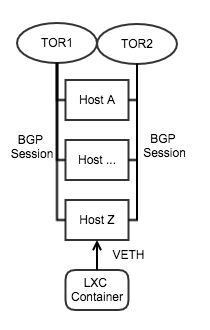
(A typical Yammer Rack setup)

Every physical host in our datacenter is acting as a router. Using BIRD we are able to advertise the routes for the host. For our services we leverage the use of LXC for containerization. When a container is started, it is given an IP address by Zeus, and then we reconfigure BIRD with the new IP to advertise. The ToRs (Top of Rack switches) pick up this IP, and through the magic of BGP, the container becomes routable.

As shown in the example configuration, we assign each host a unique ASN that is trusted by our ToRs. We then configure each host to act as a router for the container. It’s important to note that the use of communities keeps the load on our routers low. The bgp_export filter only accepts traffic intended for the host that originates from a neighbor. And since each router only needs to know how to route a wider subnet — as opposed to each individual IP — communities allow you to advertise an entire IP slice to the higher-level routers.

Additional Applications for BGP

We use BGP for more than just routing to individual hosts. By advertising a single IP from multiple hosts, we are able to create a networked-level failover for certain systems such as our Puppet mirrors and DNS.

To advertise a single IP, we just make a few modifications to our previous BIRD configuration.

With this configuration we can route this single IP as a sink from multiple sources. This same technology is used in our software-defined load balancer.

Yammer Loadbalncing

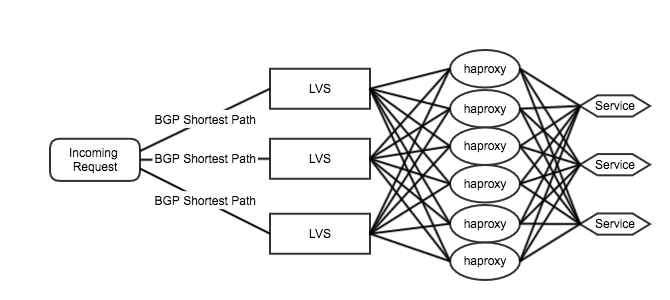
Here we use 3 hosts running LVS as a sink for incoming traffic that then forwards to multiple HAProxy hosts to do Layer7 load balancing. In Zeus we call the above topography a “Cell,” and it allows us to scale our infrastructure as needed. If we need more network throughput, we can add LVS nodes. If we are having issues on Layer7 or SSL termination, we can add more HAProxy hosts. Currently we are running 4 completely separate Cells for network isolation of tasks.

Hangups

Implementing this software-designed networking stack didn’t come without issues. Using BGP on our internal networking infrastructure required tweaking multiple settings throughout the datacenter fabrics. For example, each router has to be configured with BGP communities in mind. Our initial rollout did not include these communities and this put pressure on the routers two levels above our ToRs.

We also had to be conscious of the BGP routing method used. If you plan on advertising a single IP from multiple sources — like in the LVS example above — you should make sure you have your Equal Cost Multipath (ECMP) configured correctly. If ECMP is not enabled or misconfigured, it’s possible you will experience sub-optimal performance; packets will flow between hosts since they all share the same BGP weights.

Since our HAProxy hosts could be on different subnets, we have to use IPIP tunnel mode for LVS. This has the added overhead of 20 bytes on all of our packets passing through the load balancer. Keep in mind that the extra overhead is not considered when calculating the segment size of IP traffic. This resulted in an issue where any packet that is greater than our configured MTU-20 bytes becomes malformed. On our HAProxy hosts, we used MSS clamping in IPTables to ensure a maximum size of MTU-20 bytes, which combats the issue.

Moreover, the use of BGP gives us great flexibility in launching our systems but shouldn’t be relied on for detecting failures. Routers use keepalive packets configured on intervals to refresh the BGP hold timer. These values present the maximum amount of time needed to react to a failure in routing. Keepalive packets only reset the hold timer, so if you configured your routers to have a 90s hold timer and a 30s keepalive timer, then on network failure you could see as much as 90s of downtime before your routers reconfigure.

BGP has greatly increased our fault tolerance to network failures and has allowed us to provision new hosts for our services team extremely quickly. However, if you plan to do rolling restarts of multiple hosts sharing an IP, I suggest using BGP path calculations to artificially take a host out of rotation by increasing the length of your path.


Yammer Datacenter Networking with BGP and BIRD was originally published in Yammer Engineering on Medium, where people are continuing the conversation by highlighting and responding to this story.

https://medium.com/p/4121d470c1f6
Extensions
Converting callback async calls to RxJava
androidjavaandroiddevrxjavaandroid-app-development
Show full content
Using RxJava’s Observable.fromAsync() to convert asynchronous APIs while properly dealing with backpressure

Since we started using RxJava in our Yammer Android app we’ve often encountered APIs that don’t follow its reactive model, requiring us to do some conversion work to integrate them with the rest of our RxJava Observable chains.

APIs usually offer one of these two options when dealing with expensive operations:

  1. A synchronous blocking method call (expected to be called from a background thread)
  2. An asynchronous non-blocking method call that uses callbacks (and/or listeners, broadcast receivers, etc)
Converting synchronous APIs to Observables

For the first type of APIs, RxJava offers a convenient factory method named Observable.fromCallable(). For example, this is how it would look to convert the commit method from Android’s SharedPreferences API:

This abstracts away all the complexity behind implementing a reactive method, while automagically adhering to The Observable Contract™ thus making it very easy to convert these types of APIs to RxJava.

Converting asynchronous APIs to Observables

Converting the second type of APIs is not as straightforward. The pattern that we see again, and again, (and again) is to wrap them using the factory method Observable.create(). Unfortunately this approach has several disadvantages which will be explained in this post.

Let’s say we need to track a device’s accelerometer with the help of Android’s SensorManager which uses both callbacks and listeners. Let’s see how the regular usage of the Sensor Manager would look like in an Activity:

A naïve implementation of the logic needed to wrap this API in an RxJava Observable would look something like this:

Using this conversion we can then consume the accelerometer values in a reactively manner:

Although this would work, it would require a lot more effort before it can completely fulfill the requirements from the Observable contract:

  1. We would need to unregister the listener after an unsubscription happens to avoid memory leaks.
  2. We would need to check for errors and properly report them up the Observable chain using onError() to avoid potential crashes.
  3. We would need to check if the subscriber is still subscribed before emitting values via onNext() or onError() to avoid unwanted emissions.
  4. We would need to handle backpressure to avoid crashing with MissingBackpressureException.

Implementing 1-3 correctly it’s still possible –albeit laborious– using Observable.create():

Implementing (4) is not trivial to say the least, since properly dealing with backpressure is a subject that entire books could be written on, and shouldn’t be expected to be implemented manually every time you need to wrap an async API.

Luckily for us, the smart people from RxJava have recently released better support for all this in v1.1.7, in the form of a new factory method called Observable.fromAsync().

UPDATE: Jake Wharton brought to my attention that the name of this method is going to change from Observable.fromAsync() to Observable.fromEmitter() in v.1.2.0 of RxJava.
Observable.fromAsync() to the rescue

Documentation is still minimal, but perhaps an example would better show how this method can help us implement 1-4 above:

The first thing you should notice is that we’re not explicitly implementing (2) or (3); this is because the Observable.fromAsync() will now be handling these cases for us.

Implementation for (1) remains very similar, albeit with a friendlier API named setCancellation().

For (4) all we have to do is specify the backpressure strategy to be used.

The deal with backpressure

Backpressure in simple terms, is when a producer emits values on a rate that is way faster than what the consumer can handle. This rate is defined by an internal bounded buffer size, that when overflown would lead to the mysterious MissingBackpressureException being thrown.

Again, implementing backpressure handling isn’t easy but thanks to the fromAsync() method, its complexity has now been reduced to just understanding how these already implemented strategies behave. These are the different BackpressureModes at our disposal:

  • BUFFER: switches to an internal unbounded buffer (instead of observeOn’s 16-element default buffer). This will allocate a 128 initial element buffer that will continue to dynamically grow as needed until the JVM runs out of memory.
This strategy is usually what you should choose when dealing with hot Observables (i.e. one that never calls onCompleted()), as shown in this example.
  • LATEST: reports only the latest values effectively overwriting older, undelivered values. Internally this is creating a buffer of size 1.
This is usually a good candidate for a cold Observable (i.e. one that always completes), especially if we know it only emits one value.
  • DROP: similar to LATEST, except it reports the first value that arrives, and ignores anything that arrives later.
Also a good candidate for cold, single-emission Observables.
  • ERROR / NONE — will keep behaving as before, i.e. will throw a MissingBackpressureException when the buffer overflows.

It’s important to understand the differences between these strategies and choose the one that is right for your needs. Since you’ll be usually wrapping 3rd party APIs, you have to be extra careful to ensure that a producer that emits more values that you can handle in a timely fashion won’t crash your app.

Show me the code

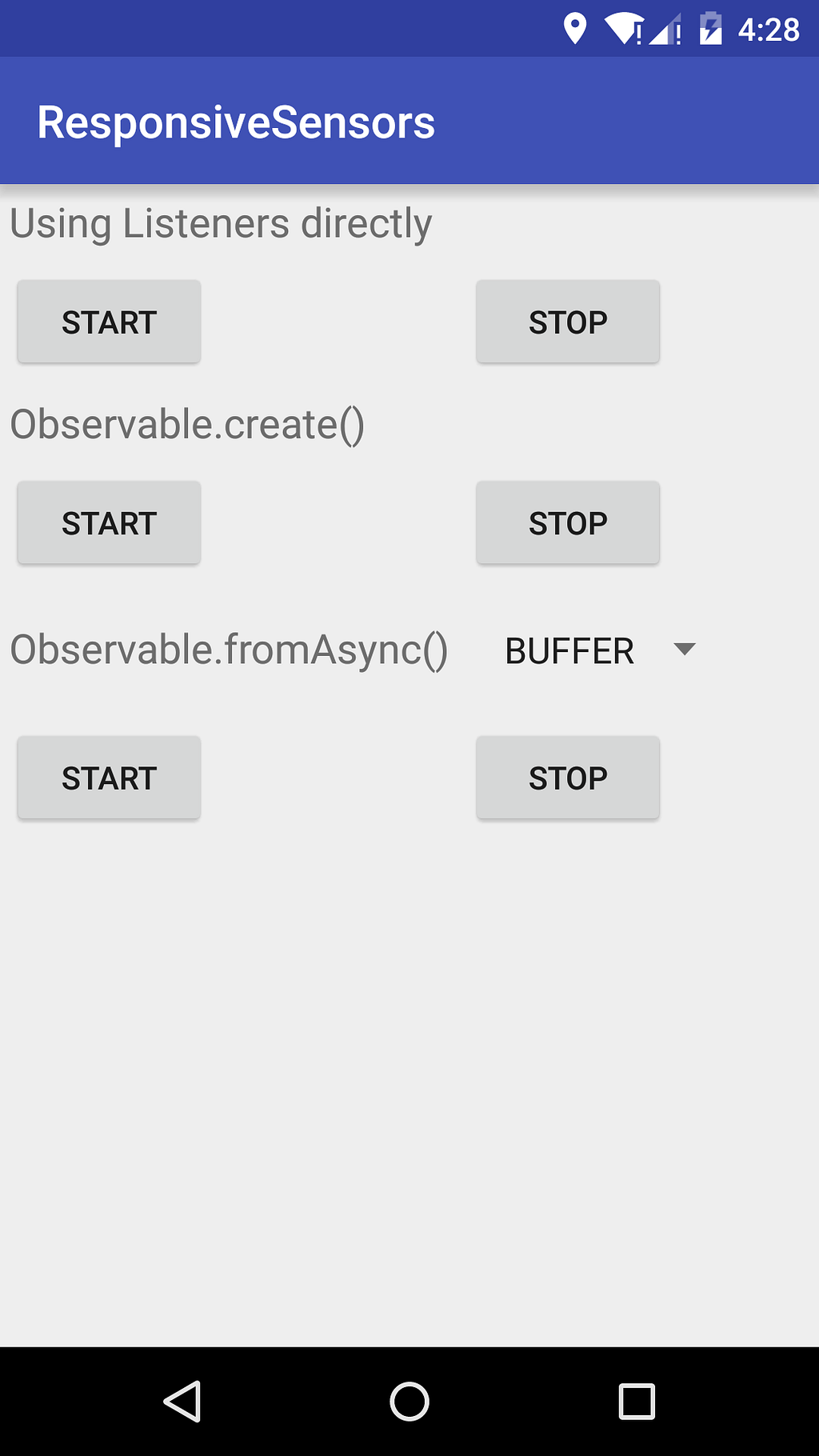
You can find an example Android app that I created that will allow you to simulate a backpressure error scenario using the SensorManager example from above. You can use it to explore the strategies implemented by the different BackpressureModes.

https://github.com/murki/AndroidRxFromAsyncSample

Be sure to keep an eye on the logcat output when starting the sensors.
TL;DR:

When converting existing APIs to RxJava reactive Observables:

1) Try to find a synchronous version of the method and then wrap it using Observable.fromCallable().
2) If only an async method is provided:
   * Avoid using Observable.create() factory method at all costs.
   * Instead use the new Observable.fromAsync() factory method making sure to:
     - Call onNext(), onCompleted(), and onError() as appropriate.
     - Provide cleanup logic (if needed) via the setCancellation() method.
     - Understand and choose the best BackPressureMode for your use case.
All subjects discussed in this blog post pertain solely to RxJava v1.x. As of the date of this publication, the version 2.0.0 of RxJava is already in Release Candidate mode, and it includes many changes related to backpressure; mainly the introduction of the Flowable concept, along with its own factory methods. Please read about these differences if you’re planning to use RxJava v2.x on your projects.

Converting callback async calls to RxJava was originally published in Yammer Engineering on Medium, where people are continuing the conversation by highlighting and responding to this story.
https://medium.com/p/ebc68bde5831
Extensions
Chaining multiple sources with RxJava
android-app-developmentrxjavaandroid
Show full content

The pattern for loading and displaying data for our Yammer Android app is roughly as follows:

  1. When wanting to show content query two sources: one being the disk (cache), and the other one being the network (API).
  2. Show the cached data while waiting for the network.
  3. When the network request comes back, cache it to disk, then show it.

This is a very straightforward pattern, but things can get tricky real fast when we consider certain factors:

  • Should these two background calls be made in serial or in parallel?
  • What happens if the cache is empty?
  • What about errors?
  • What happens if the network call finishes before the disk call?

I’ve been fiddling with RxJava lately since it’s all the rage in the Android community nowadays and I didn’t want to miss out on the revolution. After reading Dan Lew’s excellent article about a similar topic I decided to give it a go and implement this logic while addressing the points mentioned above by using RxJava.

Example app is available on my github: https://github.com/murki/chaining-rxjava

Serial or parallel?

There is no point in waiting for one call to return in order to fire the other one if we can just fire them both at the same time independently, and one thing RxJava excels at, it’s in helping with chaining multithreaded operations.

For this case we can use the merge operator along with the IO scheduler:

The merge operator will make sure both calls are fired independently and then emit the data once for each source as soon as each completes. The subscribeOn(Schedulers.io()) will make sure each repository call happens on a different background thread (from the same unbounded thread pool).

To double check that this logic work as described I used the excellent Frodo library to add easy logging around my Observables via annotations. I recommend you to always make sure your Observables are running in the way you expect them to while coding.

Assuming we have the following annotated methods:

The logcat should look something like this (some output omitted for brevity):

...
DiskRepository﹕ Frodo => [@Observable#getData -> @Emitted -> 1 element :: @Time -> 560 ms]
...
DiskRepository﹕ Frodo => [@Observable#getData -> @SubscribeOn -> RxCachedThreadScheduler-1 :: @ObserveOn -> RxCachedThreadScheduler-1]
...
NetworkRepository﹕ Frodo => [@Observable#getData -> @Emitted -> 1 element :: @Time -> 2446 ms]
...
NetworkRepository﹕ Frodo => [@Observable#getData -> @SubscribeOn -> RxCachedThreadScheduler-2 :: @ObserveOn -> RxCachedThreadScheduler-2]
...
DomainService﹕ Frodo => [@Observable#getMergedData -> @Emitted -> 2 elements :: @Time -> 2446 ms]
...

The main takeaways from this output are:

  • We assume parallelism is taking place since we can see that each getData() method is running on its own separate thread (RxCachedThreadScheduler-1 vs RxCachedThreadScheduler-2)
  • We confirm both getData() methods are running in parallel since the total time taken to emit the 2 elements by getMergedPhotos() is max(560, 2446) instead of sum(560,2446).
In this diagram we can assume the consumer subscribes to Observable<Data> getMergedPhotos() and updates the UI every time an emission occurs.

Success! It looks like we have achieved parallelism in a very succinct way thanks to RxJava.

Cache network data

At this point our cache will always be empty, since we’re never saving the data to disk. In order to fix this we’ll take advantage of the “side-effects” operators that RxJava offers, in particular doOnNext():

A couple things to be aware of here:

  • The saveData() method doesn’t need to be implemented as an Observable, it will automatically run in the same thread as the caller’s subscription (RxCachedThreadScheduler-2 in this case).
  • The original emission will not happen until the doOnNext() action has been completed (i.e. networkRepository will not emit any data until the caching has been done).
  • If diskRepository.saveData(data) throws an exception it will be automatically wrapped and reported to the stream’s subscriber onError() callback, keeping the interface fluent.
These diagrams are assuming diskData will return faster, but that might not always be the case.

Once again, this was very simple to accomplish thanks to RxJava.

Ignoring the empty cache

If the cache is empty we probably want to ignore it and don’t emit any data at all. For this we can use the Filter operator:

Here we’re just filtering data results that are null from both sources. In the case of DiskRepository this should happen when the cache is empty.

[If you’re not a fan of using nulls to denote the absence of a value, I recommend you to look into replacing them with Optional<T>]

Error Handling

It’s worth noting that any exception happening in the chain would interrupt the entire flow of data (e.g. an error when retrieving the network data would also stop showing the cache). Depending on your requirements this might not be desirable.

For these cases RxJava offers a set of error-recovery operators that allow you to return default values when certain exceptions occur, the simplest of these operators being onErrorReturn.

UPDATE: At the time of writing the original article RxJava (v.1.0.16) didn’t really have a good way to delay asynchronous errors on a stream. The functionality was fixed in v.1.1.1, so I have updated this article to make use of this technique.

But instead of just blindly swallowing the errors we are going to make use of the mergeDelayError operator. The documentation states that it “combines multiple Observables into one, allowing error-free Observables to continue before propagating errors” which sounds exactly like what we need:

Adding this operator would ensure that if an Exception is thrown by diskRepository.getData(), it won’t interrupt the stream. Unfortunately RxJava had a bug that if any Exceptions were being thrown later in the stream (networkRepository.getData() in this case) they would incorrectly cut ahead of the successful emissions and break the flow. In order to fix this, an overload was added in version 1.1.1 for observeOn(Scheduler scheduler, boolean delayError) in order to signal the Scheduler to respect the delaying of errors.

Only the freshest

Just showing the data in the order it is emitted by the Observable can get us into trouble: if for some reason the network call would finish before the disk call, the UI would then be showing the data from the API first, but replacing it by the older disk data later.

This can be avoided by time-stamping the data after the network call returns. The Timestamp operator helps us mark the data with the exact DateTimeOffset in which it was emitted, and if we store these timestamps along with the data, we can then use it to filter out data that is not relevant.

As mentioned above, the consumer (in this case the view) has to make sure to use the overload of observeOn while passing delayError=true

This is where things get a little hairy. As you can see, almost all the calls deal now with Timestamp<Data>, the only method that still returns plain Data is NetworkRepository since this is the one to which we’re attaching the timestamp() operator on. This will effectively transform the Data obtained from the network to Data that has now a DateTimeOffset associated with it.

The second part of the equation is having a way to let our filter query the timestamp of the data that is already being displayed, that way if the network call was shown first, the disk data will be later ignored (filtered out) when it arrives. In the example above the IDisplayedData can be anything that has access to the timestamp of the data being shown in the view (Fragment, Activity, Adapter, etc).

So now our filter is also answering the question is the data arriving now newer than what we’re already showing?

With this we also get the extra benefit of having implemented the UI refresh correctly; if our view is already showing data that has been cached to disk and the user triggers a refresh, the filter will make us ignore the cached data altogether and only show the fresh network data.

Show me the code

If all this is too confusing to follow, a full-fledged real-world example is available on my github repo: https://github.com/murki/chaining-rxjava

I used Retrofit for implementing the network repository, and a basic SharedPreferences-based implementation for the disk repository. Additionally I make use of RxJava’s map operator to transform the data model to a view model.

I’m an Android dev at Engineering Yammer


Chaining multiple sources with RxJava was originally published in Yammer Engineering on Medium, where people are continuing the conversation by highlighting and responding to this story.

https://medium.com/p/20eb6850e5d9
Extensions
Android GCM push notifications registration done right
push-notificationandroidandroid-app-development
Show full content
Re-register GCM push notifications on app upgrade with MY_PACKAGE_REPLACED

When implementing push notifications using GCM (Google Cloud Messaging) on Android, one of the gotchas of which to be aware is the “application update” scenario. The Google documentation states:

When an application is updated, it should invalidate its existing registration ID, as it is not guaranteed to work with the new version. Because there is no lifecycle method called when the application is updated, the best way to achieve this validation is by storing the current application version when a registration ID is stored. Then when the application is started, compare the stored value with the current application version. If they do not match, invalidate the stored data and start the registration process again.

What the documentation doesn’t mention is that as of API 12 you can use a Broadcast intent action that allows you to react in case your app has been updated:

ACTION_MY_PACKAGE_REPLACED - Broadcast Action: A new version of your application has been installed over an existing one.

This should allow us to re-register with GCM in a more elegant, and less error-prone way.

UPDATE: Another reason I rather use this Intent instead of Google’s approach is because their sample solution relies on the app being launched before attempting to re-register. This could potentially lead to users being left without push notifications until they manually open the app. With ACTION_MY_PACKAGE_REPLACED the code logic executes on the background immediately after the app is updated (which also takes advantage of the device having internet connection).

Steps:

1. Register a new BroadcastReceiver that will intercept an app-update action in your AndroidManifest.xml:
<receiver android:name=".PackageReplacedReceiver">
<!— Useful for detecting when the application is upgraded so we can request a new GCM ID -->
<!— MY_PACKAGE_REPLACED only alerts for this same app, and it is only available on API 12 and up -->
<intent-filter>
<action android:name="android.intent.action.MY_PACKAGE_REPLACED" />
</intent-filter>
</receiver>
2. Use a (wakeful) BroadcastReceiver to receive the the Intent, and then trigger a GCM re-registration:
public class PackageReplacedReceiver extends WakefulBroadcastReceiver {
@Override
public void onReceive(Context context, Intent intent) {
if (intent != null && intent.getAction().equals(Intent.ACTION_MY_PACKAGE_REPLACED)) {
// invalidate your current GCM registration id, and re-register with GCM server using an IntentService
Intent startServiceIntent = new Intent(context, GcmPushRegistrationService.class);
GcmPushUpgradeReceiver.startWakefulService(context, startServiceIntent);
}
}
}
3. (This implementation is up to you) Use an IntentService to perform the GCM re-registration in the background:
public class GcmPushRegistrationService extends IntentService {
@Override
public void handleIntent(Intent intent) {
// Remove the stored GCM registration ID
clearGcmRegistrationId();
GoogleCloudMessaging gcm = GoogleCloudMessaging.getInstance(this);
String regId = gcm.register(getGcmSenderId());
// You should send the registration ID to your server over HTTP,
// so it can use GCM/HTTP or CCS to send messages to your app.
// The request to your server should be authenticated if your app
// is using accounts.
sendRegistrationIdToBackend(regId);
// store the regId locally somewhere (e.g. SharedPreferences)
storeGcmRegistrationId(regId);
// Release the wake lock provided by the WakefulBroadcastReceiver.
GcmPushUpgradeReceiver.completeWakefulIntent(intent);
}
}

And that should be it! This will ensure your app automatically re-registers every time it gets updated from the Play Store. You should still check whether your app is registered on every app launch though.

  • In case you’re using an older API (less than 12) the PACKAGE_REPLACED action is also available, which behaves the same way but launching your receiver every time any app gets updated. In order to react only to your app update you need to verify the Intent’s data:
if(intent.getData().getSchemeSpecificPart().equals(context.getPackageName()))

Android GCM push notifications registration done right was originally published in Yammer Engineering on Medium, where people are continuing the conversation by highlighting and responding to this story.
https://medium.com/p/7aba759d1d55
Extensions
Handling generic Http errors across your Android app
androidretrofitandroid-app-development
Show full content
Using Otto and Retrofit to log out users when receiving 401 error responses from the API

I was recently working on an Android project where we needed to log out the current user whenever you encountered a 401 Unauthorized HTTP response from our API.

I am a fan of all the Android libraries from square, so for this post I’ll be using the REST client Retrofit in combination with the event bus Otto to achieve a centralized elegant way to do this.

Although all this should have been pretty straightforward there are a couple of gotchas to be aware of, mostly regarding Otto limitations so let’s get to it!

0. Create an event object for Otto
public class HttpUnauthorizedEvent { }

The way Otto works is by creating a contract between publishers and subscribers based on the type of the object used as a parameter. In this case we will use the HttpUnauthorizedEvent object to signal that a 401 error has happened in our application.

An instance of any class may be published on the bus and it will only be dispatched to subscribers for that type.
1. Create a custom ErrorHandler for Retrofit and post events for intercepted 401 errors using Otto event bus from there
public class CustomErrorHandler implements ErrorHandler {
  private static final Handler MAIN_LOOPER_HANDLER = new Handler(Looper.getMainLooper());
private final Bus eventBus;
  public CustomErrorHandler(Bus eventBus) {
this.eventBus = eventBus;
}
  @Override public Throwable handleError(RetrofitError error) {
Response r = error.getResponse();
if (r != null && r.getStatus() == HttpURLConnection.HTTP_UNAUTHORIZED) {
// we need to make sure we post in the UI thread
MAIN_LOOPER_HANDLER.post(new Runnable() {
@Override public void run() {
eventBus.post(new HttpUnauthorizedEvent());
}
});
}
return error;
}
}

One thing to notice is that we’re making sure we’re posting in the UI thread, this is mainly for two reasons:

By default, all interaction with an instance is confined to the main thread.
  1. If you try to post from a different thread Otto will throw an exception.
  2. We actually want to react to these errors in the UI thread, which is where we will be logging out the user (e.g. in an Activity).
2. Configure the CustomErrorHandler to be used by Retrofit RestAdapter
// Obtain Bus eventBus from constructor or singleton injection
Bus eventBus = new BusProvider().get();
// Set retrofit ErrorHandler to use our CustomErrorHandler and 
// pass the eventBus to it
RestAdapter restAdapter = new RestAdapter.Builder()
.setServer("API_URL")
.setErrorHandler(new CustomErrorHandler(eventBus))
.build();
// create and use your retrofit REST client
RestApiClient api = restAdapter.create(RestApiClient.class);
api.MethodCall(...); //If a 401 error response happens here
// the error handler will automatically notify all subscribers
3. Subscribe for errors on a inner-class of your (base) Activity

For my specific case I wanted to put the subscription and log-out logic in a base Activity from which all my app Activities were inheriting. This is currently impossible given that Otto doesn’t support subscribing on base classes.

Otto will not traverse the class hierarchy and add methods from base classes or interfaces that are annotated. This is an explicit design decision to improve performance of the library as well as keep your code simple and unambiguous.

As a workaround you can put your @Subscribe method on your base Activity’s nested class and it will work as a charm.

public abstract class BaseActivity ... {
  private class AuthFailureHandler {
@Subscribe
public void onAuthFailure(HttpUnauthorizedEvent event) {
BaseActivity.this.logOutCurrentUser();
}
}
  // Obtain same Singleton eventBus
private Bus eventBus = new BusProvider().get();
private AuthFailureHandler authFailureHandler;
  @Override
protected void onResume() {
super.onResume();
authFailureHandler = new AuthFailureHandler();
// "In order to receive events, a class instance needs to
// register with the bus."
eventBus.register(authFailureHandler);
}
  @Override
protected void onPause() {
super.onPause();
// "Remember to also call the unregister method when
// appropriate."
eventBus.unregister(authFailureHandler);
}
  private void logOutCurrentUser() {  
// use a (pending) Intent Service to log out the user
}
}

If there’s enough interest I can work out a simple code example and share it here.

Happy coding!


Handling generic Http errors across your Android app was originally published in Yammer Engineering on Medium, where people are continuing the conversation by highlighting and responding to this story.

https://medium.com/p/eaff4e49bbb2
Extensions
ActiveRecord stole my data and now I want it back!
microservicesactiverecordruby-on-rails
Show full content

Microservices have been a popular topic recently. People argue over whether you should start with microservices or evolve there from a single ‘monolithic’ app. Maybe in a well designed app microservices are simply a deployment option?

It all seems rather academic when you have upward of 100,000 lines of (non-test) Ruby code glowering back at you. (And that’s before you start counting the gems!) You know you want to split it up, but how do you move on from there?

What follows is a case study from Yammer, in which we gradually moved our core messaging data store out of an ActiveRecord model into a microservice responsible solely for managing access to messages in Yammer. I’ll present some useful gems, point out some pitfalls that we encountered and how we tackled them, and hopefully show some techniques that may save you some time if you have to do the same. If nothing else it should give you the courage that you’re not stuck with your current architecture. If it’s important enough, you can escape!

Some background

Yammer has had a ‘service oriented architecture’ for many years. Today I can count nearly 200 services listed in our deployment tool. But back in the beginning there was one Ruby on Rails app, and even as most significant new functionality was created in new services, that Rails app has continued to grow.

Is that a problem? Not necessarily; some organisations make the monolith work, but here at Yammer it’s something we’re keen to move away from. It’s too special when compared with the other services we run.

  • Deploys take too long, and deploy to too many servers.
  • Too much function is ‘at risk’ with a single deploy — the surface area for testing is too great. Other services have a very tightly defined responsibility, which greatly limits the risk of a deploy.
  • Coupling so much function leads to inefficiencies everywhere. Just loading all the gems (more than 200) makes unit tests slow. Why is my deploy held up for asset packaging when I only changed JSON API endpoints?

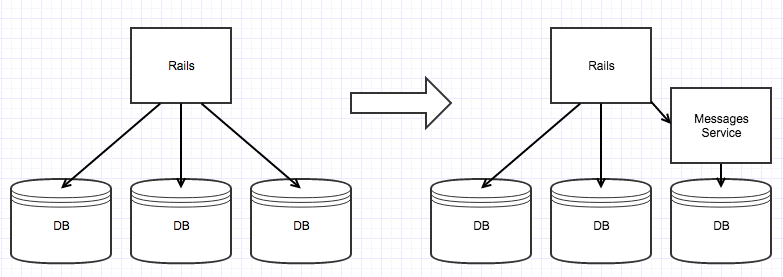
One piece we were particularly keen to extract from the monolith was the storage of message and thread objects. Yammer is a messaging platform. Yes, it’s a social network — how you find interesting conversations and contribute to the movement of information in your company is what makes Yammer messaging special — but it’s messages moving information around that make Yammer so valuable to our customers. With messages fiercely guarded by a highly complex ActiveRecord model backed by memcache and Postgres our hands were tied as we attempted to improve the scale, reliability and performance of our messaging systems. What we wanted was a service that provided a single source of truth for messages, that hid the complexities of sharding those across multiple data stores, that could be called directly from many services.

Our Rails app would still need free access to create, read, and modify messages, but we wanted a model that was backed by this new service. The Rails app would just be one of many equal consumers of the service. So how do we go from a model subclassing ActiveRecord to one that isn’t?

Hey! ActiveRecord! Let go of that!Step 1: Acknowledge

ActiveRecord is an amazing tool and you’re probably using a lot more of its features than you realise. You’re going to have to write a lot of code now that you can’t lean on ActiveRecord. (We were really surprised how much time we ended up spending on this!)

Step 2: Reduce

Use less ActiveRecord. Anything we used we would have to re-implement, so we cut down on how much ActiveRecord we used.

  • No Arel. ActiveRecord relations (built on top of Arel) expose the huge power of a relational database, but that’s not an interface we could provide in an HTTP web service with a future that doesn’t include a relational database. So we moved all model loading to explicit find_by_xxxx methods. For each of those finder methods we would create a matching HTTP endpoint in the messages service.
  • No scopes. They’re just ActiveRecord Relations in disguise.
  • Cut code that relies on transactions for rollback. The only way to roll back an HTTP request is to issue a request that reverses what you have done.
  • Reduce use of callbacks. You can of course add callbacks to your model without using ActiveRecord. Just mix in ActiveModel::Callbacks. But many of the callbacks provided by ActiveRecord only really make sense when you’re thinking of a model that maps directly to a database table. For example before_commit no longer makes any sense when save and commit are done together with a single HTTP POST or PUT.
Step 3: Recreate

Start recreating the ActiveRecord features you do want to use.

Note that you don’t have to implement everything at once. Remember “favour composition over inheritance”? Do that refactoring! Our initial ActiveRecord-free Message model delegated a lot of function to an internal instance of MessageActiveRecord. Over time we gradually cut out all that delegation.

Attributes. ActiveRecord does a lot of work to map database columns to attributes on your model. You’ll need to replace that.

  • Virtus is a popular option but doesn’t have change tracking (which we wanted).
  • attr_accessor + ActiveModel::Dirty. The basic building blocks, but ActiveModel::Dirty leaves you with a fair bit of plumbing to do, and you don’t get any checking that what’s assigned to your attributes will make a sensible JSON payload to send to your service.
  • When all else fails, make your own gem. We made ModelAttribute. So you don’t have to! It also handles efficient serialisation and deserialisation to/from JSON. Yammer loads a lot of messages, so performance here really mattered to us.

So our model started to look like this:

class Message
extend ModelAttribute
  attribute :id,           :integer
attribute :body, :string
attribute :message_type, :integer
attribute :references, :json
attribute :created_at, :time
# ...
  def save
# ModelAttribute provides #changes and #changes_for_json
return if changes.empty?
Messages::MessageStore.save(self.changes_for_json)
changes.clear
end
end

Loading records from the database. We started with just delegating to ActiveRecord for that. But our new model was supposed to be loading JSON from a web service, so we rewrote the loading to request JSON over a direct database connection. The model loading logic was then the same for both backends, except for the source for that JSON.

Getting JSON directly from the database is really very easy using Postgres’ JSON functions:

sql = "SELECT row_to_json(t) FROM (
SELECT id,
...,
round(extract(epoch from created_at) * 1000) as created_at,
round(extract(epoch from updated_at) * 1000) as updated_at,
FROM messages
WHERE ...
) t;".gsub(/\s+/, ' ')
json = connection.select_values(sql)

Callbacks. ActiveModel::Callbacks for when you just can’t live without them. (Usually because we still wanted to use a library that relied on a callback.)

class Message
extend ActiveModel::Callbacks
define_model_callbacks :save, :destroy, :commit
  def save
return if changes.empty?
run_callback :commit do
run_callbacks :save do
Messages::MessageStore.save(self.changes_for_json)
end
      # To match ActiveRecord behaviour, after_save callbacks expect
# to see a populated changes hash, after_commit callbacks don't.
changes.clear
end
end
# Similarly for destroy
end

Caching. Maybe this is not a problem for you, but it was a big problem for us. Yammer’s Ruby monolith uses a fork of the RecordCache gem to cache database reads (similar to the more recent IdentityCache gem from Shopify). Without the cache Postgres just can’t keep up, even running on a monster of a DB server, kitted out with FusionIO cards. But RecordCache is deeply entwined with ActiveRecord, so we had to re-implement that. (Sadly this gem is based on a Yammer special caching gem, so we haven’t open-sourced it as it’s not going to be much use to anyone.)

(Side note — as we move function from our Ruby monolith into services we also want to move responsibility for caching out of the monolith. So we store cache entries not in the Ruby-specific marshall format, but using a combination of JSON, MessagePack and ZLib compression, so that it can be read equally well from Java services.)

The rest. new_record? persisted? destroyed? primary_key to_param update_attribute… We wrote up a little module called ActiveRecordMimic that provided re-implementations of little helper methods that we still wanted without cluttering our model with methods that are nothing to do with its domain responsibilities.

module ActiveRecordMimic
def destroyed?
!!@destroyed
end
  def new_record?
!id
end
  def persisted?
!(new_record? || destroyed?)
end
  # This allows us to use this object as a hash key, and for uniq'ing arrays
def hash
id.hash
end
  # See more in https://gist.github.com/dwaller/5474304cfea354a9701d
end
Step 4: Transition

Nearly there! We have a model now that doesn’t rely on ActiveRecord, but does still access Postgres directly from within a Rails monolith. Gradually we transitioned traffic to go via the new service instead, allowing us to tune performance, server provisioning, circuit breakers, network settings, etc. in a production environment.

(There are a myriad of ways of doing a gradual transition. We switched code based on user IDs (our own to start with!) before moving on to checking the last digit of the ID — allowing us to roll out 10% at a time. And we always had a kill-switch, so we could revert to the old code path at a moment’s notice.)

So long, and thanks for all the records

It’s easy to underestimate how much ActiveRecord gives you. It may encourage you towards designs that you regret later, but it does so much heavy lifting. It’s only when you try to quit that it become clear how much you’re reliant on it!

This is not a blog post on application architecture. There are already a lot of those! The end result still follows the Active Record pattern, just loading the data from a service instead of the database. It’s not the end state for Yammer either, just a step along the way to a messaging pipeline that is better decomposed into services. With message data exposed directly through a simple, extremely fast HTTP service we have already started to use that data in other services, pushing towards a faster, more resilient messaging infrastructure for our users.

It took a lot of effort, but it was possible, and a valuable move. I hope that this case study gives you some of the tools and confidence to break away from ActiveRecord when the time is right for you!

David Waller is a senior engineer in the Yammer London office.

Appendix: Gemography

ActiveRecord stole my data and now I want it back! was originally published in Yammer Engineering on Medium, where people are continuing the conversation by highlighting and responding to this story.

https://medium.com/p/3041ac4eb163
Extensions
Moving Code Forward
Show full content
Myo Thein & Dan Lee

Everybody loves a good rewrite. It feels great to throw away a crusty, years-old codebase and replace it with something shiny and new. Rewrites come with some serious tradeoffs though, and in a lot of cases, the decision to start again from scratch is not the right call at all. In the seven-year history of yammer.com’s Frontend codebase, we’ve never thrown the whole thing away and started over. Why? Well, let’s take a quick look at the characteristics of Yammer’s Frontend…

  • It’s big. We’ve got around 120,000 lines of JavaScript.
  • It has numerous, globally distributed contributors. The Yammer Frontend team has 25 members, split between offices in San Francisco, Redmond, and London.
  • It’s deployed often. We deploy the Frontend code daily, with the ability to deliver hotfixes on-demand within 20 minutes or so.
  • It changes rapidly. At any given time, there are upwards of a dozen project teams adding commits.

Code like this doesn’t lend itself nicely to global rewrites. But! That doesn’t mean that we never make improvements to our code’s overall health. On the contrary, the Yammer Frontend team has gotten pretty good at making safe, iterative improvements without slowing down the team’s ability to quickly deliver features.

Introducing RequireJS

This year, we introduced RequireJS to help with code organization and dynamic loading. Even though this was a large, fundamental change to our codebase, we introduced it iteratively and now all of our JavaScript modules use RequireJS. If you’re interested in hearing more about this project, check out the talk given by Yammer Frontend Engineers Dan Lee and Chris Chen at this year’s Frontend Ops Conference:

Backbone.Component

The first commit to Yammer’s Frontend happened in 2007 — long before popular JavaScript MVC frameworks were introduced. Like many others, we created our own homegrown MVC framework to properly architect our code. Today, there are many mature options in the Frontend framework space, and we’ve come to appreciate the benefits of using an established open-source solution. We decided to migrate away from our own UI component abstractions and started using Backbone Views. In the process, we created a thin wrapper that we called ‘Backbone.Component’. Backbone.Component provides management of parent/child relationships between Views. We open-sourced this abstraction, and you can check it out on Github here: https://github.com/yammer/backbone-component.

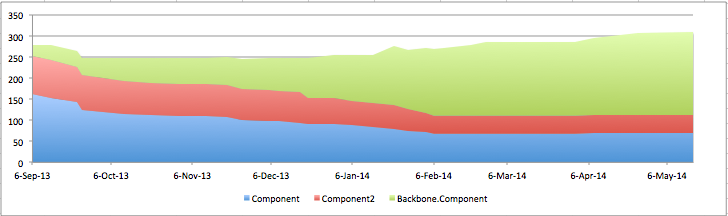
The introduction of Backbone.Component kicked off a flurry of activity amongst our Frontend engineers as we migrated old, crufty UI components to this new API. We even had a few ‘hack days’ where everybody was responsible for converting one or more components.

Below is a time series chart which illustrates our effort.

FeedList Refactor

Yammer is a messaging system, and at its heart are lists of threads called Feeds. Our FeedList, the UI component that displays the list of threads, has been around since the beginning and has endured countless A/B tests and iterations of features. Needless to say, over time it became more and more difficult to add new features quickly. So, armed with our new UI abstraction, the Frontend team embarked on a project to to revive the FeedList. Sugendran Ganess, one of the lead developers on the project, spoke about his experience at Scotland JS. The video of his talk can be seen here:

How Did We Do All This?

So how did we make all of those big changes without sacrificing product quality or slowing down release cadence? Experiments. An ‘Experiment’ is Yammer nomenclature for an A/B test. We have the ability to introduce a branch in our code, and only expose certain users/networks to that branch. Typically this is used to determine if a feature is helping product metrics, but this system is also very useful for slowly introducing infrastructure changes. All of the above projects were completed using Experiments.

The general flow is to first enable the Experiment solely for our QA team, and as the code stabilizes, slowly roll it out to more and more users. It takes more up-front effort to structure the code in a way that allows it to be hidden behind an Experiment toggle, but we’ve found this technique to be essential in making big changes to our fast-moving codebase.

How did we get these projects prioritized?

The other question that begs to be asked when discussing projects like this is: When do you find the time to do them? As code grows, so does the tension between adding new features and cleaning up the existing problem areas. At Yammer, we’ve created a few outlets for working on ‘non-feature’ work. The first is something we call ‘Internal Projects’: In addition to the Product Backlog, which contains all of the cool things that our Product team wants to build, each Engineering team keeps an additional Backlog chock full of projects to improve codebase health. At any given time, a small subset of our engineers are allocated to work on the Internal Projects backlog. It wasn’t always this way. The Internal Projects concept was something that came about organically as technical debt actually started to slow down our ability to quickly iterate on features.

Why do this? Why not just throw it away & rewrite it?

Large-scale rewrites can be an effective way of improving your company’s technology. But if your code looks like ours — big, deployed constantly, and touched by dozens of hands — massive rewrites become almost impossible to do without causing disruption to our culture of shipping changes everyday.

Nevertheless, the Yammer Frontend team has developed techniques to keep aggressively moving our code forward. And move it forward we will.

Myo Thein & Dan Lee are Frontend Developers at Yammer.
On Twitter, one of them is
@myot and the other is @DanielEricLee.


Moving Code Forward was originally published in Yammer Engineering on Medium, where people are continuing the conversation by highlighting and responding to this story.

https://medium.com/p/de7d7852a58f
Extensions