Show full content
Picture this: Your app runs buttery-smooth on Pixel 7 Pro while throwing ANRs on a Redmi Note 4. Users on a Fold 6 have to experience the same janky transitions as those on a ₹6,000 device. Sounds familiar?
Welcome to Android development in 2025, where device fragmentation is one of the biggest challenges.
This is the story of how Blinkit solved Android’s most notorious problem: intelligent, real-time performance adaptation.
📱 The Problem: One Codebase, Infinite DevicesDevice Fragmentation isn’t just a developer headache — it’s a business liability.
At Blinkit, we serve millions of users across India’s most diverse Android ecosystem, from ultra-budget to flagship devices.
Consider these jaw-dropping stats from our production data:
- 57% of total OOMs occur on devices with less than 4GB of RAM
- The average time to render key screens is 2.5 times slower on budget phones compared to flagships
- 20% of users drop off after experiencing a single ANR
Traditional solutions? They’re all broken:
🔴 The Conservative Trap: Design for the weakest device. Result? Premium users get a subpar experience.
🔴 The Aggressive Fallacy: Optimize for flagships. Result? 60% of users face OOMs and ANRs.
We needed something better — something smarter, that could make apps think about performance in real-time.
🔥 Introducing: Droid Dex
Imagine your app could sense the device it’s running on and instantly adapt:
“This phone can handle 4 concurrent videos, aggressive caching, and premium transitions” or “This device needs power-saving mode, minimal caching, and simplified animations”?
That’s exactly what Droid Dex does. It’s not just another performance library — it’s an intelligent performance classification system that lets your app adapt to its environment.
// Make your app performance-aware with a single call🪄 The Science Behind the Magic
DroidDex.getPerformanceLevelLd(PerformanceClass.CPU)
.observe(this) { level ->
when (level) {
PerformanceLevel.EXCELLENT -> enableBeastMode()
PerformanceLevel.LOW -> activateSurvivalMode()
else -> runBalancedMode()
}
}
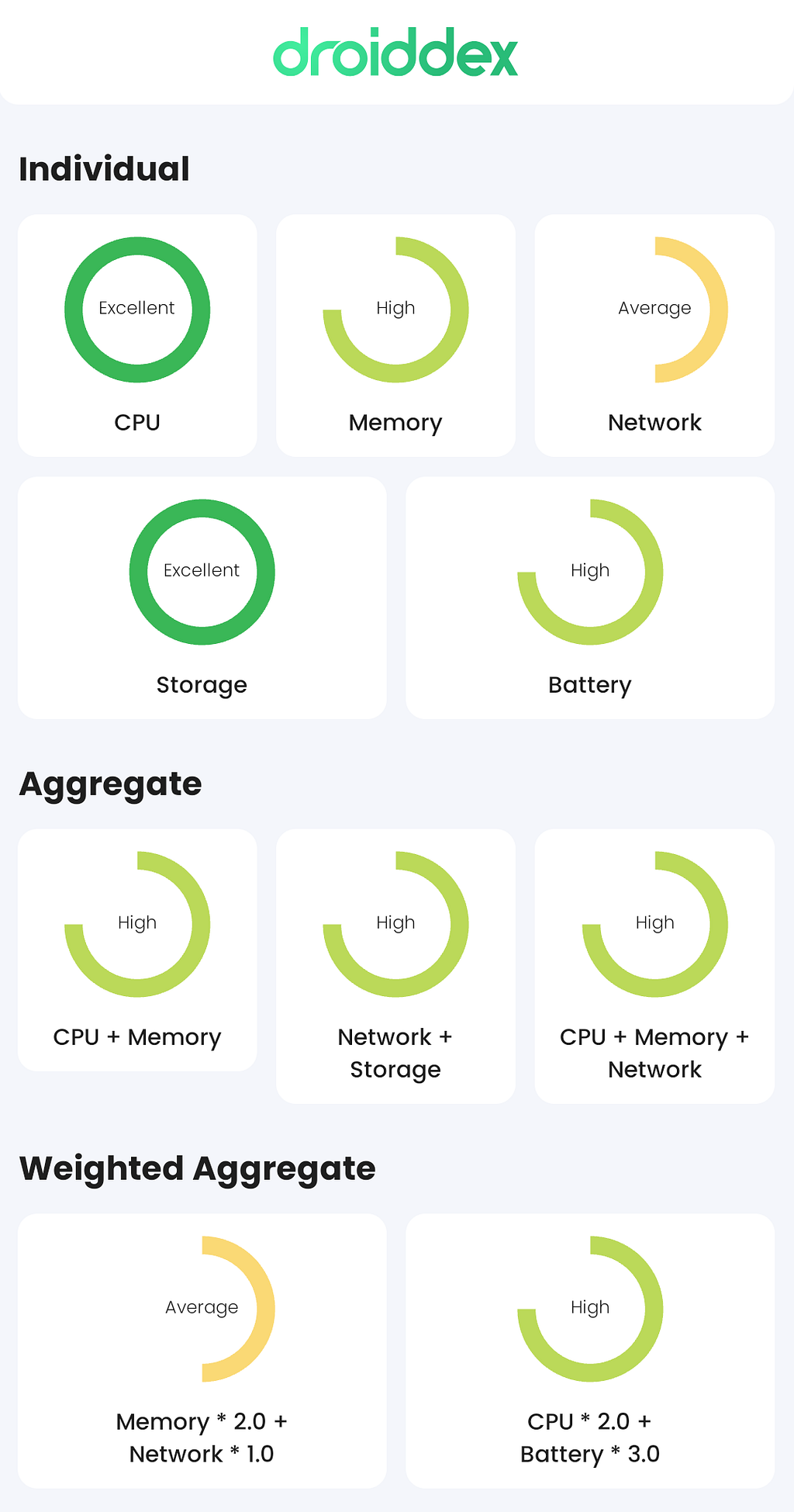
Droid Dex continuously monitors five critical performance dimensions:
enum class PerformanceClass {
    CPU,        // Total RAM, Core Count, CPU Frequency
    MEMORY,     // Heap Limit, Heap Remaining, Available RAM
    NETWORK,    // Bandwidth Strength, Download Speed, Signal Strength
    STORAGE,    // Available Storage
    BATTERY     // Remaining Charge + Charging Status + Health
}
Each dimension gets classified into four performance tiers:
- 🚀 EXCELLENT: Premium flagship territory
- ⚡ HIGH: Solid mid-range performance
- 🔄 AVERAGE: Budget-friendly reliability
- 🚨 LOW: Survival mode activated
But here’s what truly sets Droid Dex apart: Contextual Weighting.
Most libraries or apps treat all performance dimensions equally. That’s like saying CPU matters as much as battery for a photo editor, or network speed is as critical as storage for an offline game. That’s rarely the case.
Droid Dex helps you define what “performance” means for your specific use case:
// For image-heavy e-commerce feeds
val imageLoadingProfile = DroidDex.getWeightedPerformanceLevelLd(
    PerformanceClass.NETWORK to 3.0f,    // Network is king
    PerformanceClass.MEMORY to 2.0f,     // Memory for bitmap handling
    PerformanceClass.STORAGE to 1.0f     // Storage for caching
)

// For video streaming features
val videoStreamingProfile = DroidDex.getWeightedPerformanceLevelLd(
    PerformanceClass.CPU to 2.5f,        // Decoding power
    PerformanceClass.NETWORK to 2.0f,    // Streaming bandwidth
    PerformanceClass.BATTERY to 1.5f     // Power consumption
)
Your app becomes contextually intelligent rather than blindly generic.
Theory is cheap. Production data is priceless. Here’s how Droid Dex performs in the real world, serving millions daily:
🎯 1: Adaptive Image QualityE-commerce apps live or die by image quality. Too high? Budget devices lag. Too low? Conversion drops. Nailing the balance:
class ImageLoader {

    fun loadProductImage(imageUrl: String, imageView: ImageView) {
        val performanceLevel = DroidDex.getWeightedPerformanceLevel(
            PerformanceClass.NETWORK to 2.5f,  // Bandwidth is critical
            PerformanceClass.MEMORY to 2.0f,   // Bitmap memory pressure
            PerformanceClass.STORAGE to 1.0f   // Cache availability
        )

        val config = when (performanceLevel) {
            PerformanceLevel.EXCELLENT -> ImageConfig(
                quality = 95,
                format = "avif",
                resolution = "2048x2048",
                enableProgressiveLoading = true
            )
            PerformanceLevel.HIGH -> ImageConfig(
                quality = 85,
                format = "webp",
                resolution = "1024x1024",
                enableProgressiveLoading = true
            )
            PerformanceLevel.AVERAGE -> ImageConfig(
                quality = 70,
                format = "jpg",
                resolution = "512x512",
                enableProgressiveLoading = false
            )
            PerformanceLevel.LOW -> ImageConfig(
                quality = 50,
                format = "jpg",
                resolution = "256x256",
                enableProgressiveLoading = false
            )
        }

        // Load the image using config
    }
}
🧠 2: Smarter CachingAPI response caching is a double-edged sword. Cache aggressively on a 2GB RAM device? Instant death. Cache conservatively on an 8GB flagship? Missed opportunities. Our approach:
class APICacheHelper {

    private val dynamicCacheSize: Int
        get() {
            return when(DroidDex.getPerformanceLevel(PerformanceClass.MEMORY)) {
                PerformanceLevel.EXCELLENT -> {
                    val networkLevel = DroidDex.getPerformanceLevel(PerformanceClass.NETWORK)

                    if (networkLevel <= PerformanceLevel.AVERAGE) {
                        40 * 1024 * 1024  // 40MB - aggressive caching for slow networks
                    } else {
                        30 * 1024 * 1024  // 30MB - balanced approach
                    }
                }
                PerformanceLevel.HIGH -> 20 * 1024 * 1024      // 20MB
                PerformanceLevel.AVERAGE -> 10 * 1024 * 1024   // 10MB
                PerformanceLevel.LOW -> 0                      // Disable Caching
                else -> 10 * 1024 * 1024 // fallback
            }
        }

    private val intelligentCache by lazy {
        object : LruCache<String, ApiResponse>(dynamicCacheSize) {
            // Actual Implementation
        }
    }

    fun cacheResponse(key: String, response: ApiResponse) {
        val memoryPressure = DroidDex.getPerformanceLevel(PerformanceClass.MEMORY)

        // Skip caching on critically low memory devices
        if (memoryPressure == PerformanceLevel.LOW) {
            intelligentCache.clear()
            return
        }

        intelligentCache.resize(dynamicCacheSize)

        // Cache the response
    }
}
🎬 3: Video Playback That Knows Its LimitsProduct videos drive engagement. But playing too many of those simultaneously on a budget device? Say hello to ANRs. Our video playback manager is context-aware:
class VideoPlaybackManager {

    private val maxConcurrentVideos: Int
        get() {
            val cpuLevel = DroidDex.getPerformanceLevel(PerformanceClass.CPU)
            val memoryLevel = DroidDex.getPerformanceLevel(PerformanceClass.MEMORY)
            val batteryLevel = DroidDex.getPerformanceLevel(PerformanceClass.BATTERY)

            return when {
                // Beast mode
                cpuLevel >= PerformanceLevel.HIGH &&
                memoryLevel >= PerformanceLevel.HIGH &&
                batteryLevel >= PerformanceLevel.AVERAGE -> 4

                // Balanced mode
                cpuLevel >= PerformanceLevel.AVERAGE &&
                memoryLevel >= PerformanceLevel.AVERAGE -> 2

                // Survival mode: One video at a time
                else -> 1
            }
        }

    // Real-time adaptation to changing conditions
    private fun monitorPerformanceChanges() {
        DroidDex.getPerformanceLevelLd(
            PerformanceClass.CPU,
            PerformanceClass.MEMORY,
            PerformanceClass.BATTERY
        ).observe(lifecycleOwner) { _ ->
            val idealVideoCount = maxConcurrentVideos
            val currentVideoCount = activeVideoPlayers.size

            when {
                currentVideoCount > idealVideoCount -> {
                    // Performance degraded - cleanup least important videos
                    cleanupExcessVideos(currentVideoCount - idealVideoCount)
                }
                currentVideoCount < idealVideoCount && queuedVideos.isNotEmpty() -> {
                    // Performance improved - play queued videos
                    playQueuedVideos(idealVideoCount - currentVideoCount)
                }
            }
        }
    }
}
✨ 4: UI Transitions That Don’t Kill UXBeautiful animations and shared element transitions create premium experiences. But they can also degrade performance on low-end devices. Our solution is adaptive:
class AnimationManager {

    data class AnimationProfile(
        val enableSharedTransitions: Boolean,
        val animationDuration: Long,
        val enableParallaxEffects: Boolean
    )

    private val animationProfile: AnimationProfile
        get() {
            val cpuLevel = DroidDex.getPerformanceLevel(PerformanceClass.CPU)
            val memoryLevel = DroidDex.getPerformanceLevel(PerformanceClass.MEMORY)
            val batteryLevel = DroidDex.getPerformanceLevel(PerformanceClass.BATTERY)

            return when {
                // Premium experience for capable devices
                cpuLevel >= PerformanceLevel.HIGH &&
                memoryLevel >= PerformanceLevel.HIGH &&
                batteryLevel >= PerformanceLevel.AVERAGE -> {
                    AnimationProfile(
                        enableSharedTransitions = true,
                        animationDuration = 350L,
                        enableParallaxEffects = true
                    )
                }

                // Balanced experience
                cpuLevel >= PerformanceLevel.AVERAGE &&
                memoryLevel >= PerformanceLevel.AVERAGE -> {
                    AnimationProfile(
                        enableSharedTransitions = true,
                        animationDuration = 250L,
                        enableParallaxEffects = false
                    )
                }

                // Simplified experience for budget devices
                else -> {
                    AnimationProfile(
                        enableSharedTransitions = false,
                        animationDuration = 150L,
                        enableParallaxEffects = false
                    )
                }
            }
        }

    // Use the animationProfile to perform actual transitions & animations
}
Why Every Android Developer Needs Droid Dex❌ Without:- One-size-fits-none performance
- Frustrated users and lost business
- Wasted potential on flagship devices
- Higher crash rates and ANRs
- Intelligent performance adaptation
- Happier users across all segments
- Maximized potential on every device
- Significantly fewer crashes and ANRs
Stop building for the average. Start building for everyone. Make it adaptive. Make it intelligent.
Power it with Droid Dex.
💡 Note: Droid Dex is open source and actively maintained by the Blinkit Engineering team. We encourage you to share your feedback, use cases, and contributions.
If you found this useful, consider giving the GitHub repository a ⭐️ — it helps others discover the project. Say hello on LinkedIn or follow me on GitHub.
How Blinkit Cracked Android’s Performance Puzzle with Droid Dex was originally published in Lambda by Blinkit on Medium, where people are continuing the conversation by highlighting and responding to this story.