Waylist has now been out for a few weeks now and I wanted to share 3 ways in which I'm using it.
Favourite restaurants where I log restaurants we've been too and restaurants we'd love to visit. So they're not all our favourites (yet) but it's a good way of keeping them in one place
Holiday ideas to keep a list of locations that could make a great future holiday location
Things to do with the kids
In the next version, there's the option to share links and keep a scrapbook of related content against a a guide and against a location. I'm really excited to get that out as it was a lot of effort and I've been using it to help collate information I've stumbled across for future holidays.
The NHS have a Couch to 5K app that I had downloaded previously, opened once and then never looked at again. I actually deleted it as I wasn't sure how I'd fit it all in.
Then at the end of April, I began thinking about it again. This time, I not only opened the app but put it into motion and did my first run and I'm now about to finish week 2.
It has been tough, I've never been the best of runners, but already feel that I can run more comfortably for short periods of time thanks to the program. Getting to week 9 is not going to be easy but I'm pleased that I've made a start and I intend to keep going through the whole program.
Over the past few weeks I began prototyping an app for myself, one that turned Guides in Apple Maps into a usable bit of functionality. As usual, it spiralled into a fully featured app that I thought would benefit more people who are trying to create collections of locations (Guides) and want to be able to do the bare minimum, like sorting and filtering.
Waylist is available in the App Store now, and an update with more features is already pending in the App Store Review process.
Waylist does more than just collect locations, but that's it's core feature. You can send a location from Apple Maps to Waylist or use the Discover tab to do the same with Waylist. Either way, you create a guide and then store stuff in it. It really is that simple.
Where it excels is in organising that information. There are 4 sort options, and each Guide can be sorted individually, and different ways to filter. Right now, you can filter using text or, if you turn a Guide into an itinerary, by day.
I test drove the test on a recent trip to South Wales but found it was lacking some crucial features and actually the terminology didn't work at all so took he opportunity to start from a clean slate and using the first build as prototype that validated the idea.
The rebuild is more organised in its structure and didn't take long, despite hitting a roadblock with CloudKit, and I published the app this past week.
Version 1 had a the basics in place and the next update has a bunch of quality of life improvements and optimisations. I have a long list of enhancements which I'm working my way through.
Like Team Sheets, it's built with Liquid Glass in mind and because I've used SwiftUI and SwiftData, it should feel like an app Apple would build while I hope it fits within my own universe apps I'm building.
The app is £1.99, but I have a handful of promo codes I can share so you can get the app for free, just get in touch and I'll share them if they are still available and you can see the launch video I put together on the dedicated marketing site for Waylist if you'd like to learn more.
The past 15 years have flown by and actually the sheet number of keynotes that have passed and devices that have launched is impressive. The Apple Watch and AirPods are distinctively Tim Cook-era devices.
If the annual schedule holds, John Ternus will announce the 20th iPhone and usher in iOS 27 (to be announced at WWDC). Assuming it's not ground-breaking, what devices will we look back at as the ones that define the Ternus-era?
Apple seems like it is in great hands. I have a lot of commentary to catch up on Tim Cook's transition to Executive Chairman. Johny Srouji taking over the Chief Hardware Officer role is more interesting to me than Ternus' transition up to CEO. How will hardware design move forward under his leadership? I'm hoping that Liquid Glass is refined and MacOS diverges from the concentric hell it's endured.
No matter what you think of Tim Cook's reign, the transition to Apple Silicon can't be seen as anything other than a triumphant success.
I've often struggled with the migration of CloudKit schemas and resource types when moving from local development to Test Flight builds. They don't populate or update correctly in the development space making it impossible to promote to production.
This time around, the fix was simple, but it was all down to a missed step from me. Let's start with the flow I had and the solution:
No schema updates in the CloudKit Console
Develop app locally
Run in as a Preview or in the Simulator
Push to Test Flight
It's been a while since I've had to promote any changes to the schema so it was a surprise to me that this was an issue at all.
Getting the schema into the development environment
I had missed a crucial step in building a CloudKit-enabled app. I had to push the app to my device and create data to force the schema to be created. The workflow should have been:
Develop app locally
Deploy to device via Xcode
That is enough to get the schemas created, and for me it was.
Why it wasn't obvious
Couple of reasons. Firstly, I'm working with Share Extensions. I need CloudKit to sync data between the app and the extension and yet they seemed to be looking at different data stores. One of them appeared to be pointing at the right storage at least, even though both were explicitly pointed at the same one. On pushing the app to my device, they began interoperating just fine but with the Share Extension's data not the data from my app.
The second reason was that I had built my app and was close to a first release but had already incurred a load of technical debt. I took the opportunity to rename entities and to both refactor and simplify code.
Because of this rebuild, and my confidence in the code I'd written, I missed the step to deploy to my device for testing before pushing to Test Flight. Part of this was to avoid blowing away data from the earlier version of my app but once I was ready I shouldn't have skipped that step.
What to do next
Now the app is usable, I've seen a couple of bugs that need fixing. Once they're sorted, I will get the app out via Test Flight again and promoting the schemas. I've already had to make some changes as the Share Extension failed silently on some schema related information that I luckily caught in the console (after way too much hair pulling).
I'll keep pushing on and really hoping to get the first version of my new app out this month.
Update
So I had further trouble where data wasn't pulling from the right environment after updating the app. Reinstalling it fixed it all, but I don't remember needing to do that previously. The app is usable and testable which means it's a little closer to being unleashed.
Casey Neistat's latest video really resonated with me. I like to think I personally hit my targets for delivery but I'm sure I keep busy with plenty of procrastination without even realising it. Seeing it laid out like this made me realise that maybe I could do better.
Even with my AI scepticism on high, I am left wondering if I could look automating things that end up in the wrong quadrants.
None of this is easy though, especially when my output can often be measured in emails sent and documents created or contributed to.
I still remember my first interactions with a Mac, the Bondi Blue iMac in the 1999/2000. It was running OS 9 and I didn't get it. It was sat in my school's art room and I had used Photoshop on Windows which was a self contained app whereas on the Mac there was no containing window.
I really didn't get it.
Fast forward to 2006 and I started my first real web development job. I had forewarned them that I was a Windows user but made do with a Mac for a couple of days... and then I was hooked.
It was also an iMac with a completely underpowered PowerPC running OS X that crashed often, but was a joy to use.
Microsoft IE 5.5.
For well over a dace, I'd been a Windows user and it took just a couple of days to convert me to the world of the Mac.
After a few months, my iMac was replaced with a more modern Mac Mini. Pretty sure that was also a PowerPC model but by the time I was ready to buy my own Mac they'd started transitioning to Intel.
That wasn't my first Apple product, I had bought an iPod Mini in silver that I used for both music and as a file storage for University projects.
What I appreciate most about the Apply ecosystem is how things just work and the full stack integration. I do see many people complain about AirPlay and Continuity, but I rarely have problems. I'd go as far as to say I've never had a problem with either.
Right now, I use my iPad mini daily. My MacBook Pro multiple days a week and have built multiple websites and I have two apps in the App Store.
Apple Silicon has been the most fascinating transition to live through, leaving their competition in the dust.
My biggest appreciation amongst all that Apple do is that they don't have to be first, but they will usually do it best.
Mohamed Salah has decided to bring his time at Liverpool to an end.
Part of one of the most exciting trios I've ever seen at Liverpool and a certified club legend, it will be sad to see him go.
Salah joined from AS Roma, my second team, and came at a more-than-reasonable price even at that time when he still had lots to prove. Within a year he'd begun staking his claim as an all-time great, not just at Liverpool, but in the Premier League. Over subsequent seasons, we'd see him become one of the best on the biggest of stages.
Had he left after a title-winning season, we'd all have been up in arms at the thought of a title defence without him, but it feels like age is catching up with him and it's a good decision for everyone to call time on the relationship a year later. In hindsight, it was a year too many.
For more on Mohamed Salah's background and his influence on Liverpool Football Club, I highly recommend Chasing Sala by Simon Hughes.
I'm pleased he'll get a goodbye, but that shouldn't be the end goal. There are still two opportunities for claim a trophy this season and I hope we do go all out to win them.
From a personal point of view, I always cherish the opportunity to see the team I love play and especially to know that I've seen some greats live in the flesh. Lucky enough to have seen Salah play twice and score each time.
Whatever you do next, Mo. Good luck and thanks for all you have done for both AS Roma and Liverpool FC.
I knew that the creation of the world-wide-web was around the late-80s but didn't actually know that domain names proceeded that by half a decade at least. This timeline on the history of domains over on dotcom.press is worth a scroll. I really didn't know that domain names were invited in 1983.
I had read sex.com by Kieren McCarthy nearly 20 years ago on the battle of that specific domain and it touched on some of the points in the history of domains with how informal the whole thing was in the normal days.
Just from my own point of view, these are the TLDs I've owned over the years:
Last week, Reddit was fined £14m by UK data watchdog over it's age check verification failings. I get the intention, and as a parent I see value in what everyone is trying to achieve here.
Much like general tracking and analytics, the OS and browsers should be in control here.
If the OS knows your age for when you're buying in the App Store, it should be able to pass on a binary flag for if the user is 18+ or not. That would include apps like web browsers.
Of course platforms like Reddit should be responsible for the content they host, but make each one individually handle age restrictions seems silly when the number of OSs and browsers is much shorter and that in turn would make the integration of age verification much easier to implement.
Scrubs continues to be one of my favourite shows, and while I was excited for it's return (reboot?), I was of course worried about how it might actually take shape.
The Fake Doctors Real Friends podcast was essential listening for me during the lockdowns and I've remained subscribed despite it being defunct and I'm so glad that I did because there was a special episode to prime viewers for the new episode; My Premier Night Primer.
Season 10, episodes 1 & 2
According to IMDB, this is season 10, so a continuation of the original season.
No spoilers, or many details at all, here. I just wanted to put my general thoughts having watched the first two episodes of the new season. I would recommend listening to the episode of the podcast I linked to above, if nothing else it did prep me for something that happens without spoiling anything.
Maybe this should be considered season 9, with the current season 9 becoming a side quest for JD? The first episodes could not have fit the Scrubs format any better.
Lots of familiar characters, with themes and settings brought fully up to date.
Watching it made me so happy, they've nailed it. We know we won't get to see Ted as, sadly, Sam Lloyd passed away in 2020, but there are more cameos to come which were revealed on the Scrubs Instagram account in recent weeks. Beyond this season, I really hope we get to see more from Sacred Heart.
A wonderful post by Marcin Wichary on the status LEDs on older Macs (MacBooks, iMacs and Mac Mini's) that would pulsate when they were sleep mode.
the animation was designed to mimic human breathing at 12 breaths per minute
I had forgotten this detail, but it was not only a thoughtful touch, it was very useful too. I had a Mac Mini in my bedroom and would use Front Row all the time so the light would be lit constantly. To know I had put it sleep, and not just turned the external display on, I could tell by the pulsating light on the front of the device. Same when I moved from a Mac Mini to a late-2000s MacBook.
I had a 15" MacBook Pro through work in the early-2010s which had the perforated light which was invisible when the light was off. When I bought my own 2013 MacBook Pro, it was disappointing to see they had done away with the status LED all together.
2016 onwards has felt pretty bleak. Brexit, Trump, COVID and then Trump Returns. Disaster after disaster.
The political temperature in the UK alone is odd given the stability and relative sensible nature of the current Labour government. They're not getting everything right and advised by right-leaning idiots rather than taking full advantage of their majority to make people's live better, but we're not suffering incompetence or cruelty to the same degree as we did with the previous government. Well, not from my point of view anyway.
Putting aside the more political side of the past 10 years, there's been a lot of negativity for men to feed off. I find it odd that so many look out at the world and decide that they are being wronged by their peers rather than by those that wield unfathomable amounts of money.
To counter that, I didn't necessarily seek out, but stumbled across a few videos that give context to where we are and why we are where we are.
You need to be bored
Dr Arthur Brooks mentions Dan Gilbert who wrote a book called Stumbling on Happiness which I read nearly 20 years ago. Being bored is something I struggle to do myself, let alone teach my kids to do but I still aspire to being bored and while I love being online and working with the web, it is worthing disconnecting from it all sometimes.
Maintaining your human independence
0WSgbThq7pM
AI, robots and algorithms look to be the future we're headed towards but it doesn't have to be that way. Nick Offerman works with his hands and while I'm not a woodworker, I love doing arts and crafts more than anything these days. Especially since the pandemic when I took a stab at working with brush pens.
Can we all get on?
Munya Chawawa on theatre and representation, but he touches on the political atmosphere now and asks this question in relation to immigration.
Empathy for men
Scott Galloway's talk on The Daily Show was really interesting. Whatever you might think of his delivery, I think the message is largely right. The world is moving and evolving, but the traditional roles and expectations of men (and women) are in flux and I see why it might be hard for people to take stock of where it's all moving to.
Scott Hanselman's TED talk on how we aren'y built for an information rich environment and how are behaviours reinforce habits that we don't necessarily want to implement.
AI was supposed to give us Fridays off
I can't back this statement enough, surely AI should be enabling us to do less work and to be more creative (or bored), instead we're using it to multiply productivity (are we really though?).
On AI predicting, with certainty, the next word. The key word is predicting:
It's not good, it's not bad. It just is.
This talk had me reflecting more on the use of AI than ever before.
Enshittification
Unionisation and regulation. It baffles me that the US appears to be so anti-union and organisations often behave as if their existence would be under threat were employees to unionise. I think that is the ultimate argument for being part of a union. If an organisation can't function without treating you properly then why should it exist? Enshittification has infultrated so much of our lives. White goods tied to the internet, 0.5GB iPhone apps to control them and subscriptions galore.
Whether it was Stumbleupon or the Google+ +1 button, we've occassionaly had a reliable way to pass on good vibes to websites as some sort of positive feedback that accumulates the feedback from lots of visitors. Digg and Reddit upvotes are another way, but they were more reliant on user submission whereas the former products I mentioned were browser-first.
For myself at least, I've pretty much fixed the how I handle the read later or bookmarking situation for websites that is app and service agnostic.
It crosses my mind often that I should do the same for content I like but with fediverses, protocols and AI in the mix now, it doesn't feel very simple anymore.
I'll keep exploring and experimenting with what that might look like. Who knows, maybe I can come up with an idea to make positive community feedback a reality again.
That was over 8 years ago and long before I had any idea what this whole blog might look like. Since then there have been 3 more seasons, including the finale on New Year's Day 2026.
Overall, I really enjoyed Stranger Things. I'm not in to horror, so it was a little unusual for me to pick as a show to watch but I thoroughly enjoyed it and I personally thought it wrapped up well.
I have seen a lot of theories about various aspects of the ending. I think it was satisfactory, in the sense that I felt it gave enough closure if you wanted it but left it open to more interpretation if you wanted it.
No spoilers here, but I think the series ending where it did was perfectly fine. I'd have asked for the reprieve of one character if I could to make it perfect.
What did you think? What are your favourite fan-theories?
This past couple of weeks I've finished one book and started another. I'm also reading another book with my son at bedtime, where we take turns to read a page each before he turns in.
I actually read a book towards the end of 2025. It's a good habit to be in and it's shocked my kids when they see me with a physical book! I have many more lined up so I'll hopefully get through at least a couple more this year.
I stumbled across this completely by accident, but I had been wondering if squircles were natively handled by CSS or not yet. I know you can do certain things in CSS with the border-radius property but it's never quite right but turns out corner-shape supports a squircle value!
Unfortunately, it's not yet supported by Safari or Firefox according to caniuse.com.
My previous phone had 128GB of storage which was plenty, except for the apps that insist on caching it all. Twitter (X), Facebook, Instagram, WhatsApp etc... they all cache forever it seems.
My one wish for WWDC this year is that apps are made to offer a clear cache option in the settings app.
It would make a world of difference to people that aren't able to justify the cost of more storage and would help those of us that have stepped up a tier (I went for the 256GB iPhone 14 Pro) to reduce our space anxiety.
Offloading apps is not the answer, most of the ones I want to clean up would save me less than 100MB in app size, but the cached storage they demand are often 10x that size, if not closer to 50-60x.
Rant over.
PS. There was no week 428. For the first time, I've skipped a week. I just didn't have the bandwidth mentally to tackle a post here and ran out of time to rectify that. A 427-week streak, time to start a new one!
While it's still OK to say it, I just want to say that I hope everyone reading and beyond has a great 2026. I personally have some big goals I want to achieve this year, they will hopefully be something I write about more here later in the year.
I truly hope your 2026 is everything you want it to be and everything we have in common brings us together rather than have our differences drive us apart.
Earlier this month, Cloudflare sent a year in review telling me how much bandwidth I'd used and saved via their service.
175.0 GB total bandwidth used by the 6 main domains I use Cloudflare to protect with around 22% (38.3 GB) cached and saved.
The vast majority of the visits across those sites are to this very blog. Bots? AI scrapers? Humans? Hard to tell as I don't use tools like Google Analytics, but this is certainly the longest running and widest ranging site so not a surprise.
175 GB is not a huge amount of data to push around given the state of the web these days. But I'll save that rant for another day.
Today was my first opportunity to attend an in-person session with Apple. I had missed the opportunity to book a Liquid Glass session in the summer so I was pleased to have the opportunity to join one 3 months in to the Liquid Glass roll out and to hear first-hand experience from a selection of the big App Store players and how they were able to be there with the new paradigm for day 1 of iOS 26.
I'll be applying for the chance to attend more of these sessions in the future, it was a great session and while I'd already devoured the dev material from WWDC, it was great to get a more informed opinion from other engineers in the app dev space and some more context from Apple themselves.
2025 saw a bit of a slowdown over on Good Gear Club, but I still shared almost 100 items and while there's still time, not sure I can hit that number this year. Over the course of 3 years, more than 590 items that are well designed have been shared so it's a steady build of content without any filler which I'm quite proud of.
If you're looking for something special as a last minute gift for Christmas, you can look back at all the items shared in 2025 on Good Gear Club. You can also see all previous years and I wrote a short post on the Good Gear Club blog as I try to build that out some more too.
I find myself taking an anti-JS, pro-CSS approach in my personal projects. The modern web has moved on in ways I couldn't imagine over the past decade but frameworks appear to dominate the way in which a lot of developers approach web development.
When I was prototyping an app idea, I didn't know how to approach an algorithm in SwiftUI so asked ChatGPT for the answer in JavaScript. It took a lot of prompting to avoid using any framework, including JavaScript.
I'd love to see more focus on the native web being the gold standard for web development. Frameworks often prove their worth on massive projects of for projects with large teams behind them, but often they're wrong tool to reach for.
I've not recruited for a while, but I thought this entire chat between Kevin Powell and Adam Argyle was really interesting. It certainly got me thinking about how to approach the task in the future, but the bit that really stuck out to me was Adam's comments about his approach to a choice that he could make during a coding challenge.
He decided to rely on vanilla JS and not REACT to really showcase what he could do and it turns out that REACT would have been a safer bet with his audience. Only his audience didn't know what was capable already on the modern web without a framework in between.
I've embedded the video at the right place here:
Don't get me wrong, as my career was starting there was plenty of reliance on JavaScript and Flash but in almost every case it had to degrade gracefully as it wasn't a given that either would be available.
I remember building a UI in Flash and then replicating it in pure HTML, JavaScript and CSS as a fallback and then also handling the non-JS phase too. This was before the Navigation API existed too but I cared about users and progressively made the experience better for those that had opted in.
I've been thinking about a layout I want to experiment with for a hero landing page where the header / primary message is front and centre and the navigation then sticks to the top once it reaches the top. Easy enough, but I thought it would be nice to have the navigation only be as wide as the content until it becomes sticky.
Following on from last week's post on scroll driven animations, it was pretty simple to work out with no JavaScript required. The graceful fallback is to just show at the same width as the content no matter what.
As you scroll, the nav takes over the top and stretches to full width and remains sticky.
A very basic demo but it works! I ended up setting the line-height to 1 and using the known font sizes to make sure the nav appears at the bottom of the view on initial load.
Following on from last week's look at colour spaces, another CSS topic I've wanted to dive into is scroll driven animations.
I had already applied them to the app pages for when the device preview appears on scroll, like on the Team Sheets marketing page I have.
An interaction I see often is an element growing on entry and shrinking on exit. It wasn't obvious to me how you achieve this, but I managed to cobble a demo together:
The important bit for me turned out to be the keyframe definitions. I thought there might be a way to specify entry and exit values to the animation-range but I found that the keyframe edits were just fine.
You can see the code in the demo above, but I'll put the code here too. It's makes sure the browser supports the functionality so you should consider fallbacks where it makes sense to have one:
Not strictly new, but I've not really dived into colour spaces in CSS much at all but have been looking at them recently because I knew they would provide smoother gradients for me.
Can I Use says there's over 90% support for Oklab and Oklch so definitely time to give them a go.
The first thing that stumped me was being able to specify the direction of a gradient and the colour space at the same time. Pretty simple actually because you can just chain them together:
background-image: linear-gradient(to top left in oklch, red, blue);
The above renders a gradient that starts with red in the bottom right and ends towards the top right in blue. The colour space is Oklch which is a lot more pleasing than the regular sRGB one that we're used to.
This post is really a reminder for myself. I've not relied on images for gradients in years but the CSS equivalent hasn't always been the best representation of a gradient but these get us to a really good place.
5 weeks ago I wrote about taking part in Weird Web October and got of to a strong start, but I didn't make it past week 16. That's over half way, but I had ideas for some of the other weeks and I don't know if it counts submitting items after the month has finished!
My biggest failing was time, in early October I found I had plenty but that seemed to evaporate.
I approached the project in a way that means I wrote little JavaScript and kept styling to a minimum. Templating should have made that easier but I messed up tags a few times for submissions and I didn't always nail the approach first time.
16 out of 31 isn't bad. I might revisit a few when I have some time and I intend to look out for the same event in 2026.
Do I sketch on paper of begin designing in Sketch?
What if I prototype and mockup at the same time?
Prototype with code?
Ultimately, I fall back to that last option, which isn't always ideal because it can often mean trying to carry on with a concept that is likely to have evolved rather than one that was clearly defined from the start.
I do sketch on paper sometimes, but bullet-pointing ideas fits my mental models better and helps to start mapping out what direction I should go in.
I do have a number of app ideas loosely defined so this post is a reminder to myself not to jump into code, but to prototype in an app like Sketch first. I think that will provide me with better validation for an idea. Once it's committed to code, it's very hard for me to give up on an idea!
We're looking at lights and sockets that need fitting and I'm in a position where I can improve the WiFi connection in various bits of our property and even into the garden.
I'm implementing two different sockets with WiFi extenders built in to see how they perform. I think they'll actually do the job and improve our coverage.
The backup plan (I'm waiting for Black Friday) is to go for something hard wired. Powerline adapters have been on my radar for more than 15 years but I've never tried them. We need better coverage, for reasons, later this year and while I hope WiFi is good enough, the Powerline adapters might be the way to go.
We're limited to the internet speeds we can get into our property so I'm in two minds about investing in a router right now. I think I'll take the plunge when we have significantly better speeds available to us.
I do remember having issues with my non-Pro MacBook and WiFi extenders in the past, but that was back in the early 2010s. We still a Belkin extender in the summer when we're in the garden more but I think a more permanent solution is worth the small investment now. If it's not working out I may not be able to wait for Black Friday, but if it does, maybe I won't need to do anything more!
While we are a Philips Hue household, I am opting not to go the smart lights route. I've already had to replace a colour bulb but couldn't stomach the cost of a single bulb so opted to by a fixed white one instead. It's fine but it's lost it's magic. I don't need more devices to manage so opting to go for physical switches.
I have previously commented on my AI scepticism and while I'm not against using it, I do have plenty of reservations on how it is being applied.
I came across a short video series by the BBC and The Open University on the topic AI. I've embedded them below for you to watch and I think they give a balanced status update.
How AI can help YOU - at home and at work!
Want to get started with AI chatbots? Here’s how!
Should your children use AI for their HOMEWORK?!
Once you've watched them, I think The Oatmeal's take on AI art is worth a read too. There is a certain line that generative AI has crossed. It's not streaming processes, it's trying to replace the artists.
I also have been thinking recently that Apple should have positioned itself as the AI platform for others to build apps on, rather than shoehorning AI into everything. I've used Image Playgrounds only to see how it deferred. It has never generated anything usable for me.
Apple has been using Machine Learning for years and if anything, given the current climate around AI, underplayed how much compute was involved in a whole range of actions that have been occurring on our devices.
I currently have a 2TB NVMe drive that I use as a Time Machine backup, but it's only available when plugged in and if I leave long enough gaps between connecting to it, the space on my MacBook Pro is eaten up pretty quickly.
That's something I can easily address by connecting it more often, but it's a suitable solution. Apart from the fact I was previously using a Seagate branded NAS as a Time Machine drive but that was always unreliable and then finally game up about a year ago.
I've always dreamt of having a RAID 1 NAS drive to back up to. One that could do Time Machine backups and offer some redundant storage for whatever I need.
I haven't found that solution, or at leat I haven't committed to one yet. Buffalo's LS220DE-EU seems to be exactly what I need but reviews are mixed and I'd prefer SSDs over spinning disks but then it gets expensive quickly.
For now my solution works as a backup and in truth I don't remember needing to retrieve a backup but the safety net is nice to have.
I always have the intention of joining in with a month-long exercise, usually in the art space, but never quite make it happen but I stumbled across Weird Web October this week and decided to give it a go.
I've completed the first 3 challenges over on weird.cchana.dev/2025 and will be working not he 4th and 5th submissions this weekend!
Don’t get me wrong, I do want the iPhone 17 Pro in Cosmic Orange. I don’t actually think it’s a great looking device, but their approach to dissipating heat and the fact that they have made an orange iPhone, I do want it. I just don’t need it.
Almost all of the new tech I’ve bought in the past decade has just felt incremental. I’m usually upgrading a device I already own due to its age and the changes never feel revolutionary. Partly that’s because Apple does a fantastic job of keeping devices relevant with OS upgrades and then when you do upgrade you suddenly get access to a subset of features that weren’t there before.
My iPad mini and Apple Pencil were truly new devices to me and the novelty took a long time to wear off. I’m still using it almost daily since late-2021. While I never really understood the point of the original iPad mini, the new form factor made complete sense and has been a staple in my work life and a great creative outlet for me.
Back in 2022, my iPhone 8 Plus was on it's last legs and felt old mostly because Apple had effectively retired that form factor taking it out of step with every other non-SE iPhone from 2017. My iPhone 14 Pro now feels old because it is lacking a number of photography features and the battery is suffering, not because of how it looks. I’m not that interested in the style they’ve introduced this year but the camera module brings a lot of flexibility with the 48-megapixel sensors across the board. I do use all 4 options I have in the camera app and 3x is not as useful to me as 4x or 5x would be. Luckily I can correct the biggest gripe I have at the moment in a more economical way by replacing the battery. And I have a DSLR I can lean on when I really want to.
I missed the updated Photographic Styles and Apple Intelligence by a single model year, but this means that I am missing out on AirPods Pro and Apple Watch functionality too. I don’t see how Photographic Styles are tied to the CPU or GPU but apparently it is and I’m left editing individual settings rather than being able to post-process using the new matrix format they introduced.
I don’t really care about Apple Intelligence itself, but Apple is using it (the cynic in me says claiming rather than using) to underpin features now and I’ll be at least 4-years behind by the time I upgrade. What exactly am I missing out on right now?
In terms of software:
Photographic Styles
LOG video formats
Workout Buddy
Live Translations
And for hardware:
USB-C
Qi2
Periscope cameras
48-megapixel sensors for all rear lenses
Centre Stage
Not a lot really when I lay it out like that. I want all of the hardware options and all but the LOG video output is of interest to me from a software point of view. But I’m not desperate for any of it leaving me in limbo Ideally I'd hold out for two more years but there's no telling what I won't get in subsequent upgrades. Looking at the rollout of Apple Intelligence, may not much it seems. The new Centre Stage cameras feels like the only feature of value missing from the iPhone 16 Pro.
AirPods Pro 3
Last week I took delivery of the AirPods Pro 3. I intended to post some first impressions but I’m still getting to grips with them and have not had an opportunity to use them for an extended period of time to asses comfort and general performance. In terms of what I bought them, I would class my new AirPods Pro 3 as a minor upgrade over the AirPods Pro 2 but a meaningful upgrade over the headphones I was using before. As I wasn’t coming up from an old pair of AirPods Pro, I really was expecting big things. The initial experience was a little underwhelming at first, though which was surprising to me given the reviews around them, and even the AirPods Pro 2 before them.
Having used the Beats Fit Pro, reviews for the AirPods Pro 2 always made it feel like I had an inferior version of the same device. Taking computing power out of it, they should have been on par, but they weren't so I was eager to upgrade with the new AirPods Pro 3 announced.
Tech reviews are too enthusiastic
I really enjoy watching tech review videos and I do binge on content around this time of the year, even more so when I’m in the market for one of the new devices on offer.
I need to consider doing this less as it's to my detriment. I feel that the entire tech-review community raises the expectations for how revolutionary any new feature is just way too high. I can handle the enthusiasm itself but everyone is eager to please and with so many more people getting access for the purposes of reviewing technology and raising everyone's excitement for the new shiny thing. The format is often flawed too, comparing marginal changes to last year's offering when the reality is that the reviews should be pegged against 3-4 year old devices.
Last year's device is rarely radically different and so enthusiasm for the new is off the charts when it's really just an evolution.
How many people actually upgrade year-to-year? Probably more than I think, but they are probably the type of people that would do that regardless of what the phone has to offer. My assumption is that I am typical consumer, with an interest in technology, who upgrades when they need to rather than because they want to.
That reframing of new devices would greatly reduce the amount of gripes I have around new tech I think. Apple's own worth the
upgrade module on the iPhone 17 Pro's page doesn't even let me compare to the iPhone 16 Pro. It claims I could expect 14 hours more playback time if I upgraded now from my iPhone 14 Pro, it is likely to be a few hours more if I was comparing to the iPhone 16 Pro.
Are the AirPods Pro 3 underwhelming?
I said my initial experience with the AirPods Pro 3 was underwhelming. The main reason was that every review video I watched, everyone seemed to be sizing their ear tips down with the new foam-infused tips. I assumed I’d need to as well and actually found the size down tomorrow be comfortable. But I started to notice a ticking sound which to me seemed to me that the seal might be good but there’s just too much space for the actual body of the AirPods Pro to move about and I was right. Now I’ve sized up and have a secure fit for not only my ears but there’s no more give for the AirPods Pro to jostle around. The fit-test always gives me a good result so I just needed the right size for me, it’s just that my expectation was set that I could size down for comfort, I just didn’t need to.
Are the AirPods Pro 3 radically different to my Beats Fit Pro? No, but the small things are making a difference and I didn’t realise I was missing Conversation Awareness as a feature. My assumption had been that it was actually a sub-feature of Transparency Mode. Transparency Mode isn’t good enough on its own and I end up taking the earbuds out. The difference with Conversation Awareness is clear. There is a knack to engaging Conversation Awareness, which I haven’t quite got yet, but I’ll keep at it!
Fixing my new tech gripes
Tech giants; let’s get of the yearly hardware cycle. While we’re at it, make more effort to focus on efficiency.
Tech reviewers; don’t make the basis of your reviews a year-on-year comparison. Consider that a sizeable chunk of your audience is not able or willing to upgrade on a tech giant’s release schedule.
Myself; rely on reviewers less, no matter how excited you are for something new!
In truth, Team Sheets began life after iOS 26 was already announced so I already knew there would be some visual upheaval so I knew I needed to approach it right from the beginning.
Team Sheets is ultimately a NavigationStack inside a TabView, as you drill down you are just following predefined paths with the ability to jump levels where it makes sense using some common gestures on lists.
The app was built to feel like it was actually made by Apple rather than trying to re-invent the wheel. The opposite of the approach I took with Kop Quiz but thanks to Liquid Glass, I've actually brought that back to use more native components.
In reality, there were few changes that were needed. I still wanted to support iOS 18 so I need to apply modifiers conditionally depending on the version if iOS that you have. This means there are a handful of places where I am applying a subtitle to the view where it makes sense to do so. I'm also marking a toolbar button with the role .confirm when I can which automatically tints it appropriately. I had previously looked at tinting it green but I settled on following Apple's own apps which use the system-wide blue.
Let's look at how the views differ.
Bigger, rounder buttons
iOS 18 left, iOS 26 right
The iOS 26 implementation has the new floating tab bar, larger "confirmation" buttons in the header and rounder buttons in general. Would have been possible to rebuild with no code changes but I wanted to add the subtitle so there's a conditional modifier used to implement that in IOS 26. The only other modifier for iOS 26 specifically was for the minimising of the TabView on scroll. It's a flow you need to opt in to and for an app where you will be scrolling I think it makes sense to take advantage of it.
Ideally I'd have had a button above the tab bar on certain views but it appears to only be possible with the new accessory placement but that is full width and app-wide so doesn't quite work for Team Sheets.
Rounder lists
iOS 18 left, iOS 26 right
Again we're looking at rounder elements here for the search bar, list row and the swipe actions. Zero code changes again but interestingly, I implemented the swipe buttons using the Label view type and on iOS 26 it shows the text label and the icon whereas iOS 18 only shows the icon.
iOS 18 left, iOS 26 right
Blurred lines
iOS 18 left, iOS 26 right
For a long time, iOS has always had a distinct header of some sort. The treatment to buttons has changed from obvious tap targets to borderless but we're back to proper buttons now with Liquid Glass.
Consistent padding and concentricity
iOS 18 left, iOS 26 right
For nested views, the padding is far more consistent and thanks to the focus on concentric shapes it means buttons sit nicely within their containers. I'm pleased with this change because I would apply padding vertically and horizontally as I felt I should rather than letting the elements work themselves out. Sometimes things felt very tight as you can see on the left, but then adding default padding would look sparse. I've tried not to specify a number value for padding but it's no longer a concern.
How did it go?
I could have done nothing and Team Sheets would have worked just fine. I haven't strayed from everything SwiftUI has to offer so that's not really a surprise. Views definitely feel roomier which impacts the amount of content you can see but that's not always a bad thing.
The app is already in the App Store, eagerly awaiting the release of iOS 26 later today.
Having just watched Apple's September event for 2025, we got to see updates to the AirPods Pro, Apple Watch and iPhone line ups. And let's get this out the way first, battery life is better across the board and I'm here for it.
I didn't win the iPhone naming bingo, but let's dive into the details!
AirPods Pro 3
I was most interested in seeing these announced today and glad to see they are a decent upgrade on the AirPods Pro 2. As I mentioned a couple of weeks ago, I have the Beats Pro Fit, which are fine, but I believe the AirPods Pro 2 were superior to those and so the jump to the AirPods Pro 3 should be significant. I've already placed my order and I'll be sure to report back.
Heart rate sensing is an interesting feature. To me it reads as an Apple Watch alternative. Get full use of the Activities app while living with your existing watch or a competing smart watch. I love my Apple Watch Ultra 2 but after 10 years of Apple Watch ownership, I do sometimes long for a normal watch... probably one of the reasons I post so many watches on Good Gear Club!.
Live Translations as a feature sounds fantastic but speaking English makes it less of a problem wherever you are in the world. I am keen to try it out though as it could be the key to going on some really adventurous holidays. Of course, it depends on what languages are supported.
Something else I am unreasonably excited about is the precision finding of the AirPods Pro 3 case. It's not that that feature wasn't present in my Beats or AirPods 2 that I've had but sound could not be played without the cases being opened. I believe the built in speaker overcomes that problem and Find My compatibility will just tie it all together nicely. I'll have to get the kids to hide them and then I'll see if I can find them!
My Beats Fit Pro claim to have fit detection but no matter what tips I used it always gave the thumbs up. I think a comfortable and secure fit is a must for headphones like these and I'm hoping the fit test does actually point to a precise pair for me. There are now 5 tip options after all.
I did expect that the AirPods Pro 3 would come with an updated H-series chip, but they are listed as having the H2 chip that's in all of the in-ear AirPods currently. Looks like it's good enough and driven improvements over the life of the AirPods Pro 2 so probably not something to worry about.
While my thoughts on the overall event are here, I've also shared the AirPods Pro 3 on Good Gear Club.
2025 iPhones
Announced as part of the iPhone 17, Centre Stage for the front-facing camera looks like a fantastic upgrade across the iPhone line up.
Dual capture was already possible, but now it's part of the stock camera app so more discoverable. It appears it gets output as a single video with picture-in-picture but it would be nice to have the option to split it into two separate video tracks.
iPhone Air
Now to the most interesting introduction of the event, the iPhone Air.
The rear camera is very interesting. The plateau has been milled to maximise the space available but the camera itself still offers portrait options (like the XR before it) from a single camera. But what surprised me most was that there's only a flash on the back and not a LiDAR sensor but you still get Focus Control. All AI/ML of course but as this is a device that sits somewhere in the middle of the line up I expected a LiDAR sensor to bring a bit of accuracy.
The iPhone Air does have the A19 Pro chip, but also the N1 chip for networking and C1X modem.
I do like the Air, I'm looking forward to holding it, but from a photography point of view it doesn't hit the spot for me...
iPhone 17 Pro
An orange phone you say? I'm not buying an iPhone this year, so I hope we see another in the following years, but if ever they made a phone just for me, this was it. I really hope the colour is popular and stays around.
The vapour chamber is an interesting aspect of the Pro phone. My iPhone 14 Pro certainly gets hot for a number of reasons and anything to help with heat dissipation is a no brainer. I was a little confused as to why they'd gone back to aluminium for the construction but it's all down to heat dissipation so makes sense. My 14 Pro is a stainless steel model and comparatively heavy so aluminium seems like the right trade off but I do like the brushed titanium finish on my Apple Watch.
I mentioned photography earlier and I've been envious of the x4 and
The details are back!
I genuinely love seeing the videos that dive into the construction details. I belatedly posted a video this year about Apple's failure to do so with the introduction of the new Mac mini which is built using an extrusion process.
But they're back and this specific process was showcased! More like this please Apple!
Other...
The new Apple Watch lineup was also revealed but was pretty meh. The SE update was the most important with actual improvements to its predecessors it no longer feels like the booby prize in the line up. The iPhone SE, for example, has never really looked like a bad choice. I'd say the same is true of the Apple Watch SE now.
The Crossbody strap is a nice idea. Surely compatible with the right case for any phone? I assume it's made from similar material to the fabric Apple Watch straps but hard to tell. Another that needs to be seen and one that will undoubtedly be cloned with ease.
Unbelievably, the new MagSafe Battery is actually called the iPhone Air MagSage Battery and the compatibility section specifically says it's only compatible with the iPhone Air. Odd choice if true.
My only real experience with it previously had been with the Simulator app on the Mac when testing my own apps. I had clicked around a bit but without real content to dive into there wasn't really much to make of it. Moving around is a little clunky and not intuitive to me.
In contrast, real world usage is intuitive. You don't have to tap the physical buttons often and can just rely on your site and two fingers.
I did find that the pinch to tap gesture didn't work all the time for me. Maybe I'm falling into the same trap I did with AirPods where reviews made out like certain actions would be near instantaneous but the reality is you have to wait or be more intentional.
That aside, the content demos were spectacular. There was a general walkthrough, but viewing actual Spatial photos really was like being there. Zooming into panoramic photos really did drop you into the middle and converting flat photos into spatial photos was pretty effective. I hope that feature comes to my iPhone 14 Pro with iOS 26, but if not, then hopefully I can do something via Photos on my Mac.
There was a F1 demo video that did make me feel queasy given how realistic it was but it was an effective demo for some fast paced action. Entering the immersive cinema mode for movies was wonderful too. Truly blocking out the real world and putting you at the centre of a personal cinema. For that alone, I can totally see the appeal. Although I'd worry about my eyes if this was the only way I was consuming content!
The immersive demo was the one that really got me though as you get up close to the action, be it MLS or NBA content. There was a short, up close and personal, concert with Alicia Keys. All of these did make me wonder how far this could be pushed. You're so close and it's high fidelity enough to just feel real.
If the Apple Vision Pro was closer to £1,000 the demo would be enough to turn maybes into yeses. At £3,500 it is just so expensive. No matter how good it is.
Eager to try out a competing product now to see how it stacks up. I don't recall being impressed or not by the Home Screen being shown in the real world via pass through but my experience was short.
I think I'll need another demo again at some point. It would be lovely to bring up my own panoramic or auto-spatialised photos to experience those.
I've been using the Beats Fit Pro for almost 2 years and while they are a pretty good alternative to AirPods Pros, they have their flaws.
The ANC is most of the way there, but compared to reviews of the AirPods Pro 2, I think there's some room for them to be better. Overall, they're very comfortable, but the arm that sits to improve the fit while you're active can be hard to deal with for an extended period of time.
The biggest flaw of the Beats Fit Pro is the case. It definitely feels more fragile in comparison to even the case of the AirPods 2 I had previously and there's no wireless charging. The base is flat and prime real estate for MagSafe but that's reserved for Apple's own headphones it seems.
Transparency mode is pretty good but not perfect, I always end up removing my headphones when talking to someone when in this mode. It lacks the Conversational Awareness feature of the AirPods line.
The constant updates to the AirPods Pro 2, starting with the move to USB C and now with additional hearing functions, it's been a fantastic device for anyone that's bought a pair but I've been holding out.
And now it looks like the AirPods Pro 3 are on the horizon, maybe as soon as September. I really hope they do come out sooner rather than later as I am in need of an upgrade but I can hold out a bit longer if needed.
While the newer Powerbeats Pro 2 come with in-ear heart monitoring, the implementation seems half-baked so if they make it into the next AirPods Pro then I hope they are not at the expense of other functions working at the same time.
Better battery life is always a plus, but it's not a problem I've ever encountered with my headphones thanks to the extended life achieved by the battery cases.
What I might enjoy most is the audible noise that the case can play when using the Find My feature. More than once I've tried to locate my headphones with no luck because the headphones are playing the sound inside a closed case. The Beats headphones specifically do not even start playing the sound at all, it seems, until the case is opened which makes it all pretty pointless in the first place. I don't think the location is even updated unless the case is opened and in reach of an iPhone.
I intend to get my hands on the AirPods Pro 3 and while audio improvements over the Beats would be nice, I think the "pro" usability is what I'll enjoy more with more gestures and better integrations with features like Find My and Conversational Awareness.
By my calculations we are a couple of weeks away now from being able to submit iOS 26 compatible apps for App Store review. Team Sheets was first built using Xcode 26 beta but ported to Xcode 16 for deployment with TestFlight and the for release in the App Store.
I've been switching between the two and the changes are actually fairly minimal, but it will take advantage of Liquid Glass come the release of iOS 26 in September.
Kop Quiz needed more thought, but it's also ready for submission.
With Kop Quiz, I'm now using Navigation Stack so that I can put a title on the screen and have moved the help and history icons into a Liquid Glass toolbar. It looks better and forced me to look at the rest of the layout for what I could do better with the new design language. The changes were not huge but the play button now sits as a bottom toolbar action button and the rest of the elements sit within the main view. It is able to scroll at all times, which is something I'm still undecided on, but I will revisit once more before the final push.
The good news is that it's been relatively low effort in terms of writing code, but it's been a pain to test jumping between two versions of Xcode and getting to grips with the documentation.
The one bit I'm not yet sold on is the ability to use zoom transitions when opening a sheet. It makes the button you tap appear as if it is becoming the sheet. A great visual tool but none of Apple's apps in the iOS 26 simulator use this pattern. I found the opening transition looks great but the closing transition has an odd state where the sheet is tiny and takes on the colour of the button right at the end of the animation.
Once I've had a chance to look at more of Apple's own apps for examples and how others are adopting it, I'll make a call but for now it's fine to me using the traditional method of bringing sheets up.
Over the past few weeks, I've been working on an app called Team Sheets and as of yesterday it's in the App Store as a free download.
What is Team Sheets?
Team Sheets is a SwiftUI app that makes it easy to organise games and players, whether you're playing 1v1 or as part of an ongoing rota of players for a weekly kick about.
The idea came from a spreadsheet I was using to manage the weekly 5-a-side game I play with some friends. There are usually 10 of us (or anywhere between 8 and 12) but the actual people can change week to week. The spreadsheet made it easy for me to put names into columns and then copy and paste into our group chat. Except it was a pain to move players around as I evened teams out.
Then I realised that this should be an app... and so I embarked on building Team Sheets.
How does it work?
You start by creating a game. Give it a name, choose the relevant sport and you can optionally enter more info such as what days of the week you play.
Once a game is set up, you can add players to the game and then swipe to add them to Team A or Team B.
Optionally, you can enable ratings that allow you to really balance teams on ability but because it's subjective it is set to off by default.
Apple Watch
There's an Apple Watch companion app, it only shows you the teams for each game. This makes it easier to check when you're away from your phone. The Apple Watch is capable of more but I think this is the best way to get the data on your wrist for now.
What else could it do?
There's a short roadmap, top of which is iOS 26 compatibility. In truth it's ready but I can't push a build for it yet. Once that's out I have a few features to finish and get released.
The second thing on the list is auto-distribution for when your game is not necessarily split into teams but you are competing against others with a large squad. It will help you automatically organise players so they get an equal chance to play.
Is Time Sheets available on Android?
Nope.
Primarily because I don't know the world of Android development at all. The second reason is because I'm using CloudKit so Apple takes care of all the data management and sharing across devices. Implementing it all myself is possible, but also not something I want to do.
I could look at something like React Native but in that situation I'd rather just build a web version that you could bookmark on your home screen. It's something I'm considering but I'd prefer to use local storage which means the data can't be shared across devices making it a little less useful than what I've done for the Apple ecosystem.
What do you think?
I'm certainly interested in feedback and suggestions. It was a lot of fun to build and despite prototyping a few apps now, I still learnt lots and have refactored it plenty to make it what it is today and to make it easier to work on going forward.
There's a supporting website on my app portfolio site which also links straight through to the app in the App Store.
You do need to grant it health permissions once you open it in the Shortcuts app, but overall it's pretty simple:
Prompts for the amount of water you've just drunk
Logs the sample in the health app
Retrieves how much water you've drunk today
Alerts with the value retrieved
It originally used the notification action but that presents a button so I switched to an alert instead. It still needs manual dismissal but if you're on the lock screen it doesn't add clutter to the notification list.
My water intake has definitely improved and it didn't require an additional app to make it happen. Something I considered building for myself, but deep down I knew that I could achieve what I wanted to achieve with the Shortcuts app so I'm glad I spent the time digging in.
I have used the Shortcuts app on and off for a while but I've always struggled with the Health shortcuts on offer. Logging data is easy enough but pulling it back can be really frustrating and yesterday I figured out why.
When you insert the Find Health Samples action after a Log Health Sample action, it will change the terminology to Filter [Health Sample] where [Health Sample] is the output of the previous action. No amount of filtering or configuring the action will do anything other than return the last sample entered.
My use case is pretty simple, I want to log the amount of water I've been drinking and then immediately pull the total for the current day. But because of how the action is changed after insertion, it is pulling up all the details of the sample being passed to it.
After many strong taps on my phone I realised clearing the [Health Sample] variable and changing it to [All Health Samples] got me back to the original intention which was to 'Find All Health Samples]! The difference between the two configurations is pretty subtle in my opinion and totally depends on what previous actions might be in your shortcut without any warning.
Pulling something like steps is tougher because there are many samples per day that can cause the shortcut to hang for a bit but once I realised the terminology was wrong it has been so much easier to work with. Grouping by day gives you a total for each day in your sample range.
This stumped me for hours previously to the point at which I gave up. I tried again this week and again was stumped for hours until I tapped angrily on something that toggled the terminology and my thinking! I hope it's useful for someone else out there struggling with the same issue.
Last week, I posted about a particular struggle with Liquid Glass and within the week I've got it sussed!
It turns out that I was trying to apply two competing styles. You can, but it caused the conflict between .borderedProminent and Liquid Glass.
What I hadn't realised that I was already applying what was necessary for Liquid Glass after applying the .borderedProminent modifier which caused the issue. Using just .confirmationAction as the placement modifier solved the problem.
So my second app is ready to be tested and soon to be pushed to the App Store. I want to refactor a few areas into components and while it's iOS 26 ready, I'll have to continue submitting for just iOS 18 only for now. I'll see if I can support iOS 17 too but I think the way in which I've used loops may not be compatible.
So watch this space, my iOS and Apple Watch app is almost ready.
I am in the process of building a new app, it is written in SwiftUI, and I'm hoping to support both iOS 18 and the forthcoming iOS 26.
Liquid Glass brings some interesting layout choices. I'm not mad at the tab bar, which now hovers above the content, but it feels unnecessarily large. Maybe this will change by the time we get to September though.
What I've found most frustrating is working with button styles. Using the tint() method will change the foreground colour, which is perfectly fine but when you combine that with the .borderedProminent style you don't just get a tinted button but a tinted button with a 'traditional' iOS bordered button sitting within it.
It's actually not that noticeable in the Xcode preview because it's so small but it's clearly an issue in the simulators.
So I'm still grappling with it all, but for the most part the modifiers I'm applying are backwards compatible so the app will look fresher with the OS updates in September.
David Smith has been posting about design choices as he looks to adopt Liquid Glass in his own apps which are well worth a read.
Notable items definitely took a hit in recent months but I'm slowly getting back into the rhythm.
What's next for this blog? I want to do two things in particular, which is focus on both CSS and SwiftUI as I flesh out apps and services. Still plenty to learn and I'm hoping I have something worthwhile sharing. Even in the past week I've learnt a ton of stuff about Swift, SwiftUI and SwiftData.
Honestly my biggest annoyance with SwiftUI is just any type of loop. Yes, I’m totally spoilt having worked with PHP and JavaScript over the years, but I do feel that they’re so fragile in SwiftUI.
I’m at the point in the development cycle of my app where I have simplified it all enough to not have to worry about more complicated implementations or iterations but it took a while to get there.
I could complain just as much about binding and SwiftData, especially when you are trying to convince them, but I think looping through data is definitely the one that deserves calling out!
When Apple announced the new Mac Mini, they mentioned the housing was created using an extrusion process which felt like something new to me. But that's all they said with no further detail or a behind-the-scenes video that we've had in the past for devices like the iPhone X.
I meant to make a video on the topic back in November but it kept falling off my list of things to do until last week's Liquid Glass announcement.
I published that video a couple of days ago and here it is:
With a bit more thought, I need to see and use it in Apple's apps before I can give a meaningful take on it. It looks like it should be sprinkled in rather than being used to redefine the entire interface.
I did download the Xcode 26 Beta but I've only had a few minutes to experiment. There's a bit to learn here about modifiers so that I can build up an interface but an app I've been working on was already using .ultraThinMaterial as a modifier that went some of the way but the new Liquid Glass (or .glass modifier) take it up a level. So I'll be looking at that and while I had small plans to launch something in August, maybe I'll push it back to September so that I can take advantage of the new look and feel.
Overall the fluidity of objects and components looks really nice. A radical evolution rather than an overhaul, but I have seen accessibility complaints and I wonder how it will work for those that it is thrust upon come the public release.
I won't be putting the betas on my phone but I am tempted to apply the public beta to my iPad when it's available...
This Apple Developer video is well worth a watch, especially for the last segment on usage.
OS numbering
Almost 6 years ago, I suggested Apple name their phones by years rather than arbitrary numbers. When you look back through the lineup, we they skipped 2, but there were two 3G models and at least 4 'S' models so we should really be at iPhone 19, not awaiting the iPhone 17.
This year, Apple announced at WWDC that all of the operating systems they build will all be shipping with the number 26. This is a numbering schema that gaming companies have used for years. Whether it was FIFA/FC, NBA or Madden, they are suffixed with the next year's last 2 digits. This has been the norm going back to the mid-90s at least and makes sense as the games are released in and around the last quarter as the game for the next year.
Apple are now following suite and it makes it all a little more sensible. iOS/iPadOS, watchOS and macOS are probably the three main platforms and having them all on completely different version numbers helped no one.
The question is though, will we see the iPhone 17 or the iPhone 26 lineup launched in September. I actually feel good about saying it will be the second, but to me it's 6 years late!
Following on from last week's post on how bad bookmarking is on the web, I got my web service into a decent state. The UI at least lets me see what I've bookmarked and it does just enough.
The next job was to integrate and the best way for me was to create a simple Shortcut that I could call on for any URL.
This was not simple.
First, the URL input appears to try to pass the entire page. I wanted to "expand" the URL, which to Shortcuts means to cut out the URL forwarding services (t.co, bit.ly etc...) and to remove common identifiers like utm_source. I then wanted to base64 encode the URL so that there's some obfuscation during transfer. This did not work, the base64 encoding was applied to the entire HTML body of the response. Luckily only to the response, and not the resulting JavaScript nightmare on a lot of social sites now, but it was a task that would lock Shortcuts completely.
I tried assigning the URL to variables or to break the into parts, but then re-assembling was non-trivial. The answer was to put the URL into a Text action which I could then reference later on. It was so much harder than it should have been and ate up way too much of my time. Just let me choose if I want the URL (which is what it says on the tin) or the URL response! I'm happy to configure the inputs and actions but it really isn't obvious what actions will treat the URL as a string of text or as a hint to get fetch the resource.
I have a working Shortcut now, which I'm happy with but it does prompt for permissions way too often. If I go to edit my Shortcut now, the Privacy tab is unscrollable but also unusable because there have just been so many requests for what it can and can't use!
The experience is... fine. I could build something in SwiftUI to reduce the pain from day to day usage, but the use case is too limited when it's a personal project. But maybe that's another reason to open source the back-end?
It's so bad. I began using Pocket years ago but it's been announced that it's being retired. I mostly used it for bookmarking Tweets but when Twitter implemented it's own bookmarks, I relied on Pocket less and less to the point where I don't think I logged in for 3 or more years.
Instagram also has the ability to save posts and YouTube has the Watch Later list. I also use feedly for RSS which has a 'read later' function but apart from YouTube, I don't really want to be using any of these for bookmarking in isolation. It makes re-discovery a pain and when migrating to a service like Bluesky from Twitter, it's a key piece of functionality that is missing for me.
So I decided to fix it for myself. I have built a very basic bookmarking service that takes a link and remembers it. I can prioritise it as high, medium or low or just throw it into the archive.
I need to go through Pocket and decide what I want to keep, I might do the same for Twitter and Instagram too so that I do have a centralised repo.
Yes, browsers have bookmarks but I very rarely look at them and they're used for starting points rather than catching up.
I might share more details, or even open-source the idea. It's a JSON based approach that reads and writes to a single file so it can be hosted on basic hardware that runs PHP and can write to a file.
Panic published a game by Coal Supper called Thank Goodness You're Here! that won a BAFTA this year which was the push I needed to go and play it game.
Made in the UK, it's set in a fictional town and gets British humour perfectly. The main character is free to roam but is guided to complete quests before meeting the mayor. The characters you meet and the interactions are laugh out loud funny.
The game is reminiscent of Simon the Sorcerer, one of my favourite games of all time, and my kids are at the age where they're watching Horrible Histories. If you've not come across the latter, maybe you've seen Ghosts which has some of the same cast.
Outside of gameplay, it was nice to be able to use my controller with my MacBook to navigate the game. I really enjoyed the whole play through and even went back to complete all the achievements. I think I need to try The Good Time Garden next.
It's been 6 months since I my MacBook Pro was delivered, replacing my 11 year-old MacBook Pro becoming my first Apple Silicon Mac.
The one thing with annual updates and the longevity of Apple hardware is that upgrades don't feel revolutionary. I was a few years out of support for newer OSs but my old MacBook Pro struggled along fine. Even now, my son uses it as his own for homework and while the battery seems close to giving up, it's still functioning pretty well. Good enough for web-based home work apps at least.
In truth, I've spent 5 months with it and I have enjoyed it just working. It's certainly faster, apps open quickly and I have no issues with software compatibility. The fans just do not come on. Well they came on once. Briefly. But it's otherwise silent.
The screen is beautiful. I had been debating an upgrade since the introduction of the M2-series chips but I'm glad I waited as the undocumented changes to the screen seem to have eliminated any blooming. I still tend to edit photos on my iPad with an Apple Pencil but I should spend more time in the Photos app on my Mac now. It flies in comparison to my Intel MacBook.
I didn't opt for the Nano-Texture display and don't regret it. I don't work with any problematic lighting or outside so there was no benefit for me really. I do like matte finishes for screens, but I prefer how sharp the display on this new MacBook Pro looks to me, especially with the additional brightness.
The notch makes no difference to me, I know it can obscure menu items but not a problem I've run into.
Xcode's inability to quickly diagnose a problem is my only real gripe.
Post-Intel battery life is noticeably better and so is the power efficiency.
I think I could have comfortably dropped down to the regular M4 but I didn't want to run into a situation where I might have to give up half my RAM to AI. The M4 Max was a step too far for me to justify. Any of the short videos I put together export more than fast enough for me.
For me, it's a no brainer recommending the M4-series of chips. I think most people would be fine with the MacBook Air. Anyone doing more than web surfing or word processing would benefit from the MacBook Pro form factor for increased thermal ceiling. Anyone doing app or web development might want to go for the M4 Pro but it's an option rather than a necessity.
After so many years with the previous MacBook Pro design, it's nice to have something fresher in my hands. I missed the bad keyboard era and have no real complaints I can make.
Patrick Opet, the Chief Information Security Officer at J.P. Morgan sent an open letter that outlines the need for a shift in how much companies focus on features over security.
It is not only neccasary, but refreshing.
Everything is connected now, whether we like it or not. Web development is a state of bloat that has persisted into a second decade. There's not enough crafting on the web, it's all about delivery. Often at speed at the cost of security and definitely at the cost of privacy.
Software providers must prioritize security over rushing features. Comprehensive security should be built in or enabled by default.
We must modernize security architecture to optimize SaaS integration and minimize risk.
Security practitioners must work collaboratively to prevent the abuse of interconnected systems.
The second point is probably the hardest to achieve. Keeping ahead of the curve isn't impossible but it eats away at feature development in a significant way. But if this is the new normal, then I am fully on board.
Opet starts his call to arms:
We stand at a critical juncture. Providers must urgently reprioritize security, placing it equal to or above launching new products.
How it should have been from the start. Universities should spent as much time focusing on OPSEC as a concept as much as they would OOP and whatever else they push students towards these days.
There's no way I thought we'd win the league this season, there was an outside chance when Jurgen Klopp announced he was stepping down, but it felt impossible without investment in the squad.
That didn't happen and for some reason, Manchester City just fell of a cliff.
The title was Arsenal's for the taking, finished 5 and then 2 points behind Manchester City in the previous two seasons. Surely they were going to step up and take their place at the top. They just didn't.
15 points separate Liverpool and Arsenal with 4 games to go. Intense Champions League games for the former and a guard of honour over the next 4 games of the Reds.
Arne Slot not only inherited a good, but shallow, squad, he has somehow found a way to taken them to the next level. Next season is likely to be harder and I'm not sure we'll see a defence of the title. Rivals will spend big (as usual) and while Liverpool may do the same, it's more likely to be around succession planning than going for big names. No point in upsetting a good squad that's just won the title, but bringing in real competition would be welcome.
Slot has been clear and direct with what he expects and it's worked well. Firstly, the players seem to have appreciated the change after 9 years with one of the Premier League's most influential characters and secondly he has been willing to work with what he has.
Being a data-led club has its frustrations, but overall it has meant there has been a winning culture instilled the club by actually winning things.
I won't list my hopes for the next season just now. There are 4 games to go, a trophy lift, a parade (that I will be missing out on) and a summer off to get through before we need to worry about that.
I will leave you with two outro videos that were put on YouTube after the club mathematically secured their 20th title.
I shouldn't need to say more, but we just aren't investing enough in our children's education. It's only getting worse. Remains a mystery to me why the people we depend on most (teachers, nurses, doctors, the police and firefighters) aren't the top paid in society.
Libraries
We have fewer libraries in the UK (and police stations) than when I was a child, but we're lucky to have more than one nearby that we. can make use of. Not everyone can afford books, or computers and libraries are a fantastic community space.
Public Transport
The London Underground and the bus network might not be perfect, but it's pretty good and reliably enough. It makes long journeys shorter and is surely better for the environment.
The Arts
Every time a politician advocates cutting funding for the arts I am left wondering what they do in their spare time. Surely they aren't listening to music, watching tv or reading books. Without investment in them, and with the constant barrage of AI slop, that might be all we get to 'enjoy' going forward.
Affordable Housing
Owning a house should not be out of reach for anyone that is earning the minimum wage.
Walkable Towns
I love walking and miss the ability to do so when the weather isn't great, but not everyone has the option to take in a walk at their leisure. Really, we should have amenities that are all a walkable distance away from our homes. In truth, we have an abundance of shops that are a walkable distance but urgency combines with laziness means that we often hop in the car but if it was less convenient to do so, not only would I benefit from a bit more movement, the environment benefits form a reduction in pollutants.
Green Spaces
Outdoor activities aren't as rare as they used to be, but a Boris Johnson drive to have our local parks awarded the 'Green Flag Award' hides the fact that they are nothing more than green spaces. It's hit or miss when it comes to other amenities like sports pitches, exercise equipment or playgrounds for kids. Maybe it's all, maybe it's a combination but it can also be none of them.
Just after lock down, we got into board and card games and I wanted to share a few that we've played a lot over the past couple of years.
UNO & UNO Extreme
Uno is a game that has been around for over 50 years and spawned many, manymemes. We really enjoyed it for quite a while, but stuck to the official rules. None of this stacking business... but I'd be open to playing it that way.
But then we upgraded to Uno Extreme which comes with a device that randomly throws out 0-8 cards rather than you picking up from the pile. Highly recommend it as a table top alternative to Uno or just a different way to play the game.
We've seen there are many more versions, but these are the two I've played and we've enjoyed as a family.
Skip Bo
We were introduced to Skip No a couple of years ago and it's a card game for when you have a bit more time.
To make it a bit friendlier for kids, I sometimes play it with the cards openly on display so that they we can see each other's thinking, dilemmas and advantages but it didn't take long before we were keeping our cards to ourselves again.
Monopoly Deal
This is probably the family's favourite at the moment. It's fast paced and everyone is involved and strategising throughout. It's harder to win from a loosing position, but not impossible. It is Monopoly at it's core and yet it's played so differently to the board game.
I'd say Monopoly Deal is tied with Skip Bo as my favourite games but Uno and Uno Extreme are not far behind at all. You can get Uno, SkipBo and Monopoly Deal all on Amazon (affiliate links).
I have exactly 1 reason to keep my account active over on X but there's nothing else there for me and overall, my move from X to Bluesky has been pretty good all around. I am using social media less for one and following more visually artistic content.
It is possible that I spend more time on YouTube than other platforms now that I think about it.
I'm not one that struck a chord and amassed a following, I'm fully aware I'm shouting into the void most of the time. So bringing my usage down in any way is great.
Are you still on X? Are using social media less, or maybe differently?
Let's take a second to wonder exactly how well it's going to be given Trump's presidency. Canada and Mexico must be wondering how they're going to get through it and we'll all be wondering how smoothly it will be run. Given we've had the last two World Cups in Russia and Qatar, it's strange that this one might actually be the most politically sensitive one in recent times.
To be clear, Russia and Qatar should not have staged the World Cup and in truth, if FIFA was not a corrupt organisation, it would remove the US as a host.
But back to the music. Each of the 16 songs released, one for each host city, has been tailored by a producer. The brief was to take the official World Cup 26 theme and to remix it to pay homage to the city.
The standalone theme is fine but the Philadelphia remix by DJ Jazzy Jeff is my favourite of the bunch and each comes with it's own music video too. I'd embed it, but FIFA have disabled the ability to do so.
After upgrading to a new MacBook Pro a few months ago, I have stuck to using just Safari as my web browser. It's been fine.
Developer tools are still not on par with Chromium browsers, but totally useable.
Tab Groups are good, I was already using them on my old MacBook, but I use them for specific scenarios and then they get forgotten.
I've adopted Compact tabs in Safari, which is fine, but the browser bar can become too small to be useful. Works great on a Mac and an iPad but its not for me on the iPhone.
I now use Extensions but sparingly. I am not deep into it an to be honest, I don't want to be.
The one browser exception
I only needed a separate browser once, and that was to test scroll driven animations which have actually just come to the Safari Technology Preview, but at the time I opted for Firefox. I knew if I downloaded Chrome I'd give in and make it my default, but my decision means Safari still comes first.
So on all my personal devices, I'm now using Safari and not hating it.
Selvedge denim remains my to choice for jeans, I wrote about them three years ago and to this day still rely on my Uniqlo denim for daily wear.
That post featured an article from Business Insider that explained why the denim can be so expensive and they recently put out a video on the 800-year-old process of indigo dying:
It's always interesting to see these ways of creating materials, products and components all by hand and in a way that could easily be lost if someone didn't see the value in preserving how it's donw.
All of their Still Standing videos offer a deep look into traditional and hand made processes that are at risk of being lost due to modernisation.
App Clips have been a thing since 2020 and I've only ever seen one. It was a portfolio piece for someone that I've been thinking about since I saw it and this week I decided to create my own.
It was rejected, because the app it was associated with was too thin with a limited audience. The app clip and the app were the same thing in reality. There was no reason to download my app, when the App Clip did it all. So here are my thoughts on App Clips at the start of 2025.
Restaurants
Nearly every demo for App Clips involves some mention of ordering on the go. I'm not saying a restaurant shouldn't have an app, but an App Clip would make a great way to share menus and take orders, especially for infrequent visitors or for someone out of town.
Maybe there's even a way to track rewards, but I am pretty fed up of needing an app for nearly every restaurant in our city centre.
My wife and I took some time to swap Apple Wallet loyalty cards so we've got the same on both phones when we're at the checkout. Makes building rewards a lot easier.
Digital Business Cards
Whether we're talking businesses or individuals, they would make a fantastic virtual business card. This is what I tried to get into the App Store, but can't because that's all it was...
Stand Alone App Clips
It sucks you can separate them from apps, the feedback I got from App Store Review was to basically launch a website instead.
I have a website (multiple!) and want something in the App Store! I don't think my ask was unreasonable, but hiding my App Clip away inside an app seems silly to me and I would have thought that would lead to the rejection of an app as it would be unrelated to it's function.
Configuration Hell
Understand how it all fit together was probably tougher than it should have been with errors only visible after submission and once I'd got it all through, Apple's AASA file caching is pretty aggressive so you get shown errors in App Store Connect that you fix but you have no feedback until that cache has cleared.
Growing File Limits
Size limits continue to grow, my feeling is that it relates to a lack of adoption and trying to make it easier for existing apps to take advantage of, but I think they need to pause on that on focus on defining what an appropriate use for App Clips would be.
In Summary
App Clips have lots of things going for them but I am not seeing them in the wild. I am trying to introduce them in the next app I'll be building and it will be a requirement, rather than a nice-to-have, for anything else I build going forward.
Update
After posting this article, I experienced my first organic encounter with App Clips on the weekend. I was searching for a place to eat and tapped on an option in Apple Maps to view the menu and up popped an Uber Eats App clip.
A great experience considering the app has been offloaded as I've barely used it in the past year or more. Rather than re-downloading it, I got a near-instant look at what I wanted.
Way back at the tail-end of the first lockdown, I began a journey to create more art. I started with brush pens and have continued to dabble with them and other types of water colours since then.
I had forgotten it had started as a creative hobby during that period, but it was certainly a good thing to get into have endured a lot of time indoors, working away remotely.
Since then, I've purchased the odd bit of acrylic paint and have been sketching on and off.
My iPad mini and Apple Pencil gave me a never ending canvas with which to work. After an initial daily push I haven't kept up enough to really have fallen into a style but I drift in and out of Procreate often and it's probably the best sketch book or canvas that I've ever had.
At the end of 2024, I was gifted some linoleum pieces and tools with which to create prints. I've started a small lino project but I'm still figuring out how to apply the prints neatly.
So I think I've settled on paper + pencil as my most comfortable medium. I have largely given up on water colours (and painting in general) for now. Without training that is going to be tough to get to a stage where I'm really comfortable working with it and able to achieve the visions I have. Lino printing moves up to second on the list, I just need to figure out a good project to get started with.
Not a sponsored post at all, but there are affiliate links below.
Anker always seemed to be the brand when it came to cables, chargers and power banks on Amazon. Their offerings extend to the Eufy brand and they have an enormous range but they just don't live up to their early promise as a brand.
A few times I've had to return stuff because it has't lived up to the promise or quality I have come to expect from them. Don't get me wrong, we have plenty of Anker branded cables, chargers, plugs, headphones and dongles that all serve us well but only two stick out as premium products in their line up.
First is their USB car charger which is weighty, robust and just works. Second is the PowerWave 2-in-1 MagSafe charger. It's a great device but after 2 and a half years the adjustable mechanism isn't quite as stiff as it once was... I should probably see if I can fix that.
And so on to UGREEN who are now the brand I look for on Amazon when I need something that is low-case but high-quality. So much so that I've shared a couple of UGREEN things on Good Gear Club.
Above all, the Nexode 200W charger has simplified my desk charging setup so much more. It tucks in nicely under my Ikea desk and powers my work MacBook Pro and charges any combination of my iPhone, Apple Watch, iPad and personal MacBook Pro at the same time without any fuss.
In my bedroom, the Nexode 65W charger is tiny and charges my Apple Watch, iPhone and iPad with a port to spare.
The design and build quality are excellent on both and the multiple cables I've bought are all braided which makes them more durable.
So this is me, just showing some love to a brand that is building well designed essentials for the modern world that don't break the bank.
Over the past few months, I've slowly made a more permanent move over to Bluesky from Twitter.
I really signalled intent with my daily photo dumps, but that's come to an end as I ran out of snaps to share.
I made a conscious effort to diversify my following on Bluesky and have a healthy mix of webdev, design, Swift, tech, news, art and Liverpool FC sprinkled through.
From the point of view of following matches, it's not there yet. I should probably look into some feeds to rectify that but at the same time I'm less focused on the online chatter and more interested in the actual game being played. I also haven't gone back to Twitter for the company. Maybe that's coincided with my son getting into it all a bit more and the fact I'll ride an exercise bike throughout the first half too, but a large part of it is the Nazification of Twitter.
So who would I like to shout at this time on Bluesky? I'll link to a few accounts I don't follow on other socials that I've discovered here.
David Shields, UK stadium photographer
Jessica Elena
, digital artist
Dominique Ramsey, illustrator
Joss Fong, video journalist for Howtown on YouTube
Enid, iOS development teacher
Enid in particular has been a great follower with daily SwiftUI tips that have made my think a lot about how I approach interfaces and interactions in my apps.
So if you're looking for people to follow, there are 5 that are definitely worth a look.
As I move onto the development of my second SwiftUI app, I find that prototyping layouts is a dream but battling against errors it can through when plugging in data sources has been a nightmare.
I'm at the point we're I've actually restarted development of my new app twice to take different approaches and now I am sitting on a more harmonious codebase so it was probably worth the effort. Create with Swift had a great article on designing for app states and just half an hour mapping the app on graph paper has given me a far more solid foundation so I highly recommend reading the article if only for the section on designing for different stats.
Maybe I just lack experience, but errors in SwiftUI are only useful half the time for me. It sometimes seems inconsistent too, but I'm getting there and battling through it. When Google's results haven't thrown up a definitive, or well explained, answer, ChatGPT has been a good companion but I am trying to reign in my trust and reliance on it.
Watch this space, I am hopefully not too far away from launching app number 2 the app store and then I'll be moving on to number 3!
I finally finished a third roll of film, taking my camera out into London to capture some fisheye photos from London Bridge. I wrote about shooting on film last year and this follow up comes of the back of getting those 3 rolls developed.
Turns out the age, or something, meant they were basically all blank. There were a handful that came through on each roll and even fewer worth sharing.
The ones worth uploading are over on Flickr in my Captured on Film album.
I think the way forward is to shoot a roll and get it developed fairly promptly. If that gets the same result then I'll stop but I will try with the Canon AE-1 again. I'm in London every now and then so getting a photo of buildings around London Bridge and the Thames will be an interesting adventure to go on.
It’s one of the things that I really like about the Jawbone devices. Wear it and forget it, it was always measuring. It was no more advanced than motion but I could add a workout later, or log my sleep if I had forgotten to put it in sleep mode.
I get that the Apple Watch is chock full of sensors and they are used to capture more accurately depending on what you’re up to, but just let me make up for something I forgot to log!
I only have Apple Intelligence on my M4 MacBook Pro so my experience is limited and I'm pretty sceptical on AI anyway. It would be more helpful on my iPad mini but it's not compatible.
My very brief thoughts on it's capabilties:
Image Playgrounds is pretty fun, but the novelty wore of quickly.
I can't use Image Wand on macOS in the Notes app yet, but I can drag sketches into Image Playground and it does a decent job of interpreting them.
The ability to compose text is interesting, but having to proof read it every time doesn't save much time if any at all.
Siri is no better or worse for me, but at this point it's barely worth trying to get Siri to do much at all
Xcode's autocompletion has been a game changer for me, especially as it's context aware
So of the 5 features outlined above, 1 is actually useful to me. There are more on iOS and iPadOS which may come to macOS in the next update so I'll follow up with how it evolves for my use cases.
I have long been planning an iOS app since I picked up Swift development on my iPad mini. At the end of 2024, I decided to switch tact from my original app idea and onto another, simpler, one that I managed to build out fairly quickly. It took a few more days and weeks of refinement but it got to the point where it was usable and now it's in the App Store.
It's called Kop Quiz and there's a supporting website for it too.
It's hopefully very easy to play, each day you are shown a question and you just need to pick the right answer. You get two chances to make the right choice and if you do, you build up a streak and collect crowns. If you get it wrong, then your streak is ended but your max streak and total games played is tracked.
The elevator pitch for Kop Quiz?
it's like Wordle for Liverpool FC fans.
What's next for Kop Quiz?
I have a list of improvements to get on with, but I'm really happy with where it was and I'm really pleased to have launched an app into the App Store! It did take a few rounds of submissions and I ended up doing a bit of a refactor for version 0.6 which has made it into the App Store. Excited to be on this journey and I'm working on app number two already.
They may all be Liverpool FC related right now, but it gives me a purpose for building an app and helps fleshing it out a little easier as a fan trying to build something for the club I support. Once I'm more comfortable I can move on to some more abstract projects!
Generative AI is impressive, and I use ChatGPT every now and then, but I much prefer finding web results where there is more context and discussion. I can't trust the output of an LLM as fact. If I ask a coding question, then I have to try the code to see if it works and ask follow up questions or provide additional context if it doesn't. That context is usually there if I am looking at an article or answer on the web.
For any topic, I will still verify that the AI results are correct. Let's say I ask what the best foods are to eat for a specific condition or desired outcome, I will get an answer, but I'll still pop the answer into Google to find articles to verify. Often the NHS has an article that will verify it, but given AI does not actually have the answer, it's just generating an answer it thinks is right I will continue to do so.
Why I'm an AI sceptic
The environmental impact also looks like it could be enormous.
Someone needs to come up with a sensible, and achievable, rate card for AI that limits how much energy can be used to generate the output. I am not qualified to speculate what that might look like, but if OpenAI is basically asking for unlimited money to continue operating then that doesn't sit well with me.
There has also been an insane amount of theft that has enabled OpenAI to achieve what it has so far. If anything, the money they raise should be used to compensate every author and artist that they have stolen from.
Are search engines any different to AI?
I've been thinking about search engines place in this argument and I think it comes down to the simple fact that a search engine is designed to connect you with the content where as an LLM/generative tool is effectively plagiarising content.
Google's shift to providing snippets so that you don't need to click through was always at odds with the function of a search engine but makes sense in some contexts. Opening hours for example, as a user the experience is great... but for the website it is taken from, how do I know it was useful for that user?
Enhancing products is all well and good, but Google have been prioritising money for years now and it shows. The experience is nowhere near what it was a decade ago and it's no wonder we're starting to see plenty of disruption around how people are 'searching' for answers. A recent episode of The Talk Show has an interview with Vlad Prelovac, found of Kagi, which is well worth a listen on the topic of web search.
I wasn't sure how else to title this, but Howtown has a good video on the truth about Hot Ones sauces. When we watch episodes at home, especially recently, our biggest critique is that no-one seems to suffer much anymore. Hot Ones is at its best when the guest is really struggling!
Pepper X, the key ingredient in The Last Dab, is itself an extremely hot pepper but there's more to the sauce which surely brings the heat down.
I'm pretty sure I've had Da Bomb before, which currently sits at number 8 in the line up. The smallest amount caused plenty of pain and I'd still love to try The Last Dab at some point... but I don't think it will live up to the expectation.
As ever, we have watched quite a lot of TV over the past year. Below are some of the TV shows and movies that I enjoyed:
TV shows and movies on Netflix
Mr. McMahon
The Umbrella Academy
Tires
Baby Reindeer
Trevor Noah: Where Was I
Inside Man
Never Have I Ever
One Day
Mr. McMahon was a real walk down memory lane for me, well worth a watch if you're vaguely aware of any wrestling over the past 30-40 years.
The Umbrella Academy came to an end, fairly satisfyingly. Both Inside Man and Tires have been renewed for a second season.
TV shows and movies on AppleTV+
Shrinking
Bad Monkey
Big Door Prize
Severance
Loot
Shrinking and Bad Monkey are both Bill Lawrence shows and both fantastic. Loads of great characters in Shrinking and Vince Vaughan is brilliant in Bad Monkey. More seasons please!
I really liked Big Door Prize, so it's a shame that I discovered it was not getting a third season. Loot is fun, but the first season is better than the second.
TV shows and movies on Prime Video
The Grand Tour
The Boys
Invincible
After a long break from watching Top Gear and The Grand Tour, I decided to catch with the latter and realised I'd missed the chemistry between the three. It's all very obviously scripted but still good fun and it's a shame it's all come to an end.
TV shows and movies on other services (UK)
Starstruck (BBC)
Only Child (BBC)
Ghosts (BBC)
Ghosts US (BBC)
Swiped (Channel 4)
Dinosaur (BBC)
Late Bloomer (Crave Canada)
Starstruck and Ghosts (UK) are complete, but Ghosts US has been a good watch. Late Bloomer got picked up for a second season which I'm really pleased about as a big fan of the star, Jasmeet Reina.
Other movies I watched this year
Nope
Carry-On
That Christmas
Moana 2
Deadpool & Wolverine
I had wanted to see Nope for ages and it was really good. Carry-On was better than I expected, and That Christmas is a new film we can add to our Christmas rotation.
Moana 2 was also better than expected. What looked like it was going to be a Disney+ show eventually made it to the big screen and it's a good story to continue on a few years after the last... and it looks like there will be a third instalment.
Deadpool & Wolverine was really good fun. Maybe even the best of the three movies.
It's been a good year for TV but my list for 2025 is already growing!
over the past few weeks I’ve been sharing some of my favourite photos from various holidays and outings and it’s been nice to share them with a new audience. You can see what I’ve shared on Bluesky and feel free to comment.
Ive mostly shared from a new album I created which has these memorable photos but I need to go back through my library and find some more. It’s always fun to look back through photos you’ve taken and this is just a reminder to myself to do it more often.
Hasan Minhaj is a fantastic stand up, one of a handful of Asian comedians who are doing great things on Netflix and on YouTube. If you watch nothing else, then check out Hasan Minhaj Doesn’t Know.
His recent stand up special, and previous ones, on Netflix are very good as his sit down chat/podcast with Mehdi Hasan for Zeteo.
After starting with Swift Playgrounds on my iPad mini earlier this year, I've now graduated to working in Xcode and I am not enjoying it.
Nothing seems as straightforward as it should be. Google and ChatGPT both fail to bring the right answers. Stumbling across bugs all the time.
But I'm making progress! I need to bite the bullet and actually release the first app I'm building but that also requires me to just accept the back-end is where it is and to deal with a potential migration later...
So watch this space, there may be a native iOS app that I've built in the App Store soon enough!
My podcast backlog was getting out of control, my focus was on a select few podcasts and their latest posts. As I get through them, more come through meaning other podcasts get neglected and the backlog grew to over 12GB in size.
So a couple of months ago, I decided to start from the back and work my way back to the front. My catalog sits at about 9GB now, but I'm now in the summer of 2024 and catching up quick!
I've found some real gems, grown to love other podcasts and am eagerly awaiting the point at which I catch up with the latest episodes of Fake Doctors, Real Friends and Off Menu. The former, I haven't even gotten to their post-Scrubs rewatch episodes so it will be great to hear how that podcast has evolved.
After a long wait, I finally have myself a new MacBook Pro. Apple announced the M4 family of chips at the end of October bringing the series to the Mac lineup, after debuting in iPads, and expanded from the regular M4 to the M4 Pro and M4 Max.
While I'd have loved to have settled for a M4 or gone all out with the M4 Max, the M4 Pro sits perfectly in the middle and is the version I opted for.
Nano-texture display
I was in store around the time they announced it and saw that the Nano-texture display was coming to the MacBook for the first time. In store, it makes a huge difference to the glare and amount of reflections but it also makes the picture a little duller. I decided not to opt for the finish and having gone and seen the new display in store over the weekend, I am not regretting my decision. If anything, HDR content really pops and while the MacBook Pro means I'm not tied to a desk, I've used my previous laptop outside only a few times over the time I had it.
Upgrading from Intel
I was upgrading from an Intel MacBook Pro, so the jump feels huge in performance. Overall, it is very familiar which is a problem with devices that last for ages and get updates for years. Replacing them isn't as exciting as you think, but genuinely the jump is massive.
Having said that, I bought my last MacBook Pro in October 2013. 11 years is a long time and it's held up well but the battery was close to useless and the fans... the fans just never stop. To be honest, they were spinning from day one but it's only ever gotten worse. It was when I started 1 Thing A Week, back in 2017, when I first seriously thought about the need to upgrade but I've muddled along until now.
My 15-inch MacBook Pro was bought with a dedicated graphics card and 16GB of RAM. It was good for its time, just noisy. The screen was really good (for its time) but it was too big. I couldn't go for a 13-inch at the time because all the reviews covered its inability to scroll even websites without feeling choppy. As a web developer, that wasn't going to work for me.
So 15-inch MacBook Pro it was and it was good up until the OS updates stopped. I wasn't going to get many of the features moving forward anyway as Apple began their Apple Silicon transition.
I won't even dwell on the lack of Touch ID, miniature trackpad or legacy function key functions.
Or the useless Touch Bar that's on my 13-inch model.
Compared to Intel Macs
Having said that, my 13-inch Intel MacBook Pro from work does continue to get more features than I expect it to but the fans! The fans go on all the time. It's a 2020 model, so not old, and most of what I do is in "the cloud". I don't push the hardware for work at all and yet I'll be working on another device, or working through notes I've taken and the screen saver will start. And so do the fans. They spin like crazy for the screen saver. It makes no sense to me but the efficiency is just terrible.
My personal 15-inch is old, I get that the fans will probably come on to help it cool and get through tasks and it runs out of juice pretty quickly. My 13-inch for work is not that old but has always worked this way and the battery has been terrible from the beginning. If I'm being generous, it gets 5 hours on a full charge.
In comparison, since my last charge of my new MacBook Pro I have used it for about 3 hours and I'm down 12% of battery. I've not been pushing it but there were times that I did less on Intel MacBooks and I'd already be reaching for the charger.
Which MacBook Pro did I get?
I went for the 14-inch MacBook Pro. I'd seen them all in stores, and had even considered the MacBook Air. In fact, the 15-inch MacBook Air is thin enough and with smaller bezels now, it is probably the right device for so many people. But it's now stuck on the previous generation of Apple Silicon and I want to start of with the best I can get and to keep it for as long as I can.
The 16-inch is similarly sized to my last laptop, again thanks to the thinner bezels, but I wanted something a bit smaller and I'm happy with my choice. There's no difference in performance between the two sizes anymore. It really comes down to screen size and battery life.
My MacBook Pro specs
10 CPU cores
20 GPU cores
16-core Neural Engine
48GB RAM
I went for the beefier M4 Pro option and went up a level with RAM. With Apple Intelligence, which may tax the RAM day-to-day, I thought it was best to get the most I could now as it can't be upgraded.
Oh and I went for silver. My work laptop is Space Grey, which is just dark silver to me. An overrated finish. Space Black looks nice, but I'm happy with the silver finish which I think contrasts nicely with the black keyboard.
Why not a desktop Mac?
If I went for a desktop, then I'd be tied to my desk and while that might actually be a bit more productive, it would remove the flexibility I have at the moment to move around the house when I want.
But the Mac mini is absolutely a fantastic machine. It weighs nothing, is barely bigger than an Apple TV and can be about as powerful as a Mac Studio. It's an insane bit of tech from that lot in Cupertino.
More on Macs
YouTube
As I carve out a bit more time for various things where I can, I put together a short video comparing the size of two Mac minis and another for my MacBook Pro unboxing.
Good Gear Club MacBook Buying Guide
I put together a MacBook buying guide for Good Gear Club, so if you're in the market but unsure on which MacBook to get, I hope it will help someone make the right decision.
As Twitter continues to burn to the ground, I look at Bluesky as the true successor to once great platform. The problem is, news and sports organisations haven't really adopted it well enough yet, if it all.
Twitter (X is a stupid name) continues to be a great place to follow sports, Bluesky is sorely lacking apart from a handful of fans. Twitter continues to have a community to enjoy events with, plus the addition of official accounts and reputable organisations sharing content.
From a tech, development and design point of view there are plenty of people to follow and converse with, it will just take time for us all to naturally, purposefully or subconsciously pick one over the other but I hope the momentum continues and we get there soon.
Verification is fantastic on Bluesky, no need for ticks (although verified accounts could easily be given an obvious marker), your online presence can be brought back to a domain that you own. You can even have subdomains so if you were a reporter for the BBC, you could have @yourname.bbc.co.uk as your handle. Almost as good as a public email address.
As these networks continue to build out ATProto and ActivityPub, you'll be able to find me @cchana if I get there early enough or @cchana.dev wherever that format is accepted.
When I remember, I'll cross post too. This past week, Bluesky announced that threading is now possible. One of the features I actually missed from Twitter.
I've been slowly chipping away at Good Gear Club over the past month or so to improve it's performance, usability and how it performs with search engines. A real mix of low hanging fruit and some tougher items but well worth it.
I have some ideas mapped out for the rest of the year. Top of the list is to get at least a couple of videos out on the YouTube channel followed by reaching 500 items shared.
One of the tougher things I need to investigate is replacing Font Awesome. Their Pro Subsetting tool was sunset recently and no longer functions which means I can't expand the set of assets without some effort at the moment.
I've started recording Bluesky links against records and will start to do the same for X and Instagram eventually. I have over 100 items to review and around 10 to re-review now that they're actually available or priced up.
I thought SiteJoy was going to be the site that really took up my time, but it requires a lot of effort so it's stagnated for a bit. I will revisit it eventually, but I really want to put some effort in to Good Gear Club to see where I can take it.
Update
The whole Christmas area has had a bit of an update and I've introduced a Black Friday page as the event is approaching fast. Not sure how best to populate it just yet, but it's there and a work in progress.
Back in July I posted about taking a break but here I am in October celebrating the 7th anniversary of the site.
There's still plenty for me to write about but juggling work, Good Gear Club, app development and life in general is getting harder as I get older!
So my intention right now is to try and see the year out for a start. Beyond that, I do want to focus some more on app development rather than blogging. Right now I have 3 very simple ideas in mind that would be a good base to start with and then we'll see where we get to from there. Just one in the app store would be great to achieve.
Last week saw the 365th post on the site. As I probably say every year, that seemed unthinkable when I kicked this project off.
It logs you in (using an app password) and saves the token so you can reuse it later if required. The script also posts 'Hello, world!' to the validated account so that you can see that it worked.
When Smart Script was announced, I wasn't sure if it would be an Apple silicone exclusive but thankfully it hasn't been.
It has it's quirks on my iPad mini which has an A15 chip and not a desktop-class processor, but overall it's pretty good.
Does it resemble my own handwriting? Not particularly, but it's certainly more legible and smart enough to ask for corrections. Maybe a result of not have a M-series chip, but it can take a few seconds to catch up which has had an impact on how I write now. I have to pause so that I don't get in the way.
Drawing arrows or dashes for indentation can confuse it and I never found drawing arrows and holding at the end reliable enough so I've got to think of a new way to format some of my notes.
It's great that you can select words or entire sections and choose to refine them specifcally. Sometimes it doesn't do anything after a pause or a forced refinement but more often than not it's pretty good.
What I'd improve about Smart Script
Suggestions are great, as I mentioned, but they are sometimes wrong with no option to correct them yourself. This means erasing and writing it again, but the ability to actually just type in the correct word would be great.
I posted about the Aurora Borealis being visible in the UK way back in May but we got a second viewing last night, much to my surprise.
I posted two photos on Instagram after spending some time in near 0° temperatures. My Canon DSLR managed to capture some great shots, one a 25 second exposure, but I couldn't get the HDR version I could see in Photometer to show in the Photos app.
It's rare that I will binge an entire podcast series, but I couldn't stop listening to ODB: a Son Unique. The podcast covers the career of Ol Dirty Bastard of the Wu Tang Clan.
one of the most colourful characters in the history of Hip Hop. He captivated fans with his unique style, his chaotic persona and unforgettably wild antics... But now, nearly two decades since ODB’s passing, filmmaker and photographer Khalik Allah is on a mission to find the real ODB.
I was vaguely aware of the Wu Tang Clan in the late '90s but I there was no way to avoid ODB after his collaboration with Mariah Carey on the Fantasy remix in the mid-90s. It was a few years later when the band became a little more prominent here in the UK after they performed with Texas at the 1998 Brit Awards. Even that was a year or two before I really discovered hip-hop.
If you are a hip-hop fan, this podcast is worth a listen to hear about the rise and fall of such an interesting artist, the world around him and the legacy he's left.
I know have a playlist full of music videos to go watch and to catch up on.
Double Tap is one of those killer features of the Apple Watch now. One handed operation for getting through notifications as they come in or bringing up just-in-time information via the smart stack. In some apps it provides access to key functions too.
With watchOS 11 though, Apple have prioritised actioning notifications instead of dismissing them. For example, if you get a calendar notification with a location attached, the primary action is to open directions which is rarely what I would want to day-to-day. Not for meetings, maybe on holiday that would be useful, but I haven't found a way to revert back to making the dismiss option the one that is prioritised.
This is true for message notifications too, although maybe replying was always the prominent action, but apart from the first year after getting me Series 2, I very rarely interact with message notifications and defer to my phone for that. My use of WhatsApp has clearly changed a lot in the intervening 10 years as messages were usually 1-2-1 with people and rarely were there multiple texts coming in in quick succession.
I'll give it a chance as it is, but I do feel there should be a choice for how these notifications work. Even if it was configured per app.
Live Activities are great-ish
I was excited to see Live Activities make it to the watch and they work exactly how I would want.. but they are too prominent by default because once they're there, the Smart Stack stays visible. Luckily, this is configurable, and I'm happy to double tap to bring the Live Activities up. There is a state where they appear over the watch face, but I haven't figured out why or how long because eventually (pretty quickly I think) they disappear into the Smart Stack.
Overall, there's not much that's changed really in watchOS 11, but Double Tap feels like it was re-defined rather than refined.
Update
Auto-launching media apps
Since starting the write up for this article, I hadn't noticed the situation with audio apps. Previously apps like Podcasts, Music or even Amazon Music could launch on the watch giving you access to controls immediately. Annoying at first, but actually when you're out and about, exactly what you need. That's gone and been replaced by a Live Activity in the Smart Stack instead. All you can do is play and pause which is actually the action I use least. Now it requires a tap to launch, either from the icon in the notification area, or by bringing up the Smart Stack first. I don't mind change, but not having the options to choose the best experience for you is frustrating.
I had come across Andy Clarke's posts on layouts some time ago and they are a great read for non-designers looking to figure out the basics or just as inspiration. It was a post over on Smashing Magazine titled Inspired Design Decisions: Pressing Matters that really opened my eyes on how to push things a little more.
I had missed it, but recently Andy has started posting on YouTube and his video about Willy Fleckhaus is a fantastic watch.
Web development is where my career took me, but I could have quite easily fallen on the other side and become a web designer instead and it's posts and videos like these from Andy that inspire me to keep dabbling in the more visually creative side of the web.
While I planned to watch as always, I wasn't expecting much at all across the iPhone and Apple Watch line ups. The Apple Watch Ultra already introduced a new form factor two years ago so it felt unlikely we would see the regular Apple Watches overhauled.
AirPods
Starting with the least interesting, but decent enough update, The 4th generation AirPods now have the option of Active Noise Cancellation and come in a smaller case that boasts better battery life.
The AirPods Max gets USB-C charging (finally) and the AirPods Pro can test your hearing.
Apple Watch Series 10
Nice update that somehow sees the regular Apple Watches get a bigger screen and faster charging than the Apple Watch Ultra 2. I never felt my Series 2 was too thick and my Apple Watch Ultra never looks or feels bulky so not sure how necessary shaving a millimetre off is, that could have been used to meaningfully increase the battery life.
The screen also boasts a wider aperture for each pixel meaning it's easier to see at more angles. The Apple Watch Ultra's flat face already made that pretty easy so for the model's further down the line up, it's a welcome addition. The Series 10 also gets screen updates every second, rather than every minute, but if that's at the expense of a bit of battery life, I'm not interested.
iPhone 16
The iPhone 16 gets a more sensible camera arrangement on the back, and improved sensors too. There are now 3 lens options in the camera app (plus macro options) which make it a pretty complete camera. Apple Inelligence is here, but already announced at WWDC '24.
Overall, a solid update but I'll save thoughts on my favourite feature once we're passed the iPhone 16 Pro...
iPhone 16 Pro
The 5x zoom comes to both Pro models this year and there are a whole load of updates to the Camera app for grading and Photographic Styles, which is a feature I've never used...
While the iPhone 16 jumps two generations to the A18 chip, the Pro models get an A18 Pro. There's better battery life and improved MagSafe too across all iPhone models.
Camera Control
This is not just a button for focusing, which is what the rumours were pointing at, but a multi-function button for really push the Camera app to the max.
The Camera Control 'button' does bring a two-stage shutter to the iPhone but it's more than that. Press, click or swipe through various options and functions. Change the aperture, choose different controls or double click for more settings.
Truly a killer feature for all phone models that has me craving an earlier than normal upgrade.
When Warrior took over as the kit manufacturer for Liverpool, they reintroduced the liver bird and L.F.C. to shirts rather than using the more formal club crest. A move I was fully behind, but outside of kits and training wear, the crest continued across print and digital media, and everywhere else.
This season, Liverpool have changed their approach to how the brand themselves and even the official website now has the liver bird in the header rather than the crest. It's far simpler and more fitting as a symbol of the club that is named after the city.
But I have some thoughts on the execution, which I think hasn't been great in all use cases. It feels like there should have been some variations that could be used for specific use cases.
Liver bird variations
On shirts, the liver bird and L.F.C. wordmark combination makes total sense. The liver bird alone would actually be fine but I can accept it sitting above the initials of the club. For comparison, Tottenham Hotspurs Football Club (THFC) do not include the name or initials on their kits or across any of their digital properties. Liverpool have kept the initials everywhere and that's where I think the variations are needed.
The liver bird is iconic enough to be the main part of the club's identity. These are the variations I would have made available:
liver bird + L.F.C.:
Football shirts
Training wear
Official printed products (eg: match day programmes)
Digital content (eg: tickets)
Official website header
liver bird only:
Social media profiles
On screen graphics (live games and highlights)
In a wider context, sometimes the liver bird doesn't fit quite right. UEFA's Champions League graphic has the new logo and the crest would be more in keeping with the rest of the badges here, but I think it's more that the initials throw it off because it minimises the iconic liver bird.
Here I've swapped it out for just the liver bird and it fits so much better.
Potential wider use
Anfield has grown in size massively since my first visit in 2008. It feels at least twice as high as it did back then and continues to have the club crest on the side. In 2008, the Kop had the full colour crest whereas now the stadium is adorned with silver crests which I think look better and more fitting with a club with such a rich history and so much success to celebrate. But what if it was just the liver bird?
LFC's Liver bird in the wild
You can see above, against Brentford, that a white outline was applied but that seems to have been removed since. It looks far better without at least and at this scale, the initials work.
Above shows the actual Fotmob widget for iOS with the next fixture but the red badge on a red background looks silly. The initials look fine, but a larger liver bird would be better which I mocked up in white on the right.
Again I've mocked up at the bottom what the logo could look like if the initials were removed for Live Activities.
Final thoughts
I like it, but its use is complicated. There are so many sizes and use cases in the modern world to worry about. Ultimately I feel like the initials are overkill but understand why they're there.
Many times I have thought about sharing my love of playing Pokémon Go but never quite got around to it. I've managed to find and catch 833 of the pocket monsters on offer and while I still have a way to go to level 50, I think I'm doing pretty well all these years later.
I began playing the day it was available, the game was a spin-off of a Google April Fool's joke and it's been a great push to get out, to explore and to walk even more than I was walking before.
The video above shows how dedicated, organised and lucky you need to be to catch 'em all.
I still have a way to go, but overall I would say I've caught all I can. Even at 833, the true count of variants, shinys, genders and event based Pokémon is far higher. There are 50 or so event Pikachu's wearing costumes and hats but I've caught 180 event Pokémon easily taking the count to over 1,000.
If you play, let me know via your preferred social media site.
Over the past few months, there's been a small group of videos covering restomods, where cars are not only restored but brought straight into the 21st century.
For a long time, past the point where I could use Aperture and when I ultimately used my iPhone more for photography more than my DSLR, I found that the 'brilliance' option in the Photos apps was great at bringing photos to life. It seemed to bring some vibrancy and clarity to photos and made it a great starting point to then go on and make more changes.
This continued until I began using Photomator for editing RAW photos in my iPad. I had edited been editing RAW photos in the Photos app and did rely on the 'brilliance' filter. When I moved to Photomator for RAW photos from my DSLR, I found I actually got more control over the style of a photo without that option and it opened me up a little more creatively.
And now I haven’t touched the brilliance option in a long while. Even non-RAW iPhone photos can be made to be vibrant (if they’re not already) but adjusting a bunch a of settings. So now I use the Photos app for regular photos and Photomator for RAW photos. For the latter that means no 'brilliance' option at all which I think is fine and for the former that means I can use it if I want to.
Do you edit photos before sharing them? Do you use the brilliance option?
Last week I came up with a concept for a CSS conditional layout in my head, slept on it for a couple of days and then went and implemented it within 10 minutes. It was a recipe that would have previously been calculated either server-side as part of building the page structure or by running client-side JavaScript. CSS is really coming into it's own now and can handle some logical problems pretty well if you combine a few concepts and functions.
Which got me thinking about something to work on in the future; a CSS recipes site.
css.recipes is taken ($5,000 asking price!) so I'm thinking of a name for it but may just put it on a subdomain for now. I think it would be useful to provide solutions for some common layout problems that you can lift into your own code. I could build dynamic examples and would look to approach it with the minimum amount of HTML and CSS as possible. No JavaScript or pre-rendering neccassary.
Ok, I've talked myself into making this happen! Watch this space!
This past month I started to try getting up to date with my podcast subscriptions. The one I had neglected most was CSS Podcast by Adam Argyle and Una Kravetz.
I found it a great listen during lockdown but longer podcasts quickly took its place and I ended up having a backlog the spanned all the way back to 2020. I’m no into the 2021 episodes and not only am I understanding aspects of CSS in new ways, I’m learning about so many things about how CSS has evolved and the original intentions behind certain properties and values.
If you’re interested in CSS then I’d highly recommend it.
I’ve been posting weekly since October 2007 and as the 7 year mark approaches I feel that it might be time to take a break. The past few months I’ve failed to make the Monday deadline I had set myself and the new layout didn’t spark a rush of new content in the way I had hoped it would.
So let’s see how the next few months go but this is me giving notice that maybe the 7th anniversary is where I start to wind things down.
It may also be a push to get back into it all but will have to wait and see.
I have no plans to take any of this site down at all, after all the coolest URLs live forever!
I unexpectedly ended up watching the Euro 2024 final with my son on Sunday. Because it was a school night we hadn't planned on letting it happen but somehow he was up until the late hours watching Spain win their 4th European title which was their third in the last five attempts. It wasn't the first final we had watched together, but the first that late at night.
I'll happily watch England play football but they aren't a side I would say I support. I was rooting for the the Netherlands and watched as a neutral in the final.
My son was behind the England team and was excited when they equalised. Thankfully he wasn't too sad at the end, I think it was clear to see that Spain were the better team so it's not like you could feel hard done by anyway.
It was the first evening game we've watched together and he did sit there and watch it all! If Liverpool make good progress through the European competitions this season, then hopefully we get to see another late game together in the next 12 months.
My Euros final gripe
Why put a game of this magnitude on at 8pm BST (9PM CET) on a Sunday? The Saturday would have been better if it has to be at that time or earlier in the day to get as many eyes on the game as possible.
I posted a small set of resolutions for the year, so let's check in and see how I've been getting on.
Am I reading more?
The real question to ask is if I'm reading at all. In a word, no. I really need to kick this one into gear, all my reading is online these days. I really need to pick up a book (even if it's digital) and dive into something.
Attended any matches?
Yes! Three in fact! My first game of the year was to see Arsenal host Porto in the Champions League, the second was to see England play Belgium at Wembley and then in May we unexpectedly got two tickets to see Liverpool play Tottenham at Anfield. That tops anything else we might get to for the year already. Next up on my list is another England game, but ideally an afternoon one so we can all go together. The late kick offs mean we don't get home until midnight so being able to get to one and get home at a reasonable time would be great.
There's also the option of seeing the England Women's team but they're not always at Wembley and similarly timed. But yeah, I am hoping to see at least one more game this year!
I am so behind on getting up to speed with modern CSS this year. It continues to move at an impressive pace, especially when compared to how slowly it seemed to move in the previous two decades! But I've barely written a line of CSS at all this year if I'm honest, at least nothing much more than figuring out a few things with CSS grid.
But I have some ideas now in my mind for how I might make use of scroll driven animations, so watch this space!
View transitions are approaching 75% availability while scroll timelines aren't quite there yet... but they're coming which is really exciting.
With grid, I need to figure out sizing elements. I have manages to build out some interesting grids but having to fall back on background images as the img element seems to break out of the rows I've tried to set.
I of course have my DSLR that I must certainly make more use of but I also have a bunch of film cameras at home too. I dug them all out and found that two had film in them.
The first is a Canon A-1 35mm camera with a slew of lenses, it had some film in which is now finished and removed. The battery was dead, but now replaced so it's ready to use.
There's Lomography Fisheye Baby that I've had for almost 20 years, but not used for 15. It didn't have any film in it and the lack of a view port makes it tough to use, but an interesting camera to have. I also have a soviet-era camera, the XXX. Also not one I've used and it has a pretty ludicrous shutter system but it's compact.
Lastly is the Lomography Konstruktor that you have to build yourself. It came with a roll of black and white film but the counter is sketchy and I couldn't tell you if I used the entire roll of film or not. I assumed I had as it couldn't be wound any more and I've since removed it from the camera.
Obtaining film
This is tough, rolls of film easily cost £10 a pop. That's hard to stomach when I remember being able to buy a roll for £1 and then paying to develop them, or buying pre-paid rolls that included the development in the cost.
I'm on the hunt for a roll or two and I'll go back to the Canon for casual and occasional photos that I'll develop when the time is right. That could be years away and I'm happy to wait.
Developing
Developing film is ludicrously expensive if you perform a quick search. I was pretty shocked at the costs but the last rolls of film I developed were at Asda in the 2000s and they still have a mail based service that is reasonably priced.
I have fond memories of shooting on film only to be disappointed with the results because only a handful of photos were usable. That's part of the charm too though.
Hopefully there's a blog post in my future where I share some new analogue photos, you can see my existing lot over on Flickr in my Captured on Film album.
Update
The year has been a blur, I didn't realise I was basically re-posting something from earlier in the year for Week 336.
I've looked at what I consider to be the best kits at the World Cups twice now and thought it was time to look at what the Euros have to offer. The last World Cup had a pretty tame set of kits on offer. So tame, that I could only really pick two to that I thought were worth featuring.
Thankfully, all of the manufacturers have put some effort into this year's versions. Having a bit more freedom with away kits has paid off and given us something to admire out on the pitch.
Netherlands home kit
The Netherlands kit is only here because it's truly orange again. All the best things have something orange on them and this is no exception. The away kit looks more like something to train in but actually looked great in their opening game against Poland.
Belgium away kit
Inspired by the Belgian character, Tin Tin. I'm not a huge fan of their red and black combination but this is a great spin on what a kit represents
France home & away kit
Hard to fault these modern shirts with retro badges. The big bold badges sit nicely on the both the solid blue and white pinstriped shirts.
England away kit
There was plenty of debate here in the UK about how appropriate it was for the St George's cross to be displayed in anything other than red but I think the whole shirt looks fantastic. It looks smart for a football shirt and is much better than anything anyone has delivered in white for England. I often wonder why they don't have a red home kit which I think would be more fitting. They even won the final in 1966 wearing red so it wouldn't take much to make the case for switching.
Germany away kit
Bold from adidas and the German national team, it's purple and just stands out. My favourite kit from Euro 2024.
Apple packed in a lot during the opening keynote for WWDC24. Here are the key bits for me from Monday's announcement.
visionOS
Straight into visionOS 2.0 where we'll see more gestures for users and tools for developers to take advantage of. There was talk of third-party hardware to capture spatial video and separately there was an announcement from Canon on their spatial lenses.
There's one bit of Apple's vision strategy I fail to understand. They knew of the Apple Vision Pro for a long time, why not align lenses up in the correct configuration before last year? It seems silly that only the iPhone 15 Pro, the Apple Vision Pro and mirrorless cameras are capable of capturing spatial videos and photos. Not that I have a device to view them on, but thinking ahead to when I may have one, I could have had a years worth of compatible photos and videos behind me already.
Thankfully, thanks to the smarts of the Apple Vision Pro, looks like it can take regular photos and, er, spatialise them.
iOS 18
The Photos app got lots of attention. I'm not sure about the all-in-one view that they're pushing forward with. I'm pretty familiar with the app as it is now so will be interesting to see how intuitive it is (or isn't) come September. At the moment I always confuse hit the For You tab when I'm looking for shared folders, which are easier to access under Albums. Hopefully this confusion is cleared up. We have shared Photostreams as a family but not a shared library. I need to figure that out some more though as it's been almost a year now and still not something I've taken advantage of but maybe I should.
The filters in Photos look to be getting more powerful. Some of it overlapped later in the keynote but hopefully all they talked about is for everyone. I tag friends and family in photos and the Photos app does a good job of recognising faces but if you don't put the effort in, how will it even know who is who?
The Home Screen
I spent so long arranging folders and widgets and icons that I have little need for the ability to arbitrarily align icons now but it's great to see that it's finally possible. Long overdue for sure and we now have the ability to make icons larger, ditching the app names underneath.
There will be dark mode icons and you'll be able to tint icons if you wish. The former is interesting, the later I couldn't care less about but I'm sure there are a lot of people who will love it.
AirPods
Shake or nod to interact with Siri is a fun addition. Only for AirPods Pro 2 (not even AirPods Max), it's a shame as it's definitely a gesture I'd use.
watchOS
Live Activities on the Apple Watch felt like an omission, especially for sports scores when the last version of watchOS came out. Happy to see that it's hear and smarter Smart Stacks too. Solid update in general and the ability to pause streaks is fantastic. Sometimes you need a rest day, you're travelling or very unwell and it's not fair that your streak suffers.
Vitals looks like an interesting feature, but not sure it will be compatible with the types of workouts I do.
iPadOS
The new floating tab bar looks great and by the sounds of it will be user customisable out of the box. Even if it's not, the interface is pretty familar as it's how some of the apps work in tvOS.
Freeform is an app I don't use enough. I should really try it as a note taking app for a while and having scenes within would make it easy to separate content out for multi-day or multi-session notes. For presenting too, which I did once in Freeform but never really attempted again.
The Calculator app apparantly got the biggest cheer, but beyond the fact that it's finally here, it's the Apple Pencil integration that just blew me away. Not only can Math Note convert handwritten notes into answers, it supports variables and persists them across your sheet. Also available in Notes, it looks like a great implementation.
Smart Script should be on all iPads, I didn't see any caveats about it being tied to a M-series processor. I hope it is, because my handwritten is awful. Mainly because I'm in a rush. Sometimes I think that typing might be faster but I love colour coding the notes according to who is speaking which makes breaking it down and absorbing notes easier later on. Really looking forward to my own handwriting being more legible in the future!
macOS Sequoia
The updates to Continuity look fantastic. Not only iPhone mirroring, but the ability to interact with it all too. I use the copy and paste interoperability and AirDrop all the time, this really does take to the next level.
I've long used 1Password, but half of my logins live in iCloud too so having a full app to work with, I'll be migrating between one of them later this year.
Reader View was highlighted as an update to macOS, but I hope it comes to iOS too. I really like it as a Safari feature because it makes reading long articles tolerable without ads and cookie banners getting in the way. Any enhancements to it are welcome.
Apple Intelligence
Or AI. Let's start with what looks great:
The ability to proof read content
Siri is contextually aware
Those are my two highlights. A little bitter as I have an iPhone 14 Pro, not the newer 15 Pro, so I won't be getting all of the features. And even the second point, it wasn't clear to me if that will only be available on an iPhone 15 Pro or if all iPhones will benefit. I hope we all get an improved Siri which is now approaching it's teens and is still pretty dumb.
Siri and/or Apple Intelligence work on your notifications, surfacing the most important but again, maybe this is just for new phones. I'd certainly benefit from having something like that, but I'm not upgrading for it.
Clean Up
Clean Up was filed under Apple Intelligence, I really hope that was for the keynote and it's actually had wider availability. Rarely do I want to remove objects, Photomator is great at doing that anyway, but having it there natively (and possibly better) would be a killer feature for all iPhone users.
One of the few times I've been envious of Android users who have had this for years now.
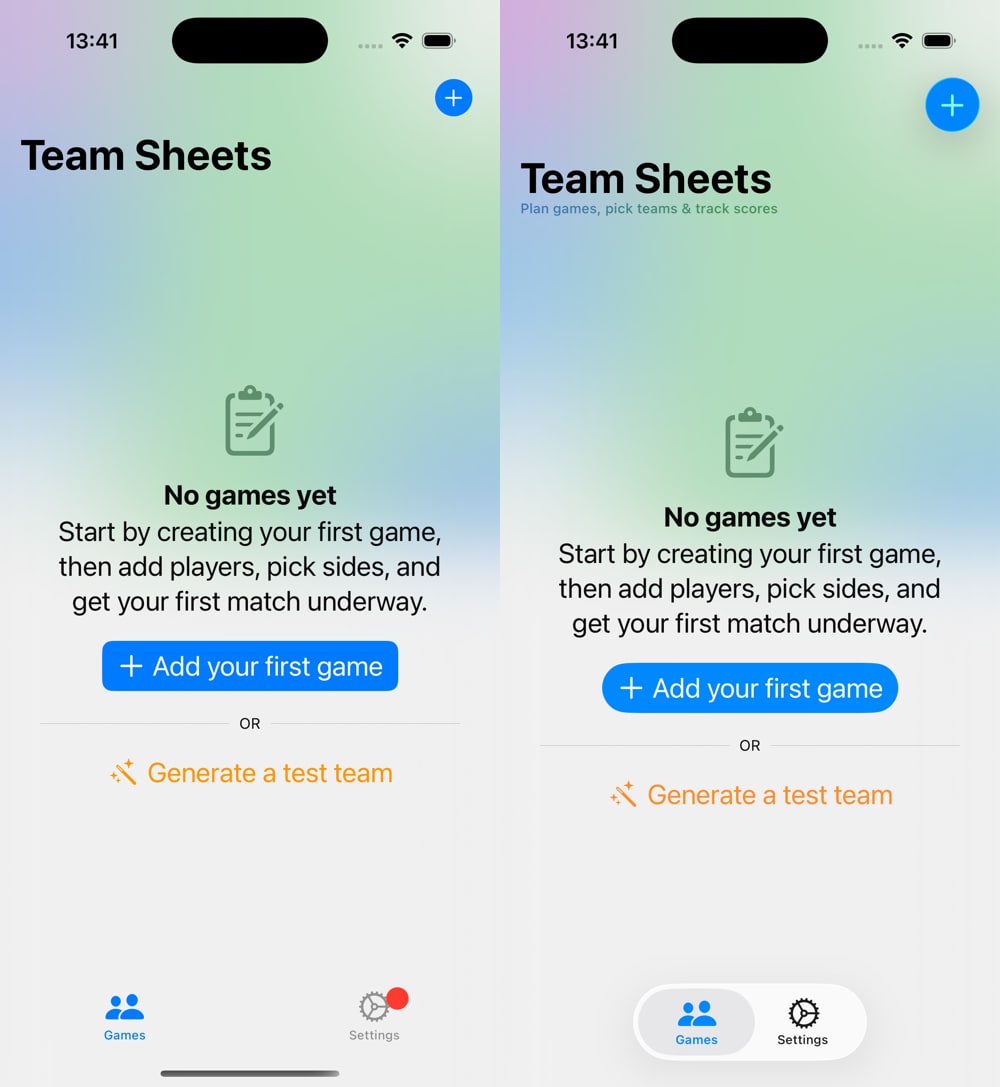
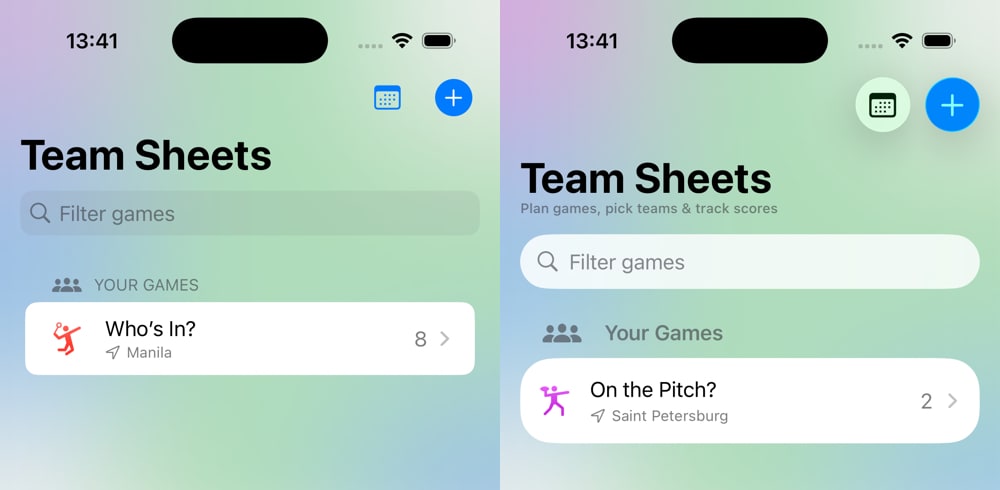
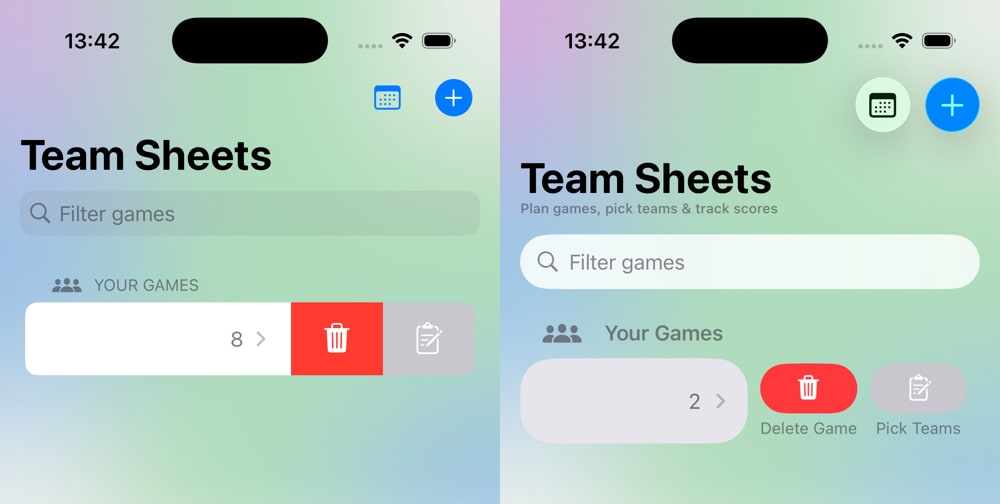
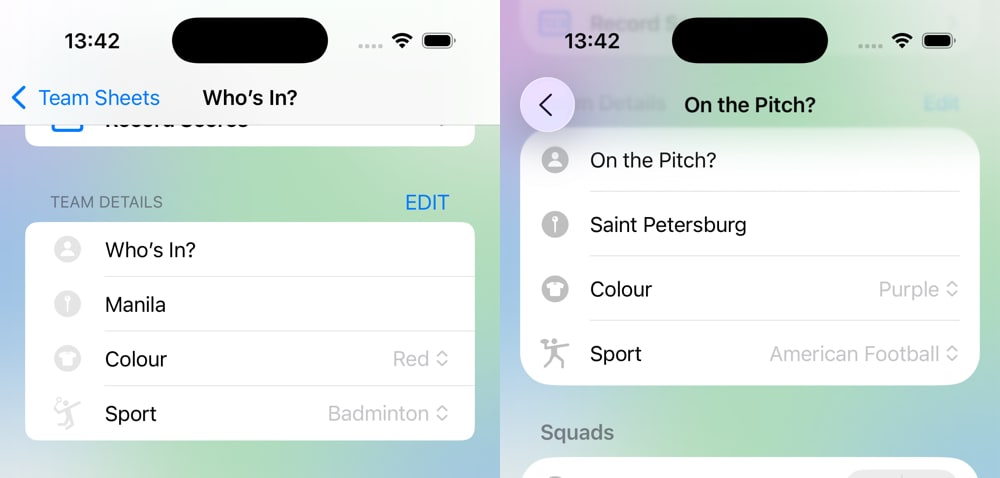
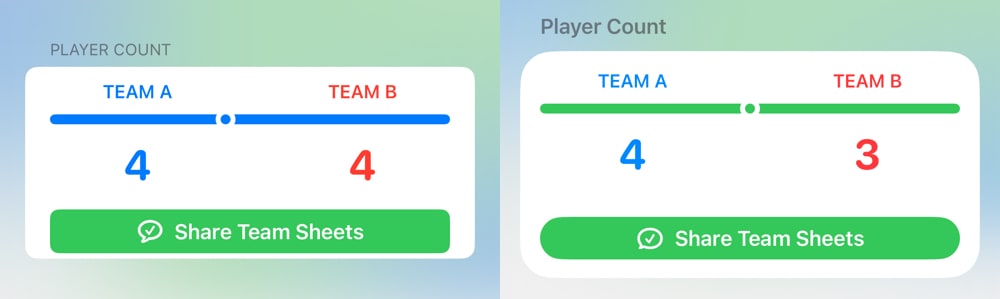
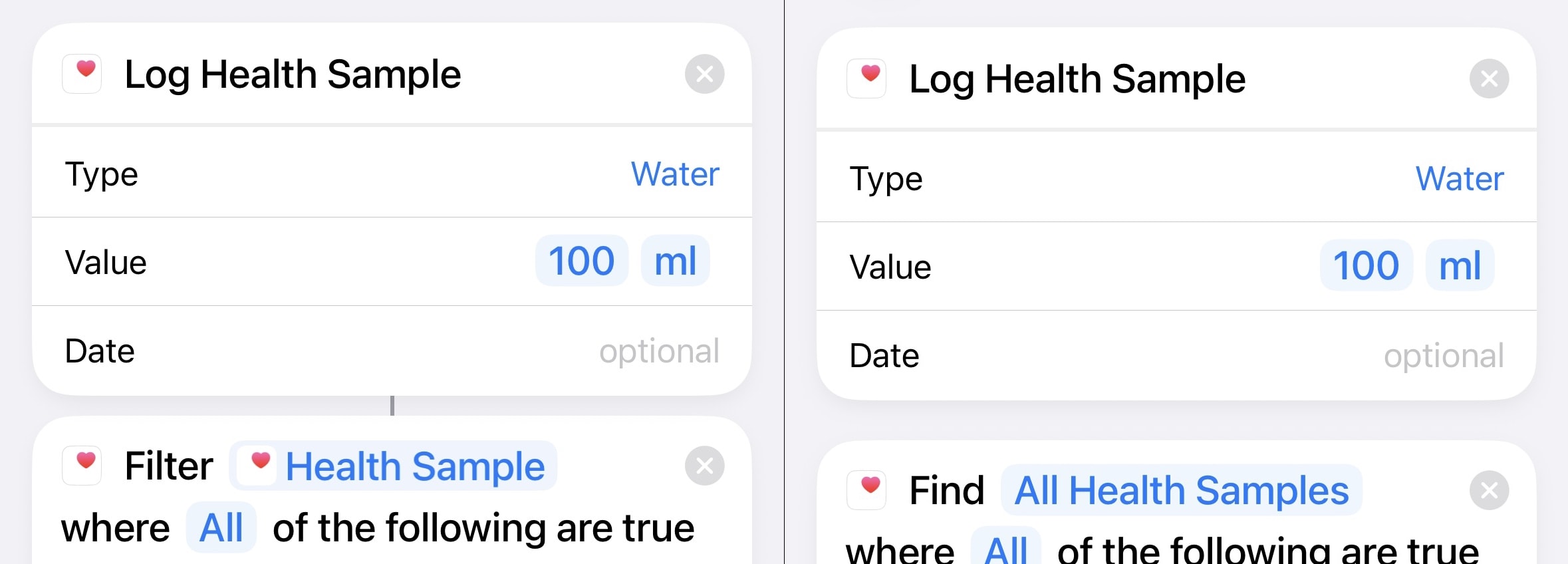

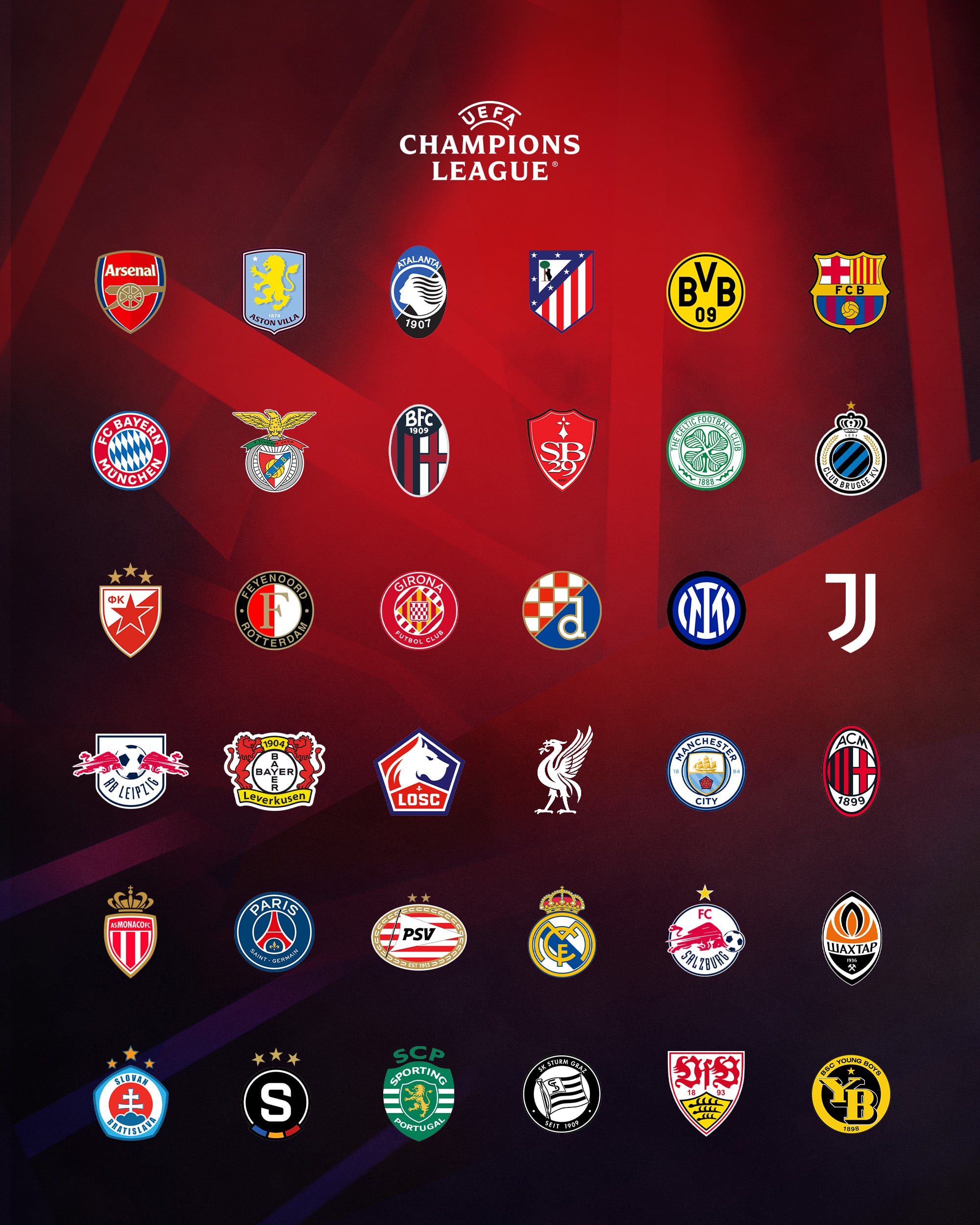
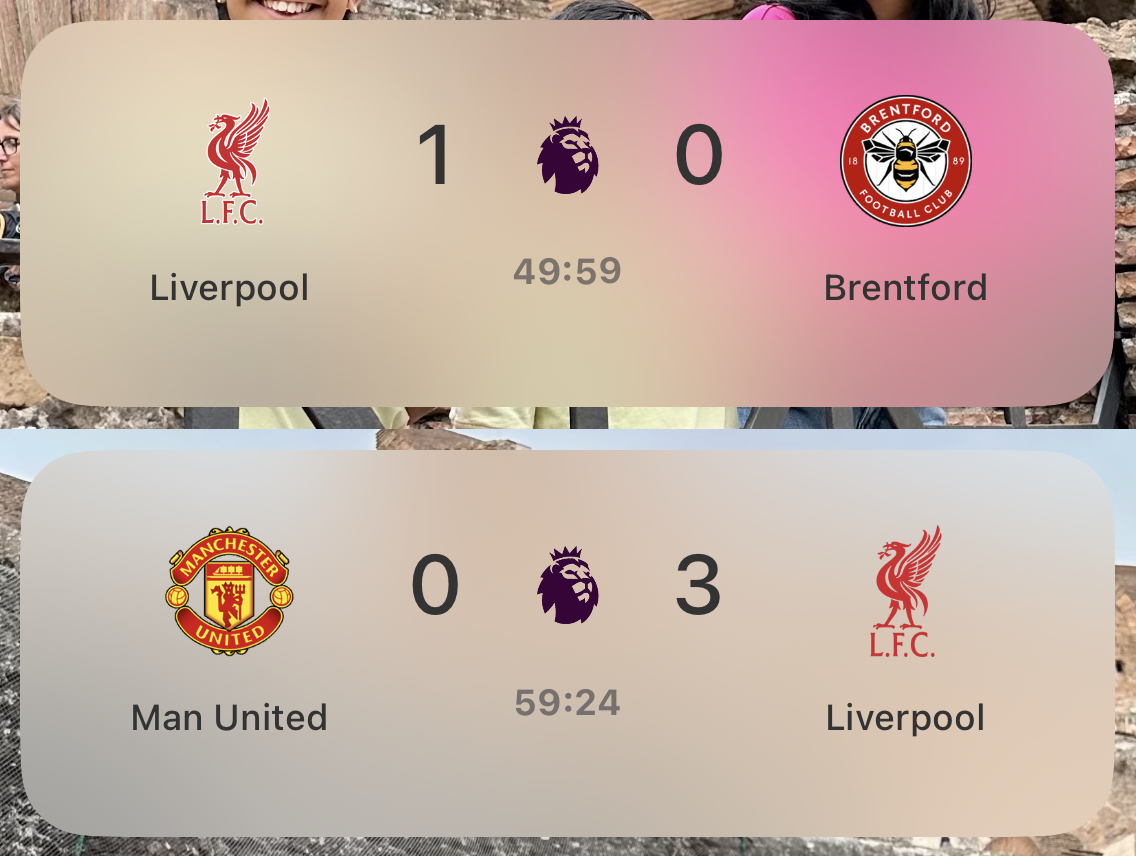
 Belgium away kit
 France home & away kit
 England away kit
 Germany away kit