GeistHaus
log in · sign up

https://taoofmac.com/atom.xml

atom
97 posts
Polling state
Status active
Last polled May 19, 2026 10:45 UTC
Next poll May 19, 2026 22:32 UTC
Poll interval 41566s
ETag W/"0x8DEB5701A47084E"
Last-Modified Tue, 19 May 2026 06:30:21 GMT

Posts

Apple Papercuts
automationiosapplecalendarmailswiftmacosipadsirirantmacxcodeicloudhomekit
Show full content

I know this blog has strayed a fair distance from its Mac-centric origins, but I’ve been keeping a mental list of all the things that are broken, missing or inexplicably neglected in ’s software, and it’s gotten long enough that writing it down feels like a public service1.

This isn’t about or grand design failures–those are well documented . This is about the small stuff. The papercuts that, individually, you learn to live with, and collectively make you wonder whether anyone at Apple actually uses their software.

Despite the somewhat surprising length of this post after stitching together all the notes, I’m actually focusing on the things I hit every week (not trying to put together an exhaustive catalogue), and others will have their own lists–and that’s part of the problem.

Mail

is the first app open every day and the one I find hardest to defend, and I’ve been defending it for twenty years (longer if you remember the original NeXT mail client).

The broader story is one of abandonment. used to be extensible–there was a plugin API that third parties used to build genuinely useful tools (GPGMail, SpamSieve, Act-On, all manner of filing and productivity helpers), and I used it to, among other things, have HJKL keybindings.

Apple deprecated that API, replaced it with a (much more restrictive) MailKit surface in 2021, and proceeded to lock MailKit down so hard that barely anyone shipped an extension.

And then they quietly stopped mentioning it. The result is that Mail is now less extensible than it was in 2010.

In particular, in this age of desktop AI agents, I come time and again across the fact that support in Mail has been left to rot. I wrote about via AppleScript years ago, and even then it was a workaround for missing functionality.

Today the dictionary is unchanged, the bugs are unchanged, and the “Apply Rules” menu option–which used to let you re-run rules on selected messages–no longer works consistently on multiple selections, if it works at all.

And searching for messages is such a mockery of a user experience that I’m not even sure how to describe it–suffice it to say that it never searches solely inside the folder I’m in and that it often fails to find messages that I know are there, even with the most basic criteria.

Mail on iOS Is Just Consistently Worse

And then there are the basics that have simply never arrived on iOS:

  • There is no way to filter messages on an . Not “limited filtering”–none. You cannot create a rule, you cannot sort by sender, you cannot batch-select by criteria.
  • Smart folders don’t exist on any version (no, the stupid Categories thing doesn’t count). They’ve been on the Mac since… 2004?
  • And, of course, there is no way to have Mail rules sync from the Mac to iOS. For a company that talks endlessly about ecosystem coherence, this is bizarre.
  • Download progress is opaque. When Mail is pulling thousands of messages from an IMAP server, the feedback is either nothing or a tiny spinner.
  • in Mail amounts to a summary button that occasionally produces useful one-liners.

There’s no smart filing, no suggested rules, no priority inbox–nothing that would actually reduce the cognitive load of managing email. had most of this a decade ago.

Time Machine

I wrote , and if I had the patience, I could probably write twice as much.

But I’ll just add that the performance is abysmal if you have thousands (or millions) of small files, and that things like asimov (or manually setting the right extended attributes manually for excluding development folders, something I routinely forget to do) shouldn’t exist, because it should work properly in the first place:

  • It should have much more transparent progress indications
  • It should never fail silently
  • It should recover gracefully from failures
  • It really should suggest automatic exclusions and have a proper UI that is not “Add this huge top-level folder” for exclusions

Again, this isn’t rocket science. I installed Borg Backup the other day on some of my Linux VMs, and it is so good that it defies explanation how Apple still hasn’t gotten this right.

Search

Craig Hockenberry recently wrote up an experience that captures the problem perfectly: his iPhone’s Spotlight index corrupted, search stopped working across App Library, , Notes, Messages and Settings, and after trying every remedy he could find online–forced restarts, language changes, toggling Siri, developer mode reindexing–the only “fix” was a full device backup and restore.

Which took hours, broke Apple Pay, reset FaceID for two dozen apps, wiped TestFlight builds, and generally made his life miserable for days.

On the Mac, rebuilding the Spotlight index is a one-line terminal command that somehow I keep not memorizing despite needing it once a month. On iOS, that affordance doesn’t exist.

“It just works, my ass” was Craig’s summary, and it’s hard to improve on it.

Search on is slow, inconsistent, and returns incomplete results across every app that relies on it. On it’s marginally better but still loses to most third-party tools, solely because Spotlight completely made a mess of the user experience and Finder, well, can’t even find itself sometimes.

Calendar

This, again, is something that I come across every single time I need to manage personal time, and that is essential if we want any form of serious AI assistants to work (or integrate with Apple stuff).

But I’ll cut right to the point: the app has barely changed since iOS 7, and the parts that have changed are worse.

  • Event metadata parsing is broken. If someone sends you a calendar invite with a video call link, Calendar will sometimes pick it up, sometimes not, and sometimes create a phantom “location” that’s actually a URL fragment.
  • There’s no way to see a compact list of upcoming events without also seeing the full calendar grid.
  • Calendar sharing within a family is functional but graceless.
  • support is just… not there. It sort of works, but ever since Apple decided to move both Calendar and Reminders to CloudKit (or whatever), all you will get (for Reminders, at least) are the leftover entries that they left in the store before the migration.

Oh, and need I mention that Siri is terrible at calendar operations, including the extremely basic “at what time did my wife book dinner”?

Automation

I know. Most of the parts about some apps above are also about automation, and I did post about this in my , but it deserves a dedicated entry because in this age of Codex and Claude being able to control your desktop, it rankles.

  • actions break between OS versions. Not occasionally–routinely.
  • is unmaintained, and despite what I wrote earlier, is now presumed dead.
  • There is no cross-platform automation story whatsoever. No, Shortcuts is not useful there, save for the laudable exception of being able to use my iPhone to automate switching watchfaces (which is something very few people are likely to use).
  • Accessibility sort of works, but it is so clunky in practice that some of the workarounds I’ve seen implemented in Claude and Codex border on the hilarious.

The bottom line, for me, is that Siri Shortcuts integration is shallow compared to what offers through intents, or what Windows offers through COM automation (or even Win32, which surprisingly still works so well that it took me 15 minutes to do an agent tool).

Virtualisation

In keeping with Apple’s inability to make the iPad truly useful, has no hypervisor support today–it was removed in iOS 16.4, and nothing has effectively replaced it since. The result is that you can’t run a Linux VM on an iPad, and you can’t run Docker containers on it either, which means that the entire ecosystem of local LLMs, coding agents, development environments and monitoring tools that I rely on for work and play is completely inaccessible on the iPad.

has had Hypervisor.framework since… Yosemite, and Apple Silicon Macs run VMs beautifully–but on and , the entire concept doesn’t exist, and we are forced to run half-assed emulators like (which I’ve been banging on for a month as a way to prove my point).

This matters to me because a huge amount of the software I use daily–local LLMs, coding agents, development environments, monitoring tools–runs in containers or lightweight VMs. I can do all of this on an EUR 50 ARM board running . I cannot do any of it on an EUR 1,400 iPad Pro with an M4 chip, without jumping through hoops to get AltStore to run on it so that can pretend it has proper virtualization.

I know that Apple doesn’t care about this now that they feel buoyed by the ’s runaway success, but I am actually looking forward to trying out a solely because Google has reasonably decent support for running Linux userlands on ChromeOS and Android, and I want to see how that compares to the iPad’s non-existent support.

Home Automation

I could possibly write a book about this by now, considering that I’ve been at this . could be so much better, but it is also a part of the Apple experience where the gap between promise and reality is most painful.

Yes, is coming, etc., etc., but a new protocol will never solve any of the shortcomings of the Home app:

  • Scene chaining doesn’t exist.
  • If-this-then-that logic is barely functional.
  • Presence detection is flaky and not granular enough for room-level logic.
  • There is no scripting layer. can trigger HomeKit actions, but HomeKit automations can’t call Shortcuts.
  • Adaptive lighting is half-baked.
  • Multi-home support is a mess.

I’ve papered over most of that with and Homebridge, and of course Home Assistant can do all of the above, but, again, my main point is that it shouldn’t need to exist for people who’ve bought into the Apple ecosystem.

At this point, Apple should just buy Homey and can their entire HomeKit stack.

Apple Watch

The Watch deserves its own entry because it’s the device where Apple’s failure to prioritise timekeeping is most absurd, and with the rebirth of , I was reminded of how awesome smartwatch UX can be and how Apple never even got close.

In particular, the “Smart” Stack (the thing you get when you swipe up from the bottom) is never aligned with what I actually want to see, or what is up on my calendar.

The ’s timeline view remains the high-water mark for watch UX–one button tap, chronological day view, no widget carousel.

Apple’s Calendar app on the Watch tries to replicate the iPhone calendar grid on a 45mm screen, which is about as useful as reading a newspaper through a keyhole.

A watch should be the single best device for time-aware context. Instead of building a timeline, Apple built a widget carousel.

iCloud and CloudKit

I once spent a week building a client to talk to iCloud Reminders and Calendar, and the experience was a masterclass in Apple’s backwards-compatibility approach: it works, except when it doesn’t.

  • Newer Reminders lists silently migrate to CloudKit and disappear from CalDAV entirely.
  • Apple Notes is completely gone from IMAP–all content is now behind CloudKit’s protobuf CRDT format, which Eric Migicovsky recently reverse engineered
  • Calendar event recurrence expansion doesn’t work properly through CalDAV.
  • App-specific passwords are required if you want to have third party clients sort of work, but limitations are documented nowhere.

The pattern mirrors a lot of my gripes about the original iCloud services: Apple builds new infrastructure, migrates data silently, leaves old APIs running but progressively useless, and provides no supported path for third-party access.

Terminal

Yes, it got updated recently. No, it is neither good nor fast nor consistent when you use daily, and that is why I use . Like a lot of other core Mac tools, I have feelings about it, some of which I cannot express politely.

Developer Experience

I write because I have to, not because Apple makes it easy.

The language itself has been through enough breaking revisions that code from three years ago often won’t compile without changes. is worse–views that worked on iOS 17 already behaved differently on 18 and now seem broken in 26, and the abstraction leaks the moment you need anything beyond a list and a navigation stack.

The result is a UI framework that feels modern in tutorials and feels like debugging a black box in production. I’ve lost count of how many times I’ve had to drop to UIKit to work around a SwiftUI layout bug that, once I start searching for it, I realize has been reported for years and yet nobody at Apple acknowledges.

And then there’s the $99/year developer fee, which Apple charges you for the privilege of running your own code on your own hardware. Not to publish on the App Store–just to run an app on a device you already paid for. The certificate expires annually, and if you don’t renew, your sideloaded apps stop launching. In 2026, on hardware I own, I need a subscription to run my own software.

The App Store itself is a whole separate set of papercuts–review delays, opaque rejections, the 30% cut, the inability to distribute updates outside the store–but those are well-documented grievances.

The one that gets me is simpler: the entire developer toolchain assumes you are building a product for sale, not a tool for yourself. doesn’t have a “just let me run this on my phone” mode that doesn’t involve provisioning profiles, entitlements, and a certificate chain.

Until I started using , every personal project started with ten minutes of ceremony. Now I never even open .

Phone Size

I still have an in a drawer, and every time I pick it up I’m reminded of what a phone that fits in your hand actually feels like. It’s delightful to hold–thin, light, one-handable without gymnastics, and the screen is perfectly usable for everything I actually do on a phone.

Every iPhone since has been bigger, heavier, and harder to use one-handed, and the Max/Plus variants are actively hostile to anyone with normal-sized hands or normal-sized pockets. Apple keeps making the screens taller and the bezels thinner, but the fundamental ergonomic regression–that phones stopped being things you hold comfortably and became things you grip–has never been acknowledged, let alone reversed.

The iPhone SE was the last concession to people who wanted a small phone, and Apple killed it. The Mini lasted two generations before being quietly shelved. The message is clear: you will hold the slab and you will like it.

The Pattern

Every one of these is fixable. Most have been fixable for years. The pattern isn’t technical inability–it’s neglect.

Apple has the engineers, the money, and the platform control. They’ve chosen not to, repeatedly, and I suspect writing about it won’t make any difference, but as someone who has been using Macs since the System 6 days and writing about OSX here since the very beginning, I like to keep a scorecard.

And right now, it’s neither looking good nor reassuringly future-proof, unless, of course, you happen to love Liquid Glass.


  1. And, as it happens, two weeks of insomnia and allergies provided both the time and the inclination to write it all down… ↩︎

https://taoofmac.com/space/blog/2026/05/18/1320?utm_content=atom
Notes for May 10-17
rustiosandroidnotesteraxweeklylinuxkitjitmacemupiclawgo
Show full content

The weather has gone a tad cloudy again, which provided me some relief from my allergies–but not enough for proper overnight rest, so yet again I arrived at Friday afternoon totally exhausted.

Still, the early mornings were pretty decent to get some writing and coding done, and my sinuses are indeed marginally better.

Despite having wasted hours of my week trying to , I still managed to churn out and polish the default terminal app a bit (it now has nicer theming, font settings and external folder mounts), and I’ve been instrumenting the emulator to do hot-block statistics and adding a proper profiling layer for deciding on future optimizations.

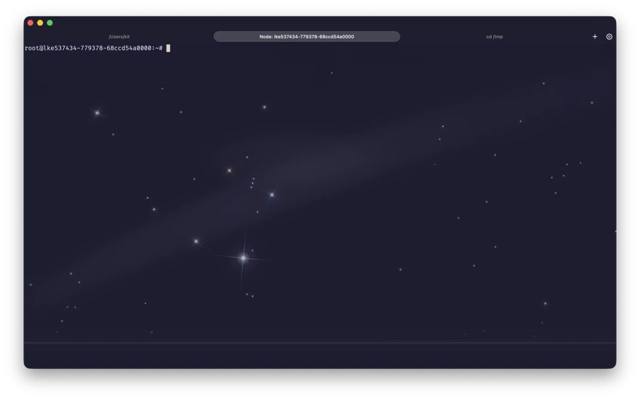
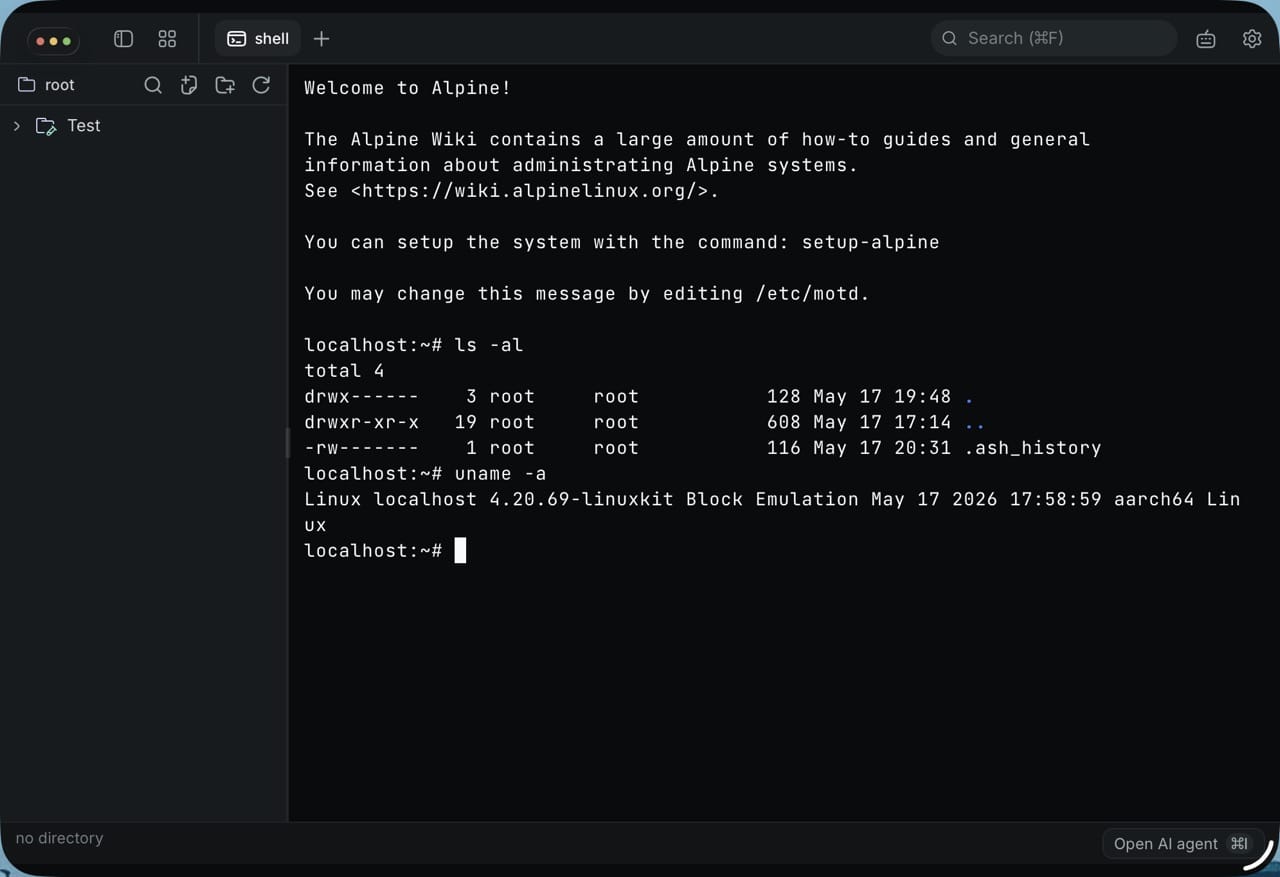
And I have picked up a few apps to test it on. The first is Terax, a little “AI terminal emulator” written in and Tauri, which works pretty well (with a few bugs due to the different ways it uses PTYs):

Terax AI terminal running in ios-linuxkit

Code will be up soon–I want to do a bit more testing and polish both the integration and the UX, since Tauri made a bit of a mess of the iPad layout.

Tiny Macs

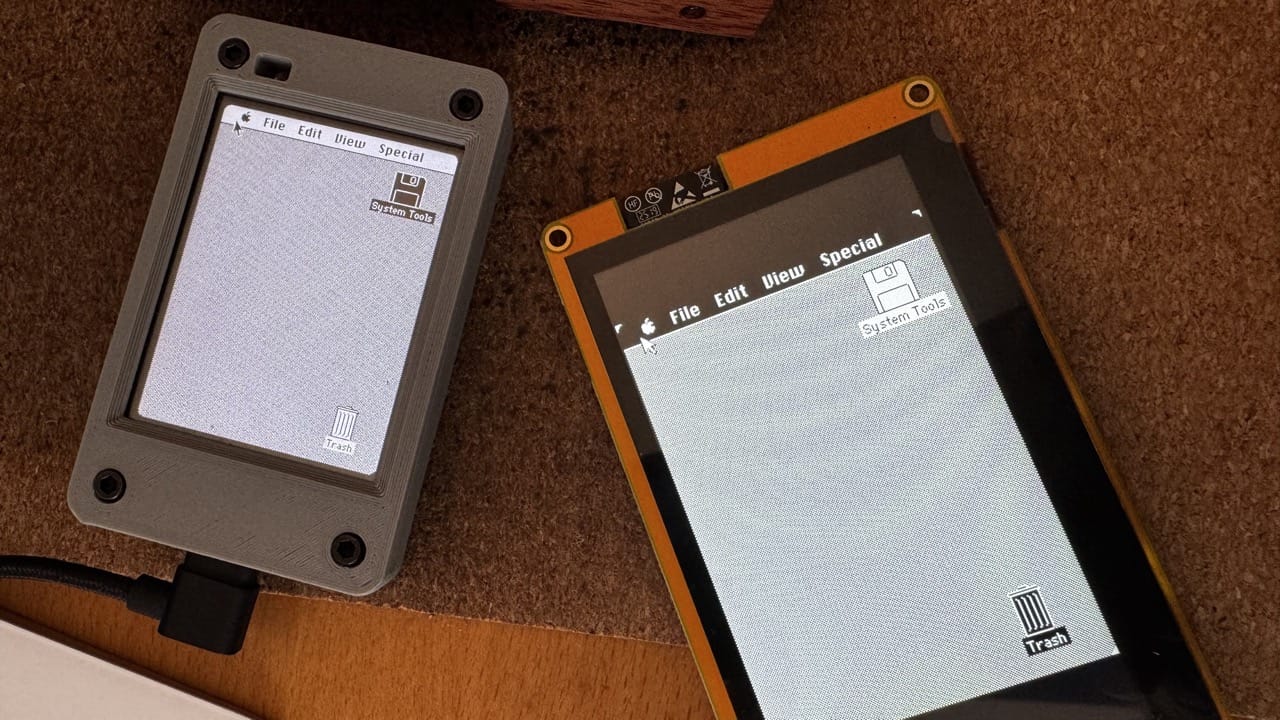
I’ve been neglecting my ARM64 SheepShaver build, but I did find the time to fiddle with the code–I got it to build for the displays I had a few weeks back, but the resistive touchscreens were so awful that I immediately decided to order capacitive (and bigger) ones:

Cydintosh on two CYD displays

I’m still playing around with these in my own fork, and will have a bit more to share soon.

Piclaw is Going Visual

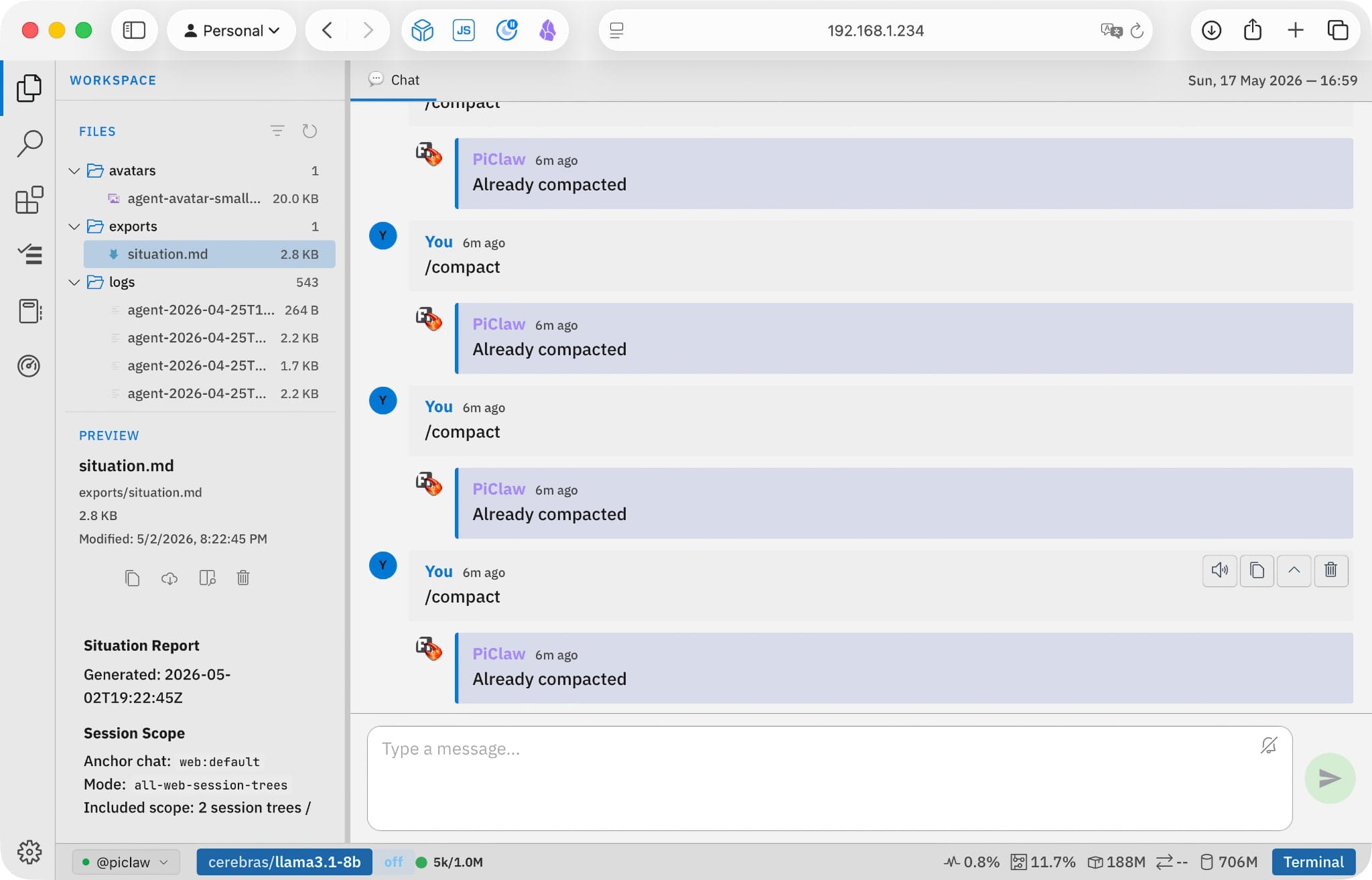
Piclaw visual UI
Piclaw visual UI

Thanks to a colleague of mine, piclaw is getting a new “visual” UI–and yes, I know what it reminds you of. It’s great, and it will be the default for the upcoming desktop builds, which will be a good test of my patience for packaging and testing stuff.

I should probably have spent less time at a computer this weekend, though…


https://taoofmac.com/space/notes/2026/05/17/2120?utm_content=atom
Announcing ios-linuxkit: Linux on iPad, the Hard Way
arm64iosruntimeipadlinuxdevelopmentish
Show full content

I’m done waiting for Apple to fix things. And one of the things I think should exist is a decent way to run Linux binaries on my iPad.

And after almost six months messing about with ARM emulation in various forms, I can finally do something about it.

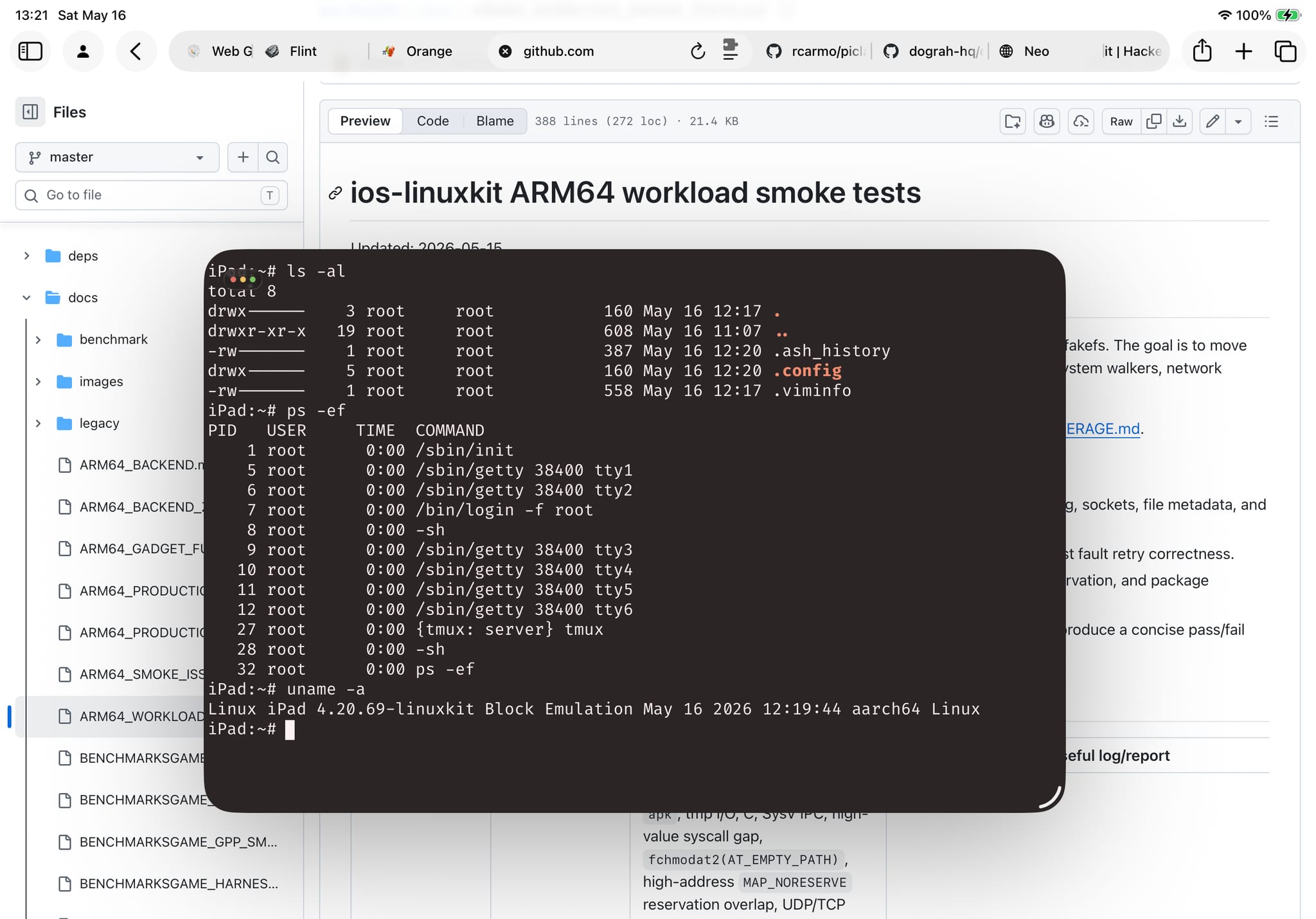
ios-linuxkit running on my M1 iPad Pro

Put bluntly, the lack of hypervisor support on should be an embarrassment to Apple–an EUR 1400 iPad Pro with an M4 chip can’t run Docker, can’t run a VM, can’t do any of the things I do daily on an EUR 50 ARM board. Apple has the hardware support, the kernel entitlements, and has chosen to keep it locked away.

ios-linuxkit is my answer to that, or at least as much of an answer as you can get without Apple’s cooperation. It’s a Linux runtime for that provides a working AArch64 userland on iPhone and iPad–shells, compilers, package managers, language runtimes, the lot–without JIT, without RWX memory, without MAP_JIT, without any of the things Apple won’t let you have.

The base is the ish-arm64 branch of iSH, which implements a threaded-code interpreter (they call it “Asbestos”) that translates ARM64 Linux instructions through precompiled gadget dispatch. No runtime code generation means no App Store policy violations, which means it can actually ship. The trade-off is performance–you’re not getting native speed, you’re getting “fast enough for a shell and some compilers.”

It’s fast in human terms, although my use of and Bun mask a lot of the underlying limitations.

Why Now

The timing comes down to converging interests: I have been deep in emulation land since , and even though the ish-arm64’s “gadget” emulator is quite a different beast from the naïve block-level JITs I’ve been bolting onto BasiliskII and SheepShaver, I have been developing all of them on the board I have been testing for a few months, so they share roughly the same approach:

  • Bolt on a VNC server (or an emulated console) so I can connect to it from my iPad
  • Build out several test harnesses (build, base smoke tests, tracing harnesses and automated application testing)
  • Figure out what to do (this is the hard part, and I’ve learned quite a bit across the various emulators)
  • Figure out where it breaks (, , etc.) and why
  • Hand out the drudgery (like test runs and automated fixes) to a piclaw instance in clearly defined piecemeal specs so I get nice reports and debugging output I can review in a clean web UI

I wouldn’t have had the time or energy to do this without Codex, but I certainly wouldn’t have been able to do it without the as a test bed. Having an ARM 12-core SBC with 16GB RAM I could devote to this, despite a tad constraining (I would have preferred 32 so I could run more builds and test matrices concurrently) was a major enabler here.

What I’ve been doing with it

The fork started as a bring-up exercise, but has turned into something more focused: making the runtime stable and tested enough that you can actually develop on it. The current validation gate has 82 core tests passing on Alpine ARM64, with workload coverage across , , Bun, Node, , , Zig, and a few others.

And since I’ve seen quite a few people trying to run AI coding agents on iOS, there’s a separate set of AI CLI harness tests that installs, runs and does cursory tests on most current agent tools (spoiler: Claude Code was a complete and utter pain to get to run. Everyone else’s mostly “just worked” after a few cycles of JS runtime/kernel call cleanup passes, theirs was just broken).

The harness testing is AI-driven–I pointed piclaw at it with a custom gdb skill and let it grind through failures, fix them, and re-run. The strategy is mine (which syscalls to prioritise, what the “gadget” fixes should look like, where to invest in performance), but the mechanical detection/fix loop is the kind of thing that would have taken months by hand.

Why this matters

Because I think it is a thing that should exist, yes, but also because I want to run things like gi (which is still WIP) on my iPad.

Especially binaries, which never ran in the original iSH. And despite my love for remote sessions, I don’t want to run all of it on a server, nor via a UI proxied from somewhere else–I want to do some of it locally, in a terminal, with my workspace on the device.

Bun, V8 and Go work. Alpine’s apk means I can easily get pretty much every single CLI tool I need to work too, without the compromises (which I still love, by the way) imposed. And since I have been hacking away at my own flavor of in rcarmo/ghostty-web, I was able to swap the dated iSH terminal with something that looks right.

It’s not fast (well, it is, much faster than the original, but not native fast). It’s not a replacement for HyperKit on iOS (if we ever get it back). But it’s mine, I can fix it and make it faster to some degree, and works for me.

And since I have zero intention of bringing it to the App Store myself (or even paying Apple $99 for the privilege of running it on my own hardware without plugging my iPad into my laptop weekly, which is something the EU should really ding on Apple for), I am going to maintain it and add more fixes, keeping it open source so that other people can build better, more polished tools.

You’re welcome.


https://taoofmac.com/space/blog/2026/05/16/1130?utm_content=atom
Unexpected Synology Woes
proxmoxsynologybackupsstoragenashomelabdocker
Show full content

Last weekend my decided, for some unfathomable reason, to stop working after I took it out of the closet, dusted it and put it back, and I have feelings about it.

In fact, I’ve had them throughout the whole week, because it’s taken forever to get most of my home services up again.

Fortunately, my home automation and a few other things are spread among my nodes, but I had a bunch of things running on that NAS, and I wanted to document what happened because someone else might have the same issues I did and end up here.

Symptoms

The machine booted up (power LED initially blinking, solid green status LED, disk activity almost immediately), but would not show up on the network.

Both LAN interfaces would be up, but issued zero packets. No DHCP requests, no link-local addressing, not even replies to arping (and yes, I knew the MAC addresses of the machine, because that’s the kind of thing I keep tabs on). I plugged in my MacBook and my on each interface, rebooted, and saw… nothing.

tcpdump saw nothing at all. I thought it might be some sort of OS glitch (which is why I tried both laptops), but no luck.

So I tried to reset it to factory configuration. You have two reset levels, the first of which only resets your admin password and network settings, the second has you reinstall the OS without losing data.

But nothing worked, and ’s tooling just couldn’t find the NAS or connect to it.

Recovery

The first thing I did was set up Virtual DSM on borg to see if I could, in the direst of emergencies, access our off-site backups. That sort of worked, but the experience was so fiddly that I was reminded of all of HyperBackup’s pitfalls in one fell swoop–most notably that I effectively need a Synology to get at that data, which is not something I want to rely on.

Yes, there is a HyperBackup desktop application. No, it did not work for me–it apparently expects you to download backup files from the cloud to your local machine, and I need to be able to directly restore files from Azure, period.

After filing a ticket with Synology about my unresponsive system, they sent me an AI-generated troubleshooting list, in the middle of which was a step I could not find anywhere in their online documentation: booting the machine without any disks.

That apparently also automatically reset settings (which is, in retrospect, weird, because it feels like something should be stored in the chassis for this kind of emergency), and I was finally able to discover it on the network, reset the admin password, reconfigure the network, etc.

So if you have the same symptoms, this might save your day. And, as it turns out, be the prelude to an entire week of pain, because mine spent the past five days or so grinding through data scrubbing. Because that is a thing it felt like doing, and I’ve been coping with the fallout since then–extremely slow access, very slow response times as I tried to double-check services and settings, etc.

What Didn’t Work Right

First of all, all my containers were gone. Container Manager, for some reason, does not preserve any settings in this scenario, and if I didn’t have installed and a copy of (most of) my stacks in , this would have been enough for me to never again run containers on a Synology.

As it was, I was able to point piclaw to the machine and have it reconstruct all critical services in a few hours (it would have been much faster if it wasn’t doing scrubbing). And, as it turns out, there was also enough residual info in the underlying Docker daemon itself to fill in most of the gaps.

But barring that, there were a bunch of things that made recovery a pretty stressful endeavor:

  • The mobile apps (DS Finder and the like) were useless in finding or diagnosing the issue at every step.
  • The web site did not list disk removal as a troubleshooting step (at least not that I could see, since it went straight into the dual-step reset procedure).
  • The timing documented for holding the reset button for reset 1 (4 seconds) was not accurate. It was more like 20, and I feared for a moment I might end up triggering reset 2, which would require reinstalling the OS.
  • Synology’s desktop tools are, to be brief, very poorly maintained and look like something out of the 90s, even down to the Windows look on macOS.

So even for an “appliance” NAS, the experience could be much better.

Let’s Have an Adventure

Resetting the configuration had zero impact on my data–at least so far as I can tell. Shares, users, all the regular stuff was preserved, and after a few glitches with cloud backups (because disk scrubbing made them fail overnight twice), everything seems in order.

But since the machine spent so long simultaneously scrubbing and swapping as I tried to restore services, it’s clear that I cannot rely on it for interactive use anymore.

Synology doesn’t really let me upgrade RAM on the thing (you sort of can, but it’s already capped at the maximum RAM the J4125 can officially support), so I’ve started removing stuff from it–most of the Docker services I’ve been running there for years are now moving into microVMs or s running elsewhere, and are either going to use the Synology as a “dumb” NAS and mount storage directly, or be backed up to it using Borg Backup Server (which is going to be the only new Docker container running on it).

I’ve already moved and off it, and having them run (even with very constrained resources) on separate microVMs in an N150 makes a world of difference–so much so that I have to wonder why I put up with the J4125’s slowness for years.

I set to snapshot both VMs daily (and added a temporary direct-to-cloud backup), and am now slowly moving the rest. Or, rather piclaw is doing that. I had it draft a plan to group containers and create target VMs/LXCs, and the agent is now merrily ing data and container configs out of the Synology.

Mid-Term

After the dust settles, I am going to move all of my backups out of the Synology ecosystem–I currently rely on HyperBackup to back up my data to , but the recovery attempt was so off-putting that I am going to look into using directly to Azure.

Backrest looks like a nice way to do that, with the added benefit that restic backups (which I have already been using for years) seem to work better with Azure storage tiering (and thus might even be cheaper in the long run).


https://taoofmac.com/space/blog/2026/05/15/1330?utm_content=atom
The Siri For Families Apple Will Never Build
aiappleautomationfamilysiri
Show full content

The got me thinking about the one thing I keep wishing would build and almost certainly never will: a family-scoped AI assistant that actually works across all our devices.

I don’t mean a frontier model or a “reasoning engine”–just a competent, context-aware agent that understands my family as a unit. The shared calendar, the school schedules, the medication reminders, who’s picking up whom and when. The kind of thing that Apple Intelligence was supposed to be, except pointed at the problem that would actually matter most to the people who are already deep in the ecosystem and paying for it.

I am married with two kids. Between us we have more Apple devices than I care to count–and we are exactly the demographic Apple loves to put in keynote photos. And yet treats us as completely separate customers who happen to share a credit card. Family Sharing is a permissions layer bolted onto individual accounts, and it shows in every single interaction–shared photo libraries (still broken), purchase management (still confusing), screen time (still adversarial rather than collaborative). Twenty-four years of “digital hub” strategy, and this is where we are.

What I Actually Want

Here’s what a competent family agent could do without being creepy–and in most cases, without even needing to leave the device:

  • Know that my son has a test on Thursday and hasn’t opened the revision material since Monday. A gentle nudge, not a surveillance report.
  • Track our medication schedule and ping people (or me, if someone misses a window) without turning into a clinical monitoring tool.
  • Surface things on that match what we actually watch, not what the recommendation engine wants us to try.
  • Coordinate pickup times, grocery lists, meal plans–the sort of mundane family logistics that currently live in a group chat and three different apps.
  • Make file sharing work the way a shared family folder should, rather than the absurd permissions mess it currently is.
  • Do smarter photo sharing–not just a wholesale shared library, but understanding who’s took the photos, where and sharing only relevant stuff to family without it being an all-or-nothing proposition.
  • Better family e-mail, better event handling, better package tracking across household members.

I also want it to let me keep my parents and in-laws in the loop. Most of the above also applies to extended family, especially if you have elderly parents who need help managing their medications, appointments, and social connections. A family agent could be a lifeline for them without being intrusive.

None of this is exotic. Apple already does the understated version of some of it–surfacing birthdays, suggesting contacts to call at specific times, the quiet little iOS touches that work well precisely because they don’t try to be clever. A family agent would just be more of that, but with understated functionality across the whole household instead of locked to a single Apple ID.

And none of it requires SOTA models, or selling out to Gemini. A 4B parameter model running on-device–the sort of thing I’ve been for months–would handle the intent parsing and coordination.

The hard part isn’t the AI. It never was. It’s the will, the focus and the willingness to execute, and that’s where Apple has been asleep at the wheel for over a decade–and I am not going to hold my breath that Ternus will be the one to wake them up in things like APIs and interoperability that would actually make this possible by third parties.

They should have an absurd advantage here: they own the OS, the hardware, the sync layer, the health stack, the media stack, the calendar, the reminders. Nobody else even comes close to that vertical. And they’ve done nothing with it.

I know this is possible because I’ve been building something like it myself–a personal agent that fits in a single binary and a database, carries its own scripts and state, and runs on anything from a Raspberry Pi to a desktop. The TypeScript-based version already manages my homelab, files links to my wiki, coordinates across machines, and does it all with about 300MB of RAM (the Go version should take up 30).

I built this on the equivalent of a Raspberry Pi, but Apple can’t do it with a trillion-dollar platform because they won’t treat families as anything other than a billing construct.

Just to add insult to injury, I could do most of what I wanted if we were in the Google ecosystem. But on iCloud it’s impossible to access shared tasklists (or even anything else, really) with any sort of standard protocol and documented API. For Google (or even Outlook), most of it is accessible.

Every Apple equivalent is there, but they just refuse to connect them, or let anyone use them.

The Automation Graveyard

I know I’ve banged on this drum for years, but Apple has spent the better part of a decade systematically breaking OS automation, and they’ve done it so thoroughly that it’s hard to believe it’s accidental.

is on life support. Automator was effectively killed. was supposed to replace both, and instead became an App Store for workflow fragments that nobody maintains and that break with every major OS update. The Shortcuts editor is still painful for anything beyond “open this app and do one thing”, and the integration points with third-party apps range from spotty to fictional.

On , you can set up Tasker automations that trigger on location, time, sensor data, app state, notification content, Bluetooth proximity–and chain them into workflows that persist across OS updates. On Windows, I have a piclaw instance that can drive the entire desktop via a Windows API extension. The gap between what those platforms allow and what Apple permits isn’t narrowing. It’s getting wider.

could have been the foundation for family automation. Instead, it’s a gallery of pretty icons.

Why It Won’t Happen

I suspect the real reason is structural. Apple doesn’t think of families as a product category. They think of them as a collection of individual customers who happen to share a payment method. Every design decision reflects this: iPads are still single-user devices. storage is pooled, but grudgingly, and shared files live in a sort of no-man’s-land. App purchases are shared grudgingly, in a submenu of a submenu. Family Sharing is an afterthought, not a platform.

The only thing that Apple seems to care about (after iMessage) is that we can share what we are watching on Apple TV, which has been relevant in our family for exactly zero minutes since the feature launched.

And until someone at Apple decides that “a household of four using Apple devices” is a use case worth designing for rather than designing around, Siri will remain a single-user voice assistant that can’t reliably set a timer on the right HomePod.

With Ternus coming from hardware, I’d like to think there’s a chance he gets that a trillion-dollar ecosystem ought to handle a shared grocery list. But I’ve been hoping Apple would sort out family sharing since iCloud launched, so I’m not holding my breath here.


https://taoofmac.com/space/blog/2026/05/14/1220?utm_content=atom
Googlebook
linuxhardwarechromebooklaptopsandroidgoogle
Show full content

I am very late to this party (it was announced at I/O last week and I’ve been buried in other things), but Google is replacing Chromebooks with “Googlebooks”–-based laptops with Gemini baked in, designed to sync with your phone.

On the face of it, this looks like yet another Google rebranding exercise, and considering what happened with the Pixel and Google’s penchant for unveiling “category defining” devices they never actually sell worldwide, My first reaction was “meh”.

But with ’s recent support for desktop windowing, resizable apps and sandboxing, this is actually very interesting for me–because it means you can have a laptop that runs Android apps natively, has a proper desktop shell, and can spin up a container for development work. All on ARM hardware.

If they get the desktop UX right (which is a big “if” given Google’s track record with consistency–I’ve set up Android 16 on a Pi and it sucks), this could be a genuinely compelling alternative to both Chromebooks and cheap Windows laptops–especially for people who already live in the Android ecosystem and want something that doesn’t fight them the way does.


https://taoofmac.com/space/links/2026/05/14/1145?utm_content=atom
I Think I Figured Out What an AI IDE Looks Like
agentspiclawuxipadopinionideai
Show full content

I’ve been mulling the UX arc I’ve been going through over the past couple of years, and I think it was mostly the same for everybody:

  • Copy/paste into a chat web UI
  • IDE with a chat sidebar (, , etc.)
  • TUI chat (Mistral Vibe, pi, Codex CLI, Claude CLI, etc.)
  • Rich chat in a native app (Codex desktop, Claude desktop)
  • Web chat with rich interactive widgets (piclaw)

Since I spend a lot of time on my iPad, piclaw’s web timeline has become my default–I can pop open the terminal or the editor at will, but coding is still a game of balancing drudgery with creativity, and the “creative” part works well in chat.

At least for me, using AI for my projects has been a matter of . If you open a new chat thread for every feature or fix, going back to the editor takes you away from the flow–it’s much easier to have the model spew the changes in the chat, highlight the bits you want changed, and iterate directly in it.

And I’ve just realised, after adding text highlighting and annotation support to the piclaw timeline (to make it easier to point out specific things to the model), that what I’m building is a notebook for code.

I’m sure Stephen Wolfram would be delighted to be proven right, even if this paradigm isn’t really for everybody.

Of course, this scales poorly when refactoring and you have a zillion modified files, but other than refactors I am the kind of person who likes small, testable iterations and still looks at the code.

I also think that being able to scroll back up, fish out an older interaction and re-use it (or riff on it) is powerful, and what I am planning to do next is to inject an editor pane into the web chat to directly review and edit code inline–not as a separate tab, but as part of the conversation flow.

There’s something about this that irks my -addicted brain, of course, but it’s tantalising, and I quite enjoy sitting on the couch with my iPad after a long day in front of my desktop–and yes, using handwriting recognition to prompt it works great; I love living in the future.


https://taoofmac.com/space/blog/2026/05/12/0720?utm_content=atom
Notes for May 3-10
clojurenotesgogipiclawjokermacemurdpandroidvibesweekly
Show full content

This was a weird week, both because I keep waking up at 5AM with my sinuses clogged, and because I feel like I’m losing momentum. Feeling almost permanently cotton-headed, sleepy due to sheer exhaustion or because of antihistamines certainly has something to do with it, but .

We Must Go Deeper

I spent the latter part of the week hacking away at go-ds4 and go-pherence, which was interesting to me not just because I am still trying to get Vulkan to work for inference on a couple of SBCs, but also because, all of a sudden, a bunch of my stuff converged into SIMD and assembly–including, of all things, an H.264 decoder I plan to add to go-rdp.

This meant going all in on model internals again, which is something I’ve neglected for a while and that I would otherwise find fascinating were it not for my general state of tiredness.

My Little

go-joker went from “forked and interesting” to “actually competitive with Python” in about two days of focused work. Again, there is a weird serendipity and convergence across most of my other projects (like the JITs I’ve been hacking on in macemu-jit and previous-jit), but this time I took out CLR via C# and had Codex build a tiered IR bytecode interpreter that can in turn do compilation via wazero for pure numeric loops, and doesn’t have a GIL (thanks to routines).

I should really write about that, when I feel better.

Android Remoting

As part of an ongoing experiment to see just how far I can go without the Android SDK installed, I kept nudging my Android RDP server along, and am generally very happy with all the automated testing scaffolding I built around that, because I’ve extended it to vibes and piclaw with great success.

My Agentic Work Is Nearly Done

I think piclaw is pretty much done by now. I backported kitty graphics support in the terminal (the ghostty-web ecosystem is pretty amazing on its own), and of course I use it constantly (I am actually typing this draft in it), and I will be doing some fixes and at least one UX release, but I need to go back and fix my Synology, redeploy a bunch of things in my homelab, and prep for more electronics projects.

But first, I’m going to take a nap, because I did wake up at 4AM again, crafted a dead stupid add-on and badly need to rest.


https://taoofmac.com/space/notes/2026/05/10/1433?utm_content=atom
RepoBar
clideveloper-toolsmenu-barmacosgithub
Show full content

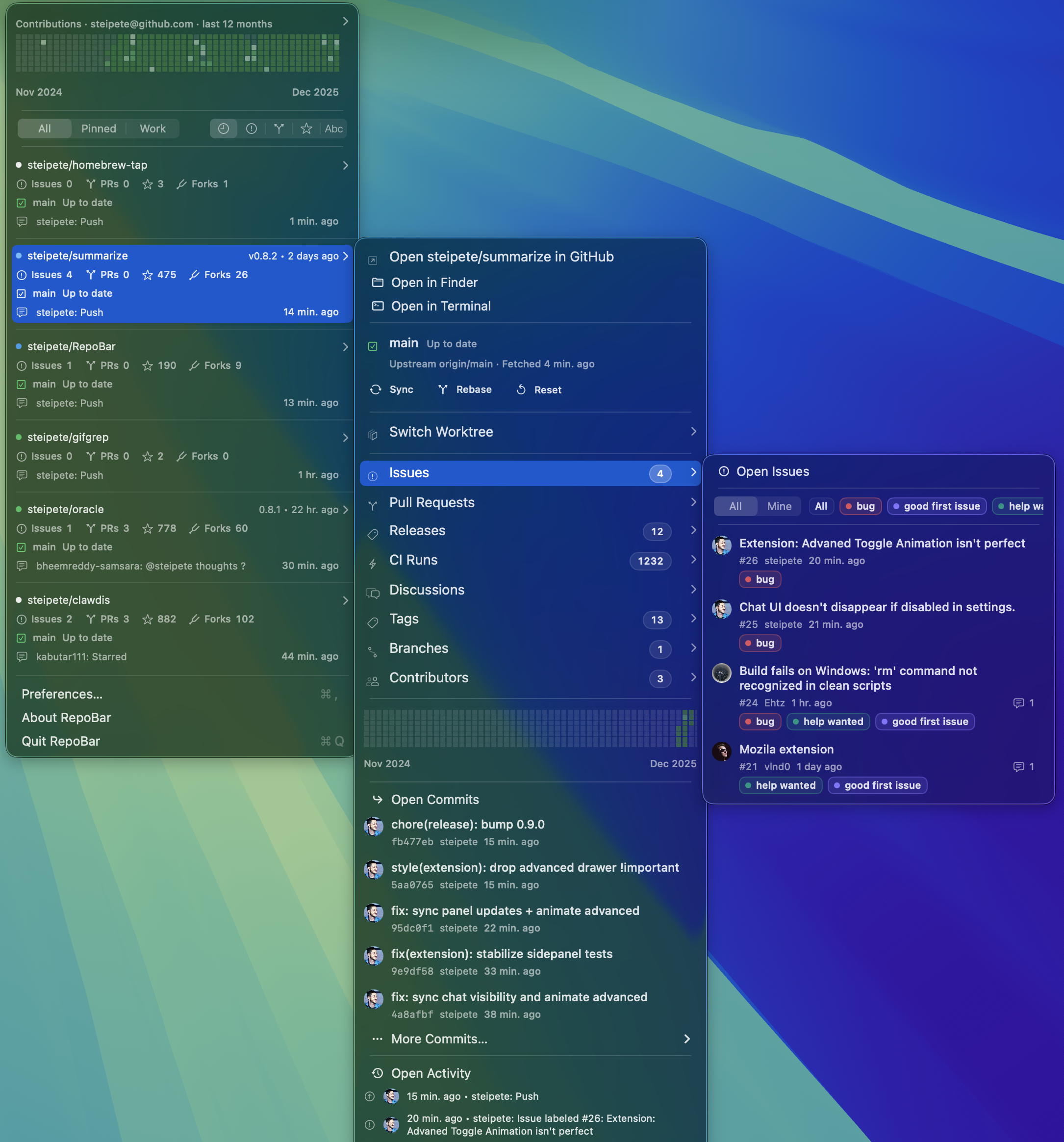
RepoBar screenshot
RepoBar screenshot

RepoBar is a neat little utility by Peter Steinberger that surfaces the state of your GitHub repositories right in the menu bar and, unusually enough, in the terminal as well. The basic pitch is straightforward—show CI state, open issues, pull requests, and the latest release at a glance—but the more interesting bit is that it is clearly aimed at people who live inside GitHub all day and want ambient awareness without keeping a browser tab pinned open.

I like the premise because this is exactly the sort of small, opinionated developer utility that macOS used to produce in abundance: focused, visual, and slightly indulgent in the best possible way. It is also a nice reminder that GitHub metadata can be useful outside the browser, especially if you are juggling a few active repositories and just want to know when something goes red.

RepoBar is available from its own site and on GitHub, and the open repository makes it easier to judge whether its model of “repo status in the periphery” matches your own workflow.

Resources

Category Date Link Notes Releases 2026 appcast.xml

Sparkle appcast feed for release tracking.

Source GitHub repository

Source code, issues, releases, and documentation.

Website RepoBar

Product page and downloads.


https://taoofmac.com/space/apps/repobar?utm_content=atom
The Local AI Moat
economicsllmhardwareopinionailocal-inference
Show full content

Regular readers will know that I’ve spent most of the past two years shoehorning LLMs into single-board computers, partly as a learning exercise and partly because there are lots of local/”edge” applications where semantic reasoning (no matter how limited) and “interpretation” of sensor data are actually useful.

But now we’re at a point where running a decently useful open weights model on your laptop is entirely feasible.

This comes at what is possibly , and after having started my own inference library and tried hacking away at @antirez’s brilliant hack within my meagre resources, I feel like a serious rift is developing between the “haves” who were lucky to get hardware on time (or can splurge multiple K of European Pesos on it) and the “have nots”.

The societal impact of the entire thing in the always hype-driven geek community is, of course, fascinating (especially since a very small number of people have a disproportionate amount of influence in this little echo chamber), and I sometimes feel like Jane Goodall observing packs of opinionated chimpanzees, but I digress.

Personally, after spending the day mulling on this, I find the whole thing extremely depressing, for three reasons:

  • Despite , I see computers as something inherently distributed and personal. There are a lot of latent contradictions here, yes–I’ve learned to live with them.
  • As an European citizen, the geopolitics of the asymmetrical situation we are in today regarding technology and AI in general , and yes, I have learned to deal with that too, but really wish I could do something about it.
  • Personally, I can’t afford to keep up. People in startups, self-employed or in very specific minuscule niches might be able to spend enough to do so, but I can’t.

I’m thrifty by nature, usually plan (and over-think) my purchases years in advance, am at a point in my career (and the industry) where job security and already had , so saving up every dime I can for a potential rainy day has been very much on my mind and I now agonize over stuff as simple as ordering a 70 EUR battery to revive an eight-year laptop (because, yes, I do still use old machines).

So there is (pardon my French) absolutely no fucking way I am getting decent local inference hardware anytime soon. And I count myself lucky I built when I did, even if that was also a painful decision at the time and it is now hopelessly outdated for most things.

That’s it. I’ve vented. Now I’m going to take something for my sinuses, chase it with an antihistamine, and doze off until 4AM tomorrow.


https://taoofmac.com/space/blog/2026/05/09/2130?utm_content=atom
Cloudflare Cuts 20% of Workforce for the 'Agentic AI Era'
workaicloudflaretech
Show full content

I genuinely did not see this coming. Cloudflare has been building one of the more coherent AI developer platforms out there–Workers AI, AI Gateway, Vectorize, their edge inference stack–all sitting on top of the same network they’ve been quietly expanding for years. They’ve been making real moves in the space, not just slapping an LLM API on top of existing products, and I thought they were doing it in a way that would require more people, not fewer.

And yet: 1,100 jobs gone–roughly 20% of their workforce–with the explanation being that internal AI adoption changed what the company actually needs. I can follow the logic even if I find the timing jarring. I have friends in the Lisbon office–one of their larger European engineering bases, and one of the better things to happen to the local tech scene in recent years–and I’m genuinely hoping they’re alright.


https://taoofmac.com/space/links/2026/05/08/0800?utm_content=atom
Notes on GPT 5.x Model Regressions
aiopenaicodingopinionagentscodexanthropicllm
Show full content

I’ve been getting annoyed at constant code regressions in piclaw for the past few weeks. Something was off–even after bumping the test suite to the point where it catches most mechanical errors, gpt-5.5 kept making unrelated edits to code that should have been left alone, and I was getting really annoyed at babysitting it.

The pattern was always the same: It would follow a strict spec and then “improve” three other things nobody asked for, and since I am using piclaw and know exactly what the agent does and can trace context and requests, I know it isn’t a harness bug.

So I spent last night investigating, and gave both gpt-5.3-codex and gpt-5.5 the exact same prompt, off clean sessions:

audit this codebase thoroughly for code smells and logic errors and fix them.

Two identical worktrees, two models, same system prompt, same tooling. Reset both, run, compare results. I did this five times, and gpt-5.3-codex produced more complete fixes, caught more subtle issues, and generated more reliable tests in every single run. Not by a slim margin–noticeably, consistently better.

I don’t have hard data beyond “I looked at the diffs and one set was clearly more thorough than the other, five times in a row.” This is anecdotal, heavily tied to the codebase I ran it in, but feels “right” in a way that explains my perception over the past few weeks.

What I think happened

I noticed a similar thing earlier this year when switching between Anthropic’s opus-4.5/4.6 and OpenAI models–gpt models consistently caught structural issues that opus and sonnet glossed over (or just merrily felt were “right”, hippie-style), and its fixes were more surgical. I got used to that gap and worked around it.

What’s odd is that the same gap now exists within OpenAI’s own family. gpt-5.4 was less thorough than gpt-5.3-codex for code work, and gpt-5.5, well… is “worse” in an as yet unspecified way. Yes, the newer models are better at conversation, better at following complex instructions in English, more “pleasant” to interact with–but when you ask them to find every logic error in a 2000-line file, they’re worse at it than their older sibling.

I think they’ve been tuned for broader, more generic behaviours and the code analysis got diluted in the process. “Be helpful across a wide range of tasks” apparently trades off against “be exhaustive and precise about code.” Go figure.

What I’m doing about it

I’m using gpt-5.3-codex as my audit model, and having pi and piclaw switch to it whenever I say “audit”.

It does the hard pass–finding code smells, logic errors, missing edge cases, inconsistent patterns–and I then go back to using the newer models for the conversational work, planning, and tasks where breadth matters more than depth. It also seems to use fewer tokens for the same work, though I don’t have hard data on that because, well, I have a life.

The year-long pattern I’d been following–sketch projects out with opus-4.x, then do the real work with gpt–is now subtly broken. In practice it’s become: use whatever to get started, but run reviews with a -codex model before you trust the output. The combination works, but it’s faintly ridiculous that I’m using an older model to mark the newer one’s homework.

This also means my piclaw instances now run different models for different tasks, which is one more argument for the pi/gi approach of keeping the model layer swappable and the tool surface minimal–something I wrote about in the and touched on in the . If the best code model changes every quarter–and apparently it can change backwards–you want the plumbing to not care.


https://taoofmac.com/space/notes/2026/05/07/0600?utm_content=atom
Notes for April 27 – May 3
projectsweeklygolangaiemulationjittestingdevagentsnotes
Show full content

This was an absurdly productive week, at least on a personal level. I’m not sure whether to be pleased or worried about the number of projects that moved forward simultaneously, but here we are.

I do know that a lot of it was due to the fact that I am back having insomnia and waking up with my nose clogged due to allergies, and that there is relatively little to do at 4AM except watch videos, read, and… hack away at things.

Vibes is Go-ing Places

I finally got vibes to mostly work in . The progressive transformation of all my stuff seems inexorable now, but this one was due to my still thinking ACP to wrap existing agent harnesses is much more of a necessity now that Anthropic has taken the lead on puerile attempts at locking people into their subscriptions by forbidding anything but Claude Code.

I still don’t use Claude Code or Anthropic models outside , but many people do, and I like to have options, so I used vibes to prototype a few things, including automating UI testing end-to-end with Gherkin (something I’ve used on and off in customer projects that mandated BDD and never really saw used “well”, but that is very useful with LLMs).

That BDD pipeline quickly ballooned out of proportion, of course, turning into almost 50 Gherkin scenarios with Playwright step definitions, a PDF report generator with embedded screenshots, and a CI workflow that tries to run the whole thing against GitHub Models so it doesn’t need my API keys (that is broken for now, for some reason, but OpenCode free models are enough to say “Hello” and get a response back).

Until 4AM today, vibes had more structured UX tests than piclaw, which was both gratifying and mildly embarrassing…

Emulation and Ports

The SheepShaver JIT is, surprisingly, coming along faster and easier than the 68k one, largely because, well, it’s RISC and has zero gnarly instruction side effects.

Not having spent a lot of time with pre-OSX PPC Macs, I am learning quite a lot about the internals (and JIT “design”, even though I’m working off bits and bobs I’m picking up from console emulation, of all things). Early in the week it booted Mac OS 7.6.1, then promptly broke the instant I ran Prince of Persia, but now it has (somewhat unstable) networking and I am starting to revisit packaging prebuilt Raspbian builds.

On the BasiliskII side, I got piclaw to automate fixing a bunch of VNC issues–double keystrokes, mouse snapping to centre, mode-switch crashes, etc. I actually did this before I picked up Gherkin, which I now sort of regret since it would have made some of the tests easier to specify.

And yes, previous-jit is a thing now. I’m using it as an opportunity to both test and clean up the 68k JIT, and it works pretty well on the , which has turned into my ARM64 lab.

Got an Orange Pi 4 to boot the 9front kernel and crash into the PCI bus, which counts as progress. Still reading kernel source and figuring out how the boot chain works on this specific SoC.

Fixing More Papercuts

As I was doing , I decided to clean up some pending Android projects that (believe it or not) are useful to me on a daily basis. I started with Receiver, and possibly due to insomnia side effects, also kicked off an RDP server for Android devices, because I got tired of every existing option on the Play Store being either scammy, subscription-gated, or both.

And it, too, is doing full E2E testing, with nice reports - I’ll have a little story to write about this one because it builds on go-rdp and is a great example of how it pays off to build libraries and reusable components (all my recent projects re-use stuff from each other to a fair degree).

Perhaps unwisely, I also decided to look at iSH, fork the arm64 version, and fix whatever I could. It can now run bun and pretty well (both crashed the iOS version), but it’s too early to call it generally usable.

Piclaw

I am slowing it down now that it is effectively “stable”, and focusing on two things:

  • Removing as many add-ons as possible to a standalone project so that I can make it easier to maintain.
  • E2E testing, because I am completely fed up with breaking in the front-end.

Building upon my earlier experiments during the week, I set up a proper Gherkin/Playwright pipeline with user stories, PDF report generation and a partridge in a pear tree, so my big hope is that other than upstream churn from pi.dev I can just settle in and use it.

Gi

I’m still very keen on building a low-resource agent harness that works the way I want it to, so this week gi got scriptable agent loop hooks, a tool registry, route registry and event streams.

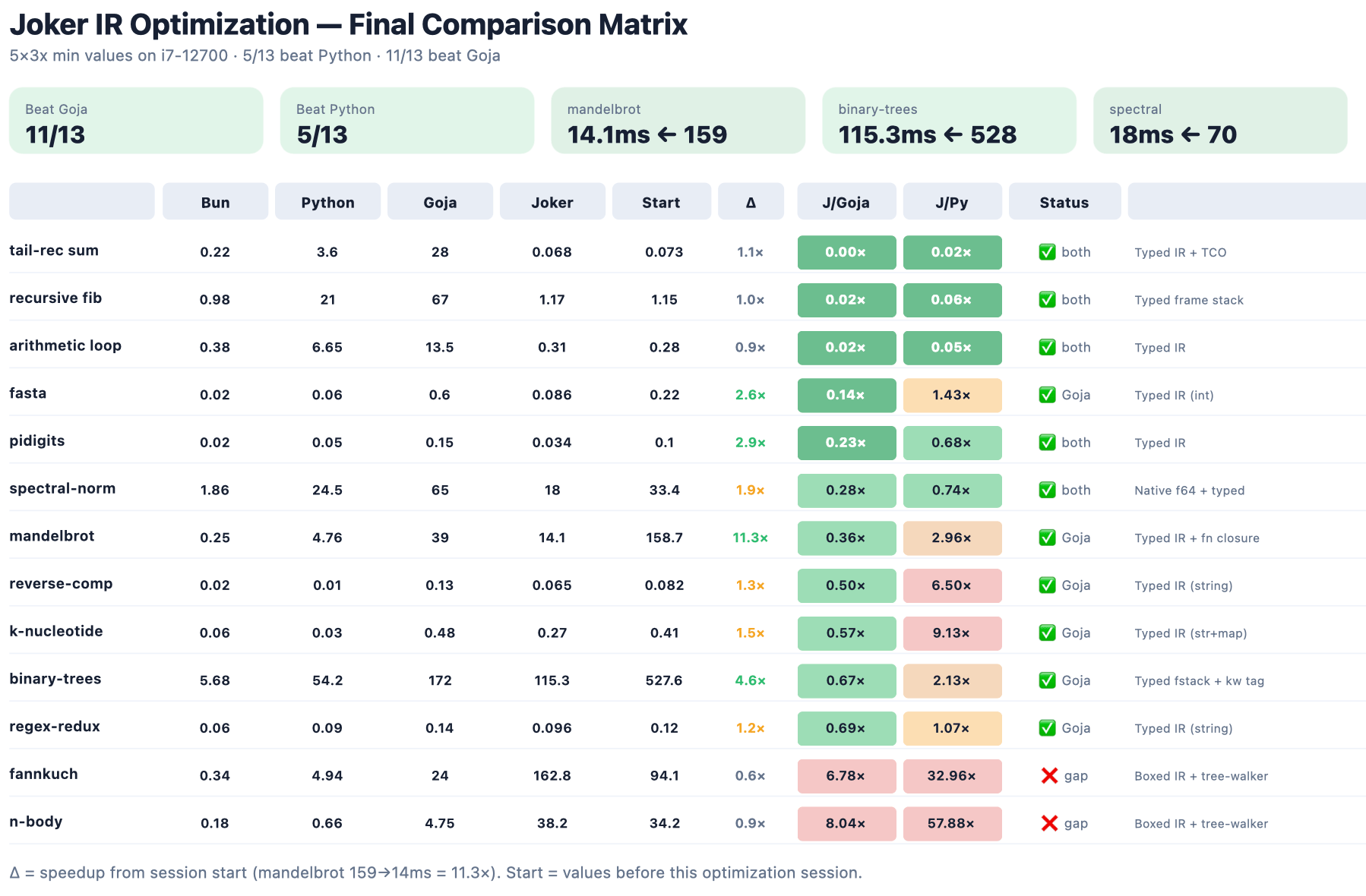
But the joker runtime is where I am having the most fun, by far–my fork is now faster than for a completely arbitrary set of benchmarks:

Joker IR Optimization final comparison matrix: Bun, Python, Goja and Joker timings across 13 microbenchmarks, with Joker beating Goja on 11/13 and Python on 5/13

The point, however, is not the benchmarks, but using the benchmarks to understand what to tweak for more general cases.

And so far it’s been turning out pretty nice–I’m really looking forward to using it.

Gophers and GPUs

I’ve been playing too much with assembly, so after optimizing go-gte (because I wanted an embedding model for my own stuff), I decided to look at tinygrad, and… I started putting go-pherence together based on everything I’ve learned so far.

Yeah, I know, cute gophers again

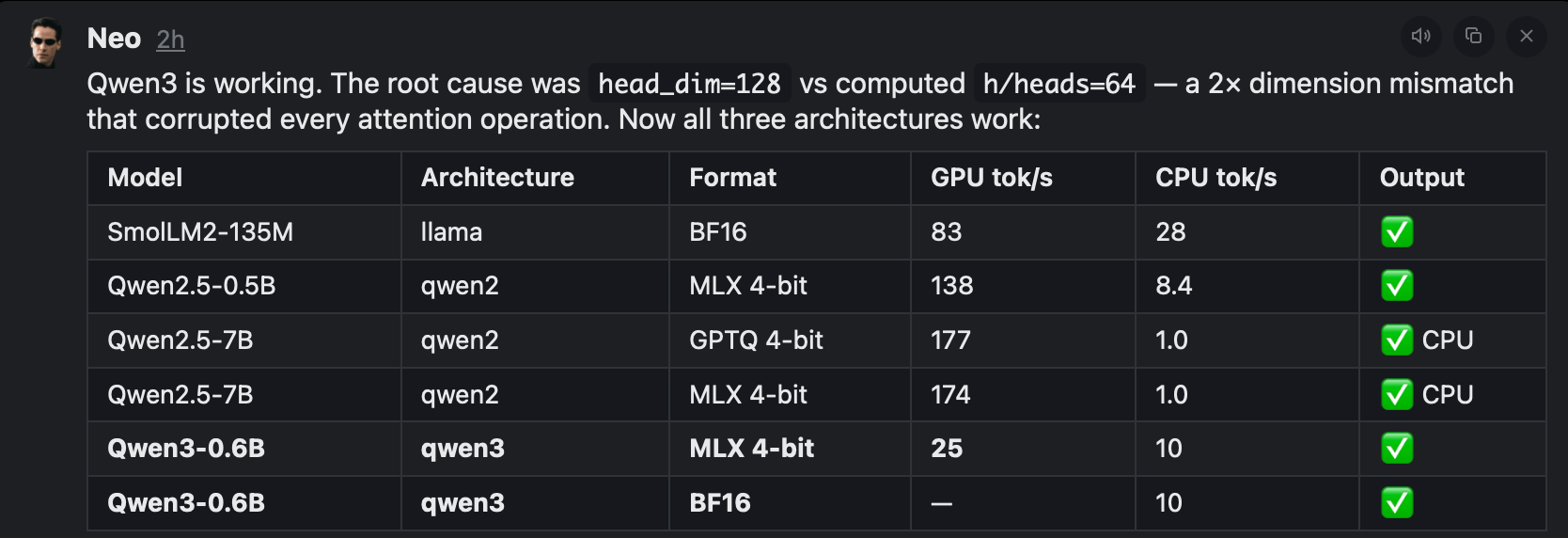
Again, it is a thing I think should exist, because when I was looking a few years ago there were no libraries for inference whatsoever, and I’d like to have one that I can use on Linux (eventually getting it to work with Vulkan on SBCs) and that takes MLX-compatible weights:

Qwen3-0.6B inference results: GPU/CPU tokens-per-second across SmolLM2, Qwen2.5 and Qwen3 architectures after fixing a head_dim mismatch

Homelab

pve-microvm keeps paying off. I’ve moved a few of my home services to microVMs, added (which is now firewalling a test VLAN) and OPNsense (which works, but is not as familiar to me), SmolBSD (a NetBSD flavor that boots in 31ms, which is pretty impressive), and, because I am wading into inference territory (more on that later), an exo distributed inference template.

But even as I was drafting this, my vanished off the network. I shut it and the down, unplugged them, dusted the closet (which was long overdue), plugged them back in, and… the came “up”, but is completely unreachable (status LED is solid green, disk activity, link up on both interfaces, etc.).

Shuts down and boots correctly (apparently, with the usual slowness), but even sniffing at traffic with Wireshark directly yielded nothing. I tried resetting it, but to no avail. I have a support ticket open (for what it’s worth these days), and I think all the important data is on Azure, but troubleshooting this is something I didn’t want to deal with this week.

So, what Did I Learn This Week?
  • The has serious bugs.
  • I have far too many stupid ideas at 4AM.
  • There is a lot of re-use across my various projects, thanks to my penchant for building foundational bits first.
  • Inference is hard. Optimizing JITs and interpreters is, comparatively, much more my turf.
  • Functional testing works great with LLMs both as output (they write decent user stories that are easier to review and fix than code) and input - the Playwright reports, in particular, provided Codex with better directions to fix them than I would bother to describe.

So I might have found a way to deal with the annoying regressions I was getting in . Only time will tell.


https://taoofmac.com/space/notes/2026/05/03/2200?utm_content=atom
macintosh-mini
3d-printingmacretrocomputingemulationhardwareraspberry-pi
Show full content

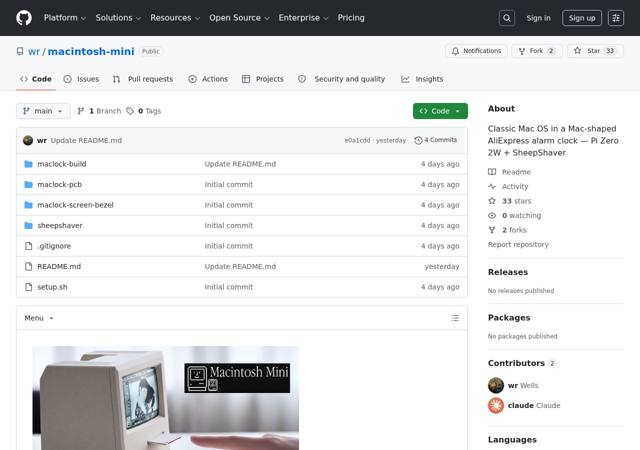
Of all the mods I’ve seen since I , this is probably the best all-round solution. It uses a custom PCB to drive a properly fitted display from a Pi Zero 2W running , and the result is a clean, self-contained build with none of the cable-routing bodges that plague most of these projects–and still uses the battery, which is great.

I’ve been deliberately not finishing my own Maclock mod, and this is serendipitous–sometimes waiting yields the exact solution you’d have spent weeks converging on from a worse starting point. The custom PCB is the key bit: it solves the button re-use and display connection in one go, which is the part I kept stalling on.

I’ll be using my own macemu build on it, now that the ARM64 JIT work has made SheepShaver fast enough to make even a regular Pi Zero feel snappy…


https://taoofmac.com/space/links/2026/05/03/1430?utm_content=atom
rootshell
moshterminalghosttyipadsshiosapps
Show full content

This has pretty much replaced Blink for me. rootshell is a Metal-accelerated terminal for iPhone, iPad, Vision Pro (ha!) and, surprisingly, the Mac, built on ’s rendering engine.

It is buttery smooth, and has proper mosh support, which means my sessions survive Wi-Fi handoffs and network changes without dropping.

The bit matters because it means the rendering is fast, the font handling is good (it has Fira Code Nerd which has become by default), and the whole thing feels like a proper terminal rather than the usual iOS compromise. There’s also a built-in AI assistant that can execute shell commands locally, which sounds gimmicky but is surprisingly useful for one-off tasks when you can’t be bothered to type out a long find or awk invocation on a phone keyboard (I got it to work with a Gemini API key).

The one thing I’m missing is the ability to install my own commands like I do with lets you–local binaries, custom scripts, that sort of thing. A-Shell’s approach of bundling a minimal Unix userland inside the app sandbox is still unmatched for offline tinkering, but it’s nice to have alternatives.


https://taoofmac.com/space/links/2026/05/03/1030?utm_content=atom
Lessons on Building MCP Servers
toolsmcparchitectureaiagentspython
Show full content

I’ve been building servers for a while now–I wrote about last year, started out by creating umcp, and I’ve recently opened up an Office server that’s been battered by enough models against enough real documents that the patterns have settled.

I’m still not a fan of , but what follows is what I’ve learned about making tool chains actually work, condensed from swearing at logs rather than reading papers.

Disclaimer:This is a condensed version of CHAINING.md, which was itself stapled together from a bunch of notes in my vault. The full version has more code examples and a techniques inventory table that Opus just _had to add, and I’ve since beaten that out of it and restored most of the original text (minus typos).

The short version: the MCP servers I design do most of the work, while the model walks breadcrumbs.

Models don’t plan

They look at the conversation, scan the tool list, and grab whatever looks more probable. That’s it. There is no hidden planner. If you want chains that finish somewhere sensible, the server has to make the next call blindingly obvious at every step.

After a year or so, I have pared down my approach into these three things, roughly in order of how much pain they save you:

  • A small named core verb set covering most intents
  • Output that suggests the next call
  • An addressing scheme that survives between calls–anchors, IDs, paths, anything but line numbers.
Core verbs beat surface area

The Office server exposes over 100 tools. Its get_instructions() funnels models toward eight:

…start with office_help, then prefer office_read, office_inspect, office_patch, office_table, office_template, office_audit, and word_insert_at_anchor. Treat specialised tools as fallback, diagnostic, legacy-compatibility, or expert tools when the core flow is insufficient.

That single sentence does an outsized amount of work–it tells the model there is a recommended path, that the path is verb-shaped (help -> read -> inspect -> patch -> audit), and that everything else is opt-in.

Without it, models cheerfully reach for word_parse_sow_template when office_read would do, and you end up with five-call detours for one-call jobs.

So I quickly realized that I needed to be ruthless about which tools to surface and when. The specialised ones still ship–hidden under a “for experts” framing, and a handful of legacy ones filtered out of tools/list entirely.

I also make liberal use of activation sets–the surface the model sees is small; the surface it can reach is large.

Naming is the chain

Again, models chain whatever is most likely (or rhymes), and the most effective tactic, for me, has been taking advantage of that.

All Word tools are word_*, all Excel excel_*, all unified office_*. A model that just called office_inspect will reach for office_patch next, not word_patch_with_track_changes, because the prefix matches.

This particular server also makes liberal use of annotations and a little intent/inferrer hack that reads those prefixes to assign readOnlyHint/destructiveHint automatically, so naming discipline turns into safety metadata for free.

The prefix is the plan. The verb is the step. If you take one thing from this entire post, I’d suggest this notion…

Every response nominates the next call

This was the single change that made things behave on smaller models. The big ones will plan a chain from a tool list and a goal; the wee ones won’t–they grab the first plausible tool and stop.

The fix is stupid simple: every response ends with a breadcrumb dictionary of hints to follow. At minimum next_tools: [...], plus usage: "<exact call>" whenever the current tool produced a value the next one needs.

A model that can’t assemble arguments from a schema can copy the usage string verbatim. In fact, they will copy it, because it is still the most likely outcome as it fills in tokens, and thus those usage hints funnel the path the model takes.

Discovery as a tool, not documentation

Another thing I hit upon was that signposting needed to be curated.

Borrowing a page from intent mapping, office_help(goal=...) returns a structured record–recommended chain with rationale, fallbacks, diagnostic strings to watch for, one imperative next_step sentence. Not prose. Not a README, not skills. Data the model can act on without reading comprehension.

Called with no arguments, it returns the catalogue. Called with an unknown goal, it returns the supported set rather than an error, which turns a potential workflow-stopping error into an actual useful catalogue.

Addressing: anchors, not offsets

The biggest reason simple models can’t follow chains is the model losing the thread between calls. “Insert a paragraph after the introduction” is fine in English but catastrophic if you expect it to remember a byte offset across three tool calls.

In this particular scenario, I cheated and since most Office documents have headings (or cells, or internal structured paths inside OOXML), I used either verbatim text from the document or immovable coordinates (which was particularly hard in PowerPoint, by the way).

So besides suggestions and hints, return identifiers your tools will later accept as input. If you find yourself returning data the model has to describe back to you in natural language, you’ve made a chain that will misfire on a Tuesday afternoon when you’re not watching.

Modes turn one tool into four

I started out with individual editing tools per format, which was very easy to do automated tests for but incredibly wasteful of context, so at one point I decided to make things much simpler for initial discovery, and since I needed to make all outputs auditable, I then tagged available sub-operations risk-wise.

office_patch is the same code path whether you ask for dry_run, best_effort, safe, or strict. One tool, four modes, one entry in tools/list.

Discovery cost scales with tool count, not mode count. And dry_run -> safe -> strict is an escalation chain the model figures out on its own without being told.

If you have N tools that differ only in how cautious they are, collapse them. You’re wasting everyone’s context budget.

Diagnostics as the back-edge

Linear chains are easy. Real chains have loops, and loops only happen when the server invites the model back in. Every mutating tool returns a standard envelope with status, matched_targets, unmatched_targets, and next_tools.

The model then branches on a small subset of options “locally” without needing to go over the entire context, and if you name the diagnostic fields with exact strings the model will see again in your instructions, it will just reinforce them.

In this particular case, again, I cheated. I figured out that the models were starting to call tools at random because they couldn’t introspect the document well enough and ended up breaking files, so I always gave them at least one read-only tool, so the penalty for “I’m confused, let me look again” is one extra round-trip, not a destructive cock-up.

My MCP Design Checklist
  • Pick five to ten core verbs and name them in get_instructions() or your local equivalent
  • Use consistent prefixes by surface
  • Provide a discovery tool that returns recommendations as data, not prose
  • Make the discovery tool browseable–no-arg returns the catalogue, unknown input returns the supported set
  • Embed forward breadcrumbs in every tool response
  • Provide a map/anchors tool so addresses survive between calls
  • Give every mutating tool a mode enum including dry_run
  • Return named diagnostic fields and cite the recovery tools
  • Standardise the mutation envelope. If one tool changes something in a specific way, make sure the others are consistent (arguments, semantics, etc.)
  • Reject unknown arguments strictly (this is much easier in some runtimes than others)
  • Provide an audit tool so the model has somewhere to land
  • Cache anything the recovery loop calls more than once, because, well, it will get called dozens of times even if you carefully curate paths through your tooling with hints.
  • Make repeat calls safe–models retry, and they should be allowed to (idempotence is hard, and often impossible).

Do the boring work in the schema and the descriptions. The model will happily do the clever bit if you stop making it guess.


https://taoofmac.com/space/blog/2026/04/29/2341?utm_content=atom
App Notes: Web App Viewer
devaiswiftmacospwawebappwebkit
Show full content

I got annoyed enough with Safari Web Apps to write my own replacement.

It took about five minutes to get the core working, and maybe another hour of incremental tweaks spread over a day or so. That ratio–five minutes for the thing, an hour for the polish–tells you something about the state of the problem it solves.

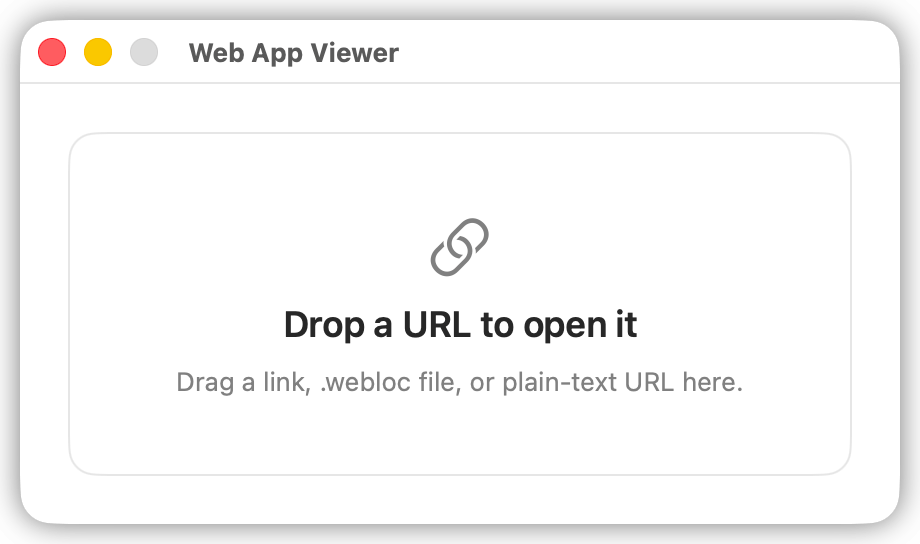
Web App Viewer is a tiny native macOS shell that opens a URL in a WebKit window with no browser chrome. No address bar, no tab strip, no toolbar, no Safari-style fullscreen frame. One web page, one native window, as little visible UI as macOS will reasonably allow once a page is loaded (it hides traffic lights and scrollbars when the mouse is away).

You can drop URLs onto it in the Dock, send them from the Share sheet, a .webloc file, or a custom webappviewer:// URL scheme.

This is it. This is the whole app

Why

Safari’s “Add to Dock” Web Apps have been around for a while now, and the idea is sound–pin a website as a standalone app, give it its own icon, get it out of the browser tab pile. The execution, though, is maddening, and it has always been broken across the board, but on macOS it is horrendous.

The resulting windows still carry persistent browser chrome I can’t hide, and the whole flow of creating one (find the menu item, wait, hope it picks up the right icon, hope it doesn’t break on the next Safari update) feels like an afterthought rather than a feature anyone at Apple actually uses.

This is one of dozens of papercuts that accumulate into a kind of low-grade daily friction, and I have a growing list of them that I intend to write about at some point. But this one was fixable before dinner, so I fixed it.

How

I fired up Codex with the kind of detailed mini-spec I described in –what the window should look like, how URLs should be accepted, what the drag behaviour should be–and told it to reuse the window styles and approach from Daisy and the USB Video Viewer (another small project I built to test SBCs via USB capture without adding more monitors to an already cluttered desk).

Disclosure: OpenAI provided me with a 6-month trial of Codex for my Open Source work (which has also helped me fully ), but you could probably do this with an brick-brained open-source local model (even if is a mess and under-represented in LLM training sets, which is a problem even with SOTA models).

The core is just WKWebView in a native window with chrome that fades in on hover. The Share Extension, the macOS Service, and the URL scheme were bits I tacked on after, and all the scaffolding (Makefile, signing, etc.) was AI-generated, because there is absolutely no reason to do that by hand in 2026.

There were, however, two things that were a right pain:

  • Adding an invisible drag strip needed a nudge from memory, but Codex was useless there. I knew how I’d have done it in and just guided it through the equivalent until it worked. Everything else was straightforward.
  • Web manifest icon detection in was… oh boy. The fact that still does not have a sane async model (at least like I would expect) and would poke at the page and web manifests but fail to wait and load the bigger icons took me a few tries to get right.

But it was totally worth it. I now have six instances of this running, and I found (and fixed) subtle bugs when trying to create each one of them, so I’m pretty much calling it “done” other than some manual UX tweaks I want to do to the menus and dialogs.

What I Use It For

The original motivation was wrapping Piclaw’s web UI as a frameless native-feeling app, and that works exactly as I wanted. But the nicer surprise has been dropping other self-hosted URLs into it–Grafana dashboards, consoles, internal tools–and getting a clean, chromeless window for each. It turns out that removing the browser frame makes everything feel lighter.

And I am casting one of them to an Android device via AirPlay (more on that later when I get that one stable), and the lack of browser chrome makes it… just great. Zero wasted pixels, no distractions, just the content.

But the way it really improves on what Apple didn’t do for me is usability and practicality. Drop in a URL, check it out, then hit Cmd+I and a new copy is installed to my ~/Applications folder, ready to launch from Spotlight, without cluttering the Dock or trying to figure out where they hid it in the sharing pane.

Bliss.

The Uncomfortable Bit

I was a happy user years ago, and I know there are paid apps that do roughly this. But the uncomfortable truth for Apple indie developers in the age of is that there is zero reason to pay for any of them when I can build a tailored version for my own needs this fast.

That’s not a criticism of those apps. It’s a warning sign about what -assisted development does to the economics of small, focused utilities–and, in the context of Mac apps, which were always a tiny cottage industry, is going to be worrisome for many.

But the real lesson here, I think, should be about what Apple ought to have just built into macOS instead of shipping the half-baked Web App support that provoked all of this in the first place.

I will have more words on that.


https://taoofmac.com/space/notes/2026/04/29/1730?utm_content=atom
Pi.dev Ecosystem
agentictoolsaicodingpi
Show full content

The Pi coding agent is a terminal-first assistant focused on interactive workflows, extensibility, and running local agents with practical toolchains. The primary distribution today is pi-mono, which serves as the core runtime and extension point for the ecosystem.

For background on how Pi.dev and the agent evolved, see Mario Zechner’s write-up.

This page tracks the Pi-centric projects, adapters, and clients that extend the core agent, including alternate front-ends, web access tooling, and automation bridges within the wider collection.

Ecosystem

Field Category Date Link Notes Agent Platforms Tools 2026 Mercury

Personal AI assistant that runs in pi workspaces, bridges WhatsApp/Slack/Discord, and orchestrates containerized agents per space with APIs, chat routing, and extensions.

pi-generative-ui

Reverse-engineered generative UI extension for pi that streams interactive HTML/SVG widgets into native macOS windows via Glimpse, letting the LLM render live charts, sliders, diagrams, and dashboards.

Glimpse

lightweight macOS micro-UI toolkit for agent scripts using WKWebView + JSON-lines IPC, useful for pi companion windows, overlays, and generative UI experiments.

pi-gdocs

pi extension that lets agents read and update Google Docs design docs directly, preserving comments and formatting anchors better than Markdown copy-paste.

my-pi

Personal pi extension/skill bundle that adds todo, subagent, clipboard, notifications, file-watcher, code-ast, antigravity-image-gen, and memory, plus bundled browser/search + superpowers skills.

pi-tmux

tmux helpers for pi that coordinate long-running commands via pi-semaphore locks, offering tmux-bash/capture/send/kill/coding-agent, /tmux-list, and the /supervise <task> orchestrator while blocking unsafe git restore calls from the builtin helpers.

pi-side-agents

pi extension that spawns short-lived tmux/worktree side agents via /agent, tracks them in the statusline, offers /agents oversight, and provides agent-setup plus orchestration helpers for running asynchronous coding sprints.

pi-boy

Goofy pi extension that runs Game Boy/Game Boy Color ROMs via a bundled mGBA bridge, rendering inline or overlay with Kitty/ANSI fallbacks, ROM picker, and audio toggles.

Pi for Excel

open-source multi-model AI sidebar add-in for Excel with 16 built-in spreadsheet tools, MCP gateway, and workbook recovery

Code Agents pi_agent_rust

high-performance Rust port of pi-mono coding agent with instant startup, low memory footprint, and capability-gated security model

pi-queue

a lightweight task runner that accepts webhook tasks, requires human approval, and executes pi jobs in isolated git worktrees

Graphone

cross-platform desktop UI for the pi-mono coding agent, built with Tauri 2.0 and sidecar pattern

pi-agentic-compaction

pi extension that replaces one-shot prompt compaction with a virtual-filesystem summarizer that explores /conversation.json via jq/grep, supports configurable models and thinking levels, and accepts /compact <note> guidance.

pi-token-burden

pi extension that parses the assembled system prompt and shows a token-budget breakdown by section with a stacked bar and drill-down table

pi-companion

a web, mobile and desktop client for pi.

pi-mono

a coding agent and toolkit for building and managing LLM-driven agents and deployments.

pi-packages

collection of pi packages including extensions, skills, prompt templates, and themes such as multi-provider model, firecrawl, and image-generation integrations.

pi-autoresearch

pi extension + skill for autonomous experiment loops that benchmarks changes, auto-commits candidates, shows a live status widget and dashboard, and keeps or reverts edits based on measured results.

pi-btw

pi extension that adds a /btw command for immediate side questions, showing answers in an overlay without interrupting the current agent run and optionally saving the result.

pi-multi-pass

multi-subscription extension for pi with automatic OAuth account rotation, TUI /subs and /pool management, and cooldown-based failover across providers.

pz

a Zig-based, single-binary drop-in replacement for the pi coding agent

pi-tramp

TRAMP-like remote execution for the pi coding agent over SSH or Docker

rho

an always-on personal AI operator derived from pi that runs in the background, remembers context, and checks in on a schedule across macOS, Linux, and Android

pi-draw

a drawing/diagram extension for the pi coding agent by Armin Ronacher

pi-llamacpp

Experimental pi extension that runs and manages Qwen via llama.cpp for local agent workflows.

pi-boomerang

token-efficient autonomous task execution with context collapse for pi coding agent.

pi-interactive-shell

an interactive-shell extension for the pi coding agent with full PTY emulation and observable overlays

pi-mcp-adapter

Pi adapter that collapses MCP tool access into a lightweight proxy with lazy server startup, optional direct tools, and built-in MCP UI session support.

pi-web-access

web search, content extraction, and video understanding plugin for the pi-mono coding agent with smart provider fallbacks

PiApp

toy macOS/iOS app for experimenting with the PiSwift coding agent, with Claude chat, file browser, and terminal

pi-acp

ACP adapter that bridges pi’s RPC mode to ACP clients like Zed over JSON-RPC stdio

PiSwift

Swift port of pi-mono for embedding a coding agent in apps, with in-process subagents and prompt templates

Interfaces Desktop pi-gui

Electron desktop shell for pi sessions — lists workspaces and sessions, creates new conversations, and persists UI state; macOS arm64 beta with Homebrew cask planned


https://taoofmac.com/space/ai/agentic/pi?utm_content=atom
OpenClaw Ecosystem
openclawagenticaiassistants
Show full content

OpenClaw is a self-hosted personal AI assistant you run on your own devices, with a gateway control plane that connects to the chat channels you already use (WhatsApp, Telegram, Slack, Discord, Google Chat, Signal, iMessage, Teams, WebChat, plus optional BlueBubbles, Matrix, and Zalo) and adds voice on macOS/iOS/Android alongside a live, controllable canvas. It ships with a CLI onboarding wizard (openclaw onboard) for macOS, Linux, and WSL2, with installs via npm/pnpm/bun. See the OpenClaw site and docs for the canonical reference.

OpenClaw was created by Peter Steinberger. In his February 2026 post “OpenClaw, OpenAI and the future,” he described OpenClaw as a playground project that “created such waves,” and announced he is joining OpenAI to work on bringing agents to everyone while OpenClaw moves to a foundation and stays open and independent.1

This page tracks the core project and the variants that build on or integrate with its workflows within the wider space.

Ecosystem

Field Category Date Link Notes Assistants Autonomous 2026 HermitClaw

an autonomous AI creature that lives in a folder, continuously generating research reports, scripts, and notes with personality genome, memory system, and dreaming cycle

Containerized NanoClaw

lightweight Claude assistant running in containers with security-first design, minimal codebase, WhatsApp integration, scheduled tasks, and agent swarms support

Core OpenClaw

a personal, always-on assistant framework with a strong community and ecosystem around personal agent deployment

Embedded/IoT PycoClaw

MicroPython-based OpenClaw-for-embedded platform targeting ESP32-class boards, with multi-provider LLM routing, chat channels, tool calling, OTA updates, and extension support on sub-$5 hardware.

zclaw

smallest possible AI personal assistant for ESP32 in C, targeting <=888KB firmware, with schedules, GPIO control, persistent memory, and Telegram/web relay chat

Local-first LocalGPT

a local device-focused AI assistant in Rust with persistent memory, autonomous tasks, and OpenClaw-compatible workflows

Low-resource SeaClaw

OpenClaw rewritten in C with 709KB binary, <50ms cold start, ~2-5MB memory footprint, includes Telegram bot and tool execution

PicoClaw

an ultra-lightweight personal AI assistant in Go designed for low-cost hardware and very low RAM usage

ZeroClaw

ultra-lightweight Rust-based AI assistant infrastructure with <5MB memory footprint, <10ms startup, runs on $10 hardware with 22+ provider support

Minimal nanoclaw

a minimalist agent that runs inside Apple’s container framework

NullClaw

678 KB static Zig assistant with ~1 MB RAM, <2 ms startup, 22+ providers, 18 channels, sandboxing, and OpenClaw migration tools for ultra-lean autonomous deployments and hardware control.

Device Control Android DroidClaw

AI agent that controls Android phones via ADB using vision models and accessibility trees, supports workflows and multiple LLM providers

Frameworks ESP-Claw

“Chat Coding” AI agent framework for IoT devices from Espressif, targeting ESP32 and similar microcontrollers

Hardware AutoProber

agent-driven flying-probe automation stack for microscope mapping, CNC motion review, and controlled pin probing on physical targets

Interfaces Chat UI OpenClaw Deck

multi-column chat interface for OpenClaw agents with side-by-side conversations, theming, and keyboard navigation

openclaw-ui

Adaptive Cards extension for OpenClaw that adds rich interactive cards, forms, buttons, and inline GUI-style chat elements by patching the server plugin and chat UI.

Orchestration Platform NemoClaw

an OpenShell plugin for running OpenClaw agents in secure sandboxes with declarative policy, network controls, and managed inference routing through NVIDIA cloud models.

Clawe

multi-agent coordination system powered by OpenClaw with kanban task management, cron-based heartbeats, and a web dashboard

LogClaw

Kubernetes Helm monorepo for an OpenClaw-adjacent AI log intelligence stack with OTLP ingestion, anomaly detection, trace-correlated incident ticketing, and GitOps-style multi-tenant deployment.

Sandboxing Docker piclaw

minimal Docker sandbox for running pi-mono with optional WhatsApp integration (piclaw), my own take on the OpenClaw craze

MicroVM smolvm

sub-second cold-start microVM CLI using libkrun/KVM — isolates agents and untrusted code at hypervisor level, supports OCI images, host SSH agent forwarding, and portable .smolmachine packs

Multi-platform Troublemaker

agent runtime built on pi-mono that adds Slack, Telegram, and email adapters with persistent memory, scheduled events, and Docker sandboxing

Training Reinforcement Learning OpenClaw-RL

a fully asynchronous reinforcement learning framework that trains personalized OpenClaw agents from conversation feedback


  1. https://steipete.me/posts/2026/openclaw ↩︎


https://taoofmac.com/space/ai/agentic/openclaw?utm_content=atom
Agentic Skills
skillsagenticai
Show full content

Reusable skill modules for agentic systems: prompt packs, tool recipes, and structured workflows that you can load into a running agent, adapt for a project, or keep around as references when shaping instruction sets.

These live here so the main page can focus on frameworks, platforms, and infrastructure.

Skills Library

Field Category Date Link Notes Skills 2026 image-blaster

Image-to-world skillset for Claude; analyses images and generates structured world descriptions.

Code Agents SwiftUI Expert Skill

SwiftUI expert guidance covering modern APIs, state management, performance, and iOS 26+ Liquid Glass patterns

threejs-skills

Three.js skill files for Claude Code covering core APIs, geometry, materials, lighting, loaders, shaders, postprocessing, and interaction

Humanizer

Claude Code skill that rewrites AI-sounding text to read more naturally using Wikipedia-based writing anti-patterns

visual-explainer

an agent skill that turns complex terminal output into styled self-contained HTML pages with interactive Mermaid diagrams

Prompting baloney-detection-kit

Drop-in prompt/skill that applies a 6-step critical thinking protocol (Sagan, Karpathy, Lifton, Popper) to counter LLM agreeableness bias


https://taoofmac.com/space/ai/agentic/skills?utm_content=atom
Agentic Systems
aiagentsorchestration
Show full content

Notes and resources on building and operating agentic AI systems, covering orchestration frameworks, task routing, memory, and evaluation approaches that extend baseline capabilities.

Skills

Reusable instruction packs, workflow recipes, and prompt modules live in .

OpenClaw

OpenClaw-specific projects and lightweight variants live in .

Pi.dev

Pi.dev is the home of the Pi coding agent and its ecosystem of extensions, adapters, and clients. See the page for the curated project list.

Resources

Field Category Date Link Notes Agent Frameworks Frameworks 2026 liteagent

minimal Python async agent loop ported from pi-mono, exposing streaming, steering, follow-ups, and sequential tool execution on top of LiteLLM.

HVE Core

enterprise prompt engineering framework for GitHub Copilot with constraint-based workflows, validated artifacts, and RPI methodology

2025 FlashLearn

a simple interface for incorporating Agent LLMs

agno

a lightweight library for building Multimodal Agents

crewAI

framework for orchestrating role-playing, autonomous AI agents (multi-agent automation)

AgentKit

build multi-agent networks in TypeScript with deterministic routing and rich tooling via MCP

Agent Framework

Microsoft open-source agentic framework

Samples 2026 Cloudflare Agents Starter

starter template for building AI chat agents on Cloudflare Workers with tools, scheduling, and real-time streaming

Tools Agent Lightning

training and optimization toolkit for AI agents across frameworks

Agent Knowledge Frameworks 2025 firm

an ontology framework for structuring agent knowledge about businesses

Agent Memory Tools 2026 beads

a distributed, git-backed issue tracker and memory system experiment for AI agents

claude-mem

a persistent memory compression system for Claude Code with search tools

2025 AgenticMemory

a tool for creating and managing memory in LLMs

letta

a tool for creating and managing memory-backed agents

Agent Platforms Platforms 2026 Rivet

Actor-based agent platform that bundles state, storage, workflows, scheduling, and WebSockets into self-hostable Rust binaries or managed cloud runtimes, letting each agent run as a persistent, stateful primitive with built-in persistence and tooling.

2025 HelixML

an interesting enterprise-grade agentic platform with tools for integration and observability

Sim

open-source platform to build and deploy AI agent workflows

Tools 2026 OpenYak

open-source desktop AI assistant that runs locally with MCP support, for file management, data analysis, and office automation without cloud uploads.

Agent Systems Frameworks Squad

AI agent teams for any project, built in TypeScript.

2025 pixelagent

an agent engineering blueprint

2024 pipecat

yet another LLM agent framework

Samples TinyTroupe

a multiagent persona simulation

Tools 2026 CallMe

minimal Claude Code plugin that calls your phone/watch via Telnyx or Twilio (plus OpenAI/ngrok) when a task stalls or needs your input

baudbot

always-on, Slack-connected multi-agent dev assistant that runs tasks end-to-end on Linux

OneCLI

credential vault and HTTP gateway for AI agents that stores secrets once, injects them transparently into outbound API calls, and keeps raw keys out of agent context.

Pinchtab

HTTP browser-control bridge that lets any agent drive Chrome via a compact, stealthy API, with snapshot/text modes, token-efficient read flows, and persistent sessions

rtk

Rust Token Killer CLI proxy that compresses command output before it reaches your Claude Code session, saving ~60‑90% of LLM tokens on git/status/test workflows with ultra-compact summaries and hook-first install.

gogcli

CLI for Google APIs (Gmail, Calendar, Drive, Docs, Sheets, Chat, etc.) with OAuth credential management, headless flows, and JSON/TSV/compact output modes tailored for agent interactions and automation.

Argus

VS Code extension that discovers Claude Code sessions, visualizes costs/performance, and surfaces rule-based findings to debug and tune agentic workflows without leaving your editor.

2025 R2R

production-ready AI retrieval system for agentic RAG via a REST API

2024 plandex

yet another long-running agent tool for complex coding tasks

2023 Auto-GPT

an attempt to provide ChatGPT with a degree of autonomy

Code Agents Samples 2026 TinyProgrammer

A Raspberry Pi device that continuously writes, runs, watches and reflects on small Python programs using an LLM

2025 amplifier

a technology demonstrater for agentic coding

2024 devlooper

a program synthesis agent that autonomously fixes its output by running tests

Tools 2026 kimi-cli

CLI tool for interacting with the Kimi AI assistant

Godogen

Claude Code pipeline (using two cooperative skills) that converts plain-language game descriptions into complete Godot 4 projects with generated art, code, and visual QA via screenshot analysis.

ATLAS

A local coding assistant and test-time inference pipeline that wraps frozen Qwen models in self-verified repair and benchmarking infrastructure

axe

lightweight CLI for defining focused LLM agents in TOML and running them from the terminal, pipes, cron jobs, CI, or git hooks with skills, memory, and sub-agent delegation.

Sidecar

terminal UI for agentic development workflows with git, task, workspace, and conversation management

tui-use

A PTY automation tool that lets AI agents drive REPLs, debuggers and full-screen TUI apps from the terminal

Codex CLI

OpenAI’s lightweight agentic coding CLI for the terminal

2025 Toad

a unified terminal UI to run coding agents via ACP

goose

a local AI agent focused on development tasks

quibbler

a critic for coding agents that can also work as an MCP

mistral-vibe

Mistral’s agentic coding CLI

Developer Resources References 2026 Context7

a curated database of context for several development stacks

Personal Assistants Tools nanobot

an ultra-lightweight personal AI assistant with multi-provider support

Sitegeist

browser-sidebar AI assistant for Chrome/Edge that collaborates on web automation, extraction, navigation, form filling, and research using your own model/provider credentials with local-first data handling.

Research Agents Samples 2025 STORM

LLM-powered knowledge curation system that researches a topic and generates a full-length report with citations

2023 gpt-researcher

a simple agent that does online research on any given topic

Tools 2026 autoresearch

Autonomous research harness that lets Claude/Codex agents edit train.py, run 5‑minute training passes, and iterate on models via human-written program.md instructions, logging each experiment the next morning.

Sandboxing Environments amla-sandbox

A WASM-based sandbox with capability enforcement for running agent-generated code safely. Provides isolation without Docker and reduces tool-call overhead.

Agent Safehouse

macOS sandbox-exec wrapper that builds deny-first policies for Claude/Codex/AMP workflows so coding agents only touch the files and integrations they need.

yolobox

a containerized sandbox for running AI coding agents safely

nah

context-aware safety guard for Claude Code that classifies tool calls, blocks or confirms dangerous actions, inspects reads/writes for secrets and exfiltration, and can optionally consult an LLM for ambiguous cases.

Capsule

a secure runtime for orchestrating agent tasks in isolated WASM sandboxes

shuru

local-first microVM sandbox for AI agents on macOS using Apple’s Virtualization.framework

Cua

A sandboxing toolkit and agentic platform for running agents in isolated environments. Covers Docker, QEMU, and Apple Virtualization for benchmarking, safe code execution, and UI automation.


https://taoofmac.com/space/ai/agentic?utm_content=atom
AI Image Generation
dall-eimagestable diffusionaigenerativemidjourney
Show full content

This page is a collection of notes and links related to image generation technologies, including Stable Diffusion, DALL-E, Midjourney, and other generative image models like Z-Image that have become prominent in the modern space.

Resources

Field Category Date Link Notes 3D Rendering NeRF Tools 2022 nerfstudio

A tool for manipulating Neural Radiance Fields (NeRF) and rendering the scenes out as video

Gaussian Splatting Image Generation ml-sharp

Apple’s ML-SHARP (Sharp Learned Attention Reduction and Pruning) framework

Web Interface 2026 ml-sharp-web

Web playground for creating Gaussian Splats using Apple’s SHARP model.

General Tools 2024 upscayl

an AI-based image upscaler

Generative AI 3D Asset Models 2025 Hunyuan3D-2

a 3D textured asset generation model

Diffusion Models miniDiffusion

a minimalistic implementation of diffusion models in Python

Frame Prediction FramePack

a next-frame (next-frame-section) prediction neural network structure that generates videos progressively.

Image Generation Models Lumina-Image-2.0

Another image generation model

Video Diffusion TurboDiffusion

A video diffusion acceleration framework claiming 100-200x end-to-end speedups (SageAttention/SLA/rCM)

Video Generation Models 2024 HunyuanVideo

A pretty impressive open source video generation model

Web Interface 2025 gpt-image-1-playground

a simple web-based interface for generating images using GPT-IMAGE-1

Image Generation Apple Optimization 2022 CoreML Stable Diffusion

Apple’s optimizations for CoreML

Apps 2025 wavespeed-desktop

A desktop application for generating images that also supports Z-Image

Diffusion Acceleration 2024 NitroFusion

a high-fidelity, fast (single-step) SDXL diffusion model

2022 Fast Stable Diffusion

Another tactic to accelerate inference

Implementations 2026 flux2.c

A pure-C FLUX.2 implementation with optional BLAS/MPS acceleration and zero Python dependencies. Focused on efficiency and portability.

2025 z-image-turbo-mlx

A high-performance implementation of Z-Image using MLX acceleration

z-image-mps

An optimized implementation of Z-Image for Apple Silicon using MPS

Tools AmazingZImageWorkflow

A comprehensive workflow for generating images using Z-Image

Vector Graphics NeuralSVG

An Implicit Representation for Text-to-Vector Generation

Web Interface 2022 Stable Diffusion WebUI

Nearly always the best, bleeding edge WebUI for SD

Multi-modal Models Samples 2024 ml-mgie

instruction-based image self-editing

Multimodal AI Vision Language Models 2026 MLX-VLM

package for inference and fine-tuning of Vision Language Models and Omni Models on Mac using MLX with support for images, audio, and video

Stable Diffusion Apps 2023 swift-coreml-diffusers

Hugging face’s own app, using Swift and CoreML for Apple Silicon

2022 Draw Things

Pre-packaged app for iOS, downloads and allows re-use of .ckpt files.

DiffusionBee

Pre-packaged app for macOS (M1 and Intel)

CGI 2023 Blender-ControlNet

A Blender plugin to generate ControlNet inputs for posing figures

2022 dream-textures

A Blender plugin for texturing models based on a text description.

Implementations 2023 OnnxStream

Stable Diffusion XL 1.0 Base on a Raspberry Pi Zero 2 (or in 298MB of RAM)

Libraries 2024 sd4j

a Java library for Stable Diffusion that uses ONNX

Models SDXL-Lightning

an SDXL flavor that works on only a few steps

2023 Upscale Model Database

Too wide a choice, perhaps

Reference 2024 comflowy

a set of reference workflows and documentation for ComfyUI

flux

minimal inference examples for FLUX.1 models

Tools comflowyspace

a ComfyUI desktop wrapper

2023 ComfyUI-AnimateDiff-Evolved

An AnimateDiff integration for ComfyUI

ComfyUI

pretty impressive node-based UI

InvokeAI

A polished UI

stable-diffusion.cpp

stable diffusion inference on the CPU, in pure C++

ComfyUI-Manager

A component manager for ComfyUI

Opendream

A layer-oriented, non-destructive editor

2022 imaginAIry

Works well on Apple Silicon, pure CLI interface to all SD models. Does not reuse .ckpt files, however, so requires separate disk cache.

Upscaling Video Enhancement 2025 video2x

a tool for upscaling videos using RealESRGAN and other models


https://taoofmac.com/space/ai/image?utm_content=atom
AI Speech Technologies
speechsttsynthesisaicloningvoicettswhisper
Show full content

This page is a collection of notes and links related to speech technologies, including Text-to-Speech (TTS), Speech-to-Text (STT), voice synthesis, voice cloning, and other related frippery in the modern space.

Resources

Field Category Date Link Notes Generative Audio Models 2023 bark

a text-prompted genereative audio model

Speech Agents Tools 2026 RCLI

an on-device Apple Silicon voice agent for macOS that combines STT, local LLM inference, TTS, 38 local actions, and document RAG in a low-latency TUI/CLI.

dograh

Open source voice agent platform.

2025 Asterisk-AI-Voice-Agent

An Asterisk-based AI voice agent project integrating telephony with voice AI workflows.

Speech Recognition Libraries WhisperKit

a Swift package that integrates Whisper with Apple’s CoreML

Models 2024 WhisperLive

a real-time text-to-speech system based on Whisper

moonshine

a family of models optimized for fast and accurate automatic speech recognition on resource-constrained devices. Designed to run efficiently on smaller hardware.

2023 distil-whisper

a distilled version of whisper that is 6 times faster

2022 whisper.cpp

a C++ implementation of whisper that can run in consumer hardware

whisper

a general purpose speech recognition model

Tools 2026 TypeWhisper

A macOS dictation and transcription app that can use Apple’s speech stack as well as other local on-device engines, with optional prompt-driven post-processing.

Handy

An offline, cross-platform speech-to-text app built with Tauri that transcribes locally. Uses Whisper and Parakeet models without sending audio to the cloud.

Ghost Pepper

a 100% local macOS hold-to-talk speech-to-text menu bar app with WhisperKit transcription and local LLM cleanup.

dictate

a Go-based local voice-to-text tool for Linux terminals that streams whisper.cpp transcription to stdout, files, or keystroke injection for dictating into focused terminal apps.

2024 audapolis

an editor for spoken-word audio with automatic transcription

2023 insanely-fast-whisper

An opinionated CLI for audio transcription

Transcription Tools 2026 buzz

A cross-platform Whisper desktop app that works quite well on the Mac (including speaker diarization)

2025 OpenTranscribe

an open-source all-in-one recording transcription and diarization stack

Speech Synthesis Implementations 2026 pocket-tts.c

A minimal, dependency-free C scaffold for Pocket-TTS, aimed at CPU-only TTS. Includes a tiny CLI in the flux2.c style.

Models sopro

a lightweight text-to-speech model

2025 csm

a speech generation model from Sesame that generates RVQ audio codes from text and audio inputs.

Orpheus-TTS

an open-source text-to-speech system built on Llama-3b

chatterbox

a text-to-speech model that can generate expressive speech with a variety of styles and emotions.

2024 ChatTTS

a text-to-speech model designed specifically for dialogue scenarios, with decent prosody

Real-Time-Voice-Cloning

a PyTorch implementation of a voice cloning model

WhisperSpeech

a text-to-speech system built by inverting Whisper

2023 StyleTTS2

A text to speech model that supports style diffusion

silero-models

Multi-language neural text-to-speech models

Resources Training a voice for piper TTS

a detailed walkthrough of how to customize a voice model

Tools 2026 Voicebox

an open-source voice cloning studio with DAW-like features, local-first voice synthesis powered by Qwen3-TTS, multi-track timeline editor, and REST API

pocket-tts

A lightweight text-to-speech (TTS) application designed to run efficiently on CPUs that supports voice cloning

2025 voice-pro

a toolkit for doing speech processing and voice cloning

abogen

a tool for generating audiobooks from text using the Kokoro open weights model

edge-tts

a text-to-speech module that leverages the Microsoft Edge TTS API

podcastfy

a tool for generating podcasts from text

2024 OpenVoice

a tool that enables accurate voice cloning with multi-lingual support and flexible style control.


https://taoofmac.com/space/ai/speech?utm_content=atom
Tailscale
wireguardvpnnetworkoverlay
Show full content

Tailscale is a centrally-managed overlay network VPN service that provides seamless connectivity across your devices no matter where they reside, with a few interesting features:

  • Support for direct access to other LANs (and outbound Internet connections) via “exit nodes”
  • Support for every single operating system I use (including both major mobile platforms)
  • Ability to run an exit node on the
  • Availability of an alternate central management service.

I have been using it for a couple of years as a way to remotely access my home machines (and other stuff) when traveling, and have been very happy with it.

Resources

Category Date Link Notes Server 2024 headscale

a self-hosted Tailscale control server

Tools 2026 tailsnitch

a security auditor that scans tailnets for misconfigurations and risky access controls

microlink

a Tailscale-compatible VPN client for ESP32 with Wi-Fi and cellular support

UI 2024 trayscale

a system tray icon for Linux desktops

tailscale-systray

another system tray icon for Linux desktops


https://taoofmac.com/space/apps/tailscale?utm_content=atom
restic
backupcloudsync
Show full content

This page is a stub.

Resources
  • Swamp, a GNOME application to browse restic repositories.
  • Rustic, a alternative.
  • Resticity, a Web GUI for restic
  • BorgTUI, a BorgBackup TUI that can also work with rustic.

https://taoofmac.com/space/cli/restic?utm_content=atom
Rust
borrowlanguageprogrammingcheckersystemtypedsafe
Show full content

The language that helped coin the moniker Rust Evangelism Strike Force, and which is slowly starting to get to me.

Resources

Category Date Link Notes Backend 2024 trailbase

a self-hostable Firebase replacement

Data 2021 ballista

an Apache Spark-like distributed execution environment

2023 lance

a modern columnar data format that is optimized for ML workflows and datasets, compatible with pandas

Editors 2026 Ferrite

A fast, lightweight text editor for Markdown, JSON, YAML, and TOML files built with Rust and egui

Embedded 2024 embassy

a framework for ESP32, Pico and Nordic MCUs

2026 mousefood

a no-std embedded-graphics backend for ratatui

GUI 2024 dioxus

GUI library for desktop, web, mobile, and more, using the system webview

egui

a simple, fast, and highly portable immediate mode GUI library for Rust.

graphpu

a 3D GPU graph visualization application

2025 azul

a desktop GUI framework for Rust

Game Engines 2020 Bevy

a data-driven game engine

GameLisp

a scripting language for Rust game development

RG3D

a 3D game engine

Learning 2024 rustlings

a collection of small exercises to get you used to reading and writing Rust code

Libraries 2020 lunatic

a platform for building actor systems running WebAssembly

pulldown-cmark

Markdown paraer

rust-crdt

A family of CRDT’s supporting both State and Op based replication

syntect

Syntax highlighting using Sublime Text definitions

2021 bastion

a distributed fault-tolerant runtime system

comrak

a Rust port of cmark-gfm

2023 ratatui

a library for developing text user interfaces

ractor

an actor library

2024 kameo

a lightweight library for building fault-tolerant, distributed, and asynchronous actors

2025 ratzilla

a library for building terminal-themed web applications using Rust and WebAssembly.

pagefind

a static site search engine that runs in the browser

2026 FrankenTUI

minimal, high-performance terminal UI kernel for deterministic, flicker-free inline UIs with a diff-based renderer and strict cleanup guarantees (Rust nightly, WIP)

xmloxide

A memory-safe Rust reimplementation of libxml2 that passes the W3C XML conformance suite, provides XML/HTML parsers, XPath, validation, canonicalization, and a xmllint-compatible CLI.

Microservices openworkers

a self-hostable implementation of Cloudflare workers

Networking 2024 koblas

a simple SOCKS5 proxy

Parallelism 2020 rayon

a data parallelism library

2024 kay

An intriguing, mostly self-contained Actor system

Profiling 2020 heaptrack

a memory profiler

Reference 2023 The Rust on ESP Book

A very nice guide on how to do Rust development for Expressif ESP32 devices

Security 2026 LiteBox

a security-focused sandboxing library OS for reduced host attack surface

monty

a minimal, secure Python interpreter in Rust for running AI-generated code

Servers 2022 meilisearch

another search engine with document-level access control

tantivy

another search engine (Lucene-inspired)

sonic

a fast and schema-less indexing/search backend

2026 Garage

an S3-compatible distributed object storage service for small-to-medium self-hosted clusters

narwhal

an extensible pub/sub messaging server for edge applications

Streaming airplay2-rs

Open-source AirPlay 2 audio sender in Rust — mDNS discovery, RAOP/RTSP pairing, ALAC encoding, buffered audio sync

Tools 2020 rust-musl-builder

Docker wrappers for building Rust binaries with musl

2021 tauri

an Electron alternative that uses system webviews

2022 mcfly

an enhanced ctrl-r replacement

2024 dtui

a tool to inspect the system/session dbus

zoxide

a port of the venerable z utility to Rust

2025 monolith

a tool to save web pages in a unified HTML format

2026 eilmeldung

a fast TUI RSS reader based on the news-flash library

vcad

Parametric CAD in Rust; exports STL, glTF, USD, DXF

Google Workspace CLI (gws)

One CLI for every Google Workspace API; discovers commands from Google’s Discovery Service, emits structured JSON for humans and agents, and ships dozens of reusable agent skills + an MCP server.

siomon

Linux TUI/CLI hardware and sensor monitor written in Rust, ships as a static binary with zero runtime dependencies plus JSON/XML/HTML outputs, alerts, and CSV logging.

Horizon

GPU-accelerated terminal board with an infinite 2D canvas, workspaces, and AI-aware panels for coding workflows.

Web Frameworks 2023 Rocket

a mostly complete async web framework

2024 spring-rs

a microservice framework inspired by spring-boot


https://taoofmac.com/space/dev/rust?utm_content=atom
Swift
programmingapple
Show full content

This is a stub to start gathering some resources on Swift, which won several of my personal awards for “most breakages between major releases” and has therefore not been something I’ve invested a lot of time on.

In fact, I’ve yet to have a reason for building something with it (other than the occasional test), but it pays to keep an eye on things.

Resources

Error: Could not parse 'table.yaml'

while parsing a block mapping
  in "<byte string>", line 2, column 1
did not find expected key
  in "<byte string>", line 115, column 1

https://taoofmac.com/space/dev/swift?utm_content=atom
Arduino
arduinohardwareatmelmicrocontrollersarchivelegacy
Show full content

Easily the most well-known family of microcontrollers these days, which effectively kickstarted an entire wave of DIY electronics and Maker activities.

Although a bit limited and bulky by today’s standards, the Arduino compiler and IDE became a common staple of DIY electronics and Maker activities.

Resources

Date Link Notes 2016-05 Microscheme

A Scheme subset designed for Atmel microcontrollers.

uLISP

A LISP interpreter tailored for Arduino boards.

2017-12 PubSubClient

A tiny MQTT library for Arduino platforms.

See also background on the protocol and the / languages for embedded development.


https://taoofmac.com/space/hw/arduino?utm_content=atom
ESP8266 (and ESP32)
hardwaremicrocontrollerselectronicsesp32resourcesexpressifmcuesp8266
Show full content

These little modules have taken hobby electronics by storm, so of course I grabbed a few of them and have been hacking away quietly on both the ESP8266 and the ESP32.

Resources

Category date Link Notes Applications 2026 MimiClaw

Telegram-based AI assistant for ESP32-S3 using LLM APIs

hacker-news-cyd

A Hacker News reader for ESP32 Cheap Yellow Displays, with a neat Wireguard twist

Cameras 2024 esp32-homekit-camera

a camera project that I keep trying to fix

Displays 2026 ESP32 E-Paper Weather Display

An ESP32 e-paper weather display project with a nice visual design for the weather screen

2024 ESP32-Cheap-Yellow-Display Audio Fixes

a video on how to fix audio issues with the Cheap Yellow Display

2023 ESP32-Cheap-Yellow-Display

a set of libraries for the ESP32-2432S028R and similar displays

Documentation ESP32 Buyer's Guide

an updated guide to the various SKUs for 2023

Emulation 2025 ESP32 Rainbow

a ZX Spectrum emulator for the ESP32

tiny386

An x86 emulator for the ESP32 that can run Windows 95

2021 Retro ESP32

a set of emulators for ESP32, mostly targeting the Odroid Go

Firmware 2026 ESP3D

firmware for ESP8266/ESP32 boards that adds Wi-Fi/web UI control for 3D printers, CNC, and sand tables

GUI 2022 slint

a GUI toolkit that can run in MCUs like the Pi pico and the ESP32

Graphics 2026 roo_display

A display library for ESP32

Hacks 2020 Hacking A Mitsubishi Heat Pump

I need to do this to mine

Hardware 2026 wide-mcu-breadboard

3D-printable breadboard body for wide MCUs like ESP32 and Pi Pico, reusing standard spring contacts to give four free holes per pin

IoT 2021 AI-on-the-edge-device

an impressive water meter reader solution using an ESP32

Libraries 2023 HomeSpan

Arduino library for creating your own ESP32-based HomeKit devices

rtl_433_ESP

an Arduino library for use on ESP32 boards with to decode 433MHz sensor signals

Home Accessory Architect

a set of libraries to create HomeKit devices

littlefs

A little fail-safe filesystem designed for MCUs

DeviceScript

TypeScript for Tiny IoT Devices (ESP32, RP2040, etc.)

PicoMQTT

An MQTT client and server library for ESP8266 and ESP32 devices.

esp32-ir-powermeter

a library to read power usage from a digital power meter via the infrared interface

2022 FabGL

a set of ESP32 libraries that allow for VGA output and various graphics-related functionality, as well as terminal emulation

2020 HeatPump

the library to talk to Mitsubishi ACs

2019 SSD1306 Driver

This driver works correctly with the 1.1.0 revision Wemos D1 OLED shields I have

2017 pubsubclient

A smaller, simpler MQTT library

McLighting

An RGB LED controller library

2016 esp_mqtt

a MQTT library with SSL support

M5Stack 2020 WiFi Hash Monster

an EAPOL sniffer (and generic Wi-Fi monitor)

CovidSniffer

a COVID tracker BLE sniffer

Mods 2024 ESP32_TFT_PIO

a Cheap Yellow Display project with mods to improve the audio quality

Networking 2026 wolfIP

a lightweight TCP/IP stack for resource-constrained MCUs with no dynamic allocations, fixed socket/buffer limits, BSD-like sockets, and a FreeRTOS port.

2024 Zimodem

custom modem simulator with lots of features

ESP32-Bluetooth-USB-dongle

use a ESP32 device like a Bluetooth dongle

WifiModem

ESP8266 firmware to act as a telnet modem and server

esp32-open-mac

an open source Wi-Fi driver for the ESP32

WifiModem

Hayes modem emulation for ESP8266 modules

2020 espethernet

direct connection to a PHY device

ESP32 NAT Router

a basic router for the ESP32

2017 esp_wifi_repeater

An amazing Wi-Fi repeater, with basic mesh networking

WiFiManager

A library for first-boot configuration of Wi-Fi connections

Operating Systems 2026 MicroPythonOS

a MicroPython-based OS for ESP32 with Android-like touch UI, app store, and OTA updates

BreezyBox

A BusyBox-inspired shell and virtual terminal system for ESP32

BreezyDemo

A demo cyberdeck project using BreezyBox on an ESP32-S3 with LCD

2025 Tactility

An operating system focused on ESP32

2021 FUZIX

a minimal UNIX-like OS that can run on a variety of MCUs

Lua-RTOS-ESP32

a Lua-based RTOS for the ESP32 that also has a block-based editor

Photography 2026 Obscura One

An open-source screenless camera built around the ESP32-CAM with a fully 3D-printable body and Arduino firmware

Reference 2023 ESP01-Send--Receive-Circuit

a circuit to use the ESP-01 as an IR receiver

Resources 2016 ESP8266 superfast flashing 2013 Getting Started with the ESP8266

Everything you need to know.

How to use the ESP8266-01 pins

Nice, straightforward overview

Runtimes 2020 mitsubishi2MQTT

a Tasmota-like firmware to control Mitsubishi ACs

2019 esphome

modular firmware for ESP8266 and ESP32

2017 esp-lisp

A tiny LISP interpreter

2016 Arduino Core

An ESP8266 core for Arduino

MicroPython

Which also supports the ESP8266 thanks to this Kickstarter campaign

2014 An SDK for the ESP8266 Wi-Fi Chip

The early days

Security 2026 ESP32-DIV

Multi-band ESP32 wireless offensive/defensive toolkit for Wi-Fi, BLE and Sub-GHz testing and analysis.

2024 ESP32-Marauder-Cheap-Yellow-Display

A set of wireless security tools for the Cheap Yellow Display

Tools 2026 esp-scope

A web-based oscilloscope for ESP32 boards that streams ADC data to a browser UI

xcc700

Self-hosting mini C compiler for ESP32/Xtensa; emits relocatable ELF for ESP-IDF elf_loader

2023 ESP32-MPY-Jama

a MicroPython IDE for the ESP32 family

2022 esp_ghota

a way to do OTA updates via GitHub

Video 2020 espflix

an inspired ESP32 video hack


https://taoofmac.com/space/hw/esp8266?utm_content=atom
Docker
Show full content

The new hotness in the Linux container space (because nobody remembers LXC anymore).

Resources

Category Date Link Notes Base Images 2015 gliderlabs/alpine

A minimal Alpine Linux base image

phusion/baseimage-docker

an arguably sane Ubuntu base image

CLI codekitchen/dinghy

a nice wrapper that sets up a host NFS server and other niceties

Wharfee

a nice CLI wrapper

2014 dockersh

Segregate logged in users into different containers

Distros 2013 Core OS

a lightweight distro focused on containers, since acquired by RedHat

GUI 2026 Dockge

a self-hosted, stack-oriented Docker Compose manager with a reactive UI

2025 Arcane

A Portainer alternative

2016 Portainer

a simple NodeJS Web UI

2015 Portus

A registry front-end that works with the v2 registry and has some user management features.

2014 Seagull

A Web UI for container management

Mac Alternatives 2021 podman-macos

a menubar item to manage podman machine, which is in turn available on Homebrew

lima

a possible replacement for Docker Desktop on Mac

2019 boot2docker-xhyve

a clean way to run Docker inside Hypervisor.framework

Network 2018 pipework

map physical interfaces to specific containers

2015 socketplane

Auto-discovery and OVS for inter-host traffic

2014 weave

inter-host tunneling, with encryption

OCI Tools 2019 docker-slim

performs simple runtime analysis to remove unnecessary libraries and slim down images

2018 buildah

a CLI tool for builting OCI container images from Dockerfiles

Orchestration 2015 Kubernetes

The current industry favorite

Rancher

Still arguably one of the nicer options in 2018

Other runtimes 2025 container

Apple’s own container host, with a Docker-like interface

2022 nerdctl

can be used to manage containers in containerd/k3s

2019 podman

aims for 1:1 CLI parity (see also Buildah and Skopeo)

2018 Singularity

a different take on containers, not quite OCI compliant

PaaS 2020 CapRover

a nice web front-end for Docker Swarm

Tools 2026 maintenant

Single-container monitoring stack — auto-discovers Docker services, built-in dashboards, alerts, uptime checks, no config needed

2025 Container-Compose

docker compose for Apple’s container engine

tart

a macOS VM manager targeting CI/CD applications

Diun

A tool to monitor Docker images and notify when updates are available

tini

a tiny init system for Docker containers, to handle zombie processes and reaping

uncloud

a lightweight clustering and container orchestration tool

unregistry

a tool for directly copying images between servers without a registry.

tilt

a tool for managing local development environments, with a focus on Kubernetes and Docker

2024 lazydocker

a nice TUI for Docker management, with usage charts and easy stack/compose viewing (Portainer for terminals)

2023 distrobox

a nice wrapper for sandbox management

colima

a macOS VM container manager that replaces Docker desktop and works well with brew.

Setting up boot2docker manually on Parallels

Since I don’t have Parallels Pro, I run Docker on my older Macs like this:

  • Download a recent release and put the ISO someplace safe
  • Create a new VM manually by dragging the ISO to Parallels (use the Shared or NAT network type)
  • After first boot, use fdisk to create a primary partition in /dev/sda and format it using mkfs.ext4 -L boot2docker-data /dev/sda1
  • Reboot so that it gets mounted and used for certificate storage
  • Do brew install docker (which gets you the CLI)
  • Set up port forwarding for port 2376 and a local port to the VM’s SSH port
  • SSH into the VM (docker/tcuser) and copy the *.pem files from /var/lib/boot2docker/tls to your ~/.docker folder
  • Set and export DOCKER_HOST and DOCKER_TLS_VERIFY accordingly:
export DOCKER_HOST=localhost:2376
export DOCKER_TLS_VERIFY=1
Useful Dockerfile Snippets

Base Image Description Dockerfile snippet Ubuntu Installing the Oracle JDK (and setting the EULA)

RUN echo oracle-java8-installer shared/accepted-oracle-license-v1-1 select true | debconf-set-selections \
 && add-apt-repository -y ppa:webupd8team/java \
 && apt-get install -y java-common oracle-java8-installer oracle-java8-set-default \
 && rm -rf /var/cache/oracle-jdk8-installer
Building The Docker Registry From Scratch (on ARM, too!)

Very simple, really, once you have installed. Quite quick on a 2, too:

export GOPATH=$HOME/go
export PATH=$GOPATH/bin:$PATH
# this fetches godep and golint
go get github.com/tools/godep github.com/golang/lint/golint
# this fetches and builds the registry
go get github.com/docker/distribution/cmd/registry
# test it with the default config
$GOPATH/bin/registry $GOPATH/src/github.com/docker/distribution/cmd/registry/config.yml
Restarting a Container Automatically in Docker Compose

Since watchtower only does updates and not restarts (which seems like a missed opportunity), this simple snippet will restart a container at a specific time every day:

version: "3"
services:

  myservice:
    container_name: myservice

  restarter:
    image: docker:cli
    restart: unless-stopped
    volumes: ["/var/run/docker.sock:/var/run/docker.sock"]
    entrypoint: ["/bin/sh","-c"]
    command:
      - |
        while true; do
          current_epoch=$$(date +%s)
          target_epoch=$$(( $$(date -d "05:00" +%s) + 86400 ))
          sleep_seconds=$$(( target_epoch - current_epoch ))
          echo "$$(date) + $$sleep_seconds seconds"
          sleep $$sleep_seconds

          docker restart myservice
        done

https://taoofmac.com/space/os/linux/docker?utm_content=atom
Clojure(Script)
developmentclojurelispclojurescript
Show full content

Clojure is a dialect that targets the VM - but that also happens to have a number of other back-ends, including a one.

Error: Could not parse 'table.yaml'

while parsing a block mapping
  in "<byte string>", line 2, column 1
did not find expected key
  in "<byte string>", line 438, column 1

https://taoofmac.com/space/dev/clojure?utm_content=atom
AirPlay
Show full content

AirPlay is a generic name for a number of technologies, the most interesting of which is its -based photo and video sharing protocol.

Resources

Category Date Link Notes AirPlay 2 2026 airplay2-rs

Open-source AirPlay 2 audio sender in Rust — mDNS discovery, RAOP/RTSP pairing, ALAC encoding, buffered audio sync

2022 airplay2-receiver

Python-based AirPlay 2 receiver

goplay2

Go-based AirPlay 2 receiver

Receivers 2025 AirAP

iOS receiver for AirPlay

2024 UxPlay

Generic Linux mirroring daemon with AirPlay v2 and video mirroring support

2022 RPiPlay

Raspberry Pi-compatible AirPlay mirroring server

shairport-display-qt

Qt display frontend for shairport

shairport-sync

AirPlay audio receiver — what I use on a Pi 3

2012 shairplay

AirPlay/RAOP server library

Reference Unofficial Protocol Specs

Protocol documentation including mirroring

Tools airplay-nmt

C-based server for embedded devices

pyairplay

Protocol testbed


https://taoofmac.com/space/com/apple/airplay?utm_content=atom
Screencasting
Show full content

I find myself both in occasional need for doing screencasts or screen sharing sessions and constantly looking for screen mirroring solutions, and this table tries to summarize both under the same generic label of “screen casting”:

Category Date Link System Notes Keystroke Overlays 2019 QiPress Windows

Free version available, also displays mouse clicks

Carnac keycastr macOS

Open Source

KeyPress OSD Windows

also highlights mouse position

Keystroke Pro macOS

Sadly, not available in the App Store

screenkey Linux

PyGTK, old-ish

Mouse Overlays Cursor Pro macOS 2018 Mouseposé

also displays keyboard presses. Great for presentations, too

Plugins 2019 shortcut_VUr

a Blender plugin to overlay mouse and keyboard commands

Screen Mirroring 2022 UxPlay

Generic GStreamer-based solution for AirPlay functionality

2020 RPiPlay

Working AirPlay mirroring for iOS and macOS. Does not (yet) support casting videos.

miraclecast

Miracast-based. Still not quite all there, but has a Raspberry Pi 3 build. Supports essentially Android clients

lazycast

supports Miracast (and MICE) on the Pi

Promys

Requires own application. Runs on a Pi, supports Mac/Windows/Linux clients.

Screencasting 2026 OpenScreen

an open-source demo and screencast creation app positioned as an alternative to Screen Studio.

web-scroll-video Cross-platform

Create MP4 videos of smoothly scrolling web pages via headless Chrome and ffmpeg.

2019 Captura Windows

All-in-one solution (includes overlays), can be installed via Chocolatey

2007 Screenflick macOS

A full-fledged screencasting app that also records mouse clicks and keypresses separately


https://taoofmac.com/space/apps/screencasting?utm_content=atom
JavaScript
resourceslanguagesprogrammingscripting
Show full content

The ECMA - 262 Standard, ratified after Netscape and (mostly) agreed to make JavaScript and JScript interoperable.

Setting Up Node

In order to run NodeJS sanely on macOS and WSL, I’ve taken to setting up an unprivileged package install folder like so:

mkdir "${HOME}/.npm-packages"

# Add a new dotfile, without expanding $HOME
cat << 'EOF' >> ~/.npmrc
prefix=${HOME}/.npm-packages
EOF

# Add the following five lines to .bashrc, without expanding variables:

cat << 'EOF' >> ~/.bashrc 
NPM_PACKAGES="${HOME}/.npm-packages"
PATH="$NPM_PACKAGES/bin:$PATH"
# Unset manpath so we can inherit from /etc/manpath via the `manpath` command
unset MANPATH # delete if you already modified MANPATH elsewhere in your config
export MANPATH="$NPM_PACKAGES/share/man:$(manpath)"
EOF
Ways To Avoid Writing JavaScript

I’ve taken to looking for alternative ways to develop in JavaScript that don’t require me to put up with its syntax and overall insanity. Here’s a few I like (mostly compilers, since that’s what makes the most sense for me):

Category Date Link Notes Compilers 2021 Imba

another Elm-like language that compiles ro Javascript

2019 Reason

an OCaml-like language and compiler

2018 Elm

A functional language that compiles to JavaScript

wisp

A homoiconic LISP dialect with Clojure syntax and macros

pythonium

A Python3 to JavaScript translator

2017 Opal

A Ruby transpiler

Resources

Most of these are library-independent. Check my jQuery page for more, since there’s an entire sub-culture that believes it to be JavaScript programming in and by its own…

Category Date Link Notes AI 2019 nlp.js

a natural language processing library for bots

Animation 2018 Pts

A Processing-like library

2023 anime

an impressive lightweight JavaScript animation library

2025 vfx-js

a library for creating visual effects

defuddle

an implementation of the readability algorithm

Audio 2020 Wave.js

a themable audio visualizer

Automation 2018 n8n

a Zapier alternative that is Open Core, but requires licensing for most uses

2023 activepieces

another self-hostable Zapier alternative (MIT Licensed)

CAD 2025 BREP

a feature-based modeling playground with BREP-style workflows on triangle meshes

Charting 2010 Highcharts

A very comprehensive charting library

2013 GoJS

A commercial charting and diagramming library

2018 F2

an elegant charting library for mobile

2023 Graphic Walker

An embeddable Tableau-like dashboard UI, also available for Jupyter

tremor

a React library for creating semi-interactive dashboards.

Observable Plot

A nice D3 wrapper that makes a lot of it much more intuitive

2025 simplegantt

a simple Gantt chart library for restricted environments

Data Structures 2017 seamless-immutable

Immutable data structures a la Mori

2018 knockout.sync.js

A nice nockout extension that allows you to sync data among clients and backends

2022 automerge

a library of data structures for building collaborative applications in JavaScript, using CRDTs

Frameworks 2025 mastro

a very simple framework on performance and simplicity

Games 2010 Akibahara

A wonderful set of small libraries to clone 8-bit era arcade games

Graphics 2008 JS Infoviz Toolkit

A pretty comprehensive set of resources

2009 Parcycle

A particle system for Canvas

2010 Raphael

A vector graphics library

2011 paper.js

open source vector graphics scripting framework that runs on top of Canvas

2012 Ejecta

A fast GL-backed canvas library for iOS

2013 Two.js

An intriguing API that supports a number of back-ends (svg, canvas and WebGL)

svgjs

A lightweight library for SVG handling

2014 glsl-transition

A library that uses GL shaders for transitions

2015 smartcrop.js

Content-aware image cropping

2019 Fabric.js

supports various kinds of canvas manipulation, including image filters

Planetary.js

Another globe visualization library

uPlot

extremely fast timeseries plotting

Gio.JS

Globe visualization library

chart.xkcd

various XKCD-styled chart types

globe.gl

Very nice globe visualization component, with animated overlays, arcs, etc.

2020 Textures

a lovely way to do SVG-based hatch fills for charts

2021 midori

a library for animating image backgrounds with cinematic effects

Libraries 2019 cote

a zero-configuration microservices framework

moveable

GUI library for drawing editors

htm

a JSX-like library

flexsearch

a full-text indexer for browser and server-side

osmosis

an HTML parsing library with Xpath support

azure-sync

syncs from local filesystem to blob storage

2021 microdiff

a fast object diff library

piscina

a cleverly named task pool

htmx

a nice, compact, Ajax library

2024 main-thread-scheduling

a library for scheduling tasks on the main thread

2026 mochi

High-fidelity browser automation and fingerprinting library for Bun.

muJS

A lightweight AJAX navigation library — 5KB alternative to Turbo and htmx

docx-preview

browser renderer for .docx files using HTML/CSS output

pptxviewjs

lightweight web component/renderer for PPTX file previews

xlsx

spreadsheet parsing/export library used for rendering Excel workbooks in browsers

htmx SSE

Server-Sent Events extension for htmx

Markup 2007 Diff Algorithm

Text diffing

2013 Rainbow

A nice syntax highlighter

Codeblock.js

A nice way to provide code samples.

Mobile 2019 Expo

Good React Native wrapper/accelerator

NativeScript

Native mobile development with nice Vue support. Probably my favorite so far

Ionic

Good Angular, Vue and React Native wrapper/accelerator

Runtimes QuickJS

supports compilation to standalone binaries

2022 rampart

A minimal footprint runtime/stack with full text search, sql, lmdb, redis, https, websockets, curl, crypt and more

Bun

an all-in-one runtime and NPM client written in Zig

2023 kaluma

tiny and efficient JavaScript runtime for RP2040 (Raspberry Pi Pico)

otto

a JavaScript interpreter written in Go

2024 quickjs-ng

a fork of QuickJS

2025 MicroQuickJS

a minimal port of QuickJS for microcontrollers

Tools 2011 PhantomJS

A complete WebKit renderer, since obsoleted.

2012 javascript.tmbundle

An indispensable “TextMate”:apps/TextMate add-on (the autocompletion features alone are priceless)

2016 nodeenv

A sane way to install multiple versions of Node in segregated environments. Downloads prebuilt binaries on macOS, Linux and Windows.

create-react-app

A bootstrap tool for React apps.

2017 pkg

Package Node projects into an executable

2022 pkg

Package Node apps into standalone binaries

2023 xstate

JavaScript and TypeScript finite state machines and statecharts.

2024 Hexo

a static site generator

2026 portless

Node-based CLI that runs your dev server through a local proxy so every service gets a stable .localhost URL (with HTTPS/2, host sync, and auto-managed ports for subdomains/worktrees).

UI 2007 Timeline

a draggable timeline widget

2011 Color Wheel

A color picker component

Timeframe

Amazing calendar widget with support for date range selection.

2012 Mousetrap

a very nice way to handle keyboard shortcuts

jsPlumb

A Yahoo pipes-like library

2013 rainbow.js

A slim progress bar

Odometer

A library for counters with smooth transitions

nprogress

Another slim progress bar

Kalendae

a very impressive, framework-agnostic date picker

date

A date parser that can take pseudo-natural language strings

2014 Framerjs

For designing interactive prototypes

2015 lazysizes

For lazy image loading

dragula

a cute drag and drop library

2018 zircleUI

a Vue-based framework for developing zoomable UIs (especially nice for touchscreen displays)

2019 Flowy

a library for implementing flowchart editors with drag and drop

tiptap

a nicely featured editor component for Vue.js

2020 arwes

a React-based framework with a futuristic look and feel

neutralino

a lightweight alternative to Electron

plyr

a customizable HTML5 video player component

2023 Yue

a cross-platform C++ library for writing desktop apps

2024 mizu

a lightweight HTML templating library for any-side rendering with support for custom elements

shadcn-ui

a nice-looking React component library

2026 Zumly

a JavaScript library for hierarchical zoom navigation and structured zoomable user interfaces with pluggable transition drivers.

Web Frameworks 2024 Hono

another lightweight web framework, focusing on edge platforms

WebGL 2026 moebius-effect-threejs

Moebius/cel-shading effect implemented in Three.js using custom shaders — specular, diffuse, and outline passes for a stylised hand-drawn look


https://taoofmac.com/space/dev/javascript?utm_content=atom
Music
Show full content

One of my pursuits of yore and for ever more (in the sense that I stopped short of joining the Conservatorium when I was a kid and still maintain a somewhat active - if diffuse - interest in it).

Resources

Category Date Link Notes Books 2020 Fundamentals of Piano Practice

Lots of pracice tips (and tuning of physical pianos)

DAWs Non

a lightweight DAW for Linux

2020-01 Waveform Free

free DAW that runs on Linux (including the Raspberry Pi)

2022 Ardour

A cross-platform Open Source DAW that runs on ARM64

Qtractor

A Linux DAW based on Qt

Reaper

A cross-platform Open Source DAW that runs on ARM64

2023 DawDreamer

a Python environment that allows you to host and run VSTs

zrythm

a cross-platform DAW

DIY picoTracker

An RP2040 hardware tracker (PCB)

Editors 2021 MuseScore

likely the best open source music score editor out there

Environments 2022 Glicol

an interesting music language with a Rust audio engine as back-end

2024 Csound

a music programming language

glicol 2025 Strudel

a music programming language that runs in the browser

Hardware 2023 PicoADK-Hardware

a RP2040 based Audio Development Kit with 32 Bit Audio Output.

2024 MicroDexed-touch Tulip Creative Computer

A MicroPython-based ESP32 synth and sequencer that also has a desktop simulator

2025 pico-midi-looper

a MIDI looper based on the RP2040 that supports Bluetooth MIDI

Instruments 2019-12 Layers

free orchestral music VST

2020 minibit

a VST for chiptune instruments

SunVox

a cross-platform modular synth that includes a tracker

2020-05 Zebralette

free VST

PianoBook

Free downloadable EXS24 and Kontakt sampled instruments (mostly pianos)

2021 Surge

a pretty popular free VST for Mac, Windows and Linux

2022 sfzinstruments

Various public domain instruments in SFZ format

2023 GrandOrgue

a sample-based church organ simulator

vmpc-juce

an MPC emulator front-end writte in JUCE

visualtracker

an open source modular sequencer with graphical user interface based on Pure Data

Triple Cheese

a free VST synth

Pendulate 2024 WaveTracker

a new open source tracker for Windows (and Linux/WINE) that uses wavetable synthesis and sampling

2025 OB-Xd

a free VST synth that emulates the Oberheim OB-X

Diapasonix

an interesting RP2350 based instrument

terpstrakeyboard

a virtual microtonal keyboard webapp

Libraries 2023 popsicle

a Python library that tries to wrap JUCE

pedalboard

a Python library for working with audio, also with VST support

webaudiofont

A browser-based GM set of musical instruments

2026 mahler.c

a small C99 library for Western music theory covering intervals, chords, scales, and key signatures with enharmonic correctness

Patches 2021 MobileMusic Pro Free Packs

covers multiple iOS apps

PatchStorage

Patches and samples for a number of iOS apps, including Moog synths.

Northern Film Orchestra Orchestral Swells

a set of orchestral samples for Kontakt and DecentSampler

Resources 2025 awesome-strudel

a set of strudel compositions

Samples 2020 BBC sound effects

copyrighted but free for personal/educational use

2021 FreeSound

Creative Commons licensed samples and loops

2023 sampled

A collection of sampled instruments, loops and impulse responses with open licenses

2024 SoundFonts4U

a collection of SoundFonts

Scores 2019-06 El Atril

free sheet music

Mutopia

Free classical and contemporary sheet music

2020 IMSLP

The Petrucci Public Domain Music Library

The Mayron Cole Piano Method

has a number of simple piano scores for kids

Sequencers 2022 Ossia Score

a sequencer for audio-visual artists, designed to create interactive shows leveraging DMX, OSC, MIDI, etc.

2023 Midinous

a node-based MIDI sequencer for generative music

2024 seq24

A family of minimalist MIDI sequencers

Synths 2020 Vital

MPE support

2021 Ensembles

a FluidSynth-based arrangement workstation for Linux

MT-32 Pi

a baremetal MIDI synthesizer for the Raspberry Pi 3 or above, based on Munt, FluidSynth and Circle.

Bespoke Synth

a cross-platform software modular synthesizer with a node-based UI

2022 MicroDexed

Dexed for the Teensy 3.x/4.x microcontroller

MicroDexed-touch

Dexed for the Teensy 4.x microcontroller, with a touchscreen UI, a sequencer and a tracker

MiniDexed

Dexed running on baremetal Raspberry Pi

teensy-juno

a Teensy 3.x/4.x-based polyphonic synthesiser, modeled after the Juno 106

sfizz

A sample based VST instrument that takes SFZ files

Helm

a free cross-platform software synth that can be used as a VST

2024 Cardinal

a plugin based on VCVRack

2025 Amy

a music synthesizer library for microcontrollers

Tools 2019-06 Musical Chord Progression Arpeggiator 2020 NeuralDX7

a neural network that generates DX7 sysex patches

ADLplug

a VST that provides a number of FM synth plugins to emulate YMF26XX chips

RNNoise VST

no builds for macOS

stochas

a plugin/VST for stochastic pattern generation

Virtual MIDI Piano Keyboard

useful for monitoring device or as a source image for video overlays

Blue Cat Freeware Plugins

a set of free VST/AUs for both Mac and Windows, including a frequency analyzer

2021 alda

a text-based programming language for music composition

Elk Audio OS

A Linux distro with a low-latency kernel and Raspberry Pi support for audio HATs

nanostudio-2-sample

SFZ to Obsidian patch converter

pianoplayer

a fingering generator for sheet music

2022 JJazzLab-X

Automatic backing track generator

2024 Patchbox OS

a Raspberry Pi OS for audio projects

midihum

MIDI humanisation with machine learning

2025 norns.el

an Emacs interface for developing on the Monome Norns

2026 miditui

Interactive terminal DAW with mouse-enabled piano roll/timeline, per-track mute/solo controls, insert-mode composing, soundfont playback via rustysynth, autosave, and WAV export.

Trackers 2022 deflemask

another tracker, also available for iOS and Android. Has very little MIDI capability and no Audio Unit support.

schismtracker

a reimplementation of Impulse Tracker

furnace

another modern tracker for macOS, Linux and Windows

2023 nitrotracker

A Fasttracker II style tracker for the Nintendo DS

bintracker

a cross-platform chiptune music tracker written in Chicken Scheme

PLEBTracker

a terminal-based tracker

furnace

a multi-system chiptune tracker

2024 LittleGPTracker

a fork of the original LGPT

2025 nitroustracker

a Fasttracker II-style tracker for the Nintendo DS

Tutorial 2021 Learning Music

One of Ableton’s great online tutorials on the basics of electronic music

Learning Synths

Another Ableton online tutorials on the basics of electronic music


https://taoofmac.com/space/music?utm_content=atom
SQLite
Show full content

SQLite is my database engine of choice for simple, no-frills stuff, and has of late become popular enough for me not to have to bother compiling it from scratch anywhere.

Category Date Link Notes Benchmarks 2025 go-sqlite-bench

a set of benchmarks for the various Go SQLite bindings

Extensions 2026 honker

SQLite extension and bindings for Postgres-style NOTIFY/LISTEN with durable queues, streams, pub/sub, and scheduling.

2025 sqlite-js

an embedding of QuickJS inside SQLite to allow for in-database processing.

sqliteai-vector

another, arguably less resource hungry vector extension

2023 sqlite-vss

an extension for efficient vector search

sqlean.py

a bundle of pre-packaged extensions for Python

Unofficial SQLite package registry

an interesting set of public extensions

2022 sqlite-html

An extension for parsing HTML

2008 SpatiaLite

An extension to support spatial data in conformance with OpenGIS

Forks 2026 libsql

A fork of SQLite full of niceties and creature comforts

Turso

a Rust based distributed database built on SQLite

2023 libsql

A fork of SQLite that allows for open contributions

2022 litetree

A branching database

Networking 2023 FerretDB

a proxy that converts MongoDB 6.0+ wire protocol queries to Postgres or SQLite

2022 Postlite

A Postgres wire protocol for remote access to SQLite

Ports 2024 limbo

a Rust port of the core engine

Replication 2023 litefs

FUSE-based file system for replicating SQLite databases across a cluster of machines

2022 litestream

streaming replication

marmot

A distributed SQLite replicator

rqlite Tools 2026 datasette-ts

A TypeScript-first Datasette-style static explorer for SQLite, with local serve and Cloudflare Workers deploy

2025 sqlitebrowser

a visual tool to manage SQLite databases

Base

a commercial macOS desktop app to manage databases

2024 sqlite-studio

a single binary SQLite explorer with an embedded web UI

2023 sqinn-go

A library that makes it easy to run sqlite as a sidecar process in Go

TablePlus

a modern, native app for managing databases (commercial)

2006 SQLite Control Center
https://taoofmac.com/space/db/sqlite?utm_content=atom
Emulation
Show full content

Emulation and hardware virtualization software of various descriptions, most of them obsolete by now:

Category Date Link Notes 8-bit 2025 MCUME

a multi-system emulator for microcontrollers

chips-test

a collection of Tiny Emus for 8-bit systems

Amiga 2008 MaxUAE

Somewhat dead, with only Power PC binaries available.

UAE

Cross-platform Amiga emulator

2021 amiberry

optimized for ARM cpus

Arcade 2010 Open Emu

A modular emulator that can be used as a Quartz Composer plug-in

2011 Emulaunch

A multi-emulator front-end suitable for use on a TV

2022 Provenance

an iOS and tvOS multi-emulator frontend

C64 2019 bmc64

a “bare metal” C64 emulator for the Raspberry Pi

2025 TeensyROM

a ROM emulator, fast loader, MIDI and internet cartridge for Commodore 64/128

DEC 2024 DECstation2040

A RP2040 based DECstation emulator (the workstations I used in college)

Emulation 86Box

a low level x86 emulator for running older operating systems and software.

2026 M5Tab-Macintosh

68040 emulator on an ESP32-P4 with video rendering and input handling capabilities.

Musashi

A portable Motorola 68000 CPU emulator core used in many classic system emulators

Gameboy 2008 Boycott Advance

GBA emulator. Universal binary.

Gaming KiGB

Gameboy/Gameboy colour emulator.

Generic x86 QEMU

Q

Virtual PC

Used to be the best option for running Windows on Power PC

2010 DOSBox

Boxer

Graphics 2025 retroarch-shaders

a collection of finetuned shaders to replicate CRT looks on Retroarch

IBM PC 2023 martypc

a cycle-accurate IBM PC/XT emulator written in Rust

2025 Dosbian

a lightweight distribution for Raspberry Pi that boots directly into DOSBox

felix86

a low-level x86 emulator for RISC-V platforms

Evertop

an ultra low power, ultra long battery solar PC

Faux86

designed to be run ‘bare metal’ on a Raspberry Pi

Mac 2011 Basilisk II and SheepShaver

the most stable emulators for Motorola-based Macs, but maintained and released via an obscure forum, so quite annoying to keep up to date

2023 µvMac

An attempt to modernize the vMac source code

Macintosh ROMs

quite amazed to see these in the wild

Mini vMac

The most straightforward Mac emulator out there

2024 MinivMacArduino

Port of Mini vMac to the Arduino framework (Kind of)

nacemu

for of Basilisk and SheepShaver with networking support

pico-umac

embeds the umac emulator into a Rasbperry Pi Pico, complete with VGA mono output

umac

a minimalist Apple Macintosh 128K/512K emulator

Ultibo-Mini_vMac

A minivmac fork to be built against Ultibo instead of out-of-date SDL2

MacRelix

a Unix-like environment that runs in classic Mac OS

2025 pico-mac-nano

a minimal Mac emulator using an RP2040 and a tiny LCD

rpi-basilisk2-sdl2-nox

a script to build Basilisk II on a Raspberry Pi with no X11 dependencies

snow

a new classic 68K Mac emulator that emphasises accurate emulation and debugging features

MR Browser

a package manager for emulated classic Macs

2026 Retro68

A GCC-based cross-compilation environment for building 68K and PowerPC Macintosh software, including modern hobby projects and tiny utilities for classic Mac emulators.

Cydintosh

A Macintosh Plus emulator port for the Cheap Yellow Display ESP32 board, bundled with a few tiny 68k Mac applications and repurposed as a smart-home status display.

pico-mac

Runs the umac emulator on a Raspberry Pi Pico, with VGA output.

Macframe

An IBM mainframe emulator for macOS distributed as release downloads

speedmtr

A classic Mac benchmarking utility distributed via Gryphel (archive of classic Mac software)

Advanced Mac Substitute

An API-level reimplementation of classic 68K Mac OS that runs old Mac applications without an Apple ROM or original system software.

Multi-system 2025 retrom

a centralized management service that serves up web-based emulated games

N64 2010 mupen64plus

a less polished but cross-platform alternative

Sixtyforce

A N64 emulator with the ability to render games in high resolution.

Newton 2025 Einstein

Newton MessagePad emulator for multiple platforms

Nintendo 3DS 2020 Citra

formerly available for Android with motion controls

Other 2024 libmui

a brilliant Classic MacOS & GS/OS widget library for linux used in the Apple IIe emulator

mii_emu

an Apple IIe Emulator for Linux

oberon-risc-emu

Emulator for the Oberon RISC machine

Twister OS

a set of UI themes and prebuilt ARM images to turn XFCE into faithful reproductions of older OSes

2026 rocket68

C11 Motorola 68000 CPU emulator library focused on correctness, precise cycle counting, and easy embedding into retro projects.

Pocket8 / pico-ios

Native PICO-8 companion for iOS that embeds the official engine via WASM, adding instant save/load states, adaptive controls, and a smart library for cartridges.

OberonSystem3Native

Native port of Oberon System 3 for modern Windows units, complete with build scripts, packaging artifacts, and usage notes.

Oberon System (ETH)

Official ETH Zurich archive for the Oberon language and operating system, including System 3 downloads, documentation, and research notes.

Project Oberon

Niklaus Wirth’s Project Oberon site: the book, FPGA schematics, and step- by-step guides to recreate Oberon hardware.

PalmOS 2024 cloudpilot-emu

a cloud-based emulator for running PalmOS applications that works on the iPhone

Mu

PalmOS Emulator

Psion WindEmu

emulator for Psion Series 5mx (Windermere)

RISC-V 2025 uvm32

a minimalist, dependency-free virtual machine sandbox that emulates a 32-bit RISC-V CPU that can run DooM

2026 Emuko

Fast RISC-V emulator written in Rust that can boot Linux and targets modern systems.

Retrocomputing 2023 Clock Signal

a multi-system emulator that works beautifully on a Mac

2025 Bedrock

8-bit virtual computer system specification with assembler/emulators for PC, web, and Nintendo DS

2026 RomM

A beautiful self-hosted ROM manager and player with metadata scraping, browser-based UI, and built-in EmulatorJS/RuffleRS players for hosting and sharing emulation collections.

Sinclair 2010 Fuse

A recent port of the cross-platform ZX Spectrum emulator

zxsp

Emulates a range of Z80-based devices, including the ZX81 I started out with.

2023 pico-zxspectrum

a ZX Spectrum emulator for for the Raspberry Pico RP2040 MCU

2024 zx2040

a ZX Spectrum emulator for the Raspberry Pi Pico

2025 ZXBaremulator

a complete ZX Spectrum 48K/128K/+2A bare-metal emulator

Switch 2023 Ryujinx

Very good performance on Apple Silicon

2024 sudachi

Another yuzu fork

Terminals 2026 Blaze

a VT420 terminal emulator written in Rust

Tools 2024 retronas

network storage for different retro computers and consoles

Wii U 2022 Cemu

Very good performance on Apple Silicon

Wii/GameCube 2011 Dolphin

An amazing Wii and GameCube emulator

Windows 2024 hangover

enables running Win32 applications on aarch64 Linux using various DLLs for improved performance.

2025 vbesvga.drv winboat

a Windows VM wrapper that uses RDP and RemoteApp to render apps on Linux


https://taoofmac.com/space/emulation?utm_content=atom